#udon-general
59 messages · Page 13 of 1
 twilit breach
sounds like you're set then, just gonna need separate raycasts for PC & VR users. I'm fairly certain PC is just camera location and direction and VR is two raycasts, one per player hand pos
 jagged crow
how does Allow Ownership Transfer on Collision work?
twilit breach
I'm not too sure tbh. I know the set owner event can be run locally by a client and it gives them ownership in all clients
idk enough to comment
@worthy beacon loved your video. At the part where you said particles don't play I thought of this if it helps
 turbid hull
how do you make a mirror toggle button?
twilit breach
Make a button object separate from the mirror, place component udon behavior on it, and drag the mirror into the "GameObject" slot on the mirror's udon behavior
this will only toggle the mirror for the local player , nobody else in the lobby
 chilly aspen
I am trying to find the integer of the number of players in the world map. Below is the code I have. Does not seem to execute correctly.
Code (Nevermind - Solved).
 worthy beacon
@twilit breach weird thing is i have that on for them
 iron fractal
Trying to get gameobject at index 0 of a gameobject[] that's passed as a program variable but doesn't seem to be working.. anyone see something wrong?
chilly aspen
Is ActiveGameObject a GameObject[] Type?
chilly aspen
Try getting ActiveGameObject not through Udon behavior, but through Get Variable. See if that works. If not, check how that variable was constructed.
turbid hull
@twilit breach What did i do wrong here?
I can turn the mirror off, cant turn it on
iron fractal
@chilly aspen thanks! I'll give it a shot
jagged crow
okay I can't for the life of me figure out why this won't sync, somebody halp D:
it toggles the size just fine locally but I can't get it to sync
@turbid hull try get active self instead of get active in hierarchy
that's what I'm using in a similar script
worthy beacon
Jw, what does it mean when it says death run detected, killing events?
twilit breach
@turbid hull did you get it working? There's two things I could think of if not
chilly aspen
Trying to send a custom event in the same Udon Behaviour script. The below code does not seem to work. Any ideas?
Code
 vale current
is it possible to get the proximity variable of a UdonBehaviour ?
 heavy sun
ok yall, so im wanting to start work on a flight world, and while ive currently only got an hour of experience, ive been planning the logic behind it.
i figured since this is the best place to talk about such things, ide run it down by all you. find out if it will work before i spend all this time on bad code.
it works by the player getting in a seat with all the programs attached.
you move by one of 4 ways,
a single user vr mode
a dual user vr mode
and two more for desktop user, single and dual user mode.
its all bases around the dual player vr mode.
it works by the vr user flapping there hands like a bird. and the second user basically piloting the first player.
the other ways are just more limited versions of the the purpose built one.
if any one here is wants to help me out here, i can go more into detail. until then, good luck out there fellas!
just @ or DM me to get in contact
 misty berry
any idea how to change UI text?
https://gyazo.com/85dbd5f34705c733524fc6b85822bd1b

doesnt work
chilly aspen
Debug Text should be of variable type Text. Debug Text is then set to the actual text game object (dragged and drop into Udon Behaviour). Finally, connect the Get Variable node to Text Set Text instance input directly. Get Component node is not needed.
misty berry
ahh, it was a game object, thats why i was trying to use get component
 undone tree
Quick question.
How can I change the Scene that gets build and tested through vrcsdk?
chilly aspen
Have the VRCWorld object in the scene that gets built. Make sure there's only one of them.
 worldly agate
How do you get the multiple client 'build & test' to launch all the clients in one instance?
 fickle stirrup
maybe that one https://twitter.com/ThatGotoFinal/status/1252183656120057857

GotoUdon 1.0.5! Now with automated test builds with multiple #VRChat clients on single instance using alt accounts, all with just single button! Also a lot of fixes and now with vrchat SDK version checker and updater. https://t.co/2K2UQu6xaC #MadeWithUdon

 Twitter

 worldly agate
Yeah, I saw that and might grab it, thanks, I mostly just don't want to have to make a bunch of alts though (but I guess I may have to)
Geniune question: what is the purpose of the multiple client option if they are all in separate instances?
Ah, nevermind, I guess it's intended behavior
fickle stirrup
yes, long time ago you can run multiple windows and have "clones" of yourself
so might be that option is worked fine before, but now it's not redone in a new way, for several accounts instead of one (but still exist)
chilly aspen
I have a VRCplayerAPI[] of length 1. The value of index 0 may either be Null or a VRCPlayerAPI object. How can one determine whether the value at index 0 is Null or not without crashing? Below is the code I've written.
Left Screenshot: The branch crashes when the value is Null, but correctly works when the value is a VRCPlayerAPI object.
Right Screenshot: The branch crashes when the value is VRCPlayerAPI object, but correctly works when the value is Null.
misty berry
can we not use tags?
Assets\Bullet.cs(13,27): System.Exception: Method is not exposed to Udon: Boolean CompareTag(System.String), Udon signature: UnityEngineCollider.__CompareTag__SystemString__SystemBoolean
undone tree
Have the VRCWorld object in the scene that gets built. Make sure there's only one of them.
@chilly aspen I have it in there and even deleted the old scene. But it still loads the old one.
Does it have a folder where already build scenes are kept?
undone tree
Thanks @fickle stirrup for resolving my problem.
Is the VRCMirror perfomance taxing?
like nothings laggs in my world. not even hq Speedtrees.
But when I look at the mirror it stutters a bit o.O
Even though i got a rly good machine 😄
 fiery yoke
Mirrors are notoriously bad for performance yeah. A single Mirror shouldnt be that bad however...
undone tree
Well I scaled it bigger in unity :D
Guess the size plays a role too hmmm
 long rune
limiting the your HQ mirror's quality setting does help and limiting what it can see.
 dim horizon
Asked this yesterday but nobody responded, thought I'd try my luck again. I'm using Kurotori Udon Kart System as a base for some cars in my world until a more detailed car system is released. Problem is that there's no car audio. I can't seem to find the car controller component on these karts to add the car audio component to. Would anyone happen to know how to add the four channel car audio component to these karts and actually have it work properly?
vale current
Does udon sharp supports arrays? I'm trying to have an array of sprites
fiery yoke
Yeah, but I dont think the type Sprite is supported
vale current
I guess I'm gonna use an array of materials then
turbid hull
@twilit breach I'm gonna try it out rn
 small crater
Maybe the wrong place to ask, but has anyone made a in world keyboard in Udon yet?
turbid hull
@twilit breach So i tried what you did, and that just disabled the button and not the mirror :S
undone tree
Heyya Particle Question.
I somehow am stuck trying to change the color of my particle trails.
Gave it some basic plain material and trying to change it through the over time change etc.
But it stays the basic color no matter what.
Anyone experimented with Trails and can tell me what Im doing wrong?
 grim bronze
Trying a tutorial on udon every things work fine but when i try to test, oculus is starting, vrchat starting then vrchat shut down ?
undone tree
hmm dunno if it works but I need to start my vr system before I start the testbuild.
small crater
Is there a guide somewhere on how to make pickup objects with Udon?
Haven't done any of this sort of thing since late 2018.
 viral mist
don't think there is anything special to do with UDON for pickups to work, think it's just a VRC_Pickup script onto the object and that's it
viral mist
There should be VRC_Object Sync component as far as i remember for pickups
small crater
Huh. Thanks. Will have a look.
 simple granite
Good time of day, Everyone! First of all, I am not familiar with unity.
For some reason I can't change material's custom shader's value. Could someone explain what am I doing wrong? I tried to use animation but I couldn't save changed values there...
viral mist
@small crater Yeah forget about the Object Sync component, it only persisted in the VRCSDK2
small crater
Ah, ok.
fiery yoke
@small crater For Position sync there is a check box on Udon Behaviours. They dont like it when you dont put in a program source, so put the "Empty" one in from the SDK if you just want to have a synced pickup.
small crater
Ah. Thanks.
simple granite
Anyone that could give a hint, please?
 rustic lake
Hey everyone. I have a Question. I deleted the VRCSDK3 (Udon) because i want to have working pens and a Video player in my World. I deleted the VRCSDK Folder from the Directory and the vrcsdk.meta file in the Explorer. I started the Project and imported the VRCSDK2 but now i got this Errors and cant enter game mode 😦 How can i fix that? (2018.4.20f1)
 native estuary
 idle kite
idk if this is a thing with udon still being in alpha but i have a udonsharp based beer pong table prefab that im using and when people play, the cups sometimes get really desynced (some cups will still be there for others and some ain't), plus the ball's bounciness breaks for some players randomly, i'm just wondering if there's something i need to change in the script or if its because of a bug with udon and i should just wait
jagged crow
okay I can't for the life of me figure out why this won't sync, somebody halp D:
it toggles the size just fine locally but I can't get it to sync
fiery yoke
Synchronize Position doesnt sync scale iirc. Might be wrong about that tho.
jagged crow
oh whaaaaat
jagged crow
oh god that is clunky lol guess I'll try doing it that way
I recall that you have to wait for a variable to sync before acting on it?
fiery yoke
Nah, I think if you do it too quick it wont send/receive all of the events, but that shouldnt really matter too much. Depends on what youre doing
jagged crow
mostly just trying to get anything to sync period before I start using it
so far I've only been able to sync a pickup haha
oh also if I use two vrc accounts somehow am I able to test locally
this would be so much less painful if I didn't have to upload the world for every single tiny change I make
fiery yoke
Welcome to Network testing. Youre gonna spend a lot of time waiting :^)
jagged crow
reeeee
 raven peak
@chilly aspen if its local you could use this to create a array of all the users in the world. https://github.com/jetdog8808/Udon-playground/blob/master/Assets/jetdogs-prefabs-udon/U%23 scripts/usersinworld.cs

GitHub
personal experiments. Contribute to jetdog8808/Udon-playground development by creating an account on GitHub.
But it wont work well if you want to network the ownership which is what i did.
Since master and other users cant set ownership to other players. Can only be done locally for that user.
Basically had to make a networked objectpooling system.

Google Docs
Udon object pooling and how i did it. You will need two udon graphs one for delegating the objects and the other for the actual objects. The delegator will contain an array with all the objects. By default the master will have ownership of all the objects which can cause is...
A rough write up of what i did.
jagged crow
Thanks :D that is helpful
remember you need maxPlayers * 2 + 1 objects in your pool to make sure everyone always gets one
fiery yoke
Bit of a weird question but what is the easiest/most straight forward way to intentionally crash an UdonBehaviour? 😅
Prolly a NRE right?
fiery yoke
Also are Networked Events guaranteed to be received in the order they were sent?
fiery yoke
And does someone know for whom "OnOwnershipTransferred" is fired? All? The previous owner? The new owner? ;-;
raven peak
@fiery yoke what i could tell when i used it. If a player takes ownership the event gets fired for all the other users and not the person taking ownership. The event will be called on every script that has the event even if you didn’t switch the owner of it.
fiery yoke
I thought they changed that behaviour at some point tho
raven peak
They might have ive not looked at it in a while.
fiery yoke
Welp. Good that the """documentation""" is so elaborate
raven peak
I would assume it would fire for everyone but would be good to test.
 fervent sentinel
I'm trying to pickup an object using udon... How do I do that?
 flint urchin
Add the component VRC Pickup
fervent sentinel
Thank you
jagged crow
Are you supposed to be able to set the value of a synced variable immediately after taking ownership of the object?
On first interact the owner changes and currentScale changes but then immediately changes back
then on second (and subsequent) interacts currentScale changes and stays at the new value
does the Interact() event have some weird mechanics that I should be watching out for?
 crude oriole
If its a pickup i believe the localplayer is set as the owner when they pick it up anyway
 empty ferry
is it possibel in the alpha to do an interect event whiv a set game game object atcvie on False by default ?
jagged crow
nah its not a pickup
twilit breach
set ownership is a network event, so it takes ~1.25s-2s to set you as owner
and when setting a synced variable the same delay applies before other clients see it set
so you must set a synced variable, wait around a 2s delay (i do this cuz you never know how laggy your players are so better to give a good buffer), then have them use the variable
jagged crow
what would be causing it to immediately be set back to the old value? is that it re-syncing from the old master?
I've got a hud that displays the variable and it looks like it has the new value for about a frame then it flicks back to the old one
twilit breach
I havent read all of what you're up to but you just have a local event client side to set owner?
cuz if it was sent as a network event to setowner everybody would argue in a sense
oh wait i misread
yeah so when you sync a variable it goes like this
you must be the network owner before even starting the sync variable bit, so if you are recently changing owner you need a few second window
then once the network settles and the owner is set, you run the set sync var
after a few seconds other clients will see it so we need to wait again
and only then should you do things like update text or counters
jagged crow
oof that's clunky
twilit breach
it really is
jagged crow
is there any way to verify that the owner has finished changing?
or do I just have to guess with a time delay
twilit breach
a bool i suppose
jagged crow
hmm?
twilit breach
I dont have bools on mine to check for owner but i gave a good delay of 2s and its been fine
how I do timers is make an empty game object thats inactive
you activate it when you want to start timer
the timer object is set to run events on update
updates dont run on inactive objects
once it does its say 2s timer, you set the timer back to 0, then do the thing (update var, etc), then deactivate it so it isnt running on update
jagged crow
hmmm yea
ugh then im also gonna have to deal with situations where multipe people are trying to click it at the same time
will Networking.GetOwner() immediately show the new owner? or will it wait until other clients have been updated
twilit breach
you gotta wait
this was like a major pain for my world so i hear ya
but if you arn't patient with synced stuff it doesn't play nice
and VRC uses some hmmm affordable servers to be nice
jagged crow
So
Networking.SetOwner(Networking.LocalPlayer, gameObject);
Debug.Log(Networking.GetOwner(gameObject).displayName);
That would immediately show the new owner for the person who ran the script, but everybody else would still think it was the old owner at that instant
yeah I can't think of any way to verify that it's gone through
laaame
twilit breach
I haven't tested if network owner is immediate for the client running it
sync variables are
but that can get you in trouble if you assume just because you are ready to say set text with a synced var, that every other client it
which is how i goofed
jagged crow
ahh yea
twilit breach
I'd assume network owner isnt immediate
because it likely has to ask the network who the owner is
or the server
w/e you call it
jagged crow
I mean yikes if I have to wait 2 seconds for the owner change to propagate then another 2 seconds to change the value, that's gonna be 4 seconds between clicking the thing and anything actually happening
twilit breach
what type of thing are you doing?
jagged crow
right now just learning networking/syncing stuff by having a button that resizes an object
seemed like a really basic interaction to start with
twilit breach
syncing is best used sparingly
jagged crow
yeah tell me about it haha
twilit breach
there are network ids for each sync object and generally theres a limit
like i think i read 32 somewhere
and VRC might be less like 8 or 16
jagged crow
o_o jesus
twilit breach
its something like the server hosting your world is actually storing each sync var
so owners can change it and other people grab it from server
but since it isnt client side it takes server space
and they limit the amount of synced things of this nature
or it breaks at some point too
twilit breach
they go through a company called Photon
you can see it setting the stuff in debug log when you host a world
jagged crow
ahh
twilit breach
anything mentioning photon generally means you are communicating with the outsourced server
theres ways to speed up data transfer but VRC handles that in the SDK kit scripts we don't get to touch
also I believe they understandably choose the cheaper servers since we spam them with worlds
the master hosts in the sense that you get to start with ownership of everything
also i should mention a lot of this is educated guesses based on how unity generally functions and the scripts they keep hidden for their own game/property
so don't believe it to be 100% fact
jagged crow
mm yeah
my whole script btw^
gonna change that to add a timer delay before changing currentScale
twilit breach
I wonder if you actually need a double delay
I was thinking earlier (never tested) that since you should theoretically have the same delay before the sever hears you, you could just delay by like a fraction of a second
because by the time it sees you set a synced var it will have gotten the owner bit
like if you send a set owner to the server its already on the way, say its gonna take 2s to get there
if you waited .2s and then send the set sync to the server it would get there in 2.2s
so after the server sees you as owner anyway
if that makes sense
jagged crow
hmmm
but during that time the old owner is still sending variable sync updates
wouldn't that overwrite what the new owner tries to do
twilit breach
it should only set sync var if you have code to do it
it doesn't normally run on update
by default unity is supposed to do it when someone joins and when it sees a call
jagged crow
oh it's not constantly broadcasting the value?
twilit breach
the join doesnt work in VRC tho
no its just sitting on the server
waiting to be needed
twilit breach
yeah for real
VRC also works different than the unity docs so
its trial and error
if you want someone to see synced vars after they join you have to make a new code
on player join, bool for the owner and then set sync
because when a fresh client joins they have the default var, and only get the updated synced var the first time they see the owner run the sync bit
jagged crow
ahh yea
something like OnPlayerJoined(player) { if (Networking.IsOwner(gameObject)) { var = var; } }?
or would I have to set it to something else and then back to the actual value
twilit breach
uhh let me check what i did again
I just did OnPlayerJoined Set Var to Var
idk the code cuz im still a graph tard
jagged crow
ah yee dont really need an owner check cause its not changing anything
haha you should switch, U# is so much easier to work with
twilit breach
i got lazy cuz it doesn't matter if others set it , as the yeh
yeah Helper keeps telling me to as well lol
I just love those colorful noodles or something
actually I love clicking play and waiting to re-compile every code change
jagged crow
xD
vale current
I started with the graph too, but I decided to switch to U# when it started disconnecting nodes when I published the world
jagged crow
I switched cause the graph can't do casting and I needed it for my input system
empty ferry
Hello I have a weird issue , my interact event only work one time.Is it a glitch of the graph ?
twilit breach
im gonna guess 9/10 its the ol compiler issue
jagged crow
is the graph on the object you're toggling?
twilit breach
oh also this
empty ferry
nop
jagged crow
try doing it with only interact
twilit breach
so in Udon graphs we have a bug where you can make the perfect graph/code and it doesn't compile (write it as the graph displays)
jagged crow
on start just do set active without the othe rlogic
empty ferry
yes but i don't want it to be True by default
twilit breach
also yeah you shouldnt need the start
it will be whatever its set to in unity editor by default
empty ferry
how can i set object active false by default whivout start ?
twilit breach
uncheck the blue check box
right side window, inspector
right under the word inspector
try this, remove the start node as you don't need it
then go back to scene view in top middle
empty ferry
wher exactly i don't find it ^^"
jagged crow
jagged crow
:3
empty ferry
thanks
twilit breach
how is your unity so pretty
vale current
pay
twilit breach
aww
vale current
or edit your unity.exe with a hex editor
vale current
white theme is even worse in the new UI
twilit breach
zauroa your code is probably fine but you have a bug. you must click play in the top middle, wait for it to load and turn blue. then click play again to stop it. then open up the toggle graph you are working on, wait 5s and click save in the top left
vale current
hmm so I'm also having trouble
is there a way to know if the player is holding a pickup ?
twilit breach
RIP
vale current
excuse me wtf
oh
it's not the same
nvm it's the same function
but for some reason I can't use it in U#
empty ferry
personaly i don't like graph at all XD
vale current
nope
I don't touch a graph
I joined the U# discord and told them the bug
now they are gonna fix it
 fierce walrus
Hi 🙂 I'm trying to sync "individual" player var (like lifepoint) with the others player.
I have two questions :
Do you have an idea about how to handle that with Udon ?
If a player join, a new lifePointVar should be created and shared with the others. How to handle this ?
flint urchin
You need to have a object pool with said sync vars and assign them to the players that join
fierce walrus
Thanks I will try do to that 🙂
 mortal star
How do one get absolute player height? I was able to get height by subtracting player position from head position but it changes when one crouch for example
 late glacier
Hi guys, going to try and see if I can work out Udon myself, still need to watch some tutorials, but I wonder. Does Udon support a way to use the audio from a video stream, and apply it to show a spectrum or make it respond on certain ways to move objects based on the audio input ?
simple granite
Hey again. The question remains. Can't figure out how to change values in my material with custom shader. Any hints?
 deep raptor
maybe use animations and trigger them with udon?
 hushed gazelle
I've seen several demos mess with gravity (walking on walls, that kind of thing), is that something that Udon can do natively/easily or is it a heavy-coding thing?
simple granite
maybe use animations and trigger them with udon?
@deep raptor Can't animate them either. For some reason. It just returns to the value it was before.
Guess I should ask in another chat than...
 zealous mason
@simple granite Try this
go to the material and click the settings icon and use 'Edit Shader...'
and find your variable name there
simple granite
I have custom shader made with ASE. I know float's parameter name. I've made what you showed me by myself already. But it's still do not work
It seems that it's because it is custom
zealous mason
I also had problems with this, it might be a case of udon not compiling/saving properly. I recommend compiling the udon, playing the scene, then opening the udon and compiling again and then playing it again. I know it sounds silly but that seems to be a current bug and a work around
simple granite
Can't even use animation with it tho =\
simple granite
Thanks for your time anyway 😄
zealous mason
np, good luck
I got a question for anyone now, I'm trying to get a Quaternion into a string, however it only gives me a single decimal point of accuracy, like (0.0,1.0,0.0,0.0). Is there a method to get better accuracy?
mortal star
I don't see what's wrong with this
I was trying to get Euler angles to rotate one objects towards another with some sort of smoothing (so I did (ax+b)/(x+1) function) and after I added a check for when the rotation changes from 180 to -180 it flopped
and I fail to see what is killing it
zealous mason
Eulers do that, I was trying to use them too but had to go back to Quats
mortal star
Idk how to do that with quats
I wrote something that checks if abs(rot1-rot2) is greater than 180
zealous mason
this is my current solution, but the problem is I gotta reduce the size of all this because I need it for every bone and Udon can't take all that without lagging to a snails pace
mortal star
what does that do though?
zealous mason
Exports a rotation to a string, I'm using it to make full body haptics 🙂
zealous mason
totes
for your issue tho, how about Quaternion look at rotation
you put in something you're looking at and get a quaternion rotation for iti
it*
actually wait nevermind, you can't set where you're looking from....
mortal star
I don't get head rotation
I didn't write but i get vehicle rotation and it's controller rotation
like a joystick
sphere in sphere in sphere x)
zealous mason
ok, so like, whats rotating?
zealous mason
ah
mortal star
but I don't want it to instantly apply the rotation because it would do like 40* per frame
I used average with weight to slow it down
(0*9+40)/(1+9) = 4 so it's a lot slower
zealous mason
think I got something for ya:https://docs.unity3d.com/2018.4/Documentation/ScriptReference/Quaternion.RotateTowards.html

you put your rotation of your vehicle in the 'from' and your control ball's rotation into the 'to'
and i believe a 0 to 1 value in the maxdegreesdelta, as the website alludes to, then apply that resulting Quat to your vehicle's rotation
zealous mason
get rotation
like 'transform get rotation' I believe
I think quats are default rotation type, but i'm still new to this
mortal star
Quats work
Thanks
but one problem remains
It's incredibly sensitive
I rotate my hand very slightly and it rotates at max speed
(which I set to 3 degrees)
now I need to slow the process down
zealous mason
whats your udon look like?
zealous mason
awesome 🙂
mortal star
Thanks for help ^^.
oh, if I return to my previous question... How would you get player's absolute height? it it - how tall their avatar is?
zealous mason
you could use their head position
plus a little bit cause of the mesh, since the head position is centered to the head
 west plover
If the Udon coders are online I've got a Q about syncing
Is it more efficient to have one behaviour with twenty synced bools, or twenty behaviours with one synced bool each
I'm going to be making a tech talk video on efficient networking in Udon and I'd like to get the current state-of-play so people can make their worlds more performant
mortal star
if I get head position while someone is crouched then it's smaller than when he's standing isn't it?
I want to get player's position on vehicle enter so it automatically sets seat height
 vale forum
Is it possible to create a dial in udon? and somehow players can turn the dial left and right to make different things happen?
zealous mason
Should be, look at Ivylistar's example above, instead of his input sphere, you could use a player's finger position relative to the object to move a dial
west plover
There's a good few ways you could turn a dial. Given it's physical rotation, you could let someone start turning it, then when they stop turning it you can compare quaternions
vale forum
thanks!
small crater
@west plover Hey, you the one who made the whole chat thing?
west plover
yup
small crater
Having some trouble with your PreFab as I was trying to set it up for a friend who is mute.
Not sure if you have the time to maybe explain a bit, got it to work and all, but there are some weird kinks that don't seem to be the case in your videos.
@west plover Is it ok if I DM you? Would rather not annoy the crap out of you with this, just looking to try and figure it out.
west plover
It'd be fine to but I can't promise a speedy response as I'm working atm
small crater
All good.
west plover
But I can get back to you. The prefab is still a WIP.
 earnest harbor
Are there any easy way to link boolean from udon object with toggle ui value so that every toggle button in the world display the same value?
 jade otter
I'm in need of some help. I'm just recently began dipping my toes into Udon.
Basically just wanna make a button so you can toggle between 2 materials on a mesh
zealous mason
@earnest harbor have you seen this example? https://youtu.be/zqSdOP-VdpU

This is a basic guide to Public Variables in VRChat Udon.
This video should always be unlisted.
@jade otter are you trying to change the material on a different object? or the object this code is attached to?
jade otter
another object
zealous mason
@jade otter ok, I've had luck with declaring game objects and then pulling in their subcomponents instead of directly referencing them. Here's a material changer I did that works, its a global thing so everyone sees it, perhaps this helps
 jaunty schooner
@zealous mason Where did you find that example? The video is unlisted so I can't search for more of their tutorials.
zealous mason
@jaunty schooner here you go https://ask.vrchat.com/t/spinning-cube-example-series/81

VRChat Udon Discussion Forum
We’ve got a set of videos here for you to check out to get you started in Udon and with some basic concepts. Let’s meet the VRChat Udon version of Hello World-- the spinning cube! Video 1 - Introduction Video 2 - Input and Flow Video 3 - Public Variables Video 4 - Program ...
earnest harbor
Yes, I've seen that. I just thought there might be a way for the toggle UI itself to use the value from the public boolean as its own dynamic bool instead of having to add udon graph into every buttons.
zealous mason
game objects can share udon code, you can write it once and then just apply that to all the buttons, if you need to change anything they're all changed 🙂
earnest harbor
I'm worried that will it affects performance if I add udon graph to every bottons
I was planning to create 5-6 checkbox UI to control an object in my world, and whenever I checked one, I hope that all of them would also be checked.
If it won't affect the performance then it's ok. Thank you Pillazo
zealous mason
No problem. I got a world with 29 text UIs that are changed on every update and never see any performance hit.
earnest harbor
Thank you
grim bronze
Hey guys; why when i try to test build my world with steam it work but when i try with oculus directly vrchat kick me out
vale current
Hi, does the "Synchronize Position" also sync the rotation ?
fiery yoke
Yes
fiery yoke
Hmm. Thats indeed weird. You sure thats what happened?
zealous mason
has the rigidbody got constraints on it?
fiery yoke
Can you access non-public aka private variables on other UdonBehaviours, i.e. is the public modifier only so they show up in the Inspector?
 scarlet lake
I upgraded my unity from 2017 to 2018 with unity hub and im using vrc sdk 2 as im following the instructions I was given at vrchats homepage but Im now unable to upload my avatars and Im having this error which Im a bit bummed about. does anyone know a solution for this?
fiery yoke
@scarlet lake Check the pins
scarlet lake
Thank you helper, I got a step further now . I can now log in to my vrc accound and I get all the vrc sdk options displayed, I try to click build and publish but nothing happens, it doesnt tell me to fix any errors either so im not quite sure what to do
viral mist
Can you enter Play mode? and i assume you already tried restarting your project after you've changed things
scarlet lake
I can enter play mode and ive tried restarting yes :S
viral mist
What version of VRCSDK2 and Which Unity version exactly (by the way since you are sdk2 why are we in UDON lol)
scarlet lake
im dyslexic and ive been stomped on errors for a while now, just figured this would do x,D unity 2018.4.20f1 - vrcsdk-2020.04.25.12.49
@viral mist
viral mist
weird, is it only when you are building to publish or is build and test gives the same result
scarlet lake
I only get build and publish as an option, perhaps build and test is only for worlds?
viral mist
oh, i didn't think about that you are uploading an avatar. yeah, i'm quite confused on your issue, i would say get rid of vrcsdk2 and reimport it
worthy beacon
@fiery yoke i think i mighta ran into an issue with your player ownership system thing
fiery yoke
Yeah I am making a new one
fiery yoke
This one wont rely on janky networking stuff
There is only one potential problem that I still have to solve
vale current
is there a way to know if the player holding a pickup is the local player ?
I think this would work but I'm not sure pickup.currentPlayer == Networking.LocalPlayer
fiery yoke
You can just do pickup.currentPlayer.isLocal in U#
vale current
oh cool
btw
when an object position is synced
is it like the owner has the "real" version of the object and every other player a synced clone ?
and when you change the owner the new owner is the object sync position source
fiery yoke
The object is simulated for everyone locally, the owner just regularly sends their version and the other players sync up
vale current
and you can change the owner using TakeOwnership right ?
fiery yoke
Nope that is not exposed for some reason. Currently you can only use Networking.SetOwner however due to some weird bug that only works locally or for the master (maybe not sure).
Networking is tricky atm
vale current
dammit
I'm making a drone you can pilot
and right now if you are not the owner it's impossible to control
I wanted to change the owner when a player pickup the controller
fiery yoke
What I meant with "only works locally" is that you can only set yourself as the new owner
It will still tell everyone that youre owner and it will work like youd expect. You just cant tell someone to become owner (unless youre master which might work)
vale current
oh so what I want to make should work right ?
like
if (pickup.currentPlayer.isLocal)
{
    if (!Networking.LocalPlayer.IsOwner(drone.gameObject))
    {
        Networking.SetOwner(Networking.LocalPlayer, drone.gameObject);
    }
}
so when the player grab the controller they set themselves as the new owner
fiery yoke
Yeah that should work
 drowsy terrace
Can't find a way to change the interaction text on an item, any ideas on how to do that?
 willow dove
I've seen several demos mess with gravity (walking on walls, that kind of thing), is that something that Udon can do natively/easily or is it a heavy-coding thing?
@hushed gazelle My team is working on that, Udon can't not rotate player so we have to attach player to a station.
twilit breach
@drowsy terrace in the top right of the inspector window hit the three lines and go to debug mode
 empty glade
probably a stupid question but I'm trying out using udon for the first time and I had an issue when having one branch after another, the first branch would work correctly but second wouldn't when both true and false from the first eventually end up at the second branch (but with true having different actions in between) and I'm just wondering is that just some kind of rule that you cant do? I can get screenshots of the working and not working method to show what I mean if its not clear
this way works and runs through both branches
this way never seems to run through the second branch
chilly aspen
Can you access non-public aka private variables on other UdonBehaviours, i.e. is the public modifier only so they show up in the Inspector?
@fiery yoke I've had no issues accessing private variables in other Udon Behaviour scripts. However, if in UdonSharp, calling private functions is not possible; functions need to be public in order to be called.
fiery yoke
yeah functions is a different story than variables
zealous mason
@empty glade Having two branches after each other hasn't been an issue for me, are you sure the boolean that feeds the second branch is ever turning on?
empty glade
yeah, when I have the true from the first branch just end at the set x then the second branch triggers true only when I expect it to (and the bool for that branch is independent of the first one), but when I have both true and false from the first end up at the second branch then it will never trigger true and also didn't trigger false when I put a debug log on false to see if it was making it that far
zealous mason
I'll see if i can recreate this
 torn quail
im trying to disable the player's movement so i used set walk/run speed 0 but for some reason its still possible to move to the sides with "a" and "d" ("w" and "s" were disabled). how can i disable this too?
zealous mason
@empty glade Made this, have the same problem you do only one of the states of the first branch allow the second branch.
@empty glade If you want the second branch to happen regardless of the first, you can do this, make a block to split the 'enable' to them both
empty glade
so it will only ever get to the second branch through one connection?
oh
ok
didnt know about blocks, seems a bit odd to me that the original way wouldn't work though
zealous mason
@torn quail you could use the immobilize, I haven't tested this though.
@empty glade agreed, but I think I've run into this on other things too where having two 'enables' come into a block don't work quite right, so it may be a bug
torn quail
@zealous mason it works! thank you!
zealous mason
You're welcome 🙂
jagged crow
Protip: If you're attaching an object to a player, update its position on LateUpdate instead of Update. That makes sure the player has finished moving for that frame before trying to move the object
my hud is soooo much smoother now after doing that :D
west plover
👀 I'll note it down
 sick tangle
dose anyone know a good vid or something so i can attach a object like a ui system to a players wrist for a world
zealous mason
you're looking to know how to attach something to someone's wrist?
sick tangle
yes
just what to attach ui to my wrist toggle stuff like postprocessing and mirrors and stuff
zealous mason
here's something I made that does that, it splits the difference between the elbow and the wrist. This would be on the object
sick tangle
ok cool i will test it out
sick tangle
thanks man
 cedar pawn
Quick question for y'all, awhile back I started on a world where I basically needed a virtual microphone for players on a stage so people even far back in an audience could still hear them clearly. Is this now possible with Udon?
zealous mason
you have the original code? perhaps it can be translated
cedar pawn
Oh no, I tried making this over a year ago and (as far as I was told then) it simply wasn't possible under SDK2. I just want to know if it is possible now. It will affect how big or small I can make the world, so I'm just figuring out if Udon gives us access to players mics so we can change the listen distance for clients holding a in game mic or standing within a trigger
I guess I'm asking is it possible to do something like "If (PlayerOnStage = true) then set PlayerMic audible to all in audience"
Okay, that's crappy as a syntax example, but I think that explains what I'm trying to do.
 dark glen
Is it at all possible to find X object on a player. For example if i made an animation toggle a object that was made on a avatar on and off can i get a UDON map to detect the state of that object?
fickle stirrup
@dark glen try to use 'transform Find' by the name of that object, and check if that will work
dark glen
cheers
dark glen
Is it not possible to get the root object of a player? keep getting an error saying that "Networking.LocalPlayer.gameObject" is not exposed
fickle stirrup
@dark glen maybe through collider, you get hit reference or idk, but i know that we can't modify related to player things (might be that we even can't get/read his components)
dark glen
yeah well im trying to read something on the player when he/her presses button hmmm
vale current
Is there an easy way to get all the player in the world ?
or do I have to fill an array manually using OnPlayerJoined ?
fickle stirrup
@vale current List is not supported so get all players function isn't working, you can try helpfulhelper's playermanager to store/get all players https://github.com/TheHelpfulHelper/UDON-Collection or do you own way

GitHub
My personal collection of general VRChat Udon Projects - TheHelpfulHelper/UDON-Collection
jagged crow
Does setting ownership of an object also grant ownership of all its children?
or do I need to traverse the tree and set each individual object
fiery yoke
@vale current @fickle stirrup My current playermanager has a problem, im building a new one. Networking is incredibly hard unfortunately so its taking me a while.
@dark glen The player objects are protected i.e. you cannot access them in Udon
small crater
Alright, so I got that working the way I wanted it to, so now who wants to tell me how to do it properly? lol
fiery yoke
@small crater if that is a UI Toggle you can simply do:
UIToggle.get isOn > GameObject.SetActive
if its two buttons then you can just have two events that you call
small crater
Nah, one button.
fiery yoke
One button? How do you switch then?
small crater
All that is happening is text is enabled and disabled
fiery yoke
Ahh I see
small crater
I have two Text objects under the button object.
fiery yoke
Well there is multiple approaches to this, all having positives and negatives depending on what youre doing
the most general approach is to have two gameobjects, one for Enabled one for Disabled. Then saving the current state in a bool. If you want it to be synced then its gonna be a little more complicated. I might actually make a prefab for a simple synced toggle.
small crater
That'd be cool.
fiery yoke
The problem is with Udon vs Triggers is that Triggers were buffered
meaning that you could do certain things differently
small crater
Yeah, I haven't really thought about doing sync'd objects yet, this was just for a local toggle. I also figure that having an Udon script for this means I can use it on physical buttons instead of just UI if I want the whole UI button events.
Really just trying to learn Udon since last I was active was well over a year ago, so all this is new.
fiery yoke
Actually I just had an idea how to do that without the problem that I thought wasnt so easy to solve
For booleans that is actually relatively easy
vale current
hmm is there something special I need to do to use OnPickupUseDown ?
right now it's never called
fiery yoke
Yes, AutoHold must be set to true
vale current
that's a bit dumb
fiery yoke
No it isnt
if you drop it when releasing the use button, you cannot press the use button while still having it picked up and not drop.
vale current
oh yeah I forgot that most hmd use trigger for both grab and use
I'm on oculus
anyway, thanks
vale forum
Hi, I'm really new to udon. I have an object I'd like players to be able to click and drag to move around, but I only want them to be able to move it left and right. Never front and back, never up and down. How could I accomplish this?
viral mist
Can't you just lock a Pickup's rigidbody to specific axis?
vale forum
Oh, huh I didn't realize that was an option. Thanks!
 gleaming fractal
would low detail atmospheric scattering be possible with something like udon?
since high definition render pipeline is not whitelisted
zealous mason
like changing the skybox color from day to evening to night?
 steel berry
do Lists not work in udon?
fiery yoke
No not yet.
steel berry
o jeez, okay ty
 onyx ingot
Hi guys, I have a question (I'm using U#): How do I check if a Collider object is a player? What's the player class name?
onyx ingot
That's what I was thinking
But I'm not certain if it works, I'll just try it out I guess
flint urchin
@onyx ingot we can't check for player colliders. You got to use the player local layer or create your own "player collider"
onyx ingot
Okay, I'll try that then
I thought of that piece of code but sadly the player GameObject is unaccessible
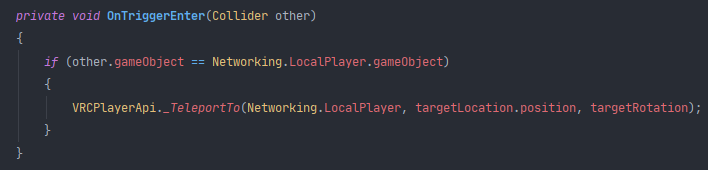 flint urchin
yes, it's a protected object.
But since you are using U#, go to the support channel there. Better support for it there.
You'll find some examples here https://ask.vrchat.com/t/phaxenors-examples/273/27 and https://ask.vrchat.com/t/player-collision-in-udon/428

VRChat Udon Discussion Forum
Player Settings with Collider for On Trigger event. Using this set up, you can use the OnTrigger related stuff above and check if the name matches PlayerCollider and do something if that is detected (This detection is local) DOWNLOAD UdonGraph Prefab UdonSharp Prefab

VRChat Udon Discussion Forum
If you want to make something happen when the player collides with a trigger, e.g. runs into an area or touches some object, you will have to detect that collision. This is the setup that I use: DISCLAIMER: This system has one big advantage: Every Layer that is not “MirrorRef...
onyx ingot
Okay, I'll do that, thanks.
 plush wadi
Anyone her use udon sharp? I'm trying to find a way to get an udonsharp class from within OnCollisionEnter
flint urchin
Please join the Udon# discord for support on that
plush wadi
Tring to find it, is it a channel or link to a new discord? @flint urchin
jaunty schooner
Is it still possible with the 2018 SDK 3 to have drivable vehicles? I thought I heard something about the standard assets not being whitelisted with SDK 3 and I assume those are what are used to make vehicles work. I'm guessing one could create them with UDON as well, but I was looking for a quick easy way to add a wheeled vehicle with good physics.
Also, before I go too far, I've created a new project "3D with extras" which also imports post processing. Is that the right thing to use? I don't know if the most recent version of post processing works in VRChat, but I do want post processing in my world.
plush wadi
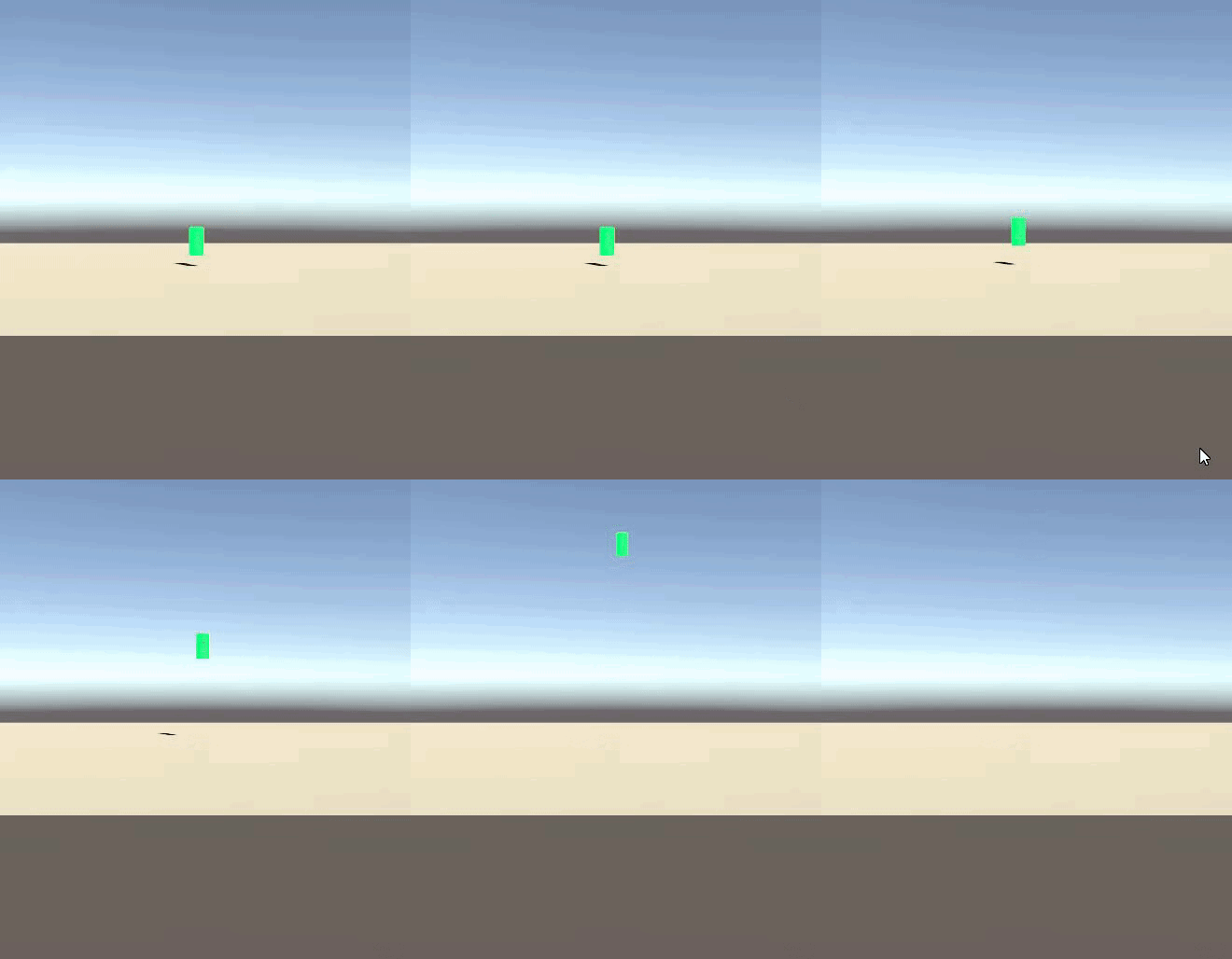
Trying to figure out why this station moves in Unity when interacted with, but not in VRChat:
 sick tangle
hey idk if this is a udon issue with the new locomotion system but when i try to walk into something with no collider at all i get stuck in it and i have to jump in order to move
plush wadi
In the above gif, I use Trigger Interact in unity.
 floral dove
@jaunty schooner yep, there are a few Udon worlds with driveable vehicles like
https://vrchat.com/home/world/wrld_4c412f59-dc47-4953-b647-1be876706807
https://vrchat.com/home/world/wrld_e424bd62-a81f-45b3-a71f-949caf3a3cbf

Version 1․0․1 ǃ VR steering system kart game․
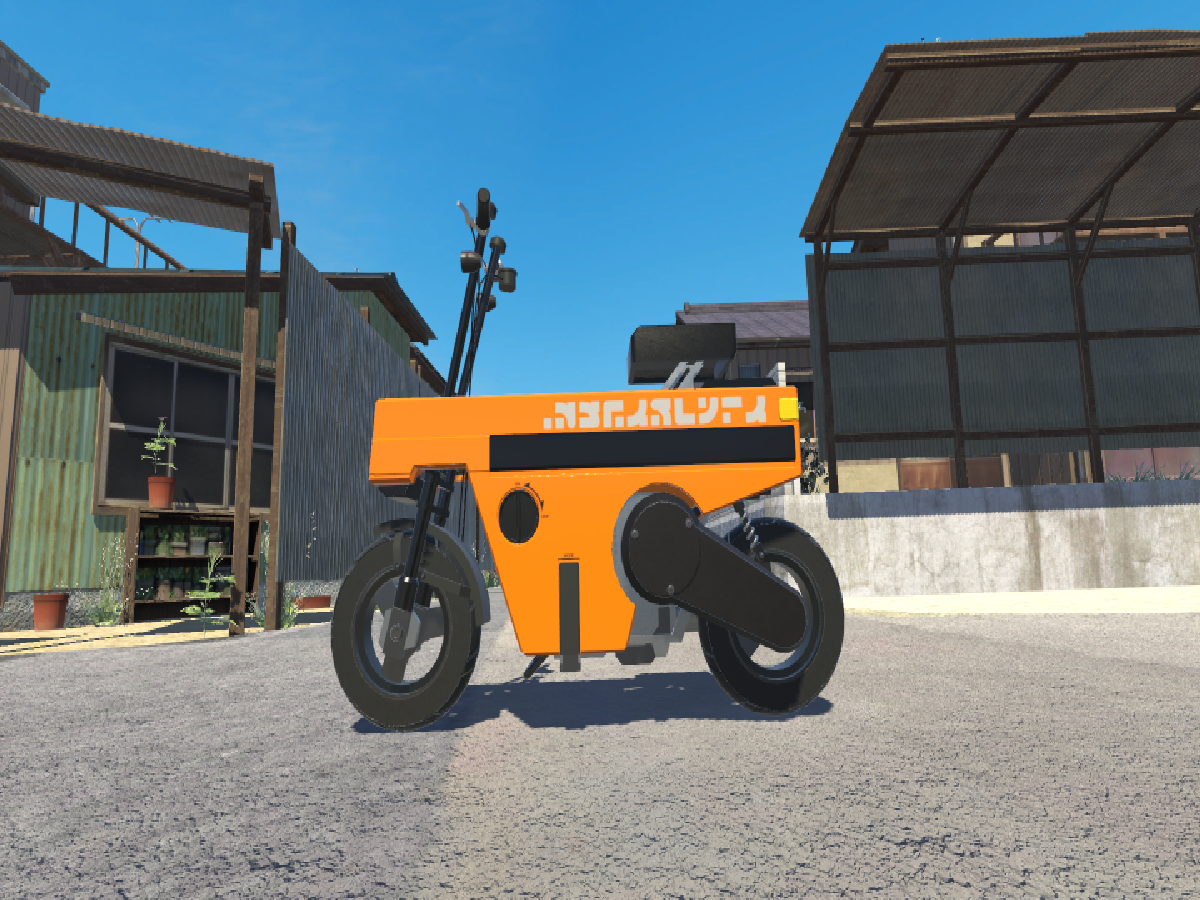
still pretty alpha stuff but it's possible with the existing tools
long rune
It will only get bigger form here on. We will have a fully interactable vehicles soon if not already. :)
jaunty schooner
I'm not looking to do it in Udon, I wanted to know if the way people were doing it before would still work so I don't have to reinvent the wheel. No pun intended!
I want to use SDK 3 so I can use Udon, but I wanted to know if I could still use whatever vehicle assets people were using previously as well.
floral dove
@jaunty schooner you cannot use SDK 2 assets in SDK 3
long rune
I am sure someone could do it without Udon with vast dev knowledge backing them up, but Udon is here to make the process easier.
jaunty schooner
From what I understand, vehicles were made using something called "standard Unity assets" not SDK 2 specifically, so the question is whether those components are still whitelisted. I mean Dynamic Bones isn't SDK 3 either but that still works, right?
I assumed this stuff used like an animator, maybe a vehicle script, and then standard scripts/components for stuff like springs and joints and such, so I don't see why it should no longer work unless they un-whitelisted some of the components?
floral dove
Standard assets are not supported in Udon.
People are making vehicles with Udon, no need for the Standard Assets scripts anymore.
fiery yoke
Well
"no need"
Besides the actual C# scripts being 100 times faster
some Standard Assets scripts were used to do some very fundamental things like Transform manipulation, which is much much slower if you do it for like 100 GameObjects
The overhead of 100 UdonBehaviours running to copy some Transform every frame is much much higher than the C# equivalent.
So saying there is "no need" isnt quite right
floral dove
ok, that's fair @fiery yoke. Have to watch what I say around you 😉
fiery yoke
You know me 😜
floral dove
I'll put it this way - we're confident that people can make amazing things with what we've got in Udon
long rune
People already have 😉
jaunty schooner
Yeah but how long will it take to get us back to where we were? It seems foolish to deny us the use of perfectly good vehicle scripts right now when it could be months before someone makes something that's almost as good, but also less performant. I just wanted to add a quad bike to a world for fun. But I have a ton of other stuff to build out first. So if it's not going to take 30 minutes to implement it then I guess no rideable quad bikes for a few months?
But anyway, since I can't add vehicles for the moment... Post Processing. Should I allow the package manager to update that to 2.3.0? Or will that break it in game?
long rune
The latest ver should be fine.
 compact zephyr
so I want to do a simple thing, making a gun that fires a particle, however this code doesn't work. no sound or particle is emmited, and yes the variables are assigned to to appropriate game objects, any suggestions?
plush wadi
Anyone know why rigidbody physics would work in unity but not in vrchat? I have a cube that flies up correctly in Unity, but does nothing in vrchat. It's using rigidbody.addforce
cedar pawn
For anyone who saw my question about creating basically an "in game microphone" for a player in an Udon world, evidently this is still something that can't be done, but the devs have said their working on giving us a way to change avatar voice falloff
plush wadi
I'm using a planet object with a collider object around it that has an OnCollisionStay() that updates the objects it collides with's rigidbody using addforce.
 proven vessel
Hello, I am trying to put in a mic for stand up and other events in my new world. I am looking for the Udon solution for VRC_PlayerAudioOverride. Any ideas?
fiery yoke
@proven vessel Isnt implemented yet. Cannot be worked around (afaik)
proven vessel
RIP, Thank you.
Ok, Sorry to keep bugging. I was looking around for a the new way to make objects togglable for local players. IE Turn mirror or lights off. (local) I hear there was a video but I have not found it yet. Loving the new system so far. Just bad at learning it lol
floral dove
@proven vessel take a look at the examples and readme in Assets/VRChat Examples. That has an example of a mirror toggle.
proven vessel
Roger that. Thank you.
 high socket
So I've been working on a bigger project, to the point where the node graph got gigantic. Now I get an error message, is there a known issues that Udon wont compile if the node graph is too big? (That's my suspicion from the error message)
AssemblyException: Cannot jump to an unaligned address '0x000016C1'. Jump targets must be 4-byte aligned boundaries.
this lead me to my conclusion about the error I get:
IndexOutOfRangeException: Index was outside the bounds of the array.
VRC.Udon.Editor.ProgramSources.UdonNode.PopulateEdges () (at Assets/Udon/Editor/ProgramSources/UdonGraph/UdonNode.cs:151)
if anyone has any idea please let me know. if no one has a clue, I have to put in a bug report, I guess? because I am pretty much on wits end on what else I could try.
floral dove
@high socket there are some max size limitations. I'd recommend you split your graph up into smaller pieces. Makes it easier to debug that eai, too.
high socket
okay, so that is the problem, thank you very much, now I need figure out what's the best course of action might be then :3
plush wadi
Anyone have a good place to start looking for changing camera effects when underwater? I'm guessing it's a unity camera filter but i have no idea how that's done in VRchat haha.
 hoary bay
Hey! I'm looking to make a world for the first time and I'm having some difficulty figuring out how to set up the spawn point and such
jagged crow
@high socket if your graph is that enormous it's probably worth considering migrating to U#
2020.05.08 23:59:28 Log - [UdonBehaviour] Could not load the program; the UdonBehaviour on 'Placeholder' will not run.
Anyone know what the cuase of this is?
@hoary bay select your VRCWorld prefab, drop a GameObject into this box in the Inspector
then people will spawn at that object's position and rotation
hoary bay
Ah ok, a lot of the tutorials I've found are for SDK2 and not the Udon one so I'm a bit lost on how to start setting stuff
jagged crow
ahh yeah
have a look at the examples folder in sdk3
and the cube series on the forum
hoary bay
Yea I got the cube spinning pretty easily, I have a good background in coding but not in Unity
jagged crow
ooh same boat here
the "player mod" stuff that is mentioned in sdk2 tutorials has been moved to an udon behaviour on the vrcworld prefab
if you scroll down in the inspector you can set the jump strength and walk/run speed
hoary bay
How do I add the VRCWorld Node to my scene?
jagged crow
oh drag the prefab from your assets window into your hierarchy window
if you cant find it in assets, just type vrcworld into the search bar
you want the blue cube
hoary bay
Nice!! So if I move the world node it'll change the spawn?
Or do I need to make an invisible object and set it to that?
jagged crow
yeah by default the spawn point is set to wherever the vrcworld prefab is
but you can also make a new object for it
thats generally done if you want multiple spawn points
(Change Size to more than 1 in the spawns array, then you can drag more objects into it that will work as spawn points)
hoary bay
Ahh so that would be if I'm making a world with multiple areas
Am I taking that in correct?
jagged crow
not necessarily, they could all be in the same location but just a meter or so away from each other
so if multiple people join at once they don't spawn inside each other's heads
jagged crow
for multiple areas you can use udon to teleport people
haha yeah that's always a safe bet
my world is still just a set of three platforms floating in space
hoary bay
I was thinking of making a room with things referencing stuff I've watched recently but I'm a little ways away from figuring out how to do that lol
jagged crow
:D
oh protip for when you want to make an actual world: Right click in your hierarchy, then 3D Object > Terrain
it gives you a set of brushes to paint terrain with
jagged crow
go to the lighting window, can't remember where it is by default
possibly next to inspector
put a material into Skybox Material
hoary bay
Nice nice!
Most of my friends were like "Ooo free time let's learn how to make avatars". Me? I'm special so I want a world XD
jagged crow
hahaha
hoary bay
Ah shadows, that's a bit frustrating lol
jagged crow
yeah I haven't learned any of the lighting stuff yet, seems kinda complicated
somehow I set my world to be globally illuminated
hoary bay
"Somehow" That's reassuring XD
jagged crow
hahah
 fallen prawn
1 Lighting instruction
- Add a directional light
- Add 8 light probe
- Bake
Done!
jagged crow
what's a light probe
jagged crow
I think the sun is a directional light
fallen prawn
It's somewhat off topic but let say.
It's a lighting data from probe to probe on Blank space.
if you use baked only light without light probe
non-lightmap static object(including player)'ll gone black (Or ambient color).
jagged crow
ooo yeah I had that problem
hoary bay
So would I add the 8 light probe?
fallen prawn
go to #world-lighting if want to talk about lighting or TheHelpfulHelper will be angry.
hoary bay
Oh no!
fallen prawn
oh f***
twilit breach
Anybody know what this error is about?
it happens during start when all of the Udon Behaviored objects are being assigned a network owner the first time
chilly aspen
How many objects are there?
sick tangle
hey im trying to get a door open and close in my world its not whanting to work i think is somthing in the animatior i screwed up but im not entierly shure
twilit breach
a lot, do we have a limit on network owned objects?
chilly aspen
I believe somewhere earlier in the chat, someone said the limit was around a dozen I think.
raven peak

testing a bit with network delay #madewithudon doesn't appear reliable for movement delay but maybe for event delay. https://t.co/1FYeTAroBF
Twitter
 dreamy sentinel
I'm assuming there's no way currently to make an in game audio phone system? Unity only allows 1 listener per scene so you can't just put an extra listener on the phone of people you're calling, and you can't touch the listener of the player (as far as I'm aware) so you can't just temporarily teleport the listener to the phone of the person you're calling. My only other thought would be if there was a way to keep the extra listeners separate (the same way you can have multiple people in an world) but instead of outputting directly to a player they output to another audio source, the phone of the person that was calling, but changing where a listener outputs doesn't seem possible either. I just want to make sure I'm not missing something obvious before giving up on this idea, still new to udon and newish to unity.
 smoky acorn
can i use SDK2 for unity 2018?
jagged crow
2020.05.08 23:59:28 Log - [UdonBehaviour] Could not load the program; the UdonBehaviour on 'Placeholder' will not run.
Anyone know what causes that?
chilly aspen
I got that earlier today, is that where the Udon Behaviour Scripts stop working?
chilly aspen
I had to create a new project and export all the assets out of the old one into the new one.
jagged crow
o o f
chilly aspen
Got the behaviours to work again afterward. Export takes around 10 minutes.
jagged crow
is there an automated thing for that
chilly aspen
Assets > Export Package > All (Include Dependencies). New Project > Import VRChat SDK > Import U# > Import Old Project Unity Package > Load Scene.
jagged crow
thanks :D
 regal geyser
In my world I can spawn a prefab object with a script attached to it which destroys the object around 3 seconds after it spawning. When testing the world locally, the script works fine, but when I upload the world to vrchat the script on the spawned object does not seem to work.
sick tangle
@regal geyser just dupicate the udon script and replace it i had the same problom
scarlet lake
whats udon in vr
sick tangle
udon allows a lot more posabilatys to make stuff in worlds
regal geyser
I'll try that, thanks👍
sick tangle
no prob
regal geyser
tried the duplicating method, but it still doesn't seem to work when uploaded to the server...
chilly aspen
Are you using the VRChat Instantiate method?
regal geyser
yes "var Shell = VRCInstantiate(shell);"
chilly aspen
I remember reading somewhere stating that method does not currently work for creating objects with scripts attached to them.
The solution at the moment was to pre-generate the meshes and have their transformation change to give the illusion it is being created/destroyed.
regal geyser
the object spawns just fine, but the script attached to that object doesn't
soo... is it best to wait until that gets fixed?
chilly aspen
If pre-generating the meshes isn't an option, probably yes.
 peak brook
Instantiating is broken, and currently the best way to get around it is to just use object pooling
regal geyser
how exactly would the pre-generating work in comparison to instantiating the object? Do I need to add them into the scene beforehand and then change the transform to the spawn location?
proven vessel
Hello, I am looking to make objects in my world able to be picked up and sat back down. I use the VRC Pickup (script) and I think they are falling past my floors. I am still new to Udon and world making all together. Any help would be appreciated
chilly aspen
Is the blue ray that appears for VR users when they point at a canvas accessible in Udon? Seems the bone coordinates of the starting position of that ray is not in HumanBodyBones.
fiery yoke
@regal geyser You cannot instantiate objects as prefabs. If you instantiate them from the scene it should be fine. Just parent all the objects you want to instantiate under a disabled gameobject, so they dont actually run themselves.
@proven vessel Make sure your colliders are working correctly in Playmode
@chilly aspen afaik we dont have access to that at all. I think the starting point is TrackingData Left/Right hand tho, not sure
hushed gazelle
Do I need to store Udon graphs somewhere particular in my Assets folder to apply them to a World?
vale forum
Is it true that I don't need a background in programming to work easily with Udon? A friend of mine said that I'm likely to struggle with the node graph because I don't have a background in programming terminology
floral dove
@vale forum the node graph can make it easier, but right now all the nodes represent c# code so it helps to learn some programming.
@hushed gazelle - no, anywhere in your project is fine for the graphs as long as they are applied to UdonBehaviours in your scene.
vale forum
@floral dove Thank you for your answer! I think I will go ahead and start by learning the basics of C#, then.
floral dove
Sure! Some basic Unity development tutorials will help you understand what the classes are and how they interact.
vale forum
@floral dove Great! I'm looking at doing this one: https://www.youtube.com/watch?v=7gX-M26Oj1Y which seems to run through what you're talking about

Get My Complete C# Course Here: http://bit.ly/31UgmOB
( 25+ Hours of Video Content )
|------------- ( Click On Show More ) ---------------- |
More Game Development Courses:
- Unity By Example: 20+ Mini Projects (20+ Hours):
https://www.udemy.com/unity-game-development-by-...
plush wadi
Is there a way to make a gameobject visisble for just the local player?
i know mirrors seem to do it, but how can you do it with any object? is there a function?
undone tree
Yo~
Got a problem creating a state machine.
Like i works fine but i cant seem to use it on the armature (animator of it) itself. Just doesnt work.
When I put it on some other gameobject or the hips or sth. it works.
So confusing why the armature is behaving wrong
plush wadi
Another question. I have a gameobject that I want to set active, and then set to follow a player. Currently, if I just have it follow the player using the Update() function without it ever being disabled it works. But if I have it start disabled, and then enable to gameobject, it seems like the update function is not being hit. Is this a known issue?
hushed gazelle
@floral dove Ahhh, THAT'S what I was missing. I figured there was somewhere I had to actually apply the damn thing.
floral dove
@hushed gazelle oh good! Make sure to check out the examples in Assets/VRChat Examples to see them in action for more guidance.
 manic plover
I'm having a problem getting SDK3 setup at all. These errors keep popping up and I'm unable to get the control panel to show at all to begin building the world
Anybody have any ideas what may cause this? I tried reinstalling packages, deleting the Unity Project's Library folder and starting over, restarting Unity outright, and none of those seemed to help. The only option in the VRCSDK tab is to clear the cache, which does nothing also
viral mist
That's probably because you are trying to put your project where SDK2 was existing before
Not sure if this will work but
Delete your VRCSDK
Open Edit - Project Settings - Player and in the "Other settings" Find "Scripting Define Symbols" and make sure there is no references to SDK or UDON before you try importing a new one
manic plover
Yeah, unfortunately, I did. For some reason, player jumping wasn't working on VRCSDK2, so that was the only reason I had it imported earlier. I'll give this a shot and see.
Looks like that did the trick. Thanks!
idle kite
anyone have a udon graph example that lets you respawn a object? say if it goes missing and someone wants to respawn it back in it's original location?
plush wadi

I'm trying to create a collider around a player based on their height, but it looks like the height values won't stay cosnsistent for some reason
zealous mason
which height values?
sick tangle
@fiery yoke dose your udon collection on github have a simple door script?
fiery yoke
No it does not. I usually do more complex systems.
I might add some simple stuff later
sick tangle
Ok I’m having trouble doing the basics still trying to get my head around all the scripting stuff
Trying to make a lot of simple stuff with udon for my home world to make it feel super interactive
plush wadi
Well, all this work may actually be uselsess... is there no way in udon to stop yourself from coliding with something and being thrown around, but to let other players interact with it? Maybe something with layers?
zealous mason
a vrc_pickup? it shouldn't collide with a player and is interactable, what are you trying to do?
plush wadi
I'm trying to make a collider of sorts around the player that can be interacted with in different ways. For now, maybe just being able to click on someone to access a menu or something.
setting the collider to trigger only may also work now that i look

this is what I have, it's a collider that changes shape according to your avi
heck could be used to make scaling UIs and costumes hehe
jagged crow
@plush wadi put it on a layer that collides with player but not playerlocal
plush wadi
So is there a guide for the vrchat layers?
i've been looking for it
It looks like just making it a trigger should also work, since I don't want it to have physics coliding anyway
turbid hull
Anyone know how to do occlusion culling?
plush wadi
what's the method of getting a playerAPI from OnTriggerStay() ?
can you get it from the gameobject somehow?
raven peak
no buts its currently a request to be able to be done.
plush wadi
so there's no way to tell if you're colliding with something?
is there maybe a way to get a full list of players? maybe I could use some collider comparisons
raven peak
The issue is vrchat has the player as a protected item. So if you try and pull information from the collision data about the player it will return null.
What most people are doing is having a collider follow the player and detect that instead of the player.
plush wadi
yea, which would be dandy if there was a guide explaining this
sadly it seems the lack of any docs is a huge gate for anyone who wants to get into this stuff
    VRCPlayerApi collidedPlayer = null;
    float shortestCurrentDistance = 100000000;
    foreach(VRCPlayerApi player in VRCPlayerApi.AllPlayers) {
      float distanceFromPlayerToCollision = Vector3.Distance(player.GetPosition(), other.transform.position);
      if (distanceFromPlayerToCollision < shortestCurrentDistance) {
        collidedPlayer = player;
      }
    }
}```will this not work then?
raven peak
There is a doc on what is available in udon.
plush wadi
Yea, but none on how to do anything
raven peak
Sadly thats how coding usually goes.
jagged crow
Yeaaah udon's documentation leaves a heck of a lot to be desired lol
plush wadi
Especially given how udon is a language of caveats i'd expect a ton of it
raven peak
I dont think you can use the all players for player api.
plush wadi
I mean, if you make a language to literally limit an existing lanugage, you should at least document how you work around those limitations
zealous mason
This is how I did a 'player collision' It looks for a point on the player and does something if that point is within a collider, I use it to move people on a conveyor belt 🙂
plush wadi
Yea I'm not using noodles
raven peak
I did some experiments with vrchats classes. https://github.com/jetdog8808/Udon-playground/tree/master/Assets/jetdogs-prefabs-udon/U%23 scripts
GitHub
personal experiments. Contribute to jetdog8808/Udon-playground development by creating an account on GitHub.
plush wadi
Wow this is atrocious
I'm blown away that people bother making the things they do in this, it feels like it's built to inhibit creation
raven peak
I put this together. https://github.com/jetdog8808/Udon-playground/blob/master/Assets/jetdogs-prefabs-udon/U%23 scripts/usersinworld.cs
GitHub
personal experiments. Contribute to jetdog8808/Udon-playground development by creating an account on GitHub.
It makes a array of players and displays them.
plush wadi
It seems halarious to me the soluition to most things in this game is going to be manually putting a suit on a player in every world they enter XD
raven peak
The are wanting to work on the functionality and over time make it more user friendly.
zealous mason
Udons only a few weeks old man, give it time
raven peak
Also users will have had time working with this and information/ docs will also slowly come out.
plush wadi
It feels the oposite to me, I mean they focused on a UI programing interface over making the underlying programming work
raven peak
(This is alot better then the original version)
plush wadi
I'm confused why they didn't just release a limited C# library
they basically wrote a Unity assembly language to avoid doing just that...
raven peak
How do you manage blocking players from grabbing gameobjects they should not get?
jagged crow
yep move the game object to a layer that doesn't collide with localplayer
plush wadi
I've used unity for years and years and just so much about udon seems like it was made to make unity harder to use. That's just my opinion so far though.
raven peak
But you are just limiting the code they have access to not checking what they do with it.
plush wadi
I mean that's all they're doing now
the client already removes code items
Also they need error messages omg
why are there none???
raven peak
Do you have debug on?
plush wadi
Yeh
raven peak

GitHub
An experimental compiler for compiling C# to Udon assembly - Merlin-san/UdonSharp
plush wadi
Also how do people usually do debugging with multiple avitars? Do you just need to get a friend to help?
raven peak
I use a second account
plush wadi
I mean errors like VRCHat randomly dropping coliders
zealous mason
I bother my friends yes 🙂
raven peak
It would be nice to be given a warning about the udon emulator blocking you from accessing content.
plush wadi
honestly, it should have a log for every single thing that doesn't make it from unity, expected or not
otherwise there's no way to debug it
plush wadi
I'm trying to make it so gravity is weaker when people are touching water, so guess I'm just going to have my Sun object hand out "swimsuit" HUDs that follow them on load in
oh god what did I do
@raven peak
any idea why i don't have the udon sharp section?
was trying to set up the debugging but it's not there for me
plush wadi
I donwloaded it a few days ago
raven peak
Should be then.
 summer breach
are there any good vehicle tutorials for Udon avail? I'm building a plane. Got a throttle and stick off the forums and a plane model - not sure how to go about handling acceleration and rotation. Can we make stuff rigid body and apply force?
or examples
plush wadi
If you have a collider on the player can they not interact with anything?
I'm just getting really confused how to do anything related to avatars and collision at all. Does anyone have a working example with some kind of "avatar collider manager"?
plush wadi
Another question. What alternate ways does udon have to get gameobjects. I noticed "FindGameObjectsWithTag" is not implemented. Is there a way for a prefab to get an object without some hardcoded intermediate?
I'm trying to make a dispenser that can give out any kind of hud I make in the future, but one of my huds needs the "water" gameobject in order to work. Since I'm instantiating it, I can't drag and drop the scene object to the prefab, so I was looking for a way to intrinsically grab the "water" object from the scene and set it there.
smoky acorn
can i use my unity 2017 world to unity 2018 udon?
twilit breach
You can transfer from unity 2017 to 2018 and keep assets and scripts, but you cant transfer from a 2017 SDK2 trigger world to Udon as they entirely change how scripts are handled
this is how to transfer if it applies, either way make a back-up of your entire project folder
VRChat
Migrating your project from Unity 2017 to 2018 LTS isn't as difficult as you might think! Here's a guide providing each step in detail.
 hoary ocean
any starter guides? I have been breaking my brain trying to make one object refer to another
plush wadi
Does anyone know why only one player in a world would be able to see text and other objects?
hoary ocean
is it only the first one to join?
plush wadi
yea
sometimes... i'm still testing. But I'm also able to get it to show up only for the person who causes it to spawn
hoary ocean
I was thinking it might've been pointing to the master of the room. but I'm speaking out of old vrc_trigger experience.
plush wadi
I'm using udon... and i think it's several buts but. First bug:
Each player who spawns in should get a "swim hud" attached to them. I've gotten this to work with me entering first, and then another test account entering.
The weird thing is, on each account, I can see the other's debug text, but it's wrong. It's right for the first person view of it, but the text is different for someone else looking at it.
best illustrated here
An ominous sign though is I have a signpost set up that detects the joining player and displays a message to show the HUD was received. It seems to show the wrong name sometimes though which is really weird
This was shown to user MeepTest (pileofmeeps is the account already in the world)
and that message can only show if the hud is quipped to that player, and it is being attached, but then it says the wrong name...
chilly aspen
Needs UdonSynced(UdonSyncMode.None) and Networking.SetOwner methods
chilly aspen
View networking example: https://discordapp.com/channels/189511567539306508/657394772603830360/707837915719270460
mortal star
Is there a way to get Screen resolution in VRChat?
fiery yoke
@mortal star Use some camera (preferably the main camera) and call Camera.get pixelWidth/Height
mortal star
Ok
I was following a tutorial on how to make portals in Unity and I have a problem with creating a Render texture (which seems not to be possible?)
I saw that someone made a portal gun so it must be possible to make a portal x)
fiery yoke
There is ways to do that and I tried it, but I cant recommend it. Render Textures in VR means double rendering literally everything. Not good.
There is better ways to do Portal rendering, heres my version of it:
https://twitter.com/TheHelpfulHelp/status/1257792903520423936


Portals that work with Avatars ^^
Not perfect. But close enough😅
#VRChat #madewithudon https://t.co/oa2qJwTfDb
Twitter
mortal star
Cool
This is something that I wanted for a future world, A door would open to portal hub, then it will close with a possible selection to multiple places
chilly aspen
Anyone have networking examples in UdonSharp they can share? Looking to learn how things piece together.
scarlet lake
Networking is still wonky
twilit breach
I don't have any examples I can share, but I've gotten a pretty good grasp on a lot of the way it works in udon if you have questions
twilit breach
For anyone using VRC_Pickup on objects in their world. Do you notice that held objects phase through walls and also jitter in hand? I thought this was just how it worked in the Udon kit but I was playing with another world creator and he commented on how mine are wonky and showed me his. Has anyone else had this issue?
I guess what I'm asking is do pickups solidly collider with walls and firmly stay in grasp
floral dove
@chilly aspen the VRChat Examples folder has some networking examples.
twilit breach
So big discovery for me, might help others. If you teleport a player their vrc_pickup grip becomes jittery and the objects they hold phase through walls. If anyone has felt like pickups in SDK2 or 3 have been strange since the update it is surrounding teleporting the player messing up the hand grips or something. either way if you can avoid teleporting it will fix your pickups
plush wadi
So i've never done networking stuff before and didn't know I needed to sync things between players. Is there a good guide to start learning how this stuff works in udon?
I just guess I don't know what's expected to instantiate a new object in a world for all players.
fiery yoke
Networking in VRChat isnt complicated in theory. Everything is local. Whats called "synchronising" means that you send a player your data, and they then update their data with yours. That automatically happens for everything that is synchronised (namely synced variables and player positions) by the owner. The owner sends their data to everyone in the instance. Thats really all there is too it.
However doing that correctly in practice is a whole different story.
plush wadi
Yea that sounds really bad tbh
So you need to find out who the owner is, and give them some kind of manager to manage how everyone else sees things?
fiery yoke
No that is all done by VRChat
If you have a synced variable then there is always an owner
by default that is the instance master which is the player that has been in the instance the longest
But you can also manually set the owner to be someone else
plush wadi
So whenever an object is instantiated, it has an owner (by default the person who started the instance) and only they can see it, until you somehow sync the object to every other player?
fiery yoke
No. Example:
You have a pickup object that has "Synchronise Position". The owner is (by default) the master. That is the person that has been in the instance the longest. So if the old master leaves there will be a new master. If the master now moves the object they will send the position data to everyone else. Thats why you see objects move when someone moves them. If someone else now pickups the object they automatically become the owner (that is a feature of pickups). Now they send everyone their data. If youre not the owner of an object you will not send any data and your data will be overwritten by the owners data.
plush wadi
woa wait what's "Synchronise Position"?
fiery yoke
every UdonBehaviour has a checkbox for that
plush wadi
So why when I instantiate objects can only one player see them?
fiery yoke
Right now instantiation is not networked
plush wadi
So it's just impossible?
fiery yoke
Right now yes
plush wadi
Wow...
But wait... that doesn't make sense
I instanciated the HUDS in my above screenshots and they show up for the individual player
https://discordapp.com/channels/189511567539306508/657394772603830360/708940970334355537
These are handed out as prefabs via:
  /// <summary>
  /// Equip a new hud when the player joins
  /// </summary>
  /// <param name="player"></param>
  public override void OnPlayerJoined(VRCPlayerApi player) {
    if (dispenseOnJoin) {
      Debug.Log("Add To Dispenser Queue" + player.displayName);
      addToQueue(player);
    }
}```It makes a new prefab and attaches it to the joined player.
fiery yoke
If you instantiate an object locally for all players it will appear for everyone. But that doesnt mean that its networked. The objects have no "link" between them
plush wadi
is there a way to instantiate it locally for just one player?
or do you just need to use 'layers'?
fiery yoke
OnPlayerJoined is an event that happens for everyone when a player joins the instance.
That is not the correct event for doing something like that. You would use Start
plush wadi
Yea I did figure that much, I noticed i was getting 4 of em instead of 2
fiery yoke
Trying to make something networked/multiplayer in VRC without a good understanding of the Peer-to-peer networking architecture will lead to a lot of problems and confusion...
plush wadi
Is there a P2P guide for udon and vrchat?
fiery yoke
I dont think there is a specific guide on that as its more of a general concept and not really specific to VRChat (except for a few things)
plush wadi
It seems VRChat is a broken version of the concept though
fiery yoke
In what way?
plush wadi
I'm not sure cause there's no docs, but I keep getting told stuff just doesn't work yet lol
I just want to make a simple UI, and it seems impossible from the level of documentation atm
fiery yoke
Well yeah Udon is still an alpha.
plush wadi
alphas usually have some documentation
fiery yoke
And the only reason why people are able to make a lot of stuff, is because Udon is still very closely related to Unity/C#. And a lot of people that make stuff in Udon have a lot of experience for the VRC specific things from months of developing things in SDK2.
plush wadi
I've been using unity and C# for like 7 years and Udon so far is the least intuitive thing I've encountered
It seems designed to make unity harder to use in every way I'm just baffled with everything I do
So, when a world loads for the first time, all objects in the world are assigned ownership to the first player in. Then when the next player joins, "start" runs on all gameobjects, and anything created gets their ownership, or do you need to set it?
fiery yoke
Ownership is completely handled by VRChat
Unless you want to transfer ownership manuallly
plush wadi
How is it handled?
So say I want to attach a HUD to each player only they can see when they enter the world. This HUD follows them.
In start, I do something like this:
      Debug.Log("Add To Dispenser Queue" + player.displayName);
      GameObject hudObject = VRCInstantiate(hudToDispense);
      int index = insertHubObjectIntoQueue(hudObject);
      playerQueue[index] = player;
      Debug.Log(playerQueue[index].displayName + " Added To Dispenser Queue at " + index.ToString());
      playersWaiting++;
}```and this is the queue running on update
fiery yoke
I have no idea what youre doing there. But Start runs for every player locally on the UdonBehaviour when it starts. Its honestly so self explanatory that I dont know how to put it simpler.
plush wadi
I don't think that's where my issue is.
I understand that.
But when you call instanciate, does it only instanciate an object for the local player then?
fiery yoke
It depends who tells what to whom.
If you tell everyone to instantiate it, then it will be instantiate for everyone.
If you dont tell anyone to instantiate it, then it will only be instantiate for you.
In all cases it will be instantiated locally.
plush wadi
What's the difference between telling everyone to, and not telling anyone to? That's what I don't get
fiery yoke
If you just use VRCInstantiate then you dont tell anyone anything
plush wadi
And it's client only? Cool
fiery yoke
if you send a custom network event to everyone that calls a method which then instantiates something, then you tell everyone to instantiate something
VRCInstantiate is currently local-client only yes
plush wadi
So what's this network event? Is that a VRCmethod/class of some kind?
fiery yoke
Its a Udon thing yes. UdonBehaviour.SendCustomNetworkEvent
plush wadi
So wait... if VRCInstantiate is called in Start, it will only instanciate client side for the person who's client called the start function,
but what if it's instantiated in Update or Interact?
I'm guessing they're both client side, but Instantiate is only called on the client that interacts, while update is called for everyone right?
That means, if you instantiate in update, you get a bunch of unlinked objects, each owned by a separate client, whereas in Start and Interact, you'll always get only one gameobject on the client that started or interacted
am I getting this right?
fiery yoke
Not really
Essentially all methods are local. There is no one telling you to Update. That is just something that happens by the game engine. And because it happens for everyone it may seem like its not local. Even "OnPlayerJoined" is local. No one tells you to call that method/event. However it happens for everyone at the same time. Which again may make it seem like its not local.
plush wadi
do you mean "client side" by local?
If so I don't see how what you said is different from what I said...
fiery yoke
Well in the context of VRChat it doesnt really make sense to say "client side" since there is no client-server relationship
plush wadi
I still don't see how that changes what I said though
fiery yoke
You are right. But I dont see what your point was. If you instantiate something in Update ofcourse youre gonna make a lot of objects, versus when you do it only once in Start because start is only called once.
plush wadi
If I (person B) join a world with person A in it:
OnPlayerJoined(B) is called for all gameobjects on person A's client
OnPlayerJoined(A) is called for all gameobjects on person B's client
OnPlayerJoined(B) is called for all gameobjects on person B's client
Is that correct?
So if there is an Instanciate in OnPlayerJoined, 3 new gameobjects are created. 2 of which player B can see, and one of which player A can see.
Two of the objects will be the same object, just one only seen by A and one only seen by B?
I'm asking, if you use start instead:
If I (person B) join a world with person A in it:
Start(Network.LocalPlayer = B) is called for all gameobjects for player B's client
So only player B's client will see/create the object for just them, and player A will never hit that start (they assumedly already have) and thus not see a new object created for player B
twilit breach
scratch all that thought
and just assume whenever any player joins
its as if each player did an "on interact" event locally
plush wadi
I have no idea what you mean
twilit breach
for the on player joined
plush wadi
can you give a full contextual example like mine maybe?
twilit breach
its not that complicated tho?
plush wadi
It is to me, sorry to say
twilit breach
what happens if one client clicks an interact?
it only happens in their client, whatever code
same thing for on player joined, only it is set off each time a new person joins
twilit breach
no you think its adding multiple calls and networking stuff
plush wadi
what? where?
twilit breach
its literally just locally running the script that comes after "on player joined"
twilit breach
If I (person B) join a world with person A in it:
OnPlayerJoined(B) is called for all gameobjects on person A's client
OnPlayerJoined(A) is called for all gameobjects on person B's client
OnPlayerJoined(B) is called for all gameobjects on person B's client
If I (person B) join a world with person A in it: OnPlayerJoined is called for all gameobjects on person A and Bs clients
plush wadi
that's what I said yes
twilit breach
...
plush wadi
but OnPlayerJoined(A) is also called on player Bs client
plush wadi
so there's no players joining? I don't understand what you mean
plush wadi
OnPlayerJoined() has a player as a param
twilit breach
idk what to tell you
plush wadi
I'm not being defensive I just don't get what you're saying or how it differs.
"If I (person B) join a world with person A in it: OnPlayerJoined is called for all gameobjects on person A and Bs clients"
seems to be the same as:
OnPlayerJoined(B) is called for all gameobjects on person A's client
OnPlayerJoined(B) is called for all gameobjects on person B's client
to me. What's the part i'm getting wrong?
fiery yoke
No thats right
plush wadi
and OnPlayerJoined(A) is called for all gameobjects on person B's client because person B's client needs to load person A's avatar right?
fiery yoke
When you join an instance, for you OnPlayerJoined is called once for all players in the instance plus yourself.
However for everyone else its only called once with you as the player parameter
plush wadi
Yup, makes sense. I'm just trying to understand how instanciating works for the client atm. I think i'm getting it
Now I need to understand how to instanciate the same object for 2 clients and sync them as one object.
Interact() is only called by the client that interacts right? It's not called once for all user clients right?
fiery yoke
You cant
Right now its impossible to do that because VRChat did not implement networked instantiation yet
plush wadi
Thanks all for helping me understand this. I'm a very hands on learner, but I have read a lot of the docs and have unity c# experience... I just haven't done much P2P networking and VRC seems to have some buggy caveats atm
So what I need to understand next is how to make an object appear as the same object for all players.
twilit breach
have it in scene and teleport it
plush wadi
So... if an object is in the scene to start, how do all the clients see it? Is it a different type of object or something?
twilit breach
it has a netID
plush wadi
I think I remember you saying the server gives the object an 'owner player' who controls the master transform etc seen by everyone... but how is this a thing?
fiery yoke
Networking works by giving each object an ID. All clients have to agree on that ID
fiery yoke
When an object is in the scene the Networking part of VRChat knows what object it is and it retrieves the ID from the Photon Server. If you instantiate an object locally you never tell the Photon server to assign an ID hence why other players dont know about it and cant communicate with each other
plush wadi
So what I should do is, hide these huds in a pool. When a user wants to instanciate a new hud (one that all users can see on them) then I want to set that gameobject to active, and set the Network.SetOwner() of the hud to the user i'm attaching it to?
twilit breach
so you'd like the huds to only be locally visible, but have an option to let others see them?
plush wadi
    playerQueue = new VRCPlayerApi[MaxQueueSize];
    hudQueue = new GameObject[MaxQueueSize];
    // if we want to dispense the hud when the player joins, we give it to them on the load of this script.
    if (dispenseOnJoin) {
      Debug.Log("Add To Dispenser Queue" + Networking.LocalPlayer.displayName);
      addToQueue(Networking.LocalPlayer);
    }
  }```

```  /// <summary>
  /// Equip this hud to a player
  /// </summary>
  /// <param name="player"></param>
  public void equipTo(VRCPlayerApi player) {
    if (player != null) {
      equipedPlayer = player;
      Networking.SetOwner(player, gameObject);
      hudItems.SetActive(true);
      isActive = true;
    }
}```So I'm actually trying to figure out how to make 2 different types of huds.
One only the local user can see, and a different kind anyone can see on the player.
I'm trying to lean the difference between how to make the two types work. Sorry if my learning methods are odd
twilit breach
so you want anything you use already in scene, since we can't network instantiate. just keep that thought process until they patch it