#udon-general
59 messages · Page 12 of 1
 zenith river
 flint urchin
we can't get the player camera
You can get the head tracking data though
https://github.com/Merlin-san/UdonSharp/wiki/vrchat-api#vrchatplayerapi
Look at GetTrackingData
Also do recommend the U# discord for support when using that instead of the graph
zenith river
👌 thanks phaxe
 jaunty hare
Is there a site for udon prefabs like vrcprefabs?
 covert ingot
 jaunty hare
thancc
 rough delta
So I am making a world and I was wondering how to make a simple VR trigger cause I couldn't find it in the vrc3
flint urchin
There is no "Triggers" in SDK3
 acoustic delta
You either have to choose SDK2 (Triggers) or SDK3 (Udon)
 tepid grove
Does anyone know the ETA on videoplayer support in SDK3?
flint urchin
No ETA, but they do want to make it right for Udon, so best wait for them to do it properly than rush it 🙂
 shy plaza
Is Udon# associated with anything in regards to Udon's official development or is it just a name of Merlin's compiler?
flint urchin
It's just the name of Merlin's Compiler
shy plaza
Got it, thanks.
zenith river
is there a way to test udon scripts that use playerapi, this one uses tracking data for the head, but having to launch vrc for each test takes a lot of time :^/
 boreal plaza
If possible, Is there a cool way to connect world music to some sort of playlist online? Wouldnt wanna have to upload bunch of song ya know?
I should probably look into streaming. havnt tried making anything liek that yet
 olive tiger
I imagine GoToUdon would eventually reach that point bahka, if it hasn't already. Dunno not used it too much.
 tender moth
Hey all. I'm fairly new to udon and I'm having trouble creating a spin the bottle game. I tried following their cube spinning tutorial and trying to make tweaks but nothing seems to be working
 fallen prawn
describe what did you do.
rough delta
Is it easy to make simple on off botton in udon
 undone tree
hey simple question.
Going through the tutorial videos of Udon and on the 5th with the Master and Slave Cubes I encounter a problem with Variables.
Like it seems like a rly dumb bug to me and it shouldnt happen so maybe someone knows something.
Simple: 3 Variables.
Creating a Variable Get.
Getter cant choose between these 3 but has one fixed variable... like nah this is not how a simple Getter should work. Did I lock something?
ok i fixed it..... like i feel at work... getting fixes by doing dumb not related stuff.
Fix: Activating and deavtivating Playmode
 trail hazel
i seem to have some really gnarly issue regarding syncing strings
i'm trying to sync a bunch of sequential data but at the moment it doesn't seem udon supports syncing arrays so i'm trying to serialize and sync using a string
but when i attempt to do this after a short time the udonbehavior stops for everyone who isn't the owner
this includes it no longer syncing the position
this only happens when networked, so i tried to diagnose by looking at the vrchat logs
which gave me this interesting specimen of an error https://hastebin.com/anemacanad
this doesn't seem to be encoding issues either, it's just the byte sequence C7 85 C7 85 C7 84 C7 84 repeated
my suspicion is something bad is happening internally wrt the management of how the variable is synced
ArgumentOutOfRangeException: Specified argument was out of the range of valid values. and Too many elements in Vector make me think some sync queue is being overwhelmed, but this seems to happen no matter how slowly i attempt to change things
 twilit breach
I'm not 100% at understanding all this stuff but have you seen this and read the comments at the bottom? some good info there https://ask.vrchat.com/t/how-to-sync-with-udon/449/3

VRChat Udon Discussion Forum
Just in case it isn’t clear. Literally all you have to do to sync the position is check the box. Step by step picking up objects and syncing them: Make sure it has a collider and a mesh renderer Attach the VRC_Pickup script from add component Add an Udon Behaviour from Add ...
also there was a post elsewhere regarding the status of max synced variables that might help you but I don't remember where saw it
trail hazel
synchronize position is ticked
the object stops synchronizing when i try to transport data on it
as in
the object syncs from the owner to everyone else when the world is loaded
when the object is used (OnPickupUseDown), i transfer data from the owner to everyone else serialized in a string
when this happens, a number of side effects occur:
- the position of the object no longer syncs (it just gets stuck in place, disconnecting it from the hand of whoever is holding it)
- the object is permanently considered "held" by vrchat (even if the other player drops it, the player for who it is frozen cannot pick up the object or interact with it in any way)
twilit breach
I'd shy away from VRC_Pickups on more fancy things. Instead of having the pickup (because the person who picks it up is owner, and they can sync I assume is the game plan), try to add a simple script where on pickup you transfer ownership of a blank object with the synced variable scripts. then have the on pickup use send out events to said "owned" object that is unrelated to the pickup
The pickup script and then sync checkboxes have some kind of interesting code, I can't see it but I've noted multiple things that behave unexpectedly with them
also the comments in that post I linked have a comment from a VRC team member stating strings are the least efficiently packed synced variables atm so theres that
as well as a post earlier I can't find, but to paraphrase theres a maximum amount of variable you can sync and then it stops everything
trail hazel
yeah i wouldn't use strings if arrays synced properly but right now arrays aren't an option
twilit breach
the previous patch they almost released and rolled back mentioned network ownership being improved, so im hopeful we will see some benefit in this area when its live
trail hazel
my assumption is that the udonbehavior is getting disabled (as it is responsible for both the script and the sync), which is how the VM should traditionally react to misbehaving scripts
the headscratcher is the script doesn't disable for the owner, only everyone else, and when it does (presuming it does), the vrchat log gets absolutely spammed with errors similar to the above
which sort of makes me think the behavior isn't actually disabling, but the sync stage that occurs during the game loop fails before the behavior has a chance to run
does VRC_Pickup guarantee the object ownership is transferred the moment the object is picked up
because if so then i hadn't been putting that consideration in (although my intent is for the ownership to be transferred to the holder anyway), wonder if its relative independence from udon might be factoring into the issue
if so, moving the sync object off the pickup is probably a good idea, like you said
i'll have to try some stuff
twilit breach
ownership transfer would happen around 1.25s~ after if you have some time sensitive stuff
the ownership issue aside, you will likely get that same error if you are syncing very dense strings. they currently don't support that much variable data
 idle kite
anyone have a udon example on how to teleport when colliding with a door, so like walking into a door instead of pressing on it?
zenith river
try NoodleBowl i think they have a prefab for that
https://docs.google.com/spreadsheets/d/e/2PACX-1vTP-eIkYLZh7pDhpO-untxy1zbuoiqdzVP2z5-vg_9ijBW7k8ZC9VP6cVL-ct5yKrySPBPJ6V2ymlWS/pubhtml# here is a list of useful an delicious noodles
idle kite
thank you so much!
zenith river
at your service
 twilit ridge
When I use an "interact" component and use it to connect to multiple boxes, it always disconnects itself from all of them but one when I click off and come back. Is there a way around this?
This is how it should look
vs what happens
boreal plaza
as soon as my friend joins me in my world all pickupables just freaks out after a minute
whats the deal
syncing scuffed?
Seems like .. when my friend grabs my playing cards they freak out for me, but its normal for him
 ripe frost
How can I make a behavior that resets object position and velocity?
twilit ridge
I figured my problem out, I just had to use blocks
 weak sapphire
I'm trying to find solutions for while loops (currently the iterations in my behaviors are halted).
Any ideas?
 shy cave
How do I define a custom trigger enter event. Every time that my object passes through any trigger then the event fires.
 crimson flame
is there a way to put my desktop camera onto an object while my vr camera is still on the player?
 opaque sage
for like streaming?
the stream camera replaces the desktop render with what the camera see's, and ofc you can place the camera where ever you want then. 
crimson flame
oh i didnt know that
i usually turn my tv off cause i dont need it on when im playing for hours on end
thankies
 frank sky
Has anyone made a public Udon swimming prefab yet?
ripe frost
there are flying prefabs that you can adjust to make it "swimming"
frank sky
Would it just include making a particular box to act as the parameters?
ripe frost
can use as colliders and boundaries
ripe frost
that's the only system i know so far has been implemented relatively well in another swimming map
but there were extra things like a timer for how long you can stay underwater
that would be editing the code in U#
that and other animators/ragdoll/etc
 jagged crow
does a collider need to be a trigger for udon to interact with it? I want to check when object a hits object b (using a scripted transform, not a rigidbody)
also are there any examples I can look at for that sort of thing
 wise bay
Anyone having issues with physics objects on respawn?
 dawn plover
Is there a way to play haptics without using pickups? I've found the VRCPlayer Api Set Play Haptics Event in Hand but I don't understand what I need to plug in it, it just says "Action'5"
wise bay
I had to disable all of my physics objects because anything I apply forces to with Udon causes 10fps blackouts if someone throws something off the map 😭
At some point all of the phsyics objects, even the ones that don't have any special udon forces applied, start behaving erratically.. Players start experiencing desync issues. Then suddenly all of the pickup objects (not set to Is Kinematic) disappear off of the map
About 5 - 20 seconds later, everyone in the instance starts experiencing crazy fps drops to the point where everyone has to leave
The disappeared objects sometimes pop back into existence, but nobody can seem to sync and it's just pretty awful
I heard some folks talking about that happening at the black cat, and I'm wondering if it's an issue with my code or if it's just an issue that VRChat is experiencing.
It seems related to when objects get thrown off of the map and try to respawn. It seems like the velocity is not reset to zero on respawn for anyone who is not a local owner of the object. It will kind of hover erratically above where it should have landed. If an object of a different owner comes into contact with it during the erratic hovering... bang
 fiery yoke
@dawn plover I think its not supported yet. or they borked it
wise bay
Is it possible that the sync is failing to receive some kind of network event that should reset the velocity back to zero on respawn? I'm just trying to figure out what could be causing this because I see it happening even when I do a basic test world with nothing but default pickup objects and empty udon behaviors applied with sync enabled
fiery yoke
Hmm...I think the old SyncObject script also synced the Rigidbody, which is important because the velocity effects the transform. They might have forgotten or borked it when they transfered it over to UdonBehaviours
wise bay
@fiery yoke thank you. I think it has to be a bug. I can't find anything that I am doing wrong on my end 😭
How can I specify ownership of an object to a certain player?
fiery yoke
There currently is a bug where you can only claim ownership locally. Meaning that you cannot make someone else an owner. Meaning that you have to send an event to the other player. However you can only specify All or Owner as the target. Meaning that you have to send the event to all. Meaning that you have to specifyy which player should actually process the event, by using a synced string set to the users displayName. However then you have a race condition where the variable update has to arrive first, which is rarely the case. Meaning that this is complete bs until that bug gets fixed. 🙃
wise bay
@fiery yoke thankkkk you that sounds like the culprit to my issue
what is the command to specify ownership? I am using Udon Sharp btw
fiery yoke
Networking.SetOwner or VRCPlayerApi.TakeOwnership however the latter is non-functioning currently
wise bay
Thank you so much
I hope they get it fixed soon, applying forces to synced physics objects is a huge part of my worlds immersion
I have written a floating pool toy script that is very realistic
For now it will have to remain disabled 😓
dawn plover
Oh, what a shame, well, thank you @fiery yoke ! 😄
wise bay
@fiery yoke is there an example of the situation which you outlined above with the claiming ownership? I would like to read further about it if there are any infos
fiery yoke
Not really I guess. Networking in Udon is a pain currently
wise bay
Okay well thanks for the tidbits, it is very helpful. I will just keep working on 3d stuffz in the meantime and hope for networking fixes soon ☺️
 rustic lake
Hello, i have a maybe simple Question. How can i make the "Trigger" smaller? I tried to reduce the Scale of the "VRCChair3 > Graphics" but the Trigger is still so big.
 scarlet lake
how would i make a local spawn by a ontriggerenter?
by changing the players spawn and not others
 fickle stirrup
@rustic lake i think you should resize Box Collider scale (graphics might be only for Sit displaying text 🤔 )
@scarlet lake not sure if that will work but try to change transform.location of the object(s) you used as Spawn in scene_descriptor (it will be local)
scarlet lake
i figured it out
trail hazel
has anyone actually managed to get multi-client local testing to work consistently?
it seems to only work extremely rarely
all the other times either some of the clients don't load into the world (they load into vrchat home instead), or when they do, they're not in the same instance as the other clients
which makes it impossible to test networking and sync related bugs on one machine, which is afaik the only real use case for using multiple clients in the first place
 vale current
Can you use animation events with udon ?
 worthy beacon
so, if you set gravity strength for a player to 0, is it supposed to still have gravity in desktop?
 cedar cove
Does anyone know if PlayHapticEventInHand (or SetPickupInHand) will be exposed to Udon in the future?
rustic lake
@fickle stirrup Thank you very much 🙂
worthy beacon
@trail hazel i usually just do a local test with 2 clients to get the two vrchats to load, login to my alt account on the desktop window, then publish the test world, then join on that world with both accounts to test
trail hazel
i've been using my laptop to a similar effect
but, like, considering it's supposed to be a feature built into the SDK, it's kind of weird that it fails this often
 floral dove
This has a been a pain point for me, too - when working on anything with sync, I keep two clients open and dance between the two inviting my alt account to join my main.
it means I've got to publish in order to test, though - which makes iteration take much longer
we've got some internal ideas around making this much faster.
worthy beacon
btw, when i have gravity set to 0 for the player, in desktop they still have gravity
im trying to make a flying mechanic that makes you go faster as you accelerate upwards, but seems doing so in desktop is basicly like a bit jump, cuz the gravity overpowers the upwards thrust
worthy beacon
im doing it on the VRCAPIPlayer
Networking.LocalPlayer.SetGravityStrength(0);
@tacit escarp it works fine with vr, but on desktop you still have gravity
 hasty flint
would it be possible to do an audio fade in as you get nearer to a certain point in a map with udon?
let me find an example
fiery yoke
If I understand you right, then you dont even need udon for that. Audio Sources have that feature by default.
hasty flint
actually
i worded this completely wrong
wait thats the wrong thing
so in some games, as you enter an area, the music will crossfade to another song
and as far as i know
doing that in vrc is super overly complicated
i've only seen it done once in vrc
Like, Comment and Subscribe!
Enjoy!
Channel Membership:
https://www.youtube.com/channel/UCFVEr9by15m28zsEhQZETXQ/join
If you would like to support the channel by Donating, use this link:
https://twitch.streamlabs.com/Om...
timestamp example
this is the only one i could think of
 weak arch
i wonder how people sound like Daleks in VrChat
covert ingot
@hasty flint You just have an animation that activates and lowers the audio of one source while increasing another's. You can then enable a bool in the animator to crossfade from one to another.
covert ingot
On my map I have it so when you enter a room it crossfades from the previous ambience to the new over about 1 second. Works fine unless the player is going in and out trying to break it
shy cave
Why is my OnDrop code not working? I was trying to make it so if the player let's go of the joystick then it will return to the position of the other object.
 pallid mango
Does ControlStickPOS ever change value?
shy cave
Kind of...
It's a child object of a ship, and the ship moves.
But when I have done my tests on the joystick then no, nothing is moving besides the pickup object (ControlStick)
My idea was to have two spheres, one that can be picked up and moved around by the player, and the other as a reference point for the first to go back to when dropped.
shy cave
Yeah, but those are just reference variables so I could use the script on both of the joysticks
pallid mango
There’s nothing wrong that I can see
pallid mango
Unless you can’t position a rigid body but I have not worked with them
 chilly dagger
Is there any documentation on grabbing data from non-local players? Working on a scoreboard of sorts.
 rotund willow
What kind of data @chilly dagger?
chilly dagger
position/joint rotation. I know how to reference the local user, but I'm unsure of how to assign values and grab respective values from other players.
I'm assuming it'd be something of an array setup
rotund willow
how about iterating over all players?
chilly dagger
How would I go about doing that? I feel bad asking a bunch of questions but I'm rather new to this, and vrchat's documentation seems lacking. Is there a resource everyone is pulling from or is it all word of mouth?
rotund willow
Unfortuantly I couldn't tell you how to do it in graph exactly but the way I did it was by making a playerapi array and adding a new player when they join to the array and removing them when they leave
fiery yoke
That is exactly what my PlayerManager does: https://github.com/TheHelpfulHelper/UDON-Collection/tree/master/THH_PlayerManager (or at least tries to).
And most of this is just general programming knowledge plus experience.
chilly dagger
Thank you both! The extent of my "programming knowledge/experience" was actionscript 3 back in the flash days so unfortunately there's quite a lot of learning I've got to do. Thanks for the quick responses!
trail hazel
what is the intended max amount of data syncable for udon?
per behavior, or by world if it metrics using that
 frigid raft
Any news on subgraphs coming back? I need them for a world I’m making
fiery yoke
It might be a while. They are completely reworking them. For the meantime just outsource it into seperate Behaviours.
frigid raft
Ok
floral dove
@frigid raft they'll come back as Subprograms. High priority for us - you'll be able to make nodes from graphs, udonsharp, udonpie etc (assuming udonsharp and udonpie implement the interface that we make)
 tacit chasm
they could also implement a "#include" concept do define libs of functions in udonsharp
frigid raft
Ah, ok. Thank you
scarlet lake
how does one create gravity gloves?
 unreal solar
scarlet lake
unreal solar
scarlet lake
It's basically a node based scripting language VRChat devs developed
pallid mango
It’s not exclusively node based. It’s an API and the official compiler is node based but you can use many real world languages too
And some fake ones
But yeah tldr Udon is VRChat’s scripting language. For making interactive stuff. It’s somewhat new
Not everyone knows how to use it well yet or to its full capacity
Expect cool things in the future
worthy beacon
anyone know how to fix udon sharp when you get a crash, and suddenly its not reconizing new public variables?
floral dove
@worthy beacon have you restarted Unity? That often helps for me.
worthy beacon
several times
it said a memory file was corrupt
so im gonna just duplicate the folder, delete the vrc folders and such, then reinstall the sdk and udon sharp
floral dove
ack. Yeah, maybe delete your serialized/compiled programs? Just taking guesses here, I've only ever fixed it with an editor restart. You might try the Udon Sharp discord, too.
jagged crow
are there any examples on how to detect collisions?
working on a gun/target system, so far I've got the gun shooting projectiles but not really sure how to make the targets react to them
worthy beacon
now the toggle doesnt reconize isOn.....
scarlet lake
do u need vr for the spider man one?
jagged crow
yes
 dusty sail
Can I use Timeline with VRCSDK3? I created a new project in Unity 2018, imported VRCSDK3 and created a Timeline, but the Timeline didn't work.
olive tiger
Anyone know much on colliders that execute events locally only? Thought I had it sussed from some info online but, when it came to trying it out, it was changing things for all users still.
fiery yoke
@olive tiger Everything is local by default. However you have to consider that somethings are synchronised by default as well, like player positions and (usually) pickups. If you want to make something "local" you have to define what local means. For pickups that is usually the owner, for players you can make it so the collider only collides with the layer PlayerLocal
olive tiger
To go into a bit more detail. Essentially, i've got 6 maps as gameobjects, now obvious with each their own stuff inside, and on one map all together it does hit the fps a tiny bit, so as part of optimisation, I hide the maps whichever you the local player isn't in. My current issue is that say you you hit a collision to TP from one map to another. It also does this for everyone else. Which results in the map being pulled from under them and falling.
I've got the playerlocal layer for collision detection. it's just running the gameobject active/inactive states for everyone.
fiery yoke
PlayerLocal collides with almost everything. You cant set the collider to be on the layer of PlayerLocal. You have to make a new Layer that only colliders with PlayerLocal
olive tiger
You mean this right? I put that in and set those to the detection points.
fiery yoke
Yeah then it should be local
olive tiger
huh, yeah as i'm still having it run the udon behaviour for all. I'll keep trying around with it. Might be that i've got the events wrong.
As I think I used trigger rather than collide, I'll try that.
Cheers. 🙂 I'll mess with it a bit more and see how I get on.
twilit breach
@jagged crow I'm a bit late but you still have questions for guns/targets? I have done a lot of experimenting in that direction
flint urchin
@dusty sail timeline isn’t whitelisted yet.
 narrow wyvern
Am I supposed to be getting compiler errors immediately after importing sdk3 into a completely new project
I set it to 4.0 as instructed and get a trio of compiler errors related to the postprocessing scraper
floral dove
@narrow wyvern no, that's not typical. Try restarting Unity o reimporting.
dusty sail
@flint urchin I see. Thanks for your answer.
narrow wyvern
@floral dove
restarted and reimported same issue
 civic trail
@shy sinew First off, thanks for your buttons, they're super cool :) Now, is there a way to make the new version work for desktop users as well? The last version did, but the new version doesn't. The option panel disappears and you can't click the buttons. I've tried messing with the options but maybe I've missed something.
narrow wyvern
I've had compiler issues consistently every time I've tried to start using udon
guess there is something borked with my unity install? Although I've had no issues with sdk2
flint urchin
Post what compiler errors you're getting
narrow wyvern
 light fjord
Does triggers not work? for entering a object if its a trigger?
 regal geyser
is it possible to add health bars to objects in udon?
fiery yoke
Yes
 shy sinew
@civic trail Thanks! And thanks for telling me! 😊
There was a logic error, I fixed it, now it should work fine. Please let me know if you will find any issues 🙂
civic trail
Oh cool :D gj
fiery yoke
@light fjord At least one of the colliders require a Rigidbody
light fjord
players always have rigidbodies. so
fiery yoke
When a player is involved the "other" form OnEnterTrigger will return null
without a null check it will crash the VM
light fjord
i am doing a null check even.
fiery yoke
Then what exactly isnt working?
light fjord
sec
feels like the way i am doing this isnt working. i am keeping track of how many people are touching a platform.
wait hold up. you said the other from OnEnterTrigger always return null? that is kinda dumb. it should only return what triggers it.
 sharp raven
Is there a good udon tutorial yet
light fjord
wait does OnTriggerEnter have to be send using s custom event?
fiery yoke
@light fjord It does return what triggers it, but players are protected objects, therefor they return ull.
And no it does not
light fjord
hmm i find it odd why it wont register that i enter a trigger zone.
@fiery yoke ye so for some reason it wont register that i enter a trigger area
fiery yoke
Any weird layer?
light fjord
nope the layer is just Default
fiery yoke
Welp dunno then, would need to see your entire setup and try around to figure out whats going on
light fjord
i am just doing some simple stuff to fiqure out udon in general. cause it doesn't make sense that it wont trigger
litterly just trying to set a text if a area has been triggered.
regal geyser
can I use UnityEngine.UI for Udon scripts?
flint urchin
yes
regal geyser
I get an UDON runtime exception error when I try to assign a max value to the slider. However, the script still runs fine and the max values still get changed accordingly
"An exception occurred during EXTERN to 'UnityEngineUISlider.__set_maxValue__SystemSingle__SystemVoid'.
Parameter Addresses: 0x00000003, 0x0000000E
"
light fjord
@fiery yoke can u spot why it wouldn't register the onTrigger? am i missing something
fiery yoke
Not from that no
light fjord
thats litterly the simple test i am doing
fiery yoke
Just because it doesnt work, doesnt mean that your Graph is wrong
covert ingot
Do you have a player tracking object to detect?
light fjord
eh? player tracking object?
covert ingot
Right now people touch the collider, read as null, and nothing happens
light fjord
ye?
covert ingot
So then whats the point of the graph
light fjord
simply to change a text value when a player enters the trigger
covert ingot
But a player enters as null, which you specifically told it to ignore
light fjord
even going around it. aka removing the null check it still wouldn't register
covert ingot
Do you want it to be local only or networked
light fjord
networked
covert ingot
Then you should look up the player tracking prefab and have the trigger happen on the layer of the player tracker. Or put the trigger on a custom layer that only collides with the player layer
light fjord
i assume u mean the PlayerManage that has the position?
covert ingot
I dont know what that means
light fjord
ehm
well the problem is that it doesn't register that i enter the trigger zone.
@fiery yoke not even normal OnEnterCollison Work.. it wont change text at all lol
 thorn pilot
Is there a way to get the player that picked up an object?
regal geyser
how can I make an object look in the direction of the player? the LookAt function requires a transform, can I get the transform of the head bone or something like that?
flint urchin
@regal geyser LookAt supports Transform and Vector3
So if you get the players Head position, it will track that
regal geyser
thanks!👍
 dark raft
What are the semantics of Networking.GetServerTimeInMilliseconds()? I assume it's whatever timestamp was on the last packet the local player received from the vrchat servers + Time.deltaTime
Similarly, what does Networking.CalculateServerDeltaTime do, and what is it for?
regal geyser
is there a way to test vr controller controls without publishing the world and testing it in vr?
dark raft
you should be able to launch test builds in VR
 foggy timber
How do I setup automatic doors opening and closing via Udon? Ik onEnterTrigger and OnExitTrigger but I also want the animation to play globally Not sure how to set it up in graphs or sharp
dark raft
i'd have the OnEnterTrigger send a custom network event that plays the animation on remote clients
foggy timber
i meant like im clueless how to get started on it
jagged crow
Is there any way to instantiate something and have other players see it
fiery yoke
Not yet. You can only do Object Pooling right now
 coarse zealot
Anyone who uses UnityHub for creating avatars? I need some help because i keep getting errors over a characters i spent more than 7 hours to edit
jagged crow
Ahh so I should just have a buttload of copies of the object and move them in as they're needed
has anyone made a system for doing that
jagged crow
mostly just need something to point me in the right direction, can adapt it from there for my world haha
oh also is there anything I could read on the specific mechanics of master/object ownership/syncing objects and stuff between people
like does master have any inherent mechanics or is it just who owns all objects by default?
flint urchin
@narrow wyvern did you get it fixed? If not check pinned messages, there is one by me there that'll fix it
narrow wyvern
@flint urchin
I've specifically stated I get these compiler errors after I switch the API to version 4 
scarlet lake
Not much a question about making udon worlds and stuff but i need some kinda help. Udon worlds have been broken for me the last two days, in different ways for each one and im not sure why, 3 days ago when i first tried udon worlds i could do things on them fine, in hook junkers i could grapple around and double jump, and in the blast gauntlet obstacle course i could use the gauntlet fine.
Last two days trying more worlds and the 2 that were working fine before things just seem borked, i cant double jump in hook junkers though i can still grapple, cant boost with the gauntlet on the obstacle course, cant use the udon arms, and in the swimming map i simply cant move at all
Dunno why it'd work one day and not the next, i was in fullbody for each of the days, works fine on desktop when i tested it there, just when i do fullbody
i also spawn with my playspace a considerable bit off the ground for whatever reason
 grand temple
do you turn on full body after getting into vrchat? That tends to mess things up
also are you using vive controllers?
grand temple
oh so fullbody with oculus, that's a little bit unconventional
do all your gestures and finger tracking work fine?
 tacit escarp
i think @worthy beacon asked about a similar problem the other day, not sure if he fixed
scarlet lake
yup, if udon worlds didnt work on that first day for me i might blame my hybrid setup
but they were all working fine, and my routine has been the same
grand temple
if it happens again, could you go to this world https://vrchat.com/home/world/wrld_f8d5f7e4-185c-4b82-8ecb-8ae0c7953085

Has a list of the controller inputs gettable via Input․GetButton() and Input․GetAxis() in Udon
and see if that conflicts in any way with this https://docs.google.com/spreadsheets/d/1_iF0NjJniTnQn-knCjb5nLh6rlLfW_QKM19wtSW_S9w/edit?usp=sharing

Google Docs
VR controller summary
This page is a combination of the other pages. These
inputs are verified to work on every known controller, and
in cases where they don't an alternative is provided.,Use this world to test:
https://vrchat.com/home/world/wrld_f8d5f7e4-185c-4b82-8ecb-8a...
like if you can't activate "Oculus_CrossPlatform_SecondaryThumbstick" for example
does nothing activate at all, or does it change what gets activated
scarlet lake
its different issues on different worlds, hook junkers is just the double jump, Swimming world i cant move from spawn at all, boost jump (pretty sure thats what its called?) cant boost at all
udon robot arms i cant activate the arms after hitting both triggers
grand temple
yeah that's the same issue. Udon can't get input
scarlet lake
ill go to that world real quick to see whats up, honestly certain i did nothing in the past two days any differently that 3 days ago when it all worked fine
scarlet lake
@grand temple im very pleasantly confused, opening vrchat through that link shifts around my controls oddly, turning and moving are bound to left thumbstick, and triggers are weird, like its a left handed persons set up.
aside from that i could make all 4 triggers go to 1 fine, and both thumbsticks go to true, i went to hook junkers from there and i could double jump now
restarted vrchat to fix my controls and went back to hook junkers and its completely fine now
grand temple
start vrchat like normal and use the invite me button on that link
launching through links especially will break binds
 keen walrus
does anyone know why i cant put the avatar im trying to male into the box on unity
make not male
 iron stone
hey... sorry but i have a little stupid question...😅
are you guys thinking about ps4 version of vrchat?
is this maked soon ?
 long rune
...
acoustic delta
@iron stone Not Udon related, and as far I know they have no plans for a PS4 version.
jagged crow
late response but fyi @scarlet lake @grand temple you can fix the link launch binding issue by changing the contents of the launch.bat file in the vrchat install directory to
::cd /d %1
::VRChat.exe %2
cd /d C:\Program Files (x86)\Steam\
start Steam.exe -applaunch 438100 %2 --enable-udon-debug-logging --enable-debug-gui
that makes it launch through steam instead of launching the exe directly
scarlet lake
neat, but ive already gone there and figured out my triggers worked atleast 🐑
and found that the issue randomly fixes itself too, worst case from now on ill just spam relog vrchat until udon maps work out for me
jagged crow
haha, very weird
if you can figure out a way to reproduce the issue consistently make sure you report that
flint urchin
@jagged crow that can actually be done another way, which will preserve the file, in case of a update. But also give you a few more options when launching.
jagged crow
oh? :o
 opaque plume
Okay, so you can sync position of gameobject easily just by ticking the box on udonbeviour. What if you have a child gameobject? What happens if you move that child object instead of the parent that has udonbehaviour on it?
Will the child's position be synced?
opaque plume
Aaaand the answer is no sadly.
fiery yoke
Each UdonBehaviour has its own master. You need your own system to make sure that everything is synced correctly
opaque plume
I am debating on whetever or not to create a tool I could use ingame to quickly create and change new walls, floors, environment hazards and such, like designing the layout of a level with friends. Level creation takes so much time. It'd be a whole lot of work to get this tool working tbh.
 placid spear
Is there really no way to get the Instance ID that the player is currently in? Preferably the 5 digit number that the menu uses as well.
opaque plume
Probably not, don't think that was possible in non-udon worlds either.
placid spear
That is exactly what my PlayerManager does: https://github.com/TheHelpfulHelper/UDON-Collection/tree/master/THH_PlayerManager (or at least tries to).
And most of this is just general programming knowledge plus experience.
@fiery yoke What happens when you join an existing instance, do you still keep track of all the people who are in there already?
fiery yoke
Yeah
placid spear
How? Is that join event triggered then for everyone?
fiery yoke
OnPlayerJoined fires for every player in the instance and yourself
placid spear
Ah ok, thank you, that is good to know!
I'm trying to generate a unique instance ID here, I can't find an existing one that is exposed in Udon, will go and take the player ID from the master for now
opaque plume
Huh that's neat that you can get the id
 marble parrot
ok so, what even is udon
placid spear
Who even uses Udon when there is UdonSharp?
fiery yoke
playerID starts at 0 and increments for every player, even if they have been in the instance already
placid spear
playerID starts at 0 and increments for every player, even if they have been in the instance already
@fiery yoke oh no, you crushed all my dreams ._.
fiery yoke
You can hash the displayName
placid spear
This is what I'm doing now. And UrlEncode it.
However, UdonSharp has an issue with typecasting and I can't find out where.
if (c > 0x10000)
            return (c >> 18 | 0xF0) << 24 | (c >> 12 | 0x70) << 16 | (c >> 6 | 0x3F) << 8 | (c & 0x3F) | 0x80;
System.ArgumentException: Cannot implicitly convert type 'long' to 'uint'
 rigid meadow
So I have a friend that's making a world and what I'm asking help for is they have music that plays in different zones of the world,
but when you respawn from the other zones that zones music stays with you to the spawn zone.
How do you get it to play the spawn zone music if players respawn from other zones?
dm me or leave a message here i'll check back later on today
vale current
is there a way to create global variables or getting another udon behaviour on start ?
light fjord
does anyone know how to make sure a person cant trigger the same thing twice?
light fjord
theres so many limits.. i cant even compare two gameobjects.. like players gameobject and a trigger object.
fiery yoke
Just disabled the collider?
light fjord
but that makes no sense. if u want to make sure that more people can enter.
fiery yoke
Disable it locally
light fjord
oo? wait u can do that?
fiery yoke
Everything is local by default
There is only a few things that are "synced", like player position and some of the events like OnPlayerJoined
light fjord
ah. well thanks but its kinda annoying u cant do so much with objects.
its soo limited for what u can get from VrcPlayerAPI
light fjord
mhm i guess
flint urchin
You only limit yourself if you don’t think outside the box.
fiery yoke
Theres almost always a way to do something.
light fjord
i know the ways. but it screams.. in my head cause of how bad it will be. cause you gotta work around so many things that is the norm
 cunning mist
That sounds like quiter talk
fiery yoke
Janky solutions are the best solutions. or at least the most creative.
covert ingot
Vrchat is built on workarounds. Most of the stuff we have is or was made with a workaround
 hollow ginkgo
whats a good method for doing player collision in udon or udonsharp?
wanting to make a game via udon just wanting to see how its normally used
fiery yoke
@hollow ginkgo https://ask.vrchat.com/t/player-collision-in-udon/428

VRChat Udon Discussion Forum
If you want to make something happen when the player collides with a trigger, e.g. runs into an area or touches some object, you will have to detect that collision. This is the setup that I use: Create a new layer and call it something like “OnlyCollideLocal” In your P...
covert ingot
The main problem with the custom layer is it blocks UI raycast, hope they remedy that at some point
 fervent sentinel
where did the Create U# Script go?
fiery yoke
Ahh yeah I get that, however the only other way is a custom setup where the collider follows the player. Its all kinda whack
covert ingot
Yeah I settled on using the player tracker for networked events, and your system for local events. Had to change the colliders from being room encompassing to just check the entrances
light fjord
@fiery yoke do you know if the Udonsharp does SendCustomEvents Networked?
fiery yoke
There is a seperate method called SendCustomNetworkedEvent
light fjord
also for some reason the Custom Event doesnt exist in udonsharp
so cant even do it ?
light fjord
so i use the SendCustomEvent with the name of the method right?
fiery yoke
yeah, but with UdonSharp you can even call methods directly. For more info on that ask the U# discord
light fjord
óh iknow but i ran into some funky problems that it triggers the method more then just once
fiery yoke
That is most likely on you and not U#
jagged crow
is there anything I could read on the specific mechanics of master/object ownership/syncing objects and stuff between people
e.g does master have any inherent mechanics or is it just who owns all objects by default?
fiery yoke
@jagged crow The master is the person that has been in the instance the longest. They are the owner by default and the fallback for when an objects owner has left. Other than that he doesnt really have much to say. The owner of an object always tells everyone the current state of the object when something has changed or when something has happened. Thats kinda about it
light fjord
@fiery yoke so i found it. it was just because i forgot to tell it that it should only trigger if a player hits it
jagged crow
what about scripts, does everybody run every script or only the owner of the object?
fiery yoke
Everything is client side by default. Same goes for scripts.
jagged crow
hmmm
if a master leaves and master is transferred to somebody else, does the state of scripts transfer too? like..
Master A uses an object, object sets variable X to True
Master A leaves, master is reassigned to B
B uses the object, object returns variable X
what would be the output of that
fiery yoke
Not sure on that but as far as I know it doesnt transfer over
jagged crow
hmm that is tricky
maybe I could use the rotation/position of some objects as cross-user variables
fiery yoke
You could just send a networked event telling the other people that something has happened
or a synced variable
jagged crow
yeah that could work
how do synced variables work, same rules as synced position?
like only owner can set but everyone can get?
fiery yoke
yeah
fiery yoke
Its not janky. Thats just networking
jagged crow
haha
fiery yoke
Making sure that everyone knows whats currently happening without a centralised coordinator isnt easy
jagged crow
I'm more used to something like secondlife where scripts run on the server
fiery yoke
Yeah welcome to p2p
jagged crow
xD
I suppose I could just have a warning sign say if the master leaves shit's probably gonna break 😅
seen that in a world or two
light fjord
@fiery yoke btw do u know if there is a way to know what player triggered a trigger?
fiery yoke
@light fjord That is the whole point of my guide. If you follow it then you know that it was the local player
light fjord
oooh i get it so i can get the local players id and check up on that ye?
or local players PlayerAPI?
fiery yoke
Depends what you want to do
jagged crow
oh can you manually control who the master is? or is that only done automatically
light fjord
basicly teleport people once it reaches a specific number
fiery yoke
Only automatic afaik
jagged crow
damn
fiery yoke
@light fjord that isnt so easy
jagged crow
alright I think I'm getting a handle on how I'm gonna have to set up my world for syncing
fiery yoke
Currently networking stuff with Udon is terrible. Wouldnt recommend
jagged crow
the object pooling is probably going to be the biggest pain in the butt
light fjord
oo so how would one go about it then @fiery yoke ? if u need to teleport people
jagged crow
haha yeah I've been avoiding networking but for multiplayer games it's not really optional
 torn quail
hey guys. to sync an object transform, all i need to do is add an empty udon behaviour and check "Synchronize Position"?
fiery yoke
Yeah. Make sure that the object has a Rigidbody
torn quail
yeah with pickup it gets the rigidbody so its cool :D
thanks!
jagged crow
oh object sync only works with a rigidbody? :o
fiery yoke
It doesnt really make sense to sync an objects position if it never moves :P
jagged crow
well theres setting transforms from a script
fiery yoke
Yeah but you should never do that with colliders
torn quail
is it possible to sync sound too? if someone press a button for example and it makes sound on click
jagged crow
make the button send a networked event
then play the sound when that event is received
fiery yoke
afaik Unity has to recalculate the collision bounds for "static" colliders if they are moved without a rigidbody.
jagged crow
ahh, performance hit?
fiery yoke
Yeah
torn quail
hmm now to figure out how to do that lol
fiery yoke
Just add a kinematic rb
jagged crow
yeah makes sense
if its something that isn't moving a ton it should be fine though right
like click a button to toggle something's position
I guess there's no downside to having an RB on an object though
fiery yoke
I guess. I would generally always add a rigidbody for things that I intend to move
jagged crow
finding out that you could have an rb that doesn't use the physics system was a big brain moment for me haha
I had those firmly connected in my mind
fiery yoke
But yeah if you move an object through script that is just a mesh or something, then you dont need a rigidbody. Id still do it just for the sake of it.
jagged crow
yeah fair enough, would help me remember "hey this object is moved by a script somewhere!" when I'm working on the world
fiery yoke
Also I just had a terrible idea:
Have the parent of a synced pickup be owned by a different person than the synced pickup child.
That is a horrible nightmare
jagged crow
hahahaha
Oh I'm guessing I should add ownership checks to my synced objects
So they don't try to react to the wrong people's inputs
light fjord
i am wondering if i send a CustomEventNetworked to add something to a array would all people see the same? and write it out on text
light fjord
@fiery yoke btw are you sure disabling colliders are local?
fiery yoke
It should be
light fjord
hmm odd. cause i just tested with a friend
and it acted as if the collider is not local
fiery yoke
Then you probably set it up wrong
light fjord
hmm.
if a value is synced in a udon behaviour will it sync everything including colliders?
fiery yoke
No
light fjord
hmm.
vale current
Can I do webrequests with udon? I'm trying to create a leaderboard
fiery yoke
No you cant. Yet.
jagged crow
there's a workaround in sdk2
unintended/bug but I think they said they're going to do something about it for udon
fiery yoke
That is usually done by exploiting the VideoPlayer making an HTML Request. However VideoPlayers are probably going to be disabled for SDK3 worlds in the next release for that exact reason until a better solution is found. From what I heard they plan on adding a "proper" way for Webrequests.
jagged crow
Seems kind of odd for them to block the video player thing
when your ip is exposed to everyone in the world anyway
fiery yoke
You can get an IP address + the Username from it.
Both of those in combination is not good
jagged crow
I mean if you go to a world with one other person they've already got that
fiery yoke
Well yeah its just generally a security concern
jagged crow
mhm
light fjord
hmm so i think Colliders being active or not are not local.
light fjord
i just find it wierd why i have a int Synced but it only counts as if one person enters the trigger
jagged crow
you're trying to get the total number of players in the trigger?
fiery yoke
The variable can only be changed by the owner if it is synced.
light fjord
but for some reason when one local player enters it disables the collider
its not synced
fiery yoke
Thereby if you try to locally add one it will only work for the owner
light fjord
oo?
fiery yoke
You have to tell the owner to change it
light fjord
oh? how do i do that
jagged crow
network event
light fjord
i see
fiery yoke
You send a networked event to the owner
jagged crow
oh, do you need to be the owner of an object to make it send an event
fiery yoke
What? No
fiery yoke
You are sending an event. Not the object (or behaviour)
jagged crow
ohh interesting
light fjord
how do i even check if its a local or master on triggers?
vale current
btw now that I see you talking about network events, do anyone know how to send one in U# ?
fiery yoke
udonBehaviour.SendNetworkedEvent("eventName")
or if youre sending it to the same behaviour you dont need to specify a behaviour
vale current
ok thank !
jagged crow
@light fjord
light fjord
ye i am using Udonsharp btw.
light fjord
so i assume everytime someone enters the trigger i gotta check if its master or not ye?
and if its master and its not disabled we can increment?
fiery yoke
No. You just send an event to the owner to increment it. Otherwise only the owner would be able to increment it which doesn make much sense.
jagged crow
well couldnt the owner increment it any time any player enters the trigger?
fiery yoke
The owner wont know about it because the collision happens locally
jagged crow
ooooh
light fjord
ah isee
fiery yoke
Unless you dont care about who touches the trigger, then you can just set the layer to collider with player and playerlocal
then itll work like you suggested
But in 95% of the cases you somewhat care about who touched the trigger
fiery yoke
latter
jagged crow
ahh nice
fiery yoke
I think lol. Not entirely sure, but should be
jagged crow
I'll make sure to test it before I use it :D
oh, @light fjord make sure you're not getting "master" and "owner" confused
light fjord
eh
jagged crow
the master is usually but not always the owner of an object
and its the owner that has control over the syncing stuff
light fjord
yea so i need to use Netwokring.IsMaster ye?
fiery yoke
No, Networking.IsOwner(GameObject)
light fjord
eh? but he is not owner of a object?
jagged crow
by default the master is the owner, but ownership can be transferred
light fjord
yea but i am not transfering atm
jagged crow
yeah if you're sure it won't transfer then you can just check for master
just something to be aware of
fiery yoke
Its still better to check for owner, but alright
jagged crow
like when you pick up an object I think that transfers owner to the person who picked it up
oh speaking of owner, do you need to be the owner of an object to transfer ownership
or can you "steal" ownership
fiery yoke
latter
However
there currently is a bug where you have to locally take ownership. You cannot give it to someone remote.
jagged crow
ohh interesting
so if I wanted to give it I would have to send an event telling them to take it
fiery yoke
Yeah however that isnt so easy...
jagged crow
oh?
fiery yoke
fiery yoke
They are working on it
jagged crow
:D
fiery yoke
SoonTM
 flat musk
anyone got a premade udon script for triggering a button to reset a gameobject to a preset location?
fiery yoke
Nope but that is pretty simple
jagged crow
hmm so there really isn't anything you can do to mitigate people using hacked/modded clients, is there? They could just take ownership of everything and do what they want with it lol
fiery yoke
For example you can set flags that give you the "right" to take ownership. If someone doesnt have that flag they are using some cheaty method. Then you can just crash them lul
fiery yoke
You can also detect unauthorized teleports, out of bounds, and much more.
flat musk
@jagged crow graphs, I am still new to c# and all the modules and that is one thing I couldn't find a preset of
 kind knot
https://i.imgur.com/4SLtCAP.pnghttps://i.imgur.com/4SLtCAP.png For some reason the top section works, bottom section doesnt.
so rightleftrot works , updownrot doesnt
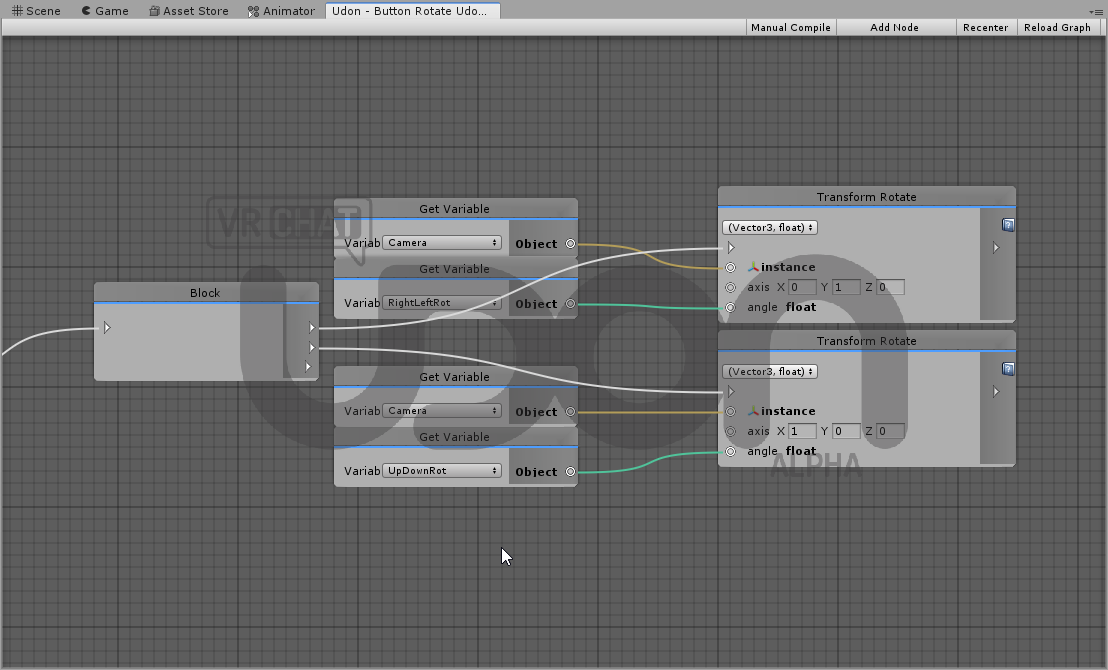
ive tried switching the order in block, and that doesnt affect it
flat musk
synced
jagged crow
untested but that should do the trick redacted
flat musk
I will save this and test it for you on stream :3
jagged crow
^^
you'll need to drag the object you want to move into the target variable
in the inspector pane
flat musk
oh that I do know
jagged crow
haha
flat musk
Trying to learn as much about unity scripting as possible but that I wouldn't know before stream
I am getting better at understanding the flow though and hopefully one day I will be able to program a system that helps people find others in a large open world
jagged crow
ooh neat
I like the way hook junkers does it
they have big names float above peoples heads that you can see through walls and stuff
flat musk
issues is I have mountains

was thinking about making a sky beam that lasts for like 2-3 minuets for the local player
oh that is an older renders shiz
jagged crow
that'd be neat yee
kind knot
Im so confused on how an Up/down rotation wont work when a right/left will... Udon/unity confusin mr rn
fiery yoke
@jagged crow @flat musk If the object has a Rigidbody you also need to reset the velocity and angularvelocity. Also in that case it might be better to reset the rigidbodies position instead of the transform. Also youre just resetting the position not the rotation. I would recommend SetPositionAndRotation() for that
fiery yoke
There is usually a lot more to consider than on first sight ;P
jagged crow
dont want it resetting and then flying away lol
 steel berry
does IEnumerator not work with udon?
fiery yoke
I dont think Enumerators are supported. Might be wrong
jagged crow
oop I dont think my thing will work, it's passing a transform to SetOwner instead of a game object
one sec ill redo that
use the second one instead if your object has a rigidbody
@flat musk
fiery yoke
@jagged crow That will fail if there is no Rigidbody :P Im making a graph rn
jagged crow
ye thats why I made two graphs
fiery yoke
And also GameObject.GetComponent with Transform is kinda stupid sorry ;P
jagged crow
why?
fiery yoke
Every GameObject has a Transform, which is why every GameObject has a transform field
GameObject.get transform
jagged crow
oh didnt know there was a specific function for that
fiery yoke
GameObjects cant exist without a Transform and vice versa
jagged crow
yee
flat musk
saved both o3o
fiery yoke
I cant seem to do a null check for GetComponent on Udon Graphs?! Am I doing something wrong?
flat musk
ok after going through the basics of c sharp I am starting to understand what all this means
kind knot
https://i.imgur.com/nDeoKKs.png I switched up how my stuff worked, and it STILL wont do an up/down rotation

It allows rotating on the Y axis but doesnt do anything for the X axis
So rotating on Z works aswell, but only for positive Z
if for any reason it makes a difference, the object being rotated is a camera
So, +x -x +y work, all the rest are failing
hollow ginkgo
does this look right for ball collision and respawning the player?
im not used to node programming
kind knot
Tried more things, Only motions I can get working are +x -x +y rotations, and +/-Z for position
Not sure why none of the others work....
https://i.imgur.com/Tn3avJg.png The positional node
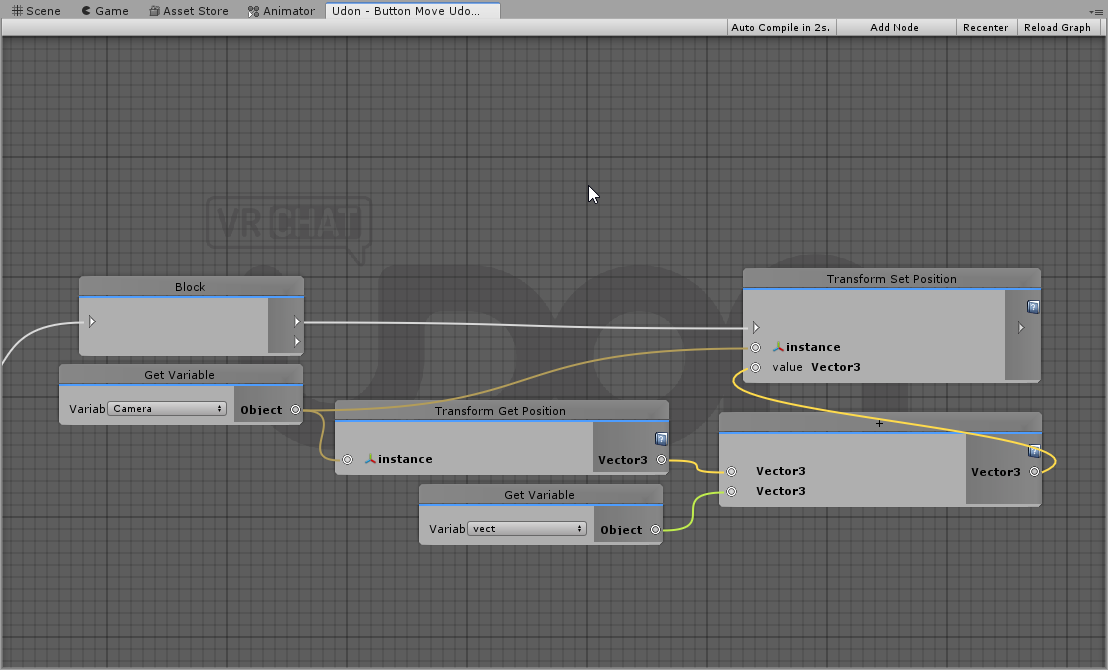
gonna try with SetLocalPosition and see what happens
same thing
im highly confused as to what is happening
https://i.imgur.com/ODjeuUz.png this is the object being moved by the 2 graphs
 kind knot
Tried debugging with debug log and it was inconclusive...
 vernal maple
Big ol newbie question here. In my graph, things are working just fine by the looks of my debug messages, but for whatever reason, when I set an int to 0, it set it to null instead.
My question is, can I set a number by a magic number mid code? Or do I need to define it in my code. And as a result, why would setting 0 instead pass null?
(I hate that I'm usin this as a means to fix the current issue, but subtracting the current variable by itself to zero itself out seems to be a working way to make this work. I just want to tell it to set to 0 however. >_>)
worthy beacon
does the udon Synchronize Postion also sync rotation and scale?
ive noticed that with updating rotation only from the owner, it seems to keep said rotation updated for all, so wanted to know if this applied to scale too
flat musk
@worthy beacon Yes it does we just tested it out on boxes and it syncs rotation and postions
worthy beacon
and scale?
jagged crow
does "Allow ownership transfer on collision" mean it's allowed to transfer ownership, or that it will transfer ownership?
i.e do I need to script that behaviour myself or will checking that box make it happen
oh also does anybody have a link to that item pooling thing? I recall reading something about it but dont remember where
I remember it mentioning that you need maxPlayers * 2 + 1 objects for everybody to get one
nvm found it :D was thinking of this https://github.com/TheHelpfulHelper/UDON-Collection/tree/master/THH_PpOP
chilly dagger
Are there any built in debug features?
Monitoring variables etc.
Or do I have to manually make a ui text element for every var I want to track
kind knot
Cannot retrieve heap variable of type 'Boolean' as type 'IUdonEventReceiver'
https://i.imgur.com/lg0NKYG.png
For some reason this script is throwing this error, everything before this point is known working using other methods, and I have no clue where this issue is coming from...
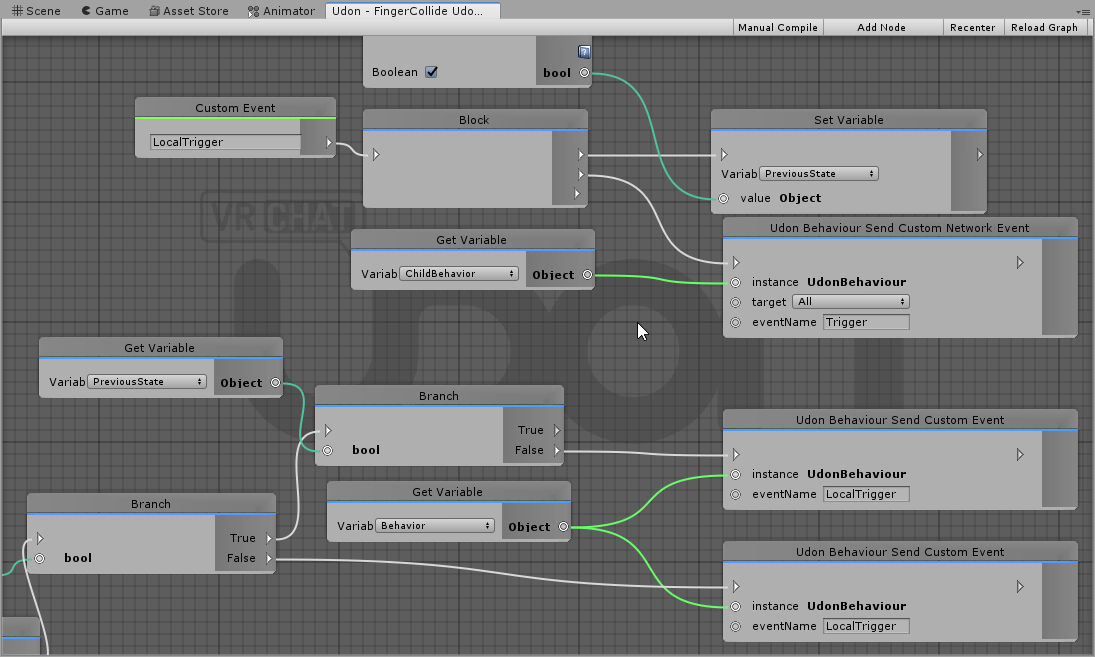
I dont even know how this "Boolean as type IUdonEventReciever" error can happen
ill continue messing with it tomorrow but I think this might be some sort of a bug somehow?
jagged crow
@chilly dagger the latter. I would recommend making a reusable script with public variables to pick what to display
 lapis sable
How to get VRCPlayerApi from RaycastHit
fiery yoke
There isnt a direct way to do that afaik. Theres two ways I can come up with, but both of them are pretty complicated.
vale current
So, I have a udon behaviour in my world and I want to get a reference of it without using assignation through the inspector, is it possible ?
I know the Find function exist but it has a lot of flaws
fiery yoke
I usually do that with GameObject.Find and naming them something unique like "[Manager]"
And what do you with flaws?
vale current
well it's slow and if you name the object wrong it doesn't work
I also got problems in the past where is object wouldn't "exist" in the Start event even tho it was placed in the world through the editor
fiery yoke
Yeah thats why you dont do it on Update but only once on Start and save it as a reference. And the naming is just how it is. If you dont have a reference then you need something that identifies it
vale current
ok but now how do I get the udon behaviour
fiery yoke
GetComponent
vale current
so if I made a U# script called PlayerPhysics
can I do GetComponent(typeof(PlayerPhysics)) ?
because in unity the component is called UdonBehaviour
fiery yoke
In U# you can just do GetComponent<PlayerPhysics>()
The compiler handles that automatically
vale current
oh ok, perfect
rustic lake
Hello, i tried to add the iwaSyncVideo Player to my World, but when i do a local test i cant press any buttons. How can I fix that? (Unity 2018.4.20f1 + SDK3)
vale current
is there a way to get more detailed error messages in the console ? right not it's just "An exception occurred..." I don't even know which script sent that error
fickle stirrup
@rustic lake as i know videoplayer is not supported in udon, also standard video thing is disabled due to possible leaks until it get fixed
rustic lake
Alright @fickle stirrup Good to know, thank you ^^
@fickle stirrup But pens should work right? Do you (or someone else) know a good Pens Pack? (Asset/Prefab) 🙂
fickle stirrup
nope, idk, but them should i think, might be even one that on vrc official drawing world instead of low performance particles/etc (or idk about their performance in 2020)
rustic lake
Hmm. @fickle stirrup I found a Pens Asset but the Problem on the Pens was the same as on the Video Player, no one could grab these Pans. Weird. Thats why im asking if someone knows a working Asset on SKD3
fickle stirrup
@rustic lake these pens on Udon? or triggers, and does it has udon's Pickup script, udon behaviour etc? if you search for the triggers (sdk2 prefabs) it will not work if it's using triggers
 mighty scroll
Why does my interact link only appears one time when I set it multiple times
twilit breach
use a block after interact
rustic lake
@fickle stirrup I dont remember if it has the pick up script, i tried this one out but nobody could grab a pen https://vrcat.club/threads/updated-noenoe-pen-prefabs.85/

VRCat: Community-Run VRChat Forums
[IMG]
NEW VERSION (11th Feb 2018)
Added the ability to switch between five different layers and erase them independently.
Overhauled animations,...
twilit breach
and your top node is for setting the text on a pickup, not an interactable button
mighty scroll
How do you manage if something is local or global now with Udon ?
fiery yoke
mostly through networked events or synced variables
mighty scroll
Yeah but, if not told by blocks, an event is always local ?
vale current
can you use coroutines with udon sharp ?
fiery yoke
@vale current No, but I have something you might be interested in:
https://github.com/TheHelpfulHelper/UDON-Collection/tree/master/THH_DelayService
twilit breach
The block is just to split the interact event into multiple nodes, it doesn't affect network stuff
 mortal star
This part of the graph is breaking it but I don't know really why
It's in Update
Nodes that are breaking it are the Set Jump Impulse
fickle stirrup
@mortal star does your uassembly code got compiled?
idk then )
mortal star
I'd say so
I uploaded world with these nodes disabled and it worked
after reconnecting them it stops working
I go to play mode, top play mode then wait for it to auto compile them press manual compile to make sure
x)
also I tried to set different material to a cube and that also broke the code (that was to visualise it working so I just removed it)
 autumn berry
I was making my first Udon world today and when i went to test it i got this screen and nothing else. also tried to open vrchat by its self after and still getting this screen only. what did i do? (also uninstalled vrchat and reinstalled it with no change.)
fickle stirrup
@autumn berry if you have it just right now - that's because vrc servers are down, and if i remember even test local require internet
light fjord
question what is it one need to do to pick up objects?
twilit breach
click add component on the right, search pickup and add the vrc_pickup component
for this to work you need colliders and a rigidbody
light fjord
oh i am using udonsharp
mortal star
so I changed the noodles a bit, main thing now works but the VRChat movement setters still refuse
This one fails
vernal maple
How do you just tell something to be set to true, without instantiating a variable that contains true?
 spring forge
Apologies if it has been answered before but how can you open a url in browser with udon?
floral dove
@vernal maple you can use a bool const to hold a simple true/false value
@spring forge - Udon does not yet support any sort of web requests
spring forge
How is the virtual market handling it then?
floral dove
@spring forge they're not using Udon.
spring forge
Oh really? Thought they were. My bad.
floral dove
@spring forge no worries. The way they're doing it is only supported in Virtual Market worlds. We will support some web requests down the road, but opening browser windows is not currently on our roadmap.
spring forge
Ahhh gotcha. Thanks for the info.
olive tiger
I think a lot of v mart stuff is sdk2, exmenu is a sdk2 piece as well they use.
vale current
so uh, all my udon behaviour components switched to that, and I can't assign a program anymore
scarlet lake
odd
vale current
kinda tempted to reinstall the sdk
scarlet lake
don't do that just yet
mainly because idk find someone who knows before doing anything hasty
vale current
also if I add a new udon behaviour component it also look like that
jagged crow
hey when you test a world locally are you supposed to be able to see the other clients
I've got it launching two copies of the game but they can't see each other
torn quail
hey guys. so i understood that you need to tick the "Synchronize Position" in order to make an object transform sync with other players. the problem is that whenever i restart unity the checkbox change back to be unchecked. any reason or fix for that?
jagged crow
not sure if this is the issue but you're supposed to have a program source in it
if you hit the little circle next to it you can search for "empty" and use that one
torn quail
but what program do i need? since the only feature i need is the synchronization
or just an udon behaviour with nothing in it?
vale current
@scarlet lake I deleted the library folder of the project and it fixed my problem
scarlet lake
ah ok
fiery yoke
@vale current When that happens youre kinda screwed. Usually its best to close the editor without saving. otherwise you just have to reimport the SDK to fix it.
Can you look if your UdonBehaviours still have their program source?
vale current
they don't
wait
when it's a prefab they still do
just the object I just added a udon script in the scene don't
jagged crow
@torn quail yep just make an empty program or use the built in one
vale current
also when I reassign the program all the values are still there
torn quail
@jagged crow assigned an empty udon graph. it still uncheck it every time i close unity or play run 😕
jagged crow
mk that wasn't the issue then
I think you do need that for the sync to work but yeah not sure why it wont save the box being checked o.O
try doing it on a new object with nothing else on it
see if that one is borked too
fiery yoke
@vale current Yeah when you notice that next time just close Unity without saving. Make sure that you save frequently so you dont lose much progress.
torn quail
thats kinda weird. on a new empty game object it does keep it that way. i think it cant be checked with "Allow Ownership Transfer on Collision"
but beside the new gameobject it still uncheck the sync and check "Allow Ownership Transfer on Collision"
 crystal verge
Is there any way to hit HTTP/Websockets/any other sort of network connection via Udon yet?
vale current
@fiery yoke ok so now I have a method to fix the project in case I get this bug again
jagged crow
yes but it's unsupported and probably being removed soon
@crystal verge
people are using video players to send http requests
vale current
I hope they implement that officially soon
jagged crow
yeah same
vale current
I want my realtime scoreboards
crystal verge
@jagged crow Oooof. Are there rumors about any replacements?
jagged crow
Soon™
crystal verge
Well, I suppose that's some kinda hope.
torn quail
does anyone know how to fix this problem?
hey guys. so i understood that you need to tick the "Synchronize Position" in order to make an object transform sync with other players. the problem is that whenever i restart unity the checkbox change back to be unchecked. any reason or fix for that?
well seems like someone found out about it before me
https://feedback.vrchat.com/vrchat-udon-closed-alpha-bugs/p/udonbehaviour-component-properties-do-not-be-saved
jagged crow
odd
torn quail
indeed. so as far as i know theres no way to make objects transform sync until this bug is fixed? unless there is a script to work around it for now. if anyone knows?
floral dove
@torn quail that reported bug only happens if changing the checkbox is the only thing you change in your scene. If you do anything else, it should be saved.
Turn on the checkbox, and then change the x position on that object's transform, for example, and then change it back. This should enable you to save your scene, including that property change.
torn quail
oh wow great that actually fixed the problem! Thank you! 👏 👏
jagged crow
@floral dove should mention that on the issue haha
floral dove
@jagged crow @torn quail will do.
 dry tulip
how does one do a static item interact?..
jagged crow
define static?
dry tulip
non-moving, door
jagged crow
just put an interact event in the graph and it'll become interactable
I thiiiink I saw something on the ask forum for how to do doors, can't remember what the thread was called
oh no, it was a youtube video
https://www.youtube.com/watch?v=Bw4uvjrvdbU @dry tulip
dry tulip
ah, right, but it requires you have a collider, im dumb.
dry tulip
fixing 30 doors is excruciating...
 urban pivot
Has anyone tested Postprocessing Stack v2 with Udon? During my testing it seems that it only works in Unity and / when switching over to in-game either via Build & Test OR Bundle Upload it fails.
torn quail
You need to attach the camera to the VRCWorld object @urban pivot
Theres a place to attach it in the script on VRCWorld (forgot the name something like VRC Descriptor)
urban pivot
@torn quail the PPS layer has the 'Main Camera' in it under Scene Descriptor
fickle stirrup
"process layer on the camera, process volume on external empty object, camera selected as reference camera in scene descriptor", maybe also something with layers, but it should work with sdk3, just stuff that comes with a camera removes in game and must be on external object 🤔
urban pivot
Led me to a different plug which fixed my issue!
tacit chasm
how do you make a FOR loop with UDON ?
 misty berry
how do i get a reference to a player?

first time using udon
not sure why this spawns at 0,0,0 / how i would attach it to a player after
misty berry
hmm, cant seem to change a text component's text either, must be taking the wrong approach
 chilly aspen
I have a cube with a trigger and a collision event on it. Whenever a game object collides with this cube, the events fires correctly. However, when VRC players collide with the cube, whether by head, foot, or hands, the trigger events never get fired.
lapis sable
How can we find the player who called OnTriggerEnter()?
flint urchin
@chilly aspen @lapis sable The player is a protected object and will return null if you try to do anything with it on a Trigger or Collider.
There are two ways around it at the moment and that is to either create a trigger system using the player local layer, or by setting up a custom gameObject that can be used as the "player"
Custom gameObject: https://ask.vrchat.com/t/phaxenors-examples/273/27
Using player local / local player layer; https://ask.vrchat.com/t/player-collision-in-udon/428
lapis sable
oh thx
 winter rapids
So i'm planning to do a horror themed map in Udon, but was curious if anyone has these commands already figured out.
Teleport (Like if you walk through a door and it automatically spawns you somewhere else)
Animation Triggers (like if you walk over the trigger and it starts a animation/audio cue)
Mainly these two but I think I might have some other ideas later.
chilly aspen
I just figured out teleport using an object-oriented approach.
misty berry
is there a way to see debug logs / drawRays?
misty berry
spawning things using my local players head rotation, although it seems to be off + doesnt work on the floor, is there any way i can get the camera rotation instead? / another method to do this
player_local.GetBoneRotation(HumanBodyBones.Head)
https://gyazo.com/cbc5fe5b58fdbe4e0c55ab5092594d07
 misty berry
fixed ish
player_local.GetTrackingData(VRCPlayerApi.TrackingDataType.Head).rotation
seems to work better but it still has a strange offset
fixed when i started the ray trace from the tracking data's head position too
mighty scroll
How can you make a game object that only activate locally ?
I'm kinda confused of how to get stuff to be done local or for everyone.
 small crater
Anyway to get Visual Studio Code to do the whole Auto Complete with UdonSharp?
fiery yoke
@mighty scroll Most things are local by default. There is a few cases where you need to pay attention. OnPlayerJoined for example happens for everyone when someone joins. However Start only happens locally when you first enter a world.
In fact everything is local. What we call "networked" means that a message is sent over the network to tell you that something has happened, or that they must do something.
torn quail
theres something really weird. now that the objects have synchronize position checked, some objects became unpickupable even though everything was fine before the synchronization. cant tell what causes this it happens on random objects. also i find objects on different location than they supposed to spawn, like if they fell or moved
torn quail
ok so i found what the problem was. if the pickupable object collides even slightly with another object that has collider it will cause this problem
so i had objects that were positioned a little too low inside the ground or something similiar
 dim horizon
Don't know if this is the right channel to ask, totally new to Udon. I'm working with the Kurotori Udon Kart System to try and make somewhat accurate APB vehicles in terms of handling (until a more detailed car system becomes available), however there doesn't seem to be an engine audio component on the kart like there was on previous car systems I've used for the old sdk. Would anyone happen to know how to add that? Specifically the four channel audio where you have to set accel low, accel high, decel low, decel high. I have the kart re-fitted to the car's proportions already and it handles fine, just wondering about the audio.
 heavy sun
oke yall, literally just started with udon like 10 mins ago. when i go to create a new program in the udon behavior component, i dose nothing and returns the error
UnityException: Creating asset at path failed.
cant really even start to make nodes or anything like that until i get this fixed. idk if its a bug or im just dumb or bad luck. but what ever it is, its keeping me from making stuff, and i aint bout that
sorry if i sound angry, just a lil tired of stuff braking on me.
torn quail
did you make sure you have the right unity version and sdk version installed?
heavy sun
im using unity 2018.4.20f1
with the SDK 3 that ive been using for a bit while now
VRCSDK3-UDON-2020.04.25.13.00.
thats the name of the asset package i imported,
heavy sun
i believe so
torn quail
try to delete them and reimport the sdk
heavy sun
i did that once but ill try it again
worthy beacon
So i created colliders that fallow your hand and i set them to their own layer, which can only collide with that same layer. However, when people are small enough, their hands are close enough to their position. When this happens (and i confirmed its while the colliders are on) the player spins uncontrollably. Is this a bug where despite the collider not suppose to collide with the player, they do it anyways?
torn quail
it might be that the hands collide with each other?
heavy sun
even tried a brand new project, still the same error
heavy sun
also this is kinda of a funky idea, but would having the hands in separate layers help? one layer for each hand.
it sounds like that was the problem in the error log
worthy beacon
hmm, well even if they did collide with eachother, that shouldnt effect the player. They fallow the players hands but unless they can collide with the player it shouldnt cause your camera to spin outta control when you jump
heavy sun
here is my error log if it helps you
torn quail
try to change your unity project to something like desktop and try to run it again
or into your documents
heavy sun
alrighty
torn quail
@worthy beacon you changed the settings in project settings->physics aswell right?
dim horizon
That might be what it is heros. In one of my worlds I have a dumpster with physics and whenever you step on it you spin out of control, so maybe its a collider touching where their feet should be?
worthy beacon
lemme check, i think i might not of
dim horizon
Just a guess
torn quail
so thats probably your problem. you need to set which layers will collide and which wont
worthy beacon
nope, its changed there
torn quail
hmm
worthy beacon
unless somehow physics 2d could effect it
torn quail
i dont believe that it should have anything to do with it
worthy beacon


fists is my custom layer
i have 3 colliders, one for each hand and a hitbox that fallows the position, they are all on the Fists layer. The hitbox is a capsule collider whose rigid body is kinematic, and the ones for the hands are triggers but not kinematic
torn quail
what if you disable the fists/fists collider?
torn quail
i see
worthy beacon
or at least set the hitbox on a seperate layer which can collide with the fists
but that wont solve the issue, because itll just be on a seperate layer, which probly will collide with the player when it shouldnt
and changing their interactions with eachother shouldnt matter, because they shouldnt interact with the player in the first place
heavy sun
oke well good news, after making 3 new projects, i was able to finish adding the component.
so thank you my kinda fella for your time, have a wonderful rest of your day.
torn quail
awesome good to hear! gl!
hmm heroes im clueless. maybe theres a script that changes layers while playing?
worthy beacon
hmm
im curious, so i do parent those colliders to locally tracked gameObjects that keep track of their position/rotation. Would changing the parent change the associated layers?
torn quail
oh it could be that if they are under a parent on another layer that collides with the player it also affect them
worthy beacon
im gonna change those parent layers to fists and see if that effects anything
worthy beacon
it did not help
undone tree
Hey question here :)
Made a new scene to test new things out and deleted the old one. but if I playtest it through the vrchat buildest function I get the deleted scene again....
Anyone experienced this and has some fix ?
placid spear
Did anyone here ever got a video player component to work in udon? I can use it to make GET-requests to a webserver but it never plays audio
On layer "Default"
 drowsy terrace
Hi, i'm new to Udon (and VRchat) and I was wondering, how could I make an object's interaction event trigger globally? (as in not only on the local client)
fiery yoke
There is a node called "SendCustomNetworkEvent" it takes an UdonBehaviour and a string name. You can make a custom event on the same behaviour as the interact and then just put a const string as the input with the name of that event.
@drowsy terrace
 fierce walrus
Hi ! I don't understand how to set properly the value of a variable. My Light appears red instead of white. Do you know what my error is ? 🙂
torn quail
There is a node called "SendCustomNetworkEvent" it takes an UdonBehaviour and a string name. You can make a custom event on the same behaviour as the interact and then just put a const string as the input with the name of that event.
will it work with a button that enable a sound? i mean do i need to set the network node on the interact of the button or on the audio source to make it work?
drowsy terrace
@fiery yoke Ok it seems to have worked* but I'll have to check it with multiple clients, thanks!
mighty scroll
@fiery yoke Okay, thanks that's cool and what I thought, but how do you make something global then ? Like pickups and buttons
fiery yoke
If by "Pickups" you meant that objects are in the same place then you just need to set the "Synchronize Position" checkbox in the UdonBehaviour. For almost all other things you need either networked events or synced variables. If someone presses a button, they have to tell everyone "Hey I pressed this button"
drowsy terrace
Also, how do you change the interaction text of an element (probably really simple but I couldn't find the answer online :/)
mighty scroll
Okay, that's quite cool, thanks for the help ^^
@drowsy terrace I think at Start you need to "Set Interaction Text"
Start => Set Interaction Text "anything"
drowsy terrace
Oh ok, thanks a lot!
mighty scroll
I'm not sure tho
 fringe coral
how can u test how ur avatar moves
torn quail
not exactly the right section but - you can check the animations. there is a small window to see how it looks like
for dynamic bones you can hit play on unity go back to the scene mode and move your avatar around
and of course you can just publish it and test it in game
vale current
Can you call a udon behaviour custom event with arguments ?
fiery yoke
Not yet. Its a "planned" feature.
vale current
oh ok
also
can I get the hmd the player is using ?
so I can change my controls only for vive
vale current
this doesn't exist for me
fiery yoke
its something similar cant remember
fiery yoke
torn quail
how do i call an event like On Pickup on Udonsharp? what will be the name of the function and how do i know it actually run the function on the event?
flint urchin
Suggest you join the UdonSharp discord for support on things related to that. (It's on the github page)
 stray hare
can anybody point me toward how to change the default camera settings? I want to make the clipping plane farther, it's clipping my clouds
I remember in 2.0 you can set a reference camera, but i don't see that in the vrc world object in this one
maybe i'm blind
yeah nevermind, I guess i'm a blind idiot
vale current
Is there a way to know if the player has an interactable object in range ?
I assigned an action to the trigger but I don't want my action to start if the player can interact with an object
twilit breach
if you go to the debug menu on an udon behavior with interact you can set proximity
or range away they can interact from
and depending on how its going to work keep it out of range when in trigger?
vale current
this is not the problem
my action start when you press the controller trigger or the mouse left and right button
independently of the situation
but I don't want it to start if the player wants to interact with an object
like when the blue outline is showing
twilit breach
you could probably have a bool if they are raycasting certain objects
but in terms of the default VRC interact/pickup raycast its kinda hidden
so you would probably need your own
vale current
if I can find how the game determine which object you are pointing at I can recode it
twilit breach
I haven't fully figured out how they do interact/pickups but I know its not exactly a standard raycast
because if you disable raycasts in unity it still functions I believe
vale current
yeah I also noticed that
also you don't have to point at the object
having your hand near it also allow interaction
twilit breach
as I look at it they don't have much raycast stuff in udon
vale current
in udon sharp you have every unity raycast functions
twilit breach
I see them now, i just typed too much in my node search
you could possible get the name of the collider check if the string contains a certain thing
like any interactable just add "test" to the name
and check for that string being contained and bool off your other thing
vale current
or I just get the layer and test if it's "Interactive"