#udon-general
59 messages · Page 11 of 1
 boreal plaza
 jagged crow
yee
KISS!
also check your log for udon errors
that may help you figure it out
What's a good way to adjust an object's (and all it's children's) opacity?
boreal plaza
There's an udon log?
jagged crow
%appdata%\..\LocalLow\VRChat\VRChat
 bright grotto
Can i add clothes to an avatar on unity without using blender ?
boreal plaza
oh damn
jagged crow
you'll need to launch the game with --enable-udon-debug-logging
then it'll show udon errors in the log
boreal plaza
so "output_log....txt" isnt udon?
jagged crow
thats where the udon messages will go, it's just also logging everything else the game does
jagged crow
boreal plaza
awesome thx. will come in handy
jagged crow
:D
boreal plaza
some weird stuff going on in my world
jagged crow
that'll only enable it when you're playing the game through steam though, it's a bit more of a hassle if you want to enable it for local testing
boreal plaza
Will probably be fine
Guess I will have to do some "build and publishing" more often
just takes for ever
jagged crow
haha
boreal plaza
Also, music works rn, gonna see if my button can trigger it now :)
jagged crow
woo
I've got mine set up so build and test automatically launches it through steam and enables logging, and switches between vr/no-vr depending if I have steamvr open or not :D
def streamlined my testing process
boreal plaza
button is a no go i might missed something
jagged crow
see if your button will work to toggle a different object
boreal plaza
oh right Im not activating it, doy
jagged crow
What's a good way to adjust an object's (and all it's children's) opacity?
 tame owl
how would you have an object follow a player? (like portal turret for example)
 lapis sable
How can I get LocalPlayer's controller trigger info?
 green plinth
Not tried it my self yet but "move/rotate towards" should be a viable option @tame owl It's a pair of vector3 operations.
jagged crow

Google Docs
VR controller summary
This page is a combination of the other pages. These
inputs are verified to work on every known controller, and
in cases where they don't an alternative is provided.,Use this world to test:
https://vrchat.com/home/world/wrld_f8d5f7e4-185c-4b82-8ecb-8a...
lapis sable
Thank you
tame owl
alrighty then
 fathom oak
Does anyone know how to create event triggers for Udon Sharp? Please mention me when replying, thank you in advance!
 fossil gyro
What’s udon?
jagged crow
A type of noodle
Essentially it's a programming language to make worlds with, much more powerful than the old system used in sdk2
fossil gyro
Alright might as well eat udon noodles while researching it
 fiery yoke
@fathom oak What exactly do you mean with event triggers?
fathom oak
@fiery yoke , Like... With Udon Sharp, how do we get pick up items and use them?
fiery yoke
To make an Object a pickup you need to attach a seperate script called VRC_Pickup and then you have several methods like OnPickup OnDrop and OnPickupUseUp/Down
fathom oak
thanks! although what you mentioned would be vrc trigger which i dont see from vrcsdk3
bright grotto
Why is the camera rotating like crazy when i join on desktop ??
 cunning mist
@stray junco I don't know if you already got this answered, but I actually made the PlayerMods tutorial before all the example assets were added to the Udon SDK, which included an Udon Behaviour on the VRCWorld prefab by default with movement and jump strength.
fiery yoke
@fathom oak No the pickup script remains seperate from Udon. And the trigger events are now just methods.
green plinth
Seems i messed up, tried to use a material array as reference for a renderer set. Me pepega...
 worldly drum
is dynamic bones compatible with Unity SDK2/2018.4.20
green plinth
the devs mentioned a need to update the bones to the new veersion @worldly drum
worldly drum
Oo welp dont got money for it so Oof
fathom oak
@fiery yoke Ah i see, so I can just call those methods in the UdonSharp script.
fiery yoke
You dont call the methods. They will get called when the corresponding events happen.
lapis sable
How do check OnColliderEnter from Player
boreal plaza
is a Game object variabe and a Udon Behaviour variable the same thing?
do the work the same way?
boreal plaza
Because my button to activate the Game object containing my Udon behaviour component wouldn't activate if I use the Udon variable if I used the udon variable but works with gameobject varable
fiery yoke
UdonBehaviour is a script (component) attached to a GameObject. Theyre not remotely the same
boreal plaza
So the udon variable is targeting the component of that gameobject?
wait no.. that doesnt work
fiery yoke
What udon variable are you talking about?
boreal plaza
The graph node
looks the same as a game object one
Because I wanted to toggle a different script with a button
test out how that would work, yakno
I guess I'll just use the gameobject one to activate it (because it works lol) but curious when the udon behavior node is used
fiery yoke
The UdonBehaviour variable can hold an UdonBehaviour component. Components are scripts attached to GameObjects. UdonBehaviour is used when you need to get a programvariable or send custom events
boreal plaza
So with a Udon variable set to public I attach a component to it and Not a gameobject?
I mean , I attached a gameobject with a udon component and it wouldnt activate
when clicking the little browser rings to the right of these they both show the gameobjects in the scene.
thas why im confused
fiery yoke
@boreal plaza If you dont know how Unitys Component system works then ofcourse you will be confused when trying to use Udon. I'd recommend learning at least the fundamentals of Unity coding and it will greatly help you understand Udon.
boreal plaza
to me they are the same haha
I think I got the basics when I did a 2D game for an assignment in uni but Im dumb af
¯_(ツ)_/¯
I should just download some more IQ
fiery yoke
Ehh sorry didnt mean to be so harsh. Its just hard to explain it without beginning at adam and eve
boreal plaza
It's ok I'll just use a Gameobject variable for now since it works for this.
green plinth
Ok i am sooooo done with this, i been trying for 6 hours to get this shit working at all. The Copytest does nothing at all, it's as if the code was left blank. and the Copytest2 gives a error. Anyone know what is wrong with this?
fiery yoke
@green plinth Would be neat if you could include more of the error message. Theyre not there for no reason...
green plinth
there you go @fiery yoke
fiery yoke
Both your Material array as well as the Object are null
Are you sure you've assigned a mesh renderer and that it has at least one material?
green plinth
i double tripple and 12x checked it i even have 3-7 materials all different
It makes no sense at all
fiery yoke
Try logging the inbetween stuff and see where it fails
green plinth
Whats the simplest way to log it?
fiery yoke
Debug.Log?
green plinth
@fiery yoke seems the "Mesh Renderer Get Materials" returns NULL
The variables are fine
Plz don't tell me it's a bug.... i already found 2 of them before...
 wise bay
Is it not possible to make a pickup object kinda bouncy? Is that a job for Udon?
green plinth
@wise bay try tinkering with physics materials, those can be given those properties
green plinth
simply make one, adjust it and put it as part of the collider.
wise bay
that is most wonderful. ty ty
 steel holly
hi my animator is not working im using roughly the same code as in this tutorial https://www.youtube.com/watch?v=Bw4uvjrvdbU could somebody help me
Accessing and controlling an objects animator is incredibly easy through Udon. Here's a short tutorial on how to go about about utilizing it through the example of a basic door. Assets for this and future videos will be available for download over on my Patreon, so if you'd li...
im using u# but i did it earlier with a graph and thagt also did not work
 stray junco
i actually watch's your Player_Mods youtube video tutorial
https://www.youtube.com/watch?v=OventaglGCY
from 0:00 to 7:07
i saw that everything is good at that point
yes i did not see what you did in the background
but i see that you ware able to jump
so i did exactly what you did
but it didn't work for me
then latter i fix some thing what @wise bay told me
https://discordapp.com/channels/189511567539306508/657394772603830360/703418776993136791
and that not help me as well
so @floral dove told me that all i have to do is to change values of default vrcWorld prefab that has UDON script settings so i don't know what to change add and delete in there
and why
that is not logical for me because i already have my own world , UDON script and objects that is attached to my UDON script behavior.
@stray junco from 04/24/2020
you will know that i did everything correctly and latter i apply fix etc etc
anyway...
do i have to download this:
https://github.com/Merlin-san/UdonSharp
are in there i will have player mods prefabs that latter i can add to my world ?
@cunning mist
Here we set up a basic system for jumping and modifying the player's movement speed, which used to be controlled through "PlayerMods" in the trigger days. Fortunately, it's pretty easy to set up and get going!
VRChat Udon SDK:
https://vrchat.com/home/download
UdonSharp:
http...

GitHub
An experimental compiler for compiling C# to Udon assembly - Merlin-san/UdonSharp
cunning mist
When you say "Default world settings" does that mean the behavior that's on the VRCWorld object? Sorry I'm not at my computer.
stray junco
no problem
i will try to make it clear
hold on...
this is what @floral dove told me to do:
all you have to do is change the values on the default VRCWorld prefab. It has settings for all of those in the attached UdonBehaviour now.
i don't have clear clue what shod i need to do next
and that confuse me as well
green plinth
Sounds decently clear to me.
stray junco
i understand English
and what shod i need to do
but what shod i change , add and delete
that...that i don't understand
cunning mist
If you've made your own Playermods setup, you can just remove that graph entirely from the VRCWorld object.
green plinth
VRChat Examples/prefab folder has a VRCWorld prefab that has all the basic setups, only thing missing is gravity parameters.
 proper oar
dose U# have OnPickupUse?
cunning mist
For all U# events, you can scroll up to the top and Control-Click "UdonSharpBehaviour" and it will open another script. Scroll all the way to the bottom and it will give you a list of all events it has access to.
stray junco
@cunning mist
as you can see...
i did have my UDON script graph
do i have to entirely delete VRCWorld settings
or just to go to default VRCWorld prefab udon behavior
and in it's graph i shod delete everything and add my own UDON script graph in it
proper oar
its there but it dosent work
cunning mist
Just scrap the graph that's on it
stray junco
or to just and in there gravity parameters. that @green plinth told me
and how and what to add of those parameters
i am completelly new in UDON thing
cunning mist
Ikaro have you tried "private void override OnPickupUse()"
cunning mist
I don't personally use the override, but Rider sure wants me to lol
fiery yoke
I have never used or seen OnPickupUse
Well yeah VS also wants you to override it, but you dont have to. Its just because the intellisense gets a little confused
proper oar
"The modifier override is not valid for this item"
"Method must have a return type"
fiery yoke
and without override?
also override has to be before void. The return type is always the last
proper oar
green now
fiery yoke
Yeah thats an "ignoreable" error
proper oar
fiery yoke
you can put override before void
proper oar
fiery yoke
it has to be public then
proper oar
Ah thanks!
wise bay
Been having this issue when a synced pickup object gets yeeted off of a map.. when it comes back to "respawn" to everyone except the person who last touched it it looks like it's kind of janking around in midair above the respawn point.. Almost like it has some crazy high amount of velocity applied to it. Once the object is picked up and set back down again the glitch disappears
fiery yoke
Hmm I dont know how VRChat respawns items, but it might be due to the transform being synced it resets to the position, but the rigidbodies velocity does not get reset for remote clients. I cant imagine that they wouldnt have thought about it, but you never know. I dont think it is that, but thats at least plausible
wise bay
Hmmm okay
I can reproduce it anytime I use SDK3 putting a Pickup on an object, then doing the Empty Udon Behavior w/ sync. Then throwing it off the map with someone else there to witness what happens when it respawns
stray junco
@cunning mist
https://streamable.com/x0r4ed

 shy cave
I am trying to make a virtual joystick to pilot a ship. I surrounded a sphere that I want to be able to pick up with 8 triggers, one for moving the ship in each direction. How would I go about making the triggers move the ship accordingly when the ball is inside them?
cunning mist
@stray junco I'd recommend duplicating your script and deleting your old one, using the new one. That might clear up your issue.
 vale current
hi, I have a problem, my script generates an error but I can't see it because I don't have a console window anymore, for some reason it doesn't open when I do "Build & Test"
stray junco
@cunning mist
ahh ok i will try that tnx
cunning mist
@shy cave You actually shouldn't need 8 colliders, four should suffice. You can have one for if it's up, down, left, and right. These blocks would be 3x1 or 1x3, taking up an entire outside row of the joystick. When you'd push it forward, you'd say have an int named "Vertical" and do +1 on interact with "UpCollider" object, and -1 with "DownCollider." You'd do the same for left and right with Horizontal instead. You'd then take these values and do perhaps "If Horizontal == 1 and Vertical == -1, adjust rigidbody torque to rotate forward and left."
This is a diagram of an 8-gate joystick, with the white bars showing where the colliders would start and go until the edge.
You'd also need an OnTriggerExit for all of the cubes that do the opposite of whatever they did, so if you leave the UpCollider, do -1 from Vertical.
shy cave
Okay, thank you! I will see if I can get that to work.
cunning mist
👍
vale current
Is there a way to check errors without a console ?
cunning mist
Yes
Ohhh
You have a minus sign in a variable name
Don't do that
I didn't catch that before, my bad
stray junco
how to fix it please
cunning mist
Stop using a - symbol on your variable names
stray junco
a - symbol ?
i will try to locate it
and i will try to replace a with whatever symbol or to delete it
cunning mist
LP-yump should be changed to something like LP_yump
stray junco
ahh so i need to replace - with _ correct ?
cunning mist
As a general rule of thumb you should never use symbols or anything in variable names. Letters, numbers, and _ are all perfectly valid though.
fiery yoke
I would stick to alphanumerical.
cunning mist
I use _ exclusively for the beginning of private variables personally, but yeah the actual names should be alphanumeric.
cunning mist
Yep, that works fine! And this won't produce a problem, but you don't need the PlayerAPI to be public.
stray junco
oh?
ok then
@cunning mist
this is my finish of my work
and i think that i don't need do anything else
all i have to do is to test and i will let you know it will work or not
cunning mist
Lol
 loud storm
stray junco
loud storm
stray junco
did you see it?
cunning mist
Briefly, yeah. Glad it works!
stray junco
thanks
cunning mist
👍
stray junco
👍
vale current
can you do debug log with udon ?
cunning mist
Yep! Just search debug and it should show up.
 gentle ginkgo
for UdonSharp, for join/leave events, is it just OnPlayerConnected etc?
vale current
@cunning mist yeah but last time I tried nothing was written into the console
cunning mist
Well, then it was either never accessed, you didn't put anything into its value, or your script error-ed out in some other way.
vale current
well it doesn't matter now that I don't have a console anymore
cunning mist
Are you talking about the In-game console or the Unity console?
vale current
in game
cunning mist
Have you double checked your launch options?
cunning mist
No clue there. I'd recommend the steam one.
vale current
ok I have it installed
nope
still nothing
and I don't have any launch options
I think I'm gonna delete the folder in appdata
cunning mist
I don't recall what the launch options are, but you need to set them up for opening the console with R-Shift ` 3
You have to set it up manually, I just don't recall the exact line
vale current
when I first tried udon it was opening automatically when I did Build & Test
well if you find the launch options pls tell me
oh god how do I translate this shortcut to azerty
vale current
is there a way to get the size of the player capsule ?
or detect when the player hit a surface
like having access to the OnCollisionEnter of the player
fiery yoke
@vale current https://ask.vrchat.com/t/player-collision-in-udon/428
fiery yoke
but?
fiery yoke
Hmm...you'd probably have to make your own collider then
Player collision is a standard unity capsule
fiery yoke
The collision always stays the same
fiery yoke
Yeah, otherwise big avatars couldnt walk into a room :P
fiery yoke
As I said: Standard Unity Capsule
vale current
they really kept the default size ?
vale current
ok thanks !
I'm trying to create my own custom physics for the player
so I needed that so it can react with hitting the ground/walls
fiery yoke
I have a custom controller, the problem is VR Input
Example given: It makes a difference for Vive users if they use Vive advanced controls or not.
Its super annoying that there is no uniform way to get input values. Which means that custom physics could break for some users which is bad.
vale current
advanced controls ?
fiery yoke
Yeah vive has two ways of moving around
pressing and holding the d-pad. Or pressing it once and then you only need to touch (not press)
vale current
oh ok
didn't know about that
right now I don't really care about that
also I can't really test since I'm on oculus
stray junco
@cunning mist
sorry for asking you again
but i got well...it's not a big deal but it's kind-a annoying
and i think that it will be little rendering problem in my world
but whatever it is
that prevent me to upload my world
but i can workaround it by unchecking pause button
and i got my option back for uploading my world
here's what i got:
btw
i upload it and it looks fine
but still ... i wonder what might happen in my world at some point
 tropic canyon
oh since there's nothing in the vrc.sdkbase.networking.localplayer
you can't change the players walk speed
since that localplayer object doesn't exist
in the editor

vale current
ok so, I have a collider that follows the player, it's a tiny bit larger than the player
on the same gameobject I have a script with the event OnCollisionEnter but it's never called
fiery yoke
Remember that it needs a Rigidbody
vale current
It's using the PlayerLocal layer
the same one used by the actual player
and I already checked it
tropic canyon
I haven't been able to get the OnCollision working either
stray junco
@tropic canyon
so do i have to delete walk float node?
stray junco
oof ok then
vale current
you can always check if the localPlayer is null to prevent the error
@fiery yoke sorry to disturb you but do you have any other idea why my collider doesn't work ?
fiery yoke
Hmm not really, at least not from the screenshots
vale current
hmm
so if I set it to trigger and use OnTriggerEnter it works
but I can't get the hit normal from that
Fixed it !!
kinematic rigid bodies cannot call OnCollisionEnter
for some reason
so I had to uncheck IsKinematic and check every contraints
now it works and returns the normal
gentle ginkgo
For UI buttons (onClick), is there a way to pass the object that triggered the event in UdonSharp using SendCustomEvent?
fiery yoke
Not yet. You can however set a program variable on another UdonBehaviour first then send an event.
vale current
ok so vrchat doesn't use the standard unity capsule size
fiery yoke
Ehh I think its half the radius
gentle ginkgo
@fiery yoke Actually you can, just figured it out.
public void buttonTrigger() {
    string objectName = transform.gameObject.name;
}
The event automatically passes the game object as a transform.
Just make sure the onClick for the button is a UdonBehaviour.SendCustomEvent and you only pass the name of the function.
fiery yoke
You asked if you can pass the "object that triggered the event". What youre doing is getting the name of the object the UdonBehaviour is on. Thats not the same but if thats what you meant then hey
gentle ginkgo
Miswording on my end I assume, however I believe in theory it would still work the same.
wise bay
Do I need to do some kind of check to make sure that the hip bone exists?
gentle ginkgo
Or at least in a similar fashion.
fiery yoke
@wise bay As long as the avatar is humanoid (which most avatars should be) you dont
wise bay
@fiery yoke ah, yeah that's waht I was wondering.. What happens if it's a non humanoid av
fiery yoke
I have no idea what happens for non-humanoid rigs
wise bay
Does it most likely break the Udon Behavior?
gentle ginkgo
I don't however have a clue as how to call a function from another script (both initialized in vrcworld).
fiery yoke
You can just SendCustomEvent on another UdonBehaviour
wise bay
@gentle ginkgo also if you wish to pass arguments or variables between, there is SetProgramVariable()
Kind of roundabout, but it does work.
@fiery yoke do you think it will break the Udon Behaviour if a hip bone is not found?
fiery yoke
No idea, probably
wise bay
Ok, in your experience when they break do they stay broken for the remainder of the instance?
fiery yoke
Yes thats how UdonBehaviours work, once they crash theres no coming back afaik
wise bay
Ok very good to know, I had been wondering about that
gentle ginkgo
@wise bay What if I need to return a value from the called function?
ex:
public VRCPlayerApi getPlayer(string playerName) {
  // function logic
  return player;
}

public someFunction(playerName) {
  SetProgramVariable("getPlayer", playerName);
}
Would I just make the SetProgramVariable a VRCPlayerApi variable in someFunction?
 flint urchin
SetProgramVariables are used on class variables, not methods
class Name : UdonSharpBehaviour
{
  // This is updated via SetProgramVariable
  public int testInt = 0;

  public void updateInt()
  {
    SetProgramVariable("testInt", 2);
  }
}
But I do highly recommend you join the U# discord for support on this.
Udon in this discord is mainly towards the graph.
gentle ginkgo
dm me the inv if you can
 foggy raven
Ello,
Been trying Udon myself but I think it broke on me. I try to add a new asset but the Open graph isn't showing anymore.
Aaaand fixed by reimporting the SDK, derp.
wise bay
Been meaning to figure this particular one out... What is the easiest way to self reference the gameobject from a graph?
wise bay
Oof I thought I tried that once before and it wouldn't link up. Yeah it works though. Ty
 scarlet lake
so i have ben trying to make an udon world but i kep geting this error and nothing with udon works when i uplade the world. anyone who know why i get this? i also got help form someone and they couldent find anything wrong with what i made
vale current
are you trying to hit play in unity ?
wise bay
is it always necessary to null check the local player? not too much work to do on Update?
vale current
normally you can ignore udon errors that show in unity editor during upload
you might have a problem somewhere else that cause the script to not work in game
try to open the console before joining the world
scarlet lake
console?
vale current
RShift + Backtick + 3
it opens a console in game that shows you everything
from errors to debug logging
you can also use Debug.Log in your graph to display messages or variables in this console
scarlet lake
in unity or vrc?
vale current
vrc
vale current
ok so backtick placement depends on your keyboard
most of the time it's here
also RShift is the right shift key
scarlet lake
hmm it dident work
vale current
hmm
oh yeah you can't open it if you start the game normally
you have to start from here
scarlet lake
oh oki 1 sek
vale current
if you are using the steam version you can also add --enable-debug-gui to the launch options
then it works even when you start the game normally
I just discovered that
foggy raven
Ugh, failing hard on making a button that toggles a mirror in 3 phases (High, Low and Off)
scarlet lake
oki btw i dont have that buton that says force non vr
vale current
weird
scarlet lake
oh just found out that i had to update the sdk
oki now i got that button
so when i click on the button it stil opens in vr
scarlet lake
when i click build and thest it stil opens in vr
flint urchin
Make sure you've set up the VRChat path properly in the settings
scarlet lake
?
vale current
scarlet lake
so how? and witch one? since if i click edit it opens a folder witha a folder caled material
is it revert to default?
vale current
then change the folder to the install folder
scarlet lake
how do i find the folder?
vale current
go in steam
right click the game
-> properties -> local files -> browse local files
scarlet lake
oki
foggy raven
Udon is complicated ;w;
scarlet lake
so now im the folder caled vrchat
vale current
that's the right folder
scarlet lake
so what now?
vale current
right click the bar at the top of the folder window and copy the folder path
scarlet lake
oki
vale current
have you never selected a folder in a software ?
scarlet lake
idk
vale current
ok then go back in unity and click Edit
scarlet lake
oki
vale current
now click the path bar and paste what you copied earlier
scarlet lake
oki
stray junco
for player mods work correct
do i have to enable in inspector window...
use legacy locomotion ?
 solid cairn
Anyone else having an issue where entering play mode takes forever if you have udon imported? It's like it's trying to rescan/import all of my assets everytime I hit play, because the more assets I have in my project, the longer it takes (even if I'm in a completely empty scene)
stray junco
i got same issue again
as soon as i upload my world
i can't jump in it
and in test world i can't jump as well
i try to duplicate new
and delete the old UDON graph
and replace it
but i can't jump
what is going on?
here is an short video preview:
cunning mist
@stray junco You're setting your walk speed to the wrong variable and the script is crashing
stray junco
@cunning mist
cunning mist
👍
stray junco
oh god thanks alot
cunning mist
No problem!
stray junco
just for jumping ability i work in total 20h
it was so egsosting
I'm glad that's over
 wise garnet
what is udon?
tropic canyon
Vrchat's coding language?
foggy raven
Suffered a bit but I managed to... "frankensten" a triple toggle on my mirror button?
Not sure if it is correct but... I did like a trigger to cycle between 3 states. (Both Off, Mirror 1 On, Mirror 2 On)
wise garnet
oh ok
foggy raven
Actually I made what I know in shading as "Elseif"
On Interact, (Branch) If Mirror 2 is activated, turn off both mirrors. Else (Branch) If Mirror 1 is activated, turn off mirror 1 and activate mirror 2. Else, Turn on Mirror 1
I just want to know how do I name a button
foggy raven
Mine isn't showing? :c
Speaking of which it isn't showing the proximity slider either
tropic canyon
have you got a collider on it?
ooh
you do
uhm
did you manual compile already?
foggy raven
Yes
tropic canyon
No idea
foggy raven
:/
jagged crow
how do I reference a GameObject's parents/children/siblings?
 warm cave
Is there a way to spawn an object with Udon?
cunning mist
@warm cave
https://www.youtube.com/watch?v=45zIB9sCZyw

Objects being spawned into your world is one of the more common features from Triggers, such as spawning balls, cameras, flashlights, or any other sort of prop. Here I've made a quick tutorial for doing just that using VRCInstanciate. It does however have a few glitches that w...
warm cave
Thanku
cunning mist
👍
 kind dove
how easy is it to add world audio within udon? no mention of it anywhere and coming from me, just started using udon
literally
jagged crow
add an audio component to an object and mess around with it @kind dove
idk how it works but saw it in the list haha
kind dove
ok i think i know how to do that, but the next issue is trying to create a trigger for it on a wall somewhere
like turning on and off rain sound
 glossy sky
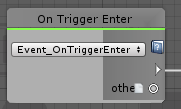
Quick question about the "OnEnter" trigger. Would the "Other" basically be whatever object enters the trigger itself?
https://i.imgur.com/kBjKx54.png
 obtuse agate
yes
glossy sky
Awesome. Thank you very much for the information~
flint urchin
@glossy sky other returns Collider so you got to use that to get the info you want
glossy sky
Lovely. I just wanted to make a zone where if ships entered a specific zone, I could get the rigid body and push them back via. world space.
But thank you very much for the response~
jagged crow
how do I reference a GameObject's parents/children/siblings?
flint urchin
Transform Parent - Parent
Transform GetChild(n) - Get child at index
Transform GetComponentsInChildren <Transform> - Get all children
More here; https://docs.unity3d.com/ScriptReference/Transform.html
 green plinth
@stray junco the gravity setting is a vrcplayer API just as the speed and jump ones.
 cedar rapids
Dunno if I'm missing something obvious but is there a wait or sleep node, just for waiting x ms before continuing. Surely I don't have to make a while loop and do frame time calculations?
green plinth
@shy cave one type of joystick i have made is a 3D one, all you have to do is take one object subtract it's vector3 position with a center point refference objects vector3 and from that you get a heading/vector, then add a minimum distance check to make sure it is not turned on when placed center (just like a regular joysticks deadzone). This works fine if you wana remote control a object by absolute heading. Further math is needed anything else.
warm cave
what would be a good way to tell if a collider hit a player
the best i can imagine is a layer check
 gentle halo
so im back with another question, here is my teleport player script but for some reason it teleports everyone in game to the same location and i only want to teleport one person, any idea on how to fix that? Thanks so much in advance!
green plinth
That is strange @gentle halo because as far as i can tell that should be local only as no network call is made, gonna have to check this my self.
gentle halo
as i got friends to test out the teleport for some reason as soon as one touched the teleport everyone did and i thought that it should be local only as well so i got very confused
wise bay
So I have been doing a lot of testing recently, a lot of stuff that I have to push live to test in VR.. I have been wondering, can I set up a second VRCWorld Prefab GameObject that I can send to a testbed private world, and then just toggle them back and forth depending on whether I want to push live or to the test world?
glossy sky
Quick question again in general about VR input and vehicles. So, for some reason I have a ship that I can control and move actively yet when someone else tries to move it, it does not respond at all. Likewise, when I feed it a static value rather than controller input, it works again. That being said, would simply taking ownership of the object fix it so that it takes the controller input of whomever owns the object?
flint urchin
@glossy sky in order to move any synced object you need ownership yes
glossy sky
Lovely~ To do this as well, I assume for example say, I make it that when upon interacting with a chair, I do the whole "SetOwner" of whatever the chair is taking over and do this locally and not through a SendCustomNetworkEvent, correct?
flint urchin
Yes
glossy sky
Thank you very much. ~ This would explain so much why nothing would work. x_x I had it taking ownership publicly. xD
Was then looking at it intensely and was all like, "Hmm. . . Wait a minute."
flint urchin
Hehe yeah, it’s easy to forget ^_^
glossy sky
It finally fixed my problem! Thank you again, PhaxeNor. I only have one other issue where the pickup controller attached to the right floats up but that's about it.
 worthy beacon
k...i dont get why this isnt working. So im working in udon sharp. I'm setting the ownership of an object to another person. Im then calling a network custom event on said object so it cant set synced values since it is now the owner. I've verified that the vent is successfully called and running under the owner with a isOwner. I verify the value is changed, but then it changes it back....and i cant tell why.
i used the name of the local apiplayer and verified it was the owner, and some how its unable to change the value, do you need somthing else to make sure ownership is passed beforehand? I'm using Networking.SetOwner to set the owner btw
jagged crow
is it possible to branch data or only flow?
like say I want to get variable a if variable c is true, otherwise get variable b
 torn quail
yes its possible
if (c)
a
else
b
in udon you should be able to do it by taking c variable into a branch and then connect a to true, b to false
jagged crow
yeah this is what I've got right now
I was hoping to cut it down into something more elegant like this
using the boolean to decide which float to pass to Set Variable
torn quail
i think you are missing the initialization node. not sure which one you need (update?)
jagged crow
yeah just giving an example
in the actual program there is flow going into the branch
torn quail
then it looks fine to me 👍
torn quail
its possible to set a variable by 2 different events. if event 1 happens - set to x. if event 2 happens - set to y
 oblique sand
in VRCPlayerAPI.GetTrackingData(instance, tt) what is the type of the second parameter, tt?
cunning mist
Tracking Type, but known as HumanBodyBone in Udon.
(or so I was told, presently in bed instead of Unity)
wise bay
Do I need to reset rigidbody velocities on respawn? I keep getting this weird glitch when objects respawn, they like shake up and down in the air.
It happens even when a default pickup object with an empty udon behavior (with sync position enabled) respawns.
going to give this a shot
oblique sand
does it still jitter for the owner? i don't think there is anything you can do about it if it doesn't jitter for the owner as it would be a networking issue.
worthy beacon
anyone know how to use VRCPlayerApi.AllPlayers in udon sharp? declaring a list of VRCPlayerAPI doesnt work, coverting allPlayers to an array of VRCPlayersAPI doesnt work, and using it in a foreach loop doesnt work, how am i supposed to use an array of all the players?
fiery yoke
@worthy beacon Currently you need to keep track of that yourself. I have a system that does that on my GitHub: https://github.com/TheHelpfulHelper/UDON-Collection/tree/master/THH_PlayerManager tell me if it breaks for you or something doesnt work
worthy beacon
is it synced for all users or just tracked by the master?
fiery yoke
Its local for everyone
worthy beacon
hmm....well i might make my own then, i need to do an assignment reshuffle once the master of the room leaves
i dunno, might use that one... arg >.<, i basicly need to do an assignment resuffle of objects once the master leaves
fiery yoke
wut?
worthy beacon
so i have a system which will assign a "prefab kit" of sorts to each player as they join, and keeps track of when they leave to reassign it
so it wont break as people leave and join, and said objects will be seen by everyone and tracked
also sets ownerships to whois moving them about
wise bay
@oblique sand no it does not jitter for the owner
fiery yoke
Yeah I made a system for that as well, its not released yet tho. I just dont get what you mean with "assignment reshuffle"
worthy beacon
the end product thus far is basicly each person gets their own special colored balls, ones ill turn into colliders later
so if the master leave, the master has the data for who is assigned to what
i suppose i could make that local and have everyone log it....
oblique sand
@wise bay i dont think there is any thing you can do about it then, just a sync issue
fiery yoke
@worthy beacon Ownership transfer is quite complicated
worthy beacon
i know XD
wise bay
Okay so just a general glitch with Udon sync, out of our hands then I guess
fiery yoke
Theres a lot of things to consider
worthy beacon
i know XD
oblique sand
i have a collider set to be a trigger on a layer than interacts with nothing but the i can't pickup any objects though it, is there any way to allow pickup raycasts to go through?
worthy beacon
so right now, when someone joins, the master checks the array of values to see what balls are avaible to set, then sets a synced value for what player id is gonna get it and what ball they are gonna get. It then makes a network custom event callout to everyone for everyone to assign it, but the assign only allows the playerid of the synced variable to set it
that way i know who is getting it, they set the ownership of the item, make what ever callouts they need, etc
i was having network issues tho, the local code and everything reconized the ownership transfer, but apparently was lagging behind on the new sync value sets on that object it was assigned to, so i had to set them again
not the ownership, the synced values
oblique sand
It then makes a network custom event callout to everyone for everyone to assign it
on player join calls for every client so are you doingnnetwork events, n being player count?
jagged crow
is it possible to get the mouse up/down state in general instead of just when a specific thing is clicked?
fiery yoke
I can just tell you that Ive been thinking about this for a while and I worked with Networked stuff in VRChat for over a year now, and so far I havent found a 100% foolproof solution :P
worthy beacon
oh? nice 😄
fiery yoke
@jagged crow Input.GetMouseButton(Down/Up)
worthy beacon
so far my system is working, i still need to stress test it, but i feel like it can fall apart
fiery yoke
Yeah thats why Im approaching this with a very different approach
worthy beacon
i basicly have to make it such that when i know ownership transfer happens, said object which has synced values also has local valuse to determine if they dont get set
ah, well ill look forward to seeing your solution ^.^
also, i hate that you cant just get all the players who are in the room >.<
btw, i started working on this last week 😛
so i am a nub scrub
jagged crow
oblique sand
is there any trick to getting the UI raycast to not interact with an object? im assuming the UI raycast's layer mask is set to 2^32 so every layer is included
jagged crow
this doesn't seem to be working for some reason^
(branch node on the right is the entry point)
fiery yoke
@oblique sand afaik the only layer not included is MirrorReflection
jagged crow
trying to make the mouse work as an alternative for the controller triggers in my input system
oblique sand
unfortunate, im trying to make a hitbox instead of using PlayerLocal because its too hard to hit.
what layer is the blue capsule that appears around players when you hover over them?
worthy beacon
helpful, i think what ill do is ill integrate your player tracking code into mine, if i find any hiccups ill let you know.
thanks for the help btw ^.^
jagged crow
hey I'm looking at this sheet https://docs.google.com/spreadsheets/d/1_iF0NjJniTnQn-knCjb5nLh6rlLfW_QKM19wtSW_S9w/edit#gid=1339057013 is the index the only controller that needs angle correction or are the others just not filled in yet?
Google Docs
VR controller summary
This page is a combination of the other pages. These
inputs are verified to work on every known controller, and
in cases where they don't an alternative is provided.,Use this world to test:
https://vrchat.com/home/world/wrld_f8d5f7e4-185c-4b82-8ecb-8a...
worthy beacon
@fiery yoke i can see one potential flaw with this player tracker, and maybe you can help me understand it. The way i see it working is the first person who joins will have themself added to the list. The second person joins, the first person adds them to the list, and the second person adds themselves to the list. This is where its a problem because the second person wont have the first person on their list...or will it call PlayerJoined for the other person who already was in the world?
fiery yoke
OnPlayerJoined is called for every single player in the world even yourself.
worthy beacon
so if you joined and 3 people were already in the world, it will fire off OnPlayerJoined 4 times for you?
fiery yoke
Yep
jagged crow
how do I convert an enum to an int or string?
worthy beacon
hmm...alrighty,I learned somthing then XD
stray junco
@green plinth
gravity setting is a vrc_player?
whaaaat ???
gravity is vrc_player? that sound's stupid
and totally un-logical
well...UDON make mistake about this
and i hope it will be fixed soon
thanks HITORI for letting me know
oblique sand
VRCPlayerAPI.SetGravityStrength(float)? there doesn't appear to be a mistake with gravity
jagged crow
I think they think gravity should be a global setting on the world instead of something set per player, maybe?
oblique sand
just enumerate every player and set it? making it global would take away control. perhaps they want X & Z control rather than just vertical strength
jagged crow
possibly
Does anyone know how to work with InputManager.GetLastUsedInputMethod()?
Tried this but it's not working
fiery yoke
In normal C# you would just cast an enum to (int), casting and converting are not the same afaik. I have no idea how UdonGraph handles casting.
jagged crow
ahh
welp looks like I'm being forced into U# to finish this project haha can't figure out any way to cast it
fiery yoke
What is the recommended way to transfer ownership?
 serene moat
Networking.SetOwner with the local player api. Currently you can't delegate ownership to another player api, so you can only take ownership with SetOwner. The patch yesterday might've fixed that, but I didn't have a chance to try it
fiery yoke
Ahhh so you cant make a remote player the owner of something?
serene moat
yeah, though they're looking at it so hopefully it'll be fixed soon
fiery yoke
Its also kinda weird that VRCPlayerApi.TakeOwnership isnt exposed
Well this is a rather annoying problem. The only way is to tell someone to set themselves as the owner then. But you cant send custom networked events to specific players. So I have to send it to all. Meaning that I have to specify who the target should be. However I can only do that with a synced variable. But then you got a potential race condition. Networking in Udon rn is just...awesome
 trim sapphire
When using U#, how can I receive a button click event from a UI button?
Or otherwise have that button call a method in the U# script when pressed.
 grand temple
the button can sendcustomevent and then the string input is the name of the event
trim sapphire
I can't seem to get that to work. I made a new UdonBehavior with a U# Script, and I have this method inside the script:
public void TestMethod()
{
    Debug.Log("test method called");
}
I set the On Click() of the button to SendCustomEvent on the UdonBehavior object, and I tried setting the parameter to "TestMethod" and "TestMethod()", but neither caused the method to run. I put another action on the button to check it's sending the event, and it is. Have I missed something?
 west plover
Make sure the behaviour has been recompiled
gentle ginkgo
Is there any method currently to handle a playerlist for a world?
Or do I need to scuff one together.
trim sapphire
After a bit more experimenting, I think for some reason it's just Debug.Log that isn't working. I put code that modifies gameobjects in the method instead, and it's firing. Huh.
fiery yoke
@gentle ginkgo What exactly do you mean with playerlist? I have a project on my GitHub that might be interesting to you https://github.com/TheHelpfulHelper/UDON-Collection/tree/master/THH_PlayerManager
 mortal star
how do you set value once while using Update event?
I have update event node but I want to set value once on Key press/release
jagged crow
theres a way to check for a key down instead of a key pressed, it only fires once on the frame it's pushed @mortal star
idr the name of it offhand but its similar to the normal one
mortal star
jagged crow
yeah that's them haha
mortal star
so they launch once?
jagged crow
yep
jagged crow
yeah I only know cause I was reading the unity documentation
was like oh neat, thats useful
mortal star
Cool
so I managed to make the custom jumping graph
now I'll need to make an indicator when spacebar is held
 dreamy warren
Hey guys, I'm currently working on a map where I'd love to integrate like a small rpg coin system. But since the coins would disappear everytime it wouldn't be worth the effort. Is there any way planned to be able to comunicate with outside servers, like rest api based or anything similar where the amount of coins a player has could be transfered/saved?
mortal star
how to debug variables in VRChat?
There's something weird happening with the jumping I made, it always jumps on ground cube that I spawn on but on the other cubes it's inconsistent
 fallen prawn
Debug Log (String)?
mortal star
where do I type that?
fallen prawn
you using node right?
mortal star
using noodles yes
fallen prawn
just find node called Debug Log (message)
mortal star
my noodles
fallen prawn
then at message put get variable and tostring node
depending on type
ex. int ToString
float ToString
and put that ToString to message
mortal star
to like this and to string to message?
there'd be a bunch of variables I wanna check tho
fallen prawn
yes
mortal star
so I have this
 dawn plover
There's no Texture variable in Udon? I'm trying to have a list of textures but I can't find a way to put textures directly in Udon
west plover
You can actually check this stuff easily with UdonSharp
If you install the plugin, it has a tool where you can search for a term and see if it's exposed or not
anyway I'm just pulling up said tool now
dawn plover
Oh, I'll try that then, thank you!
west plover
Yeah it's in Window>UdonSharp>Class Exposure Tree
fiery yoke
You can get Textures through Materials. Its annoying but it works
west plover
Neat 👀
dawn plover
Yup, I was thinking that, but I was hoping there was directly in Udon 😂 I'll probably just make a custom shader with all the texture I need if I don't have any other choice lol
mortal star
also it feels like VRChat doesn't register OnKeyUp sometimes
variables work fine
Is it possible that it won't register me releasing spacebar somehow?
 zenith river
Is there anything else that has to be done after importing the SDK3 into a scene apart form changing to scripting runtime version 4.X ?
flint urchin
Nope
vale current
I'm having a weird bug right now with the player api
I'm setting the player velocity quite a lot and it works perfectly in the air
but when the player is on ground it look like I lose fps


but it's not the case since I can still smoothly move the camera
also I logged my code and the velocity never change during these laggy moments
is there some kind of server side check for velocity that would cause this ?
fiery yoke
@vale current Im not sure if thats lag or just the ground stopping you, would be great if there was something moving in your world to see if its actual frame lag
vale current
by frame lag you mean server or local fps drop ?
fiery yoke
FPS = Frames per second. Frame Lag = FPS drop. The other one is Network Lag.
fiery yoke
I mean I guess the "official" term is FPS drop
but its easier to differentiate between lagging because your ping is bad, or lagging because your PC is shit / or the software runs bad
vale current
also no I'm at a constant 90fps
all the time
but I maybe have found the issue
I have my own velocity variable
that is use to replace the player one
but for some reason sometimes the api velocity is at 0
like it gets reset after I set it
fiery yoke
Probably the ground detection
vale current
on the left my velocity, on the right the GetVelocity()
it's reset almost one of two frames
but I don't know how I can fix that since I call SetVelocity during fixedUpdate and lateUpdate
fiery yoke
You shouldnt be doing that
Physics stuff should be exclusively done in FixedUpdate.
FixedUpdate runs at a constant clock, while Update and LateUpdate can take a various amount of time
vale current
well I never do calculation of velocity in LateUpdate
everything is calculated in FixedUpdate with my velocity variable
actually I never use GetVelocity in my code
but I can remove the one in LateUpdate
I don't think that's gonna fix anything tho
yep
the problem is still here
fiery yoke
Welp I dunno. Cant really help you then
vale current
if only we could just disable the default physics and replace it
or at least move the player
proper oar
how do i make a udon script not client side it only shots the partical client side do i have to put it in a network event?
foggy raven
Ok, I don't know why the Udon Graph "interact" isn't showing to add a name and trigger distance on my Use button, but on UdonC# one it shows normally.
flint urchin
It's not supported properly in the graph yet
U# is using a custom inspector
You can enable Debug mode and edit it that way though
flint urchin
Right click the inspector tab (the name "Inspector") and you'll see Debug there
foggy raven
Thank you
 strong wren
Is someone trying to recreate Audiosurf?
jagged crow
unpopular opinion: audiosurf is overrated and can never compare to hand crafted beatmaps 🙄
mortal star
about the fixed update and update... Can that be the problem why I didn't always jump in my program that I used Update instead of FixedUpdate?
I'm referring to these noodles https://discordapp.com/channels/189511567539306508/657394772603830360/704330099411124295
also noticed that jumping works on desktop but doesn't work on Index, didn't check other VR's
wise bay
Having trouble making a platform that launches you
Also I cannot figure out for the life of me how to get debug logging actually working 😂
Just seems to break and I don't know why
oblique sand
Debug.Log(object) pass it a Const string?
wise bay
I've tried the collider as a trigger, using OnTriggerEnter instead as well
Yeah I tried that I get nothing
oblique sand
make a layer that only interacts with PlayerLocal and then make it a trigger on that layer? thats what i did
currently as is any object entering the collider will cause it to launch the player up
also its hard to enter a collider, you probably want a trigger
wise bay
that makes sense
okay I'll try it the trigger way again
okay that decided it wanted to work that time, even though nothing was different in the graph lol
I see no debug log output though still
I have this under my launch options
am I missing somethin else
also have this
Also I was wondering, do nodes with no connection cause the script to break?
jagged crow
They aren't supposed to, but in my experience they sometimes do
better to delete floating nodes to be safe
wise bay
Okay will do
jagged crow
have you looked in your logs folder btw? it doesn't log to the unity console
wise bay
Oh, no 👀
jagged crow
or rightshift-grave-3 for the ingame console, but it's not very helpful (doesn't give full exception messages)
%appdata%\..\LocalLow\VRChat\VRChat
jagged crow
yeah it's been... an adventure
wise bay
I feel like a jerk asking so many questions
jagged crow
You're not alone! xD
I'm starting to get the hang of it, so of course I decided now is the time to jump into U#
wise bay
Lol, thanks for saying that.
jagged crow
so I'm clueless again
haha
It's already feeling so much tidier than tangles of noodles tho, so if you're at all comfortable with regular programming you should switch to U# sooner rather than later
wise bay
Haha well let me know if you get snagged! I have some experience with U#.. and you don't have to be ashamed of asking simple questions because I'm new as well. Sometimes it's just those really small things like setting up a var properly or the most basic syntax thing
Yeah I like knowing both, because I do enjoy the dopamine release associated with a really nicely laid out node tree 😂
jagged crow
XD yeah I've made some very nice looking ones, but then I'm like "hmm I should add an extra logic check here..." and it's all ruined
wise bay
On that note we should probably go DM, I don't wanna spam this channel with chit chat!
Hmu if you need
jagged crow
Thanks :3
 fallow kraken
is getButtonDown same as unitys where it's true only the first frame?
pretty sure it IS unitys so nvm
mortal star
is it possible that OnKeyUp sometimes doesn't trigger?
wise bay
I cannot seem to get anything but 0 from the Y velocity in VRCPlayerApi.GetVelocity() when catching it through OnTriggerEnter
I will get readings for X and Z, but nothing through Y
I've tried jumping down onto the trigger as well as falling from stationary above it (not after a jump)
Seems like a bug
jagged crow
Is index the only controller that needs angle correction, or are the others just not filled in yet?
(Also woo I eyeballed it and guessed 45 degrees, not too far off!)
cedar rapids
What's the appropriate way to wait a certain amount of time before executing some code? Couldn't find a sleep or wait block, tried a while loop with an incrementing elapsed time but when I execute the code my game basically freezes for several seconds
Code is in place because I'm trying to make a gun snap to the hand when picking it up but in desktop mode there seems to be some frames between picking up the object and the hand reaching its "pointing pose" so I figured I needed to wait before getting the hand transform
jagged crow
Update event, add up Time.getDeltaTime() until it reaches the desired number of seconds, do the thing, reset the variable to 0
(delta time is the number of seconds since the last update event)
while loops are blocking, it will finish the entire thing before doing anything else
cedar rapids
like literally anything else? not just the udon script in question?
jagged crow
depends how the game is programmed, but if it makes you lock up then I'd guess the former
cedar rapids
Eww
jagged crow
haha
 icy flicker
Oh, yeah. Update runs on the main thread, and while loops are blocking, so it will block everything. The entire game.
cedar rapids
so let me get this straight, update will need to always be running and incrementing that elapsedTime, instead of me trying to trigger a while loop On Pickup. I guess I could set a bool on pickup to true and require that it's true and the elapsed time has passed
icy flicker
That sounds about right.
cedar rapids
and also reset elapsed time to 0 On Pickup
alright sweet I'll give it a shot. Udon's kind of an adventure in that the documentation is... sparse
jagged crow
:D
The best kind of adventure
Journeying into uncharted territories
also woot my input system natively supports xbox controllers, didn't have to add any logic for it
cedar rapids
no idea if this will fix my issue but I think I have the logic right at least
seems... overly engineered hahaha
aaaaaand it doesn't work
setting the gun position to the VRCPlayer Right Hand bone position should (roughly) work, right? doesn't seem to set the position properly in desktop or VR so that leads me to believe that approach is wrong
and it's not like it's a little off, it's pretty much nowhere near the hand
 quartz oasis
I've assumed not but figured I'd ask-- is Midi possible with Udon currently?
flint urchin
Not yet
 opaque plume
So I read above that the blue raycasted cursor beam only ignores mirror reflection layer. Hoping the devs will change it so it actually will ignore layers based on the collision layer matrix. For now as a workaround I have a trigger collider in the area where I have some buttons and the trigger turns off the trigger collider on player or a gameobject.
Not sure if you can change the max distance the raycast goes? I could interact with with the buttons from way too far away. If there is not a way with udon atm, well at least I have a workaround in use already.
 civic vale
How would you respawn a player if you don't have a respawn on death timer?
grand temple
teleport
stray junco
i got an issue...well maybe it's not an issue
that i got with my sdk3 and unity that support it
btw
i do have a blender application
but as portable app
that mean that i didn't install it
so i think that in order my blender file will be added to the scene
i also need to install that app
because installation pricess will give windows command
to write app's reg and other components
so windows will re-root blend extension to unity
and unity will recognize and allow blend import to the scene
am i correct ?
anyway...
for more details
please see video below:
stray junco
and this is error console for this event
i forgot to mention that if i (2x LMB click) on blender file
my blender automatically opens and load's file correctly
now assuming my log
i can tell that the problem exist because i don't have installed blender
but i don't won't my blender to be installed because i will lose all my adons in it
is there a some workaround with this
so i will use existing portable blender app
and make unity recognize it?
stray junco
yeah i know that thanks
but you know...
i like more simple way like drag & drop blend file into my scene
but it's ok
i will google something
if there is any
but right now i trying to find
portable app as installed app converter or portable app registrator
that will add that app to my programs and features to the list
but so far i didn;t find any
oof
fiery yoke
@queen siren Unity can in fact auto-convert .blend files into FBXs if you setup your import settings correctly. I dont recommend that tho.
 queen siren
Huh didn't know that  thanku
 twilit breach
I forgot, is it okay to put more than one udon behavior on the same item or does that mess stuff up?
fiery yoke
You can but you really shouldnt.
twilit breach
yeah you're right. my graphs just getting so big its hard to find the right spot to scroll too lol
fiery yoke
Still dont understand why you dont just use U# :^)
fiery yoke
Fair point
boreal plaza
pretty colored udons
shy cave
@green plinth Sorry I did not see your message until now. Thank you.
 spring forge
Apologies if this isn't udon specific but is there a special way to setup Unity UI for vrc? I got a canvas and slider in my udon world but players can't interact with it. I am though able to access it via my scripts.
west plover
Not Udon-specific
You need a specific attached script on the canvas along with a collider
The UI must be on any layer that isn't the UI player(!!!)
It's the same process as SDK2 and ergo I think there's documentation on it
I have a Q based on this Canny: https://vrchat.canny.io/bug-reports/p/particle-weapon-object-sync-issues
Can we have some specific guidance on how much sync is too much.
spring forge
Ah thanks. Yeah I hadn't used UI with sdk2 so I wasn't sure if it was a new process.
west plover
Specifically related to, for example, syncing string data, which is how all of my networking code works at the moment.
 rustic lake
Hello, i want to create 2 Buttons for a Low and High Quality Mirror. How can i create a trigger for that? I know the VRC_Trigger is missing in the sdk3. Would be nice if someone can help me with that 🙂
flint urchin
@rustic lake the term "Triggers" don't exists in SDK3.
But depending on what type of buttons you want, it can be done in multiple ways.
Care to say a bit more on what type of buttons you're after? Cube/Custom Mesh buttons or UI?
rustic lake
@flint urchin I want a button (cube) that turns on mirror number 1 (HQ) and a second button (cube) for the other mirror (LQ).
@flint urchin And if you press the respective button again, that the respective mirror is then off. And it should be "Local".
I tried to did that in this way, but its not local
rustic lake
Oh thats nice to know!
My Problem isUnfortunately the other mirror is not switched off when you switch from HQ to LQ (or vice versa)
flint urchin
Yeah, that's because this only references one of them
If you want to turn the other off, then you got to reference that too
rustic lake
How can i do that?
flint urchin
Since you only plan on having two types of mirrors, you just add another GameObject variable that is for the other gameObject.
Then in the same graph you just add another Set Active (unchecked) and assign the instance to the new variable that you just made
After that it's just assign the other mirror to the new variable for the button and you're set
flint urchin
Yeah, as long as the other mirror is referenced on the OtherMirror variable
flint urchin
Make it public and then drag the other mirror onto it
rustic lake
Its working! Thank you soooo much 🙂
flint urchin
yw 🙂
 civic trail
So, about this thing - so you're able to keep an Udon script on the same object as your animator - https://ask.vrchat.com/t/fix-for-animator-apply-root-motion-position-and-rotation/296
Where is that script supposed to go? It says in a sub graph node, but how? All I see is a SubGraph node that says "coming soon" when adding it. Pretty sure I'm just confused here heh
civic trail
Oh... I see that they're taken out. Is there any other way of doing it right now? I mean, any way for someone not versed in U#?
 floral dove
@civic trail - yes, SubGraphs are removed until we're ready to roll out SubPrograms, which are U#, etc programs turned into nodes!
In the meantime, here is the U# code that mimi wrote turned into a graph. No guarantees that it fixes your problem, but it should do what that code does:
civic trail
Oh, cheers - I'll try it asap! Thanks for taking the time
floral dove
sure thing. You can also paste this into a graph:
ANVW2W7cNhT9FYPP4oCrSA7gh2wtjKJJWjvzEhgCSV25ajVUqsWt4fjL+tBP6i+Es48jwVUbF3Uw8yCJFHnuWS711x9/3qJrW/WA5u9vUdFX1Wu7jDdoYZvSugqy85u2g+V515ThCiWoL/M4aqROtSQSaypyLEhusZPMYp96U0iq8pzROPlD3ZZdWQc0v0W/ozlOUzIjCbpBc67YjNwlKNQ5vDt72cbtUXzh8L9MUFHVv23HLjczFyuk7RpqH8ru5o37GXy32OC/RWVoOxs8nL1E89Xi7Rr0dhhtCpltKklOlq2vm6p0yckCmjaCPBUzsvolJy/6qusbOA3Qd42tkpO3vatK/x3cXNS/QDh1SlnpZUoNF0C0+YjukieGyIZyabu6+TJkz+u6AhseF9pFE7d4erC+sVX7hbj+CyFDHSKqyxWuo3R+C122S+g+lKKQIDzl2LPUYsGcwsZYhg3xIDWkhGs+EkrFdqFkWg9D+VUFcVJfGrC5AbSpYZZl9YfsLMCvva1iZVl2PHr/Znu3teOhOabG0bgXTgmwCMIS7KgtcM6NIJAayaQf0UFwttOBpgMditwXghvAlqo0Llq4eGUkNl4WPAUliCIfSVx2igvixMeX9V9mZyjHq2sIXfYmPNv2sO/r64PJVerBeqMwFdpjIcBgUyiKU6kd4cIwYckIuWtrr8mlK7vfJ/c+F6igtDCcUky9NljoeGVsnmNttOLaFSR1Gn3O2OdFvKhj1dnr+GAPfYqEY/kkO+iMiIeh/x2odyt1XoWrMsBFY0Nb1M0yGv4curfbTZ+F/Me6s6vLLDuavoiC1g0/fvRDbztownrmJgiLOta5q5ZB4ZW3EDWyKx8KiW0hHQZOYmRtTp0Z6UackAdCwCwwZyHHuZMaC8UcdkKkmBIJRGiVp1StQwBMF8YIHrkFjgUwgXXhICbSch9XVkpu0iKNybXmUYlc0BhBTiNKE9/jHoi1sZsw8rTS8kghOxJyl7PohKt4rnQ7Z9wzwN4vB4EniDFiZ7pvc5wPFf4fu9c/YMg2V4fIjOVkT9IUIz5IkhCDzH9NJI02k0Pn2PM0JYcP8iTZ8NvlCfH0PMbH/3Q4CqYcMWOfartDTA8OsUmfHYNqp7Xpx+Lk8u4T
civic trail
👌
jagged crow
being able to write U# scripts and distribute them to people using graphs is gonna be so nice
civic trail
Especially for us on the receiving end :D
jagged crow
yee haha
also @floral dove those nodes look different than mine, are you on a secret new version 👀
floral dove
@jagged crow - maybe just Unity Pro dark skin?
jagged crow
I've got the dark skin enabled but mine looks like this
maybe the hex edited free version and the pro version look different haha
civic trail
@floral dove Sorry, but assuming this graph would work, should I just paste it alongside my current one? Like this? Ugh, still struggling with the basic concepts.
floral dove
@civic trail yep, and you can delete that extra Animator variable
civic trail
Ok, I'll try to build and test it. It was still breaking the animator in play mode at least. Thanks!
civic trail
Sadly that seemed to be a no go. I'll return to it tomorrow... too tired and might be missing something obvious. As soon as I move the Udon script somewhere else, it works just fine so the base graph works at least. Doubt I'll be done with the world before there's a fix or I manage to find my mistake, if it's on my end :P
jagged crow
@civic trail it's possible you've got floating nodes causing errors, try copying the stuff you want into a new blank graph
when you get back to it
scarlet lake
Where do you get Udon?
jagged crow
it's built into sdk3
grab it from the downloads page on the website
Umm.... My null check needs a null check? What's going on here xD
icy flicker
I'm assuming it's trying to call object.Equals(otherObject), but since object in this case is the result of Networking.GetLocalPlayer and is null, it's trying to call null.Equals which throws because, well, null.
Is there no explicit null-check node?
Seems like quite the oversight.
flint urchin
You can try Object Equals
jagged crow
moved it to U# and it works now haha migrating all my stuff anyway
gameObject.SetActive(Networking.LocalPlayer == null); :D
foggy raven
Question, is there a way to deny activation of a trigger if anotherone is active?
In my world, there's a Water Pool trigger (it fills the center space of my garden dome with water) and a Campfire trigger (kills the lights and activates the campfire in the middle), doesn't make sense if both activates :V
floral dove
@jagged crow - FYI you can use the System.Object and != nodes to do this in the graph, FYI. Check out the VRCWorld udon graph, it does this.
@west plover I'm not sure, sorry. I know we've had some issues causing death runs but that's not my area.
jagged crow
Ahh thanks, good to know!
west plover
OK, it's an inconsistent issue for me. I'll submit a Canny with a world ID.
 dark raft
I got the death runs if I ever had too many objects behaviors with synced variables on them, about 16ish seemed to trigger it
I think having a bunch of "sync position" behaviors will do the same, since it's probably going through the same networking check
west plover
:/ It's an odd one. It breaks my UdonStringEvent receivers sometimes on my current in-dev world
dark raft
Do the death runs occur all the time or only in certain situations?
I'm also dabbling in the same space, trying to see what's feasible to do with udon networking
west plover
I'm being a very bad person and trying to keep 48 strings synced.
What I wouldn't give for a scriptable Udon server or something that can run on the instance's box 😦. I know VRC is specifically built to not do that, though.
 deep furnace
Hi is their any way to test if an animation clip is currently running?
dark raft
48 strings too much. try.. 10, i think thats about the max
gentle ginkgo
Is there a way to send a network event to a particular user instead of to everyone?
foggy raven
The heck happened here? :C
All my Udon Behaviours are showing like that now
Aaaand fixed by reinstalling it, what a scare ;w;
jagged crow
How can I get the vector that a desktop user's crosshair is looking at?
oblique sand
is there any way to check in a udon script if a different UdonBehaviour hasn't crashed?
 woeful breach
okay so i dont have the option to test my custom world. can someone help me
i see nobodys answers are being answered  rip
rip 
 twilit bane
How do I check what role I have in the discord?
 devout gazelle
How can I make auto generated terrain like in that spiderman map with udon?
vale current
Hi, I need to know, can you play haptic feedbacks with udon ?
like there is a function in the player api but it's not exposed in udon so I can't use it
fiery yoke
@jagged crow Cast a ray from the head position in the direction of the head rotation using TrackingData. That should be the same as the middle of the screen for desktop, if they didnt bork it.
@vale current afaik you can only do it with pickups right now. I thought the playerapi method was exposed tho?
jagged crow
@fiery yoke thanks!
vale current
oh btw I have an object in my scene with an Animation component and the animation doesn't work in VRchat
but it does in unity when I hit play
wait nvm, I'm just dumb
fiery yoke
@vale current I think there is a problem with the HapticEvent method. Seems like something got generated wrong
vale current
what do you mean ?
fiery yoke
Dont know if this has anything to do with that, but it doesnt seem "right"
jagged crow
is it possible to make a trail show up in a mirror
opaque plume
Uh I'm confused, my controls work on rift s and index so far but vive does not work. I am using the oculus crossplatform buttons for trigger and grip buttons shown here in the vr controller summary page: https://docs.google.com/spreadsheets/d/1_iF0NjJniTnQn-knCjb5nLh6rlLfW_QKM19wtSW_S9w
Google Docs
VR controller summary
This page is a combination of the other pages. These
inputs are verified to work on every known controller, and
in cases where they don't an alternative is provided.,Use this world to test:
https://vrchat.com/home/world/wrld_f8d5f7e4-185c-4b82-8ecb-8a...
fiery yoke
If only VRChat would support OpenXR...I could even make CS:GO like Surf physics if we had an easier way to make Custom Controllers 🙃
grand temple
the touchpad stuff is all different but the triggers and grips should be exactly the same. Are you sure you're using the exact same build of the world on all the different controllers?
vale current
@fiery yoke I kinda managed to make that kind of custom physics
btw I fixed my "lag" problem I had the last time
fiery yoke
Theres two ways to move a player. Teleport (which apperantly generates alot of Network garbage and has lerping problems) and stations which are icky because of Animation overrides
fiery yoke
Teleport?
vale current
and a tiny amount of teleport
I mostly change the player velocity
and I disabled every other movement capabilities
and used my own
fiery yoke
Hmm thats interesting, but that isnt really custom physics then. You still have to abide by player collisions etc.
vale current
well
I also made my own collision response system
I still use the game collisions to prevent going through walls
but I changed the way the player react when hitting walls and ground
I could record a video to show you but maybe it's better if you actually test it
opaque plume
@grand temple Same build? It's pc only for testing purposes.
grand temple
yeah but did you change it half way through or something?
Something strange has got to be going on
opaque plume
uh halfway what? When uploading?
grand temple
halfway through testing
did you test it yourself or get some friends? What is your testing method? Are you sure the vive user was doing it right or maybe they just didn't understand
if you can, go here with vive and see if the oculus inputs show up https://vrchat.com/home/world/wrld_f8d5f7e4-185c-4b82-8ecb-8ae0c7953085

Has a list of the controller inputs gettable via Input․GetButton() and Input․GetAxis() in Udon
it should be more clear what's happening
opaque plume
I had a couple friends. We tested together in a test world I made
There's really only one main button you need to use atm, trigger button. Could it be an issue with having custom bindings on their side or something like that? In any case I'll have to get them visit that world later
I dont know if they have any custom bindings atm
grand temple
custom bindings certainly could cause an issue, but I doubt they could mess it up that badly without messing up all the rest of vrchat
opaque plume
Only other thing atm I can think of is the udon vm crashing on world upload as it is not setup currently to check properly if you are playing on vrc client or not. I can't test anything really in the editor now.
Or random problem that requires reupload
boreal plaza
Okay so. I've had a teleport script since I started my project that I use of two doors. One door teleports the player inside and the other outside. I can go inside as much as I'd like but for some reason I can only exit twice and then it does nothing. Anyone know what wrongs?
Had this issue since day one on this project and was hoping it would fix itself. They use the exact same script
opaque plume
I might know what it is now tbh. Have to see tonight. There's a little issue I noticed with my solution to disabling player colliders to allow pressing buttons with the blue raycasted beam in the world. I made the trigger collider too high so my solution ends up making it really difficult to press buttons until I reduce the trigger collider's height. So they possibly just didn't press a button in the world or missed it lol
boreal plaza
nvm my issue. fixed it.. lol
scarlet lake
a simple question, how can i get a reference to the player in c# code, search for layer or use Network.PlayerLocal?? Aslo if I cant test the map without updating it to see if the script works, what is your debugging workflows
 rustic pecan
I'm not quite familiar with coding much, but I'm trying to recreate a C# script with the Udon Graph, so far it's going well, but I ran into a problem where the output of two transforms is Vector3, but the input needed is vector4. Is there some way to somehow convert Vector3 to 4? Sorry if that sounds absurd, again, don't really know much about this.
scarlet lake
hmm i believe it is TypeCasting, but not sure the exact approach
fiery yoke
@rustic pecan A Transform consists of multiple things, what do you mean with "where the output of two transforms is Vector3"? And for what do you need a Vector4?
rustic pecan
I have two transform nodes (Get Position and Get Forward), their output is Vector3, and each node needs to go in two Material Set Vector nodes, the value input needed for those is vector4.
fiery yoke
@rustic pecan That should be an implicit conversion: "UnityEngineVector4.op_Implicit"
Implicit conversions need to be done explcitly in Udon. Because Udon.
scarlet lake
VRCSDKBaseNetworking.get_LocalPlayer gives me an error compiling, would any of you know the code to get a reference to the player gameobject at runtime?
fiery yoke
You cannot get a reference the player gameobject, it will return null. You can only interact with the PlayerApi, and that should be what you just did.
The PlayerApi is not a GameObject tho, its a VRCPlayerApi
scarlet lake
player = GameObject.FindGameObjectWithTag("Player"); is how i had my original c# script
rustic pecan
Tysm! Got it.
scarlet lake
trying to wrap my head around the usharp version
fiery yoke
You cant get a reference to the Player. It is specially protected and will always return null no matter what. You can only interact with the PlayerApi, which you get with "VRCSDKBaseNetworking.get_LocalPlayer"
scarlet lake
ok cool thanks man i really appreciate your help, so to interact, you mean call functions to return data from PlayerApi.. so i would need to track a different datatype then gameobect, and say a vector 3 transofmr
fiery yoke
Yeah you can store the PlayerApi in a variable and then get data from the Api.
scarlet lake
ok cool thank you for that help, hope to convert some of my unfinished games i made yeara ago to vrc
so much c# code to port over, the usharp is cool, this all is pretty exciting
fiery yoke
I dont know why they called an Api instead of just interface, but ehh
scarlet lake
❤️
worthy beacon
is it a bad idea to update a synced float on an update every frame?
flint urchin
You can do it OnDeserilization, as that runs less than Update
If this is on remote
But Update is fine
 grand sentinel
Hi I'm trying to make a world and my avatar is broken when I built and test it in vr
zenith river
sorry, this is not the right channel for that @grand sentinel @tacit escarp
grand sentinel
oh
 tacit escarp
ok are you building and testing from unity? or packaging?
tacit escarp
@zenith river you are correct, but i would be more concerned about that guy
zenith river
yeah, im on it
@bright flare you should remove the random images they have no relation to the channel topic
@grand sentinel try the #avatars-2-general
worthy beacon
@flint urchin ah i see, well what im trying to do is my own animator sync based on local controler input. Basicly when holding down the trigger, it will set a float value to one. Said float is synced and should update for everyone. This also updates the animator which is done for everyone, basicly makeing a synced animation
only problem is the delay can make the animation not happen if they let go of the trigger too fast, and im not sure if this is because of the fxiedupdate updating it too often, or if its cuz when the sync catchs up, it ends up just sending 0 when you fire too quickly
i wonder for that matter if using int would be faster, or even bool
flint urchin
@worthy beacon is the float value always going to be 0 and 1?
worthy beacon
as of right now that is the values im using to trigger the animation ya
flint urchin
Then you don’t really need to sync it. Just send a custom network event to tell everyone to trigger said animation
worthy beacon
isnt that slower?
flint urchin
Sending network events is faster than syncing a variable
worthy beacon
so the animation btw, when its at 1 it sets to charge mode, depending on how long you hold it the animation builds a secondary float value. Once you release(set to 0) it will go into a different branch, firing the blast, then return to idle
hmm
flint urchin
Yeah, just do all the work locally for everyone
Just send a message to all and say “hey, start charging my weapon”
worthy beacon
and then another to fire?
flint urchin
Yeah
worthy beacon
ill see about making another set up to test that, last time i tried doing that to sync the punching, but it still had a delay as to when the partical showed up
flint urchin
Yeah, that will happen and be different for everyone
If you really want to have it properly sync to a degree, most of it has to be handled remotely
As in, everyone does everything local side
worthy beacon
right, which im trying to keep to as best as possible
basicly i need it to react to the player hitting the trigger on the controller or the mouse click, and im trying to keep that event the only thing to sync
i had another idea which would probly be more sync, where if they put their hands to their side it starts the charge, but i noticed the pos update has trouble keeping up at times
 foggy timber
Im new with Udon. I have a chest I want to open and close with an animation as the player interacts with said chest. How do I go about doing that.
I haven't found a prefab to toggle animations clips or something like that
 olive tiger
I'm actually working on a graph for that at the moment, just trying to resolve the timer system for closing it and playing a sound, if I get it i'll drop the graph here.
foggy timber
@olive tiger ooo that'll be appreciative. Good luck! 🙂
olive tiger
Yeah I'vr cracked the bool check for whether or not my chest is open and to close again just need the time check in between too. 🙂 fingers crossed i'll have it soon.
rustic pecan
I was looking at JetDog's Udon showcase. I was trying to make the conveyor belt, and I found out that their Transform Transform Direction node is not the same as mine. Is outdated or a bug? And is there a way around it?
JetDog's
Mine ^
 fickle stirrup
@rustic pecan connect onTriggerStay with Transform Translate directly and check if that will work (if yes then yup just a bit outdated, some stuff should not require Wait-until-it's-finished connection (but has) so maybe that was removed)
rustic pecan
Lemme try that.
olive tiger
@foggy timber apologies for the delay. I just resolved the issue, turns out It wasn't liking me using time get time for the set and subtraction at the same time had to split them to get it going, might be one for the canny. Anyway, I'll post both parts of the graph. To explain, this uses an animator and essentially on interact runs it while getting the current time (this is for an automated closing animation, optional for you). It plays the sounds stored in audio sources at the location as well. The Update half essentially is just checking the time set to the startime variable and checking if it's 2 seconds more. Before playing the closing animation and sound.
As for the animator side, you just need to create an animation on the chest you wish to open, create a few frames of it opening. Then create a bool in the animator with the name "Open" for example so that you can target it in Udon.
foggy timber
Thank you so much!
olive tiger
No worries if you bump into any issues let me know.
 gloomy swan
im looking for a way to activate 3 objects one after another via interactions on one button, one activation per click and then a way to disable the same items in the reverse order on another button. how would i do this?
west plover
You'd do something easy with an array 🙂
Make an array with three slots in and an int of number of items actually in the array.
When you click the adder button, iterate over the array with a for loop until you find an empty index and add the item there, then break.
When you click the remover button, iterate backward over the array with a for loop until you find a non-empty index and remove the item there.
What's the trick for getting something to just teleport for all players instantly rather than weirdly lerping there?
gloomy swan
im searching for array and finding nothing
so far this is what i have but i get nothing when i use the button
flint urchin
Use gameObject array and a int index
gloomy swan
maby im not following but im not finding ether of those in the udon add node search
gloomy swan
ok found them. dont know why they did not come up in the search properly
flint urchin
the search isn't the best atm
flint urchin
A quick and drity (untested) example
Keeps everything in one graph, this way you can have multiple buttons around the world just calling the custom events that are there
 crimson flame
idk if this is a udon question but i wanna use udon and havent made anything in awhile so which version of unity 2018 does udon use?
gloomy swan
2018.4.20f1
crimson flame
thankies
foggy raven
How do I make a basic pick up again?
gloomy swan
add a vrc_pickup to it, if you want others to see it add a udon behavior script to it and check synchronize position
@flint urchin i set up the graph the same as yours but i get nothing
foggy raven
I don't need to add any program to it?
gloomy swan
i dont think so. im redoing my world right now and sofar that is all i need
flint urchin
@gloomy swan can look at it again tomorrow and get it working. In theory it should work. But yeah, quick and untested.
jagged crow
what's the default player gravity? I set it to 1 but now my booster thingies aren't keeping me off the ground
flint urchin
1 is default