#udon-general
59 messages · Page 10 of 1
 twilit breach
you'll honestly have to just try different angles till you get it right cuz some of those numbers are being changed between the model file and import to unity so its confusing
 green plinth
So does anyone know what type of object is used to give the output for the "on collision enter" event if the collision is by a player?
 tough junco
yeah i made the model myself in blender
twilit breach
I haven't troubleshooted through it but I believe collision doesn't work with players. try using triggers to detect players bumping stuff
yeah I use blender as well, exported as fbx. for some reason unity rotates all of my stuff like -89.98 randomly. children only i think. its weird
i looked it up once in the general unity forum but i forget what it was
tough junco
thats the angle the pins are at standing upright normaly when the world loads
but when i try to reset it to -89.98 it puts them sideways
maybe -180 will do it who knows
green plinth
Well @twilit breach even if i use triggers i still wana know what the default output when a player triggers it so i can compare it.
tough junco
it just seems like it doing the same thing no matter what i set the x rotation to
twilit breach
is your model imported as a parent with several child meshes?
because I'm thinking it needs to be sort of broken apart and repositioned in unity since they change rotation values on import
I actually have the same issue on one of mine but I haven't sorted it yet
twilit breach
have you, for the transforms rot on the script tried 0 instead of -89.98?
because it should be 0 idk why it changes it to -89.98 in the first place
maybe that -89.98 is fake on some level
tough junco
yeah i tried 0
twilit breach
still no good?
tough junco
let me try again real fast
twilit breach
@green plinth your output is very multi-part. theres a character collider, maybe several capsules for arms and fingers. probably a trigger and some kinematic stuff in there. also certain parts are protected objects because they don't want us accessing player objects directly for some reasons. the best thing to do is make a box right in front of world spawn. make it a floating trigger box collider. give it a script that is on enter trigger > debug message and then start turning that bottom half portion of on trigger enter into strings to debug out in the log
i tested some stuff like that and most just throws an error and crashes the behavior (because its protected so we cant access it)
you can get the collider type which is UnityEngine.CharacterController
tough junco
so, when i make it -89.98 they spawn laying forwards, and when i make it 0, it spawns laying backwards
twilit breach
-45 maybe? atleast its changing it up meaning its not ignoring the set rotation
if that doesn't work I had a thought. instead of set local rotation you could set rotation (so global) to 0 or -89.98 and maybe thats the ticket
tough junco
whats the difference?
yeah -45 still does the same thing
is it possible that its trying to rotate it into the ground so it defaults to lay it on top of the ground?
twilit breach
local is its rotation in relation to its parent object (anything above it in the hierarchy) , global is just in general
that is also possible yeah
tough junco
how would i change it to global?
twilit breach
search for the node
transform set rot
and there will be two, get the one without local
tough junco
it wouldnt have anything to do with needing to rotate on the y axis right?
twilit breach
I'm not sure, I don't understand how blender models get rotated on import to unity so my orientation is off
its one of those rough troubleshoot to learn situations i think
tough junco
i put rotate to -89.98 on all the rotation axis and it still did the same thing with is very weird
 jagged crow
how do you not a boolean?
green plinth
toggle on a constant bool?
jagged crow
no like I just wanna get the opposite of a boolean's value
green plinth
ohh sorry i missunderstood that use unary negation
green plinth
yw
jagged crow
What's the purpose of the pedestal variable in the AvatarPedestal Program?
it doesn't seem to be used
 gentle halo
so here's a noobie question, how would i make a conveyor belt? this is what is also confusing me, im so sorry about simple questions like this, But Thank you so much for your help in advance!
jagged crow
is that one udon world with the moving floor available for download? I'd guess that'd be a good first place to look to figure that out if it is
(the one that has 2048 and tetris and the planes in it as well)
or I guess just try to make a moving object and see if things ride it haha
green plinth
I can think of a few ways @jagged crow a animation, micro-teleporting the player, axis position and rotation locking on a rigidbody and then pushing it using a force. I never really tried any of these but they should all work (teleporting id not recomend tho).
jagged crow
@gentle halo
 idle kite
how do you make a pickup respawn if it falls off the world?
green plinth
Scene descriptor
 fiery yoke
Pickups need to by Position Synced for the respawn height to work
green plinth
Ouch
tough junco
ive tried setting it to 90, 180, 270, and 360 and every time they still wind up lying either facing forwards or backwards and nowhere else
green plinth
are you getting consistent results or the way they lay down at random?
tough junco
i can send a video if that helps
idle kite
ah okay yeah the synchronize position was unticked for the pickup, got it working now, thanks guys!
green plinth
try mark all of them and then use the transform to set gradual values like -30
tough junco
alright
green plinth
for example do 0-30
tough junco
like set one to 0 then -30 -60 -90 exc?
green plinth
nope all of them at same time
tough junco
so set all pins to -30
green plinth
nope adjust it by adding a -30 to the current value
tough junco
alright
its just weird how they stand up properly on spawn but not on respawn
this is what they do when set to rotation x value 0 for respawn
green plinth
how you respawning them? also could the prefab have a tilted position? set angle at 0 on all 3
green plinth
position set does not set rotation
tough junco
whats that mean
green plinth
when you re-position a object it keeps it current angle of rotation
tough junco
so how could i fix it?
currently the pins fo back to the right spot they just dont stand back up
green plinth
well first of maybe use a for loop with an array if you know how, for less cumbersome code and then set rotation for each object to it's intended default.
tough junco
i have very little knowledge of how to do the code stuff
green plinth
sec
tough junco
like a week ago was my first time even trying this ever
green plinth
here a simple guide, any variable with a [] is a array. https://ask.vrchat.com/t/simple-for-block-example/179

VRChat Udon Discussion Forum
It took me a second to understand how this would work, so here’s a minimal example and one using an array. The Body flow output will execute the nodes downstream X times, the index output will update on each loop, and the exit flow output will execute once when complete.
tough junco
how would i just set rotation for each object to it's intended default with what i already have?
green plinth
Simplest solutions would be to use a reference object, it's what was used in the old trigger system. simply place a new game object with the exact position and rotation and then have the script copy paste the values onto the pins.
for this i would recomend 2 game object [] (array)
one for the pin and one for the reference objects
Ok guys for some reason i cannot get "on station" to function, neither Entered nor Exited works, despite station being on same object. Anyone know what wrong?
tough junco
yeah i just cant figure this out lol
jagged crow
this is what GameObject.SetActive and GameObject.GetActiveSelf refer to, right?
oh WHOOPS never mind me, ofc I figure out my issue right after I ask xD
forgot to connect another noodle
green plinth
yup that the one @jagged crow , you can even verify that by checking inspector during unity play
jagged crow
is it possible (or necessary) to convert an Object from UdonBehaviour.GetProgramVariable to it's proper data type?
green plinth
i believe it converts automatically due to the object received being inherited from Object.
green plinth
If the variable is global and the input is a actually valid object with a UdonBehaviour on it yes.
jagged crow
D'OH
wow today is the day of forgetting noodles
was trying to call VRCSDKBaseVRCPlayerApi.SetVelocity without a player instance
🙄
green plinth
That would do it
jagged crow
is there any way to make the ingame log show full exception messages?
I got [UdonBehaviour] An exception occurred during Udon execution, this UdonBehaviour will be halted. ingame but didn't get the actual exception
 floral dove
@jagged crow there may be more info in your actual logs. You can find them timestamped under something like C:\Users\Shaun\AppData\LocalLow\VRChat\VRChat\output_log_11-18-30_PM.txt
tough junco
does anyone know how to make a video player?
jagged crow
yee i found the full error there but its a pain to have to dig up the log files
ty tho
twilit breach
Does anyone know what is happening when we try to interact/pick things up? Im having the issue of no mesh, trigger colliders blocking it. Originally I thought it was raycast but I'm starting to think not
 empty thistle
how do i read from input fields in a component/how do i tell udon i specifically want to write to the first field(string) of a component whos type cannot be found in the type list..
green plinth
try looking/search for a "get" and a get of a specific kind of component like "collider get trigger" and you should be able to find something, when it come to searching graphs "less is more"
empty thistle
how does udon access component fields?
because i can't see any way to do it manually
i'm trying to set the text field of a component called TextMeshProUGUI
i'm failing to see why i can't convert a component into an array of types and access [0] and insert a string
green plinth
It is likely a intentional restriction to prevent people from using any component they please.
 gentle ginkgo
What is the proper way to track an object to a player's head (or just slightly above it)?
 scarlet lake
Why is the oculus quest not getting a good update
 stray junco
hi all
I'm a copy-cat and i can't understand
basic UDON knowledge especially about
unary negation and variables thing
(now i know that in windows os variable option is for os user settings profile but on unity is deferent a bit)
so i don't understand them what they are for and what they do
at least it will be great if someone tell me
alternative names for those commands so i can understand them
i try 4 days to make my mirror to be clickable
i mean toggleable on or off but i just cant do it
so can someone please take a look
at my UDON script and fix it
and send it back to me
please take a look at my UDON script:
gentle ginkgo
So im trying to instantiate a few buttons into scroll view, however after the interact, it spawns them at the top of the hierarchy instead of in the parent they were instantiated from. What do I need to do in order to put the objects in the right parent object?
fiery yoke
You get a reference to the gameobject when instantiating, then do transform.SetParent()
 uncut coral
I have a bit of a complicated issue, not complicated. but I'm a complete newb at Udon. I'm making a Menu system. Mainly just to experiment and learn.
 upper kelp
so my buddy told me u could save the current state of a map with udon is that true?
uncut coral
The theory is that, when user click Options button, the "options" will hide and "menu" will be visable. Click Exit and menu hides. But when I do everything just hides
I know that SelfMode is not public tagged
Also have another issue
It spawns inside and won't untoggle the options box, until I click that tiny area. This is the Exit button
stray junco
@uncut coral
LIKE THIS?
ARE MY MIRROR WILL BE TOOGGLED IN THIS WAY?
uncut coral
Yupp
Then On your toggle button
Adda a Udon behaviour
Program Source is your Udon code
then Target is the VRCmirror
Remember to have Mesh Collider enabled
 torn quail
do you mean the options button goes over the exit button?
 boreal plaza
What up, my doodle noodles. I have this lil thingy and it is suppsed to shuffle a deck of cards but it seems to do nothing so far. Anyone know I am doing wrong here?
or is there a more specific way of doing this
fiery yoke
@boreal plaza take a look at the Fisher-Yates shuffle algorithm. Youre kinda already doing something similar, but I wouldnt reinvent the wheel
gentle ginkgo
@fiery yoke Am I doing something wrong while the object is instantiated to cause a duplicate in this situation?
https://gyazo.com/e261651fae2306f92a8681f45f077016
https://gyazo.com/b2fa8a72230008d8d19a713cf7f4b21b

 fiery yoke
I have no idea what youre doing there
gentle ginkgo
Pressing a button, cloning an object, renaming it.
gentle ginkgo
In any event of an instantiation, if I do anything with the new GameObject, it causes another duplicate (of the same object) to be made and THATS whats being modified.
fiery yoke
Yeah no idea
gentle ginkgo
Potential bug perhaps?
fiery yoke
More likely something you did wrong :P
gentle ginkgo
I'm stumped then lol
https://gyazo.com/193cdac193f9344e19880ceecfea2720 is there something wrong with my button script perhaps?
 boreal plaza
@fiery yoke thanks I will take a look at it. Also I am not re-inventing I was trying to use Knuth shuffle algorithm and hoped it was enough , heh
fiery yoke
@boreal plaza The Fisher-Yates shuffle is also called Knuth shuffle :P
fiery yoke
I guess you were doing that yeah
You probably have a different problem then, I dunno
I dont use the Graph anymore ¯_(ツ)_/¯
boreal plaza
This was in U# unless u are saying it would be easier in udon graph
fiery yoke
Ohh woops sorry got confused. Yeah no idea sorry
boreal plaza
Well I think I figured it out. Firstly, I had one card with a slightly bigger collider box so I always grabbed that one first, and the cards are actually being shuffled somewhat. Meaning I get a 3 and or a 9 on the top of the stack of cards almost every time. At least it works.
Gonna make em shuffle more than once and see if it gets better lol.
I take it back.. there no shuffling
 flint urchin
Would highly advise that if you're working with U# to use the UdonSharp discord, less confusion in here then^^
flint urchin
Yeah, it's at the bottom of the github page
torn quail
how do i tell an udon behavior to do the same thing for all the children of the targeted object?
flint urchin
Use a GameObject array and for loop. Then iterate over the array and do what you want to do.
fiery yoke
to get the children you can do transform.childCount and then transform.GetChild()
fiery yoke
Nope. You have an array of gameobjects so you cant just do transform get childcount. You have to get the childcount from the parent of the objects. And you have to do GameObject.get transform first, if you reference a gameobject. And at the end you need the transform.get Child node. But before doing that you first need to get the GameObject from the array using your index.
Its not that easy.
flint urchin
If you got the behaviour on the mirror object and you disable it then of course that will happen
You'll have to create a new empty gameObject, add a collider on it and use the behaviour on that to toggle the mirror
stray junco
this is so complicated for me
i never do any coding in my life
except html website creation
but that is 25 years ago
so i forgot how i did it
do to my eye sight damage
i wish that i can learn more but i am wary limited
do to i just mentioned before
can ah well anyone if you want can you send me working script
or what i do i need to do more
i dont really know what in the world i can do now
flint urchin
Just do what I said. Create a new empty gameObject
add the Udon Behaviour on it
Then add a box collider
flint urchin
Please read what I wrote then.
If you got the behaviour on the mirror object and you disable it then of course that will happen
Anything you disable will not be interactable.
Why I said you needed to create a new gameObject, with the behaviour and a box collider
 normal lichen
how do i fix this?
stray junco
if you have latest unity and sdk2 or 3 that is compatible with vrchat
then try to reinstall your sdk2 or 3
@normal lichen
normal lichen
i have tried that but it dosent work
well i tried to reinstall it again and now it works again
thank you for the help ❤️
stray junco
np stay cool
😉 🤘
stray junco
how to make togglable mirror
by saying that i want the mirror becomes like a button
that will turn it self on or off
what nodes do i have to add connect in UDON graph
and latter what shod i do in my inspector area
 marsh grotto
How do chairs work in udon?
floral dove
@marsh grotto - check the Prefabs scene in VRChat Examples
floral dove
@stray junco - we've improved the mirror example, here's a package with the update you can import on top of existing SDK. If you change the MirrorToggle to be invisible and put it over the whole mirror, you would have the effect you want where it looks like the mirror toggles itself on and off.
uncut coral
@stray junco
- Go to the object you want to make as the toggle
- Click add component
- Search Udon
When you have done this. you will get this added like this
If you still don't really understand how it's done. I recommend you this video: https://www.youtube.com/watch?v=GWv3zloRWY4

This is a short tutorial on getting a simple button toggle working using Udon, the new VRChat scripting system. As an example, we're using it to toggle a mirror on and off. I've also included a segment on doing the same thing in UdonSharp, the C# compiler by Merlin allowing fo...
jagged crow
Hey what category on the ask board would be good for posting small but useful udon programs?
Was thinking releases but it seems like that's more for large scale things
uncut coral
@jagged crow Maybe #udon-showoff
jagged crow
nah stuff gets scrolled into oblivion on discord haha
 glossy sky
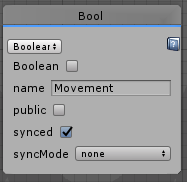
Question about booleans. If I want an animator to be synced across all players, would I just enable sync or do I still have to send a custom network event to toggle it?
https://i.imgur.com/POwekmY.png
 gentle halo
so im back with another question (sorry about that) So im trying to make this where after you press the button it gives a 6 second timer before it shows the target, then just loop of after another 6 seconds show a different target, but im a bit lost with um the whole timer thing, Thanks so much for your help in Advance!
stray junco
ok i will try a new UDON script from that video about basic buttons again
maybe with this new update and that video tutorial i will be able to make it work
thanks
@floral dove
@uncut coral
floral dove
@gentle halo - take a look at the timer in VRChat Examples/MultiExample on the TimerCube. The SendEventOnTimer script will send a custom event after duration seconds, should be pretty reuseable.
@glossy sky - enabling that sync box will propagate changes from the Master to all of the other users for that variable. You'll still want to do something with it - you can use the OnDeserialization event on the other users to react to the change if you'd like.
glossy sky
Lovely. Thank you very much~!
floral dove
Hey - here's a question for Udon noobs - what tutorials would be helpful for you as you get started?
I'm thinking:
- Intro to Udon Flow
- Finding and Connecting Nodes
- Thinking Backwards in the Flow (reading other people's graphs)
- Gettings & Setting Variables
- Go through each graph in each example scene and explain how they work.
What else?
jagged crow
I'd say videos for the common behaviours that every world is going to need
Toggling objects, teleporting, etc
practical examples instead of abstract ones like the cube series
(Not that the cube series is bad or anything, just not so easy for total beginners to apply that knowledge to what they want to do)
boreal plaza
Is it possible to combine Udon graph script with a U# ?
I wanted to Interact with a button that just calls on a U# event that is going to Update .
Like a playbutton then the event itself starts and is self-going.
So far I've only been able to "update" the content of a script by mashing a button.
Also , was there a U# specific discord and where can I find it?
 grizzled shuttle
Is there no sync video player in sdk3 yet?
 cunning mist
@tropic canyon tt refers to "Tracking Type" and is simply whether it follows your player base, head, or left or right hand.
 tropic canyon
is there any way to make it public?
or generate it somehow in the code
exchange it
my right click menu broke now
is there a way to make it a public variable?

cunning mist
I don't believe so. What some people have done instead is associate it with an integer, with 0 = base, 1 = head, 2 = left hand, and 3 = right hand. That integer is what you would make public, having a branch system that does a certain tracking system depending on what the integer value is.
cunning mist
Yyeeaappp
tropic canyon
it's already ugly with only 4 bones tracked
cunning mist
(highly recommend UdonSharp if you're willing to get into raw C# programming)
tropic canyon
also that tracks bones not head and hands
have you got a link
I would be better at that anyway
cunning mist

GitHub
An experimental compiler for compiling C# to Udon assembly - Merlin-san/UdonSharp
floral dove
@jagged crow - thanks for the feedback! We'll definitely focus on showing how to make the typical things people want to add to their worlds at first.
gentle halo
Im here for another question (so sorry about that) i tride to use the send event on timer script for making an object show after the timer runs out, but it doesnt do anything, i feel like i messed up somewhere, and im kinda stuck. Thank you so much in advance for the help! https://cdn.discordapp.com/attachments/627298413675020310/703033892109811732/1.PNG https://cdn.discordapp.com/attachments/627298413675020310/703033893661442194/2.PNG https://cdn.discordapp.com/attachments/627298413675020310/703033896446459934/3.PNG https://cdn.discordapp.com/attachments/627298413675020310/703033897612476456/4.PNG


 torpid badge
Is there any way to make the handheld menu buttons able to be clicked while falling using Udon/SDK3?
floral dove
@gentle halo does the timer example work for you in the example scene?
@torpid badge - no, that's beyond the reach of Udon.
gentle halo
Only timed change color works, the other timer example does not work.
floral dove
@gentle halo - that's the only timer example
gentle halo
Ah ok then yes it does work, so sorry about that
floral dove
no problem. Ok, so that works. The next step is to build the other part and then we can wire them up. So - you want to toggle an object on and off, is that right?
gentle halo
Yes, just turn on an object
floral dove
ok - so you want to:
trigger a timer to start
when timer elapses:
turn on object
what triggers the timer to start?
floral dove
Ok cool. I'm writing up a quick graph, please hold...
ok @gentle halo - this should do it! I'll post a picture, and then a graph string you can copy-paste into Udon, and talk you through it.
GuppyTimer
You should be able to paste this string into an empty graph to recreate what I've got above:
AO1Z2W7bRhT9FYPPGmOWO5uBPGRrELRoi9rxS2EIszpsZSqgqLSG4y/rQz+pv9BLL5JiThy2URIZrawHkxxx7pxz7jJ3/vrjz4vqrZstU3Xw80WVl7PZ9+4ML6oXqZseu7Z2fpaqSbWsI96kTHORoiHJM0PACEWsyZREb1ym1jLLNQ5+M1/UXT1vqoOL6vfqgPF9OqnOqwPCge7Ty0nVzGN69fLZAietqpNJlWfz326uT66fHvc2La6MWjZ1d/6D/yWF7vja0ouqbhada0J6+aw66F+46Nq6Ob15XB2eL7p0tn94dXOyd7YI83ZW+8necWoXaNcj2Kf932Tv6XLWLdv0qEnLrnWzyd6PSz+rw7fp/Gj+a2oeea2dDFIxKyBRY99JT3Xk2hAbnCTgXCSeOSBCcC2ZDDZZVV2eXE7eA/OwBKbOyYYsHclcJgIxe+IkCOIcKGOE0J7GIZiK0ls0RQ/sXTQnDwzQIILOLhtiKLUEUk7EaC2Il14pl2QSIVQ9nP/c6iEPr/p3PG9O6ya9wDvXb9ufTpGfx6Gr3yb892qpT+bzWXLN7eXxvI5rJ7A6U20Y8QYoAaopcdZookAn55FCD37IG9dqxZtQA97GeNY7OmR3nIq2oYGtkVCMLCpIkMEoohhlBMCiX3mqcEFUMseddawQWXD0KrYI9dBjyzhXGMSWTcGiludvpt/NT+vgZo+beFfPRXXfXK644JEnrdEOYNwTsBwFHlgmitsEkmarFBS4EBtc0CEXYxi+UrgMImttGYmG4WPHUh9iUeBUeWG8BwyzOHD71G5N4U/n+IMPgBs8xJQCJToCEBAJSQZALKyNLjllXKIFcA2swr78okn0xv7tKv2oxSkGsN0GhQ8hN8Y9hsgxMOYWOmWgmDFX34cF4zdutkj/UrWfMY519VlqXy5+WjYNvvvT7NtV3HbVrs/BZzNvCt5arGldBO56p6RaawIqK+K4iUR719c3OVrNCj4q18WRKqXxyaiwOUgK1VYKn6+e8beUlYqEUZkkT5YSyRQSxphFXFXo87MJmucclCmlo42YWibMe50BAhClAdO9yZk4FSWhlmIRAEZSZ4eEjdLPjpNqlGaeSkosB45SFY54zSgxlnIfqcY7fGukrnJmcWuzonnUtvX+3Cm5+dK5c/dCYefa09TtYOq4rqh2zqxPyWgfLRAPcfBGKIMkvPIUXc71fhe8I1bk2Duf4hxAB13atmxqXHy1+vB6LdsFn+2e/8Rl667A3z2p/u9B1ajMdb8H8f+zhH2H07bdEe6CdlBP/wmZbxRDPQ370ylm7Wm/L52WlT+mWi0pn5p1N94Ourr3a73cyLs27LqPd7j0iF7oZ3zf7vcvykuygaFJHAjNBpcklSNOG3TmSIMVEYt7WuqoWrHainE1zIYjy3qs/5lNyirArUKQ/fS4tREikhQyYwlree12vItX7FOPWVZJKHzjEIwWiowH1aget8P5uL5ftMl1qT167cbo+24/cEyfuHRkwOE+gY9xmyuBc0+j0TgfDTThQIFjPGKiaXaBcSqUl7st8OdvU9NNX72JSMIK1eRi9FIrkmVOPaqcGJ56LzfZqZC1iaWGgF1FDaCDCuDuJh9AsuADYTnYfopIDMhMlGH40VFmlM/HomXRO8dwUjJ+fabKROFM9UE556ht0EALT1o09vW6jzeGonsO+gUMy8Axx0rDjtCo09btuFXZP54uF938bJ1WbRTKgCGOWiCA6ZCYkDQRQRvIOdAoSxJD1NYtzmGlMDjWHdWX23ElHrX16Wlqe2BPLv8G
So - working through the flow, this is what we've got:
When the Custom Event Trigger is fired, we want to start a countdown. So we set a variable 'startTime' to our currentTime, so we can tell when X seconds have passed since then. We also set a variable called 'timerIsRunning' to true, so we can stop checking the time when it's done.
Everything else happens on the Update event. Every update, we're checking the Branch to see if it's true or false. If it's True, we're going to do GameObject.SetActive on our 'target' with the value of False, which will turn it off. We'll also set 'timerIsRunning' to false. So the last bit is - how do we check whether or not the Branch is true? We'll compare our 'startTime' to our current time minus our duration, and combine that with 'timerIsRunning' using Op Logical And. This means that if either of those bools are false, the bool in the branch will be false. We do this because otherwise our currentTime would be greater than startTime + duration every frame, and we would fire our GameObject.SetActive(false) indefinitely.
The last thing, which I'll leave for you to do - is to wire up a button to fire off this 'Trigger' custom event.
gentle halo
Thank you so much for helping me with this, i just got mildly overwhelmed looking at lots of different tutorials and for some reason none were working, This works exactly as i was hoping, thank you!
empty thistle
vrcplayer api GetAllPlayers returns a list'1.. how do i use this?
udon is very frustrating
flint urchin
 forest mist
Does anyone have any good ways to debug variable values?
I wanted to change some text in-world as a sorta debug thing but I haven’t been able to find the functionality yet to change text
empty thistle
i want to make a player list, a list of names to appear in the world synched so all players can see the same list of names, regardless of where they are in the world their name will appear on it
a lot of nodes in udon are confusing to me, like "object[]".. is it and object with and array of children, or is it an array of objects?
i've yet to understand how syncing works
flint urchin
You can do it now, but involves a bit knowledge. But if you wait they will update the GetAllPlayers so it will function
empty thistle
there are 3 things i thought of that can make what i thought of work,
- update on player join/leave
- world size collider trigger
or 3. the GetAllPlayrs node(which is broken atm)
one question i do have, is how do i set up an array?
just... an array..
with nothing and no set type
because this has been bothering me since i started looking into udon node programing
flint urchin
It's a bit more complicated than just setting up an array
You have to handle player join and leave, as well as the array size
empty thistle
i can handle that logic
but i don't know how syncing works, or how to make custom arrays
at the very most i will have to try bruteforcing arrays by using the object hierarchy and a plethera of meshless cubes with odd names
gentle ginkgo
@cunning mist Just watched your latest video about cloning objects and such. Ty for confirming my suspicions about the Instantiate bug causing duplicates to occur. I was going crazy thinking it was something I was doing wrong.
cunning mist
Honestly I was as well. I was convinced my button was double firing at first until I started randomly unplugging things.
Glad I was able to help👍
floral dove
If it's the same issue I had where you'd get two clones then that should be fixed in p4.
 worthy beacon
would it be a bad idea to try and evoke a Udon Behavior Custom Network Event by getting the udon behavior from a gameobject.getComponent with type udon behavior from a public game object variable thats within a gameobject array?
what im trying to accomplish is a little complex, i want to be able to syncounously tell an object to activate. Im doing this through a set of code that will dynamicly assign a free game object from an array of objects to the player who just joined. Im setting the ownership to them, and then having it globaly tell everyone to turn the object on
jagged crow
Hey I've got rocks for brains, anyone here good with maths? Trying to combine a quaternion and a distance to get a destination vector
(or even better if there's some built in function to do that for me haha)
 oak falcon
if you are doing this in U#, destinationVector = quaternion * Vector3.Forward * distance
but, if you're just getting the quaternion from transform.rotation or something, use destinationVector = transform.forward * distance
and maybe you don't want forward, but there's also Vector3.up, transform.up and Vector3.Right, transform.right
jagged crow
not U# but I can apply that to a graph! Thanks :D
fiery yoke
What exactly is the Quaternion.eulerAngles used for? I thought it would do something similar to Quaternion * Vector3.forward
oak falcon
It will give you angles from -180 to 180 i think
you could use it but you're going to have to do some math to get the direction out of that
fiery yoke
But why would you ever need that? Like in which situation
jagged crow
also hah I thought I recognized your name Toocanzs, you're in the RL discord too :D
oak falcon
not sure, maybe to give people a representation that they understand? A lot of people do things like transform.rotation = Quaternion.Euler(transform.eulerAngles + Vector3(1,0,0))
stuff like that
ya that's me
back in my day runelite had like 50 users 👴
fiery yoke
Isnt it much better to multiply a Quaternion by Quaternion.Euler(new Vector3(1,0,0))?
jagged crow
rite? damn that thing blew up fast
oak falcon
yea probably
i'm actually not sure what the multiplication math consists of but it's most likely faster than doing that lol
generally if you're using euler angles you're doing it "wrong" but sometimes "wrong" just works
fiery yoke
"sometimes 'wrong' just works" is my new favorite quote
fiery yoke
Yep thats me. Both.
 worldly drum
what unity version do i need to use for udon?
fiery yoke
2018.4.20f1
worldly drum
thx
 fallow mural
Does anyone know some way I could tackle the avatar ragdoll issue when in moving seat with udon? The head and body of my avatar keeps going in front of my viewpoint when I get some decent speed
worldly drum
Is there a post processing that works with unity 2018.4 and udon?
fallow mural
yes Post-processing Stack v2
@worldly drum https://docs.vrchat.com/docs/supported-assets u can follow the url to the guide by Silent, it's quite helpful
VRChat
You can use certain external assets that use scripts in VRChat worlds. To see a list of precise components permitted in VRChat worlds, please see Whitelisted World Components. Dynamic Bone "Dynamic Bone applies physics to character's bones or joints. With simple setup, your ch...
worldly drum
thx!!
green plinth
@forest mist use a UI text panel, just remember to set the canvas to render mode = world space
Speaking of that, i am having a issue making a UI canvas into a head up display, anyone know how to do this?
 vagrant coral
recently i keep getting this on new programs after a while

it does not make much sense to me on why it appears, or when it goes back to normal. since it can be exactly the same after i reconnect nodes and events
has anyone else ran into this and knows why it happens?
 wise bay
what is the best way to test if player's local position is inside of a specified zone? I am guessing on collision enter and exit?
vagrant coral
on trigger enter is probably what you are looking for 🙂
i saw a great guide to this
just a sec
 trim sapphire
how does SendCustomEvent work while using UdonSharp? currently, I'd like to have a world-space UI button that calls a method inside an UdonBehaviour when clicked. the way i've been trying to do this is by having the button's On Click() call "SendCustomEvent" on the UdonBehavior with the name of the method inside I'd like to call, so if the method was "CustomFunction()", i'm calling SendCustomEvent with "CustomFunction". this isn't working and that's probably because I'm doing it wrong
vagrant coral

VRChat Udon Discussion Forum
If you want to make something happen when the player collides with a trigger, e.g. runs into an area or touches some object, you will have to detect that collision. This is the setup that I use: Create a new layer and call it something like “OnlyCollideLocal” In your P...
@wise bay
jagged crow
@green plinth hey sorry for the late reply but if you still need it, this is what I've got on my HUD object. It mounts the center of the object inside your head so you'll need the screen to be a child element with a bit of a z offset.
 bright grotto
what should i do ?
it happened when switched platform to upload the avatar again on quest
green plinth
@jagged crow well i was more asking how to make the hud/canvas actually show up on your screen at all.
The hud is clearly there as the raycast is hitting it, but it still does not graphically show it self.
stray junco
@floral dove
@uncut coral
@flint urchin
PS
--my unity and SDK-3 is non damaged files
--unmodified
--all my assets are whitelisted
--and supported by VR-chat
--my W-10_64 has every component needed for VR-chat,Unity and SDK-3
also here is my UDON script
so you can take a closer look
and if you want please send me your version of UDON script
that is related to make my mirror toggleable on/off
here it is:
tropic canyon
@cunning mist I figured it out the class is called "HumanBodyBones"
also known as tt in udon
forest mist
@bright grotto
You should go to your content manager in your SDK, copy the ID of the thing you’d like to update, then go to the Pipeline manager component of your avatar in your Inspector
You’ll want to detach the ID that’s in there already, and then paste in the ID you copied earlier, then press “Attach”
Then you can build again and it should work
wise bay
How can I know which GameObject has entered a collision trigger zone OnTriggerEnter/Stay/Exit?
fiery yoke
unless its the player, it will return a Collider. Then you can do Collider.get GameObject
fiery yoke
I would recommend doing a null check, otherwise you might crash your Behaviour.
wise bay
ooh.. okay. I don't see an is null for gameobject.. what node is that?
flint urchin
@stray junco I told you before, don’t put the UdonBehsviour on the same gameobject as the Mirror.
Create a new gameObject, then add the UdonBeheaviour and a box collider on it. Then reference the mirror gameobject.
You can not have the UdonBehaviour that toggles the gameObject on and off on the same gameObject. It has to be on a different gameObject.
fiery yoke
I think you can just do GameObject.Equals and as the second parameter pass in null
wise bay
@fiery yoke wait do I need to null check the collider or the gameobject?
flint urchin
Collider, other
fiery yoke
The collider. Otherwise it would try to get the gameobject from null, which will fail
stray junco
@flint urchin
yes but i make mistake because i follow the tutorial and i did not see that he make duplicate of the mirror
because i told you before i don't see wary well
and everything is so tiny for me
so again i'm sorry
flint urchin
You can change the text size on discord.
stray junco
how please
flint urchin
Settings -> Appearance
stray junco
ok i will do that
wise bay
da?
stray junco
thanks
@flint urchin
fiery yoke
@wise bay looks good
 dapper jay
What exactly does GetNetworkDateTime return? Which system time is it pulling from?
stray junco
is this ok?
@flint urchin
flint urchin
Yeah
stray junco
ok thanks i will try this new update
and i will let you know wether it's working or not
wise bay
would polling for a program variable that doesn't exist cause problems? should I also check for null there too?
flint urchin
Yeah, you’d have to null check that too.
But if you’re using this on it’s own layer, then it should always have a value. So all depends on how you’re setting it up
wise bay
hmm okay, how to do that though because program variables can be a number of types?
stray junco
to assume this...
for making UDON script functional for mirror to be toggleable i need:
1 make functional UDON script (which i have thanks to all of you).
2 create empty game object
3 add box collider on it
4 add UDON behavior
5 place mirror (that has it's own box collider) in that game object
6 drag and drop residing mirror object to game object's UDON behavior 'TARGET' field
test the game
correct ?
@flint urchin
flint urchin
Yes
stray junco
well...
it not working
😔
flint urchin
Probably because your empty gameObject with the box collider on it isn’t in the correct position.
stray junco
if you wanna proof i will make video about it
...
correct position ?
how ?
you know...
i think that i need to remove mirror's box collider
because game object has already that component
and according to my knowledge
having 2 box colliders on each hierarchy item
it will make conflicts between those two objects
and the udon script will not function property
floral dove
@wise bay you can check whatever the variable is against null using the != operator
wise bay
@floral dove thanks, what is the name of the node?
floral dove
@wise bay AJ1QMU7EMBD8y9ZxZCfGsVOia9JAgbgGRZEdOyjIZx/YAaJwL6PgSXwBH0kB7Wmr0czOzs7359cCr9JOBuqHBYbJ2ht5SADu5hDN4VY9mT7mXeePXePM8yTtGOeu+8v+Bxu69t4a6SCDadTJTvGy5wwTxLWgiGrBkKx0jyTri7I0WBLDk/jowxhH76Be4B1qJCjPcQYz1DjHpwyc1+a+2YWUFkqNscLMIEaEQrSQDPGCCkTZgBW5woPW4gMn04H3etCKIEmrJCSmRJxWEpXUUKVJYthZ2Cal9W+bfbse25+7Cb/lTC69vn65XxtbYHQhStebZpcSpnwhvozucaMBTtlla22aHw==
wise bay
ty
floral dove
you can copy and paste that. It's honestly quite hard to bring up in search. You can find it by searching on 'SystemObject.' and it shows up as 'Object.Inequality'. But if you search for 'Object.Inequality' you'll actually get UnityObject.inequality which is not necessarily what you want. You can always find it in VRCWorldSettings on the default VRCWorld prefab, it's used to null check the local player before setting Jump impulse, etc.
grizzled shuttle
is there anyway to do basically a sleep() in udon, or like schedule an event to trigger after a set amount of time?
fiery yoke
@grizzled shuttle There isnt a native implementation afaik, but I have a system exactly for that on my GitHub: https://github.com/TheHelpfulHelper/UDON-Collection/tree/master/THH_DelayService

GitHub
My personal collection of general VRChat Udon Projects - TheHelpfulHelper/UDON-Collection
grizzled shuttle
ooo I'll look into this, thanks!
tropic canyon
What is the way to get vr controller button's in udon?
is it in USharp just Input.GetButtonDown("Menu Button")?

looking at this
fiery yoke
@tropic canyon
The button names are a little all over the place.
And some are different depending on the controller. If you dont pay careful attention, your system might not work for some people.
That being said: https://docs.google.com/spreadsheets/d/1_iF0NjJniTnQn-knCjb5nLh6rlLfW_QKM19wtSW_S9w/edit#gid=1150012376

Google Docs
VR controller summary
This page is a combination of the other pages. These
inputs are verified to work on every known controller, and
in cases where they don't an alternative is provided.,Use this world to test:
https://vrchat.com/home/world/wrld_f8d5f7e4-185c-4b82-8ecb-8a...
wise bay
Trying to add a force to a synced object if it falls within a collision trigger. striking out
I have on trigger stay applying the force
stray junco
this is wary imposible
because i copy mirrors collider postion to game object collider position and it go who knows where
can someone help me to force copied mirrors collider position to be perfectly aligned and placed to game object collider position ?
it just refuse to fit on mirror
tropic canyon
What's the values in the collider / what collider are you using?
Could just copy the mirror remove the mesh renderer and the mirror script to get the mesh filter and mesh collider
In udon?
Or wdym?
stray junco
yes yes this is UDON
tropic canyon
aah
stray junco
i mean i using sdk 3
stray junco
but i want to apply in old fashion unity way
i mean idk anymore
hit me with anything
tropic canyon
oh what does the transform look like?
unparent it
copy transform
and reparent it
stray junco
you mean game object trans or object's one
stray junco
mirror is inside of empty game object that i renamed as mirror controller
tropic canyon
go to the transform top right cog and press copy componet
go to the udon scripts gameobject
and paste the transform values
and reparent
this is not much of an udon thing
stray junco
ahh so many things about stupid mirror
i will try this
🤨
tropic canyon
the transform always shows you the local position and rotation and scale
stray junco
for some reason that not work for me
but i discover something that will work for me
so for copying from one game object box collider position,size and scale to another game object box collider value
i need to do this::
1 i need to draw object out from old empty game object
2 then delete the old empty game object
3 after that i need to right click on mirror object
4 then create empty game object inside of mirror object
5 then draw out that new game object from the mirror object
6 add mirror object to game object
7 and add box collider to that new empty game object
and it will align perfectly
floral dove
@stray junco - I'd recommend you check out some of the official Unity tutorials. It could help you greatly to understand some basics of parenting and moving objects, etc.
https://learn.unity.com/tutorial/using-the-unity-interface#5c7f8528edbc2a002053b6ce
stray junco
@floral dove
my way it work
but this one
you think it's faster ?
if it is then i will try to learn it
floral dove
@stray junco - I'm observing that some of your difficulties are with getting your scene set up the way you'd like. I'm sure that learning more about how Unity works will help with that.
stray junco
@floral dove
yeah ah...i will try to learn it
thank you
 thorn pilot
Is there an easy way to get the distance between the head to the ground?
fallow mural
I believe you can access the head bone position or even the raw data from the head tracker
fiery yoke
@thorn pilot What exactly are you trying to do?
stray junco
@floral dove
ok i learn for what i mentioned in upper area
that dragging object out of game object is unparenting
and dragging object back to game object is parenting
i followed @tropic canyon's tutorial
but sadly again it did not work for me.
so i am forced to do it on my way
thorn pilot
i have a small bunny wich roles at you and stops at a certain distance and that distance correlates with how high the target (wich is the players head) is
and the methods for getting the hight i have come up with so far are the following:
- (current method) use hight difference between bunny and target head
might cause problems with uneven terrain/ mountains - use hightdifference between target head and target feet
will be a problem with floating full body users - use a raycast downwards from the target head wich hits the ground and use that as hight
might bug out with floating objects or objects you can walk through
tho never worked with raycasts so far, so don't know if that would actually a problem + i wanted to know if i might be missing a better way to do that
fiery yoke
I dont quite get it but you have to consider that some avatars are really big and some are really small. And playspace mover also effects the player "height".
thorn pilot
that is why i am overthinking this so much.
basically what i am trying to achive is that the bunny always stops in a position that you can confortably look down at it (without breakin your neck) regardless of hight + this also has the added bonus effect of the bunny moving closer to you if you crouch down to pick it up
so technically the best/accurate way to do that i can come up with would be the raycast since it would only take the position of the head and the ground into consideration
but i wanted to know if there is maybe and easier method i am overlooking?
fiery yoke
Raycasting downwards is usually not a good idea to detect ground, since standing on an edge would completely break it
stray junco
omg why? dyno?
thorn pilot
mhm... good point didn't think about that
so in the end i might just go with the heed.y - feet.y approach and inverting it if the value is negative and call it good enough
thanks helper 😄
cunning mist
Wait did someone mention me
tropic canyon
I got a mention aswell
stray junco
hey dyno bot
if you remove my upper text
i will slap you
cunning mist
Ahh
stray junco
god dam it i just want to thank all of you that you help me
in wary nice aestetic way
what a hack
cunning mist
❤️ 👍
stray junco
i just want to tell that my world work
and i wont to mention all people who help me
stupid dyno
i am warty angry now
and yes i dont wont to correct my spell check
thanks to dyno stupid bot
i wish that i will hit him on the face so ghard
floral dove
hey @stray junco - cool it. Not ok to threaten anyone here, including our bots.
fiery yoke
How good are Synced values with continuous updates? (i.e. floats changing in update) just curious
 dark raft
There's some discussion in #udon-showoff about it, apparently @native fern is seeing reordering of synced float values, with an update rate of 250ms
I did my own tests with strings, and I could update synced strings at 200ms and get no loss or reordering, though with pretty ideal conditions of only two players and nothing else going on in the world
oh, looks like there's some more discussion in https://ask.vrchat.com/t/how-to-sync-with-udon/449 too now

VRChat Udon Discussion Forum
Udon has 4 ways to sync Sync Position using an UdonBehaviour component Used to sync the position & rotation of an object Sync Animation using an UdonBehaviour component (Coming Soon) Used to sync the animator transitions of an object Udon Synced Variables Use...
stray junco
@floral dove
anyone here?
never even in my dreams
but bots
i will do always
😊
thorn pilot
bots (soon) have feeling too you know
stray junco
yeah yeah
i just hope that some hacker will not override theirs commands
and they will become like an terminators
 strange kettle
So I'm new to Udon...how would I go about making a simple switch that toggles global music on and off?
floral dove
@strange kettle take a look at the examples in the VRChat Examples folder that comes with the SDK. That shows how to toggle things. Once you go through the readme and can see how that works, you can use AudioSource.Stop and AudioSource.Play to control music.
 native fern
danly, the network magician seems to have found something related to the issues i have with variable/position synching. If there is something that can be fixed fast we might get it with one of the next updates.
strange kettle
thank you! I'll try that. @floral dove
fiery yoke
"with an attached Collider" reading helps.
 proper oar
"with an attached Collider" reading helps.
@fiery yoke with an attached Collider Refers to the game object hit by the particle system
proper oar
Thanks i didn't catch that part!
boreal plaza
@fiery yoke Did you say there was a different discord server dedicated to UdonSharp specifically? I'd love to check it out.
 placid night
I am interest in the udon sharp discord
fiery yoke
Merlin (the creator of UdonSharp) has his own personal discord. Its not dedicated to UdonSharp but you can still ask stuff there. Its on the bottom of the GitHub page
placid night
ok
boreal plaza
sweet
wise bay
Still having issues with the node graph coming out of an OnTriggerEnter.. I am able to grab the associated GameObject from the collider output but I haven't yet found a way to then grab an Udon Behavior attached to that game object so I can set a program variable. What is the proper method?
Also oops should be connected from false out of the branch
floral dove
@wise bay oh yeah - there's a silly workaround necessary atm for connecting UdonBehaviours via GetComponent. Let me look up my notes
also your name is very hard to type - what are the letters? I have to click on your name each time
floral dove
got it, thanks! I kept thinking one of them were capital i 😛
ok @wise bay - the trick is:
- set the GameObject.GetComponent node to use (T)
- connect the Component output to the instance input on the SetProgramVariable
- set the GameObject.GetComponent to use (Type) as (T) will not compile
floral dove
you're welcome! Sorry it's borked right now. That one drove me crazy last week.
 crisp dune
Is there any way to connect udon with pytorch, tensorflow, opencl, glsl compute shaders, or other GPU programming? It'd be cool if I could program some fast AI into a world.
scarlet lake
Syncing really should be left up to programmer discretion. Instead of magic in the background, allow for sending event+value as one. You can then do data payloads so you can tell if data is out of order and handle what you want synced and not synced, and not be at the mercy of race conditions.
stray junco
before i go to sleep i try to add walk,run and jump ability in my world
but nothing happen what else do i need to do
here is an video screenshot:
btw
i did follow @cunning mist's tutorial
but i think that something i did wrong
ignore those errors they probably will not mess what i done in udon
floral dove
@scarlet lake Networked Events with Payloads are coming.
@crisp dune you can use shaders for sure! No way to get PyTorch or TensorFlow in right now that I could think of.
@stray junco all you have to do is change the values on the default VRCWorld prefab. It has settings for all of those in the attached UdonBehaviour now.
wise bay
@stray junco also there was this line missing but yeah probably what is happening is you already have the VRCWorld prefab in your scene and it is overwriting the values in the graph you made with the tutorial
bright grotto
how to open pmx files on unity ?
 iron fractal
Anyone know how to vrcinstantiate at a specific position? Trying to set the position of a gameobject after instantiating but it doesn't seem to work
 glossy path
crisp dune
glossy path
crisp dune
Ah, neat!
I think I'll pass on using shaders for AI for now. I was thinking of making the test world for a VR headset AI in Udon, because then I could invite other people across the world into it, but that might be a bit of a hassle for now.
wise bay
Okay I've been trying to figure this one out for the last 8 hours and consistently striking out so I will just ask here finally 😛 ... What is the proper setup if I have a pickup object applied to a Mesh and I want to apply forces to it when it enters a certain zone?
I know that I need a collider for the zone set to Is Trigger, but I have tried a bunch of other things and can't seem to get it to respond properly
jagged crow
does Synchronize Position also cover scale and rotation?
and do I need to do anything special to make it work or is just slapping an empty udon behaviour with the box checked on an object enough
(For reference I'm changing the scale of this object from a button elsewhere in the world)
wise bay
what type of force is an add force node? force/accel/impulse/velocitychange?
jagged crow
if I deactivate a gameobject on Start, will it continue to the end of that flow line or immediately stop after the SetActive node?
 weary cypress
Does anyone know if UdonPie works with the latest version of the SDK? Because I'm having trouble with it.
 vale current
Hi, I'm struggling with udon right now, I'm trying to have a prefab attached to both player hands when they join, I saw some worlds doing that but can't find out how
flint urchin
No
Have two gameObjects in the world. Then in Udon with Update, you update the position of those two to the players hand positions (available via the player api)
vale current
I hoped there was a better solution
flint urchin
It’s in the TrackingData node
@supple needle OnPlayerJoined is for when other players join the same instance as you. It will fire every time a new player joins the instance
 supple needle
ah yeah
flint urchin
@vale current and this is the best solution, if you want it to follow all the time. Otherwise you can use pickup
vale current
right now I spawn two prefabs in the vrcworld graph start
I tried to use pickup
but I can't make it so you can't remove it
once you release the grab button it drops the object
I think I got an idea
that might work
flint urchin
Yup, and that’s where the Update and PlayerApi TrackingData comes in
vale current
but I want something efficient
flint urchin
Yeah, that is efficient
vale current
updating position and rotation every frame is not efficient
supple needle
thats what i was thinking
flint urchin
But you’re just doing it the same way with extra steps using pickups
flint urchin
We can’t parent anything to the player.
vale current
does the game check that and unparent instantly ?
vale current
I can get the hand transform component
vale current
this is so limiting
flint urchin
Only if you think it is.
flint urchin
Sure, but we don’t have access to it. And people are already making really cool things with it.
vale current
then imagine what even cooler things we could make by accessing it
supple needle
you dont need the hand transform if you attach it right?
vale current
anyway I'm trying with the tracking data
I got it to work for the right hand
but the left hand doesn't work
flint urchin
The flow connected?
vale current
yeah
just to give more context
I have two prefabs
one for left and one for right
they both use the same udon script
there is just a public variable that define if it's the left hand or right hand
 torpid patrol
I mean if you think this is limiting give triggers a try
flint urchin
Is the public var just a bool or the tracking data var?
torpid patrol
And you agree this gives more freedom than triggers?
vale current
well of course
torpid patrol
There you go then
flint urchin
The flow from the player in the top part isn’t connected
vale current
but if we can access the player gameobject we can make gravity changing and seamless portals way easier
oh god dammit !
it was the last time I checked
flint urchin
They provide api to change the gravity of the player
vale current
it's not the first time I get things to disconnect when I copy paste
supple needle
😄
vale current
yeah but can you set a vector as gravity ?
flint urchin
No, but that’s a different issue and can’t really be done directly because of other issues that happens if you do
 oblique sand
cant you rotate the entire world to give the illusion of gravity changing?
vale current
the only way I found to get custom gravity is to place the player in a station and apply physics to the station
flint urchin
yup
vale current
no because I want it to be able to be different for each player
flint urchin
@oblique sand you can, but then the others will be floating in the air the “correct” way
vale current
can you make a station that keeps player animations ?
oblique sand
single player only worlds 🤔
flint urchin
No, but you can override it, basically creating your own system 🤷
vale current
the left hand still doesn't work even after connecting
flint urchin
Could also try see if you can desync a station. That way it’ll be different for local vs remote
vale current
for some reason the "true" side of the branch is never called
flint urchin
Btw you seem to be familiar with C#?
flint urchin
GitHub
An experimental compiler for compiling C# to Udon assembly - Merlin-san/UdonSharp
oblique sand
stabler than udon graph to me
vale current
oh
flint urchin
It is. Most of the public worlds (in the Udon row) is using it
vale current
really interesting
oblique sand
only issue ive had with it is UdonBehaviour[] not working because of a lower level error with udon.
with udon graph ive had nodes randomly disappear and connections break and certain nodes not working like assigned a bool to its negated self and ray casts always failing.
is handBone getting set by something like event Interact Ikeiwa?
flint urchin
UdonBehaviour[] isn’t added properly yet, but will come soon.
Ray cast will be fixed in a upcoming update
oblique sand
ray casts work with U# i think (at least they dont crash)
flint urchin
Make sure the serialized asset is different for each
vale current
I can't find the C# equivalent to NetworkingGetLocalPlayer
flint urchin
It’s just Networking.LocalPlayer
oblique sand
most things are variables rather than methods, try dropping the Get and you can probably get the name for it
flint urchin
I do highly recommend joining the U# discord though, not much support given to it here in the official channels
 sweet wolf


 ripe frost
does udon now allow editing of lighting components like fog and skybox?
vale current
so I converted my udon graph into a U# script and it works perfectly now !
fiery yoke
@ripe frost yes it does to an extent. The Class youre looking for is RenderSettings. You can do something like RenderSettings.set skybox
ripe frost
awesome i had suspicions due to some new udon worlds
twilit breach
can a inactive game object send/receive events/network events?
 earnest harbor
Do "OnMouseDown" trigger works with VR users?
wise bay
had a script that was running fine, then all of a sudden
Exception Message:
An exception occurred during EXTERN to 'VRCUdonCommonInterfacesIUdonEventReceiver.__SendCustomEvent__SystemString__SystemVoid'.
Parameter Addresses: 0x00000005, 0x00000006
Object reference not set to an instance of an object
I even made a package of the working scene and graphs, and now when I reimport that it still doesn't work
fiery yoke
@twilit breach (oops wrong ping sorry other person) I had a situation where a disabled gameobject did receive and process an event
wise bay
If I remove the send custom events, no errors. I think the get components from parent game object is not passing things through properly
fiery yoke
Youre doing a Get Component in Parent. If the GameObject has no parent it will return null
wise bay
okay, it definitely does
fiery yoke
Every GameObject that will ever collide with this?
Because once the VM crashes it stops indefinitely
wise bay
wait! maybe have found it
no
its on a specific layer
so it cannot collide with an object that does not contain the proper parent
it's so weird, it was working perfectly before
Also I have to change the Type in the game obj get component parent to T in order to connect it to the send custom event, then back to Type
fiery yoke
Yeah thats a 'bug'
vale current
can you get a gameobject tag with udon ?
wise bay
Okay I thought so
I was able to fix it with a workaround
manually grab the parent
def a bug, okay. nbd. easy enough work around and good 2 know!
ty very much @fiery yoke
vale current
for some reason gameobject.tag is not available in udon
is there an alternative ?
also I don't have the console anymore when I do local testing
iron fractal
trying to use On Trigger Enter, but it only triggers the first time its interacted with and doesn't work after that. I'm using the same 2 object instances every time. anyone know if this is default behavior and if theres a way to make it so that every time these objects interact, the event is triggered?
cunning mist
Hmm, this shouldn't normally be the case. I assume both objects have rigidbodies?
fiery yoke
If something works (or partially works) and then stops working, you probably crashed the VM
cunning mist
^^
iron fractal
hmm yup both objects have rigidbodies. thanks for the feedback, guess something broke :/
fiery yoke
Look at the logs, if it says something about "Reference not assigned to an Object" you got a NullReferenceException
With triggers that is usually the player
vale current
Is there an easy way to get when the player press the controller trigger ?
and in general any input
vale current
does it works with motion controllers ?
 tacit escarp
no idea
vale current
I need to be able to differentiate left and right controller
vale current
I haven't found anything useful in there
fiery yoke
@vale current you do it via Input.GetButton- and Input.GetAxis, heres a spreadsheet: https://docs.google.com/spreadsheets/d/1_iF0NjJniTnQn-knCjb5nLh6rlLfW_QKM19wtSW_S9w/edit#gid=1150012376
Be warned tho, VR Inputs are all over the place, and different for certain controllers so your system might not work for everyone, unless you are very careful.
I dont recommend it...
vale current
oh ok
tacit escarp
very helpfull 😄
vale current
thanks a lot !
btw it's weird that they all start with "Oculus"
does they work also with vive and index controllers ?
scarlet lake
i have finally started with udon and was wondering about how i would make a synced video player with it?
i have made a script and prepared some methods for calling from a button, but i am unsure about how i would call the necessary functions on the video player now.
i am using UdonSharp.
fiery yoke
I think its just Oculus who first did Unity support and then SteamVR hoped on as well and now its just OculusCrossplatform, as I said VR Inputs is a big mess
@scarlet lake Natively supported synced video players are not part of SDK3 yet. SoonTM
scarlet lake
they are a mess because steamVR still doesn't support OpenXR.
ah ok
do you know when that will be.
fiery yoke
Not a clue.
scarlet lake
my world is kinda on hold now because the video player doesn't work
fiery yoke
Thats all of my worlds lul
Theres so many necessary features missing still. As I said SoonTM
vale current
I just tried the inputs and it works well on my side
scarlet lake
synced Instatiate() would be very helpful too.
tacit escarp
is it by anychance possible to save scores from games?
fiery yoke
Yeah that is high on the priority list
tacit escarp
even if its to your own hosted database
fiery yoke
@tacit escarp Not yet. Possibly in the far future.
fiery yoke
Well you can "fake-sync" some simple stuff, but I wouldnt recommend it
scarlet lake
i could sync via networked primitives..
afaik
but they are slow
and idk how to use them
fiery yoke
You have to essentially make your own Ownership System
scarlet lake
hmm
fiery yoke
Which I guess isnt to bad, but there is a lot of considerations to be made
You'd be better off just waiting for them to implement networked instantiation
scarlet lake
the problem is, that all clients have locally different objects to eachother
fiery yoke
@scarlet lake you can get around that issue, but as I said its not nice.
scarlet lake
yea
i will wait and see if anything happens...
so.. I'm done with all udon for today. stuck at VRC limits. lul
vale current
btw I haven't got any answer for this question: can I get the tag of a gameobject ?
fiery yoke
I dont think tags are supported, I dont even think you can create your own tags for VRC worlds. Not sure
scarlet lake
tags... i believe you can make your own. but not sure if you can get them either
vale current
guess I'm gonna use a layer then
vale current
I do get one on my side
scarlet lake
what error do you get @vale current
tacit escarp
rofl
 steel holly
how would i retrieve a variable from a different udon behaviour
fiery yoke
@proper oar You cannot access the player object in Udon thereby it returns null. You have to do a null check.
@steel holly UdonBehaviour.GetProgramVariable()
steel holly
hmm ok
proper oar
then how do i get the player API?
steel holly
thnx
proper oar
if i remove the null check and i somehow hit a null object the behavior will crash
fiery yoke
@proper oar Can particles collide with certain layers only?
proper oar
i thinks so
fiery yoke
Make it only collide with PlayerLocal, then if you get a Collision event you know its the local player and you can do Networking.Get LocalPLayer
proper oar
i dont need the local player i need the network player
steel holly
but and then how do i get the udon behaviour from a gameobject
fiery yoke
You have to approach the problem differently. You go from local to network. Thats just how it works
proper oar
ok ill try that
fiery yoke
@steel holly You can do GameObject.GetComponent with type UdonBehaviour, however there is a bug with that in the graph
steel holly
yea i noticed it
 grand temple
you can get a playerapi from getting the owner of an object. Instead of hitting the player, have the particles hit an object owned by the player you want to hit, like a capsule surrounding them
steel holly
is there a work around
fiery yoke
You select T instead of Type then connect the noodles, then go back to Type
scarlet lake
i get two errors and cant seem to find their source.
for the top error: no idea at all why it cant load the program.
for the bottom error: i dont have any namespace set aka just have the default namespace. I dont see how that would cause problems
cunning mist
The bottom error is the actual error you're running into, as the issue is happening within your UdonSharp script and causing the Udon Behavior component to end, hence your first error.
"Did not capture a valid namespace" could mean that your naming convention for a variable or even did not function.
cunning mist
Double click the UdonSharp error. It will either take you directly to what's causing the issue, or it will open up the part of UdonSharp that generates error messages, which is no use. If you press Compile All, does that force any errors in your console?
scarlet lake
i get one more of the UdonSharp errors every time i click compile All
cunning mist
Then you possibly have an issue in a different script.
cunning mist
Try deleting the line that says "using Random = UnityEngine.Random"
I've had some funky behavior with that on occasion.
fiery yoke
Try saving and restarting Unity
vale current
I'm wondering, with the new player physics, can you lower the player friction ?
 vocal inlet
anyone know how i can check which object triggers the ontriggerenter event of another object?
flint urchin
You can get the gameobject name
vocal inlet
how? 😮
flint urchin
GameObject Name will give you the node
vocal inlet
so i have the name of one object, how do i pass that into the triggerenter event to receive it on the other side?
tacit escarp
quick one, is it possible to change the controller class in vrc?
 worn kestrel
How do you listen to the OnStationExited event in U#?
tacit escarp
like to lets say fly a drone
flint urchin
@vocal inlet if it’s the remote object that triggered it. You can use Collision Name and get the value from the other output in the on trigger enter event
cunning mist
@vale current VRChat actually uses a Kinematic player controller, so all physics are simulated. When you stop moving, it simply stops your velocity. If they would want, I don't believe there's anything stopping someone from making a system that takes your present velocity and lerps it to zero instead of having a rigid stop.
I could be wrong on what exactly you're referring to though.
flint urchin
@worn kestrel you can set which events are fired on the station component
 acoustic delta
How did you make an InputField trigger a udon script again?
vocal inlet
@flint urchin you mean Collider Get Name? if so, thanks i think i got it. Do you also know how/why some events such as OnTriggerEnter etc aren't listed in U#?
flint urchin
They are there. But you got to override the method to use it
But if you’re using U# I recommend the discord for it.
Easier to get less confusing support there 😛
vocal inlet
you got a link?
flint urchin
A Animation Controller
flint urchin
It’s a default Unity component 😐
acoustic delta
Does OnEndEdit on InputFields work in editor mode?
steel holly
VRChat
The following is the complete list of scripts usable within worlds. Components that are not in this list will not work. Unity Components WindZoneVideoPlayerTilemapTilemapRendererTerrainTreeSpriteMaskParticleEmitterEllipsoidParticleEmitterMeshParticleEmitterParticleAnimatorPar...
its not there
vale current
@cunning mist yeah I was thinking of something like that, btw is it normal that the movement speed is different when moving sideways ?
tropic canyon
you can't sprint sideways
steel holly
it is supported in udon but not in the components list
flint urchin
@steel holly it’s part of the Animator
steel holly
ah ok
vale current
and can I change the minimum speed then ?
steel holly
well then there is a different reason my animation is not working
flint urchin
@vale current we can’t adjust the strafe speed yet, it’s on the canny though
flint urchin
vale current
my god I always forgot how to apply framerate independent friction
cunning mist
Yeah, we don't have access to strafe speed for... some reason. Couldn't tell ya.
vale current
so, I added a new layer
but my raytrace completely ignores it
the name is right and the object has a collider
worn kestrel
@flint urchin the only options for those are -none-, unless I'm missing something?
flint urchin
@vale current if you’re using name to layer then that won’t work, since the names are predefined in game
You have to use the ID
vale current
ok yeah, it works now
sadly my custom friction doesn't work
I don't really know how to implement it
flint urchin
If you want it to work on the player, you'll have to use the Station component
For specific things that is
vale current
OH WAIT
it works !
kinda
just need to fix a few bugs
but I can cancel the instant stop
but now it doesn't stop at all
 plush wadi
I'm trying to make a station that moves a player in udon and i'm not sure what I'm doing wrong. I have a station, that has an update that moves it's rigidbody, and the station can be sat in, but when I sit in the station, i sit where it was and the station moves without me
 dusk zealot
Can I synchronize instantiated prefubs in UdonGraph or U#?
tropic canyon
What's the vrchat tickrate?
I've been disconnected from my world cause I was sending too much
vale current
ok I have a really weird bug
my scripts work in local testing
but not when I publish my world and join it
worthy beacon
how do you set up and call a custom event on udon sharp?
acoustic delta
@worthy beacon You can use the function SendCustomEvent to trigger a custom event/function.
worthy beacon
well i got that, but what do i put on the reciving end?
do i just make a method of the same name?
 low oak
yo
acoustic delta
@worthy beacon So in behaviour A:
public MyBehaviourB targetBehaviour; // define this in the Inspector

public void Start()
{
    targetBehaviour.SendCustomEvent("myFunction");
}```
and in behaviour B:
```csharp

public void myFunction()
{
    Debug.Log("Hello!");
}```Yes, just make a method with the same name. "Events" are just functions. And in Graphs when you do Custom Event node it is actually just creating a function with the same name and prefix with a underscore.
vale current
I... ok I don't know what to do anymore
I tried a lot of things but my scripts won't work when I publish the world
worthy beacon
also, for the OnPlayerJoined event, are you supposed to overide the event to use it?
acoustic delta
Yes
worthy beacon
thanks!
boreal plaza
So I have cards on a table.. after some time they freak out and go into the table (not completley through) and hides there. Is that because of the current sdk or is that an other, maybe even more common, issue?
boreal plaza
I thought it could be so I made them thicker but didnt seem to matter
So I suspect its something with the syncing
though I was alone in a test build when I noticed it.
vale current
ok so I just got a weird problem, is it normal that prefabs that are instantiated dynamically don't have their script starting ?
but only in a published world
 shy cave
Sorry if this is a stupid question but, I am trying to make a Star Fox/Rail shooter world and was trying to look for tutorials on making a vehicle that moves along a path. Does anyone know where I can find tutorials to do something like this in the blueprint version of Udon?
On a bit further investigation it looks like I may want to do something with animators. But do animators allow outside input?
Here is a diagram of the basics of what I am trying to accomplish. The red line is a path that an object (in this case the Arwing) will follow, the white lines are to signify the limitation on how far from a path the object can go. I know I can accomplish having an object following along a path with an animator, but will the animator allow me to move it around.
Sorry if this is confusing
jagged crow
does anyone know what restrictions there are on having multiple noodles flowing from a node output?
like, GetVariable seems to work fine, but Networking.GetLocalPlayer only works when connected to one other node
or rather, it works for the "first" one, but further ones just get null reference exceptions
flint urchin
That would just be a bug then
You should be able to use one get node for multiple nodes
jagged crow
yeah
flint urchin
Yeah, that is supposed to work.
the GetVariable had the issue if not being able to do it before
jagged crow
flint urchin
If this node can't do it, then you should report it on the canny udon bug board
jagged crow
specifically I was trying to do that^
changing to using two get players made it work
flint urchin
I would recommend using a SetVariable and GetVariable anyway
But yeah, if that doesn't work, then it's a bug
jagged crow
gotcha
vale current
does anyone know if you can have dynamically instantiated prefabs with udon script on them ?
flint urchin
We can, but at the moment it's not working properly
vale current
oh ok
flint urchin
jagged crow
does start finish executing before update begins?
vale current
I'm still trying to have prefabs on every player hands
flint urchin
It was broken in the beginning, then fixed, then broken again ;D
vale current
like it works, but you can't see them on other players
flint urchin
Gotcha
flint urchin
I have it in my world, but everything there is done locally
vale current
wait so it's the same as my world ?
like you can't see other players with the object
flint urchin
They are just handled on the local side
    private void FixedUpdate()
    {
        playerCollider.transform.position = localPlayer.GetPosition();

        if (!isVR || !enableHandCollider) return;

        leftHand.transform.position = localPlayer.GetTrackingData(VRCPlayerApi.TrackingDataType.LeftHand).position;
        rightHand.transform.position = localPlayer.GetTrackingData(VRCPlayerApi.TrackingDataType.RightHand).position;
    }
and you place them directly in the scene ?
vale current
maybe I should ask the guy who made Allomancer's Playground
he manage to get the objects visible to everyone
flint urchin
You can instantiate objects, then reference them on the local side
that way it'll be synced and everyone can see it
jagged crow
it's possible he just made a set of objects for every user
since worlds can have a finite number of visitors
vale current
yeah but when I instantiate objects they just don't work anymore
flint urchin
But I think they have object pool
vale current
at least only when I publish
flint urchin
With scripts on them no, so got to take care of it in another object
vale current
in a local test it works
flint urchin
What I have
But this is local only
But until they get networked instantiation working
you need to use a object pool
dark raft
Anyone else have an occasional issue where you start to publish a world in sdk3, then suddenly the vrchat sdk build control panel and the rest of the sdk disappears from your project until you restart unity and reimport it? I can successfully publish a world a few times, then that occurs. console has a few errors (iirc) "only found 92 of 3xxx serialized bytes, did a script change while building your project"? but nothing else.
flint urchin
It's something that can happen.
A good thing is to wait a little bit before you start uploading if you made any changes, that way you're sure that Udon has compiled all the graphs
jagged crow
if I store the result of UdonBehaviour.GetProgramVariable in a variable, does it just grab a snapshot of the value or a continuously updating reference to it?
flint urchin
It only grabs what's there and then. If it changes in the other behaviour, it doesn't update until you call get program variable again
jagged crow
ahh ok so I'll have to keep checking it on update
whats up with groups of nodes not moving uniformly? whenever I move a big group of stuff at least one of them gets knocked out of position
jagged crow
haha
jagged crow
yeah in general it feels pretty janky, I'm probably gonna do the same
vale current
I decided to switch when the graph started randomly disconnecting things
jagged crow
do you guys stack/chain parameters horizontally or vertically?
tropic canyon
Just use USharp
I feel like they should be in a drop down sorta list
on which you can drag them out to get a reference as a node
jagged crow
also does udon support ternary operations or do I need to use a branch
boreal plaza
I am wondering.. shouldn't I be able to put a Udon file thingy in my variable that I got here?
jagged crow
it's for getting a specific instance of the behaviour, not the behaviour in general
jagged crow
yeah
boreal plaza
sweet thx
jagged crow
Is the index controller's grip input only being binary a unity issue or a vrchat issue?
would be nice if I could use analogue grip
hmm looks like the vive grip is only binary too, I wonder if that one is a hardware limitation
can't remember if the vive grips have pressure sensitivity or not
flint urchin
The side ones no, but front one does
jagged crow
front one?
flint urchin
The trigger, under front
jagged crow
ohh trigger yeah
so I guess worlds have to be designed for only having one analogue input
aside from the joysticks
stray junco
hi @floral dove
do you mean on this one:
https://cdn.discordapp.com/attachments/440480488818343942/703758929024253995/Capture1.PNG

and what exact do i have to change ?
you mean on VRCWorldSettings ?
if yes
then
what can i change in that UDON graph script ?
do i have to copy my UDON script and go to default world settings
UDON script and delete everything inside and paste my nodes and values?
any example ?
p.s.
when you told me to change default world prefab settings
i did not know that i need to change it
because i followed @cunning mist 's video tutorial about player mods
and he didn't go to those procedure
setting up the default prefab worlds settings
and everything works for him.
maybe now UDON is updated
but this new version of UDON is wary complicated
because in order to make UDON script work i also need to go to wanted default vrchat prefab to change it's settings.
idk if that is meant to be complicated so creators
will be prevented to create many worlds as they like
(which is wary un-logical to me
because vrchat want us to create as much content as possible)
but seriously it will be warty nice that dev's little simplify UDON script so we don't have a need to also change default vrchat prefab settings values
and why they need to do that is because when you want to create some object or simply import it you'r actually have it's own prefab
and when you create UDON script for it,
you are actually connect object to UDON script,
so in that way you dont have to go in vrchat prefab and set it's UDON script values because that object already has it's own UDON script
 boreal plaza
Hello, In the node "Udon Behvaviour send custom event" What do I set as eventName if it is a U# script. Is it just Start? Anyone know?
Are they even compatible
boreal plaza
Whatchu mean?
jagged crow
what are you trying to do
boreal plaza
Do I just rename the function I want the U# to start from
I essentially trying to make a button to start a U# script that will be updated by frame. Rn just trying to test it out see if I can even get it to start to begin with
jagged crow
ahh I See
boreal plaza
testing out how udons can "communicate" so to say
jagged crow
I'm not entirely sure how U# works, you get a compiled udon program and then drop that on a gameobject right?
jagged crow
you should be able to do it like you would with a normal udon script. Have the object your U# script is on disabled by default, and use another object to toggle it
the update event in the U# script will start firing once it's been enabled
boreal plaza
ah like activae the gameobject
jagged crow
yeah
actually, does Start fire when you activate a game object or only when the object is first loaded? idk how that behaves