#quest-general
1 messages · Page 93 of 1
 warm mountain
Some results I could barely tell them apart from the original
If the hands are too high poly, just decimate them and manually stitch them back together
 amber aurora
@native dust
 tawdry wyvern
So I got ban for a week and apparently all the avatar I upload are not available with it. I don't know if this will affect the quest user base behavior and term of what avatar they use.
 sharp bay
Hmm, being temp banned doesn't make your avatars unavailable AFAIK. They must have manually removed your avatars too. What was the ban for?
tawdry wyvern
i upload a nsfw and it spread
warm mountain
goddammit
sharp bay
kek. If that was accidental, you know you can just delete the blueprint to revoke it from everyone, right?
 woeful cypress
In cases like this it's indeed possible that your account gets content wiped.
tawdry wyvern
that would be be a pretty bad move on their side
woeful cypress
Not really. You uploaded TOS violating content and to make sure everything possibly violating is gone it can make sense.
sharp bay
@tawdry wyvern Was the Kings Raid world yours?
tawdry wyvern
yes
 tawdry swift
If they wipe out QB's content thats alot of quest content gone
dont think thats going to happen 😬
sharp bay
He says it did...
tawdry swift
Im going to do a checking
No, his content is still available
Though we're seeing his cleanup in action
sharp bay
What does the red border mean
 sour carbon
Where can i find the occulus quest avatar requirements
 steep viper
So, any of the VRC dev team online? cuz I just found a bug that crashes worlds and can be used to grief hard core
 empty salmon
@steep viper if it's security related, Please report by email to hello@vrchat.com - otherwise if it's a general bug you can file a canny
steep viper
It doesnt cause any security issues, it just makes the whole world lag hard for a long time until you crash it. Anyone in VR will probably get sick
How do you file a canny?
empty salmon
Give feedback to the VRChat team so they can make more informed product decisions. Powered by Canny.
it doesn't hurt to also send an email to hello@vrchat.com : you can link to the canny. Worst case they can ignore it, but at least they will be aware of the issue
 dull slate
I'm a noob, how does the quest work?
Is it wireless? Wired? How does standalone work? ;-; I know nothing
sharp bay
It's a standalone wireless device that runs Android, essentially a phone in a headset running a custom OS version. It runs a special cut-down version of VR chat (e.g. can't go to most of the worlds or see most of the avatars).
Battery lasts about 2 hours but you can use it while it's charging.
dull slate
Oh okay!! Thank you so much I'm daft when it comes to headsets
 jagged trench
and come November you'll be able to plug it into your PC to use it as a PC headset if you have a PC good enough to run PC VR
 limber cliff
it is november
dull slate
I have a gaming PC. Looking for a good VR headset but I broke
jagged trench
then I would try to see if you can demo a quest off of someone to see if the slight heaviness in the front is an issue for you as that's one of the downsides of going with the quest as a PC vr
dull slate
Okay, I'd do that but I have no friends lmao rip
tawdry wyvern
For some reason people call him sonic
 pseudo token
, the smoothest man in the world. Legend says his style came from one of the chaos combs.
 azure mantle
I read that in Knuckles' voice god dammit
sharp bay
Need to advance at considerable speed!
 ember vessel
Looking to hangout with some people after I’m done with school it’s 7:47 AM for me and I get home around 5 PM (selvercash)
 kind forum
Hi, I'd love to join someone to talk to in VRChat, I have a quest
sharp bay
Anyone around with a Quest that can test a world for me?
sharp bay
Thanks. It's this one, can you let me know if A) the framerate is OK and B) what size it says it is when it's downloading - https://vrchat.com/home/world/wrld_b2881ba4-261b-418d-8859-76519920341f

Misc avatars that I've created or ported into VRChat․ Currently includes Rainbow 6‚ Mortal Kombat‚ RWBY and more․ Yes‚ it has a big mirror․
sharp bay
Ok, not terrible.
 worthy dune
framerate is around 55-60 in general
when i look out into the space skybox area its more around 72
sharp bay
Hmm, ok. It's probably the statues then. Alright, thanks.
worthy dune
not a problem
 sinful rover
yo does anyone know how to download adb drivers i don’t know what i’m doing wrong
it’s not showing up as .inf
 dusk meadow
Anyone know of a Avatar place good for horror characters?
 regal meteor
are there any rooms for learning english?
 raven jungle
There is no channel for learning english. Allthough most people in this Discord and VRChat speak english so you can learn some just by sticking around and talking to people
If you need help with a word or translation im sure you'll find plenty of help here
 jagged basin
Hi good Evening, I have an Oculus Quest and VrChat Installed but never played. Can you tell me if it's only a "chat" or can I play something like... yugioh or something?
warm mountain
People make vrchat world to hand out in
some people make worlds with PVP and cards against humanity, but overall it's a social experience
 loud shale
Hello!
Does anyone have any proficiency in custom voices through Voicemod? I want to make one thats similar to old timey radio hosts, but I am not skilled enough to do so myself without excessive research. I know it has something to do with highpass and lowpass filters.
sharp bay
Is that even possible on Quest?
woeful cypress
i highly doubt thats quest related 
azure mantle
@loud shale this is indeed not quest related, but if I was to do it using my EqualizerAPO VST setup, I would use MConvolutionEZ and set it to a radio preset.
You're totally looking to RP as Radio Demon aren't you
loud shale
ah WHOOPS I just saw general and threw it out here
Yes. That pilot was awesome and it blew me away.
Sorry for posting in the wrong chat. I should have been more careful in reading. First time posting here.
 upbeat shard
So hey everyone I'm gonna buy the oculus qeust buth can someone tell me more about playing vr chat on the qeust is it fun?
 haughty coyote
Yes, but it is limited compared to the PC game. Many PC avatars aren't compatible to show on the quest. More is being done to make the experience better, but it is in early stages
You can still play together, but many PC avatars will be replaced with a placeholder for now
 sleek sonnet
how much is VR chat?
jagged trench
it's free to play
 undone lake
So now Oculus Quest is getting hand tracking next year.
I'm just wondering how VRChat is able to tackle this when it comes to locomotion and opening up menus.
haughty coyote
I doubt it will be implemented in VRChat. The hand tracking feature is more of a proof of concept for the quest, and I don't think it will be used for very long. It's too limited
jagged trench
and you can't use controllers and the Hand tracking at the same time so that's not going to work for locomotion
tawdry wyvern
 sterile nest
Is the quest worth it over rift s
haughty coyote
Depends what you want. The rift S is better for PC. The Quest is good for mobile and some PC play, but not as good quality as Rift S
 toxic sable
Your only reason for getting a quest is if your PC is not up to snuff for Rift S.
haughty coyote
How hard is it to make a flying PNG as a avatar?
 gilded coral
You've completely eliminated the all in one factor of the quest, it is a true console vr system and with oculus link and hand tracking coming in the near future I'd say the quest is the best.
You can bring it anywhere and use it as a rift s.
But it I all base on you're prefrence
I also like the hardware quality of the quest better.
Facebook ismore focused on the quest than the rift s so I think the quest is more trust worthy
Although hands tracking might not come to vrchat, it would still be an immersive experience to try.
haughty coyote
Most people who've used the hand tracking say it's got some noticable latency, and the tracking range is very small. So I wouldn't use that as a selling point.
The portability of the quest is very, good, and a big selling point
 left python
I thought biggest selling point is no need for PC, which is an issue for casual population
It is a little like comparing a PC screen with tablet
 livid rampart
Hello!
We found a considerably cheaper vr quest online, yall think this is legit? https://www.spieletempel.net/shop/multimedia/konsolen/vr-brille/oculus-quest-eu-64gb-virtual-reality-headset/?adTribesID=w6L0k9v0sCNH6nZHCC2lLNGBHp9UTNmV|adtribes|104551&utm_source=Google Shopping&utm_campaign=Spiele&utm_medium=cpc&utm_term=104551

Kein PC, keine Kabel, keine Limits - das ist das All-in-One-GamingsystemDu kannst nun nahezu überall spielen und benötigst lediglich ein VR-Headset und ControllerSchläge, Würfe und Griffe werden mit intuitiver, realistischer Präzision dargestelltVerfügt über ein Positi...
sharp bay
That's not that much cheaper for the 64GB model really.
sharp bay
Ah, I was comparing it to £.
pseudo token
Another option, find a trustworthy site where you can buy it used. The one I used had trust systems to check the seller's background and overall it was an old and know to be good site. If you find a similar site and the seller has previous record of buying, selling and discussing there, it's definitelly a good deal. Got 128gb model for 50€ cheaper than you'd pay for a new 64gb. I don't really need that extra space but eh it is still goo deal. You'll definitelly need luck to find the perfect deal but it's worth checking out.
 reef cypress
 cobalt temple
Hi
haughty coyote
Hi
 wind carbon
Hey
azure mantle
Welcome to the Twitch Gang
azure mantle
you can also call it the Kinect Gang, WMR Gang, Gamecube Gang, basically any brand that's purple that could be even remotely related to VRChat
sharp bay
But they're grey not purple?
 mint steeple
lol
 true jay
h]
true jay
kinetic gang
warm mountain
ayyyy
mint steeple
Do y’all really use Kinect for full body VR?
Cuz I just have mine sitting around not doing anything
sharp bay
Yep, it works, to some extent.
 plain flower
it works well for what it is
woeful cypress
it's a very limited testing experience imo
regardles, this is definitely the wrong channel for full body stuff 😄
haughty coyote
?
sharp bay
It's a discussion about PC full body, this is a Quest channel.
mint steeple
I'm a quest user, but I will be getting the link
hopefully it's compatible with fullbody on the kinect
when the link comes out
sharp bay
If it can run through SteamVR then maybe, the issue is that it won't work in the conventional sense of it using a display output. It'll be doing some hokey pokey with video encoding to stream to the headset.
azure mantle
- apparently the "FFR" isn't too bad
- Link has been confirmed to support "Unknown Sources" a.k.a SteamVR
- Link has been confirmed to work any old USB 3.0 A to C cable
- Assuming Link creates a Rift guardian synced with the Quest's, that should get transferred to SteamVR and make using external tools like Kinect, Nolo, and SteamVR Tracking 1.0 and 2.0 devices (Vive/Index/Pimax) a lot easier than it is with VirtualDesktop and ALVR
azure mantle
Yeah it should
 broken oyster
imagine having a quest
haughty coyote
Imagine not realizing the quest is actually good in it's own right. 
sharp bay
Quest certainly has nice things about it. As a kid I would have gone mad for it.
It's just people tend to overhype it when comparing it to PCVR which gets my scales up.
warm mountain
Just gonna say I use my quest with virtual desktop and a kinect
Works pretty well for what it is, link should work too
But hopefully in the coming updates virtual desktop should be almost/ as good as link with no wires
sharp bay
Yeah, virtual desktop is surprisingly good
 civic perch
@turbid sandal
haughty coyote
Anyone know where to get a nice darth vader avatar?
 eager current
pseudo token
eager current
pseudo token
John carmack even said some usb 2 cables would work lol
Definitelly not optimal but still, I guess that's an option.
 tame niche
Hi, I'm new, and I was wondering how you guys feel about the Oculus Quest running VRChat. I've been playing on my (really shitty) PC and the Oculus Quest seems like the best VR system that doesn't need a nice PC paired with it. I'm just wondering how it runs and if y'all like it?
sharp bay
Keep in mind that the Quest version is very cut down. Almost all the avatars and worlds you were used to seeing and going to won't be available on the Quest.
tame niche
That's what it seems like. I've only been playing for about a week, but I've wanted VR for a long time. It just seems like the most "bang for my buck" I guess
sharp bay
Well I mean it's fun for some of the other games available on it, but I'd not recommend it for VRChat because of the significant limitations.
It's the same price as the Rift S, but if your PC isn't up to scratch then that's unfortunately not really an option anyway
tame niche
Fixing my PC would probably double the price, but it's something I'd like eventually. I was just curious of the general options outside of gaming websites, so thanks!
ember vessel
Hello
empty salmon
wrong chnanel. please #open-beta-info
no beta on quest
oculus store doesn't allow betas. same is true for oculus on PC.
ember vessel
Hi
haughty coyote
oculus allows beta but you have to submit lists of beta users to oculus for each one if I'm not mistaken
azure mantle
yes, Preview Apps
which was actually used for the Go testing build
and had to be managed manually with a form
absolute nightmare
haughty coyote
So I can log on vrchat on the quest, using my pc account? That seems to be the case.
woeful cypress
you can use either the oculus login which is unrecomendet, or the normal VRChat account
haughty coyote
Gotcha, thanks.
worthy dune
allowing quest avatars to go over 10k polys was a mistake 
azure mantle
uploading a public quest avatar over 10k should bring down your reputation
jagged trench
yes a very big mistake
worthy dune
that, and the ability to upload an avatar with an excessive amount of materials
i think that might be even worse
jagged trench
ye have an avatar with 20 draw calls
or even more so having more draw calls than the map potentially
 chilly flower
fucking eeeeweeee
azure mantle
YouTube doesn't work on Quest?
You're also probably looking for this https://ytdl-org.github.io/youtube-dl/supportedsites.html
 light cove
Guys
When is VrChat going to fix the problem with quest users not being able to see pc avatars
woeful cypress
"fix" is not really a word for it
The quest is very hardware limited both in performance but also beeing an android based device.
Normal PC build avatars can't simply be ran.
Many PC avatars can cost you the performance of 10 quest avatars alone.
The quest has a very limited guideline for maximum meshes/polygons and texture sizes.
sharp bay
Many PCs struggle with many of the PC avatars, nevermind mobile-phone class hardware.
warm mountain
Hoping they just paper mario that shit
 haughty rivet
Why do my hands dissapear often when i have them Close to my face
raven jungle
do you use a small avatar? it could be the clipping distance of the camera
haughty rivet
Well sometimes
But often its big avatars
And if i change, it dosent fix
I have to restart vrc for that
raven jungle
Ohh if you need to restart its not the clipping distance I think
With bugs like that I sadly wouldnt know
It happens to me sometimes when my avatar has more than one mesh, lie if the hand is another mesh, itll dissapear sometimes
 slow jackal
Why can't I find or enjoy events with my quest
sharp bay
Depends on the worlds that they're in. Not all worlds are available on Quest.
sharp bay
... why did you post that here?
empty salmon
About the clipping distance thing.... Quest has only a 16 bit depth buffer, compared with PC's 24 bit depth+8 bit stencil buffer
So some worlds might have more strict values for near and far clip
ember vessel
Hi
empty salmon
hi
ember vessel
How’s your day going
 wind gorge
Hello
I've been playing Vrchat for about 8 months ish for pc version but found that the quest has much better hidden features than pc like for example it auto hides 90% of avatars that some users use to crash people and I like that. Also even though it black screens some times and it did alot. I found out to pravent that from happening Is to not have the quest in developer mode and since then it only dose black screen once or twice a day now. Hope this helps other people with this information.
sharp bay
Can't get crashed if you can't see anyone's avatars taps head
wind gorge
Edit::^^ put the quest in developer mode and play vr chat for 30 minutes ish then turn the headset off with the game still running. Turn it back on then remover developer mode than it fixes the black screens
sharp bay
But it's fine, the Quest compensates for this by crashing all the time anyway and dropping you back to your home instance randomly.
wind gorge
And only black screens once or twice a day . It works for me
woeful cypress
the waiting for 30min was what fixed it not the delveloper mode 
Black screens are usually a result of a connection issue with the photon network.
azure mantle
developer mode does little more than add a menu to the oculus home runtime and enable ADB
empty salmon
Does anything actually need access to oculus servers to work?
 quasi rune
my quest cann't connect server
empty salmon
What error does it display?
empty salmon
Did the seller not set it up for you?
You would need a VPN app installed on your quest (quest is just an android device)
But to unlock it you have to log in once through the oculus network and log in and enable developer mode through a phone
quasi rune
vpn app install in quest?!
empty salmon
From there you can install sidequest and VPN apps
But the problem is I don't know how you can unlock a quest without access to oculus
quasi rune
can this app works in quest
empty salmon
Basically unlocked (developer enabled) gives ADB access so any android apps can be installed
But I can't help you do that. You will need to find someone who can unlock / enable sidequest or ADB
quasi rune
I see,thank you very mush.
empty salmon
Good luck
azure mantle
delete this, offtopic, and copypasta
broken oyster
yo josuke, is this avatar quest compatible?
 solid temple
@tame niche Congrats and welcome!
tame niche
Thanks! I was excited but I still have anxiety in VRChat so I can't talk to people lmao
quasi rune
@empty salmon I installed vpn app to my quest yesterday, but I cann't found it,one of my friend told me that it in the oculus tv menu, and oculus tv required vpn : (
It's a sad story.
empty salmon
@quasi rune If you install an app using ADB, It will show up in the Unknown Sources section of the library
You can also try running it from an attached computer with adb / ddms or look how to set up sidequest which gives you easier access to this sort of thing
I've never tried running a VPN on a quest so I can't help with the details
quasi rune
I'll try, thanks!
quasi rune
anyone knows how to jump in vrchat whith oculus quest.
azure mantle
press in the right stick
or it might be the left one, anyway, jumping is one of the sticks, just know jumping is dependent on the world you're in, and world creators need to add jumping themselves
which means it wont work everywhere
quasi rune
I see, thank you
haughty coyote
So I bought a male to male 3.5mm (25 ft) chord. I wanted to use this for a Vr Headset (Oculus Quest). I plugged it into the Vr headset and then into my mac (using a line in jack "mic side of it"). And it didnt work. Any way to fix it? Everything works just fine to. It doesnt even pop up in my "input" area in settings. Thanks!
woeful cypress
what exactly is it that you're trying to archive?
haughty coyote
@woeful cypress Audio from my quest to my mac.
haughty coyote
hello, may i ask a question?
woeful cypress
Thanks for redeeming your "One Question Free" voucher.
The answere to your question is: Yes you may ask a question.
haughty coyote

haughty coyote
i
 cold nimbus
Hello, Is there a reason that on my quest vrchat avatars dont load?
only shows dafault avatar with picture on their chests
I disabled the filter aswell
haughty coyote
PC avatars which the avatar creator hasn't uploaded a quest compatible version of the avatar will use that replacement avatar.
There is word that there may be more support in the future to show avatars that haven't been uploaded to the Android server, but for now, it's dependant on the avatar maker
cold nimbus
Ahh I thought it was something along those lines
I was thinking I could bypass that by running vrchat on steam and using virtual dekstop on my quest
haughty coyote
Oh, well that should work
cold nimbus
but I read that Oculus is releasing "Oculus Link" later this month
haughty coyote
Oculus is also coming out with the Oculus link soon
cold nimbus
so I might wait for that :p
haughty coyote
Yeah
cold nimbus
lol
I just got it today and I gotta say that walking around in vrchat was a bit nauseating :3
haughty coyote
Oof. Yeah the first week or so of VR can have that effect. Don't push through it, and just use it a bit more and more. Most people get over it after a few days
haughty coyote

cold nimbus
by chance do you know anyone that makes avatars for cheap?
I really want a VectorMan avatar :p
 flint slate
worthy dune
flint slate
worthy dune
ok i expect an oculus quest under the christmas tree!
woeful cypress
these are some big expectations 😮
sharp bay
@cold nimbus Using Virtual Desktop or ALVR with a very good 5Ghz wifi access point works very well for VRChat.
It also takes advantages of the headset more than native software does too because you get the full screen resolution with no foveated rendering.
warm mountain
actually, you do get fixed foveated rendering, though to a much lesser degree
VD now uses fixed foveated video decoding to make it look better, it does a really good job though
honestly though it feels native
sharp bay
I was using it prior to when they added the FFR, mainly because I don't like the concept (as I don't want to get into the bad habit of training myself not to look around)
warm mountain
You should try it, I honestly can't tell that the outer edges are a lower bit rate than the middle, plus sliced encoding has basically cut out all latency.
sharp bay
Oh cool. I've updated this machine, I'll have to update the sideload.
 last cairn
Wait, so does Oculus Link work with PCs without DisplayPort?
 hollow mason
I thought you only need a usb 3.0 connection
last cairn
Actually yeah
haughty coyote
Oculus link doesn't use displayport or hdmi. Just USB. Yeah
sharp bay
Likely not an ASMedia one though as for some reason nothing works with those.
 barren mirage
the reason is due to packet filter
the older asmedia usb 3.0 chips are not USB consortium complient, there's some high end features that vr needs that 99% of stuff doesn't need and htey cheapscate out
sharp bay
Makes sense. Shame that so many boards used them.
cold nimbus
Man I wish I could understand half of what you guys are saying XD
@sharp bay I have really shitty wifi so I dont think I would be able to stream it like that
sharp bay
Doesn't your ISP provide a decent WiFi router? I thought most did these days
sharp bay
UK. They provide 5Ghz decent routers normally.
tawdry swift
Nice
azure mantle
Apart from having a god awful web UI, my ISP's modem is a pretty damn good 5ghz router
sharp bay
Vector Man is a character from an old Megadrive game...
haughty coyote
for some reason when i log on to vrchat it my avatar will be spinning and i wont have control of it
woeful cypress
Are you using the quest?
haughty coyote
no i am using PC
I have already tried to uninstall and reinstalled it and it is still doing the same thing
woeful cypress
I guessed as much
Then why do you ask in the quest channel?
Unplug any game controller form the PC
then try again
 west oxide
Getting a quest soon :3
tawdry wyvern
Same
haughty coyote
i dont why why vrchat does that
tawdry swift
Unplug your controller
haughty coyote
Oh wait I’m in the wrong server
woeful cypress
channel, not server
 bronze ingot
 oak hamlet
im getting quest soon 😁 so happy
 little escarp
I mentioned this a few weeks ago, but why is it that there isn't an option to allow PC Avatars on Quest? People said that it was technologically impossible, but if you can load in the models for worlds, how come you can't load in the models for avatars?
haughty coyote
@little escarp quest can only see worlds that have been uploaded to the Android build. Same as avatars.
little escarp
Oh, alright. I didn't know that, lol.
haughty coyote
That's why some worlds are
PC only, Crossplay, and Quest only
haughty coyote
ok so can someone teach me how to make a avatar?
tawdry swift
google can
 vapid zinc
Yeet
 charred crater
hi
haughty coyote
Bruh
 ashen rapids
Howdy
quasi rune
How to expand quest storage? the storage of 128g version Quest is still not enough.
flash drive / nas ?
haughty coyote
You used up 128gb? O.O
haughty coyote
As far as I know, you can't expand it
tawdry wyvern
so you end up playing all your games and watch all your movies everyday. that's insane schedule you have
 bronze glade
Yeah. Why not just get rid of the games and movies you dont play/watch anymore
woeful cypress
movies might work on an OTG usb stick / drive
dunno tho
but theoretically it's android, so
warm mountain
I guaruntee you don't need Vader immortal episode 1, time stall, and red matter all installed
sharp bay
Given the Raspberry Pi's continual ability to shit itself and break filesystems in the process, that seems like a terrible idea (unless the Pi has improved on this).
woeful cypress
the filesystem issues are a SD/SD Format issue in nearly all cases
SD's are not really made for beeing a system storeage that gets a lot of small writes over and over
sharp bay
I had a bunch of small ARM based machines, all of which used SD or MicroSD. The Pi was the only one that ever had issues with corruption. I think it's SD interface was just a bit trash in honesty.
woeful cypress
what arm based machines?
many empedded machines have at least a tiny flash on baord for the system
undone lake
Oculus Link beta is out!
sharp bay
@woeful cypress Odroid-U3, Odroid-XU4 and... actually two other devices that I can't remember the names of right now oddly enough.
woeful cypress
running a linux or android build? Cus that makes a difference 
I think we're going a little offtopic tho.
sharp bay
Always Linux and yeah, my bad.
haughty coyote


Play Rift Content on #OculusQuest with Oculus Link, Available Now in Beta! // https://t.co/JTMFLM0LFW https://t.co/B6Xd6FxhCZ
Retweets
125
Likes
306
 Twitter

Ars Technica
Beta for this wired-VR update is now live; official Oculus Link cable coming soon.
USB C 3.0 rated cable needed, no AMD, recent nvidia GPU
woeful cypress
not AMD makes me wonder if they use nvideas gpu encoders to compress the image
ember vessel
Me nodding my head like i understand but have no idea what’s going on
haughty coyote
if you have a strong PC you can use the quest to play rift content
ember vessel
-3-
sharp bay
"Recent" Nvidia GPU? I wonder why. Doesn't seem like they're using the new GPU encoder, and hardware encoding uses dedicated GPU hardware so it won't stress the card anymore than it already does.
warm mountain
i had an amd gpu, streaming was terrible
 slender coyote
Now that’s nice
 quaint copper
They're using NVENC
high speed hardware-based encoding
I suspect AMD will be using a software-based encoder later on, which will cause some pretty significant performance issues
woeful cypress
AMD has a hardware encoder too
quaint copper
Yeah, but it isn't nearly as ubiqitous or performant as NVENC
woeful cypress
that is true for low bandwith aplications
dunno about latency if that's gonne be an issue.
But the recent card's at least are some what better with it quality wise
quaint copper
yikes
haughty coyote
big oof
quaint copper
AMD's VCE just isn't that good
 torn pasture
F
woeful cypress
At least for this application it's not gonna be great, yes
quaint copper
its... worse than intel 
torn pasture
Pretty sure I'm gonna stick to ALVR as that seems to work just fine
haughty coyote

AAt OC6, we introduced Oculus Link—a new way to access Rift games and experiences from a gaming PC on Oculus Quest. Today, we’re excited to share that Oculus Link software is rolling out in beta, so you can now enjoy AAA PC VR games like Asgard’s Wrath and Stormland on ...
pseudo token
So using the link requires even more power and won't support as wide range of hardware. Third party softwares will still be useful even if oculus eventually adds wireless support.
haughty coyote
people on the oculus reddit say it works with 970 cards 'fine' so the list of suportted GPUs is very beta 😉
woeful cypress
isnt the list saying it might not work on those in future versions?
which doesn't exclude them from working now.
pseudo token
yeah
haughty coyote
they changed the list already after publishing it, it's very likely not final or guaranteed to work in the future
sharp bay
Also the newer Nvidia cards have a revamped hardware encoder which produces better quality at the same rates, so I wonder if that's factoring into their choice of "new cards only" when they mentioned Nvidia.
haughty coyote
Would link allow us to use the full features of vrchat?
woeful cypress
NVENC is more then decent enogh quality wise since gen 2
at least at the kinda bitrate the usb can push
but there is propably other lower laying improvements like delay or specific functionallity
haughty coyote
@haughty coyote yeah. It essentially let's your quest run like a rift. You just need a computer powerful enough to support it
haughty coyote
^^
warm mountain
actually, it wont let you do Everything
Apparently link does not have mic support
i cannot help but feel this was an oversight
worthy dune
maybe that will change when its out of beta
sharp bay
Hah, no mic? Really?
azure mantle
welp, vrchat folks will just continue using VD for now I guess
 keen patrol
Note on the link
While AMD card aren't "supported", many of them will still work. Even with low-end cards. Link works with my RX 580.
Also link absolutely destroys VD
warm mountain
Not for vrchat, that game actually works pretty fine with VD
keen patrol
I've used VD since day two having my quest it's great and the latest update was a huge improvement but graphic quality on link looks better also there's no stuttering
I still had about 25 ms delay on VD
No mic is the worst part with link rn
 echo plover
Im thinking of buying a quest is it worth it
haughty coyote
Depends what you want. Portability with some PC playability as well. Or a tethered PC experience that is better than the quest
echo plover
My pc is shit
haughty coyote
Then a quest is probably better
sharp bay
@keen patrol I didn't have stuttering with VD so it's likely down to what setup people had.
keen patrol
I had very very little as well
 median vigil
just tried it with the 3.0 cable that came with my monitor. quest + computer works really well.
the color seems a little richer maybe than rift-s
haughty coyote
They would be better colours than Rift S. The quest is OLED while the Rift S is LCD
sharp bay
OLED tends to be oversaturated though, something I noticed with my Vive (and the Quest). The screen door is really bad on the Quest though which is the downside of the cheaper/older OLED panels.
haughty coyote
Sadly due to the pentile pixels, and only using 2 subpixel colours per pixel
 drowsy blaze
i love oculus link
pseudo token
I don't know how you'd find the screen door effect bad on quest. Dirty lenses and light leakage might be the problem. Rift s was way worse when I used it.
sharp bay
... what? Dirty lenses would help hide the screen-door effect if anything and light leakage isn't in any way related. Rift S has almost no screen-door effect in comparison.
Super close-up for comparison. The issue is mainly the pentile style of pixels rather than a screen-door effect - https://cdn.discordapp.com/attachments/629302253768933376/646325870268514305/unknown.png

The diamond pattern is very obvious in most scenes for me.
 opaque lodge
This is maybe the right spot to post this, not sure where
Regarding Quest Link beta on VRchat
keen patrol
I didn't get lag other than mirrors for some reason
Trying to figure out why, like literally only mirrors were laggy
sharp bay
@opaque lodge Probably stressing the CPU on their machine past the point where it affected the encoding/streaming process for the Quest.
opaque lodge
@keen patrol it's quite normal for me with the Vive to get half or less than half fps with some of the mirrors ingame, so it's not abnormal to get that with Quest Link.
sharp bay
Yeah, same here and I'm using a 2080 Ti. Normally halves the FPS pretty much immediately.
keen patrol
Yeah the reason it seems weird to me is that even with VD on Quest I'd get reduced FPS in front of mirrors but it would still be smooth
Like I'd drop from 90 fps to 55-60 but that's whatever
I believe Quest is hard capping the FPS at 72 and that might have something to do with it
azure mantle
"i3 and 1050ti"
probably didnt set graphics to desktoplow and reduce downsampling
probably has google spychrome and electroncord along with EA Origarbagin and Foobar2K decoding a FLAC in the background,
wonders why VRChat, modern equivalent of Crysis is lagging like a bitch.
wouldnt expect any less from a Non-PCVR oculus normie
empty salmon
To be fair, VRChat should probably have better defaults on systems with low VRAM. 8xMSAA means you'll pretty much run out after you turn on a mirror
(DesktopLow turns off MSAA, VRLow has 4xMSAA so it's already saves a good amount of ram compared to the default VRHigh 8xMSAA
holding shift when starting vrchat was not obvious, at least for me
azure mantle
I was told about it back in 2017, so theres that
sharp bay
It halves the framerate on my 2080 Ti so yeah, it's a bit mental.
azure mantle
I love seeing people go like "my PC can run VRHigh, let me run VRHigh" and they dont even wanna give DesktopLow a try
despite the fact that running desktoplow with a 150% supersampling will look pretty much just as good, and run WAY BETTER
keen patrol
@empty salmon what would you consider low vram? Also VRChat defaults are a recurring problem it seems
@azure mantle I have an ryzen 5 2600 and rx580. No background programs. And none of that would account for the weird drop in fps
empty salmon
4GB or less is low. a lot of graphics cards still ship with 4 or less
VRHigh is mostly affecting VRAM, not the power of the cpu or gpu
I mean number of pixels is also a speed thing, but the people who struggle bad are that way because they run out of VRam
and yes MSAA (multisampling anti aliasing) helps make things look way better, but it comes at a price
keen patrol
The framerate drops to ridiculously low levels but I can't gauge it because vrchats hud displays it as still being 70 fps which is weird and something worth investigating
empty salmon
yea that's possibly running out of VRAM
hmm or some other resource limitation
definitly try DesktopLow. that will tell us if it's VRAM related
keen patrol
I have 8gb of vram in the current setup.
Will try that for sure
My bet is still on it being a link related limitation because of it not being an issue at all with VD
keen patrol
Damn
 unreal drift
What even is the oculus quest?
tawdry swift
A standalone vr HMD
median vigil
be fun if someone could make a truly sweat proof quest interface, and then link it to exercise machines
pelton might be fun...
 quiet chasm
The idea of a standalone vr hmd is nice but its way too early
Mobile hardware isn't powerful enough for a good vr experience so theres a lot of limitations
I wait a few years for a decent standalone vr
keen patrol
I think it depends on what you define as a good experience tbh
Beat saber on the quest is great, while the quest version VRChat is meh
worthy dune
i can quite honestly say i think the quest version of beat saber is more enjoyable than the pc version
the only thing holding it back is lackluster mod support
sharp bay
Why would it be better? Worse refresh rate / fps, heavier and less comfortable headset, less accurate hand tracking, etc.
worthy dune
yes
plain flower
refresh rate may be yikes for beatsaber tho ngl
worthy dune
that, and the fps difference isnt noticeable at all
plain flower
not even for inputs?
sharp bay
Cordless isn't really even relevant for Beat Sabre. You face one direction, there isn't even any turning.
worthy dune
yes, but not having a cord running along your body feels a lot nicer
jagged trench
personally I didn't notice the headset being too heavy when I tried beat saber at a friend's house on their Quest
worthy dune
yeah you kind of get used to it
plain flower
it kidn of is especially when you have a weird / small playspace and need to step too close or too far
and if your cord tangles up, or if you simply want to dance
you can also tangle it really easily on jump maps like Overkill or Teo
haughty coyote
What about the 360 mode for beat saber quest
tawdry swift
That’s legit cool
median vigil
if you adjust well, have the right head shape, or just mod, the quest's weight is trivial to me.
being able to play beat saber anywhere, movie theatre lobby, work, driving, is awesome 😄
and considering the price, i literally bought the quest JUST for that. everything else is cake.
tawdry swift
Driving???
haughty coyote
Don't quest and drive

woeful cypress

pseudo token
Passthrough exists for a reason.
pseudo token
You can't see without passthrough tho
I guess it wasn't too obvious joke.
As long as most of background isn't moving, it shouldn't be a problem. You can move around a bunch of stuff without losing guardian, too.
echo plover
I Hope VRCHAT And facebook sort somthing out so that quest users can use more content
bronze glade
??
echo plover
Quest users only have 50% of content
sharp bay
I'd say they have <2% to be honest.
bronze glade
What do you mean? I thought most of the limitations are technical
bronze glade
Well theres nothing that can be done about it than lol
echo plover
But i think they might be working on somthing
sharp bay
Well unless something is "literally magic" then I wouldn't count on it. Although VRC do have something planned to make some more avatars visible, likely ones that are already within Quest spec, but how they'll do that and how it'll look is... well, who knows.
bronze glade
But its just not powerful enough to run 90% of vrc content
echo plover
True
bronze glade
Because people dont care for optimization
echo plover
I Might work on a app that lets you bybass limitations
Thats not illegal
So
I Might talk to some people who work at the HQ And Sort Somthing out
And have it as an opptinal if you want More shit more lag
Less shit less lag
sharp bay
That's not actually the issue. If someone's avatar is just "above allowed limits" then you can force show them. The issue is that avatars have to be built with the Android version of the SDK and uploaded that way to be visible for Quest.
echo plover
Yea not for the above limits
sharp bay
You can't see PC avatars not for performance reasons, but because they're literally built for the wrong architecture.
It's like trying to run a x86 PC game on an ARM device.
echo plover
I Will sort somthing out
 ashen python
@echo plover I already have a way to bypass this without any lag
@timber palm I will hit you up when I am available since I am at work till late
woeful cypress
Useing the quest link or the other app to play on pc is not the answere if that's what you're getting at. (cus something else wouldnt work unless you literally invented magic)
i feel like qust and link should be differenciated even here
quest is quest, link is just the normal pc vr.
ashen python
@woeful cypress Where can I apply as a ACM (Active Chat Mod) ?
woeful cypress
You can't
echo plover
@ashen python Okay
warm mountain
Did I miss the pass through while driving discussion
Never used it while driving, but I have gone out and used pass-through in public multiple times
It's hilarious
woeful cypress
Im sure pass trough while driving is illegal even in countries with awfull trafic laws
keen patrol
@woeful cypress I sure as fuck hope it would be LMAO
haughty coyote
Wat
 arctic edge
Would you recommend the quest
worthy dune
if you don't have a VR-capable pc, yes
median vigil
driving - autonomous cars ...
car will alert you via VR that there's an issue, otherwise, play beat saber on the commute 🙂
this may be of interest to some people: https://www.youtube.com/watch?v=nilhor5NT0g
Enjoy the videos and music you love, upload original content, and share it all with friends, family, and the world on YouTube.
haughty coyote
Hey I’m playing on oculus quest and my mic isn’t working
quasi rune
Why vr180 video in quest is normal, but vr360 is very large? people look like gaints.
empty salmon
@quasi rune that usually means you are watching non-stereo 360 video. A lot of videos branded as "vr" are actually false non-stereo videos. Without stereo (side by side), the 360 videos contain no depth information, so your eyes interpret the video to be infinitely far away.
Any person who takes up the whole horizon inifinitely far or miles away is quite literally a giant, and so that's what your brain interprets
Find a better video, basically. Compared to 180, It's really hard to record stereo 360 content without artifacts. 3d renderings are more likely to be in Stereo but no guarantee -- and lots of MMD videos and such are done improperly, with two probes side by side which means left and right eye are reversed when you look behind and there is no stereo separation at all when looking 90 degrees to left or right
Here is a channel with well done 360VR MMD videos which should not look like everything is giant: https://www.youtube.com/channel/UC1Uj82f6qkXOdrmHE75jTGw - search for lepuha mmd

YouTube
median vigil
cewl
quasi rune
@empty salmon You are so nice. Thanks!
pseudo token
Cool, gonan chexk out those. No wonder the 360 videos have sucked
 limpid current
Anyone wanna play
 pale blade
With the Oculus Link out for the quest would full body tracking be possible?
empty salmon
If you run a headset through SteamVR, it should be possible to use full body tracking
Honestly if you're going through steamvr anyway and you don't need oculus store apps, I'd suggest sticking to Virtual Desktop or ALVR because then you also get to play steamvr games wirelessly! Which if combined with full body is super fun
you'll still need external sensors or trackers for full body. For example a vive base station and three trackers for good quality, or kinect or other solutions.
pale blade
i mean to use quest link with Vive Trackers and light houses
empty salmon
Yes I understand what you mean. No matter what you do, you will need to go through SteamVR. In principle it should all work the same
pale blade
i see thanks that makes a buying decision easier
empty salmon
My opinion is using quest as a wireless headset is worth some encoding artifacts. Also link cables currently on the market are pretty short so not as useful for full body
If you're buying a headset for full body, I still recommend VIVE, because it comes with the base stations and then it's only $300 on top of that for trackers
Quest for playing pc full body only makes sense if you're looking for a budget full body solution
Vive can also be upgraded to wireless but thats another $300 so that's the main advantage quest (virtual desktop/alvr) has over vive. But vive doesn't have encoding artifacts
pale blade
i see i should look into the vive as well then
empty salmon
You need to figure out the budget and how important each feature is. None of the solutions are perfect
pale blade
cool thanks for the help 👍
sharp bay
You can negate most encoding artefacts by using a new (16xx or 2xxx series) Nvidia card and a very high speed (800+Mb actual connect speed) 5GHz WiFi, but if you have that spec then you'd probably just be using a normal PCVR headset anyway. I bought mine to use wirelessly in my bedroom when I don't want to use the full setup in the dining room and it pushes roughly 96MB/s wherein artifacting is rare unless it's something like a flat dark-red wall or something, e.g. worse case scenario.
pale blade
i have a ryzen 7 2700x with a radeon 5700XT with my rig would the Rift S be a better option?
pale blade
cool thanks
haughty coyote
is it a good idea to buy a quest as a VR beginner?
i never used VR before so, its just a question
or should i buy a new PC with VR then?
woeful cypress
hard to say, the quest definitely has its quirks but benefits on other places
 polar flicker
You will have better experience with PC headset but it will cost you much more if you don't have a good PC
woeful cypress
quest does work with a pc now too (allthough the pc will need some juice, but thats expected)
so, allthough it's not comming to normal rift s experience, it makes it insanely more bang for the bug and not a total bad start if you dont own a good pc
polar flicker
You could get a Quest and buy PC later
haughty coyote
my PC now cant run VR because the graphic is to bad. i have a GTX 560 TI xD
so i thought, im gonna buy a Quest for the start. and late a new PC with the Rift S
polar flicker
Is it desktop or laptop?
haughty coyote
Desktop.
my system
- AMD Athlon II x4 640 (4x3Ghz)
- GTX 560 TI
- 12gb ddr3 1800Mhz ram
sharp bay
Yeah, that's not going to cut it for PC VR.
haughty coyote
yeah thats why i asked if i should by the quest
polar flicker
9 year old cpu
Quest will set you back $400 if you are in US and you will be able to play games right away
PC headsets cost $300+ but you gonna need to buy a gaming PC for at least $600
sharp bay
The downside is that it's a very cut-down version of VRChat and NOT what you've seen on YouTube.
polar flicker
Yeah, the amount of content on Quest is greatly reduced compared to PC version and doesn't look so well
Most ppl upload PC worlds and avatars there arent that many for Quest
woeful cypress
well, they can use their quest with their pc once they upgraded that tho
while remaining all benefits of a fully portable vr solution
haughty coyote
yeah, so i shouldn´t buy a Quest?
woeful cypress
totally on you and where your priorities are
i think quest is a good start if you know what you are getting into
 hollow mason
Anyone trying the oculus link? I am trying to find out if I can use the quest mic.
haughty coyote
oculus link doesn't support the mic at this moment
hollow mason
Whelp I am a mute then lol
azure mantle
ALVR v7 and Virtual Desktop both have mic streaming
but then you're at the mercy of Wi-Fi bandwidth and latency
woeful cypress
link will surely get that too, but currently it's basically open beta.
azure mantle
You can also just wait it out till-- yea that
they literally said it's a beta
It breaks when you set the Oculus PC app to PTC, it breaks on some AMD cards, it breaks on some mobile NVIDIA cards, it doesn't stream your mic, it apparently breaks a few games, either weird frame timings or just horrendous lag not present when running anything but Oculus Link...
Smells like beta, tastes like beta...
hollow mason
I still enjoy the better resolution. It is an upgrade for my quest for just $13. And I have a gaming laptop so I never have to leave VR home when i see family.
sharp bay
@echo plover Yes, it's called using a PC.
It's not some arbitrary lock which you can just turn off.
 solemn axle
stuff like oculus link, alvr, and a version of virtual desktop lets you play vrchat on your pc and stream it to your quest I'm pretty sure
that's pretty much the only way to see pc avatars
echo plover
With Virtual desktop work with shadow
solemn axle
no idea what you mean by that
solemn axle
i can't answer that, i have no idea
solemn axle
oh
echo plover
So pretty much a desktop that you can connect to
solemn axle
uhh i don't think so?
azure mantle
VD would indeed work with shadow, but
- crazy latency depending on the speed and ping of your internet speed
- 1 may get you insanely sick
echo plover
Okay thanks
azure mantle
but shadows do have insane speeds themselves
echo plover
1 gb
azure mantle
as long as you have like 100/100 or higher fiber with a sub 10ms ping
echo plover
1000 mbps
azure mantle
I'd give it a try
azure mantle
you connect to your shadow like normal from a PC or phone
then install all the vr shit, games and crap
install virtualdesktop streamer
punch in your oculus name
and you should be good to go
azure mantle

GitHub
A open app store for mobile android based VR devices such as the Oculus Go, Oculus Quest or even the Moverio BT 300 ( IKR? ) - the-expanse/SideQuest
echo plover
Sorry i am annoying
azure mantle
- you need this thing
- it has a tab that explains how to enable developer mode on quest
then you install the quest adb drivers on your pc, and install the steamvr streaming portion of virtualdesktop from sidequest
echo plover
okay
azure mantle
I would recommend you find someone with a parsec or shadow already
and ask them to install steamvr and VD streamer
so you can test it out before you pay for shadow
unless they have a trial
echo plover
Do you know anyone?
 mossy wigeon
I'll tell ya, streaming is only going to disappoint you unless you happen to connect to a golden goose server somehow.
 azure mantle
oh, you already have one...
azure mantle
one thing I wonder, is if you could like, install the shadow android app on the quest and run it in oculus TV, to force your shadow to be started up, then quickly boot up virtualdesktop
echo plover
I Will tell you once i get the quest
azure mantle
neat, I've been wondering about such a crazy setup myself for a while too
echo plover
nice
azure mantle
its completely ridiculous, but if you can endure latency and have epic strong internet, yknow...
echo plover
Yeah
sharp bay
Virtual Desktop to the Quest works well, I use it myself.
azure mantle
env
we're talking about virtualdesktop over the internet
from a https://shadow.tech instance
 sharp bay
I know, I just meant in general. My internet connection is too garbage to run anything over it unfortunately.
azure mantle
ah
azure mantle
when you go to subscribe
you enter your billing info
but you dont get billed the first 10 days, and you cancel anytime
its a netflix style trial
if you already had a shadow, you cant really use the trial
echo plover
The only advert on my pc is oculus quest
 fleet wadi
ok...i need immediate assistance
just saw someone with Power armor and i desire to find out where they obtained it from
all i know is it was made by someone who... i think was called snowphoenix
emphasis on think cause my memory is trash
 teal iris
Who plays on quest here
 candid iron
anyone want to play chat
sharp bay
There are 9900+ people already in game, go play with them.
woeful cypress
i feel like grouping up with quest users is a little bit different here, but there also is quest lobbies out there 
sharp bay
That should make it easier to find as they'll often be in the Pug West or the Black Cat.
limpid current
Anyone want to play
 formal marsh
uh
haughty coyote
Hamburger
 warm crag
Anyone having issues trying to play VRchat on the quest? I’ve been getting issues since I updated my quest and don’t know why
worthy dune
define issue
keen patrol
define issue
tawdry wyvern
There one in kinds raid
haughty coyote
wait so i've made an avatar that meets quest optimization requirements. Now what? is the process the same for uploading?
ive uploaded as usual and it says "not published for this platform" on quest
azure mantle
Setting up Unity to create Quest content is actually pretty straightforward. This image covers it pretty well: If you're starting a brand new project, this won't take long at all. However, if you're converting a Windows platform project to an Android platform project, you ...
youre uploading for the PC platform, you need to switch Unity to be for Android
haughty coyote
So how does vrchat look on the oculus link? Anyone tried it yet? I don’t have a be headset yet and I’m planning on getting the quest so any help is nice
thanks @azure mantle
my gpu isnt supported yet 😦 wish i could try link
azure mantle
Oculus Link looks pretty good, it reduces the resolution of the image on the sides to make it a smaller data stream to fit it through USB 3.0
currently Link doesn't support using the Quest's microphone on PC
haughty coyote
ive noticed a similar effect just playing normal quest games. idk if thats whats going on but
it took me a while to notice that
azure mantle
ALVR and VirtualDesktop both have a mic streaming option
haughty coyote
oo
azure mantle
but you have wifi latency to worry about
haughty coyote
that sucks lol
azure mantle
its not too bad for vrchat
but if you get sick from the smallest discrepancy and your brain is lowball monkey-levels and cant endure any artificial motion, wifi streaming will kill you.
haughty coyote
yeah im not even bothering with wifi streaming. ill just wait till link is supported for my gpu
ill probably just wait for the official link cable too.
azure mantle
ALVR is free
you should give it a try
theres no point in the official cable either'
haughty coyote
whys that?
azure mantle
Oculus themselves has a recommended list of cables rn
before they release their own, including a 13 dollar 10footer on amazon
haughty coyote
Ya I heard that some people can’t get audio out of there quest but they had to put an extension on their cord and it worked which is weird... I hope the quest cord don’t do that
hmm
azure mantle
which they have tested themselves to make sure it works with link
haughty coyote
btw anyone get a loading loop when first launching on quest?
like it starts loading then instantly interupts itself to try to load again?
sharp bay
@haughty coyote Virtual Desktop to Quest works well, I've used it myself.
@azure mantle So many people I've run into keep spouting nonsense like "Yeah, it doesn't look amazing now as it's not the official cable, but when that one comes out it'll look better". It's like Monster HDMI leads all over again. The problem is the Quest crowd aren't really the most technical of people so that combined with wanting it to be better, results in wildfire misinformation 😦
azure mantle
if Oculus just fucking said on stage
"Any old fucking USB 3.0 cable that has one or two ends as USB-C will work the same for Link. But you should buy our cable because it's more solid, lightweight, flexible and longer than most other cables, as such it will give you the best experience when tethered."
woeful cypress
But it wont work the same
azure mantle
that would make too much sense now would it
azure mantle
how come, you cant push more data, just because its fiber, doesnt change the fact the SD835 is still USB 3.2 Gen 1
woeful cypress
it changes lenght limitations and interference factors heavily
azure mantle
absolutely yes when it comes to length
interference isnt that much of an issue, it's a digital signal
woeful cypress
You are so wrong.
Yes, the signal wont be affected as in the image dosnt slowly get worst, but it's still the reason it stops working
sharp bay
Well yes, it allows for a longer lead, but it won't affect the quality, it won't "make it look better". The difference will be 5 metre cable vs 3 metre cable, and that's it.
azure mantle
and I could fill my room with a bunch of electrical interference machine things
and it would probably still work
honestly, if theres enough interference to stop the cable from working, itll take something else down in the chain before the cable
woeful cypress
it aint that easy
Electronics would be boring if stuff would be straight forward like that. 
azure mantle
I know Im dumbing it down a lot, I understand how electrical interference works kinda, and I know im screwing it up, but it still doesnt change the fact youd need a lot to make the connection give up
woeful cypress
a lot of thing get away outside of the standarts
but thing is, oculus is a company and as such needs to make sure that what they give out is guaranteed to work for a person living alone, or in an apartment that has a train tansformer mounted on the sidewall.
... okay, stupid example... but you get what i mean
azure mantle
Yes, I get that, you probably dont wanna live there tbh
and if you have to live there, how come you have the money for a quest and a vr-ready pc?
the cable is excessive, but it's going to feel nice
and be a garanteed working thing, its like buying the apple branded vga adapter for the ipad
woeful cypress
latency is also a thing allthough at such short distances the conversion is likely eliminating the benefit
azure mantle
nowadays video decoding/encoding is practically instant
woeful cypress
im talking about copper vs optical
azure mantle
oh, the copper to light conversion and back
yeah... that kinda makes it dumb
fiber makes sense for long distances.... what were they even thinking when designing that cable?
woeful cypress
you do realise optical is allready a thing in thunderbold, right?
azure mantle
yes
woeful cypress
it's not the first time for high bandwith applications to use such things
azure mantle
yes, for high-bandwidth
shall we go back to that one message where I said "The SD835 is USB 3.2 Gen 1 (aka USB 3.0) speeds only"
woeful cypress
5Gb/s is still a lot
azure mantle
and even higher speed USB standards run just fine on copper cables already
azure mantle
true true, I guess, but in that case, oculus' cable better be fuckin 10 meters long
woeful cypress
3.0 is specified for.. wasn't it 3m ?
yes, 5m cables exist, and yes they might work fine
but they're outta standart
20m HDMI cables for projectors also exist but are out of standart.
azure mantle
3 meters of fiber cable vs 10 meters of fiber cable, the price difference is maybe a couple cents, the big money is from the terminals
they should just release a 30 meter cable, that oughta do it.
I mean, getting 5V 2A over 30 meters of most likely pretty thin copper wire would be a proper joke and need a lot of caps
woeful cypress
well a 10m cable would be nice but we gotta stay realistic, especially if users end up leaving part of it rolled up
congratulations you created a coil 😉
sharp bay
Yeah, the 3m limitation comes from power loss, not due to data or latency issues.
woeful cypress
power loss and bandwith issue by the intendet specifications at lenght x
which ofc doesnt hinder someone to build overqualifying cables.
azure mantle
Here's a video of a digital signal going excruciatingly far before actually dying https://youtu.be/kpJ0Wr58AHE

It took over 100 feet of cheap RCA cables from my junk box, but I finally discovered what a poor-quality coaxial digital audio cable does (or doesn't) sound ...
literally 30 meters of random cables and adapters before it stopped working
 tardy crystal
Greetings 
azure mantle
hihi
woeful cypress
not to mention inapropriate cables.
tardy crystal
Bruh, Ya'll talkin bout cables?
azure mantle
so, there is legit no point to the fiber. I bet you the cable will just be an active 5 meter USB 3.0 cable
sharp bay
Probably so they can charge $70 for it. But yeah, the main thing I'd be concerned about is loss of voltage over that length, but fibre can't carry power obviously so it's clearly not to help in that regard.
woeful cypress
I disagree. Once again, yes it can work, but thats not how you design and ship a product if you know youre out of specs.
 woeful cypress
good because repeaters come with a whole lot of different issues when working with limits
you are free to choose to use your own cable if you want to, so i dont see why it would be a problem to begin with 😄
azure mantle
Still, people not realizing that "bits are bits" in 2019, where is humanity going...
woeful cypress
There is more side aspects then just the data, which is what i've been trying to tell you.
azure mantle
yes, power
woeful cypress
i dont even nesesirely mean power. While ofc you also have more loss with longer runs every added repeat process with an externd adds more latency and devices that are just not a good way to ship a product with as a design
they might work well for most people, but that is again a different thing 
we are walking about vr after all.
azure mantle
Honestly, Oculus should release a little box that plugs in to the quest, then that has space for both the fiber cable ending a terminal with a USB plug, and a USB-C passthrough that just does power... just make it more finnicky, so people are more likely to think it's stupid and not want to buy a Quest just for PCVR when Rift S exists.
 still idol
Hey guys, I've been playing VRChat on desktop for a little while and have been wanting to get a quest to play it on. Would you guys recommend it? I thought maybe I could make friends in VRChat since I have none irl
woeful cypress
the quest is something you need to really judge for your self
still idol
how so?
woeful cypress
do you have a VR capable pc?
would you be fine with the lmitations over the benfits of having mobility.
And if used with a pc with the not optimal experience but full PC content
still idol
I gave my pc to my brother since i didn't really use it anymore, so the one i have now i couldn't use for VR
do you think it would be useful to try a demo maybe?
haughty coyote
So vrchat wont make it past the first loading screen. It freezes up but makes the music
polar flicker
@still idol This is how VRChat is like in Quest (pay attention to how worlds/avatars look like not the screen) https://youtu.be/nrPGr9sDqQc

How does VRChat translate on the Oculus Quest versus PC VR? Can you see all avatars and worlds? Today we check that out for you: VRChat gameplay on Oculus Qu...
still idol
ty 🙂
polar flicker
@still idol Here you can see how screen look like https://youtu.be/HOmn7cVmpzU

HERE is a detailed look into the lenses of three of the VR Headsets out on the market right now for visuals! The biggest Oculus Comparison, The newly release...
Second video has large zoom ins for easier comparison so you won't see pixels so well and there won't be any light flickering
hollow mason
Would full body be possible with the oculus link? I have all the pieces with my pc vr set.
woeful cypress
if you have a pc vr set. why would you nee the link?
theoretically you could make a hacked setup too
but it's like... it's just wrong. 
hollow mason
Oculus quest has better resolution than my vive. Plus I am asking for a friend. The friend has a quest, is buying the trackers, and wants to know if the quest and full body works. Would save on buying the vive headset.
woeful cypress
it should work like all hacked solutions
tho, a vive native should be the better experience then a hacked setup with quest
hollow mason
If its a hack and not stand alone, I'll tell my friend to get the vive, my friend is not computer savvy.
woeful cypress
ofc it's not standalone
hollow mason
I"m trying to test it out right now but the trackers are not detecting easily lol.
woeful cypress
you need lighthouses and needs some tweaking/software to use the oculus or wmr hardware together with vive trackers.
if they want a PC vr HMD and FBT the quest is the totally wrong HMD anyway
hollow mason
I could put it together myself but I have no need to as I have with pcvr. However, I am asking if this set up is possible and easy. I would guess not lol.
Thanks though.
azure mantle
@polar flicker for the record, that video was made in the first week of the quest being out, there's quite a bit more content on quest now
mint steeple
Is anyone else having trouble with mirrors when using the Oculus link?
For reference my graphics card is a GTX 1060 and it has 8 GB of ram, but for some reason when I walk in front of a mirror everything starts lagging and turns blurry.
azure mantle
VRChat and a few other games just randomly run really bad with Link.
I'm sure this'll get fixed by the time Link is out of beta. Because the people who've reported this also said it was fine when using VirtualDesktop/ALVR
 sand jacinth
As a quest user I love the quest very much, it is the reason I can enjoy my bf and see him irl, it's very good
 unborn grotto
i'm getting pretty awful performance with link, in worlds where i get 90 fps locked on my vive, on quest with link i'm down to 36fps
adjusting resolution scale does nothing
azure mantle
Oculus is really good at writing software...
unborn grotto
theres some bottleneck somewhere, cpu and gpu utilization were well below 50%
azure mantle
That's a joke btw if it wasn't obvious
Rift CV1 compositor/tracking
Quest mic driver
Link
unborn grotto
interestingly enough, theres some weird behavior with steam vr overlay on link
typically, on vive or any other desktop headset, opening steam vr to see the desktop screen usually increases your frame timing a bit
on link, frame timings were like 20ms~
when i opened steam vr, they dropped to 5ms~
which is what i would expect for normal operation without steam vr open
 unborn grotto
yes
woeful cypress
Link is beta for a reason.
haughty coyote
I’m getting my quest today 
 thorny nexus
hello
haughty coyote
Hi
echo plover
I Got my shadow back today
sharp bay
@unborn grotto @azure mantle Not surprising, bringing up the SteamVR overlay significantly reduces the rendering resolution of the game. If that happens, it means your PC is struggling to run VRChat at the current resolution.
unborn grotto
huh how about that
with oculus link steam vr automatically sets the render resolution per eye as 1808x2000 at 100% render scale
and mine automatically set itself to 148% at 2200x2432
when quest is 1440x1600 per eye
performance is much better with render scale at 64%
but, i was experiencing the same poor performance when using vrchat directly through the oculus store
so i guess by default its rendering the game way higher than it should be
anyone else using quest oculus link from a vive and notice a sort of white bluish tint to everything in vrchat?
not sure if its the quest screen itself or a result of the video streaming
sharp bay
100% is "normal" resolution, 100+ is supersampling which will make edges and generally sharp places look better. Below 100% will start to look more fuzzy the further you go, especially textures and edges will start to look very aliased.
Basically you really don't want to go below 100% if you can really help it. 100% shows a resolution higher than your panel because the image has to be distorted to fit the lenses properly.
azure mantle
also, side note
I've found that for example, 200% scaling is easier to run than 190%
like 50% is easier than 40%
like, I'll be getting 7ms frames at 200 scaling, then go to 210 scaling, and literally drop to 30ms frames
empty salmon
@azure mantle that sounds like a VRAM issue... you sure you aren't running out of graphics memory? Like 980 will be only 4GB for example
haughty coyote
I have a question . Will vrchat support the hand tracking on quest and or quest link ?
sharp bay
Probably not, it's incredibly limited in use in reality.
 hazy trellis
I thought it already had hand tracking?
thorny nexus
hello oi
haughty coyote
Y’a but they called it hand
So how do you guys feel about link me I’m personally glad .it fixes a lot
azure mantle
link sucks on amd cards, breaks a lot of games, doesnt stream mic
wtf does it fix?
the quest could already do pcvr with vd/alvr, if you say it fixes vrchat, vrchat pc and vrchat quest are different versions, you cant say its "fixed"
thats like saying buying a windows laptop to replace your iphone fixed microsoft word
woeful cypress
vd/alvr are third party implementationis oculus doest event want you to be able to install. You can only do so by sideloading them on it.
Not to mention Link is in beta and not at all in any final form
basically "it somewhat works" is the current state, but thats also what oculus tells you it's in
sharp bay
"oculus doest event want you to be able to install. You can only do so by sideloading them on it" - which in itself should be cause for concern...
thorny nexus
hello
 hushed onyx
Is video streaming available on quest yet
empty salmon
no, AFAIK. Only option is you can heavily compress your video and audio to meet the 50MB requirement and put it in world with a unity VideoPlayer component
if you mean streaming from the quest, you can do that using the mobile app on a phone to stream a live video feed from the device, and you can then rebroadcast that to twitch or somewhere, but quality won't be good
hushed onyx
I mean my friend has a theater room, can I watch the stuff on the screen
Because on release we couldnt
So idk if its been updated to better support video
empty salmon
not on quest, and I don't think it's planned either
would be good to support a canny at https://feedback.vrchat.com
Give feedback to the VRChat team so they can make more informed product decisions. Powered by Canny.
so the only way to enjoy video content is for your friend to upload it as part of a world, and compress to under 50MB
or use a different app
hushed onyx
Unfortunate
sharp bay
(if you have capable PCs, you can use ALVR to run the desktop version of VRChat on your PC and stream it to your Quest, but that needs a decently powerful PC)
empty salmon
not true about decently powerful: I did it on a i5 2500k with nvidia gtx 980 and it worked
it did have some noticeable compression issues and you're not going to get the 90fps you get from PC headsets, but definitely playable
and for video which is already compressed, the artifacts might not be as big an issue
sharp bay
GTX 980 is decently powerful
azure mantle
just make a bigscreen room smh
unborn grotto
the video player can load mp4s from remote urls so your friend technically could set it up on the quest version to do so, the main caveat being the video will not be sync'd but it should be fine if they start playing the video at the same time
I host some viewings with friends a few times a week and a friend went over seas for a week and could only bring his quest so i set up a ghetto video player on the personal version of my map
worked pretty well https://nyanpa.su/i/9Xr315nN.png
 empty salmon
oh nice--that's good to know for quest you can the builtin unity VideoPlayer with url
azure mantle
is GhettoPlayer available as a prefab?
aaand, can it load an m3u8 self-hosted rtmp stream
lemme just setup a quest ingame keyboard where each key is trying to load a video file from the net with an added url parameter specifying the key, and then have a web server that takes all those requests and your IP to work as an invisible yt search, which then downloads the first result and serves it back to you based on IP.
thing is, afaik that would only work with one person, everyone else wouldnt get the video, unless they searched it up too
actually, itd probably be easier to create a system like that were you search a video on your phone, then it generates a 4 digit code assigned to the video, then you input that in vrchat, so, everyone gets in, types the number in, so their IP gets associated with that video ID, then you click the global spawn video player button, and everyone receives the video based on their IP
now THAT would be a ghetto player
anyone with enough vrc knowledge could tell me if thats doable?
 waxen lava
E
haughty coyote
Hey, does anyone know how to configure their home? I want to make a world for people to play in.
sharp bay
Download Unity (the right version, as per the SDK page) and go to town.
jagged trench
and perhaps make a little town
sharp bay
<@&397642795457970181>
 neat lagoon
@magic jolt not really the right channel for that. do you mainly use quest?
is that even the right server? deck building in what?
sharp bay
Its an advert forv a clash royale clan @neat lagoon
neat lagoon
ah, I was just thinking it was some vrchat "guild" thing or whatever :P
empty salmon
Just updated VRMC with quest support. In its current state, it's fully functional, but it is going to get FPS in the mid-40's or 50's, and it can be lower if in a crowded public instance.
I'd be curious on people's opinions about the tradeoffs: Do you cripple (or even not release) a world to get the FPS higher? or do people prefer lower FPS but full functionality.
haughty coyote
Anyway to get oculus quest to work with steam vrchat?
woeful cypress
Quest Link which lets you use the Quest as a PCVR headset with a usb cable
it is however in beta currently.
haughty coyote
would it work if I used steam on geforce now?
woeful cypress
are you on a mac?
haughty coyote
gm...mm... yes..
woeful cypress
cus, no then you can not use that.
woeful cypress
no you can not play it on mac
geforce now is not "playing it on"
it is basically remoting a windows machine that plays the game for you.
so... cheating more or less.
haughty coyote
oh dang. Because I played vrchat in desktop mode and it was so much better than oculus quest because there was open mic and other worlds I really wanted
azure mantle
if your Mac has a decent graphics card, you could just run Windows on Bootcamp then use the Quest with Link like that
Decent graphics card means Mac Pro 2013, Macbook Pro Late 2018, iMac Pro
haughty coyote
@azure mantle You need a usb with windows on it.
Is Open Mic ever going to come to the quest?
haughty coyote
why cant i upload a custom avatar? it tells me im not allowed to
woeful cypress
Becoming verified by the trust system is based on reaching a not time based trust score, which's exact algorithm is unknown to prevent exploitation.
You presumably need to play the game in a normal manner with your VRChat account, walking around, meeting people and also making some friends. Idling won't help.
According to many responses in this discord, a rough estimate would be ** 20-40 hours**, but big exceptions are possible.
Make sure you are not using a steam or oculus account and continue playing the game until you get a notification or e-mail.
http://help.vrchat.com/kb/article/27-why-cant-i-upload-avatars-or-worlds-yet
 twilit hinge


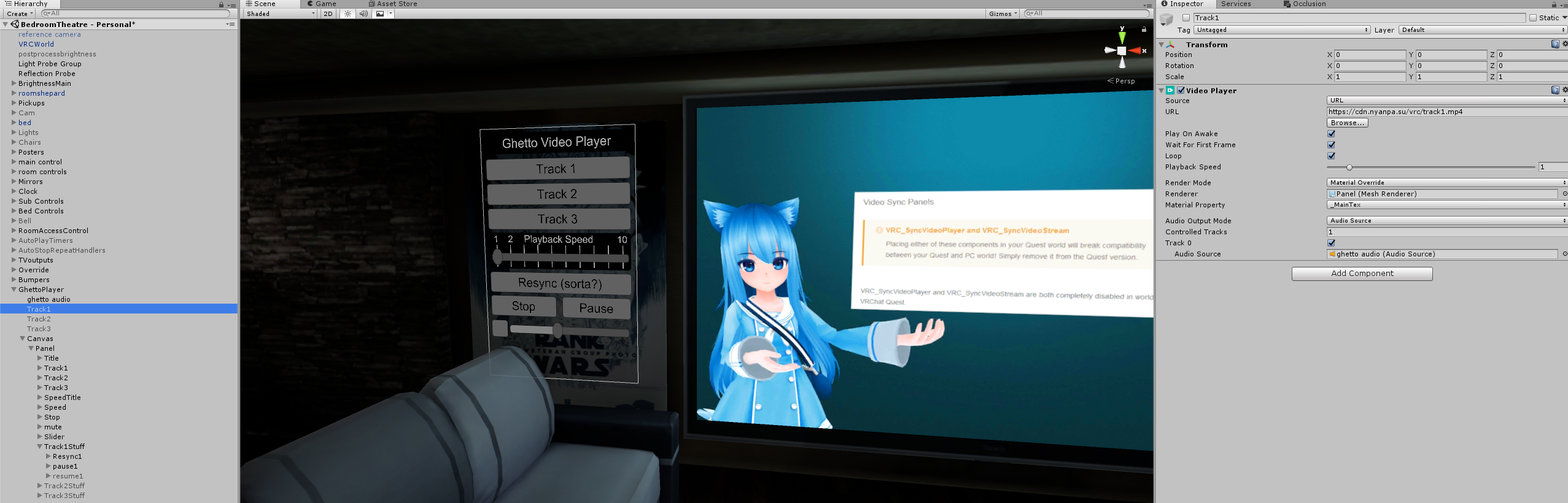
 lavish bobcat
The trust system. It's partially a safety system and partially a performance system to prevent new players from bringing in avatars with the sole intention of ruining the fun for others, or old, banned players making new accounts to do the same.
 marsh frost
i feel like it took me roughly 50 hours to get to get the user rank
empty salmon
EZ
Only USB-C cable in my local store . Hope it works, though 1 meter is gonna be kind of shitty
sharp bay
Looks like a gen2 so should be fine
 calm peak
I finally bought the Oculus Quest to replace my Mixed Reality! Much better !
woeful cypress
well... the quest is not really a replacement for a PC VR headset.
allthough it additionally can be used with a PC with the Link feature, it is its own kinda thing beeing standalone and all
 royal depot
PARTY.