#avatar-quest
1 messages · Page 46 of 1
 mint anvil
so i wouldn't really bother much
so long you have mobile shaders they can show you manually
the material limit is easy to reach it's just the 7500 poly count that kinda gates you from the auto block

it could be below 10,000. but everyone has been saying it's 7500 to avoid auto block
haven't tried, but if you reach medium with below 10k then that's enough too
 night bolt
Does anyone know where a quest compatible Hanako (from Toilet-bound Hanako-kun) avatar is? I’ve been searching everywhere and I can’t find it
mint anvil
night bolt
Does anyone know where a quest compatible Hanako (from Toilet-bound Hanako-kun) ...
don't think this will ever happen cause the only model out there that i found is 113k polys. impossible to get down to 7500.
otherwise you can just put mobile shaders on an avatar minus dynamic bones etc. and quest ppl can manually show your avatar. but it will be performance blocked at the start for every quest user.
i saw a tda and yyb styled version of him with much less but they don't look nearly as good.
doesn't really hold a candle against the original
 velvet hawk
That's the part that sucks because Quest 2 can definitely handle more than 113k polys but the limitations the devs give wont allow them to go higher
mint anvil
you can still see them
they're just automatically blocked before you see them and choose "show avatar"
that's what i do
velvet hawk
That's what I mean, they more than capable of rendering the avatar, it's just that they're limited
mint anvil
quest requirements are completely unreasonable for 99% of avatars
4 materials and 7500 polys
most are around 20-30~
velvet hawk
you're not wrong lmao
mint anvil
and if we're talking high quality booth avatars they're hovering around 50k
velvet hawk
i was just talking to someone who just said that it was generous to have the limits Quest were given lmao
mint anvil
does the quest not have a poly limit or something you can set
because the poor/very poor setting doesn't do anything
youre automatically very poor if you don't meet requirements lol
velvet hawk
Nope, we don't get to set the limits which would be smart to have but you know i dont make the rules
you get Very Poor automatically if you even put a single particle on your avatar
mint anvil
i think most people that got into vr + vrc through the quest aren't even aware that most pc people are perfomance blocked and they need to "show avatar"
ever since they made requirements harder i stopped decimating avatars cause 7500 is just way to low
and i just put mobile shaders on and that's it
if someone on quest wants to see me they have to show me lol
velvet hawk
7500 is definitely way too low
you're basically forced to look like a PS2 / PS1 character for Quest
I usually just make mine optimized as best as possible but give them all the functionality of toggles and stuff
they'll live and learn turning on and off models
 jagged sequoia
that's a exaggeration on PS1 character as 7500 is higher than the entire render budget for a frame on the PS1
velvet hawk
jagged sequoia
that's a exaggeration on PS1 character as 7500 is higher than the entire rende...
that's why I said PS2 first , it's basically around that area.
jagged sequoia
Doing a quick bit of Googling. 7500 Put you in the ballpark of PS2 fighting game characters. As far as the low end. 15,000 to 19999 medium rank avatars is Is in the ballpark of PS3 games.
 dense rivet
7500 is fine if you've got a good normal map, that's why my Bake thing puts so much effort into getting normals right


These are all 7500... heyyyy where's previews
 dark lodge
Ty
 half escarp
Im bored and would like to know if anyone here knows how to make dbz avatars
If so dm me plz
 blazing meteor
mint anvil
4 materials and 7500 polys
blazing meteor
mint anvil
4 materials and 7500 polys
Isn’t the limit for medium 15000 or under?
blazing meteor
jagged sequoia
Doing a quick bit of Googling. 7500 Put you in the ballpark of PS2 fighting g...
15001 is poor on quest.
20001 is very poor
 snow ocean
Hello. My friend and I are having some trouble with uploading two quest avatars. We have all the shaders on the correct ones, we have the SDK to upload Android, and we still can't get it to work.

And when we click on that error it takes us here.
 blazing meteor
The top error is what is currently stopping you. Quest avatars can only use shaders in the VRChat/Mobile category. Some of your materials have shaders not in that dropdown. Customs shader code is not permitted on quest avatars
@snow ocean
 zenith sonnet
Cant use any other shaders except VRChat/Mobile Category .....except Multi under the VRChat/Mobile/Particles
 tidal meadow
they mean when they click auto fix it takes then to the descriptor.
@snow ocean you need to open the avatar's hierarchy and go to the body mesh and look for a shader that is not under VRChat|Mobile
 lament saddle
Anyone know how to fix missing textures on particle effects? All I see are dark purple blocks flying around, with no cutout or transparency.
I believe I'm using the shader VRChat/Mobile/Particle/Additive.
It uploaded no problem, but very clearly does not look right.
lament saddle


 celest nexus
really? no constraint scripts on quest? didnt see that anywhere in the documentation of what wasnt allowed. cool
enjoy your crap looking hair
lament saddle
By the way, this is how that is supposed to look. But instead, it is grey in mirrors, and purple outside of mirrors.

 mint anvil
blazing meteor
Isn’t the limit for medium 15000 or under?
mint anvil
blazing meteor
Isn’t the limit for medium 15000 or under?

you will still get performance blocked
that's the only thing it says. this avatar is optimized af.
blazing meteor
mint anvil
100% sure your SDK is out of date. You are using the old ratings
mint anvil
🤔
i mean before this avatar was not perfomance blocked
not sure what happened exactly
blazing meteor
Polygon ratings were reduced in the SDK update that added quest fallbacks
14844 is medium under the new guidelines
mint anvil
hmm i'll check
blazing meteor
15000 and under should always be shown by default on quest now, 20000 and under if they change their settings to show poor.
mint anvil
oh shiiit


so the new hard limit for all quest andys is 15001
unless like you said they change settings which most won't probably
mint anvil
blazing meteor
15000 and under should always be shown by default on quest now, 20000 and under ...
so the fallback thing means if i didn't upload a quest version and i want them to see the fallback avatar by default?
blazing meteor
Yeah. If your avatar is eligible to be a fallback (good or excellent) you can have it be a substitute for any pc only avatar you wear (yours or anyone else’s)
Avatars with their own quest version will just use that instead of the fallback choice
mint anvil
🤔
blazing meteor
No real need to have more than one fallback
mint anvil
good is below 10k?
mint anvil
don't think i have one below 10k tbh
blazing meteor
You can only set personal avatars as a fallback
But yeah building in quest version just target medium (15000) or under and everyone will see it
No need to worry about fallback
blazing meteor
mint anvil
good is below 10k?
Actually I think fallback is 7500 or under
mint anvil
could be
blazing meteor
So many it’s excellent only
mint anvil
it doesn't say it'll be performance blocked on poor
or are "poor" rated avatars blocked by default in the quest vrc settings
blazing meteor
Medium is always shown by default
Poor is shown by default if they go into settings and say to do so. However most quest users don’t do this and they may or may not choose to un hide you specifically, or may not know they can
Very poor is always hidden by default and they must manually select you and pick show
blazing meteor
As such, make sure you are 15000 tris or less!
 dry zealot
Fallback need to be Good and better
blazing meteor
20000 is nice yes, it is the old pc limit
blazing meteor
dry zealot
Fallback need to be Good and better
Ah. 10K is good, correct?
dry zealot
Yes
blazing meteor
Nice, my fallback is less detailed than it could be, hm. Lol
mint anvil
the default fallbacks you can pick look quite terrible ngl
blazing meteor
You can do a lot with 10K
mint anvil
problaby won't bother with fallback
blazing meteor
If you make it from scratch. Decimating down to 10k is near impossible
dry zealot
One material / one mesh /10,000 tris / 90 bone
mint anvil
most good looking avatars are atleast 40-60k
so even 15k is a challenge
ok if the limit is 1 material then forget it lol
texture is gonna look so shitty
atlasing is gonna ruin the texture resolution
dry zealot
It's suppose to be a fallback. That mean replacement not reproduction.
mint anvil
fallbacks are kinda weird
what if your pc one is a different size, different facial expressions etc.
dry zealot
You can stay a mushroom for quest user theb
blazing meteor
Fallback is not the same as quest version
blazing meteor
Avatars with their own built in quest versions don’t need a fallback
mint anvil
if it's a different size and has different facial expressions than the pc version (and it will) interaction will be really weird
so feel like fallbacks are inferior to even performance blocked quest versions
blazing meteor
Yes everyone has no real need for more than one fallback. I just made a super optimized version of my main avatar, that is even lower quality than the usual quest versions of it
dry zealot
The fallback get scaled as the robot do.
blazing meteor
Yeah that’s one funny thing your fallback will be scaled to the size of your PC avatar
Something real avatars can’t do!
dry zealot
That's not the case with a quest blueprint of the PC one
mint anvil
that's cool
blazing meteor
Correct
dry zealot
Giant kid is kind of funny yes
mint anvil
i'd still rather have the avatar match and make them show me tbh
blazing meteor
But yeah you don’t have to worry about your fallback being weird and wrong size did you get scaled and looks fine
Even fullbody works
Just… as the wrong avatar
mint anvil
lately a lot of ppl are starting to manually show me
so i don't think i'll worry about a fallback avatar
defeats the point of having different avatars
jagged sequoia
myself I have no problem with only one fallback Avatar as I'm pretty much always one Avatar anyway a purple wolf
dry zealot
 mint anvil
👀
mint anvil
dry zealot
https://media.discordapp.net/attachments/757668406777348096/850534527519424532/f...
is this one public or downloadable somewhere? 👀
dry zealot
In the quest church
 low heron
Anyone got cool dirtbike racing guy?
 daring marsh
Is there an avatar creator like readyplayer for quest? Or is there a way to upload models from those into oculus accounts
jagged sequoia
readyplayer me does support the quest
jagged sequoia
is your vrchat account a vrchat account or a Oculus account
daring marsh
Well its on quest 2. So i imagine an oculus account
jagged sequoia

Create your VRChat avatar for PC/Quest: https://readyplayer.me/vrchat
Learn more about the avatar creator: https://readyplayer.me/blog/custom-vrchat-3d-avatar-maker-creator
- VRChat account required. Learn how to transfer your account: https://help.vrchat.com/hc/en-us/articles/360062659053-I-want-to-turn-my-Steam-Oculus-or-Viveport-account-int...
daring marsh
I think the part im stuck at is the uploading
But ill try again
Maybe i just forgot my password
 royal breach
does anyone know where there are frog anime girl themed avatars for quest?
 tawdry nest
the avatar i have is 20mb, whats the easiest way to compress it to 10? it barley has anything
 heady igloo
Why can’t I search skins
 charred talon
Because it's not in the game
 wispy hornet
tidal meadow
tawdry nest
the avatar i have is 20mb, whats the easiest way to compress it to 10? it barley...
wispy hornet
tidal meadow
tawdry nest
the avatar i have is 20mb, whats the easiest way to compress it to 10? it barley...
remove animations, and meshes, also try combining materials to reduce download size
 pastel storm
heady igloo
Why can’t I search skins
pastel storm
heady igloo
Why can’t I search skins
its a client that only pc user can get
jagged sequoia
and modifying your vrchat client has also is a breach of terms of service
tawdry nest
tidal meadow
remove animations, and meshes, also try combining materials to reduce download s...
gonna try. deleted all the dancing and stuff. if anyone could show me how to compress an avatar in blender v.v xD
eh still 19mb.. if i completely strip her down she'll become under the 10mb cause she'll upload. id be fine putting a low poly body suit on her in unity but when i do import her into blender it says cant find hip bones when i use cats to fix avatar
lament saddle
Does anyone know how to make particles brighter on quest?
Even though they look fine in Unity, when I get in-game on Quest, they're very dark and dim-lit.
 spring jolt
Anyone know were i can get a quest shader that has Cull as an option so i can have it set to off so it shows both sides?
lament saddle
Can you get shaders for Quest outside of the default ones?
jagged sequoia
that is unavailable as you can only use the provided vrchat mobile shaders
lament saddle
Do you have any examples?
spring jolt
no, i lost my old unity. i had a few shaders for it but now i dont have them anymore i need to find some again.
thought ide ask here but if noone knows then aight.
jagged sequoia
as far as I'm aware under normal operations there is no way to have backface culling turned off on Quest avatars and you probably could just duplicate some faces on the spots where you would need that
spring jolt
🤷 well thanks for trying atleast.
 wise verge
Tested on Quest 1
Additive shading broke even more.
Instead of being replaced with Multiply it's now just showing up as a user-rank color shader and a flat shape.
As of right now, Multiply is the only transparent shader that works on the Quest build of VRChat.
Also , despite the "Alpha Blended" shader being in the "VRChat/Mobile" Category, it still doesn't let you upload a model with it's inclusion.
When can we get word on a fix for these, very essential components of Quest avatars?
 dim cove
mint anvil
dim cove
mint anvil
that seems to be an old version of the sdk. the newest sdk allows you to have up to 20k polygons.
mint anvil
dim cove
that seems to be an old version of the sdk. the newest sdk allows you to have up...
it was yea
someone told me a bit further down
dim cove
ah yeah
 wooden moth
Is there anyway to add hue shift to a quest avatar?
jagged sequoia
nope as you can only use the provided vrchat mobile shaders
wooden moth
I've seen quest avatars with it tho so how did they do that?
jagged sequoia
have you seen them do that on quest itself not their PC version
wooden moth
On the quest version. I figured it out but it only works for certain parts of the avatar before it looks ugly
lament saddle
wooden moth
On the quest version. I figured it out but it only works for certain parts of th...
How do you do it?
 oak anchor
Alrighty so in the past I've been able to upload with the Vrchat/Mobile/particles/Multiply shader and it's worked perfectly fine, no issues or anything. On the new sdk's or maybe I'm doing something wrong, but from what I've noticed is that the multiply shader is blocked. On the older sdks, it's not and it works perfectly fine after upload. You can see in the pictures below on what I mean. The one with the working transparency was uploaded using an older sdk of 3.0, the one without transparency is about 2-3 versions behind the newest sdk. Is there something I'm doing wrong, or is this just how it is now?

 dry zealot
I try to do an edgy one
 oak anchor
Alrighty so in the past I've been able to upload with the Vrchat/Mobile/particle...
oak anchor
oak anchor
Alrighty so in the past I've been able to upload with the Vrchat/Mobile/particle...
So I fixed the issue, I still don't know if something I'm doing is wrong, but I changed out the sdk for version 2021.01.19.08 and the multiply shader worked perfectly fine after uploading, so I guess if you also run into this issue, try using an older sdk version. If you do please be careful when changing the sdk version of your project as it can cause issues if done incorrectly
dim cove
oak anchor
So I fixed the issue, I still don't know if something I'm doing is wrong, but I ...
hi jayie
blazing meteor
wise verge
`Tested on Quest 1`
**Additive shading broke even more.**
Instead of being repl...
Transparency is not meant to be on avatars at all. If additive works it’s an oversight, don’t use it, or expect it to be broken or blacklisted in the future. Not everything in the mobile category are allowed on avatars. The full list is available to worlds, including transparency.
oak anchor
Only multiply works, if you try and use additive on an avatar it just reverts back to multiply. I have seen one person somehow got additive to work on an avatar a month ago. I have no idea how they even managed to do it, also hi Xenarthra
 devout bronze
when making a avatar quest compatible i have issues in re importing the model after switching builds to android. i would drag it into the scene and it would freeze up my unity. am i doing something wrong ?
 vapid cosmos
how do you make avtars
wise verge
blazing meteor
Transparency is not meant to be on avatars at all. If additive works it’s an ove...
Dude that's about the dumbest thing ive ever heard you say, ngl
So you're implying that transparent planes of hair, irises, facial elements, particles like music notes, fire, smoke, water, hell- text, overlays, and even UI, are in no way supposed to be a part of an avatar? In f-king vrchat, of all things? Dude the N64 used alpha for this exact reason. 30 years later we have more power than that thing in a calculator.
The game doesn't run on ps1 graphics, like not everything needs to be made of vertices. If a raspberry pi has enough energy to run a transparent blur effect on a desktop window, it's a snowball's chance in hell that once in a Snapdragon 835's lifespan, it would ever lag in the slightest by rendering a transparent image.
There is no good reason why you'd ever block off additive shading, especially when multiply already works, being the same thing but inverted. And I dare say that Alpha Blended would be fine too, even if it's literally one more computational call. Transparency is infinitely better than literally cutting out the blank space around an object.
blazing meteor
No transparency on Quest avatars
Check the documentation if you don't want to believe me
Transparency is infinitely better than literally cutting out the blank space around an object.
And this is false. Cutting out the geometry is far more proficient than rendering transparency.
velvet hawk
wise verge
Dude that's about the dumbest thing ive ever heard you say, ngl
So you're imply...
You can get transparency on Quest though we'll have to talk in DMs. People here don't like Quest all that much.
wise verge
blazing meteor
> Transparency is infinitely better than literally cutting out the blank space a...
bruh
 jagged sequoia
question does cutout texture like it's cut out Geometry or the cutout transparency Shader
and you should also pay attention to the fps
blazing meteor
jagged sequoia
question does cutout texture like it's cut out Geometry or the cutout transpare...
Cutout shaders are an alpha test. The entire plane is tested per pixel and conditionally drawn
This in itself isn't a problem, and can actually be done rather fast. The issue is that, as a transparent surface, it must be drawn after all other non-transparent surfaces, in a second pass, back to front.
jagged sequoia
I noticed the test doesn't have any made out of geometry for the text
blazing meteor
Yeah the test speed posted above doesn't indicate much of anything - of course it would be faster in isolation
jagged sequoia
like in a real game scenario the problems of the transparencies like multiple of them overlapping or touching large chunk of the screen
blazing meteor
Exactly, it's excessive overdraw
It's permitted in worlds, but even then you are encouraged to keep it to a minimum
wise verge
jagged sequoia
and you should also pay attention to the fps
unity fps sorta variates when you're testing stuff in the editor, but it's all relatively the same, only data that matters is the drawcalls and tris and whatnot
wise verge
blazing meteor
Yeah the test speed posted above doesn't indicate much of anything - of course i...
literally if they draw over themselves it's just another drawcall, that's not a problem versus the latter
jagged sequoia
but that's probably not a good sign if you transparency has half the frame rate of the cutout Shader with only one object in the map
wise verge
all im saying is alpha has no reason to not exist on quest
jagged sequoia
and the vrchat people have probably done more testing than you have
wise verge
lmao
blazing meteor
Well, people who develop the game disagree with you
wise verge
tell them to consult N64 Navi
jagged sequoia
an Android phone and an N64 have different rendering architecture
blazing meteor
Transparency is very expensive on mobile
jagged sequoia
and also you're needing to run VR a lot faster than an N64 game
blazing meteor
Even when it's additive/multiply, it's still causing overdraw
jagged sequoia
and honestly everybody is running around as a Anime Avatar so it's not exactly like transparency is super required for the look considering all the hair is geometry
blazing meteor
As long as everything is opague, no pixels need to be sampled more than once
jagged sequoia


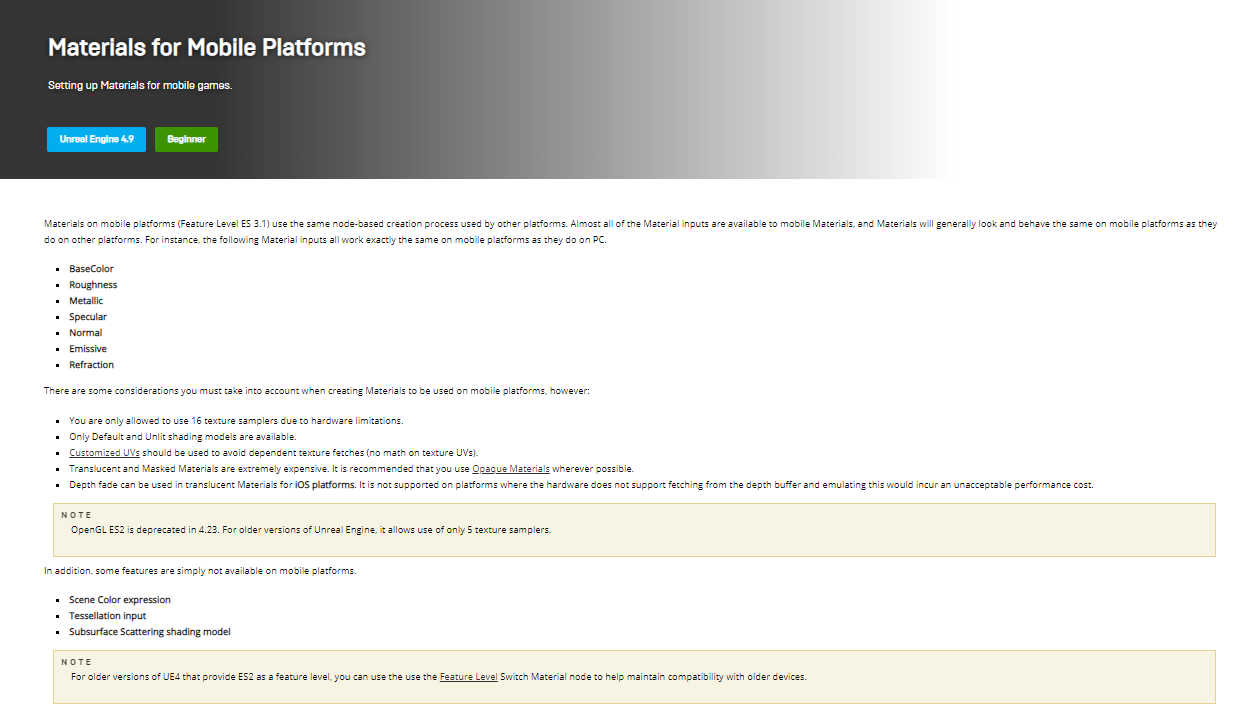
even the documentation for the engine they don't use much transparency on mobile
Setting up Materials for mobile games.
dry zealot
Mask are expensive. Didn't know that.
 cerulean rivet
Damn, reading up the chat and i can see why i have a problem- my quest avatar recently started showing purple textures instead of my usual particles, i thought it was a bug but now i think its intentional
velvet hawk
cerulean rivet
Damn, reading up the chat and i can see why i have a problem- my quest avatar re...
Purple is usually a sign of missing error textures.
cerulean rivet
No i mean- its using a default standard texture, its not bright pink
 unkempt heron
Why haven’t we allowed audio sources yet
velvet hawk
unkempt heron
Why haven’t we allowed audio sources yet
They did at one point then took it away after a month.
unkempt heron
Ngl kinda dumb
velvet hawk
cerulean rivet
Its using a default material
Ahh yeah change it to vrchat mobile but you wont get much transparency out of that.
Yeah because Quest 1 can’t handle audio well.
unkempt heron
There aren’t many issues in quest 2 tho, and worlds are allowed a much larger audio source size.
cerulean rivet
It was VRC mobile particles at first but recently they all showed up as black/deep purple default materials
unkempt heron
Which doesn’t cause much lag
velvet hawk
Worlds are treated differently than Avatars, you’re only in 1 world but you can have unlimited Avatars if you think about it.
cerulean rivet
Man i don't wanna have to upgrade to quest 2 because people are throwing hissy fits over audio they wanna abuse
velvet hawk
cerulean rivet
It was VRC mobile particles at first but recently they all showed up as black/d...
There’s a trick to get it to work but i can’t speak it here.
unkempt heron
Indeed, but in comparison to the size of the audio source, it seems a little crude to disable all sources of avatar audio
velvet hawk
cerulean rivet
Man i don't wanna have to upgrade to quest 2 because people are throwing hissy f...
upgrading to Quest 2 is worth it for performance reasons as well as having the ability to turn it into PCVR
just make sure you keep your Quest 1 charger
cerulean rivet
Quest 1 has that ability too for pcvr
I tried and used it
But sadly it was temporary, wasn't my computer
velvet hawk
cerulean rivet
Quest 1 has that ability too for pcvr
The air link right?
unkempt heron
Also, even though world constraints cause no performance issues, it’s still disabled.
velvet hawk
ahh okay
cerulean rivet
Air link is being added to quest 1 and the updates are rolling out apparently
velvet hawk
unkempt heron
Also, even though world constraints cause no performance issues, it’s still disa...
It’s just not going to happen anytime soon for Audio im afraid. they’re already pissed off that no one optimizes graphically
velvet hawk
cerulean rivet
Air link is being added to quest 1 and the updates are rolling out apparently
Still worth Upgrading to Quest 2
cerulean rivet
Lol they wanna keep the best poly count for their booba avatars
unkempt heron
Ik but nobody really cares about performance, due to having a 7,500 poly limit
We all just go beyond it anyway
velvet hawk
that’s true, i had this debate with someone already who thought 20k poly was generous for quest
even though i’ve been in lobbies with over 1 mill and was just fine

cerulean rivet
Tbh its not about the polycount, its the geometry and complexity of the mesh that messes with the fps
unkempt heron
I’m glad they removed the upload-prevent from max polygons
velvet hawk
even if you put 1 particle it renders you very poor for quest
unkempt heron
Indeed
cerulean rivet
Lol i remember i used to always bypass that limit way back when it was a hard cap
velvet hawk
i want them to set the poly count back to 100k
that’s at least doable for some stuff
unkempt heron
Ight ima head out. Have a great day everyone
velvet hawk
you too
cerulean rivet
Damn i keep looking and i still have no idea how to get my particles to work again- i never used other shaders except the ones available through the sdk and now they refuse to work suddenly for my particles- its dumb
Why must it suddenly stop working :c
It was working just fine before, hell there were some particles that worked just fine as long as they were bright enough texture wise, but now its just purple or orange, sometimes green default materials replacing my particles
velvet hawk
cerulean rivet
It was working just fine before, hell there were some particles that worked just...
For now if you’re trying to make it for Quest you’re out of luck. They aren’t being too kind about it for Quest at the moment. You might have to make it a mesh that you cut out in Blender depending on what you wanna do with it.
blazing meteor
cerulean rivet
Damn i keep looking and i still have no idea how to get my particles to work aga...
What are the particles not doing for you?
cerulean rivet
Okay so usually its the additive mobile shader for VRchat, it used to work
Now its just the default materials you'd see when you turn on safety mode that replace shaders
cerulean rivet
blazing meteor
What are the particles not doing for you?
And the weird thing is- some avatars still have the particles working, my main one just refuses to work anymore
cerulean rivet
velvet hawk
For now if you’re trying to make it for Quest you’re out of luck. They aren’t be...
They're sprite sheets so idk if cutting them out will even look right
blazing meteor
cerulean rivet
And the weird thing is- some avatars still have the particles working, my main o...
It's almost certainly new uploads.
cerulean rivet
Damn :c
I'm tempted to roll back to an older SDK just to get my particles working again
jagged sequoia
that's not going to help because all the clients and the server will be on the newer version
cerulean rivet
Damn
 violet steeple
are cams allowed on quest avatars. i bet not but thought id ask
cerulean rivet
Nope
pastel storm
Making a quest avatar excellent performance be like
pastel storm
pastel storm
Making a quest avatar excellent performance be like
just make it boring as hell, no toggles or anything just a boring ass avatar
 somber thicket
 timid prism
 frozen vale
Do quest avatars support the standard shader yet? If not, does anyone know when it will?
jagged sequoia
you can only use the mobile provided shaders and it's unlikely to change as a Oculus Quest 2 cannot change its hardware specs so they can't just optimized it into having standard function adequately
frozen vale
What makes worlds different from this though? They have support for standard assets.
Same argument for dynamic bones. Seen NPCs in worlds with jiggle and hair physics. Those worlds are quest compatible too.
jagged sequoia
you can do baked Lighting on worlds to make the calculations less expensive
also what are you wanting to do that the light version of the standard Shader couldn't do
pastel storm
There is a new dynamic bone system coming that is way more optimized and will be quest compatible.
supposedly it will also allow users to interact with other player's dynamic bones
 warm fern
Mmmmm
velvet hawk
pastel storm
There is a new dynamic bone system coming that is way more optimized and will be...
What’s it called?
jagged sequoia
Avatar Dynamics & physics bones
blazing meteor
pastel storm
just make it boring as hell, no toggles or anything just a boring ass avatar
Toggles and stuff actually aren’t restricted by rank at all.
I just make all toggles a bone resize, shape key, or material swap, so it doesn’t add a material alot
Shape key if I can repurpose verts, bone resize if I can’t
Wish quest had parent constraints
pastel storm
yea
 lean oracle
I’m looking for any succubus or incubus avatars to give to my friend, anyone know where I can get some
tidal meadow
There is one on that vrchat asset website that I can’t say the name of for some reason in here. Idk about any worlds
 jolly cave
Any Jeepers Creepers avatars y’all know of? Or slender man
wise verge
cerulean rivet
I'm tempted to roll back to an older SDK just to get my particles working again
Yeah, it won't work dude.
According to a canny post with an official reply, the devs have made the decision to cut out transparency from Quest avatars. Despite being a feature for a literal two years, they're claiming that Transparency has always been a bug and that it's never been supported on Quest avatars...?
https://feedback.vrchat.com/bug-reports/p/additive-shading-is-broken-again-also-vrchatmobileparticlesalpha-blended-shader
Since about February 2021 Additive shading was forcibly replaced with Multiply shading for no apparent reason. That same time the "Blue Loading Man" stopped glowing, but rather darkened the background- being replaced with Multiply shading- as it used Additive shading. It must've really been a bug that time, and I was surprised as obvious as it was, it wasn't fixed for 5 months.
Recently anything uploaded with Additive shading was now instead replaced with an opaque shader that displays a color representing the wearer's visible rank. Purple, Blue, Green, etc.
Since Alpha usage has literally been a piece of the graphical rendering process since the dawn of 3D video games, like Super Mario 64, it's essentially evident that their performance is minimal. It's an alternative to using loads of tris and vertices to render something that's not a quad. It also allows for transparency, and not just the 1's and 0's of opaque and invisible. But even without acknowledgement of that factor, the alternative to "transparency" is in no way any better- rather much worse performance wise.
I've done my own tests on this and shown alpha texturing versus the alternatives of alpha (like topology rendering) and alpha proved itself to be 1/4th times less performance inducing. Image attached.
Even if it is "laggy" by any means in VRChat (God forbid), it's infinitely better than the alternative of using ~2000 tris to render a character's hair. Their claim is that it somehow causes more load on the GPU. This could be true, only if there's thousands on the screen. For one extra drawcall that's
Bug or not, transparency has been a staple in avatar making for two whole years. Saying "transparency is not supported on Quest avatars" or anything like that is straight blasphemy. Though I'm not going to be one to fight it. If anybody wishes for the Quest version of VRChat not become a crippled hellhole render of avatars with insane tris and polys, and/or wish to still use those fancy particle effects, go ahead and try to push the devs to do something. Personally I find this to be a ridiculous decision from them but I'm not going to go and fight for it.
 jagged sequoia
I'm not sure you can get particularly meaningful testing from just a singular transparent object as that's not going to have the overdraw concerns that make mobile developers shy away from transparency shaders
cerulean rivet
you do have to keep in mind you have to test this with the quest, not just PC simulations
its basically a fancy android phone really close to your face so its understandable that it lags often
jagged sequoia
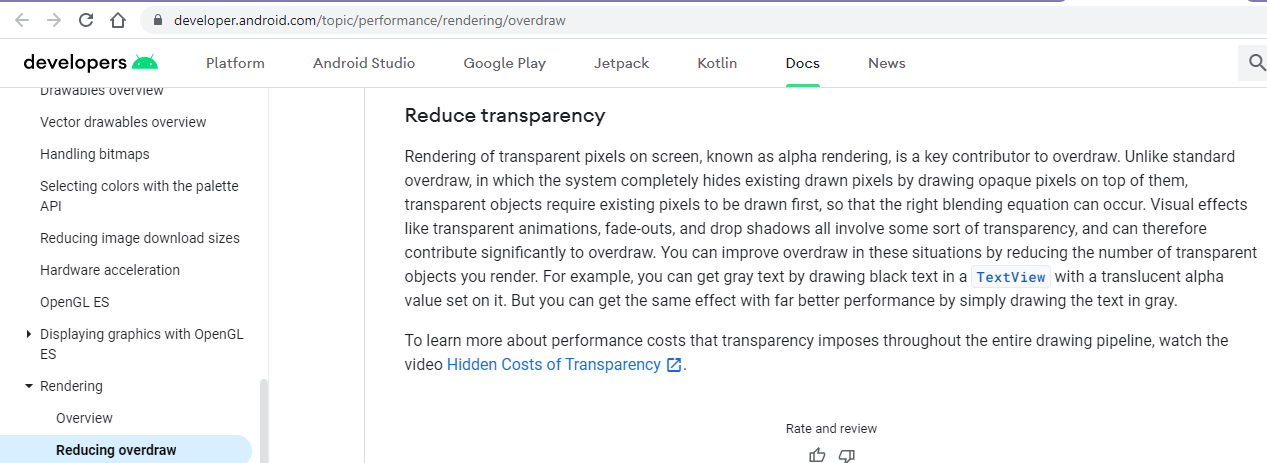 jagged sequoia
cerulean rivet
you do have to keep in mind you have to test this with the quest, not just PC si...
jagged sequoia
cerulean rivet
you do have to keep in mind you have to test this with the quest, not just PC si...
especially since the rendering architecture is different between the two so what tends to cause Android renderers a headache not going to pop up on PC
and maybe you might consider developers have a point considering the literal Android development Pages suggesting away from transparency
https://docs.unrealengine.com/4.26/en-US/SharingAndReleasing/Mobile/Materials/ Unreal Engine documentation also suggests cut down on the transparencies
https://i.gyazo.com/ca10d4aebffc528586e80fdc48c38a85.png
Setting up Materials for mobile games.
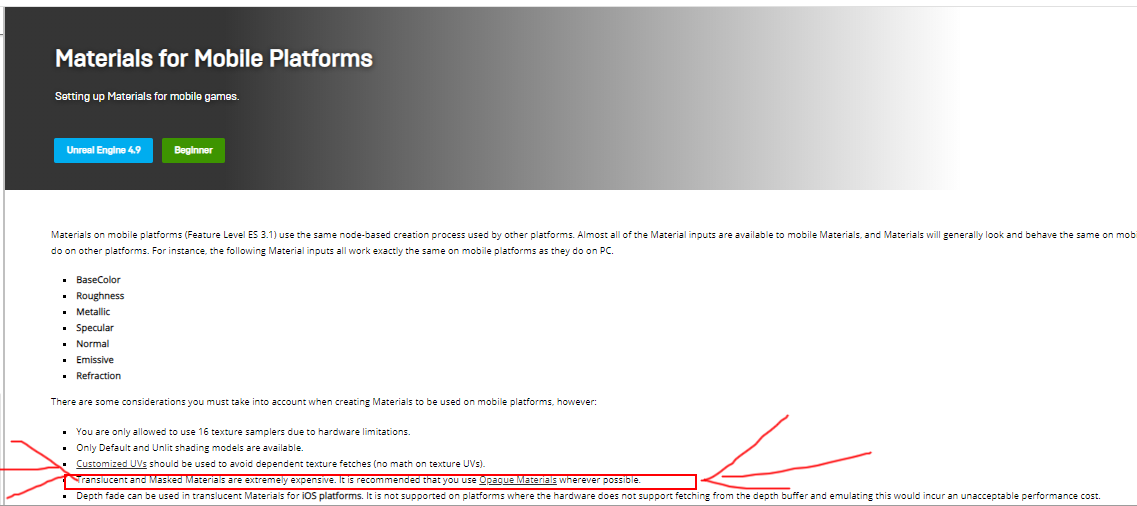

unity's manual as well
and I sincerely doubt the development team would change their tune because a couple of people did armchair frame rate test on PC
wise verge
Actually it makes a lot of sense that android's render architecture wouldn't prioritize alpha, as their software has always had a flat sorta rendering and barely ever, or hell, never utilized transparency in their menus
might be the reason they're trying to push, but from a pc perspective it's the complete opposite
jagged sequoia
yes but all the quest content needs to run under Android optimization best practices and it also needs to run considerably faster and higher resolution than your average smartphone game
wise verge
yeah but still you have games like Rec Room and Myst that use transparency just fine
jagged sequoia
neither of those have to worry about like 20 avatars having lots of transparency overlapping on top of each other
dry zealot
My friend have a Crystal avatar that is see throw. My framerate tank the more place that avatar take on my screen on PC.
wise verge
Whatever way it slides it's absolutely ludicrous to just take the feature out of avatars. Considering alpha textures are used all the time to lower that topology count to the bare minimum, it's going to do more harm than help when it comes to model makers.
If the rendering system for alpha is somehow that poor on Android, then alright. But that shouldn't mean you should just annex a feature entirely. It's existed for 2 years and not a peep was uttered about it. Tens of thousands of creators rely on transparency. There's probably millions of broken models now because of the limitation.
Maybe a new shader, that only renders alpha through a few select layers (this would be very feasable) could be provided?
hell you could just have it do one passthrough and one only if you so wish
jagged sequoia
not going to help with overdraw because if you have any scenarios where you have to draw a transparent object on top of a transparent object you're still going to have overdraw issues
and the development team has probably already tried every permutation of transparency
wise verge
I'm going to drop this for now- as to be honest I don't have much interest in fighting for this. But honestly my above suggestion is very possible. Anybody wishing to try to preserve quest model functionality, maybe take this up with one of the devs or whatever.
I'll see if I can add some word to the canny but idk as it's closed. For now I guess the game's screwed up yet again. Yeet.
jagged sequoia
unfortunately there's not much you can do because the developers aren't going to listen to some armchair game devs that haven't even done any Android testing
 worthy sage
wise verge
I'm going to drop this for now- as to be honest I don't have much interest in fi...
worthy sage
wise verge
I'm going to drop this for now- as to be honest I don't have much interest in fi...
Since you seem to know it's possible, perhaps you can provide info about this shader which only renders alpha through a few layers, and make a feature request for Quest as an alternative to normal Transparency.
dry zealot
Don't need transparency on avatar really.
jagged sequoia
especially considering everyone is using hair splines for their hair because 70% of vrchat is anime
dry zealot
User forget they bought a phone with controller. Not a render machine.
jagged sequoia
and the game has to run at like 75 fps on a very high res screen 30 frames per second with low screen resolution
and also the existence of mirrors in vrchat being one big middle finger to optimization for mobile Hardware
dry zealot
Some one was arguing about performance on quest. I told him to clone one of my avatar and he got back 20 so so fps, don't remember.
velvet hawk
This is due to the headset being more in it’s infant state. Keep in mind that the Quest is a step into the world of being a wireless system on it’s own compared to it’s competitors that basically run on a computer tethered. It’s quite unfair to make the comparisons because for what the Quest does is rather impressive, it’s trying to do everything a PC does. To down talk the Quest and preventing limitations to it only slows down it’s progress in learning how to make it a better headset. Given enough time, there will be headsets that will perform better than the Quest including new Quest headsets as well that will out perform the hardware that currently exists. When that happens, I bet you that your guys’s perspectives on this will change because of the better capabilities. I already had to talk to someone about how the Quest 2 can handle more than what they thought and a lot of it was because the person didn’t even own a Quest 2, they owned a Quest 1 which performs more terribly than the 2. Get a 2 and check out how much better it handles things and then realize there’s a Pro and a 3 coming out. And then we’ll talk about how mobile can’t handle things like transparency. Because it can, just that most people don’t want to accept it because they don’t like Quest whether they are a PC elitist or hate facebook.
velvet hawk
dry zealot
Some one was arguing about performance on quest. I told him to clone one of my a...
Most likely a Quest 1
 shy kernel
velvet hawk
This is due to the headset being more in it’s infant state. Keep in mind that th...
shy kernel
velvet hawk
This is due to the headset being more in it’s infant state. Keep in mind that th...
I haven't encountered poor performance on any game on my quest save for vrchat, which is understandable because vrchat is held together by bubblegum and tape
the quest is a miraculous piece of hardware and its a shame its owned by facebook which makes it sound worse, but the performance of consistent 60fps in a game like pavlov or rec room tells you it can do what it was designed to
velvet hawk
That’s what I’m saying, I understand Quest is looked down upon by a lot of PC users who don’t even own a Quest 2. It’s VRChat that needs to fix their stuff. ChilloutVR for example runs very smoothly when i run it with my Quest than VRChat.
shy kernel
yeah, quest could more than handle vrchat if it were tightened up, but an already years outdated engine being forced to play nice with modern day tech isnt going to end well
I'll be moving to pcvr soon enough just for vrchat because quest tends to be more trouble than it's worth, especially with the recent avatar bug
where quest avatars are perf blocked until you reconnect
 fringe swan
Just read through and I'm gonna do the same^
I basically only use my headset for socializing in vrchat (of course its not all I do). It's my day-to-day escape.
And I get tired of it being thrown in my face in vrchat by pc users that I'm so limited
And I hate that limitation, although I fully understand why its there
But the things and hoops we have to jump through to have a mediocre experience in vrchat for quest 2, it's an experience killer
shy kernel
thankfully the quest can also be a pcvr headset
shy kernel
fringe swan
But the things and hoops we have to jump through to have a mediocre experience i...
have you even tried uploading an avatar for quest? skipping the manual creation of a model, using pre-made models like with vroid still requires obscene optimizations
fringe swan
I havent, I dont know how to even make an avatar for now.
Its another reason why I plan on building a pc
shy kernel
almost feels designed to push creators to pc
fringe swan
I wanna be able to run software so I can.
shy kernel
the process for pc isn't that difficult, very straightforward after a tutorial
shy kernel
quest just requires oodles of effort for a really subpar result
fringe swan
Mhm.
shy kernel
I think the minimum vram you'll need for pcvr is 4gb, maybe you'll want an i7 if you plan to do serious world/avatar creation otherwise a later gen i5 will do the trick
fringe swan
Good to know, thank you!
I'm really clueless when it comes to anything pc since I grew up on nothing but nintendo
So all this stuff is difficult to figure out.
shy kernel
same, started learning last year myself
theres websites out there for pc part picking that shows what parts are compatible, whats best for your price range but overall saves hundreds over buying pre-built
gl with it
fringe swan
Ty!
velvet hawk
shy kernel
almost feels designed to push creators to pc
You’re not wrong it’s definitely being pushed that way with the way people here make it seem like. I’ve been creating content and helping people for almost 2 years now and specialize specifically in making fully custom avatars for PC and Quest 3.0 and i can tell you that there are a lot of things you have to do from start to finish, though the difference from uploading as a PC and Quest are not too far off from being different, many people just have a hard time because they don’t know what all goes into making it Quest friendly and give up too easily. Can’t say that i blame them when the devs are undermining it making everyone think Quest isn’t capable of doing certain things.
cerulean rivet
i don't know what i started but man i just want my particles working again :c
dense rivet
If you want a one-stop shop for quest-ifyng stuff, my Bake thing in cats blender plugin can do that for most avatars
 quick hatch
What are some tips for making transparent particles quest compatible?
blazing meteor
shy kernel
almost feels designed to push creators to pc
Well, it was made for PC. The fact they managed to get it running on Quest at all is a big accomplishment. It may be seen as a sub-par experience in comparison, but it was done to be accessible - if people feel pressured to move to Pc for the full experience - I mean, I doubt that was intentional but, it is natural :P
shy kernel
tbf its an accomplishment that it runs on pc too
jolly cave
Anybody have Skyrim avatars??
pastel storm
Does anyone know where this is from

 craggy trellis
Look like a Kon avatar that's been edited to look like the green brush. No idea where to find it though.
 next torrent
I dont wanna sound desperate but I am, does anybody know where I can find a cowboy styled skin?
 wooden crown
A call of duty ghost avatar would be amazing
 timber mountain

which Quest Shader will make this purple paint look metal just like the Standard Shader?
velvet hawk
timber mountain
which Quest Shader will make this purple paint look metal just like the Standard...
Matcap Lit
blazing meteor
pastel storm
Does anyone know where this is from
Thankfully, no.
unkempt heron
Day 2 of waiting for quest developers to add audio sources and constraints
 half lotus
Hey guys. I..hoping someone can PM me some info. I'm looking for a male full body Avatar that is good for dancing and doesn't look all stiff like most of the one u can find in worlds. I don't mind paying either if is good .
 urban spoke
Can you get custom avatars for quest?
jagged sequoia
yes custom avatars can be uploaded for the quest but that generally requires a PC to do the uploading
 modest dust
Whats the max poly limit for quest models?
jagged sequoia
15000 if you want to be seen by people without having to manually turn you on
modest dust
gotcha, thanks
 modest quartz
pastel storm
Does anyone know where this is from
modest quartz
pastel storm
Does anyone know where this is from
It’s from the fiery pits of hell
 jagged sequoia
yes that's been around for awhile the maximum file size
have you done any texture compression on your textures
dry zealot
🌎 🚶♂️ 🔫 🏃♂️
jagged sequoia
it is a good idea to enable Unity crunch compressions got down on the file size give me a sec to grab you a screenshot


 tired summit
It barely reduced it, can I not have a lot of emotes or something I have 7 right now
 jagged sequoia
2.7 mb with no compression versus 0.5 mb with compression with adds up quickly if you're doing a PBR texture set
jagged sequoia
tired summit
It barely reduced it, can I not have a lot of emotes or something I have 7 right...
they shouldn't be eating up that much file size so something must be eating the space
any other Textures in your avatar
also did you set your crunch settings to 50%
tired summit
No just one texture I did the thing in blender that combines all the materials
and yeah I set it to 50
jagged sequoia
how big is your mesh file
tired summit
2191 KB
jagged sequoia
question how big is your texture Atlas like its pixel dimensions
tired summit
2048 x 2048
jagged sequoia
okay so something else is eating up your file size then the texture and the the object
what happens if you try to upload it with like no custom animations
tired summit
well before I added animations it let me upload it, but for some reason now it's not letting me
jagged sequoia
does your emotes have any custom icons
tired summit
Yeah
tired summit
It only has one tho for the sub menu, I used the default icons that come with the sdk as well
jagged sequoia
still would recommend crunch compressing it and potentially making it smaller in its pixel size in case that's putting you over the edge
 jagged sequoia
are you applying the settings
tired summit
yes
jagged sequoia
okay just checking because it should have some effect on file size?
but yeah probably try taking off one of the emotes and see how much of a difference it makes
tired summit
jagged sequoia
but yeah probably try taking off one of the emotes and see how much of a differe...
Yeah it was the emotes, tbh I'll just leave them off and just make toggles instead later
jagged sequoia
is it possible to remove just one of them so you could still have some while you figure out how to make them less file size intensive?
tired summit
Oh I still have the actions controller and the other ones as well all ready to go if I ever wanted to put them back
jagged sequoia
cool
tired summit
I haven't made an avatar in a while, why did they limit the file size to 10?
jagged sequoia
because the quest has a lot less storage than your computer
like they need to account for users who only have 64 GB
tired summit
understandable I mean I play on quest right now anways so I guess it's important I learn how to optimize now so when I do get my gaming pc I can still make quest content
Also I like how switching platforms and uploading is faster than before
jagged sequoia
tired summit
Also I like how switching platforms and uploading is faster than before
cool
dense rivet
@jagged sequoia using un, astc? I think? Is reccomended for Quest but it's not the unity android default. You can get a smaller memory footprint without crunching, I think it actually reduces the footprint overall instead of just load time
jagged sequoia
good to know I wasn't super familiar with the Android image options
dense rivet
Also, that new static shapekey split thing I added... turns out shape keys are stored in-place, so having most of them de duplicated hugely reduces file size for the mesh
 ionic lodge
My boyfriend the other day heard from someone that there will be an update to allow quest users to see pc only avatars, I just wanted to know if it was true since I’m a pc vr player and my boyfriend is a quest 2 vr player.
jagged sequoia
that is not happening because of performance reasons and that would require a lot of technical work to accomplished as all of the PC only avatars haven't been compiled to talk to Android
blazing meteor
jagged sequoia
still would recommend crunch compressing it and potentially making it smaller i...
Do crunch compression textures count as being under the 10mb limit if it would have been over the limit without it?
jagged sequoia
probably as its measuring download size not vram usage
 vestal sun
Trying to get color/hue shifting to work on Vrchat's mobile standard lite shader via radial menu with no luck
I've seen a few avatars that have seemingly gotten this to function, anyone have any ideas on how this is accomplished?
blazing meteor
vestal sun
Trying to get color/hue shifting to work on Vrchat's mobile standard lite shader...
Radial menu color sweep is usually for shaders that have a single float parameter for hue offset. Standard Lite has no such parameter, just a color parameter that does not fit nicely on a single radial parameter, without a good bit of work
It may be possible but it’s surely not trivial
I think it would be a single animation that sweeps across all hues, set to normalize time. That might do it
vestal sun
Like this?
This is essentially what was used with no luck
 spiral mountain
tired summit
understandable I mean I play on quest right now anways so I guess it's important...
spiral mountain
tired summit
understandable I mean I play on quest right now anways so I guess it's important...
For future references too you can also set the max size for your textures to 1024 for the quest version and it'll save a good chunk of mb
Can bring something down from 2.4mb down to .07mb or lower
tired summit
spiral mountain
For future references too you can also set the max size for your textures to 102...
Oh nice I’ll definitely do that
spiral mountain
If your textures are looking a little rough too use something like https://bigjpg.com to upscale your texture ( it has varying results but usually works okay enough) and then use unity to crunch and lower the resolution of the texture and it'll look better in most cases
Bigjpg - Image Super-Resolution for Anime-style artworks using the Deep Convolutional Neural Networks without quality loss. Photos are also supported.
 ebon geyser
how do i upload my vrchat avatar to quest?
pastel storm
i just love how refusing to have transparent textures for quest shaders just absolutely ruins a character

 cold marten
Does anyone know of any Geishin Impact characters that could be used on the Quest?
jagged sequoia
pastel storm
i just love how refusing to have transparent textures for quest shaders just abs...
https://booth.pm/ja/items/2792005 this free to download program can help as they can transfer the transparent textures onto the the face texture so you don't need to use any transparency

VRoidの眉毛とアイラインのテクスチャを不透明にして、Quest版VRChat用に変換するプログラムです。 眉毛とアイラインのテクスチャに基本色とかげ色を使用している場合、選択する前にGIMPやCLIP STUDIOのようなペイントソフトで色変更が必要です。 変換後のテクスチャはVRoidで顔の肌レイヤーに重ねてください。 テクスチャの白色背景の透明化はペイントソフトの方で行った方がきれいにできます。
pastel storm
jagged sequoia
https://booth.pm/ja/items/2792005 this free to download program can help as the...
much appreciated
but also i dont speak japanese
jagged sequoia
the tool has an English button
pastel storm
oh good
jagged sequoia
and there's Google Translate for the page
and basically you would use the tool and then import the texture into VRoid and then make all of the stuff that's not redundant because of the face texture transparent so you can click the remove transparency checkbox
pastel storm
ok
blazing meteor
vestal sun
Like this?
This is essentially what was used with no luck
That animation looks good
What behavior are you seeing?
pastel storm
jagged sequoia
and basically you would use the tool and then import the texture into VRoid an...
wait so what do i do with the end result? It looks like its meant to go as a layer for the face texture but its completely white in spots where it should be transparent
wait nvm forgot to check off box
pastel storm
anything for clothes too?
@jagged sequoia
or no luck?
im guessing im just stuck with manually editing the mesh in blender if not
jagged sequoia
use blender knife tool to cut out the transparency bit
vestal sun
blazing meteor
That animation looks good
So the problem was not having the parameters set up properly with normalized time, amazing how one little misspell can throw everything off lol
Everything's working perfectly now, thanks for the help~
cold marten
Does anyone have a moment?
blazing meteor
People tend to respond better to questions, not many want to commit to answering a question that has not yet been asked
cold marten
Yeah, I've very sorry about that. I just could really use some help, would you happen to know of any Quest friendly anime avatars? I've been searching for days and never really ended up with much. Don't have the Unity set up nor the rank to upload my own, so I would really appreciate the help. Again, sorry If I'm spamming.
 sonic igloo
If anyone is willing to make a vrchat map with me I'll credit u as the owner and me I can give u alot. Dms are open
 mellow shard
Is there any way to use custom avatars on Quest 2 for VRChat? If I had a model I wanted to use, would I be able to sideload it onto the console? (I apologize if this isn't the correct channel.)
sonic igloo
mellow shard
Is there any way to use custom avatars on Quest 2 for VRChat? If I had a model I...
it depends really if the skins compatible u can go on another device and play so 2 people copy the avatar to ur quest and shut down ur other device.
mellow shard
My computer isn't currently capable of running VRChat, so I wouldn't be able to copy the avatar from an alternate account. Although, I appreciate the assistance.
sonic igloo
No prob
 plush summit
mellow shard
My computer isn't currently capable of running VRChat, so I wouldn't be able to ...
plush summit
mellow shard
My computer isn't currently capable of running VRChat, so I wouldn't be able to ...
If you send the avatar to me, I can upload it and have you clone it off me
 topaz spire

 cloud hull
I have yet to find someone who can optimize my VRoid models into quest compatible avatars…
I’d love for someone to do that
Unfortunately I can’t pay
I do know someone who can model a whole new avatar for me, but they do that in commissions
 eternal tide
I hope you realize how much work you are asking someone to do for free.
pastel storm
does quest allow for rotation constraints? i cant check right this minute and it changes how im gonna do the hair on this model,,
ah okay it is at the minute
 compact lily
cloud hull
I have yet to find someone who can optimize my VRoid models into quest compatibl...
compact lily
cloud hull
I have yet to find someone who can optimize my VRoid models into quest compatibl...
CATS Blender plugin, look it up.
pastel storm
could anyone work on a quick avatar for me?
jagged sequoia
that is unlikely to happen as it takes awhile to make an avatar
pastel storm
https://gyazo.com/14622f72948e48df459e555fe1d12420 how do I fix this?
 jagged sequoia
your avatar is too big to upload on vrchat for the quest so you need to make the file size smaller
blazing meteor
I assumed they were super lightweight
It’s just a value copy every frame
No physics
I guess it can be complicated with weights multiple
 cinder cairn
Anybody know of Arthur Morgan avatars
shy kernel
lmao people really asking for free custom avatars
like asking someone to make you a statue or bust for no cost
 rocky rose
Doom Slayer From Doom eternal with guns and the crucibal,ect
Anyone have it
If you do you can ping me
tawdry nest
if i upload a quest compatible avatar, i have to upload 1 to android build and one on pc, my question is can i upload the quest one then make a non compressed one for pc using the same blueprint ID?
jagged sequoia
yes the PC version can be higher quality than the quest version as the only thing that's important is same blueprint ID
 woven locust
first time trying to upload for quest, I press android build but it does nothing
 pearl osprey
Does anybody know of a Joe Swanson avatar I’d be able to clone or pick up?
pastel storm
It says that my avatar uses an unsupported shader “standard”
I’ve been looking for 2 hours now and still can’t find why it says that
blazing meteor
pastel storm
It says that my avatar uses an unsupported shader “standard”
Standard isn’t supported. Change it to VRChat/Mobile/Standard Lite
pastel storm
blazing meteor
Standard isn’t supported. Change it to VRChat/Mobile/Standard Lite
Read the second part that I sent
blazing meteor
It’s the top option when inspecting your materials
It will say Standard, it’s a drop down and can be changed
pastel storm
Yeah 2 hours that I’ve looked and tried finding and none show up
I’ve already switched all my materials to standard lite
blazing meteor
You must have missed one. You can show all materials on the project by searching t:material on the Assets search bar
blazing meteor
Well the code does not make mistakes… one must still exist on the avatar
pastel storm
Idk then
 grave bobcat
i have question, why are constraints not allowed on the quest side of vrchta?
compact lily
grave bobcat
i have question, why are constraints not allowed on the quest side of vrchta?
The devs are thinking of adding them.
And they probably will, they're pretty light.
grave bobcat
ohh ok , thank you
 wooden crown
Best lightsaber avatars???
 ebon pivot
Anyone know If there's any good Hazbin Hotel avatars?
pastel storm
I need a sylveon avatar plssss ;-;
pastel storm
Dm me if someone can make a avatar for free
pastel storm
pastel storm
I need a sylveon avatar plssss ;-;
This isn't the channel for that. If you're looking for an avatar commission, I suggest going to the "VRC Traders" server in #community-servers-old.
spiral mountain
@ebon pivot@wooden crown #avatar-search-old
tawdry nest
pastel storm
Dm me if someone can make a avatar for free
a lot of work goes into making avatars, hours, days,weeks. pretty insulting to ask someone to spend that much time for free. look for a sylveon mmd model and import it and use aggrotards youtube videos to learn to make your avatar
ebon pivot
@spiral mountain I'm still a discord Virgin, idk what this means 😂 😂 😂
 barren lance
Is there anyone who can make me a quest avatar?
pastel storm
Anyone know how to get a fighter pilot avatar… I like to fly planes a lot
 sage vessel
How do people get nude avatars I’m confused
compact lily
sage vessel
How do people get nude avatars I’m confused
You don't. Or at least shouldn't. NSFW is against the rules of VRChat, and can get you banned.
sage vessel
I was told in private servers there allowed I’ll get rid of the one someone got me to copy
compact lily
sage vessel
I was told in private servers there allowed I’ll get rid of the one someone got ...
Nope. You were told wrong. They aren't allowed anywhere.
sage vessel
Oh thanks
 signal oak
how can you make your own avatar with animation
jagged sequoia
all of the Avatar uploading stuff would happen using a computer
pastel storm
barren lance
Is there anyone who can make me a quest avatar?
#community-servers-old VRC Traders, Ask there.
shy kernel
compact lily
Nope. You were told wrong. They aren't allowed anywhere.
if youre going by the loading tips, it specifically mentions public worlds by name
not like that rule gets enforced though, the overwhelming majority of public female avatars are women in very skimpy clothing
fringe swan
True
 wary rampart
I'm new to vr chat still trying to make a avatar lol
compact lily
shy kernel
if youre going by the loading tips, it specifically mentions public worlds by na...
People have been banned for being reported in private instances, and devs have mentioned that it's not allowed anywhere.
shy kernel
compact lily
People have been banned for being reported in private instances, and devs have m...
then NSFW must exclusively mean butt naked because eboy/egirl public avi worlds have been a thing for a while
I've also never heard of people being banned from reporting in private instances, who would be reporting them?
compact lily
shy kernel
I've also never heard of people being banned from reporting in private instances...
Toxic friends. It's not common that it happens, but I'm certain that I've seen someone complain about it here at least once.
shy kernel
cant have toxic friends if you don't have friends
compact lily
True
They used to allow it in private worlds, but it's not allowed at all now.
And that was also in 2017/2018
shy kernel
👀
my message deleted itself when I sent it
ah, thats why
I've occasionally stumbled on instances people forgot to make private where they're doing adult hugs and I usually just laugh and leave
not very often but more frequently than you might think
compact lily
shy kernel
not very often but more frequently than you might think
*wheeze*
But still, it's never allowed. And you will likely get banned.
velvet hawk
compact lily
They ***__used__*** to allow it in private worlds, but it's not allowed at all n...
it that's the case then they need to remove it on their loading hints otherwise because it's still there which blasts it in your face
sage vessel
Alr thanks
 neon jungle
Does anyone know where I can find an avatar world with like suits
compact lily
sage vessel
Alr thanks
wrong takeaway from the conversation
It's never allowed, even in private scenarios, and you can (and likely would) get banned, even in private instances.
pastel storm
well at that point its a matter of people finding out, but bottom line it is against the rules and there is no arguing that
Anyway does anyone have any resources or knowhow on simulating bloom on quest avatars?
Was thinking about it the other day and with the whole restrictions on shaders thing I wonder if there is still a way
pastel storm
Does anybody have a vr chat avatar creator they trust to do a good job on making customs?
 wet condor
Anyone have naruto, persona 5, or the last air bender avatars?
 knotty leaf
wet condor
Anyone have naruto, persona 5, or the last air bender avatars?
knotty leaf
wet condor
Anyone have naruto, persona 5, or the last air bender avatars?
"akiren's persona avatars" for some persona avatars
blazing meteor
If anyone wants it, here's a matcap that will give you a toon half-lit shader with some black outlines.

some people keep saying quest can't do that
Use Mobile/VRChat/Matcap
regular texture goes on top
pastel storm
Ok does anybody know anybody or something that can make me a quest 2 avatar bc i know noting about making avatars and if u dm plz contact me in some way or if can tell me step by step how to do it i only have a ACER chrome book so i can't really make it good for pc but im trying to make it quest
fringe swan
wet condor
Anyone have naruto, persona 5, or the last air bender avatars?
I know an ATLA Avatar world, gimme a sec to find it
@wet condor Here it is!

There's also a working Zuko and Iroh in one of the worlds in this video
https://youtu.be/e_Y5y2X3YYc

Here are my top 10 favorite VRChat avatar worlds from my time in VRChat. I'm sure I missed some, so comment down below your favorites so that I can check them out! But these are the best avatar worlds in VRchat that I could find with Quest and PC compatible avatars.
🐼 Support the channel, become a Panda: https://www.patreon.com/VirtualPanda
🔴...
And gimme a sec, but I know a world with a working Aang too
wet condor
fringe swan
<@712104559400452167> Here it is!
Awe thx 🙏
fringe swan
Np! I cant find the aang world rn but this should be plenty
pastel storm
Interested in getting an avatar commissioned for quest I can pay pretty good if it’s done well hmu would love to work with someone on this!
 distant thistle
Is anyone willing to make a avatar without payment for me?
fringe swan
"a lot of work goes into making avatars, hours, days,weeks. pretty insulting to ask someone to spend that much time for free.... use aggrotards youtube videos to learn to make your avatar" -@Eunhon said this the other day and I heavily agree with their statement.
fringe swan
distant thistle
Is anyone willing to make a avatar without payment for me?
Its not really considerate of artists at all to ask of their time for free. They deserve to be compensated for all the work that goes into avatars.
Although this server isn't the right server to ask.
Consider heading to the discord server called "VRC Traders" to search for avatar creators.
distant thistle
fringe swan
"a lot of work goes into making avatars, hours, days,weeks. pretty insulting to ...
I know I said willing second that’s why I’m asking because I don’t have a pc my pc is still being made and I need parts and you don’t have to do it it’s a small avatar anyways but if you won’t at least can someone tell me how to make the avatar invisible without anything on it just in case
fringe swan
distant thistle
I know I said willing second that’s why I’m asking because I don’t have a pc my ...
Regardless of how small the avatar is, they still deserve payment.
Head to #community-servers-old to find vrc traders and ask them there, they could help you more.
distant thistle
fringe swan
Head to <#407970838294560769> to find vrc traders and ask them there, they could...
I can’t I have to verify my phone number but it’s on a other account and I don’t have the email on that account anymore
fringe swan
Then I heavily suggest getting that problem situated so that way you're able to join and ask.
 hard halo
I don’t have a picture but can someone help me find a tiny goose avatar
 frosty wave
Are they any mechassault avatar anywhere?
 halcyon matrix
Where could I find one of these avatars? (I’m mainly looking for the first one)

 pastel storm
Male version of the female avatar in the photo

 rancid oriole
blazing meteor
If anyone wants it, here's a matcap that will give you a toon half-lit shader wi...
rancid oriole
blazing meteor
If anyone wants it, here's a matcap that will give you a toon half-lit shader wi...
i wonder if it's possile to make a version of this with a crosshatched shadow to create a comic book effect
nvm that didn't work
blazing meteor
I haven't been able to do any stencil like effects on Quest
 low zenith
Hey can some help me convert my avatar to a quest avatar I tried the methods on YouTube and tried it and I couldn’t do it it’s either bc my computer is acting weird again or I’m doing something wrong
 rough crag
Does anyone know a way I can get a rimuru tempest avatar that is compatible with quest ?
blazing meteor
What's the best way to know if your quest avatar is within the 10mb limit? I made sure my texture isn't, but apparently the model put it over
pastel storm
was wondering if anyone can help me with recoloring two small parts of my model's face as well as making my characters eyes glow yellow with a simple emission map.
one tooth and the inside of his mouth are the wrong colors. to be specific.
pastel storm
Any femboy avatars
 pastel storm
Not an avatar request channel.
pastel storm
shy kernel
like asking someone to make you a statue or bust for no cost
That stuff cost besides I'm only good at reshading avatars
 floral vapor
 manic sable
im trying ot bring a avatar down to 10 mb and its at 10mb right now. what the best way to bring it down?
jagged sequoia
have you done any texture compression yet
manic sable
jagged sequoia
have you done any texture compression yet
how do that
jagged sequoia
https://answers.unity.com/storage/temp/145615-info-image.png it's at the bottom of the settings for textures

 royal widget
I've seen an avatar with many toggles but only has only one mesh, how to achieve this?
 molten ginkgo
you can have stuff weighed to bones, and scale the bones to 0 using animations
 thick dock
have seen a lot of minifig avatars, but i decided for something cooler
optimizing this fucker won't be easy, but i hope that the result will turn out awesome
 dense rivet
@thick dock give projected light baking in CATS a try with that, it'll make the glowy parts cast glow onto nearby surfaces on the model
 valid citrus
Hey i wanna have a gold material on my avatar the problem is if i do it over standard lite shader it look weird and changes color depending on the world im in the matcap also seems to not work properly like it should does anyone know how to make a good looking gold material i have seen it before on quest avatars but i dont know how to do it
pastel storm
I was looking for the match but not anymore lol
 full glade
Does anyone know why on the quest build some textures are just invisible from the bottom but completely visible on pc
This is the quest build: https://gyazo.com/d409182fa47982bdd3fa08739706340d


That's not right

Ah that last part fixed itself, still invisible though
 scarlet flax
anybody know a world where i can get a "winter soldier" avatar for quest?
 last thorn
can anyone build avatars im a voice actor and i need avatars for my voices
 nimble ingot
Anyone know where I can get dark souls and blood borne avatars?
pastel storm
either of the ones here pls
 compact lily
full glade
This is the quest build: https://gyazo.com/d409182fa47982bdd3fa08739706340d
compact lily
full glade
This is the quest build: https://gyazo.com/d409182fa47982bdd3fa08739706340d
Backface culling, it's a shader feature that saves performance by rendering only one side of a face, being the side a normal is facing. You can't disable it on Quest. You'll have to go into Blender, select the affected faces in edit mode, duplicate them, and flip the normals (shortcut to the normal editing menu is Alt + N), then re-export, it will have more tris, but you really have no choice (don't select the whole model btw)
blazing meteor
full glade
Does anyone know why on the quest build some textures are just invisible from th...
You can only use a small list of mobile shaders provided by VRChat on quest avatars, none of which are double sided shaders, and none of which support texture transparency
If you want a Quest model to have a texture on two sides you need triangles on both sides
pastel storm
I'm looking for black clover avatars
 tame rivet
does anybody know how to get like opaque and stuff on quest materials
 clever fractal
Does anyone have male avatars that can use the play space floating thing??
 small moth
Anyone got an avatars thats plays music with effects
full glade
compact lily
Backface culling, it's a shader feature that saves performance by rendering only...
Got it, i'll do that later today
ty
pastel storm
hey so ive been having an issue with uploading my avatar to quest and pc. when ever i upload my avatar to pc it wont save the information from the pc version to the android version and will make a pc avatar and quest seperate and not together
full glade
Eh, I am not skilled enough at blender to do this properly. I mainly just use unity, gotten pretty good at it. But blender is just beyond me rn
tame rivet
how can i keep dynamic bones on my avatar for pc only but, disable them for quest??
im really confused
full glade
When you go to upload for quest, delete the scripts for the dynamic bones
Where the scripts are located, that depends on the person who made the original avatar itself
tame rivet
i just applied the bones myself
so i know where they are'
sooo
i cant have dynamic bones??
sad
ok
full glade
If you just copied the asset files from pc then just delete the scripts
tame rivet
ok
full glade
And yeah, quest doesn't support dynamic bones
full glade
Nope, ideally you want it to be excellent
But if it's very poor that means quest users need to turn your avatar on manually
Doesn't mean it won't work
worthy sage
For quest that's quite high
tame rivet
oh
full glade
56k is very poor so quest users will need to turn your avatar on manually
But while it is high, it will still work
tame rivet
im used to making pc avatars
full glade
Don't worry, I use to only make pc avatars for a while
I only recently started making quest compatible avatar's recently
It's actually pretty easy once you figure out how
tame rivet
myself i use a pcvr headset i only want quest compatible so everyone can see my avatar
full glade
Same
tame rivet
and not avoid quest compatible worlds
and people calling me a "robot"
quest has made a huge impact on vrchat though
full glade
Robot's don't exist anymore unless a questie is using a quest only avatar
Now there are fallbacks
Well I guess the error robot still exists
But that's besides the point
full glade
Yeah uploading is the easy part
full glade
Most of the time, all I really need to do to make an avatar quest compatible is change the shader's, remove dynamic bones, and change texture resolutions
full glade
tame rivet
now it says a prefab doesn't exist
Quickly remove the blueprint then re-attach it
tame rivet
hmm?
full glade
Then try uploading it again
tame rivet
whats a blueprint
full glade
Oh that's probably why then
full glade
You didn't setup the avatar id first
tame rivet
wait
it just says missing scripts
i know what that means now
ohhhhhhhhh
i just have to remove them
 full glade

I mean it's not exactly a good solution, but it works
I think at least, I don't exactly have a quest rn to look at it
tame rivet
HELP
i cant use it on pc only quest
how do i use it on pc?????
says it hasnt been published for this platform
@full glade
i wanted to use it on pc
full glade
You need to get the avatar id for pc and upload it under the same id for the quest build
Again, no idea how this works on sdk2 though
So someone else should be able to help better
tame rivet
if i switch it to windows build target, will it still be on quest??
full glade
No, you have to upload it under the android build for it to be quest
tame rivet
this is frustrating uhm
sdk 2.0 is all my knowledge and i dont feel like switching to 3.0
 pure sentinel
how do we get those iconic vr chat avatars on quest?
full glade
Find someone who uploaded a quest compatible version of it or upload one yourself
pure sentinel
WHOO
valid citrus
Does someone here know how to make transparent materials for quest ?
I have seen lots of quest avatars with sun glasses ans stuff that are actually see through i can get it to work tho does anyone know how to do that ?
pastel storm
How would someone make a working flashlight built into a quest avatar even though Light components are disabled on quest?
full glade
valid citrus
Does someone here know how to make transparent materials for quest ?
I have see...
Delete the glass part of the sunglasses
compact lily
valid citrus
Does someone here know how to make transparent materials for quest ?
I have see...
You don’t. Transparency on Quest avatars is disabled, you could have a work around with an animation the enabled and disabled the sunglasses lens every frame, or have a shapekey that is animated with a similar manner the disabling a gameobject
jagged sequoia
and that would be terrible for performance enabled and disabled the sunglasses lens every frame
pastel storm
could someone in THEROY put a mirror on their quest avatar
is that a possible thing
or does that not work because its not a proper shader
 heavy cove
You would at least need to have a camera which aren't allowed on quest avatars
 pulsar drum
Can someone help me with this problem I've been having with making my quest avatar?
I can't load in Unity at all when I switch the platform to android
pulsar drum
Can I post the 3d model, and can someone upload it on quest?
blazing meteor
valid citrus
Does someone here know how to make transparent materials for quest ?
I have see...
It’s just a hole on the model. Quest avatars can’t have transparent textures
pulsar drum
I can't upload the avatar, because of these errors. Does anyone know what they actually mean?

Assembly with name 'Esperecyan.Unity.VRMConverterForVRChat' already exists (Assets/VRMConverterForVRChat/Esperecyan.Unity.VRMConverterForVRChat.asmdef)
Assembly with name 'Esperecyan.Unity.VRMConverterForVRChat' already exists (Assets/Esperecyan.Unity.VRMConverterForVRChat.asmdef)
That's what it says
pastel storm
Are avatars larger than 20k tris perf blocked by default on quest?
jagged sequoia
yes
pastel storm
yikes
jagged sequoia
and there's also notes in future they may remove the ability to see very poor quality avatars on quest so learn to optimize
pure sentinel
is there a guy avatar that has "other" options?
 candid isle
I need help with this avatar trying to make quest friendly the blush effect on PC looks fine but when I convert it to quest it makes the entire blush on the quest side a red square across my face anyone know how to fix it or any quest shader I could use?
Nvm I got it
 turbid zephyr
im creating a quest ver of one of my avatars and im seeing these green artifacts that dont appear on the PC version, anyone know whats up?

 deft mortar
I see people having cool avatars like Darth Vader on the quest, how do people get those?
deft mortar
Thanks
blazing meteor
pure sentinel
is there a guy avatar that has "other" options?
VRChat questions with threatening auras
Also what
 dire otter
 pulsar drum
Library\PackageCache\com.unity.timeline@1.5.1-pre.3\DocCodeExamples\ActionExamples.cs(14,10): error CS0246: The type or namespace name 'MenuEntryAttribute' could not be found (are you missing a using directive or an assembly reference?)
Anyone know why I'm getting this error?
I have no idea what went wrong
If this helps
 pulsar drum
Btw, I'm using sdk 2
 desert elbow
There are some issues on avatars, such as the favouriting option, most of the time I unfavourite an avatar and it stays there and the limit doesn't move, therefore I cant save any new avatars or get rid of old ones 😦
woven locust
is there any quest shader that works with colours instead of textures? I have a model that has different colour for material instead of texture and creating each texture would be a pain
blazing meteor
Standard Lite I think is the only one
If it is easier, you also have the option to color models via vertex color, if you're in blender
most of the quest shaders will tint it the vertex color, if one exist
woven locust
blazing meteor
If it is easier, you also have the option to color models via vertex color, if y...
it cant be emission surface right
bc only the meshes that have bsdf import the colour into unity
 fleet nova
Hey when is the pink model bug getting fixed
I got avatars I worked awhile on but now are scuffed
worthy sage
ebon geyser
how do i upload my vrchat avatar on the quest 2 ?
cerulean rivet
i wonder- would they ever add the ability to use hand tracking for the quest?
since its something we can do
jagged sequoia
it's unlikely to ever happen because you cannot use the controller's on the hand tracking at the same time so you have no way of moving
 earnest terrace
I'm new to learning Avatar creation
with the latest update do quest avatars allow dynamic bones?
woven locust
I have pressed build and publish for android but nothing happens
 blazing meteor
earnest terrace
I'm new to learning Avatar creation
with the latest update do quest avatars allo...
blazing meteor
earnest terrace
I'm new to learning Avatar creation
with the latest update do quest avatars allo...
They don’t. But you can add them to your PC version and PC users will see them. But you won’t.
pastel storm
 wooden prism
this is so cursed, where can I find it?
also, question
say I publish an avatar for the quest, without it being a fallback for a pc avatar; is it marked as quest only? If so, can PC players still see it?
dim cove
pastel storm
also, question
say I publish an avatar for the quest, without it being a fallbac...
yes, it will be marked as quest only, and the only thing pc users will be able to see is a bot with the avatar’s profile picture on the stomach, like old-style pc only avatars would appear on quest (before they added fallbacks)
pastel storm
pastel storm
ok, then I suppose I should make my avatar in both platforms
would be cool if they converted quest avatars (that are not set to fallbacks) automatically to pc
dim cove
pastel storm
would be cool if they converted quest avatars (that are not set to fallbacks) au...
i agree, i see no point for quest only avatars as pc players are more than capable of rendering them.
pastel storm
yea, but I suppose there's build for android only? I have no idea, but I suppose there's more to it than just "make avatar, everyone sees it"
dim cove
pastel storm
yea, but I suppose there's build for android only? I have no idea, but I suppose...
quest-only avatars are a bi-product of pc-only avatars, as if a person fails to upload their avatar to pc, it will be for quest only, although most people publish their avatars for both platforms, luckily.
pastel storm
I was only planning to make this avatar for the quest, but since the PC users won't be able to see it, I'll publish for both platforms
it's a shame, would be a lot faster otherwise
dim cove
agreed.
pastel storm
ah, also
dim cove
?
pastel storm
do the Quest-compatible shaders work for pc as well?
dim cove
of course they do!
if they didnt, you wouldnt be able to render them on the pc you’re using to upload avatars.
pastel storm
true, true
then again, VRChat always has some wacky glitches, so I wouldn't put it past them
dim cove
no worries, the quest shaders work just fine on pc, infact, it’s very optimized so atleast you won’t make people lag
pastel storm
haha, that's true
pulsar drum
@novel ivy I started using sdk 2 to make a trigger avatar, and I'm having the same problem as before, only this time in sdk 2
Do you know what's happening
Ok
I'll try it out rn
Thanks
I got a bunch of errors

Do you know what I did wrong?
I deleted the prototyping folder
@novel ivy Is that the problem?
Reloading Unity?
Ok
Thanks
@novel ivy The errors are still there
Ok
Sdk 2?
Ok, I redownloaded sdk 2
Now what should I do?
Ok
Alright, thanks
 golden kettle
<@&397642795457970181> sus
heavy cove
pulsar drum
I got a bunch of errors
That would look like you opened up the project in Unity 2019 at some point and then again in 2018 which Unity doesn't really support
pure sentinel
if you do custom avatar commission can you send me prices and some screenshots of your work? thanks in advance
 manic carbon
Question.
So as of now Its telling me that I must play a few hours in order to use the VRChat SDK before I upload an avatar.
Does this mean I have to play on the steam version of VR Chat? Or am I able to play on the oculus aswell..
heavy cove
You need to play with the account in question the platform doesn't matter
manic carbon
Alright then
thanks for the clarification
heavy cove
You need to remove the vertex colors from the avatar
tawdry nest
vertex colors? where could that be at?
heavy cove
You would need to do it in blender, I don't really have any pictures to offer you right now but google should give you answers if you don't know how to remove them
tawdry nest
i would have to do it to the Fbx? or to the texture? appreciate it btw
jagged sequoia

VRChat アバターの Oculus Quest 対応を想定した Unity Editor 拡張です。 English Description: https://github.com/kurotu/VRCQuestTools
tawdry nest
!!!!!!!!!!
jagged sequoia
here's a Unity tool that can remove vertex colors
jagged sequoia
yeah that does make it faster to switch platforms
tawdry nest
jagged sequoia
yeah that does make it faster to switch platforms
ok amazing. the conver avatar for quest try to automatically do it for you?
jagged sequoia
yeah but it doesn't do anything about like triangle count just removing like unneeded components and swapping the shaders to Quest compatible
if you're wanting to reduce your triangle count that would be in blender
tawdry nest
as long as it fits 10mb im gucci lol
jagged sequoia
yeah but if it's like very poor nobody will see your avatar
tawdry nest
jagged sequoia
yeah but if it's like very poor nobody will see your avatar
do you have like an eye material that works in quest? >w<
jagged sequoia
you can only use the provided vrchat shaders
tawdry nest
or an eye texture maybe xD i switch the eyes and it look like this
 dense rivet
btw, dunno if I mentioned but the new soft-realtime Emission baking for Quest finally dropped (like, a month ago) in cats-blender-plugin, new details and whatnot here: https://github.com/GiveMeAllYourCats/cats-blender-plugin/wiki/Bake


GitHub
:smiley_cat: A tool designed to shorten steps needed to import and optimize models into VRChat. Compatible models are: MMD, XNALara, Mixamo, DAZ/Poser, Blender Rigify, Sims 2, Motion Builder, 3DS M...
tawdry nest
dense rivet
btw, dunno if I mentioned but the new soft-realtime Emission baking for Quest fi...
omggg thank u for this. is there any video tutorials aswell?
i'm trying to find out where this blend shape for mask toggle on and off is for this avatar. i didnt even know u can do toggles with just blend shapes
and its making my brain go burrr
dense rivet
I haven't seen one, but as long as you have your avatar set up right in blender, you should just have to hit 'Autodetect' and 'Bake' to make a pretty decent Quest version
Importing in Unity is as simple as importing the folder it spits out, making a material and applying it, then using Pumkins Avatar Tools to just copy everything from your original avatar setup
tawdry nest
dense rivet
I haven't seen one, but as long as you have your avatar set up right in blender,...
do u need a texture to make the body design like that? or does it apply a texture already
jagged sequoia
the symbols were made by the Avatar maker the tool just made them more glowy
dense rivet
Yeah, I just painted it on and threw together a quick blender shader graph thing to make them that color. The baked effect is the color being projected onto the face and stuff
tawdry nest
dense rivet
Yeah, I just painted it on and threw together a quick blender shader graph thing...
so its as easy as just like putting it onto the body texture and then do the baking?
is there a way to search up a blendshape by name in unity?
dense rivet
Basically. In Blender you'll just wanna add a new texture plugged into your Emission slot and paint on it
tawdry nest
ok cool! i get it now
he's almost ready. wont be able to make a toggle for his mask since its non existant somehow

 tawny shoal
Looks pretty good
tawdry nest
whoever made the avi made toggles using blend shapes which hurts my head thinking about
nimble ingot
does anyone have ornstein and smough (dark souls) avatars?
tawdry nest
i don't but you may be able to find mmd modles in devienart
deviantart
Can quest users have spring joints? and is there like a easy way to do it ?
jagged sequoia
nope no Wiggly Bones on Quest
tawny shoal
Anyone know where i can find a avatar of ultrakill Gabriel for quest?
nimble ingot
tawdry nest
i don't but you may be able to find mmd modles in devienart
what is devienart? (sorry im incompetent lol)
tawdry nest
jagged sequoia
nope no Wiggly Bones on Quest
ooh sprint joint is wiggly bone? :C
nimble ingot
ty
jagged sequoia
okay technically its Dynamic bones is the wiggling bone system on vrchat I should have said that instead
tawdry nest
jagged sequoia
okay technically its Dynamic bones is the wiggling bone system on vrchat I shoul...
well 😮 is there a easy set up tool for sprint joints? XD like this one https://booth.pm/en/items/2861625

AvatarPenSetUpTool VRChatのアバターで使用できる,トレイルタイプの指ペンの簡易セットアップツールです. ## 導入方法 導入RTA(1:52) → https://www.youtube.com/watch?v=Fv7CIrkbeVc 1. あらかじめアバターアップロード用プロジェクトのバックアップを取っておく. 2. VRCSDK3-AVATARを最新版に更新する. 3. AvatarPenSetupTool.unitypackageをUnityProjectにインポートする. 4.
tawny shoal
I dont even know how to port avatars into the game lmao
jagged sequoia
oh I'm not knowledgeable on sprint joints sorry for the confusion
tawdry nest
jagged sequoia
oh I'm not knowledgeable on sprint joints sorry for the confusion
your discord profile picture gets me every time u type in XD like i wanna squeeze that wolf xD
jagged sequoia

 jagged sequoia
it is basically a cellphone on your face
tawny shoal
Bro you can even move around with the quest without the forcefield being a jerk
golden kettle
you can turn it off, although strongly dont recommend it unless you are very aware of your surroundings.
jagged sequoia
yes as a lot of folks don't know how to optimize
tawny shoal
Dang
 worldly pumice
I'm so bad at making avatars
tidal meadow
All ya need to do is practice!
Practice makes perfect!
pastel storm
Does anyone have a yugioh avatar?
 tall pendant
hey guys ive noticed that dynamic bone type thigs have been added for quest. it would mean the world to me if someone helped me figure out how that stuff works. btw im really new to avatar making so if you are willing to help please keep things simple TvT im very smol brain
pastel storm
Anyone know where I can get a quest Connor from Detroit become human
pulsar drum
Does anyone know what I did wrong?

I remapped most of the bones, and it still didn't work
@heavy cove Do you know what the problem might be?
 cerulean dragon
tawdry nest
cerulean dragon
tawdry nest
how can i make quest avatar glasses transparent
tawdry nest
can you activate backface culling on the android version
tawdry nest

 twin spear
Can someone make a one punch man avatar
 plush kernel
I've just made myself an avatar but it was set to PC only
How can I make it for Quest and PC? I try to switch to android but it doesn't work
 thick marten
pulsar drum
Does anyone know what I did wrong?
thick marten
pulsar drum
Does anyone know what I did wrong?
Well, you already need to take that thing back into blender and start deleting bones not part of the main armature
plush kernel
Do I need to remake the whole model and set it to android first
thick marten
Are you able to provide more info?
plush kernel
When I was done doing my avatar I instantly clicked the info button and when going on vrchat it was pc only
When i try to switch to android it doesn't do it
thick marten
When making cross platform avatars, you need two unity projects with two models optimized for the platform but share the same main armature
So you've got your PC version, now you gotta take the model into blender and get it ready for quest
plush kernel
I'll try to do that
jagged sequoia
https://github.com/GiveMeAllYourCats/cats-blender-plugin/wiki/Bake this blender plug-in can help a lot with automating it
GitHub
:smiley_cat: A tool designed to shorten steps needed to import and optimize models into VRChat. Compatible models are: MMD, XNALara, Mixamo, DAZ/Poser, Blender Rigify, Sims 2, Motion Builder, 3DS M...
thick marten
Depending on the model, the mobile toon shader can hide the decimation imperfections pretty well
jagged sequoia
yeah but this one has some tools to make it less likely to break the joints
thick marten
but one thing's for sure, you can't just skip over this step
jagged sequoia
and stuff that helps realistic models look nicer
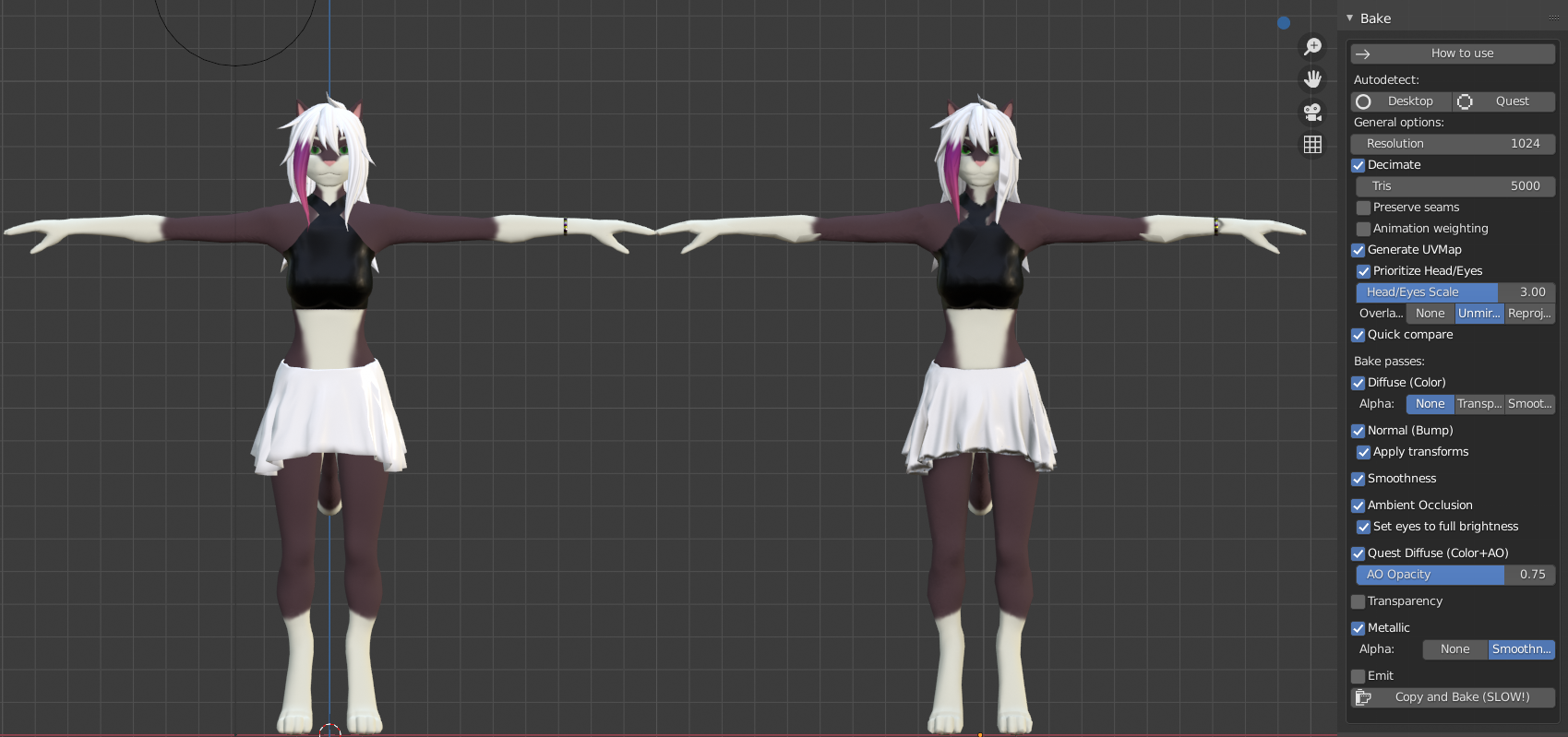
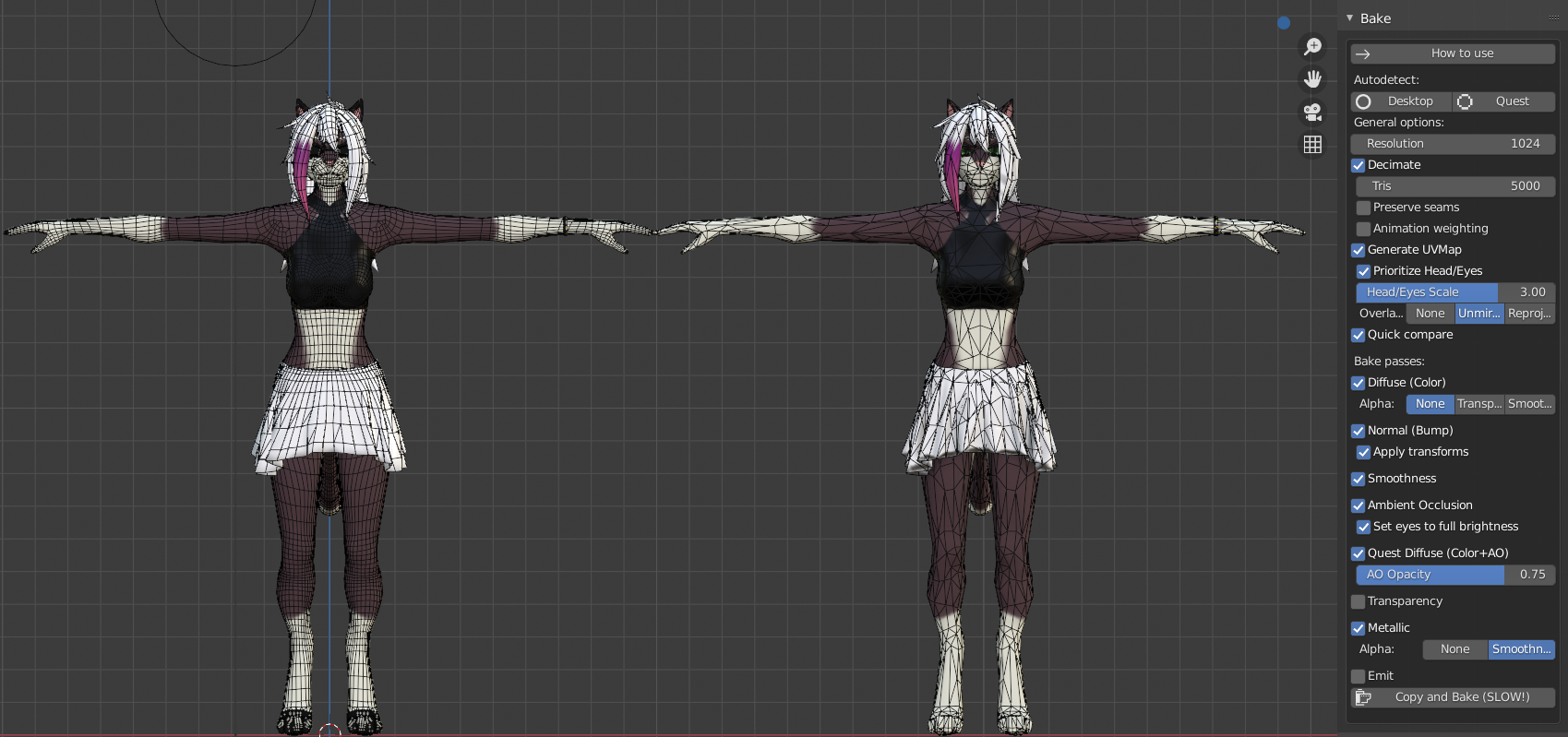

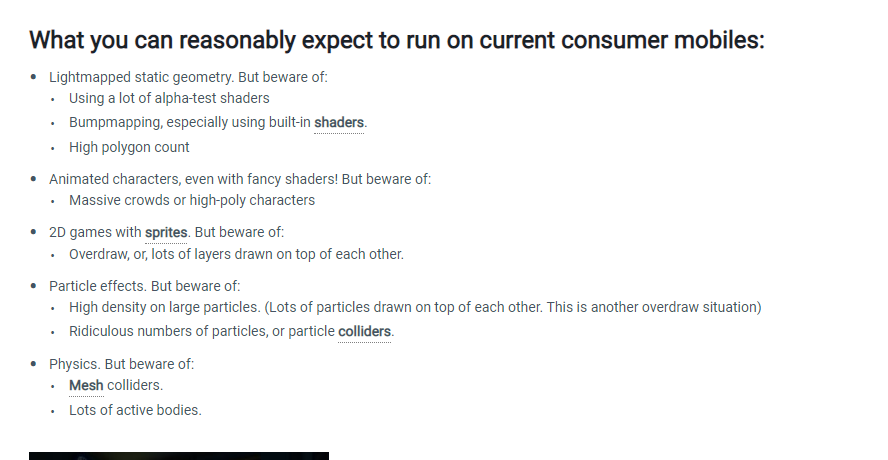
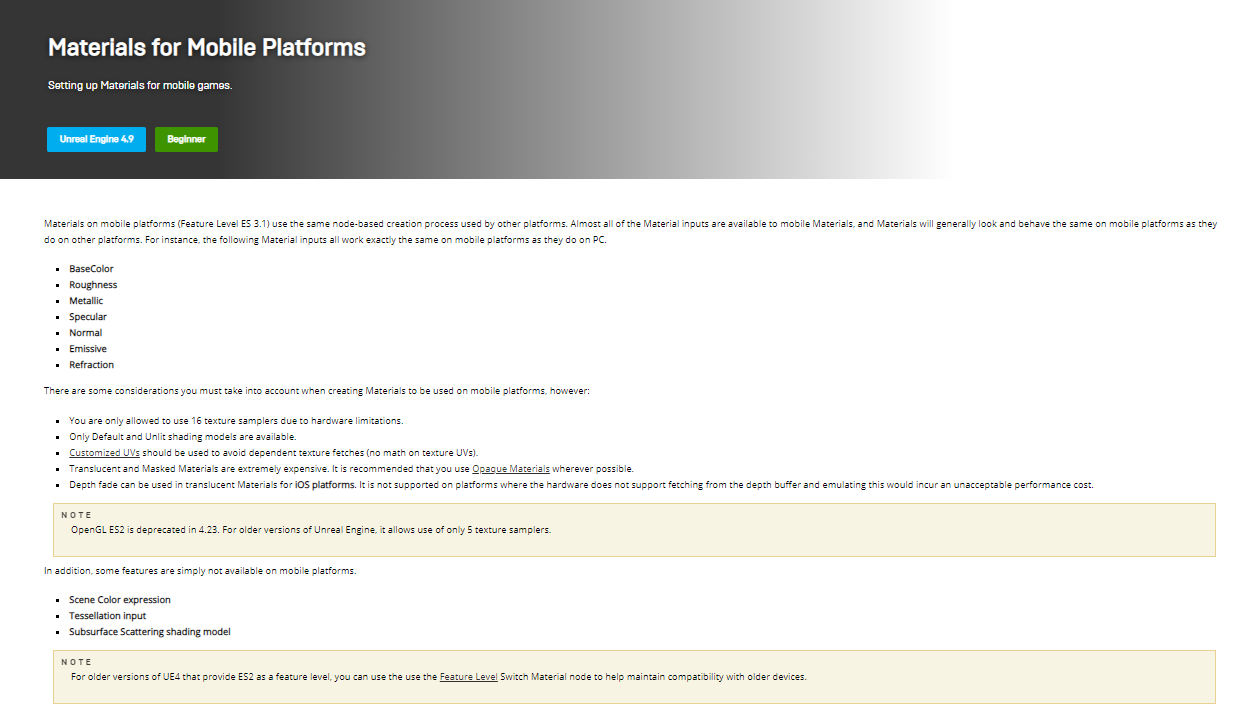
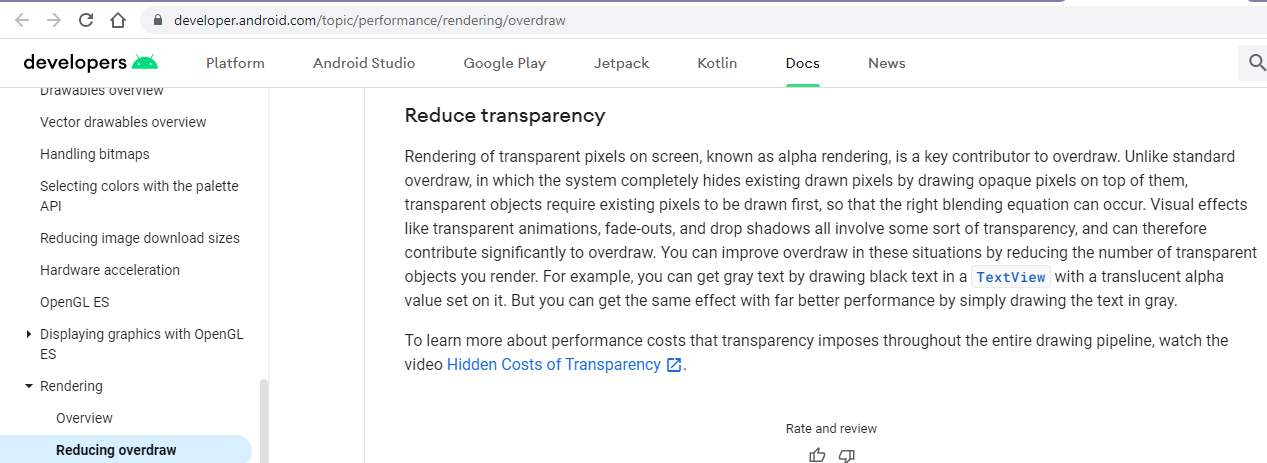
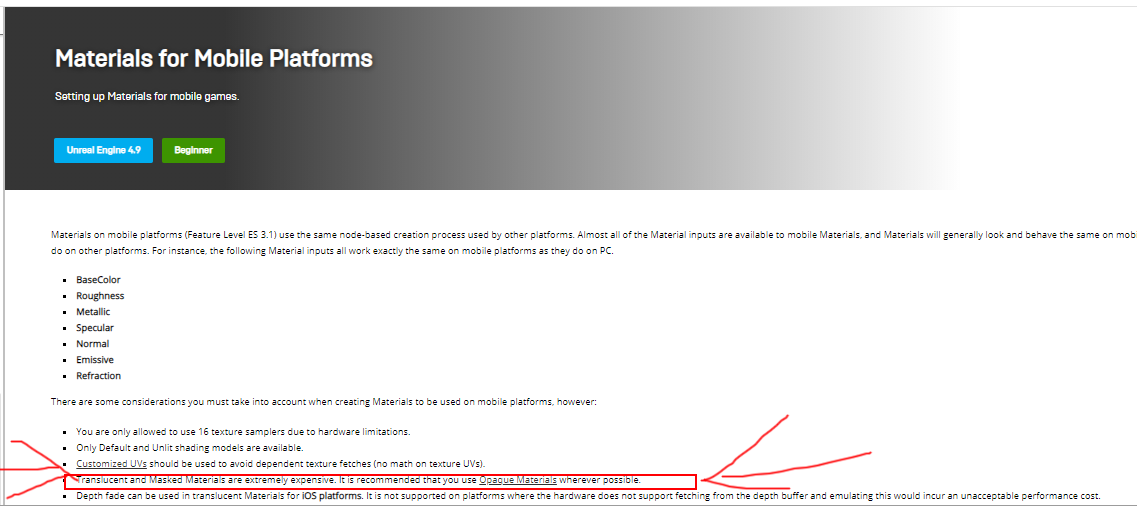
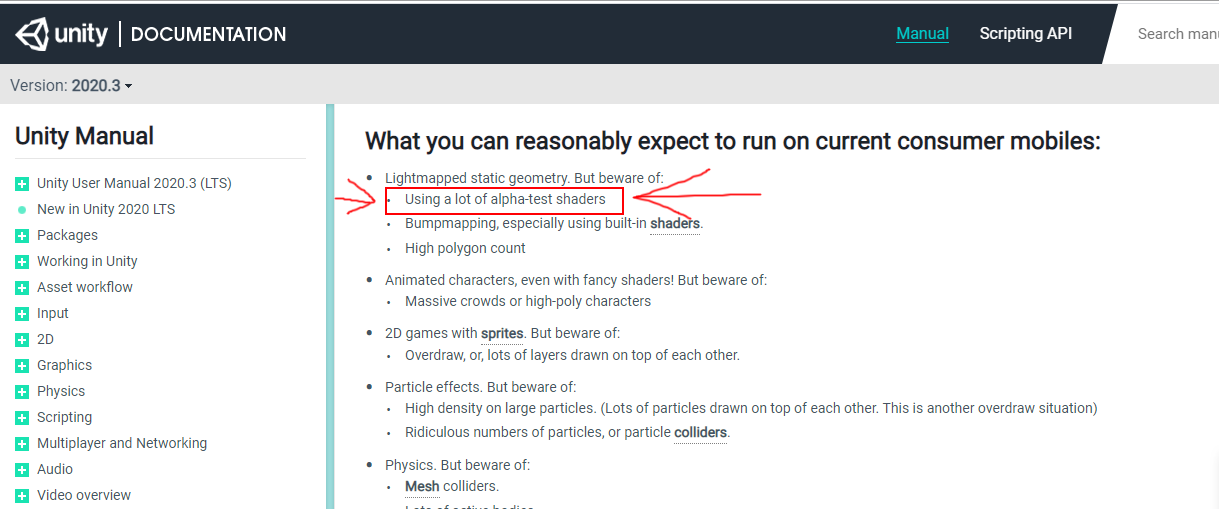
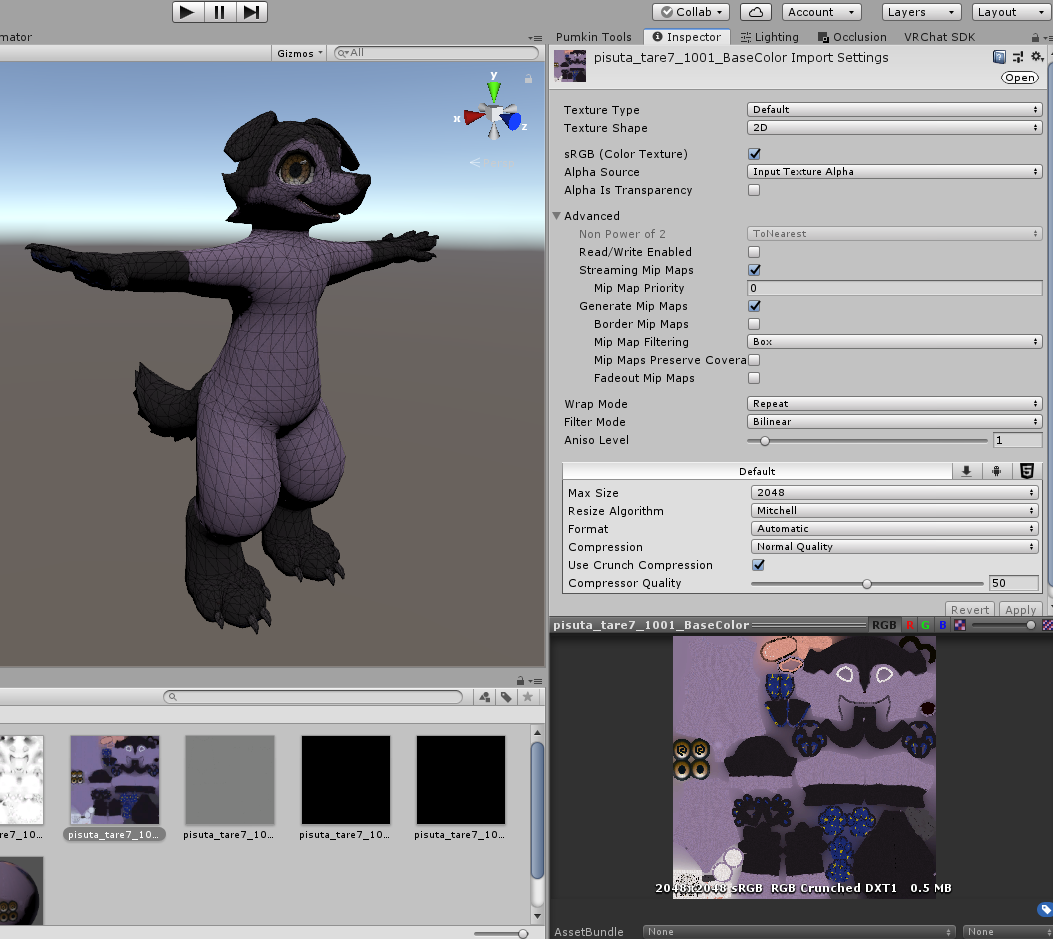
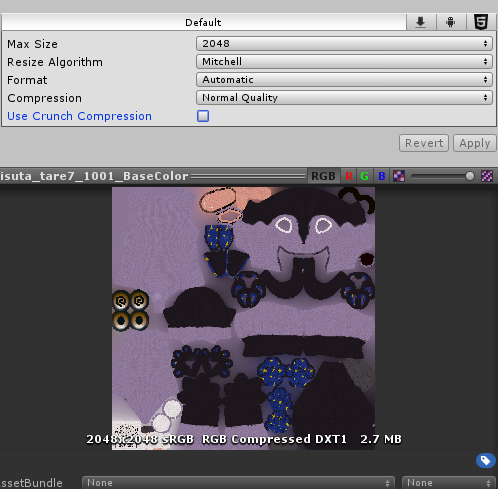


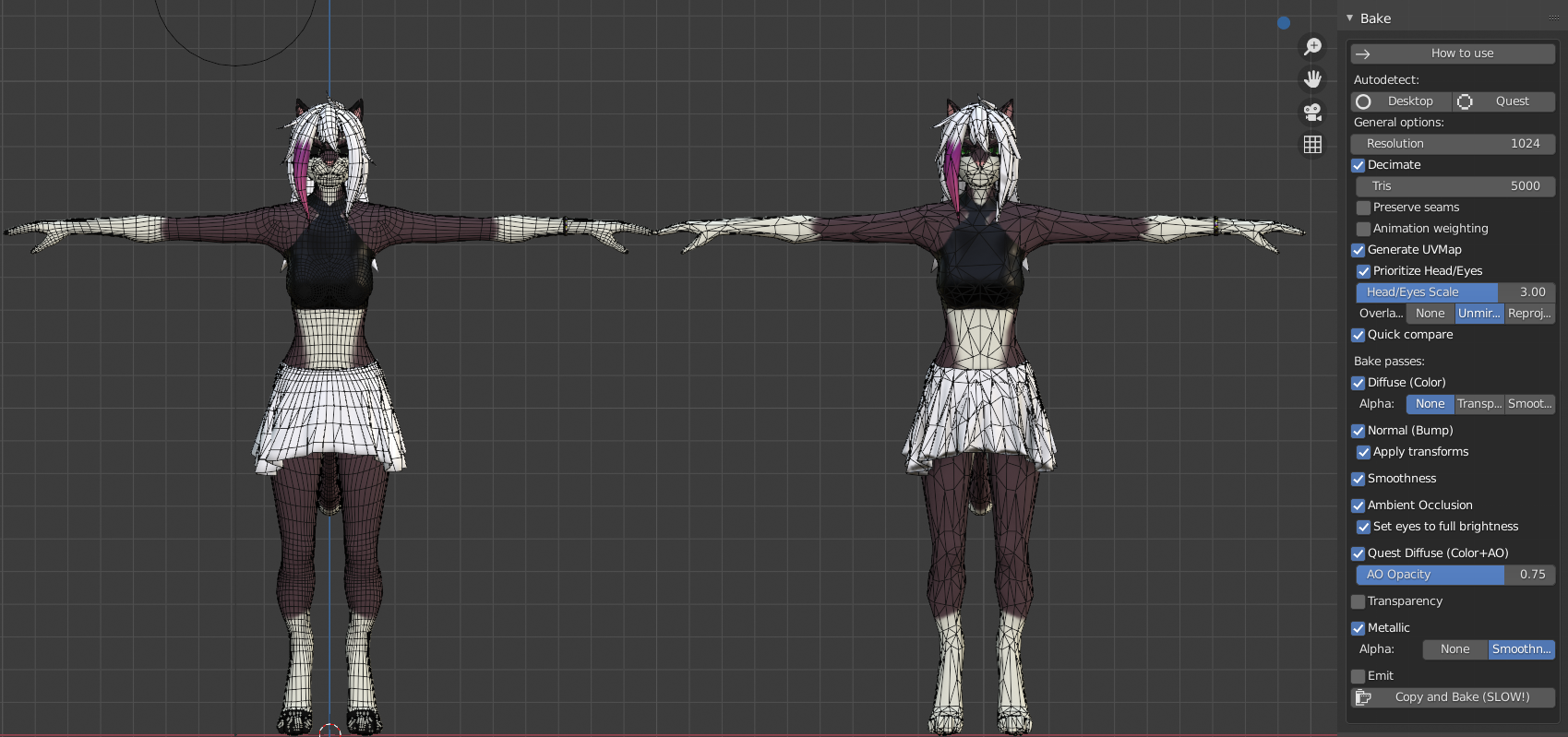 thick marten
@plush kernel
If your model's clothes are separated, you should learn how you can delete the geometry underneath
Do everything you can to kill tris if you aren't skilled enough to manually decimate (like me)
Here's my PC version

Then my quest version in a separate project
 plush kernel
Okay, thanks
thick marten
If you get it under 10k polys and you're good with single material, single mesh, your avatar will be impossible to perf block AND you can use it as a fallback
if you absolutely need more polys, try not to exceed 15k otherwise I believe you'll be perf blocked by default
jagged sequoia
and looking at the beta SDK it looks like they're removing the ability for very poor avatars to be uploaded at all on quest
jagged sequoia
unless the Avatar is basically a quest Avatar uploaded on pc