#avatar-quest
1 messages · Page 30 of 1
 dry zealot
 pastel storm
pc robots
 gusty patio
PC bots yeah.
 formal zodiac
They are lame as hell and it sucks that PC players who can go to any world take up cross-play slots with PC only avatars. Makes for a lousy experience for a Quest player.
gusty patio
It should have been Cross play only if you have a Quest compatable avatar or cross play avatar.
formal zodiac
Storm knows. I have a PC and do FBT. But I also have a Quest. It has so much potential but VRchat has missed it. So close and yet much too far away compared to everything else on Chat.
In fact on reddit when people are bitching about Oculus' curation process for their store they refer to VRchat as the exception to an otherwise strict process.
Thank you storm. I guess that's something only us older users can appreciate. That's what I am suggesting, and not only do people not care, they are opposed to the idea of such a sensible solution...but of course they aren't Quest users.
gusty patio
It's a great idea but there's problems with cross play at the moment.
This isn't fornite. It's user creator content.
formal zodiac
Honestly crossplay has no business being the golden egg that they have made it.
Having some crossplay options is a nice feature, but both platforms have their best potential as independent platforms.
gusty patio
And for me, I've been doing an hour here and an hour there working on my Quest version but really am not in any hurry.
formal zodiac
I don't even know who these users are that hang out in PC in cross-play worlds. My friends are never in cross-play worlds. We prefer PC worlds. So I don't understand the fuss at the suggestion that a cross-play avatar be required for a cross-play world.
gusty patio
Then for every next avatar I make, I'll need to make two. It's extra work.
formal zodiac
That's exactly why the idea that "more content" will fix it is flawed.
gusty patio
Oh and how about this one? The people that paid someone to make their PC avatar. Now what?
pastel storm
they paid for a pc avatar
i have -weeks- of blender experience and i got an avatar down from 61k to 7.5k
in 1 day
formal zodiac
People don't want to make two versions. Very few avatars are ground up creations. They are usually imports and merges. Obviously for Quest your low poly's can be uploaded as PC but for PC you will have a hard time decimating into something acceptable for a Quest version. It's just not something many people care to do or have a need to do. That's fine, but there are cross-play avatars available and a cross-play avatar requirement should definitely safeguard quest users' experience from PC players who don't otherwise care about it.
gusty patio
Exactly. Possibly never getting a Quest version
pastel storm
it's not feasible for every avatar but people can do it for their personal ones
'making' the pc version often requires almost no effort at all
gusty patio
doubt it. It's how I work.
pastel storm
some dude in here just yesterday, his first avatar ever, he got down from like 27k to 9k or whatever
like his first day using blender
gusty patio
Yes but I'm not everybody else.
formal zodiac
I did it. I'm crossplay now with my green fox with a true PC version for PC and a decimated version for Quest. They both actually look great.
That was me Nabutso. lol
 cunning imp
I'd upload a generic quest avatar for each of my avatars but they need to have exact armatures and it's just not feasible to make a bunch of different crossplay avatars. If vrchat made it so that similar armatures would work then I'd do something about it
formal zodiac
Quest first and PC second.
No that's wrong. That's an earlier attempt at Quest. I removed the choker from the Quest version. Will probably do that from the PC version too.
gusty patio
Neat!
formal zodiac
That was my final result for Quest. I have some clipping to improve on the shoulder at some point, but otherwise its done and I will be sorting out Dynamic bones and animations on my PC version.
He has no butt. I was 100 poly's away so I cut the pants off under the shirt, lol.
pastel storm
you should always remove occluded meshes like that yeah
i had an avatar that had individually modeled toes and toenails. 5k polys flat off the top easy
gusty patio
Yeah, quickest part for sure.
I have the next four weeks off from work. Then I'll probably get a lot closer to being done.
 foggy garnet
I'm sorry that Quest avatars are kinda rare. It might not help much, but since my avatars are all below 2000ish poly anyways, I'll try to get them uploaded for both PC and Quest.
dry zealot
I never really use hight poly. From now on I moslly upload under 10k and put fancy stuff like dyna or shader on the pc one
foggy garnet
The Quest is sorta the main face of mobile VR, so it's important that it meets people's expectations
formal zodiac
Well I just tested it. I like what the mobile shaders do to the eyes.
Also the space between the hoodie and the hair, etc. really creates a nice effect, especially by comparison to other Quest Avatars. Almost a dynamic bones illusion.
 pastel delta

formal zodiac
@foggy garnet Thanks for your willingness to do that. It's understandable that avatar options would be limited for a while, but its not Quest users who can turn that around. It's the PC users with the ability to get that done. I mean if your PC can't run VR it will certainly suck for blender and Unity too.
 distant epoch
before it went away, i was running a 77k poly avatar as a test. it worked fine.
 velvet portal
distant epoch
velvet portal
distant epoch
many have, not all. still have a few at 22-25k
one of the best ones had fun animation. gone now.
foggy garnet
hi!
distant epoch
i click on the the box for avatar details, it said 77,460 or something like that
also listed sometimes as poor performance, but it did run
 chrome cape
Why did the avatar running motion disappear?
 long talon
I wont get on your horses as long as you arent the one who uploaded it
but if you do, know that they modded the SDK to do so.
 craggy glacier
hold the fuck up
i thought the "limit" was less than 10k?
what the hecks going on here
less than 7.5k is marked as poor as well, i thought that should have been medium?
craggy glacier
im hoping that wasnt intentional
 wraith ocean
 shrewd fog
SDK uploaded is indeed wrong version, correct SDK will be up soon
craggy glacier
good to hear
distant epoch
apparently it's not poly really but materials and bones that mostly matter
 thin mist
I had a bunch of avatars favorited that worked just fine for quest that went over the limit, but now I’m the only one who can see the avatars when they are applied to me.
Specifically a lucario player model that worked just fine on a 3ds of all things
 hidden cedar
To give perspective on this nightmare of an update
Before and after of a blender destroyed avatar I had comissioned
dry zealot
mmmh ?
hidden cedar
This was an avatar that worked perfectly fine, and I won't be able to use in it's perfect state
This is 63k poly, just under 10k to meet bare minimum
dry zealot
you can do better. the topo look bad
hidden cedar
There's no fixing this
long talon
there's big fixing this
gimme like 30 mins with it
not rn tho, my room is a nuclear reactor
hidden cedar
Lol
pastel delta
63k on quest, bro, wtf.
Thank god for the update. You shouldnt be allowed to make avatars
 delicate basalt
did you decimate it or try doing retopology on it? that looks like it can easily fit under 5k 0~0 or mayb im just looking at it wrong
foggy garnet
It looks like a pretty simple avatar, yeah. A quick retopology job wouldn't be too difficult.
pastel delta
Retopology is still advances
I didnt even try it out yet but i wish i did, going to learn it this week a little, hopfully
Could safe me alot of headache doing quest avatars
And having them look good
foggy garnet
A lot of it just involves tracing over a model with cleaner topology.
pastel storm
ah @pastel delta i stopped by your world and noticed a lot of issues with your avatars
you should really remove doubles before decimating
pastel storm
lots had gaps that didn't look like it
pastel delta
Thats because normals facing the wrong way
Or just missing faces cause of decimation
pastel storm
if the verts got combined from remove doubles you wouldn't have those missing faces
pastel storm
some looked like kenshiro after getting hit by shin in like fist of the north star episode 2
pastel delta
True
pastel delta
Yeah thats all because decimating shitty mmd topology
pastel storm
but if you removed doubles you wouldn't get those gaps
pastel delta
Trust me, ive seen the wort topos
Still wrong
Thats not what removing doubles does
Stop spreading missinformation please
pastel storm
remove doubles combines vertices that are close enough together
if you have 2 meshes side by side 'connecting' into each other, but the edge verts aren't actually the same vert (but are in the same position), decimating can affect both those meshes differently
that's where the seams come from
pastel delta
I know
pastel storm
right, so you don't get those kinds of seams if you combine those verts first
pastel delta
Ohhh let me explain
You are right yeah but the way i did that
Yeah
Sorry i confused my self
I separated them by materials
pastel storm
yeah that's rough
pastel storm
since seperating kinda 'undoes' the removing of doubles if you did it beforehand
since it splits the verts
pastel delta
Manually separate
pastel storm
even if you remove doubles the UVs still work
so it works out
may want to do that since the seams, honestly, are ugly
pastel delta
i know, most avatars are really ugly
thats what demotivated me to do more
but im just to bad at doing avatars, all i did was decimate, no retopology
also PSA
Blender 2.8 decimation works 10x better than 2.7
pastel storm
no its fine it's good to have a lot of choice so it's good that you're making so many
pastel delta
i compared the same model and on 2.8 it looked alot better
thats what i thought to, give them a choice first, fix later
i redid like 2 avatar so far, but i dont know man
yeah i should fix them up a little i guess
pastel storm
re-doing is tough but you gotta do it sometime
pastel delta
i redid a few of them many times, but thats how you learn things
doing something over and over
but yeah thanks for the thing with the seams, at first I thought you wanted to explain to me that removing doubles fixes the seams , i was very confused
also
separate by material works waaaaay more detailed in 2.8 than 2.7
thanks for the feedback still ^^
do you remember which onces where the worst @pastel storm ?
pastel delta
np
dry zealot
better make one perfect then redo all of then
 twin pebble
@fluid kiln. Last night my quest version of my avatar was including the PC ranking in its display to quest users
 sharp spear
It was; which arguably undermines the benefit of Quest-level optimization
Some of the benefit.
 spare pecan
Hey, can I get some help? I am trying to convert an avatar over to quest, and I get some error I have no idea how to fix.
craggy glacier
@spare pecan you have too many materials, youre gonna have to tone them down to 4 or less
spare pecan
I dunno how.
craggy glacier
if you have the CATS blender plugin, theres an option to create a texture atlas, which combines all your textures into one and creates one material with said combined textures
spare pecan
I know it looks like this, but I don't know how to combine them
It IS all in 1 material.
cunning imp
You need to fix that in blender, it is not unique materials it is material slots
spare pecan
How do I do that?
cunning imp
In the material tab on the right you should only have 1 material
If they are all exactly the same you can just delete all but one
cunning imp
Probably, I don't use fix model as it usually breaks things that aren't raw MMD rips
pastel delta
there is also a separate button for combine same mats
 slate zodiac
Quick question. Quest avatars can't have dynamic bones but if I wanted to say spawn a sword in my hand that is allowed correct?
pastel storm
yes
slate zodiac
Sweet thank you!
 mortal sleet
Keep in mind that the recent SDK changes mean that anything not initially shown in the model (i.e. activated by emotes) still counts towards the performance rank
 fossil sky
Can someone help pls? i put my sitting pose on the override then i upload but it don´t works
 vale fog
Is it possible to tie sound to quest avatar expressions/gestures?
Say like a 5-10 second clip
distant epoch
i haven't heard any quest saavy avatars be able to do that
long talon
quest avatars cant have sound sources
mostly cause audio is very very taxing on the cpu, since it has to be rendered spatially.
distant epoch
turns out the Quest is running a super quantum matrix. it's more powerful than Neo.
foggy garnet
Finished a heavy rifle. I'm not sure about the textures on it, though.
also, the ejection port makes no sense lol
it needed to go somewhere
 cyan spoke
Looks super cool!
foggy garnet
thank you so much!
I can upload the texture, but I dunno if I want anyone seeing my messy unoptimized UVs o_O
honestly, it could be downsized by half with proper optimization
 distant nymph
Especially if you use vertex colors for those gradients :)
cyan spoke
It's already so small anyways, I believe this is perfectly fine!
Maybe I'd just get rid of the two diagonal things on the side, they look like a couple of angry Super Mario style eyes to me 😅
foggy garnet
welp, never unseeing that
cyan spoke
Hahahahahaha
foggy garnet
I haven't heard of vertex colours before, though.
Do you mean just, like, painting a set of faces a certain colour?
cyan spoke
Basically you can assign a color to any vertex, and the plygon color will be a blend of the vertex colors
An image speaks more than 1K words
And a video speaks more than 1K images
https://www.google.com/url?sa=i&source=images&cd=&ved=2ahUKEwjs873nxPfiAhUc5uAKHb1cAAUQjRx6BAgBEAU&url=https%3A%2F%2Fwww.youtube.com%2Fwatch%3Fv%3DswLJV4u1Q2A&psig=AOvVaw2rvsArEHoyK7oyPzyi7GLk&ust=1561102134735559

Using vertex paint in Blender to create beautiful art that can be used in Unity with a shader. Standard shader: http://pastebin.com/TfHtiUtF Diffuse shader: ...
distant nymph
It depends on what the shader wants to do with it of course, but a bunch of the vrchat quest shaders support vertex colors for tinting
Less useful if you're porting an avatar over that you already made on the PC using textures for everything of course
foggy garnet
Oh, that's really interesting! I sort of enjoy the pixelated look of low-res gradients, but there really is huge potential for optimization there.
cyan spoke
Indeed. A great use for Vertex Colors is faking ambient occlusion
distant nymph
@foggy garnet you could make a pixelated gradient texture and use it in multiple places with different color tints
cyan spoke
^ also that
 vagrant heath
So I'm a bit confused on the limits on terms of polygons for quest?
Various sources say differently...is it 5k? Or is it more than that?
distant nymph
Over 7500 is blocked by default. Over 10000 is always blocked
 viscid bloom
@dry zealot didn't see the second room in your world, is that golden faceless character one of your own?
viscid bloom
Yeah I got into it and have been using the golden avatar, just wondering if it's based off of anything or your own creation @dry zealot
dry zealot
a Chinese game
 tidal ridge
Anyone notice their Quest showing the PC avatar stats on other people now?
viscid bloom
Is it the PC robot avatar? If so that is a quest one showing that it is a poor optimised one. Usually more than 7500 poly count. If you want to see them, open your menu, select the user, and click show avatar
tidal ridge
It seems like right now people who say they have have uploaded an "Excellent" 5k Quest avatar (and it does look like one) still need to be manually shown if there's a better quality PC version, and their stats report the PC version info. Can anyone confirm?
pastel storm
last night i wasnt seeing that but we'll see, i'll ask some friends in a moment
viscid bloom
I was on earlier without any issue like that myself, I'll have to hop back on and loo
Look
viscid bloom
Oh although when I upgraded my account and linked oculus to vrchat today, I lost all of my favorites avatars, not a bit deal but it did say they would be restored and are not.
distant epoch
i also got locked out of one of my favorites worlds lists
pastel storm
Okay. So. -scrolls up into the void-
...jk..I'm gonna be so lost
So imma try to get a quest.
And im told to come here about avatar limits/possible.
 iron raptor
How does one replace the model in the scene so you can have a higher res version on PC and the lowres on Quest?
dry zealot
you can drag another model in the scene and copy the component on that one
we need more chubby body type in this game
dry zealot
yes
 keen sigil
@dry zealot That artist of that model is amazing, love the drawn toon textures v.v
 languid lion
@hushed wedge so they never fixed the issue of the last upload for avatar or world will be the stats shown for worlds or avatars? or is this a different issue?
iron raptor
is there anything else i need to do?
to upload the a different mesh as the high res
@dry zealot
nvm figured it out
fossil sky
Can i DM someone that knows how to work with unity? I have a simple and quick problem :3
 hushed wedge
@languid lion I think it's the same issue
pastel storm
oh i see
i upload my quest versions 2nd always so that may be why they see the correct stats on there
 sour carbon
is any1 kind enough to quide me through uploading an avatar :p?
long talon
well uh, you click build and publish
sour carbon
well uh, i litteraly dont know how i import a model into unity
pastel storm
he probably needs everything including setting visemes and adding the descriptor etc
in which case you may as well watch some video guide
pastel storm
is the model already made for vrchat
sour carbon
i dont have one yet. but it would be
pastel storm
there's nothing different about uploading for quest
sour carbon
wait really, with the few i talked too in vrchat they told me there needs to be 2 files uploaded pc and quest
so im confused
long talon
basically, you can make one file thats small enough for quest and upload the same to PC, itll take 2 minutes instead of 1
or you can make a better version for PC
pastel storm
@long talon where's your heterochromia
long talon
Will do when I re-UV my ava
since I've got the hang of UV mapping now
(nah for realsies am uv mapping semi-god now)
sour carbon
i have no experience at all in 3d modeling i dont know anything so saying i build for android wont help me, all ive done is modding beatsaber so far
pastel storm
build for android just means you press the android button my dude
long talon
menubar > file > build settings > android > switch platform
then you publish
its that dumb
sour carbon
look, i dont even know where to start. I know litteraly nothing
im just trying to untiall unity becaus ei think i need it
but i am not even sure
pastel storm
you don't plan on making a 3d model from scratch do you
sour carbon
so if u just wanna keep telling me its easy thanks, but for me its not
no
but i never did anything at all here
pastel storm
ok, when you find a model then we can tell you where to go from there, because it depends
pastel storm
did you get the specific version you need for vrchat
long talon
you're installing 2017.4.28f1?
pastel storm
Requirements We're going to need a couple things before we can get started. - Unity 2017.4.28f1 - Scroll down to find LTS Release 2017.4.28f1 If you have Unity Hub installed, you...
long talon
you COULD be following any tutorial thats older than a week which would say 2017.4.15f1
which is now wrong
pastel storm
the 3rd one in that list
long talon
3rd in that image
sour carbon
k
long talon
btw, if the link doesnt start the download
rightclick and open in new tab
it usually fixes it
sour carbon
i have a older version of unity, can i update it or do i have to uninstall and reinstall ?
pastel storm
when you install the new one it will remove the old one
pastel storm
yes it is
long talon
thats what we used back in 2017 and early 2018
sour carbon
yea, i played vrchat on desktop back then
 sick quail
I uhh have VRChat on desktop
long talon
you think thats large?
add visual studio, resharper and 500 packages off the asset store
oh yeah 100gb
sour carbon
my 1TB is like 80% full and my pc getting slow af
do you guys know where i get avatars from ?ß
pastel storm
that's kinda why tons of people are mad about the performance ranking system, even moreso on quest, so, yes
sour carbon
hmm coundn't i just delete all the fancy shit and leave it with around 20k polys ?
lol
pastel storm
quest users won't see avatars that are 20k polys.
10k max
7.5k by default
and most avatars arent 20k polys either, the trash ones you'll find on that one website will be like 100k half the time
sour carbon
oh damn
pastel storm
they won't have combined materials, they won't do anything right
it's basically the worst place to look for a quest avatar
sour carbon
see, 20k
am i not understanding something ?
because that are 20k
are you still there ?
sour carbon
oh man but it works why would they fix it seriosly
sour carbon
imma tell litteraly everyone i know
long talon
nabu
seeing how tupper was talking on the mutelist last night
I dont believe being able to see 10+k poly avatars by force showing them is a bug
long talon
I'll tind it tonight and clip it for you
pastel storm
because a short convo in discord said otherwise
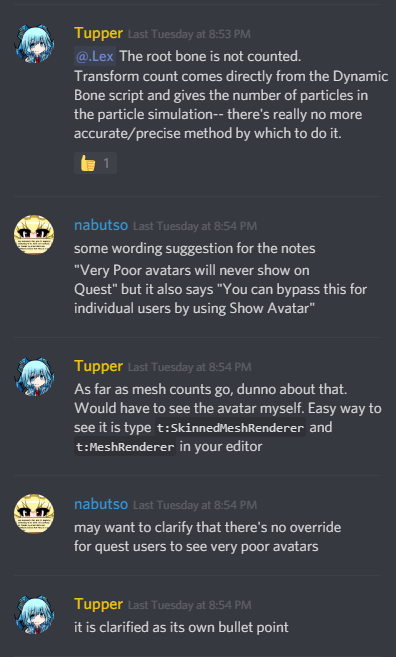
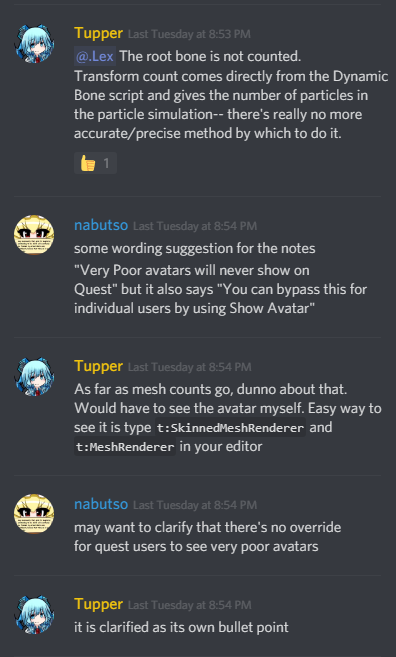
i read this as the clarification being that quest users cannot override the system using "show avatar"
and also:
"You cannot disable the Avatar Performance Rank Block system on Quest. In other words, avatars that are ranked as "Very Poor" will never display on VRChat for the Oculus Quest. Any avatar that exceeds the limits for "Poor" will be ranked as "Very Poor"."
sour carbon
thats is so stupid
pastel storm
on the vrchat docs
The Avatar Performance Ranking System allows you to see how much a user's avatar is affecting performance via analysis of the components on that user's avatar. You can also use it on yourself to see how performant your avatar is. **This system is purely informational at this...
sour carbon
thats make me so mad wtf
pastel storm
"For example, if an avatar on Quest exceeds 10,000 triangles (polygons), it will never display in the application and cannot be forced to display."
so i think it's a bug
long talon
https://www.twitch.tv/videos/441973119?t=00h58m38s Dislclaimer: "Everything said on The Mute List does not represent the views of our employers."
 sour carbon
btw what is visual studio ?
long talon
dont bother about it
sour carbon
k
long talon
he never said it was a bug. you just CAN show avatars above 10k
pastel storm
@fluid kiln please clarify this in the documentation because 3 times it's stated in there that you can't ever see avatars above 10k but it seems in that clip that you say the opposite
because that's a huge deal
pastel storm
it's still less than ideal
sour carbon
i ment it is importaint to know whats going on in detail
do i need visual studio community 2017 ?
sour carbon
👀 it just starded that
long talon
why didnt you uncheck it.....
sour carbon
okayyy, im in unity how would i technically upload an avatar ?
 random badge
random badge
random badge
You're welcome
sour carbon
@pastel storm :c?
random badge
Legit google it, there are a million and one tutorials
sour carbon
dude
random badge
Yes
random badge
The process has not changed since then
sour carbon
q u e s t ?
omg sure
sorry lol
ill just use an older version
smh
sorry
for real
random badge
Ok heres a run down for the 2018 tutorials that dont have quest parts
file > Build settings > Android (if its not downloaded, download it) > proceed as normal and upload the way you learn from the videos
sour carbon
i just downloaded unity i am here
dont you fucking understand that i know nothing
AT ALL
random badge
You wont need that stuff i said above untill you learn how to upload avatars
sour carbon
okay
imma go ahead and kill my self oaky ? that better
why do you even bother annoying me, and saying google. dont you think thats thats the first think ive tryed ?
random badge
Sorry, let me just allot some time to you to give you a hand crafted tutorial 🙂
What are you having trouble with?
sour carbon
well, i aam still in the opening screen and dont know anything. at all. the first problem would be opening an avatar and finding one but i guess ill just need to wait until i find some
random badge
What are all those projects, you seem to have worked on an avatar before
I assume the thing you need to know is how to upload to quest?
sour carbon
yea, i play on quest. and i forgot how to do anything in unity. i downloaded these a year ago on an very only version( sees from now). and so idk how to find an avatar that is quest comp. and how to upload it so quest can use it.
also i kinda wanna learn how to make a world, bcs i wanna get into game design and i think vrchat is a nice start to this scene
maybe making simple worlds is even easier because i dont need to bother with the hole avatar stuff
life a few blocks on a flat land
random badge
Well youll have to find an avatar you want to upload, ideally something at 5k tris
sour carbon
yea
do you know how to make worlds ?
are these polys ? if yes, i think this works for a first try
random badge
i know how to make worlds, yes and that model is a good start
youll probably have to rig it
sour carbon
what does that mean ? ''rig''
random badge
Create a skeleton for the model to make it have bones, so it can move
You can use https://mixamo.com
random badge
FBX, and no
sour carbon
k how do i open the fbx?
random badge
you can create a new project in unity and import it into there
to see if it has a rig
sour carbon
do i drag the winrar in there. if yes do i have to unpack it ? to
or here ?
well i found it i had to unpack it and im importing it rn
random badge
Ok
random badge
drag the FBX onto the scene.
sour carbon
the only thing i can drag is this, and its only white: i cant drag both in there
sour carbon
what do you mean ?
pastel storm
find an avatar that already works for vrchat
because 99% of the work is then done for you.
sour carbon
hmm ok
if i look for ''5k polygon avatars'' with out even saying vrchat i only see people complaining no actual avatars, thats so annoying
random badge
you dont need to, when using mixamo
pastel storm
he needs to start with something already done so he can know how to get the absolute basics of the process done
like the actual importing of the sdk, how to log in using the sdk, how to build
random badge
Its very easy
random badge
you just click the model and drag it into the 3d scene
sour carbon
but then it has no textures
random badge
click the model, and drag the texture onto the model.
sour carbon
the folder or the individual textures
well, i cant
it doesnt allow me to trag any texture
random badge
Show me your textures
sour carbon
random badge
drag that first one onto the model after clicking the model
sour carbon
imma brb i ahve to eat
random badge
Watch a single avatar tutorial. please.
pastel storm
it depends
vagrant heath
Is the material limit still 1? Or can you have 2?
sour carbon
hey, so how do i upload for quest ?
i have everything but dont know how to upload iut that way
pastel storm
file-> build settings-> android-> switch platform
then close the build settings window and upload the avatar
you'll need to upload for pc too if you want pc people to see it
it's 2 seperate platforms
sour carbon
i uploaded pc, now i downloaded the android thing
but its doesnt show me switch platform, it tells me to download the android thing
imma restand and see if it works
btw i have 4k polygons, so thats good
how can i change the shader to a quest shader ?
pastel storm
oops its cut off
but you choose vrchat-> mobile-> anything there
when choosing the shader
sour carbon
yea, but where do i put these. In my avatasr there is somewhere one called ''standart'' and thats why i cant upload it. So ill have to replace that but idk where to find that
pastel storm
i show you in the video
pastel storm
this is what happens when you use some shitty webste instead of going through blender
i have no clue
sour carbon
wait what
pastel storm
find your materials.
pastel storm
yes
yours are named something else.
i can't tell you what they are
click
and find out
sour carbon
ohh
pastel storm
you should just have mesh
like 'body'
if you have more then that shit is not optimized
pastel storm
then i can't help you because i'd be helping spawn a demon into this quest world
pastel storm
im not helping any further with 13 meshes
sour carbon
i dont even know what hat means
pastel storm
this is the problem with using that website
sour carbon
cant you just tell me why i cant change the shader
pastel storm
no
sour carbon
w h y
pastel storm
because of the channel under this one
sour carbon
what
pastel storm
you have 4k polys so you're like "ok good this will be fine on quest"
then you have 13 meshes
you should have 1
2 at most if you -really need 2-
you need to go into blender and combine them
you'd need to grab the CATS plugin for blender
at that point you would have been better off starting with just the original fbx than that monstrosity you downloaded from vrc-mods
pastel storm
you're going to upload a 13 mesh avatar to quest?
pastel storm
disgusting
sour carbon
still 72 fps
bruv
i am not gonna use it
its just my first one to test
but thanks for helping
(but that was ironic u litteraly said disqusting lmaoo)
pastel storm
how is that ironic?
viscid bloom
?
 raven epoch
@twin pebble Hey, saw your canny. Do you use EditorOnly tags on your avatar for dealing with multiple meshes on the same avatar?
twin pebble
@raven epoch is this a blender thing?
raven epoch
It's in Unity
pastel storm
it makes that component only 'exist' in the editor
raven epoch
So nothing like this: https://i.imgur.com/zBPdVCV.png
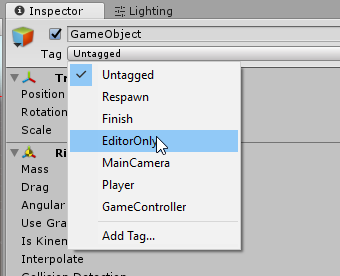 pastel storm
like you have a human size cube in your world so you can judge scale in the editor, tag it as editoronly and it won't exist in game mode or your uploaded asset bundle
only on editor screens while working on it
it seems people use it to have an avatar project and swap body meshes etc too
twin pebble
@raven epoch that would help quite a bit, if this is about the sudden change in my avatar's performance under the new ranking system. it's including all the meshes on the shibas. Like the delorean, the mini version of the shiba getting in, the smash tex, the particles trails
any mesh that is on an avatar that isn't use is mostly deleted
pastel storm
that mesh isn't even there in the upload, it shouldn't be counted
raven epoch
But does the one you talked about in the canny have all these meshes on them as disabled?
pastel storm
it's not disabled, it's editor only
literally doesn't exist in vrchat, only the project
they just forgot this is an option when checking the avatar hierarchy
should be easy to fix soon
raven epoch
But pika isn't using it, which is why I am asking if they got all the meshes on the current avatar mentioned in the canny post.
pastel storm
yeah that's another thing
I'd need to see that canny to know what you both are talking about 😄
raven epoch
twin pebble
oh, now I see what your talking about. "the Canny" reffereing to the bug reporting site. I having uploaded the shiba using new unity package. And suddenly it was considered very poor. which based on previous knowlege I new that quest shiba was "good" I de-duced that it must be reporting my PC stats to the quest user.... I mistakingly was unaware they changed the quest requirements.....again.....
raven epoch
Yeah, well these requirements are now "set" and won't change (hopefully)
pastel storm
one of my quest/pc avatars turned to pc only after uploading a pc update, will check it when I get on and add a canny about it if that's what really happened
maybe it's related
same blueprint
maybe the ingest screws up the tagging
twin pebble
I think vrchat has more pressing issues right now. I went to the old JAN 2018 hub to revisit it.... frames were noticibly lower than previous.... and i was the only one in the instance
raven epoch
Maybe ^_^But we want to put a nail on this if it's a bug or not 😛
So is the canny still valid or is the Quest shiba having higher stats than the requirements?
pastel storm
I'll check what happened too
raven epoch
(check the api too)
pastel storm
can I get more avatar info through the api?
manage uploaded content tells me nothing about platforms
raven epoch
yeah
pastel storm
not gonna write a frontend for that right now 😄
raven epoch
Login on the website first, then go to this page
https://vrchat.com/api/1/avatars/{avatarId}
pastel storm
cheers, I googled a .cloud endpoint 😄
raven epoch
It's the same on all ^_^
raven epoch
So we need more info on the avatar, if it's using multiple meshes, poly count higher than the new requirements ect.
pastel storm
I'm curious too
 sullen fractal
I am trying to figure out where I can find the VRChat/Mobile Shader that the Publisher needs? I don't seem to find it on my material shader selector with the Latest SDK (2019.06.19.20.14 public)
random badge
Can we see your shader selection menu
sullen fractal
pastel storm
Anyone got a link or something where I can learn about avatars? I don't have a vr yet but I wanna get a Quest. So I won't have to get a PC and all.. ugh.
I wanna know how this avatar system works cause from scrolling through this discord .. I'm a bit confused? And heard something about not being to costumize them on quest but you can make or have someone make [I assume some form of payment..] one for you to use?
pastel storm
quest avatars are no different from pc ones except they're typically harder to make if you're trying to use one with a lot of detail since it's harder to pack that detail into a lower performance impacting avatar
you don't need to make your own avatar to play vrchat though. people make avatars and put them in worlds and you can use those
granted, there's less options like that right now simply since the quest is new and it's harder to make content for
it's something to think about after you've gotten the hang of things
if you want to experience vrchat in full you basically need real vr. but i'm sure the quest will get enough content as time goes on to be fine
making them and learning how is the same for pc and quest, the quest has stricter limits to display them properly
so almost all the info on avatar making goes for both
I hope that helps
pastel storm
I wish I could make but I'm not a techy person. 😂
😂
But I would absolutely love to find someone to make me a costumized one later..
How does that normal go? Real money I assumed. Or is it something else?
Would a blue&lavender bunny girl be to much on Quest ?
delicate basalt
best way to get commissions is to hire an actual 3d artist and tell them "less than 5k / 10k polys, its for a video game", else just head on over to #community-servers-old and joining the VRCtraders discord which is jam packed with commissioners, or PM the world author of an avatar world you like and asking if they do commissions
a blue/lavender bunny girl sounds pretty izi pizi to fall into quest limits while remaining cute / high quality af
pastel storm
What is the better number to have?
Cause this quality stuff iv seen mentioned..got me confused as heck
delicate basalt
better number? in terms of tris / polys?
pastel storm
Oh yeah..cute as heck I hope.
And yes?
5-10. What would have it working good and not poorly?
delicate basalt
think of it like this: quest can support 100k tris per scene
assuming that the world is 50k tris, that leaves 50k more for avatars
do the math: 10k is 20% of the rest of the tris you can have before you start lagging, which is a lot
on top of that, an avatar with this many tris is blocked by default on quest
but there's more room to make the avatar look nice
having half that number (under 5k) wont look as nice, but is much gentler on the hardware, any worlds you go into, and will be seen by default models under 7.5k tris will be seen by default, but can still be blocked by performance ranking if anyone chooses to
pastel storm
5k looks fked
10 can be blocked from crowded rooms
So 6-8 is ideal
?
aim for 7.5k or below so that you show up by default for quest users
if you can't, then under 10k
5k is not required
delicate basalt
pretty much. 5-7.5k is the sweet spot, unless ur like me and want to be seen by everyone. mwahahaha
pastel storm
everyone can see 7.5k and you cant autoblock avatars up to 7.5k
so that already is seen by everyone
Okay. Cool so can y'all explain this seen by everyone
?
Is that the thing where PC sees more details than quest? From quest avatars?
quest users can only see avatars uploaded for quest
pc users can only see avatars uploaded for pc
you can upload both versions for an avatar
it's harder to make a good quality low poly avatar, so we're reffering to getting it into the more stringent limitations of the quest so it's uploadable and by default visible too
because you can upload a quest avatar that's above 7.5k but it isn't visible by default to other users
delicate basalt
protip on that: heard thru word of mouth that uploading a diff avatar on quest from PC with a diff armature (skeleton) can fuck up your IK (how your bones move), so keep that in mind if you plan on making / commissioning a crossplay avatar with two diff variants between PC and Quest
pastel storm
you want certain bones to match but they can otherwise have quite different armatures
i have less bones on quest for example
but all the important bones are the same
Okay so when I hire a artist.
Tell them
6.5-7.5k Tris max.
And for quest
say 7.5k max but it's a hard limit
if you really need to hire an artist anyway
you shouldnt be doing this until you've played the game a bit
Have any of you hired one before?
Also🎼🎏🎀
Oops
Also I just like getting information on interest before hand so I can figure it out and plan ahead instead of getting stuck .
I know I'd want a costumized one because in all games I end up messing around with dressing up waayyy more than the game ROFL 🤣
viscid bloom
Okay now that I upgraded my account I may try my hand at making a very simple avatar.
Can you make those avatars that a just like, I guess only a glove and nothing else I guess, like that muffin one, but without a jump scare with it
 rocky sand
hi
dry zealot
Hiee
sour carbon
what should i do if the fingers dont work on an avatar ?
sullen fractal
Does Quest Avatars show for PC users, or will they only show if the quest avatar has a pc counterpart uploaded with it?
 chrome girder
@sullen fractal I believe you have to have both for it to show cross platform.
There was a Darth Kermit that was Quest only for awhile.
sullen fractal
ok
chrome girder
Just upload the Quest version to the PC slot and it’ll work fine.
sullen fractal
Pretty much did that, except swapped the material to include a roughness map and added a dynamic bone chain for the PC version
craggy glacier
This part of the model looks fine in blender but broken in unity.. any possible reason?
pastel storm
maybe a Normals issue? can you see the 'missing' parts from the back rather than the front?
pastel storm
i mean in unity
craggy glacier
ah, yeah thats a thing thats happening
pastel storm
so that means that the normals (basically, the way the faces are.. facing) are messed up
you can individually flip the direction for a face in blender by selecting the face, hitting space, then typing "flip normals"
it won't look like it did anything in blender
craggy glacier
so should i just select that mesh and flip normals
craggy glacier
bit hard to figure that out
 stoic wagon
there's an option in blender to display normals
or you can turn on backface culling in blender and it'll show like it does in unity
craggy glacier
how would i go about doing that?
dry zealot
In the N tab
pastel storm
weird
well if you have some poly room to spare you can always duplicate the mesh and then flip the normals of the duplicate
that would essentially make the mesh double sided
craggy glacier
hmm, i'll try, it should still be under 5k
i dont think the shades are crazy high poly
pastel storm
so you'd select the sunglasses, hit space, type duplicate mesh, then hit space again and type flip normals
dry zealot
Now select the plane and W flip normal.
pastel storm
i wish i knew hotkeys like _qb
dry zealot
I think there and option to normalize normal too
craggy glacier
plane?
dry zealot
In 2.8 its right click
And depend on what mode and if you are in vertex side or plane
The triangle
In edit mode
long talon
about the normals
CATS' has a button to automatically recalculate normals towards the outside
pastel storm
i've been flipping all my normals manually rip
long talon
btw, flip normals is under the specials (w) menu https://bocchi.is-pretty.cool/5JPhRFf.png

so you can press w then f to flip
sullen fractal
That looks like you had a lot more exported thna the mesh and avatar it self some of those look like mmd specific physics hulls
Regarding flipping normals it's usually hand if you have just to flip an entire mesh.
easier is to select the entire mesh and use recalculate normals
You don't even need cats for it since blender had it natively.
Shortcuts in 2.80:
While in Mesh Edit mode select a vertice of the mesh component you want to edit You can also use face, but it will stop at UV component seams:
Step 1 : ctrl + L (select > select linked > linked) then
Step 2: shift + N (mesh > recalculate normals > recalculate outside) or ctrl + shift + N (mesh > recalculate normals > recalculate inside)
You will have to do some manual flipping if you have joined vertices and mesh are joined, as the calculation doesnt always work
long talon
I do atlased and well UV'ed kitbashing, edit weight paints all the time, literally have the keyboard shortcuts for 3d cursor to selected, then switch objects and object origin to 3d cursor
I'm the one fuck screaming at the end of the hall asking for a Quest toonlit version with backface culling
cause I'm tired of having to make double-sided meshes
you can tell I know what I'm doing because I'm not using the normal Blender theme
random badge
what objects do you have hidden behind gestures
random badge
well those extra 2147476583 tris must have come from somewhere
sullen fractal
if you are exporting to fbx from blender, you might have export selected off, so its taking everything from the blender scene. If you have extra stuff in the scene, that might cause it
shrewd fog
Considering how high it is it's likely that you have a mesh with "Read/write" access disabled
formal zodiac
I'm not sure how many are aware of this, but you can crossplay your Quest Avatar with any PC model that uses the same armature. Specifically it looks for hips to be in the same place in the hierarchy. So if you basically work with the same armature you can use a Quest version to make all of your PC models crossplay so at least Quest users see one of your models instead of a placeholder. Maybe you are dressed in blue on PC and white on Quest, but it will be better than a placeholder.
All of my models are refinements of the same model, but I just went back through and made every PC version crossplay using the same Quest version and it worked great apart from unrelated grief I had with Unity and the VRC SDK.
long talon
That's been known for a while, but it's a little dumb, because it creates a disconnect. imo its better to atlas to 1 or 2 mats, leave polycount as is, maybe remove extraneous meshes, put quest compatible shader, upload as is for quest, the actual avatar, but hidden by default is better than a completely different avatar.
pastel storm
sure is
formal zodiac
Well I definitely agree with doing that over having nothing at all TripingPC
long talon
I mean I say that, but I see every day avatars under 7500 tris, with like 60 materials, 4 meshes, 2 skinned mesh renderers....
half the avatar creation community doesnt even know what an atlas is
formal zodiac
I was on a Quest with about 10 users and about 5 were using PC level Polycounts. I displayed everyone and it was acceptable performance. It would be nice to have another tier available to display by default. Maybe call it experimental with a warning or something, but I guess they are trying to force the issue of optimization which makes sense too so that the worlds themselves can be better.
long talon
nabu drop the link
pastel storm
the link
long talon
formal zodiac
I learned about Atlasing before making my first model.
 jagged sequoia
quite familiar with Atlasing myself
formal zodiac
My hierchy has disappeared on a project, can I get it back?
I loaded it and it shows the scene name and nothing else.
formal zodiac
I just used the cats Atlasing feature. When I convert to PNG first it has worked flawlessly for me.
long talon
I use a mix of auto-atlas and manual UV editing
pastel storm
btw
i get jpeg artifacts/dithering if i use the button in CATS but if i use the mat combiner itself and turn off compression it looks fine
may wanna think about doing that
long talon
I also use matcombiner directly now too
I mean, it's the only way to auto-atlas right while leaving some materials intact for shader memes
formal zodiac
Doubleclicking the scene name does nothing. All the assets are there and then only the scene name in hiearchy
You all have lost me on all of that. I'm sure as I continue on I will pick up those skills in time.
long talon
 formal zodiac
But right now, I'm pissed if I have to reimport from fresh to carry on. I am happy with my Avatar but not with the guesture override I chose for music.
No Triping, its missing in unity.
long talon
maybe try restarting unity?
I get object desync sometimes which only a restart fixes.
formal zodiac
I have, it didn't do anything.
pastel storm
maybe you don't have the right scene loaded in the first place
 heavy grotto
Hello, Im new to VRChat
I just got my Quest a little while ago
Is there any other avatars other than those that you see in the menu?
pastel storm
yes
long talon
Yes, you can find new ones in avatar worlds, or create your own and upload them to your account, and subsequently create a world to display them and make them available to others.
pastel storm
there's no master list of place to look at what's available unfortunately so you'll need to explore worlds
you'll probably want to play for a bit before looking into making your own so you know what's out there and what's possible
heavy grotto
Ok. Thanks
long talon
Well, first you need to pray to the Tupper shrine every night for good topology and tight low-res atlases....
heavy grotto
Oh ok got it 😂
formal zodiac
long talon
but yeah, just play for a while, I've been making avatars since 2017
and I still don't get everything
heavy grotto
Ok
long talon
did you save your scene when you last exited unity?
formal zodiac
I was pretty sure I did but maybe not. I had unity bluescreen on me yesterday trying to build android.
pastel storm
sounds related
long talon
Unity really shouldn't be bluescreening your PC....
I remember way back in the Unity 3 days, I loaded a massive scene on a Pentium 4 with 512mb of RAM, it was insanely slow and laggy, but didn't crash the PC.
formal zodiac
It's not the first time. I'm using an i7 8700k 32gb ram and a 1080ti...I know I'm scraping by but I should get away with it.
pastel storm
scraping by
formal zodiac
sarcasm
long talon
maybe use your sarcasm font next time 😒
formal zodiac
lol
long talon
anyway
when modern windows crashes hard, its ALWAYS caused by a system process, service or driver, or by faulty hardware
formal zodiac
I guess I'm starting over from a new project. When I pull the assets into the scene my avatar remains a silhouette no matter what shader or texture map I choose for the material. I even chose reimport...nothing.
formal zodiac
Oh, lol
That's better
So can I use scenes to make multiple avatars from one project?
formal zodiac
For example can I get my base built and then duplicate the scene to create a new one with animations? Then can't I just simply select which one to build and publish?
Oh, you put them in the same scene? Seemed like a separate scene for each would be the way to go.
formal zodiac
Well, one more dynamic bone component from having my base model complete again and another BSOD.
I was saving as I went through so it shouldn't be a big deal. I recently tossed Geforce experience, maybe I should be sure it didn't nuke my driver
Thank God for SSD's It's still annoying but not like it used to be.
So what is the best practice to make a version with animations? In the same scene or as a new scene?
Mission accomplished. A crossplay version of my PC version with Dynamic bones and no animations to question why everyone is muting me when I'm on Quest, lol.
 inner scarab
how do you activate avatar abilities on the quest?
shrewd fog
Avatar abilities?
You mean gestures/emotes?
Same as PC
twin pebble
@formal zodiac if your computer BSOD check the error code the blue screen displays. Google that error code.
Bsod is normally a hardware issue
Its probably allocating memory in a bad chip.
chrome girder
@sour carbon What sort of avatar are you looking for, and do you want a unity package or just in game?
sour carbon
a unity package, and any girl or boy. i am messing around with textures and particals and i need a bse model for that
i currently use kermet but i kinda want a human
😳
chrome girder

【VRChat向け】吸血鬼 アンナちゃん Light ver ・紹介 VRChatで使用することを想定した3Dモデル、吸血鬼のアンナちゃんのquest対応版です。VRChat用にUnity Packageを同封しているため簡単にアップロードできると思...
That one is free, but already atlassed etc.
 tropic peak
I don’t think I’m the right person 
sour carbon
uu that looks great thanks
chrome girder
@tropic peak that autocomplete fail, sorry!
sour carbon
oh
tropic peak
Lmao
sour carbon
yea your name both starts with loud
lool
i cant change the sahder, the only sulution i find is to make a new material and then its changeable. But i cant use a new material cause then it would be completly white
so anyone know what to do ?
solution*
nvm
found a solution
im doing great
sour carbon
is there a way to farce a particle to stay in its shape ?
 split stream
I’m not sure if anyone will be able to answer this but I am having trouble making my avatar cross platform. I have two different unity projects, one for the quest build of my avatar and one for the PC build. I have tried uploading the quest version first then the PC version and vise versa but for some reason the avatar is always only a quest version. I am doing exactly what I am supposed to do by copy and pasting the avatar ID but nothing I try is working. Someone help!
Also I’m using a Mac and only have a quest if that has any effect on anything
dry zealot
It need to be on the same blueprint
So tge same project
It easier
Copy the component and past ut on the other model bluelrint
split stream
What component?
dry zealot
Pipeline
 fiery glen
@split stream make sure your Mac installation of unity has the Windows build component installed
distant epoch
i just saw a quest user with a 207,000 multimaterial multi stuff avatar. noice.
sour carbon
@chrome girder hey, i dont really understand that website. https://booth.pm/ja/items/1166057

VRChat向け3Dモデル 「リィキス」 ----------------------------------------------------------------------------------------------------------------------- 【モデル情報】 ・ポリゴン数: 本体△19910ポリゴン/ 武器△7780ポリゴン ・ボー...
why is there only a png ?
chrome girder
It says ‘public suspension’ so I imagine they aren’t distributing it anymore.
split stream
@fiery glen Do you mean the option in build settings called PC, Mac & Linux or is the windows build component something else?
Also I’m not sure if this changes anything but when I have PC, mac & Linux selected in the build settings menu it says that the target platform is Mac and when I open the drop down it gives me no options to change the target platform
split stream
Oh wait do I have to add a windows component to the avatar where it says “Add Component” (similar to adding the VRC avatar descriptor) ?
 merry garden
@distant epoch you have seen PC version of that person's avatar
fiery glen
@split stream it's the buils settings area, when you install unity there is a checkbox to add windows or Android build support, or you can add it later if you install with unity hub
Without that when I uploaded from my Mac it gave me "platform not supported" error in vrc or something like that
split stream
@fiery glen that fixed it, thank you so much!
fiery glen
Glad I could help
long talon
someone save me https://bocchi.is-pretty.cool/5xVLYyS.png

its gonna take 30 mins easy
dry zealot
take me around 2min to switch build I would say. and become longer the more asset you add
thats why I have a project for only quest avatar with few addon
distant epoch
that's faster than 3D printing at least 😄
does the software take advantage of all cores and gpus?
 spice schooner
Any reason my VRChat/Mobile/Toon Lit doesn't make my model glow in the dark?
I guess I should do lightmapped actually.

Oh no
Yep
hushed wedge
You don't want lightmapped on avatars
spice schooner
Rokk, I'll take your word for it. lol
But ToonLit is meant to be full bright, right?
Just want to be sure it's the thing I'm thinking of.
long talon
no, toonlit is meant to be lit by lights
spice schooner
Ahh
long talon
hence why its called toon lit
spice schooner
Glad I asked
long talon
what youre thinking of is an unlit shader
spice schooner
See, I thought ToonLit as in it was always lit.
long talon
which cant be used on quest avatars for now, I wonder if you can use standard lite and enable emission
spice schooner
I might have to make some sort of emission mask since it looks kinda weird when I'm just trying to glow but not one solid color
long talon
yea
spice schooner
Alright, that worked out well. Coolcool, thanks for the idea, Triping.
long talon
np
dry zealot
idk what outfit to chose
viscid bloom
Left, more contrast to it, the other has to much dark
dry zealot
and what about those two
viscid bloom
Oh that's tough, both of them are cool, probably right because it's quite different from stuff I have been seeing on quest
 chrome girder
Cute!
sharp spear
Very cute ^^
jagged sequoia
https://i.gyazo.com/acd9532ffb51206ab850c47b9c0d2fcb.png making an alternative texture set to turn my vrchat avatar into a plushie
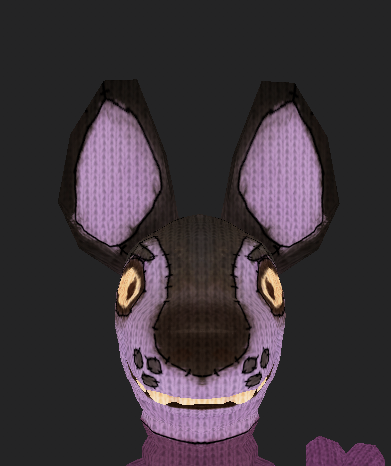 distant epoch
heh
jagged sequoia
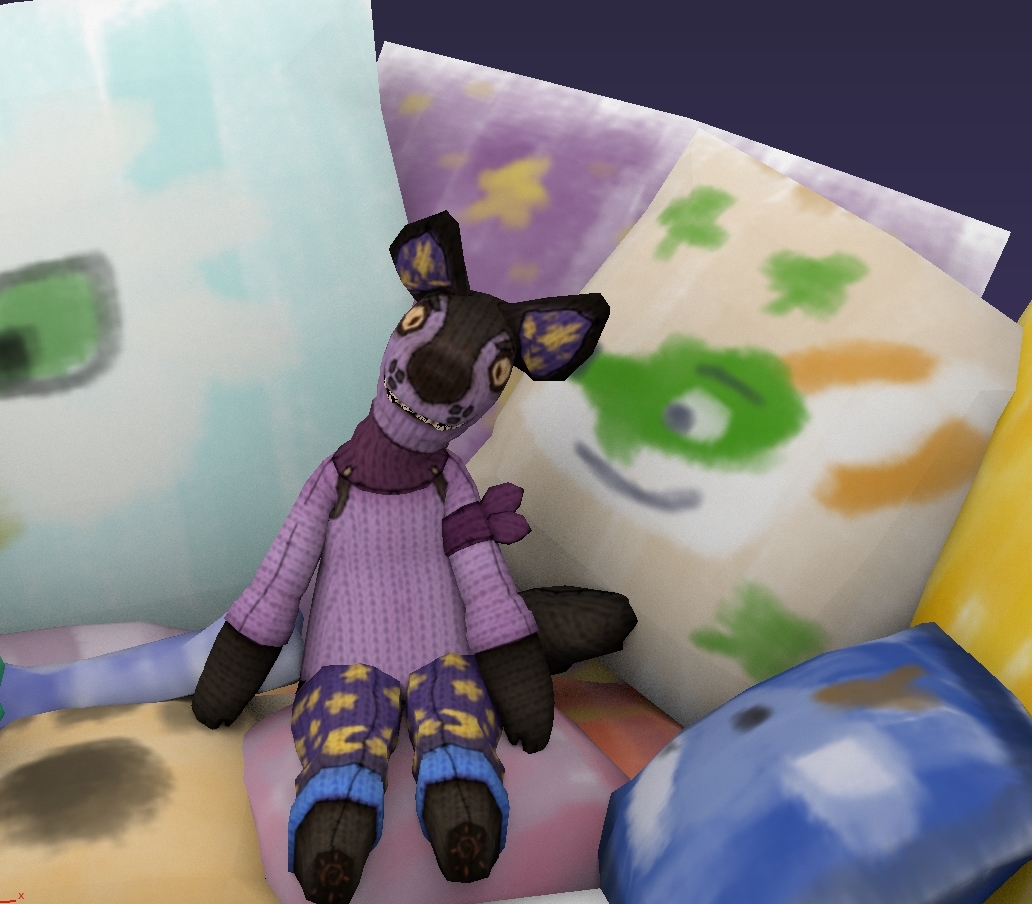 jagged sequoia
it's my avatar you can't
jagged sequoia
so now I can go around being a plushie and it's perfectly Quest compatible so everyone can see
distant epoch
yay
if you want to show it off in chat sometime, let me know
i'm every so slowly setting up the SDK
i need to play beat saber tonite. probably won't be until tomorrow that i try a demo world / avatar
 proud plover
So i got a avatar that is uploaded toi vrchat but for some reason not loading into it at all
pastel storm
i highkey love that plushie so much omg
jagged sequoia
glad you liked it
wondering if I should make generic versions of the plushie
Now That I Found a style i actually like
distant epoch
well, sign it (on the inside something like "not the real deal" :D)
may i ask how much work you did on that?
i've been spending HOURS downloading and installing software - new machine woe 😄
the colors are great
jagged sequoia
I would guess about eight hours overall as I spent one afternoon making the initial texture mod and I spent this afternoon making it plushie
distant epoch
it's so fluffy i could die
do watermark it somehow, in case it's ripped
second gen with a easy to see diff?
i love some of those ferret meshes. neat.
some good models ideas here, but rule 34, i'm sure
http://twokinds.keenspot.com/comic/745/

A webcomic about a clueless hero, a mischievous tigress, an angsty warrior, and a gender-confused wolf.
dry zealot
better try to disolve edge manulally maybe
 regal laurel
@pastel storm You can try converting tris to quads and then manually dissolving edge loops.
twin pebble
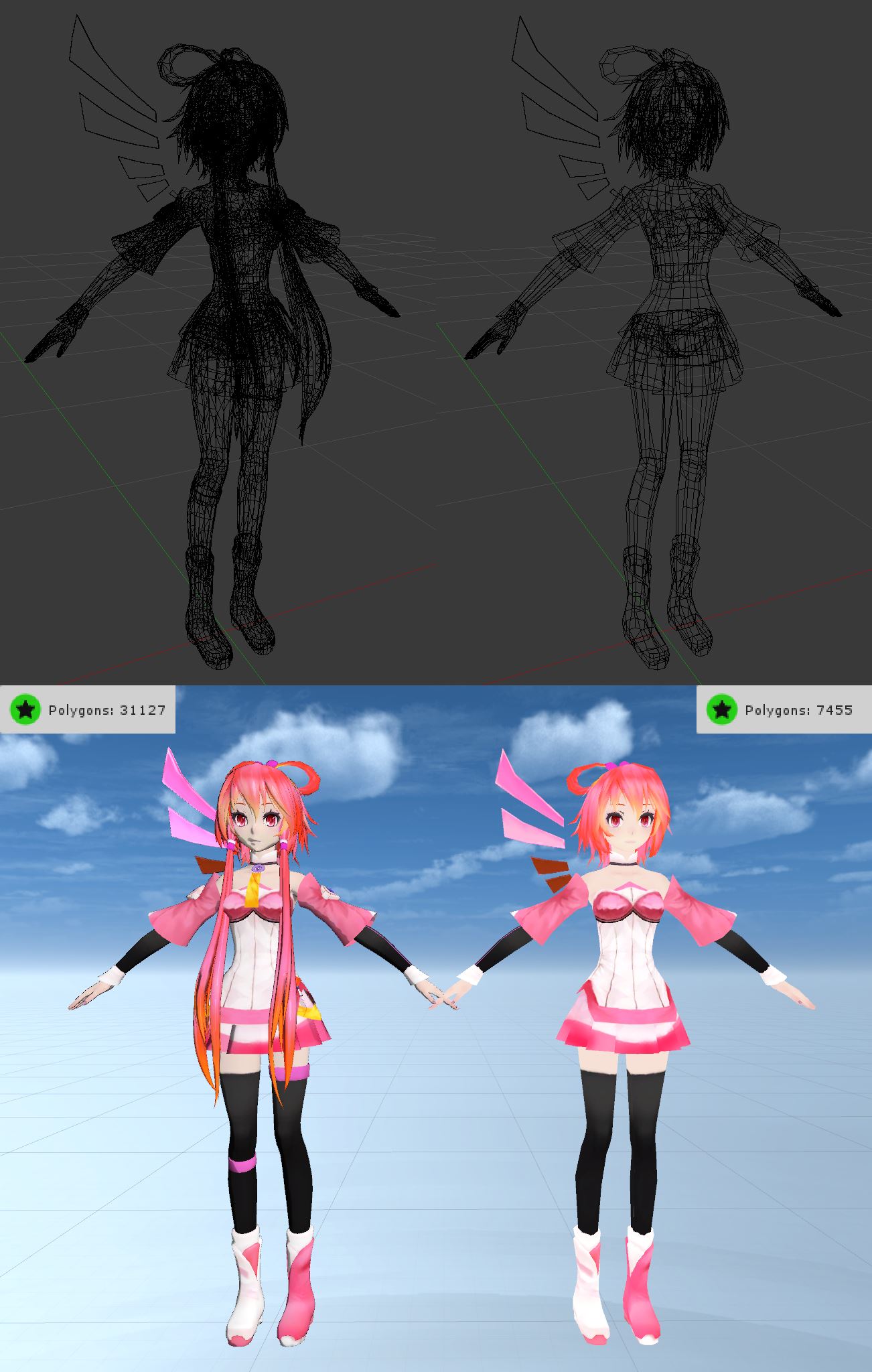
PC vs Quest version

 long talon
experiment with planar decimation on some meshes
flat things, cylinders, skirts, accessories
work very well with planar
then you edit mode, a all the faces, and triangulate
random badge
Why triangulate?
stoic wagon
because planar decimation gives you ngons, which are sketchy to work with
 steel jasper
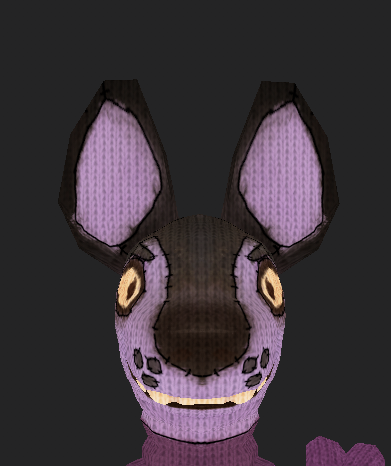
it was pretty hard but i got my favourite avatar down to 7.5k poly's with manual decimation - PC vs Quest version
https://i.imgur.com/OVY4w7H.jpg
i had to cut some stuff out still, but in the end i'm happy with the result - visemes and shape keys are still functional and it actually still looks good in-game


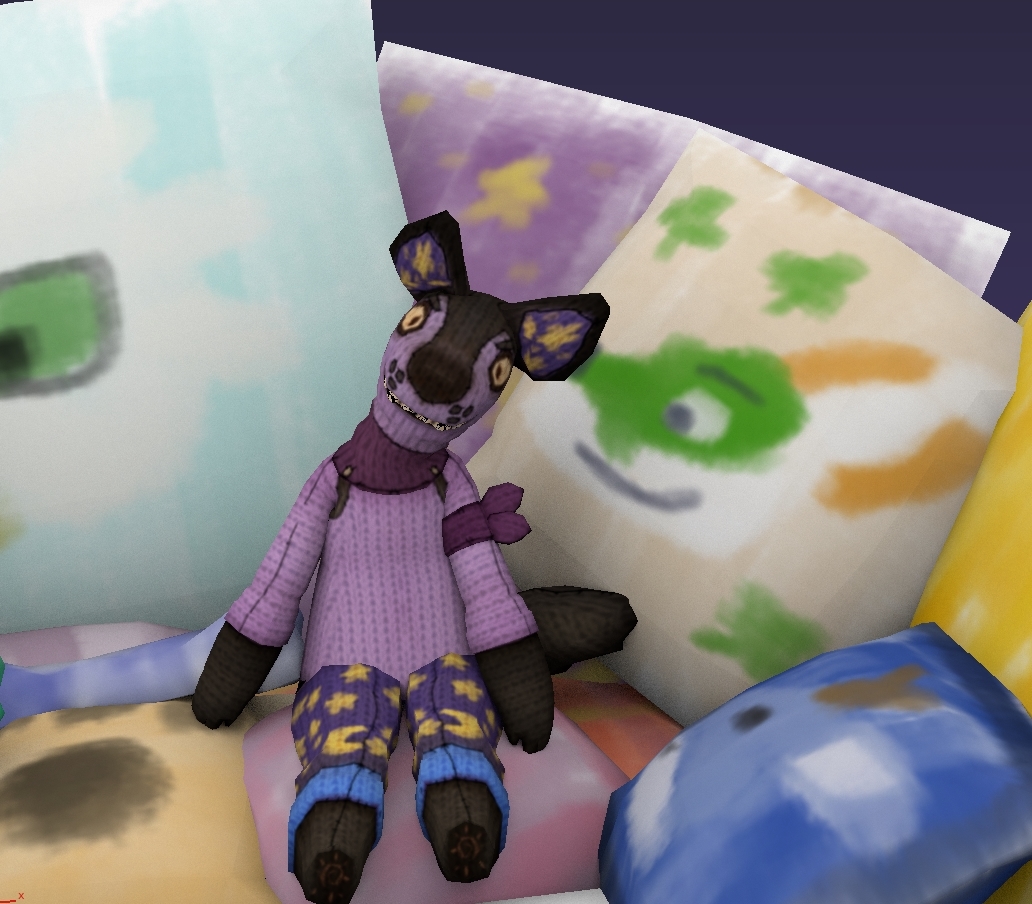
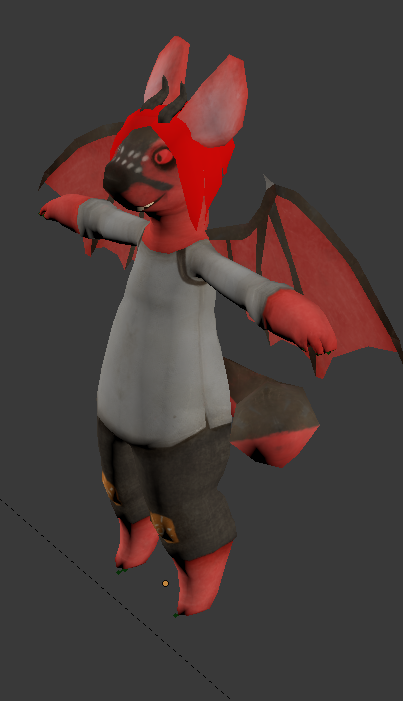
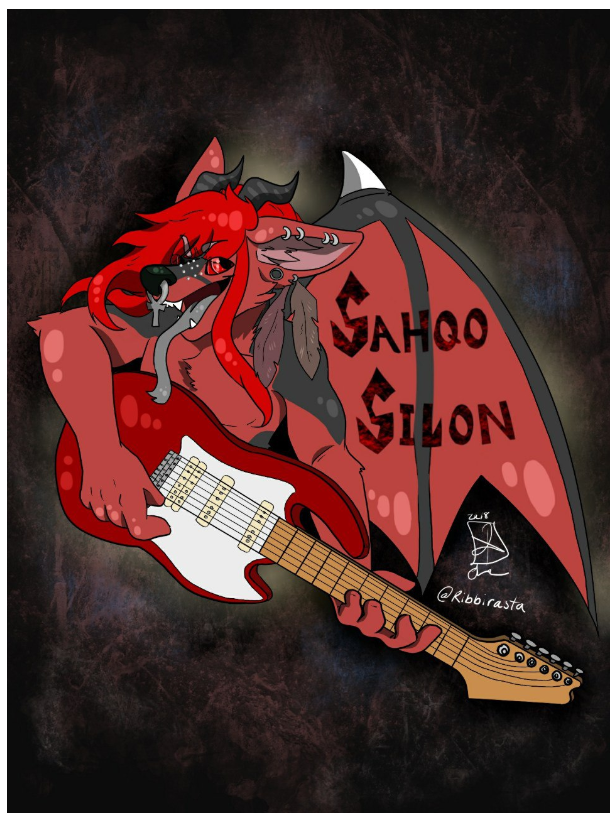
 random badge
I wish I could use quest content on pc just to save extra frames with stuff like this, great work
steel jasper
heh, i don't actually have a quest, though i'm making sure i won't be a robot with PC on me when interacting with quest users
random badge
Good!
 granite widget
Are there any Destiny 1/2 Quest avatars? if so, where?
 gilded estuary
YES
chrome girder
I use my Quest avatar uploaded to both slots. Looks fine, saves frames.
dry zealot
The avatar in my world are the same as quest but with dybamic bone rigid body etc.
 thorny dome
@twin pebble its weird all my friends use the dogo avatar
 mellow plank
does ANYONE know of a shader that works for quest with cutout?
random badge
This is the quest avatars channel so i will assume you are speaking about avatar shaders - the answer is there are none.
mellow plank
Darn, Alright Thanks.
random badge
Agreed, but we work with what we got :)
mellow plank
it does
random badge
I think the extra tris you create would turn out to be less expensive than a transparency check
but im no render pipeline engineer so i have no clue
More often than not, people would opt to remove the transparent areas rather than cut them out manually so it effectively optimises more, me thinks
i typically opt to remove the areas entirely like the feather on the head and the little cotton bits on the chest
Arguably
I know the 2D yeen
Thats a very specific case though, not everyone is 2D quads - but i do agree cutout would be a nice option
pastel storm
Question is there any tips or tricks for quest avatars that you just can't decimate enough? I tend to get them down to 11k or 12k but if I do anymore it will look like crap. I've tried combining tris but I'm not really good at that lol or anything for that matter, more frustrating than anything.
dry zealot
For Ezekiel shirt I have to cut the plane instead
 sharp osprey
SWEEE
pastel storm
What is occluded meshes? I know sometimes I tend to remove some of the extra items that is not needed, even sometime remove some of the tris if that item has too many parts to it that is joined together.
random badge
It means remove meshes you cant see
 elder parcel
How can I download my avatar without this message ?
delicate basalt
play the game more
if you make friends, spend time in worlds, actually check out worlds, etc.... just enjoy the game and you'll eventually rank up to New User, and only then will you be able to upload avatars. making a VRC account instead of using your steam or oculus account is very helpful in this, and depending on how much you enjoy the game you can get New User within your first 5-15 hours of playing