#avatar-quest
1 messages · Page 26 of 1
 vapid girder
moving to unity now
I am manually Dissolving hundreds of edges and verts for hours and it even keeps the blendshapes
it's amazing but time consuming
If I got license/permissions from the creator it'd be sweet to see this as default
 dry zealot
https://cdn.discordapp.com/attachments/452951259738013697/573613129443966996/81e0e2f44d9ca87c1839e1b83b05e825.png I find that on blend swap. she pretty cute and under 5k(5,034) https://www.blendswap.com/blends/view/93942


Rigged character with anime look. https://www.youtube.com/watch?v=H5lSS0vvuL4
Present of part https://twitter.com/PCM_Games
Model only works on blender 2.80
 pastel storm
awe thats so cuteee
 celest nova
can i pay some one to make me a avatar for thr quest dm if u want to
 ancient zephyr
Are normal maps/transparency going to be used for the quest?
 hushed wedge
Transparency should be best avoided, especially on avatars.
Normal maps can be used
Mobile/Bumped Diffuse has normal maps
But avoid those too
ancient zephyr
Are we talking pure diffuse like League of legends or unreal tournament 2004?
hushed wedge
Pretty much
celest nova
i want a custom avatar and idk how to do it myself and i'm bad at art
dry zealot
Thats unfortunate
 delicate basalt
i threw together a minecraft skin rig over the course of 5 days
lots of headaches but its an easy-ish and surprisingly fun way of teaching you all of the basics, including the programs youll be using (unity, blender, your image editor of choice, etc.)
frankenstining is also very popular if you cant sculpt for shit, though that method probably wont go over well for making a quest-optimized avatar depending on the quality of the frankenstein
hushed wedge
Anything quest-optimized will need significant work on your part because of the very tight poly restrictions
 last flower
I'm guessing anything that you use photogrammetry will be way over the poly count
vapid girder
Just tweeted out and made a Quest avatar Bundle avaliable for download. So people can have some Quest avatars for Launch instead of showing as Redguy/Default.

Patreon
Official Post from Kareeda: This Avatar bundle has 3 avatars optimized and ready for Oculus Quest version. You'll need to start a new Unity project, set the build to Android, install Android SDK, then VRCSDK. You can then upload over your avatars with these so people can see ...
Will make a tutorial next week on how to Upload correctly etc for people.
hushed wedge
Ooh, that's cool!
vapid girder
If i spoke Japanese I'd discuss with the Original creator of the center avatar and see if we could submit it for VRChat's default avatar submission form. Since it'd be their Licensed model but processed for Quest by me.
 broken merlin
Hey is anyone down to convert a specific avatar into a quest one?
I have a request
 pale stream
For commissions please check out VRC Traders in #community-servers-old
 long talon
oculus quest optimization has made me learn weight painting
and creating blend shapes, and merging bones together, and reducing texture resolution, moving around UV maps, compressing and making an avatar as smol as possible so it causes the smallest footprint possible on the Nintendo 64 VR's limited amount of RAM.
 cyan spoke
I actually love optimizing at this level, it’s more like a handcraft work rather than simply copypsting other stuff
Thanks for the avatars @vapid girder!
vapid girder
No prob! Hopefully this makes quest week one more interesting
 native canyon
where can i find the android sdk?
long talon
if you dont have the android toolset installed on Unity, when clicking Switch Platform in build settings (under file in the menubar), Unity should prompt you to download an EXE from their website that will auto-install all the pre-requisites.
 vapid badge
Can a quest avatar submission have less than full limbs? like a floating avatar with no legs or an avatar with invisible arms?
dry zealot
Yeah
cyan spoke
I believe it’s good to still have the whole animation skeleton so it’s fully compatible with full motion tracking and such
But yeah since the animation skeleton is invisible you can just have a floating character unlinked to actual leg animation
vapid badge
yeah, 3 fingers minimum for gesture overrides to work
i'm asking in relation to the featured avatar submissions specifically
they said "be creative, and don’t be afraid to get weird with it" and an avatar with invisible hands is a fun and kinda weird experience especially for folks new to VR, but it might be too far outside the standard to be acceptable
cyan spoke
May be fun but feels like it could be less expressive
 gaunt goblet
How do I make an avatar? I am not sure how to make one. If anyone can help me that would be nice.
 left tartan
bfcdb
 sterile isle
Wow. These models are pretty freaking great!
It looks like VRChat Quest will have better support than I thought. Much better.
delicate basalt
at its core, vrchat will always be community driven. i wouldn't be surprised if a good chunk of the quest community, like the PC community, dedicate their off-time to use their less-powerful rigs for blender and unity to make content of their own and eventually out-do whatever creators we have now working hard to get their shit out there on the quest
 obtuse prism
Can someone make an avatar for me? is that I wanted a model of the isle game that is the hyperodocrin giganotosaurus, that I wanted it to have only 3 animations of it even if it is to walk, run and roar is split is mouth(hit one of the most f 1 shift or something like that that I do not use oculus rift, in short I am desktop) I can pay of form, I do not know riot points or something of the type
delicate basalt
if youre willing to pay, your should check out VRC Traders in #community-servers-old
thats where you'll find commissioners
 celest pendant
Anyone who’s made Persona 5 avatars plan on optimizing for Quest?
obtuse prism
@delicate basalt thanks
 blazing meteor
Why is the recommended texture memory for quest avatars?
long talon
as smol as you can
I removed the alpha layer from my atlas, made it 1024x1024 and ran it through pngquant for extra compression.
hushed wedge
Crunch that too
@long talon pngquant won't help the slightest bit though
It doesn't matter how large the PNG is, it could be 100 MB for all Unity cares. It's imported as DDS with fairly predetermined sizes.
A 4k texture with alpha channel is always 21.3 mb unless crunched or mipmapping is disabled, for example
That's why crunch is so important
long talon
I already disabled mipmapping
time to learn about crunch
if I converted the actual mesh to compressed GLTF it wouldn't take less space as an avatar, would it?
hushed wedge
Don't disable mipmapping either @long talon
That was just an example
Mipmapping is good for performance, especially on those poor mobile GPU's
I doubt you can use GLTF properly, doesn't it need a special loader and importer?
long talon
oh yeah, you do
I believe 2019.1 supports it natively, maybe in the future when we upgrade LTS releases.

my current source texture is a 3072x3072 462kb png

 haughty zealot
is anyone else having trouble with publishing a character?
 quick wagon
Wait will there be animations for the avatars???
 deep drum
I’m looking for an anthro (furry) artist to commission an avatar made for the oculus quest version. I have a design ready i just need someone experienced in 3D models and rigging. Please dm me some examples of your previous work if you’re interested.
cyan spoke
Take a look at #community-servers-old, you can find there channels for avatar commissions
pastel storm
@hushed wedge about crunching, is there a youtube tutorial about it, kind regards Roly
deep drum
Thank you!
pastel storm
@deep drum iam making my roly poly far fat avatar for quest, . its a furry to , but took me 3 years, so sory cant do comisions , roly is just my fursona
deep drum
Understandable
pastel storm
@deep drum whould love to play with you, help with tips if want to try yourself, its a long road if wana start from scracht, but i could rig, animate for free for you or atleast try
last flower
I'm trying to Port my fursona from second life but I don't have any of the original sculpt maps so my only options are to attempt photogrammetry or rebuild it from scratch. At least I have the baked textures from the main body but I don't have any of the textures from the sculptys.
Oh what you know looks like I do have the mat textures for the sculptys parts Just not the sculpt maps
pastel storm
making my roly fursona to!
pastel storm
 fluid kiln
a bit late to the convo but keep in mind that crunch ONLY affects download size, it has no effect on in-memory size @long talon
hushed wedge
Actually that seems to be true for mobile
I didn't know
If the GPU supports the right formats (like on desktop), it will actually not store the non-crunched texture in RAM, only in VRAM.
So on desktop you gain a bit of RAM back but on mobile it only affects download size
Good reason to keep your textures small even before they're crunched
You may not even want to crunch in some cases then, it can seriously affect how good smaller textures look
 regal laurel
ASTC has a lot of different block sizes which gives you quite a bit of control over the bits/pixel
https://docs.unity3d.com/Manual/class-TextureImporterOverride.html This has a list of the bits/px for each block size Unity supports.

You have to click the little Android icon in the top right of the compression settings, check the override checkbox and then you can set specific compression algorithms.
Some textures compress better with different algorithms and block sizes so you may need to experiment.
@hushed wedge The non-crunch compression settings and texture format affect the size quite a bit. It's not as big of a deal on PC because both DXT5 (normal quality) and BC7 (high quality) are 8 bits/px, but on Android ASTC gives you more control.
pastel storm
@fluid kiln how long it usualy take to get acepted in the quest program?
fluid kiln
Usually check and add once a day, its a manual process
pastel storm
@fluid kiln awsome thanks
pastel storm
you guys know thr program vector magic? its vectorizing a image , think its good for textures, going to try it out on roly
 alpine slate
Does someone know how to easily convert a pc avatar to meet the requirements for Quest inside of Unity itself? (My avatars textures break when trying to fo it in Blender, getting the textures on again in Unity is a pain.)
I don't have a lot of Unity/Blender knowledge, only a little.
cyan spoke
Used Vector Magic some years ago, pretty neat but the output is not really the best, unless the original image is already quite flat in terms of colors
@alpine slate there's little you can do in Unity aside from creating and assigning simpler materials- to reduce polygons and modify UVs you need a 3D software
celest nova
i have no art skill where can i learn to make a vrchat avatar
 gaunt patrol
Is the submission for default avatars closed?
gaunt patrol
For the quest
pastel storm
@gaunt patrol is there a submision page? can you link it?
gaunt patrol
https://docs.google.com/forms/d/e/1FAIpQLSe_Wh7GchaLjp-sl3XY3bydOFZUcKhiiSnoDNdceSmYyh62Hw/viewform @pastel storm here

Google Docs
Read more about the Quest Avatar Submission program here: https://medium.com/@vrchat/vrchat-quest-avatar-creators-get-your-avatar-into-the-featured-row-54361c661f44
By providing a submission to this form, you verify that you own full rights to the content submitted, and are ...
cyan spoke
We should pin this ^
pale stream
cyan spoke
Nice!
pastel storm
Huray, have sended my submision for a furry default avatar! check my image! thanks for share link
only no key yet because my hotmail blocked it, hope i am geting resent or not need it;-) my mistake realy
very proud 3 year project coming to a end;-)
gaunt patrol
Well flip my flapjacks I got pinned
gaunt patrol
Also no fam
 south merlin
hi can anyone help me solve some issues with the avatar im trying to make?
pastel storm
we try if can describe the issues 😉
curious if for default avatar submision a normal & a christmas santa edition is alowed to submit 😃 , just found out i can remove body and keep blendshapes!
south merlin
well, the eye tracking is messed up, the pupils tilt instead of the eyes moving
and the face color is different than the body (took it from a different model) and dont know how to match the colors
pastel storm
i had the color isue to, did you combine the meshes and do they have all the same uv map name? i had it a buch of times, dont know enough about eyes yet
if its texture, think you have to make a new texture
 civic cloak
im new to exporting characters and stuff so what kind of files i can use from devantart ?? (ex BLANK.duf ) what is good and what can't work
pastel storm
@gaunt patrol for default submisions i know all art should be yours, but is that for general quest/pc avatar to? , i am making roly myself, but whould be nice to know how importand it is to make sll yourself
gaunt patrol
well its says no kitbashing in the rules
aka using other models that's not yours
also working on my cat ninja avatar for the quest default submission.waddya think so far?
long talon
cute
pastel storm
nice! this my submision
roly is made by me tho, 3 year project with alot variations and semi projects
gaunt patrol
its armature so far.any ideas of improvement?
gaunt patrol
ok so ive imported my avatar onto unity but its says this.will my ninja cat avatar still get in?
also how to add the avatar license in the submission forum
pastel storm
a default submision must be a unity package of both pc and quest verdion seperate in a zip file right?
version*
south merlin
any people around here that are good at rigging and can help me fix an issue with my avatar? (pm me in private in case i might miss the messages here)
 delicate cipher
pretty sure i'm still a noob at this but, work on retopology has begun
by the way. is it alright to retopo the face? or do i have to avoid doing it at all cost?
cyan spoke
Retopo is always good imho, especially since the target is sub 5k triangles
(for Quest, at least)
hushed wedge
@delicate cipher retopologizing the face can be good, but you'll have to redo the shape keys. It depends on how high poly the face is.
To reach 5k tris, you will probably have to do the face to begin with
pastel storm
@delicate cipher dont know, but youtube tutorials say face polys are more important then body polys, leurned the hard way fingers are important to, because they play a big role in vr
cyan spoke
How many triangles are on a face of an MMD character?
Face and hands are indeed where the most polygons should go (especially face), since they are the thing you are directly watching more often
But a well made topology can stand out even in very low poly
delicate cipher
you mean the head? @cyan spoke
cyan spoke
Yeah
delicate cipher
not sure
cyan spoke
I can assure in 5k triangles you can fit a lot of details
I'm working on Princess Peach, took the base model from Mario Sports Mix but basically remade her from the neck downwards
In 5k you have a pretty head and hair, eyeballs, mouth with teeth and tongue, wrinkles on the dress, overall solid body shape
Look at this head from Polycount forums
Not MMD style for sure, but it looks awesome and is sooo lowpoly
More pretty lowpoly heads
https://www.artstation.com/artwork/3aRO2
 long talon
to answer your question about triangles on MMD faces, usually exponentially more than any other kind of 3D character, because they come with so many expressions.
theyre the big reason people like to keep the face intact when reducing polycount, because you can then create really expressive gesture overrides with them.
cyan spoke
Yeah I can imagine that. I was curious about the rough estimate of triangles
long talon
usually between 2k and 5k
 steel light
Were trying to give the best experiance to quest users.. theres no reason to go over
steel light
This is for quest users, whos performance matters so much on the very little things. So no, 5k isnt impossible and if people are planning to bring content to the quest they should be willing to help them out by lowering it
steel light
That 1k polys is a lot extra if every model has that "just a bit more"
long talon
^
we're dealing with 3 nintendo 64s and a toaster
steel light
Also please stop commenting on things youve got no idea on, It kinda is misleading to people who dont actually have knowledge on it
long talon
in fact, I would decimate to 4k full loss, and subdivide again where necessary. general body weight paints should stay good enough, fingers may need some work and face shape keys arent that hard to recreate by the time youve been retopoing everything.
my main avatar of Ruka is 4948 poly
pastel storm
i just wish reto not loose textures, i did decemate roly/fury but i was lucky he was made in oculus meduim sculpt program where i could choose any base number of polys, jusg wish a retopogy software whould team up with oculus and made when auto retopology so it keeps textures
so they have eayser time to port a game snd assets maybe close to auto, no idea but jusg sounds incredible cool!
just feels the raw tech is there is some form
and drop in cloud saving while there at it like consoles
specialy because cant aces and save save files like on pc
cyan spoke
Not an easy task... Retopology creates a whole new mesh, and there are big chances UV seams on the old mesh won't align with the new one
 left hull
Hey I made myself a new vrc acc I'm not banned or anything but I don't want to be active on my old one and I wanted to upload to my new avas like with my old I could get new user that I can finally upload my avas again? My new acc is called Misplace my old is called Leon OwO
 maiden zenith
can someone help me
with a vrchat skin im trying to use but idk how to do it cause i get lost
dry zealot
You dont really need more then 600-800 tris for the face
Mine usuelly are 1200 but could be half of that with no problem
 sweet slate
how do I make my own avatar on pc
 past copper
If only I have Inkling oc in avatar from Splatoon and 2
so I have good night
But I wish
dry zealot
Learn to 3d @sweet slate
fluid kiln
FYI, if you didn't see the tweet earlier, the Quest Featured avatar submissions will be closing on Wednesday at 12PM PDT. We may re-open them later but for the first "round" get your submissions in soon.
 rocky matrix
@fluid kiln Ah frick, I wish that was announced in the beginning, I've been working on an avatar. But now I don't think have enough time to get it done unless I don't sleep for a couple nights.
dry zealot
My pc broke so rip the first round
fluid kiln
Can't guarantee it but I imagine we'll open it up again in the future.
rocky matrix
I drank a bunch of coffee, gunna try and get this done. Not gunna sleep much tonight.
 alpine dawn
What is the poly limit for quest avatars?
vapid badge
limit or recommended?
the upper limit is the same as normal avatars because its part of the SDK
steel light
5k
vapid badge
5k is "recommended"
steel light
They might add a restrictor that blocks avatars that have a mass amount
You have no reason to go over the reccomendee.
We are trying to give quest users the best experiance
vapid badge
@fluid kiln so the quest avatar submissions end before the developer livestream?
I was waiting to see if there was going to be a whitelisted quest toon shader (maybe the one on @clear yoke github?)
fluid kiln
There will be a limit on polygons on Quest avatars, we haven't announced it yet. However, it is much lower than 70k (and lower than 20k). Again, I strongly suggest aiming for 5k. That puts you well within the limits we're looking at.
rocky matrix
Nearly done! Just need to make the blend shapes and fix a couple rigging issues. I'm done for today though, it's pretty late.
 clever charm
That avatar look great Chris ^^ Is there anywhere where people are publicly putting their official submissions up for Quest Featured Avatars?
 vague perch
It’s pinned.
clever charm
Oh I thought it was on a forum where we could see everything submitted so far or something, thanks though
rocky matrix
@clever charm Thank ya!
 stone bear
Oh, very very cute.
I cant wait to see it in action.
alpine slate
I wonder what would happen if you are in a pc avatar and later log into quest with the pc avatar still selected.
I asume we will be the "pc only" default avatar, but still be the actual pc avatar on the pc version.
Also, when moving the arms and such, will they be at the same (or almost the same) place as with the avatar we are in for ourselves?
Even when the sizes between the two are different?
stone bear
I think it will do what happens when you delete an avatar before changing out of it. You will just be invisible until you change into a new one.
steel light
@alpine slate you cannot see pc assets in the quest so if you are to do that youd either see the quest version or a default avatar as yourzelf
rocky matrix
And It's submitted! I feel so tired.
long talon
yes, you
fluid kiln
Please keep this channel for discussion of avatar development for Quest.
cyan spoke
Are Spring Joints permitted on Quest Avatars? The default Unity ones.
 unkempt kiln
Rigidbodies, Colliders, and Joints
Rigidbodies, colliders, and joints are disabled completely on avatars in VRChat Quest.
Oh, didn't remember joints were disabled completely, what a pity. Thanks!
hushed wedge
They mean the joint components obviously
The whole rigidbody system
Fixed joints and spring joints etc
last flower
Ah
pastel storm
how long do I have to play VRChat, until I can upload own avatars?
cyan spoke
It's an arbitrary amount of time, it has been 4 hours for me, but can be also 24
It will be quick as long as you interact, chat, make friends, visit places, do actions
Staying still won't help
pastel storm
ok thank you 😃
cyan spoke
You're welcome : )
 pine egret
im almost done with my model, only thing is the spine hierarchy problem wont go away. :S
pale stream
Which issue ?
celest nova
if i make a quest avatar will it work on pc if i move between them
celest nova
yeah
 empty fiber
I do like the Idea of crediting the creators.
 wanton mirage
Is anyone having trouble with the new SDK? The toon shader isn't working correctly, and is the only one available. Where are the other ones?
delicate cipher
any way to fix this material issue in Unity for my Quest avatar?
the material loads fine for me in Blender. but in unity, it looks messed up
delicate cipher
how do i do that?
hushed wedge
Make sure you only have one UV map
delicate cipher
OOF
you're right @delicate basalt and @hushed wedge
guess that's where the issue was coming frm
thanks 😃
delicate basalt
^ ^
hushed wedge
Happens a lot after manual atlasing
delicate cipher
found another issue
when i upload my avatar for both PC and Quest. both of them are separated
even when i use the same title and description ID
here. let me show you
wanton mirage
Has anyone used the new SDK???
wanton mirage
how many shaders do you see?
delicate cipher
wanton mirage
under vrchat -> mobile
delicate cipher
i used the toon lit shader from the mobile shader file
delicate cipher
yup
wanton mirage
wat, I only see toon lit
delicate cipher
but my uploaded avatar project is separated from which platform is only available (even when i used the same title and description for it like it said. but haven't used visemes for this)
wanton mirage
you used the blueprint id right?
delicate cipher
blueprint ID?
wanton mirage
ah
you didnt
let me show you
When you upload an avatar a blueprint id gets generated
you gotta attach the same id to new versions of the same avatar
So not only toon lit doesn't work for me (every other shader works) I also only see that shader. Is it different for you?
delicate cipher
yup
also
IT WORKED
the blueprint ID really worked!
now my avatar has cross-platform enbaled
thanks 😄
wanton mirage
great, now you help me pls
can you send me the sdk you used?
I keep downloading it and importing it and only see toon lit and it doesnt even work properly
@delicate cipher
steel light
@wanton mirage you can get it off the vrchat site
It doesnt come with shaders.. shaders you neeed to find and import yourself
wanton mirage
I know, but it's driving me crazy
ok so
It isn't supposed to come with 9 shaders under vrchat -> mobile?
steel light
Aa maybe? Not sure on that one. So youre missing shaders thats supposedly meant to be there..?
wanton mirage
"VRChat on Quest only permits the shaders provided with the latest SDK on avatars. The shaders are listed below with a short description and their inputs.
All of the shaders listed below are under VRChat/Mobile."
and he told me he sees them, I don't
yes, and toon lit doesnt work
as you can see in the image
steel light
Thats really odd then, id check but my sdk is hella outdated
wanton mirage
I don't get it
I downloaded it multiple times, at different moments, on different computers. Always the same
steel light
Are you sure theres suppose to be more?
I think i see your issue

@wanton mirage what about this mobile?
wanton mirage
I can't upload using those mobile shaders
According to the documentation:
"Added Quest shaders to SDK, available under "VRChat" category.
Quest will only support these shaders on avatars. If you use any other shader, you'll get a warning in the SDK. If you try to use the shader anyways, it will fail to load in the client."
steel light
Oh ok I wasnt sure. Are you certain theres suppose to be 9 then?
wanton mirage
Well, there are 9 listed here https://docs.vrchat.com/docs/quest-content-limitations
This page will describe various limits in place for the Oculus Quest version of VRChat. These limitations are in place in the interest of performance, user safety, and discouraging malicious behavior. VRChat on Quest only permits the shaders provided with the latest SDK on a...
steel light
Thats super odd
wanton mirage
It's driving me crazy I don't get it
And it looks as if no one installed the new sdk because no one can tell me if they see 9 shaders or not
steel light
I genuienly havent. Id test but my vpn breaks unity
Im checking rn for y9u
@wanton mirage I think youre suppose tonuse that above mobile catagory. All 9 listed is there...
wanton mirage
if i use any of those it doesnt let me build and publish
steel light
I can use them they work, Im just not sure about uploading. I dont make models for the quest in the end
So I havent tried uploading and really cant with the models ive got
wanton mirage
ok no problem. thanks
steel light
If you dont get an answer by tonight you should contact Support@vrchat.com and ask about it, might be an error
blazing meteor
Will quest users see PC users using full body tracking, if they have a quest fallback avatar that is full body fixed?
cyan spoke
What do you mean by full body fixed? Once an avatar has bones for all the limbs, it is compatible with fullbody (I guess? please correct me if this is wrong)
rocky matrix
If I update the public avatar I submitted, will it update the public version? Or would I have to submit it somewhere? Is it even possible to update?
blazing meteor
full body avatars need hip bone pointing down and legs at perfect 180 angles. Otherwise they only work in standard vr (head and hands)
@cyan spoke
Obviously full body will never work on Quest I’m just wondering if quest users can see full body people
@rocky matrix you can update it all you want but if they already copied your asset to their own blueprint it won’t be what they use. Probably let them know you need a change
 tidal ridge
Do we know if the Unity shaders are still planned to be supported per the old doc, or if the new document is correct and we need to switch all to the new SDK shaders only? Old Quest doc vs new Quest doc on shaders: https://docs.vrchat.com/docs/quest-content-optimization (Unity only, Mobile recommended) https://docs.vrchat.com/docs/quest-content-limitations (new VRC SDK shaders only, for avatars). Can reupload if needed, just need to know, thanks in advance!
Creating content for VRChat Quest is a challenge-- you have to create attractive, compelling content all the while keeping the content optimized for a mobile device. These are the same challenges that game developers must deal with while building for mobile. Here, we'll giv...
This page will describe various limits in place for the Oculus Quest version of VRChat. These limitations are in place in the interest of performance, user safety, and discouraging malicious behavior. VRChat on Quest only permits the shaders provided with the latest SDK on a...
 royal needle
i'm having the same issue as @wanton mirage . the newest sdk does not seem to contain all quest shaders, i'm only seeing toon lit.
fluid kiln
New SDK is now live with the new shaders. Grab a new copy.
The limited shaders document is correct, need to update the older doc
won't have time until later 😃
 pastel delta
is there any alternative to VRChat/Mobile/ToonLit? Completly brakes my texture :/ the doc says there is more but i only got the ToonLit
 sturdy kernel
pastel delta
sturdy kernel
pastel delta
i just did,when i posted it 😦
also
ignore the ugly textures, but its quest ready woo
also switching to android is super annoying, takes an hour to do everything just so i can upload the avatar :/
tidal ridge
Looks quality to me!
 craggy glacier
is there a hard number set for poly count on quest avatars? i know that the recommended amount is less than 5k, but is there a set limit?
steel light
@craggy glacier tupper said less than 20k, but more than 5k. All we got is a guess
Its best to just hit 5k anyway
craggy glacier
i've managed to get my avatar to 7k without looking like a mess, anytime i try to get it to 5k it looks awful lol, hopefully 7k is fine
wanton mirage
So after updating to the newest SDK I can finally see all vrchat mobile shaders. But none of them work on my avatar... Every other unity shader does. Anyone having trouble with the mobile shaders?
 shrewd fog
Looks like you might have Vertex Colors on your avatar @wanton mirage
If you aren't using Vertex Color for anything you can remove it in Blender or any other modeling tool.
https://i.imgur.com/htuKlZ5.png
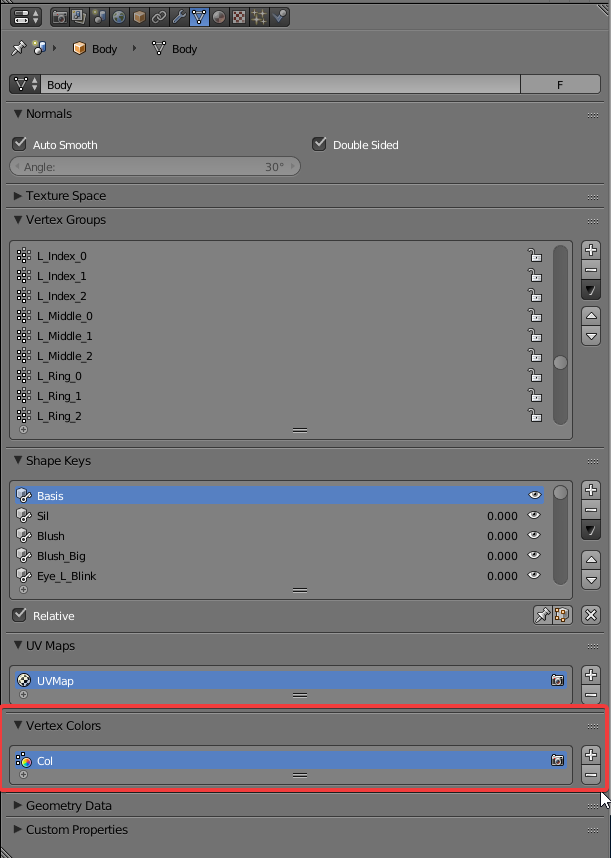
 , I learned something new
shrewd fog
, I learned something new
shrewd fog
Woop!
 winter frigate
keep getting "failed to optimize for upload" what is the fix??
winter frigate
just the avatar
UnityEngine.Debug:LogError(Object)
VRCSDK2.<UploadFile>c__AnonStoreyB:<>m__1(ApiFile, String) (at Assets/VRCSDK/Dependencies/VRChat/Scripts/RuntimeAPICreation.cs:367)
VRC.Core.ApiFileHelper:Error(OnFileOpError, ApiFile, String, String) (at Assets/VRCSDK/Dependencies/VRChat/Scripts/ApiFileHelper.cs:1426)
VRC.Core.<UploadFile>c__AnonStoreyA:<>m__5(String) (at Assets/VRCSDK/Dependencies/VRChat/Scripts/ApiFileHelper.cs:326)
VRC.Core.<CreateOptimizedFileInternal>c__Iterator1:MoveNext() (at Assets/VRCSDK/Dependencies/VRChat/Scripts/ApiFileHelper.cs:1205)
UnityEngine.SetupCoroutine:InvokeMoveNext(IEnumerator, IntPtr)
What size is it ?
pale stream
You grabbed the latest sdk from earlier ?
winter frigate
oof im still on 2017.4.15f1, havent kept up to date with the server today
thats gotta be it
pale stream
that's unity, not the sdk
winter frigate
oh well also havent updated the sdk
pale stream
ah, that would probably explain it then
winter frigate
is it on the site for dl already?
ok the date on it answered my qyesitonm
thanks
pale stream
it is, lmk if that solves it
winter frigate
@pale stream now im getting this error. which shaders are supported?
nvm
figured it out
have to use the ones in the vrchat folder
pale stream
that's right ! glad you've got it working
 wheat bobcat
 novel barn
How do you guys deal with having no cutout/transparency?
Is there any easy way to transform a mesh that was supposed to have a texture with transparency into a mesh whose vertices are limited to that texture?
I guess this is the best way to go about it
winter frigate
Can we still submit avatars to the platform? I have a model I made from scratch I just need to do some tweaking on that I'd like to submit
long talon
submission is closed. but they'll most likely get reopened at a later date.
winter frigate
Ah ok
Yeah I'd make a quest avatar world but I havent made enough to warrant it. I guess I can get on it and do diff colors and just pump em out though
long talon
I'm using Mobile ToonLit and the publish button is greyed out. https://bocchi.is-pretty.cool/HHR3jxK.png

on latest SDK
novel barn
do you have any other avatars in your scene?
long talon
yes
novel barn
try to deactivate them
novel barn
np
 sacred matrix
Is there anywhere I can read about the quest avatar limitations in more detail? I would like to know if guestures work differently and if there are any limitations to particle systems and audio sources.
I would lile to create some quest avatars with smaller effects on them.
cyan spoke
@sacred matrix this is a good starting point: http://tinyurl.com/VRChat-Quest-Creators
Google Docs
Early Release Document: Some details will change for launch version on Quest Oculus Quest Quick-Start Guide Create, Share, Play.
Some details are still somewhat vague though
sacred matrix
Thanks a lot, thats what I needed
No audio sources is a bummer tho
I can create smaller particle systems tho, glad thats supported
cyan spoke
Np!
 glossy veldt
Damn
blazing meteor
I was told the animation override controller can’t be used in Quest is that true? I used a custom idle pose
As a replacement for a custom animator
hushed wedge
I think it can still be used
It was just not recommended for the public avatar submissions
novel barn
how many tris are you guys using for your avatars
It's so hard to get it down to 5k
I can make it look good with 10k but that's about it
steel light
Most are using below 5k
novel barn
👀
dry zealot
Around 7k is ideal but 5k is manageable.
 timid marsh
Probably a dumb question but if my avatar was built a month ago and it has less than 5k tris, will Quest users see it or does the avatar have to be republished before Quest users will even see it?
steel light
@timid marsh republished for mobile
blazing meteor
True or false: there is no downside to the windows/android builds not using the same exact material asset since only one version is loaded per observer
long talon
true.
it's a completely different file
you could in theory put two very different avatars for quest and pc, you're just expected not to.
 cunning hearth
for oculus quest avatar, only use Mobile Toon Lit shader?
Mobile toon lit is very bad, texture only, not change colors, not using transparent texture
 remote kindle
 rustic dagger
Can anyone tell me if there is a list of what material channels are support for quest avatars with the default shader? diffuse, roughness, metal, normals... etc
cyan spoke
@cunning hearth try with the Matcap one, it’s a bit of a trick but imho it could look very nice. You need to make a matcap texture though
Or was it the Ramp one? Can’t remember, anyways they can both yield good toon results.
 fluid jacinth
Do any supported mobile shaders have transparency? I need it for the eyelashes on my avatars.
cunning hearth
thanks
hushed wedge
@fluid jacinth no
And that's intentional, because both cutout and transparency are incredibly expensive on mobile
fluid jacinth
I managed a workaround using the particle multiply shader
hushed wedge
Please don't do that
In particular on avatars, transparency should be avoided
You are actually better off adding more polys than using transparency
Although on eyelashes it might not matter too much since they won't take up a lot of space on the screen
 pine wedge
what shader should i use?
hushed wedge
The ones under the VRChat section instead
VRChat/Mobile/Diffuse I believe
Not sure why the "regular" mobile shaders are disallowed though
I guess it's because people were using Unlit Texture with lightmap support on their avatars?
pine wedge
@hushed wedge that one doesnt work too
long talon
you switch your unity build platform to android
and click build and publish on an avatar, as long as you upload it on the same blueprint ID as the PC version, it'll become a cross-platform avatar
 thorny musk
Why would Build and Publish be grayed out?
2019.05.16.13.10, updated in-place, set it to Android...
long talon
if you have other non-quest avatars in the scene, select them in the hierarchy and disable them
thorny musk
Oh okay, let me try that
That enabled the button, thanks @long talon !
Is there an easy way to test what Quest users see?
long talon
using an Oculus Go
or, you could learn how to use the Unity profiler, but then you don't get to test out the avatar yourself
thorny musk
I see. I guess I'll just wait until I meet some Quest users and see if I show up in their game
long talon
I can charge my Go and tell you if you show up with any issues in a private world
thorny musk
That'd be awesome!
long talon
if you switch to the steam quest-beta and add me ingame
in other news, my avatar looks 20x better with Mobile ToonLit
actually
you dont even need the quest beta
pastel storm
i don't need to make an entirely new project, right?
long talon
nah, but if you plan to switch between pc and android platforms often
its recommended
pastel storm
the guide is a bit self contradictory
what does it actually do when i switch to android?
long talon
@thorny musk add me on vrchat (TripingPC) and I can tell you what you look like on mobile.
thorny musk
@long talon All set, when can you get on? I could right now.
 urban hornet
oww
 jagged sequoia
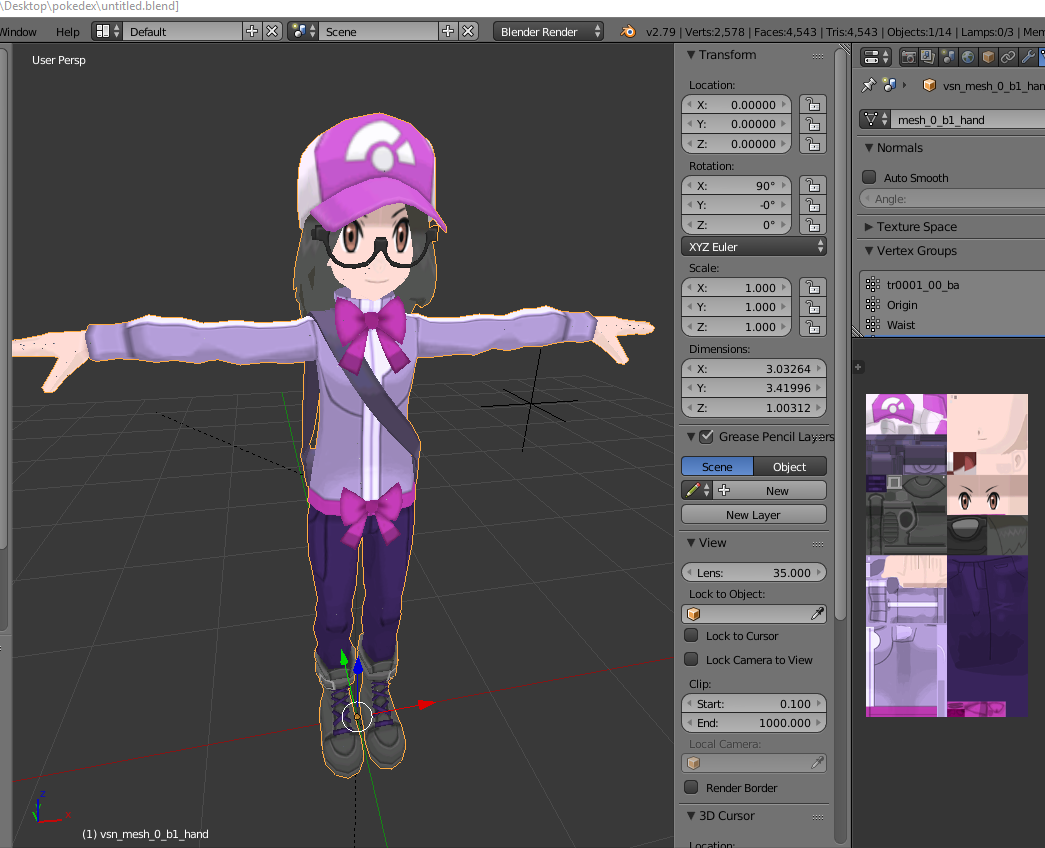
decided to modify one of the player character models from Pokemon X and Y to make a Pokemon OC works as a quest compliance Avatar
got it all to fit on one texture Atlas
 rough needle
Quick question folks. Following the tutorial for quest + pc, I've attempted to upload two versions of my avatar to VRChat - one for PC, one for quest. I'm using the same blueprint, publishing one for PC and one for Android. So far as I can tell, each version seems to be overwriting each other, rather than saving separately (at least, I don't see two versions in my "Manage Uploaded Content" area.
Am I doing something?
Or do the pC and quest versions just show up as the same avatar, and they're both saved "behind the scenes"?
I just uploaded my Quest avatar again on the same blueprint to which I uploaded my PC version. Both share a blueprint. In VRChat just now, I saw the PC version.
So given I uploaded the QUEST version after I uploaded PC, and saw the PC version... seems like we're good here, yeah?
I guess I'll find on Tuesday :p
long talon
if you add me (TripingPC in game) I can help you make sure it works right away using Oculus Go.
rough needle
Hey PC, thanks for the offer! I'm getting my Quest tomorrow, so I can handle it. But thanks anyway. 😃
timid marsh
I am trying to use the Toon Lit shader that is in the SDK but I can't find the option to enable "cut out" for the areas that should be transparent.
There isn't a "Rendering mode" option like with the normal shaders. Does anyone know how to do this? Thanks.
hushed wedge
@timid marsh that's intentional. You can't use Cutout with the mobile shaders because Cutout is very expensive on mobile.
Transparency is fairly expensive too
timid marsh
This will make animating my character's 2D face very difficult if not impossible.
hushed wedge
Probably, yes. Unfortunately you will have to make the face a little bit higher poly to support the mouth and eye shapes.
 mystic egret
Honestly I do wish I could do alpha channels even on normal PC ones. -.- Would be nice to get the "lace" of a dress i was working on without resorting to moar polys
hushed wedge
You can do cutout or transparency just fine on desktop avatars
mystic egret
really? o.o it wasn't working for me. Must be doing something wrong then. sigh still learning all this
hushed wedge
For laces I recommend using Cutout
mystic egret
gotcha
hushed wedge
So any toon shader with a cutout option or rendering mode
mystic egret
i see
hm.. I'll see what I can find then. The model already has the alpha baked in so
hm
thanks
 shrewd fog
Quest avatars only support the shaders that are included in the SDK
Change your shader to use one of the VRChat > Mobile shaders
blazing meteor
Oh thanks!
 empty sundial
When I switch to Android the upload button just goes away and this is all I get
blazing meteor
^ Same issue here
empty sundial
oof
blazing meteor
It was the particles. Instead of saying particles aren't supported, everything vanishes. Sounds like a bug.
 hollow owl
Hello,I am new to unity and blender, may I ask if I want to change the eye color texture only but the eye and face are merge together so I can't edit it,how do I change it?
dry zealot
Edit the texture in a sofware like gimp
 hard walrus
I have a problem, when I try to pubblish an avatr for the quest this error pops up:
"Error updating content. Asset bundle upload failed. Failed to optimize file for upload".
What am I supposed to do?
delicate cipher
@hard walrus did you switch the platform to android?
also. i can see that your avatar has 78 bones and 5 unique meshes
try lowering them down to less than 66 bones and 1-2 meshes (one mesh is ok. but having two in cases where you need a different shader variant may be permissable)
hard walrus
Yep I did switch the platform and thanks for the advice!
steel light
Check if theres any errors. The issue could be due to mesh or bone limitations also @hard walrus
fluid kiln
That popup usually occurs due to an issue with compressing the asset bundle, I usually have to restart Unity to get it to fix
ancient zephyr
do i have to switch the unity project to android to get a quest avatar?
stone bear

I keep getting this, even though it's below 5k tris
And we have GPU instancing on
The Shaders are default unity mobile shaders
Bones are the same with no dynamic bones and nothing wild or unessisary
The Textures fit the nessisary size
ANd there are no colliders
Is there anything I'm missing?
shrewd fog
What's your SDK version @stone bear I've seen that error before when SDK was old
stone bear
Lemmie check...
@shrewd fog 2018.2.2 is the SDK version
Yeah, downloading the new SDK
Weird, I'm trying to add the mobile Unity shaders and it says it's not supported.
It says that it's in the SDK?
shrewd fog
https://i.imgur.com/2yWjLmw.png
You need to use the VRChat shaders in the SDK
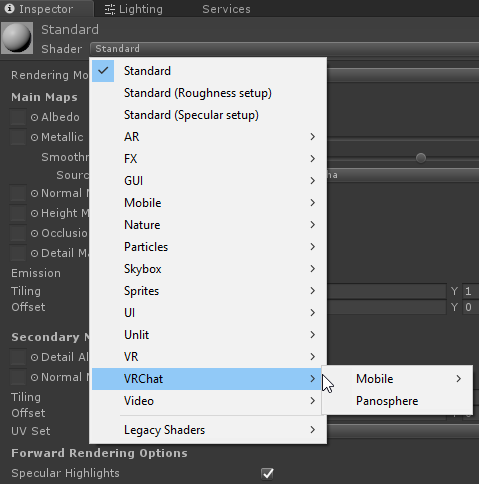 dry zealot
i upload some avatar with the unlit mobile shader from unity before and they are quest ready in game.
stone bear
Yeah, originally I used like, the actual 'mobile' Unity shaders, not the ones inside the VRChat shaders
It's working now, thanks a million 😄
 silver basin
can anyone help me, I'm having trouble finding the actual download for the android sdk even when vrchat provides the link
long talon
go in unity, in the build platform window, if you click on android, it will have a button in the corner to download the sdk installer.
silver basin
thank you
long talon
silver basin
even more thanks lol
 midnight wagon
Can we only use the shaders in the SDK or could we use other shaders made for mobile as well?
 still tusk
How to upload the avatar for quest?
Is there like an extra step for uploading Quest avatars?
 untold perch
Gotta switch your selected platform to Android in the build settings
untold perch
In Unity .. File -> Build Settings -> Android -> Switch platform
You gotta use the shaders packaged with the VRChat SDK
untold perch
Just Switch platform button should be all you need to press @still tusk
 daring grail
thank you @untold perch
still tusk
oh ok thanks
untold perch
np
still tusk
dry zealot
where your avatar gif is from btw @still tusk
dry zealot
yeah
untold perch
Yah. Use the same avatar blue print ID as the PC one to make it cross platform
still tusk
@untold perch Can't use it on pc.
Do I have to go to a quest instance to use it?
or reupload it again for pc?
untold perch
You gotta upload it twice
Once for Quest
Once for PC
Switch your platform back to PC to upload it to PC
still tusk
Are animators allowed for custom animations?
untold perch
5000 is just a recommendation right now as far as I am aware
unkempt kiln
Its around 5k, but I don't think the SDK will annoy you about it for the quest builds
steel light
It wont but if you go above the limit quest users wont be able to see the avatar
Its supposedly higher than 5k bur below 20k
midnight wagon
Side question: Can one avatar have a version for PC and a version for Quest?
blazing meteor
Yes that's the whole point. You upload a lower poly build as your quest version and pc users still see the high quality version
each blueprintID can have one windows and one android build which is used for PC and quest respectively
the avatars don't need to have anything in common visually but should look roughly the same unless you feel like confusing people
still tusk
Are animators allowed in Quest?
 snow island
Is there more cute anime avatars?
craggy glacier
I made my avatar cross platform today, and I don't have a quest, so I went to the hub to try and find any quest users to ask them how my avatar looked. They said that my avatar was sunk halfway into the floor. Why could this be? vrchat bug or???
still tusk
@snow island datkofguy provided some lowpoly anime avatars like this one
However, you need to set up the facials and eye-tracking yourself
 lone pike
I'm trying to upload the PC version of a crosscompatible avatar, I'm clearly on the PC build but still being told I have unsupported shaders. Is there a known fix here?
Reinstalling the SDK fixed it
untold perch
That happened to me as well when switching to Android platform then canceling it while it tried to process a ton of stuff. Unity reverted fine but the SDK got stuck on Android version
pastel storm
when i use my crossplatform avcatar on the quest, then for pc it looks like it is glitching by floating user far away back and forth. quest users see everything fine even when a pc user has that avatar, its only affecting pc user when using it as a quest user. Is it because the pc version has a few dynamic bones but the quest has not?
i removed them on the quest version
shrewd fog
Do your quest and pc avatar have different rigs?
 gentle needle



 still tusk
@gentle needle Just upload an avatar in the android build of unity.
@lone pike only the Vrchat mobile shaders are allowed.
pastel storm
@shrewd fog thx, nah i just realized i had an old rig from way back that was on scale 100... so yeah not anymore
so quest had the scale 1, the windows had scale 100
now its both scale 1
hushed wedge
Oh yeah, that can happen if you change export settings.
pastel storm
in case anyone else got the issue, export the fbx with the newest cats for both versions
 zenith tapir
How can I get some good avatars on quest
steel light
Avatar worlds. In the avatar menu, or some are in the world you load into
lone pike
@still tusk On Quest, yeah, but I was getting that warning message on the PC build
still tusk
Oh I see. Sorry
pastel delta
vrchat pls
Why cant we use the only shader that doesnt make my model look like shit ?
cyan spoke
Because that’s for Worlds, not Avatars
Lightmap on Avatars is discarded anyway when uploading them
pastel delta
what does that mean?
the shadow looks bad
and lightmapped doesnt seem to cast shadow on me which results in a better look
cyan spoke
The shadow you see in Unity is not representative of shadows in the game anyways
pastel delta
I dont want any shadows tho ;w; also better for performance ;p
wish they add a unlit toon shader
cyan spoke
There is
pastel delta
cyan spoke
Also I believe there are no shadows on Quest but I have to double check that
cyan spoke
Of course it does
Unlit and toon lit are almost identical, with the difference that unlit will look bright always, even in the dark, and that’s way bad
In any case just remove the check on “receive shadows” in the mesh renderer
pastel delta
i would agree with you IF we were talking about desktop shadows etc
but just look at those horrible shadows, there is no instance in where it would look good, id rather have a good looking bright avatar
or atleast the option to do so
oh
cyan spoke
Do you know why shadows look so bad?
pastel delta
vrchat respects those options?
cyan spoke
It should
pastel delta
because of my shitty normals etc?
looking at the mesh after blender decimation... oh boi its disgusting but atleast it works
cyan spoke
Looks more like you have Unity with veeeey low settings to me
cyan spoke
Aah in that case just let Unity recalculate the normals in the mesh import settings
cyan spoke
Quest. In fact, again, Quest probably doesn’t have shadows so this was a non-problem since the beginning : P
pastel delta
works for me
cyan spoke
Yeah that’s fine
pastel delta
thanks 😄
cyan spoke
No problem 😛
 merry seal
What shader do I use?
cyan spoke
One of the dedicated VRChat shaders
 empty berry
Too bad you can't have any transparent textures since the shaders vrchat provides makes them all white :/
pastel delta
wrong
I thought the same, its just a texture/mesh issue
nearly lost my mind because i thought the same but it works now
empty berry
Then what am I supposed to do
pastel delta
can you post some screenshots ?
merry seal
Owo avali
merry seal
For me it says unsupported Shader at VRchat mobile
pastel delta
do you only have one material on the avatar?
merry seal
How much poly is the avali?
pastel delta
no idea why it doesnt work, sorry man 😦 maybe someone more experienced can help
empty berry
Got two, one for the whole body + wings and another for the eyes
@merry seal this one has 5000
empty berry
rip
merry seal
The poly's are ok but just the shader doesn't work so I can't upload it
Does it work on yours?
pastel delta
maybe all the stuff on your avatar has them?
your only showing your body mesh mat, looks like that hat might be a mesh etc
merry seal
what is the skybox one
what is rigid bodies?
still cant click upload
it just doesnt work 😦
so now i got it fixed but it cant become transparent even tho i clicked alpha is transparency
 glad narwhal
Having the same issue. My texture is both set with alpha as transparency, and the image itself has transparency. Is there a particular image file type I should be using?
 pseudo pagoda
Inside the game, how do I change my avatar to the quest version? Is there a button or something? I'm on the PC do I always have to use the avatar for PC without being able to switch to the Android version?
I'm trying to test my avatar for Quest without having a Quest.
Was I clear? I just want an answer to that.
steel light
@pseudo pagoda you cannot test out a mobile version on a pc asset. So, you can only test the pc version on your pc,
pseudo pagoda
Thanks for answering! @steel light
 wispy crater
@pseudo pagoda You could upload your quest avatar as a seperate PC version avatar, and test it on the PC version - that would probably give you a good enough idea of if it's working on the quest or not
 sinful phoenix
anyone else not able to use mixamo right now?
 fathom terrace

This is edited from my live twitch demonstration for making existing avatars quest compatible. This process of porting my avatars took less than 20 minutes t...
hopefully this helps someone
 odd ice
how come my avatar appears halfway in the ground to pc users but not to themselves on quest
regal laurel
@glad narwhal Transparency is not supported on Quest avatars.
vapid girder
Oh you guys disabled it completely?
regal laurel
@vapid girder None of the supported avatar shaders support transparency.
@odd ice Are the rigs on the PC and Quest version identical?
glad narwhal
Ah ok. It looked like one of the previous people implied there was a method.
That's kind of rough. My cyclops eye is going to look awful without it. But oh well. Better than leaving it as the default PC-Bot replacement.
 floral crest
What's the max amount of Polygons for a quest model?
steel light
we are unknown, but its lower than 20k and a bit higher than 5k
 dim gate
I uploaded an avatar. On quest is looks fine. On pc desktop it looks fine. When am on the Quest, PC players tell me I am in the ground. The rigging is identical. Does the Quest track wrong from the PC player's view?
That's probably not it, but I am trying to figure out how to make an avatar crossplatform llike the public avatars.
floral crest
So why the fuck do my models shoot up into the sky for quest users?
Im like getting so fucking pissed off at this
Like they can see me, then isuddenly go into the sky.
Public models dont do it./
Its just my fucking models
is there literally nothing for it?
Because i just vanish or fly into the sky
Like this is making me giving up on making quest versions of these models
I upload the quest model to PC and WOAH i dont fly into the sky.
 rigid carbon
Is there a way to use Cutout on shaders for the Quest?
cyan spoke
Nope, for now no official shaders have transparency
floral crest
Is there no answer to my models flying into the sky for quest users?
Or straight up vanishing
dry zealot
I saw some video of people getting pull far aways and come back the there original place
 untold sundial
I can't find any information anywhere if animations are allowed on my quest counterpart version.
Is it allowed or not? :o Just wanna use simple facial and finger expressions
untold sundial
I see, thank you
 arctic heart
Had a quest user say my avatar was in the ground yesterday. Armature is largely identical, only difference is there's some extra bones on the PC version. Not sure why yet, and it's frustrating that I have no way to test.
Wish I could run a test client on my phone or something, given that it's an android build
craggy glacier
@arctic heart ive been having the same problem, could it maybe be a vrchat issue?
arctic heart
Could be, or could legitimately be an issue with some difference in the configuration of the avatar. Hard to eliminate the second one without going and buying a quest to quickly iterate and test, though.
Instead if I want to test I need to find a quest user willing to help me
craggy glacier
its at least not to hard to go to a public hub and find a quest user
arctic heart
Yeah but it's still several times slower than being able to do it myself lol
 upbeat mauve
i've been told by desktop users that my avatar is sunk into the ground from waist down when i'm on the quest
other quest users see me just fine though, anyone else have this same issue?
arctic heart
Really sounds like some issue with matching armatures between different builds of the avatar, the big question is whether it's a VRChat issue or an issue with the avatars themselves. I'm inclined to think it's probably the latter since it clearly works in some circumstances, but the key is figuring out just what it's not agreeing with and a way to reliably check/repro
upbeat mauve
yeah...
it could be the full body tracking bodge fix, the one where the spine length is set to 0 and leg bones are reversed
both versions of that avatar are made for fbt
actually, we might need a special cann.io tag/category for quest related bugs
have a few other bugs to report
dim gate
@upbeat mauve I am having the same issue. Let me know if the fbt fix in blender is the issue
I have not look into that yet, i check that thing off by default
arctic heart
@upbeat mauve yeah mine are both full body fixed as well
and i only tested in desktop, and I have heard of some issues with being on desktop with full body fixed avatars under the networked IK
I'll have to actually get in VR/FBT and ask a quest user what they see later
upbeat mauve
i've seen people use fbt in quest, it works fine
winter frigate
are visemes supported on quest or does that count as animations?
floral crest
@arctic heart My avatar on the quest seems to fly into the sky so im having a sinmilar issue.
all i did was decimate it
pastel storm
Huh, this is a weird one... I set up blinking and lowerlid visemes, but the avatar seems to be blinking waaaay too often and the lowerlid viseme is triggering at times when it doesn't seem to be necessary
I've checked the blendshape order, and it seems correct (blink_left, blink_right, lowerlid_left, lowerlid_right)
Just reduced the intensity of the lowerlids, that should at least help a tad
winter frigate
so... visemes aren't supported?
cyan spoke
They are
winter frigate
ok, yeah i dont have a quest so i just am going off what people say and getting feedback when i talk to quest users rn lol
blazing meteor
Visiemes and custom idle animations are supported in quest.
Custom animators that play all the time can be simulated by baking it into the custom idle pose
 empty junco
Has anyone made a Quest optimized version of Pepsi man?
 plain pendant
Does anybody have issues with the mic on vrchat and if so do you know how to fix it
 chilly prairie
is it allowed to have non skinned meshes on the quest avatars? like for hats and props?
 mint anvil
so does anyone know why my avatar is not marked as quest eventhough i am below 5k poly?
is it because of flat lit toon?
dry zealot
Yes
cyan spoke
Probably you need to switch to Android target for that
Lit Toon is supported on Quest
mint anvil
oooh
yea i found the video someone posted here
didn't know android build shows quest parameters
so the limit isn't 5k poly either huh.
here i am making the most optimized avatar i've ever made
cyan spoke
As Tupper said, it's slightly above 5k and pretty much lower than 20k
I'd say 10k but also 8k would sound pretty good honestly
cyan spoke
You have 6 more triangles. Add a pyramid somewhere lol
mint anvil
so if i understood correctly. if i upload the quest version on the same blueprint, quest users will see the quest version and pc will see pc?
cyan spoke
Yeah
mint anvil
that's very neat
cyan spoke
Just keep the same ID
cyan spoke
Quest runs on Android OS so that's why you need to switch to Android build for it
mint anvil
i just removed some stuff and edited the textures
cyan spoke
Yeah imho the 5K limit is very honest
cyan spoke
Cute! Lookin good indeed
mint anvil

upbeat mauve
Quick question @mint anvil, do you have a quest?
And the avatar looks great! Wouldn't be able to tell that it's under 5k
Wanted to confirm if you have the issue where if your avatar sinks into the ground or flies away if seen by desktop users
cyan spoke
I believe the above screens are for PC though, isn't that a camera? On Quest the camera is disabled : (
winter frigate
what kind of lighting does quest support exactly? does everything on my avatar have to have baked lighting?
cyan spoke
Basically standard lighting, but with no shadows... So yeah, you should bake lights on words for a much nicer results, but you can't bake it on avatars
winter frigate
i can in blender 🕶
cyan spoke
Ah yeah indeed : D
It's just the Unity lightmapping that you can't use on Avatars, but outside Unity you can do pretty much whatever you want
Having baked Normals and AO is perfect
 twin pebble
sooonn... i will plauge Vrchat servers with uganda quest shiba models
really paying attention to these numbers.. 👀
👀 i will prove to everyone quest avatars can be just as expressive if not more....
stone bear
That's great, because I've been trying to figure that out myself.
And seeing how I can make things floppy without the use of Dynamic Bones.
twin pebble
@stone bear you fake it via idle animation cycle.
well thats my plan at least
i currenlty have no way of testing it
stone bear
I have a Quest, been messing with it myself.
With some help I got my avatar ported over to it.
twin pebble
i don't, but im tired of seeing my shibas appear as grey robot
stone bear
Which wasn't much as I made my avatar to be Quest compatible in the first place.
I know, it's so sad
You don't know how many people I've seen in VR Chat in Quest who are like, brand new to it all.
The tails shouldn't be that hard, if I can remember, they were designed kind of curled up, so I imagine when they are static it doesn't look bad.
Out of curiosity, has anyone really messed with the extent of how far you can push Depth Maps on Quest?
twin pebble
they will wag in idel animation @final cosmos
stone bear
Haha, close enough ;3
twin pebble
and as long as their booty is thicc im happy.
stone bear
Hehe, I'll agree to that.
twin pebble
👀 all my characters must have thicc booties.
stone bear
My current WIP of a Raptor avatar.


Thought it would be fun to make a nerdy raptor.
AKA
A Clever Girl
twin pebble
👀 dang she thicc
stone bear
If you think that's thicc, you should see my flamingo avatar.
She's going to be interesting to rig though. Need to add the feather features and teeth, and keep a close eye on that polygon count as I do so.
This is really an experiment messing with thin 2D meshes, and trying to get all the detail in the compressed texture format Quest requires.
Make it so that if the meshes are symmetrical, I can just flip the texture map and have it effectively take up half the space.
((Look at me explaining this as if it isn't the most basic of optimization techniques that anyone with any actual experience would know.))
pale stream
Does anyone know of a quest avatar with pen/finger writing ?
stone bear
Not yet, but I think the finger writing thing is heavily particle effect based, and that's one of the things the Quest limits.
While I say that, the Quest home world has the 3D space writing pens in them, so it's possible, but I don't know if it's something that can be done in world but not in Avatars.
twin pebble
getting there ha ha
twin pebble
@stone bear how good is fingers on quest? do i need to make sure the shibas have all the fingers to make geustures?
stone bear
Oh, fingers are great
@twin pebble My yeen avatar has five fingers and it works perfectly fine. It's got all the same gestures that you can do with the normal Oculus Rift controller, which I think is all the same gestures you can do on Vive.
twin pebble
k
stone bear
I think Discord autofilled the "@" user to be your name instead of my name.
 final cosmos
Petey I'm fighting u
twin pebble
currently sitting at 2,098 polys.
hard walrus
2900~ish polys to use xD
And I can't wait to see some uganda shiba models on quest 👀
stone bear
That's very impressive.
dry zealot
you could make the eyes maybe more round ?
 mortal sleet
Is there anyone here on quest who could test an avatar's quest build for me?
send me an @ if you can
 random badge
with
 graceful palm
i want publish a avatar but
my account is not new
i'm using the correct version for sdk
dry zealot
read the letter in that pop up
steel light
@graceful palm read what that says.. its not hard
You need to be a new user or higher to upload models. If youre a visitor you cant.
Its bout 20-40ishhours of active vrc gameplay
twin pebble
@graceful palm READ
@dry zealot im gonna build it all out first and then see where i can add more definition.
graceful palm
with no break?
 real dew
@graceful palm You can have breaks. You just need to play the game till you get a message via email and in VRChat itself. The message will tell you that you got the ability to upload
stone bear
I'm having difficulty adding a quest version of an avatar to a PC version of it.
Apparently I need to find the Avatar ID?
Oh wait, sorry
Found it.
 wanton cipher
Can you use the Standard shader for Quest avatars, or do they have to be the mobile shader?
steel light
they have to be the mobile shaders
pastel storm
Oh. So I can make the Knuckles Quest Version
I know the design right for the Knuckles; it will however have longer legs and it is looking for Quest
steel light
1-2 mesh max
5k poly recc (unknown max, but its near 5k)
More in #quest-info
pastel storm
So this is the balance; Easy enough;
I will just prep-one when they open auditions.
wanton cipher
Is there cutout for any of the mobile shaders?
pastel storm
I did half the work lol
pastel storm
A low Quality-Poly UV'D version of the Knuckles.. fit for Oculus Quest
pastel storm
This good Knuckles for Oculus Quest kk
 gilded surge
Oh noo U-U
 limber veldt
turn it off, it's told in other channel
oh the youtube video told it must turned on....
https://www.youtube.com/watch?v=w0n4fuC4fNU <-- this video
Join our community on PATREON! https://www.patreon.com/user?u=711561 And follow me on social media (: ✳ Twitter: http://twitter.com/_lucasrizzotto ✳ Facebook...
limber veldt
trying make my avatar ready for quest side, it's 20k poly avatar should no problem, but eye lids changed after switch platform
how can i fix directly in unity?
some polygon points are removed
limber veldt
It's not removed, but something is added below eyelids, it was made transparent in PC version. Android platform doesn't support transparency. What is easy way to remove darkblue part?
random badge
20k poly is not good for quest
You are then taking up the bandwidth of approx 4 players just with your one avatar
 strange cloud
Not sure where to post this, but since it's a quest avatar I thought here is the best shout.
Does anyone know where the 92-ChilliV base model can be found? Is it publicly available?
upbeat mauve
has anyone identified the cause for quest users' avatars sinking into the ground when seen by desktop users?
 raven epoch
@strange cloud It's not publicly available because it belongs to another game company that decided to upload their models to VRChat
raven epoch

Indie Game development studio, crafting lowpoly worlds for games and VR. ATM working on TRDS and VRChat content. Morphite. We ❤️ #lowpoly #indiedev #gamedev
Tweets
8188
Followers
2595
 Twitter
You'll see their pinned tweet
strange cloud
Thankyou thankyou thankyou
hushed wedge
You can probably dissolve a lot of those edge loops, especially on the head. You only need them around the joints
delicate basalt
yeah im prob gonna do that
delicate basalt
question time! in another episode of "why is the mobile diffuse shader so weird," ...
this shit happens!
my arm is not supposed to be transparent
or
the very end whree my hand should be
this is how it looks in blender for proo
f
and im not sure why it does this. I checked the avatar prefab and turns out that it doesnt think that there are verticies there at all!
i think i might've just figured it out by accident tho
like literally just now\
i think i just have them facing the wrong way
i swear to god if thats the case
it probably is because the same stuff is happening to the bottom of my head, bottom of my legs, etc.
grrrr
sigh
its my dumbass lol imma fix this rn
also, why do the colors look so washed out on the mobile shader?
do i have to like, amplify them before importing them?
cuz normally the colors are already pretty bright
 blazing willow
looks like texture compression
delicate basalt
m.
well in other news, i did fix it!
and after looking at the lights turns out that it looks fine under normal light
just look slike
weird
when shaded
im ready!
gilded surge
I want to see an All Might avatar for Quest
 hasty urchin
here look like but only the head if you know the body
delicate basalt
um i dont really do commissions yet. but the right place to ask this question regardless is in VRChat Traders. you can find the server in #community-servers-old
they're full of people who do commissions for avatars, if you can pay.
delicate basalt
hey, i have another question
when i switch my platform to android in unity, do i acctually have to download all of Unity's android assets?
cuz i switched it earlier but didnt download the assets and just went straight to publishing
and i was under the impression that it would just work since the last time i tried it automatically did weird shit to my avatar
aaaand it didnt. it's still PC only
im gonna have to download those assets arent I
sign
poor internet
why is the installer 186mb
blazing willow
sign