#world-quest
1 messages · Page 7 of 1
 lime moss
 tropic mulch
Ah! Good then : )
 viral bloom
So im kinda in a resource gathering stage of this but i would love to see like a bioshock bar or something like that. Just putting that out there
tropic mulch
Making progress...
 gray drift
I'm working on a world for Quest, for funsies. I wanted to know if world audio is supported? I just want to put a single, looping background song.
The documentation says nothing beyond "audio sources are restricted in worlds"
gray drift
Cool
 pulsar rover
Do video players work on the go/quest?
 green cloak
how to make internal mic and speaker?
 remote trellis
 maiden flower
So how are audio sources restricted? Are there work arounds?
 zenith ember
There's no workarounds, as it is a restriction. We haven't released precise details on how things will be restricted, but that will come soon. It is restricted due to performance issues-- processing audio is quite expensive. Having many audio sources can tank Quest performance pretty hard.
That being said, in the long run, we're investigating ways to make it easier for users to play audio in worlds/on avatars in a performant way
I believe world audio is quite lenient though. Its up to you to ensure you aren't playing a ton at once.
maiden flower
I am just double checking, the slides said 3 audio sources or less, that's the hard limit?
Just want to be sure so i can design the gameplay experience around that limit
zenith ember
Don't have a hard limit set yet. All numbers we've given so far are (strong) recommendations.
 hexed hill
So if I have a big scene with like, 20 audio sources, but only 2-3 are playing at a time due to them being spread out, is that alright? Does Unity handle that automatically with distance or would I have to setup a system to enable and disable audio sources with triggers?
tropic mulch
If I'm not wrong, Unity doesn't stop AudioSources from playing even if the Listener is outside the range
 raven dagger
I would set up triggers.
 hasty sedge
Was there any update on whether Youtube media/videos could play in Quest worlds? Couldn't find an answer searching unfortunately
raven dagger
@hasty sedge It likely won’t be available at launch. And if it shows up it will be limited in capability.
And if the world is cross platform, it can’t have the player on PC and not Quest. That may cause issues.
 split panther
How do we record in VR head set
 vital lance
i got 27 mats in my world now, most of them solid colors or emissives. Is this an issue, cause i see people saying there is a recommendation limit of 8
 autumn pendant
You should probably atlas if you use the same shader yes
vital lance
i always thought unity batches solid colors on its own, thx
 tender fractal
I have a question.
Is it ok to use the Quest Toon Lit shader for worlds?
The one from the SDK?
vital lance
nice the SDK has warning messages now, it tells me that i am using unsupported shader "Mobile/Diffuse" and "Standard", but those are supported right?
tender fractal
Also I notice this, not sure if this is normal, cuz I recently updated my world.
Does not have the PC highlighted blue.
vital lance
when clicking on new build at publish as it worked before it now just blocks you due to the ifle size being over 50 mb, i have made sure that is not the case though using hte profiler too, it sitll just locks up
tender fractal
My world isn't over 40mb. The one I uploaded for the cross platform.
vital lance
yeah, just reporting something that happened to me, had my last build before upgrading the sdk
tender fractal
Also I got this warning.
Its funny cuz I went to this world after i just updated it to be Cross platform ready.
I was able to join this world earlier.
 woven heart
Oh I went to your world before, its neat man
tender fractal
Oh wait NVM seems ok now.
Seems all i have to do is upload the world again using the NEW SDK.
I should have done this before uploading the Quest ver.
Oh and umm thanks.
tropic mulch
Basically yes, you have to duplicate and flip the polygons that you want to see double sided
 crimson canopy
@vital lance can you use custom shaders in worlds? I forgot
Also don't use Standard on mobile, use the Mobile or Unlit families of shaders
Your best bet is getting the builtin shaders and duplicating Mobile/Diffuse and add cull off to it
tropic mulch
Custom shaders are disabled on worlds too
crimson canopy
In that case you'll have to indeed duplicate and flip the polys. Shame
 dense dock
🗿
crimson canopy
Hackers cannot affect your hardware at all
dense dock
Ok
 untold tulip
<@&397642795457970181> you might wanna rid of the fear monging before someoen actually somehow believes it : P
 glacial wolf
@untold tulip
crimson canopy
The part where they can affect files on your PC is true though 🤔
That's literally why eye tracking was disabled a while back
zenith ember
@crimson canopy No, eye tracking was "disabled" (it broke) due to a bug with a security fix that was fixing an issue precisely along those lines. Please do not spread misinformation or misrepresented information, and please do not do so in irrelevant channels.
crimson canopy
Ah I see. Well if we actually got some communication on it back then I wouldn't be misinformed
Either way that wasn't really my point
zenith ember
As you well know, we don't often comment on technical details of security issues.
crimson canopy
My point was that it was possible at some point, unlike malicious hardware failure
zenith ember
At some point, it was possible to run fully custom, third-party hosted C# scripts. 🤔
crimson canopy
Only if approved right?
zenith ember
Nope
crimson canopy
I don't think that was an exploit, but I dunno since I wasn't around for those days. Either way, my point is that I'm not quite as skeptical of claims like "hackers can infect your PC" anymore, since I've had something like that happen to myself in VRC in the past. Someone corrupted my Overwatch installation on purpose by exploiting eye tracking
vital lance
I don't see any shaders aside from Toon under VRChat/Mobile
is anyone else unable to find them in the latest SDK?
crimson canopy
Can't you still use stuff like Mobile/Diffuse?
zenith ember
Yeah we ended up not pushing the correct commits
zenith ember
we'll get the shaders in for an update
vital lance
That makes a ton of sense
zenith ember
consider the docs a preview haha
vital lance
Is there maybe a link to the shaders for now? 😮
zenith ember
negative
vital lance
Or maybe just use mobile ones for the time being?
zenith ember
sure, i don't imagine it'll take us long to push that into the branch and get a new sdk though
vital lance
Ok sweet^^ Thanks!
vital lance
I get an error saying "The most recent world build was too large" and i cant upload anything anymore, I just tried to delete everything but a plane on the world and then upload it. ressource checker also shows i am below the limit.
vital lance
i suspect it checks the last successful build which would be my pc one. its weird i tried uploading with the old sdk, no issue, not sure if it actually ul though since i got no way to test it.
vital lance
I think that's the case, it's because the 50mb limit is on the compressed bundle, you only know that size after a succesful build
im nearly done so ill swap it to pc upload what i got and then see if it cooperates. Though this all made me wonder, how much vram does the quest actually have? i couldnt find infos on it even on the snapdragon spec sheet
zenith ember
New SDK is now live with the new shaders. Grab a new copy.
hexed hill
So I gotta go and replace all the Unity mobile shaders with the new VRChat ones?
vital lance
so i have been trying this camera 2D mirror, but it looks a bit dark, so i made the material a standard shader with emission, but i feel like its not as efficient, is there an effcient shader that just displays the texture in fullbright
hey all .. iam trying to make my own world and iam having some problems i think white a shader iam not sure is ther a kind soul who might wanna help me out abit
vital lance
ok i just hid it when baking light
tropic mulch
You can keep that while baking, just remove the "Lightmap Static" checkmark in the mirror object Properties
Have yet to look at the new Quest shaders but a simple unlit one will be perfect for 2D mirrors
 modest rose
soo, uhh...what are you world builders working on?
i wanna know what imma see when i go visit quest users next week
what should i be excited about?
tropic mulch
I'm working on a stylized replica of the main square of my hometown, it's a very chill place. Won't be ready for launch though, don't have too much time to work on it, but I'm making progress
modest rose
uwuuu
maiden flower
So how would I make a world crossplayable? I have to upload a quest World, switch unity to pc, and upload the pc version?
untold tulip
Usually the worlds are more optimized versions of the pc one
 fleet condor
You need to upload the world twice, yes, but be aware that worlds need to be optimized significantly differently for Quest and come with additional restrictions.
Also, it's not really a great idea to keep one project and keep switching it between PC/Android publishing, because it'll have to reimport every asset every time, which is a very lengthy process. Instead, make the world for PC first, then duplicate the whole project, switch your copy to Android, and optimize it (or the other way around, start with Android, duplicate it, and switch your copy to PC)
You can upload Android/PC in any order, so you don't have to upload either one first. Also, while you can optimize both worlds separately, keep in mind things like spawn points, level colliders, and especially triggers have to be the exact same across the two versions or you'll encounter issues.
maiden flower
Can you explain duplicating? I don't see how this avoids switching.
Do i just export all my assets into a unity package?
Or do you mean duplicate the folders and avoid exporting
fleet condor
Copy the entire folder, and then for any subsequent (small) changes just copy the assets. For larger changes you may need to reduplicate the entire folder.
More information about the process can be found in VRChat's documentation:
https://docs.vrchat.com/docs/cross-platform-setup#duplicating-your-project
Setting up a cross-platform world or avatar is actually quite straightforward! In short, all you have to do is use a duplicate project to build an Android version of the asset, and upload it to the same content ID as the VRChat PC asset. The client will manage which version i...
maiden flower
Thanks!
vital lance
so i take it you can use standard shaders in worlds or is it exclusively the ones in the vrchat submenu?
i use emissive single color materials and am a bit confused about it
vital lance
I was wondering how the h*ck Pug was made to be Quest compliant
a friend linked me this supposedly magic tool

A short introduction to the powerful Seurat tool by Google which bakes down complex scenes to a single mesh and texture with minimal fidelity loss. Google VR...
i see it's the focus of the quest-tutorials channel 🤔
vital lance
they changes most of it to solid colors from what i can see on the stream and then atlassed it, it already was pretty low poly so it must have been easy to reduce if necessary. and then they propably cut all pick up items
seurat would not have helped in the pug, since its only useful for optimizing enviroment in a standing only scene
yeah i'm watching it now, not what i thought it was
so
how do shared worlds work?
what i mean is, like you said, they probably cut all pick up items
but
cross platform you mean?
pc and quest share the same instances
yeah
but pc wouldn't have this content cut
yeah same instance, and the worlds have two different bundles but the same objects and hierarchy
otherwise the pug would be totally gimped now
so pickups, vehicles, teleports, all that stuff works and syncs across platforms
so you're saying that the pug still has all its pickup items?
but somehow is quest compliant?
@raven dagger can probably give a proper answer to that, but in theory a cross platform world should have the same gameobjects in the same hierarchy for everything to work
oh hey
please tell 🙏
raven dagger
So, yes, keep the hierarchy and the triggers the exact same in both scenes
Anything that is networked, including PysSound (Surprisingly) needs to be setup the same in both scenes
AFAIK Video Players may not work on Quest, and those need to be the same on both sides too. So you can't use video players cross platform.
Local triggers that never do anything networked can be unique on either side.
vital lance
so did you remove any of the pickups?
raven dagger
I did not. But there are a lot of them, and it is an issue right now.
vital lance
yeah that's the big takeaway, stuff that's networked needs to match
the big question i really wanna ask is how the fuf did you get below 50 drawcalls
vital lance
i optimised the shit out of my relatively simple world and still came above it
raven dagger
Gotta make more things share materials sadly.
vital lance
i did 👀
raven dagger
yeah 😦
vital lance
lights and shadows multiply the drawcalls by the number of meshes
materials was the thing i focused on most
i removed all reflection probes too
raven dagger

Unity Technologies Blog
I am sure that you know about Unity’s built-in Dynamic and Static Batching, which help reduce the number of draw calls in your game.
You can see Batching ...
Give that look over, and see if anything applies to your scene
vital lance
and yet it seemed to pick at random what was and wasn't part of a batch
raven dagger
It still applies, even though we are on 2017 now
vital lance
like 'this has a different material to the LAST thing', but what determines the order, for example?
batching breaks easily but the article tells you why and how to avoid that
raven dagger
Yeah
vital lance
so if you need to retain the hierchy for crossplatform, you cant just cut out half a world, then combine some meshes of what remains and expect it to still work?
i always imagined that as long as the coordinates of everything are at the same place there shouldnt be an issue, as long as no dynamic objects are involved
like imagine having a slope on the quest version but not the pc one, the quest user walks up the slope, so the pc user would see the quest user walk up an invisible slope or is something like that not possible?
crimson canopy
That's roughly how it would work
vital lance
if the triggers are uniform across platforms and refer to the same nodes of the hierarchy you're good
geomtery roughly the same shapes will work fine then
crimson canopy
Ohh, now that makes sense
Why we're getting the SDK warnings about siblings sharing the same paths only since recently
vital lance
yep
 deep light
for terrain can we use the standard unity nature/terrain shader?
vital lance
thanks guys, i wanna retrofit a map and cut out most the surroundings and will combine some meshes, so yeah gonna have a very different hierachy on the quest version, but it wont have any triggers
tropic mulch
@vital lance late to the discussion but make sure you also enabled and baked occlusion culling, it’s essential in most cases
 quartz trench
hey there! the docs at #quest-developement say "Shaders are restricted in VRChat Quest, and you can only use Unity's built-in shaders, including the Unity Mobile shaders.", but the SDK says "not supported" for THE default standard shader. so - can I use unity's standard shader or not? thanks 😃
vital lance
yeah i wonder too, it should work, since it says that it may not work as a warning and still uploads it.
specifically i am curious what works and what not, like is it just heightmaps that dont work or will it jsut only load the albedo if the standard shader is used, stuff like that. many creators wont be able to test on the quest
vital lance
hallo all , iam looking for somone who can help me on a problem i have on a world iam trying to make ..
 candid current
@tropic mulch Dig the world with the arc that you're making. How's it look at current?
tropic mulch
@candid current Thanks! Didin't get the chance to work much on it, this is a more recent snapshot
Or did you mean, the real pictures of the actual place?
vital lance
how are there so many quest compatible worlds?
are people just setting their project to android and calling it a day?
 dusty ruin
Honestly I have no idea how it works
vital lance
m2
crimson canopy
@vital lance yeah
That's what I did lol
Copy world project, use mobile shaders for everything
Remove any laggy or unnecessary stuff
vital lance
huh, alright then
crimson canopy
I don't have a Go or Quest so I can't test it
The main thing is that even if it's a bit laggy, at least they can visit the world with friends.
vital lance
i was working on a quest version of my home but gave up because draw calls are hard
crimson canopy
It shouldn't be laggy though because I strive for optimization anyway
vital lance
now i wish i'd kept it
god i still don't get how cross play works
what if i upload a completely different world
do people just exist in the same space and only share events when the hierarchy matches?
crimson canopy
Yes
That is exactly how it works
You could even upload an entirely different world on Quest if you wanted
Just don't do that
crimson canopy
To be honest, having a world that is at least playable with your friends visible is better than no world.
Even if it may be lacking in some places for the Quest version
vital lance
i just wanna know how events actually can work if the world can be totally different
crimson canopy
They are apparently synced based on the object hierarchy
Which is why the SDK warns you about siblings sharing a path
vital lance
ye
i went ahead and questified my world
but i still have 29 draw calls in a super simple world and i don't understand why these draw calls are being made
why does the skybox take 12 draw calls?
why is it applying post processing?
actually that part i might know
 nocturne hare
well, is your skybox a cube with separate textures for each face or a single cubemap?
cause rendered twice
12 divided by 2 is 6
a cube has 6 faces
meaning if you give each side a texture, you're at 6 minimum draw calls
vital lance
so the mobile skybox is basically bad
vital lance
also im still confused on if standard shader workd or not, like you cant tell me a solid color emissive would cause issues
nocturne hare
make it unlit and add a light probe
 livid ivy
Download the newest VRC SDK and use the VRChat Skybox shader that's included, it's only one pass. You'd need to make a cubemap from your 6 textured skybox though
vital lance
@nocturne hare you would do it after the bake, i like that idea, though the unlit shader is just as unsupported as the standard one according to the SDK
also thx for the tip with the skybox, saved me 5 drawcalls
crimson canopy
@nocturne hare I'm pretty sure cubemap skyboxes still take up 6 draw calls
crimson canopy
Not entirely sure why the mobile skybox shader is 6 sided only
I'm thinking regular cubemap shaders are 1 drawcall but I heard the skybox is 6
You could set the camera to clear to a solid color and then use a large inverted sphere with a cheap cubemap shader on it
quartz trench
are we sure we have to use the same gameobject hierarchy on both worlds? let's say i just delete one object that is not synched, no pick-up, has no triggers and no colliders (just a mesh with a texture) - will this break everything? and how? i'd guess only triggers and the x/y/z position (and rotation) of players and moveable objects are synched?
crimson canopy
I don't think it will "break" everything, Quest users just won't see a missing pickup.
Oh yeah, if the object isn't synced anyway then it's not a big deal at all. @quartz trench
There are plenty of objects that could be missing on a different platform, such as the post-processing volumes or a video player.
tropic mulch
Dunno though, when I worked on an online FPS, when a client had a networked object and another client hadn't the same object in scene, the game crashed for all the clients
That's because the network system was trying to sync a non-existent object, so the sync function failed and the game crashed
Unless, VRC handles this in some way and prevents anything from breaking
crimson canopy
Well I would sure hope that VRC can stop this from happening across platforms
Because I cannot guarantee that a synced object will be quest-compatible
quartz trench
So I guess we have to wait and see what happens...
A friend of mine pre ordered the quest so i ll use him as a lab rat 🤫😄
tropic mulch
Speaking of worlds, anyone knows what's the default maximum render distance?
crimson canopy
1000
The default camera has that
Lowering it is generally a good idea
The near clip plane is always kept between 0.01 and 0.05
I generally set mine to 0.02 manually
tropic mulch
Yeah but that's just the default Unity camera, it may not be the same that VRC uses for the player's point of view
Maybe I'm wrong but I believe you can just delete the Main Camera from the World, because that's not the camera that is going to be used
quartz trench
well yes and no, wasn't there something about post processing that you could add to the main cam to somehow work in vrchat (not on the quest thou)?
crimson canopy
Yeah but you need a camera set as reference camera for that to work
I'm not sure what the default values are but they seem to be around 1000 for the far clip plane from my tests
tropic mulch
Ok good, 1000 is more than enough
 teal valley
Im trying to replicate the quest optimized mirror that they now use in the new hub. Does anyone know how to flip the camera video on the render texture to make it act more like a mirror?
livid ivy
A simple way to flip is just set scale to negative in axis you want to flip on the render object
livid ivy
You need to render MirrorClone and Player layer.
Do not render PlayerLocal layer as that's the layer that has your avatar with no head (aka what you see from your point of view)
MirrorReflection*
Aka layer 9 and 18 are the layers you want.
vital lance
what resolution should you target for the 2d mirror for quest? is 4192x4192 overkill?
2048x2048 ran relativly well, so i have been told
tropic mulch
It depends on how big the mirror will be on the wall, I’ll try to fit it to 1024x1024, should be enough honestly
vital lance
mine is pretty big, 8 by 8 units in unity
looks fine, but if i can up it it would be better you know, i am just not sure what kind of performance impact it has
tropic mulch
Uh yes 8x8 is pretty wide, that's 2 floors tall... 😄 I'd say to stick to 2048
Long story short Quest is rendering two cameras (for two eyes) at 1440 x 1600 each, so rendering a mirror at 2048 x 2048 is basically like rendering a third, bigger eye
A 2048 mirror isn't going to kill performance at all I believe (especially since it can render characters only, not the world), but it's still heavy on the overall rendering load
nocturne hare
mirror mipmaps when? as in resolution grows as you get closer
tropic mulch
Eh that would be cool. RenderTextures have mipmaps but the camera still renders at the given resolution
 timber lion
Has Murder been updated to play on quest? And if not, is it possible for it to be?
tropic mulch
Whew it's definitely taking some time. I'll stop for a couple nights and work on an Avatar instead, so I'll have something ready for when Quest arrives (not tomorrow for me). I'll resume this world after that
maiden flower
Is it fine to upload quest versions of my worlds even though they are different from the pc version? PC and quest wont be able to play together, but it will take a while to send like 8 worlds through community labs.
crimson canopy
There's no rule saying you can't
But having a wildly different world on PC and Quest does not make for a good experience at all.
It will mess up some networking and it will definitely result in misplaced players and an overall poor experience.
It's fine to have a world with similar geometry but some stuff taken out or changed for Quest
But two completely different worlds, I don't see that ending well
maiden flower
The alternative would be to upload quest worlds to community labs then right?
crimson canopy
I'm not sure what you're trying to accomplish.
If you are making a Quest version of the same world, upload them to the same ID and the world will be compatible with both platforms at the same time. No submission to Labs required.
If you are making an entirely new or different world, upload it under a new ID entirely, and put it in labs.
In case of newer worlds, this does mean you can only put one in labs per week
maiden flower
I just have like four PC worlds that i could downsize to quest. A stuff animal world, a petting zoo, a flight simulator, and a dungeon crawler. I have to re optimize them. But now i am thinking silly
I just make the quest version first and then send it to pc
crimson canopy
They generally do recommend making it Quest-first and then porting it to PC, but ultimately this is noticeable and the world may not turn out quite as great
vital lance
Cant seem to upload after switching to android for the quest
crimson canopy
Usually means the SDK is out of date
Get the latest one
Or you're using something incompatible with mobile like a particular shader
vital lance
would a vrc reference camera be an issue? apparently cams are unsupported but idk if that means for worlds too
oooh
its the post processing
RIP, guess I wont be updating the world for quest then, I like having my press to turn things dark, button
crimson canopy
You can't use post processing yeah
Too much overdraw
I have a working world light slider in a quest world
But that's because I am actually using Realtime GI to actually change the lighting, not just through Post FX
 slim pagoda
Are there a set of hard limits for quest world's posted somewhere?
I read through the vrc docs but it's just guidelines on what you should do to be optimized, not the actual numbers you need to meet
autumn pendant
Aim for less than 50k polygons, and as few drawcalls as possible
vital lance
no hard limits as drawcalls are not an indication of performance
maiden flower
Will I be blocked from uploading if i push the envelope?
slim pagoda
Right yeah, but no material count or texture size limits are imposed?
vital lance
if you push the envelope people are gonna feel sick in your world
autumn pendant
2K atlas is good for everything
vital lance
the only thing that gets rejected is a bundle size over 50mb
vital lance
as some of the avatars I see are 80mb it gives you something to think about
I'm sure it was mentioned
slim pagoda
Missed that part heh
vital lance
also, this is a compressed bundle size, so the actual world can be a lot bigger, just needs to zip into 50mb or you won't be able to see it
slim pagoda
Oh, and I recall someone said that custom shaders would be allowed in quest worlds, does that hold true?
crimson canopy
How do you even get a Quest avatar at 80 MB? 😐
vital lance
no I mean pc avatars
crimson canopy
Ah
vital lance
it looks like custom mobile shaders will be allowed, still not 100% sure
only in worlds though
slim pagoda
What makes it a mobile shader?
vital lance
shader model 3.0
vital lance
not only SM3.0 but also limits to texture reads and texture slots
vital lance
and the compiler
slim pagoda
In regards to defining a mobile shader
 slim pagoda
Cool thx
vital lance
    DX9 shader model 3.0: derivative instructions, texture LOD sampling, 10 interpolators, more math/texture instructions allowed.
    Not supported on DX11 feature level 9.x GPUs (e.g. most Windows Phone devices).
    Might not be fully supported by some OpenGL ES 2.0 devices, depending on driver extensions present and features used.

#pragma target 3.5 (or es3.0)

    OpenGL ES 3.0 capabilities (DX10 SM4.0 on D3D platforms, just without geometry shaders).
    Not supported on DX11 9.x (WinPhone), OpenGL ES 2.0.
    Supported on DX11+, OpenGL 3.2+, OpenGL ES 3+, Metal, Vulkan, PS4
    /XB1 consoles.
    Native integer operations in shaders, texture arrays and so on.
Didn't know there was a 3.5
vital lance
the only way to be sure is running it on the actual hardware and using oculus OVR metrics tool
slim pagoda
Interesting
vital lance
So Realistic Gravity is Real on VRChat???
How do I achieve Planet-Gravity
oh nvm lol
it was a round pyramid
vital lance
Has the updated SDK with VRChat Quest shaders been released yet?
maiden flower
Yes, download the latest sdk. I have been using vrchat mobile shaders
On that note, can I assume anything that works in quest would work super good in PC VR?
 alpine kernel
Pretty much
vital lance
Sweet, thanks Ranger 😃
hasty sedge
Hum, my Oculus Quest world started to crash the game to home when I put in a long audio file (~21 mb compressed). Is there a specific type of compression that cause issues?
Happens on load-in to the world. Not sure if anyone else ran into issues like that
livid ivy
Simple answer, don't do that.
That long of an audio file is a really bad idea on Quest, you'll eat up all the RAM and cause a lot of issues.
hasty sedge
Thanks for the info. Would the Streaming load type reduce the burden on RAM?
hasty sedge
Thanks for the info Q, that ended up solving it. Streaming ended up doing the trick, and was still able to get 40-50 frames with 8 people in the room
vital lance
Do YouTube panels currently work on Quest? My world doesn’t seem to play videos on the Quest version but does on the PC one
nocturne hare
I believe video panels themselves should work, but syncing and youtube probably not.
hasty sedge
Yea, no youtube functionality with Quest
Now to figure out why Questers will occasionally hub with specific instances of my world. New world always works fine, no crashes or issues while already existing in the world, but sometimes existing instances seem to get corrupted or something
Not sure if it's related to networked triggers / pickups
 lusty vault
Are there any quest-friendly tri-planar shaders for worlds?
 vernal merlin
I finally got my quest and got to test my astronomy world... seems the object sync isn't working between pc and quest.
Is there anything i need to look at (or anything to reupload)?
 willow robin
Are the paths for your objects the same on both Quest and PC builds?
Someone else experienced an issue where simply using two different scenes caused sync'ed pickups to not sync.
vernal merlin
I'll have to double check
vernal merlin
I saw a different issue and I just thought it was a bug for the go build so i never thought of it, but on quest it seems none of the triggers in my world work, but they do work on the pc version, this i just tested now after reuploading for both pc and quest.
raven dagger
Do you have a video player?
The docs don't mention a video player in your quest build will break triggers
vernal merlin
oh, i do.
raven dagger
yeah, take that out.
But not having it on both sides may lead to issues on the PC side.
if a Quest user is present that is.
And they can't be Master.
vernal merlin
so deleting the video player also fixed the object sync issue i had
 cinder isle
thats unfortunate, i hope we'll get video player support for quest eventually
I suppose the main problem is when the current owner of the video player leaves the map and ownership is automatically transferred to a quest user
 desert panther
🤔 never thought about that
raven dagger
Yeah, if you have a cross platform world, you need to take out your video players on both sides, or things will break in situations where Quest is master/owner.
 digital widget
really embarrassing question... I cant seem to remember how to make a mirror local.
any help?
cinder isle
change the buffer type in the trigger component for toggling the mirror to local, check advanced settings checkbox if it isnt.
Hm, if a quest user gets video ownership, could you have a PC user click a button set to transfer ownership? quest version map may not have the video component but it could be set up on a hierachy thats shared on both versions.
I guess I'll find out when my quest arrives this weekend
vital lance
is there a tutorial, for help making a world ready for the quest
maiden flower
How much would you need one? The vrchat instructions are simple enough. Switching platforms may take long if you have a lot of textures in your project.
I might consider making a video
vital lance
I already made a world, that is pretty optemized in therms of mesh, size etc.
So i really would like to know, what i have to change in order to make it available for the quest.
https://www.vrchat.com/home/world/wrld_d36e9f4c-8f51-4fd4-a4b6-6a40fdb7a11b

VRChat lets you create, publish, and explore virtual worlds with other people from around the world.
in general i really would like to go more into trying to create stuff, for multiple plattforms and so far there is not much out there how to do it
untold tulip
having world access isnt helpful.. we cannot count tries and such like that..
maiden flower
But in summary, you just have to switch unity to android mode. Swap out the materials for vrchat mobile materials and upload
maiden flower
It is very clean to have a world as a individual project, so you can switch back and forth between pc and Android builds
But yeah, you need to aim for 20mb world
untold tulip
@vital lance
Worlds
You should be aiming for a maximum of 30-40 MB. You cannot upload worlds that exceed 50MB in size after build-time compression for VRChat Quest.
Your world has 280.
More is listed here
https://docs.vrchat.com/docs/quest-content-optimization
Creating content for VRChat Quest is a challenge-- you have to create attractive, compelling content all the while keeping the content optimized for a mobile device. These are the same challenges that game developers must deal with while building for mobile. Here, we'll giv...
vital lance
thanks for the help (=
 glacial hemlock
When submitting a cross platform world to community labs, do I have to submit it to community labs twice? In both PC and Android?
livid ivy
https://i.imgur.com/wqAjDgK.png
That says 2.87 MB btw, not 287 MB
:P
 nocturne hare
@glacial hemlock when publishing it for the second time on the other platform, your existing data from the blueprint ID will load in the publish window, and your world will already be in Community Labs from the first upload.
glacial hemlock
thank you
nocturne hare
since comm labs refers to the publicity of the world id, not the assets attached to said id
vital lance
If i'm using post processing on a world for PC, would I be able to upload it for quest without PostProcessing, but have post active on pc for the same world?
it will get ignored when you upload, but I would remove the pps layer from the camera for the android build just to be sure
i mean like, if I've got it active on the PC version, then upload the android version without the stuff in for it, would it effect the PC version?
oh not at all
vital lance
cool
vital lance
After uploading for quest it turned the world into a quest only world, any idea why? I uploaded for PC first
vital lance
if you used the same blueprint ID that shouldn't happen
check the world on the vrchat website and see what has been uploaded to that ID, if the pc build went missing contact support@vrchat.com
digital widget
does isRoomPlayerMods need to be checked to add jumping with playermods?
willow robin
Yes
digital widget
thanks
digital widget
If I am changing something that is a lab submitted world, and I reupload a tweak... does that kick me out of labs and make me unlisted again?
Resubmitting on the same ID used to make you unlisted and you had to resubmit to go public... now Im not sure
 sterile anvil
 zealous epoch
Can anyone tell me how do i make my World less 40 MB for quest
Mine is 73 MB
But i try removing every single thing and it still shows 73 MB Can someone help
 covert spire
Haziq, first thing I would check is delete all the dynamic materials from the scene descriptor and check you only have what you need in dynamic prefabs, then build again to see what gets added back to the materials and how big your world becomes. next you would probably want to check the editor log to find out exactly what assets are in your build so you can remove unneeded or start optimising large assets. that would be my initial guess
vital lance
Crunch compress all textures
vital lance
download Ressource checker from the github, just google it. it will show you what textures and materials are in use on your scene
 opal crescent
does the quest support video players?
like a synced youtube video player to listen to a playlist of music
my friend has a quest and im wondering if that'll work
zenith ember
No, synced video playback is not currently supported on the Quest.
opal crescent
alright
is there possibly any plans for it or is just something that wont ever work on the quest?
zenith ember
It isn't currently supported. If we can support it, we will.
opal crescent
if i take it out on the quest version but leave it on the pc version will that cause any problems? thanks for answering btw
zenith ember
No, in fact that's what we recommend in our documentation. https://docs.vrchat.com/docs/quest-content-limitations#section-components
This page will describe various limits in place for the Oculus Quest version of VRChat. These limitations are in place in the interest of performance, user safety, and discouraging malicious behavior. Find more information about limited components on our [Quest Content Optim...
opal crescent
oh okay, thanks for answering again tho!
zenith ember
sure thing 😃
nocturne hare
can I have mixed lights actually affect players on Quest?
if so, how?
baked lighting from mixed lights works fine, was expecting it to affect avatars
tropic mulch
Have you baked Light probes?
tropic mulch
Ding! Do it then, that's the way to influence Avatars with baked lighting
Yeah they are super easy really
You just need some time to place them around the scene, in the important areas
Then you run the lighting bake, and it's ready
nocturne hare
Imma do what Ive been doing so far https://bocchi.is-pretty.cool/33ofTKe.png
 tropic mulch
Haha why not : D
You should also bake Reflection Probes, they work more or less the same way
This way, Avatars with reflective surfaces will look more coherent with the scene
nocturne hare
(the point lights are baked only) https://bocchi.is-pretty.cool/82MNaxm.png

but is this what am supposed to do
tropic mulch
Yeah!
Think like this: a single Light Probe samples the lighting in that specified point in space
An Avatar is going to use samples from the 3 nearest Light Probes
So technically... The more probes, the more accurate light blend you get
But actually the point is to just place probes where you think light is different, and anyways, not too far from each other and not too close
nocturne hare
so like, do the actual lights need to be INSIDE the light probe?
does the light probe need to touch the floor?
does it need to be above the floor? does it need to not be obstructed?
Do I need to do anything about static and non-static gameobject shit
tropic mulch
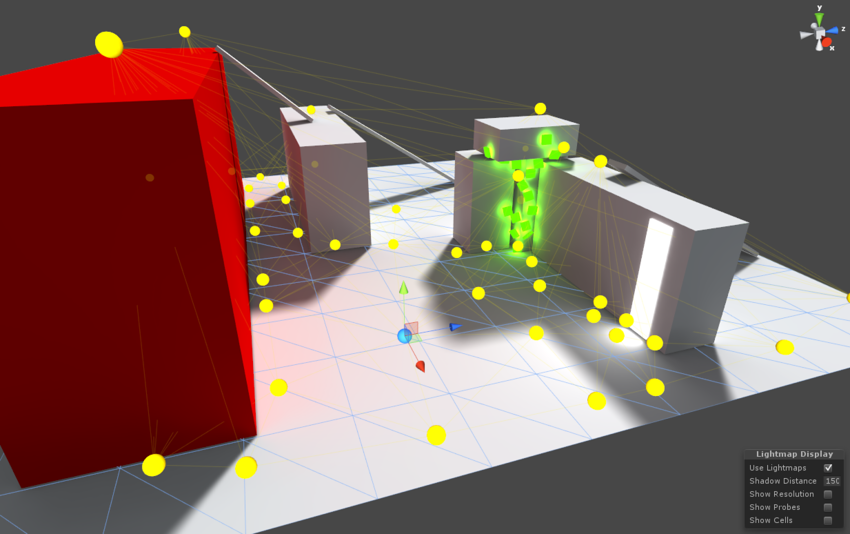
You can leave the Lights where you actually need them
Light Probes are not lights per se, they are lighting samples
nocturne hare
I had them just a little above the floor like in the pic I sent previously
didnt do fuckall shit on my avatar
tropic mulch
Yeah 30-40 cm above the floor is ok especially because small Avatars are going to get the sample from those
Then maybe you want to place some also at 150 cm above the floor more or less, and generally wherever you can reach with the avatar
You need to do nothing on the Avatar itself technically
It should work right outta the box
The way you placed them in your picture looks fine
nocturne hare
I'm assuming what decides wether an avatar is affected by it or not is not based on the avatar position, but the mesh center position, right?
tropic mulch
Exactly
The center of the Renderer bounding box
It's a good approximation
Now for a more complex case: Avatars with multiple meshes will have different "sampling" points from the Probes due to the different center of all the meshes
But you can solve that: in the Renderer, you can specify a Transform to use as the sampling point for that mesh
nocturne hare
I put a second light probe in the stair area and that light worked much better right away
this is fine? https://bocchi.is-pretty.cool/6iLWASx.png

cause I actually realized it IS affecting the avatar, just barely
tropic mulch
Yeah indeed, I'd also add some in the center anyways
because
You have ligth that fades and you may want to show that with light probes
Lemme do a semi-quick Photoshop
nocturne hare
if I click "add probe" nothing happens
tropic mulch
Probably it adds a probe in the position of a previous probe
It's there but you can't see it yet
If I recall correctly, it adds a probe where the last selected one is
Keep in mind you have to cover the entire scene with Light Probes, not only the zones affected by light
nocturne hare
 tropic mulch
More like this imho
You want avatars to catch also the reduced light outside the circles
Not only the 100% lit light in the center
nocturne hare
thing is
on PC its already reduced
the cone looks like that, but the actual range is much less
tropic mulch
Then you can put the probes closer to the center
Mind that Light Probes will not affect scene lighting
nocturne hare
now, another dumb thing, can I make something emissive on quest?
tropic mulch
With the Standard material yes, if I remember correctly
It will also affect the global lighting, if you bake it
Let's say you make a wall with an emissive texture... You then want to place some probes very near the wall so Avatars will get the light from it when close, and then some probes further away, so the Avatars will blend out of it the more they move away
nocturne hare
I'll make it more simple
now, another dumb thing, can I make something unlit on quest?
This is what the light looks like on the PC version https://bocchi.is-pretty.cool/67ZU814.png
 tropic mulch
Yeah you can with the Unlit shader
That blue light seems the perfect case for a Baked Area Light
nocturne hare
you can use the unlit shader thats not in the vrchat folder?
tropic mulch
Afaik in the Worlds you can use pretty much all the integrated Unity shaders
The hard limits are only for the Avatars... I guess?
nocturne hare
If that's true I'm gonna shit bricks
tropic mulch
Of course the docs always suggest to use the mobile ones for Words, but nothing stops you now
Also because the Unlit shader is damn cheap
nocturne hare
mobile shaders dont show the spotlights on the floor....
tropic mulch
Realtime or baked?
Mobile shaders won't show any realtime pixel light, only vertex light
Baked lights instead are shown with Mobile Lightmapped (it should be there)
nocturne hare
its baked
tropic mulch
Ok then probably you need the lightmapped one
nocturne hare
 tropic mulch
Still, the Standard shader, when lightmapped, is not so expensive
nocturne hare
lightmapped https://bocchi.is-pretty.cool/35MuJ9Y.png
 tropic mulch
Hmmmm have a try with Backed only...
nocturne hare
inb4 probes dont need mixed lighting
tropic mulch
Yeah in fact
If you place enough probes in the right spots, you don't need Realtime or Mixed
nocturne hare
this world will run on absolute potatoes on PC at this point....
tropic mulch
Yeah indeed haha
nocturne hare
woah, they show up
tropic mulch
Nice!
You can always keep the Mixed for PC and backed for Quest,
Mixed will always provide more detail (especially on Avatars with Normal Maps), but still, Backed with probes looks fine too
Ah, again... Consider using Reflection Probes too, really. They will make everything better, including things that you believe are not reflective, like the walls
nocturne hare
what the fuck happened https://bocchi.is-pretty.cool/4gsZCv9.png
 tropic mulch
Ehw what's the last thing you remember doing?
nocturne hare
could it be cause my spotlights are at intensity 35?
tropic mulch
OOOF
Definitely hahah
Intensity 1 is enough already, 2 is very flasy usually
Unless you have some funky settings in the Ambient lighting....
Like, very strong light bounces in the Lightmap settings
nocturne hare
indirect multiplier was also at 2
nocturne hare
I fucking ruined my entire fucking map
brb deleting my account, uninstalling vrchat
fuck this shit
tropic mulch
Noooo
Man if you want, you can pass the map to me and I will take care of it
I love doing this shit
At least to setup the lighting
nocturne hare
I have an idea!
it's really crazy
but imagine this
not making the world quest compat for now!
nocturne hare
I'll just not bother with mobile lighting for now
tropic mulch
Btw if you change your mind, just drop me the Unitypackage with the scene and I'll take a look
nocturne hare
I DID IT
tropic mulch
Wooohoo! Throw a pic
nocturne hare
reverted all lighting settings to original, made lights baked, added 3 probes like this https://bocchi.is-pretty.cool/4Ly1P3r.png
 tropic mulch
Veeery nice
nocturne hare
and it works on quest just like it does on pc
tropic mulch
Now remember, add some probes also in the rest of the scene
nocturne hare
yeah yeah
tropic mulch
Good boi. Glad you did it!
nocturne hare
oh btw, this is all standard shader, runs at 60+fps on oculus go
tropic mulch
Yeah Standard baked is quite fast after all, also the scene looks pretty small and easy on triangles
nocturne hare
I deleted most of the non visible faces left by my shitty probuilder skills
tropic mulch
It's a good practice
nocturne hare
dumb question
if I leave the lights on mixed, will realtime lighting from mixed sources take over probes when on PC?
tropic mulch
Hmm they should, if I remember correctly...
nocturne hare
only one way to find out!!!!!


 tropic mulch
Hue hue hue hue
The part with the light leaks from the ceiling will look good with a denser grid of Light Probes
tropic mulch
Well it's not if it's baked : P
nocturne hare
it looks cool on the wall, and will on the furniture too.
but itd be weird on avatars
tropic mulch
Imho it would look good... But yeah not necessary in the end
Not going for the AAA quality here lol
crimson canopy
Mixed lights don't "take over" probes
They'll both be used depending on the shader
Even with realtime lights you need probes
But I don't recommend any sort of realtime lighting in a Quest world
nocturne hare
is unchecking probe groups in the inspector enough to make them stop take effect?
would assume so
tropic mulch
Yeah it should, if I recall correctly
nocturne hare
having to delete them every time I upload on each platform one after the other would be real dumb.
tropic mulch
You should keep two separate scenes maybe
So you can also have some wider changes in the PC and Quest versions (maybe lightmap qaulity, realime lighting, etc)
nocturne hare
aaaaaand pc version still looks miles better lmao https://bocchi.is-pretty.cool/5EvLvvZ.png


the quest lightmap doesnt even really let you make out the light just cutting at the door there
tropic mulch
Is that a Quest or PC screenshot?
nocturne hare
PC
tropic mulch
Can I see the same zone but on Quest?
nocturne hare
screams in, oculus button, sharing, take photo, plug oculus go into pc, open cmd, adb devices, then find picture in oculus/screenshots folder
tropic mulch
So why you say it looks better on PC?
nocturne hare
¯_(ツ)_/¯
tropic mulch
...I think I'm not getting it but ok
tropic mulch
nocturne hare
if you wanna try it https://vrchat.com/home/world/wrld_1c9c0a00-6e66-4532-b21c-fa394ca6ab17
VRChat lets you create, publish, and explore virtual worlds with other people from around the world.
tropic mulch
Indeed! Will do that this evening as soon as I'm home
cinder isle
hmm, for syncing between quest and pc versions of a map, does order of objects in the hierachy matter?
if i have say, some sync'd objects that arnt there on the quest version such that the list of objects a b c d on pc is a b d on quest, that shouldnt be an issue right
nocturne hare
arent objects synced by their unique ID anyway?
cinder isle
i am having difficulties with syncing between pc and quest users, where basically pick ups are not sync'd at all for most cases, and if quest user becomes master, all triggers including local ones are broken for pc new joins
and... one object is sync'd but.. uh
moving object a on pc moves object b on quest
lol.
i'm guessing it doesnt follow objects by their full path, but by some internal id representation
nocturne hare
oof
I'm slowly starting to regret making Flipped Out crossplatform....
this is gonna bring on plenty of headaches...
tropic mulch
Maybe Adb Logcat works while Quest is connected to the pc
cinder isle
I dont understand why this is happening, 2 unrelated objects are being sync'd as one another across quest/pc lol
they have distinct full path name
and from debug menu they dont share the same id's either so its not that
this is probably a sympton of some other thing thats causing my map to break rather than the cause
 dense willow
Playing around with uploading my first Quest world (have done so for PC). First version (test) worked fine. Made some changes, re-uploaded. However, my Quest keeps uploading the first version (test) despite the newest version being on the servers. Do I need to do something special to clear my Quest cache? Is there a step I missed?
autumn pendant
You should be able to clear cache in setting top right corner ?
zenith ember
@nocturne hare No, object sync and etc are done via hierarchy structure and object names as far as I'm aware
 cyan mauve
This might of been asked alright (probably has) But is there any easy or way to combine materials in unity? I've combined as much mesh as I can and went from 488 draws to 219 and cant do much more
the only thing I can think of is the materials
nocturne hare
you checked dynamic materials? also, there's texture atlaser plugins on the asset store, but most will kinda ruin any hopes of editing the textures again in the future.
tropic mulch
Make sure you mark the objects as static
cyan mauve
Everything is static aside from 3 things
@nocturne hare Dynamic? You mean instancing? or..
I disabled all transparent materials
cyan mauve
Yeah I instance all the time very important even for desktop
saves ALOT of space doing that
also anyone know if this works?
https://assetstore.unity.com/packages/tools/utilities/pro-draw-call-optimizer-54360

Pro draw call is an editor extension that will easily reduce your draw calls by creating atlases for your models so they can share materials for static/dynamic batching.
Custom shaders?, no worries, the tool automatically recognizes any shader that uses textures.
Support...
nocturne hare
sick bruv, but its 50 bucks
cyan mauve
i map so much on this game
I'll get my uses
Can comfirm it works
219 down to 130
im getting closer!
crimson canopy
Is there a way to remove the Quest version of my world entirely?
 opal orchid
I encountered a strange issue yesterday where I was in Quest and dropped a portal to a cross-platform world. The two PC users could not load through the portal but could join. Has anyone else seen this issue? If so please ping and I’ll investigate for a canny.
vital lance
What shaders can I use for Oculus Quest versions of worlds? I'd need transparency for some texts and objects, but it's not possible with the mobile shaders that I found on Unity.
Like this 3D tic-tac-toe game board and the sign texts needs transparency.
 long zealot
What would I need to do to convert one of my worlds to quest compatible?
Vrchat on the quest needs some serious attention
 coarse grail
a ton of optimizations
tropic mulch
@vital lance in words you can still use Unity default shaders, so the transparent ones you have there are fine
Mobile VRC shaders are only for Avatars, at the moment
vital lance
That's a relief. I was worried because VRChat SDK complains about the default and unlit shaders being unsupported, when I was uploading Quest versions of my worlds. I have a friend who owns a Quest and they seemed to work just fine. I was just wondering if this would change in a future update.
tropic mulch
Probably it will... But I believe we will get a transparent shader for worlds at least
vital lance
my quest avatar world (with all avatars under 15k polys) got removed today, the reason being "excessive polygon count for users on quest" - i'm not complaining about it being removed - but this must mean that there -is- a concrete polygon limit that has already been chosen for quest. can we please be told what this limit is so that we can get our content into that range?
untold tulip
Yes there is, but we arent going to be provided it until the next update
id stick with around 5k until the next update comes out
vital lance
of course i'd love to aim for 5k but i'm not a professional, i can't get these down to 5k and still look usable
if stuff is already being removed for going above the limit, then there is already a limit - we need to know what that is
untold tulip
we do know, tupper confirmed it himself, as well as saying we will get told it next update.
Thats what he said a little bit ago, he said below 20k, but above 5k, but not by much. could be from 7k-13k is my guess, but its best to hold on and wait
vital lance
i know that's what he said
untold tulip
Tupper05/13/2019
There will be a limit on polygons on Quest avatars, we haven't announced it yet. However, it is much lower than 70k (and lower than 20k). Again, I strongly suggest aiming for 5k. That puts you well within the limits we're looking at.
The limit will be established with an upcoming release, and like the other limits, will be hard-enforced. It won't be too much higher than 5k.
vital lance
but if stuff is already being removed for going above the limit, that must mean that they already made a decision for what the limit will be - not just "5 to 20k"
untold tulip
They have..
vital lance
and... they should -tell us- that number
untold tulip
they will very soon
Theres going to be a formal update that forbids anyone from going above or seeing avatars above the amount, which isnt in place. It only makes sense that they give the limit to us at the same time as that update, theyre likely making a formal doc for it, or putting it in there. Its best to wait if you cant get down to 5k
crimson canopy
Lmao, just more inconsistency
vital lance
how frustrating, i've been hanging out exclusively with quest users and none ever complained that i caused fps drops, nor did they go under 40 with like 10 of us all in a world using 15k poly avatars
crimson canopy
They won't give us limits but they see fit to take down your world over limits that don't exist
Meanwhile Larens and Krogenit's worlds are still up
untold tulip
40 is already bad doesnt the quest go to 90 or am I mistaken
vital lance
i dont want to complain too much about the moderation itself because i kinda feel like it was retaliation of me reporting an avatar world that used a modified SDK
crimson canopy
Quest can only go up to 72
untold tulip
Ah ok
crimson canopy
And even with generic cube avatars your FPS will suffer heavily in populated worlds
The game itself is too heavy for the Quest to properly handle, you drop to 40 with 10 people regardless.
vital lance
i got the moderation email about my world being taken down at the same time as i did the one saying they acted on the report i sent
crimson canopy
No matter the avatar they're using
vital lance
the point should be that we need to know the limits
untold tulip
there should be an update any day now
imo its already been way too long since the laast update but nobody agrees with me on that one
vital lance
half a month so yeah
tropic mulch
Dumb question but are you sure the excessive polycount alert was for the avatars and not for the world itself?
vital lance
"Excessive polygon count on avatars for Quest."
yes
maybe we can crowdsource this polygon limit since they're taking their sweet time in releasing the actual number to us
it's below 15k
vital lance
i meant by finding out which worlds were removed
vital lance
or was it just mine?
vital lance
There's something wrong with pickable objects with object_sync on them in one of my worlds. For some reason some of the objects swap places for Quest users, making PC and Quest users seeing different things. Any idea what causes this and is there a way to fix this?
Also, is there a way to delete Quest version of the world without affecting the PC version of it?
Because I might just want to give up on trying to get my Monopoly world working with Quest. It has a couple of hundred pickable objects with object_sync on them (only few having gravity) and I have no easy way to check that all of them matches between PC and Quest users.
 slim ravine
5k is a goal, the limit will likely be double or just above.
either way, aim for 5k.
opal orchid
@vital lance I have heard this happen before. Is it the exact same scene being uploaded to both?
vital lance
@opal orchid Yes and no. I had to delete some sound effects from the Quest version of the world, because it was originally using PhysSound asset with a dozen of different sounds.
vital lance
Everything is the same between PC and Quest versions of the world, the only change being the missing PhysSound component from some objects.
 hexed jewel
Any chance of Open Mic Night coming to Quest?
autumn pendant
We can certainly try !
hexed jewel
 plucky turret
yay
vital lance
open mic night should be super easy to port
 compact dawn
What happen to the original Great Pug? it was up and down multiple times but it has been down for a while now...
livid ivy
@compact dawn
https://www.patreon.com/posts/great-pug-west-27011922
Patreon
Official Post from Bryan Bortz: The Great Pug - West is now live on VRChat! This is a new unique second location of The Great Pug that was built with Oculus Quest in mind. It is smaller, has a lower player cap and has fewer moving parts.Some of you may have seen work was bein...
Owlboy lists all the reason in his blog post about it
crimson canopy
Wait, so he managed to delete the quest version of his world?
compact dawn
Ah that's unfortunate it was my favorite world to go on quest
Also I was wondering if anyone here takes commissions for private custom worlds? I was talking with a world creator but he is tied up with a project so I'm looking for another person that is for hire!
coarse grail
what kind of world are you looking for
untold tulip
#community-servers-old VRCtraders, its not safe to buy things through here, as theres no moderation in the way of scammiing. Go to the vrc trader discord
coarse grail
that is a very good point
compact dawn
ah okay I'll check that out thanks!
 celest spear
we
crimson canopy
@restive turtle apparently he had a Quest build of the actual Pug up
But he canned it because the Quest just couldn't handle it
 restive turtle
i see
crimson canopy
So my question still stands, I need the ability to remove the Quest version of a world that I have, because apparently all triggers break when a Quest user joins.
restive turtle
i like smaller worlds anyway, makes me enjoy the game so much more, love the tiny pug
you need the ability? you cant just delete it 😂 ? what
now that I think about it, same goes for avatars now? no way to remove my quest avatar
crimson canopy
Yeah
nocturne hare
what if you upload an invalid file on the android slot?
vital lance
he could go with solid color textures only for the quest, throw them on an atlas, mobile shader only and he would propably still be able to use pickup objects if he uses LOD on them or maybe just can it
since its a large world though the playercount may be the biggest issue for the quest after all
nocturne hare
owlboy already experimented with a solid color only version
I remember trying it on Go
 serene lintel
The built-in VRChat Mobile shaders support vertex colours. You can paint them with Blender's vertex paint tool and it will show if you use one of those shaders.
 reef slate
How would one go about testing quest . . . . if you don't have a quest. my world has cross compatibility, but I have no clue if it's terrible or not for quest users.
vital lance
kidnap a quest user from pug west, hub, etc
plucky turret
You could ask someone with one to try it out and record a video.
I'd be happy to try it next time I'm on.
reef slate
hug
That is kind of weird that you have submit a world, but have no clue if it'll work
untold tulip
Well you cant see mobile assets on a pc, its impossible.
nocturne hare
you can disable half your CPU's cores, downclock your GPU. limit the RAM allocated to VRChat, and upload the mobile version as a PC world
dont do that
tropic mulch
Extreme
 wet canyon
Is there a need for the VRChat Mobile shaders for uploading a quest compatable world?
nocturne hare
technically no, but using them especially standard lite and lightmapped will yield better performance
wet canyon
Thanks! I want my first world to run good on both systems
opal orchid
@reef slate and anyone else, feel free to ping me to test your Quest world
I can’t guarantee same day service but I’ll add you to my visit list, let me know if there is any specific functionality to test. I can do pc and quest simultaneously but it’s a pain
reef slate
Oh hi @opal orchid . My quest world is Oneshot Cafe if you wanna test it
It's ok on PC I just have no clue for quest map and model wise
opal orchid
👍
wet canyon
Kind of new to uploading content to the quest. Is it pretty much the same way to upload worlds to the quest as it is with avatars? As in having to copy the whole thing and make it an android build
 chrome cedar
@wet canyon yes. copy the whole project, paste it with a different name (like "MyProject_Quest"), switch the platform to android, and publish just like normal
although you'll need to make sure you optimize your content enough to the recommended numbers they provided in the Quest creators program's docs
opal orchid
@reef slate I cannot get into your Quest world. I get stuck in a loading loop. I suggest disabling the video player for the quest version since it doesn't work anyway.
SyncVideoStream and SyncVideoPlayer Components
Currently, neither SyncVideoStream nor SyncVideoPlayer is supported on Quest. Putting these into a Quest world will cause severe issues! Simply remove them from the Quest version.
reef slate
ok, I took out the video player @opal orchid
plucky turret
I'll hop on and take a peek
@reef slate Looks like it still has an issue. I get stuck at Initializing World, and it tries to load again.
plucky turret
Let me know and I'll try again. 😃
reef slate
It's been reuploaded
plucky turret
Same behaviour, at least for me. @opal orchid may have more luck.
opal orchid
I’ll see if I can get someone to look at it for you @reef slate since we can’t get logs
reef slate
Have you seen the PC version @opal orchid?
opal orchid
I have but it was a few weeks ago
opal orchid
I won’t be able to test until late my time. But it is probably a lot of stuff that has to be loaded at start causes this issue. I’ll try to help you debug this weekend too
opal orchid
I totally understand
It’s too bad they didn’t keep just a Go dev version for poor devs 😭
 potent patrol
Huh... Are custom shaders allowed on quest worlds?
I'm hearing rumors that people are able to use shaders other than the special quest ones
vital lance
please do not use normal unity shaders though, use the unity mobile shaders instead
or try to find lite/stripped down versions of what you are trying to do
nocturne hare
"within reason"
vital lance
android supports shader models 3.0 and 3.5, and anything below, but unity shaders are not really performant enough in most cases even when they work fine
potent patrol
@vital lance that's actually useful for some shader gimmicks I use in my world... I'll need to optimize them some more first though I'm sure
vital lance
but yeah, you're allowed to add custom shaders, as long as they compile for android
slim ravine
Are there any specifics that would make them not compile for android
vital lance
what doesn't work on android shaders: grabpass
slim ravine
so something like that shader you helped me with awhile ago, to make the fabric wiggly, that should be fine on android?
vital lance
yes totally
slim ravine
Oh dope, i cut it assuming it was a no no
potent patrol
Looks like maybe geometry shaders are unsupported?
vital lance
and more performant than animating it or (god forbid) cloth physics
slim ravine
i did wonder what would be more performant, animation or shader
i went with a shader originally because i cant animate
potent patrol
Probably depends on how much you're animating and how many vertices you have
slim ravine
not alot and not alot
vital lance
oh right, yes, no geometry stage
potent patrol
Also how complex the shader logic is too
vital lance
this was a simple vertex shader vertex wobble
so 100% faster than skinned or cloth
I'd rip out the shadowcaster pass in mobile too 😉
and just bake shadows in the lightmaps instead
slim ravine
even 1 dyn light is too much for quest or what?
vital lance
I'd try having one directional light without shadows and only light the avatars with it, just bake the rest and lightprobe the hell out of it
dynamic realtime lights multiply the amount of drawcalls
potent patrol
Are there limits on the amount of vertex data or interpolators I should be aware of?
Oh it's listed in the docs
vital lance
yeah, you will get compiler warnings and errors about those too
as long as the compile targets are set with the proper #pragma
potent patrol
If I want to render some text with a transparent background in a quest world, would it be better to use an opaque mesh with the characters represented in the mesh, or a transparent/cutout shader with a single quad per character?
vital lance
single quad, favor texture detail over geometry detail
potent patrol
Fair enough, makes it easier for me too :)
vital lance
from the official Oculus Quest docs: Texture Sizes: Favor texture detail over geometric detail, e.g., use high-resolution textures over more triangles. We have a lot of texture memory, and it is pretty much free from a performance standpoint. That said, textures from the Asset Store often come at resolutions which are wasteful for standalone. You can often reduce the size of these textures with no appreciable difference.
potent patrol
I guess there's a rasterization bottleneck on quest gpus then?
I'm more wondering about transparency vs mesh complexity here... Though come to think of it in my case I'm using it as a background so it's not possible to Z-cull any pixel shader invocations anyway
vital lance
if possible, try to use cutout, but quest can handle alpha transparency fine, it's just costlier
since each pixel has to be read before it can be written
potent patrol
Would discarding alpha=0 pixels help or does the hw skip the framebuffer read in that case automatically?
vital lance
modern hardware all discards alpha zero pixels afaik, so it shouldn't be necessary
potent patrol
Cutout is probably doable for my purposes I guess
vital lance
if the thing is important enough, I'd use normal transparency, it's a tradeoff
but if you're rendering tree leaves or grass, cutout will improve rendering so much it's worth the hard edges, etc
opal orchid
@reef slate we don’t plan to make What a Legend for Quest at the moment, it would be more work than the original week of development.
We have made Archery and Not Bad Cars for Quest, that’s it so far
reef slate
nice
serene lintel
@potent patrol @vital lance The combination of depth writing and transparency is supposed to disable some performance optimizations the GPU does.
potent patrol
@serene lintel interesting. I don't actually need to write to the zbuffer for this, how much cheaper would transparency be with zwrite off?
serene lintel
I haven't had a chance to profile cutout with/without depth writing, and alpha blended transparency against one another yet so I can't say for certain.
I did see a significant improvement in frame rate when I disabled depth writing on the UI which is transparent (due to how Unity's UI module works).
@potent patrol You'll have to experiment with it yourself. If my understanding is correct then you may find that cutout with depth writing is more expensive than alpha blended transparency without depth writing.
potent patrol
Makes sense, since the gpu wouldn't be able to evaluate the zbuffer ahead of other rendering
vital lance
@serene lintel why would somebody write depth on a transparent quad?
serene lintel
@vital lance I wasn't speaking to any particular use-case. Just generally.
vital lance
I still can't see a scenario where you want transparency but objects behind it culled
you would have to write depth per pixel for that to make sense
I could be missing something stupidly obivous 😄
potent patrol
The bigger issue is that with cutout even, the stuff behind it has to be actually rendered. GPUs can sometimes evaluate the depth buffer before running the pixel shader and eliminate unnecessary pixel shader invocations, but if a discard or alpha blend might be coming down the pipe that's not an option
Some GPUs even do a first pass of the depth buffer using a lower resolution even, to eliminate anything behind larger polygons
vital lance
some things in unity force it too
like shadows for the main directional light use a depth prepass
serene lintel
@vital lance Cutout with depth writing is not uncommon since it avoids sorting issues.
Alpha blended transparency with depth writing I don't see being necessary for most things.
I'd probably use two passes, one that writes depth without colour (so no alpha blending), and then a second transparent pass with ZTest Equals so it only draws the front most pixels.
But that blocks overlapping transparency which often looks weird.
Works for some things
 nova rune
Do cross-platform worlds have to be the exact same for both platforms? I uploaded the same world for each platform, but the shaders are diffferent on the quest version.
nocturne hare
triggers and colliders have to be the same
the rest has to be generally the same within what you can do to optimize for quest
nova rune
The only difference is the shaders, since the whole world has low polygons anyway
nocturne hare
random tip: don't combine meshes with the ground since you can't use occlusion culling on them otherwise.
but yeah, if the only diff is shaders, you're fine.
 shut prism
anyone here have a quest and willing to test out a world. i literally cant find anyone.
potent patrol
I could in maybe six hours or so
opal orchid
@shut prism ping me with ID and I can help you.
I’m only available my evenings and weekend but can collect feedback when available
I’ll be on later tonight and can hop on Quest
opal orchid
@shut prism I'm hopping on Quest to test a few things now
shut prism
i will shoot you an invite in a sec if you dont mind
opal orchid
k
opal orchid
Everyone: I'll post this every so often but everyone making Quest worlds should know: where you normally do crunch compression on textures, click Override for Android and choose one of the ASTC options--4x4 is the best one. It will elminate the weird pixelation color banding. Do the same on your lightmaps.
Second: z fighting is much worse on Quest, so move all photos/signs/etc a little further than you would for PC off the surface behind them.
 rugged rock
So, I am planning on getting the quest: How is it compared to pc? Do you still get immersed like the rift?
sorry im just wondering
plucky turret
@rugged rock Kinda off topic for this room, but I have both a Vive and a Quest and the immersion is just as deep on the Quest. If you don’t have a gaming PC it’s a no brainer. For me I wanted the convenience and portability.
 velvet vector
@rugged rock It is way closer to mobile VR than PC vr since it uses extremly underpowered snapdragon 835 to run VR
It cannot be even compared to high end gaming PC
and is way worse than this year smartphones with snapdragon 855
tropic mulch
@rugged rock Graphics quality is low, kinda like smartphones from 2-3 years ago (but some games like Beat Saber or Superhot are almost identical to PC version). On the other hand, tracking, lens quality, screen quality and resolution are really good. Perfect if you don't have a gaming PC, or want to play 100% wireless without the need to do any setup before playing.
plucky turret
It’s an 835 with active cooling allowing it to be clocked higher than any smartphone would with the same chip. So much misinformation, but try one at a Best Buy or something and see for yourself. It’s not the pariah some folks make it out to be.
nocturne hare
if immersion was all about graphical fidelity, VRChat would have a terrible rating. most VR games for that fact.
chrome cedar
@nocturne hare correct. graphics don't matter. the experience is
velvet vector
@plucky turret yeah so much misinformation, better cooling does not make it better than even 845, but people think that it is magically will work like i7 with 2080 lol it is outdated mobile chip. Developers do miracles to make even simple games work on this in 72 FPS
plucky turret
lol
nocturne hare
we know this. we also know that 99% of current vr games can be crammed onto the thing without much compromise. now uhhh, silence, fbt user.
plucky turret
I streamed VRC from my i7 with a 2070 to my Quest for giggles. It was fun.
 sick yarrow
Wow Classy telling people to be silent.
Lycon brings up good points and much of it is fact.
vital lance
there's nothing stopping you from getting just as immersed as with PC vr though. optimization isn't magic, but there is the old saying of "any sufficiently advanced technology is indistinguishable from magic"
crimson canopy
The Quest is woefully underpowered and its popularity makes me worry for the near future of VR. If Quest becomes the default, then Oculus has essentially set VR back at least 5 years.
We'd be stuck with shitty tech demos like the Robo Recall "port" or Quest VRC until mobile catches up
vital lance
i dont think it'll become a 'default' but it's certainly a step in the direction of closed-environment console-like VR, which has both good and bad aspects associated with it
crimson canopy
Mostly bad
crimson canopy
Yeah but it would have been better if the Quest were PC connectable
That would have been good for adoption
I don't think widespread adoption of such a woefully underpowered headset is a good thing. It's like trying to get people into PC gaming by selling them a Pentium 4
vital lance
it's a matter of time until there's pretty good pc-streaming abilities for it and then it'll be sold by the users to their friends as 'you can do tethered if you want'
it really is like a console where you pay for outdated tech but you get the benefits of an ecosystem that's standardized
it can be a good thing
i dont have one and won't get one but i'll try to benefit as much as possible from any changes we (or VR in general) gets as a result
one of the big ones i'm hoping for is optimization
crimson canopy
People are already keeping optimization in mind. Quest stretches it so far that geometry becomes incredibly simplistic
In the Quest port of Robo Recall, they had to outright remove some cars from the street level for example
And ditch all the particles
If a game is made with a "Quest-first" approach, the PC port will probably lack those particles and will certainly lack the extra geometry.
sick yarrow
Yup exactly that.
and Yes you can get immersed with the Quest, but more immmersed with PCVR.
Sadly, I was thinking about getting the Quest for my friend so we could play together. Then I found out most of the worlds I go to won't work so forget it.
Also as far as wireless goes, it's good enough to "work". It can't be optimized to work like a wired set up will be. It's not fast enough. You need 60 ghz wireless.
Another possibility in the future is 5G.
candid current
Can someone post a screenshot of some Lighting Scene settings that they have found to work good for smaller/whatever worlds? Is everyone's baked shadows turning out like shit?
 astral pewter
@candid current not at all man, you can get some great results.
use progressive lightmapper, for one
occlusion volumes light probes and reflection probes too
looks surprisingly good, somehow, even at 256x256
candid current
Right on thanks
candid current
@astral pewter Have you had the issue where shadows do not show up with built and published to VRChat? The Unity scene viewport shows them just fine.
astral pewter
if they're not baked by the time you upload that'll happen
if your lights are realtime (they shouldn't be)
candid current
Ohhhhh, I have auto-gen turned off.
astral pewter
what you're seeing in the scene view is realtime or mixed lights done by the engine to give yo ua rough idea
I reccomend selecting everything in the scene that you don't want to move, set to static batch, and setting all but one light (or less) to baked
then running the generation
it's a good idea to have auto gen turned off, honestly, becase it'll re-bake every time you make something
progressive is faster but it's still better to just do it once
now if only I could figure out why my public worlds are marked private lol
candid current
Right, but should auto-gen be on when I hit build?
candid current
Hmm..
astral pewter
the lightmap properties of each mesh object need to be part of the scene
and linked correctly, sometimes doing a "clear lightmap data" then re-baking just before upload works
potent patrol
hmmm... I have a standard material object left in my world somewhere, how can I track down where it is?
 harsh seal
I still love quest.
plucky turret
After having chaperone fail me on my Vive last night and taking 20 minutes to sort out why Steam VR decided I should walk into walls, I still love my Quest too.
 urban idol
@crimson canopy the samsung Gear VR did far worse damage for VR industry when they gave out a free samsung gear VR with every samsung phone. Then reported those numbers as if people were buying the units themselves. It taught the general public VR was a gimick.
and it convinced the entire industry that mobile VR was the future, and people wanted to watch netflix in vr. because...it was the only default vr app pre-installed on the samsung gear. so Samsung happily reported that 80% of everyone who bought a samsung gear vr, their most used app was Netflix
crimson canopy
Fair point
zealous epoch
Does anyone now how do i not full my space up when i download unity asset i just need some of the thing
hexed hill
@crimson canopy I don't see how mass adoption will ever happen if an expensive gaming PC is required to get into VR.
The Quest has graphical limitations, but its gameplay seems to be on par with PC.
crimson canopy
It's not like you need a supercomputer for VR though
I ran VRC on a PC that I put together in 2011, I only upgraded the GPU a little bit since then
hexed hill
It's not just the cost too, it's how tech savvy people are.
The Quest is as easy to use as a phone or console.
vital lance
i have a friend with a 1050ti and an i3 and he can manage framerates not much better than the quest, and i can almost guarentee his system cost more than one
crimson canopy
Honestly if the Quest were PC connectable properly it wouldn't be this much of an issue
vital lance
(because he didnt build it himself of course)
crimson canopy
Probably his CPU is struggling
vital lance
it gives people an option - like consoles
hexed hill
Quest just makes VR ridiculously cheap, while keeping the gameplay the same.
I don't think it sets anything back besides graphics.
The cost difference and effort difference is a big deal though.
PC: $1000 rig, and $400 dollar headset(if you get the Rift S). Likely have to build the rig, or else it costs even more. You have to setup windows, which is effort.
Quest: $400, and the setup took like 15 minutes.
crimson canopy
I doubt the gameplay will remain the same
It's pretty clear that if Quest becomes mainstream and PC VR falls out of favor, we will see fewer good fleshed out games
And we'll just be having Robo Recall tech demos for the next years
coarse grail
hardly any in-depth Super fleshed-out Games already so I'm not sure it's going to make things worst
crimson canopy
That was kind of my point, if all we're gonna get for the next couple of years is stuff on the level of Robo Recall, that's gonna hurt VR
We were just getting out of that stage
Robo Recall is from the early Oculus days which means it's already quite barebones, and then the Quest port even has some removed level geometry (a lot of the cars) on top of that. That doesn't bode well for actual VR games.
urban idol
quest you can also bring with you and show people vr
plucky turret
The Quest is just another PSVR with some upgrades. Saying it will degrade the PC market is kind of naive.
urban idol
remember the VR industry has to undo the damage Samsung Gear VR did to the puplics perception of VR., "a cheap gimick that hurts the eyes"
urban idol
ive had a lot of people join my shiba's and join vrchat based off what they saw in some youtube videos.
they had no idea full body tracking was a thing
plucky turret
I was hoping to hop on the fbt train, but I realized I wasn't picking up the headset as much because I'm lazy and have no time to fiddle. The Quest removed the fiddling for me, and I appreciate that. Makes me wonder about Rift S, honestly.
urban idol
im on the other spectrum. i want to be fully immersed in cartoon land.
i want to see how high end this tech can go
teal valley
I’m having an issue where objects in my quest world are linking with the wrong objects in the pc version. On the quest world it’s causing objects to spawn in different spots than where I placed them. And then, for example, when I pick up a toilet plunger on quest, the pc people see me holding the microphone. Any idea on how to fix this?
potent patrol
@teal valley make sure the names of the objects are unique
teal valley
Is the naming how they link?
potent patrol
Yeah, it's based on the name of the objects on the path leading to the object synced object
So if the path name is the same you'll have problems
teal valley
When I spawned in, I saw the objects like jump to the middle of the map (not at 0,0) would the naming also cause something like that to happen?
potent patrol
Not sure, maybe they all linked up to a single object though