#quest-development
1 messages · Page 6 of 1
 thorny gust
 zealous gyro
@sacred pilot red men right now apparently, but that's changing
 crystal quest
"noodling" :udon:
 fringe ravine
noodling
 limber horizon
just from reading this I almost wanna have the quest version on PC for potato PCs and also so people can enjoy not having cancer avatars
 limber echo
Pretty exciting really, people learning for Quest will also make better PC versions.
crystal quest
Oh that's a good question. Will the avatar ratings on the Quest be changed to reflect their platform?
 wraith jewel
@limber horizon that would be very nice to test with as well
 meager haven
Oh man, Club Tornado looks like it'll be an easy quest port after reading through some of the documentation 😄
Oh wait, maybe not. Forgot all the custom shaders for the main feature 😦
limber horizon
Could have a toggle in PC version that switches between Quest and PC for performance 😮
thorny gust
Will VRChat on Quest support YouTube playback?
 hearty bluff
I'd honestly take a bet on no
 lethal junco
Don't have answers for that just yet
hearty bluff
since they're pushing for lowest download time and low memory usage
thorny gust
:/
meager haven
I'll have to see what I can recreate with standard shaders. Already under the draw count and poly count, should be able to get world size down enough by downscaling all the textures
 late eagle
Rip Nyan
thorny gust
very rip
 median arch
I wonder how mirrors are going to perform...
lethal junco
A lot of questions you guys have are going to be answered with "we don't have answers for that yet", just fyi
Give it tiiiime
wraith jewel
As I understand it, atm YouTubeDL in VRC depends on MediaFoundation, which is also the reason panels don’t work in VRChat under Proton :0
 quaint walrus
Yeah, this program is a chance for people to get going early with things we're doing still in progress
wraith jewel
Although YouTubeDL can be compiled for other platforms if I’m correct so maybe
thorny gust
Also.. when you get round to implementing it pls find a way for it to stream rather than downloading first
 coarse snow
How will the friend list system work? Will you see a icon showing when friends are in cross-play rooms, can you even add friends on the quest?
quaint walrus
@coarse snow yeah. pretty much. there's some stuff in the docs we posted but we have all that figured out and there will be more info in time.
 sacred pilot
Will Quest worlds support Udon? 🤔
coarse snow
Alright
 lone bramble
It runs on the same language, so would assume so
unless triggers are being redesigned.
 strong jackal
I look forward to making avatar testing Quest version :P
hearty bluff
I'm excited, most of my avatars are already compatible
hearty bluff
Not really!
 full condor
You can use Zbrush tools to do it automatically with a really good result
 weary solstice
@outer kite It is- But also is not. Depends how good you are with avatars.
hearty bluff
It's such a good skill to have once you know retopology. Being able to freely shape and focus later about the performance is great
weary solstice
If you can do proper avatar edits (so proper avatar creation) its not that big of a jump in learning. If your brand new it might feel like learning magic.
 crimson helm
Why the hell is Quest only worlds even an option?
lone bramble
Why should PC only world be a option?
 tardy knot
so Questies can have a space to themselves?
crimson helm
um, because Quest has limits
lone bramble
So does PC
hearty bluff
Why the hell is Quest only worlds even an option?
So you answered your own question
crimson helm
the Quest is an inferior thing, it's good that more people can come to VRC but I dont like this split on communities.
fringe ravine
this isn't a matter of performance actually, it's because the quest is a totally different platform
crimson helm
No I didnt wat
 fervent plinth
what will happen to mirrors in quest?
 snow python
@full condor pls no auto retopo you're hurting me emotionally
lethal junco
It is a Unity requirement that you build separately for different platforms. That's just how it works. So if you have a world ID that only has a Quest asset, then its a quest-only world. If you tried to force-load that asset on PC, it wouldn't work at all.
full condor
Zremesher is amazing
 outer kite
@snow python teach me the ways of retopology
snow python
RetopoFlow for blender
crimson helm
Just hope this doesnt hurt VRC or VRC for PC... Quest shouldnt take away anything since it's inferior. No way would I even bother with it
hearty bluff
I do it by hand with topogun, but a pal has recently been using retopoflow in blender. Both are great options. Retopoflow is free if you go through the github (make sure to support the creators though!!)
snow python
but if you have the source mesh, and its all in quads, it's not hard to just reduce loops manually.
Assuming the topology is good and you know which loops are key to hold the shape of the mesh.
strong jackal
looks like its time to start a retopo business, xiexe :P
lone bramble
Then don't make worlds or avatars for Quest if that really is your concern @crimson helm . The choice is there for you to decide and no one is forcing you use it
snow python
Yeah right, retopo is the bane of my existence. It's so boring. @strong jackal :P
 boreal jay
development on quest should help pc as a whole as they learn better opimzation techniques that would translate to working for both
crimson helm
No that has nothing to do with it, it's hurting everyone if they are hindered by a few, that's not worth it in my opinion. @lone bramble
meager haven
I doubt Quest-only worlds will be super popular among PC users anyways. If you look at all the popular worlds in VRC today, very few have ~10 player count caps
crimson helm
gonna be a very limited thing, which is good so more people will get proper VR
outer kite
I'll have to look all this up. Sounds like a fun challenge
 cedar coral
Wait how are we hurt? There's still cross compatible worlds
It's bringing in people who we otherwise would never meet since they don't have VR. There's still ways to meet these people and I'm sure cross compatible maps will be given their own section to make it easier
 burnt tusk
Hey I’m one of those PC-less people ✋
 smoky tangle
The big difference comes from Quest running an ARM CPU versus x86 on PC. Which is why Unity will have to compile separately. That and overall way less power and for less memory for caching
strong jackal
are there mirrors in the quest version? 🤔
burnt tusk
I don’t see why there can’t be
limber horizon
The quest is good for many reasons. The system and developement of it being crossplay and if it works out we could see it on every possible VR system.
 somber python
@strong jackal one can hope. If not si it really vrchat?
burnt tusk
VRchat on Google Cardboard
cedar coral
Avatar Test World with no mirror 
limber horizon
I'm not seeing anything regarding if Full Body IK will be viewable to Quest people.
 devout beacon
@meager haven Switch to ASTC compression instead of ETC.
limber horizon
For example I plan to make mobile versions of all avatars and have them by Fullbody so when loaded quest people can see them. How will that function?
devout beacon
Change the "Texture Compression Override" in the Build Settings window (File->Build Settings).
hearty bluff
Actually that's a great question
meager haven
Thanks for the heads up!
hearty bluff
Will fullbody avatars work on the quest? (as in viewing them, not even using them)
 ocean pewter
@hearty bluff That's a good question. Full body IK has proven to be quite resource intensive on desktop already.
hearty bluff
Not only that, having to upload avatars through android and if there's any compatibility problems
lethal junco
Don't have an answer for FBIK stuff just yet.
 weak atlas
What is the point of getting Quest if you can't access ALL Content
ocean pewter
@weak atlas To play VRChat of course on a budget
 rapid tinsel
^
hearty bluff
Because you'll still get to experience the game without having a decent PC
With this news already I'm talking to my pals who haven't had this opportunity before about them getting a quest
 queen sable
I am abroad and away from a desktop pc.
Quest could be a solution for me.
rapid tinsel
As a desktop user of VRChat with a limited budget currently. I'm looking forward to enhancing my experience with the Quest
 oblique forge
Also because the Quest would allow you to take vrc with you
Carry your Oculus or Vive with you.. Sounds difficult
ocean pewter
I'm very interested in starting development for Quest, I think Quest will bring a lot of desktop users that play on a cheap computer over to VR. I predict there gonna be a lot of Quest VRChat users.
weak atlas
But your friends might all be in a PC only world
limber horizon
There are many people that only watch the game cause they can't afford more than a console. Quest is basically a VR Console.
rapid tinsel
Also the optimization methods developers will learn should spill over to PC
quaint walrus
There's lots of good reasons. I've watched how painful it is to get people setup in VR during demos. You can just put this on and get going. It's really easy. Cross-platform worlds will be great for a whole lot of people who can't afford a PC and headset.
ocean pewter
@weak atlas That's just gonna be a limitation. I'm happy crossplay is a possibility at all!
queen sable
If they are cool and wanna hang with you, they'll change @weak atlas
smoky tangle
Then press your friends to use optimized cross platform worlds
queen sable
Tbh, often times I see people just hanging out at one spot of a genormous map or something like the cube anyway. So they might as well change for you
ocean pewter
Even as a PC user I'd like to hang out in the optimized worlds. Try to be in the pug and have more than 30fps.
 modern stag
Maybe dumb question 2.0 coming in, Will I be able to test things I wanna create for quest users without a quest? How difficult if yes, if no, can we make it a thing somehow? Might have been asked or in something I didn't read
limber horizon
Well omw home from work, seems Bestbuy has my Oculus GO order ready for pick up.
wraith jewel
I'm excited ^^
rapid tinsel
@limber horizon exciting! Wishing I didn't return mine now
ocean pewter
@modern stag Same question. I'm ready to get started on developing for Quest but I have neither a Quest nor a Go and I won't be getting them either.
oblique forge
For Ron and Tupper: thanks for being so responsive here right after the announcement. The moment I saw the recommendations I honestly expected a flame war but as you explain the decisions it seems way more acceptable.
It's going to be a challenge to get my avatars inclusive enough but I'm going to take it.
 nocturne dove
@modern stag You can't actually load quest content on PC yourself, since it's a different asset bundle. You can build it, and have a friend test, though. Also, we are making a Go build if you can get your hands on one.
quaint walrus
@raw verge You can build a PC avatar AND a Quest avatar and it'll pick the right one depending on context
modern stag
Ahhh ok, I don't know anyone with quest, will we maybe be able to get a way to check ballpark performance, maybe close to how currently we get told what our worlds/avatars performance are by the SDK?
weak atlas
Hopefully the gap between Quest and PC will vanish overtime. and good optimization will become more enforced
quaint walrus
Quest is only in the hands of developers for the moment. This is why we made a build for GO. It's not representative of Quest specs or controllers but at least you can get going and test things.
 gritty summit
Can you make avatars work on both?
hearty bluff
PC and Quest, or Quest and Go?
ocean pewter
I'm a little slow at understanding things, sorry, but does that mean that if I choose a PC compatible avatar as a PC user, for Quest users it will automatically select the Quest compatible version, so PC users in the world see my PC avatar and Quest users in the world see my Quest avatar?
fringe ravine
yes
boreal jay
similar to what happened with the worlds when updating from 5.6 to 2017
gritty summit
I assume moving around bones would break cross compatability though, what optimizations would break it working on both devices?
ocean pewter
Nice I'm really starting to like this.
gritty summit
can I have my dynamic bones on the PC version and none on the mobile?
nocturne dove
@gritty summit Yes
boreal jay
they load two completely different version of the avatar so yeah
 last cargo
So it's basically tagging both separate uploads with the same ID?
rapid tinsel
Yes
gritty summit
What would break that from working? What if I uploaded 2 completely different avatars under the same ID?
last cargo
so each platform pulls the info from it's own source for said ID then?
wraith jewel
I've been thinking of making a custom avatar (and maybe world) for when I play VRChat on the Quest, does anyone know where I can get some good modelling software?
ocean pewter
Then I see it as no big deal.
I'll keep my current avatar as it is for PC users, with a few dynamic bones and a custom shader and make a low poly,, shaderless version without dynamic bones for Quest users that looks similar enough.
wraith jewel
That is compatible with VRChat
gritty summit
@wraith jewel https://www.blender.org/

Home of the Blender project - Free and Open 3D Creation Software
wraith jewel
Thx
last cargo
Blender is a commonly used free and open source modeling software, you can get it on steam or from their site
There are also plugins (Like CATS for example) that can help you with things.
wraith jewel
Nice
I plan on making an avatar for me, then hopefully a little world to meet up with friends in and to host a VR Podcast
crystal quest
Will there be status indicators in the more details menu to show if a user is on the Quest platform or PC platform?
Alternatively, will there be icons on worlds displaying if they're cross platform/PC/quest? I'd like to know if my friend is actually joinable before I try joining ;p
lone bramble
It will be on worlds @crystal quest
rapid tinsel
Yes I believe the slide showed a Blue and Green circle symbol
lone bramble
Request access to reactions on messages in the Quest channels 
strong jackal
oblique forge
Upvoted, Mimi
lethal junco
@strong jackal I moved that to the Quest Creators board
strong jackal
Ok ty
ocean pewter
I have just done some testing on modifying an avatar to meet Quest requirements, it's really all not too bad really.
The 5k polygon limit is not too bad, you can retain details by using textures for them instead. For example creating the illusion of depth by texturing shadows.
Single material should be doable for any avatar, no dynamic bones is not a problem.
lethal junco
Using creative techniques and finding ways to imitate more complex effects with simpler implementations is the real challenge, and tbqh is pretty interesting stuff
Its easy to devour an entire 2080 with some super hyper complex effect, but its far more impressive to do the same thing and run it on a mobile CPU/GPU 😃
crystal quest
Will we possibly be seeing some quest-exclusive tools or SDKs intended for development on the quest specifically?
lethal junco
No answer yet but ideally we want to have feature parity between platforms for the SDK
crystal quest
Will homekit be revised for quest use as well?
lethal junco
No answer yet
crystal quest
👍
wraith jewel
so eh, any word on mirrors on quest? 😃
crystal quest
Been asked a few times, I'm assuming the answer is probably "no answer yet"
wraith jewel
probably not powerful enough
 tall river
ok off the bat this sounds like its a differnt game to me they way i read it is VRChat Quest differnt game or like still part of normal vrchat? I just woke up to so my interp might be off
fringe ravine
cameras are disabled I think
wraith jewel
also I'm very curious what shaders ARE allowed in worlds
quaint walrus
We're working on some things. Mirrors are key to VRChat. It's a tough problem though.
coarse snow
Docs mention unity standards 1001
wraith jewel
yeah I can imagine, they're brutal on frames
 slow girder
Cameras are disabled on avatars
wraith jewel
@coarse snow yeah, but I want to know which mobile ones
fringe ravine
says they're disabled completely
coarse snow
Ahh right fair
fringe ravine
in the optimization doc
rapid tinsel
@tall river same game but worlds and avatars need to be built for both in order to support Cross Play
weak atlas
talking bout optimization how feasible are things like eye trackin, Dynamicbones/Cloth and particle effects or are they too strenuous
crystal quest
Shaders included with unity are the only thing specified right now. Previous response says they're thinking of providing some in home solutions for shaders as well, but still being looked at
@weak atlas all dynamic bones/cloth are disabled
Particle effects are "limited"
wraith jewel
80% of shaders in unity won't work really, it would need to be mobile stripped down ones, this is my question
crystal quest
No word on eye tracking yet
lethal junco
@wraith jewel So far the list is Standard and the shaders under Mobile/*
may change at pretty much any given time, fyi
wraith jewel
ah thanks, yes, standard would have to be stripped too
coarse snow
Info I'm looking forward to the most is probably how FBT cross-play would work, if even at all
lethal junco
don't have an answer for that one yet
coarse snow
Yeah fair enough
 sweet onyx
World authors need custom shaders to enable optimizations like impostors
oblique forge
Does that mean “don't know yet“ or “can't talk about that yet“ (and no I won't push further if it's the second I'm just curious how far the Quest version already is development wise)
lethal junco
It means there is no answer we are comfortable giving yet
wraith jewel
makes sense
lethal junco
for any one of many reasons
Needing an impostor shader is definitely worth looking at, we'll make a note and look into it
no guarantees tho, lots of this is in flux
sweet onyx
But why not allow world authors to make the choice?
fringe ravine
impostors would be great
sweet onyx
Be able to edit a line in the shader for a fake light here are there (fake lighting is just adding a number: no overhead at all)
lethal junco
Because we are being very careful with shaders, and we realize there are needs and edge cases, but we also don't want to give malicious/not-so-knowledgeable actors the ability to do something we didn't account for.
Having full access to write your own shaders in VRChat PC is something that literally no other platform allows. Its a wild amount of freedom. Since we're going to a more controlled platform with VRChat Quest, we also need to measure and reevaluate the freedom given.
sweet onyx
Maybe a review process. Even something simple like a text shader that doesn't show through walls often requires a simple shader edit
lethal junco
Cases like "we need an imposter shader" are definitely legit and worth looking at, and is the kind of request/suggestion we want to see
crystal quest
Why isn't there a :PostItOnTheCanny: emote
oblique forge
Sounds all very reasonable
lethal junco
A review process sadly simply isn't viable, we neither have the bandwidth in human-hours nor the bandwidth in technically-capable-human-hours to review every single shader submission request
however, like you asked initially "we need an impostor shader" is an excellent point and something I'm noting
sweet onyx
Modern mobile hardware does have support for robustness which is used in browsers for WebGL
wraith jewel
a lot of mobile optimization is shader magic too
lethal junco
Sure, but shader freedom goes both ways
wraith jewel
but I'm sure you're well aware of that .. oh slow mode
lethal junco
you can make super optimal stuff, but you can also be extra super bad with it (out of malice or ignorance)
"still figuring things" out is the tl;dr 😃
wraith jewel
no I mean not using lighting, and having a shader fake something instead
sweet onyx
Again this is about worlds not avatars
wraith jewel
not making fast shaders per se, but using a way simpler thing to simulate a unity desktop thing
lethal junco
understood
crystal quest
I'm super glad to see that you guys are cracking down on performance numbers for the Quest. I hope that soon extends to the PC counterpart as well 👀
lethal junco
answer is still roughly the same, however
wraith jewel
I get that
zealous gyro
The google docs presentation recommends enabling GPU Instancing on avatars, but doesn't that not work on skinned mesh renderers, which would be pretty much any avatar?
I don't think there's a downside to enabling it, but still.
sweet onyx
You can build avatars that do not use skinning. See the default avatar
zealous gyro
Default avatar?
sweet onyx
Floaty hands and head
zealous gyro
Oh, is that just some static instanced meshes put on bones?
crystal quest
Grey-man is not skinned iirc
sweet onyx
Yep
zealous gyro
As long as they're batched together that seems pretty good
crystal quest
The unity cube boxoid avatar revolution is upon us
wraith jewel
it's a brave new world
fringe ravine
unity cube is too complex
crystal quest
Batched materials as far as the eye can see
crystal quest
Ah yes, let me export a cube from blender really quickly
lethal junco
there's no harm in just slamming the "GPU Instancing" checkbox on every material
wraith jewel
it's a must on mobile
zealous gyro
The real question is, why doesn't Unity have it on by default whenever possible?
lethal junco
post on their canny 🙃
zealous gyro
Since it doesn't appear to have any downsides, at worst it just won't instance something
crystal quest
Probably because it might have unintended effects on things not designed for it?
lethal junco
It probably screws with more complex shader setups
zealous gyro
Especially because shaders can already tell Unity to disable batching on it
wraith jewel
@zealous gyro because instancing is not supported on all platforms unity runs on
crystal quest
I'm interested in what Tupper is going to do for his quest avatar 😏
wraith jewel
and unity prioritizes Static batching over instancing
zealous gyro
So, can we actually start uploading Quest avatars right now?
sweet onyx
You can decimate avatars down to 5k if you're not afraid to break skinning and blend shapes.
zealous gyro
I have some avatars that would definitely fit on the Quest as-is (just gotta swap out the shader for a mobile one)
snow python
I'm going to take a picture of my avatar and slap it on a quad. Done.
zealous gyro
Whoa, that's one tri and vertex too many
snow python
Crap.
oblique forge
@crystal quest Tupper will make a 1000 poly Avatar with 16000x16000 textures. We all should do that
tardy knot
no
lethal junco
You can definitely start building and uploading for Quest (android) right now
just gotta swap platforms
as the docs and slides show
zealous gyro
Alright sweet
lethal junco
no way to view it at this very moment, but hopefully we'll change that soon when the Go build is ready
wraith jewel
the 20mb world size is compressed I presume?
 hushed sandal
@wraith jewel that's the compressed (download) size, yes. The world in active memory will be larger
 elder copper
huh, didnt realize about the Oculus GO beta. Just signed up for it
limber horizon
So one issues I considered when driving home was. Since Avatars will have 2 Versions 1 for PC 1 for Quest that get loaded based on version. Doesn't that means People could make an avatar that's racist/abusive/etc towards just Quest users? Or the other way around a Quest user could be in a nice avatar but PC see them as a giant dong
elder copper
or alpha in this case
wraith jewel
@hushed sandal thanks, it didn't mention that so I wasn't completely sure it meant asset bundle size
 fresh arch
@limber horizon that could be a bannable offense
hushed sandal
your Texture compression formats also matter, certain assets will take longer to decompress depending on the format: here's a decent guide https://docs.unity3d.com/Manual/class-TextureImporterOverride.html
 limber horizon
Yes but how would a quest only user know that others see them as porn?
hushed sandal
@wraith jewel np. In general, think of it as "bigger world size? less room in memory for Avatars"
limber horizon
I only considered this because I was thinking I could upload a Quest friendly place holder over all my avatars for Quest/Mobile users while I update over time.
fresh arch
Well hopefully avatars that are public arent.. porn
limber horizon
cloning system exist sadly
fresh arch
Yeah thats true, if it gets reported though the avatar in theory could be taken down quickly
limber horizon
Quest user might have no idea what the PC version does. Same with if I am on Quest and use a gesture, if there are no sounds etc I don't hear anything but PC users might be getting spammed with Cancer gestures
wraith jewel
maybe a max avatar bundle size is needed too
hushed sandal
^ that's planned to be limited, we'll be dialing it in
limber horizon
Good because I think that sound also exist is PC too tbh.
fringe ravine
forking over $400 for a quest so you can risk getting banned to make people have to relaunch the game sometimes doesn't sound like the most economical decision
limber horizon
Don't need a quest to upload a quest avatar.
wraith jewel
sounds great, I wouldn't mind that for the normal version either
limber horizon
Quest avatars are uploade/bundled using Unities Andriod settings. They can't load on PC and PC ones can't load on Quest. That's what I'm saying.
sweet onyx
It sounds like It's just by blueprint id. The quest users will see the quest version
weak atlas
Option to see Quest avatars even on PC would be nice
hearty bluff
Anything about avatar previews? Would we see the quest version of an avatar in the preview or just the PC one?
limber horizon
Exactly. Meaning Quest Version could be completely different avatar
sweet onyx
Vrchat supports and has for a while uploading a different version of one blueprint for multiple platforms
limber horizon
I could upload a plane via Quest upload that's just a texture saying "Haha you are poor" but everyone else on PC sees me as Whatever
smoky tangle
Yeah, I'm already expecting the troll avatars
weak atlas
Despite all this am hoping for a happy medium between "normal" mode and safety mode where all avatars default to Quest models.
smoky tangle
I think the Quest avatars being different is partially because they need to be compiled to run on an ARM processor instead of x86
fresh arch
Not all models will have quest models.
smoky tangle
Meaning even if we want to see Quest avatars on PC we probably can't
weak atlas
Damn
gritty summit
Do custom shaders that work on desktop work on mobile at all? Would changes needed to be made besides for performance reasons?
 scenic lagoon
I'd assume only built in Unity shaders would be allowed
gritty summit
I mean more like if they were theoretically allowed
scenic lagoon
Not 100% sure on the topic but changing the precision of data types would help with mobile performance
sweet onyx
But for world authors shaders allow for creative optimizations
gritty summit
you can already do mesh compression with unity
sweet onyx
It's backwards. We already know the platform requirements are different. Tupper cited some security issues, so I don't know if they are willing to change this but ai really hope they do reconsider
They seem to be open to specific shader requests for worlds though, like imposter shaders
 mystic hemlock
Pls For when the input settings?
gritty summit
It would be really cool if they figured out a way to test how well a shader performs and allow them to be uploaded based on that
ocean pewter
I just wonder what shaders are gonna be available? Without Cubed shaders avatars look.... bad
fringe ravine
"Shaders are restricted in VRChat Quest, and you can only use Unity's built-in shaders, including the Unity Mobile shaders."
gritty summit
there's unlit shading if you want a toon look
fringe ravine
they've expressed interest in toon and imposter shaders so far
 frozen parrot
Unlit is not toon 😦
gritty summit
i know, but its closer to toon shading than standard is
sweet onyx
I know someone who baked toony lighting on their avatar and use unlit
gritty summit
for the anime avatars that is, depends on what people are looking for
sweet onyx
So you can do anything with unlit just it won't respond to the world
ocean pewter
I suppose 90% will still be looking for anime avatars
hearty bluff
Shame backface culling won't be able to be turned off for quest models
ocean pewter
Look at the game now
gritty summit
a lot of people use cubed more like unlit anyways
hearty bluff
Parappa the rapper models will need some tweaking now to make them work
limber horizon
Legacy shaders have back facing In think not sure if those will work though
hearty bluff
Oh okay, I looked and didn't see anything. But we'll see
frozen parrot
Turning off back face culling is necessary for super low poly modeling...
gritty summit
there's also that trick where you put some emmission on standard shader or whatever the mobile one is to make the shading more subtle for a toony look
fringe ravine
just do it per-model in blender
hearty bluff
My plan was just to duplicate the model, flip the parts that needed to be flipped and scooch them reallllly close together
fringe ravine
duplicate the mesh and flip normals
 hazy rune
that doubles the polycount
limber horizon
noe... the limit is 5k man
frozen parrot
It will leads to over poly
fringe ravine
so does removing backface culling
sweet onyx
Not exactly: cull off is more efficient
gritty summit
off topic: i wonder if mirrors and cameras are to blame for the low poly limit
sweet onyx
In terms of fill yes but in blender the naïve approach involves doubling vertices which is twice the load on skinning
fringe ravine
oh actually yeah, makes sense
hearty bluff
Unless you've already skinned the model
gritty summit
im pretty sure that the quest can handle more than 50,000 per map, but if you use your photo camera or a mirror it adds a lot more
fringe ravine
that's a lot of vertex data
hearty bluff
It should just copy over the weights? IDK
sweet onyx
You can actually double faces without doubling verts but blender doesn't let you easily
hazy rune
probably pretty straightforward to make a script for that...
sweet onyx
I might make a unity editor script for doubling faces actually. Would be really easy.
fringe ravine
might be comfy
sweet onyx
The shader would need to do a dot product check to get proper lighting so that's probably not gonna happen
Would be if you are ok with a paper thin look with light shining through
fringe ravine
not quite as much of an issue for flat shading?
our only option for that at this point is unlit though anyway
frozen parrot
I think matcap and ambient affected shader would be nice for mobile.
sweet onyx
You'll probably have to decide if it's worth respecting the 5k limit for this
fringe ravine
gotta get that XSQuest
hearty bluff
Matcap would be interesting seeing, relatively cheap shading
crystal quest
@snow python 👀
hearty bluff
I have matcap on one of my avatars so that the eye glare moves around, that'll be static (and a lot less cool) on quest
frozen parrot
BTW, Japanese people are looking forward to sleep in VRChat with Oculus Quest. I think Unlit is too bright for VR Sleep LoL
I hope Quest has brightness control.
smoky tangle
Hmm, that brings up the battery life. I've heard it's not that long with the Quest. Hope it's possible to extend it with a battery pack, though still not sure even that would be enough for sleeping
fringe ravine
if you're sleeping, you probably have a power outlet near you
hearty bluff
I think so, it has a usbc on the side and i dont think it'd be an issue plugging that into a battery pack
fringe ravine
(not that sleeping in VR is condoned)
hearty bluff
Yeah I've seen it a few times, I don't get it
frozen parrot
I charge trackers while sleeping, so I’m ok with charging quest while sleeping.
smoky tangle
I don't like leaving my phones charging while I sleep, let alone charging a headset strapped to my face.
frozen parrot
But, I think i need a special Type-C cable which won’t break while sleep
smoky tangle
I think a type-c with a 90 degree connector would be better for charging while in use at any rate
frozen parrot
Yeah, charging battery while sleeping is little bit scary. Especially the device is close to my face.
hearty bluff
Why do people even sleep in VR? i know it's off topic
smoky tangle
Don't really care about sleeping, but the normal run time I've heard quoted is still less time than I'm often in VR
More immersion maybe?
frozen parrot
When i wake up, there is a cute girl besides me. That was my dream.
smoky tangle
I could see it sorta like how some people sleep in a voice call with their long distance S/O
rapid tinsel
I'd wager about 2 hours top for Quest battery life at least in VRC. Some reviewers said 3-4 hours depending on the title
smoky tangle
Yeah, I heard it was very dependent on title
frozen parrot
I have been played VRChat for 5,300 hours, and i think i slept in vr for at least 1000 hours.
smoky tangle
Probably longest for stuff like watching video content
gritty summit
im planning on buying a usb battery pack for the quest
rapid tinsel
Thats a good idea
gritty summit
just put it in my pocket or something
 spare sage
about quest having brightness control for sleeping, oculus go has it, so it's basically a given. so unlit isn't really the end of the world.
rapid tinsel
How well would you trust like one of these? https://www.amazon.com/Magnetic-Type-C-Reversible-Charger-OnePlus/dp/B071Y886D5
Just for charging I'd assume it'd be ass for data transfer
gritty summit
that's nifty
frozen parrot
I heard some people having issue with magnetic charging cable. Which breaks and impossible to pull out.
smoky tangle
I use some for charging my Vive controllers and trackers
rapid tinsel
I would assume with a small tweezer you could get it out.
smoky tangle
I wouldn't want to use them with anything I'm wearing because they disconnect too easy
Also yes, hard to get the end out of the device, which I have to do for firmware updates
rapid tinsel
Mhmm yeah it would have to be as strong if not stronger then the old style macbook chargers
frozen parrot
Yeah I used to use that kind of thing for Vive controllers, but it disconnects really easy.
smoky tangle
I have found they do transfer data (depending on orientation) but I don't trust them with firmware updates
rapid tinsel
I guess its cheap enough to buy to just try to see how well it holds up. This damn one click buy button gets me everytime
smoky tangle
Something like this might be helpful using the Quest with a battery pack
https://www.amazon.com/Degree-Adapter-AFUNTA-Downward-Extension/dp/B078YRKTKM/
rapid tinsel
Oooh I like that elbow that would be a must!
smoky tangle
Yeah, seems it'd make routing the power cable better
gritty summit
im so frickin hyped for this bad boy
rapid tinsel
Debating if I should add googly eyes to my Quest or not..
frozen parrot
I want something like this
smoky tangle
Not sure how well the ribbon cable would hold up, but that looks nice
frozen parrot
Oh! That’s cool. I hope i can but it from Japan.
 modern coral
Riddle me this! How do you make ObjectSync work across two different scenes?
 civic valley
Simple, we eat the Batman.
zealous gyro
Hard-set an ID?
modern coral
I tried changing them once. they always reset on me
zealous gyro
Ah that sucks
Can you manually set them with an animation event or UI Button trigger?
That would probably break things pretty hard if you even could
Well apparently you can call set_networkId(int) from an animation event
It would be a lot of work if you had many objects but you could try that
modern coral
I assume the scripts would not be happy to have those numbers changing on them
zealous gyro
I tried it like a year ago and I think the object just stopped syncing and spammed some errors in the logs
But I haven't tried it recently
modern coral
also, an animation for such a necessary and common thing is out of the question
cedar coral
is there gonna be a way to see file size?
 sinful lily
Contents of two document pages "Cross-Platform Setup" https://docs.vrchat.com/docs/cross-platform-setup and "Setting up Unity for Creating Quest Content" https://docs.vrchat.com/docs/setting-up-unity-for-creating-quest-content are identical. what's happen?
lethal junco
They are not identical, but they do have the same image.
https://docs.vrchat.com/docs/cross-platform-setup is for setting up projects you plan to use for both PC and Quest builds.
https://docs.vrchat.com/docs/setting-up-unity-for-creating-quest-content is for setting up projects you plan only to use for Quest builds.
 vivid fable
I'm excited to make worlds and avatars for quest!
 sharp barn
Which direction do I crunch compression and compress? Cramping into 20MB. Do I high or low quality? Do I want 0 crush compress or 100?
gritty summit
The lower the number, the higher the compression (but also the higher quality loss)
Try setting it to 20-40
sharp barn
And for compression, do I want high or low quality?
gritty summit
I'm going to guess low quality. You can compare the texture files size after applying these settings.
sweet onyx
Docs are back for me
sinful lily
@lethal junco I found it's not a problem of that pages. Whole https://docs.vrchat.com/docs/ is unstable now. I got an error from Cloudflare that says "Cloudflare is unable to establish an SSL connection to the origin server."
Welcome to the VRChat documentation! Here we cover all the various parts of VRChat, including in-app systems, components and systems in the SDK, and helpful tips to assist you with your creation. **You can navigate this documentation using the panel on the left side of the p...
sweet onyx
Ok was back only for a second. Docs are Flaking out again
lethal junco
We're aware and looking into it, but might not be us
smoky tangle
Seems to be back for me now
sinful lily
Also for me. now I can see "Setting up Unity for Creating Quest Content".
 limpid oriole
Will there be trigger per second limits on the quest? We have a map that has a ton of triggers
modern coral
I would not expect that to be different from PC but if it makes the world run slow, then the world runs slow.
limber horizon
My world is getting 30 FPS in Oculus GO version with 2 others.
 plain pike
Will streaming video work on the quest version of vrchat?
 tired jacinth
@plain pike maybe not because cameras will not be supported on the quest
@plain pike
plain pike
Hmmm
 sonic harbor
Unsupported on avatars
 west marten
I created tool for upload contents for oculus quest/go.
https://github.com/gatosyocora/UploadPlatformChecker
GitHub
Contribute to gatosyocora/UploadPlatformChecker development by creating an account on GitHub.
You can check selected build platform and switch this at SceneView
plain pike
Does Quest version use OpenGL ES or the Vulkan graphics API?
modern coral
If you are looking to write custom shaders, I would not worry about it.
I'm pretty sure it's OpenGL though
 pulsar fox
No audio on avatars makes no real sense as a performance restriction. I think they just just don’t want sound spam on people’s quests
sharp barn
Oh wow, the soundboards will rise up!
pulsar fox
This is gonna make quest users miss out on a lot of crossplay content
It will also be a problem for quest users that wear crossplay avatars that play sounds on pc that they cannot hear
cedar coral
Why would a creator bother to make those?
tired jacinth
A lot of people use sound for memes and funny stuff so I agree with Adeon
pulsar fox
Converting existing avatars to quest people aren’t going to strip content from the pc version they are just going to make the android version be missing what it can’t do (remove dyn bones, remove shaders, remove audio, lower poly etc) but keep PC version as-is
So yes crossplay avatars will have audio and junk on the windows version that they don’t know they are playing
limber horizon
VRChat's goal or point was never to be a meme machine with Avatars doing what they do now. It was just a side effect of it's popularity and custom Override being created. With the completion of UDON the community and way Quest users enjoy the game will be completely different most likely. Will be much more focused on enjoyable worlds than on avatars. The idea from what I can see regarding quest and whatever happens down the road is expanding the reach and accessibility of the game. There are types of content that will be enjoyable such as Soundboard users in Desktop mode and Full Body Dancers, those will still be viewable and enjoyable. I'm excited to see what kind of community shifts happen. (And those streamers would be safer in rooms of quest users anyway)
pulsar fox
If you think audio/memes on avatars shouldn’t exist you haven’t been on many games like vrchat before
It’s like the main point in things like Gmod or second life and vrchat is no different
limber horizon
I have one of the largest avatar worlds with 200 avatars many which have sounds, effects, animations, you name it. I'd love for sounds to be possible but mobile devices can only handle so many sound channels and decoding so many audio files at once.
Saying something should exist vs can exist is important as well.
pulsar fox
I get that but it wasn’t my point
Do you plan to make your avatars crossplay? If so are you going to remove the sounds?
limber horizon
I need answers on certain things first. I already have my avatar world up on Quest with 2 avatars for crossplay. I won't remove sounds or anything but instead create Quest versions of as many avatars as I can.
If quest users can trigger gesture overrides on the PC version and set things off is my biggest concern/question.
pulsar fox
I see no reason they wouldn’t
If the windows version has them and quest doesn’t it’s going to play the windows version of the animation on windows
Otherwise you are saying gestures shouldn’t be crossplay and they absolutely will be
limber horizon
I don't see how they can be without causing issues. I never claimed they shouldn't be, just not sure how they can be. It's a question afterall. I'd have tested it but oculus GO can't do gestures.
spare sage
you can map it to emotes for testing
limber horizon
the Quest Beta on PC runs at 4 FPS so hard to test that stuff atm. I think there are wany more things that need addressed before I care about memes right now.
at the end of the day Quest users not having memes doesn't effect anyone except quest users.
tired jacinth
What are the control layout for the touch controls?
spare sage
probably same as touch controllers on pc
imo custom gesture overrides with touch controllers suck, because youre bound to accidentally trigger them all the time
tired jacinth
Hmm ok
 cedar venture
So with avatars, would we be able to select one for our version of the game and one that shows to quest users?
 fair tinsel
yup
basically copy paste your avatar project and make a second copy and switch that over to Android sdk
spare sage
do all your optimization thingamajigs and then upload as usual, making sure youre on the same blueprint id. and shablam it works
cedar venture
so it wont effect my model that i would see?
spare sage
no
pc and quest models are completely separate assets, each loaded for their respective platform
if you were a cunt, you could upload a quest model for your avatar thats just a quad that says "haha noob, go buy a vive"
Im prolly going to make one of those just cause you can make funny situations out of it
fair tinsel
I saw someone earlier say they're going to make a Stickman to their Quest models
cedar venture
im just going to auto decimate mine to 5k because funny meme
nocturne dove
I'm going to pretend I don't see any of this.
spare sage
lmao
cedar venture
what shaders will be used for the quest?
spare sage
default unity shaders
fair tinsel
mobile Unity shaders
spare sage
if you want a toon look, learn to matcap
cedar venture
i cant open the publish window for this 🤔
spare sage
wdym?
cedar venture
for some reason switching to Android broke the SDK and i had to reinstall the sdk
so i just upload the model now since im on android build?
spare sage
yeah
just switch platform to android, and then publish as normal under the same id, and it wont overwrite the pc version, instead adding the assets for quest
 pulsar sage
how do i uninstall unity 5.6? every time i try to download android support it installs to 5.6 instead of the correct version?
nvm figured it out lol
pulsar sage
so now i can't seem to get the android sdk installed
 zinc thistle
Sorry noob here.. is this for quest dev you guys are talking about?...android?
 languid sparrow
This is for developing avatars and worlds for Oculus's soon to be released VR headset, the Oculus Quest.
It does run Android, but VRChat is not coming to all Android devices, just the Quest (as far as we know).
For more information, see #quest-info.
pulsar sage
you know i've realized something. with all the restrictions placed upon avatars by the oculus quest i wonder how different of a community it will be. i feel like people will be more inclined to have meaningful interactions beyond just showing off particle effects and animations with their insular group of friends.
 quiet nymph
are we limited to 1 animator ?
gritty summit
Will Fixed Foveated rending be enabled? As far as I can tell, I don't think that's on in the Go version.
devout beacon
@gritty summit It's enabled. If you use the OVRMetricsTool overlay it should show level 3 for foveation. https://developer.oculus.com/documentation/mobilesdk/latest/concepts/mobile-ovrmetricstool/
Also that tool is useful for measuring the CPU, and GPU usage of your world.
quiet nymph
So if I put a custom shader the avatar would not show ?
fair tinsel
yup
zealous gyro
Maybe these channels should be moved further down because people keep spamming them with non-Quest related stuff.
fresh arch
Anyone know why the beta is on the steam store?
There are new people thinking they can use the quest beta for lower spec systems, so people keep downloading it
languid sparrow
The beta is on the steam store so that PC users can test world and avatar cross compatibility with quest. It's too early to put Quest users in with the general population, though, so the Quest beta switches shards so PC and Quest can see each other for testing.
fresh arch
Thank you! :)
quiet nymph
The people think that the quest stand for question. If they just join the server.
 late vapor
Lol
pulsar fox
Can anyone with a Go confirm if “Toon/Lit” default shader works in go build?
sweet onyx
Don't get your hopes up yet. Even if it does, they have indicated that not all restrictions are enforced yet, and the set of included shaders is subject to change (aside from what they announced would be supported, namely the Mobile/ shaders), so even if it works on the go build, there's no guarantee it will work on the actual quest version
pulsar fox
Well I'm more interested in if it's currently whitelisted in the go, rather than if it will be / won't be in the future
but yes i do understand
 jolly nimbus
only shader you should look to use is the unity mobile shader thats only thing that has been said to work.
 celest steeple
thats kinda disappointing. https://cdn.discordapp.com/attachments/565256015013085195/565837879125999616/image0.png

 pseudo gust
I mean quest is limited without a pc @celest steeple
celest steeple
true true
pseudo gust
So in order to make the most of performance they have to get rid of/limit some of the heavier performance based features
celest steeple
mhm! understandable
fair tinsel
yep if you make the avatars in the limits presented they'll have some idea how the avatars are supposed to perform much too variable on PC
 main tulip
I am kind of disappointed that quest won’t support lights though
modern coral
Lights are intense on avatars because you can't setup layer masks and stuff to effect limited meshes.
Worlds that need flashlights can still place them in the world if perf allows.
wraith jewel
are different shaders supported?
fresh arch
@wraith jewel http://tinyurl.com/VRChat-Quest-Creators
Google Docs
Early Release Document: Some details will change for launch version on Quest Oculus Quest Quick-Start Guide Create, Share, Play.
wraith jewel
thanks
wraith jewel
lol
tired jacinth
Wait ok the oculus quest was just leaked on game for preorder by accident and it said that the release date was the 31st May if it is then im gonna be mad
Oh and it by accidently put on amazon for preorder as well then taken down WTF?!
pulsar sage
"spring 2019" and by that they meant the last day of spring lmao
 keen surge
does anyone know if you can play VRChat with the oculus quest cross platform??
pseudo gust
#quest-info @keen surge
keen surge
I looked at that and it didnt say so im asking here to see if anyone knows
pseudo gust
Yes they intend to make VRChat cross platform with quest
keen surge
Cool thx!
quiet nymph
some people talk about the 5k is the recommended. But would it be half like pc before 10k rec/20k limit) for example.
fresh arch
We wont know till they tell us
limber horizon
They might not even know till they can test/stress test but kind of hard due to noone having quest yet.
Even if they got everyone that has one plus Ouclus GO testers together, would that even compare to live?
limber horizon
Do we have any info on if VRChat will be on Quest the day of release or if it'll release shortly after? Rec Room just updated and announced we might start seeing Quest users soon. Ouclus GO was released at F8 and that's next week. Best buy employees are saying they are now seeing the boxes roll off trucks.
wraith jewel
@limber horizon I thought VRC was a launch title on Quest? Also, where is it being posted that shipments are coming into BB?
limber horizon
Well VRChat announcement says Spring 2019. So they could come out by the end of Spring.
Perhaps things will start buzzing around here again though. Since OrbusVR Reborn just launched today and is a Quest title as well.
@wraith jewel I'm going off of this post and the comments. https://www.reddit.com/r/OculusQuest/comments/bgi21c/rec_room_update_the_let_there_be_lights_edition/

reddit
57 votes and 46 comments so far on Reddit
wraith jewel
@limber horizon. Thanks :)
limber horizon
thorny gust
@limber horizon I was just about to tag you on here with a link to that Tweet, goes off what you were saying the other day 😃
gritty summit
Totally going to try and get a different avatar ported to Quest, I'd love to make a default avatar
gritty summit
I asked this on Twitter, but I'll ask here too: I've got one avatar I was thinking of porting to Quest that works great normally, but with full body kinda becomes a weird compressed hunchback. Pretty sure it's their proportions that cause this, they're cartoony and lizard like. Would that be an issue for a featured avatar submission? https://skfb.ly/6HByJ

Felix is a monster character from a series idea I’m working on! He’s very shy and insecure. Made with Maya, ZBrush, and Mari. - Felix - 3D model by 1029chris (@1029chrisB)
 undone mesa
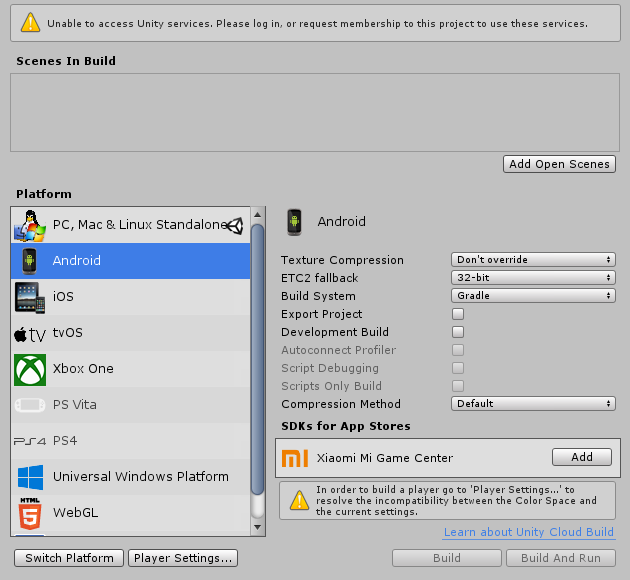
Getting this error message, I am signed in and I also installed the appropriate unity dependencies.
Do I need to do anything to fix this error, or is that not needed?
SDK says nothing about the quest, so I assume i need to? https://i.imgur.com/W7g1O9D.png


Oh there it is. Had to click switch platform again.
@gritty summit Weight paint two seperate meshes with similar uv's to the rig, and then hide the mesh dependent on each platform. Should do the trick!
 twilit delta
So uh.. how exactly does someone test if something works in quest.. since it's not out yet
sonic harbor
#quest-info @twilit delta
"Most importantly, we've got a special build of VRChat for the Oculus Go available in #go-info. If you've got an Oculus Go and want to use it to test your content you're building for Quest, check it out and sign up."
 green gyro
Alright. Sooooo.... What if you dont have an oculus go. Can we still use something that uses the android platform like lets say a gear vr?
zealous gyro
I don't think so
Only the Oculus Go will work right now, and only for testing. I wouldn't recommend buying one just for this.
 manic geode
I would just like to point out that people who wish to get the quest for vrchat are not always aware of how the cross platform worlds work. Once I mention to people they wont be able to just immediately see their pc friends unless the world is cross platform compatible, they get really confused thinking that they would be able to do exactly what they do now without issues.
I know information is there but it would appear people are missing the cross platform universe details. It would be advisable to emphasize the limitations in any upcoming or separate announcement so that people dont buy a quest and get really confused or annoyed when they cant join their friends, or they can perhaps make a better decision regarding when to buy a quest when more worlds have been ported or created for cross platform.
 glacial crane
@manic geode If the rumor is true that Facebook invested in VRchat at the same time VRchat decided to support Quest, then it's possible they are not allowed to be clear about the difference in the experience beyond simply sharing how it will work.
Facebook wants people to expect VRchat on Quest, but what Vrchat on Quest will be is certainly not nearly as exciting as VRchat on PC.. We are free to discuss it, and a lot of people have, so hopefully others were paying attention.
wraith jewel
I think a lot of people who are keeping a close eye on Quest understand the limitations of VRC on Quest and don't expect anything near PCVR version of VRC. However, I agree as I have come across people on both ends of the spectrum who overestimate or underestimate the power of the Quest.
 amber abyss
I think once the headsets are released out in the wild, that we wont have to worry too much about such wildly disparate viewpoints.
 late reef
oculus go apps pretty much universally run on the gear vr or can be sideloaded
so I would be surprised if it couldn't be done.
zealous gyro
Oh that's pretty cool, if you manage uploaded content while Unity is set to Android build, it will fetch only the Android built worlds and avatars
 shy tree
Are you allowed to use custom overrides to add some faces, or does it have to be default ?
modern coral
For the contest? They said it was best to not have gesture overrides. They stated because new users will possibly be confused by them.
shy tree
Saw that to, adding faces with the same hands, should be ok, I donno
modern coral
There is no tutorial teaching you how to do that
zealous gyro
You are allowed to have custom overrides on quest avatars, but it's preferred not to have any on the contest avatars. I think that's because the defaults will pretty much be added to the game's list of public avatars
 outer rock
So,Does Quest Gonna have a diffrent plat server from The Current Pc's VRC?
 daring zinc
Some worlds will be PC only, but others will support lower quality assets for Quest users, so PC and Quest users can play together. The lower quality assets won’t affect PC users, they’ll still see the higher quality ones
zealous gyro
The Quest ones won't necessarily be lower quality, although 99% of the time they will be
Basically, you can upload an avatar or a world for Android, and it will be visible on the Quest version. You can only join worlds that are built for the platform you're playing on, and you can only see avatars built for your own platform. Two different platforms can play together in the same instances, as long as the world is built for both platforms.
Neither the avatar nor the world have to even resemble their other platform counterpart. I've seen people that straight up use an entirely different model for their quest versions
 uncut shadow
yes
daring zinc
"We now know that worlds and avatars must have a Quest optimized version in order for Quest players to be able to join or use them. Content creators upload two versions of the same content, one for PC and another for Quest."
"If a world has a Quest version, Quest players will be able to join it and cross-play with PC users in the PC version. The “versions” refer to the graphical assets served, they are not separate instances. PC players and Quest players will see and hear eachother."
"Quest players will not be able to join PC-only worlds, and will not be able to see PC-only avatars. These requirements shouldn’t affect PC players, as they will still see the PC version of the content."
Taken from UploadVR
https://uploadvr.com/vrchat-quest-limitations-details/

UploadVR
Popular social VR platform VRChat is coming to Oculus Quest. Here are the requirements for making Quest compatible versions of avatars and worlds.
"Interactions, triggers, colliders and physics settings must be the same on both versions. However geometry, lighting, textures, materials, audio sources, and particles can and must be different."
limber horizon
Oh boy
 zealous canyon
Lol they paired touch controllers wrong XD
sonic harbor
Oh my, they did :P
You got two left hands? Well the Quest is for you!
Got two right? Well, here's the Rift S!
zealous canyon
And Go for people with one hand!
sonic harbor
If you have a left and a right hand? Sorry but you'll have to buy both Rift S and Quest
limber horizon
So this week is run around like chicken with head cut off week least for me.
making as many avatars and converting as many of my maps as I can. My Avatar world somehow isn't marked Avatar world on Oculus GO for some reason though. And dunno who to contact to fix it
smoky tangle
Probably related to the Community Labs, you have to request the classification
Now, if you want to be categorized as an “Avatar World”, a “Game World”, or a holiday world (when the holidays we create World Rows for come up), we’ll have a new form in place for that. Unfortunately, this bit still requires a bit of human intervention to categorize the world. If you request one of these tags, we’ll take a quick look to ensure that it is actually an avatar/game world, then add the categorization.

Medium
We’re going to tell you all about how we’ve tricked a bunch of robots into looking at new worlds for eternity.
There's a form you have to submit for world categorization now: https://docs.vrchat.com/docs/submitting-a-world-to-be-made-public
Want to make your world public? You've come to the right place. There's a few things you should take into consideration before submitting your world to Community Labs. Make sure you read all of this! Failure to do so may result in your world being taken down, or never lea...
limber horizon
Was informed by Tupper it's a current client issue. My worlds been live over a year and it's just a bug.
smoky tangle
Ah okay
daring zinc
The r/oculusquest subreddit is on fire right now
 native current
 alpine pier
Already posted
 spark thistle
Probably already asked thousand times, but... How much time should I play to be able to push content? I would love to create a personal avatar very early
 frail birch
some people have seen it happen as early as 5 hours in, average is probably around 24, but it can be up to and beyond 72. It's not really about playtime, it's more about actually playing the game. Visiting worlds, making friends, stuff like that.
quiet nymph
Play and add friend
spark thistle
Yeah indeed, not just watching
Unfortunately I have a real crappy pc so I guess I will directly wait for Quest to deliver and play there.
Thanks anyways!
amber abyss
Ohboy Oculus Quest Reddit is going bannanas.
limber horizon
can't blame em, Facebook has been so dang secretive on the release date
i'm working on more maps/avatars incase it hits today.
modern coral
This is not a general Quest discussion channel, please take it to #vrchat-general-2
limber horizon
With the Announcement today and the Embargo lifted. Will we see some more Quest users pop up here? Would be cool to stress test maps/avatars etc. About to upload another version of my castle. Have it down to 13mb.
daring zinc
Pre-ordered my quest just now 😉 I will hopefully be an active user on here once it's released
wraith jewel
Omg yessss
limber horizon
Posted a canny regarding one of my concerns that might need looked at or solved before release. I can't use gestures on GO nor see PC users atm to test it myself. https://vrchat.canny.io/quest-creators/p/security-concerns-involving-avatar-gestures
 sinful sapphire
Huh, Quest already in stores even though the best direct sales could do was like May 22
smoky tangle
They're not for sale in stores yet, and if you get one early you can't use it because of the app
Walmart accidentally sent some out early and they're unusable until Oculus updates the app
wraith jewel
Yes
 scenic basin
Ooof imagine getting it and still waiting
 hardy parrot
i'm actually still waiting for my 128GB storage model for Oculus Quest to ship (even though it still says it'll ship to me by May 21st on the Oculus site)
tired jacinth
Oculus takes longer to deliver Ive got mine off amazon because it’s quicker and it’s coming on day one!!!
amber abyss
I'm curious about it's overclock and heat management. The fan is supposed to come on at around 85 degrees.
Not to mention the exact features they were able to get out of that specific SnapDragon.
To be honest, kind of surprised about the low tri count for VR Chat Worlds on quest. I mean, I'm not expecting the 77K that they have for Dead and Buried, but I would have at least expected a quarter of that, around 20K tris, not 10K D:
spark thistle
Wait, aren’t Quest Words capped at 50k? Did I read the docs wrong?
https://docs.vrchat.com/docs/quest-content-optimization
Ok I had it right, characters are 5k and words 50k. It’s a pretty decent amount!
Creating content for VRChat Quest is a challenge-- you have to create attractive, compelling content all the while keeping the content optimized for a mobile device. These are the same challenges that game developers must deal with while building for mobile. Here, we'll giv...
zealous gyro
I don't think it's a cap but it is a recommended maximum
amber abyss
Ah, I must have misremembered then. Thanks for your correction 😄
smoky tangle
Oh, they bumped it up. Earlier it was lower
amber abyss
Well, that makes me feel better about my memory then.
I kind of enjoy the restrictions that the Oculus Quest kind of creates. Forces you not to go overboard and go the easy, CPU intensive route.
Though I am concerned about textures. A lot of games I see are kind of going for a blocky color textureless route. Which is fine, but I was expecting some developers to push the limits a bit. Like how DOTA skins are really pretty even though the models themselves fit around that 5K Tris limitation.
spark thistle
I too love creating content under heavy restrictions, it encourages creativity. Quest specs are fine for me
Atm I'm creating an urban environment based on a real place, and I want to try and squeeze "realistic" textures instead of pure flat colors
Imho it's very possible to do that, maybe using two 1024*1024 textures instead of one
 faint shoal
I have a question that may be dumb.
I'm making a vr phone app that is basically a "walk trough these sick apartments and relax" simulator, since is optimized for android phones, there is a chance I may (in a later time) export the maps to vr chat?
fresh arch
@faint shoal All the maps are uploaded via unity, you can upload worlds for quest Yes but you have to do it the way they set
faint shoal
I see, thanks for answering!
 near haven
Will vrchat be available for quest day 1?
 formal gulch
yes
near haven
Yay thank you
spark thistle
@lethal junco I'm looking at slide number 20 (here http://tinyurl.com/VRChat-Quest-Creators) and it says "Reprojection: 36 FPS"
Does this mean the game is fixed at 36 FPS on Quest, and is scaled up to 72 with Asynchronous Timewarp?
zealous gyro
I'm pretty sure that means it'll hit 72 FPS, but go down to 36 once you drop below 72
spark thistle
Yeah I was thinking that. I'm curious to know if a World with 10 Avatars, where every asset comply with the suggested guidelines, will hit 72fps or will be warped down to 36
zealous gyro
You will almost certainly go down to 36
Even the PC version will have issues staying at 90 FPS with 10 players using humanoid avatars.
So unless they pull off a miracle regarding the IK and networking, it'll remain CPU-heavy
spark thistle
Yeah but the PC version has potentially no limits on shaders, materials, etc etc
zealous gyro
Even if the content is optimized you'll lag with many people. You're not running into avatar issues but IK issues at that point
spark thistle
IK? It's not this heavy
zealous gyro
IK is pretty heavy
Gather an instance full of like 30 people in default avatars, and you'll lag. Ask them to switch to the AFK Pole and the lag will disappear.
The devs said so themselves, IK is a large performance factor in this game. That's one big reason why they want networked IK.
spark thistle
Wait, are we talking about Inverse Kinematic?
zealous gyro
Yes, inverse kinematics. IK
spark thistle
Ok. I'm wondering how they do it because in my past experience it's not heavy at all, just a couple of math calculations.
I mean, way faster than raycasts and skinned meshes...
I'm not talking about VRC specifically, IK in itself is really fast stuff unless you couple it with other functions like raycasts, collisions, etc, which I believe VRC does
zealous gyro
They use the Final IK asset. There's just a lot of complex calculations going on, 90 times a second. They need to solve an entire humanoid avatar using only three tracking points, and then fullbody comes into the mix too.
Final IK definitely does raycasts for VR IK in order to keep your feet on the ground. At least, I think so.
Could also be that the toes and feet are just forbidden from going higher than the parent object or whatever, which is cheaper
And then that has to happen for every player in the instance
spark thistle
Yeah I believe feet grounding is happening (they should disable this on Quest imho)
zealous gyro
They could very well have done so
spark thistle
Didn't look into Final IK actually, I always developed my custom solutions
Yeah actually tracking the head, and not only arms and legs, adds some complexity to the mix... Since it moves a lot of bones around, full 360°
zealous gyro
And then all those movements have to skin every part of the mesh too
spark thistle
Arms and legs are kinda easier since the middle bone only rotates on 1 axis, 180° more or less
Yeah, skinned meshes are heavy in general... In Unity you can setup how many vertexes any bone can affect. Default is 2 (can also set 1), but you can set 3, and it exponentially raises CPU calcs
Anyways yeah, networked IK seems like a good idea to go easy on CPU, even if that means raising quite much the amount of data transfered
zealous gyro
I hope we can turn it off locally, at least for PC
Just in case it turns out to have a degradation in how good it looks
sinful sapphire
is there a way to setup cross platform that doesn't require duplicating everything 🤔
even if I wanted two copies of the scene for detail differences, that doesn't sound hard to do with two scene files
but global project config having to be changed is annoying 😐
I feel like a directory full of symbolic links is in my future
zealous gyro
Not unless you wanna keep switching platform
I wonder how game studios handle cross-platform releases
The whole point of Unity was build once, run anywhere, kinda like MonoGame? That certainly isn't the case in practice though, unless you're making a mobile game and porting it to PC without any increase in graphical fidelity.
Like, you can set different texture sizes and qualities per platform, but it does not seem like you can change which material is used on a mesh for example.
devout beacon
This helps speed up the platform switching. https://github.com/Unity-Technologies/unity-cache-server

GitHub
Unity CacheServer optimized for multi-client local networks - Unity-Technologies/unity-cache-server
elder copper
Got the Oculus Quest pre-ordered for myself. Got the Go sold, so I have a means of getting it now
thorny gust

Medium
In preparation for our launch on the Oculus Quest next week, we’ve created a new VRChat Home and VRChat Hub for both our PC and Quest…
It's going live soon
 untold pewter
Can't wait for Quest T_T
late vapor
Me neither! I can only dream of what I'll do when I get my hands on one
zealous gyro
Quest VRC seems like it will pretty much be the same experience except with less players at a time, and less possible on avatars/worlds
It's neat for people who can't afford a high end gaming rig just yet though
late vapor
Perfect for me really since my pc isn't the best and I don't have much space for a higher end one
faint shoal
I wonder if you can take screenshots with the quest, since I like to spam twitter with screenshots of my travels
late vapor
@faint shoal You will be able to capture screenshots and videos as well as livestream on the quest
faint shoal
Yes, neat
spark thistle
I’ll try to ask again to @lethal junco, what about framerate? The slide number 20 of the Creator Program says 36 FPS Reprojection, will that be the final FPS target for the Quest version?
lethal junco
What do you mean by "target"? Target recommended for worlds for optimization, or our target for VRChat during development?
@spark thistle
I believe that line in there is merely indicating the technical specs and behavior of the Quest headset
We obviously attempt to get the best FPS possible while working on optimizations for Quest. As far as worlds go, I'd attempt to optimize as much as possible. That's a good general rule, actually-- optimize until there's nothing left to optimize. If your frames still suffer, something's wrong with your design or implementation
spark thistle
Target like, the game will be locked at 36 FPS and then reprojected to 72 FPS with Asynchronous Timewarp
I was just curious, thanks for the clarification
@lethal junco
lethal junco
No, the application runs as fast as it can given the platform's constraints
spark thistle
That’s great to hear, thanks!
quiet nymph
No one knows
 prime cove
So, quest uploads and pc uploads are segregated based on the platform they are uploaded for, and you have to upload the both to be cross compatible between the two platforms. So if we have two versions of the same model, or world, one for pc, and one for quest, how would the cross platform interactions work?
For avatars: Will quest only see the quest versions where pc will only see the pc versions? Or will they see whatever version of the model they are using for the platform they are on?
For worlds: Essentially the same question, but also if the worlds between pc and quest differ, will there be a notice about a quest user opened the world, so it is the quest version? And if there will be loading of pc to pc and quest to quest, is there any type of verification about them being the same map? Such as having a small limited map for quest, but a larger expanded map for pc?
Also getting that question about video players answered would be nice for world builders.
spark thistle
In case of cross-platform Avatars and Worlds, each platform will see its own version: PC will see PC version, Quest will se Quest version
They can actually differ, i.e. PC version can have much more graphic detail
Also as far as I understood, it's possible for the version to differ in functionality, but I suppose this will break the game in some way
I.e., PC world has different colliders than Quest world, and this will yield weird results imho
prime cove
Yeah, mostly wondering on how they will handle two different maps being uploaded to pc/quest, and how those interactions will play out for the users of the two platforms.
spark thistle
As long as the worlds are identical in functionality, there should be no difference at all in interactions
If colliders, triggers, rigidbodies, action components are identical across the worlds, it should be fine
In the docs they say that you can create a world with adequate Quest specifications, then just upload it two times, one for Quest and one for PC, without making any change, and it will work
prime cove
But then this also brings up the question of having the quest map, and then having a larger expanded pc map. Will those interactions break? Or will they simply see the pc users float off into a seemingly empty area?
spark thistle
I guess it will go like that, yeah
But the thing is, you should never make the maps different... I mean, why make the pc map bigger? Or just different at all
prime cove
Having identical maps is ideal from a certain standpoint. But the pc users will still want to have their exclusive uses.
Having a mirror, or music playing, also it would be like using lod between quest/pc.
spark thistle
Mirrors and music are supported on Quest maps
prime cove
I haven’t seen any confirmation on mirror uses, and music is limited by the file size/number of them.
spark thistle
Actually everything from the PC maps is supported on Quest maps, but with limitations (read: it's suggested to go low on amount, but there is no hard limit yet)
No, there is no actual hard limit, Tupper said that earlier
prime cove
Also still no answer for video players or steaming audio into the quest.
spark thistle
All the guidelines in the Creator Program are soft limits and suggestion for optimal Quest performance
prime cove
Yes but you can’t just expect to slam a pc world into the quest platform and expect performance. Or else this conversation has no meaning.
spark thistle
yeah in fact. In case pc users want their "exclusive" rooms, it's best to just have non cross-platform rooms, if that means ruining the experience for non-pc users
Also, converting to Quest is not a one click process, so
prime cove
Converting to quest is pretty simple, the process of optimizing for quest isn’t.
spark thistle
Yeah I meant that
prime cove
In an ideal world, things wouldn’t have exclusivity, but this is not the case. I am wondering if there are any verifications about them being similar or identical or if it’s just “the blueprint ID says it’s the same”
spark thistle
It's the latter I believe
prime cove
Alright, have there been any discussion about the vrc scripts, or limits on them? Or amount of meshes for a world?
spark thistle
Afaik no complete data or discussion on that yet... Creator Program and official docs are pretty vague on detail
This is the best we have, I suppose: http://tinyurl.com/VRChat-Quest-Creators
Google Docs
Early Release Document: Some details will change for launch version on Quest Oculus Quest Quick-Start Guide Create, Share, Play.
Amount of meshes shouldn't be a big problem as long as the total triangle count stays within 50k
prime cove
Oh. Limit says 50 in the doc. Fair enough.
spark thistle
Yeah it's a good amount. I mean there are limits on other things but imho it's still enough to create very interesting worlds
(ps sorry if I sounded harsh before, didn't mean that)
prime cove
All good. Just answering questions that need answers.
spark thistle
: )
sonic harbor
Remember that total values is what can be seen at one time, doesn't matter if there's a total of 200 draw calls and 200k polys if you can never have more than 50/50k in your view at a time so you can definitely get a lot in :)
Frame debugger is your best friend to optimize
prime cove
Yeah.
Also hopefully there will be some answers about mirrors and video players, as the last thing I can find about mirrors is from Ron saying “that’s a tough one” and I haven’t seen anything related to video players answered yet.
sonic harbor
Mirrors work, but they are obviously really expensive since they at least double the rendering, so if there's a mirror involved you should probably max 25/25k instead
spark thistle
Yeah as Q said. Basically Quest worlds should take advantage of every baking solution Unity can offer: occlusion culling, lightmaps, reflection/lighting probes, batching
zealous gyro
Mirrors triple the rendering in VR
The game uses single pass stereo rendering, which means everything is rendered once, albeit in both eyes. You're pretty much drawing to one very wide screen.
But a mirror does an additional render call for your left eye and one for your right eye, which is of course very slow
Frankly I think mirrors on the Quest will simply never not be laggy due to the GPU requirements. Mobile GPU's should only ever be expected to draw to every pixel once, which is why transparency and especially cutout should be avoided. Asking to do it three times without dropping performance is just not gonna happen, and that's in the best case.
Mirrors already drop me to 45 in desktop most of the time even in fairly empty worlds
spark thistle
In the latest blog post (the one with the new lobby and house) they talked about 2D mirrors
I have no idea what they are in the game, but I'm thinking at something that works like a front facing camera for selfies linked to a very big screen... That will require a single pass since it would be rendered only once
But it's just an assumption, no idea what they are, so please correct me : D
zealous gyro
That could be
spark thistle
Basically it's just a camera on the other side of the wall, which frustum goes exactly through the mirror quad size
Even if it renders a flat image, it will be more than enough for Quest I believe
modern coral
Occlusion Culling can be expensive on mobile, so don't crank it up.
 woven isle
The new crossplay hub has a 2d mirror.
Kinda looks like a camera that doesn't seem to bother to scale your avatar when going towards it or away from it, it does move you from side to side and up and down though.
wraith jewel
it orthographic, it’s not a canera problem 😉
wraith jewel
how do you do that mirror, is it a mroe effcient one?
wraith jewel
it's not a mirror, it's a single camera and a quad with the camera render texture on it
it's more efficient than a mirror, it's more like a flat video screen
zealous gyro
That's a good way to do it
wraith jewel
so you do a single camera and a projector? anything else to look out for to make it effcient?
wraith jewel
a single camera that renders to a rendertexture, and then a quad using standard shader or whatever you like that has that rendetexture as the main diffuse texture yes
make it more efficiant just like mirrors by making the camera only film what you want to show in the mirror, ie player, mirror reflection and maybe some environment layer you select
reducing resolution of the rendertexture etc also helps but makes it grainy and blurry
spark thistle
Good so the 2D mirrors are mostly like I expected them to be... I’ll take a look at the new hub today I guess, if I find the time
 worldly solar
so I uploaded my first world I converted to quest and everything seemed to be fine. No errors or anything. When I got into VRC to make sure I didn't damage the PC version of the world, it was gone from my "Mine" list. Luckily it was still listed on recents so I tried using that but the world didnt load and kicked me back to home.
I reuploaded the PC version and now its back, do we need to reupload the PC version when we push a Quest version? The VRC website lists the world as cross-platform still so I assume everything fixed itself and is stable after the PC version upload. 🤷
full condor
Can you send that outputlog for the session to the support email while describing the issue ?
worldly solar
thanks, email sent
spark thistle
Ok, saw the 2D mirrors, they are... Weird
Instead of ortho projection, they should use perspective with a custom frustum matrix
spark thistle
Btw we really need a voice changer for Quest. 😬
 severe steeple
Wanting to trap people so badly that you want a voice changer on Quest
 glad root
just develop a trap voice urself 4head
spark thistle
Sure better than a fake loli voice
modern coral
Off topic guys, take this elsewhere please.
spark thistle
Right. Sorry for that
 last pond
Trying the new mobile toon lit shader included in the new sdk. I get this (every other shader works fine)
Also, why am I only able to select Toon Lit??
I mean I can only see toon lit inside vrchat mobile shaders
Aren't there like 9 shaders?
yea I'll try importing again
nope, when importing only toon lit is there (????)
fresh arch
@wraith jewel That couldnt be.. further from the truth
Dynamic bones makes your hair move.. its a plugin that can be purchased. Fullbody has nothing to do with dynamic bones
pulsar fox
I recommend just animating hair. Dynamicness is overrated
Dynamic bones are not needed for full body tracking at all fyi
What you may have heard is you need avatars specifically set up for full body (legs and hips need to be set up a certain way)
Yeah that’s just colliders in the hips or just limiting the axis the hair bones can bend
But that isn’t possible on Quest, your best bet is to weight the hair down the spine
That’s how most games would do it
Also just so you are aware Quest users cannot use full body anyway 😛
There are no body trackers that work with quest yet
 steady sierra
For creating avatars im need THIS version?
fresh arch
Yes
steady sierra
thx
pulsar sage
so i just thought of an interesting question, how will people clear their cache on oculus quest?
languid sparrow
The Quest's OS is Android, just with a VR-friendly skin over it. It's known to have all of the app management features of stock Android, which includes being able to clear the data and cache of apps from the system settings.
Plus I'm guessing there'll be some sort of automatic cache management on the Quest client to prevent VRChat from taking up the relatively small available space on the device, although that's just speculation on my part.
I don't have a Quest, but here's an example from stock Android-- from the settings menu, you can view the amount of cache an application uses and clear it. There's also a "clear storage" option that'll completely reset the app, deleting user settings, etc... as well.
modern coral
This channel is for the discussion of Quest content development only. Please do not fill this channel with general Quest questions--
It's fine question for #user-support-old though!
 golden lynx
I just switched builds to android to upload a quest avatar, but for some reason the publish button just isn't there. I can see all the other options, but nothing for publishing. Is it in a different window than usual?
wraith jewel
https://www.bestbuy.com/site/oculus-quest-all-in-one-vr-gaming-headset-64gb-black/6342914.p?skuId=6342914&ref=212&loc=1&extStoreId=392&ds_rl=1266837&gclid=Cj0KCQjw2v7mBRC1ARIsAAiw34-9w0nXW7pq2tg-Ni31DvBlupEfsssauND_DccF-4ZVNLa6VoTKZrsaAuchEALw_wcB&gclsrc=aw.ds&fbclid=IwAR0tku9VvzrvYIace5j1F3MaElAFcE_lT3Mme_gweA9x17gQz_ps_xKDz3s ---- I like the price on this; it's a good price
Also I found out how the monthly payments works.. it's like a Credit Card.
fresh arch
Buy from oculus...
full condor
Can we keep non development stuff out of the channel pls !
 quiet crescent
So will Vrchat get an update for quest anytime soon in which you'll be able to see custom avatars?
And run the game as good as pc
quiet crescent
How about optimization if any chance
spark thistle
There's a bunch of videos on YT of VRC Quest, looks like it runs ok
 fleet halo
"optimization" is such a buzzword now that people barely understand what it means
spark thistle
True
spare sage
make a thing run better, or on lesser hardware.
wraith jewel
its pretty straightforward, just make it so the fps number goes up
 drowsy parcel
So i have a question
Do they know there is no limitation on uploading quest avatars? I just uploaded mine with 10 mats and 24k polys and it worked for the quest person
sadly the default materials are just shitty but yeah, is that supposed to be like that? shouldnt there be a limit for 5k 1 mat?
fresh arch
You were able to upload that? From what we've been told the limit is below 20k polys, are you sure you uploaded it correctly?
drowsy parcel
yeah, i asked a quest user ingame, she could see it
10 materials, 21k tries
that basically means quest users are fucked, no? Most people wont give a shit about optimization (they already dont) and the poor hardware will suffer for it, seems like a big issues right now o:
fresh arch
it arrived for some people today
drowsy parcel
yeah just join the crossplatform worlds, some quest users are there
spark thistle
They really need to enforce the friggin limits on the SDK and on the server
And convert the SDK to DLL only (or most of it) since that’s the most straightforward way to prevent people messing with it and override the limits
lethal junco
The limits are enforced in the client. Content that violates limits will refuse to load.
spark thistle
So what’s the actual triangle limit on Quest? 21k and 10 materials sounds like much
fresh arch
I dont think we've been given it yet, but tupper did say this much
Tupper05/13/2019
There will be a limit on polygons on Quest avatars, we haven't announced it yet. However, it is much lower than 70k (and lower than 20k). Again, I strongly suggest aiming for 5k. That puts you well within the limits we're looking at.
lethal junco
21k and 10 materials is far too much. I would still aim for 5k and 1-2 materials.
The limit will be established with an upcoming release, and like the other limits, will be hard-enforced. It won't be too much higher than 5k.
spark thistle
Oh ok. I thought it was already in effect. Thanks for clarifying.
drowsy parcel
but it loaded, i confirmed it 5 times with people they all see my avatar
in full body & all
fresh arch
tupper said itll be established in an upcoming release, meanign its not long until people cant see it anymore
drowsy parcel
ah I see, i read that wrong sorry
so will the max poly be 5k ? make it atleast 20k or something ;w;
 vital glacier
hey
fresh arch
It'll be under 20k, 5k is just the reccomended.
There will also be a limit on materials, so you should try to get that down to 1-2
drowsy parcel
would you save its safe to go for 2 mats 10k then?
vital glacier
....
fresh arch
I cant exactly say if 10k is safe since the maximum hasn't been released to us yet
but 2 mats should work, as tupper did say 1-2
vital glacier
XD
fresh arch
This is not a chat channel, #general-media @vital glacier
vital glacier
i know but im just laughing so yep
 solid kelp
I have a question regarding synced triggers for xplatform worlds. If one version has a e.g. allbufferone trigger and the other does not, will it result in any negative effects?
tired jacinth
I’ve been testing my quest for a while now and VRchat seems to crash from time to time....
fresh arch
Seems to what
lethal junco
@tired jacinth No worries. If you're experiencing issues, try contacting our support at http://help.vrchat.com/new
They'll get you set straight
 daring wraith
Pretty excited, I have airbnb working very well on the Quest right now, but really need about 10 extra mb to increase some texture sizes. 50mb really squeezing it. :\ It's reprojecting a little in some areas but overall looks awesome.
spare sage
did you try with actual players tho
daring wraith
Not yet but that will be the next test. Going to limit to 4 players, If it's bad I'll remove some furniture.
sharp barn
Oh boy, this quest is amazing. It's light, the oculus controllers aren't massive bricks like the vive controllers, and the screen has less screendoor effect than my vive (lol). The only drawback is that you need to be in an optimized world, and can only handle like 4-5 players.
I am working with a weaker CPU, I think the AI follower scripts take up some power.
But I am really glad I can fly around in a spacefighter jet in a big city at 60 frames.
 calm trout
@sharp barn what world are you doing that In that sounds awesome
sharp barn
It's my own, it's public on PC, Ranger X's Future City.
I am working on the quest version, and it runs great on a big map by yourself
I just have to remove the Robo T-Rex Restaurant in the quest version.
spark thistle
I just got my Quest a couple hours ago during lunch break, it's fantastic to say the least. Played the First Steps demo with all colleagues and it was awesome. Will play something this evening as soon as I'm back home, and then finally log in VRC
 shut stirrup
Light? The Quest is the heaviest of all mainstream headsets released thus far. ^ ^;
Perfectly within reasonable bounds of course, and impressive considering the battery, but seems strange to specifically highlight it as lightweight.
sharp barn
Maybe it was the wire attached to my head with the vive. The quest feels so much of an improvement over my vive it bothers me
shut stirrup
Oh wait, maybe you had the first edition Vive. I think that was roughly the same weight as the Quest. Also wire too yeah, I suppose that does actually add a relevant bit of unlisted weight.
 sand venture
https://docs.vrchat.com/docs/quest-content-limitations
For performance reasons, make sure you always check off "Enable GPU Instancing" on your materials.
Does this mean to turn the check off, or turn the check on?
This page will describe various limits in place for the Oculus Quest version of VRChat. These limitations are in place in the interest of performance, user safety, and discouraging malicious behavior. Find more information about limited components on our [Quest Content Optim...
 covert blaze
I'm assuming check it on
also, are there plans for supporting video players on Quest?
from my experience the default unity video players perform pretty terribly on android, but there's a video player on the asset store that uses an external JAR library to stream natively to a texture, it performs muuuuch better
covert blaze
I've read that a complete headset reboot fixes the mic issue. Try that
 silver spoke
I want to make my avatar to support quest, but unity dosen't let me to do so. I just get this error many many times: https://sfu.dy.fi/3c39/3YLGLFzqFz_76bJ3/Unity_C4nmfvBtkw.png
I have updated SDK, changed platform to Android and even removed Library forlder from project for fresh start, but not work.
Uploading for PC works fine

 fresh arch
@covert blaze vide players in vrc consume a lot of ram so probably no
 tender carbon
Courtesy of IK Update
sinful sapphire
ended up symlinking my entire Assets dir from PC project to Quest project and so far things are holding up
for the 3 avatars which are different on the quest version I just have the avatar prefabbed and make modifications to the quest one, so the common parts of that are shared too 👌
one of the git clients screwed with my symlinks but once I figure out which one it is I'll just destroy it
 maiden pilot
how do you know if an avatar works for quest or not
quiet nymph
there is an icon on the corner
 dark pier
no limits
Other than 5k polys and no DB yeah no limits
 molten bramble
I think I have a quest bug in VRC. A friend and I were on a party call in the quest menu and we went into VRC to hang. Doing this caused our mics to not work after we hung up the party call to use VRC. Any ideas? Mine started working again after a reboot, but his did not. But I could still hear him if we started another party call.
 golden niche
When people who don't know better, use marketing literally. lmao
 vivid cairn
@molten bramble Yes we had the same problem, a reboot fixed it. Seems to be a known issue also in other programs like Bigscreen and Recroom so I don't think it is vrc but a quest bug https://forums.oculusvr.com/community/discussion/75619/microphone-not-working
Oculus
Join the Official Oculus Discussion Forums and talk about Oculus Rift, Oculus Touch, Samsung Gear VR, and virtual reality.
sand venture
are all the quest shaders set to do backface culling, or if not which are which? and, if there are unculled ones, is it more efficient to solidify the mesh or use a cull off shader?
quiet nymph
There is no double sided
sand venture
got it, solidify it is then
quiet nymph
Duplicate the mesh. Alt S. Scale down and flip normal
sand venture
yeah I know how to do it, it just eats into poly budget :/
I was hoping maybe I could have one opaque single sided mat, plus one alpha double sided for a few small areas but guess not
and duplicating the whole mesh is way overkill, I don't have thousands of tris to spare here lol
quiet nymph
What you model look like
I put some double mesh in certain area. Some other its wont matter that much
 true hemlock
https://docs.vrchat.com/docs/cross-platform-setup followed to install SDK but Unity Hub wont let me use 2017.4.15f1 and most near version i can select is 2017.4.27f1. Is that also good? Or must it in 15f1, but how can i install Android SDK in 15f1?
Setting up a cross-platform world or avatar is actually quite straightforward! In short, all you have to do is use a duplicate project to build an Android version of the asset, and upload it to the same content ID as the VRChat PC asset. The client will manage which version i...
manic geode
@true hemlock you need the specific version of unity for vrchat or none of your uploaded content will be available in game. 2017.4.15f1 LTS. You can install any version of unity by itself then link it in the hub so you have easy access. you can also install the android sdk to a specific version or in some cases let the hub do it for you once you have it linked.
true hemlock
I linked 2017.4.15f1 in the hub, it showed okay up, but i cannot add there Android package. Only if i add new Unity, it will let me allow add Android part.
manic geode
you need to download the android sdk by itself again. when you run it to install it will ask you which unity you want to install it to.
true hemlock
The problem in Unity Hub, there are two steps in ADD option. Step 1 is choose version (cannot point other installed 15f1) and then step 2 will show up 😦
manic geode
you can also just open unity go to build settings and try switching to android, it will take you to the android sdk to download and install
true hemlock
i go try
The instructions are okay with Unity Hub, but they overlooked you cannot install package on 15f1. This should changed to 'open your unity and go to Build Settings', like you said. Unity Hub is not right way to get Android package because option will not show up there.
got it, and installing....
ok installed and i got options now in build settings
stay on default settings ?
texture compression is on don't override
wraith jewel
If I buy the 128gb headset is it better? xD
Or is it a storage lol
Oh.. it's just space -.-... just reading it now.
fresh arch
Id suggest going with 128
wraith jewel
if it helps with quality/performance of game i get
fresh arch
No. Its your storage..
wraith jewel
But I just want VRChat kk
fresh arch
If you run out, you wont be able to get more games
wraith jewel
It's just storage. Every launch game currently fits into the 64gb model at the same time with 13 gb left
fresh arch
Thats impressivee
wraith jewel
then i get 128 gb so I play VRchat like pro
🤔 that won't make a difference for vrchat...
fresh arch
Do you know what storage is?
Okay lets say you have a closet, its small and inside you can only fit 5 pairs of clothing. SO you decide to get a bigger one, and in that one, you can fit 10 pieces of clothing. Both work the same, the clothes remain folded, the clothes quality doesnt change, just the quantity of clothes you can have inside
Thats how storage works. It wont make the system run better, it wont make the games run better, it just will allow you to have more games (ie clothes)
wraith jewel
S ye.. let me just make 600 dollars in less than a week or so. Then I can buy one
fresh arch
Are you canadian?
wraith jewel
nope.
fresh arch
its not 600$ then :P (At least not USD)
wraith jewel
Just the quest is $600 here in Canada. That's why she asked.
I think they meant just make that much, not pay that much
fresh arch
Ah
gritty summit
If you buy it off the Oculus website, they charge no tax in Canada, so it's $549
molten bramble
@vivid cairn Thanks. Weird thing, we both did a full reboot and my kicked back on. The other players mic did not.
 safe phoenix
they should really make a way for pc users to see quest avatars in game. how am i supposed to test to see if the avatar is working good if i can only see the pc version of my cross compatible model
ive been trying to make models for the questers so that they can fit in. but its a little annoying at the moment since i have to find someone with a quest every time i want to test a model
fresh arch
@safe phoenix thats literally impossible
Quest runs mobile so that means the model for th quest is a mobile version. Pc assets cannot see mobile assets. Its not possible
 thin fern
will they eventually let quest players use the pc models?
glad root
well yes but technically no
there willl probably be a time in the future where standalone headsets have 2019 PC-equivalent hardware
fresh arch
On the quest itself no you cant ever see pc assets. The quest is mobile based,
glad root
and so will the content that people make for future PC hardware
lethal junco
Quest content must be built for Android, which is a different platform. Content built for Quest cannot be rendered on PC and vice versa. This is an inherent limitation of game engines/applications.
glacial crane
I did not expect to get a Quest, but I did when I realized I could use it for virtual desktop with my school PC. Great work Dev's on your Quest crossplay worlds. The cave under the sea really blew my mind.
Hopefully a little more rabbit can still be pulled out of the hat or other tricks employed to help the mirror situation in the world, but it really looked great as have many others.
Now if people can choose a default avatar to present to Quest users when their PC avatar does not have crossplay then there would be less generic PC's and a little more variety.
safe phoenix
That's too bad. You have to literally have a quest to test quest content. So anyone that doesnt is out of luck
fresh arch
Yes.. cuz its phsycially impossible. OR you can upload the model on a seperate blueprint with a pc shader under a pc blueprint instead of mobile lol
safe phoenix
ive been doing that but the problem is sometimes the pc one will look fine but the quest one will look all wrong on avatars that have emission textures
but i guess if it cant be done. then it cant be done just gotta find me a quest friend willing to help
 dark swallow
I would like to be able to select my pc avatar on the oculus quest but be blocked on my side and just be a pc avatar
fresh arch
What? You cant see quest ver avatars on pc vise versa.
 solid stone
If anyone knows what they are doing and can walk me through how to upload an avatar dm me. I need help especially with polygon count and how to find skins with the right amounts.
So if you want to teach me the ways of skin making please dm me.
 wispy raven
@safe phoenix I just bought the quest and like to learn some development for VRChat. I can help you with your testing if you're ok with me asking lots of questions XD
Feel free to add me on vrchat: Slash0688
zealous gyro
I wouldn't say that being unable to test another platform's content is an inherent limit of applications in general
But working around it would require a lot of effort on Unity's part, asset bundles simply have to match the platform you're playing on (and needs a "compatible" Unity version, generally the same version as the application)
 wicked silo
Can I get a rundown what quest is?
 fluid coral
Self contained VR that needs no wires or PC to play but loses the quality that you get from PC gaming.
 eager needle
Basically phone vr, but no phone
woven isle
phone vr without the phone but with pcvr (inside out) 6dof tracking.
 coral fjord
yea the 6dof and controllers are what take it far enough from the realm of plane old phone vr
So you have the same functionality of PC level VR Chat with fairly reduced graphical capabilities.
The avatars and worlds are also split into PC or Quest. So you can't see PC avatars when using the Quest.
I love being able to play anywhere though without having to stay within the range of my PCVR cable.
 hybrid dirge
how do I start a world for the quest?
spare sage
the short version is
reduce world spec requirements to meet quest limits
upload with unity platform set to Android
wraith jewel
^
spare sage
the long version is
baked lughting
baked lighting
more baked lighting
wishing for someone to gift you bakery in the asset store cause your fx 8350 is dying every single time you bake the scene
not understanding light probes
more light probes
grab oculus quest and reload world by hand every single time cause theres no easy way to do iterative testing for mobile platforms unless youre developing natively a quest or go game
3 months later you have a world, the dumb meme you made it about back then is now sorely irrelevant.
lethal junco
The channels go-info, go-testing, and quest-tutorials have all been archived. If you have guides or tutorials you'd like to share, please share them in the relevant VRChat for Oculus Quest channel!
 pearl tiger
Anyone know if theres any plans for the quest to get full body tracking peripherals?
spare sage
the oculus android spec doesn't even account for any additional peripherals. if there was to be any FBT on Quest, it would be even more hacky than using a Kinect with SteamVR
pearl tiger
Oh quest is android based? Cool. You learn something new every day
 rigid spruce
when can quest people merge their accounts ?
 iron crescent
@rigid spruce I got this from the VRChat website
You're going to need to log in to the VRChat client from Steam or Oculus, then get an Account Link token, which you'll enter here.
All of your friends, content, and reputation from your other account will be moved over to this account.
This is permanent, irreversible, and can only be done using one Steam and/or one Oculus account.
This will also give your Steam or Oculus credentials the ability to log in to this account.
rigid spruce
bruh
did u even get what i said ?, the quest usnt able to do that yet. there is no upgrade button in the settings. I just want to ask when
WAIT LMAO @iron crescent omg heyyy lol
im loudowo xdxd
iron crescent
Try logging onto the pc Oculus desktop mode then using the upgrade button if it's there
Login to the same account
rigid spruce
i can only use the oculus on quest
pseudo gust
u cant upgrade an oculus account yet
pseudo gust
cuz its not a feature yet? its still being worked on