#world-lighting
4 messages · Page 22 of 1
 fiery cape
Oh... Hmm.. What kind of effects do you want it for then? Worlds with lots of dynamic lighting like a club or moving sun?
Though I remember reading at the Furality Luma event, they did something clever that apparently gave real-time GI like effects but faked it for much better performance.
I think it required you to be using an avatar with their specially made Luma shader though.
 sharp robin
You can use it it any situation where you would want the lighting to look more realistic
Unfortunately it can get pretty expensive to run for large maps
fiery cape
What would count as a large map? Or just the overall complexity of it?
sharp robin
Usually just how much baked "Real-time GI" data you have
The more you need to update the more expensive it becomes
fiery cape
I see! I am going to need to study how to do dynamic lighting well, as I've got a friend interested in me helping them create a music venue so learning all the tricks that don't involve blowing the entire real time light budget will be fun...
sharp robin
Some arguably good aspects of it is that it is heavier on your GPU than CPU which for VRChat is nice considering most people will always be CPU bound
And you can also just choose to not update it at all meaning you could give users a toggle for if it's enabled or not
 neat rivet
fiery cape
I see! I am going to need to study how to do dynamic lighting well, as I've got ...
neat rivet
fiery cape
I see! I am going to need to study how to do dynamic lighting well, as I've got ...
It's actually precomputed realtime GI. I have a test world in labs if you interested.
fiery cape
neat rivet
It's actually precomputed realtime GI. I have a test world in labs if you intere...
Sure! Drop me a link and I could take a peek later on! :)
neat rivet
fiery cape
Sure! Drop me a link and I could take a peek later on! :)

Made to learn how to deal with the Realtime GI system․ Move the sun with your handǃ Beware of lagging․
Feel free to ask more question about the setup
fiery cape
Is the world project open source / available to see to see in terms of how it works? Or can you point me towards tutorials on the subject? Seeing the end result afterall doesn't exactly reveal how its done. 😁
neat rivet
There isn't actually much to it though. Precomputed realtime GI is a lightmap that calculate how would the light should reflect on certain surface. It actually helps enhancing indirect light reflection from realtime light source.
fiery cape
Oh wait, so this world can show the difference between the option turned on and off?
neat rivet
I'd love to but udon doesn't support much about manual lighting data settings.
fiery cape
ah, yes, I know that issue. You'd have to have an 'off' and 'on' version
I thought I'd be able to do lightmap switching but doing day/night versions requires more tricks than just that
neat rivet
Yes kinda. I'd need to upload another version of the world with realtime GI turn off.
neat rivet
fiery cape
I thought I'd be able to do lightmap switching but doing day/night versions requ...
That's actually what I'm trying to find too.
I had the idea about using realtime GI and realtime directional light source, but not sure how the performance will turn out in the real world with a lot of players.
fiery cape
This is a nice demo world, I see what you mean in terms of the strong colours reflecting properly and such on to surfaces.
neat rivet
I increased the indirect contribution so the reflection effect is lot more noticeable.
fiery cape
Ooh, and I see how if I shine a spot on a strong colour, that colour does then get stronger
The pickup lights, are they set mixed or realtime?
and important or not-important?
neat rivet
They're all realtime and set to auto.
The current setup for auto is important light
Not sure if graphic settings will set autos to not-important though
fiery cape
And cubes are point lights, torch shapes are spots and the single circle one is the sun controller?
neat rivet
All correct
fiery cape
I'm at 90 FPS on my older desktop right now, but as you say, this is with just one avatar in a test world.
Might be something just to turn on towards the end of dev of my world and review the performance results.
neat rivet
I had my friend with intel GPU in the world with all 5 lights on and about 5 players, and they said they're fine.
Probably need to increase things number next time to simulate how it will perform in the real world.
 ruby lagoon
Could do with some lighting help, who here has played Fable (OG, TLC, or Anniversary)?
XBOX and PC versions are okay, same game
Oh I'll just cut to the chase, if anyone's played Fable, you remember the Razing of Oakvale? You'll notice that a fiery red light is cast down whenever you're in a clearing, but under the shadows, it's a normal night time light, I wanna do something similar, but I'm not sure how
 fallow lark
maybe it would help if you had a picture of the light
 fallow lark
yeah that said helpful visual reference
ruby lagoon
Like genuinely? Or....?
Sorry.... I tend to have a hard time telling if someone is being genuine about something being helpful or if they're joking...
fallow lark
mostly that just looks like having enough light probes to make sure you have the appropriate lighting on your avatar
and I suppose you might could have the ambient color be Gray and a decent amount of red like Point lights to provide the red in the clearings?
ruby lagoon
So set lighting to "color", set color to gray, and have multiple point lights?
Was hoping it'd be easier than that....
Like a singular directional light...
fallow lark
ruby lagoon
Like a singular directional light...
yeah but then you would be red under the shadows
if you're trying to match the non-realistic lighting of that screenshot
ruby lagoon
Sorry....
fallow lark
no it's fine
question do you have a screenshot with the Avatar standing in like the red part

 worn river
Everytime I try to generate the lighting in my world, Unity crashes 🙃
ruby lagoon
Ouch X_X
worn river
Had it with an earlier version of this world too… then it worked again and now it’s broken
 worn river
My settings are almost identical to those
ruby lagoon
Yeah, I'm using a custom skybox w/ shader, since I really hate the default skybox....
fallow lark
in this case it's just a singular directional light turned red and the ambient color being a dark blue
worn river
I always use custom skybox lol
ruby lagoon
Awesome
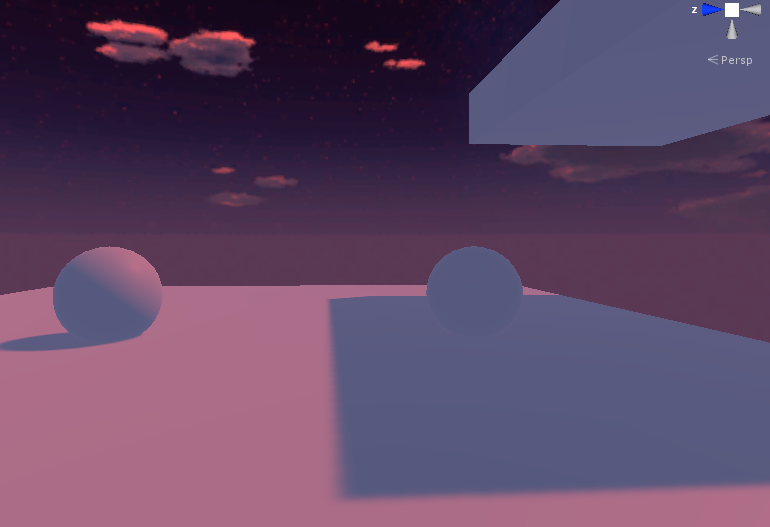 ruby lagoon
Looks like my light source will need to be- OOH! GIMME DAT SKYBOX XD
Anyway, light source, brighter, gotcha
fallow lark
I forgot where I grab the skybox
worn river
But anyway, if anyone knows how to fix my issue, please please please slide in my DMs
Or ping me idk
3 hours of troubleshooting instead of relaxing worldbuilding is not how I expected my night to go 🥲
ruby lagoon
Hmmm.... my guess is poor system specs? @worn river I'm not sure though, I'm no expert...
worn river
My pc isn’t too beefy, but seems odd that it can’t handle this
ruby lagoon
fallow lark
I forgot where I grab the skybox
All good, but I guess I oughta say what my idea is, I'm doing something similar, but with purple instead of red, because void fire X_X
worn river
So I doubt it’s my pc
ruby lagoon
worn river
My pc isn’t too beefy, but seems odd that it can’t handle this
Unity is always resource demanding, in my experience, but if you can otherwise play VRC and stuff okay, then not sure, I'd say a huge internal error, but not too sure...
ruby lagoon
Well.... this.... isn't right X_X The shadow is darker than the sphere actually is X_X

To be fair.... I'm using the VRC Default floor
There, looks a bit better, ish

 verbal cape
Have you tried Bakery? Unity doesnt calculate rays accurately so you end up having to play with the settings far to often, and then complex scenes just take an absurd amount of time to bake (like 1hr - DAYS depending on the rig). $55 on the asset store when not on sale.
ruby lagoon
Bakery costs money? Money I don't have? Goodness gracious....
verbal cape
huge 1k x 1k terrains takes me about 30mins to bake.
ruby lagoon
Bakery's not an option for me then.... I have a budget of $0
ruby lagoon
@fallow lark Ever find where you got that skybox?
fallow lark
no I hadn't
ruby lagoon
Aww, all good, hope you find it soon
fallow lark
I'm not in a big hurry to search for it
ruby lagoon
Fair enough
 dire osprey
Is there a way to do non additive lighting in bakery?
 modest vapor
Bounces to 0 ?
 lethal nebula
opinions? (don't mind the interior lol)
 modest vapor
You should bake that
lethal nebula
which?

 timid totem
Getting this weird noise on my baked lights, and this awkward squaring on the things my teleports are going to be in, any ideas for fixes?
 modest vapor
Generate lightmap UVs
 mint cipher
UV problems right?
 modest vapor
lightmap UV yeah
 flint path
What if this happens with Generate Lightmap UVs on?
 twilit lily
then you have a problem and might wanna make your own lightmap UV
 jolly cedar
So I've run into a little problem. I'm using baked lights and everything renders fine, except for my pillars

Only one seemed to turn out fine.
 twilit lily
are they set to static?
sharp robin
@jolly cedar Do you have generate lightmap UVs enabled?
sharp robin
On the mesh file import setting right at the bottom
sharp robin
mint cipher
UV problems right?
It's kind of a UV issue but more of an issue with the unity lightmapper and default settings. You can reduce those seam artifacts by enabling stitch seams on the mesh renderer
jolly cedar
sharp robin
On the mesh file import setting right at the bottom
Where exactly should I be looking? I've checked lighting settings and the pillar but couldn't find it
sharp robin
jolly cedar
Where exactly should I be looking? I've checked lighting settings and the pillar...
The mesh file itself in your assets folder
Unless you are using probuilder?
jolly cedar
I am
sharp robin
On the mesh itself then it should have this right?

Change those settings around and see if it fixes it
jolly cedar
Yeah I see that
sharp robin
Unfortunately though ProBuilder is very bad at doing UVs
jolly cedar
What do I change?
sharp robin
Increase hard angle
sharp robin
Yeah
jolly cedar
Alright, lets hope that fixed it
sharp robin
Because ProBuilder is very bad with UVs I would doubt it would be fixed
jolly cedar
Alright
sharp robin
Still worth trying but if it doesn't might have to consider exporting the mesh or editing the mesh to have seams which could also fix it
jolly cedar
Yeah it didn't work
jolly cedar
sharp robin
Still worth trying but if it doesn't might have to consider exporting the mesh o...
I'm kinda new to unity so I have no idea what all that means.
sharp robin
If you select the mesh and under the ProBuilder settings you will have this
 sharp robin
Oh are they all separate objects?
sharp robin
You could try merge them and see if that fixes it
And if that doesn't work I would seriously recommend moving away from ProBuilder and switching to Blender instead
sharp robin
jolly cedar
Can I select mutiple?
And yes you can export multiple objects at once
So you could easily export everything to blender and continue from there
sharp robin
If merging the meshes doesn't fix the issue you would want to consider exporting and using those meshes in blender
If this is the only world you plan on making using ProBuilder is fine
jolly cedar
Alright
Yeah merging everything didn't seem to work
Is there any way to un-merge objects?
sharp robin
Select the parts you want to separate and in the probuilder settings there is an option to split
jolly cedar
Can't seem to locate the split option
jolly cedar
Alright well thanks for trying to help
 sharp inlet
If i want to make lighting global, without my character being black because of the shadows how do i do it?
verbal cape
Might not be related but I can replicate that effect with a poorly placed reflection probe. (some pillars being blackened.)
verbal cape
sharp inlet
If i want to make lighting global, without my character being black because of t...
light probes
make sure the probes are in the light not the shadows and the character will only receive the data from the lighted areas
sharp inlet
Thanks!
 prime fox
Has this ever happened to anyone else?
Realtime lighting lights everything up just fine, but when I bake, everything on the ceiling REFUSES to receive any light at all. It's all just black up there.
Been trying to fix this for 3 hours now and I have no idea what I'm supposed to try.
 modest vapor

You can support me on my pateron
https://www.patreon.com/mcphersonsound
This is a longer tutorial than normal and there is a lot to cover so here are time stamps for your convivence.
00:00 what is baked lighting
00:35 setting up lights
1:23 preparing meshes to bake
2:30 generate lightmap UV
3:28 light probes
5:10 reflection probes
6:00 emissive ...
Check out the basics, might have forgotten something simple
 ruby narwhal
do you guys use generate lightmap uv's? im dealing with a particularly stubborn mesh and even making uv's in blender for better lighting is kind of annoying, (also i don't got the muns to buy bakery sadge) any pointers on where i should go from here?
sharp robin
ruby narwhal
do you guys use generate lightmap uv's? im dealing with a particularly stubborn ...
Auto generate lightmap UVs is pretty bad but usually works well enough for casual world creation
Doing the UVs manually in blender is much better and pretty fast to do once you get used to it
twilit lily
 wraith heron
What's the best lightning for a world
wraith heron
What's the best lightning for a world
there are only 3 ways you can light up your world
-real time (worst performance, no Ray Traced lights, characters and other objects cast shadows when moving around)
-baked (best performance, Ray Traced, characters and other objects dont cast shadows when moving around)
-mixed lighting (performance depends heavily on how much dynamic objects you have, basically a mix of the other 2)
wraith heron
twilit lily
there are only 3 ways you can light up your world
-real time (worst performance,...
baked looks so advanced
but it doesnt seem that baked would work well for an outside world
twilit lily
baking always works
for outside areas you just have to lower the resolution a lot to keep filesize at a reasonable level
wraith heron
twilit lily
baking always works
are there any good tutorials/short ones that I can do
I am not looking for the best baked lighting in the world, just something that'd work
fallow lark
You can support me on my pateron
https://www.patreon.com/mcphersonsound
This is a longer tutorial than normal and there is a lot to cover so here are time stamps for your convivence.
00:00 what is baked lighting
00:35 setting up lights
1:23 preparing meshes to bake
2:30 generate lightmap UV
3:28 light probes
5:10 reflection probes
6:00 emissive ...
 final smelt
prime fox
Has this ever happened to anyone else?
Realtime lighting lights everything up ju...
final smelt
prime fox
Has this ever happened to anyone else?
Realtime lighting lights everything up ju...
that can be UV map
 strange bone
twilit lily
for outside areas you just have to lower the resolution a lot to keep filesize a...
strange bone
twilit lily
for outside areas you just have to lower the resolution a lot to keep filesize a...
or just say yeet and use shadowmask xD
verbal cape
wraith heron
but it doesnt seem that baked would work well for an outside world
Unity 2018 has known issues baking outside; if you use terrain you need to drop that resolution and that just isnt acceptable. Its better in 2019 but only slightly. If you want a no hassle baking experience get Bakery. You can have skrewed up lightmap uv's and it will still look sxy. If you have an emissions addiction you might get a weird speckle; just use legacy denoiser in the Bakery settings. Literally that is all that needs changed from the default settings to get a masterpiece.
twilit lily
+1 for bakery
best thing you can get as world creator
 obsidian cape


can someone tell me why sum of my assets are black only after building and testing for vrchat but not black in unity ? everything is set to baked and static as well
modest vapor
Are they static ?
Ah, just read your edit
Make sure there's nothing in the console
obsidian cape
all the console has is that theres overlapping UV's for 200 objects
modest vapor

 mystic pulsar
so i tried to bake lighting into an area, i have this campfire with a baked mode point light, and a dim directional light as sun, but after baking it still doesn't light up any thing, normally with no baked data and realtime lights objects do light up
i have set the terrain, chairs, trees and a part of the staircase on lightmap static
light probe groups and reflection probes are set up
any tips?
 obsidian cape
mystic pulsar
so i tried to bake lighting into an area, i have this campfire with a baked mode...
obsidian cape
mystic pulsar
so i tried to bake lighting into an area, i have this campfire with a baked mode...
try moving the point light a bit higher to where its not touching anything. when lights are inside a block the light for sum reason gets trapped. or at least thats how i fixed a similar issue. worth a try for u
and also make sure u set everything not only to lightmap static but also static in general

 abstract drift
Anyone have problems with Bakery's Xatlas just suddenly not working properly?
I'd prefer to use it in the atlas packer but it won't bake after a LONG period of time anymore
default packer works but leaves this entire wall (supposed to be blank) to have all sorts of weird lightmaps in just one area


top: weird bakery lightmap
bottom: clear and intended lightmap (when Xatlas still worked properly)
sharp robin
abstract drift
Anyone have problems with Bakery's Xatlas just suddenly not working properly?
If you have hole filling enabled try disable it
sharp robin
abstract drift
disabled but no luck
Make sure all meshes have generate lightmap UVs enabled or have a second UV set already
Other than that you can try put all meshes you think might be causing issues into their own lightmap group
mystic pulsar
obsidian cape
try moving the point light a bit higher to where its not touching anything. whe...
just figured out that i had to use a different shader, as it wouldn't support the lightmaps apparently, but thanks for the tips
mint cipher

I have Ambient Occlusion on but for some reason it doesn't seem to be taking effect, can anyone help me with this?
sharp robin
mint cipher
I have Ambient Occlusion on but for some reason it doesn't seem to be taking eff...
Post processing Ambient Occlusion or in the lighting settings?
mint cipher
In the lighting settings
mint cipher
All my lights are set to baked I'm pretty sure
sharp robin
They will be realtime until you actually press the generate lighting button in the lighting settings
mint cipher
I baked the lighting and it still appears as if theres no AO
sharp robin
You can support me on my pateron
https://www.patreon.com/mcphersonsound
This is a longer tutorial than normal and there is a lot to cover so here are time stamps for your convivence.
00:00 what is baked lighting
00:35 setting up lights
1:23 preparing meshes to bake
2:30 generate lightmap UV
3:28 light probes
5:10 reflection probes
6:00 emissive ...
mint cipher
what could be causing it?
 verbal cape
mint cipher
what could be causing it?
verbal cape
mint cipher
what could be causing it?
uv maps. check out the video above your post. 2:30 timestamp
ruby narwhal
i've been fighting this for weeks, what are my options here


all separate materials, and in blender, all separate objects
 verbal cape
well, right off the bat I would suggest you just do one cube and not 25+scene. Getting one cubes lightmap uv correct is a little less stressful than watching 25 fail each time. And if you cant sort it out in Blender, its just 6 quads. a unity quad is going to have its uv sorted.
ruby narwhal
verbal cape
well, right off the bat I would suggest you just do one cube and not 25+scene. G...
im using all these random blocks and textures on purpose to try and fix it, cause in an actual export, like a house or something, i get this issue.
verbal cape
Not sure how that helps but 6 quads exported as one OBJ instantly solves your problem in Unity. Its a cube. Don't you think thats a little more efficient than playing with those magic numbers all day?
ruby narwhal
verbal cape
Not sure how that helps but 6 quads exported as one OBJ instantly solves your pr...
i'm confused, im assuming you're saying i get rid of all the textures and just make it a cube?
verbal cape
You cant sort out the lightmap UV on the Blender cube right?
A cube has 6 sides. In Blender you had to separate the faces.
If you use a Unity Quad, its already going to be UV mapped and UV light Mapped. Put 6 of them together in the form of a cube and you have 6 face just as before to decorate only now the light mapping uv works.
ruby narwhal
well, that would work here sure, but for bigger exports it would be extremely time consuming
verbal cape
you make one prefab. Its the same thing.
took me 20mins to import every texture into my faux minecraft.
ruby narwhal

like, what im saying is if i exported a huge mansion, i'd have to do all of that by hand
all of the texturing and uv mapping and stuff is handled by the program im using to export the mesh
verbal cape
so you are creating one mesh, dividing it into 1x1x1 cubes and auto texturing and uv mapping?
ruby narwhal
uh, the exported mesh already has all of that, materials and all, it splits it up into 1x1x1 cubes (only visible faces) and then uses one material per texture (it has an atlas option but mipmapping doesn't work well and it's got other issues)
it makes no lightmap uv's
but blocks of similar "families" are all one mesh
but when you have differing blocks in like a floor for example you get the issue im having
verbal cape
well yeah, same family of blocks sharing the same mesh will have the same uv. your issue is overlapping uvs. You tried the default settings for the generate in Unity? you can also view the uv map to see how much you have to edit it.
see here for visualizing https://docs.unity3d.com/Manual/LightingGiUvs.html
 ruby narwhal
verbal cape
well yeah, same family of blocks sharing the same mesh will have the same uv. yo...
ruby narwhal
verbal cape
well yeah, same family of blocks sharing the same mesh will have the same uv. yo...
all default, what i used to do was crank pack margin and that would fix it eventually but, i guess i do have to do some blender stuff then, which i've ran into a bunch of issues too
cause i'd have to up the pack margin almost to max and even then i'd get certain things with overlap
i've cranked the pack margin to 35, cleared baked data and rebaked, no overlap at all says the console, i still get the weirdness
ah, i used a few of the fancy de-noising thingys in unity 2019 and greatly reduced it

(optix will crash u if u don't have an rtx gpu)
im still open to suggestions to actually fixing it, if anyone has any, just ping me pls
modest vapor
(what are you trying to fix ?)
 round moon
Is there something about baking light probes in Bakery that breaks Silent's fog and lens flare shader effects? Every time I bake the lightmap in bakery it just turns off both effects, and the sun gets turned off too (which may be the key issue)
fallow lark


GitLab
A shader that renders a lens flare and crepuscular rays (sun rays) from the sun over the scene.
ruby narwhal
modest vapor
(what are you trying to fix ?)
im trying to make it so that instead of each block having it's own UV and the auto generate making the whole thing have tons of uv's, instead, i have a second UV, that all the blocks have, which makes it one big face instead of alot of little ones. but ofc, im newish with blender and i've had 0 luck trying to do this

i don't even know if it makes logical sense
 hallow epoch
Does anyone have advice on combating gradient jitter when baking light maps using bakery? Upping the sample size increases the number of bands but doesn't seem to do anything to smooth the transition between them. Higher resolutions and texels don't seem to have any effect.
modest vapor
ruby narwhal
im trying to make it so that instead of each block having it's own UV and the au...
Not sure i understand the difference in concept between a big face vs a lot of little ones
for lightbaking you can't have any overlap
ruby narwhal
modest vapor
Not sure i understand the difference in concept between a big face vs a lot of l...
well, if i tried to bake light onto that cube grid thing, it would come out worse compared to if it was just a default unity cube, and it's always where the uv's meet that i get ugly lighting
modest vapor
yeah, because you have a ton of overlapping faces in the actual mesh, and the vertices aren't connected
All invisible faces should be deleted
ruby narwhal
the inside faces are all gone, there's backfaces but that's about it
the vertices aren't connected? how does this affect the lightmap
i could send the blend file so that you could look at the mesh
this is what it looks inside
 modest vapor
ruby narwhal
the vertices aren't connected? how does this affect the lightmap
modest vapor
ruby narwhal
the vertices aren't connected? how does this affect the lightmap
Did you merge all vertices by distance ?
You should generate your lightmap pack after that
ruby narwhal
modest vapor
Did you merge all vertices by distance ?
i just did but it says "removed 0 vertices"
modest vapor
Alright, then select your UV2 and lightmap pack it
also there's a lot of useless vertices to dissolve
ruby narwhal
modest vapor
Alright, then select your UV2 and lightmap pack it
im having to do this for each individual object, i've found, is there a better way?
like, i have to click each mesh, go into object data properties and add a UVmap, then select it
modest vapor
Why would you want to do that ?
You'll be left with hundreds of meshes
Still unsure what you're trying to achieve here
modest vapor
Yes, that's a new lightmap
UV2 is for lightmaps, not textures
If you want to make a texture atlas, there are tools like material combiner addon from shotariya
ruby narwhal
i don't get it at all, if i export that my textures will be broken regardless of what UV i use
modest vapor
Each of your meshes is a separate texture and UV, so if you wanted to have them all as a single mesh and texture, you'd need to texture atlas them
ruby narwhal
can i just, have all the meshes share one uv and also retain their individual primary UV for texture?
modest vapor
Yes, if they all have the same UV1 map name, when you join them they'll retain their uv islands
 south furnace
Can someone recommend a place where I can get skyboxes from? I see a lot of worlds use skyboxes of different cities at night but if I try to search for something like "Hong Kong HDRI", "Tokyo HDRI" or skybox/cubemap but I just get nothing usable out of that
There are lot of skyboxes of night sky but not cities
fallow lark
equirectangular/Panorama cities in Google would help
south furnace
Are there any tutorials on how one would convert that into usable skybox in unity?
Okay I think I got it, thanks
obsidian cape
does anyone know some good ways to reduce baking time ? im using progressive gpu already and its not fast enough. i have a fairly small world
modest vapor
Seeing your settings would help
obsidian cape
 obsidian cape

so the bake time kinda bumped down to an hour and i had nothing better to do so i jus waited for it to finish and now i stumbled upon another problem. the shadows are weird. is this cus of overlapping UV's or sumthing else? cus i already have the models set to generate UV's on the import settings
modest vapor
obsidian cape
so the bake time kinda bumped down to an hour and i had nothing better to do so ...
You would have to check the console after the bake, it warns if the lightmap UVs overlap
obsidian cape
ya uhh it says theres like 207 overlapping UV’s
modest vapor
ouch
Might wanna try with bigger sized lightmaps ?
You sure you generated lightmap UVs for all your objects ?
obsidian cape
yess i think so, just to make sure tho, after checking Generate UV’s on import settings, do i have to put the model into the scene again, or does it apply it to the already existing models in the scene ?
modest vapor
It applies it, but you have to bake the scene again
obsidian cape
oh ye i did that
imma try bigger sized light maps and bake again and see if that makes a difference
 true herald
Anyone know what could be causing this on my plane?

Yes, I've generated lightmap UV's. Yes, it's properly UV Unwrapped.
I've cleared baking data, re-setup the lighting, reapplied Bakery lights to everything, and removed/added different types of lights to the scene just to see if it's some problem with the direct light.
sharp robin
true herald
Anyone know what could be causing this on my plane?
Having the object properly UV unwrapped isn't enough
Every lightmapped object in your scene needs to have proper lightmap UVs
true herald
Well, they all do from what I can see.
true herald
sharp robin
Having the object properly UV unwrapped isn't enough
This suddenly started happening after I added a staircase in it
And it's ONLY with Bakery, but the built in lightmapper with Unity is so slow with this scene but it does work without having this problem.
Welp, now I got it to do this, but still can't figure out where the shadow is coming from.
 sharp robin
true herald
This suddenly started happening after I added a staircase in it
sharp robin
true herald
This suddenly started happening after I added a staircase in it
Go to the lighting tab and in baked lightmaps open the preview
Shows you the UVs and you should be able to see if there's any overlap
true herald
Give me a sec, was fiddling with Bakery settings to see if it was the amount of texels I was using.
If I have to remake the plane I'll remake the plane.
...Oh wait a second.
Could it be the glass panes I threw in, because I just stretched them out slightly past the walls (Because I'm lazy)?
Anyways, baking currently, give me a moment and I'll check here.

This is literally the lightmap, I don't see anything overlapping other than the findley piece in the center which is just where an elevator goes below the map.
sharp robin
You could try put it in its own lightmap group
If it still had that shadow after that something is likely wrong with the mesh
true herald
So I've never actually done that, how would I throw it in it's own lightmap group?
sharp robin
Add a component called bakery lightmap group
Should be pretty straight forward after that
true herald
Can do, I'll give it a shot.
true herald
sharp robin
Add a component called bakery lightmap group
I'm also recreating the mesh just to see if it was something I changed on the plane or something, thought it was rotation and scale I had to apply but it wasn't, so here goes another attempt!
true herald
sharp robin
Add a component called bakery lightmap group
All I have is Bakery Lightmap Group Selector, is that what you're referring to?
Nope, didn't fix it...That's so odd, I don't know what would be wrong with the mesh suddenly.
sharp robin
I have seen similar issues with the unity lightmapper but not bakery
true herald
I seem to have a problem with this every time I start a new project at least once.
And I never know what I do to fix it.
I'm gonna try just doing a blank plane without the trees on it once, just overlapping the old plane.
obsidian cape
hi can someone tell me what this means
Lighting data asset ‘LightingData’ is incompatible with the current Unity version. Please use Generate Lighting to rebuild the lighting data. Realtime Global Illumination cannot be used until the lighting data is rebuilt.
UnityEngine.GUIUtility:ProcessEvent(Int32, IntPtr)
sharp robin
You need to rebake the lighting
obsidian cape
oh okay
true herald
...What the heck. This is 4 individual planes and it's doing this even now,
https://gyazo.com/2f6e448cce44f408f9518465f933dfd4
 sharp robin
Unity planes?
true herald
Just a generated one in Blender.
I just don't know where the heck it's getting the lighting information from.
true herald
sharp robin
I have seen similar issues with the unity lightmapper but not bakery
It seems that the built in lightmapper works but the Bakery one does this...Confusing the heck out of me.
sharp robin
true herald
It seems that the built in lightmapper works but the Bakery one does this...Conf...
What are your bakery settings?
true herald
sharp robin
What are your bakery settings?
I'll get them here in a second.
true herald
sharp robin
What are your bakery settings?
https://gyazo.com/d45848aed18878d7d00df786e0a39caf
Sorry for double ping.
 sharp robin
Yeah really strange
true herald
And it's only those side pieces.
If I change the direction of the light, the top part of the building is mapped appropriately.
It's just those two random blocks.
sharp robin
If its a separate mesh try move it away from that area and see if it still has the same blocks?
true herald
I can find out here.
true herald
sharp robin
If its a separate mesh try move it away from that area and see if it still has t...
The plane itself doesn't get the artifact when I move it away from the main building, however I do have this strange one appearing around the rim of the building here, https://gyazo.com/5c068894148e0c63a533d28379041ca6

Though I think ^This is caused from the mirror modifier still on that particular part of the building...That lower half seems to be the problem child actually.
sharp robin
My guess is something with the mesh itself
That rim looks like typical UV overlap though
true herald
How would one fix UV overlap at that point?
true herald
sharp robin
That rim looks like typical UV overlap though
I've worked with UV's somewhat but barely understand UV overlap.
sharp robin
Are you doing the UVs in blender or auto generate with unity?
true herald
Auto Generate, I don't know how to do UV's in Blender.
It seems like some worlds I've done I can just auto generate and others I can't, it's weird.
I’ll have to probably sit there and really fiddle with it, or maybe just reimport everything…I just don’t know why it randomly started to break
Literally had a perfectly good bake last night and then I added the staircase inside and everything broke at once
true herald
sharp robin
Are you doing the UVs in blender or auto generate with unity?
So, I reimported everything to a new Unity Project. It fixed the problems.
Kill me please.
 inner harness
Hello! I bake light in my world with Bakery GPU plugin.., but when i using any water shader (clear water, perfect water etc..) I lose depth and fog in the water. what ideas to bake properly ?
twilit lily
try not marking the water as static
inner harness
Yes, water box not a static.. I think the problem is in z buffer or smth.. Cause after baking, even a foam start appearing from camera but not from model edges
modest vapor
You tried deleting and adding your depth buffer back in the scene after a bake ?
inner harness
No, i really dont know where can i found this buffer.. Its in baked maps or it s in each model proprietes?.. Sorry, i Will be glad for any info
modest vapor
The depth buffer is an object
You should have one already in your scene if your water relied on a grabpass
modest vapor
inner harness
No, i really dont know where can i found this buffer.. Its in baked maps or it ...
inner harness
@modest vapor thank you so much!! you saved me a lot of time - I was already going to paint the bottom with fading textures😀 
modest vapor
It's working ?
inner harness
yes!
 ionic torrent
any tips how to remove things like this happening on baked lighting?

 azure sparrow
ionic torrent
any tips how to remove things like this happening on baked lighting?
azure sparrow
ionic torrent
any tips how to remove things like this happening on baked lighting?
Which Lichtmapper is that
Enlighten?
Progressive gpu?
azure sparrow
I have a issue
In My World the directonal light goes through all the Walls and Hits the person everywhere
But it Hits the Walls and causes shadows
But at the Same Time it Hits me the Player through all Walls
sharp robin
Probably due to your avatar shader and not the world
azure sparrow
sharp robin
Probably due to your avatar shader and not the world
its on all the avatars
and shaders dont do that
verbal cape
If you dont want the directional light to effect the player change culling from everything to just what you want the light to effect. Players should be lit using light probes only.
azure sparrow
verbal cape
If you dont want the directional light to effect the player change culling from ...
i have light probes
verbal cape
Great, so then you only need to change the culling options on the directional light 🙂
 hidden patrol
 ionic torrent
azure sparrow
Which Lichtmapper is that
ionic torrent
azure sparrow
Which Lichtmapper is that
sorry for the late response, its enlighten
azure sparrow
ionic torrent
sorry for the late response, its enlighten
U got amd
ionic torrent
nvidia
azure sparrow
Hmm
azure sparrow
verbal cape
Great, so then you only need to change the culling options on the directional li...
How would i need to change it
ionic torrent
culling options for lights btw
 sharp robin
ionic torrent
any tips how to remove things like this happening on baked lighting?
sharp robin
ionic torrent
any tips how to remove things like this happening on baked lighting?
On the mesh settings you can enable stitch seams and it should reduce the visibility of those seams
Have to do it per mesh renderer
ionic torrent
sharp robin
On the mesh settings you can enable stitch seams and it should reduce the visibi...
does it apply the same to something probuilder?
it was originally a regular mesh but i probuilderised it to customise it 😅
sharp robin
It should
But ProBuilder is pretty horrible for lightmapped objects so also possibly not
azure sparrow
ionic torrent
culling options for lights btw
I know that
But idk what to set it to
 dire ibex
How to make volumetric light in vrchat? I tried all the options that I found in your discord and nothing works. For example, rays of light from a window or light from a projector onto a screen.
 upbeat tendon
I'm using ProBuilder for all of the geomatry in the house I made, however I somehow keep getting this message in ProBuilder about "There are 2 meshes missing Lightmap UVs in the open scenes" and when I click -Build Missing Lightmap UVs- the button does not work. Has anyone had this gltich before when you go to click the -Build Missing Lightmap UVs- before and it does not work?

 mint heart
Does Bakery use default unity lights or do I have to add the components and completely replace the area lights?
modest vapor
Bakery has its own components
mint heart
The area lights look complicated. I added the point light component from bakery to my point lights and it seems to have no effect after baking
modest vapor
You should take a look at the pinned tutorial in this channel
mint heart
YEah, I just got a 3060ti, so I'm finally able to use bakery
verbal cape
Easiest way to use Bakery is to use the unity lights, attach the matching bakery component and add +5 to the light intensity and click match to... to make the bakery component match the unity one. Do that for each light and then Render. Bakery lighting is smooth so you will need about +5 more to get the light you want. After you bake the old lights are disabled if they are marked as baked.
azure sparrow
So still Uhm havent got a answer How do i need to setup My culling on My directional light
modest vapor
People explained it to you twice, you remove the layers you don't want to be affected
azure sparrow
modest vapor
People explained it to you twice, you remove the layers you don't want to be aff...
But u didnt explain Which Layers 😩
what do i not want to be affected
modest vapor
what do you not want to be affected ?
azure sparrow
.>
See i have a map setup and walls everywhere and one directional light, But on players only the light goes through walls it should Hit the player yes but not If there is a wall
modest vapor
What are your current layers ?
azure sparrow
Everything
modest vapor
check your mesh renderer component for your walls
azure sparrow
modest vapor
check your mesh renderer component for your walls
What am i supposed to Check here again
modest vapor
if it has cast shadows enabled
modest vapor
Nope, that should just work, if your wall isn't casting a shadow that's a bit odd, i'd suggest posting screenshots of your objects and light settings etc
mint heart
So My Area lights are working fine after adding the Bakery components, but my Spot lights are SUPER bright and my Point Lights are barely working at all or not working
modest vapor
you'll most likely have to change the values, they're not worth the same as unity light components
 torn rock
Any idea why the baking time keeps increasing? I made four worlds and I baked lighting many, many times, but this is the first time the time keeps increasing.
fallow lark
are you putting more stuff in the map?
torn rock
Yeah. I put in a couple of new stuff in the world. I haven’t touched the light setting and probes.
fallow lark
are they terribly large?
torn rock
Not really. I added a small wall and a few small planes.
fallow lark
okay then that probably isn't it?
torn rock
Nope lol
azure sparrow
modest vapor
Nope, that should just work, if your wall isn't casting a shadow that's a bit od...
The wall casts shadows in unity but not in vrchat at players

Here this bed is not baked has not light map or anything
And it’s not being affected behind the wall
torn rock
So, the baking time was still increasing when I went to bed. I just woke up and checked on it now. It’s over 15 hours?! Wtf. It went from 20 minutes to 10 minutes to 15 hours and still going up.
I really need to finish this world today. I would appreciate it if anybody can help me out.
verbal cape
torn rock
I really need to finish this world today. I would appreciate it if anybody can h...
If you Googled "Unity "your lightmapper here" times increasing" you would find that there are millions of reasons this could be happening and unless you break down your entire project and spam the channel with every tiny and mostly useless detail no one can do anything but give an educated guess or Google for you. If your time is increasing my first thought would be to check the console for errors. Install the vrchat toolkit , do build and publish then abort after the upload screen is live and check the debug for the toolkit to see how many of your UV's are skrewed.
LODS will also create an infinite bake timer
torn rock
verbal cape
If you Googled "Unity "your lightmapper here" times increasing" you would find t...
Ok. I only wanted to see y’all solves for the issue but whatever. I’ll just check Google AGAIN and find no answer.
verbal cape
I literally just told you how to get closer to a solution and 2 possible causes. "but whatever" lol
torn rock
I already did everything I saw on the forums. I decreased the resolution. I decreased the size. I removed/or added the light probes. I changed some setting.
verbal cape
and no errors in the console?
pos cpu on a cpu bake will give errors and infinite time
pos gpu on a gpu bake will give errors and an infinite bake.
if you have a potato you usually need to bake in indirect + enlighten.
If you have terrain, forget about it using enlighten.
also want to turn everything down to the lowest settings if using a potato.
bottom line, if the timer is increasing as the bake continues something is not working correctly thus an error is produced in the console.
And if you have an error than you have something to google other than a generic question
 slender pebble
Hello! I've been scouring the discord here, as well as google and twitter, but I cannot for the life of me find any sort of step by step to help me through a lighting process. I was hoping some one here might be able to lead me through it or at least point me in a direction to where I can find the information I need. Keeping it short, I'd like to use real time emissive lighting from a video screen to illuminate a room. However, I'm using bakery, and it's my understanding that there are additional hoops you need to jump through to get it functional.
Everything I've manage to dig up on it seems laid out in a way that assumes you already know the fundamentals of how it works, so it all just kind of glosses over me and has left me a bit stumped.
sharp robin
@slender pebble Set bakery to experimental mode then scroll right to the bottom of the bakery settings and enable combine with enlighten real time GI
After that set the unity lightmapper to enlighten and then depending on if you are using SDK2 you will need to add a custom renderer behavior component and for udon you want RendererExtentions.UpdateGIMaterials on the video player screen mesh
slender pebble
Appreciate the input! So, I am using Udon. I went ahead and swapped to experimental, made sure the combine w/ enlighten was checked, have light probes in the room already (assuming those are necessary). Unity set to enlighten, then I ran bakery. I believe the screen has the renderer extensions on it already, assuming this is the correct script.

But I got nothing in world, both in the unity player as well as in a test build.
sharp robin
Is the video player screen set as lightmap static?
slender pebble
It is currently, yes
sharp robin
If you make a realtime light and set its indirect intensity to something very high does it have any effect?
slender pebble
It does light the world up a bit, yeah
sharp robin
So GI is working then
Is the video player screen material set to realtime GI instead of baked?
slender pebble
It is currently on realtime
sharp robin
Can you screenshot the material
slender pebble
 sharp robin
If you change the emission color to something that has color does it have any effect?
slender pebble
Tints the screen, but still no light emission
sharp robin
slender pebble
Tints the screen, but still no light emission
What shader are you using for the rest of the world?
slender pebble
Unity's standard shader
sharp robin
Does the screen have a lightmap scale of 1 in the mesh renderer settings?
 sharp robin
Can you screenshot what it looks like when you have a high indirect intensity light in your scene

 sharp robin
Try increase the GI emissive boost on the video shader to something much higher?
slender pebble
Oh! That might be it!
I got light now. But I have a static image video, so let me get something with some movement
Awesome, that's it. It's working now.
sharp robin
Yeah the indirect light strength is oddly low though
Increasing the values works though
slender pebble
I'll have to play around a bit and see what I can manage there. Thank you so much for taking the time to help me troubleshoot, though! It's very much appreciated.
mint heart
So my computer died mid bakery bake due to another app (Warthunder), and now my whole scene is flat white despite all the materials still showing in the inspector. Anyone know how to fix this?
 modest vapor
clear lighting data, rebake
sharp robin
Try enable and disable the show checker option?
mint heart
Damn that actually worked! Thanks man 👍
sharp robin
If baked the lights themselves wont have any performance impact
 real crag
so i could have like 8 area lights that are set to baked and be fine with other lights in the world as well?
i just dont want someones pc to crash just because i want to make a good looking neon sign that has more then one color
sharp robin
You could have as many baked lights as you want
Only thing that will be affected how long it takes to bake the lighting
real crag

ignore the unfinished look, i have stuff moved so it can be worked on cleanly
ok, thanks :U
 blissful raven

GitHub
Audio reactive prefabs for VRChat. Contribute to llealloo/vrc-udon-audio-link development by creating an account on GitHub.
this
where do I get docs for this
i have no idea what's possible with it without just messing with it and im lazy
 pine fox


Any idea why bakery is giving me those dark spots in several corners in my scene? If I lower the bake quality from 100 texels to say 20 texels it goes away (but the world looks much worse)
verbal cape
pine fox
Any idea why bakery is giving me those dark spots in several corners in my scene...
did you check console for UV errors or the vrchat toolkit? It should have a list of objects that need UV2 mapped with an autofix button. Bakery has a checkbox in experimental (not sure about the other modes) to autofix UV2s but isnt something you want to rely on.
pine fox
Let me check!
I didn't see anything, I think it could be due to my area light placement.. I'm doing a test bake to see ... might just have bad coverage for corners
verbal cape
maybe, gl. Beautiful emissions though 🙂
 mystic gust
first time trying baked lighting and... is this right? idk why the wall on the left has no shadow cast on it?
 pine fox
verbal cape
maybe, gl. Beautiful emissions though 🙂
pine fox
verbal cape
maybe, gl. Beautiful emissions though 🙂
Thanks!
pine fox
mystic gust
first time trying baked lighting and... is this right? idk why the wall on the l...
Is it marked static in the top right of the inspector?
mystic gust
pine fox
Is it marked static in the top right of the inspector?
Yes
pine fox
Is the wall a model you imported, or a primitive (like a cube)?
mystic gust
pine fox
Is the wall a model you imported, or a primitive (like a cube)?
It's a probuilder cube, all of the world is made up of those
pine fox
if you swap your light to realtime, does it look how it's supposed to?
mystic gust
pine fox
if you swap your light to realtime, does it look how it's supposed to?
now that you mention it... it still looks kind of off in realtime. i'll work with it a bit to get the effect i want
pine fox
Cool... yeah I like to get it looking good with realtime then swap over to baked (with the exception of Area lights, those are baked only)
For area lights I just keep the texel rate low and bake for testing
mystic gust
Thanks for the help

 modest vapor
Could you describe "this"
ruby narwhal
ruby narwhal
how do i fix diss
there's like a seam in the lighting on the top around the skylight, if you will
modest vapor
That's with generated lightmap UVs ?
ruby narwhal
well it's with uhh, i think smart uv project in blender
modest vapor
Can you point out the team in the pic ? Not sure i'm seeing it
Also, what lighting settings do you have ?
 modest vapor
oh, it thought that was an actual mesh separation, damn
Does the smart UV unwrap show that in blender ?
 modest vapor
ah yeah that would explain why
Everything needs to be merged and connected
Or you'll get those seams
ruby narwhal
 proud ginkgo
the lighting looks way different before and after baking


I think it just ignores the spotlights or something
modest vapor
You can support me on my pateron
https://www.patreon.com/mcphersonsound
This is a longer tutorial than normal and there is a lot to cover so here are time stamps for your convivence.
00:00 what is baked lighting
00:35 setting up lights
1:23 preparing meshes to bake
2:30 generate lightmap UV
3:28 light probes
5:10 reflection probes
6:00 emissive ...
mystic gust
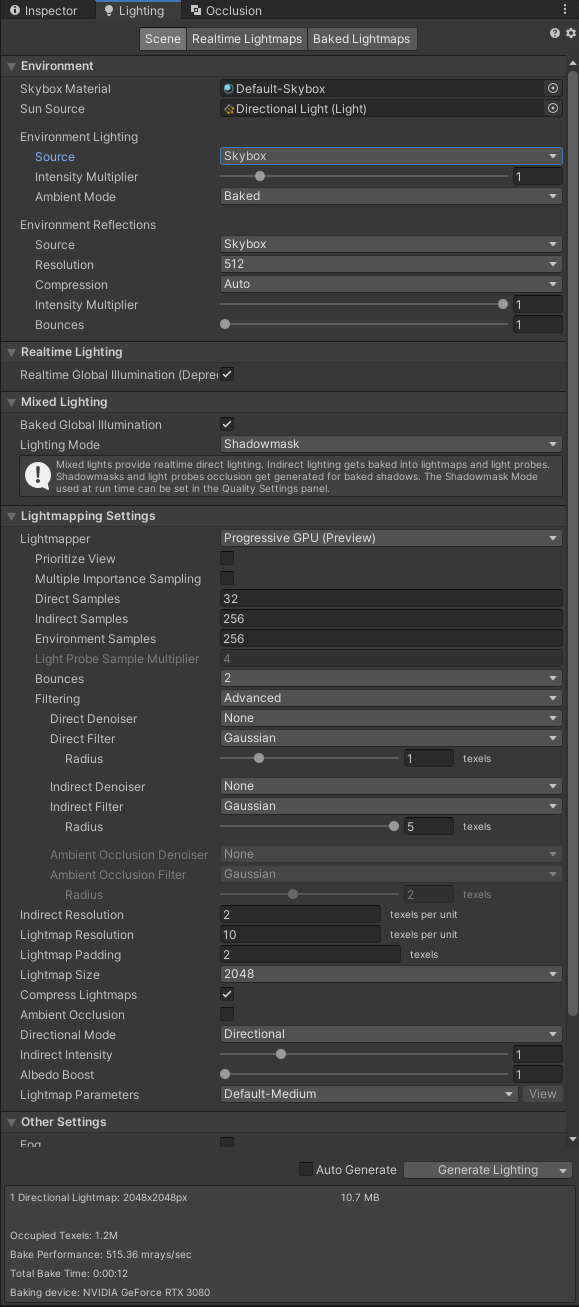
Alright, i have one last lighting problem that ive been trying to fix for an hour now. I'd like the lighting in this room to look like this (realtime in this screencap for demonstration)

But when I bake it using baked lights, it ends up looking like this

screencap of the light probes for good measure. its the only point in the world that has scuffed baked lighting
 sharp robin
mystic gust
But when I bake it using baked lights, it ends up looking like this
sharp robin
mystic gust
But when I bake it using baked lights, it ends up looking like this
In the lighting tab near the bottom find the lightmap parameters option and in the drop down create new
Then in that lightmap parameter set the backface tolerance to 0
mystic gust
sharp robin
In the lighting tab near the bottom find the lightmap parameters option and in t...
oh wow that completely fixed it, thanks!
mint heart
So I don't know what I'm doing wrong, but Bakery will not bake Point lights. I added the component to all my point lights, set their intensity very high, and nothing happens. All other lights work fine
modest vapor
Can you post a picture of your unity window with one of your point light selected ?
mint heart
I can in a bit, not home atm
Also, is it normal to have to set intensity to 1000 for area lights when using them for a street lamp?
modest vapor
Area lights require very high intensity yeah, at least from my experience using them
mint heart
 mint heart
modest vapor
Can you post a picture of your unity window with one of your point light selecte...
mint heart
modest vapor
Can you post a picture of your unity window with one of your point light selecte...
Here's a screen cap through teamviewer, hope it works
modest vapor
You tried changing the light to something very colorful and bright ?
mint heart
Bright yes, colorful no
modest vapor
might wanna try, depending on how your world looks, a greyish light might not be very obvious
you can also just enable the lightmapped view in the unity scene
mint heart
I'm gonna set the intensity to half the area light and see what happens
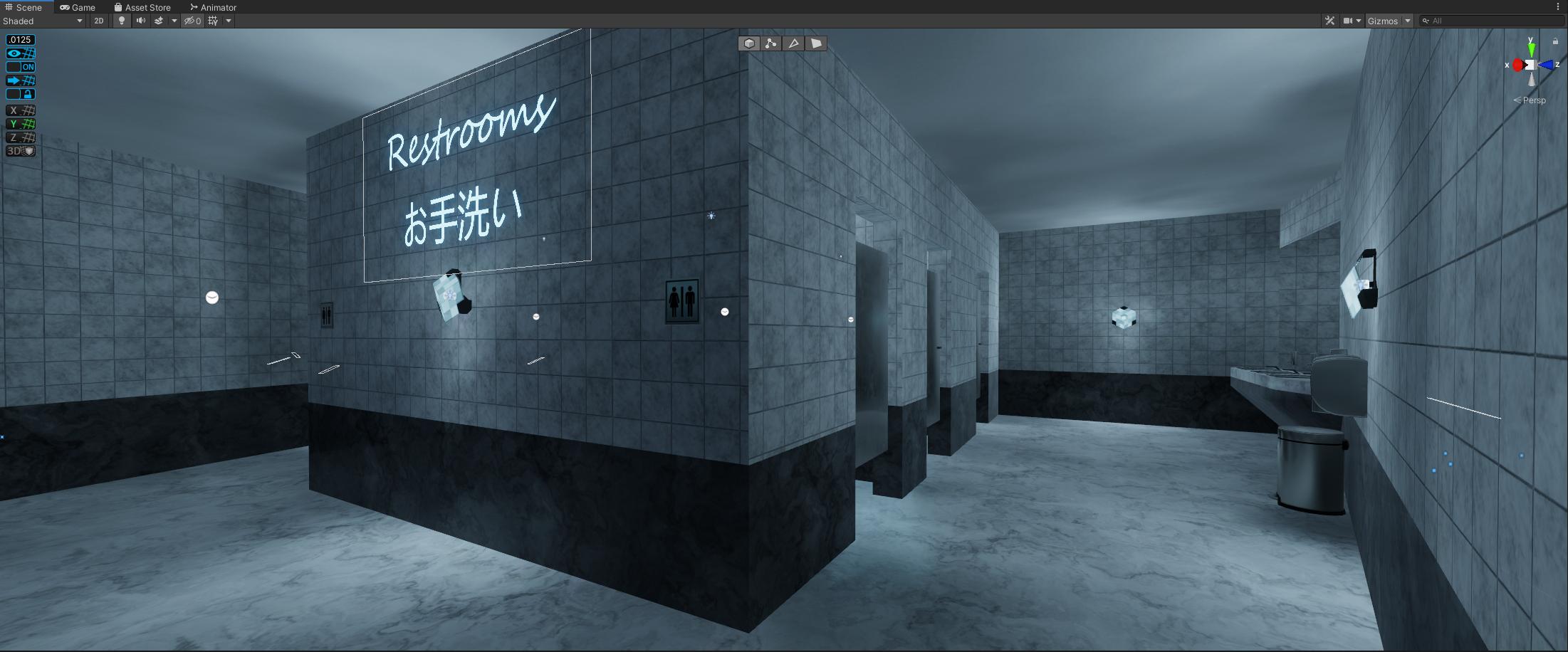
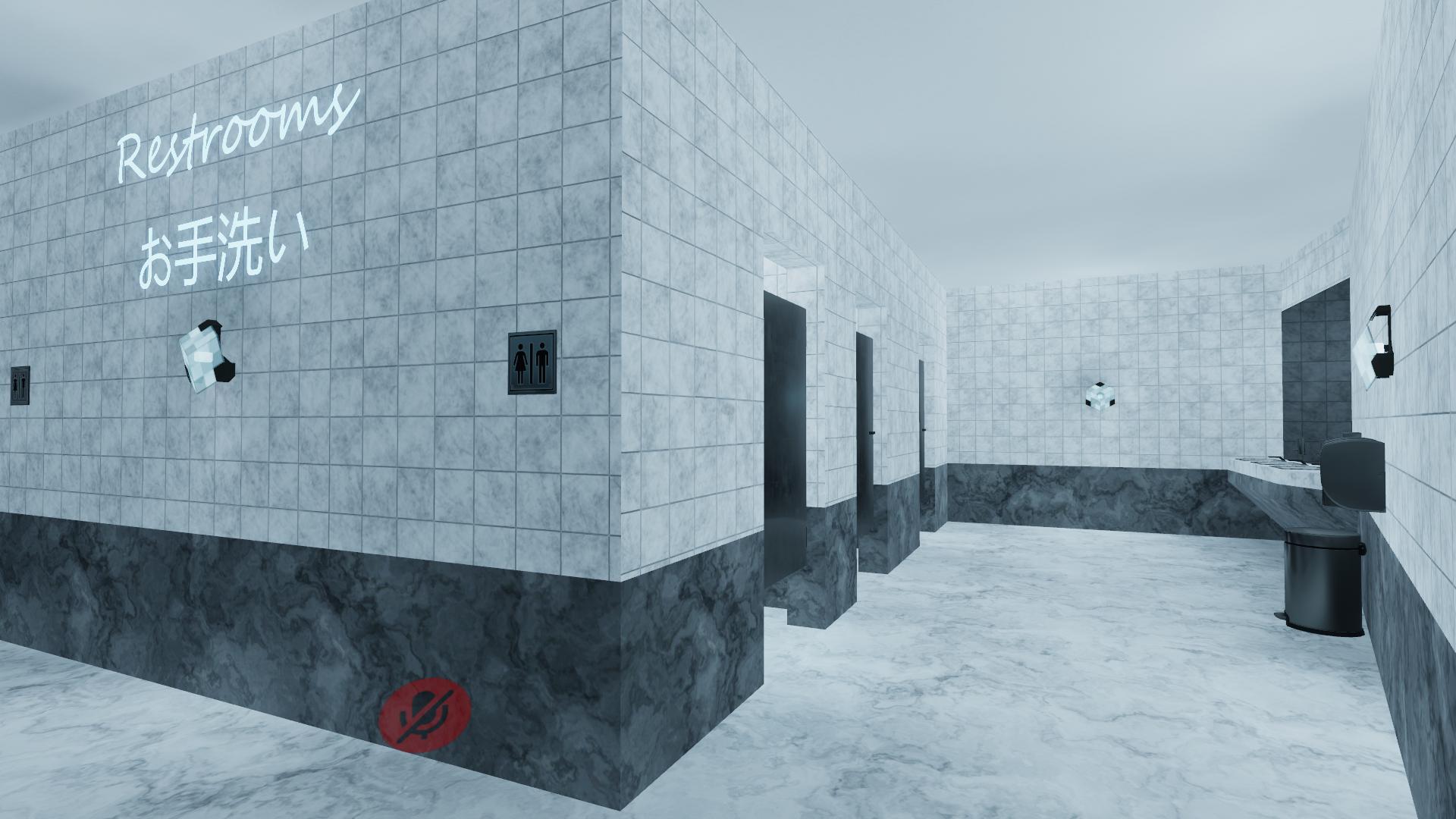
 supple loom
That almost looks like the in game picture is missing post processing? Did you make sure the upgrade didn't unset the reference camera in your VRCWorld or something similar?
 lilac axle
It seems to be correct. I tried toggling post processing off just to compare and it looks different than in-game as well.
lilac axle
Also, it doesn't seem to affect most objects as seen in the pictures.


 shadow jay
I'm building a world and very new to Unity so I'm not really sure what I'm doing when it comes to lighting. Which is fine. My question is if there's a faster way to preview my light changes than clicking Generate Lighting? This can take a while.
 peak nimbus
realtime first, bake after?
shadow jay
and then what i see in the Unity Scene window is what i'll get after i switch to baked?
thats a great news
peak nimbus
I believe, might be wrong but
use realtime
see if u like the look of it
after try switching it to baked and then generating lighting and see if it's the same
if that works ur good to go
shadow jay
i will try that right now thanks!
lilac axle
It seems like all the shadows are being lightened in-game.
sharp robin
lilac axle
It seems like all the shadows are being lightened in-game.
Standard shader?
Also is that occurring after a switch to 2019?
sharp robin
Have you rebaked since moving to 2019?
sharp robin
If you go to Edit > Project settings > Other settings and find the lightmap encoding option what is it set to?
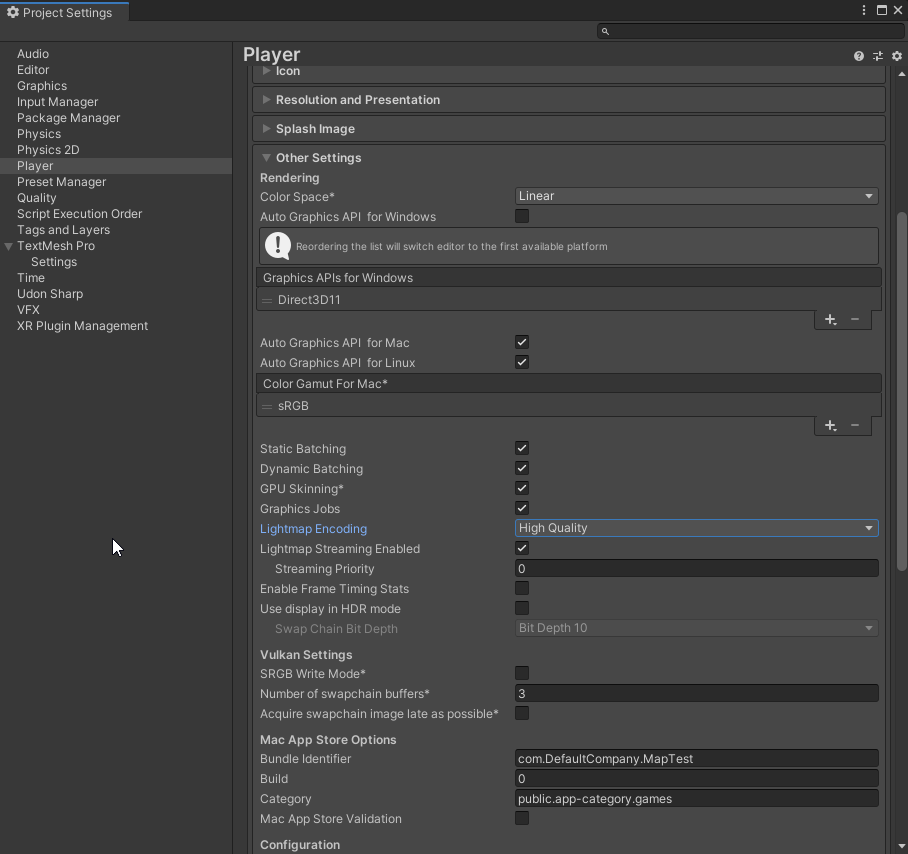 sharp robin
Oh yeah sorry forgot about mentioning its in the player tab
Yeah that wouldn't be the cause then
My next thought is it might be something with the Skybox/Environmental lighting in the lighting tab
lilac axle
 lilac axle
Yeah, for video player stuff only.
Might affect other stuff though.
The color option didn't seem to change anything sadly.
sharp robin
Yeah nothing obvious I can think of
You can try go through and change things like realtime GI enabled or not and rebake and see if the results are the same
Or I would wonder if the world was brighter in game even if you had no lighting data
lilac axle
Ok, it is an issue with realtime global illumination.
However, I have no idea how I'd get the video to light up the room around it without it.
sharp robin
lilac axle
Ok, it is an issue with realtime global illumination.
Is your skybox the default one?
lilac axle
sharp robin
Is your skybox the default one?
Yeah, I have no need for it since the world is all within a building.
sharp robin
You could try replace the default skybox with one that is much darker
If you have an indoor scene it's something you should do regardless
lilac axle
I'll give it a go
Doesn't seem to affect it sadlyy
Oh... That's weird. If I turn off indirect lighting for lights, it appears darker in editor, but the realtime GI that runs on startup happens to create the same exact effect indirect lighting does.
 gleaming mica
first time baking lighting in rtx mode
 mint heart
It seems like my point lights aren't projecting on the main mesh that is marked lightmap static. They still seem to be lighting the poles they are on though.
gleaming mica
How many point lights do you have?
There is a max amount of point lights that can affect 1 object
I think by default it's 8
You can increase this setting in the player options in unity I think
They're also known as pixel lights
@mint heart
 urban sigil
lilac axle
Oh... That's weird. If I turn off indirect lighting for lights, it appears darke...
urban sigil
lilac axle
Oh... That's weird. If I turn off indirect lighting for lights, it appears darke...
I had the same issue just now in #world-development, and I found a fix for it
use vrworld toolkit debugger and autofix the build platform
then rebake lighting
nothing else I tried worked
I guess platform somehow got broken in between
urban sigil
this might not be a bakery specific discord, but does anyone know if the bakery standard shader has GPU instancing pre-enabled? there is no checkbox for it
mystic gust
Hm, How would I go about making a lightswitch while using baked lightmaps? I assume it has something to do with postprocessing
verbal cape
mystic gust
Hm, How would I go about making a lightswitch while using baked lightmaps? I ass...
Unity Forum
Is it possible to turn off baked light maps for a scene while its being played?
I want my game to be able to run on pretty much any device and up to...
fallow lark
mystic gust
Hm, How would I go about making a lightswitch while using baked lightmaps? I ass...
yeah most Maps I've typically seen it swap out post-processing because it gets much more complicated if you're actually trying to swap 2 light Maps
lilac axle
urban sigil
use vrworld toolkit debugger and autofix the build platform
I don't think I saw that as an option, but I'll try and check it out when I'm at my pc
urban sigil
its an additional package
lilac axle
urban sigil
its an additional package
I have VRWorld Toolkit and opened World Debugger, but haven't found anything that would suggest fixing a build platform.
urban sigil
oh, interesting, huh
lilac axle
Yeah... Really annoying as I was basically done with my project. I'm glad this is the only issue, but this issue seems very difficult to fix.
 south torrent
im having issues with the gpu lightmapper in 2019
it prepared to bake for a while, it did some baking with an ETA of 10 minutes, even though i saw nothing happening, after a minute it gets stuck on baking...

any ideas whats going on with this?
verbal cape
your samples are really high, which isnt a problem unless your gpu cant handle it. Did you check the console for errors? before you start a bake, bring your console up and clear it. then bake. If anything goes wrong it will give an error.
south torrent
no errors, i got a 2070 super, which i assume would be up to the task
verbal cape
hehe ye, ied hope so.
 lunar narwhal
iirc 4k lightmaps on gpu requires like 12gb vram? unless thats changed in unity 2019
verbal cape
"There are known issues with excessive memory consumption in the GPU lightmapper when baking lightprobes which have been fixed in recent versions." fixed in 2020 btw
south torrent
ahh, well obviously cant go to 2020..
verbal cape
if your up to treating yourself, bakery is easier.
lunar narwhal
might be worth trying to bake at 2k first to see if it was that
south torrent
ill try that
south torrent
verbal cape
if your up to treating yourself, bakery is easier.
does bakery require other things to work? like do i need to use different reflection/light probes or does it plug in nicely with unitys default stuff?
south torrent
lunar narwhal
might be worth trying to bake at 2k first to see if it was that
i lowered the map size to 1024, and i already see the actual world lighting up now
verbal cape
south torrent
does bakery require other things to work? like do i need to use different reflec...
you attach the corresponding bakery light script to each light that gets baked. Its pretty easy but ied encourage you to watch a video before buying and before using.
south torrent
what about light probes?
and emmisive textures, i got a lot of those instead of lights
verbal cape
you just use unity light probes. and emmisives are the same, bakery just handles them like unity would but with realistic light bouncing and falloff.
south torrent
i see, ill look into it
verbal cape
title is missleading. its about bakery... nvm wrong video. ill be back when i find it lol

This is a force, you will no longer use this points gun at chu jk i love you
Discord: https://discord.gg/METHRMH
Bakery: https://assetstore.unity.com/packages/tools/level-design/bakery-gpu-lightmapper-122218
south torrent
looks pretty good
verbal cape
Oh yeah, but if you commit make sure you do fully, don't skip the documentation. Nothing sucks more than buyers remorse.
it goes on sale from time to time as well. 50% off
south torrent
ill be checking it out later, for now i got the gpu lightmapper working by lowered the size to 2048, which will suffice for now while im testing stuff
south torrent
verbal cape
it goes on sale from time to time as well. 50% off
good to know
lilac axle
When I tried bakery is completely messed up my lighting and looked horrible. I don't know what was up.
verbal cape
lilac axle
When I tried bakery is completely messed up my lighting and looked horrible. I d...
Thats why encourage thorough homework before investing because there are a lot of settings, and because the lighting is more "realistic" its illumination and falloff require compensation. Its usually about 5 intensity points lower than Unity. But, at least until 2020/2021 its light-years above what Unity can do.
lilac axle
Sounds like something that should be mentioned in videos more. None of what I saw mentioned that.
I still don't even know how to fix my issue with normal unity in 2019 x_x
verbal cape
lilac axle
Sounds like something that should be mentioned in videos more. None of what I sa...
The settings are, the light effects arnt because its what you already expect in Unity. The lights you see in the editor will never match the lighting in game; realtime light never matches baked. So you setup bakery, bake, and then adjust. If you have speckles you need to use denoiser, if you are using denoiser you need to tick legacy denoiser 🙂 I use most software by feel but the documentation on it is thorough enough as are the forums when searching google.
lilac axle
I've never had lighting be different in-game compared to editor until this 2019 version and it's super irritating x_x
plus doesn't that ruin reflection probes?
urban sigil
I agree, lighting shouldnt look different ingame
and it generally doesnt from my experience
unless something is badly wrong with the lighting setup
lunar narwhal
generally lighting should match, unless your project was in the wrong colour space or something
also keep in mind scene view won't show post processing if you don't have any camera's with post processing active
verbal cape
yeah in all my time working in Unity I have never had realtime ingame lighting match editor light. Only when baking seems to keep the lighting consistent. As far as versions go, Ive yet to have any issues with 17-21. * any issues not caused by myself refusing to read the doc. lol which is why I now read before I ask anywhere.
south torrent
first bake with bakery

its looks very moody, kinda cool though, i didnt switch all the lights over to the bakery lights yet so this is all from the emmisive wall textures
verbal cape
that looks sexy. Creepycat asset? Never seen it put together that way. Looks very trekkie
south torrent
yeah creepycat scifi vol 3
verbal cape
looks good, nice job
south torrent
this is for my world, spaceship hangout, its currently live but hasnt been updated in a while. currently working on the next version
south torrent
verbal cape
looks good, nice job
thanks 😄
i got a couple questions though

how do i fix the obvious lighting seams?
and this weirdness

any settings i should change in my bakery?
verbal cape
i get seams like that when uv2's are not setup. I normally fix them with the vrc toolkit. Sometimes boosting the samples or textiles per unit helps
south torrent
i have no clue how uv2 or any uv stuff works for that matter, world toolkit has no found issues with that right now
a lot of unbaked lights though, i still need to go through those
 verbal cape
you are currently relying on pure emissions so bounce samples is going to be your friend, try 32. Yeah, toolkit says your assets are fine.
south torrent
for global illumination samples you mean?
verbal cape
ye
south torrent
cool
and for the ligths that i have in my scene, is there a way to easily convert them or do i need to re setup all the lights with the bakery lights from scratch?
verbal cape
select each light and add the component. when added it should match the current setting, if not a button to match will popup
point lights get a bakery point light
directional light is called direct light i think.
south torrent
what about area lights?
verbal cape
area lights you want to do from scratch. they have a visible white quad on them for reference. you can disable the quad later.
south torrent
alright
one last thing, what setting do i change to make this look a bit nicer? texels per unit?
 south torrent
well in general and specifically the light on the ceilling looks kinda spotty
verbal cape
that improves with samples, textiles might help, but you are already boosting samples soo... But the pipe is speckled to fix that switch to experimental and check legacy denoiser. That happens when emissions are too close to surfaces.
south torrent
legacy denoiser, you would think newer would usually be better haha
verbal cape
you'ed think lol
south torrent
which one?
 verbal cape
oh i have no clue, i havent read up on those, legacy is a tick box
verbal cape
down the menu towards render
south torrent
am i blink? xd
 verbal cape
if you like playing with your lighting and finding the best results you'll want to stay in experimental for most builds btw... OptiX 5.1 AI * thats the legacy
sry
looks like I need to update my bakery haha
south torrent
alright, thanks for the help, looks like i have a lot of work to do haha
does the match material to light on the area light matter? when i set it, it changes it for all area lights on the material of the mesh, but my area lights have different colors
verbal cape
ary you trying to do it to all lights at once?
south torrent
no, i created to area lights, one is blue, one is pink, when i set match material to light on one of them, both turn that color cause they both have the same material
verbal cape
yeah then try just not matching
south torrent
so that error of color doesnt match material doesnt matter then?
 verbal cape
it shouldnt* that visible quad is just supposed to be a reference. Unity's doesnt have that, it just has an arrow
south torrent
alright
verbal cape
if you play with the renderer options see the prefab list for Bakery adapters. VRC wont understand the Bakery lightmaps when you use the tool to its fullest so youll need to use the adapter. https://github.com/MerlinVR/VRC-Bakery-Adapter
https://docs.google.com/spreadsheets/d/e/2PACX-1vTP-eIkYLZh7pDhpO-untxy1zbuoiqdzVP2z5-vg_9ijBW7k8ZC9VP6cVL-ct5yKrySPBPJ6V2ymlWS/pubhtml#
only if you switch renderer modes
GitHub
A script that handles converting Bakery RNM and SH directional lightmap bindings into a format that VRChat can process - GitHub - MerlinVR/VRC-Bakery-Adapter: A script that handles converting Baker...
south torrent
so i had set up a new empty project to mess around with bakery for a moment.
how do i fix the weird light spots, there are 2 area lights opossing each other

 stray bay
sharp robin
south torrent
how do i fix the weird light spots, there are 2 area lights opossing each other
stray bay
sharp robin
south torrent
how do i fix the weird light spots, there are 2 area lights opossing each other
Make sure self shadow is enabled and set the near samples to 16 or higher
 modest vapor
peak nimbus
modest vapor
peak nimbus
ty
mint cipher
I wish I wasn't on AMD so I could use Bakery 
modest vapor
2019 GPU lightmapper is a lot better than it was in 2018
south torrent
i tried the gpu lightmapper from 2019 today, its better than 2018, but i think still not as good as it could be
with bakery, the whole lightmap looks very nice, but theres 1 spot in the whole map where there is this minecraft like dark pixels on the wall near the posters, any idea why this thing is happening only here?

and also, this one chair on the right, why does it have super bright highlights?
 mint heart
I'm having a weird issue with bakery. It seems that the point lights are beinf blocked by geometry that didn't block them before. Basically I have a bunch of little post lamps, where previously I had placed the light inside the post and it worked just fine. When baking with bakery, the post appears to be blocking all light from the point light inside it.
Anyone know how to fix this?
urban sigil
modest vapor
https://discord.gg/jaCME8pA
Ohhh wasnt aware there was a discord, thanks for the link!
 frozen perch
Hello I have a question, I had a world which would be a dark world but for some reason everything is so light now, how do I fix this 😮
 harsh rain
attempting to replicate roblox-style lighting but not exactly sure what to do with lighting since its fairly confusing for me, help would be appreciated
shadow jay
harsh rain
attempting to replicate roblox-style lighting but not exactly sure what to do wi...
what are you finding confusing? I am also struggling with lighting
harsh rain
shadow jay
what are you finding confusing? I am also struggling with lighting
well just about everything really
shadow jay
harsh rain
well just about everything really
help us help you
harsh rain
well really just take any aspect and ill probably have no clue about it
fiery cape
Just hit bake after switching to GPU Baking and Unity appears.. extremely busy. But it doesn't seem to be using my GPU much yet.
Unity is presently fully unresponsive (without being 'locked up' from Windows' point of view). But this GPU bake is... not doing much on the GPU yet.

Is this normal? :D;;;
fiery cape
Hmm.. end task'd and restarted. Tweaked settings. getting CL_MEM_OBJECT_ALLOCATION_FAILURE, and then it falls back to the CPU lightmapper instead and it also seems to think I have 322 objects with overlapping UVs which is not true.
 slow shuttle
Does anyone know why my world has gotten much brighter, but only in-game, after upgrading to 2019?

left: editor. Right: in-game
sharp robin
slow shuttle
Does anyone know why my world has gotten much brighter, but only in-game, after ...
Lighting settings?
slow shuttle
none of them have changed since my 2018 build, and the lighting looks correct in-editor, so I'm not sure what I could have wrong there that would only mess it up in-game
fiery cape
It seems to be a universal thing @slow shuttle
slow shuttle

universal as in everyone is having this issue?
it seems like a lighting gamma issue
fiery cape
I've noticed everything is a tiny little bit brighter
slow shuttle
dang, pretty bad bug. how did that not get caught
fiery cape
I know the post-processing system has changed some
slow shuttle
I dont use any post processing
sharp robin
Only with certain setups
fiery cape
what is the 'certain setup'?
sharp robin
Using realtime GI is one of the causes
slow shuttle
oh great...
fiery cape
Is it just the case one should overall lower the levels a little?
slow shuttle
is there a canny for this bug?
sharp robin
not as far as I know
 sharp robin
@slow shuttle Could you try disable Realtime GI and see if it actually what's causing it
slow shuttle
sure I'll double check

 fiery cape
What kind of lights are they?
slow shuttle
I remember having that issue in mirrors long ago when using post processing
south furnace
fiery cape
What kind of lights are they?
point lights and emissive materials
south furnace
slow shuttle
I remember having that issue in mirrors long ago when using post processing
disabling it doesnt solve the issue
fiery cape
And all happy and baked?
south furnace
yeah
fiery cape
hmm
 sharp robin
That lighting isn't baked and the reason it's dark is because of disable pixel lights on the mirror settings
sharp robin
slow shuttle
<@!183779109296537600>
Yeah so it is something with GI
south furnace
It is baked, I will check the setting though
sharp robin
I can see that it isn't
sharp robin
You set them to baked but did you actually press the generate lighting button?
south furnace
Yes i do that every now and then, I have done quite a few changes since i baked last time so thats maybe why it appears odd
sharp robin
If changing the mirror setting fixed it that means it wasn't baked
south furnace
Hmm, odd, I'll double check
Yeah I left one spot light that I was experimenting with yesterday 450 units outside and it was realtime :p
 graceful jetty
Is there any way to include metallic surfaces in a reflection probe without them turning black in the bake?
south furnace
any ideas on how i can get rid of this pixelated mess? it only does it for this 1 specific light

my settings are

Also, I have a really weird problem where after pressing Build and Publish or Build and Test, all baked lightmaps are gone and it looks really weird?
thats how it looks like after i pressed Build and Publish
 lilac axle
slow shuttle
Does anyone know why my world has gotten much brighter, but only in-game, after ...
lilac axle
slow shuttle
Does anyone know why my world has gotten much brighter, but only in-game, after ...
I have the same exact issue. It's realtime global illumination acting differently now. Not sure how to fix, but need it for my videos lighting effects.
lunar narwhal
Did you rebake after upgrading to 2019? I have realtime gi for video emissions in my map and I don't notice any differences
however I did uncover an issue with vram leaks when updategimaterials/vrc_customrendererbehaviour is used to update the emissive albedo
lilac axle
lunar narwhal
Did you rebake after upgrading to 2019? I have realtime gi for video emissions i...
Yeah. It seems, in-game, it redoes indirect lighting so it's only noticable in rooms with brighter surfaces. At least, for me.
mint cipher
Hello everybody! I recently found this error when rendering for the "bakery" lights. Can anyone help me with the problem I encountered?


These are the console errors
verbal cape
mint cipher
Did you try exporting an FBX or OBJ instead of using the .blend file?
mint cipher
yes, but it's useless. gives me the same problem.
verbal cape
woops, discord removed my message when i attached the invite hahah. d**k bot.
mint cipher
I have already tried to export the project to FBX, but it didn't solve the problem for me.
verbal cape
I read that, did you try checking uv generation after inspecting the model in unity?
did you try disabling the automativ uv stuff in bakery?
if all that fails I suggest you ask the Bakery discord. Might be quicker. Not saying someone here wont have a solution but ied assume the bakery ppl would be experts.
mint cipher
can you give me the link of the discord bakery in private?
slow shuttle
lunar narwhal
Did you rebake after upgrading to 2019? I have realtime gi for video emissions i...
I rebaked too with no change unfortunately. Dynamic GI is just way too bright in my scene with no clear reason. Tried with Progressive and Enlighten, both the same
south furnace
Does anyone have any idea as for why it does this? I am using bakery

The most right object appears fine while as the two on the left are completely black
All of them are marked as static and have same shader properties (minus the texture of course)
timid totem
Is baked lighting really as fast as they’re saying it is in 2019?
I haven’t updated yet because I’m out of town but I’m skeptical
timid totem
Fair enough
graceful jetty
How would I set a directional light up so that it only applies to non-static objects?
I've baked the lighting on a world using Bakery but I'd like players to cast shadows.
verbal cape
graceful jetty
I've baked the lighting on a world using Bakery but I'd like players to cast sha...
culling mask set only to the player layer
it will make the players brighter though
graceful jetty
verbal cape
culling mask set only to the player layer
Does it work differently in-game than in the editor?
I set a gameobject to the player layer just to test, and it didn't cast a shadow
verbal cape
the directional light also has to have soft or hard shadows enabled.
graceful jetty
It did
verbal cape
Im assuming you have receive shadows enabled on your statics. If so, then thats it. You can try player and player local. But like I said, the players will be godly bright. Lighting from light probes plus a directional. If you dont use probes then depending on the player angle they will be black
twilit lily
south furnace
Does anyone have any idea as for why it does this? I am using bakery
are they marked Lightmap Static?
south furnace
Yes
I found a workaround by changing shader parameters so it's not relevant anymore
 wooden sand
Can someone help? I’m trying to remake the monkey business stage from dark deception but all the lights keep on flickering when I look towards a certain direction
modest vapor
Because they need to be baked
You can't have more than 4 realtime lights active in view, so they disable each other when you rotate your view
@wooden sand
mystic gust
Anyone know how to do ambient occlusion with baked lighting? I heard you had to use baked indirect or subtractive lighting, but i've tried both with AO enabled and neither create the effect
modest vapor
Are you using Unity's lightmapper ? I don't think those settings can be changed
Bakery has a few options though
mystic gust
modest vapor
Are you using Unity's lightmapper ? I don't think those settings can be changed
I am. I guess it's time for me to learn how to use bakery
 crimson verge
I still cant get my lighting to start baking in 2019
i've imported the world to 2019 a few times and finally got it fixed and no horrible console errors so the world should work, but i cant get the baking to get past this

i've tried it with CPU and GPU lightmappers, super low samples, different lightmap sizes, i've cleared my GI cache, but nothing will start

It's most definitely making my system work for something

This is every error i'm receiving atm, none of which seem map breaking to me

unfortunately looking the issue up online i'm finding tons of others on unity forums saying they're having similar issues

Unity Forum
Hi!
I have a pretty big problem with our project and totally got out of ideas how to deal with it.
Before, we worked on unity 2018.1.9 f1....
they're also getting a secondary issue that i've also been having, where after attempting to bake, i cant close unity, i have to kill it in task manager
 ancient fossil
How can I simulate HDRP + VR (since its not supported)?
verbal cape
crimson verge
unfortunately looking the issue up online i'm finding tons of others on unity fo...
sounds like you have done your hw; you arn't using LOD's are you?
crimson verge
i do
have 3 rocks in the world with them
i can turn off the lod group component and delete the other meshes that should be fine
verbal cape
Ok, so LOD's get their own LM for each layer and all LOD's get recalculated which takes for ever in unity. Try disabling them and bake. If it works, you know you can remove th lod groups, set the rocks to only have the mesh you want, delete the unneeded lods and use occlusion culling instead.
crimson verge
right i'll try that
is there an easy way to find other lod's in a scene?
i feel like there might be one hiding around
verbal cape
its just rocks right? Then just search in the hierarchy for the rocks name
crimson verge
ah i meant for other items that may have lods besides them
verbal cape
can try searching for LOD Group. the search allows you to look for components.
the hierarchy search anyway
crimson verge

ohno
false alarm i seem to have previously deleted every lod off these
they're all just themselves, still named LOD however
verbal cape
oh, sweet. Well thats all I got, sorry. LOD's have always caused the same issue with me.
crimson verge
well trying the bake again it seems like its still trying
it at least filled out the occupied texels part but no more lol
thank you for help, maybe someone else here has a trick lol
 crimson verge
All I wanted was to fix my terrain in my world ;-; latest update made it pitch black for some reason
 pure bobcat
having a similar lightmap issue
Unity gets stuck at Preparing Bake... and does nothing
No errors, Task manager isnt reporting anything, restarting unity doesnt work, restarting pc doesnt work.
Not sure whats causing it
 crimson verge
You imported from 2018 to 2019 too?
fiery cape
I've had issues with running out of memory when trying to gpu bake and so I switched back to enlighten
Specifically gpu vram. However sometimes unity won't tell you this, and will instead keep trying to bake each light by gpu, failing, switch to fall back to cpu and taking forever
ruby narwhal
i thought i'd finally fixed this, i went in blender, selected everything, went to edit mode, merged by distance, went to object mode and joined it, and yet it still looks like this when i bake lighting onto it in unity grrrrrr
 ruby narwhal
i've found the new denoisers don't like lines in the uv's like this
sharp robin
ruby narwhal
i thought i'd finally fixed this, i went in blender, selected everything, went t...
Did you make your own UV2 or are you relying on Unity auto generate UVs
ruby narwhal
i made my own in blender
sharp robin
How did you do them
ruby narwhal
u-> lightmap pack
after i did the stuff i listed before
i made sure there was no overlap
sharp robin
Try unwrap manually or cube project


 sharp robin
Are the cubes all one mesh or are they separate cubes?
ruby narwhal
it's all one mesh, like, the inside is hollow
i merged by distance in edit mode then did ctrl+j
sharp robin
Do cube project again but do each side individually and make sure they don't overlap
sharp robin
Actually is there a reason you don't just merge all the vertices on each side?
ruby narwhal
unless im doing it wrong, that just breaks my textures
sharp robin
Oh yeah you would need to rebake the texture
ruby narwhal
🥴🤔 all of the texture and uv stuff is handled by the exporter program i use-
sharp robin
So unwrap each side of the cube individually then
ruby narwhal
how do i do that
sharp robin
You select one of the 6 sides and unwrap one at a time
And position it manually in the UVmap
 sharp robin
Yeah now do that for each side
But position them in their own UV space so they don't overlap
ruby narwhal
ok
ruby narwhal
sharp robin
Yeah now do that for each side
u know what
that actually worked
like, instead of it being visible on the top it's just on the sides and it's only on 4 of them
i used ortho mode and project from view to get it faster but same thing
sharp robin
If you are still getting shadow bleeding that almost always means your lightmap size is tiny
ruby narwhal
lightmap is 4096 and lightmap res is 40 texels
sharp robin
Can you go to the lighting tab > baked lightmaps and look at it?
ruby narwhal
i mean yeah, what am i looking for tho
 sharp robin
Does that UV match with how you aligned it in blender?
 sharp robin
Okay what does the actual lightmap look like on the mesh in unity
ruby narwhal
wdym by "actual lightmap"
sharp robin
What does it look like in the scene

 sharp robin
On the mesh renderer settings try enable the stitch seams option and rebake

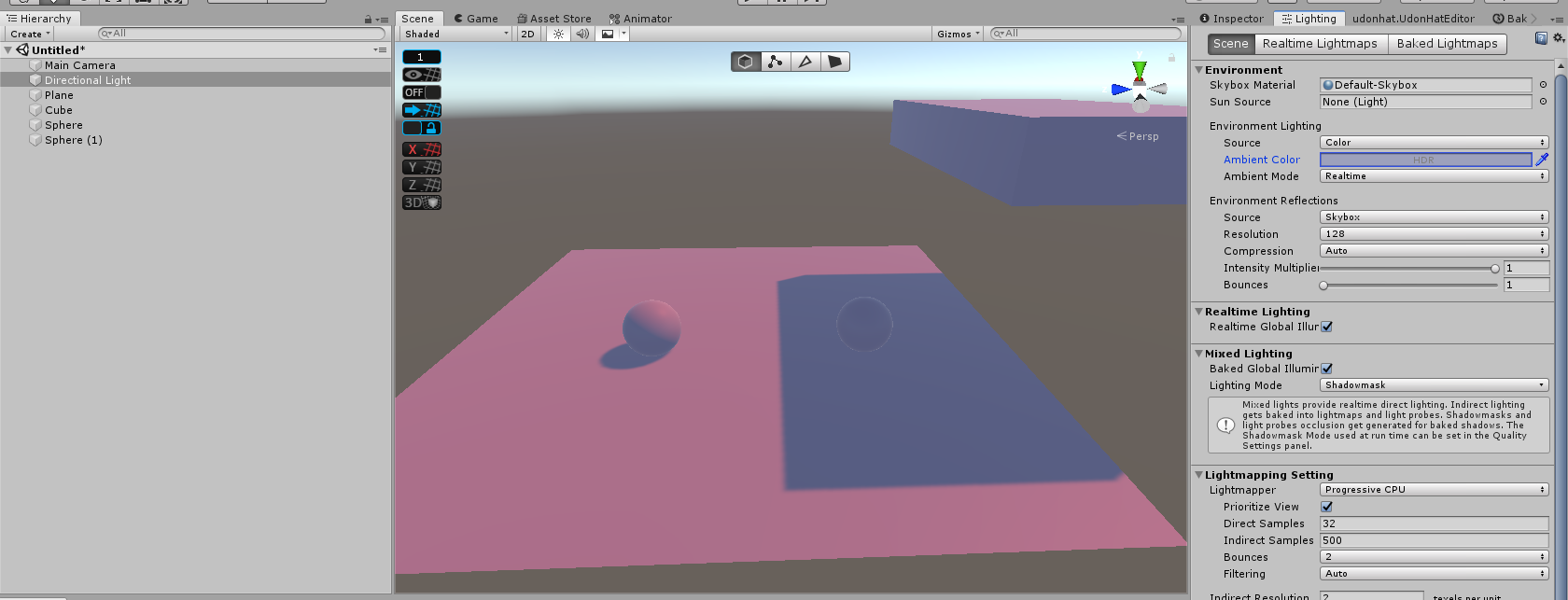
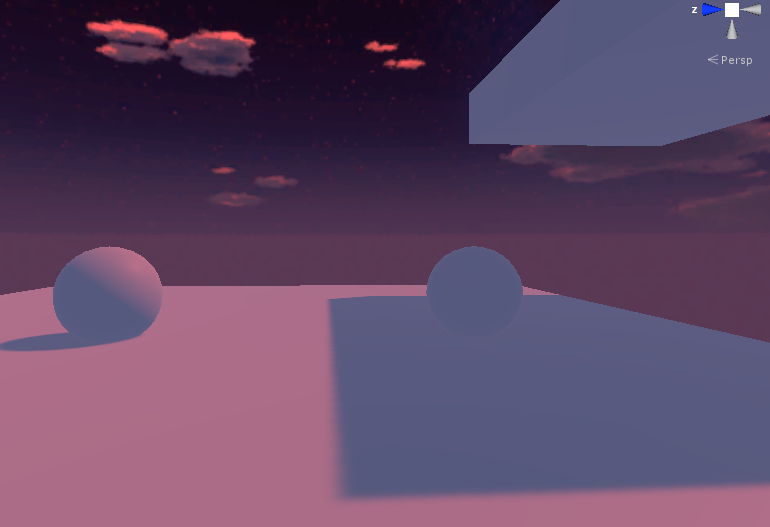



 sharp robin
Alright not sure if theres much more you can do then
You could try mess with the unity mesh import settings
ruby narwhal
all i know is that if i completely remove filtering it fixes it but... noisy lighting looks like garbage
 sharp robin
Like changing the normals calculation
ruby narwhal
from what i've found it's the de-noisers fault
sharp robin
Try set directional mode to non directional and rebake?
ruby narwhal
ok hold on
i did and also restored the denoise stuff and changed the filter thingy but still

ooh i'll set normals to calculate
dam, still bad
these are my import settings
 sharp robin
I mean if you add textures to it that would be very hard to notice though
ruby narwhal
sharp robin
I mean if you add textures to it that would be very hard to notice though
true
 twilit sluice
can i use bakery and unity mixed light at same time?
verbal cape
twilit sluice
can i use bakery and unity mixed light at same time?
requires some setup but yes https://geom.io/bakery/wiki/index.php?title=Manual
skip the stuff you dont need, just ctrl F and search mixed
mint cipher
hi kinda new to lighting stuff and was wondering why when i bake my scene it turns out like this
most of the world is made out of probuilder meshes so i dont think i can generate uvs for it. and the other models that have that check on still has this lighting effect on it
 verbal cape
looks like noise to me. try this thread https://forum.unity.com/threads/unity-2019-3-and-a-lot-of-noise-in-light-baking.884620/ for help with some settings.
 wanton spindle
Is there solution for Volumetric lights for VrChat ?
modest vapor
Xiexe/Silent have made prefabs
twilit sluice
everytime i try to bake with progressive gpu
 verbal cape
twilit sluice
everytime i try to bake with progressive gpu
verbal cape
twilit sluice
everytime i try to bake with progressive gpu
yep, what card u got? looks like you dont have enough vram
verbal cape
if you didnt change anything, sometimes unity just needs a reset on rare occasions a full pc reboot.
twilit sluice
verbal cape
if you didnt change anything, sometimes unity just needs a reset on rare occasio...
still
i tried new project and same problem

 orchid saffron
So I’ve been having issues with lights clipping through structures for no reason and it’s confusing, surely by default they shouldn’t be clipping?
modest vapor
Merge your meshes to avoid gaps
orchid saffron
There aren’t any gaps, that’s the issue though, it’s like as if it has a higher render than the shader I’m using (which has a render of about 3000)
I sadly don’t have photos of the light clipping..soooo...
mystic gust
Whats the best type of light to use out of these? baked, of course
 slow shuttle
Anyone know how I can improve this noisy realtimeGI?
 fallow lark
mystic gust
Whats the best type of light to use out of these? baked, of course
fallow lark
mystic gust
Whats the best type of light to use out of these? baked, of course
entirely depends on the lighting setup you are trying to do as they do different things
slow shuttle
I've tried upping the antialiasing samples in the lightmap parameters. I'm using Enlighten (and cant switch from that until progressive fully supports realtime GI)