#world-lighting
4 messages · Page 21 of 1
 obsidian holly
 lunar narwhal
Like I said, you need to have light probes for dynamic objects and player avatars, otherwise they will not be lit, and I believe fall back to scene ambient lighting depending on the shader? and your ambient lighting is pitch black.
 mint cipher
i speaking about, https://cdn.discordapp.com/attachments/534472776841691137/846743768223842354/unknown.png , floor is still lit, that point light not even reach tehere
 lunar narwhal
did you rebake after changing the settings?
 peak nimbus
I don't think so? Ill keep looking through tho, I changed a few meshs to box colliders instead but besides that I don't think so
obsidian holly
might be worth trying a lower texel count
lunar narwhal
peak nimbus
I don't think so? Ill keep looking through tho, I changed a few meshs to box col...
any errors from bakery in the console when it hangs?
peak nimbus
it does this until 10 percent and then just sits there

 lunar narwhal
how long did you wait?
peak nimbus
lunar narwhal
how long did you wait?
last time it went it was 30 minutes stuck on 10 percent
lunar narwhal
try restarting the editor, and check if any of bakery's processes didnt close properly, as i've seen them do that sometimes causing issues with subsequent bakes
also lower your bake settings, bounces and samples to minimum just to see if the bake goes through first, and like lakuza said lower the texels too
peak nimbus
gotcha


 green vault
is the light source set to baked? is the meshes set to static?
mint cipher
lamp + wall mesh is set to static
or, maybe object which is in light source just cant bypass light?
what i need to make idk, mesh which ignored bake or shadows
i need to disable cast shadows on that object?

or yeet static
 mint heart
I'm having an issue where small white spots pop up in areas that should be pitch black after baking. Any ideas as to what is happening?
mint cipher
why ping???

 elder merlin
Hey so I'm having a weird issue with baked lighting
Baking lights gives me this
okay, sure

I press build and run and get... this.

(I realize using area lighting like this is wrong, but that was a sanity check as point lights were doing the same thing)
here it is with just 1 area light while running, still not correct

 modest vapor
Check the tutorial pinned in this channel
elder merlin
I keep getting [PathTracer] Failed to add geometry; mesh has unsupported vertex data (vertex channel 1 data type 1)
when trying to bake
 fiery cape
I've never heard of that one before...
(also @elder merlin that pub/bar looks very nice so I hope you get it working. 👍)
 golden stone
Is there a method for one set of light probes to receive information from a real time (mixed) directional light, but another set rely on baked lights? I have bakery available
My use case: two areas, one outdoor and one indoor. Indoor needs to rely only on baked lights, outdoor has a real-time directional light that turns off when a player goes indoor. My attempts so far is just excluding light probes from the outdoor scene completely. I’d prefer baking outdoor lighting but I don’t want shadows on outdoor geometry, I want flat lit lighting for a toony look outside, not sure how to achieve that without a real-time directional light.
I can’t bake outdoor probes with the real-time directional light on or the indoor probes get that information. Can I use layer masking for baked lights and light probes for indoor light? Or bakery may have some other light group option. It could be that I fundamentally misunderstand outdoor lighting but I need it not to be lit when indoors other then by the baked light sources in the indoor area
modest vapor
Why do you need light probes with realtime lighting ?
golden stone
I was running to the issue of avatars being fully shadowed but I suppose that’s leaving a light probe on when I could just disable them all in the outside area. I’d rather go full baked lighting but want to keep a consistent outdoor illumination. Would that be one giant point light in the outdoor area? I want flat indirect lighting like if it was global illumination, but wouldn’t that affect the interior area? Maybe that’s the better question.
modest vapor
If it's a point light you should have enough control to have it not bounce in your interior areas hopefully
Do you have bakery preview ?
golden stone
I'll play around with ponit light settings and come back if there's issues, apprecaite it
 fiery cape
Check for incomplete or very thin meshes?
 formal spindle
walls are .1 meters thick

I have snapping on so everything is actual perfect meshes with probuilder
2 selected objects to show
 fiery cape
Hmm.. not certain myself then as to what could cause that :/
formal spindle
could the lighting itself be the issue, I did just throw it on so I can test the world
probably 8 point lights with baked lighting
 sharp robin
@formal spindle Increase lightmap padding
formal spindle
how do i do that
sharp robin
formal spindle
how do i do that
Under lightmap settings increase this value
 formal spindle
thank you, that got it
green vault
what are good "field of depth" settings for vr? just curious if thats even a thing now that im asking lol
 neat rivet
green vault
what are good "field of depth" settings for vr? just curious if thats even a thi...
neat rivet
green vault
what are good "field of depth" settings for vr? just curious if thats even a thi...
Good field of depth for VR is no field of depth at all. So don't bother.
green vault
ok cool
i saw it existed on pc post processing and was messing around with on desktop and it seemed pretty cool
neat rivet
Anything screen effect except for color related are bad for VR
mint heart
Anyone know whats going on here? I'm getting these spots all over the map in areas that should be dark

Really prominent here aswell
 modest vapor
Did you generate lightmap UVs ?
mint heart
Yeah
modest vapor
What are your lighting settings ?
mint heart

I'm rebaking now, but the image had indirect set to 175 samples and 2 Bounces
And no filtering
modest vapor
Shadowmask is probably not what you want to use then
mint heart
But would that cause those issues?
modest vapor
With Unity, you never know
mint heart
Which one would you reccomend then?
modest vapor
progressive CPU or enlighten
mint heart
I meant Lighting Mode
modest vapor
ah sorry, baked indirect would probably be cheaper
mint heart
modest vapor
ah sorry, baked indirect would probably be cheaper
Alright so after setting it to baked indirect, most of the small particles are gone but now I have spots like this
 modest vapor
You tried with more than 2 bounces on shadowmask before btw ?
mint heart
I had it set to 2 bounces and shadowmask
Its also worth noting that the emissive materials no longer seem to be baking
modest vapor

modest vapor
Well, no bounce will be awful
mint heart
Well the one with those white spots is no bounce and looks alright save for that spot issue
modest vapor
and you're certain that those pieces have generated UVs ? Did you check the console after bake ?
mint heart
Checking UV Map mode shows they are properly mapped
I wish I had an Nvidia GPU so I could use Bakery
modest vapor
UVmap isn't UV lightmap
If you didn't enable the generate lightmap UV checkbox on the mesh asset, it most likely doesn't have
mint heart
Oh yeah I have it set there, just had to reimport it a day ago because of some funky normals
I'm running another bake now with 1 bounce and Baked indirect setting to see if bounce is related to my previous spotted walls issue, as well as the emissives issue
mint heart
@modest vapor Bake finished last night, had the same occurence with 4 bounces, so it appears to be linked to that
modest vapor
Did you check your console after that bake ?
mint heart
No errors
modest vapor
Should be warnings
mint heart
modest vapor
Should be warnings
The only warnings I got were related to overlapping UVs in the hallways, which is not where the issue is occuring
What settings should I use for the generate UVs option?
modest vapor
Default should be fine
 limpid jewel
Hi
 paper gust
Heyo i have a flashlight in my world and it does what it is supposed to do but at the same time it also shines throught the wall for whatever reason any idea what could cause that
If yes pls ping or dm me
^^
Like its still visible behind the wall

And i also have this problem where light shines throught the wall in general and sometimes it glitches out and lights more than it should
 paper gust
And i also have this problem where light shines throught the wall in general and...
paper gust
paper gust
And i also have this problem where light shines throught the wall in general and...
This problem dosent excist when you actually play on pc but it does excist on quest
 thorny zenith
does anyone know how to fix this? the light blinks when i move my camera, and i want it to be turned on always instead of blinking

 forest relic
yo for some reason my light map keeps like having these weird spots anyone know how to fix it?

 opal latch
This might be because of over lapping uv maps but whenever I bake my lights the entire map turns the color of the lights
 shy root
"No Probes in LightingDataAsset", does anybody know why im getting this? @modest vapor
mint heart
@modest vapor I increased the indirect samples and it fixed the spots everywhere and overall looks good, but I still have those random fill lit areas that make no sense
modest vapor
What if you added a super low intensity light that faced that area ? Maybe the lightmapping calculations would be different enough
mint heart
I thought about that, guess its time for another 18hr bake
 molten night
Question regarding baking. I have a world that I'm currently using Poiyomi's toon shader for to achieve a very stylized toon-ish look that's similar to another game, I currently have one directional light in the scene, but would like to cut it out and use just baked lightmaps. Baking seems to be much more pbr focused. In this situation would it be better to just stick to the single directional light?
modest vapor
You can still bake and achieve a toony look
molten night
is there anything explicitly different that needs to be changed in the process to achieve that?
modest vapor
Not really, but very stylized toon maps may often draw their own shadows if they're very specific ?
I'd suggest you look at maps from BlueASIS
 forest relic
opal latch
This might be because of over lapping uv maps but whenever I bake my lights the ...
forest relic
opal latch
This might be because of over lapping uv maps but whenever I bake my lights the ...
i don't believe they're overlapping maybe its something else?
 tiny holly
Anyone have a recent tutorial or a tip on how to get transparent images portions to show up in vrchat instead of a grayed-out portion?
/goes back to stare in the mirror...
opal latch
Anyone know how to fix light transport Job failed
modest vapor
shy root
Can you show your settings in the mesh renderer component of your static objects
modest vapor
opal latch
Anyone know how to fix light transport Job failed
How big is your world
 lone forge
Anyone know how to add flashlights to my world?
mint heart
My world has been baking lighting for 22hrs. The joys of Unity, I guess
 fathom island
i have no idea why but area lights do practically nothing in my map, and point lights make everything absurdly bright


every other area light in the map uses same setting
only thing that seems to work on bakery are just emissions and shadows
modest vapor
Raise the intensity ?
fathom island
That seemed to fix area lights
now just need to fix whatever goings on for point lights
they are still absurdly too bright
only seems to affect spotlight as well as point lights as far as i can tell for me
fathom island
thought it was lens flare causing it, nope, seems to just be directly from the custom point/spot lights for bakery, cant find a fix for it. using a 3070
fathom island
Narrowed issue down. Seemed to just be because multiple meshes in the scene were using high compression, completely destroying the lights
mint heart
modest vapor
What's your world ?
It's a large Halo ODST map. And unfortunately I don't have a Nvidia card.
 wary sonnet
I have a dynamic light that shows up just fine in the editor, but it does not in game. any idea how to fix this?
sharp robin
@wary sonnet Pixel light count limit or accidentally marked it as editor only?
wary sonnet
thx @sharp robin will give that a look
another question, the unity default speedtree assets are not looking right for me after light baking. What's wrong here?
 sharp robin
Very likely UV issues
 dreamy meadow
I googled and just found a bunch of old forum posts saying unity speedtree doesn't support baking. Not sure if that's still true
sharp robin
wary sonnet
how can a standard asset have UV issues?
I have seen a lot of people have issues with lighting and speedtrees so its not uncommon
I know have managed to bake them before but it was a big pain from what I remember
wary sonnet
huh thats so weird
do you guys know anyhwere to get trees that do work?
i cant seem to find any with reasonable polycount
been looking for months
dreamy meadow
Maybe like bake the shadows on the ground from them then revert to lightprobes for shading the trees themselves
fiery cape
Hi all, trying to get setup with Bakery on an existing world project but getting a crash and not finding any errors relating to it online.
IndexOutOfRangeException: Index was outside the bounds of the array. ftBuildGraphics.CalculateHolderUVBounds (ftBuildGraphics+ExportSceneData data) (at Assets/Editor/x64/Bakery/scripts/ftBuildGraphics.cs:3120) ftBuildGraphics+<ExportScene>d__203.MoveNext () (at Assets/Editor/x64/Bakery/scripts/ftBuildGraphics.cs:5957) ftRenderLightmap+<RenderLightmapFunc>d__263.MoveNext () (at Assets/Editor/x64/Bakery/scripts/ftRenderLightmap.cs:4843) ftRenderLightmap.RenderLightmapUpdate () (at Assets/Editor/x64/Bakery/scripts/ftRenderLightmap.cs:4247) UnityEditor.EditorApplication.Internal_CallUpdateFunctions () (at C:/buildslave/unity/build/Editor/Mono/EditorApplication.cs:200)
fiery cape
Ah, looks like it was a bad model I'd imported with poor UV's
mint heart
I regenerated lightmap UVs and still am getting things like this. It's starting to piss me off

That area looks like this in directionality

In all four places this occurs directionality looks different
There is no UV overlap either
dreamy meadow
I usually just give up on the unity uv generator and provide my own
 drowsy furnace
How do I make baked shadows not have full (solid black) intensity? I have them set to be very subtle when on realtime
 modest vapor
The realtime shadow color is probably the cause
Is it possible you have both ?
Also you want much lower texels
like 10 since it's a lot of open areas
and enable lightmap compression
Indirect intensity at 5 might be unnecessary too
drowsy furnace
Sorry, left random values in an attempt to change shadow intensity. i have only a single lightsource, it is directional and set to baked rather than mixed
drowsy furnace
What i find is bounces make everything super dark, can't figure out why. i'll try again
even just one
drowsy furnace
Yeah, i couldn't figure that out, adding even 1 bounce makes everything black. here's 3

(bake is finished)
modest vapor
Ok that doesn't look like a color issue

You can support me on my pateron
https://www.patreon.com/mcphersonsound
This is a longer tutorial than normal and there is a lot to cover so here are time stamps for your convivence.
00:00 what is baked lighting
00:35 setting up lights
1:23 preparing meshes to bake
2:30 generate lightmap UV
3:28 light probes
5:10 reflection probes
6:00 emissive ...
Make sure you're not missing a very simple step
Hopefully it's not a shader issue
drowsy furnace
it's standard :X
I ditched Poiyomi to simplify the amount of possible problems
Watching tutorial, thank you
modest vapor
np, feel free to ping me for any question
mint heart
@drowsy furnace I've had that issue occur on materials where the checkbox for specular highlights I think is unchecked
drowsy furnace
oh interesting, I do indeed have it unchecked
fiery cape
Got Bakery mostly working, I've got these curved walls though where the 'inner curve' gets this streaking effect: https://cdn.discordapp.com/attachments/648434699785601027/849614229484208158/unknown.png

Doesn't effect the outside walls of the same room geo though (above its the right hand wall, this is a mirrored corridor with the same sort of streaks now on the left hand wall), anyone know the cause? https://cdn.discordapp.com/attachments/648434699785601027/849614434816229436/unknown.png
mint heart
@modest vapor The artifacts disappear if I turn off directional lighting, and nothing significantly changes in regards to the lighting quality, aside from emmissives being more effective. I think for now I'll just upload like that, until I figure out why the directionality is messed up after baking. You have any ideas as to what's going on? I may just try to make a Lightmap UV and import it at this point.
dreamy meadow
Anyone ever have an issue with bakery where whenever you click Render Light Probes, it tells you that the scene has changed since the last render? It's happened in multiple projects to me. No matter how many times I render, the error comes up and prevents me from rendering light probes
I eventually worked around the issue by just altering the bakery code to skip the validation step.
golden stone
Happens to me all the time, couldn’t find a way to stop the error
modest vapor
mint heart
<@!97980768323633152> The artifacts disappear if I turn off directional lighting...
I'm kinda out of guesses, but I'm glad you found a way for now. You might find the cause eventually
formal spindle
still getting light bleeding even after increasing padding

Changing bias to 0 on point light fixed it, but is that the right thing to do?
modest vapor
light bleeding ?
Connecting your meshes is how you fix it, 40 texels padding is insanely high
formal spindle
the light seeping through the mesh
I been using snap, so it's perfectly connected
modest vapor
snap isn't connected, it's snapped
connected means they share the same vertices
so that there isn't an actual separation between the two meshes
modest vapor
In blender you merge vertices when they're in the same spot, then you don't have spaces in between meshes
 exotic abyss
dreamy meadow
Anyone ever have an issue with bakery where whenever you click Render Light Prob...
exotic abyss
dreamy meadow
Anyone ever have an issue with bakery where whenever you click Render Light Prob...
Idk if anyone answered u but thats cause its all done when u bake ur lights, only one u gotta do after baking is reflections probes, the lights probes button is still there incase u switch it off L1 for probes. Also will tag @golden stone so uk why too
golden stone
ah makes sense
 rustic cypress
How can I make the world lighting make players look brighter?
just players, I don't want to change any lighting in the world itself
just wanna light players up because as of now you literally can't see anyone unless they have some sort of emissions on their avatar
formal spindle
watched a tutorial on baked lighting and this was the result. though they didn't go too detailed in what everything is and what not

 twilit lily
formal spindle
watched a tutorial on baked lighting and this was the result. though they didn't...
twilit lily
formal spindle
watched a tutorial on baked lighting and this was the result. though they didn't...
looks like you forgot to enable UV lightmap generation on the asset
twilit lily
rustic cypress
just players, I don't want to change any lighting in the world itself
add Light Probe groups in your world
mint cipher
how can i keep lighting in my world consistent across distance? the shadows at my spawn point are fine but this seperate area 2000 units to the right has shadow flickering https://i.gyazo.com/95100f75ccf19c4b7d966dcb365d0abd.mp4
modest vapor
With a single realtime light ?
mint cipher
modest vapor
With a single realtime light ?
should i be using multiple?
modest vapor
No, but make sure those meshes aren't z-fighting either
mint cipher
modest vapor
No, but make sure those meshes aren't z-fighting either
z fighting?
modest vapor
meshes overlapping
mint cipher
oh i see
mint cipher
modest vapor
meshes overlapping
its not a mesh overlap issue. there is only 1 mesh on each
modest vapor
Does this also happen in other specific places ? And does this happen in vrchat ?
mint cipher
modest vapor
Does this also happen in other specific places ? And does this happen in vrchat ...
it seems to be happening in vrchat. the location at 0,0 in the scene is fine, but if i move one of the other locations from 0,0 2000 to the right to space it out, the one that was moved has messed up shadows
each location on their own has perfect lighting/shadows when at 0,0. its only when they are moved that it does this
modest vapor
The further away you are from the 0, the likelier it is for that to happen afaik
mint cipher
modest vapor
The further away you are from the 0, the likelier it is for that to happen afaik
i see
modest vapor
it's called floating point precision
There's a vrchat world demonstrating the effect
mint cipher
is there a way to work around this?
modest vapor
Not having each zone that far away
modest vapor
If each zone has its own skybox, then you could have some above or below your 0 point too
mint cipher
ok ill try that
 dawn latch
my ligths are flashing when i bild and test , can someone help me?
 dusky chasm
Bake them and the problem will go away
 winter mica
how you control light color from a video source or a stream the one that works by scanning a specific point of the screen
dawn latch
thanks
exotic abyss
winter mica
how you control light color from a video source or a stream the one that works b...
camera faced at the specific point with a render texture that u put on ur material
 zealous holly
should i be using multiple light probe groups for one building? or should I have one per building or one for the whole world?
 supple loom
zealous holly
should i be using multiple light probe groups for one building? or should I have...
supple loom
zealous holly
should i be using multiple light probe groups for one building? or should I have...
There's no difference in using multiple vs a single light probe group besides the very small overhead from having multiple gameobjects
zealous holly
supple loom
There's no difference in using multiple vs a single light probe group besides th...
so for optimization sake i should use only one light prob group?
supple loom
Well technically yes but the overhead is so negligible I wouldn't worry about it, if having multiple groups makes it easier to work on setting them up in your case that would make more sense to do
 agile plover
Morning everyone, I am having an issue doing the postprocessing bloom on certain geometries to it glows around. When I installed postprocessing latest version and set up everything, when i clicked the new button i got the error. Therefore I had to create a postprocessing profile. Unfortunately I still cant get bloom to work inside unity like in the tutorial below. I am doing every single step, including choosing water in layer, have emission, etc. I am using GPU bakery, dont know if that is an issue?

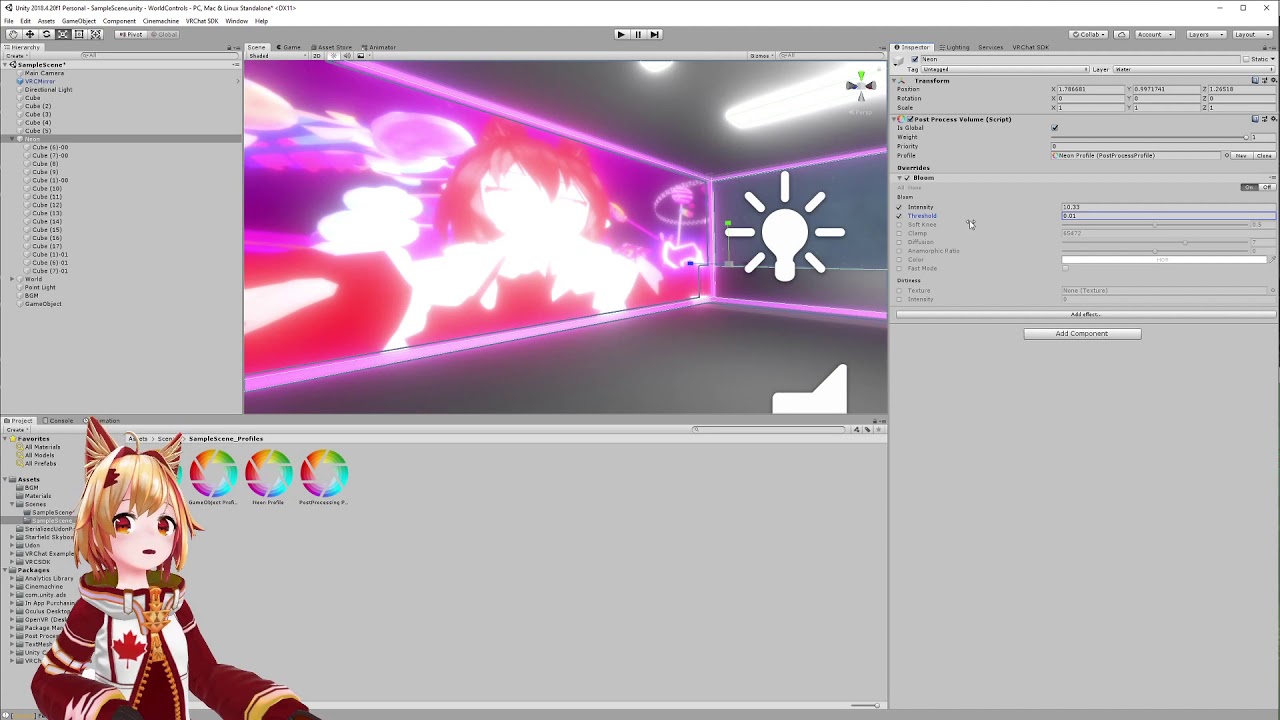
Create neon lighting for your VRChat world using Bloom effect.
paper gust
im working on a world and i have glass but when the light makes a shadow it makes these weird dots any idea why ?

Only if i use hard shadows tho
green vault
paper gust
im working on a world and i have glass but when the light makes a shadow it make...
they should go away once you bake your lighting, its unity trying to make shadow density basically thru transparent obect
 true herald
Anyone know why this is happening with my reflection probe at all? I'm getting these weird artifacts, and the bake is taking forever compared to my other worlds which happen almost instantaneously, it's not set to realtime and is baked lighting.

 real crag
how do you suggest i light up this building outside?

 gleaming quail
why does the neon light look different in-game?


I want it to be like the second picture
 craggy matrix
Gonna hazard a guess that this is a post processing issue - did you put the camera into the vrc scene descriptor's reference camera field?
 sick barn
I'm not sure why my materials look exactly like how I designed them in substance when in the unity editor (and the unity play mode) but when in vr chat it looks really dark, any suggestions?
In Editor

In Game
 twilit lily
what shader are you using? maybe it has to do with that?
sick barn
Unity standard
twilit lily
do you have a roughness map?
sick barn
Yes, Though thinking about it I didn't double check substance exported it properly packed I just assumed as I exported for unity it was but let me double check
twilit lily
you could try using the Autodesk Interactive shader, it has a Roughness node
sick barn
I tried exporting standard pbr textures from substance and used the autodesk interactive shader and again it looked fine in the editor but in game it actually looked even worse

I tried going into ps and manually packing the texture and it still didn't work but then I noticed unity didn't show the alpha in the texture preview so I exported it from ps again as a tif
Now i'm just back to where I started lol, fine in editor dark in game
 hard wyvern
So the question is kinda
Why would the metal be perfectly fine in unity but not VRchat?
And how would we fix that?
sick barn
I made a test material, this is in editor

This is in vr chat

It's something about metallic, I'm just not sure what
mint cipher
Before baking lights, I have point lights with a nice yellow color to them when they hit surfaces but when I bake them they all turn into white light. Is there something I'm missing? I followed a tutorial video but theirs stayed yellow aha.
 frozen crypt
Hi, I'm new to bakery. whats a reccommended texel limit for outdoor areas with bakery?
opal latch
Whenever I try to bake lights it instantly completes and the lights turn off. There are no overlapping UV maps. So idk what the problem is
mint cipher
Yeah mine just started dong that too. I bake, no lights. I delete all the lights and hit undo and it shines like normal. But then when build and test without baking, or baking again. No lights. At least before I had white light, but now none hahaha
modest vapor
frozen crypt
Hi, I'm new to bakery. whats a reccommended texel limit for outdoor areas with b...
10-20 max
frozen crypt
damn i added 40
frozen crypt
do you have a youtube video on bakery you recommend me to watch? @modest vapor
mint cipher
I created a new object and baked light over it and it's fine. So my room is messed now somehow. Only thing I did was change the textures on it because it had some bad ones but it's also all merged together. So I dunno if I have to start a new world, bleh.
modest vapor
frozen crypt
do you have a youtube video on bakery you recommend me to watch? <@!979807683236...
Top pinned message in this channel
hard wyvern
Is there a reason it takes 10 million years to bake lighting when I have the settings turned down?
green vault
hard wyvern
Is there a reason it takes 10 million years to bake lighting when I have the set...
depends on how much is in the scene sometimes. if you are using the default cpu baker, it normally takes quite a bit to bake anything
hard wyvern
green vault
depends on how much is in the scene sometimes. if you are using the default cpu ...
using the gpu and not much in the scene
The pc we are using was top of the line before the 30 series released in every aspect.
13-14 minutes to bake. What is this....
green vault
^weeks
mint cipher
mine takes 10 seconds, but I only have a few lights heeeheee
 patent tartan
sick barn
This is in vr chat
patent tartan
sick barn
This is in vr chat
when u are using materials that have reflective properties it is incredibly important to have reflection probes in your scene. otherwise it has notjing to reflect
hard wyvern
patent tartan
when u are using materials that have reflective properties it is incredibly impo...
He has reflection probes. I believe an earlier message states this.
He ended up fixing it by making his own metal shader
forest relic
quick question, when you bake lighting in unity does unity look at the entire objects UV map or the individual materials UV maps?
forest relic
so... how exactly does it work then
or rather does it matter if my objects UVs are overlapping for when im light baking?
modest vapor
Did you enable "Generate lightmap UVs" on your objects ?
forest relic
no i dont think so
modest vapor
You can support me on my pateron
https://www.patreon.com/mcphersonsound
This is a longer tutorial than normal and there is a lot to cover so here are time stamps for your convivence.
00:00 what is baked lighting
00:35 setting up lights
1:23 preparing meshes to bake
2:30 generate lightmap UV
3:28 light probes
5:10 reflection probes
6:00 emissive ...
You're missing the most basic step then, would suggest you watch this
forest relic
i probably did but idr
i need to reimport my shit to unity anyways but thanks for the advice
mint cipher
so im having an issue with the lighting
when i do the bake lighting it dosent look like it does when the lighting isint generated

this is how it looks normally
modest vapor
mint cipher
so im having an issue with the lighting
What does it look like when it's generated ?
mint cipher
never mind
i have found the solution its because i think i did the light mapper to low but now it looks great
mint cipher
I seem to have a probe that makes it so that I can't see new objects because of the big white ball that goes onto it. But even deleting all my light probes or hiding them, it remains. Not sure how to get rid of it and see what I'm doing haha. Any idea?
supple loom
mint cipher
I seem to have a probe that makes it so that I can't see new objects because of ...
That's the baked lighting data so just removing the light probe placements won't change it if you don't clear your baked lighting.
You can just disable it from being shown using the gizmos drop-down menu at top right of the scene view.
mint cipher
weird, the probe covers a small area but the white ball goes infinitely into space, ill have to disable it that way then
supple loom
It fully depends on how you have your gizmos set to display
I can't verify since I'm on my phone but you might want to turn on 3d gizmos and turn the size down
mint cipher
probably default, I've only been using this for a couple of days. Never even heard of gizmos before.
I've been baking these lights using color temperature and nothing has been baking the color since I started but baking white, which ended up working with the colors I ended up using. And then now, one row or lights finally decided to be the color temp I chose and it doesn't match aahahah
 astral flower
anybody know how to have distance shadowmask on bakery work in vrchat? I have a world setup to use this with a direct light. in the editor everything looks as it should. moveable objects are lit and shadowed, but when testing in vrchat, the direct light ignores all geometry and casts light on all movable objects regardless of if they're behind a wall
I just took a look at vrchat quality settings. are vrchat's quality settings forced to be on no matter what? it uses shadowmask, but not distance shadowmask. Am I not able to change this?
opal latch
anyone know why this happens when I bake lights? No overlapping UV maps

 lost tulip
hmm
drowsy furnace
forest relic
or rather does it matter if my objects UVs are overlapping for when im light bak...
It can and likely will cause odd artifacts as UV’s get overwritten
It may or may not be noticeable and it may not appear incorrect on every bake, but it will technically be incorrect. Best to address all those warnings
twilit lily
opal latch
anyone know why this happens when I bake lights? No overlapping UV maps
is HDR activated on your Reflection Probes?
forest relic
drowsy furnace
It can and likely will cause odd artifacts as UV’s get overwritten
alr thanks
 viral igloo
I'm having a bit of a problem with a shader only being visible if it's in the path of a spotlight. As soon as the spot is disabled that shader can no longer be seen...tried a few different layers and can't seem to pinpoint the cause of this
modest vapor
what shader is that ?
patent tartan
opal latch
anyone know why this happens when I bake lights? No overlapping UV maps
how does it look like when you enable the lightmap debugger?
I had this bloomy ass effect happen to me so many times, clear lighting data and rebake and you should be fine. that is assuming its an issue at the bakers end
 crude bison
having issues with lighting cookies, anyone ran into this? Can't get them to work at all.
 agile scroll
I'm trying to get my world lighting to... work like, at all with quest safe shaders... for the quest version
 fallow lark

VRChat
This page will describe various limits in place for the Oculus Quest version of VRChat. These limitations are in place in the interest of performance, user safety, and discouraging malicious behavior. Find more information about limited components on our Quest Content Optimization page.Although the ...
agile scroll
currently, I'm just trying to get the quest avatars in the world to not be pitch black or blinding white
fallow lark
make sure you do baked lighting
formal spindle
how can I make an emission material in unity
fallow lark
you check the checkbox in the materials for is emissive
 acoustic moat
What has more graphics, bakery or unity default lighting?
formal spindle
I saw the checkbox for it but no value to change intensity like in a video I saw.
 torn rock
How do I fix the light that leaks through the corner?

 modest vapor
Merge the vertices in blender
torn rock
modest vapor
Merge the vertices in blender
Ok thanks
 teal star
I've had an issue for a long time where baking reflection probes is super reddish, like a sunset color https://i.imgur.com/7k7d9ef.png
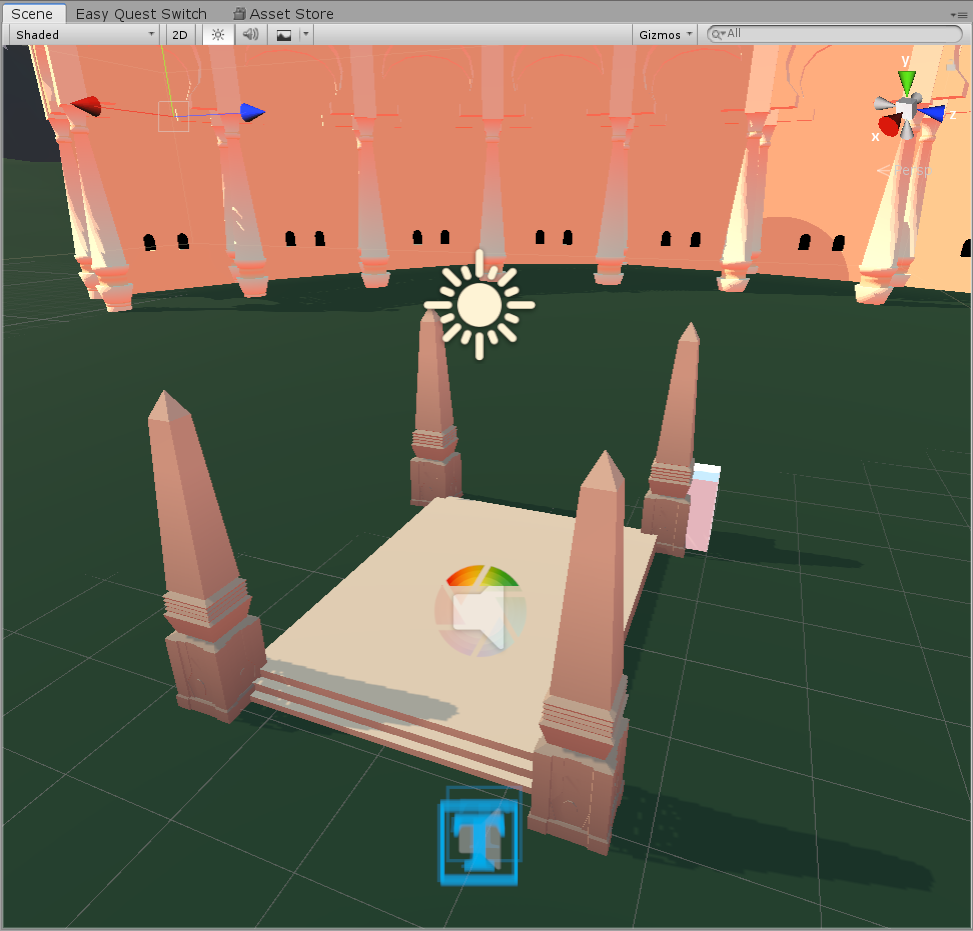
But I just re-customized the sky to completely remove all red and it doesn't do a thing when re-baking the reflection probe?

or...not? I just disabled my reflection probes and even my sun, and everything has an orange-ish hue. What the heck is causing this lol
alright, guess it's because of using skybox for environment lighting, but that still doesn't explain how the blue is coming out as red lol
AHA
I don't know when or how
But I guess a long time ago I generated lighting then I never did it again
Alright, new question! Is there a way to adjust the shadow fade distance? https://streamable.com/tzybwy

 celest kestrel
 modest vapor
try with directional light
shy root
does anyone know why the only way i can bake through bakery is combining with enlighten GI
modest vapor
Unity 
formal spindle
I can't get the emission material to work. no intensity input except when I click hdr thing below emission. and it still doesn't change anything

I'm trying to get it similar to blender if I can https://cdn.discordapp.com/attachments/820039509462351903/855405398014427166/render_4.png
 modest vapor
Why are you trying to light up a room with emission ?
formal spindle
yeah
is there another way of doing it where a light can be inside the fan mesh and pass through it
formal spindle
what should I be doing
modest vapor
Yeah, have the fan mesh not be static lightmapped
formal spindle
I'm not sure what the whole static thing was for
modest vapor
You can support me on my pateron
https://www.patreon.com/mcphersonsound
This is a longer tutorial than normal and there is a lot to cover so here are time stamps for your convivence.
00:00 what is baked lighting
00:35 setting up lights
1:23 preparing meshes to bake
2:30 generate lightmap UV
3:28 light probes
5:10 reflection probes
6:00 emissive ...
formal spindle
so i did that, made everything but ceiling fan static with a spot light in it. now its doing that splotchy thing again
modest vapor
splotchy ?
formal spindle
 shy root
wait ruuubick is this a known issue? it says my lightprobes arent there, but the enlighten renders them immediately
modest vapor
Did you generate lightmap UVs ?

 robust sapphire
bottom right is what players see, the main view is what i see in unity...
can anyone help me figure out how to fix this?
what im trying to do is have post processing, for having bloom within my world ><
please and thank you ><
 fiery cape
robust sapphire
bottom right is what players see, the main view is what i see in unity...
can an...
fiery cape
robust sapphire
bottom right is what players see, the main view is what i see in unity...
can an...
Does your reference camera have a PostProcessing component on it?

 true spear
After baking the lights in my world everything looks darker. In some places materials look dark while in others they look lighter/normal. How do I fix this?
fiery cape
true spear
After baking the lights in my world everything looks darker. In some places mate...
Are they metals? Metals will look darker as they reflect most of their light and once reflection probes come online they start appearing actually as they should do realistically. If you want them to be less reflective, you will need to reduce their metalness and/or reduce their smoothness and rebake.
And also, if you have post-processing enabled, with correct lighting information it will start to adjust the relative brightness of objects to provide a better HDR appearance. Because you can't get brighter than white except by making everything else look relatively darker.
true spear
They're not metal, and I don't have post processing enabled
Guess I'll just try to do the lighting again
It's my first time baking lights so I most likely just made a mistake at some point
 wet void
Do multiple spot lights work together? In unity it appears only one is lit at a time, and when they’re both in view it’ll only show the new spot being active
fiery cape
wet void
Do multiple spot lights work together? In unity it appears only one is lit at a ...
Spot lights that are set realtime or mixed are very expensive so by default will limited. You can change their importance from auto to important to raise their priority but it will be more expensive to render. Use mixed mode to increase performance, especially if it doesn't need to move. And bake them entirely if they are largely decorative.
modest vapor
You probably have too many realtime lights in your scene, you'll have to bake
wet void
I only have four, one directional and three small spot lights
wet void
Yeah, had to get rid of the spots. They were eating up my laptop.
modest vapor
Just bake them lol
mint cipher
Any way to get a vrcbilliards table to be lit up with baked lighting? I can only get it to stick around with a mixed/realtime light.
modest vapor
Which shader is it using ?
mint cipher
Let me see if I can find out, I'm looking but it goes deep.
I found for the balls it has particles/standard unlit. I can't find the table other than in the shader folder there is a rainbow colored script for table surface. I never mess with shader on the prefab things but on stuff I make I think I just put all standard ones.
I finally found the table in the tree and it says shader:standard
Beer pong tables light up with baked, but when you click the root of the prefab it has the shaders right there in the inspector. The pool table doesn't. It's buried way down in the tree. It's the only one mixed light I have tho, so not sure if it's a big deal. Everything else is baked.
modest vapor
If the pool table is static then it should just work ?
Might need UV Lightmaps to be generated
@slender oxide Do you know if people have baked their pool table before ?
modest vapor
 mint cipher
Yeah I tried making it static but it just broke the pool game. Meh, have to live with it I guess haha
mint cipher
Yeah just the table, found out after I hit yes without reading it wanted to apply it to all haha
 slender oxide
mmhmm
frozen crypt
Stupid question but do you bake with a point light and leave it checked and put it on bake while also adding a bakery script on it? Also Does the directional light need to be baked? I'm trying to learn because I'm very new to bakery
Does water need baking? Like a beach scene with a mass plane of water , does that need to be baked or not to bake? I got told to never bake water
Sorry if these questions are noob. Again new to bakery
Coming out from using unitys lightmapper
modest vapor
frozen crypt
Stupid question but do you bake with a point light and leave it checked and put ...
Water does not need baking
Up to you to bake your directional light, whether shadows of players are important to you or not, but even then you could have a directional light just for player shadows
 outer crown
@twilit lily
i try to rotate game object so the game object rotate light source
but for some reason it wont work
why unity doesn't register that i select game object to rotate light
and NOT the light source rotate game object
why new unity version doesn't support simple thing like this
here:
twilit lily
outer crown
<@!511620207396126740>
i try to rotate game object so the game object rotate lig...
the light is not a child of the game object
 pine trench
Up at the top there should be a button that says Center. Try changing that to pivot
Your recording software window is covering it up
zealous holly
when I generate lighting for my world it keeps coming out looking like this. would anyone know how to fix this?
 fiery cape
zealous holly
when I generate lighting for my world it keeps coming out looking like this. wou...
fiery cape
zealous holly
when I generate lighting for my world it keeps coming out looking like this. wou...
That's.. very strange. Which lighting engine are you using?
zealous holly
fiery cape
That's.. very strange. Which lighting engine are you using?
where can I tell what engine I'm using? I believe I'm using the starter or basic one
fiery cape
zealous holly
where can I tell what engine I'm using? I believe I'm using the starter or basic...
On the Lighting panel, the default is called Progressive I believe...
There's also Enlighten
Have you edited your world geometry heavily and not updated your UVs possibly...?
zealous holly
oh the light mapper. it is set to enlighten
zealous holly
fiery cape
Have you edited your world geometry heavily and not updated your UVs possibly......
I made the map from scratch in blender, the uvs are crazy, could that be whats causing it?
fiery cape
The Lightmapper uses the UV's to arrange the textures it generates correctly. In the same way textures will look bad if you don't tidy up your UVs, neither will your lightmaps
fiery cape
@zealous holly Just doing the automatic option should be enough for most things:

Just make sure to select all faces first
zealous holly
yes
fiery cape
You may then need to adjust your materials after you save and switch back to Unity if you were adjusting tiling etc based on various things
And remember, if you need to do something special with UVs, you can have more than one.
zealous holly
so, would making my uvs huge be the thing thats causing this problem? or would it just be that my uvs are messy?
fiery cape
Can you post a screenshot of what the UV grid looks like?
zealous holly
fiery cape
Can you post a screenshot of what the UV grid looks like?
heres the uvs for the roof
 fiery cape
That does look.. not ideal :D;;;
zealous holly
the thing is, in order to keep the shingles going the right direction I unwraped from view, instead of doing to auto unwrap
fiery cape
Ah right I see.. okay, yes, you'll want to use two UVs
zealous holly
I'm pretty much brand new to making maps in blender
fiery cape
One moment, making some screenshots for you
zealous holly
fiery cape
One moment, making some screenshots for you
thank you very much
fiery cape
So I'm guessing you did something like this, you wanted everything in a pattern so you did project from view...

But the problem is this has happened to everything else and that's what the lightmapper is using.
 zealous holly
i see
fiery cape
Here in Blender, you can create Multiple UV's, Do something like this....
 zealous holly
i have made a 2ed uv map
fiery cape
click the camera to make it the 'active' one.
Select all Smart unwrap
You should then get a cleaner look like this:
 zealous holly
so the uvs should look like this on the 2ed one right?
 fiery cape
That looks better yes
And if you click the camera for each, you should be able to switch viewing between
zealous holly
i see, cool!
fiery cape
Save the blend file (and export if you do that step)
Let Unity reload and it should keep the textures okay...
If so, rebake the lighting and see!
zealous holly
well if i export wont the roof in unity look like this?
 fiery cape
Both maps will Export
fiery cape
The standard shader in Unity will use UV0 (the first one) as your texture UV, and UV1 if it exists, for lightmapping
Otherwise it will use UV0 only for both.
fiery cape
More advanced shaders let you pick many UVs
zealous holly
i've seen that setting in poyomi but never really knew what it did till now
fiery cape
Yup, that's what that does
fallow lark
fiery cape
More advanced shaders let you pick many UVs
so you can do stuff like have tiling roof but some unique details on top
fiery cape
Yeah, the standard shader also let's you use multiple UVs
 fiery cape
Also, finally, when you import a model, you can sometimes let Unity generate its own lightmap which is normally okay for basic objects and things.
But for a complex map, modelling programs like Blender will do a better job.
See the two options at the bottom of the import properties here
 zealous holly
should I make it a separate uv for each part or just have the whole building have a separate uv map for the lightmap?
fiery cape
Remember that any objects sharing UVs have to share resolution space
When I built my homeworld, the original model was all one mesh
teal star
I've heard people talking about using a little fog-light thing to fake light rays through windows and stuff like that... could I use that with like point lights or something to fake a small illuminated sphere coming from a bunch of lanterns or something?
fiery cape
So all these walls are sharing one UV and thus its horribly messy and they all appear at lower resolution when I give them a tiled texture
 teal star
@fiery cape try expanding the size of the UVs so it tiles but with the same resolution texture
If UVs are bigger than a texture given, they automatically wrap to the other sides of the texture
fiery cape
Now I'm slowly splitting the building up so each wall has its own UVs and its easier to manage. Each different coloured object here is on its own object.
 fiery cape
teal star
If UVs are bigger than a texture given, they automatically wrap to the other sid...
fiery cape
teal star
If UVs are bigger than a texture given, they automatically wrap to the other sid...
I was explaining to @zealous holly why its good to break up larger objects sometimes.
teal star
ah, thought you were requesting help lol
I abuse UV wrapping and bilinear filtering for my textures lol https://i.imgur.com/P1USUyt.png
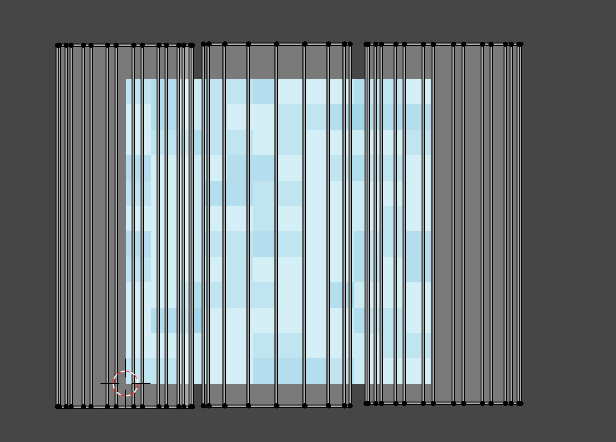 zealous holly
also, would it be better to have the furniture in my map be separate meshes? so that when a player is too far away or not look at them it doesn't render
this would probably be a better question in #world-optimization
fiery cape
zealous holly
also, would it be better to have the furniture in my map be separate meshes? so ...
Always always yes
Plus remember basic optimisation
If you have two chairs, you want one chair item
And tell Unity 'two of these please'
Which is much, much more performant.
zealous holly
like station chairs? or model chairs?
fiery cape
anything at all...
another example incoming....
Just gotta load the project, one sec ;)
modest vapor
You can group objects and atlas them if they're in the same space
Not all meshes need to be their own
teal star
^ Also, don't worry too much about joining meshes that are piercing through each other, depending on the situation. It often might actually increase your poly count if you put in the effort to connect meshes together where they pierce
Like, still make them one mesh, but don't put in the effort to specifically create geometry where they're fused together if that makes sense?
modest vapor
Really depends on the shading type imo
zealous holly
i think i did that
teal star
Lighting artifacts are sometimes caused depending on whether or not you actually create geometry where meshes connect to each other, but I believe there are ways to resolve those artifacts (like baking lightmaps with AO I think?)... I'm in the process of figuring that out rn
fiery cape
@zealous holly Here is my homeworld in Unity... It has these planters and lights. There are three planters and... lots of lights

In Blender this is the base main level, those empty objects act as positional placeholders for the planters...
 teal star
1.3 not even released and I'm already screwing around with 1.4's environmental update 😅 so hard to follow a distinct development path...
fiery cape
And on the planter, I do the same for the lights:

This lets me use blender's tools to get everything perfectly aligned as Unity is terrible at that
 fiery cape
And in Unity here you can see how I've placed the object and then placed the submeshes (and things like lights) in the empties:
 fiery cape
zealous holly
fiery cape
zealous holly
That still looks nice! But it is a great time-saver yes! :)
zealous holly
would unity just know that it has a 2ed uv and use that one now?
or is there a setting i need to change that im not seeing
fiery cape
It should do yes, fingers crossed...
Unless I've massively forgotten something, I've been fighting with lighting stuff myself and trying to get some cool effects going and its been a right pain and lots of waiting around for bakes :(
zealous holly
yeah, I plan to have this map be pretty bigg so Im going to have to learn some major stuff here soon
fiery cape
I've been trying to have lighting that changes without blowing the performance budget and that's proven difficult because Udon doesn't let you poke all the buttons I'd like to do things like swap between two lightmaps
So I've had to fake it a bit...
zealous holly
so like led lights that change color? that sounds really cool
fiery cape
More a room starting off dark and becoming floodlit when you power up...
I've built what is currently just a VERY elaborate Mirror Room. Haha. But my plan is to have tools and have it be like, a nice Avatar Test Facility. :)
I keep thinking of a version of line from MegaMind:
"What, what's the difference between this and any other mirror?"
"PRESENTATION."
zealous holly
later i wanna make a sort of "raveyard" more of an area that uses audio link but outdoors and a more of fratparty/deep forest party feel
fiery cape
You can get a lot of nice effects with careful use of fog and things :)
For that sorta thing I'd imagine!

 fiery cape
hmm!
Getting closer certainly
You might want to check for any gaps or holes. Unity is very fussy and leaks like a sieve. You may also want to smart unwrap again but increase the 'margin' value. This will add bigger gaps between the UV islands and prevent stuff on one affecting another
I'm not sure what's causing that big honking shadow in the first pic though
oh.. except.. the lampshade?
fiery cape
Haha :D You could cheat it and set that to not cast shadows
zealous holly
thats the plan
fiery cape
It will be technically wrong but asthetically nicer
If I have an object like that that's very closer to a light fitting, I often tell it don't cast shadows, don't receive shadows as its so close to the light source, you expect it to have no shadows at all.
zealous holly
i see
outer crown
@twilit lily@pine trench
thank you i will try those 👍
outer crown
@twilit lily @pine trench
yes it works here:
twilit lily
ayy nice!
outer crown
👍
peak nimbus
is anyone able to help me with vr stage lighting here?
pine trench
outer crown
👍
Nice, glad you got it working!
frozen crypt
anyone know how can i fix this issue? all lights are on baked with their own bakery scripts.

some avatars are just completely black and some are dark (had friends test the world out with me)
again new to bakery
modest vapor
Did you read the documentation ?
frozen crypt
modest vapor
Did you read the documentation ?
can you link it again, I think i was asleep by the time you replied back
sorry about that
modest vapor
twilit lily
frozen crypt
anyone know how can i fix this issue? all lights are on baked with their own bak...
do you have Light Probes in your Scene?
green vault
anyone know how long a 1.12 million polygon structure should take when generating uv lightmaps? it did it in 2ish hours yesterday. but then i was like "this hard angle looks dumb" and i lowered the hard angle and i left it going about 14 hours. and then i just closed unity it nver finished.
model was .obj, was too scared to do fbx with such a thick model
gah im an impatient little mio. im closing unity and just generating the default lightmaps this time
however i would like to know if anyone has like "efficient speed" settings of some kind or is it different for unique geometry
modest vapor
Why are you scared of fbx ?
green vault
well im not sure if fbx will take slightly longer
modest vapor
Fbx will drastically be smaller in file size first of all, and no, it wouldn't be any slower
green vault
k. well i started an fbx like 2 hours ago. its still generating
modest vapor
Do you need that mesh to be a single one for something ?
green vault
i would prefer it be. technically i could splice it for occulsion, but trying to do another single mesh world since the last one i did turned out to be my most optimized map in andoutside of vrc
im editing the model again. i dont want it to be in the million poly range
modest vapor
4 meshes instead of one won't make a bit difference
Also hoping you have a custom low poly collision mesh for the ground ?
green vault
was planing on using planes and box colliders for colliders
and then combine the collision complex into 1
but im still just kind of curious how unity does its lightmap uving since its pretty unhappy with this specific model
modest vapor
unity will take a while, so will blender, there's sadly no faster way
green vault
as you said that. it finished. i just need to not mess with the hard angle. even though id prefer and smaller hard angle lol
mint cipher
frozen crypt
anyone know how can i fix this issue? all lights are on baked with their own bak...
Yeah you will need some light probes in the area there, I had the same issue because I hadn't put a probe on my 2nd floor so I was always completely black since my lighting is baked and I forgot to put an extra one.
Or maybe I'm wrong, because I don't know what bakery scripts are. But normally that's my issue.
 spice silo
Howdy. I'm working on my first world and one thing I'd like to add illumination from a video screen. I'm just not sure how. I'm using Bakery for my lighting, and the video player is Merlin's USharpVideo prefab.
Doesn't seem to be as simple as making a material emissive unfortunately. I'd appreciate some guidance as to not, once again, fuck up my lighting data and have to redo it.
I'm learning a good bit by these mistakes but bloody hell 
sharp robin
spice silo
Howdy. I'm working on my first world and one thing I'd like to add illumination ...
If you mean the dynamic illumination from the video screen what you want is to setup is realtime global illumination
spice silo
Yeah, IDK how to do that with Bakery, and I'm afraid of screwing up the lighting data by following tutorials that don't use it.
sharp robin
The bakery documentation should be able to guide you through it
spice silo
Well... I hope it's clear enough for me.
sharp robin
spice silo
Well... I hope it's clear enough for me.
The short of it is to set the default lightmapper to enlighten and enable the realtime global illumination option
Then in bakery set it to experimental scroll to the bottom and enable combine with realtime GI
Then to make it work for VRChat for SDK2 you will need to add a VRC_Custom renderer behavior component and if SDK3 you use RendererExtentions UpdateGIMaterials
spice silo
The component goes on everything affected by real-time GI?
sharp robin
Just the screen afaik
spice silo
For each screen I have? Or just the main USharpVideo one?
'Cause I have multiple screens.
sharp robin
You may only need one component
Actually it is needed for video players to update properly
sharp robin
Looking at Merlins video player he has the GI update included by default so you dont need to worry about that
viral igloo
Running into a weird problem....I'm hoping it's a simple fix.... I'm using some shaders as lights, and in scene and game view, I can see them, when I test the world I can barely see them, unless I look in a mirror, then there they are. What would be causing this?
Mirror view

normal view

 normal idol
The only thing that comes to mind is maybe the mirror is displaying layers that the camera is not or the other way around.
So, I thought I understood how light baking works but apparently not. My lights have their mode set to baked and then I bake them but if I move them or turn them off, they act like realtime lights and the light is clearly not mapped to the surface. Any ideas what could be going wrong? Baking gives me shadows on the terrain that aren't there pre-bake and it looks good besides the lights not behaving properly but the lightmaps themselves appear black using both the built-in lightmapper and Bakery.
twilit lily
normal idol
So, I thought I understood how light baking works but apparently not. My lights ...
are the lights set to bake?
and did you set the objects to static?
normal idol
Lights are all set to baked, yes, and I believe everything is set to lightmap static, though I don't have that top "static for all systems" button checked.
twilit lily
and if you are using bakery, the Bakery Point Light component is added to that one light, right?
normal idol
I've tried Bakery and the built-in lightmapper but I wasn't aware of this special component. I just got Bakery recently and it seemed to work alright out of the box on other scenes so I haven't played with it much.
twilit lily
hmm, the way i use bakery is by attaching a bakery light to the light, then match the realtime light, then disable the realtime light component. then adjust bakery settings and render the scene
basically like that on a area light (for example)
 normal idol
I didn't even know Bakery had its own light components. Probably why I haven't been understanding why people prefer it to the built in lightmapper (other than the fact that it's faster). Thanks, I probably need to go and watch some tutorials to actually learn how to use Bakery. When you say you match the realtime light, do you mean swapping back and forth between them and eyeballing it to see if they look the same?
twilit lily
i did a quick n dirty test with 2 lights. One Bakery Point Light and one default Unity Light both set to bake. bakery does in fact only bake the Bakery one

only when you select "combine with enlighten realtime GI it will bake Unity lights alongside bakery ones"
 normal idol
Good to know. Thanks for your help!
 rose ether
Anyone know a good fix for when you playspace under floor or sit on floor, character goes dark? Seems fine if not sitting on floor. Im using light probes
twilit lily
check your lightprobes if they are all within the lit room itself. outside the room (like under the floor) is complete darkness
rose ether
Its not complete darkness, just tad darker. You can check at A Quiet Loft.
I did thought of new ideas, which ill try.
golden stone
If I wanted to clean up the display some some areas of a light map, can substance painter read a light map on a mesh for live adjustments to it, or is there another method to get that type of precision, I don’t have a traditional uv to go by
modest vapor
It's a texture so technically yes, same for blender iirc
 burnt sable
Light baking sucks so much sometimes
pine trench
Agreed. Back before I knew about Bakery it took 2-3 days to bake the lights in one of my worlds with the possibility of it crashing partway through :l
 ionic adder
quick question
i use spot lights, and i wanna continue using them, giving my world more detail - anyways
some avatars with some shaders are way too bright because of the spot lights, is there anything i can do about that?
intensity back to 1 doesnt help much either
modest vapor
Different spotlights affecting different layers
mint cipher
My world used to look fine until I upgraded the sdk by deleting all of the sdk folders and importing the new version. I also had to use some repair functions built into probuilder because my material wasn't showing up on one of the faces of a shape I added after editing it. Everything looks fine in unity. It just looks messed up in VRChat.


 twilit lily
rebaked lights already?
mint cipher
yes
forest relic
hey, ive been trying a bunch of different stuff with light baking lately and i can't get my lighting to look correct and the lights on the wall don't even show can someone help?

the grey box lights on the wall are supposed to be spotlights like this


 modest vapor
forest relic
hey, ive been trying a bunch of different stuff with light baking lately and i c...
modest vapor
forest relic
hey, ive been trying a bunch of different stuff with light baking lately and i c...
If the lights are in the mesh, it won't work, you should make the lamps themselves emissive
forest relic
ok cause in blender they were just emissives versus in unity they're just spotlights
 spring yew
question (probaly noob one, sorry)
I'm fairly new to world creation, was able to get the lighting set up and baked, it looks nice on the world, the walls, the meshes of objects
but i noticed during testing that the lighting is ''fake?'' if that makes sense, what I mean is, my avatar does not get lit up by any lighting in my world
is this easily fixed by a mistake i made in the lighting settings or is the problem way more advanced then this~
I want my avatar to be lit up a bit by the world lighting
just for the record, im not talking about my avatars shaders, she is lit up in any other world, just any world that does not have lighting, she goes very dark~
 lunar narwhal
You need to use light probes for baked lighting to affect dynamic objects such as avatars
I believe the pinned lighting tutorial in this channel covers them
 spring yew
found it, thank you @lunar narwhal
 heady sinew
Is there a way to download a world for use outside of vrchat lol
Some nice looking worlds go into roblox games
Or vice versa, which I am still trying to figure out
twilit lily
no, you cannot download worlds. you can maybe port your own worlds you made over to other games, but thats about it
@heady sinew
heady sinew
Oh ok
mint cipher

i've just modelled an upcoming world made in sketchup, the problem im facing is that im getting triangular uv bake problems. i know a way around this but i wanted to see if theres an alternative around these problems.


any suggestions?
 cerulean mesa
I'm trying to bake the lighting in my world but pretty much all of the models have really messed up lighting. I've generated lightmap UVs on all of the models and i'm using the default lightmapper settings. Any ideas on whats going on?
 modest vapor
Checked the console ?
cerulean mesa
It says i have overlapping UVs. I imagine this is the problem?
 molten night
Alright, I have a world where a room isn't really obscured from the outside sun as I need shadows, but I'm using different shaders to make it a bit darker in the room, how would I use a light probe to lower the brightness of avatars in the room by 25% or so?
I know light probes are baked and sampled, so I was wondering if there was a more manual way to do it
modest vapor
Place a single lightprobe in a shadowed corner ?
molten night
will give that a shot
ok that didn't seem to do anything, I have a probe hiding in the corner, is there anything else I need to do to have it propagate through the room?
maybe this part of the room isn't shadowed, I'll try making another box and hiding the probe near or behind it
Question though is uh, this is just one room in the world, would this cause the rest of the players outside of this room in the world to become dark as well?
 modest vapor
Did you bake your lighting ?
And how many other lightprobes in your world do you have
 graceful jetty
How would I go about removing dark edges from static objects with Bakery?
I'll get a screenshot to show what I mean now

From here it doesn't look too bad, but getting closer shows what I mean

 dim hill
I have an issue, I have a standard shader material on objects, it works in unity but in game they're just black, any ideas?
 fiery cape
 modern matrix
Some really nice design there. :)
I wanted to ask, is thick fog very expensive performance wise?
I invited a friend with a lower end system to my fairly small world but it has high fog and a couple of Poi shaders on walls and they basically crashed out the game :(
sharp robin
fiery cape
I wanted to ask, is thick fog very expensive performance wise?
Default unity fog is very performant
molten night
modest vapor
Did you bake your lighting ?
reaally late response sorry, but the world is using poiyomi's shaders and I haven't found a way to bake the lighting without destroying how the world looks yet
fiery cape
molten night
reaally late response sorry, but the world is using poiyomi's shaders and I have...
There is a set of baking settings on the shader.
My world looked fine baked
molten night
Can you do that without any of the global illumination options set? The world doesn't have a way of baking that information through lightmaps is more what i mean
fiery cape
One sec, loading project
molten night
no rush, appreciate the help
fiery cape
molten night
Can you do that without any of the global illumination options set? The world do...
I'm not sure what you mean by that also...?

 molten night
The world is lit from one Directional Light that acts as a sun, I was wondering if the lightmap UV configs were something needed to bake the lighting for the light probes at all
fiery cape
Unless you have nothing at all to cast shadows, you might still want light probes
molten night
The objest in the world themselves are doing the shadow casting and I'm trying to get avatars in a shadowy area to appear darker
modest vapor
Poiyomi's shader doesn't support lightmapping in toon mode btw
molten night
gotcha
normal idol
Bakery has been working but I added some new models and lights and now it hangs at 55% - Rendering lightmaps - preparing... and gives me this error. Any ideas? I've seen reports about this where the problem seems to be resolved with a rebake or a restart but after doing that along with restarting the computer, the problem persists.

 final smelt
normal idol
Bakery has been working but I added some new models and lights and now it hangs ...
final smelt
normal idol
Bakery has been working but I added some new models and lights and now it hangs ...
I was getting a error because of my anti virus
wet void
What are the best settings for good baked lighting while be optimizing and looking good? I’m gonna be using a new windows 10 Lenovo laptop for baking and stuff since it’ll be quicker than my old windows 7 laptop
twilit lily
depends on what you want to bake
if its a small indoor environment you can go higher on the resolution, outside areas dont need as much shadow quality
higher quality also hits hard on filesize
wet void
I can send some screenshots I took a while back
twilit lily
sure
wet void
One is for how it looks right now while the second is a real time point light. The two with the blue flames are possible spots for point lights


 twilit lily
alright, i see
for every light that needs to be baked you have to change the mode from realtime to baked
 wet void
Alright, that makes sense
twilit lily
they will appear as realtime until you bake them
every object that you want to be baked (cast and recieve shadows) has to be marked as static
 wet void
Oh geez, that’s gonna be a lot
twilit lily
lightmap static to be exact
 wet void
Alright
twilit lily
in the lighting window you can then select between 3 different lighmappers.
enlighten is CPU based and fairly fast, but inaccurate and not really realistic
progressive CPU is baked Ray Tracing but calculated on the CPU (very slow)
progressive GPU is basically the same as bakery, but much more broken and a pain to use, but fast (if you wanna see a quick preview of how the final product looks like)

the lightmap resolution will determine the final filesize and quality result. for outside areas i would suggest using like 4-10 and for indoor somewhere between 30 and 50

thats just a very quick n dirty way to bake lights, xiexe made a very detailed and good tutorial on good lighting
https://vrcat.club/threads/xiexes-lighting-tutorial-how-to-get-good-at-baked-lighting-101.2081/

VRCat: Community-Run VRChat Forums
Greetings! Over my course of playing VRChat I've noticed that most worlds, mainly the ones that have baked lighting, are done poorly, or in an...
wet void
I’m trying to follow the tutorial, but I am very confused when it comes to reflection probes. Do I just put one in the middle of the world in the air or do I have multiple for different areas??
wet void
I’m still very confused…
I went to bake and my unity crashed…
This is the exact reason why I don’t bake any of my worlds
neat rivet
wet void
I’m trying to follow the tutorial, but I am very confused when it comes to refle...
You need them in multiple areas where the reflection can be different.
normal idol
Yeah, the reflection probe has a box that lets you specify which areas that reflection should influence. Anyone else have any ideas for why Bakery would stall at rendering light maps? I'm pretty stuck without it since the only other lighting I can use without the time remaining increasing until the bake takes hundreds of days is Enlighten and that seems to just make a mess of every texture in my project when I try to use that.
Guess I need to go back to baking all of my lights in Blender but that requires properly UV-mapping every asset so I don't really want to do that right now.
normal idol
The problem seems to arise when publishing to VRChat. The image above is the bake prior to publishing and the one below is after
 wet void
Been trying to bake lighting for my world, but it’s stuck at 5/11 Clustering 53 jobs…
What do I do? It’s not moving at all…
modest vapor
That means you have a ton of geometry
wet void
But the world is only at 26MB…
modest vapor
What's in your world ? We still haven't seen it i think
wet void
I posted pictures in #world-development
 royal dirge
Anyone have any idea what might make this splotchyness happen? The shadows are supposed to be very straight since they are coming from a window. Thing is, it WAS working correctly before and without changing anything lighting related, it started doing this.
 sharp robin
@royal dirge Looks like invalidated texels
In the lighting tab go to lightmap parameter and create a new one and set the backface tolerance value to 0
 sharp robin
In the scene view change to baked lightmap view
You will be able to see the resolution of objects
 sharp robin
Check UV overlap also?
royal dirge
Yep, there is no overlap in these areas
modest vapor
Console warnings ?
sharp robin
Assuming you already have lightmap generation in unity enabled you could try to them manually instead
Though I have seen a similar issue before that was only solvable by remaking the mesh
Are you using progressive GPU?
royal dirge
The console says multiple things don't have normals. But how could it all have been normal and then changed so wildly
Im using progressive CPU
sharp robin
Set the meshes to calculate normals on the things that have the warnings
royal dirge
Yep, in the middle of trying that. It'll take a minute
That didn't work, but Im going to try to recalculate the normals in Blender and then re-import
Nope, nothing worked. And actually, the normals thing was only for objects that I used as makeshift folders that had no geometry, so that has nothing to do with it. The console doesn't say anything aside from there is some UV overlap, but there is no overlap where these shadows are.
sharp robin
UV overlap isn't fully reliable
royal dirge
I figured it out. It's because I scaled the object in the scene
Unscaling it fixed it
It was only scaled to 1.2 but that was enough
sharp robin
Which makes it sound like it was a UV overlap
Changing its scale will change its lightmap scale also
Meaning that you have likely just moved where the overlap is happening
royal dirge
Well heck
sharp robin
You do have generate lightmap UVs enabled for every object that needs it?
royal dirge
Yep
sharp robin
I guess so long as you don't see any artifacts its fine
royal dirge
Shoot, I guess that wasn't the fix
First what I tried was instead of scaling it in the scene, I changed the scale in the import settings. That didn't work, so I changed the scale in Blender, applied it, and re-imported. It has the exact same problem
sharp robin
You can change the lightmap scale on the mesh renderer itself which would be the hacky way of avoiding the artifacting
That is assuming that its not happening because of its actual world scale size somehow
royal dirge
Here's what actually fixed it. I moved the entire scene down in unity back to where I had it originally. I moved it up because the grid was getting in my way. I didn't move it THAT far up though because I know about how wiggly things get
sharp robin
That makes literally no sense to me lol
 modest vapor
You need to generate lightmap UVs
 digital patrol

Cool, I also get these odd yellow lines on some textures from long distances, anybody know why?
 sharp robin
@digital patrol You can try increase lightmap resolution and samples to reduce the weird coloring
And that yellow line is likely being caused by lightmap + msaa
Which increasing the lightmap resolution and padding should fix
digital patrol
I will try that thank you
digital patrol
Lightmap now gets stuck on clustering and the UVs are still broken
sharp robin
digital patrol
Lightmap now gets stuck on clustering and the UVs are still broken
How much did you increase the lightmap size and what lightmapper are you using?
digital patrol
Shadowmask mixed lighting with baked global illumination on, lightmapper is enlighten with 8 indirect resolution, 10 lightmap resolution, and 8 padding
sharp robin
Change lightmapper to progressive and disable realtime GI unless you are specifically using it
sharp robin
Consistently?
sharp robin
If it doesn't crash then yes
digital patrol
It crashes as well
sharp robin
Can you screenshot your lightmap settings
digital patrol
 sharp robin
Do you get any readable error when it crashes?
digital patrol
Is there a crash reports folder?
sharp robin
Yeah however I'm not sure if they would help
digital patrol
I am going to wipe the library folder and see what happens
sharp robin
You could try run progressive in a new scene to see if that works
As I would guess something in your scene causing the crash
digital patrol
Most likely
Most of the issues with the UVs are coming from imported FBX files so I am assuming something is wrong there
I am going to switch to blender soon so hopefully I will not need to import models as much and the UV generation will be built in
 torpid oasis
how do I properly set how dark the whole world is?
sharp robin
torpid oasis
how do I properly set how dark the whole world is?
You probably want to adjust the environmental lighting options in the lighting tab
torpid oasis
this one?
 sharp robin
Yeah but if its already set to a dark color its something else you will need to change
 gleaming mica
hey guys, I'm trying to buy bakery but I'm off by a few dollars, does anyone know a coupon that works?
 ruby narwhal
so, i remember reading on a unity thread that you could make better lightmap uv's in blender and import them to unity, to fix uv overlapping issues and other stuff. how does that work? i just need some names and pointers
drowsy furnace
Basically make a second UVMap (you can have multiple) with the top being for shaders and the bottom one being for the lightmap. The main difference being the lightmap should have every triangle have a unique location. No overlapping similar areas. In unity, uncheck generate lightmap uv’s
@ruby narwhal
ruby narwhal
thanks my guy ❤️
ruby narwhal
drowsy furnace
Basically make a second UVMap (you can have multiple) with the top being for sha...
how do i tell the lightmapper to use the other uv? does it do it on it's own or
modest vapor
UV2 by default
drowsy furnace
It should automatically use the second UV layer if you chose to not generate a lightmapuv
I got confused since Poiyomi calls the first two UV0 and UV1, but just having a second UVmap makes the lightmaper use the second one, not a third.
ruby narwhal
ah oke
formal spindle
Is there a way to have light pass through a material. one I was using as emission only in blender. have the light inside the mesh where the socket would be
 green vault
formal spindle
Is there a way to have light pass through a material. one I was using as emissio...
green vault
formal spindle
Is there a way to have light pass through a material. one I was using as emissio...
ye, light can go thru alpha transparent stuff
formal spindle
Does baked lighting not let a avatar cast a shadow? Doesn't seem to in my test. And how would I fix it. Or is it even necessary for baked
drowsy furnace
formal spindle
Does baked lighting not let a avatar cast a shadow? Doesn't seem to in my test. ...
Baked lighting has no real-time shadows. If you want real-time shadows to merge with baked ones you need a mixed setup
formal spindle
How would I do that.
drowsy furnace
It’s a third option on your light sources between baked and real-time
formal spindle
And would that make anything thats not Lightmap static cast a shadow as well?
drowsy furnace
If you have your lighting set up properly with light probes and everything yes.
Mixed setup is intended for having both. I believe the one that lets you merge baked and real-time shadows is subtractive
The benefit is that it only needs to draw real-time shadows from the objects that are not marked a static
The downside is that the mixing needs to be fudged with a correctly tinted shadow color
 fluid sedge
do overlapping UV's affect the baked lightmap or is it fine
fiery cape
fluid sedge
do overlapping UV's affect the baked lightmap or is it fine
If you have 'generate Lightmap UVs' selected on the importer, Unity will make its own (though not always great) UVs for lighting. Otherwise create a second UV set in your 3D modelling app for lighting if you're using overlaps.
 drowsy furnace
fluid sedge
do overlapping UV's affect the baked lightmap or is it fine
drowsy furnace
fluid sedge
do overlapping UV's affect the baked lightmap or is it fine
This will lead to incorrect bakes since it’s using the same part of the texture for two different areas of the model
drowsy furnace
fluid sedge
im building it entierly in unity
What tool is that
fluid sedge
ProBuilder UV Editor
drowsy furnace
Oh I wasn’t aware it had 2018 support
fluid sedge
I can resize and move all the UV's appart, gonna take a while though lol
the price I pay for using a single pallate material for the entire world I guess
drowsy furnace
I actually went for no textures at all and did everything with vertex colors
If it has the ability to export to a model in blender it can just do a quick unwrap
Actually if you can export to a model then you only need to do generate lightmap UV’s in unity
I’d be surprised if your tool didn’t have an option for it
fluid sedge
idk blender, thats why im doing it this way lol
drowsy furnace
Generate lightmap uv is a unity thing
It’s there so you don’t have to separate your UV’s and avoid overlaps
It will let your shader use your real UV and then the lightmaper uses the one it generated with them separated
fluid sedge
All it seems to have, was allready ticked
 drowsy furnace
Then you should be good anything it generates shouldn’t have a overlap
If it does it might be due to really small margins and it’s tripping
If you don’t see a problem with the bake probably ignore it
fluid sedge
seems good, vertex colours was an option but the pallette was limited in unity
 manic vapor
Can you do volumetrics/sun rays?
twilit lily
not directly, but i think some people found a workaround with geometry, proximity sensors, etc (check summer solitude for an example if its still there)
 timid elm
Silent has a free shader for sun rays that may suit your needs: https://s-ilent.booth.pm/items/2658287

Unity/VRchat用のレンズフレアとゴッドレイを表示するシェーダ。 A shader that renders a lens flare and crepuscular rays (sun rays) from the sun over the scene for Unity/VRchat. To install, place the Shader/ folder with the shader into your Assets/ directory. Licensed under the MIT license.
shy root
does anybody know how to change the UV settings to fix this?
 sharp robin
shy root
does anybody know how to change the UV settings to fix this?
sharp robin
shy root
does anybody know how to change the UV settings to fix this?
If you have generate lightmap UVs enabled for the mesh you could try adjust the hard angle
If that doesn't reduce of fix the issue you would want to make the lightmap UVs in blender
shy root
am i loking to increase or decrease the hard angle?
sharp robin
Increase first but either is unlikely to fix it completely
sharp robin
It really isn't once you learn what things do
shy root
alrighty, thank you
sharp robin
If you want assistance with blender feel free to @ or dm me even
shy root
sharp robin
If you want assistance with blender feel free to @ or dm me even
that would be awesome! I would appreciate that
sharp robin
Open the model in blender and I can explain how to do the UVs from there
shy root
okay, I have it open in blender
sharp robin
Will help to know what version of blender you are using
shy root
2.92
sharp robin
This is 2.8 but it should still be similar to this

Make sure the model is selected by clicking on it and then you should be able to get here
shy root
the hierarchy on the right disappears for me
sharp robin
Which hierarchy?
 sharp robin
Oh at the top with all the view tabs you would want to click the + button to add one and go general>layout
Or actually general>UV editing should give you a UV editing tab with the default blender layout
shy root
ah yes there it is
sharp robin
If you click the plus button to make a second UV set you can select the models press tab to change to edit mode and hit U to bring up the UV options
shy root
and lets say there's no first UV map
sharp robin
Oh there isn't?
sharp robin
Oh its 17 objects
shy root
yeah I had no idea until now, it merged when I imported into unity
sharp robin
Then you will need to go through each mesh object and add two UV sets
For unwrapping the first UVs Smart UV Project should be the best option
and you could probably use it for the second UVs also
shy root
Okay! Ill start with this, I will @ you when i get all that figured out - thank you so much
 obsidian cape

hi can someone help me figure out why some point lights are not emitting light but others are ?
final smelt
obsidian cape
hi can someone help me figure out why some point lights are not emitting light b...
They are all baked right?
obsidian cape
final smelt
They are all baked right?
yup
before baking, they are all very bright, but after baking, it turns into that and some are not even emitting light
twilit lily
just to make sure, they are set to bake, right?
obsidian cape
yes @twilit lily
twilit lily
weird. do you use Bakery or the default lightmapper?
obsidian cape
default lightmapper
 blazing stream
obsidian cape
default lightmapper
blazing stream
obsidian cape
default lightmapper
progressives gpu baking mode is still kinda buggy and unfinished in 2018 (eg it doesn't even support transparency in this version), you're better off using the cpu lightmapper until we get unity 2019
obsidian cape
oh okay should i try with progressive cpu then ?
or could i use Bakery becus using my gpu is 5 min but the cpu one is like 40min 😭
fluid sedge
is there a bug or something that if you have a object with the Fade Rendering mode thats 100% transparent, itll just bake forever?
because I had a single surface that was set to that and it was at over an hour trying to bake before i gave up, hide the surface and it was done in 2 minutes
modest vapor
transparent surfaces shouldn't be set to lightmap static
fluid sedge
i see, I didnt know that, just thought it was for things that are, static
 proven locust
i lightmap transparent objects often?
ex: I use graffiti thats set to be transparent, would look mega lame without lightmapping
even glass receives shadows
green vault
transparent lightmapping is like a novice thing to do and not like a noob thing noobs should be doing
formal spindle
how can I bake a lightmap, but not bake shadows for a animate object. for a ceiling fan
sharp robin
formal spindle
how can I bake a lightmap, but not bake shadows for a animate object. for a ceil...
On the mesh renderer settings you can change the "cast shadows" option to off
Or uncheck the lightmap static option for that object
formal spindle
I still want it to cast shadows, but also appear in a lightmap
well I guess I could do that for the baking and then turn it back on afterwards
modest vapor
proven locust
even glass receives shadows
That's fine, but the issue is that people do that while casting a shadow ***from ***their transparent object
modest vapor
To a much lesser extent, and since you can't control the strength per object, imo it's better to have none than one that looks wrong
Depends on the world, but i feel like that's an easy mistake to consider all your meshes to be lightmap static regardless of the type of material
proven locust
hmm ok
modest vapor
In your case for graffitis, they're part of the walls, so that makes sense
We're not casting shadows from the water, so why are we for windows
proven locust

just as an example though, transparent stuff not casting shadows is a really strange idea to me
even if the glass object /we is scaled to 0 in lightmap, I dont see why it wouldnt be static at all
modest vapor
Yeah, do we have transmission though
proven locust
🤷♂️ id prefer a slightly darker shadow than none
modest vapor
It also depends for objects and things that are part of the building
proven locust
indirect would save a lot there
modest vapor
Can't control the intensity per object though 
if i could get 01/04 direct control i'd definitely use it, but i don't think we can ?




 modest vapor
Isn't that just cutout ?
Shadow is accurate, but i don't know if that changes the shadow intensity
proven locust
i don get it
lunar narwhal
isnt that backface gi
modest vapor
Yeah, that looks like it's listed in the notes
proven locust
tbh im not sure how a lot of these things work on backend
im just looking through the bakery docs, theres stochastic alpha fake transparency based on alpha
 modest vapor
By default i think we ignore backface GI with Bakery ?
proven locust
IF im understanding what im reading
lunar narwhal
yeah by default its set to 0
proven locust
which I always change 😛
modest vapor
Congrats on being the top 0.1% of lightmapping users 
proven locust
 💼
💼 
tldr, set it static but scale 0 in lightmap?
b/c it seems like bakery can handle it ( at least in the 1000000000 bakes I've done lol) and do a pretty good job
modest vapor
That might be the best we can do in most cases, but additionally backface GI to 0-1 might be better
 untold helm
doesn't backface GI just tell emissive surfaces to contribute light from backfaces?
lunar narwhal
according to bakery docs
Determines how much light is passed through front faces to back faces and then bounced off by GI. This is especially useful for thin translucent surfaces like leaves. Values are in 0-1 range
modest vapor
If you wanted to do two sided emission i feel like that's the wrong way
lunar narwhal
I think the main use is so that a thin surface thats supposed to be translucent when lit isnt pitch black on the back side, like leaves etc
modest vapor
I've use that for vegetation on ground, not for trees though, maybe i should
lunar narwhal
but oddly enough I've found raising the value to also help with some shadow artifacting, but that could just be anecdotal on my experience due to how certain meshes i have were set up
modest vapor
to anything above 0 ?
lunar narwhal
yeah, probably just have backfaces where they shouldnt be heh
 fossil jungle
anyone know why realtime GI just stops updating randomly? Like parts of the world wont suddenly update or they dont work even from the beginning.
patent tartan
realtmie gi had been depricated for a long time i believe
its probably buggy as hell
fiery cape
I'm still not sure I understand exactly what real-time GI does and doesn't enable in a world. I remember seeing some warnings of stuff unlikely to work if I didn't turn it on so I did, but would be nice to have a clear explanation.
sharp robin
fiery cape
I'm still not sure I understand exactly what real-time GI does and doesn't enabl...
What part of it do you not understand? I can try fill in some of the gaps of the parts you don't
fiery cape
Well, what does it enable when turned on?
I thought it was needed if you wanted real time shadows from the directional sun lamp.