#world-lighting
4 messages · Page 14 of 1
 proven locust
UP
 steel hatch
i turned it to 20...
in the baking bar it just sits there witht he word baking... in it instead of all the numbers
ive left it to bake over night before and it still shows the word baking instead of all the numbers i dont get it. ive gone though all thesettinsg to make it not do that
proven locust
progressive lightmapper is kind of a nightmare
jump on the bakery train ASAP
most my worlds lighting is between 60-120; but those are interior scenes that need fine detail
steel hatch
so is it normal to just set a baking..
 mint cipher
What settings can I use to fix the bleeding light of the lamp in the corner and also the bed/pillows shadows?
I set my settings so much high that my baking ETA is 2:30 hours
mint cipher
But my world is a 14x14ft room
steel hatch
i dont have stuff turned up high either
mint cipher
These are the settings i'm using right now
mint cipher
And here I am 2 hours later with a even more ugly lighting. I hate lighting in unity more than anything in my life.
 modest vapor
Did you follow any guide/tutorial ?
mint cipher
No
modest vapor
Why not
mint cipher
Recommend me any guide / tutorial that is good
modest vapor
It's literally pinned in this channel
mint cipher
Of course you guys pinned a 35 $ asset
modest vapor

VRCat: Community-Run VRChat Forums
Greetings! Over my course of playing VRChat I've noticed that most worlds, mainly the ones that have baked lighting, are done poorly, or in an...
proven locust
@mint cipher i understand
mint cipher
can somebody help me with a vrc world very quick simple question: When i wanted to upload it i pressed the automatic ligh thingy but i dont want it where do i turn it off or like where are the options for it?
@mint cipher this one

where can i find the lighting settings
 flint path
Window/Rendering/Lighting Settings
mint cipher
thank uuu
flint path
👍
 tired trail
I've seen rooms where you can locally adjust the brightness (the light) like that, but I can't find anything on youtube on how I could make that. Does anyone know of a tutorial on how to do just that? I don't like the idea of just having a button for day and night mode to decide (which was the only option I found in a tutorial) 😅
 haughty bough
You use UI sliders to control settings form the Post Processing.
tired trail
Thx
tired trail
I managed to put a slider in and to make it change the light intensity in unity. Starting a test build or clicking play in unity, I can move the slider, but the light brightness stays the same (Layer is on Default now, not UI as shown)
Am I missing something that it doesn't work?
haughty bough
If you manually change the light settings, do you see changes?
tired trail
Yes, but the light still stays the same when I change it on the slider when clicking play or doing this in test build
haughty bough
so light works, did you check your main camera that it is referencing it in the canvas?
Oh wait, if you have not done that, you would not be able to move the slider in game, which you can hmm
tired trail
Might there be a script I need to add for it to work? I don't have any idea on how I could solve this. But thanks for trying anyway @haughty bough ;-;
haughty bough
@tired trail No scripts. I just made a quick test and it works for me. canvas, world space, reference camera added, VRC_UI Shape, Slider: On value change - Light.intensity (dynamic float) I am able to both move the slider and see their changes on both Unity´s "GAME" tab and on game (build and test) (moving slider on inspector and scene view will not work) i dont know what your problem might be. Is the light being controlled by an animation? Or something else?
tired trail
Let me see
tired trail
I cleared the baked data and now it seems like I can change it. Not as dark as I would like, but I can change it :)
Now I just need to find out how to make it darker, as it's not dark enough when I lower the brightness to 0
Do I maybe I need to change something in the mesh renderer?
I think I found it. Changed Light Probes in Mesh Renderer to custom provided
It works! 😆
 crimson verge
any idea why after baking lights, all of my lights in the world bake white instead of orange?
supposed to look like this
but they become white after baking?
the lights are set to bake, if i set them to realtime they seem ok but then they arent baking
here are my settings if that helps
modest vapor
@crimson verge Unity 2018 doesn't let you bake light you bake light temperature
crimson verge
ah ok thank you
crimson verge
ooooo
i just changed them all to similar colors myself but thanks anyway
didnt know that was a thing i
mint cipher
@modest vapor I concluded that the best thing to do was to completely remodel the bed and the lamp with better UVs. I followed Xiexe's lighting tutorial. Skipping only the post-processing part and rendering priorities. Using the settings he says to use for lighting his worlds, my lighting improved and worsened at the same time. It looks more realistic but at the same time of very low quality. What do I do?
modest vapor
Can you show your lighting bake settings ?
I also assume you generated lightmap UVs
@mint cipher
mint cipher
Can you show your lighting bake settings ?
@modest vapor
modest vapor
Disable realtime global illumination, raise lightmap size to 4k, also you have no skybox or sun ? Is the room fully enclosed ? Not sure why the ambient mode for environment lighting is set to realtime
Did you generate lightmap UVs ?
mint cipher
I don't know either, unless I missed something, Xiexe's doesn't show this part of the menu. But 4k will triple the size of my world. No skymap or sun. Not only is my room a single mesh completely enclosed, it is also 5.5 inches thick. If generating lightmap UVs is something inside Unity, no. But all my objects have a layer2 with a UV that fits inside the tile.
mint cipher
I set to 4k, it hasn't changed much, maybe it got worse
modest vapor
yeah sadly xiexe's tutorial missed the uv lightmap part
You need to select your mesh assets and enable that in the model's options

 edgy forum
Generated lightmap UVs?
steel hatch
ya i did
edgy forum
Hm, you using Enlighten or Progressive Lightmapper?
steel hatch
ive tried all but this time im doign progressive lightmapper
edgy forum
CPU or GPU mode?
steel hatch
cpu this go around
edgy forum
Hmm, that is odd. GPU mode is broken in 2018 btw, gives artifacts just like that
Try clearing all baked data, then clearing the GI cache (edit→preferences→GI)
Maybe restart unity for fun
edgy forum
And you're absolutely certain that it has valid lightmap UVs? I know I once had this problem and spent about half an hour trying to figure it out only to find the lightmap UVs hadn't stayed ticked for some daft reason.
steel hatch

look at this stupid shit haha
how can i tell if it has valid lightmaps
uuuuuhhh
 edgy forum
Easiest way is to tick generate lightmap UVs in the model's view in the inspector
steel hatch
that means no lightmaps huh
edgy forum
Yeah probably
steel hatch
mother f*cker
welp
ok!!
so its just a pile of poop then i cant do nothign with it... no way i can have this room in vrc with real time lighting
modest vapor
"tick generate lightmap UVs in the model's view in the inspector"
edgy forum
Nah, select the fbx and in the inspector tick generate lightmap UVs (right down at the bottom) and possibly wait a while, then bake light again and you'll be good.
 edgy forum
That looks okay to me
steel hatch
thats the settings i had when i baked
 supple loom
Honestly with that model I can see unity just not generating the lightmap uvs properly
steel hatch
just to big?
edgy forum
That is also possible, in which case you'd need to run it through blender or something and have that generate some valid lightmap UVs.
edgy forum
Slam it into blender, select everything, space bar, search for lightmap pack.
Selection: Selected Mesh Object
Share tex space: disabled
New UV Map: enabled
New Image: doesn't matter
Press okay and wait quite a while. Maybe go have dinner or contemplate the meaning of lobsters or something.
When it's done export as an fbx or whatever and see how that goes.
crimson verge
i wanted to try using AO because it looks really nice in many parts of this map, but for only these two parts of my world, the walls and the sand, the edges of the mesh get these dark shadow edges after baking
modest vapor
Disable realtime GI and set environment lighting to baked
crimson verge
from what i can gather online, i'm kinda hecced unless i do a higher resolution lightmap?
o lemme try that
modest vapor
lighmap size to 4k
crimson verge
you mean environment ambient mode to baked?
crimson verge
ok switching the ambient mode made shadows in my map pitch black
any way to not have them be that dark?
wait i should rebake it might just be for the moment
ok before i rebake it i have another issue
rock is bright as hecc
modest vapor
Does everything have generated lightmap UVs and is static ?
modest vapor
on the asset itself, model settings
crimson verge
it's a prefab does that matter?
modest vapor
yep
crimson verge
uhhhhhhhhhh
i cant find the model options panel it just lets me go to prefab and its not there either
i think it may be a material issue
ok it was
and for the lightmap res to 4k wont that drastically increase filesize?
proven locust
no
modest vapor
Depends how many lightmaps your originally had
if you can fit it all in 2K that's good
but doubtful
crimson verge
i was just trying to keep the filesize down under 100mb overall
this is gonna take a bit to bake i'll let you know if it fixed issues
i do have a unity question i want to ask, is there a place in this discord to do that?
crimson verge
the textures for the wall are not crunched no
should they be?
what does that do actually
modest vapor
everything should be https://github.com/dooly123/BattlePhaze-Texture-Cruncher/releases/tag/1

GitHub
Download the unity package and double click it.
Texture importer system can be found at
BattlePhaze/Auto Texture Convert
Options, as listed, are
Mipmaps (read the texture importer documentation li...
Use that tool and compress all with 2K limit
crunch compression is an algorithm that reduced the texture file size while keeping the same quality
modest vapor
can be done after
crimson verge
alright 5 minutes left
also, for this tool, it will raise every texture in my project back to 2k if i do it that way?
because right now everything imaginable is 512 res
modest vapor
No it sets the max to 2K
modest vapor
yep, everything used in your scene
crimson verge
gotcha
ok the baking is done, that side of the map looks much much better, the shadow edges are gone
but theres new ones now?
they werent there before i'm confused lol
crimson verge
they're all vertex snapped together
modest vapor
🤢
crimson verge
other parts of the same sand area look fine
yeah i know it's not together in one mesh, it was a kit
modest vapor
not merging vertices is asking for artifacts
Could easily export to blender and fix
crimson verge
i suppose i could
if i got time another day i'll try that
for now only option is to turn off AO?
also i'm just now somehow noticing the map overall is way brighter than it was before
any way to get this back to a darker setup?
it may just be the terrain that isnt darkenning up properly
i'm not sure how to describe it
no that's not it because the shadows in sand are lighter too
figured it ou
i never changed ambient color after changing it to the source for enviro lighting
ok thank you for the help i'll be back sometime tomorrow trying to figure out how to do another easy thing in udon that i cant figure out for some reason
next time it's grabbing items lol
mint cipher
You need to select your mesh assets and enable that in the model's options
@modest vapor Done, there was a worsening in more than one object
modest vapor
I have no clue in that case, i don't know where the assets are from 
modest vapor
Where the seams on the meshes are, if there's any doubles
Did you try making custom lightmap UVs in blender at first ?
mint cipher
Did you try making custom lightmap UVs in blender at first ?
@modest vapor All the objects in my scene have lightmaps UVs
This pillow for example
You can see "Map channel 2" in the right/bottom corner
I don't use blender at all, I use wonderful software called RizomUV and 3DS Max
modest vapor
@mint cipher If the UVs overlap then it'll break
 fluid mirage
any idea why a map will have post processing work just fine in unity, but not work in game?
mint cipher
@mint cipher If the UVs overlap then it'll break
@modest vapor But they don't '-'
modest vapor
Where's the other side of the pillow ?
@fluid mirage Did you assign the reference camera in your vrc world ?
modest vapor
In that case i don't know, Maya and co have their own weird export workflow and it's inconsistent
blender works out of the box so
 quasi hedge
Almost looks like it's ignoring your lightmap UV, and doing it's own thing because it doesn't even look like the seam is where you have seam shadows. Does 3DS Max count 0 as a UV channel so "Map Channel: 2" would actually mean the third UV set?
@astral stratus - ^^ didn't we have a similar issue with an asset before? I think it ended up being some weird bug that happened during round-tripping between Maya and Rizom, but you'd remember it better than me
modest vapor
"In my somewhat limited experience with this, I've found that - in max - your material has to have a texture assigned to each channel when exporting, even though the FBX exporter only seems to export the texture from one channel.
It seems as though if you don't do this, the FBX exporter deems the 2nd channel UVs to be irrelevant, and doesn't include them in the export.
Next, once you've successfully got the models into Unity with both UV coord layers intact, you need to use a shader which supports mapping the lightmap textures to the 2nd layer of UVs. There's a family of "Lightmapped" shaders built in to unity, so select whichever best suits your requirements:"

Unity is the ultimate game development platform. Use Unity to build high-quality 3D and 2D games, deploy them across mobile, desktop, VR/AR, consoles or the Web, and connect with loyal and enthusiastic players and customers.
relevant ?
quasi hedge
that does sound like some legacy bug Autodesk would never fix so I wouldn't doubt if that was the case 😎
Although, wouldn't make sense if they're exporting their final mesh from Rizom
quasi hedge
Yea, Unity would read channel 1 as the LM UV if channel 0 existed
mint cipher
Although, wouldn't make sense if they're exporting their final mesh from Rizom
@quasi hedge The thing is that I hate Unity, I only work on Unity as little as necessary. So I model my meshs, export each one separately, do my UVs on Rizom, import back to 3DS max, add everything I need, even empty objects and lights. And then I import into Unity as a single .fbx Depending on the necessary change, all I need to do is reimport the .fbx, without suffering from Unity's endless difficulties.
And I don’t use blender because I’ve been using 3DS max since I’ve known myself, it doesn’t make sense to switch.
relevant ?
@modest vapor Maybe, i have to try
quasi hedge
I meant the Autodesk exporter bug that Ruuu mentioned wouldn't apply if you were exporting final geo from Rizom, not that it was a bad idea or anything!
having a love-hate relationship with Unity is probably a de facto prerequisite of working in it at this point, but it'd definitely save you time doing stuff like blockouts + lighting in the engine
 astral stratus
When I had this issue with the asset previously I think changing the UV sets around was what ended up fixing it. Unity was reading an accidental secondary UV set as the one for the lightmaps. In Rizom you can check the uv sets and swap between them to see if there is one with UVs that sort of match up to the issue you’re having. It should be down at the right bottom corner if you havent messed around with the UI
crimson verge
new strange lighting issue here
for some reason the wall on the right seems to be getting shadows but not AO, the wall on the left is getting shadows and AO, makes the sides by the rock look funny
modest vapor
are you sure it's baked 
modest vapor
can you check the lightmap it's on and look for where the AO should be
crimson verge
oh hecc wait i started baking again give me a bit
ok it finished baking and its still there
modest vapor
then check the lightmap manually
crimson verge
i'm not really sure what i should be looking for here
oh you know what i think it's definitely there
on the bottom left of the yellow highlights, the one with a bit of green, it's that wall sideways, and i can see theres a large shadow on it
ah i see what happened i switched the world light to realtime to try and get shadows on the terrain, because having them baked in was like half a gigabyte
switching back to baked fixes
steel hatch
im still having issues baking.. this is a whole new model and its still baking like this.. all the squares on the walls and floor idk if its my settings or what but i need help!
 steel hatch
yes.... im literally doing everything you guys say
modest vapor
Nothing in your console ?
 modest vapor
Do you have any lightmaps created when you check the lightmap window in Lighting menu ?
steel hatch
everytime i try and bake now it shuts unity down , it closes it self and theres no red errors
 spare aurora
@steel hatch Same thing happens to me, but I'm 99% sure it has to do with a specific model in my scene that is causing the light bake process to crash. If you've added any rando assets into your world recently, try removing some to see if that fixes it. I haven't figure out what on the asset causes the crash, but, I know it's an asset!
spare aurora
Is the PP Volume set to the PostProcessing layer?
spare aurora
Hmm, not sure then. I only know the basics, we'll need someone more experienced to take a look
 meager ferry
what do you mean it's good . just go in to the game view. you cant see postprosses in the Cemera preview if thats what your talking about
proven locust
will it populate render textures? using for stream camera
steel hatch
still crashing when i go to bake the world... help!!!
spare aurora
@slate crystal I got mine working by switching the lightmapper to Enlighten
steel hatch
ive baked it several times before even yesterday but now it just closes when i bake no matter what
oh wait... i just switched it and its actually doing something
it hasnt crashed yet....
modest vapor
Try going to Edit > Preferences > Clear GI Cache
steel hatch
ive cleared the gi cahce idk how many times
spare aurora
I'm playing around with my lighting in a new map to try and get it down, been following a couple guides specifically for VRC, but even after baking I'm seeing my FPS cut in half by having a single light on
steel hatch
ya this house im doing ive been playing around too.. like like turned all items off of staic and adding certain models one by one and baking as i go and see how it goes and see what i can get away with not baking to
steel hatch
it worked thanks @spare aurora
 sudden canyon
I'm playing around with my lighting in a new map to try and get it down, been following a couple guides specifically for VRC, but even after baking I'm seeing my FPS cut in half by having a single light on
I'm having the same problem since days and I don't know what to do.
I'm not good with the baking and stuff and my world FPS goes too much down only with 1 mixed directional light
 fallow lark
well for one do you have your light set to where it only affects players Shadows? as that's about the only thing the mixed-light should be doing as light probes would be handling the players lighting
sudden canyon
I set the directional light (sun) as baked and every shadow is gone form my scene even if the fps are very good
my world is a low poly simple forest, and I want that the trees have shadows, how should I set the directional light?
fallow lark
make sure all of your map is set to static so it can be baked
sudden canyon
yeah it is, maybe I need the Lightporbes, but I'm too rookie and I don'yt know hwo to make them right
spare aurora
I ended up fixing mine by setting it to baked instead of mixed. It seems like it never actually baked when set to mixed, and was running 100% real time
fallow lark
you would definitely want light probes for your Dynamic objects but that's not going to help with the tree Shadows
spare aurora
When 100% baked = 20Mb lightmap, when set to mixed, it was like.. 700 Kb. Seemed to ignore that everything was set to static
sudden canyon
I see, but how can I make make my forest with baked light to have shadows on my static objects?
fallow lark
setting your light sources to bake and make sure you generate light map uvs
VRCat: Community-Run VRChat Forums
Greetings! Over my course of playing VRChat I've noticed that most worlds, mainly the ones that have baked lighting, are done poorly, or in an...
sudden canyon
I've already seen that guide but I'm have hard times to make the things like the guide says, I'll try again
fallow lark

In this video we’ll learn a bunch about lighting and use it to light a simple scene using the Progressive Lightmapper.
● Get a discount on The Complete Unity 3D Game Development Course: https://www.udemy.com/unity-developer-course/?couponCode=YTBRACKEYS999
● Download Room + M...
sudden canyon
I'll give it a try, thanks
fallow lark
I might suggest for figuring out how it works starting with a small separate scene that's like one tree and the floor so that it runs faster so you can figure out what all the buttons do and then get around to lighting your proper scene
spare aurora
^
sudden canyon
Yeah nice idea
spare aurora
Also, make sure you actually go build and test to check your lighting, I've had issues where the editor and main camera just don't show the lighting properly
I'm sure there's a fix for that, but I haven't bothered yet, haha
 tame crater
What am I not understanding here?
The rectangle in the middle is a license plate. It is a 1x1 quad scaled down to .35 x .175.
My lightmap resolution is 8 texels per unit.
I have set the scale in lightmap for the quad to 3.
Now first of all, if I were to assume the checkers on the screen represent texels in the lightmap, it ought to have plenty of resolution. But that doesn't seem to be the case.
And second, 8 texels per unit * a scale of 3 * the quad's width of .35 = 8.4 texels. So I would assume that quad should be covering about 8x4 texels in the lightmap. But it's covering ONE texel in the lightmap.
I also note it is square in the lightmap. So perhaps it does not even take into account the scaling of the object. However in that case, I would expect it to have a resolution of 24x24 texels. Clearly that is not the case either.
So what's going on here?
 safe ridge
Perhaps Unity prioritize making other objects the size you want first and when its turn for your licence plate to be placed on lightmap UV there is no space left for it so it makes it very small? Try to scale some other objects on the lightmap down, that should eventually leave some space for the plate @tame crater
mint cipher
How do I get Emissive Materials to work in Bakery?
Unity Enlighten:
Bakery:
I'm also still getting messy results on some things using Bakery
which is why i've given up on Bakery in the past but it sure would be nice to fix the issues this time around
proven locust
what's your emissive material settings?
mint cipher
looks like the shader was the issue on the emissive materials
so just the scuffed shading on the walls
proven locust
heh
use bakery standard for everything, saves future headaches especially with rnm/sh directional fun
mint cipher
weirdly it looks alright when shaded by this cube
but messy over here
the mesh has 'Generate Lightmap UVs' as shown on the right
it looks a lot better in Unity's Enlighten
Enlighten:
Bakery (much, much larger lightmap file size):
i don't get it
pic above shows that it's not an issue caused by the mesh
quasi hedge
You could try increasing the GI samples at the cost of bake time, but this may also be a use case where Bakery's light mesh would produce better results
use bakery standard for everything, saves future headaches especially with rnm/sh directional fun
RNM + SH unfortunately won't work natively so you'd have to use a community-made tool to make that show in the client (if you weren't already aware). Dominant direction should work fine though
modest vapor
16 samples is very low ^
mint cipher
higher sample count seems to have fixed it, thanks
it looks like shit even on 32
why is bakery like this
Enlighten can spit out a result super quick on low settings and have none of this scuff
with like a 2mb result
ok i still have a problem
where the emissive red is the only lighting, it looks good
but when other lighting gets involved, it gets scuffed
wait it's still shit on 64 samples
compared with Enlighten
modest vapor
you have a single bounce as well
mint cipher
is that going to make it look like shit though?
i thought bounces just made the result more nuanced rather than being related to messy results
i would rather use Bakery too since it handles the emission lighting better on the walls
where it basically doesn't exist on Enlighten
modest vapor
well, nuance is what you want since currently what you have is shadow blobs
modest vapor
yes, light bounces more than once in real life
mint cipher
i can try turning bounces up
the point is that it's not the accuracy to real world lighting that's the issue
it's more like the resolution is fucked
modest vapor
How many lightmaps do you get as a result of your bakes ?
Also, does probuilder generate lightmap UVs
and do your meshes have lightmap UVs
mint cipher
just rendering again with 5 bounces/ 64 samples, taking its time
feel like it's not using RTX mode (I have 2070)
still blotchy lmoa
modest vapor
Can you check the corresponding lightmaps
mint cipher
idk why it doesn't like the stuff to the right
where more than one light source is contributing
sure
wonder if it's this area light
modest vapor
So much empty space oof
quasi hedge
I'm curious if the texel density / scale in lightmap of the areas showing bad artifacting is significantly lower
mint cipher
i'm worried too since this is literally the first room
and there will be many many more
mint cipher
what should i be checking?
modest vapor
the mesh renderer component
mint cipher
just doing another render with the area light disabled
again taking a while brrr
1 in lightmap
for the floor
same for each of the wall sections
and RTX mode is on, so no idea why it's not using it
this wall section with good lighting shares lightmap with one of the bad lighting ones
supple loom
Just a tip not maxing your tile size will make the render slower
mint cipher
oh you're saying to max it wew
sure ty
@modest vapor I don't see any hole filling option
modest vapor
@supple loom Are the options only in the git version ?
quasi hedge
It should pop up when you select xatlas (under the 'atlas packer' dropdown)
supple loom
That
mint cipher
i'll try this
ty
still blotchy mess 😦
it's on both the walls and the probuilder floor so it's not probuilder's fault
not sure why the unity gods refuse to let me use Bakery
way more than enough in terms of filesize
compared with enlighten on pretty low settings
it's basically what i was talking about earlier
Bakery is giving a more accurate result
but is very scuffed
Enlighten has no scuff
but is inaccurate
supple loom
I would do 5 bounces and 64 samples as a minimum
modest vapor
It has no scuff because it does nothing
mint cipher
bro that's the maximum settings :bap:
mint cipher
it's the max on the sliders
quasi hedge
yeah - and fwiw Bakery doesn't always like handling (or denoising) small + bright emissives unless you crank samples egregiously, so if all else fails this be a case where it's better to use a light mesh
mint cipher
i mean the real issue here is where two light sources are lighting things
it looks great away from the elevator
and it looks great inside the elevator
but the area outside the elevator is scuffed
supple loom
I usually prefer no denoising and up samples enough since it gives better results on stuff that AI fails on
Are those emissive surfaces just emissive materials?
mint cipher
yes
all lighting is emissive materials atm
also i'm concerned that the only solution is to crank everything way up and i can't just have a gigantic lightmap filesize (if that's the result)
supple loom
You can also enable the bicubic lightmap shader tweak from the bakery settings for standard which gives much better accuracy
Usually that's a must for me
The blotching looks mainly the fault of the denoiser 🤔
quasi hedge
Smaller bright emissives contributing light at far ranges makes the denoiser go brr - but cranking the samples shouldn't add size, it'd just take longer to bake.
supple loom
Yeah
I usually always do 20 for lightmap texel size to save on space
This is with bakery and only using emissive surfaces

Here's a preview of a new #VRChat world I've been working on. I think I got the general layout down just gotta plan out the smaller details and any possible interior areas.
Lighting done using Bakery by @guycalledfrank. Without it I would just give up on most of my scenes.
 Twitter


This as well
Bakery is great for them once you get it shined properly
quasi hedge
I'm curious if a culprit for this type of thing could still be texel density then (in the absence of samples not being an issue). If Bakery denoises post-packing, maybe the islands aren't resolute enough to get a decent denoise in cases like this where it maybe isn't packing efficiently?
I remember your world had crazy efficient lightmaps
supple loom
Having this enabled makes all the difference honestly
But you do need to run your unity in administrator mode to apply
mint cipher
i'll try that, thanks
i'ma go shopping now but could you possibly send your setting over so i can just copy them and see what the result is like?
supple loom
The settings will also depend on your world to some degree but I can show what I usually run
Do keep in mind I also do preparations in blender for them
Xatlas as an unwrapper is great but can choke up depending on your scene
Also I only have a gtx 1080 so no rtx for me
mint cipher
thanks man
i'll try it out now with the bicubic setting
looks even worse :aaa:
a lot of black lightmaps though 👀
i'll try turning emission intensity down to 1 on the two emissive materials
still scuffed in this specific area
looks fine elsewhere
modest vapor
What else is there in that area ?
mint cipher
clicking bake on the reflection probe caused unity enlighten to bake, one mo
@modest vapor just this elevator
quasi hedge
I'm assuming the area with artifacts is getting some vry noisy far contribution from that cyan emissive and it's making the denoiser fail in that area
mint cipher
how do i avoid that
quasi hedge
I think you'll probably have to submit to trying the light mesh route here. If your emissives are on their own mesh, it should be a straight forward move. Otherwise, you could create proxy light meshes that are editor only just for the bakes.
 quasi hedge
Light meshes have a near and far sample range per light, and the far range basically generates a cloud of point lights to try and deal w/ these sort of issues
Yeah, it's a bakery component! It should detail it better than I could in the docs/manual
I'm pretty sure it was created in part to deal with area lights, but also for situations like this
mint cipher
👀
quasi hedge
(which are arguably area lights)
mint cipher
docs aren't too clear either
quasi hedge
If you click area light, it should have a template light mesh
mint cipher
so it's just an emissive quad?
and you would otherwise add the Bakery Light Mesh script to any mesh you want to be emissive (instead of applying a material with emission)?
quasi hedge
The area light template is, yeah - but you can pretty much use any geo. I believe you can even shove your emissive map into the texture slot of the component if you need to, but I usually just make proxy light meshes
Yeah, that
quasi hedge
The geo you're using for emissives is it's own geo with just straight color then, yeah?
mint cipher
the probuilder ones have multiple materials
one of which is the emissive one
same for the walls
do i just add the bakery script and a copy of the bakery material in place of the old emissive material on each of these?
(and tweak the colors for each one)
(and the values on the script)
quasi hedge
Hmm, I'm not sure how you manage light mesh geo that have multiple materials that you don't want to emit light tbh
mint cipher
i could stick a bunch of quads down everywhere wew
quasi hedge
You could split it out by the material or just stretch out some cubes / planes to just use as proxy light meshes + put them where your emissive are if you wanna get a bit dirtier with it.
mint cipher
why planes rather than quads?
quasi hedge
also, don't forget to make sure your emissives don't contribute to baked lighting when you try the light meshes 🥴
(quads are fine, I think that's what the template uses anyway for area lights)
quasi hedge
Ah okay, I didn't know if you were keeping the OG emissive geo there for bloom + adding light proxies on top for the bake or just replacing them for light meshes. I suppose the Bakery Light shader handles bloom anyway. 
mint cipher
i'll give it a shot tomorrow, many thanks :kannabear:
 long glade
anyway i can fix noisy lightmaps like this
modest vapor
generate lightmap UVs on your meshes
long glade
It's a probuilder mesh
modest vapor

long glade
hmm
modest vapor
then i guess a lot more samples
long glade
i already have 700 and 600 xD
Guess i'll crank it up more
its odd because its only on the ceiling
long glade
Hm
Enlighten takes forever/gets stuck on clustering
so i probably should reduce samples then
if i use enlighten then huh
 lavish furnace
with VRCSDK 3, does shader graph even work? is it useable
i suppose i should prob ask this in shaders
supple loom
To anyone checking here. No, shader graph can't be used for VRChat
 wary sonnet
placing light probes and getting this, is it normal? That little box there is a full size room with high ceiling
supple loom
Depending on if you wanted those probes in the void
wary sonnet
what does that mean?
i tried moving the probes by selecting and dragging them
is that not enough?
 dapper hatch
hey guys quick question, how do i apply lightmaps to dynamic objects like the player and props?
right now my avatar is completely dark alongside anything else that i didnt check to bake the lightmap for
supple loom
You use light probes
@wary sonnet I mean do you have something out there outside of the room where you have those extra light probes? If not remove them.
wary sonnet
@supple loom what extra light probes do you mean? There only are lightprobes inside the room
supple loom
Hard to say without any other info I'm just saying what I see in the picture. You sure you don't have other probe groups laying around by accident?
wary sonnet
it was my first time doing lightprobes, and that picture was taken when editing a prefab
Somone managed to explain me how it works, those were the light probes in the other rooms
all fine and dandy, sorry for the misunderstanding
supple loom
Ah yeah that makes sense
All good then 👌
This isn't really a lighting question you want #udon-general for anything udon
supple loom
No worries 😄
mint cipher
so i switched to Bakery Light Meshes and it's surprisingly still not great
weirdly inconsistent lighting in the elevator
(light mesh is one mesh, elevator mesh is another mesh)
and the lighting scuff is still present outside the elevator, but toned down as the overall emission seems to be reduced
scuffed here
not scuffed elsewhere
hm
i added this thing and it looks less scuffed
but there's still scuff on some of the walls
weirdly the corner wall pieces look the best and they still use a regular emissive material
supple loom
I prefer emissives over light meshes honestly
What settings are you doing on those light meshes?
supple loom
Middle: Samples Near = 0, Samples Far = 128.
Right: Samples Near = 16, Samples Far = 128.
Note how the lighting appearance is similar, yet less combined samples are used.```Though actually looking at your settings you most likely looked at this already
But I would try the samples near 0 and samples far 4096 route to see how it looks
supple loom
If you keep getting dirty/noisy results, try setting Samples Near to 0. Then only the VPL algorithm is used. It is also useful for very simple lights where precision is not important (e.g. window lights on a building).
mint cipher
still very inconsistent
noticed some scuff in the elevator but it shouldn't be causing this issue
mint cipher
aight fingers crossed
holy shit it's still bad
i would really like to get on with making the map
but i can't do it until i have the lighting shit figured out
supple loom
My main suggestion would be to honestly go back to just using pure emissive 🤷
Can you send me the fbx you are using for this?
@mint cipher if you don't mind I can have a look in blender ^^
mint cipher
the light mesh is a quad that i placed where the emissive material used to be
but
there's still scuff besides
this is an emissive material
the doorway shows heavy banding
added a bakery area light and very messy result
will try with updated sample counts
supple loom
Can you try replacing the walls with this? Did some quick edits to see what would happen. Just turn off generating lightmaps in the import settings.
Also use the emissive instead of light mesh
And xatlas unwrapper
quasi hedge
it's strange that light mesh with high far samples caused the same artifacts, it was basically made to deal with that specific issue w/ emissives 😩
supple loom
You aren't using denoiser right?
supple loom
What's the color value on that emission in the material?
mint cipher
supple loom
😔
mint cipher
supple loom
It always feel harder to do lighting like this because I'm usually used to doing all the small things from intuition so it's harder to "teach" them
mint cipher
i'm more surprised that it's seemingly impossible to get bakery to 'just werk' even after switching to bakery's own solution to the emissive material problem
supple loom
Honestly I don't usually have luck with the light meshes so I stick to just emissive
mint cipher
but emissive is what is causing problems :sleep:
supple loom
Yeah 😅
mint cipher
did a quick test in another scene and it looks fine
though not perfect
it's kinda hard to tell just how bad the banding is since my monitor bands like fuck wew
i get this error message which is a little strange
maybe denoise might help
actually it still looks like shit in this test scene wtf
using bakery light meshes
still looks like shit after changing the near/far values
pls help
i have simplified this to a basic probuilder room and a few emissive squares
this shouldn't be a challenge 
supple loom
I don't trust probuilder lul
But don't know if that could cause an issue anyway since I've never used it 😅
mint cipher
😦
thanks for your attention and efforts anyway
i'll probably try updating probuilder and then throw in the towel on bakery
supple loom
Shame but you gotta do what you gotta do
I can't really manage stuff with the built in light mappers at all
mint cipher
no idea how enlighten works wew
i don't know why it's so red down here but nowhere else
the ceiling appears to be fucked, probably by the probuilder upgrade
 rugged harness
The test scene with the red being on the floor and ceiling but not the wall I believe is caused by the reflection probe, not the baking
Changing the reflection probe to use the square projection I believe would make that problem less noticeable, or you could adjust the bounds of the reflection probe until it disappears
And the banding thing is going to be an issue regardless of if you use enlighten or not. I used enlighten in an older world of mine and got horrible banding, Bakery I haven't gotten it as bad.
And I had used rediculously high settings for that bake in the world with banding because the world was purely lit by one emissive wall, so I'm 75% sure it wasn't just not having the appropriate settings
 vital marsh
Alright so I'm having problems with my world with lighting, I looked up tutorials and I'm not even sure if I'm doing it right.. But it doesn't seem to work with me it's making some avatars look like there in the dark or light, or really ugly shading...
spare aurora
Not lighting specific, but is there a fix for needing to click "Generate Lightmap UVs" on probuilder objects every time you load a project?
supple loom
Haven't heard that happening before 🤔
spare aurora
Yeah, my google fu didn't help at all, happens on all my probuilder objects marked as static
supple loom
Didn't probuilder also have it's own inside button to turn it on?
spare aurora
I've only been able to find it per object, which resets on reload:
supple loom
I've never actually used pro builder so I can't say much
mint cipher
Think you have to click on + icon.
spare aurora
Thank you my dude, that's probably it
spare aurora
Narrator: It wasn't
That's ok, I have a ghetto solution that makes it basically a non-issue
crimson verge
anyone know why my world (an old one from about a month ago) is now taking forever to bake lights? when i first made it in September the baking process took like... 13-15 minutes average when i baked it, but i wanted to update the lights since in game i found a few misplaced light probes. But now when rebaking it's taking up to 2 hours
im fairly certain i didnt change any settings from last time, and the only thing i changed since last time was a few light probe locations
modest vapor
What are your settings ?
mint cipher
What's it getting stuck on? Might have to clear the Unity cache, sometimes it get's stuck.
crimson verge
I'll check settings tomorrow but it wasn't getting stuck on anything in particular I don't think, it was just extremely slow?
Oh right the settings are default but lightmap changed to 4k
And AO turned on default settings
I tried it with realtime GI on and off and it was still extremely long
The world isn't that complicated, it literally consists of about like 40-50 unity cubes shaped differently to form a tall cube and a staircase outside it
Then a plane as the floor, everything in scene using standard
There are two small point lights inside the structure (about 6 meters wide range) and one realtime baked light
Baking it last month everything took about 15 minutes total each bake, I remember you helping me with it and it wasn't that bad, but now it takes forever. I don't believe it's my computer because my other more recent world (and about 50x more complex) bakes in about 20-30 minutes
modest vapor
@crimson verge Having screenshots of your lighting settings/scene/console etc would help
modest vapor
@crimson verge You should disable realtime GI and set your ambient mode to baked/none
mint cipher
Does anyone here use Bakery and could possibly help me?
For some reason spot lights that use cookies just dont bake for me
modest vapor
Does it work in preview ?
"Bakery includes the original Unity’s Spot Light texture (named ftUnitySpotTexture) that you can use to mimic it"
mint cipher
hmm
There's no preview
Or perhaps you're referring to the other bakery asset you can buy
modest vapor
yes
mint cipher
Maybe that implies I have to use that texture and make a variation of it with my own cookie
Okay
@modest vapor You were right
so for anyone else who might have this issue
When making a light cookie, you typically set your settings to something like this
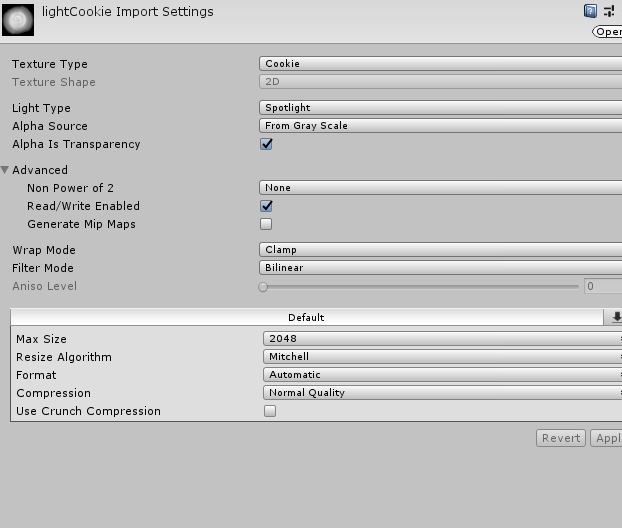
for bakery, you HAVE to use the default texture type
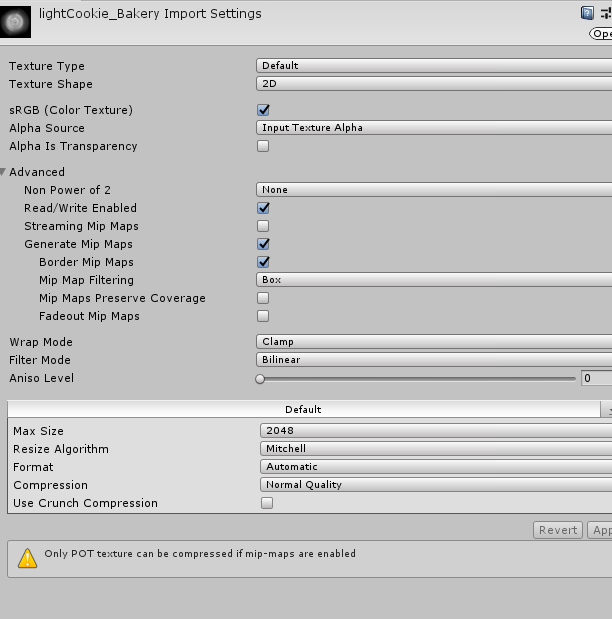
like that
it baked just fine
modest vapor
Glad that worked !
crimson verge
still taking forever i'm not sure
enviro lighting source to color because i need the pitch black room shadows
that's how it was setup previously
huh i guess switching it to 512 res fixes it
i'm not sure why 4k was taking so long in this world compared to the other one
guess i just needed to mess around a bit more
modest vapor
256mb of lightmap
crimson verge
512 res was 32mb
wary sonnet
I keep getting warnings in my meshes "Lightmap UVs are Missing, please generate lightmap UVs" with a button to generate below it. When i click the button, and focus on another prefab, and come back, the warning is back again.
Does anyone know if this is a serious problem and what the solution might be?
wary sonnet
and is this normal ?
Narrator: It wasn't
@spare aurora
can you share the solution to #world-lighting message ? I have the same problem
spare aurora
@wary sonnet I literally just named all of my probuilder objects the same unique name (with a number after it for ones that share a folder), so on load I could search the unique name, select all, then click the button and 15 seconds later I'm ready to go. 99% sure it's possible to script this, but, I'm a hardware guy not a programmer, haha
wary sonnet
Ah so the solution is still using the probuilder button?
spare aurora
Unfortunately, I haven't spent TOO much time troubleshooting it, but that's the only way to get it so far
I also recently got Bakery, and I found after doing a bake it'll reset the UV maps and you have to set them again. It's a pain, but a 15 second workaround is good enough for now
wary sonnet
When i go into prefabs and use the probuilder generate UV map thing, it still doesn't really work for me
 steel oasis
lights are baked in unity but non existent in the world, why?
modest vapor
How are they baked ? What do the lightmaps look like and check the console
steel oasis
yeah but when you say lightmaps
modest vapor
lighting window, at the top you have lightmaps
steel oasis
modest vapor
I assume you generated lightmap UVs for all the objects ?
modest vapor
Well, it's all your static objects
steel oasis
wdym
steel oasis
i am?
i guess that would make sense
that doesnt explain why the wall isnt getting baked lighting
steel oasis
ohk
swapped to standard, lets see
@modest vapor thank you, i have been trying to make worlds for like a year and not once has lighting worked
mint cipher
Any idea what can cause this?
modest vapor
Did you generate lightmap UVs ?
mint cipher
Yes
modest vapor
Check the console i guess
mint cipher
Z-fighting i think, seems to be a layer underneath.
 green vault
anyone know of any ways to speed baking times?
green vault
im locked using intregated graphics
modest vapor
ouch
green vault
im mainly trying to test abd see what the bakes look like and hoping they dont look too far off from the realtime stuff
modest vapor
well, it should look much better than realtime if it's baked
green vault
yea I know 🤥, but i made the rt stuff look the way i wanted it but then baking just seemed to make everything brighter or a brandnew color
modest vapor
were you using light temperature ?
green vault
yes
green vault
wait, does that mean the baking has been reseting the color temps?
and where does that file go?
modest vapor
assets, it's just a script
green vault
ok, i just remember that c# scripts would get exported into the project folder
ty 👌🏻
green vault
how do you fix the "preparing bake" bit for when it gets stuck and doesnt progress
steel hatch
so i made a wall in my world just made out a plane... but the baking wont bake it ... and idk how to select generate light map on a plane for it to bake with the room...?
modest vapor
which shader is used for it ?
steel hatch
just a normal shader like nothing special with it
just a color
same shader used on the walls already in the scene
modest vapor
If it's a unity primitive it already has lightmap UVs
is it static too ?
screenshots would help a lot
steel hatch

some one mentioned maybe the walls are facing away from the directional light thats why they baked that way. and i have one wall i made that actually baked facing the directional light. the otheres arent facing the sun and didnt bake... so idk how to fix that because when you turn the plane around that side is invisible
modest vapor
You tried baking a cube of the same shape rather than a plane ?
modest vapor
yeah, cubes and planes are different objects though
 abstract quarry
Does anyone know how to stop the lights from going through the walls I want one completely dark room but the lights from the other room is bleeding through the wall
green vault
@abstract quarry sometimes if you set the cast shadow mode to “two sided” it fixes the bleeding, but if that doesnt work, send a ss of it
abstract quarry
@green vault
Sorry I’m still new at this light thing where will I find the “ Cast Shadow Mode “
green vault
if you tell the mode to be baked instead of realtime
it should appear
oh wait, no. select the object
the wall you want light to not bleed
also for it to be 100% effective, the box should have its own planes/quads instead of sharing the same plane between rooms
at least, thats what ive found is the best way in my time using unity’s annoying lighting system
abstract quarry
@green vault Well I put the wall to bake but nothing happened
green vault
which room is supposed to be dark?
and is it the floor plane yhat is getting the bleed?
abstract quarry
The room with the yellow chair is supposed to be the dark room
I did forget to mention that wall has separate mirrors on both sides
green vault
i would suggest making another floor plane for that room, and make the static set to a single layer, and then whatever lights that need to shine and dont have opronating statics
with a new floor plane, the lights should see it as a new field as well
abstract quarry
Alright thank you so much I’ll keep trying
green vault
np
green vault
ok, now I have a problem. I accidentally used an area light and baked it and when I cleared the lightmaps and stuff. the area was still baked by the area light. I disabled every light source and deleted the area light entirely and the scene object are no longer turning black or lightless. the only error that im getting to lights is the "X amount of objects have overlapping UVs"
however, when i start rebaking the scene, everything starts black as normal. but when it finishes, everything is brighter than it should be
snipping tool is also being weird so im only really able to describe my settings if anyone wants to kno
modest vapor
Install sharex and get good screenshots
green vault
my computer officially became kaput about 3 hours ago so that might be why snipping wasnt working and stuff was bugging out more and more. I guess 🤔 ill come back with this whenever i get a new machine
thanks for responding tho
green vault
@jade aurora wdym? what does the finish product look like?
is all the lights you want set to bake and every object you want baked set to static?
 pine trench
I think their unity is crashing
green vault
oh, I know 🤥 whats happening then. your memory is being pushed out of its “intials” limit
ik my computer when this happens, it just bluescreens, but yours just crash so it might be a memory issue, but thats usually what happens when i bake and theres not enough predetermined memory
^might not be an issue with memory
 jade aurora
Cant be the memory, I got 32 gb ram and 11 gb vram, But I found the issue, I lowered the indirect samples to much when editing the settings, now when I increased the number, it worked fine again
Remaking the whole lightning in the world since I have been using mixed and most people say baked is better, So I did and its so much better in optimaztion It seems 😄
green vault
??? how did indirect samples correlate to that?
jade aurora
Well no idea, the issue was solved after increasing the number lol
I learned lightning in depth yesterday, I have only known how postprocessing works, But not lightning until now
green vault
i see, it is suggested to set youre lighting to “enlighten” for most optimization in game, but it usually takes a lot longer than gpu and cpu
green vault
it looks like the brick floor you have should not be that smooth
jade aurora
Its suppose to be wood floor
green vault
it looks good if that is what youre looking for, but you can mess woth the texture and how to reflects to produce rather realistic lighting
oh, the floor looked like bricks to me
you can also add some height/normal maps to your textures/materials to make them look better. in my opinion
jade aurora
I appricate the words! This is a world I made a few months ago, My biggest project so far, I am really satisfyed with everything, its just the lightning and the textures I have to mess with a little
green vault
i see, well just remember to make sure the lighting isnt set to realtime, as that can cause alot of lag in game
jade aurora
Had it in realtime/mixed until now, A friend of mine suggested to change to baked and I did, Went pretty quick, Ofcourse had some bugs along the way, random crashes, didnt get the lights to work, temperature color didnt work etc
But I guess realtime is only for great looking realistic worlds and games?
Like raytracing
green vault
theres a file/program that is supposed to make warm light be baked sonce unity isnt set to auto bake warm lighting for some reason, but i never got it to work
jade aurora
My friend suggested that addon, but it costs like 50€
green vault
no, realtime is just for worlds that lowend/midend users cant join
jade aurora
ah gotcha
green vault
yea dont pay for that stuff
jade aurora
ikr
green vault
its all a lie lol
jade aurora
yeah I wouldnt spend that much on an addon. IF its not something I could reallly really get used of
green vault
i would send you the file and see if yoy have luck, but my computer went kaput yesterday and cant access files
jade aurora
Bakery?
green vault
well what i did to fix warm lighting is just change the light color and not the temp
jade aurora
Its fine mate, ty anyway. my friend gave me a link so I can match the hex codes colors with the temperature numbers
green vault
ith i have the bakery package on my phone acc
green vault
thats a good idea
jade aurora
yeah want the link?
green vault
bakery also only works on nvidia
jade aurora
rip amd users lmao
green vault
no im good, i dont have a computer right now so i wouldnt have a use for it
jade aurora
ah what happend to it?
green vault
amd just sucks in general for some reason
my computer just desided that it wasnt going to work
jade aurora
Yup, idc about this master race tbh but I prefer nvidia and intel over everything.
green vault
like i was baking, my computer eventually crashed and couldnt boot
jade aurora
Oh shit. Check if any component is fryed
green vault
dude, master race or any of their software doesnt even work
jade aurora
or reset your mobo settings
green vault
i did
jade aurora
2x rip amd xD
green vault
rn im pulling out my drives and backup like 3 TB of stuff
jade aurora
Gotcha, There is pins on the motherboard that you can poke with a metal screwdriver or something that resets your mobo settings
see if it works (?)
I think its called Jumpers
green vault
im not putting metal on a motherboard, that can severely damage it cus static and junk
jade aurora
Alright
green vault
jumping a motherboard like that sounds super dangerous
im just going to get a new computer, this one sucked at everything
jade aurora
When the power is off with the cables not in it, I did it when I OC'd my pc to much, it reset and worked fine after
Alright mate
when I oc'd my monitor got like a bunch of green dots lmao
green vault
yea amd likes to also stay overclocked... when it shouldnt, so thats probably what made it eventually die
green vault
im never using amd again
jade aurora
I feel ya, My gf is using a amd. 480x I think?
green vault
the cpu and integrated nonsence is all a lie and the passive power control is stupid
mines like r11 graphics
jade aurora
ahh
green vault
yea thos look way better than my specs
and your system is far more cooler temperature wise
jade aurora
Yeah but it was shit expensive
green vault
ive never gotten anything below 41 C
green vault
holy cow
jade aurora
I have upgraded some parts in the years, recently upgraded to 32 gb ram
yeah
I like to multitask, I jump from unity, photoshop and game warzone from time to time
green vault
i had to steal ram from an old laptop to help my computer hang in when i needed more intial ram lol
jade aurora
Luckily ram prices have decreased alot now, in sweden atleast
green vault
yea i also like to have like 4 tabs in each corner like a weirdo
jade aurora
yeah
green vault
ith ddr3 ram has gotten cheaper here, but ddr4 is probably still at that stupidly highish range
jade aurora
really? damn
ddr4 has gotten cheap here
whewre you from man+
I also like to keep things organized lmao
green vault
america/us
jade aurora
ahh
green vault
im thinking of just using a 1080p moniter with not touch points, i was thinking to get a 4k touch moniter but holy moly are moniter here insane with prices
jade aurora
touch monitor?
green vault
like my old computer has a 1080p 60hz touch moniter so im used to touching the screen sometimes to move object or click options faster
jade aurora
I honestly recommend a 1440p monitor, Since 4k is eating the performance so damn much in gaming, but its great for creative stuff. But 1440p is a great touch without losing to much fps in games
green vault
but the cheapest touch moniter is like $399 and its 720p
green vault
yep lol
well i also need a huge moniter, i already got like “old man glasses” so i my first priority is a big moniter that doesnt make stuff look small like a 1440 or 4k would
green vault
i already had my stuff set to 150% lol, but it kept making the window bits at the top of windows obnoxiously huge and i didnt want that
jade aurora
Damn I see
green vault
and my mouse cursor is at like 3x of a normal cursor
my main thing is is that i need to focus more on the pc and less on the accessories so the stuff i need to work works
jade aurora
Yeah I dont really give much attention to rgb. its nice but I rather spend 100€ less on a product without the rgb
If thats what you mean
btw I like my jacuzzi
brb
jade aurora
Ah gotcha, Ty!
got the effect from a huge vfx package with 20gb, But I usually create my own FX from the bottom, its more fun
green vault
i havent learned how to do fx like that in unity yet. ive mainly stuck to doing those kinds of fx in autodesk which is the software I know best
but maybe ill try to learn, my next project im trying to do for a world is going to be like a “hub” but instead of portals, there will be doors that teleport players into different rooms ive built in autodesk already so that there is less lag because the player wont have to load in all of the rooms next toeachother. only problem is I don’t know if vrchat has a render distence to make this truly work and I don’t know the teleport player scripts
one of the rooms are going to a be a pool, so maybe i might recreate the effects you are using
pine trench
You can set the render distance on the camera btw
green vault
I know 🤥 but does that actually correlate into the game?
i thought as its imported it defaults to something else
pine trench
Yup :)
pine trench
It works, Ive worked on some huge worlds and adjusting that on the main camera definitely works ingame
Are you gonna use sdk 2 or 3? Really easy to do in sdk2. Dont have any experience with 3 yet though
green vault
ive already private published the world in sdk3...
ill probably ask this in udon questions when i get a new computer
jade aurora
@green vault check dm 🙂
jade aurora
https://vrchat.com/home/launch?worldId=wrld_eb5e07de-e8b1-4f26-9e1e-afaf39239ec0 Here is a link to my world, I would love if you guys wanna check it out 🙂

Come and chill in this modern worldǃ Here you have a mirror‚ a video player‚ a fully functional pool table and beer pongǃ Also night mode for those cosy naps~
 frozen crypt
does anyone know how to have unity load a project that crashed after baking ?
its just like infinite loading
frozen crypt


 jade aurora
@frozen crypt Still wont work?
Make sure all your lightning is baked and check if there is settings in the lightning tab that you can adjust
You can try bake through Enlighten or CPU Progressive in the lightning tab, Enlighten will take longer but its best performnance vice
frozen crypt
It doesn't load my project anymore
It stays blank like the image above and then eventually just says unity has stopped working
@jade aurora
jade aurora
You made a backup to a previous point of the projectr?
Welcome to Unity btw, Full of errors sadly, I had a bunch of crashes and errors over the years with Unity, I gave up a few times, But it should be a workaround for this
frozen crypt
Yes i saved before the bake i remember @jade aurora
Can you help me please, ive been stressed and upset since last night about this :(
jade aurora
Yes i saved before the bake i remember @jade aurora
@frozen crypt Then load that save :)
Im kinda busy right now sorry :/ I might be able to help soon!
frozen crypt
How do i load the save?
jade aurora
Idk tbh,google is your best friend in this situation
You had to bake the lights either way, Since the lights wouldnt load in game if you dont generate the lightnings
 twilit lily
how do i get lighting like this:
without this many drawcalls
i figured out there is mixed lighting, but so far it seems that only the realtime part is working
modest vapor
That would be baked
I doubt the batches are due to the light
Are you occluding stuff ?
twilit lily
i am
at least i was
had to optimize my world (was at over 900DC before)
if i turn out every lightsource, i get 57DC
twilit lily
in the lightmapper?
modest vapor
yep
twilit lily
progressive GPU right now
twilit lily
and the resolution stuff and padding? should i keep it default?
modest vapor
No you'd need to adjust most of it
also making sure your meshes are static
using a shader that supports lightmapping
and that they have generated lightmap uvs
twilit lily
any tips on what values i should use? all my meshes are set to static, have UV generating enabled and use the Autodesk Interactive shader
modest vapor
Since it's a closed environment, 40 texels would be good
use 10 for testing though
then disable realtime GI, adjust the environment lighting color, remove sun/skybox if they don't shine inside the world
compress lightmap
AO
Final gather
all on ^
twilit lily
so like this?
modest vapor
lightmap size can do 2K for now
twilit lily
well, nothing really changed. still 315DC and 58 when all lightsources are disabled
this is what my lights look like
maybe it has to do something with baked indirect?
modest vapor
mixed is still realtime
twilit lily
then i guess im pretty much at the bottom in terms of drawcalls and optimization
modest vapor
If you need it realtime for some reason then yes most likely
twilit lily
its mostly because of the reflections. when i use baked, its just a diffuse texture
using baked lights gets rid of all the reflections