#world-lighting
4 messages · Page 10 of 1
 modest vapor
 tacit crow
ah lol
 graceful jetty
I've been messing with baked lighting for a while now, but I can't seem to avoid blotchy walls here and there
I tried progressive GPU, but it just completely missed certain areas that look fine with enlighten
 cyan temple
I have a similar issue sometimes but I've been ignoring that issue. I imagine if it has something to do with the light casting the shadows being at such an oblique angle to the wall and the resolution of the lightmap is too low causing a blotchy, stretched look to the shadows cast. 
modest vapor
@cyan temple what does it look like ?
cyan temple
I haven't seen an aggregious example of it in a while, but this is the closest I found atm.
modest vapor
that's resolution
cyan temple
unrelated, but I'd like to know what knob to adjust so that my shadows aren't so dark. If I try cranking up the indirect or skybox power, things are lighter but they just get really gray and washed out instead. Should I just bake them dark and exposure adjust in post?
modest vapor
@cyan temple Depends on your envirnment lighting
@graceful jetty Do these have lightmap UVs ?
 celest kestrel
Is there a way to have lighting controls in a room
While having the worlds lighting baked at the same time
I'm trying to build a theatre room with controllable lighting, making sure not to let it bake with the rest of the world
But when i do bake lighting, specifically the point lights in said room no longer emit light(?)
 mint cipher
question for anyone with bakery 1.71, when they open their project does their bakery start to reimport itself into the project because im having an issue where it does that
modest vapor
it shouldn't no
 kind blaze
So when I import the latest version of Bakery, Unity tells me there are scripts using obsolete APIs. Not exactly sure what to do in this instance.
modest vapor
Click yes or accept
kind blaze
Huh. That won't cause issue?
modest vapor
Well it might, that's why they warn you
mint cipher
bakery is importing an asset, and its the same asset everytime in this folder although its already there
 sharp robin
You don't need that in order for bakery to function so you could just delete it
 earnest pebble
I am very new to this.
I am looking to bake lighting and make it to where a projecting screen can emit light
something about using RGI
modest vapor
yeah you can do both, just need to enable it
earnest pebble
If I wanted a bloom effect when looking at these emissive surfaces, is that part of RGI?
modest vapor
that's post processing
earnest pebble
any guides I can follow on that?
modest vapor
yeah silent's guide
earnest pebble
will give it a look, thanks!
 edgy peak
ya best to use post processing stack v2
as if you want to upgrade to udon or are using udon v1 is depreciated from last I checked
earnest pebble
I'll give it a try for sure
really want the accent lights of this club world to have that awe effect
edgy peak
Ya I use post processing to improve the graphics of my open world world
what i have learned is color grading and bloom have little impact on performance
but ambient occlusion will drop frames so make sure that is set to a button
earnest pebble
I have 2 very different worlds I feel could benefit immensely from post processing
edgy peak
oh ya hun it is great
and color grading is what I can say is the most important

this is an example of color grading to improve the color range of my world
earnest pebble
would I be able to drag you into pms to learn a bit sometime? It'll probably be after I get basic baking down
edgy peak
ohhh ya hun I know a ton about lighting and you can visit my world to see what is possible within vrchat
send me a pm so we can continue
earnest pebble
sweet ^^
 celest sedge
is there any way I can get baked shadows to look as sharp as realtime shadows on a terrain?
gottem
damn this looks even better than realtime
21.3mb lightmap size just for this tree though rip
modest vapor
@celest sedge What are your settings ?
modest vapor
60 texels for outside is a lot
celest sedge
need to check how big it'd be in an actual world, this was just a tiny terrain and a tree
does anyone know how could I make the moon mesh be ignored when baking?
I have a directional light
I tried setting the moon to a layer directional light does not affect
and while it works for a realtime light
when baking lights all therrain looks black as if moon was blocking light
modest vapor
Don't make it static
celest sedge
yeah tried that but still, I guess I'll just disable it before baking
 merry lantern
hey, im getting this strange lighting bug with unity where if i put in more than one realtime spot light all the lighting in the world freaks out, id like to know if this is just a unity bug or if it appears in vrchat as well, and id also hopefully like to know how to fix it, so if anyone knows, please tell me.
nevermind, i found what it was, just had to adjust some of my unity settings, it would have been a unity only bug
 pine trench
Tried baking the lights in Asylum again last night with bakery, yeah it ain't happening. It gets further than it used to but at some point during the bake process a tiny window comes up pausing the bake and hitting ok lets it continue for a second, then another of the same little warning window comes up. This happens about 10-15 times, then unity closes without an error or crash report. Can't remember what the window says off the top of my head, something about memory.
If I lower the settings it might work, but the indoor areas will look kinda dookie
celest sedge
Does anyone know why the base of the tree is not casting any shadow?
modest vapor
Shadow bias ?
celest sedge
baked lights
earnest pebble
looking to do post processing with poiyomi, and a glow using VRC_CUSTOM REDERER BEHAVIOUR but I am very lost.
earnest pebble
just to confirm, the Create Geometry step takes the longest, right?
earnest pebble
it appears it does! Great success! https://i.gyazo.com/e98e4667d45d60d416e84ec12b769781.mp4
 rapid isle
any reason for the GPU light mapper shadows to not come out as shadows but are blocky shadows?
rapid isle
graceful jetty
Are there any adjustments I could make to progressive GPU to make it more like enlighten?
I've seen a bunch of stuff saying it's better than enlighten but so far it's been a lot worse.
It's just missing entire sections of the map even though they have lightmap UVs
and the whole thing looks all speckled and weird
 supple loom
GPU Progressive is currently in preview and fails in a lot of scenes, CPU Progressive should be fine though
graceful jetty
Hah, I was going on the assumption that GPU was used to preview the CPU results
celest sedge
does anyone know what whater shader is used in neko sister cabin? I wanted to get the world to reflect on it like it does here
modest vapor
@celest sedge Silent's water shader
celest sedge
was just trying it now, works like a charm ty
 queen spade
so.. i'm unsure if any others have this problem.. but.. when i baked spotlights, they just.. don't exist?
rapid isle
you put them on static and baked right?
also make sure you have light probes in your world
and Generate lightmap UV is ticked on the FBX
graceful jetty
I'm having an issue with reflection probes and metallic objects
objects outside of the probe look normal, but objects inside the probe turn black
pine trench
Have a screenshot?
graceful jetty
not at the moment, I'm rebaking the lighting
It only applies to metallic materials though, I have a chrome material that I use for metal bars and such
 cinder vault
uh so I was making my world on unity, I clicked some stuff with shaders and now everything is white :/ how can I fix it
modest vapor
ctrl + Z ?
 somber tartan
is it possible to toggle the fog from the lighting window?
 frozen hornet
you mean in runtime?
frozen hornet
do you just want to enable the fog or do you want to change it mid-game with trigger system or something?
somber tartan
yes in mid game using a vrc trigger
frozen hornet
don't think it's possible to toggle fog or change it using triggers mid-game
you want to make a shader or a particles that will be basically a fog that you can adjust in the way you want
but as it is, don't think it is possible to change Unity's lighting settings fog that way
 static iron
does VRC support layers? i want one area of my map to not be affected by my directional light
modest vapor
yes
static iron
shweet, then my work wasn't for naught :P
 flat temple
Any way to change the exposure or brightness of my skybox with a vrc trigger that the user clicks?
Ping me when replying
modest vapor
How many texels are you baking with ?
modest vapor
Yeah, can you show the rest of your settings in bakery and on your mesh/lights ?
modest vapor
Switch min resolution to at least 1024, GI samples to 64, and tile siwe to 4096
Is it an outdoor or indoor scene ?
kind blaze
No directional light, just ambient, and a overhead baked light.
It's open, so outdoor I guess.
But like I said, no "Sun".
Think that will best describe it.
kind blaze
Alright, will give it a go.
This is just one of those issues that eluded me for a while, cause even last year when i wasn't using bakery, I couldn't completely get rid of issues like these.
Though, bakery seems to do a lot better than the standard baked lighting.
modest vapor
Yep definitely does
kind blaze
Today I learn that bakery can replace materials inside the Package folder which I cannot edit.
 remote kelp
@restive urchin 8 is least in cubic with non obstacle room.
Light probe is lighting data from probe to probe.
Which mean you may have more light probe on where light change.
 restive urchin
Alright
I'm looking at my initial directional light right now
Do I need to add components to get the light probes or is that a seperate Object?
remote kelp
Just Create>Lighting>Light probe group
or add light probe group component.
Separate group work like combined group.
This tutorial maybe old, but it's good https://vrcat.club/threads/xiexes-lighting-tutorial-how-to-get-good-at-baked-lighting-101.2081/

VRCat: Community-Run VRChat Forums
Greetings! Over my course of playing VRChat I've noticed that most worlds, mainly the ones that have baked lighting, are done poorly, or in an...
restive urchin
Definitely will read this thank you!!
 woven plank
so i just ported a map from blade and sorcery. it has 1 dynamic light, the rest are baked. i lightbuilt it at 10px/u , tested it, it ran absolutely beautifully. then i baked it at 20px/u and tested (also added bloom, set to fast mode) and now the dynamic light is cutting off from certain view angles and runs at a lower fps. any ideas why this would happen?
hmm/ mb it was because i built occlusion....
YES IT WAS
supple loom
Did you remember to set the reference camera?
In your scene descriptor there's a slot for a reference camera you need to set the camera you are using for your post processing there
graceful jetty
FFS
I just spent 4 hours waiting for a lightmap to bake
I forgot to set a room as static
modest vapor
If Bakery is an option for you, get it !
 fossil jungle
Hi, I've been struggling with this lightmap error and can't seem to find a way to fix it. It goes away if i hide the trees while baking. EDIT: it was something wrong with the tree meshes that i used. Works fine now
graceful jetty
@modest vapor I could buy Bakery, but how would I use it? I don't want to buy it without knowing what to do with it.
modest vapor
The documentation is very in depth
graceful jetty
New question
Why haven't the unity guys just bought Bakery out?
They're in the middle of doing all this progressive stuff but it's not even close to bakery
That being said, I'm getting some weird bright spots on my area lights
modest vapor
Probably because the Bakery dev prefers his current situation
supple loom
Also that Unity needs to support multiple platforms while Bakery is windows and nvidia only
graceful jetty
How about the bright spots then? I'm rebaking it now but it currently looks like this image
graceful jetty
Forgot to post this yesterday, this is what it looks like in my world
It's just one area light the same size as the ceiling
modest vapor
Which settings do you use for light and bakery ?@graceful jetty
 charred sphinx
hi there, just wanted to ask how to get rid of the shadow seams in between two walls like shown:
modest vapor
You're using probuilder ?
modest vapor
Are you sure they're lined up ?
 hollow lodge
hi all di i set light probes to static?
edgy peak
If you are lightmapping turn off ambient occlusion
it could also be a leaked lightmap from another lightmap near it
also it could be a lightmapped cast shadow if they are not lined up properly
charred sphinx
yeah, I used vertex snap so it should be lined up
rapid isle
So how am i suppose to cut holes in pro-builder of the experimental bool thing is gone?
 hexed portal
you can have edge loops and delete the faces you don't want
 rose wind
Does anyone know why my unity creashes genenrating backing lights q-q?
its not the pc that Im sure of
probably the settings not sure
modest vapor
@rose wind What are backing lights ?
 undone nacelle
any idea why lighting is like this?
they are the same, but on one side you see more and on the other you don't
rapid isle
how many pointlights u got in your world?
undone nacelle
6
supple loom
That's honestly way too many realtime lights, you should look into baked lighting
 viral turret
Forgot how many lights you can have before unity shuts some off , in project settings, quality , rendering pixel light count
supple loom
You should bake them
undone nacelle
?😅
supple loom
Check the pins for xiexes tutorial on baked lighting
undone nacelle
Oh! Ok
 proven fractal
baking is our god, should make a tribute world with a temple or something.
 limber rampart
is there a way to turn off the realtime shadows in mixed lights using a button (in game)?
 mortal smelt
https://gyazo.com/8b8f83b998b775df95250bf08a64aa9d Baking the lighting in my world should fix this issue right?
 modest vapor
Depends what "this issue" is
mortal smelt
The lighting in the picture, like how you can see harsh lines in the geometry of the terrain
modest vapor
I don't think baking would solve that no, whatever is causing the issue with realtime is what you should fix first
 strong swan
Which layers do I need to enable on the mirror to make a standard low quality that only reflects players and the skybox?
supple loom
Player and MirrorReflection
mint cipher
tbh @mortal smelt looks like your lightmaps are too small so its causing those harsh lines. Could also be your lightmap pre-set settings, try messing around with those.
limber rampart
is there a way to disable casting shadows on an object using a button? (this)
 frozen relic
Can someone stop me from crying https://i.imgur.com/pUNouiL.png
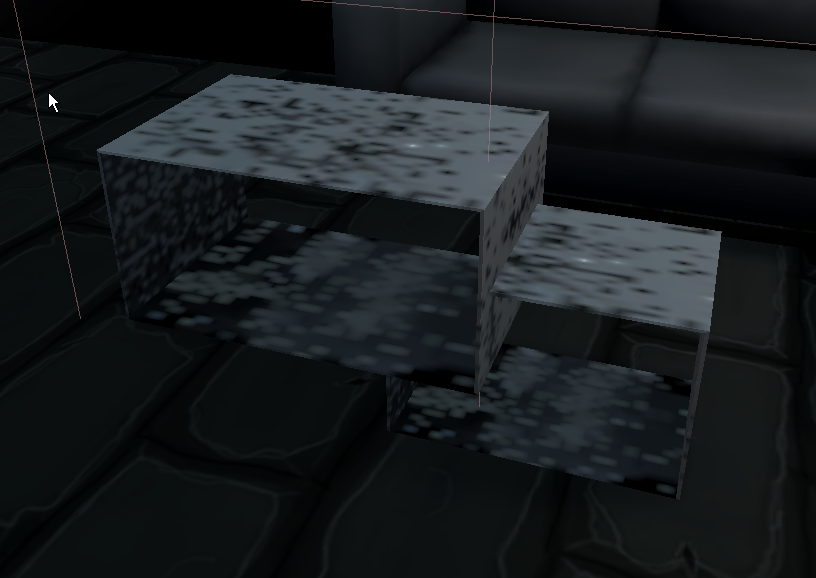
Im just trying to make my own furniture
😢
can anyone tell me what's wrong
PepeHands
supple loom
Enable lightmap uv generation on the models
mint cipher
When I bake my world in Unity it looks fine, but in VRC it gives me super ugly black shadows. How can I fix this?
This is what it looks like in VRC
But it looks more like this after baking the lighting in Unity
I haven't done anything fancy, just kept the default Directional Light and changed the skybox.
 gentle hawk
Maybe the alpha are set to none on the lightmap texture
Or the compression format idk
Turn off the light after the bake too. That could be that
mint cipher
How would I check the alpha?
Also, turning off the light doesn't really do anything, just makes it dark
rapid isle
try and increase your shadow res on the light
 terse hazel
heya so i've been really struggling with the lighting in my world for a long while now... have had to sort of give up on solving the numerous errors myself so im in serious need of some help from someone who knows more than me about this stuff
screenshots of one of the more blatant errors coming up
so there are two blue lights... one lights up the barrel in the wall but not the pillar behind it.
another lights up the pillar but not the barrel
and neither of them light up the wall behind them
if moved the second light will suddenly start lighting the barrel
modest vapor
How many realtime lights do you have in your scene
terse hazel
probably too many i would asume since baked lighting seems to not function at all
i can check the exact number if you'd like
fair warning there are a lot of errors
i don't wanna waste anyones time so letting you know beforehand
modest vapor
If you have more than 8 it'll create visual artifacts
terse hazel
i seem to have 7 realtime lights
modest vapor
meshes affected by more than a few realtime lights at the same time they'll constantly try to be affected by different ones at different times
Do you have a reason not to bake all that ?
terse hazel
well as mentioned the baking sadly seems not to work at all
any light i set to baked will not show up at all post baking
additionally i was hoping to add a night mode to my worlds lighting at a later time but im thinking i may have to drop that idea for performance reasons
modest vapor
there's a bit more to the process than just setting a light to baked
terse hazel
ah well there may be something i've missed there then
i looked into a decent few tutorials to make sure i got all the needed steps down but i was honestly under the impression any light that was set to baked would be baked into the lightmap without further issue
modest vapor
i wish 😄
there's generally a handful of steps to make sure to does anything at all, and then a dozens potential things to fix to make it looks correct
always worth it though
terse hazel
yeah i really don't mind having to do extra steps if it makes the light work as intended x)
i have plenty of free time
im just honestly stumped as to what im doing wrong
i make all my meshes and textures from scratch so i was honestly thinking it was some kind of lightmap UV issue
at least errors like these made me think so
aha! :3
so i toggled off some of the other lights in the room and now the blue lights work
thanks... you've already helped me understand this better than i did before :3
i now have a decent idea of how to fix at least one of the issues
modest vapor
you'll need to generate lightmap UVs on everything first
terse hazel
yeah i have "generate lightmap UVs" checked in import settings on my main mesh
is there anything else than that that needs to be done?
if so that would probably be the issue xS
modest vapor
You'd need to make sure the shader you use supports lightmapping
and that every object you want to bake is static
terse hazel
yeh every object is static.
im using unity standard shader
i would assume it supports lightmapping?
if not that would seem a tad strange to me
modest vapor
it does
terse hazel
Right'o :3
well i definitely need to look more into the process of properly baking lights so i can minimize my amount of realtime lights
you wouldn't have a recommendation for a tutorial that includes the needed steps?
i mean... i assume you know them but i dont wanna put you through having to explain it all since i assume it would take quite a while
modest vapor
you turned environment off
click the icon next to the speaker above the gizmo
left where it's written Gizmos
search bar at the top
 subtle galleon
anyone ever encountered this? Bakery just recently starting throwing these errors and its completely stopping me from bakery world lighting now, get the error across multiple projects and i cant even work on projects anymore
modest vapor
Did you look at the file like it says ?
subtle galleon
i cant even find the file but ive looked around for it
ill try to look in explorer files again real quick
looks like possible just a couple specific pieces
modest vapor
Did you check the unity console ?
subtle galleon
hmm lemme look around there, look like something with rigidbodies and stuff but i dont have any i dont think
So after solving those console issues it was with a handful of pickupable objects, theres nothing in the console anymore but it still fails the bake
i even thought it was my gpu going bad so i swapped cards this morning D:
supple loom
What was your old GPU and what did you swap it to?
subtle galleon
was using rtx 2070 swapped back to my old rx580
supple loom
Bakery doesn't support AMD
subtle galleon
oh foreal
supple loom
So that's one problem atleast
subtle galleon
well thats good to know
wow
glad you said that because i was contemplating getting a new beefier radeon card
supple loom
It uses Nvidia libraries for baking the lights
But was the bake also failing with the RTX card?
subtle galleon
could be why its failing on start now
but yeah it failed with the same error with the rtx
but it failed mid bake on a certain object it looked like
supple loom
I would suggest running DDU or similar utility to nuke your display drivers completely and reinstall
subtle galleon
interesting
may need to
i ran a benchmark this morning on the card and it said that it was performing 80% worse than other rtx benchamrks
supple loom
👀 that doesn't sound good
subtle galleon
tell me about it xD ive been worrying the card was dying hence the gpu swap
but if bakery doesnt support amd then that changes alot
supple loom
I usually just start with running DDU when I'm having GPU problems
supple loom
Display Driver Uninstaller you can find it on google by searching either
It get's rid of all traces of GPU drivers for a proper fresh reinstall
subtle galleon
gotcha, ill defo try it out later. first things first i guess i have to swap the rtx back in xD
thanks for the info hopefully it helps
otherwise i gotta go back to default unity lighting xD
dont make me go back
subtle galleon
thanks friend
subtle galleon
Just wanna update for those that might need the answer in the future--
While i didnt use that software to do it i did check my drivers and despite my own stupidity it looks like i hadnt updated drivers since november last year.
Baked perfect first try after brand new driver install from the website. So if bakery starts doing it out of nowhere recommend installing new drivers first ! 
frozen relic
So i have images that are turned off until you click a button the exact same place where other images are, do i bake them while they are on to bake them or how do i go around doing that?
modest vapor
You probably don't want to bake them
frozen relic
But then they look so dark :/
Ignore the image haha https://i.imgur.com/SF2hkqC.png but you can see i have an area light to shine light on the pictures
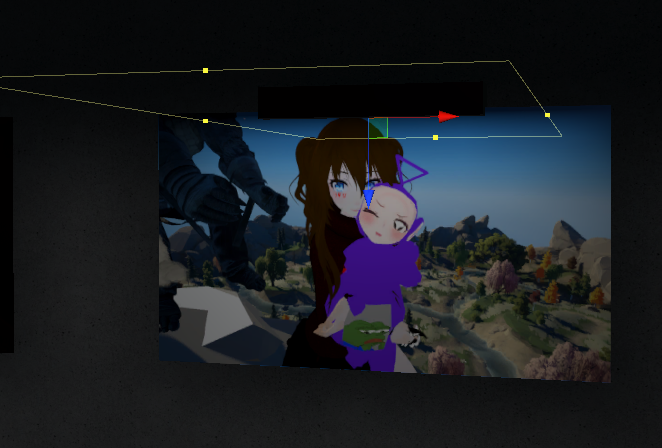
i guess i'll just have to use a shader or something to make them bright and not have natural lights i cry PepeHands
modest vapor
Well it's kinda pointless to bake the room if you use another light to brighten the pictures, doing it through a shader is much easier and much more performant
 still bobcat
The cage isnt baking onto the pole and I am not sure why?
 cyan vale
You mean the shadows?
I can't really tell, because I'm mobile, but if you are just using a cylinder for the outside/inside of the cage, make sure that your shadows are set to two sides. (And make sure your light maps are generated correctly, of course.)
still bobcat
yeah, i meant the shadows. I think I already tried that, but I will give it another go
cyan vale
You can always try regenerating the light maps. I'd make sure you have all the parameters (materials/receiving and casting shadows) set correctly, including your light--make sure it is casting shadows.
 valid solstice
Baking the lights is stuck at ''Preparing bake''. It may to start baking for a couple secs and then it turns to Preparing bake again. All i did since the last scceful bake was changed the uv mapping of my house i little. I have tried reimporting. No change
 mint prawn
Have you tried restarting unity? I've only had this happen once and I just needed a unity restart
mint prawn
hmmm, I wouldn't think that would be an issue but it might. you may need to check out the UV adjustment you made and change up the overlapping uvs.
valid solstice
Its not have been a problem before atleast, i have tried upping the pack marigin. To the numbers down a little but not to a 0
Tried restarting the whole pc. no luck
it starts baking when my cursor is not above the window, weird. But very slowly
valid solstice
But it doesnt update the view like normally. Using progressive lightmapper
mint prawn
gpu or cpu?
mint prawn
I use GPU aswell without issue but Unity was just saying nope to ya
valid solstice
Its back to prepairing bake..
mint prawn
Thats very confusing, have you checked the unity forums? There has to be at least one person who has had the same thing happen to them
valid solstice
With mixed lighting turned of it bakes the scene with no problem. But ofc it doesn't look like it supposed to
valid solstice
Umm, i fixed it. But i dont know why is worked. I moved a couple udon scripts to another folder while i was baking. Like what? 😄
modest vapor
@valid solstice pack margin should not be very close to 0
at least 4 by default actually
valid solstice
it is 4-30 for everything
modest vapor
it doesn't need to be 30
either use 4 or fix your mesh or make your own lightmap uvs in blender
pine trench
Would questions about reflection probes belong in this channel? Basically I have a reflection probe in a subway station and when I set it to realtime it works perfectly, however if I select Baked, then bake it, it only seems to see the skybox, not the surrounding environment like the interior of the subway station. I would rather use baked than realtime, but I dont want the every reflection to be the sky. It just looks weird. Any ideas on how to fix it?
modest vapor
That's because your meshes are not set to static
pine trench
Oh oof. Thanks lol.
mint cipher
i tried to make post processing for a world and i added it to the main camera and added the main camera to be the target thing in the descriptor, but in game it dosent show up.
anyone know why?
viral turret
" If you’re still using Post Processing v1, you’ll need to swap to v2. It is not supported at all in Unity 2018 " eeh it does not like v1
supple loom
Even if you get it uploaded it won't be visible in game need to swap to V2
And V2 is most definitely supported by Unity 2018
"Playmaker actions for"
viral turret
Go to Window > Package Manager , its there now
supple loom
You gotta remove the old post processing folder that's causing the error
Yes
You already have it in your project you just gotta remove the V1 that's still causing errors and setup the V2
Either follow this guide:
https://gitlab.com/s-ilent/SCSS/-/wikis/Other/Post-Processing
Or try my editor tools that has an auto setup button:
https://github.com/SudoOne/VRWorldToolkit/releases
Can you explain more? (Fixed in dms)
 exotic abyss
why does my realtime gi in the lighting tab keep getting turned off on upload or baking with bakery?
supple loom
By default realtime gi won't get baked with bakery since that needs to be baked with the build-in enlighten lightmapper
There is an option in bakery to also bake realtime gi but it can take long because that part is gonna be handled by enlighten
exotic abyss
so if i wanna use a video player with a vrc custom renderbehavior. that gives off light from the video id have to do that then?
supple loom
Yes
But I heard some people say there are currently problems in getting realtime gi to update ingame with sdk2
exotic abyss
ah i dont have that must need to update my bakery
 trail timber
I could use some help figuring out why my shadows are so dark/opaque. This is my first time baking lighting in 2018 Unity, I've messed with the Ambient Color for Environmental Lighting, but making it gray doesn't work. I even tried turning it all the way up to white and it still looks the same. Does anyone know what could be causing this?
modest vapor
@trail timber Try using gradient instead
 native grotto
ill ask it here bc last time did didn't get reaction, does vrchat support reflection probes? i used it and its not working in the test launch, wondering if its only in there that it doesn't work?
modest vapor
Yes it does, can you post pictures of your probe and how it's setup in your world
Assuming you baked it
modest vapor
oh it's realtime
also you don't have box projection
and the bounds seem incorrect
you shouldn't be using realtime for this, try to use box projection instead and bake it
native grotto
aah okey i didn't know, ill try that thx!
mhh now i get like a weird reflection only from the skybox
oh nvm think i just need to put everything static
edgy peak
you can change the global reflections and skybox reflections per object or in lighting settings
 void laurel
Is there a way to get the black squares out of here? I deleted my building mesh and had to rebake the lighting which didnt turn out how I had it
modest vapor
Does the piece have lightmap UVs ?
void laurel
have what now?
Think i found what you were talking about, or I just yeeted all Lightmap data and rebaked
 sterile flint
it is okey to use real time light on your world or is it really bad?
im not good at lightning and when i have tried baked and mixed it just looks really dark in my world but when i use realtime everything looks like i want it to and its darker where i want it to and also brighter
mint prawn
If you check pinned Im sure there is a Xiexe tutorial teaching how to bake your maps, but realtime can be used but keep in mind reasons for realtime, such as small amounts is fine but big amounts (I.E Warehouse) is not where u want it
sterile flint
like atm i use them for a small world with street lights and it exists 18 lamps to be exact
sterile flint
how would i get it to be better shadows and that it is not too dark? does the tutorial cover it?
modest vapor
That would need to be changed in your lights settings
the tutorial covers most of it
just make sure to make your meshes static and to generate lightmap UVs on the meshes you imported
also if that's unity terrain grass, it can't be baked
sterile flint
yes it is terrain grass but it should be alright still or?
 gilded field
Any idea why whenever i reopen my world in unity the shaded view doesn't show the baked lights (they do show in game view, and i see them in baked lightmap view). This only happens if i baked with Bakery.
 slate olive
Hmmm, not entirely sure
Personally, I don't use bakery myself. I just learned to use the stock Lighting since adding any new assets may include scripts that break your world
Do you have any culling going on?
gilded field
no
slate olive
Hmmm, that's strange
gilded field
well i have a realtime directional
thats culling
for just the water layer
if i rebake then it shows in scene view (shaded)
but it just starts out black everytime
i've actually did a test where i reuploaded after reopening and ya the lights were in vrc properally
slate olive
Try adding a thin Light Probe layer to the water and in Static, turn off 'Lightmap Static'
Not entirely sure if this will give the the result you're looking for but I did the same myself for some crystals I had in a scene that I didn't want being affected by the lightmap since they had some cycling color animations
slate olive
You have it enclosed in a single light probe group?
slate olive
Try adding one probe group and having the edge enclose it and rebake
I'm sort of new to reworking lighting and have had decent results with this method
You only really need probes where the player/objects will be moving throughout the world too
To my knowledge, that is. I could be wrong but from my experience, they've been working the way I'm describing lol
gilded field
i have a feeling it's the lighting data asset
it shows as incompitable after reopening
slate olive
Ohhh yeah
Try to avoid adding assets at all costs, honestly
Unless they're just like, objects but even then, some of them may have a script hiding inside of them that completely conflict with the SDKs
gilded field
lighting data is generated by the bake
slate olive
Not only that, your meshes generate them as well on import
Not always turned on also
I was having weird issues with lightmaps per mesh at one point and come to find out, my old fbx files from blender just needed to be updated and then my lightmaps started behaving properly
gilded field
the thing is i know the lightmaps are working... it just feels like a unity shaded view bug
slate olive
Do you have a screenshot to share?
slate olive
Coolio!
sterile flint
@slate olive hey again, im wondering if you are experienced in doing lighting?
slate olive
Just a little, I'm no expert lol
Every world is different so lighting settings change
sterile flint
yea that is true, ive tried to fix the lighting with probes and light probes etc but i cant get it to work like i want it too like either its way to dark or extremely bright, do you have a clue on what to do to make it more balanced?
gilded field
btw i love rtx mode
slate olive
One thing I started doing recently was dropping the reference avatar into my worlds to get not only a height reference, but a lighting reference as well
sterile flint
this is the kind of lightning im trying to get tho i cant get it like this unless i use real time cuz with baked the lightning gets so damn weird
slate olive
The most recent world I worked on, being a cavern for a dance event, only has about 5 light probe groups within them and the cavern is pretty large
@sterile flint yeah, for that world, depending on the square footage, you would probably only need 3 probe groups
They can be a little daunting at first with all the lines everywhere but if you keep track of the outer corners, they start to make a bit more sense
sterile flint
you mean this cluster of things?
sterile flint
yea i have no idea what im doing
slate olive
No no, that is OKAY!
That is probably why it's so bright
You can reduce that by so much
I'm going to open up my test world again to show you! Haha
sterile flint
would you have time to like guide/help me with this, its okey if you cant or dont want to, im just wondering
slate olive
Yeah yeah! No, I have fun sharing this knowledge!
I'm also learning at the same time so if anybody else knows more efficient ways, I always encourage them to tell me that I have no idea what I'm talking about 😂😂😂
sterile flint
alright so ill start by removing all the probe that i have right now so it is from the start
and oh lol XD
slate olive
Yes!
gilded field
unity made me a liar
i reopened and i see things still
last 3 times i opened my project that would be all black
this time of course.. it doesn't reproduce
slate olive
Oh gosh haha
I hate when stuff like that happens!!!
@sterile flint
Here I have the light probe group only on one side of the world, so in theory, I will only be affected by lighting baked in the world if I step within that area
Going to bake and test and post a couple screenshots of that in action
Also, I'm dumb. I baked and it only took a second
gilded field
btw BakeryPreview is worth
slate olive
Oops, too many caps
sterile flint
oofy
slate olive
Forgot static***
sterile flint
should i set all my point lights to baked?
sterile flint
ye they are only street lights so now they are baked and also the static box is checked
supple loom
@slate olive light probes don't work quite like that even if you step away from those probes it's still gonna triangulate the closest point it can find it's not really an area
gilded field
unrelated but 1 .. long time no see not since the Daniel days
gilded field
is there some good stuff for auto light probing
or should be i be doing it all manually
slate olive
Yeah, just realized lol
This test world I have isn't enclosed either so I'm picking up light from my 'skybox' which is set to nothing
supple loom
This is the usual best free light probe placer: (You need to move one script to an different folder if you want to use it with unity 2018)
https://assetstore.unity.com/packages/tools/simple-light-probe-placer-58290
What I usually use:
https://assetstore.unity.com/packages/tools/utilities/autoprobe-105295

Get the Simple Light Probe Placer package from Alexander Vorobyov and speed up your game development process. Find this & other Tools options on the Unity Asset Store.

Use the AutoProbe from Reachable Games on your next project. Find this utility tool & more on the Unity Asset Store.
slate olive
Yes! I've used that one before and just had to move the script like you said
sterile flint
i got the simple one today and not sure what you guys mean with needing to move the script
supple loom
It should usually stop you from uploading your world properly because of compile errors with the new changes in unity 2018
gilded field
i think i had the problem
cause i did download it
and ditched it cause of an error
supple loom
Oh actually it might be that the asset store version has the script in the right place but the github version has still has it in the wrong folder 🤔
sterile flint
so should i remove it for it to be easier to upload when everything is done?
yea i got it from the asset store
supple loom
You should be fine in that case at least I just checked and it seems to be all okay
sterile flint
alrighty
i just really hope i can fix the lighting in my world or get guided to fix it cuz that is the only thing i have left for the world to be done, so it is kinda upsetting atm 😅
gilded field
would a few realtime lights that cull to only water... work to give water reflections without a real performance hit?
sterile flint
right now i know that sawmusic is helping so im glad for that
supple loom
If you just want realtime light for the water this is the most performant you can do
gilded field
ya I have one of those or else Silent's doesn't show
slate olive
I swapping a few thing atm
gilded field
im talking more to approximate the actual positions of lights in my map... when i was realtime the water gave nice light effects... now that it uses a reflection probe... the light showing in the water obv doesn't line up to the source
from angles
other then the reflection probes position relative to that light source
supple loom
Just the single real time directional should be enough with also reflection probes for Silent's water
gilded field
i mean like this obv since im on the same angle as the rp the light lines up
but if i move to the right it 's like this
but i could do something like this with some additional Realtime lights
even knowing they cull to just water... would it be too much of a performance hit to add a couple of these?
for the lights that are right beside the water
slate olive
So, this is outside the light probe group
Opposite side, with the light probe group
Now, maybe @supple loom can help me out with why her face isn't being lit but this is in between under the point light
Should I just add another probe group underneath the light?
supple loom
It's much easier to debug light probes in the editor than in game
Just add a new unity sphere and move it around to see how the light probes affect it
@gilded field just the directional light is basically free performance wise but you would need to look into the stats panel in play mode to see how much the additional realtime lights add and whether you feel it's worth it for the effects you can achieve with it
@slate olive like this
gilded field
ya... im probably trying to be too much of a perfectionist
gilded field
is it possible to use a different reflection probe based on location?
slate olive
Properly lit
I have a single probe group at the halfway mark to display the differences of lighting at the crossover
supple loom
This part is where the sphere get the lighting from the few light probes
slate olive
Correct, that is the halfway point where the probe group is
supple loom
But because this lightprobe is almost completely dark it's not gonna really work that far properly
slate olive
supple loom
You need more lightprobes for that scene to use lightprobes properly
slate olive
It's only a test world, not for upload lol
supple loom
Yeah I'm not really sure what you are trying it with it 😅
slate olive
To demonstrate how they work?
It's like, let's say, an alien didn't know what a wheel was, you wouldn't try and roll a cube down a hill lol
supple loom
@gilded field every reflection probe has the box size and offset which defines how wide that reflection probe get's used and you can also override renderers to use one from a different area
supple loom
@slate olive I'm just confused because you said "Unaffected because not inside a light probe group" while showing a picture of the light probe group affecting the sphere
slate olive
Now I'm confused. A light probe group doesn't affect the lighting of an object?
supple loom
slate olive
Again, I'm learning. I want to learn properly
supple loom
We might both be confused about what the other person means currently
slate olive
Well shoot...
supple loom
This part was where you seemed confused
The sphere in your picture is still getting it's lighting from the light probe group but it's just getting improperly lit because of how the light probes are placed
slate olive
Correct, in that picture, it's not inside the light probe group bounds. So it wouldn't be affected by it, right?
supple loom
No it is affected by it
gilded field
you use bakery correct @supple loom ? I noticed with default lightmapping the terrain painted trees show shading, but not when baking with bakery? should i be combining with enlighten realtime gi? or is there something else i should be doing...
slate olive
Even if it's outside of it?
supple loom
Yes
The line from the sphere is showing the spot where it's triangulating it's current lighting from
slate olive
Got it
gilded field
i know Unity will create an internal light probe for the trees with the default lightmapper
slate olive
So even outside of it, it'll gather the data from that point in which it's aligned and approximate how it should be lit
Yes?
supple loom
@gilded field I don't really use terrain at all, but it's usually better to manually place tree models to optimize them better. But you might also not be baking the light probes since that is where the terrain trees get it's data from using bakery in legacy light probe mode you need to bake light probes separately
slate olive
Okay, cool
supple loom
@slate olive and yes
slate olive
Added a second now and see how both are
gilded field
k
slate olive
Thank you, I really do appreciate it! Learning more and more every day! 🙂
supple loom
And yes that's it picking the closest three light probes and triangulating the closest point of them all three, and then using that to calculate how to blend all of them together for the final lighting of the object
This is how light probes look in one of my maps
slate olive
JHC.... wow!
sterile flint
jesus
slate olive
Hahaha
gilded field
holy shit
sterile flint
im a complete noob and that looks insane to me
gilded field
do you do mostly interior maps?
slate olive
How many in total? I stopped counting after 500
supple loom
This was done with auto probe using 12 different placement groups in total 18k light probes
slate olive
Omg wow
supple loom
@gilded field this map is technically interior but it's 1.5km from every direction
sterile flint
if you use auto probe, will it auto rig your world with light?
slate olive
Really gotta up my game from N64 graphics
gilded field
using void to seperate rooms?
supple loom
slate olive
That makes a lot more sense now seeing it
supple loom
gilded field
ya
slate olive
That's beautiful
gilded field
makes alot more sense
supple loom
I have one grid and one sprayed volume to make sure the lighting get's baked properly since there's a lot of things that can cast light on players in different colors
sterile flint
im honestly at the point that i would pay someone to help me do that lighting cuz i cant figure it out for shit
😅
supple loom
Your scene shouldn't be the hardest bake you should just work on making those light probe better
I'm not sure if I missed you having any other problems
sterile flint
alright so like what i have been trying to do is that i want it to be like it is rn (it is not baked) but when i bake it, it either gets way to damn bright or too dark and i have tried using light probes and reflection probes but i guess it dont do it right cuz it just makes the light look like they are not on and everything is complete oof @supple loom
sterile flint
the whole scene yea
supple loom
Show me how you have your lights set up
sterile flint
in the hierarchy?
supple loom
The light settings in inspector
sterile flint
supple loom
And if you want the scene to be night time 1 might be a bit high for intensity
gilded field
i like increase range but lower intesity
sterile flint
it looks so weird with the shadows so i dont know
sterile flint
yes
supple loom
If you don't like the lamp having a shadow just disable shadows on the lamp
gilded field
ya
supple loom
Or move the light source below it from being inside of it which ever you like more
gilded field
of course that will also probably cut the shadow from baking from the post part
since i assume they are the same mesh
gilded field
open the renderer
sterile flint
it is open
supple loom
Cast shadows to off
gilded field
i was getting annoyed alot by stuff like that .,.. and started switchign to alot more emissives
where you don't want the lamp itself to throw a shadow but you do want other parts
sterile flint
like this then?
gilded field
ya
sterile flint
is it anything else i should do in this setting?
gilded field
what i probably would have done is move the light to just outside the lamp
just below it
slate olive
Does it not need a lightmap static turned on?
gilded field
how i would do it is make static
move the light just outside
so its below the lamp itself
sterile flint
all the lights are static yes
sterile flint
alright give me a sec and ill try that
gilded field
then put some emissive inside the lamp (if there isn't one i can't tell)
so it looks bright inside the lamp
sterile flint
yea that is true
tho now if i would bake it it would not look like this
do you know how i should place reflection probes in this scene? kibby
sterile flint
ah alright
sterile flint
yea ones you learn that part the rest is like melted butter almost
gilded field
ive been workin on a map off and on for a year.. but always got cucked by baking
so i gave up
but i got a new graphics card and bakery now
so ya thats quick
sterile flint
what gpu do you have?
gilded field
2070 SUPER
sterile flint
oh damn nice
gilded field
ive sat through many multi hour bakes
sterile flint
myself i got the 2060
gilded field
but now they are like 5/10 minutes
sterile flint
ye
gilded field
so i can actually finish now
gilded field
the realtime raytracing addon for bakery is real nice too.. so i can get instant results
sterile flint
yea for sure
gilded field
before i bake and see if theres anything wrong
sterile flint
yea it helps so that you can change all the minor lighting and related things before doing the baking
sterile flint
yup
slate olive
Dang, you guys are lightyears ahead of me lol
I'm still running a 10yr old build, laugh all you want. Still rocking this 660Ti
😂😂😂
You don't need heavy graphics for audio engineering. But NOW I need it lol
sterile flint
i had a 660 but it broke for me
the only decent pc spec that i have is the gpu the rest is from pretty darn old
slate olive
Yes, still rocking the i7-920, 9GB or triple channel memory. Only things I really swapped out since then were SSDs, adding an array of 4x3TB HDDs
Nothing too big since then. Just now that I've done audio engineering the past 10yrs professionally, I thought it time to dive back into 3d modeling/animation/dev
sterile flint
ah alright, rn i got the i5-4460 with 1,9GB ram and a 128GB ssd with one 1tb hhd
slate olive
One single light at spawn, and then one a little bit above the mirror
Then only 3 probe groups, 2 evenly splitting the middle of the mirror area and then a 3rd in the middle across both
Like so
Nothing fancy at all but just like I said, testing and testing
Learning and learning, it never ends
@sterile flint did you ever find a solution for your lighting?
sterile flint
ah alright, i might be agreeing but i have no clue lol
nope im still stuck
i cant figure out how to make it look good after the baking
since it get either too dark or too bright
slate olive
Just going back through the previous messages, is everything in a single atlas or is it all split up?
For your materials/textures
sterile flint
do you mean the lights?
slate olive
For everything
slate olive
That's right, now I remember
sterile flint
yeas
slate olive
I've only every used Blender to model everything and make my atlases from scratch so I only have single lightmaps I need to make
It just makes it easier in the long run because it optimizes the world greatly
sterile flint
yea true, i dont know how to do that sadly
slate olive
To my knowledge though, I'm not certain if anything I've learned the past couple months is correct after today lol
There are really good videos that walk you through how to do it
Because the cool thing with atlasing, if you have repeat textures in your world, let's say those benches you have, if they share a wood texture with a tree, both objects/meshes can use that same part of the atlas
Rather than each object, having it's own texture, which is having to call for both separately
Again, I've only been at this for 3 months so if I use any improper vernacular, I apologize. I only know the terminology I've picked up from videos and tons of forums so bear with me 😅😅😅
Last thing I'd want to do is confuse anyone. Only here to help and learn
slate olive
Yes, I would highly recommend learning Blender too because it's very powerful for being free
And you're so very welcome!!! 🙂
sterile flint
i do model in blender, ive made my own weapons and armory etc tho im bad at making textures
slate olive
Oooo, that's no problem at all
So this video right here, I know it's for an avatar but it is the same premise

Notes:
- If you believe you need a 2K texture because you have very specific textures like tattoos or special meshes, choose 2048x2048 in Texture Atlas under Render before you StartManualUnwrap.
- Around 7:20, once you figure out how to start moving stuff back into place, you...
You just have to re-apply and think of it in terms of a world
sterile flint
ah alright thank you
slate olive
You're welcome!
slate olive
Same here, lol
I worked for 18hrs a day for the last 2 months learning and building and learning Udon as well, finished everything for my release date for my music and still no ability to make Public
shrugs lol
I can only invite people, but that's okay! I've met so many amazing people!
sterile flint
ah alright, that is really impressive tho and yes def
i do have other world up in the community public and i mean the lights looks good and i have not used probes so im so confused why it looks so weird now
slate olive
Hmmm, what's the name of it? I will go check it out!
sterile flint
my in game name is Mr_Chou
slate olive
Checking out 'evening house' rn
sterile flint
ah alright niceu 😄
you have a portal there to my 1:1 scale of my own room
the chill room that i mentioned
slate olive
This is why baked lighting!
I move forward and the light turns on lol
Well, "turns on" 😛
sterile flint
it is baked
slate olive
Also, you can use cookies to bake the lights as well, if I'm not mistaken. So it doesn't come out sides and look improper
Hmmm, it disappears when I walk back though, I think that one is realtime
sterile flint
alrighty
btw both worlds have "teleport seats" so you gotta move forward ones you have gotten into the seat to "teleport"
sterile flint
oh niceu, what ranked?
sterile flint
very nice
slate olive
sterile flint
soon you will get known user and then trusted user
slate olive
Need to make my world Public noooowww!
slate olive
Okay, I'm back @sterile flint ! Going back to your world now, so excited to finally get my world into the Community Labs and get feedback from everyone! ^_^
sterile flint
welcome back, and it will be intresting to see
going to bed now tho so have a good one
 timber obsidian
i tried adding a spotlight into my world, but a spot light is not showing. Is there a reason why it won't show? is it because of shaders? or...something else?
(goal is to make a flashlight work)
modest vapor
Is the light inside the mesh ?
timber obsidian
in the hierarchy list? or like this?
modest vapor
yeah physically
timber obsidian
yeah its in there
modest vapor
tried not doing that ?
timber obsidian
when i toggle the directional light on and off, i can see sun reflection on the flaslight itself working
nope doesn't work
modest vapor
is the light working at all ? what are the settings ?
timber obsidian
the light isn't working at all. Not sure why. I'd like to know what are the causes of of lights not working if possible.
could it be shaders?
modest vapor
do you use a custom shader for your ground ?
timber obsidian
nope, i use vrchat mobile standard(making this world quest compat)
mint prawn
Rendering mode can be an issue I notice a lot with my lights. Change it to important and itll work but I dont know why it does that
lighting is weird in 2018
timber obsidian
just changed into Important
and yeah i heard of that before, changing it into Important sometimes makes it works
mint prawn
change you indirect multiplier to 0
timber obsidian
did that just now too and no dice
modest vapor
how far is it from the ground ?
modest vapor
can you show your whole window ?
timber obsidian
just moved it towards down a bit
i'm sure something must have went wrong somewhere
console doesn't say anything either
mint prawn
https://gyazo.com/feb25dfe460eb9057d9927db885a8d73
https://gyazo.com/88f3aad953f491a0c0a5a911ac20a5bf
pay attention to both side. idk why it does this but setting all lights to important has them all work

welcome to unity lighting in 2018
timber obsidian
yeah even my Point lights wasn't working
mint prawn
try setting all to important?
timber obsidian
yep
i learned of doing that from a video tip
i mean i'm sure the lights will 100% work if i restart a new project
but i am not doing that lol
mint prawn
yeah understandable but I have no idea how to fix it without baking and having small amounts of real time lights
timber obsidian
well i do make almost all of my environment static
am i not supposed to do that?
 modest vapor
Edit>Preferences
timber obsidian
rip no dice either
I guess i could technically just reimport into a new project maybe, if all else fails
timber obsidian
@mint prawn okay just messed around with shaders and apparently Specular shaders are a thing
not sure what it means though
but from what i am just fiddling around with right now, spot lights or whatever lights you uses works on specular shaders only?
yep
wow you learn something new everyday
 obsidian jolt
anyone know how to get fog only underwater?
I have a post process zone and tried a fog shader but i can only get an additive one
 heady sky
@obsidian jolt If you check the prefabs list I have a prefab called "Immersive Water" uploaded there that does what you're looking for 🙂
obsidian jolt
thanks! I'll take a look @heady sky , a friend wrote a shader to help so I may use that but i'll still see if this looks nice too 😄
 karmic carbon
Having issues with patchy lighting on combined meshes, think it hasn't generated UV's for it
same combined mesh in a new scene with same lightmapper settings
anyway to generate UV's for a mesh in unity or add this mesh to a prefab so i can generate them? It's killing my baking real bad
modest vapor
it's part of the model options
if not possible then export as fbx and reimport it manually in unity
karmic carbon
can i export as FBX within unity?
modest vapor
it's mainly new in 2018
karmic carbon
well this fbx exporter has saved my life
ruuubick getting all the support our of the way before battlepass
modest vapor
Somehow i can feel the battlepass will be disappointing this year again
karmic carbon
I just want siltbreaker 2
modest vapor

 dawn inlet
is there a way to make a texture visible only if its shined on by a specific light source
 shy siren
How do i fix this?
gentle hawk
shadow too strong
proven fractal
more ambient light perhaps? is your world lacking light probes?
proven fractal
ye it does look like a shader issue on the avatar, I usually have a little rig I use to test lighting and reflections I can pick up and move around. 2 spheres, one chrome and one matte white
mint cipher
Completely new to Unity. I created this mesh.
And I want the light source to be soft like in the blender scene I have
With the shadows like this. How can I make that in Unity?
mint prawn
Add a light right, and on the right you'll see the properties of it, change "No Shadows" to "Soft Shadows" Then edit as needed
mint prawn
Change that option to Soft Shadows
mint prawn
In your blender scene was it world light?
mint cipher
I deleted the world light and added one in Unity
mint prawn
also your mesh is one sided. it'll need to be double sided in order for light to be caught
mint cipher
OH how do I do that?
mint prawn
In blender IDK, but there are plenty of shaders that can do a different culling for it.
I can send you Rero's Standard shader which is a great replacement for Standard
mint cipher
I am confused what you are talking about. An addon?
I just have a basic diffuse share and a few textures on the world.
mint prawn
This
mint prawn
You can make a material for Unity and apply another shader for it
mint cipher
And a material will allow for double sided rendering?
mint prawn
Yes, as some can change the Culling of said item
mint prawn
That is where your shaders that you import would be
mint prawn
You made a material that you need the shader for it
Some shaders dont have cull changing
mint cipher
Ok, so I have to make a shader instead?
mint cipher
I am so fucking confused here. I just want double sided rendering so I can get some shadows. And this materiel is crap because you cannot see anything. It is totally white
mint cipher
Yes, I know that it has already been changed but it is still totally white for some reason
mint prawn
Click it to change it
mint prawn
Here this is the rero shader, when installed double click it to import it into unity, then change the shader to rero standard
mint cipher
I fixed the issue by turning down the sun. But I am still wondering how to turn on the double sided rendering. This world needs to be quest compatible. Can will it hurt performance with double sided rendering?
mint prawn
no, I see little to no difference in proformance
Though I dont remember much about the shader requirement for quest
mint prawn
That option isnt really used from it appears to be in unity, as everyone I know doesnt use it. Its more ment for full game items such as creating a game
mint cipher
To be sure I do not have to do anything extra to the mesh? It will have collision in-game?
mint prawn
Well if its the way it is maybe. add a component called Mesh Collider from the add component menu
mint prawn
because you have nothing able to cast shadow
mint cipher
Aha, and how do I enable that? I have a few objects that has the angle which should cast a shadow but does not.
mint prawn
Im going to send some screenshots that show shadow casting here in a sec then I'll explain more
This has some one sided meshes
Light seeks through where the one sided mesh is
Doesnt leak through here
mint cipher
Alright and the file you sent me allows for double sided meshes?
mint prawn
yes, it changes the culling
mint cipher
I have the shaders. But I have no idea how to use it
mint prawn
It should be able to allow shadow casting, at least it did it 2017 unity when we used it and my worlds still work fine
mint cipher
mint prawn
hmmm the shader seems a bit borked
let me send you the github repo
https://github.com/RetroGEO/reroStandard
just download this as a zip then open the ReroStandard.unitypackage

GitHub
A Unity Standard Shader hack centered around VRChat compatibility. - RetroGEO/reroStandard
mint prawn
there ya go
mint prawn
thats a blender thing
mint prawn
nice
mint cipher
Apparently overlapping the light information
mint prawn
hmm, never tried that
supple loom
Are those lights actually baked in since you showed that you haven't made your meshes static a bit up?
mint cipher
These lights are realtime. And I will have to render them later on
supple loom
Alright I got confused since you also mentioned trying to bake them a bit up
mint cipher
Yes, that is the end goal.
supple loom
No I mean if you haven't set up baked lighting yet why were you trying to bake the real time lights here
But anyways just set all your meshes as static and the lights as baked
mint cipher
Idfk how the engine even works. I work in Unreal Engine 4, but I am making a world for sign
Btw, how do I get diffusion?
For example blender will diffuse the light and cast it (even in eevee)
supple loom
Baking the lights should improve the look of them
proven fractal
pray to the lightbaking gods
mint cipher
Fair enough
 queen tangle
So hello guys
I have an issue with the baked lightmap on my world
So I baked it, and it looks like this in the unity game view

but when I test it ingame, only the "realtime" lights are active

everything is set to static
modest vapor
Check the console to make sure your world actually updated
queen tangle
pardon?
modest vapor
The unity console
queen tangle
alright, and what tells me that it updated?
modest vapor
A lack of error generally
queen tangle
Well, there are only warning about some emtpy graphics device
modest vapor
Can you show your unity window, can't tell what is realtime or not in your setup
Not sure why you keep realtime lights in your scene though
queen tangle
Because otherwise the whole Mainhall would be black. So I can check if it's a baked lightmap issue
When I turn them to baked they dissapear
modest vapor
Sounds like it's not baking correctly rather
Either the shader you're using doesn't support it, or you're doing it incorrectly
queen tangle
What window do I have to screenshot for you?
modest vapor
The entire unity window with your lighting settings
queen tangle


