#shaders
2 messages · Page 19 of 1
 stiff berry
it is turned on if there's a real time light with hard or soft shadows turned on
so people generally use a light with intensity 0.01 + hard shadows just to get it turned on
some maps might have real time lights with shadows and it might just work there automatically
 outer tusk
Any shaders that work for quest?
 lethal rock
For worlds, yes, for avatars, no
 jovial urchin
What world limitations exist for quest?
lethal rock
Needs to be quest compatible, and not so complex that it kills performance
So things like volumetrics are a bad idea
 clear raven
i have some issues with shaders
my facial expression is using fade
with xie toon shader
 past pewter

I am so happy with what I just made using a sphere I can now make a rim effect for any objects inside of it meaning it could be used for things like team rim colors on vrchat avatars. I've never been so proud of something in my life.
 grizzled wolf
Is it possible to use lwrp and hdrp with basic shaders, or maybe poiyomi shaders? Since when I change the renderer to lwrp it makes my poiyomi shaders pink
Nvm seems like vrc only support the 3ď renderer, rip
 calm frigate
does anyone know of a shader that could be used for glasses or something to allow to see normally invisible things? like Jackal from R6S with footsteps or Echo Blocks and Spectre Goggles from Terraria
 karmic osprey
im having an issue with cancerspace, all i did was add a small screenshake but when i use it in game it flips my screen upside down
 vernal ibex
@calm frigate You could use a Stencil Mask on the shader. There are a few good tutorials on youtube that are easy to find on this. I used it for a holographic sight at one point just to toy around with it and it worked great
 opaque stone
So, I created this shader using the Shader Graph in unity, but I don't know how to "compile" it to my actual project where I make my avatars, I tried once and it just gives a bright pink material error... what am I missing?
I'm new to creating shaders so I'm probably just with noob stupidity :p
 light urchin
Shader graph runs on different render pipeline than vrchat which is not compatible at all with each other
opaque stone
Oh
Then... how can I create this shader for VRchat?
I know people make really cool shaders, but the Shader Graph is the one I know so far
light urchin
Most people making cool shaders just learn how to write hlsl
But you can also use amplify or shader forge
opaque stone
Are those from the Unity Asset store?
light urchin
Amplify is, shader forge is on github
 tired cliff
You'll need a community fork of Shaderforge for it to work in Unity 2018.
Here is said fork. https://github.com/pyroakm/ShaderForge

GitHub
Shader Forge v1.42 for Unity 2018.3.3: Fixed dark background problem using professional editor skin, added support to Nintendo Switch platform and Vulkan. - pyroakm/ShaderForge
Says it's for 2018.3, but it works on 2018.4.
opaque stone
Tried making a simple script for a scrolling texture, but that is ALSO not playable in vrchat >: (
Guess I'll get into Shaderforge
tired cliff
Yeah, you can't use ANY custom scripts at all on avatars, you can only use the whitelisted scripts seen here: https://docs.vrchat.com/docs/whitelisted-avatar-components
VRChat
Here is a list of the components permitted on avatars. Any component not on this list will be removed at runtime, and may prevent upload. Custom scripts/components are not permitted on avatars, and will be removed at upload and runtime.VRChat VRC_AvatarDescriptor VRC_IKFollow...
 magic grotto
Does anybody skilled in unity shaders know how one would go about changing the color selecting tool of an emission into a simple slider to shift the hue?
 arctic fulcrum
So, I made an alternate version of my avatar, but this one has the materials recolored. I use a custom shader, so I made the standard shader the closest color to the custom as possible, however, people with custom shaders off see me as my normal color (the one from my other avatar) and not my recolor version. Only when they turn on custom shaders do they see me recolored. Even with the standard recolored, they can't see the recolor? What do I do to fix this?
this is all I did to recolor it, and it shows up only like the albedo texture, not with recoloring
 velvet sorrel
Recolour the textures, not the material, if you want people with shaders blocked to see them.
arctic fulcrum
Alright, ill have to try that, thanks.
Know any good ways to recolor a .tga, or should I just use photoshop or something?
velvet sorrel
If you have Photoshop, use it
You should look up how "colour blend modes" work if you need to
Then you can just paint on your new colours as adjustment layers
 lofty dragon
I'm looking for a pretty specific shader
I don't know how to describe it exactly, but I'm looking for an outline shader that only outlines the outermost parts of a model
From what I can tell, most outline shaders kinda duplicate the mesh and invert the normals
A good example is when you select a model in Blender or Unity
 thin tree
I need serious help- I’m making an avatar for VRChat, in Unity, and I want to make it so a GIF goes onto the screen of players that are nearby the avatars hand- How do I do that, I’ve been messing with it for hours on end and searching, and nothing I find really helps me-
lofty dragon
I don't think animated screen space shaders are a thing
velvet sorrel
@lofty dragon That's mostly because Unity's outlines involve rendering an outline by putting the selection in a seperate buffer (IIRC, something like that) which relies on having access to the camera and isn't possible on avatars
One way to get a similar effect would be to do the standard outline shader thing and then push the outline behind the mesh in clip space. The catch is that if you push it too far back you'll go through things behind the model, it's a technique used more for spot corrections on faces.
I'm also not 100% sure on this, but I think @solid grail had written a shader that can produce the effect you're looking for using geometry shader line primitives, though the cost of those lines scales with their width
 solid grail
lofty dragon
solid grail
lofty dragon
yeah, that first example is pretty much exactly what I meant
do you have a link to the shader anywhere? @solid grail
 fiery sentinel
I edited a super duper simple gradient shader for a trail renderer pen, and for some reason, the trail refuses to show up in mirrors. I don't think it's the shader causing it, but this is the code. Anyone have any ideas?
{
Properties
{
_From("From", Color) = (0,0,0,0)
_To("To", Color) = (0,0,0,0)
[HideInInspector] _texcoord( "", 2D ) = "white" {}
[HideInInspector] __dirty( "", Int ) = 1
}
SubShader
{
Tags{ "RenderType" = "Opaque" "Queue" = "Geometry+0" "IsEmissive" = "true" }
Cull Back
CGPROGRAM
#pragma target 3.0
#pragma surface surf Unlit keepalpha addshadow fullforwardshadows
struct Input
{
float2 uv_texcoord;
};
uniform float4 _From;
uniform float4 _To;
inline half4 LightingUnlit( SurfaceOutput s, half3 lightDir, half atten )
{
return half4 ( 0, 0, 0, s.Alpha );
}
void surf( Input i , inout SurfaceOutput o )
{
float4 lerpResult4 = lerp( _From , _To , i.uv_texcoord.x);
o.Emission = lerpResult4.rgb;
o.Alpha = 1;
}
ENDCG
}
CustomEditor "ASEMaterialInspector"
}``` drowsy agate
Anyone familiar with Uber Shader know how to make this not cut off the texture map?? I tried messing with Tiling and Offset, but neither seem to get it to fix this...
 mystic heron
does anyone have any idea how to make floor reflect players on it? i tried to do that with SSR but it looked bad, any shader settings that can do the same thing?
 steep swift
@fiery sentinel try Cull Off instead of Cull Back
Trails are designed to face the player camera, but mirrors usually reflect the opposite side so they will all be backwards. disabling backface culling with Cull Off would then fix that
(trails are actually 2d rectangles connecting each line segment but angled toward you camera)
@mystic heron I mean, you can do planar reflections (VRC Mirror) at huge performance cost but have perfect reflections. i don't recommend this.
You can do SSR, which will only be able to reflect what you see. Also, I'm not sure all implementations of SSR work in all cases. Which version are you using?
You can use realtime reflection probes which are really expensive so don't do this.
You can use baked reflections which will look great but not reflect players. I know we all want our RTX lol but sometimes this is the right answer.
What actually looked bad with SSR?
mystic heron
this when i enable either ssr or ao from 2.3.0 post processing https://gyazo.com/f6361c96e2ba1fb912929ccdf9d16563

yea i thought of something that wont screw up performance though
steep swift
oh wait, that's no good
yeah don't use screenspace techniques from post processing at all
I thought you were using a SSR shader
mystic heron
is there one? i have no idea
steep swift
There's one by error.mdl, and Mochie Uber-Shader is available here: https://github.com/MochiesCode/Mochies-Unity-Shaders/
but I did see one person try it and had issues with it reflecting brighter than the original, so you'll need to be careful how you set it up.
The Uber-Shader isn't really designed for worlds specifically

GitHub
Contribute to MochiesCode/Mochies-Unity-Shaders development by creating an account on GitHub.
While not as bad as a VRCMirror, it's going to be really performance heavy no matter what you do, and not every technique works in every case. You should really be thinking to yourself how important it really is to have screenspace reflections (or any realtime effect).
mystic heron
meh, it was going to be an avatar map mainly so yeah i guess i wont try to get this work then
performance issue is the least thing i need there xD
but thanks anyway
steep swift
well some worlds like Silent's Light Box have a toggle for it, and it's off by default
 lucid ember
Would anyone have any tips for making water that looked like thick black goo? Im trying to go for it being not transparent at all. Im just using standard unity water but any tips would be greatly appreciated. I would love if i could get the Low Poly water to work but it keeps resizing and not working well
 strange quest
is there a shader that makes objects invisible inside of other objects
 fringe cave
dose anyone have good glasses shader
steep swift
Standard shader set to Transparent with low roughness and set transparency close to 0 usually does the trick @fringe cave
 ocean ocean
Does anyone know what shader is used for the effects that "stick" onto players and the environment? You see it for blood and there is a milk carton avatar that "vomits" milk onto people. I was curious what shader might be used to achieve that.
steep swift
@ocean ocean This is something kind of like a triplanar decal shader using the _CameraDepthTexture to know what depth to render at.
 vague needle
Hey all, i'm using Poiyomi v6.0 shaders, and i want to make my crystal ice wings translucent, any idea on how i would do this?
 half crown
anyone know of a matcap shader that acts like the one in the sdk, but its emissive?
 stuck cairn
Someone know where I can gry/buy Loli_Explorer.exe Eye Shader?
steep swift
what does it do? got a description? is it eye tracking?
 vernal swallow
I'm having trouble drawing directly onto my model
 timid patrol
Are you using Blender?
vernal swallow
yeh
vernal swallow
I can draw onto the 2D, but not the actual model itself
timid patrol
Is the model pink?
vernal swallow
Also for some reason my brush keeps defaulting to "texdraw" every time I start the project, forcing me to delete it and make a new brush
nu
it is greyed out though
timid patrol
Is the starting color of your texture grey?
And when you draw on 2D, does it appear on the model?
vernal swallow
nah, the texture's black. but yes, it does appear on it
timid patrol
Huhhhhhh I've never had a texture greyed out before
Sorry I can't help man, google usually has an answer though
vernal swallow
damn, aight
Here's what it looks like though
Something worth noting is that it's behaving as if I did leave a mark
like even though nothing appears I can still undo and redo it
fiery sentinel
@steep swift Thanks mate, that fixed it! I'm suprised I didn't even see Cull Back in the shader I was editing, the amount of code is so damn small
steep swift
well Cull Back is the default, so even if it weren't there, you'd still have to change it
 broken wasp
anyone know what happen about this issue?...
I wanna figure it out about this issue bug I don't know why this happening
 spice tide
I'm going to hazard a guess and say you need to turn this option on. 🤔
Normals seem to flicker around weirdly if that isn't enabled.
broken wasp
oh ok thanks I'll go try that 😄
 halcyon dove
Make sure you have the latest SDK as that will throw an error in the SDK telling you to fix it.
spice tide
Enable that on your FBX, hit apply, and reupload. See if that solves it.
Oh did they add a check for that now? 😄
halcyon dove
Yeah in the latest SDK's it will tell you that blendshape normals are set to calculate and must be set to legacy or import.
It has an auto fix so it can do it for you
spice tide
That's good! Took me WEEKS to find the cause and the solution.
halcyon dove
See
spice tide
Niiiice~
broken wasp
it still looking same D: WHYYYYYYY
it's so strange because that problem can see only in my sight
spice tide
Have you tried in other worlds? Maybe it's a lighting thing in that world? 🤔

Check your avatar shaders in a variety of lighting situations․ Suggestions‚ comments‚ and improvements welcomedǃ Twitter˸ @PolyOttr
Give that a try, see if it happens there.
I know lights in a world flicker on and off if not set to Important.
Which shader are you using too? Unitys standard?
broken wasp
i usually use arktoon shader but now for testing using standard
spice tide
Ye, good to use standard as a baseline for testing. ¦3
spice tide
Oh yeah, it will look weird there. 😄
That rooms just for showing metallic parts.
Although... still shouldn't be flickering like that. 🤔
broken wasp
that flickering happen when i change my hand shape or location
spice tide
Still feels like it's that legacy normal thing. Same happened to me... whenever I blinked or used gestures, my normals seems to shift around.
Are you using the latest SDK?
broken wasp
Yes, I updated it today
spice tide
I'm out of ideas then. :<
But it's fine under dynamic lighting, and only happening in skybox lighting. 🤔
broken wasp
I bought it in booth, original file is unity package. when upload original one it looks fine but it happen when I import fbx in blender and export it D:
Thank you alot for help 😄
spice tide
Ah, so try this then...
In Blender select ONLY the mesh and the armature. Don't select everything...
Export using the "Selected Objects" only...
And turn off leaf bones too.
It may be trying to include lights or something in the export too.
spice tide
That should do it, yeah.
spice tide
Hmmmm. Yeah, I'm out of ideas then. 🤔
broken wasp
Hmmm.... So strange.... anyway Thanks you so much for suggestion!
 still echo
@broken wasp try this, in unity, click the "Body" in the Hierarchy and change the anchor override to the Spine:
broken wasp
OMG IT FIX
Thank you so much for answer JayOtter and Hmmmmm! Can you explain What is anchor override?
still echo
Mouse over it:
broken wasp
oh that'll explain Thank you again! 😄
spice tide
Ohhhh! Huh. :O
velvet sorrel
@spice tide Nice map, but your explanation of Smoothness Source is very strange! It picks whether the smoothness is read from the alpha chanel (transparency) of the albedo or metallic. It does not affect the shading function itself. What you're describing is the function of smoothness and how it differs between conductive and non-conductive surfaces.
spice tide
I've just been trying to describe them in laymans terms to make it easier to understand.
Glossy things vs metalic things.
velvet sorrel
Explaining it that way will cause a misunderstanding, though, because just because something is glossy doesn't mean it isn't metallic and vice versa
spice tide
Yeah, there's any number of mixtures of the two... those are just the extremes.
velvet sorrel
If you're using layman's terms, then you should use analogies, not say "this function does that" and then describe what is essentially a side effect
spice tide
I can update the description if you can give me a better one. ¦3
velvet sorrel
As it is, you don't mention that these can be controlled from the alpha channel at all
Feel free to take parts off my guide.
https://gitlab.com/s-ilent/SCSS/-/wikis/Other/Standard
spice tide
I thought about putting the whole range of surface balls in there... but thought it'd be too much. 😛
velvet sorrel
Those cover anisotropy, which isn't normally handled in Unity 
spice tide
Well, OK... these terms then
Going into more detail than that is a bit out of the scope of the world... it's really meant for "Does this look OK?" with a basic explaination of what you're looking out for.
velvet sorrel
The important part, IMO, is that it should point out that smoothness is a part of the texture and not just... something you adjust with a slider.
spice tide
I wasn't going to go into creating roughness maps, so in the majority of cases, it is just the slider on a material.
velvet sorrel
Like I said, the problem isn't that it doesn't go into detail, but that it goes into detail on a side effect...
In the majority of cases you'll make roughness to go with your metalness. If you don't want it to have detail, then I'd suggest condensing what you have.
spice tide
I do need to revise that room anyway because people tend to freak out when they see what they look like in there. XP
velvet sorrel
Yeah, you have no direct light in there to match the indirect lighting
spice tide
The mirror also causes a shadow so you get dark and lighter depending on the distance from it.
My main goal with that world to be perfectly honest is to stop people using unlit shaders. ¦<
spice tide
It bugs the crap out of me, especially when in dark worlds. >_<
velvet sorrel
Well, I passed all your tests, so tell people to use my shader\ 😋
spice tide
And with the Indexs terrible glare on bright things, it actually hurts to look at.
velvet sorrel
Yeah, I know what you mean
spice tide
Was playing the Devouring with a couple of mates, and one of them had a rainbow unlit outline. Everytime he ran through me it was like a fukken flashbang. DX
velvet sorrel
Hmm, well, some people just like doing stuff like that, can't really stop people from having different taste
spice tide
Nah, I know. It looks pretty cool from the outside, but jeez...
 balmy star
past pewter
balmy star
past pewter
Does anyone know the shaders on the shorts, etc?
lofty dragon
What's the best clock shader nowadays? There used to be a good one, but an update broke how it worked and I haven't looked for a new one.
This is for a world, if that makes any difference.
spice tide
Spent the last few days learning how to make shaders, and made one from scratch because I couldn't find anything that did what I wanted.
It's a lit PBR shader, so has slots for normal, gloss, metalic maps, etc... AND a customisable dissolve slider too, so can be used for an AFK animation. ¦D
vernal swallow
I'm having trouble painting the mask for my avatar's lighting effects, I can't figure out how to not paint the walls of this indention
What am I doing wrong here
 vernal dagger
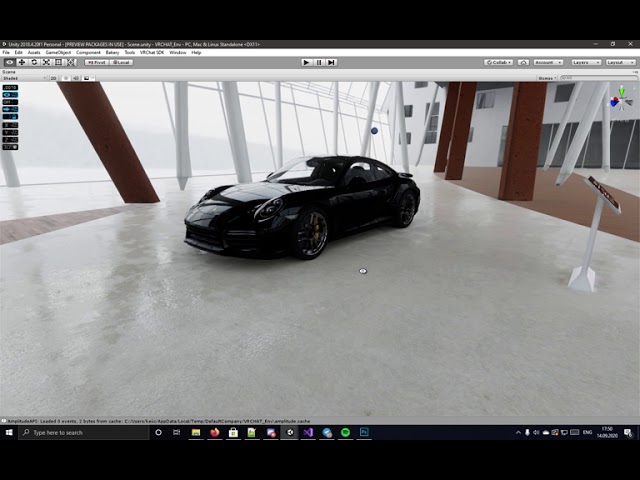
In case anyone needs a surface shader which uses VRCMirror instead of reflection probes — I made one. https://gist.github.com/DmtDenisov/fc5c34f2e3bf32dfdee95e37fb57ee96

Here is it in action https://www.youtube.com/watch?v=b63CcG42LhA
 haughty pine
So i want to use a rainbow animated shader on my avatar but in the sweater only where i painted blue lines. Is that possible?
spice tide
You would need to separate the sweater into two texture maps, with one being the lines... and then use a shader like poiyomi or something to animate the lined texture.
 waxen quail
Would anyone know where I can get a text shader? (Its like the same thing as the ui text but its a shader)
 brazen sigil
I honestly don't mind using the VRChat/Mobile/ToonLit shader for both PC and Quest. I don't need any fancy effects.
The only thing that bugs me is that it never casts a shadow.
I tried removing the skip_variants part (and renamed the shader) but it still doesn't cast a shadow.
Does anyone know what causes the default VRChat shaders to not cast a shadow?
 ruby sinew
could be that you're mesh renderer got shadows off itself
 quartz thistle
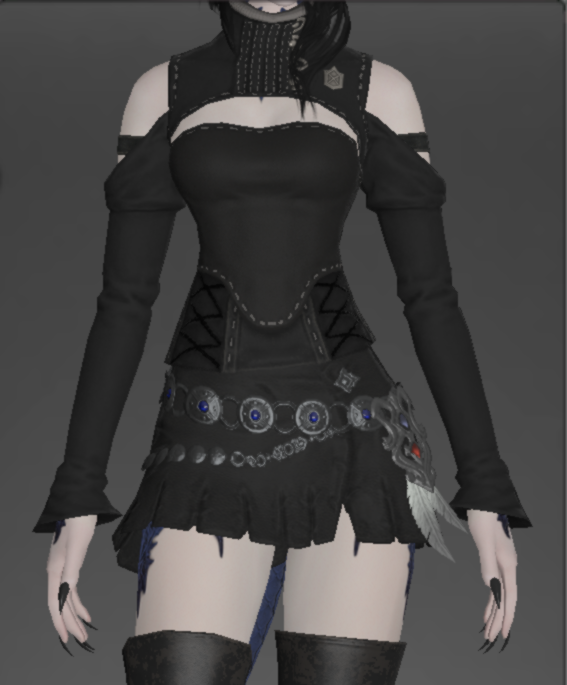
Someone made an xiv avatar for me but xiv models handle poorly without xivs shaders and lighting. Any recommendations? I have no unity experience.
https://cdn.discordapp.com/attachments/753799211006296205/754787054323367947/unknown.png

 shadow river
@vernal dagger thanks for sharing, this will be useful🤘
 final dagger
looking for help.
past pewter
@quartz thistle maybe try using diffuse or standard shader
if you want to go advanced you can try using poiyomi toon and configure the lighting yourself
quartz thistle
Is there an appropriate channel where I could request someone help me with this in the form of a commission? I'm not confident in my ability to do this myself.
velvet sorrel
If you still need help, send me a DM!
lucid ember
anyone have a way to have a non transparent water shader? Im using VRwatershader. Im trying to get a black goo look
karmic osprey
im new to shading, and i wanna know how to change a standard looking shader to a toon shader
or a shader with no shadows
karmic osprey
yes
timid patrol
Ok, so
Select your model in the assets bar
Go to "materials"
Back to the assets bar, create a new material and assign your textures to it
From there you can change the shader if you already have the SDK in your scene
karmic osprey
oh no no i meant how do you change the code in the material to make it go from a standard material to a toon lit like material
karmic osprey
because i have a hue shift shader i downloaded for my 3.0 avatar, but the standard shading makes it look bad
so i wanted to change it
but i dont know how
timid patrol
Does it like constantly change the color or just alters all the colors once?
karmic osprey
it changes with a slider
timid patrol
Oh, I know a toon shader that does exactly that
Poiyomi Toon shader
It's a really good shader, it allows you to adjust basically everything
karmic osprey
no with a radial puppet
timid patrol
You should be asking this question in the AVATARS 3.0 section then
karmic osprey
i know how to work those, its getting the shader to actually make those changes
timid patrol
I'm no use here, sorry
 tawdry owl
does anyone have the glasses shader that makes the glasses lens look real?
velvet sorrel
Try mine.
https://gitlab.com/s-ilent/fake-glass

GitLab
A shader for Unity that (ab)uses some Unity features to produce glass-like glass.
 autumn zephyr
Whats the shader that you can insert the stream camera in and itll display a texture from a camera projection?
 vocal wadi
Does anyone know what the shaders that draw on other things are called? Say, a sphere which creates a wet spot on whatever surface it's moved over.
I'm hoping they're popular enough that I can find something related online, but I'm not sure what to search for honestly
vocal wadi
https://gist.github.com/bshishov/3eaa056d1560584ff82c1b96ee2f20fd
This is the closest I can find, but it stretches the texture in question all over the surface (something isn't translated properly or whatever)
Edit "Deferred Decal" seems to be the type I'm looking for
Gist
Unity3D simple screen-space decal shader. Does not support lighting. Works with LWRP. Just create a material with this shader and assign it to a cube (also disable shadows and collider). Thats it ...
 wide sparrow
https://youtu.be/SySnHIhiVgM
So I've been through this, but I'm not understanding how to translate this into the actual project I'm working on. I'm using poiyomi for my avatar (and props) and I'm attempting to make a portal, that when gone through, reveals a room to you.
Is there a better way to go about this? If not, how would I go about making this work with poiyomi?
 stiff berry
I don't use poiyomi but from looking at the code on github he has values you can edit from the inspector like Stencil Reference Value Stencil Pass Op and Stencil Compare Function
so if I say to do this in the video
Stencil {
  Ref 5
  Comp Always
}
You just need to change Stencil Reference Value to 5 and Stencil Compare Function to always
but you'll need multiple materials since the stencil values are per material
wide sparrow
Oh
Wait I just realized that's you
stiff berry
yes hello it is me toocanzs xd
wide sparrow
So I guess more directly, the issue I was having was that everything worked perfectly as is, just not when models with different shaders would go in (specifically the one in working on that uses poiyomi).
Apologies here but more skimmed the video than watched in full because of time, I'll get back to that one in a bit, but I'm going to assume it has something to do with the material on the Suzanne head that allows it to enter?
When it comes to working with shaders the most I've really done in the past is make a sort of overlay shader
stiff berry
yea you have to make sure every material that is going to go into the portal is setup like I setup the avatar shader in the tutorial
so like if your friend wanted to also be inside the portal they'd have to follow the tutorial
wide sparrow
Ohhhhhh, ok. Then this is more of a localized effect, and not necessarily something I can say, bring other players in vrchat into?
stiff berry
but they'd also be invisible without the portal
wide sparrow
Ok gotcha
stiff berry
yea
wide sparrow
Damn. I've been struggling for about a week now to find / figure out some shaders I've seen. Best example is a TARDIS, there's been quite a few I've seen that they'll expand and you can get inside (bigger on the inside than outside) with a full model / texture of the TARDIS inside. You can step out of the main mesh (as long as it's not through the door) to explore the interior, and use the door to exit. But also if you walk through the walls on the inside you exit (figure that's just a shader thing, not in the mesh you don't see the thing).
stiff berry
assuming that's on an avatar and not on in a world it sounds like a stencil shader just like the portal
wide sparrow
But then how would anyone else be able to enter it regardless of their own shaders?
or maybe it's just time for me to dive deep into the world of stencil shaders
stiff berry
i'm not sure i'd have to see it, but If you imagine like a sphere with outside faces that are invisible and inside faces that have a stencil which reveal other objects like the tardis something like that would probably work
only issue is if you went behind the door you'd instantly pop into the tardis
wide sparrow
only issue is if you went behind the door you'd instantly pop into the tardis
Regardless of if you went through the door or around?
stiff berry
yea
you can't tell whether you went through the door or behind it without scripting like Udon or something
wide sparrow
Hm. Suppose I could deal with that for the time being for my purposes.
stiff berry
well... there are some ways if they used cameras and render textures to store some state but idk if they did that
it is an avatar, right?
wide sparrow
Basically I've got a halo on my head held by constraints, that I can pop into my hand. My initial idea was being able to place it down as a world object, it expand into a doorway, and reveal a room behind it.
I could also just slap the room down on people if that's the case (for it showing when you're inside regardless).
I'm working on an avatar, and the tardis's I've seen were avatars yeah
stiff berry
hmm well yeah the basic concept is to first render interior faces with some stencil value, then render exterior faces at a higher render queue with stencil value 0 and make it invisible with ZWrite off
and then you've got something that you can only see from inside the model or through holes cut into that model
wide sparrow
So if I just take a sphere and do that, throw an animated noise texture on for the holes, it'd create a bubble around me where I'd be invisible inside except for where the holes were, and have a separate interior?
Or is that where the shaders for the meshes inside come in
stiff berry
you'd have to cutout the holes based on the noise texture
so use a cutout shader with some threshold and make the noise texture the alpha channel
stencil are like an on/off thing so you either discard the pixel or you don't
wide sparrow
Oh, gotcha
So ignoring the noise texture part and let's say just a single window, would that concept work as a rule of thumb for anyone entering the sphere?
stiff berry
yea
wide sparrow
Awesome. Time to learn more about stencil shaders, thank you lol. Hopefully I can figure out how those interiors are done. And honestly at this point, that was back in February/March ish, the interior might've appeared over you when you stepped in even through the side
I don't think they did, but coulda
stiff berry
here's an example of exactly that https://www.youtube.com/watch?v=rvxWjL5cR98

Credits to Neen. One of the coolest things I've ever seen in VRChat.
the sound is just an audio source with a specific range
but that's just a sphere with separate interior/exterior stencil values
and the water/rain stuff is hidden unless that stencil is on your screen
wide sparrow
Went to mess around in poiyomi for a bit and got.. well basically exactly what I was looking for, just not the whole step through portal to view thing, which is fine, can always just rework the main idea.
With shaders like he's using on the interior there, would that be something translates from shadertoy or what? I've never gotten the concept of being able to render a scene like that in just a shader
stiff berry
well the rain is just a particle system with a material that only shows up in a certain stencil
the floor is just a plane with some animated texture and it only shows up in a certain stencil
i mean you could use a shadertoy scene but he didn't do that here
just think of the scene like your avatar in the portal shader
it's just some objects looking for a special stencil value to be shown
they're still there and invisible when your outside the sphere
wide sparrow
Ohhhhhh ok wow that flew over my head at first
Hm
• Room sized object
• Ball in hand sized object
Room size object only renders while in ball sized object, make ball sized object scale with a radial menu, as it envelops people they're now in room sized object
stiff berry
you don't need to envelop the entire room sized object, you just need to write to the stencil buffer before they're rendered
so it could just be over your head and it would reveal the entire room sized object
think of it like this https://www.youtube.com/watch?v=zL_HAmWQTgA

Add me on Facebook (click the LIKE button on Facebook to add me)
http://www.facebook.com/brusspup
Download the song in this video:
Song Name: Break Emotion
iTunes:
https://itunes.apple.com/us/album/break-emotion-single/id399452730
Thanks to DxDutch for all of her help on th...
I used to have a VR headset on one of my avatars that revealed a room by looking through the glass in the headset just like this
wide sparrow
Ok gotcha, but to walk around inside the room as if it were the room you were in, you'd have to be inside the revealing object right?
stiff berry
yea
wide sparrow
Ok so I follow
The other person I talked to about the entryway idea, only said Render texture + camera lol
stiff berry
yea you can do more complicated things with render texture + cameras. Basically anything that requires some state. Like for example if you want to change the size of the sphere once someone walks through you need to detect if they walk through the front and not the back.
That basically requires knowing on a single frame whether or not they were on the front of the door in the previous frame and seeing if now they're on the other side. Key part being "previous frame"
so like you could store some value 0 or 1 on the render texture for if they were on the front side of the door last frame and then check if that is 1 and you went to the other side. And you also need to toggle the size after that. Toggling is also state
but it only will work for friends cause render textures only work for friends
wide sparrow
Ok awesome, I'll look into that. There's probably ways to run both styles in the same setup I'd assume, so if non friends pop in they get the standard setup or you can have friends step through the doorway / portal
stiff berry
Yea you can check if the render texture has a default value for non-friends and check if it's some specific value for friends i think
wide sparrow
Thanks so much. You've been a load of help today, I've actually got stuff setup in my scene to help me through all this later now lol.
I think one of the biggest shader things I need to figure out now, is how the scene shaders are done. Like ah.. that cave shader where you're going through a cave, the industry shader, and say, this: https://www.shadertoy.com/view/ldK3W3 (got it into unity, didn't look as pretty but hey I'm happy I managed to convert it).
Partially because I rather have one shader creating a scene than to spawn in a bunch of meshes and particle systems and whatnot that people won't typically see.
 stiff berry
this guy's channel has tutorials on raymarching https://www.youtube.com/watch?v=S8AWd66hoCo

In this video we'll code a ray marcher inside of a shader in Unity that allows you to render 3d objects on the surface of other 3d objects, like a hologram!
Twitter: @The_ArtOfCode
Facebook: https://www.facebook.com/groups/theartofcode/
Patreon: https://www.patreon.com/TheArt...
wide sparrow
Is that what that is?
stiff berry
yea
wide sparrow
Awesome.
I'm glad vrchat got me into content creation, I've spent about a decade doing pure backend stuff and calling anything graphical the plague. Finally actually doing neat stuff now lol
stiff berry
this is a good high level overview of what raymarching is in relation to fractals https://www.youtube.com/watch?v=svLzmFuSBhk

This is a brief introduction to how ray marching works and how it is used to generate amazing real-time 3D fractals. I uploaded the source code so you can give it a try yourself!
Source code:
https://github.com/HackerPoet/PySpace
Ray marching tutorial:
http://blog.hvidtfeld...
yea that's basically my experience too
shaders were black magic for a while
while i'm throwing links at you if you haven't seen this guy's channel it's a great resource also https://www.youtube.com/c/DanMoranGameDev/videos

YouTube
Welcome to Makin' Stuff Look Good in Video Games! This channel is all about techniques for getting the most out of your games. Particles, shaders, image effe...
wide sparrow
I made my first one back in.. may/juneish
Hated it so much I walked away from doing technical things with avatars lol
Hell yeah more subscriptions
Wait
The art of code
This is who got me back into being willing to mess with shaders again
jovial urchin
I want to learn particle systems, is there a good starter tutorial that’s recommended ? My goal is world decals. I've been able to emit a decal but based upon world coordinates, but I'd like to do it from the avatar position, I may be using the wrong shader
 tepid ermine
Are shadergraph creations supported in vrc? If not, what are the restrictions when scripting your own so it goes up?
 slate sable
@jovial urchin, well you start the particle at the avatar's position, as a world particle
Then it will stay where it was
jovial urchin
This is the current POC. My goal is to project this onto the world, emiting from the position of the wand
I'm just a filthy kitbasher and not a shader coder so I may have chosen the wrong decal shader to do this though, using Neitri's World Triplanar mapped shader
basically want to accomplish the nutter butter decal effect but with a different decal
past pewter
I've been seeng eboys with spring join spheres
the spring join is ez
but does anyone know how they do shaders on the orb par
steep swift
The orb is just a sphere. You could literally put anything on that sphere imaginable. What do you want it to look like? For bonus points add a trail renderer and you get trails!
jovial urchin
are there any examples of a Paintball type shader?
 lament stag
anybody here familiar with rero standard?
 stable goblet
world lighting or shaders? whats causing it (ive asked in both chats)
 jade oriole
🤷♂️ broken/old shader my guess, had a few friends who were super bright like that until they updated avatar
stable goblet
hmm
its av3
lmao
so its a new av
the model came with shaders
thats probably it then
jade oriole
update shader/material, sometime if i update my shader they go really bright until i remake the material
past pewter
What shaders work best for semi-transparent glasses? They're suppose to be mostly transparent.
velvet sorrel
Depending on what style you want, try my https://gitlab.com/s-ilent/fake-glass
GitLab
A shader for Unity that (ab)uses some Unity features to produce glass-like glass.
 digital halo
anyone have a decent rain shader?
 blissful iris
https://i.gyazo.com/2c89a99a5051da7054c46fe319690003.jpg How do I get my avatar looking as nice as it does in Blender?

It looks like ass in Unity
past pewter
does anyone know what shader or how to do the effect on this orb
steep swift
It might be as simple as a sphere with a matcap shader. Have you tried a matcap?
If you want that one you might be able to take a that screenshot and stretch that orb to be a circle texture and use that as a matcap
past pewter
Anyone know how to fix the glasses? The edge coloration shouldn't be that blatant and looks better in Blender.
I'm using Poiyomi's Advanced Transparent atm but fiddling with the settings doesn't help anything.
 brisk gull
Use cutout with a semi transparent texture (don't forget to set alpha is transparency in texture)
past pewter
Cutout has the same results. Texture is already transparent and looks like this in Blender
The "lighting" is definitely present but not solid.
Advanced cutout - kinda better but now the lighting is only on the rims/space where the face isn't directly behind.
past pewter
@steep swift I'm unsure but Ive been looking for someone to tell me how to re create it for weeks now
ocean ocean
Can anyone recommend a good universal hair shader? Not necessarily something that goes along with a toon shader.
velvet sorrel
@past pewter Try my shader. It has a premultiplied mode transparency mode made for things like shiny glass in anime style.
 wanton pasture
i don't know why my avatar keeps flickering in some worlds
I have another avatar that uses the same head with same lighting settings but it does not have the same issue
lighting settings (poiyomi shader 5.5.5)
but when other players see me they don't see it flickering
this issue also happened back when it was using the arktoon shader
halcyon dove
Probably need to adjust your anchor override
wanton pasture
how can I adjust it
halcyon dove
On your model's mesh under skinned mesh renderer
Set it to something like your spine or if that doesn't help try hips
vocal wadi
My if-statement changes how the following code executes, wtf?
Depending on what I ask for, the following code changes behaviour
ocean ocean
Could anyone give me a crash course on how to properly apply hair textures to shaders so that they don't look bad and actually retain the textures normal color? I keep having issues where either the hair doesn't get rendered properly or if it does, the hair color seems waaaay off. I'm not sure what I am doing wrong.
velvet sorrel
What are you doing?
 sick fossil
I've run into an issue with this texture. this is done by using a transparent picture applied to faces that are set apart from the actual hat. no matter what i do, those bars keep showing up, no matter what shader/shader config i use. i'm probably doing something wrong. any ideas?
moved the question here because i realized this is probably with shading and not just general sdk2 avatars
 brittle plinth
That's because of the texture tiling setting. You have the texture set to stretch the last pixel on every edge if it's smaller than the UVs it's being applied to.
 serene sable
B
 rustic mica
how would I stop my face outline from also outlining the eye whites? They are on the same material and mesh
 sharp pike
Quite a few shaders that have outlines also have an outline mask or other named texture that controls the width of the outlines. Where the eye whites are on the texture, you would likely set that area to black (zero).
rustic mica
hmm, I dont see the outline mask option in silent cell shader.. dang
sharp pike
Unity chan toon shader, xiexe's xstoon and poiyomi toon shader all have it. The alternative is having a separate material without outlines or with smaller outlines if you particularly want to use Silent's.
rustic mica
Ok ty, I will try that out
 ripe idol
😉
ocean ocean
Does anyone know what shader is used and how it is applied to the milk vomit particle effect on the "Nutter" avatar? I'd like to know how they were able to make the vomit effect stick on everything the way that it does. I'm assuming it's some sort of world overlay shader, but I'm not sure.
 restive badge
@ocean ocean
The above is my improved version of Neitri's shader which can be found here: https://github.com/netri/Neitri-Unity-Shaders/blob/master/World Triplanar Mapped.shader

GitHub
Collection of shaders for Unity3D and VRChat. Contribute to netri/Neitri-Unity-Shaders development by creating an account on GitHub.
This shader works by applying a texture with an alpha map to each polygon by projecting it along each axis.
ocean ocean
You are the man, thank you!
restive badge
In other words, the way the Nutter works is it spawns invisible box mesh particles which have this shader applied with a splat image with alpha. These particles do not and cannot collide with players, so how does it work? Well, it just spawns them in the air at random in front of the Nutter with a short lifespan of a few seconds. They are invisible until someone walks through the apparently empty space because there are no polygons to apply the triplanar mapping to, so it looks like they've collided with the player.
The same is true of the ground. The particles don't move, and they don't collide with the ground. Only the visible nut juice flies through the air. And I guess they could spawn these invisible particles over distance as they travel, or at random over time, but the point is, the visible particles aren't colliding with the player or the ground, and the invisible ones just appear to collide by virtue of spawning near those locations.
My improved version of the shader fixes black outlines it had, and it enables the ability to animate the color and alpha of the particle it's applied to, so you can fade out the splats over time or make them a variety of colors I guess if you want to vomit rainbows. 🙂
I think there is some code in there I left commented which you can selectively enable to make it so the particles can blend on more than one axis, but I think I turned that off because the partially transparent blood that ended up in many locations didn't look good. But depending on the effect you want to do it should be easy enough to re-enable that if you need it.
I can't recall if this shader is affected by world lighting, but I believe it is.
ocean ocean
you are amazing and I appreciate you lots! ❤️ That was really informative. I'll try to see what I can do!
 rocky lion
Anyone know a good particle dissolve shader?
restive badge
@ocean ocean Hopefully that prefab will work for you. There is a light source on it called DepthGet. If I remember correctly, for this shader to work there has to be a depth buffer available to it, but there isn't always one available in VRChat. Putting a directional light that emits no light on your avatar is a workaround for this.
@rocky lion Poiyomi's toon shader has a kind of particle dissolve where you turn into cubes and fly away.
And it's got other kinds of dissolving effects done with masks.
Now I've got a question!
rocky lion
it does? I only see the regular noise dissolve option
which is the one i've been using
restive badge
@rocky lion Well, it's more of a voxel thing now that I look at it but maybe it could be useful to you. Other than that... Maybe you could spawn particles from your mesh and combine that with a noise dissolve? https://www.youtube.com/watch?v=b4VnIlM3VHM
 rocky lion
oh yeah like that! i'll pick it up, thanks
ocean ocean
@restive badge Thanks for those files, but it doesn't seem like the shader or prefab are working. Is there anything specific I need to do to set it up in my project to see it in action?
restive badge
@ocean ocean
That should cover everything you need to set.
Does anyone have a shader which can be used to place alpha mapped and lightmappable decals on terrains?
Specifically, I have some roads created with River Auto Material on a terrain, but the shader they used is not really up to the task in VR because the roads float a bit off the surface of the terrain out of necessity to make them render in front of the terrain at a distance.
I feel like there must be a better way to do this though than lifting the road off the terrain, but I'm not a shader expert.
However, I was thinking... what if you could tweak the Z value of the pixel you're about to write, to cause it to be written in front of the terrain regardless of whether it's slightly behind it, so the decal can sit flush with the terrain and LOD changes in the terrain which might make it go partially behind it wouldn't affect it, but hills and such having greater z depth would still draw in front of roads in the distance.
Or... maybe a vertex shader could be used to move vertices in the path to be closer to the camera the further in the distance they are, so that nearer vertices aren't moved away from he surface, but ones further away are so as to avoid those LOD issues?
rocky lion
Did the latest update break anyone else's shaders? I have a transition animation i've been using since 3.0 came out. but today I noticed that it now makes my model white when i dissolve to texture
restive badge
How would I implement this:
"The simplest solution would be to add a small value to the clip space z in the vertex shader. Basically:
o.pos = UnityObjectToClipPos(v.vertex);
o.pos.z += 0.001;"
https://forum.unity.com/threads/different-z-offset-per-triangle.499280/

Unity Forum
Name says it all. I'd like to use Z offset to fix some Z flickering issues. I know you can do this with a shader using Offset;...
Into this?
I know next to nothing about shaders, so I don't know what v.vertex is, if its available to me, if o.pos is pre-exisiting or has to be declared, and if it's different from the object named o in that shader code and they just happened to pick the same name, or what. I need to move the vertices of a path towards the camera and setting Offset doesn't seem to be doing the job without ridiculously large numbers for the offset which breaks other things, and from what I've read that's driver specific in the way it functions so I can't be sure it will work reliably on different cards anyway, so I'd like to just try tweaking the vertex positions manually.
steep swift
@restive badge I usually calculate the desired vertex position and use the z value from that, and do the trick I do to keep the clip depth the same (assuming v.vertex is the original vertex position before wobble and o.pos is the output SV_Position):
float zoffset = v.color.r;
o.pos = UnityObjectToClipPos(v.vertex);
float3 cameravec = normalize(mul(unity_WorldToObject, float4 (_WorldSpaceCameraPos, 1.0)).xyz - v.vertex.xyz);
float4 desiredpos = UnityObjectToClipPos(v.vertex + zoffset * float4(cameravec.xyz, 0.0));
o.pos.z = desiredpos.z * o.pos.w / desiredpos.w;
Modified it to use the red channel of vertex color to affect the depth offset in units of meters (0 to 1).
You can adjust the math here as desired... or use a texture instead of vertex paint etc
This code can be placed at the end of your vert() function, before the return line
restive badge
@steep swift Thanks, I'll give that a try... But what is the purpose of allowing the value to be adjusted by the vertex colors? And wouldn't adjusting the vertex color to store these offsets also adjust the color of the mesh? I had an issue a while back with a plant asset I bought looking weird cause the developer stored wind information in the vertex colors because they intended for the foliage to be used with their terrain system with its own custom shaders and scripts that weren't compatible with VRChat.
I assume I can just replace that v.color.r; with some value if I find a constant for all vertices is sufficient for my needs, but I'm curious what scenario you envision where I might want to adjust that at the vertex level. I guess I could see situations where there's some clipping somewhere I need to get rid of but I don't want to use such extreme values everywhere...
"Shader error - undeclared identifier 'v' at line 207 (on d3d11)"
That's the line that picks the vertex color. I can work around it with a constant, but where do I get that variable from if I need it?
"Shader error - invalid subscript 'pos' at line 208 (on d3d11)"
That's this line:
o.pos = UnityObjectToClipPos(v.vertex);
"This code can be placed at the end of your vert() function, before the return line"
Wait, what vert() function? I placed the code at the end of the surf() function I provided. There is no vert() function anywhere in the shader code.
sharp pike
@rustic mica If you're still using Silent's shader, it looks like you can control outline width using vertex colours. See the Vertex Colour Mode section at https://gitlab.com/s-ilent/SCSS/-/wikis/Manual/Setting-Overview#advanced-options

GitLab
A surface shader for Unity providing cel-shading. (Forward rendering only)
velvet sorrel
scroll scroll scroll
Actually, I just added outline masks.
After a looong development process, I'm pleased to announce Crosstone - v1.7 of my shader!
http://gitlab.com/s-ilent/SCSS
UCTS-like controls, but with full support for Unity lighting! Physically-based light response! No more overbrightness! And much more! Check it out!
GitLab
A surface shader for Unity providing cel-shading. (Forward rendering only)
Tell your friends! And share my tweet! Hehehe.
https://twitter.com/Silent0264/status/1309832191430459392
sharp pike
I just downloaded the update and saw the outline mask and was about to post here again, haha.
restive badge
     appdata_full o;

     float zoffset = -1.0; // v.color.r;
     o.vertex = UnityObjectToClipPos(v.vertex);
     float3 cameravec = normalize(mul(unity_WorldToObject, float4 (_WorldSpaceCameraPos, 1.0)).xyz - v.vertex.xyz);
     float4 desiredpos = UnityObjectToClipPos(v.vertex + zoffset * float4(cameravec.xyz, 0.0));
     v.vertex.z = desiredpos.z * o.vertex.w / desiredpos.w;

}```Here's what I've got so far, @steep swift. The above doesn't work. My road simply disappears. I tried the vertex color, and a constant, and even negating the Z value and nothing.
past pewter
I'd like to have my avatar's eyes and tongue glow, not super-bright but strong enough to be noticed up-close and in the dark.
I use Poiyomi's shaders but was wondering if any in particular or another kind would be best-suited for this.
ripe idol
My shader has glow in the dark emission if you wanted it to just glow in the dark
past pewter
Would it only be noticeable in the dark regardless of intensity or in light too if bright enough?
 frozen mica
Hello! anyone who could help me please dm me!
This is a character made from scratch i made who you can see into the head, chest, and the hips of on any angle you're facing them at. You can't see THROUGH them but you can see halfway into them at any angle.
I do not know the cause of the issue and need help.
it looks and works find in blender, but in unity when its transfered as an FBX it does this issue, i was told it may be a shading issue
 astral marten
anyone know what would be a good shader for PBR textures? and where i could get it?
 twilit isle
astral marten
twilit isle
astral marten
thanks!
astral marten
do you know wherei put an aplha map?
 misty lake
I am experiencing a problem. This black part of the scene is supposed to be Water(Pro). It works good in Unity. On the previous version of VRCSDK it would simply not simulate the water. Now it is just black. It could be connected to Udon, but since C# scripts only control the tilling and S/RF/RR modes, it is something about shaders.
FX/Water is used. Any suggestions?
 cosmic fable
@astral marten add it into your texture map
anyone know why my textures are aliasing like this? it should just be the solid color, not this weird gradient thing
restive badge
I still need some help with a terrain shader that's supposed to stop a path mesh placed on a terrain from clipping through it in places.
Here's what I've got so far...
One person suggested the following:
            v2f vert (appdata v)
            {
                v2f o;

        float zoffset = v.color.r;
        o.pos = UnityObjectToClipPos(v.vertex);
        float3 cameravec = normalize(mul(unity_WorldToObject, float4 (_WorldSpaceCameraPos, 1.0)).xyz - v.vertex.xyz);
        float4 desiredpos = UnityObjectToClipPos(v.vertex + zoffset * float4(cameravec.xyz, 0.0));
        o.pos.z = desiredpos.z * o.pos.w / desiredpos.w;

        return o;
            }```

But that didn't work. v2f wasn't found and o.pos wasn't found.I then edited the code to try to get it to work, but the path simply disappeared unless I commented out the line actually adjusting the path positon. And this happened regardless of whether I set the z offet to 1, -1, 0, or anything in between:
               appdata_full o;

               float zoffset = 0.1;
               o.vertex = UnityObjectToClipPos(v.vertex);
               float3 cameravec = normalize(mul(unity_WorldToObject, float4(_WorldSpaceCameraPos, 1.0)).xyz - v.vertex.xyz);
               float4 desiredpos = UnityObjectToClipPos(v.vertex + zoffset * float4(cameravec.xyz, 0.0));
               v.vertex.z = desiredpos.z * (o.vertex.w / desiredpos.w);
               v.vertex.xyz = v.vertex.xyz + normalize(ObjSpaceViewDir(v.vertex)) * zoffset;

}```Then I tried this, which seems like it might be giving a similar result to using the Offset command that wasn't doing as good a job as I'd like because the path still had to be like 0.1 units above the terrain up close for it to work. At least, without normalizing the result. When trying to normalize it, it just broke and the path disappeared no matter the offset:
            appdata_full o;

              float zoffset = .1;

            //v.vertex.xyz = v.vertex.xyz + normalize(ObjSpaceViewDir(v.vertex)) * zoffset;
            v.vertex.xyz = v.vertex.xyz + ObjSpaceViewDir(v.vertex) * zoffset;

}```So now I'm wondering if perhaps pushing the vertices towards the camera a bit might not be the best approach? I'm thinking instead what if I were to move the vertices up along the Y axis, in world space, but do so more in the distance than up close? Or maybe I just screwed up all the math from the original suggestion because I could never get that to work unaltered and I'm not sure exactly what I'm doing.
steep swift
@restive badge the idea is moving vertices toward the camera in clip space, not in view space because view space will cause perspective to change and you see the gaps in the polygons there. It will be very noticeable in VR
However..... yeah there are two different types of shaders in unity: vert/frag; and surface shaders (which confusingly have a function called vert)
Looks like you're editing a surface shader, so the clip space change isn't possible without special macros or by converting it to vert/frag.
I think editing in this change to a surface shader might be a little too complicated for your skill level (there are lots of little gotchas with surface shaders)
Sorry for the suggestion. I forgot that surface shaders were a thing :-p it was supposed to be a really easy edit
 blissful surge
does anyone have a rain prefab plz? message me
blissful surge
@wanton pasture Maybe you dont have legacy blend shapes enabled on your fbx?
This could be the case however that usually only changes lightings on emotions/ face gestures.
restive badge
@steep swift I don't understand. It sounds like you're suggesting surface and vertex shaders are two entirely different things. But the only way to apply a shader to an object is with a material, which requires a shader, and every object must have some kind of surface shader or else it wouldn't render with a shaded texture, so what then would be the point of having a vertex only shader? I thought "vertex" vs "surface" shaders were simply referring to components within a particular shader, which could contain one or both, but by default there's some hidden code for both since any object must have both its vertices and surface correctly rendered.
So I looked up a youtube tutortial on shaders just now and it says the vertex shader is executed before the rasterizer stage, and the fragment shader is executed after. But now I'm even more confused because it sounds like there's two different shaders involved but you called the first one a vertex/fragment shader but I was led to believe fragments were pixel data, and this tutorial seems to confirm that...
Okay so I found this answer which clarifies the whole surface vs vertex/fragment thing: https://answers.unity.com/questions/584066/surface-vs-vertexfragment-shaders.html
Unity is the ultimate game development platform. Use Unity to build high-quality 3D and 2D games, deploy them across mobile, desktop, VR/AR, consoles or the Web, and connect with loyal and enthusiastic players and customers.
In short, fragments are indeed pixels, and surface shaders are just shaders which use a bunch of Unity macros to reduce the amount of work required to write a shader. But using those macros means certain functionality isn't exposed to you. So I guess you're trying to tell me that conversion to clip space is one of those things which isn't available.
However, you haven't told me that it's impossible to determine the Z position of a vertex in a vert/fragment shader, or that its impossible to use that value to adjust how much I move a vertex based on how close it is to the camera. You seem to be suggesting a perfect method which will result in no visual artifacts of the path lifting off the terrain.. But if I can just get something good enough where it doesn't lift off the terrain up close to you... That might be sufficient.
And then there's this:
https://docs.unity3d.com/Manual/SL-SurfaceShaderExamples.html
Using a vertex modifier function, it is also possible to compute custom data in a vertex Shader, which then will be passed to the Surface Shader function per-pixel.```Does anyone know any good grass shaders? Not the long wavy kind though, I need something that looks mown
 reef yew
Which shader would make the yellow eye socket look like it was an eyeball, as in how to get rid of shadows on it?
 rotund widget
Anyone have the ps1 shaders used in the LSD vrchat worlds?
brittle plinth
Which shader would make the yellow eye socket look like it was an eyeball, as in how to get rid of shadows on it?
If you just want solid color, you can use an unlit shader.
velvet sorrel
With my shader, you can set the tone colour of the eye socket to be unaffected by shadows. However, for that model's case I would recommend altering the normals for that region to be flat and parallel, which will allow it to still receive shadows while also hiding the boxy nature of the eye socket
 faint gulch
Does anyone know if Unity's Shader Graph Works with VR Chat?
faint gulch
@reef yew a toon shader would probably have the quality you're looking for
 undone bay
for low poly models i would recommend using shade smooth option
tired cliff
Does anyone know if Unity's Shader Graph Works with VR Chat?
@faint gulch No, because VRChat uses the built-in renderer, which is incompatible with Shader Graph.
If you want visual scripting for VRChat shaders, you'll need to use something like Shaderforge.
Speaking of which, here is a Unity 2018 compatible version, it has a couple small bugs, but it works. Posting this here because it's a bit confusing for most people to pull this version from GitHub, also Shaderforge is free, so sharing it isn't piracy.
(i didn't make this version)
undone bay
(i didn't make this version)
So that implies that you made another version
Hand it over bakaroo
jovial urchin
Any recommendation to a rim-light shader that makes the line squiggle/wiggle instead of a solid line?
 quasi bay
Would anyone know a possible reason why all sprites in my world show up pink, as if missing a shader? They look fine in Unity and are only using the default sprite shader, but it fails in game.
Downloaded the default unity sprite shader via a github, and it seemed to fix it in game. The one in my project must have simply been outdated or corrupted somehow.
 blazing gyro
Hopefully this is an easy one, I'm having an issue with a sphere + skybox shader not showing up in-game, looks fine in-editor. Does the same with all 4 of the base skybox shaders + the VRchat/Mobile/skybox shader.
The goal of this is to have a gameobject I can set to active to change the skybox.
jovial urchin
For a world object, let's say a cube. I want to be able to get a shader to outline the edges but transparent the sides, so it looks like it's a cube outlined with a pencil/pen. Any suggestions?
jovial urchin
I can use poiyomi pro wireframe, but it's not transparent to show the edges through to the far edges
ripe idol
every single shader has cull settings
but generally not visible to the user
some call it double sided rendering but the actual name is culling
you're culling the back faces by default so you don't see the inside faces
when cull is off you see all the faces
jovial urchin
My ultimate goal was to have a texture or something that I could draw manually to do the edges, so it's not a crisp straight line. like adding noise to the line
Looks like adding a normal map as the base texture gives the wireframe noise, I can work with this
lofty dragon
Is anyone here good with editing shaders? I've found a shader I want to use but it's missing a few things for my application of it.
lofty dragon
Alright, I've figured most of it out
but I can't figure out how to disable lighting
lofty dragon
This is as far as I've managed to get, but the lighting is still an issue
 shrewd briar
Ive seen people with shaders on their avatars that make the texture look like an image on a screen, which is divided by horizontal black lines
does anybody know what shader that is?
ruby sinew
a scanline shader ?
timid patrol
How do I do a Material toggle? I have something attached to the face that I want to toggle on and off but it needs to move with the mouth, so I figured toggling the material was the best way to do it.
lofty dragon
you can animate material switches with an animator
just hit record and swap the material @timid patrol
it doesn't show up in mirrors though
timid patrol
oh
Is there a better way to do it? I want it to show up at all times.
or rather- i mean show up whenever I toggle it on
sharp pike
Swapping materials absolutely does show up in mirrors
 arctic owl
does anyone know why my model looks cracked
but in screenshots it doesn't
nm
fixed it
sharp pike
But swapping materials in general seems kind of buggy though, I have an avatar and if I try and change both material slot 2 and 4 simultaneously (even in separate animations) only one of the slots change and it changes to the material the other slot is supposed to change to. Changing either slot individually works fine.
steep swift
@sharp pike Yes

(it's a unity bug, everyone has been running into it recently with avatar 3.0, and there's no known workaround)
Use less than 5 materials :-p or change parameters instead of material swapping? :-p you gotta be creative
sharp pike
Fortunately I was already part way through atlasing so it wasn't going to be a problem for what I wanted to do.
timid patrol
oh, OK! I was only planning on having one material swap anyways.
 slim shoal
Can someone recommend a good water shader for small lakes / pools? i tested clear water, red's, seans water and wacowater already.
In a few worlds a saw a water shader with foam forming around submerged avatars, but I couldn't figure out which one that is
 elfin geyser
Does anyone know how to make on object show through another object w/o making it transparent?
 autumn egret
is there some sort of fur shader or bump map shader that supports gloss,displacement,bump, and normal?
it can be non fur
its a blanket

stencils @elfin geyser
 somber knot
Does anyone know how to get rollthered/fire shader? Kind need it for a project
steep swift
@somber knot he chooses elusive methods to distribute his shaders. Supposedly he has a link to it somewhere in this world :-p https://vrchat.com/home/launch?worldId=wrld_5daae360-fb86-4f38-8c8a-af938bfb6e1f&instanceId=1
I guess it's an adventure

Showcasing shaders I have made for people to download and use for free in VRChat․
velvet sorrel
IIRC he doesn't want people using his fire shader because he made it stupidly expensive to render without realising it but can't dial it back without spoiling the effect?
somber knot
Thanks @steep swift really appreciate it!!
steep swift
@velvet sorrel that used to be true, but I think he claimed he disabled tessellation in the latest version. I had a version from 2019 where I manually disabled the tessellation myself, so I'd definitely double check to make sure it's disabled.
and you can totally just subdivide your mesh. it works fine if you're using it on an avatar or anything other than a cube basically
without tessellation, it's just vertex displacement
past pewter
For a custom avatar of mine, I want several parts to faintly glow in regular lighting and be noticeable in darker environments. Said parts are the eyes, mouth + tongue, lips, and blush (when present). Poiyomi's shaders have a emission function but not sure how intense I should make each part.
Any recommendations/tips for this?
ripe idol
for subtle stuff I'd keep it below 1
for a basic understanding: emission simply adds color to the material and the max color is 1. bloom in worlds usually starts blurring values over 1ish
so if you want to be subtle avoid exceeding 1
in the end you'll have to just test it out in game because all worlds are different
@past pewter
past pewter
Right, makes sense. Thanks for the help and the wonderful work you've done, your shaders are a boon to the community!
ripe idol
glad you like them
cosmic fable
any reason this shader is clipping so close in my world?
using RED_SIM's water shader, but I added the z-buffer prefab that's supposed to fix this.
 haughty marsh
Is that galaxy?
 junior moat
cosmic fable
junior moat
cosmic fable
that is indeed galaxy, felt like the existing maps people have made are less than great and wanted to attempt it myself
undone bay
huh, wonder what's new in v6
past pewter
toonlit is now broken on pc (only in vr)
 brisk junco
would anyone happen to know how avatar projections work, i.e. rendering someones model a second time at a different world transform
ive seen it done before even in sdk 2 but i cant even think of a way to do it without overriding every avatar's geometry shader, which should be impossible
Mirror Dimension。Introduce worlds on VRChat
like this
steep swift
Camera Test by merlin uses another VR camera at an offset / another position
The problem with this approach is it requires finding the player base by adjusted for rotation (offset from playspace origin?), and it also requires finding the vr camera scale (IPD). I think both of these cannot be obtained in Udon. Hirabiki has a workaround for the second... the first issue might be solvable, not sure
Oh wait, with GetPixels now implemented, it is possible to directly read he player's IPD, never mind
Though might still require a bit of per headset shader code. Not pretty
So that's the udon. Sdk2 is quite involved to implement the offset vr camera and only a couple worlds have ever done this.
 naive shell
Is there a way where I can bake a shader-made material into a texture? I've been looking all over the internet and haven't found anything on the subject.
 split girder
take a screenshot of it on a quad ?
 fringe sand
Anyone know what a good shader to use to mimic this look?
 harsh ember
Gist
[Unity] Save RenderTexture to image file. GitHub Gist: instantly share code, notes, and snippets.
naive shell
Aye! Thank you!
 whole crypt
I have no idea where to ask that but does anyone know how to project normals of other objects into a shader based on a camera angle? or something similiar (for a surface shader)
for now if the mesh is aligned with an object it works fine but as soon as the mesh rotates it reflects light wrongly
vs this
 nocturne birch
does anyone have a quest compatibale gold shader
steep swift
Commonly done on mobile with a matcap
Not sure what the approved vrchat mobile shader is called though
 stoic flower
Can shaders for UI text be only one sided?
 meager plinth
Does anyone know differences between taking a picture (with vr camera) and regular view (in VR and desktop) that I can detect with a custom shader. Would like to only show something if a picture is taken of me. Edit: I noticed that I can use UNITY_SINGLE_PASS_STEREO to detect between VR and Camera. But with this Camera and Desktop are the same. Thought about using the roll of the camera but I have no idea how to access it.
sharp pike
@meager plinth I've seen this in one of Silent's shaders https://gitlab.com/s-ilent/bokehy/-/blob/master/Assets/Shaders/Bokehy/Bokehy.cginc#L114

GitLab
Lazy lens bokeh effect for VRchat
nocturne birch
does anyone have a gold shader?
velvet sorrel
How to make gold: Create a material with Standard. Set the albedo colour to a light gold. Set the metalness and smoothness to 1.
@fringe sand For worlds or characters? I think to match Ape Escape you'd want to use something without directional shading and paint the shading on. For characters you can use my shader and set the shade colour to white.
fringe sand
I was referring to characters since I have a Spike avatar with the gadgets.
 lethal island
I have a question, say i wanted to trigger a shader, let it stay that shader for a bit, then deisolve into a diffrent shader that would stay. how would i do that?
 pure raven
@nocturne birch The Standard shader won’t work on Quest avatars...Use a matcap material instead. Add a flat gold colour as the 1st image, and a gold ‘matcap’ sphere as the 2nd (just look up ‘gold matcap’ on google images).
✨✨✨ Also, quick question, has anyone found a stencil shader that works on Quest? 🤔 Basically a transparent shader that also renders everything behind it transparent.
 muted osprey
Is there a widely used shader that accomplishes a sort of distortion effect? Like how heat slightly distorts the things around it
 gray nymph
can I use a vrchat sdk with another sdk
muted osprey
@gray nymph that's not even a shader question. Either way, the answer is no, using a 3rd party SDK is against VRChat TOS
light urchin
Why do you even need haptic glove sdk in a project for vrc avatars
Your first statement is just super vague on the wrong channel there is not much else to answer than no
 open zinc
im thinking of learning how to create shaders, what is the workflow for vrchat avatars? Do I use unity's shader graph or script it in C#?
light urchin
No to both, shader graph is made for a different render pipeline than what vrchat is using and shaders aren't coded in C#
If you want something similar to shader graph check out shader forge or amplify
open zinc
ah right, kinda assumed it was C# for some reason, thanks
should I look to youtube to learn or are there any other resources
light urchin
Depends on if videos vs text works best for you and google is your friend in finding learning sources
open zinc
cool, guess after I finish uni for the year ill have to crack into it
thanks for the advice
just saw the stuff in pinned too, probably should look at pinned more often
light urchin
Lot of good stuff pinned on all channels 👌
pure raven
Answered my own question. It wasn’t that hard. Here’s my new Quest compatible stencil shader in 3 flavours (stack-swap, mask & cloak). I’ll upload some better demos to the “Quest General” chat soon.
 deep valley
should I look to youtube to learn or are there any other resources
@open zinc this is the language the shader code is written in, it's like C if you have ever used that http://developer.download.nvidia.com/cg/index_stdlib.html
Cg Standard Library Documentation
for learning, "The Art of Code" on youtube (grumpy Dutch guy) https://www.youtube.com/channel/UCcAlTqd9zID6aNX3TzwxJXg and also Freya Holmer's epic livestreams.. https://www.youtube.com/watch?v=9WW5-0N1DsI <-- prac, https://www.youtube.com/watch?v=yg6h4XQqPNQ <-- maths

YouTube
Like to code? Like cool graphics? Like to know how to program something pretty? You've come to the right place! Follow me on twitter @The_ArtOfCode

🔽 Click for Timestamps & Info
This is a several hours long improvised live introductory course to shader coding in Unity! It has been slightly edited in the beginning to remove useless info and me messing around with the mic. The rest is the stream in its fullest!
Timestamp...

🔽 Click for Timestamps & Info
This is from the improvised tutorial stream on core math concepts in game dev!
Timestamps at the bottom of the description~
Also, a little note: when drawing the curve for tan(x) I accidentally drew the sec(x) curve! Apologies for that!
Anyhow...
if you've been on VRChat there's one Art of Code piece that might be slightly familiar https://www.youtube.com/watch?v=mQXUHTTq4E8

A shader I made for the monthly challenge on reddit r/proceduralgeneration
The live version with source code can be found here:
https://www.shadertoy.com/view/4sXBRn
Please note that this requires a beefy video card to run at a decent framerate.
Music: Zebra Tribute by Klaus ...
open zinc
Thanks for the info dump! ill be sure to add these to my watch list
deep valley
no worries! shaders are super fun 🙂
open zinc
yea cant wait to get started, I have been wanting to experiment with shaders and combining them with the things I can do with 3.0
deep valley
when you start combining shaders with cameras and render textures you can do some really far out stuff...
open zinc
yea some of the stuff ive seen is amazing
and I really want to create something that is interesting and cool
deep valley
i'm currently at the "but how do they get it to run so faaaaast" stage
open zinc
oh boi, well everything I make in the next couple of attempts is going to be really unopt, can only get better I guess
deep valley
Looks like you're editing a surface shader, so the clip space change isn't possible without special macros or by converting it to vert/frag.
I think editing in this change to a surface shader might be a little too complicated for your skill level (there are lots of little gotchas with surface shaders)
@steep swift you can put a vertex function into a Surface Shader by adding "vertex:VertexFunction" to the#pragma surface ...line and creating a functionVertexFunctionto handle the vert shader - no need to convert
oh boi, well everything I make in the next couple of attempts is going to be really unopt, can only get better I guess
@open zinc everyone's gotta start somewhere.. learning how to find shader code in Unity is helpful too
Amplify Shader Editor is really good like that, it'll compile your boxes and noodles to an actual shader
open zinc
nice, ill consider investing into it if I decide to fully commit into shading, which I probably will
deep valley
yah when you get tired of writing the same boilerplate code over and over, Amplify is good
steep swift
@deep valley the vertex: function does not allow you to modify clip space position
@pure raven I'm interested in how your approach works. Have you tested it on the actual quest?
Though it seemed almost like there was 1 bit of stencil buffer or something. I never did figure it out...my world VRMC used stencils in a few places and things mostly worked though you couldn't see the water when underwater
deep valley
@steep swift thanks, sorry still new and overenthusiastic 🙂
steep swift
@deep valley well you can make surface shaders work with custom clip space offsets... I actually use this construct in a CGINCLUDE block:
CGINCLUDE
float4 myClipPos(float4 x) {
    // modify object position here
    float4 finalClipPos = UnityObjectToClipPos(x);
    // modify clip position here
    return finalClipPos;
}
float4 myClipPos(float3 x) {
    return myClipPos(float4(x, 1.0));
}
#define UnityObjectToClipPos(x) myClipPos(x)
ENDCG
I'd suggest to use VertexFunction to modify vertex position to keep shadows working, and keep modifications here to just moving z axis in clip space (depth)
You can look at my "2d effect" here: https://github.com/lyuma/LyumaShader/blob/master/Waifu2d/Waifu2d.cginc
 steep swift
yeah basically what happens is surface shader CGPROGRAM expands to a bunch of Pass blocks, but it still keeps CGINCLUDE blocks
and CGINCLUDE blocks, by definition get parsed before any CGPROGRAM
so that's why using #define preprocessor macros works even in surface shaders
deep valley
oh and two different signatures INTERESTING didn't know you could do that..
steep swift
it's called an overload
I only do it, because the Unity headers also offer the same overloads:
float3 and float4 input -> float4 output
steep swift
this is hlsl / cg
well... I guess this is surface shader, which is a subset of hlsl
unity's surface shader language doesn't support everything
if you use vert/frag you get full access to the hlsl compiler
deep valley
no worries.. meant Unity ~= ShaderLab/HLSL/Cg in Shader mode
indeedy, which is what i'm doing right now playing with very colourful fbm..
most i've done with surface is kick the light curve along slightly to make diffuse surfaces glowier
pure raven
@steep swift I should have mentioned that this is in-game footage. I’m on Quest! I’m literally just using a stencil buffer (very selectively). This is the best tutorial that I’ve found on the subject (although it needed a bit of tweaking to get the effects in the video).

Tutorial going over the core concepts and syntax for using the stencil buffer in Unity shaders.
Here is the full reference: https://docs.unity3d.com/Manual/SL-Stencil.html
steep swift
ok, that's cool
pure raven
Most stencil buffers mess with Z-Write (which will break things). I didn’t touch it, not sure if that makes a difference. I should add that you have to re-bake your reflection & light probes for some reason or your whole world becomes a double vision strobe-lighting nightmare.
steep swift
yeah somehow I was at one point under the impression that stencils were not supported well but good to know
pure raven
It’s definitely supported, just very un-optimized. Not publishing this unless I can make some big improvements, that’s for sure.
 woven kindle
Hi im new here
deep valley
hihi
blazing gyro
Hey, anybody have a copy of that slick 'rain on a window' mat/shader? Been digging, can't find it. Want to throw it in as an option for users with beast rigs who can handle it.
pure raven
The one that crashes everyone without a 12000$ rig? 😂
blazing gyro
That's the one, I assume, haha. I've seen the same one in a ton of the one-room relaxing worlds
It's got the fancy blur, and raindrops dripping down leaving a trail
pure raven
I saw it somewhere yesterday...I’ll let you know if I find it.
blazing gyro
Thanks!
 gritty folio
What shader would you all recommend i use for a static object in a world that needs to have back face culling off? So that the texture shows on both sides of the object, standard shader doesnt seem to be able to do that, and i've been told not to use poiyomi
deep valley
maybe just a normal Unity surface shader (Create > Shader > Standard Surface Shader) and add Cull Off somewhere before the CGPROGRAM directive..
 glossy oriole
How do i hide my name plate like lolathon?
timid patrol
Intentionally hiding your nameplate is against the rules
timid patrol
Probably because they don't want to attract an annoying crowd of fanboys
That's my guess anyways, I don't watch VRCtubers
glossy oriole
ik that but they can see yours
timid patrol
Hiding your own nameplates for other peopleis still againts the rules
glossy oriole
lemme ask
@split girder are you alowed to hide your name plaate in game or is that against the rules
timid patrol
Avatar Modifications
Adding features to your avatar with the intention of misleading other users about functionality of VRChat is not allowed.
Avatars must not hide, obstruct, add/remove elements from, or affect/modify the appearance of the VRChat UI (such as nameplates).
glossy oriole
i dont get why tho
timid patrol
Safety, security and anti-hacking
People who hide their nametags are usually crashers or people stealing avatars, or otherwise just trying to hide their names so people can't report them
glossy oriole
again y can youtubers do it tho
timid patrol
Just because a youtuber does it doesn't make it okay
 rancid roost
 fair jay
anyone know how to get, make, or otherwise edit a mirror in udon to be an optimized mirror? my fx shader mirror that i think came with the sdk doesnt seem to be editable and isnt the optimized one
wait, im an idiot i found it its not ont he shader
 cunning aspen
How do I animate a 2d texture? I just want an endless scrolling loop
steep swift
you can animate a texture using an animation by selecting the _MainTex_ST z and w values (or editing that 2x2 grid of boxes saying 1 1 0 0 while recording... This does not need a custom shader.
cunning aspen
tyvm!
lament stag
hey guys, quick question
my avatar has light bulbs on them
looks good with the emission maps
but i was wondering if there was a way to make it a bit brighter or give it a bloom effect?
it doesn't really look like they're on, more like they're slightly glowing
i was thinking about using point lights, but i realized that would probably tank the performance of the avatar
which I try not to do
undone bay
yeah using point lights is a bad idea, and bloom would require post processing, which is a world related component
you might be able to get sort of a glow effect by using particles, not sure how good it will look doe
brisk gull
You can create sparks with particles, that's about it.
undone bay
Unity is the ultimate game development platform. Use Unity to build high-quality 3D and 2D games, deploy them across mobile, desktop, VR/AR, consoles or the Web, and connect with loyal and enthusiastic players and customers.
take a look at this, seems promising
 jovial moss
Anyone have any information on how the shader fallback system works? The documentation on the website is very poor and doesn't give a good idea of what it actually does. It says "When a shader is blocked by the Safety System, it is first checked for one of the internal pre-compiled shaders in this list:", however when setting the fallback in my shader to be one of the shaders in said list, it does not fall back to that shader at all.
undone bay
just make sure you use a sphere as the base mesh
opaque stone
Question: is there any shader/effect that could have similar results to this motion thing?
pure raven
Oh god, no idea, particles?
muted osprey
Anyone familiar with a shader that can achieve a heat distortion kind of effect? One that kinda bends the stuff behind it based on a noise texture or something like that
lament stag
Update on mine, i didn't actually use a sphere base mesh, i just duplicated the geometry for each bulb and applied a new material to it
still came out pretty good though
 soft oyster
Bit of a noob question here but my avatar looks a bit dark on some worlds but normal in others. To me it seems like an issue with the worlds lighting but I'm curious if using the non standard shader could help me out. Any suggestions? Posting a few comparisons
 tulip sky
@soft oyster If you want more of a flat look then you could try poiyomi
ripe idol
@soft oyster The world lighting is all over the place
it's rough
your pictures don't look inaccurate though. You're light in the light and dark in the dark
 shut robin
I use and recommened mochie's uber shader.
soft oyster
Thank you all
pure raven
It’s because you’re black.
You’ll need a shader that’s less affected by lighting. All of the above are good suggestions.
@muted osprey Look up screen-space reflections. I’m pretty sure if you combined that with transparency, you could achieve this effect; but it’ll definitely be PC only.
For a low-grade version of this, you could just use a matcap.
muted osprey
Most of the sources I'm seeing on screen space reflections deal with mostly 1-1 reflections of other things in the scene, like reflection off a body of water. I'm looking more for a shader that distorts the view of things behind a material that uses it
pure raven
Oof, yeah.
undone bay
@lament stag eyy, nice, don't forget to make the filament itself be emissive, also the shader has a size parameter iirc which you can animate to make the glow shrink or grow
 burnt rivet
what shader is used to overlay a camera render texture onto the player's screen?
 wary junco
All four of these materials use the same exact texture. Is there any way to merge them without changing how they look visually?
Are there any shaders that have single sided / doublesided mask textures?
 hybrid trellis
Asking here since it seems relevant...
I've made an avatar which looks exactly how I want it to in Blender (with MMD shading set to 'shadeless').
However, I can't seem to get it to look like this ingame.
I understand that Blender will just output the materials, which then need a new shader to be applied to them in Unity.
I assumed an Unlit shader (I have tried both Noe's and Silent's shaders) would do what I want, but all I get is a dim, washed out version of the avatar.
What exactly do I need to do to get it to like it does in Blender?
This is how it looks ingame at the moment. I've tried visiting a brighter world too but it looks the same.
velvet sorrel
@wary junco What reason do you even need them all on seperate materials for?
wary junco
Parts of my avatar are blended, some are cutout, some are double sided, and some are singlesided
I have them split up because the shader I'm using can't seem to do it in one pass with masks
velvet sorrel
It's kind of a niche thing, why do you need single sided and double sided?
wary junco
I have parts of my model That are textured differently on each side
And I also have part of the model that would double triangles if not double sided
velvet sorrel
Is your model really that high poly?
wary junco
It’s excellent rated and I wanted to keep it that way lol
So I’m trying to squeeze as much as I can out of 32000
velvet sorrel
Objectively, I think adding another mask texture would hurt performance more than a few hundred more polygons
wary junco
I agree but I didn’t make the rating system lol
velvet sorrel
@hybrid trellis The default setup for Blender means that unlit objects are shown completely unlit, without any colour processing. However, ingame, worlds have colour processing which alters how objects look. If you're using my shader, you'll still be affected by ambient light so you don't glow in dark places, so looking dim there is normal.
velvet sorrel
(It's not really an unlit shader.)
hybrid trellis
@velvet sorrel Ah I understand now. Was tearing my hair out re-building it with different shader settings thinking I was doing something wrong on my end. Lol.
Thank you.
 brittle flicker
What shader could I use to get my emote textures to blend from opaque to transparent?
steep swift
@burnt rivet Here's something I wrote for showing a camera on-screen. Be considerate of course in how it is used: https://gist.github.com/lyuma/deb04425a7cbf290c77937344b9bb70e
You want to make sure the camera component is enabled by default and that you do not turn them on with an animation. That way, it will only render for you. Works best if you tell it to only render MirrorReflection, and put the AvatarCam shader on the MirrorReflection layer.
If you do turn them on with an animation, your friends may see it too. (Cameras and their attached textures are destroyed for non-friends anyway)
 sleek prairie
yo, just wrote a shader and it works fine in unity, but in-game it's pink
any ideas?
making an avatar with sdk3
Ah... got it.. cant use auto lighting
/ shadows / whatever
sleek prairie
aight
new problem
lights work fine in unity but dont work at all in game

https://files.jam.cx/H)8.jpg

@ me
sleek prairie
No it's not epic i dont want to be a shadow 
Is there some sort of whitelist system for shaders?
undone bay
oh i see
sleek prairie
i'll probably settle with someone else's shader bc this shit just isnt working
and i dont understand why it wouldnt
undone bay
i mean, i would recommend poi, it pretty much has everything you need for a stylized character and more
steep swift
@sleek prairie Have you been following the tutorials, such as Catlikecoding?
This section covers handling the main light (the ForwardBase pass) as well as the indirect and baked light:
https://catlikecoding.com/unity/tutorials/rendering/part-4/

A Unity Rendering tutorial about performing PBS lighting. Part 4 of 20.
sleek prairie
used this for the lights
copypasted the code and it still didnt really work with all lights
steep swift
Worlds such as the pug will be fully baked and avoid the use of realtime lights such as those in your test scene. Baked lighting works using Spherical Harmonics and can be read with ShadeSH9.
Multiple Lights assumes you followed the previous page of the tutorial (which I linked)
in fact, single light is the most common case
sleek prairie
So baked lights need to be handled differently
steep swift
VRChat worlds tend to avoid Multiple Realime Lights, instead opting for baking
the reason for this is each realtime light must draw every avatar again
and when you want to support 80 avatars, each with 10+ materials, drawing everything again can be quite heavy
sleek prairie
Yeah i just assumed the realtime lights worked the same way as baked in shaders
Alright
steep swift
there are some builtin unity functions to help you deal with the baked lighting.
good luck!
sleek prairie
grr
opaque stone
Ok so I'm looking for any shader that can glow like this, like having a bloom effect on it's own... even if I have to buy one I reeally need a way to do this without using lights, any help??
sleek prairie
steep swift
are you familiar with the concept of HDR @opaque stone ?
sleek prairie
@opaque stone bloom depends on post processing and not all worlds have that
opaque stone
I don´t think so?
steep swift
basically, while our displays only handle light intensities between 0 and 1, and most diffuse textures work in a range of 0 to 1, emission maps can use HDR, and light can exceed 1, after which tonemapping and bloom is applied which bring it back into a range which can be displayed
most worlds support HDR, and that includes bloom effects
so basically, the best and easiest way to get a glow like that is to add emission to your model, and set the intensity to something reasonable
opaque stone
Someone told me about this one but I don´t even know if it would work in the unity version VRC uses https://assetstore.unity.com/packages/vfx/shaders/fullscreen-camera-effects/mk-glow-90204

Add depth to your project with MK Glow asset from Michael Kremmel. Find this & more VFX options on the Unity Asset Store.
sleek prairie
You can get glow with just the default shader i'm pretty sure
opaque stone
Yeah, I did that.. but I would love to see if there's a way to always make it glow with bloom even if the map doesnt have that
steep swift
beware! Unity's default bloom settings are poor and lead to a situation where those who use the defaults, or follow the Japanese world recommendations (which are wrong, IMHO), will cause you to blow out a lot with even a relatively low level of emission
i recommend testing in Silent's Lightbox as well to see how you look there
yeah I see that a lot
you can make a fake glow effect using glowy sprites... for some things that works, and for other things it looks cheesy
opaque stone
So should I try having emmission over 1?
steep swift
A friend of mine made an interesting implementation of fake bloom in the past few weeks, but I'm not sure they have released their work yet. Their technique is mathematically accurate and interesting but even so, it's still some performance cost to all the blending.
opaque stone
Oh man I wish I could see that XO
steep swift
yes, emission over 1, and expect not to bloom in LDR worlds.
or worlds which disable bloom\
that's just the state of vrc lighting... everyone has the same issue, and there's no perfect solution
you can also modify a fur shader to provide fake bloom shells
steep swift
HhotateA sells a shader that does this on booth. I recommend editing the shader and change the number of layers down from 48 to a smaller number (multiple of 4)
opaque stone
Where is it sold?
steep swift
like a lot of fur shaders, the performance cost by default is heavy. that's why I tell people to modify the number

ほたてさん(自然由来)【VRChat想定】DanceVFX_ParticleSystem(¥ 500), ごった煮トゥーンシェーダー(¥ 450), ViveMRforVRM(¥ 100), アバターミラーAR(¥ 100), おさんぽVR(¥ 100), 宝石シェーダー【Unity・VRChat想定】(¥ 300), FakeBloomShader(¥ 300), 【VRC想定】ロープ(鎖シェーダー)(¥ 1,000), 【VRC想定】ログインエフェクトシェーダー(¥ 400), VRC_ScanLineShader(¥ 100), 【VRC想定...
opaque stone
Is it this one? 😮 https://hhotatea.booth.pm/items/1382159

Unity上で使用可能のオブジェクト単位でBloomのような表現を実装できるシェーダーです。 Mobile端末など負荷の都合でBloomが実装できない環境や、VRChatのアバターのような自分でBloomを実装できない環境で使用してください。 ~規約 ・著作権は製作者に帰属します。 ・本製品を使って発生した問題に対しては製作者は一切の責任を負いません。 許可事項 ・改変・解析 ・二次配布(連絡あったらうれしい)(クレジットは"ほたて@HHOTATEA_VRC") 禁止事項 ・迷惑行為等 ~連絡先 Twitter : HHOTATEA_VRC Dis...
steep swift
yeah that on
you can see the effect if you look closely at the screenshot
it's made up of a lot of shells
opaque stone
I see! This may help OwO
steep swift
and what that means, especially for VR users, is 4000x2000 pixels will get drawn over and over repeatedly for all the layers when it's up in your face
and per pixel cost is the bottleneck in VR
that's why fur is laggy
sleek prairie
Are these real volumetric or just layers
steep swift
it might be doing some volumetric calculation per layer... but yeah it has to be done with layers
undone bay
damn, cant wait to make my whole avatar using that method
opaque stone
Yea, but there is a free version in that same post? I wonder why
sleek prairie
https://files.jam.cx/7BP.mp4
I made a raytraced volumetric renderer a while back
it's a post processing shader
steep swift
lox9973's method that I was hinting at earlier does it a bit differently, using a convolution. it should be faster than blindly adding layers in front of the object, but there's always going to have to be some sort of summation involved, be it by just stacking layers and blending them or something else
sleek prairie
surprisingly good performance actually
undone bay
300 JPY one is just for supporting the creator
steep swift
Real bloom is much more efficient, because it can make better use of the gpu hardware and does it as a full screen render pass instead of geometry layers

 😉
😉 orchid cobalt

just showing you guys the basic shaders
Guys if we can get 3000 Views i will start up my Voice trolling videos :) and subscribe!
and maybe more Vrchat Tutorials :D
sleek prairie
@steep swift well I looked through the tutorials and everything I could find about the baked lights but I still can't find anything that could help me with it
Can I not just get the positions / directions and colors of baked lights?
steep swift
no, the whole point of baking lighting is you no longer see each individual light but rather just an overall average at each point, in the form of spherical harmonics
Look into the ShadeSH9 function. that should get you started
but I think the bit about UnityIndirectLight is key. I'd look at that part of the tutorial @sleek prairie
what you want is to get a list of lights at once, and that is possible in URP but sadly not in Legacy Pipeline. Also, even then, there's still a reason to save performance by baking light
and even if you have baked light, there will still be indirect lighting contribution from the other light sources in the world
I'd recommend going to your test scene in unity, and add a light probe group with some light probes, then set your colorful lights to baked, then in the Lighting window, click Generate Lighting and if you did it right, the baked lights should now act similar to the lighting in the pug
it might help you debug to do this
 karmic edge
anyone here that can help me? dm me pls
deep valley
has anyone here played with mirror reflections much, does anyone have any advice on how to keep the stereo image from decohering?
and has anyone managed to get the standard mirror shader into Amplify?
velvet sorrel
You need to copy the logic from the original shader
deep valley
understood! the original shader uses instance-related unity macros in the vert and frag shaders as well as the struct definitions though.. do i have to implement the expanded macros by hand or is there some way to tell Amplify "pre-compile this unity macro into this struct/function"?
sleek prairie
@steep swift Yo, sry for the ping but, i got the ShadeSH9 thing working KINDA

Why does this happen though
It's as if it was lit from both sides
lofty dragon
Does anyone here know where I'd be able to find a really specific shader? I saw it a while ago online but can't find it again.
It's a shader that makes the movement of a model stuttery, as if the frame rate is lower
but just for the model with the shader applied.
 chilly jacinth
with VRCSDK 3, can you use shader graphs?
 timid lark
There is a version of I think ShaderLab that you can use that's compatible with VRChat's current Unity version but you'd have to search the channels to find the link to it
ShaderForge*
 exotic pagoda
Does anyone know what shader this is? https://gyazo.com/dd2dd82da5563de3836a5c66a87927d9
deep valley
with VRCSDK 3, can you use shader graphs?
@chilly jacinth there's also Amplify which is node-based
burnt rivet
Principled bdsf only showing black, has anyone encountered this before?\
i fixed by making new materials but thought id ask anyway
opaque stone
Have you tried the "shadeless" option in each material?
That usually does the thing for me
burnt rivet
?
chilly jacinth
@deep valley I’d use amplify over anything else, but it is 60 bucks
deep valley
fair enough
chilly jacinth
The only strange part about shader forge, there’s no albedo tab🤔
It’s got diffuse, color, metallic, and normal
 indigo hedge
anyone able to help show me how to apply textures and a shader to a model?
im confused as to how i gotta do this
 quaint dagger
Does anyone know if poiyomi can blend between 2 textures
light urchin
The vrc docs has the full listing on them
https://docs.vrchat.com/docs/shader-fallback-system
VRChat
This page serves as a description of the Shader Blocking System, how it operates, and how shader authors can work with it so that their shader falls back gracefully when a user has Shaders blocked on an avatar using a given shader. When a shader is blocked by the Safety System...
shut robin
Thanks
 tired token
@burnt rivet make sure alpha isn't 0
lofty dragon
I just downloaded the latest version of Silent's Clear Water, but I'm having issues with transparency.
The old one I'm using works but has some issues when I use a transparent avatar
but the new ones are all opaque for some reason.
 frank isle
I think I fixed that issue by rebaking reflection probes. I can't remember for sure if thats how I did it or not though @lofty dragon
past pewter
I need help transferring shaders to unity from blender
https://www.reddit.com/r/VRchat/comments/jgrcyp/blender_to_unity_help_my_textures_wont_render/

reddit
0 votes and 0 comments so far on Reddit
I think theres an entire process somewhere I have to learn or something to make the water more transparent in unity
 spiral gust
For some reason when I UV map a hoodie on my nanachi and then take it into unity the texture doesnt work out
 eternal tulip
does anyone with blender familiarity know why the dark parts of my model are so dark despite the lower part of my ambient occlusion node not being nearly that dark? i've been struggling with this for hours and i just cannot figure out how to get a texture bake without that awful super darkness between the thighs and fingers
eternal tulip
wait i think im onto something, the principled BSDF seems to be doing something to add it? if i replace it with just a regular emission node the lighting becomes neutral
turns out i dont even need an emission node i can just connect the color right to the material output i guess, i dunno exactly what im doing but i guess i found a solution
 subtle timber
I made an anime shader with outlines for Blender. I noticed that other anime-style Blender shaders used a lot of lighting effects and the inverted hull method for outlines, both of which I didn't like the look of. If you are looking for an anime shader with outlines, feel free to use mine (attached). You will need to enable Freestyle to use the line settings, and you won't see the lines until you render (F12). Hope this helps someone
P.S. if you want a more silhouette style outline like they have in Pokemon Sword/Shield just uncheck "Crease" in the Edge Types section (you can find all these settings in the "View Layer Properties" tab. Then boost your thickness a little bit.
lofty dragon
I asked a while ago, but does anyone have that weird shader that simulates a low framerate? I can't really describe it much better than that, it just makes the movements of models juddery.
cosmic fable
are you talking about poiyomi's shader? it has a feature to snap vertices to a grid https://youtu.be/4_r7WhLOXvw?t=178

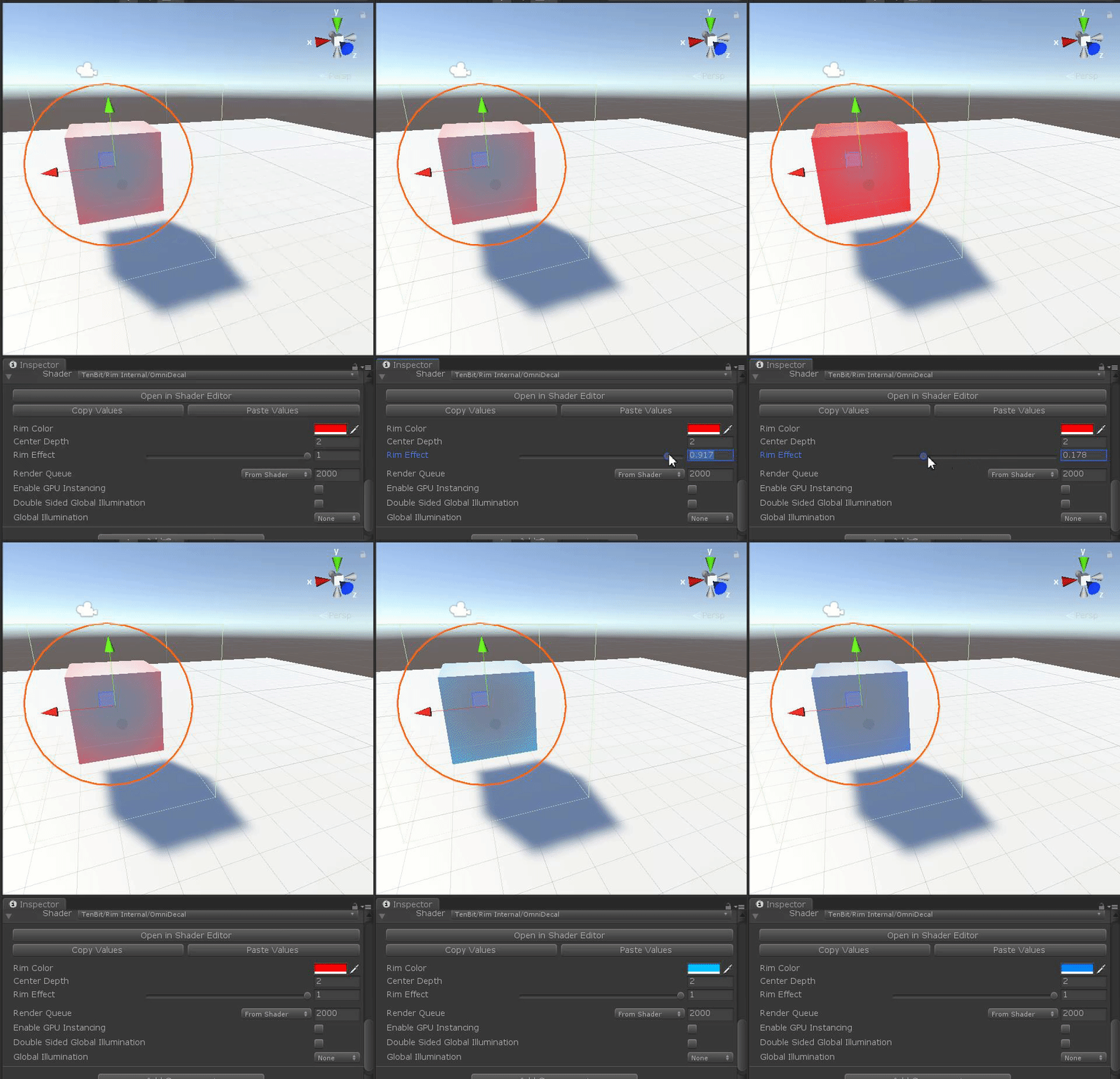

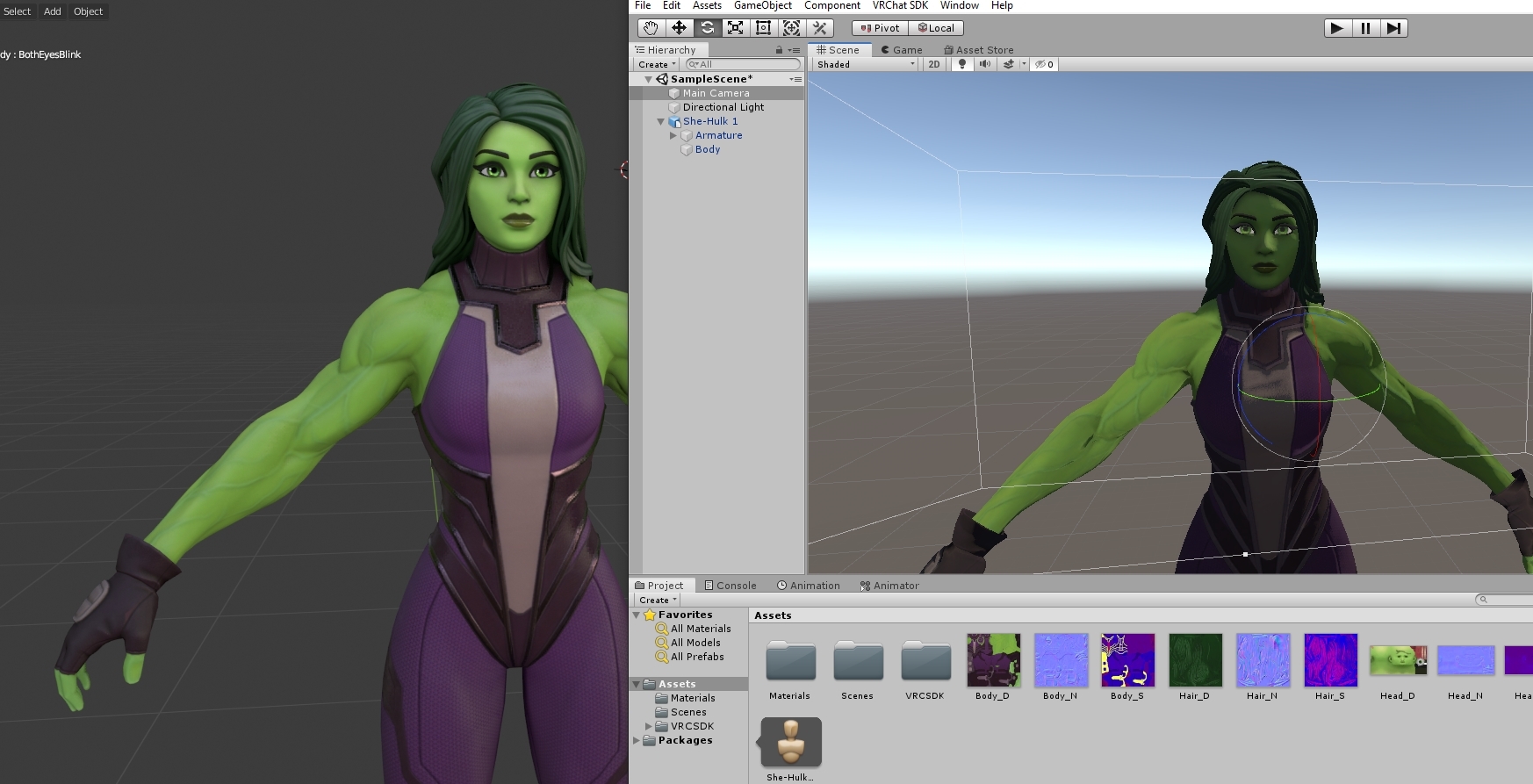


 lofty dragon
@cosmic fable Nah, it didn't affect the shape of the model at all
It made the movements of the model update less frequently
I have an avatar based on some early 80s CGI and I thought it'd be a nice touch to have the model look like it's at a lower framerate to match the original.
 fickle osprey
Anybody know of a good standard-ish shader to has backface culling off?
lofty dragon
@fickle osprey Look up "double sided" on the unity asset store
 dawn vapor
Yo, does anyone know how I can make it so one transparent shader is visible through another? I'm using poiyomi's shader, I have some facial details that need to be using a transparent shader but also this avatar is wearing a helmet with a transparent screen on the front. Currently I can't see them unless I zoom in far enough to the face
ripe idol
render queue is when things render
so if you make sure the behind one always renders first it'll always show through the front one
assuming the blush is never infront of the helmet then you can bump up the helmet render queue to one above the blush
dawn vapor
Ahhh ok I knew it'd be something simple, thank you 😄 where do I find that option though? I don't see it in rendering options, V5.6
ripe idol
bottom of almost any shader
@dawn vapor make sure you're using poiyomi 6.0 or greater though
it has updates for this
dawn vapor
Oh yeah there we go
Will do, haven't checked for updates in a while lol
Is it easy enough to update?
ripe idol
you delete the _poiyomi folder and import the new package
if you're on a super old version you'll probably have to fix some things
patch notes are here https://trello.com/b/TJPY6n08/poiyomi-shaders
downloads are https://poiyomi.com
dawn vapor
Awesome thanks, currently on 5.6 so not too old I guess? I'll try anyway 🙂
ripe idol
yeah that'll be fine
dawn vapor
👍
 unique drift
Is there shader who can set body fully at UI layer or can make invisible for handheld camera / extern camera but visible for your face view?
I tried with body on UI but VrChat export seems switch it back to Default or so.
I know handheld cam cant see UI layer.
steep swift
@unique drift
bool IsInMirror() {
    return unity_CameraProjection[2][0] != 0.f || unity_CameraProjection[2][1] != 0.f;
}
bool isVRHandCamera() {
#if UNITY_SINGLE_PASS_STEREO
    return false;
#endif
    return !IsInMirror() && abs(UNITY_MATRIX_V[0].y) > 0.0000005;
}
Trying to distinguish between these things:
- VR (UNITY_SINGLE_PASS_STEREO)
- VR Mirror (Oblique frustum, but not UNITY_SINGLE_PASS_STEREO)
- Desktop mode (head always upright.
- Handheld camera (like desktop mode, but not always upright)
The projection checks in IsInMirror check for an "oblique frustum" by looking for a z clip plane that is not parallel to the view, hence checking the X and Y elements of the Z row in the matrix.
And abs(UNITY_MATRIX_V[0].y) > 0.0000005; checks if the view matrix is not perfectly parallel to the ground.
Thanks to ScruffyRules and others for figuring out the logic for this
 near flax
reminder that the "head always upright in desktop" thing won't be true in some chairs
past pewter
so i was adding a camera to my avatar and a shader to an object. how do i make so everyone can see my display from my camera on my avatar
steep swift
see, how?
Note that Camera behave differently in each of three cases:
- For you: The Camera components are not modified, and left enabled, even if it has no Target Texture (renders to the Main Display).
- For friends: The Camera component is disabled. If the Camera has no Target Texture assigned, it is replaced with a 16x16 texture.
- For non-friends: RenderTexture objects assigned to the Camera may be replaced by 16x16 textures, then the Camera component is Destroyed.
note that the Camera component is disabled, not the Game Object it is on
For non-friends, you have no choice. If you wish people to see your Camera effects, you must ask them to friend you first. Additionally, because the Camera is destroyed on the original clone, they must rejoin the world after friending you.
For friends, you can activate the camera for your friends by using an Animator turn on Camera.enabled (even if it already shows enabled when you upload)
hope this explains what happens to Camera components in VRChat @past pewter . Note that CameraValidation was designed before the safety system, and works outside the system. That is, a camera may run for a friend who has turned off everything in safety settings, and the camera will never run for non-friends even if they have clicked Show Avatar.
past pewter
ok thx
 torn hare
Is it fine to ask about textures stuff in this channel? I'm going to use the textures with poiyomi shader
 haughty osprey
@torn hare i think it should be ok
 ruby vector
Does anyone know how to add pre made shaders
torn hare
Do you guys know what the middle 3 textures actually are? I don't think there are really alpha normal map or mask. More like texture maps for glowing/emission, but I don't think they are what I said.
Apparently this is from a mobile game that has weird methods of applying shaders to the ingame models.
cosmic fable
mystery texture #1 looks like a subsurface depth map, mystery texture #2 could be emission, and mystery texture #3 looks like a spec map
your normal map needs to be converted too, remove the green channel and it should work normally
could be packed texture maps, hard to tell
 trail pendant
Anyone know of any good tesselation shaders for furfuz?
torn hare
Unity converts the normal map to blue just fine