#shaders
2 messages · Page 17 of 1
 worldly fiber
 static ibex
I would recommend putting a reflection probe in your unity scene (in the lighting section) and make sure the cube goes over your avatar. Then you can put a cubemap in the reflection probe and it will show you how it’ll look with actual reflection probes!
And it’ll help figure out what needs to be changed to fix it and such
worldly fiber
I have never worked in unity before, how would I go about doing that?
I am familiar with most terminology, Ive modded games in the source engine for 12 years or so
just dont know anything about unity itself lol
worldly fiber
alright so I have that spawned in and the box is around the model
do I need to provide a cubemap texture for it? I have quite a few on hand
static ibex
Yep!You click on it and there'll be type. Currently its set to baked, but you switch it to custom, and it'll let you put in your own cubemap
if for whatever reason due to unity funkiness one of yours doesn't work, you can also hit asset store and search for all skys free. Buncha good skyboxes that r good for testin
(though if you put it in a world you usually have to delete the scripts inside or else the sdk can't compile them)
static ibex
Hmm. Try selecting your texture in your assets (window below) then on the right change it from 2D to Cube?
worldly fiber
gotcha. alright so it isnt rendering on the model though
oh lol thats because reflections are turned off on the model's materials
static ibex
Oh!
worldly fiber
okay so at some angle this dude is super reflective
but it really shouldnt be this way
static ibex
yeee I've been playing with specular as we've been talking and it seems like it just naturally makes everything the same level of shiny
worldly fiber
so here is the hand, being all reflective, and here is the diffuse texture
and the specmap
static ibex
so possibly we could try switching your materials to standard, and putting y our specular in the metallic slot?
static ibex
As long as the lighter parts are the shiny parts it should work!
worldly fiber
no that looks the same still
I am so confused
actually its even more shiny on standard
static ibex
Huh. Lowered the smoothness?
worldly fiber
that will help, but it will still be shiny on parts I dont want it to be
and it will lose any sheen in certain worlds
wait
does a specular map need an alpha channel?
static ibex
I don't believe it should
the white and black image i shoved on my model to test seemed to work out
could though? checkin now if the images im usin have alpha
nope they dont
worldly fiber
okay
I am at a loss here
so I know that the spec maps are indeed working
parts of the armor are more reflective than others
static ibex
here's my settings if it assists? (don't mind how garbage the shiny and lack thereof looks, i just shoved a rlly big noisemap on there
And you applied it to all your materials? like all all of them (it looks like you were looking through the materials on the body so that should be good but double checkin-)
worldly fiber
what do you mean applieed it to all my materials
static ibex
like all of your materials now have the specular in the metallic section
worldly fiber
the cloth parts are even reflective in the preview orb thing
gets worse in the non specular option
static ibex
Double check that, in the specular map, those cloth sections are entirely black. this should stop reflections to those areas. (and to lower reflectiveness on other parts you can darken the rest of the map too in an image editor) This doesn't affect specular highlights it looks like though. Gotta change those by either lowering smoothness or disabling them in the material the cloth exists on
worldly fiber
so here is the sheet for the hands
the cloth and armor share the same sheet
here is the specular
I went in and double checked
and yet the palms of the hands are super reflective
the armor is more reflective on parts where the specmap is white, so the spec map is indeed working
well "working"
lowing the smoothing only removes it if I out the smoothness to zero, removing all reflections from everything
which is less than ideal
everything looks to be set up exactly right. yet it is not working
static ibex
Lowering the smoothign all the way down shouldn't be removing the actual reflections? maybe make it darker but that's it. it mostly just shrinks or grows the specular highlight (cuz smaller specular highlight, shinier it looks. Bigger, less shiny it looks)
static ibex
Sweet!
worldly fiber
however when I join certain works, all specular highlighting and normal mapping is gone
but I have avatars that dont lose that
static ibex
Yeee that has to do with my second answer above. Some shaders have those backup probes, so if a world doesn't have them, then it puts in its own so you're still reflective. You can also make it so that's the only reflection probe ever used on that avatar
usually done w/ shaders like rero standard if you still like the standard look
worldly fiber
okay thanks
static ibex
Welcome!
worldly fiber
cuz I spent a while looking at this dude's hand like "aw thats lovely"
I mean its crusty and from a ps3 game
but its shiny
static ibex
Oooo pretty!
worldly fiber
and I wanted a similar effect on my model
if this was the source engine it'd be very simple for me, but I am new to this unity thing haha
Im just used to textures having script files with everything right there and editable
okay, wow, I feel REALLY stupid right now
static ibex
I also think their smoothness is lower so it takes in light nicer, not just from the probes
And you're valid! We're all learning! your previous knowledge should still assist you here. Just gotta translate!
worldly fiber
so Im fiddling with the specmaps, and I could have the nice sheen like I want when smoothness is zero, but the specmaps are mostly grey, not white
so it was working fine the whole time, just the specmaps werent setup for the effect I was trying to get
I do apologize, that is some user error on my part
worldly fiber
yeah but I wasted y'alls time, I feel a bit bad
static ibex
I learned some things too about how standard shader really works and the difference between smoothness and metalness
nah ur fine its not a waste
it's an interesting problem and i'm glad you figured it out!
worldly fiber
it helps that I havent worked with specmaps all that much haha
I mostly work on normals and phong maps
and let the vmf file handle how extreme the phong is. I only used envmaps in really specific scenarios
I made this pistol texture, and I'm going to convert it to unity later as a prop for an avatar
all the gloss is phong, which I really dont think unity uses
so its going to be bizarre trying to get that set up properly
static ibex
Oooo! nice!!
And it sounds like it's gonna be very trial and error to figure out how to visually convert it over. Hopefully it's not too bad to figure out though!
 formal scroll
im tryign to setup a shader that can show in the inside of a sphere
specifically a rainbow
does anyone know any shaders i can make this work with?
 uneven loom
Already answered in #avatars-2-general
 velvet sorrel
@worldly fiber The Alpha channel of the specular map controls Smoothness, so if your map is opaque, the material is full smoothness
If you have a part that's fully reflective but typically doesn't receive light, you can use occlusion map to control the strength of reflection and ambient light it receives
In general, things that are possible in older engines can be converted to work in PBR. But, here are some quick tips
- Standard's energy conservation means the more specular an object has, the less albedo/diffuse lighting it gets.
- Smoothness controls the glossiness of a surface, and it's used both for sampling from the reflection probe (environment map) and determining the sharpness of highlights from direct lighting
I've written up a guide on Standard here, as well
https://gitlab.com/s-ilent/SCSS/-/wikis/Other/Standard
worldly fiber
Thank you for the tips
 fringe sand
There is also a Source Engine based shader that can make use of some of the vmt values.
 hasty raven
good to know
ya know, after all this time, I still feel like I need more practice on modeling
 civic onyx
anyone know why there's a difference in shader colour between the main part of the face and the stripe across the middle? the stripe is a separate part of the mesh that comes forward when used in emotes, and all of the settings are identical between the main part of the face and this expression plate
using Xiexe Toon 2.0 Outlined for the face, and Xiexe Toon 2.0 Transparent for the expression plate
i can't use outlined for the plate as it make it look a lot worse
i can share all the shader settings if need be, but there's a lot lol
 brisk gull
Because of the transparency leaking onto the face below, I have to assume. Think of it like using layers in photoshop, if something has more than 0 opacity it affects underlying layers. Here is such a case.
Can you show the texture settings for the expression plate as you call it @civic onyx
civic onyx
it might take a few pictures, there's a lot of them lol
brisk gull
I mean... only one should suffice, but, you might as well show all if you want.
civic onyx
wait texture or shader settings?
brisk gull
Texture
brisk gull
okay... and shader?
brisk gull
Can you show the settings for the main face too?
Or try switching the main face to transparent too. That'd be helpful.
civic onyx
brisk gull
To see if its the shader or texture
brisk gull
On the expression material, make rimlight black
(or put intensity to 0), that should be the thing that causes the white rims that cause the lines.
civic onyx
where? in the texture file?
civic onyx
still like this
thats with 0 intensity too
i think it's just an issue with that shader, i switched it to a transparent one from a different set and it looks fine
brisk gull
It's probably that the edges of the texture isn't fully transparent. That's my guess.
civic onyx
i think you're right
i'll test it in game with this other shader though
thanks anyway :)
 steep swift
@civic onyx the shader has a link to the discord. you can also try asking there
civic onyx
good idea thanks :)
 alpine lake
hello there fellas, got a quick question and i t h i n k it belongs here but i may be wrong. im working on creating a crystal shader using shader forge, the goal is for it to have some depth to it and illumination. now ive been able to figure out the basics at this point, but i cant seem to find any tutorials on how i might go about setting up the depth part. i know this project is a bit ambitious for a first time shader, but either way i will learn along the way. if any one here knows about any good tutorials on the whole depth thing, just @ me. thank yall for your time and good luck.
 bright delta
Everything is fine up untill I get in game and this happens
If anyone has seen this before or knows how to fix it I would appreciate it
 hollow plover
Hi! im looking for this cosmic shader, does anyone know where to get it? or its name?
 muted osprey
The cosmic part of it is just the texture from what I can tell. You can accomplish this with a simple skybox shader
hollow plover
But that one is animated very cool
it looks like a lot of particles and i have seen it in a lot of avatars
muted osprey
Ok well a picture doesn't show animation
You could probably accomplish this easily with poiyomi shaders with a combo of stencil and flipbook effects
 tame remnant
I'm going to model some props made of glass (like drinking cups and stuff) and want to go for realism. Any recommendations on techniques and shaders to make it good but still friendly to performance? 
steep swift
@hollow plover It's called StarNest. Has to be modified a bit to work on avatars: you can download my edit here:
https://raw.githubusercontent.com/lyuma/LyumaShader/master/LyumaShader/StarNestAvatar.shader
hollow plover
Thank you very much! awesome!!
 faint plaza
i was wondering if there was a shader that makes the model look flat, ala mr. game and watch
i bring this up because uh

these guys are similarly flat
i've seen it before but i haven't been able to find it
hollow plover
i think you just need to upload the avatar scaled .0001 in Z axis and thats it
 last nexus
@steep swift
steep swift
@faint plaza My git repository at https://github.com/lyuma/LyumaShader has script that modifies* avatar shaders to make the model appear flat
- Does not work on all shaders: has trouble with shaders which import pasess via UsePass
- Will not adjust shadowcasters via UsePass and Fallback directives.
 faint plaza
oh wow!!!
steep swift
This shader will flatten the avatar, either billboarded to the eye, or along the facing direction.
It also includes a "Z correction" factor to prevent z fighting
faint plaza
OH YES
you are a total lifesaver
that'll make these little guys look SO much better!!!
when i make the world these avas go in im gonna definitely credit you
steep swift
With the release of Unity 2018, I theorize that you may be able to achieve a similar effect by using a proxy armature, a set of constraints to copy bone transforms, and a scale transform to scale the proxy armature to 0 without interfering with IK or dynbones... but there is now ay to fix Z fighting without a shader
hehe hope you enjoy
a couple more notes:
- see self in 3d = this can be a bit glitchy. it checks if you are looking out from the middle but depends on head position.
- the center point is determined by the Root Bone setting in the Skinned Mesh Renderer. if Hips is giving trouble, you can try other bones here
faint plaza
@steep swift sorry to ping, but do i add this code to the shader of my choice?
or do i simply use the simple 2d shader?
because the drop shadow works, but the simple2d doesn't
steep swift
oh it adds something to the little gear menu on the top right of the material to 'make 2d'
 past pewter
anyone have a selfie cam shader like what lolathon uses
steep swift
The camera itself is super simple:
Camera, set Target Eye = None, leave Target Texture blank (render to screen), Set clear to Solid Color and the color to black and 0 alpha (RGBA 0,0,0,0), set layers to none and then only add MirrorReflection layer)
and then it's just a matter of positioning it right
HOWEVER... if you do want to do something more complicated, you can create a render texture, and do the above but set the render texture in the Target Texture slot, and then use an avatar camera shader like this example one I made:
https://gist.github.com/lyuma/deb04425a7cbf290c77937344b9bb70e

If a camera is just for you, leave it enabled, but do not use an animation to toggle it
if you ever turn a camera on using an animation, your friends will see it as well, which can be useful at times but it depends
past pewter
oh ok thanks
Set clear to Solid Color
im confused
where do i set clear to solid color
oh
im dumb
steep swift
Clear Flags I meant
actually Don't clear might work better
since you want transparent
I think you want solid color if you use Target Texture... and don't clear if you go directly onto the main display (target texture is none)
once you have it set up, you can play with is setting it to Orthographic instead of Perspective, or changing the FOV / clipping distances.
oh, and if you want to get really fancy... go grab yourself a bokeh focus effect :-p
https://gitlab.com/s-ilent/bokehy
 past pewter
where is the layers part
i dont see it
lyuma could u make a unitypackage with prefab of a camera
already set up
because im dumb
why is upside down on the side
and everytime i click on it character shows up again but upside down
steep swift
@past pewter layers is the "Culling Mask" menu
it's confusingly named, but that's where you pick which layers you want to render. I'd turn everything off to start with...
Default, Environment: the world
UI, UIMenu: ui and stuff
PlayerLocal: only your own avatar, but head chopped off
MirrorReflection: only your own avatar, with head
Player: everyone except the local avatar
so for this sort of thing, usually you only choose MirrorReflection
 neon herald
so look for pixel polygon shader
uneven loom
@past pewter The first time you try to upload a world, the SDK will ask you to click a button to automatically setup all the VRChat layers
Do that and then you will have those options
 near walrus
My computer Using Intel HD 400 Graphics is that anygud?
 astral plover
Anybody know if Error.mdl's HUD shader works on Skinned Mesh renderers?
neon herald
@near walrus i don't think so? that can't run Intel HD 400 Graphics. you need get amd or nvidia Graphics card.
 true kernel
honestly good luck running alot of things
neon herald
can't run on vr chat with Intel HD 400 Graphics well burning
true kernel
im not sure what you could even play on that, i couldnt even find it on userbenchmarks.com
neon herald
my laptop can run vr chat
hollow plover
Hiii does anyone know if theres a shader like this for the highligts of the anime hair in unity?
past pewter
Help
 fluid meteor

 grim compass
So when...I am currently working on an avatar where i want to make a glowy effect around them but i have no idea what shader to use on my particals. This is what I ahve so far and it is basically going to be a jojo bizard adventure like avatar and i am trying ot make the stand "glow" as it were. How do i go about this?
muted osprey
You could accomplish this with default particles emitting from the mesh, or even just a glow effect on a poiyomi shader on the mesh if you don't necessarily want it to be particles
grim compass
how is this done? i hae to admit i am kind of dabbling into new territory here but im very earger to know how
Like under special effects of the Poiyomi shader ther is a "special effects" portion and i guess i want "emission/glow"? but that seems more the avatar is creating like not having like a glowing outline
 brisk junco
A glowing outline sounds easy to program but idk which shader would have it
Oh ok, if you choose advanced outline in poiyomi, there should be an "outline emission" option under outlines
Outline distance fade also looks like a cool option
grim compass
can you take a screen shot of wher said option is per chance?
sry jsut having trouble finding it
this is what i see...unless it tis not the type of optiont you are looking at?
grim compass
aaaah i se eit now ok...ty
grim compass
yup i see it now and seems about right too 😄 ty!
now also i assume by doing this it will prevent partical from blacking the view of the avatar maybe from Special particals?
or a Partical system rather
 warm vine
hey does anyone know of a cutout shader for quest, specifically for leaves?
 halcyon dove
Cutout / Transparency isn't supported for quest, materials that would have this need to remade to not require them.
warm vine
thats what i thought, but i also thought..maybe. thanks
 dry basin
How do i know if the shader code is not made for vr?
 granite coral
There generally isn't a hard "for VR" or "not for VR" thing, but more expensive shaders are generally not good for VR rendering because of the rendering limitations
unless VRchat has some specific limitations that weren't there last year when I was making avatars
dry basin
So my question is basically a Shader and animation question but I have a Shader called the screen overlay and whenever I play my animation in one eye I see something and then the other eye I see something else it's not together so I wasn't sure if this was a Shader issue
granite coral
Ah, gotcha. Screen overlays are a whole different animal.
uneven loom
Try it out in VR and see if one screen renders a different image than the other
granite coral
Can I see the shader code? I don't know much about current VRchat implementations but I might be able to hlep anywho since I am very familiar with shadrs in VR
uneven loom
Screen overlay shaders and especially water shaders seem to not be VR compatible
granite coral
You can make them compatible depending on what they're doing, even if it is a bit wacky to do it
some of the default matrices that are grabbed are incorrect if the shader is asuming non-stereo rendering
dry basin
So maybe instead of screen overlay try docme? Or another one
I think that one is good i dont think i have had a problem with docme shader
If I was good coding I would be able to try and fix it but I haven't coded anything in a long time
granite coral
If you link the script/shader I can take a crack at it
dry basin
I actually just turned off my computer and im done for today I will pm you, tomorrow when I get on I will send it to you, ok?
granite coral
Sure, that works for me
uneven loom
What's that file?
 timid crag
a picture of an avatar
uneven loom
Has no file extension, it's not really a picture tho?
timid crag
that's weird
muted osprey
I wouldn't click on that file link if i was any of you
send the picture as a screenshot @timid crag
grim compass
@timid crag Its and outline shader from Poiyomi Shader Pack
speaking of im taying to make this particle not overlap the avatars and also they appear on the avatar menu the partical system but not in a morror?
and the text also appears fine in the menu but is jsut white in the mirror?
timid crag
@timid crag Its and outline shader from Poiyomi Shader Pack
@grim compass thank you very much :3
 livid anvil
Im working on blender and im using the cycles shader but its so grainy. It processes up to a certain point where it just keeps the grainyness
livid anvil
Found it out. Used the Intel denoise function with the render.
 vapid inlet
does anybody know of a black and white overlay shader besides cancer space because I can't seem to get it to work in unity or vrchat
And by overlay I mean if you put it in front of an object and only turns the objects behind it black and white
If anyone has a link to a version of Cancer space that actually worked I would appreciate it
 proven flare
Is there any shader good for skin?
proven flare
I'm using a shader called Alloy for the skin for my avatar and in certain cases for me the skin turns bright white and some cases it doesn't,
steep swift

GitLab
A simple subsurface scattering shader for Unity/VRchat that implements an approximation of a subsurface scattering effect.
proven flare
Thanks @steep swift It looks just like the previous shader I was using but better!
 unreal mauve
People don't know how to properly light their worlds, or the world has baked lighting. @proven flare
grim compass
So i am trying to have this gif float around my avatar (making a jojo stand likt avatar obviously) and im trying to have only the letters show
vapid inlet
does anyone know what setting i should change to make cancerspace not render through objects and only affect objects behind it
past pewter
@grim compass https://www.youtube.com/watch?v=Nic9GltMHo4 more updated

https://ezgif.com/gif-to-sprite/
Made by flipbook
DL: https://github.com/thnewlands/unity-surfaceshader-flipbook
GDrive Backup: https://drive.google.com/drive/folders/1cjqrGhJssOqWZSTGflMuCPInGGvwBCu4?usp=sharing
Just drag and drop the shader to ur unity
grim compass
see i sue the method in that seoncd video adn it didnt work for seom reason
grim compass
ok i figure it out now actually but now i have this white background to the gif
when i open the gift in photoshop the frame are in png so it shoudl be there
 idle pond
@grim compass Using Poiyomi for the gif, but its in transparent. Use cutout as it will delete the background
grim compass
got ya...ya that worked
 jade oriole
Poi shader for gif/movies are massive in size compared to a spritesheet, unless theres a way to compress them, 1 of mine if 41mb vs 2mb spritesheet
 fleet nebula
any reason why this is happening to me? https://i.imgur.com/XOZRoUo.png?1
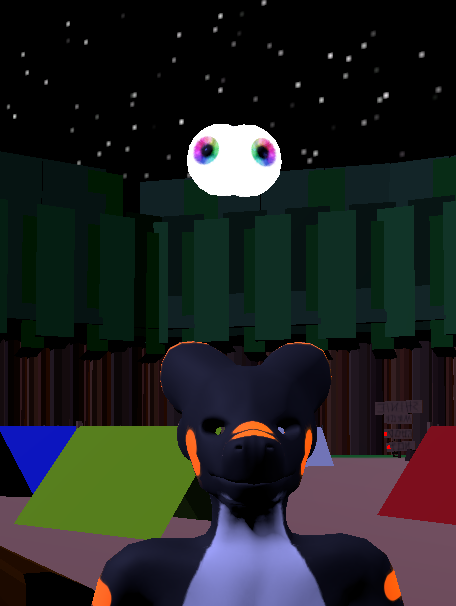
thats vilars eye shader
 scenic anvil
well that doesn't look healthy
past pewter
@grim compass try to use poiyomi flipbook on it and set it up to how you have the gif to be such as frames
steep swift
That shader has a bug in its add pass that mixes up varyings between vertex and fragment
I'm guessing ... got a link to the exact version you downloaded?
scenic anvil
Anyone know how to change the render queue of a shader so objects in the world don't cut through it?
doesn't look like I can set it high enough inside Unity
steep swift
Which shader?
Render queues should work fine up to 4000.... and if you need to go higher, you have another problem
Because it sounds to me like the problem is related to z buffer
scenic anvil
It's called "Galaxy Shader"
floor clips into it
I'm trying to apply it to a sphere/cube/whatever, activated with a gesture, just want it to override objects in the world (besides other users). Not sure how.
steep swift
The floor is easy: just move the box so the bottom of the box is slightly above the floor, like 0.001 meters
But the bigger question of how do you cover up world geometry only, without covering up players is tricky
scenic anvil
a friend told me "all" i had to do was set the shader itself (via a script or something) to have a render queue of like 100,000, which would override everything. Probably including players. So, rock and a hard place.
I could move the box a bit up off the floor, I have tried that, trouble is that it's connected to my avatar in a way that moves the box with my head. Not sure how to fix that either. Probably easier to figure out though.
so if I look down it clips back into the floor 😓
Freezing Y rotation shouuld fix that, I think NOPE actually yes
steep swift
To lock the rotation, add a rotation constraint, put itself as a target, set weight to -0.5 and check lock and then check is active.
It's a weird thing of rotation constraints that for some reason any amount of negative weight locks rotation in world space
 undone bay
Wait, any amount locks it?
Well that's gonna be a problem, how we gonna make things spin the opposite direction of the parent
steep swift
I found an approach for that that works around one axis
Also -- if it's a shader you can flip it in shader
Basically parent constraint copy position and freeze only x; and a position constraint freeze only z with negative weight, have an object 1 unit away in z and a lookat constraint to look at that object
But it only spins opposite on y axis
 lucid spindle
would anyone happen to know how to sample the directional lightmap in amplify? i know how to get the regular lightmap but it seems you cant grab the directonal one the same way
 south thunder
Hii! Just wondering if anyone knew where to find those shaders that turn whatever you place it on into a galaxy? (for avatars, not worlds!)
steep swift
@south thunder It's called StarNest. Has to be modified a bit to work on avatars: you can download my edit here:
https://raw.githubusercontent.com/lyuma/LyumaShader/master/LyumaShader/StarNestAvatar.shader
south thunder
OH thankyou so much omg!
how do i.. go about replacing the code exactly? ^^' sorry, very new to this!
steep swift
if you download my version, it should just work
the original version came from the unity asset store -- meant for a skybox
south thunder
from what i can see theres nothing to download there, just code ovo'
steep swift
save as, put into the unity project
south thunder
ill give it a try-!
steep swift
make sure it saves as .shader not .txt
south thunder
ohhHHH perfect omg! thankyou so much!
 proper ferry
Am I able to ask someone to make me a shader? Either that, or can someone point me in the direction of the following?
I need an outline, similar to Syn's Unity Shaders Toon Outline, but thicker. I also want to make everything except for the outline translucent.
I know I'm not very good with describing things sometimes, so my idea for the avatar is a slime-person-esque avatar, so maybe that will carry along better than my description
 upper frost
usually there's an outline width property
and everything except outline transparent, could change blendmodes
steep swift
if you want to exclude the main mesh, you make sure the main mesh is first, and then add the outline as a second pass (outlines should be drawn second anyway, so as to reduce overdraw)
and then you can make the main mesh just do a stencil prepass:
Pass {
     Stencil { Ref 123 Pass Replace Comp Always }
     ZWrite Off
     ColorMask 0
     ZTest LEqual
}
Pass {
     Stencil { Ref 123 Pass Keep Comp NotEqual }
     CGPROGRAM
... outline code here ...
     ENDCG
}
Actually - you can do a depth prepass instead of a stencil prepass
Here's how you do a depth prepass
Pass {
     ZWrite On
     ColorMask 0
     ZTest LEqual
}
Pass {
     CGPROGRAM
... outline code here ...
     ENDCG
}
And then there's the concept of using the mesh rim/"fresnel" as a sort of outline
 digital halo

how do I go about fixing this?
It's not allowing my post processing stack to run. :(
 twilit herald
Does anyone know how to make shaders respond with music?
steep swift
For avatar player voice: you can use the blendshapes as input...
For avatar or world animations, you usually use a keyframing tool to do that for you
There are some paid tools to help you do this, for example search for surfknasen
twilit herald
I'm new to this animation thing
And I'm kinda just wanting shaders to work on a avatar so when triggered it will cover the screen with eh shader and will work with the beat or something
But I'm new and I have no clue been searching but can't find anything or I'm just not looking in the right places but I'm out of ideas atm
I'm just asking for help at this point anyone
steep swift
I gave you a specific tool suggestion, but it's paid
twilit herald
Sorry for the ping didn't mean too
steep swift
and it's not the whole story
if you want screenspace effects, there are a few free options out there for example redmage
but there's a lot of nuance in how you use them, and doing manual work lining it up with the music as opposed to just being automated and boring
you might also have more help asking in #animation because in many respects it's an animation question more than a shader question
twilit herald
Oh okay
steep swift
the shader related thing here is just going to Some Mesh and animating Material._SomeProperty in the animation track\
you can animate any shader properties
twilit herald
Okay thank you tho but I'll have a look at some of the things you said
 shut robin
I need a simple textured z-write shader
steep swift
delete the PostProcessing folder in Assets inside HologramShader-master
if you need postprocessing in 2018, you need to install from package manager
digital halo
@steep swift Which version do I use? 2.3.0?
steep swift
sure..if that's what is in the list
 vocal loom
Which poiyomi shader makes textures double sided?
 light urchin
@vocal loom all of them have double sided just change the cull setting under rendering options
vocal loom
Ok ty
 restive badge
Does the Particles Additive shader not work in VRChat? My particles aren't appearing in game.
Ah, wait, maybe its because the particle is on my hand and I have to add a constraint to it to make it appear where I think it should be appearing...
 gentle marsh
Is there a way I can set an emissive shader on the eyes of an avatar without washing out the iris? When it's set to white with an intensity of 0, the puils and iris are completely white
 runic cave
use a mask on the texture
gentle marsh
Would that make the retinas glow but not the lens area?
runic cave
if you use poiyomi it should have a mask option and then make a texture that has black where the pupil is and white where you want the emissive parts to be and then put that under the mask option
in the emission section
gentle marsh
ah, so basically it'll wash out anything that's unmasked
light urchin
Use the main eye texture as the map
gentle marsh
should I bet using poiyomi? I've been using the standard shader
runic cave
anything that's white on the mask will have the emission and anything that's black will not
I personally like poiyomi, but that's your call on what you like more :)
light urchin
I wouldn't really do it like that just using the emission map would be better bet than a mask
gentle marsh
There are also a bunch of options for poiyomi. Which one do you prefer?
I can try that too, @light urchin , thanks
light urchin
Opaque if you are doing non transparent or cutout stuff
runic cave
yeah
gentle marsh
there's like a billion options. I suppose I sh ould find a video or existing example
runic cave
are you trying to find a download for it?
gentle marsh
naw, I have it already
runic cave
then just use opaque, usually
light urchin
Poiyomi > Toon > Advanced > Opaque
gentle marsh
Ya, I just mean there a million options for the shader
light urchin
Did you find it from the location in my last message?
past pewter
LGBTQK
 modest smelt
Question: I'd like to be able to use MatCap shaders to present some psudo-reflections, but, being that this is VR, tilting your head from side to side results in some odd results
Tilting your head from side to side IRL wouldn't make a reflection tilt like that. Are there any VR-friendly MatCap shaders out there?
steep swift
Which shader are you using? I would use a vrchat supported shader such as synergiance , xstoon, silent etc.... those all support matcap and are designed for vr
modest smelt
Currently I'm using "MatCap Shaders Pack by Jean Moreno."
steep swift
Doesn't sound like something I've heard anyone else use in vrchat so maybe try a more widely supported shader
modest smelt
I'll see!
steep swift
I listed some. Also check tupper's pinned message
modest smelt
Thanks!
 solemn atlas
Just a general question, i have been using the https://vrcat.club/threads/errors-hud-shader.2210/ shader for long while now. But i have also seen people put fps counters and room time on there avatars hand/body. Is this shader also publicly available?
halcyon dove
Poiyomi Toon Shader can do FPS counters and the amount of time you've been in a room on the characters body / mesh.
solemn atlas
Thanks, checked there github looks like thats what i was searching for !
 compact hinge
Is there way to make translusency and refraction in unity?
I want to make eye and in unity it looks like this
but it should look like this
 hushed hull
could someone recommend me what shader or shaders to use for my avatars?
steep swift
Check tupper's pin. Lotsa good shaders around. If you have some more specific requests or try one and want a different look, ask here
Maybe worth mentioning Poiyomi, Synergiance, ACLS
hushed hull
Thanks
 cloud linden
Hey friends. So my world is almost done, except for my water shader just refusing to actually work. Is this a viewport issue? When loading into it, its just like an invisible plane. There's no script attached, just a pure shader.
I have tried playing with the render queue a bit, but I dunno
steep swift
@cloud linden which water shader do you have?
Does your world follow the required steps to enable the "depth texture" / does your world have a realtime directional light with shadows enabled?
cloud linden
Hello @steep swift , I've been just going between any non script water shader, really. I'd prefer Silents, but I also tried nvjob and RED. The last things you listed, I have no clue about. So I probably should learn what that is! ( The depth texture stuff. ) I've also been using just baked lighting, but I believe the default lightmapping is directional?
 near flax
@cloud linden https://github.com/netri/Neitri-Unity-Shaders#types

GitHub
Collection of shaders for Unity3D and VRChat. Contribute to netri/Neitri-Unity-Shaders development by creating an account on GitHub.
^ instructions for enabling depth texture
cloud linden
You're the best, just started trying to look this up.
 lethal rock
As far as I can tell that's just a regular toon shader with outlines
 brisk bronze
look really closely, it's a manga/comic book shader.
true kernel
dang that looks awesome, interested to see if someone can find it
lethal rock
oh wait you're right, I wasn't zoomed in, I'm not sure what shader that is but it looks like something KittenJi had
undone bay
Huh, wonder if you can achieve this with poi
brisk bronze
I've done a bit more digging and found out that it's some sort of halftone shader, still can't find which halftone shader it is, but you may be right that this can be done with poi's shader.
update: just asked poi, they said it's not possible.
 royal drift
does anyone have an idea for a cool shader for the edge of a sword?
i was gonna go with a disolve one but i cant get it to work
steep swift
@brisk bronze it's a custom shader by Kittenji. I only know of a few models using it and that is one of them
It is a really beautiful style
@past dirge what have you tried so far? What is the working?
You're supposed to have a camera on your avatar and a render texture put into the target texture slot. Have you done all that?
steep swift
Just make a new camera
 past dirge
Done
steep swift
Gameobject menu-> camera
Make a render texture asset
Put the texture into target texture on the camera
And also into the texture slot on the material
And put the material onto a quad
past dirge
Uuuh, do you think you can show with pics?
steep swift
Everything i said you can make with right click new stuff
Which step are ya stuck on
past dirge
umm what is gameobject menu?
I don't have that
I meant I do have gameaobject
but not a menu
or youi mean this?
im now on "put the texture into target texture on the camera"
past dirge
@steep swift ?
steep swift
Go to project assets window
Right click create new Render Texturr
Drag that texture into the camera you already created. Also put the same render texture into the material
brisk bronze
@steep swift do you know if it's available anywhere..? I tried looking on a few sites that sell shaders but couldn't find it.
steep swift
No, it is not available anywhere
I'm kind of guessing here... The effect is an outline with some noise applied to the vertex positions, and the outline pattern could possibly be sampled similarly to a panosphere (like in NoeNoe's shader)
Would require some creativity of course but it could be replicated.
Or you'd have to ask the author
past pewter
does anyone have a fur shader they could give me?
 pallid hinge
Anyone know of any underwater shaders?
steep swift
A lot of people use a Post Processing Volume not set to global for the underwater effect : blur (depth of field) and color grading - it will activate when you hit the volume
I think silent's shader supports the water surface, and then there is also the question of caustics if you are looking for that
If you want a complete package, RED_SIM sells a water shader with underwater effects including caustics on their patreon. They also have a free shader but no underwater
pallid hinge
Post Processing Volume.. That's actually a good idea
lethal rock
Ooo I really ought to get my fur shader out there, still needs some work though
steep swift
*dies in face full of floof
lethal rock
No don’t die!
 analog swift
is there a way to reset every single shader setting modified on an avatar
easily
(when you change shader and change back the settings stay )
brisk gull
Top right. Cogwheel, reset.
past pewter
So im Trying to make a Shader to read textures in a way to be able to use Call of Dutys Texture set, without having to rip the textures apart by hand, but im having an issue the normals seemed to be weird on one side of the model only any help here?
Like certain Channels like the green from the "normal map" need to be inverted due to Dx12 Rendering or something like tha, but i have 0 clue why the normals are so "crunchy" nad darked only on one side
past pewter
Figured out it ignore my stupidty
neon herald
so i not how make blurry on camera
 shadow river

how do you fix errors like this?
this shader works in another project
the project also is on the same unitybuild
steep swift
While it does sound like a problem with your unity installation, it could maybe be caused by completely corrupt project settings, or using the wrong render pipeline perhaps.
VRChat uses Legacy render pipeline, not scriptable render pipelines such as HDRP, LWRP, URP etc
to fix this at any rate, you probably need to create a new project. you can export assets and import them into the new project
 manic turtle
Hey Im currently creating a model in blender. Can someone tell me if i shade in unity or blender?
 sturdy reef
the shader that i used isn't even that complicated i just don't think that i'll be able to replicate it because i've never even opened unity...😅
i don't even know what version i should use to export models to vrc
 remote bloom
what shader is used for windows or glass?
steep swift
@remote bloom Suggest trying this shader by Silent: https://gitlab.com/s-ilent/fake-glass
GitLab
A shader for Unity that (ab)uses some Unity features to produce glass-like glass.
remote bloom
ohh nice thank you lyuma! i knew there was one, but i checked everywhere else and couldn't find it
 red lodge
what is cubed shader?
lethal rock
CubedParadox/Flat Lit Toon is a deprecated shader that you shouldn’t really be using anymore. Viable options today are, XSToon, Silent’s Cel Shading Shader, Synergiance/Toon, and a few others.
brisk gull
Or it could be a cubed shader. Like... Shader^3
 steep glade
Can I make my avatar immune to map lighting ? I tried disabling Light Probes & Reflection Probes in the Skinned Mesh Renderer but it is not enough...
brisk gull
Unlit shader
steep swift
"""""immune"""""
@steep glade note that unlit shader will make you 1.0 level brightness, which is too much in some maps, but also not enough in others. HDR defines an arbitrary scale of brightness, and depending on exposure levels of the world, it may be expected that you exceed 1.0 brightness in order to not be washed out. So there is no true "immune". Unlit will put you at 1.0 which is a good guess I suppose... but expect to be blooming in some HDR worlds and washed out in others
 grim wren
Does anyone know what the cause of shaders turning on and off on their own for some people but not most? Ive had two people tell me this and one of them showed me and I cant figure out the cause. 
steep swift
Safety system can cause avatars to use default shaders... I've seen cases where it gets confused if you recently changed safety settings - having them click you and click show avatar is a good bet
grim wren
I'll have them give that a shot next time glad to hear its potentially on their end and not mine
past pewter
Does anybody know a shader which would be good for making a blade of a sword look clean and shiny?
near flax
matcap shaders are usually pretty nice for shiny metals
past pewter
Alrighty thanks imma try that
 stable summit
can any one help me with my shaders on my carecter
lethal rock
can any one help me with my shaders on my carecter
@stable summit just state the issue, if anyone has any insight they’ll reply
 charred needle
does anyone have a link for download of glitter shader or similar?
 silver peak
Guys do you know some Shader like poiyomi. With light settings or other stuffs you know? My SDK doesn't working with Poiyomi shader, so I searching for other similar shader...
light urchin
You could also fix the problems you have in your project with poiyomi if you post the errors here
silver peak
I mean... Poiyomi doesn't have problem I think... it's the SDK... When I wanted publish avatar with shader Poiyomi it stop loading and I hear the widows sound. It took me so long figure out, what the problem and it was all-time the shader.
light urchin
Do you have errors in your console?
silver peak
Nah it didn't show me I think... I saw last time something about SDK
also it was s&cks when I reastart the project the VRChat plugin is not working anymore..
light urchin
When something is not working you should look at the console to see what's happening
Most things are easy fixes
charred needle
does anyone know how to make this shader (fake glass) look less dark and green?
past pewter
Poo
steep swift
@charred needle that shader depends on having baked lighting and a valid reflection probe. Does it still happen after you click Generate Lighting in the Lighting window?
charred needle
hm, im gonna try that
thank you ^^
@charred needle that shader depends on having baked lighting and a valid reflection probe. Does it still happen after you click Generate Lighting in the Lighting window?
@steep swift yes
pallid hinge
Anyone know how to make a terrain shader support 8 splatmaps without doing a addpass shader?
 coral moth
question how are ppl using unity Shader Graph if its unsupported in unity 2018, are they using an newer version of unity and then creating shaders there and imported them into their avatar/world project?
pallid hinge
Shader Graph only supports the new rendering pipelines afaik
If I remember right, VRChat only uses built-in. Ergo, Shader Graph isn't compatible with VRChat
Shader Graphs website says that too. Doesn't support built-in rendering pipeline
coral moth
ah, so stuck with straight coding it then?
pallid hinge
NOt necessarily
Amplify Shader Editor supports built-in shaders
I think ShaderForge does too, but not sure how up to date it is
I personally used Amplify Shader Editor to make a shader just now
coral moth
really? ill look into those ty
pallid hinge
Amplify seems the best if you're wondering
coral moth
alright then
coral moth
i might have to stick with shaderForge as its free and i dont have 60$
past pewter
just change textures
 solid grail
@gleaming stag https://youtu.be/hrCILKVbjcI

Here I'll teach you how to fix up the ugly shadows on your face using a technique called mesh fairing to edit the normals of the mesh.
Mesh fairing: https://github.com/fedackb/mesh-fairing
Feel free to contact me on discord if you need any help: rero#9097
Add me in-game: Retro...
past pewter
Anyone know how I fix this?
 gleaming stag
@solid grail thank you!
solid grail
👍
hollow plover
hi! does anyone know where i can get a slime shader ??
muted osprey
Poiyomi slime shader is solid
 idle stream
Does anyone have a shader that creates a Tron-like trail behind it? I need a trail behind a futuristic dagger but cant find anything anywhere 😖
undone bay
use a trail renderer
idle stream
Is there a good tutorial on something like that? Ive never heard of it
is it the same as a trail component?
@undone bay
undone bay
Yeah, the trail component
idle stream
Do you know of a place I can learn how to make it? I have no idea about those kinds of effects in unity since I work in blender
undone bay
Hm, mot really, guess just look up on Google how it works
But could also play around with the component and see how it works and it's settings
true kernel
are the normals flipped? it doesnt look right to me
 carmine fiber
Anyone knows how to optimize "compiling shader variants" ? My world takes 3hr to build
 twilit isle
@true kernel No, they're not flipped. It rendered fine in Blender but seems to have issues rendering properly in Unity.
true kernel
thats definitely weird
twilit isle
Yeah. It does consist of multiple materials which used to be separate meshes so I wonder if the render order got screwed up by combining them.
steep swift
@carmine fiber take note of which shaders and how many variants. It could be 1MB extra upload for every couple hundred variants so good to keep them down.
Some tricks are things like using Standard for as many things as possible; baking lighting; fill out the same texture slots / use similar settings on standard across all objects
If it's stuck on one near the end, it might actually be something else. I think the compiling variants message stays up for other parts of the build
Make sure you have Auto Generate Lighting turned off. Bake lighting manually, not during the upload
 sturdy knot
steep swift
sturdy knot
steep swift
Don't download stuff from shady places, and instead find shader source code from sites like github or write it yourself.
What was this shader supposed to do and where did you find it?
past pewter
i dont suppose there is a particles shader that can simulate bloom? i kinda need one for my particle effects
 bright dew
@steep swift it's kinda like a water shader. but not really its a tear shader for crying etc.
muted osprey
Hey guys, for whatever reason transparency never plays well for me. Right now, I've got this object with a very basic solid color texture, where one of the colors has some alpha to it. The closest I have to rendering transparency the right way is this, but it looks like the transparent bit just renders completely over anything else in the material. What should I tweak to work this out? Using poiyomi shaders
the legs are a different material than the shoes in this picture, you can see the top of the shoes being cut off but the legs rendering through the wings
lethal rock
@steep swift it's kinda like a water shader. but not really its a tear shader for crying etc.
@bright dew did you get it off booth or somewhere else? I think I know the one you’re talking about
muted osprey
Turns out I needed a different material because the wings can't blend with something that hasn't rendered yet
steep swift
Karekitsune, who probably made that shader, only has paid assets on Booth... so I'm not sure I follow. Where did you actually get that
It would be very unusual for an official asset to have a syntax error, so that's why I'm confused.
muted osprey
How can I make a reflective shader? Something along the lines of this, maybe not as clear or high detail in mirroring the environment, but you guys get the picture I think
muted osprey
Found it out, reflection probe with a standard metallic/smooth shader works nicely. We'll see how well it works in game
lethal rock
Many worlds don’t have reflection probes unfortunately so in those worlds it will be pitch black
muted osprey
Poiyomi toon shaders have scrolling emission
 stuck cairn
@muted osprey yeah scrolling emission
But I need surface scrolling emission
This is not the same
brisk gull
Pretty sure it scrolls on the surface. From bottom of the mesh and up.
 faint star
does anyone have this shader GAPH Custom ShaderIntegrated ParticleIntegrated Particle (ValueControl) and EffectsFPS_PackAlphaBlended
bright dew
@steep swift do you know where I can buy it from? somehow I'm unable to find the shader.
past pewter
Anyone have any ideas or suggestions for a thick outline shader? Just wanna give my avatar some drawn kinda look.
true kernel
i believe poiyomi has outline stuff
past pewter
Thanks!
past pewter
is there any free carpet or a fluffy rug shader?
pallid hinge
Me:
Reads that grabpass is bad
Also me:
Makes a shader that uses grabpass
near flax
just make sure you name your grabpass
steep swift
Yes, unnamed GrabPass is bad.
GrabPass { "_GrabTexture" }
👌
pallid hinge
xDD
 errant plover
my character takes a long time to upload, i turned the future proof off. but it still takes a very long time although its not different from any other (koikatsu) models i previously did
is poiyomi shaders that heavy
?
 long shale
How long? like 40 seconds or like minutes?
errant plover
10 minutes or so
also seems like whenever i speak, the lighting is f'ed
supposed to be shiny matcap, but when talking it kind of bugs out
long shale
Did you make sure to turn the "Legacy Blend Shape Normals" option to ON in the Model options?
I've never had an upload take anywhere near that long. Poiyomi's does increase the time, but not that much.
 hexed ravine
Is there any way to enable alpha transparency with Oculus Quest?
Because I'm trying like hell to make this avatar Quest compatible, and I'm getting this issue.
halcyon dove
transparency / cutout isn't supported on Oculus Quest
hexed ravine
Wow, that's like... a total bummer.
halcyon dove
It's too performance heavy for mobile hardware.
You would have to remake meshes / textures to not require transparency if making it for quest.
hexed ravine
Maaaan.
I have to add geometry to get the desired shapes while still not destroying the shape keys.
While staying under 10000 polygons.
hexed ravine
Alright, so I've done it! Took some powering through, but I did it.
analog swift
a shader im using have its own plugin that dosent work in new unity/sdk since it used to modify the shader and scripts. however if i install without its own plugin it works but i get 900 errors and a few red warning but shader still works. most errors says something about the sdk. if it ok if i keep using it or will it fuck up in vrc
basically instead of modifying sdk plugin it imports 2 seperate ones now
steep swift
@errant plover classic symptoms of not using Legacy Blend Shape In the fbx model import settings. Please enable Legacy Blend Shapes
 long bison
has someone a radial blur shader ? Dm me !
errant plover
@steep swift @long shale thanks for info :)
Will check out once home
Also in poiyomi, what's the standard choice for minor details and clothes? Do you always go for advanced or is there an advantage in optimization if you choose simple cutout for example?
long bison
@errant plover no that i know of
muted osprey
Probably a minor advantage, less stuff to render. I haven't seen the advantage myself so I always choose advanced for the options
brisk gull
Simple is smaller in code-size and is slightly faster if I remember right.
errant plover
My avatar tends to load for me quickly in game but not for others
And it's supposedly medium in optimization
I will do what people told me to check
 low hawk
Does anyone know what is the name of the shader on avatar testing that lets them see their polys?
 stiff berry
It uses a projector so you can't use it in the same fashion that you do in that world, for example shining in on your friends avatar won't work, but you could use it on your own avatar
i'm not sure what the name is but you can probably google around for a "wireframe shader" and find something
also it looks to be showing quads which i don't know exactly how you'd do that personally
low hawk
Yep, looks like it's called a Wireframe Overlay shader or something. Thank you!
solid grail
neitri has one that works pretty well
since it's normals from depth though it has some artifacts just like any depth normals effect.
long shale
I think Poiyomi just released that one, but I know there are other sources that do similar.
errant plover
oh, so the legacy blend shapes normals worked like a charm
why did i never heard of that option anywhere?
solid grail
@stiff berry 👀
 lofty dragon
@hexed ravine You could technically use a particle shader for those parts as a hacky solution, but then you don't get any lighting on those parts and you need an extra material slot which isn't great
past pewter
Whats the best shader pack to do a glowing and animated aura around an avatar like an anime character in Dragon Ball or JoJo?
muted osprey
Probably should do that with a local particle system emitting from the mesh
If you want a consistent outline gradient, you could probably accomplish that with poiyomi shaders? Not too sure
past pewter
Yea I already have polyomi so I think I'll try the mesh thing
past pewter
Ok So I am having trouble with attaching particles that I want to my mesh and having them stay they. Tey all fly out randoimly
muted osprey
mesh shape, local scope, 0 start speed?
past pewter
I actually fixed it, thanks tho!
past pewter
SO quick question, do I have to make my particle system the child of my left or right wrist for it to work in vr? Because right now the mesh is staying as if I was playing PC while im in vr?
velvet sorrel
I think the cheapest way to have an aura would be to have a second material on your mesh with a shader that pushes the vertices out and gets the dot product from the view and normals to change the opacity
 jagged plume
i havent uploaded an avatar since 2018 so sorry if i'm dumb but my material shader is greyed out? 'n '
not sure what else you need to see, i used cats in blender to make an atlas texture
solid grail
You need to either extract the material in the import settings of the FBX or put a different material into the materials tab in the import settings.
jagged plume
ok, let me try that thank u~
she doesn't have a texture when i import her, is that why? :(
muted osprey
@past pewter the reason that happens is because armature position is calculated after emission. So it'll always emit from the base position. There are a couple ways to go about it, but I recommend removing the particle system from your armature and parent constraining it to where you want it to go
 balmy anvil
so I have some hair that consist of rectangular strands, and then I make pointy hair ends with the texture alpha.. it looks ok from up close, but the problem is that these ends get buggy the further away I get from the mesh... here's a pic of what I mean
so why is this happening?
 rich lake
Maybe try turning off mipmapping? May by blurring the alpha
balmy anvil
@rich lake oh yeah that did it, thanks a lot man!
rich lake
Mipmapping is great until it isnt lol
balmy anvil
is it in general recommended to enable it for avatar tex?
brisk gull
Mipmapping makes it so if you're far away from the object in question it looks worse (lower detail) and have higher performance. Because, at that distance you're not gonna see that one tiny screw that is textured.
 wary junco
How do I enable thumbnails like this on nodes? https://docs.blender.org/manual/en/latest/render/shader_nodes/color/mix.html
balmy anvil
@brisk gull okay then I guess I'll leave it enabled as long as it doesn't give me weird artifacts like in this case
rich lake
Yeah you should always have mipmapping enabled unless its causing issues
solid grail
It does increase your file size 🤷
muted osprey
But it also increases my frame rate so
 celest vector
I'm using realtoon and after i installed sdk2 it broke the shadows. i don't think that's happened before, but is there something that would cause that in the SDK? the lighting in general just kinda got funky too.
 faint fulcrum
@balmy anvil The technique that solves that problem is called "Alpha to coverage" and is described in detail here:
https://medium.com/@bgolus/anti-aliased-alpha-test-the-esoteric-alpha-to-coverage-8b177335ae4f
Not all shaders support it though, so depends on what you are using atm
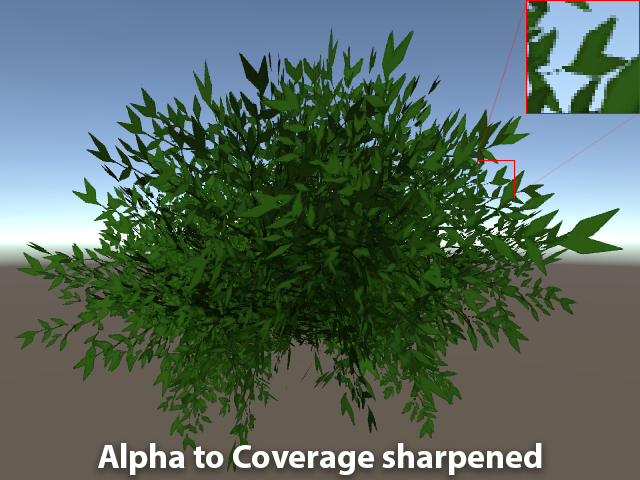
Medium
Aliasing is the bane of VR. We have several tools we use to try to remove, or at least reduce aliasing in real time graphics today. Tools…
past pewter
@muted osprey so what do you mean by where you want it to go? I just want the particles to be attached to my avatar in vr. How do I do this?
muted osprey
Hands, feet, whatever
past pewter
SO all of them on the same constrant, just a bunch of sources
muted osprey
???
Constraints just force an object to follow the movement of another object that isn't its direct descendant
past pewter
On my particle system, for the parent constraint do I ass more than one source than? Because right now I have only the right wrist
muted osprey
Is there any reason why you would need another source?
past pewter
add*
lol
I dont know. I just want y meshed particle system to follow my movenet in vr
Im new to this
if that wasnt obvious lol
muted osprey
Oh mesh particles? Probably don't need a constraint then
bright dew
@past pewter what exactly do you want? maybe I can help
 fervent lily
hi, quick question, i have a sphere shader and I want the inside to be animated not the outside of it, how can i do this?
bright dew
best you can do get a sphere from blender and invert the verts to the inside. YT has a tutorial for probably
fervent lily
tried hard to find a tutorial but what you said makes sense, i was actually looking for something like that but couldn't find it
how can i invert the verts?
err, in blender that is, i'd rather do that in unity if possible tho
oh i got and idea, put a - on the scaling
hmm... shouldn't I be able to slap on a minus sign somewhere and get this thing to invert>?
i'll do the blender thing thanks.
past pewter
@bright dew I actually just caved and got poiyomi particle shader for 10$ on patron. This does what I want very well. Thanks though
bright dew
@past pewter I mean poiyomi is free but supporting is nice
 blazing plover
 runic light
Anyone know why my face just illuminates in the dark?
bright dew
what shader are you using?
past pewter
@bright dew yea I bought the pro version, they have particle shaders
 knotty oxide
Hello, i have a question regarding a effect i would like to achieve, I have a protogen avatar and would like to inlay a portal/wormhole effect in the "screen" slots but have no idea where to begin. i have been messing with noise textures to no effect unfortunately. my main goal is to create the effect with raymarching because of how unique and complex it can look. If anyone has any pointers or tutorials that would be awesome ^-^
 fresh grove
I tried understanding shaders time and time again. All I wanted was to add one feature to a shader but I could never do it, so I want to ask if anyone here would ve able to do it.
 deep valley
best you can do get a sphere from blender and invert the verts to the inside. YT has a tutorial for probably
@bright dew use blender command "Flip Normals" in edit mode - you can use Face Orientation in the overlays dropdown to check that they're showing red (negative normals)
carmine fiber
Anyone knows where I can find a cubemap shader?
What I'm looking for is a cubemap shader with glow white outline
 high condor
Try running around in Minecraft (jk let me look)
Have you tried unity’s built in cubemap?
 cobalt ingot
hey im having issues with my avatar, and im pretty sure it has shaders. But its not lookin like its lettin me change them
can anyone help
cobalt ingot
thank you! @calm nebula
granite coral
@cobalt ingot see that thing that says "Toon/Simple/Cutout"? That's the shader that's being used
 slow lynx
I have a problem with cancerspace shader, in unity it looks normal but ingame it's upside down.
I have tried everything from rotating the shader to stupid ideas like 2 spheres or rotating the sphere.
Please help me i don't have more ideas
solid grail
@near flax
slow lynx
Still same Problem @near flax you are author of Cancerspace Please Help Me
near flax
what settings are you setting with it?
does it still show up upside down if you upload without changing any settings?
@slow lynx
slow lynx
@near flax i will try uploading it without changing settings
for settings that i use i will send screenshot in few minutes
near flax
ty 🙇♂️
near flax
that part looks fine to me
slow lynx
i really don't know why it's upside down in game
i can post more screenshots
if it can help
near flax
are you playing in VR or desktop?
slow lynx
desktop
near flax
ok cause i've been noticing some weird behavior with stuff in desktop lately and i'm not sure what's been causing it yet
did you try the unchanged upload btw?
slow lynx
i will try
near flax
🙇♂️
near flax
do you have future proofing turned on? that can slow down your uploads by a ton
slow lynx
nope, it's off
near flax
ah ok
slow lynx
and i think it's weird that it's uploading that long
because i have ssd disk and 250mb/s internet connection
near flax
that is weird
my internet's about the same and my uploads are usually like a minute at the most
slow lynx
weird
longest time is needed in "bundling and compressing data"
it's seems like it's stuck but it's not, it will go after few minutes
ok i'm on "uploading file"
ok it's uploaded i will test it now
animation have no special effects bot it's still upside down
near flax
ok that's concerning
slow lynx
here how it looks like
near flax
gotcha
a few questions then
are you on the steam client or oculus? what GPU are you using? and are your drivers up to date?
near flax
ok thanks
i'll look into it soon and see if i can figure out what the issue is
it was definitely working before and i have noticed things suddenly being upside down recently, but i have a suspicion that it might be some weird driver issue or something
because afaik i haven't made any changes between when it was working and when it wasn't
near flax
yeah i'll ping you if i find a fix
slow lynx
ok thanks
 fresh basin
im trying to set up a sphere shader but its see-through?? any fix?
past pewter
I am guessing that outline is a shader, how can I achieve that
poiyomi outline
thank you very much
 last token
hey i need some way to make a screenspace shader where there is a musical staff and a note that can move up and down on the staff
need it to see pitch control
 cunning anchor
Does anyone know where to find/how to make a starry space shader for an avatar?
 alpine swallow
Anyone got a tutorial that's good for introduction to shaders that they'd recommend to newbies?
steep swift
@cunning anchor here's mine. Please keep the settings low or use it on small things like eyes. It's already really laggy: https://raw.githubusercontent.com/lyuma/LyumaShader/master/LyumaShader/StarNestAvatar.shader
@alpine swallow check out catlikecoding: it has a great shader tutorial series going from basics to full proper lighting
alpine swallow
Gonna google that, thanks 😄
cunning anchor
I actually kept looking after I asked and found something nice and simple. Thank you for this though
steep swift
the default StarNest shader (if that is what you found) has really performance heavy defaults. I'd suggest you use my version because I tuned the default settings to be a lot lighter while still keeping the starry effect intact
cunning anchor
I found Lush's galaxy shader
It's nothing but a cubemap, a scrolling static texture and rim lighting
I also found this website that randomly generates nebula & star cubemaps
steep swift
oh, that's a fun effect
Noenoe's shader used to have an effect like that too. it's quite enjoyable in VR
if you're generating cubemaps just be aware of the amount of memory they take up. I'd keep the resolution low (cubemaps are 6x so bear that in mind. even a 1024x1024 cubemap is quite heavy)
cunning anchor
I didn't generate a cubemap using the legacy generator but rather I plugged in a single 8192x6144 image file and turned that into one... I may still need to downscale though
Is the new cubemap generator just as resource intensive even if it calls on a single image instead of 6?
steep swift
yes, it's going to make 6 rather large textures
anyway you can pick a size that works for you, but I wouldn't go higher than 1024x1024 on the generated texture
(there's a dropdown that has texture size at the bottom. you don't need to resize it yourself)
past pewter
i feel like i've seen soft particles in a world before but i can't really remember if they were soft. try checking out little yui's narwhal world, i think i saw them there?
steep swift
Read the description @knotty oxide : "making the camera render the depth texture" : https://raw.githubusercontent.com/netri/Neitri-Unity-Shaders/master/.Images/Light_to_force_CameraDepthTexture.png
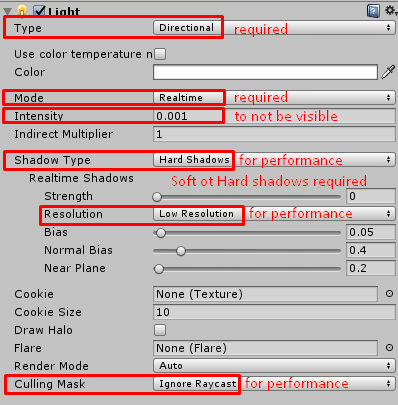
if you already have a directional light with shadows, then this is unnecessary
 muted wadi
question!
i added a crystal shader to a pair of glasses on my avatar and they worked just like i wanted it to, then i tabbed back over to blender to close it and then back to unity, and the shader is static
it just stopped working and idk how to fix it , any ideas ? :/
knotty oxide
@steep swift I set up a light and attached it to the particle system just like you have it there but no dice, still clipping
steep swift
"attached it to the particle system" ?
it doesn't need to be attached to anything, just mergely existing in the scene is enough to enable the depth texture
knotty oxide
steep swift
yeah get rid of that
you don't want or need a light defined in the particle systems
the light exists as a standlone thing - it will do its job if enabled
can you test a cube and see if particle clipping happens
it's possible your avatar is on the wrong render queue
steep swift
and you have soft particles checked on the particle shader?
knotty oxide
on the shader?do you mean the material or shader itself?
past pewter
Can I somehow have the bump map at 2 but avoid the annoying artifacts?
I just want my normal map to show up more detailed.
 drowsy cave
mochies uber shader is always my go-to for avatars, how do my settings look?
past pewter
Bruh
drowsy cave
like the good bruh or the bad bruh
past pewter
is there a rainbow shader?
knotty oxide
Anyone that uses Amplify shader editor able to help with a particle render issue im having?
^Amplify
^Shader Forge
Same settings & node setup but amplify breaks it : - :
 silk hound
You sure the shader is set to transparent/cutout?
 knotty hatch
@solid grail Am I just a dunce and not using this correctly or does this just not work?
solid grail
The fake light direction is only used if the shader can't get a realtime light dir or a probe dir.
knotty hatch
Ah, let me try deleting my dir. light in scene and see if it'll change anything.
solid grail
You'd also need to set your ambient to a single color.
knotty hatch
And that's probably why it never works for me lmao
knotty oxide
@silk hound Yeah i had it on but then it starts to cut off the other effect and still looks clamped to 100% when over nothing
Ok fixed the clamping, with ticking saturate in the depth fade, now the issue of the main circle in the center being cut off because of the particles
alpine swallow
Was just curious. I saw someone with hair that sort of pulsed with light, would that be a material or a shader?
bright dew
@alpine swallow shader
@knotty oxide either change the transparency or use a different shader. there are many different shaders for particles etc.
gentle marsh
anyone know what shader this is on the left? https://pbs.twimg.com/media/EdOjrbhUEAAHyAG?format=jpg&name=large
 lethal rock
Looks like a toon shader with a pretty nice normal map
gentle marsh
hmm, what effect does the normal map have on the output, @lethal rock ?
Is there a tutorial on how to configure a shader like that? I'm using Poyomi at the moment
lethal rock
the normal map changes the perceived angle tthe surface s facing without adding hundreds of polygons to the geometry. I don't have a tutorial on hand but the model that person had looked like no shortage of manual effort.
gentle marsh
Hmm, interesting. I'm familiar with the use of normal maps but what I'm wondering is how the outline could be created from any partciular angle. Is the effect of the normal map that you're reffering to mostly the stuff inside the lines, like the way that the muzzle transitions from ligher grey to darker? So that it has a cel-shaded appearance
alpine swallow
I stumbled upon an avatar like that kinda. The outline followed the camera view I believe. I think the normal maps is the "fur" effect on head and hair
Could this maybe be something close to the outline? https://youtu.be/t3MQ6wk73YA
 knotty oxide
@bright dew the shader is made by me X3 that's why I'm trying so much to get it right. I want to learn the process including figuring out the bugs
bright dew
ah ok good luck then 👍
 burnt rivet
velvet sorrel
burnt rivet
velvet sorrel
Does it still look like that with Standard?
 cosmic fable
-deleted-
Nevermind, I can't see buttons.
cosmic fable
Any tips on subsurface scattering for mochie's?
lethal rock
@gentle marsh didn’t realize you were talking about the outlines, but it looks like a pretty standard outline you’d find on almost all toon shaders
knotty oxide
Would anyone happen to know why this happens to distortion effects?
lucid spindle
so i'm not quite sure how to describe this but i'm making a water shader that uses a vector displacement map but i cant seem to figure out how to get the displacement map to follow the uvs without messing up the xy vectors.
id imagine id have to do something to get it to displace in object space somehow
also im making this in amplify
 tired cliff
Any good visual-scripting tools for shaders (aside from Shaderforge, which doesn't work in the version of Unity the VRChat SDK uses)?
lethal rock
@tired cliff Amplify works
tired cliff
Is it free?
muted osprey
According to a google search that took me a total of 8 seconds to do, no
tired cliff
I mean, i would have searched myself. But I'm busy atm.
Guess I'll have to pull cross-project shenanigan's with Shaderforge then...
 lament pier
Hello everyone, tell me what is needed to make the PolyColorWave shader work in the game? in unity, it works on the model, but not in the game itself, purple texture and that's it ...
lethal rock
What version of Unity are you running?
lament pier
Unity 2018.4.20f1 according to the instructions of the game
pallid hinge
Some kind of shader error... Hard to know exactly the issue without seeing your setup
lethal rock
I want to say keyword related
lament pier
Here are the settings (almost anything has not been touched)
 lament stag
errant plover
lament stag
errant plover
can you apply mirror effect to a character?
like give it a mirror frame in hand as an item
 formal hedge
Does anybody know any good shaders that sorta trail behind the eyes?
A little like this
Or would it be something I have to do with particles?
lethal rock
Trail renderer would do nicely, but would need a shader to deform the trail
formal hedge
You make a good point
 pallid wind
If you've been to the treehouse world you've most likely seen this shader https://www.shadertoy.com/view/4sXBRn I was wondering how that person was able to bring it into his world.


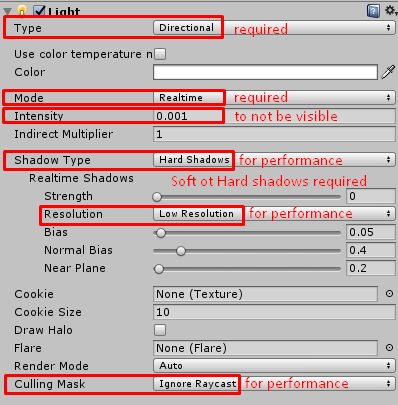 tired cliff
Is it possible to get Shaderforge working on Unity 2018? If not, what's the best version? I was using Unity 2017 and copying things over to my VRChat project as needed, but i updated it to the latest LTS release of Unity 2017 and it broke rendering on the custom shaders, even though they appear fine in Unity 2018 when i copy them over.
 vale hemlock
I know ShaderForge worked on Unity 2017.4.28f1
tired cliff
Ah! I found a community-made Unity 2018 branch of ShaderForge on the repository. And it seems to work.
It's currently stuck in pull-request limbo. But you can download it from their repository page.
You just have to rename the folder from ShaderForge-master to just ShaderForge, then it'll work.
It's a little buggy, with the preview window showing the currently active scene instead of just a sphere. But it works!
But it's also v1.42 of ShaderForge, which fixes some shader error bugs.
I find it funny tho, i just realized when i went to upgrade my shaders to the newer version that one of the VRChat shaders was made using it.
The more you know...
tired cliff
Here is the repository if anyone is interested. https://github.com/pyroakm/ShaderForge

GitHub
Shader Forge v1.42 for Unity 2018.3.3: Fixed dark background problem using professional editor skin, added support to Nintendo Switch platform and Vulkan. - pyroakm/ShaderForge
It says it's for 2018.3.3, but it works perfectly fine on 2018.4.20f1.
knotty oxide
@tired cliff The official website link for shader forge works fine, i used it for most of my model https://www.acegikmo.com/shaderforge/
tired cliff
The official version gives me compiler errors in Unity 2018. This branch I'm using actually works.
lofty dragon
Are there any good shaders for heat distortion?
I'm working on a desert map I stopped working on a while ago & just picked up, and I've been trying to get a good heat effect.
near flax
@slow lynx https://github.com/AkaiMage/VRC-Cancerspace/releases/tag/3.2.1 this should fix the upside down issue, let me know if you're still having issues with this version
GitHub
There's been a long-standing bug where the shader would cause the screen to be flipped upside down for only some people who were in desktop.
This should fix it, I hope.
slow lynx
I will try tomorrow.
near flax
🙇♂️
lethal rock
@pallid wind That shader in that world was quite a feat to bring into the game. for one, its not very optimized on its own so 1001 had to work really hard at optimizing it and making it VR ready. He was very good at what he did. Don't try to bring this raymarching shader into VRChat unless you know what you're doing. As for any other shader, there are GLSL to HLSL conversion guides that help assist in translating any GLSL shader on shadertoy to HLSL in Unity. Just make sure it runs ok before trying to upload it to a world.
pallid wind
@lethal rock Hey, thank you for the help^^
 clear raven
Which shaders should I use toon or acklone shaders
slow lynx
@near flax Shader works as intended, but i don't know if the effects should be visible from outside of sphere, i don't know if I am doing something wrong, or it should be like that.
It doesn't matter to me, but it can upset others
Edit:
I Think i solved this, i changed "Max Falloff" to lower value, and effects don't appear outside of sphere
near flax
@slow lynx yeah changing the falloff is the correct solution to that
near flax
i really should add more stuff to the readme
errant plover
is it possible to mimic mirror effect on avatar?
like low quality pixelated blurry mirror effect, or at least decent matcap/reflection or whatever to give a certain accessory part a very shiny effect
lofty dragon
You just want to make something chrome?
Just turn the metallic and smoothness all the way up on the default shader
lofty dragon
Does anyone know of a shader that lets you use a cubemap for reflections?
Like the VRC MatCap shader but with cubemaps.
 stiff raft
does anyone know of a shader that i can apply to a completely pink avatar to make it look more like a gummy bear texture
steep swift
@lofty dragon If you don't want to do the code modification yourself, I think Rero Standard has an option for this
lofty dragon
@steep swift I've managed to modify some code from Unity's documentation, but it's not quite right
 quasi locust
I'm not sure if this is the right channel, but I'm having an issue where the shadows on the shaders I'm using change whenever visemes and such are being used. Is there a way to fix this?
light urchin
The latest sdk has an auto fix for that
quasi locust
What is it called?
light urchin
It should prompt you to fix that just by opening the sdk window, but you can also go to your models import settings and enable legacy blend shape normals
quasi locust
Alright! Thank you!
 cunning glacier
Anyone know of the rain shader that is used in some worlds for the windows? Thanks!
light urchin
Shader graph isn't supported with vrchat, it's made for a different render pipeline than what vrchat uses
 summer herald
ah, thanks for the heads up
so i can only do shaders using text based rather than node right?
light urchin
ShaderForge or Amplify Shader Editor
With shaderforge you most likely have to find a version fixed for 2018 from what I remember
summer herald
i'm assuming Forge is more user friendlier than the latter?
light urchin
Haven't used either so I can't say much
summer herald
ah, so much to learn
 chilly vine
Does anyone know of a shader that can block other shaders. Namely ones that have a habit of blocking the screen?
lofty dragon
I swear I've heard of an anti-shader shader
lethal rock
What is an anti shader shader?
muted osprey
But wouldn't an anti-shader shader also be anti-anti-shader shaders?
steep swift
I prefer my shader-shader over your anti shader-shader
On a more serious note, what those shader-shader shaders do is they consist of two parts:
- one does a GrabPass at a low queue (below transparent even) to capture the screen contents as-is before other effects are drawn on top;
- then the other part runs at a high queue, after(-ish) other effects are drawn, and paints the old opaque contents on top.
That's it.
The only challenge is dealing with the arms race of "malicious" effects drawing after everything and your thing from also drawing after everything. Basically it's Dragonball Z.
muted osprey
It's basically a lesser evil
steep swift
Not a shader approach, but I will also propose a "perfect" solution, which will only apply to the wearer of the avatar, and draw after everything, but sadly will also draw on top of the menu though that can be worked around with a gesture toggle.
The premise is to create an empty game object on your avatar. In avatar 2.0, make that object really far away like 1000000. In avatar 3.0, disable it, and put an IsLocal condition in your controller to enable it and move it really far away. Inside that empty game object, create a camera on your avatar. Set it to "Don'tClear" and "PlayerLocal" only. Inside that camera, put a quad or large cube. On that cube, you put that second shader from above.
Because this camera renders after the entire scene, you will lose post processing and also UI while active.
 lost arch
This is more of a general blender question but how would I add the things like Maximum?
 pine swan
Anyone know a good way to get shaders from blender to Unity?
brisk gull
Blender and unity shader doesn't work in the other environment by default, and the only way of conversion is to re-create it.
 frank zenith
hey
brisk gull
They render stuff differently.
pine swan
Welp, there goes my plans
 nocturne birch
how do you change traging
lethal rock
Look very carefully at the blender one and rewrite it in Unity I guess 🤔