hey hey hey
porting Source Engine content from SFM, Garry's Mod, Half Life 2, Team Fortress 2, etc.?
utilize this Dope Ass Shader ™ I assembled using authentic Source Engine shading technology
has:
half-Lambert lighting support
diffuse lightwarp support(for TF2 models)
environment dependent rimlighting
authentic source engine handling of lighting, exponent maps, etc.
#shaders
2 messages · Page 10 of 1
 past pewter
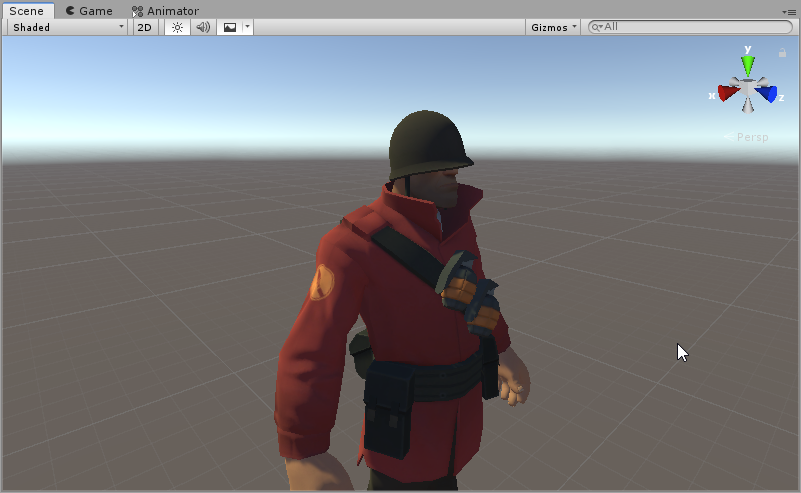
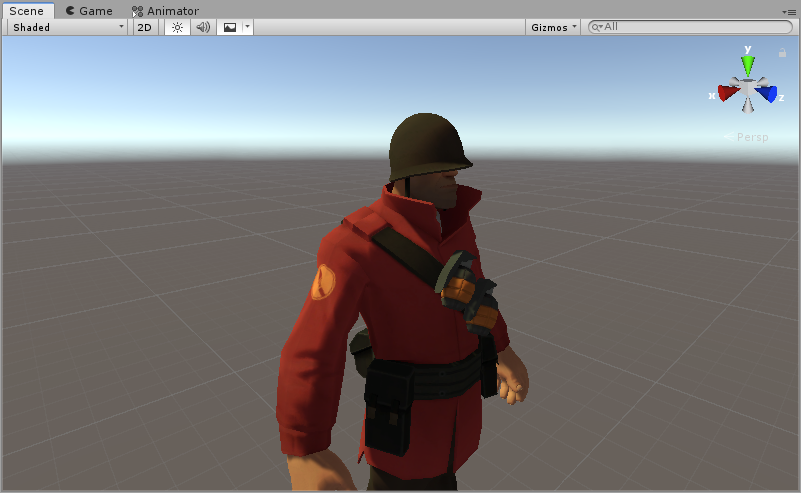
before and after shots:
https://file.house/Fa23.png
https://file.house/74HN.png
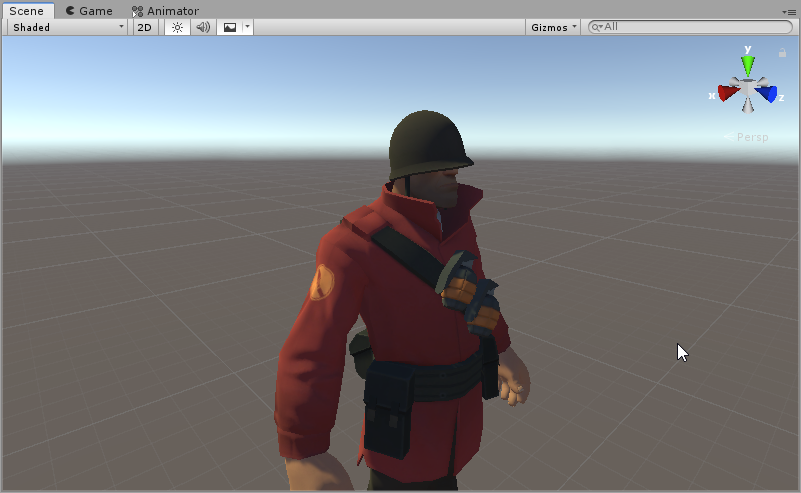
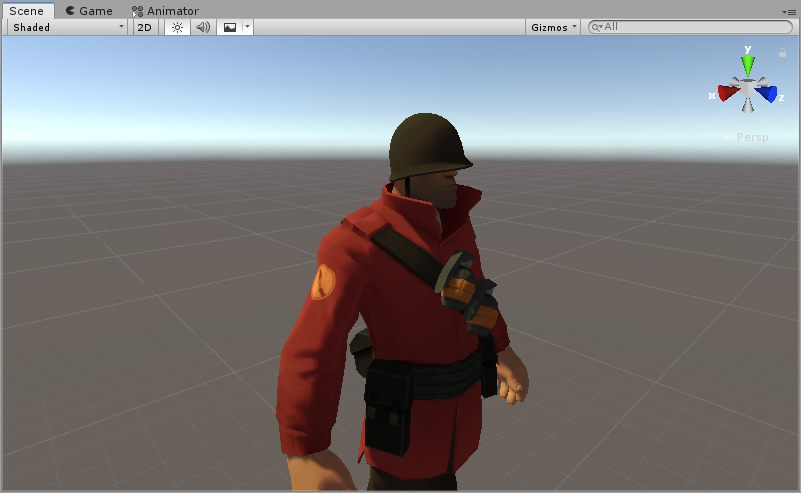
for if you're doing content for the Open Beta
 median gate
hi y'all. i'm looking for that shader on horror models that makes it look like a fluid is conforming to a surface
 young lark
https://pastebin.com/z4fuk0GW as an example

Pastebin
past pewter
aight, so disable lightwarp, turn on half-lambert
plug in the color and the normal, plug mask1 into exponent
young lark
what exactly would the masks do in terms of something like unity/vrc? curious :p
 still seal
So I'm trying to apply a custom shader onto an Avatar, but I don't want to break it and make me lose the tracking or bring about Armageddon because I don't know what I'm doing
https://gyazo.com/8043b6e84552410d5ae55551d57264ba

Please help. I'm dying.
young lark
save a back up first of all
still seal
I have one, just in case I break it
young lark
alright good
 oak wadi
Masks are just called masks in source, but they do different things and have other names in other shaders, in this case
still seal
So how would I attach this one to the avatar while keeping the tracking and animations in tact ?
young lark
hm
still seal
I attached the folder into the materials folder but i don't know how to bring it over
 past pewter
@young lark they're effectively parameters to tell the shader how to interact with specific aspects of the lighting setup
young lark
ahh
past pewter
specular exponents use their r/g/b/a for random shit
how does it look on your SAS guys?
young lark
give me just a sec
looks alright tbh

gives me a feeling of sfm ngl
as i say i have sfm open in the background
past pewter
its using code straight from the source sdk so
it better look like the source engine
is that with half-lambert enabled?
young lark
yes
young lark
i used the vrc mobile shaders lol
young lark
no
past pewter
bc custom shaders are a nogo for que-ah, alright
young lark
i just couldn't find any good non-toon ones that would fit what i need it for :p
still seal
Wait. Do I need to merge these somehow o_o' https://gyazo.com/1e0ee5e80747bddb65478c3c2d297baf

and bring them into the materials tab
past pewter
the vertexlit shader should be good for most situations, i fixed the shadowcasting issues it had by porting it over to Amplify so
young lark
ah
past pewter
feel free to use it for whatever, i'm setting up my TF2 world to use my new version of it now + fixing the light casting
young lark
bless
also tell when that happens since im interested in that :p
(i have a friend who's big into tf2 i can always show it off to)
still seal
The folder is there, the trick is trying to make it replace what I have now
past pewter
fuckin world went from community labs to full public within like, 2 days, it was great
young lark
im waiting for the sdk to reimport since somehow i can't add an avatar descriptor anymore
im also waiting for sfm to finish a render
still seal
https://gyazo.com/616d326000c0e87f16a826ba157eeaf9 Half way there! haah
 still seal
ty, this is my first avatar edit, thankfully from a base so i can restart easily enough
but i feel like a deer in headlights
young lark
don't worry i feel the same :p
im right now working on somewhat already worked on projects, abandoned like years ago however
and maybe after that ill look into expanding more
l4d characters when?
past pewter
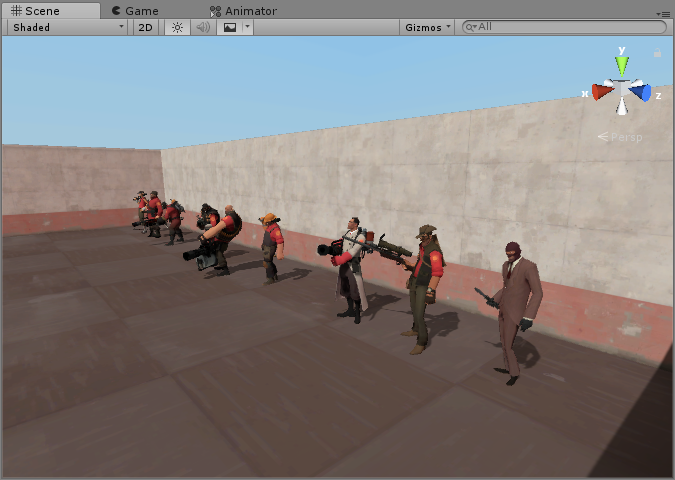
 dry oliveBOT
@past pewter You're sending messages too quick!
still seal
ok, yeah i still don't know how to merge. ugghh
ok so i found the shaders tab, now instead of in materials i need to find out how to get this file within the area that i can pull shaders from
ahh
didn't work how i thoguht >.<
still seal
Ok... So...

Do these files mean anything to anyone enough to know where they should go to make them overwrite what i have now
young lark
hm, what eye texture thing are you using?
still seal
sent you a link in dm c:
past pewter
just post it here
still seal

VRCMods
VRChat avatar uploaded to VRCMods.com by IronG312 currently has 4411 downloads
didnt know if they were allowed here so wanted to be safe
 tired token
Wait, did the bot miss that message? lol
past pewter
Hello, my rainbow shaders dont work, how can i fix it? They are pink
 rich lake
You would need to post the console errors when entering play mode, no one can help you without concise questions
 waxen pagoda
would anyone happen to know why imperial fur suddenly is broken?
like when i up the strand density it just messes up and goes all lines instead of the noise texture
young lark
hm, weird
https://a.vin.pet/i/upelfp3w.png

seems like my character shines a bit
seems to get worse in some situations the further i am from a mirror

gonna see if i fucked up any values :p
waxen pagoda
for some reason the noise texture that is supposed to make it look like fur, does this: http://puu.sh/EpUiz/0d73b2100d.jpg

 solid grail
@young lark Those look like NaNs what shader are you using
waxen pagoda
if the strand density goes above 1 it does this, but ive had it at 2.18 and it just broke
its imperial fur
waxen pagoda
even in a brand new project with everything reimported it does this
like it works for a section of the mesh object, but the more dense i make the strands it just does this: http://puu.sh/EpUmq/5b4da3c2ce.jpg

and ive tried other noise maps
wtf even the test materials that came with Imperial Fur are broken? http://puu.sh/EpUp0/0e00c5aec8.jpg
 young lark
you working with 2018 or 2017 btw?
young lark
idk what is causing my shader issue either but idk if i care rn to fix it
its most likely something silly like i forgot to turn on a setting
seems like its small but still visible in unity itself too
 solid grail
NaN flashes 👀
 stiff berry
it's probably some weird behavior with the shader you're using. The fix is to change the interpolation modifier to centroid which basically makes it so it won't interpolate outside of the triangle as far as i understand
It's kinda just a magic fix to me tbh, you can read this explanation if you want https://www.khronos.org/opengl/wiki/Type_Qualifier_(GLSL)
During multisampling, if centroid is not present, then the written value can be interpolated to to an arbitrary position within the pixel. This may be the pixel's center, one of the sample locations within the pixel, or an arbitrary location. Most importantly of all, this sample may lie outside of the actual primitive being rendered, since a primitive can cover only part of a pixel's area. If the implementation computes the sample based on the center of the pixel, and the primitive doesn't actually cover the pixel's center (remember: in multisampling, this can still produce a non-zero number of samples), then the interpolated value will be outside of the primitive's borders.

The centroid qualifier is used to prevent this; the interpolation point must fall within both the pixel's area and the primitive's area. This is useful for parameters or computations that would have undefined values if they fell outside of the primitive's area. A square root is only defined for positive numbers, so if you are taking the square root of an interpolated value, you may need to use centroid interpolation.
that's specifically for glsl, but the same thing applies to hlsl
the hard part is finding what's causing the issue. I would guess vertex color
so the fix would be changing float4 vertexColor : TEXCOORD1 to centroid float4 vertexColor : TEXCOORD1 in your v2f struct assuming vertex color was the problem
young lark
ill be frankly honest those are big words and they scare me
 steep swift
@young lark try just adding the word centroid to things like color in your vertex shader--anything that isnt a position can probably use it
You're familiar how vertex shaders work. You have a triangle and compute stuff for each vertex like e.g. one is red (1,0,0), one is green (0,1,0) and one is blue (0,0,1).
The fragment shader runs on each pixel and usually interpolates those so you can get anything in between like (0.3,0.7,0.5)
But in MSAA antialiasing, sometimes it is allowed to extrapolate those values. Some triangles are rotated so perpendicular to your screen that maybe takes up like 1 or 2 pixels in total and so the next pixel gets extrapolated for antialiasing and it can get absurd color values like (50,5,0.1) or (-40,0,0.5) way outside the 0-1 range. That's what often causes those sparkles
centroid "fixes" this by making sure nothing gets extrapolated but the math can be imprecise in this case which is probably fine for colors but might mess up other things. This is why it's not automatic.
past pewter
@young lark @steep swift @stiff berry
Yo, I made the shader
I'll check it out, I've been working on debugging it myself
If you guys got Amplify the amplify project deets should still be implemented
past pewter
There was a giant community shader pack a while back, anyone have a link to it?
solid grail
???
past pewter
@young lark lmk if that works for you
young lark
alright, not at home rn but ill try
steep swift
@past pewter lots of community shaders are posted on the github/gitlab repositories of the creator, or on a site like booth, often for free. If there was a "shader pack" distributed, it likely had old and broken versions of shaders.
I'd suggest downloading the latest official versions. Just say what sort of effects you're looking for and someone can probably point you to the place.
past pewter
oh shit im an idiot
lmao
totally forgot
about fucking
aaaa
forgot to uh, put some returns in
past pewter
yeah, 1 moment
doing some pretty serious reworking
pls hold
@young lark here, give this a try?
young lark
sec
young lark
sorry for late reply i was doing other things, ill see how it looks in game in asec
 rotund widget
is the sdk messing with anyone else's projects. its makeing my textures darker and breaking my shaders
young lark
looks like its workign fine i guess, igotta fiddle with shader settings a lot however to get it to work right with my model :p
plus i haven't found a world that is friendly to me testing it since usually i just see it in full bright in most worlds and idk/idc why
rotund widget
idk, im just tierd of messing with it, ive had to remake my shader sevral times but whenever i add the sdk it breaks everything and darken my texutres
it might just be a me thing.
young lark
yeah, ill see if i find any issues since rn i found my own error
using the wrong texture for the specular map, i wasnt supposed to use the normal
wait no i was doing it right :p
past pewter
mask1 is likely what you want for specular if an _exponent map isnt available
normal should be either bumpmap or phongmaskl
i also recommend using Cafe LeBlanc for lighting testing
young lark
alright
rotund widget
so i did some more test, its ether something to do with .dds image files or its something to do with the way i use them for transparency
young lark
hm, most likely then
try a different format i guess.
also
shiny https://a.vin.pet/i/gu4hp2av.png

(most likely just unity being unity however)
rotund widget
no, when i dont use the sdk it works fine
and i checked the .dds files and they were actualy diffrent from when i imported them
young lark
weirdd
rotund widget
idk, i am just done with it at this point
young lark
thats a fair mood
i think i gotta fiddle a bit with the gloves but otherwise it seems fine in most lighting condictions
 past pewter
Make sure to check your vmt you're using
the phongexponent and phongboost values should be set to your Specular Exponent and Specular Boost respectively
past pewter
same with rimlighting if you use that
if the vmt specifies halflambert 0, set it to 0
also use LeBlanc for lighting tests, it's got the best setup for lighting
mirror is upstairs
young lark
ah alright
yeah i might use rimlighting due to there being values for rimlights
"$rimlightexponent" "6" "$rimlightboost" "0.7" "$rimlightalbedo" "0.6" "$rimlighttint" "[0.8 1.0 1.2]" "$fakerimtint" "[0.5 0.7 1]" "$fakerimboost" "9"
@past pewter anything for $warpindex ?
past pewter
don't worry about that one
young lark
alrighty
past pewter
aight, set rimlighting to 1, exponent to 6, boost to 0.7
young lark
anything for phongwarptexture and fresnelrangetexture?
young lark
ah alright
idk if it was implamented or not so
would i want to use fake rim boost or just rim boost
i think rimboost since fake rim boost would be too heavy but im the end user here im gonna fuck something up
real hmm

feels like the clothing is a little bit too...shiny/plastic feeling to me but im actually gonna open up csgo and see how it mimics...
why the fuck didnt i take the values from the goddamn sfm port of the sas, he uses vertexlitgeneric there
ok so the sas is that shiny so i think i got it

hmm
 glass smelt
anyone know where i can find a distortion shader that makes it look like my model is flickering and corrupting like an old videogame sprite?
young lark
@glass smelt just corrupt your model or create a real time corruption shader :^p
ill actually look into it since i actually really like real corruptions
steep swift
Rounding vertices to like 1cm in the vertex shader and add noise by time after rounding might be one part
 near flax
an easy way that i did for a glitch model was just offsetting the mesh and darkening the colors for a fraction of a second every few seconds
of course, adding more to it would make it look better, but that should give you a nice flickering effect
oak wadi
So I'm assuming if already compiled shaders show up as an error shader in unity then they won't work ingame either right?
near flax
if by compiled shader, you mean one that's taken from an asset bundle, then afaik the only way to use it in a new asset bundle is to programmatically stick it in there (i.e. hex editing or such)
like take the compiled bytes from one and put them in the other
but i don't know that anyone's written something to do that aside from some professional-level tools
oak wadi
Yeah it's a de less compiled bundle
near flax
lol
oak wadi
Probably not worth the effort then
oak wadi
It's risk of rain 2 and I think it's using custom shaders for terrain stuff that blends textures onto it based on what the surface type is, but I'm not entirely sure
near flax
ahh ok
maybe see what data is on the mesh and try to work from there?
i.e. vertex colors or uv channels
near flax
👍
near flax
could be, it'd be good to check what parameters are on the material as well
oak wadi
Probably masking yes, but not entirely sure how to check that because if I set it to standard it only keeps the diffuse
It looks like they use trim sheets for stuff as well
But like if I set the terrain mesh to standard it doesn't even have a diffuse assigned
So it might as well be generated by a script
solid grail
afaik ror2 doesnt really do anything too bizarre with shaders
its character shader looks like a really basic standard based toon shader (:
oak wadi
That yes, but I'm wondering about the environment and terrain
Environment looks like trim sheets but not sure about terrain
stiff berry
I would guess they set vertex colors or a splat map for blending and if it's not that it's probably triplanar which blends based on normals
 shrewd pendant
Does Anyone Have a Hud System that looks like this or if possible exacly like it?
 white furnace
dont think it exists, or atleast i have never seen one @shrewd pendant
 fluid hamlet
i think it falls under shaders ... but what would be the unity equivelant to unreal’s Utility texture?
 versed crater
The doom marine model has one on it
shrewd pendant
where can i find it?
steep swift
@versed crater @shrewd pendant @white furnace The doom model was made by error.mdl who just so happens to also be the creator of Error's HUD shader!

VRCat: Community-Run VRChat Forums
%--------------------------------------------------------------------------
%
% Error's Heads Up Display (EHUD) Shader Version 1.01
% 2018-08-05...
white furnace
yeah but he wanted the one just like it in the photo, from that anime
fluid hamlet
would have to photoshop all the elements or find it on da
 crimson lagoon
Yes
fluid hamlet
then use the hud shader and replace the used images with the one made
fluid hamlet
https://www.blendernation.com/2018/06/29/utility-node-group-ue4-shader/ could this work with unity too?

papalagi writes: Hello dear Blenderheads, For speeding up my workflow, i've made a Cycles Node Group that mimics the Unreal 4 standard shader, here's the video: Has a few some bonuses: backface culling combines up to 2 normal maps + height map outputs texture channels as an e...
past pewter
just redo it in Amplify or whatever
yo, having some issues
as reported earlier by vim, the shader I'm working on is having weird issues with white pixels
someone in here said they were NaN problems and recommended doing 0-1 clamps on stuff, but that doesn't seem to have worked.
Centroid isnt an option either as the prefix isn't recognized by unity.
Anyone got any ideas?
 grand jackal
this is a shader i've been working on, its a unlit shader, does anyone have any tip or trick to improve it even more?
its supouse to be kinda glass with refraction material
 velvet sorrel
Make it work without a grab pass
 buoyant cargo
Standard shader expects some packed maps, but doesn't have a native option for RMA maps afaik. You usually will drop the res of your AO maps down way further than you would your smoothness/metallic maps in our use cases to reduce build size so there might be diminishing returns with optimizing that way!
fluid hamlet
ok
solid grail
in standard metallic roughness workflow it's set up this way
met - R
rough - R
height - G
occlusion - G
normal -RGB
 jovial moss
Anyone know how to get the screen position for both eyes individually? Trying to create an effect but it's a bit disorienting because of the difference between both eyes, I would like to take the average of them instead. I would also like to know if there is a way to find the world position of both eye cameras individually, for a similar reason.
I am using amplify shader editor so I've been using the provided nodes for both, I can use a custom expression node if needed
past pewter
Does anyone know a good shader that creates a 3D like effect (similar to the heart in the world Avatar Testing if you've seen it!) ?
steep swift
@jovial moss no way in amplify... you're going to have to use code:
unity_StereoWorldSpaceCameraPos[0] and [1]
But you need to use #ifdef USING_STEREO_MATRICES block around it
Else you are not in vr. Need to decide what to do. Same eye position for both?
jovial moss
I was just looking to get the median of both eye positions by adding them together and multiplying by 0.5. I figured code was the way to go, I will set up a custom expression node with this, thanks
Using a single one would be fine as well
steep swift
@jovial moss
#if defined(USING_STEREO_MATRICES)
float3 leftEye = unity_StereoWorldSpaceCameraPos[0];
float3 rightEye = unity_StereoWorldSpaceCameraPos[1];

float3 centerEye = lerp(leftEye, rightEye, 0.5);
#else
float3 centerEye = _WorldSpaceCameraPos;
#endif
does he just need position or direction too
jovial moss
I need worldspace position as well as screen pos, thanks I appreciate the code! I will implement it in my shader when I get home 👍
Oh and now that I think about it, I would also like to know how to do the same thing for view direction
solid grail
o.eyeVec = NormalizePerVertexNormal(posWorld.xyz - camerpos);
 wary junco
I'm looking for a UV-based eyetracking shader that otherwise uses standard shading (roughness setup preferably), is there anything like that available?
 analog swift
im looking for a shader that work same as a mirror that shows only for the users avatar . the mirror shader in vrchat dosent work for avatars
like a mirror inside the avatar itself
near flax
i think @steep swift made something like that
 astral plover
I've seen shaders that duplicate your avatar, so it stands to reason that it's possible to duplicate it once, flip it, and maybe stencil it
steep swift
yes that's basically what I did. The main innovation was using the "root bone" slot of the avatar (which can hold any transform) as the axis across which to flip the avatar.
@analog swift See my extensive replies in #development-advanced including a link to a camera based shader by Neitri to do a mirror.
 fair prawn
sorry for the possibly dumb question, but how bad (if at all) are fur shaders for performance? if I just used it for say some ears and a tail?
solid grail
depends on the shader
fair prawn
https://xiexe.booth.pm/items/1084711 this one for instance?

VRとパフォーマンスを主にした本格的獣シェーダー ほかの似たようなシェーダーはレンダリングパス数が多いため、ラグなどを起こしやすいのが多いです。 私のは、すべてワンパス。 毛と肌のレーヤー別...
near flax
fur shaders are bad for performance in general, but that one's the least bad
solid grail
dont they only get bad if you fill your screen with them?
fair prawn
so something like haircards would be a better solution?
solid grail
haircards are a very elegant solution in general
fair prawn
mkay
near flax
typical fur shaders are generally bad because they do a bunch of passes to draw lots of transparent shells
XSFur is only 1 pass, but it does a geometry shading step instead of the passes to generate a bunch of shell geometry
this is significantly better for performance than the 20 passes, but it still has the noticeable overhead of the geometry shader
fair prawn
okay
guess I'll take a look at both methods once I'm that far and see which I like more
thanks for the input
 halcyon kestrel
I know I shouldn't be saying this because potential sales and whatnot, but haircards, if you have the knowledge on how to do them and make them look good, will probably look and run better.
past pewter
Is there a shader that uses spritesheets to animate that is also capable of emission?
Poyomi's isn't quite what I'm looking for
 surreal bone
How do I apply the glow effect?
solid grail
emission
 deep pollen
does anyone know where I could get a shader that supports cubemap reflections instead of using reflection probes? I want to use my own custom cubemap for a specific material
past pewter
@deep pollen the legacy reflective ones allow you to pick a cubemap for just that material
past pewter
faster than using standard too 😉
deep pollen
what if I want a transparent shader with a cubemap?
past pewter
this should work ```Shader "Glass Reflective" {
Properties {
_SpecColor ("Specular Color", Color) = (0.5, 0.5, 0.5, 1)
_Shininess ("Shininess", Range (0.01, 1)) = 0.078125
_ReflectColor ("Reflection Color", Color) = (1,1,1,0.5)
_Cube ("Reflection Cubemap", Cube) = "black" { TexGen CubeReflect }
}
SubShader {
Tags {
"Queue"="Transparent"
"IgnoreProjector"="True"
"RenderType"="Transparent"
}
LOD 300
    CGPROGRAM
        #pragma surface surf BlinnPhong decal:add nolightmap

        samplerCUBE _Cube;

        fixed4 _ReflectColor;
        half _Shininess;

        struct Input {
            float3 worldRefl;
        };

        void surf (Input IN, inout SurfaceOutput o) {
            o.Albedo = 0;
            o.Gloss = 1;
            o.Specular = _Shininess;

            fixed4 reflcol = texCUBE (_Cube, IN.worldRefl);
            o.Emission = reflcol.rgb * _ReflectColor.rgb;
            o.Alpha = reflcol.a * _ReflectColor.a;
        }
    ENDCG
}
FallBack "Transparent/VertexLit"
}```


 somber widget
Haven't seen the world, what kind of effect is it?
If it's just a size change that can be done by animating the scale parameter of an object
 rare harbor
It effects the player as well makes them big or small
somber widget
You can resize the player if they're on a station, but the viewpoint position will be off
tired token
Afaik that uses Camera trickery
oak wadi
Yeah there are a few maps like that
There’s one where you are giant and can pickup other players
Pretty old
rare harbor
Yeah found out it uses script so can't have it on avatars
 zenith rock
If I use panosphere to make everything inside an object black, will any unlit objects inside stay visible?
wary junco
Does anyone know how to go from Zbrush's smoothness maps to Standard shader's roughness maps?
just inverting the map it gets you close but it's still too shiny
 low marsh
So i have a fog engine on my world and it seems it effects only certain shaders and i need it to not show on the starnest shader im gonna use
low marsh
.
tired token
Adeon Writer, Have you tried using normal standard which uses smoothness?
low marsh
Who
low marsh
Can someone please help me
I have objects with a shader on it and for some reason it disappears completely when i go too far from them
Sometimes it does dissapear and sometimes it doesn't its very odd
In the mirror it shows everything
velvet sorrel
There are lots shaders, you should be more specific
Use ShareX to take lots of screenshots
low marsh
Its not the shader i tried many
@velvet sorrel
Objects just disappear when i get too close to them
velvet sorrel
In Unity or in VRC?
That doesn't sound like a shader issue, that sounds like you're using a skinned mesh with bounds that are too small
low marsh
Its not the shader
In unity when i get close it gets smaller and dissapears but in vrchat it doesn't show at all
But i have an animation on it and it appears when its above me sometimes
velvet sorrel
It gets smaller?
low marsh
In the mirror it shows all the time
low marsh
@velvet sorrel
 split scroll
that's the clipping plane of the editor being weird. It's like the distance that you're set to focus at. If you select an average size object and press F it will refocus
low marsh
Yeah but its doing that ingame too
Except i can't see it at all
Unless i look in the mirror
@split scroll
split scroll
how far away is the planet? Cameras don't render infinitely. By default they only render 1000 meters away
either bring it closer and smaller, or increase the view distance of the reference camera
split scroll
because the reference camera is what's used ingame
split scroll
find your scene descriptor and plug in a camera to the "reference camera" field. Then change the clipping plane of that reference camera
low marsh
Do i put the main camera in it?
Also nothing is shown for clipping plane
@split scroll
split scroll
yeah that works
clipping plane is an option of the camera, not the scene descriptor
low marsh
Then how do i fix?
In the camera i messed with it and didn't change one bit
@split scroll
split scroll
stop the pings ffs I'm already here
low marsh
Sorry lmao
split scroll
so then how far away is the planet?
split scroll
well if it's further than 11k you won't see it
and 11k is already very very high for a clipping plane, you really shouldn't go that high
low marsh
But it only disappears when i get closer to them
split scroll
in the editor?
split scroll
yeah that's a different issue entirely
select an average size object and press f
again, it's two separate issues. The distance and the clipping plane affects ingame, pressing f to focus your editor properly is all about the editor
low marsh
It still clips though when i do that
split scroll
can you please just find what the position of the planet is? "pretty far I guess" doesn't work
and the scale?
low marsh
@split scroll
split scroll
and with the new reference camera at 11k clipping plane, have you tried it ingame yet?
split scroll
well there you go
 undone bay
two entirely separate issues
I figure that if it clips in the editor it clips in the game

undone bay
Np
low marsh
U didn't help me
undone bay
Sure I did, spiritually
low marsh
U did nothing
undone bay
I do much, but remain unnoticed, I move thru the shadows.
velvet sorrel
🙄
low marsh
You move through the bullshit
undone bay
Talk about having a gold sense of humor
solid grail
What a nice shader discussion :v)
past pewter
is there any shader where u can change between two textures?
undone bay
yes
past pewter
my avatar is pink any fix?
undone bay
the shader you are using has errors, try using a different one
shrewd pendant
can someone send me this flame looking shader?
past pewter
@past pewter wht shader is tht? 
 trim ice
does anyone know where I could get a default mirror shader that supports normal maps?
 main cipher
trying to seek a fur shader I can possibly use for my Sonic OC avatar, anyone know where I can get one besides the patreon-only ones? I have tried one shader but didnt work out too well for me
grand jackal
@trim ice did you tried the standard surface with metallic and smotthness full with a normal map?
 restive badge
Is there a shader which can swap the material on objects within a sphere with another?
Specifically, I'd like objects within the sphere to take on a metallic appearance. Preferably regardless of whether the player is looking at the objects within the sphere from outside, or is inside the sphere looking at the objects.
somber widget
You can use a projector component I think
past pewter
yes, projector will cause the meshes in it to do another pass with a material you choose, including players
tired token
Even UI!
past pewter
oh 😄
 peak heart
person interested in source engine stuff DM me
main cipher
does anyone know a fur shader I can possibly use for my Sonic OC avatar, anyone know where I can get one besides the patreon-only ones? I have tried one shader but didnt work out too well for me, want to see if I can make her floof
tired token
Not Patreon:
https://xiexe.booth.pm/items/1084711
Site note: I'm his friend, totally not biased.
VRとパフォーマンスを主にした本格的獣シェーダー ほかの似たようなシェーダーはレンダリングパス数が多いため、ラグなどを起こしやすいのが多いです。 私のは、すべてワンパス。 毛と肌のレーヤー別...
@main cipher That^
main cipher
thanks I'll give it a try 🙂
crimson lagoon
Might be texture animation
 lethal nacelle
hey, does anyone here have experience with UTS2?
i'
ve been hacking at it for the past three days and so far i've gotten something that appears fine but doesn't actually play well in-game
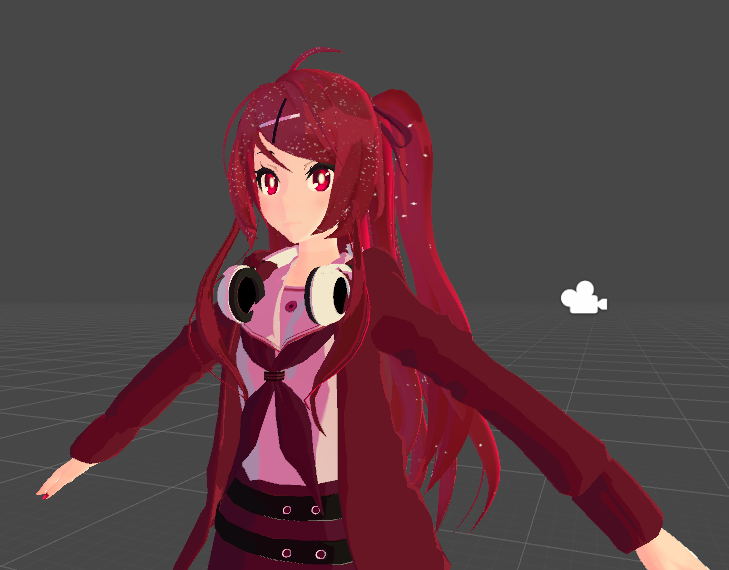
basically, in testing and worlds such as silent's light box my shadows and toon ramps respond appropriately to the direction of light sources
but in other worlds i either get no shadows or shadows only right below me, as if there is only ever a light source directly above me
solid grail
GitHub
UTS2-AC - UnityChanToonShaderVer2 Project / v.2.0.4+ - Different vrchat support, lighting manipulation, and style. - ACIIL/UnityChanToonShaderVer2_Project
lethal nacelle
this is?
solid grail
aciil's branch to support vrchat lighting fallback
solid grail
which reminds me
@drowsy field make an editor
lethal nacelle
https://i.imgur.com/5c5pTI5.png
one more question, so in the event of lighting situations like this where there is one directional light or whatever, how do i make my toon ramp(s) accept the light color fairly? specifically the skin
 peak heart
do a lookup on the ramp itself
 regal sable
Is it possible for a distance based effect shader to act more like a vertical standing cylinder rather than a sphere, like somehow ignore Y coords but the others stay the same? (the effects radius I mean)
solid grail
What are you wanting to accomplish with that
regal sable
Well I had an effect for a map planned but I didn't want it to be a giant sphere as it would overlay other parts of the map, and I didn't wanna segregate the different parts of the map, and not sure if it's the best way to go about it, just wanted to know if it was possible.
A cylinder room with an object in the center, multiple floors up, kinda like a spire in the center with an effect radiating off of it.
but the higher up you are it drops off, that's not what I want, and I didn't wanna make multiple gameobjects to accomplish the effect, so I believe the only way would be to recode how the distance is calculated.
(Issue is i'm kind of a perfectionist so if something feels off it severely messes with me and I get depressed and never feel like I can finish it)
Edit: 6:31 PM experimenting with some stuff might figure it out at some point.
past pewter
What is a detail mask?
I never actually understood it, so I want to know what it is.
Can anyone please describe it?
peak heart
for source engine models it's basically a way to blend in visual effects
for, well, detailing
buoyant cargo
With the standard shader, it lets you mask the influence of the secondary detail maps. It uses the alpha channel for the mask so if you have an opaque object, you can pack the detail mask into the alpha channel of the albedo
 grim junco
is there a way to make a shader not show locally but show for others?
steep swift
what are you actually trying to do @grim junco - for stuff around your head that could obscure your vision, if you put it into the Head bone, it will be scaled down for you to like 0.001
steep swift
Is this a generic avatar? humanoid? a prop you put on another avatar?
have you considered just moving your Viewpoint in the VRC_Avatar Descriptor forward such that you don't see the card?
grim junco
the card is a prop and the avatar is behind it
steep swift
the viewpoint could still work...maybe?
I assume this is a stencil-type effect
but if you don't want to change your viewpoint, two main tricks to detect yourself are based on the head bone scaling, or using a Camera enabled by default and seeing if it sees anything
detecting head bone scaling: skin your card to two bones, one inside the other, but assing 0 weight to the root bone and put 100% weight to the child bone. Now put this mesh onto your avatar, put you avatar's Head into the Root Bone slot. In the vert function, add this: if (length(unity_ObjectToWorld._m11_m12_m13) < 0.02) { v.vertex = float4(1,1,1,1); }
all the steps about skinning a mesh etc. are not necessary if your card is already inside the Head bone... The goal with skinning is to make it weight painted to another part of the avatar but use the unity_ObjectToWorld matrix to detect the scale of whatever you set as your Root Bone.
grim junco
ok i will have to try and work it out thanks for all the info on things to try
grim junco
@steep swift i moved the viewpoint and when i look down i see the card still
steep swift
Don't look down then? You moved it up or forward?
 gaunt citrus
can anyone tell me more about the shader blocking system? fallback system?
This page serves as a description of the Shader Blocking System, how it operates, and how shader authors can work with it so that their shader falls back gracefully when a user has Shaders blocked on an avatar using a given shader. When a shader is blocked by the Safety Syst...
the doc is pretty outdated, any updates you made vrchatteam?
is there a way to fallback normal?
what parameter should it be?
_normal or _normalmap or _normaltex or anything else?
@grim junco you will have to blend alpha or cutout (either way should help for you, cutout should be better performance)
on distance
that would be distance(camerapos, world normal)
on the backface only
if the whole card is only one mesh
id recommend you use alpha test, thats cutout/cutoff
tired token
@gaunt citrus How do you know it's outdated?
gaunt citrus
i read it a year ago for the first time
there must have been some changes until now
tired token
Nope, pretty sure it's still up to date.
 lament stag
Hi, so my avatar is the brain age guy
Is there a particle system that let's me do something like this?

I'm on quest, but having so little polygons and 1 material I can afford to do the pc shader glitch
main cipher
@tired token does that shaders you linked me have any demos or something that I can use to test if this fur shaders would actually work for my avatar?
I dont feel up to throwing money at something that may not work for me
the fur shaders I used worked for a friend of mine but didnt work well for my avatar
tired token
@main cipher not really? It's just how shaders do
 solemn junco
A shader is typically as customizable as you are willing to put some work into it xs fur supports masks to decide where the fur goes and can even control relative length with grey scale, so if it doesn't work for your model then you just gotta make a mask to define the behavior
peak heart
@solid grail
solid grail
@peak heart was referring to how it behaves when there is no realtime light or light probe
peak heart
oh
falls back to the ambient light from the skybox
theres not much I can do about abysmal map lighting setups but
it can be relatively mitigated
solid grail
there's some things you can do
peak heart
it should pull in as many light options as it can
if other avatars have lightsources it'll be impacted by those, if baked lightmaps are present it'll utilize those
solid grail
why do you have booleans represented by float values and not toggles?
peak heart
gotta swap some things over to toggles, yeah
solid grail
does source not factor ambient lighting into diffuse?
solid grail
I turned off half lamb cause it exposes shadow acne
solid grail
solid grail
ah
peak heart
swapping everything over to toggles rn, 1 sec
solid grail
so it doesn't factor ambient into ramp color
peak heart
might not, i'll take a stab at adjusting that
hrm, i wonder if ambient lighting isn't getting grabbed with world space light dir
solid grail
also does the reflection probe play any part at all? with an all grey spec map at max shininess I cannot see any reflections
peak heart
that's odd, i made some tweaks to the reflection setup last night, it's possible I botched something
give me a few minutes to make sure I didn't break it
solid grail
also without a directional light specular term is cut entirely
solid grail
which is what standard does but for vrchat it removes specular highlights in lighting where it looks like it shouldn't
peak heart
slam this in on the sphere and show me what color the sphere turns
solid grail
with or without a dir light
peak heart
both
peak heart
well, shit, this aint good
can't pull a dir for ambient light direction it seems
time to find a workaround for this
solid grail
you can, you just need to get a probe direction and add it to the main light direction
solid grail
oh also when you make toggles
in order to not generate a shader keyword per toggle you need to format them like this: [Toggle(_)]
past pewter
hey guys? I think we should add subsurface scattering as an option for a shader in unity
I've noticed that it makes things especially models look a lot more realistic in the terms of the character
f
it's just an idea
solid grail
what shader what are you on about
you just said a shader like anyone knows which one you're talking about
plenty of shaders in vrc have sss
velvet sorrel
To use those toggles in Amplify, instead of using the Toggle checkbox, set it as a custom property

GitLab
A simple subsurface scattering shader for Unity/VRchat that implements an approximation of a subsurface scattering effect.
solid grail
o right amplify
solid grail
oh hey that actually would be really easy to implement into my standard edit
maybe eventually
thanks silent
 prisma turtle
anyone here know how i can get into using depth shaders like a premade guide or some thing
past pewter
most of the tutorials on using the depth buffer in shaders in unity also apply to vrchat, since you can't enable the depth buffer through scripting it needs at least one light with shadows in the world to be enabled, access it in your shader with UNITY_DECLARE_DEPTH_TEXTURE(_CameraDepthTexture); @prisma turtle
prisma turtle
you got any links to guides or how to set up?
or do i just look up depth buffer on youtube
past pewter
these are good https://github.com/netri/Neitri-Unity-Shaders

GitHub
Collection of shaders for Unity3D and VRChat. Contribute to netri/Neitri-Unity-Shaders development by creating an account on GitHub.
examples of how to convert depth buffer to world space etc, do wireframes and mapping
prisma turtle
is there anything else i need?
plus im just trying to use it on a Avatar too incase you need to know
past pewter
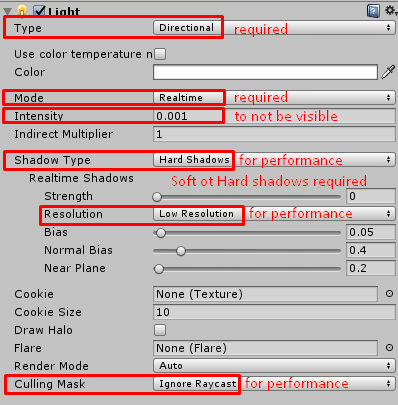
if you want an effect like this on your avatar, it won't work in world without realtime shadows, so there's a guide how to make a light with minimal performance that enables the depth buffer everywhere you go
prisma turtle
kk
past pewter
the downside is you have a lightsource on your avatar which makes it poor
prisma turtle
im not too big on that tbh
 past pewter
yeah, best to make two versions, one clean with good rating and one with the effect to switch to when you want to show off
past pewter
disabling won't help in counting it 😅
prisma turtle
kk
astral plover
Anybody know of a shader that points toward my position rather than my camera's direction?
past pewter
I do have a question
is there a sub surface scatter shader with roughness as well?
cuz I've always wanted to make things look real
like this
see what I mean?
anyone got any shaders they want to try out?
 craggy fulcrum
anyone got a double sided standard shader i could have?
steep swift
@craggy fulcrum this may work: https://gist.github.com/jminor/6a14271368e57b84c136d94906ae6603

Gist
Unity Standard-DoubleSided.shader. GitHub Gist: instantly share code, notes, and snippets.
past pewter
anyone got a principled bsdf like shader I can use?
I'm trying to make the ink demon look like he has human flesh with the exception of his bowtie, his inky body, and the glove.
he'll look like this, btw
also, what is a double sided shader?
 winged shell
Shader that makes a mesh have a texture on bothsides. Kind of like when you set culling from backface to off @past pewter
past pewter
thanks Muffin Of Good
 shrewd sage
It's been a really long time since I've done anything with VRChat
I've heard Cubed's is defunct and not planning on being updated as it's done its job being one of the initial options or whatnot
What are the main options/standard now for Unity 2018.4.9f1 for the typical MMD/anime-style whatnot? Or like similar equivalent to Cubed's?
 grave hatch
Migrating your project from Unity 207 to 2018 LTS isn't as difficult as you might think! Here's a guide providing each step in detail. # How to install Unity Hub and Unity 2018.4.X Unity Hub is a great tool that allows you to seamlessly install and work with multiple Unity v...
links to shaders near the bottom
past pewter
I've upgraded to the new unity and all of my shaders broke my unity project and whenever I try to enter into play mode it doesn't allow me
This is the error that comes up on the console. And although I removed all my shaders it still occurs
what shader would be the cause of this?
steep swift
Cubed shader is no longer supported in unity 2018. See the help text linked above. Also please do not upgrade to unity 2018 yet unless you are intending to beta test. In this case you should see #open-beta-info and subscribe to notifications at #open-beta-announcements
@past pewter please confirm the unity version you are using
past pewter
I am currently using 2018.4.11f1
steep swift
Incorrect. Please pay attention to #open-beta-info if you are beta testing
It is 4.11f1 with the newest beta
Migrating your project from Unity 207 to 2018 LTS isn't as difficult as you might think! Here's a guide providing each step in detail. # How to install Unity Hub and Unity 2018.4.X Unity Hub is a great tool that allows you to seamlessly install and work with multiple Unity v...
Note that it may change
steep swift
PLEASE subscribe to #open-beta-announcements if you are beta testing!!!!
Push the labs icon in #open-beta-info announcement two back
That will subscribe with a bot
Applies to you too @past pewter since you are using 2018
past pewter
sweet thank you a lot
shrewd sage
Is 2017.4.28f1 the current not-beta latest? @steep swift
steep swift
Correct 2017.4.28f1 is current release version
restive badge
How does a Unity upgrade cause shaders to become corrupted? I don't know much about shaders, but I'm pretty sure they have to adhere to some standard which is separate from Unity itself, and they're compiled when you build the project... So what's causing them to break exactly? You can speak in technical terms, I've got plenty of programming experience, and I'm really curious about the technical reasons behind this issue.
 jovial mesa
Looking at how they break I'd guess that in this case for a lot of them it's just that the serialized data offsets are wrong on some things serialized as binary. So textures get bound to slots that they shouldn't since they are offset, parameters that are expected to be in some specific range are now negative or very large and cause NaNs/bright flashes, and texture samplers lose their wrap mode settings. But that's just a guess, you'd need to be able to look at the actual changes in serialization to know the reason it breaks for sure, and it doesn't make a ton of sense that they are broken differently depending on the order that objects in the world are drawn. There might also be some state leaking/broken batching also breaking stuff.
restive badge
Okay, so you went a little beyond my knowledge there... You mention serialization and offsets. I kinda get what you're talking about even though I don't know what serialization is, I assume you mean the data is all organized in a big block like a file.
So assuming I'm right about that, what I don't understand is how this could happen. Like, isn't this shader code after compiliation simply uploaded to the 3D card, and run on there, and doesn't it operate on the data stored on the card, and won't that data have to be in a specific format because the standard for shaders dictates as such? I mean the shader standards didn't change, right? And shouldn't a shader written for Unity work exactly the same as one written for Unreal or Source 2 or any other 3D engine using OpenGL or I guess DirectX which I suppose I may have read at some point has its own shader standard. In any case, OpenGL didn't change, so how is it the 3D card suddenly can't find textures at the offsets it expects them at, when Unity shouldn't have a choice about where OpenGL is putting those textures on the card?
jovial mesa
Yes, the shader code should be unchanged. The issue in this case is more likely with the materials that save the parameters that need to be bound for the shader. Yeah if Unity is serializing as binary at some point what they likely do is something roughly like this.
BundleArchive archive;

archive << customShaderQueue;
archive << setShaderFileID;
archive << texture1ID;
archive << texture2ID;

etc
if they were to go and change it by inserting some data
stiff berry
That upgrade page also only lists Poiyomi Master as a shader that's actually not going to work in 2018. I just tried importing cubed's shader from github and it worked in 2018.
I don't think the part that's broken is the shader itself its the upgrading process that's broken. i don't have a copy of Poiyomi's old shader to confirm if that's also the case with their's too
jovial mesa
like if they changed it to
BundleArchive archive;

archive << customShaderQueue;
archive << instancingEnabled; // New thing
archive << setShaderFileID;
archive << texture1ID;
archive << texture2ID;
then all of the things serialized after that new variable would be offset when loading in packages from the old version of unity
texture 1 would be the shader ID in this case which is invalid
restive badge
I understand that concept, I just don't understand how the format of that data isn't set in stone by OpenGL shader standards.
jovial mesa
and texture 2 would be texture 1
it's not part of OpenGL standards for that
that's all on Unity's side
they can do it however they want
OpenGL/DirectX just need valid GLSL/HLSL syntax, if Unity screws up binding resources it'll still work, though it will act buggy like it does in 2018 using old assets
restive badge
I guess I'm asking a question which would require me to have a far deeper understanding of how shaders work to get a satisfactory answer to this. I assume it's done this way for a reason, but it seems crazy to me. This suggests that one could not use the same shader code on Unity and Unreal, because if Unity changing how it organizes the texture data can break it, well Unreal surely would break it since it would have a completely different way of organizing things. I thought shaders were deisgned to be cross platform.
jovial mesa
Well, you couldn't use the same shader in Unity and UE4 just because the resources they access for lighting and transform data are named/bound differently
shaders are designed to be cross platform, but they make assumptions about what resources are bound and where they are bound
like UE4 may call the world transform objectToWorldMatrix, and Unity calls it unity_objectToWorld or something
restive badge
And that's crazy to me, I thought all this stuff was standardized. Like how if you write a game engine that uses OpenGL it will always work if the card supports OpenGL. I thought shader code was like that. So long as the card supports that shader version, the code will just run. Which also implies the data formats are standardized in their locations and naming and such.
But what you're saying it sounds more like a shader is C# and how you do stuff with that is up to you.
jovial mesa
it is necessarily not standardized so that developers have the control they need
it used to be standardized if you look up fixed function pipeline stuff
but the things you could do with fixed function pipelines was extremely limited because of that standardization
a shader is a piece of code that the GPU runs. However, you need to tell it what resources to use when it is running so you can set 'variables' in it. Like a texture is a type of resource. Those resources get set via the DirectX and OpenGL API on the CPU side with C++ code generally.
restive badge
Yeah I was coding 3D games around 20 years ago before shaders were even a thing, and when I wanted to make a character's outline glow once I was trying to figure out how to render a spherical environment map and I learned all that knowlege was tossed out the window a long time ago. But Xiexe's toon shader did support them. 🙂
jovial mesa
yeah that was back when fixed function pipelines were a thing so a lot more of the ways things were bound would line up between engines
with fixed function you'd just tell it, "here's your texture, here's the mesh to render with the texture"
and it'd render it for you
wary junco
@velvet sorrel: I have roughness maps and don’t know how to turn them into smoothness maps
So I use standard roughness setup
Inverting the roughness and using it as smoothness doesn’t look right
 lucid spindle
roughness is the inverse of smoothness and vice versa, they may not look right because (assuming your packing them into an alpha channel) there liner space and your just used to seeing them in gamma, roughness/smoothness maps 99% of the time want to be in liner space.
you can set that for your roughness maps in the texture import settings by unchecking this
craggy fulcrum
oh btw thanks @steep swift
past pewter
I need help exporting normal maps
please
does anyone have a java script of it I'm looking for?
solid grail
Not the right channel ask modeling
past pewter
oh, okay
 fresh grove
hey. I dont have any shader creating experience but I was hopeing someone here could help me edit one shader
I dont need to change anything major on it so it should be pretty simple
fresh grove
I need to edit the SurfaceSpriteSheet shader. My problem with it is that I need it to be in sync with a song. but the shader plays the sprite frames even when the object the shader is on is disabled. I want to have a toggle that toggles the an object with the shader and a sound object. So the easiest I see the being fixed is by resetting the shader every time I enable it so it starts from the first frame again
would the be difficult or even possible?
steep swift
so what you want is for the shader to use a time as a property (animated from 0 to X seconds using an Animator) instead of using _Time.g which is the time since scene load, which you have no control over
that sounds like an easy change:
In the properties section, add:
_AnimationTime ("Animation Time", Float) = 0
In the CGPROGRAM add:
float _AnimationTime;
and replace all uses of _Time.y, _Time.g, _Time.x etc with _AnimationTime
particle systems have a different concept of time as well... if this is driven by a particle system, you may wish to use the particle system "vertex stream" time
solid grail
agePercent no?
In this tutorial we'll be learning how to use Custom Vertex Streams for particle systems in Unity. Vertex streams are set through a particle system's Renderer module and can be used to pass in additional
fresh grove
@steep swift in a case like this ```_FrameNumber += frac(_Time[0] * _AnimationSpeed) * _TotalFrames;
so
steep swift
sure _Time[0] -> _AnimationTime
fresh grove
since changing that to _AnimationTime breaks the shader
I only did the first 2 lines. Which make the option appear but it doesnt do anything
oh
steep swift
what do you mean breaks
steep swift
yeah that's weird syntax lol
note that _Time[0] (which is same as _Time.x) runs 1/20 normal time
solid grail
swizzle?
steep swift
so you'll want to animate your Mesh Renderer.Material _AnimationTime to go up at a rate of 1 every 20 seconds to match the original
rare to see people using [0] instead of a swizzle, when it's more typing anyway
fresh grove
well that just displays a single frame of the sheet
so the sprite sheet doesnt do the things anymore
steep swift
ok, did you animate or change your _AnimationTime value?
fresh grove
do I have to maually animate every second of the sprite sheet?
steep swift
no, what you do is you make an animation that at time 0 sets it to 0 and time 20000 set it to 1000
and just let it play
make sure to set your curves to linear
fresh grove
ooh
steep swift
in the Curves tab of animation window
solid grail
unity uses [x] a lot in its standard shader
fresh grove
I didnt know values that gradually go up for stuff like shader settings with anymations
steep swift
if this is for an avatar gesture, you can't use the gesture animation itself to do this...you're going to have to drive it with another animator
but I'm assuming you already had that because you talked about a larger animation that has music etc
fresh grove
its going to be a emote toggle so I will just put the animator in to one of the object the emote toggles
steep swift
k
fresh grove
well than. that was easier than I thought. Shaders are powerful, I need to learn them some day lol
steep swift
nice
 exotic wyvern
Hey! So what's the best toon shaders to use? I have been using CubedParadox shaders... but I can't do an outline around a cutout material.... what's the best shader to do that with?
a friend of mine recommended the noenoe shaders, but I have a friend who always has bugs with the noe noe ones where the whole avatar just shows white for them
velvet sorrel
If I were an unbiased, impartial party, I would say that the best shader is the one that does everything you want, and there really isn't a best shader.
However, that's not the case. The answer is mine.
https://gitlab.com/s-ilent/SCSS

GitLab
A surface shader for Unity providing cel-shading. (Forward rendering only)
exotic wyvern
hahaha
well, so long as no one sees me as pure white... and I can do outlines around cutouts :3 I'll use it!
velvet sorrel
(You can use this table of supported shaders to get an idea of what the popular ones are: https://docs.vrchat.com/v2019.3.3/docs/migrating-from-2017-lts-to-2018-lts )
exotic wyvern
Ooh! You're on that list anyways x3
btw, your shader looks WAAaaaayyyy better than what I was using before
the cutout is much smoother
 brisk bronze
How can I use two shaders on the same mesh?
Like for example, I want to use poiyomi's dissolve shader with another entirely different shader, is that possible?
steep swift
if you've optimized it down to one material, there's actually a trick for that: add another material slot in the mesh and put your second shader in
in the "skinned mesh renderer" component I mean in unity
not a second material in blender
so it's one submesh but two materials--they will reference the same mesh data but render in order
brisk bronze
don't use this you mean?
steep swift
ok try this first
duplicate the mesh and try getting the effect you want
having two material slots will behave as if you duplicated the mesh but just way more efficiently and guaranteed that one renders first if they are on the same queue
yeah I'm not sure this will give a good effect with dissolve
I think you have the option of doing a material reference swap with a different material into poiyomi when you want the dissolve
Or you have to get your hands dirty and write it yourself
brisk bronze
Yeah poi does have that
steep swift
or copy code from one shader into another
this process is likely not straightforward and requires some programming experience. if you're really motivated you can maybe figure it out
 ripe idol
It's easier with my code because everything is in its own cginc
like dissolve is in one file
brisk bronze
I don't have a clue of what to do when it comes to working with code lol
steep swift
true...you can #include it and call a function
but still requires some programming to know what to put and where
ripe idol
exactly
brisk bronze
This should be simple enough without the need to involve programming; I may just try the material reference swap and see if that could work...
steep swift
@shadow river have you been to spatialgate demo? It has an awesome portal distortion effect
For spinning emission you may be able to accomplish that with a particle system in the right shape
If you have like a mockup of what you are going for. Like Portal style portals? Or more like Dr. Strange fire sort of thing? Stargate type? Or something else
 shadow river
Definitely like stargate! @steep swift
If anything I could find an emission texture for a spinning thing too
And just animate it to rotate
But yeah a shader would also be preferred
Don’t know which one would be more expensive
 round inlet
anyone know the name of that sort of holo-wave shader some people use? another way i guess i could describe it is like a soundwave shader.
round inlet
past pewter
rollthereds fireshader
Does anyone know a good optimized and easy to use grass shader?
round inlet
thanks @past pewter , do you know by chance where i could find it?
past pewter
you could message Rollthered#5714
round inlet
will do, thanks
steep swift
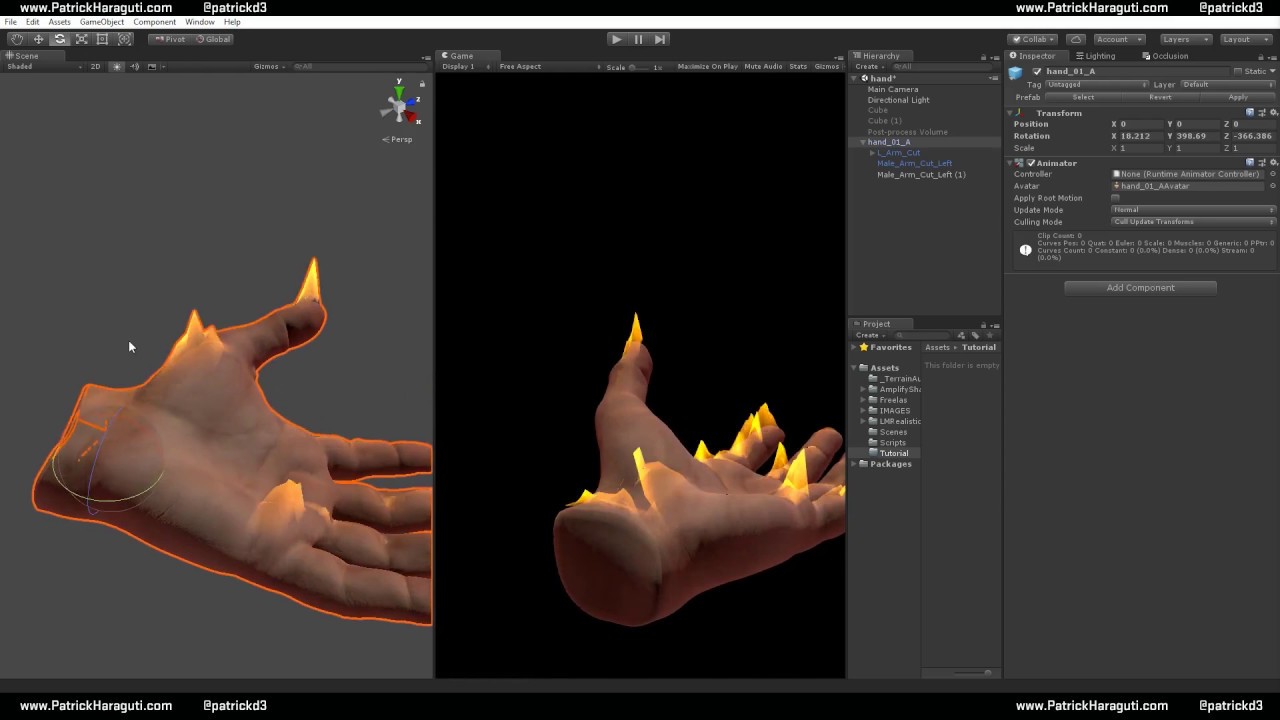
@round inlet Rollthered's fire is actually really great IMHO. Only stupid thing about it: his shaders tend to enable tessellation which is a huge unnecessary performance hit especially if your source mesh is already a sphere or a cube with even a few subdivisions.
I recommend turning off tessellation for improved performance: to do this simply remove the tessellate:tessFunction at the end of this line:
#pragma surface surf Standard alpha:fade keepalpha noshadow exclude_path:deferred noambient novertexlights nolightmap nodynlightmap nodirlightmap vertex:vertexDataFunc
It's from an amplify video so it makes sense it was left in with tesselation.
https://youtu.be/ZLMVwFhZNAc this one I think
Create a Flame shader with Amplify shader Editor in unity
 drifting oxide
Hmm, what does it mean when a custom worlds on default Unity objects: Cube, plane, sphere, etc. But shows up black on custom 3D models?
velvet sorrel
Those models might have bad normals
lethal nacelle
@past pewter any shader that supports alpha textures. or, nearly everything except mobile shaders >u>
past pewter
I'm looking for one that has an environment texture
just so it looks realistic
photorealism is quite the thing these days and I was hoping I could bring them into unity
for vrchat
anyone got any free shaders for hair I can use that support environment textures?
past pewter
actually, I want to know how mask textures are applied
solid grail
Take a color from a texture or elsewhere and use it to do something or not do something i.e.: make something shiny in a certain spot or not.
past pewter
gotcha
past pewter
I've tried to do detail textures on a model, but for some reason, I don't think it works
does anyone have an instruction guide to where I can do any of it?
cuz the texture of the mask is black and white
does anyone have any shaders that support these kinds of mask textures?
past pewter
I don't think so
you see, I'm trying to do an image effect where this image over here
one moment
gets masked off.
therefore, it'll move
Here's an example
one sec
please
it's like an effect on shaders
but here's the problem
solid grail
my shader lets you choose the mask channel
past pewter
wanna send it to me via DM?
solid grail

GitHub
A Unity Standard Shader hack centered around VRChat compatibility. - RetroGEO/reroStandard
past pewter
thank you
velvet sorrel
@past pewter Try my hair shader! https://gitlab.com/s-ilent/hair-with-anisotropy
It features super smooth transparency and anisotropic highlights
past pewter
does anyone here have a Deviantart account? I have one where I post renders of characters that I do for VRChat
grand jackal
hi guys, i've been working on a grabpass shader but the grab texture its gray colored, any idea why?
also i wonder how can i add a pattern to add some distortion
i actually added a pattern and i multiplied it by the grab texture but this doesnt work at all
past pewter
have screenshot?
 fierce vine
I've seen a shader in some worlds which accurately replicates an LCD. I'd like to use this shader, but could only find a $10 shader on gumroad. I don't feel like paying for it. Is there a free alternative to the one I found? (Key word is alternative, I'm not sailing the seas here.)
stiff berry

GitHub
A physically accurate screen shader, that displays the screen as subpixels. - Xiexe/RGBSubPixelDisplay-Shader
fierce vine
Awesome, thanks. 🙂 Wasn't aware it was a xiexe creation
 paper bay
Does anyone have a shader (that is not like flat toon/anime shader but a bit more realistic because i like deep shadows)
that would make materials double sided so my model's hair from inside is filled in and not transparent?
 sharp pike
A lot of toon shaders will accept smoother and/or darker ramp textures that will give you more realistic looking shading.
paper bay
I'd like some recommendations for these that have this double side thing in them
sharp pike
I think you'll have difficulty finding one that doesn't support double sided rendering. My personal recommendations would be Xiexe's Toon Shader and Silent's Cel Shading Shader.
paper bay
I'll check them out, thank you!
The thing why I mentioned I need that is that I hoped default Unity shaders would satisfy me, and they would if only they supported double sides ^^'
So I thought it might be a rare setting
sharp pike
It's very easy to enable in shaders, but there's usually a little bit more work required to edit them so that the backfaces are lit correctly. With just the change to enable double sided rendering (setting cull to off) the shader will look the same on the front and the back, which is a little odd if you're expecting the front to be lit and the back to be dark.
past pewter
does anyone know a good fur shader/materials?
 sly gyro
Are some shaders on the asset store not compatible with VRChat?
solid grail
Any that utilize scripts
past pewter
Any one know how to make a fps counter i know its a shader
solid grail
Error's hud has one: https://vrcat.club/threads/errors-hud-shader.2210/
VRCat: Community-Run VRChat Forums
%--------------------------------------------------------------------------
%
% Error's Heads Up Display (EHUD) Shader Version 1.01
% 2018-08-05...
 midnight dirge
How would I make an image always appear in the center of a players View?
And how do I use a stencil to only render that when looking through another Object?
 lethal rock
For the stencil have a read on the unity documentation:
https://docs.unity3d.com/2018.4/Documentation/Manual/SL-Stencil.html
As for drawing things in the center of the screen that’s a bit of forbidden knowledge but if you promise to use it responsibly I can explain in private
 lethal rock
Do you mean having reflections that aren’t invisible?
past pewter
ye
I've been in the vrchat world and I need something that looks authentic like this
one moment
like this
lethal rock
Unity Standard shader can read reflection probes from a world if you set the smoothness to 1
past pewter
true, but it appears transparent
solid grail
is it supposed to be transparent?
velvet sorrel
@paper bay Try my hair shader too
https://gitlab.com/s-ilent/hair-with-anisotropy
By default, the cull mode is set to cull backfaces, but if you turn that off it'll render both sides.
(That's assuming your hair's a seperate material)
past pewter
it is supposed to appear that way, yes
solid grail
just use standard set to transparent then
 obsidian merlin
Anyone know of camera to object distance shaders? Pretty much the closer you get to an object, the more it appears and the further away you get, it'll slowly disappear
fluid hamlet
@obsidian merlin there are a few i know that have similar options build in (mochi’s uber shader and poiyomi’s toon shader have something like it)
ripe idol
steep swift
Here is the snippet from Cubed's Distance Fade shader that does the distance fade dithering. Feel free to put that into any fragment or surface shader,but be sure to change the "i.uv0" to be the name of the texcoord or uv value in v2f struct, and change i.posWorld to whatever variable holds the worldPosition in v2f. Some shaders will make this easier than others.
                float2 node_8453_skew = i.uv0.xy + 0.2127+i.uv0.x*0.3713*i.uv0.y;
                float2 node_8453_rnd = 4.789*sin(489.123*(node_8453_skew));
                float node_8453 = frac(node_8453_rnd.x*node_8453_rnd.y*(1+node_8453_skew.x));
                clip((1.0 - (.35*pow(distance(i.posWorld.rgb,_WorldSpaceCameraPos),.3)*lerp(1.0,node_8453,_DitherAmount))) - 0.5);
@obsidian merlin
Poiyomi's can be downloaded at github: https://github.com/poiyomi/PoiyomiToonShader/releases
I can't find the correct version of Mochie's Uber shader so /shrug

GitHub
A feature rich toon shader for unity and VR Chat. Contribute to poiyomi/PoiyomiToonShader development by creating an account on GitHub.
near flax
posting node code
🤢




 solid grail
Was cubeds made in shaderforge or something?
 split girder
yep
At last i think so, since he made me a small custom shader once and it was under forge as well
steep swift
I would post the whole thing but cubed is not really supposed to be used any more with the 2018 update since it's outdated, so probably best to move on... but that snippet should work in just about any shader if you change the "i." variables to match
and yes I know it's node code, but to rewrite the effect would take effort on my part more than copy and paste
solid grail
For distance i just use i.posWorld.w :v)
haven't touched it in awhile so my outline width is on some straight up retard shit float Width = _Outline * min(3,start.pos.w) * .002;
but hey it works and I have bigger fish to fry than outline code that only I ever actually use 🤷
Here that is as just
float4 worldPos = UnityObjectToClipPos(v.vertex);
OUT.Dist = worldPos.w;
then
if(IN.Dist < _Threshold) discard;
I had tried to just set the verts to the same place instead of using discard but it wasn't giving me the results i wanted 🤷
 fervent onyx
How do i make hair glow like that in darkness? Is it ready-to-use shader or some settings?
near flax
@fervent onyx emission
fervent onyx
Thanks!
Also a stupid question - to make eyes glow i had to open blender again and make a special material for eyes?
I got single material for whole head
lethal nacelle
@fervent onyx you have a few ways of tackling that, but the best option would be to go into blender and make a new material just for the eyes and assign the tris making up the eyes to that material
or you can just make two different versions of the texture you want, such as an eye_only texture that makes every part of the face except the eyes transparent, but that may not give you the results you want, and is also GPU heavy
sharp pike
If it's one material, why wouldn't they be able to use an emission map to make only the eye part of the texture emissive? A bit of a waste to add another material just for glowing eyes.
velvet sorrel
@lethal nacelle That is definitely not the best way.
solid grail
Just make an emission map for the eyes
lethal nacelle
sorry, wasnt thinking
i over thought it and didnt read, forgot that they wanted a simple emission ^ ^`
@fervent onyx DONT LISTEN TO WHAT I SAID, it was bad advice. read Mysteryem's comment!
shrewd sage
Assets\02 - Resources\_PoiyomiToonShader\Scripts\TextureArrayCreator\Editor\GifImporter.cs(6,26): error CS0234: The type or namespace name 'Imaging' does not exist in the namespace 'System.Drawing' (are you missing an assembly reference?)
How to fix this?
past pewter
are you using the latest version of that and the proper version of unity? https://github.com/poiyomi/PoiyomiToonShader/archive/master.zip
 neat plover
I remember seeing a shader that appears to reconstruct a mesh on the polygons level the closer you got to it. Does this kind of shader sound familiar to anyone?
steep swift
Yes, it is a geometry shader. Geometry shaders can slide or move whole polygons around, leading to fun and fascinating effects.
lethal rock
I should do something like that
neat plover
Oh, ty I'll look it up
past pewter
What should I do to get a shader double sided?
neat plover
Are you talking about back-face culling?
past pewter
Just don't want it to be transparent on one side
neat plover
I would say if your using someone's shader see if there is an option to turn off backface culling. If your shader doesn't have that option you can go into blender, selected all polygons of your mesh, duplicate then, and then flip the normals ( this will double your polygon count and isn't really recommended) If your making your own shader research backface culling and incorporate it into your code.
stiff berry
inside the shader find the SubShader { and add Cull Off @past pewter under it
and if the shader explicitly has Cull Back already, Change it to Cull Off instead
neat plover
Is that something you would find in the shader code or something you can do in unity?
stiff berry
inside the shader code
neat plover
Ah ok
solid grail
I haven't used it since last year and it was a mess back then.
I know ACIIL made a vrc specific branch awhile ago but never tried it
I use toony standard on this
ah what small preview
last thing he implemented was a texture packer I quite like for pbr stuff
 woeful venture
give it a shot, I would love to see how that looks in uts2
solid grail
lets me use any workflow under the sun and make universal textures for the shader.
The packer is a compute shader
woeful venture
one of the main differences in at least 2.0.7 is that it does a lighting remap pass from the system shadow light, using tricks from system gi and behaves like lambert while still allowing ramping
solid grail
I'd need to compare the two when i get home https://github.com/Cibbi/Toony-standard

GitHub
A toon shader with standard elements for vrchat. Contribute to Cibbi/Toony-standard development by creating an account on GitHub.
woeful venture
does toony standard strip it's unused shader keywords?
it has a lot of features that might not get used all the time
solid grail
It doesn't use much more than standard keywords
woeful venture
yes, but there's a lot of them
solid grail
#pragma shader_feature _SPECULAR_WORKFLOW
#pragma shader_feature _ _ANISOTROPIC_SPECULAR _FAKE_SPECULAR
#pragma shader_feature _ENABLE_SPECULAR
#pragma shader_feature _DETAIL_MAP
#pragma shader_feature _EMISSION```
just these, no?VERTEXLIGHT_ON is standard
 drowsy field
@woeful venture you are totally aware of what i been coding. You sure you havent tried my extended version of uts2?
woeful venture
I'm pretty sure I've only used Kobayashi-san's version, unless I'm missing something
UTS2 is a shader that is more designed for creatives on their own models, since you need to do things like create secondary uv2 maps to make full use of it
Have you considered merging some of your changes or suggesting them to him? He's very receptive, but highly focused on optimization
Im very glad you took notice of this @drowsy field , it seems you've been studying UTS2 for a while
some of the things you've added (I'm reading your git now) have made it into 2.0.7 in various ways
lethal rock
The shader whitelist doesn’t exist on PC, only quest
woeful venture
well yes, but it would be nice to include in the vrchat client generally, is my meaning I suppose
solid grail
But why when it already has xstoon as a fallback (I think)
The properties in UCTS don't lend themselves very well to universal fallback.
drowsy field
@woeful venture i have suggested a few merges to unity3d-jp in the past, its the reason it works in vrchat. My later upgrades will not be easier to factor into modern uts2 because mine is a dramatic rewrite and not node graphed generated. They would have to redo the core.
(tbh the fundamental base needs to get before-vrchat ready uts2 to work was resolving light direction always and use the ambient scene GI)
after i took it further with HDR colors (not saturate() and fix some complications), extend delta lights, light color balances, extend shadows, random corrections, improve readability, alpha sorting improvements, etc etc etc
solid grail
Have you got an inspector yet?
drowsy field
at some point what i had then became too different. A true fork
@solid grail looking for help
solid grail
GitHub
Material inspectors made simple! Contribute to Cibbi/Simple-inspectors development by creating an account on GitHub.
drowsy field
are there any verbal guides for inspectors out there?
drowsy field
i need to know the fundamentals more than random arbitrary code samples. I gotta learn intent of the systems
inspector are to different to what i like to do
solid grail
I mean they're more akin to actual coding than shaders are.
drowsy field
yeah
then gotta think about the entire domain open and what should be the limit
if its just "just make properties pretty"
well i think its vanity
what i really want
is indenting and closing categories
solid grail
Then look at how other inspectors do it. That's honestly the best way to learn
There isn't anything in the way of hard documentation for most of the specifics.
And there are a lot of weird quirks that require specific workarounds that each inspector tackles in different ways.
drowsy field
i wanna keep it simple
solid grail
Unless you want to mull over every single wiki result for material inspector functions there's no simpler way to learn.
My inspector is extremely simple cause it's based on the standard one.
I just do category buttons at the top instead of fold-out boxes.
drowsy field
ah heck this tool needs to rename variables
to work effectively
i cannot lose backwards material saves
it might have editor duplication mismatch if theres more than one...
solid grail
??
drowsy field
thats the weird thing about editors i dont get. If the same editor appears among two packages what happens?
found out the hard way shared distribution of a global editor is a pain to isolate
must be one in whole project
end users would have no idea how to fix that
solid grail
Isn't that a non-issue assuming the editors are in the same folder for anything that needs to use them.
like if more than one person uses simpleInspectors it shouldn't matter cause those files are in the same place in assets.
drowsy field
well it looks CustomEditor "Cibbi.SimpleInspectors.AutoInspector" works out of the box
in assets yeah, i found asset package storing became dependent, its ability to find the same files moved around assets/ became needed as users do that
solid grail
Then it's the user's fault for moving stuff from where it is intended...
drowsy field
i like how *.shader just work anywhere plopped down as long as no duplicates
solid grail
In general people shouldn't be moving package folders around to begin with.
drowsy field
thats the side topic thoo, its when the same editor appears in assets and dealing with it without a clue
say for example using ThryEditor
whole reason i had to pause looking at it for later
i can go on a tangent about the speed of properties string lookups that likely happens every frame with like +30 properties and several files
which is generally what i see these shader editors doing
if its done once at init thats would be good
solid grail
But why would the same editor appear anywhere else other than the file it's in inside assets.
Like if two people use the same library for inspectors and you import both packages why would there be a duplicate when the library location doesn't change?
drowsy field
think about how to two different shaders would be installed separately and how