#shaders
2 messages · Page 5 of 1
 blissful verge
either way idrc since reported a world for having >10 ripped versions in and devs did nothing
so ye
 nova pecan
ahaha
 stiff berry
why not just follow the source tutorial for that window shader? https://www.youtube.com/watch?v=EBrAdahFtuo

Twitter: @The_ArtOfCode I did an effect a little while ago that shows rain dripping down a window. I figured it could be good to use in a game perhaps but si...
it doesn't follow the screen in the end result as far as i can tell
maybe that's not the same shader idk
looks pretty close
nova pecan
its like 2rs of videos oofs
stiff berry
hey maybe by the end of it you'll learn a thing or two to make your own
nova pecan
true
 lucid cedar
Oh yeah I followed that tutorial and it came out great
Just don't go higher than 4 samples
I left it at 32 and lagged myself out when I got too close
stiff berry
could probably do 32 if you were able to do separable blurs in vrc https://www.youtube.com/watch?v=SiJpkucGa1o

How do image processing apps and realtime applications apply effects so quickly? Dr Mike Pound decides to blur his Christmas Tree... Mike's code: http://GitH...
well maybe you could with two grab passes, but sounds complex to me
good video though
or actually just replace the random function with a texture in that loop he uses and it'd be much better just from that
he also uses float2 offs = float2(sin(a), cos(a))*blur; from inside the blur loop but that seems to be a constant number as far as the loop is concerned
that's probably the main source of the lag tbh
lucid cedar
I thought it would be the texture samples
stiff berry
3 trig functions and the sqrt probably are more impactful than the texture sample if i had to guess
 somber widget
is there a good way to detect when a shader is rendering to the photo and/or stream cameras?
 stiff berry
Nice
stiff berry
you should see if you can move this line float2 offs = float2(sin(a), cos(a))*blur; outside the loop. Both a and blur don't change inside the loop so you could move it out to save on performance greatly
or you could keep a low sample count i guess
but what he's doing there is kinda silly
you'd basically have to replace
for(whatever)
{
float2 offs = float2(sin(a), cos(a))*blur;
...
offs*=something;
}
with
float2 baseOffs = float2(sin(a), cos(a))*blur;
for(whatever)
{
...
float2 offs = baseOffs;
offs*=something;
}
if i remember correctly
lucid cedar
Wouldn't the compiler optimize it out anyway?
stiff berry
i don't think so
i mean you can try it yourself
maybe if you marked it as static or something?
idk
 vale hemlock
And... done optimizing! Now my shader has the same number of draw calls as the Unity Standard Shader and is just a bit more CPU heavy. Which is understandable, considering what it does. Now for the other time consuming part-modifying my avatars to use it properly...
lucid cedar
So it has one base pass, a forwardadd and a shadowcaster pass now?
vale hemlock
You can have the most efficient, amazing shader in the world, but if your mesh is garbage, it won't look the best it can be. The grind goes on. ;o;
I'm so proud of this, though! All that hard work paid off. ;o; https://imgur.com/a/e0PZJEq
 lucid cedar
It's been a very long time since the shader fallback system and I still can't get Noenoe to fallback to the toon shader
It always goes to Standard.
Name is Noenoe Toon Cutout and it has a _Ramp property
 wary junco
it needs to find "toon" in the shader directory path, the name of the file doesn't actually matter
Your edits fall back to Toon/Lit for me, Rokk
 astral plover
I asked this last night but still looking for an answer. How would I go about editing a transparent shader to make it look like the image on the right instead of the one on the left? I want to hide parts of the mesh that are behind other parts, but while retaining overall transparency https://docs.unity3d.com/uploads/Main/TransparentDiffuseZWrite.png

    {
        Tags { "Queue"="Transparent" "RenderType"="Transparent" }
        Blend SrcAlpha OneMinusSrcAlpha
        LOD 100
        ColorMask RGB
        Cull Back

        Pass
        {
CGPROGRAM```is what it looks like right now
vale hemlock
I only know how to fix that in ShaderForge, unfortunately.
astral plover
I think adding "ZWrite On" below "Cull Back" is supposed to work but it doesn't for me
vale hemlock
My solution for it was to use GrabPass to collect what's behind it and then lerp that together with the normal colors.
Oh right. That reminds me.
The weird transparent effect in your picture didn't go away until I swapped the tags "Queue"="AlphaTest" "RenderType"="TransparentCutout"
astral plover
I just did that and now it's not rendering things behind the model and the parts of my model are still visible behind it
vale hemlock
But yeah. That's what I did. I made it an Opaque and used GrabPass to make it "transparent".
lucid cedar
@astral plover in that example they turned ZWrite On. Remove the ColorMask you have there.
That should make it work
lucid cedar
It's all on the same material right?
astral plover
yeah, and same mesh
lucid cedar
What does it look like right now then? The shader in action
astral plover
Trying to hide the teeth and the collar behind the head
As well as other details that wouldn't be visible on the mesh if it were opaque
essentially I want it to render as opaque first and then transparent after. Not sure how
lucid cedar
Unfortunately this seems like it may also be a vertex order issue?
astral plover
I know exactly nothing about Shaders, I'm not a programmer
So I wish i knew lol
Is it possible to do two passes? One where it renders as Opaque first and then the second as transparent?
I know multipass shaders aren't ideal
This is the shader if you wanted to take a look at it
GitHub
:pencil2: Test of an hologram material made in Unity. - andydbc/HologramShader
vale hemlock
There's no need to do that. Just use a GrabPass before your Pass.
astral plover
I don't know what that is
Like I said, 0 experience
Could you show me what I'd have to add?
vale hemlock
Unfortunately, I'm only really familiar with ShaderForge, but... try looking through Section 2.2 in this link. https://catlikecoding.com/unity/tutorials/flow/looking-through-water/
A Unity Flow tutorial about underwater fog and fake refraction.
 steep swift
The other trick I do is add a pass before your pass block: Pass { ZWrite On ColorMask 0 }
lucid cedar
That's probably far cheaper than a grabpass
steep swift
That will do a z prepass and then any faces you render after that will only render if they are at the same z value
astral plover
That almost worked perfectly! But now my eyes and hair are doing weird cutout things
steep swift
Yeah The downside is you will occlude some other transparent objects behind you.
Well you have to decide what effect you want
Maybe you want hair to be see through but not the face: easiest way is split the hair into a separate material with its own shader and don't do that zwrite step for the hair
Maybe do the hair after the head (material order matters)
lucid cedar
Perhaps you can change the prepass to have cutout?
steep swift
Ah yes
I think the way to do that is actually copy and paste your normal pass, and just add ZWrite On ColorMask 0
astral plover
    {
        Tags { "Queue"="Transparent" "RenderType"="Transparent" }
        Blend SrcAlpha OneMinusSrcAlpha
        LOD 100
        ColorMask RGB
        Cull Back

        Pass { ZWrite On ColorMask 0 }

        Pass
        {
CGPROGRAM```is what I have right now, where would I put that?
lucid cedar
Generate a new Unlit Texture shader in Unity, and take the CGPROGRAM stuff from it. Put it in the first pass you have there
Then add a clip() call on the texture's alpha in the frag() function. I believe you would want clip(_Cutoff - col.a);
Where _Cutoff can probably also be replaced with just 0.5 if the shader has no cutout slider
astral plover
I'm not doing this right, every time I try to do that it breaks
How much of the new shader do I copy?
Just the stuff directly under CGPROGRAM right?
 steep swift
Everything until ENDCG
astral plover
Ok I'm unsure what Rokk means by the clip() stuff, I can't even find a frag() function
steep swift
Add clip(col.a-0.5); before the return line to get cutout
In the frag
6 lines before the ENDCG there is fixed4 frag
astral plover
oh ok I see it now
oh I added ZWrite On ColorMask 0 just above the CGPROGRAM and it worked
oh my god it's perfect
you guys are life savers thank you so much!!
 night oxide
Does anyone know if Shader Graph's final products, are compatable, with Unity 2017?
steep swift
If you can generate ShaderLab code and/or hlsl, that code can possibly be ported to unity 2017. You might be better off recreating the graph in Shader Forge or Amplify, which do support 2017
night oxide
Thanks
lucid cedar
Is there a way to either get the Z rotation of the mesh, or apply just the Z rotation in the vertex shader?
somber widget
You'd probably need to derive the Euler angles from the object to world projection matrix
I think I saw someone post such a billboard vertex shader here a month or two ago actually
@lucid cedar https://github.com/Toocanzs/Vertical-Billboard something like this?
GitHub
A vertical billboard shader for Unity. Contribute to Toocanzs/Vertical-Billboard development by creating an account on GitHub.
lucid cedar
Ah thanks, will give it a try
Trying to get an eye tracking shader to work. Problem is that it seems to just have its rotation entirely in world space right now
somber widget
What do you mean by that?
lucid cedar
Well, I need a mesh to always face the camera. But if its parent is rotated (or itself), I don't want it to keep itself upright
So the shader should only really mess with the X and Y rotations and achieve its goal that way, since eyes don't exactly roll
somber widget
These are on a skinned mesh renderer right? Sounds like you'll need to find the center of rotation somehow
Or use a mesh for each eye
If it's on a skinned renderer you could maybe encode a tangent space vector to the origin in a UV channel or something
lucid cedar
That's not really the issue
They are assumed to be non-skinned meshes with their origin point set to the middle
somber widget
Ah
lucid cedar
It works perfectly right now but the eyes are always upright
So if I were to, say, do a handstand
The eyes would be upside-down in their sockets essentially
somber widget
So what I'd consider is first applying the rotation portion of the object world transform, then additionally applying your computed rotation, then applying the translation
That is, you place it in the world with its neutral position, then rotate it into place
lucid cedar
That's what I initially tried but then the mesh fails to face the camera correctly. I'm not sure if I can make the adjustments
somber widget
Well it all comes down to the face-the-camera transform at that point. Maybe debug that one with a mesh at world origin?
steep swift
The root bone determines the object to world matrix
somber widget
You'll probably want to have rotation limits so you'll need to construct that from Euler angles anyway
steep swift
You can actually change the root bone to any game object afaik with little consequence
lucid cedar
I'm not using a skinned mesh renderer
The origin point isn't the issue
I don't want my eyes to remain upright when I tilt my head lol
steep swift
What are you doing exactly? If you have this mesh inside your head it should follow the orientation of your head by defauly
somber widget
The other thing you can do is transform the look vector into object space
stiff berry
there's an existing shader eye tracker here if you want to reference it https://github.com/Vilar24/VilarVRC
GitHub
Vilar's Shaders for VRChat. Contribute to Vilar24/VilarVRC development by creating an account on GitHub.
somber widget
For this you'll need to invert the object world matrix
lucid cedar
I've taken a quick peek at Vilar's but I can't really read it very well, it's amplify generated as well
steep swift
World to object already done
somber widget
Then you'd just rotate in object space and do a normal object world transform
lucid cedar
Currently the mesh just straight billboards itself towards the camera in the same way name plates do
steep swift
I think vilars wants each eye as a separate mesh to solve this
lucid cedar
My eyes aren't leaving my head, they just spin/rotate wrongly
steep swift
I never used it. I assume the same trick was used for that head tilting Hoppou. I love those
somber widget
If I have a shader that contains a lot of complex operations that ultimately depend only on uniforms, will the uniform-dependent part typically be optimized to execute only once per draw call, or will it run once per shader invocation?
stiff berry
i don't actually know if this works but try benchmarking it by making the one variable that depends on uniforms be static const
i remember doing this with a matrix variable and it seemed to show improvement but at the time i wasn't using the gpu profiler so i don't necessarily trust that benchmark
astral plover
How would I make a basic invisible shader That will fallback to a particle shader with an image if shaders are disabled
 lethal rock
You don’t necessarily have to use world space coordinates, you can transform the camera coordinates using the world to object matrix and rotate anything that needs to be rotated around 0,0,0
 humble frost
How would I go about making certain shaders work properly with particles? For example, I am trying to use a distance fade effect on the particles but at the moment, the game object position is being used instead of the particle position
stiff berry
look into vertex streams. All of the particles are rendered in one pass so the center isn't the center of the particle anymore, but vertex streams let you add in per particle data
this describes how to use them for facing towards velocity vector, but you can pickup on a lot of the details here for position too https://realtimevfx.com/t/unity-5-5-5-6-align-mesh-particles-with-velocity-using-vertex-stream/2328?u=dom

Real Time VFX
Here is a shader based solution to get particle meshes orienting with velocity: Particle Component: Shader based on ShaderForge Custom Lit: meshes are pointing in Y direction. options for Particle Rotation might work different than expected. Simulation has to be in w...
although perhaps instead of using object center for distance fade you should just be using an interpolated world position from each vertex and fade in the fragment shader
there's no need for vertex streams in that case
as far as i can tell at least
 near flax
@lucid cedar if you're still looking for eye tracking stuff, here's something i wrote a few months ago
lucid cedar
Uh, so I got the eye tracking thing to work decently
But it flips upside down when it goes above a certain scale
It's like the camera look vector inverts itself or something
Like as soon as I scale the object higher than (2,2,2) it flips
stiff berry
That's a problem with using cross (forward,up) when you just put in 0,1,0 for the up vector
If they are separate objects you can pull the forward and up from the objecttoworld matrix
Or the inverse one of the two
Probably inverse
lucid cedar
Yeah, it just rotates 180 degrees on the Z axis and I have no idea why
stiff berry
Wait are you looking at Euler angles? If so then that is gimbal lock
Sorry actually you want the forward/up from inv camera to world for that now that I think about it
steep swift
So you'd want a vector from eye position to the object. What would you use for up or how would you convert that into a quaternion
lucid cedar
I'm getting the object origin in world space like this float4 origin = mul(unity_ObjectToWorld, float4(0, 0, 0, 1));
steep swift
To avoid gimbal lock
stiff berry
Maybe I don't know how you do that actually
lucid cedar
Actually the issue seems to lie in how I'm getting the "up" position for the eye, which is necessary to get the correct look direction:
float3 up = mul(unity_ObjectToWorld, float4(0,-1,0,1)).xyz;
Am I doing anything wrong there?
Well somehow changing it to float4(0,1,0,1) worked although I'm not sure why
somber widget
-1 would typically be a down vector
steep swift
Wat? float4(0,1,0,1)?
That's going to include translation in your "up vector"
float3 up = mul(unity_ObjectToWorld, float4(0,1,0,0)).xyz;
Or simply
float3 up = mul((float3x3)unity_ObjectToWorld, float3(0,1,0));
@lucid cedar
somber widget
Ah yeah that too
lucid cedar
Now I just need to find a decent curve to make the eyes occasionally look forward instead
 fathom herald
wheres the newest flat let toon?
steep swift
@fathom herald Silent has a good version of flat lit toon here: https://gitlab.com/s-ilent/SCSS/

GitLab
A surface shader for Unity based off Cubed's Flat Lit Toon shader
 keen basin
anyone know what's going on here?
im only using cubes flat lit so idk what the hell is happening
only happens on some maps in certain areas, and it can also appear on other peoples screens too
steep swift
That is a bug with old versions of Cubeds shaders when realtime lighting is used (baked light maps won't show the issue)
steep swift
@keen basin Please switch to a better shader or download the patched version from https://github.com/cubedparadox/Cubeds-Unity-Shaders

GitHub
A compilation of custom shaders for Unity3D. Contribute to cubedparadox/Cubeds-Unity-Shaders development by creating an account on GitHub.
keen basin
that was...weird
steep swift
you said something the bot didn't like evidently lol
flashed by a bit too quickly to see. maybe lots of caps
keen basin
any way i can check which version i have of cubeds in unity
steep swift
you have the old one because it has that bug
you might also have multiple copies of cubed shaders
if you download models from ||that website|| they sometimes come bundled with buggy or broken shaders
keen basin
this is a fresh project so i douobt it
and if its the website i think ur talking about then yes
that was back in october lul
steep swift
it's not fresh if it came with old version of cubed shaders
just delete anything saying Cubed's Unity shaders
or heck delete all shaders and then import good versions from github
keen basin
fresh as in im not using a master project
 tired token
Also it's not recommended to use a toon shader for a world. :P
steep swift
scruffy it was his avatar. the artifact was the overlaid add pass on the screen in clip coordinates
keen basin
ive spent 25 hours importing this thing from cm3d2
tired token
Oh okay on mobile so can't really see
steep swift
sure,. anyway you know the problem now. just got to reimport new shaders and clean up old versions you may have
tired token
Ooh yeah that bug, good times.
tired token
Amplify is 50% off! ($30)
https://assetstore.unity.com/packages/tools/visual-scripting/amplify-shader-editor-68570
NEW! Compatibility with Unity 2019
NEW! Support for Post-Processing Stack shaders
NEW! Compatible with Substance in Unity plugin
NEW! Support for Custom Render Textures
NEW! Support for both HD and Lightweight SRP
NEW! Multi-Pass on Templates
NEW! Xbox O...
 ornate hare
does anyone know if there is a way to fix culling on the noenoe shader
 split girder
culling of what ?
steep swift
You can edit the shader. Noenoe was designed, afaik, to be easy to use. So it has Cull Off (no backface culling), and for transparent, ZWrite On together with blending. You can change the culling by Editing the Shader and commenting out or removing the Cull Off lines @ornate hare
There are other toon shaders including XSToon which had Cull as a dropdown menu to make it easy to change, as well as advanced mode which lets you set stenciling and zwrite settings
lucid cedar
I made edits that allow you to change the culling mode
 grim raft
i have a shader that works fine in unity, but is unsync/split in vr and not working basically, idk how to explain ut good. but is there an easy fix for that?
https://pastebin.com/VgseAqWX got it in some shader pack

shows clouds
steep swift
ShaderMan shaders are known to be quite broken in vr. Here is my suggestion: uncomment float2 uv : TEXCOORD0; // stores uv then add o.uv=i.uv in the vert function. And in frag everywhere you see uv= put uv=i.uv;
@grim raft shaders should not be doing anything with _ScreenParams if you want a vr safe effect. I'd recommend staying away from shaderman in the future
You might need i.uv.xy if it's declared as float4
ornate hare
@steep swift thank youuu
night oxide
Which shader is the most commonly used now-adays?
For avatars that is.
lucid cedar
That's up to you. I prefer Noenoe or Silent's shader (I think it's an edited Cubed's and it's really good)
 mortal dirge
Standard(Spec)
lucid cedar
Xiexe's XSToon is more difficult to set up but can look good too
I recommend Rero Standard over Standard
Handles the average VRC world better
Not because those worlds are badly lit, but because Standard only starts completely working with realtime lights around
mortal dirge
Ech. I use standard(Spec) or the Roughness variant.
night oxide
I've been using Cubed's for some time now, and were just wondering, if there is a more updated/popular one people are using now
grim raft
I like Mochies
@steep swift thanks, i know its bad and broken but I have a cool animation I need a cool material for^^ going to try that later
 rapid olive
can someone help me out with a shader im trying to get work? I have a version that was built on shader graph and im trying to see if I can reconstruct it using shader forge.
its a little complicated but ive literally got the whole thing, just need someone to let me know if its possible to reconstruct in shaderforge cause vrc is livin in the past still
 velvet sorrel
Mine is more like a rewritten Cubed's at this point
Shader Forge is a bit outdated and doesn't fully support some things available in newer Unity versions. You would have better luck with Amplify, but it's not free.
 lofty dragon
This is a really specific ask, but would it be possible to create a shader which uses animated gifs as a texture? I'm making a world themed around geocities pages and I have to convert hundreds of gifs into sprite sheets otherwise.
lucid cedar
Probably not unfortunately
The texture itself is imported as just a still image
Maybe there's an addon to automatically do this, I don't know
 river hawk
The closest you can do is make the gif into one/multiple sprite sheets and have the shader animate those
 pine sand
Or convert the gif to a video and use a video texture
 past pewter

XFur Studio is the ultimate fur solution for Unity3D. The only fur solution that lets you grow, paint, shave and groom fur inside of Unity! With advanced, PB...
Is this the Shader for the Fur
hmm.. Imma buy it but first I need to make a quick 500
split girder
This is the one you're probably looking for https://xiexe.booth.pm/items/1084711

VRとパフォーマンスを主にした本格的獣シェーダー ほかの似たようなシェーダーはレンダリングパス数が多いため、ラグなどを起こしやすいのが多いです。 私のは、すべてワンパス。 毛と肌のレーヤー別...
 worldly salmon
poop
past pewter
Now I can be furry
 cloud spruce
looks like water? 🤔
https://gyazo.com/2e73c461e77a8f08ef89cfd221c43308
 vale hemlock
Doesn't really look much like water. Does look pretty, though!
cloud spruce
ah :x prolly just would need different mask, i was aiming to make some kind of watery waves in the eyes.
i think i might slow them down so its easier to look at up close
past pewter
I like the eye shader you have there 😉
 crisp dawn
Is there any good optimized fur shader for free?
tired token
For free? Probably not.
 winged ether
i have some problems with Poiyomi toon shader, some light in maps brakes my textures and turns me completely black, happens in the box for example
tired token
@winged ether What version of the shader are you using?
winged ether
ooh i forgot to say that i fixed it by updating the shader
tired token
👌
 shadow jetty
Anyone know if Amplify Shader Editor has the correct nodes to work with to make your own custom toon/cel shade for VRChat without me having to know how to create any extra nodes via code to capture the world lighting. And still receive and cast shadows.
Used a lot of Shader Forge myself in the past and doesn't seem possible. Because I don't want myself to be lit up 24/7 even in the dark. And Unity's Shader Graphs require LWRP and HDRP.
I hate Cubed Shader and stuff and really want to add additional textures to my materials that are effected by the normal view or whatever that a lot of MMD models come with. I really want to recreate the MMD Shadeless look in Blender.
 coral shale
How do I get a rainbow outline on my avatar? I don't want everything in my avatar to glow, just the outline of my avatar.
lucid cedar
@shadow jetty you don't necessarily need to make your own shader to get something that isn't Cubed's
Cast and receive shadows and look like Blender is not feasible I think
Because then you cast shadows on yourself, which doesn't work well with toony shaders.
Amplify does have a lot nicer lighting nodes than SF
But the more advanced techniques require manual coding of some sort
Such as a custom node
shadow jetty
Thanks. I been doing more looking into it and found that it does have a World Space Light Direction node and a World Space Light Position Node. It's on sale and still supported unlike Shader Forge so I guess I'll probably get it and see what I can do.
Making my own character from scratch and she is looking good so far in Blender. But looks like garbage to me in Unity, complete trash with cubed. And somewhat decent with my custom Shader Forge shaders because the extra textures I can apply.
lucid cedar
Those nodes probably only work with a realtime directional light around
Otherwise you should substitute a fake light dir
velvet sorrel
You should try my shader
@shadow jetty Amplify has a lot of nodes useful for making a custom shader, but you need some custom expressions to properly inherit attributes from baked light, or some creative nodes. What kind of look are you going for? There's a big difference between what's possible in Blender and what's possible in VRC.
shadow jetty
At the moment just seeing how it's all set up to get it working.
I would prefer to have it look something like that. But the character I am creating is Es from Blazblue. So I wouldn't mind even achieving the Guilty Gear 2D style for their 3D models that Arcsys does
Experimenting with Custom Lighting and seems to already be decent.
velvet sorrel
GitLab
A surface shader for Unity based off Cubed's Flat Lit Toon shader
My shader isn't Amplify, but if you don't get the look you want from it, you can see the code
shadow jetty
Unfortunatly I only experiment with nodes :P
I rather become better with blender before I dare touch coding.
velvet sorrel
I used ArcSys's presentation as a reference for some of the shading features, so you might find it suits your needs
For example!
As you look into this, you'll find that code and nodes are pretty interchangable
shadow jetty
Does indeed seem like a nice shader. The colour seems to stay more true to what it is meant to be.
But I am now addicted to having the extra effect from being able to look around and the texture moves around xD
velvet sorrel
My shader supports matcaps and things too
shadow jetty
huh additive and multi. matcaps I guess is what I was after
ur shader might've been what I always wanted to make
lucid cedar
Synergiance's shader also supports spa and sph
lethal rock
Only if they’re renamed to bmp though
lucid cedar
I've been using metal.sph more lately and it's quite nice for fake metallic on smaller surfaces
Belt buckles and rings etc
I got it saved as PNG in my sample project
shadow jetty
I just make my own textures as a png using GIMP. Theres a nice tool that does an easy colour to transparent type of gradient thing.
velvet sorrel
Those are matcaps too
lethal rock
Yeah they’re matcaps but blended
 keen jay
Can anyone help me on this please?
I'm looking for a shader with the following features :
- double sided
- opacity support
- scrolling UV
(Poiyomi doesn't work, since it's not supporting the fog from unity I need on my map)
cloud spruce
unlit?
tired token
Does that mean you want the fog feature, because you didn't list it!
 fervent orchid
anyone knows what shader is used for the hair? (pretty sure it's 2 different ones, but the outlining for the hair looks dope, and I want to find atleast somethin similar)
lucid cedar
It looks like just a regular outlined toon shader
 drifting stag
does anybody have a blood shader, becouse ive been having trouble finding one
and i was gonna use it to make a cute loli do a gesture overwrite which spawns a knife and then covers her in blood making her look insane
cloud spruce
it would be more helpfull if you would describe the effect instead of just naming it 'blood shader'
but from what you said i think of this one: https://booth.pm/en/items/1161778

影付きの光が必要です
drifting stag
pretty much something like that.
cloud spruce
i have no idea if it has color change or texture change
but looks like what u described
well even if it doesnt it shouldnt be too hard to implement it ;P
drifting stag
im not the best with shaders
@cloud spruce yeah im no good with shaders, idk how to get it to render over my model
drifting stag
i see, you put the shader on a sphere
cloud spruce
sorry but i myself didnt use this shader i only seen it around. so i cant guide you how to do the bloody knife
 azure basin
does anyone have some nice screen effect shaders for keyframing that they could lend
 umbral comet
okay after a damn long time i redownloaded everything but
i have trouble finding the option to put an outline on the texture
im currently struggling with one site being transparent and the outline always fixed those issues for me, it was so simple, i swear i had th eoption earlier when i checked but... i migh thave clicked something? cuz it generally looks different now
lucid cedar
You have a compile error
Go to console and fix it
@umbral comet
Which unity version are you using?
umbral comet
aah i see
yeh i just went to some yt video from back in the days
and got all my stuff from there
D:
alright this gonna take a minute longer than expected xD
but thx already for helping out =w=
umbral comet

i managed to make the outlines work but now the texture is a bit messed up & i cant seem to tell why D:
its just one big texture, i didnt seperate them
 dark owl
Hey, anyone know of a shader that just swaps between images like a slideshow? Would love to showcase some screenshots and other images on a map (or even an avatar).
past pewter
Is there a way to make an Animation like Dissolve Shader and make people Dissolve
Like Thanos Style
I want to make cool Thanos-Jimmy Animation
 crystal wadi
i think this is also possible with a particle combination
lucid cedar
Vertex normals?
Well that's the reason this is happening
There's splits there, make the vertex normals more consistent. Not sure what the best way to do that is
But you can adjust and display them in Blender
crystal wadi
humm not certain this will work ... just to see try changing the Scene view from shaded to deferred normal .. could it be possible to see if the normal has power not equalized along the boarding edges .. normals not in the same direction
i was trying to figure out a way to adjust this for a water shader the other day
 faint fulcrum
Thats available only when main camera is set to deferred mode, and the shaders needs to support that rendering type
past pewter
How do I make Portal Shader to work with Silent's Cubed Shader
steep swift
@past pewter It's a stencil so probably you edit silent's shader and add a stencil block inside the SubShader or Pass block, something like Stencil { Ref 123 Comp Equal Pass Keep }
somber widget
Also if you're using stencil effects you might need to adjust the queue settings to ensure things are rendered in the right order (and not clobbered by other avatars or world shaders)
lucid cedar
Yeah, otherwise you get weird issues
Make sure your stencil "writer" always renders before the mesh that is affected
steep swift
I think if you combine the meshes then it should render them in material order
So if you do that you can have them on the same queue,
somber widget
@steep swift in the order that the materials are declared? Interesting
I've been editing shaders just to be sure
steep swift
I haven't done rigorous testing on this, but I've only noticed issues with render order when they are on different meshes or particle systems
Logically two materials are on the same object and same position so any sorting order would sort both materials precisely the same, and they would have been added likely in material order
somber widget
I've seen folks with intermittent ordering problems on the same mesh though (although, with transparent shaders on the same queue vs using different queues on the same mesh)
lucid cedar
Yeah same
steep swift
on unity 2017 too? I haven't played with stencils but that is a shame if so.
*recently. But when I did I always got something wrong. Be it batching or using a separte particle for the stenciler
You need everything on one skinned mesh renderer, including the stenciler sphere etc
puts in plug for their own LyumaMeshTools editor script which lets you convert meshes to skinned and combine skinned meshes
somber widget
Ah yeah come to think of it the case I was thinking of was a booth-sold avatar that uses multiple skinned mesh renderers as a workaround for the lack of any way to disable lip sync in an animation override
Also why use a stenciller sphere when a cube puts slightly less load on the vertex shader and skinning logic? :)
steep swift
Yeah lol definitely use a cube.
somber widget
Hell for that matter use a single tri and have the vertex shader cover the screen in clip space ;)
Though maybe the extra stencil writes would be more expensive at a distance
faint fulcrum
Yeah, not the best option as fill rate stacks up fast in vr resolutions
steep swift
Anyway the point of stencils is often to show one part of an object differently from a specific angle so probably it will end up a stencil plane or simple object
I'd like to see someone try an object with all meshes merged including stenciler and materials in the correct order and see then if rendering order is correct
 lapis trail
Does anyone have the prefab that tracks the time spent in the world (for avatars)? I know it's probably a shader
I downloaded the VTS package but I assumed these were for worlds, not avatars
lucid cedar
VTS is indeed for worlds but you can make it work on avatars
lethal rock
Neitri’s clock works on avatars, it shows the amount of time you’ve been in world. The one that shows the actual time is the one that only worlds can have
 vivid furnace
what version of xiexe shader do i get?
lucid cedar
The latest
vivid furnace
there is two when i googled it
past pewter
Is there a shader that gives "Motion-Blur" effect when I move ;c
steep swift
@vivid furnace github links are usually the best choice. Here: https://github.com/Xiexe/Xiexes-Unity-Shaders

GitHub
A re-write and restructure of XSToon. . Contribute to Xiexe/Xiexes-Unity-Shaders development by creating an account on GitHub.
vivid furnace
ty
past pewter
Where do I learn these Dark Arts?
somber widget
Please don't.
past pewter
@past pewter Learn shaders.
past pewter
I am not a coder; I wish to learn the dark arts.
steep swift
Try amplify (paid) or shader forge to learn shaders graphically. There's a lot you can do
 round inlet
anyone got a cool galaxy shader they can link me or somethin?
steep swift
@round inlet here is my version of starnest which should be way less laggy than the usual version: I use only 3 volumetric steps on mine (it says 6 but ignores the first 3 iterations): https://github.com/lyuma/LyumaShader/blob/master/LyumaShader/StarNestAvatar.shader
 round inlet
thanks so much!
 lethal nacelle
uhh vrcam did something weird
removed details on my avatar and fucked the lighting even tho its supposed to be a toon shader
now it just looks like unity standard for some reason and i dont appear to be able to fix it
both this and an earlier mat
im using cibbi's shaders for almost everything on this avatar, Syn's for the fading star effect on my hair and gun
this is what its supposed to lok like:

i think i have an idea why and im gonna test it to make sure im not retarded
fixed it
so apparently if u have unity set to build for android even if u dont have the assets installed
it will still try to publish to android...
<@/
i didnt even click the button i just clicked on the tab lol
 meager beacon
Any simple always-first cutout shaders? Basically a shader that puts an image first but also has an alpha cutoff? I have the former, but it doesn't have the cutoff.
lucid cedar
What do you mean "first"?
meager beacon
er
overlaid over everything else. Basically, so a UI menu could be visible in front of a wall for example
steep swift
to add cutout to a shader, use the clip function usually before the return statement in the frag() function. if its argument is negative, it will discard that pixel ... For example, if tex is the value your shader returns, to discard pixels with alpha < 0.5, you can do:
clip(tex.a - 0.5);
 formal salmon
guys!
pls i need a Mobile shader that has rendering on both surfases of a plane
does anyone have that shader?
 halcyon trench
velvet sorrel
halcyon trench
velvet sorrel
I'm looking for people to test the newest version of my shader.
You can download the latest version here: https://gitlab.com/s-ilent/SCSS/-/archive/master/SCSS-master.zip
Feedback would be appreciated!
 drifting hill
that looks amazing, i will try it out
formal salmon
that shader looks like mobile one only bright..
or a little cartoon flat toon.
@velvet sorrel cartoon shader + mobile shader light reflection..
velvet sorrel
Well, I have no idea what you're talking about
formal salmon
this is how it looks like your shader.
formal salmon
this is how it looks like...
its nice
can u make the shader to work on both sides? to see the textures on both sides
it doesnt reflect the lamp light..
this is what im talking about
navi emits some light but nothing on the avatar.
there is the mobile i use.
@velvet sorrel can u make the shader to have reflection from lamps?
tired token
There's documentation for that shader, there's even a nice little button there for you to click.
velvet sorrel
I'm unable to reproduce your issue. Please provide more details on your materials and light setup. (I'll respond when I wake up.)
formal salmon
its just a lamp that is not visible on the shader
normal lamp that is installed on navi.
formal salmon
i havent tried in unity...only in game ive noticed that i dont see the light on the avatar from navi as u can see in the screenshots above.
steep swift
Ok so you're saying your navi's light (a realtime point light using a delta lighting pass) appears to have no effect on your avatar when using silent's shader, while it does when using other shaders?
Also you had a question about both sides... do you mean backface culling? (The Cull shader option)
velvet sorrel
@formal salmon Can you provide more information?
past pewter
anybody know where I can find that sparkling galaxy shader/material?
formal salmon
@velvet sorrel Silent's cel Shading>Cutout
thats what i used to see in game and the result was the ss from above.
maybe it needs a more bright light to see the reflection?
before i was using and still use was
Mobile>Bumped Diffuse
also about surfaces i was talking about this
vivid furnace
i am using RealToon shader for my model.. will that come out fine for vrchat?
formal salmon
CubedParadox Flat lit toon is the most used shader in vrchat i believe..
velvet sorrel
Not anymore, it's quite outdated
@formal salmon It's all in the manual. Set Cull to Off.
formal salmon
cubed paradox outdated?
velvet sorrel
Yeah, he doesn't update it anymore
It doesn't receive or reflect lighting properly
formal salmon
a...its 1 of the best shader i use since its balanced on pretty much all maps..
velvet sorrel
It will look dull on any maps using high ambient light values.
formal salmon
of course it doesnt... its a cartoon
well it has a little bit reflection.
if u think that looks dull...u should see other shaders...are even worse 😄
anyways...
since that shader works fine il stick with it till il find something else that looks better.
velvet sorrel
I don't mean reflect like a mirror. If you shine a torch into a piece of cardboard it reflects it.
formal salmon
i dont really have that much experience with shaders...i only use the best shader that fits the avatar..
whats behind those shaders, scripting? c#?
velvet sorrel
ShaderLab
formal salmon
how do u make a shader?
velvet sorrel
Coding it
velvet sorrel
Well, I'm still wondering what the problem you see is. Do you see the light in the editor?
formal salmon
il check it out...
like i thought
your shader needs a lot more power in light in order to have reflection
velvet sorrel
If you change your avatar to Standard, is the light visible?
formal salmon
if i use mobile shader in game it does have
this is when i start to see the relfection..
the value i had was that
well.
and yes
with standar already has reflection with the value it had
velvet sorrel
Hmm...
velvet sorrel
Okay then, I'll see if I can fix it
formal salmon
also for mobile...not that big difference but it looks better than standard tho..
mobile looks almost perfect on white tiger except i cant or i dont know how to make the shader to work on both surfaces..
it looks like this...
but
i want it like this
velvet sorrel
Sublime Text
velvet sorrel
Can you right-click the shader folder and select Reimport?
I notice you have an Inspector error. That shouldn't be happening...
formal salmon
i actualy like your shader...
except the light reflections are wayy too "bright" sort of speak...
i mean.
its not that smooth where the shadows starts
did the reimport
error still stays there.
velvet sorrel
Weird!
velvet sorrel
Okay, I've fixed the light intensity on add pass lights.
You can get the latest version from here: https://gitlab.com/s-ilent/SCSS/-/archive/master/SCSS-master.zip
formal salmon
yesterday ive imported a tool i think..
it messed up my menu from rig avatar for some reason..
hang on a sec
if u still work on the shader can u make the light to be more smooth on the avatar?
il try to make an example.
velvet sorrel
So, in the shader I have a feature called "Lighting Ramp" that lets you put a texture that defines how smooth the light is
formal salmon
this is how yours looks like...
this is mobile..
but the reflection..
il try what u said.
velvet sorrel
Included with the shader under the "Silent's Cel Shading Shader\Assets\LightRamps" folder are more ramps you can use. So drag in "LightRamp Soft" from there and it'll be softer
formal salmon
i need to put the actual texture the avatar has?
velvet sorrel
No, that space is only for ramps
Also, try right-clicking the .cs file and selecting Reimport on it specifically 👀
formal salmon
il just reimport the hole pack
ok now i get a little reflection there.
a..
to make smooth reflection what i need to check?
@velvet sorrel its just me or i cant upload the avatar for some reason.
holly cow
velvet sorrel
Are you sure you don't have another SCSS_Inspector.cs in your project?
velvet sorrel
It won't upload because it sees there are two scripts in your project defining the same thing, which is really weird if you don't have another copy of my shader
formal salmon
2?
a.
could it be the other shader or?
well not yours but..
right...missing stuff
velvet sorrel
You said you haven't installed shaders before. Maybe another avatar you used includes an older version of my shader?
All those errors at the bottom are coming from the top one
As for your other question...
velvet sorrel
See, that's how you make the lighting softer
formal salmon
aaa
il check it out
il try it out
didnt know it needs images to edit a light smooth....
i always thought it needs something to change like a volume metter.
velvet sorrel
This way lets you tweak it finer
velvet sorrel
Yeah, use Indirect Light Boost
formal salmon
i can lower it down as well right?
velvet sorrel
If you want to be darker, change the colour tint to be grey
formal salmon
just ignore those ss...for the moment.
ah nvmind..
il just give up.
its not that i cant do it.
for this avatar i need a mobile shader with 2 surfaces.
probably il might try to make one my self..sooner or later.
velvet sorrel
Is that with the updated version?
formal salmon
second version is the updated yes.
velvet sorrel
The mobile shader is inaccurate, so matching it isn't a priority for me
formal salmon
no problem
velvet sorrel
You could just make the light brighter
formal salmon
if i make it brighter i believe it would affect the other ones as well. it would just increase..
your shader its perfect for what u did.
u did a nice job with it.
velvet sorrel
Thanks!
formal salmon
it is possible to unite 2 different material for 1 shader?
i mean to reduce the shaders in numbers.
steep swift
@past pewter here is my version of starnest which should be way less laggy than the usual version: I use only 3 volumetric steps on mine (it says 6 but ignores the first 3 iterations): https://github.com/lyuma/LyumaShader/blob/master/LyumaShader/StarNestAvatar.shader
 rough zodiac
Anyone got that Manga like Shader, with the black and white dots and such thats been around?~
 modest smelt
Hey, all. I'm very new to shader scripting, but I think that my current shader is coming along well. The intent is to create a refraction shader with panning Normal Maps for a simple and effective water shader.
For my next step, I would like to add world-space UV mapping (if that is the correct term) to this existing shader. The reason being that the Normal Maps would tile seamlessly between multiple objects. It would also give me some flexibility as to what I can apply the effect to.
Could a shader expert take a look at what I have so far and give me some tips? Feel free to just use the shader if you like it, of course. Don't even need to give me credit for it. Just have fun. Thanks in advance!
steep swift
I'm not experienced enough to answer your question exactly, but I can point out that a type of world space UV mapping is "Triplanar Mapping" in case you want to look up how to do that
modest smelt
I've worked with Triplanar mapping shaders before, but never attempted to apply their logic to an existing shader.
stiff berry
You can probably get away with just using worldPosition.xz as your uvs for a water shader
which is a planar mapping if you want to sound fancy
you probably won't need the other two planes seeing as it's always going to be flat water
lethal nacelle
some assistance is required!
Syn's shader on some normal settings for that toon style everyone loves and sees
vs.
mobile shader
considering going thru and atlasing this model. its only two mats but i did combine the meshes of the diamond pickaxe hidden in my hand and my actual avatar itself, so perhaps it messed with the UVs
hopefully that fixes it
if not, idk wtf happened :<
anything for optimization tho. gonna atlas the textures and see if it insta fixes
while that happens and if it doesnt work, any explanations as to why this happens?
stiff berry
Are you using cutout in the working shader?
The mobile shader doesn't support cutout if so
stiff berry
I would try to make the pieces as actual geometry in blender instead of using alpha to cutout the texture
lethal nacelle
does quest not support cutout at all?
stiff berry
you can atlas the texture by making a texture with only the color palette of the model on each pixel and then manually move polygons in the uv sheet to those pixels like this
lethal nacelle
or i could i use, say, the default unity shaders?
stiff berry
It could if they wrote the shader to support it
lethal nacelle
oof
stiff berry
I don't know if there's a performance reason why they haven't though. Not a mobile expert
lethal nacelle
dude that atlas style tho is actually great
my model is surpisingly hhigh poly tho so im probably just gonna cut out bits of the mesh
stiff berry
yeah it makes my avatar like 80 bytes in texture size
stiff berry
if you do end up atlasing like that, make sure to set the filtering mode of the texture in unity as "point" instead of bilinear or trilinear
so that it doesn't blend colors between the pixels
but yeah traditional atlasing methods will look surprisingly bad on a low poly model like that where you basically just have solid color quads everywhere
I don't suggest doing it how you will see in tutorials for normal avatars
lethal nacelle
aight
it just kinda triggers me a little lol
i was planning ond makiing it really easy to switch between skins for this avatar
so all of my avatars can have a minecraft counterpart for quest
kinda annoying that im gonna have to go thru and delete faces for each one > <
stiff berry
You could probably write a blender script to convert them all to work without cutout but that's sounds somewhat complicated
lethal nacelle
i do not know how to do that but i might learn at some point uwu]
anything to make it easier
hm...
is there such a thing as a "delete transparent faces" function for blender?
or at least, an addon that does just that?
imma check\
stiff berry
not that i know of, that would be the somewhat annoying part of automating the whole process if you did write a script
if you could get the model in a form where each quad is a single pixel on the texture it wouldn't be too bad to do
but i don't think that's how they come probably
stiff berry
i mean the model needs 1 quad per pixel basically
lethal nacelle
thats doable
stiff berry
because then you just write a script to loop through each quad and delete ones that have 0 alpha in the texture
which isn't hard at all
lethal nacelle
this is how minecraft skins are formatted
making it 1:1, quad-pixel is easy since i already started it off like that
i just need to re-make the model where each part is now one quad-pixel
then figure out how to write said script
stiff berry
that makes it much easier then
stiff berry
meh 8k tris is nothing to worry about
triangles don't matter as much as you would think
you could get really fancy and after you delete transparent faces you could combine quads that are connected to reduce tricount
but it's probably not worth the effort
somber widget
@light shoal what do you mean by always showing?
 light shoal
liek always showing above another object
lethal nacelle
... hm?
what are you trying to accomplish
not specifically with the shader
but what are you trying to do with the avatar
light shoal
trying to make like a city that you dont have to see above because i want to do a perpective animation
so like itd have to be under the ground
lethal nacelle
oh
youre asking if you can make an object visible no matter whats in front of it?
light shoal
ye
lethal nacelle
uhm
light shoal
i tried but with complex models it gets f'd
lethal nacelle
something about culling > < i dont mess around a lot with mesh culling since i mainly make avatars and not worlds and usually its just one quick "alpha cutoff" and you are done
but there are custom shaders that will let the meshes theyre drawn on be visible through anything
i think cibbi's does this? as an example
stiff berry
the answer is ZTest Always but if it's more than one thing, then things get sorted by distance anyway
once you decide to throw away z testing you basically have to sort things yourself or make it all one object
light shoal
alright thx
 fluid hamlet
https://youtu.be/K8yFUswyslM Anyone can maybe help me out and tell if it is possible to make a screenshader that does the ascii effect from this game OP (the ascii appears based on distance it seems)

Death end re;Quest Opening Movie Sequence! Don't forget to thumbs up, comment and subscribe for more content. If you would like to buy #DeathEnd" and want to...
lethal rock
I wouldn’t say it’s not possible but idk if it’ll be easy
fluid hamlet
think i found something ... have to try it out later
GitHub
ASCII art image effect for Unity. Contribute to keijiro/AsciiArtFx development by creating an account on GitHub.
wary junco
I'm looking for a reflective cubemap shader that follows object rotation. Does something like that exist? https://gfycat.com/ComfortableBelovedHoneybee
 stiff berry
does a realtime cubemap work?
 tardy kernel
realtime cubemap? do you mean straight up realtime reflections?
for that the world needs reflection probes, which are super easy to add
but it's a world thing, and unfortunately a lot of world creators are unaware of their usefulness
if the world has reflection probes in it, then using a PBR shader like standard shader with low roughness and high metallic will give you that
for non-static objects though i think it's a no-go
if you had a shader that accomplished that it would be VERY expensive performance wise i would think
i'm no shader expert though
lethal rock
Having a fallback cubemap might be nice, I’ll look into that
crystal wadi
this one uses a script with shader

SkyCube RT is a tool with shader library for in-game real-time HDR/LDR
image base rendering solution. It renders cubemap with specular chain in real-time and
cost less than standard cubemap rendering. It is a perfect solution for the case when
you want use the same en...
wary junco
I can't use realtime cube maps because it's on an avatar
tardy kernel
plus, cubemap is just an image, and you want to render non-static objects in the reflection
so cubemap isn't really what you're going for there
steep swift
@wary junco I assume you would just transform the view rotation used for the cubemap sample into object space first
You just want the cubemap to rotate with the object right?
Though if you do this, the sky background will also rotate which could look unnatural... you might be able to avoid that by either making it a solid color, or add another texture slot for skybox and make the sky texture from the rotating cubemap transparent
wary junco
Thanks, looks like I have my work cut out for me just for a little effect, lol
 median forum
the particle lags so much now,even with 1 particle if i move my mouse around to fast it crashes my game,will they fix that or is it only my problem?
lucid cedar
Local particles cause game breaking local lag - https://vrchat.canny.io/bug-reports/p/particles-cause-game-breaking-local-lag
@median forum
lucid cedar
"rip animators" has been a trend for ages :P
In case you were around for VR IK footstep triggers
median forum
what is vr ik footstep trigger?i used to play with paritcles and stuff before the updates that made it lag,i stopped for a while and start doing avatars again recently and found out the particle lagsss
 lucid cedar
I recommend trying it out. However, always be careful for keywords
velvet sorrel
I tested it a bit. It's okay. It's nicely written, but it uses keywords, so I would not recommend using it.
lucid cedar
There's always that catch lol
If you set the inspector to debug mode you can see a material's keywords
velvet sorrel
It doesn't actually do anything to get light directionality from SH, so it's flat without a directional or point light
lethal rock
I should probably look at an example of that, my shader just uses a static light
 shell harness

 brisk bronze
Does anyone here know where I can find the shader in the background?
It's the scanline glitch one.
 rich bear
Anyone know where that rainbow shader is everyone uses?
steep swift
@brisk bronze That avatar looks a bit like claw. If so, I don't believe that specific shader is public. However, if you want the voxel effect, Xiexe has a voxel shader on their patreon which could be used as a basis for adding scanlines to it. If you just want the scanlines, I would look around for a "hologram" shader. I believe there is a freely available one that people use. The scanlines can possibly be emulated with a scrolling emission texture in something like poiyomi's toon shader.
@rich bear Probably talking about rainbow outline or fresnel? I think poiyomi's toon shader has an option for this
brisk bronze
Oh alright. I'll take a look. In the meantime I have a pretty weird problem. I imported my model into blender because I wanted to isolate the scarf from the rest of the "accessories" without breaking the prefab in unity, all went well and I exported it back into unity as just the scarf without the model, and now whenever I use any shaders, the textures don't work at all.
@steep swift
Take a look here:
when the shadow outline mode is off, that issue goes away.
also the voxel/pixel effect is what I'm after.
steep swift
Please avoid the "Flat Lit Toon" shader. It's not being maintained and has multiple known issues. If you really want to use Cubed's shaders, you should look at using Flat Lit Toon Lite
@brisk bronze did you atlas your materials or something? If you do work in blender, I suggest merging your meshes. It looks like you have this as a separate mesh renderer. I would also suggest fixing the import scale. In blender make your meshes have units set to meters and in unity set import scale to 1.
Sorry I can't answer your questions but I would basically start by getting your avatar to work in a lite shader, standard or choose another better maintained toon shader
brisk bronze
already fixed but thanks for the input 😃
also do you know of another, free version of the voxel shader?
I don't want to become a patreon just for the shader.
lethal rock
voxel shader? if its being distributed through patreon, chances are that's the only way to get it and obtaining it any other way would be immoral
if you're looking for a better shader than flat lit toon, I'd try the one I make, which is free to use and looks quite a bit better. You can find it on GitHub.
brisk bronze
well I know
I was asking him if he knew of an alternative.
I'd rather not become a patreon just for a shader.
Which shader did you make?
 formal helm
Hello everyone, I have a question. Today Im trying to publish an avatar with a Standard Shader to VRChat for PC but for some reason it tells me that is an unsupported shader. Does someone know if the requirements to publish have changed? Until yesterday I published several avatars with the same shader.
steep swift
You must have your project still set to Android in File -> Build Settings
make sure your Build Settings are set to Windows / x86_64 @formal helm
formal helm
steep swift
if you make avatars for both Quest and PC, it is recommended to have separate projects for each, as switching back and forth can sometimes lead to complications
formal helm
In the first photo you can see the title
steep swift
that looks correct
formal helm
To publish on quest i make sure to copy the whole project and then change the build
steep swift
somehow it is still using the compiled scripts for android. That message "Avatar uses unsupported shader" is in VRC_SdkControlPanel.cs and it is guarded by a #if UNITY_ANDROID block
maybe try opening that file and add an empty line or space somewhere so it is forced to recompile your scripts
or even better test is change that message and see if the updated message shows up in the box
formal helm
I think that yesterday by error i clicked on change the build but then cancel it. Maybe is the origin of this
steep swift
cancelling stuff like that usually has bad consequences in unity... you probably want to run a reimport of (all) your assets, but you can start with the scripts. editing a script should force a build
you can also try right click and reimport on it--should do the same
formal helm
Ok, I changed the message that it dislays and it looks like it fixed it. At least it lets me now click on Build & Publish
It looks like it published successfully, thanks @steep swift for all the help. ^^
 spice hill
median forum
spice hill
median forum
what are the multiple known issues of Flat lit toon? @steep swift i have an avatar and i think FlatLitToon was used on some material,and when i put some world particle and move my mouse too fast it crashes,i removed it and it doesnt crash anymore.then i have a ring that if another person with the ring that has same pass code joins me it activates and will glow up and 2 lines will be connect,when that happens and i move my mouse too fast it crashes,been trying to find out why for days but idk T-T
sorry my english
steep swift
I'm talking specifically the non-Lite version
(Which has outlines)
The main one is the dropdown for Opaque/Transparent gets partially ignored on upload due to the render queue being reset
median forum
ohh
steep swift
FlatLitToon uses a geometry shader to create the outline even if you turn off the outline
a long time ago something it did would crash AMD gpus. Make sure your drivers are up to date
median forum
do u maybe know why that is happening,i keep crashing when the rings is activated
steep swift
The linking rings use grabpass to store data on the screen. If it uses a custom grabpass it might be allocating a screen size render texture but a lot of effects use grabpass so don't know why
You're not on linux are you?
median forum
nope
steep swift
Right click desktop and Nvidia Control Panel, then go to System Information from the corner and check driver version on the right and the card name on the left
steep swift
Yeah looks updated. Weird you have a crash...
Is it reproducible other than move your mouse really fast?
median forum
idk why but im sure its the ring,cause when its not activated it doesnt crash forever but the moment its connected after a min its crash
if i run?
i think its when i try to do fast movements on the avatar
steep swift
Weird none of that makes any sense with regards to shaders, unless you are out of VRAM but even then, that should just be slow not crash
median forum
maybe will it be because of the avatar poly count
steep swift
What type of crash? Freeze? Slow? Vrchat exits? Vrchat encountered an error popup? Computer crash?
median forum
i think it showed a popup
popup when vrchat is freezed at the background when when click ok on popup vrchat close
steep swift
You could try reporting to hhotatea assuming you bought it from their booth. Maybe they have heard of the issue before... But I've not heard of shader related crashes on windows like this, especially not on nvidia with up to date drivers.
median forum
i did contact him he said he never heard of that crashing issue
steep swift
I've never heard of it either
And you say you saw that in flat lit toon which is also just using a simple geometry shader... a lot of people ingame use geometry shaders
I'm surprised you don't have more crashes but you might have safety settings turned on
median forum
particle causes huge lag now right,its kinda similar to it when i put world particle and its crashes the same way
i have safety turned off for all users but i will turn on when someone is using loud music annoying shaders etc
steep swift
What? I'm starting to wonder if there is a hardware /other issue with your computer. Just going on the fact that I have never heard of these issues from anyone and they seem like mostly unrelated things
Wait and none of the other users with particles or geometry shaders ever caused the same crash?
median forum
it doesnt crash me
steep swift
Ok then I'd guess it is probably not your own shaders causing the crash either
median forum
whaaaaa but it only crash when the ring actvates,i thought it must be it
steep swift
But if two other users use it, it doesn't crash?
The effects you see people using in the box are easily more complex
median forum
OH i saw a friend of friend used it they were in the world with us all the time they didnt crash once..
steep swift
Ok so that's not what causes the crash then.
median forum
oh..
but sometimes its not me but my gf crashes we share the ring
thanks for helping! hope i can figure it out or maybe its magically fixed when next update
median forum
no i think its like freeze and hear a notification sound and then popup and if i click ok then the game closes
crystal wadi
ah .. i was thinking perhaps it could be a TDR strike on the GPU
https://docs.microsoft.com/en-us/windows-hardware/drivers/display/tdr-registry-keys
if the shader is over complex and takes longer than 2 sec to draw the GPU will timeout ..

The following TDR (timeout detection and recovery)-related registry keys are for display driver development testing or debugging purposes only.
i don't suggest doing this for long term fix but you could try modifying the system registry keys to disable TDR .. if you like i can DM some tools for this but i rather not post this in public room as some one may try with out knowing what they are really doing
median forum
idk what is that o-o
median forum
rip me c:
lethal rock
It could be the branching if statement related to the outline
 past gazelle
heelllooo
past pewter
in Cubed's Flat Lit Toon shader, what are the differences between tinted outlines and colored outlines?
(originally posted this in #avatars-2-general, moved it here)
steep swift
Pretty sure Tint is based on original texture color (darker or lighter) while color you choose what color for the whole mesh
Please be aware of the pitfalls for using cubed's shader for outlines. As cubed no longer updates that shader, I recommend using a different more maintained shader
past pewter
like what?
steep swift
For example, transparency modes get lost on upload. Lighting support is poor
People often use cubed because old dated tutorials they watched tell them to, not for a good reason
past pewter
I actually quit using custom shaders for a while, just stuck to default
but now I'd like to use a toon one for a set of avatars I'll be uploading
so I'm probably out of the loop right now
steep swift
I'd recommend Silent's shader if you want a shader with the simplicity of cubed but that continues to get updated with bug fixes: https://gitlab.com/s-ilent/SCSS

GitLab
A surface shader for Unity providing cel-shading. (Forward rendering only)
past pewter
sweet, thank you
steep swift
If you want something with more of a flat appearance you can also try Noenoe's shaders. For the most customizable and correct lighting model I suggest XSToon
past pewter
I'll check them out
lethal rock
With tint it multiplies the texture color by the outline color, with color it just uses the color with no regard for the original texture
 drifting portal
Are shaders just another way of saying a “texture” or “skin” when creating an avatar? Ping me if answering please. I’d like to know more about what they are specifically and what they actually do too
split girder
That's a very googlable question
lethal rock
A shader is a program that runs on the graphics card and is responsible for coloring in the lines
It references a texture or textures to achieve a desired look
Some don’t require a texture at all
So saying a shader is the same is a texture would be incorrect
@somber berry you’re asking that on the VRChat discord? That may be unwise
past pewter
a shader is a little program that runs on the GPU instead of the CPU, usually a lot of copies of the program at the same time because the GPU chips are designed to do 8 or 16 at once
most shaders are like materials, but it doesn't have to be, some shaders change the mesh while drawing etc
easiest way to think is a little formula for drawing the final pixels (and sometime the shape itself)
Check out Skillshare! The first 100 people to use code YTHAPPIE get free premium access for 2 months! Head to: http://skl.sh/TheHappieCat Further Reading/Wat...
 somber berry
oh okay i didnt know it was a bad thing
 strange crown
Getting double vision when trying to get a non normalized screen space texture overlay in Amplify. Is there anything I am missing that I need to do to ensure it is VR compatible?
Really need it to not be normalized as i am trying to get the texture to wrap around the mesh it is on.
steep swift
What is the effect you are going for? You want something like Noenoe's overlay shader where a texture is on top of the mesh in screen space?
strange crown
I could send a gif of how it looks currently if that helps. Just need it to be VR compatible as is.
hard to explain really
hold on

The texture is in screen space but it is not normalized.
Unsure if there is a better way to do this that would make it VR compatible.
steep swift
the texture on top seems like it is deforming to the shape of the mesh
strange crown
Exactly.
But it is also tied to screen space so that it feels "detached" as intended. But it isn't working in stereo for some odd reason.
steep swift
seems like a really cool effect if you can get it working.. ok so for things to work in VR there has to be a well defined "depth" - in this case, that is the surface of the object itself
the other thing is for that "depth" you need to be computing the same result in each eye...I'm guessing this is what is wrong then
strange crown
Yep
Dunno how to force the same image in both eyes. Tried reading the Amplify doc's and it was too confusing for me to understand.
steep swift
for effects where you do math based on the camera matrix but the math isn't a simple raycast or conversion to clip space, you should use the average of both eyes
I've never used amplify for screenspace effects. any chance you could share a bit more details about your setup. you can DM if you want
strange crown
I could send screenshots of my setup. I just got into shaders this year so I'm still a bit new.
steep swift
sure
I'm thinking something like you use some function of the ray / camera direction as a UV index. If so, the fix might be as simple as using the "center eye pos" (average of both eyes) to do that math
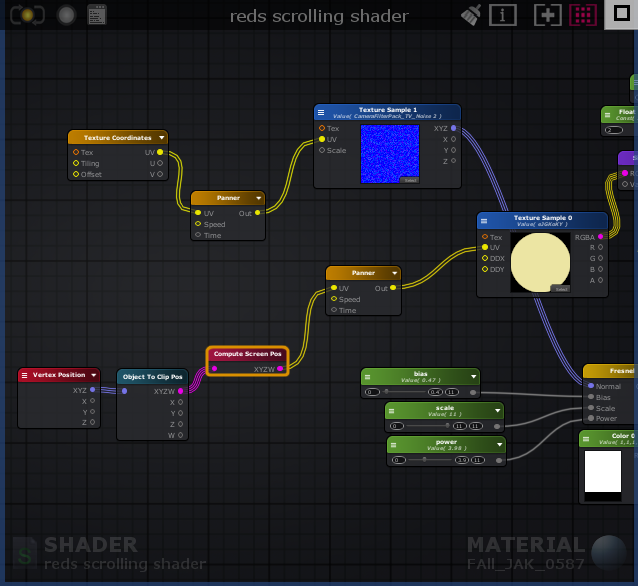 steep swift
a "VR" screenshot showing the issue could also help (steamvr will generate these into your %Temp% folder if you take a screenshot)
strange crown
Will get that for you real quick
steep swift
ok so Compute Screen Pos will just be giving a completely different value for each eye
so that's where I suggest using the "center eye pos"
strange crown
Also another thing, there isn't a center eye pos node in Amplify so could you help me when editing the code to put that in? I got into amplify because of how confusing code is.
If i had a pointer where that should be set in the code then it would help a ton for more of the other screenspace effects i planned.
getting the screenshot right now.
steep swift
#ifdef USING_STEREO_MATRICES
static float3 centerEyePos = lerp(unity_StereoWorldSpaceCameraPos[0], unity_StereoWorldSpaceCameraPos[1], 0.5);
#else
static float3 centerEyePos = _WorldSpaceCameraPos;
#endif
but you're doing something a bit trickier than just the 3d position... you are computing the screen position, which requires a few extra per-eye matrices
strange crown
steep swift
yeah so your UVs are just completely different in each eye
if you're willing to manually edit the code, you could add something like
... some code to compute a coordinate I call uvInputToPanner is here. ...
float2 pannerLeftEye = uvInputToPanner.xy;
unity_StereoEyeIndex = !unity_StereoEyeIndex;
... copy of code to compute panner position ...
float2 pannerRightEye = uvInputToPanner.xy;
unity_StereoEyeIndex = !unity_StereoEyeIndex;
uvInputToPanner.xy = lerp(pannerLeftEye, pannerRightEye, 0.5);
the thing is amplify is defined to be functional and compute stuff. but this code modifies a global uniform unity_StereoEyeIndex to temporarily swap which eye is being computed, and this isn't exactly a function so I don't know if you can add that sort of thing into a code node
the principle here is you want to make sure both the left and the right eyes give the same UV input to the panner node. My approach would be to compute it once for each eye and take the average
strange crown
How hard will it be to manually edit all of that in if I have not done much code myself?
Not entirely sure where all of that code would go sadly. Amplify has been holding my hand through all of this too much.
steep swift
I'm trying to think if there is some way to use a custom expression node to do this
strange crown
I'm willing to do the work, it's just hard for me to follow documentation is all. But i would not want to ask you to guide me through it if it is too much work for you.
My biggest issue currently is that I learn a lot better hands on, documentation never served much use for me when learning.
steep swift
you're probably just doing something off the beaten path here... if you don't want to manually edit the code, my guess is you will need to do some of the same things in custom nodes...
I would suggest writing a custom expression node to return the UV given the vertex position and have the custom expression do the "Object To Clip Pos" and "Compute Screen Pos" for each eye and average them in code.
you've used amplify. do you know if it has built-in nodes foe per-eye projection matrices? @strange crown
strange crown
I have looked and could not find any in the documentation.
@steep swift Would this be the one? http://wiki.amplify.pt/index.php?title=Unity_Products:Amplify_Shader_Editor/Projection_Matrices
It doesn't say per eye so i would assume there would be some sort of setup?
steep swift
ok I'm going to open up amplify real quick and see if I can make a custom node that replicates the UnityObjectToClipPos->ComputeScreenPos bit to be the same in each eye
steep swift
((I was trying to do the same type of effect in a shader I was working on, and your approach just gave me some ideas 😉 ))
strange crown
😮
steep swift
I was trying to overlay a map onto the surface of the mesh and I was following the NoeNoe overlay approach which makes it appear oddly behind the object instead of on the surface
strange crown
I will also make sure to spread the findings if this does work out! Been trying to help friends make cool screenspace stuff and this could help a ton.
steep swift
I'm not sure what I'm telling you will be cool. you can often break effects by averaging stuff from each eye... doing this naively will produce a shader that looks "flat" in VR instead of 3d and vivid
strange crown
At this point though anything is better than nothing. I am just happy that it would work properly in each eye.
(properly as in not horrible stereo that is)
steep swift
doing stuff with clip position in vr is often iffy...but my only hope is panner will take care of making it look good, since it uses the pixel UV position just as a "seed" of "offset" for the texture
strange crown
Also considering the way it conforms to the mesh creates an illusion of depth.
If it was completely mono then I don't think it would be too off-putting.
Again, anything is better than how broken it is currently haha. I suck at making shaders it seems.
Up until this point I have never had this issue.
past pewter
i need a cock
steep swift
I disagree. I've seen some really cool stuff made with graph based shader editors. It's just times like this when you hit a wall or something that just can't be done without code
strange crown
Code is a big one. Spent ten years in sound design learning lots of complicated stuff, but Code is something else.
I guess its just harder to learn for me considering I used my ears all my life instead of my brain. 🤔
At least I'm persistent though. Hopefully that will be enough to get me to finally learn.
steep swift
music, programming and logic have a lot in common.
strange crown
You're right. I could just be causing my own placebo haha.
steep swift
Ok here you go. @strange crown - put this in a Custom Expression Node and set input name "vertex" Type float3
#ifdef USING_STEREO_MATRICES
uint oldIndex = unity_StereoEyeIndex;
unity_StereoEyeIndex = 0;
float4 leftClip = UnityObjectToClipPos(vertex);
float2 leftUV = ComputeScreenPos(leftClip).xy;
unity_StereoEyeIndex = 1;
float4 rightClip = UnityObjectToClipPos(vertex);
float2 rightUV = ComputeScreenPos(leftClip).xy;
unity_StereoEyeIndex = oldIndex;
return lerp(leftUV, rightUV, 0.5);
#else
float4 leftClip = UnityObjectToClipPos(vertex);
return ComputeScreenPos(leftClip);
#endif
just did the quick cross-eyed test in mock hmd vive and it seems like it should be good
strange crown
Thank you so much!
steep swift
wait I may have forgotten to divide by w
would be better if it was relative to the object center
lethal rock
s/w/0
strange crown
Wouldn't dividing by w cause it to be normalized though?
steep swift
it looks a bit weird if you get futher away. a good tiling texture map might avoid that issue
well guess that's up to your artistic direction...do you want it to shrink proportional to the model or stay the same size on screen
strange crown
Having it same size does lead to some really cool effects when walking towards in game. https://gyazo.com/d5b7656e8a3f3d35e4e415ad5f3ce5ab?token=75449984524faaac84253d0f1f5a1086
 steep swift
ok yeah the part that is throwing me off is ComputeScreenPos normalizes it to be relative to the lower left corner instead of the center. so you kind of notice that bias stuff moving toward the lower left or away from it
lethal rock
You’d probably have to find the object zero position in screen space
To make it look seamless
past pewter
N I G G A
steep swift
ah, so basically call the same function again with the world position of your object and subtract the two
pass 0,0,0 into ObjectToWorld node and call the same custom expression
then subtract the two
strange crown
So where exactly would you recommend putting in this custom expression inside my current setup?
Do i need to link it to anything specific?
steep swift
vertex position as input
strange crown
I assume i would have my vertex input as per usual but would I need to input that into the object to clip pos node or is that done in the custom expression?
steep swift
and if you want the centering thing, the other copy would use 0,0,0 as input
instead of your ObjectTOClipPos and ComputeScreenPos nodes
so vertex position -> custom function -> panner UV
or vertex postiion -> custom function -> subtract <- custom function <- 0,0,0
I made it into an Amplify Shader Function asset here
strange crown
Sounds like a plan then! Will get this uploaded and let you know how it goes! Again thank you for all the help and hopefully I can get around to learning a lot more of this soon.
I will also keep that file for future reference incase i ever need it again. ❤
steep swift
making crazy effects work in stereo is so fun. it's a whole different experience from just seeing it in 2d in front of you.
lethal rock
Yeah stereo is really where it gets super real
strange crown
 steep swift
you need to change the input type to float3
and thank god for the overload. Mismatched types are one of the ways you can royally screw yourself even when writing code. HLSL compiler will be like oh you want to take a single float value and pass it as a float3? Sure go right ahead
strange crown
Figured it out, for some reason it did revert back to the standard float.
Heh i dont know how to computer
strange crown
@steep swift Seems to be fixing the stereo issues! But after doing everything to get it set up the way you had mentioned caused it to look like this instead. Is there something i missed? https://gyazo.com/f64900fe07a182c44437db4ef58146eb


Also the stereo fix does not affect the mirror, but it does work outside of the mirror.
steep swift
the custom expression node output type needs to be set to float2
steep swift
@strange crown here is my fixed one
I was just debugging that lol
yes 😦 the one downside of using such a non-stereo safe method and then averaging it means it is not going to look good in mirrors
the challenge would be to come up with something which produces the same result in each eye... something like triplanar mapping
strange crown
Could you give me the layman's explanation for what float's do inside the custom expression? All of this is new to me.
steep swift
so the custom expression I made takes a vertex position (float3), applies UnityObjectToClipPos (->float4) and ComputeScreenPos (float4->float2) for each eye, and averages it. the output is a float2 (2-dimensional uv value)