#avatar-optimization
1 messages · Page 54 of 1
 rustic ocean
 solid smelt
VRChat
This page lists the current Unity version you should use when creating content for VRChat, as well as links to the correct version for both Unity Hub and direct downloads. Current Unity Version The current Unity version in use is Unity 2018.4.20f1. Unity Hub To install the cu...
 marsh trail
Unity tries to get you to update when using older versions
You can however, dismiss such
solid smelt
I was wondering why his hierarchy had the wrong symbols
rustic ocean
Will the save still work or would i have to redo it?
marsh trail
You'd likely need to re-do it
solid smelt
You can try to reimport the scene who knows
marsh trail
However it should be a fairly smoother process to go through now that you've done it once
rustic ocean
I hope so, I kinda did it at like 4am.
marsh trail
You can take screenshots of your settings to speed up the process
rustic ocean
Any chance you might have some up to date tutorials on how to get models made in blender to vrc? Most of the ones that pop on yt only show using premade models 😦
solid smelt
Its the same process for any model, was there something specific that you were stuck on?
Once the model is created its all the same
rustic ocean
I guess it's stuff like seeing how they make mouths, hair and eyes and such. For the moment I'm sticking to making fugly robot things just to practice.
solid smelt
You should be looking at normal blender tutorials for things like that since it doesnt have to do with VRC yet in the pipeline
marsh trail
I'd recommend general 3D modeling videos
Virtually any model can be ported into vrc, even a statue with no rigging (bones)
You probably just want to look at general modeling, rigging and texturing tutorials for your modeling program of choice
rustic ocean
Will work on that. Could be I saw wrong, thought there was a specific way to make mouths and eyes for lip sync and such.
marsh trail
Don't focus too much on IK bone setups however if you plan to make humanoids, atleast as of yet, vrc will handle a standard humanoid structure
solid smelt
Mouth movements are done by visemes, you can either do that early on or make a face rig to create visemes later, eyes are just bone rotations
blinks are done via blendshapes as well, but again you can use bones early in the pipe line
marsh trail
Do keep in mind that visemes are shapekeys/blendshapes, they're simply called visemes as they refer to mouth shapes
Incase that could confuse you in some manner
solid smelt
So much jargon 😔
rustic ocean
I really appreciate the time you guys are taking, I kinda jumped into this like a few days ago.
solid smelt
It's cool you are starting from scratch that early, most people, including myself, use premade stuff
marsh trail
We all started somewhere, and somebody somewhere helped us aswell, the vrc community's rather open like that
rustic ocean
I figured that if I can get the basics down early on, editing existing stuff should be a little easier later on.
marsh trail
It definitively will
rustic ocean
I was curious bout two more things. Probably more but two top of the head.
Can an avatar be made of multiple parts, or does it have to be one mesh? Like could the forearm and upper arm be separate, joined at the elbow?
solid smelt
You could, but why?
rustic ocean
Just a weird idea I had, kinda like the female bot from Wall-E with floating arms?
marsh trail
You can have the same mesh group have separate mesh sections, in a sense the mesh doesn't need to be connected by vertices to be a single mesh
solid smelt
You can still have it be one skinned mesh, regardless of it being cohesive yeah
The more meshes, the more materials, the more unoptimized
rustic ocean
Also not sure how one would do a robotic hinge joint if it's one mesh. If that makes sense
solid smelt
You can create the model as a bunch of separate meshes, then join them all once weighted
marsh trail
The bones dictate the pivot points
Regardless of the mesh being single or multiple, bone position is key for proper looking hinges as such
And of course, proper weight paint to match
rustic ocean
Was planning on studying up on rigging a lot more yeah, luckily blender has a massive amount of tutorials of all kinds out there.
marsh trail
Community driven is a understatement for the amount of work and effort you can find
rustic ocean
Prolly why I like blender and Vrc so far. I used to be on maya and max but it was different.
marsh trail
Hopefully you'll find the proper tutorials for your needs
rustic ocean
By the way, any idea if it's possible to make two meshes move as part of lip sync? Like for a robot sort of vibe: https://i.gyazo.com/987aedf80cfa284271a8e486095b7a9f.mp4
No need to go into how, just curious if it's at all possible or too unpotimized to even bother.
marsh trail
Definitively
Shapekeys are just vertices being moved from one place to the other, so it'd be quite simple
rustic ocean
Noted down, I'll google fu Shapekeys and lip sync, that should least make it easier for me to find proper tuts.
marsh trail
Keep in mind shapekeys only have 3 states
Off - Value of 0, Default shape, unchanged
Translation/Moving - Value from 1 to 99 that moves the shapekey more or less to the destination
On - Value of 100, Fully enabled state
They can only go to and from 2 points, so you can't have a shapekey that has multiple stages in a sense (like 20% frowning, 40% happy and whatnot)
In a nutshell, a shapekey can only have one purpose
Shapekeys can be mixed together to form some mixes, though that can be fairly complex
A simple example
50 on Blink - Eyes half closed
100 on Smile - Smiling
Smiling with eyes half closed
rustic ocean
Probably gonna keep it simple for now, just up and down when speaking. I'm guessing there's no need to rush into advanced avatars until I can make some basic ones decently.
But least now I know the terms, which helps search for tuts a lot 😄
Btw, silly question. How would I go about deleting an avatar? On the home page, I can only see the option to make it public
 buoyant holly
you would do that in unity
rustic ocean
Content Manager I assume, thank you.
I keep missing obvious tabs when going over new UI
 boreal belfry
Ahhh I tried making a low poly avatar and it came out like this in Unity
I don’t even know how to upload it to my VRChat this is my first time help please ;-;
 gleaming shore
Did the textures just load like that
 calm spade
@boreal belfry Plenty of tutorials out there
you can ask for specific questions here, but the info is already plenty available
boreal belfry
Alright I just realized that I don’t even have the trust rank in VRChat so I’ll do that first
 patent mauve
close one
 amber hemlock
Visemes will not simply be blend shapes in the upcoming SDK, they can be any animation file at all
70000 tris: 
70001 tris: 
Who knew 1 tri was so laggy
patent mauve
lmao
buoyant holly
that's because if I remember correctly 70000 is the limit for how many vertices that it can keep in a single mesh so it starts splitting it up
 heady smelt
it was 65535
and it's no more the case since we moved to unity 2017+
buoyant holly
okay good to know
amber hemlock
The 70000 is arbitrary, you have to draw the line somewhere. It used to be 20000.
patent mauve
I had to go down from 200k. wasnt easy. decimated or deleted few thing to get below 70k
without breaking it
 latent kettle
My fbx file has about 1MB, when i upload it and check the editor log it shows that the mesh is 20MB.
why would this happen
 sick timber
@latent kettle This: https://cdn.discordapp.com/attachments/361742235525709825/717637835397791794/STOP_THE_CALCULATIONS.png
 latent kettle
Thank you so much @sick timber it works now
 sweet mason
So with the beta. This will give you an error and prevent you to upload
 nova mirage
where should I place my view in unity? ive seen stuff that says over the nose, or partially inside the head, or far away from the face. what is best for vr?
patent mauve
do you use FBT?
heady smelt
between the eyes
nova mirage
no full body yet
patent mauve
and yea between your eyes just like IRL
yet?
if you get FBT then you may wanna change. it depends on your height, avatar height and armature
nova mirage
is this good? or a bit closer to the face
heady smelt
literally between the eyes
 heady smelt
you could see ingame, put your hands up to your mouth, and also against your headset, and find a spot that works for you (maybe you want your hands to clip into your face a little, maybe you don't.
 lost stag
if anyone is familiar with porting over blender models with nodes over to unity please dm me, ive been trying many things and some have worked but others dont when doing almost the exact same thing.
ide ask for help here but frankly i feel like it would flood the channel with the issues im having, lol
 radiant urchin
You can't port blender materials made with nodes, only on that works is the principled bsdf
 proper grail
Yupyup, next best thing is baking a diffuse color (with direct and indirect lighting off) to textures with a diffuse bsdf and using those in a unity material
radiant urchin
Standard shader also supports normal maps, emission maps and metal/smoothness maps
 past crown
whats the maximum amount of polys that I can have on my avatar?
solid smelt
No limit, above 70k you are set to automatically
past crown
And what is the maximum that quest users can see?
past crown
I hope its 10k bc 5k sound impossible
solid smelt
after 10k its and people need to manually show your avatar to see you
past crown
oh so quest users still can see me even if its more than 10k?
solid smelt
If you're grossly over 10k you should just not upload it for quest imo
solid smelt
Instead of decimation, you should look into dissolving edges or retopologization
past crown
Already did everything that I can
I went from 110k polys to 10k
oh
I did it
I forgot my chain that has like 3k
but thanks anyways
 south whale
Hiya, I'm trying to optimize my visemes, because right now my character is a single mesh and every viseme copies the whole entire mesh of the character. But, my character is already fully weighted and rigged... does anybody know how to chop my head off in Blender 2.8 without ruining my existing armature, weights, and visemes, or do I have to start over from scratch?
There don't seem to be any tutorials about splitting off your head/face to make visemes that are only on it. Are people really out here duplicating their whole characters with CATS for every viseme??
south whale
--It looks like Blender, for once, behaved sensibly, and cutting the model's face off KEPT the associated visemes without breaking them!
proper grail
Are you just separating? Any vertice work like that requires all shape keys to be on 0 with the basis selected or else itll explode
south whale
I always set it back to 0 with basis selected because at least one tutorial I watched said that chased off evil spirits, basically. So that's how I had it when I separated the face
It seems to have worked fine and even kept the same relationship with my armature!
calm spade
FYI no one is duplicating their meshes for visemes
and very few people are separating the head mesh
lost stag
@radiant urchin well im exporting from blender and importing into unity using gltf, and one part transfers fine but the other doesnt
this is whats in blender, and when exporting everything via gltf
only this comes over
which has nodes on it so it worked transfering that way but no matter what it wont do the body
im attempting it with this bc when i tried to use CATS and transfer it via that, all of my textures got fucked up which im guessing is because of the nodes
it was a custom model made by a friend who works only in blender which im trying to port over to use in vrchat
 rose wolf
you need to put your materials on assets
then you go to model at the top right , go to select , (check if you have humanoid selected on rig )
lost stag
rose wolf
apply and it should be good
lost stag
alright one second
im by no means well rounded in unity btw so i apologize in advance for all of my confusion lol
oh also
rose wolf
naaa dw
lost stag
again the reason why im jumping between so many things on this
when combinging all the textures using CATS it only breaks my tv textures
rose wolf
i just learned how to fix your problem just yesterday
lost stag
or well, it was now its breaking everything. fuck lol
yeah its really complicated for me because
1, its two seperate models technically
2, the base body is taken from a fortnite skin and changed using nodes so whenever i try to combine all the materials in cats i end up with this
so ive just been going with the 9 materials instead of combining
lost stag
well i cant find a way to combine without everything breaking
calm spade
atlas manually
lost stag
how would i go about doing that
unless thats something i just need to read up on myself and is too much to explain
calm spade
tons of youtube tutorials that explain all the steps, it's fairly easy
lost stag
ah ok
ty both for your help so far btw, like i said im really not well equipped with blender and almost all of my friends exclusivly use blender and dont know anything about unity so i greatly appreciate it
 cold onyx
 hoary edge
okay just toggle the avatar on and off
 tacit thistle
amber hemlock
tacit thistle
amber hemlock
I’ve been getting mixed messages... if a shape key exists, but is set to 0, does it cause additional lag?
Example: Avatars with a ton of shape keys but nearly none are set to non-zero
 upper yacht
They don't cause lag. They only take up memory. afaik
amber hemlock
Good to know. What about the reverse, a bunch of shape keys all set to 1 at all times
heady smelt
It adds more processing time
And it breaks GPU skinning too
amber hemlock
Thought it was something like that. So if I have a bunch of face expressions and props that disappear at 1.0, it’s worth flipping them so the avatar can have them all at 0 most of the time?
heady smelt
you should always have your shapekeys set to 0 by default
amber hemlock
Thanks
 crystal rock
hey can someone help me with lip synch for my avatar?
 near ocean
yo so like...
im trying to put a necklace onto my character in the latest version of blender and i was wondering how i weight paint the necklace
 woeful stag
@near ocean you need to assign it to your chest and neck
go into edit mode, select the necklace and assign it to the chest and neck bone
near ocean
oh im fine
i found another wway to do it actually
it's fine now
im gonna redo it after i get all of my clothing on first
amber hemlock
What is the best way to hide a single material? I am currently using standard cutout with a fully invisible texture
Ideally I think it would be a shader with a culling option of “both sides” so it renders nothing
upper yacht
...To hide a single material? Deleting the faces of it and removing it from the mesh itself
Even if you make it cull both sides it has to do a cull check on them
So it's less performant than just deleting them
 coarse valley
is there any way i can copy a weight paint value? Kinda like selecting a color with a dropper tool, only with weight paints
amber hemlock
Yes at the top there’s a eyedrop tool that will copy the weight that you pick
...To hide a single material? Deleting the faces of it and removing it from the mesh itself
@upper yacht then I can’t show it later
Using an animation
upper yacht
AH, that's what you meant. I'm unsure if you can change materials during runtime through animations.
amber hemlock
You can I do it all the time
upper yacht
I haven't experimented with that so, cool. Good to know. Best way would be to have a shader that culls both front and back.
Since if you use transparency it'll still be rendered and cull checked
amber hemlock
I have a prop with a bunch of different materials for different colored textures and patterns, but I want to know the best way to hide it entirely right now I’m just swapping to a material that is standard cut out with an invisible texture but I don’t know if that’s ideal
upper yacht
mm
amber hemlock
It’s Skinned so I can’t scale it to zero or it becomes stringy wires
upper yacht
You could also have a shader that never draws.
amber hemlock
And I can’t split it or I end up with two skinned meshes
upper yacht
Basically a null shader.
amber hemlock
Is that easy to write
I’m assuming a blank text file won’t work
Create new shader just ends up with white
I don’t know the first thing about shader code so I don’t know what parts to delete
upper yacht
"Pure invisible shader" unity forum "cheapest invisible shader" search one of those two terms and you should find the unity forum for cheapest invisible shader.
amber hemlock
Thanks!
marsh trail
@amber hemlock i remember poyomi's having a setting on the shader that hid the mesh based on a supplied texture (black & white) i'm not sure if you can disable/enable it or if you need a material swap for it, but there's an alternative
 neat loom
In blender i'm told my avatar has 60k, but in unity it says 2 trillion?
 tawdry venture
Your file probably got corrupted. Something is messing with how Unity is reading the amount of polygons the model has.
heady smelt
try this https://cdn.discordapp.com/attachments/429349528156504064/696540377242664970/legacyblendshape.png

 agile radish
@neat loom change settings to read write enabled in model import settings - you should be good
neat loom
gotcha ill try that
 tired field
I need help with an xps model. no matter what I do the file will NOT load into unity with textures.
I've tried 8 different methods of fixing this as well as downloading Blender 2.8, 2.78, and 2.74
im willing to have someone else take a crack it this.
yes
yeah I have everything mapped n shit
Like the textures are there
Everything is noded correctly
but when I export it as fbx it's just gray.
 bold hull
Why not just assign them in unity?
XPS models sometimes do have that issue with unity for whatever reason
neat loom
@agile radish Thank you, you have solved all my problems.
tired field
Everything is grayed out I cant edit materials and when I try to import the folder that has the textures it says BeginLayoutGroup must be called first
upper yacht
You have to create a material to edit it.
How are you importing the folder?
Blender node system doesn't transfer.
tired field
I'll continue this later I'm too tired for this right now.
i appreciate your help guys.
 elfin kindle
Hi! Does anybody have a method of decimating an avatar while managing to transfer shape keys?
im designing a quest version of an avatar
usually i separate the face, but this model only really looks good if i decimate the whole thing
calm spade
Retopo ?
elfin kindle
Retopo?
calm spade
Retopology in Blender 2.8 - full 4 hour series on retopo in Blender
https://flippednormals.com/downloads/retopology-in-blender-2-8/
In this Blender 2.8 tutorial, we'll teach you how to retopo using vanilla Blender 2.80 without addons. The techniques taught can be used to make...
Decimate the body, retopo the head
elfin kindle
This might take me the rest of my natural born life but hell it looks nice
no fucking clue how im gonna apply the UV though
heady smelt
by crying a lot
amber hemlock
what are you doing?
oh I see
Hi! Does anybody have a method of decimating an avatar while managing to transfer shape keys?
@elfin kindle It's called dissolve edge loops. https://cdn.discordapp.com/attachments/142531144364195841/713940752857694248/42gCc26F8D.gif
elfin kindle
cool, i'll try both
because ngl, it gets a great result, but it's super time consuming
also, what's the keyboard shortcut for edge loops again?
amber hemlock
when in edge selection mode, alt left click selects an entire loop. shift alt left click selects more loops without unselecting the previous
x to open delete menu, "dissolve edges"
edge loop flow only works on quads, since it doesn't know which way to branch on triangles
elfin kindle
So i tried a new approach
before i do anything
if i have several different models
all the exact same polygon count, just different shape keys
like each shape key is a different mesh
can i just like merge them all and apply each mesh as a shape key?
amber hemlock
Yes the command is called join as shape
But vert order must be identical
If vert order does not match, you can make it match with Transfer Vertex Order, but that requires topology be the same. If topology isn’t the same, you need to make them match yourself.
elfin kindle
hrm
it says they need the same number of vertices
but they do?
They both have 852
amber hemlock
Make sure triangle count also matches. Even if vert count matches but triangle count doesn’t you are just going to end up with a wad of polygon barf
They should have the same vert count, vert order, and topology (edge connections)
AKA as if they were all made from the same source model and verts moved around
Sometimes, the source model was made of quads, and then they made a bunch of faces and triangulated them separately. If that’s the case some might have quads split differently and it’s a task to go in on a uV viewer and play spot the difference and rotate edges to make them all match
Have fun~
amber hemlock
They might have also ran merge doubles separately
Which would have fused some verts and modified the vert order and topology
elfin kindle
wait hold up lemme try again
huh
so
good news is they're the same now
bad news is uh
yup
amber hemlock
Making them the same vert count is not enough
Yeah
That means their vert order has been scrambled
There are free plugins to make one model have the same vert order as another as long as they have the same topology
The plugin is just called copy the vertex order
calm spade
Nice
amber hemlock
Grats!
elfin kindle
So, turns out i made a big whoopsie
i didnt hit apply
so that's actually the full LOD with real time decimation
once i went in and decimated, even after using transfer vertex order
starting to think there isnt a way to decimate and keep the same vertex order
buoyant holly
you need to do yours decimating at The Source model before you duplicate everything
but honestly for a head you'd probably be better off with dissolving Edge Loops
elfin kindle
I mean, duplicating is impossible
since like
if i decimate first
i lose the shape keys
and deleting edge loops barely got rid of polygons
trying to get it to around 800 from 2k
buoyant holly
then you need to delete more Loops but first probably join them so that they're all blendshapes not separate meshes
elfin kindle
They're all already blend shapes, i just separated them in hopes this would be the best solution
buoyant holly
not really because then you would need to lower the poly count repeatedly
elfin kindle
well i was hoping that if they were all already low poly i could just join them
assuming that's impossible though
buoyant holly
yes because the decimation tool would not give them identical vertex order
you should be able to go from 2K to 800 triangles with dissolving Edge loops
elfin kindle
is there an option to mirror select?
buoyant holly
 elfin kindle
hrm, i might do that
in the meantime
anybody know why this is happening?
looks fine in blender
...until i remove all the shape keys
got it, thanks!
 fleet steppe
Would it be better to use blend shapes or face bones for high poly visemes and expressions?
fleet steppe
You forgot to parent the lower lip bones to the jaw
So tell me what the inner/outer split is for
fleet steppe
Anyway, the question was...Oh I see what I did wrong. I'm talking as if Avatar 3.0 is out of beta
I was trying to ask if I should embrace bone animations for visemes and facial expressions instead of blend shapes in 3.0
Of course face bones are awesome for making blend shapes, but are they so awesome that they're more performant than blend shapes?
heady smelt
@elfin kindle there is, im pretty sure (re: decimate while keeping vertex order)
i made a quick youtube video decimating in edit mode, and that never broke my shape keys, which is what you're going for, right?
i can't get on youtube from this pc, but if you search nabutso decimate in edit mode or something it might show up
only issue is its on 2.79 because its old
elfin kindle
@heady smelt im using the decimate modifier, but I'll try that too. Edge loops ended up giving a good result, but I'll try anyway! Thanks!
amber hemlock
31999? You can use 32000 and still be excellent
32001 though, that’s just unreasonable
 odd shard
grug jeleous of that big brain you got
amber hemlock
use the extra triangle to make an excellent badge on your shoulder
radiant urchin
there, I bestow upon you the Optimised™️ badge
fleet steppe
You bunch of jokers
heady smelt
Does anyone know a good Force value for long hair that gives a decent fall off
heady smelt
it depends on your other settings like elasticity and stiffness, but i think i use something like -0.001 (or -0.0001?)
solid smelt
It depends on the scaling of your avatar, best thing to do is do it in playmod to see the changes in real time, though nabutso's values are good starting points
heady smelt
yeah dont forget you can see it in play mode (but changes made in play mode won't apply after you exit play mode - you can copy component in play mode then paste after exiting play to 'save' it though)
 buoyant tartan
Oh boy. is 74,000 too many.
calm spade
slightly yes
 languid brook
is there a better way of finding a piece of model on the texture map when everything has the same color? cause i randomly put dots and just try to find it but it takes sooo much time lol..
somewhere here are 2 fingernails and 2 toenails lol
calm spade
select the mesh pieces in edit mode and they'll show up in the uv editing window
languid brook
ohh okay so i need to do it in blender, problem is only that the textues are not imported strangely. my whole model is pink
 radiant shadow
its just confused where the texture is, use find missing files, or edit the material to show it where it is
languid brook
okay gonna look into it, thank you both !!
languid brook
nice it worked 🙂
 rustic birch
hello i have a quick question how can i make the normal map look as same as the base texture
example have the atlases be similar to each other in that way reduce my draw calls and stuff
is this possible?
marsh trail
You can manually atlas your normals to match your texture
rustic birch
which programs should i use for that?
marsh trail
Any image editor of your choice that supports transparency, and preferably layers to better place the images
amber hemlock
If you saved your model right before using cats atlas, you can put all your normals on diffuse and atlas again and it will make the same exact atlas with your normal maps, lol
If you use a Uv packer though, disable island rotation. I see so many botched normalmaps in game due to normal map rotation.
 waxen meteor
proper grail
waxen meteor
proper grail
Im a bit of a lettuce and is hoping somebody has tried this before; Im trying to see the difference in 4 b/w masks vs a texture array vs a composed rbga image. Heres where the lettuce part comes in, editing poiyomis to grab an image channel vs "White". What exactly goes in the quotes?
 mighty crypt
I've seen people in avatars that had a viewport plane that rendered a view like a mirror, TV avatar sort off
Anyone know how to make a plane render for others kind of like a mirror and how to optimize it?
solid smelt
For a mirror you need a render texture attached to a camera. Cameras are friends only IIRC
 gaunt harbor
Best rough number of Polys? Like for a well detailed but still friendly if theres 10 in an instance
calm spade
@gaunt harbor Depends What you're making
calm spade
Welp, you'll be over the limit with all that so don't worry too much
 scenic summit
Im drawing my first textures for my avatar and I try to optimize the space usage on this Jumpsuit what we made 😄 Still lots of work to do with this avatar and I have just learning how to use Blender so im still littlebit slow.. But I think it already looks decent
I Started with Uv unwrapping and I have learned a lot during this project ! But its so nice to draw textures when you know that they will look good on model 😄
fleet steppe
Is it better to use separate objects on top of a base for multiple outfits, or is it better to have a single, entirely separate model for each outfit?
heady smelt
can someone help me with my avatar my friend gave me i cant fix it at all
scenic summit
@calm spade Thank you! Its maybe finished today, im not sure, depends how much i like to sleep 😄
calm spade
Your avatar will be there tomorrow, get some well deserved sleep !
scenic summit
Just got my wrappings to be okey! I tried to put "more resolution" to some areas so final product would look better!
calm spade
4k or 2k ?
scenic summit
1024x1024 😄
but it looks okey for my eye!
With this small resolution, I learned how much value I will give to certain model parts!
But for my first texture making from zero, this looks pretty good I have to say 😄
 buoyant holly
that's definitely a lot of vram considering you need like four textures for a PBR set
scenic summit
😄 Haha ! Thats probably easier, But now I have learned how blender works and what is uv unwrapping 😄
calm spade
@scenic summit You can definitely afford 2k or 4k
For that extra bump in quality
I guess 2k since it's only one part of the model
scenic summit
@calm spade Okkey! I can still make higher resolution version from that base, gladly I organised my Photoshop file pretty well so its possible! 😄 I just took first numbers what where in my old texture file 😄
 buoyant holly
you should honestly be probably using detail Maps if you need the detail increase
heady smelt
Hi is there anybody here that can help me one-on-one with blender and 'frankensteining' assets together?
heady smelt
Howdy. I have a model all rigged but it was originally made in blender. I have no idea how to make models but I paid someone to make the model but not rig it. My friend rigged the vr version for.free but the textures and materials didn't come over from blender. I'm willing to pay someone to help me.
It's all rigged and working it's just the texture and materials are white
calm spade
Drop the textures in the materials
plenty of video tutorials that explain the process
heady smelt
I did try but I legit couldn't find it
I'm not home rn, but when I am, I'll give it another shot. When I come into trouble I'll ask again. I did try to follow a tuortial but I was so confused so fast... @-@
 mystic cradle
when you export to fbx select this option so your materials and textures are exported with the model (that way you can extract them from it on unity), if its not selected, you will have a pink or white model and you will need the png of each text on a folder and add them manually to the materials
@heady smelt
 agile pawn
hello, when i edit an fbx in blender, and port it to unity, is there a way to not have to restart the model i was working on in unity? can i somehow apply the changes i made in blender directly to an existing model i have?
calm spade
If you edit the bones no, otherwise you can open the fbx from your unity project in blender
 foggy meteor
Alright I'm trying to make my first quest avatar, I have everything setup but when I upload my build to android, it says my avatar exceeds 10MB (47MB) even after I compressed all my textures to 512x512. Can anyone give me some ideas on what's making my avatar more than 10MB? Thanks!
calm spade
make sure you checked legacy blend shape option on your model
You should be able to use a 2048x2048 texture then
make sure to compress it correctly though
foggy meteor
Is the legacy blend shape option in blender or unity?
calm spade
in unity
click on the model in your asset, you have the model tab on the right
the option is near the bottom of the list
foggy meteor
@calm spade Big brain, thanks Ruubick!
 jovial grail
the sdk warns you about this now and offers an auto fix
 fading gulch
sweet, I got my avatar down to 8k tris. gonna try porting it for Quest later
fading gulch
my original has 32k and tail/ponytail dynamic bones
but that one also has a good performance rating
amber hemlock
Yeah I have good rated avatars with dynamic bones. It lets you have a very good amount and still remain good, Just can’t add colliders or its instant medium, and quickly poor.
upper yacht
Well, ya. They're all done single-threaded. On the main CPU thread. They're really bad for performance. If somebody were to make a multi-threaded version or make a GPU-based one it'd work better. To a degree
heady smelt
and that's why im making my hair out of cloth tomorrow

i guess if you had enough bones and few enough verts depending on cloth's threading this actually would run better
depends on how you want them to collide, too
amber hemlock
a better solution is long overdue
@jovial grail they did it with Playmaker -> Udon. So they could. But the math and behavior behind dynamic bone is a little hard to duplicate without outright copying it. And if you change the physics even slightly people will probably foam at the mouth over it. Dynamic bones are like Gollum and the ring. Can’t even think about taking them away.
heady smelt
it doesnt have to be a replacement, but an addition like unity constraints were (don't replace final IK or rigidbodies, but do the same thing and more natively in a vrc-positive way)
amber hemlock
True. But my thinking was replacing the buttload of content that no one will update
But I guess it’s better to just let new stuff be better
jovial grail
I'm sure something will eventually come. vrm and spring bones probably being ideal
i don't think they will be replaced
but I've always said that if they offer a better option, like an optimized, free inhouse solution with global collider support
and people will switch because everyone wants global colliders
solid smelt
I'm assuming all 3rd party software will be replaced and we will get a grace period like we did with SDK2 and SDK3
jovial grail
who won't switch will just be left behind with an inferior product
solid smelt
You can still use world triggers but you shouldnt, will probably be the same
solid smelt
I do hope they actually replace, instead of just giving tools to replace.
While I'll enjoy tools, it's better for the devs to give an official dynamic bones instead of leaving it open as then we might not get the most popular as the most optimized
jovial grail
Well, replace down the line
solid smelt
I just know one day I'm probably going to have to make my own Final IK and I really dont want to
heady smelt
with 3.0 coming but no new 'dynamic bone-like' feature packaged into it, i don't think we'll see something anytime soon
solid smelt
Yeah I'm assuming far future tbh
heady smelt
maybe something in the meantime could be some sort of guidelines for improving dynamic bone performance through settings (like running them at 45 90/2) or 48 (144/2) or even 36 update rate instead of 60, literally just a huge chunk of performance saved right there), though it's unlikely anyone will particularly follow it
all these values, if integer divisible, look nice still.
solid smelt
I feel guidelines are already there as its basic optimization. A downside to changing the update rate is that it has no effect on your performance rank. Which people care about a little too much
They said they want to edit the performance system for AV3. They also stated in the past that the system is unfinished and will be tuned over time
heady smelt
yeah dynamic bones may better be represented by total number of transform updates per second than number of components or bones
same for cloth maybe even, though cloth's solver frequency isnt the same as dynamic bone's update rate
solid smelt
Honestly I dont even try to get cloth to  as 200 is so low
heady smelt
i lucked out and the only cloth mesh i currently use came as only 199 polys
heady smelt
i dont blame the vrc devs for that tho
solid smelt
What if I made my own dynamic bones with Final IK
jovial grail
Well, it's understandable
heady smelt
they dont wanna be redistributing or whitelisting a package that was edited and not sold by the original author
we are supposed to have paid $20 to use dynamic bones
jovial grail
they don't have to
the game has it's own dbones
you're mot uploading a copy for the game to use with every avatar
heady smelt
yeah but whitelisting an edited one is asking for trouble if people know to use some edited one and not buy the original
jovial grail
so they can change it all they want client side and no problems except maybe it doesn't look exacly the same
you don't have to use an edited one
the game has to
heady smelt
yeah when i say use i mean "use" in the sense that people will want to use "the same one" (an edited one) for testing etc, so it looks the same in unity as ingame
jovial grail
you can create a dummy dbone script and upload that, as long as the variable names are the same it'll work
the game just takes settings and uses it's own version of the script
solid smelt
Thats why dynamic bones have friction, but VRC doesnt
heady smelt
i thought vrc dynamic bones support friction now
jovial grail
but the current situation where you have to buy a scuffed third party asset is kind of embarassing tbh
heady smelt
it really is
jovial grail
especially cobsidering how notorious it is for performance
heady smelt
so i again reiterate how i will be using cloth for my hair starting tomorrow
(im joking pls)
jovial grail
at least that chinese guy who made it probably made a few thousand $ off vrchat alone
solid smelt
He's the real winner here
heady smelt
few thousand is the real killer
because there are more than that many avatar creators
solid smelt
What do you think the percentage of players who make their own avatars is?
jovial grail
I doubt that many people bought it, it's redistributed everywhere
heady smelt
yeah that's what i mean
jovial grail
and you're not exactly abiding by some tos when you're not a company making a game
and most people don't care about exact settings because most public avatars have really bad dbones
amber hemlock
Technically only VRChat needs to own dynamic bone. They don’t use the scripts you send them. They delete it and put in their own copy. Your dynamic bone script code could just say “lol” and it would still work in game
Which is exactly how I distribute dynamic bone for others. Uploads fine but they can’t preview it in editor
jovial grail
Yes, you just need the settings, but I think those are serialized and stored on the component even with a missing script
so you technically don't even need to have settings as variables in the script
i currently have a pretty scuffed way of fixing broken dbone scripts, and they do save all their settings
but the way unity works under the hood it just serialized everything into strings anyway
 vale wave
Anyone know why my texture baking is turning up black?
Almost done optimizing my character, but if I bake on diffuse or normal it only shows up black. Baking on Combined worked fine, but washed out parts of the texture
proper grail
Is there an AO node anywhere in the material with a second mesh duplicated/overlapped/surrounding but the eye turned off for it?
vale wave
I don't think so, my model is all one mesh
I'm just trying to get those three materials to one atlas
Got it to render the same colors at emit baking, but that also had the washout
proper grail
Hmm, diffuse color bake works best with the diffuse bsdf shader, itll give an accurate material preview of what itll bake
vale wave
Think I found it, looks like it pulled the wrong texture when combining the mesh. For some reason was showing the correct texture in the main view though
proper grail
ah, blender doin the show the loaded in memory image rather than the edited one thing again
 echo trout
Idk how I'm going to optmize my avatar
fading gulch
I can get "good" with 32k polys, 3 shaders and dynamic bones for ponytail and tail with a total of 9 sections
amber hemlock
All my quest avatars are excellent rated on everything except raw polygons. They skirt by just under 7500 for medium overall rank
fading gulch
more like will never be able to see your avatar
amber hemlock
Understandable. Quest is pretty laggy and stuttery even if everyone is excellent rated. The polygon limits are actually more lax than they should be
fading gulch
your avatar is basically drawcall pollution
amber hemlock
To be fair that’s the Pc version of his specs, if he even had a quest version to see at all, that’s not his stats for it since it’s in Pc mode
fading gulch
yeah nah but five skinned mesh renderers is p. bad even for PC
and that dynamic bone count is entirely unnecessary
amber hemlock
The upload button would be blocked on quest build
foggy meteor
Alright, Finally gave my avatar an atlas, The atlas came out good but when ever i'm a little far from my avatar these weird white lines apear on my avatar
I'm guessing theres an issue with my UV but I have no idea how to fix it.
proper grail
Mipmaps will fill your uv with the empty space, which is usually black unless the texture is taken into gimp or something and the transparent background replaced with the main color in a new layer. Than copy the atlas layer and median blur it with an alpha percentile of 100. Reorder the layers so the atlas is on top, the blurred one is under that, and the background is under that, and boom no more off colored lines. Goal is to fill the texture with relevant data
foggy meteor
Ah ok, im going to try that out
 hidden agate
Hi
 main thistle
CATS atlassing is such a godsend, but all the empty space really irks me
Is there any good way to get rid of all the excess space?
Does it really NEED to generate an 8k atlas?
Especially when it all comfortably fits in the 4k space?
This one atlas I generated is 32768x16384 and mostly empty space. Absolutely uncalled for
:[
buoyant holly
definitely but that would require you to know how to move UVs so you could manually crop the image
main thistle
I just did that
Kind of a hassle since blender distorts the UV's if the aspect ratio changes
buoyant holly
scale the axis that got smaller by 0.5
main thistle
Yeah that's basically what I wound up doing
Other way though
Multiply
So like scale by 2 since the aspect ratio would be halved
Still, pain in the butt
And manual packing beyond that just gets more and more tricky since it can become increasingly difficult if you move around islands AND change the aspect ratio by some percentage you don't know
buoyant holly
well you wouldn't want the texture not to be a power of 2 as the engine will either scale it up or down to the nearest power of 2 so the atlas needs to be a square or a rectangle
heady smelt
if you use padding it will almost always be too large
4 1k tetures will not atlas into 1 2k tex, but into a 4k
amber hemlock
If an avatar can change materials, are the textures for all the materials not currently shown in memory at all times, or do they get loaded when the animation plays?
 onyx harness
I'd imagine they're in the memory. When the avatar is loading it downloads and stores everything whether it's enabled or not.
amber hemlock
So having a ton of options my texture atlas can swap to just explodes the memory usage
upper yacht
Everything is stored at the same time.
onyx harness
"options my texture atlas can swap to", are you changing the material entirely or are you animating the offset of the texture in the material to give the appearance that it's changing textures?
amber hemlock
Entirely different atlas with alternate colors and stuff
It’s for avatar 3.0 options
Sort of like reskins
onyx harness
then yes, both of them are downloaded and stored in memory even if they're not visible
onyx harness
cool idea though
amber hemlock
Might be better to make a separate material with smaller image to swap then to use less texture memory
solid smelt
It's usually good practice to stay below 4k total imo, except for pbr
amber hemlock
Avatar is “good” rated but I’m sure I use way too much texture memory
Since it’s not accounted for
solid smelt
Well the rating system doesnt see textures yeah so no basis
amber hemlock
Wish it did I never know what’s laggy and what’s not
onyx harness
you'd have to check the avatar size over the performance rating
amber hemlock
I just recently learned that crunch compression does not reduce texture memory
solid smelt
Well yeah gotta uncompress it to read it IIRC
tawdry venture
Unity allows you to compress the textures to a lower resolution right from the UI if they are using too much VRAM.
upper yacht
Compression does make it worse though 😦
solid smelt
Compressing textures like that just leads to them being blurry half the time
onyx harness
texture size effects the time it takes to download, material/shader complexity will effect the fps
upper yacht
TBH
amber hemlock
I had been crunching all my textures to no real benefit just making them ugly
solid smelt
You should only crunch if it has no visual impact imo
tawdry venture
From what I've experienced, textures never directly impact my fps unless they cause me to run out of VRAM, which then makes them cause stuttering or crashes.
upper yacht
What subsonic says in this case.
amber hemlock
So crunch compression doesn’t reduce texture memory but what about regular compression?
tawdry venture
It's usually not a big problem for most people tho as the majority of modern GPU's have 4GB or more of VRAM.
upper yacht
Regular compression works by downscaling and then upscaling again.
amber hemlock
So it still uses the same VRAM?
tawdry venture
Compression is supposed to make it use less VRAM.
upper yacht
It uses less VRAM
tawdry venture
At the cost of making them look worse obviously.
solid smelt
Well you should be using lossless compression
amber hemlock
Ok so regular compression reduces texture memory usage after loaded, crunch compression only helps load times but uses same memory once loaded. Am I understanding that correctly
I do not see an option for lossless compression
I just set to medium quality
And it gets a little fuzzy
solid smelt
The amount of loss is dependent on the type of compression. Kinda like how jpeg is lossy compared to png
amber hemlock
Where is lossless?
 upper yacht
TBH, crunch compression is fine unless you got many different colors. It has the loss of similar colors. Getting the sort of washed out look on high-detail textures.
solid smelt
Yeah thats why I said earlier I only use it when it doesnt have a visual effect, just watch your model while its changing
upper yacht
Ya
 compact dragon
Hey im having some size issues with my model upload, I was able to upload this exact same model (that had more to it yesterday actually) just fine and with out issue, but now its saying that its over the 10mb limit, and it actually has less to the model than it did yesterday (everything has also been optimized in the inspector window import settings)
sweet mason
Legacy blendeshape on
 zenith plaza
Enabling legacy blend shape normals should force that setting to Import though?
radiant shadow
mines still off, if i tick shape normals it goes away
not sure why its there, seems to the same thing
zenith plaza
The legacy blend shape normals tick?
radiant urchin
I was recently wondering how avatar optimisation could be incentivised in a more meaningful way than just displaying the avatar's performance rating
wouldn't locking avatar cloning on the less optimised models be an option?
hoary edge
Id prefer that very poor is automatically hidden like nuisance tbh
radiant urchin
That way you can stay with a badly optimised avatar if you want, but it doesn't spread into too many instances
Id prefer that very poor is automatically hidden like nuisance tbh
yeah but I'm not sure it would really incentivise optimisation that much...
radiant urchin
hmm yeah but you'd need a warning that your avatar is hidden, cause otherwise some people probably wouldn't even notice that they're not visible
though maybe a combination of the two?
hoary edge
Maybe a one time warning and a symbol on the avatar thumbnail
like the pc and quest one
solid smelt
Can't really punish for very poor when the system isn't very polished imo. It can't tell the difference between actually poor performance and just a lot of stuff
radiant urchin
what do you mean 'when the system isn't very polished'?
solid smelt
One catagory sets the entire level, it counts hidden things to reach a "worst case scenario" that may or may not be possible
A better system would be like points, for example you could go over on one catagory if the others are low
A medium rated avatar can be much more poorly performing than a very poor avatar with the current system
radiant urchin
noice
hoary edge
Tried reducing bones as much as I can
I dont know how much of the tail is used for anims so I might be able to remove more
radiant urchin
if you're using the default humanoid it's not really needed afaik
hoary edge
One of the facials moves the tail
hoary edge
I hope its just tailbone 1 or 2
The tail movement is... a shapekey
now thats efficient
I dont think more is even cuttable
heady smelt
fairly well normally
but don't upload an avatar with an active shapekey
jovial grail
That's how I always do default facial expressions 😔
heady smelt
🤢
jovial grail
Didn't they fix the issuess with that in unity 2018
heady smelt
didn't find any notes on that
jovial grail
Last I remember it was a unity 2017 bug that caused active blendshapes to lag
heady smelt
It adds more processing time
And it breaks GPU skinning
amber hemlock
Quest can handle up to 75 bones or so just fine. Tail should be ok
jovial grail
all i could find about it was this canny https://vrchat.canny.io/bug-reports/p/845-avatars-with-an-active-blendshape-causes-a-significant-loss-of-performance
amber hemlock
Isn’t that a side effect of using legacy blendshape normals instead of importing them?
Like we need it to keep the file size down but then it’s going to always calculate them
amber hemlock
Legacy issue isn’t fixed, SDK just forces you to check it in order to upload
Which solved people asking about it but the issue is a unity issue
jovial grail
The issue in the canny i mean
amber hemlock
Unless I’m mistaken no, that is still an issue. Active blend shapes are bad. That’s why flipping ones you always use in blender so they can all be at 0 most of the time is advised
It’s possible that it has been fixed and everyone just still assumes it hasn’t
But if having an entire second skinned mesh to render just to isolate your blend shapes improves performance it’s definitely an issue because skinned mesh renders themselves are already pretty expensive
& that adds a material to boot
amber hemlock
So yeah if blend shapes are laggy it requires doing something that the rating system HATES just to fix it. I’m talking Excellent to Medium just to be “more optimized”
hoary edge
What would the point be to make a shapekey active by default
couldnt you just do that with animations?
jovial grail
Default facial expression
Also with the moods thing in 3.0 you're basically gonna have shape keys active all the time anyway
Since all the faces will stick
Default face generally makes models look the same
amber hemlock
Doing it with an animation still means it's active by default
active just means currently set to something other than 0 - wether active by animation or just the way it was uploaded
and yes for faces that's why people are isolating the face mesh to avoid having the shape key on the entire avatar
rating system doesn't like it but apparently it's less laggy?
sweet mason
I saw that practice on mobile game as well with model around 7k tris. the face is separated. Even per material as well
 visual wraith
im sure this question has been asked before but whats the best way to combine skinned meshes? I'm at 22 and as you would know ideally need 16
i know what to combine (hands, arms and chest all use the same material) just not how
im gonna privately upload it real quick to see if the rigging worked well and optimise later
radiant urchin
I think you can just Ctrl+J all the separate meshes, but I'm not 100% sur so you might want to backup before doing that x)
radiant urchin
still good practice to optimise your models
visual wraith
Yeah, I went straight from rigging to Unity, rookie mistake
calm spade
16 skinned meshes is very unoptimized
visual wraith
its what it recommends
calm spade
Yeah but it's for the lowest level of optimization, its still terrible
heady smelt
?
calm spade
and unless it's objects for gestures, they should all be joined into 1
 analog grotto
how many bones for a green avi?
heady smelt
VRChat
The Avatar Performance Ranking System allows you to see how much a user's avatar is affecting performance via analysis of the components on that user's avatar. You can also use it on yourself to see how performant your avatar is. This system is provided to inform users what is...
analog grotto
thank you been tryna find that doc
vale wave
After a week of frustration, I finally got my first character fixed and optimized how I want it without losing my details.
It became a whole lot easier once I figured out what I was actually doing haha 😅
Went from a custom shader and using multiple textures (those textures gave me a ton of issues when trying to figure it out), to legacy vertex, so my character doesn't potato for half of everyone
 mossy echo
I have looked high and low about this question, and can't find any video on it, so I'm sorry if it has been asked over and over again, or really obvious.
How do I make sure my Audio Source is not global? I have tried turning down the range to right in front of me, but can be heard from anywhere in the map.
I don't want to piss people off with my avatars.
mossy echo
The "Spatial Blend" ?
mossy echo
the blend slider thingy is set to 2d on the Audio Source.
Am I supposed to add a component to it?
calm spade
Well, setting it 3D is the first step
2D audio is flat audio over infinite range, like background audio
3D is positional
heady smelt
yes
mossy echo
and that's it? or is there something else? just want to make sure.
Do i have to change the min/max distance? the rolloff? anything like that?
I also notice there is a component called "VRC_Spatial Audio Source", is that something I need to add to it?
calm spade
you should change everything yes
 placid cairn
im not sure where else to ask this but im having a lot of trouble with baking an atlas for my avatar so id be very grateful if someone could help
i definitelly messed something up
sweet mason
@placid cairn https://youtu.be/lqe8JRiYuu0

If your bake miss texture. Be sure to double click the texture node we add on each material.
I show how to bake multiple textures so you will run better in game. VRChat player and you will have better performance if everybody have fewer materials.
Here a VRchat world with su...
 neon wyvern
Is there a way to boost the audio on those spring ball things ?
I want to have it a bit louder >.<
 sand lynx
calm spade
sand lynx
calm spade
What is it like with polygons ?
calm spade
Well that's still perfect !
 languid quartz
Ensure you're using Unity 2018.4.20f1 and the latest version of SDK2 (for avatars)
If so need to see the console with only errors showing.
 median raven
I'm new to all of this, what is the console? @languid quartz
languid quartz
About halfway down your screen (a bit more then that) there should be a "Project" tab and a "Console" tab
Alternatively you can press Ctrl + Shift + C in Unity and it should bring up the console.
languid quartz
May need to reinstall Unity
median raven
Man
languid quartz
Also you're using Windows 10 there shouldn't be a need to snap pictures of your monitor using a phone or a camera.
languid quartz
hmm
 empty lance
you can use discord in your browser...
 karmic condor
please use snipping tool. It comes with every copy of windows.
 modest tiger
So, I'm trying to optimize my avatar, and the only thing left besides the animations is to combine skinned meshes, and I'm wondering how to do that.
 lone tiger
You need go back to Blender for that.
modest tiger
Ahh, feck.
amber hemlock
@median raven Also I wish to bestow on you the knowledge of Window key + Shift + S, for copying part of your screen to clipboard instead of using a camera
jovial grail
they don't
upper yacht
They do however affect avatar performance.
Performance rating isn't fully accurate to what and what doesn't affect performance.
 fresh shard
Anyone know how to fix this, its probably something simple but i have no clue qwq
languid quartz
@fresh shard There's something wrong with your dynamic bones, delete them and reimport them from the asset store.
fresh shard
Ok il ltry that ty
fresh shard
so it fixed my dynamic bone issue but now this is the only error stopping me from uploading and i dont really understand it
languid quartz
There's another error
That one is irrelevant it just tells you there's a compiler error breaking things
@fresh shard
fresh shard
These are all the errors that are in my console currently @languid quartz
languid quartz
May need to delete and reimport both poiyomi toon shader and VRCSDK
fresh shard
ok so it went from 9 to 6 now after i reimported the sdk. but when i try to reimport the poiyomi toon it says all assests from this package are already in my package
languid quartz
Did you delete poiyomi toon shader?
fresh shard
delete as in delete the one with the unity cube next to it?
fresh shard
ohh ok sorry im semi new to unity
zenith plaza
The CVS error is usually harmless
fresh shard
Ok did that now down to 4 errors >w<
fresh shard
languid quartz
Seems like you should be fine now
zenith plaza
Clear should remove all of those
fresh shard
ahh yeap, finally can upload now thank you so much <3
 teal prairie
Does anyone have experience with making a vroid model a lot more optimized?
Especially the materials
I think I know how to fix the other myself probably, though help with that is welcome too
calm spade
Get blender, get the cats addon, fix materials button, and material combiner for the rest @teal prairie
 cunning girder
Blender CATs also includes texture atlasing
 mental pivot
My avatar mouth doesn't move when i speak after the new vrchat update but it got move when other people see on my avatar, does anyone know how to fix it? 😭
 fluid bone
One question, my textures are 2048x2048, but when I create an atlas and take it to Unity, it looks like it's lowering the resolution of said atlas textures? They look good in Blender but in the game they look a bit blurry and low quality :(
sweet mason
Change the image format in import
languid quartz
If you atlas textures that are 2048x2048 to combine, the resolution required for it to be sharp increases, you may have to change the resolution of the texture in Unity to 4096.
upper yacht
Turn off bilinear and it'll stop smudging that way.
fluid bone
How do I change the image format? And I'll do the resolution change in Unity
sweet mason
Click on your image and check the inspector tab
rustic birch
hello quick question where do i put a spec and lightmap in unity
fluid bone
@sweet mason in Blender or Unity? Sorry
rustic birch
My avatar mouth doesn't move when i speak after the new vrchat update but it got move when other people see on my avatar, does anyone know how to fix it? 😭
@mental pivot so you yourself cant see your mouth move but others are able too?
 cunning marten
If I’m tryna get an avatar from blender to unity, the materials don’t import. I was thinking to use the unity rp and just make the shaders, but I’m unsure if the vrcSDK 2.0 supports it. @ me with responses btw
upper yacht
You can't use shadergraph. You can use Shaderforge or Amplify as a relative solution to it. @cunning marten as for blender -> unity. Shaders in Blender use a whole different rendering technique. They're not compatible.
cunning marten
Well I started with VRoid, if that means anything
upper yacht
If you want the toony look, I'd say you could just use Poiyomi Toon Shaders
cunning marten
Idk, I’m tryna make it more custom
Is Shaderforge a plug-in for unity or something?
upper yacht
Unity doesn't really have "plug-in"s persay, they have assets. But, essentially. It's a free node-based shader asset. There's a special github fork you'll have to get it through to use it on VRC's unity version.
cunning marten
Oop nvm it’s expensive
upper yacht
https://github.com/pyroakm/ShaderForge
This should work for VRC's version of unity. Shaderforge is entirely free, as said before. You may donate if you wish, but, it's free.
AMPLIFY, on the other hand, is not. It's of course a bit better in technical terms. But, it's not something people who don't have the money and don't want to learn how to code should worry too much about. As long as they think about what they're doing.

GitHub
Shader Forge v1.42 for Unity 2018.3.3: Fixed dark background problem using professional editor skin, added support to Nintendo Switch platform and Vulkan. - pyroakm/ShaderForge
 exotic dome
Does anyone know exactly what contributes to avatar file size, and how to reduce it? For whatever reason, my avatar seems to be >100mb no matter what I try.
Some of the things I've done to try and reduce filesize are:
-Delete all unnecessary folders/textures/.fbx/etc that I can find
-Disable the other avatars in the scene```@exotic dome Did you enable legacy blendshapes ?
exotic dome
I don't know what that is, so I can only assume I have not.
cunning marten
hey uh not to interrupt but ive had a problem for the whole day and i just now thought about asking somebody
calm spade
there's a red warning in the sdk for it
cunning marten
how do i make this not
calm spade
Use another shader ?
cunning marten
tried
cunning marten
transparent i think
calm spade
what does it look like with transparent
cunning marten
original
calm spade
yeah that's cutout
cunning marten
ok
cunning marten
:/
exotic dome
there's a red warning in the sdk for it
@calm spade
I don't see any warnings in the builder window (below), apart from the avatar being short. Unless I'm looking in the wrong place.
calm spade
Is that a recent sdk ?
exotic dome
Probably not. It's what I've been using since I started doing avatars a few months ago.
calm spade
that would be the issue then
Use the latest SDK and you can autofix the issue
as a one button click
exotic dome
Cheers. I'll reimport a newer sdk and get back with what happens.
I assume I should delete the old SDK first?
calm spade
VRChat
If you need to update your SDK, it is important that you follow these steps to ensure the update proceeds properly and you don't have any old/conflicting files. SDK3 For SDK3, you should be able to update in-place. This is especially important for SDK3-Avatars, as you may lose...
exotic dome
Thanks.
Updated to the latest version of SDK 2, and am now getting the error and auto-fix in the SDK window. Will update on the filesize, but everything seems to be just peachy.
calm spade

exotic dome
Looks like the problem is solved! I've made sure to spread the word on some of the servers I'm in. Thanks, @calm spade ! ♥️
 silk blaze
does anyone know what the plus symbol mean im trying to add an audio source to my open hands gesture
languid quartz
@silk blaze Prefab override. Also you **seem **to be using the wrong unity version for VRChat. Ensure you're using Unity 2018.4.20f1
 gentle vault
dumb question, but I'm looking at a model that appears to have a bunch of wasted texture space and I want to optimize by trimming the excess
the textures look like this, and the uvmaps are only using the color space on the left
there is no second uvmap utilizing the normal map space on the right, and I have no idea what the center piece is for but there's no uvmap pointing at it either
it'd be safe to crop out the center and right side, and correct the uv coordinate space so it still hits the proper colors, right?
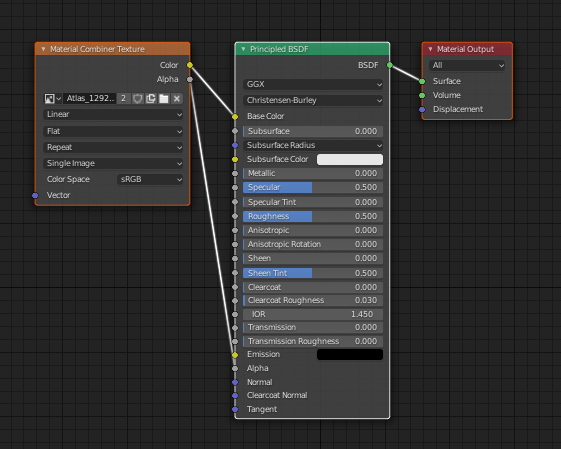
nevermind, I think I might have just answered my own question, material combiner doesn't even bother addressing normals in this example, so there must not be any
 cobalt current
so I have a bunch of body textures in separate materials, but when I make an atlas with CATS, I start seeing texture problems at the uv seams.. so I guess the uvs are moving slightly with respect to the textures.. so how to avoid this? or what am I doing wrong?
sweet mason
Increase the bleed
 ornate ivy
Hello so i have tried uploading an avatar several times but it will not show up ingame in my avatar list, i have the newest sdk and the right unity version theres must be something wrong with the avatar or my unity project causing it to not uploaded properly help plz!
calm spade
Which unity version ?
ornate ivy
2018.4.20f1
calm spade
In that case you probably have errors in your unity console
ornate ivy
It seems like it, the vrchat sdk is bugging out too ill probably have to redo everything
It tells me when i try to enter play mode that all compiler errors must be fixed, i dont know what that means lol




 buoyant forum
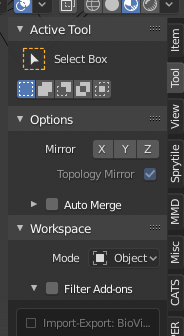
Where can I find my avatars I uploaded? Do they take a while to get put into vr?
calm spade
Check if they appear in the content manager tab in the sdk first
if they do then they'll also be in the vrchat client, if not, then it didn't upload
buoyant forum
yeah its in there but when i go into vrchat I cant find my avatar
calm spade
Are you logged in on the correct account ?
And did you upload it on the correct account ?
buoyant forum
yes I did, I even tried logging in and back out
where would my avatar be once it uploaded?
calm spade
in your avatar row
buoyant forum
is it because I have my avatar set to private?
calm spade
no
buoyant forum
I'm not sure if I did anything wrong but it's under the 'my avatars' tab on the site, and on sdk its under my creations. is it maybe caused from my account being linked?
 twilit viper
Question, but does having any amount of mesh particles instantly set the avatar to very poor? Even limiting the max particles to 1 on each emitter throws this message at me
languid quartz
That performance warning is likely being thrown because the mesh you're using for the particles has mesh read / write disabled
twilit viper
Ahh, I see. Guess I'll look around for the option then
Thanks ^^
Looks like that did the trick. Thanks again for the help!
heady smelt
Please someone help my feet are stuck in the ground
 fresh pilot
@heady smelt where are they stuck
heady smelt
in da floor
fresh pilot
Like in blender or vrchat or unity
Does anyone know how to Atlas textures :(
I tried manually but it turned out really bad
 torpid obsidian
Hey does anyone know how to bring textures from blender to Unity? I added some clothes to my model in blender brought it to Unity but the materials nor the textures followed. It was all grey
upper yacht
You make materials in Unity, set the shader, then chuck in the texture to that.

Watch this video in context on Unity's learning pages here -
http://unity3d.com/learn/tutorials/modules/beginner/graphics/materials
How to control the visual appearance of gameobjects by assigning materials to control shaders, colours and textures on a renderer.
Help us capt...
fresh pilot
Everytime I create a texture Atlas my UV maps disappear, does anyone know why?
torpid obsidian
Thanks @upper yacht Will look at it when I can
 safe swift
you generally don't want more than 1 uvmap
buoyant holly
yeah that's more helpful for environment art to use multiple UV unwraps
 errant crescent
hello everybody! so i've seen an avatar with a chair, that shrinks the person whos sitting in the chair, with a custom sitting animation. i've read that you can change the size with an custom sitting animation, but i havent found on how to make that. can somebody please help me? PS: would be awesome if it would also be possible with an sitting animation i have already downloaded, which i wanna force upon the person using the chair.
 humble rain
Does anyone know how to Atlas textures :(
@fresh pilot
Do it in blender. Get the CATS tool, combine materials. Be cautious of the final texture size. additionally if one of your materials in blender is principled bdsf, change it to a diffuse bdsf otherwise material combiner will freak out
 granite bough
i'm having trouble with atlas textures as well and im not really sure how to fix it. Basically every time i try and create the texture this error message pops up
granite bough
so could someone pls help
heady smelt
that's an issue with cats/material combiner, better luck to ask in their discord for that problem
granite bough
ok
 sacred cloak
Does CATs Atlasing downscale texture resolution? When i import my avatar into unity the textures are horribly pixelated when in blender it looks fine. how do you fix this?
amber hemlock
Does CATs Atlasing downscale texture resolution? When i import my avatar into unity the textures are horribly pixelated when in blender it looks fine. how do you fix this?
@sacred cloak it can, yes. Every texture has a setting for new resolution. Check them before atlasing
calm spade
default is 2048
amber hemlock
Also once the texture is in unity inspect it and make sure that import resolution is not set lower
sacred cloak
i have already combined all materials, do i have to redo the model?
calm spade
might need to bump it up
to 4096
You have to reimport that model in unity
its UVs are different
amber hemlock
Cats auto atlas should generate the new UV’s for you the same time it generates the atlas
sacred cloak
ok so reimport to unity is what im hearing?
amber hemlock
Meaning the model and the atlas go together you can’t just atlas it and yoink the texture and put it on the old model
calm spade
yes
sacred cloak
my unity takes forever to import now lol one sec
amber hemlock
Export FBX don’t import your blend file it works but is crazy slow to import
Keep blend files out of unity project directories
sacred cloak
ahhh that explains that
where can i find those import settings? here?
just change it to 4096?
amber hemlock
You are inspecting the material you want to inspect the image file itself
sacred cloak
here?
sacred cloak
sorry am unity noob. this?
amber hemlock
That’s it right there change Max size to something bigger
Then hit apply
Didn’t know unity had a dark mode actually
calm spade
don't use 8k
sacred cloak
is there any performance hit for setting it to max size?
calm spade
and use crunch compress
amber hemlock
^
sacred cloak
default 50 ok?
calm spade
yeah
amber hemlock
If you’re going to use insane images definitely use both lossy and crunch compression
calm spade
thats because it's the wrong version
sacred cloak
its the most recent version
calm spade
we don't support that
VRChat
Requirements We're going to need a couple things before we can get started. Current Version of Unity. We strongly recommend using Unity Hub, available on that page.VRChat SDK - See the Choosing your SDK page to see how to choose the correct SDK for your use. Step 0 - Install...
amber hemlock
I was wondering I don’t really update unity until vrchat does so I’m like oh cool dark mode
calm spade
they made it free on versions above 2019.4 today
and i assume made it default for some reason
sacred cloak
can i install 2 versions of unity lol
calm spade
yes, use unity hubs
everything is explained above
but make a new project once you have the correct version
downgrading projects isn't supported
sacred cloak
wtf i create a project in old unity and it just uses new unity
then in unity hub it even labels it as the correct version until you open it
ill just uninstall it
tysm for your help btw yall @amber hemlock @calm spade
 steady cargo
is it more optimized to have one mesh with all of its polys active at once, or several meshes when only some are active at once?
Example: my avatar has 3 weapons. I could join them with the body and activate them with a shape key, but they're pretty high poly (and I cant decimate them any more). would it be better to keep as one mesh, or separate and only enable them when needed?
 rain ivy
anyone know why the blender 2.79 texture atlas isnt working for me? As soon as I hit StartManualUnwrap it throws this error
tawdry venture
Why are you using 2.79 anyways?