#avatar-optimization
1 messages · Page 53 of 1
 calm spade
Then you need to optimize it a ton
 meager oak
how so
calm spade
That is awful performance
Blender, reduce the vertex count, merge meshes, atlas materials
There video tutorials for that everywhere, there's stuff pinged in this channel
meager oak
it even has an interior but i dont think there's even a seat in there
would it be possible to make the inside of the cockpit transparent, so people inside could see out, like the game?
calm spade
Sure, but that should be the last thing you try to do, lots of stuff to fix before that
 lime perch
Just the upload? Entirely dependent on your network. I have 300Mbps down, takes a minute or two for a 70k poly avatar
meager oak
i mean playtime ingame, like this
lime perch
Oh I played for a few days before I got to user. Just run around, have fun, make some friends, don't do weird shit, you'll get it within a week or so
meager oak
could i just idle in desktop mode
i am not trying to play 20 more hours in vr, that shit sucks
lime perch
Ok 2 things:
- The trust system is based on more than hours played. It weighs friends made, avatars blocked, content created, worlds visited, etc. You can find out more here https://docs.vrchat.com/docs/vrchat-safety-and-trust-system
- Not sure why you are creating content for a game you don't enjoy

VRChat
The VRChat Trust and Safety system is a new extension of the currently-implemented VRChat Trust system. It is designed to keep users safe from nuisance users using things like screen-space shaders, loud sounds or microphones, visually noisy or malicious particle effects, and o...
 leaden hamlet
just idling wont do it, go out and make friends spend time actually playing in worlds, just play and youll be able to upload in time
meager oak
no just spending more than two or three hours in vr is not pleasant
lime perch
It doesn't have to be in VR, you can run around in desktop
 heady smelt
yep
 median marsh
GG CATS.
 mighty crypt
xD
leaden hamlet
christ, is one of your textures tiling a bunch or something?
 lone tiger
bruh, I thought 8k was overkill
So 2k square texture takes up 12MB of memory, 32k would be... 256x as much
3GB
 still perch
Not to mention that 8k is max anyway 😛
lime perch
That's entirely dependent on your machine. Sounds good though
 slim beacon
Why does atlasing my textures make stuff that was visible dissapear?
And what can I do to fix it
 floral kayak
@slim beacon you can turn the material double sided in blender to "fix" that problem, but the back end of of a face tends to not show texture.
In unity you can use some shaders to change the culling so you can see it
 cobalt condor
Alternatively, you can always duplicate that part of the mesh and flip the normal, too, depending on how many polys you have.
 amber hemlock
Is there a way to auto-pack UV islands but not separate ones that were already stacked on top of each other?
I have a lot of hair strips that are stacked on each other and island packing makes them all unique locations on the texture
calm spade
aside from pinning specific islands, unwrapping and then moving stuff manually, i don't think so
amber hemlock
oof. I ended up finding a paid gumroad plugin that did it. saved me a day at least, worth
calm spade
what's the name 
 zenith plaza
amber hemlock
zenith plaza
amber hemlock
The one I grabbed was called Shotpacker. Worked good
heady smelt
What do you mean save as png? When you originally made the atlas you should have selected a folder for the source file for the atlas to go, which should be a png
And if the model came with that atlas, it should be a texture file associated with the model.
You're wrong, making an atlas makes a png.
The default place for me was the documents folder.
But just look for anything that says atlas or combined material
Then do a file search as said
This is why I don't like new blender, you can't find the filepath for files easily in it.
What's not normal?
In what, blender or unity?
And when did this not normal happen
You probably have to mess with your material settings I guess.
What does the texture look like?
Probably could try to edit your texture import settings and enable input alpha as transparency, that might fix some issues.
I see no green though so hair being black makes sense, the shirt not saying xbox is weird but probably fixable
No this is fine.
If the UV's for the hair are all on that single pixel, then it should be green.
Did you apply it?
Hm, I'd like to examine the model more closely to see exactly what is wrong
Yeah, shoot it to me and any source files
 tender sundial
is "Update when Offscreen" something I shouldn't be checking? it sounds bad but it seems to be the only workaround for an issue I'm having with Cloth...
 agile radish
@tender sundial i'm not entirely sure but i think this effects only you in game -
tender sundial
rats, that's cloth out of the question
agile radish
your cloth mesh has problems deforming incorrectly with colliders / try lowing the poly count
tender sundial
nah I haven't even gotten to colliders yet 😦
agile radish
cloth is a bit of dark art -
tender sundial
even at step one, just adding the cloth component, suddenly the bounds on the mesh are
which is identical to this question https://answers.unity.com/questions/1149101/

Unity is the ultimate game development platform. Use Unity to build high-quality 3D and 2D games, deploy them across mobile, desktop, VR/AR, consoles or the Web, and connect with loyal and enthusiastic players and customers.
sounds like a unity bug, the workaround works but is not advised lol
agile radish
when you add cloth component you avatar is at 0,0,0
tender sundial
yeah
agile radish
you follow this tut ?
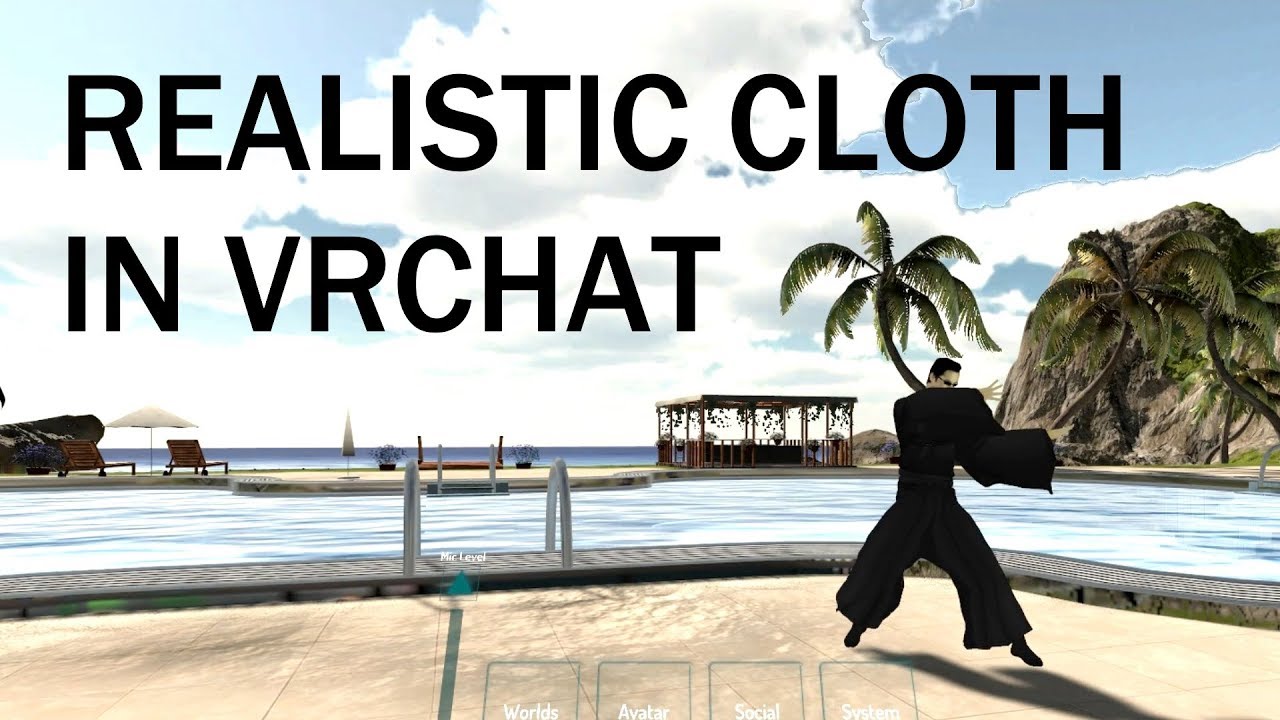
extra notes:
- this might not be the right choice for your model if the cloth is stylized in a physically unrealistic way
- like dynamic bones, this is not a free effect and overuse can potentially kill framerates, for the love of all that is holy please use responsibly
- mul...
tender sundial
yeah have seen that one
agile radish
if you have 2017.4.28 still try with that
tender sundial
and a few others w
ah it used to crash in 2017
like it would take the editor out every time I put it on
so I shelved trying to use it for ages
figured I'd try again with 2018
should probably try some different 2018 versions
agile radish
only time i use was with 5.6.3p1 years ago 🙂 - worked fine
tender sundial
the graphics this guy gets also don't match what I see in my view when I'm using it
:/
superficially it works, but because the bounds are wrong the dress disappears
lol
tender sundial
ah, no I can't because having the Cloth component enabled sets all the settings back again 🙂
if I disable it I can set the bounds again
agile radish
rly ooh thats a nightmare
tender sundial
as soon as I enable it, bam, back to that position
unless I check that checkbox I'm not supposed to check lol
but oh well, this skirt isn't well suited to cloth anyway
agile radish
you can try a 2 bone skirt - have you seen that
tender sundial
yeah
agile radish
i use many times with excellent results
tender sundial
I don't enjoy weight painting so the previous time I was using final IK to get something similar
now I can probably use constraints to get something similar
luckily it's a fairly short skirt anyway so it should be easier than the last one
but will it be optimised .. probably not w
 distant forge
Not sure there's anything you can do about that.
You can try update when offscreen. I think the bounds will be updated correctly when in play mode / ingame. Can you reproduce the disappearing behavior then?
I think if you export the model such that it has scale 1 and 0,0,0 rotation in unity (-90 x axis in blender), it won't be sideways like that
But it doesn't matter afaik
tender sundial
that's what I thought I had done too
distant forge
Update when offscreen is forced off for other avatars but it remains on for your own avatar. However the idea is just to get the cloth bounds to be initially correct on upload.
Still not sure if it matters. I've never seen cloth flicker when out of bounds like other meshes tend to do
tender sundial
well, scale 1 is definitely set because I was investigating that to see if it was the cause of my giant selection dots
distant forge
Giant dots be giant
tender sundial
and I had a memory of it being 0.01 at some point
and yeah if I revert it back to what I have checked in, that one was imported at 0.01
but the new one is 1.0
what's funny is, at no point did I ask for 0.01 lol
it exported at 1.0 since that has been the CATS default for ages
distant forge
I put together this prefab. Some skirt colliders, a simple cone mesh I made in blender, and a script to copy cloth weights from one mesh to another.
So I never touch the freaking unity cloth ui ever again
tender sundial
yes
actually the cats export button seems to make it manually set all the values to what they think is correct
vs. using the export from the menu
distant forge
*they - used to not have fbx all
tender sundial
so what I think I broke some time in the first export was that I used the menu one
what they currently set
now, I look at that forward and it feels backwards to me
distant forge
Seems good
tender sundial
but I realise it's because "forwards" is an ambiguous concept
distant forge
I think that's the default. Just the blender y/z shenanigans
tender sundial
to me forwards is the way the model is facing, which in unity is +Z
to some people forwards is into the screen with the model facing out
vague wording kills kittens
but yeah when I leave it alone like this it imports without funny rotation shenanigans and without weird scaling
but I think I'm throwing away my unity settings again here because the scaling changed
only this time I will check in this version
so at least next time will suck less
actually no it still is fucky, because Armature has rotation X -90
distant forge
the "solution" for mesh and armature rotation is go in blender and use . -> 3d cursor and Shift-S ->cursor to origin then edit mode on armature rotate by x -90. Go to edit mode in mesh and again rotate all by x -90. Then go to object mode and rotate both mesh and armature x 90
Not sure if it has negative consequences but that will get things into unity at 0 rotation. Honestly though most of my avatars gave x -90 and cloth works fine as well as just about everything else.
Just the stupid cloth weight UI is rotated and default bounds
tender sundial
I'm sure 100% of MMD imports must be like this since they're all coming from models in the same coordinate system
for now I'm just redoing the last few fixes I did last time and committing I think
I'm reluctant to mess too much in blender in case I have to redo that side later as well
I should be writing a script to redo all my operations in there
 solid smelt
There is no negative to flipping the model in blender like that to fix the unity transforms to be 0. Have to do it for every spider
lone tiger
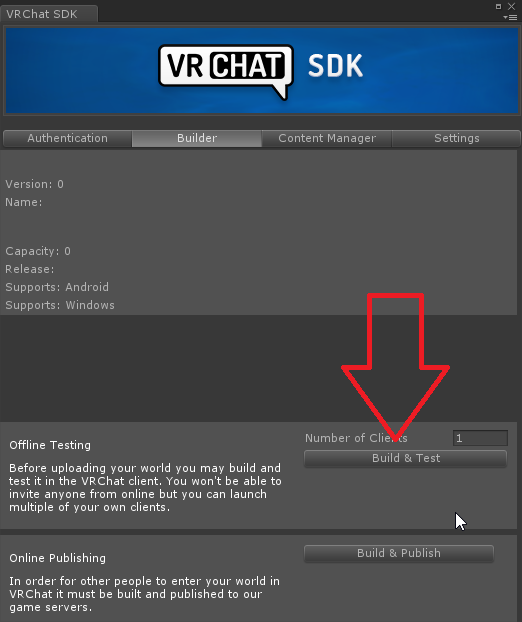
How one can see list of file sizes of each of avatar's components as shown for example here? https://discordapp.com/channels/189511567539306508/565256303614623767/709350571236393020
 jovial grail
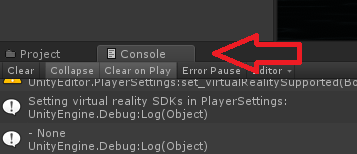
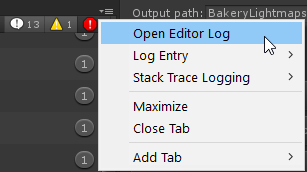
it's some log option in the console i think
last build

Turns out a lot of world creators didn't know this, but you can easily find out what your world is made of, how much it weighs, to then be able to reduce its overall size :
Retweets
176
Likes
393
 Twitter
 still perch
This channel here is for optimization 
But check it a jaw is configured in the rig. I think that was related to that.
 safe swift
@honest solar remake eye tracking in blender, issue is the lowerlid keys do not move any mesh and so they don't get imported/exported and next two keys are used (which are from visemes)
amber hemlock
Pro life tip: don’t use UV packers that mirror or rotate UV islands if you use normal maps. It will entirely ruin the normalmaps. Now I’ve got it open in gimp and am flipping and inverting parts of images for the last two days because I really like the packing. :I
amber hemlock
Wait, my lower lids are always blank, I guess cats does something to allow that ?
Yeah I think it just grabs the first four slots
 past pine
I think this is the right section for this, so i'm trying to understand what does the blenders error: "Circular dependency for image “image_name” from object “object_name” exactly means and how to fix it so that i can actually bake my final atlas version without any hick-ups. i've searched up several discussions online regarding this issue, but I guess i'm too dumb to understand 
 proper grail
The bake button will write ALL materials to the selected UV to the last selected texture node
If theres a texture node that is connected to a material output, thats where your error is
Shift+D to duplicate your mesh and delete all unused/unbaking materials and bake that or make a dummy texture target just to throw away
amber hemlock
Have the model in edit mode with the faces you want to bake selected. Have the shader and image you want to have as a source set up going into material output, if you want to bake without any shading connect the image directly to material output with no shader in between. Highlight an image node that you want to bake to. Finally have the UV you want to bake FROM marked with the camera icon, and the UV to bake TO highlighted. With all that done pick your bake type (usually diffuse), pick your sample amount, then hit bake
@past pine
Lots of things set across many panels
It’s picky
past pine
Finally have the UV you want to bake with marked with the camera icon.
This was the crucial issue for me, thanks, i've been bashing my head against a wall for far too long for such a trivial issue.
@amber hemlock 😘
 rose berry
some optimization related question.
if there are 2 pieces of mesh, they use 2 different materials,
is it more optimized to use a 2 separate textures or to use an atlas that combines the 2 textures?
i.e will unity load the same texture atlas twice in memory?
because if i use 2 textures means i can use 2 smaller resolution pngs without the reduction in detail
solid smelt
With multiple materials it's better to just have one atlas, pretty sure unity will reference the same image for all materials
 south grove
any recommendations for guides on texture atlasing in blender 2.8+? the stickies seem to be 2.79
heady smelt
The automatic method is to just do it in CATS
south grove
doesnt work
heady smelt
What do you mean doesn't work?
heady smelt
Yeah, that happens sometimes, just fix your UV's.
If you wanna do it yourself just combine all your textures in an image editing program, select each individual mat and their vertices and then assign them to the new atlas material and fix the UV's. You're gonna get weird UV's and odd scaling all over the place like this
south grove
I had a slight meme moment he other day when I tried it, this is what it looks like
heady smelt
Seems fixable to me
south grove
not sure what you mean by fix the UVs though, as in the texture gets moved around when its baked into the atlas?
 sweet mason

I show how to bake multiple textures so you will run better in game. VRChat player and you will have better performance if everybody have fewer materials if they use the same shader value.
Here a VRchat world with super optimize Quest compatible Avatar with asset like this on...
south grove
guess I have to move the UVs over the correct region of the atlas again
ah thanks
makes sense the way its linked through shader editor with the additional image node
 sleek pine
This is a Tip of Avatar Skin Mesh Renderer Optimize settings
 opal palm
Morning I'm having a little issue with getting my new avatar feet correctly on the ground. anyone got advice?
 meager ether
Hi
amber hemlock
@rose berry slow response but if two materials use the same texture the texture is only loaded once. It’s still better if they are the same material slot because then they get drawn in the same pass, but if they at least use the same texture you have saved on file size
 warped pilot
would someone be able to tell me why my avatar messes with other peopls dynamic bones? idk why
leaden hamlet
that shouldnt happen without mods afaik
warped pilot
yeah but like
I walked into a friends room and they told me all the dynamic bones just went like wonky
like straight up and such
heady smelt
That's expected behavior. If they don't have your avatar in their culling range when they look at you they'll see your avatar in it's default rest state. Which is why when you turn around and look at someone quickly their avatar has a bunch of straight/sticking out parts and then goes back into the idle state.
You can't do anything about that.
warped pilot
well I looked at them, didn't see anything wrong
heady smelt
Probably because their bones aren't sticking out by default like yours are.
warped pilot
but they told me when I was near them or something, theirs freaked out
oh ok
can I fix that?
heady smelt
You can change the rest pose of your model in blender but otherwise not really.
I don't know why your bones would affect someone else's though.
warped pilot
like for example
they had a tail
I didn't see anything wrong but they told me with the avatar I had, the trail was like straight af instead of normal
heady smelt
Huh, there's no legitimate way for a model to affect another model's dynamic bones or colliders. So I don't imagine it's something on your side if you aren't doing anything sketchy.
heady smelt
It's most likely something on their side, especially if they're the only one that sees it.
solid smelt
There is no way for your own model to change the dynamic bones of other models. However, using large colliders or inverse colliders will break the dynamic bones of client users. It's their problem, not yours
amber hemlock
All clients, or just illegitimate ones?
solid smelt
Well seeing as there is no such thing as a legitimate client then all of them lol. At least the ones with global dynamics
jovial grail
There was a pretty elaborate workaround a while back that allowed you to use a collider to affect a dbone collider to kinda get global dbones but it got broken by network ik
I wonder if constraints somehow allow it again
amber hemlock
You can download a legitimate client from steam or oculus home @solid smelt
Otherwise playing VRChat at all would be Bannable
jovial grail
If you want to get pedantic, you're always using a legitimate client
You just inject mods into it
Using a modloader
jovial grail
well it's still the legitimate client you get off steam or oculus
process memory gets modified, not the client itself :)
amber hemlock
Which is why the client is it’s behavior, not it’s binary. Modify the behavior and you have broken ToS. The technical details of how are irrelevant.
solid smelt
Yeah sorry I meant "client" as the illegitimate clients, as to me the base game is just vanilla and "client" refers to the client side mods people get.
Regardless the elaborate method might still work, but both users have to be in on it where with mods thats not the case
amber hemlock
Yeah there is a tendency to use “client” as shorthand for “modified client” which causes issues when you refer to the steam client vs oculus home client.
“Client users” being the ultimate term to make nerds twitch at the inaccuracy.
heady smelt
using the term nerds in 2020
 wintry crag
yeah i need to optimize my mesh because apparently it hit the int32 limit on polygons...
somehow
heady smelt
Most likely it's because you have mesh read/write disabled on the fbx import settings if you're getting a number like 2 billion (or trillion I forgot tbh)
wintry crag
where would i configure the import settings?
heady smelt
On the fbx import settings. Click on the model in the assets and go to the model options
wintry crag
thanks, that fixed that.
 drowsy skiff
Yo does anyone have any idea why i cant have my armature in pose mode while i weight paint? for some reason its just not permitting me to select bones at all while in weight mode
calm spade
Go in weight paint mode by clicking the armature in object mode then shift select the mesh and Ctrl + tab
amber hemlock
In weight paint mode I usually just select vert groups to control which bone / weights I’m viewing / editing
Clicking a bone knocks me out of weight paint mode
Annoying for fast previewing though
drowsy skiff
ok so i have two meshes on top of one another....
Should i mirror weight for the top to the one thats under it or do you guys have a better idea
Shoulder btw
heady smelt
I'm making an avatar with the VRC SDK 2019.2.4 right now, and I have a model that Unity is reporting has around 2700 verts and 4000 tris, yet the Builder is complaining to me that the model has 2 billion (the int32 limit to be exact) polygons. The model is one skinned mesh renderer, a reasonable skeleton (it's not even done yet), with one material. Nothing special.
Is that just a bug or is there something actually wrong with the model? (I haven't tested it in VRC itself yet)
calm spade
@heady smelt you're not using the correct version
heady smelt
I did originally create the project in a newer version, but the Builder reminded me that was wrong so I opened up the project in the right version and it's not complaining anymore
Is that just left over?
Sorry, to be clear
leaden hamlet
the sdk version
heady smelt
I just downloaded it half an hour ago... Should I not be using the latest?
leaden hamlet
half an hour ago? where from?
heady smelt
The VRChat website.

VRChat lets you create, publish, and explore virtual worlds with other people from around the world.
leaden hamlet
something def bugged out, you should have gotten VRCSDK2-2020.05.12.10.37_Public
heady smelt
Maybe I was checking the wrong place?
leaden hamlet
oh
leaden hamlet
oh well nvm then, you are on the right version.
oh i see, do you have mesh read/writing disabled on your model?
heady smelt
Ah wait you're right, yeah, haha
I'm kinda disappointed in myself because I work in Unity as my job 😅 I have no idea how I didn't think of that.
leaden hamlet
i always wonder why thats a problem, isnt it enabled by default?
heady smelt
Nope, uh
It's a performance/memory saving thing for Unity, since the mesh actually exists twice if you have read/write enabled. Once on the C# side, and once on the C++ side, so they have it set to off by default
It's also rare that you'd want to read/write from a disk mesh.
leaden hamlet
hmm, ive never ran into the problem before where i had to enable it
heady smelt
It may be because I imported the asset on a newer version of Unity
leaden hamlet
ah maybe
heady smelt
So it's disabled by default in new versions
Something like that
Thank you, though.
leaden hamlet
no prob
calm spade
Do you have read/write enabled on the mesh ? @heady smelt
heady smelt
I do now, Spy already helped me
leaden hamlet
oh also i wanted to mention ruuubick, who should i tell about the fact that the update check in the sdk is broken
calm spade
I don't think it's ever been working correctly, at less not for a while, but yeah I'll bring it up again internally
leaden hamlet
ah ok, just confused me a bit earlier
 earnest dome
I decided to use the quad mesh option in unity to help with optimization. However I noticed that I get a two extra materials added to my mesh. Does anyone know why this is?
amber hemlock
VRChat does not support quads, I wouldn’t bother bother with it
As to the extra two materials, no idea. How many materials do you normally have?
earnest dome
@amber hemlock I'm not well versed in Unity or even VRchat for that manner. The polys do appear as quads in the avatar testing world not triangles. My perceived poly count dropped a considerable amount. I originally have four materials.
amber hemlock
That shader will do that regardless if you triangulated the avatar or not, and your triangle count did not change. VRChat says polygon, but they actually count triangles. You will see this on the uploaded. The number will not change.
@earnest dome
The only thing keep quads does it’s up your material count for some inexplicable reason there’s no benefit for vrchat
 plush spire
Hopefully this is the right channel for this, but I've gotten this message on models multiple of times, and I'm kinda sick and tired of ignoring it since it slows down performance. So would anybody be able to guide me through this, or show me the easiest way of going with this?
amber hemlock
I don’t know if it’s the same for old blender but you can run a texture atlas to combine all the textures into one material. It will look the same, it will just use a giant texture
MMD style avatars are for pre-rendered movies, so they aren’t optimized for games which minimize texture count by putting them all in one image
I have no idea how to do it in old blender. If you have cats though it’s probably the same plugin for both
plush spire
Hm, I don't know why but it's refusing to combine the textures. Though I'm wondering if that's because Material Combiner isn't installed
 urban oasis
@plush spire the material count isnt great but you could just leave it as is
 small dagger
It's not optimal tho
urban oasis
but since you dont intend to edit it you might as well use teh atlasing tool
bigger concern in this one is probably bone amount tbh
small dagger
Combine materials or don't use materials at all
urban oasis
use the material atlas tool included in cats id say
small dagger
Isn't there just normal physics simulation for stuff like that in vrchat?
urban oasis
i mean its dynamic bones and a lot of em, if i were to edit it id reduce the amount by half at least
 upper yacht
@amber hemlock "Unity creates two submeshes to separate quads and triangles. Each submesh contains either triangles only or quads only." -Documentation on Unity's FBX import
It means that if you got both tris and quads on a mesh you get two submeshes. These submeshes require duplicates of any materials since they're not topologically or physically the same submesh anymore. It does however get batched. This is to optimize for tesselation shaders as stated earlier in the documentation. DO NOTE, N-gons always go triangles.
Besides, keeping stuff as quads is technically worse for performance than letting them become tris. Since GPUs are good at tris, but, not as good (still better than a CPU) on more complex shapes like Quads and N-gons. (Just sharing this since you didn't know why it added materials.)
A completely quad mesh shouldn't get extra materials. Which one can check by making a cube in blender and chucking it in unity and selecting keep quad.
upper yacht
I'm responding to something he said it Irix
amber hemlock
Ah thanks. Makes sense. I don’t think any model I’ve made has ever been exclusively quads, but since it doesn’t benefit vrchat I don’t keep quads anyway
I don’t triangulate, I just export the quads and let unity triangulate it
 fleet steppe
Are there any hard limits that prevent avatar publishing?
heady smelt
Other than errors, not really no.
Unless you're uploading for quest possibly.
amber hemlock
Quest has a 10 mb total file limit.
Pc has no limit to avatar quality, but depending on various specs, different amounts of people have have chosen to auto-hide your avatar
They ask to keep it under 70000 triangles and under 4 materials
 coarse valley
@fleet steppe While there are no hard limits to prevent you from uploading, there are limits on what can be attached to an avatar and those non whitelisted features will be removed upon upload
 solemn radish
How do you go about comparing shaders to determine which is more optimized?
 sick timber
Go into unity play mode, open the stats window, and check the fps.
solemn radish
@sick timber Perfect thanks
 worn tree
hi, where exactly do i want my viewpoint on an avatar
 tight dome
between the eyes generally (stuck on the front of the face)
worn tree
ty!
amber hemlock
you do need a compromise. As a ballpark put it between the eyes, but really what you want is you want your shoulders to line up with your real shoulders so your arms match up correctly, so if the avatar has a giant head you actually want to position the view position lower so that you can touch your own shoulders in vr correctly
 odd shard
amber hemlock
odd shard
amber hemlock
Me when I got down to a 5000 quad avatar on quest
 crisp prawn
Idk if this is the right channel, but does anybody anywhere have any info on making avatars for bHaptics tactile vest
still perch
This is definitely not the right channel...
And wouldn't that require vrchat to support that vest first? 
amber hemlock
To my knowledge it is compatable with vrchat. There are a number of videos testing it and explaining how to set them up.
Looks like it was working until the Unity 2018 update.
But yeah wrong channel
 waxen vigil
Hey so I need some help. I added dynamic bones in Unity to parts of an Avatar, but they aren't showing when the model is uploaded to VRChat? Any tips? It animates fine in Unity
Just to show it works in Unity
Not sure if this notice might cause the issue? Help?
heady smelt
Pearl, you most likely still have the dynamic bone limiter on in your settings
waxen vigil
Pearl, you most likely still have the dynamic bone limiter on in your settings
@heady smelt where do I go to fix it?
You are right I did. 😊
Found it
odd shard
60 dynamic bones tho. Calm your jiggle
waxen vigil
Anyone know how to make an avatar self illuminate / glow in the dark?
odd shard
@waxen vigil well first thing to do would be to go to avatar shaders and set up emission. You may set number or characters color texture into emission slot.
After that you might add light source to one of the bones but idk if that would work
 patent mauve
how do I decrease. it went up that high, cuz I have dublicated my model for anims. would like to know if you can put the animations like dances or partical effects on 1 armature
is there a good video to help me?
patent mauve
4 times and in every dub I have my model twice in there
calm spade
what is the base model poly ?
patent mauve
lemme check give me a sec
50,000
oh wait
if I remove everything except my model i have 780,000 polys. let me see how much I have without the guns
leaden hamlet
Jeez
patent mauve
the model alone is 684,967 poly
 dire slate
You should decimate that
patent mauve
I know it'a alot
leaden hamlet
That's already a problem on its own
patent mauve
let me see what I can do in blender
will take a while
ngl I was impressed by myself when I reached over 2 millions
leaden hamlet
I'm impressed too but that's just not good
dire slate
Not an achievement to be proud of, but alright
But you should absolutely decimate that to a more reasonable level and get the poly count for your avatar  before you dupe it around a bunch of times for animations
dire slate
That'd be Tris AFAIK
patent mauve
afaik?
sweet mason
tris
dire slate
As far as I know
patent mauve
ah
dire slate
Blendshapes don't increase the polycount either
 fickle atlas
maybe they didnt check the read/write option
sweet mason
it make the vrc get confuse with you have corrup
fickle atlas
in the fbx import settings
dire slate
Then it wouldn't give them any number at all
fickle atlas
ah
leaden hamlet
No it would be the 32 bit integer
patent mauve
so I'm importing wrong in unity?
dire slate
I think there might be something else on that avatar with high polys that you don't know about
patent mauve
must be, cuz when I make a new scene with the same model only it says 54k poly
dire slate
Yeah
Check absolutely everything on your avatar
patent mauve
a clock on my left arm was 200k poly still at 400k
dire slate
Jesus
dire slate
Boi
So first things first, decimate absolutely every model that you have in use in Blender
dire slate
So?
patent mauve
ehm yea not sure how much it will kill the ring since they have a lot of detail
dire slate
This is a game and not a render image for a photo, models should be optimized and I doubt that you can even see most of the detail ingame
patent mauve
true but most decimation arent possible for every object, right? if so I might just remove the ring. don't want to wait 3 minutes for my model to load for everyone
it says no meshes found, how do I fix that
calm spade
this could be 1000 polys
leaden hamlet
it could be decimated so darn much, i heavily doubt anyone would be able to notice the difference
heady smelt
a tiny object on the wrist or fingers having that much polys is honestly ridiculous
you can barely notice it
patent mauve
this is what's inside. anyway I'm unable to decimate it with cats cuz its an object only and not an armature
leaden hamlet
where did you get the watch from? if it was a game ready model details like this would have been textured
dire slate
You don't need CATS to decimate
leaden hamlet
and to solve something like that, you could render out an above image in blender and make that a texture that you would apply to that space, a little complex but it would fix the issue of that
patent mauve
I only deciamted with cats, not sure if there were other ways
calm spade
it can be a texture atlased on the main one and 1000 poly
dire slate
Yes, Blender has built in ways to decimate
CATS is just for the ease of automation
patent mauve
I doubt the author from the clock made that
since almost everything on there is stolen
or ripped
dire slate
But you could also put the watch on the avatar in Blender, merge the meshes, decimate it, and create a texture atlas so you don't use too many materials and done
leaden hamlet
to me this model sounds like a random model you could find online thats usually made for renders
dire slate
^
patent mauve
could be true ya
But you could also put the watch on the avatar in Blender, merge the meshes, decimate it, and create a texture atlas so you don't use too many materials and done
I'll try that
dire slate
Oh and weight paint it
patent mauve
I know, thanks for reminding me
dire slate
That's the ideal way of doing it as opposed to just slapping things onto it via Unity
patent mauve
not worth it, i was only able to get down to 140k from 250k and it already looks blocky. I'll just find another glock from left arm. that is like 1k poly only and rings too.
amber hemlock
Decimation tends to make models look lumpy. Highly recommend learning how to select edges and pick dissolve. Simplifies models in a much more controlled and organized way.
fickle atlas
is pick dissolve limited dissolve?
maybe im stupid, but like... googling "pick dissolve blender" doesnt do anything
unless you meant it as in "picking the dissolve option and using it"
odd shard
^ cringe. Its probably unintentional but man this comment hurts reading so much.
@fickle atlas working on 3d models is an actual work, you usually wont get a magic button that gets job done. So what Adeon tells you is to select edges of the model that need to be removed and use dissolve function to merge them into other edges, thus reducing triangle count. It is a long process that might take hours of work (depending on what you work on) but its the way to do it if you want a good model.
And stay faaar away from limited dissolve, that thing is not suitable for characters.
heady smelt
Normally when I think about dissolving in an optimization sense, it's most likely dissolve edges/dissolve edge loops.
The work flow is pretty simple if you have a mesh with quads (if not just convert tris to quads), select an edge loop you no longer want (alt+click in 2.8), and dissolve the edges (hit delete and dissolve edges).
You're also able to dissolve verts and faces but that tends to really change the mesh
fickle atlas
okay, that’s what i thought he meant, but i have no idea what features are packed into blender, so sorry for being a total novice and being “cringe”?
thank you for explaining further
amber hemlock
Yeah his post was pretty toxic not going to lie
And I could’ve explained the name of the tool better
On the top left of the 3-D view of blender there should be three buttons that let you choose between selecting Verts (dots), edges (lines) or faces (triangles)
Select edges will let you select individual lines on the mesh. Then you can press the letter x to open the delete menu and pick “dissolve edges” which will delete the edges but keep everything else, simplifying the model
It’s definitely more advanced than simply using decimation, and yes it will take longer to go over the whole model, but you get to specifically pick which details you don’t want
If your model is made of quads, you can also hold alt while you click an edge to select an entire edge string / edge loop at once
which will let you simply stuff pretty fast. https://cdn.discordapp.com/attachments/142531144364195841/713940752857694248/42gCc26F8D.gif
fickle atlas
ah, that’s SUPER helpful for reducing tris!
i remember a younger me wondering if that was something you could do
thank you!
i was well aware of there being no “magic button”, i do 2D art so i’m very much familiar with people thinking it’s easier than it looks
calm spade
Most available options are magic buttons, just need to have specific setups !
fickle atlas
noted!
heady smelt
Yeah, the tris to quads command you can search up is very useful
Makes working 100 times easier if you're used to manipulating edge loops
#BridgeEdgeLoops
calm spade
tris to quad is destructive so be careful
amber hemlock
Hm, I believe you, though whenever I run Triangulate I seem to get the exact same mesh back.
I guess that's because my model was quads to begin with
calm spade
yeah, i worry that blender > unity won't be as nice
 silent slate
hi
when i try to merge materials using CATS, some stuff will become white
example
after using atlas
 visual marsh
it's probably because you didn't use textures to color the stuff in, if you just use material properties to change the color, cats sees it as no texture, and therefore white
past pine
Also your skirt is bright pink, which indicates you've moved the texture location to another directory, and when you've opened the project Blender didn't find that texture in the place it was expecting to find it, so it screws the material properties, re apply the texture to your skirt material if that's the case.
 stuck matrix
I'm having issues with Material Combiner in Blender 2.83 - I'm attempting to make an atlas of Base Color materials, but when combined the resulting material defaults to one of the initial materials. In addition, there wasn't a pop-up for saving the atlas, which is odd..
Has anyone else encountered this after updating Blender?
 crisp temple
i was wondering if i should make this part of the skirt a cloth component or use dynamic bones since with dynamic bones there are 10 going round the waist and then 5 down the skirt. but i was wondering if the number of vertices and poly's were too high and not worth for using cloth component
stuck matrix
I'll give that a go, thanks @remote hazel 😄
odd shard
@crisp temple this is fairly small number of triangles, it will be trivial for most users to handle so id say go with cloth.
crisp temple
ah okok tyty
 junior fable
I think this goes here? Not sure what happened. Is it saying I don't have the file/can't find the file?
agile radish
the problem is with body2.png - when i get this atlas problem i open file in gimp - then export it with same name selecting "Load Defaults" before export - do that with all reported files and you should be fine
.
junior fable
@agile radish that solved th eproblem ;w; thank you!!! whyyyyyyy is this a fix aosidaosidj
 median valley
is there a way to redeuce the mb size of a avatar? mine is currently at 150mb and i do not know why D:
lone tiger
@median valley First thing you should check is this: https://cdn.discordapp.com/attachments/361742235525709825/717229247881805886/legacyblendshape.png
 median valley
thx ill check it out
amber hemlock
I want to modify that image to say “never use calculate. Only villains do that”
lone tiger
Or you want to have an avatar like that exploding Pikachu.
 fleet warren
How would I condense bones on avatars
 pale meteor
i dont know how to uploud and no yt vid is showing me what i need can someone help me ;w;
 spice sinew
In blender it says that I've got <30k Tris but in Unity it says 2147483647 Polygons. I don't know how to fix this. Does anyone else?
leaden hamlet
turn on read/write mesh on your models import settings
also you need to make avatars in unity 2018.4.20f1
spice sinew
I tried that but I didn't have VRChat SDK > Control Panel
But I'll try it again
turn on read/write mesh on your models import settings
@leaden hamlet Can you try to explain how I can do that?
leaden hamlet
click on your model in the assets and click on "read/write enabled"
spice sinew
found it! But still no Show control panel. But thank you so far
I managed to published it. You've saved my work. Thank you! ❤️
pale meteor
can someone help me upload my avatar i looked up a lot of vids but non of them heled me out?
i have same problem i cant find the controll panel
calm spade
You have console errors
pale meteor
where can i get this free muscel animation for the fingers to move and stuff?
because im watching a tutorial and he has them and i dont so im kinda stuck XD
heady smelt
you can buy it on the unity store
pale meteor
is this the only way? or is there a free one?
heady smelt
you can get a free one, not really legal tho
 tough wave
So having one texture atlas and a single mesh helps optimization, right? What about shaders that ask for masks and maps and all these other texture files. Are those like separate atlases? how does that factor into avatar complexity? if each atlas is one call to the gpu would a texture with a depth map and an emission mask count as 3+ calls to the gpu?
heady smelt
Generally it's considered fine to have those maps. Don't worry about them.
upper yacht
It's one call to the GPU
The GPU then goes through the Shader code that references these masks and maps.
tough wave
interesting. Ok. So adding an extra mask for some small details isnt a big cost low gain scenario. Thanks. Is it still set up where each atlas is its own call? I'm not very up n up on how a gpu works at that level
upper yacht
Depends on how the shader is setup I guess... But, logically it should be...
CPU: "Draw this thing with this shader and these settings."
GPU: "Ok, can do."
The masks and the textures are stored in GPU memory with low latency
proper grail
Cpu usage is mesh+materials, with each material being multiplied by how many passes it takes. Textures take up VRAM. Total tris and post processing take up gpu usage. yes yes
upper yacht
The biggest cost is to VRAM.
 mellow fern
When I use the CATS plugin in Blender to turn three separate materials into a single Atlas, it creates an 18,000x8,000 px image which is almost all empty space. Anyone know why that is?
The atlas is on the top and an example 4k texture for the body is on the bottom
sick timber
It gives you space to add more if you want
calm spade
@mellow fern Worth asking on the Cats discord itself
mellow fern
Isn't that image prohibitively large? And when I add it into Unity it looks like there's something wrong with the resolution. I see weird seams, as if it's blurring
Isn't that image prohibitively large? And when I add it into Unity it looks like there's something wrong with the resolution. I see weird seams, as if it's blurring ^
@calm spade damn, there's a Discord for everything
calm spade
Most likely due to your UVs
mellow fern
It has the same UV map, but what else can be wrong?
mellow fern
The tail definitely needs one, as the geometry is weird and it's a gradient, but I'll be texturing it more later
Here's an example of an area in the UV map in Unity that looks weird, but in Blender looks normal.
sick timber
could be the inport settings in unity
calm spade
You have a ton of UV islands too for no good reason
just looks like a bad unwrap
or poor seams
the main body could use a 256x256 color texture
mellow fern
I've marked decent seams, maybe not perfect. But I've been able to isolate areas and scale them up that'll require larger texture space.
But even if I hadn't done this, you're saying that every seam would simply need to have blurry black areas in Unity?
There must be a scaling or resolution issue where it's doing interpolation
calm spade
No, the seams are completely wrong
sweet mason
you dont have enought pixel bleeding past the uv.
mellow fern
So then the seams are also completely wrong on the model that I mostly copied the seam design from, where it works
@sweet mason That sounds possible, hmm
 mellow fern
@calm spade The purpose of a seam is to make an unwrap hide the area where it peels away, to better hide imperfections or areas where the texture doesn't map up. A solid color with black bleeding through in a blurry pattern surely indicatees some kind of interpolation or scaling issue, and wouldn't cause this. Changing my seams, which I may do anyway, would just move those black areas to other parts of the texture
I baked the tail but the main body is just a painted texture at the moment, no lighting effects or anything
calm spade
In that case you could just have a very small square of that color and unwrap your model on top of that and leave enough space around for the color bleeding
Everything could and should fit on a 2048x2048
mellow fern
VRChat avatars use 2k for the whole thing? Or you're saying just for this
When I used a smaller texture and painted it in substance painter, then brought it back into Unity, there were areas that didn't have enough resolution for what I wanted. Hence why I'm keeping the face and such big at the moment
calm spade
Well 16k isn't possible on unity, and 8k is ludicrous, if you want to make a 4k atlas sure, but there's no detail so i'm not sure what the point of that is
mellow fern
Yeah, that's why I first asked why it's creating an 8k texture. Actulaly 16k by 8k. I wanted to stick everything in a 4k and just scale important areas up for when I add detail
calm spade
Sure, you can definitely export 4k from substance
mellow fern
So perhaps that aspect is a CATS issue
mellow fern
Thanks
 analog vale
i would just cube projection the intier body and have a small cube in the uvs hehe
 rough vortex
This is a certified hood classic
leaden hamlet
mmkay then
 glass ibex
Hello everyone how are you?
I have a question on optimizing my avatar.
my main avatar is about 7-8mb, and was looking to make new clothes for her. The new clothes made the avatar jump to 62mb even though it doesn't have crazy polygon count, effects or anything that may clearly increase it's size.
One small problem is that the clothes itself has 11 Materials with 12 of my main model, all same shaders.
Texture quality is 512x512 and smaller, pics are in KBs.
Anyway to fix the size of it to make it as small as main one?
Don't want to fill people's storages just to see me. xD
upper yacht
Texture atlas. Check Editor log to know what is actually taking up that space.
How big the picture file size is compressed into Xformat has very little to do with uncompressed textures.
Realized it didn't exactly sound good to type it like that.
upper yacht
That's why I asked you about the editor log.
glass ibex
How can I check that, sry? x)
upper yacht
I assume windows, so, C:\Users\username\AppData\Local\Unity\Editor and then the editor log
Just posting both 😛
glass ibex
send the note?
upper yacht
Go into the editor log and search for "Uncompressed usage by category" and you'll see a bundle name of your avatar's blueprint ID. Look there. I assume you only have uncompressed textures so you'll see whether textures are causing it, or if its the mesh.
Though, ngl. I assume it'll be the mesh or some other factor other than the textures. Even though you could easily make that 1 atlas to increase performance.
glass ibex
I'll look into it.
The editor log is 1gb, and I can't open it..
wait. I did
"Total compressed size 63.2 MB. Total uncompressed size 135.4 MB."
upper yacht
And what's the %s?
glass ibex
Meshes ar 116. :/
upper yacht
And now... I can (which I already guessed it was at the start) direct you to... let me find it
glass ibex
Meshes 116.3 mb 85.9%
So this is the problem. :<
 glass ibex
16mb
upper yacht
Ah, yea. Makes sense. Are those textures solid colors btw?
glass ibex
Okay, that should help, my main one is already checked, this one wasn't checked.
Not really, but I'm planning to recolor it to make it more anime-like than 3d messed up pixels. xD
I'll re-upload and see if that fixed the issue.
Thanks for the help. ^^
YESSSS, it's 4.1mb now! Thanks a lot!!!
Atlas stops me from going back to Blender and change few stuff in the avatar. idk what I did wrong before, but I'll think of using it later. x)
upper yacht
Keep the original version and make an atlased version
Original version -> Edit
Atlas -> Upload
pale meteor
i cant uploud my avatar it dosent let me use the controll panel it only says utilitis
solid smelt
Your SDK is broken, check for relevant console errors and/or get a new SDK from the website.
pale meteor
can u link it for me pls?
ive deleted all my progress by exident so now i have to do everything again ;-;
but this is on the consol
 gritty bane
hey i need help i cant upload anything even though it says i can it always messes up if i use the regular sdk or odds sdk nothing works
 radiant shadow
Did you update to newest unity and sdk2 , odds sdk is dirt old now, no reason to use it anymore either
 left berry
Does anyone know why my view camera in vrchat is half working and half curving like a ball, I can't take a picture because it just shows it normally in the desktop view and steam VR view
Hm or its at 2 places at the same time
I can't tell
solemn radish
How do you check the file size for an avatar? I want to know how many MBs my avatar is with its mesh, dynamic bones, particles, ect.
upper yacht
editor log
search for "Uncompressed usage by category" after building an avatar for VRC (don't need to press upload, just need to press build)
solemn radish
Thank you
upper yacht
If you want to know the download size it's "compressed size" the actual memory usage is "uncompressed size"
Of course, some is RAM and some is VRAM.
solemn radish
Which number do I look at to determine what other people need to download to see my avatar in game?
 severe summit
I was wondering if anyone could help me upload a avatar.
recently been struggling alot to upload some.
If you could dm me.
heady smelt
wrong channel
also almost no one will bother to dm you just to help
just explain what you are trying to do and what's your problem
severe summit
What would be the right channel?
heady smelt
if it's just a general question about avatars (including upload) then #avatars-2-general
severe summit
Oh ok.
 waxen meteor
 vast cloak
Whats the recommended polygons/verticies per avatar and what is the recommended texture size
visual marsh
the lower it is, the faster it loads
so in reality, it’s just trying to minimize the performance impact of an avatar
solid smelt
Yeah "recommended" is as low as possible or as low as you want to go. You can refer to https://docs.vrchat.com/docs/avatar-performance-ranking-system for specific limits on the upper end
VRChat
The Avatar Performance Ranking System allows you to see how much a user's avatar is affecting performance via analysis of the components on that user's avatar. You can also use it on yourself to see how performant your avatar is. This system is provided to inform users what is...
 unkempt python
New to all this... is 7 materials low enough or do i need to do atlasing?
patent mauve
do I really need to go down to 4 mats for medium performance?
sweet mason
why you need 18 material in the first place
patent mauve
yea but I would have to retexture the emission map again
calm spade
that's the optimization part yea
patent mauve
or add the E maps all together in photoshop
not a professional but lets see what I can do
sweet mason
you are in the optimization channel so that s a start
patent mauve
yes but my question above hasn't really been answered
sweet mason
if you want to be medium its below 16
patent mauve
so i could have the 3 E's separate and the rest together
sweet mason
that the only poor rating you have?
sweet mason
you dont need another material for emmission. most shader already have option to have that
patent mauve
I know I use poi
sweet mason
how many different texture you have
patent mauve
13 I think
I'm having trouble in blender to add texture to my clothings, since it's needed to be in blender for atlasing. I normally add the tex in unity
 stray crown
Been looking around on the web, but have failed to get a straightforward answer - is LoD possible for avatars?
sweet mason
No
leaden hamlet
man that would be sick but i know alot of creators wouldnt be willing to take the time to make the LoD's for all of their avatars
stray crown
Well, I dunno about those lazy sons of... yeah... but I know that I'd do it for the sake of performance.
leaden hamlet
yeah well some people think quest is a waste of time and this wouldnt be much difference but i would be willing to do it too
calm spade
no that's actually worse
leaden hamlet
nice to know
calm spade
If you make the other half transparent, maybe yeah
leaden hamlet
hey mind if i ask you something rq in #world-development ruuubick?
oh crap forgot there was a worlds optim channel
amber hemlock
@remote hazel one 2048x4096 (rectangle) is better than two 2048x2048, but a 4096x4096 (huge square) is actually made of four 2048x2048, that’s why you were told it’s worse
There is no need for the textures to be square. Only that x and y both be powers of two
 cobalt current
so I'm uploading an avatar through the SDK, and when I do so it says that the performance is "good", but when I check the avatar stats ingame it says "poor", why is this?
amber hemlock
If you have a pirated copy of dynamic bones, the uploader will ignore them and pretend they don’t exist but of course the game will use the real thing and rate it poorly
 stuck cobalt
Pog
sick timber
Noice
sweet mason
You can export the uv as a png
upper yacht
Do you have legacy blend shapes ticked?
 sullen carbon
What's the best way to go about redoing my textures/uv map? My model currently has 4 or 5 texture files, but a bunch of clothes and such have been removed so I don't see a need for more than 1 texture file
sweet mason
Bake
heady smelt
can someone help me with downloading blender material combiner for mac blender? (yes, i know, i have bootcamp windows, but i use macos for blender stuff.)
the installation keeps being repeated and idk how the manual install works
patent mauve
I don't know what I'm doing wrong, but I'm unable to atlas all my clothings into on atlas
 marsh token
How i fix this
amber hemlock
By pressing the printscreen button on your keyboard and then paste here
 sturdy socket
Oof, got em
 manic zodiac
@marsh token from what i can see you need to configure your avatar by selecting the avatar and mapping the chest
very easy
 gilded elm
How do I merge materials together for optimization?
 supple reef
Do rotation constraints affect the performance ranking?
calm spade
Not currently
 exotic dome
@gilded elm I'd recommend checking out Kattsune's Guide to Manual Texture Atlasing if you want super optimized atlases. Or, use the automatic atlaser included with CATS plugin. Either way the atlas will be done in Blender. There is an atlasing tool for Unity, but it doesn't preserve shapekeys.
gilded elm
@exotic dome aight, thanks bro
 grave mountain
Hey guys, Im trying to bring my skinned mesh renderers down to 1 and i don't know how. Could anyone point me in the right direction?
proper grail
Hmm, the right direction is the object mode Join button in blender. https://www.katsbits.com/codex/join-meshes/
When you get to it, orange highlighted is selected and yellow highlighted is active. Be sure the main "Body" mesh is active before joining
grave mountain
Thanks my guy
proper grail
When using poiyomi, save 0.1mb by removing the reference to the distortion map under the uv distortion tab when not using it. hmm
marsh token
how i fix this
sick timber
Which one?
marsh token
hers a better shot
 green vortex
how do i make my own avatar
sick timber
@marsh token what are you specifically trying to do?
@green vortex youtube tutorials
marsh token
get it to upload but it wont cause of the problem in that screenshot the red one
better question how do i turn of a prive seen
preview
green vortex
thank you
calm spade
@marsh token click the < top left corner of the hierarchy
marsh token
the small arrow?
 nimble ingot
When working with particle systems, are there any workarounds or helpful tips to cut down on material slots?
For an easy example, a friend of mine made a jet flame particle using 1 particle system, and wanted to parent it on an exhaust pipe. The prefab he made uses 1 material, but because he had to use it 6 times, one for each pipe, he has 6 material slots when the system is active. Is there an easy way to reduce material slot usage on effects like these that are entirely identical save for their position in space?
Somewhat related, I have a particle prefab that I hold in my avatar's hands, but have to use 2 of them, one for each hand. Then, a different animation, using the same material is used on my avatar's feet. Is there a practical way to reduce the use of material slots in the cases of particle systems that reuse the same material, even if parented to different parts of the armature, or even different settings for the particle system?
I've basically done all that I reasonably can do to optimize my main model, I just wanna know if there's a reasonable way for me to make particle systems more optimized beyond getting the model as good as I can get it then setting a 'lag budget' for all the effects I wanna throw on it after the fact. One of my gestures only uses 4 unique materials, including the single texture for the main model itself, but 9 material slots due to a need to re-use a material for a different particle system.
proper grail
Best there is to do is enable gpu instancing on particle systems, if theyre compatible itll be one material performance wise, but it wont reflect on the avatar rating system
amber hemlock
I believe particle systems use an entire material slot no matter what
nimble ingot
Eh, kinda figured that was the case, just wanted to make sure. Some of my more intense systems have somewhere around 30+ material slots, just because it counts all the unique gestures, and I kinda wanted to reduce that when possible. Is there any downside to enabling GPU instancing?
proper grail
Just the big list of things it doesnt work with adding the overhead for no benefit. Skinned meshes, lit materials affected by a light, multi pass shaders, meshes over some small number of tris i cant quite remember. Last time I looked it up the info was on unity 2016 so the above list mightve changed since than
amber hemlock
At the end of the day, if the particle system is hidden by default, it's only intensive while actually being used, even if your avatar rank says otherwise. Don't optimize or not optimize based on if the rank will improve, just optimize in general. Rank isn't a perfect metric
Sadly there's some things that will just very-poor you no matter what, so some throw up their hands and say no point in optimizing at all, I wish the system were a bit better ._.
nimble ingot
Oh, yeah, I totally agree. I just operate based on the metric I'd actually USE the avatar on. 9 concurrent materials on one gesture with the use of particles is acceptable to me, even though the ranking system will never agree.
I just wish Vrchat would publish 2 numbers for each avatar stat. One for how the avatar is at runtime, and one for the worst possible scenario. I kinda hate looking at some rando's avatar with a huge amount of materials and wondering if they just don't care or if they have hidden stuff that actually counts for those numbers.
 fringe wigeon
sick timber
fringe wigeon
sick timber
click 'auto fix'
 lofty bear
what happened to the color on my avatar, i saved it as an fbx with CATS blender plugin it was originally a vrm file, but now it has no color
 rare trout
:v This happens when trying to add an item to my inventory system on my avatar
sturdy socket
ok.. thats new
lofty bear
that's a lot of errors
rare trout
@lofty bear all the same error ;w;
lofty bear
i've had unity scream at me but, not that much
sturdy socket
wow, not having this in your editor must be nice
hold on a sec, unity is starting...
 winged glen
I'm still new to making avatars and I'm trying to optimise an avatar. I noticed it had 11k non-manifold vertices. I merged them, but I wonder if it even makes a difference in performance, since the number of polygons is still the same.
amber hemlock
Do not merge non-manifold verts. There is nothing wrong with them and many times they are intentional
Non-manifold just means they are on an edge
Deleting non-manifold verts will make the next row of verts non-manifold
Keep doing it and the whole model gets deleted lol
Delete loose verts and loose edges if you want, those are just wasteful. But non-manifold geometry is important
heady smelt
whats it mean when cats decimate tells you its already that amount of tris?
trying to get from good to very good
i think its confusing faces for tris
amber hemlock
If you have any modifiers that increase triangle count, cats will se the original lower poly model before the modifier
 remote edge
How much does particle systems tank performance? And do they affect performance even when theyre disabled?
I have 3 different duel wield daggers on an avatar. One gesture for just grabbing, one of a spinning animation, and another extra
I wanted to put the same particle system on each
dire slate
Disabled things don't really affect performance because those particle systems aren't actually spawning any particles, but they will still count towards the performance ranking of your avatar
remote edge
hm dang. It might push my avatar from being poor to being very poor. Ah well.
heady smelt
@calm spade @amber hemlock figured it out I just used manual decimation
How bad is it to use a 4k atlas (set to 4k in unity as well)
Tho
Got her down to excellent
Btw anyone study weight painting to bypass need to dynamic bones and colliders?
sturdy socket
4k is a bit high, but for an atlas its ok
amber hemlock
I doubt anything needs 4k by 4k, is your atlas mostly unused space? I try to get it to 4k by 2k at most
heady smelt
It's filled all the way up
amber hemlock
I mean if you need it sure. At least it's one material. Consider a UV packer to get the same resolution fit in a smaller texture
heady smelt
The Avatar has hair details that look really jenk if I don't eat up 1/4 if it
Hm good idea
Trailer just got loaded time to get back on the road UwU
I might just bite the bullet and set the atlas to 2k but it's leeme and she has alooot of texture details
 sturdy socket
wait, can you set the non 1:1 resolution for textures in unity ?
heady smelt
If you click the picture in unity
It seems to want to max it out at 2k
I wonder though if it'll make people download the whole 4k then downsample it located
Locally
sturdy socket
🤔
heady smelt
Yeah that's it
I can verify when I set it to 4k details got better
What's the real performance hit in the large scheme of things though forgetting about download size?
Which is already way below average
sturdy socket
from what i know the impact is exponential, so going from 2k to 4k is a big jump, from 4k to 8k is a HUUGE jump
sullen carbon
If you think about it in squares it's easy to figure it out, 1K is 1 square, 2K is 4 squares, 4K is 16...
heady smelt
How bad is it in a modern graphics card though
sullen carbon
well, in vrchat terms, even with good optimized models, most people will lag with more than 20 people in the same area
sturdy socket
Pretty bad still, especially considering you will have 10-20 people all with different materials in a instance
sullen carbon
so, the higher any of them are, it just gets worse
sturdy socket
Also sucks dry the video ram, which people with lowers specs don't have a lot of
heady smelt
Ok I'm convinced
 cedar vapor
so i have a small problem with my avatar guessing its a lighting issue but dont know how to fix.. https://i.imgur.com/qSphNJh.png
 heady smelt
Shader issue probably if you manually decimated might be messed up normals
But I think if it was normals it wouldn't look like that itd be glitchier
visual marsh
nope, that's straight up lighting bug with whatever shader you're using
cedar vapor
im using poiyomi shader.. should i disable any lighting on the avi and see if that fix's it?
visual marsh
or add emission
cedar vapor
fixed by turning off lighting =p
amber hemlock
Unity does textures of any resolution, just set non-power of two to None, and it will use your resolution as-is. it's not recommended since it can't use mip-maps, though.
If you need to use a non-square texture, make sure both length and height are powers of two, like 4096 x 2048. That way you can still use Mipmaps.
no actual benefit of making things square
 half latch
Hey! I'm new here and I'm trying to reduce the Tris in my avatar I decimated it with cats in blender but when I replace the fbx in unity the avatar just disappears
leaden hamlet
if it has a different name then you will have to put the model back into the hierarchy
half latch
I thought I got it but it just made a new parent group in the hierarchy
apologies I'm very new to unity
 raw hollow
So running into an issue where my avatar causes lag even with it being medium quality, checked to make sure that the texture is 2k, using latest version of mochie shader
 reef osprey
Who can make me a kon avatar HMU @reef osprey
heady smelt
does anyone know what causes more of a hit on performance ? dynamic bones or big textures?
amber hemlock
Dynamic bones cause far more lag. By miles. However, someone can disable your dynamic bones. They cannot scale down your textures, if they lag due to big textures they can only hide your entire avatar.
But it takes far more effort to lag via textures. Only a few dynamic bones can bring down fps
heady smelt
ok so I have a shit ton of dynamic bones on my avatar any way I could ease it up a bit ?
like say for instance if I remove a bunch of collision checks
because I have have 30 + collisions per dynamic bone script and I have over 40 dynamic bone scripts
solid smelt
Collision checks are the worst offender. Good practice is to only use colliders on probably common collisions
For example, you dont need to reference your hand collider to something you rarely touch if at all
amber hemlock
Often avatars use far more bones than they need for a realistic wiggle
Meaning they are best fixed in blender with bone merging
The biggest offender is mmd style dresses with an “umbrella” bone structure. That is entirely unnecessary and a single bone chain going down the center can approximate the same result
upper yacht
Though, if I remember right colliders uses bones, and not mesh to tell if it should be deformed. But, yea. Clothing takes a lot
heady smelt
alright thanks guys
lime perch
colliders use joints, but yeah that's the right idea
mighty crypt
my character takes a long time to upload, i turned the future proof off. but it still takes a very long time although its not different from any other (koikatsu) models i previously did
is poiyomi shaders that heavy
?
 hard tiger
Im havin a problem. You see, i remeshed a model to make it quest compatable but im unable to get it working with the vrc skd
nvm fixed it
calm spade
It disables culling so probably not ?
There's more downsides to duplicating faces, with normals, shading, but the difference between the two are probably super minimal
Whichever you chose is fine
on quest you'd have to duplicate though afaik
amber hemlock
Yeah none of the quest avatar shaders are double sided. Also double sided shader will double sided the ENTIRE avatar so it’s best to just duplicate faces where you need them and use a single sided shader
& never create a second material / shader just to save some triangles
 spare egret
Hey, does anyone here know how to combine skinned meshes?
 quasi estuary
you should be able to do that in blender by selecting them (in object mode) and right clicking -> join
spare egret
Thank you. Nothing on Google was helping and all it gave me was some code and an asset that costs $60+
solid smelt
Probably a script to do it all in unity batch wise
spare egret
Er... Joining the meshes seems to have messed up the texture
solid smelt
Make sure before you join meshes that their UV maps have the same name
quasi estuary
if you have the vrcats plugin it has a join all function that should handle uvs automagically
spare egret
Oh! Thank you, Jetter! That's much better!
quasi estuary
no problem ^-^
quasi estuary
quick question - what is the actual performance impact of having a physics collider on my model? I have one under its feet so I can fly around and it brings my perf rating from excellent to very good and it's keeping me up at night worrying I'm losing frames over a gimmick
calm spade
If it's not active at all times that should be fine
heady smelt
What am I doing wrong?
what the ? how ?
I followed all the advice that my friends who make wolfboys gave me
advice for what ? getting blocked by everyone around you ?
Making an avatar that'll never actually load in game lol
I tried loading into this and it took 30 mins with 4.5gb/s fibe.
upper yacht
And why would you do that?
heady smelt
The devs let you.
upper yacht
Ok, true, fair enough.
heady smelt
just because you can, doesnt mean you should
There are a lot of things that fall into that category on VRC, but if people don't push the limits the game never changes.
upper yacht
We can say that about a lot of things.
patent mauve
only because you can hit somebody doesnt mean you should same scenario with your avatar. btw hey can I have your vrchat name so i can block you before we meet at atll ? ty
 proven palm
to answer your question "What am i doing wrong"... Answer: Everything!
sick timber
Here's a solution:
If it's your avatar, optimise it.
If it's not, change into a different avatar.
If you won't do either, uninstall the game and burn your PC.
sick timber
To fix it:
- Download Blender and install it
- Download the CATS plug-in and install it
- Click "fix mdoel"
- Use the Atlas maker to make an atlas and end up with one material
As for the multiple UVs, idk
 open hill
CATS deleted all of the other UVs but didn't merge them, so now I'm left with this mud of a texture
open hill
also, with atlas it's way worse
sick timber
You'll have to do it manually then.
open hill
How can I get UV maps to 1 UV map without unwrapping again?
calm spade
you'd have to copy UV maps layouts, there's tutorials online
open hill
for textures it should be easy, just put it in the photoshop and do it, and then just put correct part of the UV map into correct place, but when it comes to UV maps
calm spade
mats combiner is supposed to do that for you
open hill
Yeah, but as it seems there is something on my mesh that confuses the material combiner, so it's not working
so I have to do it manually
I've just noticed that it does... something... but it's so messed I can't distinguish it
 buoyant holly
it looks like it forgot to actually update the uvs for the texture Atlas
open hill
any way I can update that manually or something?
proper grail
Might need to seperate them by uvs, than rename all the uvmaps UVMap
open hill
Before I make Atlas or after?
proper grail
Before
buoyant holly
oh yeah that's probably not going to work well if they have all different UVMap names
buoyant holly
even though they could have used the much Superior route of edge Loop dissolving so that you have proper fingers and reasonable zippers
open hill
I had to go to sleep, it was 4am for me. I just wanted to say, I renamed all the UVmaps and still have the same problem. Also what did you mean by "might need to separate them by UVs"?
 clear oasis
Ok so I'm making my minecraft skin as a VRChat avatar. It's made up of a collection of squares. VRCSDK doesn't like the skeleton (I had to make it, there weren't any that I could find for blocky models like this), but that's an issue for later. For now, I want to know why a group of cubes comes to a total of 214783647 polygons
patent mauve
also in blender?
clear oasis
How would I check that?


 clear oasis
No. don't fully understand from just that tho
 hexed oriole
click the model tab when you click on the prefab
@clear oasis
You know how you need to switch the model to humanoid right?
above that there is "model, rig, animation, materials"
click model
and them check legacy blend shapes
You should do this with all models anyway, as shapekeys (stuff used for talking and blinking) will screw up the mesh and make it look janky if that option isnt checked.
Trust me, with one of my models it took me forever to figure out why that was happening
 hushed socket
hey, so what would happen if I were to just delete all but one of the skinned mesh renderers
because the upside is better performance but I have no idea what the downside is
I have 4
I might just combine them in blender but I suck at using blender
the documentation says that you don't need more than one usually but that's pretty vague
heady smelt
skinned mesh = an object with at least one bone
so if your object has an armature
it will also have a skinned mesh renderer
that's why you usually only have only one skinned mesh and it's the one on your avatar
hushed socket
i apologize but when it comes to models I'm not at all literate or knowledgable
I just want to know what happens if I delete most of the skinned mesh renderers
can the objects they're associated with not move without them?
heady smelt
well, remove the skinned mesh renderer and look what happens.
hushed socket
I don't know how to see what happens, that's why I'm asking
otherwise I would have tested it myself
i'm new to this
I tried just making a copy of it and removing the copy's skinned mesh renderers, but I couldn't, something about unpacking prefabs or something
heady smelt
the skinned mesh renderer is what... renders your mesh
heady smelt
yes
hushed socket
gotcha
so if I remove one, I remove that part of the model, is that right?
just tested it, that is exactly what happens
thank you for the help
I'm down to 3 skinned mesh renderers, and according to the documentation that's alright, so now I'll try to do everything else
 echo snow
I have sunk into a hole of researching medical data for average bone lengths to compare to my avatar's bones to adjust and fix floor reach issues. >_>
fleet steppe
When a vertex group is condensed to a single point, like with the avatar head in first person, is the load on rendering the triangles in the group lightened?
 fallow birch
Question: Does VRChat appreciate a triangulated mesh for the avatar? I'm getting my headset soon, so I'm trying my hand at character creation and I don't want to retopologize the mesh...but I will if I have to
sick timber
Because Unity draws tris, not quads
upper yacht
I mean... you can do a pure quad mesh and then triangulate it automatically.
 solemn fjord
Does anyone have a tutorial on optimization in general?
because im trying to get this atleast to poor
 velvet flower
VRChat
Do you want your avatar to be efficient and be loved by everyone because of all the frames you're saving them? Follow these tips and you should be good! Any recommended numbers or limits in this document are subject to change at any time. Although some of the descriptions prov...
clear oasis
Almost done here. One last issue though, I want to apply three different materials (all solid colours) to my model, and CATS merges them all into one
If I don't use cats, then it complains that I have too many of something (Skinned meshes, I think?)
velvet flower
is there a reason for three materials being separate?
clear oasis
They are all different colours, and one is translucent
velvet flower
Three materials is not a big of a deal but it's just generally you want to learn to keep it as optimized as possible
if you adjust diffuse color in blender upon atlasing it should keep that color with the texture if i remember correctly
clear oasis
Oh, I've been applying materials in Unity, since I know (Sort of) how those work
velvet flower
and yeah translucent part most likely will have to be a separate material
the other two can be merged into one just going to have to set a diffuse color for it in blender before atlasing them to the one you need it to be
clear oasis
Sorry, I had something else to do. I'm not really sure how to merge the two colours into one material, but I managed to make a texture in blender and UV map it. What now?
velvet flower
atlas it with cats or materialcombiner that got installed with it i think
clear oasis
I think I was misunderstood (Or maybe I misunderstand?). I have a material in Blender that has both colours. How do I export that material to Unity?
clear oasis
Thanks, y'all. It's done
 dry flint
how would i use the same material on seperate parts?
without having them count as 2 materials but 1 instead
 sudden pilot
Does anyone happen to have experience with vroid models (roid-blender-unity) . I tossed mine through blender (cats) and then once I change the it to fbx it shows up like this in unity . Been struggling with this for days. Every tip and trick on Google leads to deadends . Basically around the eyes and the shirt my material won't come in properly after converting the file. This is my first time attempting to animate a model, would love some help. DM me
sudden pilot
@calm spade this is my first model . I can't edit the shader in blender for some reason though
sudden pilot
I met to say unity lol very scrambled from reading forms . Yeah it won't let me edit shader but I see the option in unity. Figured it out. Omg I think it worked
@calm spade thank you so much . After spending hours on this . You're the best . Took a second to figure it out but I got it lol thanks again
fallow birch
I also have a vroid question. So I was attempting to use cats (Never done avatar creation before) and it came with the shape keys for the eyes, but the thing is that cats wont detect those shape keys. So I cant create eye tracking
(apparently didnt do it for the visemes either
proper grail
Only 3 vertex groups? Cats goes by the mesh named "Body" iirc
fallow birch
Well, Vroid made the face a seperate mesh (for some reason) so if I join the face and body meshes, would that fix it?
proper grail
Its only a crtl+j away!
fallow birch
uh oooh looks like the atlas screwed my materialss
leaden hamlet
probably need to change this on your atlas texture, just keep in mind it will start to increase the file size of the texture
 rustic ocean
Anyone know why Unity says my model is like 200k polygons but the stats say it's only like 2k tris?
 marsh trail
Unity or the vrchat upload menu?
rustic ocean
vrc upload menu in unity
marsh trail
Select the mesh in the hierarchy and make sure it's not read only
rustic ocean
Got it
marsh trail
Screenshot the inspector
rustic ocean
marsh trail
Oh right it's not there...
Select the model in the files in unity
Leftmost tab under the inspector after you select it
rustic ocean
This?
marsh trail
Read/Write enabled
And tick legacy blendshape normals, or change it from calculate to import, if you ever make shapekeys, that is a must
marsh trail
Shapekeys are pre-defined (by the creator/editor) shapes that the model can morph to, you can boil it down to "X amount of vertices move to Y locations" and it'll translate that movement, such as opening one's mouth
rustic ocean
I see, Imma google it later, but for now, just gonna focus on some basic and simple avatars as practice.
Do you have any experience with an error saying "this avatar is not imported as a humanoid rig..."?
marsh trail
Select the model in the files again
rustic ocean
I selected the humanoid type in the rig menu earlier
marsh trail
Go to the rig tab, change it from Generic to Humanoid
Go into configure in that same tab
rustic ocean
And when I go into rig menu, when I move bones, the model moves with them just fine
marsh trail
Hmm... everything seems proper... guess it's just unity being unity
marsh trail
Set the rig type to generic and apply
solid smelt
What does your hierarchy look like?
marsh trail
Then back to humanoid, apply
rustic ocean
marsh trail
That scorched earth approach tends to fix it most of the times
rustic ocean
I tried it, still the same sadly 😦
Any chance it has anything to do with Avatar Definition?
marsh trail
Where do you have your descriptor?
rustic ocean
vrc_avatar descriptor is on the top one
marsh trail
That should be fine then...
solid smelt
What version of unity are you using?
marsh trail
We're still on 2018.4.20f1 aren't we?
rustic ocean
I just downloaded this one off the vrc home