#avatar-optimization
1 messages · Page 46 of 1
 minor wren
 still perch
on avatar upload is always gonna mean modification
it needs to be caluclated by a trusted second party
minor wren
for the client
still perch
it can change anytime. avatars get updated regularely
 heady smelt
you arent relying on the sdk readout, but the server once it's done uploading
ideally of course
still perch
the server would need to load the package and analyze it tho
requiring extra infrastructure
minor wren
uhm no? avatars are versioned. when you upload an update it gets a new version number, not overwrites the old one
 mint kernel
that cannot be that much, that script is also in the sdk,
minor wren
that's why we have bugs when you get back the old version when you change worlds
mint kernel
mini scripting that runs over an avatar after uploading
heady smelt
extra short term work for more long-term benefit of not having to serve as many avatar downloads
still perch
its in the SDK but you need to host a automated host that is fast enogh to keep up and reliable
 amber ridge
They already strip bad components from avatars on upload
still perch
and on runtime
amber ridge
Right, it's two fold
 amber hemlock
I would prefer my own client verify your avatars stats. I don’t trust other people’s clients
still perch
if it would onyl be on upload people would exploit the shit out of it @amber ridge
minor wren
"They already strip bad components from avatars on upload" and on avatar load too
amber ridge
That's why the signing server does it Adeon
amber hemlock
I’d prefer my client do it over the server as well
amber ridge
The SDK inherently shouldn't do much. It's non-verifiable code
The Server should and does do a lot of the stripping and checking
And then the client does more
amber hemlock
In terms of my performance I want my own personal take on the avatar. Including ignoring dynamic bones if I have them blocked already
minor wren
the server does? are you sure? isn't that just aws storage basically?
amber ridge
This may be old data but the server was the one that made sure your audio didn't go worldwide and made changes through that, not the SDK
But people got around that I guess
minor wren
the client
amber ridge
The client can and should but I don't think it's the client that made this specific change
minor wren
i really don't think anything looks into the uploaded files at all
amber ridge
I mean if they were using that system to its fullest avatars over 70k wouldn't even process
minor wren
it's just too much work to do
amber ridge
Kind of sad, it would fix the "crash particle" systems overnight
minor wren
you could catch badly executed ones tho
amber hemlock
Just set to block very poor no more crash avatars. You can even turn the trust system off entirely
minor wren
no
amber ridge
That's true in all the technical ways
minor wren
if the shader crashes you then it won't show up in stats
amber ridge
I think if you just turn the particle restrictor on to 400,000 particles that will fix that without having to click on very poor
That being particle Crashers
Someone who crashes via shader like that would get banned pretty quick
Open log, everyone's log ends with the same persons Avatar opening
Saying that I don't have users up to "User" load shaders
Known and trusted typically don't want to get banned as much
minor wren
i don't want to give ideas to people, but crashing shaders can be used in more subtle ways than just crashing whole lobbies
 vestal steeple
Do normals and spec maps count towards the material count?
4 four body, 1 for anchor, 1 normal and spec for body, and for anchor curd.. I think they might.
 safe swift
no, because it's the same material just extra texture slots
vestal steeple
Hmm k then I have no clue were the extra 5 slots are coming from.
minor wren
snail trail? particle system? anything else?
vestal steeple
Nope just two animators and sound effects
4 totally mats for the body and 1 for the anchor
 empty pier
@vestal steeple It counts all material slots on all Mesh Renderers and Skinned Mesh Renderers, plus one for Particle Systems (two if it has particle trails enabled), and one each for Line Renderers and Trail Renderers. Disabled components are included in the count now.
vestal steeple
@empty pier yeah I know but the avatar has one mesh, and k e separate mesh 5 total material s, no particle systems etc and yet still stating 10 total slots.
empty pier
Can you DM me the avatar ID?
vestal steeple
I can when I get off.
 surreal topaz
They don't strip components on upload @amber ridge
Nothing is "stripped", they just block you from uploading disallowed components. If you somehow still upload this component, the server happily accepts it.
But the client simply removes the component
As soon as the client stops stripping it off (like what happened with chairs), the component will suddenly start working retroactively with no reupload
@empty pier do you happen to know if it also counts particle systems with no Renderer module enabled?
I have a particle system without a renderer solely used for subemitter purposes, was wondering if it counts
empty pier
@surreal topaz It iterates over ParticleSystemRenderer components for counting materials
surreal topaz
Isn't that a separate legacy particles component?
empty pier
It's the renderer used by the ParticleSystem component.
It doesn't appear as a separate component in the inspector because particle systems use a special UI
surreal topaz
Ohhh
 surreal topaz
Ah yeah I see, it's implemented in that
Cool, thanks
That means renderer-less particles are not counted for materials
👍
empty pier
The old legacy component is ParticleRenderer.
surreal topaz
My bad
empty pier
No problem, the names are similar
heady smelt
dang saw a guy with 900 bones but didn't manage to screenshot it before i crashed
 celest forge
optimized avatar they say
this is why i hate trusted users...this is 1 of the reasons
is that 128 mil polys? (also really really really hard to load that avatar )
 celest forge
the game actualy freezes several seconds for that avatar to load 😄
that color should be black and not red 😄
 calm spade
@celest forge You should report that to the moderation email, that's malicious if it affects your framerate that way
heady smelt
i thought we could just report ingame using the ingame system
calm spade
you also can do that, but i'm guessing he can't do that anymore
celest forge
ive seen a lot of avatars used by trusted users.
heady smelt
they don't care anymore since they're the max rank, but they should
celest forge
there should be a system in vrchat that reports to the devs the poly number that goes over the limit without the user to know
celest forge
a little limiter that let devs know about these kind of avatars.
heady smelt
if it requires modifying the SDK then no, it's never ok
 shut sequoia
Weren't you able to upload if it was "hidden" behind an animation prior to this patch
heady smelt
before this patch, if you saw an avatar with over 70k polys, they're "cheating" the system basically, but now it's hard to tell
shut sequoia
Rather the scan didn't detect it
heady smelt
you can't just go around reporting people with over 70k polys anymore unfortunately
but at 126 million polys...
 peak minnow
I was upset at first that it was showing my animation gated particles and poly but I really do understand that's a good thing to know. But like someone said, it's hard to know who modifies the client now.
 woeful ember
sounds like we need hard limits on ridiculous values :^)
shut sequoia
Nope, no hard limits.
No reason to limit creativity regardless if the (non tos breaking) form it takes.
heady smelt
you can autohide stuff that's above the 'very poor' range so it's fine having 'soft' limits now
but 126 million polys is so extreme it shouldn't be around
shut sequoia
Limiting what's allowed in public instances sure
amber ridge
We have plenty of ways to limit people now including just hiding their avatar
I wish the IK worked on the performance block Avatar though
shut sequoia
Blocking someone's ik?
heady smelt
the perf blocked robot doesn't move it's arms
amber ridge
Right, it's not humanoid I suppose
celest forge
128 mil poly doesnt seem to affect my fps at all...
amber ridge
🤔
heady smelt
he doesn't have them active in idle probably
amber ridge
It's all about the draw calls baby
heady smelt
but the fact that he can whip out something and bring it up that high
is the point of the system
celest forge
probably.
peak minnow
But what if them polys are gated behind several smaller animations?
I wouldn't hate the guy if that were the case. lol
still perch
@amber ridge its not all saying polygons dont matter at all is wrong
amber ridge
Uh, rephrase?
heady smelt
then he should redesign his avatar so that it doesn't look so egregious from the get-go
no one needs 128 million polys
shut sequoia
No one needs anything lol
celest forge
ive just discovered that is a crashing avatar
heady smelt
there you go
celest forge
127 mil poly...instant crash
heady smelt
that's not ok
peak minnow
Yeah, I can't even imagine what I would do with 100k poly, and that dude rocking 128 million. lol
celest forge
no animation needed 😄
amber ridge
Polygons create draw calls just like materials and the rest if I recall correctly
shut sequoia
Lol that many polys wouldn't crash you you just said you were fine
amber ridge
So draw calls matter just like polygons because they all contribute to the same thing
shut sequoia
You literally said no fps drop
amber ridge
Correct
still perch
it sounded like you saying polys dont matter @amber ridge thats why i said drawcalls isnt all
amber ridge
I see, no of course they matter
That's why it took so long to drag the acceptable number if poly's from 20k to 70k even though nobody was actually abiding the 20k
Glad we learned
heady smelt
problem with drawcalls is they're not created equal, you can have tiny light drawcalls and really heavy ones with zillions of things to draw
celest forge
yes no fps drop...until he plays an animation 😄
heady smelt
but it's a good indicator of the amount of 'jobs' the gpu has to do
amber ridge
Indeed
amber ridge
Wish there was a way for them to do a stacked bar chart in the Avatar stats that times out the draw calls
And it shows you a range of acceptability
celest forge
the owner of the avatar with 127 mil poly...seems to be a russian i think
amber ridge
Just report it and block
heady smelt
not like that takes effort
amber ridge
Sick as in brain illness sick perhaps
celest forge
from my experience from what i saw on public worlds...not many..
really low ppl with optimized avatars..
heady smelt
you're just seeing more trusted users because there's a lot of them and by default all your safeties are off for them
celest forge
all i see lots of shaders that kills frames like hell. and bones with high amount in numbers
thats my point @heady smelt
they dont really bother to optimize avatars..
heady smelt
trust ranks don't have anything to do with optimization
celest forge
i in other hand...im trying to get skilled as possible to optimize and make cool avatars.
heady smelt
trust ranks don't have anything to do with anything really, except approx how long you've played
celest forge
i know i has nothing to do with..
but trusted users has the most non optimized avatars here.
heady smelt
still disagree
go to the box and see plenty of Visitors, the lowest rank, with total garbage
see plenty of trusted too
it's just not related
shut sequoia
Trusted users are simply the ones you look for due to your ridiculous bias
celest forge
i see plenty of guest users but they dont even know how to play vrchat...or having heavy avatars.
 marsh trail
Trust has quite a few hidden factors, some more obvious than others, in terms of avatar quality i feel like it has nearly no correlation, the same way a user that's popular probably achieved trusted in no time, a user that spent hours upon hours fixing up avatars and perhaps even worlds probably gets null&void untill X factor is attained
 frosty root
Speaking of optimization/polys, i put a help question in under the mmd tab if anyone thinks they may be able to help me out regarding the subject. thanks!
 rotund totem
so i haven't tested all cases, but it seems like large bounds (5+) is still considered very low performance settings. is that fix going to come later? they said it'd be medium at worst. does it only affect new uploads?
heady smelt
yeah that's weird @rotund totem i wonder if they forgot
cause it was mentioned in the blog post...
surreal topaz
Anyway with the public performance guidelines gone I guess I can start putting the "old" versions of my models back into my avatar world?
Nothing crazy like hundreds of transforms or anything
Speaking of which
Is there a Blender 2.8 atlasing tutorial yet?
I'm not gonna move to Blender 2.8 until there's a manual atlasing method, preferably with texture baking and not by "texture combining".
marsh trail
I'm personally sticking with 2.79 due to a vast amount of non-updated plugins, that and due to being relatively familiar with the interface
Are there any new utilities that would be useful for non-modelers on 2.80?
surreal topaz
From what I heard, if you just want to get a model into Unity then 2.8 doesn't offer many benefits
woeful ember
you can always copy and paste between blender version
just be wary of shit breaking but something as basic as a vrchat avatar* for example shouldn't break
 proven kite
AMD of it breaks... The avatar was too complicated anyways. I've played today for the first time in a long time and was surprised how many unoptimized avatars are out there.
heady smelt
there may not be more than before, they're just more easily seen now (or potentially seen) since the avatar stats show with all components enabled instead of default component settings
 woven merlin
I can't upload. Any idea what this message actually means?
Trying to upload Quest. PC avatar works fine.
Profiler is nice. Hmm, good framerates. 😄
Hmm... Maybe poly-count? But it's not throwing that error.
heady smelt
check the new sdk that tup just posted in the announcements
 opaque agate
heady smelt
opaque agate
heady smelt
use a different shader
quest only supports shaders in the vrchat-> mobile category
if you dont have that category, get the new sdk
 jolly shuttle
Trying to update a broken avatar, but the Build & Publish button isn't even there:
Can somebody help me?
https://cdn.discordapp.com/attachments/336764732482650112/591128505652215848/unknown.png

 visual scroll
🤔
is that really affect performance if there is no colliders? or its just a numbers?
 nimble belfry
Wait, it gives collision checks when there are no colliders to interact with on the model at all? That shouldn't be the case
jolly shuttle
Yeah it does.
Dunno why it thinks there's collision if there are none.
You can thank the new VRChat update.
Most avatars are broken, and either require an update, or need to be made again from scratch.
nimble belfry
Oh the unity update broke them again?...swell x.x
 opal pecan
@visual scroll make sure the collider arrays are set to size zero maybe?
 primal birch
is there anyway to make fingers thinner or more rounded, my avatar fingers have flat edges instead of being round
jolly shuttle
You could edit the animation of the fingers bending, or edit the model itself to be more round.
primal birch
alright ill try that
celest forge
@marsh trail better performance and quality in 2.80
marsh trail
Oh that doesn't help me all that much then, blender only starts running on fumes if i got a 6.3mil poly model on my hands
I'm mostly always working with shadeless or a matcap for more detailed models so i guess quality isn't of utmost importance for me either
celest forge
then what ur looking for?
vestal steeple
Is the max dynamic bones for medium 32?
surreal topaz
Yes
 fathom mason
i still have the problem that when the dynamic bone count shows 32 for me, it shows 33 for others when they look at me. which kicks me into poor and the default dynamic bone disabler for them. while others told me on their avatar it says 32 for themself and also for me it shows 32 on theirs. any idea what could cause this?
vestal steeple
Honestly is 32 bones even that bad, I normally only have issues when people have over 150 lol
vestal steeple
What you mean? As in performance hit?
minor wren
33 to 256 dynamic bone transforms will get you a "Poor" performance rating
also, 8 to 256 dynamic bone collision checks -> Poor
that's quite a broad range
vestal steeple
Yeah it's as if it was completely made up, personally I day 1-50 be good, 51-100 medium 101-150 poor 150+ very poor but this just based on my person experience and has no actually data to back it up lol. @minor wren
marsh trail
@celest forge i mean, general utilities that would help non modelers have an easier time doing so, general performance improvements don't really make me want to switch to a completely different interface, any weight tool improvements perhaps, better sculpting/editing utilities, anything around those lines i suppose
Or hell, even texture painting improvements
woeful ember
you should check out quick favorites along with other improvements
being unwilling to use a program cause the ui got shifted around is kinda silly
celest forge
any shortcut of how to decrease poly of avatars?
marsh trail
Oh personally quick favorites don't really cater towards me, i'm relatively familiar with shortcuts and the spacebar menu is well, a button away
woeful ember
the appeal of quick favorites is being able to hotkey anything in the matter of a second
marsh trail
It's a neat feature of course, just statin' my opinion
 cloud meteor
@jolly shuttle you problem its marked red in the console(the red letter in the botton) you have or missing a mesh filter in your avatar ring
jolly shuttle
I don't think I have anything missing in my project.
The mesh filter is there.
And still asks for it even if I remove it.
cloud meteor
in the lastest update that its a common bug, now try to remove the ring and try again
marsh trail
I can understand the appeal of quickly assigning a shortcut, it is handy, but really not drawing me in as i type relatively quickly (definitively not insanely so), and i personally use the spacebar for anything i can't recall the shortcut for
What's your personal favorite improvements with 2.80?
woeful ember
if i had to pick it would either be eevee or quick favorites
but overall i find 2.8 much more pleasant to use straight outta the box
marsh trail
Yeah i can see newcomers having a far easier time adapting to 2.8
woeful ember
i wish they expanded upon the nodes for eevee and got better performance outta it for skinned animations
disappointed in that regard
considering it's suppose to kinda be a replacement for blender internal for game engines or w/e
though you can find projects integrating game systems for blender
marsh trail
EEVEE does seem neat, is it however replacing internal or simply adding a new one in?
Haven't read much about it as of late
woeful ember
blender internal is gone in 2.8 EEVEE is suppose to be the replacement for blender internal and maybe the old game engine aswell in the near future
dunno if blender will be officially supporting game development within it anymore
marsh trail
Hmm, mixed feelings about that personally
woeful ember
yeah i'm not a fan of it unless they actually provided a buncha options for eevee to make up for it
but they didn't do a whole lot it'd seem
but transitioning between cycles and eevee is pretty easy since they use the same nodes
but certain shader logic can break going inbetween
celest forge
any ideas how to reduce poly when selecting the part of the body that u want to reduce?
decimate doesnt help
marsh trail
Manual decimation
You can merge close polygons that wouldn't cause deformation and that'd be essentially manual decimation
You can also straight up remove edge loops
amber hemlock
Decimate modifier has a slot for a vert group. It will only decimate verts in that group. If left blank, it decimates the whole object
Recommend looking up how to create and add verts to a vert group, it’s a key blender feature
Other methods of simplifying are unsubdivide, if you convert your model to quads. Decimating in planar mode with a UV delimiter is also useful, trashes models less than regular decimate, removing the smallest creases first rather than smallest tris first
celest forge
to many polys to remove edges manualy..
amber hemlock
It’s a slow process but it’s entirely possible
3D modeling and optimization takes time
I promise you it doesn’t take nearly as long as the original creator took to model it
celest forge
i had to add many poly since i could not sculpt how it should..
 meager jackal
So I'm new to avatar making and I don't know how to reduce this to medium without getting rid of movement in the hair. I also have a collider on each hand in order to move the ears of the avatar. How can I make this into medium optimized?
shut sequoia
Getting rid of movement in the hair and removing the colliders on each hand.
heady smelt
it depends on how you set up the colliders too, you don't need the right hand to collide with the left ear for example, so you can split up into 2 dynamic bone components and cut the collision checks in half
vestal steeple
Seriously need to make medium lvl for dynamic bones as 35-85 ish. Excellent to 0-5, good 6-34, poor 86-105, very poor 106 + or something the number gab for good medium and poor are weird. Or something similar to that. Is anything above one collidor consider poor?
heady smelt
why do you need more than 32 transforms
you can have up to 8 collision checks for medium
minor wren
Why do you need more than 5000 triangles for an avatar
🤔
still perch
only if the person doing them didnt know what they do
heady smelt
Which is most people
still perch

-------------------------------------------- OculusQuest版VRChat対応モデル レイワラビット:REIWA RABBIT ⊿-5000: -------------------------------------------- 令和になって最初に制作したVRChat向けモデル「レイワラビット」です。 主にOc...
If you know what you're doing and not just slapping decimation modifiers on stuff you can get really good results even at low poly counts
minor wren
5k is the bare minimum for a function humanoid avatar btw
It lacks any detail at that point
heady smelt
you can get under 5k but it really depends on the avatar
heady smelt
5k is really tough for people who aren't experts
7.5k is possible for most people who want to put a lot of effort into a personal one
10k is doable by almost anybody with -some- effort
speaking from my personal experience
minor wren
It lacks geometric detail for sure
cloud meteor
the details are in the textures, but that model its pure flat stuff
heady smelt
geometric detail doesn't just make a good avatar though
2b had like 2 billion tris or something in her ass right
the 5k poly quest avatars on booth are incredibly well made and clearly from a professional
I counted every single one of those 2 bil
they're really impressive
🤤
but probably not really a good thing to show to people and say "see, you can do this too!"
cloud meteor
show me a curvy one with long hair and a skirt in 5k poly
still perch
@heady smelt sure... thats why im saying, you can even use the double 😃
heady smelt
i can show you one without a skirt but long hair and curves at 7.5k
cloud meteor
thats the problem
its not the you cant do it you need to sacrifice stuff to make it
heady smelt
and my -very first- attempt when a total noob at blender got one down to 12.5k from 61k
with some losses but yeah
lets compare my current 7.5k to my original 61k:

if i aimed for 10k you would have had trouble finding any differences unless at extremely close range around specific seam areas
and im a total amatuer
i could have done a much better job if i spent more time putting textures where i otherwise have meshes
like the shoelaces for example
i was using the quest one (i have a version where the quest and pc one are identical) and i didn't even notice until my dynamic bones didnt move
minor wren
This is not the quest channel btw
You don't have to defend the 5k tri goal this hard
It's fine for quest, but a pc gpu is more than 10 times faster
heady smelt
i use 2 colliders for a max of 4 collision checks to get touchable tiddies and just 4 dynamic bone transforms with 2 systems
it's called having a conversation
i know how you feel @cloud meteor because you were me like 2 weeks ago
ask @still perch
cloud meteor
to be honest the decimated one looks bad xD but for you its a OK no one can change that working with a model with the stuff painted to the skin its really easy to decimate
amber hemlock
“Getting under” seems to imply getting a high poly model down - yes it’s hard.
And even when you do get down that low, you won’t look as good as content made with 5K in mind. That’s the stuff you just go “woah, that’s only 5K?”
heady smelt
just keep trying and you'll figure out that almost anything is possible
https://i.gyazo.com/9682ac5ef5506757a7ebc76a3942572f.png my first attempt ever. date: like 4 weeks ago. i was completely, brand-spanking new to blender

it's not great and i removed the ribbon
but those dang wings went from 2.5k polys to like 200 polys
still perch
is that only decimated
or also retopologized
cus retopologizing is what makes you get good results😃
heady smelt
i dont know what retopologizing is or if im doing it
i dont just sit there and click decimate obviously
still perch
retopologizing is basically taking a high poly mesh and bulding a new lower poly gone mesh after its shape
heady smelt
i don't do that directly but i do combine faces in many cases
just by selecting verts and hitting f
still perch
thats still dezimating
the poing ot reropologizing is rebuilding the same with way less
simple said, at least

heady smelt
i mean you can take as many faces as you want and hit f to get it to something as low as a single tri
i can't imagine making tris to try to get close to the original with less is much different
still perch
and if you know how to make Normals and use Normals for details
plus moving detail to texture rather then mesh
then you can get really good results
heady smelt
moving detail to texture is a big one
still barely ever do it
those armbands for example
the red ring, not the bow itself, could have easily just been a texture
same for the way the shoes/socks/etc whole system works
lots of gains to be had there
things as simple as shines on your eyes are sometimes like 500 polys on mmd models
when they could just be textures
end rant see ya later and good luck, it takes time and you'll restart a lot, but you can do it
rotund totem
^ accurate
cloud meteor
the problem in PC its not the poly count cause the limit now its 70k
the problem its that you barely use any dynamic bone and your avatar its now very poor even if its 10k poly 1 mat 75 bones
with the new block system you cant even use or people will block you cause they think you are lagging them
just because you want to have a little more realism in your avatar and not to be a solid figurine
heady smelt
i wouldnt consider 256+ transforms as barely using dynamic bones - honestly, the very high like 2000 dynamic bone collision check avatars i see often have more dynamic bone transforms than they do bones. that means theyre doing things very, very wrong
minor wren
9 collision checks will give you poor
let's not pretend that's even close to 2000
heady smelt
yeah but you need 256 for very poor
cloud meteor
no
heady smelt
i dont know anyone that hides Poor avatarsn only Very Poor
cloud meteor
you need 8+ for very poor
minor wren
8+ for poor, Mikka
cloud meteor
colissions?
vestal steeple
@heady smelt answer your quest was at work, personally getting down to 32 bones wouldn't be hard but the tentacles I have for my gazer girl would not look at natural. Lol. I only need one collidor but one is enough to be marked as medium.
heady smelt
The Avatar Performance Ranking System allows you to see how much a user's avatar is affecting performance via analysis of the components on that user's avatar. You can also use it on yourself to see how performant your avatar is. **This system is purely informational at this...
256 dynamic bone transforms would mean you have wel over 300 bones, as theres about 55 you dont ever want dynamic bones on like your chest
The Avatar Performance Ranking System allows you to see how much a user's avatar is affecting performance via analysis of the components on that user's avatar. You can also use it on yourself to see how performant your avatar is. **This system is purely informational at this...
im in a spotty signal area but you can see the rankings there
should have said spine for bones you dont want to be dynamic
remember, you only need one dynamic bone component for a bone and all it's children to be dynamic, but it seems like some people add a dynamic bone component on every bone of the chain.
so instead of 32 dynamic bone transforms for a 32 bone chain they end up with 32 + 31 + 30 .... etc
i swear i see that way too often
and then they make every single collider collide with every single system, etc
vestal steeple
So would separating dynamic bones off a root bone actually be better?
cloud meteor
no
heady smelt
it depends on the exact effect you're looking for
if you use your head as the parent for the entire hair system that may not look the way you want it to and end up using more transforms but with a high stiffness value, than if you used like 8 seperate hair systems with their own unique roots
if you split up the systems you can split up colliders better too. instead of chest, have 2 seperate breastsystems, where you collide left hand with left breast only. that would cut your collision checks in half
vestal steeple
I have tentacles and a tail 6 total with 80 total dynamic bones transformers lol doesn't sound as bad as it may seem.
Haven't had anyone complain at least.
heady smelt
80 is nothing to complain about
vestal steeple
Yeah but puts me at poor lol
cloud meteor
exactly
and jump to very poor if you use collision cause if you use 1 colider on your tentacles, it will explode(the rank)
heady smelt
trick the system.
like 2 of your tentacles can be assigned to the same vertex group and move together even when only one has a dynamic bone component
i have hair that lays on top of my tiddies. that hair has no dynamic bone stuff at all, but is assigned to the chest verrex group, so it moves when the tiddies move
cloud meteor
the problem with that hair trick if you rotate your head the mesh will expand. (full body)
vestal steeple
Nah I have one collidor on the hips to prevent them from going through the body and I am still poor
cloud meteor
picture of the stats?
heady smelt
it might depending on how you assigned it but yeah
i have my hair weighted to my chest so that it doesnt clip when i rotate my head
can do that instead of using colliders too
vestal steeple
Can send later
cloud meteor
i cant use coliders for my hair or ill go to poor
the meshes are because i have 2 costumes
heady smelt
Thicc
shut sequoia
Why not just have a second avatar🤔
surreal topaz
Having a separate avatar for something like colliders gets old quick. What they should have done is graceful degradation
i.e. what we already have with the dynamic bone limiter
Avatars should never be auto blocked over dynamic bones, not when the dynamic bone limiter exists.
cloud meteor
full body + lazy people and you only want to swap a costume you need to stand reconfigure it etc etc etc
rotund totem
so silly
heady smelt
graceful degredation seems to be their ultimate goal from what tupper said in some canny post i think
i think theyre still working out how to do it properly. how do they know which mesh to hide, or which polys to show? some stuff may not be as obvious to degrade as dynamic bones
amber hemlock
Yeah if I have dyn bones blocked it’s silly to hide a very poor avatar that is only very poor because of dyn bones
heady smelt
yep
vestal steeple
I still think it also needs to calculate total like @amber hemlock said if it's just bones that make your poor maybe the over all rank shouldn't be poor. Buuut eh that's my opinion lol
heady smelt
I have to Optimize my Kermit Avatars by making the Spectrals+Normals
I have to also separate them because I found it easier to do it this way instead squished together
This is best way to optimize your Kermits.
Then you have to re-arrange all the UVs. -- This is easier way of doing instead my previous ways lol
And I doin this blindly -- mostly lookingat the shapes
heady smelt
Hmm.. I found out.. that there's an "Ornate Version" so the ones that are black -- basically.. I have to do it all over
XD
I never played Dark Souls 3.. so I wouldn't know
heady smelt
Dang... can't even get Perfect unless you exactly 32k or below. Shame. Guess I will have to do a better job at Optimization if I want Perfect
So the New Perfect Meta is 32k or less;
surreal topaz
Always was
heady smelt
Well, 3 new Kermits uploaded to VRCht :3
I need to test them then.. I can sleep it 4 AM
I will figure out the new Meta for VRChat new rules and stuff mhm
Okie Kermits just haven't got their spine weights fixed yet (Too lazy) it's the morning.. I do next time kk
vestal steeple
Bah poly count is really not that huge of a issue unless is start going into the 100ks
shut sequoia
That's definitely what we'll start seeing lol
surreal topaz
It starts becoming an issue after 70k
And yes, the new performance ecosystem means that you will see a ton of models with 500k polys.
Unfortunately, auto blocking those also means auto blocking tons of other avatars that are actually still optimized
shut sequoia
No limits for people to at least attempt follow leads to chaos, look at DB, but we've got some tools at least to help now, at least somewhat
surreal topaz
They should bring back the public world performance guidelines. Larens and Krogenit's worlds are back up again with insane stats like 50 materials, 400k polys and several thousand collision checks
I sent several emails but the worlds are still up, so this must mean that they're okay with those worlds existing now.
Also means that the hard work I put in to optimize my public avatars for the limits was literally useless.
They're ranked Poor anyway because 35 dynamic bone transforms is ranked the same as 255
Might as well put the old ones back since we're allowed to do that now
shut sequoia
That'd mean checking/approving everything manually again
surreal topaz
Well not manually
They can run the optimization bot over recent worlds every week or so
And set stuff to private that's breaking the limits
shut sequoia
That seems like more work than the last system
surreal topaz
It's a bot, the idea is that it runs entirely by itself
Including the set to private part
shut sequoia
It doesn't though
surreal topaz
It should, is what I mean.
The old one could only be operated by a person and spit out a spreadsheet for a single world.
They should just schedule it to automatically open new private instances of recent avatar worlds every week or so, run through them all and auto-private the world and avatars if it breaks the limits.
This is very similar to stuff that modded client users have been doing for ages
So I'm sure a professional dev team should be able to set this up
The issue is that they don't want to
Also IMO, cloning an avatar should only be possible once the avatar has been checked and got past this bot
But that's even less likely to happen, it's been months and you still can't mark an avatar as "pedestal only"
vestal steeple
I never liked cloning avatar since it seem to take away from people exploring worlds.
surreal topaz
It does.
It also takes away from people uploading their own stuff.
When I go into public worlds, the majority of people are using avatars not uploaded by themselves (even the higher ranks) and it saddens me a bit.
vestal steeple
And makes it far to easy to pass around really bad avatars.
I will wear other people's avatars every now and then but 90% of the time they are my own Frankensteins lol
shut sequoia
The majority has always used public avatars though
Since the boom at least, can't say about before that
vestal steeple
That is fine not everyone can or wants to learn to make their own stuff.
marsh trail
Oh it was still mostly like that even before the influx
Back when there were 2-3k total users
vestal steeple
But would be cool if vrchat had some avatar they could be customized a bit for people through an in game system.
marsh trail
Avatars had to be attained by going to a world and they didn't stick with users after they left the game which was a major gripe for many
vestal steeple
I remeber that
But exploring avatar world's is pretty fun or world's that reward avatars is a cool concept too. But cloning Mills that over.
marsh trail
Yeah, challenge avatars were always nice, now it's rather simple to get one if you have a friend that doesn't mind, and since you can favorite them, there's essentially no reward in terms of replay value
It's a good concept trade-off between them, either cloning and favorites, or world only avatars with no favorites
vestal steeple
No cloning, favorites is fine imo, force people out into the other creative. Instead of hanging around PUG all day haha
marsh trail
You could technically have both, by making it so the creator could choose if the model is cloneable/favoritable, but i highly doubt that they'd even remotely agree to make that a thing
vestal steeple
True
marsh trail
The general concept is more freedom to creators, unfortunatelly we've been on a rather downwards spiral in terms of restrictions over freedoms
A game that focuses primarily on user created content falters when creativity is squandered by needless/constant restrictions, in my honest opinion
vestal steeple
I agree completely, the rank system would be fine imo if it caculated certian things differently and also average the over different points. I sound like a broken recorded but one poor out of the rest being green should not out you as poor overall.
marsh trail
Most users i've seen want a weighted ranking system over a one value says all system
surreal topaz
@shut sequoia I wouldn't say so, it seemed like a lot of people that stuck around in the game started uploading their own stuff
Because otherwise you were stuck with one public avatar at a time
 pine flame
This is because they used to allow you to upload literally anything, the existing limits easily bypassable
minor wren
some of my friends who used to make their own avatars stopped doing that, and now only use public avatars
not because of limitations, they just gave up
makes me kinda sad
vestal steeple
Modeling and optimization isn't ez if it was everyone would be doing it, it also falls under artistic creativity. Anyone can do it not everyone wants too out the time in is that issue. Plus some people have a talent for it.
Half my vrchat time is spent more really Making stuff for it then socializing on it lol
marsh trail
A large portion of my time was definitively spent decimating models
I rather enjoyed doing it actually, even considered it sort of a challenge, my record being from 500k to 20k
But that was a single portion of the process, whereas there's many things others might find tedious, others might find amusing
I've messed with models recently but nothing directly correlating with vrchat, the updates have honestly just kinda put me off from doing much of anything
vestal steeple
I am still doing stuff, mainly focusing on a world build but, it does out me off doing any cool animations for avatars
pine flame
I do most of my fun stuff only in unity as it relies heavily on scripting, and the devs of this game don’t do custom scripting anymore
vestal steeple
What ever happen to odan or what ever it's called?
still perch
im glad you ask right here, right now
Cus there is a Dev Stream today that will talk about it 😃
vestal steeple
Nice hopefully they also go over how bad the ranking system is taken not really sure what I was saying this is an edit lol-cough-
amber hemlock
I just want walking animations fixed. My skateboard has been broken since network IK
No secondary meshes can be triggered on walking
surreal topaz
Well they ran into a bit of an issue reconciling networked IK and animations.
For example, the idle animation now plays twice remotely, causing odd jittering.
I feel like they now need to make a "remote" animator controller that's only used remotely, with only the gesture layers, having the rest be done with networked IK.
Or perhaps having the idle and locomotion layers, but masking them so they don't affect humanoid properties.
amber hemlock
Why are premade animations even being streamed? They have no IK to calculate just play them remotely
My walking animation makes the legs ride on a skateboard there isn’t even leg Ik
I didn’t realize no one was seeing it until last night
surreal topaz
Also their current setup causes this https://vrchat.canny.io/bug-reports/p/idle-animation-plays-twice-due-to-networked-ik-causing-body-jittering
I outlined a possible fix in the comments just now. It should be quite simple actually.
They need to have an animator controller that's specifically used for other players, with avatar masks applied so that the animations cannot affect any humanoid properties.
Only "secondary" properties like enabling a skateboard in your example
The problem is that remotely, the MovementX and MovementZ parameters are no longer being set, they're always at 0.
amber hemlock
Wait so if you have a pre-made walk animation with no IK it still just streams it instead of playing the animation remotely?
surreal topaz
Yeah, walk animations are no longer being played remotely at all. It's all done through networked IK.
That's why these secondary non-humanoid properties stopped working.
But
The way they did it is by simply nullifying the MovementX and MovementZ parameters
So idle animations are still playing over each other twice
They should go all the way and just completely strip all humanoid stuff out of the animator controller remotely, then. Leave the humanoid movements to networked IK.
But keep the secondary properties inside the animator. This could be done with avatar masking, perhaps?
If they change up the avatar masks hopefully we can get better custom walk animations. Animating extra legs is literally impossible right now. Can only animate other properties, like enabling/disabling components and objects.
You can see the idle animation play twice if a tall avatar uses the default male animation set.
It's very jittery and shaky even if the person is standing completely still.
That's because
Locally:
- Idle animation is played
- Local IK is layered on top
Remotely:
- Idle animation is played (again)
- Result of earlier local IK is layered on top
So the idle animation's movements are taken into account twice. Almost always a bit desynced, too.
I noticed it when I put my head up really close to someone with a male animation set and they were much more jittery than before. The body goes all over the place.
amber hemlock
Still wouldn’t be preferably to me because you don’t use lower body on walk animations no reason to network IK it
Heck if you aren’t full body why even network IK lower body at all
surreal topaz
Uh
VR IK simulates the bottom part of your body though @amber hemlock
What do you think happens if you're not in FBT and you walk IRL? Your feet shift to compensate. That's all part of the VR IK component doing its work.
The alternative is what happens when you unmap finger bones, which means sliding in place.
minor wren
during walk animation?
amber hemlock
I mean in the case of replacing the walk animation with stuff that doesn’t use Ik
surreal topaz
In fullbody, they turn off the hip and foot tracking points when you walk
But in regular VR they just disable plant feet and let VR IK do its thing
Oh yeah, but they don't have a way to detect that
amber hemlock
Surely you can check if an animation uses IK
surreal topaz
I'm not sure what you mean
amber hemlock
If I animate my foot it can’t Ik
surreal topaz
You mean turning the entire IK off in a walk animation?
The IK still runs even while walking
Otherwise crouch walking would be pretty bad
amber hemlock
My example is I have a full skeletal skating animation for walking. IK still overrides my upper body but not lower which is perfect
surreal topaz
Well it's actually still doing stuff, they just make the animation take precedence for the most part.
amber hemlock
Worked in both desktop, regular Vr and full body
surreal topaz
With both the current system and my proposed system, always networking the whole skeleton makes perfect sense
And then not touching the skeleton remotely but letting networked IK handle that.
But then still keeping the non-humanoid properties of animations that you may have.
That way it's all covered with no glitches.
This could all be achieved by just tweaking the avatar mask and applying a different animator controller remotely.
They're already using their "overrides" system so this wouldn't even cause backwards incompatibility.
Although hypothetical custom animator controllers would then need a Local and Remote version I guess, or a parameter to differentiate.
¯_(ツ)_/¯
If I can figure this out then surely the devs would be able to as well
I would be surprised if they fixed it in a different way, but we'll have to wait and see if they're going to fix this at all.
heady smelt
devs figuring things out is silly
a single dll is the cause of all the lag when working on avatars or worlds in unity
been that way forever and it took a friend of mine 30 seconds to figure it out and fix it. yes, fix the dll
vestal steeple
I demand the ability to walk on six legs full made purely of particles and dynamic bones, each particle being a different material.
heady smelt


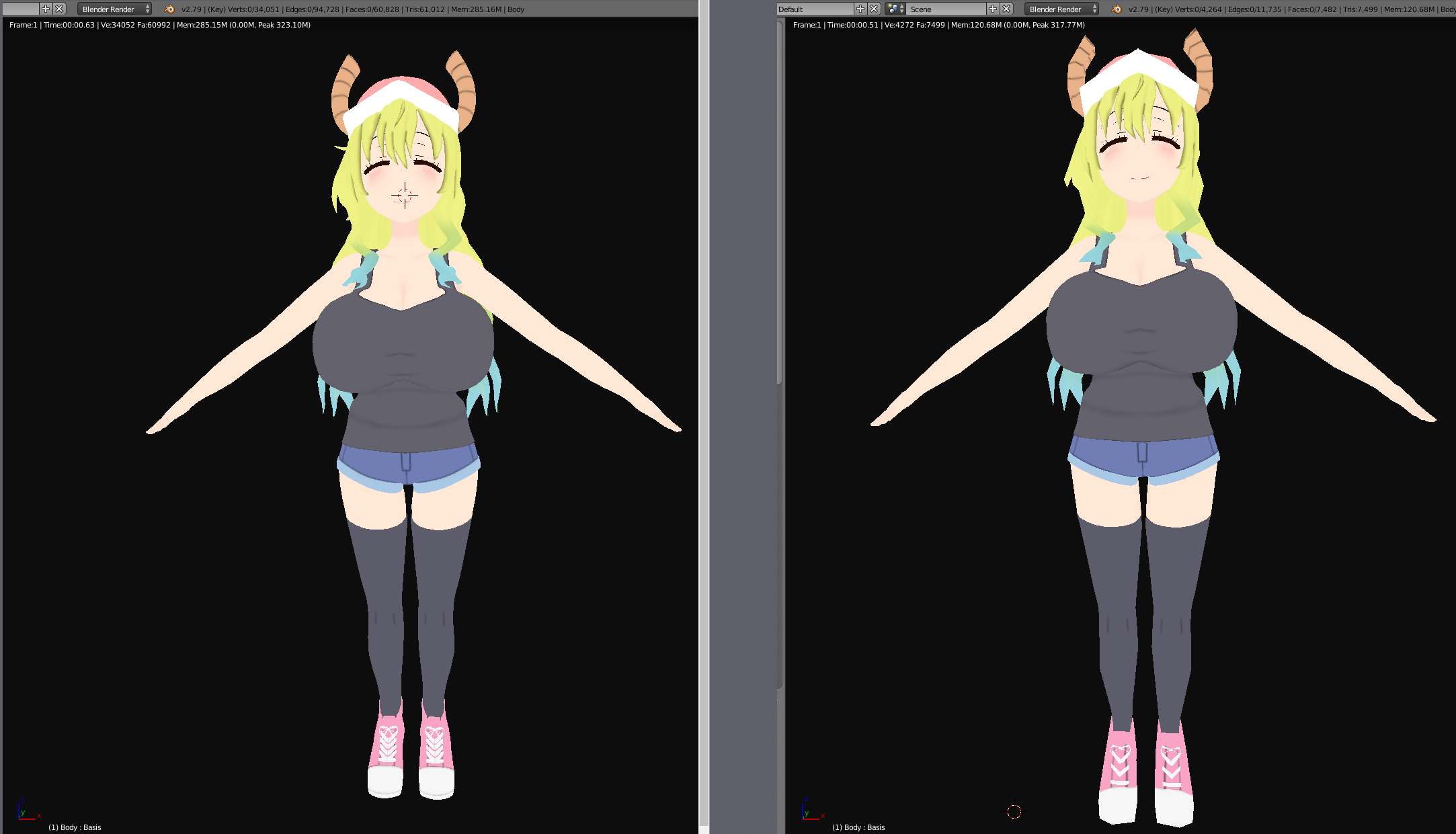
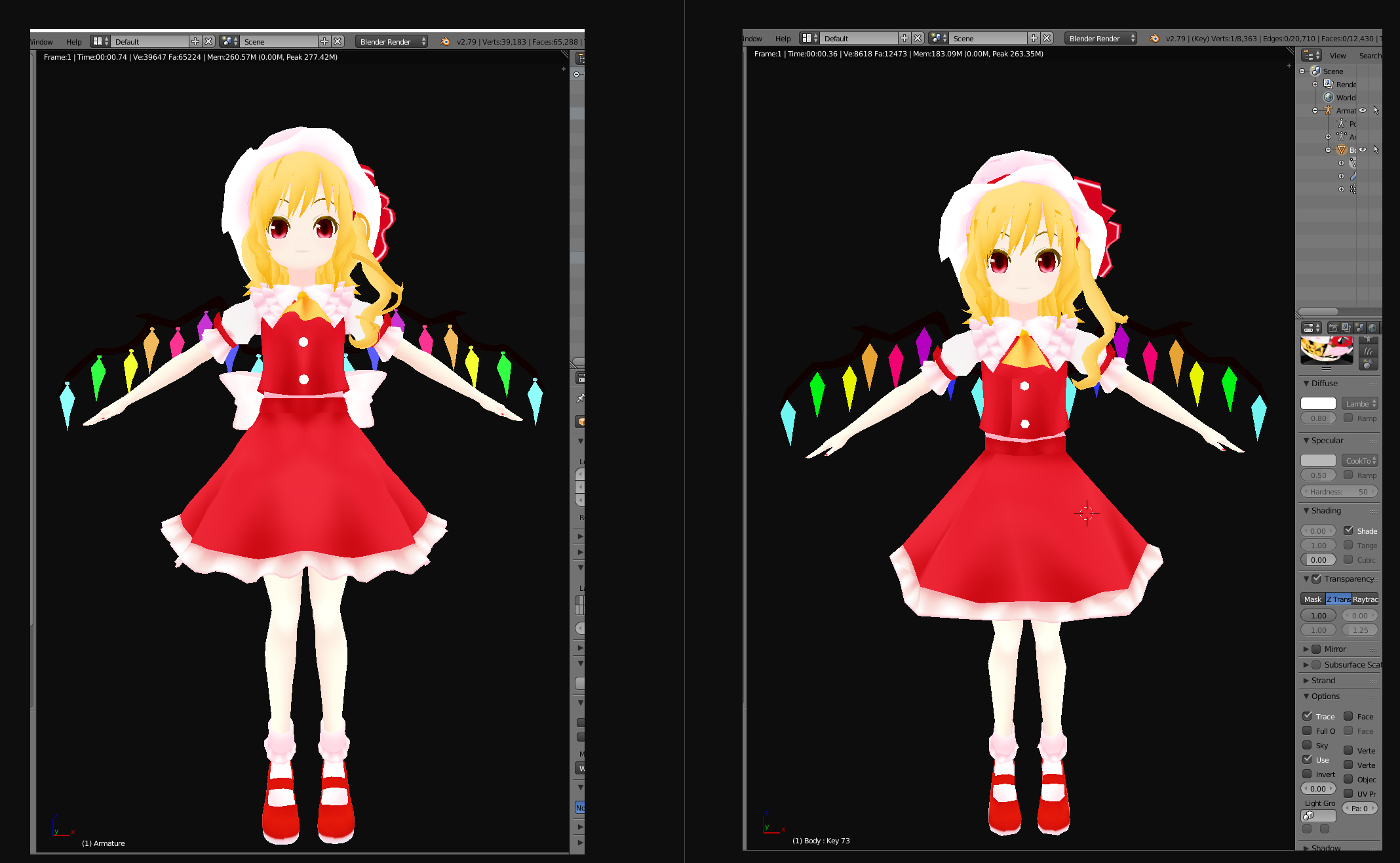
 vestal steeple
No way this idea would be legit good rating at the worst lol
heady smelt
 shut sequoia
Yikes
shut sequoia
Yeah I've not lost fps on worse than that
Maybe the shader
But it doesn't seem like anything special
heady smelt
shader, maybe texture import settings? maybe shape key fuckups?
surreal topaz
There's a lot that can destroy performance unexpectedly, which is why I'm not porting anything to Quest anymore.
I can't test it.
The grey robot is a safer bet than something potentially laggy.
amber hemlock
Very poor is a big range. It can have anywhere between 70001 and infinity tris. Or 33 to infinity materials. So yes a single very poor avatar can do a lot of damage... or nothing
surreal topaz
For example, setting your Normals to "Calculate" in Unity can destroy performance even on desktop.
shut sequoia
Well we see the stats on this one
heady smelt
yeah it's just that this one was barely very poor
surreal topaz
The issue with Normals set to Calculate* also happens with Excellent rated avatars
amber hemlock
Why are imported normals laggy?
surreal topaz
Sorry hold on, my brain wasn't all there
shut sequoia
It's really not even that bad for a very poor.
amber hemlock
Ok but why
surreal topaz
¯_(ツ)_/¯
Destroys performance, even more so with copy protection. Try it out.
Literally one model can drop you to 45 FPS in an empty Box
heady smelt
by the way, turns out quest has insane LOD settings so you might be better off disabling generating mipmaps for lots of their shit
amber hemlock
What if I set the same calculated normals in blender instead and use import in unity
surreal topaz
Anyway, after seeing a Good ranked avatar destroy performance like that, I've been hesitant on porting stuff to Quest because I literally can't test stuff like that. What if some other thing I did destroys performance?
Yeah that works fine
 pure bridge
setting a normal map to calculate destroys perf? how?
surreal topaz
No, not normal map
pure bridge
oh.
pure bridge
ohhhh.
surreal topaz
Vertex normals
amber hemlock
I know you mean vert normals
surreal topaz
Yeah
If you do it in Blender beforehand, it's all fine.
But with copy protection that's not always possible
The issue came to light because of copy protection in the first place
amber hemlock
I don’t even use copy protection how silly is it
surreal topaz
Well the copy protection isn't really useful on its own
heady smelt
wait so people using some meme copy protection to keep their original content do not steal avatars is what makes the rest of us lag and suffer?
surreal topaz
It destroys lighting which can be worked around with Calculate, but then that causes massive lag
@heady smelt perhaps.
heady smelt
MEME
surreal topaz
What I do know is that active and/or changing blend shapes can cause lag
If you have a 70k poly avatar and you move all vertices on every single lipsync shape key, you will lag people when you speak.
And then even more when you set Normals to Calculate.
heady smelt
how terrifying
surreal topaz
Stuff like that is how models can unexpectedly lag you despite what the performance ranks say.
amber hemlock
Wait I thought calculate was a bake I didn’t think it was real-time
surreal topaz
Yeah that's what I thought too. But
heady smelt
well in this case it matched up with the rank but
surreal topaz
Suppose you calculate normals on a copy protected model. That would look extremely bad when you reverse the copy protection.
amber hemlock
What aboutt calculate on a non skinned filter
surreal topaz
So they would have to do some form of recalculation with the blend shape applied, at runtime.
heady smelt
changing that setting itself wouldn't touch the rank which is silly
amber hemlock
Is that ok
heady smelt
it's almost like the dev team doesn't actually know what's causing lag and it's why we got this kind of system instead of one that actually tries to measure performance impact of an avatar as a whole 🤔
you know, a system that looks at how it runs instead of it's stats
the same problem i was arguing with tup about re: quest avatars
it kills me knowing some nerd probably posted some avatars on that one site with that setting on "calculate" and there have been hundreds if not thousands of downloads, edits, etc, that didn't notice
shut sequoia
I guarantee you no one using that site knows much of anything or they wouldn't be using it
heady smelt
also not shown in the little video: the dude said "i don't care" when i said he had a laggy avatar
heady smelt
its very saddening
shut sequoia
That kind of person is an e z block for me, at least makes it harder for them to hit new user somewhat
pine flame
Hope my shader doesn’t end up on that site, it’s too advanced for them :l
shut sequoia
That's why I hit Rainbow and call it a day 
surreal topaz
I got put on their "wall of shame" because I said that they hosted stolen content
I contacted one of the mods about some stolen content on their website and they basically said they didn't care
The guy's response was "A-ha, two of us (out of 6+) do care about stolen content! Why didn't you contact them instead?"
pine flame
Wasn’t one of the mods avatars on there once?
shut sequoia
Just need the right person's original avatar to be stolen and maybe they'll take it seriously when it's an actual legal matter lol
surreal topaz
Later on I contacted them again and they said there wasn't enough proof
Even though the package contained _CustomAvatar.unity3d and no actual FBX
And the Body was pre-split into Meshpart0 and Meshpart1
pure bridge
they have a wall of shame?
surreal topaz
Yeah
pure bridge
thats lame... :p
surreal topaz
Any time someone badmouths them you get put on there lol
Right, can't mention that site here by name
pine flame
Well done lol
surreal topaz
The only time they ever did anything right is when they put subcom on their wall of shame
pure bridge
on an unrelated note/related note, what do you guys think is better: atlasing different parts of your model (hair, hoodie, skin) or making one big atlas and cropping out the different parts you need per-shader
surreal topaz
Wish they were as vigilant with other stolen models too, not just the ones subcom stole lmao
If different materials re-use the same texture, that is more optimized than if they all have different textures.
But the difference isn't big.
pine flame
One big atlas and different materials
pure bridge
i personally go with the latter option cuz its easier for me to work with and the only consequence is increased image size which is not much i dont think
yeah i figured thats what everyone did
 graceful vine
@iron warren Hi, read rule 15.
 elfin shore

shut sequoia

elfin shore

heady smelt
Need to find the META Perfect Limit for Mesh Objects
Then I can make a video on how to be META Perfect Optimization on VRChat
And the Thumbnail will be Yugioh Cards of Cyber Dragon Meta
graceful vine
I'm glad you have thought that far ahead
heady smelt
the meta is medium, you can't block medium
pure bridge
n-new user?
heady smelt
the dudes a new user but uploaded it himself so he must be a nuisance too
heady smelt
maybe
pure bridge
its always the bad site if it doesnt come from a VRC gang server
even most MMD assets ive come across do not approach such greedy numbers
 atomic rover
Ya mean that one certain mod site?
Yeah, I used to go on there a lot when the avatars were cooler and more interesting. Video game models and such. It's starting to become one giant TDA site, and that's kinda boring.
They've also been uploading MMD models that don't approve redistribution and/or ask to not be converted for VRChat in the first place. I learned that I shouldn't trust their avatars anymore.
But judging by this, it's either 1) a troll or 2) someone who doesn't care about optimization.
heady smelt
I think I am going to start testing the Meta of non-skinned meshes now.
peak minnow
In an attempt to be more optimized with my avatars most of the time I'll combine all the materials using a plugin on Blender but the last model I had just kept turning black on combination of texture/material. Any idea on why that would happen? I combine 2 meshes then use the plugin to combine material.
heady smelt
-.- Accidentally deleted the weapons and shield
 delicate spruce
@peak minnow you just have to put the png back into the material or create a new one and put the png in :3 then it should work 😄 had the same thing yesterday
 queen hedge
WOW, so that's what crashes us in friends of guests/public worlds back in 2018.....
Those million polygon settings show entirely these users are scum trolls just to be present in world to crash people... NEVER AGAIN, feckers like them, crash us. I am so happy with the auto hide Very Poor avatars 
That day before a year ago, when I visited a friend of guests world, some douche snuck in and explode everyone some crashers, all at once...
Now I can see how it works now, dang such douches...
heady smelt
You know polys can’t crash you right
queen hedge
Anyway how many bones considered pass safe amount?
heady smelt
I don't think it's possible to make a Perfect Optimized Avatar if you have Dynamic Bones
queen hedge
Not even 2 bones? XD
And yeah... I mean regular bones, how many does it considered passing safe amount?
75? 103? 200+?
Because a certain avatar I have need that much bones for animation and of course I get Poor rank 🤔
 brisk wharf
D
 sweet mason
So you want to spawn a map ?
amber hemlock
Polys can’t crash your gpu but they can crash the game and that’s really all that is needed so yes super high polys are bad
marsh trail
If it reaches 2mil active pollies, then it's either intentional or the person with it is completely oblivious, reaching 2 mil is no easy task, the highest i've seen an MMD go up to is 512k (give or take), unless they're a literal walking sculpt, i doubt one would do such unknowingly
atomic rover
If I recall right, there is a subdivision modifier in Blender. Maybe he used that.
marsh trail
Yeah, again it'd be intentional, you don't just randomly select subdivision
 boreal vector
removed some useless bones in blender and now my avatar is good :D lets see how it will be after im done with all the unity stuff
 glacial notch
can't wait till they find a way to block just the unoptimized parts of people's avatar so you just don't see grey robots all the time
shut sequoia
that'd be pretty hard for most things
blocking just materials? they're gray. blocking just meshes? they're gray. blocking just polys? gray
you can already bloth cloth and DB
heady smelt
https://i.imgur.com/aKtbqL7.png need this emote here pls
shut sequoia
i couldve sworn it was in here when that update dropped
heady smelt
it's in another discord
shut sequoia
well i think it was here for a bit too, i feel like i saw it a lot
in general
maybe outside emotes were just allowed in general at the time
heady smelt
https://www.youtube.com/watch?v=yr9AZsVzyyU very important video to think about every day
9900k and 1070 btw i record at low bitrate 15 fps to save on storage space don't bully me no, i'm not thermal throttling. yes, i'm overclocked. no, i'm not l...
glacial notch
was talking about lights and stuff not the actual parts
having more ways to handle performance is better for everyone neithertheless
sweet mason
That map is really hard on your pc if I remember well
 echo cloud
dont think that map has been updated in a long time should go to more optimized maps before accusing random avatars of FPS drops cuz 70k polys doesnt do anything to FPS
 candid sedge
thats not all thats poor tho....
lol
i'm not sure i seen that right but did it say 34 checks for colliders
might also be using a pen for that bound size
heady smelt
i didn't specify that the polys were the cause
echo cloud
you basically saying any very poor avatars drop your frames by 20fps but from what i saw on that vid it was the world not avatars Cafe Leblanc has been known to be unoptimized world
heady smelt
i did not say that.
and one avatar even in an unoptimized world shouldn't drop you from 90 to 70 by itself
you can see however that my fps drops only when looking at that person's avatar
so it was indeed the avatar, not the world
echo cloud
parts of your video you were not even looking at the person and your fps was still going down
marsh trail
After taking a look at the vid, it seems unquestionable that, that specific avatar was causing your frames to drop.
One could state that it was only happening due to that area being unoptimzed, but it only started occurring after the avatar was unblocked.
There could've been other factors in play, such as another relatively laggy avatar being in that direction at the exact moment you unblocked it, but that is highly unlikely.
heady smelt
the video doesn't capture the full vr FoV
there was no one in the entire world but me, the little guy with a low poly quest avatar, and the laggy guy
marsh trail
Then there you go, a laggy avatar
Stats-wise the only thing that could've caused lag there was the bounding box
heady smelt
it was likely something that isn't counted in the avatar stats, and that's a problem
echo cloud
polys dont affect FPS till you get around 120k+
heady smelt
no one here has ever said that polys were the cause
marsh trail
Subjective, depends on your system
echo cloud
well your making it sound like it is cuz that along with the bound size are the only red parts
marsh trail
It'd start causing me issues only somewhere around 400-500k+
 safe salmon
Wait, polys don't affect till above 120k on avatars?
Uhh... I have a world withh 430 ish k polys...
echo cloud
well for me i notice my FPS goes down with avatar polys around 120k+
marsh trail
To some others it could be far less
heady smelt
polys always have an impact, it will vary for everyone, and it depends on what those polys are doing
safe salmon
A world with 450k polly is fine tho right?
heady smelt
that being said it's very rare that you run into an avatar that -needs- more than 50k or so polys even
marsh trail
^
safe salmon
Photo scan relms
heady smelt
if someone has 120k on an avatar they're lazy
worlds are entirely different
they vary much more in size, scale, goal, etc.
marsh trail
Although with the system scanning all disabled objects, pollies start stacking
heady smelt
even with props 50k is more than enough for any avatar
safe salmon
I do need some world building too if someone could look into it with me in worlds chat
marsh trail
Tell that to animators haha
marsh trail
But yeah, it should be enough for most
heady smelt
now that you can cancel emotes by moving
marsh trail
Emotes have a time hardcap
Can't recall the exact time atm, but i think it's anywhere between 1-5 mins
echo cloud
id say 6mins max
marsh trail
Besides, there's no difference between using a gesture or a emote, both will still account for disabled objects, and some VMD setups require the original model present, so they either make as many variants as they have dances, or enable a disabled one
echo cloud
i just hate having any thing on open hand gesture for any model
marsh trail
Yeah, that ones' a buggy mess
Another reason to use a gesture over an emote is the fact that you can move whilst still preserving the active animation, a thing animators do alot, especially for added effect/realism
 balmy eagle
does it still effect FPS say you have a body mesh of 40k and another hidden with 40k aswell and you toggle between the 2 so that you always see one of the other
echo cloud
vrc will count that one avatar as 80k polys
but dont think it will do anything with FPS
marsh trail
The currently active mesh is the one that will impact any sort of performance, hidden objects should barely do anything untill active, and any lag initially felt is probably due to it shifting between them but it then stabilizes
Basically, if model X has a large mesh setup, you'll feel the initial "hit" of it changing to it (rendering "new" stuff that wasn't there) but will then return to normal
Oh and of course load times will take longer as the avatar size itself is larger, but that's about it
 elfin thunder
Oculus reccomends 1-2 million polys per frame being the maximum.
If you give a million to worlds, a million to avatars, you have to divide a million polys among everyone in the room
If you wanna have like, 32 people in the room, everyone's polys gotta be around 31k
Just a theoretical based off of what Oculus reccomends, it's probably not realistic for a bunch of reasons.
still perch
but it shows well if that calculation comes out to 31k and 70k is the thing that we had as a hard limit last time
that means more then 50% higher in the total in that calculation
elfin thunder
I think the hope is that not everyone in the room will be right up against that limit
elfin thunder
Totally. I personally think the poly limit is quite high.
still perch
The biggest issue is the players and their expectation / motivation.
Someone who knows what they are doing can easily fullfill the regulations even with extensive extras
the 20k limit was never an issue for those knowing about the propepr techniques to optimize a model for a reltime engine
elfin thunder
All my avatars were good for Quest, because I always had a personal poly limit of 10k
still perch
But for the average 0815 VRChat content creator the working style is more "What you see is what you get"
elfin thunder
What I do is unreasonable though, I know people will have more. My art style is a lower poly one.
still perch
The biggest issue imo is that many people are only interested in learning how to archive visual goal x.
And past the visual point, interest rapidly drops often to completely zero when it comes to making it propperly optimized for realtime rendering.
It then gets specifically worse when they get critizied for it while it satisfies their visual expectation but is just horrible under the hood.
And when measures are taken that are supposed to force peopel to actually care then they start ranting.
And it's particularely sad since we have tools like CATS and good game specific tutorials that take away so much time from the learning curve and general work.
heady smelt
the guy who dropped my fps by 20 by himself literally said he "doesn't care" about affecting other people's performance
it wasn't even a good looking, high poly, high fidelity avatar. just some messed up setting somewhere that someone used on avatar upload that causes problems.
that's a much bigger and less beneficial problem than people making complex cool stuff
 gilded portal
😐
heady smelt
most people who do that don't know either, it's probably a good idea going through and audit lots of stuff you can mess with in unity and seeing if you can break people's performance with some simple settings, and then advise people to avoid them, or not allow it to be used at all
gilded portal
I drive to make everything I make optimized... even if might be a bit overkill.
Would be interesting if you could get better analytics per avatar than what we have now from the sdk
since people do use some good unity tricks to drive up performance but the sdk doesnt recognize those (its a bit hard probably)
But honestly, My opinion is that AVatars should not have the extra stuff, instead the stuff should be developed for the avatars,
Shame attachments are only world or avatar specific, forexample.
still perch
@heady smelt if he legitemately said that and you have recorded that repot them for it.
heady smelt
he didnt upload it and was a visitor so i don't blame him
i blame the creators
and i do indeed report those
pine flame
I like the idea of supporting LOD
People closer to you get more detail while people further from you get less
It’s literally built into the game engine
heady smelt
yeah but that puts a lot of work on creators to create those LODs
a better solution is finding those specific un-accounted for settings that are causing performance issues and either automatically mark them as something (like mesh/read write does for very poor) or disable their use
like rokk was talking about using the 'calculate normals' instead of 'import' setting potentially causing huge issues
pine flame
Yes that was a definite issue
Seems more like a bug in unity though or blender but I’m sure they’ll point fingers at each other for a while
But giving power to those who are able to make models look amazing while keeping performance in check would go a long way
Other thing LODs support is shaders, which can be coded simpler at more distant LODs and more correct at closer LODs
This would be great for things like fur shaders which lose their effect at a certain range and would be better off not eating performance and just rendering flat further away
heady smelt
yes please
surreal topaz
Fur shaders can (and already do) this to some extent
But it's limited
You still have to go through the expensive geometry shading only to then sorta try and cut it off
pine flame
Which is exactly where LODs come in
balmy eagle
beautiful .... a full pledge paragraph marked by Bot as Spam~
heady smelt
Sucks
balmy eagle
have to do things in short msg to bypass* this broken bot
heady smelt
That’s why I always copy whenever I type a whole paragraph
balmy eagle
made a avatar that with animation disabled they would only see 348 ply with 1 dynamic bone swinging around and with it Enabled .... they would see 40k ply as whole and the model loads under 30~50sec with my optical connection .... while another model cloned for a discord group loads nearly 2mins~3min+ and has far less Animation and short audio source
less half of the original i could remember -,-
heady smelt
30-50s to load an avatar?
balmy eagle
optical connection >.> less that user is on 56k
heady smelt
you dont download the avatar from the user, you get it from the vrchat servers
if an avatar takes more than a few seconds to load, it has some crazy large files associated with it, whether that's textures, audio, animations, etc
balmy eagle
which ever way it came from loads that long o.o
then likely textures related i gues ... course i have no access to see from this group
i try to keep my materials under 7
the Stats ought to show " ACTIVE " ply count along with Total Ply Count
frosty root
I have a question if anyone can help about Unused textures in Unity.
I am working on an avatar (from an MMD) that came with tons of extra textures for optional switching. I was curious if any unused/unlinked textures that are in the project folders in Unity matter when uploading the final avatar version. Like will it know to disregard those files and not package it with it, or will it be taken into account and lower its performance?
Let me know, please and thank you, 'cause it's a pain to try and find all the ones in there that aren't being used/linked to the model to remove, and I kind of like the idea of having the textures handy in the project if say I did ever want to make a variation down the line or switch something out. Thanks!
woeful ember
just the ones within the scene
so just the textures that are being used in the active material
frosty root
Even if the active textures are in a folder with inactive ones?
woeful ember
yes
frosty root
So just to clarify, i can leave them be and it should be fine for upload?
woeful ember
yes
frosty root
Okay, thank you! I was only able to atlas so much due to rendering issues so wanted to be sure ❤
 lament garden
Does anyone know how to merge armatures and meshes without losing the weight painting for the joined meshes? Thanks
marsh trail
@lament garden merge bones first and then the mesh, also make sure that the bone names don't overlap when merging otherwise said bones will be renamed to BoneName.XXX (X being any number based on how many copies exist of it, i.e. if a .001 already existed, .002 will be the name of said bone)
Make sure to merge based on such
Select the mesh you want to merge and then select the base, the last selection is always going to be the "base"
lament garden
I've joined armatures via ctrl J with out any issue of losing weight paint it's when I later merge meshes. I will give this a shot when I get home. Thanks @marsh trail
marsh trail
Meshes should never lose weights regardless of how they were merged, they might not find the right bone to assign to, but that's as far as it goes
vestal steeple
I think meshes can loose weights if you save them with out bones and reimport them bto another model.
marsh trail
Yes, that can happen if you save them as a format that doesn't support bones, otherwise it'll still keep the vertex groups
That's why you should have 2 blender windows and copy-paste things between them, preserving everything
woeful ember
you need the armature modifier assigned to the geometry otherwise weight will be lost upon export i believe
also don't save as OBJ
lament garden
In my case I know that the meshes have weights as I have tested in pose mode. Good to know that saving as OBJ is a bad idea.
heady smelt
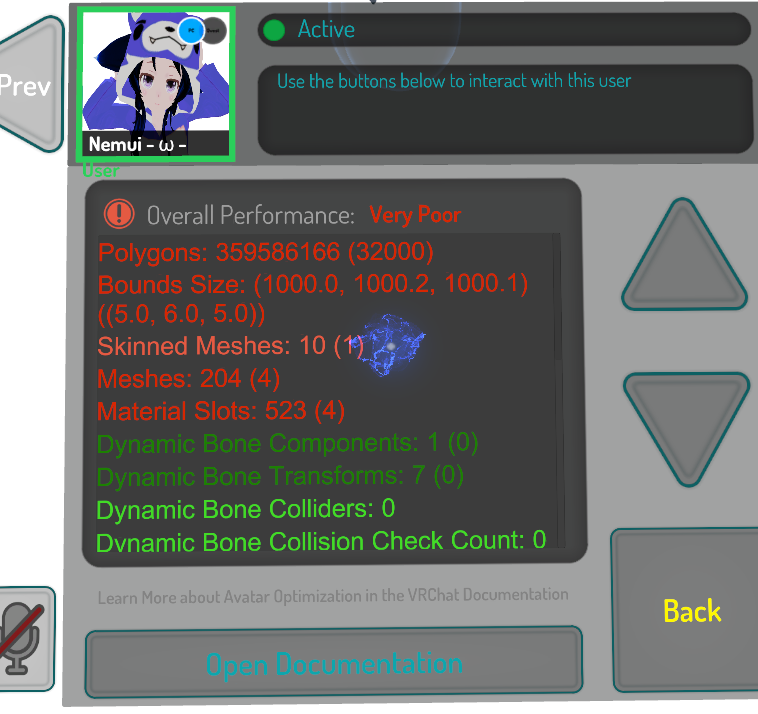

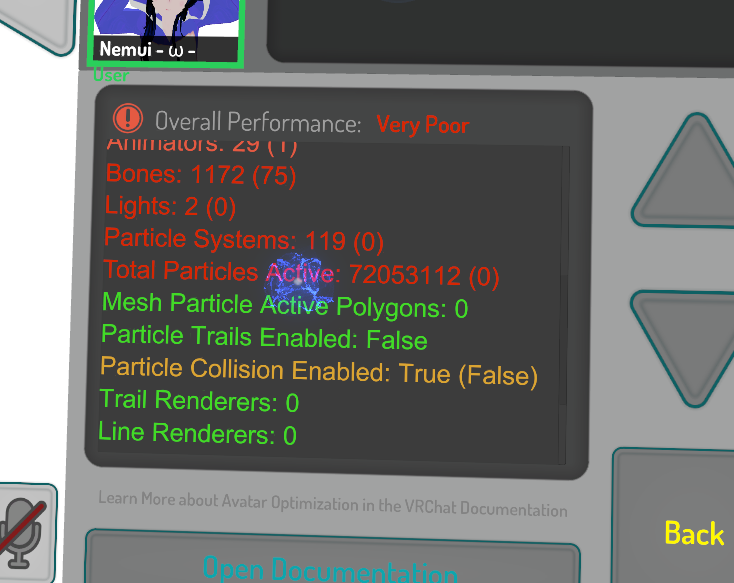
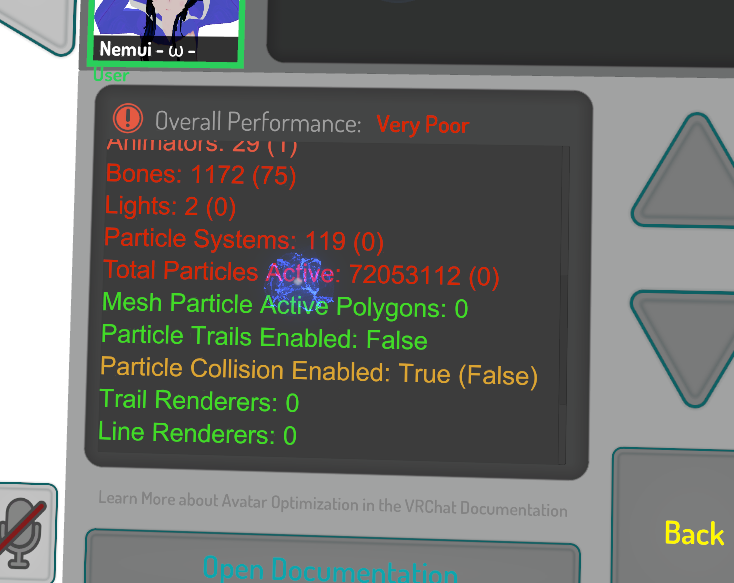
lol
the world 6Avatars6 in community labs has a few like this
it's intentional, for crashers, i'm gonna report it and whoever else wants to can do so too
thats right 360 million polys
potential issue: hiding the avatar still lagged me for several seconds
why does vrchat need to do anything at all to -not- load this guy's avatar?

it isn't even good
echo cloud
even the world image gives it away to (doesnt surprise me its from some Russian either)
graceful vine
Xenophobia is strong with this one, huh
heady smelt
im russian and did not take offense, it -is- typical russian shit to do this
graceful vine
Does not matter if you take offence, thats not how it works.
marsh trail
I'd file this under the stereotype department rather than xenophobia, but both points can be upheld based on general assumption
(X people doing Y negative things)
But in any case, jesus christ das alota pollies
candid sedge
who gives af just nuke that avatar from the servers

it takes me ages to load avatars that are super poor anyway so i just end up blocking anything that takes 5min
loading
 buoyant holly
https://sketchfab.com/3d-models/low-poly-hands-f6933837092345f899faf45af7ef06ca an example of lots of different low poly hands

15 low poly base meshes of hand. Different edge flow. Great to start your low poly model. Uv maps are not included(only geometry). Fingers are slightly bend for more natural look(little bit harder to rig) - low poly hands - Buy Royalty Free 3D model by graft (@graft)
heady smelt
@candid sedge but you still wait in the same room just to let them load in [ I realize that you're doing other stuff in that 5min span ] but bruhhh imagine if you just sit and watch 1 or 2 people just to load in xd
 proper blaze
I Beg you Once For this but can you maybe ping that in your server?
@everyone A Guy Names @fossil thunder
made the following Canny and it Says what we all already know the new ranking system is bullshit Pls Read the Canny and Share the fuck out of it BTW Dont Forget to Upvote it with all acounts you have so the Devs Cant Ignor it !!! I Beg you all Pls Vote It
up (If you also Have Aa Discord server Pls Coply Past this Into your Anouncmend Channel ) Pls Help Us Getting the Old or no ranking System I Beg You :KonataCry: :KonataCry: https://vrchat.canny.io/feature-requests/p/counting-hidden-objects-when-calculating-performance-rank-is-a-terrible-idea
marsh trail
The at everyone command is disabled, and for good reason, you'd be pinging over 20000 people
I understand the sentiment, but mass pinging a server is not the way to go about this, especially 20k people
shut sequoia
I really wish it was an autodelete and ban, even though it doesn't work im surprised they're so lax on it
marsh trail
When it's done in a malicious light, it's taken down rather quickly
Jan 13, 2019 16:34
"It's true that the system currently only states a certain "standard" but does not enforce it, but as they themselves stated, may change in the future"
We're gettin' there
 distant wraith
if you see too many particle's on your avatar set the max particle count for each system to the amount its using instead of 1,000 or it will look like anything you make looks like a crasher i had to change all my animations so it didnt look like a crazy number
 turbid ore
the new ranking system is great for everyone who actually has to see those avatars people make
heady smelt
NEKO is just mad he got banned from publics for his trash avi’s
pine flame
Ranking system is a really poorly applied bandage for supporting such poorly performing avatars in the first place
turbid ore
when my index arrives I'm going to set the minimum avatar quality to medium and watch 99% of anime disappear
pine flame
You’d be surprised, there are more good performing anime avatars than you think
Problem is people being lazy about “but optimizing is too much work/time to bother with”
turbid ore
they should set the avatar rank limit to medium by default and then have a section on the SDK that tells the author how much % of users won't be able to see it without changing the settings
but then again I dislike unoptimised things a lot
heady smelt
I just don’t like the fact that my animations are fucking over my performance rank :(
heady smelt
where did the messages here go
distant wraith
^ lmao was wondering the same thing
heady smelt
it's literal truth that that community ddos's people who hide or block their avatars
distant wraith
why delete our messages when we are trying to help people out MAKE SENSE OF IT
heady smelt
its almost like the chat mods here want to boost that canny for some reason while removing criticism
there has been a significant drop in people using Very Poor cancer avatars specifically because of the changes, it's been the best thing so far to happen to vrchat even if it's not quite the best way to get rid of unoptimized stuff (it casts too wide a net), so the system works. when someone who runs a community that actively seeks to harm other users with their avatars, and goes even further to harm others when their avatars cannot comes and complains about the new system, we know it works. ESPCIALLY since they don't even know when they're hidden by the system.
shut sequoia
Im still unsure why they can't just hit Ctrl+d on the model in unity, remove the extra shit, then upload it as an alternate model
Wanna be seen? Ok use that avatar.
Want to show off? You're free to show off to the people who want to see it.
heady smelt
because their intention is not to just have cool stuff, it's to bother other people
so there's no point for them to use a stripped down avatar without the flashy bits that they do wrong and annoy others with
take note of what nek0 slipped in at the end of his horribly spelled message:
"Pls Help Us Getting the Old or no ranking System I Beg You"
they'd rather not have anyone know about their bs
until they crash you
woeful ember
could just disable extra components besides skinned mesh renderer for example rather than duplicate it causing bigger file size
heady smelt
also nek0 LITERALLY suggested to upvote with MULTIPLE ACCOUNTS on canny.
woeful ember
personally i'm kinda for some hard "but soft"(akaDisable) limits for certain stuff but with a generous value
things like polys for example should have some sort of limit even if set extremely high
heady smelt
the guy wants you to CHEAT THE SYSTEM
but for some reason our earlier messages telling him to f-off got deleted.
woeful ember
but of course having an option to disable as always for the sake of "creativity" or w/e
gotta keep in mind most developers have their own limits set in mind for the sake of optimization for various things
heady smelt
and remember: the only people blocking very poor avatars are the people who don't want to see that unoptimized shit. all that removing the system entirely would do is remove that player choice
the default is to show it all
calm spade
@heady smelt Can we keep this channel for avatar dev and not rants please ?
heady smelt
maybe if the initial response wasn't deleted i wouldn't have went on a rant
you have a guy maliciously creating avatars to harm others telling people to make fake canny accounts to upvote a post that removes a system that prevents him from harming others
but the responses to it were removed
🤔
jolly shuttle
is there a way to have a custom sitting animation?
 grizzled patrol
Yes
jolly shuttle
okay, elaborate please?
 ripe tulip
well sitting can be overridden with a controller for the chair but the world creator would do that not the avatar .. if your talking about the avatar just change the default sit animation on that
i think you are talking about the default as this is a avatar room not a room for world creators
 pine veldt
Is there a way to take my avatars texture from unity and put it on the edited version of my avatar in blender?
marsh trail
The textures are in the project folder, you just need to assign them
pine veldt
ill look thanks ive never put texture on a model in unity beforr 😄
heady smelt
838 meshes 
 arctic vortex
😱
Up to how big can a texture be for just regular avatars (Not quest) I know quest is 1024
amber hemlock
bUt eIgHt hUnDrEd mEsHeS sHoUlD bE eXcElLeNt rEeEe
Honestly texture resolution is entirely uncapped and unmonitored. I don’t know why
 solid smelt
Gotta hit that 8096x8096
amber hemlock
Some of my atlases are that big before I get rid of uv tris that loop over the texture edges
Because that makes material combiner double up the image on the atlas
graceful vine
I never go ago above 4k even for worlds
pine flame
You can hit that 8k texture size using some of digi’s models on deviantart and atlasing them
All the texture sizes are in 4K
graceful vine
You'll likely never need that resolution in vrchat
Considering most avatars use a toony shader/artstyle
pine flame
Be nice if you could use svg in graphics memory
arctic vortex
Huh I thought even for textures that's not for oculust quest models it had a cap 🤷 Though probably safe to keep it under 4 k eh?
graceful vine
Safe to keep it at 1k really, depends on the style
Anime avatars are usually flat colors so
512 x would suffice if atlassed correctly
woeful ember
for PC 1k is a little lackluster even if it's going to be somewhat blurry in vr
considering it's a single texture atlas
alot of games use multiple textures 512x512+ for a single character*
graceful vine
1k is fine, again depends on style
woeful ember
yeah but the majority would benefit to some degree with something higher than 1k
solid smelt
I still think avatar size should be shown in the performance, doesn't really need to be ranked but it be interesting to see since crunching textures cuts the size down so much.
My 500mb avatar is ranked the same as a 3mb one
safe swift
well.. I've seen textures that are over 60mb+, just put couple of `em and you good
pine flame
Animations