#avatar-optimization
1 messages · Page 37 of 1
 pseudo ridge
 marsh trail
Check on your shapekeys tho
marsh trail
Mhm, something might've been using those odd vertices
If all looks fine, then you're good to go
marsh trail
There ye go
marsh trail
How so?
pseudo ridge
copied some sound containers from another avatar
the animations are playing but not the sound clips
oh nevermind
i see the problem with those
marsh trail
Different path on the audio clip?
marsh trail
Different path then haha
 sweet mason
I got frustrated with the altas so I end up put together the texture in photoshop and rescale the UV on it. https://gyazo.com/7fcca7e5d6638ee37d4b7977413bc284
 marsh trail
What issues were you having with the atlas? o:
sweet mason
the cats one was making my texture pointy. and manual one destroy one texture for some reason. Anyway for that model its was only 2 texture so no big deal
marsh trail
Hmm...
pseudo ridge
luckily weight painting on this one was just a quick fix, whew
pseudo ridge
hmm
to make an object animate you just attach an animation addon with the file right?
ah got it nm
one more question, what was the thing to reset origin if the avatar is below the ground a bit? xD
 surreal topaz
How expensive is it to enable light probes and reflection probes on a few mesh particles?
 safe swift
can keep them off if using unlit, I assume if that helps with performance, otherwise have to have the light probes or else dark af particles
surreal topaz
Only downside is that moving around can change the lighting of particles that are already spawned
pseudo ridge
gah I cant get this object to animated
 ancient crystal
using reflection shouldnt be too expensive
ancient crystal
just not realtime
 terse hinge
https://gyazo.com/dd4784562917418be92081283f548ceb why is the bounds size so big, i have a normal avatar height. Could it be because i added a plane which is pretty big? it is for the avatar preview picture

 versed nest
do you have a pen?
 heady smelt
?
versed nest
im sure theres another prefab, but how the old one worked was it moved the pen light years into space when you arent writing
terse hinge
Yeah i have a marker, it is probaly that was caused this, i will test it now
versed nest

terse hinge
Ty @versed nest
versed nest
no you
heady smelt
 Pepe detected
 last pollen

 glass axle
Do we have alternatives to DBs? I'm pretty stuck at trying to fix motions on my avatars because things like weighting skirts to the legs partially or entirely doesn't work on some models
and we're not allowed to animate non-humanoid things either in the overrides
surreal topaz
There's dynamic bone or cloth, no other options unfortunately
You can reweight the skirt to use very small amounts of bones
And if you place them correctly, you can have colliders that have barely any performance impact
 storm ingot
you could add a bone to the rim of the skirt and parent it to a leg bone (have it move with leg movements
 amber hemlock
In unity model import settings does legacy materials or on demand material remap make a difference in performance if so which one
storm ingot
legacy allows changing shaders and embedded uses pre-embedded shaders only
amber hemlock
Does one have a optimization advantage if I will not be changing materials
storm ingot
a very small bit as i have noticed (like 0.1% when using embedded
amber hemlock
Thanks
storm ingot
legacy will try searching for the material files as the embedded knows where it is
amber hemlock
Actually I’m confused I thought legacy was the embedded
storm ingot
Legacy is what was used in 5.6 (it searches folders for names equal to that in the materials data
the new embedded loads the files directly from the model
amber hemlock
Oh what about the remap thing
storm ingot
remap allows you to choose a different material if the one embedded is not correct or has flaws
amber hemlock
So it won’t be using the one on the model at that point?
storm ingot
yep as far as i noticed
surreal topaz
It makes no performance difference
 timber blaze
why are people using legacy when there's a button to just extract the materials
amber hemlock
I’m not doing anything but being a guy who has no idea what anything does and is just asking which is more performant.
:p
timber blaze
not you specifically, but i keep seeing people say to use legacy materials every time someone asks how to edit materials
 karmic condor
Wait so is there a button that literally does the same thing as the legacy one
timber blaze
yeah click "extract materials"
and it'll ask you for a folder to save the materials to
karmic condor
Sweet
timber blaze
and then it fills them all into the remap materials slots for you
amber hemlock
The one in the fbx is always blank white anyway even if I added the textures to the project first it just makes junk materials that I have to apply textures to
 vestal lark
hey guys so someone trying to convert that model for me.
and theres a problem where there is a bunch of copys of the same exact model. but they all have a single viseme. is there any way to take each models shape key and copy it to 1 ?
amber hemlock
What program are they using that it is turning blend shapes into copies of the model?
Unless the separate model was already created in which case the vert groups should be the same
vestal lark
so i exported model as a obj i used maya sense thats the only thing i could get it to open in and its what it was made in @amber hemlock and i sent it to the guy and he opened it in blender and said there was multiple copys of the whole mesh and they each had a viseme thats all i know
amber hemlock
Yeah blender and maya don’t talk to each other well. File conversion in general messes up models. Try giving him the original model instead of a maya file
 desert dagger
Okay is there a shader to get rid of the see through inside?
I use the use the "Cubed paradox/Flat line" but the new unity destroys that shader
heady smelt
Noenoe
pseudo ridge
Cloaked any of the cubed can be "fixed" by adding outline with width zero
And if you add a little grey its a nice shadowy effect
heady smelt
Will having a large amount of seperate particle systems with just 1 particle per system all under one animator moving in certain patterns lag people? Just checking so I can optimize it if that's the case.
 gleaming yacht
Particle systems can be complicated, people will probably need more information/specifics to tell you for sure.
heady smelt
In this case there are right now 77 particle systems each with a single particle. They all have basic movements that loop under the animator like a simple left to right movement. Along a static model that utilizes a fixed joint.
I am considering adding animated sprites to each particle with the surface sprite sheet shader if that doesnt cause too much lag. Most of the sprites all share the same material as well.
 distant forge
I'm not sure the separate particle systems will always be batched. If they are each rendered with separate drawcalls, it's going to be bad. If you can make sure they all use the same material such that they get batched, it might be not too much worse than one particle system. Here a unity developer implies it is possible to batch particle systems but you have to watch out if they are rendered with transparent sorting. opaque will work better:
See also here: https://docs.unity3d.com/Manual/DrawCallBatching.html
Basically you will probably want to profile it to make sure they are being batched
Sprite sheet shaders are incredibly efficient. Just as long as they all share the same material (same shader + same shader settings).

Unity Forum
I've noticed that Particle Systems that share the same material are not batched on the device, but they seem to be batched in the editor. I have...
@heady smelt
vestal lark
im trying to put a ring on my avatars lip and make it move with the lip. but for some reason when i place it and do automatic weight it wont move with it. what should i do?

like that
 naive scroll
any recommendations?
vestal lark
im trying to autmatic weight paint a ring to the jaw bone so it moves with the lip
but when i do Ctrl P it doesnt come up with automatic weight paint
it comes up with this
set parent to object, object (keep Trasform)
and Vertex, and Vertex (keep transform)
hello?
 woeful basin
The only time you really need automatic weight paint on a model is when the mesh is a piece of clothing mostly or other meshes that cover the body, for the ring however it's best to assign the bones that corresponds to the location of it with manual weight painting
If you auto weight paint the ring you'll end up stretching the mesh with other fingers around the immediate vicinity of the ring since auto does just that
 shut sequoia
It shouldn't move with the jaw bone anyway since we use visemes right?
woeful basin
When it comes to visemes the ring should not interfere with the jaw bone in any way
Also, once in unity, you delete the jaw bone in the humanoid configuration since it is not required for visemes
To ensure you got the visemes right from the get go, in blender, choose the shape keys option and test the Ah, Oh and Ch sliders to ensure the mouth movement is correct
ancient crystal
u don't need to auto weight paint clothing
if there is something underneath it already like a body u can just transfer weights
woeful basin
In some rare cases I do but I don't rely on it
ancient crystal
transfer weights works a lot better
basically mimics the weight painting of the surrounding object
so it follows the skin closely without clipping
ancient crystal
theres specific steps to use it tho
woeful basin
I figured it won't be a press of a button
Lets be honest, what is with avatar creation?
woeful basin
I mean it isn't just right off the bat xD
ancient crystal
for the button to do anything and to do it right
its not that difficult just a procedure
i.e. if u have a rigged body
and some shirt
uve resized the shirt to go perfectly on the body
u can just put it with empty groups
and then select the body and shirt (shirt being active)
weight paint mode and transfer weights
and then source: by name and destination can be all layers or selected bones
and it will map the weights accordingly
woeful basin
Let me fire up blender and try this on model I actually have on standby that needs it
ancient crystal
u can change mapping style from nearest vert to like projected face and etc
it makes rigging clothing a million times easier
and even making ur own clothing as easy
after that u can even delete the portion of the body under the shirt
(separating it beforehand to prevent shape key issues)
distant forge
click the checkbox show all
could be an extra animator. Actually you should look into the Humanoid warning. playing a humanoid avatar as generic is going to look really bad. You may need a reimport and to copy all your stuff over with Pumkin's Avatar Tools @heady smelt
heady smelt
i changed it to humanoid and it still says the same good
distant forge
what shows when you click the show all checkbox above build and publish
heady smelt
I dont really see how this avatar could cause such a big avatar performance issue and not be like, very good? 
distant forge
Good is Very Good, imho
heady smelt
aight, thats nice to hear
distant forge
there's no very good level, just good or excellent
heady smelt
im new to this SDK and the current uploading avatar optimization thing, i never really used atlassing in the past but i decided i may as well for now since the whole thing
distant forge
but I'd still be curious what shows when you click the checkbox.
distant forge
Ah bone counts. That's easy to fix in blender if you're going for the excellent
distant forge
usually it's something like a skirt. since you're not allowed to have any dynamic bones for excellent category, you take the whole skirt and weight paint it to the hips or do the two bone skirt trick
same with hair - weight paint it to the head and various other bones if you want it to flow naturally
and then delete the hair bones and skirt bones
75 bones to be Excellent
heady smelt
damn
distant forge
For reference, I believe you need less than like 30 bones for a proper humanoid rig, and since you cannot have any rigid bodies, animators or dynbones, the extra 80 bones in your avatar are literally doing nothing
and you may as well weight paint those to the parent bone they are attached to, like the Head
I don't know if there's a one click button to do it, but if you're willing to save some but not all of the extra bones, you can go to cats Bone reduction/decimation thing and put it at 100% for all the bone chains
heady smelt
I think the actual limits might need to be changed a littlee
distant forge
but that keeps the topmost bone in the chain so it's not really a proper 100$
heady smelt
like, i understand the material side of it and why having allot of materials is really bad, but i dont actually see how bones could impact that much ;o;
they feel very tight right now but its a good start
distant forge
think of Excellent as like an A+ - I believe it was designed to satisfy some internal unity optimizations for avatars with 1 Skinned Mesh attached to 1 Humanoid Animator and a certain set of bones. If done right, such a model can be simulated entirely at once and none of the bone positions need to be computed each frame
so basically Excellent = elligible for special unity humanoid optimizations. Good = anything that's really good, even if it did not make the cut for the specifal unity optimizations
 distant forge
you can put custom animations but they have to be done as overrides, not a separate animator that is enabled/disabled
heady smelt
like, I make a bunch of big animations but after this update i dont really know how optimized i could make it, but its understandable, since they are trying to make vrchat more into its social state how it used to be, which im all for
id love to see vrchat how it used to be
distant forge
My suggestion is aim for Good. Trying to go for excellent might drive you crazy getting that last bone count down and stuff like that. But in your case, you are close enough that clicking that bone optimizatin button in blender set to 100% might bring you down below 75 and earn you the excellent
avatar optimization is important though. I was just at krypt0's dance party for a bit and I was getting 5-10fps until I decided to hide all avatars which brought me to 25-30fps, and I saw many of the avatars had Very Poor ratings, so avatars are definitely having an effect compared to the floaty head grey dude
so any pressure we can put should improve the avarage performance level and hence improve fps overall, even if the difference is indistinguishable for one avatar alone
Also @heady smelt Anything behind a toggle doesn't count. So if you are making animations, make it optimized by default and animate away behind a gesture/toggle/emote as much as you want
that allows people who have FPS issues to turn off animations in safety settings and see the optimized versions of each avatar without the extra animations
safe swift
excellent = very poor
distant forge
in a sense yes, excellent literally removes most things that adds interactive elements to avatars, so I find it to be a worse experience than something with a couple rigid bodies or dynbones in a tasteful way. I think many things can be done reasonably at good level, or medium if you are desparate for a few extra bones
and there are reasons to run at Very Poor right now that aren't easily avoidable, For example, snail markers due to bounding box (you can put them behind a toggle to have good rating but it will increase chance of desync and losing your drawings), some shader effects that require a depth texture will put you directly at Very Poor due to use of a 0-intensity directional light, any sort of rigid body puppeting (connecting 4 bones is enough to put you at the limit of 8, which is not even enough for an extra set of arms for example), etc. Best you can do is try to do well on the stats you can, and accept sometimes hitting a lower rank due to one thing that you can't compromise on
safe swift
My world avatars have some kind of animations and neat stuff, so everything is either poor or very poor, but otherwise follow public avatar rules
I hope polished system actually is decent to be something cared about
 rancid vault
That feeling when you don't know how to make a custom avatar, and your just kind of looking and you're like "Whaaaaaaat?"
amber hemlock
A lot of avatars that would be excellent are only good due to using a second animator instead of adding it to idle AO slot
Apparently it’s not well known that the idle slot is for animations that play all the time (not just when standing still)
shut sequoia
if you do big animations you could always just make a "social" version without
thats the easiest solution
also not sure if the toggle thing is intentional
that may change. it was reported as a bug i think
 tired badger
I use the Idle Animation slot for Breathing Animations
amber hemlock
You can use them for as much as you want though and just pile on more parameters on a single animation file
So you only ever need one
No need for animators if it’s just for an animation that loops all the time and never stops
 lofty gull
everytime i put my girl into unity despite the fact that the bones are like labelled correctly and say they are in the right spot it just glows red and wont let me proceed... anyone have a vid or anything on getting that stuff to work?
sweet mason
What unity say
safe swift
@lofty gull post screenshot of your error
heady smelt
@distant forge Thanks for all the information the batching method should help out alot. ^^
 mossy solar
I bet a bone got put into the jawbone slot
ancient crystal
tbh to get an excellent model ur avatar cant have practically anything that makes it detailed xp
like my avatar has a poor rating but it was worth it to have breathing and wagging and wobbling ears/tail
 last light
@ancient crystal You can do wagging tail and wobbling ears with 'good' rating. Good allows for up to 16 affected dynamic bones. :p
ancient crystal
so
last light
If stuff has too many bones, merge some bones with CATs Blender plugin.
ancient crystal
i have colliders on my hands and also animators to make it wag
last light
You don't need colliders though. 🤷
ancient crystal
yea i do
bc i like being able to interact with them
seem kinda pointless if i cant
last light
Collision checks are really intensive, that's why it lowers the rating so much. It's hard to get around I suppose. 😕
ancient crystal
its only 2 colliders
last light
Still collision checks though. :p
ancient crystal
ik
 simple violet
Does somebody know what is bounding box ? AABB .. unity is telling me i have current size (42.4, 85.8 50.8) but maximum size is : 5.0 ,6.0 , 5.0 ? How do i fix it ? When i am in avavar testing world that purple flashlight didnt even is on me and i am purple all the time ( idk if its becouse of this )
ancient crystal
bounding box is the grey outline when u select an object
is basically an AABB test for rendering
so if you can see the bounds you will try to render the object
however if you cannot see the bounds it will cull the object out
last light
I honestly wish there was some GPU-bound alternative to dynamic bones, dynamic bones is only really as bad as it is because it's CPU-bound.
Unfortunately, CPUs aren't as quick at doing those kind of calculations, hence VRChat are trying to limit them. 🙄
simple violet
Thank you .. i have zero idea where to fix it though
ancient crystal
well thats not really the problem
last light
Cloth is GPU-bound, that's why we can use collision checks, and more of it than dynamic bones. :p
ancient crystal
problem is alsp unity already is heavily dependent on CPU usage
thats why basically all users get the same framerate regardless of GPU
last light
Kinda, yeah... 🤷
Unity is getting better for it, but, you can only interact with the game world on a single thread, AFAIK.
ancient crystal
and cloth has to be calculated on the GPU
it is cloth physics
calculating physics on cpu is a terrible idea
ancient crystal
yea but the problem is
last light
no alternative? :p
ancient crystal
it would be better if it was integrated into unity engine physics
as opposed to done separately
or at least separately as a task
bc cloth is done separately from regular physics
but its still done at the same iteration times
last light
Totally.
I've really not looked into it, but afaik, dynamic bones is really the only thing that does what it does. 🤷
Cloth isn't really an alternative to it.
ancient crystal
ik but thats not my point
and cloth is better in some cases for things like
hair and some clothing
but only if u do it right not that terrible looking wirey mess
ancient crystal
it does
it works really well
again u just need to adjust the settings well enough
people have even made that kind of hair that floats around in the air
like when underwater
i have one tht has cloth and hand colliders
and its on the hair so u can like lift it and every "strand" is interactable
or groups of strands really
last light
oooo, if I could make my hair less vertices, I'd totally try that.
ancient crystal
honestly mine had around 400 something
gave me low rating but what can i do
already decimated it
was gonna look awful if i did any more
simple violet
How to i recenter axis to object ? Becouse it looks like my eye down but everything looks fine.
only axis are far away
lofty gull
anyone know how to get the inspector window back up? I closed it by mistake...
in unity
 calm spade
@lofty gull
lofty gull
ooo thanks
 limber vale
quick question @lofty gull why u using unity 2018?
lofty gull
should i not be?
limber vale
no
lofty gull
o
limber vale
ill give u link to the one vrc uses
lofty gull
maybe that explains why im doing everything that the guy is doing in the vid but keep running into problems lol
mossy solar
Public world avatar limits should be classified as medium :I
limber vale
i mean the model still shouldnt do that...... so there could be some rigging problems
ancient crystal
fix it in blender
into a tpose
also ur still using the wrong unity version
use 2017.4.15f
limber vale
doesnt have to be in t-pose
ancient crystal
no like
they have to be tposing in the humanoid mapper
but if u tpose them in blender its like a dozen times easier
because in case enforce tpose doesnt make it look right
reset pose will put it into the right pose
calm spade
@lofty gull Check the pinned messages of this channel btw, your avatar could use optimization
lofty gull
Im just trying to learn atm im not actually going to use this one
 shrewd haven
Is it better for performance to have 2 dynamic bone scripts to remove the 1 extra root bone, or is it better to use 1 dyn bone script and have the extra bone?
marsh trail
No actual statistics afaik in that regard, in terms of aesthetics the former is best as dynamic bones work based on pivoting the root bone
shrewd haven
Yeah that's as far as I knew as well. I've heard that the scripts themselves aren't too bad on performance but I haven't seen evidence so who knows. Thanks though!
marsh trail
I doubt tests will be actually conducted, it'll probably keep being simply speculation based on the lag db tends to cause as a standard, and since single roots are so widespread it'll keep being like such
surreal topaz
No, you'll have to use Blender either way @fallen bramble
 sinful hearth
I've managed to optimize my avatars a fair bit, in the SDK they show as good to minimum Medium not less, but for some reason in-game, the performance thing claims my bound sizes are outlandish after a few seconds of the avatar loading, even though initially it shows as perfectly fine, like, it can go from like 0.5 0.5 0.5 to 15 10.5 0.5, etc, what's going on? I can't figure out what the problem is and it knocks my avatar an entire ranking level down
it stays consistently good in certain levels but in some it just goes ballistic
heady smelt
Do you have a pen on the avatar?
sinful hearth
No, I only used a pen like once on a very very old avatar that I already deleted ages ago
heady smelt
Oh ok... Just some pen prefabs once activated, throw the pen far off without disabling it and it makes the bounds massive.... Didn't know if there was anything similar
sinful hearth
I'm running the scene with the animator and the bounds of my avatar slightly expand since I animated it's tail and it goes side to side, but it doesn't expand to insane proportions like it claims it does, and it works perfectly fine in some levels while others are just going crazy
shut sequoia
damn nice knowin ya m8
heady smelt
Oof. Say your prayers.
heady smelt
I'm guessing the guy that posted the aggressive pic got snuffed huh?
 vast tusk
Chances are...maybe
heady smelt
Someone above Mic posted a purple demon emoticon with a phallic object protruding from it. I don't see that user anymore
heady smelt
Anyone know why my atlas has random transparent spots on it? I looked over the render and it doesn't have any transparent parts over it.
simple violet
Does somebody have an idea why i can see my polygons (purple) in high definition mirror and on cameras ? I have no idea --
 signal beacon
Does the number of dynamic bone transforms on a bone chain also include the root bones?
shut sequoia
looks like it, just checked
signal beacon
damn, that means it's really hard to get the very good category on many models
if you want dynamic bones
shut sequoia
It's not possible at all to get very good with DB
I mean, it might be possible if the system was weighted properly, but it's not.
https://puu.sh/CqI7O/959c2bbec9.pngYou need 0DB to get Very Good, the rest are Good, Medium, Poor, and Very Poor

 still perch
Correct, you can not get the best note when using db which are one of the known performance hogs.
And thats fair 
karmic condor
I’m putting together a avatar that looks like a stereotypical poorly optimized Avatar but I’m going to make it excellent performance
shut sequoia
mmm i don't think improper weighting is fair. your other efforts should show
right now what we have is "well I ordered a burger with nothing on it but i still paid 8 dollars"
Excellent across the board and 25 transforms screws you out of Good and Excellent
still perch
When talking about good and more then sure even if that weithing system would have to be a bit more complex.
But for the very best note you want the very best :)
I totally support that effords in any area should show some how (Maybe a actual performance score?) but that doest mean that other parts aren't any less bad in the same moment.
signal beacon
Is there any reason I wouldn't want to hit the remove doubles button?
Because at a cursory glance it just seems like free polygons i can remove
still perch
not really.
unless the model does not look like shit after wards (can happen if some things are very wrong but would be clearly visible)
In which's case you'd want to find the issue and solve it.
shut sequoia
it's messed up a face on one model before but that's it
i mean you'll know right away so might as well
still perch
yeah
signal beacon
So should i always opt for hitting the "x" whenever possible, because it removes more?
shut sequoia
also double check a few visemes afterwards too, just to be on the safe side
signal beacon
ok, thanks
 worn perch
I’ve noticed that some models I get will have edges that aren’t connected, yet laying on top of eachother as a way of creating a sharp edge on an otherwise smooth shaded model. Think, where the inside edge of a jacket meets the outside. Removing the doubles here would make it one continuous surface and the smooth shading would try to, well, smooth shade the edge and end up looking funky. In that case you’d have to go in and manually mark the edge as sharp.
 tame nova
Sometimes doubles can be good. For example say you have a Hat Mesh thats a very thin fabric. The model needs to have an inside and an outside or it will be invisible if you take the hat off and can see inside it. In these cases one solution is to duplicate the parts of the mesh for the inside of the hat and then flip the normals on the duplicate. That way you get an inside texture and an outside texture.
Once this is done clickingf that remove doubles button might delete the inside of your hat.
safe swift
or just easier to use 2sided shader, doubles causemore issues more often
tame nova
Those exist... Of course those exist... Yeah those
sweet mason
The outline effect of cube shader create a double side and you can change the darkness of it to simulate shadow
 wide breach
how do you rotate a capsule colider? http://puu.sh/CqT1h/d5e6df0973.png

i can only move it up down left right i want side rotation
 crude adder
there should be a clickable circle thing in unity, right by the indented thing is to move up and down, click that and you are able to rotate the objects instead of moving them
wide breach
that also rotates the wrist tho can i just do the capsule? http://puu.sh/CqT4r/082ef99fcf.png
 crude adder
^
ancient crystal
u can offset the capsule but u cant rotate it like transforms do
u can also rotate the bone itself to point toward the fingers to fix alignment problems
wide breach
OHH thats how people do it. that makes much more sense.
Thanks for that!
so then this should still work even if its in a diferent game object right? http://puu.sh/CqTcK/d359b06d67.png
 crude adder
as long as it is a part of the model it should work if it is a different game object
wide breach
Sweet.
wide breach
what am i doing wrong?
http://puu.sh/CqUY4/48d060d491.png
http://puu.sh/CqUVS/ff62c8397f.png

 crude adder
nothing, whoever made the model you are trying to use did that not you, but it will still work nonetheless
wide breach
ahh, gotcha.
Thanks
marsh trail
You should be, it seems to be giving out an error related to trying to go to object mode, perhaps rollback the CATS version or grab the standalone version
sweet mason
right click on the material
distant forge
Click the Fbx -> materials tab -> extract materials
sweet mason
extract
distant forge
Oh wow you can just right click on it? Nice
sweet mason
clickon the fbx arrow you can see the material
and other thing
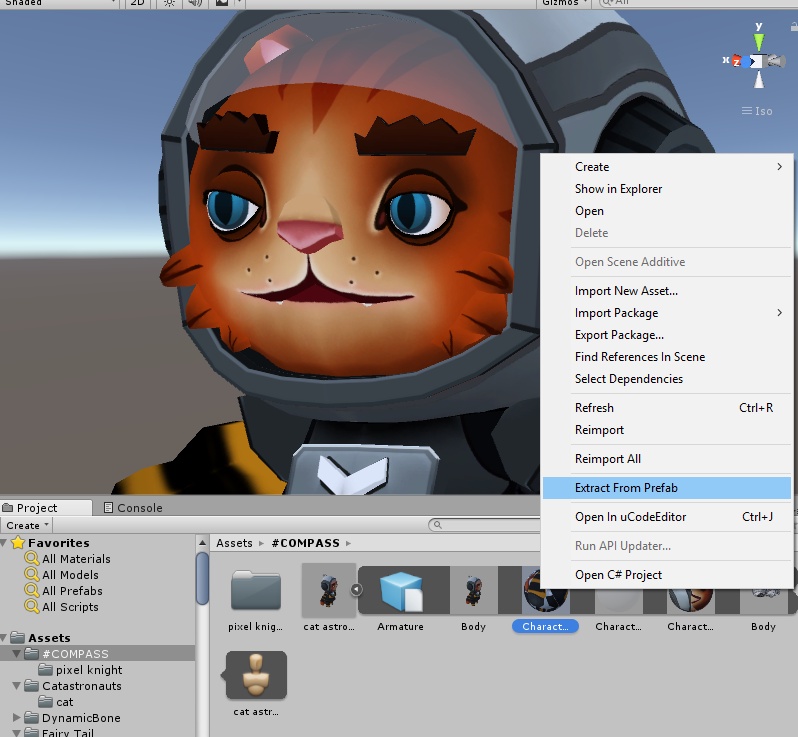
the same just press the botton
shut sequoia
why would you use a legacy option?
 grim coyote
mmh I added some dynamic bones and everything seems correct on unity (still haven't uploaded the avatar to test ingame) but it seems to not show up in the avatar info in the upload window/tab (performance still counts as good, and the dynamic bone count says it's 0 when it isnt)
is this normal?
heady smelt
@shut sequoia setting materials to legacy automatically extracts any materials and puts them in folders like we're used to. Otherwise we can just select the model and extact the material... They both do the same thing
grim coyote
failed to upload signature NotLikeThis
grim coyote
alright it works fine ingame, weird,
 velvet spoke
@heady smelt its not auto extracting, its using the legacy method with more happening in the background. Dont use it, its marked legacy for a reason. I dont understand why people arent afraid of the word legacy, it could literally break with a new update.
 wary relic
Prob because it sounds fancy instead of "old shit dont use"
shut sequoia
"Legacy Animations" aka "These will break later" animations
distant forge
Also over half the stuff in my project is "legacy" upgraded from 5.6. I'd expect those to keep working inn 2019 and I'm sure they will provide an upgrade path so I'm not worried
marsh trail
I mean legacy animations got scrapped not due to being obsolete but due to an exploit or a myriad of them found whilst using them, i think it even exists to this day on the latest version of unity, it just means it's old and works in old ways, whereas currently there are new and still functional methods
And by definition legacy, in software is defined as
denoting or relating to software or hardware that has been superseded but is difficult to replace because of its wide use.
marsh trail
This does not mean that they'll be around forever, once everything legacy animations can do is present in a better form, and the transition between legacy and the new one is hassle-free they'll most likely remove it, from what i've read of course
surreal topaz
@wide breach your arm hierarchy is probably
- Upper Arm (Left Arm)
-- Not Lower Arm
-- Lower Arm (Left Elbow)
Swap the two latter ones
In your Unity scene, not in the rig configuration
wide breach
@surreal topaz wow that fixed the error message, it won't cause any errors 9ngame tho right?
amber hemlock
It won’t
wide breach
Cool, it was working ingame even with that message it just pisses me off Haha
Thanks
amber hemlock
It works with the error but rotation is a bit odd, might not even be noticeable depending on the model but it will be a little wrong
So always good to fix it
heady smelt
@velvet spoke oh, alright... I've just been extracting the materials myself, but i was told that i should use the legacy next time because of the reasons i said 
Guess you gotta know who to actually trust when it comes to this
karmic condor
I’m kind of confused by the new unity material extraction method and why it replaced the old version. The new buttons are more tedious and take longer than the legacy option.
ancient crystal
probably just to make it easier to sync material properties to and bc they are stored with the import as opposed to in separate files
gleaming yacht
My project is littered with extra materials I don’t need cuz of the old method. I need to go in and clean them up sometime.
I make/finalize all my materials in Unity.
karmic condor
Thanks everyone, that makes a lot of sense
sweet mason
I prefer to have all in one folder anyway for each avatar
Sinve models are opti. Its nots a mess
ancient crystal
i just make one folder for every avatar
and folders to group them together
and every avatar got a blend file and a scene and etc of it
karmic condor
I think I’m going to just generate my own materials from now on. Having materials and textures in the same folder should really help with my workflow
 opaque vale
I extracted my materials so I could change some materials to opaque, bvut when I drop it in, it disappeared.
I did it to another model too, and they disappeared too
karmic condor
does the model itself still have a object named "body" in the hierarchy?
opaque vale
yup
karmic condor
You can change material settings there, I speculate that the material is just set to transparent
opaque vale
Almost every material is opaque
karmic condor
is the "body" object active
there should be a check mark that would unchecked but in the hierarchy it was be greyed out.
 karmic condor
Then I'm at a loss, I hope you can figure it out.
opaque vale
hmm alrighty
karmic condor
wait, click on the edit bounds and check to see what it is set to.
marsh trail
Inb4 -infinity
karmic condor
here
see how there is a box around my avatar
that box can be moved. Its like a hit box but for rendering.
looking at it now, your bounding box looks really small.
opaque vale
yeah, I see just a white dot
marsh trail
Weird part about bounding boxes is that they can literally be 1px in every direction and it should still render the model if it's directly in view
marsh trail
Protip, select model in hierarchy, move cursor into 3d view, press F
marsh trail
Mhm
karmic condor
You can just type in the bounds, so set them to 1,1,1 and go from there
This would be under “extent”
marsh trail
I literally can't sleep so i'm just here helpin' whomever with whatever honestly, it's all good
Even though i didn't help at all pfft
sweet mason
i feel sad when there no question in those channel
 dry thistle
so i go to add my model into vrchat and its shows the (Name, description) then crashes any help?
 median mantle
Speedz you're second case now in 5 minutes
Might be servers, give it a shot in few minutes maybe
amber hemlock
Speeds do you happen to have cloth components? Cloth components are crashy at the moment
@dry thistle
dry thistle
I FIXED IT DW BOIS
 short cave
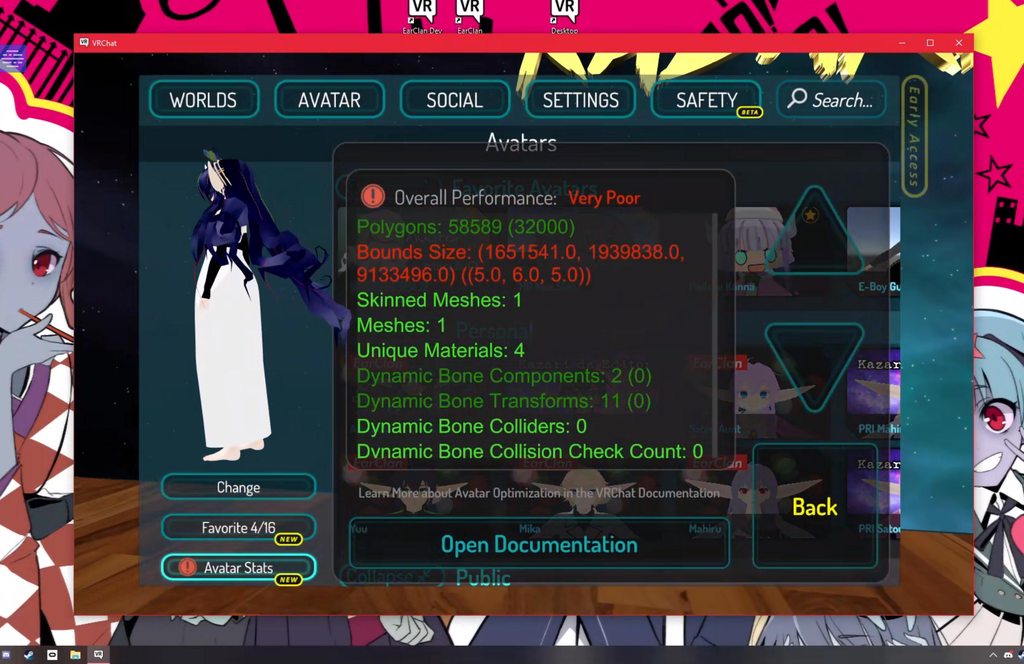
Anything i can do to fix this? I know this is caused by the snail pen but what do i do to stop it from triggering very poor https://imgur.com/a/2iduTOA
 surreal topaz
You basically can't stop it
Other than disabling the pen by default and using two gestures to write, one to keep the pen active and the other one to write
short cave
ughh
limber vale
ive seen people use the emote from the menu to activate/disable pens
amber hemlock
There's nothing you can do but do know that you are not ACTUALLY a source of lag. The bounding box check could afford to be a little smarter and not just go by overall size.
especially when only one small component never gets culled
shut sequoia
The amount of lag caused is negligible assuming the rest of those stats are fine
negligible as in probably next to none considering the transforms are at 11 and those are culled at 20 meters
this is what people mean when they speak of weighting. It's only Very Poor due to something that, considering the rest of the avatar (that I can see of course) is extremely negligible
ancient crystal
ye but also makes bare minumum basically same as one category over
opaque vale

I'm trying to manually atlas this model, but when I select it, it seems to be spread all around...
ancient crystal
y manually
and yea thats the point of atlasing ig
all the mesh fits on one uv map and has all the right colors for each
surreal topaz
@opaque vale it seems you either unwrapped with Smart UV project or tried using the old auto atlas
When starting the manual atlasing process, only click StartManualUnwrap, and then click FinishManualUnwrap right after.
No auto unwraps or anything like that
Delete your second UV map, delete the Texture Atlas group and try again
opaque vale
Ah alrighty
 silent pulsar
hello i got a model set up the way i want it anyone able to help with skinning only I'm having trouble coloring the materials in blender for tower unite i thought i come here first
calm spade
If it doesn't have to do with optimization, try #avatars-2-general
silent pulsar
thanks
 tender sundial
the idea of a server somehow crashing unity is intriguing
but I get crashes on that screen about half the time I upload stuff, and have always wondered what causes it
limber vale
U talking about when ur uploading content, like mid upload @tender sundial
tender sundial
usually right at the start
ancient crystal
happens to me sometimes too
like after pressing to upload
so i always save everything before each upload
 dreamy bolt
I’ve had that problem before, in my case it was prevented by disabling future proofing
 bold tapir
How come my avatar with 5 materials 2 mesh 3 animators and 2 dynamic bones is green when my friends avatar with 1 material 1 mesh and one dynamic bone is oranges?
tender sundial
3 animators
heady smelt
With "Dynamic bones" are you referring to the component, or the amount of bones attached?
tender sundial
what's the limit for those, 3 sounds like a lot
heady smelt
Because the most taxing thing out of the stuff you listed, is Dynamic Bones.
Materials dont tend to be that taxing, if you're using a very well optimized shader that does a one-pass instead of multi-passes
tender sundial
oh actually I forgot that there's two levels of green heh
limber vale
I mean it also could be u know.... other things effecting performance @bold tapir
tender sundial
the easy answer is bring up the full report and it will say which thing brought it to orange
for one of mine it was the avatar bounds, which was only blowing out due to a bug in how it's calculated
bold tapir
It seems to be good (green) when he looked ingame,
limber vale
But in the sdk it’s orange?
storm ingot
did he update/refresh the model after uploading the orange one
tender sundial
usually I find the opposite - the SDK will claim good or very good and then the game will say very poor lol
bold tapir
I don't know, he said it was medium in sdk and it was good when he looked in game.
heady smelt
Dont trust the SDK when it comes to how optimized the avatar is, its still buggy :' )
storm ingot
I notice that the stats tend to read from a cached model (non updated model)sometimes even though it got updated
bold tapir
@tender sundial Oh and the reason i have 3 animators is so i can get my wheels to spin on my walking animation
Forward and backwards
tender sundial
ah, I use one for that sort of thing
one state for forwards and one for backwards heh
heady smelt
States are pretty round about yeah, took me a bit to wrap my head around them haha
tender sundial
if it's the avatar bounds thing then every time you look at the stats you get a different score, depending on where the model currently is :/
I find states fairly easy to figure out, it's the transition bits which are a bit complicated
limber vale
I mean I’ve heard of them reading “good in sdk” than being bad ingame but I guess anything can happen
tender sundial
and yeah, other people's stats get cached - your own stats don't seem to
so your own stats can change by just walking a few metres and not even changing avatars 😐
storm ingot
Best way to check if the model is optimized is by just looking at your fps when you are in a empty box
If it drops by 10-20 the model can fall under medium/poor
bold tapir
That means like the only avatar i have that do that is my old avatar with OG star nest on it (Don't worry i don't use it)
limber vale
I mean if my frames dropped by 10-20.... from 1 model I think there is a bigger problem afoot @storm ingot
I think that’s a very poor
tender sundial
or it should be. I think I've already proven that you can get excellent and still have an avatar with actually bad performance
now I'd be curious to try for the opposite
storm ingot
I have average fps of 45 anyways in an empty box , if i load a excellent model the drop is 2 fps /good is 5 fps drops/ medium around 12 fps and poor 18 (very poor is around 20-22)
bold tapir
Is this in vr? ^
tender sundial
particles are usually fine for me but it's a system-dependent thing anyway
some people complain about particles lagging them while everyone else in the room doesn't have an issue with it
limber vale
I don’t think I’ve ever seen a single model take away that many frames
Sounds pretty bad tho
storm ingot
Indeed my system is way below specs (3.6 ghz ddr3 )
limber vale
I mean 45fps is normal in vr
tender sundial
I get 90fps a lot
bold tapir
@tender sundial Same here, had one person say i lag them while everyone else was fine, and i have a really bad pc get like 1-45fps in vr
storm ingot
Could get more but have it locked to 45 by the graphics card
limber vale
Really?
tender sundial
yeah there is that too, any fps between 45 to 89 becomes 45
bold tapir
What? 😮
tender sundial
because in VR it's less jarring to get a smooth 45 than a choppy 60-80
bold tapir
Don't think my gpu do that
storm ingot
Still for a performance benchmark i have a 387 K tri model with 1 dyn bone system
 north grail
Maybe asking here would be better- Everything will Atlas apart from the coat on my model- If i try to Atlas the coat with the other textures it just makes an error- What do I do?
storm ingot
Go to the coat material and try renaming it into something
Same with texture names
@north grail
storm ingot
What is the error?
north grail
something to do with traceback last call or something
storm ingot
Everything in the hierarchy is in english (materials/textures /data segments/shapekeys
north grail
Should be- i used CATS' translator
storm ingot
it tends to miss somethings for me especially in texture names
Which the Atlas is really picky about
amber hemlock
You can avoid extra animators by making all animations play all the time via idle slot and turning bones and models on and off via the AO. If the mesh is weighted to a single bone, change it’s skinned mesh render component to just a regular mesh render component and position it and parent it properly on the bone it should follow to get around having many skinned mesh renders. You only need them for models that have weight split across multiple bones.
I’m not 100% sure if this constitutes real optimization or just cheating the calculation though
The idle slot of your animation override is basically a free animator that can play a single animation that contains everything you need and just disable game objects that you don’t want to play. Really only good for looping animations though that don’t have a important start point
But turning wheels would apply
ancient crystal
yea but bc it only idle it only plays when the character is standing still so u get jittery movement when it swaps in and out of idle and also it doesnt play while moving (with joysticks etc)
amber hemlock
No, actually idle plays all the time under everything.
I put my tail wag (among many other things) on idle it wags no matter what unless another animation disables the tail bones to momentarily freeze it
The only catch is you need to base it off of the normal idle animation and add to it; just like hand gestures
Unlike hand emotes, the animation can be as long as you want because it never stops
It’s a different way of setting things up but many uses of avatar animators are entirely unessesary and can be made excuslively with the animation overrides
Which makes it much easier to make excellent rated avatars, assuming bounds or dynamic bones aren’t already ruining that. For me personally, custom animations were always my bottleneck so I looked into this
But as I said I don’t know if this truely represents a more optimized avatar or if I’m just tip toeing around the algorithm
ancient crystal
probably that and also yea with dynamic bones on ears and tails and whatnot it easily lowers the rating anyways
amber hemlock
Yeah I use ears with idle animations I’m not a fan of dynamic bone it looks silly when you walk
Hand animated stuff can be more detailed :p
ancient crystal
ik that but
jiggle tails and ears are rlly fun
cuz u can move them around and when u walk they trail behind
and it just takes the right settings to make them work better
like i have no issues with my tails they just trail behind when i move not spazz or bounce or anything
distant forge
I think just elasticity 0 does that
ancient crystal
no
marsh trail
If ye keep ehm on ay single root nothing should go off the rails unless your root has an odd angle to it (and no i don't mean a single root for everything like yer hips)
ancient crystal
i have high inertia and lower stiffness settings
elasticity was about .055 but it looks nice
 rigid girder
in unity i press the build an publish nothing else pops up but a loding bar and when done says nothing and no new avatar in my account
 twilit sable
Does anyone have concrete numbers on how many:
- dynamic bones, affected by scripts
- dynamic bone scripts
- dynamic bone colliders (i assume 2 on this one)
- Dynamic bone collisions
You are allowed to have in an avatar to still get "Good" performance rating?
ancient crystal
yea
those are all on the docs
The Avatar Performance Ranking System allows you to see how much a user's avatar is affecting performance via analysis of the components on that user's avatar. You can also use it on yourself to see how performant your avatar is. **This system is purely informational at this...
its fairly low
but a lot of people look at all the different ratings not just one
twilit sable
Oh, that's fucked up... for "good" or better performance they are straight out like "yeah, don't use colliders... like at all.
Thanks for the link ^^
distant forge
You can actually do quite a lot without colliders. For example, let's say you have front or back hair. You can use the Freeze Axis menu to freeze it along the Z axis and it will actually not go through the face and mostly look good especially if the hair is short
twilit sable
Hmm.. true enough
Also cleverly using stiffness helps.
sweet mason
Can we ping that link the chat ? So its easy to people to find if they are a little lost
 twin imp
How do i remove the green where the highlight is meant to be?
sweet mason
make the material cut out or something
amber hemlock
@rigid girder make sure if you have stations on your avatar they have no entry/exit transforms set. It did this to me until I removed them
surreal topaz
Oh yeah, if the points are too far away the seat is silently eaten

Rather than just... warning you
You only need enter/exit point if you want to put the interaction button in a different place than the seat
I got an avatar where the interaction point (VRC_Station) is on an object parented to my head, but the entry point is on my spine
And if you define entry point, you also need an exit point or the SDK will error
amber hemlock
Oh actually what I meant is the build failed to start up at all with the transforms set. As soon as I cleared them it let me get to the upload avatar screen. I have not bothered to even attempt avatar stations with enter/exits since then since I assumed they weren’t supported.. now this is new info
surreal topaz
Yeah, that can happen if either one of the objects are missing
 wheat narwhal
.3.
amber hemlock
Also that’s not optimization
versed nest

surreal topaz
Also that doesn't even look like a trap lol
 livid flame
@zinc coral please post random stuff in here use #general-media instead
 slow siren
So I'm almost done with my first avatar (granted I didn't make the model, just rig it and get it functional for VRchat) and on the publish screen it's saying "Skinned Mesh Renderers: 10 - combine multiple skinned meshes for optimal performance" Any guide I've found on this on youtube is horribly outdated (the newest one I could find was 4 years old), how do I go about this?
Bear in mind I am VERY new to all of this.
calm spade
Ctrl + J in blender on all the parts of your model generally
amber hemlock
If you NEED separate props. And the prop does not bend at all (it’s like a solid object) change the Skinned Mesh Render component to just a regular Mesh Render component, and move the object to be a child of the bone it should follow.
But changing it in blender is probably he more proper way to optimize
 zinc spindle
Can someone tell me what is happening with this?... I can't seem to solve it
ancient crystal
shape key issue
or u set the bounds incorrectly
or u using markers / drawing tools etc
zinc spindle
The bounds are fine
I'm not entirely sure, I literally just downloaded the model and everything seems fine and put together.. There's no emotes or anything
ancient crystal
:\
zinc spindle
I suppose it's just scuffed then
Is it really an issue though? Other then the fact it's marked as "Very Poor"
Okay now it's this
zinc spindle
Giving a few things a try ^^
amber hemlock
Try to make every axis of the bounds 2 meters or smaller.
And center it on your avatar, I see a lot of avatars with tails that move center of bounds far in back of the avatar
You won’t be able to come up to people from behind and reach your hands up in front of their face they won’t see you
zinc spindle
This is what the bounds are currently
ancient crystal
look at the model
then look at the bounds
and check how big the bounds are relative to the model
 steel osprey
any disabled models or something that could be increasing the bounds?
ancient crystal
and ya stuff like pens increase bounds
ancient crystal
r u 100000% sure there are nothing like pens or anything in it
zinc spindle
I'll give it another look, 1 min
Yeah there's no pens or anything
It's just the bones and such
amber hemlock
Are there any hidden game objects
zinc spindle
Not that I'm aware of
amber hemlock
Or animations that scale a game object bigger
zinc spindle
I'll try one more thing
I swear the bound size is different everytime I upload it.. Now it's 6.8
I made the avatar 0.100 scaled smaller too
Eh whatever it works as it is.. The very poor thing shouldn't be an issue but thank you for the help guys!
amber hemlock
Is your avatar actually smaller? Or is it normal sized?
zinc spindle
It's somewhat of a smaller avatar
amber hemlock
You might want to fix the model externally so it can exist in unity at the size you want to be with it reading as scale of 1 1 1
zinc spindle
I suppose the creator didn't fix it enough
steel osprey
the tutorial avatar is always a good reference point
amber hemlock
You have the model you can always throw it back in blender
zinc spindle
It's a unity package I got it from though
amber hemlock
Yeah unity packages contain the model. It’s the .fbx
zinc spindle
Ohh? That's useful!
ancient crystal
only problem is some things may be different
amber hemlock
Once you import the unity package into unity. The .fbx will be placed in your project folder and can be imported to blender (preferably but not necessarily with cats plugin for blender)
ancient crystal
like i think blender imports fbx with all the end bones so theres these extra bones
amber hemlock
If you import it with cats and fix model again it should be exactly as it was before the initial export
ancient crystal
most likely
steel osprey
main downside to re importinging into blender is that viseme order gets messed up. Just make sure ot fix the eye blink viseme order
zinc spindle
I'll give it a try
ancient crystal
also is there a way to apply the combined materials
bc apparently they dont actually exist on blender import until exported
so it ends up not using the atlased materials and instead using the others
but idk how i managed 2 set it up the first time 2 prevent that
zinc spindle
Okay I imported it via CATS and fixed the model with fullbody enabled and such
Anything else I'm looking for?
amber hemlock
Run the eye tracking over again it will fix the mixed up shake key order
zinc spindle
Okay got that done too
Should I now export the .fbx again and reattempt it on VRChat?
amber hemlock
Yeah export with cats directly into your project. Then change the skinned mesh render on the avatar to the new model
Don’t save over the old one
zinc spindle
Yeah I haven't
amber hemlock
Don’t drag the model into the scene that will just make a new avatar. You just change what model the skinned mesh render is looking for that way you can keep all your components
Something I only found out recently
zinc spindle
Am I dragging the .fbx into the mesh part then?
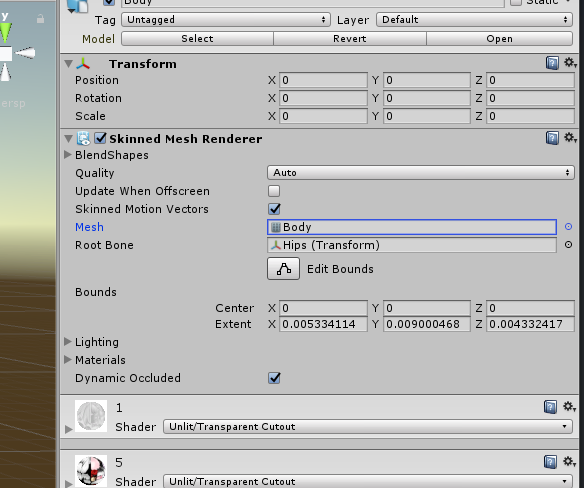
I'm unsure what I'm putting the .fbx onto
amber hemlock
Open up the fbx with the little arrow
zinc spindle
Sorry I'm really nooby at this :P
amber hemlock
There will be a mesh inside it
amber hemlock
If it explodes. Undo lol
zinc spindle
Nothing seems to have broken on me
amber hemlock
Check bounds again
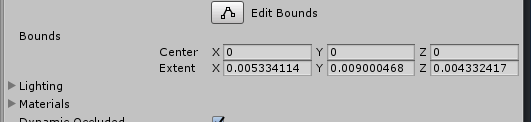 ancient crystal
is it supposed to have that many materials
zinc spindle
No idea
ancient crystal
bc theres way too many and i would suggest merging a few in blender to make it less unoptimized
zinc spindle
Wont that make me unable to use my own textures? I edited a few of them not long ago
ancient crystal
wat
zinc spindle
I literally opened the textures on a software and repainted a few things to make it look the way it is now
ancient crystal
cool
zinc spindle
I probably sound like a dumbass right now 
ancient crystal
shouldnt make a difference when u atlas
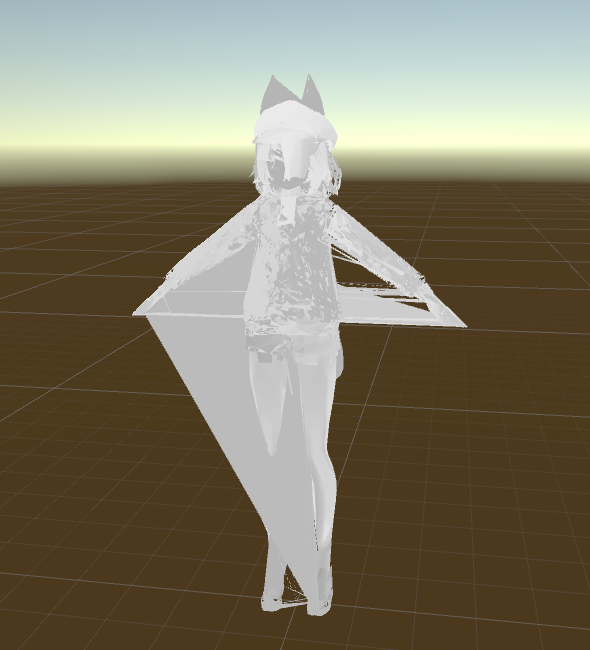 amber hemlock
What happened
amber hemlock
An atlas should absolutely not do that
Drag the new model into the scene separately and see if it’s broke
zinc spindle
It's not broken that way
amber hemlock
Then it’s the meta data messing it up. Not sure how to fix but it’s fixable
I think you can set it to. Generic, save, then make it humanoid again
zinc spindle
Jesus christ now my original model is just invisible
amber hemlock
Duplicate the model first just in case
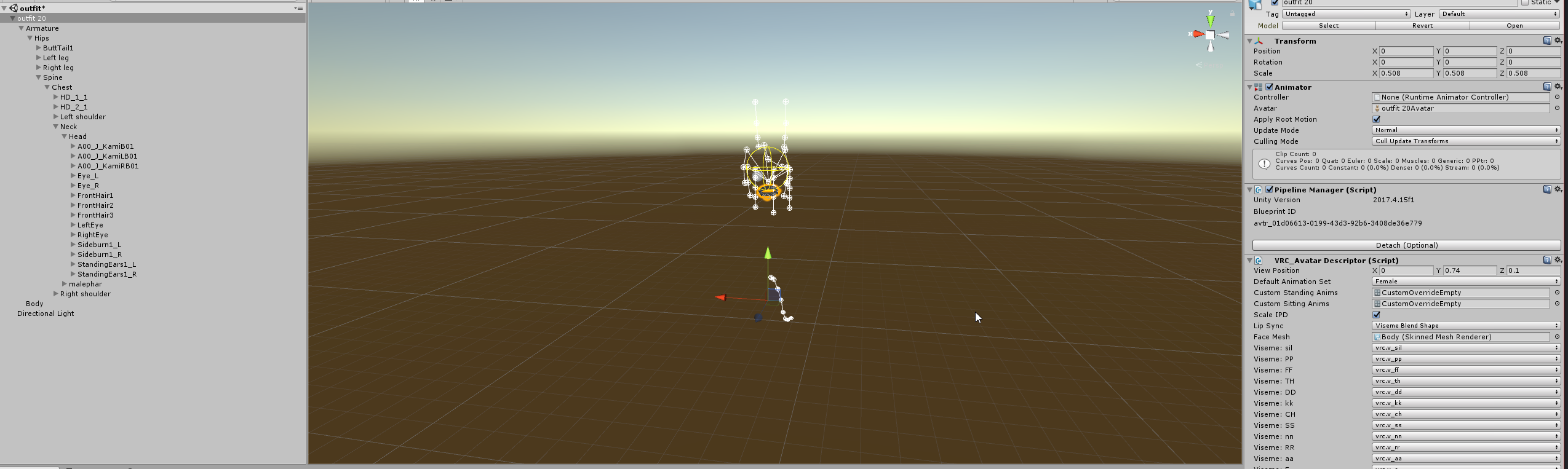 amber hemlock
Original model shouldn’t have been effected did you save over it
zinc spindle
No I just unticked it and dragged the other one in to see
amber hemlock
I wish I had any clue what happened
zinc spindle
I wish I knew
amber hemlock
Well it’s rarely as bad as it looks. Check the skinned mesh render and make sure it’s pointing to the correct model
As long as your components are there and the higharchy is there it’s fixable
zinc spindle
Ahhhh
Added the original mesh in
It reappeared
Added the "Fixed Mesh" again now and it's still there
Seems if I deactivate and activate again though it stays invisible
I'll see what VRChat says the bounds are with the fixed mesh
Or not... It's invisible on the uploader too
amber hemlock
Make sure the correct avatar is set in the animator in the root game object
And if it is configure it in bone config and make sure everything is binded as expected
If not
zinc spindle
Set it to the correct avatar and it still goes invisible
amber hemlock
Set it from humanoid to generic, hit apply, then back to humanoid, apply, then check the binds again
The model file’s data and unity’s saved internal model are disagreeing
Setting to generic and back tends to refresh it for me
#avatars-2-general might get you more eyes at this point since it’s a more general problem
zinc spindle
Eh it's way too much to deal with to fix it, If I'm Very poor rated just for bounds then I don't mind... I doubt it'll lag anyone and such, thank you for the help though and have a good day!
heady smelt
Does using Flat Lit Toon Lite help performance at all?
karmic condor
Yes it is
It’s complicated
You won’t notice by yourself
But once a room gets crowded every little bit helps
amber hemlock
Flat lit toon lite helps over regular flat lit toon, yes, but not really by much. doing something very small like having one less material, or one less collider, makes the difference seem like nothing in comparison.
karmic condor
My two cents is if you have to use the regular version instead of the light version, don’t sweat it.
amber hemlock
(I'm actually tired of seeing flat lit toon though! give me some smoother shading ramps! even if it's still flat... give yourself at least 3 or 4 gradients 😛 )
karmic condor
I recommend to anyone, going onto vrcat and just trying out the different shaders.
ancient crystal
typically a lot of shaders share the same performance bc of the amount of passes and calculations used
i forget how u benchmark them tho
and yea i almost never use completely flat lit
i always have hybrid ramps that mix hard/soft lighting with hard/soft shadows to varying degrees making it cartoony but also 3 dimensional
sweet mason
Most of my stuff have fake shadow so yeah flat is good enought
surreal topaz
Flat Lit Toon Lite was originally made as a geometry shading-less alternative to Flat Lit Toon
And right now Flat Lit Toon has issues with realtime lights, the additive pass always has 0.2 width outlines while the regular pass does not
 steel mountain
I'm looking on the vrchat websites and it says to use gravity for hair instead of dynamic bones, how does one do that?
amber hemlock
Gravity is a dynamic bone thing
You either use force or gravity
Use force if the bone sticks straight out at some angle like it’s “t posed”
distant forge
You might be able to use a rigid body with gravity / fixed joint system to simulate gravity. But you'd need quite a lot of joints to make nice flowing hair. This is what dynamic bone is trying to avoid
amber hemlock
If the limb either poses looks like it’s already obeying gravity or is already naturally rest posed, use gravity instead of force
ancient crystal
if u use animators it doesnt lower performance that much apparently
i have animations for wagging and breathing and wind and all that fun stuff in like 1-2 animators
but got a good rating
rip cuz of DB tho
amber hemlock
You can do tail wag/breathing and etc without animators. Put them all on idle slot. Everyone thinks idle is for standing still but it’s actually just an animation that plays at all times at the lowest possible priority (any other animation will override it)
ancient crystal
yea but like its not as interesting
bc like i have several animation layers
they all play out of sync with eachother
its very lifelike and 'random'
i just personally like it to look a lot more realistic
but it only drops me down to good so im ok with that ig
but still got DB so rip
amber hemlock
Interesting. personally just offset them in the animation itself and make it random by hand, but that’s just me. If long enough the odd repeats would look just as natural and you wouldn’t notice the repeats x)
ancient crystal
yea ik but like u would need a 20 second long animation or something so they can sync together at the end lol
and a lot of copy and pasting
all i do for mine is
slow siren
I'm trying to delete a hat off of my avatar but when I do the hat DOES disappear off of the body but then it reappears below the body. How do I get rid of it?
distant forge
In blender?
distant forge
Is the hat a separate object? Where are you deleting it from
slow siren
I could go back through blender was just hoping for less hassle.
amber hemlock
20 second idle animation is fine
slow siren
amber hemlock
You mean disable the game object? That makes it invisible
slow siren
I don't see an option to disable it.
Although I think I found a workaround where I just changed it's scale to zero.
distant forge
That looks like a bone. Deleting or disabling bones in unity will not have the desired effect. What you said happens seems like a reasonable outcome of deleting bones
slow siren
Ah.
distant forge
Scale almost to 0 is what they do for the head when you are inside it
amber hemlock
Top of inspector when highlighting object is a checkbox. Unchecking it disables the game object, hiding it. Animations can check or Uncheck that box as well. It’s called isActive
distant forge
That's not true for bones specifically because the skinned mesh is still there.
amber hemlock
Yes you will need either a separate mesh, change it’s component from Skinned Mesh Render to just Mesh Render, and move it to the bone it should follow.
distant forge
Scale 0 works and should be pretty efficient so not a bad way to do it
If the hat is a separate mesh that could work yes.
slow siren
Nah, it's altogether. I tried going that route.
slow siren
Yeah.
amber hemlock
Then yeah scale hat bone to 0
slow siren
Alright then, thanks for the help!
amber hemlock
Downside is verts are always there
amber hemlock
When you get more comfortable, open the model in your project directory (.fbx) in blender, change to edit mode, select all the hat polygons, hit x to delete, export as fbx
slow siren
baby steps for me at the moment. Tried blender and it still scares me some lol
slow siren
Tried rigging my first model yesterday and WOW did it end up fucked. the fingers bent sideways and I'm just like NO WAIT NO STOP
amber hemlock
Yeah don’t start with rigging
Start with deleting /separating stuff
Easy to be destructive
Harder to create
Rigging is one of the more advanced crap. Right below uving
I hate uving
surreal topaz
UV mapping is hard because you generally don't unwrap a mesh to fit an existing texture
I guarantee UV mapping is a pretty easy process if you intend to texture paint it yourself
slow siren
i dont know what any of those words are
amber hemlock
Yeah. Most modders do the process backwards
slow siren
ur just making shit up on the spot arent u wow
surreal topaz
Lol
karmic condor
I can confirm what rokk said 100%
surreal topaz
Unwrapping is also pretty easy if you abuse project from view a lot
Like putting striped kneesocks on an avatar
Just go into front view and unwrap the legs from view, put it on a very basic striped texture and it's perfect
amber hemlock
To be fair uving is a weird way of saying uvmapping that isn’t that common I guess xD
karmic condor
A uv map is just a digital version of those tin foil chocolate Santas you see around Christmas
amber hemlock
That was the best analogy I have seen recently
ancient crystal
u can also use seams and pins
ancient crystal
i kinda wish project from view had an option
karmic condor
I texture using uv decals
ancient crystal
to split by seams also
like u can use view alignment to align the UV
and it would open up from the seams like normal
surreal topaz
Oh yeah, so you can unwrap multiple sides more easily?
ancient crystal
yea basiclaly
if u have a single seam straight down the back only
on that santa thingy
and u unwrap from top
it would have the halves of the back on each side
and would be top-down projection
and if u did it from front
it would have the halves on each side and be a front projection
basically like if u unwrapped it irl and looked at it from that angle
amber hemlock
You all are much more advanced than me. I just accept whatever unwrap I get and accept my fate
ancient crystal
yea but ur probably not one to retexture things from the ground up
the most unwrapping/mapping ppl typically do on here is just for atlasing
which is different from unwrapping or trying to map things into neat shapes so its easier 2 see and texture
ancient crystal
??
 silk marsh
Should I uhh
ancient crystal

silk marsh
Save my avatar which is a .fbx file in the streaming avatars thing
silk marsh

distant forge
Is this about optimization? Probably should be asking in #avatars-2-general but my guess is you should be importing the fbx in your unity project rather than mucking with some vrchat install directory
ancient crystal
^
tired badger
Just released my tutorial on Avatar Decimation. 😄 https://www.youtube.com/watch?v=rP4KboALEHE

This Tutorial will show you how to decimate Avatars down to the new poly/tri limit for VRchat. I will most liking make a more advanced tutorial doing things ...
 red rover
remove doubles
heady smelt
hey guys, looking for some direction on materials. I have tried to submit an avatar world twice, both times it got knocked back for materials being over 10 on many avatars. before my latest attempt, I checked and rechecked the materials with the in game optimization window. none above 10. unless im reading it wrong. What are the numbers in brackets for?
still perch
thats the recommendet max
heady smelt
thought so
red rover
that particular model you got there should be 1 as you aren't using any special shaders
still perch
but you shouldn't be denied for 10 if the avatars are otherwise also not awfull
heady smelt
the approval team says my world was denied because 4 avatars broke the limit of 10 and one had as high as 28 materials. I have screenshots of all 15 and none of them are over 10. not sure what to do or who at approach about this
@red rover oh I know, its an old model. just wanted it as a space filler for now
red rover
nw. customization is key, but I know they have rigorous requirements on avatar worlds
heady smelt
yeah, I understand that. just not sure where they are getting the extra materials from
distant forge
Do they have the spreadsheet where they break it down per avatar?
shut sequoia
they do, and that's the avatar supposedly over the limit
still perch
i would recommend to you to check them with something different then the stats from the avatar selection menue
distant forge
Might they be including disabled objects in that 28 count? ( gestures, special effects)
heady smelt
where is that sheet? I can only see one that says how many were over @shut sequoia
shut sequoia
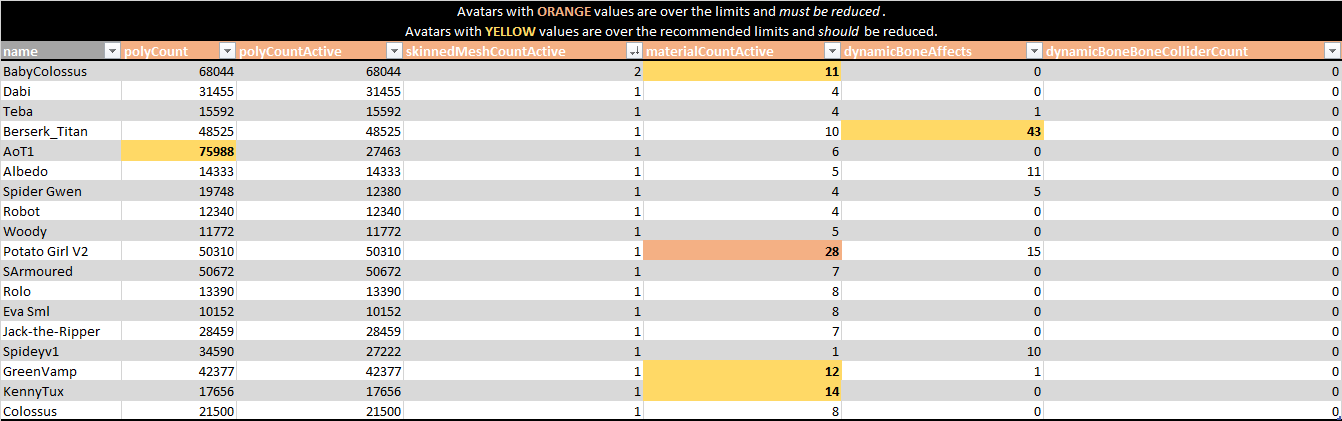
I'm assuming this is yours since it used Potato Girl
They give it to you alongside the decline in the public world list
heady smelt
thats my first attempt, yeah
shut sequoia
Like Lyuma said, there could be disabled objects that have materials?
heady smelt
@shut sequoia oh you are so right, thank you
yeah that could be the case. ill have to go through and recheck everything. thansk for the clarity guys!
red rover
makes me wonder how some worlds got public with avatars that have 23 mats and stuff
distant forge
It does say material count active though... anyway maybe worth cutting down the materials on the ones they highlighted. Also note they care about material slots not unique materials
As a proxy for drawcalls
tired badger
A lot of old worlds were up before the changes and haven't been re-uploaded or scanned. Just report them so they get checked
shut sequoia
You can check on the website and see if it was a world uploaded in 5.6.3p. If so, that's most likely why. They, for some reason, don't check old worlds very often
heady smelt
I have noticed a bunch of old worlds disappearing though
red rover
oof theres an avatar i love that will probably disappear then
shut sequoia
Yeah what happens there is they try and reupload without knowing that it won't be accepted, you see it a lot on the list. The avatar also won't disappear as they don't privatize the Avatar ID, they just remove the world
heady smelt
see if you can contact the creator @red rover
shut sequoia
unless you're famous on twitch
tired badger
keep it favorited
red rover
i know they updated it for 2017
tired badger
just the world goes down
red rover
oof mic lol
tired badger
they probably waited awhile and re-uploaded over a passing model. Which is bannable
bannable avatar uploading i mean. For a month if i recall
heady smelt
Kareeda you did well to get that many avatars in the new version of your world.
shut sequoia
Yeah but only if you do it to a 2017 world, of course. Not if you do it to a 5.6.3p one.
heady smelt
all my older models are way over optimization limits now
red rover
i really need to make a waifu world of busty milfs that are totally sfw but hot
shut sequoia
Call the world Optimized Milkies pls
red rover
Full-Body Optimized milkies
shut sequoia
 do it before someone else does
tired badger
Challenge accepted
red rover
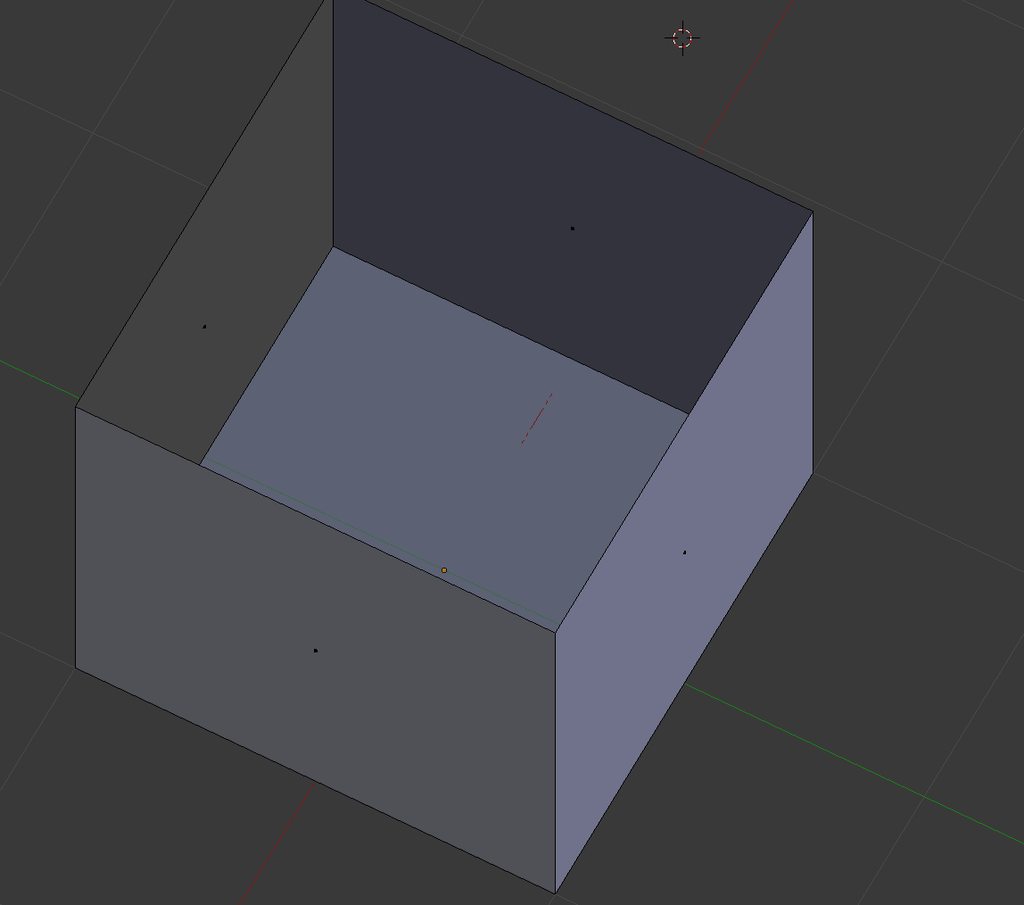
ok already done modeling the world. 10 tris, 1 material so you know its optimized https://imgur.com/a/e3m021z
 still perch
10 tris?
make the floor 1 triangle thats big and overlaps to the sides
c'mon you gotta try optimize propperly
red rover
oh shit my bad you right
 distant forge
Just a collider and bake the cube into the skybox


 distant forge
Why even have tris
still perch
thats not a quare room tho
distant forge
Imagine if that doesn't get rejected for Low effort world
distant forge
Lol
still perch
yes at least for public
red rover
and its not even optimized
distant forge
They did put a bunch of features to be fair, like customizable walls, disabling the sides and the secret platform below
red rover
well if its just like a bunch of avatar stalls and it was built for that purpose alone, would it get rejected
distant forge
Hmm guess avatar worlds are a separate category. Maybe it would work
still perch
i dunno you'd proapbly still want to make it some what worldish.
red rover
i can just make green hill zone from sonic and have nothing but waifu avatars in it
not a single sonic avatar to be had
but in all seriousness, I'm actually going to make a world designed after my favorite music festivals but smaller obviously
 abstract raptor
Anyone know why I get these messages? It lags my unity every 5 seconds, any help will be greatly appreciated ;3
distant forge
The vrchat sdk is responsible. Does it stop if you close all the vrchat related windows and deselect your avatar object?
abstract raptor
I have no avatar objects in scene, and no vrchat or vr related windows either.
I was trying to fix it with just the sdk in the project to see if it was the cause and it was still giving me these errors.
Could it be graphics card driver related?
distant forge
No, the sdk is being reloaded or hitting the code path for updating project settings
You could disable that code in EnvConfig if it's causing trouble to avoid the delay but the sdk build control panel being reloaded constantly might still give trouble. Closing the build control panel should prevent it
 untold coyote
@tired badger These avatars are awesome. Now if I could only get my api to load them. It says I have 16/16 favorites, but none of your avatars are showing.
tired badger
Don'tt think i can do anything about that sadly. Hopefully it's fixed next update.
velvet spoke
@still perch I fucking died laughing yesterday, they approved a world that is literally what they state as low effort world. It was a default material plane and a mirror xd
still perch
Without anything else?
surreal topaz
World reviews are far from consistent
surreal topaz
Lol
I checked the admin approved tag and it appears we might have been mistaken
That tag is on all public worlds I've checked so far, including mine @shut sequoia
And I doubt I'm in very good standing with the devs to be honest
I think that tag is just given to any world that has been reviewed
velvet spoke
@still perch it had an avatar pedestal, with a broken low effort avatar.
surreal topaz
I thought every world needed 3 avatars or more at some point
untold coyote
ok, watched Kareeda's tutorials. Now downloading Unity and Blender hoping to optimize a couple avatars I love that are poor or very poor.
amber hemlock
Is there a way to use cats texture atlas but keep all the material slots? So basically texture atlas and set it to every material so the slots are still all there so I can fuse them as needed but they still all reference a single texture
Because I need some to stay separate only for different shader parameters but still be included in the atlas
distant forge
Yes, well you can re split them to new materials after running the atlas
What I do is mark each material into its own vertex group before running atlas. Then I can go later and select a vertex group and assign a duplicate of the atlased material to it
You want like one for transparent but sharing a texture right?
I have that problem too. Wish it were easier or an option to atlas but keep the materials separate and let you hit the [-] button to merge the ones you want
amber hemlock
Yeah it’s a bit more complex I use a base and fluff layer on the same texture by using fully transparent, colored pixels so I can reuse the same part of the uv for cutout and Solids. Makes texturing much easier
Since the fluff just happens once I apply a alpha mask to the texture
Thanks the vertex groups will help
Forgot about that
Unity discards vertex group data right t won’t make useless data in the upload right
karmic condor
I saw a avatar with 17k mesh transforms. Not sure how to report the avatar without getting my friend in trouble
distant forge
Correct. Only keeps vertex groups attached to bones
surreal topaz
@karmic condor just report the avatar
Avatar reports get attached to the avatar
You can report people using public avatars and it'll get taken down
karmic condor
Thank you 🙏
tired badger
Testing new method using center of gravity to get hair down to hardly anything bones. 😄
 radiant lodge
whoah, that looks pretty cool!
tired badger
Thanks! She's in game now and has only 9 dyn transform for all her physics
distant forge
!!! that's really awesome with such long hair. I'd be curious what tricks you used. did you just gradient weight paint the whole hair to the head and that one bone and put the bone halfway down.
marsh trail
Wonder how it reacts... db being pivot based and all, hmm
Does the bone have the entire hair section weighted to it or just midway?
safe swift
i'd say it needs a hinge bone, and as for weightpaint it should wokr fine with a gradient
marsh trail
The placement just looks off if the bone controlls the entire hair part it's on so i'm curious
ancient crystal
the one for lower hair will look pretty akward especially if u look down