#avatar-optimization
1 messages · Page 34 of 1
 void basalt
 heady smelt
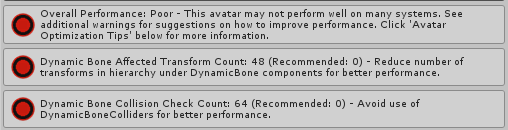
Anyone else using cloth automatically get poor or am I like a few polys to high. Just wondering. I’m at 400
heady smelt
I have 400 and everything else is green but the overall is poor, I didn’t know if it was the poly count or if it was just using cloth all together.
heady smelt
400 polys**
heady smelt
Yeah, the rating system still calls it poor
 ancient crystal
what system
ancient crystal
never used it so idk
heady smelt
On performance.
ancient crystal
cloth being poor is preemptive i guess
because there are people who do use cloth really badly
heady smelt
Well I wasn’t sure if anyone else has cloth under 400 that doesn’t sink them to poor.
 shut sequoia
it's never, ever, ever about "this doesn't lag me"
Duplicate the model 25 times, add IK to some of them, up and down some of the materials, verts, etc
 radiant shadow
Public avatars with 40+ materials >_<
 surreal topaz
Report the world or avatar
 visual dock
I had a good laugh earlier cause i only have one model using cloth, its at 440 tris and set me to poor. otherwise it would be medium due to a few dynamics in the hair.
ancient crystal
ye the hair on that model is cloth
and i was gonna make the jacket cloth but went with dynamic bones instead
visual dock
i'm only using cloth on the shirt
heady smelt
Yeah me too
visual dock
but cloth hair...that sound weird
ancient crystal
hair acts like cloth too
heady smelt
I decimated my skirt and it only uses 2 colliders
heady smelt
And I’ve used cloth on hair before, there was a performance decrease I removed it immediately
surreal topaz
Cloth hair doesn't work very well at all, it looks horrible
ancient crystal
probably bc of the polygon count, self collision, or etc
not on mine bc ive done it correctly
it acts a lot like actual hair it just isnt separable
ancient crystal
not if uve done it correctly
heady smelt
I’ve only seen long hair tho
ancient crystal
mine doesnt do that
heady smelt
With to many polys
ancient crystal
only when u move down too quickly
like crouching really fast
otherwise it moves like actual hair
heady smelt
Yours is short too so it’s not going to get caught on or in colliders
ancient crystal
and its brushable and u can pick it up
also has cloth in unity been updated because like
i found out that when i duplicate the hair it can actually collide with its copy
and i didnt tell it to
ancient crystal
also the only colliders are in the head and on the arms
bc of the hat clamping onto most of the hair
it stays where its supposed to be
and i really like it
heady smelt
I’m sad it makes my avatars poor
heady smelt
Yeah but it counts tri amount.
visual dock
I'm personally fine with being poor if its because 30-50 transfroms for dynamics. I've always aimed to be well under that if i can and make it still move the way i want it to.
Cloth i never really got into though did one test with it and that was it.
heady smelt
They suggested us 200 polys on optimization in their Pamphlet it seems using it at all is no.
ancient crystal
my hair not have a lot of verts

i think too many polygons tho
but again somehow i gues it just doesnt lag people
ive asked them ive like switched to this avatar
heady smelt
As the person said duplicate that model 20 times there might be a noticeable difference.
ancient crystal
yea but nobodys gonna have 20 of the model in one instance
heady smelt
But all my avatars are private. So there won’t be 20 of us.
 patent leaf
When 20 of similar models if people don't optimize.
ancient crystal
ive gone to the pug with this model
heady smelt
So I’m not optimizing my model for using clot?
ancient crystal
already laggy from everyone elses avatar
but nobody noticed a performance drop from mine in specific
so im gonna assume its done well enough
patent leaf

heady smelt
I’m just asking not angry btw uvu
ancient crystal

heady smelt
I just realize it could’ve seemed angry
visual dock
Same with any of my models too, Wulf.
Never had anyone complan about any loss of performance even near mirrors or anything.
ancient crystal
use cloth just dont use it too much or badly
heady smelt
I think 400 poly cloth, with low amount of colliders is not going to cost to much on performance.
ancient crystal
yea they do
"hey does this avatar make u lag"
"*switches*"
"na dude ur fine"
 elfin thunder
it used to be a guessing game who to block
ancient crystal
not really
heady smelt
Considering the rest of my model is green to go, it’s really sad that one thing can ding me and push me to red.
patent leaf
Just sure that if people are getting their frames taken and they see you with your avatar rank, it'll likely block your avatar. I been doing that even before this update, although I would go through a decent amount of people before I find them
ancient crystal
some people take a while to load in and then everyone notices the millions of shaders
idk how much more until trusted but am known
heady smelt
Even sadder when it appears just using that component flags you.
ancient crystal
does it affect anything in vrchat
 spark bison
Hey out of interest, is the avatar performance calculated at runtime or is it just calculated at upload
patent leaf
I'm going through and trying get my avatars to at least "Good"
ancient crystal
or is it just "heres how performance gonna be for this avatar"
surreal topaz
@spark bison runtime.
heady smelt
Nothing I have is considered good because I use even the smallest bit of cloth.
visual dock
to this day, when it comes to avatars with shaders though. The ones that takeover half the world with screenshakes or epilepsy inducing crap always get a block from me.
heady smelt
Aaaa I’m sad.
spark bison
shame, then you can never really know how bad it is when using animation overrides
surreal topaz
If an avatar renders over the walls I block it
spark bison
or does runtime mean when you first spawn in?
ancient crystal
disable an active item with cloth in it
and it can crash
the entire servers people
but again this is old unity
not a problem anymore
animations arent a problem
whats on/in the avatar is
elfin thunder
im so happy about this update though, i hope people optimize now.
radiant shadow
No way id ever get under this dynamic bone limit, but least everything else in green
ancient crystal
does it disallow upload of poor avatars
whats the limt
most ive used is like 5-6
radiant shadow
32 for Medium, but most of mine usually 50~60
heady smelt
Honestly i wouldn’t look at people with a “poor” avatar and say you’re unoptmized
radiant shadow
so instant poor
visual dock
Most of mine will be med/poor just from having 2 colliders and about 30-48 dynamic bones.
I'm also fine with that.
ancient crystal
lol 50 - 60 dynamic bone scripts?
heady smelt
No
ancient crystal
or bones
radiant shadow
nah bone transforms
heady smelt
Bones
visual dock
i always lower the amount of scripts in an avatar to 1-2 max
heady smelt
This is actually frustrating a bit
visual dock
for dynamics
ancient crystal
i also wish that cloth was easier to linit
radiant shadow
I got 1 very poor avatar rest are good~poor
heady smelt
They could put a thing on cloth though
heady smelt
It’s counting cloth polys
ancient crystal
so it doesnt move off
ive had avatars
with a LOT of cloth
one of them had a cape, a robe, hair, sleeves....
lmao
heady smelt
AYE!~
ancient crystal
heady smelt
Well there’s not much I can do about cloth it appears. I suppose I’ll have to just have a poor avatar. I know that they are still fine tuning the ranking just a bit sad that you get grouped with people who don’t optimize for 1 component.
The avatar score needs to be a weighted average based on performance impact from the line item
I doubt being over the poor rating of some of these items has the same performance hit as being over the poor rating of many others
but if the goal is to not exceed any maximum It does accomplish that
I just fear people will give up optimizing once they realize they have low capabilities of reaching good for the use of dyn bones or something.
it's probably going to be forced in the future
heady smelt
I can see a time when very poor avatars are blocked by default
ancient crystal
yea when its actually accurate
couldnt it also be judged by the users performance before and after the avatar is introduced
heady smelt
Having a "low performance requirement" toggle would be the best way to deal with this
ancient crystal
as opposed to some guess
heady smelt
i think the update like this would be good as for stats nothing like oh A poor performing avatar let me just auto block all of em
if its just for stats ok but otherwise it will be bad
ancient crystal
but actually that should (at the moment) never be added
heady smelt
if a person blocks you because of either your user rank or your avatar rank, is anything really lost 😛
ancient crystal
its just helpful for finding out who is the laggy person in a game that wasnt lagging
bc the systems not that perfdct
heady smelt
almost never happens tho
I think it should’ve been added without being public to everyone, until it’s been fine tuned and tested.
Like, everyone can see their own stats.
It did need more testing, but when is that not the case
both their company and mine released right before Christmas which is a no no too 
has anyone found a fix for the snail marker bounds issue yet?
radiant shadow
Check if you have compressed on in Blender atlasing, it make it horrible ,no idea if cats one does that, but manual using the Materialcombiner have it as default.

You can also click on the texture in unity and set compression there, default normal
heady smelt
So for those with cloth, I just learned if you use cloth but your vertices count is 200 and under, you should stay in the yellow and not hit poor. :>
heady smelt
They have recommended staying 200 polys for cloth since it got big. So I don't think it's completely biased.
It's something they've stood by.
ancient crystal
ik but i think mines 300 or so
heady smelt
this update is absurd
ancient crystal
dont remember
heady smelt
 elfin thunder
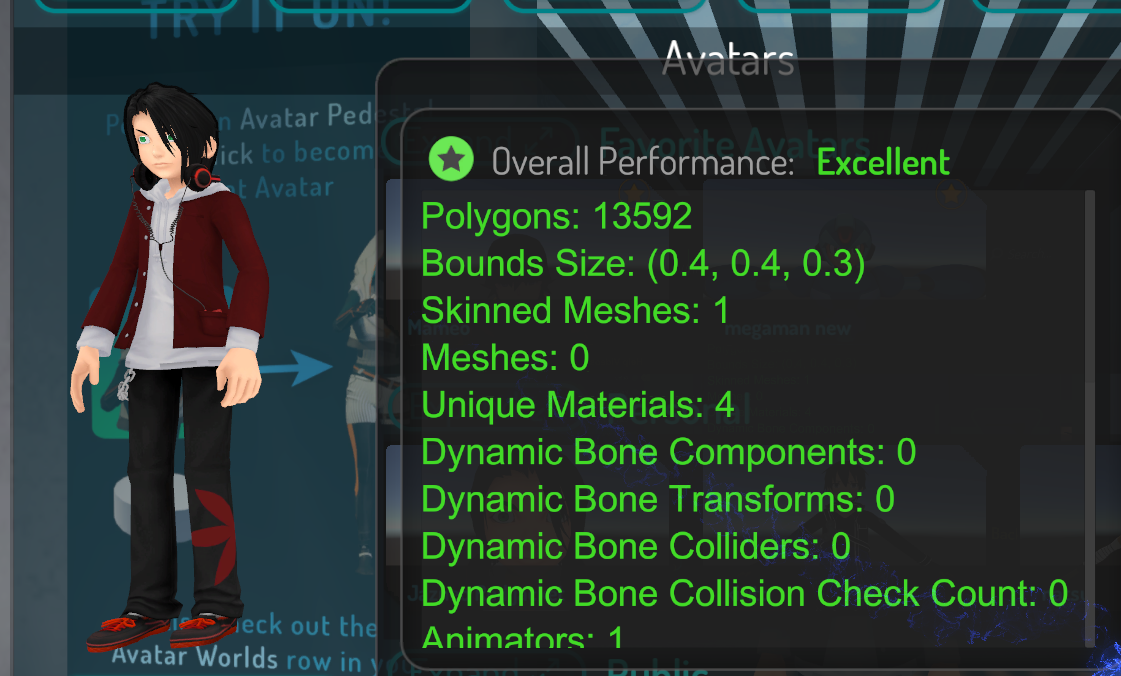
The Avatar Performance Ranking System allows you to see how much a user's avatar is affecting performance via analysis of the components on that user's avatar. You can also use it on yourself to see how performant your avatar is. **This system is purely informational at this...
all the specific numbers are here
 trail yarrow
why is it called "Overall Performance" if it just displays your lowest ranked category lol?
how is having 1 poor the same as 10 poor

elfin thunder
because single things can tank performance
radiant shadow
1 bone over limit, boom you are poor
trail yarrow
light sources yeah
elfin thunder
a bunch of dynamic bones but everything else good will perform poorly
trail yarrow
sure, but there's no weight
the system doesn't consider dynamic bones worse
it thinks they're the same as everything else
heady smelt
¯_(ツ)_/¯
elfin thunder
i dunno, making it a hard line makes it less of a guessing game
heady smelt
weighted categories would be nice but would also take more research and time to implement
trail yarrow
each category needs to have a weight, then the overall score be an average of the categories
elfin thunder
for future avatars i can plan around this
heady smelt
agreed
trail yarrow
yeah it would, and they should do it like that instead of making it live as it is
elfin thunder
i can plan around the amount of dynamic bones and stuff needed
heady smelt
the skirt optimization video I'm looking at makes dynamic bones mostly not needed, it's like a 4 bone skirt lol
ancient crystal
yea but it can be done by testing fairly easily
like they could make an avatar thats "poor" on each category
and see which avatar is less performant
and u can compare the frames and figure out some percentages
heady smelt
The truly sad thing is even after I fix everything I'm still gonna be very poor unless I remove snail marker
ancient crystal
lol
 tardy quarry
Anyone here that use marker on your av had problems with the bound size of your av?
heady smelt
yes
tardy quarry
did u find a way to fix it?
elfin thunder
performing well is so important to making things pleasant for everyone
heady smelt
not yet
tardy quarry
same :/
heady smelt
no way to fix it, after using your marker in a world your bounding box will be astronomical
it affects bound size even if disabled on load
tardy quarry
actually for me it didnt
heady smelt
is it possible to instead make a transparent trail and the trail is bounded inside your model instead and also have the game object disabled
tardy quarry
it should work, but everytime we stop our drawing gesture it will erase everything
heady smelt
yes
exactly
and then you change the trail color when you need to use it
so your bounds stay small and the marker cant be seen if not in use
I've never seen this done but ill try it because it seems like it would work if you can change the trail color through an anim
elfin thunder
bound size shouldnt really be counted
heady smelt
you can't have different colored segments in the trail renderer
so animating the color won't fix it, the mechanism that shoots the emitter into space when you lift your pen is the cause, and the marker material uses it to hide those parts
when you animate the marker to shoot away inside the avatar or say, 2m down, there's problems with the interpolation of the movements causing visible jagged endpoint triangles
hmmmm
 safe swift
u can use two gestures to draw, one to activate the marker, 2nd to from -10000 to 0 location, my avatars don't have bounds issue due to marker, as I use two gestures
heady smelt
I'll give that a shot real quick
 last light
@safe swift What are your avatars rated at now? I've seen some of them in game before. :p
safe swift
poor/very poor, because it takes worst as display
 real orchid
any avatar that uses rigid bodies for arms has really been hit hard.
safe swift
i don't care about system for now, it's complete bs
they fit the world avatar rules, so idc further for now
last light
It's wayyyyyy too strict on dynamic bones imo.
The recommended should be less than 20 bones or something.
Not 0
real orchid
dynamic bones are awful for perfomance
last light
The rest of the suggested limits are fine.
last light
What do you have a Rigidbody on? 👀
real orchid
my avatars
last light
Nice, I got that part.
last light
Uh, alright.
last light
That's a lot of rigidbodies.
real orchid
depends on what you use it for
last light
I suppose rigidbodies are really taxing, they're essentially just gravity/physics components.
Dynamic bones are simpler.
safe swift
well, dynamic bones are #1 issue
last light
Imo, yeah.
The suggested limit really does need to be like 15-20 bones.
At 0, it means anyone using dynamic bones will be medium or below.
And people will use it.
heady smelt
Optimization matters a lot more for public and friends+
last light
But 15-20 dynamic bones per avatar in a public world really isn't much
heady smelt
maybe a future feature can hide poorly performing avatars in publics for instance
last light
^
real orchid
i dont use gravity for any of my rigid bodies. just fixed joints. which is why im disappointed. im mad that an avatar that has 1 mat 1 mesh etc and is great in every category is marked as badly optimized because it uses some fixed joints
last light
@real orchid they don't check what the components do, so obviously that won't be an issue for performance, but 8 fully enabled rigidbodies would be.
Same thing with dynamic bones really.
Someone could have 5 bones, but have update rate on like 150
heady smelt
can rigid bodies be disabled when not in use? I'd imagine not...
real orchid
only if the bone is disabled i believe
but yeah im mad they dont take if gravity is enabled on rigid bodies into account.
last light
If they released something, like some kind of research into the performance cost of stuff like dynamic bones, to show how bad the performance hit really is...
That's help them tbh.
real orchid
its basically an avatar that has arms that copy the other arms. im not sure that affects performance greatly
heady smelt
they're a small team so it might be too much for them
last light
But... Right now people go "well I don't lag in this world with me and 2 people, so it's not an issue"
real orchid
i think they need to collab with the dynamic bones authors to make an optimized version of dynamic bones for the game
last light
I'm not sure it can be optimised.
It's just a lot of time consuming calculations to do each frame.
The page on the VRChat docs for avatar optimisation is really useful on how to optimise dynamic bones though.
real orchid
well i believe that the unity cloth script runs on gpu so there might be a better way. since cpu is the bottleneck in this game
radiant shadow
https://i.gyazo.com/7cbb49e0f41117bf349d619e07c2889f.png 'trusted user'
 last light
^^^ most trusted users
heady smelt
there are world based avatars that are way over
real orchid
what the fuck how do you have 329 mats
last light
@real orchid that was my thought tbh, I assumed cloth would perform better.
radiant shadow
Thats not mine, just some random guy in Pug
heady smelt
I just saw that
130 skinned meshes?
They probably forgot to combine and then just didn't care.
real orchid
@last light pretty sure if they found a way to mod cloth for bones it would be better. pretty sure its the same concept
heady smelt
Cloth can perform well if it's set up well.
last light
@real orchid in before Nvidia hair works. 😅
heady smelt
Or actually tested before thrown into live.
heady smelt
To think I'm barely above someone with 563k polys.
real orchid
just sad about my optimized crab avatar. fucking rigid bodies
ancient crystal
and 130 skinne dmeshes
heady smelt
Yup.
I'm actually done spending so much time on this one avatar to try to get it to their standards.
heady smelt
I've spent so much time optimizing one stupid avatar to just get poor.
real orchid
ive given up on some of my avatars. i just need to make new ones
heady smelt
My avatars were poor to begin with.
ancient crystal
woof
heady smelt
I already atlas'd and all that good stuff. AAAAAAA
ancient crystal
man i wonder how it must rank my
elfin thunder
optimize! or else you make things worse for everyone! its being polite!
last light
What's it getting poor based on? :p @heady smelt
ancient crystal
3 skinned mesh 4 material and 70 something tousand poly avatar with cloth
even tho it not lag in game
prob very poor
heady smelt
I'm getting frustrated because I've spent so much time optimizing to get poor.
ancient crystal
they should remove rankings until theyre more reasonably accurate
with "lag detection"
last light
You can try removing some verticies from the cloth. @heady smelt
heady smelt
I did.
ancient crystal

last light
Oh. ☹
heady smelt
Yup.
last light
Rip
real orchid
i really think many people will be blocked based off of performance
heady smelt
They suggest 200 in their performance guide but 200 = poor.
last light
It is really hard to get above poor though.
heady smelt
So I'm actually just done.
last light
I think they'll tweak it to be fair.
ancient crystal
when vrchat says ur rinky dink avatar is very poor
radiant shadow
Yeah im settling in on Poor for now,even tho its noowhere near as bad as others
heady smelt
Anyway I'm dipping from these channels and ignoring performance stats cause I'm getting irritable.
Wish you all the best of luck in optimizing your avatars.
last light
To be fair, anything about very poor is good. 😅
 fluid turret
the exact moment 0 dynamic bones was the recommended setting I lost interest
heady smelt
I only used dynamic bones to begin with because of tupper's tutorial.
fluid turret
I haven't spent a year making models and learning to get told that lmao
heady smelt
OK now I'm gone.
last light
Ideally you should have none, but people really like it, and will use it, so they need to raise that recommendation.
fluid turret
I'm not being good either
elfin thunder
being good or medium is ideal
fluid turret
medium is the most I'll shoot for as 'ideal'
 restive kite
medium would be fine if they upped the dyn bone limit to 64 or something more reasonable
elfin thunder
none of them is just excellent performance wise
but thats obvious
i dont think they expect most to be excellent
fluid turret
when public models are out there as very poor and poor? no
elfin thunder
theres going to be a transition period for sure
restive kite
those public models are from before they started requiring more optimization when submitting worlds, no?
fluid turret
no
radiant shadow
Pretty much all except polygons are off on the sdk/avatar perfomance details for me
fluid turret
bounding boxes can sometimes change in play mode, but I've only really experienced having to fix that when using cloth
elfin thunder
their public world standards are a bit different, theyre still tweaking things.
restive kite
public avatars should at least be medium
elfin thunder
i agree
visual dock
@radiant shadow I just saw that screencap. My god...I cant even.
radiant shadow
Its like a game can i find someone worse then that avatar now :p
visual dock
lmao.
restive kite
at least that person kept the dynamic bone stuff low
i saw someone in the pug with 6k collision check count
elfin thunder
oof
elfin thunder
i really look forward to blocking very poor by default
visual dock
I'm losing my mind cause i always thought i was barely optimized. Then you guys show me these stats and i'm like. WHAT.
fluid turret
6k? on the avatar I went all out on I only got to 1500 christ
radiant shadow
Seen so many trusted with 100k+ poly and 40+ materials running around
visual dock
I never took that ranking system seriously anyways
fluid turret
I mean just because you uploaded a lot of stuff (assuming) doesn't necessarily mean they're good at making it
radiant shadow
Yeah i been crashed by all ranks
visual dock
I'm only a known and none of my stuff is horrendusly bad.
Most my models in the poor rating are mainly for 50 bone transforms or 30 of them. and 1-2 colliders.
fluid turret
actually I need to check something
visual dock
I could easily redo most my dynamic bone efected riggings and make medium at least
fluid turret
nvm I thought having avatar swaps might be counted as extra meshes but nah they have no excuse
lmao
visual dock
lol
fluid turret
this is so sad
fluid turret
coat, hair, shirt
elfin thunder
you could probably do those with less bones
fluid turret
you are correct
elfin thunder
is there like, a bunch of bones in the hair?
fluid turret
no
radiant shadow
The new? documentation have some new videos how to merge bones and stuff, first time i done that was today so learning something new, not that im using much usually around 55~ dyn bones but now i managed to get one of mine to 33 i guess thats,.. progress
fluid turret
learning is a good journey, you're probably lucky to be learning all that stuff now when it's a big fad
will be more fun
elfin thunder
also, adding exclusions is also a good trick to reduce bones
fluid turret
ew
elfin thunder
like, the _end bone of a chain doesnt really need to be dynamic
fluid turret
might be good to note that model is from 4 - 5 months ago
elfin thunder
blender auto adds end bones i believe
visual dock
https://i.gyazo.com/5b8be00831c5c6545bce164bcfaca0c4.png
only thing holding me back atm from good/med.
 elfin thunder
they can be excluded to save some transforms
elfin thunder
The Avatar Performance Ranking System allows you to see how much a user's avatar is affecting performance via analysis of the components on that user's avatar. You can also use it on yourself to see how performant your avatar is. **This system is purely informational at this...
fluid turret
I've done every possible sick experiment there is to do with dynamic bones, they're my favorite fascination
elfin thunder
heres the exact stats
 simple violet
Can somebody help me ? should i remove the bones or keep it ? i want this ? Or should i just change parent to legs ? https://www.youtube.com/watch?v=8u1NBstIcy8

[[ENABLE CC ON THIS VIDEO]] Quick rundown of how I set up a skirt for VRchat that looks good and wont make everyone's frames rate tank. Currently there is a ...
radiant shadow
Thats one thing i want to learn how to do, but havnt yet
fluid turret
those bones seem fine but you'll get clipping if using dyn bones from what I can see
simple violet
Yeah i have clipping how do i fix it ? i am new
fluid turret
you can try parenting to the legs but it won't look good, a skirt that short won't look good even if you go for colliders, best to get used to some clipping
if you're going with the big performance party try parenting to the legs
simple violet
So I keep just put 3 bones to left leg and 3 to right leg or i just put one to each ?
fluid turret
you can try three on each side, make sure you save first, it's all about trial and error
and I highly recommending getting into learning weight painting sometime because you'll eventually need it or at least an understanding of it
it big helps with this stuff
simple violet
Well i try it if it will not work i go sleep 😄 thank you .. do you know some good tutorial for weight paint ?
fluid turret
hm, can't remember its been too long, but I mostly learned from looking at other models and trying to emulate what they had until I learned what each setting meant
mostly from trial and error
but youtube has a lot of tutorials to get you to that point
I recommend stuff like watching people add clothes to models
I can't talk too much about this but looking at professional made models, not mmd models, is better for learning if you catch my drift
simple violet
I understand .. 😃 i will check that out when I wake up .. I just uploaded the model i seen clipping so i was like how do I fix that xD well tomorrow is an another day
fluid turret
o yeee boi learning about this stuff gets pretty addicting when you realize the more you know the more power you have to create more etc it's a vicious cycle
heady smelt
speaking of professionally made models
last light
@fluid turret so true
heady smelt
I wonder how much TDA would charge to make one custom 
 verbal orchid
More than a skilled Japanese guy I'd say
shut sequoia
you're better off gettinga custom from the booth sellers
 median wharf
someone know if unity chan have dynamic bones
 distant forge
You mean the vrchat default avatar? Or unity chan the unity package. The latter you can customize however you want, with or without bones.
 timber blaze
i think tupper said he added dynamic bones to the default unity chan recently
 thorn ginkgo
Yeah she does, you check by looking at her avatar stats. She also has nice shaders now!
 fathom mason
i wonder why they pushed out this update that fast. i really dislike the huge gap between poor and medium. if 1 little thingie is considered as poor and everything else is good/excellent your avatar is poor. even tho if your character would be multiple times worse, it would still be ranked the same as the nearly optimal one. that..... really doesnt motivates to try your best. then you see tons of public avatars which are 30x times worse than yours. ranked the same. also i somehow dont get displayed the correct informtions from my avatar before uploading? it shows everything dynamic bone related at 0 and only ingame what it really is. guess there will be a lot adjustments coming. i just wonder why this patch was so rushed^^
 karmic condor
Oida fyi they are looking for feedback on the new system so feel free to make a post on the canny about it.
fathom mason
argh yeah x.x i constantly forget about the canny :x
 tulip lantern
would this be the channel to ask about some unusual shenanigans happening while texture atlasing?
 hollow fog
Probably best to share in avatars
timber blaze
green gang
heady smelt
😂
timber blaze
green gang master gang
 mossy solar
scrolls up and sees the picture of the avatar with 100 meshes and 300 mats
what in the actual F....
 halcyon vessel

 spice drum
Just wanted to give a shoutout to @sudden jewel and the dev team for the latest update. It's actually really nice to have some solid avatar standards we can build around, and listening to the community to adjust them to be a bit more to our expectations. <3
I'm really hoping this is all moving towards VRchat ending up on the Oculus Quest, because mobile VR is definitely the future and I'm excited to see more folks get involved with the platform.
Thanks again for all the hard work you are doing. 
heady smelt
patent leaf
Nice :>
 spare saffron
lol 65 materials, bro wtf 😂
mossy solar
it appears we know now where the lag is comming from
 ornate saffron
 plain fog
remove this rank system
btw
nice way to add a way to steal private avatars back
new .DLL btw
patent leaf
Turn it off in your settings and move on
 fiery rivet
There's a new atlas feature for the blender. How good is it, exactly?
And how should one use it?
I know, but in the past when I made an atlas, it has ruined the eyes due to the necessary transparency setting for f example eye shines.
Im wondering if that part has been fixed?
patent leaf
It is said to leave textures that need transparency in their own atlas
fiery rivet
mhm, so what textures can/should be merged?
should clothes and skin be separate, should hair be separate and should eye/eye shines be separate?
patent leaf
The way I do it is by separating the mesh and and grouping which one I want to merge together. I have notes I write down for which to merge but like what atlas is saying. hair, face, and the rest atlased. 3 mats
fiery rivet
alright, thanks. Im going to need to make it 4 due to the necessary transparency for eye shines, but this helped, thank you!
Now the only challenge is identifying the textures when the names are all confusing mumbo jumbo
shut sequoia
rename then
fiery rivet
aight, ill give it a go. Test two ways.
doesn't look like its letting me change the settings in... unity..
Now the settings for changing shaders/transparency are greyed out...
patent leaf
Maybe try
Select FBX -> Inspector -> Materials tab -> Switch from Internal to External (legacy)
 sudden jewel
Please don't torture my bots like this

Okay I take it back. Every single one passes perf checks.
Nobody has any excuse to not optimize if this dude can optimize 743 avatars
lmao
heady smelt
Lol nice
Do particle materials and weapon materials count or is it just unique avatar materials that matter Tupper?
Hey Tupper, is there a detailed explanation we can link to people when the topic of dynamic bones and colliders come up? Because since the performance ranking system, we see a lot of people in chat say things like "they have virtually no affect on performance". Just wondering if there was something we could link people to in these cases.
sudden jewel
any materials on the models at all count
particle systems, meshes, whatever
@heady smelt I should do a video on how bad DynBones are. Its somewhat "complicated" and requires showing off the Unity Profiler
heady smelt
Alright ^^
I assume they affect more things than just visual lag, that most of aren't aware of?
The amount of 30+ material avatars i see in a lobby is tremendous
patent leaf
Yep :>
heady smelt
Most ive seen so far was the one i posted above^
 lean relic
i need have update sdk
sudden jewel
@heady smelt I've recorded a video. Uploading it now.
heady smelt
Oh awesome! Thank you
 sudden zodiac
New Tupper tutorial incoming? 

heady smelt
Explanation on dynamic bones and colliders impact i think
 tender timber
So I went and checked out that world that had 700 avatars that you said should "set an example", it was just a bunch of pokemon with no gestures or anything to them.. of course they're being to be optimized. The models probably only came with a few materials so optimization was piss easy.. but people are adding weapons and particles and optimization becomes difficult because people want to make the best avatars possible, not generic pokemon with an animation to them, so to sit there and say "omg well done for importing generic pokemonz youre an example!!" shows how out of touch you are with avatar worlds lmfao
sudden jewel
I had a bunch of bots scan the world. I didn't eyeball them myself. ¯_(ツ)_/¯
If you add more props, animations, particles, effects, etc, you're going to pay for it with optimization costs.
That's how it works.
I think you're being a bit harsh saying I'm "out of touch with avatar [creators]", but hey, that's your call
 hearty galleon
btw the chairs dont impact perf right?
sudden jewel
not really, no
hearty galleon
because when a friend sits on me i drop some fps and the chair is positioned in the wrong place for me but not for them
sudden jewel
@heady smelt https://www.youtube.com/watch?v=kL1MdV46gdE

So one day in the #avatar-optimization channel Jamie Vatarga asked me this question: "Hey Tupper, is there a detailed explanation we can link to people when ...
im very proud of the face in that thumbnail
very proud
lean relic
why can't click build & publish
sudden jewel
Click the pause button at the top of the Unity screen.
lean relic
thx
hearty galleon
rip
sudden jewel
additional note: dynamic bones is written in a way that if your performance is low, it makes performance worse
@heady smelt
it tries to "catch up"
hearty galleon
sudden jewel
That's the eventual idea
will take time though
either optimize DB itself, or replace it with a drop-in
heady smelt
Hmmmm, guess i'll be using ones with no dynamics for now
sudden jewel
I mean, feel free to use fancy avatars with DB. its fun to use DB
just don't use it in worlds where your perf is already low
or populated places
 lofty ice
What im doing now is uploading two versions of my avatars. One with my normal amount of dynamic bones and one with them significantly reduced. If the worlds getting a bit laggy I switch to my more optimised version. I love my dynamic tentacles on my avatars but at the same time i dont want them ruining everyones fun if it gets to that point.
 wind coyote
yaaay, cake!
lofty ice
Nom nom
 velvet spoke
Gasp
heady smelt
Lol
 sudden zodiac
Maybe someday, If the servers can handle it, db will be calculated locally and then send to everyone like the IK
 sudden zodiac
Yes, like everything else
 mild veldt
Yikes... 
sudden zodiac
Ok not everything else, but you get the idea :D
mild veldt
Yea. I get it.
So, how are they gonna get the funds for buying their own servers?
They gotta come from somewhere than just investments or merch...

Yea.. somewhere in the millions. I doubt it would last for years, tho
heady smelt
4millon, but that was 2017
mild veldt
I think we should take this to random chat...
sudden zodiac
I bet they won't let their most lucrative game die
 sturdy socket

 versed nest

heady smelt

sturdy socket
ok thats enough
well even if it was a large sum of money its spread thin until they can find another sponsor 
mild veldt
Hmm.. Maybe Microsoft?
They got a big gig on VR with their MR platform
So is Valve..
versed nest
Spread thin? They're staff is still pretty small, no?
shut sequoia
wow this video is nice
best christmas gift
im in vr so gotta finish it later, but are what other videos are you thining of doing? or did he say in the video
tulip lantern
with some messing around with variables and a little bit of mesh splicing i managed to get a nice flow from a cloth component instead of using dynamics, might be able to do that with hair and skirts. can't say much about the jiggle physics though
safe swift
don't use cloth on hair .... first of all it looks like crap and 2nd it's laggy for hair, unless you have plains and not volume for hair
shut sequoia
fuuuuuuu
cloth hair terrifies me
though if you did it how im thinking, thats impressive
median wharf
Anyone know a way to make hairy physic without using dynamic bones
shut sequoia
i dont think you can
median wharf
than, if dynamic bones have a 30 refresh rate instead of 60
does it make a difference
shut sequoia
I'm not 100%, but I've heard changing it only changes it locally and others always see 60, but I'm not 100%. I'm fairly sure the game caps it at 60 though
sudden jewel
We cap 60. Feel free to go lower
 static pecan
tupper, could you dev's imagine that it would be possible to use the station for yourself? like i place a chair with a fix joint somewhere and i can sit on it
safe swift
do you guys cap also cloth? i'm doing from 120 to 10, and there's basically no difference
@static pecan canny was closed asking to be able to sit in your own seats, so no plans for now or at all
static pecan
were there reasons for the closing?
heady smelt
I think it was along the lines of, it would be too confusing and problematic for the average avatar maker who would stick a chair on their avatar and then accidentally trigger sitting in it themselves
surreal topaz
I think that could be solved by having a checkbox on the station component, or maybe even a config tweak like the particle system limiter
Or an option in the options
static pecan
i see no difference to chairs on avatars where other can sit on, same work how to do it
surreal topaz
Chairs in their current state are already slightly confusing because there's no ready-to-go prefabs or anything and it's tough to get them to work correctly
@static pecan the difference is that if the chair is attached to your avatar, you might fly off
But then again, they don't forbid chair loops either so
It only happens if the chair is not on a fixed joint and not at 0,0,0 on your avatar
I hope they will reconsider. I had a lot of ideas for fixed joint setups and vehicle avatars
static pecan
was it tested earlier ? i mean the issues they would comming with?
surreal topaz
We don't know. They did have a closed beta
static pecan
hm... i would like to test this by my self or get answers from people they were able to test this
surreal topaz
Well, I tested it a few months back, the last time chairs were introduced temporarily. It worked pretty well as long as you put it at 0,0,0. Putting it further behind me made me fly off fairly quickly. IMO this should be an "at own risk" thing.
I think it needs a checkbox or something like that. If you put a chair in your hand you don't want to constantly trigger sitting in it all the time
Or maybe self-interaction should be automatically allowed if the chair and its entry point are exactly at position 0,0,0 in your avatar. That would be another way to toggle it.
static pecan
i see, but the little risk can not be the reason why they dont make it possible, if you just put a collider on your avatar and forget the "as trigger" check in, you will also fly... what i see is it just needs enlightenment how to do it correctly for everyone who wants it
surreal topaz
Yeah
surreal topaz
Lol, there's a remark on the public world request history about a world with 743 optimized avatars
Message makes it sound like he manually put in the work to optimize it, tbh I am doubtful considering they're game rips that are already optimized
Still though, it's good
 marsh trail
Sounds 'bout right
karmic condor
Maybe. Game rips are not necessarily optimized after being pulled out of a game.
marsh trail
That does depend on the game yeah
If it's from an MMO it'll most likely be separated into sections, or a game with heavy emphasis on customization, that also applies to textures, even though they may be atlased, most will only be per mesh sections, if it is a game with little to no actual character customization then it'll be most likely relatively optimized
mossy solar
sees the video what about the people running around with craptons of meshes and materials?
shut sequoia
yup
 obtuse meadow
Hey guys, is the animagion override consideres an aniamtor? Wanna try snd keep it to 1
karmic condor
I believe that doesn’t change it
halcyon vessel
unity not best engine for physics stuff
karmic condor
Real-time anything will always be intensive.
 visual tinsel
Check out my realtime skinned mesh renderer
halcyon vessel

Available here: https://www.assetstore.unity3d.com/#!/content/117773 Using Shader forge and Unity 3D I created this Hair shader that is simple and effective ...
shader that add physic to hair lol
 manic owl
I do appreciate the video tupper but I do have one issue with it. Last I checked most people that use Dynamic bones don't put them on the entire model. Most people put them on the head and skirt and tail. I kinda feel like this is a rather unrealistic representation of the performance impact per model on an average basis.
mossy solar
what's more realistic is running around with crapton of materials since so many people are too lazy to merge materials and meshes
manic owl
^^ For sure.
mossy solar
if I would've ran into that jerk with over 300 mats I would've just blocked them completely on the spot
that's just pure laziness
it's easier than ever to reduce your materials and meshes
halcyon vessel
material have less empac then dynamic bone
manic owl
I would like to see another video where he does the same thing but on like the head/hair and skirt.
mossy solar
not when you have people with crapton of materials
manic owl
Materials and shaders can really make a bad day when misused.
mossy solar
20 pass fur shader!
manic owl
I understand if its like Dynamic bones on little things sleeves or whatever but putting it onto the entire model is a bit unrealistic.
halcyon vessel
show how to open the peformance window
manic owl
I already have
But my model is not exactly accurate
My model not only has hardly any bones for the hair and tail but as a whole is really optimised.
My model dynamic bone wise is a rather good if not best case scenario. Kinda can't test it.
My hair to is rather short.
and some of it doesn't even move and no matter the settings its really stiff.
When he puts it onto the entire model legit everything is getting processed like both eyes glasses if he has those in the head and a whole bunch of other stuff people NEVER put on dynamic bones on.
Whens the last time you went into the great Pug and saw a bunch of Jelly people waddling around?
mossy solar
better chances of running into a 50 material monstrousity
manic owl
Lol or a man with shaders from 5fps hell.
safe swift
@manic owl what u don't realize that people have more than 100 dynamic bone checks, as per tuppers vid
starting from 200 to 1000+ transform checks
 amber hemlock
Can I have a player mod for “disable dynamic bone on this world”
mossy solar
better off with an option like that and a "autoblock avatars with such and such materials and meshes" option
amber hemlock
Autoblock based on avatar performance is a terrible idea. Second Life did that and it ruined creativity.
They just calculated an overall weighted score and let you autoblock above a given score of your choice
And each client could see what % of people in the world was blocking them
It was... terrible :p
If you want to block people. Do it yourself
amber hemlock
Are unused vertex groups still saved by unity? Would it be a micro optimization to delete them before exporting as fbx?
like just stuff made to make selection easier
no relation to rigging
surreal topaz
I don't think Blender exports empty groups
And Unity will probably ignore them too
You can delete them but there's little point
amber hemlock
well i know it exports them because i can reimport the fbx and they're still there
just trying to make my avatar load faster
surreal topaz
Are you embedding the textures? @amber hemlock
surreal topaz
Try not doing that, it will make the FBX larger
Unfortunately one of the things that inflates FBX size is embedded media and also shape keys
Separate meshes would actually make it load faster
surreal topaz
???
amber hemlock
separate meshes instead of shape keys
amber hemlock
oh, well VRChat rates that badly
surreal topaz
Which would require separate meshes so that isn't worth it
Yes
Just make sure you export without embedded textures and you'll save a lot of time. Otherwise, the texture has to be loaded twice.
amber hemlock
Yeah my optimization workflow -> Separate thing to be decimated -> delete it's shape keys -> decimate -> rejoin
surreal topaz
I only embed the first time these days to make it easier
amber hemlock
What is the point of embedded textuers
and how do i make sure it's not embedded
i potentially have a ton of stuff to reupload again
surreal topaz
Do you use cats export?
@amber hemlock
If so, look at the settings in the sidebar for a checkbox that says "embed textures"
amber hemlock
Thanks
surreal topaz
If you use manual export, make sure the path mode is set to Auto in the bottom left
 leaden basalt
do the amount of bones really matter even if there are no dynamic bone scripts?
amber hemlock
They still have to be rendered and rendered based on their positions, it would be better to bone merge, especially if they never move independently
surreal topaz
I hope Unity 2018 LTS comes out soon!
They heavily improved "Optimize Game Objects", which basically makes the bone count nonexistent. In 2018, you can still expose bones that you need, such as the hands to add accessories.
That way you can achieve bone counts like "3" on full humanoids
amber hemlock
There is a difference between "unused bones" and "bones that are weighted but you never move" Cats will only remove the first category. the second category should be bone merged
leaden basalt
mhmm i can do that i dont use dynamic bone anyways
amber hemlock
I swear I learn something new about cats that makes it even better almost every day
guess who accidentally saved a dedimcated version of his model overtop of the undecimated one and has no backup <----
 steady abyss

 median wharf
someone tested the hair shader?
amber hemlock
annnd i only just now realized the decimate modifier has a vertex group parameter to only decimate verts in that vertex group
so i could have been manually making vertex groups that omit knees and such
 dark jackal
(I don't own the model) But feels good 😄 Learnt quite some stuff in optimisation
 dark jackal
lmao 😂
amber hemlock
Does it actually improve performance in VRChat?
Discussions about it on old unity seems to indicate it didn't really help
surreal topaz
It helps a little
It gets rid of excess game objects and also unmapped bones in the model
This is a model with only the left wrist exposed to put accessories in
amber hemlock
I don't really understand what it does, surely the gameobjects must still be rendered
surreal topaz
What it does is make sure the armature doesn't end up taking a lot of game objects
And will also prevent "unused" bones (such as face bones) from appearing at all
It'll be sorta collapsed into the head
Ruuubick used this a while back but stopped when he discovered it disallowed usage of shape keys in animations
amber hemlock
do blink and visemes still work?
surreal topaz
If you expose the Body then yes
Visemes will probably work fine regardless, but animations may not
amber hemlock
S'fine i don't use animations
surreal topaz
Visemes have a hard reference to the shape keys whereas animations do not
The built in blink will probably work as well
Side note, this will make it incredibly tedious to use dynamic bone unless used in tiny amounts
Since you'll have to expose every dynbone transform individually and the UI is probably worse than the one used for Animation properties
amber hemlock
When I joined two armatures in cats, it made a ton of new vert groups:
https://i.imgur.com/GseDPpL.png
And now, the hands no longer move with the arms in pose mode. any way to fix without redoing it?
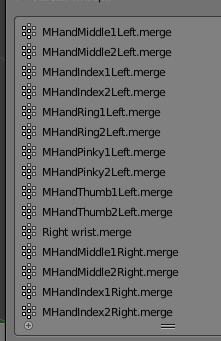
basically i copied my undecimated hands from another blender file and then merged them with cats
but it didn't seem to weight them to the new armature
marsh trail
You could rename every vertex group (based on the bones present on the main model) and attempt to re-merge it, manually would probably work best in that case imo
 magic locust
So I noticed something really weird with the poiyomi shader. It seems to double the draw calls and triple the amount of polys being rendered.


 patent leaf
o.o
magic locust
As you can see out of the three shaders poiyomi gives a different result
This both happens with poiyomi set to double sided texture and single sided
 calm spade
I've heard often that the poyomi shader was bad for that reason
magic locust
Yeah, it's sad because it gives me such a good effect on my Broly Racer
patent leaf
How do I bring that menu up, I use poi?
patent leaf
This is big oof, as I use some of the lower settings in there : <
magic locust
Indeed, I'll probably start migrating to noenoe or xiexe
marsh trail
Hey ruuubick, i've just tried to test the profiler, apparently the only lagspikes that occur whilst having the model selected happens with the inspector in-view
Without the Inspector Visible
https://gyazo.com/cad82edd511538c9e7c261485f185b0d
With the Inspector Visible
https://gyazo.com/f6f27c080296983b253f07efe4b454ef


 polar bolt
Well, in poiyomis, outline is in a different draw call
And yes in sdk UI drawing has massive lag spikes when avatar root is selected
calm spade
@marsh trail So you hide the inspector window ? Is it because it also has to display all the transforms numbers in there ?
polar bolt
Don;t know if its from the last one or since 2017
marsh trail
My dynamic bones are all separated on a per-root basis, none are listed under standard root
calm spade
Sure but the transforms are still updating if you move the entire skeleton, so they had to update and display I think
If there's any other reason I'm interested
marsh trail
That's all that's inside the inspector
It could be the transforms but the lag is certainly something else
calm spade
You haven't tried with the profiler like I suggested ?
calm spade
Can you send me the ID so that I can try for myself ?
amber hemlock
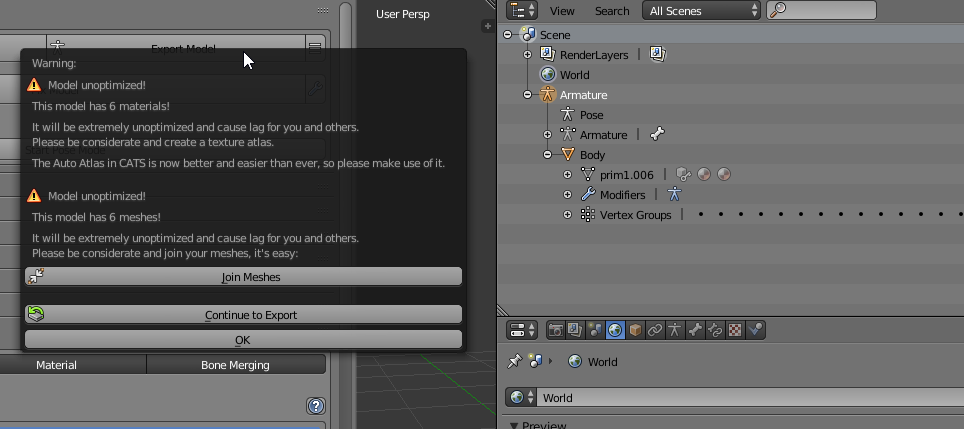
Uuuh, cats is warning me that I have 6 materials (atlaser says i only have 2) and 6 meshes (I only have 1)
marsh trail
Oh this happens on every model ruuubick
I am using the latest SDK and the correct unity version
calm spade
Then the problem is most likely on your side then ? You tried resetting settings in unity or looking it up on Google ? Haven't heard of that issue before and there's monstrous avatars out there
heady smelt
Sorry for intruding, but does one know how to prevent hair from clipping through the model? I thought adding colliders would fix it, but it still persists.
calm spade
Change the colliders / bone values, its made for that
marsh trail
From what i'm seeing it's definitively from the inspector and i really have nothing that messes with it o-o
marsh trail
Even though this makes no sense
 still perch
or ignore it as no one really cares much 
calm spade
marsh trail
I guess i'll have to look it up myself but it's really unusual behavior that never occurred prior
magic locust
I've also found that the inspector is sluggish when selecting the root of my avatar
patent leaf
Profiler says I have 7 calls, but I can only find 6 :<
marsh trail
Prior to the 2017 update that is
magic locust
For me it started with unity 2017
patent leaf
I don't have DB in my model and Inspector tab drops my frames too lol
marsh trail
Aye, it never occurred prior for me
It is bearable now that i know i can just hide the inspector, but it's horrible for play-testing things whilst changing values
shut sequoia
I've been seeing people with pens have super huge bounds. Shrinking down the mesh the marker stuff is on would fix that wouldnt it?
surreal topaz
@shut sequoia nope
The problem is that the marker has to be pretty far away in order to use it properly
To make the writing stay, the trail renderer is moved very far off rather than disabled
And the shader makes sure that trails made at very high speeds aren't rendered either
So by default it's off in nowhere, and it shoots to your hand when activated
It's actually not on the marker mesh to begin with (most people don't use markers)
@grim basalt this does not appear to be an optimization question
shut sequoia
Hit the Play button and retry? Never seen that happen
 pine flame
I might just disable the marker on my main avatar until there’s a proper fix for this
surreal topaz
There probably won't be one
Unless they removed the bounds check which is unlikely
heady smelt
@shut sequoia you can't really shrink the marker stuff, it breaks the invisible lines and adds a lot of jaggy endsegments to each line
for now it will make any avatar rate as very poor just by using it once 😐
distant forge
You can use a vrc inventory system emote toggle to turn the pen on then you can draw with it
I usually do that, though you have to be careful to reactivate it for late joiners or maybe make the pen gesture trigger the enable animator instead of using an emote
sudden jewel
@manic owl I shoved it on the hips to simulate more players than were actually present. That's why I phrased all of my references to the total number of DB transforms in scene rather than the number of avatars.
shut sequoia
" There already is one. If you're farther than 20m away from someone, it does not animate. " What about while looking away? and what's 20 meters ingame look like, any examples? I'm already terrible with eyeballing distances
sudden jewel
@marsh trail Lag/FPS spikes in editor literally don't matter. What matters is frame timing on things that aren't marked as "Editor Overhead", which you figured out. You can also look at timings for render time and the DynamicBone scripts.
@shut sequoia 20 meters is 20 meters. /shrug
They also don't animate if the user is culled (as in, you're not looking at them)
shut sequoia
oof, bounds RIP
sudden jewel
My avatar is about 1.6m tall, so 12.5 of my avatars.
Yes, that's why bounds are important haha
shut sequoia
Oh that's really far, damn
sudden jewel
It is, yes
Might be cool to do a gradient thing. Cap DB UPS at 15 if you're 20-15m away, cap at 30 if you're 5-15, cap at 60 if you're within 5m
shut sequoia
You can't even see that very well when in VR, would reducing that help at all? I'm guessing only on large maps without lots of walls, like outdoor ones
sudden jewel
🤔
yeah it'd help a bit. we'll likely do something like that once we do a pass on DB perf.
Its next in line after we get networked IK sorted. 😄
Also need to fix the behavior where it tries to catch up over lost frames.
Right now that basically causes a positive feedback loop of frame timing.
shut sequoia
🤤 We'll probably never get rid of excessive DB but at least stuff like that will help
sudden jewel
DB says "FPS is lower than my update rate, so I'll do 2 updates next frame." DB goes next frame: "FPS is lower than my update rate, so I'll do 2 updates next frame. Oh, and I still have 2 updates queued from last frame." etc etc
 tired badger
I'm working on getting my world ready for resubmit with over 100 avatars. I think i'm about there but could use a rescan to see what i missed. Is there a way to get that done without submitting, failing, then waiting 24 hrs?
sudden jewel
sure, give me the ID here or via DM
sudden jewel
Running scan
tired badger
thanks a ton.
i'll basically delete the ones that won't pass and get it submitted for live.
After uploading to the main ID
 uncut maple
i wish i could optimize avatars
tired badger
What's preventing that?
uncut maple
my knowledge of avatars
heady smelt
@distant forge yeah but I don't want the whole inventory system for just a marker ... -__-
sudden jewel
@halcyon vessel unfortunately it looks like some of that asset requires scripts
tired badger
Also Tupper I plan to replace IDs over the next few days on my world. But I am optimizing and removing colliders on everything for example. Will this cause issues ?
sudden jewel
It shouldn't as long as you're ensuring you're below limits.
tired badger
100% am only uploading after it's optimized.
sudden jewel
I've caught a handful of people uploading bad avatars after being approved. They were suspended from world submission for a month. 
tired badger
ya that's why I ask cause I don't wanna have that happen to me.
heady smelt
oof 
sudden jewel
All that effort to work around the avatar test and they could've just, you know, optimized
uncut maple
hopefully it never happens to knuckle avatars 😎
tired badger
example i just atlased a 20 material into 1 and got bones down to 60
heady smelt
yeah that gaming the system and they know it





 halcyon vessel
@sudden jewel oh ok
halcyon vessel
yea knuckle made best avatar maker in vrchat
uncut maple
after***
sudden jewel
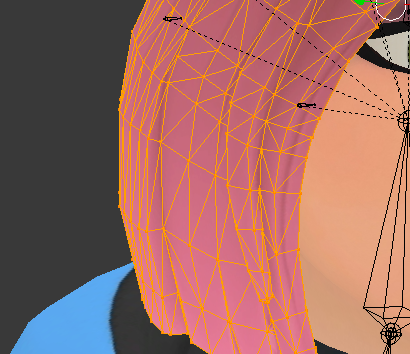
@tired badger Anything orange is over limits.
shut sequoia
I wish I could be the one to push the "ONE MONTH SUSPENSION" button
I'd pay to have that job
uncut maple

tired badger
gotcha most the ones i expected from what i see.
Is that the whole list? Feel free to DM full list and/or excel doc of it? I am labeling and tracking everything in my Google documents.
sudden jewel
It is the full list. I will DM you a CSV.
tired badger
You can keep that there as an example I don't care if that info is public for others.
thanks
shut sequoia
damn just 15-ish more 👌
tired badger
oh wait that is a full list of just the offending ones right?
cause i have wayyy more than that in there was confused
uncut maple
 dynamic bones 2.0
sudden jewel
That's all avatars in the world with any duplicate IDs removed.
tired badger
Thanks
halcyon vessel
wonder if hair animation shader be less cpu then
bone
if somone could make hair shader has animation less cpu usage think people would use that
ancient crystal
where u get that list oof
is it from all reported users or just a survey of peoples avatars
shut sequoia
That's the list the Tupbot9000 spits out when it scans a world
they use that to approve/decline world, he just wanted a list so he can fix his avatars before uploading so it doesnt get declined
 empty pier
@halcyon vessel The problem with GPU based physics is that the most efficient way to apply the deformation is in the vertex shader. However this requires custom shaders and anyone writing their own shaders needs to include the deformation code in their shader's vertex shader.
 cursive matrix
I remember people talking about the idea of making something like gpu dynamic bones, but if i remember correctly they mentioned getting the calculations from the gpu to the cpu would probably not be any faster than dynamic bones currently
There's also the problem that without blit we'd have to use cameras
empty pier
You could do the calculations on the GPU, then read them back to the CPU and apply the transforms but reading data back from the GPU is slow.
cursive matrix
yeah
uncut maple
Hello TCL how are you doing, havent seen you in ages
empty pier
@uncut maple Pretty good, I'm on vacation in Japan right now.
uncut maple
sounds fun, hope you like it
 tidal peak
ok
empty pier
@ancient crystal Yes, there's compute shaders.
ancient crystal
avatars that are extremely very poor
heady smelt
@ancient crystal define GPU access?
ancient crystal
access to run instructions on the gpu in a script running on cpu
uncut maple
@empty pier not bad just chilling, i have been chilling, i dont touch vrchat files anymore
empty pier
That's basically a compute shader.
heady smelt
@ancient crystal ah okay, shaders and rendertextures pretty much so far
empty pier
Compute shaders are flexible enough to run arbitrary code, within the realm of what GPUs can do at least.
heady smelt
we can't use them in vrc without scripting though right?
empty pier
Correct
heady smelt
but the question was unity, so yeah
empty pier
You need scripts to allocate and populate buffers, as well as dispatch the compute shader.
distant forge
a wavy hair shader could be fun. I think you might still want a tiny dynamic bone chain to learn about velocity and acceleration but apply that chain as offsets to all the hair vertices.
ancient crystal
but the issue is that first of all using dynamic bones like cloth would be much much slower
heady smelt
@distant forge but ... my 90 frames ...
ancient crystal
the cloth calculations are already a lot faster than each dynamic bone transform
so imagine 900 dynamic bone transforms
heady smelt
true but people put cloth on high poly meshes @ancient crystal
distant forge
Might be possible to do without render textures by making each hair polygon a tri with the actual position and the two bones in the dynbone chain and some vertex color or uv information to include how far down the hair it is (how much to amplify the waviness)
ancient crystal
as opposed to 30 cloth verts
yea but they said
"put a dynamic bone for each vertex"
distant forge
No it would just be 2 or 3 dynbones and the shader uses a single dynbone to skin all the hair like wind information in a grass shader
ancient crystal
um thats already possible
empty pier
Is Unity's cloth CPU based?
ancient crystal
its called weight painting
u literally just use smoother weight painting
and use like elasticity curve or something
cloth hair also works pretty well if done the right way
ive done it pretty well with long hair but it takes a while to make it less buggy
^
distant forge
Hmm interesting maybe that's sufficient. People have like 5 front hair strands and two back hairs chains and they all have their own dynamic bones. Should only need a few for the whole avatar for simple waving
ancient crystal
yea but also
dynamic bones is not cloth
its a major distinction
no matter how u set em up they won't act the same
so cloth hair and dynamic bone hair are very different
heady smelt
@empty pier I think unity cloth is the physx one, maybe you can confirm
ancient crystal
cloth hair can be brushed and picked up like actual hair and has more realistic gravity
distant forge
If it's physx shouldnt it be able to run on the gpu
ancient crystal
as a fallback it might lag more, be a bit more buggy, and collapse in on itself
empty pier
@heady smelt Seems plausible, which would mean it's CPU based.
heady smelt
@distant forge depends on how they iplemented it
halcyon vessel
but if vrchat could get good shader programer to make them one might be less people use dysamic bone for hair
then just use shader
ancient crystal
dynamic bones are for more cartoonish hairs that are just wavy and wiggly not really interactively realistic
heady smelt
I think they store all the points in a texture, just like the vanilla particles
ancient crystal
yea but its still a shader
heady smelt
but solve for colliders on the cpu
ancient crystal
unless they make a "one shader fits all"
what if i want toon shading with a custom ramp
or standard shading with rimlights
etc
ancient crystal
if the cloth did i think everything else would have to also
unless it did cloth simulation separately
which it already does but like
heady smelt

Unity Technologies Blog
We’d like to highlight some of the 3D physics changes you can look forward to in Unity 5.0.
We’ve been using PhysX 2.8.3 for a while now. We’ve not just u...
oh, GPU physics ... I get ya now >.<
empty pier
If the deformations were applied in the vertex shader then VRChat would need to provide an include file for shader writers to use to add the same functionality to their shaders.
ancient crystal
yea but like nobody would do that
heady smelt
yeah it's hybrid, the shaders read from textures and do some work, but the heavy lifting and rigid body colliders is CPU afaik
ancient crystal
unless ppl givin em out
like portal shader for example
ive never seen people with portal shader use any other materials than raymarchers theyve made (or gotten online) or toon shaders
even tho i expected to see other materials like standard or lux
heady smelt
the portal and the mirror shader should be part of the SDK if you ask me, but it's up to vrc ... you can get both if you look around a little though
I don't think people should mess with portals though, they should all look the same so the language is clear
empty pier
It wouldn't be too much effort on the part of the shader writer to add the include and call the appropriate function to calculate the deformation.
ancient crystal
yea but for people who just re upload crap
cursive matrix
I think they mean stencil portals
empty pier
VRChat would have to provide the include and instructions for shader writers.
ancient crystal
or like the bunch of people who hate or don't even want to use blender for some reason