#avatar-optimization
1 messages · Page 32 of 1
 marsh trail
I feel like this will be sticking around for more than a few weeks tbh, the witch hunting that is
The whole ordeal with ranks dissipated very quickly
But this... oh boy
 safe swift
thing is, most people don't understand what is more laggy, and you can easily get into poor performance with just couple things
i just hope they either polish it VERY WELL or don't show the rank unless you're extremely unoptimized
i had an old screenshot of my avatar being poor performance only with 300 vert cloth component
marsh trail
Actually... is cloth even listed on the doc?
safe swift
yes
marsh trail
I might've skimmed through it somehow...
safe swift
if u go above 200 = pooor performance
safe swift
i won't ever use dyn bones for skirt, unless layered, but even then I try to make it 1 layer and use cloth
marsh trail
Inb4 somebody tells you to weight the skirt to legs
safe swift
it shouldn't be that bad on performance at 10 update rate when default is 120, idk if VRC hardcaps it or not
and at 10 rate it doesn't look any different
marsh trail
Probably hardcaps it like audio source rollofs, no more no less
I think dynamic bone updaterates are also capped
Not entirely sure though
One would assume lowering them would increase general performance, but it might have something running on the background to keep it consistent
 long jewel
it should be capped at 60 i think tupper said that in in a vidoe, but i can be wrong ¯_(ツ)_/¯
marsh trail
Yeah i thought i heard about that in the past
 surreal topaz
The fact that update rates on dynamic bones and cloth aren't counted is BS honestly
Update rate on dynamic bone is capped at 60 but there's no point in going lower
 amber hemlock
I just want them in-game already so I can see the damages lol
too many avies to check manually
 shut sequoia
It is 60 btw
 idle briar
I’ve seen some avatars with a glowing, rotating hologram (like a bracelet) around some avatars arms. How does one go about doing that?
amber hemlock
Man I have my avatar down to 35771 tris. I can't find anything else to optimize
 proud tulip
Theyre going to be changing the upload limit to 70K soon so I wouldnt worry about it much
amber hemlock
I know, I'm targetting 32K because green star
proud tulip
mehh I love dynamic bones too much to worry about green stars
Whats the point in being an anime girl if the boobs dont jiggle
proud tulip
thigh jiggle?
amber hemlock
nah
amber hemlock
don't need it tbh
didn't before the update, def don't need it now
when the update hit, the only thing keeping me out of Very Good was the polygons so i figure what the heck i'll get my star
proud tulip
Also does anyone have an answer for @idle briar Cause Id like a link to the object people are using for it
Its that same one people are using for the 'no erp zone' popup just resized right?
 fluid turret
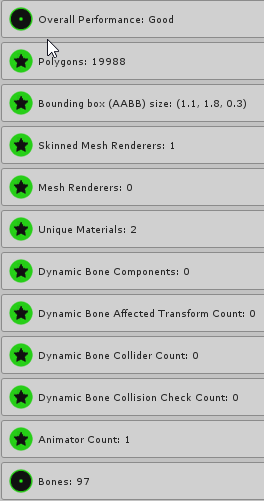
this is it boys, after some testing, my group HAS figured it out


this is what you need to strive for to achieve Excellent™ models
 heady smelt
anybody have the material combiner, tryna fix the 20 mats on mine?
fluid turret
even nikei isn't This epic
 restive kite
the material combiner addon for blender keeps combining all the materials i excluded for the first atlas with the first atlas, even though i have it unchecked. any way i can stop this from happening?
 fierce copper
Wait seriously how can you take a project you need to tweak into blender?
from unity
 still perch
you... take the model out of the assets folder (if you never had it in blender before)
or else just work more on it in blender, export the model again and override the one in the assets folder
depending on waht you do you might need to resetup some things (rig or the like)
fierce copper
okie dokie
 worn lantern
@proud tulip The rotating bracelet is literally just a cylinder with a texture on it
 mossy solar
so it still counts your lowest instead of average
 cunning maple
How do I remove the meshcollider from my avatar?
Do I have to go back into Blender or can I do it in Unity?
heady smelt
remove component in unity
cunning maple
Where would that be located?
 median birch
is it better to put dynamic bone script in each individual ear or just put it on the head and exclude everything else beside the ears ?
heady smelt
@cunning maple go to the game object that has the collider on it and click the little gear icon in the top right corner of the collider component
cunning maple
Thanks, I'll see if I can find it
I'm editing another model right now, so I'll do that when I can :3
 ornate saffron
@median birch I would put them in the ears. If you put it in the head the ears might bounce back and forth in a very un natural way when you move your head.
heady smelt
 karmic condor
I knew those couldn't be optimized the moment i saw them.
 crystal sonnet
I'm laughing at this new avatar performance system xD
Everyones avatar is going to be poor or worse
fluid turret
that's literally the first avatar I went and checked
crystal sonnet
I just need to remove most of my dynamic bones and hand colliders and I'll be good
 worn musk
I should check mine
fluid turret
and all my friends went to a private dance world and used it to see how much we could lag each other
crystal sonnet
Think all my avatars are poor from the dynamic bones
fluid turret
it was epic
heady smelt
anybody else launching into publics that say they have people in it but when u load in its empty?
crystal sonnet
Can only see people from current version
 sweet mason
dam system is harsh https://gyazo.com/55307282566e51ff2a7eda76f53af8b1
 sweet mason
compare to this guy with multiple sound and mesh but same score https://gyazo.com/a58eba3485d6e2450aa7cf2088f05803

you have dynamic bone, aright your fate is already decide
crystal sonnet
If you dare have any dynamic bone colliders no very good rank for you xD
 crystal sonnet
OwO nice
 halcyon vessel
 sweet mason
4 material excellent 🤔
crystal sonnet
4 is the limit
halcyon vessel
yea 4 is limit
crystal sonnet
The Avatar Performance Ranking System allows you to see how much a user's avatar is affecting performance via analysis of the components on that user's avatar. You can also use it on yourself to see how performant your avatar is. **This system is purely informational at this...
halcyon vessel
@sweet mason it use to be this lol https://i.gyazo.com/571da2755db7ce18efb4c5ebcca87581.png

but got down to 4 lol
amber hemlock
 balmy summit
So, is everyone who makes big animations just gunna have poor stats guaranteed?
balmy summit
Yep
 timber blaze
would depend on the animation
crystal sonnet
So any animations that don't move with the avatar ... rip
amber hemlock
if you want custom animations you really only need one custom animator, to trigger as many animations as you need; and that only sends you to out of Excellent into just "Good"
but you can have up to 4 animators and remain Good, so what's the issue?
timber blaze
that's more of a temporary fix, isn't it?
since people are using that for spoofing their stat counts
so it'd probably get changed
crystal sonnet
Could likely bypass the dynamic bone checker if you changed some of its code also
I'd be interested in looking into that imo
amber hemlock
Modding the SDK is against the rules, and, it won't spoof your stats anyway?
that's done clientside
timber blaze
you can bypass everything in the performance system with only an animator
crystal sonnet
So it's not recognised by the vrchatsdk
amber hemlock
Pointless. The SDK doesn't upload your code. It replaces it with it's own copy of dynamic bone.
balmy summit
Being under medium seem next almost impossible for big animators
Without bypasses
Lame
amber hemlock
If the SDK doesn't recognize it as a dynamic bone script, it will simply be stripped out as a regular, non-whitelisted script, and not replaced with it's internal copy of dynamic bone
timber blaze
i feel like if you're doing big animations, it's probably bad for performance and you'd only want to do them around friends anyway
amber hemlock
the amount of animations doesn't really matter, its the amount of animators
balmy summit
It fun for me to get reactions from pubs tho
But ya
Another reason to not go publics :/
timber blaze
@amber hemlock i mean like those clickbait vrchat videos that are like "EPIC PARTICLE SYSTEM AVATAR SHOWCASE"
amber hemlock
GPU particles are friends only
crystal sonnet
Where's the option to block unoptimised (very poor) avatars by default :/
amber hemlock
@crystal sonnet this is bait
timber blaze
not talking about GPU particles, but ok
 knotty sable
there needs to be a shader check as well or this system is pointless imo
amber hemlock
no one said it was an end-all thing and
if you find it's inaccurate
ignore it?
It doesn't effect anyone's ability to make and use avatars x)
balmy summit
Does the system only show active mats?
 fading rapids
@balmy summit keep in mind just how old those default models are.
We're talking before there were even 100 users at a time playing the game.
Performance wasn't a concern back then.
crystal sonnet
That's when everyone had defaut-ish avatars
fading rapids
You are currently rated whatever your lowest category is, yes.
If you have a category at "Very Poor," you will be "Very Poor."
 somber beacon
The fact the DEFAULTS are poor show how little this was actually thought through.
crystal sonnet
Yeah, it should be category based
balmy summit
My model that i use without anims is pretty optimized but has some active particles with high particle limit. Making me rank poor.
somber beacon
The defaults should all be the best rating possible
balmy summit
Seems bad
crystal sonnet
Though would clutter the ui
somber beacon
You know, to show us how it's done
knotty sable
i like it i but i think a weighted average of some type would be better :3
balmy summit
^
worn lantern
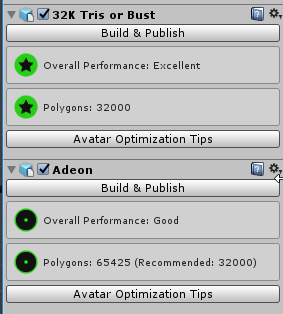
Adeon what did you resort to on 32k or bust?
idle briar
Can I add the rotating bracelet with a cylinder and animate it in unity instead of blender? can I add additions to my avatar in Unity in general?
amber hemlock
I had to reduce my polys and get rid of my tail wag
worn lantern
I'm not getting rid of anything
amber hemlock
I'm not gonna actually USE it man, except maybe in public
amber hemlock
as long as you are better than the system default avatars, you're good to go
somber beacon
I've said before, I'll say it again, things like audio source count should N O T be given the same impact on your rating as material count or cloth. Cloth is the worst by far, but they don't indicate that in any meaningful way. They just lump it with the rest.

 somber beacon
Fifteen audio sources with 0.5 second clips are rated worse than one source with a 15 minute clip also
Lmao
worn lantern
@somber beacon Need I mention KingTodd
amber hemlock

worn lantern
He had an audio track on one of his avatars
It was over 4 hours long lmao
It was just white noise
That was near inaudible
amber hemlock
Checked most of my avatars on beta, mostly Good/Medium with a few Poor, no Horrible
worn lantern
The trainer model was probably around Medium at best
heady smelt
worn lantern
Bc of materials
somber beacon
Rating based on the TYPE of component and not how actively it's used (or how much it actually impacts performance) is a little silly regardless
somber beacon
Can't that be monitored at runtime? Can't people be given a rating based on how much processing they're ACTUALLY using on other peoples' machines?
heady smelt
map isnt public any more i got in here thru a portal on my friends map
crystal sonnet
But that would take per avatar profiling likely server side
still perch
you want to implemente a real time performance impact measurering system for every single avatar on the clients?
holy hell
amber hemlock
I honestly have no problem with the system tbh
crystal sonnet
Yeah it's decent we don't need insane stats
amber hemlock
the limits for Medium avatars is very fair
crystal sonnet
Yeah it's reasonable to get into good
worn lantern
@still perch Maybe not realtime
still perch
eh I'd love to see the db count be 50 which is max tollerated on public pedestrals aswell if im not wrong
crystal sonnet
Just remove most of your dynamic bones xD
worn lantern
But still a weight system would be better than this
crystal sonnet
It's just a first release dw
still perch
yeah
crystal sonnet
They'll likely improve it in a few months
amber hemlock
i kind of assumed medium WAS the public pedistal requirement
heady smelt
Oh no im going to get flagged for having multiple avatars inside of an avatar
somber beacon
@still perch Not every single one, serverside. Instead, the client tells the server if a particular avatar is problematic, and if enough clients say that to the server, the user responsible is notified or marked somehow
amber hemlock
is it not?
still perch
hiro no
amber hemlock
it would simplify things to say "public avatars must be medium or better"
still perch
NEVER TRUST CLIENTS
 wicked void
^
worn lantern
Modifying a client to tell the server
somber beacon
Modifying the client is already bannable right?
still perch
ofc it is
worn lantern
"Hey this avatar's great  "
"
worn lantern
has a crasher
amber hemlock
"Hey this avatar's great "
still perch

somber beacon
Or perhaps if a user's game stalls, it measures what everyone's impact was at the time of the stalling behavior
So if one person is killing the server
still perch
nerver
amber hemlock
Noticing uh... Unity's being pretty slow at uploading. Servers overloaded?
worn lantern
Server's overloaded, too much chair
somber beacon
Why are we trusting clients to upload things then. Oh, wait, this system kinda shows there's not much trust there either 😛
I jest
We'll have to see
amber hemlock
Most crash stuff isn't related to avatar render performence
that's stuff like "spawn infinite things"
somber beacon
Or GPU attacks via particle systems
amber hemlock
I've said from the beginning it's important to separate render cost from ... abusive avatar stuff.
This feature is about how well made your avatar is
it's not meant to mark crashers or things like that
somber beacon
As seen from the default avatars though, well made is subjective
amber hemlock
Well if you can be better than the system avatars you're good to go
somber beacon
That's what I think they need to do, is my point
worn lantern
By the way
somber beacon
They need to remake the defaults
somber beacon
Or the system is just gonna look silly
somber beacon
All defaults should be Excellent
If some CAN'T be
Delete them
Don't set a precedent
amber hemlock
Don't touch the child
somber beacon
If they want to have people gut their avatars for this system
They should do the same to their own
Only fair right?
worn lantern
I'm not gutting mine so
 rotund bison
where is Material folder, guys ?
amber hemlock
Most of them are only rated poor because of the multiple skinned mesh renders, it would only take a few seconds to set them up as a single rig
if you inspect their stats, they're mostly Excellent
worn lantern
@rotund bison it's hiding
amber hemlock
except the skinned mesh / material count
somber beacon
@amber hemlock So then watch this NOT be fixed, and remain silly
Despite being easy
amber hemlock
Isn't it better for them to be poor? that way you can say "hey, i'm better than the system avatars"
rotund bison
i know but how i can find it
worn lantern
@rotund bison Fr though click your model file
Like where you would click Rig
But instead
Click Materials
Click the first dropdown
amber hemlock
I think if this feature was around on day 1 there wouldn't have been an uproar
worn lantern
And hit "Use External Materials (Legacy)"
somber beacon
@amber hemlock Making the defaults poor makes it look like they don't actually care about their own system enough to use it as a guideline, that's what I'm saying. It could reinforce people not caring about it.
rotund bison
this ?
amber hemlock
Well, I don't want to put words in their mouth but i don't actually think they did care. they're just an asortment of avatars thrown in before VRChat got super popular
I'm sure there will be better defaults by the time it's out of early access
worn lantern
Yea
somber beacon
Well, one way or another, they represent VRC now
They represent the average avatar
That's what a default is for
amber hemlock
I think you're overthinking it
give this two weeks after release for it to all blow over
somber beacon
Consciously yes, subconsciously no. People tend to interpret "default" as a starting point, not as a place to work backwards from
But yeah, we will see
All the edge case avatars with poor ratings that look fine are gonna be funny
rotund bison
what next ?
worn lantern
Just hit apply don't do anything else
rotund bison
alright
rotund bison
why there don't have dynamic bone ?, i'm already added. I'm using dynamic bone v1.2.0
 patent leaf
@rotund bison
restart Unity and check that console tab
rotund bison
what's this ?

 rose hatch
heady smelt
rose hatch
heady smelt

patent leaf
@rotund bison Are you using the latest SDK?
 wide breach
rip me lol http://puu.sh/CkVX2/5930902ded.png
 karmic condor
Thing is loli that is the kind of stuff we are trying to find and fix.
wide breach
what do u mean
patent leaf
Because they want no colliders, Very Good and Good is 0. Medium is max 4 colliders and 8 collision
karmic condor
Did you know you had that before?
wide breach
i bought this avatar from someone
karmic condor
oof
wide breach
yea...
karmic condor
Do you have the files?
wide breach
yes
patent leaf
GG :>
karmic condor
Do you know your way around unity at all
karmic condor
I'd start by removing only unnecessary dynamic bone colliders
Any missing colliders will appear as a error missing on dynamic bones.
idle briar
I'm animating an armband that spins in a loop but I'm having trouble with slowing down the rotation speed. tips?
shoot wrong channel haha
halcyon vessel
yea new avatar ranking not friendly to dynamic bone lol https://i.gyazo.com/12ed3a9b8381e318867d5e5897a69521.png

 hollow fog
https://www.youtube.com/watch?v=W5-jt5ZY-R4JustIll post it here too I made a little refresher on two good things you can do I'm making a second one in a moment.

Hey there guys! My name is Alease as some of you may know Ive made a ton of worlds and avatars in VRChat. Today I'm showing you two main things you can do to...
halcyon vessel
one good thing about thing update we dont need destory the panties lol
wide breach
Alease, do you know the mmd dance name she quickly showed in the video?
 obtuse raptor
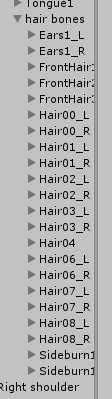
TFW You want to reduce 96 bones to 75 but your only options are hair and skirt
This is like playing a balancing act haha
hollow fog
Hey @wide breach ! The dance is Build our machine
wide breach
oh, thank you!!
hollow fog
http://www.nicovideo.jp/watch/sm32097692 heres where the motion came from ^_^

ニコニコ動画
【MMD】Build Our Machine(REMIX)【モーション配布】 [その他] このモーションは「すら。」(mylist/59407206)が製作したものを改変・配布許可を頂いた上で配布して...
wide breach
sweet, thx!!
sweet mason
And?
 drifting shore
time to optimize 80k polys, 34 materials and 100+ dynamic bones.
sweet mason
Material are not an accuse.
drifting shore
hm
sweet mason
And your folder look a lots more clean
drifting shore
animations UwU
marsh trail
After shotaryia's utility i kinda just got different mats (on my newest ones) for added objects that were added in-unity that couldn't be added via blendor
I probably won't touch my old ones though, especially when i don't even have .blends of ehm anymore, and ye olde legacy animations
drifting shore
i gonna merge my head into one Material and the clothes into one if possible
marsh trail
Manual atlasing is just too tedious for me, and i'm the kinda person that always got all their models to below 20k with minimal quality-loss via both blender and manual decimation
obtuse raptor
I've personally been using shotaryia's for now, I haven't checked the newer CATS's version, and my attempts of manual atlus have yielded monstrous results currently. 
marsh trail
But that's just my opinion of course
drifting shore
is it easy to do manual atlasing? Not home so i can't watch the video, also do i need to overwrite the fbx or change texture only?
i saw the vid on the list
just cant watch rn
marsh trail
Fbx needs an override, it's editing the UV afterall
drifting shore
ah okay. Hope it's not going to break.
mossy solar
poor ratings due to collision checks on most of my avatars
marsh trail
I don't dare touch fbx's anymore, somehow i have 50/50 chance of breaking it royally
Editing ehm that is
mossy solar
I have very good in all but the dynamic bones stuff
marsh trail
Yep, in any way shape or form
Also i manually fix all my rigs so CATS is out the window there
 vestal brook
marsh trail
vestal brook
marsh trail
Doing things manually is definitively the way to go most of the times, you'll learn alot about the processes involved in it
 proven hinge
I just like how you can have two things in the red and then your avatar is rated very poor omegalul
marsh trail
Hell i made 2 model replacements for L4D2 due to my manual knowledge
patent leaf
@vestal brook
Do you have snail marker? It could cause it I believe .
marsh trail
(There was like 1-2 tutorials on using blender for L4D2 models and they were beyond outdated, so i had to look at a 7-9 parter vid tutorial for 3dsmax and port that knowledge into the blender environment)
marsh trail
Which worked mooostly fine, with some minor setbacks
marsh trail
Welp
 warm egret
does anyone of you know why CATS plugin doesnt recognize all my bone parents so i can actually parant my bone chains?
marsh trail
The thing is, i never used 3dsmax, i just took what i saw in the video and assigned it to blender based on past experiences like bone locations, rotations, weight values and what should and shouldn't bend, etcetera
It took me roughly 3-5 days to get it to work
In a nutshell, source models are a pain in the arse to mod
But back on topic as i went into a looong tangent
 calm spade
They're even larger in Unity
@vestal brook Did you click on the correct part in Unity ? Or did reuploading fix it ?
mossy solar
all the materials! AHHHHHHH!
marsh trail
Aye, and you should definitively give it a try yourself in a game of your choice, it's so refreshing to add a sense of self-customization onto a game you love to play, gives it a whole new feel, be it a retexture, remodel or hell, even a complete audio modification of something as basic (or complex) as footsteps, and that is kinda why i love the modding communities out there
//the actual end of the tangent foh reals
sweet mason
I use moslly mobile asset.so they have 2 texture one for the face and one for the body. The cats do a good job.
But
Yeah
If your model have more. In that case manual are better
marsh trail
Welp, expecting an issue announcement on login issues soon
Usersouport is havin' it bad today
That or steam's servers be iffy
marsh trail
Yep... i know the feel well
It's like you work so hard to get something really going well on one point and the other points overshadow everything else
sweet mason
Do it
hollow fog
Atlasing is super easy you check which ones you want to be merged then press combine!
 finite robin
does anyone know how to lower the bounds size on the snail marker???
hollow fog
Things you can do in blender to optimize your character:
-separate materials and decimate individual items this will allow you to yourself under the poly limit and before you say its too many poly I cant get it below, I decimated a 500k poly mmd avatar to 35k no issues looks just as good.
-Atlas your materials, this is simple. In the drop down menu select the ones you want to merge and click make atlas. You now have 1 material instead of 20
-Merge your hair bones. So instead of having 100 you have 15.
marsh trail
I'm still astounded by models that even leverage 50 bones for their hairs, i only found like... two so far that i've ever worked with
No kidding
fluid turret
imagine being the person weightpainting it, that's a labor of love
marsh trail
And pain
fluid turret
no matter what you use 50 bones working with hair mesh is still a stink
marsh trail
I do have an example of one that might've even gone over that tho, the hairs were literally tubes of polygons to an exceeding degree of overkill
fluid turret
I'm lucky all the models I've rigged from scratch thus far have either been creatures or relatively short haired
that's icky
marsh trail
It had possibly anywhere between 10-15 chains of hair bones
hollow fog
Things you can do in unity to optimise your avatar in unity:
-Use shaders that are low latency.
- use ANIMATE PHYSICS not NORMAL on your script. Normal creates new bone physics instead of using the physics (bones) already pre existing. Learn how to use curves instead of high settings. Use 1 script on your hair. The easiest way to do so create a empty game object on the head, then break the prefab and throw all your hair pieces into it.
-make 1 massive collider instead of a million colliders.
marsh trail
Can't recall for sure
 bold basin
Did we figure out how to make seats?
Gotta get a seat on my model during a hand gesture
marsh trail
More than a script is fine, but there is so much as overkill when it comes to it, as far as resource-intensive i'd call it negligeble and will worsen hair physics or bound a user to specific settings to avoid said worsened physics
As dynamic bones pivot based on the root bone
hollow fog
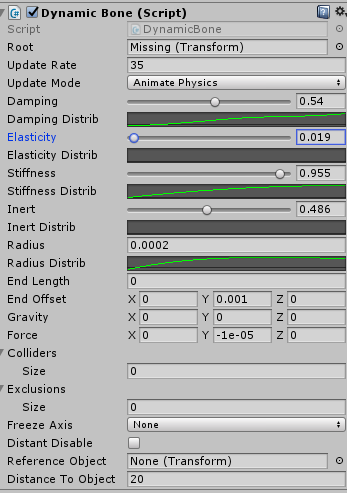
https://i.gyazo.com/e83e7b5e26523d3032d044f211a49639.png these are the settings I use for free fall hair. I always break my prefab with the empty
 fluid turret
I used to make root bones in blender for almost everything so I only needed one script, it's pretty finicky, sometimes it's good sometimes it just looks bad, placement is important
 fluid turret
I don't really do it anymore
marsh trail
I tend to use 0.1/0.1/0.4/0.6 on most of mine, without any distribution values
hollow fog
as long as its added on the head and moved to the top of the head the fall should be fine
marsh trail
I'd avoid breaking prefabs just for that, but it is a way to do it
hollow fog
I use negative fall so it simulates it as it would in rl
hair doesnt stay still
gravity is the pull up
force is the pull down
hold up let me move her around
 ripe tulip
ya i combine all like like dy systems into root bones
marsh trail
Force pushes the bones in an axis, end offset sorta adds an extra bone in the chain iirc?
ripe tulip
just duplicate the UV Data from its parent bone
marsh trail
I mean they seem to he familiar with gravity and force so they might explain it better
ripe tulip
or even just dont use any UV data on the root bone
marsh trail
From what i recall though, both force and gravity can pull the bones up or down depending on positive or negative values
I tried using force as gravity hated me haha
Didn't work either, so now they both hate me
Huh
The more you know huh unity?
hollow fog
https://i.gyazo.com/60696ae4b5139e58678a35a4151be1ba.mp4 kinda I need to edit it for for this girl a bit
marsh trail
Neat
hollow fog
but thats the settings I posted earlier
marsh trail
Aye it looks pretty neat
hollow fog
play with your curves. Curves make it look nicer
marsh trail
Not too fond of it for most of my models as i prefer a more instant-return and maybe sway/bop before such but it looks pretty good regardless
Talkin' about the one previous btw
marsh trail
It allows you to set a sort of altering strenght value, kinda like weight painting but with 4 dials
Not on a per-bone basis but by a linear value in a sense throughout the start and end
An example of what can be done is having a very sway-y mid-section of a string and that string having a very heavy object attached to it, in theory you could make the stright move alot but keep the bottom relatively unmoved
Not the best of examples but my potato of a brain isn't cutting me any slack haha
Unsure, distribution is very trial/error-ish so i'd guess you'd have far more mileage testing the waters, but there might be some vids out there
hollow fog
I'm currently doing a video on dynamic bones I'll let you know when its uploaded
 sonic wolf
how do i upload a skin
i think i need to update it or something idk how thou
can anyone help me?
hollow fog
skin?
marsh trail
Probably means model
marsh trail
"Skins" tend to derive from customization in some games, be it mods or in-game cosmetics
So probably a model/avatar
sonic wolf
yeah
marsh trail
Not trying to send you off anywhere, but you'll most likely get alot more help on the #avatars-2-general channel for such
If nothing comes of it, there are many youtube tutorials out there that will explain it mostly indepth made by the community
sonic wolf
ok thank you ❤
 past dock
 teal juniper
so are we allowed to have capsule colliders on avatars?
I have no mesh colliders but why am I getting this error?
@sudden jewel
marsh trail
Wait mesh colliders are no longer allowed?
teal juniper
at least on new sdk
halcyon vessel
use capsule collider with cloth
teal juniper
@crisp bluff @pliant heart can you confirm whether capsule colliders are not allowed anymore on avatars or not?
halcyon vessel
you can use capluse collder
teal juniper
Or is it just the bug on new sdk that confuses capsule collider with mesh collider?
@halcyon vessel I did. I never use mesh collider themselves for cloth
but why such an error?

 sudden jewel
@teal juniper Type "t:MeshCollider" in your search bar above heirarchy
you have one somewhere
hollow fog
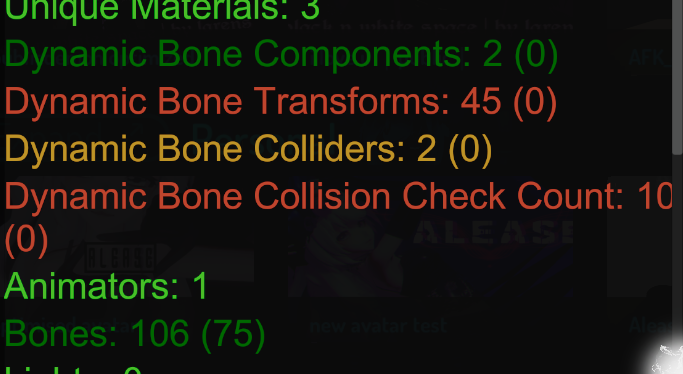
https://i.gyazo.com/2dea039b2867361c98bdf40255de027b.png mmmmk? I just literally counted the bones and theres 24 on the model that are being transformed I think your counter is wrong
 heady smelt
IS there a new SDK cause I redownloaded it but my upload doesn't look like that. 🤔
@hollow fog I think exclusions also count in dynamic bones, so if you have any that might be why.
hollow fog
no exclusions
finite robin
@hollow fog have you try'd using pumkins avatar tool to see how many you have to be sure
hollow fog
hand counted theres 8 bones in the chain
finite robin
did you just update that avatar because ive notice it keeps jumping back and displaying the old stats when i update
fix's itself after a bit though
hollow fog
I dont know where its coming from
like
game object is the script
nothing else in there matters only whats in the script
finite robin
yeah ok if that game object is your root only the children of it should be counted
where the other script though your stats say you have 2
hollow fog
on the tail but that only has 3
 hollow fog
merge your meshes
finite robin
yep merge them takes 2 seconds
patent leaf
https://gyazo.com/1c5a3868978ff6198b1716dc5b4c325d
This gives me a count of 30 in vrchat stats. The Highlighted being where I have the script at

 sour cipher
but oh well
hollow fog
removed the end bone from the tail umm what
atleast its not as bad as this public one I found today
patent leaf
There was a 300k earlier
heady smelt
What the heck.
Mine are still under 40k
Jesus
And that's all without decimation.
finite robin
most likely has a bunch of high poly props
patent leaf
Yea, the avatar had swords or something on its back
heady smelt
@hollow fog Does dragging your bones under a game object not affect them?
Parent wise and all.
hollow fog
It did but its calculating them as two bones
 agile gust
kinda a shame like to me it feels like its starting to reach point where its being pushed to essentially just have static avatars
heady smelt
It's 400 poly's of cloth. And everything else is green
So my avatar is just poor for 1 tiny thing.

Whatever, I like my cloth.
 hollow vault
; - ; when you're just over 70k by a few hundred
 hushed vortex
ratign shoudl be basedo n weights not on exceeding one parameter
shut sequoia
it should be but they know we want this, it's on the cannnyy
hushed vortex
for example all green, 3 zellow and 2 red shouldnt be verz poor but average
shut sequoia
basically some people aregetting "bad" transform counts due to multiple scripts on bone chains
shut sequoia
Example: 5 bones in 1 hair chain. 1 script on root = 5 transforms. 1 script on EACH BONE (i see this a lot i do it) = 25 transforms
hushed vortex
i have avatar with toggle that is 200k polys but is not ocunted in the stats
same some inactive elements are
bs
shut sequoia
yeah my friend just did that
hushed vortex
and beta wow, 8 h i bet they gonna push today
because nothign better than pushing before weekend /s
shut sequoia
they listened to the community tho lol they as a whole found lots of bugs and lots were fixed
hushed vortex
cloning feature is completely not needed
it woudl be better to expand favourities to for example 9
and give us gifting
shut sequoia
why? my friends have been having lots of fun
gifting is good its been mentioned by them before actually
imo i dont like expandg favorites. it makes it harder for "bad" wrld avatars to leave rotation
drifting shore
amber hemlock
New people coming in where the ranking system has always been around won't really care
That's the perspective I look at it from
people only hate it because it's new
amber hemlock
Tags disagree
drifting shore
yup
amber hemlock
I see plenty of greys and blues
and usercount is going up not down
it's almost double what it was last year
agile gust
no it isntr
drifting shore
well veterans quit and russians with annoying music join.
 velvet spoke
the playerbase is rising.
hollow fog
@shut sequoia its green for scripts.
 austere patrol
Is this still about optimization? :)
amber hemlock
Yes, he said the ranking system will make people leave
agile gust
average players for this month is 5k last month is 6k
drifting shore
i ain't block people for having a poor optimizing but others will do.
hollow fog
velvet spoke
avg players this month is 6142.
also it depends on what time span you look at. from march to now we constantly grew.
velvet spoke
5417 to 6142 is not a rise in players apparently
agile gust
well your chart is different to one im looking at
velvet spoke
im looking at offical steam charts.
amber hemlock
If people are wiling to block over an unoptimized avatar, they probably were going to block you over something equally stupid/trivial down the line any way, not worth talking to those kinds of people.
shut sequoia
where are the scriptsts @hollow fog
agile gust
well your charts are different
amber hemlock
They are saving you the trouble of getting to know them.
hollow fog
components are scripts
shut sequoia
no i mean on your avatar
hollow fog
two game objects
drifting shore
well still gonna optimize
drifting shore
time to optimize my 10k poly Nikkei with 1 Material
shut sequoia
so whats showup wrong? sorry iv been drinking and it got drowned out
hollow fog
its the bones but its counting the bones wrong
shut sequoia
ok, so one script is on Tail and one is on Hair?
velvet spoke
How is it counting wrong
colliders double the bone transforms of all affected bones.
thats correct behaviour
 celest grail
well
hollow fog
hand counted how many its literally counting 19 for 8
amber hemlock
I see two kinds of discussions here.
Discussion 1: "Oh my god we get sent to Very Poor just by using a few dynamic bones!"
Discussion 2: "Oh my god people are going to block me for being Very Poor!"
velvet spoke
any collider affecting a dyn bone will double its transform count
 tender sundial
I assume the SDK always reporting 0 for dynamic bone stuff is a common thing
celest grail
the ranking system discourages me from making animations ever again
shut sequoia
it should be counting 16, for one
velvet spoke
its correct behaviour
drifting shore
Yep
velvet spoke
@shut sequoia 2 colliders bud,
hollow fog
its also counting 2 coliders but theres only one
shut sequoia
oh ty
celest grail
it's almost impossible to keep a good animation under 4 meshes and 4 materials
shut sequoia
OK benci I got an easy guide so watch
drifting shore
well that's true
shut sequoia
Make 1 avatar. Duplicate it. On one, do all the animations
amber hemlock
you really only need one material per shader. atlas everything else
shut sequoia
on the other, don't. upload them both. one for publics, one for "showing off"
hollow fog
^this is what I do
velvet spoke
Ive got an even easier guide, just make it and ignore the rating like 90% of people will do now.
shut sequoia
that or ignore the rating yes but if you REALLY care lol
drifting shore
already for one particle system you need 2 Materials
velvet spoke
The rating per se isnt a problem, people are making it a problem tbh
hollow fog
its a meme
celest grail
i only care because if it's poor then people will block anyways. no point of having any animations
shut sequoia
OK so what? Make one WITH the showoffy stuff and make one WITHOUT it. E Z. CTRL+D in Unity, you're welcome
velvet spoke
@celest grail nobodies gonna block shit if they have poor themselves.
shut sequoia
ok then give up after being given a solution XD
shut sequoia
Do yo uwant to show off? then show off to people who care and want to see it
those that dont wil lblock you either way
hollow fog
this is the same discussion that people had when the trust system came in
celest grail
i already have 2 separate avatars
shut sequoia
yeah im actually done even though ive said im done like 10 times
closing discord GL Sai ❤
amber hemlock
What people think ranking is like: "Oh my god, you are using 5 dynamic bone colliders? I'M BLOCKING YOU!"
What ranking is actually like: "Lol, this avatar makes me very poor just for using 5 dynamic bone colliders. Look at how silly this is"
celest grail
cya mic
shut sequoia
👋
tender sundial
very poor for only 5? 😐
agile gust
or you know they go oh look its this avatar causing the lag cause its set as poor yet it was actually that excellent avatar using a shit shader
amber hemlock
depends on collisions, it's just an example
agile gust
the system is bad when it doesnt even pickup some of the biggest fps hitters
like i could make a ball with fur shader on that lags people more than any poor avatar
celest grail
a crasher could be excellent
velvet spoke
You cant analyze shaders, they get compiled on runtime.
tender sundial
I have a few green stars in my collection but it's always stuff without any dynamic stuff at all
agile gust
and thats where the issue is
austere patrol
Then you can still turn off their shaders or their avatar and not instantly block the whole person
velvet spoke
So? You get an icon displayed on your nameplate that no one cares about.
tender sundial
so now what would be nice is a replacement for dynamic bone that doesn't use dynamic bone 🤔
velvet spoke
Nothing is.
agile gust
there is no replacement
velvet spoke
You can try rigidbodies but ur not gonna get a good result.
drifting shore
clothes component
velvet spoke
dyn bones is the only whitelisted script.
agile gust
they would rather us just have static avatars
celest grail
but we'll see how it turns out. i didn't like the trust sytem when it came out but now i kinda like it
hollow fog
it counts rigid bodies
celest grail
let's hope they tweak it a bit
tender sundial
I get caned for my one rigidbody which is only there because world space particles don't work without it
hollow fog
you are suppost to have 0 rigid bodies
amber hemlock
The main problem here is people are saying the system is bad because they can't use it to judge other people's avatar choices. You aren't. This is just some feedback for making good avatars. Just because it's rated good doesn't mean it's ACTUALLY good, but if it's bad, it gives you steps to improve it.
tender sundial
if IKFollower ever gets fixed 🤔
velvet spoke
 people dont care about ratings ingame
amber hemlock
@velvet spoke I'd pin this if i could
Everyone acts like there's people out there gonna block "Very Poor" avatars. These people do not exist. The ones that do are just nutters.
velvet spoke
The system is just a hint for where you gotta look, not an auto block, calm the fuck down dudes LUL
If you get blocked by your performance rank its the same ignorant people that block for rank back with the trust system
tender sundial
I think it's true that people don't care about it, but right now it's a meme so people are bitching about it
velvet spoke
just block those idiots and be over with it.
tender sundial
in a week nobody will probably be saying "optimise your avatar" anymore
velvet spoke
someone that sorts people after performance ranks is not somebody i wanna be friends with anyway
hollow fog
^^^
amber hemlock
Some of the system avatars are rated poor for crepes sake, no one's gonna care
tender sundial
it's hard to diagnose my issues anyway because the SDK isn't giving me the same rating as the game 😐
agile gust
my issue isnt with the stats system itself just it needs working on. the whole it not picking up everything disabled needs to be fixed, also it needs a weighting system which i dont understand why the "open" beta wasnt even for a day leave it up for a week or 2 then release it with fixes after christmas
austere patrol
If I remember correctly their doc says that it's nothing final and it will be worked on it and changes will be made over time considering reviews and stuff
 restive pelican
tmw the cause of having "Very Poor" is because of the christmas decoration you put on your avatar
tender sundial
in the meantime it would be good if the counts in the SDK at least matched what happens in-game 🤔
is there a pending SDK update to fix it which hasn't dropped yet, perhaps, but it was fixed at the last minute for the game itself
 tidal river
Personally I kind of wish Secondlife had stuff like this ages ago
tender sundial
I feel like I could aim for Medium for my main but at the moment the path there is a bit unclear
 quaint walrus


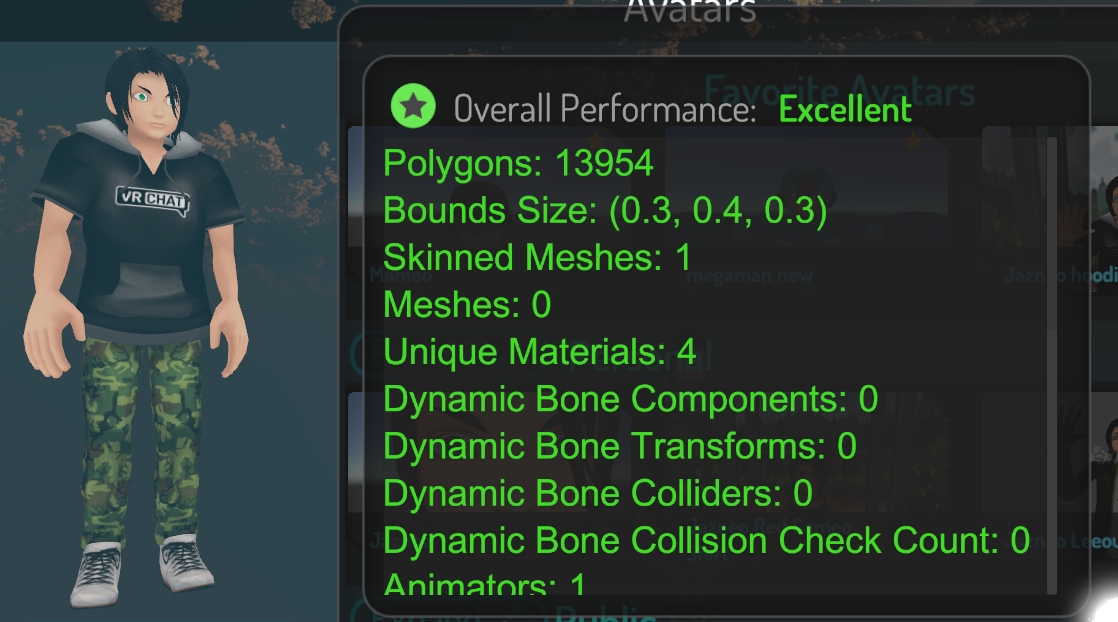
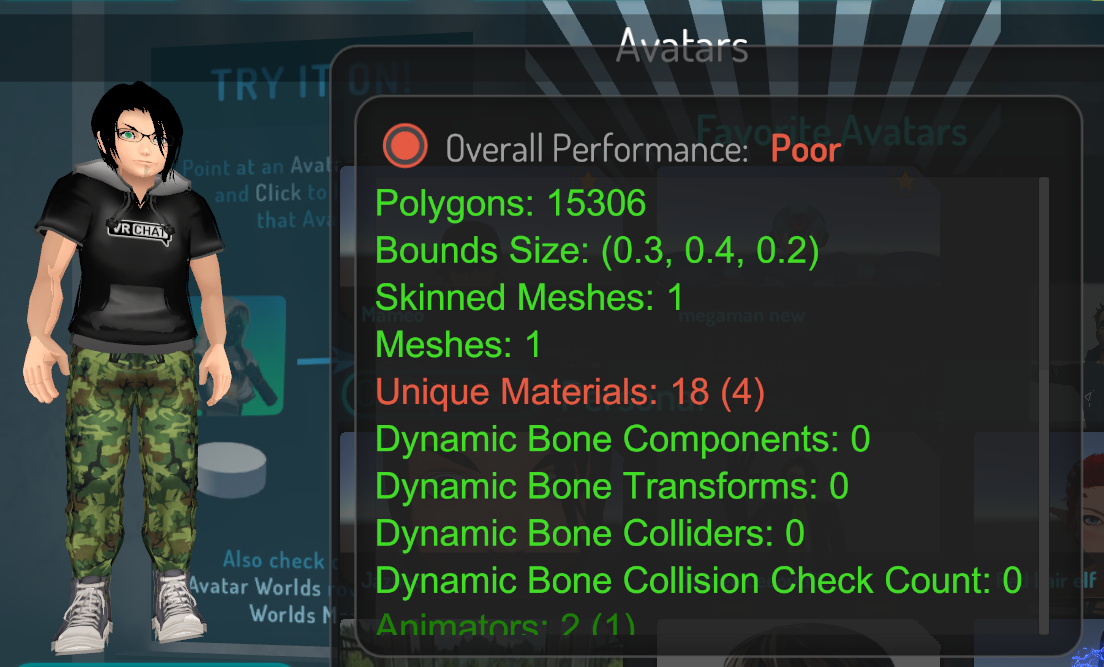


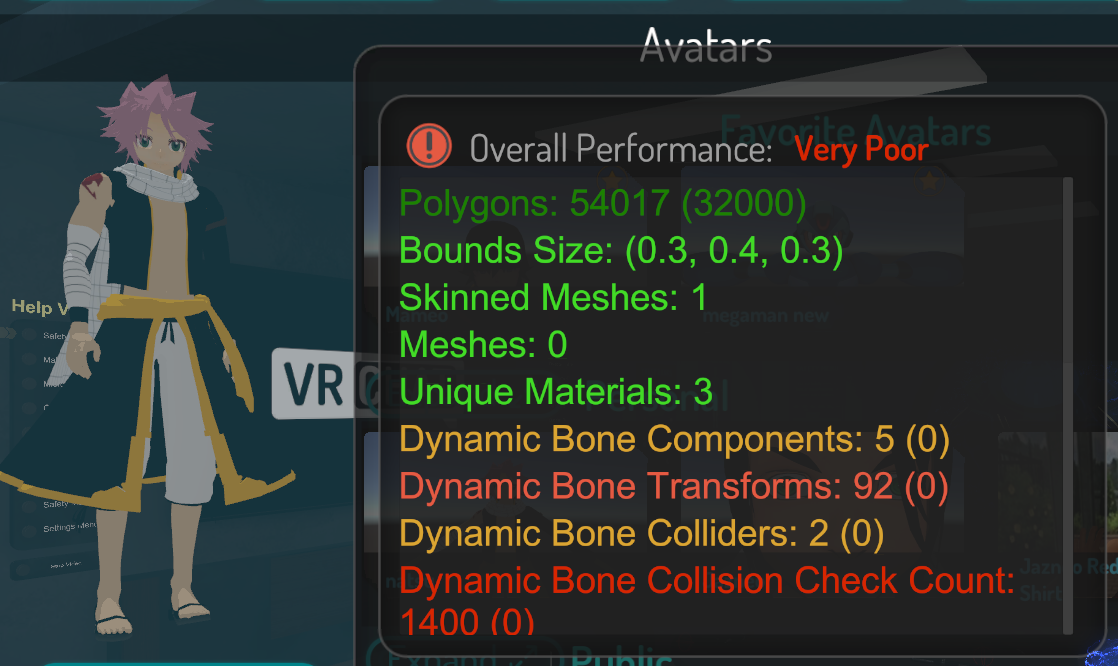
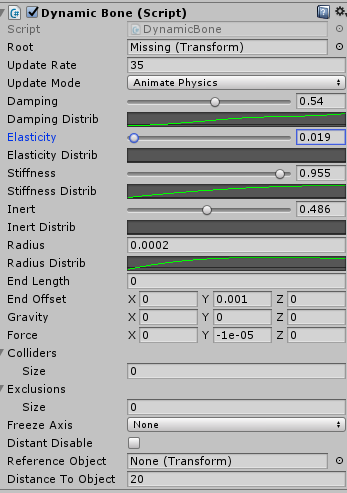
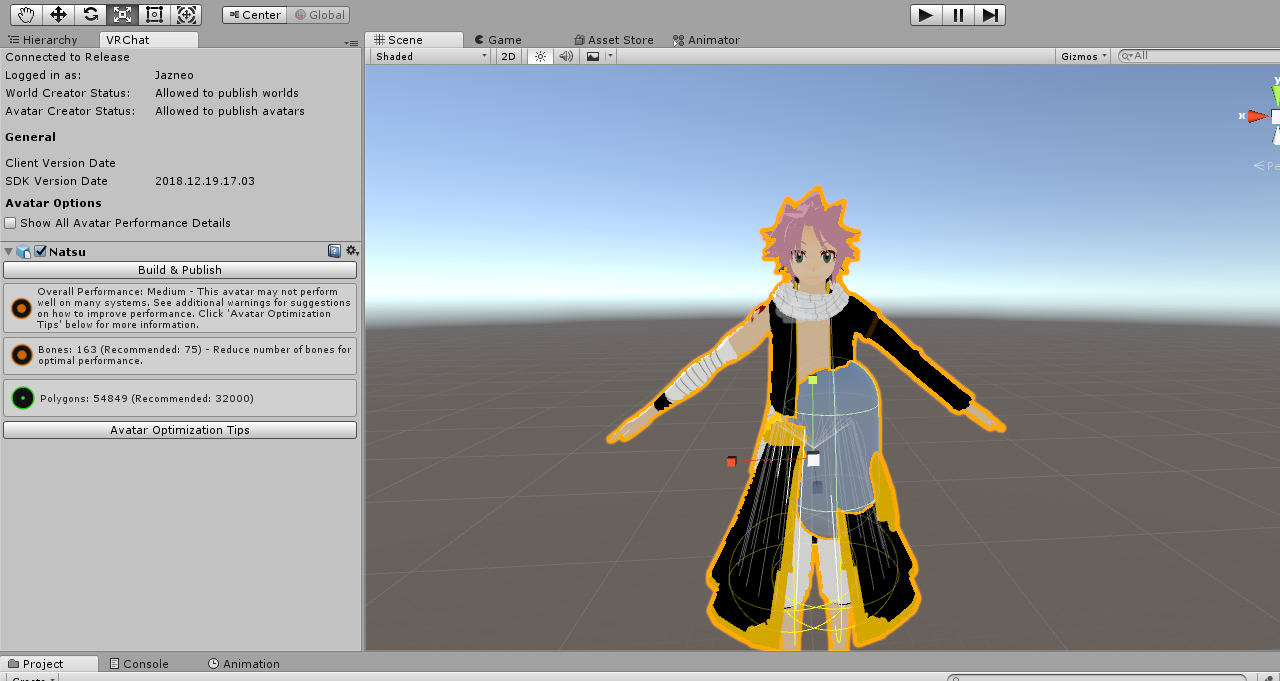
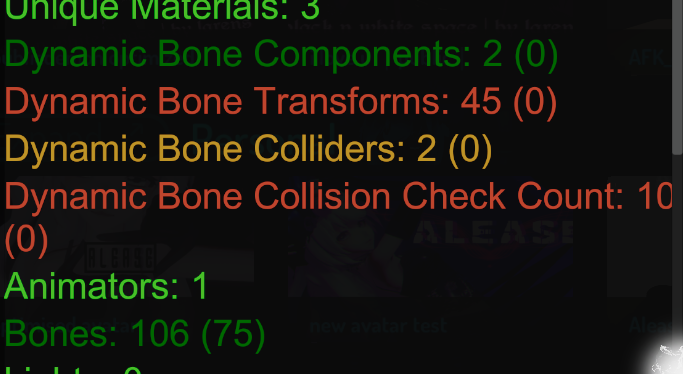
 tender sundial
though I have determined that I could cunningly clone dynamic bone scripts and reduce collider interactions to only a few places
 grim kiln
Jupp, this is what optimizations is for, though colliders only get you to medium, but that is good enough for most
tender sundial
I don't think getting it to less than 8 is practical though 🤔
 static pelican
Put in Blender. Merge meshes. Export?
grim kiln
I would add ears and try optimize the tail to only have a few DB
3 max
Ears for interactions 2
With 2 colliders thats 4 interactions each ear, thats 8
tender sundial
ears and tails both seem easy, it's things like normal hair which are trouble
grim kiln
Ye, but hair is wonky from the start
tender sundial
especially when you have a fringe and you're trying to stop it going through your head
grim kiln
Just try to find an good curve in the scripts
tender sundial
tried
really what I'd like is "dynamic but only moves in one direction" or something
grim kiln
You cannot fix it based on running, as the speed is inconsistant
So fix it based on normal head movement
static pelican
Dynamic bones should have an axis setting?
grim kiln
Ye, but it is not the best option as you cannot add more than 1 axis
tender sundial
that freezes the axis but what I want is it moves along all axes but not backwards on Z
grim kiln
Ye thats the problem
tender sundial
so the hair can move away from the head but not inside it
it would still look wrong but it might be good enough
grim kiln
You would like to isolate 1 direction
You should have an option as joints have
They can have angle of movement
tender sundial
it's too bad I can't do it with a joint
tender sundial
joints themselves count against performance so I'm not sure I could
grim kiln
But rigid bodies would anyway pull you down
tender sundial
yeah
and that's fair because as far as I've tested, real physics does perform worse than dynamic bone
grim kiln
Yep, though dynamic bone is mad also, its all based on how much the bones move of poligons
So if it is low polly movement then dynamic bones wont hit that much performance, but will still require calculations
tender sundial
skinning costs no matter how many of them are affected by the dynamic bone, surely
what I found with dynamic bone testing was that a bunch of the cost was in maths, and some significant % of the cost was in unnecessary object construction
so if they were more conservative about constructing throw-aways, it would run faster
grim kiln
They are thinking of ways to reduce the DB script hit, but who knows how to reduce something that need to be simulated..
tender sundial
the throw-aways are a good starting point but once you chip away at it a bit by removing those, you're left with just maths
tender sundial
that's one option
grim kiln
Tight now its standard 60fps
tender sundial
too bad doing that won't just divide my dynamic bone performance scores XD
tender sundial
I think I figured out why the SDK can't count the dynamic bones anyway
tender sundial
there's a bit where it does some reflection to get the dynamic bone classes and fields, and it looks like it fails to look up the last one because it doesn't have the generic parameters that they expected
collidersFieldInfo.FieldType.GetGenericArguments().Single() != dyBoneColliderType // false
collidersFieldInfo.FieldType.GetGenericArguments().Single() is DynamicBoneColliderBase
dyBoneColliderType is DynamicBoneCollider
grim kiln
You could hit them up with an update of your finds.
tender sundial
it could be that I'm running the wrong version of Dynamic Bone. I'm on the latest one and maybe VRChat isn't
tender sundial
fixed in my local copy and now it shows the counts. the counts are wrong, but .. aeh
heady smelt
1 night of vrchat and im shook at the material count on all most of my friends omg
safe swift
use quad
 thin cedar
Use an unlit shader, ofc.
safe swift
i think it's going to be the norm to have poor/very poor ava
and hopefully people don't care too m uch, as most ppl don't understand what the numbers are, or that the system is informative and it takes the WORST and not active
i would even say, misinformative system when displaying rank
 vocal river
same ^^
safe swift
you can easily get into public world limit with 50 dyn bones on ava
vocal river
everything else is at excellent or wth it's named but the dynamic bones takes me to poor lmao
safe swift
long hair can be done into 3 bones, short hair needs 1 bone (they usually are 2-3)
u can make that into like 5-7~
vocal river
people won't really care about the performance ranking except the normies
safe swift
i've personally removed all colliders, cuz they do absolutely nothing, you maybe use colliders 0.1% of the time to touch your stuff, if coliders are used to stop clipping then ppl are doing their values wrong
but then again, I stopped caring about hair clipping long ago
my hair values that I use now do not need any colliders to not clip, as for long hair - really who cares..
heady smelt
i can careless about peoples dynamic bones but the fact that we can see ppls material slots is shocking and cant be denied
i think 80% of the ppl i ran into toniught were 20+ material slots wtf
even my own friends
safe swift
well, majority do not do any optimization, NOBODY cares about it, it started changing with public avatar world rules
heady smelt
ppl who come to parties with large amounts of ppl attending are using 20+ material slots
safe swift
and not only material slots, but also multiple meshes active by default
when ppl dont know how to use blender and slap some shit on in unity
heady smelt
im not aware of the implications of multi meshes but 30+ materials is just str8 un acceptable
safe swift
https://docs.google.com/spreadsheets/u/1/d/e/2PACX-1vShHzuZzQwULCu7KmWFGMj640oNRYH-M_N1BD30nRF5F9eqGYcLF0E-CTf48RE8qzAzDmv9eqJsdpma/pubhtml?gid=1122762578&single=true is kinda getting better, but before it was ALL YELLOW
 regal spire
You also have to be aware that it (I think) will count materials on disabled objects, so an avatar might use an animation that has 10+ materials when the avatar might otherwise be considered optimised.
heady smelt
Well i highly bought ppl have animations that require 20+ materials
regal spire
Fair enough I suppose, I also don't really expect a lot of avatars at party events to be carrying heavy animations either.
 cosmic scaffold
see this?
it's for this avatar
it has 8-9 materials, 4 dynamic bones , one collider and it's under 20k
G G devs
"poorly optimized avatar" sure
 gritty vortex
Nice let's kill this game :)
cosmic scaffold
and no i'm not gonna atlas it, it's just gonna ruin the texture
i'm just waiting for one person to tell me how unoptimized it is
 spring girder
actually new version of texture atlas doesn't ruin the texture anymore
cosmic scaffold
i literally did it today lol
spring girder
what did happen?
cosmic scaffold
sec lemme find the screenshot
meh i can't find it lemme reopen unity
@spring girder
spring girder
Is it world?
cosmic scaffold
pretty sure there shouldn't be a difference
or what, is it ok if it does it on worlds?
spring girder
well doesn't happen to me and idk what exactly happened to you. i'm sorry.
 wispy berry
did u change the textures settings in unity?
amber hemlock
@cosmic scaffold atlasing avatars does not visually change the avatars appearance in any way. Neither does reducing the materials, both of which are why your avatar is poor. Not doing this makes your avatar worse than it could be and reduces framrate for those who see you. I don’t know why you think the rating is unjustified. Unlike the real world if you were a content creator for a game company, You are free to use the avatar without making it better. I’m not going to tell you to fix you avatar, but accept the rating.
wispy berry
can try changing max size, higher quality compression
cosmic scaffold
@amber hemlock what if i'm trying to make something different? instead of the typical one mesh basic avatar? i'll just be blocked because it's "poor quality"
 wary relic
Then make it but have one for public and private worlds
Most people dont want unoptimized avatars when making new frineds
cosmic scaffold
why would i want to make my avatar public?
spring girder
Not public for public channel
cosmic scaffold
m8 i literally have done 3 minutes long animation in public worlds
 lament oar
He meant an avatar YOU can use in public and one for when you are in private worlds
spring girder
Animation doesnt cause lag
wary relic
If you get a backpack
Fill it up with 10 Kilo (base game)
Add two more kilo and its nothing bad (your avatar)
Do that x20 for a public world
Congratz you have a back pack you cant carry or also known as a game that laggs
Reduce that two kilo times one or even 0.5 and its better
The direct effect is still nothing- The larger sceme
is*
spring girder
Particle does light does and material does
cosmic scaffold
particle animation i mean
dude pls, literally no one ever EVER complined about lag around me
even when doing particle animations
spring girder
because some person just ignore you, block your avatar, or go somewhere else
wary relic
Stay in your own bubble then my dude
I cant even think of another way to explain why its bad
spring girder
it doesn't mean it's okay
cosmic scaffold
this is gust us beeing restricted because they don't wanna fix the game's issue
i can do atlasing whenever i want
but i'm not gonna make my avatars look simplistic as hell just cuz ppl will drop 3 frames
wary relic
Please explain what game parts are unoptimized then?
cosmic scaffold
oh boy that's a list, API, the bullshit CPU and many more, lemme see if there's a list cuz i feel like someone made one
spring girder
bullshit cpu = the number of material exactly
wary relic
Well- Throw me that list once you find it as most of those are just lose words and not systems beside the cpu
spring girder
it's making drawcall
wary relic
Also- Make sure tis up to date
Past updated changed an insane amount of stuff from the game
cosmic scaffold
hmm so weird tho, how come there's no lag in lavander tho?
wary relic
Is that a world or what?
cosmic scaffold
no it's another vrchat-like game
and it is already able to handle more then vrchat while it was made by 2 ppl in only 4 months
wary relic
I legit cant find anything online from it 😂
cosmic scaffold
well 5 now i think
because it's a private one
as it's still beeing worked on
it's a discord
you want an invite?
wary relic
Not really-
And tbh if its still that early in development with a low hardcore user base ofcours optimazation isnt a 'problem' there
Vrchat had the same thing 
cosmic scaffold
we imported the same "laggy" models from vrchat in it
back then vrchat didn't have those models
wary relic
Those models
What is those?
Also im still waiting for proper parts of the system beside api then thats bad
Because cpu isnt a VRchat system so far i know but a computer part 
cosmic scaffold
the animatiors and stuff
wary relic
Soo everything thats on user sides?
spring girder
you have to aware that unity engine isn't well optimized
wary relic
Dude i build robots-
I know what a cpu is and how they work
heady smelt
unity engine is pretty optimised, stuff people make in it .... not so much
wary relic
Lets ask it like this
What system does lagg, Does the voip system they use cause problems?
There world networking? The IK tracking? Nameplates? Menu systems?
 vocal talon
how are world reviews handled in relation to the avatar rank system? will a world be denied if an avatar is medium or poor rank?
cosmic scaffold
dude i don't even know what to say anymore, you go complain about your 3 frames lost imma go and have fun making models
i won't be restricted just cuz they're lazy
lament oar
@vocal talon Nah. though if you don't do a bypass of poly count it won't block you. just inform you of your avatar and how it is in performance
cosmic scaffold
yeah the world won't be denied unless you wanna make it public
cuz then they'll have to see the avatar
vocal talon
"don't do a bypass of poly count it won't block you" I;m confused by this
what do you mean here?
like increasing it above 70k?
if so, thats not an issue
cosmic scaffold
i mean see, that i don't think it's needed
wary relic
@cosmic scaffold Great argument insulting my PC instead of being able to answer a really simple technical question
Atleast my avatasr look neat while being the highest rank optimized and my game runs a neato 90 FPS pretty much always 👏
cosmic scaffold
cuz 70 already seems pretty normal
vocal talon
I have an avatar that has a poor ranking for bones
so just curious if that avatar would cause the world to be denied
cosmic scaffold
@wary relic i can just imagine that avatar
lemme guess did you do a headswap from deviantart?
wary relic
It looks just as good as anything 😂
cosmic scaffold
do you have any blush ? or does that hurt your frames too much since you have to make it 2 materials?
wary relic
Thats all part of one material 👏 Combining sutff and not being a retard in optimazation aint tooo hard if you ask how to
cosmic scaffold
and tbh i dunno why so many ppl complain about lag, literally don't even have a vr ready pc, cpu and gpu wise
lament oar
@vocal talon I think there were some rules for avatars in avatar worlds now. don't remember
cosmic scaffold
and never really had any issues
sure i'm always around 45
but that's normal for me
 last light
VRChat can lag like crazy regardless of the PC, try joining a public Pug. :p
cosmic scaffold
i do, i'm always at 45 frames
wary relic
As i said- I run 90 fps 24/7 right now
But its legit retarded to have 200 transformed bones or an avatar with 12 materials
cosmic scaffold
that is retarted yes
wary relic
I can shovel you some old old aproved avatars (or go into a room with 20+ people wiht all full body avatars)
wary relic
And your pc will cry bigtime
Then use a properly optimized avatar and yeet 5 more peeps into that same room while having stable fps
last light
Why 9 materials though? 🤔
cosmic scaffold
and having my avatar beeing very poorly optimized
last light
Can you not atlas that to 1 or 2?
wary relic
4 bones or 4 transformed bones
cosmic scaffold
dynamics
wary relic
Also- If you had just that it would be medium optimized
cosmic scaffold
it appears as very poor in game my guy
wary relic
So you got more then just that or your lying
And 4 dynamic bone scripts or 1 script with 4 bones... Thats what i am asking
Then check why its poor... It legit tells you
last light
To be fair, right now any dynamic bones on the avatar make the avatar 'Very Poor'. 🤷
Maybe Cloth performs better as it's integrated into Unity?
wary relic
@last light Cloth is even worse- Rather use bone then cloth
last light
Something better than Dynamic Bones would be ideal. 😅
cosmic scaffold
cloth will literally create a rank under very poor even if it doesn't exist
last light
Great. 😅
heady smelt
Wrong Curt lol
last light
^ :p
wary relic
And the first drop down of dynamic bone is with 16 bone transforms
And you are still good then
32 transforms and its medium
lament oar
sorry!
cosmic scaffold
tell that to the system
wary relic
Colliders count so heavy because they act so heavy
wary relic
Tbh- Only reason i would add you right now is to instantly block you after 👀
cosmic scaffold
lol you don't need to add me and idc if you block me since i don't know or play with you
you can send a pic here
or is it private?
last light
@wary relic How does this make you feel? (Mine) :p
https://i.gyazo.com/c1514eb5c3be19aa4256f1190c4c629f.png
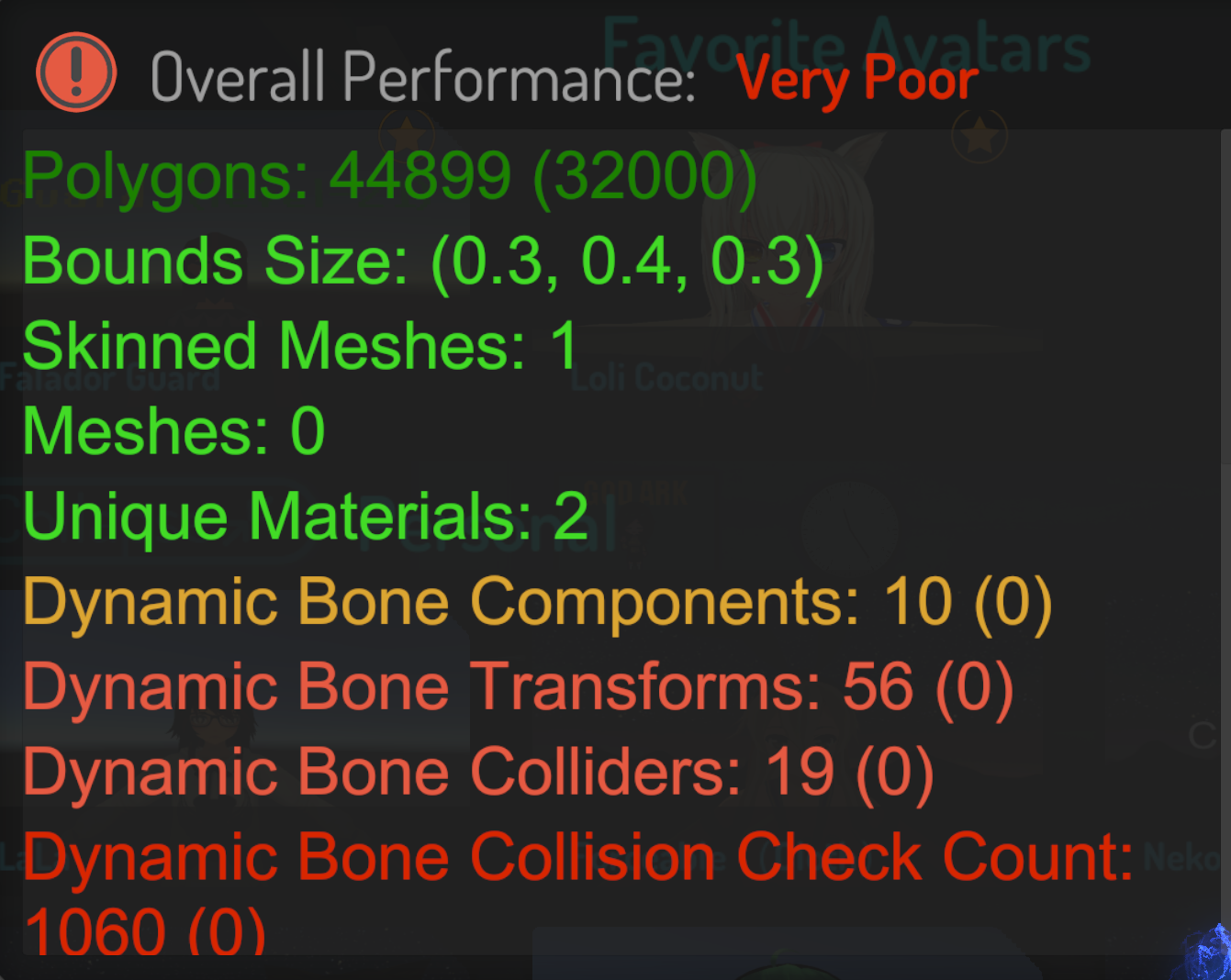

all the dynamic bones.
cosmic scaffold
but wait, what are your frames?
wary relic
Why would i have to justify myself towards you?
And im not home anyway right now so even if i wanted i cant?
I am not the person porting avatars from deviant art for money here
@last light Fairly sure you can cut out like 60% of that if you even tried...
lament oar
Daaaamn. that is alot of bones
cosmic scaffold
HAHA funny you say that since i don't port anything
last light
@wary relic Oh, totally, I only just saw it. Working on it my guy. :p
cosmic scaffold
only the body and face are from devianrart
rest is either made by me or from games
 ashen leaf
how is the collision check calculated...? also i have 38 transforms and thats rated poor. u serious.
last light
I'd imagine it's update rate related. @ashen leaf
wary relic
Then you wrote it fairly odd on ya website atleat how i recall it then
cosmic scaffold
but don't bother with the dynamics
last light
Higher update rate, the more often stuff is checked.
lament oar
Was it collision per rate? dunno how they calculate
wary relic
@ashen leaf combine two bones and your right into that medium rank
cosmic scaffold
@wary relic read the date for that :""")
spring girder
total bone that can be collided with
cosmic scaffold
@ashen leaf just make sure that at least materials are ok, so they won't cry about it
last light
@wary relic Maybe you can help actually, when I have a single dynamic bone component on my avatar's head, it screws with the eyes even if they're excluded, any suggestions?
cosmic scaffold
don't let them ruin your physics
last light
That's why I have so many components. :p
ashen leaf
literally have ears (4 bones) + boobs (4 bones) in the collision
wary relic
@last light You want the hair to move?
If so make a second head bone- Combine all hairs to that and make sure that second bone aint weight painted or anything
Then just apply it on there
lament oar
Just add the eyebones as excluded in the component
wary relic
I dont use dynamic bones myself as its unneeded for most of the avatars i use (Handy using boy avatars)