#avatar-optimization
1 messages · Page 15 of 1
 jagged dagger
I don't know anything blender unfortunately
Find the UI very confusing
Though my mat swaps mostly include different shader settings
I reuse a lot otherwise in terms of textures
 radiant shadow
made a vid thats 2.4 min long to remind me how to bake stuff , always forget something especially the alpha part, seen some drawn out ones thats 30+ min
figured out why vram calc broke , one animation it didnt like
that makes it 0

this fixes it

newer one uses uv swap
jagged dagger
Oh you got all in the same animation?
radiant shadow
just radial
jagged dagger
I have like one animation for each swap and toggle with an int toggle through them
Well with 17 different int toggles
radiant shadow
 yeh done both just radial is 1 anim 1 float , way less setup
jagged dagger
Which results in 2 pages in radial menu
With one thing having also it's own submenu
 onyx harness
ig the difference would be if you wanted to have a menu icon to show what it is you're changing into. Unless you memorise the wheel and know 56% is x look
jagged dagger
Though most things are only on my pc version
Quest version is rather barebones
Since almost none of everything works on Quest lol
jagged dagger
onyx harness
ig the difference would be if you wanted to have a menu icon to show what it is ...
Yeah for my avatars all being public it's probably easier that way for other people
radiant shadow
slightly newer ones uses int when entering a menu to change into that outfit, then every one of those have 4 toggleable stuff on them, only need 1 int 4 bools (toggles) for all 5 outfit - not one id wear much its not optimized and was mostly 'how do i do this some years ago'
4 layers of these pretty much for toggles
 onyx harness
opening the submenu applied the outfit?
radiant shadow
yep
onyx harness
when you exit that menu, wouldn't the int be set back to 0? and if so, how does it sync for those that join later?
radiant shadow
thats default look so 0
synch fine with it

pretty old now was made with PoiyomiPro7.2.29 (2021~) - have since updated to 8.2.030 , but setup is ancient
if id redo there would be much more uv discards
onyx harness
not my updating an avatar on 6.1.15
radiant shadow
would been -18 meshes (currently 25) if i did use uv discard - but eeh not an av i use
onyx harness
I'm going through the process of updating all the old avatars still being sold. I've been sticking to 8.2.027, havn't tried v9 yet
radiant shadow
030 is the last of the 8.2's - alpha would be annoying to update for all my av / friend ones
6 to 7 was .. such fun, then 7 to 8.2 changed shade/uv name
onyx harness
ye, but there's some... features, that suffer from a bug in 029 and 030. With 028 being down I went with 027.
The toggles are all being converted to uv discard from object and blendshapes
plus the texture memory is all being adjusted so the 600-700mb avatars will be Poor or better as default
yeah it was bad
I am the one who knocks

 marble rain
onyx harness
*not my updating an avatar on 6.1.15*
marble rain
onyx harness
*not my updating an avatar on 6.1.15*
there are quite a few nice things on the newest poi
jagged dagger
I gotta sub to Patreon again to get new poi 9 updates
 wild fern
I have a booth avatar that has a bunch of blendshapes to shrink parts of the body mesh into a singularity (best way I can describe it). I assume these are for when you have clothes that fully cover those areas, you don't need to have the mesh there, but does that actually lead to better performance? Are all those points/edges/vertices all collapsed and calculated as one? Because VRChat still counts them as polygons, and as such my avatar is "Very Poor", after adding only a few clothes and accessories.
 mint topaz
wild fern
I have a booth avatar that has a bunch of blendshapes to shrink parts of the bod...
mint topaz
wild fern
I have a booth avatar that has a bunch of blendshapes to shrink parts of the bod...
no
blendshapes = worse performance actually
 heavy knot
if you want those verts not rendered, you'd use something like UV tile discard
wild fern
mint topaz
blendshapes = worse performance actually
I'm already getting rid of the blendshapes/baking them in while uploading
 merry swift
wild fern
I have a booth avatar that has a bunch of blendshapes to shrink parts of the bod...
merry swift
wild fern
I have a booth avatar that has a bunch of blendshapes to shrink parts of the bod...
blendshapes can only move vertices, not destroy/create them. every vertice needs to be calculated every frame regardless of what the blendshapes do
more specifically, there is a set performance cost incurred with each blendshape added to the mesh, and further still for blendshapes that are active
so those blendshapes that collapse your limbs down actually make your avatar ever so slightly less performant
 verbal spruce
I've used a component to reduce the polygon count of an avatar's model but it doesn't like those components existing on the model. Is there any way to fix this while keeping the the new simplified meshes without redoing the model itself in Blender?

 hardy hound
verbal spruce
I've used a component to reduce the polygon count of an avatar's model but it do...
hardy hound
verbal spruce
I've used a component to reduce the polygon count of an avatar's model but it do...
Import into blender>edit mode>mesh>decimate>export to unity again….. done
Blender is soo much easier than trying to optimise stuff in unity
hardy hound
wild fern
I have a booth avatar that has a bunch of blendshapes to shrink parts of the bod...
Arguably worse performance since blendshapes also take up vram just like textures do. They just arent calculated into the vram on the avatar stats
merry swift
hardy hound
Arguably worse performance since blendshapes also take up vram just like texture...
the vram consideration isn't really what makes us care about blendshape performance, I'd strongly urge anyone to look at optimizing textures first unless something is seriously wrong. We care about blendshapes because they have a significant impact on how long it takes your avatar to shuffle through the render pipeline. https://gist.github.com/d4rkc0d3r/f77c1e96d4aeefd0d1eaf13fb096a2de

In unity 2019 the GPU wastes a bunch of time shuffling data for unused blendshapes around the blendshape buffer, this (and some other blendshape related stuff) getting fixed for 2021 contributes to that modest framerate boost
Take that .86ms (merged mesh, 10 active blendshapes), multiply by 40 and you'll quickly find we are not getting 60 fps from blendshape performance cost alone
That. Is why we care about blendshapes.
marble rain
merry swift
the vram consideration isn't really what makes us care about blendshape performa...
we have the update already. for blendshape so its less problematic but still quite abit intensive. since the game is running on LTS 2022 and the sdk is still 2019.4f or whatever it was. that said be careful with them still and if possible use uv discards or other methods
 night inlet
merry swift
more specifically, there is a set performance cost incurred with each blendshape...
night inlet
merry swift
more specifically, there is a set performance cost incurred with each blendshape...
there is no perf cost for extra unused blendshapes that I know of besides that they take some space in vram. you only have extra perf cost per active blendshape
merry swift
night inlet
there is no perf cost for extra unused blendshapes that I know of besides that t...
I guess I need to do some more reading up, it's hard keeping all this stuff straight even when you're not in the middle of an engine upgrade
night inlet
thankfully we are now on 2022 and it deosn't really matter anymore as long as you don't have a ridiculous amount of blendshapes active
no more cursed skinning performance anymore. funnily the base skinning is also faster, so for my test avatar on new unity its about as fast as old unity with no blendshapes when using 3 blendshapes in new unity!
merry swift
not a moment too soon
 tulip rose
Ah, interesting knowledge. Will have to poke at the profiler and see how things have changed.
 drowsy venture
hello everyone, i'd like to know what is the most optimized way to do toggles currently? as i understand it if i split my one material outfit into 5 separate objects in unity, it will result in 5 materials, and that's a big no-no for performance... so what should i do instead?
radiant shadow
5 isnt much for pc - quest insta bad
uv discard (pconly) > mesh toggle > shrinking bones > blendshapes .. something like that from good to terrible
 low mural
Performance wise, is there any difference deleting a bone from Unity compared to deleting it in Blender?
tulip rose
low mural
Performance wise, is there any difference deleting a bone from Unity compared to...
Only difference that really matters is that you can't remove bones in unity without unpacking prefab.
Which is often a bad idea if you ever wanna edit the mesh again lol.
low mural
tulip rose
Only difference that really matters is that you can't remove bones in unity with...
Understood, thank you!
 short badge
How bad is it to have 3 audio sources on an asset? I could in theory have 1 big one that covers the general use area but if audio sources aren't too unoptimized then ideally I'll add 3 different ones for different areas.
low mural
short badge
How bad is it to have 3 audio sources on an asset? I could in theory have 1 big ...
Why not using one but with 3 parent constraints that you disable/enable depending on where you want it?
 pulsar lichen
does anyone have the avatar sdk file
 buoyant holly
pulsar lichen
does anyone have the avatar sdk file
buoyant holly
pulsar lichen
does anyone have the avatar sdk file
install it via the vrchat Creator companion
pulsar lichen
i did, thanks
 arctic comet
anyone know what the cause of these errors are when i try to convert to quest

im using the VRC quest tool
 short badge
low mural
Why not using one but with 3 parent constraints that you disable/enable dependin...
short badge
low mural
Why not using one but with 3 parent constraints that you disable/enable dependin...
Good idea, ty!!
 frank widget
 tulip rose
Solid job.
 sterile bramble
arctic comet
anyone know what the cause of these errors are when i try to convert to quest
sterile bramble
arctic comet
anyone know what the cause of these errors are when i try to convert to quest
Change the shader of your materials I think
 oblique patio
So this avatar I'm trying to upload has 86 materials. The SDK shows 6 material slots. It seems like they are toggling the materials with the menu. isn't that a bad idea? I'm thinking about using only one material with the textures that I like to use..
onyx harness
oblique patio
So this avatar I'm trying to upload has 86 materials. The SDK shows 6 material s...
it'll build up on texture memory assuming they have different textures within the materials but if there's only 6 slots then the avatar won't ever render more than 6 materials at any given time
oblique patio
ok the texture memory seems to be acceptable
onyx harness
oblique patio
ok the texture memory seems to be acceptable
the sdk currently doesn't take animations into account
you'll need to check the texture memory with tools like Thry's Avatar Performance Tools
oblique patio
ok, thank you
jagged dagger
Me finding Murder Drones models online to download:

Guess i gotta throw money for a commission eventually again
If i continue with them that is
marble rain
jagged dagger
Me finding Murder Drones models online to download:
that is quite easy and fast to fix
 fierce furnace
so i was modelling a lil knife and wanted to ass a couple animations for it being open, close and half. i was wondering in terms of optimisation, would shape keys for each state be better or should i use an armature and do it in unity?
 ivory sluice
if there's going to be any rotation you'll have to use bones, shape keys can only be interpolated linearly
fierce furnace
shite, i completely forgot about that lol
brain hasn't kicked in lol
cheers though
hardy hound
fierce furnace
shite, i completely forgot about that lol
You can do rotations with blendshapes aslong as its only max 20 degrees people can usualy not tell.
 proven dock
ivory sluice
proven dock
ivory sluice
to do rotations via blendshapes using sine and cosine the rotation should be exactly 90º
you'd need to have two blendshapes where all vertices are shifted to the Y and X axis gradually where on the center of rotation is not shifted and the further from the radius it is, the more it shifts (relative to the rotation, for example if it rotates on the Z axis, the axis are X and Y, if it rotates along Y, it's X and Z, and if it's X, then Y and Z)
Then on the animator you need to do a perfect sine and cosine curve, the sine curve influences the Y shift and the cosine the X
to make a full rotation, since you can't invert blendshapes, you'll have to also make two more blenshapes which are the inverse of the other two, then blend them as follows
(X = shifted on X, Y= shifted on Y, -X = inverse shift of X, -Y = inverse shift of Y)
X -> cos(rotation) Y -> sin(rotation)
-X -> -cos(rotation) -Y -> -sin(rotation)
 atomic badger
would it be possible to use one float for all your avatar adjustments? :3
Just use a integer to select what you wanna set, and then adjust the float.
then have those animations be write defaults enabled

this would be amazing if it actually would work
 cold yarrow
you could do that with direct blend trees
cold yarrow
hmm
 proper grail
i think the way youre trying to do it will not be network synced, all the changes you make will just be for who can see you
 urban shoal
Sorry if it's a common question, but is there a way to stop the SDK counting inactive objects towards the mesh and material count?
In this case, toggleable items in the character's handles.
cold yarrow
no, those always count
urban shoal
Aw, shucks
 nova hornet
atomic badger
would it be possible to use one float for all your avatar adjustments? :3
Just u...
nova hornet
atomic badger
would it be possible to use one float for all your avatar adjustments? :3
Just u...
I vaguely presume that's what this does
https://fuuujin.gumroad.com/l/OSCParameterSync

Gumroad
This is a ready to use package of my OSC Paramater Sync system.What does this system do ?It uses only 2 ints and 2 floats in the avatar global synced parameters, to store up and sync up to 255 more float values on your avatar. This allows you to use more than the 256 memory allowed for you to use by VRChat.This allows you to extend your paramete...
 stuck ingot
I have this message not letting me upload my avatar but my textures are the vrchat mobile shaders.
 heavy knot
stuck ingot
I have this message not letting me upload my avatar but my textures are the vrch...
heavy knot
stuck ingot
I have this message not letting me upload my avatar but my textures are the vrch...
Put t:renderer in your hierarchy search bar and make sure all renderers are using a vrchat mobile supported shader
 vital cloud
I'm using a vroid model to make my first vrchat model & I've been told there are many phys bones i can delete to better optimize the model but I'm not sure which ones. Anyone have any input on this?
buoyant holly
you would be able to adjust the bone settings in vroid Studio https://vroid.pixiv.help/hc/en-us/articles/900006910023-I-want-to-edit-hair-bounce

VRoid FAQ
In this article, we'll be explaining what hair bounce is, and how to make your models' hair bounce naturally.
Table of Contents
What is Hair Bounce?
Setting Hair Bounce
What are Bone Groups?
Wha...
vital cloud
Ah I mustve skimmed over it too fast. Thanks.
 hardy torrent
was optimising this avi (removing transparent textures) and this is how the blendshapes now look

anyone know a quick fix or will i simply have to redo all the blendshapes
radiant shadow
redo or weightpaint em, if you accidentally create new verticies using knife tool that happen
 tulip rose
atomic badger
this would be amazing if it actually would work
tulip rose
atomic badger
this would be amazing if it actually would work
Are you trying to build a demultiplexer?
||late reply||
 granite crystal
is there a way to show some avatar's object thru other avatar's objects (even if it's behind them) with shaders not loaded?
(like "please turn on shaders to see avatar properly" banner inside crypted mess of polygons)
ivory sluice
Do you mean to replace the avatar with a polygon mess to make people unlock it?
 sick relic
granite crystal
is there a way to show some avatar's object thru other avatar's objects (even if...
sick relic
granite crystal
is there a way to show some avatar's object thru other avatar's objects (even if...
Would be impossible to render an object behind on top with fallback shader. Instead, have the object in front with zero alpha transparency, then choose fallback shader to render in opaque mode.
atomic badger
tulip rose
Are you trying to build a demultiplexer?
||late reply||
Yup
tulip rose
atomic badger
Yup
Well, as long as you iterate over all indexes every once and a while for late sync.
You could use state behaviours to set a local copy of the value.
That way the network sync is only using those 16 bits.
 ruby vortex
What techniques can I use to manually reduce my avatar's polygon count in blender without destroying blendshapes? CATS' decimation tool is decent but I'm willing to research and put in effort for a better result, just not sure where to start. (should I ask in 3d-modeling?)
cold yarrow
I first go for deleting edge loops where they won't be noticed
buoyant holly
ruby vortex
What techniques can I use to manually reduce my avatar's polygon count in blende...

#b3d #blender #secrets #tutorial
Visit the Blender Secrets website: https://www.blendersecrets.org/book
e-Book bundle (20% Discount) : https://gumroad.com/l/IxofeY
 thick condor
https://vxtwitter.com/VIANVOLAEUS/status/1728810912851820651?s=19
Because a part of the avatar creator community needs to be reminded that the word "optimization" exists, here.
you probably don't need 4k+ textures
being smart with reducing certain texture sizes can decimate your VRAM cost
in this example, going from a worst case 240MB > 30MB, down to 1/8th of the original:
💖 29
To that part of the community:
Rather than presume all of us have buckets of VRAM that can be used to load your massive avatar, let me make you aware of the Steam Hardware Survey's October 2023 results.
https://store.steampowered.com/hwsurvey/Steam-Hardware-Software-Survey-Welcome-to-Steam

That's me done here.
 jade wedge
i'm trying to make an atlas for selected textures but some of them have this issue where they are not accurate size and it breaks the atlas


all of them use the same shader on the same settings
nvm setting it to a different shader and setting it back fixed it
 brazen sage
Hello!
Bit of a repost but it says everything that needs to be said-
I am currently drowning in the sea of my own ignorance and being battered by the currents of things I do not understand. The basic situation is as follows-
I have a custom avatar, custom model, I believe built from the ground up. it's horribly unoptimized. (see the screenshot below.) I see a lot of errors, but I have absolutely no idea how screwed I am. Provided I have all of the files and everything, how hard of a job would it be to optimize? If there's any specific screenshots or examples you want me to pull I'm happy to do so, though please bear with me because once again, I am so out of my depth
 buoyant holly
brazen sage
Hello!
Bit of a repost but it says everything that needs to be said-
I am curr...
buoyant holly
brazen sage
Hello!
Bit of a repost but it says everything that needs to be said-
I am curr...
honestly that's pretty easy to fix as the main thing that's red is the material count
brazen sage
I see! And- I genuinely apologize for my ignorance, in this context what is considered a "material"?
 heady smelt
brazen sage
I see! And- I genuinely apologize for my ignorance, in this context what is cons...
heady smelt
brazen sage
I see! And- I genuinely apologize for my ignorance, in this context what is cons...
The thing that adds textures to ur avatar
so basically you want to use and few as you can by combining ur textures with uv editing
buoyant holly

A simple tutorial on Texture Atlasing/Texture Baking using Blender 2.8+.
Links in Video:
Pumkins Tools: https://github.com/rurre/PumkinsAvatarTools/releases/tag/0.9.5b
=TIME STAMPS=
0:00 - Intro
0:08 - Disclaimer
0:30 - Combine Your Meshes
0:42 - Removing Leftover UVMaps
1:04 - Removing Unused Materials
1:17 - Creating Baking UVMap
1:40 - ...
brazen sage
Ah! I get it!
So rather than having a seperate texture for say- a hat, and a coat, and another coat, and the skin, etc, you're basically blending it all into one continuous texture?
buoyant holly
brazen sage
Ah! I get it!
So rather than having a seperate texture for say- a hat, and a co...
yes
buoyant holly
basically multiple textures bad because the way the GPU/cpu works it would basically have to fetch each texture separately whereas combining them together it only has to do the get texture process once
brazen sage
How does it handle that with toggles?
Showing the model for my point.
The Red Coat, the blue coat underneath and the hat can be turned off.
 buoyant holly
you would have to toggle the objects using like bones scaling/blend shapes if you want to keep the material count low
as being separate meshes would also increase the material slot
brazen sage
I think I get ya...so other than poly-count, a lot of these optimizations could be done with a few simple tweaks with how the model is rendered
brazen sage
Never, not really anyway.
buoyant holly

In this video I teach you how to combine your textures to make a texture atlas in blender using a free addon named material combiner.
material combiner link: https://github.com/Grim-es/material-combiner-addon
Join my discord -- https://discord.gg/xbZpYKX8sm
Follow me!
https://twitter.com/D4veVR
https://www.instagram.com/d4vevr/
brazen sage
I'm a hardware/server/networking guy, I build the machines all this runs on, I have never actually delved into the art at all
buoyant holly
then you'd probably want to use the material combiner add-on workflow
the video I just linked will show you what you need to do in 2 minutes
brazen sage
Aces
buoyant holly
setting up the toggles so you can turn the clothing on and off would take a little more explaining
but first let's get the materials combined
brazen sage
Stand by, I uh...hm.
I appear to only have a Unity project file to work with, but I'm sure I have the raw model somewhere around here
AHA! Found it!
(ANd may I say this is fun! I love tinkering!)
buoyant holly
brazen sage
(ANd may I say this is fun! I love tinkering!)
glad you're having fun
and question do you primarily play on Quest Standalone or PC
mostly just asking to know if doing mesh toggles on PC and you always wear all of the pieces on Quest might be easier?
brazen sage
I primarily play on PC, but my plan was to have the avatar optimized for Quest too so Questies can see me
Alrighty! The materials have been combined, I think!
buoyant holly
and then you would export the fbx back out to the place your avatar is located in your Unity project
brazen sage
Alrighty, and then-
...Oh no.

I have become a Manta-ray
I've gone from TecTim to FishTim
onyx harness
yeah them some incorrect blender export settings
brazen sage
Very much untextured me
 buoyant holly
brazen sage
Very much untextured me
buoyant holly
brazen sage
Very much untextured me
but at least it didn't explode
brazen sage
I have the distinct feeling that I misunderstood the instruction. 😛
onyx harness
If it stretches you need to reexport with Apply Scalings as FBX All
If it crumples it needs to be reexported as All Local
i think it was
buoyant holly
yeah it would be worth giving it a try to see if it doesn't Manta-ray?
and you should be able to just drag the new combined texture onto the gray version of your avatar?
onyx harness
would save the Pumkins step
brazen sage
Drag it on in Blender or in the SDK?
buoyant holly
in unity sorry for the lack of clarity
brazen sage
Nah you're good!
buoyant holly
as you would be needing to make a new material as your old ones would no longer be in use as you made the new combined material
brazen sage
Oh I get it!
buoyant holly
cool
brazen sage
Okay so!
Bit of good news and a bit of bad news. Good news is that worked. Bad news is I think the process might've broken the scene in a way I don't quite understand
buoyant holly
what kind of braking?
brazen sage
So the clipping through the hat and the clipping at the armpits there, there is technically some model that would push through as you can see.

Also, lighting is quite different, not sure what that means yet
buoyant holly
brazen sage
Also, lighting is *quite* different, not sure what that means yet
that's because you have a new material that's on default settings
brazen sage
Ah! That makes sense, yeah
buoyant holly
the clipping you would have to fix in blender as now it's all one mesh
brazen sage
Alrighty, so that'd be more of a case of "Squish things back where they should be"
buoyant holly
yes
brazen sage
Great!
...ACtually wait this Does help with the other problem too!
I could reduce polies this way!
buoyant holly
#b3d #blender #secrets #tutorial
Visit the Blender Secrets website: https://www.blendersecrets.org/book
e-Book bundle (20% Discount) : https://gumroad.com/l/IxofeY
dissolving Edge Loops makes less of a mess than the decimate modifier
but I would point out your triangle account is only yellow so everyone will see your avatar
so pretty much just get your material where you like it and fix the clipping and your avatar is good to go
buoyant holly
A simple tutorial on Texture Atlasing/Texture Baking using Blender 2.8+.
Links in Video:
Pumkins Tools: https://github.com/rurre/PumkinsAvatarTools/releases/tag/0.9.5b
=TIME STAMPS=
0:00 - Intro
0:08 - Disclaimer
0:30 - Combine Your Meshes
0:42 - Removing Leftover UVMaps
1:04 - Removing Unused Materials
1:17 - Creating Baking UVMap
1:40 - ...
heady smelt
I did it yall
 buoyant holly
Cool
brazen sage
Ahhh so I've learned some valuable lessons over the past amount of itme I've been working on this. 😛
Namely-
Yes, we fixed the materials, but all the animations and toggles on the model appear to be busted now. Sooo trying to figure out how to get around this problem now. xD
buoyant holly
not surprised as you combined all the objects together so if your animation is looking for object B it no longer exists
brazen sage
Makes sense, yeah.
buoyant holly
is the Avatar no longer very poor
brazen sage
Difficult to say, I've not been able to get it into a buildable state since.
buoyant holly
oh dear sorry for making a bit of a mess
brazen sage
Nah you're okay!
❤️ I had a really lucky and good day at work, my tech karma had to go somewhere. LOL
(Besides, I'm having fun.)
I am wondering if it'd be a good idea to see if anyone wants to take a look at the project file to see where I might be going wrong though.
When I had the original comission done, the fella built a project file that was just ready for upload and ready to go, so I suspect I'm just doing it very wrong. 😛
buoyant holly
I suppose you could look at the working version and your version to see what's different

 long gust
I'm working on a video that can help people for optimizing their avatars on PC if anyone's looking forward to that
 austere wave
@long gust Yes!
Oh god help me, I really want to get this to at least Poor, Most of the VRC clubs want Poor or better and I have no clue how to Optimize
 buoyant holly
austere wave
Oh god help me, I really want to get this to at least Poor, Most of the VRC club...
buoyant holly
austere wave
Oh god help me, I really want to get this to at least Poor, Most of the VRC club...
looks like optimizing the triangle count would be all you need to do to get to poor
austere wave
@buoyant holly I dont know how I did yous VRAM Calculator to reduce Texture sizes but thats all I know how to do as far as optimizing is there a plugin that I can use
buoyant holly
unfortunately reducing triangle count is generally done in blender
austere wave
oh no my Blender skills are even worse
buoyant holly
but something you might could try as far as Unity see how much of a triangle reduction you get removing the collars
but yeah it would be good to learn enough blender to at least use decimate
austere wave
I know there is a way to Combine Mats in blender too, ugh, I guess I have to spend 100 hours learning blender too.😅
buoyant holly

Did this video help you? Consider sending me a tip on Ko-fi! https://ko-fi.com/sippbox
Making optimized Quest models is hard. But it doesn't have to be! With recently updated polygon limits and fallback avatars, it's a better time than ever to create something that represents you to Quest users! Hopefully this tutorial will help you out!
0:00 ...
 final osprey
can anyone help? i can't modify these shaders

 rigid wolf
final osprey
can anyone help? i can't modify these shaders
rigid wolf
final osprey
can anyone help? i can't modify these shaders
Select the material in the folder
rigid wolf
austere wave
Oh god help me, I really want to get this to at least Poor, Most of the VRC club...
Are you using alpha maps to hide some parts of the model? For example some people don't delete parts of their model like clothes, but instead just hide them.
 chilly fox
Does anyone have a guide for putting facial expressions into a blendtree and onto a radial?
I tried this kinda thing, but it only goes up to 49% and does actually apply the anims. 🤔

I could just set toggles in the usual off/on way, but figured a blendtree would be better.
proper grail
in the toggle menu, the when radial menu open = 1 box should be blank
chilly fox
proper grail
in the toggle menu, the when radial menu open = 1 box should be blank
I don't want a toggle. Do you mean the Parameter box? That's blank, yes.

This setup works in Gesture Manager, but not in in game. 🤔
proper grail
49% usually means something else is taking over the parameter
chilly fox
Pretty sure nothing else is using it... the FacialExpressions float was created just for this radial.
Nothing is using the anims either... I duplicated those from the usual hand gestures, so they're unique files.
 spring sun
final osprey
can anyone help? i can't modify these shaders
spring sun
final osprey
can anyone help? i can't modify these shaders
click on fbx and extract the materials
 river heath
can anyone help me with this it's my second time making an avatar and I didn't have this problem the first time?
 proper grail
log out and log back in, might need to enable 2fa
river heath
okay I will try that ty^^
spring sun
river heath
can anyone help me with this it's my second time making an avatar and I didn't h...
Detach id from pipeline manager
Same place the avatar descriptor component is
rigid wolf
chilly fox
I don't want a toggle. Do you mean the Parameter box? That's blank, yes.
What type did you use for the parameter? It should be float not integer or boolean
Both in the parameter menu and in the animator controller "parameters" tab
chilly fox
rigid wolf
What type did you use for the parameter? It should be float not integer or boole...
It's a float in both, yeah.


 final osprey
help
 bold wharf
Its talking about your fx layer. Not your base layer
spring sun
final osprey
it has the default locomotion in base

if it was talking about the locomotion layer it would say Base > Base
which for that it needs an fx layer put there
 frigid badger
trying to reach 15k polygons, but i am really struggling now
most of my polygons are in the face, but i dont wanna risk screwing up vismes. ive already decimated the hair as much as i could, so whats left is the face itself over 15k tris

anything i could do to try and get the tri count on the face down, without screwing up shape keys and vismes
buoyant holly
Dissolving edge loops can be safely done on faces affected by blend shapes
frigid badger
thanks for the tip
frigid badger
almost there...
 buoyant holly
At the very least you have hit the poor ranking on quest so that's still an improvement compared to most folks
Any mesh hiding under the clothing
frigid badger
yeah, i dissolved the middle section of the body down to an insanely low poly count, im just trying to get a few more tris in stuff like the feet or paws
aaand, its done
 buoyant holly
Cool
frigid badger
i may have accidentally deleted a loop too close to the face, since some of it looks a bit wonk, but its not noticable enough where its an issue. thanks so much for the help
buoyant holly
Glad to be of help
final osprey
spring sun
which for that it needs an fx layer put there
but now where do i take a FX layer?, i can create it with a few clicks like animation menus or it's much more complex?
i'm sorry for the questions but i could not find anything so specific
final osprey
frigid badger
trying to reach 15k polygons, but i am really struggling now
most of my polygons...
IDEA: try removing more poligons but under the hair parts where it's not visible, shouldn't be noticeable unless someone takes the hair and looks under
frigid badger
final osprey
IDEA: try removing more poligons but under the hair parts where it's not visible...
i have done so in the 2nd version of it ^^
 wind herald
final osprey
but now where do i take a FX layer?, i can create it with a few clicks like anim...
wind herald
final osprey
but now where do i take a FX layer?, i can create it with a few clicks like anim...
Right click > Create > Animator Controller
If you use vrcfury to create your toggles, you don't need an fx controller
 keen sable
OTL
I understand VRChat's desire to protect the game, but without a proper guideline presented upon launch of the new system to know where the security draws the line before flagging models is really difficult to work with.
Anybody got any ideas of where that limit is?
hardy hound
keen sable
Anybody got any ideas of where that limit is?
limit on what? the avatar tags?
i think they all are pretty selfexplanitory what they mean
keen sable
Oh, no. I am referring to the new security check system for avatar uploading, the documents that have been released so far by VRChat do not cite what criteria their new system has so right now a lot of creators or people who own avis who are very poor are getting false flags for malicious avatars.
It's like YouTube's copyright-bot.
I always break down my models into very more reasonably sized avatars for when I am in public worlds or friends+ instances above 10, but because I am a curious lass, I do have a handful of my models where I am experimenting and learning more about min-maxing and optimizing for the best visual quality for the best performance, I also always benchmark / test these heftier avatars with my friends with potatos to make sure these mashups of my learning progress aren't actually straining people's rigs.
So far so good on that front!
I just hoped that in here some peeps had already been working with the new security system to figure out what exactly sets it off so I can understand where I need to break up my mashup avatars to follow the newer guidelines.
They (VRChat Developer) won't be telling us (the public) any time soon what these criteria are since they don't want malicious people to break the security system before they can perfect it more.
wind herald
keen sable
I just hoped that in here some peeps had already been working with the new secur...
I don‘t understand how people have such a hard time understanding this lol
Sure there are false flags occasionally, but the system is in its early stages and will get better as time goes on
keen sable
...? Um, "hard time understanding this"? No, I'm sorry, I understand the documents very well, I was coming in here wondering if people had already had reports on diferent specs of avatars to cross reference where the system flags it.
If the VRChat system detects 16 physic transforms then it will consider the model in question "good" in the physics component. If the texture memory exceeds 160 mbs then it will be considered very poor by the system. Now there is a secondary system that double checks that list with an even more specific criteria that as I said- we won't know for quite some time officially, so I wanted to see if some people went "hey, I got flagged as malicious for having 16 materials instead of having 4 materials" so I can start understanding the line in it's metaphorical sand so I can continue to optimize my models in adherence to what is needed and wanted while waiting for the official specs to be released.
I just wanted data so I can keep working Q^Q
proper grail
The second check is for crashers, avatars that thrash resources with incorrect animators, materials that have the game pause or take over ui, blendshapes that move a vert out of bounds. Stuff like that, dont gotta worry about it
short badge
i've noticed unity 2022 does a lot more (or at least takes longer) with the mesh and shader optimization on the build of the avatar, does anyone know if this means that unity 2022 avatars will be at least even slightly more optimized than ones built with 2019?
keen sable
proper grail
The second check is for crashers, avatars that thrash resources with incorrect a...
I understand that, but as the developers said there will be false positives for a while until they can train the system, and I was trying to collect data from other creators / uploaders to see if various specs triggered it or if it's after an exact point where people commonly get false flagged.
I am in the process still of getting a model appealed due to this current bug.
proper grail
Oh well in that case ive had a few; one being people who add models together in unity and unpack than delete skinned mesh bones, another being people who have every animation ever made in their first fx layer not linked to anything, and another being a material swap animation that referenced a super broken material
keen sable
proper grail
Oh well in that case ive had a few; one being people who add models together in ...
See?! Thank you!
 fickle oracle
Is it bad to have faces that have more than 3-4 vertices in blender? Like should I always split a face into either a triangle or rectangle?
keen sable
proper grail
Oh well in that case ive had a few; one being people who add models together in ...
Once again, this is just a mashup version of an avatar that I do optimize into individual models (That rests below the 150 mbs very poor mark for texture memory), but I keep a copy of them as 1 model to test animations and benchmark its actual performance (kinda super proud of how unlaggy it is when loaded by 1060 GPU laptop :D), but here is the specs of the model that got flagged, it hasn't had errors before, all I did since the security check update was update Poiyomi on the model to go from 8.2 to 9 alpha on the shaders.
So my only offered data is potentially texture memory, I've seen models with more than 60 materials before so I don't know if that'll toss it.
I will take alcohol shots for each person who doesn't fully read this and just yells at me about performance when they have very much missed what I have said-
 buoyant holly
fickle oracle
Is it bad to have faces that have more than 3-4 vertices in blender? Like should...
buoyant holly
fickle oracle
Is it bad to have faces that have more than 3-4 vertices in blender? Like should...
it's going to get triangulated into triangles when it gets into the game engine so not the end of the world but
probably less messy if you're the one picking up how it's going to get triangulated
keen sable
keen sable
Once again, this is just a mashup version of an avatar that **I do** optimize in...
But you mentioned a potential material swap corruption, do you refer to in the animation itself that it's super broken or that the called on material to take the original material's place is the one corrupted?
fickle oracle
buoyant holly
it's going to get triangulated into triangles when it gets into the game engine ...
If this is the case, then that's kind of relieving, knowing that there won't be weird looking faces then.
keen sable
fickle oracle
If this is the case, then that's kind of relieving, knowing that there won't be ...
Mhm! Usually if you sculpt the mesh just right then the triangles and topology even out! It's always good though to test the model in question in various light conditions with different shader setups to make sure there isn't any unwanted visual glitches. The most common one I fight is how culling is setup for meshes Q^Q
fickle oracle
Would I have to worry about things like face placement, for things like the elbows so they don't bend weird?
keen sable
A little bit, usually you'd want to create twist bones that rest between the arm and elbow's connecting spot to use rotation constraints.
The amount of verticles in those joints can help smooth out the weights to make it a smoother bend, but it will always look a little quirky due to how IK functions.
proper grail
More than 4 verts and you dont know how unity will triangulate it. If skinned, and all the verts in the n-gon have the exact same weights than its no issue but if it varies than there is no real telling how unity will rotate or triangulate the face. Sometimes itll end up backwards or some other undesired effect
fickle oracle
Ah, so it's less about the vertices and more about the bone setup later on
fickle oracle
proper grail
More than 4 verts and you dont know how unity will triangulate it. If skinned, a...
Good thing I'm being cautious with it then
keen sable
fickle oracle
Ah, so it's less about the vertices and more about the bone setup later on
It's hand in hand in my experience actually, if the mesh isn't sculpted and built to have human-like rotations and bends then it can look pretty bad.
fickle oracle
Would you say the way I'm doing this is efficient, and correct in terms of build for rotations?

Or am I using too many vertices
keen sable
fickle oracle
Would you say the way I'm doing this is efficient, and correct in terms of build...
So far so good actually!
You kinda want some verticles around the joints for smooth bending but after the joint is cleared then you can go back to normally scheduled optimized topology! (looks beautiful QvQ)
 buoyant holly
you're still in low poly territory so you're fine
wind herald
anything under 10-20k is fine
fickle oracle

Thank you

This part is very useful
I'll optimize it so I have a singular cut on the angles that rotate inwards so they're smoother like the third one
So far so good, only had to fix the back of the knees
keen sable
You got this!
 snow knot
keen sable
Once again, this is just a mashup version of an avatar that **I do** optimize in...
snow knot
keen sable
Once again, this is just a mashup version of an avatar that **I do** optimize in...
I'm inclined to agree w/ you on the texture memory for that avatar specifically. either that or your collision check count. Those are the only two that look out of range of what I would call 'extremely poor' and enter what I would call 'maliciously poor'
wind herald
snow knot
I'm inclined to agree w/ you on the texture memory for that avatar specifically....
"horrible" performance rank when
keen sable
snow knot
I'm inclined to agree w/ you on the texture memory for that avatar specifically....
I'll make the individual model upload and report back.
keen sable
wind herald
"horrible" performance rank when
1060 gpu laptops with 2.8 GHz cpus with vr can see it with no frame drop or difference in memory.  so i wouldn't call it anything heavy outside of wi-fi speed dictating how long it takes to download the mashup version.
wind herald
keen sable
1060 gpu laptops with 2.8 GHz cpus with vr can see it with no frame drop or diff...
the difference is one of your avatar vs 40 or even 80 of your avatar
and close to 1gb of texture memory usage will make a difference in memory
keen sable
wind herald
the difference is one of your avatar vs 40 or even 80 of your avatar
The model in question is only one, this model will never and should never be distributed as it is my personal model. I'm not sure how much of a difference in memory you're talking, I do ask my low pc spec focus groups for any feedback regarding the performance and outside of download waiting times, still nothing like memory consumption. The model in question is also not used in public worlds or instances above 10 people, I have versions of the avatar that are far more optimized for social situations.
But that's beside the point.
wind herald
keen sable
The model in question is only *one*, this model will never and should never be d...
Yeah, and there is nothing wrong with that
I have avatars for personal use that have pretty bad performance
But if you take pictures or are just hanging out with more than 5-10 people, avatars with horrible performance are still absolutely fine
 polar wadi
I don't know much about unity, is there an easy trick to decrease the size a tiny tiny bit ?

 polar wadi
Alright, thanks anyway :3
wind herald
polar wadi
I don't know much about unity, is there an easy trick to decrease the size a tin...
vrcfury blendshape optimizer
polar wadi
wind herald
vrcfury blendshape optimizer
Noted, I'll try that :3
Almost! It was nice to try anyway :3
 wind herald
switch to windows build target, build a test copy, and load that test copy in https://vsk.lox9973.com/abstat/
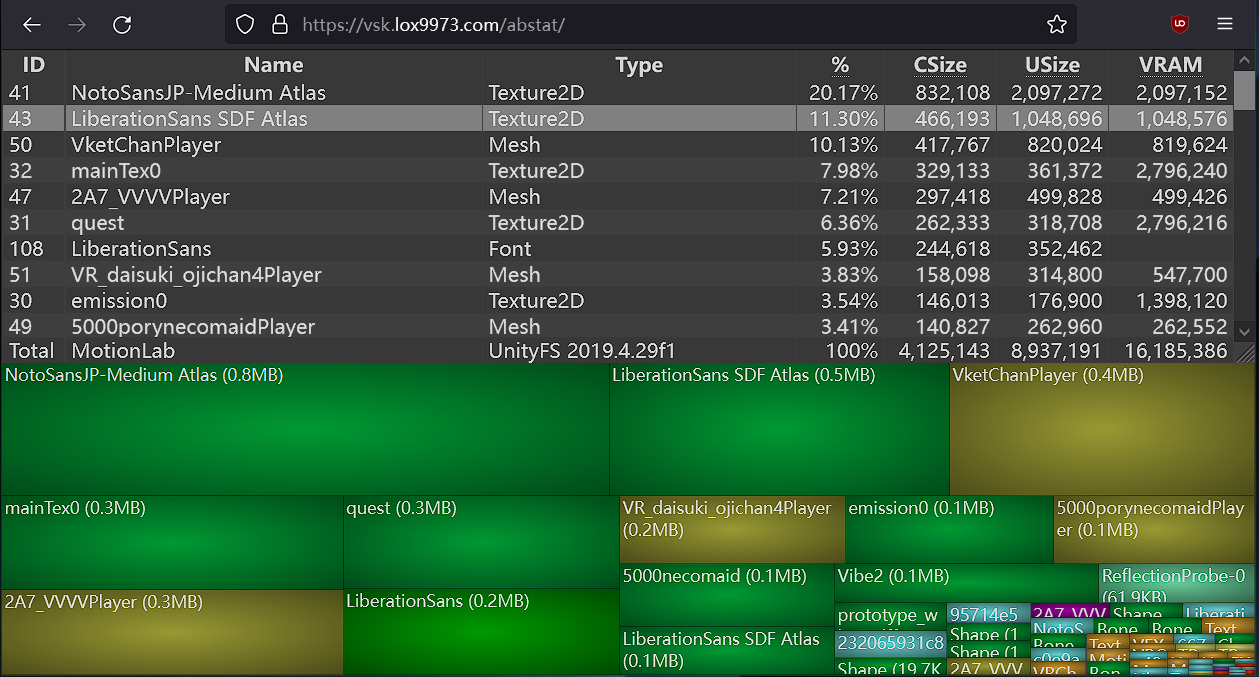
A WinDirStat-like online Unity asset bundle inspector
reduce texture resolution and adjust format/compression settings
remove or lower the poly count of meshes
snow knot
wind herald
switch to windows build target, build a test copy, and load that test copy in ht...
imo its easier to use the vram calculator in this to see what's taking up most of your download size.
https://github.com/Thryrallo/VRC-Avatar-Performance-Tools
It won't give you your actual dl size but larger textures will ofc usually take up more space.

GitHub
Contribute to Thryrallo/VRC-Avatar-Performance-Tools development by creating an account on GitHub.
Most of the time I just lower the resolution of textures on things, especially smaller bits of clothing/accessories
 vapid elm
Anyone know if it's possible to get a pc only avi, then export it from unity back into blender and the edit it to make it quest compatible?
I've tried but everytime I do the avatars mesh is laying on the ground while the bones are standing up right..
vapid elm
I've fixed the part of the avi and made the new fbx quest ready, but now I have the issue where I have the new fbx that's fixed. But don't know how to add/merge the new fbx with the old one in unity, or maybe I need to somehow add the animations onto the new fbx for upload. 
the one on the left is the fbx that I changed, and the one on the left is the original
 vapid elm
polys are in the meshes them self, so either delete some meshes in unity, or bring the fbx into blender and lower the amount on the avatar that way. Rn I'm trying to figure out the second way lol🥲
 wet spindle
the cats blender plugin has a decimate panel for just that
blender
unity doesn't edit meshes i don't think
missing textures
or misplaced
wind herald
decimating is pretty bad if you want the mesh to be editable in the future
i recommend just selecting edge loops by holding alt while clicking on them, then dissolving edges
keeps uvs intact too, if you avoid uv seams
 velvet crow
So I did some mesh edits in Blender, mainly to some shape keys. This included using "Blend from Shape" to overwrite the Basis on a few occasions. It appears that even though I have far fewer shape keys, the avatar uses about 3-4x more mesh memory than the base avatar I used.
I'm guessing that Blender is somehow accounting for every vertex in the blend shapes, causing the memory to skyrocket? Is there a way to optimize this?
velvet crow
Now that I've done literally nothing, the blendshapes are suddenly 6 MB instead of 34 MB, so I have no idea
wind herald
velvet crow
So I did some mesh edits in Blender, mainly to some shape keys. This included us...
it could have something to do with blendshape normals
setting normals to calculate instead of import can increase mesh memory usage drastically
velvet crow
I see. Yeah I'm not sure what caused it but it seems fixed now.
cold yarrow
velvet crow
So I did some mesh edits in Blender, mainly to some shape keys. This included us...
that's pretty much how shape keys work
definitely use import for blendshape normals too
 graceful condor
where is bake
 cold yarrow
is that in cats? baking is a process you can do with blender: https://docs.blender.org/manual/en/latest/render/cycles/baking.html
there's a great add-on called SimpleBake that simplifies this process, it's complex normally
 safe acorn
I need help with an error im having when trying to upload an avatar its an error I get frequently on multiple avatars when trying to upload
cold yarrow
safe acorn
I need help with an error im having when trying to upload an avatar its an error...
Post the error
 raw yoke
is it possible to merge particle system meshes like you do for avatar meshes?
cold yarrow
that's not really a thing, no
raw yoke
i see, thank you!
im learning about particle effects rn and i tried out something on my own to see how it worked
something i noticed was that each particle effect uses up a material slot on the avatar despite having the same material. i asked about meshes because i know when the same material shows up twice on avatars it's because it's on different meshes
but it sounds like this is unavoidable with particle systems?
heady smelt
velvet crow
So I did some mesh edits in Blender, mainly to some shape keys. This included us...
If you have less blendshape, it should use less memory, not the contrary. unless you merged meshes together...
Separating things like head is recommended, vrchat rank perf won't be happy but who care, it will use less memory and blendshapes will take way less CPU ressources
 sturdy jay
This is such a a stretch cause I don't think this is out there, but does anyone know of a script that will delete physbone components that arent tied to any skinned mesh render? Trying so hard to optimize and I set this one up with modular avatar and marshmallow PB 
heady smelt
So I know that having a multitude of separate meshes is bad for performance, but so are high poly meshes with shapekeys. I know no matter what, the head should be separate. In my instance, I'm using a few accessories that have shapekeys and I don't know whether I should merge them and make shapekeys to toggle them off resulting in less total meshes, or keep them seperate to avoid making more shapekeys.
Basically my question is which is worse for optimization, more skinned meshes and less shapekeys or less skinned meshes and more shapekeys?
 normal nova
sturdy jay
This is such a a stretch cause I don't think this is out there, but does anyone ...
normal nova
sturdy jay
This is such a a stretch cause I don't think this is out there, but does anyone ...
To make manual easier, you can search 't:vrcphysbone' in the hierarchy
sturdy jay
normal nova
To make manual easier, you can search 't:vrcphysbone' in the hierarchy
Oh excellent, tysm!
proper grail
heady smelt
So I know that having a multitude of separate meshes is bad for performance, but...
The whole high poly with shapekeys thing is fixed since vrchat upgraded to 2022, if a vert doesnt move it doesnt count anymore
I use cats separate mesh into shapekeys vs non shapekeys button to double check
normal nova
It's not so much 'fixed', like, the baseline cost of having shapekeys has been reduced (it used to double the skinning cost to have 1 shapekey active, versus none)
But it's still just generally expensive and scales with the mesh complexity
Separation still a good idea 
proper grail
So we still call 30k the limit for shapekeyd meshes, darns
normal nova
Mmm, it's generally just... less is better, I don't know if there's a real cutoff
buoyant holly
out of curiosity are there any tools that could set the editor only tags of an object based off of build Target as I currently construct my avatar in a very modular matter so being able to just go okay skip all the extra knick-knacks on the quest build would be handy?
 quartz geode
welp, that sucks, I am tryna optomize an avatar but I can't really optomize it without Cat's Blender Plugin, which seems to have been deleted by them for some strange reason
tulip rose
quartz geode
welp, that sucks, I am tryna optomize an avatar but I can't really optomize it w...

GitHub
:smiley_cat: A tool designed to shorten steps needed to import and optimize models into VRChat. Compatible models are: MMD, XNALara, Mixamo, DAZ/Poser, Blender Rigify, Sims 2, Motion Builder, 3DS M...
quartz geode
ok so that's open, need to download everything, but then from there, how do I import this into Blender
oh wia tI am in a newer version of blender, hang on
ok for some reason it gives me an error
to where it can't find the plugin for some reason
 zealous wigeon
quartz geode
oh wia tI am in a newer version of blender, hang on
zealous wigeon
quartz geode
oh wia tI am in a newer version of blender, hang on
If below Blender 4.0 (and some of it still works in 4.0) then the hidden developer version in their discord works.
It is hidden there because the lead dev disappeared and they can't update CATS directly.
It is at the top of the faq channel, in a link to a hidden portion of the github.
vapid elm
Anyone have some ideas how I could optimize the eyebrows for quest shaders in unity?
 quartz geode
zealous wigeon
It is at the top of the faq channel, in a link to a hidden portion of the github...
quartz geode
zealous wigeon
It is at the top of the faq channel, in a link to a hidden portion of the github...
I actually didn't see a hidden link of the github
ok so the stuff are located in the avatars section to where it shows the cats blender plugin on it's current version (0.19.0)
or wiat maybe I need to do this ability, god I am stupid
ok so I tried to extract the master folder out of the WinRAR version of it
no success
ok so I got the developement version (dev version)
zealous wigeon
quartz geode
I actually didn't see a hidden link of the github
And eh, they are probably fine with the link being shared around https://github.com/absolute-quantum/cats-blender-plugin/archive/refs/heads/development.zip
zealous wigeon
quartz geode
ok so I tried to extract the master folder out of the WinRAR version of it
And you don't extract it, you just install it through blender, you just select the zip file when installing an addon.
quartz geode
I have that installed, but I don't see the icon that shows up that says CATS
zealous wigeon
quartz geode
I have that installed, but I don't see the icon that shows up that says CATS
Did you enable it after installing?
In the addon manager, right after you clicked install
quartz geode
yeah it said it was activated via the checkbox
zealous wigeon
quartz geode
I have that installed, but I don't see the icon that shows up that says CATS
So there just isn't an extra tab in the n menu? (no clue what it is, that is just its hotkey)
quartz geode
oh wait, I keep forgetting to press N
ok yeah it is activated. now I am trying to get the model imported via by the ZIP file
but uhh it fails for some reason
zealous wigeon
quartz geode
ok yeah it is activated. now I am trying to get the model imported via by the ZI...
That has to be extracted and when importing you have to pick the right file format to import.
If it is a .blend file then it could be a newer version of blender that your current version cannot open, or it is just taking forever opening.
raw yoke
cold yarrow
mesh object + material slot = draw call. Fewer is better.
if i put polygons on the main body mesh, gave those polygons a transparent scrolling texture, and then used blendshapes or a bone to scale those polygons to 0% except when playing an animation, would that be better than using a particle system?
quartz geode
zealous wigeon
That has to be extracted and when importing you have to pick the right file form...
Ok so I got the model able to be imported into blender using FBX. However. the armature goes at a 90 degree angle and doesn't stay together with the model
let me show ya here:

then again, maybe I should've undid the prefab first before importing it
zealous wigeon
quartz geode
Ok so I got the model able to be imported into blender using FBX. However. the a...
Yes, that is an annoying thing that happens in Blender when using models made from the Unity FBX exporter or Maya.
You could try to line up the mesh to the armature, but I have had a lot of issues when a model imports like this, never fully succeeded in fixing it.
Check that everything works (posing bones, blendshapes) before doing too much.
quartz geode
all the bones are functioning
ok so I tested it out, and it worked, but stuff were being weird
but what I didn't know is that my avatar had an optimized variant
night inlet
normal nova
Separation still a good idea <a:catyes:1170140948626411650>
no, separation has no more benefit in terms of blendshape performance at all. also it was 10x slower not 2x slower in 2019 to have any blendshape active.
having many blendshapes active at once is still bad as each one is a compute call
and blendshapes that affect lots of verts are also bad
(all this info is for pc, I heard on quest stuff is still bad but you shouldn't have high poly meshes there to begin with)
normal nova
night inlet
no, separation has no more benefit in terms of blendshape performance at all. al...
Maybe I'm misremembering, do you have benchmarks handy?
night inlet
normal nova
Maybe I'm misremembering, do you have benchmarks handy?
https://gist.github.com/d4rkc0d3r/f77c1e96d4aeefd0d1eaf13fb096a2de (in that it was even worse than 10x from going 0 to 1 blendshape active in 2019)
but I also remember some other random tests here and there that I didn't write down and they were closer to 10x
normal nova
Sadly on Android the perf sticks closer to the 2019 data, from what I've been told
Their optimizations didn't apply to OpenGL ES
normal nova
night inlet
https://gist.github.com/d4rkc0d3r/f77c1e96d4aeefd0d1eaf13fb096a2de (in that it w...
There's no split test here for 2022?
night inlet
but also, quest avatars should be small to begin with and you get no choice if you want it good ranked either
normal nova
They are, but the tight GPU-ness of it makes that scale up anyway
We're doing some wider deeper profiling, but still collecting data on that
night inlet
normal nova
There's no split test here for 2022?
didn't write them down. but they were slightly slower since it was seperate calls instead of doing one for everything
normal nova
ah
night inlet
the issue with the old method was that it did two unessesary copies of the vertex buffer as soon as a blendshape was active
and its no longer doing that with the compute shader approach to skinning
normal nova
We have a new system in testing which may totally change the reccomendations, but that may be a while
(though, quest-only)
night inlet
also the compute skinning made even base skinning significantly faster and in the test you can see that even with a blendshape active its still faster than 2019 with no blendshapes
normal nova
mhm
vapid elm
quartz geode
let me show ya here:
import the fbx straight from the unity file, don't export it from unity
normal nova
night inlet
also the compute skinning made even base skinning significantly faster and in th...
Would be worthwhile to figure out just how many active blendshapes you need to make the split worthwhile
vapid elm
vapid elm
import the fbx straight from the unity file, don't export it from unity
and easy way to do so would be to right click on the fbx in unity, then its should give you an option to search fir the file location and then just copy the fbx a paste it into blender
night inlet
normal nova
Would be worthwhile to figure out just how many active blendshapes you need to m...
never? there is no extra overhead of a blendshape being in a big mesh now
normal nova
Your benchmarks say it's like 0.005ms/shape?
night inlet
yeah but like its gonna be like that on the split mesh too...
vapid elm
vapid elm
and easy way to do so would be to right click on the fbx in unity, then its shou...
something like this
 normal nova
night inlet
yeah but like its gonna be like that on the split mesh too...
normal nova
night inlet
yeah but like its gonna be like that on the split mesh too...
But less so, it scales with the number of vertices
night inlet
normal nova
But less so, it scales with the number of vertices
no, it scales with the number of vertices affected by the blendshape
normal nova
Does it? At least in the past it was statically applied over the entire mesh
night inlet
the old one scaled with the number of total vertices cuz it did the two vertex buffer copies
normal nova
Regardless of active or not. Unity internally doesn't distinguish between active and inactive, unless it's a hidden implementation detail
...I guess I could just ask unity to be sure
night inlet
normal nova
Regardless of active or not. Unity internally doesn't distinguish between active...
it does distinguish. the blendshapes are stored sparse on the gpu. each element stores which vertex it affects and the delta position, normal & tangent
gets applied by this compute shader: https://github.com/TwoTailsGames/Unity-Built-in-Shaders/blob/master/DefaultResources/Internal-BlendShape.compute
normal nova
ahhh good to know
night inlet
night inlet
the old one scaled with the number of total vertices cuz it did the two vertex b...
just for completeness. the old one also additionally scaled with affected vertices. it was just completely dwarfed by the really slow portion that scaled with total amount of verts
 dreamy scaffold
I'm trying to atlas materals on a model wit cats and it keeps ending up all wacky,
The altas texture it creats after combining materials is just one giant image and a tiny white square, and everything appears to be atlased to the square
so the whole model just becomes white
wind herald
Just atlas manually, gives you more control too
 unborn basin
so im trying to create a stupid simple avatar. Its a single billboarded plane with a texture applied, and im getting an error for avatar optimization. Anyone able to help?
sorry, but x-post from help, just realized this channel is probably where i should have posted...
 waxen estuary
Anyone know a formula for calculating possible vram savings of say optimizing away a few textures inside of my atlas texture? This is because I noticed the parts of the textures that were used by the materials on my avatar which were actually a solid color so I could optimize them down to a simple RGB node in the material settings and then use the blender atlas texture plugin to put it as a 32 x 32 px section of the atlas texture instead 😅.
Atlas Texture (excluding head and eyes): 4k
- Parts of it that fall under this situation: 2,048 x 1,024 (possible 2,048 x 2,048)
- could possible further it down by forcing blender to emit a new smaller texture for the base and a few other mesh's that I clipped some of the mesh out that never displays to optimize the vram even further (on the body texture and possibly reduce that down to about 1k or so as well to make texture 2k and not 4k).
How much potential texture VRAM could I save in VRChat if I was to go with this change?
 dreamy hemlock
I am not the brightest. The first error (on top) does not make sense, and the second one I know how to do. im just curious about the first one.
 spring sun
You cant have transparency on quest
dreamy hemlock
dreamy hemlock
I am not the brightest. The first error (on top) does not make sense, and the se...
Nope I lied, how do I optimize hair physbones? Like keep the back ones and remove the front one.
spring sun
Dont have so many bones affected by the physbone component
spring sun
dreamy hemlock
I am not the brightest. The first error (on top) does not make sense, and the se...
The particle shaders, especially alpha blend, arent really supposed to be used on avatars
The other particle shaders just dont render at all for quest if its not on a particle system
zealous wigeon
dreamy hemlock
I am not the brightest. The first error (on top) does not make sense, and the se...
Alpha Blended is meant to be used on worlds, yes, it is confusing.
Same applies to lightmapped, a shader meant strictly for worlds as it supports baking lighting.
They should be in a different folder, but they aren't.
dreamy hemlock
zealous wigeon
Alpha Blended is meant to be used on worlds, yes, it is confusing.
Same applies ...
I was able to figure it out! ty!
 jovial valley
 vapid elm
Either go threw your armature and remove the Phys bones that way, or what I like to use is ( VrchatQuestTools ) witch you can get from git hub. It gives you an option to remove or select each phys bone and see all the Phys bones on your avi
wind herald
you don't have to go through it, just type vrcphysbone in the hierarchy search, and it will show all objects with phys bone components on them
snow knot
waxen estuary
Anyone know a formula for calculating possible vram savings of say optimizing aw...
If you aren't downscaling the final atlas compared to the textures you're putting into it. The vram cost is the same. i.e a 2x2 atlas of four 1024 textures will be 2048x2048 and cost the same as those 4 textures. Atlasing is mostly done to combine materials into a single draw call.
If you're downscaling the final atlas to the next level your going from say a 2048 to 1024, which is the same size as the original textures so it's like you save three 1024 textures worth.
Note that you can still downscale textures w/out atlasing, you just don't get the reduced draw calls that atlasing provides.
wind herald
waxen estuary
Anyone know a formula for calculating possible vram savings of say optimizing aw...
the main things influencing vram usage is texture resolution and texture format
Tips and guidelines for optimizing texture memory (VRAM) and filesize for VRChat creation.
 restive geyser
Anyone run into an issue where you get an avi to Excellent rating on quest, upload for both PC and Quest to make a fallback, but then it tells you you can't use it as a fallback?
 restive geyser
Exported as a package and imported it into 2019 and could set it as fallback. For anyone that has this issue too I guess idk.
 snow knot
I had a similar issue when working on an avi that was always on 2019. Eventually just worked after uploading it at some point, not sure what I did to change it. Might've just needed to have been scanned server side *shrugs*

 heavy knot
calling sign to just start using baking instead
waxen estuary
but I am using on most of my model RGB color node materials
to cut down on texture size
😅
Basically have all the real details in normal/alpha/the other shader maps
 crisp shell
I need to make space in my avatar contacts and remove some
what is the component called where are they stored?
what can i delete?
theres a lot of physics like necklaces on my avi and i dont need them how can i remove the contacts on it? thanks!
radiant shadow
if you ever wonder where components are on your avatar , check sdk build and [ select ] it will show all your avatar
 crisp shell
ooh cool lemme try that thanks
radiant shadow
if you are missing it from list, you need to enable show all stats , for some reason i have 2 (thanks sdk)
 crisp shell
thanks 🙏
waxen estuary
So like

is it a good idea to downsize face texture to 512 x 512 so my avatar would use a single 1k texture?
wind herald
yeah, this wastes a ton of space currently
all of those empty pixels are still being loaded into vram
although you might be able to move that purple texture to the top right
and then set the texture to 2048x1024
waxen estuary
yeah could if the material combiner blender extension actually allowed us to define placement of the actual materials it combines.
Which would afaik be absolutely nice.
wind herald
just move it around yourself
waxen estuary
or just move the head texture down to 512 x 512 so it brings the entire thing down to a 1k texture 😅.


it also from looks of it having head texture at 512 x 512 changes nothing on the quality in unity either.
wind herald
atlasing manually is pretty easy and gives you a lot more control anyway
waxen estuary
hmm true
I do have a goal for the new year though.
which is shortening the hair small enough where I can basically nuke all of it's specific bones
then weight paint it to the head bone
😅
Then I would have under 75 bones.
cold yarrow
yeah you can totally make your own UV map and then bake the textures into it. There's an add-on called SimpleBake which makes that really easy.
... wow I was scrolled.
anyway, still true
wind herald
i wouldn't bake the textures
just load up any image manipulation program and move the textures around accordingly
cold yarrow
ah with SimpleBake it's really easy to just use that
wind herald
hmm
baking does not always give perfect results though
especially if you have any intersecting faces
cold yarrow
yeah different than normal baking, but you're also right
wind herald
i'd get it if it could bake ao maps without self occlusion
cold yarrow
not sure, I haven't tried that
waxen estuary
I would get simple bake if it was free 😂.
for now I have to deal with the combiner extension 💀.
cold yarrow
It's pretty cheap and well worth it for the time saved.
 urban field
Does anyone have any cool particles they would be willing to give to me mainly effects like Dragon ball?
cold yarrow
urban field
Does anyone have any cool particles they would be willing to give to me mainly e...
there's a bunch of free packages in the Unity store
urban field
Alright
 sacred acorn
i need help please
the avatar im making is 34 gigabytes and the textures are at the lowest quality settings
 wind herald
sacred acorn
the avatar im making is 34 gigabytes and the textures are at the lowest quality ...
wind herald
sacred acorn
the avatar im making is 34 gigabytes and the textures are at the lowest quality ...
34 megabytes and it might have something to do with it having over 300k polys on quest, which is pretty excessive even on pc, and especially on quest
you‘re gonna have to delete a bunch of clothes and other things off of your avatar
 final cove
how do i make my skin meshes into one skin mesh?
waxen estuary
final cove
how do i make my skin meshes into one skin mesh?
blender
select all the mesh except base then control + j in object mode.
And then select base last so they all merge into it.
sacred acorn
wind herald
34 megabytes and it might have something to do with it having over 300k polys on...
ok
waxen estuary
by not using them at all.
sacred acorn
waxen estuary
select all the mesh except base then control + j in object mode.
i should have done that first ._.
jagged dagger
waxen estuary
by not using them at all.
🤨
how do i get this smaller?

i cannot edit this
would like to reduce that

though not for the avatar rating as its very poor regardless
thats all options available
 heavy knot
jagged dagger
how do i get this smaller?
heavy knot
jagged dagger
how do i get this smaller?
how big is the gif itself
jagged dagger
idk
 jagged dagger
i cannot really do anything with that file format

also lol i just noticed, good i have an optimized version that is  i guess

but still better than the average eboy/egirl you see in public lol
heavy knot
did you make the texture array yourself?
jagged dagger
no
heavy knot
if not that's gonna be tough
jagged dagger
its from an asset i bought
currently already rolling this stuff out to my public avatars
so if i can change that now its early enough to restart the rollout
waxen estuary
jagged dagger
how do i get this smaller?
by not using any gifs
jagged dagger
waxen estuary
by not using any gifs
What's that stupid reply lol
Stop saying people should just not use something
That's completely dumb
Rather say something that's useful in any way
I'm not going to stop using something i paid for
waxen estuary
what I mean is
see if you can get a non-gif version of each frame
and size them down as far as you can
waxen estuary
RIP
heavy knot
would there be any way to contact the asset creator?
heavy knot
cause getting the source gif file itself will be what to do
can't reverse texture arrays currently
waxen estuary
jagged dagger
Since vrchat partially broke the asset with their updates
I would ask the original creator if they can update it for you.
 paper zinc
jagged dagger
how do i get this smaller?
paper zinc
jagged dagger
how do i get this smaller?
You can lower the resolution of it in its import settings or that dropdown in thry's tool
jagged dagger
paper zinc
You can lower the resolution of it in its import settings or that dropdown in th...
that does not work
neither of both
trying to do that in thry throws an error
changing import settings... they simply dont exist
paper zinc
Then there's nothing you can do about it
Replace it with something that isn't a 39MB big flipbook, maybe
paper zinc
So find or make something
jagged dagger
othterwise im SOL
jagged dagger
paper zinc
So find or make something
i would simply not be able to recreate it like this
since i do not have the singular files to do that
its meant to look like the portals of the game
paper zinc
You can use something else though
paper zinc
Couldn't possibly tell you without seeing what you're after
jagged dagger
paper zinc
Couldn't possibly tell you without seeing what you're after

Gumroad
Features:Easy to import onto any model, or change textures to your liking. Glados Potato Shooting animation that move the barrel and armsParticles for a nice shooting effectPortals that stick to walls and will land flat except at extreme anglesTwo handed holding with gestures (hands closed)Uses vrchat hand gestures to move the assets from your b...
paper zinc
You can recreate this with shader effects instead of a flipbook
jagged dagger
yes i know, but i dont know where i would get the required files for this
since i do not have any files i could use for this
paper zinc
Well the inside background can be made with the cloud effect in Photoshop
jagged dagger
i would be unable to recreate it to look like the original
jagged dagger
paper zinc
Well the inside background can be made with the cloud effect in Photoshop
i dont have access to photoshop lol
paper zinc
The outer ring is just a glowy circle
And the particles are just a simple round gradient
jagged dagger
you can assume i do not have access or knowledge to any image editor or similar things
paper zinc
jagged dagger
i dont have access to photoshop lol
You have gimp 
paper zinc
Then use the flipbook I guess
jagged dagger
and every tutorial is like 10 years old
paper zinc
Leave it as is
jagged dagger
my only option is the creator
otherwise im simply unable to do anything about it
the asset itself is partially broke anyways thanks to vrchat
since a vrchat update broke it
paper zinc
jagged dagger
otherwise im simply unable to do anything about it
The required textures are simple to create, the rest is configuring a material. Everybody starts somewhere, if you're willing to learn how to make stuff on your own you can get this sorted
jagged dagger
i would if the tutorials wouldnt be a decade old outdated
paper zinc
Those decade old tutorials probably still apply
jagged dagger
the ui looks different to that now
paper zinc
Filters and tools in image editing software don't have a tendency to move around much
jagged dagger
i couldnt even figure out how to change colors by selecting stuff with it
and tutorials never helped
cause it was simply different than in the tutorials
paper zinc
Well then use the flipbook
As an alternative I'm sure you can also find a gif or video of a portal from Portal, just like the creator of that asset did
jagged dagger
i can look for that, but until i find one ill be stuck with the flipbook
 shy charm
What's the best way to make a bunch of accessories that can be toggled on and off? I saw a method someone used where they made them all one skinned mesh, and had painted them all to individual bones that were specifically used for this as opposed to using shape keys. Is this a good idea?
 weak crystal
Hi, I am trying to decimate a model with shapekeys to make it perform better and I was able to use this method to split up the deformed shapekey so I can actually decimate the model: https://blender.stackexchange.com/questions/155930/cant-apply-modifiers-with-shapekeys-on-blender-2-8
However the issue is that I need to keep my vertice count consistent between the two models to re-merge them, and when I try to use decimate, applying the modifier leads to extra vertices being added in different amounts to each model. Ive been fiddling around with different ratios for a good while now and I can never seem to get the vertice count to line up, any advice?

Blender Stack Exchange
i have a model with some modifiers on (subdivision surfaces and solidify) and i'm not able to apply those modifiers with the shapekeys on, but i want to keep them, is there any solution beside doin...
I just managed to also fix said issue but that led to some absolutely horrible transforms lol
im just gonna give up and delete the shapekeys since I technically dont need them I dont think?
nvm, I figured it out!
For anyone stuck, dont use a modifier, instead, use the Decimate command in the Edit Mode
waxen estuary
When I changed hair and it caused the material combiner extension to mess up so it left me no choice but to manually bake the hair to resolve it 😅.
wind herald
weak crystal
nvm, I figured it out!
For anyone stuck, dont use a modifier, instead, use the D...
I‘d suggest dissolving edge loops instead of decimating
wind herald
shy charm
What's the best way to make a bunch of accessories that can be toggled on and of...
If you‘re on windows, use a shader that supports UV Tile or UDIM discard
Make a secondary UV map, then place parts of the model on separate UV tiles which can then be discarded at runtime
 alpine torrent
heya, so im trying to optimize my avatar for both pc and quest, because for some reason, it has 12 material slots, but making an atlas... does this


everything seems to work but the face

 wary vessel
alpine torrent
heya, so im trying to optimize my avatar for both pc and quest, because for some...
wary vessel
alpine torrent
heya, so im trying to optimize my avatar for both pc and quest, because for some...
Sorry ngl thought that was GeorgeNotFound's Minecraft avatar 😭
alpine torrent
its cool! its based mostly on a minecraft ava i made when i was little
 zealous wigeon
alpine torrent
everything seems to work but the face
zealous wigeon
alpine torrent
everything seems to work but the face
Face seems to use cutout, the atlaser that most use doesn't support any alpha.
And you can't use cutout or practically any transparency on Quest (unless it is a particle).
To make the face work you will have to use the knife tool in Blender to cut out the face.
alpine torrent
zealous wigeon
Face seems to use cutout, the atlaser that most use doesn't support any alpha.
A...
luckily its a face mask so i can just delete the vertices

seems to be working swell so far
it did have lipsync and eye tracking but both seem.... like a lost cause

 sly forum
How is any avi suppose to be quest optimized (5K polys) and still look good quality?
wind herald
10k is the recommended amount and 20k is the max for poor rating
you just have to use those polys efficiently
 green forum
sly forum
How is any avi suppose to be quest optimized (5K polys) and still look good qual...
green forum
sly forum
How is any avi suppose to be quest optimized (5K polys) and still look good qual...
for me i just made it lower poly in a very undestructive way, and just unsudivided the more detailed parts. It doesn't look the best but its comes to about 5k tris and fits the artstyle!


any highly detailed models such as humans or whatnot will just have to suffice with either being mobile game quality or just not quest compatible, which you could always have a custom fallback for!
textures will also help a lot with keeping poly counts low, a simple normal map can give so much detail into an otherwise flat model.
if you take this more detail freddy model i've made recently, the suit alone is around 50k tris, I made a lower poly version that is nearly half of that. While it wouldn't be able to go to quest its still a good optimization. the textures also look nearly identical if you don't pay attention to the warped uvs from me being lazy with the optimization


there are a lot of factors that go into model optimization for games in general, and you learn to take shortcuts wherever needed the more 3d modelling you do
 jagged elk
How can I make a fallback avatar?
 willow wave
jagged elk
How can I make a fallback avatar?
willow wave
jagged elk
How can I make a fallback avatar?
Fallbacks require an avatar performance of good or better for both platforms. Once uploaded to both platforms, your SDK will then have the option to set as fallback.
 upper yacht
sly forum
How is any avi suppose to be quest optimized (5K polys) and still look good qual...
upper yacht
sly forum
How is any avi suppose to be quest optimized (5K polys) and still look good qual...
That's... like the amount of polys games released 10-14 years ago had on a lot of things. So, you can make things look good. (This is roughly the graphical quality that high quality mobile games have currently)
wind herald
upper yacht
That's... like the amount of polys games released 10-14 years ago had on a lot o...
games which in most cases weren't vr and didn't let you get up close to the models :P
ivory sluice
They're not supposed to be good quality looking in mobile anyways, just need to look like the avatar so quest users know what they are seeing
upper yacht
wind herald
games which in most cases weren't vr and didn't let you get up close to the mode...
A model can still look good with ~5k polys up close. Bioshock 2 comes in mind. The budget for most models in that game is around that point. You can see it has aged... but, the game is 14 years old. Of course. Most of the time, the thing that does carry the weight of these old games are shaders and textures. The former we can't do custom ones and the existing ones are not applicable to a lot of scenarios. As for the latter, well, not a lot of people doing quest avis are 3d artists.
Besides, for being pretty up close that's mostly a shader and texture thing. As long as the shape is still cohesive enough.
spring sun
sly forum
How is any avi suppose to be quest optimized (5K polys) and still look good qual...
Smooth lighting
buoyant holly
some example of games with about 5,000 triangles for the characters https://middleofnowheregaming.files.wordpress.com/2014/12/kh2-sora-donald-goofy.jpg



 warm falcon
what's the best version of Blender to be using for VRC?
heavy knot
Latest if you can, though if you want to use the CATS blender plugin the best supported version would be the 3.6 LTS
warm falcon
okay cool
wind herald
cats is pretty obsolete nowadays
heavy knot
I do use it for it's smaller features sometimes
radiant shadow
oh yeah cause we all do visemes manually 🔨 every time i see 'its absolete'
waxen estuary
Honestly the only thing I use cats for is when I need to make a flat foot sock for a healed foot, then I use the pose mode in cats to apply as rest pose on the socks then change the armature to the real one so I can then sculpt the socks (if needed) to fit in the shoes as well if the socks end up being too big.
warm falcon
Okay so I made an optimized model, only problem is I accidentally made an empty atlas material. Is there a way to make my own atlas? (I atlased the Dress and Horns) I do have photoshop 2020

also really proud of this since i'm blender newbie
 wind herald
radiant shadow
oh yeah cause we all do visemes manually 🔨 <:ratl:1090025945081065493> every t...
wind herald
radiant shadow
oh yeah cause we all do visemes manually 🔨 <:ratl:1090025945081065493> every t...
never said it has no use at all, the vast majority of people will never make visemes from scratch though
radiant shadow
 Thats what obsolete mean - no longer used or needed , i didnt even say its no use at all - thats you
its just a tool thats for shortcuts, after awhile you end up using blender shortcut - but im rarely ever doing visemes manually when i can just make 3 and have it do the rest
heady smelt
whats the best way to combine skinned meshes for vrc avatars in unity
cold yarrow
in Unity? not sure you can. I do it in Blender.
 sick timber
I mean theoretically you can but… no. 
waxen estuary
I love how the top part is 4.7k tris alone 😅.


 wind herald
spring sun
heady smelt
whats the best way to combine skinned meshes for vrc avatars in unity
Polytool can do it but you require a texture for everything and cant use colored materials other than straight up white because it wont transfer when it atlas the meshes for you
zealous wigeon
heady smelt
whats the best way to combine skinned meshes for vrc avatars in unity
https://github.com/d4rkc0d3r/d4rkAvatarOptimizer can do it, you just have barely any control over it.
GitHub
d4rkpl4y3r's VRChat Avatar 3.0 optimizer. Contribute to d4rkc0d3r/d4rkAvatarOptimizer development by creating an account on GitHub.
waxen estuary
zealous wigeon
https://github.com/d4rkc0d3r/d4rkAvatarOptimizer can do it, you just have barely...
that available under vcc now?
waxen estuary
heady smelt
the cats plug in does it too
cats has been doing a bad job on most avatars I work with
only thing that works well is apply as rest pose when fitting a flat foot sock to a HEALED foot.
So then I can easier sculpt the sock to the base then.
 robust helm
waxen estuary
that available under vcc now?
robust helm
waxen estuary
that available under vcc now?
yup
 tranquil plover
Anyone know of a good tutorial for deleting avatar toggles? I can only find info on how to add them, but wanna optimize my avatar a bit.
zealous wigeon
tranquil plover
Anyone know of a good tutorial for deleting avatar toggles? I can only find info...
Delete the things that are being toggled, easiest, just remove the mesh, if possible.
tranquil plover
Problem is I want to keep the parts that are being toggled, they are part of body.
zealous wigeon
tranquil plover
Problem is I want to keep the parts that are being toggled, they are part of bod...
Is it a material swap toggle then?
tranquil plover
oh, no, it enabled me to toggle off some detail parts, but I always had it enabled, so wanted to remove toggles. Someone just helped me through it. Thanks for taking your time to help as well.
waxen estuary
zealous wigeon
Is it a material swap toggle then?
Wait there are material swap toggles that swap the materials and not the mesh itself?
onyx harness
waxen estuary
Wait there are material swap toggles that swap the materials and not the mesh it...
yeah, you can animate *what material is assigned to a mesh
wind herald
waxen estuary
Wait there are material swap toggles that swap the materials and not the mesh it...
please don't tell me you've been adding duplicates of meshes xD
you can also animate material properties such as emission strength, audiolink, decals etc
waxen estuary
wind herald
please don't tell me you've been adding duplicates of meshes xD
not at all, only a normal and quest version of the same materials.
wind herald
okay, thank god lol
i've seen an avatar with duplicate clothes with different materials on them 💀
 whole cradle
I have an Avi very close to being quest compatible I just dont know how to...
And I want it to be the counterpart to my main version.
If I open unity with it it has 2 in there. Very Poor and good optimized
How can I make the good optimized the quest version to my very Poor.
waxen estuary
honestly for me I actually use the quest version of my avatar to be opportunity to optimize my pc version for people with lower end/AMD PC's too.
(like AMD hardware as it seems AMD no matter what it is is mostly trash and has problems in vrchat)
whole cradle
I never had probs with VRchat and I have AMD CPU.
Used to be fully AMD build never had issues.
I don't know how to make my Very poor Avi quest compatible....
waxen estuary
mine is an AMD APU with ~512 (0.5 GB) MB VRAM, the graphics driver sucks and most of the time crashes itself saying a timing issue in the driver itself.
whole cradle
So I was gonna use the Optimized one make it quest compatible and upload it to my PC avatar so it's PC/Quest.
whole cradle
waxen estuary
mine is an AMD APU with ~512 (0.5 GB) MB VRAM, the graphics driver sucks and mos...
Ryzen 5 3600 6 Core 12 Threads 4.2Ghz.
Currently running 3.95Ghz tho.
waxen estuary
whole cradle
Ryzen 5 3600 6 Core 12 Threads 4.2Ghz.
Ryzen 7 5825U here

 whole cradle
waxen estuary
yes I use the same project and fbx file for PC and quest on my avatar currently.
whole cradle
waxen estuary
yes I use the same project and fbx file for PC and quest on my avatar currently.
So like... My friend says it doesn't work.
If I import the unity package there is "very Poor" and "good optimized" and they are standing next to each other.
waxen estuary
interesting
whole cradle
I wanna use the Optimized version as the quest one cuz it's pretty close it's like 13MB so it would still need optimization.
waxen estuary
Some people also have separate prefabs for PC and quest and somehow hide the part of the scene for the PC version when building for quest, and likewise for PC.
waxen estuary
As to how, idk if there is a way to rig it up to automatically do that upon build configuration change from Windows to Android for quest
whole cradle
Might have to pay someone.
 lavish leaf
whole cradle
I wanna use the Optimized version as the quest one cuz it's pretty close it's li...
lavish leaf
whole cradle
I wanna use the Optimized version as the quest one cuz it's pretty close it's li...
@whole cradle send me a dm I can fix that
whole cradle
lavish leaf
<@1111972160592941107> send me a dm I can fix that
I cant afford that atm. ;-; Im trying to get the version of the avi that i have wich is 2 Versions once i put them into unity i can show you. One is the like "Good Optimized" one and one is the "Very Poor" one and i wanna try to get the "Good Optimized" one as the Quest for my "Very Poor" and i dont know if that is even possible.
lavish leaf
whole cradle
I cant afford that atm. ;-; Im trying to get the version of the avi that i have ...
Okay, I get it. That you do not currently have the funds for paid software is understandable Additionally, I would be pleased to examine your current Unity avatars and offer you optimization tips. Do you mean that you have a PC version and a Quest version when you say that you have two versions of your avatar? Or are they both PC versions with varying optimization levels? 😊
whole cradle
lavish leaf
Okay, I get it. That you do not currently have the funds for paid software is un...
Both pc, the opti version is just pretty close bc it's like 14mb or so.
lavish leaf
Okay
 sonic salmon
how would i remove particle effect toggles without breaking the link to pc and quest
whole cradle
My pc struggles a bit with unity.
@lavish leafLeft PC Very poor Right PC Good.

So i was wondering if the Optimized one can be made more towards quest and compatible, and then be uploaded to the PC one on the left so the quest sees the right one and the PC sees the left one. Yk what i mean?
buoyant holly
whole cradle
So i was wondering if the Optimized one can be made more towards quest and compa...
yeah that's completely doable
whole cradle
buoyant holly
yeah that's completely doable
How?
buoyant holly
you use the same build ID on the optimized version for Quest and the PC version
whole cradle
buoyant holly
you use the same build ID on the optimized version for Quest and the PC version
I just don't know how to make it quest compatible.
buoyant holly
Did this video help you? Consider sending me a tip on Ko-fi! https://ko-fi.com/sippbox
Making optimized Quest models is hard. But it doesn't have to be! With recently updated polygon limits and fallback avatars, it's a better time than ever to create something that represents you to Quest users! Hopefully this tutorial will help you out!
0:00 ...
Part 1: https://www.youtube.com/watch?v=xjS8rreIMos
00:00 - Intro
00:19 - Importing Your Avatar: UnityPackage Import
00:42 - Importing Your Avatar: FBX Import
01:20 - Importing Your Avatar: FBX Rig Configuration
02:23 - Importing Your Avatar: FBX Material Setup
03:56 - Avatar Descriptor
04:25 - Avatar Descriptor: View Position
04:45 - Avatar De...
whole cradle
I know Joe to upload
buoyant holly
then the first video would be more helpful for you
whole cradle
Oh well.
buoyant holly
it would describe doing different models for each platform
whole cradle
I've looked at it but it is quite complicated.
buoyant holly
question do you need to generate the quest Avatar or just get it to attach to your PC avatars build ID
whole cradle
No I have to like upload them so my pc avatar is also a quest Avi.
So I think the second options.
buoyant holly
you just copy the component from the PC Avatar that says build ID and paste it into the quest Avatar and upload it and it should be attached to the PC Avatar as a cross-compatible avatar
whole cradle
So I use the Avi ID from the already uploaded pc Avi and then put that ID in the quest one.
buoyant holly
whole cradle
So I use the Avi ID from the already uploaded pc Avi and then put that ID in the...
yes
 whole cradle
I see.
buoyant holly
that's all you need to do to make a cross-compatible avatar that uses two different models
whole cradle
I now have to just make it quest I guess.
Mhmhhm
Maybe switching the shader is already enough?
Cuz it's already pretty light
buoyant holly
would be worth a try to see what it says
whole cradle
Well I can switch to android and show what the VRC sdk says right?
buoyant holly
yes
whole cradle
Alright will do that in a few minutes.
sonic salmon
how would i remove particle effect toggles without breaking the link to pc and quest
buoyant holly
the build id what determines if they're connected so removing the particles shouldn't break that?
like just leave the toggle itself in your animation controller just remove the particles

 buoyant holly
whole cradle
<@216145046347448320>
buoyant holly
whole cradle
<@216145046347448320>
yeah that Avatar definitely needs optimizing to be a quest Avatar
whole cradle
Ys ik that but i dont know how to do any of this...
buoyant holly
then most people would just see your imposter unless people manually turn on that Quest Avatar
buoyant holly
whole cradle
Ys ik that but i dont know how to do any of this...
the first video I showed how to do that
whole cradle
I will do it later im not really in the mood for fixing or stuff like that in -6°C Room temp.
Thank you for the help tho.
buoyant holly
glad to be of help hope it goes well
 sick yew
(I haven't tried it, but it probably doesn't work with d4rk AO)
https://booth.pm/ja/items/5409262
This tool that allows you to incorporate the "Mantis lod editor" into your avatar build in a non-destructive way.
(NDMF editor extension required)

非破壊でポリゴンを削れるツールです。 使うには有料アセットのMantis LOD Editorが必要です。 ・分かる人向け説明 Mantis LOD EditorをNDMF(なでもふ)で動くようにしたものです。
 opaque mesa
Recently picked up a model from booth that has good topology (a little overboard on smaller details) but ended up just over 70k polygons on its own. Any way I can reduce this? It feels awkward that a model barely over 70k polygons is automatically very poor.
buoyant holly
#b3d #blender #secrets #tutorial
Visit the Blender Secrets website: https://www.blendersecrets.org/book
e-Book bundle (20% Discount) : https://gumroad.com/l/IxofeY
waxen estuary
sick yew
(I haven't tried it, but it probably doesn't work with d4rk AO)
https://booth.pm...
oh my, it does not produce holes and destroy meshes right?
buoyant holly
I would point out it requires a 50.00 Unity asset to work https://assetstore.unity.com/packages/tools/modeling/mantis-lod-editor-professional-edition-37086

Get the Mantis LOD Editor - Professional Edition package from Mesh Online and speed up your game development process. Find this & other Modeling options on the Unity Asset Store.
waxen estuary
buoyant holly
I would point out it requires a 50.00 Unity asset to work https://assetstore.u...
what
buoyant holly
 waxen estuary
buoyant holly
waxen estuary
buoyant holly
I really wish they made a blender version of that tool.
buoyant holly
then that wouldn't be the same tool as that wouldn't be a non-destructive workflow
waxen estuary
I know of a few specific mesh parts before I merge my meshes together on the unity side that needs to be made lower poly
robust helm
buoyant holly
Can you send me a link to this in my dm's? I deadass cant find it on booth
 smoky willow
I only have a quest 2
buoyant holly
robust helm
Can you send me a link to this in my dm's? I deadass cant find it on booth
非破壊でポリゴンを削れるツールです。 使うには有料アセットのMantis LOD Editorが必要です。 ・分かる人向け説明 Mantis LOD EditorをNDMF(なでもふ)で動くようにしたものです。
sick yew
waxen estuary
oh my, it does not produce holes and destroy meshes right?
This asset uses very good LOD generation, but there is a possibility of holes. (Although, I once used the free version of this LOD editor to cheat the polygon count when the maximum polygon count was low in the SDK2 era, and it was useful)
The mesh is not destroyed, because when you go into play mode, it is generated in a separate file at avatar build time, and when they are done, it reverts back to the original mesh. (You can manual bake if you want, but even that is a separate file)
If you use VRCFury or D4rk AO, you should have some idea of how it works.
This is a tool to make Unity plug-ins work with NDMF, so it would be difficult to make them work with Blender.
waxen estuary
I discovered that my base and the gloves I cut from it are using a lot of needless edge loops.
I think dissolving those can help.
waxen estuary
https://feedback.vrchat.com/avatar-30/p/i-would-like-to-be-able-to-set-a-fallback-in-vrchat-for-avatars-that-meet-the-av I commented on this.





 wind herald
is this optiloops?
waxen estuary
yes
I patched it to work in blender 3.6 mostly
just the bevel and crease does not work though.

managed to bring my avatar down to just under 32k using that extension though.
vapid elm
anyone know why the eyebrow might be looking like this in unity?. in blender I re did the mesh for the eyebrows, but for some reason the one on teh left got broken and Idk why?

I thought maybe a weight paint issue but it wasn't, so idk what could be causing this
radiant shadow
used knife tool to cut eyebrows?, if you make new vertices they have zero weightpaint
vapid elm
I used knife tool on both but for some reason the left one is broken
🥲
Imma just redo it and hope it fixes it self lol

😭
why must I be tortured this way
vapid elm
radiant shadow
used knife tool to cut eyebrows?, if you make new vertices they have zero weight...
should I just make new one's from scratch?
actually, I just answered my issue
nvm lol, gonna just make new eyebrows from scratch lol
 jovial heron
does the crunch compression option worth to enable? since it doesn't reduce vram usage and the textures are LZMA compressed in assetbunde anyways
radiant shadow
only filesize, pc its useless
 vivid night
vapid elm
actually, I just answered my issue<:vrcRat:1020097284379262976>
vivid night
vapid elm
actually, I just answered my issue<:vrcRat:1020097284379262976>
You probably cut the eye brows and stopped the cut in the middle instead of going all the way into the edges which screws with blend shapes
waxen estuary
jovial heron
does the crunch compression option worth to enable? since it doesn't reduce vram...
the best compression is to use 1k textures or less and have at least 1 or 2 atlas textures total as a sum of all the smaller textures used (or bigger ones sized down small enough without too much quality loss).
My Avatar for example performs very well with a single 1k texture used for both PC and Quest and I did a few tricks to do such an optimization 😅
heady smelt
I need to delete some parameters but idk where they are
waxen estuary
heady smelt
I need to delete some parameters but idk where they are
Avatar 3.0 Manager will help you with that.
cold yarrow
heady smelt
I need to delete some parameters but idk where they are
in the avatar descriptor nearish the bottom, under the animator layers, there's a spot where the menu and parameters get plugged in, you can click on them
hardy hound
waxen estuary
I really wish they made a blender version of that tool.
thats a feature built into blender... called decimation
 manic depot
Decimation can be destructive
I usually just seperate parts you won't notice and decimate them some and then on more noticable bits I just manually dissolve verts where it doesn't matter.
tulip rose
Decimation destroys mesh, but is quick.
Retopo Takes forever, but is better mesh.
ivory sluice
i recommend to use unsubdivide (it's on the decimate modifier) if the mesh has a good topology, else dissolve edge loops manually
decimation works for static irregular surfaces
also you can slide vertices (double click G) to fix the topology and use the methods in the image to keep quads when reducing polygons on one side, doesn't require retopology

 languid brook
How can I have multiple hue shifts for separate parts of my avatar on the same skinned mesh renderer? whenever I shift the hue for my hair it also affects my shoes even tho I made them separately :/
languid brook
Yeah I am stuck on this since hours lol
Not even sure if that is possible to do, but it's kinda weird that I don't find any information anywhere about this, as if nobody tried it before
paper zinc
languid brook
How can I have multiple hue shifts for separate parts of my avatar on the same s...
using poiyomi, set your hue shifts as animated (renamed), then lock the materials and redo your animations
paper zinc
languid brook
Not even sure if that is possible to do, but it's kinda weird that I don't find ...
^
I'm not sure if any other shader can do it. animations control properties on a mesh renderer, and multiple materials will just have the same properties. poiyomi works around this by renaming the properties on a material basis when you enable the renamed option
languid brook
Sorry I'm still a newbie when it comes to Unity x) What is animated (renamed)? And I thought locking a material doesn't matter since this is a thing

And yeah I am using Poiyomi
paper zinc
lower option, renamed when locked
it should put a little green RA where the A is next to hue shift
languid brook
Okay I will try to figure this out, this is already a big help knowing it is possible
paper zinc
I mean that's literally all you have to do, there's nothing else to figure out
you just have to lock your materials for it to work
languid brook
Alright thank you so much, I hope I get it xD
sonic salmon
whats the best way to lower my quest file size
languid brook
paper zinc
I mean that's literally all you have to do, there's nothing else to figure out
sorry to bother more, but for some reason it only works for the hair. I have enabled RA on the hue shift slider on both materials (shoes & hair) and then locked them. Now I created a new animation clip for the hair and another clip for the shoes. Only the hair animation works when I test it, when I try to change the hue for the shoes nothing happens. Would you know what I did wrong?
paper zinc
sonic salmon
whats the best way to lower my quest file size
Lower texture resolutions
paper zinc
languid brook
sorry to bother more, but for some reason it only works for the hair. I have ena...
Most likely something in your animator gone wrong
languid brook
paper zinc
Most likely something in your animator gone wrong
omg I got it finally working!! thank you so much again
paper zinc

 valid verge
guys, should I use solidify on t-shirt? or it is best for unity and vrchat when it is just a plane? speaking baggy and not skintight t-shirt
ivory sluice
Select the loops on the holes, fill them, poke faces, select the vert in the center, shrink them
That's how i do it to not have to solidify them
valid verge
gotcha, thanks!
 ripe shore
So is Unity uploading severy single texture I have in my project instead've just the ones I'm using?
I can't possibly wrap my head around why my VRAM usage is reported as 130 MB, I've gone through every material used and the textures are all like ~2-3MB max with most being lower
I also have some marked as editor only that seem to be getting accounted into my totals too for the preview at least, can't imagine those would show up ingame but idk
wind herald
ripe shore
So is Unity uploading severy single texture I have in my project instead've just...
no, only the textures used on your avatar
wind herald
ripe shore
I can't possibly wrap my head around why my VRAM usage is reported as 130 MB, I'...
you're confusing the compressed size and the vram usage of your textures
ripe shore
ahhh yup that would make sense, whoops
wind herald
to check the vram usage of your avatar, use https://vpm.thry.dev/
you should remain below 75mb if possible
ripe shore
hah, just installed that about 30 seconds ago :p
found the culprits, I'm blind
I also need to atlas some of these textures 😅
wind herald
look at your textures from around 1m away, and reduce the resolution until you can notice a difference
ripe shore
also just figured out I had some large textures that were still referenced by my shader config but had that section disabled
wind herald
ahh yeah
ripe shore
beautiful, down to 30 MB now
wind herald
nice c:
 thorny shell
wow, thanks for the tip on the thry tool. Just took mine down from 97meg to 30meg too!
cold yarrow
It's such a great tool
 pastel prawn
how do i lower this??
 robust helm
pastel prawn
how do i lower this??
robust helm
pastel prawn
how do i lower this??
I think pumpkins avatar tools has a solution for this
pastel prawn
robust helm
I think pumpkins avatar tools has a solution for this
do you have a link for it?
ill have to figure out how to fix it
robust helm
pastel prawn
do you have a link for it?
https://github.com/rurre/PumkinsAvatarTools
You add it via VCC

GitHub
A toolbox for easily setting up VRChat avatars in Unity. Adds functionality to the editor and automates some of the tedious tasks. - GitHub - rurre/PumkinsAvatarTools: A toolbox for easily setting ...
robust helm
pastel prawn
im mad confused already
Where are you confused? I'm not super knowledge but I can do my best
waxen estuary
paper zinc
Lower texture resolutions
and polygon count
waxen estuary

I wish the atlas tool did not need alpha on my atlas then I could reduce that by 50% on the 1k texture alone just by going DXT5 -> DXT1
paper zinc
Do it anyway? Surely you don't run the atlas tool on every build
waxen estuary
paper zinc
Do it anyway? Surely you don't run the atlas tool on every build
I run atlas every time in blender actually before I export to as an "Unity FBX".
paper zinc
so why do you need DXT5 in Unity for that thing's sake
waxen estuary
paper zinc
so why do you need DXT5 in Unity for that thing's sake
I don't well once I figure out the partially transparent eyebrows and eyelashes.
If all else fails I might need to look into ways of remaking them myself on the flat face texture and calling it a day.
And then use DXT1
😅
paper zinc
waxen estuary
I don't well once I figure out the partially transparent eyebrows and eyelashes.
eyebrows you can paint or bake onto the face directly, will have to redo blendshapes and maybe add some geometry to the face to take care of them, eyelashes you could mesh out too. alternatively, split the base colour and alpha so you can use DXT1 for the base colour and lower res R BC4 for the alpha map
waxen estuary
paper zinc
eyebrows you can paint or bake onto the face directly, will have to redo blendsh...
true, except it seems quest shaders for the quest version lack the ability for alpha map 😅.
paper zinc
on Quest you... can't use transparency anyway, so time to mesh it out
 spark cloak
anyone know how to do this?
 cold yarrow
spark cloak
anyone know how to do this?
cold yarrow
spark cloak
anyone know how to do this?
Atlas material, re-assign to the atlased material in Blender
spark cloak
cold yarrow
Atlas material, re-assign to the atlased material in Blender
thankyou
 tribal glade
Does anyone know anything about a skinned mesh combiner for Unity by chance? A model I have has a scuffed FBX compared to the prefab counterpart, and just trying to optimized it by combining the meshes (along with trying to keep the animations).
robust helm
tribal glade
Does anyone know anything about a skinned mesh combiner for Unity by chance? A m...
https://booth.pm/ja/items/4664467
I've used this one, it's easy to reverse and it works pretty okay.

This is an all-in-one utility that use to combine skinned mesh while preserving blendshapes and bones. It is also capable to combine selected bones to its parent and bake selected blendshapes as well. It is made with optimization on avatar models for metaverse such as VRChat in mind, but it does not
tribal glade
I'll give this a try! Thank you!
robust helm
tribal glade
I'll give this a try! Thank you!
Hell yeah, I found it randomly yesterday
tribal glade
robust helm
Hell yeah, I found it randomly yesterday
Thank you so much! It does indeed work and so much work has been saved as a result! Such a coincidence for you to find it yesterday!
 modest oyster
tribal glade
Does anyone know anything about a skinned mesh combiner for Unity by chance? A m...
modest oyster
tribal glade
Does anyone know anything about a skinned mesh combiner for Unity by chance? A m...
https://github.com/d4rkc0d3r/d4rkAvatarOptimizer one-ups the other tools by automatically combining meshes where possible (not animated on different toggles) in a non-destructive way on upload only, or you can make a permanent copy
GitHub
d4rkpl4y3r's VRChat Avatar 3.0 optimizer. Contribute to d4rkc0d3r/d4rkAvatarOptimizer development by creating an account on GitHub.
 elder laurel
do I remake my avatar with this, importing a few things? Or can I add it to an existing avatar project?
elder laurel
is there a way I can replace the rigidbodies in this with something more optimized? I'm fairly new to avatar optimization.
 elder laurel
on mine? They came with the avatar. I think though, that it might be something to hold a handheld flashlight, so I'm gonna see if I can just straight-up get rid of them.
 fossil bane
can someone answer me and please help me
 raw oar
just by curiosity, how does an avatar go from being multi-platform, to pc only
what are the limits of quest-compatible avis
spring sun
raw oar
just by curiosity, how does an avatar go from being multi-platform, to pc only
technically speaking
the pc build and quest build are completely separate builds with the same avatar id to tell the game to load that avatar on the platform it was uploaded to
raw oar
spring sun
technically speaking
the pc build and quest build are completely separate builds...
wait so what im understanding from this is that I need to upload my avatar twice, one for pc and one for quest?
spring sun
yes
raw oar
i see
spring sun
one on pc build and one on android build as the quest side is just android
raw oar
alr
but what ab the limits tho
of quest avis
ik theres a polygon requirement, but is there a polygon limit?
radiant shadow
<10k for fallback
I just look at that mostly, its in documents somewhere

likely changed somewhat, its not up to date
heavy knot
The Avatar Performance Ranking System allows you to see how much a user's avatar is affecting performance via analysis of the components on that user's avatar. You can also use it on yourself to see how performant your avatar is.
radiant shadow
wish they nuked very poor already on quest
raw oar
LMAO i was ab to say sum ab that too
radiant shadow
they can behave like crashers easy
raw oar
yes but cant crashers have only poor rated avatars
heavy knot
Performance rank isn’t a good indicator for a crasher
raw oar
thats what im saying
heavy knot
Shaders aren’t calculated
raw oar
weird
im kinda surprised about the bone limit lol
actually now that i think about it nvm-
 copper verge
:)

 spring sun
How do you have only 43 renderers but over 200 materials
vivid night
Glad everyone's avis are blocked unless I show them now
copper verge
spring sun
How do you have only 43 renderers but over 200 materials
Particle systems I think
 plucky warren
💀
buoyant holly
spring sun
How do you have only 43 renderers but over 200 materials
potentially material swapping
 alpine talon
Hey guys, I'm trying to optimize this Avi for quest, and one of the things suggested to me was to "simplify the hair bones" in this picture. How exactly do I do that...?
 wind herald
Bundle them together and/or reduce them to only two bones per chain
heady smelt
Just had to ask, but does the compression quality affect performance, or just the speed it compresses the texture in unity?
 zealous wigeon
heady smelt
Just had to ask, but does the compression quality affect performance, or just th...
zealous wigeon
heady smelt
Just had to ask, but does the compression quality affect performance, or just th...
Compression quality affects the format Unity chooses in the end, high quality adds an alpha channel which can increase actual texture size quite a bit.
If you want better control then go into the second tab and you can choose a specific format for PC and the fourth tab is for Android.