#world-optimization
1 messages · Page 8 of 1
 lilac saddle
sorry but I did not understand, what step by step do I need to do?
 unborn ermine
He kinda did go step by step lol
 terse mango
thanks rokk i will use that knowledge to my advantage as my baked data is 27 mb lol
 west zinc
I’m going to do that, it added about 20mbs to my world
 hasty shale
Just some settings I found useful for compression and lesser loads. Pt2 has a nice explanation of OGG audio settings that I think a lot of maps can benefit from
https://blog.theknightsofunity.com/wrong-import-settings-killing-unity-game-part-1/
https://blog.theknightsofunity.com/wrong-import-settings-killing-unity-game-part-2/

There are many things that may go wrong with your game development. Your models may have too much triangles than your target platform can handle, your algorithms may be too expensive for your CPU, an
There are many things that may go wrong with your game development. Your models may have too many triangles for your target platform to handle, your algorithms may be too expensive for your CPU, and a
 slate sundial
Can we change the shadow distance or is it still fixed by the game itself?
lilac saddle
question about light probing. How do seperate groups interact with eachother? and should i use diffrent group for diffrent rooms or maybe even sections of rooms? 🤔 at the moment im figuring stuff out with only 1 group and all those probes look like huge mess @.@
also. do they replace directional lighting from light sources? i have hard time understanding how they work
 lean lodge
@lilac saddle it doesn't matter how you split up the light probes into groups
You can get info from two different groups at once
They don't really replace directional lighting, they just allow baked lights to still affect dynamic objects (like players).
It won't be directional since that would require realtime, which is a bit more intensive
lilac saddle
so i can use baked only and still lit up players?
since they take information from baked lights and make it dynamic?
lilac saddle
okay, gonna change all lights from mixed to baked and check it out
lean lodge
Yeah, you definitely don't want too many mixed or realtime lights
Especially in close proximity
For open maps I generally see the main directional light being mixed for shadows
lilac saddle
hm.. i didnt really have fps issue. it was just that some of my mixed lights stopped giving realtime light at all
not sure if it was because of their amount or what
but light probing might help me
lean lodge
Yeah, I think only a certain amount of realtime lights can be active at any time
And it's a pretty small amount
west zinc
@hasty shale that article was very useful. I’m dealing with a lot of bloat from textures
 turbid kiln
is there a way i can get multiaple audio tracks playing, Say, i wanted to have 3-4 diffrent songs, but i dont want to download and import them into my world as that incresese file size when you download it ingame, could i use a video sync player for local only, and just remove the video Player so it becomes less laggy, but still plays the audio from a link?
shoot me an @turbid kiln when someone replys!
hasty shale
@west zinc Glad to have helped. Hope more people get in the practice of optimization in worlds 😃
 ocean quail
whats a good range to shoot for on batches and setpass calls?
 scenic swallow
@ocean quail You should take a look at the Camera.render time in the CPU profiler.
ocean quail
@scenic swallow thanks, its hanging around .25 to .3 is that okay? The map was running decent before but i wanted to try to optimize it a bit and the batches and setpass calls actually went up afterward, thats why i was confused
scenic swallow
@ocean quail That's "Time ms" right?
ocean quail
yeah
scenic swallow
0.25-0.3 ms is basically nothing
ocean quail
okay cool, thanks alot, i guess it was just the sheer number of people that started to lag it
scenic swallow
In this case it would be
Frame time is 11ms at 90 FPS, call it 10 ms to be on the safe side, and to make the math simpler
ocean quail
Also, should pickup items be marked as static also since they do not move on their own?
lean lodge
They still move, they shouldn't be static.
You could consider making them Reflection Probe Static though
Basically only make stuff static if it will never move, rotate or scale in any way.
ocean quail
okay, thanks
scenic swallow
@ocean quail If you keep your Camera.Render time in the editor to a few milliseconds or less you'll be fine until the world gets busy.
The actual goal really depends on how many people you expect to have.
If you don't cap the players really low you'll eventually hit a point where avatar IK, voice, dynamic bone, etc. will be too much.
ocean quail
yeah, we're having a party and its gonna be around 30, but before i optimized some more we stress tested and were still okay with about 30. It was over that when people really started to suffer
scenic swallow
You'll run into issues with too many people even in a completely empty world.
At 30 people you'll probably make more impact prohibiting people from using Dynamic Bone, and Cloth than from optimizing the world any more.
 oblique umbra
Is there any way to compress animations? I have one coming in at 41 mb and that’s very unideal for me
scenic swallow
You can adjust the import settings, I'm not sure how much of an impact it will have though.
lean lodge
Christ
Yeah, you can increase the compression when it gets converted to a humanoid animation I think
Increase the max error
oblique umbra
There are no import settings on this anim file unfortunately
 viral marsh
🤔
scenic swallow
Is this animation being imported as part of an FBX?
scenic swallow
Ah
oblique umbra
That’s actually just the file size in explorer
 oblique umbra
maybe if I duplicate it out after that, I really don't want to keep the rigid bodies on the animated model
https://imgur.com/gallery/VPme70M this is the file itself, lets see if I can change it
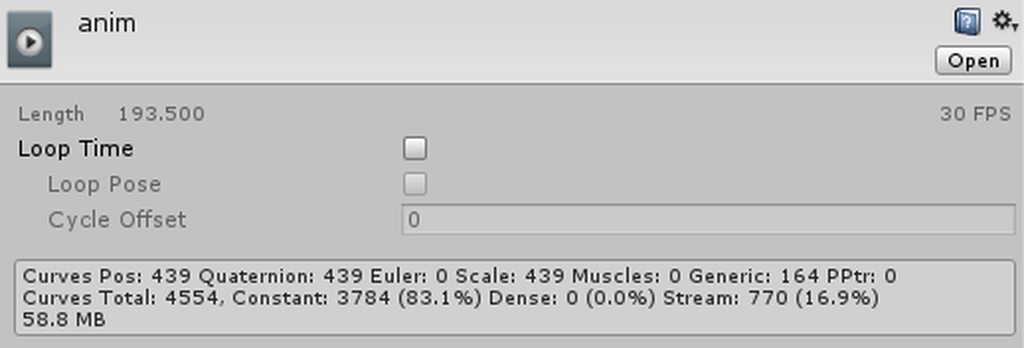
so, what should I change and what can I get away with
I am at the source fbx right now
scenic swallow
If you set Anim. Compression to Keyframe Reduction you can adjust the error thresholds.
Larger values will make it less accurate but smaller.
oblique umbra
it's set to keyframe reduction, the three error values are at 0.5
scenic swallow
If you expand the FBX you can select the animation and see its size
oblique umbra
I don't actually see the size
 rain seal
does anyone here know how to make it so that when you get off a chair you can activate or deactivate a gameobject?
 fair agate
EventsFromScene: OnStationExit is the action your are looking for I believe.
west zinc
going to put out a little tip here. If you buy some assets from the unity store (like furniture, etc), be sure to check their model and texture import settings as well as their shader settings. I’ve downloaded a few things and it wasn’t until later that I found it was bloating my project and killing my frames.
 dire rampart
Sooooooo.... Anyone know a good gun tutorial for worlds?
Like a gun that shoots and kills players
dire rampart
Is there a prefab anywhere for a gun?
 strange prism
dire rampart
strange prism
dire rampart
Thanks!!
Now I need to get this to kill players and turn them into ragdolls before respawning
strange prism
Everything is setup for that. Just add the combat system to the world
Tutorial goes over the basics of creating a combat system. This includes setting up the VRC_Combat System script, an object to inflict damage to the player, ...
dire rampart
This is going to be a lot of work
Got to get the gun to shot players and have a 1 sec delay firerate, plus I need the people shot to spawn in a specific area.
Lol, I'll probably use this to help build my map xD
Haven't made a map since may, so super rusty here
dire rampart
Well I got it to work the way I need it
Now for the complex thing.
How do I build a randomizer to split teams?
Kind of like the Murder mystery map for 2 teams.
 past imp
wait for udon :^)
there's a few ways to do it put it can be pretty janky
one way I did for a map that I'm too lazy to work on was by having a sort of lottery machine and having people grab balls for their team
strange prism
I feel like an explanation would be a huge wall of text... that and there are multiple ways, so multiple walls. And who knows when Udon will be released. Its better to do something than nothing.
past imp
balls would have triggers to assign them to teams
worked pretty well, but took a while to set up
strange prism
Lol, that’s an interesting idea for it that alone could be turned into a game.
past imp
could be, only issue was that object sync sometimes took a bit for the ball to dissapear since I had it teleport on drop, and have it drop on pickup
 azure mural
ok so I have my world currently on Unlisted i am trying to get it publicized
Never mind
 spiral birch
What does vrchat upload when a world is published? I have a lot of loose files that aren't used, and If i have to delete/move those, will that reduce the file size of my world, or is that dictated by the amount of stuff that is in the world?
strange prism
It uploads your scene. If it is referenced in the scene it will be uploaded. Somethings may have links that are hard to find, which is why it is a good idea to clear the dynamic materials and prefabs every now and then.
 mental monolith
Hello, is there any way to debug what's causing slight lags on world load? It seems like whenever I put more than 8 songs in the Video Sync playlist is when it starts happening but can't be sure
It goes on for 5 seconds or so and then back to normal
strange prism
Check the VRChat log? I doubt that will show anything for video players though.
 willow pawn
anyone know how to lower the size of file headers
my file headers are 139.3 mb 31.6%

Unity
Unity is the ultimate game development platform. Use Unity to build high-quality 3D and 2D games, deploy them across mobile, desktop, VR/AR, consoles or the Web, and connect with loyal and enthusiastic players and customers.
and it says
2.1. Best Practices for the Resources System
Don't use it.
which doesnt tell me how to decrease or improve the file size
 cyan fable
Vrchat does not support automatic-lod-43652 <-One click LOD solution but actually support LOD (manually blend your props etc). Is there a alternative? Thanks
 light totem
.
 toxic plaza
is the upload menu not showing up for you?
 olive dragon
nothing
it just don't work
after i click new build
it loads
then does nothing
and opens the sdk manual
olive dragon
ill try
console says DllNotFoundException: sqlite3
SQLite.SQLiteConnection..ctor (System.String databasePath, SQLiteOpenFlags openFlags, Boolean storeDateTimeAsTicks)
SQLite.SQLiteConnection..ctor (System.String databasePath, Boolean storeDateTimeAsTicks)
AmplitudeSDKWrapper.DatabaseHelper.GetConnection ()
AmplitudeSDKWrapper.DatabaseHelper.CheckedExecute (System.Action1 fn, System.Action1 onError, Boolean handleException)
UnityEngine.Debug:LogException(Exception)
AmplitudeSDKWrapper.DatabaseHelper:<CheckInit>m__C5(Exception)
AmplitudeSDKWrapper.DatabaseHelper:CheckedExecute(Action1, Action1, Boolean)
AmplitudeSDKWrapper.DatabaseHelper:CheckInit()
AmplitudeSDKWrapper.DatabaseHelper:.ctor()
AmplitudeSDKWrapper.AmplitudeWrapper:Init(String, String)
AmplitudeSDKWrapper.AmplitudeWrapper:.ctor(String, String)
AmplitudeSDKWrapper.AmplitudeWrapper:Initialize(String, String)
AmplitudeSDKWrapper.AmplitudeWrapper:Initialize(String)
VRC.Core.AnalyticsInterface:Initialize(String)
VRC.Core.AnalyticsSDK:Initialize(String)
EnvConfig:ConfigurePlayerSettings() (at Assets/VRCSDK/Dependencies/VRChat/Editor/EnvConfig.cs:282)
EnvConfig:ConfigureSettings() (at Assets/VRCSDK/Dependencies/VRChat/Editor/EnvConfig.cs:170)
EnvConfig:EditorUpdate() (at Assets/VRCSDK/Dependencies/VRChat/Editor/EnvConfig.cs:143)
UnityEditor.EditorApplication:Internal_CallUpdateFunctions()
 buoyant smelt
well if you tryd a different skd version and its still not working
try deleting SQLITE if you dont really need it
also
your sdk Config ConfigurePlayerSettings is broken did you tryd modding your sdk ?
lilac saddle
^
 west crag
I'd even guess that the above error is because of deleting sqlite from the sdk 😐
or, given that it's unity, moving the file to another place could do it too, sometimes it just pretends it can't find it 😐
dire rampart
Does anyone have a 50x50 transparent square grid?
hasty shale
One of the many importances of audio optimization
https://cdn.discordapp.com/attachments/439486767209512961/508915463623802880/Oggs_vs_Wavs.mp4
lean lodge
I always use ogg, I'm glad it actually matters
fair agate
There is a link that has tips on which settings to use when. As I recall .wav for short sound effects and .ogg for longer clips
There are many things that may go wrong with your game development. Your models may have too many triangles for your target platform to handle, your algorithms may be too expensive for your CPU, and a
lean lodge
Am I right in assuming that not all of those settings would apply to a typical VRChat world? For ambient music, they talk about slightly reducing memory usage but increasing CPU load. That doesn't seem like something you would want in this game
hasty shale
@fair agate That's the tip link I provided a few weeks ago. but I seem to still get people asking me how i'm keeping my world's file size low. so i figured i'd make a video
fair agate
if only the streaming music was more reliable
hasty shale
@lean lodge The tutorial Fionna just posted goes into further depth of the settings that you should use. But one things for sure is that there is no need to go over 70 percent Quality. As you can see from my video I had my quality slider at the lowest which is 1, and it sounds just fine. The only "big" change is when you switch over to Mono.
You can still use WAVs and lower the Quality but the compressions tends to be worst and your still left with a big audio file left in your project taking more space then needed
Here's a short video to show the difference
https://cdn.discordapp.com/attachments/459442987135533066/508922488353325057/2018-11-05_02-35-23.mp4
dire rampart
Does anyone know how I can make a box spawn? Like clicking on an object can spawn a box that can be picked up with no limit.
west zinc
To add onto the audio conversation. Unity converts all files by default to ogg and decompress on load. If you have a long audio file then this is a huge memory and cpu hog.
lean lodge
Oh yeah, is that why people get hitching when someone starts playing a long audio?
west zinc
Exactly, or a avatar with lots of music on it causes people to go into loading screen.
 oak sage
hello, is it possible to make the audio from one video sync player to play in 2 separate areas of a map? how would i do this?
 empty oar
Use a custom audio curve would be the best way to go around it, I think
oak sage
no that aint it ;w;
empty oar
Why not? That's what I do with one of my worlds. You have one big audio source that's in the middle of all areas you want to reach. And then you play with the spatialisation and volume to mute it in areas you don't want it to play
From there its just trial and error to get the curves right
I know for certain it works. I just don't know if that's the most optimised way though
oak sage
idk what im doin ;w;
 errant sorrel
When using teleporters, is it possible to teleport to a area and "unload" the previous area you were just in and loading the area you just teleported to?
 misty pecan
Yes, just set up triggers to activate/deactivate the proper game objects for each area
You might want to enable "advanced mode" and make sure the broadcast type is local
errant sorrel
thank you kindly 💙
 analog kraken
you might also want the spawn area to always be loaded, otherwise when someone presses respawn they'll just fall into the void for all eternity. You could maybe set up a trigger box on the spawn point to force the room to load when you respawn
lean lodge
Having an issue with lightmapping. Almost all of the surfaces facing north or south look almost entirely black, despit the ambient light being pretty intense and the directional light shining right onto this surface.
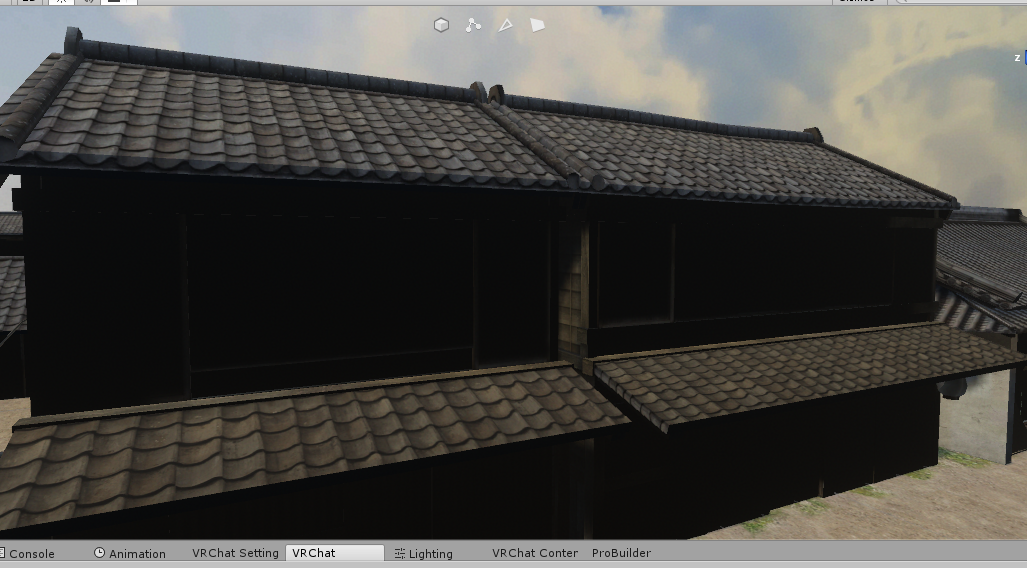
I generated lightmap UV's for these meshes
The other surfaces look fine: https://i.imgur.com/ZY64xTa.png

 twin arch
Look at environment lightning
In the lighting settings
If the ground is not static make it if you can, so light can bounce off of it and hit the buildings
lean lodge
It's all static. It's only those surfaces that have the issues. I've spent quite some time debugging it but I can't seem to find out what the cause is
It's only the north and south faces of all the buildings, the other sides look fine
The directional light is aimed almost straight at these surfaces
I tried setting backface tolerance to 0 in the lightmap settings of that mesh
The only other problem I can think of is that many of the houses share meshes with each other for the walls and roofs etc
But that all works fine for the other sides
twin arch
What is the intensity of the light
lean lodge
Intensity is 1, indirect multiplier is 1. I increased the intensity of the directional light as well as the ambient light multiplier to 1.5
Which made everything else overbright and those parts still entirely black.
twin arch
In your settings how many bounces do you have
Maybe calculate the normals in unity
What color do you have you ambient light color set to
lean lodge
1 bounce. Apparently it is a normals issue, I recalculated them and baking the lights again.
Ambient light is skybox
Which is a cloudy sunny sky
Setting normals to calculate fixed it, thanks to Lakuza for figuring this one out.
twin arch
Pesky vertex normals
lean lodge
I looked at my world's size breakdown in the SDK, it's saying "file headers" is taking 134 MB
What is this and how do I get rid of it?
 coarse cedar
Do you have baked realtime gi?
lean lodge
Yeah, I think so. @coarse cedar
coarse cedar
If I remember correctly that was the cause for me for a similarly large file headers size
You could try baking lights without that
Or check if your light data file is that huge or it's something else
lean lodge
Oooh
You're right @coarse cedar, the LightingData.asset file is 148 MB. Holy crap
Maybe it's because I have a lot of light probes
I guess I'll try without having Realtime GI enabled
Actually I think that has to be off in my case anyway. Thanks!
 spring gulch
is it possible to bake animated lights? something like prerecorde every possibility and bake it to lightmap? 😮
 steep temple
imagine the texture size for every frame. lmao
lean lodge
I don't think that's easily possible
I think with scripts, you can get fairly close and have a day and a night lightmap for example
spring gulch
its not that many frames 😮 but 4 animated lights are using almost 1000 draw calls thats stupid
lean lodge
That's what happens when you got a lot of materials and meshes. 4 realtime lights is actually a whole lot tbh
spring gulch
i thought i can combine them all so one light with some kind of prerendered baking they are all in sync and use about 60 frames
i only use 4 materials on my map and most of them are combined
empty oar
I dunno what your world is like, but if possible try to replicate it with 1 light and a cookie
lilac saddle
Although I do the camera/mirror trick (and reversing the axis so it behaves more mirror like) a lot of my friends don't like it. Is there honestly no other way we can have an optimised mirror? (tweaking the vrc mirror isn't performant enough imo)
analog kraken
the thing that makes the camera a weird mirror is that it's only 'reflecting' from one point (where the camera is obviously). You could try making the camera orthographic and seeing if that helps with the perspective? You do lose a lot of distance depth but it should behave better as a mirror
empty oar
The camera 'fake mirror' is honestly more of a framerate killer than regular mirrors depending on your system. Just make sure your scene and the project quality settings are optimised and you'll be fine
lilac saddle
I have my project settings optimised already, thanks for the orthographic tip i'll definitely try it out
 rugged mason
viral marsh
rugged mason
viral marsh
yes
cyan fable
Thanks, I delete my msg, Its akward. 
lean lodge
Pretty sure they're worlds hand-picked by the devs
Supposedly they can't contain copyrighted content, but that doesn't always seem to be true
west zinc
Following this question
lean lodge
Texture size and especially tiling barely affects performance, if at all.
This is a neat way to save RAM and download size tbh
But not much else
west zinc
This could also save download size
 empty oar
That looks like pretty simple geometry, why do you need 300k tri's for that? And yes, that's a lot.
 sonic olive
I’m modeling each blade of grass
I’m wondering how much that is compared to a detailed world
empty oar
Uhh... You may want to use a unity terrain and use the built in system for grass
 bright basalt
Literally making each blade of grass 
I like your stile
 ionic mantle
Why do you want to suffer like that?
lean lodge
Don't forget to individually sculpt and then retopo every blade with shrinkwrap
If anything, the vast amount of tris will increase drawcalls because it's split into multiple meshes
sonic olive
the built in system for unity is trash for terrain because it won’t work with custom meshes
Also I haven’t needed to individually model each blade of grass because I can use a particle system in blender then convert that to separate meshes
Then I can just join the meshes for a total of 5 separate meshes as a final amount
I have tried looking up some assets to allow me to use unity’s vegetation brush on a custom mesh but I’m not sure if they work with our version of unity nor do I want to pay for something that may not even function how I want
The whole process took a bit to figure it out but I could make a ton of grass easily again. The issue is how much will high end users will lag if I use a large amount of geometry if that geometry is optimized
empty oar
Eh? The built in system allows you to use both 2d sprites and 3d meshes for grass. I've used both. If you're looking to be performant, you should use 2d sprites. Even 2d sprites can lag when there's a ton of them, let alone if you use 3d grass.
sonic olive
@primal heart ill just write a shader that makes the grass sway
lilac saddle
simple waving grass/leaves shader https://cdn.discordapp.com/attachments/503879668630290442/512086658800287745/diffuseShake.shader
lilac saddle
just edit this one 😉
sonic olive
and also i would like to see if i can make it part around the player as they move
ive already got one mostly done
it just needs a little work
 near gorge
If I am making a mistake somewhere please let me know.
 torn mason
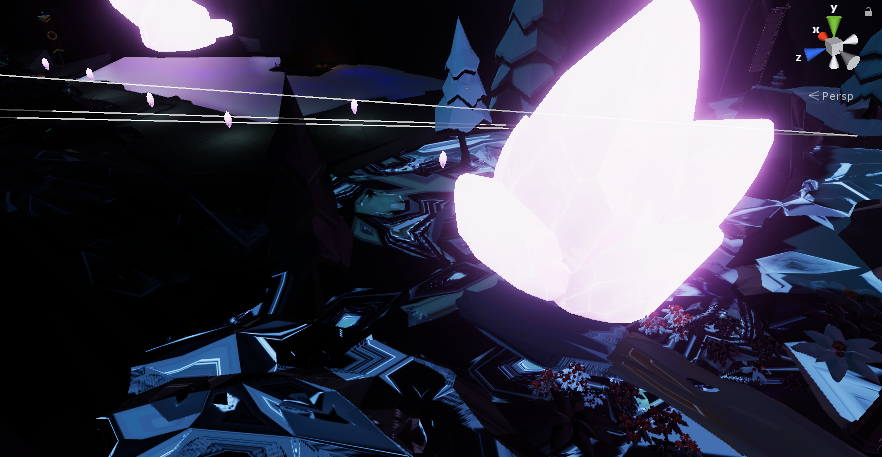
Can someone help me with some baked lighting issues? My lighting normally isn't broken, but for some reason atm it looks like this: https://i.imgur.com/dTv4iM0.png instead of https://i.imgur.com/4YUgHpX.png

 outer isle
does merging faces with probuilder actually save on polys?
i know i can decimate in blender, but just wondering
 willow spoke
it doesn't save polys, it saves vertices
willow spoke
it's not semantics, it's an important distinction. It's not the same as decimation, since decimation removes detail. Merging just combines vertices together where necessary to clean up the object. Here's an example https://gfycat.com/MeaslySplendidHamadryas
 lilac saddle
So does it save on world performance or not
strange prism
I don't deal with models very much, but I feel that this will only decrease the size of the mesh and maybe on rendering. Unless you have a huge model with duplicate vertices everywhere, I doubt this will do much.
Still better to do it than not.
outer isle
thank you cyan
willow spoke
It would probably help if you're doing a mesh collider, but really it's more for cleanup not optimization
strange prism
👆
 tulip surge
do disabled map objects load or have a performance impact in test builds?
i ask because im testing a map and its incredibly laggy no matter what i disable and im not sure if the game is still loading unused or disabled objects/materials/shaders or my map is just that bad
ok yeah the game does load disabled objects, as i disabled everything but the main camera and vrc_world and its still lagging pretty bad
tulip surge
nvm vr mode for all of vrchat is just really laggy for me for some reason
 flint spruce
disabled objects can be reenabled with triggers so disabling them basically just hides them. However if you tag the object with the "editor only" tag it wont be in the test build. I did that to all of my unused objects in a world and it cut down the file size from 38 MB to 27 MB
 icy sage
how do i bake my world without pixels showing all over for shadowing
west zinc
tick the check box "generate lightmap uvs" in the import settings of the objects in question
@icy sage
icy sage
i can't find that in the lighting scene settings?
lean lodge
@icy sage no
It's on the objects
The meshes in your assets have import settings where you have to tick that option
icy sage
oooh on the fbx part... i have soo many so i have to check them all? would this be preformance friendly?
icy sage
how would i do that?
lean lodge
You select multiple FBX'es
???
Hold shift or CTRL or something
You can also search assets, not sure if you can search for .fbx though
icy sage
i just crtl all on where the fbx models are at
so is it normal that when i generate bake it feels like forever?
analog kraken
Light baking can take a while depending on the size of what you're baking. You can change the resolution and detail settings to something a little smaller to bake it faster
icy sage
but turns out less detail
analog kraken
what you can do is just turn down the settings for now to get a sense of what it will look like, and then on your final bake before you upload the map you put the settings back to high quality
lean lodge
The first bake always takes the longest
Avoid having tons of small meshes or one very large mesh
You could see warnings about a certain mesh being too large for the selected resolution
In which case you can give that mesh different lightmap parameters and lower the scale on it
icy sage
so far for my rooms i put in a bunch of lights area baked lighting with intestity multiplier set to 3 on the envierment settings
would that work or am i doing something wrong?
icy sage
oh so if i want the rooms to be brighter i have to increase the multplier
analog kraken
from what I've read, each unique texture being called is still a draw call. Having it all on one texture should be a slight performance boost. If you can get it all on one material that's also a big help
lean lodge
@primal heart atlasing would be better, as long as it's also part of the same mesh
15 meshes drawing from 1 material is still 15 drawcalls, although slightly more performant than 15 different materials.
You can combine them with mesh baker
Don't go overboard with mesh combining, it can have adverse effects if it gets too large.
One material can be drawn across meshes if the material and mesh is identical
Or if the meshes are small enough
Static batching for example
lean lodge
Or use mesh baker
Do it automatically
And yeah, that's generally the way to do it within Blender
If they all use the same material, you can also get Probuilder (it's free)
Just "probuilderize" the meshes then combine them
That's one thing I did for my world
 hazy minnow
I've been trying to get baked lights working on my world, but I keep having some trouble with these particular tables and chairs:
https://i.imgur.com/rqGDFez.png
I've tried making a lightmap parameters file and changing the backface tolerance to 0, and I've had Unity generate UVs and calculate their normals, but they don't want to take on light for some reason. They're definitely static, and right under a light source.
Realtime and Mixed lighting doesn't have the same problem.
lean lodge
So both normals and tangents are set to calculate? I had issues like those sometimes
The lightmap parameters assigned to that table seem to be defaults though @hazy minnow
hazy minnow
Tangents are set to calculate tangent space, and yeah, I changed it back after testing it a few times. The tables themselves are part of the same mesh as the bar counter, and are using the same atlas material.
 quartz mango
any tips on how to change the Project graphic settings to have less troubles with mirrors?
viral marsh
Set up layers so that you have one for things you want to show in your mirror. Place all objects in that layer and make the mirror only show Player, Mirror Reflection and your custom layer. Optionally add the pickup layer too if you use it. And the less you reflect the better, but you can control that with what you assign that layer.
quartz mango
isn't working, still the mirror with Only players mirrored in it, drop everything at 35/45 FPS
and with only players i mean in the game, literally, it's just me and 5 friends, nothing else mirrored in it
i have reflected: Default, Player, Player Local, Interactive, Mirror reflection
 ivory garden
maybe your friends have shitty performance avatars 👆 also be sure your AA is at 1
quartz mango
checked, but still weird, in maps like the "free lagg box" or whatever is called, there is a huge mirror and i never have those kind of drops 😦
even when there are more than 20 people and with the same avatar of my friends
ivory garden
you are usingbaked or real time lights?
 ivory garden
gotta get rid of real time light and use only baked, it's a pretty big performance hit
quartz mango
wo! i will try! thank my dear! 💗
viral marsh
don't make the mirror show Player Local. That is what Mirror Reflection is for
Do you have all your objects not on Default? Is that how you are excluding them from the mirror?
lilac saddle
Just a lil plugin for unity that will massively help those of you who dont use it. https://docs.unity3d.com/Manual/BestPracticeUnderstandingPerformanceInUnity2.html

 supple oyster
Do LODs work or do I gotta do some special shit?
lilac saddle
Lods work
fair agate
They work but are hard to set well. Desktop and vr have vastly different LOD ranges
 hazy pier
well. for LODs on fonts you do have to do some special shit! 😬 😬 😬
icy sage
so i set my directional to mix and i want to set it all to mixed do i still need to generate a bake?
lean lodge
If you set a light from baked to mixed, I don't think you have to re-bake
Don't overuse mixed lights though
If you set a light from realtime to mixed or add a new baked/mixed light, you will have to re-bake for best results
icy sage
i already cleared my baked
and it ends up taking 94% of the cpu when trying to re bake the world
lilac saddle
That's what happened to the original funland.. the scene took so long to load in the end i just gave up. was fine before the bake and using just unlit everywhere.
i never found the solution or why it happened.. but even with deleting all lightmap data and starting again it still did it.
I believe that keeping reflections to lowest setting would help alot
outer isle
so i made a box collider in one of the rooms of a house I'm making have an onentertrigger to turn off all the mirrors outside the room because they were affecting performance
i didn't think they would render when you can't see them though?
but apparently they were still putting significant strain on people's performance
like some people in vr were down to 15 frames
with the trigger back up to 50 or so
can i go way crazier with this and put onentertrigger to disable entire other large sections of the map locally to save on performance then have onexit respawn all the stuff? i'm wondering how well this works. I ask because something tells me it would perform really well while people are in there but once they leave it would make them essentially reload all the stuff and cause a sharp lag spike
strange prism
Well, the first pin in this channel is trigger occlusion
strange prism
No, there are things you need to watch out for though
Using trigger occlusion can help, but if someone owns a pickup, drops it in a room, leaves the room causing it to turn off, that pickup will fall through the floor for everyone.
Also, if you have animators with states, turning it off and back on will reset it.
So, Trigger occlusion will help, but you need to consider what things you are turning off.
Turning off anything visual is good. I don't recommend turning off the colliders if you have them separated from the meshes.
Also, you might notice them turning back on if you do things with teleports
outer isle
oh. yeah true. so if i have an object pickup in a different room and i have the room locally disable that other room, will the object stay if other people are not in the trigger because of object sync?
or maybe i could just have the room disable renderers instead of whole objects
strange prism
But what you started with, always turn off your mirrors when not in use.
Object sync makes it so one person calculates the physics for that object and sends it to everyone else. If the floor is removed for only the owner, the object will fall for everyone
outer isle
ahh. okay. so owner changes when someone else picks up
or the server owner
either way i get what you mean. i can just go through and have the trigger deactivate the renderer on objects in other rooms
that way there's no wacky ghost objects falling through the floor
outer isle
i gotcha. so i'll just go with disabling/enabling component meshrenderer
fair agate
I would say for 90% of people, don’t trigger occlude anything but real-time lights and audio sources
outer isle
ok
fair agate
You can get into more sync traps than it would help
Use occlusion culling for visuals instead if you can.
outer isle
ok. Yeah i was trying to do triggers simply cause i'm way more familiar with them than occlusion culling
i'll have to learn it a bit
strange prism
Occlusion culling can be annoying to work with. In the last project, everything was split in to far off locations, which made it really easy to setup occlusion. All static items set to Occludee Static and then I created large cubes between each section and set those to Occluder Static. The cubes were tagged as EditorOnly as to not upload.
outer isle
oh boi. I'll just try basic optimization first. low res textures/polys/limiting scripts. so on so forth
 severe crane
Hi after the last vrchat update I was no longer able to load into my world in vrchat without crashing. So solve this I moved the spawn out side of render range of the main structure. The issue I'm having now is by doing so both the terrains and buildings that the spawn and main structure are built on are now sliding in One Direction. How does one fix this issue?
fair agate
Versed make sure spawn and top level parents has a nice round number, long floating points will creep like that.
And stay within a few thousand units of 0,0,0
west zinc
Does setting max anti aliasing for mirrors to 0 turn off that feature?
its difficult to tell between 0 & 1
no wait it won't let me do less than 1
severe crane
Thanks Fionna creeping stopped.
 tepid mason
 snow jetty
has anyone found out how to lock a player position (attach to a chair), I noticed on worlds where players have moving seats, the position updates take a bit for players to catch up
lilac saddle
hi
flint spruce
question about stations: how would i go about making them static? i want to optimize them but if i turn them static they dont work, i know that there are options for what systems should be static so which of them is the one responcible for stations working so i can turn all the other systems static?
lean lodge
Static stations seem to work for me. @flint spruce
Make sure you turn off "batching static" in the static menu
If the station meshes get batched, interaction might be a little broken.
flint spruce
ok thanks, it sounds like the exact problem im having
lean lodge
If the meshes are actually being rendered, turn on instancing in the material instead
This should batch the drawcalls
flint spruce
ok so i should turn on instancing and still use batching?
lean lodge
No, use instancing and don't use batching for the stations
Batching would override instancing anyway. Instancing is there in case you can't batch
 soft crag
When trying to join meshes of a large object in blender I get an error stating the active object is not a selected mesh, any idea how to fix this? my goal is to make it 2 large meshes instead of the like 5000 it is
 turbid sable
What is the best method in optimizing a meduim-scale city within unity, for VRchat ? Mostly I am using Trigger-based oculision, yet its getting kinda complecated/messy - Should I keep on using that method/ or add/ remove some features/trigger components -?
fair agate
@turbid sable I recommend not using trigger occlusion for anything but audio and realtime lights tbh. Colliders will get extremely tricky if you have any physics objects in the world like non-kinematic pickups, and Unity Occlusion Culling will handle the mesh renderers for you with a lot less hassle than triggers.
@soft crag make sure the last thing you have selected is the mesh you want everything to join to. You have to select it with your mouse afaik.
soft crag
Learned that the hard way on one of the models, good tip though c: thanks for confirming
strange prism
Following up what Fionna said, Yogoshimo you should make sure all your items are marked static to get static batching. Also make sure to setup Unity occlusion. Anything small should not be set to occluder static but all larger things should be set to occluder static.
flint spruce
So is there anything that has to be turned off when making a 3D audio source static? Asking because currently it has everything on and i think it sounds different but it might just be my imagination.
analog kraken
turn off doppler completely, it'll make your audio sound horrible as you move around
flint spruce
Will see if it is on once i can, but i do think that i put it off.
strange prism
I don’t know if Unity does optimizations for static audio. As long as you have less than 16 or so audio sources on at once, you should be fine.
lilac saddle
The 2017 unity for beta that will be live soon has occlusion on by default for every single prefab you drop into the scene. I personally hate it.. but sounds like you would benefit from it.
Also as for cities in a whole... there's a freebie city pack for daz all you would need to do is download daz studio import that project (which you can get on daz studios store for free, then just dump to .obj and Import over to unity.
Some of the best looking models I've ever seen come from poser which daz studios supports as well as other programs which actually require a license key like polygon. Even still they all support exporting so as for all those extremely detailed models.. all are possible to use.
Daz studios installer is an all in one, simply select the program you want and it will download it all. In my opinion every 3d artist would love it. Hell even the latest paint shop is on it.
 fair mantle
Who would win?
A: 100 Prefab-Boi with 2 triggers on the animator for one-frame animations.
B: 1 Prefab with 200 triggers on the animator for one-frame animations?
I'm leaning toward the 100 prefabs since it's much easier to keep things modular.
strange prism
What is your goal here?
hazy pier
not sure what this is about but A looks more manageable
strange prism
If we are going with performance, 1 animator is better than 100, but if you are going for usability in creation, 2 triggers will load in unity where as 100 on one object will kill your machine.
lilac saddle
What came first the chicken or the egg.. is this how its gonna work now?
hazy pier
eggs came first! :p
does occlusion prevent other user's avatar from being rendered when they're out of view?
jetdog's optimization PFD doesn't say 🤔
 dreamy drum
You would need an occlusion area for dynamic objects.
lean lodge
I had no idea that even existed. I assumed OC would just work on dynamic objects too.
dreamy drum
The Unity Manual helps you learn and use the Unity engine. With the Unity engine you can create 2D and 3D games, apps and experiences.
Bottom section titled Occlusion Area
“To apply occlusion culling to moving objects you have to create an Occlusion Area and then modify its size to fit the space where the moving objects will be located (of course the moving objects cannot be marked as static). “
I really need to update my optimization guide. but I’ve been busy dealing with prefabs and other projects.
lean lodge
Oh, that sounds like a tricky thing to get right.
The occlusion areas
I'm assuming that if the player is inside an area, they cannot see any dynamic objects located in other areas?
The docs on this are pretty small
dreamy drum
From my understanding it brakes the scene into cells. Unity can tell which cells are visible to the camera and if an object is in a cell that the camera cant see it will be culled. But even if a small part of a cell is visible to the camera nothing in that cell will be culled.
hazy pier
@dreamy drum thank you so much! that is exactly what i need. my world has separate rooms, so it's easy to determine the areas.
viral marsh
Occlusion Areas are VooDoo.
Different people have different ideas of what they do, and in my experience they make no difference.
It would be cool if someone could make a video that demonstrates them actually working/doing something different than standard occlusion culling in VRChat.
Or even in the editor.
hazy pier
hmm. so VRchat already has its own occlusion culling system? that's interesting
i don't really have any way of testing if it makes any performance difference right now..
hazy pier
(also: thanks for making the great pug @viral marsh . please fix the soap dispenser 😃 )
fair agate
Yeah so the Occlusion Areas sounds like...lightprobes? In the doc Jetdog linked. Its misleading.
They are not
From what I understand they are more a way to just bake the data in certain sections. Otherwise your bakes get enormous in areas that aren’t playable.
VRChat does not have culling. Unity does. You do have to bake it into your world.
It is totally worth trying out and playing around with. But interior scenes can be tricky if you have large meshes instead of like, modular walls.
It will occlude inside the mesh of the normals point outward and you are inside them.
Then it’s a matter of setting to Occluder nd Occludee static the right things.
west zinc
I want to chime in that learning how to set up occlusion may be confusing at first, but it is definitely well worth it. My largest world was unplayable by certain people until I set it up.
hazy pier
thanks fionna. i've tried occlusion areas, and they seem to work quite well for me. though i've not tested much.
viral marsh
What do they do quite well?
fair agate
As far as I can tell, they exclude places NOT in the area from bakes.
People run into trouble with sizes and large meshes. It’s not hard to get around. Just need to put the manual static checks in.
lilac saddle
Manual static checks.. And crunch the hell out of everything 😄
viral marsh
Crunch Occlusion, yeah.
 sharp arrow
After using Unity since 4.x I actually don't know Occlusion Areas well lol, I have never actually checked too deeply into how they work. But the documentation indicates their use is for occluding dynamic objects. Occlusion Areas are likely AABBs which can be cheaply tested to determine if dynamic objects inside are occuluded by determining if the entire Area would be occluded. Is this how they work or what they do? Maybe, that has been my assumption based on the documentation for awhile now. People aren't alone in not understanding Occulusion Areas, I just sorta have guessed over the years based on the docs and some testing. I could even be wrong lol.
sharp arrow
After some testing again, it seems that might be wrong. The documentation is... not exactly accurate I do not think. The influence an Occlusion Area has on the resulting occulsion data is also opaque. Various sources online provide conflicting accounts on what they do and what they are used for. Maybe I've been wrong all along, I don't have time to look deeper into it though. I am busy with another project right now.
fair agate
@sharp arrow this is exactly the conclusion anyone else who has dug into it has come to
“Huh not sure what those do but seems to work ok”
outer isle
can texture and normal tiling have a significant performance effect?
i've done everything i can and some random areas affect frames sharply for no reason
the only other thing i could think of is probuilder objects
but i only have a few anyways
simple objects
lilac saddle
I found this video that helped me a lot https://www.youtube.com/watch?v=7O21c8BzEzM&t=365s you should check that one out

Shrink your Unity3D project build size with a few simple tricks. In this video I show how to cut the size of this sample project by about 90% in just a few m...
west crag
Shrink your Unity builds 90% with this one weird trick!
steep temple
@outer isle If you mean tiling in the shader/material that's essentially free if I remember correctly.
lilac saddle
@lean lodge This is the same as i used for my pinball table with bounce.. as underneath default there is one for solver iterations which refers to the bounce of an object, aka timing. this is how i got my bouncers for my pinball to successfully bounce off bouncers to start with.. its preety much the same setup.
Also turn off pre-processing because as described on that documentation its like having a ragdoll in a wall it spazzes out.. that i've seen happen when connected to a rigidbody that actually has a collision matrix. By turning that off it also solves many issues. And also last but not least disable his annoying animation that spins chairs if in use.. because when you have 120 chairs spinning if you copied pasted as i found out.. all with same animation it causes fps drops due to so many animations at once.
west zinc
Light baking tip. Change your worlds environment lighting to color or gradient to greatly reduce the time it takes to bake lights. I would say never use the skybox unless you absolutely need to.
 vivid dirge
also, if your entire scene is indoors, remove the skybox entirely and set environment color to pure black
 uncut current
Hello~ I'm struggling with music in my world. I can turn the music on, but i can't turn it off and i don't know how to fix it. It's my first world. I'm also struggling with making objects i've put in my scene interactable. I want objects that people could pick up.
strange prism
If you want to turn off music, turn off the gameobject with the audio source.
For pickups, you the vrc pickup script and a collider and then you can pick it up.
lilac saddle
Anyone know how to fix UV for meshes? Having a problem with textures on some meshes
 runic garnet
Does someone knows how to fix the world that causing the camera to flicker?
soft crag
Any chance you can rephrase that?
runic garnet
When I use a camera in my world, there are white objects flickers in the camera
steep temple
I'm gonna go out on a stab here and say it's NaN Blooms.
soft crag
Are you using the camera in Unity or in game?
analog kraken
I got a better guess, you're seeing those white spots on metallic objects I'm guessing? You need to bake reflection probes in the areas with 'metal' materials, otherwise they do that
strange prism
Can you send a screenshot to make it more obvious? It could be z fighting. I doubt it, but it could also be dynamic shadows from a real-time directional light flickering.
 errant vapor
you mean like mini spots or stuff like bloom?
hazy pier
guess we'll never know 😮
 vocal palm
Lol
strange prism
We could just ping them.
lilac saddle
Has anyone used the bakery tool? Is It worth the money?
analog kraken
from what I've heard it's really good
lilac saddle
Would be really helpful because baking takes like ages and I've heard that one takes It down quite bit
 fierce kernel
Check out nomic's airbnb and see for yourself. 😃 it blew me and my friends away
lilac saddle
ooh alright
 lusty totem
Just made my first world and it's over 100 Mb, and probably shouldn't be.
Can anyone direct me to a site that can tell me all the little optimizing tricks?
analog kraken
file size is all in assets, look into crunching/reducing your texture sizes, optimizing model import settings, crunching/reducing your lightmap sizes, and the biggest killer of all is usually music files. Change them to .ogg and compress them heavily
lusty totem
So like making texture atlases.
For the lightmap. Is that just use less light, or use light in a better way.
analog kraken
you can reduce the Lightmap Size and enable Compress Lightmaps to bring down their size a bit
lusty totem
Would Occlusion Culling work in VRchat?
I'm wondering if it would work per individual or not.
Like would what is being rendered for me, not affect what if being rendered for another player.
If so, that sounds like it would be nice in general to have.
strange prism
Occlusion culling works and you should use it in your world. Also, see pins for Jetdog's optimization guide.
cyan fable
I had tons of issues with occlusion culling (aproaching objects make them disappear)  and Im considering to remove it. I don't have a huge map either so.. May not affect at all.
hazy pier
i also get these issues, but only when i incorrectly mark my objects as static or don't bake occlusions after making changes.
if players usually see most of your map it might not be worth fixing all that though.
 timid pewter
Sorry if this was already asked but will the new Unity update bring better performance?
hazy pier
yes, but not that much. worlds that perform poorly will probably perform poorly, although a little less.
lean lodge
The new update won't bring better performance by itself. I heard vague reports about optimizations to the voice work but that's about it
What did bring better performance is the new public world limits.
Not saying it fixed the game's performance problems by even a long shot, but it helped a lot.
hazy pier
well said
timid pewter
someone just told me that the view from vr will not stutter anymore from low FPS
runic garnet
@analog kraken @strange prism @errant vapor this (sorry for the late reply I forgot about it ) https://cdn.discordapp.com/attachments/504747727943499776/519905051674673179/VRChat_1920x1080_2018-12-06_00-53-32.538.png

The white stuff
errant vapor
One thing I know is that you are very from the origin, that might be it.
 tardy niche
runic garnet
tardy niche
runic garnet
Wdym?
strange prism
DarkK3N, to me that looks like you have a lot of post processing bloom.
hazy pier
@runic garnet not what i expected it to be! 😃
runic garnet
@hazy pier yeah i supressed mentions about
lean lodge
What should I be setting my lightmap size to?
I set it to 1k, I ended up with 18 1k lightmaps and one 512px one
west zinc
1k should be fine, 512 is fine if you don’t mind seeing some of pixels in your shadows.
lean lodge
So what exactly is the difference when you select different sizes? It seems to generate fewer lightmaps when I set them higher res
And what's best for performance?
west zinc
I haven’t seen really any performance differences. But as I said you can see the pixels on the lower res maps, but to be more specific on spots with high contrast between your light and dark areas.
lean lodge
I'm not talking about lightmap resolution
I mean size
I did some comparisons and I can't see any visual difference, there's only a different amount of textures generated
Apparently it only starts mattering when one object no longer fits on a single lightmap
But Unity has practically zero docs on it
west zinc
Ok nice, I’m not so lucky in that regard. I did notice that there is a somewhat significant drop in total file size. Good for bringing down the worlds file size. I’ve always assumed the same amount of light maps generated just at a lower resolution.
lean lodge
Currently baking at 2k instead of 1k, will see if it reduces size
I heard something about drawcalls being increased with more lightmaps
In which case I would rather take the extra 2 MB in download size
past imp
it's better to have one large lightmap versus many smaller ones
lean lodge
Oof
Baking on 2k leaves me with 100 MB worth of lightmaps. That might be a little too much.
I'll just put it back at 1k where it was 48 MB
past imp
even with the compression? dang
you should try playing with the resolution and cluster resolution
lean lodge
I could, but tbh with 1k lightmaps my entire map is 31 MB
I think I'll manage
Lightmaps take up 8 MB total after crunching
sharp arrow
@lean lodge More lightmaps means more objects that otherwise would be batchable can't be batched. 18 lightmaps is a lot. Removing as many objects as possible from the bake process, reducing the per-object lightmap scale and various other things can help. Changing the actual lightmap texture resolution is mostly a hack, approach it in other ways first to perserve object batchability and reduced lightmap bake time, size and runtime costs associated with it.
lean lodge
Interesting, thanks
 pine blaze
I am having trouble uploading my world still and I emailed Vrchat. I was told to try and remove something called EDBPasteEditor but I can't find it in my project settings when i search it. This is the exact response in the email. "One of your editor scripts appears to be throwing out errors, which could be causing conflicts. The script in question is "EDBPasteEditor", are you able to temporarily remove it and try again?"
 torpid cliff
can i upgrade my world into unity 2017? will this work on current version?
strange prism
 lethal hound
if I put a private avatar into a public world will it also count the dynamic bones and stuff?
dreamy drum
Not sure why you would put it there in a public world but it might.
 ebon mauve
To add on to that, what if you have a portal to a un-public world, does it count stuff of avatars in that world too?
dreamy drum
Portals where also checked at some point so i would assume so
lean lodge
The bot checks those yes
 golden coral
so how exactly does bakery work
is it really as simple as adding the script to the light source and hitting the render button? what about light probes and reflection probes, etc? Im a baking brainlet
 wheat harness
Is there anything I need to do when updating the SDK in my world to make sure that things like triggers don't break? Like do I delete the old SDK, or do I Import the new one THEN delete the old one?
golden coral
you cant delete the old one AFTER the fact, it overwrites the folder. iirc, tupper usually recommends deleting the old sdk first and then importing the new one fresh. there's no reason why triggers should break, they'll break until you import the new sdk, at which point everything will go back to where it should be
 spring kite
@wheat harness If you follow the steps on "Updating the SDK" you should be fine https://docs.vrchat.com/docs/setting-up-the-sdk
Requirements We're going to need a couple things before we can get started, - Unity 5.6.3p1 - VRChat SDK ## Step 0 - Installing Unity This step is for anyone who hasn't installed...
spring kite
@golden coral This tutorial will teach you most of the things you need to know about baked lighting on your scene. https://vrcat.club/threads/xiexes-lighting-tutorial-how-to-get-good-at-baked-lighting-101.2081/

VRCat: Community-Run VRChat Forums
Greetings! Over my course of playing VRChat I've noticed that most worlds, mainly the ones that have baked lighting, are done poorly, or in an...
 solemn elm
SO I was working on a world and it's 2MB with the default skybox, and it's 27 MB with this free one I found from the asset store
lean lodge
Yeah, same problem. Cubemaps just can't be compressed properly at all.
Try decreasing the texture size.
@solemn elm
lilac saddle
lil question about audio triggers: I have a few(4), each set a specific button. When it is clicked the song plays til the end. but, I need to be able to turn it off while its playing and/or for one source to turn off when I click one of the others. How can I acheive this?
second question: would using .ogg files for the audio be better for optimizing the world compared to .mp3 or .wav?
There are many things that may go wrong with your game development. Your models may have too many triangles for your target platform to handle, your algorithms may be too expensive for your CPU, and a
TLDR: short sound effects are lot less laggy decompressed on load in memory, ONLY background music is suitable for .ogg or .mp3 compressed in memory or streaming
west zinc
you can load almost any file type into unity, unity converts it for you. Best to load in uncompressed files and let unity convert it for you. Its all in the files import settings.
 lavish oracle
What are the biggest things to do so the performance doesn't drastically die
lean lodge
Make sure you have no realtime lights, only baked. Maybe mixed lights if you need realtime shadows, but these are quite performance intensive. @lavish oracle
Set up occlusion culling in your world
Those are the big ones
And of course, mark every non-moving object as "static" in the editor
lavish oracle
Okay yeah thankss
fair agate
@lilac saddle if you have a lot of songs, it’s better to stream them with a player so that they don’t all have to be downloaded. But if your world is under 300mb with the songs that’s probably ok, they might reject the world if it’s too big.
That being said there are a few ways to do a jukebox style interaction. Personally I would use an animator controller and clips that turn them off and on. You can also do it with straight triggers. OnInteract—SetGameObjectActive false, add all the other songs. Copy paste and fix for each button.
west zinc
Be sure your music files don’t decompress into memory 
lilac saddle
thank you @fair agate . @west zinc I went thru and set them to vorbis-streaming, 75% quality and that helped a lot. After doing that and also setting all of my textures to 512 (a few at 1024) I went from a laggy 200MB to 76MB
 sacred flame
so what the best new world lights ettings any one know?
 winged sinew
Install post processing. Set the light colour to white and turn on temperature mode, then set the colour temperature to 5778K.
lilac saddle
do avatar pedestals cause a lot of lag? if so how can I combat it?
lilac saddle
so far Ive put them on a switch and where they are deactivated at spawn
west zinc
If you have a lot of them they can eat a lot of bandwidth, but if they are static objects they aren't bad at all in all other regards.
lilac saddle
I have 12, would they still be useable in static?
west zinc
You shouldn't have a problem.
You can always create switches to turn objects (including pedestals) on and off like you did before which can reduce bandwidth use.
lilac saddle
thanks!
 tame iron
hey is there a way to increase the performance of avatar pedestals? i got like 300 when they are off fps is increased for like 20-30 fps
 clear wagon
hide the model and replace with something else
 steady crypt
is Occlusion Culling still vital for performance?
west zinc
Tiny simple worlds nah, more complex large worlds I’d say absolutely.
Still a good practice so go for it. Every frame counts
steady crypt
yea, my world is small but mirror still hurts, even if its the optimized mirror
west zinc
Optimized as it only renders players?
steady crypt
yep
past imp
mesh colliders maybe?
steady crypt
small start up
mesh colliders are on trees and all are static and are tired to a trigger so the trees can be disabled
west zinc
That would do it
steady crypt
theres snowfall particles but only 400 are displayed and can be disabled
past imp
nah unless the mesh colliders have something actively colliding with it it shouldn't be doing anything
steady crypt
removed all mesh colliders on trees before to test it and no fps change
west zinc
Ok
past imp
you bake your lights correctly?
past imp
any custom shaders?
steady crypt
flat lit toon, standard, mk glow and ui sprite for the video player
past imp
in the game window in unity press the stats button, how many batches and setpass calls do you have
steady crypt
764 batches 459 calls
past imp
yeah that's a lot
steady crypt
when I press play 539 batches and 483 calls
steady crypt
and to reduce batches? :0
past imp
texture atlas models and in the materials check enable instancing if it has it
analog kraken
you might just have a lot of unmerged meshes. Do you have a lot of imported assets?
steady crypt
unmerged meshes? and I dont think I have a lot of imported assets
analog kraken
basically every quad is it's own drawcall, every cube it's own, etc etc. So the more stuff you have merged together as one object, the less drawcalls you'll be doing
analog kraken
easiest way is to get Pro Builder from the assest store (it's free), select your objects and 'Probuilderize' them. Then select what you want merged together and 'Merge Objects'. Don't merge everything into one because that'll goof up your occlusion culling, but merge together similar objects. So your walls should all be combined into one, then your chairs into another, decorations etc. The less the better but don't overdo it
steady crypt
sounds good, tyvm
viral marsh
How to See Why Your Draw Calls are Not Batched - This still applies to Unity 2017+
https://blogs.unity3d.com/2017/04/03/how-to-see-why-your-draw-calls-are-not-batched-in-5-6/

Unity Technologies Blog
I am sure that you know about Unity’s built-in Dynamic and Static Batching, which help reduce the number of draw calls in your game.
You can see Batching ...
lilac saddle
since someone mentioned mesh colliders earlier I ahve a question about some in my world- I have some pickupable guns and bottles, but when I tested teh world they fell thru some of the tables and counters. I went thru and added mesh colliders to both teh bottles, guns, AND tables. bad move?
analog kraken
if they're not too high poly then the performance impact isn't too bad. If you make the mesh colliders convex then that'll mitigate some of those issues
lilac saddle
Do I need a skybox for an interior world?
analog kraken
probably not if you can't see outside, it can have an affect on your ambient lighting though
lilac saddle
I have baked point lights all around
analog kraken
yeah you can take out the skybox and see if it makes much difference
lilac saddle
seems likie mesh colliders have stopped working period
lilac saddle
ok, got most of my issues fixed and optimized except for one thing- after generating my lights the terrain texture is black....its supposed to be a woodgrain.
weird, duplicated the terrain and changed the texture and it works
lilac saddle
how do I make the culling occlusion detect also objects with cutout materials?
lean lodge
So you want occlusion culling to act as if a cutout material is actually there? @lilac saddle
Try baking culling with a non-cutout object active there
Such as a cube tagged as EditorOnly
 lean lodge
If it is tagged as EditorOnly, it will not be uploaded with your map
But it's best to disable it afterwards anyway
lilac saddle
thanks, I'm testing it and it actually works.
 coarse tree
so what is best to use Compresssion on Normal or High quality for crunch compression ?
lean lodge
If you set compression to high quality, crunch might not do anything
Where you set the slider is subjective. Further to the right is less quality loss and slightly larger files.
coarse tree
ya 2k files go up
lean lodge
Cubemaps don't crunch well, such as skyboxes
coarse tree
so i will try normal with compressor quality on 100
see you back in about 5 hrs ooof
lean lodge
Don't crunch skyboxes or other cubemaps/HDR textures at 100 though, it makes them larger
coarse tree
ok
 lunar scarab
is there some type of forum or something for keeping world file sizes small? My home world is almost 223mb and I just don’t understand why.
lean lodge
@lunar scarab Copypasting something Lakuza wrote:
for world size in unity:
To check your worlds size, upload / build your world first. Then go to console log, right hand top menu on that panel and click see editor log. It'll open a text file where you can search for "CustomScene" until it shows something like this:
Bundle Name: customscene.vrcw
Compressed Size:89.9 mb
Uncompressed usage by category:
Textures 130.6 mb 64.7%
Meshes 32.3 mb 16.0%
Animations 6.1 mb 3.0%
Sounds 12.1 mb 6.0%
Shaders 2.0 mb 1.0%
Other Assets 1.1 mb 0.5%
Levels 17.6 mb 8.7%
Scripts 1.8 kb 0.0%
Included DLLs 0.0 kb 0.0%
File headers 207.6 kb 0.1%
Complete size 201.9 mb 100.0%
Compressed size is the Download size, Complete size is the space it takes up on a players hard drive/memory
Below that is a breakdown of the individual files and what takes up the most size.
Textures are usually the biggest, especially lightmap (.exr) files
You can crunch compress those, or rebake at a lower lightmap size (size, not resolution)
Set it from 2048 to 1024 for example
If "file headers" is very large, check that you do not have Realtime Global Illumination enabled in your lighting settings
lunar scarab
its probably textures that are getting me, I used a PBR Material pack and I realized its 8k Textures
lean lodge
Oof
lean lodge
Just reduce the size to something like 4k or 2k, and probably crunch compress it too. This will help a great deal
lunar scarab
how do i crunch compress
lean lodge
Click on the texture(s) in assets and tick crunch
I usually set the slider to 100% quality and still get great compression
You can also decrease the max size
Remember that only assets used in your scene are uploaded
You might want to go to your VRCWorld (or whichever object has a scene descriptor on it)
And right-click the "dynamic materials" list
And hit revert to prefab
In case old unused materials are still in there
 west bridge
Aaaahhhhh, my eeeeyeeesssss
I'm gonna decrease light intensity, hopefully, it'll work.
lilac saddle
god with the light
viral marsh
Try clearing your GI Cache
It might be choking on some old/bad data
Be sure to stop the bake and wait for it to settle first though
clear wagon
I've noticed that if I upload worlds with barely anything but in a project with lots of other assets in different scenes it bloats the world size. Any good way to remedy that other than moving into a new project?
fierce kernel
That doesn't make sense. Even with dynamic materials and dynamic prefabs cleared? I heard something like if some asset came out of a prefab or fbx it will include the whole fbx. Only other thing could be including baking from other stuff. If you upload a blank scene that has a large filesize it would be interesting to see what is inside the generated .vrcw
terse mango
Bundle Name: customscene.vrcw
Compressed Size:9.9 mb
Uncompressed usage by category:
Textures 10.2 mb 31.5%
Meshes 8.1 mb 25.3%
Animations 0.0 kb 0.0%
Sounds 0.0 kb 0.0%
Shaders 6.6 mb 20.6%
Other Assets 3.5 mb 10.9%
Levels 3.7 mb 11.4%
Scripts 0.6 kb 0.0%
Included DLLs 0.0 kb 0.0%
File headers 81.0 kb 0.2%
Complete size 32.2 mb 100.0%
mine is tiny lol
lunar scarab
i use a lot of photos and the Bakery asset for better baked lighting. so my lightmaps are usually 11mb to 30mb depending on the quality I want
 hallow sandal
30 mb for lightmap
lean lodge
My lightmaps are 48 MB before crunch
hallow sandal
Yeah but you crunch
ionic mantle
Cromnch
west zinc
What are some good crunch compression settings. I feel 50 isn’t always the best choice
 plush crest
That will depend on texture itself. Go for best size/quality ratio
lunar scarab
for me my wall and ceiling textures are 100 but if its like furniture i keep it at 50
vivid dirge
What settings do you guys crunch lightmaps at? Default settings produce too many artifacts and make everything look dirty
lean lodge
@vivid dirge 100 quality
If that's still too low quality, don't crunch your lightmaps
lilac saddle
@terse mango how did you get that info on the bundle?
terse mango
what
lilac saddle
Compressed Size:9.9 mb
Uncompressed usage by category:
Textures      10.2 mb     31.5%
Meshes        8.1 mb     25.3%
Animations    0.0 kb     0.0%
Sounds        0.0 kb     0.0%
Shaders       6.6 mb     20.6%
Other Assets  3.5 mb     10.9%
Levels        3.7 mb     11.4%
Scripts       0.6 kb     0.0%
Included DLLs 0.0 kb     0.0%
File headers  81.0 kb     0.2%
Complete size 32.2 mb     100.0%
mine is tiny lol```oh one sec xx
go to console
click editor
no wait
To check your worlds size, upload / build your world first. Then go to console log, right hand top menu on that panel and click see editor log. It'll open a text file where you can search for "CustomScene" until it shows something like this:
there
lilac saddle
ty ty
lilac saddle
Compressed Size:23.8 mb
Uncompressed usage by category:
Textures      33.5 mb     53.5%
Meshes        8.2 mb     13.1%
Animations    35.3 kb     0.1%
Sounds        219.6 kb     0.3%
Shaders       3.6 mb     5.8%
Other Assets  135.1 kb     0.2%
Levels        2.4 mb     3.9%
Scripts       1.5 kb     0.0%
Included DLLs 0.0 kb     0.0%
File headers  14.4 mb     23.1%
Complete size 62.5 mb 100.0% ``` what are "File Headers"?@lilac saddle a large variety of things, but usually when this is big, this means you have very large lighting data
Go to where your baked lightmaps are stored and check that the lightingdata.asset file is not too large
You probably left Realtime GI on in the Lighting settings, just turn it off and bake again. It massively bloats your world's size.
lilac saddle
oh, thanks
lean lodge
Also if you scroll down just a little bit there, you get a breakdown of which files are using the most space.
Consider crunch compressing large textures or lightmaps (.exr)
Don't bother crunch compressing cubemaps like skyboxes, lower their resolution instead
lilac saddle
is this normal to appear? 2.0 mb 3.2% Resources/unity_builtin_extra
lean lodge
I think everything in a "Resources" folder is included with builds by default
Move it into another folder if you need it, or just delete it
The resources workflow is not going to gain you anything in VRChat
Some Unity games have to do that so they can dynamically load resources through script whenever requested
lilac saddle
oh, cool. thanks for the info!
lilac saddle
Compressed Size:10.8 mb
Uncompressed usage by category:
Textures      8.7 mb     40.1%
Meshes        8.3 mb     37.9%
Animations    35.3 kb     0.2%
Sounds        219.6 kb     1.0%
Shaders       2.1 mb     9.8%
Other Assets  134.4 kb     0.6%
Levels        2.2 mb     10.0%
Scripts       1.1 kb     0.0%
Included DLLs 0.0 kb     0.0%
File headers  95.5 kb     0.4%
Complete size 21.8 mb 100.0% ``` down so much more, thanks @lean lodgeNice
terse mango
is there a way to toggle terrain grass with buttons ?
 sick raven
you can use the UI buttons for that. Just set the detail density or detail draw distance to 0 for the terrain object inside the onPress event
 woeful dust
I take it a World has to have all assets downloaded? There is no way to download more based on a trigger? ❔
Context: Wanted to create a language learning World, where you could toggle the language which would switch the descriptions and pronunciation audio samples. Worrying about file size due to the audio samples.
sick raven
you can use the video player for that if you'll put all the samples to youtube
strange prism
Or if you are willing to figure it out some (Not sure if Jetdog's prefabs have it) but you can use the pano script to download images from the internet. You can have multiple panos for each language and then turn on which one whenever. This also would mean that you can update them without updating your entire map.
viral marsh
Panos have memory issues. Be careful
misty pecan
Supposedly those memory issues exist in the social/world preview pictures aswell, so they're not as bad as you'd think. Though take this with a glass of salt, I could be talking out of my ass. Keep hearing conflicting things about it.
Guess it largely depends on the image in question you're loading in via the script how much of a issue it'll be
lilac saddle
quick question- been working on optimizing over the last week, but had an issue with my pickupable objects- they kept bouncing around and falling to the floor. I set the colliders to kinematic and that seemed to fix it, but now when you hold them at different angles they morph to the camera angle....what causes that?
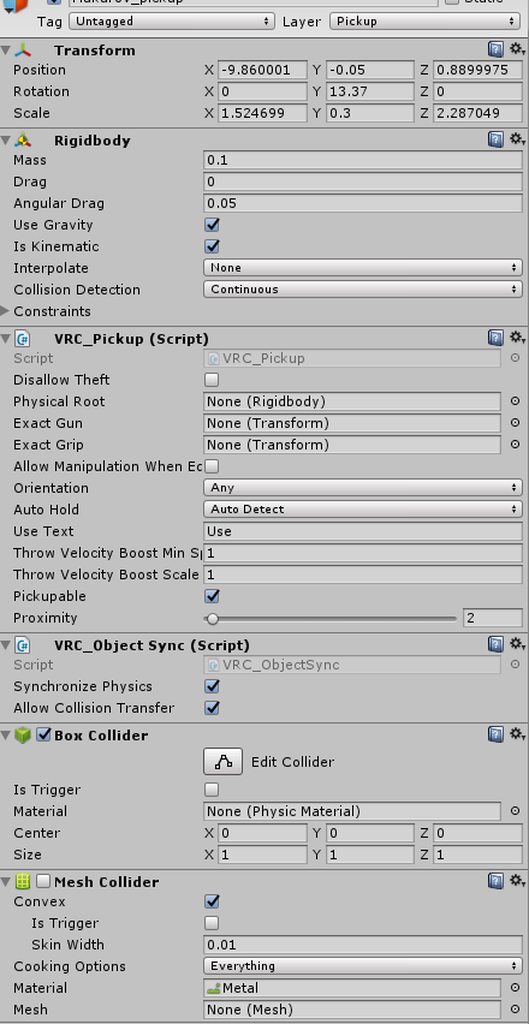 lilac saddle
also where is the special permissions script? can't fint it in the menu< I jsut wanted to enable jumping and crouching
I figured out my object pickup issue- I disabled gravity on the rigid body and set the physical root in the pickup components, fixed the morph issue.
strange prism
Jump is through Player mods component. Add it to any object, click the is room player mods checkbox, and add the jump mod.
Crouching isn't something you need to add.
lilac saddle
Thank you!
 round bluff
I have a question about mirrors and optimizing.
Which of the reflect layers show only players/environment correctly and smooth
strange prism
Other players is on the "Player" layer
You the local player is on the "Mirror Reflection" layer
The environment and other things are on what you set them to. Default layer is used when it is created. Pickups auto assign to the pickup layer.
round bluff
Okie
So to have the mirrors reflect layers to "Player, Environment, Pickup, and MirrorReflection" is for performance?
analog kraken
probably not environment, though it wouldn't make difference if you didn't assign anything to that layer. So Player, MirrorReflection, and Pickup if you have them
round bluff
Okay, understood.
Thank you for your replies, you've been the greatest help.
Both of you.
 astral trout
has anyone had any issues with occlusion culling since the unity upgrade? I have a bunch of really small spots in my map where if you are in it just right, all the objects in the room get occluded and derender, even though there is nothing there. I can't seem to replicate it in unity editor, either because it doesn't happen there or i just can't find the right spot
never happened until after the update to 2017.4.15f1
occlusion has been rebaked etc
terse mango
Which is is better to set my main env light too?
Mixed OR Baked?
If it gets selected to bake will it mess anything up?
analog kraken
baked is a lot better on performance, and then you can use light probes to light up dynamic objects
lean lodge
@terse mango baked is more performant
Mixed is basically just baking static objects but remaining realtime for avatars and moving objects
terse mango
i set it to baked
oh it should be on that then
so realtime whatever the light hits is calculated realtime whilst mixed bakes static shadows but calculates moving objects then baked just completely makes the source static?
 woven heron
After I changed unity version and sdk, all the shadows in my world turned black after reuploading. Im using light probes and a reflection probe.
fair agate
@woven heron you rebaked?
fair agate
I have seen people with black shadow problems on both versions. I had issues with an asset’s shaders that just needed to update from the unity store.
Also had issues with conflicting data between Bakery and unity lightmapper.
if you have a backup just check the lighting window and see if anything else changed, like ambient color
woven heron
It looks normal in unity. The shadows are black after an upload @fair agate
tame iron
can you go ambient light only for a world without baking?
 remote niche
how come my world runs 500 fps in the editor but struggles to get above 70 in game :V
plush crest
Run the world in headset (via oculus/steamvr sdk) and compare that vs the game first
lean lodge
@remote niche are your lights baked?
That's the easiest way to get a lot more frames out of your world, along with occlusion culling
remote niche
@lean lodge ye most of them are but a couple of spots need shadows to ground the dynamic pillows and such...
working on it on stream atm if you're curious
I just took the lights out, looks better dark anyway
I'm at 1.2-1.4ms cpu main atm, should be good enough
remote niche
I have pretty contrasty direct lighting, they looked photoshopped in basically without any shadow lol
remote niche
ye that's what I did
probably easier if you hop in the stream chat :P
sorry not the best time for me to ask that question as I was just starting
tame iron
how would two videoplayer in a world affect fps? one video one stream
hazy pier
in the developer faq it says "Bad things happen when you put more than 2 video players in a room. It usually impacts performance negatively."
so you should be OK if you use two players.
tame iron
ah ok thank you
vivid dirge
well, you should be ok to do it if your occlusion culling prevents them from both being rendered at the same time
plush crest
I don't think rendering is the problem here but video buffering and decoding overhead
viral marsh
And possibly sync script overhead
coarse tree
anyone use waco water shader ? i have is set to not receive shadows and looks good in Unity , however in game i get some odd blurry reflections off some pillars near the waters edge, my reflection probe for the water is set on override with very small projection bounds just above the surface using Realtime. i looked at the subject pillars and for some reason it listed the water's reelection probe ever with the bounds not set any were close to them
winged sinew
Unity blends all nearby probes into an object depending on their priority
Try this
https://answers.unity.com/questions/1144909/make-a-reflection-probe-only-reflect-1-onto-certai.html
Unity is the ultimate game development platform. Use Unity to build high-quality 3D and 2D games, deploy them across mobile, desktop, VR/AR, consoles or the Web, and connect with loyal and enthusiastic players and customers.
 tiny star
Do you guy use a third party asset for the bake?
errant sorrel
My world is having an issue where everyone lags/loads everything again when someone joins. It never had this issue before until the update, what could be the cause? Lighting maybe?
lean lodge
Probably a sync issue, maybe you have a ton of buffered triggers that are being called for everyone again.
 lofty drum
How do I tell VRChat to stop cleaning the generated lighting data before running the build?
'Auto Generate' is disabled by me, but it turns on by itself in the build process, and it destroys all the lighting 😡
lofty drum
...OK, I figured it out. Unchecking the 'Auto Generate' button is not enough - you must click on the 'Generate Lighting' button, otherwise the lighting data will not be copied from the GI cache to the scene folder and will not be packed with the build 💩
 lethal cave
(Unity Help) How can I edit a 3D Cube into having a round/half-circled corner?
past imp
You'd need to model that in blender
It's pretty simple though since you can just create a cube in blender and then add a bevel modifier
lethal cave
Ok, thanks!
lilac saddle
What's the best way to reduce world file size? Currently using crunch compression and it brings my world down to 309mb, but it's still pretty large for what it is
west zinc
that's pretty much how I did it, along with heavy audio compression.
ionic mantle
Compress your lighting data too
lean lodge
@lilac saddle check your logs to see what's the biggest
And as Eevee said, crunch your lightmap textures
winged sinew
Note that you'll need to change light map quality to normal from the default high in order to crunch them
Shrink your reflection probes while keeping quality by setting a lower max resolution on them so Unity scales them down
Many sure you're not including textures you don't need
If you have your textures set to high quality they don't get crunched even if crunching is on
In the worst case you might need to look at how your lightmap is generated and shrink unused areas
When shrinking your audio in Unity, you can check it from the editor and see how low you can go before the quality loss is noticeable. Ogg is surprising good at handling it. But should effects should be ADPCM
If you're using realtime baked GI, the realtime GI cache file can add a lot, especially if it's a big map. Look at the size of your Lighting Data file. If is too big you will have to rebake or consider removing it.
coarse tree
hello do you have a way to address the transform size (scale) after fitting objects in the scale is no longer 1x1x1 , how can you reset the default size back to 1x1x1 and keep the adjusted size ?
as i understand this can influence performance
lethal cave
I'm working to reduce lag spots and increase performance in my world, any tips?
viral marsh
This is a good start:
https://vrcat.club/threads/world-optimization-2.114/

VRCat: Community-Run VRChat Forums
This is still a work in progress but I'm working on a tutorial for world optimization. I'm be looking for feedback on things to add or edit. I'll be...
lethal cave
Is there a way to edit voice volume draw distance? Trying to make it so people's voices don't carry so far
hallow sandal
Player mods
Used to controls player settings in a room such as speed and jump. Player mods can be added by pressing the Add Mods button at the bottom of the component. After player mods are set, you cannot change them via animation/trigger.
Idk if its still properly supported though
It says its an old system but it doesnt link to a replacement
analog kraken
the player mods version doesn't work I hear, you have to edit the value in the scene descriptor
coarse tree
for occlusion areas should they be matched or similar to the probe group areas ? does this make a difference
also does making more probe groups for each room rather than a building help in game performance
i used probe placement tool and set them by building , should i also be doing them in more detail by each room in the buildings instead
coarse tree
humm
 fiery marten
I have 2 toggle buttons for mirrors. 1st mirror toggle is for player and the 2nd mirror toggle is for player local. what im trying to accomplish is when i toggle one button it turns off the other mirror and vice versa. Is there a way to achieve this? If so then i would greatly appreciate it ^^ thanks
strange prism
So... Both buttons are toggles, but you want to make sure that the other mirror is off when hitting the button for the current mirror?
If it is local, I would have this for both buttons, replacing myMirror and otherMirror with the appropriate mirrors:
OnInteract Local
->SetGameObjectActive myMirror Toggle
->SetGameObjectActive otherMirror False
fiery marten
ok so that was my first idea and i did it for both toggles but it didnt turn off the other mirror for some reason.
on each toggle so should im make 2 seperate triggers or can i use it on the same trigger?
ok i got it . What i did was made 2 seperate triggers for each toggle and put in the setting you told me and it worked
Thanks to much @strange prism
 forest sphinx
could anyone help me with light probes and or particles giving off light im trying to make it "optimized" but some people have frame issues which i don't see in VR when they have better computers im very confused
if someone could DM me or show me how that would be greatly appreciated
hazy pier
@coarse tree , do you know in which cases it's good to have light probes on your map?
wondering how many light probes (if any) one should use.
coarse tree
im still new to world building but been working on a massive lighting system for a few weeks or more now , i found Mr.Xiexes advise a very good starting point https://vrcat.club/threads/xiexes-lighting-tutorial-how-to-get-good-at-baked-lighting-101.2081/ also i highly recommend you check out Brackeys youtube channel .. https://www.youtube.com/watch?v=lhELeLnynI8
VRCat: Community-Run VRChat Forums
Greetings! Over my course of playing VRChat I've noticed that most worlds, mainly the ones that have baked lighting, are done poorly, or in an...

Let’s learn how to create reflections by using Reflection Probes and Screen Space Reflection (SSR). ♥ Support Brackeys on Patreon: http://patreon.com/brackey...
with that said, for me i now am using 1 or 2 reflection probes in each room depending on the size, you need to play with the placement and intensity values a bit and be carful setting the box areas up so your not adding reflections into a area you don't need. Note for light probes some models that may visit your world depending on shaders used they may not show up or be very dark if you don't provide them with light probes .....
hazy pier
thanks for the advice! I think i'm doing OK with my reflection probes, light probes are where i'm not finding much information.
i'm still not quite sure in which cases i'd need light probes though. my map uses baked lighting, but it's mostly outdoors. i've not seen anyone's shaders break
but it seems like light probes are necessary for indoor areas. does that sound right @coarse tree ?
"This is an important step, don't skip it or players and dynamic objects wont be lit in your scene." - i think xiexes might not be quite right about that
(unless unity generates light probes automatically)
coarse tree
ya i feel the same way and focus on the play areas, on my first map i used way tomany lights and overloaded on light probes ... i followed guidance from Xiece above.. now i am using the simple light probe placer from the asset store. i set up one probe group control for each room with the default settings from the probe placer. i also made matching light prove volume controls for each area same as the light probes so you can easily increase the probe density when needed.
basic setup includes
Groups for Light Probe Volume control
Groups for light probes
Groups for Reflection Probes
Groups for Occlusion Areas
you may not need Occlusion if your map is simple or small in size
i am now just trying to deal with a massive ocean and balance performance with quality
i think most use light probes in darker areas, that's when they really give more benefit in game, based on that observation i would use the volume control by testing in game results
Unity
Unity is the ultimate game development platform. Use Unity to build high-quality 3D and 2D games, deploy them across mobile, desktop, VR/AR, consoles or the Web, and connect with loyal and enthusiastic players and customers.
hazy pier
thanks @coarse tree . i've recently added an ocean to my map as well, took a while to find a good asset though.
coarse tree
ya what did you go with ?
been using WacoWater4 myself , but the settings were a bit hard to dial in as it does not come configured for Unity 2017 yet
hazy pier
yep, wacowater's what i'm using too. had to adjust tiling and some speed settings.
try to scale the settings by the same amount that you increased the prefab's size. then it should look OK. just tinker with it
i haven't found any other (free) water shaders that work well in vrchat by the way. they always had some issue...
coarse tree
have some issues with glass shaders . any one find a good solution for glass yet
hazy pier
do you mean refractions? regular glass should be relatively easy.
lean lodge
Alloy has a really good glass shader. @coarse tree
coarse tree
thanks i found Olanigan/Glass that looks very good
 ebon geyser
What would be the best way to add screenshots to my world as posters? can I add a bunch of planes or will that affect optimization? I don't really to add them to the wall textures
past imp
yeah you can have a bunch of quads for different textures but that'll increase your drawcalls so it's not that good for performance
if you don't want to add them to wall textures you just combine them all on one texture and put it on a single quad, or if you want you can model a bunch of small quads in blender, give each quad the pictures and then atlas it all
lean lodge
You could merge the meshes
You'll probably have to at least open Blender to merge the meshes and materials in the proper place
past imp
the second way is the most optimized but requires more work and you'd need to keep doing that to add more pictures
ebon geyser
I ended up going into blender, selecting the walls I wanted, duplicated and separated, and then set a new material and re uv-mapped it. hopefully 1 more material just for posters wont affect it too much
past imp
yeah you should be fine
coarse tree
hummm combining the wallls into a single mesh .... ok whats better 1. make them into a single mesh and now have to use a large mesh collider or 2. combine strait like-like walls only and use box colliders ................ at what point does performance curve to say combining the walls into a single mesh gain improvements
plush crest
If you have objects behind the walls, merging would not be good for occlusion culling. I think(and really hope from unity) that multiple box colliders is better than 1 equivalent mesh collider
lilac saddle
for some reason my wall textures do this....I have the compression set down to 512. https://imgur.com/a/WssYOBi


even changing it to 2048 doesnt fix it
plush crest
Looks like lightmap issue
coarse tree
is that a single flat plane, did you try playing with the tiling in the shader
lilac saddle
i did adjust the tiling in teh shader, but changing it doesnt get rid of it. even changing shaders doesnt get rid of it
coarse tree
under mesh check your setting for UV charting realtime , see if that helps
lilac saddle
whoa ok generating lighting again fixed it
I guess I ahd adjusted it and forgot to regenerate it
or rather I added stuff after generating
coarse tree
for me i had similar issues during baking and found adjusting or turning off "Optimize Realtime UV" helped
its under the mesh render lighting inspector panel
 median stag
My world isn't updating, despite the upload saying complete
There it goes... it took like a couple minutes i think?
 timber apex
what are good lightmap settings? I tried using the default settings but ended up with lightmaps that took up over 400 mb
 icy ferry
@timber apex doesn't know but can link you this https://www.youtube.com/watch?v=VnG2gOKV9dw

In this video we’ll learn a bunch about lighting and use it to light a simple scene using the Progressive Lightmapper. ● Get a discount on The Complete Unity...
coarse tree
humm 400mb is a bit high
lilac saddle

Bakery is a high-end, production-ready, hassle-free GPU lightmapper, designed as an alternative to Enlighten and Progressive.
NOTE: Requires modern Nvidia GPU (6xx or newer) and 64-bit Windows (7 or higher).
Doesn't support AMD cards for baking.
Tested on everything ...
i would highly suggest getting this
for baking the light
it's 10x faster and better
and it's on sale now as well
coarse tree
perhaps Santa will help me with that
lilac saddle
Yeah bakery is a life saver
coarse tree
Santa is that you ?
 pearl zenith
does map size matter? I got a rotating planet above a house that's like 10 times bigger than it
was thinking just cropping the parts you can't see from the house and just animate the texture offset to give it the rotating feel
hazy pier
it can matter if you bake your lighting (which you should do). large static objects in the distance might drive up your bake times
i'm not an expert on how to reduce bake times though - i'd be interested in knowing that myself. i usually simply reduce the size of the object's lightmap it its settings
pearl zenith
that's one part. I usually only set a few things to static
hazy pier
another thing: I've read that people have issues when dynamic objects (like players) move too far away from the center of the map. the game won't be able to accurately store locations, so stuff might break.
try to keep most of your action close to your 0,0,0 coordinate
pearl zenith
yeah, all of it is inside the house
hazy pier
oh, you should be good then 😃
still, if you're working on a house with several rooms you should consider marking all your static objects.
it'll make your map look prettier (because of baked lighting)
it'll also increase your map's performance.
pearl zenith
it's just one room. kinda like space vibes if you've ever been there
it's got a mirror and youtube player so I'm just atlasing and optimizing everything
since those are usually frame killers
hazy pier
how many dynamic lights do you have in your room?
hazy pier
oh, so you do bake lighting! 😃
pearl zenith
yea
hazy pier
sorry, i might have expressed myself poorly...
how many light sources does your scene have?
just one ceiling lamp? or do you have a fancier setup
pearl zenith
around 2 or 3 area lights
hazy pier
so you use light probes then, right?
sounds good so far!
what abooooout occlusion culling? got that enabled?
pearl zenith
I don't think I've gotten to that part yet
I did a bake test last night and that was about it
hazy pier
ooooh i'd be glad to help you with that. it's super duper easy!
pearl zenith
trying to atlas most stuff rn
hazy pier
occlusion culling is literally just a setting you have to enable.
in your windows tab, there should be an occlusion culling setting.
pearl zenith
oh the thing that tells you how far to render
hazy pier
all you have to do is bake it before you build your world, and that's it!
well, not quite.
it prevents things from rendering if the player's camera can't see them.
for example, if player look one way in your room, static objects behind them won't be rendered.
hazy pier
oh well. then it may not be necessary for a small room like yours because most of it will be visible at all times.
i know that unity also allows for occlusion culling on dynamic objects.
but i don't know if vrchat actually culls other players. :x
coarse tree
so i just made my first terrain from scratch , i have a question about terrain performance in game if it has any issues ?
hazy pier
i'd play around with it. depends on the size of the terrain and what else is going on in your world. unity should be able to cull parts of terrain that aren't visible.
terrain is, in the end, just a mesh
fair agate
Terrain is fine. You can get lag from large amounts of detail objects like grass. Culling helps.
sick raven
also, increase the pixel error in the terrain settings. that helps a lot
fair agate
☝Xev would know, his world was terrain object DENSE and good FPS
west zinc
working with terrain rn actually, this is good to know
coarse tree
i found a nice way to convert my terrains from blender into Unit https://lmhpoly.com/convert-mesh-to-unity-terrain/
How to convert mesh to Unity terrain. By using this script, you can easily convert (.obj or .fbx) mesh to Unity Terrain.
now i am trying to figure out how to format my rocks grass and trees, if any one has a tip on this please post for guidance
 lone meteor
@hazy pier VRC culls players via their bounding boxes
Issue is that their IK is not culled
So there is still a high player expense until the IK is fixed again
hazy pier
hope the devs figure it out soon!
dreamy drum
i was messing with occlusion portals a bit and it looks like ik is being culled. i could see for a frame where it would switch the players animator over to the ik position.
hazy pier
that's interesting. you must be using occlusion areas as well, right @dreamy drum ?
dreamy drum
Yes.
hazy pier
occlusion portals seem pretty awesome in general, even if they didn't cull players. i've got some moving doors on my map, so this should definitely help performance! and this seems very easy to implement too. thanks @dreamy drum
lilac saddle
collider question- I put a large box collider around each of the floors (2) on my world, but they only work from outside the walls...is there a way to invert them, or should I just use a mesh collider? the walls are merged objects if that helps
viral marsh
Things can't be inside of box colliders. Make multiple box colliders. One for each wall / surface you want.
lilac saddle
alright
sacred flame
any one here know TalesG?
 earnest sage
Hello all my world seems to be black when I load in, the only things not black are certain shaders, the terrain is black pretty much.
viral marsh
Has it been updated with unity 2017?
earnest sage
Yeah