#world-optimization
1 messages · Page 7 of 1
 wise dagger
 scenic swallow
0.05 is 5cm
wise dagger
does it have any effect on performance?
scenic swallow
No, but it can cause precision issues if you set it too low.
If you don't have anything far away you can reduce the far clip distance to avoid it.
The precision issues occur when the ratio of far clip/near clip gets too large.
wise dagger
Alright, I can probobly turn down the far clip, as my world is just a few rooms where they cant see past the walls anyway
Thank you for the help
 lean lodge
Precision issue? Is this like a float precision thing?
scenic swallow
Yes
@lean lodge Models get projected into clip space (similar to screen space) before being turned into pixels. Clip space depth is bounded by the near clip and far clip planes.
Clip space 0 is the near clip plane and 1 (or -1 depending on the platform) is the far clip plane.
If the near clip is too small or the far clip to large then this will due to precision limits cause different vertex positions in world space to get projected into the same clip space depth which will cause Z-fighting.
 outer hedge
is there somewhere we can see what settings and limits VRchat use ?
scenic swallow
The docs might have it but I'm not sure.
The VRChat limits are 0.01 minimum, 0.05 maximum.
Far clip isn't limited as far as I know but it will get ugly if you set it too high due to Z-fighting.
scenic swallow
Yeah, anything larger is awkward because your arms clip.
outer hedge
i see thanks
 strange atlas
Would creating a single 8192x8192 atlas for 10 1024x1024 and 5 512x512 textures help performance any?
lean lodge
Yes. @strange atlas
As long as you don't go crazy and atlas the entire world in a single mesh, makes it harder to do culling
 lavish phoenix
Anyone got an idea how to apply post processing stack to your world?
Applied it to main camera but that doesnt work ingame
 sweet sinew
You need to reference the camera in the scene descriptor too
lavish phoenix
ah thats what i forgot
 median stag
Someone suggested i should atlas my world? How beneficial would this actually be? (I do have a lot of textures and materials)
sweet sinew
Depends on what you are going to atlas.
median stag
Id never heard of the term before
sweet sinew
If you have a fence that has 4 materials, you could atlas that into 1 material instead, but you don't want to merge the mesh (because of occlusion culling)
It could benefit some, but because it's a static item, it works differently than avatar atlasing
median stag
I have hundreds of cards which is where most of my materials go to
sweet sinew
You could atlas and tile them onto the cards, sure
 viral marsh
You want to merge the mesh if you are light baking, because altering won't fix draw calls if it is light baked too.
https://blogs.unity3d.com/2017/04/03/how-to-see-why-your-draw-calls-are-not-batched-in-5-6/
Lightmapped Objects — the object uses a different light map or has different light map uv transformations within the same light map.

Unity Technologies Blog
I am sure that you know about Unity’s built-in Dynamic and Static Batching, which help reduce the number of draw calls in your game.
You can see Batching ...
If you don't light map them and you have more than one light probe you then have this too, unless you make them all share the same anchor:
Lightprobe Affected Objects — the object is affected by different light probes.
Cards sound perfect for Atlasing though Since they are not static and lightmaped
 silk eagle
Hey, what reflect layers should you have enabled on a mirror if you wanted to just reflect players, current setup is just players enabled but that doesnt reflect yourself, just other players
 strange prism
Mirror Reflection is you, Players is everyone else.
silk eagle
thank you, i was on your channel looking for this lol
 signal quest
Can anyone please help me. When ever a new person enters my world the video and music reset and start from the beginning. How do I stop that from happening? Please.
 hexed steppe
how do i reset objects to their original position via trigger?
 fair agate
@hexed steppe have the trigger teleport the object to a point below respawn.
There are other ways but that is straightforward
To find the teleport, in actions look for Events From Scene, and choose the object.
hexed steppe
tyty
 lilac saddle
Is there an guide somewhere for VRC world optimization, ive tried googling for it but no luck really, im looking for basic lighting and graphics settings you always should do
And how much does emission on objects impact performance, and is it a good idea to bake the emission, or should it be realtime?
 inland vault
Go to the Google form for public request and there is a link to the pdf
lean lodge
Always bake all your lights, including emission
You can add realtime on top of that if you really want to, but you might not want to do that
 static root
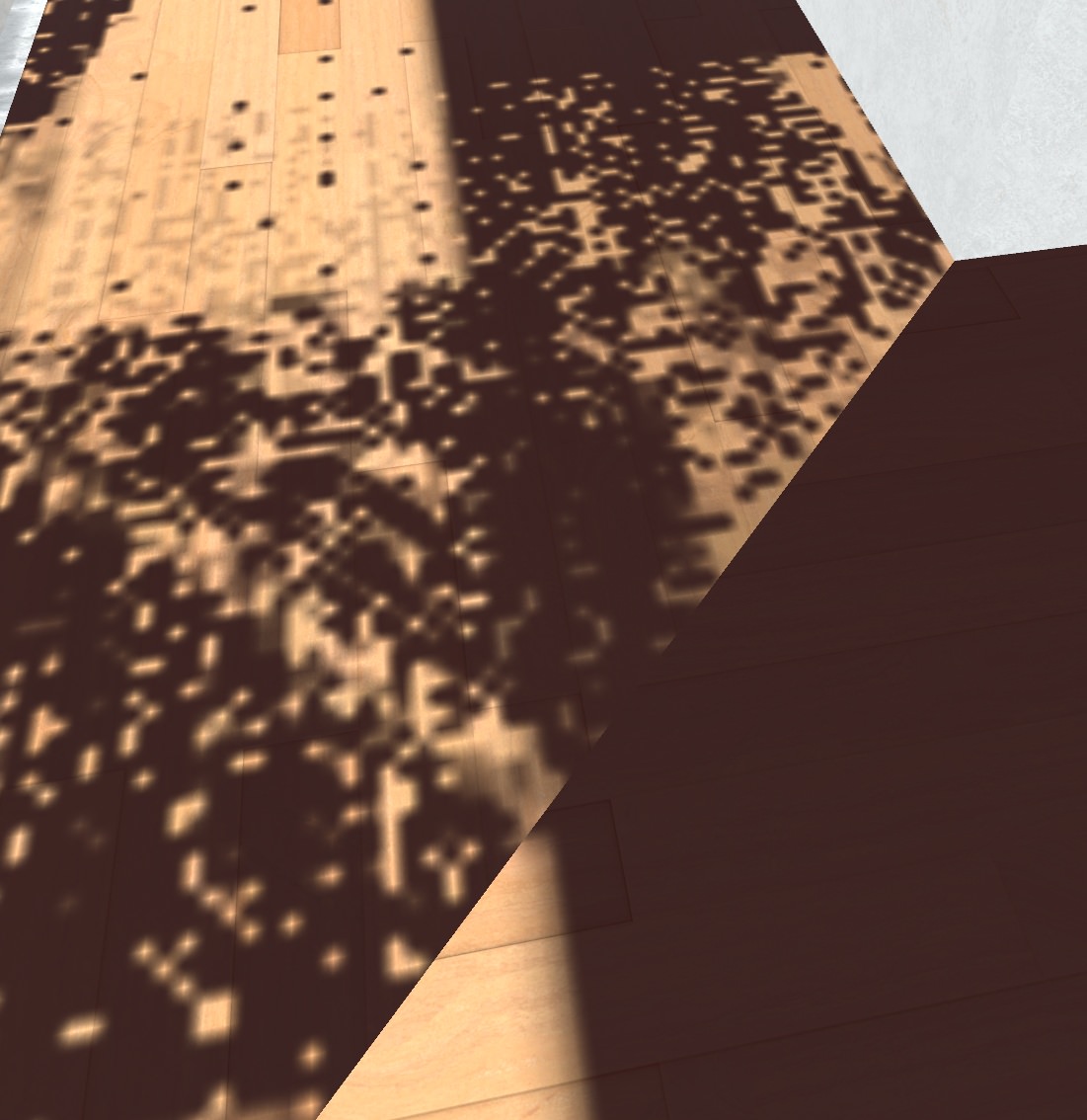
every time i bake lights those artifacts show up, even if i turn up the quality. https://i.imgur.com/oqjvHLm.jpg
 lean lodge
@static root in the mesh import settings, tick "Generate lightmap UV's"
The problem should vanish immediately
static root
I built the world with probuilder, there are nearly no models
lean lodge
Does probuilder not generate meshes in your assets?
lilac saddle
The instancing setting on the materials, under advanced, should i always enable that option?
lean lodge
If you think you can use it, then yes. Keep in mind static batching will negate it.
lilac saddle
Will i loose anything by not ticking it?
Or by enabling it i mean, is there an risk ill lose performance by doing it?
lean lodge
I don't think so
static root
@lean lodge there are none in my folder, it propably just leaves them in the hierachy. I can select each brush and get a Mesh Renderer field with lightmap settings, but there is no way to generate lightmap UV's
lean lodge
Is there a Mesh Filter component on the mesh renderer's object by any chance?
static root
realtime lightning looks fine, so i am not sure how baking it cant fix it
lean lodge
If there's a mesh filter component, you can click the mesh there.
Not familiar with probuilder yet
static root
https://i.imgur.com/XVKyixF.jpg only a mesh renderer object like this
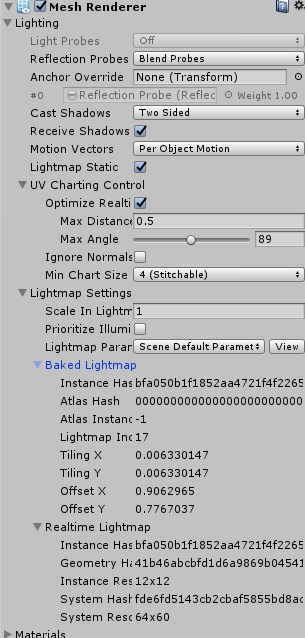
i made everything thats static static as well
might as well just leave it at realtime if nothing works out, but i cant understand how unity can render shadows perfectly in realtime, but not when it bakes them
i have also tried to work with texture atlases, initially i wanted to put all textures (around 9) into their own atlas, however as it turns out there is no real solution to tiling things within an atlas, as in selecting the texture form an atlas and having it repeat as you please
some confusing stuff in my opinion and no straight forward solutions
static root
epic, i needed to press a button in probuilder called "Generate UV2"
lean lodge
Oh, that makes sense.
That essentially does the same thing as generate lightmap UV's, must be the Probuilder variant then
Since you're not dealing with imported meshes
static root
i am very well versed in doing brushwork from my hammer days, but stuff like that is totally new
static root
oh i see well looks like we 2 to can sort those 2 things together now
now if i could find a way to make parts of an texture atlas tileable i would be set, but at least that wont drag down fps during runtime as much
lean lodge
The annoying part is that it should be theoretically possible with the right shader.
It's just that you would have to change the way the shader moves the UV's or renders it etc
Since the classic Tiling and Offset functions won't help
static root
yeah i read about it too, there is even a texture array module in unity. The shaders i found were unusable or non existant
would be cool to throw 16 textures into a 4k by 4k texture pack and just call it with the shader. someone must have done an edit on the defualt unity shader
 torn crypt
What's your guys/gals opinions on handing snow particles (or rather optimizing for them). Creating a volume over the entire world sounds expensive (I'd have to crank the max particle amount up to get the correct density in the air) -- is it possible to create a particle system attached to a player with a wide radius that is rendered only locally?
inland vault
yes
can use player tracking with a trigger for on network ready to enable it locally
lilac saddle
Hi all, in the Shader stripping setting, under instancing Variants, wich one should i be using? Strip Unused, Strip all or Keep all?
 nimble fractal
So much difference between Baked and Mixed light it is normal or not? Baked https://cdn.discordapp.com/attachments/485442757138055176/487203339575099393/unknown.png


 warped turtle
I think you still have to bake the light to the terrain. Not exactly sure how it works correctly anymore, just check up youtube tutorials . But right now I think with mixed lighting you are basically using realtime lighting which is really bad for performance. @nimble fractal
static root
i would like to reflect a large body of water, is there a VR compatible solution for planar reflections that you can bake? box reflections dont seem to work as hoped
warped turtle
@static root I once say somebody just copying the the world that was supposed to be reflected under the water, so that there is a pseudo reflective effect. As long as the water is somewhat transparent you should be fine. But how to properly do it I don't know, I guess there should be shaders, cause it should work somewhat like a mirror.
static root
yeah flipping the whole map and cutting some walls is my last resort for sure
a shader that mirrors in realtime would mean you mirror everything though
warped turtle
there is SilVR's water shader, I think it's open source but don't quote me on that. just google it and you should find it
static root
i am using vrwatershader from the assetstore, very satisfied, but it cant do planar reflections
warped turtle
ahh well then you know more than me 🤷
static root
google wont spit out anything usable for "siivr water shader"
yeah, it would be nice to have a cheap reflection, espcially since its distorted anyway so it wont have to be high quality
just slapping a mirror below certianly works but yeah lol
warped turtle
anyways best of luck
static root
cheers
scenic swallow
@nimble fractal Baked lighting only gets specularity from the reflection probes not the light sources. This means that if you want to have a bright moon reflecting off the ground you'll need to have a bright skybox or a bright emissive object where the moon is. Also in order for lightmaps to work on terrain you have to go into the terrain settings and change the terrain material from built-in to custom, create a material and set it to use the Unity terrain shader.
 plain moon
How can I speed up the "light transport" stage? It takes me about 30 minutes to bake my lightmaps and they come out to around 80MB at 2048 resolution. Baked AO also takes forever if I leave it enabled.
sweet sinew
Reduce your lightmap settings. Also, exclude smaller items from the baking

Unity
Unity is the ultimate game development platform. Use Unity to build high-quality 3D and 2D games, deploy them across mobile, desktop, VR/AR, consoles or the Web, and connect with loyal and enthusiastic players and customers.
plain moon
I've since reduced it to 1024 and I've gone around and set large gameobjects to 0.05 scale in lightmap
I'll go ahead and mass exclude small props though
lean lodge
So, small props will get their light from light probes instead?
sweet sinew
You need to reduce the indirect in the lighting settings. Default is like 2, so if its a open world you should reduce it to like 0.35
Yea Rokk
sweet sinew
Read the tutorial I linked, it goes over reducing the time and improving it
plain moon
Will do thanks!
scenic swallow
@plain moon The lightmap size is not the setting you want to change. You want to adjust the lightmap resolution and indirect resolution.
You can set the lightmap size to 2048 and Unity will use a smaller one if it needs to.
Also you will probably want to use compression as lightmaps can be quite large otherwise.
Also you can create custom lightmap parameter sets that have a multiplier to increase or decrease the pre-computed GI resolution for that specific object.
plain moon
What do you mean by that last part? Is that similar to changing the "scale in lightmap" setting on each object?
median stag
Been having trouble with getting my alwaysbufferone triggers which do a lot, not to lag when fired to the point where i'm adding way too many delays.
sweet sinew
Convert it to a custom trigger (local) and have a AlwaysBufferOne trigger that custom trigger
median stag
People that join late will be in an off state from the one present when it's changed
There's different things that can call the same object's state
I just tested that in a map actually
sweet sinew
The lag comes from you sending out too many buffered requests. Which is why i'm telling you to convert it into a custom local trigger
median stag
It won't buffer properly to late joiners, though
median stag
The issue when i was testing it with that basic setup came from the object being turned on and off by a separate trigger, and then the third trigger locally changaing it
Unless the object's state in question is directly in the buffer, where it's always buffered, it can be out of sync
I was thinking of having a secondary gameobject which is used as an intermediary, where it's buffered to on or off, and then late joiners would see the object enabled and locally do it from there (OnEnable)
But i'm worried about how joining late and OnEnable triggers work en masse
I think i have it actually.
Basically i need to make sure everything in the map that has any possibility of changing that object just needs to always call that custom trigger, instead of doing it on its own
I see what i was doing wrong, i'll try it like this thanks
sweet sinew
The idea for better network performance is to get your buffer number down to as low as possible. Some cases you just can't do it, but majority of them you can
The more local stuff you can run the better
median stag
I know that much, just that it's always been a problem since i needed to update late joiners to the new states properly, and i had this problem before thinking about the custom call from elsewhere just now
They'd always get out of sync
strange prism
Also, chained broadcast triggers or triggers that everyone broadcast and initiate will cause bad lag with the potential to crash if there are enough players.
median stag
.Oh yeah, i know that XD
All of my alwwaysbufferones were called by a single local interact
Still, i'll try it this way
strange prism
That sounds backwards
sweet sinew
You can do it like this OnInteract (Local) -> AlwaysUnbuffered -> Local
median stag
^
That's what i did
Because there were many different triggers being called, some local to the person using the button and some not
So one button could have local things happen to them, and non-local to everyone
strange prism
Local to many global?
If everything is broadcasted, then the interact can be always buffer and everything else should be local.
median stag
The issue i was just testing and getting people out of sync was because another trigger also alwaysbuffers the state
sweet sinew
The order of things is important
strange prism
^
sweet sinew
Do what needs to be done first, then do local later (on the interact)
median stag
The only thing i can't actually make local and must state in the alwaysbufferone state is my triggers that set the animationint
strange prism
If you broadcast a local, everyone still does it
median stag
Not sure how to explain how i'm not sure what to do. I have 150 different animation states it can be in based on the Int
That can be changed though
sweet sinew
You can send a AlwaysBufferOne to the animationInt only, that will only keep the latest one
sweet sinew
So Local -> AlwaysBufferOne (CustomTrigger) | AlwaysBufferOne(AnimationInt) -> Local actions
median stag
That's what i'm planning now, just gotta go through and fix everything
How many local GameObject Enable or Disable do you think can be pinned to one trigger before it starts to be noticable?
strange prism
I don’t see the difference there
median stag
I've had 50 enabled at once before breaking it up to 12 each over 4 over time, still noticable to me
strange prism
Both of those buffer ones will be triggered at the same time anyway, so why not combine them?
sweet sinew
Different animation states
strange prism
But the late joined will still get them at the same time without the animator to change
median stag
Won't they have to fire through every one though?
strange prism
Yes, but that doesn’t mean there is time for the animator to transition.
Unless you have it setup nicely from the default state
median stag
Actually, just a question: What would happen if a person had to go through 100 local triggers doing various things when they first join,
All of them called by the alwaysbufferone
Would it do them at once and crash?
strange prism
Nothing? It just executed it all. Hopefully the deferred triggers isn’t an actual issue for buffered triggers...
As long as it isn’t chained broadcast triggers it should be fine.
median stag
So does it go trigger by trigger when VRChat is loading the buffered changes to a map, and wait for eachs' completion?
strange prism
I want to say yes
median stag
@,@
strange prism
I’m guessing here, but every time a buffered trigger is called, the last time is saved. When a new person joined, it goes through all the buffered and executed them in the same order that it did for everyone else.
This version of unity is single threaded, so it must wait for everything to complete before moving on to the next trigger.
median stag
Including the local triggers called? Otherwise it'll go through all of the buffered calls to the customs and fire through hundreds at once
sweet sinew
If the local triggers are called in a buffer trigger yes
It will still only be 1 buffered trigger
and 100 local triggers
median stag
I mean 100 buffered triggers, each calling their own local triggers
sweet sinew
Why do you need to bufferone 100 triggers?
strange prism
One buffered trigger calling into a local custom will still call the local for new people.
One buffer to 100 local is better than 100 buffered each to one local.
median stag
Sorry, had to go somewhere.
My map just has hundreds of triggers that need to update for late joiners
 tranquil osprey
I know the best optimization technique. Just put "- lag free -" at the end of the name sillies. You don't even have to bind all the meshes together or use FXAA.
lilac saddle
So I'm running into an issue where I try to go to the world I uploaded in VRChat. The loading screen works and looks like it's about to let me into the world, and then just takes me back to my home world. Any idea as to why this would be happening? I've tried reimporting the SDK and deleting/re-adding VRCWorld component to the scene
strange prism
Check if you have any triggers with empty receivers.
 modern orbit
if anyone is having laggy issues in their worlds make sure to the textures are below 256 x 256 and jpg, if have transparency keep png, for the mirrors mantain antialias at 1 not 8 and last the lights, deactivate the shadows, because the shadows have a very very bad impact on performance in some computers, thats all for now good luck guys
lean lodge
???
sweet sinew
Textures don't have to be below 256...
lean lodge
This is bad advice
Texture size barely matters for performance, and the format literally does not matter. It's all imported into a proper texture format anyway, PNG or JPG has zero impact. You also don't turn off shadows entirely, you generally bake your lights so lighting is basically zero cost.
Proper baked lighting will include shadows
Realtime shadows are laggy, but if you're gonna turn those off there's no point in realtime most of the time
modern orbit
mm for the light can be true, but the format of image it does have impact, barely in good pc but very in the bad ones, i discover it by replacing all my 1024 textures png with 256 jpg
lean lodge
It won't save draw calls, it will save a tiny amount of GPU maybe. Even then it would not be enough to notice.
Unless you have thousands of textures that suddenly went from 1k to 256 but I doubt that
sweet sinew
Unity handles the textures for you. Even if you have it set to 1024, doesn't mean it will be 1024 if the image doesn't support it.
If the image is 512x512 it will be 512x512 even with the size in the details is set to 1024
modern orbit
yeah that is what i mean, there are worlds with so much megabytes only by textures
lean lodge
That's only file size, though. And some worlds need that size.
modern orbit
well maybe is more like a try to reduce size
lean lodge
Will impact RAM usage a little and will affect download times. I'm not gonna lose any sleep over a world being 100 MB.
sweet sinew
The worlds approved are within the minimum specs for memory usage =/
modern orbit
mm
there are people too with or bad internet or limited
and they cant go to these worlds
sweet sinew
The worlds that are 500~ doesn't just contain textures though...
modern orbit
because lost of signal and re downloading a huge map
yeah i know there are models too
modern orbit
triggers buttons mirrors ligths sounds videos and particles
sweet sinew
compared to textures and audio
Only textures, audio and video (which generally isn't made public) is what takes up space.
modern orbit
yeah, audio is a totally diferent thing because more formats
ahh i forgot to ask
whats the audio format less heavy?
modern orbit
mmn
i always thinking wav was the most heavy because is ''raw" so i use ogg
if i convert my ogg 2mb to wav it increase
sweet sinew
Wav is Windows standard audio files, so doesn't require anything do to real time conversion when playing
Ogg is just a compressed container
modern orbit
so is more fast and efficent?
its curious but good to know
well see ya later, i will keep trying to do as many as i can for not down the fps of laptop and low req pc users, because i know how it feels to walk in vrchat at 1 fps
sweet sinew
You will hardly notice the difference to be honest if the audio file is small
modern orbit
yes but my job rigth now is to make the worlds less heavy and laggy, because the low req pcs
:)
sweet sinew
Avatars is majority of the issue when it comes to lag.
As long as worlds are static and baked it shouldn't cause too much strain/usage on the computer
Of course, special effects and what not does add to the usage, but can be handled in a good way too
modern orbit
when come to avatars there are 3 common novice errors who make suffer the low req pcs: cubr paradox with "tinted" on it, very large textures in heavy formats and overdoing polygons
sweet sinew
Not heard this about cubed shaders, but very large textures shouldn't matter and poly doesn't really matter.
sweet sinew
It's the amount of draw calls your avatar does that matters
sweet sinew
Draw calls is how many objects are drawn on screen.
A world can have a lot of draw calls because it's static and is handled another way.
Avatar however moves around and have to be redraw every frame
modern orbit
ohh
sweet sinew
So if you have 1 mesh, 5 materials, you suddenly have 5-6 draw calls.
modern orbit
i see
sweet sinew
Then imagine 20 players in a room that have anywhere between 5-20 materials and 1 - 8 meshes, that are moving around, you suddenly have a lot of updates that needs to be done each frame
Which will lag your game no matter what world you are in.
sweet sinew
Doesn't help you if you see all of them.
sweet sinew
If you want to test it out, bring 15-20 people to the "Blue - 100% Lag free" world, which is actually the most optimized world you will find and you will still lag (lose frames) because of the avatars.
modern orbit
i know, because of that i make the limit of my maps to 12
because 15 is laggy 20 are slow and 30 is torture
and 40 is death
sweet sinew
Sadly that is how it is on minimum specs.
modern orbit
maybe one day they gonna learn too, maybe
just dont loss the hope xd
im gonna go now, whishing for a game without low fps, XD see ya it was a pleasure to talk here again with such intelligent people
viral marsh
And if you really have 4GB of RAM… oof
lilac saddle
@strange prism Tried just removing all triggers to see if it would work and still does the same thing, any other ideas?
static root
i followed the lighting guide from xiexes, but baking with mixed lighting is not generating any lightmaps
it goes through the whole baking process like normal, but the lightmaps are all black exrs
warped turtle
have you set the objects as static?
static root
yes, most of them are
also generated uv2s, now i tried setting a second realtime light and one for baked stuff, but that means the avatar isnt casting shadows
warped turtle
ahve you also tried using the setting baked for the light?
static root
yeah if i set it to baked its baking alright, but it wont light up the avatar unfortunatly
warped turtle
one more question are the things you are baking to imported?
if yes then make sure to tick "Generate Lightmaps UVs"
static root
most of it is probuilder stuff, i have a few models imported but only minor things.
its weird because bake only works but not mixed
what settings do you use to bake light?
warped turtle
I just used baked lighing
mixed in with a bit of realtime lighting, but I've only dabbled into world creation
static root
i see
warped turtle
but yu said you're using avatars, and don't quote me but I think if you want the avatars to throw shadows you will need to use realtime lighting
but realtime is a real performance hog
static root
using 1 baked light and one realtime light didnt work out. according to the guide oyu can get realtime lighting shadows with mixed for everything thats not static
warped turtle
hmm sadly I haven't really got experience with mixed lighting
lean lodge
Mixed is basically just baked lighting that still acts like realtime for non-static objects
Another approach is to have a realtime light that only works on specific layers, such as Player
And then have the rest baked
warped turtle
ok mixed lighting is a lot more straightforward than I thought, thanks
static root
@lean lodge yeah thats what i did, but then the avatar wont cast shadowd to the ground and such, only stuff in itself is shadowed, like stuff from the body casting on the feet
which settings do you use for mixed lighting? because its just rendering black exrs for me
lean lodge
I don't use mixed lights.
I have a rather simple world with baked lights
I just use default settings for those and it works fine
static root
and your avatars cast shadows on the ground?
my scene is an outdoor kind of thing, so thats something i need to look out for
lean lodge
No, because it's all baked.
I have one toggle-able realtime light that then casts shadows.
static root
i see, that would be a solution too
thanks mate, i had hoped that you can have baked lighting and have stuff generate for the player only in real time. guess thats gonna be a corner to cut
lean lodge
You can set the realtime light to only affect players which would be a neat solution
static root
yeah, dir light with now shadows, but then the player wont cast shadows to the ground, definitly going for it though
culling mask is player and player local i guess, just in case the mirror will mess up
static root
@lean lodge how did you get the mirrors to work with your lighting? they show up all black to me, but are receiving the realtime light when looking down on them
lean lodge
Baked lighting works fine in the mirror for me.
It's literally just a baked directional light
static root
hmm i see thanks, i must have done some weird shit again for this to happen then
 light ingot
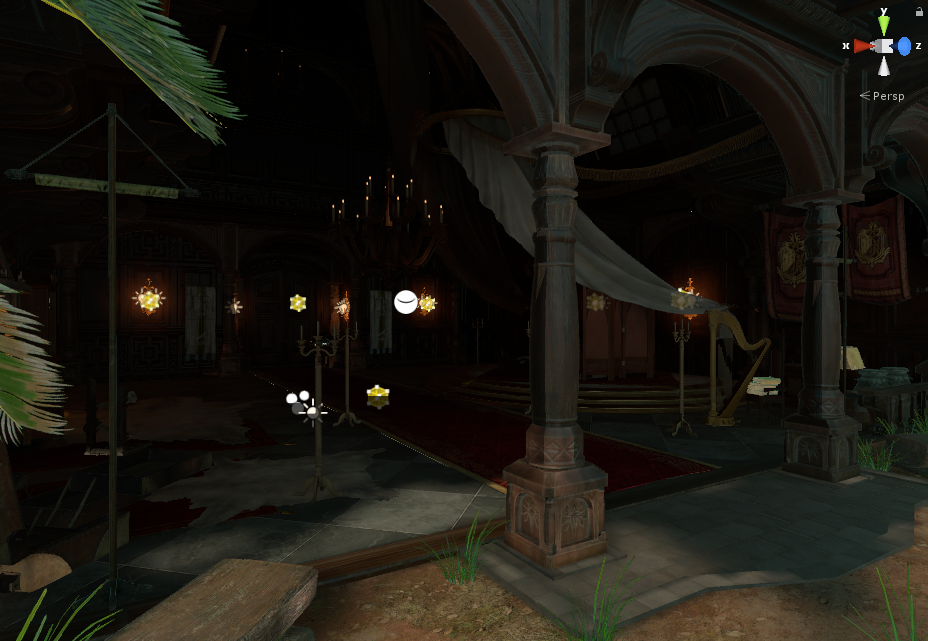
https://i.imgur.com/Y23IfhJ.png
im still trying to figure out why my baked lighting looks like crap. I have generated lightmap uvs several of the smaller things are not lightmap static. Does translucency only work on realtime?
 kindred breach
I put this on World tab with not response. Since the update, the video players in my clubs have stopped working. What have they changed?
sweet sinew
VRChat hasn't changed anything with the video player. Check the video and make sure it's working and that it allows embed.
 west crag
also check other videos in the same list, turns out VRChat has some issue where if one video doesn't load for any reason it deprives you of the lot 😐
viral marsh
@sweet sinew Allowing or not allowing embed does not effect if youtube-dl will work. I can still use it on videos known to not allow embedding.
No video from youtube is "embedded" in vrchat
No video from anywhere is "embedded" in vrchat
sweet sinew
@viral marsh The reason I pointed it out is because of this and I can't find a fix for it other than login in to youtube: https://github.com/rg3/youtube-dl/issues/4162

GitHub
The error shows up when trying to download this video: http://www.youtube.com/watch?v=HCtUQdQ--ME [debug] System config: [] [debug] User config: [] [debug] Command-line args: ['--verbose', ...
Also can't see if it was fixed in the dll itself or not either. But not really searched that much for it
viral marsh
I just downloaded one of my videos that I confirmed did not have embedding allowed on it with youtube-dl
sweet sinew
Then it must have been fixed, still didn't hurt to check
 pearl temple
I see that same issue happening in several worlds, something my have accidentally been messed up.
kindred breach
I was close to deleting all my worlds. The problem with VRChat is, 'Our update has broken your world? tough shit!'.
I also tried contacting an admin about this, no response.
static root
how do you guys reduce the size of your lightmaps, my lightmaps are 35 mb large
thats nearly the size of my whole map
lean lodge
@static root crunch compress them after generating
This only works if auto generate is turned off
You will find the textures inside a generated folder, where you can apply crunch compression to them. Lightmaps crunch compress pretty well. In simple cases, you can reduce the lightmap filesize by as much as 10x.
plain moon
@lean lodge thanks for that suggestion. Anyone know if there is some way to use the newer version of crunch compression to speed up the process? It says there's a newer version in 2017.3 that's over 2x faster and I have hundreds of textures to compress.
scenic swallow
I wouldn't recommend crunching everything in one go.
It'll take forever and you'll want to undo it on some textures that get a lot of artifacts.
I'd suggest you find the largest textures and try crunching those first.
You can see the size in build in the editor log file
@plain moon
 mossy condor
What does baking do for worlds and what is it purpose? also how do i go about it as im new to world building
lean lodge
Depends on the type of baking
Usually it means baking lights
Which means that instead of calculating the lighting at runtime, all the lighting is "baked" into the scene which saves a lot of CPU.
plain moon
Okay thanks for the recommendation @scenic swallow I'll take things slowly. The editor log file shows the original size vs crunched? And is there any way to break down what assets are adding to the size of your build? I thought unused assets don't get added to the build but when I delete them my build size goes down. 😨
@mossy condor a tutorial for light baking was recently pinned in #world-development
scenic swallow
@plain moon It shows a list of files in the build and their sizes.
The inspector shows the imported size of the selected texture, you can see it change when you enable compression, crunch, or reduce the maximum resolution.
plain moon
Great that's perfect, sorry I'm asking these questions without access to Unity
wise dagger
is there a way to see how many mb your assets in unity are taking up?
 willow spoke
Look at the size of the assets folder
wise dagger
hmm though my assets folder has a good amount of stuff in it that im not using in the world
willow spoke
That won't give you the size of the world that people actually download though, since it does not upload every asset, only the ones you use. That you can find on the website, loading screens, or on the picture of the world
wise dagger
yeah my world is around 200mb atm
though all it is is a large basic room with a bunch of smaller bedrooms
only thing i can think of is that there are alot of pictures, so that might be the cause
willow spoke
Sounds maybe?
wise dagger
no sounds, only have the vrcvideo player set up to play some youtube links with button presses
willow spoke
A few dozen pictures could easily get into the hundreds of mb range, that's probably what's going on
wise dagger
alright, guess i gotta deal with it then
doesn't seem to hurt performance as they are hidden by default, but does bump the size up
willow spoke
Yeah they wouldn't have much if any impact on performance
Other than ram, but that's trivial
plain moon
Compress those boys
strange prism
@wise dagger
To check your worlds size, upload / build your world first. Then go to console log, right hand top menu on that panel and click see editor log. It'll open a text file where you can search for "CustomScene" until it shows something like this (It will be the last one in the document if you have uploaded more than once in the same open instance of unity):
Bundle Name: customscene.vrcw
Compressed Size:89.9 mb
Uncompressed usage by category:
Textures 130.6 mb 64.7%
Meshes 32.3 mb 16.0%
Animations 6.1 mb 3.0%
Sounds 12.1 mb 6.0%
Shaders 2.0 mb 1.0%
Other Assets 1.1 mb 0.5%
Levels 17.6 mb 8.7%
Scripts 1.8 kb 0.0%
Included DLLs 0.0 kb 0.0%
File headers 207.6 kb 0.1%
Complete size 201.9 mb 100.0%
Compressed size is the Download size, Complete size is the space it takes up on a players hard drive/memory
wise dagger
ahh thats good, Thank you Cyan
 chrome lynx
Is anyone else having issues with YouTube videos that used to work and play not playing anymore
 astral sierra
 fallow flame
How do you manage to use 32MB on meshes?
I used 2MB on almost 500k polygons
 steep temple
That doesn't sound right.
strange prism
I think the stats I listed are for one of Lakuza’s worlds. That text is basically one of our copy pastas for when people ask about world size.
 toxic plaza
yeah those stats are from way back (around March i think).
would have been around 3 mil polys in the world at that time
lots of skinned mesh renderers too
not sure if those are higher in size than a standard mesh though
lean lodge
I don't think components are counted under "meshes"
But if they are, then that might explain a few things since they have a bit more info
I think components are counted under "Levels" instead
 marsh halo
When I am uploading the map, a lot of "unused" textures are uploading with it. How can I remove them? They are not on the scene, but uploading on VRChat
 errant vapor
marsh halo
errant vapor
marsh halo
@errant vapor Thank you, you are the best!
 obtuse berry
does anyone here know the most optimal way to put, potentially, thousands of videos into a single world?
performance wise will there be benefit to cramming all of the videos into a single video sync or am I better off having a seperate video player for each series with all but the one currently being viewed disabled?
I think I answered my own question.
 rugged mason
😂
obtuse berry
problem then is making sure people have the correct series loaded up when they enter the room late 🤔
lean lodge
It would be better to have it in one video sync I think
obtuse berry
you think? unity starts lagging after I get past 20 something videos in a single sync, but as long as there are no issues with having 1,000+ videos in a single VSync script I can probably just append all the links to it in a text editor and publish it without too much pain
 lapis basin
What do you think is an ideal polygon goal for a more complex world? I read somewhere that its recommended for the gear vr
to have at max around 100 000 polygons. But were on pc here, so maybe around 250k would be a good number, while still giving decent performance?
lean lodge
Polygons don't matter nearly as much, especially not in this game, and especially not on regular (non-skinned) mesh renderers.
Use the profiler and see what takes up the most time and resources. High material and mesh counts are more of a killer than polycount
As long as you don't use any high-poly mesh colliders that is
lapis basin
Ah ok, thanks. Are separate mesh counts still a problem when they get batched together at runtime btw?
lean lodge
Batching and instancing both have a lot of times where it can break, especially if they're not identical meshes
Manually combining and atlasing in Blender (or any 3D modeling program) helps a lot. The mesh baker asset can even do this automatically
And by "break", I don't mean anything bad will happen. I just mean that they might fail to batch and will still be done separately.
obtuse berry
in that vein, which is more optimal:
A single low poly version of the world as a mesh collider?
Or a low-poly version of the world made with multiple box colliders in unity?
lean lodge
I'm pretty sure having several primitive colliders (box, sphere, capsule etc) is better than mesh colliders.
@obtuse berry
I heard mesh colliders can be a bit buggy in this game and can slide around etc
It's also much easier to modify the world if you keep stuff separate
scenic swallow
@lapis basin I would recommend that you make use of the Unity profiler when making optimizations to make sure that they actually have the effect you want.
Unity's static batching is usually pretty good at saving draw calls but batches can get split in a lot of cases; usually due to different lighting. Joining the meshes in Blender will prevent the batch from being split but will also prevent the the different meshes from being culled separately.
So joining meshes is a trade off between draw calls and GPU cost. The increased GPU cost is variable depending on the meshes, if they overlap then you can end up wasting a lot of pixel shading drawing pixels that end up hidden.
If the meshes were left separate then those hidden pixels may have been culled by the GPU's depth test or the whole mesh may have been occlusion culled.
lean lodge
It's worth mentioning that most of the game's performance is limited by the CPU (in regular cases). In my personal opinion, decreasing CPU load at the cost of GPU is worth it.
scenic swallow
@lean lodge While VRChat is usually CPU bound the high resolutions required for VR make it really easy to destroy your performance with overdraw.
Especially if you are using a PBR shader like Standard
I wouldn't worry about static batches getting split until you've already done the basic optimizations like baking lighting, setting up occlusion culling, enabling static batching, and re-using materials.
After you've done all that you really need to start looking at the frame debugger and the profiler to figure out how long you're taking to render (on both the CPU and the GPU) and what is actually causing your draw calls.
Really you should be profiling before and after making any performance optimizations.
Otherwise you have no idea what the cost is vs the benefits. It could even be slower.
Also for the GPU profiling to be accurate to VR you need to set your game view camera to render at VR resolutions or enable OpenVR and output to your real HMD.
wise dagger
Im trying to reduce the size of my world, currently at around 200mb, though mostly it is pictures, and a few textures taking that up when i checked. I have not compressed anything, how would i go about this? Do i compress it normally and unity can just read it while compressed, or is it somethign done in unity?
scenic swallow
@wise dagger It is in the texture import settings
Which show in the inspector when you select the texture in the project files.
The file size shown at the bottom of the preview picture is the imported size.
 supple nymph
how do you make avatars appear lit in mirrors in dark maps and what are the settings in reflected layers that you use to make your mirror optomized like in the lag free boxed etc. any screenshots would be appreciated
lapis basin
@scenic swallow Thanks for the detailed explanation! A question though- isnt overdraw solved, when you have occlusion culling activated? Atleast when these objects are hiding behind the foreground object
scenic swallow
@lapis basin Occlusion culling helps avoid the draw calls that would otherwise be incurred by drawing meshes that are occluded. Unity only occlusion culls entire meshes so occluded portions of a partially visible mesh are still rendered, but in most cases the occluded pixels will be skipped.
GPUs perform depth culling to skip rendering pixels that are behind pixels that have already been rendered which avoids overdraw.
However in order for the GPU to cull by depth the closer pixels have to be rendered before the further away pixels.
Unity renders opaque objects in front-to-back order based on their object origin (or the combined origin of a static batch) .
This will end up rendering the closest pixels first in many cases but will still cause some overdraw if the mesh has overlapping faces that aren't culled depending on the order the triangles render (which is not guaranteed to be predictable as far as I know).
You can also get overdraw due to distant pixels being drawn too early because the mesh's origin is closer than other meshes that draw over it.
For example if you are in a square room with posters on the walls. If the walls, floor, and ceiling are all one mesh (or static batch) then depending on where your camera is the room may get drawn before the posters leading to some portion of the wall's pixels being overdrawn.
lapis basin
@scenic swallow Oh! Thats interesting! Thanks for clearing it up for me ouo b
scenic swallow
@frigid vale There isn't a recommended number of materials for a world like there is for a avatars because you generally do not see all of the materials for a world at at once.
Instead you should use the Profiler (Window->Profiler) Rendering section (click Rendering on the left-hand side).
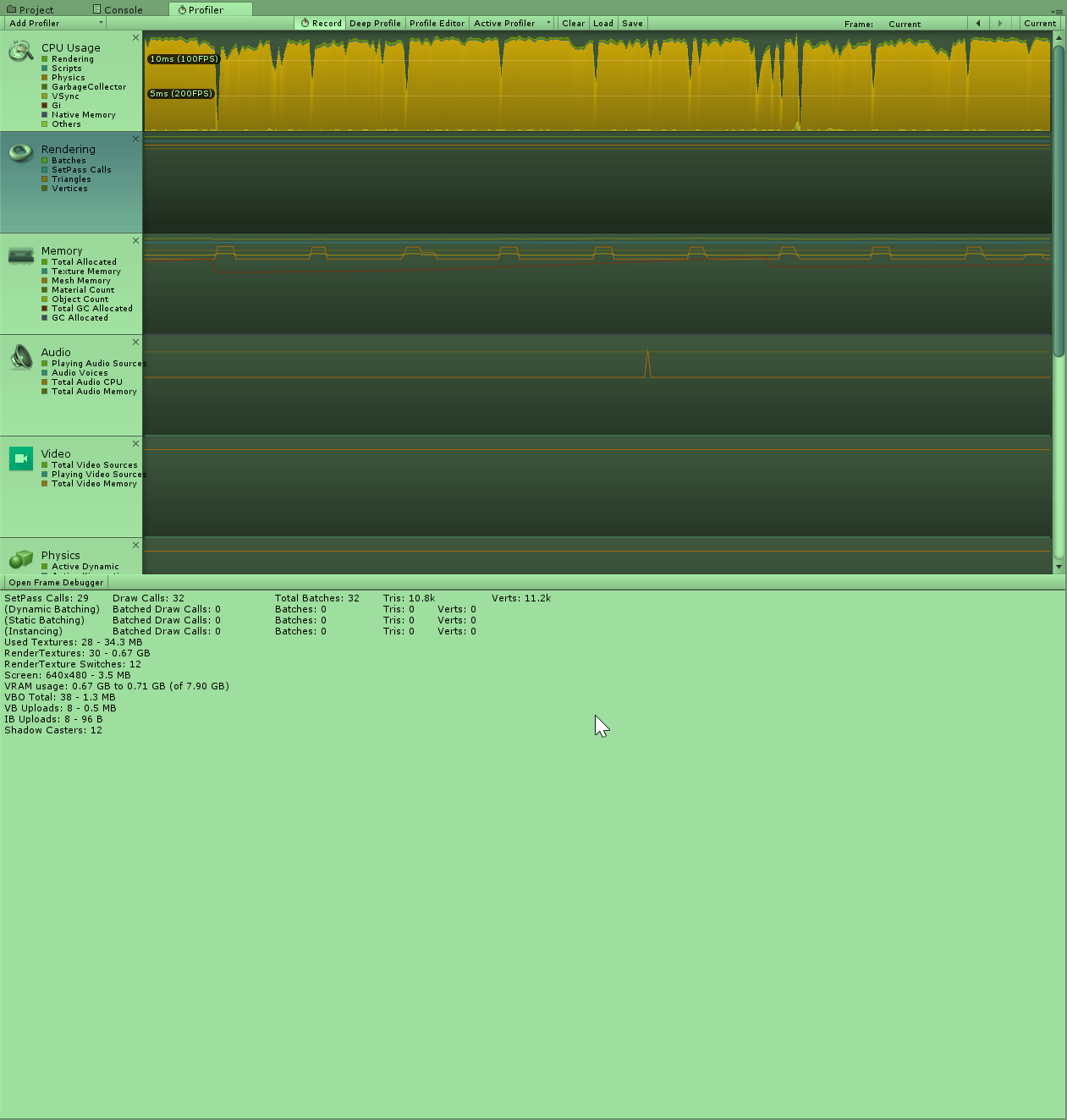
The main values you need to understand are SetPass Calls, Draw Calls, Total Batches, and the Batched Draw Calls and Batches sections.
The total verts and tris counts are also useful as some things like real-time lighting and shadows render the same mesh multiple times so this value can be much higher than the sum of all of the verts and tris in your scene.
scenic swallow
Draw Calls are issued every time Unity renders a mesh, but it's not a simple as one draw call per mesh. Materials split meshes into sub-meshes which are drawn separately.
A SetPass calls is issued every time Unity needs to change the shader pass that is being used. It's important to note that this not the same as the number of unique shaders in view as most shaders have a few passes for handling different parts of the rendering. The main three are the ForwardBase, ForwardAdd, and ShadowCaster passes, but there are others (see https://docs.unity3d.com/Manual/SL-PassTags.html). The ForwardBase pass renders the model with lightmaps, light probes, vertex lights, ambient light, and the main directional light. The ForwardAdd pass is run once per real-time point, spot, or extra directional light. The ShadowCaster pass renders depth information for shadow maps, it is run for every light with real-time shadows, multiple times in the case of point lights and the main directional light.
Additionally Unity renders opaque meshes in front-to-back order which means it will often have to switch back-and-forth between shader passes.
Taking a look at this example scene consisting of 27 Unity cubes 26 of which are using the same material and one is not.
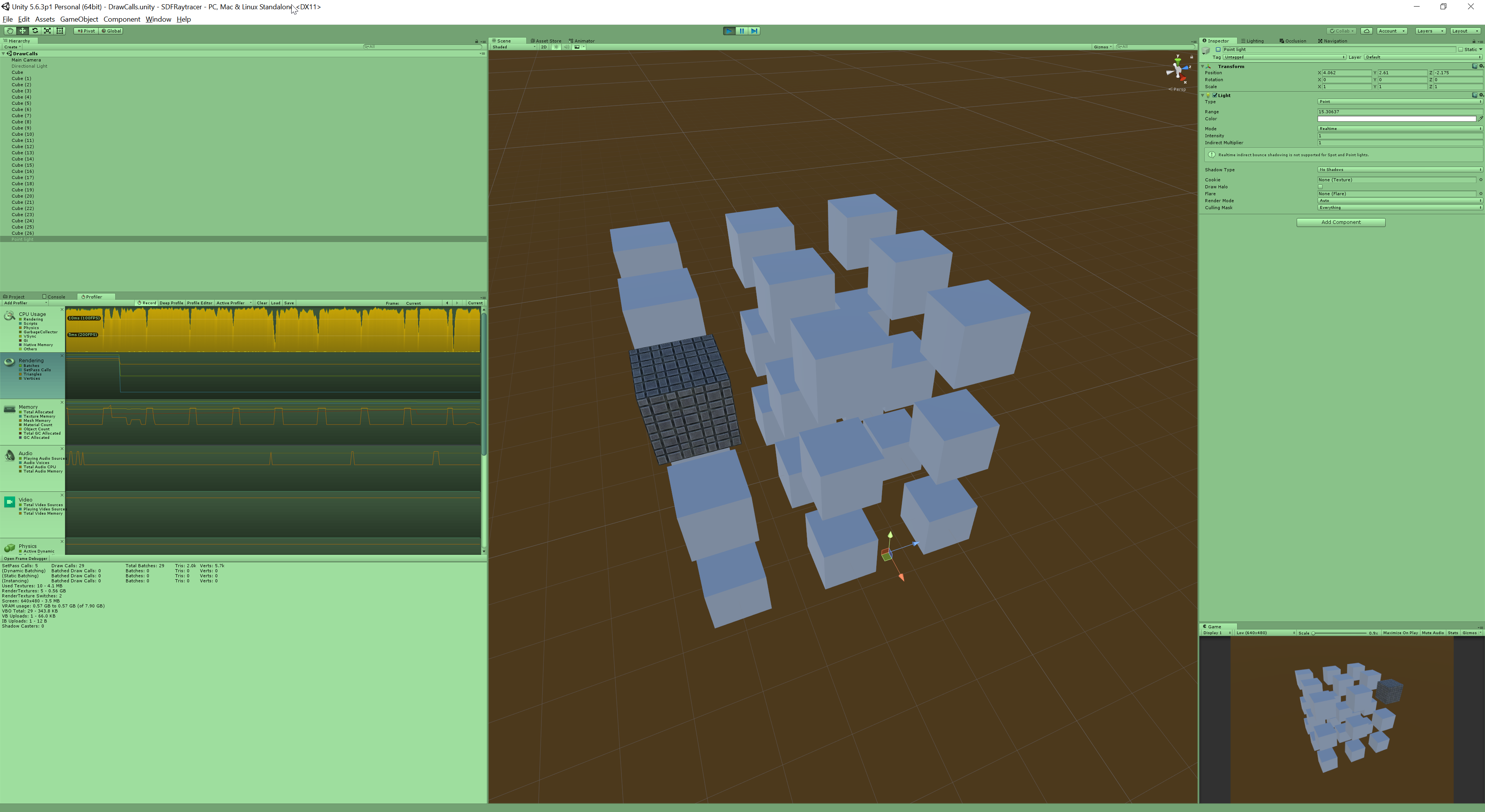
With dynamic batching disabled this is 29 Draw Calls and 5 SetPass Calls. 2 Draw Calls and SetPass Calls are from Unity.
So our 27 cubes are 27 Draw Calls and 3 SetPass Calls.
There are only two materials and shaders in the scene (excluding the skybox) but it requires three SetPass Calls because Unity has to switch from the plain material to the tiled material and back.
Adding a point light (no shadows) to the scene increase the Draw Calls to 56 and the SetPass Calls to 32. The Draw Calls for our 27 cubes have doubled because each cube is being rendered in two passes (one ForwardBase and one ForwardAdd). The SetPass Calls have increased from 3 to 30 because Unity is setting the ForwardAdd pass separately for each cube.
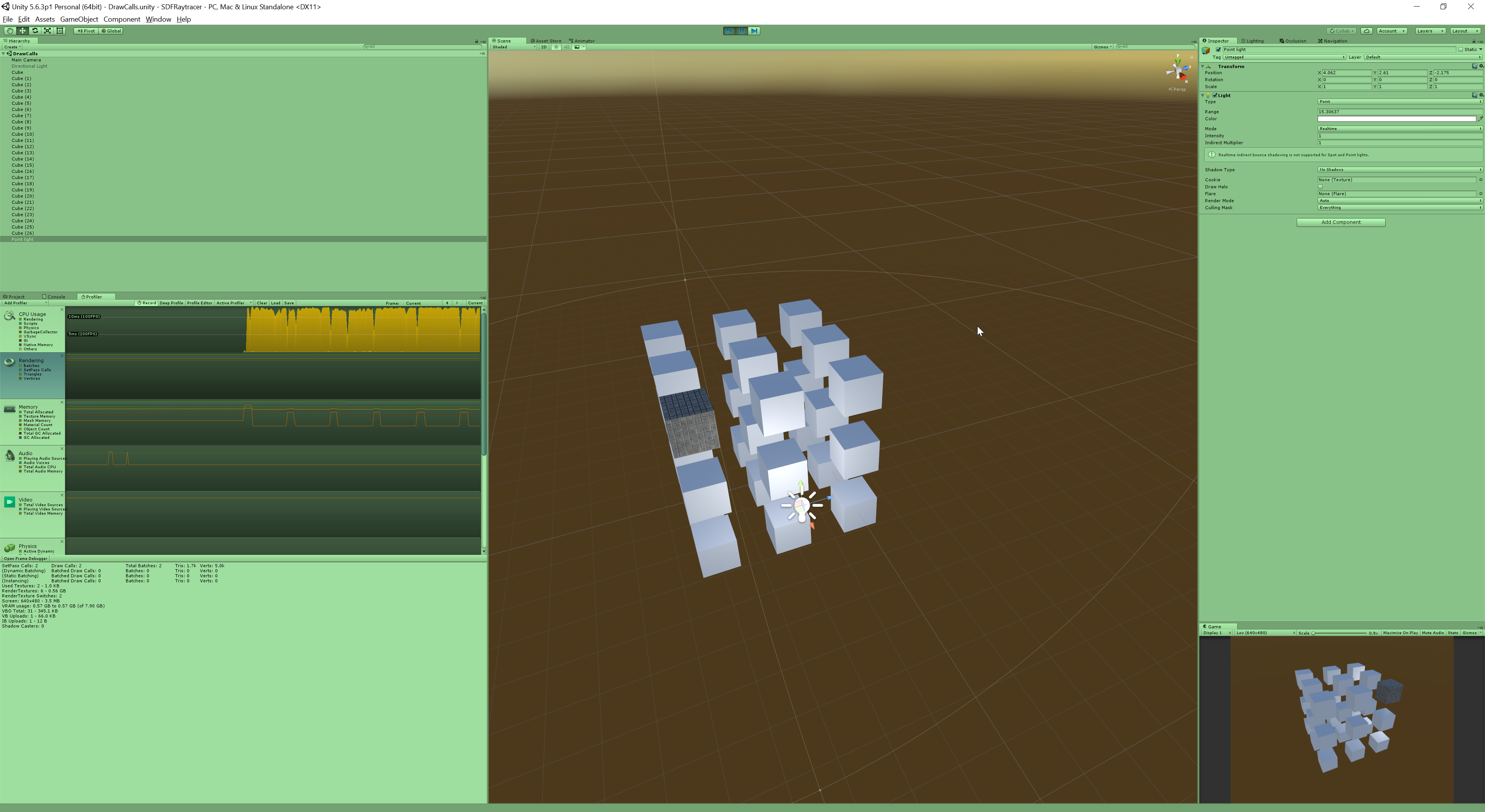
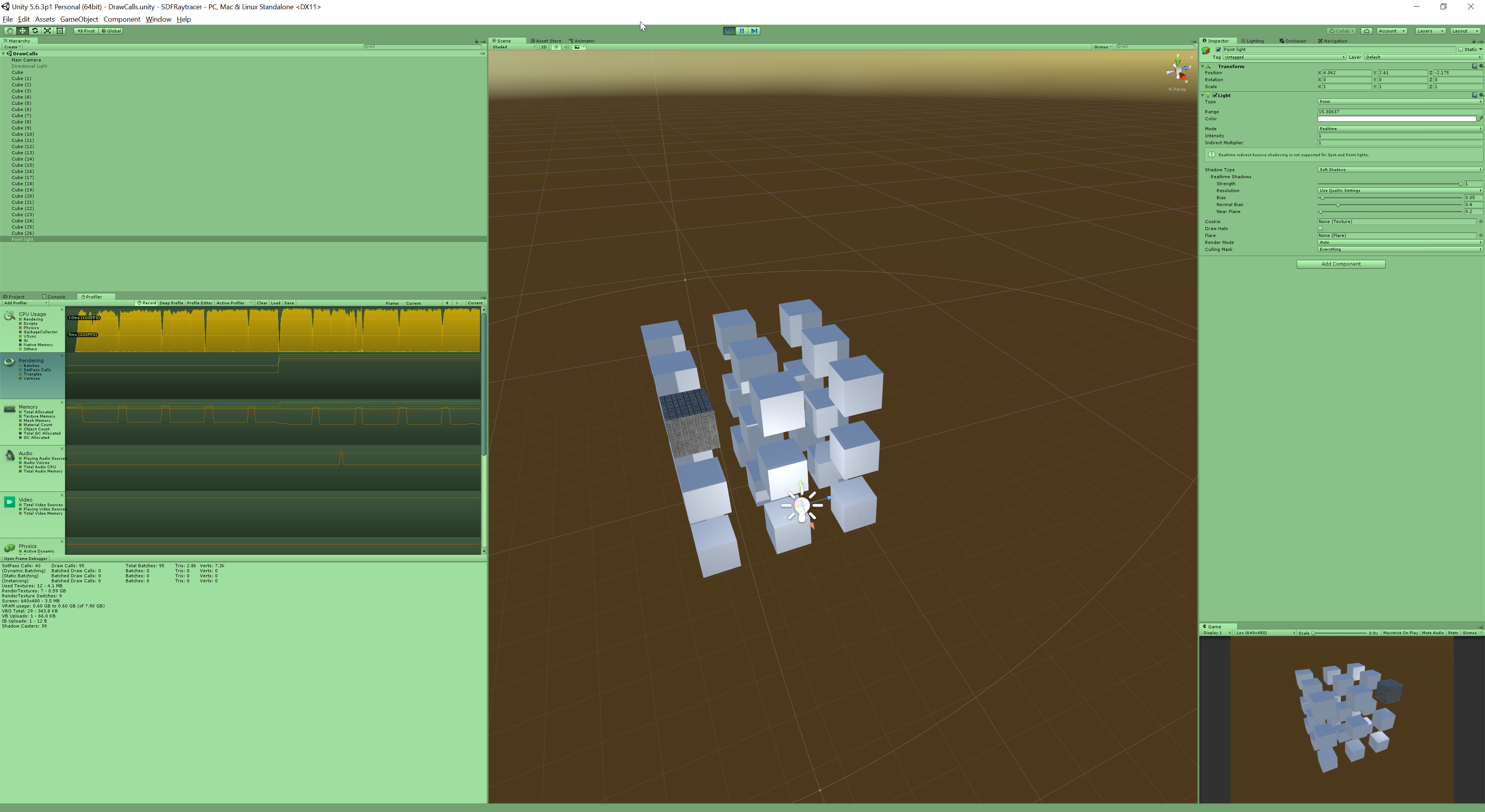
Enabling shadows (soft or hard) increases the Draw Calls from 56 to 83-110 and SetPass Calls to 34-41, the exact values vary depending on the light position.
This increase is due to Unity running ShadowCaster passes for each of the cubes inside its range (in this case all 27). The number varies even with all of the meshes in its range because this is a point light so it renders separate shadow maps for each direction (forward/back, left/right, up/down) which means some meshes may be rendered multiple times if they are visible from multiple directions.
Enabling the Directional Light without shadows does not increase the number of SetPass or Draw Calls because the main directional light is rendered as part of the ForwardBase pass which is already being run.
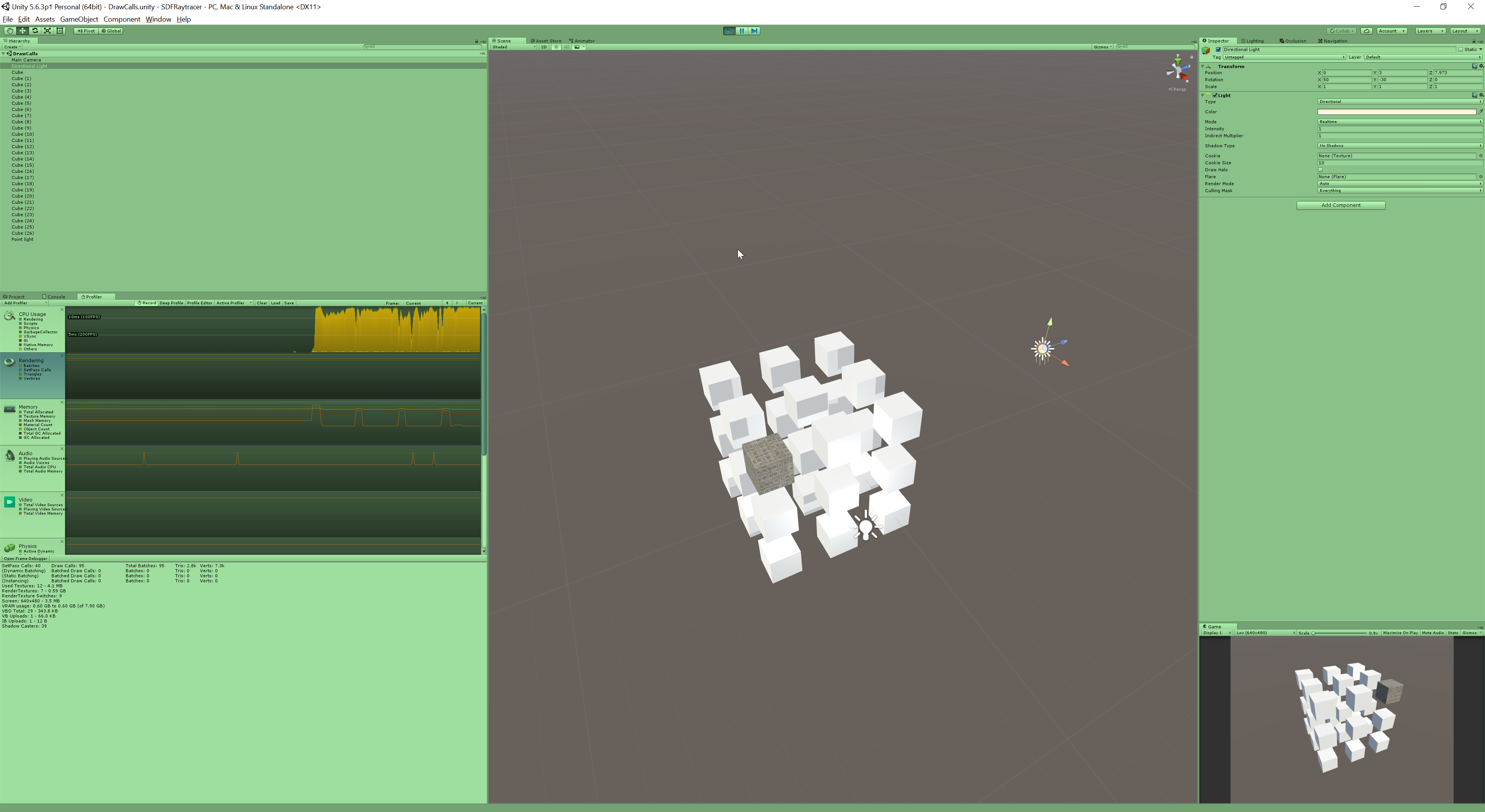
Enabling shadows on the Directional Light increases the Draw Calls to 231 and the SetPass Calls to 52.
108 of the additional Draw Calls are from the directional light's four Shadow Cascades (4x27=108)
In order to provide detailed shadows close up without wasting resolution in the distance directional light shadows are rendered multiple times at different distances (aka cascades) and are blended together over distance.
The other 28 Draw Calls are for rendering the Main Camera's Depth Texture which is used to add screen space self-shadowing from the directional light and is automatically enabled when directional light real-time shadows are enabled.
The extra 11 SetPass Calls are to set the various shaders used for the Shadow Cascades, Depth Texture, and Screen Space Shadowmap.
Now there are a number of ways to reduce the number of SetPass and Draw Calls in your world.
Dynamic Batching combines small meshes that share a material automatically at runtime, however due to the CPU cost of combining the meshes it is only used for meshes with very few vertices (usually 300 or less depending on the shader). This is enabled by default and is enabled in VRChat but is not usable for most meshes. These cubes have very few vertices so they are able to be combined by static batching when they share a material.
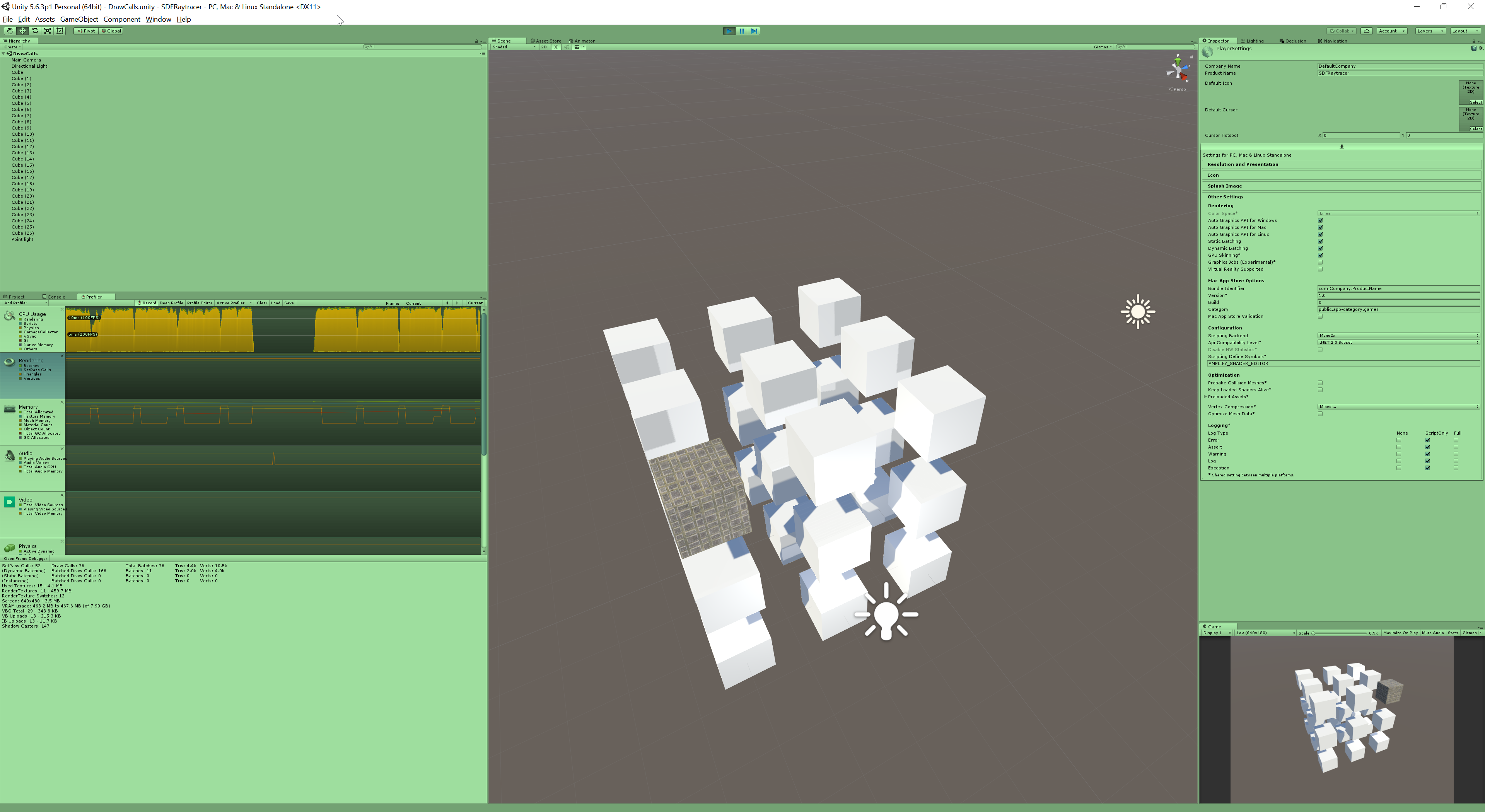
This has decreased the Draw Calls from 231 -> 76.
However if I replace the cubes with higher poly spheres they are no longer dynamically batched and the scene is back to 231 Draw Calls.
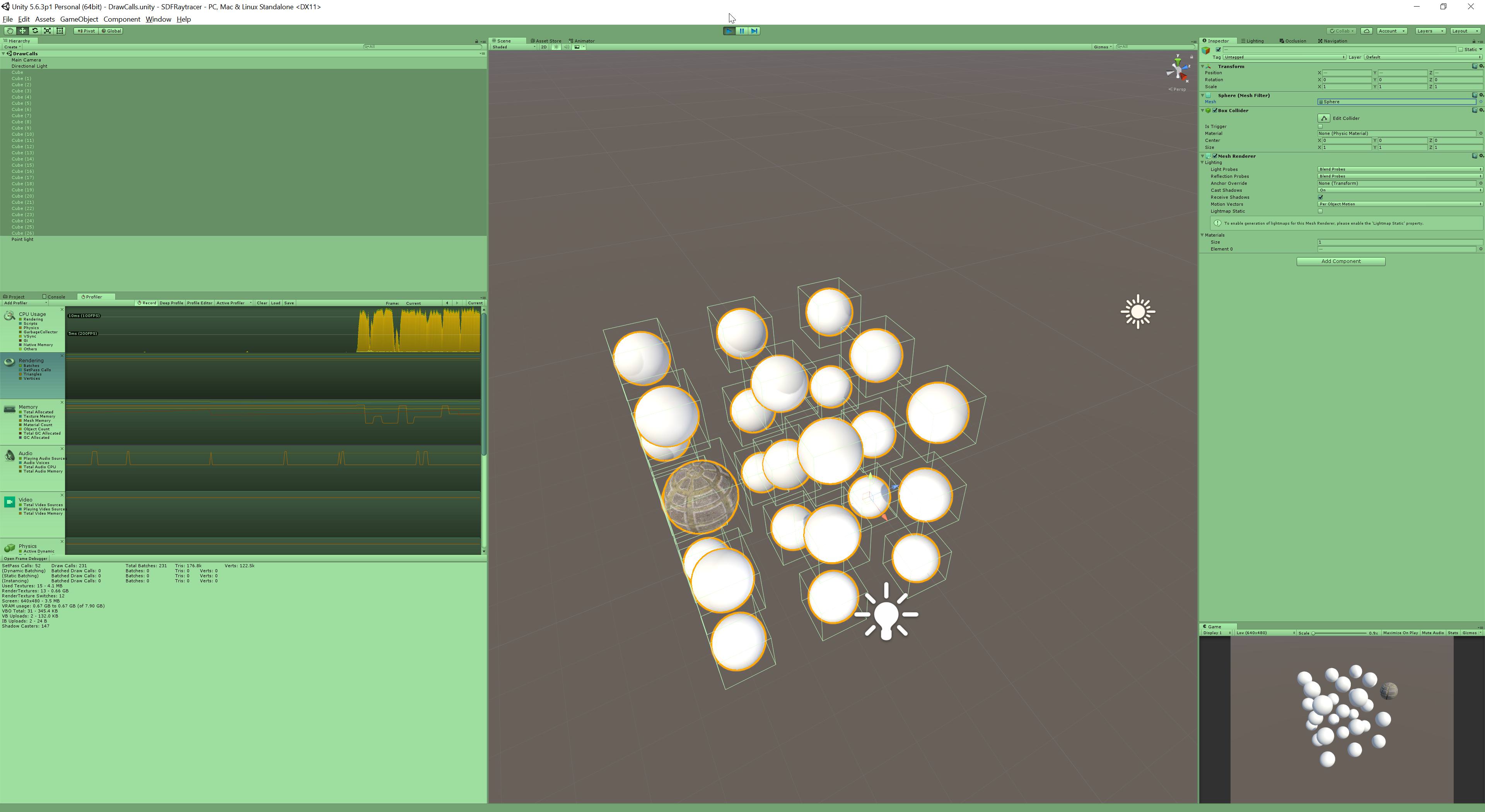
If these spheres are static objects (they do not move) then I can mark them as Static Batching from the drop-down next to the static checkbox. This reduces the Draw Calls from 231 to 62. For more information on batching see: https://docs.unity3d.com/560/Documentation/Manual/DrawCallBatching.html
The Unity Manual helps you learn and use the Unity engine. With the Unity engine you can create 2D and 3D games, apps and experiences.

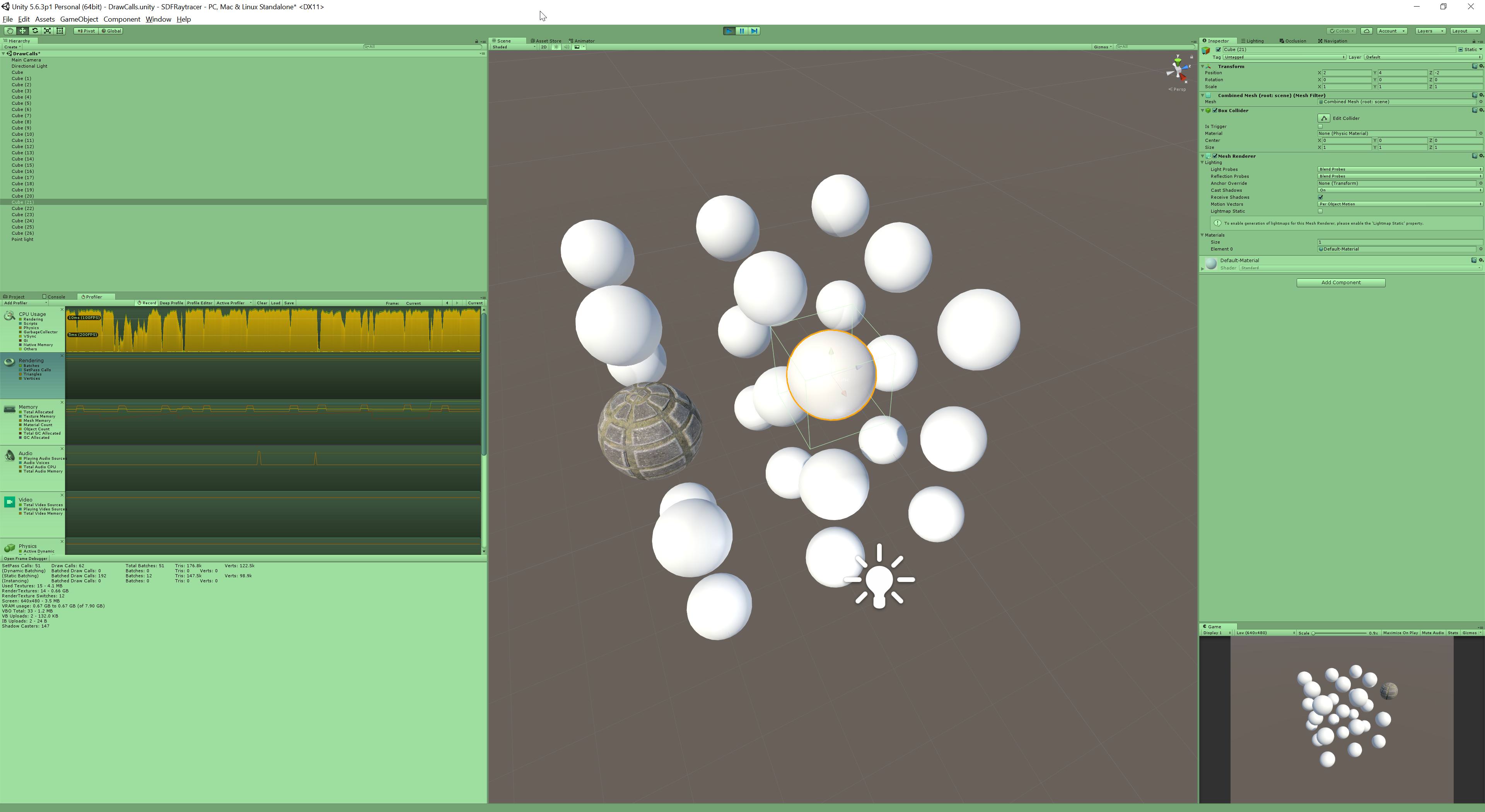
Marking the spheres as Lightmap Static and baking Lightmaps reduces the Draw Calls and SetPass Calls to 4. This is because the lightmaps are read as part of the Forwardbase pass and with all of the lights baked it is no longer necessary to run any ForwardAdd or ShadowCaster passes. Baked lighting is its own topic so I won't go into it further but Xiexe has a good tutorial on it here: https://vrcat.club/threads/xiexes-lighting-tutorial-how-to-get-good-at-baked-lighting-101.2081/

VRCat: Community-Run VRChat Forums
Greetings! Over my course of playing VRChat I've noticed that most worlds, mainly the ones that have baked lighting, are done poorly, or in an...
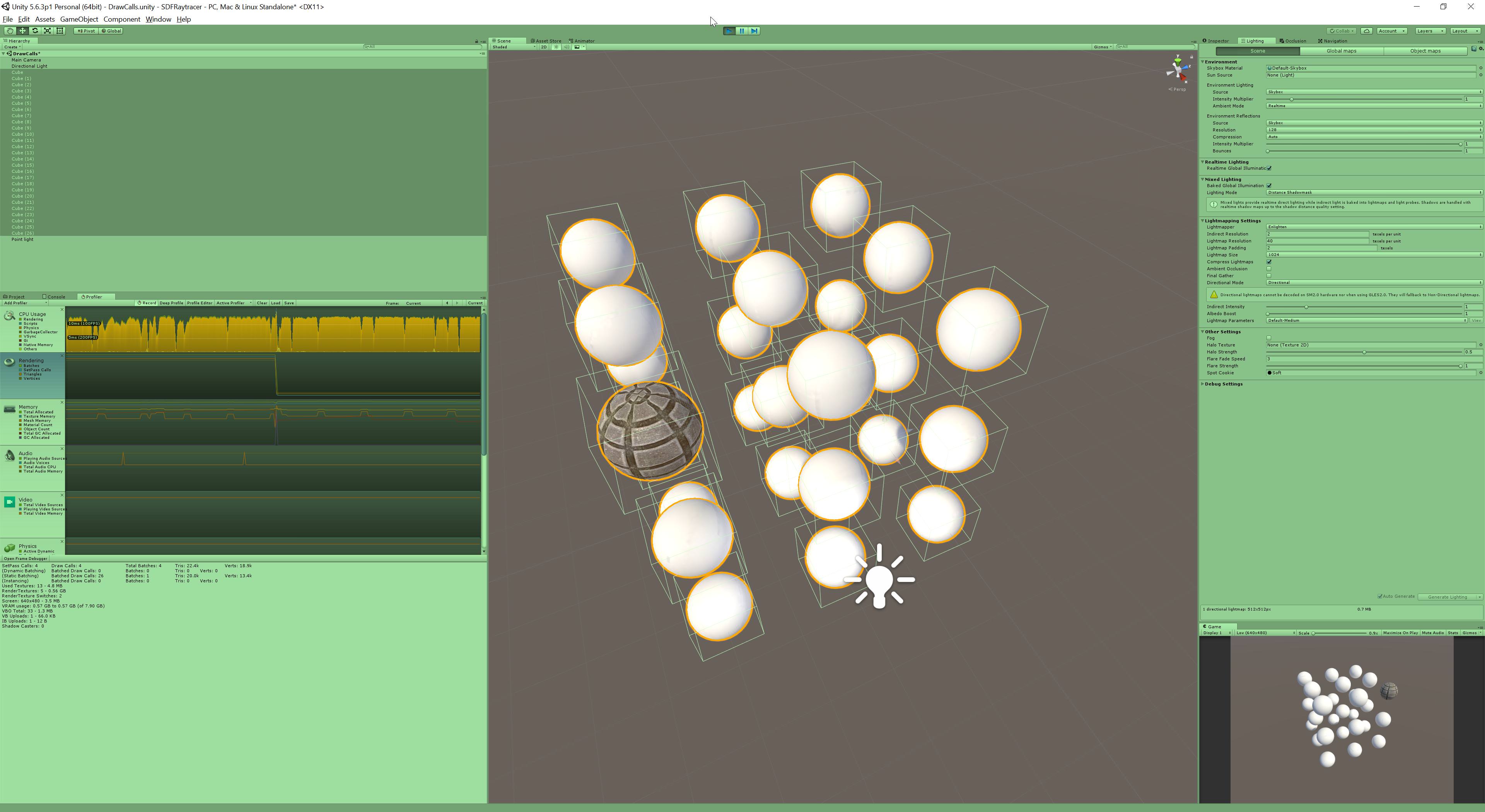
Reverting the scene back to our previous static batched meshes in real-time lights and shadows and adding another mesh as a wall between the camera and spheres gives us 45 SetPass and 67 Draw Calls.
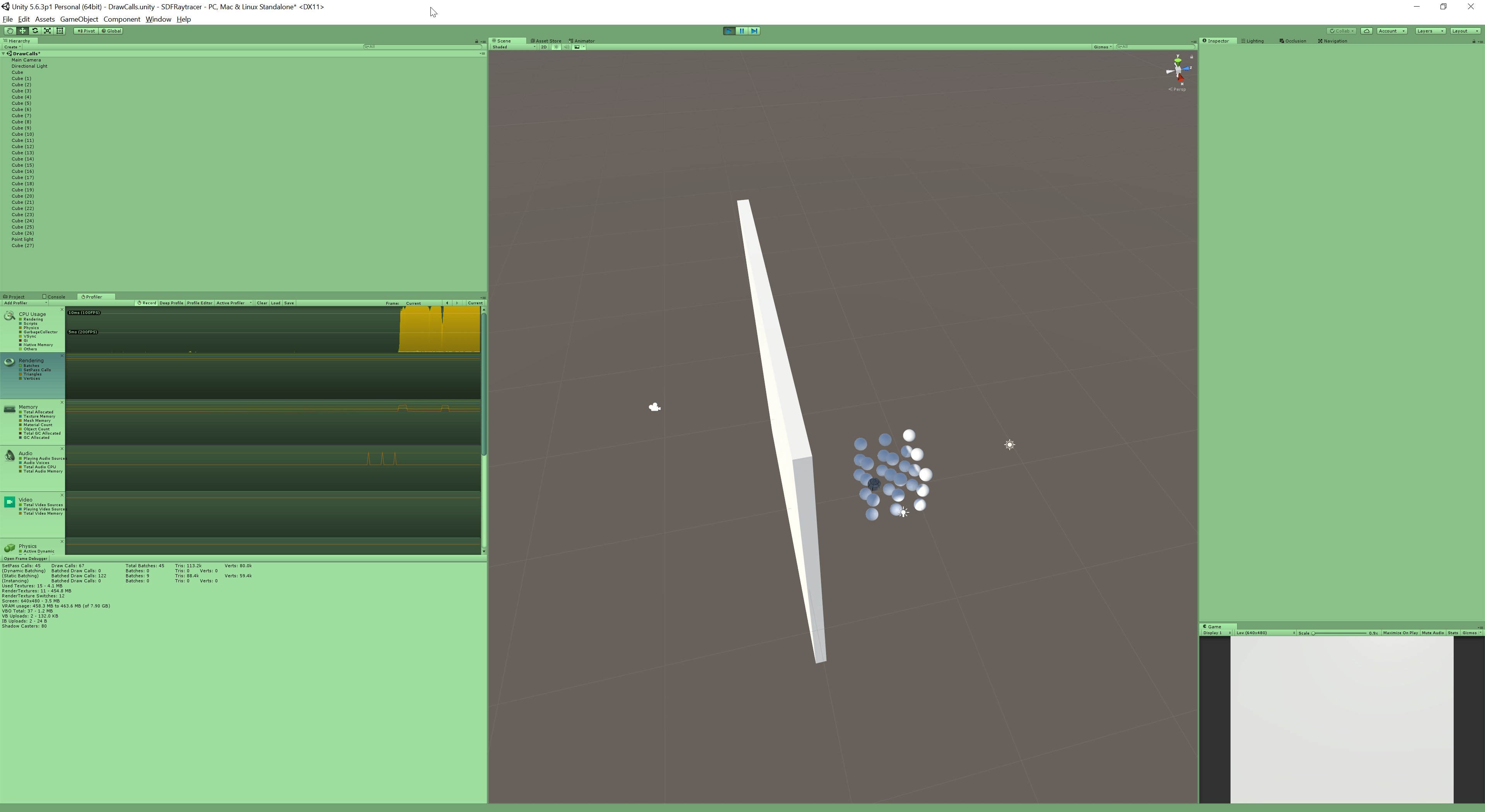
Marking only the wall mesh as Occluder Static and baking occlusion culling (Window->Occlusion) drops this to 17 SetPass calls and 24 Draw Calls.
Note the spheres are not marked as Occludee Static, they are being dynamically occluded by the Occluder Static wall.
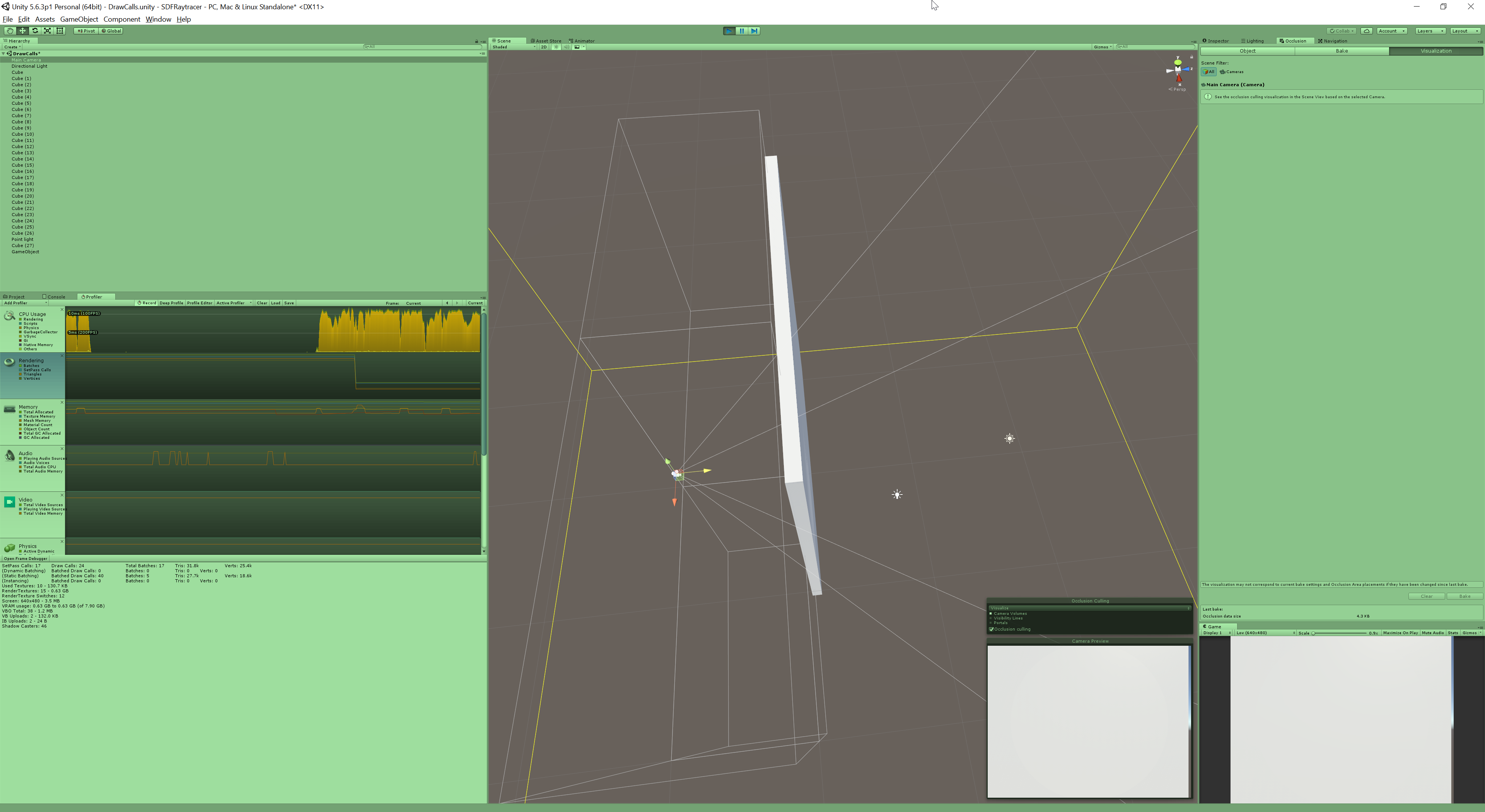
Moving the camera behind the wall causes the spheres to appear and the SetPass and Draw Calls to increase to 46 and 65 respectively.
Marking the spheres Occludee Static doesn't affect the SetPass or Draw Calls but should reduce the CPU cost of culling.
The SetPass and Draw Calls when the spheres are occluded (17 and 24) are still higher than when they are disabled (13 and 13) because they are only occluded from the Main Camera's view, they are still visible in some of the shadow maps.
scenic swallow
Overall you want to try to minimize the number of SetPass and Draw Calls using a combination of batching, baked lighting, and occlusion culling.
World optimization is a very deep topic so this isn't an exhaustive explanation. SetPass and Draw Calls are only part of the equation as they are a CPU cost. VRChat is usually bounded by the CPU, specifically Unity's main thread. However it can become GPU bound in some situations.
I've posted a transcript of this to VRCat: https://vrcat.club/threads/setpass-draw-calls-and-batches-explanation.2370/

VRCat: Community-Run VRChat Forums
This is a capture of an impromptu tutorial/info dump I wrote in the #world-optimization channel on the Official VRChat Discord.
@HonigballSmith...
Also if you want more details into what each draw call is doing the Frame Debugger will provide you with a detailed breakdown of the draw calls in your scene. You can find it under Window->Frame Debugger.
 cinder trellis
 obsidian bobcat
Slight optimization question. I noticed when I had a few people over (Say roughly 10-20 people) in my world, the optimization was fine, but as time progress things started to started. My friend noticed his CPU was spiking as well, so I took a look at the profiler to see if I could get any information. I noticed this:
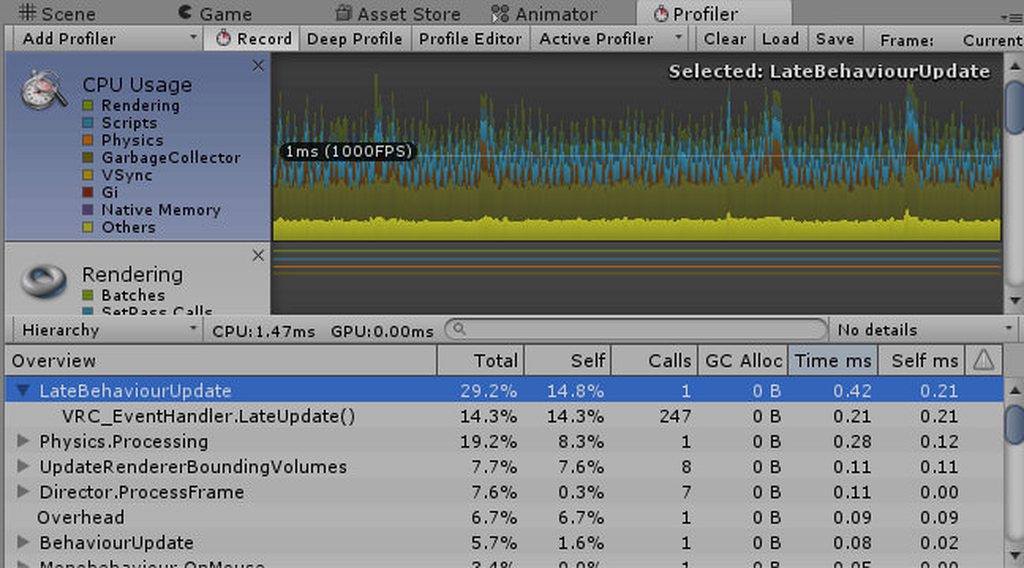
Im not sure what this means exactly, but im wondering if either A. My Garbage Collection for my world is literal Garbage, or B. Something with my pickupable objects or my triggers in my world is causing a CPU lag spike or something. Im not entirely sure, if anyone knows feel free to ping me here or PM me. Id love to make my world more optimized, I already added toggles for furniture, seating, and two other things as well.
Also, my lightmaps are baked as well, most things are set to static also.
obsidian bobcat
I think a more accurate question would be, how do I handle my garbage collection?
scenic swallow
@obsidian bobcat You don't need to worry about garbage collection because that's a scripting issue which since we can't use custom scripts means it's a VRChat issue.
obsidian bobcat
Noted.
scenic swallow
Also you won't be able to see most of the CPU issues in the editor because they're only running in the client.
Stuff like IK, Dynamic Bone, voice, all of VRChat's other code is only present in the client.
obsidian bobcat
Also noted. Im wondering if the decrease in performance may be related to my toggles that toggle on furniture/pickup objects. Im thinking its something with the pickupable objects and there physics. I made a few edits, so id have to test it some time.
Luckily, I already checked my draw calls, there around 250~, which I heard isnt to bad (After lightmap baking and such.)
 oblique umbra
Too bad we can’t link the test client up to the profiler
lilac saddle
I need help. So in my world I have a switch where I can turn off the lights, like in some sleep worlds. What can I do so that when I do that, the mirror doesn't go pitch black :'3 ?
 lean lodge
@worthy pecan basically start with everything disabled. Turn on MirrorReflection. From there, turn on Player if you want to see other players, and turn on Default if you want to see the map.
If you have avatar pedestals, put the "location" object (that's the preview) on a new layer so it doesn't get reflected
 worthy pecan
thank you
 peak bison
Quick question regarding render textures, do higher resolutions drop performance? I've not tested this but I assume it might be the case. I've got mine set to 1080 at the moment but considering dropping to 720.
lean lodge
Not in any measurable form. The camera itself (and how much it captures) matters a lot more than the render texture's resolution.
lilac saddle
hi there, i'd like to put models on a custom avatar pedestal looking something like this: https://gyazo.com/1ab7faa68c58e7c90f9204abe5da5e44

how would i convert the model to be ressource efficient?
 dreamy drum
@lilac saddle models that have a rig uses a Skinned Mesh Renderer. for efficiency you can pose it in something like blender then have the joints removed with it still keeping its pose. you can then bring it into unity where it will use a mesh renderer.
 wanton hemlock
my occlusion culling never seems to work
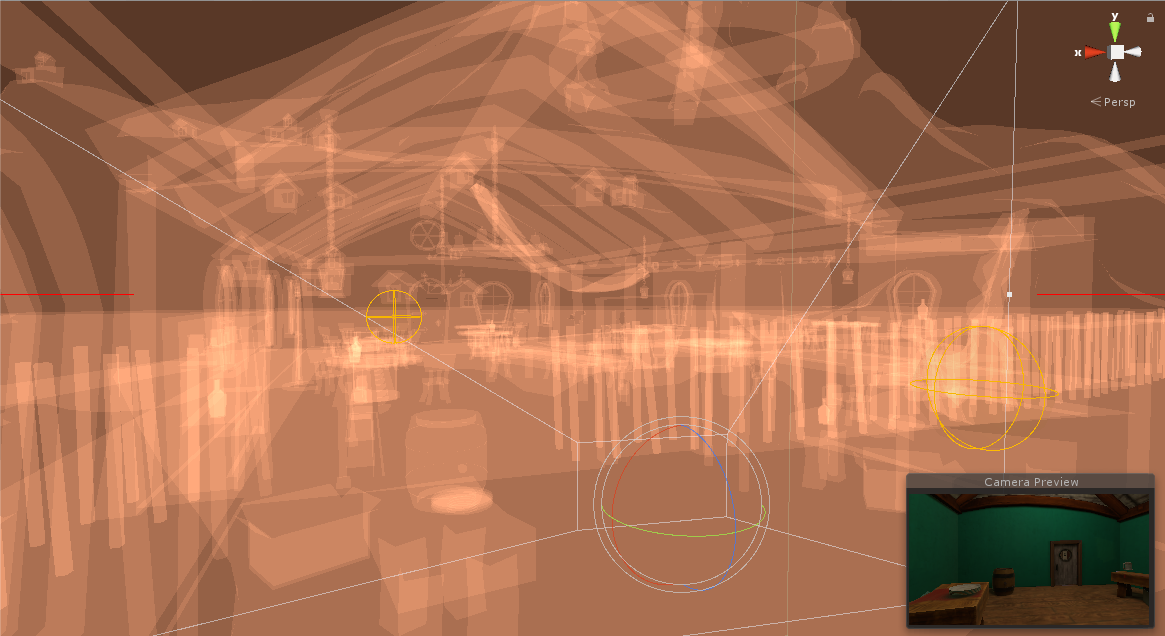
without OC
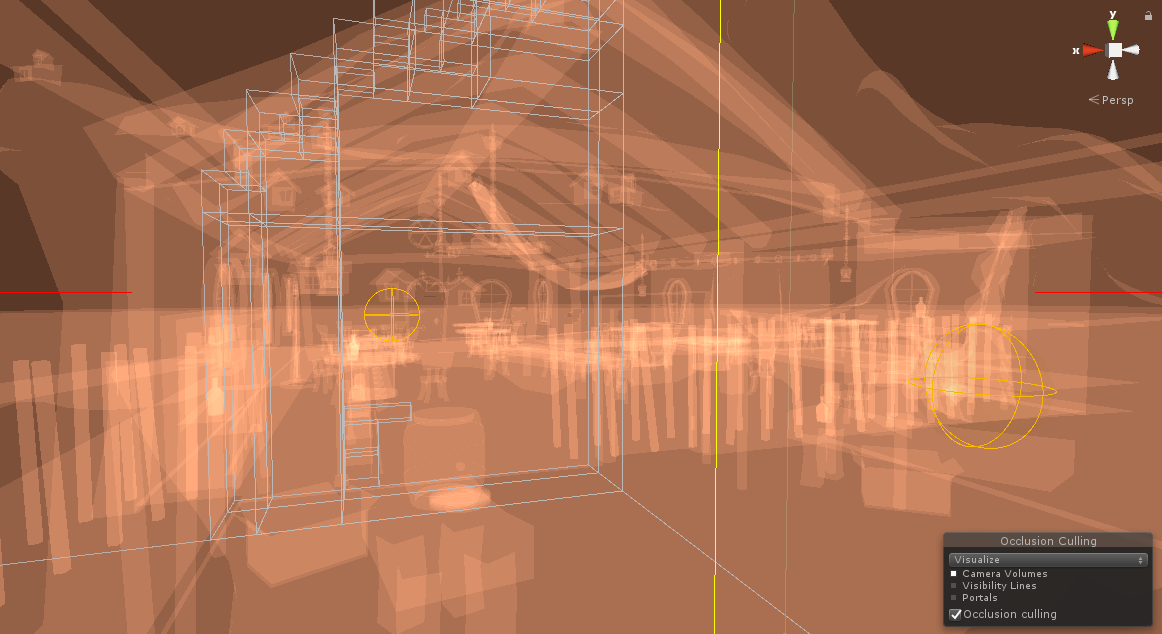
with OC
here's my volume setup
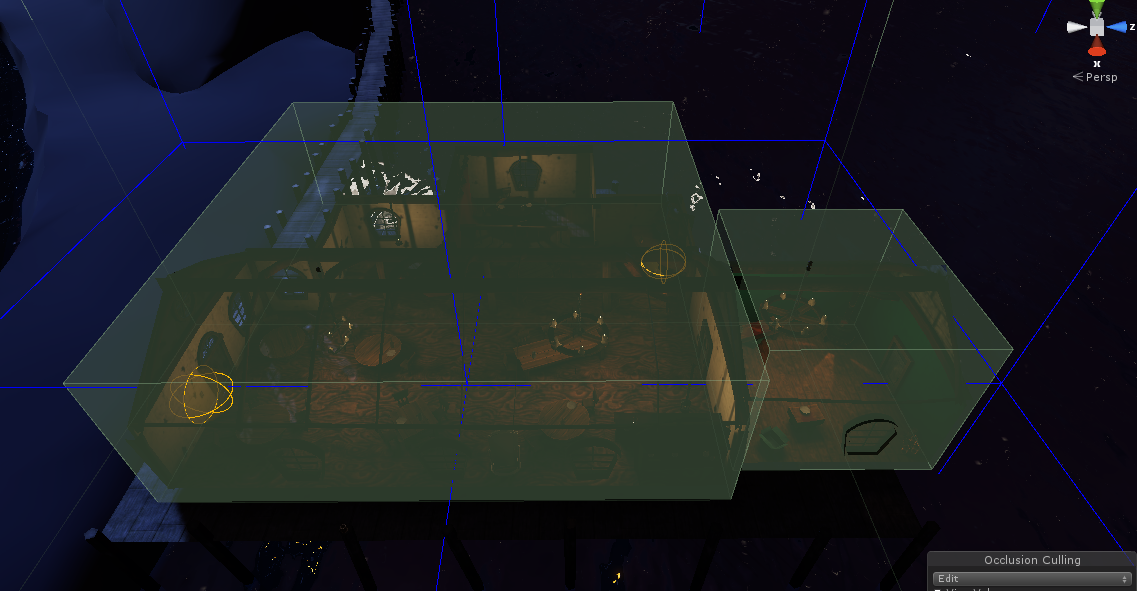
I figured it out, the problem was that the smallest occluder was set too high
I still have a lot of failure cases, though
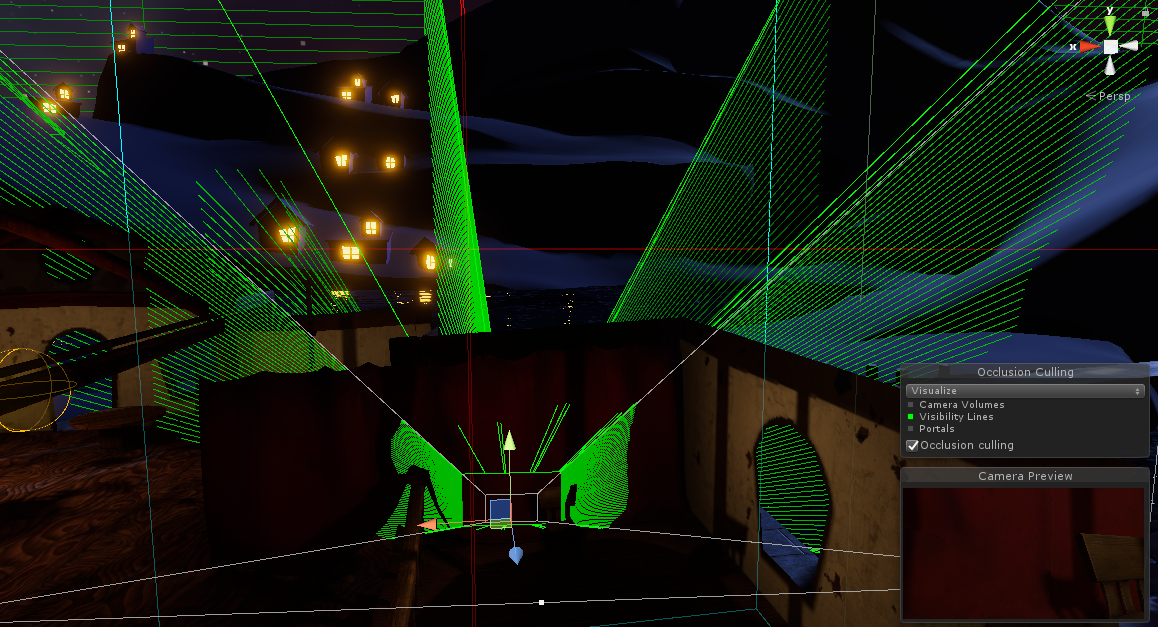
how do I get the rays to stop penetrating solid meshes?
there should be no way for me to see anything past the curtain
or rather, at what point does a smaller "smallest occluder value" give me diminishing results?
lean lodge
Are those objects set to "Occluder Static" in the static dropdown box?
wanton hemlock
yes
the screenshot was taking with a so of 3
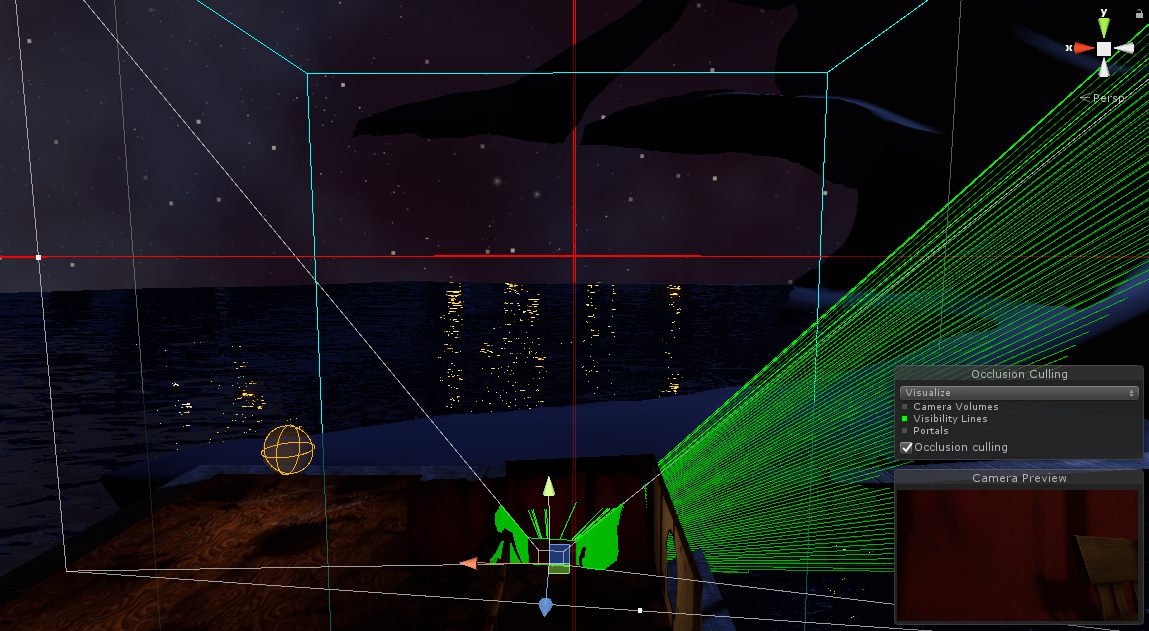
this is with .5
for the most part the rays don't escape but the data size is 6 times larger
lean lodge
A smallest occluder size of 3 seems pretty large
wanton hemlock
the default is 5
 hushed linden
Has anyone tried out the Bakery GPU Lightmapper? It says it supports Unity 5.6
scenic swallow
@hushed linden Yes, it works fine, but it doesn't support real-time GI or directional lightmaps. Directional lightmaps might have been added as they were being worked on but I haven't checked.
The lack of directional lightmaps makes things that rely on normal maps look flatter.
The baked light doesn't take the normal maps into account.
hushed linden
I believe it still lacks directional lightmap support
median stag
Could someone let me know what might be causing MAJOR lag when first loading a map?
Basically, for a solid 10-20 seconds (20 according to the log) your vision is a small circle of the larger screen, and it's basically freeze-level lag.
Afterwards, the map is fine with zero lag except for where i'd expect there to be a little.

Google Docs
2018.09.18 18:51:37 Log - Waiting for ApiWorld.Fetch() for wrld_6659540e-528c-4b07-a645-db67306ff340 2018.09.18 18:51:37 Log - Ok 2018.09.18 18:51:37 Error - Releasing render texture that is set as Camera.targetTexture! 2018.09.18 18:51:37 Error - Releasing re...
lean lodge
@median stag how many game objects are in your map? I think you can check in the profiler.
median stag
Probably should. Most are disabled though, though there are tons
lean lodge
I have a Main Camera in my scene that I use as reference camera for the player (and for testing stuff in play mode). It's just there, not rendering to any render textures or anything. Should I disable it?
Or does it not make a difference?
 gritty hinge
I don’t think it will make a difference @lean lodge unless it’s an active camera which is being projected or used for PP I honestly don’t think it matters if it’s active but I would deactivate just in case
 olive spire
can I do anything to minimize mirror lag more than just disabling most of the layers? even my low quality mirror drops me like 15-20 frames and it only reflects the players
sweet sinew
Lower your Max Anti Aliasing to 1 (if you aren't using the new sdk) Remove unneeded layers from the mirror. UI as a example
You can place a box around the mirror and put it on the MirrorReflection layer and disable all layers except players and mirrorreflection
in the mirror settings
olive spire
yeah, i did all of that and it still lags people for some reason, not sure why
sweet sinew
Then it's their computer and the only thing I can recommend is have it disabled by default.
lean lodge
Mirrors will simply be laggy
They basically double the draw calls
Make sure the rest of your world is optimized. Baked lighting, occlusion culling etc
Although I have never had occlusion culling work well on mirrors so I always tick the option to disable it for mirrors
 empty oar
The project's graphic settings also matter a lot. Lowering those can make mirrors a ton less demanding
 stray otter
not to mention turn off mirrors and set to local as well as have them away from your spawn..
lean lodge
Why have them away from spawn? I don't want a mirror in the middle of spawn either, but that's more so loading ghosts won't spawn in the middle of the crowd
As long as it's off by default it shouldn't matter for performance
stray otter
That's pretty much the reason.
One world I remember had avatar pedestals and an active mirror right in front of the spawn so that was fun
lean lodge
That describes quite a few worlds tbh
Including mine at some point
My mirrors start off now and don't reflect the pedestal previews
I put the previews on a separate layer so you can still see the pedestals themselves
stray otter
It feels like at times it would increase performance if they didn't have that strange distortion effect that show in mirrors, but I wouldn't know if that would necessarily help or not.
lean lodge
What distortion effect?
Oh, you mean on the previews
I'm not sure why they did that either, since it clearly still shows the preview itself if you look hard enough
I doubt it would help since it's probably just a shader
But you don't have to see previews in mirrors so I turn them off either way
stray otter
Yeah pretty much the picture on the pedastle if you were to look at it through the mirror
median stag
Alright, still having trouble with this tunnel vision. Profiler didn't seem to tell me much, it seems like it's all in the loading of the scene. My map itself isn't too bad, just freezes people on loading for a few seconds
median stag
Room instantiate took 9.628434s
Wish it would wait in a loading screen until that bit was finished, make it feel like it's still loading, instead of like the map is trying to crash them XD
rugged mason
That would be a nice use of the Wait button thats been added
where you can wait in the loading screen until you press it
median stag
But can you force everyone joining a map to do that, the world itself i mean?
rugged mason
That would be cool
 gray yacht
I have a bug in my world where people can no longer hear each other after a while. The only thing that changed was that I added a new sound source in the world, and the problem is fixed when any sound source in the world is disabled.
Is there a limit to how many sound sources there can be in a world?
dreamy drum
32 but thats suppose to be for live audio sources.
gray yacht
live audio?
median stag
I'd hope so, because i've seen maps with hundreds of actual audio sources XD
 errant plover
ahmm, i've seen it alot, but haven't figured it out yet... i've seen people using huge mirrors on maps, and they don't lag at all... how can i manage that exactly? for me, simple and small mirrors on my words, and even a small friend world, decreases my fps from 90 to 45 most of the times
empty oar
Getting rid of anti aliasing and loweiring other unity graphical settings tends to help
obsidian bobcat
Slight lightmap question. I baked my lightmaps but normal maps on my avatar still seem to show, so im wondering if a Real-time light is somewhere, however I don't have any real-time lights in my scene at all. Any ideas what could be causing this, or how I could check if my lightmaps properly baked (My lightmap size is around 186 lightmaps, which is normal for me, and 4 of my lights have Hard Shadows, with radius of 0.)
scenic swallow
@obsidian bobcat Light probes contain directional lighting information
which will let normal maps work, just not as well as real-time lighting would.
obsidian bobcat
Interesting. I should note my normal maps on my avatar didn’t show on another part of the map. Only the main area. Made me think I might have a unbaked light, but my lights are only mixed/Baked and all static. Also, I’m wondering if setting hard shadows on a few of my lights cause it (although I don’t cast any shadows, I just use it to stop lights from bleeding into a outer wall that’s suppose to be dark)
scenic swallow
Ah
In that case you can check Window->Lighting->Light Explorer
it will have a list of all lights in the scene.
Also mixed lights will light your avatar in real-time.
obsidian bobcat
Oh yeah, I actually just found out about that before you pinged me, so I checked and luckily none are real-time
Ok, that’s probably why then
I have a spotlight over my main building that’s mixed
scenic swallow
Make sure your mixed mode is set to Shadowmask
It bakes shadows for static objects into the lightmaps, and bakes shadowmask maps to occlude dynamic objects.
obsidian bobcat
Do you mean the mixed lightings lighting mode in the lightmap settings l?
scenic swallow
Yes
obsidian bobcat
Ah, I use subtractive atm
If I do shadow mask would I need hard shadows on some of my lights?
scenic swallow
Hard/soft shadows are only for real-time lighting
and you can usually just used soft shadows as the performance cost of soft shadows over hard shadows is on the GPU.
As long as you don't set the shadow resolution too high you'll be fine with either.
obsidian bobcat
So having soft/hard shadows enabled on a static light is pointless?
scenic swallow
It controls the appearance but if it's baked then it's in the lightmap
so it doesn't cost extra to have soft shadows.
obsidian bobcat
Ah, gotcha
Thanks, i'll give this a try. I wish I could use solely baked lightings, but they sadly don't show on the terrain, so I have to use mixed lightings unless I can find a solution.
scenic swallow
Oh, there's a fix for that
obsidian bobcat
Oh? Id love to know if you happen to
I've heard vrchat is weird with lightmaping on terrain, or just unity in general
scenic swallow
You have to create your own material for it
using the built-in causes it not to have lightmaps.
obsidian bobcat
Your refering to the Material slot on the Terrain Collider?
scenic swallow
No, that's physics material
in the terrain settings
it says "Built-in Standard"
obsidian bobcat
Ah, I see it now
Hmm, setting it to custom. Would I have to fill the empty material slot now with the materials I use on my terrain, or leave it empty?
scenic swallow
You make a new material and use Nature/Terrain/Standard
Unity gives a warning but I think you can just ignore it.
obsidian bobcat
Alrighty, i'll give it a try, thanks!
median stag
https://drive.google.com/file/d/1aAiV_3TL3hew1Otx-CGMT94r-WYYTsKo/view?usp=sharing
My issue with the lag in loading.
Workaround sort of work? But it's sort of janky having to have triggers delayingly load things in

Google Drive
 oblique nova
I need help! Whenever somebody sit down or pickup object fro my world, everyone in the instance insta crash. Any idea?
 terse mango
Please urgently need compression methods for world size
My world is nearing 500mb and i intend on making it public soon D:
gritty hinge
Have you baked all your textures into smaller lots? I tend to bake them to make them smaller.
terse mango
how do i do that? and what about prefabs or meshes
 vestal shore
try using crunch compression on the textures. It will take a while but drastically reduce size
gritty hinge
I was just about to say crunch
I think I went from 120mb to 40mb when I was doing doki squad headquarters
terse mango
so does that crunch compression affect other users? because i thought that was just for me
is there anything else you could recommend?
vestal shore
it will affect the world so it will affect other users
terse mango
okay
vestal shore
I would run a program like WinDirStat and open up your project folder to see what files are taking up the most space
terse mango
okay
vestal shore
light maps could be a decent portion of map size too
terse mango
(taking note as your saying)
gritty hinge
Also dont forget the higher poly the mesh is the more MB it is
i tend to quad draw everything that goes into my maps
terse mango
ok thanks
vestal shore
and i believe not everything is going to be uploaded so if you are saying your project folder is 500mb it might not necessarily be 500mb in game. It should only include things referenced in scenes.
not that that will actually help you reduce the size, but just keep it in mind
terse mango
yes i try too pile everything i use in the scene into a single folder
i think i might spend time reworking my filing system with it and do some of the things you have suggested, thank you so much ^-^
oblique nova
I need help! Whenever somebody sit down or pickup object fro my world, everyone in the instance insta crash. Any idea?
terse mango
if i have a ocean shader with over 10k tiles and Mesh renderers will this impact performance / make the world size bigger? if i were too bundle it into a single mesh would it be better?
vestal shore
check how many SetPass calls it takes to render that. Enter play mode, position the main camera(the one that displays in game window) so that you can see the ocean and click stats at the top of the game screen. Look at the number next to "SetPass calls" and then disable all of the ocean and check that number again. If the difference between those two is a lot of SetPass calls yeah it's going to affect performance heavily
terse mango
thank you
obsidian bobcat
I have a quick question. Im trying to determine the number of Draw Calls my world renders, and I know for a fact unity does not have a definitive value for that. I do know Set Pass Calls is a good determinent, and I know not baking my lights increases my set pass calls to 12k. When I bake my lights, they are at 2k now, but im pretty sure thats bad and not accurate. Strangely, all my lights are static and set to baked, so im not sure what could be causing it.
I also know disabling my lights reduces my set pass calls to around 400
lilac saddle
Hey
@obsidian bobcat make your world in blender or cinema4d
Or use a shader with fake light
@obsidian bobcat have you tried using a shader instead of actual light sources
obsidian bobcat
I made my world in Unity, not blender or cinema3d, and im not very skilled with shaders to subsitute my lightsources for them
lilac saddle
Thats why
Making a world in unity is not possible to optimize
You cannot make an optimized world in unity unless its just a plane
😂
Just use prefab buildings throw them into blender
Add colliders in unity
If you use cubes in unity do it in blender instead
lean lodge
@lilac saddle that's simply not true, plenty of ways to optimize solely within Unity. Probuilder is made to run entirely within Unity
lilac saddle
hm
but the material count
.....
wait
so i can make a 2 drawcall world
with that
?>
 viscid furnace
Is there a way to force the world to recheck the dynamic materials? I suspect some of mine aren't being used.
fair agate
@viscid furnace I’ve just set the list to 0, it repopulated on build.
viscid furnace
Thanks! I shall try that next time. I just manually checked any that were suspicious/old to me.
warped turtle
Has anyone tested out how much the switching of an animation inside of an animation controller affects performance? Only the switching, without applying any animation or action to a state?
lean lodge
That is probably completely negligible, to the point of perhaps being immeasurable in any practical way
@warped turtle
warped turtle
Thanks good to know
 naive grove
Is there anyway to avoid the frame drops when video sync changes videos?
viral marsh
nopers
 hazy pier
heyyy theeere. any solutions for text in vr? got some issues with aliasing viewing text from a distance.
lilac saddle
How do i hide other areas from being visible when someone sticks their head inside a wall?
I used occlusion but it does nothing
Do i need to put in a giant cube?
I tried using 5 different invis shaders but it didnt work
lean lodge
Trigger culling is the only way to do that
Occlusion culling will not work since it only hides the unseen
lean lodge
You basically need OnEnterTrigger triggers that disable unused parts of the map. Make sure there's one at spawn to enable the spawn area again
Yes
lilac saddle
O
But if people are in those other parts
They can be seen floating
Is there any way to hide that
lean lodge
Probably not. Not sure how it works
That's only if you stick your head through the offending wall obviously
Maybe just deal with that happening
 quaint verge
Can trigger culling work if the rooms are static objects?
lean lodge
Yes
lilac saddle
Is there any way to make an object mirror the skybox without taking the lighting properties
Or would it be best to make a fake skybox for each area
So people cant see things thru walls
Skybox with just a color property for baked light and then just throw giant spheres all over
Would my performance drop if i have each area contained in a sphere
?
 blissful grail
@viral marsh have you ever had a crash due to an access violation?
 past imp
Access violation is usually caused by bad drivers
blissful grail
@viral marsh the crash happens when I work on a map on unity
@past imp how can I fix that?
 icy coyote
@blissful grail update your drivers i guess?
fair agate
@hazy pier use UI text? Depending on what you are doing, you may also try using a sprite renderer instead if the text has to be an image. Let me know if you need prefab examples.
hazy pier
thanks @fair agate . i simply got walls and objects with text labels on them, and i'm spawning those dynamically - don't think i can use images.
fair agate
Are you using 3D text or canvas?
hazy pier
used 3d text first, now i'm using canvas.
fair agate
the default unity text shows through everything, it’s rather terrible.
hazy pier
oh, i don't have that problem. works fine with canvas, and i'm using a custom shader for 3d text.
fair agate
are you using post processing AA?
hazy pier
nope
hazy pier
was hoping there'd be a way to generate mipmaps for fonts.
i think ui text still has issues with big fonts getting pixelated from a distance
fair agate
giant signs?
I mean, everything is pixelated at a distance in VR 😂
but as far as mip maps that’s beyond me
hazy pier
ah, alright. well thanks for the help!
i wonder how other unity games handle that issue.
fair agate
@lilac saddle might know
lilac saddle
hullo
hazy pier
hey there 😃
lilac saddle
lemme read up
fair agate
Make far away big fonts look good
hazy pier
well, any font size really.
lilac saddle
okay, yeah wacomalt made a shader that improves the 3D text shader: https://sites.google.com/view/wacomaltvrchat/
hazy pier
that looks cool! i'll test it, but i don't think it adds mipmaps or antialiasing
might end up using it anyway lol
lilac saddle
at least it doesn't show up through everything 😉
hazy pier
yeeeah, same issue.
lilac saddle
so you're using canvas and the big fonts get pixellated from a distance?
I didn't have that happen, what format are the fonts? otf?
hazy pier
not quite. i'm using 3dtext and canvas. i'm using big fonts and small fonts. using dynamic fonts and imported fonts.
the issue is that text, when viewed from a distance, becomes pixelated
lilac saddle
yes especially in vr with the lower res
hazy pier
because there is no antialiasing, like there is for meshes; and because there is also no mipmapping, like for textures. either would remove the pixelation
@lilac saddle yes. it's appearent in VR much more quickly than in desktop, but it affects both
i feel like this might be a more appropriate thing to ask on a general unity discord, but i figured that it might be a common issue in VRChat.
most worlds use text
lilac saddle
well most people add their own AA using the supersample settings
you shouldn't add any blur or AA in vrchat worlds at all
it feels like vaseline on your lens in vr, it's THAT bad
hazy pier
even with supersampling it'd be an issue when reaching a certain distance
lilac saddle
true 😐
but that's one of VRs problems right now, at a certain distance everything turns to soup
I just avoid high contrast or add a dash of glow to get around it
hazy pier
also mipmapping is not quite the same thing; it's reducing the texture resolution when the viewer is far away. smaller textures to render, better performance, and most importantly: no aliasing on textures
unity supports this for regular textures
but for whatever reasons fonts don't, despite also being treated as textures
hazy pier
i'm spawning the text dynamically from a wordlist
i'd have to make over 400 images, and remake them whenever i change the wordlist
lilac saddle
hmm, maybe a font sheet texture
I know that's a pain to set up from scratch but you could render any sentence
trying to think of a vrc version of that or something you can use easily...
hazy pier
it just seems like a general issue with unity
well, thanks for all the help. i guess text is just pixelated in unity
lilac saddle
I never use 3D text, it's ancient and buggy 😐 canvas is a little better but has a ton of weird rendering quirks too
at least it's never really pixellated with lower contrast colors, just unreadable in vr from a distance
you can edit the 3D text shader and overwrite it and add in whatever you want too ofcourse
just add tex2Dbias to the default one pretty much
hazy pier
this plugin allows for mipmapped texts http://supertextmesh.com/docs/SuperTextMesh.html
but vrchat doesn't support just any plugin, right @lilac saddle ?
lilac saddle
phew, dunno about that one, haven't used it myself but people here will know
hazy pier
PEOPLE OF VRCHAT, HEED MY CALL!
you're always so quick to answer @lilac saddle , i'm amazed
lilac saddle
using scripts to set and generate stuff might work if it spits out assets that don't need custom scripts to function but idk
lol both times I was pinged 😉
hazy pier
...actually. i have an idea on how to make the next look nice.
by using triggers to delete the text object and load in a different one that uses a lower res font
 coarse cedar
LOD group maybe?
terse mango
Does VRChat support:
Realtime GI
Baked GI
Ambient Occlusion
Occlusion Baking
LOD Groups
Render Distance (Adjustable or Dynamic Draw Distance)
Logic Circuts/ Gates
MAX World Size (1000Mb? 10Gb? 100Gb?)
Does Mesh Compression help with world size optimization
All i ask is a line or either Yes or No to the things i am asking, that is all.
It is your choice whether you would like to explain what it all does but i can figure it out myself too
Thank you
lean lodge
@terse mango yes to all. However, ambient occlusion looks bad. And you cannot adjust draw distance on the fly, but you can set it as world creator.
Logic circuits and gates are contained within Animators, check them out.
Max world size is around 500 MB
Mesh compression won't help as much as texture and audio compression
Actually, let me rephrase that: AO looks bad in this game
terse mango
so if i reach 500Mb will it prevent me from uploading?
lean lodge
No, but it might prevent the world from going public
In your log somewhere, you can see what takes up the most space
lean lodge
I forgot how to, but you can see a breakdown of your world's size
Meshes are usually not very big, it's mostly textures and audio at the top
terse mango
@lean lodge sorry for the ping but i forgot one other thing, in the Lighting panel under Lightmapping Settings below Ambient Occlusion (toggle) there is a setting called Final Gather, do you know what this is?
 terse mango
thanks for the link
hazy pier
omg @lilac saddle i've done it
you can't enable mipmaps on imported fonts. ...except if you create an editable copy.
yep. 😐
hazy pier
 light ingot
https://i.imgur.com/rR715L5.png
is this being caused by batching?
 fallow flame
I stopped using Unity 3D text, and instead make text using blender.
If you find a font like those that calculators use (8 bit display ones, totally square) you should be able to create a lot of text with barely any polygons
 misty pecan
https://sites.google.com/view/wacomaltvrchat/
For Unity text you could use Wacomalt's "BetterFont" asset
light ingot
unity 3d text aint bad once you get used to it by using a different shader
lean lodge
Yeah, I somehow managed to piece together a text shader that works decently well
If a realtime light has only the Player, PlayerLocal and MirrorReflection layers set in the culling mask, will players still cast shadows on a floor that has the Default layer?
lilac saddle
what is the site that has tips for optimizing map in vrchat?
what is the site that has tips for optimizing map in vrchat?
plain moon
@lilac saddle check out the pinned messages
 spiral birch
I am having troubles with my Occlusion culling. It seems that for a specific shader, looking straight on to my object unrenders it
west crag
particle text looks pretty noice
spiral birch
https://im3.ezgif.com/tmp/ezgif-3-a74dfd101d.gif
Here is a gif of my error
 terse mango
RELATED TO OCCLUSION CULLING
I have a rain particle system and i want to somehow use occlusion culling with the particle system, im wondering if its possible and how to do it
EDIT: i have learnt by attaching the PS to the camera it gets locked to the player ingame
EDIT0: attempting too fix when the player moves away or anywhere the PS does not follow too well
 crisp jacinth
wanton hemlock
crisp jacinth
wanton hemlock
is there a way to turn a realtime light into a baked light during runtime?
strange prism
@crisp jacinth Having 1200 triggers probably doesn't have much impact, I hope. The issue is when they fire. If you have multiple firing at once, that will cause an issue.
past imp
would lag the shit out of the editor though
 strange prism
Please tell me you did not make that by hand
fair agate
@crisp jacinth uncheck Write Defaults if you want what the clip did to “stick”
warped turtle
Maybe you can try to do is using the layer system in the animator. That way you can have multiple animations active on different layers @crisp jacinth
 willow spoke
@crisp jacinth definitely look into layers like theMC recommended. However since you already have all that set up, if you just want it to work without having to re-do everything, you could also have the animations activate vrc triggers which turn on what you want
oh damn I'd never heard about write defaults though, that sounds really nice
scenic swallow
@cold zephyr There's a button in the VRChat control panel that appears when you have a world descriptor in your scene to setup the layers.
 lyric sky
For music and all that what would be the least laggiest way
The way I have been doing is MP3’s and a toggle switch but I’ve noticed this makes my map much larger load in times because of the MB’s is there a better way without lag to bring more music to my world
Or will I have to sacrifice lag for music or otherwise
errant plover
that moment where progressive lightmapping is not completely functional on this unity version, and i've been baking a map for 10-11 hours now
and i think mp3 is the best way andrew, as the .wav takes even more space
unless you get a better compressing format, just go for mp3 and sacrifice your maps size \o/
empty oar
10-11 hours, how the hell?
 deep bramble
For anyone using Unity Terrain grass and having framerate issues, you may want to change the setting in the 'resolution' section called 'detail resolution per patch'. After looking through tons of tutorials, I've found that changing the default setting (8) to 128, I've gone from 900~ drawcalls to just 83.
lean lodge
Holy shit
 somber moss
yeaaaaaa unity plz
lilac saddle
@lyric sky .ogg files
 west zinc
unity batch converts all audio files into ogg files automatically.
@lyric sky read up on this unity documentation. https://docs.unity3d.com/Manual/class-AudioClip.html

best option is to set it to streaming, but it may not work if you have music toggles.
 wanton imp
Fun question considering there will be limited info:
I'm finding that when loading into my world I get a black screen for about 30 seconds after the loading screen has disappeared, then I load in.
Others are also randomly experiencing issues loading in that I'm not getting,
For example - person A loads in fine but also gets the 30 seconds of black screen before entering, while person B might get a black circle bug then kicked to a home world.
Updated sdk, updated unity, tried a new vrcworld prefab. A few errors of "apiworld" in the console but non point to a specific asset.
west zinc
It sounds like assets decompressing
lean lodge
@wanton imp how many game objects are in your scene total?
There was/is a bug when you have more than roughly 10000 game objects. You can check in the profiler.
It makes you stuck on a loading screen for like 30 seconds and it crashes everyone if the non-master sits in a chair or picks up an object
wanton imp
I'll have to check how many but surely it's well under 10k. It's a 57 mb world and it's fairly simple so not a ton of objects.
Akalink, asset decompression is a new term to me so I'll give that a look as well.
west zinc
Np, basically unity and VRChat compress the worlds files which shrinks file size. They have to decompress when you load in. This is a normal thing
wanton imp
Is there a way to prevent that? I feel that's a bit more likely considering some people load in, no issue, every time. Meanwhile others are never able to join.
As if their pc isn't handling it well or like they are being denied access for some reason.
west zinc
Any textures or sounds can have the compression settings changed. If you click on a asset in the asset window settings will appear in the inspector.
Biggest thing to check for is sounds. If you have lots of decompress on load sound that is most likely your guilty party
wanton imp
The only audio so far on the map would be coming from a vrcvideosync that streams a url from YouTube. The issue was present before the screen though so I'll rule that out. As far as the textures go, what is a good number for the texture to be compressed to? Majority of the textures I'm using are from .3 to 4mb, 4 being maybe 1 texture I'm using. Should I be using less compression on every texture to see if that solves the issue ?
@lean lodge i found the Game objects count in the profiler, 482 GameObjects 🤷
wanton imp
To Update, Ive changed all textures to either no compression or high quality and am loading in noticeably faster, maybe 4 seconds of black screen compared to waht seemed to be anywhere form 30 seconds to a minute. Ill update this post after having friends test as well if they were previously crashing.
01/10/2018 - Issue resolved via decompressing nearly all textures from normal compression to high quality (nearly no compression.) TY again Akalink and Rokk
light ingot
if occlusion is setup correctly, a large wall should prevent everything behind it from rendering, correct? Im trying to figure out what im doing wrong where the occlusion isnt triggering
just disable the mirror via the checkbox
lilac saddle
not really sure this is a question, but for my world's lighting, it seems the orangish-sunset color that the outside world has is affecting the lighting of the inside zones
not sure how to adjust it
gray yacht
Is there a way to put a semi transparent quad in front of an avatar pedestal preview image without it culling the quad when you look at it from a height greater than the quad?
 plush crest
Can control opacity of the quad by view angle with shaders atleast
 gaunt magnet
@lilac saddle go to window->lighting-> settings, change the enviroment there!
 inland horizon
ok so i made this world and i uploaded it to vrchat to test it out a bit ofcourse now the thing is it doesnt have lag just a solid 90 fps at least for me but the thing is that the size of the map is 254mb are there any good ways to reduce this without deleting or changing things
misty pecan
Crunch compress your textures should cut out a lot of storage
Just select the image file itself and enable crunch compress in the inspector window
Compress your audio aswell if you got any large filesized ones
inland horizon
okay thanks for the tip i will definitely try that out
misty pecan
You should also do that with your avatars... Makes it faster to download them! Normalmaps however in some cases should be spared to not loose to much detail
The albedo in majority of cases you wouldn't be able to tell if it's been compressed or not
inland horizon
i normally make atlas textures so i just have 1 material
but i will try
thanks for the tips
learned something new today 😅
misty pecan
Texture file size isn't performance heavy, it's just easier for people with slower internet to actually download your avatar and being able to see it sooner.
You can easily get an atlased 5mb texture to be less than 1mb
 hollow stratus
I'm having issues with occlusion culling, I had it working previously, but at the moment it's just kinda stopping rendering whatever it feels like, but only in one section of my world.
https://i.gyazo.com/2c4ebc7d81651ccc7a2f24581d13273c.mp4
I assumed something was blocking the camera and in turn occluding the rest of the room, but I can't find what is doing that.
I see in visualization mode it shows some weird massive occluders, but I'm not entirely sure how to find what they are or what's causing them to be like that. 🙄
https://i.gyazo.com/2504ac4589a474ad8440c1c6f49b7315.mp4
lean lodge
Atlases are perfect for crunching
20.3 MB becomes like 1.6
@hollow stratus only your walls, floors and ceilings are marked as "Occluder Static" right?
Don't mark smaller objects like furniture as occluders
hollow stratus
@lean lodge It looks correct, small objects are only occludees, not occluders. 🤷
But the areas in that room look really... Weird.
https://i.gyazo.com/9f1773419f6035bcdafa5ae583d3e28c.png
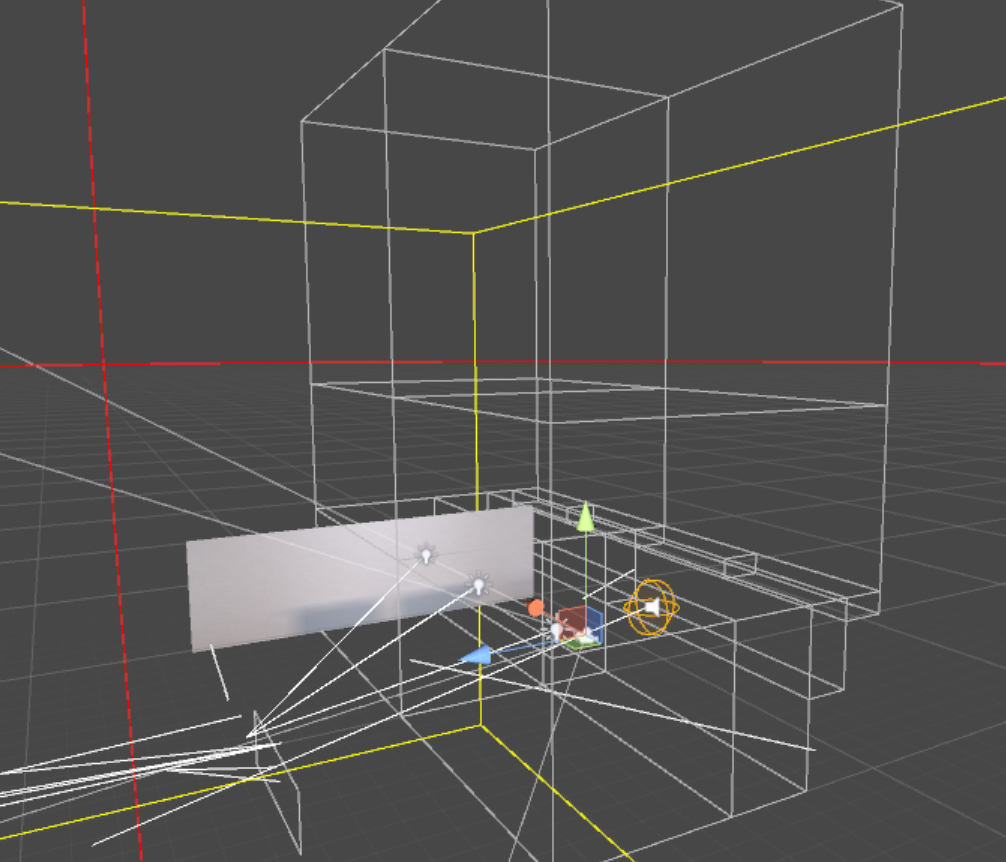
 spark fulcrum
Okay, so, if you have a really big world, what is a potential upload breaking point where it can be used as a test build just fine, but just fails to upload at all?
Like, in the testing build it's saying it's 106 MB
It just fails to upload though
like, it goes to the window to upload it, I check off the marker to be able to uplaod it, and it goes for a full second before stopping at world optimization and crashing
And it's uploaded before too with the same amount of details and stuff
lean lodge
Worlds above 500 MB will probably not be made public without good reason
So you're not at that limit
median stag
Sitting at 112 mb myself, i really can't imagine myself going anywhere near that level.
 shrewd crystal
i have a map that having some strang fps ishus where i have baked the lighting and all block's are static including the light's. any idea's how to get fps from 31 /32 fps to 75 fps or more
 split shell
quick question how do i use the node graph?
hollow stratus
@shrewd crystal Enable occlusion culling in the world, that'll be a good start. :p
And mark everything that won't move as 'Static'.
shrewd crystal
been trying to figer out y the frap's r droping with everything baked
lean lodge
25 materials total? No
shrewd crystal
cant seem to get the world im on up to 75 frame's i baked all light's static everything it's at 31 fps for now
stray otter
@shrewd crystal did you set all your static objects to static?
spark fulcrum
How do you increase the render distance?
in your own world?
becasue my skybox mesh keeps getting heavily clipped
strange prism
Add a reference camera and increase the far plane in the camera settings.
fallow flame
You replace the one in the VRChatWorld thingy. Don't decrease near plane very much unless you want everything to be shaky by the way
strange prism
That’s a floating point issue. On all of my worlds I decrease the near plane as much as possible. Then again, I also decrease the far plane as my worlds are small spaces.
lean lodge
@fallow flame near plane is clamped between 0.01 and 0.05 in this game
fallow flame
0.01 is enough to cause quite a lot of shaking with a far plane above 100k. I know because I like big maps
strange prism
Due to floating point precision, you are losing your smaller values when the far plane is that large.
fallow flame
Yeah, it's quite bad too, very shaky. Hopefully we'll get 64bit floats in the future
strange prism
you mean doubles?
fallow flame
Yeah, same thing
 clever smelt
How do I create a switch to generate specified items?
fallow flame
Is it possible to force a texture to remain in the cache? If I instanciate all my textures, the game runs slower because it's using 10% of the time on "cleaning unused data" and then instanciating it over and over again.
 signal sinew
Alright, lets say I want to bake some lighting for my island world. Ive done it a hundred times before, and its worked pretty well for me without changing any settings. However, I clicked the bake button last night at 10pm, and when I got up this morning at 8 it was hardly halfway done, and has never taken anywhere near that long before. Am I doing something wrong? Is there something specific that would cause that?
 hasty merlin
This is probably a really stupid question, but is distance culling on specific objects possible in vrchat? I'm working on porting the Waterfront district from All Points Bulletin and I know it isnt going to perform well if I just leave it as is. I want the buildings in the distance to disappear, but I dont want the details from outside the map to go away like the bridge or lighthouse or cloud layer
lean lodge
LOD's maybe
lilac saddle
distance culling works fine in vrchat, you can set the far plane on your camera and use it as reference camera in your vrc world object
hasty merlin
1001 only issue with the camera far plane thing is that it just cuts off everything at that distance. I wanted it to only cut off certain objects like buildings, because out in the water theres a lighthouse and even farther away theres a cloud layer for moving clouds. A lot of open space on the outskirts of this map that would make that look bad.
Thanks for the suggestion though, and Rokk, I dont know why I didnt think of that in the first place. Just watched a tutorial on it and it looks pretty easy to set up, thanks!
scenic swallow
If you want to cull objects before the far clip you can put an LOD group on it with LOD0 and cull.
 digital solstice
Hi ! I've generate a lightmap but in build the lightmap is gone and the weigh of my scene dont increase do u know why ?
Can VRChat handle lightmap ?
scenic swallow
@digital solstice Do you have generate automatically enabled?
You'll need to disable that before you upload.
digital solstice
Ah it's working thank you ! 😄
lilac saddle
whats better for performance: Baked Indirect / Distance Shadowmask ? Lightingmode
scenic swallow
@lilac saddle Setting the lights to baked is the best for performance. Those modes only apply to mixed lights, and those modes I would recommend distance shadowmask.
lilac saddle
ah, okay. and yea im aware they apply to mixed lights. sadly baked doesnt light up avatars 😄
i wonder if it would be possible to lower update rate on the light? im not talking vrchat but scripting overall
sounds interesting
 spring kite
@lilac saddle Im pretty sure using light probes and enabling "blend probes" on the mesh renderer of an avatar makes them light up even on baked lights (on places with light probes)
lilac saddle
@spring kite ooooooooooh. But would it be diffrent than mixed lights in terms of performance? Because logically speaking avatar would still be dynamicly lit up right?
spring kite
I am still very new to baking lights, but what I understand the avatar (or any non static object) will use the "stored" light from the closest probe and the one adjacent instead of constantly using light from all directions, so I think it is better performance wise. I have read that real time lights uses a lot of GPU power, where baked uses RAM and CPU power. So mixed should use both?
spring kite
Here is a gif showing how "blend probes" ON and OFF on mesh renderers use baked light from probes. https://media.giphy.com/media/YkrBTtueX8yTzMxvY6/giphy.gif


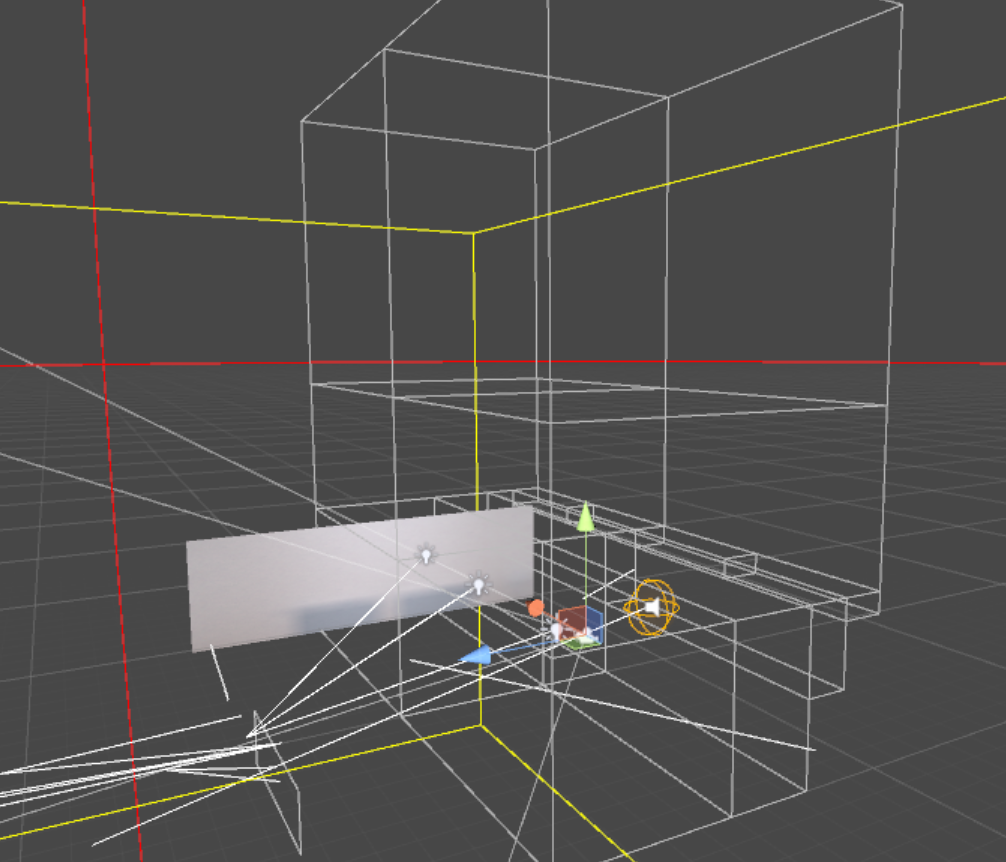
 lilac saddle
hmm, guess i will need to read up on probes and how they work
static root
what to do if baked shadows are visible in the editor and are actually on the lightmap, but do not show up ingame?
lean lodge
@static root Unity terrain?
static root
yes
lean lodge
Create a new material, give it the Nature/Terrain Standard shader
Then assign that material to your terrain in custom material
It should look and work identically, but it will actually work ingame
No idea why it's necessary but it works
static root
oh neat, thanks mate, it works now, glad this was such an easy solution for once
static root
@spring kite baked light uses a draw call for each lightmap you load and then minimal gpu power i think from rendering the texture. not sure about lightprobes, but they should be gpu bound to do some basic shading
 bold latch
From my experience, worlds don't use a lot of GPU power, I recommend optimizing worlds for CPU instead, as that's the main bottleneck, especially with many users. So minimize drawcalls
 bright basalt
Meanwhile cube world with 200 draw calls 
empty oar
And not removing anti aliasing
static root
bake light, thats the biggest one you can do, then try to reuse textures i guess
if you got no real time lights on your map you can pretty much do anything with it and get it through the google docs form
rugged mason
combine your objects and atlas as much as possible
strange prism
Marking them as static is generally better than combining objects. World optimizations are different than avatar optimizations.
Combining is mainly for dynamic objects and atlasing/merging materials should only be for objects within the same area. Unity doesn't do well with large meshes if you want to bake them.
You mainly want to keep your draw calls down, which occlusion culling and light baking help
static root
to visualize this bake occlusion for a map with many different static objects then click on visualize in the occlusion menu and move any camera around, you will see things dissapear where the camera is not. if its all one large object unity cant hide one part of the object
also static meshes cost literally nothing, there are people with avatars that got more poly then a map sometimes even
 sharp oriole
@lilac saddle eat less
lilac saddle
wtf?
lilac saddle
Ok
lilac saddle
I have a music file with a certain duration of music, for example 20 minutes of music, how do I unpack these songs?
west zinc
In unity you can change the ogg compression.l
 clear wagon
Anyone know how to prevent distant billboard trees in forests from rotating if you tilt your head in vr?
pearl temple
do you mean like it rolls side to side, or rotates in place?
Vertical billboard will avoid it rolling but let it rotate in place.
Local view will lock it in place so if you were to move around it, it would not turn with you.
clear wagon
it's in a terrain so not sure how to control it, possibly need to edit the shader?
perhaps need to modify the shader to face camera position instead of view dir
lean lodge
Yes.
lilac saddle
How can I decrease mbs from my map?
lean lodge
Here's a rather big one: if you have baked lights and auto generate off (as you should), you can find the lightmap textures and crunch compress them.
This usually ends up making them 10 times as small.
My world went from 8 MB of lighting data to 0.8
Other than that, textures and sounds are the biggest contributors
@lilac saddle
However, you should check your lighting to see if the quality is still acceptable. Crunch compression is lossy.