#world-optimization
1 messages · Page 5 of 1
 viral marsh
 fair agate
Also use Unity Area Occlusion?
 scenic swallow
@fair agate Occlusion Areas just tell Unity where to bake occlusion data, they don't restrict where objects are visible from
fair agate
It will occlude non-static stuff, assuming occluders or clip distance is set though, right?
And you can adjust your clip distance
Otherwise laboriously set up and debug trigger occlusion in mesh renderers.
(Oh and I was replying to Ivan, not the mirrors)
 lilac saddle
how do i check the worlds file size
 tepid cobalt
@lilac saddle copy pasta from others
Bundle Name: customscene.vrcw
Compressed Size:89.9 mb
Uncompressed usage by category:
Textures      130.6 mb     64.7%
Meshes        32.3 mb     16.0%
Animations    6.1 mb     3.0%
Sounds        12.1 mb     6.0%
Shaders       2.0 mb     1.0%
Other Assets  1.1 mb     0.5%
Levels        17.6 mb     8.7%
Scripts       1.8 kb     0.0%
Included DLLs 0.0 kb     0.0%
File headers  207.6 kb     0.1%
Complete size 201.9 mb     100.0%

Compressed size is the Download size, Complete size is the space it takes up on a players hard drive/memory```how do i go to console log @tepid cobalt
tepid cobalt
easiest way is to press 'ctrl+shift+c' while in unity
lilac saddle
whats a dynamic material i nthe vrcworld component?
 rugged mason
@lilac saddle dont need to use console for that
snail made a thing that shows you it
like below your vrc_(avatar/scene) descriptor
rugged mason
1 sec
lilac saddle
please and thank you
rugged mason
np 😛
 modest bloom
So I made a house in c4d, and import it as an obj or fbx or whatever might be calledan flx i forget. But anyways when I bake the lighting it looks like spotted all over the whole house and not softshadows like it should be, is it because I am using the vrhome kits sky or light map res is on 2? edit change it to 10 made now difference
https://i.imgur.com/RBzwTjR.png picture of problem.
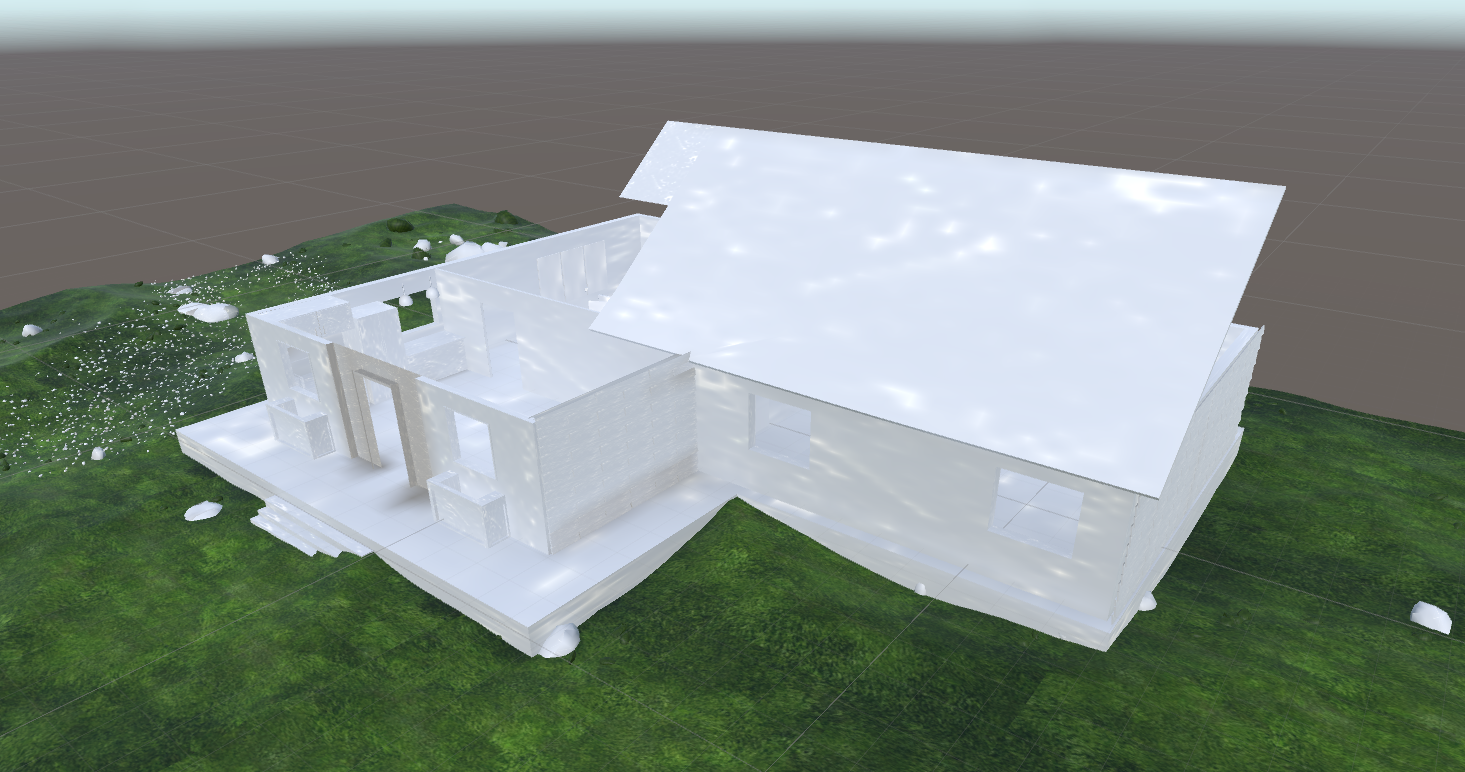
This is also creating massive lag issues, no baked lighting is 90fps but with it is around 20 fps if you look at some walls.
ignore the house missing roof and etc. i am just testing size and stuff. haha.
*ping me if you can help or dm me. c:
removing the sun seem to fix it? it just white now with soft shadows as expected. Any idea why the vrchat home kit sun doing thaat >~< assume it the problem
 torpid cliff
should i enable instancing on all textures on map will it help to reduce the size of it?
 lean lodge
No, I think it just reduces drawcalls
Instancing is redundant if you have static batching on your objects though
Which you should be doing on everything that doesn't ever have to move (basically all of your map geometry and static objects like furniture)
lean lodge
If you want to reduce the size of your map, you need to identify which assets are the largest
For example, a 4k texture can easily add 20 megabytes(!!!) to your map.
This happens a lot on automatically imported PNG's. To alleviate the issue, you can convert them to DDS instead of letting Unity handle that
And use crunch compression. A 20 MB texture can be gotten down to 1 MB with little loss.
lilac saddle
@modest bloom is your house even uv unwrapped? if it looks noisy you have to increase the samples (takes longer to bake)
 agile roost
Thank you for the reply @fair agate -san.
I'm looking into Occlusion Culling.
fair agate
The basic bake is like, 1 click!
I suggest 2 occluder .25 hole.
Adjust depending on bake size.
agile roost
Understood. Thank you. ^^
lean lodge
I tried the default Unity settings for occlusion and it did some funky stuff in the mirror
Amazed that they let the world become public with that headache-inducing effect
Like reflections only showing in 1 eye
agile roost
I found a good tutorial. If this works, it would be interesting to make this publicly known.
https://www.youtube.com/watch?v=LEuVCocfqiI

Learn the basic behind Occlusion Culling, an optimization technique to improve performance in your games! useful if you are going to be creating FPS dependan...
fair agate
There’s a canny about mirror culling distance
I haven’t watched that one. This one taught me. https://youtu.be/qumb0yv-e9c

i go through the steps in applying Occlusion Culling to your game in Unity3D Pro NOTE This is Feature in will be avalable in Unity5 Free as i have been told ...
I think the big thing that people mess up is setting very large objects that contain other things to occluder static.
Don’t set an entire mesh that’s the outside of a building to occluder if there are things inside, or sky spheres as Lakuza discovered.
agile roost
I wonder if it still culls objects behind objects. :3
Nevertheless, interesting tutorial.
Thank you for sharing. ^^
 toxic plaza
to add to the outside of a building mesh as occluder that Fionna mentioned, normally that should work fine
I would suggest try occlusion bake with them set to occluder
for me, I had a problem with 2 rooms inside the same building mesh
all the others worked perfectly fine
if you do find any that causes issues with objects appearing and disappearing, then just set the relevant mesh to not occluder
I think a lot of people when starting with occlusion will make the mistake of making everything occluder static
but just remember to only have specific parts of your world occluding
 modern orbit
for new users in this, read the world optimization manual who vrchat gives you when sending email for making a public world
it have very very helpful tips how to evade fps falls to zero
also remember, be careful of how many polygons you use, the weigth of the textures(jpg is the best for better performance) and the shader who you gonna put in, standard unity shader looks like plastic, cubed shader with outline may cause a very terrible lag in game, bumped shader would ve useful for furniture but use with caution, keep a look to the fps and you gonna do it good, good day everyone.
agile roost
I've tried the Occlusion culling, although it improves framerate in most of the world, there is one section that is still in need of a controlled level streaming area to prevent light-but-noticeable lag for VR users. I was wondering if anyone could give me a tutorial or a detailed summery on how I can use VRC triggers in one area to hide objects in another area.
modest bloom
@lilac saddle Ty for reply. How much should it be? I put it to 40 with final gather. I was under the impression that's a lot haha still is spotty >~>
lilac saddle
@modest bloom increase the number until it looks good. some tips if your samples are really high and it's still spotty decrease the bounces don't go below 2. optimize your lights (as little overlap as possible) and only as many lights as you really need use point lights over area light and emissive planes, unless really necessary.
fair agate
@agile roost there is a pinned tutorial on trigger occlusion, which should be used carefully and sparingly
modern orbit
be very careful on adding youtube links to a world it consumes a lot of mb of internet and can freeze the game for users with low performance pc
If wanna add a mirror make a button to enable it, dont put it on by deffault and also dont put it reflecting the spawn
the most recommended shader to use is the unlit texture, but think before use that, because thus shader dont reflect lights and dont makr shadows
lean lodge
I concur with everything that was just said. As someone with a bad CPU, I can instantly recognize when a world has a video player on by default, because I will be literally unable to move for the first 10 seconds.
agile roost
Thank you @fair agate -san. ^^
I will used this wisely.
fair agate
Lol you make me feel like I need a long white goatee
lilac saddle
Is the use of my uv space for tiled textures important??
lets say I have a big room and I just smart uv unwrap it and then apply one material to the floor another to the walls and another for the ceiling?
 west forge
It depends on what type of texture you have. For instance, if it's a tiled wood texture and you plan on applying the material to all objects, then you need to make sure texture tiles in the right direction.
Yes, the use of your uv space for tiled textures is important
 teal mirage
how to add bloom on worlds?
 halcyon aspen
Does volumetric audio works in vrchat, there is a nice asset in the unity store.
 bright basalt
@teal mirage use post procesing stack from unity asset store, and add the profile to the main camera of the scene that way it will apply on player
fair agate
@teal mirage post processing stack. Is whitelisted.
@halcyon aspen I don’t think that would work.
 unique ruin
hey how to make swiching trigger?
 wanton hemlock
If I upload a world, will it only upload all assets in the scene, or the assets in the project folder as well?
 misty pecan
In the scene
wanton hemlock
that's a relief
lean lodge
I think it might upload all assets if you enable future proofing, but only the necessary files get downloaded
I have had some huge upload time increases after adding Ultimate VFX, for example.
Even if I was not actively using it
wanton hemlock
is there a way to see the polycount and file size of your world in Unity?
toxic plaza
@wanton hemlock for world size in unity:
To check your worlds size, upload / build your world first. Then go to console log, right hand top menu on that panel and click see editor log. It'll open a text file where you can search for "CustomScene" until it shows something like this:
Bundle Name: customscene.vrcw
Compressed Size:89.9 mb
Uncompressed usage by category:
Textures 130.6 mb 64.7%
Meshes 32.3 mb 16.0%
Animations 6.1 mb 3.0%
Sounds 12.1 mb 6.0%
Shaders 2.0 mb 1.0%
Other Assets 1.1 mb 0.5%
Levels 17.6 mb 8.7%
Scripts 1.8 kb 0.0%
Included DLLs 0.0 kb 0.0%
File headers 207.6 kb 0.1%
Complete size 201.9 mb 100.0%
Compressed size is the Download size, Complete size is the space it takes up on a players hard drive/memory
for polycount, you can use the stats window in the game view panel to get an idea
wanton hemlock
okay, thanks
 hot swallow
what is "Levels"? I have a fair amount of that too.
 thick estuary

 sweet isle
Is that with baked lighting?
wanton hemlock
At what resolution do you guys upload textures?
toxic plaza
mine are mainly around 1024x1024
I do have some slightly higher and slightly lower
but i tend to atlas as many as i can into one 1024x1024 image
wanton hemlock
Wish VRC had quality settings where it downloads lower res images
I'm already cramming as much as I can and the textures look really bad at 1024
fair agate
Horrible, use crunch compression
 sour cave
anyone else's worlds degrade massively in performance from one of vrchat's updates over the last month or so?
 astral sierra
generally performance has gotten worse the past few months
sour cave
its strange, i start my own instance and performance is fine but i join one of the public worlds with only 5 people and i get 10 fps
they also broke my triggers without me even doing anything and just redoing them exactly as-is without changing how they work fundamentally fixed them somehow
idk vrchat is stupid right now
lean lodge
I'm not sure why that happens, but some worlds have had that issue. I know the Pug had that issue and fixed it.
Where newly joining players would make everyone lag for a bit (more so than the usual VRC stutter)
 upbeat cipher
@toxic plaza Is your world 90mb? That's really not that bad
toxic plaza
@upbeat cipher that was the size from a few months ago
that world is now 150mb
which is gonna be merged with another world thats 222mb
toxic plaza
😃
upbeat cipher
But that's because I added a 8K texture
toxic plaza
ouch x_x
upbeat cipher
So worth though
toxic plaza
doesn't that have a big impact on performance?
upbeat cipher
Maybe if your VRAM is really small
toxic plaza
are you using vr or desktop?
toxic plaza
desktop fps doesnt matter
aslong as you're hitting 90 on VR, you don't have anything to worry about i guess
wanton hemlock
I've been struggling with deciding between small but high res up close tileable textures versus big ones that consider mesh shape and ambient occlusion
upbeat cipher
Oh it will be public eventually
toxic plaza
oh XD
upbeat cipher
I just don't care if your old rig can't run it in VR
toxic plaza
you just said its unachievable to hit 90?
that means you wont ever hit public status
 dark osprey
"- Worlds are expected to perform at 90FPS for a single VR user with recommended PC specifications."
upbeat cipher
I dont believe that can actually be the case though
I dont get 90fps in many public maps
I have a 1080GTX and a 1700x
toxic plaza
yeah i've been in public maps where the frames would drop to 30fps in some areas
some things will slip past review team
upbeat cipher
Like common, remember that SAO map?
toxic plaza
but don't make your world on the assumption that you'll get lucky like that
upbeat cipher
15 fps public
toxic plaza
which sao map?
toxic plaza
do the frames improve if you get rid of the 8k texture?
upbeat cipher
yes and yes
upbeat cipher
It would look horrible
since the entire point is that the normals are what make it look great
toxic plaza
baked lights should work with normals right?
upbeat cipher
Nope
toxic plaza
or is that height maps im thinking of 🤔
wait, i had baked lights for a bit
and my normals worked
upbeat cipher
or at least I haven't gotten them to look good in this version of unity
upbeat cipher
Haven seen it tbh
If I could get away with baking some of the lighting that would help quite a bit
but none of my results with baking went even remotely well
toxic plaza
To be honest, i'm using dynamic lights too
although I'm using the advice that Aya gave me, which is to separate the lights by layer
so the good lights are shining on environment layer only
upbeat cipher
If you'd like I can show you my map
toxic plaza
the weaker lights with no shadows are on player, pickup layers
upbeat cipher
I only have one light with shadows
wanton hemlock
where do you guys make your textures?
astral sierra
I do my texture work in photoshop
lilac saddle
@wanton hemlock there are some good sites were you can download textures, if you can't find what you are looking for you can use a texture program like substance designer. If you need a special type of effect (example TV noise) use shader forge
wanton hemlock
oh, I've been using substance designer
just been wondering what everyone was using
 barren gyro
Quick little tip for world optimization. If you want a "nighttime" world with lights and such, I recommend baking lights. This can take a little while depending on your cpu, but is fairly fast on my 2700x and was decent on my ryzen 1700 as well. May be faster on intel too., I'm not sure. Either way, on your world mesh, enable this property: https://media.discordapp.net/attachments/409773099290984471/465885306734772224/unknown.png

then, if you use a point light like this one:

or a spot light, for example, change the mode from realtime to baked.
check out those fancy shadows. You'll hear your cpu ramp up and see this progress bar: https://media.discordapp.net/attachments/409773099290984471/465886476337676309/unknown.png?width=1209&height=634
 lean lodge
@barren gyro that's a good tip, but you shouldn't just enable lightmap static
You should be enabling the static checkbox at the top right of the inspector for 99% of your world geometry anyway
There are multiple types of static that can be turned on/off independently
Baked lights are a must-have anyway
 barren gyro
hey! thanks for following up, sorry got busy at work, didn't get a chance to add
the rest of that. @upbeat cipher #yikes
it would be a good thing to keep up there, in my experience besides excessive mesjes/materials/non-instanced/meshes/materials and particles, the only other thing that lags people with the current dx11 implementation is realtime lighting
you can get away with mixed on a lot though for sure and then just casting avatar shadows is nbd
upbeat cipher
Haven't gotten baked lighting to look good at all
barren gyro
use soft? And I think it also depends on the shader for your world
upbeat cipher
I've had a stupid amount of ppl in the map and it was fine
barren gyro
yes, but are they in vr. I have only 12 lights and even with mixed mode and half of it baked, there are some places where two lights intersect where I'll drop to reprojection. My map is like... 7mb.
and I have a 1080ti 11gb 11gbps, and a ryzen 7 2700x lol
barren gyro
I personally consider that an issue
90fps should be constant
45fps means you're forcing reprojection
upbeat cipher
In my experience most worlds do not have 90fps
barren gyro
there are plenty that do though, and they feel really good
upbeat cipher
And then someone comes in with an avatar with 8 materials and 4 shaders and you don't have 90fps
barren gyro
and if you CAN do it, there's no reason why you shouldn't. It's important to remember just because the game is rendering in repro at 45, doesn't mean you're not getting all kinds of interlaced object movement and such. You personally won't stutter the map since that's the goal of async and it won't make you feel weird, but you're just relying on the vive to do things to keep you from going into a vomit comet slideshow
at least if your map isn't the problem, when people with busy avatars come in you have more overhead to handle them
upbeat cipher
If baking lighting would look even 70% as good I probably would
But I have yet to make it look even 10% as good
barren gyro
For me on static objects it doesn't seem to look any different.
upbeat cipher
Do you use any normal maps?
barren gyro
did you increase the passes?
upbeat cipher
Its not an issue of the shadows even
but the glimmer of light on a nice normal and height map
lean lodge
@upbeat cipher are you on desktop or VR?
upbeat cipher
VR
lean lodge
Baked lights usually look far nicer for me
I avoid worlds with realtime lights like the plague because they always lag a lot, even if the author says "it's not that bad"
Plus, realtime lights further add to the impact that avatars make
So it doesn't scale as well with more people
Also, the glimmers of light and reflections can be gotten with reflection probes
And light probes will allow baked light to affect dynamic objects
I've seen worlds that do realtime lighting well, but they have mixed lights, or realtime lights that only work on very specific layers.
Baked lighting should always be the default
upbeat cipher
I only use shadows on a single light
lean lodge
Even then
barren gyro
Kosmic_k check out the way vrc_home kit does reflection probes
they look like realtime but not
upbeat cipher
I haven't looked into that
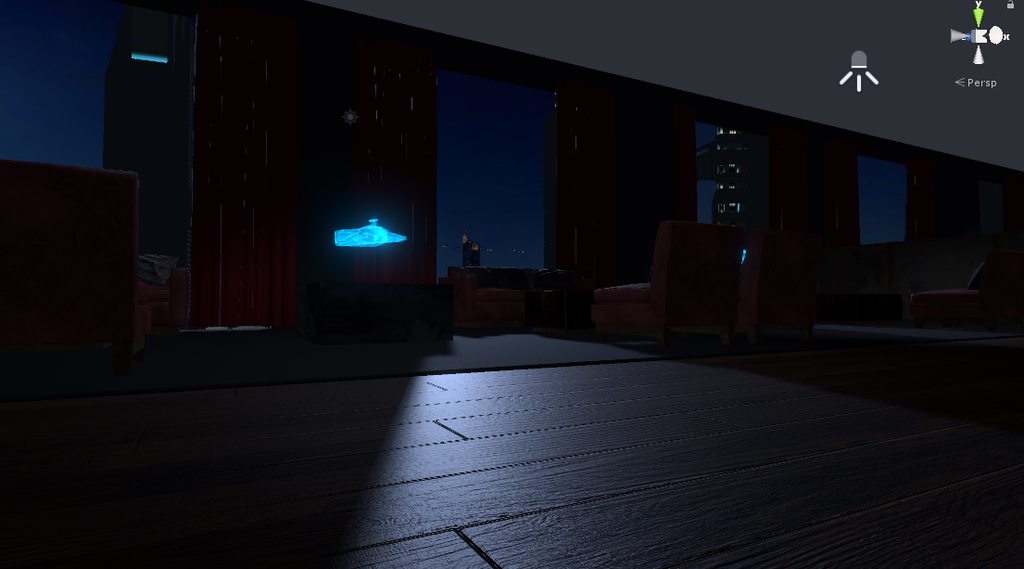
If I can get an effect light this with baking I'll go for it
barren gyro
you can indeed
barren gyro
that's not so much of an issue. Mesh polycounts won't lag anyone, it's just having the cpu do a million realtime things mostly
upbeat cipher
Well I did quite a lot of atlasing and combining meshes to compensate for exactly that
lean lodge
Yeah, those kinds of highlights can be gotten with reflection probes
barren gyro
indeed, and since you went that far to make it look beautiful, having the lighting mostly baked will make it a very compelling map
upbeat cipher
I'm at 39 setpass calls for that scene without real time lighting
barren gyro
now you have to remmeber it takes some time to bake it
it's possible you were looking at the first pass and thinking that was the result
upbeat cipher
Yeah it ended
most of my modeled and textured geometry have normal maps and sometimes height maps
so I'm super keen on the reflections
barren gyro
it's possible you'll get denied public if the lighting is rough on systems, it's worth the try
lean lodge
I think you can also fiddle with the lightmap resolution, you can usually get it a little higher and it won't affect performance
barren gyro
@lean lodge correct, it shouldn't at all, it's just a texture
lean lodge
Yeah, if the map doesn't get 90 FPS with a single VR person on minimum specs, it'll get denied
Not a huge bar to clear if you're smart about draw calls though
upbeat cipher
I still can't believe that to be true, as I have seen so many maps which do not meet that standard
lean lodge
Well, that's what the devs tell us
upbeat cipher
and I have a 1080gtx and 1700x
lean lodge
But you're right, I have seen maps with like 5 mirrors and realtime lights where I got super low frames
I think it depends on which dev happens to look at it
barren gyro
1700x can bottleneck in vrc sometimes
upbeat cipher
Even maps without mirrors 45fps
lean lodge
The game is very heavy on the CPU
barren gyro
I had one - it's not the gpu so much as the cpu
lean lodge
Mirrors just compound the problem because of the extra draw calls
But even those maps get approved sometimes, and others don't
barren gyro
and the vive is a little more cpu heavy then oculus to be fair
upbeat cipher
well I do have a vive
lean lodge
I've also seen that Japan House map where everything is a mesh collider and you lag to death when you accidentally make contact with the bed
Actually
I'm pretty sure Oculus is heavier on the CPU than Vive
Especially since the game doesn't natively use the Oculus API
WMR is by far the lightest though
barren gyro
I thought it was the other way around, just more sensitive. And true facts, microsoft got that part right, too bad there's latency between it's api and steamvr
upbeat cipher
Anyhow could you give me some settings to use for baking?
barren gyro
https://sassybot.com/blog/lightmapping-in-unity-5/ this tutorial is pretty gewd
I think the main "look" part you're missing is global illumination
Baked GI, Ambient Occlusion at 5, Max Distance at 0.5 usually looks great
I wish we could use the progressive lightmapper. I've been so tempted to do some stuff in 2018 then export the fbx and fix it up in 5.6 heh
upbeat cipher
Do I need to add a reflection probe to each time that will reflect or how exactly does that work?
lean lodge
No, a reflection probe is something you just add in an area. I usually have one per "room".
There's a sphere and a bounding box.
The sphere is a 360 degree camera that will be used to capture the reflections. The bounding box defines which objects will get affected.
Everything inside the bounding box will be affected by the reflection probe
You generally place the sphere around the middle of the room/area, and resize the box to cover the room
barren gyro
you can see it in the vrc home kit, looks like a mirror ball
the material gets generated from the bake operation
lean lodge
Also a tip, turn off auto generate before you upload
Or just in general
If you leave it on, I think it won't actually save the baked data in a persistent way, it just holds it in the cache
barren gyro
haha for sure. It's a good idea to set the lightmap quality to low while you're figuring out the lighting too
lean lodge
Reflection probes are pretty easy, light probes is where it gets trickier
barren gyro
and bake manually when you need to so your computer doesn't go into wind turbine mode
barren gyro
https://www.youtube.com/watch?v=GuKHQwGpoGs this is for 2017 but mostly the same

Unity 2017.2.0 Reflection Probe Tutorial. In this video tutorial, I will show you how to use baked and realtime Reflection Probe, and how it works. More info...
lean lodge
I usually hit Generate Lightmap UV's when the lighting looks splotchy or bad
Like it was burnt to a crisp
barren gyro
By default, Unity will bake lighting information using the UV0 channel which usually does not give desirable results if you have overlapping UVs, and since you don't it might be ok.
lean lodge
More worlds need reflection probes tbh
They make stuff look so much nicer, especially with Standard shaders
barren gyro
nodnod
upbeat cipher
so if I have several kind of open rooms do I put one reflection probe in each and have slight overlap?
barren gyro
overlap likely not needed
or desired, it might increase bake time because reflections going back and forth
 dense oracle
okay, so is there a way for trigger colliders to not interrupt the pickup colliders distance for VR players?
barren gyro
you also might find simply changing to linear colour space makes everything look so much better
dense oracle
Example: I've got a lot of Trigger colliders, and the pickups and seat colliders sometimes gets weird so you cannot click them. is there a way to fix this?
 strange prism
@dense oracle, Not directly that I know of. There are two was you can get around it. One might be too specific to my use case, but I had trigger colliders everywhere in my world. To get around it, I had when you enter the collider, it also turns off the components, but also turns the ones around it back on.
Another idea is to have the colliders in a far off area and simulate the player walking into them. Using player tracking, I created a collider, set to player local but that’s not as important anymore, and used the follow target script to lift this collider 100 units up. All my colliders were then 100 units up of where they were before. The player is not affected, but you still get the events, although it seems to be slightly delayed right now.
dense oracle
Must be an easier way of doing it...
strange prism
Complain to the devs to fix their raycasts
dense oracle
why do i always hit a dead end with my stuff. lol
well, if it is too hard to do its not worth it
strange prism
There are probably other weird ways, but what are you using it for?
dense oracle
ive got light Proximity switch that turns on the light at distances, so i can save the power for other stuff
strange prism
Another option is to make another trigger collider for the object’s and have them be much larger than they need to be, but I haven’t tested that version yet.
dense oracle
ive got chairs that fold and is movable, works grreat outside the trigger areas
but turning off the colliders may work
since ive got an deactivate area and activate area
upbeat cipher
Here's a different question, what the hell is the deal with VRC uploading textures which I am not using in the Hierarchy in my scene into my in game map?
There's a whole lot of extra textures which are being uploaded which are all depreciated and removed from the scene but not the project
should I just delete these from the project entirely?
strange prism
Right click the scene file and select export. Does it include those textures in the dialog? If so, it thinks they are a dependency.
upbeat cipher
It does include them
strange prism
Are you sure you removed them from the scene?
upbeat cipher
Yes
Using Resource Checker I can see that those materials are not being used and are no where in the hierarchy

GitHub
Unity-Resource-Checker - Editor utility for unity to help check resources in the current scene (including active textures, their sizes, materials, meshes and which objects are using them)
I know I removed the objects which these textures were applied to
strange prism
Haven’t seen that before.
upbeat cipher
It's rather annoying as it adds a few hundred Mb
Using my customscene.vrcw log to find and kill whatever textures I know are no longer used
fair agate
I did that, found that I was using those textures in unexpected places by accident sometimes
strange prism
Right click the texture and select find references in scene. If nothing shows up, I guess you will need to delete them...?
strange prism
@upbeat cipher Someone just reminded me about the dynamic materials in the scene descriptor. Can you check there?
upbeat cipher
dynamic materials?
strange prism
There is an option towards the bottom in the scene descriptor and it normally is populated with all materials in the scene. If you aren’t changing materials through animation or trigger, you might be able to just clear the list. (Does anyone here actually know when something needs to be on the list?)
The old material for the texture could have been there
Which would also explain the reason why the texture didn’t show up in the list as it’s the material that is used instead.
upbeat cipher
yeah I dont do that at all, cleared that list
 tropic sentinel
For uploading a world. Do I click "last build" or "new build"? DM me please
Because I always get put under "new" when my world isnt new
strange prism
Last build will just upload the last version you built locally
new build will include everything you changed since the last time you built/tested your world.
lilac saddle
I need some serious world optimization help, if anyone could DM me would really appreciate it
 high parcel
also is there a way of effectively optimising large open areas?
lean lodge
Well, for enclosed areas you can do occlusion culling
There isn't anything specific you can do for large open areas.
Well, LOD's maybe, but all that does is reduce polycount from far away AFAIK.
Just follow the general rules in large open areas. Minimize drawcalls, bake your lights
lean lodge
And set everything to static of course
toxic plaza
depends on what the large open area is like, if it has giant structures like a cliff or even a hill
or some boulders/ rocks
those can help with occlusion
otherwise your drawcall could be really high
unless you only have a few mats and mesh
 tame iron
would videos like webm, mp4, avi on objects lower performance of the world?
high parcel
Well not gonna happen
the map is around 744mb in dae
with 7 thousand verts
i wish i was joking
misty pecan
7k vertex isn't much at all. Sounds like the large size is due to textures?
toxic plaza
yeah, that would be around 2 - 2.5 k tri's right?
or am i assuming the vert count wrong here?
 empty oar
Sorry, but are you absolutely sure it's 7000 verts? I have a building that's about 21k verts, and that's only 1mb. Even if you put textures inside the model, I don't see how it's possible to have that big of a size.
 sharp gate
I think we need tags for worlds cause finding avatars is a pain sometimes if u want something specific
strange prism
That’s what the description is for, but people don’t really use it.
sharp gate
yah so a tag system would be better
so like i could go to say random ava world 120
and go oh
this guy has dbz and naruto
tag it
then anyone else looking for those can see it
strange prism
Make a canny post to suggest it to the developers.
sharp gate
well thats why i posted it here
strange prism
They seem to ignore it unless there is a canny post. And even then who knows. Make a post, link it here. People can then upvote if they like the idea.
empty oar
Even if you don't want to canny it, you still posted it in the wrong channel of this discord.
high parcel
@empty oar well im going by memory it would probably around 4 mil verts :Tc
empty oar
You may want to optimize that.
empty oar
How did you make it in the first place?
high parcel
I do alot porting of source maps
empty oar
And the thing is with big models. It can take a while to put it all in ram. So it's going to slowly load it until it's either loaded or crashes Blender because out of ram
high parcel
i just like brining them over to unity and seeing what i can do
yeah
6GBS
of ram
empty oar
You may want to look into SabreCSG. I think there's a plugin that can import source maps
empty oar
it doesn't import models, just brushes.
empty oar
Well, depends. SabreCSG is a bsp-ish editor. So it imports the brushes and you can edit them as normal. You'd need to import the models yourself. Would be better to do it this way performance wise anyway.
high parcel
ehhh
i want it a close to the original map makers vision.
:Tc
also it kinda makes things easyer as i dont have waste time placing each object
empty oar
Depending on how many models they used, it's not that time consuming. I'd still rather have performance over perfect original map. VR is pretty susceptible to framedrops :V
empty oar
Fair enough. Just saying it since you asked it in the optimization channel. Occlusion generally doesn't work well if the entire map is a single model, from own experience.
wanton hemlock
do I need a third party application to view framerate in VRC?
wanton hemlock
ah
is adding avatar models any good for stresstesting your world, or do actual player actors consume even more resources?
 dreamy drum
@wanton hemlock if your in vr, steam vr has https://developer.valvesoftware.com/wiki/SteamVR/Frame_Timing mainly helps to see if its your cpu or gpu having a problem. and you would need actual players.
lean lodge
@wanton hemlock players consume a lot more resources than just their avatars.
In fact, I'd wager that the presence of a player will usually have more impact than their avatar.
IK and voice are the heaviest
Of course, laggy avatars will further cause performance drops
wanton hemlock
figured as much
lilac saddle
I dont know how the cameras work w/ unity, if I add 4 cameras but have them all be an individual toggle, does that hurt performance still? Think like void club private room camera kinda things?
Also, what is a good viewport settings for a camera if I want to it be close to an actual camera?
*security camera
empty oar
Yeah. The more camera's you got tied to render texture at the same time, the more it'll hurt performance. I think it doubles the drawcall per render texture. And latter one, no idea. Just experiment a bit.
lilac saddle
Is there a sweetspot for antialiasing versus quality of reflection on mirrors when considering performance?
strange prism
1 is fine
lilac saddle
Also, is there a good reason why PlayerLocal is unchecked in mirror reflection?
1?
Okay.
strange prism
Mirror reflection is how your avatar is displayed.
lilac saddle
So would it be ideal to have PlayerLocal also checked?
Or is that considering the head shrink?
lilac saddle
Lmao. Okay.
strange prism
Last time I tried, player local didn't even display anything, so best to not included it as the default has it.
as the default does not include it*
lilac saddle
Does a mesh need a collider to have a VRC_Trigger work on it? For interactiing?
My triggers dont work and the only thing is I am not using a unity mesh (like a cube or something) and they dont have colliders
strange prism
If you are using OnInteract, it needs a collider.
wanton hemlock
can the transparent shader properly display opaque objects?
I have a window with glass and a frame using the same texture, but when I apply the shader to the entire model the opaque frame is semi-transparent
or rather, it seems to draw the faces behind it on top of the object
lilac saddle
New question, I have a button setup to disable the door handle, I am using a toggle on the game object for the VRC_Trigger, but uh, its not working. Here is setup : http://prntscr.com/k53k9r

Both Door / Room Handle is the VRC_Trigger on the outside / inside handles
Should it maybe be SetGameObjectActive?
empty oar
GameObject is the entire object. Component is only a part of it, like meshrenderer or trigger. So in your case you want gameobject, as in your picture you're toggling the VRC_Trigger script and not the object.
lilac saddle
But if I toggle the object will the actual handle disappear? Should I duplicate it so its always there in that case?
empty oar
What are you exactly trying to do?
lilac saddle
Essentially lock / unlock a door
My thought process was if I just disable the trigger, nobody can use it, but doesn't seem to be the case
empty oar
Ah, like that. Yeah, disabling the trigger generally doesn't work. Not in my experience at least. You're better off switching between door handles. One with and one without the trigger
lilac saddle
Ah rip. Alrighty, will test that out then! Thank you!
empty oar
NP. Also make sure that the door teleports the player to the room, which is somewhere else. If it's on the other side of the wall, it's pretty easy to go through
lilac saddle
It does
 inland vault
I'll check today but I'm fairly certain I disable triggers on my spray paint to make it not work
lilac saddle
http://prntscr.com/k55sgd
http://prntscr.com/k55sjv
http://prntscr.com/k55sp8
Sorry for all the pictures, the first two are both doors I have an inactive handle w/out a trigger, and the active one with the trigger, my third picture is my Trigger on the lock to swap them, however, it doesn't seem to work


Does the "Toggle" not work that way? Or should it be setup a different way? Again, sorry for the 3 different pictures!
empty oar
Toggle means it toggles it between on and off. In the case of your last pic. It sets them all to off when pressed once, and all back to on when pressed again.
fair agate
Never broadcast Toggle as AlwaysBufferOne though
Late joiners may be out of sync.
Also you can’t disable VRCTrigger components, but you can disable the collider so you can’t use the OnInteract.
A better way for a lock that is synced for everyone is to use separate actions, one that sets it all True or False to the locked version, one that sets it all For the unlocked version, then you can use Always Buffer One and everyone will agree on the state of the door.
strange prism
Disabling trigger scripts shouldn’t do anything as they are not the ones that run the code.
 scenic agate
so I'm trying to do a realistic looking apartment map, but when I bake lights it seems to spatter these black splotches all over the meshes: https://i.imgur.com/pDlJmtY.jpg

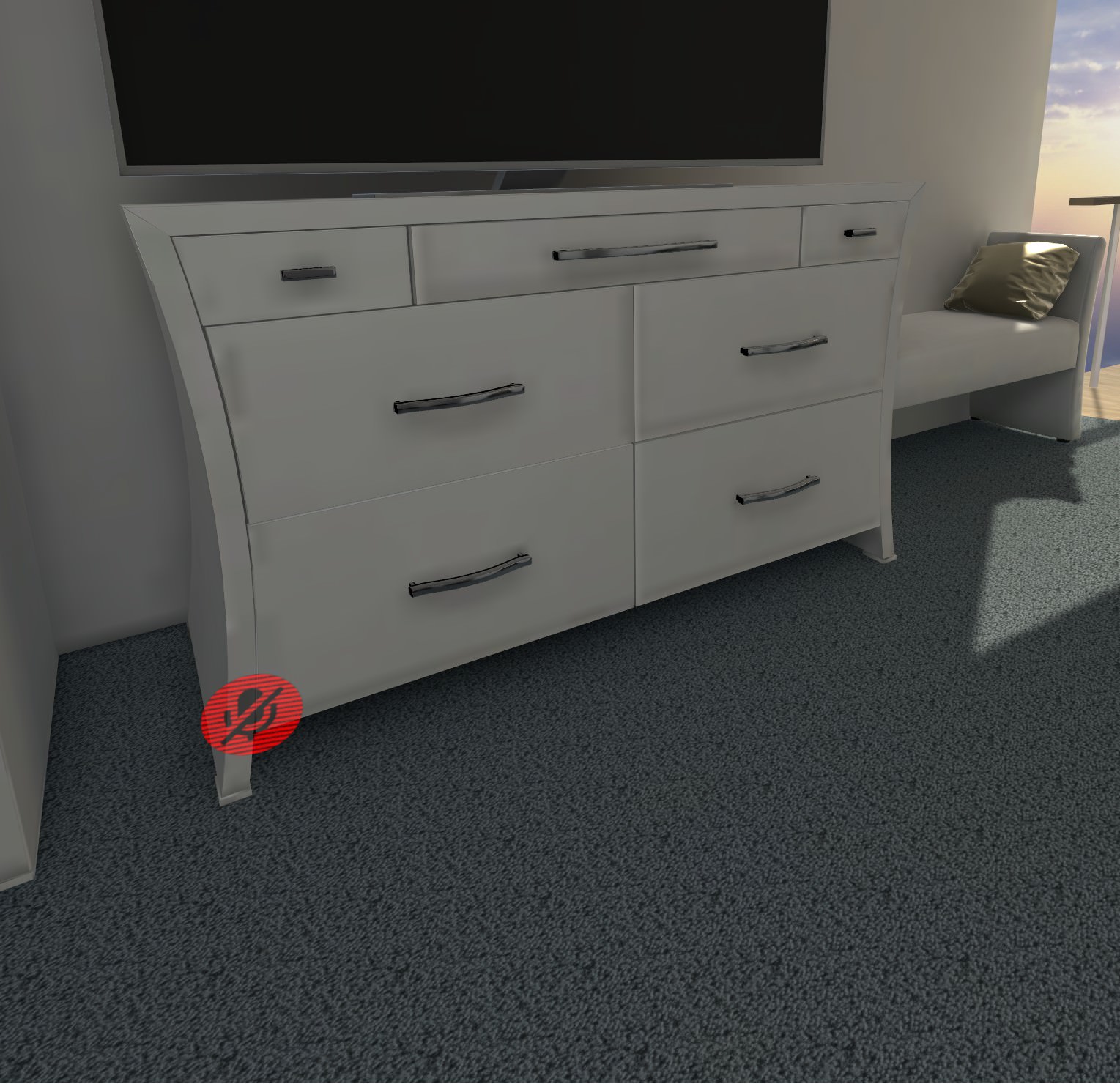
looks like everything's covered in dirt
not using AO or anything, tried playing with the resolution settings in the lightmapper, but nothing seems to fix this
generate UV maps is on as well (without it the whole scene goes dark)
strange prism
I’m still newish to lighting but I feel that might be a low resolution thing. Does anyone actually know?
scenic agate
yeah it's definitely not resolution, it's a full uncompressed 4k map
strange prism
Lightmap resolution per object?
I’ll let someone who knows this better answer.
scenic agate
I should mention as well, the main geometry of the map is all one mesh. Walls, floors, windows, etc. The furniture is separate objects though.
lilac saddle
can i get some help on mixed lights? is it possible to turn off realtime shadow casting and make it generate only the baked ones?
also, i would be thankfull for explaining to me diffrence between "direct" and "indirect" lighting
high parcel
@lilac saddle direct is like what the light is pointing at will be lit at a intestity. Indirect is the Bounced Light rays from light I think
lilac saddle
oooh
high parcel
basicly
direct is the bright bright stuff indirect is dull light (thats really dumbed down)
lilac saddle
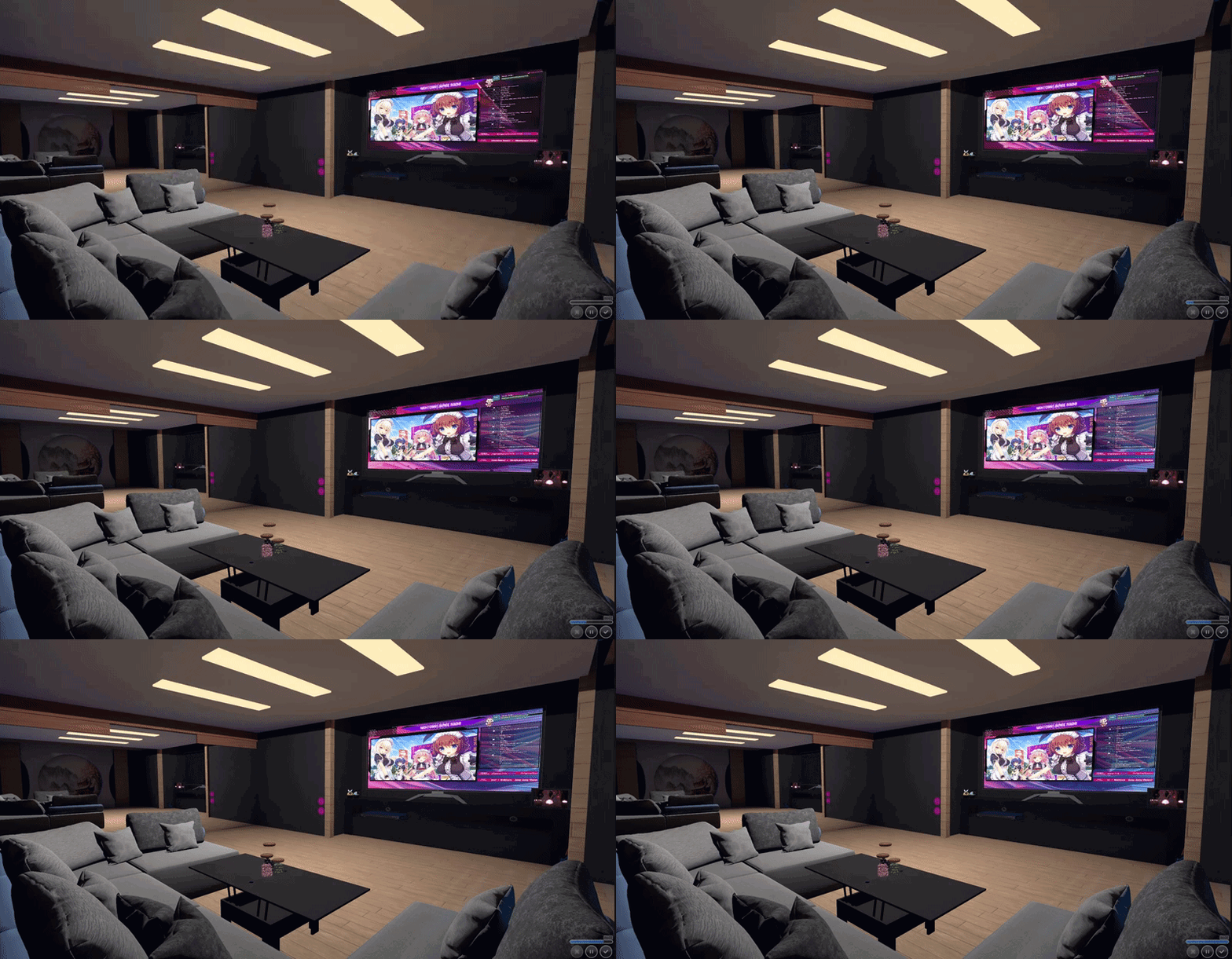
yea, im struggling to optimise my lights. i have like 95% stuff static and baked with only 1 mixed spotlight in the small room and toggling 1 mirror on kills the frames. i dont even have anything that could be high poly/material in there. (i mean i have other stuff outside the room but its being culled so it shouldnt affect fps)
high parcel
as forward does two models for lights logically
it can cause issues
i forgot if you can just disable lights for the mirrors camera
lilac saddle
you can. but whats the point of the mirror if it will be black @.@
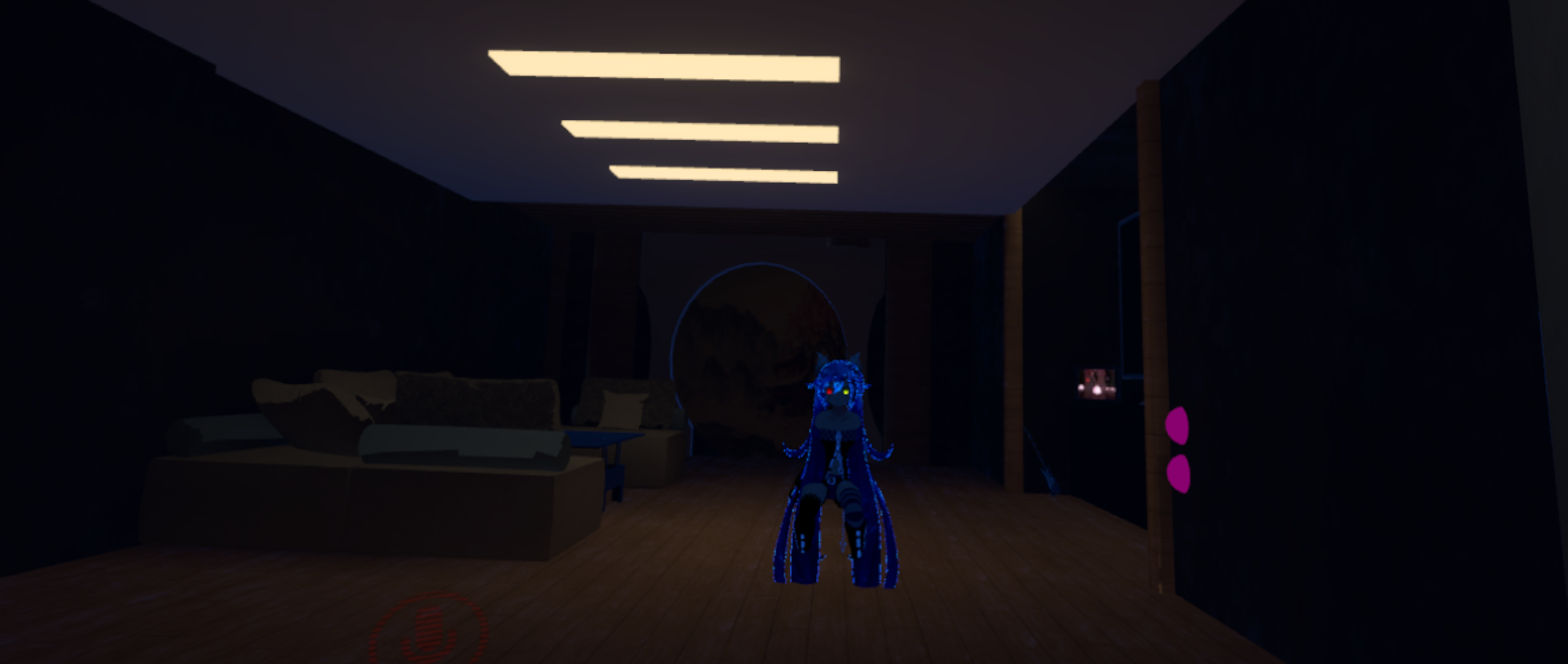
 lilac saddle
maybe using camera would be more optimised way to make the mirror 😮
lilac saddle
if i wont fix the lag today maybe i will try out using low res camera. or remove mirror entirely
empty oar
@scenic agate if you havent fixed it, you need to select the mesh and tick generate lightmap uv
scenic agate
I believe I stated that is checked already
empty oar
My bad, I didnt notice!
toxic plaza
@lilac saddle what are the settings on your mirror? Make sure the anti alias quality setting is 1 (its set to 8 by default for some reason).
at 8 its big performance killer with no benefits to the image quality
lilac saddle
its at 1
scenic swallow
@lilac saddle Open up the profiler in the editor from Window->Profiler
Move your main camera to a spot where it can see most of the room and enter play mode.
In the profiler window select the rendering profiler (click the grey area that says rendering) and check how many SetPass, Draw Calls, and batches you have.
With the mirror enabled you'll have ~3x as many.
I'm not sure if the extra draw calls will run with mirror missing its shader so you should check with and without the mirror script enabled.
 thin schooner
I'm trying to create an optimized mirror, I heard there's a way to only reflect players, but I don't have that option in my drop down menu
any ideas?
tepid cobalt
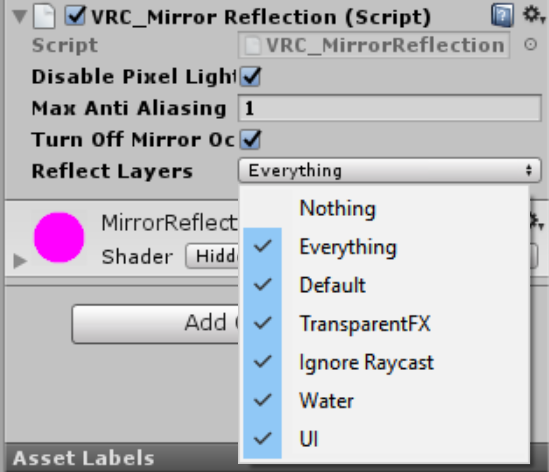
@thin schooner go to your vrcmirror inspector and on reflect layer option, choose only Player and MirrorReflection. https://i.imgur.com/MqrDUJJ.png
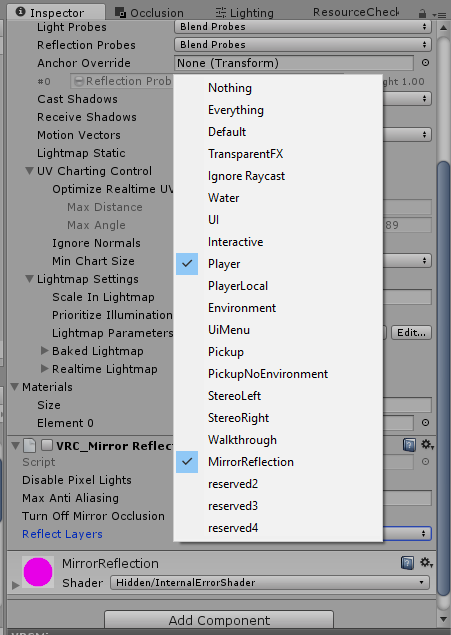
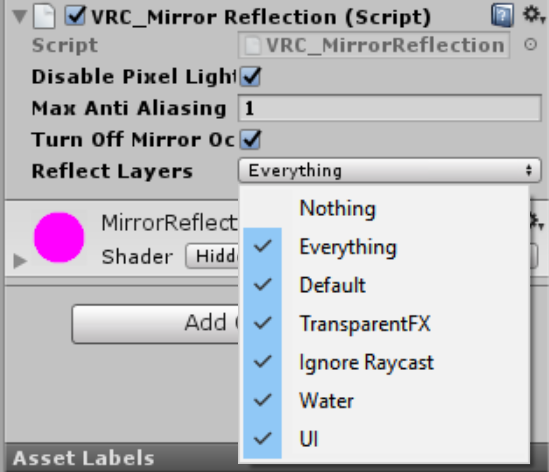 tepid cobalt
you didn't build it through sdk yet
thin schooner
What's that mean?
tepid cobalt
go to your "show build control panel" in the vrchat sdk menu
then there'll be option to build layers i think
thin schooner
That fixed it. Thanks a bunch
tepid cobalt
aight 👌
thin schooner
If I want it to at least show the rest of the map though, like the floor for example, how would I do that?
and if I wanted to have two buttons, one for an optimized version of the mirror and one for a regular one?
tepid cobalt
check what is the floor's layer and enable it in the same option as before
thin schooner
How would I check what the floor's layer is?
tepid cobalt
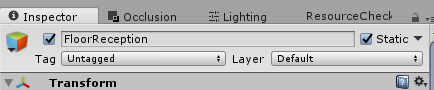
click your floor in the hierarchy and see in the inspector https://i.gyazo.com/456a6806c02361e6fef742a671a8d750.png

usually if you dont change it it is default. but if you want only floor to be shown, you can set up different layer there and change it in the mirror
thin schooner
ah I see, thank you
tepid cobalt
oh, if you just want to drag and drop and be done with it, check JetDog's prefab. he has optimized and normal mirror with toggle button already setup as prefab
thin schooner
oh cool, thanks
 lyric river
Am i thinking to far with this 🤔 https://www.youtube.com/watch?v=cN9FSwDJDi8
(Aka, does it actually help to unload game object out of sight via a "loading zone" like i build? or does the engine do it automatically when the objects are behind other meshes anyway)

 west crag
nice, I ragequit and put my world efforts down for half a week, and when I came back, the baked lighting was working again. so if you ever have problems with baked lighting, try ragequitting!
(YMMV)
 west bridge
What's the best way to fight desync?
 sweet sinew
In what context are you thinking of then Pan? Network desync or trigger desync?
tepid cobalt
@lyric river it looks to me that what you're trying to achieve is to replicate occlusion culling. By default, unity has frustum culling which disable the renderer of object that's outside of the camera viewing angle. But it doesn't disable the one that is in the viewing angle even if the object is behind other mesh(eg: wall). That's where occlusion culling comes in and you just need to set it up and bake.
but if you've already done occlusion culling and are just wondering if your method further improve performance, i'm not sure either.
west bridge
@sweet sinew Trigger desync.
A lot of things feel really inconsistent because of desync.
sweet sinew
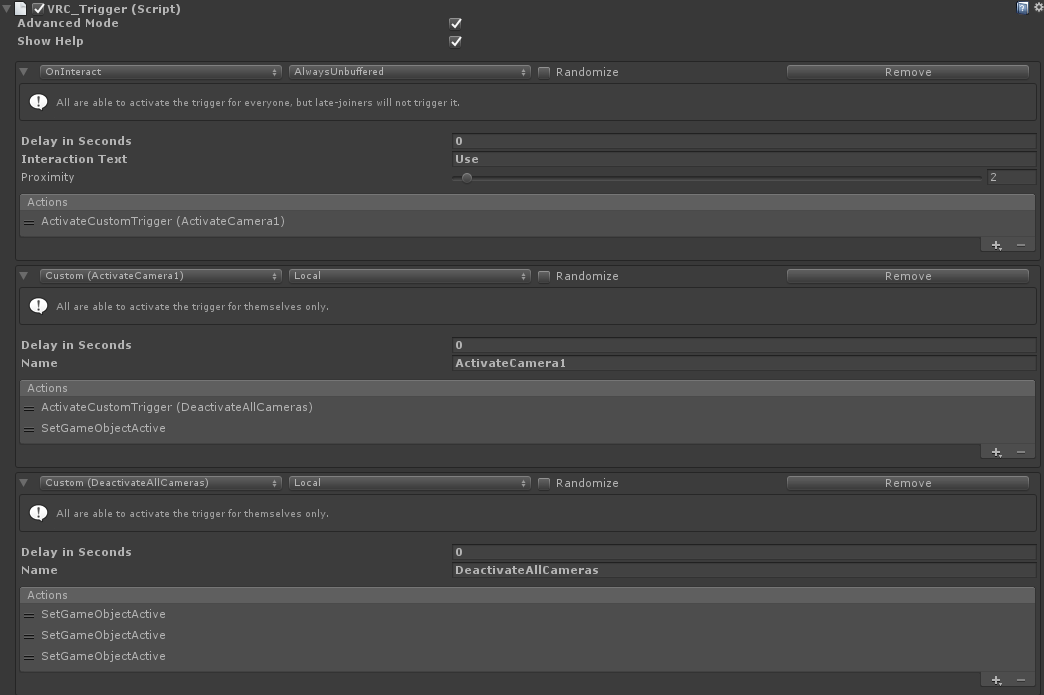
Well you could reduce the amount of buffered triggers. So instead of 2-3++ buffered actions in the same trigger you use 1 buffered and move the rest to a custom trigger.
Less data to keep track off and sync up with (especially for new players)
OnInteract - Buffered -> Action: Trigger Custom
Custom Trigger - Local -> Action: Multiple stuff you need to do
As for them falling out of sync eventually, could be trigger setup or the game itself
Other than that it's not much you can do
west bridge
I usually don't have too many actions on them, no more than 3 for the most part, but I have a lot of receivers in them, maybe that's the issue.
sweet sinew
Yea, each receivers is a network request basically. So moving all of those into a custom trigger that is local. Then have the buffered call that instead
west bridge
Hm...
I need all of them buffered.
I guess I could make cameras local, maybe that'll improve things a little bit.
sweet sinew
@west bridge They will be buffered. But instead of doing 1 trigger with 13 receivers (13 network requests) You do one trigger (buffered) to a local trigger (this has all the stuff you need) (1 request)
It's just that you tell the buffer to call the custom trigger locally for everyone. So it will still be buffered
west bridge
Local for everyone, huh.
 west bridge
All right, at least I'll try to reorganize custom triggers.
If I disable all the cameras and enable only one at the same time, will it become activated or should I set a small delay between them?
sweet sinew
Triggers are executed in order. So it will deactivate all cameras, then activate
So just make sure the deactivate is first on the list and you should be fine
west bridge
I see you placed ActivateCamera1 above DisableAllCameras. Is this the right order?
sweet sinew
ActivateCamera1 is the name of the custom trigger
west bridge
So, does this mean all custom triggers get activated only after the rest?
sweet sinew
Custom triggers never get activated unless called
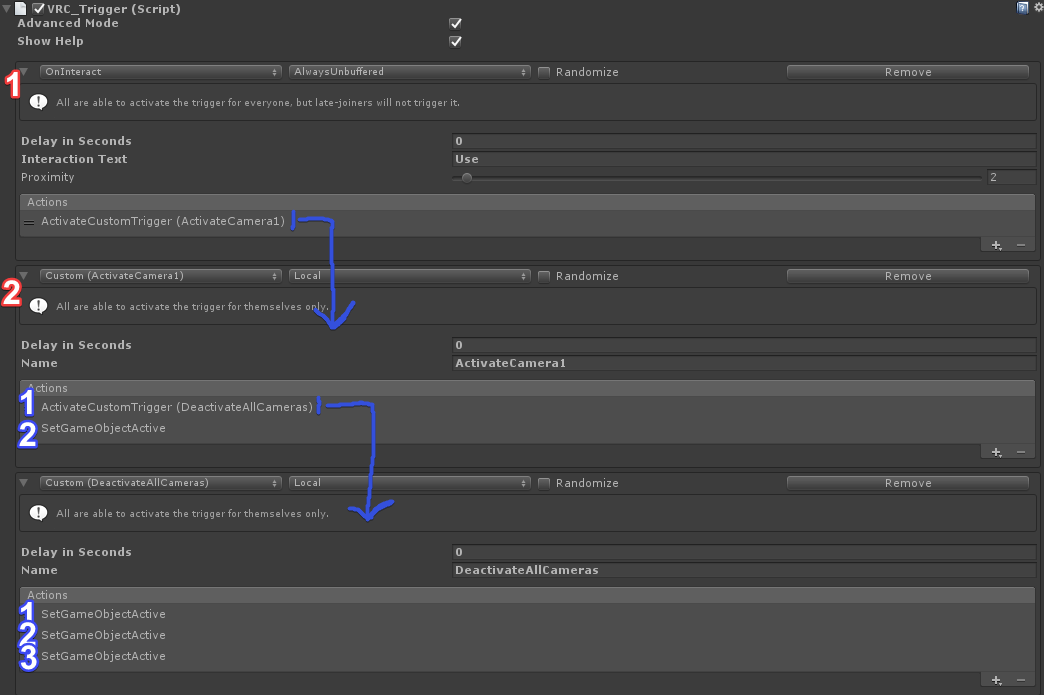
But trigger actions are activated in the order they are listed. So 1 -> 2 -> 3 ect.
So 2 will not be executed unless 1 is finished
west bridge
I see. Thanks a lot.
barren gyro
hey, has anyone else had the lighting bug where after baking the lightmaps exist, but they don
dont apply to the material?
I remember fixing it before but I can't remember off the top of my head what it was lol. It's been a while
decided to redo my lights and suddenly black, lol
fair agate
@barren gyro first, it won’t work on Unity Terrain. Second, you need light probes in the scene if your lights are set to baked.
Finally you can always try clearing your GI cache from Edit-Preferences
I have also had materials on imported assets that just refused baking.
barren gyro
fun times, actually. You were right, I cleared gi cache, recached every material, toggled shaders once and it worked, go figure.
some shaders, like noe's will not bake depending on the mode used as well
well, it will bake, but since there's no property for gi in the shader the bake won't apply, lol
even though the baked ilum will be visible from the scene preview dropdown, lol
good way to make you go crazy for sure. I love unity 2018.2's new lighting though
lilac saddle
so ive noticed a 4k light bake is killer on performance
i did one accidentally
put it down to 512 it still looks neat
gonna test performance now
@barren gyro i do recommend using standard for worlds as you can static batch render the map that way
barren gyro
indeedy
but baked lights are just a texture rubjelly
there's no reason why they would have any more load than 4k textures in general
unless you included realtime lights or mixed
lilac saddle
accdient
accident*
was baking at 2k
and apparently high doubles this
so it was effectvely 4k
it had no reason to be 4k
actually i baked at 1k i believe
performs way better
barren gyro
must be some giant giant textures
lilac saddle
oops nope was 512
barren gyro
in that case there should be next to zero load
barren gyro
are your meshes set to static? Lights baked?
because I just did a profiler on my map with 2k lights
and it's next to nothing
250fps, 4ms
330mb of memory
textures are 170mb of that
lilac saddle
yep
all optimized
world runs fantastic
got my indirect lights set up perfectly
all my meshes are static batched
barren gyro
no I mean before - like even with 4k textures it should have been fine if it was all baked
lilac saddle
occlusion baked and everything
No, my lightmap was set to 4k
that kills the performance apparently
 dreamy dove
Whenever I go into my map, my character shakes violently and my hud looks odd. Anyone know what to do for this?
strange prism
Send the transform values of the object you are standing on.
lean lodge
Wait, large lightmaps kill performance? That's odd
empty oar
Of course. Textures need to get loaded somewhere. Bigger files take up more space
strange prism
Makes sense.
dreamy dove
@strange prism Get my message?
toxic plaza
@dreamy dove is this whilst standing still?
if so you have floating point errors. Move your world to the origin point (0,0,0) or as close as you can get
whenever you place your world far away from that point, it starts to shake players and objects because the world is starting to shrink
and eventually the world will crash for anyone inside it
strange prism
It’s not just distance away, but also scale of the object. If you have a large decimal, chop it off so it is at most 3 decimal places instead of 10.
lean lodge
@empty oar yes, but I didn't know it could kill performance.
I realize that it takes up RAM but generally CPU usage should be low right?
Just like how an avatar with one 4k atlas will perform better than an avatar with 10 solid colored materials.
empty oar
Texel size for lightmaps is a lot larger than for regular textures. Unity tells you the texture size and VRAM (gpu) usage for the lightmaps.
So use as low resolution as you possibly can get away with.
Same goes for shadows. Try using none where possible, otherwise soft shadows. Hard shadows are incredibly performance heavy.
lean lodge
Thanks, I'll keep that in mind. Time to reduce the size for my avatar world, then.
It's just an avatar world, doesn't need fancy shadows
scenic swallow
The lightmap size setting doesn't control the actual size of the lightmaps
The lightmap atlas scales up to the lightmap size setting in order to fit however many texels are needed for all of your lightmapped objects
Having multiple lightmap atlases will split cause batches involving meshes in different atlases to be split.
Although there is a bug with 4K lightmap size that causes it to be imported as a 2K texture.
It shouldn't hurt performance though as it's actually making the lightmap smaller than it was baked.
@lilac saddle What were your other lighting settings?
What were your lightmap resolution and indirect resolution settings?
Did you have lightmap compression enabled?
Were you using real-time GI?
lilac saddle
yeah, using high settings puts resolution to 2x
im assuminf, wrongly it seems, that put it to 4k
scenic swallow
The lightmap parameter setting?
scenic swallow
That only affects the realtime GI resolution
lilac saddle
i also turned down AA
scenic swallow
It's a multiplier on the Indirect Resolution setting.
scenic swallow
Did you bake real-time GI?
lilac saddle
yep
scenic swallow
Real-time GI can cause lag, especially on your system because your i3 doesn't have the extra cores to run the worker threads.
scenic swallow
Real-time GI recalculates indirect lightmaps using worker threads. It's separate from the baked GI lightmaps.
lilac saddle
dmed settings
scenic swallow
It sounds like your performance problems were caused by your indirect (real-time) lightmaps being too large
Baked lightmaps shouldn't impact performance much unless people are running out of VRAM.
@lean lodge Only large real-time lightmaps affect performance
lean lodge
Ah, cool
scenic swallow
They have to be recalculated when lighting changes which is done on the CPU using worker threads.
lean lodge
Yeah, realtime lighting is heavy
lean lodge
Ah
Good to know, thanks. I'll leave the baked lights alone for now then
Don't fix what isn't broke I guess
I get good frames in my world anyway, even though my specs suck
scenic swallow
Real-time lights' cost is extra draw calls, while real-time GI's cost is worker thread CPU time plus some main thread CPU time to dispatch the job.
The reality of performance optimization is that you generally have to just try doing things, profile it, and then decide whether the performance cost is worth the result.
For example real-time GI has a cost but it's worth it for theatres.
 somber moss
best settings for baking lighting?
lean lodge
There are no "best" settings, you will have to experiment for yourself.
It depends on how your lights are laid out, what kind of feel you're going for, etc
 oblique umbra
How does one stress test a world?
toxic plaza
@oblique umbra show it at the dev meetup events every sunday. You can end up with like 30 people entering your world 😛
its an event where world creators can show their work in progress worlds etc so its a good way to see how well it performs with a lot of people
or you can just invite a bunch of your friends to the world to test it for you
oblique umbra
For now I guess friends will suffice, it’s not far enough along to show off haha
toxic plaza
fair enough 😃 (we've had worlds shown off at really early stages of development too, so its not limited to things that look close to final 😄 )
oblique umbra
Haha okay then
It would be nice to test though since it’s locked at 91 FPS for me and I know that’s not a realistic measure for a properly bogged down world
sweet sinew
We have even had worlds in there that have crashed everyone 😛 So any world is fine ^^
toxic plaza
totally not me nervous laughter
oblique umbra
Any crash particle buttons? Haha
lilac saddle
stress test sounday sounds interesting
 dapper cosmos
Whats the poly count for worlds, is it 20k per object like models or is it a 20k limit on the whole world, i havent touched this stuff yet and just wanted to know in advance
toxic plaza
@oblique umbra we've had tons of crashes, mine was a trigger set to always buffer one with 16 receivers minimum. With around 20 people in the world, that multipled by the amount of players 😂
so it crashed out half of the players and logged them out too
@dapper cosmos no polycount on worlds
oblique umbra
Oh boy
toxic plaza
unity will split a mesh that is higher than 65k tris i think
cant remember the precise number
lilac saddle
my WIP world goes from 90 to 45 with about 10 people when I activate the mirror xDD
dapper cosmos
I hate the over use of mirrors
lilac saddle
I only have 1 mirror, and you have to enable it if you want to use it
dapper cosmos
I think most people dont realise it renders the viewport twice
and how easily that can murder a machine
toxic plaza
and you can adjust mirror settings
oblique umbra
65534
toxic plaza
stuff like making anti alias quality 1
instead of default 8
turning off some of the layers
that it reflects
lilac saddle
my mirror is set to player and mirrorreflection
dapper cosmos
I havent been so lucky to find someones world that merciful
oblique umbra
Since 65535 is the highest 16 bit integer
lilac saddle
Brandon I have big plans for my world though xDD
toxic plaza
i just checked how many polys i can get on screen for my world (which will never be the amount any player sees since i'm pointing the camera from aerial view XD)
and the highest i could fit in the camera view, without things disappearing due to distance is 3.1 million
(tris)
curious how much the entire world is though
as i couldnt fit everything
empty oar
@dapper cosmos it depends on how the world is built. We got a dance club with a big and a small mirror within each others' reach. And with both on and around 15 people most still hold 45 on vr
dapper cosmos
I had the plan some time ago to import nier automatas overworld into unity the only thing that technically stopped me was the game used simplygon for its world meshes and extracting them only gave me what i could describe as FUBAR
lilac saddle
I want the first portal 2 coop chamber with usable portals and portal guns
dapper cosmos
Uv's were also just NOT there so that was neat
sweet sinew
Someone here did create a portal gun (with working portals) not long ago. Can't remember who it was
lilac saddle
from what I know and what I can do right now I'd need C# "scripting" capabilites for my world ;_;
dapper cosmos
How the...hell did they manage that
toxic plaza
i know cyanlaser was working on a portal map
sweet sinew
Don't need scripting to do it
toxic plaza
this was ages ago though
sweet sinew
Just clever engineering of what we have
lilac saddle
as a programmer I'm used to do everything in actual code xDD I don't know much other stuff
empty oar
If you're a programmer, that means you understand the functionality behind how code works regarding of language. So you should be able to figure it out with the standard Unity assets as well, tbh.
lilac saddle
you'd think so
but I don't know all the capabilites of Unity yet
or what assests are avaible
sweet sinew
Standard Unity Asset and any asset that doesn't use script (except for dynamic bones, post processing and a few others)
lean lodge
I wish we could set a limit for mirrors
I mean a reference camera
That would be cool and would allow us to set clipping planes too
Perhaps even add filters and such
sweet sinew
Limit for mirrors? As the amount of mirrors you can see in total on screen?
lean lodge
I worded that wrongly. I meant to say I would like to be able to set a reference camera for mirrors, so we can limit their rendering distance among other things.
dense oracle
Ye Rokk had a point there, with that we could add filters also for the mirror, because right now it does not apply through mirrors at all, clipping distances and more.
 zenith geyser
Can someone explain to me the load impact on adding toggleable music?
If I have a single object with multiple audio sources, and switches to trigger them... what kind of impact would that have on loading/performance? The way the switches work is like this:
On Interact, toggle off component -> toggle on component -> audiotrigger (song)
I also have about 10 audio sources scattered throughout the world which provide environmental audio.
strange prism
I don’t know if switching has much impact, but loading all the music might. People will need to download them, which inflated the world size and load time.
zenith geyser
Mmm okay, so lots of music means longer initial loading...
dense oracle
You can set the audio sources to stream
so they stream about 200kb of the music into the scene and you are ready to go
you can also change it to not preload on startup
so all music and sounds does not preload
Larger files should have compressed i think
so it plays it compressed
upbeat cipher
Is there a way to do occlusion manually or something?
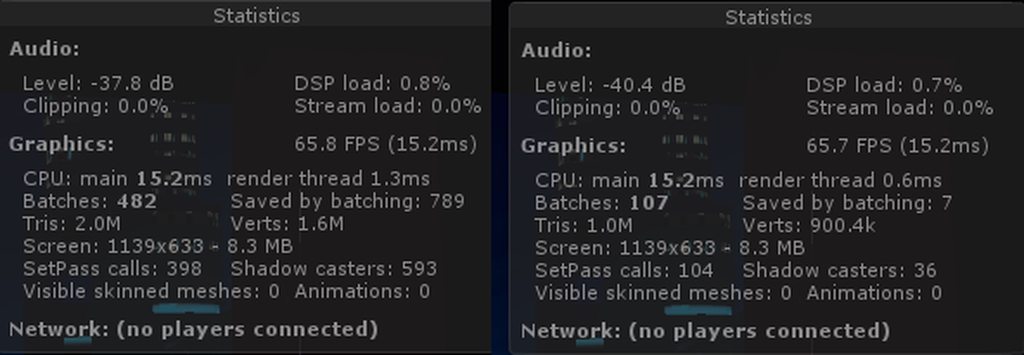
I think my occlusion is broken or something
As the only difference between the two is that I disabled and reenabled all the geometry in my map
scenic swallow
@upbeat cipher Have you set meshes as occluder/occludee static and then baked occlusion culling?
upbeat cipher
Its all set as static
scenic swallow
Are you in play mode?
upbeat cipher
Game mode
scenic swallow
Yes, game view, and in play mode?
upbeat cipher
I pressed the play button on top if thats what your asking
scenic swallow
Yes, that's play mode
In the occlusion window, go to the visualization view and select a camera in the scene view
Moving the camera around should cause objects outside of the camera's field of view or occluded by objects to appear and disappear
Also there is a better profiler in Window->Profiler
Click where it says rendering to get more detailed rendering info.
 upbeat cipher
@scenic swallow https://youtu.be/T1BXSeC9lN8

I put some serious effort into reducing draw calls and for some reason it seems that it isn't occluding a lot of geometry
but if I disable and reenable it, it does occlude it
dapper cosmos
Ok am a ue4 fag so I'd appreciate if someone could explain why building lighting in unity takes neigh near god damn forever
Unga bunga I'm not used to unity
empty oar
Building lighting in Unreal takes ages too. The bigger your world, the more stuff it has to bounce around with, the longer it'll take obv
dapper cosmos
Is there a lightmass importance volume equivalent?
empty oar
Lightmass importance, trying to remember what that was. Been a while since I last touched UE. I think light probe groups and light probe proxy volumes are what you need. Basically telling the scene where lighting should be more accurate, correct?
dapper cosmos
In basic yes
lean lodge
It takes long because the engine works differently
They solved it in some Unity 2018 version with the new progressive lightmapper
 light totem
hallo everyone after finalizing my world i noticed that chairs enter/exit position location is reseted and when i try to rotate to desired cordinate it reset back automatically any help will be wary apriciated thanks in advance.
strange prism
What settings do people change in the light map settings to get a quick test bake? I'm writing a script for testing and doing final bakes but I don't know what features to add and what settings to change. Also, what are good default values?
 buoyant forge
Does anyone here knows of a tutorial for light baking ?
misty pecan
Don't have one at hand but any unity tutorial applies, so there shouldn't be too hard to find one
buoyant forge
ah okay thanks
buoyant forge
ahh now i get what i did wrong i did let unity finish working
 signal quest
Can anyone help with undoing baked lighting. I used baked lighting and everything has gone much darker then I wanted. I tried using CTRL + Z to go back however it doesn't. Please help.
buoyant forge
can you uncheck baked on the light sources that are baked and then hit generate lighting in lighting setting ?
signal quest
I'll check thanks.
buoyant forge
i am trying to figure out baked lighting at the moment as well if you want to exchange via dm
signal quest
Cheers I think I sorted it by uncheking the boxes baked global illumination which seemed to work. Thanks.
What did you have in mind for exchange via dm?
buoyant forge
nothing special anymore. i thought light baking was problematic. i realised the problem was my map and not than the generation did not what i wanted
signal quest
Yeah I'm fairly new to world making and I havent had any issues without baking things so thought i would give it a go just to see what would happen but I didn't like the result. I'm sure I just had the wrong settings.
buoyant forge
likely i am playing around with the setting as well
light baking made me realise how many different textures i have
zenith geyser
How do I increase the draw distance in my world? I set the camera far clip plane higher but.... I'm not seeing a change when I test the world?
I set the far clip plane as high as 1000 for the VRCCam component. This component is assigned to the VRCWorld component. Not sure why the changes aren't showing...
Ah, my world was just SOOOOO big, so I had to really crank it
Nvm!
dapper cosmos
Engine "units" are pretty annoying as some times they can be pretty consistant and then just ignore reason the next
lilac saddle
a unity unit is one meter, more reasonable than measuring in bodyparts and rocks like some countries cough americans
strange prism
Hey, I'm an American and I hate 'Freedom Units' too
 torn crypt
I got a question that maybe one of y'all can answer: when you disable (but not delete) the mesh renderer on game objects, but previously had a material attached - are those now-unused materials still thrown into the build?
strange prism
If the object is in the scene, it will be uploaded with all items related to it, including materials and textures
Even if disabled
torn crypt
Word, thanks dude!
upbeat cipher
What is a really cheap way performance wise of getting a fog effect
 willow spoke
Do you want ground covering mist or thick, visibility obscuring fog?
upbeat cipher
I want to make the buildings outdoors have something which covers the base, so they kind of just fade away
 winged sinew
I'm trying to work out an appropriate update rate for my world. Outside of physics and object sync, what does it affect?
lean lodge
I think it's networking in general
I don't think anyone really knows exactly how it works, but 33ms is the minimum. This is probably overkill for worlds that aren't combat-based or fast-paced
For hangouts you can set it to like 70ms
dense oracle
Most players have 200ms atleast from europe to the servers anyway
torn crypt
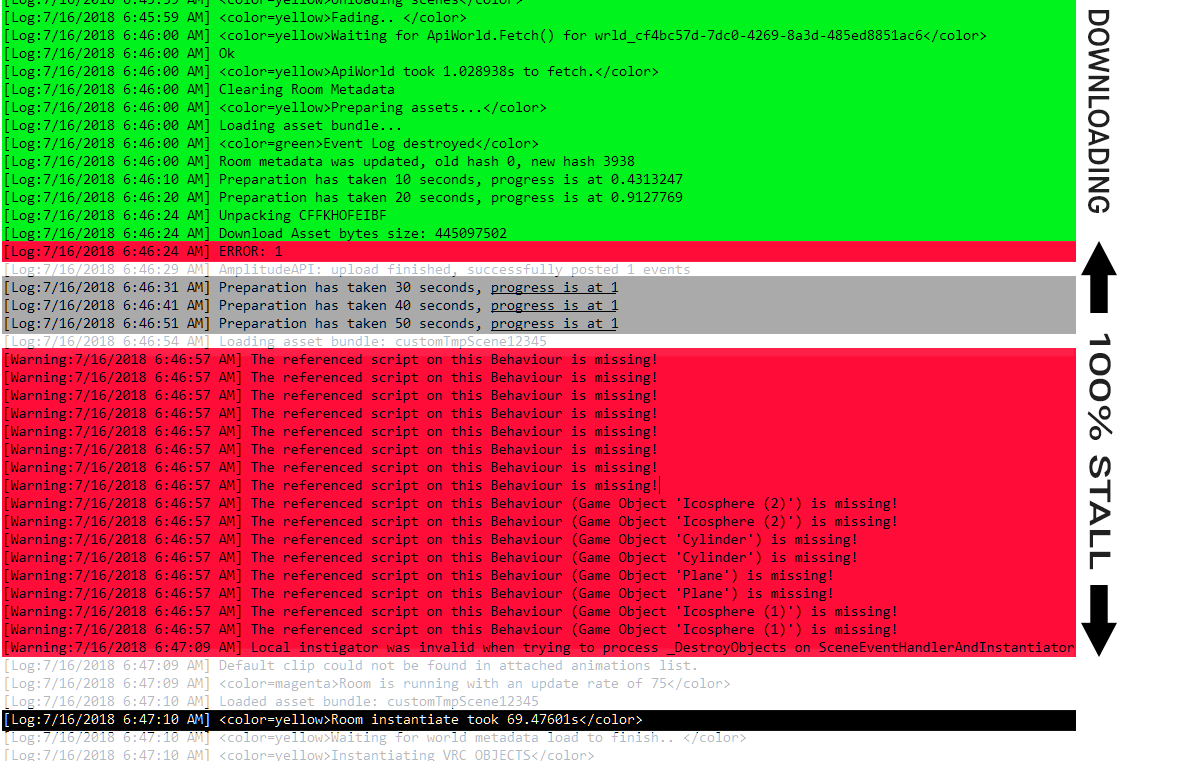
I think I've read here a few times that people here were having an issue where some worlds would load to 100% then stall there, or go to a black screen and stall there for up to 30-45 seconds on load in. I've had multiple users loading into my map for testing have the same issue. Has anyone experienced this? If so, any pointers on what could be causing it / how to fix this (unless it's just a VRChat bug that I/we gotta wait out)
scenic swallow
@torn crypt Do you have a lot of audio files in your world?
torn crypt
About 8mb of audio, but 18 files. Some are compressed in memory and others are decompressed on load.
Could it be that these are set with 'preload audio data' on and it's loading the audio data at load in? Would that take ~45 seconds to pull? My other thinking from checking the VRChat logs is that it could be scripts/components I have on game objects (like ProBuilder for instance) - that VRChat is taking time to read but the reference is missing during the runtime scrub of non-whitelisted components
scenic swallow
Hmm, that's not that much audio. Preload audio data is the default Unity behavior, if it's disabled then the file will be loaded the first time it's played which could have a noticeable delay.
If you think it's probuilder then try copying your scene and upload the copy with the probuilder scripts removed.
@torn crypt
barren gyro
@torn crypt Audio optimization is more about the settings than anything else.

Memory matters. All Audio Clips are imported by default with “Decompress On Load” Load Type and “Vorbis” Compression Format,.You should be very careful with this setting, because using it on all your audio clips (Unity does it by default!) might eat up tons of memory
Streaming stores on the hdd, and streams when plays, doesn't eat ram
Music and/or Ambient Sounds, load type streaming, compression vorbis is my recommendation, but if you think people might have a worse time with disk i/o vs ram (I doubt it) you can use compressed in memory instead
torn crypt
@scenic swallow I'm gonna try that and see if it helps and will post back if it does make a discernible difference. I'm also gonna leave my noted error log here for the future in case anybody searches for this issue. This is where I'm fairly certain the stall is happening. It looks like it's happening around when scripts are being referenced, but it also looks like the stall is happening before that. Almost immediately after the assets are downloaded, there's a mystery error there that unfortunately doesn't give much debug info. Then you get the stall where 'progress is at 1' aka 100% for a bit.





 barren gyro
try the settings I'm reccomending there
The other option is to setup a playlist on youtube or something similar and use the new panel
I'm using a livestream in my world now
torn crypt
@barren gyro That's all rigged up and optimized, I did a full HRTF mix out for my map and got that optimized a few builds back! Some Vorbis and some ADPCM for rarely played sound effects. Need to watch out with Vorbis because it has some CPU cost which generally VRChat can't afford so I suppose it's all a balancing act depending on your map use cases. It doesn't seem to have an impact on the stall here though unfortunately - logs show it taking 0.1389923 to load in + spatialize :/
barren gyro
that's good! I love me some hrtf, I should actually do that on my map with some speakers and such
torn crypt
I dunno if you're familiar with any DAWs but Oculus has a great plugin for their spatializer so you can go in your DAW of choice (Ableton, Audition, etc - really anything that supports VSTs) and you can mix within VR to some degree and use your other creative plugins that you might be familiar with. It's also easy to cut together small seamless mono loops for ambience so you can really reduce your IO/RAM cost for audio by creating a lot of spaced out shorter ambience loops rather than a few really long ones that you'd have to smash with compression to get to a respectable size
scenic swallow
@torn crypt If I recall correctly the CPU cost for audio decoding is not on the main thread so it's less of a concern for most VR capable PCs as they have plenty of CPU time on other cores.
It's just the main thread that's usually bottlenecking.
torn crypt
The ONSP is contributing to the CPU cost of audio in VRChat along with the native audio engine - so you've got some pretty complex spatial imaging maths going on there along with decoding. We don't know too much how that plays inside VRChat, I don't believe. What you're talking about is true tho as far as decoding and loading off the main thread, but not by default unfortunately. You have to check 'Load in Background' on your audio import settings for audio to be loaded in the background without causing any issues or stalling on the main thread, but it's unchecked by default for whatever reason.
I always try to lean with the GPU foot first in the case of VRChat, though. It seems like the IK, Object Syncs, Physics, VOIP and ONSP really accrues some unavoidable costs and will until they can update the SDK to newer versions of Unity where they can use the new job systems. It also seems like most people update their GPU way more often than their CPU for some reason. I always hear people talking about how they run other games perfectly, but how VRChat is always laggy for 'em - it's probably just because it's CPU bound.
lean lodge
It's because CPU's tend to last longer than GPU's
My CPU is fine for every game except this one
 flint bobcat
My PC seems to run the game fine but has stutters sometimes when people bring in freakish avatars ofc, in public spaces
scenic swallow
CPUs aren't making significant performance gains every generation any more, at least not the most important single threaded performance. They might get more cores but most applications are limited by their busiest thread.
Unity does use extra cores/threads but still ends up bottlenecked by the main thread.
torn crypt
Fingers crossed that the new iteration of their engine and their honest approach at tackling that issue works out for em
Also fingers crossed that VRChat adapts it into their SDK at some point
Some desktop users are running some really old, legacy type shit for CPUs with VRChat and I dunno how they do it
@scenic swallow Yeah - wasn't it the case that this year or the last was the first year where Moore's law was no longer the case? I believe reading about it not too long ago and how the issue is that there's no suitable material to move forward in their architecture. Machine learning is the hot ticket now anyway, so TPUs are probably getting a lot of the resources now
 worldly fiber
anyone awake in here to ask a few questions
strange prism
It’s better to ask the question rather than asking if you can ask the question.
fair agate
Ask and someone is sure to answer eventually even if they don’t see it real-time and ping you back @Azushii#4705
lean lodge
See kids, this is why you ask your question, don't ask to ask
He could have gotten an answer 6 hours ago
torn crypt
"You miss 100% of the shots you don't take
- Wayne Gretsky"
- Michael Scott
astral sierra
- KidKwazine
torn crypt
this just got meta
lilac saddle
but if the thing misses and explodes if you miss
you are making the shot by not taking it
 mossy mulch
why is VRChat using PUN
lean lodge
Because it's easy
empty oar
And because there's nothing wrong with PUN
buoyant forge
How are you guys dealing with the material count in worlds. Are you creating worlds in blender and use texture atlasing? Or do you use on of the fancy expensive unity tools ?
And what number of materials is consider okay for a world ?
sweet sinew
Some people use Blender (or other tools) and others use Mesh Baker. As for the count, just try get it as low as possible.
buoyant forge
Mesh baker seems to be the tool i searched for. cant wait to try it later. thanks a lot
 proven perch
Does anyone know how to make that optimized Mirror on "Krogenit's avatars sci-fi complex" world? That causes much less lag for me, and i want to put one of those into an home world instead
sweet sinew
@proven perch Set "Max Anti Alising" to 1 and remove layers that you don't need. Rest is up to how you build your world.
lean lodge
I usually set my mirrors to only reflect Default, Player, and MirrorReflection
Some people don't reflect Default either, which reduces draw calls quite a bit but makes it look like you're standing in the sky
If you have an avatar world with a lot of pedestals, I think it can also help if you set the pedestal previews to not appear in mirrors, by putting them on another layer
proven perch
okay thanks 🙂
 soft tartan
Can someone walk me through a tutorial on howto make a button for a Particlesystem to toggle? My world was denied through "Low performance" issue, but there is no detail. Probably because of the huge particle system always playing. Would make it toggleable render the issue gone?
i optimized literally everything, so there is nothing i can do. The particle system is detrimental for the world to function
i dont really know whats the issue tho. Why is "90 fps" necesarry. In vr i have about 60-45fps and its fine, why is it denied because of performance? This is stupid
they could have atleast given me some advice
i followed everything performance tuning wise, i dropped down the image texture size, collision off, everything i know of
sweet sinew
What does your particle system consist of?
soft tartan
1 Layer of Sandstorm Particles with 2 Different Particlesystems, one beeing the main sandstorm, one beeing small particles. And 1 Top layer of the Sandstorm for the sky to be a little darker. And "Dark fog" That spawns in , so your vision is limited

i mean i can drop down particles for sure, but the quality of the sandstorm would be so bad it wouldnt look good anymore
And im saying no to a toggle button ,because a sandstorm planet without sandstorm is just stupid xD
sweet sinew
You have 15k particles 😛 You could look at making it follow the player and then allow you to lower the range and particles
soft tartan
"Follow the player" wym ?
i dropped it down to 12k now
there are spots that dont have the sandstorm
sweet sinew
You can use the player tracker to have the particle system always ontop of the player. https://www.dropbox.com/s/k0hui254bx4ozzv/VRCPrefabToyboxV2.0.unitypackage?dl=0

Thus reducing the range and particle amount
soft tartan
what about "only sometimes" tho
because of spots without sandstorm and a whole plane without any sand theme
sweet sinew
Set up colliders to enable and disable the particles
12k particles is still a lot for low end
soft tartan
what about toggling the particle system , does that count?
sweet sinew
Also, is this sandstorm pure particles or mesh?
Yea, you can do that too
Have it disabled by default and let users enable it if they want to
soft tartan
pure particle
sweet sinew
Just put a warning on the Interact title
soft tartan
owkie
i hope that works for the devs
i wish i could communicate with them if that toggle button is ok
sweet sinew
As long as you have warnings on the button it will
lean lodge
Pretty sure the devs are okay with a lot of stuff as long as it's opt-in and clearly warned
You won't be penalized for "performance issues" for optional stuff
sweet sinew
yes
lean lodge
Make sure it's only local
soft tartan
yep got it
soft tartan
Ok, no
when i press the button the effects just dont enabl
ecan i get some help?`
it just disables the main music i put in
but it doesnt enable the particle systems
altho i t should enable the gameobject where all particle systems are in
sweet sinew
post a screenshot of your trigger setup
soft tartan
i got it, i forgot to set the operation LUL
altho it definetly doesnt work to make it toggle
the gameobject stays active altho it should "toggle"
so i just made 2 buttons
barren gyro
@soft tartan you could get the same effect using lighting and reflection probes on geometry and post processing effects
without any hit to performance
read this

VRCat: Community-Run VRChat Forums
Greetings! Over my course of playing VRChat I've noticed that most worlds, mainly the ones that have baked lighting, are done poorly, or in an...
it's probably the best optimization guide there is
if you follow it closely and especially do occlusion culling and asset bundling (and derender things that aren't being used for the user) the room will run insanely fast.
so if you want dark fog you could use ACTUAL baked global illumination fog (it's part of the lighting in unity) coupled with occlusion culling for a draw distance and your world would never drop under 90fps
using lighting probes and reflection probes and emissives will give you baked lighting performance that changes avatar lighting and world visual effects without realtime or particles.
Citypop pool party has this now and it's glorious though I don't know if the world was updated outside of the preview portal since unity likes to crash
lean lodge
Good tutorial but it seems to skip over the fact that emissive materials can, in themselves, be area lights
 formal ember
They can be, but they also have limitations. First off, they need to be super bright, and cover a wide area to emit the same amount of light as an area light. You can do some hacky stuff with a cutout render mode to hide the emissive material and set up planes as area lights, sure, but it's kind of pointless.
Not to mention it's an extra drawcall for that cutout material :^)
barren gyro
mfw xiexe shows up. 😛
scenic swallow
@barren gyro As far as I know the Unity fog doesn't show on avatars.
formal ember
That might be true. I haven't personally tested that.
barren gyro
@scenic swallow depends on the shader for avatars, but it's more for occlusion culling the map. If I'm not mistaken it can reduce the draw distance in a linear way. If (like a lot of people do) you use an unlit shader they may show
but the fog would occlude the map at a distance even if there's nothing in the way I bet
Has anyone tried VRM's shader? That's one thing from VRM you can get into vrchat now, and it's actually pretty great
it plays very nicely with GI
formal ember
Well, you can set the draw distance of the camera to do culling at a distance based on the far clip plane, Fog doesn't cull though afaik.
It is a good way to hide the far clip plane though
barren gyro
actually, you're right, but it does a great job of masking a reduced far clip
haha jinx
I think becuase I Do that all the time I merged one technique with the other in my brain
lean lodge
@formal ember true, I don't recommend using emissive materials as actual lights.
Either way, thanks for the tutorial. That's been super helpful so far.
barren gyro
that's actually a pretty good optimization tip for people with loooong maps
though I'm not sure how the player camera is set in vrc
would be a nice thing to be able to adjust
 median stag
Any issue with putting a toon lit shader on everything, and just not really having a sun?
Baking lights has never worked well for me
strange prism
Lighting players?
median stag
I mean, there's a sun but all of the layers are ignored by it besides players
Asking more from an optimization point of view, in terms of if it would cause any lag problems.
median stag
Could syncs be causing my lag? (on rigidbodies or non-looping animators?)
formal ember
If your sun was ignoring your toon lit things, they wouldn't be lit, unless you used ambient color for lighting, but then your world would be lit poorly and everything would look extranaly flat and boring.
lean lodge
@median stag you really should look into fixing your baked lighting then
Using toon shaders for the map is fine, but you need to make sure avatars also look good.
dense oracle
There is no way of triggering the Custom trigger Globally to all triggers having the String connected to it?
I want an Command/Trigger to change materials on the fly so i can change option to turn off shadows for the object from 1 button instead of having the trigger list insanely large, right now i would have to drag and drop every materials i want changed, 2 times because there is 2 materials to change between.
this is just an workload that could be easier if the Custom trigger worked correct
buoyant forge
am i right in assuming that one 2k material is to be preferd over 4 1k materials
buoyant forge
okay i wasn't sure if there is a drawback with big texture files
dense oracle
Big texture files take up a larger space on the Vram and RAM, but nowdays most VR Graphic cards have about 6-12GB VRAM if i am correct
so it is about optimising the size, but also the drawcalls, it is an ballance, but right now you want the drawcalls to be as little as possible
viral marsh
uhh. the 970 has 3.5gb
astral sierra
970 is an old card at this point
viral marsh
min spec
Lots of people bought into VR with that. Just saying that targeting just the newest cards is not very broad thinking
astral sierra
Still, reducing draw calls should take priority considering how this game is bound resource wise.