
#world-optimization
1 messages · Page 3 of 1
 limber maple
limber maple
limber maple

Make your game run smooth by using Level of Detail! ♥ Support Brackeys on Patreon: http://patreon.com/brackeys/ ·············································...
A super mega genial tutorial to learn how to manage the LOD (Level of detail) in your world
 rigid prairie
My map has been declined 5 times for the same exact reason. "Performance Issues - Low FPS".
My computer is built for gaming and I'm not running into this problem, so it's really hard to know where and what needs optimizing. Can anyone here please throw me as many optimization tips as possible?
I don't want video links, I've looked up a million and still get the same short-stick response and I really dont know how to fix it at this point.
What I know I've done:
-All shadows off
-All lights static
-All lights baked
-Occluder for all large objects
-Occluder for numerous small objects
-All particle effects disabled
-All non-dynamic meshes set to static
@frigid heart you got anything, buddy?
@fair agate I'm so sorry, but can I bother you here?
 fair agate
sure
rigid prairie
My problem is above
fair agate
you see Dieu's list just above?
Did you bake your occlusion?
Replace mesh colliders where possible
fair agate
FPS killers: mirrors and videos
fair agate
large numbers of pickups
rigid prairie
Removed half of them to less than the previous patch that went public
fair agate
though those usually don't lag unless they are calculating the physics, like knocking over a big bunch of them
rigid prairie
I've made sure to keep them well spread
Some players like to horde them in small rooms though, gotta smack em
 frigid heart
Did they take it down again?
rigid prairie
I stress tested my map and found that when I look in a certain direction towards most of the map I drop frames on the Vrchat escape menu, but not on mt external counter
@frigid heart no I've taken it down for update to 2.0
fair agate
really as long as the pickups have primitive colliders should't be a big deal
rigid prairie
And they declined my last 2 submission
fair agate
no mesh colliders on them i hope
frigid heart
The frames dropped for me when I looked towards the bedrooms. Check out that area.
rigid prairie
I think they all have mesh colliders by default and are convex?
fair agate
then there is drawcalls--you got a lot of unique materials?
rigid prairie
Yes I do
At least 10 materials to the structures, 4 to the small props (one covers most)
frigid heart
Who is responsible for map applications?
fair agate
Not hundreds?
fair agate
I mean if possible, you want to have each object have one material unless the shaders truly have to be different.
You can atlas materials to help
rigid prairie
Lile different materials or different shades? Like all of them have to be e.g. standard specular setup?
fair agate
If you have one pickup, and it has four colors on it. If you see four materials in your mesh renderer, that's no good
In fact, you could have all your small items use one big material that has all the textures in one 1k image
That is called a texture atlas.
Every material is a little hit on the cpu
rigid prairie
So like one big texture that the material zooms in on parts of it to assign to the prop?
fair agate
yes
frigid heart
Wait, are you using different textures on different items?
fair agate
Tupper did a big tutorial on it for avatars
frigid heart
What is the maximum size of an image for texture atlasing?
Can I use a 10k x 10k textutre with all smaller textures for objects like the floor, walls, mugs, chair etc?
fair agate
I think the biggest you can have is 4k
frigid heart
Or is that too big?
fair agate
I usually do 1ks for my low poly toon stuff
frigid heart
4K, thank you.
fair agate
Also because baking them in Blender takes a long time

here's some props for one room for example
I tend to atlas per area
Because I build all my own stuff
If you are using imported models you have more hoops to jump
rigid prairie
I am...like.. All of them lol
fair agate
But start with reducing mesh colliders
rigid prairie
I can see how that would work
rigid prairie
I use a modular set that uses 20 pieces to make one wall and it has no backside, so to flip it makes 40. That's 40 separate mesh colliders
Which I never realized caused lag
fair agate
yeah screw the atlasing, start with that
rigid prairie
I have... 160x4.5ish mesh colliders in total.........
Dear god
+100 ish intractable pickups with their own mesh colliders that are convex
Oh my lord
frigid heart
Mon dieu!
fair agate
you can make the colliders into spheres boxes and capsules. the highlight will still be the mesh, it's fine. For example I have an axe that has a capsule handle (top one in the inspector will be the grabbing one), and some boxes for the blades
works great, no mesh collider
convex is better than non-convex, but inflated doubles the convex
rigid prairie
So 3 small box colliders > one mesh collider? Is it because theres a larger poly count when using convex mesh colliders?
fair agate
it has been explained to me that the primitives are simple math. even a box mesh takes much more calcs
frigid heart
I'm dropping out.
rigid prairie
Bye @frigid heart thank you
frigid heart
No, I mean, I cannot follow along. 😂
fair agate
they tell me 1000 boxes are better than one mesh
frigid heart
Who is they? 🤔
fair agate
other people in this discord when i started anyway
rigid prairie
I can't phathom this
Lmao
My brain
Ok. So I have:
-replace all mesh colliders with box or capsule
-texture atlas
Anything else that could be major? I have a lot of static meshes. In UE4 I could merge them into one most of the time without leaving the program
rigid prairie
Ive done full culling on everythinf possible @misty pecan
Is there a way to combine meshes into a larger one
Is Rigidbody necessary for pickups?
 past imp
yes and yes
to combine meshes you need to do that in blender
and pickups require the rigid body component
 misty pecan
Combining meshes will make it so they can't be occluded separately, keep that in mind
rigid prairie
Im trying not to mess with blender as I'm not even intermediately good with it
But I'll go to it if I must
The only meshes i can really combine are structural and at that itll probably only drop by 25% of the total current count
misty pecan
Unity is not a 3D modeling program, so going without blender is a very challenging road to go down
misty pecan
Unity has to go in hand with some kind of 3D modeling program, really
Few cases you can do without
rigid prairie
I've made many maps in unreal and my first complex one in unity without the use of blender or 3d modeling software so far
I'm terrible with modeling software as it seems
I just need some more ways to optimize the best I can
Maybe theres more to light generation that could help? I'm already on 100% baked
rigid prairie
Tbh Tupper and the rest of the team who approves maps are probably sick of seeing my name in the emails when I can't figure out what performance issues and low fps they're talking about.
Im open to all tips as they come. Make me into less of a nuisance to them lol
fair agate
Luckily I started this whole process learning Blender
It took quite a few brain-burning days of tutorials and practice
 bold nymph
"Empty your cup..."
 minor igloo
I have a floor trigger that activates on avatarHit but it seems when walking on it, it causes lots of lag
This trigger acts as a refresh point to bring a room back to default conditions while another switch changes it.
limber maple
Have it maybe deactivating himself for few seconds everytime he is triggered
rigid prairie
So @fair agate ... I may or may not have used a lot of a particular modular set that has built in colliders and 9 elements per set... and 16 sets per wall... and 4 walls per room...
There were and still are over 5,000 invisible props all with their own MESH colliders that existed in my scene.
I am currently deleting all of them by hand.
This is my punishment for thinking I knew how to optimize properly.
fair agate
Hahhahahaaaaa
rigid prairie
@olive zenith Even if the Google Docs didn't fluke, I did, worse than high school
I've already removed over 2,000 meshes and colliders.
😃 🔫
rigid prairie
@fair agate If I've got a prop like this one for instance, and I feel like I have to use mesh collision, is it better to be convex, convex inflated, or non convex?
 fair agate
If that's a pickup, no mesh collider. Put colliders where you want to grip it and where you don't want it to fall in the floor
rigid prairie
So that crossbow for instance, Id need one bigger capsule collider and one small capsure collider to encase the shape?
cause I don't want it to roll around like a cylinder
fair agate
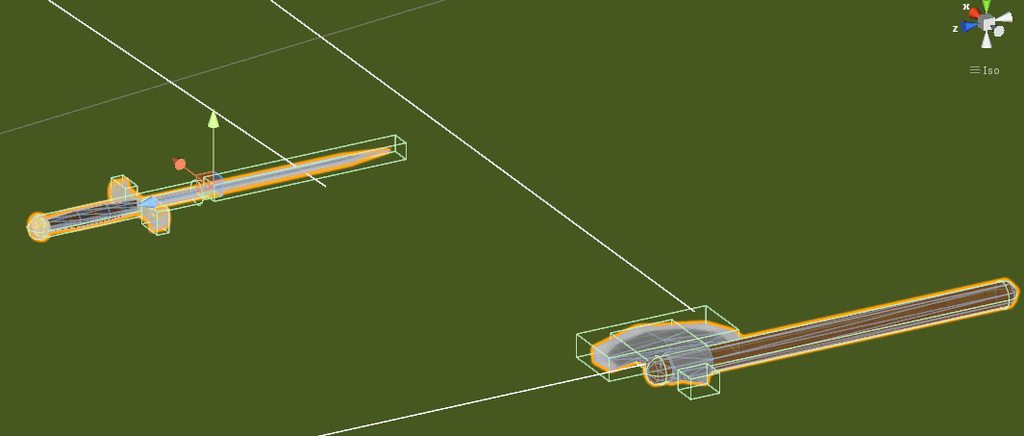
Make the colliders a little big to prevent clipping into stuff and easier for VR to grab
rigid prairie
I've removed thousands of excess meshes and mesh colliders.. lol
Thank you so much for informing me
Because right now my world is suffering waiting on my hotfix
 olive zenith
Yes, mesh colliders are awwwwwful
Never use them unless absolutely necessary. Usually a box/set of boxes are best.
Its a pain but it helps a ton.
rigid prairie
I feel like a turd cause I got so frustrated not knowing what was causing all this lag.. and it turns out I was standing on the problem and never bothered to look down
rigid prairie
I'm almost done with the hotfix, if it's okay with you I'll mention you when I'm done so we can replace it promptly. I'm getting a loooot of lag complaints (via my fiance who's playing)
Alright, over 5,000 unnecessary meshes and mesh colliders have been removed. All lights are now baked (with one exception), all static meshes no longer cast or receive shadows... Time to set it to 350 and let it bake.
rigid prairie
--and wouldntchya know, lighting bake took 5 minutes instead of 35
 willow sonnet
Anyone know what would cause long load times on a small world?
rigid prairie
My huge mistake I just made.... a lot of mesh colliders and hidden meshes that have visibility off because of modular sets
@willow sonnet
minor igloo
I have a floor trigger that seems to be retriggering over and over and causing my world to lag

Is this the proper way to do triggers when avatars hit a certain area?
fair agate
a better way might be: 1. a trigger collider set to look for Playerlocal layer, maybe just above the floor as long as you aren't dropping small pickups there. 2. Entry and exit points like doorways. If you are trying to do trigger occlusion...don't. Use Unity occlusion culling instead.
minor igloo
@fair agate For option 1, to set the trigger collider to Playerlocal layer, I have to use OnEnterCollider and select playerlocal right?
fair agate
OnEnterTrigger actually
minor igloo
That requires one object to have the trigger option enabled on the collider
I can't have the player be the trigger so I guess I'll have to make the object itself a trigger

I tried both Player and PlayerLocal and they both don't trigger the trigger
minor igloo
I scrapped that method since I couldnt get it working

I've been trying to apply Occlusion Culling in my world and my objects seem to be dissapearing when they should not
Hmm I messed with the Smallest Occluder value and ramped it up and it looks like it works normally now
Hmm my occlusion doesn't seem to cull the objects behind walls
 rigid prairie
Welp. 6 hours of hotfix and missed sleep for my morning shift just went down the drain. Vrchat crashed during testplay leaving the scene blank and unrecoverable
bold nymph
there's no .unity file in your asset folder? (where scene file saves by default)
rigid prairie
I opened unity again by accident..
rigid prairie
Yeeppp
 kindred quarry
Here is a question that someone may be able to help with... how do I adjust the clipping plane distance in VRChat. I have a large low poly object that I want to fully render as part of my scene and it is showing 'out of sight' when I look directly at the distance.
misty pecan
@kindred quarry In the VRCworld prefab there exist a "reference camera" slot. Drag a camera object from your scene into that slot and whatever changes you make to the clipping distance on the inserted camera object, that'll get transferred to the players' cameras when they enter your world
misty pecan
Hope it works 
 teal atlas
noice
 exotic root
^
 zinc goblet
@rigid prairie How did vrchat crashing break the unity map?
rigid prairie
It was a test build that crashed beforr fully opening. Unity temporarily exports the scene when running the vrcsdk tesr build script. The script never put it back because it never recognized it as fully started and closed
@zinc goblet
But somehow in a stroke of luck I found a back up that worked
 agile steppe
next time try to delete your "Temp" folder form your Project
 south socket
so, any good way to optimize speed trees?
 lofty ledge
ou goood
misty pecan
@south socket http://monumentalfailure.weebly.com/development-log/terrain-tree-replacer-utility
This might be useful? Never used it myself but heard good things

Scary Wizard Games
Hey! Today I wanted to share an editor extension I wrote while developing Monumental Failure. This piece of code looks at a Terrain object and instantiates the Terrain's tree prefabs as their own...
south socket
problem is what I'm working with arent part of the terrain. Trying to figure out the LODs on the prefab to work properly
misty pecan
Ah
 lilac saddle
Is there a way to have the built-in water reflections work properly in VR? It looks fine in desktop, but it's kind of nauseating with VR.
south socket
That could be due to the water shaders not being single pass. Synlogic has a nice water shader actually that should fix that

GitHub
Syns-Unity-Shaders - A set of shaders mainly created using ShaderForge for use in Unity.
lilac saddle
I appreciate it. I'll give it a look!
 viscid ruin
Is there a way to save the videos that it downloads when you load a new map?
Someone is telling me they are crashing because there are so many youtube-dl processes
viscid ruin
Also btw, does it download the videos every time you load the world?
 glad cypress
@viscid ruin friend has youtube-dl blocked in firewall so VRChat keeps more FPS
viscid ruin
@glad cypress But I need it enabled so people can watch the videos
lilac saddle
https://forum.unity.com/threads/unity-generated-combined-meshes-permanetly-saved-in-scene-if-build-is-cancelled.453916/ I have this issue, does anyone know of a fix?

Unity Community
I have come across numerous threads recently were users were encountering an issue. It appears for static game objects, Unity generates the combined...
 dense mulch
Is there a better way to stream videos and somehow make it local to the player?
misty pecan
I don't think so? Since they're not passive objects, you interact with them
The chair mesh itself can be static, but the triggers shouldn't be
fair agate
Well I'm not sure but what I can tell is there are different kinds of static
Lightmap static: just for baking
Occlusion static: for blocking view
physics static: does it assume the collider never moves, there doesn't seem to be a separate box for that, maybe that's just the main box
If your chair's collider never moves I think you can safely static it
My teleporter pad buttons are all static and work fine, for example.
 scenic swallow
If I recall correctly physics static is required for mesh colliders to be concave.
Presumably it also allows for some performance optimizations but I don't know specifically what those may be.
The concave mesh collider thing is a limitation of PhysX which is what Unity's physics is based on.
lilac saddle
You can always make a compound collider. Break the mesh up into pieces which are each convex, or use a number of primitive shapes.
fair agate
TCL that is interesting, may be the reason some people have issues with concave mesh colliders.
lilac saddle
it was removed from physx since it's not only very slow, it's wrong half the time too ... there is no good way to do collisions if one mesh is concave at all, all the methods work with making the concave mesh a compound of convex meshes behind the scenes afaik
so when it was still 'allowed' it would trigger collisions half the time that weren't happening, that's why they removed it
lilac saddle
My GPU maxes out on my map, while my CPU is at about 70%. I don't think I've ever seen a map do this. My mirrors only reflect players. The map is an avatar world with lots of pedestals and not much else. Is the lighting that expensive (and if so, why? It's one directional light, Mixed)
@lilac saddle did you check this guide? https://www.dropbox.com/sh/hmln4vtgbvnm8mp/AABvlLb_Mf80HZY6SD3WbUFTa?dl=0&preview=world+optomization+ver2.pdf

yeah
uhm
weird the CPU maxes, are you sure everything is static?
gpu
cpu is okay
oh, you said cpu in the post 😉
i can't enable instancing on the pedestal material
 kindred breach
Can someone give me links to working single pass water for Unity?
lilac saddle
is this because it's from a prefab or something else
@kindred breach https://github.com/synlogic/Syns-Unity-Shaders/tree/master/Syns-Unity-Shaders/shaders
GitHub
Syns-Unity-Shaders - A set of shaders mainly created using ShaderForge for use in Unity.
https://i.imgur.com/1EZ6Fc5.jpg Are avatar pedestals a drain on GPU? That's the only reason I can think of.
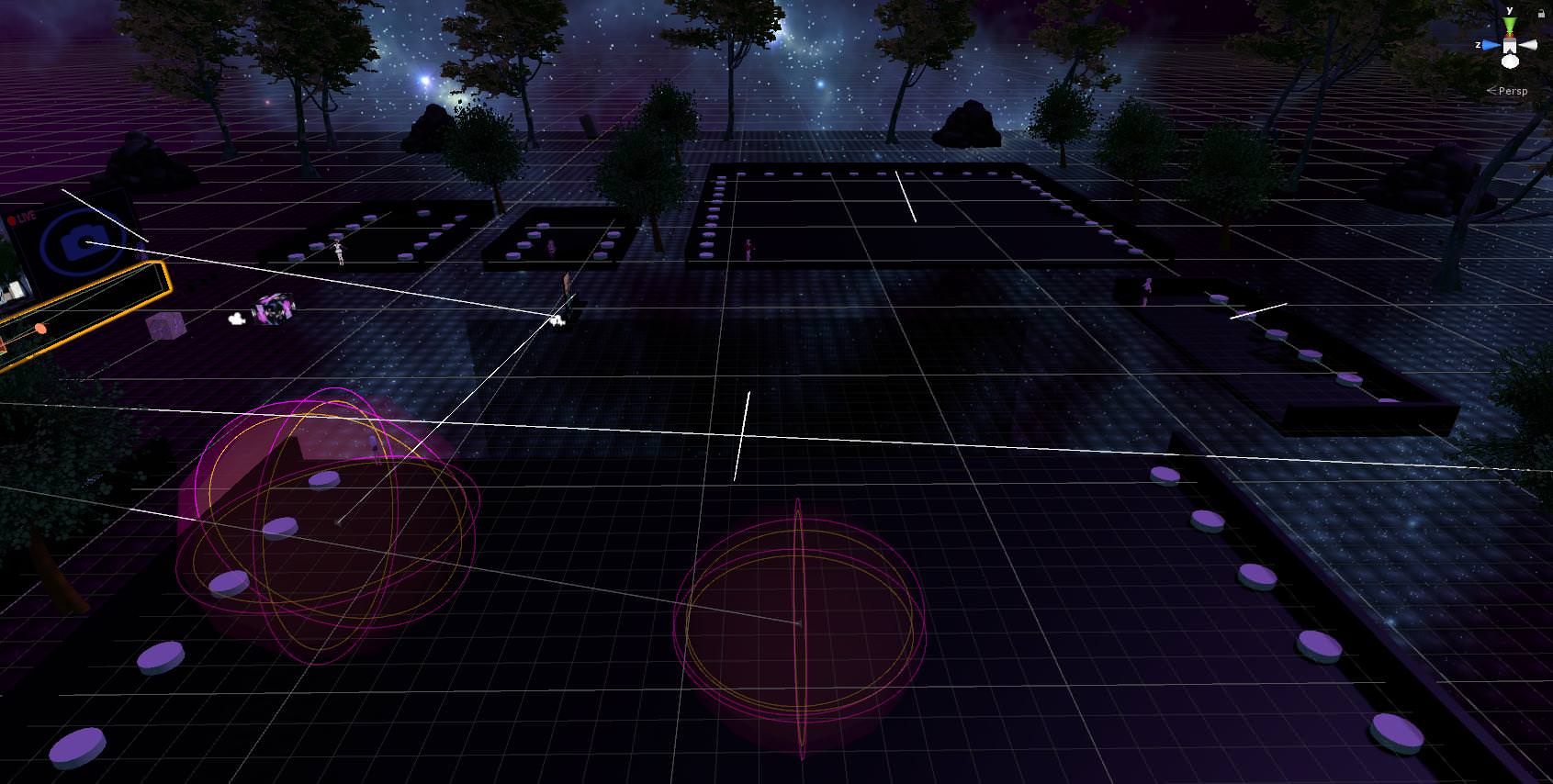
besides the lighting ofc
do i need to rethink the layout at this super late stage?
yeah they are, less than when they had models but the ripple shader on them isnot great
hm
i guess i'll bake this lighting, test it again
hope people join me again..
i guess i'll go sleep while it bakes the lighting again, even though i only changed it from Mixed to Baked and therefore it shouldn't have anything to bake afaict
seems like a subset to me
lilac saddle
god knows 😄
scenic swallow
@lilac saddle I'm pretty sure you can still have concave mesh colliders but only one mesh in a collision can be concave.
Something like that
I know concave mesh colliders still work for static meshes as I've used them before in work in progress worlds.
lilac saddle
yes, they do but it's a hacky algorithm and I've used it too but it's easy to get stuck/get false collisions
and they will never collide with rigidbodies
so they 'work' but not really
any other option is better than concave mesh colliders
scenic swallow
They collide fine with player's rigid bodies.
But you're right they're not a good idea.
I only use them for unfinished stuff.
 clear basin
Can someone with experience in creating vehicles help me out? I got the Vehicle working but i cant see when other people take control but people can see me.
fair agate
Sir, on the car parent put a pickup script and uncheck pickupable
it's a workaround for an object sync bug
clear basin
@fair agate i'll give that a try
fair agate
you using Mimi's kart?
clear basin
Not sure who the author is, i can check, but it looks like a go kart
fair agate
yeah thats it
clear basin
im using Jazneos Kart
@fair agate It Worked!! Thanks 😃
@fair agate My friends can now use the vehicles but the engine idle sound does not stop even after turning off vehicle. any ideas?
fair agate
Check the actions on all the triggers. One of them should be turning off the vehicle component and the user control component. I recall one of them wasn’t set up quite right and didn’t turn off the vehicle part.
clear basin
I was able to figure it out. All works fine now. Thanks again
 umbral glade
@scenic swallow Concave mesh colliders work for non-static non-rigidbody objects as well. The giant chesspieces in Game Of Kings use them that way. Concave colliders don't work for Trigger colliders though.
scenic swallow
Good to know, I wasn't sure about that case.
 glossy sinew
should really use compound colliders or custom collider geometry though
really wish unity had a n-gon generator like unreal though
would make life so much better
scenic swallow
There's assets for making compound colliders, but they're not free.
glossy sinew
yeah true
oh not n-gon
forgot the name


axis aligned slicing basiclly
K discrete oriented polytope
K-DOP
scenic swallow
Ah, neat
rigid prairie
@glossy sinew is this to reduce polycount?
lilac saddle
So the VRAM on my world is hitting 4gb with one player in it. Apparently most of this is textures. A lot of textures. Could someone help me bring this size down? I'm a 970 pleb and obviously others will be too
fair agate
Blue: have you baked occlusion culling?
Also you can atlas some textures of small props together and bring down their resolution if you have like 4K textures on little things. https://m.youtube.com/watch?v=0cSesu_zkQQ

Oh! Crap! I missed a super important part! At the end, you have to delete the original "UVMap" under the Data tab (under UVMaps), and rename the "TextureAtla...
scenic swallow
@lilac saddle You can go to Window->Profiler, click memory, switch from simple to detailed, and hit play in the editor.
That will show you a breakdown of what is usually your RAM.
lilac saddle
ooh, thanks
scenic swallow
Textures will be under the Texture2D section.
lilac saddle
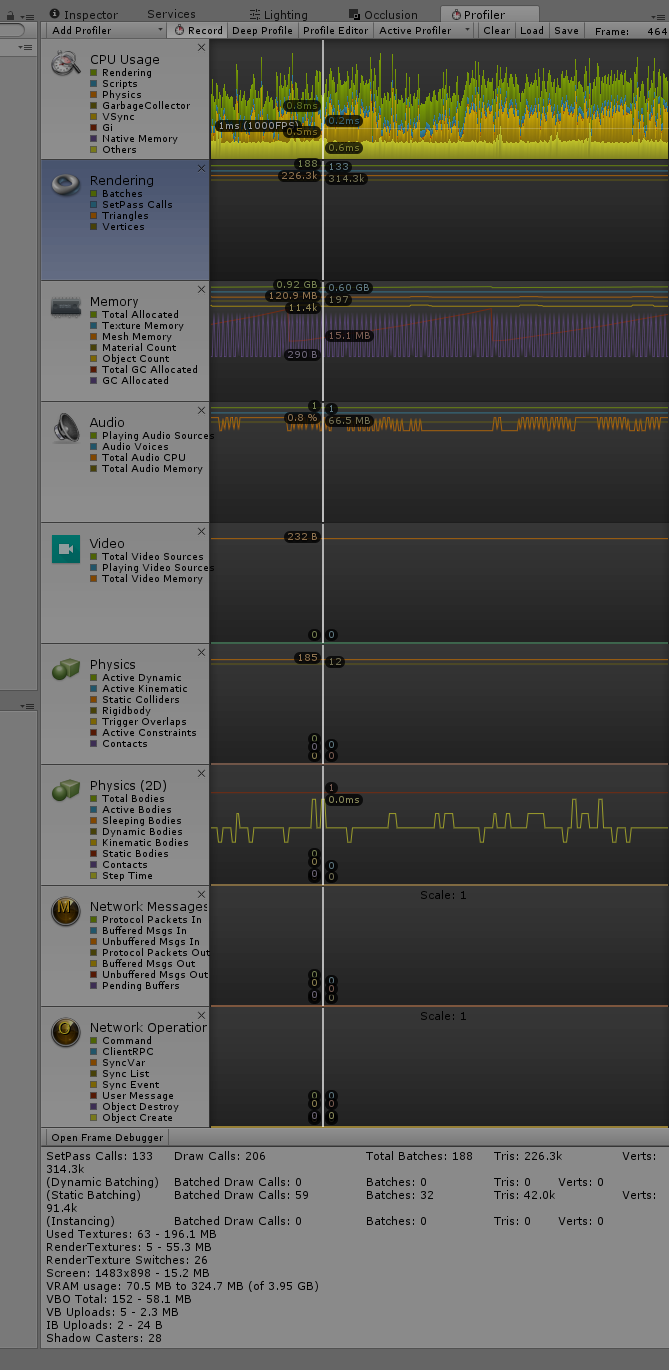
vram on the bottom is 327mb
the pedestals don't show up when hitting play - is it really all pedestals (in game) that causes it to go to 4gb or is this somehow because i've turned off a dynamic light and hit static on a bunch of things?
lilac saddle
was fairly high in game too, weird
but silky smooth 90 without the lighting shit
and static on the static objects (must have unstaticed when fixing all the meshes)
scenic swallow
It could be all of the pedestal pictures.
@lilac saddle
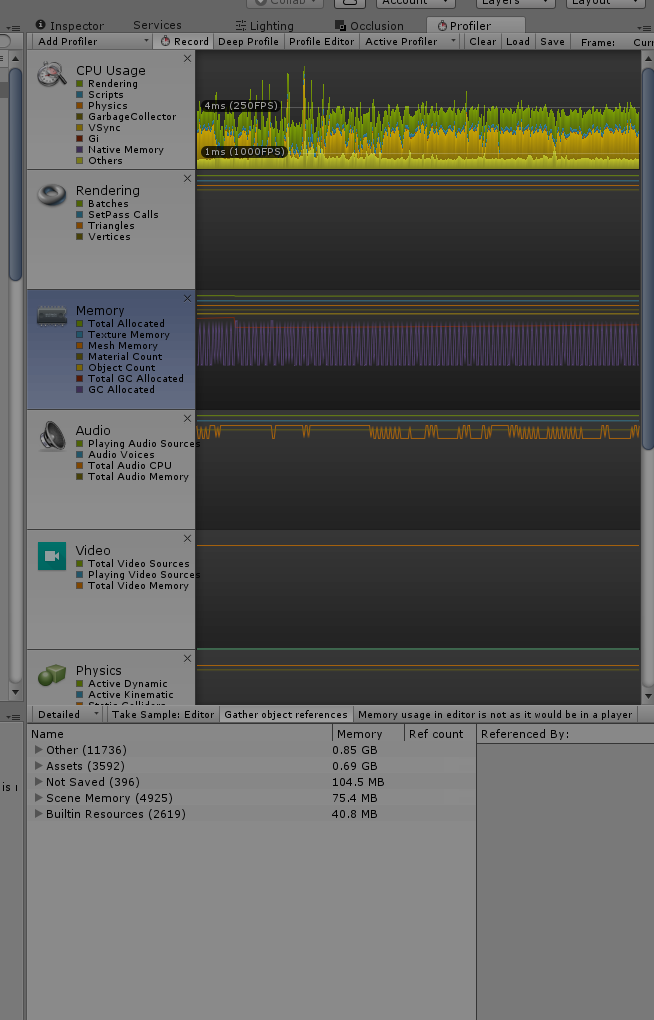
Also click on the left hand side of the memory graph (in the grey empty space below the picture)
scenic swallow
The memory graph should turn blue
And there will be a drop down in the top left of the bottom area that says simple.
Switch that to detailed.
 lilac saddle
I'm a little confused, I DON'T want mixed lighting, but having it all ticked as 'baked' results in no lightmaps being generated. What am I doing wrong here?
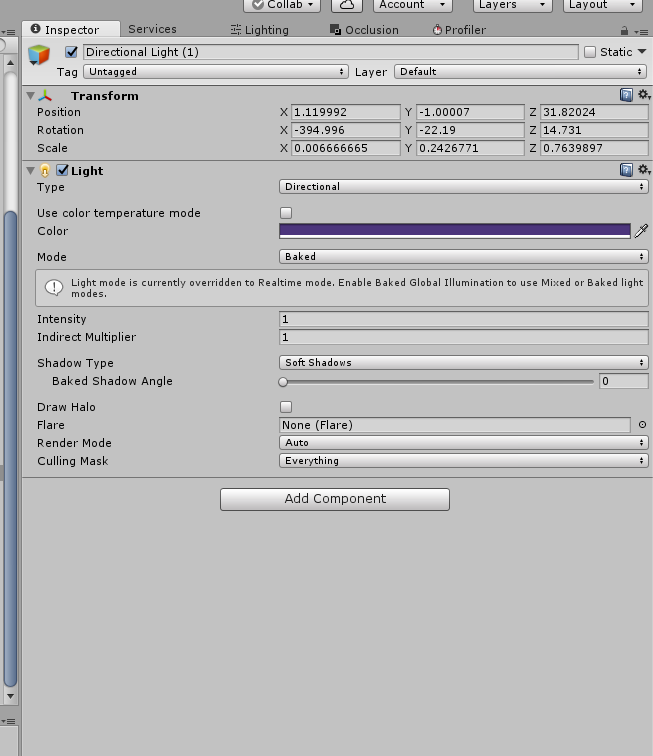
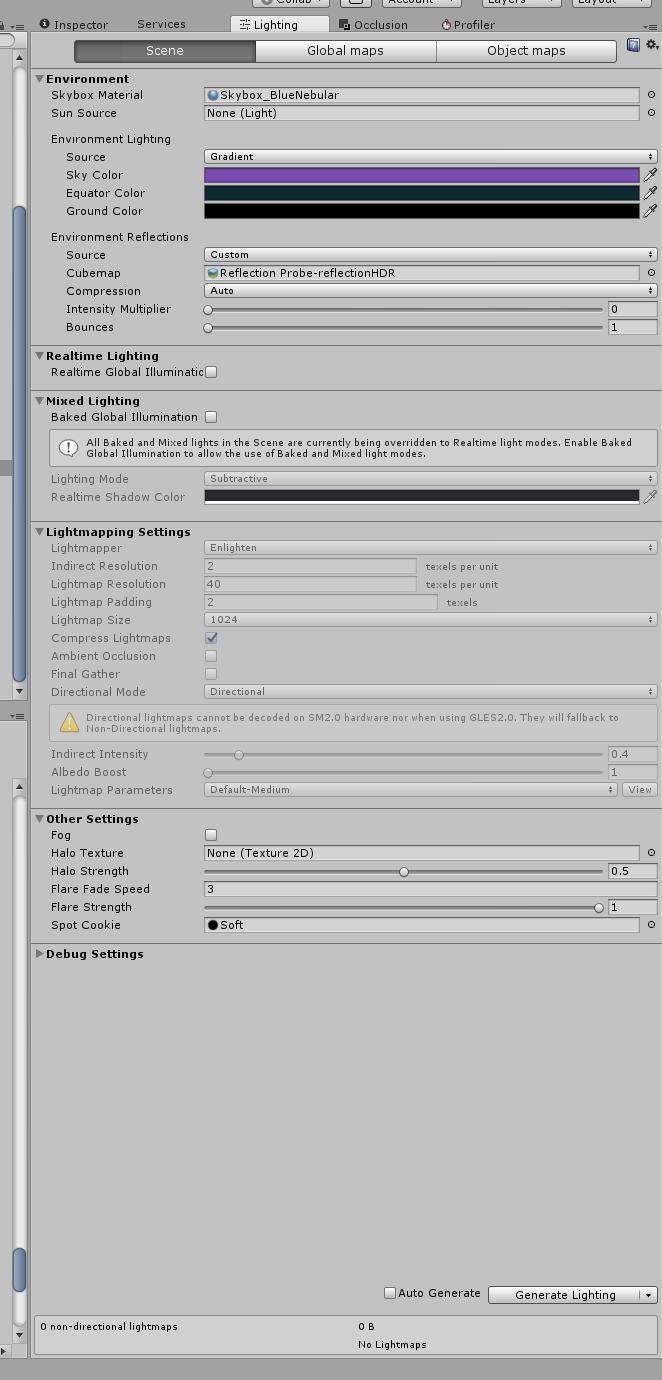 past imp
@lilac saddle you need to set everything to lightmap static so your lights can bake
lilac saddle
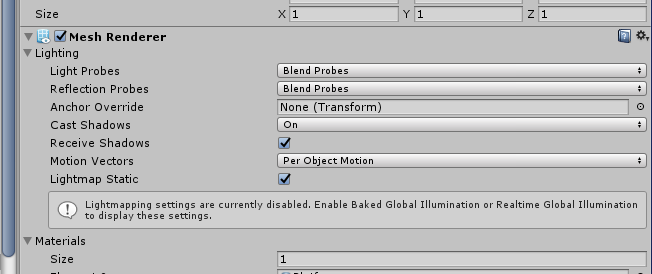
buh?
i can't figure out how to enable Baked Global Illumuniation
oh
it's under mixed lighting
but i don't want mixed
i don't want any realtime lighting for this Directional Light, but it's like it's forcing me to use mixed lighting
oh, or does this obey the setting on the directional light
that might be it
glossy sinew
There is nothing wrong with mixed lighting
It is baked lighting
There reason it's called that is because if you baked all lighting only dynamic models like players would be black and unit
You need to tick that in the lighting panel and bake
@lilac saddle
scenic swallow
@glossy sinew Don't forget about light probes, dynamic objects are lit using them in fully baked scenes.
scenic swallow
Yeah, I figured
glossy sinew
they really just needed to tick that checkbox
scenic swallow
Light probes are also useful in real-time lit scenes as they'll provide indirect lighting from the real-time GI to dynamic objects.
Yeah, that does seem to be their issue.
glossy sinew
and if they really didnt want realtime lighting you could set all lights to baked only. in the lighting panel its still called "mixed" though
because it provides some data for non static lit things as well
scenic swallow
Yeah, that's a design failure on Unity's part.
glossy sinew
yeah they fixed much of the names in the next few versions
I was comparing the other day with 2018 beta
scenic swallow
Yeah
lilac saddle
@scenic swallow I baked the lighting and it just kinda fucked itself

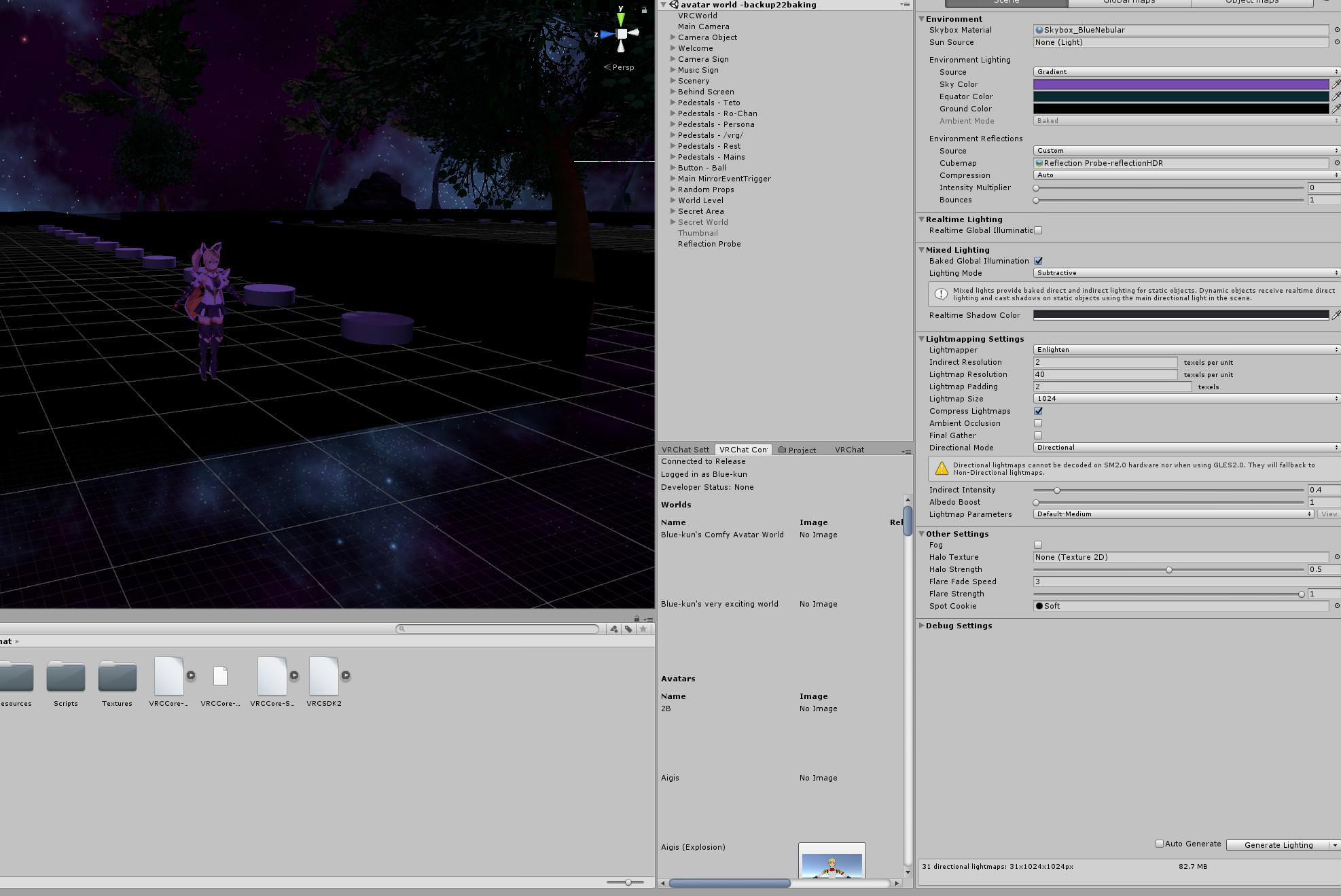
am i misunderstanding what baked lighting is?

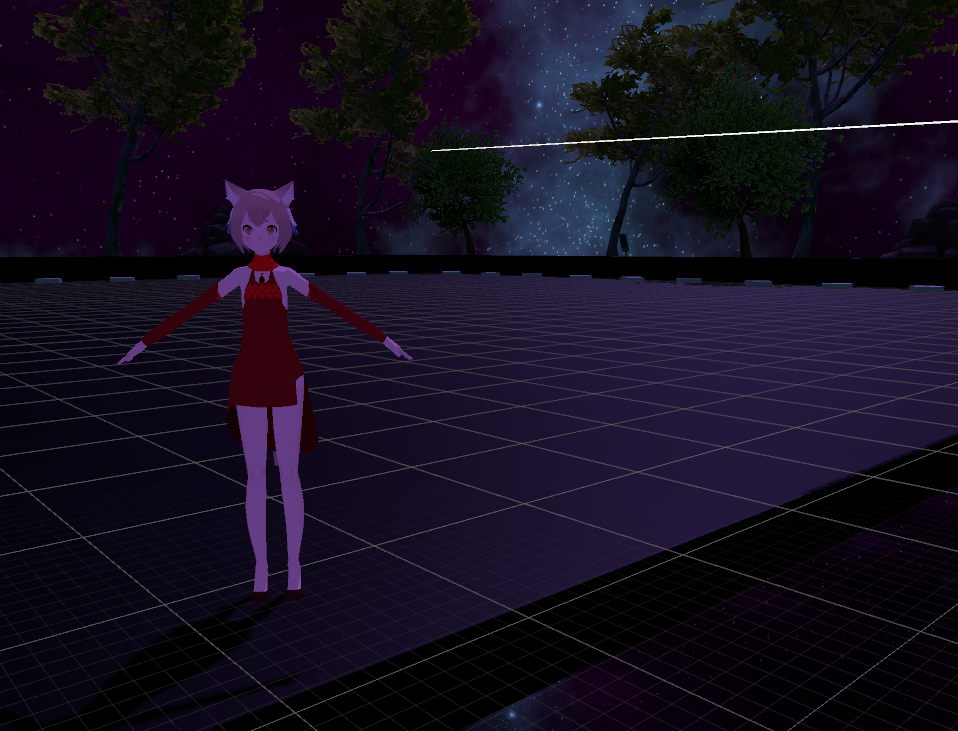
does the lighting have to be dynamic to look lke this
 astral trout
what light sources do you have in the map?
if you want shadows you'll need at least one mixed light
subtractive is a good baking option as it lets you have the main directional light act as the source of shadows for all dynamic objects
while the rest of the lights can be baked
but if you want everything to be fully baked then you wont have shadows for dynamic objects
thats what i did my map because i valued performance over everything else i guess
for subtractive bake make sure you put the directional light in the sun source tab in that bake window
make sure any static meshes you have in the map have generate lightmap UVs checked https://nyanpa.su/i/bTvRaJH.jpg
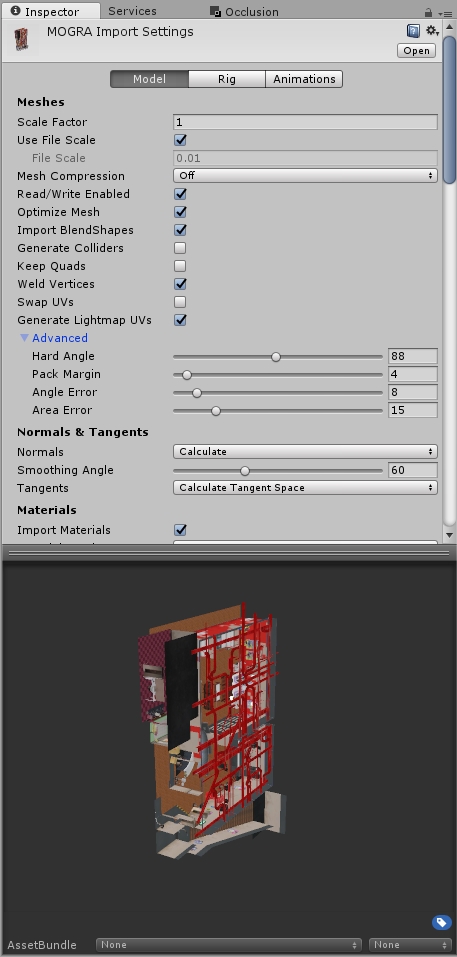
and all static objects marked as static https://nyanpa.su/i/VI70aKl.jpg
 scenic swallow
@lilac saddle That looks like specular highlights which do require real-time lighting.
astral trout
nah, i got specular highlights to work without real time lighting
you just need reflection probes
though they be tinted based on the environment
and it'd be tricky if you want to get good transition between areas of drastically different colours
scenic swallow
Those are a little different but yes that's technically specular highlights.
There's a specific type of specular highlight that requires real-time lights. General specularity can definitely be done with reflection probes.
astral trout
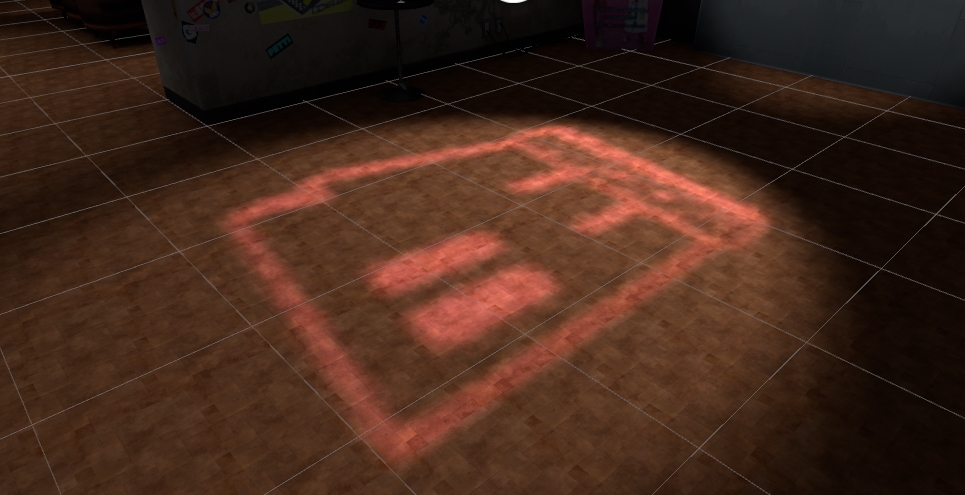
do you know how i could increase resolution on baked direct lighting?

trying to make this shaped light more defined
it looks fine in real time but baked it ends up fuzzy even with hard shadows
i'm using a coloured light with a cutout texture on a plane to cast that image
lilac saddle
i'm just gonna disable lighting on this map
maybe in v2
thanks
So anyway I can fix this
astral trout
looks like there are doubles in the mesh but i may be wrong
astral trout
try calculating normals for those meshes in unity
are they double sided?
i had similar issues with a characters hair when using double sided
and had to make sure the normals were flipped correctly in blender
as this happened on backfacing normals
lilac saddle
how do i calc normals again?
 lilac saddle
just control A
glossy sinew
does kinda look like weird normals
you can keep the hard edges if you want them by keeping the angle low
 sour cave
anyone want to recommend a size for a render texture in my world?
i'm using 1024x1024 right now and i'm hesitant to increase it but it's quite blurry
i only use one though, it's for an avatar testing world
 rugged mason
as long as you make it local and toggleable you should be dandy
and just play around with it
put it to max and look if it lags
then slowly go lower until it feels comfortable and isnt too laggy
limber maple
@lilac saddle I had the same problem into my world. I just removed the shadows from directional lightning and it was done
fair agate
@sour cave I usually do 1k textures for an avatar but for world props really depends on how detailed and big in the scene. I have 2k for most of the busy atlases.
 viscid furnace
I won't be adding one anytime soon as still fairly new to worlds, but what's the most efficient/optimised way to have a photo wall?
 toxic plaza
@viscid furnace not sure if its the most effective or not, but I place my screenshots onto a single 1024x1024 image. Import that into unity and then convert the image into a 2D/UI sprite sheet set to multiple. use the sprite editor to cut out the individual screenshots and then place them on walls as 2D sprites. They are also unlit by default which is good 😃
although I've had to use a 2nd image file too for new screenshots
i have roughly 40-45 screenshots per image file
viscid furnace
okay awesome thanks! That is very similar to a way my friend has done his so atm it seems like one of the optimal ways to do it.
toxic plaza
@viscid furnace no prob, an alternative way that would allow you to update with new screenshots without reuploading world is to use a web panel
that shows a site with all your screenshots on a slideshow or something
viscid furnace
oh makes sense, wouldn't of considered that. thanks again @toxic plaza !
 fathom badge
@viral marsh how do i make the mirrors active if player get close?
toxic plaza
@fathom badge Create a cube infront of the mirror, tick the "is trigger" checkbox on the box collider settings
Then give it a vrc_trigger:
enter trigger - (local)
layers: Player local
Set game object active = mirror (true)
exit trigger - (local)
layers: Player local
Set game object active = mirror (false)
and then also turn off mesh renderer for the cube so its invisible
 lone meteor
Can someone explain what a depth buffer on a render texture does? I've been told @surreal dove has some XP in that
scenic swallow
@lone meteor You can have a camera render depth to a render texture instead of colours.
lone meteor
@scenic swallow I'm confused as I'm using render depth? https://cdn.discordapp.com/attachments/342838090357932032/436613652628373504/Screen_Shot_2018-04-19_at_3.46.02_PM.png

Obviously this is local, don't worry about that part
 thick estuary
How would i go about creating a chair that you can pick up?
added a cube parented to chair that had pickup component, event added pickup to chair, tested all variations but im just not sure
fair agate
The pickup should go up from the chair, not as a child.
I have a chair as part of a car...the pickup is a parent with a collider as a parent of the chair
thick estuary
ah i see. ill try that 😄
fair agate
you want to be able to move people sitting or just when they aren't
You can set some things up to enable/disable that but it is kinda fun to pick people up.
thick estuary
yeah, the point is to pick people up, its for a tournament where people are going to fight giants
fair agate
awesome! I just build a driveable giant
thick estuary
the giants will pick the people up as they try to get free
fair agate
how are you doing it?
fair agate
are the giants animated npcs? or player controlled?
thick estuary
i made chair the child of the cube
player giants
its a live performance for people with custom gestures called "Gormundr's Trial"
some very talented animators are competing
fair agate
cool. they are avatars then?
thick estuary
yup!
fair agate
I went down a very long path because I wasn't sure I would be allowed a world with an avatar more than 5m, ended up with a giant third-person-controlled gundam giant. Plus side is he can do world-specific actions and emotes.
 thin crater
anyone know how to access Window>lighting in Unity? Am I just a total idiot lol? All I have acces to are Window>Lighting> and then either settings or light explorer
I need the Window>lighting tab alone.
scenic swallow
@thin crater The lighting tab is the lighting settings window.
thin crater
@scenic swallow yeah I figured it out, wish the internet made that easier to figure out lol. How hard is it to say “we removed it and changed it slightly to this.”
@
 warm arch
do the avatar pedestals work automatically once you put in the avatar id or do you need to do something extra cause mine arent working?
scenic swallow
@warm arch The avatars have to be set public in the content management window in the SDK.
warm arch
I found out what it was, i turned its collider off. XD
 slate bear
Would having too many rigid bodies effect performance? I'm getting 35 FPS in VR, and 70 in desktop. I suspect it's all the stuff effected by gravity I have laying around.
 thick igloo
misty pecan
thick igloo
misty pecan
If they're object synced and have mesh colliders that makes them more expensive aswell I believe
minor igloo
Okay I just made all of my sections of my map manually occluded.
I hope that's well optimized and also a button that will reset all of the extra rooms in the main room
That should be pretty well optimized
fair agate
I gave up on the manual occlusion except for audio. I just used Unity Occlusion. I was afraid it introduced sync errors into some animations.
minor igloo
Yea I made my animations local. I can see issues with syncing with manually doing occlusion.
Hey for objects that move in an animation, will they not work right if placed under the static tag?
fair agate
If it moves, don't static it.
I actually pondered this issue as well with trigger occlusion. If you are turning static items on and off, doesn't that affect the physics calculations badly?
Trigger occlusion causes paradoxes like this that I didn't understand which is why I abandoned it
lilac saddle
Might someone know why my map causes my GPU to max out? I know it's a vague question, but I've had someone profile it or whatever and not find anything obvious, and my GPU memory gets to about 3.7gb which is a bit of a stumbling block for my 970. Are there any common things that place a lot of strain on GPU in maps? My mirrors are all toggleable and only reflect the player avatars, there's no dynamic lighting, everything that is static is ticked as static. There's not much to the world other than the pedestals and a few trees.
the mirrors are the real killer for me and i don't understand why, when all that's visible is the skybox and my avatar
i make it sound worse than it is, but i want a solid 90 when it's just me and it's struggling to achieve that in the mirrors (my first message was sent when i was having bigger performance issues which restarting apparently mostly fixed)
also the camera/ screens seem to have zero performance impact
 high parcel
@lilac saddle there is an inbuilt profiler in unity its not good but it should help
:Tc
lilac saddle
the GPU memory literally jumps 500mb when a mirror enables
something is fucked and i don't know if it's something i can solve or if it's an issue with the vrchat mirrors
high parcel
well
mirrors in vrchat are intensive as it doesnt do a lower end version of the map and models
unless you make its render texture a lower res
lilac saddle
but all it's rendering is my avatar and the skybox
high parcel
:Tc
lilac saddle
both of which should already be in memory,
i'm getting solid 90 now at least, but when people join it wont be as good as it should be
 rich stratus
Hello
I made a tile that changes colour when you step on it using an animation trigger
then I made 9 of them
then I made 9 of them
now I'm getting 11fps when I walk on the tiles
is there a more efficient way of achieving the same result?
or should I just put strobe lighting in and call it a feature? lol
lilac saddle
I have a similar request to what @lilac saddle mentioned.. I want to use an invisible camera & a screen as a mirror. I got my world running at 90fps even on my old laptop but it weirdly drops to 45fps for many people when they turn on the standard mirror
i mean, 45 means they have asw or the like enabled
but it is bizarre that mirrors take up so much more GPU than they obviously should do, afaict
since all that is in my vision is me and the skybox
rigid prairie
@rich stratus try using object active triggers to swap colors? Lol.. Cheap way out
lilac saddle
which is a hell of a lot less than if i look anywhere else on the map
including other players
rigid prairie
@lilac saddle you have occlusion culling set up?
lilac saddle
hmm i see, yeah a guy with a gtx 1080 told me his frames dropped to 45 with my mirror.. even though it runs fine at 90 on my end i'd rather just not use the vrc mirror
i have optimised my mirror minus using occlusion since i had another friend say that he would get a lag spike whenever he was at a certain distance from the mirror (when i had occlusion set up which i now removed)
rich stratus
I guess I could add a layer of dumb tiles and swap them out for animated ones when the player hits a bigger collider
@lilac saddle is your mirror facing another mirror?
lilac saddle
nope i only have the 1 mirror
rigid prairie
It could cause less lag. And maybe just box the room off completely and do a toggle occluder for the rest of the map
So when you're in one room, the entire other part is inactive, and vice versa
@rich stratus
rich stratus
Yeah, I'll try to make sure they're only active when they're likely to be triggered
 glad mulch
I'm just starting out with world building. What sorts of things should I keep in mind for optimization.
rich stratus
@glad mulch today I learned, if you're not looking it at, don't animate it
fair agate
@glad mulch search for Dieu’s post here from 4/12
Big ones: minimize mesh colliders. Set it static if it doesn’t move. Bake lights. Bake occlusion. Set mirrors local trigger. No more than 2 active videoplayers at a time....
 sharp palm
Damn I baked/dEleted most of the lights in my world and set everything that didn’t move to static but did not see any performance impact at all
exotic root
maybe layers culling?
zinc goblet
So uh
how do you optimize a mirror?
I already turned it's AA number down to 1, and got toggle buttons, anything else I could do for when it's turned on to reduce lag it still might give for some?
fair agate
Give it less to reflect
I have mine deactivate avatar pedestals behind it
You can also give it a big neutral background in front
And make the buttons local right?
zinc goblet
Ya, buttons are local
how do I make it not render certain things though?
Do I need to get myself familiar with that layer system unity has?
fair agate
You can have your toggle turn stuff off in the background, or put the mirror in a room that has static occluders blocking most of the view
I think you can make it only render certain layers too
zinc goblet
Ya, I've noticed a lot of peeps tend to do that, sadly for me when I originally made my room the mirror was basically the first thing added, so it's kind of established as the centerpiece now
lilac saddle
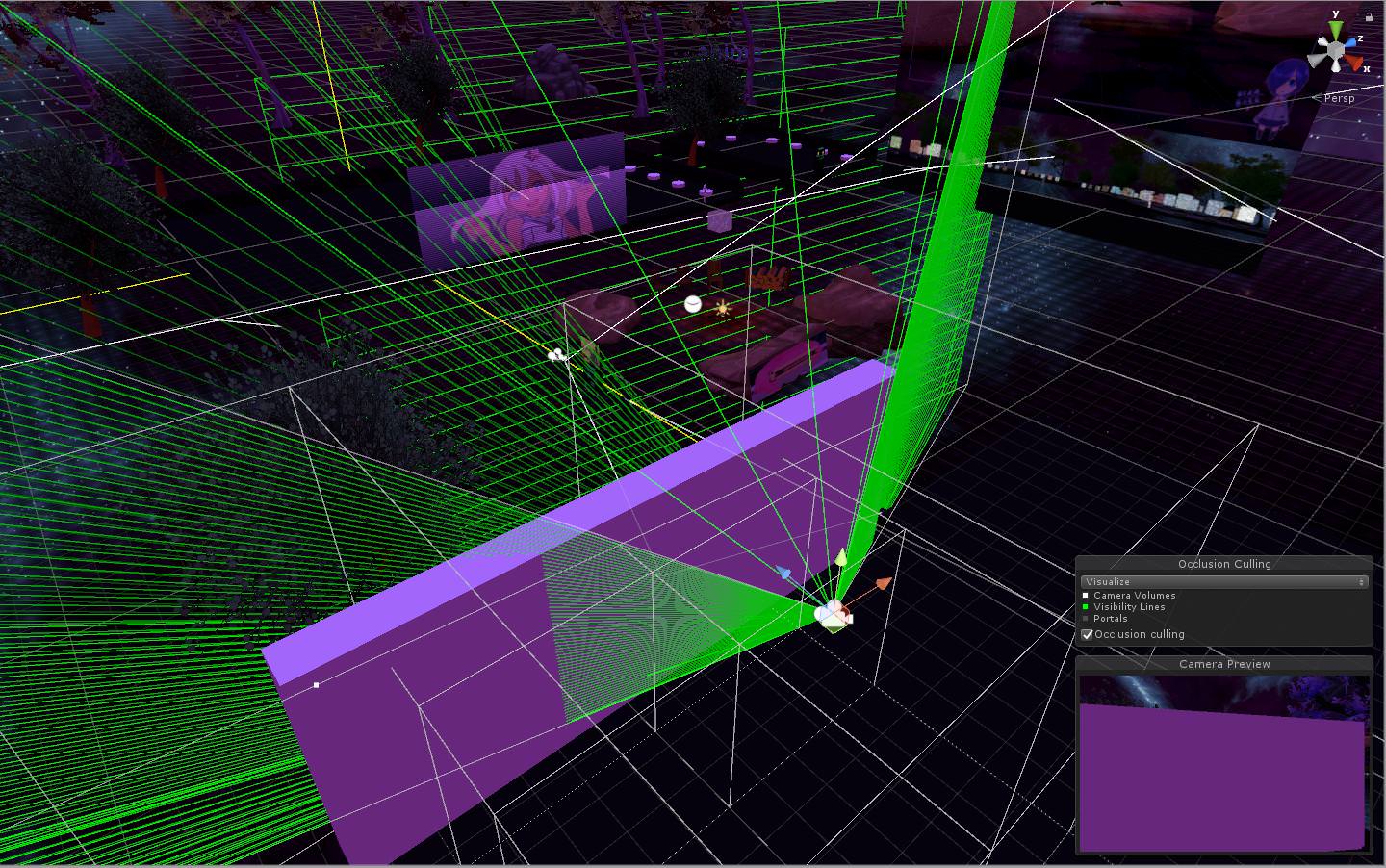
Why is occlusion not working properly at all? I have static (everything) ticked on this cube to make sure it would work properly, and it still fucked up https://i.imgur.com/BukQHd4.jpg
 exotic root
maybe its the layer
lilac saddle
what do you mean?
exotic root
 lilac saddle
everything is on default layer
fair agate
blue-kun what occluder size did you use
lilac saddle
default
if i make the cube taller, it does a better job
kinda
performance in my world is really shit in mirrors and this doesn't help ;-;
fair agate
make your occluder smaller. I think the defualt is 5? set it to 2 and bake again
lilac saddle
that was the solution and something i really needed to know
glad i know it now
tyty
sharp palm
Hey, anyone’s fps showing in half after the update??
My worlds are showing 45 when they were at 90 before but still equally as smooth
Nothing has changed except update
lilac saddle
I can't even load into my world.... Before the update I was able to and now when I try loading into my world it goes to 100% and then back to 0% AND THEN almost crashes my pc
wtf
sharp palm
Weirddd
I mean mine is still the same, it’s just showing half of the FPS It should be
Performance is the same though
 sweet sinew
@sharp palm if your FPS is stuck at 45 then it’s just a VRChat thing. Restarting usually fixes it.
high parcel
just wondering is having 106 reflection probes at a res of 64 and baked going to cause fps issues?
fair agate
🤷🏼♀️baked probes are supposed to be good? But you probably need light probes not reflection unless you are showing off metallic stuff.
fair agate
Reflection probes will allow metallic stuff to reflect the real world objects instead of just the skybox. You probably don’t need them. Light probes will light avatars.
 halcyon aspen
@fair agate, Thank you for the tip about that spawn problem, it's working great now
halcyon aspen
not anymore😜
Is there a way to get my audio right, in the room way down below i've got a videoscreen with movie and audio, but you can hear the audio still in my world above.
Is there a certain setting for it so you cant hear it?
fair agate
if the falloff curve is log and it doesnt go to 0 at the cutoff, set to linear
halcyon aspen
ok, thanks
rich stratus
Henlo Haxxor Godz, plz I can haz heyulp?
 sharp salmon
I have a weird problem where after I add an object to my world, some people in VR get "locked" to 11fps. Regardless of which direction they're looking or if the mirror is turned on or off.
The world used to be fine for these people, and adding and removing this object seems to cause it.
The object is a static low-poly hot-air balloon. It's got a particle, audio and lightsource for the burner in it as well if that matters, but that should be no different that some campfires already in the map, who hasn't caused any issues.
Other than that it's literally just an object placed high in the air.
Any idea what might cause this?
It happens with another object as well, a ferris wheel. I've tried each individually and both seem to cause the same issue. 11fps specifically.
Oh and I should note both objects work fine in another vrchat world. Same prefabs.
minor igloo
the light source can be colliding with other light sources and causing the game to have to recalculating lighting over and over again.
Try disabling the light source and try again
lilac saddle
does anyone have any private worlds I could go to to get a cool Avatar
 frosty egret
Why does it have to be private? The only way to get a unique avatar is to make one yourself
 sonic barn
And I don't know why this is even related to this channel.
 scarlet lintel
Is it possible to use meshes with LOD or will it be deactivated after upload to VRChat ?
If someone knows plz answer with an @
 teal mirage
I made a chair but appearently when I sit. I can't get up or get out. I had to respawn.
fair agate
@scarlet lintel yes LOD should be supported
Haven’t done it myself but just use Unity to set it up https://docs.unity3d.com/Manual/LevelOfDetail.html
 scarlet lintel
Ok thanks 😃 @fair agate
fair agate
@teal mirage you check the Disable Exit?
 west zinc
@lilac saddle that’s oddly specific and yes
lilac saddle
Whats up guys, hopefully this question finds a quick answer.
I recently baked my map & so fourth. Everything is perfect 👌🏻 but... my mirror.. any avatar without a lit shader becomes just straight up black. Rest of the map is lit fine & i can see all avatars.
Has anyone seen or ran into this issue? Could really use a quick help. Thanks 😁
fair agate
light probes!
sharp salmon
I'm having an issue with my world, where if you are the first person, you get excellent (91fps) framerate, but the second person who joins gets a lot worse framerate. As soon as the first person leaves, the framerate for the second person becomes excellent (91). If the first person joins again now he gets the dropped framerate issue.
The issue occurs for both VR and Desktop users, and regardless of avatars used. Drops to 11fps for VR and about 60 for desktop.
My friend and I have been struggeling to figure this problem our and we find it very strange.
Not sure if I should post this here or in #user-support-old so I'll post it both places, hope that's OK.
frosty egret
@sharp salmon what do you have going on in your world. My first instinct is that you have something huge like a physics simulation that is being calculated locally on the owner of the map, and ownership is changing when one person leaves.
 ebon mauve
How do you reduce lightmap baked size? When it's done compiling, its like 320MB, That seems awfully a lot for VRchat right?
Unless it compresses in game
sharp salmon
@frosty egret I agree, but I really can't figure out what it would be. Most objects I have are static, and then some with rigidbodies and object sync etc. to pick them up.
A recent thing I've added is a ferriswheel which with an animaton where it spins, and it has vrc seats in the carts. The problem started after I added this and a hot-air balloon, making me suspect them instantly. But both work fine on their own, and indeed if I disable everything else in the map, the map works fine with them in it. I've also tried adding them back in one at a time. The ferris wheel causes the problem, as more or less expected. But the hot-air balloon does too, even though it's just a static even low-poly object placed high in the sky.
It really confuses me.
frosty egret
@ebon mauve Go to Window > Lighting > Settings. There you can change your lightmap resolution and indirect resolution.
 silk sable
anyone know how to stop objects dissapearing from view at certain camera angles?
frosty egret
I'd also like to know how to do this. Also I've noticed direct lighting from point lights abruptly cuts off at certain angles too. Indirect lighting is always visible, but direct lighting pops in and out at the edge of my view
frosty egret
For me when an object disappears the whole thing disappears. For the lighting issue only a part of the screen goes dark and its usually only one eye
silk sable
found it
there were old volumes from previous bakes
click on your Main Camera, and clear the occlusion data
frosty egret
@silk sable thanks for posting your solution!
frosty egret
https://gfycat.com/scarcechubbyfattaileddunnart I'm still struggling with my lighting issue

I found out that the lighting looks fine in the VRChat camera which is pretty weird
 tardy briar
Does it have shadows? @frosty egret
probably has something to do with the vr camera being from two slightly different angles
But it's for everything though. That is weird.
ebon mauve
@frosty egret Are you using Mixed reality headset? I have a couple of friends that do, and they get a similar problem with one eye darkening in VRchat when close to/looking at dynamic lights or spotlights.
Also have you tried setting the lights render mode set to important? That's usually fixes flickering lights for me.
teal mirage
what will happen if I press Last Build instead of New Build
I already have a map. I just want to update it
ebon mauve
It will update with your last built version of the map
Or the last time you tested it
frosty egret
@ebon mauve I do have WindowsMR. Do you think it's just my headset??? Awwww mannnnnnn. It seems to happen only with non-directional lights and only with realtime lighting so I didn't even suspect my headset. I guess the real test would be starting the world in desktop or bringing another friend in to test it. Thanks for the suggestion.
ebon mauve
Yep, have someone test it with a vive or oculus or desktop works too
toxic plaza
@frosty egret how many lights are there in that area? at vr high settings you can see 8 realtime lights before flickering/on and off starts and in vr low you can see 4 only. You could also try setting them to important to see if that helps?
frosty egret
1 lol
There's a single directional light that's shining through the windows in the distance, and the one that's doing the flickering
ebon mauve
Well there you go, hopefully it will work once you remove it or change it.
 covert stump
unity says my world has a very fast update rate. So what's a good update rate for a 16 player world?
nvm. I saw that it was set to 10ms in the vrcworld prefab in the examples folder. Whereas the documentation says that the default is 33ms
 lean lodge
The default is actually 10ms, I think the recommended rate is 33 for larger worlds now.
Docs are inaccurate
For 16 players, I think you should be fine with 10ms. You could try raising it a little, but no need to go to 33ms entirely
fair agate
Default was 10, new SDK slider only goes down to 33.
lilac saddle
did i fukt my map? its still reinporting
sharp palm
my map and a friends map's framerate got messed up with the new sdk
theres like barely anything there and framerate went from 90 to 45
on all of our maps
hopefully new update will fix?
warm arch
quick question - i want an object to spawn for 3 seconds when a player spawns into a room's GameObject - how do i do that?
 stark bay
has anyone a good idea to create alternative for a LOD? i have a lot of complexe objects in my world and it takes to long to create lod groups for all now...
frosty egret
You could occlude them @stark bay https://docs.unity3d.com/Manual/OcclusionCulling.html
@warm arch make a trigger spawn an object on OnNetworkReady or PlayerSpawn then put another VRC Trigger with an OnTimer that goes off in 3 seconds in the object to make it delete itself
warm arch
So the button has OnNetworkReady trigger connected to the box and the box has a OnTimer then somehow i make it delete itself?
Im working on 3 hours of sleep, im a bit stupid right now.
Ill give this a shot
fair agate
Gearbell does it have to spawn and destroy? Not set active/inactive or turn on and off mesh renderer?
OnNetworkReady should be set to local, you can use the new delay! I do that to spread out the update trigger for a lot of animators going at once.
 scenic agate
is it safe to replace terrain colliders with thin box colliders?
on perfectly flat surfaces
fair agate
its ideal in fact
limber maple
Put mesh ! Meshs everwhereeee
past imp
Tedious but yeah
 hasty merlin
This might be a better place to ask, does anyone here use the water4 shader? I've been using it in previous builds of my world and it looked amazing but it just stopped working all of a sudden and I have no idea what I did to it. Now the water is only visible for up to a few inches away from the camera. Anyone else have this problem or have any idea how to fix it?
minor igloo
Oh yea I have that same problem now. I scrapped the water and made a static water
It worked when I first used it. I tried reimporting but no luck
Maybe if you start a new project and import it, it'll work
hasty merlin
Okay I found a work around, just restart unity until it shows up. Dont mess with the settings, just keep restarting Unity until its visible again.
It worked for me anyway v(°~°)v
But if anyone knows why its happening lemme kow so I can stop it for good. Still pretty annoying
frosty egret
If you upload the world for testing while the shader is broken does it show up broken in VRChat?
past imp
if by broken you mean pink then yeah
rich stratus
hello world
 viral marsh
my frames!
 unkempt rune
Oh yeah well done @viral marsh on optimizing the Pug - it's playable on my potato again!
lilac saddle
So um, how do I go about fixing the "Room has very fast update rate" warning? I have lights but they're all baked. It's a bit of a big map as well.
hasty merlin
@frosty egret Yeah it uploads the broken shader too if its broken when you push out a new build, but as long as you dont mess with the material settings it should appear normal after restarting unity.
@lilac saddle on your Vrcworld there should be an update rate slider. At one point it was set to 10ms on my world and the fps tanked, then I put it up to 33ms and performance is perfect again with no no noticeable problems. Try upping that slider a little.
lilac saddle
That seemed to do the trick with that error, thanks.
ebon mauve
As far as I know, I don't believe Unity (or atleast this version) Has any carve tools like that, you will have to create the doorway cubes to form a doorway.
frosty egret
https://assetstore.unity.com/packages/tools/modeling/probuilder-111418 I just use this free package if I need to make any models within Unity

Now an official Unity tool!
Read more: www.procore3d.com
Prototype Rapidly: Build basic or advanced geometry, right in Unity, with zero creative barriers.
Play Instantly: Playtest at any time, then edit immediately, and never...
Apparently it became an official Unity tool? Probably in one of the newer versions
ebon mauve
Right I forgot about that, does it work with this version of unity though?
frosty egret
Yeah I use it on all my maps
ebon mauve
Neat
lilac saddle
Ok
I will get probuilder
Thanks
I guess i can do the layout based on realworld floorplans
With some modifications
For my apartment
hasty merlin
Man, I miss the Hammer World Editor from Source Sdk. So easy to use.
 odd coral
I keep falling out of many different worlds when I go through doors since the new update. It seems to be related to not being completely centered in the play area. So, if I'm sitting on my couch I end up spawning that distance difference in game and fall out of the world. This only happens when the new update came out.
misty pecan
If you're sure that's the case, please do submit a bugreport here https://vrchat.canny.io/bug-reports
Report bugs and vote on the ones most important to you!
odd coral
@misty pecan done
west zinc
@odd coral do you have leg tracking?
odd coral
@west zinc No, I just have the standard vive setup
 wanton tiger
Is it better to use box or mesh collider?
 sinful ivy
@wanton tiger Mesh colliders are expensive (higher the poly count the worse it is), if you have to use them make sure you make a low poly approximation of the mesh and/or use convex and inflate it a little bit.
Sphere colliders are the cheapest of all colliders
Ideally you should use multiple primitive (Sphere, Box & Capsule) colliders to approximate the mesh.
wanton tiger
@sinful ivy Ahhh okay that's more or less the info I was looking for, thank you for your Knowledge and time.
 supple tusk
Hi all! Im tryin to make my first world..so how much polygons and light sources is optimal? +-..
rich stratus
optimal is a single plane with one baked light, everything else is a compromise.
supple tusk
I thought there is some rough statistics about one scene .. like with avatars and 20000 polygons .. and by the way, what is the maximum size of the world? is there a limit for the area?
sweet sinew
Depends on what type of world it is. There is no limit, but then your world will probably not be approved if you want it public
Also have to remember that other people will have to download this
 lofty shuttle
How would I make an audio source in my map be 'Music' (instead of 'Sound FX')
lofty shuttle
Thanks
rich stratus
Anyone know why the jump mod stopped working in my world?
west zinc
Depending on what you are doing you will also want to set you audio to ogg streaming. Don’t do that if it’s any way interactive
lilac saddle

Medium
Just as overtuned graphics can turn a fluid gameplay into a 5 FPS slideshow, poorly configured audio assets can wreak havoc on your target…
supple tusk
thx!
fair agate
Is that article pinned? Should it be?
lilac saddle
it's the condensed version of the longer article I posted a while back, but that doesn't seem to be loading anymore
but it's a good idea for a pin!
dunno if I should ping an admin 😊
 pale cradle
I have a karaoke world, every time I enter it it's locked and it stays on the black screen for 10 seconds, how can I fix it?
lilac saddle
usually the 10 seconds black screen is when you have audio that is set to 'decompress on load', your client will wait until all the audio is unpacked, if you have videos it shouldn't do that 🤔
lilac saddle
Guys
I tried uploading my world
And when I go in game
I open the world's tab
I see the "mine" tab for a second
Then it dissapears
And I can't figure out how to get into my world now
Can someone DM me if they know how to fix this issue?
lilac saddle
anyone know why the camera's doing this O_O ? https://gyazo.com/f7a6688bbd15581534cdce46e121ecf2 but when I take a picture... that glitchy shit isn't there
 misty pecan
@lilac saddle I believe if you're far away from world origin the camera can z-fight like that, but you don't need to worry about it.
Like you said, the actual pictures it takes are fine
 vernal nexus
So I mucked with the lighting of my world, and now it's getting 0 to 1 frames a second and I'm not quite sure how to fix it. I'm not even sure if it's the lighting or not. What's the best way to try and pin down lag issues like this?
 buoyant wagon
Does anyone know how to make the resolution of the blueprint screen higher than garbage
I want to be able to view animations in my world but it just looks awful
teal mirage
What is proximity ?
hasty merlin
Proximity means distance
 dire rampart
How can I create a buttone that teleports people out of a room without teleporting the person who pressed the button? Like a prison where the only way out is for someone on the outside to press the button to free them
fair agate
The button activates a trigger collider to teleport players where the other people are?
dire rampart
No, the button is a 'Setgameobjectactive' and the floor is OnEnable 'Teleportplayer' but now everytime I click the button it just destroys the floor and doesn't teleport
frosty egret
It deletes the floor? Lol that's a crazy bug
fair agate
@dire rampart your floor should be a triggger collider, set to Local, PlayerLocal layer ONLY
Also check Unity didn’t randomly change your triggers
I think what happens is your teleport floor appears and the non-trigger collider invalidates the real floor because of the overlap and you fall through.
 livid kite
Does anyone know if making avatar pedis into actual models of the avatar will cause much lag?
Im mostly wondering if they contribute as much as just having ____ amount of people in a room
wanton tiger
Does anyone here know how to adjust audio sources so you don't hear it from half way across the world?
misty pecan
Lower the max range on the ONSP component
wanton tiger
I did that before and it only caused my world to keep crashing. 😦
misty pecan
I find it difficult to get it just right so some trial and error probably is needed
I don't have any suggestions to fix that, sorry
dire rampart
How can I set a camera like the court room? Like each buttons shows a different evidence camera on the television
 regal pond
@wanton tiger accidently have it on 2d sound? It should be 1 to have it 3d.
 hearty heath
I'm having an issue where the world I'm testing looks fine in desktop but in VR, it's like two duplicated world put right next to each other.
Any fix for this?
 lime vortex
does anyone know how to not make shadows from point lights lag the game other than turning it off?
toxic plaza
you can bake the shadows(lighting)
so that they are fixed and not real time
but generally, its best to not have shadows cast on players if possible
and just have them on the environment
(depends on how complex your world is too)
lime vortex
how do i bake the lighting
toxic plaza
check pinned messages
for the optimization tutorial
that will give a basic intro to baking
and then theres tons of vids on youtube that go into depth on light baking
west zinc
something I noticed recently. Having panosphere textures in a mirror really hits performance. Idk about on avatars, but on walls its does.
lilac saddle
also setting light rendering to "not important" helps too
 tranquil pendant
is there a poly count limit or recommended count?
Or even just a ballpark figure
toxic plaza
nope, as long as its 90fps
draw calls are more important than polycount
if you apply occlusion culling you'll be fine with whatever size world
 steady arrow
👋
tranquil pendant
Gotcha thanks!
 barren gyro
- don't use realtime lights
sweet sinew
You can use realtime lights. Just have to set them up properly.
dire rampart
Do assests with over 10000 poly cause lag if it doesn't have a collider?
toxic plaza
no
i have objects are 65k (or whatever the max count is for a single object)
with a collider on
and its ok
but having no collider means that it should be lag free
rich stratus
has anyone had any experience of the jump mod not working for one player while it does work for others?
lilac saddle
Polys dont do much... reduce your draw calls instead
Atlas your furniture
I only atlas worlds... Never avatars 😏
toxic plaza
why not avatars?
lilac saddle
Because i want to look good and have full control
toxic plaza
ok
lilac saddle
Atlased avatars are boring
toxic plaza
not sure how it is but whatever XD
thats what block buttons are for i guess if it causes people lag
you do you 😛
lilac saddle
You cant add separate shaders to atlased avatars
dire rampart
Anyone knows how to get a video player or mirror to show what a camera is viewing?
frosty egret
With rendertextures
@dire rampart https://docs.unity3d.com/Manual/class-RenderTexture.html
Super easy to set up
tranquil pendant
Do you also have the option in Unity to join your geometry?
so like if I have a whole bunch of separate or cloned furniture, can I join their meshes together into a single mesh and reduce draw calls that way?
lean lodge
I don't think so
ebon mauve
Are many unity quads fine to use? Since it's just a plane I assume they don't take a hit on performance at all. (Like 100-200+)
 errant vapor
can't complain if the world is stupidly optimize
also there are some scripts that let you do it
though there is an asset called mesh baker which seems a bit tedious to set up properly for reduced drawcalls
ebon mauve
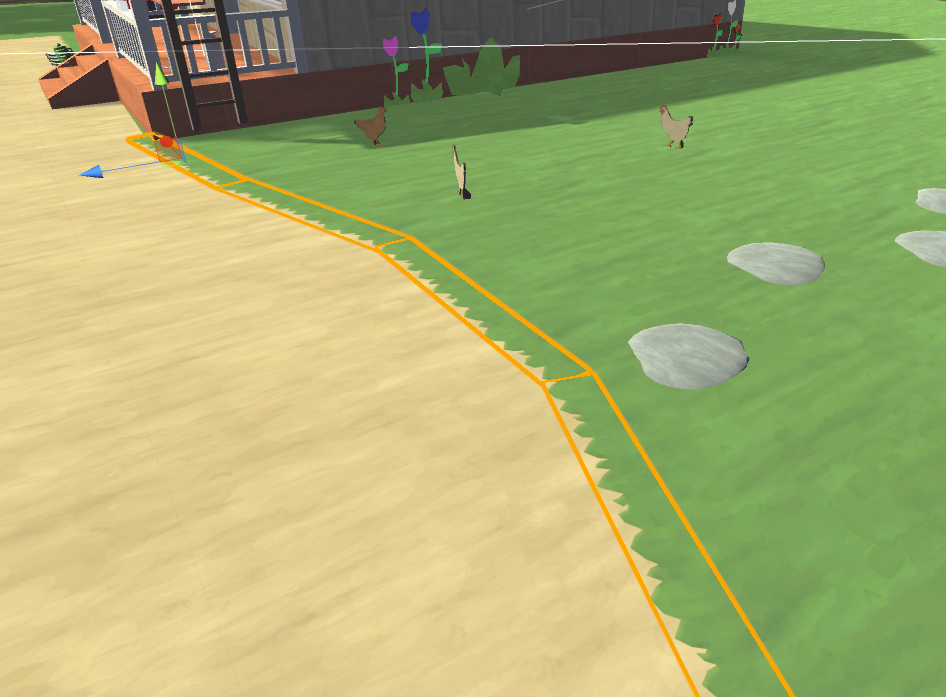
Im sure there are better ways, but im using quads for edges around the map with this grass texture https://i.imgur.com/UiGCZSj.png
 dense oracle
Chickens, Bawk.
ebon mauve
🐔
dense oracle
^^ cool map, you gonna have it like that the whole way around, like scene props?
ebon mauve
Yeah, you can already check the map out on VRchat if you search "Balloon farm" im just updating visuals and replacing old balloons with HD ones etc.
And optimizing etc.
tranquil pendant
Read through some SDK documentation, and apparently you can optimize further if you join your meshes together as one object instead of many
This was always true for me when doing 3D rendering as well
ebon mauve
Is there a way to do that in unity or?
toxic plaza
downside of merging the meshes together is you lose the option for occlusion culling
ebon mauve
Good point, I think culling would help a lot here on this.
Since each would be hidden when not looking at it.
dire rampart
Is there a prefab to add markers to map? All the tutorials are only adding markers to avatar
fair agate

VRCat: Community-Run VRChat Forums
[IMG]
NEW VERSION (11th Feb 2018)
Added the ability to switch between five different layers and erase them independently.
Overhauled animations,...
teal mirage
how to make mirror appear when closer and not working when farther.
exotic root
add a box collider with is trigger ticked on, then a vrc trigger with a vrc on enter trigger and a vrc on exit trigger
tick advanced mode on vrc trigger
Change the buffer thing to local
and the layer to playerlocal
Then add a simple trigger
EnableGameobject
i think
Basic Events* SetGameObjectActive*
Create a space for the mirror and then drop it in there
and below you are gonna have a option
Set the OnEnterTrigger to true
and OnExitTrigger to false
And then is done
lilac saddle
Hey guys
Do active cameras that are active but not hooked up affect performance?
Or is it better practice to enable the screens and cameras at the same time when needed
viral marsh
Just to be sure, I'd enable them as needed.
 whole garden
I need some help! I'm havingg trouble making my own world (my first time) I keep falling off the when I enter my world and I don't know how to fix it. Yes, I did put VRCworld.
fair agate
put a box collider under your floor. If you have a mesh terrain make it convex
whole garden
ok I try to do that
 south birch
I need world testers for a Halo map for tonight:
-General player behavior
-Optimization checker
-exploration and player interest
-friendliest of map
-vehicle test
Just fill out a check list/questionaire once you're done
@ me and I will invite you later tonight
I'm trying to get people to stress test the on screen objects
frosty egret
What time will the test be?
south birch
Unsure, hopefully in an hour
dire rampart
I added go carts in my map but they're not sync to the lobby even though they have object sync?
toxic plaza
@dire rampart add a pickup script to the root object. then tick the option that disables the pickup command. that will sync it up
rich stratus
Why won't my world test?
south socket
so, anyone here have experience with optimizing speed trees
 thick path
just optimize the lod on the tree prefab
worked for me, map with 15000 trees up to 21 players working fine, and i didn't even have the oclussion culling
speedtrees are the only ones that wok for vrchat that don't have a broken bilboard
so don't be afraid of using it, and also it looks so good that unless you are up you don't notice the difference @south socket
south socket
how should I go about optimizing the lods on it?
btw, I'm placing them manually in the scene
 naive grove
Anyone know if object sync still calculates for everyone if the gameobject is hidden/disabled?
south socket
@thick path , how do I go about optimizing the LODs properly
lilac saddle
@naive grove it does, I have local disable in my world and it manages to keep an eye on that
thick path
@south socket go to where the tree prefab is located in the project, through unity, click on it and on inspector adjust the LOD % as you like... There is no "properly" just adjust it to your scene... How you like it and get better performance, and i would suggest to add them trough sa tereain if you are using one
south socket
alright, seems I got it figured out. One thing I did that adjusted things properly was setting that LOD bias lower in project settings, which seems to help.
dire rampart
Is it possible to make objects teleport players while being held? I'm trying to make a game but the only way to teleport players with the object that has "Avatar Hit" teleport is to throw it at them...
toxic plaza
@dire rampart don't use Avatar Hit to teleport players if the object is moving
you'll want to use "enter trigger" instead
more reliable in teleporting players and won't throw them a mile off from the target location
or into walls
also, objects can have a actions like on pickup use down or pickup use up
that you can have a local teleport action for
so players can teleport with a button
you can also have the object interact with other colliders or enter triggers and teleport players if they bring it into that zone
(this requires some workarounds with additional child objects that are turned on locally to make sure that only the player holding it is teleported)
 unborn dune
Does anybody know if this is worth getting by chance?
https://assetstore.unity.com/packages/tools/utilities/sectr-vis-15353

Unity 4.x, 5.x, 2017.x Compatible
SECTR VIS is a low memory , high performance , dynamic occlusion culling system that ensures you never waste time rendering what the player can’t see.
Major Features
- Culls everything Uni...
 torpid cliff
hello i want to port my own source sdk map into vrchat i convert it as obj but i cant apply any textures on it in unity how do i fix that?
frosty egret
@torpid cliff what happens when you try to drag a material onto your obj?
dire rampart
Anyone know how to fix the long clustering thing? Trying to test map and I'm stuck at "5/11 Clustering I 1 Jobs" whenever i make small changes to house I'm making
takes usually 10-30mins to finish
 tepid cobalt
i untick the "auto-generate" at the bottom of lighting setting. i only generate them once i'm ready to test the world on the client or when i wanna check the lighting after some edits.
dire rampart
Unticking it causees the whole room to be dark :/
Nvm, fixed it. changing the colors of the environment lighting brightens everything
fair agate
@unborn dune does that use scripts, or just a smarter algorithm to bake?
I would very very much like a method that does not involve thousands of tiny umbracache files. It makes my sync software super unhappy.
 heavy kite
apparently it does.
 vocal bison
Hi there everyone
Is it normal that on some worlds the fps decrease after the last update?
Before in The Great Pug was 80-90fps
Now 20-50fps...
This greatly affects the game with VR
sweet sinew
As of the latest patch something got changed it seems that made some worlds get less frames. The Great Pug has pretty much been the same the last few months too
naive grove
How Do I set up a game board you can reset?
rugged mason
@naive grove Teleport all game pieces to a height of -100 and theyll reset to their origin point
😛
dont forget a sync component though
naive grove
Alright. I just couldn't get my head around it
Because I was trying to destroy the gameobject and respawn it but it wasn't working
Lol
rugged mason
you could technically destroy and build the objects over
but thats really glitchy
-100 just resets everything including players
thats vrchats world border
naive grove
Alright thanks
rugged mason
np 😄
torpid cliff
@frosty egret it only applies the color no texture tho
my map in blender not working properly tons of obj
fair agate
@naive grove seems you can’t spawn an item that has object sync on it as a child, it just won’t spawn and throws an error for too many network ids in the log.
lean lodge
@rugged mason I think that height depends on what you set in the VRCWorld
If you really wanted to, you could force people to fall for an hour before they get reset
fair agate
You have Respawn set in VRC World?
dire rampart
How do I make the mirror less laggy?
fair agate
Make it reflect less stuff. Put up a barrier or limit the layers it shows. Set it to a local toggle.
dire rampart
Thanks!! Follow up question? Does textures add lag? I have a few textures, and some going over 5mb, should I compress large textures?
 wraith ocean
Do LOD groups work in VRChat?
fair agate
they do! I just imported some trees with them and didn't do anything
misty pecan
On avatars, don't think so. In worlds for sure
wraith ocean
ok nice
update to unity 2018.1 when
I'm sick of the 64k verts limit in each static batch
misty pecan
Not soon enough 😭
south socket
@dire rampart Textures wont add lag, but they will increase the load time for the world. I would recommend compressing them, and setting the resolution to 1024
 untold fog
@wraith ocean unity 2018 for vrchat 2050 lol
stark bay
i'm in a very long bake lighting stuff process... sometime while this process i get an error like this: 'Bake Runtime' job failed with error code: 11 ('Failed reading Albedo Texture file.').
is this important? what that mean?
lilac saddle
Don't know but check your drive isn't full. Before next bake, increase the size of your virtual memory, clear the cache in unity and increase the size of it.
Make sure all objects have a material, no pink ones.
With the exception of the VRC Mirror, you can leave that pink.
wraith ocean
tfw use dozens of 8k and 4k textures with normals, height, ambient occlusion and gloss
 crude siren
"Room has a very fast update rate" What should I do?
wraith ocean
My other maps have usually about 8 million verts
How many do you think it's the safe limit?




 wraith ocean
The 3d grass alone makes 3 million
LOD0
600k lod 1 and 100k lod 2
Still the frame render time is 1.9 ms
lean lodge
@crude siren definitely set it to 40ms
@opal shadow "ignoring it" is a great way for me to never visit your world
Ever
There's a reason why The Great Pug is so laggy and Japan Shrine isn't. And it's not just playercounts.
 opal shadow
@lean lodge lol what
my world is tested at solid 45 fps
with 8 people in it
and that's the max
not sure what you're talking about lol
lean lodge
Oh, then that's a different story
lean lodge
I just don't like it when people make big-ass worlds and leave the update rate at 10ms, the stuttering is incredible
Like that one flying sphere world
opal shadow
/shrug
been to it a few times in public with some friends and it seemed all good for them
keep in mind it's a WIP as well lol
tepid cobalt
just wanna ask if it's normal that after 1-2 minutes of loading into a world, you get like low fps around 40-70fps, and then after like 5 minutes or so you get around 80-91fps? was testing my world.
opal shadow
maybe there's some animation stuff or weird colissions going?
tepid cobalt
ah so its not common then. okay
opal shadow
update rate @tepid cobalt ?
tepid cobalt
initially i set to 33, then i change to 90
stark bay
how can i increase the size of virtual memory for unity?
dire rampart
Sent a public world request but it's not showing in world public status after 15 minutes . should I send another request?
sweet sinew
You are only allowed to submit a world once every 24 hrs. Also, every world needs to be approved by a human, which usually happens at a set schedule. Keep a eye on the second link in #public-world-request and it will tell you when it's public
dire rampart
Usually after sending a request it would get posted there. It has been 24/hrs since my last update was at 11:49am/central. but I made the request and the world still hasn't been posted in the status
sweet sinew
The list doesn't load for me right now, but I can check it for you if you got a world id?
dire rampart
Just send another request just incase. hopefully the first request was not actually sent and they approve world @_@
sweet sinew
The RapBattle one?
dire rampart
no, Never Have I Ever (Early Access)
sweet sinew
Ah, the smaller version
dire rampart
Technically it has more lines than the popular version. Just a circle instead of a long line
sweet sinew
yea, been to it. But it is public (I also see it on the list in game)
dire rampart
Yeah I see it, Thanks for heads up!
opal shadow
I went to it last night
me and my friends were a deadpool and zero two avatar
first thing we seen in the body pillow room was deadpool and 002 lol
 quaint verge
Noob question. Will unused textures and meshes in the assets folder have an impact on the final upload?
dire rampart
No, I had to test when nobody answered that question
quaint verge
Thanks for the info.
 bright basalt
Whats the recommended amount of dynamic lights in a world?
I only have 5 rendered at once at any given time but its still laggy as hell : /
And is there any way to optimize them without reducing the shadow quality dramatically?
 empty oar
Just 5 lights shouldnt cause much lag from what i know
sweet sinew
You need to set up the layers properly for the lights. If all 5 are casting light and shadows on players it can start to lag. Only need 1 or 2 lights to have the player layer
sweet sinew
Even without baking it shouldn’t lag if layers are set up properly.
Ayaldev have a world where one of the rooms just have a bunch of real-time lights everywhere. But only 1-2 are casting lights on the player. No frame drop or lag
rugged mason
Ayas club?
bright basalt
I wanted to have player shadow
rugged mason
with the darts
rugged mason
yup, no lag whatsoever and still looks great
sweet sinew
You can still have player shadow, but only 1-2 lights are actually casting on the player
Instead of 5, where the game will have to use cpu to calculate every light source and where the shadow would be
But because only 1-2 are only the player it uses less cpu and only need to update those two
The other lights are only calculated once when you load in as they don’t have anything else to deal with (unless they cast light on pick ups)
But for best optimization it’s best to bake and using light probes where needed
 compact sphinx
Is LOD supported for world's or do I need splitting large world's into pieces and add portals everywhere??
lofty shuttle
Is there a way to make OnAvatarHit work with a trigger box collider? (making triggers that enable and disable map sections)