#3d-modeling
1 messages · Page 69 of 1
 copper moss
copper moss
copper moss
no better way to get good at something hahah
 hollow radish
then I get introduced to a god tier 3dcg server, then I felt really low tier 👁
well, at least I learned a few tricks like autopacking and stuff
beat out all the terrible workflows
copper moss
Stereotypical art stuff, but dont compare yourself to others man. You shouldve seen my models after a years time of me learning it for the first time
its all unpresentable hahah
hollow radish
bruh, it's a motivation that I can harness
some people stop modelling, I feel like I should improve a lot
plus its a standard to compete anyway
copper moss
Well, if you can take that in that mindset, i guess thats a good thing
most people see that in a negative light
And yea, that standards bar can be vicious.
hollow radish
well if you want a job, its either that or don't (though I'm not a 3d artist by trade anyway)
copper moss
hahah yea thats, uh, far too accurate.
copper moss
took me 2 years after graduation to land a gig
HAH codings like an instant hire
im so envious of my dev friends
hollow radish
from what I'm seeing, doesn't feel like it
at least when I apply for stuff
maybe because I've been procastinating on doing art 👀
copper moss
Guess it depends on location and background. I just have a couple fresh grads making near triple my salary and that kills me lol
the industry definitely favors the devs.
hollow radish
well I like coding anyway, just that its not as easy to start compared to art
cause I can't just making something amazing in 5hrs
copper moss
Yea, but you can actually make a game on your own that way, if that interests you. I'm jealous of that. Programming has been like slamming my head into a wall. its so hard for me to grasp
hollow radish
yeah, just imagine if you are actual programmer and you still have the same feeling
well, that's for art people as well
copper moss
hahah fair point
hollow radish
cause people praise me and I just go "my art --> 👎 "
hollow radish
👌
 slender holly
@copper moss hey thanks for linking that youtube channel earlier, they have great resources
never really touched substance designer though, i usually stick with painter
copper moss
Yea of course. 3DEX is fantastic. Designer isnt really needed unless youre doing environments or extreme photo realism
slender holly
Enironments is what i like to do sometimes, i might snag it once it goes on sale on steam
copper moss
if environments is your focus, its a necessity imo.
has a much much steeper learning curve, but there are tons of resources out there for learning
slender holly
I have stepped away from 3D modeling for a bit to focus on traditional art in order to give myself a better grassroots when it comes to the fundamentals
so i'm excited to jump back into Blender and continue learning once i get a bit of a grasp
copper moss
hell yea, traditional is so nice. I gotta get back into it myself as its something that I've been slacking on a bit too much
slender holly
I kind of realized it once i started sculpting
and realized i had no fundamental knowledge about anatomy
copper moss
yea, figure drawing shot my skill up immensely. If you can attend those, they are beyond helpful.
slender holly
Ooooh yeah i actually would love to go to a physical art class
I work so much better with a visual representation
 nova tree

 stable edge
Uvs
 silent acorn
ye, it's likely that all of the feathers(?) there are set via UVs to use the same texture
 thorny fractal
i always had the hardest time trying to figure out programming, once i had a teacher actually there to explain it to me and walk me through it in my game production class then it just kinda clicked i think the hardest thing about programming is getting into mindset for it

 errant bronze
 spiral sigil
I need help exporting normal maps
please
does anyone have a java script of it I'm looking for?
I sure hope this is the right channel
@spiral sigil uh.. Why would you need a javascript to export a normal map?
A normal map is something you create in a program like photoshop, or generate using a texture and a "normal map generator" on the internet
Dont need a script to do it friendo~
I don't mind that; but I hate the fact that it does stuff like this
making it pixelated and unrealistic
Your normal map is more than likely incorrect, then
A Normal map is used to set depth in a model
I know that Capsy
so pixelated stuff wouldnt make sense unless you're using one that isn't using the correct UV Map
look; here's what I'm trying to get at, okay?
see this normal map?
hold on
and this one in a different program?
the first one is the one I want, while the other one isn't the best looking
I'm just trying to export these textures to make them look like BendyNormal
see what I mean?
uh
You've confused me a bit, so what exactly are you trying to do. You have normal maps then you also have what appear to just be height maps
I'm exporting them as normal maps in unity
and I need a script for it to work
I hope that's not as confusing as my last statement
these are the normal maps
that I'll show you in a dm real quick since I don't want to spam this chat with screenshots
 fresh stump
so i got a big problem, i got bones on my avatar. and i did weight paint it, but for some reason the bones are not attached to my avatar. can anyone help?
copper moss
If youre working in maya, you likely deleted your history. If youre in blender, I'm not too sure.
fresh stump
im in blender, and i got no clue how to fix it. it's really annoying 😦
when i put my avatar into unity my character lays on the ground
 quaint jasper
Select both in blender and ctrl + J
hollow radish
did you export it with the armature?
fresh stump
i think i did?
hollow radish
check again
fresh stump
let me see, i use cat's to export so
and @quaint jasper im gonna try it. im not a star in blender
@quaint jasper it says no mesh data to join
quaint jasper
Screenshots ?
quaint jasper
oh boi
fresh stump
???
quaint jasper
did you do a cat fix already ?
fresh stump
yeah i did
 foggy maple
hey, can you send me that? i will make it cats compatible if its not
fresh stump
il PM it to you.
 lament pond
silent acorn
lament pond
silent acorn
oh my god, is that a va11-hall-a avatar? it looks amazing!
hollow radish

I was talking with a student yesterday about current AAA character technical budgets, so here's a quick thread for those of you struggling to yank your instructors out of 2007 and into the modern world.
1/?
#gamedev #gameart
Retweets
293
Likes
747
 Twitter
 azure rain
it lets you hide absolutely awful modeling if you do that
 glad steeple
No it just makes your awful modelling higher poly :-)
 glad steeple
Post the video!
azure rain

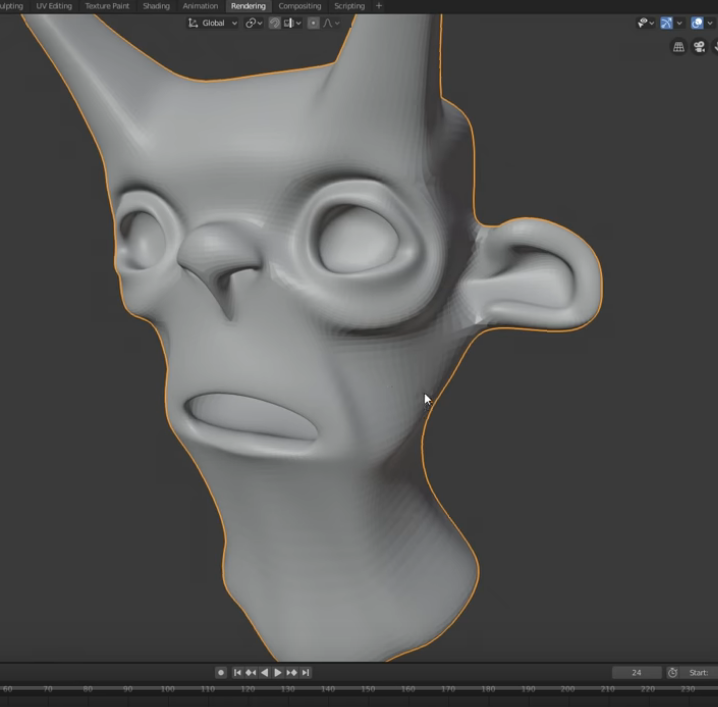
In order to make good and clean 3D models, it's really important that you don't model with subdivisions active in the viewport. This will create trouble late...
glad steeple
Its a great example of why not to model with subd @gentle forum
azure rain
good point I just figured I'd post screenshots if someone didn't want to watch 16 minutes
glad steeple
Well i mean you can read the title and just take it at face value
if you care enough then you watch it
 gentle forum
huh
azure rain
but yeah you don't want to blow up your triangle count unnecessarily especially since that can make people really nauseous
and also makes trying to make a quest version of your avatar a massive pain in the butt
gentle forum
ehh i don't make my stuff for quest anyways
azure rain
yes but still good to keep in mind making your content right on the quest so more people can see or even using it other Social VR programs like Mozilla hubs as soon you'll be able to bring your anime waifus over there
 hazy stratus
Its good!
As long as its only meant to have 4 fingers
Because who would intensly inspect the modeling of your hands
 ashen forge
I'm making a model of one of my OCs
This is it so far, ignore how small the hands are
ugh this topology looks like a total mess
azure rain
yeah but that doesn't look too hard to fix
ashen forge
Should hopefully be better
hazy stratus
looks good!
what do you use to model?(software)
im looking to try modeling but I currently only have fusion 360
ashen forge
Blender.
2.7 specifically because I'm still learning 2.8 and waiting for certain addons for it
I also decided to just completely make the hand from scratch and I think it looks better and much less polys
hazy stratus
THANKS!
 dusty badge
in the context of a source model, how would i do the eyes in blender
this is with the iris being a texture instead of vertexes of course :p
the main eye part i have textured to the whites but idk how i would layer on the iris onto it
slender holly
@ashen forge are you modeling via looptools?
ashen forge
Ye @slender holly
hazy stratus
Head, Neck, and Torso of my first attempt at 3d modeling a character
stable edge
^^
dusty badge
thankfully im only editing a model :p
im honestly not interested in making my own models yet, but i like editing models
hazy stratus
Ik it sucks but I have like never 3d modeled before and im trying to figure it out
ashen forge
clyde please
ashen forge
I'm trying to post a picture of my perfectly sfw model and clyde keeps screeching at me that it isn't sfw
ashen forge
I'm just gonna make a big cube over the main body that says "anti-clyde box"
Model is going well
 old field
Lmoa
hollow radish

 stoic ridge
I don't know how I've done it but somehow when I export my FBX, none of the weighting works, even though all the weights are still there
how to even diagnose this
 solar fossil
Hmm, try exporting to a different model format
stoic ridge
hmm, I guess unity can also import .blend directly
solar fossil
Can it?
stoic ridge
it breaks it fairly often but I used to do it for this model with no problem too
breaks for this particular .blend file, possibly because I'm using 2.80 now
solar fossil
Never tried using .blend directly, so cant comment on that
stoic ridge
so yeah this is a weird situation. I started with a working project, added some new geometry and set weights on that, resulting export doesn't behave like the weights are present at all
I have backups and everything but blender continues to find ways to waste my time
solar fossil
Hmm, here is a very sketchy attempt, try copy pasting from blender 2.8 into 2.79 and export using 2.79
stoic ridge
🤔
solar fossil
You never know, it might work 
stoic ridge
first I'd have to get 2.79 back
 barren quiver
Is the armature modifier there?
Otherwise, try this stupid thing: scaling it up, applying scale, then scaling it down and applying again
 untold schooner
you gotta go replace a file in 2.8 so it let's you do .blend in unity
 dull canyon
I'm still not sure which method of doing hair I want to use for my model... hair cards, sculpted, curves

kinda leaning towards hair cards cause they look like the most efficient
 tepid wagon
Don't know what everyone use here to model hair, I used hair cards. I tried to model hair with curves but it gave me mesh that was too dense. I never tried sculpting but I'm pretty sure you end up with really dense mesh you gonna have to retopo and put more work into it.
dull canyon
okay, do you have a tutorial on how to do "proper" hair cards? I can't really find much on youtube in combination with blender
tepid wagon
Sorry I don't have any
dull canyon
if I understand this correctly hair cards are really just planes/plane strips with a transparent hair texture?
tepid wagon
Yes although when I tried transparent textures it didn't look good on my avatar, it didn't have enough hair planes and it looked too thinned
dull canyon
so what did you do to fix that?
tepid wagon
Removing the transparency and making 3 layers of hair one on top of another, with one layer with dark and other with very light strands. Yeah not ideal. I will try making proper hair in the future but now I have to make some other models
dull canyon
mkay
tepid wagon
I don't remember ever seeing someone with AAA like hair with transparency ingame tbh
dull canyon
yeah
I'm just wondering what the best approach would be for stylized hair that both looks decent, doesn't use too much polygons and is not a total pain in the ass to make
but I guess with hair that's a case of "chose either 2"
 dull canyon
yea
tepid wagon
If you make lots of hair planes it may work with transparency and look good in VRChat idk
It will be lots of tris though
dull canyon
yeah, and that's what I wanna avoid most
I want to make my model as performant as is reasonable
tepid wagon
Then I would go with hair cards without transparency
Perhaps using more texture for hair would make it look pretty good without having to add lots of hair planes. You wouldn't have to neccesarly sacrifice a lot of UV space if you stack hair planes on top of each other, just not literarly every hair plane in the same spot on UV or it may be very noticable how texture look the same on every hair strand
dull canyon
https://youtu.be/iXMDmDY5-Yw?t=9981 something like this approach?

I'm not a professional streamer, so I apologize for any problems with the stream. If you like this project, please subscribe or consider supporting me on Pat...
tepid wagon
yup
dull canyon
okay, that's what I was leaning towards
guess I'll try that then when I get to that point
so what's a reasonable texture size to use? is 4k okay?
tepid wagon
I also checked out modeling of the hair at 1:57 (link you sent started at UV arrangment) and it is indeed how you model hair like this. I suggest you use subdivision surface for it to make hair look smooth with as little edge loops as possible that will capture the shape you want. After you are done you can also apply subdiv and use the edge loops in the middle to make the hair appear to have more volume by moving it away from hair plane normal
dull canyon
okay
tepid wagon
Yes it is ok for an avatar. I used 4k because I had normal map details on avatars armor but without it I think I would go for 2k
Unless you mean 4k for just the hair then it may be an overkill
dull canyon
no I meant for the whole texture
tepid wagon
Sure, 4k is fine
dull canyon
so, you would use a separate texture file for the normal map for instance, right?
tepid wagon
I had textures generated by Substance Painter, albedo, normal and so on all with 4k textures
dull canyon
okay
tepid wagon
Think I made metal and oclussion maps reduced to 2k in Unity
dull canyon
yeah I was thinking of getting substance painter cause it looks like the best tool for texturing
tepid wagon
Then you better hurry before annual subscription becomes unavailable
or maybe it already is idk
dull canyon
I would've just bought the non-subscription one
tepid wagon
It is worth it but it is most amazing for making worn out looking textures
For items with scrathed and dirty surfaces
but has some ready made skin textures as well from different body parts
dull canyon
ie for anything somewhat realistic looking 😄
dull canyon
yeah I don't plan to with this model
tepid wagon
It also doesn't accept textures you can modify, it only makes textures from scratch
dull canyon
what does that mean?
tepid wagon
oof I have trouble explaining it correctly. I just don't think you can upload already textured model in SP, it is the way SP works. You upload your mesh, set first layer, add base color or texture to it, create mask where you designate what parts you want texture to affect and so on until you have all model textured. I would like to suggest to watch some substance painter tutorial on youtube if you interested as my explanation is poor
tepid wagon

This is how this hair card looks like
I selected the middle edge loop, it is pulled out of the rest of the plane to make it look like a hair strand has more volume
The texture may not look good at the very tapered ends if you unwrap like this but texturing will be easier
dull canyon
yeah
 pulsar trench
Hi, I've come to use blender this evening, and left click select has stopped working. I can still right click, and I can still drag select, but it refuses to just click on anything in object mode. The menus work, but if I go to load, I can't click any of the filenames. Again, if i drag select within a filename it selects it, but a single click refuses.
Wiped to default settings, restarted blender, restarted pc
anyone know what's going on with it?
(left clicks. blender 2.8)
nvm, reinstalled. Working now, thx
lament pond
 quartz shale
Hey, is anyone rigging furry avatars? Looking to commission.
 vivid crater
what a cute
 supple horizon
What's the most straightforward and non-dumb way of attaching fangs to teeth in blender, so that I don't have to adjust them to each mouth's shapekey?
stable edge
Dunno if there is a way
supple horizon
I feel like it should be fairly trivial, I just can't quite figure out how to make them work properly with blendshapes
supple horizon
?
I thought weight painting them to the teeth vertex group would do the trick, but that's not it...
 steady zealot
There really isn't a painless way to insert them into a shapekey without moving it for every shapekey manually
Unless you remade your shapekeys with the teeth weighted to mouth bones
If your avatar has them. Still not painless
hazy stratus
@dull canyon im late but Rikka from Black Fox
dull canyon
huh, never heard of it
 sturdy geyser
hi
dull canyon
@hazy stratus https://anilist.co/anime/101317/BLACKFOX/ that one?

AniList
BLACKFOX - Living in a ninja residence tucked away in a corner of a futuristic city is Rikka, the eldest daughter of a Ninja clan, who looks up to her father—a researcher—very much.
Carrying on with her life normally, Rikka's home came suddenly under attack one day. Drive...
hazy stratus
@dull canyonyes
dull canyon
okay, is it any good?
hazy stratus
Idk. I havent actually watched it
 fallen snow
So, I exported a FBX from blender using CATS, and when I bring it into Unity I'm getting these errors; the mesh is invisible, with NaN/infinity bounds. What can cause this and how do I fix it?
and now it's crashing unity
apparently I had a broken shape key?
 wintry gazelle
Yeah, it sometimes happens when separating or joining meshes, I'm not sure why though
slender holly
That looks amazing lexi!
 coarse kestrel
aa <3
coarse kestrel
coarse kestrel
I totally could problem is im now trying to learn zbrush
and that's coming from blender as lately sculpting performance in blender has totally just shit itself
what doesn't help is whatever the hell "industry standard" is fucking blows for controls
slender holly
honestly Zbrush is industry standard so if you have that sort of tool you should use it
lmao i didnt even have time to read your last message LOL
coarse kestrel
however thought of letting go of a specific button first to do the correct action needs to be shot
because if (for some ungodly reason) you let go of ctrl first while zooming in or panning before you let go of left click
you'll go back to whatever view you were at before
which is insanely fucking annoying
slender holly
Jesus i cant even imagine
coarse kestrel
imagine if someone kept resetting your view every time you tried to move the camera
that shit is the same thing you experience in nightmares
it shouldn't be in a program that costs $60 a month
slender holly
thats me when i go full retard and forget to Ctl+a and fix my transforms in blender
and now my whole model is borked and its nearly impossible to fix for some reason
coarse kestrel
Blender is so easy for me now. I can do just about anything with it
but now i can't sculpt
because it just fails me
slender holly
yeah its always fun learning something new on blender and then realizing "hey i can use this trick for something else"
Yeah, i have been excited to start sculpting, the person im dating actually gave me his drawing tablet he never used. Unforunately im taking some time away from 3d modeling and focusing on traditional art so i can learn anatomy
coarse kestrel
:o
anatomy is easy hell for modelling
I recommend the book "anatomy for sculpters"
pretty cheap and is filled with references for just about everything
slender holly
Ah, I'll give it a look, I was looking at other new sculpters alongside my own and realized that i lacked fundamentals in order to actually sculpt
I'm enjoying traditional art a lot actually, I'm learning a lot that can be translated into 3D
coarse kestrel
hardly, while knowing everything helps. you can get pretty far just developing your own style
but if you're going for realism
you need it
slender holly
I'm still pretty stubborn on being a generalists
I feel like I'll accumulate a style naturally.
slender holly
Yeah i'm enjoying the journey, i never imagined it would take this long but.
I think if i have my eye too set on the end goal ill miss out on enjoying the beginning stage
I love looking at my old work and seeing an obvious improvement, best motivator by far
coarse kestrel
hell ye
 potent pond
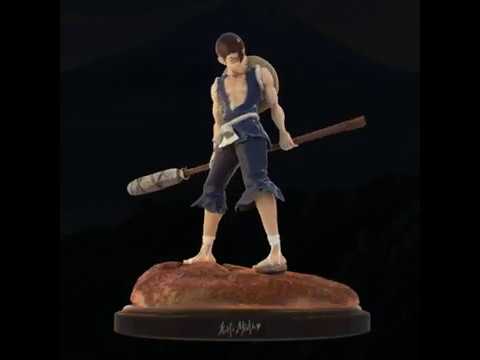
After been in the Hospital, still with broken internet since 2nd October, mega deadlines at work...
I made this ;_ ;
5 Am, went to sleep 💋
https://twitter.com/KrisuMiushy/status/1188368367721336832

After been in the hospital, my internet broken since 2nd Oct (Cannot stream ;_ ;) and Deadlines at work. Here is my #kinro ~
360 here https://t.co/aJ5OEA0wWs
For more https://t.co/w7sV5R8g3L
#DrStone #figure #rules #art #character #3d #anime #watermelon #warrior
 Twitter
slender holly
Twitter
slender holly
Looks amazing!
potent pond
Thankies 😍
 mighty adder
@coarse kestrel I use right click for doing camera actions in zbrush, it helps a lot since you can just ctrl right click or alt right click
without the stupid left click release crap
and you don't have to find an empty space somewhere to click on
coarse kestrel
@mighty adder :) And yet that barely functions correctly.
I work fast, if releasing one action before the other causes the program to misbehave in an environment where I need to look around my model quickly. then you've done something really really really really wrong. This shouldn't be in a program this old and this expensive.
mighty adder
yeah it takes some getting used to, that's for sure
i had the same problem for a while and then i eventually got used to it
 iron thorn
hello
can someone join me in dms to help me with this
i want to do this for 2 reasons, 1 i want to create games sometimes for enjoyment, 2 i wanna make a character
so i would need someone's help. as i have less than no experience
stable edge
YouTube tutorials
Time is money and unless someone feels it's worth it you'll need to do your work individually
Watch some tutorials and do some research first instead of jumping in blindly
iron thorn
alright
lament pond
slender holly
@coarse kestrel most important detail is the snoot needs to be booped
looks lovely!
dull canyon
(Blender master race)
slender holly
Fluent : Power Trip is an extended version of Fluent (Fluent + other features). So it's an option. Fluent stay a cutter add-on (someone just need it) and Pow...
A cheaper boxcutter add-on w/ pipes?
give it to me
dull canyon
so is this still the "preferred" way of doing characters? initial sculpt using remesher, retopo and fix stuff up, add details with multires modifier, bake normals?
vivid crater
Yea, everyone knows kazuma has a massive dong
dull canyon
you mean a big excalibur
vivid crater
Ah, yes of course
 sturdy kite
yea it looks nothing like the character. Shading is also completely off so mabye its an OC or something
vivid crater
VRArt has that kinda look on their characters, you can search up their other posts here
dull canyon
so... any input on my question? 😄
slender holly
yeah kind of
sturdy kite
Its true, its always personal preference. The style is just really simple and doesent suit the character in my opinion. A cell shaded style would be better for this character
Oh yea. I always use box editing, make a rough sculpt and keep adjusting it until it lools good. Still using blender 2.79 here. I dont know much about sculpting in maya and similar tho @dull canyon
dull canyon
okay, https://i.imgur.com/JkhZA3z.png this is my "rough" sculpt so far...
just gonna do the feet and then start on the retopo and hopefully I can fix up all the issues there
dull canyon
okay, thanks
it's my first model (but 5th or so iteration) so there's obviously lots of issues... but at this point I just wanna get it into vrchat so I can move on
sturdy kite
What I can say is. Take ur time with the model, as long as it might take, and you'll learn a lot while working on it. Ive made my first entire character from scratch a couple of months ago. It took me for fucking ever bit Im so happy with it
So never rush anything and Itll turn out great
dull canyon
yeah, like I said I started over from scratch like 5 times, been working in this one for about 2 or 3 weeks now and I'm finally starting to be happy with where it's going
just need to make sure I don't fall into the uncanny valley again the whole time
sturdy kite
Yea the most annoying thing is looking at your model and seeing there is something wrong bit you cant just quite make out what
dull canyon
anime at this point
I was undecisive before, wanted to do a mix of both semi realism and anime and that never worked out
now I'm aiming for something similar to this
sturdy kite
Ah so similar to the overwatch or league style?
dull canyon
yeah, I am now
that was my big mistake before
not using any reference of actual art I liked
just anatomical reference
https://i.imgur.com/KqCrcA5.png this is what my pureref sheet looks like now
 quaint jasper
Might want to cut down on it a bit, there might be contradictory stuff
quaint jasper
Or have someone make you a design sheet from all those references
dull canyon
well I'm not using all of them, I just throw together what I find and like and then chose a handful as actual reference
sturdy kite
Looking at ur current sculpt rn and I think it looks pretty solid. What stands out to me are the Hands and the hips. Id make the hips a bit smoother but depending on what Clothing you'll give her it might not even matter that much
dull canyon
yeah don't mind the hands... I'll have to redo them
I still strongly dislike doing hands >_>
sturdy kite
Yep, Its the same with drawing hands, its always hell of a lot of pain
dull canyon
yep, I know
I come from 2d
I'll either try box modeling the hands and then doing some rough sculpting or just doing it all in retopo and then add the details in sculpting
vivid crater
The thing about hands for me is I see mine all the time and can roughly make it look okayish
Feet though, I have no clue what I'm doing at all 😂
dull canyon
oh yeah feet are the next beast to wrangle
vivid crater
Honestly, I've considered just trying some photogrammetry programs to get the rough shape
dull canyon
mh
I wish I was better at blocking in shapes, but I always jump to details and sculpting too early
sturdy kite
Since I havent posted it here before, here is my first from-scratch character that I finished a few weeks ago
sturdy kite
The front and the back of the cape work with the same bone, that way they wont clip and im not using as many
Just got 2 colliders for the body and one for the hood
Skirt is painted to the Legs so it doesent have any bones and still doesent clip
dull canyon
nice
dull canyon
https://gfycat.com/PreciousDisgustingAnophelesmosquito @quick thunder
kinda wish gfycat wouldn't compress the shit out of it but eh
but yeah, ignore the hands
they're garbage
slender holly
i love the url
dull canyon
I don't mind that
to me it looks pleasing so...
oh wait, the waist
you mean the area just above the belly button right
okay yeah, I can see that
will try to fix that then... thanks
okay yeah this area I'd like to keep wider
vivid crater
Yea, I remember looking it up when I was searching for grill references
dull canyon
gotta remember that then
vivid crater
PogU anime tiddy
vivid crater
I like all tiddy 🙏
vivid crater
Floppin around all over the place
dull canyon
^
yep
flat is justice!
:rooVV:
whistles
you do you
well yeah, obviously
thicc thighs save lives
¯_(ツ)_/¯
Schwi is a robot
several hundred years old
sure
sturdy kite
Schwi is adowable ok
dull canyon
^
dull canyon
same
s2 giev pls
yeah if you're not into the siscon trope I can see why you don't like it
sturdy kite
I love the main character and the overall tone. There is some great fucking references as well
dull canyon
yeah NGNL is not for you then
sturdy kite
There is a Laputa reference
dull canyon
it doesn't take itself serious at all
 dull canyon
I hope amazon is lying and my XP Pen tablet doesn't really arrive next week but this week
I do
vivid crater
Get outta 3d modeling with your weeb talk 👀
dull canyon
no u
azure rain
then you're going to be very unhappy around here Cheese
vivid crater
Oh boy, cheese 
sturdy kite
yea I hate those weebs as well smh 
While im already here imma post some pics of the Character im currently working on, also made from scratch
untold schooner
while I'm not a fan of anime, good job on that
sturdy kite
aye thx
tepid wagon
I would like to learn sculpting in Blender 2.8 , can someone recommend me any tutorials?
dull canyon
erm, Flipped Normals I guess?
just take some of what they say with a big grain of salt
grant abbitt also does some tutorials
tepid wagon
Huh, literarly 2 videos on the top of search list are from FN and GA so I guess I will watch those, ty
dull canyon
yansculpts has a very personal style and he understands mostly what he's doing but his way of teaching is a bit... offputting to me
tepid wagon
I see. I am guessing all of these artists are character artists and I just want to make a sofa but I hope the basics are the same
dull canyon
well
for the basics on modeling you can check out blender guru for instance
since you'd probably be first box modeling everything and then adding details/stylizing it via sculpting
tepid wagon
Nah I'm familiar with hardsurface modelling, I just want more details on my sofa
dull canyon
yeah then you can just apply any of the sculpting techniques those people use
tepid wagon
Alright, lets get started then
slender holly
@dull canyon yeah honestly flipped normals is decent but decent FREE scultping tutorials are scarce
havent been able to find any that teaches anatomy and stuff without being a paid service
dull canyon
yeah, anatomy is something different I guess
though for that you can also just check out drawing tutorials
enough of that out there both stylized and realistic
hollow radish

Jake Waddington, character artist at Ubifect Bordeaux, discussed his recent Jötnar project and shared his workflow.
dusty badge
i really want to finish giving this model face flexes but its so boring to me tbh
i feel like i must redo each face flex because something went wrong with a part of it, it was never meant to show expression, since its a character usually wearing a mask, in a fps, as a default character model.
aka the company wouldn't give two shits for it. :p
 vivid solstice
 bitter leaf
hands are the baine of my existence. Who is with me?
quaint jasper
Humans hands you mean
potent pond
i know your feel Alease
dusty badge
ngl though
id take hands over this shit rn
i got an another character i want to flex up but i also gotta figure textures out too
lets just say i never had to deal with textures besides configuring shaders and vmts...
not actually making them 😅
quaint jasper
what are you trying to upload
 dim plinth
I have a locomotive I modeled
A handful that is, I’m just trying to get one going to start it out
These babies, trying to get them in game so I can have just a plain and simple train avatar haha
quaint jasper
then you need to add the vrc_world to your scene
gentle forum
what's this stuff about baking lights into your model before uploading to Unity?
i'd like to learn how to make textures look less flat ^^
i've seen someone add lighting in blender using nodes and manually texturing it using the lighting as a reference? will it help make my avatar more optimized as well?
quaint jasper
It's just about aesthetic
you can bake AO at least
that's the extent of my knowledge
gentle forum
hmm..
 cinder wraith
I'm exporting my UV layout to photoshop but when I open it and try to use it on the model its always off by a bit https://gyazo.com/c2e3883c246c842fa472c15956eae208
 dull canyon
https://gfycat.com/OldUnawareGossamerwingedbutterfly time for retopo I guess
 bronze cloud
Hey I'm having some trouble, so I added a mast to a model but for some reason it delays when I move my head and wiggles around, Can't seem to be able to fix it, I've been told it was because of dynamic bones or something like that, I'll upload a video here showing what I mean
added a mask**
I've tried so many things but cant seem to be able to fix it
(started using unity and editing stuff just yesterday)
tepid wagon
You are suppose to weight paint the mask to the head bone, not to some additional bone set to be dynamic
untold schooner
your malwarebytes trial expired
spiral sigil
If you have a dynamic bone component on your head, just add it to the exclusion list for dynamic bones and it won't move anymore.
If you attached it with a rigid body, you're doing it wrong.
bronze cloud
@spiral sigil I fixed it by removing the dynamic bones on the head but i'll the the exclusion thing, sounds like it would work
 fallow isle
Idk if this is the right place for it, but I've got an avatar I made months and months ago, and have been trying everything I can to fix some issues with it. I've completely given up on it. If anyone is interested in buying the ZBrush project and Substance Painter project, hit me up. You can have full rights to it, and I don't care what you do with it.
dull canyon
if anyone has any good and free resources on retopologizing the whole human body I'd greatly appreciate it if you send them my way. especially where to place the main edge loops and stuff

 fresh isle
leg
vivid crater
Looking gud, can't wait to see more
hollow radish
 solar fossil
Hazbin hotel 
hollow radish
 potent pond
@fresh isle that was one of my ideas tooooo hahaha I love that artist since so much time that I wanted to me one if her designs. The protagonist was already done in 3D
I do t remember the artist but if you look for the name you will see the recepcionist in 3d and also rigged, it's a pretttty nice model... And rigged!
I was planing the radio locutor guy
To make it a figure but... I have so many stuff to do and already need to deal with this situation I have irl
So i will be looking at your design
💕
Can't wait for the final result 👀
 upbeat bluff
@hollow radish trust me I'll give you money to make some avatar for me 🙂👌🏻👌🏻
@bronze cloud you too
dim plinth
How do I add vrc_world to my scene??
tepid wagon
You will find it in VRCSDK folder > prefabs > World > VRCWorld
dim plinth
I just drag it into the scene yeah?
tepid wagon
Don't remember :>
glad steeple
What HMD are you using to get pictures like that @dim plinth
dim plinth
Yessir
Is there any way to turn an object into an avatar?? I’m struggling to figure it out even with the tutorials online
quaint jasper
what are you struggling with exactly ?
dim plinth
So, I have the model I want to use, and I'm trying to upload it as an avatar to use in game, but I cant seem to find the right thing to click on to upload it as a avatar. I have the VRC world setup in unity, and I can access the model I want to use on a map, but I dont know where to go from there
quaint jasper
You should follow a tutorial video
And make a project from scratch for avatars
You're trying to do three different things at the same times and it's not possible
It's also not a modeling issue so make sure to ask in #avatars-2-general or #world-development
dim plinth
Roger that
 warm jetty

100年前のドイツ軍服です。 基本的にぽんでろ様のBOOTHアバター MisheのBodyに合わせて製作した衣装です。衣装の導入自体はUnity上のみで行うことができます。 ※ 銃は含まれていません。
I just made this clothes and its free to download : )
Feel free to DL if you want. Its fit for Mishe's body
spiral sigil
anybody have a copy of blender sourcetools for 2.79? I can only find versions for 2.8 or newer
vivid crater

Home of the Blender project - Free and Open 3D Creation Software
spiral sigil
i meant the sourcetools plugin that allows blender to use valve files like .smd and .dmx
vivid crater
oh lmao my bad, cant read
they have release archives on their site
http://steamreview.org/BlenderSourceTools/archives/
spiral sigil
big thanks bro
fresh isle
Obviously not done with the hand, still trying to figure out how they work ff
My progress since yesterday.
fresh isle
Hand update, they seem to be fine now.
hollow radish
you should test the fingers quick for vrchat
fresh isle
I'd need to rig the model but I don't wanna do that until I actually finish it
 stable edge
You're doing good! 
dull canyon
thanks
so generally speaking, should you avoid poles in areas that deform or does it not matter?
azure rain
poles in places where it's not going to deform so you're not having to worry about non Square shapes is probably a good idea
but you look like you're going to be fine as I'm not seeing any in your major loops
dull canyon
okay. well I'm following the cg cookie guide and some other tutorial for the most parts
but I think I'm slowly getting a feel for it
but poles still mess with my brain
azure rain
well it definitely looks like you're off to a good start
dull canyon
thanks 😄
 sick chasm
Hey people, so i imported my fbx file into unity but its all grey. is this normal? the textures seem to be missing
 ashen stag
So import the textures and apply them, they aren't in your project or they are and arnt assigned
thorny fractal

I have no Halloween plans or costume so I hope this topology does you a frighten.
Use clean topology or the N-Gonogorgon will get you.
#gamedevehalloween
Retweets
126
Likes
460
 Twitter
hollow radish
Twitter
hollow radish
but n gons are useful for flat surfaces 👁
vivid crater
yea a lot of hard surface models that are made with a boolean workflow have plenty of ngons
dusty badge
doing texture painting to determine where to go over with what later

i wish i was dead ngl
 near crown
Bug time
spiral sigil
I have the latest blender. How do i view the tris for how many there are?
vivid crater
its in the bottom right
spiral sigil
o ty
cinder wraith
When is it appropriate to use mark sharp and does that affect the UV in some ways?
dusty badge
good question
quaint jasper
@cinder wraith After adding sharp you should unwrap again
it's different geometry, but i guess it depends if you bake your textures or not maybe ?
 olive bone
@cinder wraith Always unwrap on the go, dont wait until you get the model complete
@dusty badge K, fist then
@cinder wraith I never do mark sharp, I do edge split instead
hollow radish


some tests
quaint jasper
@olive bone What's the difference ?
Besides not being able to visualize it easily with edge split
vivid crater
Edge split does what it sounds like, increases vert count a bit depending
vivid crater
Hmm, I think it just affects normal direction, not entirely sure
but edge split also has an option to use the marked sharp edges so it would be redundant if it the same thing
dull canyon
so what tools do people here use for doing retopology? cause blender right now kinda sucks balls for it, unless I'm doing something wrong or missing something
stable edge
I heard some people use grease pencil (drawing onto the model) for topo planning and snap + shrinkwrap to actually make the mesh
dull canyon
yeah, which is horrible in blender right now
snapping makes it so I can't move anything that's not in front of the model without completely fucking everything up
so you can't easily extrude say the tubes for the limbs
and the fact that I can select verts through the mesh I'm retopologizing is annoying as hell too
especially when I click exactly on the vert I want to select, but it selects a vert behind it on the other side of the mesh
stable edge
Aren't some of these issues just because you're using wireframe mode?
 stable edge
It's probably a bug then
dull canyon
also I have no idea how to properly use the grease pencil apparently
it just draws wherever it wants
oh nevermind, there's options to place it on surfaces
dull canyon
but still, why is retopoflow still not updated to 2.8...
olive bone
@quaint jasper I am not sure if it is a bug, but un blender 2.8 if you use mark sharp, you won't see the sharp edges, using edge split, splits the mesh into pieces to be able to achieve that effect, take a look at the pictures of the robo arm I have posted, even if the object has smooth shading, you can clearly see the sharp edges, I have achieved this using edge split
tepid wagon
Do you have normals on auto-smooth 180?
olive bone
Also, you do no need the sharp edged to be highlited because you can clearly see the sharp edges
@tepid wagon Are you talking to me?
tepid wagon
Yeah, it was directed to you
olive bone
No idea, I have not touched that configuration
tepid wagon

set this to auto smooth with 180 degree angle
and you will see the sharp edges
You can also set it to lower angle if you want the software to decide sharp edges for you
olive bone
Ok I will check it out, thanks
I am not sure If I want the software to decide sharp edges for me, that part I think should be done manualy
tepid wagon
It can save up some time while giving the same result, it may be usefull for cases like a lot of repetitive shapes
olive bone
Now I can see a improvement
 tepid wagon
aye but tick the "Auto Smooth" too
olive bone
I will test it on de wae ma bruddah, thanks
 clear cloak
quaint jasper
clear cloak
quaint jasper
Sharp edges function correctly for me in 2.8, I'll try edge split to see the difference
@clear cloak Have you looked at tutorials already ?
dull canyon
https://i.imgur.com/KXAd7li.jpg is this considered acceptable topology? this is just one loop selected
 quaint jasper
Anything is acceptable topology when it's not done by a professional 
dull canyon
well
quaint jasper
That looks really good though !
quaint jasper
From what I understood, topology is a few very basic rules, but respecting them on a high poly model is what makes it super difficult to achieve
So as long as the topology you go with allows for good bending and deformation, it's god enough
dull canyon
mkay... it just strikes me as... off that there's a lot of loops like that that go literally all over the model
I always assumed every loop should have a good "flow" that makes sense to some degree
also, I am this close to installing blender 2.79 again just so I can use retopoflow...
vivid crater
yea, edge split and mark sharp function differently
they have similar results if nothing else is touched, but the options are separate for a reason in the ctrl + e menu
however, edge split can be used in conjunction with mark sharp though to certain more edges to your liking
 dusky gyro
 onyx crane
Hi, I'm new at 3D modeling and was wondering if someone could explain in short why ngons and tris are bad and polys are good?
vivid crater
ngons and tris are both polys, youre probably thinking about quads
onyx crane
oh! yes that must be it
vivid crater
those are all the forms of polys
and its all relative, depends what you make/what you want it to do
except ngons
at the end dont use those in games
 trim quartz
ngons are mostly bad because they dont export to games well right?
vivid crater
games engines auto triangulate things, if you have an ngon it might/probably will do it in a way you dont want it to
tepid wagon
Quads are easier to manipulate, you can create edge loops to split them and create more geometry and use subdivision surface modifier to have smooth looking mesh and they have more uniform shading. Generaly you should avoid using triangles and n-gons but they won't however change look of perfectly flat surfaces and you can use them in those cases. N-gons will export, they will be divided to triangles just like quads
thorny fractal
If your using ngons even for hard surface stuff you should always turn them into triangles before export because different programs that you export it into will convert the ngon to Tris in different ways and ilthis can fuck up your UV maps a bit
onyx crane
thanks guys!! this cleared it up for me
so long story short quads are more flexible in terms of what you can do with them and have things still look good
tepid wagon
Yup, just model in quads and only make triangles if you have to
If you are going to use dubdivision surface modifier it is more important to keep all quads as triangles won't be affected by the modifier and you can have some pinched topology or creases on otherwise smooth surface and it will be easy to spot.
onyx crane
@tepid wagon when vrc talks about having a "limit on tris" does that mean you could theoretically have as detailed a model as you want as long is it was only made up of quads? how does that work
tepid wagon
No, each quad gets divided into 2 triangles
Every 3d modeling software should have info somewhere about the amount of triangles you have in the scene so you can estimate how dense your mesh should be
I think Quest limit is 10k and PC has no limit so in theory you can have 5 mil mesh in game but you would have lag everyone in a room if it going to be rigged and weight painted like avatars usualy are
You should be aiming to have 32k tris unless you want more details on your avatar then 70k tris, don't go over
Going over these numbers will lower the performance rating of your avatar to good and very poor respectively
I don't remember exact ratings for Quest avatars but I think over 7.5k tris avatar is already rated as very poor and blocked by default
spiral sigil
how would i add an extra set of arms onto a model? i could either use PMX editor or blender, i just need to know how to connect them to the body
(the model already has arms but i want to duplicate those sets of arms and just add them under the original set )
 mellow crow
with blender is there a recomended version to use or is it fine to keep using same version i been using? or should i update blender aswell as all blender plugins i have on it? (last time i launched it apparently was at begining of 2018
current one i still have is
version: Blender 2.7.9
date: 2017-09-11 10:43
on my world im wanting to start to learn how to make props like furniture/cups/mugs/shelves/desks/DVD-BlueRay cases and the like for my fanclub world i started to make last year but never finished
hollow radish
just get with the latest one, 2.8
it depends
but most recent versions are basically all the same if you start of
mellow crow
like last year all i used blender for was simply converting files to .fbx format so i could use them in unity (as thats the format i prefer to use in unity) and for the occasional avatar decimation but that was it
hollow radish
start using 2.8 if you are serious, plus its a good starting point to learn 👀
its a lot more friendly
mellow crow
how do i update the fbx import/export blender addon or will that just auto update when i update to 2.8?
foggy maple
@LordofShadowsHoppou#2151 It will update with Blender. But addons that you manually installed need to be reinstalled in 2.80
mellow crow
i had manually added the fbx import/export addon last year since it didnt have it when i first used blender
foggy maple
That's weird, it should have it by default
mellow crow
this was also end of 2017 begining of 2018 (now its on the official tab tho, so can i assume its updated then?
slender holly
yeah i find 2.8 way more enjoyable
dull canyon
https://gfycat.com/BelovedRemarkableHarpseal ok seriously, is there any way to avoid this when using snapping?
 tepid wagon
Shrinkwrap modifier with vertex group you want it to affect
dull canyon
I am using a shrinkwrap modifier... found out that it's the "project individual elements" setting that causes this issue specifically
but yeah I guess doing retopo in blender is anything but enjoyable the way it is right now
spiral sigil
Any one now how to make a counter that shows how much time you have been in a world
 icy stag
would anybody be able to help me over vc to make a character model. Im trying to use blender to make it but i have no idea how to use it and i have trouble when following youtube videos
quaint jasper
Trouble with what ? @icy stag
icy stag
just making it in general
quaint jasper
If you want to commission someone then head over the VRCTraders discord in #community-servers-old
icy stag
do i have to pay for that tho
quaint jasper
Yes of course, people aren't going to make you a model for free
You can learn how to do it yourself or pay someone to do it
icy stag
im trying to get someone to like run through it with me
quaint jasper
There's too many steps for someone to run you through it sadly
You have to first get used to blender and its UI, then follow a very basic tutorial like the Donut from Blender Guru and then watch a modeling tutorial
It'll take time and effort, but you can do it like many others did here before
quaint jasper
Are you trying to make something or import an existing model ? In which case you'd have to check the pinned messages in #avatars-2-general
icy stag
k
 misty tapir
Hello fellow 3d modelers
how do you put extra accessory as an option for in game character?
I want it to be able to turn on and off.
quaint jasper
That would be through a gesture or emote shenanigans
a good question to ask in #animation
slender holly
Question about sculpting, possibly stupid question but im going to be attending a college soon and one of their classes is scultping, will traditional sculpting knowledge translate into digital sculpting knowledge?
dull canyon
I'd say to some extent?
sculpting in 3d is basically handling digital clay
https://gfycat.com/PrestigiousAngelicApe 4600 tris so far... can probably reduce that a bit once everything is done
gentle forum
I tried texture atlasing a few days ago and uhh, all it did was give the textures some messed up glitchy artifacts after I baked them
 thin bison
Did you do manual texture atlasing?
gentle forum
Yep
 latent charm
Manual atlasing doesn't involve any baking so that's not what you did.
If it's causing artifacts on the texture when baking you probably need to increase the distance value here.
vivid crater
and you probably want to set the bake mode texture/diffuse unless you set up an actual rendering scene
 frozen olive
hey people. I am having trouble creating a working atlas because apparently I am too stupid to even begin to fathom how to make it not mess up. I will trade virtual headpats for assistance.
Some info on what I'm doing: There is a button in CATS for atlas. I press button to generate list. A significant amount of information appears that means absolutely nothing to my feeble mind. I panic and press save atlas button. I then act suprised when it doesn't work in unity.
quaint jasper
The generated list by Cats is your material list
only merge the ones that use the same shader if possible
you also don't need to merge everything down to one
3-4 materials is still acceptable
frozen olive
I get that, but I have 34...
quaint jasper
What does it look like in blender ?
often times when there's that many, you have the same material duplicated over multiple meshes
frozen olive
Before atlasing:
after
ooh the pants, right sock, and the neck look okay
I should just delete everything else on the avatar and be a floating neck, with pants and 1 sock
or I could... yknow
quaint jasper
You need to remove stuff you don't need beforehand
and either apply your textures in blender, or at least add color
quaint jasper
Google it
You're better off googling most things at this stage too
we can help with specific steps though
frozen olive
okay I have figured out what was messing me up
The model was referencing png's for textures, but all the files were saved as psd's
somehow
well, one of the things that was messing me up at least
actually on second thought it literally solved nothing
quaint jasper
make sure you'rein texture mode, there's also a good atlasing tutorial made by tupper on youtube
frozen olive
 hollow radish
learn 3dmodelling properly and all your problems are solved 👁
dusty badge
mood of the day
 silent junco
use 2.8 and all your problems are solved
hollow radish
spend 50hrs understanding blender and you don't have to keep asking the same questions 👁
gentle forum
i like when you genuinely want to understand something after having trouble and you ask something here, people that know how to do said things respond sarcastically and rude, then there's few that actually want to help :(
 little inlet
Even though I set units to imperial and inches, Blender is only measuring distance in inches but not creating my objects using inches. How do i get it to use inches for everything?
I come from CAD software, so Blender is infuriatingly unintuitive and imprecise. It is apparently a necessary evil though so if anyone can help me out I would love you forever.
latent charm
What do you mean by "not creating my objects using inches"?
 small cloud
inches 

latent charm
Yeah, it's bad practice to begin with considering Unity's units are essentially metric, but if you're working from existing plans that are in silly units then it makes it easier than having to constantly convert.
little inlet
@latent charm I made a cube 14.5in x .5in x 10.5in but when I measure it with the measuring tool it says it is over 300 inches.
latent charm
Hm, for reference the default cube is 2m along each edge, so 6' 6.7", according to blender if I just switch its units in place.
Also what blender version are you using? 2.7x or 2.8x?
latent charm
Set your unit scale to 0.0254
little inlet
OMG I love you.
I spoke too soon, now it is measuring distance in thousandths of an inch
tepid wagon
Would then setting it to 25.4 work? or 2.54 if it is hundredth of an inch
little inlet
Don't think it will work. The way blender is set up it seems is if you fix one you mess up the other.
Idk how game devs deal with this nonsense or if they just guess by eyeballing what size things should be.
latent charm
We use metric.
little inlet
Figured it out, Blender thought it was a bright idea to bury the dimensions tab in a random tiny little drop down menu no beginner will ever find. Instead they have the scale in the place where dimensions should be, so I mistook it for the dimensions.
stable edge
Or maybe use standard units 
azure rain
basically game developers do everything in meters or arbitrary units that are powers of 2
as meters are a lot better for working with a grid compared to inches and game development does involve a lot of modular tiling asset
hollow radish
it depends on the engine
if you are working with unity go with meters
I think you can change units on the fly with blender and it should convert but I'm assuming
vivid crater
right menu is N
not sure if anyone uses the tiny arrow
untold schooner
only noobs use it
vivid crater
chad screencast keys 💪 🖥 👌
hollow radish
😎 I love spamming all my hotkeys
especially when I have to spend 100hrs to "finish" a model
dull canyon
https://i.imgur.com/e5uOeT1.png
https://i.imgur.com/ISqmatJ.png
how's this for a first attempt? feel like the butt needs some rework

 slender holly
butt isnt big enough 
dull canyon
that can be fixed afterwards
I'm more talking about the topology
lotsa poles there, not sure if that is good or not
hollow radish
you can test on the rigging, but usually you should worry about where shoulders and groin are
dull canyon
okay, do those look okay for mine?
hollow radish
hard to say 🤔 since I've experimented mutiples and don't remember too much 👀
dull canyon
okay. I mostly followed Danny Macs example, though I did make some adjustments where I thought his topology was kinda weird
hollow radish
https://gyazo.com/7781a1bd04c2d61d441e4d0a4c1a1194 these are some of the areas I've had most trouble with
 dull canyon
okay
hollow radish
the shoulder gets scrunched up if you move your arm up
one way to fix is tpose or maybe bone rigging
dull canyon
 hollow radish
but
having it tpose sort of fixes it but your armpits get pushed inwards
let me check mine
dull canyon

I tried to keep in mind to keep the density low on areas that will compress and high on areas that will stretch
no idea if that's how you're supposed to do it
hollow radish
I think it matters much less if you have enough poly, matters more if you have less
though kinda depends
hmmm 🤔
seems mine are straight https://gyazo.com/c88f3bbc61c8334e4271bcf84273bbc8

but all I remember is I spend a few days just redoing and redoing
but probably had iterations
dull canyon
yeah that's what I've been doing for like a week now
hollow radish
where its more like yours
dull canyon
can you show your butt?
hollow radish
 hollow radish
not sure if mine is best example
dull canyon
well if it works it works
hollow radish
I think at some point I just gave up 👀
but usually you would have deformation bones
to fix it
and control with animation
dull canyon
deformation bones?
dull canyon
ah
hollow radish
if the leg is scrunched up, you would animate a 2nd bone
dull canyon
okay, well this is vrchat we're speaking about
hollow radish
yeah...
the booth models might have better examples
but they seem high poly as well... in terms of bodies
its also how you weight paint
yours should be fine 🤔 doesn't look like anything wrong
actually
the arms
 dull canyon
yeah I haven't gone over the arms and legs yet
hollow radish
topology needs to be more since you want it to affect less on the two halves
well more on the center where it pivots
dull canyon
yeah
hollow radish
don't try to fix the elbox deformation too much... can't really fix without deform bones
oh yeah
for hands
be careful
if you want to match up vrc default hand animations
kinda need to make it straight 👀
I spend a day or two testing out hands

kinda skews if you don't do it right
dull canyon
straight in what direction?
hollow radish
well the best is tpose if you want to do it directly, I used to have mine where they are in front of the character
like unreal rigs
but I think I had a slight twist
this is when I straightened it out
hollow radish
you can see its twisted 👀
if you have an avatar with good hands
use that as a template
 hollow radish
well...
I think very straight straight
works for vrchat
like the entire arm straight
i guess you can try but you might run into the same problems as me 👀
hollow radish
vrchat uses the tpose rig, it should be located in the vrcsdk
so if you want to know how what the base rig is used, its that
from what I know 🤔
dull canyon
hm, I feel like I've seen lots of people modeling their avatars in A-pose, but can't recall for sure
hollow radish
well if you want perfect animations for vrchat its t pose
been researching this as well 🤔 why people model a pose
the only thing I can think about is that its a relaxed position
though not entirely where the avatar is in squat position

polycount
Hey guys/ girls, which is the optimal pose to use for character creation? (when giving it to someone else for rigging or animating.) A pose or T pose?

After years of experience building characters, I don't use a t-pose for characters any more. The t-pose can actually break a character in two crucial ways!
dull canyon
yeah, that's basically what I heard
hollow radish
🙂 it depends as I've heard
dull canyon
well, I'll finish it up and then see how it behaves when I rig it
is there an option in Blender to apply the deformation caused by an armature to the base mesh?
hollow radish
apply armature?
 dense kelp
@dull canyon models can be modeled in either A or T poses, but on building, T-Pose must be enforced in unity as vrchat will assume your default pose as a T-Pose, so if you have an A pose as your rigs default (established in unity's rig config), your arms will bend further than they should to accomodate a T-Pose (essentially caving into your body)
dull canyon
sooo.. I can just keep modeling everything in A pose and then in Unity I have to change it to a T pose? @dense kelp
tepid wagon
Yes, once you rig and weight paint your model Unity will know where the bones are and you may enforce T pose.
 tender tendon
Almost finished https://cdn.discordapp.com/attachments/393547792620060672/641359331299950602/Screenshot_1680.png
 vivid crater
now we're talkin
 hardy agate
You're vibing license, hand it over, immediately
tender tendon
I was on a roll last night recreating another meme
spiral sigil

hardy agate
Are you just going to keep making that sound? Until my head explodes? 🤯
tender tendon
MEOW
 primal dew
anybody got any good videos and tutorials for curly hair. I want to keep it low poly as possible so.
Im using blender btw so thats prefered.
azure rain


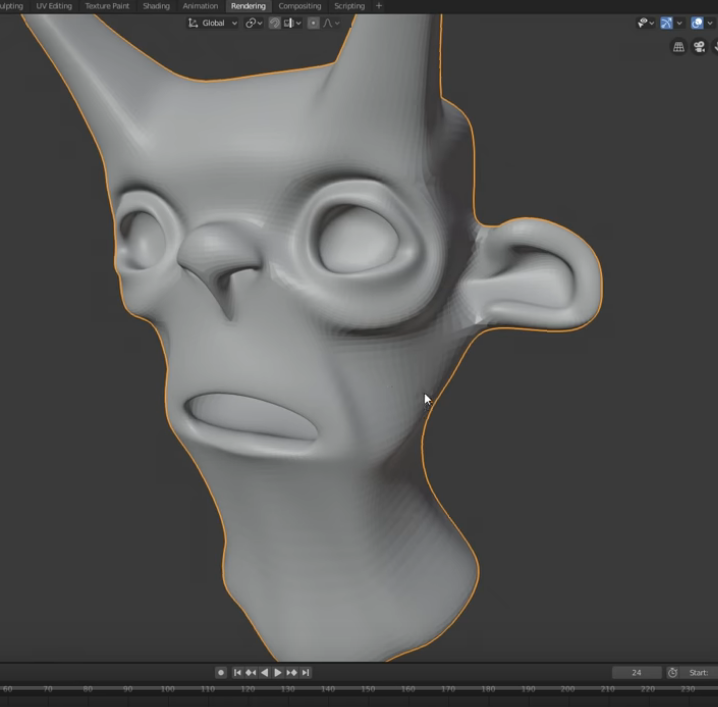


#lowpoly curly hair? start with a v-shaped plane, rotate it with soft select, and smooth it if you wanna.
does it look nice? past this you could probably smudge it into place with a lattice
Likes
360
 Twitter
primal dew
Twitter
primal dew
Thanks helps alot
azure rain
no problem I had that in my pile of helpful links
primal dew
I just need something to help do something like this, I'll give it a shot on the character.
Ahh some curls to a simple base.
Add*
potent pond
Memes are becoming stronger in this channl
I'm still checking the progress of @fresh isle on the Angel Dust design 👁
i have been watching this since long ago
https://www.artstation.com/artwork/3owrXE

ArtStation
Charlie from Hazbin Hotel, 3D fanart. I had a lot of fun bringing this awesome 2D character into the world of 3D.
Created in Blender and rendered with Cycles Engine.
-Modeled entirely from vertices for accurate topology, No sculpting.
-Clothing materials and shaders made us...
But i want to check the LoveEevee's Angel dust now 👀
quaint jasper
That topo holy damn
dusty badge
might need to add a tongue to model
i mean i also gotta deal with this https://i.murr.pro/8cvndex6.png


someone connected the upper in mouth vertexes with the bottom teeth
tender tendon
Watched Hazbin Hotel, seems like it would be fun to try and model a character or 2 if i got the chance
potent pond
@quaint jasper do you know the Studio Mindbender?
imo they are the best studio of Rigging
look at this in case you didnt know them

The Foodthief is a shortfim project that is currently under development by Mindbender Animation Studio. We made it a goal for ourselves to create a more flex...
quaint jasper
oh i feel like i saw one of their video a long time ago for something similar
fresh isle
Oh sorry @potent pond I was away when you pinged me. Not much progress since I'm bad at modeling faces fFFf