#3d-modeling
1 messages · Page 52 of 1
 spring granite

■VRoid Studioとは VRoid Studioは、人型アバター(キャラクター)の3Dモデルを作成できる、Windows・Mac用のアプリケーションです。誰でも無料で利用できるキャラクターメイカーで、モデリングの知識がなくて...
 umbral crystal
looks cool but seems u need a base first
 acoustic cedar
@hot flint that model was adorable! Amazing job on it! >w<
 hot flint
💙 💙
spring granite
@umbral crystal not really https://hub.vroid.com/characters/4746990026592840193/models/66129645347145942

VRoid Hub
VRoid Hubは、3Dキャラクターのための投稿・共有プラットフォームです。モデルデータをアップロードするだけでキャラクターが活き活きとアニメーションするプロフィールページを作成でき、利用条件と共...
 umbral crystal
but can u make characters that arent anime looking
spring granite
https://hub.vroid.com/characters/6144181648987523056/models/1159837124557393798 someone did make a mech

VRoid Hub
VRoid Hubは、3Dキャラクターのための投稿・共有プラットフォームです。モデルデータをアップロードするだけでキャラクターが活き活きとアニメーションするプロフィールページを作成でき、利用条件と共...
spring granite

VRoid Hub
VRoid Hubは、3Dキャラクターのための投稿・共有プラットフォームです。モデルデータをアップロードするだけでキャラクターが活き活きとアニメーションするプロフィールページを作成でき、利用条件と共...
wacom's are not too much money
umbral crystal
ye ik
 spiral fulcrum
Thanks
 jovial barn
I have a problem, i dont know if it is a problem: In blender, i baked multiple textures into one texture, it looks like a mess in texture mode after baking, but looks great as i want in render mode, it is suppose to be like that? or i have a way to make texture looks the same as in render mode?
umbral crystal
wat
 latent charm
@jovial barn Could be the UV layout or something, screenshots of the problem would help.
jovial barn
My problem has been solved, I didn't bake it correctly, thanks anyway ~~
 fringe rock
On one of my model the alta of cats make my texture look like sand
 cold basin
hi!!!😕😖
 tribal light
Hi

 spiral sigil
@cosmic nest Looks like it's going well so far
 cosmic nest
thanks!
spiral sigil
You're welcome
 frail crag
I'm pretty sure I know that mascot...
 fallow dew
You know, disjointed limbs make for easy weight paints heh
umbral crystal
yes, a good choice for robotic or "built" characters
not for characters with skin, clothes, and etc
cosmic nest
ye
cold basin
Hi
spiral sigil
Hello
cosmic nest
👋
 livid maple

Runesword [Free Model]
Nothing is trending right now so i came up with this original runesword instead, pretty happy with it :) Enjoy!
RTs are really appreciated!
VRCMods: https://t.co/05qxJ6KII0
DeviantArt: https://t.co/uSFPfgBVDB
Thingiverse: https://t.co/RO3cpg2HrN
...

 Twitter
fallow dew
Twitter
fallow dew
Isn't it so nice when you make your own OC. I love it
spiral sigil
A lot nicer when it finally works after all the struggles
The topology is so clean on your model
 umbral crystal
but they have yellow and round eyes xp
cosmic nest
its a stylistic choice, let me choose things for a model i made
umbral crystal
am just saying no need 2 retaliate
cosmic nest
well im just saying: back off
cosmic nest
because i need a bigger shield
cosmic nest
well the original's design isnt finalized, it's all vague ideas
umbral crystal
well 90% of them have yellow cat eyes so..
cosmic nest
i mean, im shocked you didnt say anything about the lack of fire tail (which ill add in unity, dw)
umbral crystal

na bc ik the tail would be better as a shader or particle
but it would be cool if ur characters could speak or have moving eyes
just a suggestion but it breathes life into them
again u dont need to do it lol just saying
but cool model
umbral crystal
again u dont need to do it lol just saying but cool model
umbral crystal
this model i found looks like its 50k triangles
actually like 20k

normal maps rocc
i need 2 figure out how 2 do occlusion maps tho
umbral crystal
no like
thats different i think
it bakes shading into a texture
i wanna know how to make these
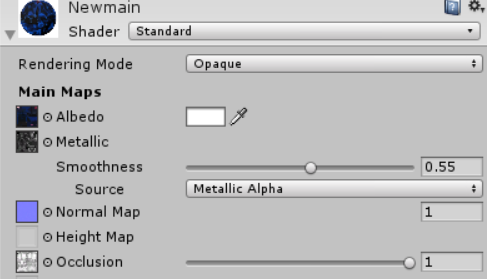
^ Occlusion
it helps with rimlighting and shading issues
cosmic nest
it doesnt bake it into a texture, it makes a separate texture
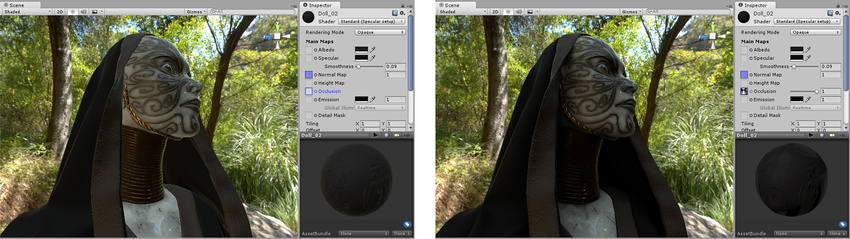 cosmic nest
something like this? https://cdn.discordapp.com/attachments/475182584905859074/533893129628155905/lever_cut_metal_aos.png.png
 umbral crystal
ye
cosmic nest
then yeah
umbral crystal
cuz in unity
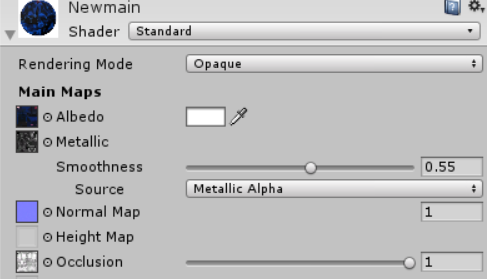
i think alpha channel is how metallic
and the RGB is how smooth / specular
cuz i have something like this
cosmic nest
like what?
 cosmic nest
o
 real plover
make default dance pls
 shadow geyser
anyone know about shape keys here?
latent charm
Yup
shadow geyser
do you know of a way to reverse a shape key
currently its like this, zero is shown
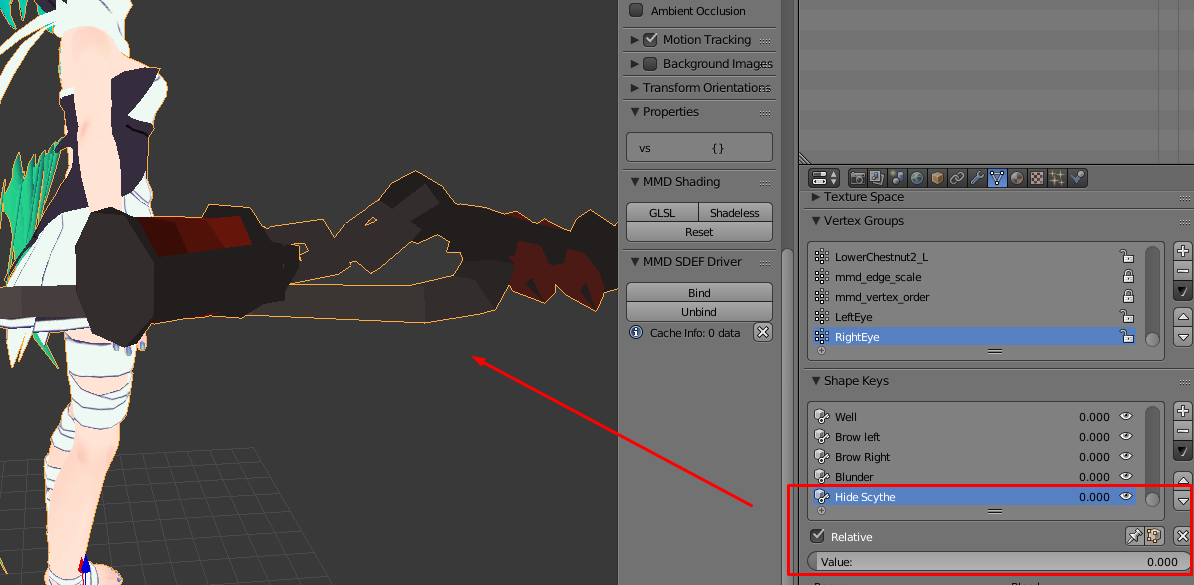
and then setting ti to 1 hides it
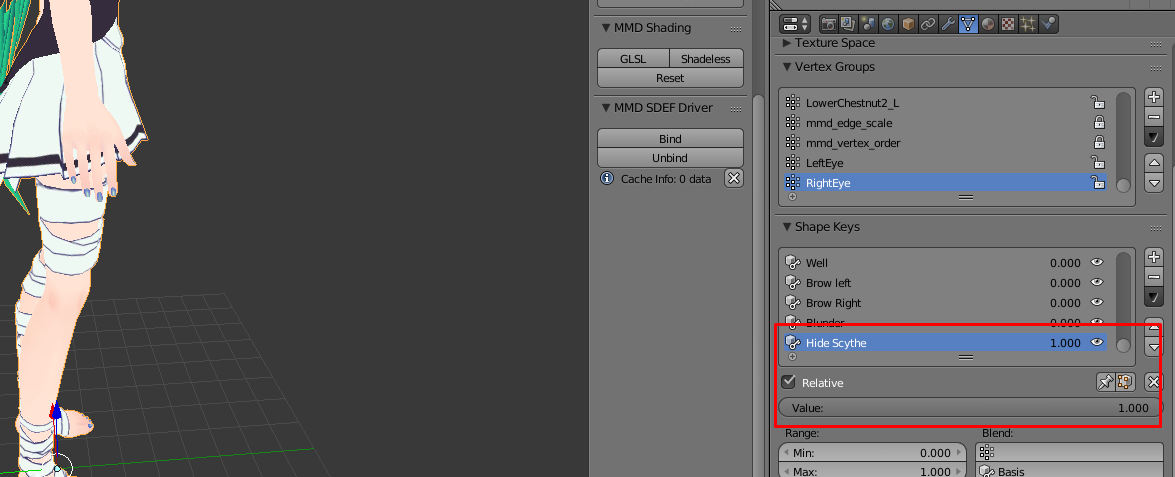 latent charm
Use Blend From Shape (w key) and blend it from itself with add enabled and a blend value of -1.
Wait no, that's not it
latent charm
Ah, so what you're wanting is to have a "show scythe" key instead, correct?
latent charm
Okay, create a new shape key and blend from basis, then select the basis key and blend from 'hide scythe', so the basis key should then have no scythe but the new key you just made should show it when set to 1.
latent charm
Pretty much yeah.
Shape keys are just changes from the basis key, so the only way to 'reverse' one is to swap what it's doing with the basis key.
 plucky isle
how do you open japanese zip files so texture names arent all turned to jibberish?
shadow geyser
are you using winrar
because winrar has a translation option in it, idk how to do it anymore, but ti keeps its from becoming jibrisha nd keeps it as the japanese kanji
 zinc furnace
Use Bandizip and set the encoding to japanese
WinRAR can also do it at the language settings at the top
7zip basically can't do it, you have to run 7-zip 32-bit in Japanese Locale Emulator
shadow geyser
im having an issue right now where different materials are using the same image
but i want to make it so one material si usign a different image
fromt he other
plucky isle
ahh thanks all
shadow geyser
guys how do i make it so i can change the texture for one material without changign the other
spiral sigil
If you mean within blender go into Edit mode for the mesh, select the faces you want to change the material for and then create the new material or select it from the others and click Asign
 strong thistle
@umbral crystal for Occlusion maps you van use AwsomeBump
sent you a link just in case
 left flower
So does everyone use blender?
umbral crystal
ftmp
at least for vrchat
its more difficult but still possible to set it up w/o using CATS
umbral crystal
also how 2 select unseen faces hidden by the current selection?
cuz i put clothes on top of my model from another version of it and i need to resize the skin so it doesnt clip thru it
also y wont edge loop selection work here.. https://i.gyazo.com/11027141bec2c51251f92da35c2bd777.png

 royal steppe
edge loop selection doesn't like triangles
 mental blaze
^
cosmic nest
^
umbral crystal
should i use tris to quads
ok i used that and enabled compare UVs and looks ok ig thx
but why does this happen
when i select inner region
 spiral sigil
What are you doing there?
umbral crystal
trying to select what under that wristband
by using select loop inner region
but doesnt even work oof
no idea why it does that
how is rhat a loop inner region
literally deselects my edge loop
spiral sigil
@umbral crystal You could select the Wristband and hide it in order to select whats underneath
umbral crystal
i dont wanna do that
i wanna select whats underneath
ima make a blend shape to make that part of skin smaller
latent charm
Mica's saying select the wristband and hide it so you can clearly see what's going on under it.
Also what selection are you using? ctrl+l?
spiral sigil
Yeah, temporary hide it to work below or select it & inverse selection then just deselect anything you don't need
If you select the hand, press Ctrl+L & then Ctrl + (Plus key +) does that expand the selection on to what you want?
Or change how Ctrl + L works like based on Material instead of Seams
 flat wave
any blender wizards out there? probuilder can easily grab an edge and slide it while tiling the UV automatically
can i do this with the same behavior in blender?
spiral sigil
@flat wave by "tiling" do you mean modifying the UV so it doesn't get affected?
flat wave
yeah
spiral sigil
Have you tried selecting the edges and pressing Shift + V?
flat wave
that seems to work
bit fiddly, but it works
can i do a vertex slide along a global axis
spiral sigil
Am uncertain if you can
flat wave
hm
can i extrude from an edge and tile the UV of the extruded face similar to vertex sliding?
like i can in probuilder
umbral crystal
no like the problem is
y edge loop select and then inner faces is not working
instead of selecting that part of arm it select the hand or body
and no i cant just hide it
cuz i also ned to do this for the body and other parts that clothig covers
could easily be done by selectig edge loops where clothing starts and ends
but it won't select inner faces correctly
 midnight void
Who knows what the face model is?
https://cdn.discordapp.com/attachments/413392274907725825/534390169747587082/unknown.png

 regal jetty
Does anyone happen to know how to separate these shurikens? I tried moving the bones and stuff but nothing gives.

Use imgbox to upload, host and share all your images. It's simple, free and blazing fast!
zinc furnace
@regal jetty so you moved the bones in pose mode but nothing happens?
You have to click the enter pose mode button in Cats, left sidebar
regal jetty
Yeah, I moved the bones in pose mode but they didn't rotate or move or anything
zinc furnace
For what purpose do you need them separate? Do you just want each as separate object?
You could go into edit mode, Border Select (B) or Circle Select (C) some vertices on one of the shurikens, then press CTRL+L to select all linked vertices. Press P to separate the selection into a new mesh.
regal jetty
I'm trying to use them with a gesture so I can throw them out in like an arc
I'll try that real quick, ty
zinc furnace
Ah, I see. You definitely want to select one and then turn it into a new mesh, then. Possibly unparent it from the armature too, that way you have a static mesh to plug into a mesh particle system.
ALT+P will unparent a mesh
 quaint jasper
If anyone played Gris
 cerulean idol
I need some help
 vague idol
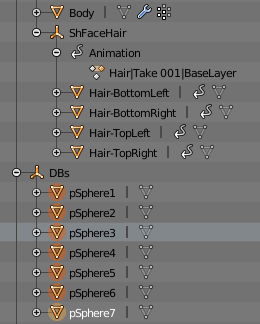
@foggy maple not sure if this is a bug in CATS or something not worded well, or just on this specific model.
Attempting to use "join meshes - selected" with this selection ignores the selection and joins the body and the 4 hair sections above it instead. (selection is a separate object from armature, when object was in armature, same result)
Am I misunderstanding or is it a bug?
Screenshot of scene hierarchy: https://i.imgur.com/cNKRW9l.png
 foggy maple
@vague idol Yeah thats a bug. It is fixed in the development version, update by using the updater
vague idol
Alright thanks for confirmation. Will do.
 swift heart
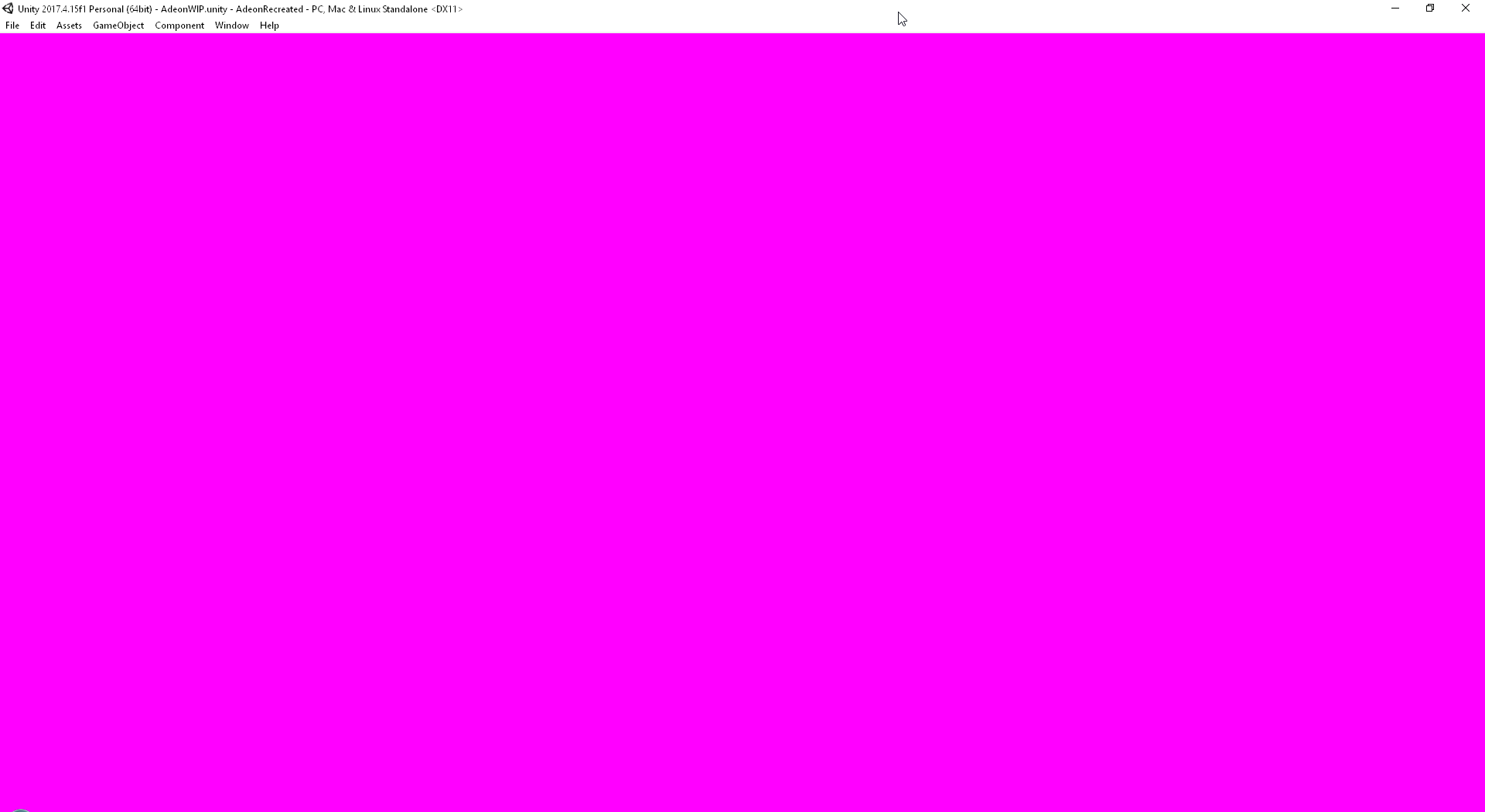
seems like an okay magenta to me
 white moth
I deleted the folder defaultassets in my project and everythign went magenta. the entire GUI
swift heart
oof
 visual vigil

 molten cloak
for 3d models that have 2d features (eyes, mouth, typically ripped from games) is there a tutorial on how to set these up for vrchat? I understand that there are multiple meshes that mapped to the different parts, but in blender the faces are blank.
 oblique cove
@midnight void you Can get it at MakenCat world
Can’t remember the name lemme search up
Verhack
 versed glacier
any blender gurus here that could help me?
 cursive wedge
Just throw the question, but most can be answered on google
versed glacier
well i kinda solved it myself but i need help with weight painting my model i made
its not quite avatar
its prop

im trying to make the blade be able to work with dynamic bones but i have no clue how to work with this kinda design
 dense kelp
100% weight on each blade section, every section inbetween shares 50% between both adjacent bones
Imo
dense kelp
Mhm
versed glacier
do they have to be seperate mesh to weightpaint them or does it matter
dense kelp
Shouldn't matter afaik, don't forget to use autonormalize whilst weighting something manualy, having over 100% weight isn't the best thing to happen
versed glacier
alright ill try to find that auto normalize
also is it possible to reset all shape keys at once
for some reason it doesnt import the blender animation to unity
:/
 small cloud
u need to checkmark "bake animation" on export settings, it's disabled @versed glacier
small cloud
to use the animation you rig the character as humanoid and then can duplicate the animation and use it
 thorny pendant
Any one here who uses blender who know if there is a "while key is held" setting for tools?
strong thistle
?
thorny pendant
to make tools activate when i press the hotkey and the deactivate when i release the hotkey again
fringe rock
already have have plenty of hotkey for everything
thorny pendant
not new hotkeys
to make the tool unselect when i release the key instead of having to right click
latent charm
I don't think blender has that kind of functionality built in. I've definitely never experienced any tools that use that kind of control.
Only way you could do it would be write an addon that does it.
What exactly is it you're trying to change anyway?
quaint jasper
Right clicking usually cancels the tool
latent charm
They probably have left-right swap enabled
thorny pendant
i was not sure if it was an option to use tools like i want, but if experienced users have seen it in options, i'm going to assume that it doesn't exist. at least with out an addon.
umbral crystal
i dont change any hotkeys or anything
already hard enough 4 me 2 get used 2 the way it is now
but i dont have any problems with it
visual vigil
https://cdn.discordapp.com/attachments/393164308508573696/534990679990992898/unknown.png https://cdn.discordapp.com/attachments/393164308508573696/534991291843346452/unknown.png

 spiral sigil
@thorny pendant You can also click A while your mouse is on the viewport you wish to unselect & click it again to select everything
 verbal coral
I wanna learn how to kinda mix and match MMD parts to frankenstein a personal avatar. Does anyone here know of any good tutorials?
vague idol
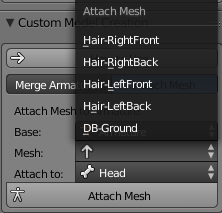
@foggy maple potential bug in 0.12.3-dev These unparented meshes all show in the list, but won't show as selected when clicked.
https://i.imgur.com/czVSuCp.png
It is only a visual bug however, selecting one and clicking attach mesh still works.
 foggy maple
Oh 🤔 thanks for reporting
can you save that as a blend file and send me that?
@vague idol
vague idol
sure, just a minute
 upbeat ember
can someone help me im just getting into vrchat and i want to use a model but the model comes out as grey

 lament pond
 umbral crystal
cool but head kinda alien shaped xd
try like making cheek/sides a bit wider and less steep of curve or maybe thiccer necc
lament pond
This is in accordance to the original style
vague idol
Is that kanade tachibana?
 brave dune
that was my first thought as well
vague idol
@analog epoch https://www.youtube.com/watch?v=ZB2aXKkwXuA

EDIT: If you are using an MMD model please read below! In this video I will show you how to make your 2D eyes/mouth type avatar have a blinking animation and...
 analog epoch
Thank you ❤
 spiral sigil
A lot of progress!
visual vigil
https://cdn.discordapp.com/attachments/456577889429880833/535702061925400576/unknown.png https://cdn.discordapp.com/attachments/456577889429880833/535702129567072256/unknown.png https://cdn.discordapp.com/attachments/456577889429880833/535702272840302592/unknown.png


someone showed me the edge split tool
spiral sigil
A big difference before and after learning to use it
umbral crystal
edge split is just applyable autosmooth
spiral sigil
It allows more definition to be added very easily
umbral crystal
ye ik
i like it more bc when u apply it it wont be screwing with whats sharp or not like autosmooth
bc if somethings rigged or something it changes whats smooth or not based on its angle in realtime
but with edgesplit u can apply it and then rotations wont change it
spiral sigil
how do you add a song to a emote?
 halcyon citrus
Create an audio source, place the file in the empty box that will show up in the inspector window
Place the audio anywhere you like on the avatar and make sure it's inactive
It's just like adding a prop to the hand if you know how to do that
@spiral sigil
 worn fjord
@halcyon citrus and do you know how to make more louder that sound? sounds too quiet in game.
 cerulean shoal
been working on a model for like 4 hours
spiral sigil
ayy i need some help
how do i use background images
in blender
nvm
dm me if you know
 mental topaz
@spiral sigil on N panel check Background Images > add, to see them Use numpad key 5 for orthographic view, then numpad 1/3/7 ; with holding shift that will inverse them
spiral sigil
@mental topaz I tried pressing shift + the numpad # but it doesn't give me the inverse view, were you talking about inverting the image?
mental topaz
ah, i mean Ctrl+numpad keys for invert view, but that invert only 3d object, not image, i mean if you look on front from keypad with ctrl you'll look on back
actually to invert image after ctrl+numpad, there's Flip button on N panel for background image
spiral sigil
That's reeeally helpful
I used to gradually change the view after going into Orthographic view with numpad 4/8/6/2 until it worked
Are there people experienced with Blender's Texture painting abilities?
Am familiar enough to set it up and be able to paint but am curious if there are tips with the brushes or other not as obvious info to better use it
cursive wedge
I would use blender as an rough painter to get the outlines and then use a different paint program to texture it properly, unless you fin a good addon for Blender (you should share it here if you find one)


 round vigil
does anyone know how to drag a texture onto an uv?

im trying to manually add a texture onto an already existing texture, but im not sure how to go about it
 umbral crystal
pretty simple
just draw a red dot or something where it should be and save it as a new texture
then u can probably find out where to put it
brave dune
if you want to have that as the emission, you can also do what Wulfe said but once positioned, turn everything else black and throw that texture into the emission channel of your shader
spiral sigil
@cursive wedge Belated thanks for the tip
@visual vigil You're being so productive, keep it up!
 lavish cloak
So this just happened when i was testing out in unity, don't even know how i never noticed this but, any idea what may be doing this lol
oh i can't add the image..

I'm still rather new to this all so..
lavish cloak
nvmd.. fixed.
Aparently the tongue had weight but it was for the wrong part of the body.
Weirdly enough.. it was the foot (wth XD)
spiral sigil
The silly horrors of 3D modeling XD
 spiral sigil
while fixing the mesh i ran into these dark patches and can't seem to get rid of them, can someone help?
 zinc furnace
Seems like vertex normals or flipped face normals
spiral sigil
that's what i thought but when i tried to flip them it made them darker so they aren't flipped
nvm fixed it
 subtle jackal
unmerged verts probably
brave dune
even if the normals arent flipped, it could just be wierd normals on those verts
umbral crystal
it can also be problems such as doubles
bc u cant mark a smooth face across 2 unjoined edges i think
 tardy tulip
https://imgur.com/a/CX9rVZ4 can someone help me get rid of this clipping in the jacket
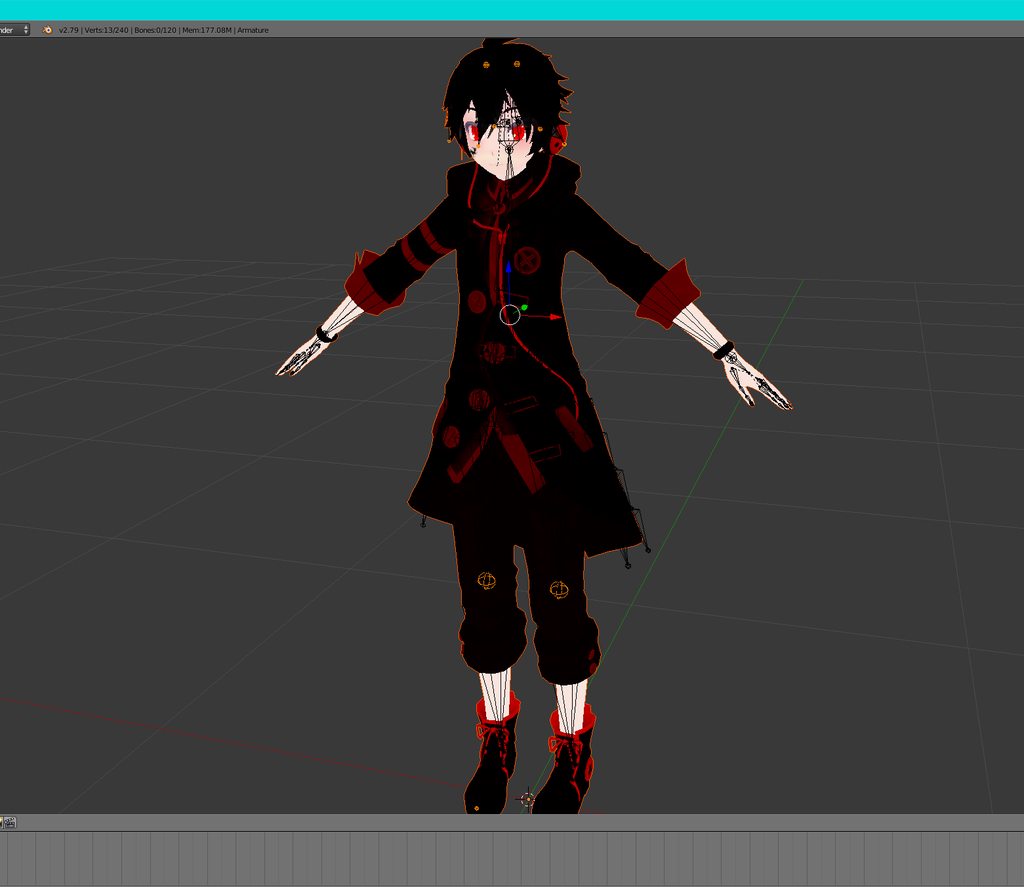
looks fine in blender but not unity
theres 2 pictures listed btw in link
 ornate nebula
It has been a long time since I really 'played' VRChat. But now I wanna get back into it, and make a model. Boi have I underestimated how much work it takes.
http://puu.sh/CzNeg/6fec1f0aab.jpg

This unfinished torso/neck has taken me hours as it is blimey.
 old field
nop
 mint furnace
where can I get it free then? on the site it seems like its asking me to pay
old field
i would try looking up a mega tutorial to start but change the unity version to the new one vrchat used and dont update it when it asks
mint furnace
Would I do that from his unity hub or something
ornate nebula
Yeah, as long as it's personal use you don't pay.
ornate nebula
If you download it, Unity should be up to date.
As for the SDK you need to get that on the VRChat site.
You need to be logged in I believe, but other than that you should be good to go.
mint furnace
For unity its giving me the option to download different Versions of Unity by date
 fallen snow
@mint furnace to be sure you have the right version download from the vrchat website: go to vrchat.net, log in, then click 'download' on the left. it'll have direct links to the right unity version and SDK
mint furnace
but I think I have to have the same version as VR Chat uses
fallen snow
or just go here https://docs.vrchat.com/docs/setting-up-the-sdk
Requirements We're going to need a couple things before we can get started. - Unity 2017.4.15f1 - Scroll down to find LTS Release 2017.4.15f1 . If you have Unity Hub installed, y...
ornate nebula
Pretty sure any Unity updates past the one the version that VRChat uses should work anyway.
Well, unless it changes a lot
Not any, just most of the time.
old field
use the one listed
fallen snow
@ornate nebula they don't work, in fact
if you use 2017.4.17f1, it'll upload but the avatar won't appear in the list in-game
ornate nebula
Really?
fallen snow
yep. common source of people asking for support in this discord
ornate nebula
I haven't uploaded a model in months. I'm really rusty tbh.
fallen snow
they click the auto-update button that pops up, then everything seems to be okay until they go in-game
it's probably just an overzealous version check on vrchat's side, but regardless you need to use exactly 2017.4.15f1
ornate nebula
Fair enough.
mint furnace
Its telling me I should get unity 2017 4 14 or 15
but the current thing i see is 2017 4 18
ornate nebula
I'm pretty sure at one point you could have future versions, but I guess that's gone out the window. Not a big deal though.
fallen snow
2017.4.15f1 . No more, no less. Exactly that version. Use the link here: https://docs.vrchat.com/docs/setting-up-the-sdk
Requirements We're going to need a couple things before we can get started. - Unity 2017.4.15f1 - Scroll down to find LTS Release 2017.4.15f1 . If you have Unity Hub installed, y...
mint furnace
ok thanks
also on the topic of porting I have a model I just sort of finished Texturing coloring and putting lighting on
Will the Model port with these lighting settings into unity ?
ornate nebula
No
Unity uses its own engine for things such as lighting.
Shaders too.
Textures will port, but shaders and lighting do not.
mint furnace
dang, I was really hoping the effect I did would just go into unity
fallen snow
also lighting is a huge performance hit, avoid using it if possible. you can use things like emissive shaders instead
ornate nebula
Yeah. Lightning tends to be used on avatars made to crash games.
mint furnace
but I didnt want the model to be emissive so the character doesnt glow in the dark
is there no other low performance way that I can get some kind of wind waker look
ornate nebula
If you can use it minimally it shouldn't be too bad.
fallen snow
use a toon shader
mint furnace
Because I created something with a blobby kind of lighting shader look
well i did put toon shader on
will that go straight into unity?
fallen snow
no, expect that you need to redo all your shaders when you go into unity
mint furnace
Ok so blender is completely useless when it comes to VR chat shaders and things
like that
ornate nebula
Two different shader/lighting engines.
fallen snow
there's a bunch of them out there, cubed is popular, so is xstoon, plenty of others floating around too
be aware that if someone has your shaders disabled in safety you'll fall back to a builtin shader
mint furnace
so is there like a popular location for finding unity shaders?
fallen snow
browse through https://vrcat.club/forums/tutorials-and-tools.6/ maybe

VRCat: Community-Run VRChat Forums
Developed a tool? Have some tutorials? Post them here!
mental blaze
 umbral crystal
looks like roblox graphics
mental blaze
Still needs to be added into unity :D
spiral sigil
so hiw long does it usually take until i can publish mymodels =.=
zinc furnace
There is no set time
spiral sigil
I need help importing avatar to vrchat
 fleet frigate
does anyone know a place where I can get stuff like weapons and hats so I can apply them to my model on unity?
mental topaz
@fleet frigate or sketchfab / deviantart for weapon modelsl and 3d.nicovideo / deviantart / bowlroll for hats
 green saffron
@subtle jackal True that
ornate nebula
http://puu.sh/CAzvM/f3cf0199ed.png Starting for scratch takes so LONG

BUT I MUST PRESS ON WHEN I HAVE THE TIME
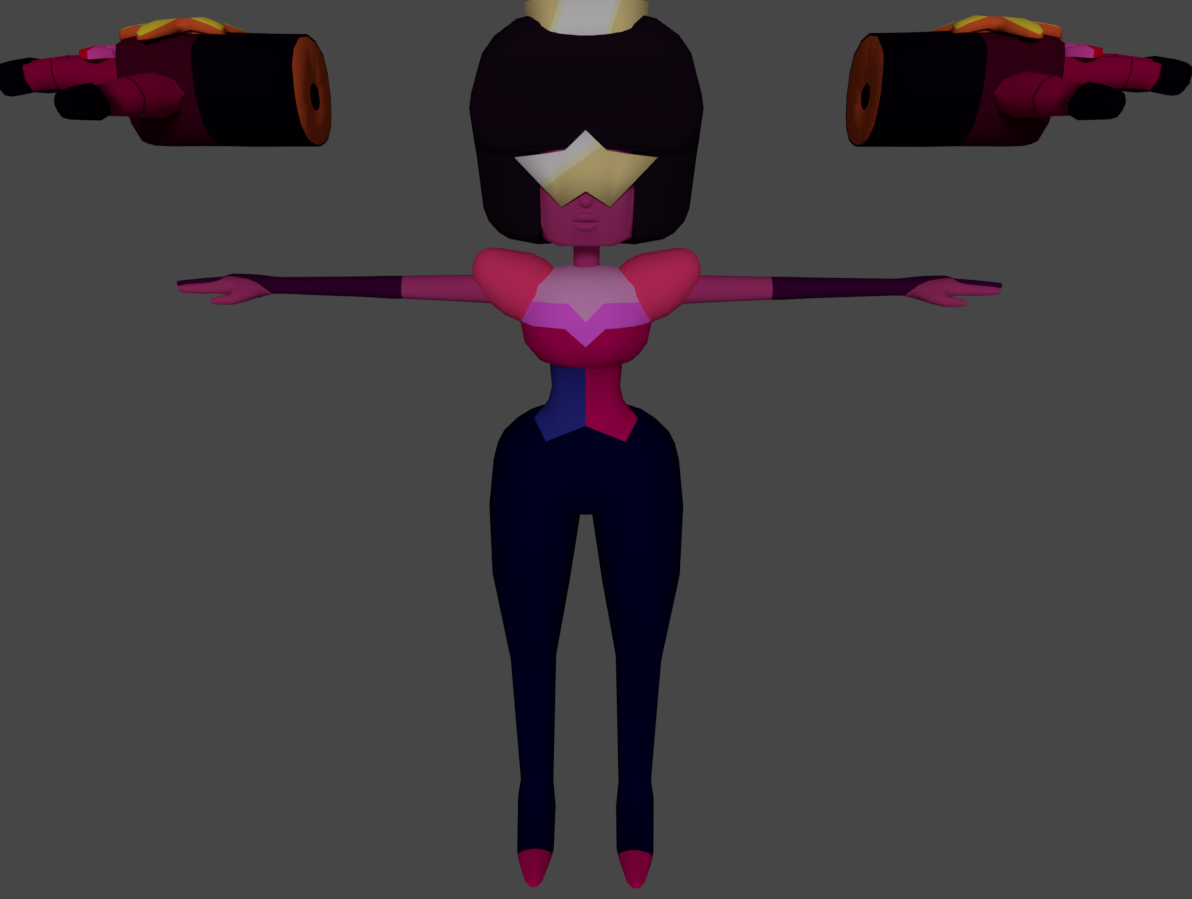 fringe rock
me too my guy
fleet frigate
https://gyazo.com/df35dbdc530cc617f83c715790af9746 need help trying to connect the helmet to the head

 subtle jackal
Lookin' good!
 fringe rock
can you show the wireframe too? @ripe lotus
spiral sigil
It is looking good
 pearl tartan
Heh, nice to see another Megaman fan on here. Nice work @ripe lotus
 subtle jackal
breddy good
 ripe lotus
80 bazillion commissions and counting
subtle jackal
I've shown off the no-wires version before but I've been working on this https://i.imgur.com/Mq7f9ZU.png
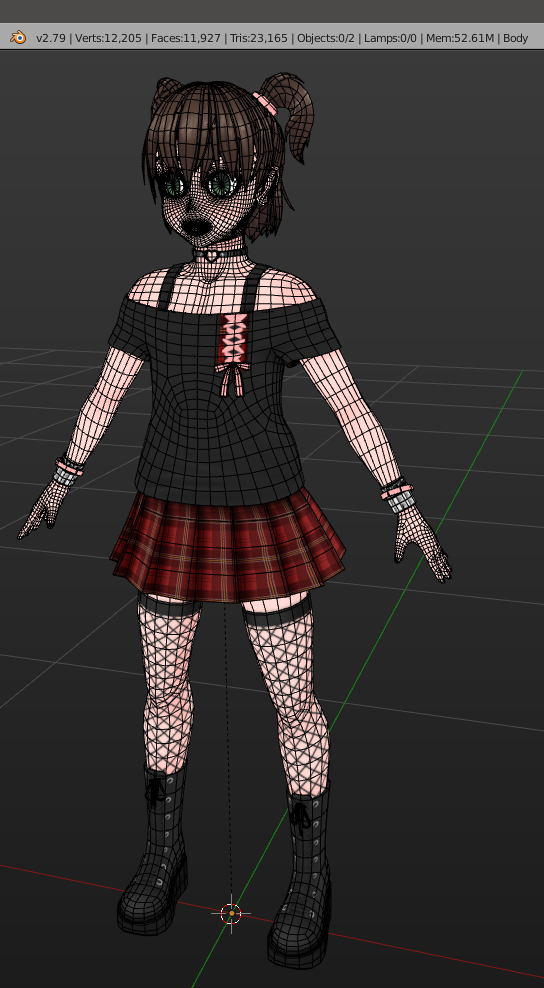
https://i.imgur.com/zcmf5P8.png better look at the face topo
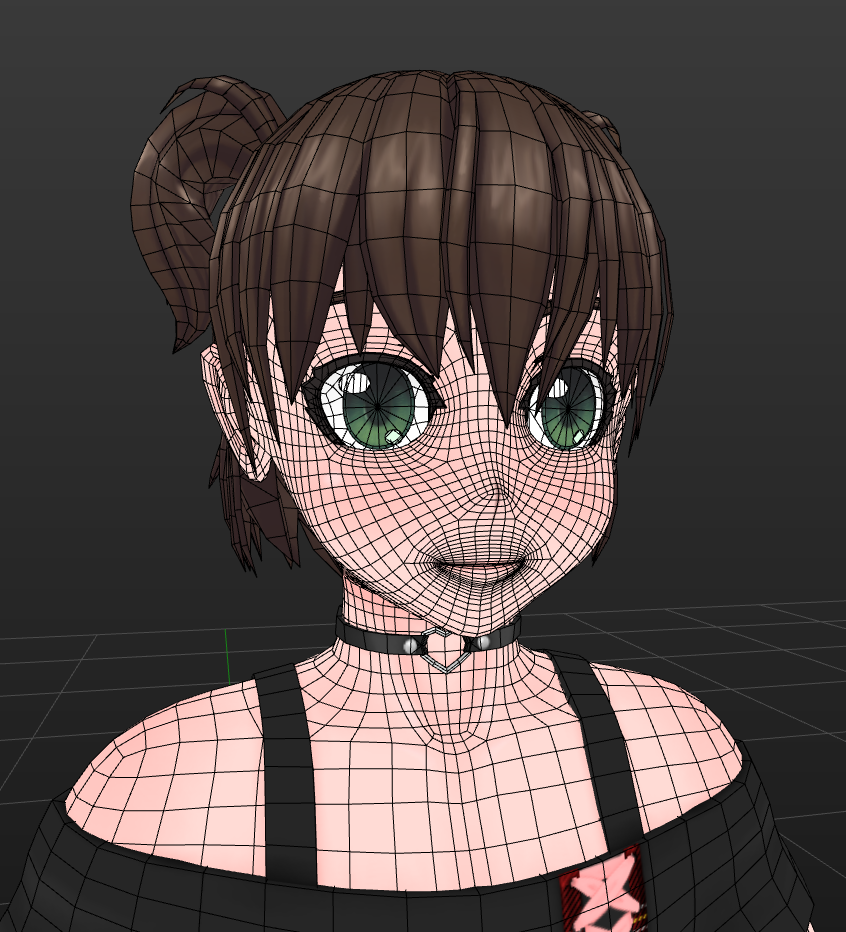
(also from scratch, if that wasn't clear)
actually my first real anime-style character. Actually probably my second proper full-character model. I usually just do clothes.
 subtle jackal
lol thanks
subtle jackal
😃
swift heart
that topology is pretty solid, good job
visual vigil

 unique galleon
@devout harbor whatcha tryna do
subtle jackal
Well, do you know how to model?
subtle jackal
well in that case you can either learn from the ground up or pay someone to make it for you really. To learn requires a fair investment of time, but I'd say if you have any interest it's worthwhile to do so.
CGCookie has some great resources for Blender stuff, I'd recommend starting with https://cgcookie.com/course/learn-the-blender-basics

CG Cookie
Welcome to the Blender Basics course here on CGCookie.com! We're happy to have you here and are ready to teach you everything you need to know in order to start using Blender like a boss.
We'll cover everything: what Blender is, navigating the interface, working in 3D, movin...
 devout harbor
oh ok
subtle jackal
I'd recommend starting out making simpler objects as a full character is a bit much to attempt without any experience
but once you have a good grasp of topology when you take a look at your reference you'll probably be able to visualize how to make it
swift heart
i always recommend this book, even if some of the lessons are a little outdated. https://en.wikibooks.org/wiki/Blender_3D%3A_Noob_to_Pro
visual vigil
https://cdn.discordapp.com/attachments/531747358078271489/537518782118232064/unknown.png https://cdn.discordapp.com/attachments/531747358078271489/537518930701451274/unknown.png

 subtle jackal
Noob to Pro is great if you need a crash course but it glosses over a lot of the more nuanced aspects of making good models
swift heart
yeah, i mainly used it for learning all the basic features and shortcuts in blender, then moved on to following tutorials on modeling more complex stuff. everything takes practice, of course
 formal temple
thanks for all the helpful links guys
subtle jackal
Yeah I'd say it's a great reference especially if you already know another software like Maya or such. I point people to CGCookie mainly because they have a good getting-started course for complete newbies and if you're relatively serious about learning and have a little cash, becoming a member there is super worth it. I subscribed for a couple months, downloaded tons of tuts to peruse and have learned a lot.
swift heart
idk i found that the main appeal of noob to pro in my case is that i just dislike video tutorials
subtle jackal
ah, yeah I'm the complete opposite lol
swift heart
had no prior experience with 3d modeling software, but was familiar with some 3d modeling terms, so i'd say it's still pretty approachable for beginners
fringe rock
As a furry you should be custum to pay people to do stuff no ? @devout harbor
umbral crystal
??
old field
"??" ???
subtle jackal
He's being snarky because a lot of the furry community commissions art from artists, I think.
old field
fur outfits
devout harbor
Well most do considering that fursuits get up to around 5-10 thousand dollars
That's in total
subtle jackal
Unfortunately for him snark tends to work best when you don't make 4th-grade-tier mistakes like not knowing the word "accustomed."
devout harbor
Ouch
devout harbor
Yeah it might take a long time to try and get accustomed to blender
 errant sentinel
It may, or may not, i picked it up quite easily.
old field
learning the layout and other basics b4 watching any guides will help a ton or its jsut to much shit to take in
then just throw yourself at it for a few days with trial and error will help you not forget
subtle jackal
The most common hotkeys and such are pretty easy to remember since they all go off the name of the function
devout harbor
I'm a hands on learner
subtle jackal
(s for scale, e for extrude, r for rotate, g for grab)
latent charm
@devout harbor Do you prefer written guides or videos?
old field
space bar is bae
devout harbor
I'm terrible when i try guides or videos
subtle jackal
I suppose the most important question is: Are you interested in learning 3D modeling aside from just getting an avatar for VRChat?
 brisk tapir
hallo i'm a begginer in 3d modeling ( CGI student) and someone knows how to do a good face topology ?
subtle jackal
I'd start with the CGCookie and Blender Noob2Pro stuff linked above from last night then, see which of the sort you find most comfortable, and try making a simple prop or such first, to get the hang of Blender, then.
Figure out how you tend to learn best and go from there
@brisk tapir if you can wait a moment I can dump some of the reference I use into an imgur album
Are you looking for standard human face topo or anime style?
latent charm
@devout harbor unfortunately 3D is a complex enough field it's going to be difficult to get anywhere just stabbing around in the dark hoping things make sense eventually.
old field
take some notes on things then trial and error learning it to make it your own
 coarse mauve
Adda boy, encouragement always works, Gallium 😁
old field
or it never sticks
subtle jackal
@brisk tapir https://imgur.com/a/vFokuuJ
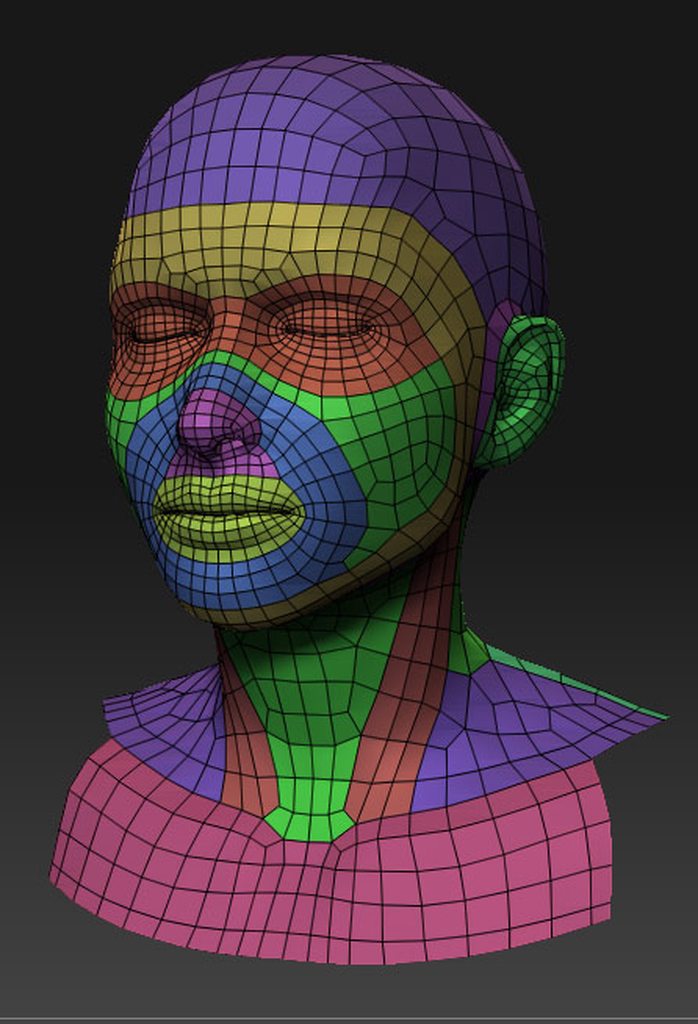
I also have https://www.youtube.com/watch?v=xsJmTuDNx0w in my favorites on YT

very old video that i've created. its simple, easy to follow, & straight forward process. btw, the email that i put on the video is no longer active :) downl...
fringe rock
is there a way to select part in the uvmap and it select it in the 3d view ?
brave dune
i dont know if its the proper way, but yes there is
in the UV editor, select the part you want selected only, invert selection, then hit H to hide. Using the hide function in the uv editor just deselects that part in the 3d view. You can also select one vert in the 3d view of what you want, hit control + L and change the delimiter to UVs so it only selects the UV island instead of whatever mesh is connected
fringe rock
for some reason half of my face flip orientation. Idk if it happen when I convert tri to quad, when I remove double or atlas the texture
unique galleon
@brave dune I accidentally hid some faces yesterday and thought that was just a quick delete key lol
That’s really cool and exactly what I’ve needed for many things.
brave dune
alt + H will unhide everything
spiral sigil
how do i get the nikei model i want to change the colors but i dont know how
umbral crystal
change the textures
 clever cypress
He seems new. Why not teach him?
quaint jasper
Please don't ask your question in every channel @spiral sigil
quaint jasper
That's not a modeling question, check Google for the nikei model
 steep token
Anyone here know why I can't input any numbers in Unity?
i've beeen trying to fix it for like a solid hour but It seems to be preventing any renames, Input in Inspector,
Everything seems to be locked out
quaint jasper
Not paused ?
steep token
Nope.
quaint jasper
Or did you possibly change your IME keyboard ?
steep token
Hmm..
quaint jasper
Or you pressed your NumPad button
steep token
I'm not sure honestly, I can't rename anything or adjust values.
It's very odd
I don't believe i've triggered anything along those lines, atleast. Knowingly
quaint jasper
Can you type numbers in the search bar of the scene or the project ?
quaint jasper
Then I'd suggest googling it, more of a unity issue

 quaint jasper
Are those colored edges ?
umbral crystal
probably just planes that being resized from 0 scaling
 scarlet dust
it's made of two grid's with 1x20
scarlet dust
in Base it is in the head, and the shape-keys I created just let them come out like the blush of mmd ect.
scarlet dust
and 2 because one of them is not moving
(it's easyer not to move the wron vertex if you are just in edit mode for one of them)


It's also working in the MMD Dance Stage World, so the Dance Animation ther with singing mouth animation is working, without problems. XD
steep token
So, I've gotten my avatar nearly complete. Only problem now is that the Cape just falls into the infinite void
any ideas how to attach it permamently to the body of the avatar?
unique galleon
^
 dawn wren
 dawn ember

3D Model shoe using blender - Nike Shoe - Download Free 3D model by DineshThennarasan (@dineshthennarasan)
 tall plaza
👀 could do with some optimization and a half
 wintry badger
could anyone point me in the right direction to get this fixed there is a sort of seam going down the center of this models face

it only appears from afar
brave dune
in the texture settings for the face, see if setting it to clamp instead of repeat helps at all. Sometimes that fixes things
wintry badger
looks like that did the trick, thank you so much 😃 https://imgur.com/a/e4LcrBI

 hallow bough
@scarlet dust That Soundwave is amazing! Would love to be able to see the avatar sometime!
 umbral crystal
wat those bangs
 iron schooner

XeratDragons ArtMon
Oggi vi presento un nuovo modello 3d che sto lavorando in questi giorni si tratta di una draghetta fantasy stile Disney e nipponico tra cui Toei
My work
subtle jackal
yeah hair sucks
old field
Ya gets preety hairy...
subtle jackal
especially anime style hair. Human hair is slightly easier because you can just use texture cards (or particle systems for CGI stuff)
 delicate shoal
I'm trying to replicate the type of plants I see in some realistic worlds but I've hit a snag. So these plants are generally just low poly branch+trunk with what appear to be various planes with leaves/smaller branches textured, duplicated and set at random angles to produce a realistic tree with minimal polys. Problem is, my planes only render from one side, so you can see leaves from the front but not the back which obviously no good.
How is this circumvented with the trees I see elsewhere? Are they not a plane or are they, from what I've gathered, duplicated planes with flipped texture (which seems like a bit of work to re-do the UVs and get them re-aligned)
 thorny fractal
thats back face culling, they either use a shader that disables that or they just duplicate the leaves and invert the normals
delicate shoal
cursory googling showed the easiest way would be a custom shader with "cull off" added to it but then I had a hunch they may be rendered as sprites, so I tried the default sprite shader and that worked great! They look just how I want AND they no longer render as if they were sprayed with mud!
thorny fractal
its pretty easy to modify shaders to turn off backface culling, but to keep in mind with backface culling off the model is basicly rendered twice so if thats an issue to you just duplicating the parts you need to see on both sides and flipping the normals could be better for optomisation
fallen snow
Huh, are they actually rendered twice or do you just mean that a lot of occluded faces will have to make their way through the fragment shader because they're not getting culled?
umbral crystal
what
its not rendered twice it just skips the cull check
so for every face it check it doesnt check if face normal away / at cam
at least thats what id expect
unless some normal buffer or whatever
spiral sigil
hello I found a cute rose model and I want someone to take out the minimap that has the model https://sketchfab.com/models/4ef4f349782e4105b61f24446b4ff297

After many weeks of work Rose is finally ready to be released and downloaded! Of course wanting some fun i went ahead and also worked on a “Small” lovely place from the show called the Strawberry Battlefield.
For added effect while viewing the scene, The Strawberry Battl...
umbral crystal
wat
spiral sigil
this model has a map and does not let me care
spiral sigil
I do not know how
and I do not have much time
I have a lot of work
umbral crystal
well u will also have to re-pose the rig and fix it and add shape keys and etc etc to it so
not like u could just slap it into unity after deleting the map (at least if u actually want it to look good and work)

 devout scroll
If you have no idea what you're doing you'll probably want to try an mmd model and follow a tutorial
https://www.youtube.com/watch?v=VBZu_wNzERw this one is fairly up to date
This tutorial will go over installation of all needed plugins and the SDK. After that it will go over how to get a model ready in Blender, fix a few things t...
 subtle jackal
Right click the border between them and click Join, then hover over the one you want to get rid of
or you can click the workspace view menu at the top and re-select the default workspace
actually it looks like you've don something rather weird there. you've... turned both the hierarchy and properties panels into 3D views?
probably better to just do the latter thing I suggested in this case lol
https://docs.blender.org/manual/en/latest/interface/window_system/introduction.html#the-default-screen if you need help with identifying what panel is what. The workspace selector is in the info bar, the left drop-down that says "Default"
fringe rock
There is some diagonal lines on the corner. Click on it and drag it on the other window
unique galleon
@spiral sigil that model already exists in VRChat, yup! I’ve got a buddy I met on here and we’ll probably set up a Steven Universe avatar world eventually 😊
 fallen snow
Do you have some double vertices around there?
dawn ember
I checked, and couldn't find anything
umbral crystal
r u trying to cut it
dawn ember
Yeah
royal steppe
It might be that its stopping because within the next few loops it cuts to a single point
umbral crystal
also make sure it actually has a full loop in that direction and that there are none if any triangles
cuz they can sometimes mess with loops and loop cuts
 royal steppe
yeah, since this is either some kind of blade or bow if you have a tip, you might need to delete it until you have all your loops
dawn ember
How do I make an edge look sharp when using smoothing?
umbral crystal
u use Mark Sharp
dawn ember
I tried that
umbral crystal
autosmooth already makes all sharp edges not smooth
but u can only do so if u have autosmooth enabled
royal steppe
just give it an edge split later down the road
umbral crystal
and no custom split normal data
no no edge split is not good
it will make many double vertices
instead use the mark sharp by angle tool
dawn ember
And where's that?
umbral crystal
somewhere in Mesh -> Edges
select the whole thing and u can mark sharp by angle
and then mark any additional sharp edges
dawn ember
If you look in the picture the edge has been marked sharp
umbral crystal
then u can press add custom split normal data and it will keep ur smoothness settings even if u like rotate the mesh into sharper angles
yea but if u wanna apply it
u have to remove custom split normals and use autosmooth
dawn ember
You'll have to get in a call with me because I am very confused
umbral crystal
how sharp edges work
is they only ever apply
if u have autosmooth turned on
and u don't have custom split normal data
u can however keep the sharpness if u click to add custom split normal data
ripe lotus
owo
dawn ember
@umbral crystal How do I turn on auto smooth?
dawn ember
And how do I remove custom split data?
dawn ember
OK so I have made sure there is no custom split data and auto smooth is turned on
But when I mark the edges as sharp literally nothing changes
OH never mind
I was looking in the wrong tab for auto smooth
umbral crystal
lol
ye
if u wanna apply them fully
u add the normal data
bc the way it works is
if u have autosmooth with angle thing
it will always smooth based on that angle
even if the model is deformed it uses the new angles
(this is only in blender btw theres no unity autosmooth afaik)
but when u put to apply it does not use any new angles
only the edges u marked sharp
and u can mark sharp by angle using the tool
dawn ember
Thanks, I got it all figured out
fringe rock
So select the sharp edge of a sword. Mark them sharp and smooth the model. Thats it
brave dune
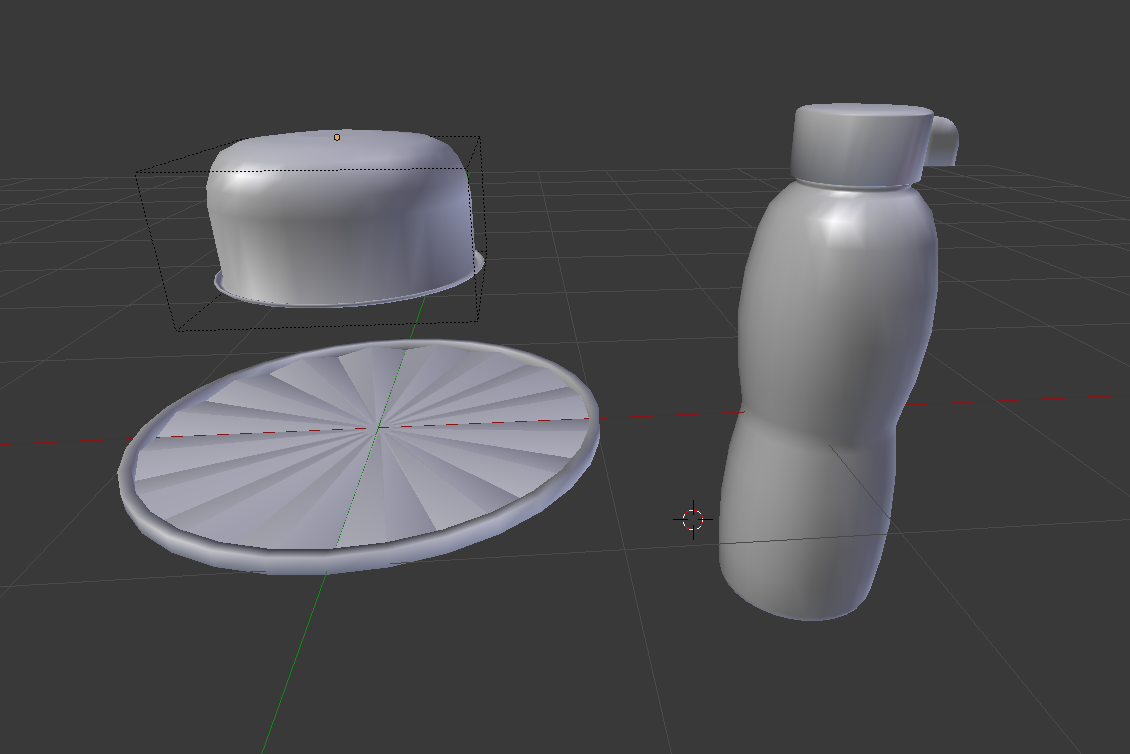
https://i.imgur.com/69SAy36.png
may be basic props but i like how they are coming out so far 😛

 chrome tree
Making a Yun, huh?
dawn ember
hell yeah
I looked online and didn't see any model, so I thought I'd tried to make her
 hollow radish

 dawn ember
Does anyone know some good tips for weight painting before I start that could save time?
subtle jackal
Have a low poly av if possible. Also you don't have to specifically paint weights, you can adjust vertex weights in edit mode for super-fine tuning where necessary. Also when doing skirts, if they're like... pleated or ruffled or such it's often easier to make a proxy mesh to copy weights from
It's best to do them before you apply your mirror if you can as well.
fringe rock
Be prepare to waste time when learning something. People these they only want thing now and easy
subtle jackal
eh, as long as you get good information you don't really waste much time. You just have to not look for some low-effort, low-result method to do things. Learn to do it the right way and your time learning a thing is well-spent.
spiral sigil
anyone have a good shoe model?
spiral sigil
Looking for one of your choice may be better
Use the term "MMD" and you're likely to get results
fringe rock
I got some time a problem with model from game or whatever source. the blender render on solid view is black on most part of my model so its become kind of hard to edit. When I hit the shadeless option or the other in the N MMD shading it become normal. But when I it Z to go in wire view and go back on solid mode by pressing Z again it turn black again. Its not a problem in unity in theory. But some shader Get the same issue. https://gyazo.com/b6d5f27534a7b8af5dc3421244945e0f
 fallen snow
@fringe rock first, do you have permission from the developers of the game to use that model? Because if not, we can't help you with it here
fringe rock
I guess not thanks
zinc furnace
@fringe rock the render window can be tough to get to behave properly
Maybe it's an alpha issue?
You could try adding a light, I believe solid mode still uses them
latent charm
@fringe rock disable Textured Solid in the properties panel
 manic herald
Help, my unity without updated is broken.
in my inspector it changed so much https://gyazo.com/87bf895ea6083fe42202441b73731b21

I cant enable/disable anything anymore
manic herald
i dont see anything saying that
am i retarded, or are u able to show me a screenshot
zinc furnace
Above the gear icon and next to the lock icon is a tiny menu
Set it to Normal, not to Debug
manic herald
Would Unity 2017.4.19 work or only .15 or whatever it is
i tried uninstalling and reinstalling but i wanna know before i update my project if that version of unity would work
mental topaz
@manic herald only 15f would work
 winged needle
You have to download it then like it should pop up im pretty sure from what I remember
mental topaz
@manic herald https://docs.vrchat.com/docs/migrating-from-56-to-20174
Migrating your project from Unity 5.6 to 2017.4 isn't as difficult as you might think! Here's a guide providing each step in detail. # How to install Unity Hub and Unity 2017.4.15f1 Unity Hub is a great tool that allows you to seamlessly install and work with multiple Unity ...
manic herald
ok ty, hopefully this fixes it
 fossil inlet
Sculpting a character for a commission in zBrush, thought I'd post it here too:
https://cdn.discordapp.com/attachments/422424977728339972/540286362566524939/unknown.png
https://cdn.discordapp.com/attachments/422424977728339972/540287383447273493/unknown.png

 cosmic nest
anyone know how to merge two rigged models in blender without losing uv maps for one model?
latent charm
Set the UV layer names to the same thing and they'll get joined with the mesh
cosmic nest
no, they're unwrapped to different images
with different geometry
will attempt tho
ah sweet, that worked! thanks
 runic sphinx
@fossil inlet Not sure why people are ignoring this because your sculpting is absolutely amazing. Do you have an artstation or something?
 dusty bridge
I thought it was beautiful
fossil inlet
@runic sphinx Yeah but I kind of gutted it a couple of years ago when I transitioned from 3D generalist to Character Artist so it’s a bit barren 😅
 runic sphinx
Uff I know that feeling 😂
visual vigil
https://cdn.discordapp.com/attachments/489133624000643082/540769787517730839/unknown.png https://cdn.discordapp.com/attachments/419689756486664203/540809417793470474/unknown.png

 umbral crystal
shinee hair
 versed ember
https://cdn.discordapp.com/attachments/467218861167738890/541047313670471681/screen_4096x2160_2019-02-01_16-06-45.png These are all looking good
 ripe lotus
Oh isn't that from ubi's new loading screen simulator?
versed ember
https://cdn.discordapp.com/attachments/467218861167738890/541073460407959563/screen_4096x2160_2019-02-01_01-13-14.png Also is awesome
 fossil inlet
@ripe lotus BioWare/EA, and they fixed the loading screen issue :p
fallen snow
Mostly out of curiosity - when exporting meshes to unity, how does it determine which diagonal to split quads on?
fossil inlet
@fallen snow Unity will do a best guess. If you want to specify certain splits, do those manually before export.
fallen snow
yeah I'm just wondering what the rule is behind it
fossil inlet
Generally it'll follow from the top vertex of a quad, outward from the X axis, and down to the opposite corner.
Or back, if it's perpendicular to the X axis.
fringe rock
They dont keep the sqare plane? On my model, look like unity keep tge poly flat idk
fallen snow
hmm, so starting from the vertex with maximum object Y, maximum object Z, minimum object X, sort of thing I guess.
possibly absolute value for each of those
subtle jackal
If you're worried, just triangulate in your 3D suite before export.
winged needle
Does anyone know any good beginner 3D modeling that isnt Blender? I used to use Meta4 but its giving me problems so
subtle jackal
As someone who cut my teeth on Wings3D: Stick it out and just use Blender. It will save you time and headaches in the long run
 rare crystal
Anyone with experience in Maya 2018 who can help me figure out why all my Blendshapes work fine in Maya, but in Unity, shift upwards while still giving the desired effect? I cant figure out why, but I can get my blendsahpes to stay in their original position.
please @ me so I know this doesn't get buried in here and that I have a reason to come back and look.
fossil inlet
@rare crystal Did you freeze transformations on your blend meshes?
rare crystal
mmm no. i never thought about it,
rare crystal
oh ok
fossil inlet
If you freeze transforms you lose the object 0
rare crystal
well its not that then, i didnt freeze anything
fossil inlet
Ah okay. Can you post a screenshot of your blendshapes setup?
And to be sure, you’re following the steps in this order: Duplicate mesh, edit the duplicate for the desired effect, click the duplicate, shift+click the original mesh, create Blendshape?
rare crystal
yup

somethings changed in the way maya or untiy works with blendshapes because i never had a problem with it until 2018 maya
rare crystal
Thats how i have my Tick Avatar and other models set up.
they dont have the issue
unlees your talking about the grouping in the outliner
rare crystal
the shape editor. gotchya
fossil inlet
blendshape2 only having one shape key as a child
So you create a new blendshape for each key
rare crystal
it didnt fix it
fossil inlet
Did you redo your blendshapes entirely? You can’t just drag and drop them into empty blendshape groups
Shift select one blend mesh at a time
With the original
fossil inlet
And you exported into Unity?
rare crystal
yes
rare crystal
the ones i had under one node? yes
fossil inlet
Do your blendshapes have any bone rotate information?
rare crystal
how can i tell?
rare crystal
the only things with blendshapes are the body. the eyes are a different mesh
fossil inlet
Ah, you can make it all one mesh and merge the skin weights once it’s finalized
Take another screenshot?
rare crystal
how do i merge the skin weights? and not have to delete the deformer history?
fossil inlet
Mesh > Combine [] > Merge Skin Weights > Apply
What you can do if it’s already rigged
Is duplicate the entire mesh
Merge it there
Duplicate the rig
Make sure they’re both 0 with no transforms, nested inside one another, then take the duplicate mesh and bind it to the duplicate rig
Then select the original mesh, select the duplicate, and go to Skin > Copy Skin Weights
I wouldn’t worry about that until you’ve fixed your blendshapes though, but you’ll have to reapply your blendshapes to the new mesh
rare crystal
it wont let me combine the duplicate meshes
or it doesnt appear to be doing anything
rare crystal
i duplicated the mesh, do i merge the duplicate or the original?
fossil inlet
Duplicate
fossil inlet
If you duplicate a mesh it’s no longer rigged
Can you send me the .ma? I’d like to see if I can fix this.
rare crystal
ok i think i got it.
fossil inlet
Talking about the blendshapes
rare crystal
yeah. sure
fossil inlet
You’ll have to redo all of your blendshapes since you combined meshes :x
So if you don’t care about it being one mesh just keep the original
rare crystal
from scratch? or can i just shift click them and create a new blendshape?
fossil inlet
No from scratch, Maya won’t recognize the blendshape properly.
rare crystal
i see
fossil inlet
Technically they’re two entirely different meshes at that point
rare crystal
should i just dm you the file?
fossil inlet
Yeah let’s take this to DMs

 warm wave
Heckin cute ;w;

 silent acorn
Looks really good!
umbral crystal
gimy
molten cloak
In Blender, is there a way to hide objects in one viewport but not in the others? I have a model with no shape keys, but 20 bones in the face. I am trying make visemes, but the bones are dominating my viewports and I'm getting tired of constantly hiding and unhiding the armature.
TAI
molten cloak
Figured it out, in the viewport you want to hide the armature, select "view" on the bottom then click on "View Global/Local"
 robust dome
if i ask nicely, would anyone help me weight paint a model?
 austere folio
http://prntscr.com/mg57lq what causes the transparency here?

it looks fine in blender
latent charm
@austere folio Backface culling.
subtle jackal
back-face culling
mental topaz
use shader with cull off (double sided)
latent charm
You can either create extra geometry with the faces flipped so the normals are shown on either side, or use a double sided shader.
For a region as small as that the small amount of extra geometry might be better.
Press n while in blender in the 3D viewport and under the Shading section there's an option to turn backface culling on, which can help finding these before you get to unity and when dealing with them.
austere folio
http://prntscr.com/mg5ajf i have two sets though, one for the inside and one for the outside?

but it's still showing up transparent for some reason -- lemme try turning blackface culling on
mental topaz
looks like you have, but inside one's have wrong normals so need to flip them (or double sided shader /shrug)
latent charm
Yeah, when in edit mode in the properties panel under Mesh Display you can turn the normals on, gives every face a line coming out of it showing the normal direction.
austere folio
OHH do they? i couldn't tell, how do i flip them again? ctrl+n seems to not do anything
gotcha lemme try that
latent charm
You can specifically flip selected normals by selecting some faces then pressing w and then Flip Normals
subtle jackal
the normals may be flipped in that case
oh, the window didn't scroll, others already said that lol
austere folio
quick question, what's the easiest way to tell if the normals are flipped? i can't tell with this piece of mesh
it seems like no matter what i do it stays transparent
fallen snow
under shading in the right hand side N menu, try toggling the 'backface culling' checkbox. If normals are flipped you should see bits of mesh disappearing
austere folio
OHHH i see it! so all those faces that are disappeared are the ones i have to flip, right?
fallen snow
yep
subtle jackal
that might be a material issue in that case, but yeah backface culling or show normals are both about equally easy. https://docs.blender.org/manual/en/latest/modeling/meshes/mesh_display.html
fallen snow
alternately if you turn on show face normals, they should all be pointing out of the object
if they point inward that's a problem
austere folio
geez that was such a silly mistake, thank you! i fixed it

 teal blaze
Anyone here have or use Maya for any modeling?
fossil inlet
@teal blaze I do, need something?
teal blaze
@fossil inlet Yeah I was wondering if I could get a favor with re-exporting a maya scene model over to a .obj to use in blender. I dont currently have a copy of Maya to do this with.
 wet kiln
I am the suck at making models
Just getting into Blender
Wondering if I should get into VRChat
I'm currently trying to figure out how to go about making and rigging a simple model
It doesn't even have a mouth or neck
It's literally an eyeball with legs and arms
Any tips would be appreciated.
I'm not even going to try rigging until I finish the model.
fringe rock
@wet kiln create a dummy bone for the one missing fo humanoid. In unity, assign them in the rig.
wet kiln
For reference, I'm trying to create a character from the game "Patapon."
That should give a general idea of what I'm trying to do.
fossil inlet
@teal blaze Sorry, not really interested. Hopefully you find someone to do that for you.
fringe rock
Oh I was thinking of that game yesreday. Should not be hard. A sphere with legs and arms.
@wet kiln
wet kiln
Yeah, but getting everything into place just how I want it is going to take some time. Don't even mention the animation.
I'm actually getting back into it, and I never played the second or third game
I have the original
fringe rock
Would be funny to have an army
wet kiln
I'd want that, actually. 😂
fringe rock
Now I want to play it dam it
wet kiln
It was my favorite game back in third grade.
I have a save file with over 130 hours.
I played an emulator version of Patapon 2 last week and I'm like "damn, I really need the disc so I can play it wherever"
fringe rock
Use a psp emulator on your cell Phone
wet kiln
Games 2 and 3 should be coming this week
They were ordered last week
The button sync is weird on emulators
Or, at least the one I used
I'd need at least twelve more people for a complete army
The bare minimum
Actually, I can do nine, but that's a weird army
Ineffective in battle
Three deka, three kiba, three mega
with me as hatapon
fringe rock
The hero from the 3 would suit more the humanoid format I think
versed ember
https://cdn.discordapp.com/attachments/467218861167738890/541930154100785167/screen_2250x2160_2019-02-04_02-35-12.png This took me some time to get done but in a full sit down i pretty happy with it, took a vision and made a model

 silent junco
https://gyazo.com/a400284b196795936260685f1978cbc9 i made bread

 sleek crater
nice bread
silent junco
its very breadly
 umbral notch
@versed ember that’s fucking awesome! Honestly it looks amazing
brave dune
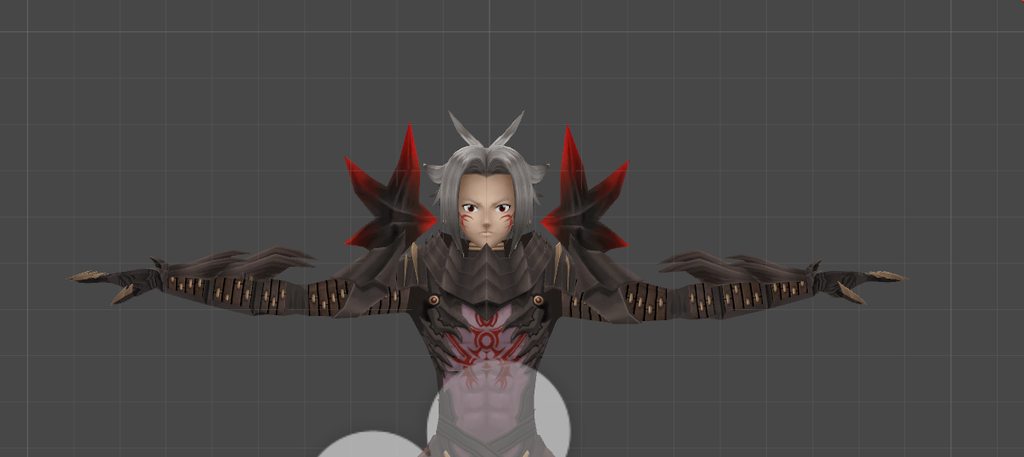
Custom colored javelin with Rex parts on it. Heh. I love seeing the things people come up with in this game









 ripe lotus
ooh its simple but I love it!
 craggy edge
hi i'm having problems with my VRCSDK it won't let me upload my model i got frustrated so i exported it into a new project added the model made sure the old SDK wasn't in it put into the project then added a new sdk and it still doesn't work pls help


this is all i see when i open the sdk
and this is what the console said

 mental topaz
@craggy edge wrong unity version
https://docs.vrchat.com/docs/migrating-from-56-to-20174
Migrating your project from Unity 5.6 to 2017.4 isn't as difficult as you might think! Here's a guide providing each step in detail. # How to install Unity Hub and Unity 2017.4.15f1 Unity Hub is a great tool that allows you to seamlessly install and work with multiple Unity ...
latent charm
Yup, you need 2017.4.15
craggy edge
PFFFFFFFFF I'M DUMMMMBBBBBB
😂 😂 😂 😂 😂 😂 😂
@mental topaz and @latent charm thank you so much
@latent charm it said that it's up to date do i have to download a new version of it via the website
latent charm
https://unity3d.com/get-unity/download?thank-you=update&download_nid=58652&os=Win should trigger a download of unity 2017.4.15 windows 64bit installer

Unity
Unity is the ultimate game development platform. Use Unity to build high-quality 3D and 2D games, deploy them across mobile, desktop, VR/AR, consoles or the Web, and connect with loyal and enthusiastic players and customers.
zinc furnace
Don't update any further than 15f1
craggy edge
ok thank you both understood!
but why in such a old version of unity why not the newest release @zinc furnace @latent charm
latent charm
It's the one vrchat itself is built on, and since we're loading content into it we need to build with the same version for compatability.
craggy edge
@latent charm ohhhhh i see ok understood thank very much for the help
versed ember
https://cdn.discordapp.com/attachments/467218861167738890/542187293604315146/screen_4096x2160_2019-02-04_19-37-56.png Just started on some animations the arm i need to fix with its rigid body's and particles with the sword but this is one of my greater creations.


 mortal slate
damn son
thats really cool
but with that said, i think you bump up the quality much more by making the texture higher qulaity
versed ember
Thats what im trying to do atm but im having trouble with a custom shader i need to get in order
brave dune
the crazier that model gets, the more i love it
 sinful moss
Can anyone help me ? Making a custom model but how do i make it so i can change the length of the legs on the model? like for example to make full body to work correctly. If anyone can help cheers 😃
fallen snow
Once you rig the model you can just scale the legs using the rig
 crisp grail
https://media.discordapp.net/attachments/524659577527074826/542530134649864199/whyisitgryedout.PNG How do I fix this? I upgraded to unity 2017, this is the first time i got this. Correct version and correct sdk.


materials are greyed out, it will not allow for me to edit them. if i drag on one texture it screws up the model.
zinc furnace
You can also click on your model in assets, go to the materials tab and do extract materials
Extract them to a new folder called materials or something
 dense oracle
Hey there, i'm new with 3D modeling, and i wanted to know how you can optimize a 3d model?
I'm modeling In Sketchup... Yes i'm a masochism
https://cdn.discordapp.com/attachments/438801538836725781/542851391463620652/unknown.png

 fossil inlet
Masochist*, unless you’re the physical manifestation of masochism itself. In which case, carry on.
mental topaz
@dense oracle https://docs.vrchat.com/docs/avatar-optimizing-tips
Do you want your avatar to be efficient and be loved by everyone because of all the frames you're saving them? Follow these tips and you should be good! Any recommended numbers or limits in this document are subject to change at any time. Although some of the descriptions pr...
dense oracle
I have 19421 polygons thanks to a plugin to reduce that, i saw the maximum was 20k before 2019 and 70k now, so i'm ok ? i have 7 materials, i just have to reduce that?
fossil inlet
The max is 31k, don’t let everyone tell you 70k is max. 70k is a max if you want a poor grade avatar. 31k and under is the highest grade for optimization.
fringe rock
Be less then 10k like me
zinc furnace
@fossil inlet 70k will get you a good grade though
Rather than excellent
It won't get you Poor at all
royal steppe
Plenty of modern games, including console games use models 50k-100k or even more. I'd still recommend reducing your model as much as practically possible, but it should be the least of your worries given what we know about what hits your framerate hardest.
umbral crystal
the most lag come from vrc scripts (IK, DB), particle effects, unoptimized shaders / too many materials
fossil inlet
@zinc furnace did they change something? Because Poor in one category when it was first implemented made your entire avatar poor
So a single collider would make even an excellent avatar “poor”
@royal steppe The difference is that VRChat is not a modern game. It doesn’t even use your GPU, let alone more than a single CPU core.
Developing characters in a game like this, you need to go by 2012 standards before 64-bit was the standard for games
That said, even if they allow you to go high, you should still aim for the best possible optimized avatar you can create. I haven’t seen a single avatar that needs to be more than 31k.
My KDA Akali was 28k and much more detailed than most avatars in VRChat. People just need to learn proper optimization and baking techniques.
Model in question: https://www.artstation.com/artwork/W2Bm4N
 barren quiver
Please don't spread misinformation.
It's incorrect to say it doesn't use the GPU. To test this, simply remove your GPU and try to play. The problem is more that it doesn't efficiently use your CPU. This in many ways can't be helped except by cutting out dynamic bones.
fossil inlet
🤷 I hadn't tested, I don't play VRChat. This is just what I've heard from clients.