#3d-modeling
1 messages · Page 24 of 1
 royal violet
 steady shore
When I export my model from blender, it's not decimated. Anyone able to help me?
 vapid orchid
Decimate is a modifier, you will need to either check "apply modifiers" in the export settings, or apply it manually
This is a destructive operation though, so make a backup if you are going to apply it manually
 young palm
@fast sentinel not sure thats legal tender but do tell me what one?
 exotic tide
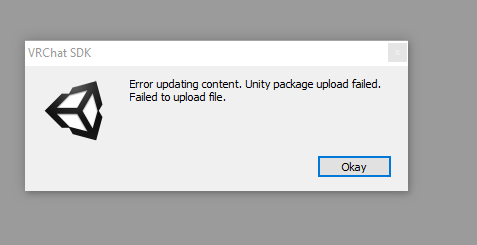
Hey fellas, I'm getting "Failed to create file record" when finally pressing Upload in VRchat SDK in Unity. Any guesses? So far can't find any solution for this through google, only more people experiencing the same issue. 🤔
 potent cobalt
I have the same issue, it's a server problem on their end.
exotic tide
Oh, that explains it. Thanks @potent cobalt
young palm
other then that make sure you have the same version of unity that VRchat is using
exotic tide
5.6.3p1 - correct?
exotic tide
Yeah, seems to work now for me too. Uploading!
 azure quartz
@lament pond if I t pose this would you be interested in doing some retopo? Pretty please?
azure quartz
Okey doke thank you anyway
 main lava
boy howdy I can't wait to mess with Sculptris and try and make a model at some point
azure quartz
Do it get those hands dirty
main lava
I have plans
my 3D modeling talent is limited tho like I barely managed to make a Sphere Cat and a quick little Chuthlu(?) character as one of my first tries
 brazen dirge
Sculptris is gr8. easy to use and setup with Mixamo and Unity
 bold zodiac
i just figured out uv unwrapping on accident
main lava
that's what I'm hoping for :D
brazen dirge
tho, IF you want to create a character that is dependent on very angular shapes you might want to choose another program. or combine one with sculptris.
For example, you migth have an easier time making a transformer in Blender and painting it in there or in sculptris
main lava
I'm gonna have a round character
brazen dirge
then sculptris ought to be fine
and, i honestly haven't looked into all the different kinds of maps and textures regarding VR Chat, sry Mew
main lava
https://78.media.tumblr.com/efffd0f2220bea62309fbd58e10b0b27/tumblr_ozwfaqU4uK1retaico1_500.png basically a similar build to this guy only even more simplified
 brazen dirge
yeeea, that'll work
main lava
although making that cat's also a goal he has a few too many details for my skills right now
brazen dirge
then let me calm your worries, you don'T necessarily have to sculpt all the details.
quite the opposite, to keep the polycount as low as possible you might want to take care of details like bandages via texture-work/normal/bump maps
main lava
https://gyazo.com/fe228e91183810f07cc5d30f2f7513aa this is the guy I'm going for first
 brazen dirge
wanna see an example of what i mean?
main lava
only the vine hands would be like ACTUAL HANDS
uhhhh sure, I'm not even sure what bump maps are and I only just discovered textures recently
brazen dirge
they are right next to each other in sculptris' painting mode :)
main lava
O:
brazen dirge
and trust me, knowing about this will safe you many headaches
main lava
 SICK
SICK
brazen dirge
This sweater for example, all details like folds etc are illusions. normal/bump map
 fickle snow
whats sculptris?
brazen dirge
Sculptris is a free 3d sculpting application developed by Pixologic, the guys behind ZBrush
main lava
I've used it for 3D printing
before I figure out the model I should actually draw out an approximate idea of how I want them to look
I'm better with 2D stuff
fickle snow
wish i could draw
 spiral sigil
Okay so I have a problem, I'm trying to apply textures to a character, and it's all multiple .dds files, so like the AO is seperate from the actual texture itself, I'm trying to figure out what textures go where and in what order. Are there any like tricks to this or is it all trial and error?
brazen dirge
never worked with dds, sry. Trial and error is always an option tho :X
spiral sigil
well looks like I'll be here for a while
brazen dirge
Are you talking about assembly in Unity btw?
brazen dirge
oh. do you have some kind of preview for the dds files?
brazen dirge
not post but how it looks inside the file
brazen dirge
Ohhh. If oyu have the model in Blender, you should be able to pick seperate parts of the model in the tree-view (usually top right) and apply the textures to the appropriate part?
unless the model is a single solid mesh, then i am not quite sure
 solar mauve
main lava
solar mauve
main lava
https://gyazo.com/8f0bc7fa3acb862a802432a1f0413137 so far so good

 supple arrow
Hey guys, what the name of animated textures shader??
 normal flower
spiral sigil
normal flower
spiral sigil
what kind of file did you import?
 old mesa
: what do i do about spine hierarcy missing elements?
spiral sigil
Go to the skeleton structure, click on the chest, and make that bone spine 2
at least, I'm assuming your problem is incorrect parenting
I've completely lost track of what I'm doing
When i export my avatar as an FBX and import it, it looks like this
someone know why?
 stone holly
Is box-modelling the best way to go about avatar creation? Or should I use Z-Brush?
 frigid abyss
anyone know how to overwrite the rest position with the pose position in blender?
main lava
I'm just going with Sculptris cause that's the only 3D program I'm decently versed in
I think it depends on the model like....Sculptris is really good for round stuff
how the hell do I export these guys with textures on them
like I've been painting on Sculptris but I put it on Mixamo and it doesn't show it
that being said, watching my model dance around is incredibly cool
bold zodiac
texturing a model for the first time is great
i'm realizing that i wasn't meant to be an artist
 steady bobcat
Hello, does anyone know where I can commision out some work to make a model for me? I need it "from the bottom up" and I'm just a talentless guy who likes VRchat way too much.
bold zodiac
is it feasible to make a separate model for clothing and then overlay it onto the body and add colliders?
or should it just be one mesh
 kindred notch
If you're thinking cloth physics, then no, that doesn't work. It should probably just be the same mesh.
bold zodiac
k thx
spiral sigil
can someone tell me how to add bones to this chain so I can make it not stick straight out?
 sweet falcon
Hey did you import that Jotaro model yourself?
spiral sigil
yes
sweet falcon
if so, mind hitting me up with the eye textures? my models have white eyes
sweet falcon
still doesn't work ;_;
the eye textures it came with looked like this
maybe it's because i'm using the eyes of heaven models? idk
that'd make sense
spiral sigil
same
sweet falcon
damn
spiral sigil
can anyone help me with my problem though?
sweet falcon
i feel like #avatar-rigging would be a better place to ask
spiral sigil
ok thanks
and maybe try rotating your eyes 180 degrees they pupils might be facing towads the back of your head
sweet falcon
yeah i tried that but it still didn't work but oh well
main lava
I have the model made I just gotta figure out how to paint the goddammed thing
I can paint it in Sculptris I just cant'...export....the GODDAMN TEXTURES BY THEMSELVES
AND SAVE THEM TOGETHER
there's this whole unwrapping UV textures thing and I tried to do it with the cat model I made and Blender friggin imploded
THIS IS NOT EXPLORTING THE TEXTURE, SCULPTRIS
*Exporting
whatever I'm too miffed to type coherently
I've painted the same model three times and I couldn't for the life of me save the texture seprately
it looks cool with the Mixamo rig it would be fantastic if the REST OF IT WORKED FOR ME
main lava
OR IF I COULD FIGURE OUT BLENDER
bold zodiac
i just go into edit mode, select everything, press U -> unwrap and it does it automagically
 lament pond
main lava
lament pond
main lava

prayer hands at the fact that this file is curved to shit
[friend versed in 3D modeling] "Yeah you gotta make a cube model first and THEN you make it more elaborate after you unwrap it"
-STARES AT FULLY SCULPTED MODEL-
IF SCULPTRIS ACTUALLY EXPORTED THE TEXTURE I WANTED THIS WOULDN'T BE AN ISSUE
....there's an advanced tools setting
I was so blinded by frustration I didn't realize
MIXAMO I SWEAR TO FUCK
THE TEXTURE IS IN THERE GODDAMMIT
bold zodiac
is there a way to use one mesh to limit another mesh's sculpting?
spiral sigil
does anyone know how to fix this?
 pastel chasm
@spiral sigil undo, looks like you dragged the bone up and away in pose mode.
spiral sigil
talking about the material attached to the bone
brazen dirge
@main lava You can export textures etc from sculptris by expanding the advanced tools
brazen dirge
nvm, just woke up and overlooked your last 3 messages :X
But, about mixamo do this:
Pack your OBJ, and your TEX and NORMAL maps into a ZIP and upload it to Mixamo for rigging
go through the rigging process
download the FBX with T_Pose
Now, in Unity: Create a Folder for the assets of the model (for organiztation)
Import the FBX (will create a model and a materials folder)
Create an additional folder "Textures"
Import your TEX and NORMAL maps into the "Textures" folder
Go to "Materials", click on the single material that should be there and Assign the TEX and NORMAL maps
You can also play with the material settings there to remove/add glossyness etc
 gritty cargo
Would somebody know how to make an image like this into a 3d model?
 upper kiln
@gritty cargo he all ready on devianart as 3d model lol
main lava
okay so it turns out the avatar I made earlier is bad for VR so I might just mod an animal crossing model instead
once I figure out how to actually get the textures right
brazen dirge
how is it bad?
brazen dirge
that's pretty much the exact needed steps. no blender needed
 warm yacht
Anybody got tips on how to cut 10k tris? I went from 80k to 20k faces and then got pranked when I noticed my tris were still 30k+
nvm
 cloud heath
anyone here able to convert a zpr format to obj?
upper kiln
@brazen rover there plugin https://wiki.blender.org/index.php/Extensions:2.6/Py/Scripts/Import-Export/GoB_ZBrush_import_export
for blender
if it z brush
upper kiln
@brazen rover just blender it plugin
 ancient condor
I modeled them like they were in socks
upper kiln
for that fromat
ancient condor
 worthy cypress
anyone know what's happening with this? my avatar's shoes fly off her feet and her hips go haywire when i look around.
cloud heath
@upper kiln i already downloaded that plugin and it does not give me any new options to import that format
instead its meant to be for exporting and importing meshes in both blender and zbrush opened
ancient condor
could her shoes not be weight properly?
worthy cypress
i'm not sure. im totally new to this kind of stuff im going to be completely honest
ancient condor
um
worthy cypress
i think that her shoes are grouped to her skirt, not sure
worthy cypress
@sour river can you pm me if you find anything wrong? or any info on how i can learn how to fix these problems
i really need to sleep but i will definitely be on tomorrow
ancient condor
Ight
worthy cypress
i am definitely interested in this kind of stuff, just want to learn the engine and whatnot so these things aren't a big deal
this is what it looks like walking
worthy cypress
but then it hits me with one of THESE when i look certain ways
it jumps around like its bound to move on a very small point
like if there was a ball at her waist and it was forced to move around it
i also noticed the shoulders seem to be a little too small when doing emotes like clapping
i'm actually very interested in modeling now that i think about it, i've been programming for some time but i really feel it's more of my gig
 manic ridge
ancient condor
manic ridge
ancient condor
@worthy cypress looking at it now sorry about that had to fix blender
worthy cypress
No problem at all my guy. Take your time
It ain’t like I’m paying you to help me lol
ancient condor
well
heres an issue so far
lol
while going to editing mode the shoes do this
fixed that issue gonna see if i can fix their ankles now
worthy cypress
I honestly don’t care if I have to remove the shoes lol
I just want this to WORK dammit!
Is there a way I can make this a simple fix in unity? I have the whole project set up in there
@ancient condor
 small cloud
@worthy cypress your shoes are parented to hips
rotate leg 45deg in pose mode and check which bones are left behind or have bad parent
change parent or mix weight
ez fix
ancient condor
yeah i took the weight information for the shoes and put them in the right place i believe 😛 sent him the file but hes gone for the night
same as me night yall
 pulsar mantle
I'm not sure how to begin making a 3d model fo myself, other than that I would need to draw a lineart or something which I don't know how to. Help please?
 teal otter
check recommended blender import settings for mmd files
also cats fix model button should clean that part up
 brisk crown
what button combo to fix the vertexes?
 mint crater
Anyone here ever used revit and reckon you can make 3d models for VRchat in it?
 ivory kelp
gonna try my question in here i guess
got an mmd
when going from blender to unity one of the legs goes missing
no bones just rip leg
worthy cypress
@small cloud i received an error stating that my hip placement wasn’t at 180 degrees with the legs or something, could that be a potential problem?
mint crater
Perhaps touch the ankles a bit more
 red parrot
aah yeah they do look a little odd don't they
I also got a comment ingame last night that my face didn't look that good as it is pretty low poly and "pointy" but imo it looks cool that way.. idk
It is kinda a reaper/skeleton avatar so I feel like it's artistic to have it that way but idk
worthy cypress
@red parrot is it possible that you can make the part of the eye that you can’t see super low poly to make it a little more streamlined?
red parrot
oh yeah the eyes are not supposed to be like that.. I just encountered a bug that wouldn't let me reduce the poly of the eyes. I'll optimize it all when Im done
 gleaming summit
 red parrot
guillotine
teal otter
@gleaming summit check transparency settings of the material
https://cdn.discordapp.com/attachments/387547934968774657/399693764584669184/2018-01-07_23-35-45.gif

 whole rampart
how does the Ready Room work?
 terse grail
Hey guys, I need some help. The model I'm using has a pretty unsightly clipping issue on the panties where it just goes invisible in a certain section and I haven't been able to find a way to fix this in unity(increased outlines, different shaders, etc). The area is right around here https://i.imgur.com/TS2VgUy.png
I'm completely inexperienced at modeling but I'd really like to see if I can get it fixed in blender or pmx editor. Not really sure where to even start on this to be honest though or what the best approach is. Any help would be appreciated
 tawny anchor
Does it go invisible or is it actually going inside the body?
Got an ayano model as well and it has different panties that don't clip :o
 dull rapids
Who is the creator of the penguin model in Avatar Corridors?
 stuck willow
im working on a model but it looks like im looking out of my shoulder in the game but in unity my view point is in front of the face. anyone know why? im extremely new to this <.<
 echo sphinx
Anyone know how I could paste a face onto a 3d model? Doesn't need to be perfect, I just want to know if there's a certain way of going about it.
echo sphinx
I just need a face on a fat guy model, just a request from a streamer I know
Right now I'm just trying to paste his face on the original face texture
 marble stone
https://gyazo.com/80d2da91f8258ec193faf7af99827ddd Anyone know how to turn the bone?

oops
wrong place sorry
 primal phoenix
@spiral sigil https://i.imgur.com/ybWvZL1.png needs to have something

click on the dot at the right and choose a bone to associate with chest
 tawdry spruce
yep exactly, also leave "upper chest" as it is
 crimson frost
i got that same problem but i got spine2 on chest, still say i have to map pelvis, spine, chest, neck and sholders..
 minor heart
Has anybody in here got any experience with creating new Models from scratch like in blender???
 sand dirge
Well yeah
 vagrant loom
@red parrot oh shit we met last night , didn't expect to see you here haha.
 plain bridge
 still yew
I got a model thats a DFF file and a TXD file anyone know how to work with them?
minor heart
@sand dirge where you answering me or nah?
minor heart
what from scratch?
sand dirge
Yes
minor heart
I am looking for somebody that would do like a commision but everybody I go to just goes through the same steps as I have already which is looks for an MMD model, Would you do commisions or do you know somebody that does??
sand dirge
I wouldn't because I'm a beginner
minor heart
Do you know anybody that would?
sand dirge
Not really, though I think there was another discord where people might
minor heart
Because I have spent around 2 weeks trying to do it myself and I have given up
sand dirge
Forgot what it was, would have to hear from someone else
minor heart
Okay thanks 😃
 willow fossil
is anyone here really good with 3d model skins? cause the one i have isnt working for a custom model i want to use. I have the model, but i need the skin
 olive ingot
Hi, can someone export models from LoL and rip them in .xps file?
 marble sail
any good video to begin with modelling?
still yew
theyre already on a 3d modeling website @olive ingot
marble sail
wanna check how much I can do as someone that's been drawing on paper and digitally for some time
 finite phoenix
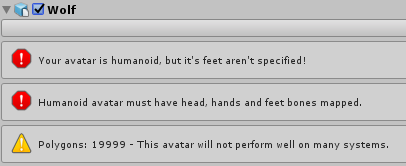
Extremely Tilted right now. Bones move mesh, everything is in order and I can't for the life of me figure this out. https://i.imgur.com/c3Bt06F.png
 olive ingot
@still yew yeah but I can't find anyone that uploaded a Rhaast 3d model...
still yew

Not done by me, just uploading for people who may need it :)
took me 15 second google lol
marble sail
so there's no vid, meh
 misty vector
hey I was wondering if anyone knows what I need to do? I tried deleted the file its talking about but it didn't change anything, I've very confused
olive ingot
@still yew hahaha I already downloaded it and tried to open it with blender. Result: empty model.
still yew
what kind of file is it
olive ingot
.dae format
olive ingot
I'll try thanks
finite phoenix
@misty vector Publish anyway. It's probably buried in the mesh or armature :/
misty vector
@finite phoenix it's not letting me it seems :c
finite phoenix
Get searching 😃
still yew
It says the client will remove it so it should when you run the the unity scripts
misty vector
? x.x sorry i'm kinda dumb and new
spiral sigil
How would you go about doing hair like that? Especially the tail... I have problems even making a concept in my head for this one
misty vector
I did have some log in issues so maybe i'll restart unity and thats the problem
spiral sigil
Just plonk some cyllinders ? A kinda flat cube with subdivision surface and tidious extruding and rotating?
olive ingot
Mh the model havent bones and it's unseparate :\
spiral sigil
anyone has any ideas... TwT
sand dirge
Plonking some cylinders sounds fine
Put cylinder, inset or scale down the end a bit, extrude, inset or scale down the end a bit, extrude...
I guess rotate a bit always too
spiral sigil
Yeah, that would be the easiest way, but would it make them look natural in any way?
sand dirge
actually how would that hair even work in real life
spiral sigil
A lot of preserving and hair spray, probably
misty vector
@still yew @finite phoenix tried relaunching unity still not letting me :/
what files do I need to dig into?
still yew
just the models main body probably
misty vector
like go back into blender and separate things? or go to body in unity and do something? sorry if I'm bugging x.x
marble sail
ok, first pic from distance was... interesting
 hushed belfry
[SNARKS]
hushed belfry
My own boy
marble sail
o
marble sail
I'd want to make model of my fox one day
hushed belfry
DO IT BOYYY
hushed belfry
THEN START never gonna do it if you don't do it
sand dirge
Can someone point me to a good eye tutorial for anime characters
My model is just way too not anime
or maybe I should try downloading a MMD model and looking at it for reference?
hushed belfry
@sand dirge https://sketchfab.com/models/478d25b708354d56b4e0e0585d48ca7f This is a good model for reference

Roll from Megaman, a lot of experimenting went into this one. Mainly the eyes, she’ll always be looking at you!
The eyes have some pretty cool stuff going on
hushed belfry
YEAH YOU DON'T EVEN NEED EYE TRACKING
Just make the eye sockets a pit and put the eyeballs further back in
it'll look like the eyes are following you no matter where you look
sand dirge
Hmmh
Yeah currently it's just like this
there would be "outer eyes" too which are just spheres
with the front part slightly bulged
hushed belfry
GUH THAT IS TERRIFYING
sand dirge
yes I know
hushed belfry
LOOKS LIKE A SKELETON
sand dirge
yes it kinda does
I worked on 3D models for approximately 2 days to get this result
I definitely wouldn't mind someone doing the face for me because it feels really hard
this Roll though
 robust bridge
How do I bring my knuckles into blender?
sand dirge
It is amazing too bad it's not mine
You turn on the blender, then drop the knuckles inside and keep the lid closed
No more knuckles
 whole oriole
Evening peeps, does anyone have a link to the VRC Traders Discord? If so mind DM'ing me with it please?
 nova drum
currently makeing a warforged like avatar in blender

 rich lagoon
spiral sigil
rich lagoon
spiral sigil
it's not a mmd model tho
 eternal folio
okay so
freaking i have my model and i was wondering, if i wanna make it jiggly like the ears and tail, would 1 root parent bone be needed?
like 1 for ears and 1 for tail?
 cedar bear
does anyone know how i change shaders on a model to standard on unity
 clear wolf
Uhhhhh is this going to be an issue in game? https://gyazo.com/93cbff8c7721d345f952f9265e30655a
lmao

 solid heron
Not sure if this is a clientside bug but, certain models i upload are only visible for me and noone else. The models work all fine but they are not visible for people even if its said "loading" for ages.
 bronze shard
@spiral sigil pretty sure it will be big in game, and go through the floor (the things below the grid)
not 100% sure though
clear wolf
I just meant the awkward transparency with the eyes and teeth bugging out lmao
bronze shard
ah, lol
clear wolf
I'm not sure how to fix it and not 100% sure I want to 😂
@solid heron I'm pretty sure that's a bug, I've heard of it a couple times just hanging around in worlds from people and from what I gathered it was a bug. That's just hearsay though so don't take my word for it
 hasty berry
solid heron
hasty berry
solid heron
@clear wolf So theres no way to fix it?
clear wolf
Unfortunately I have not heard of a fix for it. Is it happening with every avatar you upload or just specific ones? You might be able to narrow it down to a common error that they share or something
olive ingot
I need help with Blender. I've imported a .dae model but it is without textures, I have the textures file but how can I apply it on the model?
spiral sigil
Similar issue here, textures are not applied on unity
but on blender are ok
what gives? 😦
old mesa
how do i decimate?
solid heron
@clear wolf Only one spesific avatar that has this problem. I'v deleted it and reuploaded it twice to try to fix it. Yet the same bug occurs. There is nothing special about the model, 2k poly. One thing i might add is that the first time i use the avatar it can be seen by other players, but the moment i change avatar and try to change back its invisible. This is on every hub iv visited.
clear wolf
I use the MantisLODeditor @old mesa
clear wolf
Oh decimating in blender I can't remember, It's been a while
 halcyon ether
Hello there! Just finished with this comission 😃
clear wolf
oh man that looks awesome!
clear wolf
No clue I always start w/ a clean slate
spiral sigil
damn
halcyon ether
make sure it has an avatar descriptor
then when you go to the vrchat, you should see it there
so you just tick the one you want to upload
 spiral sigil
Ooh Thanks VeXx
 celest heath
@old mesa All you have to do is click on the model. Then click on the wrench. "Add Modifier" And then click on decimate.
celest heath
Aaah, no. You'll have to do each piece
old mesa
damn
celest heath
Its actually better that way. Because some things are not as important as others.
for example, you can decimate parts under clothing. But keep faces clear.
old mesa
ty
 neon iron
What are those spheres and how to fix them? because I guess the blue sphere is causing the foot to go out of shoe
 twin merlin
Holy moly, thanks CATS for saving my time with manually doing visemes
on a custom model
spiral sigil
Hey guys, what bones do I need exactly for my character except for the head and spine? My character as of now doesnt have any limbs. Its literally a hovering head with spine
#spoopy
When I TExture Atlas with Cats tool this happens too his face. How do i fix
dull rapids
@everyone who knows who made the penguin in the avatar corridors server?
 vivid parcel
anyone pretty decent at blender I usually use 3ds max and I am trying to replace an arm on a model and could use a mentor ;P
vivid parcel
nah meshes got 2 different arms
one arm is all goofed and I am trying to replace it
so i have new arms sized basically the same that i just need to swap in essentially
 wicked schooner
if I wanted a slight smoke effect
on an avatar, like out of a cigarette, would that be in unity?
bold zodiac
is there a way to merge meshes without screwing up the material settings?
because as soon as i press ctrl+j in blender one of the meshes' textures just goes away
 lofty vortex
trying to make a model of the exoskeleton armor from STALKER for VRChat
this is hell
=w=
vivid parcel
is it as bad as taking a model and replacing the arms because it seems like it should be easy but I am getting triggered XD
spiral sigil
@bold zodiac I dont have that problem I just joined 5 different meshes each with different colour, emit and transparency and it's A-OK
bold zodiac
weird
 true scroll
When I export my model from blender to unity its missing all the materials how do i fix that?
bold zodiac
i'm trying to join my character's body and clothing mesh and when i do the body just goes completely black
spiral sigil
unity sometimes doesnt import materials at all
true scroll
is there a way to fix it?
spiral sigil
it may be that the version we have to use for vrchat doesnt support the materials at all. I have no idea. I know that newer versions import materials from .blender file
spiral sigil
xer1an I havent used unity at all YET. Its just something Ive read on the net
spiral sigil
again a G36 being used in a sci-fi setting
spiral sigil
im no longer surprised
lofty vortex
its like, the early 2010s in that game
spiral sigil
ok, i dont know what the game is, but looked like some sci-fi post-apo
lofty vortex
idk if you would help but... would appreciate it xD
spiral sigil
spenjak18 I have 0 experience with unity as of now and less than a month with blender
and Im not even using any tutorials, just making some shiz in the free time
lofty vortex
it seems people on VRChat are mostly game devs xP
 tame rampart
anybody know where I can download this model?
 sudden tapir
so...weight painting isnt working for me >:
any ideas
or am i on my own
ok then
wicked schooner
So, anyone have any suggestions for particle emtiter assets?
Im gonna try to make a smoke trail for a future avatar
 hollow spire
does anyone know the apporixmate SDK chair prop hight?
wicked schooner
@lofty vortex whats wrong?
lofty vortex
i suck at making avatars and i cant find any avatars that somebody made as a backup
like everyone here is apparently a game developer
sudden tapir
sigh i dont think my model will ever move
 copper slate
https://www.youtube.com/watch?v=KxGRhd_iWuE @lofty vortex

1/1/18 EDIT: Shuzo Matsuoka is a retired Japanese professional tennis player who does motivational speeches like this as a career and is a well known meme in...
What's wrong specifically with the exoskeleton?
lofty vortex
i already have
copper slate
But what's wrong with him?
lofty vortex
everything
copper slate
Come on now
I'm sure the issue is simpler than you think
If you want, upload it and i'll take a look
You've been doing it in Blender, right?
 lean plume
how do import an xps model (With lots of tga texture files) into vrchat via pmx/mmd/fbx?
 last hinge
I'd probably use fbx and not use pmx/mmd as a transport medium
If you are using blender you can get a XNALara importer import your xps work on it and then export as fbx
lean plume
would you happen to have a link to that?
cause ive tried before and whenever i created a texture atlas (using cats) it broke my character and made it look like a tiled wallpaper
last hinge

maybe that?
I don't use blender.. actually I did use blender once to port a mmd to fbx so I can work on it in other software.
But that seems to be an option
lofty vortex
problem is i cant get the SDK and i dont want to waste time with a register
because i use Steam
upper kiln
@lofty vortex you can't use steam account for upload avatar
it has to be from vrchat own webpage account
steam account just like demo show off vrchat if you want to learn how to upload need to get account from them
 fringe yoke
So
Can someone help me?
When I import my model from blender to unity.
Textures are muddled
they look like just one color instead of many colors.
lean plume
@last hinge when i do that, and join meshes / create a texture atlas, it completely breaks the model
copper slate
@fringe yoke post pics
lean plume
i dont have any experience working with xnlara or xps models so i dont exactly know whats going on
fringe yoke
OK getting pictures.
lofty vortex
is Steam falling out of favor?
fringe yoke
It might be CATS plugin muddling my textures.
lean plume
@upper kiln that's what is breaking the textures i think (Cats)
upper kiln
@lean plume i never problem texture using it
could be different uvmap names
on each mesh
need label all the same
lean plume
could i post pics to show exactly what is going on jaz?
upper kiln
@lean plume for each mesh need look at the UV map area see if there different if there Different name them all UVmap
lean plume
@upper kiln the meshes are weird. they have multiple body parts in the names, i will get a pic in a sex
 uneven drift
I am changing a texture in blender and the material updates fine, but the actual mesh to which that material applies does not change, any ideas?
echo sphinx
Would anyone here be able to export a .max file to and .fbx for me?
 wicked schooner
Question
fringe yoke
how its supposed to look
wicked schooner
does the shape of the eyes affect rigging?
 lean plume
 fringe yoke
but the orignal model was 35k polygons and isnt rigged
upper kiln
@lean plume were you tryin atlas it?
lean plume
@upper kiln eventually to import it into unity, but apparently also just found out that there are 0 shape keys on this
 lean plume
is this just for eye tracking?
upper kiln
no it for mouth movment
and blink
you basic move the bone and make blendshape for the model
for cat plugin you only need to make A O Ch
then it make rest
lean plume
ok thank you! what if texture atlasing still breaks model?
lean plume
oh. yikes. never done that before. you happen to have a video link to that too?
upper kiln
VRChat Community Discord: https://vrchat.net/discord Download VRChat! http://store.steampowered.com/app/438100/VRChat/ mmd_tools GitHub: https://github.com/p...
upper kiln
tupper video show how to altas
lean plume
@upper kiln does .mesh ≠ .xps?
last hinge
sorry I had to duck out to a meeting
upper kiln
you export as fbx file
last hinge
you can try importing/exporting as is without doing geometry processing to see if it maintains the data.
upper kiln

VRCat: Community-Run VRChat Forums
This is how you should import and export your mmd models in order to prevent potential issues and remove unnecessary objects.
mmd_tools:
First of all,...
 lean plume
@upper kiln i have done all of that, but what is this you are saying about cats allowing an xps import?
copper slate
@fringe yoke did you use Blender's tri decreaser for the 19k polys?
 lean plume
@upper kiln how do i do that?
fringe yoke
@copper slate Didnt work
or
i didnt use it correcntly
ok
so how i use it
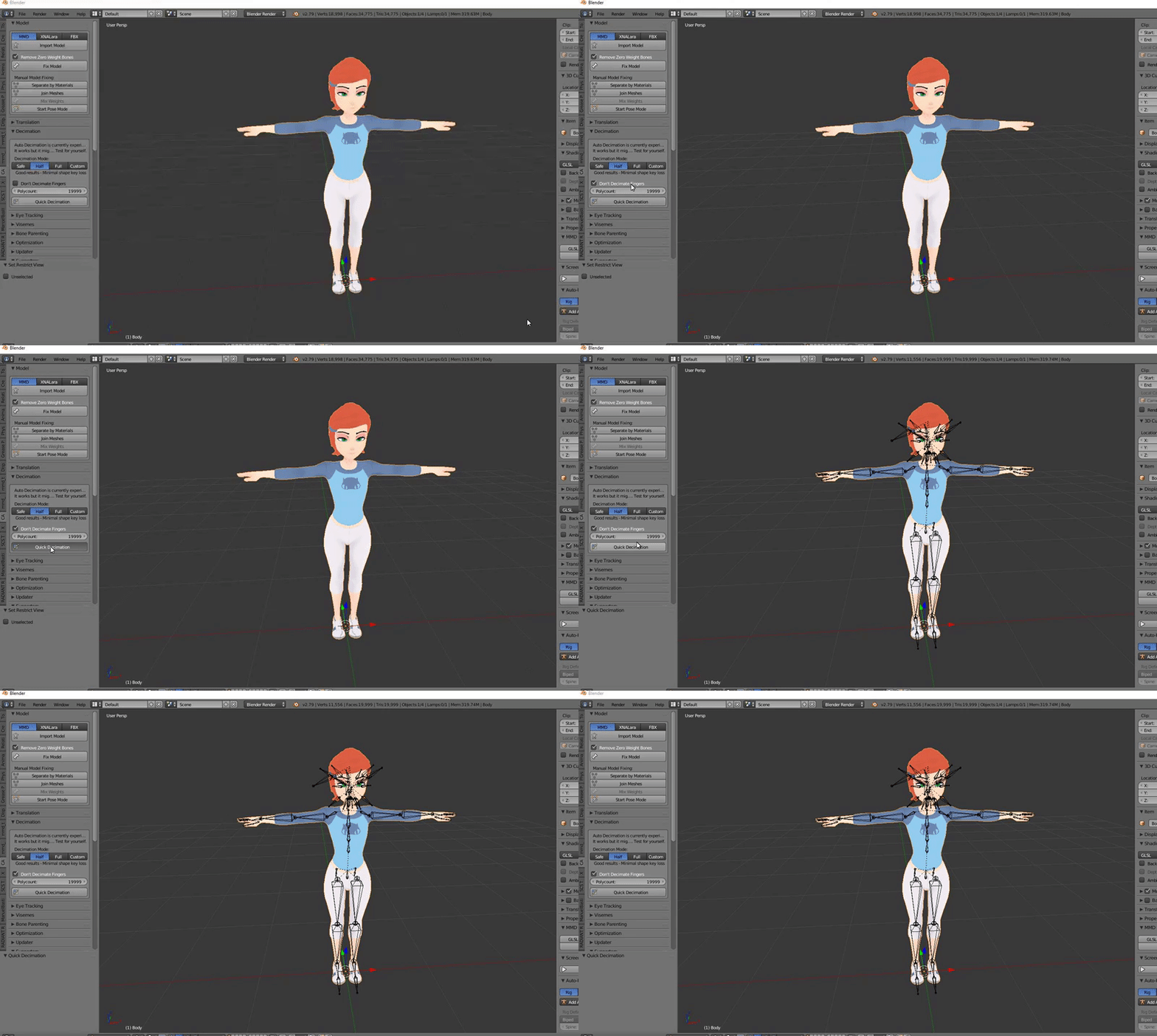
is
import fbx
click on fix model
then
go to decimation
and decimate
copper slate
Hold on
Try importing your model as just a blender file
See if that changes anything
lean plume
@upper kiln i checked for update and it says it is up to date
upper kiln
@lean plume
lean plume
@upper kiln ahhh thank you very much
copper slate
You have to manually insert the textures
fringe yoke
i applyed the textures myself
copper slate
Any improvements?
 upper kiln
@fringe yoke make sure altas texture same folder fbx before import into unity
upper kiln
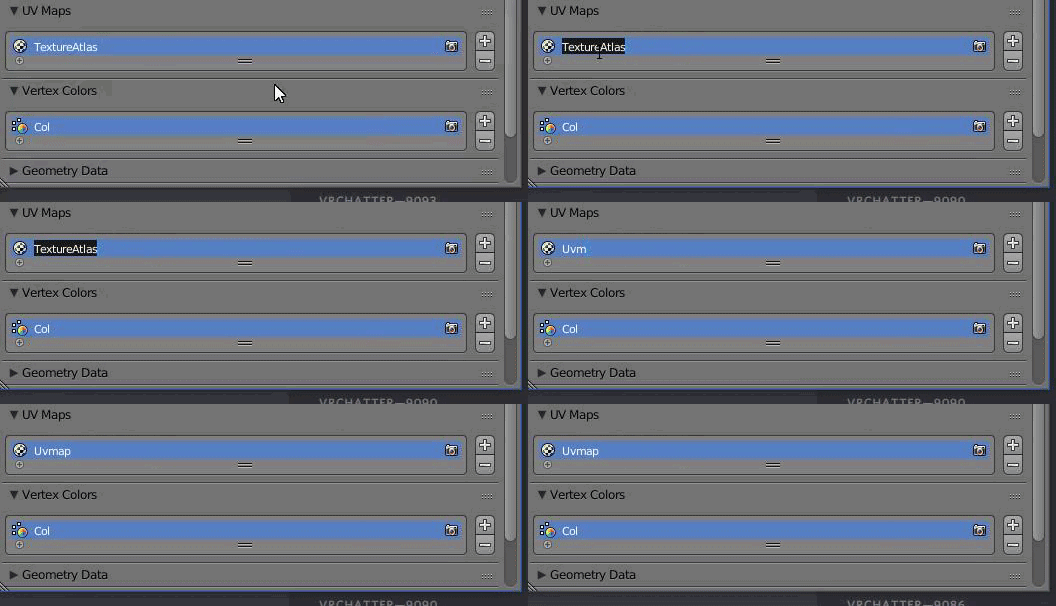
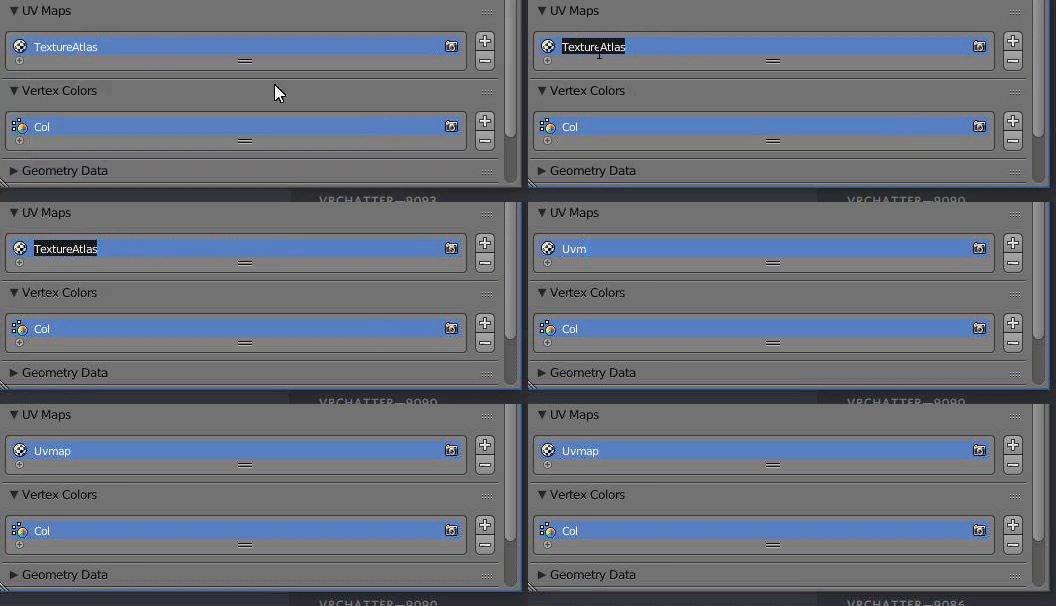
you need to make sure all UVmap on each mesh Label the same
for each mesh name them UVmap
upper kiln
go back to beginng before merge the into one skin mesh render
each part will have this https://i.gyazo.com/95e6f3850aefa13ad1147e7a6295e55e.png

uv maps
name all the same
before merge into one
fringe yoke
ok
upper kiln
make sure it has same letter and captial letter
if one them different letter it wont merge
fringe yoke
how do i rename
fringe yoke
ok
UV1
i set all of the uv maps to that
now i do fix model?
or
do i create atlas first?
 upper kiln
yea
fringe yoke
ok
already done that
i changed all of the uvamps name to one
all of the uvmaps are renamed to
UV1
exactly.
so
what do i do next?
Atlas?
Fix Model?
upper kiln
for xps you have to manual atlas them
upper kiln
well still need manual because cat plugin altas only support mmd
setting
VRChat Community Discord: https://vrchat.net/discord Download VRChat! http://store.steampowered.com/app/438100/VRChat/ mmd_tools GitHub: https://github.com/p...
this good video on it
fringe yoke
ok
well
i could atlas just fine?
so
what do i do after altasing?
oh yeah
i have to get my polygons down
how do i do that
ok
nvm
when i added my model to unity
textures are white
upper kiln
@fringe yoke cat plugin has it own deicmate button
fringe yoke
it doesnt work
upper kiln
it work well on xps models i use on it
fringe yoke
it doesnt do anything
upper kiln
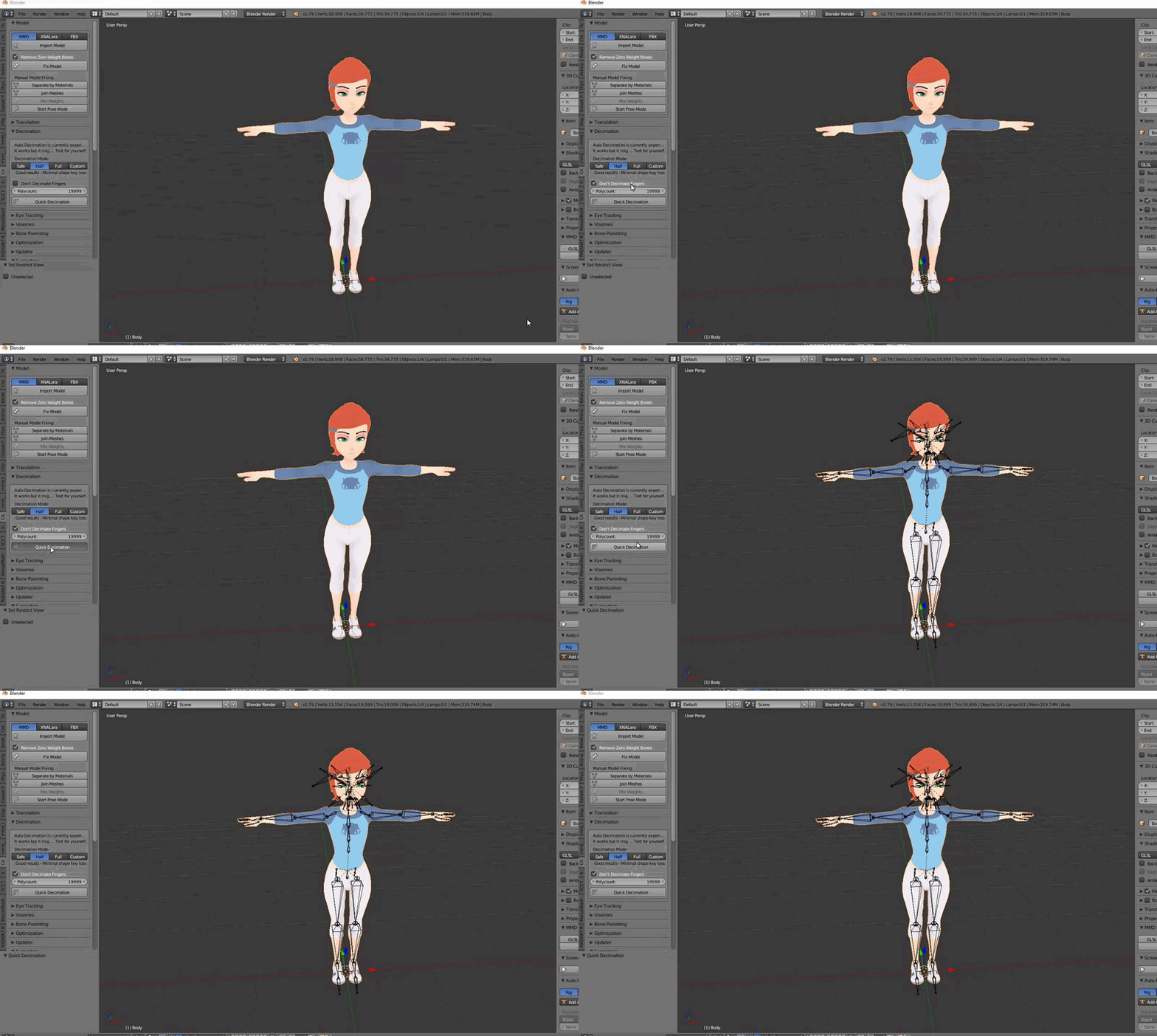
it does somthing look at the tris
 rich mica
eyey, could someone help me with something fast? xD
My eyes on the avatar is too far inside of my head, so when the eyetracking is looking at a specific position, the eyes will disappear ):
How do I move the eye so I can prevent it to happend?
fringe yoke
the tris didnt change
if you dont blieve me
i will show you
well
i rather not
but it doesnt change the tris
upper kiln
@fringe yoke watch the tris https://i.gyazo.com/aec707d5e4e368f44cd2a446003558a8.gif
 rich mica
some big avatar makers said that it will come with a 50k tris update btw
fringe yoke
IT DOESNT CHANGE FOR ME
upper kiln
@rich mica mostly not going happen till they limit material
material need to be reduce before give use more tris
last hinge
Isn't not the tris is the issue? but maps/materials and dynamic bones?
upper kiln
yea but you need limit somthing first
before give somthing
material will ahve to limit
last hinge
yeah I can't imagine all of these miku miku conversions with a ton of dynamics is very optimized.
The most materials I use is probably 2 with a few maps each.
upper kiln
there enough info now for material
i wont mind vrchat add limit to material
the info there now they can change it
fringe yoke
i am getting a gif recorder
 little spoke
I have a question regarding bone rigging for dynamic bone. I have the below knife. I would like the blade of the knife to be bendable, so I have added bones down the blade and assigned each bone a vertex group, then normalized the painting. Posing looks fine in blender, but once I move to Unity, the model does not jiggle. I feel like the bones are not sticking to the model/vertox groups properly and I missed a step.
fringe yoke
proving it doesnt change tris for my avatar
little spoke
fringe yoke
 upper kiln
no your not it get update alot
lol
need update again
click okj
then restart blender
then you have same menu i have
fringe yoke
i have the same menu.
upper kiln
you dont have finger setting
fringe yoke
its up to date
upper kiln
i have finger setting from new development
 upper kiln
fringe yoke
upper kiln
fringe yoke
what the
upper kiln
fringe yoke
restarting blender
gotta update blender
says some features may not work
but it didnt say that before.
my computer is being glitchy.
upper kiln
development get update hourly a day lol
it be buggy
some time
i more advance in 3d model
so i know what im doing with it lol
upper kiln
yea i know lack of grammar more into tech stuff
fringe yoke
updated to latest version of blender
there we go
its acting glitchy
it now starts showing
but
it didnt update.
 thorny fractal
im trying to add another new mesh to an already existing and rigged model but i cant for the life of me get the new mesh to move with the model when i merge everything in the end
spiral sigil
Who is the person who made the knuckles hanging from the noose?
 worthy cypress
i know the shoes are because of the hips being its parent or whatever, no clue how to fix
hips i have no idea
worthy cypress
it was like that
fringe yoke
then fix it
worthy cypress
i didnt touch the rigging
fringe yoke
you dont want your foots to be your hips
worthy cypress
thats the thing, im not sure how to do that lol
fringe yoke
ok
go into unity
import your model
when converting it to humanoid
click convert
worthy cypress
you think you could call?
little spoke
I have a question regarding bone rigging for dynamic bone. I have the below knife. I would like the blade of the knife to be bendable, so I have added bones down the blade and assigned each bone a vertex group, then normalized the painting. Posing looks fine in blender, but once I move to Unity, the model does not jiggle after adding the dynamic bone root. I feel like the bones are not sticking to the model/vertex groups properly and I missed a step.
thorny fractal
i added this little skull pin and i can get it to track to the head when it moves but when i merge the skull mesh with the whole body mesh then it stops tracking, and it all has to be one object
spiral sigil
Who is the person who made the knuckles hanging from the noose?
thorny fractal
if i merge it with the body it wont track anymore
 loud current
 little spoke
It looks like the skull needs to be weight painted completely to the head bone in blender
copper slate
@little spoke you weight painted incorrectly
Err wait
Why is the handle green?
The rest is fine
little spoke
The handle is a different mesh
copper slate
Ah
thorny fractal
Oh
well
there it is
works suposedly now
ill see if it does in unity
ya it works. weight painting was not somthing i tried or knew about so i googled it figured it out and it works
i kept parenting it to a bone and stuff
little spoke
This is me shaking it in Unity:
Not sure what can be happening between being able to pose each bone in blender to Unity not working
copper slate
Not sure I can help i'm afraid
spiral sigil
Question guy`s why dose my model come out red in Vr chat but looks fine in unity
 somber bane
So I have 2d visemes for talking/blinking and they work fine, but I know that in certain lightings in worlds the textures can glitch out. Is there any way to improve the 2d visemes so they dont do this? nbd if there isn't, I'm just curious. (Please @ me if you answer because I'm pretty busy atm sorry)
main lava
HAAHA I FIGURED OUT HOW TO ACTUALLY UPLOAD A MODEL although it didn't work when I uploaded it but that's besides the point I went through the whole process at least once
my model doesn't have offical hands it's limited
I got an animal crossing model and they kinda don't have joints or hands
one of my friends is gonna mess with it and see if it helps
But I got a better idea of where everything is right now
And that’s one step closer to figuring out the model I actually wanted to use this entire time
There’s probably a way to make an existing model low-ply in Blender (or lower ply)
 alpine depot

 solar ibex

Introducing Cerevo's first interactive smart toy, DOMINATOR from the hit anime Psycho-Pass! DOMINATOR features voice and sound effects and a fully mechanized...
i wish u guys want make this one
lol
 worthy cypress
it's happening to everyone atm dont worry
rich mica
like, right now lately?
if so, thank god.. I've been working on this shit for hours xD
worthy cypress
yep, cant get it to upload and neither can the guy im in a call with
worthy cypress
yeahhhhh its annoying af brother, first time went buttery smooth yesterday
just keep at it
i also uh, if anyone knows what i did
rich mica
I'll go to sleep and try to upload it tomorrow
worthy cypress
i happened to hide all of my assets in unity and my position is locked so i cant move
i dont know what i did
rich mica
It's almost 5 am hwere xD
worthy cypress
sheesh you should get to sleep
worthy cypress
that was me yesterday.. went to bed at 2:30 am and it was exhausting
rich mica
I'm still awake af
and its almost 5 am
rip me
but I better go to sleep
cya and thanks for the help ❤
worthy cypress
yes
rich mica
ok, I'll try since ur saying so xD
worthy cypress
go ahead brother
how do i delete the custom avatars that i dont want?
is it just in game or
worthy cypress
right
little spoke
@worthy cypress In Unity, go to the VRChat SDK tab, then Manage Uploaded Content. That will show you all your custom avatars and you can delete them there
worthy cypress
ahh alright sick thanks @little spoke
rich mica
lmao xD
worthy cypress
you have to change the transparency to opaque
little spoke
Has anyone ever rigged something for dynamic bone in blender?
little spoke
I mean making the bones themselves in Blender.
rich mica
ohh, no /:
lofty vortex
 rich mica
only imported avatars that are already been created
worthy cypress
my avatar is big
little spoke
The painting seems right, and the model bends how i want it in pose mode, but when dynamic bones are applied in Unity, the knife doesnt bend when shaken
rich mica
rubber knife?
like a knif that flips away when it hits something?
I dont understand cx
now vrchat crashed again
lel
 verbal solstice
so
im using Unity 5.6.f1 instead of p1 because p1 does not play nice with my drivers.
will useing f1 instead of p1 break stuff?
 upper folio
It's fine I use that version
 barren wedge
Not sure if this is the right place to ask, but does anyone do 3d modeling comissions? (PM if ya do and we discuss from there)
 raw anvil
@barren wedge There is a group for that. It should be posted somewhere in the announcments area from like a week ago. Best of luck!
barren wedge
@raw anvil Oh is there, thank you.
uneven drift
I added a couple of tris and removed a couple of tris in my blender model and now it is suddenly 10x the size (mbs) and breaks in Unity
Any ideas?
 weary sky
I run into this sometimes were there are several versions of an outfit with hidden meshes. How do I make them show? http://prntscr.com/hycwww
 vivid parcel
anyone able to walk me through replacing hands Q~Q?
lol the hands on the model i am working on are bunk
so i found some better ones to slap on
heh slap ahem
anyways need the assistance getting them to look decent
 halcyon maple
https://gyazo.com/b45da649e0d2bb600128b33c4c9865e9 modeling for the first time is a struggle ; u;


 vivid parcel
looks nice
 lament delta
Does anyone have phone model or a pistol model to use as a add-on to charaters
spiral sigil
@lament delta deviant-art is a great resource for stuff like that
 midnight kelp
so apparently this is t-pose? how can i straighten the fingers and still be in t-pose?
lament delta
@spiral sigil I'm looking for a pre built model if it's possible
 stone dagger
help, my model has the mesh there but in unity it just dissappears leaving holes in him :p
copper slate
Might be a thin mesh. Try adding the material and setting an outline of 0
@midnight kelp that looks like you modified the bones without re-parenting and re-weighting. Did you do such a thing?
 pallid storm
@stone dagger first thing, you'll want to change the material of the mesh in unity to opaque, not transparent
my guess as to those missing faces is incorrectly facing normals, though that shouldn't be happening with models made by companies..
stone dagger
thanks guys, some of the stuff were set to transparent by default for some odd reason -.-'
pallid storm
any other issues?
pallid storm
wonderful
 autumn umbra
are there a way to change you emoji
spiral sigil
anybody know why eyes turn whit when the model goes from blender to unity?
spiral sigil
now she looks hypnotised because the eye highlighs are gone
Wait, I figured it out
I just needed to set one of the eye textures to cutout
 orchid tangle
@sour sparrow hey can you help
spiral sigil
Is this the right channel to ask about poly's and models?
spiral sigil
can somene help me i tried as much as i could to get rid of as much tris as i could by going with a vid and im stuck at 49k what can i do
brazen dirge
Are you working in blender?
brazen dirge
alright, did you already use the decimator modifier?