#avatar-rigging
1 messages · Page 159 of 1
 fading verge
I removed those so I could focus on just the tube and this is what happened.
However, I want the tube to "swing" from the top anchor and for the bottom one to move with the tube so now I need to figure out how to do that.
 crisp tendon
your bones need to be placed correctly too
the head of the bone needs to be at the same height as the top edge loop
 thick pike
why is this happening? http://puu.sh/Ftdkx/4064df7297.jpg

i mean, my tail isn't moving while i play any custom animation in VRChat, but it's have 5 bones already
is this inactive, or what? ._.
fading verge
Ninja, chill. You aren't entitled to an immediate answer, people help if they want to.
 manic marsh
wait, your tail is parented to the armature? you have to parent it to the hips
thick pike
wut? i just described the situation more precisely so that they could help me solve it faster!
@manic marsh umm... http://puu.sh/FtdzE/22d68140cc.jpg

ah, nvm... thanks for the answer... http://puu.sh/FtdCp/d361741cda.png
 manic marsh
yeah, it is parented to the armature instead of the hips
thick pike
i move it to hips and try to test it again .-.
@manic marsh yay! thanks so much! http://puu.sh/FtdIv/13b8defc0e.jpg
 manic marsh
👌
fading verge
Top picture is with anchor weight paint (the black disks) and bottom is without anchor weights. Bottom has the tube flexing as intended but the tube's seams aren't staying with their respective halves.
What would be the proper weighting to have the tube flex + have the seams stay anchored at the correct points?
thick pike
i have a small problem with weights, but idk what i can do with it to hide this thing inside the body: http://puu.sh/FtfNw/a2e481a4b3.jpg

 thick pike

 sweet topaz
Not sure how to handle rigging the hands.
fading verge
There's a few programs which can rig up humanoid skeletons pretty well, though may have to make some adjustments depending on the geometry complexity/style of the model itself.
 robust sparrow
hello?
fading verge
Replies/answers happen when they do. May get one instantly, in a few minutes, or several hours later.
Just check back every so often to see if you've gotten one.
sweet topaz
I can rig her myself. What hangs me up is how to properly parents the fingers to the hand bone.
fading verge
I think you can parent specific vertices via vertex groups IIRC.
But I'm relatively inexperienced with Blender so not sure what's the best path for doing that sort of stuff.
crisp tendon
@sweet topaz What issue are you having ?
fading verge
So I've gotten everything to work properly except the part where both halves of the tube meet now.
The currently visible weight paint is for the lower half's connection to the black cap.
So I've probably got conflicting weight paints which're competing for the lower tube's upper vertices.
sweet topaz
https://gyazo.com/8690642ce9e53c1900b754e0abb56573 I don't know the best way to connect the finger to the hand bone.

 fervent hornet
Those bone positions look fine? I'm unsure what youre trying to fix
When you set parent you can keep the offset
sweet topaz
Well that's good. I just don't know how to parent them.
fading verge
Select the mesh, shift-click the desired bone, CTRL-P
You can select automatic weights but results may vary.
fervent hornet
He's just talking about bone to bone relationships, not weighting IIRC. If anything you still want CTRL-P
fervent hornet
Yep, that shows parent-child connections on displaced relationships
sweet topaz
Cool. If that's acceptable, I'll take it, but with the armature there, I could see my fingers need a bit of work.
fervent hornet
Acceptable isnt quite the right word as its the only way to do it. Wrists in video games are always 1 bone so you couldnt really connect it up to each actual finger
sweet topaz
Ah, then that's better. It's nice whenever there's only one right way to do things.
crisp tendon
If you want the best deformation, one trick i learned is to move the 3D cursor in between the selected edge loop around the bone tail
then to snap the bone tail to the position of the 3D cursor
that way it'll rotate around the best point possible
sweet topaz
I got an idea on it. I model just fine.
sweet topaz
I'm using the latest version of blender because it helps me adapt better. (Maya user) I'll bring it down to 2.79 to prepare it for VRC
crisp tendon
why ?
sweet topaz
I have an easier time with the UI.
 last nest
I thought I had fixed my knees (VRoid model) by aligning the knee joints with the hips and ankle (so that they just slightly bend forward at rest, and not forward and inside), but I guess not https://puu.sh/Ftpvl/6fe7b3e408.png

Anything else I could be doing wrong?
(Also any way for me to test out IK on the rig without having to upload the avatar?)
(This is without FBT btw)
 fleet widget
(Also any way for me to test out IK on the rig without having to upload the avatar?)
@last nest check your unity "avatar" setup on the fbx(where you need to tell unity what bone is what). You kight want to add or remove the optional "feet". That fixes it for me most of the time.
last nest
@fleet widget Removing the feet entirely? https://puu.sh/FtvUA/fffeba956a.png

 inland lintel
Basically, brought this model from mmd and it clips like crazy, as well as the ring just floating in the air beside it
@last nest are they perfectly straight from the front? Vroid knees are notoriously bad for not being properly set up from the beginning
last nest
@inland lintel I made sure they are in Blender yeah
I mean I aligned them, and made sure they're slightly bent forward
inland lintel
Maybe try to reduce the bend a bit? That's all I can think of
last nest
I've tried playing around with the bend, but I don't understand why the IK wants really
Is there a way to test this out in Unity? Uploading it every time and going in VR to try it takes a lot of time 😕
inland lintel
Not that I know of
inland lintel
Sometimes you just gotta take the L if you want a model
last nest
I can't take the L if I don't understand what I have to do though lol, this model is really simple afaik, if I can't get this one to work I can't spend days working on my own and then having the same issue 😕
I know some people talked about adding extra bones to fix the IK, but I couldn't find any example or explanation online either
inland lintel
But yeah, I need some help properly rigging the clothing to stay on the body instead of clipping right throug
 sleek isle
@last nest you need to have the leg like this in front view if you want less issue
last nest
@sleek isle I've tried that, made sure the legs were perfectly straight from the front with a little bit of bend on the knees (as suggested here https://vrcat.club/threads/need-help-fixing-legs-bending-inwards-and-crossing-on-model.3101/), applied the pose as rest pose so the mesh gets changed, reimported it
Exact same problem
sleek isle
you have to reaply the humanoid rig
last nest
I've even tried really overexaggerating it, bending the knee joint quite a lot forward to make sure the IK picks up on it, same exact issue
sleek isle
clear roll too
last nest
@sleek isle Reapply it?
I can't seem to apply anything the rig configuration menu unless I make a change
(and I only make the changes in Blender, i assume only the mapping matters right?)
sleek isle
you change the rig so apply generic and re apply humanoid
last nest
@sleek isle What are we talking about, in Unity or Blender?
sleek isle
unity
last nest
@sleek isle Oh I hear you, I'll try that thanks
last nest
@sleek isle Thank you!
 rain frost
@inland lintel here you go watch this. https://www.youtube.com/watch?time_continue=17&v=Tl4qTgwQwYw

Quick intro and guide to skinning/weight painting.
this video is meant for those with a basic understanding of Blender
learn this and then, observe your model structure
paint where its supposed to be painted so that Your jacket or things can move with your body
rain frost
yes
that would be correct if you are gonna throw your jacket onto your character's body
it would use the Body for the clothings too if you want it moved along with your body
inland lintel
Hoo boy
rain frost
@inland lintel However If the jacket was already rigged you can do some short cut keys to automatically apply it to your model
 rain frost
it will be worth it
rain frost
you'll be fine
everything is not perfect so you'll have to come back and check it each time
last nest
You mean you have a coat that isn't weight painted, and you want it to match the body?
last nest
You can transfer all the weights from the base model
inland lintel
how so?
last nest
Multiple ways I think, but you've got this for starters https://www.youtube.com/watch?v=IPQ2QVVIxLU
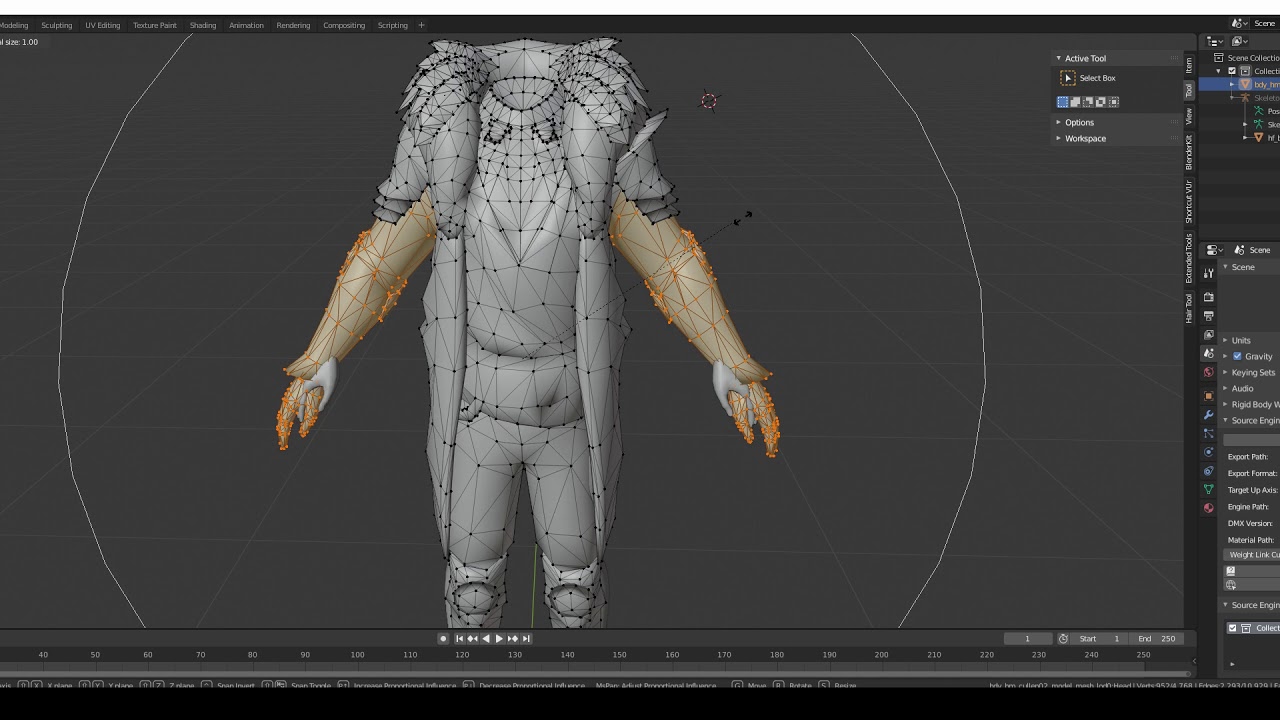
Made for modding DAI but can be used for anything for transferring weights
Also you can automatically rig parts of it, and just do the cleanup manually
rain frost
Thats Only if the jacket is rigged.
not sure if you can do it the other way though
also future reference. Alt + Prnt Screen > Ctrl + V here in this chat will ask for you to upload a screenshot of your application for easier screenshot explanation.
fading verge
Fooni do you have a video you like for rigging from scratch
I think nows the time for me
inland lintel
wait what the hell
it copied the weight painting underneath it onto the coat upon exporting from mmd but it still clips like crazy
Both the coat and the arm underneath it are weight painted
I unintentionally engaged hard mode with this coat ngl
sweet topaz
https://gyazo.com/87796c03a363e2ae1b318a97fea89b26 I parented the legs to the hip, but the dotted lines connect on the top of the hip bone. That normal?
 crisp tendon
are you sure it's your hip bone ?
sweet topaz
It's supposed to be. I'm looking around for guides.
Maybe I could grab any MMD model and look at how the armature's built. Work off that.
sleek isle
yes
sweet topaz
This model of Len shows the hip bone separated from the spine.
Seems okay though.
Yeah if I have any issues, I'll be able to fix it.
 drowsy wharf
@sweet topaz The small end of the bone is where the child should be connected to, yes. The head of those leg bones is probably too high, and the hip is DEFINITELY too low. The Head of a bone (the large end) is where it rotates around.
Your hip should also be above the leg bones for things to work properly, not below them.
sweet topaz
Okay, this is good info. I have more work to do then.
The rigging process is going to be the most difficult part since my classes barely covered it.
We just used Mixamo and went straight to animating.
That'll sort it. Thanks! I also saw somewhere that it's better to make sure the hip, spine and chest bones are completely straight.
fading verge
m\
inland lintel
See any reasons why my right knee would be spasming?
drowsy wharf
@inland lintel isyour leg completely straight on the Y axis? (depth)
drowsy wharf
it should be straight on X axis (left/right), but should have a small bend at the knee in the correct direction.
You can compare the numbers of head/tail of the upper and lower legs.
Hitting numpad 5 will toggle orthographic, and num3 will look from the side too
 covert heart
ok which performs better blender 2.8 or blender 2.79?
sweet topaz
Have you messed with Maya before?
Blender 2.82, what I have right now, really works for me because I have prior Maya experience. They made the ui more industry friendly, but if you haven't used blender before, it wouldn't matter too much?
To keep with the channel's theme, I've found it easier to rig my model in 2.82 than in 2.79.
fervent hornet
You should only use 2.79 if you've previously used it. If you are new to the scene you should use 2.8x
sweet topaz
Correct.
sweet topaz
I don't seem to get local, global, and normal rotation.
Ah, alright.
Hang on. In pose mode, I use local orientation and it looks straight.
sweet topaz
Okay, so far the thumb rotates correctly on the Z axis, while the fingers are on the X axis. Should they rotate on the same axis?
 plucky thicket
would it be possible to rig my model that doesnt have a jaw currently to have one?
for lip sync
plucky thicket
and if so are there any good tutorials
 ionic sinew
Does anyone know whats going on with the rig here? Would it work in VRCHAT? I have a model I'm trying to get working with a Poncho, and found this while looking for references to stop the poncho from clipping on her arms.
https://3d.nicovideo.jp/works/td31884 This is the model being used for reference

ニコニ立体
冬服バージョンのシロをお届けします٩(´ ꒳ `)۶ とっても可愛く作ってもらった衣装でシロのお気に入りです♩ 動かしたり、踊らせたりして楽しんでくださいね(。☌ᴗ☌。)
 leaden ether
hey does anyone here know how i can avoid this? i've never had any avatars fuck up their legs like that
i also tried fixing/moving/rotating the bones in blender manually, rotating them in unity, moving them and everything else i could think of that wouldnt require me to remake the whole rig from scratch
fervent hornet
@leaden ether Show orthographic images from the front and side in blender to show rigging
leaden ether
https://imgur.com/a/PHt97Lg @fervent hornet heres both in wireframe and solid
 fervent hornet
The legs cannot be bent backwards like that, the leg bone should be straight down and then the knees bend forward
Here's mine
leaden ether
ah ok, thanks a lot ill try to do it and see how it goes
fervent hornet
Also this is helpful if you didn't know about it https://docs.vrchat.com/docs/full-body-tracking
VRChat
VRChat supports additional tracking points using the HTC Vive Trackers. These work with the Lighthouse ecosystem to permit these two additional modes of motion capture: Four-Point (4PT): Tracking headset, two controllers, and one hip trackerSix-Point (6PT): Tracking headset, ...
sweet topaz
https://gyazo.com/bed1e34354d243cd244e4546a5f764dd Is there a better way to change the axis orientation than just rotating the fingerbones 90 degrees counter-clockwise?
 plucky thicket
Anyone know a guide to help me rig the jaw of my character
sweet topaz
I know that, but wouldn't it be better if the fingers curled on the X axis rather than the Z axis? Does that matter too much?
fading verge
hoo boy. rigging tutorials anyone?
crisp tendon
Nah just look at the fbx import settings for bones
sweet topaz
Oof
fading verge
@crisp tendon
no like
the original rig is fine
but it dont work
with vrchat
i can dm you the file if you wanna check it out
crisp tendon
you just need to merge bones to end up with the correct armature
plucky thicket
so im guessing i just have to figure out mouth rigging myself
last nest
How do I prevent Cat's plugin from deleting my bones?
I have some extra bones (no weight, and seem redundant) just to simplify dynamic bones, but when I fix model it deletes them, even if I turn off "Connect Bones" and "Remove Zero Weight Bones" in the settings
(Same if I enable "Keep End Bones")
 steel dragon
nooblet question; "This avatar is not imported as a humanoid rig and will not play vrchat's provided animation set" I remember switching it from generic to humanoid once on another model just a few minutes ago but the drop down menu is suddenly gone, how TF to i find it??
last nest
FBX asset in Project folder, Tab "Rig" under Inspector
steel dragon
:?
last nest
Click on the asset, then under inspector there's a rig tab
If it's not there for you send a screenshot maybe
steel dragon
yea theres no rig section
last nest
Well Unity just decided to die on me in a similar way just 5 minutes ago, maybe try WIndow -> Layout -> Default and see if it's there
You're selecting the scene actor
You want to select the actual asset
steel dragon
well i selected something and everything disappeared blargggg, i dont know if i can do this
last nest
Click on the "Untitled" asset at the bottom
 undone quarry
"this avatar does not contain an animator " can someone pls help me with what i am ment to do
 dense stump
Idk if u figured it out yet buuut-
@undone quarry Click on your avatar root in the hierarchy (its the name of the avatar usually, with armature and body under it), in the right on the inspector, click add component. Type in animator. Click it when it pops up. Bada bing bada boom
undone quarry
thanks i will do that when i get the free time
 onyx hatch
So i'm having this issue, that my right leg somehow randomly twists around. I guess this has something to do with rigging, but cant figure it out. Do you guys have an idea why this might be happening?
onyx hatch
fixed already
undone quarry
ok so im having problems with my avatar that it is not able to use vrchat animations like walking anyone know what i did wrong
 deep heart
Delete that upper chest bone
It says neck should be neck, but you have neck as upper chest
I think you should consider opening this model in blender and use CATS plugin
It will tend to fix hierarchy issues like what you ran into
undone quarry
ok thanks
 willow flame
Howdy, the control panel states that I need to have my head, feet and hands bones mapped before I can export; but I already have them mapped. Any ideas?
 mild stratus
Map your chest.
willow flame
The model sadly does not have a chest bone, just spine and shoulders
mild stratus
You'll have to add one.
willow flame
alright, thanks
fading verge
how do i adjust bone length?
mild stratus
Scaling.
fading verge
ty
fading verge
what does one do when it tells them that the angle of the thigh and pelvis bone is around 90 but should be 180?
mild stratus
You can mostly ignore it.
 true cipher
Quick question.
I export my MMD avatar from blender 2.79 as an FBX and it never had any bones when rigging in unity
ive re-installed etc
Ive often resorted to simply saving the .blend file and rigging from that in unity, which worked
but the new 2018 blender requirement doesnt let me rig the .blend files like 2017 did
and since I can export FBXs properly I cant rig at all
I would like to know why my blender cocks up when attempting to export FBX mmd models.
 wild crater
Hello people. So my avatars arms continue to clip in the body if they point directly downwards, so I was wondering if there would be a way to limit the angle in which my arms can rotate downwards.
fervent hornet
You should just change the idle animation. An example (and default) can be found in Assets/VRCSDK/Examples2/Animation
wild crater
Oh. Never thought of that. Thank you
 topaz dagger
Heyy queen
So basically i might need you to hop in a call with me so i can explain it fast i don't want to waste your time
rain frost
Hm.....
rain frost
its fine i will
fading verge
Struggling with this again
Which of these do I need to adjust so the the tube flexes properly?
 turbid eagle
probably the first line of vertex should unpaint it leaving it blue i guess
fading verge
Okay, think I got the tube 100% working as intended now!
But now I have this issue
turbid eagle
can you zoom out a litle to see more?
crisp tendon
Is it modeled that way ?
turbid eagle
@fading verge
1-Unpaint the bottom vertex of the bone showed on your first image.
2-Select the next-down bone, select the previously unpainted vertex and paint it again.
hope this works
turbid eagle
do you manage to solve the rig problem?
fading verge
I think so?
I just need the bottom-most part to stick to the tube but the tube itself seems solid now.
I know I'm close to figuring out how.
turbid eagle
if something happens, @ me
fading verge
I think it's something involving the lower tube's weight painting. The shell bone seems to fine.
 fleet compass
i posted this in full body but it doesnt seem to be a full body issue. my gordon model's hip sag and hes left crouching while standing in desktop and standing in full body.
heres his rig
fervent hornet
I would straighten your thigh bones and delete the toe bones
Also your spine is really small so you should normalize it compared to the chest
fading verge
I've heard that moving the knees forward and the ankles back can help with that issue.
And maybe wanna fix the toes bones or remove them entirely.
fleet compass
im gonna remove them, as they arent needed
yeah the rig was... terrible before
hip was below the thighs and sideways
i tried to fix it as best as i can
ill do both of what yall said, ill let you know if it fixes it
fading verge
Well, think I finally fixed the issue after a total shot-in-the-dark.
That's all I had to do.
Other two layers are left as I had them before. Shell doesn't have any paint for the tube itself.
 mortal epoch
can anyone help me with a leg problem with an avatar?
im trying to get into the avatar making thing, and I started with a Rainbow Six model, but the legs keep going bow legged when i crouch
sleek isle
Try to have the rig like this https://cdn.discordapp.com/attachments/390924372782612480/696399638621585488/unknown.png

 static blade
Do the fingers on the rig have to be completely straight for Unity to consider the rig to be in a T-pose?
 eager geyser
even if they're not you can hit the enforce t pose button and it might just do the job itself
@fringe citrus thanks a lot for your rigging video. I had a question about the armature if you don't mind me asking
are all bones from hip to head supposed to be perfectly vertically alligned? something like this?
static blade
(Ah thank you that worked quite well)
 fringe citrus
@eager geyser I can't say for sure, but I'd recommend having a slight backward corner between the spine and chest bone
That's the configuration in tpose-new.fbx in the sdk. I tried doing testing with it both ways, and couldn't get a 100% fix for the issue that it would make sense if it improved (which would be your chest sometimes snapping around strangely when you spin around)
It's also possible that it would influence the "kink" in the spine there when it needs to compress under IK, you'd probably want it to bulge to the back rather than the front to avoid the chest puffing up too much
But yeah, dunno for sure. Also not perfectly straight would probably make sense so it maybe doesn't break down when it tries to compress under IK. I don't have any testing examples to back that up though 🤷 just would makes sense that it could cause a problem
eager geyser
yeah I sorta have this issue in fbt in which when I lay down the chest feels like it's higher than it should be
looking at the tpose-new.fbx in blender I notice that the neck is also tilted forward, do you think I should do the same in my avatar or keep it perfectly vertically aligned with the head and chest? @fringe citrus
fringe citrus
@eager geyser I'd have it tilted forward (the neck) I basically go when in doubt go with the relative orientations from tpose-new.fbx
an exception being the hip to thigh alignment
hip should be closer to straight above
the alignment in tpose-new.fbx actually causes a slight tilt
but still advisable to be very slightly behind for the reasons above
eager geyser
you mean this one right?
oh
nvm
default armature was something like this
you mean it should be even more slightly behind?
like
this? @fringe citrus
yeah just rewatched the video
nvm thanks
fringe citrus
@eager geyser I was afk yeah I mean above it and slightly behind the vertical line that would extend up from the thighs*
You want the line you'd draw from the thighs to the hip to basically point straight up, but be mathematically behind, could be imperceptibly so visually
could be .0001 behind or something if you wanted
and even then I'm not sure, but rather than recommend exactly above I'm recommending the same relative direction as tpose-new.fbx just because I wouldn't recommend differing from that unless I've uploaded test avatars to confirm you should
sleek isle
the top of the thigh to the bottom of the chest are all mathematically on the same value. dont think they have issue
fringe citrus
tpose-new.fbx looks like this:
but having the hip bone that far back causes a hip tilt. I've tested with avatars to confirm that, but otherwise unless I could test a reason not to I'd recommend keeping the same relative offsets as in there
but it's kind of an "if you want my recommendation" thing there. If you're not specifically trying to fix something, and you don't end up with issues with it being mathematically straight for the spine chain, go for it
and actually if you think you ended up with more issues from it being straight I'd want to hear about it. I just don't* wanna go recommending something without a basis/evidence/tests. So if you want my advice, stick with tpose-new.fbx relative offsets except get the hips much closer to directly above thighs
I could probably just throw these in if you want a reference for how I'm doing it:
fading verge
are there any extra bones to be added for better full body tracking performance? by that i mean like extra bones in the arm for example that are weight painted to a specific part of the arm. ive messed with some rigs and meshes like that but im not sure if it actually affects anything.
fringe citrus
you can add twist bones
that's not specific to fbt though
I'm in the middle of updating my stuff for that now that vrc supports it
can get pretty in depth with it actually, here's my wip:
pretty exciting and apparently the constraints that give this support are really low performance impact too
I'm wondering if you could make like a 3 bone (1 per axis) setup like in your head, and then constraint weight a bunch of different hair parts to rotate various amounts inheriting a bit from each axis from the 3 bones as appropriate
as long as they didn't need to be in long chains, you could get a lot of usage out of just 3 dynamic bones
fading verge
but does the extra twist bones actually benefit or look better or something?
fading verge
ah. gonna start rigging my mesh from scratch so was wondering about that. idk how i would do the weight painting for the extra twist bones so im just startin with the basic ones.
fringe citrus
basically you need for example your arm to be moving solidly with your bone when you raise your arm or it'll bend like a noodle, but when you twist your arm it should have a smooth falloff
you can either use vertex masking and paint a gradient, or do a hard chop of the usual weights for that part of the arm and give half of it to the twist bone, then use the blur tool to smooth it out trying to make it look how a twisted muscle would look
 chilly acorn
Hey, I'm new to making avatars, and this has probably been asked 1000+ times. But one of the ears on my avatar isn't staying on the head when I turn it, and I have no idea how to use blender. Any suggestions?
The ear isn't attached to the head bone, but no matter what I do, it wont attach.
fringe citrus
it's likely the ear isn't weight painted to the head
sleek isle
twisted bones goes crick crack
fringe citrus
@sleek isle DRR... DRR... DRR...
@chilly acorn in edit mode select the ear
all the vertices of it
then under "Vertex Groups" in the data tab of your body mesh (looks like a little triangle)
find the vertex group for head
and while still in edit mode with the ear selected click "Assign"
chilly acorn
The vertex groups tab is empty
chilly acorn
Yeah, both ears are
fringe citrus
but one moves with it?
chilly acorn
yeah
fringe citrus
does your other ear have vertex groups?
chilly acorn
Yeah it has the head group
fringe citrus
If the nonmoving ear mesh is parented to your armature just like the moving one, you can click the little + on the vertex groups tab
(on the nonmoving ear)
and make a vertex group exactly named the same as your head bone
and then assign while in edit mode
to that
chilly acorn
That worked!
fringe citrus
👍 nice
chilly acorn
Thank you so much
fringe citrus
no problem
thick pike
any ways to copy one part of weight paint weights and past it in over side of model?
 vivid temple
Mirror weight painting to another side?
thick pike
yeah, but i have weight already on the one side
can i just copypast it for another one? ._.
thick pike
it looks good for one side: http://puu.sh/FvnTt/f99b5640da.jpg
but ugly and wrong for another one: http://puu.sh/FvnVq/76dcb19449.jpg


so, i did something wrong, i think
vivid temple
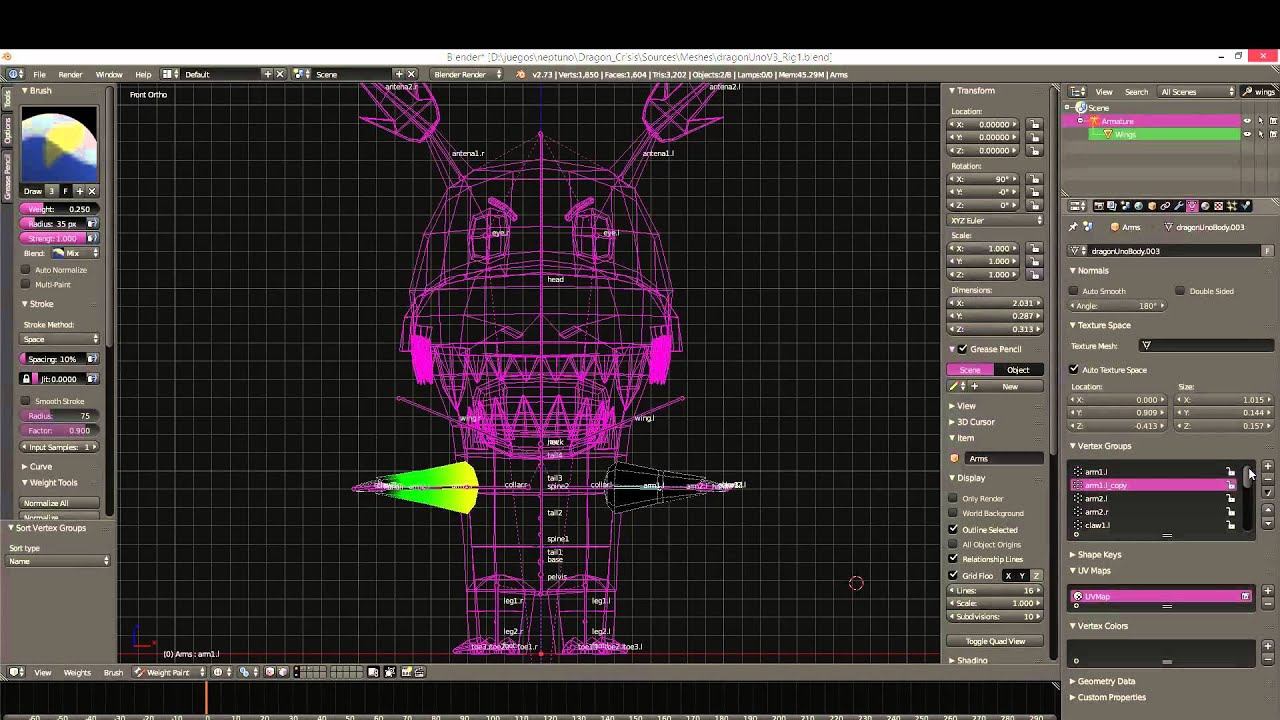
A quick description on how to mirror weights in Blender.
The little dragon I used as an example belongs to an Android game, I published at:
https://play.google.com/store/apps/details?id=com.scaredGhost.dragonMatch
thick pike
heh, it's for 2 same things, like arms, but i need to select half of the chest part and somehow to copy weights in mirror mode to another half part of chest...
 inner cedar
Can anyone here help with Mixamo?
I made a symmetrical character, but it's deforming asymmetrically.
Only one side. So the left side looks normal, but the right side looks like a Resident Evil boss.
chilly acorn
Will it cause problems if while configuring in Unity, the bones aren't named things like Hips and Chest?
 sullen sinew
i am having a issue with one of my models keep having this issue i cant seem to fix
 hoary mulch
Will it cause problems if while configuring in Unity, the bones aren't named things like Hips and Chest?
@chilly acorn you can set up the bones manually buit thats a pain.
What i recomend is
Mixamo/Blender-Cats Fix model/ ExportFBX and then unity
that way it works, if you what the eye tracking and visems that would be before FBX export, dont know how advance your setup will be
 kindred berry
Not really an avatar specifically but seems to be a rigging issue anyways
In unity 2 specific bones are not rotating on the proper axes when setting them in an animation (one of the bone transforms pictured, it's supposed to pivot outwards from the edges only), it rotates kind of in the desired direction at first but then goes off at an odd angle.
In blender the bones are set properly at 90 degree angles and the roll on the bones is not messed up to my knowledge so i'm at a loss for what I can do to fix the rotation without having to use all 3 axes to get it to rotate in a single direction
crisp tendon
How does your armature look in blender ?
 wise dove
crisp tendon
wise dove
crisp tendon
cats is a blender add-on, you install it and there's a fix model button
wise dove
aight
 mystic mesa
I have a question, What would cause your leg's to twist inwards but you can only see this issue when you try to go in full body? Everyone else can't see what I see. No one see's my knee's and upper leg's like this, They say it look's normal for them. Like when I twist my own leg like this, they say it looks fine but for me as you can see that is not the case. I just want to know what would cause this?
fervent hornet
You should clear your bone rolls and maybe think about adding twist bones with the new constraints
eager geyser
@fringe citrus tried copying the hip/spine/chest bones from the vrchat t pose fbx but now it caused a new problem when not being in fbt
basically when I walk forward, after I stop, it's like my chest/spine bone tries to adjust itself leaning forward after I stop walking

was thinking if it could be because the spine is tilted backwards or the chest tilted forward
I've had this on other avatars but not this exagerated
hoary mulch
i just check again and now i see that in unity the shape keys are not working, they do work in blender and if i import the fbx to another blender file, but not in unity
am i missing an option somewhere importing or exporting?
 raven folio
Not certain this is the right place, but apparently I can have proper ik legs for a multi-legged creature (eg a spider)?
hoary mulch
yes search for final ik tutorials
dense stump
https://www.youtube.com/watch?v=qOZGBVhGQwc heres the specific tutorial for vrc!

In this video I talk about how to use a whitelisted component called Final IK to create an avatar where it's legs will use inverse kinematics to move. This system is more realistic than using animations or rigid body fixed joints to make the spider legs move.
Time stamps:
0:3...
fervent hornet
I have a discord about it if you have questions, linked in the video.
raven folio
Ah, thanks
 median sentinel
Anyone able to offer some advice? I'm trying to give an avatar an idle animation in Unity (eye blinking to start with), but as soon as I do my avatar turns to the side and crouches up into the test position
To my knowledge I'm only creating keyframes on the eyelids but it breaks the whole avatar
dense stump
@median sentinel Unfortunatley the idle animates your entire avatar while idle. So if you look into the vrchat's default idle, it has it animated to stand. So when making an idle, it's easier to edit an idle that still has the avatar standing up. There's a base in the description of this video that ive used! https://www.youtube.com/watch?v=YzplHWQHGoc&t=403s

This will help you on your journey to make custom Idle Animations, so take it and stuff.
https://drive.google.com/file/d/1Fe_s2LSkKayGxFUWn7YCtcG13O1AyKLW/view?usp=sharing
I make stupid VRChat videos.
Discord:
Jade#0008
-----------------------...
u basically just use the base and then add on whatever you want it to do. ezpz lemon sqzy. dont forget to set it to loop if u want the extra stuff to occur more than just once when ur avatar loads
median sentinel
Thank you, I'll take a look now 🙂
(Why does Greyhound have to have such an alluring voice?)
dense stump
(it adds to the learnin-)
median sentinel
Skipper (or perhaps is it Melon? 😉 ), was it deliberately set to an offset of 403s? The steps Jade / Greyhound goes through is exactly what I've been doing
I think it could be that my avatar doesn't have a base pose
(That could be bulls*** though, I'm a novice)
dense stump
(NICE) and wdym an offset of 403s?
median sentinel
The video link you provided starts part-way through at a part where she creates an animation controller and sets that as the idle animation
dense stump
Oh! No that wasn't on purpose, I had just pasted it from my browser. Apologies I didnt notice!
median sentinel
No worries, I'll watch the whole thing 😁
dense stump
but basically the idle animation she links in the description is basically the default vrc one. So it'll already have it standing. U can then download it, and just edit it to add onto it whatever you want
median sentinel
Oh. :derp:
median sentinel
Skipper, thank you bud, that's gotten me going 🙂
dense stump
Welcome! Glad to be of help!
Dont forget to set the animation to loop if you want it to repeat btw-
fringe citrus
@eager geyser That looks like tweening between the walk/run animation and your pose you've bound in full body. One thing I'd note is it looks like you copied the really really short chest bone from the tpose-new.fbx. It's hard to rig with a chest that short, when I was saying the relative offsets I meant what's in front of what etc... not to the point of getting all the bone lengths the same. I think your old bone lengths in the very first screenshot you showed me looked really good. Also is your neck bone pointed forward in the armature that causes the chest puffing video you showed? I should probably do more testing with exaggerated spine-chest joint angles to see better how things break. Anyway, this one looked really good: https://discordapp.com/channels/189511567539306508/390924372782612480/697739248106733618 I'd say try that with the tail of the chest bone / root of the neck moved back very slightly ( like .001 ) to have the neck point forward, and then have the tail of the spine bone / root of the chest moved back about double that amount (so like .002) to provide a very slight backwards corner there. If that still causes the chest puffing then you can try straight again, or possibly have the corner point forward. I'd be interested in your results if you try a bunch of configurations.
 fresh granite
anyone know how to rig non-humanoid avatars? i'm new to this as a whole, including blender, so i need help with rigging this.
eager geyser
@fringe citrus gonna try this then, thanks
 formal temple
@mossy talon What kind of avatar is it?
 mossy talon
@formal temple Rose head with a normal human body
formal temple
Oh yeah I can do that totally
mossy talon
How much?
 eager tusk
Can anyone tell me if this is problem with vertex groups or something else? Feet keep clipping out of shoes whenever i turn to the side.
Should i cut knee vertext groups to the green line to fix this problem?
Ankles vertext groups
 marsh mango
my model moves up and down slightly when going in and out of sculpt mode for blendshapes - is this a rigging problem or a blender thing?
 velvet copper
might just be that the viewport isn't identical in both modes, the centerpoint is different, it's normal
marsh mango
ok thanks
inner ocd in me is acting up
will it effect my visemes?
entering sculpting makes it crouch, so dont want blend shapes to act up with it
velvet copper
it's just the camera dude
marsh mango
k
 crisp knoll
i need help to put cloths on my character
 languid briar
i got my model fully uploaded and everything went find but when i used my headset i couldnt move my arms or head or anything using my actual body
halp
mild stratus
Make sure the rig is set to 'humanoid'
languid briar
it was
mild stratus
Also make sure there's no errors.
mild stratus
Click 'configure'
languid briar
where do i check that
mild stratus
On the SDK panel.
mild stratus
Ye
mild stratus
Click 'show control panel'
languid briar
ok
mild stratus
Are there any errors or warnings
mild stratus
They look fine
languid briar
like maybe it doesnt know what to do about the shoulder cloak
there doesnt seem to be a large bone inside the head
is that maybe it
but the arms dont do anything either
mild stratus
Make sure there is no dyna bone script on the arms, legs, head, etc. and make sure you have no custom idle anim
languid briar
is there a custom animations tab
mild stratus
send a photo of the inspector.
languid briar
mild stratus
select the root of your avatar.
mild stratus
the parent of that.
languid briar
how do i get to the parent of that what does that mean
mild stratus
The one named 'untitled (clone)'
fervent hornet
Where's the avatar descriptor?
fervent hornet
No custom controller is fine IIRC
fervent hornet
Check to see if that works then, everything else you posted looks fine.
mild stratus
There's an animator, that'd be the problem/
languid briar
the one that said male i just set it to none
fervent hornet
That's your problem then
languid briar
fervent hornet
We have a default male and female animation set, if you set none you have no animation set
fervent hornet
Just set male
languid briar
having the male set wasnt the issue?
fervent hornet
Was the problem arising when you had male set or none set?
fervent hornet
I can promise you having set as male was not the issue so just leave it on that
languid briar
wwtf
i uploaded it and a red error appeared and then disapeared
like in the previous image liek the yellow exlamation point but it was red
fervent hornet
Just see if it works in game
languid briar
k gonna check
 warm smelt
how the hell do you fix this again?
I know I can probably get away with it in Unity by just clicking reset pose in the rig configure view, but like...
fervent hornet
Just move the tails of the bones to the tips of the fingers in edit mode
warm smelt
its not just the fingers
Its every end bone
look at this hot mess
Every end bone is rotated by 90 degrees in relation with the parent bone
fervent hornet
If you haven't made changes you can try reimporting it. There's an option in the import settings that helps with this iirc
warm smelt
so
fervent hornet
Main problem is a lot of programs don't have tails on their bones so blender guesses
warm smelt
I re-imported the original FBX on top but with automatic bone orientation enabled
deleted everything but the armature
deleted the current armature
and set the mesh' armature modifier to the new one and re-parented it
and that did it
fervent hornet
Oh so you're good now?
warm smelt
its fine now yea
fervent hornet
Easier than manually fixing every bone, good luck with the avatar
warm smelt
thanks
hoary mulch
how they make the orb sphere /powers smooth follow the hand without the script??
i tried dynamic bones parenting but its not the same result
fervent hornet
You need to be more specific. Do you want an object to follow your hand?
Best way to do it now is via parent constraints
hoary mulch
no no that part i can do, my question is the delay follow, like its floating around
its easy to do with a script, but vr chat doesnt let you upload with custom made scripts, as far as i know
fervent hornet
Yeah no scripts. What object are you trying to do? If its some sort of energy/powers you can have a particle system in your hands where the particles are attracted to their home but are in world space
hoary mulch
that souns promising, can you link me a good tutorial or how should i search for it?
because i think you cant smooth follow complex prefabs at all
fervent hornet
For a complex prefab I would still recommend dynamic bones. Make a zig zag of empty game objects and set the elasticity lower so it drags behind. I dont know of any videos about this topic though
 compact pagoda
hot question for anyone
i've already set-up the avatar for VRChat use but it's got some custom emotes/expressions (i presume) that i have yet to actually put in
how would i go about doing that
 molten tulip
how to create separate roots for back hair bones and front hair bones?
instead of parenting them together in one root hair bone?
 somber flicker
My buddy and I are working on this avatar and it seems like we're having issues with the rig, where his hand is the top of his head. Why would it be leaning forwards this much?
 rapid mauve
@molten tulip create 2 new bones Hair rt_front & Hair rt_back - parent them to head - then reparent bones for hair to new root bones
 arctic elbow
Having issues with index thumbs up ect. Follower the rigging guide lines and it all looks perfectly fine in unity. But in game.. bleh. Any ideas and suggestions would be appreciated as I've ran out of ideas.
molten tulip
how to rig an avatar's foot with long heels/shoes? my avatar's high heel just sinks down to the ground
rapid mauve
@arctic elbow if you have intention for gesture with thumbs up you can edit there with Pavo Studio muscle editor - also vrchat default avatar hand bone group you can check with blender
arctic elbow
@rapid mauve 99.9% sure that the index controller ignores anything put in the override fields for hand related gestures and is locked to rigging. Correct me if im wrong.
rapid mauve
Ahh index / knuckles controllers - not have any exposure to them so idk
 spare herald
drag the hip up in rigging window and use tpose override to see if its still sinking
@molten tulip
molten tulip
@spare herald is it in blender or unity? because I'm not so experienced using either software
spare herald
you can do it in unity
molten tulip
is this that rigging window?
molten tulip
ah okay
 fierce carbon
Does anyone have that reference sheet for how to properly name the bones for unity in VRChat and the requirements ?
sleek isle
@arctic elbow For the index what you can do is un assign the 3e bone. in the humanoid armature and manually rotate it
arctic elbow
If im getting you correctly you mean un assign the thumb distal or last bone in hierarchy then just tweak it a lil soo that bone basically gets ignored. Can probably even animation override it. Thanks for the help if so.
 merry estuary
It's in pinned messages @fierce carbon
fierce carbon
thanks
fading verge
no sure what's wrong with the armature but it sure is making the front area sink inwards.
 somber gale
This is how it looks without moving
the bottom of the next doesnt come with it all the way
even though that part of the neck is weight painted
someone please help
crisp tendon
@somber gale It means those vertices have weight paint of another bone on it
somber gale
thank you!
 kindred hound
Good mornings ^-^
Was wondering how to add rigid body thingy to make move with head?
Has trieds to so far, and sort of moves with but will not look up or down along with head so is lil confuseds 😦
kindred hound
Ooh has got to works, needed to disable kinematic thingy :3
fervent hornet
The configure menu only shows bone to bone relations, since tail bones dont exist in unity it cant show you where the bone is going
The _end bones are created by blender during export if you leave "create tail bones" checked
fading verge
Okay, thank you, so by making it not create that _end piece from the last bone it should work properly?
fervent hornet
It should work properly regardless
fading verge
Okay so no problem there, I guess my issue is when applying dynamic bone to the tail, the part where the bones aren't appearing dont move with the rest of it
fervent hornet
Like completely static? That sounds like a weight painting or parenting issue
fading verge
Okay thank you, Ill look into that
 stable vessel
Hi everyone! I spent the last few hours (8) trying to make ADAM from Unity VRC compatible. I imported him into blender, decimated and optimized his meshes, and redid most of the rigging as it was in no way compatible with VRC or even FB IK. I then weight-painted the individual vertex groups, except for the arms and head, as I first wanted to see how the lower body and shoulders move. So I exported ADAM as .fbx and imported him with some basic materials into unity (2018.4.20f1, + VRC-SDK v.2019.09.18.12.05_Public). After I converted ADAM into a humanoid rig, I was greeted by this monster. Does anyone know what might be wrong? Is there a hidden offset in the bones? Wrong coordinate space? Tiny goblins who mess with his bones? Any help with this is very much appreciated! Thanks!
stable vessel
Gimme I second, I will try that 😄
Nope, still a mess :/
Here`s the bone hierarchy
This is the model in Blender
fading verge
@fervent hornet Hey just wanna say thanks, turns out the toes and tip of the tail had no weight set 

stable vessel
@fervent hornet Oh you're right! Hmm, thats odd. I'll check on it quickly
willow flame
Hello, my model throws me this error about bone hierarchy but Spine3 (the chest) is the parent bone, or am I missing something?
stable vessel
@fervent hornet Unity does not recognizue the upper arms. Maybe this is because I added "wrist-bones" which unity interprets as the forearms?
@willow flame I think you may have too many spine-bones. VRC needs 1x pelvis > 1x spine > 1x chest > 1x neck. But take my advice with a grain of salt sice I am struggling too rn ;D
fervent hornet
Wrist bones are fine, you know you can manually fix the bone selections in the configure menu right?
stable vessel
Yes, I tried to select the arm bones but unity just tells me that the arms are supposedly ntot parented to the shoulders. (I just checked in blender, they are correctly parented.)
fervent hornet
Show me your expanded hierarchy in blender
willow flame
I've worked on previous models with the same number of spine bones, so idk 🤷♂️
fervent hornet
You can have more than one spine bone but they are ignored when properly set
stable vessel
@fervent hornet Here's the heirarchy
fervent hornet
Yeah dunno what to tell you dude it all looks fine. Maybe try on a fresh import
stable vessel
I'll try. Thanks a lot anyway!
fresh import, same result. It seems like unity is ingnoring the arm-bone. IDK why it is doint this. Maybe it is because of the missing weight-paint for this bone...
stable vessel
Fixed!
Got it. If anyone else ever has a similar issue: DO CHECK YOUR WEIGHT-PAINT. Unity ignores all bones that are not weight-painted
fervent hornet
Glad you found the issue. Generally thats a unity thing (for example blendshapes that do nothing are ignored) but I was unaware that it did it for the basic humanoid rigging
stable vessel
Hmm, odd. Did you just import the model or are you editing the bones using other Programms?
willow flame
I imported the model but fixed the hierarchy issue I was having earlier but then it threw this at me
stable vessel
Ok, glad you got the heirarchy fixed but this looks odd. Maybe try to import the model into blender. You can then use CATs VRC plugin and fix the bones. All this does is that it checks for the correct parenting and renames the bones. I guess the VRC SDK is looking for somewhat specific names like "Left foot" and such.
willow flame
Alright I'll try that, thanks
stable vessel
np, good luck 😄
willow flame
That seems to have solved the issue, thanks! 👍
stable vessel
Nice! Have fun with your avatar
 atomic nymph
heres the rigging. how did i frick this up
atomic nymph
i rigged my avatar like this in blender but when i try to put it in the sdk the rigging is different when i set it to humanoid
Bruh ima sleep @ me if you have info for me
manic marsh
oh thtubehd you gotta add the fingers for the avatar to actually work
no need to weightpaint them, just have them there
manic marsh
yeah, but the vrc humanoid requires fingers to work
 candid radish
Ugh Just randomly solved a frustrating issue. If your Inspector keeps getting stuck on "Configure avatar" screen. Its because it keeps locking the screen. Go to where you find debugger and uncheck the Lock tab, problem solved.
atomic nymph
i didnt model fingers. what am i gonna dooooo
manic marsh
just add the finger bones, no need to weight pain them
fading verge
Is it possible to add additional bones to a completed FBX model? (Like for a tail or something so I can use dynamic bones)
And if so, whats the best way to go with this? Unfortunately I don't have alot of experience using blender
 tidal musk
yes you can :D
on the bone that it'd be attached to, press e while in edit mode
from there on you'll have to weigh it
which is what im currently struggling w/ ;_;
but tails and stuff are pretty simple
fading verge
hmm I see where I press e and it stretches out another bone, but I have no idea where to put it or map it etc
lol
tidal musk
what do you mean? o:
fading verge
https://cdn.jjthehusky.net/04152020-56de6bb9-d06b-42cb-bb1e-607b1e9ac7dd.mp4
Kinda like this lol, I assume I have to match it up to the actual mesh, but I'm not sure how to do that
tidal musk
there's no video for me o:
 tidal musk
it should be a child of the hip
 tidal musk
yeah :D
fading verge
yay c:
so im sure I missed something. I tried using the dynamic bones and it looks like it "works" but the mesh doesnt move
https://gfycat.com/ClosedPleasedHoopoe
 tidal musk
did you weigh it?
tidal musk
so
uhh
i dont use blender 2.8 ;_;
i have no idea how to on there
if you have CATS then you can: go into pose mode, right click a bone, right click the mesh you want, and then click weight paint
its a mode
like object mode
but take what im saying as a grain of salt
i dont know how to use blender 2.8
fading verge
Yeah I see pose mode
would I just select the base tails or all of the childen of it?
tidal musk
you'd have to individually click each bone and then weigh the section that goes with it
for example
one second
tidal musk


oh
i was gonna say the arm is split into sections based on the bone
and u can see whats weighed
idk where either ._.
 naive mantle
im running into a issue were my avatar i uploaded from 2017 unity works perfect in full body but my same base reimported into 2018 the full body now kinks the hips and bends the knees the rig was not changed in anyway just reimported to the new unity dunno what happend.
fading verge
may I ask (and if you know) what the normal way would be without cats?
tidal musk
sadly, i dont know
@naive mantle im pretty sure the version of unity VRChat based off of changed
so all old models are now scuffed
wait uhh
yeah
maybe?
im not too sure
naive mantle
its a fresh import to the new unity but if i copy pasted the old one and reuploaded it, it did work but the new but same fbx uploaded as a fresh fbx doesnt work someone told me its somthing with import settings for fresh fbx but i cant seem to find the info anywere on this
tidal musk
aah im sorry, im lost on this subject ;_;
atomic nymph
assuming i didnt model individual fingers is this good enough for hand rigging
crisp tendon
yes
atomic nymph
ok
tidal musk
repost. does anyone know how to fix this rigging
fading verge
you could just use drivers and weight painting i think
not very familiar with all this rigging or weight stuff bc i've never done it before
tidal musk
whats a driver in terms of blender? o:
sleek isle
No
If the fishnet dont have nearly the same topology it will be hard to prevent clipping
stable vessel
@fading verge If you can seperate the net from the arms mesh, you could simply add the net as a cloth and work the shape out with collision constrains in unity.
tidal musk
ooo that'd work but it'd feel awkward having my sleeve move around a ton
since the mesh is supposed to be skin-tight
eager geyser
@fringe citrus do you know the reason and fix for the chest bone pointing up when trying to lay flat?
fringe citrus
@eager geyser that was mostly fixed in the Sept 2019 update as far as I know. The biggest remaining cause is if your hip is in front of your thighs you can get a tilted hip. If the angle is extreme enough it'll mean the chest has to get pulled up when it points to the hips while you lay flat
Extreme example of the hip tilt I'm talking about:
Oh, also if your vrc descriptor viewball is misaligned far enough down it can cause your entire head-chest to shift forward when you tilt your head down as if to look at your toes
When you lay flat it means the head chest would kind of try to "sit up" while you look down across your body
To fix that, raise the height of the viewball. But it shouldn't happen if the viewball is roughly aligned with your eye height. And it doesn't even happen for me when I use the righack to fix shoulder flop and position my viewball around my nose-height
In my testing It only happened if I put the viewball around as low as the neck or top of chest
eager geyser
roger, will play around with the viewball thanks @fringe citrus
fading verge
for some reason today, anytime I try to use the fill brush in blender, it crashes.....i9 9900k, 64gb ram, 2080ti, and it keeps crashing. Yesterday I had no issues. Restarted PC and problem is still there even with a new project file
cant be anything more frustrating than this
crisp tendon
You can assign weight to vertex groups in edit mode instead
 cerulean garnet
Hey I'm currently having an issue with my avatar to where in-game, the avatar is behind where it's supposed to be. I have the avatar set to 0,0 in both Unity and Blender and it's still not centered. The view ball is right on the blind spot of the nose so I know it's not that. Basically what happens in-game is as I move my head around, the entire body of the avatar moved around me. It's like a weird 3rd person view of the avatar
crisp tendon
Make sure to apply those transforms in blender
inland lintel
Basically, I have weight painting on the fluff and everything connected to the head and it still refuses to move
crisp tendon
Looks like it's moving ?
crisp tendon
paint it with the chest too then
crisp tendon
Did you paint it at 1 on the head ?
crisp tendon
where's your neck bone ?
inland lintel
neck bone?
crisp tendon
the thing between your head and chest
inland lintel
i didn't see one
it says it is there but i don't see one
well, the neck is there, it's just apparently a really big bone or something
when i move the neck bone the neck moves
crisp tendon
That might be useful to also have weight paint there for the fluff then
inland lintel
I weight painted the neck too. Nothing.
fading verge
anyone get the "hold on.." for a long time when you upload an avatar fbx to unity? Im not sure why its taking forever, I have a very beefy pc
crisp tendon
@inland lintel Can you show the vertex group values on one of the vertices of the fluff ?
inland lintel
crisp tendon
@inland lintel The menu you're looking for appears with the N key, under the Item panel, it shows the values on a single vertex of your mesh in edit mode
 west moon
Hi, me and another person merged a necklace and glasses to the hip instead of their respective parts (neck & head) any way to undo that and fix it to their parts?
 ancient trellis


click separate materials
in the cats plugin
Anyone have an idea on how to fix my weight painting?
west moon
@ancient trellis i did, there still needs to be 2 armatures it says in the "Custom Model Creation"\
ancient trellis
screenshot @west moon
ancient trellis
ok so click export model
it will say too many meshes
so click join
then go back
and under armature you should only have Body
@west moon
 fallen oxide
someones making sexies
west moon
well.. its for my gf xD
ancient trellis

 west moon
@ancient trellis yeah, i only have body, but that just merged all the meshes, i still cant attach the certain mesh to the neck bone, currently the necklace is attached to the hips
ancient trellis
try clicking fix model
west moon
what would that solve? the parts needs 2 armatures to merge to the neck
west moon
@ancient trellis
inland lintel
@crisp tendon
fervent hornet
Pretty sure he means this menu, where it states what weights that vertex is affected by (may look different in 2.8)
inland lintel
That's weird.
Went in edit mode on the fluff and went into the item menu in N, and it doesn't show anything
fervent hornet
You have a vertex selected?
fervent hornet
You can safely ignore the values that have 0
inland lintel
oh okay
 crystal seal
soooo i uploaded my model into vrchat and her thumb and wrist do this... does anyone know how to fix it? 😅
stable vessel
I would suggest that you look into the wrist and elbow -bones again. Maybe even redo the weight painting. I believe Tupper also explained how to fix "twisting" issues here: https://youtu.be/LrCCl_F9XNs?t=1132
Here's a video on extremely common issues I see with bones and rigging setups, and ways to solve them. I cover:
- Leaving Upper Chest Blank
- Reparenting spine structure
- Reparenting arm structure
- Leaving Upper Chest Blank
- Creating a new root bone for skirts/hair
- Repar...
I also have a question: I am currently optimizing my rigging and I have noticed the moving my head in VRC causes my torso to move a bit more than I am comfortable with. Does anyone know this problem and how to fix it?
 real fog
i need some help with editing mine... specifically, adding different clothes to same models, and getting the textures to stick
whenever I rig in mixamo the skin textures go away
inland lintel
Yeah, I'm still having trouble making the fluff move with the coat. It moves whenever I join it to the rest of the coat, but then I can't put a texture on it.
fervent hornet
What do you mean you can't put a texture on it? It should have its own material and share the uvmap that the body uses
real fog
can someone help me rig my avatar?
crisp tendon
Try mixamo first @real fog
crisp tendon
Export the model with the new clothes and do mixamo again ?
real fog
not clothes, basic body textures
skin tone
i put it in mixamo, but mixamo registers it as purple
I put the file in blender, and when viewing in in everything except Shading mode, it appears as purple and green and such
and i tried to import the original zip file into mixamo, but mixamo says it can't read it correctly.
crisp tendon
Do you have a picture of the color issue ?
crisp tendon
Merge your meshes first then
crisp tendon
whatever you have in mixamo is what you have in blender
real fog
i uploaded the same files to blender and blender had it fine
crisp tendon
looks like maybe inverted normals on the hair
Define fine, because obviously that mesh has issues
crisp tendon
Check normal orientation and the actual materials on the body
crisp tendon
Ah, if the mesh is nude you can remove the NSFW parts, you shouldn't be uploading them with your model anyway
real fog
yes i know
crisp tendon
That's because it's using blender's node for shaders and materials
But it doesn't mean the mesh itself is correct
How many materials are there ?
real fog
looks like 13
crisp tendon
In edit mode, you can chose "select" under a material and see what part of the mesh is used by that material
real fog
im wrong sorry, actually there are 10 materials
ok so how to i make the texture appear in mixamo
crisp tendon
You can't
It's just meant for rigging
You get an automatic rig, you import it back into blender and then you check
Or you make your own in blender which isn't too difficult
real fog
oH
crisp tendon
Plenty of tutorials out there
real fog
giant facepalm
crisp tendon
But I'd be surprised if it wasn't already rigged in the file you have
real fog
but the hair tho
crisp tendon
Check face orientation mode, if not you need to merge the meshes
crisp tendon
No rig apparently from the hierarchy view since you only have meshes
You need to select one mesh, then click A twice then Ctrl + J
And export that to mixamo
real fog
ok that combines it?
crisp tendon
Yes
real fog
mk
ok, exported as .fbx, rigged, putting into unity.
yeah it's still purple and stuff, do I have to import the materials into unity?
c o n f u s i o n
 gentle violet
Hey guys, is there a tutorial out there that someone would highly recommend? I’m just trying to improve what miximo has done and I’m having a nightmare!
crisp tendon
weight paint tutorials for humanoids
ancient trellis
Any idea on how to fix this and make it look right??
first was shoulder 2nd is arm
@ me if you have an idea
real fog
@crisp tendon show me sometime how to do the unity material thing
crisp tendon

Watch this video in context on Unity's learning pages here -
http://unity3d.com/learn/tutorials/modules/beginner/graphics/materials
How to control the visual appearance of gameobjects by assigning materials to control shaders, colours and textures on a renderer.
Help us capt...
 bitter pewter
Eyy. I can't get the visemes to show up in Unity
The avatar I am working on had them working before
bitter pewter
NVM I fixed this issue by updating my VRC unity stuff
atomic nymph
hey. the rigging for this looks fine right. apparently the shoulders are too short
 lofty void
it doesnt look like you even have any shoulders tbh
unity renders bones weird and im not entirely sure but i'd have to see it in blender to actually say
atomic nymph
i had the shoulders go from the neck directly to the arms
lofty void
hm, not sure why it'd say they're too short, then
 spice haven
Hi, I'm having some trouble. Trying to take 2 rigged models and swap pieces between them within Unity. They are ones that use Skinned Mesh Renderer. I move it to the other model, reassign the Root Bone. Then delete the model I took them from. It looks like it works fine at first, but once I upload, the mesh totally disappears.
as you can see, I intend it to look something like this before I have swapped any of the parts on it
and then I move the body components to the new model as you can see in the hierarchy, and assign the updated root node from the armature
yet the pieces are still attached to the original model.. if I move the new model, it doesn't move the pieces that should now be attached, and leads to some weird behavior
I'm working with SDK2 in Unity 2018.4.20f1
Anyone have any ideas regarding this issue? I confirmed with someone else who had the same problem as me
 harsh stag
How do I fix this again? I remember that I had to adjust the bone hierachy on my old one, but this one doesnt use additional leg bones.
 barren quarry
how do you edit finger bone positions, so it is straight and not like this. in blender
and all the other fingers
nvm worked it out
 bitter shuttle
can annyone help me with blender
turbid eagle
?
fading verge
Ask what you need
ancient trellis
My base came with a bunch of twist bones in the arm, are those needed?
or do they help?
Just has a bunch of "random" bones
 jovial anvil
Question: When it comes to make the armature, how do I (In blender 2.8) do 2 things: name each bone and weight paint them?
fading verge
Looks like a generally pretty standard armature. Just check in pose mode if everything moves properly. You can follow the twist bone tutorial using unity if you want to make use of them.
fading verge
@jovial anvil You can name bones in this menu here in and out of edit mode.
fading verge
To go into weight paint mode you can go through this menu here or hit ctrl+tab and select weight paint
jovial anvil
its more that when Im in weight painting, I can't select any bones
fading verge
@ancient trellis If everything moves properly in pose mode, you're probably fine to have a "standard" model
ancient trellis
ctrl + left click the tail of a bone in weight paint mode or edit mode @jovial anvil
fading verge
You can select what vertex groups you want to weight paint here, just make sure they have the same name as your bones
jovial anvil
Ah
I forgot: which options is for making the bones appear over the model?
I again forget
jovial anvil
Hmm...I am still unable to select any of the rig bones in weight paint mode
I can paint, but I can't select the bones
fleet widget
I have not figured out that either. The way i do is go to pose mode, click bone and then go to the mesh and go waight painting..
jovial anvil
See, theres the problem
I can't select the mesh if I go into pose mode
Ya, I can't figure it out.
Also, it seems my model does not want to follow the rig after I parent it.
crisp tendon
what didn't work ?
mild stratus
It's not in t-poseing enough
sleek isle
the no texture clown will visit you tonight
 bitter sky
LOL it has textures I just have not added them yet
darn ok how could I tpose it enough for it to work?
@mild stratus
mild stratus
Use blender to move the arms into a t.
bitter sky
not sure if it will let me :/
sleek isle
everything possible
ancient trellis


Would anyone know why the mask on my skin doesnt work in unity but does in blender
it makes my skin clip through my clothes
sleek isle
the what
ancient trellis
? @sleek isle
merry estuary
@ancient trellis If you are talking about Mask modifier then I believe it will hide verticies in Blender and delete them after you export your model as long as you have Apply Modifiers selected in export settings
stable vessel
Hello, I am currently trying to minimize the movement of my avatars body when I am moving my head. Right now the entire body moves up and forward when I tilt my head up and vice versa. It just seems like the rotation of my neck is very limited. Can anyone tell me if my neck setup is wrong? On a side note: I am experiencing this with basically all avatars, no matter if I made them or if they are already in VRChat, but it is much more subtle there.
 vital root
Any way of testing 2D visemes via unity? For me they work in blender but they refuse to work in unity/VRChat
velvet copper
look for blend shapes on the body, or whatever the visemes are on
vital root
they're properly selected on the whole "AA", "OO", "OH" stuff, but it doesn't move my mouth when I talk
I'll double check, thanks!
vital root
Thanks for the input! Can't find that drop down menu here, though.
I thought that my blendshapes got deleted but they're still showing up in unity if I reopen the .fbx file
@velvet copper
velvet copper
did you do the import setting yet?
vital root
Yeah, rig is already humanoid, materials are ready and "import blendshapes" is checked
velvet copper
then idk, might be upon export that stuff is messing up
velvet copper
try at least changing the name when you export, therefore making a new version
 limpid apex
whats a good rigging hirarchy supposed to look like? ive got weird names on my bones and the SDK doesnt like them
crisp tendon

 limpid apex
alright thanks thats a start
how about the feet? cuz thats the bones im having most trouble with
they are names Left_ankle and Right_ankle and the sdk says they are not linked to a parent
while in blender they certainly are
crisp tendon
Can you show it i edit mode ?