#avatar-rigging
1 messages · Page 157 of 1
 wild owl

 lethal lark
Hey all, I need to fix my avatars neck, as it bends weirdly sometimes, mainly when I sit or lie down on my back or side (with full body tracking). I've heard before about making the neck bone really small, then moving the head bone down and transferring the weights from the neck to the head. Is this the correct way to do it? Are there any proper tutorials for it or is someone able to at least let me know the steps? Thanks 😄
 fringe citrus
@lethal lark Yeah, you can fix that issue by reducing the size of the neck bone and copying weights from the neck into the head. Skipper linked a timestamp to my old tutorial that has that process just a bit above if you scroll up. I'm in the middle of working on an updated tutorial for the new FBT changes since September of last year and I've got a new version of my neckfix in there, basically the differences in the new version are advising people to make a copy of the vertex groups for the neck and head before messing with anything, and also this time trying to keep the neck bone as long as possible while still solving the issue
The old neckfix was for fixing a different issue so, although doing it the old way will work for your problem the tradeoffs are worse
The tradeoff is that you'll get more drift of your view position from your avatar's eyes
Though using the neckfix no matter how you do it will give you more drift there, so that's always gonna be a tradeoff
it's possible to minimize that downside though while still solving the new issue of the rare neck zigzag
I'll have a video guide for the new method out pretty soon. I keep feeling like I'll be done in a couple of weeks and keep getting busy with stuff... but it's getting close. Have about 30min+ of the full guide done so far
lethal lark
Ah ok I get it, I might try the old one first on a new copy before messing about, see how it works out. I'll look out for your new tutorial as well 😄 thanks!
fringe citrus
No problem, yeah as long as you make a copy of the vertex groups it's easy to undo later good luck. I'll probably be linking my tutorial here once I get it done, still won't be for a few days/maybe even week+ yet
lethal lark
If it's that soon I might just wait, not in a rush to fix it really, just something I've been meaning to look at 😛
fringe citrus
Yeah, I'm trying to get it done soon. I just keep getting busy with my day job or getting side tracked. I'm really trying to get it done before a bunch of people pick vr back up for Alyx
lethal lark
Fair enough, good luck!
 fading verge
Alright, so, I've got the basic skeleton rigged up. However, I did each of the limbs separately and I'm not sure if there's a way to merge them?
Blender's not letting me select the individual groups so I can't merge them.
 late current
there's an addon to blender called Rigify
install it
and when you install it, there should be additional section to your "add" tab called Armature
that is expandable
and there should be already a preset of human rig
fading verge
Well, it's fully-rigged already but it'll be useful for other models.
But any advice for combining bone groups?
late current
idk, maybe check on yt or just google it
 drowsy wharf
@fading verge your neck, chest, spine, and hip are the wrong way around, you shouldn't have bones physically connecting your hip to your leg bones, the leg bones should have the "connected" checkbox unchecked.
Generally speaking you also want your shoulders about 2/3rds of the way towards the actual shoulder point and parented to the chest, not the neck.
The root of the model should be the hip, not the...head I think you have it as?
Check the pinned messages and scroll down to see a proper bone hierarchy chart
@fading verge (hit enter too soon, woops)
You also look like you haven't cleared the rolls (select all bones in edit mode and hit ALT+R to reset them to 0)
Your upper legs are not straight down (opposite the hip bone, and upper legs should probably be lower and to the side a bit more at the large end), and with the current outward angle at the knee will make the characters legs bow outwards when you crouch.
Hard to see the wrist/fingers, but it looks like you're missing a wrist bone and you have the first bone of all the fingers parented to the lower arm which will distort a lot of the hand every time you move your fingers.
Also just noticed you have either an extra bone in the head, or an un-needed bone connecting the neck to the chest, and the shoulders are parented to that instead.
and uh, the avatar is probably around 1000x the size it should be.
fading verge
I was going off of basic rigging tutorials and not those tailored for VR, my bad.
How does this look now, @drowsy wharf ?
drowsy wharf
@fading verge you still have an upside down...hip I believe
And your leg bones are probably not straight, difficult to tell when it's on such a scale, and not in ortho view (or the right panel info when you press N and select them.)
It looks like you haven't cleared bone rolls.
Left/right hands differ and lack usual 3 bone chain (not a requirement, just observation, keep if intended)
Right hand has no wrist.
And it looks like you're lacking parenting for the hip>legs and shoulder bones entirely.
fading verge
Fixed the hip!
I tried clearing bone rolls but only partially worked? I tried doing the hotkeys for ortho view but didn't work.
Deleted the hand bones because wasn't sure what you meant exactly.
And I'm struggling to get the bones to be oriented correctly/bind on the points where I want them. I'm flipping some but that doesn't change the point where they bind when parenting.
drowsy wharf
@fading verge go into bone edit mode and hit A until all bones are selected, then hit ALT+R to reset rolls of all selected bones
There is a "connected" option that allows you to offset your bones from their parent.
I believe in blender 2.8 it is under the "parenting" section per bone, you'll have to check though
This is what a hand would usually look like (the first thumb bone is a too large on this setup though)
You can also select the bone you want to parent, shift select the one you want to parent it to, and press Control+P and choose the "offset" option to leave it where it is (can move it afterwards separate from the parent)
 sinful plinth
Hey I didnt know where to post this but does anyone know how I can fix this issue?
 rapid mauve
Is hard to see what the issue is - please explain
 queen ember
i believe the issue is the shirt texture is showing when head is moved back
 fervent hornet
Seems to be a hole where the neck should be connected to the chest, should remove doubles and redo weight painting
rapid mauve
If is hole could be neck parent problem
 tough robin
is there a way I can reduce or fix this issue with the crouching on this avatar? its even worse in vr , the legs just straight up go in to the model
drowsy wharf
@tough robin I'm assuming you're talking about the foot bones going up into the upper leg here with the limited description.
You could try shifting the leg bones closer to the back of the legs (which might cause other issues for rotations...), but that is a pretty severe bend for the default pose. The feet bones don't rotate the way digitigrade feet do, and it'll increase the lower you get....which is probably why it ends up going further into the body...
As is you have an upper leg, a lower leg, and then an angled foot bone which would act similar to how a high heel does in most cases. So your foot bone stays where it is when you crouch, your upper leg rotates up and the lower leg rotates back...your foot bone gets pressed into you upper leg, clipping into it...
You'd need to set up your own rigging to have proper digitigrade legs.
The base IK doesn't move the foot down when you get lower as it's not really designed for models like that.
There are trade offs you have to take into account for digitigrade legs when working with something not made for it. (either weird crouching, or non digitigrade leg movements by binding the foot area to the lower leg, and the toes as the foot)
tough robin
right thank you
I am thinking of just remaking the entire lower body rig with this kind of design instead since this seems to be working well even though its not real digitigrade
thats what I get for using models meant for animation in a game
fervent hornet
I've used digitigrade fine but it wasn't as pronounced as that, I would think faking it is probably for the best.
fading verge
So I used an auto-rigger that also did weight maps. About 95% of the model turned out well but due to the model itself being kinda wonky in design (it's pretty stylized), the thighs got semi-attached.
Trying to fix that, ended up with this issue
How do I make it so the model doesn't "rip" like this?
fervent hornet
Either remove the double vertices or duplicate the weights of the verts that are moving to their doubled verts
tough robin
this should work better
fading verge
Thought I removed the doubles earlier...
fervent hornet
They might not be exact doubles, you should be able to increase the distance that is considered
fading verge
How would I go about doing either?
fading verge
I separated the thigh from the main body and I cleared doubles for both parts.
Should I recombine and then separate again to see if that works?
fervent hornet
Sure? You dont need to separate as remove doubles only applies to selected vertices
tough robin
well now its even worse
can someone please help out with the bone structure ? i tried following a working one from other avatars but it just made it worse tbh
fervent hornet
Does it look fine in the configure menu?
fading verge
@tough robin , feel like this clip is relevant to you and perhap to everyone struggling with rigging in general

Visit the blog for music listed and FAQ!
http://dasboschitt.blogspot.com/2009/03/music-used.html
High quality downloadable version at the WeGame channel.
http://www.wegame.com/watch/The_Gmod_Idiot_Box_Episode_7/
Fun fact: For over 2 weeks, this video was the top rated ...
tough robin
can you not remind me of BoSchitt?
dude hasnt uploaded in years lmao
but yeah true
fading verge
Took me ages to find that clip, scoured through all of the vids
drowsy wharf
@tough robin your upper legs are pointing straight up, while it used to work with the old full body fix, I'm pretty sure it causes problems now. Also check the bone position against weight painting, it may be pulling too high up on the body, or the bone isn't in the correct spot for the legs so it's twisting things
fading verge
Can anyone tell me why a few pieces of geometry are disappearing when in object mode?
 main belfry
I have a ripped model from a game. It has enough bones to work in humanoid mode in unity, but for some reason the model is inverted, while the bones look fine in blender. Is there a way I can fix this? or do I just rerigg the thing myself?
fading verge
How do I get the torso piece not to distort when moving the arm + for the sleeve not to look wonky like that when moving?
 sleek isle
weightpaint
fading verge
I originally separated the mesh for the balaclava but decided to remerge it. How do I fix the seem splitting along the original separation point?
fading verge
Think I fixed it!
I think the weight paints are wonky or I need to combine some meshes. Any advice?
 dense stump
if u go into edit mode, select the sections with breakage, and go into tools, there's an option to remove doubles. Make sure never to do this over the mouth of ur avatar cuz then the teeth will combine, but shoulders is ok
fading verge
How it looks in default pose.
dense stump
this'll basically combine these overlapping vertices together so no more tearin!
fading verge
The mouth, jaw piece, and cloth are all separate meshes. I cleaned up doubles for each individually but didn't seem to have helped.
dense stump
Hmm. did u make sure that the underlying vertices were selected too?
dense stump
oh are you on 2.8?
might b called merge by distance instead
you can also manually select the vertices that overlap and merge in middle
ud have to do it one at a time though
fading verge
2.79
I'm considering re-merging most of the head parts since I already fixed the weight paint issue with them.
(Used an auto-rigger and some parts were bound to bones unrelated to them.)
dense stump
i mean you can and also separate em back out after!
ooo gotcha. ive had that problem with autoriggers too
fading verge
True.
This is my first major foray into 3D modeling and rigging but I think it's going rather smoothly so far.
dense stump
aa good!
fading verge
Okay, something's sticking to the paldrons and making them go all screwy when I rotate the chest bone,
The paldrons only have the Chest bone connection and already checked their weight maps so seems like it's another part.
 rain frost
double check the other weight paints
you might have weighted them by accident while weight painting other mesh
 real palm
is there a difference between gravity and force for Dynamic Bone settings?
one tutorial states "- Gravity: The force apply to bones, in world space. Partial force apply to character's initial pose is cancelled out. - Force: The force apply to bones, in world space." but I was unsure what this partial force apply is it refers to
ahh umm, nevermind
https://www.reddit.com/r/VRchat/comments/7wvuof/help_gravity_not_working_with_dynamic_bones/ this helps explain it alot better for anyone else needing help
reddit
2 votes and 4 comments so far on Reddit
rain frost

 novel thorn
can someone help me with rigging
rain frost
post your issues and we can only identify and give you advice at most
the rest you'll have to do
rain frost
you're supposed to use blender as the rigging tool
as far as i know, unity isn't a program for that sadly
rain frost
However, according to those screenshots it would seems as though its already rigged
2.8 blender is recommended and CATS plugins
rain frost
yeah you need to take a look at it in blender
novel thorn
okay i have everything rigged and it works but it has just one problem, it is backwards
any way to fix this?
rain frost
you rotate the model in blender
Z axis, this means sideways
not upwards or downwards
or you can mirror it i guess
novel thorn
how do i mirror things?
rain frost
in blender, ctrl + a in object mode and then ctrl + m
rain frost

novel thorn
rain frost
well then i guess you can just do the original way, you see your model character there? just do a box and highlight over both the bones and the mesh
then ctrl + m
novel thorn
when i do that this comes up, do i have to select a mirror axis or something like that
rain frost
then you select the axis that is the opposite of what your original model was
you said it was backwards right?
rain frost
i'm not sure if its the same, but try this. Use mouse wheel click and hold until you get it.
then just let go and it will auto apply
novel thorn
did that and this happened
novel thorn
i think i did it
rain frost
there you go
rain frost
what do you mean black, you mean its grayed?
rain frost
no idea then, thats probably something that came with your model
novel thorn
damn that sucks, thanks for the help though
 cosmic seal
can someone help me with uploading this avatar?
I found the model online and just started editing the colors for fun and I want to use it now.
I am super duper new to unity so idk how to fix this mesh collider thing so I can upload the avatar.
 crisp tendon
right click and remove it
cosmic seal
the mesh collider?
crisp tendon
yep
crisp tendon
the auto fix button would have also worked
cosmic seal
I tried that but it didnt do anything
I guess the auto fix doesnt like deleting things ig
fading verge
did somebody could help me
 austere rain
I need help
drowsy wharf
we need a description
austere rain
i can't find a video that's 2020 how to make vr chat skins
drowsy wharf
nothing has really changed for basic avatars.
Your avatar looks like it is inside out and excessively large though.
austere rain
i need help fixing this modle
drowsy wharf
An inside out avatar can be fixed by going into blender, selecting the whole body in mesh edit mode, and hitting Shift + N to recalculate normals (the inside/outside part)
Or take the crappy route and use a double sided shader.
Size can be fixed by selecting the model in your assets and adjusting the import scale on the first tab (top right, inspector after selecting model)
Or just scaling the whole avatar in scene.
Compare it to a simple unity cube which is 1m in size
drowsy wharf
it's not going to work if you're not in mesh edit mode
select the body mesh, look in top, select modeling, top left should say edit mode, if not hit tab
hit a until everything is selected, then press Shift + N
rain frost
@fading verge in unity, check the Humanoid Rig Configure
 balmy solstice
I have to ask
Does anyone know what causes the legs to invert inwards for fullbody?
I've checked the roll for the legs and they're both at 0, I've checked the legs and they're in the right order on the avatar rigging
and I did the L test, Both legs are both set up correctly
rain frost
gotta be riggings, you sure other parts of the mesh aren't painted with your legs?
balmy solstice
I've done a kick test and doesn't look like such plus if there were accidental painting on the shoulders (Which I was working on with the model, both legs are obscured by the cape of the lower legs
rain frost
well i have no leads for you, but when i rigged one of my avatars in Mixamo, both of her arms are inward too for whatever reason.
so the only reason i can think of is....probably model design?
i'm not sure
balmy solstice
It's In pose mode so i can edit some weight paints, and It was already rigged.
rain frost
balmy solstice
Prior to my editing it only had 2 thumb joints and no shoulders at all
 glass panther
Might be that the legs aren't pointing straight down as well as the bones.
Seems akward to try and lock into that avatar with FBT. I'm not 100% sure though.
balmy solstice
Pose mode off
I went into the model and the mesh wasn't linked together, i went in to fix that a bit so I didn't get disjointed upon doing any actions
glass panther
Ahh I see then I'm honestly not sure. Does unity give you any warnings about the rig itself?
balmy solstice
In the control panel?
glass panther
Yeah
balmy solstice
The only warning is
But I did do the upside down bone for the pelvis thing
As highlighted here
I had to read again
Oh my god
rain frost
glass panther
:0
balmy solstice
And I recall that flipping the pelvis bone Upside down was a thing
fervent hornet
Not anymore
balmy solstice
How long ago was it changed?
fervent hornet
Couple months ago, they changed how some calculations worked making things like the neck fix and hip fix less desirable/necessary for FBT. The docs are dated as 5 months ago https://docs.vrchat.com/docs/full-body-tracking
VRChat
VRChat supports additional tracking points using the HTC Vive Trackers. These work with the Lighthouse ecosystem to permit these two additional modes of motion capture: Four-Point (4PT): Tracking headset, two controllers, and one hip trackerSix-Point (6PT): Tracking headset, ...
There are no "Full-Body Hacks" in use such as flipped hips, extra leg bones, zero-length or unweighted necks, or other similar changes. These changes can have greatly detrimental effects to rig behavior, and will eventually break with future Full-Body Tracking changes.
balmy solstice
so upon adjusting the waist bone
the crotch now sticks out
and still no changes for my legs
crisp tendon
Post pictures of your armature front view and side view
It's impossible to tell what's going on from your screenshots
balmy solstice
in blender unity or in game?
crisp tendon
Only blender matters
crisp tendon
can you zoom in on the hip part, it's way too tiny
balmy solstice
crisp tendon
ok delete that giant bone going down
balmy solstice
That's for his front piece
crisp tendon
then in edit mode select all your bones and do clear roll
make sure your hip bone is completely straight
but your legs need to be bent
fervent hornet
The hips and legs should be at the same position on the y axis
 naive tree
@balmy solstice https://cdn.discordapp.com/attachments/438185599363710977/665303156821065784/unknown.png

hips and legs on close same axis from side view
crisp tendon
And connect all the bones !
balmy solstice
Better view
fervent hornet
Something to keep in mind is that numpad 5 will change your view to orthographic from perspective. Gets a cleaner view from front/side/ect
crisp tendon
and press 3
now you can see that your spine is angled a lot
that's what causes your hip to shoot up
you want to aim for an armature like the one in Yuumi's screenshot
balmy solstice
like so?
Sorry if I am pestering, I wanna make sure everything is right
Because I really like this character
crisp tendon
much better yes !
make sure it's symmetrical too
your two leg bones are off a bit
balmy solstice
upper or lower?
crisp tendon
lower, at the knee level
 fair prism
Hiyee 😄 anyone willing to share a super basic female base armature+skin fbx that has good proportions for full body tracking?
I am most curious about comparing bone orientations and locations in relation to anatomical things on the body
fervent hornet
While general human proportions are rather similar, its best to design your own models to your own proportions. However a good starter is something like the Xbot or Ybot
 tacit rock
Tell me the problem here
Ive been trying to get someone to fix this for a week but no luck
So might as well ask here for help or to shudders learn
@ me or dm to get my attention
fervent hornet
@tacit rock Your dynamic bones are not weighted to the snake. It's as simple as doing hair if you don't care about hills/stairs
tacit rock
Hills or stairs?
fervent hornet
If you just use dynamic bones with a fake floor it will always be flat. You would need to use final ik to get it to react to hills and such but that's its own problem
tacit rock
Thats why need bones fixed in the tail so i can animate and give the tail dynamic bones
fervent hornet
You have to weight paint them in blender
fervent hornet
Ok? Use something else then it doesn't matter
tacit rock
Can you give me a video tutorial for this?
fervent hornet
It's weight painting you can look it up, especially since I don't even know which 3d modeling program you're going to use
tacit rock
Im gonna try blender
Again even though its crap
Im slow because of autism
So i need the quick detailed explanation
fervent hornet
Most videos on how to weight paint are about 5 minutes as the concept is rather simple
tacit rock
Kk thank you any recommendations?
tacit rock
Bruh
drowsy wharf

Quick intro and guide to skinning/weight painting.
this video is meant for those with a basic understanding of Blender
crisp tendon
pictures would help
all this is a bit confusing
@fading verge
the "wires" and your blendshapes in blender
You need this order
well no, you need those visemes
lowerlid should not move at all
i still don't know what you mean by two months
two mouths ?
by wire do you mean bone and by month do you mean mouth
if the blendshape is created then you don't need the bones
but currently you can't use bones for visemes
How did you do it ?
yes, visemes and hand gestures are two completely different things
visemes is for speech, hand gesture is something you trigger on controller or keyboard
then yeah you can't use bones
you'd need to show me how then
 echo nimbus
You can use bones to pose a face and save those as blendshapes which modellers often do for easier viseme creation
crisp tendon
yeah that's not equivalent to using bones for blendshapes
no worries
well no, you can move the bones yourself and create your own shape
when do the two exist ?
but what about vrchat ?
can you show the issue in unity ?
yeah so look into Cats for blender, that's how you'll create the blinking
as for the mouth i'm still unsure if that's a mesh or not
So what do the eyelids shapekey do on this model ?
Ah well then that's a model issue and you'd need to create them yourself
fading verge
Hi im retro im looking for some one who is willing to do a commision for me ^-^
glass panther
@fading verge I suggest checking out VRC Traders Discord!
fading verge
were that?
 surreal copper
vrctraders first on #community-servers-old channel
 turbid spear
pose > enforce t pose, bottom right
turbid spear
they're probably not assigned right then
check the slots and check that the correct bones are assigned
also check that cats doesn't remove empty bones
 thin rapids
im having a issue with my model
it slightly floats off the ground and the knees dont bend when i crouch
thin rapids
nevermind i fixed the floating issue
thin rapids
But the legs won’t bend when I crouch
dense stump
Is it giving you the fullbody ik warning?
cuz if it is, that's what wont let you bend your legs
the usual culprit of this is that a thumb bone, index bone, and middle finger bone is necessary for it. They don't need to be weightpainted, just exist, so the easiest way is to take ur hand bone and extrude three fingies from it, plug those in where unity asks, and boom
balmy solstice
I have to ask
How do I start the weight painting
I parented the mesh to the Skeleton
But I can't add weights to the individual pieces
crisp tendon
Figure out rigify first, then you can just do weight painting in edit mode by adding weight on the vertex group directly
 stray zenith
Any advice for fixing Full body tracking issues where the Thighs Bend slightly inward?
 velvet copper
bone position, if your leg bone is a bit too much to the back, it tends to happen, Not definite fix
 warm lintel
how do i apply a rig to a model?
like, i just made a model learning blender and i wanna rig it
like, how do i set an armature, and start giving it bones ect
turbid spear
look up a rigging tutorial on youtube
drowsy wharf
@warm lintel
Blender 2.79
https://www.youtube.com/watch?v=cp1YRaTZBfw
Blender 2.80
https://www.youtube.com/watch?v=f2pTkW-1JkE
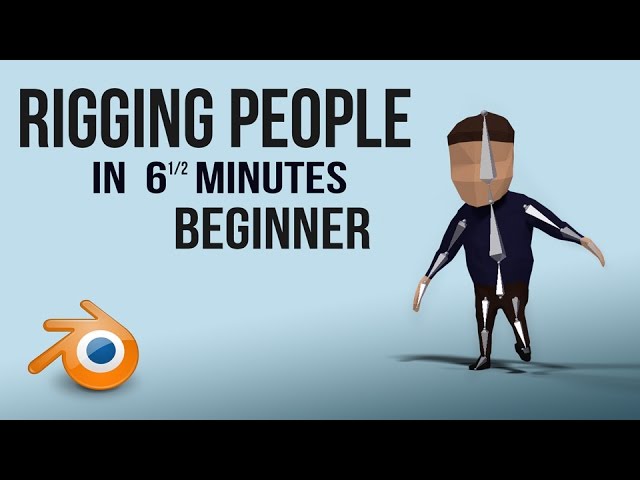
A quick tutorial of how to rig a character in blender
the very very basics. nice quick and simple to get you started.
It's meant for people with a basic understanding of blender
Blender is Free and Open Source Software
The character Rig will be freely available next week on https://cloud.blender.org
Download: https://blender.org/download
Support core Blender development - https://fund.blender.org
--
This tutorial is part of the Blender Fundamentals ...
turbid spear
but make sure it's the same version of blender you're using
warm lintel
yeah i found out
he is almost complete
not much of a feet considering how simple of a model this is
turbid spear
you still need bones for them
you need to have all humanoid bones and the ones that aren't needed you gotta keep unweighted, but still there
check the pins for the required bones
warm lintel
i know of the required bones and i have added them
turbid spear
👍🏻
thin rapids
@dense stump the issue with my model is that it doesnt have fingers
dense stump
thin rapids
ok
 fickle dawn
Hey for the longest time now ive had the trams carts sinking into the ground and i made it way back in blender, the dynamic bones that controls the carts is what i am not sure if its the cause since there not straight when i laid them out or what... i want it straight when turning as it should not the rear end sinking looks weird
as you can see they turn like they should but the back sinks when i take off straight
yea any advise would be great thanks please Ping me so i see your message...
 loud sky
why does my hip keep going sideways when I lock into full body? I've been messing with the bones on this model for hours and it resulted in some improvements, but the hip is still slightly tilted...
this is what the armature looks like atm
dense stump
@fickle dawn maybe a collider?
And @loud sky i recommend showing a sideview in orthographic mode!
loud sky
@dense stump I've made the entire hip>spine>chest>neck>head chain straight as a ruler hoping it would fix the issue
fickle dawn
ok so im redoing my old bones and they were sinking lol im fixing it now..
dense stump
Unfortunately you don’t want stick straight. Tgeres an fbx in the vrcsdk that holds an armature called t-pose new. Its what vrc kinda makes ur avatar forced to fit. More in general tips like top of chest needs to be tipped forward, top of legs a bit forward from hips, eyc. I recommend findin that and tryin to use it as a general guide
drowsy wharf
@fickle dawn if this is for an avatar, I hope those aren't a ton of realtime lights I see. (especially not with shadows)
If it's not for an avatar, is there a reason you're using dynbones?
fickle dawn
ok updated it all good now
and this is an old model i made few years ago, so honestly what ever makes it work been taking stuff off it and making better... lol if you are worrying about it being bad for people is a no.. why would i use this tram if it was bad to give people rides? lol

ok thanks ttyl bye
 potent path
Can someone please help a bro out? I created a new model and everything I wanted works fine except I used mixamo for rigging and the feet are sticking together a bit in game. I don't wanna have to start all over with vertex groups and shape keys for my moving face just because of that so any help would be much appreciated
crisp tendon
@potent path you can bring it in blender and fix that
potent path
@crisp tendon yeah rn im de-selecting all of the incorrectly selected vertexes for each vertex group, should that fix it after re-uploading?
or at least the ones on the meshes that intersect
crisp tendon
I'd need to see it, but that won't help your feet issue
 fathom tapir
I am trying to weight paint an eye lid and it is being a total bitch
I painted it nearly the exact same as my other model and it is using the exact same face but it won't work nearly as well
crisp tendon
Why are you painting the eyelid ?
fathom tapir
for blinking
crisp tendon
Just move the mesh and make that a blendshape
fathom tapir
Don't I need to move the bones that move the eyelids and then press create blend shape?
crisp tendon
Nope, you create a new shapekey, move the mesh, and that's it
fathom tapir
oh...
cool
wish I knew that 2 and a half hours ago 😦
thanks
now the bones are pulling parts of the mesh that are not weighted whatsoever
wtf
crisp tendon
delete the bones and the vertex groups
fathom tapir
and re do them?
fathom tapir
Ruuubrick I did that, made new bones and all that yet it is stilling pulling part of the mesh that is painted solid blue
I even went into wire frame mode just incase there was any mesh under that and painted it and it still does not work
ok i found a fix
while it is tedious as all hell it works
crisp tendon
Fix the vertex groups manually if you need to, it's in edit mode for the mesh
 twilit aurora
need help rigging an avatar on mixamo
loud sky
okay, no matter what I do this model's hips tilt to the side in full body
I have aligned the bones with the sample armature from the sdk
and I've mirrored it to make sure it's symmetric
and also made sure that the bones have roll set to 0
crisp tendon
if that's your hip upside down then you should fix that
also connect your neck to chest
loud sky
that tiny bone is the end of the tail
the hip is right side up, aligned perfectly with the hip from the sample armature
crisp tendon
you should reduce the hip bone size by increasing spine
crisp tendon
for FBT it's debatable, you'll get better results with a smaller hip bone
loud sky
also, should I move the neck bone head or the chest bone tail?
crisp tendon
if you select connected for bone relation on the neck bone it'll be automatic
loud sky
hmm, should the entire chain have it checked?
crisp tendon
it's safer yeah, rather than have the head/tail of parent/child at different locations
loud sky
alright, made the hip a bit smaller, let's see if this works...
nope, the tilt is still there
how much smaller am I supposed to make the hip?
crisp tendon
what kind of tilt is it
crisp tendon
How are you eating your hip tracking and how does it look in vrc ?
crisp tendon
Wearing* lol
loud sky
the hip tracker is on my side. I don't have this issue with any of my other models
crisp tendon
What differences are there between your models armatures ?
loud sky
well, maybe I shouldn't say "my models". it's other people's base models that I modified. I got a nanachi and a hobkin. never had to mess with the armature on either of them.
crisp tendon
Not sure then, you already mentioned clearing rolls, not much left to do usually
loud sky
gonna try making the hip bone even smaller, I think that may have helped a little
unless I'm just imagining things
potent path
@crisp tendon here's what's going on with the feet. I used the Mixamo rigger, the feet were barely clipping while in the program which I didn't notice, and after hours of vertex groups and shape keys, here we are.
crisp tendon
oh, yeah, you need to fix that before importing to mixamo for sure
potent path
Well the problem is that the model comes with the feet already clipping, would I just fix the vertex groups before importing to mixamo or is there more to it?
crisp tendon
you'd need to fix the mesh where it clips
potent path
so basically just move the meshes so theyre not clipping and that should be good? could I do that after exporting from maximo as fbx through vertex groups and manually moving the meshes?
I just don't wanna have to start from scratch with my animations
loud sky
okay, looks like I wasn't imagining things. the smaller I make the hip bone, the less tilt there is...
crisp tendon
@potent path Yeah, that's an option
@loud sky same issue when you wear your tracker in the front ?
loud sky
yes, tracker's position makes no difference
but as I said, it's almost fixed now. it's almost straight already. I'll just have to make the hip bone a bit smaller still and it should be fixed
fading verge
Yeet
fringe citrus
@loud sky I've been working on a rig-hack tweak for the same issue you've been seeing with your hip, if you're unable to fully fix it with shortening the bone (too short might mess up desktop IK also) if you want to DM me I can tell you how I fix it in my avatar.
(I could just post in this channel but rig hacks are kind of controversial and I'm in the middle of working on a video with it included in the walkthrough, so I'll concisely widely explain later in video form rather than have people mess up avatars with an incomplete rig hack)
Would also be good to have another testing result before recommending it widely
loud sky
@fringe citrus thanks, but shortening the hip bone worked for me
fringe citrus
Nice, glad you got it working well enough without needing a rig hack. If you do notice a slight residual tilt later you can also check the video whenever I can get it out. In the case of my avatar the tilt was only about 2~3 degrees
In most cases that range wouldn't matter anyway because it's within how much tilt you'd get with slight changes in your relaxed binding posture
fathom tapir
I have never hated anything as much as I hate rigging right now
loud sky
sure, I'll check out the video once it's out
 minor kite
So i'm encountering a strange issue. I made a model in blender for a commission client to use in full-body VR with the valve index. However, from their perspective they aare subject to a number of issues including: their right arm being dislodged from their shoulder, a slight tilt in their hips, and their viewpoint being shifted down and to their right. From other player's perspectives including my own, none of these issues are present or apparent, only on the client's end. Even stranger is when theyre not using full-body all these issues disappear completely. No matter how much I alter the skeleton or broaden the shoulders or mess with the mesh I cannot seem to squash this bug of their view being messed up while in full-body. Any ideas what this issue could be? Pic related is how they see their avatar.
crisp tendon
Scale up spine, scale down hip
minor kite
i even tried copying the example avatar's spinal structure and that still had the same issues
crisp tendon
And raise the hip bone a bit
Also hip bone needs to be straight
Legs need a bend too
crisp tendon
You can rotate the lower leg in pose mode a bit and apply as rest pose if you want
crisp tendon
You can increase spine more by scaling down the hip
Hip should be 1/3 and spine 2/3
minor kite
crisp tendon
Should work well ! Also make sure to reset bone roll on all bones if you haven't already
minor kite
okay, thank you so much i really appreciate it! i'll post the results here soon
 rotund coral
Rigging noob here. I got a lot of problems with my first avatar, but to start off:
Why are my real feet higher than my avatar's grounded feet?
crisp tendon
Odd proportions/incorrect scaling
You can use the user real height menu in VRChat to try changing that to some degree, but the best changes areade on the rig itself
rotund coral
the proportions are pretty normal, and the avatar is 2 m high with eyes at 1.83 m
minor kite
the fix worked splendidly ruuubick! thank you so so much!
drowsy wharf
normal real life proportions or anime proportions.
When you put your hand on the top of your head, at eye level, and under your chin are they correct?
Hips? shoulders? Knees?
crisp tendon
And toes, knees and toes !
rotund coral
yes, the proportions are correct
drowsy wharf
Can you touch the floor your feet are on?
rotund coral
no, that's the problem
crisp tendon
Are you yourself 2 meters tall ?
rotund coral
i am not that tall, but i set my height corectly in vrc
drowsy wharf
Height settings in your VR program then, steam for vive/index, oculus for oculus
rotund coral
i mean, it's only this avatar that has the problem
normal avatars stand fine
is this really such a rare problem? :S
drowsy wharf
it's a common problem with either height not set properly in/out of game, or anime-style proportions (larger head, longer legs usually)
are you in full body?
rotund coral
if i knew how vrc/unity interprets rigs in more detail, i'd be abe to fix it\
drowsy wharf
bone spacings can mess with avatar setups (hips>legs and chest>shoulders excluded of course)
rotund coral
does > mean higher than or longer than?
drowsy wharf
that was intended to mean the hip to leg connection is excluded from "do not have bones disconnected from parents"
rotund coral
i can report that all bones except hip-legs and chest-shoulders are directly connected to each other
drowsy wharf
without seeing the armature I can't really guess past what I've said
rotund coral
@drowsy wharf
drowsy wharf
upper/lower legs are not equal (nor are they straight so your legs will likely bend inwards when you crouch)
You've got an extra bone for the hip>spine>chest line that could throw it off
Your chest bone is large compared to the spine/hip
Whole skeleton may be a bit high unless the bottom of the feet extends a bit (foot bone should be at ankle rotation point and the end is generally right around the origin point. May be causing it to sink a bit to fit IK to the ground)
Merge spine and second spine bones, enlarge spine and shrink chest slightly.
Fix disproportionate legs, total leg length might be fine though so should have less of an effect
Extra note: Also have extra long wrist bone, most start a little behind the thumb bone, may throw off perception.
rotund coral
thanks, i'll work on that
drowsy wharf
be aware the starting bend of the legs is how the IK system determines which way they should bend.
(bonus note, things are usually easier to set up if it's in a T pose instead of an A pose)
rotund coral
does that apply to arms and fingers?
drowsy wharf
yes, a model already in T pose (as unity expects) is better than fixing it in Unity (it tries but can't always position things correctly)
if in a T pose, the arms should bend slightly forward at the elbow to tell the IK the proper rotation
rotund coral
do you mean the bend should be built into the source skeleton or in the unity configuration skeleton?
drowsy wharf
source works better
technically you could do the adjustments in Unity, again though, generally speaking source set up properly is always better
rotund coral
What did you mean by "foot bone should be at ankle rotation point and the end is generally right around the origin point"?
drowsy wharf
I don't know where you have it set on the model, so it was worth mention where the large end should be
The origin is the dot in the center under your model, the point the game will consider the "ground" technically (before IK kicks in). The red line also works since your origin is at 0.
The small end of the foot bone is commonly at or just under the height of the origin (red line)
So if the model is too high up, slide it down a bit.
I assume you hid the mesh for a reason, seeing it with the bones helps though if not.
rotund coral
i see, i'll fix that too
drowsy wharf
good luck, sleep time
 fossil patio
Someone tell me how to better rig this model to make it better for viseme creation?
Rigging is such a pain in the ass especially when I have to rig the hair and the rig especially with all the face bones normally comes out cursed
turbid spear
Better separate the hair and rig without it, rig the hair separately then combine back
fossil patio
Anything for the face?
When I try to rig the face it’s a cursed
Eyelids don’t weight properly and neither does the mouth insides
With all the effort it would take to fix it it would just be better to make them all manually
turbid spear
Weight paint it manually
You need need that much stuff anyway
Maybe find a model that has face bones and look how it's painted
fossil patio
😩
I’ll do both rig and manual see which is faster at this point
Know for next time
Thanks for the help
sleek isle
In 2.82 you can have a merge double as a modify so weightpaint work better if you have split vertex
sleek isle
For FBT which one tis the correct way
drowsy wharf
@sleek isle far left is closest to correct, though you should usually move the spine>chest connection forwards a little to give it a proper bend there and at the hips.
Helps prevent strange hip/spine movements.
Moving the hip bone just a little behind the legs can also help with weirdness.
If your legs are perfectly straight up/down, give it a slight bend backwards at the knee (the way it normally rotates), can't tell for sure but worth a mention.
sleek isle
if you have fb go try that one in the quest church https://d348imysud55la.cloudfront.net/thumbnails/file_8c20d56a-7a6d-4896-a093-6003113f3613.652975703.1.thumbnail-256.png that one is like the left one
 sleek isle
Everyone have a different answer. How the rig should be. One said to have the spine where it should be in real life and have everything strait from the upperleg to the chest.
 upper yoke
How do I get a Rigify rig into Unity without having to manually delete the control bones in Blender?
Hmm, seems like there more issues than just the all the control bones
Things are parented oddly
 remote kelp
hello
rotund coral
hi
my next noob problem is that my knees go behind me when I crouch
how do i fix this?
drowsy wharf
@rotund coral "Go behind you" as in move past your body? ~~No fix for that.~ Correction, make sure upper/lower leg are of equal size, adjusting the upper leg to be a bit longer than the lower leg can allow it to angle away a bit more. Too much and it'll be wonky though.
Or as in they turn backwards instead of the normal bend direction? Make sure the legs are straight vertically and side to side, and that the knee bends in the correct direction in the default pose. (Doesn't need to be much, a small bend will tell the IK how it should bend it)
rotund coral
thanks
 stark pond
 steady bridge
so having rigging issue iv rigged it robotic hand recently works great in blender very pleased like other hands that iv done but unity keeps breaking it some how any one have any ideas whats causeing this?

even enforcing tpose fingers stay the same
drowsy wharf
@steady bridge your achy breaky fingers are usually caused by a model not being in T-Pose, or having the finger bones not "connected" to each other and pointed straight.
Unity tries to straighten them when it aligns, but it's not always accurate at it.
Also since you have some of the inner sections for fingers bending up, I'd make certain you applied rotation/scale/transforms before exporting. And make sure the basis is the only active shape key just in case you accidentally adjusted without it selected
steady bridge
kk will try that
 stark jetty
@steady bridge Mooie naam, Did it work or nah?
steady bridge
nope made new hands and it works just cant use ones i made this morning so cant figure it out. other hands are identical to ones i used before and they workso idk unity hates the one pair
stark jetty
Check out the Vertex groups if theyre in the actuall groups theyre supposed to be
steady bridge
they are iv built these a while and only pair that breaks all vertex groups are proper
drowsy wharf
@steady bridge you could work around it by manually rotating the bones into place so they sit correctly
also of note, make sure you have the correct export settings
 dawn stream
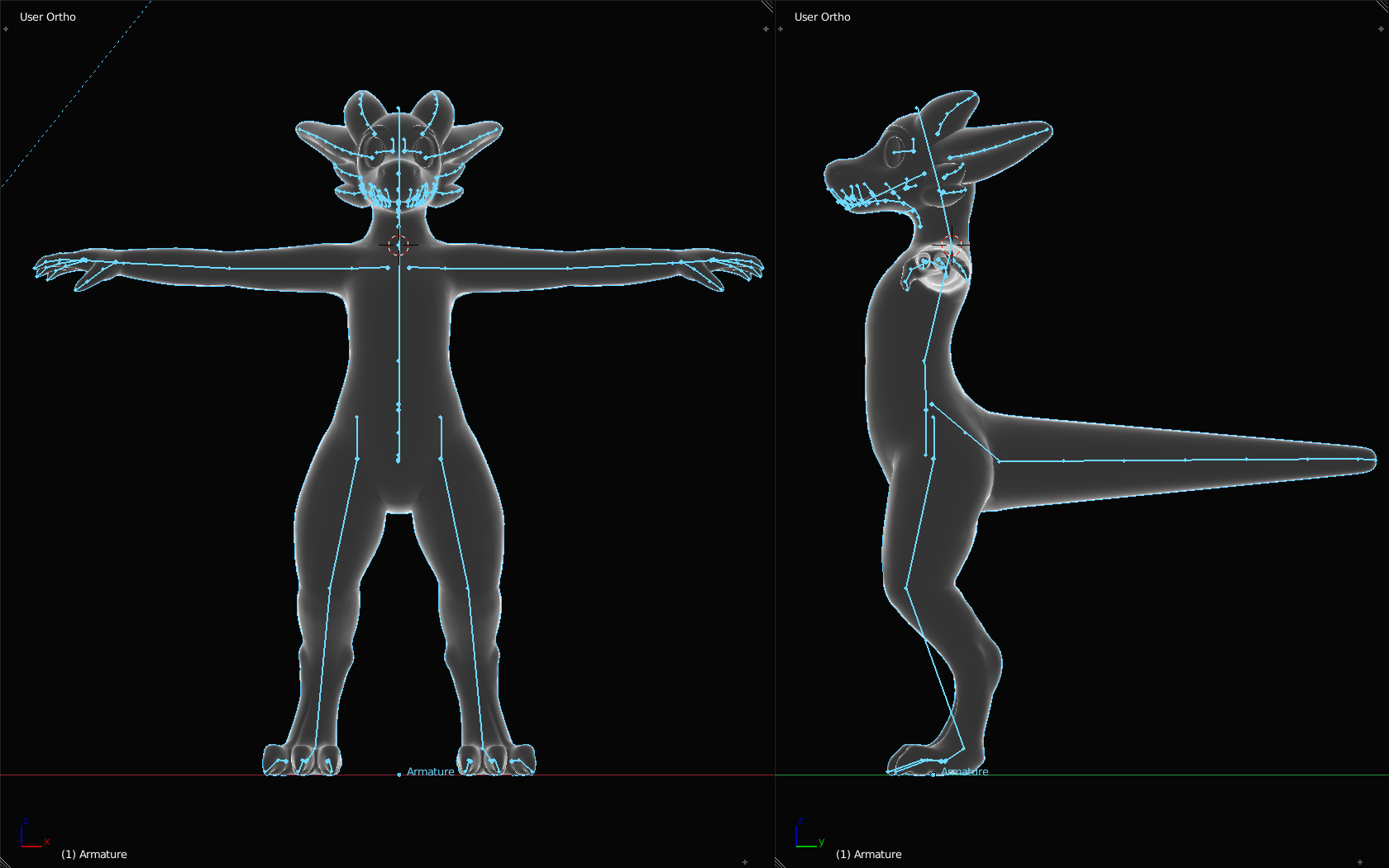
Alright, we've been struggling a lot to get this avatar to have a reasonable full-body lay down experience. We've looked at the neck fix highlighted in this video https://www.youtube.com/watch?v=IqUVFuSD5a4&feature=youtu.be&t=1213 as pointed out by several others answering this same question, but no matter how small we make the neck, it seems to make the situation even worse.
This is the armature that we're working with: https://i.imgur.com/qPCQ6yp.png
Any suggestions would be greatly appreciated.
 drowsy wharf
not used to line bone style (hard for me to see), looks like you're using old hip/upper leg fix from cats, also looks like your chest bone is around half the body length.
If correct, old hip/leg fix is not needed and can cause issues, and the spine should be shortened by increasing the length of the spine.
hip>spine>chest>neck>head should also be connected to avoid weird movement of bones due to IK with full body.
(and because I can't read line bones well) also make sure the head of the hip is a little above the had of the leg bones.
Extra note: with a base pose of outward angled upper leg bones they'll tend to push the knee outwards a bit. Basis pose should have upper leg bone and lower leg bone straight on x axis (can adjust in pose mode and use cats to "apply as rest pose")
@dawn stream woops forgot the mention ⬆️
dawn stream
Ok, so for the hip/fix we know that the inverted hip bone was necessary to make it so that the tail doesn't stick out the front in full body. Not sure if the extra leg bones helped, but we can try removing those extra leg bones while keeping the inverted hip bone.
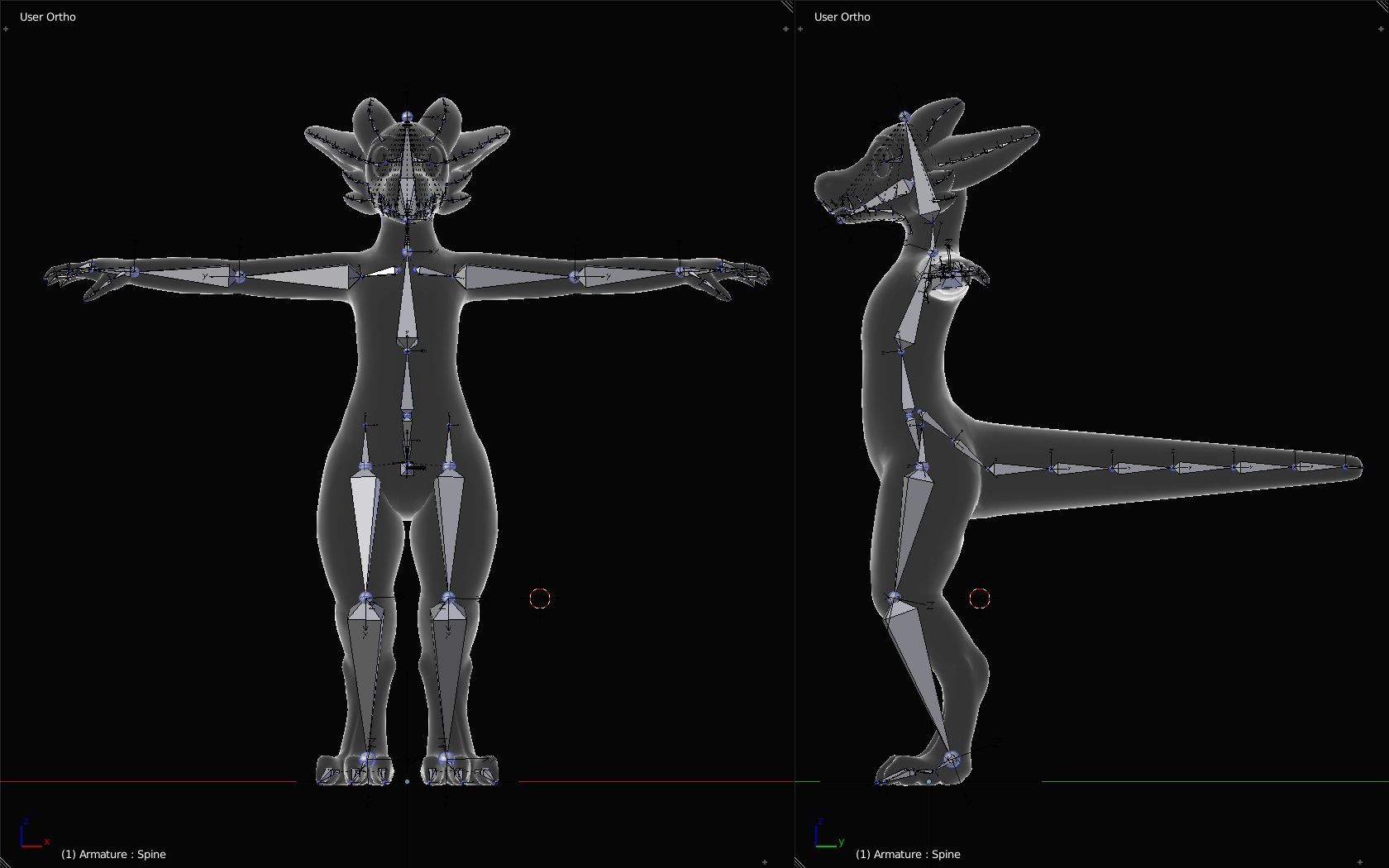
Here is actually a more recent version of the armature with bones that perhaps you can read better. https://i.imgur.com/EE6AM2Q.png
 drowsy wharf
@dawn stream Yep, easier to read, thank you.
You absolutely should not need a flipped hip to prevent a front flipping tail. I have some I've either helped friends with or done myself where that's not an issue with a normal hip. Perhaps someone forgot to apply transforms/rotations before export? I know I've done that a few times...
The flipped hip usually causes issues now (month or two back the IK was fixed)
If you keep the flipped hip, keep the flipped leg bones, they're paired together for a reason.
You can shrink the shoulder bones to almost no size at the head of the upper arm...prevents extra mobile twisting, as they are they have a large range of motion and may be a more major cause of the arm twist when laying down.
for that body twist, it may help to have the spine angle backwards and the chest angle forwards (slide the spine>chest connection backwards instead of forwards
dawn stream
Thank you, this is all really helpful information. We've been largely looking for online guidance on some of these issues and it's been inconsistent at best... Having some definitive answers is refreshing!
crisp tendon
Shoulders just need to be horizontal to the ground
 earnest gazelle
drowsy wharf
earnest gazelle
drowsy wharf
@earnest gazelle entire leg is weighted to the upper leg, foot and lower leg have no weight painting (or are missing/misspelled vertex groups)
earnest gazelle
@drowsy wharf i figured it out, but
im having a issue with the eye tracking now
@drowsy wharf
drowsy wharf
@earnest gazelle What bones did you assign for head/eye bones? What did you assign for blinking?
 elder crescent
has anybody ever experienced the shoulders/arms rotating forward in full body? i very recently got full body tracking, and on avatars of mine where i have shoulder pads that should sit on top of the shoulders, they tend to face forwards when i have my arms resting by my side.
i've been told by friends this is just limits of the current IK system, but i was wondering if anybody has a fix for it?? it's really annoying and completely ruins the look of quite a few of my avatars.
the shoulderplates on this avatar for example, with my arms down by my side, they will face forward.
AFAIK most of the weight sits on the arm bone, but it seems its a combination of the arm/shoulder rotating forward.
sleek isle
Normal vrchat behaviour.
elder crescent
gotcha, guess I'll just put up with it and opt to avoid those kind of things for full body avatars..
wild owl
so i noticed something about the vrchat ik
first one is my view
second is other peoples
notice how the phone on leg
 outer cloud
does anyone have a monika avatar
wild owl
is twisted in my view
yet not twisted for everyone else
meaning the leg bone twists locally for some reason
very odd
O_O
outer cloud
0_0
sleek isle
Bones rotate diferently localy
People should stop staring at themself all the time to see minor issue.
earnest gazelle
@drowsy wharf hey, can I just send you the blend file?
 real steeple
I'm getting the annoying error of the Automatic Weight paint, i had to re-do the skeleton cuz the one that comes with it doesn't work at all in Unity.
Can anyone help me with a tip of what to do?
crisp tendon
make sure your bones are all correctly in the mesh, and that there is no doubles vertices
googling your issues brings up a video explaining how to fix it
crisp tendon
Then there could be holes or bones outside of the mesh
fading verge
You need to scale everything up and apply the rotation and scale
sometimes having things to small in blender can cause that issue
to apply your scale hit cntrl+a to bring up menu
Auto weighting is kind of poo so you gunna have to fix it up after
fading verge
There a difference between animation rig and a normal rig for vrchat? Cause I have a model that was rigged for animation, would there be any issues with it in vrc?
fading verge
In blender I have all my bones but when I move to unity they act like they are gone
rain frost
👌
 vestal wyvern
Hi, what does it mean when an avatar's walking animations and emotes look normal, but their regular stance looks like this?
crisp tendon
drowsy wharf
In addition to what ruuubick said, they should be straight on the x axis
 sour hedge
Was an idiot and completely to take a screenshot, but as I’m planning on building an avatar from scratch, how exactly would I rig it? I have an idea on coloring and all that and I know I need some kind of system to give it bones, which I’ll probably use Unity for (I think that’s the name) But how exactly would I give the avatar bones?
 covert jay
does this look right? are the left and right hips supposed to be connected to the top of the hip bone like that?
 shy willow
 mild stratus
It doesn't exist.
 boreal oasis
damn thats an optimized avatar
mild stratus
Import it as a humanoid
 winter matrix
You have the avatar on the Body and not the top of the heirarchy.
Either that or maybe you remove the Animator from the model?
winter matrix
It'd help to see the error message
 sweet moth
avatar chest rotates with head fbt
crisp tendon
Not until we can see your armature front and side view
glass panther
It would be a little more clear if you use the printscreen option 🙂
stark jetty
@sweet moth Alt+H
If you want your bones to unhide
just play around with the armature until you think the rotation is fine
also you can do weight painting
The bluer it is the more it will be restricted
 oak grove
X-ray mode?
sweet moth
Yea
stark jetty
Alth
sweet moth
I did no difference
oak grove
Does it unhide when you go into object mode?
If it stays the same then it's a different option than alt+h that's hiding it
sweet moth
no its the same
rapid mauve
Look like wireframe mode in weight paint picture
sweet moth
exiting it cant seem to figure that out
rapid mauve
Try alt+z
sweet moth
sadly nope
sweet moth
switches to wireframe shift Z
rapid mauve
This happen when cats in pose mode sometimes - not see armature
sweet moth
any fixes to exit this stock mode
rapid mauve
Have you turn off armature layer is all other fail ?
sweet moth
ticking the eye icon on the Armature doesnt change anything its greyed out dont know how to solve that
rapid mauve
Filters = top right next to spy glass - check there
rapid mauve
sweet moth
@rapid mauve ahhh thank u now i can see the bones finally
so now anyone know a fix to this where my head turns will move the chest in full body
chest rotating with head in FBT
rapid mauve
is probable have bone wrong parent in head should be chest
pose mode - move all bone in head ? see if chest move
sweet moth
hmmm
rapid mauve
if vital bone is in head which move chest - remove weights
sweet moth
@rapid mauve Head can be moved without chest
rapid mauve
ooh - then is possible unity problem - full rotate head also neck with pose mode - body not move ?
sweet moth
the rotation is on the spine bone is what i see in game idk could be something with it.
Yea Eye tracking and visames
rapid mauve
is possible then unity - with unity RIG make sure bone hierarchy correct
sweet moth
let me open unity
rapid mauve
check viseme blink / not move body - can try disable eye tracking with unity - remove eye from unity RIG
sweet moth
could the eyes really cause this
rapid mauve
sometimes yes -
sweet moth
so i remove the visames and eye tracking in blender or unity
rapid mauve
unity for eye tracking - remove eyes from inside rig settings
this dissable tracking for eyes
you have remove jaw bone yes 🙂
in unity
dumb question rly
sweet moth
ok so i set them to none
lol yea i know about that damm jaw bone
rapid mauve
yes none -
sweet moth
alright uploading idk if its eyes then damm losing the eye tracking is sad
hopefully its a simple issue
does the bone hierarchy look good?
ill get in game and test the one without eyes
rapid mauve
looks fine
rapid mauve
strange problem ? -
sweet moth
any idea
rapid mauve
head of neck bone not lower than shoulders ? - cant see from pictures
sweet moth
rapid mauve
head of neck bone position above shoulders
rig have not head tail overlap of bones ? - sometime happen when parent with keep offset select
rapid mauve
does problem happen when use VR without FBT ?
rapid mauve
idk - out of idea for problem - someone will know how is fixed -
sweet moth
mmmm damm
crisp tendon
Clear rolls, and apply transforms in object mode
rain frost
thats a lot of bones
sweet moth
@crisp tendon friend tried that no luck
 charred ore
hey, i'm having a bit of a problem with the arms, they bend behind the avatars back for some reason, are the shoulder bones in the wrong place or something?
rain frost
yeah its probably the shoulder bones
might wanna double check Configure in Humanoid Rig too
rain frost
charred ore
oh wow 0.o
crisp tendon
in t-pose of course
charred ore
alrighty i'll try that, thanks
ah
the model is in a-pose though, does it still need to be flat then?
crisp tendon
You can just rotate the arms to get a t-pose in blender
charred ore
alrighty, adjusting the shoulders didn't really work, so i moved the pelvis bone a bit lower to flat level, and recalculated the armature bone roll to view the camera from the front, and it worked!
sweet moth
hmmm am out of ideas on what is causing the chest to rotate with head in fbt. -_-
charred ore
@sweet moth maybe bad weight painting or parenting? or did you figure it out already?
balmy solstice
A question, can the neck be leaning forward for fullbody or must it absolutely align with the body?
stark jetty
Right so whenever i look down this happends
id imagine it has to do with weight painting? not sure
 crimson mango
I need some help with rigging my 3d model
1st things first: How the f*ck do i rig
cuz i havent the slightest idea
ive got an armature
but its separate from the 3d model
how to I put them together
stark jetty
@crimson mango you still need help?
crimson mango
I think the rig is good. I just need to do the unity things now.
But if you could check if the rig is good, i would appreciate it. Cuz then i'll upload it to a drive folder
stark jetty
you can screen share if you want to
crimson mango
Aight
 hoary mulch
Hey everyone! I have a question, does anyone know if theres i a plugin or tutorial on how to add controls to the mixamo skeleton? I dont want to animate bone by bone... and doing the controls myself, i can do that, but is there another way??
sweet moth
@crisp tendon friend tried the bone resizing didnt help solve the model issue
@charred ore weight painting
rapid mauve
@sweet moth have you discord on PC ? please use snipping tool - pictures so bad
sweet moth
@rapid mauve friend took the images am trying to see the paint on my screen but dont know how yet
@sleek isle the model chest will rotate when i look to the sides in fbt with my head
sleek isle
weird
sleek isle
do this so we can finely see the your spine on the side https://gyazo.com/4f883e0881da491d9a51bdd88feff0ae

 lethal cedar
Hey could anyone help me with Eyetracking by chance?
I have it all set up just need to troubleshoot.
sweet moth
@sleek isle good?
sleek isle
idk men
lethal lark
Hey guys, is there a way to copy the weights from one model to another, if it has the exact same bones? I know it's an odd question but I've had to do a weird workaround for something
lethal lark
Eh I figured it out but the meshes are different after all, so it's not working fully, nevermind
 opal aurora
If it has the same extact bones, a simple merge will keep the weight values, provided they have the exact same bone names
sweet moth
So replacing the skeleton and fixing bones roll 0 and everything else
Same issue
So could unity be the issue it doesn't happen in blender
vestal wyvern
Is this just the way VRChat is or can necks be made normal? I've been trying for a while now.
stark jetty
Check the weight painting @vestal wyvern
vestal wyvern
That's what I've been doing @stark jetty. But if the body wants to go left while the head is fixed to the camera the neck will be bent no matter what.
 oak galleon
i have an interesting question hopefully i can get some insight to, i created a model in blender and rigged it up and all that, and in VR Chat the hands seem to point in the proper direction how ever in other VRM Model applications they are like.. backwards or facing up ad a 90 degree angle and im not sure why this is.. would anyone happen to have an idea to where i can try to look?
sleek isle
Happen mostly in desktop @vestal wyvern
But you can always change the lengh of the nech bone
 weak wigeon
@oak galleon It's because different platforms have different requirements for models, thus you can't just use one model for every VRM application.
oak galleon
i was just hoping to get some insight, but it seems i somehow fixed part of it in one and i legit have NO idea what i did
oak galleon
maybe when i moved the avatar from blender there was some CATS export settings i forgot to tick or possably some issues with forgetting to apply rotation scale ect ect and zeroing things out befor exportr
crimson mango
shoutout to @stark jetty for helping me with rigging in blender
stark jetty
a
crimson mango
e
sleek isle
and what you see is not what other see. there difference local and global @vestal wyvern
crisp tendon
did you rotate them or scale them ?
crisp tendon
there's cats options for the fix button
rapid mauve
i think heads of child connect to tails of parents - can you change this ? idk
crisp tendon
You painted your head to your eye bones
sweet moth
@rapid mauve @crisp tendon @sleek isle this was the fix
the view ball acts as a pivet and it most be in the center of the head for this model
the other model i have needs it to be at the chin area to work
nearly gone its not as bad so i can ignore it
i may try other places for the ball tho
so it was unity VRC
rapid mauve
one for remembering that - happy you find problem 👍
 slender hatch
How do I lock his leg to stay in position like this?
rapid mauve
you want this to be model start pose ? @slender hatch
 unreal harness
can anyone help me figure out why this happens?
everything stretches weirdly when i rotate my chest bone
but perfectly fine when i rotate the spine bone?
dense stump
Cuz some of your spinebone is weighted to your jacket in the greenspots! So when u twist the spine, it also twists the children of the spine (the chest and everythin else in the upperbody) so u dont see it cuz they all move at once. But once u twist the chest, the parts weighted to the spine dont move with and show the problem.
Basically erase the weighting on the jacket thats frome the spinebone!
And u probably also wanna re-add those weights to the chest too where theres blue spots
unreal harness
@dense stump so my spine shouldn't have paint on this at all?
dense stump
I don’t think so! I cant see ur spine but im guessing it doesnt reach up that high.
unreal harness
you're right, thanks so much i'm dumb lol
dense stump
No ur not! Ur valid and im glad i could help!
unreal harness
❤️
slender hatch
@ @rapid mauve yes
dense stump
Quick warnin tho, if ur plannin on settin it as humanoid, i think u’ll need dummy legs that go to the floor with no weighting, bur still attached to the rig, to fulfill the t-pose requirement
And also so the vrchat ik doesnt just put ur feet that u want up, onto the ground
But ye backwards is right that apply as rest pose will keep the bones there once outta pose mode! Sorry im ramblin-
 errant elk
 tall kestrel
When using cats to add clothes to an avatar, the first layer usually weight paints just fine (shirt in this case). When I tried adding a coat, every gets messed up and the coat doesn’t event weight paint properly when using cats. Is doing it manually the only way to go about it when that fails?
 frosty hemlock
this shit is so frustrating. spend 3 hrs trying to sort out the problems it has with my model, saying its missing hands,feet and head so it cant be humanoid when ive rigged them all up
finally get it sorted and another error pops up
done for today lol
 stiff ledge
Anybody willing to help me understand a Kirby-based rig?
 hot fractal
I was wondering if anyone can help me with trying to rig my avatar correctly, my problem is that my arms have a bend in them when trying to T-pose or raising my hands up, I've tried resizing the arms, shoulders, moving them etc... I can't get any to fix it but Adjusting my height in game to 3-4" shorter, but then all my other proportions are off for full body. any help would be appreciated https://prnt.sc/rkh89g
 sleek isle
that a lost of bone
 orchid basin
https://gyazo.com/cdefce2999acecacac30c821034561d7 i need help uploading this avatar anythong i do its stuck in a tbose and i have no idea how do fix this


 drifting cargo
https://blenderartists.org/t/rigging-a-non-spherical-cartoon-eye-for-game-engine/699265
Anyone mess with "cartoon" shaped eyes in game? was gonna try seeing if it will support maybe a setup like this, thanks 🙂

Blender Artists Community
When I create an eye that is a perfect sphere everything is easy, the eyelids and iris move around the surface without issue. But when the eye is more flat or oblong, it confuses me on how to animate it. One trick I’ve found is if I start out with a sphere and then scale just ...
for flat "anime" look with still 3D eyes
 sweet tundra
ok ppl
i forgot something
how tf i make the line that connects the two
fucking got it
 bleak halo
Sorry if this is in the wrong place, but I have an issue with a model I've imported to VRChat where every time I "Calibrate" for Full Body, one leg in particular is always messing up, either rotated all wierd or is constantly slightly rotating when it is semi-calibrated right. Any ideas what might be the cause of this issue? Thanks!\
And interestingly enough, it seems like (at least in the Great Pub) depending where I calibrate has an effect on how well it calibrates.
rapid mauve
FBT leg rotation is mostly cause by leg bend not enough - the tail of knee bone should be behind head of leg bone without roll
@bleak halo
drowsy wharf
@orchid basin remove the "animation" component on the avatar, re-enable the "Animator" and make sure your model is set as a humanoid, not a generic in the rig section when you select the avatar in your assets
orchid basin
oh tnx alot
drowsy wharf
you also have a component on it that doesn't have the required assets loaded in your assets. looks like "avatar variations editor" based on the script name
bleak halo
@rapid mauve Thanks, so this is what I had before and what I did after, is this correct and should fix my issue?
Before and AFter
er sorry
rotated wrong, but same idea
reverse that rotation so it's behind and that's correct?
rapid mauve
basically yes but the image is wrong - you only need move the ankle with connected bones back a little bit
knee head should be in same place
drowsy wharf
@drifting cargo not sure exactly what you mean, but most avatars don't actually have full spheres. And the further back the eye bone is, the larger the "sphere" of the eyeball movement will be. So far enough back and with a limited movement range would make it look 2d in movement. (CATS helps with movement range)
bleak halo
@rapid mauve oh, so I'm not moving the knee bone only, but the ankle bone back, which will move the knee bone for me? Sorry, just want to make sure I understand this right, this whole bone stuff is new to me.
drowsy wharf
@bleak halo make sure you keep the upper/lower leg joined point (the knee) together, if they separate that can cause more issues
bleak halo
Good advice, thank you!
naive tree
@bleak halo https://cdn.discordapp.com/attachments/438185599363710977/665303156821065784/unknown.png this is a good armature setup
drowsy wharf
there is a "connected" checkbox in the "relations" section for the bone, keep that checked for anything that doesn't have spacing to it (like the shoulders from the chest, or the upper legs from the hips)
rapid mauve
naive tree
if you're using fullbody, then your knees need to be bend slightly forward, elbows slightly back, your hips need to be in line with legs and chest bone not too big or else knees will be bent
numpad5 + numpad3 for orto sideview
drowsy wharf
all of those are good to have for every model btw. Especially the knee bend (legs can be wonky when too straight)
drifting cargo
thank you channel n___n
naive tree
no, the bottom of hip needs to be above legs
hips need to be in line when looking from side (numpad5 + numpad3)
as in on one axis almost
or else your stomach will get pulled
bleak halo
Oh, so if the hips are too far forward or behind, that's what I want to prevent
naive tree
yes
bleak halo
If by moving my hips, do I need to worry about moving my spine/chest as well?
naive tree
I try to have all of mine at good levels, check the screenshot I linked
bleak halo
Ok, will do, thank you everyone, this has been extremely helpful!
drowsy wharf
@pulsar oxide in case you haven't figured it out yet. Bones require weight painting (and vertex groups to weight paint) for them to deform the mesh the way you expect.
drowsy wharf
looks like you have to adjust your weight painting, it should fade smoothly between them
 pulsar oxide
ah..
drowsy wharf
@pulsar oxide https://www.youtube.com/watch?v=Tl4qTgwQwYw this should help understanding weight painting
Quick intro and guide to skinning/weight painting.
this video is meant for those with a basic understanding of Blender
pulsar oxide
am retrying...i hate it
 viral seal
Is it possible to have an avatar with a limb locked in one axis?
fervent hornet
You cannot change the vrchat IK. You would need to use final IK with a fake arm having a target on your wrist with a rotation constraint. You may be able to do something with the upcoming constraints in 2018 but I doubt you'll be able to edit the vrchat ik. Hence needing final IK
bleak halo
What might be the fix for a model if when in FBT, laying on the ground, it's like I'm hovering and never actually am able to touch the ground? Thanks!
fervent hornet
You can use playspace mover in the advanced settings plugin to move yourself. Otherwise I would look at hip and spine positioning but I recommend the former.
 tepid sapphire
OK fixable in unity
Rememeber when you made your avatar humanoid
Go back there and there should be an option to edit that or along those lines
Open that and you should see the feet backwards there
Fix, apply, reupload and done
 agile summit
I can see them
the toes don't have bones
is that the problem?
or is there something else to fix?
tepid sapphire
Can you still rotate the foot and fix the orientation?
If so then no
You just will not be going on your tippy toes in vrchat
agile summit
Thank you
I got it in but when I crouch, he goes through the ground
I know this is because of no hand bones, but is there a workaround
tepid sapphire
No hand bones?that sounds more like am animation issue, if it is idk, id it is animation, get rid of your crouch overide
agile summit
there are no custom animations
pulsar oxide
@agile summit you need 5 finges i think for crouching, no idea why
crisp tendon
all the ones you have
pulsar oxide
my avatar looks ok but i hate working on him
@agile summit do you want the easy way to get rigs working?
or the way your ment to do it?
as in mine
3 fingers


@agile summit so what you could do is add fingers and if your characters doesnt use them then just use the middle finger for the flat hands and the others wont be used and will have no weight for them
agile summit
I didn't make the model and don't really know anything about makin models
pulsar oxide
ah
agile summit
so do I need bones for each part of three of the fingers
since each finger has 3 slots
pulsar oxide
you dont think you have to have them weighted to anything but yes youll need each bone
agile summit
and I cant just map them all to the same bone can I?
drowsy wharf
I'm fairly certain you only need the first bone of each of the 3 fingers to make it work. But no you cannot map them to the same bone, they would fight for control if you could
sweet tundra
trying to weight paint a tail
how do i make it so one the top of the tail also moves all the bottom parts
 sharp lily
how would i rig this to work in vrchat?