#avatar-rigging
1 messages · Page 154 of 1
 tough robin
this kind of weight painting is easy
you will need to learn it sooner or later
and you just moving it wont really fix the issue
youre just hiding it
 willow linden
Kind of a newbie when it comes to rigging
 silver bobcat
Redotix, what do I put in the transform drop down?
willow linden
So how do I do that?
tough robin
believe it or not but everyone is a newbie to something if they are doing it for the first time
that doesnt mean you cant do it
tough robin
@silver bobcat screenshot it, I am not sure what you mean
I really dont understand why thats a needed information? @willow linden
willow linden
I don't know how to weight paint
willow linden
Ok then lol .-.
tough robin
so its a pretty stupid excuse to use imo
silver bobcat
Redotix i dm'd you the screenshot
 lethal lark
Sup guys, I'm trying to perfectly join bone joints so they're in the same position. I'm using snapping with the Vertex option but the tail and head just aren't snapping at all. I've done this before but don't know what I'm doing differently now. Googled it and it seems like I'm doing it right so idk
 merry estuary
Does it also happen with mesh hidden? @lethal lark
lethal lark
Yeah I hid my entire mesh so it's just the armature, still won't snap 
merry estuary
I just tried it out on my avatar and the only way I manage it to not work was for it to snap onto mesh
Are you on 2.79 or 2.8?
lethal lark
2.79, but just copied the co-ordinates of the tail to sort it out
 sly dragon
Sorry that took me so long @crisp tendon
I had to step away for a while
the bone Horizontal with the legs connected to the spine is the Hip bone
 crisp tendon
select your armature in object mode, ctrl + a and apply all transforms
then in edit mode select all bones and clear roll
then export it and reimport in unity
sly dragon
Trying that now!
hmm that didnt help
I wonder if its how im standing when i calibrate it?
i havent had this issue with avatars otherpeople have made though so im not sure
sly dragon
oh i think i figured out why, I reimported it into unity, but i didnt add a new model too the scene.
is there a way to do that without losing all of the edits ive made?
like dynamic bones and such?
 dense stump
u can name the fbx the same as the one in ur unity assets and put it in there and replace
but if u changed stuff with the bones, u'll have to set it to generic then humanoid again so unity updates
or pumkin's avatar tools-
dense stump
welcome!!
sly dragon
hmm, when i Applied all transforms and cleared the roll, it made all of my dynamic colliders appear massive, as if the model got tiny? but changeing the size of the character then reapplying transforms doesnt fix it
tough robin
I had that issue too. I just added 2 zeros to each scale modifier of my dynamic bones and colliders
tough robin
your pfp is helping me feel happy today so you are helpful ❤️
sly dragon
Haha thanks! Im really happy with it. my friend made it for me! i can DM you her twitter if you like?
I got the dynamic bones fixed and everything, But the hip is still busted in Fullbody
its not facing up now though, its pointing forwards.
sly dragon
Hey so i was able to fix it!
the fix is like, weird though?
I had to flip the join 180 degrees the the wrong way, apply transforms and then clear the bone rolls.
and now it works perfectly
so normally VRchat suggests you gave the hip bone facing the oposite direction, but i had to place mine in the same direction
I also Had an animation on in an additional avatar thats because of the fix had to change how the animation effected the tail/hips
100% working now though! Thanks everyone for your suggestions and help!~
dense stump
Congrats!!! Good job on the fix!
sly dragon
Thanks! I hope if anyone comes across the same problem can see this
 tough arch
 runic swan
Would someone be so kind to help me do bones for a special avatar in blender
crisp tendon
People can help you here, but if you need someone to do it for you then you can join the VRCTraders server in #community-servers-old to commission someone @runic swan
crisp tendon
What didn't work ?
runic swan
like
The hand on the left side floats off
and the elbows don't bend properly
I can bend them like you would vertically towards your shoulder
but if you try to bend them horizontally they don't bend
I also tried putting the model through mixamo instead
but same problem
runic swan
If you want to look for yourself since I can't really get off of tarkov
The avatar is a public one on my profile
Its called Gus the forklift driver
My username is DeadAF
 runic swan
Well the way that unity had me set it up so it was all green, thats how it put it
crisp tendon
yeah mapping and placement have nothing in common
runic swan
But if it did it the way so that it wasn't all green but it was all lined up
unity and the sdk doesn't see it as a humanoid
crisp tendon
then it's not meant to move at all
 kindred hound
Hi hi! Is not sure if it comes into the riggings, but was wondering how to use snail marker attached to head? Has tested in game and can write with it, but since it is attached to head the writing starts at center of head instead of front of view. Is only local too, others can see it in the place I wanted it 0_o
Is there a way to keep it where it should be?
 drowsy wharf
Anything placed on the head directly won't be where you expect because of the head shrinking locally to keep it out of your view.
So if you use a fixed joint and rigid body setup you can attach it to the head, without it actually being there
kindred hound
Thank you Himeki! Will try and experiment with the fixed joint rigid body thingy ^-^
drowsy wharf
@pulsar oxide my guess would be incorrect export settings from whichever 3d program was used. Unity expects it to face forward in unity (z axis) looks like the model is rotated 90 degrees exactly...Can't check right now, but there should be a setting on the model import to tell it that. Or you could export it with the correct "forward" direction in export settings
 turbid spear
Could also try applying rotation in blender on the armature if you rotated it
 fleet wyvern
Just looking at the bone hierarchy from above, am I missing bones?
 fading verge
my friend has full body and is using his avatar he made
apon using it, it does this

could it be because the legs are too long? problem with the bones in the legs?
 livid bison
Hi where is the channel for questions
fleet wyvern
Depends on the question, i came here for help with my avatar
 naive tree
@fading verge his problem is that the hip and leg is not centered https://cdn.discordapp.com/attachments/438185599363710977/665303156821065784/unknown.png

 pulsar oxide
it worked, thanks himeki
 naive grove
I’m looking for some help anyone can help me
I need to know if it’s possible to make an avatar able to have a seat on another avatar
 abstract musk
so some of my friends are telling me that my feet are messed up, is it because of how my bones are positioned?


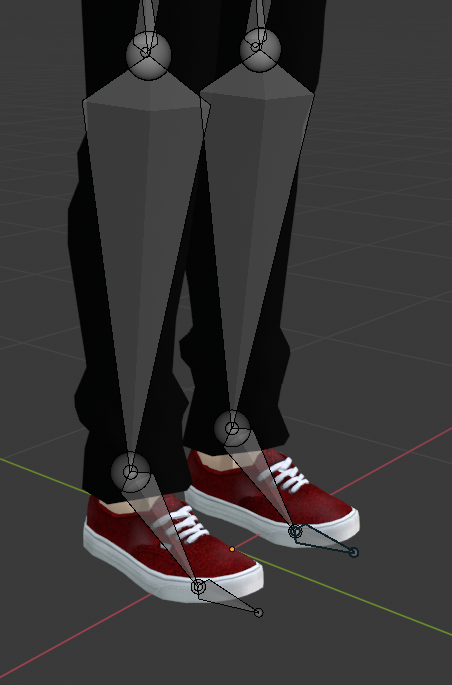
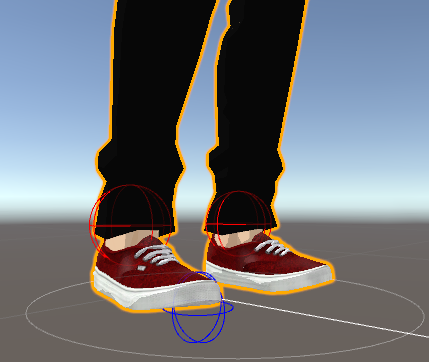
it appears fine in unity, so they suggested to adjust my real player height, but going to both extremes did not fix the issue
fading verge
@naive tree he shorten the legs and that fixed it but now he says the avatar is floating off the ground
drowsy wharf
@abstract musk the ankle point might probably higher than it should be, but that's not the cause.
You can avoid the tiptoe issue entirely by unmapping the toe bones, but if I remember correctly it's usually caused by an improper height setup with your VR...haven't heard it in a while
@fading verge ⬆️ same for you...though if he only shortened the legs and didn't reset the origin point for the model to match the new "floor" level for the avatar that'll still cause floating
fading verge
so what should he do exactly
drowsy wharf
Check to see if their normal VR floor is at their floor, if not, set it up again
drowsy wharf
then yeah, definitely a setup issue
depends on the VR system, kind of out of scope here, but a google search for the device and "reset floor" should help
fading verge
he shorten the legs of the avatar because it was too tall
since he did this it made the avatar not get shorter but stay in the same place causing it to float of the ground
steam vr is calibrated properly
its the avatar its self
drowsy wharf
I'm not talking about the vr floor in the avatar, I'm saying if the floor in the VR home for example isn't aligned with your actual floor, fix that first.
But for the avatar, you can't just shorten the legs and expect it to work properly, you have to realign where the model's origin point is (the point it attaches to things essentially)
 upbeat hollow
You have to unassigned the toes
In the rig configuration menu
I always make sure to do that because toes are always a pain
@abstract musk
 faint sage
The avatar I made has backwards feet when I import it into unity and apply t-pose in the avatar configurator. I've tried resetting bone rolls and applying rotation in blender, and I can't fix it. Does anyone know how to fix it?
pulsar oxide
sooo um, why?
 crimson mauve
does anyone know why this would happen only in full body?
https://cdn.discordapp.com/attachments/387443655687798786/663321333211332610/VRChat_1920x1080_2020-01-05_04-01-18.774.png

I've changed the hip bone out(after) and made sure it all looked fine with the rigging, I can provide more images but im not sure why I am still getting the issue
pulsar oxide
So does anyone know why I can’t see my model
 fringe citrus
@crimson mauve gotta make sure the angle between thigh and hips isn't extreme in either direction.
runic swan
Any idea why this is happening?
The clothes poking through because on blender they don't and
The hand being all bugged like that
tough robin
@runic swan why even have the body underneeth the clothes?
runic swan
Because the clothing is a "crop top"
tough robin
?
tough robin
I am confused. Just delete everything you cant see. Unless the clothes are removable theres no point
runic swan
hang on
tough robin
And seal the top and bottom so you cant see up them
runic swan
I'd like it to be open though
The hands are the part tho that i'm most confused on why they break
tough robin
Your armature is set up incorrectly
And the clipping is because of bad weight painting
runic swan
Well how do you weight paint on blender 2.8
tough robin
I dont
runic swan
What do you weight paint on
tough robin
I do my weightpainting in 2.7
faint sage
You need to weightpaint in 2.8?
faint sage
It would probably mean that the vertex group you have selected is locked, and not editable. There should be a lock Icon next to the vertex group in the object data properties tab that you can click to unlock it so it can be edited
tough robin
Nothing specific
Just move your arms around untill the star clipping and than fix that spot
runic swan
No i want the bra to stop clipping
faint sage
You will have to play around with the movement in pose mode. See what makes the bra clip, and then look at the vertex groups it is bound to. Then, depending on how it is weight painted, you will have to reduce its weight on that group and put it into a different group, or unbind that part of the mesh altogether.
faint sage
While people are on, has anyone had to deal with backwards facing feet when a model is imported into unity, and a t-pose is applied to it in the avatar configurator?
runic swan
wtf
faint sage
did it open again?
faint sage
oh boy... Those are some nice weight paints that aren't working too well I believe.
faint sage
Go for less of an angle. it isn't likely that a position like that will ever happen in game.
See if that's less terrifying
runic swan
Do you know how to weight paint?
faint sage
Barely.
faint sage
Just enough to fix small things that the automatic weights in blender break.
Sure, why not
runic swan
ight
I don't have the original .blend file since I didn't save it
But it will be the fbx file
The fingers I think I fixed
I just removed the last bones on each finger since they were half in and half out the hand
faint sage
It is a bone parenting problem
I didn't see the small bone infront of the main torso bone
Reparent Spine.001 to Spine
And it should move correctly
@runic swan
faint sage
Select the armature. Then select spine.001. In its relations tab, you should be able to set its parent bone
faint sage
Once you've done that, that stretching that you showed won't happen
About the clipping? I'm not sure
But it may help
faint sage
I don't know.
 tropic atlas
If the clipping is to bad you are better off just simplifying the model. Plus with the amount of dynamic bones you have the VRChat avatar builder may reject it for having too many dynamic bones.
faint sage
Good. Have a nice day.
tropic atlas
VRChat recommends 4-16 dynamic bones and your model definitely has far more than that.
runic swan
the picture I sent in the chat
has 0 dynamic bones
sooo
Siracha I think I figured out the issue
faint sage
My model is facing backwards in game. Unity enforces t-pose, only for the thumbs and the feet to be pointing in the opposite direction they should be. Then, even after applying t-pose, the model faces backwards in game. Please help. I have reset the roll on all bones and applied rotations to the armature and the mesh object.
runic swan
of the cliping
faint sage
I'm still trying to figure out mine
faint sage
On any vertex group?
runic swan
Nope
so I weight painted it to the same one with the hoodie
so it looks like this
Should work now
hopefully
faint sage
well good luck
runic swan
I'll let you know lol
runic swan
fixed it completely
Now all I have to do is remake the animations because its just the default finger animations acting up
And we should be all good
 topaz vessel
How do I fix this?
crimson mauve
is that just feet in the ground?@topaz vessel
topaz vessel
Yeah @crimson mauve
crimson mauve
In Unity go into the configuration setting for the model, when the view loads click on the hips bone in the view, not the hierarchy and drag it up the amount it needs to go and apply it.
you will need to move your view point up to account for this because you wont see the change in the normal view but it will happen in-game.
topaz vessel
@crimson mauve You are a King
crimson mauve
You may use that fix a lot depending on how much you upload
topaz vessel
I upload like 4 avatars a day.
crimson mauve
damn
 sweet moth
are there any issues with the Rigging?
am getting lower leg not child of upper leg and uncertain if things look good
drowsy wharf
@sweet moth screenshot the leg mappings in unity
and hierarchy
Most likely you have a bone mapped incorrectly if that is the error
drowsy wharf
that is a different error entirely than what you stated
it says not first child of upper leg, a single word can make the difference.
go in your hierarchy and drag/drop the lower leg to the top of the list under upper leg
sweet moth
for some reason now its showing that i saw the fingers messed up so i fixed them but something in the bone has been ruined
drowsy wharf
Upper Leg
   |-random bone 1
   |-random bone 2
   |-Lower Leg
should be
Upper Leg
   |-Lower Leg
   |-random bone 1
   |-random bone 2
the angle between pelvis/thigh means your hip bone is probably upside down, small end should point upwards, and leg bones should point downwards
Neither of those has anythign to do with fingers...
drowsy wharf
show me the unity mappings, select model, click rig tab, hit configure. Show the leg mappings (also just to cover it, make sure chest and jaw are not mapped)
you're using CATS full body fix aren't you?
sweet moth
yep the jaw and chest are empty
drowsy wharf
don't do that any more
sweet moth
no am not using the cat fix
drowsy wharf
that 100% looks like a cats FBT fix from before the changes
sweet moth
it works perfectly in game now when i edited it it shows those issues
i decimated it except wrist and face for shape keys
any idea which one is it? @drowsy wharf
drowsy wharf
if you're only going to read half the things I say, and ignore them I'm not going to keep trying to help...
drowsy wharf
change "Left leg.001" to "Left Leg", just drag it from the left into that list
sweet moth
@drowsy wharf Yep Fixed thx and lastly the hip? any idea which bone in blender
drowsy wharf
hip is hip, what do you mean?
right click to select, it tells you at the top which bone is selected
You'll have to check for yourself, but based on the error and position, I'd guess this one
sweet moth
@drowsy wharf they should be those i fliped them 180c and still same issue
drowsy wharf
those look like skirt bones...not a hip bone
not reading instructions again, select bone, it'll tell you what it is
drowsy wharf
I can't help you find a bone I'm pretty sure I already highlighted with a bright pink box and you were unable to find...
blender armature edit mode, right click a bone, the name of selected bone is listed on screen
if you're not planning on using FBT, I'm fairly certain you can just ignore it
 worldly willow
@sweet moth import the model with cats for blender (and hit fix model and get a regular working rig for vrchat
drowsy wharf
definitely get cats and hit fix...14 skinned mesh renders just because you didn't merge your meshes is stupid
sweet moth
@drowsy wharf i separated the meshes to be able to decimate some parts while leaving some untouched for shape keys they total to 3
sweet moth
i will certainly
drowsy wharf
Again, probably the hip bone here based on error and position
https://cdn.discordapp.com/attachments/390924372782612480/668895999632343082/unknown.png

also based on the parenting connection lines...high chance that's your hip, move the head of the bone down to a point above the leg bones..should fix that error
sweet moth
this bone flipped it 180c it now reads 0.1c in unity
drowsy wharf
what do you mean 0.1c ?
sweet moth
drowsy wharf
set it to generic, apply, back to humanoid, apply. Check mappings after that to make sure they're correct still
@sweet moth are you just importing the changed model with the same name and then checking the upload?
sweet moth
did it no diffrence
i delete the old fbx and drag the new one same name
drowsy wharf
any time you move a bone in blender you need to reset the bones to the correct position in unity. Your scene needs to update to match the new armature setup
duplicate your current avatar in the scene, then on one of them (whichever you want to be the new avatar) click "revert" at the top of the inspector
Doing this will revert it to ONLY what is on the model you have imported, but it will match everything exactly.
so if you have dynamic bones, or effects, or anything else you've added to the avatar it will be reverted and need to be re-added (which is why I said duplicate it first so you can copy/paste)
sweet moth
alright dd that but it wont make a difference the new one has a different name from the one in unity i delete the one i made and reimport it when i try something in unity
this one is untouched and works but undecimated
drowsy wharf
when you make changes you're deleting the one in unity and uploading it under a new name? Not the same one?
then just drag the new model into the hierarchy and add the descriptor to it...see if it's fine
sweet moth
yea i did that under a new name and deleted in unity
i rotated the bone in blender it was saying its 4c not 180c now its showing its 0.1c
drowsy wharf
if you flipped the bone completely upside down so the large side is down and small is up, then it should show differently
but you need to import the new model instead of just using what you already had in the scene
sweet moth
alright finally the issues is gone i flipped the small this time it worked
appropriate your help figuring this out @drowsy wharf
 sharp lily
is there a way i could rig these to be one avatar?
 fading verge
Paladin, the first two should work if you merge the armatures since they're similar enough.
Second method would be to use rigid bodies and fixed joints to do a "JoJo Stand" type thing.
Monty, Check your bone parents and make sure they're right
faint sage
Anyone had to deal with unity's t-pose making your avatar's feet face backwards? And In game the avatar is also completely backwards too. I've tried resetting bone rolls and applying rotation to the armature, but that hasn't worked.
 weak wigeon
@faint sage You could always just rotate them manually in the configure menu for objects. The same menu you use to set the t-pose.
faint sage
Doing that puts the avatar out of tpose though. Will that affect the ability of the avatar to function in game? And how do I solve the whole "facing backwards" thing? When I load the avatar, i'm facing the front of its chest.
 bold locust
Okay, so. I've got a weird rig that seems like everything is as it should be but causes my arms and legs to heavily bend once I enter full-body IK.
Image of issue:
And here is what FBBIK looks like on my Rig Config:
So, it should work perfectly, but it obviously doesn't and I can't figure it out.
I've already tried 2 FBX; one with the full body fix and one without it.
tough robin
@bold locust arms are too long compared to your real life ones is my guess for that and for the legs its the spine hirearchy
bold locust
That isn't the case.
tough robin
bold locust
I can make any properly rigged model work. There's literally never a reason arms and legs will be bent on a model that's properly rigged. You can change real user height to fix bent arms in all cases.
tough robin
So you tried that and they were still bent?
bold locust
I think it's something to do with where the origin of the model is. It's odd that wasn't fixed. So maybe I should send the data to Hotox.
Alright.
Spine and hips btw.
Slight bend may have done something.
bold locust
Okay. The prom was that my chest bone was too long. Got a hint from Silent getting help from Kung.
Selecting the tail/head of spine/chest and dragging it up in armature edit mode fixed it.
fading verge
Alright so this is a problem that I’ve yet to find a fix for and I’m pretty sure it’s familiar to literally everyone
How do you fix avatar arm bending
Player height is correct and the feet react normally but the characters arms are always bending upwards and stuck there
And I’m pretty sure there is no arm length adjustment in the sdk
bold locust
Real Player Height in-game is very general. Unless your arms are the exact same length as what they set the scale for, it likely will not fit you properly.
fading verge
Figured. I’ve been asking for an arm length adjustment bone for over a year
bold locust
I usually have "Real Player Height" set to 3 or 4 inches shorter than my actual height.
But it varies for everyone.
It's been said the baseline for Real Player Height's arms are actually pretty long.
fading verge
The real player height is completely messed up and isn’t helpful to put your actual height I put mine entire foots off of my real height to get models to work
bold locust
Well, if it's that far off, it could be your play area.
fading verge
You’d think player dimension adjustments would be one of the first things you’d make on a vr hangout game
bold locust
It's usually not that bad.
fading verge
Oh nah I only have this height issue in vrchat every other game works fine with my real height
It’s usually not unusable, yes. But every avatar that is not one of the official avatars has some degree of unfit arm bending
Even if it’s just a little
The only temporary fix I’ve found for it so far sort of is offsetting the little player eye thing in the sdk down to around the mouth area in characters
That seems to tone it down but it’s still present and sacrifices the perspective
bold locust
Is it mainly in FBT that you have the issue?
fading verge
No it’s with or without fbt
bold locust
Ah. I was going to say, an important tool to have with FBT is playspace mover/Advanced settings.
So you can drag yourself down to properly line up with the model.
When someone says how every other game is fine, it doesn't ever really mean anything.
Since models vary so much in VRC.
Whereas every other game has one or maybe even a few models that's been heavily worked on to work universally.
fading verge
What I took from that is that you thought my steam player height was wrong
Which it’s not it is my real height and it does read my real height correctly
bold locust
They can't really compare.
fading verge
Yeah I know what you mean
sharp lily
You see what i wanna try setting up is like the sonic heroes style running trio
worldly willow
look up naruto style run (that is basically how knuckles and sonic are running in that gif)
pretty sure there is a anim or mmd animation for that
sharp lily
Not the animation i mean like three models as one avatar
worldly willow
believe you can do that using Final IK
have all three models basically copy the main armature motions
sharp lily
Right, is there any things I’d have to tweak after doing that?
 last knoll
alright i got some weird bug
the knees default to this weird bent shape, it looks fine everywhere including blender and unity but thats just what it defaults to in vrchat
 fervent hornet
Maybe clear your bone rolls and make sure you've set up the legs and such like documented in the full body documentation
last knoll
actually its fricked in unity too
 modern elm
so, I tried moving the bones of some avatar ears in Unity, and one bone is pulling on part of the opposite ear, but in Blender the're completely separate like they should be. The weight painting doesnt seem to be wring either. any idea of why this might be?
merry estuary
If it is pulling a part of the other ear then some of verticies of second ear are most likely weighted to first ear, did you check weights in Blender? @modern elm
modern elm
yep, the weights are fine in Blender.
drowsy wharf
go into pose mode, rotate the ear around and make sure. Some of it may be hidden inside or something.
Also hit Alt+H to unhide everything first
the only thing I could see causing that in unity is if you moved a bone with weight from one ear to the other by accident....I can't think of anything other than that or weight painting that would cause it though
modern elm
what do you mean by "move a bone with weight"?
drowsy wharf
you drag and drop the bone's object to another spot...tends to cause a lot of weird things
 cloud wyvern
Hey all, was looking around for the solution to a problem I have faced before and came up again in one of my avatars im making atm. @ me or dm me if you know what could be the problem with this right here;
crab legs are a rig prob i believe so
crisp tendon
move the knee bone forward
cloud wyvern
will try
drowsy wharf
Make sure the legs are straight up and down with a bend at the knee slightly.
You have to tell the IK which way it should bend, most likely you have an outward curve instead of a forward curve
fervent hornet
if you press numpad 5 its goes orthographic for flat shots
topaz vessel
Looking for someone who can teach me how to rig.
crisp tendon
YouTube can teach you very well @topaz vessel
No one here can teach you better, but we can help if you have issues with specific steps
topaz vessel
Alrighty, it just feels better having someone on a call and screenshare though.
crisp tendon
Well, they can't make you do whatever the video is showing, unsure how that's be helpful in the case of learning something from scratch
tough robin
Well showing more than 10% of the window would help
Also from the little I can see I am assuming that youre on the android build instead of pc which doesnt support very poor avatars
fading verge
Arms aren't specified for some reason
tough robin
Than specify them
fading verge
No idea how..
tough robin
Click on your fbx/rig/configure
Specify arns
That wont fox your issue tho
Since you ignored what I said I dont think I can help much from here
This also has nothing to do with rigging
tough robin
proceeds to ignore what I said again
fading verge
I don't know how to do what you said
tough robin
You dont know how to take pictures?
fading verge
I'm completely self tought so I have no idea what you mean about fbx/rig/ configure
 distant flare
You need to select the prefab of the model then in the inspector you choose "select" then go to rig and choose animation type "humanoid" and then "configure"
tough robin
Do you think a picture that literally doesnt have a single sentence visible full will tell us your issue?
fading verge
tough robin
Perfect
Yeah specify your rig
Click on your .fbx file and on the right there should be a section called rig. In there go to configure and set the bones up correctly
distant flare
Everything in here needs to be green if you choose "specify" but your skelleton needs to fit the vrchat requirements try mixamo to rig it automatically, but do not assume the weight paint to be correct
fading verge
Ok.. When I did that the model I created out of three disappeared and one of the original ones showed up like this
tough robin
What about the head section?
distant flare
the skelleton is perhaps too huge for the model
tough robin
Thats not how that works
tough robin
The sdk wont error out if your wights are fucked
fading verge
distant flare
yes that was a mistake of me i deleted that message
you do not need the jaw bone it is optional and handled by visemes
fading verge
Hmm
distant flare
i need to leave
fading verge
Ok, thank you
distant flare
so the issue's solved?
fading verge
No. But it's like beating a dead horse at this point
I shouldn't have said anything to start with, sorry
distant flare
i dont know the issue but try blender's vrcat model importer addon it should correct the skeleton if the model goes invisible but i dont know the issue so see you but perhaps the skeleton needs to be redone bye
tough robin
@fading verge looks nore like a bug tha user error
distant flare
So what was the issue, did your model dissapear after setting it to humanoid?
tough robin
I think its a big that makes the sdk think you dont have a rig
I have seen it before just dont know how to fix it
 finite silo
so someone please explain, why EVERY MODEL i have ever uploaded, the left foot sinks into the ground
its ever so subtle, but EVERY MODEL
does vrchat just have a small value flaw with the IK in the feet?
 idle whale
did you ever try changing the capsule collider or whatever the model uses?
crisp tendon
@finite siloIn Desktop mode ?
crisp tendon
Where is your foot bone ?
finite silo
in the middle part of the foot, right behind the toe bone at the front
its pretty standard. nothing unusual
crisp tendon
Is the head f the foot bone touching the ground ?
finite silo
yes
you can see it looks fine on the left, but the right foot always dips
@crisp tendon
 echo nimbus
Isn't your leg there under the origin 🤔
crisp tendon
what if you life your foot above the 0, and then move your foot bone down to the line @finite silo
echo nimbus
This is how I have mine and it works perfect
fervent hornet
Could always move the hip up in the configure menu to band aid it
 brisk tulip
I'm having some issue with Eye Tracking/Simulation on my avatar. I've re-checked and redone the process four times now but the eye tracking/blinking still won't work ingame.
In blender movement appears fine, order of visemes are right and nothing is visibly broken.
Anyone who might have a clue what might be causing it?
turbid spear
What is your setup
 crisp lantern
eye tracking won't work correctly unless all the bones and mesh have EXACTLY the right name and parenting structure
turbid spear
Do you have more than one mesh? Is your face mesh called Body? Is your upper chest empty in the humanoid rig setup? Is your hierarchy correct
crisp lantern
and lip sync has to also be set up
turbid spear
Check the pins for the hierarchy
crisp lantern
eye tracking in vrchat is hacky as hell
brisk tulip
Let me check the upper chest thing
Everything else of it should be in order

Yeah upper chest is empty
crisp lantern
hey, anyone got a good fix for an avatar's butt collapsing in on itself when bending the legs? I realize it's a situation unlikely to come up unless someone has FBT (which I don't) but it's still annoying to see all the geometry just pull inward into a distorted concave mess.
I've seen models that have helper bones or shape keys to correct for it, but I can't get those to work in Unity
in blender I can just turn on double quaternions, but Unity doesn't have an option for that either
the only thing I can really think of is to have geometry hidden in the clothes of that area which is ONLY weighted to one bone or another without any intermediate weights, and which becomes visible as things bend, but hiding the seams would be annoying
brisk tulip
Worth noting is that for some reason. When using Cats Eye Tracking feature
It places the eye bones inside the chest

Given, I did fix them manually and test the tracking as well
wouldn't explain the Blinking visemes not working tho
This really tilting. I even double tested them inside the muscle settings. They are fine in there.
But ingame none of it works
Mouth Visemes work ingame for the record.
Even Blinking visemes works both in Unity and Blender.
 alpine raft
Is the name of the blink shapekey correct? I don’t remember the exact name, but something like vrc_blink or whatever
brisk tulip
yes. its correctly named
brisk tulip
I've double checked that no Shapekey is broken, and also double checked weight painting
I also saw that there's a lot of people who have had the same issue, and no one seems to have found a fix yet.
 craggy ridge
hi
 half grail
My avatar's rig isn't lining it's feet up right, despite all the bones having proper weight paints. anyone know what i'm doing wrong?
crisp tendon
is that in pose mode ?
I'd guess the mesh maybe has weight paint from bones it shouldn't
half grail
I went through, the bones' weight paint all look right and no extra spots
I'm gonna try remaking just the feet bones and merging in
idle whale
kinda looks a mesh thats been rotated around a joint
probably not it but thats what it reminds me of
half grail
I've tried reweighing, reassigning vertex groups, remaking the bones, nothing seems to work
and of course, it was weighed by the spine(???) bone
crisp tendon
yeah, hence my first guess
drowsy wharf
@brisk tulip naming of blink and lowerlid shapekeys doesn't actually matter (just helps identify what is what)
However you need Blink Left/right, and Lowerlid left/right as the first 4 shape keys (excluding basis of course)
Whatever the first 4 keys are is what it uses for blinking
brisk tulip
@drowsy wharf Using Cats auto "Fix Model" again fixed it for whatever reason.
 nova crystal
hi!
my avatar has hair/booty bones
but whenever i try to apply dynamic bones in unity they still dont move.
the bones are weighted. so idk why its not working :<
half grail
Have you added a root in the dynamic bones settings?
 tawny silo
In dynamic bone settings you need to set there end length to the valued length of the bone
crisp tendon
@nova crystal Are you testing in Play mode ?
nova crystal
@crisp tendon
yes !
someone explained to me the problem. it’s just.. i don’t know how to fix it. i have 0 experience with rigging and modeling in general.
is anyone willing to fix her for me? i can send her model. they said it should be an easy fix.
apparently the bones are missing a “parental base”
crisp tendon
Can you show what the DB components look like ?
nova crystal
like the hierarchy?
crisp tendon
No, the dynamic bone menu you added to your model
nova crystal
oh. my apologies !
these are the settings i have for one of the parts for the hair.
crisp tendon
What about the rest of the component 
nova crystal
annnnddd if you’re talking about anything blender related- i don’t have those. because someone else added these bones for me.
that’s the sc i have on me atm because im not home. but im about to go home now- ill show you the rest once i get there!
crisp tendon
Well, if those bones are weight painted correctly then it should just work
Would be interested in a gif of how you try it
nova crystal
even without a parental base ?
crisp tendon
I don't know what your friend means by parental base
crisp tendon
Makes sense for the hips, but it should still work for breast and hair
crisp tendon
To make sure again, you have all that and then you press play then move your model in the scene ?
nova crystal
yup!
i press the blue play button on the top of unity then click scene and try to move her around.
i saw someone on YT do that so i just did that
crisp tendon
and none of the parts move on any dynamic bones ?
crisp tendon
how many components do you have ?
 chrome jungle
what happen if you add a end-length ? :)
chrome jungle
(good morning  )
)
nova crystal
8 for the hair
good morning !
idek what’s an end length hah
im home now so if u need any other info i can provide it !!
chrome jungle
 drowsy wharf
@nova crystal show me the hierarchy list with the objects you have the the dynamic bone roots set to highlighted (or list the names)
drowsy wharf
Yep, that's your issue
The root bone does not move, any below the listed root will move, but not the root.
since you don't have root bones (which you really should do, it avoids some weird issues with the other way)
You'll hbave to set it to the head/hips bones, and exclude anything you don't want to move
nova crystal
idk if this is worth mentioning i havent set the dynamic bone stuff to everything rn. just the hairjiggle1 because none of it was moving so i just tested it on one.
but when i did have it on everything- nothing moved still.
oh!
chrome jungle
What Himeki just said tbh
drowsy wharf
the hair isn't moving because you're tell it those bones are the ROOT, which means things below it will move, but not those bones themselves
nova crystal
so set it to Hips_Rig and Head_Rig as well?
drowsy wharf
it's like a key ring and the bones below it are keys
if you hold the key ring, it doesn't move but the keys do
chrome jungle
only on that, the others aren't needed.
chrome jungle
The dynamic bones settings basically transfer to all the children of the root.
Remember to exclude things that are not supposed to move.
nova crystal
WOAH
drowsy wharf
the dynbone script is basically just an animator with a dynamic animation.
Just like an animator it can only act on objects that are a child of the one you set it on (the root bone)
nova crystal
shes jiggling but her whole body is lMFAO
chrome jungle
"Remember to exclude things that are not supposed to move."
drowsy wharf
that's why I said ⬆️
nova crystal
i know. im about to try that
lol
holy shit im dumb.
i dragged this there. but how do i physically make it so the rest of her body is excluded ?
chrome jungle
way under
you got a
"exclusions" category
open it & drag'n'drop stuff that are not supposed to move in it
chrome jungle
npnp
nova crystal
okay i did it !
i can see the circles jiggling. but i cant actually tell if her butt is jiggling or not. im gonna try the hair instead !
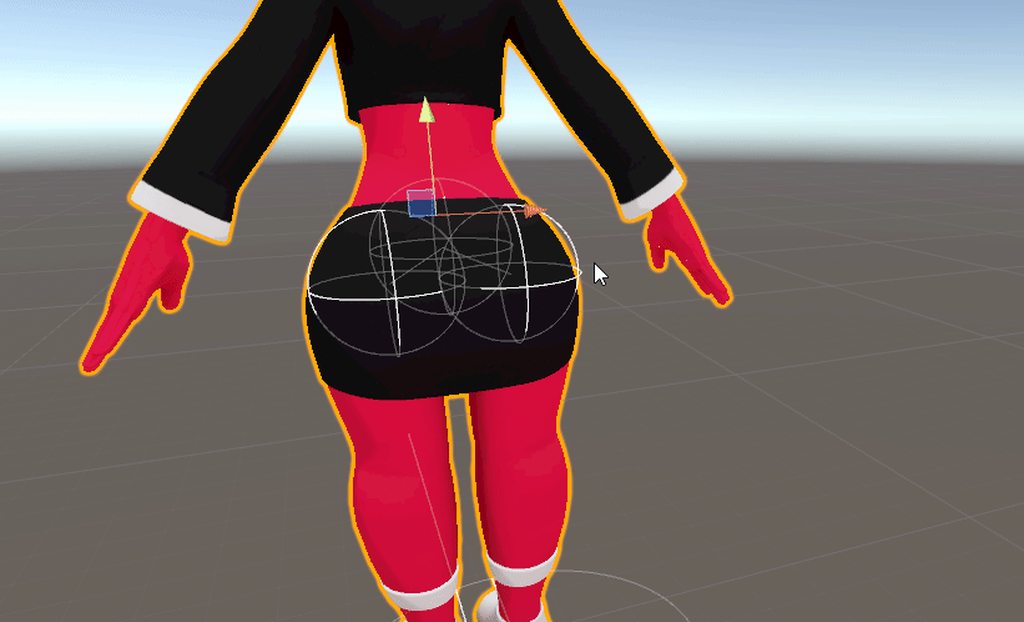
the hair is working! sweet
chrome jungle
:>
nova crystal
now the booty 🤔
fading verge
So gonna ask a quick question, put a 3d model into mixamo to get bones and it seemed to work. just the SDK is throwing up flags about bones not being mapped. how exactly do I map them?
here's this too if you need it to help.
it's prob something simple i'm missing, I guarantee it.
drowsy wharf
@fading verge select the model file in your assets, click the "Rig" tab in the inspector, and then click "configure"
check what bones are set as what. Remove upper chest, and jaw (unless you want jawflap instead of visemes for talking)
fading verge
everything looked mapped out, do they need specific names?
drowsy wharf
they need to be the correct bones, but naming isn't important for it to just work
chrome jungle
Sometimes it kinda glitch ; try to ctrl+d the model and check if you can upload the duplicated one ?
drowsy wharf
naming is important for eyetracking though
fading verge
not going as far as eyetracking and lipsync for now.
nova crystal
eyyyyy i got the booty to work!
just took a bunch of patience
thank you guys so much for helping. sorry if i was a bit slow about it. :<
chrome jungle
all g we all started somewhere
chrome jungle
your Chest isn't mapped.
drowsy wharf
hips aren't mapped correctly either
fading verge
upper chest you mean?
fading verge
whoops :^)
chrome jungle
wupsie
fading verge
hips are now hips lol
nova crystal
since her skirt is so tight, if i were to jump her but goes right through her skirt.
i guess i can paint the material where her butt is to match the color of the skirt so it wont show as much?
fading verge
yeah, I have everything but the upper chest mapped.
still telling me everything isn't mapped tho.
drowsy wharf
you applied it and then closed and re-opened the upload window, correct?
also, where did you place your VRC avatar descriptor?
it should be on your "ophelia" object
fading verge
the descriptor is on the root/ophelia object.\
actually, I might know what it's doing.
let me try something.
i'm gonna try reopening and closing unity rq.
yup, still nothing.
send this too just incase i'm messing this up.
chrome jungle
@nova crystal yep
drowsy wharf
@fading verge is it still the same exact errors?
fading verge
yup.
drowsy wharf
show the leg mappings?
fading verge
drowsy wharf
and the top part of that is hip/spine/chest/blank correct?
fading verge
yup.
nova crystal
what the hell.
everytime i exit out of play mode
to save
it gets rid of all the settings
i set up for the hair and booty jiggle
drowsy wharf
play mode is for testing, don't set anything up in there you don't want to lose.
nova crystal
ohhhhh.
drowsy wharf
if you DO want to use it to set things up, select the gear for the component and hit "copy component" then when you exit play mode do the same but hit "paste values"
nova crystal
okay thanks!
drowsy wharf
the same works for setting up anything else, you can also do it with prefabs by saving the prefab while in play mode, then reverting it after you stop play mode
nova crystal
ok i like the paste values thing. thats good.
fading verge
some of the bones aren't showing in edit mode but once i go back to object mode or pose mode they are there.
merry estuary
If bones aren't showing just in edit mode they are most likely hidden @fading verge . H to hide selected alt+H to unhide all
fading verge
i tried that and it didn't work i just ended up starting over
fading verge
i'm still trying to figure this error for feet/upper arms/ other stuff not being mapped
when I can see it's mapped.
chrome jungle
did you try to duplicate the model ?
fading verge
I think I just fixed it actually.
I don't even know exactly what I did, but I took the model from the rig editor part, duped that, and repasted it in.
it's throwing up a flag about The angle between pelvis and thigh bones should be close to 180 degrees, but honestly i've gotten this far and I just wanna see it uploaded lol.
which it just did, testing it now.
testing seems to work fine.
now, to get the bones that are attached for her cables working... :^)
maybe another time lol
 final ermine
Hello guys, sorry for bothering but what I am doing wrong?
My arms are always pointing towards to inside my body, and i have weight in every bone, a few at blue tho.
Supposedly don't need the fingers and the toes.
Help!
Is the same result if I put a very tiny shoulder close to the arm
drowsy wharf
@final ermine are you in desktop mode? Also that shoulder bone should probably be SUPER tiny and at the edge of the arm, not anchored near the chest bone, it'll probably cause some issues (possibly that one too)
@fading verge The hip error is because your hip bone is likely upside down. Hip should point straight up (and be above and slightly behind) the leg bones
And leg bones should be pointing down (preferably straight for upper leg, and a slight bend at the knee)
final ermine
@drowsy wharf thanks! Nope, i play in vr, in desktop looks almost normal
drowsy wharf
then yeah, probably the shoulder trying to over adapt
final ermine
looks like this in desktop, is fine i guess, but in vr looks so weird
@drowsy wharf can you make a drawing example to where i need to put the shoulder or the weight?
drowsy wharf
just remember, you'd also have to have your arms that far (proportionately) away from your head if you want it to look correct
not the shoulder weight the shoulder bones themselves
they should be small and near the top of the arm, shrink them outward from the center
final ermine
mmm ok! i will try right now, thanks!
 glass panther
What is the best way to avoid that shoulder droopy ness in FBT. Is it the size of the shoulder bone? Weight painting? Both?
I don't mind a little droop but until now I can't seem to get it right XD
final ermine
@drowsy wharf I moved the bones a little so the shoulder now are a little further from the center of the body, sadly it was almost the same result. is a little better but when I rest my arms down, they go back into my body again
:(
fervent hornet
The head of your shoulder should probably be right on the edge of arm/body
drowsy wharf
⬆️ same thing I said, your body isn't proportional, so you have to do some things to help get around that.
Remember the in game arms aren't mimicking your movements with the avatar's spacing.
The hands determine the arm angles, and the hands and head are 1:1 with your actual hands/headset. So if you want it to be right, you have to have your arms further away from your body as if you were the proportions of the avatar
@final ermine ⬆️ woops, hit enter before I mentioned, my bad
fading verge
Hiya! As weird as this might sound regarding roblox models in VRChat. I Need some help.. Ive rigged the model, But i cannot seem to get it to work with the model.. ill post further info below.
I have tried searching on the internet to find out what the error means.. But i have no idea what it does mean, However... I use blender to do this if this has any impact.
crisp tendon
If you Google that you will get video results explaining what the issue is
Also your armature is incorrect around the hips
Check the pinned items
fading verge
What about hands.. Will it still work with a controller (vr) without mapping fingers and whatnot?
crisp tendon
You still need finger bones, even if they don't have weight paint
fading verge
Alright, I'll do what's possible.
drowsy wharf
@fading verge Select the upper leg bone, uncheck "connected" and remove the bones connecting the hip to the leg bones.
Set the shoulders to unconnected and move the head of the shoulder bone out towards the arm to about 1/3 of the current size.
The torso should be 2 bones, not a single one. Hip>Spine>Chest>Neck>Head (Shoulders off of hips too)
fading verge
Thanks also, I'm having a bit of trouble with the head.
Specifically the hair, It doesn't follow the head
Does this need weight painting?
For example..
drowsy wharf
everything has to be weight painted to something or it won't move
and by "won't move" I mean it won't follow any other part.
so either create hair bones if you want it to move separately, or weight it fully to the head bone
fading verge
So.. Like this? (Other side is red too.)
 steady patio
ye
 zealous zealot
Can anyone tell me how to do eye tracking, I’ve got the facial flexes for blinking and such but I can’t get them or the eye tracking to function in game
I don’t know if there’s manual way I have to link them up or what
drowsy wharf
@zealous zealot you must have naming and hierarchy correct for it to function.
Hips>Spine>Chest>Neck>Head>LeftEye/RightEye
You also need all other IK requirements (legs, arms, and fingers)
The first 4 blend shapes are your blink left, blink right, lowerlid left, and lower lid right (even if all but one is basically blank)
CATS can make setting it up easier, making new eye bones with the correct names, helping set up the blend shapes, etc
 fresh gyro
I don’t know where to write .. Why the Vrchat Team does not correctly bind the controller to the hand? The snap angle is incorrect. My real hand in the screenshot is straight. Incorrect snap angle on all models. I use Oculus Rift CV1. This problem can be fixed in Blender or Unity?
fading verge
So it is possible to create "lip-sync" with just the basis key?
CATS doesn't want me to so I'm not sure if there is another way around it.
bold locust
@fading verge You need at least one blendshape besides Basis. Since Basis doesn't do anything. Basis is just the mesh at rest.
fading verge
Can it all be the same blendshape? His mouth just moves up and down and nothing more.
Like all just a CH key?
fading verge
Alright, thank you.
 wind osprey
@fresh gyro I have the same problem with the Index controllers, although the angle isn't quite so severe. I've got some avatar fiddling to do this week so if I find any solutions I'll let you know. And if you find anything let me know too 🤣
fresh gyro
@wind osprey 👌
fading verge
Can someone help me with a avatar making thing that i cant figure out? Dm me if you can please
 opal river
should the upper arm bone be connected to the shoulder bone?
also does the roll of the bones matter at all?
opal river
ok
opal river
and from front view the legs should be straight down right?
merry estuary
Yes
opal river
does it matter if the eye bones are pointing upwards or forwards?
https://i.imgur.com/3Ht0VkX.png
https://i.imgur.com/yTHwQCO.png
does this look okay?

 merry estuary
Think the spine was suppose to be straight as well https://gyazo.com/ebdda6986e1c6be6189cc8a14282c7f5

If it comes to eye bones I did mine pointing forward and CATS generated new ones pointing upwards
opal river
hm, I thought only the hips needed to be straight
merry estuary
It should be ok if you are not using fbt
Reference is from Kung obviously, he knows better then me
opal river
https://docs.vrchat.com/docs/full-body-tracking doesn't mention anything about the spine, but it references the example rig which of course no screenshot is included >_>
VRChat
VRChat supports additional tracking points using the HTC Vive Trackers. These work with the Lighthouse ecosystem to permit these two additional modes of motion capture: Four-Point (4PT): Tracking headset, two controllers, and one hip trackerSix-Point (6PT): Tracking headset,...
only mentions the proportions
in that mentioned tpose-new.fbx the spine is titled backwards
fringe citrus
@opal river The spine bone doesn't have to be straight, but the hip should be
And have the thighs as close as possible to 180 degrees opposite direction of the hip
Also if anyone was referencing my rig (which I had referenced from tpose-new.fbx) after more testing turns out copying the angle between hip-root and spine-root from tpose-new.fbx isn't ideal. It can cause a small amount of back-tilt in the hips after binding
Placing the hips nearly directly above the thighs is better. I'm still placing it microscopically behind just to continue following the relative position in tpose-new.fbx but the angle is a lot straighter. I'm working on a new fbt tweaks video tutorial and had to upload tons of specifically broken avatars for testing, so that's how I found out directly copying tpose-new.fbx wasn't best there.
If anyone wants and updated reference, here's my rig after the recent additional testing (and what I'm using in the tutorial)
you can see I have the hips much closer to directly above the thighs
opal river
you mean they almost vertically aligned from side view?
fringe citrus
Yeah
opal river
okay, thanks for the info
fringe citrus
np, in your screenshot it's hard to see because of hand bones in front but it looks like your hip bone is forward enough relative to the thigh bones that it'll case your hip to roll forward/butt to poke back after you bind
opal river
yeah I just saw I had some more issues in that area that I'm currently fixing
one sec


you have the hips really high up I notice
fringe citrus
That looks pretty good. Possible problems you might have, if your avatar shifts down when you bind in, then the chest bone could be too long. It's right on the edge of being too long
opal river
okay
fringe citrus
Also if your shoulders seem saggy, you can set your rest pose to a tpose, but only if you notice a sag that bothers you
opal river
https://i.imgur.com/6VzmKpb.png that better?
fringe citrus
Yeah that's better, though I don't know if it would have caused trouble before or not, right on the edge of being ok before
so if you need to redo a lot of weight painting there because of changing it, it might not have been needed
though a small shift probably doesn't need weight touchups anyway
opal river
then I'll go between where it was before and now 😄
fringe citrus
Yeah just keep it in mind if you notice the shift
opal river
yeah I'll definitely be asking around here if I run into any issues
sadly I don't have FBT myself so I can't test that
fringe citrus
I have my hips up very high because I wear my tracker physically high (around the small of my waist) and I noticed it seems to be possible to latch on to 1:1 control of the spine bone instead of hip if the tracker is close to the spine than hip when binding. The hip then falls under IK (at least it really seemed that way)
The difference was slight, but had effects on accuracy of knee bending and just in general I could feel that it didn't seem 1:1
So I have my hip high to ensure it's closer to my tracker's physical location than my spine
opal river
so how does FBT work?
fringe citrus
also kind of mirrors holy-grail tpose-new.fbx
opal river
you said it binds on bones or something?
fringe citrus
but I've found from testing that imitating tpose-new as a basis but straying might be warranted in some cases, so I'd go more on if you notice anything wrong with your hip when it's low, if not probably don't need to change it
opal river
okay, well if I run into any issues I'll be sure to ping you here 😄
fringe citrus
Yeah that's why you have to stand in your avatar to bind in. It binds to near bones with an offset. I'm pretty sure you can get it to lose foot rotation if your trackers are too far from your feet. But I didn't know you can get the hip to go under IK if the tracker is closer to spine. (I'm still not 100% sure on that)
fringe citrus
The difference is pretty slight but seemed concrete when I put a controller on my hip and moved it with the avatar in different rig setups, hip bone further than spine from tracker seemed to allow hip to go IK, but it's one bone over so difference under IK is slight anyway
Yeah you can ping me if you have any question or just ask the channel. People in this channel are pretty helpful and active. But if you want me to take a look I'll probably miss if not pinged.
opal river
will do, thanks
opal river
so when weight painting in 2.81, is there no way to make it so the brush goes "through" the mesh so both sides of the mesh get painted?
fringe citrus
@opal river under your brush options checkbox "2D falloff"and uncheck "front faces only"
opal river
huh I could've sworn I tried that combo, thanks
also, why is weight painting such a pain in the neck
fringe citrus
did you try adjusting your neck bone? j/k 😁
opal river
not yet
I feel like I still don't fully understand how I want to paint something to get good deformations
not sure if it's the weight painting or the mesh or me just being dumb
probably a combination of all 3
fringe citrus
it's not too bad though once you get used to it, I made a tutorial that kind of goes over it.
At least the idea of setting a pose and painting incrementally to make the pose look nice under deformation from weights
opal river
could you link me, cause I'm getting kinda mad at my inability to get this right
fringe citrus

This tutorial first goes over my method for weight painting in Blender 2.8 (relevant to everyone, not just VRChat users) using a simple example of tweaking an arm's weights to leave a sharper elbow when it bends. It then proceeds to apply these techniques to create the weight...
It just goes over the way I like to set it up when weight painting, it's not like it's the "right way" or anything
but might help give you a method to try
opal river
yeah I'll check it out, thanks
fringe citrus
Also one thing that might make it a little faster, I set up wireframe per mesh in its display options. But you can do it faster globally from this little drop down.
I got used to configuring bone options in their display options so did it for mesh too in that tutorial. Can do it either way though
opal river
yeah I learned about that recently
am I stupid or did they remove "display as stick" in 2.81?
fringe citrus
Yeah so many menus for getting things to look how you'd like
opal river
do you always start out with automatic weights or just do it all from scratch?
fringe citrus
It'll almost always save time to just let blender do the auto weights then fix after I think
So yeah, auto weights. First go of auto weights will have all kinds of weird things going on though. But a lot of things will just work too, so it saves you painting in a lot of stuff like arms and legs, spine chain usually isn't so bad
shoulders will usually need a ton of work
parts where the mesh is close together can have one bone autoweighted to the mesh across from it
like if your rest pose has your legs really close together or something
But fixing those things isn't any worse than it would be to paint them in from scratch I think
opal river
okay
https://i.imgur.com/XyWFTn8.png so I'd assume the leg bone shouldn't reach that far up the body right
 fringe citrus
only risk is you'd miss something maybe. But the more you paint at it also the more chance you'll accidently let the brush spill out onto a part of the mesh that it shouldn't have. And it's a pain to always set up vertex selection masks etc so might as well use auto weights
Yeah you might not want it reaching up that high
But the only way to tell is play in pose mode and see if it starts collapsing all weird or something, or if it looks fleshy and good
and by pose mode I mean just rotate the bone that's selected while in weight paint mode
 fringe citrus
Here's mine if you want a reference, but mine could still use more tweaks I 'm sure.
opal river
thanks
fringe citrus
but better to go off the deform of your mesh rather than try to copy colors from another model that has bones in different positions
though yeah it can give you an idea of where around things should have influence
opal river
yeah that's basically what I need
a general idea of roughly what areas should be affected by what bones
and how much
fringe citrus
my thighs have a little less weight on them due to being normalized against my butt physics bone too though
opal river
yeah I also have such a bone
fringe citrus
ah, then I guess there's another reference for you 😅
I found this twitter user's stuff really helpful for examples for how things should deform in complicated places. Mostly in places where the mesh folds up under normal deformation

フリーランス3DCGデザイナー。ローポリが好きなモデラーです。現在長期案件を受けている為、ご依頼をお受けできません
Tweets
4898
Followers
8168
 Twitter
Just scroll through a ton of their media and look for animations
opal river
ok I think I'm starting to get the hang of it with that method you showed
slowly adding weight to the neighbouring bone
fringe citrus
Just make sure not to use subtract to undo. I've had bad experiences with it not knowing how to redistribute the subtracted normalized weight
Always "pull" the weight onto a bone with add
opal river
ah, okay, I was just about to do that xD
fringe citrus
Glad you're getting the hang of it. Seems everyone always says they hate weight painting, but I kinda like it. It's fun to think about what's fat and muscle and bone etc... and kinda relaxing just nudging the mesh around until it looks nice
opal river
also I really wish using undo in weight paint mode wouldn't "undo" teh changes to the tool settings you did too
opal river
yeah, as with everything, if you've never done something and nobody ever explained it to you it can be really frustrating
at any rate, thanks so much for all the help today
now it feels less daunting and frustrating
fringe citrus
Awesome! And you're welcome 😁
opal river
https://i.imgur.com/YTf4Wly.png yep I'd say this looks much better xD
 fringe citrus
Yeah looks better to me too. One thing though, the twist at the point of the thigh is really hard to get working nicely since we can't use twist bones
so don't worry too much if you can't get the twist perfect. lemme get an example
hard to get a good shot to show what I mean
but twisting the leg out like that
fringe citrus
you can fix it at that angle, but it'll totally screw up the smoothness of the butt etc under other deformations
so best I could do was make it look like a flexed gluteus contour or something
but I don't usually have my leg out fully 90degress
usually it's only up to like 70 or so, so just try to make it look good under medium deformation
opal river
okay
fringe citrus
like about that far
oh one more thing, google image search of a description of the pose you're working on + "yoga" is a great way to see how normal anatomy looks under different bends
opal river
that's a good idea actually
also, so you have only one bone to make your butt jiggly?
fringe citrus
Yeah I just do that because I have "good" performance rating
fringe citrus
so the number of dynamic bones I can use is really limited
opal river
so what's that floating bone in that last screenshot?
fringe citrus
That's the butt bone
opal river
oh, so I wouldn't want to have it inside the mesh? does that produce better jiggles?
fringe citrus
I could have it right on the butt, it wouldn't make any difference because the angle it sweeps relative to the base is what will drag the mesh there
because the bone itself is only an endpoint
But also, I have it longer to get better dynamic bone response within the range of fbt player motion without needing a bone chain with settings contours, or whatever you call setting up a setting over distance along the chain
usually for nice fleshy jiggle movement you'd want things like stiffness and elasticity to vary over the length of the chain
I think both decreasing, though I can't remember with elasticity which direction makes it softer
anyway can't do that with a single root->endpoint
So instead I have the root kinda far in front of my avatar
opal river
oh, okay
fringe citrus
Think about how far and fast that root bone out front would move under even a small movement of the hips
So it's kind of a way to inject more motion into the dynamic bone
like if you had a ribbon tied on stick out at that distance, or a ribbon taped to your hip
would be much easier to flip flop the ribbon on the stick than right on your hip if that makes sense
opal river
yeah, makes sense
fringe citrus
The other reason is it sweeps a larger arc at the location of the butt
and because one bone is being used to deform a large area
it should all kind of move more up and down together rather than twist in on itself near the hip
It's not any standard thing or anything though. I just came up with it to solve problems I was having
fervent hornet
That's why most people give up on aiming for the good/excellent rank
fringe citrus
Yeah it was a challenge to keep things looking nice
it helps that my hair is short
it's just barely enough bone allotment for hair chest and butt in my case
opal river
https://i.imgur.com/3vHHRmG.jpg speaking of problems, I suppose the only way to fix this in the middle is by applying the mirror modifier?



 fringe citrus
Well the center of the crotch doesn't have much fat or muscle or anything and so should be more controlled by the hip bone
it should be nearly full red on hips I think
fervent hornet
For me the red on the hips looks like a speedo tbf
fringe citrus
opal river
that's what I'm trying too, but then my butt breaks
fringe citrus
your legs will probably bend a lot further forward than back so you don't have to worry so much about it
especially if it makes it look worse going forward
but I save my biggest deform for lower on the leg
probably a little too low really, I could probably do better now If I redid it some, but it's hard to deal with the twist too as I was saying above
Also remember if you're making larger changes to where a mass of muscle/fat should end up you can set the brush strength much higher and just move a chunk of it
then go crazy with the blur tool
doesn't always have to be tiny nudges
opal river
yea