#avatar-rigging
1 messages · Page 153 of 1
 wild owl

 drowsy wharf
make sure the hip is above and slightly behind the leg bones
 fading verge
Hey guys Is there a way to batch parent multiple bones to one in blender ? thanks
I always have to go through each and every bone and parent it to the head
 nimble aspen
I'm trying to make an avatar with extra long limbs. I want to make the arms and legs 1.5-2x their normal length. I tried just scaling the bones in Unity, and this seemed to sort of work for the arms (I don't expect it to work perfectly) but the legs ended up embedded in the ground at their kneecaps. I moved the avatar up at the hip bone, not the root because the VRChat script complained the feet were in the ground, but clearly they still are, so what's the solution here? I suspect moving the avatar up won't resolve anything. And I have the eye height set correctly for the new desired head height.
I could edit the model in Blender if absolutely necessary, though I assume there must be some way to fix the hips in Unity. Perhaps in the rig tab?
drowsy wharf
@fading verge select all bones with shift+right click ending on the one you want to parent them to, then Control+P
@nimble aspen you need to do things like this in blender for it to work the way you expect. You might be able to get away with it in Unity if you adjust it in the rig setup, but I'd really recommend just doing it in blender and aligning the feet with the grid
nimble aspen
@drowsy wharf Is there a way in Blender to scale the mesh with the bones, or do I have to like, select vertices and scale it and then move the bones into place again?
I'm concerned scaling vertices is going to screw up all the visemes, even though I'm not gonna mess with the head itself.
drowsy wharf
scale in pose mode, use CATS to set pose as basis
nimble aspen
Ah. cool, I'll try that. Thanks!
fading verge
@drowsy wharf thanks man appreciate it
 wispy hill
Eyetracking not working on model

works everywhere else


Everything is named correctly
but eye trackings not working ingame
nimble aspen
@drowsy wharf I posed my mesh but I don't see anything that looks like a "set pose as basis" option in CATS.
drowsy wharf
sorry "apply as rest pose"
nimble aspen
@drowsy wharf I still don't see anything that looks like that in CATS.
drowsy wharf
nimble aspen
I posed the model with Blender. I never clicked Start Pose Mode, so those buttons were not there.
Will that matter?
Well apparently the answer is yes, because the second I clicked it all my changes snapped back into position...
drowsy wharf
as long as you were in pose mode when you made the changes it should be fine
nimble aspen
I wasn't in CATS pose mode, and clicking the button reverted the pose, so I just re-posed it, and apply as rest pose seems to have worked, so hopefully it's fine now. Thanks!
drowsy wharf
CATS doesn't have a unique pose mode, it justt turns it on
 zealous cypress
so stupid question. i've spent around 10min looking for Weight Paint tool.. where is it? searched for key shortcut to "show" it but im lost....
https://gyazo.com/dda41450df72ba8e6c833c50630f02c6

im looking for this... and well just can't find it ..
https://gyazo.com/78dc188bb2972b15cd621b9d98f274d4

 dense stump
https://blenderartists.org/t/weight-painting-in-2-8/1123181/5
Does this help at all?

Blender Artists Community
Could you please provide a screen cap on that? Thanks.
drowsy wharf
@zealous cypress https://www.youtube.com/watch?v=l9S-jhBIEiU
You're looking for something from 2.79, make sure you look for tutorials for 2.8

The current behavior of weight painting in Blender 2.8 may appear to be buggy where you can't select bones or armature when going into weight paint. As of now, It may be a bit confusing if you are coming from 2.7 or earlier. This is a quick video from the 2.8 Beta (as of 26th...
 drowsy wharf
select the mesh
modes are relative to the object, so weight paint should only show while a mesh is selected
zealous cypress
haven't face palmed off myself so hard in forever... i should sleep
well thanks for answer 😛
 wise mist
Rigged model in Blender and it keeps getting categorized as non-humanoid. Tried removing hat and tail bones to no avail.
 steady patio
@wise mist you dont need to remove bones to make a humanoid rig
rather, make sure that the bones in your rig are getting configured and assigned properly in the animation tab as "Humanoid"
wise mist
Where's that?
steady patio
that not only means that every bone in the standard hierarchy needs to be configured properly, but that you must have a standard hierarchy in your armature in the first place
when you first import your model's .fbx or other filetype, you should have selected it in your assets before dragging it into your scene
then in the inspector, find the animation tab for your model and change the type from generic to humanoid and hit "apply"
every bone in that hierarchy except for jaw and upper chest should be configured
wise mist
Oh
steady patio
a jaw bone is not necessary for most vrc avatars unless you designed it that way, and having an upper chest will cause unexpected behavior
to confirm all of this, after humanoid is applied, youll be given the option to configure
wise mist
She has a 3 shaped mouth so I was gonna go vertex-based for lip sync
steady patio
aight
drowsy wharf
toes are also not required, same for eye bones if you don't want eye tracking
wise mist
She doesn't have an upper chest since I looked off the prefab in Blender and made sure the bones were properly named and placed
steady patio
now tjis sounds like an interesting problem. Unfortunately im half awake and cant turn on my pc
wise mist
Does she need a center bone of some sort?
Okay the example avatar didn't have a Pelvis. Do I rename Hips to Pelvis?
steady patio
no you can leave them as hips
just make sure that theyre assigned
check the config tab
its likely that some bone is misplaced or missing when it shouldnt be
or eas just failed to register, so it has to be done manually
wise mist
Where's the Config tab?
drowsy wharf
select the model in your assets, click the "rig" tab, and hit configure
wise mist
Yeah Chest failed to register
Is this fixed the same way? Only problem is my avatar has only 4 fingers, so there's no middle
(I grabbed the wrong screenshot. Her height is fine.)
steady patio
you need to have middle fingers enabled. If you wish, you can shift your finger hierarchies manually, change your current ring finer bones to your middle, your pinkies to your ring
for any avatar to use full body IK (stepping around and bending / walking in a predictable way withouut looking weird) at least thumbs, index, and middle fingers should be mapped
they dont have to be weighted, however
wise mist
Or fake middle bones that aren't attached to anything?
steady patio
if shifting the bones could
wise mist
Yeah that
wise mist
I hesitated when rigging the model and was lowkey wondering how it'd affect the avatar
steady patio
Doesnt as long weights are not applied. Fullbody ik is iust stuff like your eblows and knnes and sholders bending properly, your spine / hips / chest bending in a way that makes sense, stepping around without full body. It needs a good amount of bones to calculate everything properly or it would be hella scuffed
drowsy wharf
if the bone has no weight, you'll see nothing visually, but the bones will still animate
steady patio
but if you only need specific elements in your avatar, such as some sort of hand things but no fingers, you can always create the bones and just never weight them to anything
drowsy wharf
they're also needed for gestures/animations to trigger and for proper IK including head
wise mist
Yeah
Do I need to add the 1/2/3 etc. finger bones too? I just have 1 for each finger
drowsy wharf
it's not only for full body though, any IK needs the proper skeleton (thumb/index/middle fingers included at minimum for hands)
I....think it was only the first bone required? I can't remember, I just run 3 bones to be certain things will work
wise mist
I set the hands, feet, and the tail's (though it doesn't do anything yet) IK in Blender. How do I set the IK for VRC?
steady patio
Hand and feet IK is handled by vrc, you just need the bones
i have no idea how to implement tail ik properly
wise mist
That's fine; I'm just trying to get her functional for now
drowsy wharf
there is no tail IK
steady patio
there was a time where modified rig ik worked just fine with finalik and what not but its been broken for a long time. its apparently getting fixed but how soon is questionable. people have been hanging on with animation and dynamix bone tricks
its been broken since some time last year, i think as far back as January or further
drowsy wharf
you can use the dynamic bones script to animate it to move smoothly or make animations that move the tail, but that's it
steady patio
the vrc dev team is apparently going to finally look back towards generic rigs and other stuff after they fix up more things with humanoid rigs. Allegdedly. when is literally uncertain but id bet on after udon
steady patio
mhm
wise mist
It's still giving me the IK warning; does that have to do with the bugs or do I need to go on and add the 1/2/3 finger bones?
steady patio
probably 1/2/3
If it still return the errori guess try it out in game and see if anything is off
wise mist
Alright, thanks!
drowsy wharf
@wise mist from that hierarchy list, you HAVE fingerbones in it already, just set them in the rig
 abstract musk
speaking of 2.79 vs 2.8
that switch threw me off so much
i mean i love the look of 2.8
its like real dark mode now
but it took me a couple days to get used to the changes
i ended up rebinding space bar back to search cus i kept hitting spacebar and playing the animation
also i cant believe they switched the select button on the mouse
switched up mouse buttons like mortal kombat
 floral bramble
ok yall im new to the vrchat avatar making seen and i need some help with rigging my model. im trying to rig a low poly bird i sculpted and to be honest, i dont know where to start. ive gone to the vrchat dev faq and none of it really helped my dumb ass.
if there is any one who knows any proper tutorials or is willing to walk me though it, please @ me
fading verge
Any old weight painting tutorial should be good enough for you
 tough robin
@grinches#1015 weight painting is not a vrc specific feature so any blender weight painting tutorial will work.
 raw jackal
@floral bramble Grant Abbitt's tutorial was the one that made weight painting click for me: https://youtu.be/Tl4qTgwQwYw

Quick intro and guide to skinning/weight painting.
this video is meant for those with a basic understanding of Blender
You might also find this one helpful: https://youtu.be/srpOeu9UUBU

Rigging a low poly person in the easiest way possible. (IMO)
Part 1- making the person - https://youtu.be/4OUYOKGl7x0
Rigging and animating the easy way - https://youtu.be/EJdrtknE0zQ
Animation playlist - https://youtu.be/zp6kCe5Kmf4
Say thanks: http://paypal.me/grantabbitt...
 sick crest
has anyone every had an issue with one of the shoulders of their avatar drooping too far in only full body? right now no matter what i do the shoulder noticeably droops and the elbow is deformed, and i have:
- cleared and checked the bone roll, 2) checked the weightpainting but the issue is the same over all the meshes with shoulder aspects (the model has modes you toggle on and off), 3) made sure the arms were longer just to make sure it wasn't pulling due to lack of reach, 4) made the shoulders larger, 5) adjusted torso length to see if that would be causing the issue, 6) made sure rig config was fine in unity, 7) made sure the rig was sound; measuring in both blender and unity the distances are the same, as well as placement, 8) cried, a lot.
every reiteration i've tested has been imported as a fresh fbx to make absolutely sure the config was cleared out for each test, but i'm still running into the issues.
 merry estuary
Reducing shoulder bone size to very small and lowering its overall influence may help
sick crest
okay, thank you! i'll give that a shot
i'll be honestly i'm not entirely sure if it's the shoulder or the upper arm doing it, but definitely appears to be more shoulder. i had moved orientation of shoulders and shifted them around, but shrinking them is new
merry estuary
I also had lots of problems with shoulders and only making it influence insignificant helped, may help you too dunno
sick crest
it sounds very solid in theory
especially since it's a fullbody issue and fullbody doesn't heavily use the shoulders to begin with
sick crest
didnt seem to fix it on my first tries but gonna play around a little
sick crest
okay so i have tried making the shoulders smaller to have less influence in a variety of lengths and positions but still having issues. i think it's the left arm that is actually the culprit now, as the right arm doesn't tug the torso when you stretch it out completely, whereas the left does 🤔
drowsy wharf
@sick crest I've heard something similar where it's actually the neck bone causing issues and seeming to turn the shoulder too, so you could try shrinking the neck bone and limiting influence (stops some other FBT weirdness with the neck too)
seeing the rig would help though
sick crest
the neck bone is shrunk fairly small at the moment because it has the neck fix (and i do understand it won't always be a viable option in the future, but it does make fullbody a lot nicer for right now). one sec i'll take some shots when i get back to my computer
drowsy wharf
preferably orthographic from/side views
sick crest
front
side
removed excess stuff so it's easier to see, the highlighted bone in the first picture is the neck
the shoulders used to be longer, but that was a recentish change to test what was recommended previously
drowsy wharf
do you not have a separated spine/chest bone?
drowsy wharf
that chest bone is pretty large then, I thought the lower bone was the hip
sick crest
lower bone is spine
full shot
most of the rig works great, even when sitting and laying down there's very little viewpoint drift
the main issue is the shoulders and it's more superficial than affecting performance
drowsy wharf
If it works as is I wouldn't mess with much, though hip looks a bit low, and chest a bit large for usual function.
You could try shrinking the shoulder bones down to almost nothing and having them at the head of the upper arm (and mostly remove the weight)
sick crest
i'll try that with the shoulders, and shrinking the chest down a bit just incase too
though i do agree with you about the hip; i focused a lot of my earlier adjustments around that assuming it was cascading problems but every change i made was worse than this
drowsy wharf
it can cause problems, just lifting it a little and making sure it's behind the legs a bit helps a lot
sick crest
oh behind the legs really?
drowsy wharf
*above and a bit behind the leg bones
just slightly yes, it helps the leg IK out that way
sick crest
oh that's very good to know
i have another rig with hip issues and you might have just saved my life with that one LOL
i'll give it a shot here too
drowsy wharf
You can help the IK out with the torso too by tilting the spine backwards slightly and the chest forwards slightly, it doesn't need much, it just tells the IK how to bend things correctly
and the length of the chest being too long can cause weirdness in the setup too which is why I mentioned it be larger than expected
merry estuary
How is it possible that only the left side is not working correctly, are you weight painting without x mirror? Think the shoulder bones should be connected to arm bones though. You may try moving them to the sides, connect them to arms bones and take away weights closer to the middle of the chest from shoulder bones if you don't have any other ideas to fix the issue @sick crest
sick crest
the weightpainting is fine, since the issue reflects on all the meshes and there are layers of them
changes to the weightpainting were made after mesh splits too
i'm trying pretty much everything himeki suggested right now, but i'll do a second check over the weightpainting after
drowsy wharf
I would definitely compare left/right sides first, I missed the "left only" part there too
sick crest
yeah, that was one of the earlier things i did. since i first mentioned this i've tried other avatars and for me the left side pulling the torso is pretty standard so that may just be a me thing and i have a freakishly long left arm
it also only happens in fullbody, not in VR or desktop
the transforms on vr and desktop are regular for both sides
 random hemlock
drowsy wharf
random hemlock
drowsy wharf
@sick crest also of note: Proportions are extremely important for FBT to work correctly too, if you have playspace mover you can scale yourself into the torso with VRC height settings, and then place yourself in the torso with PSM, make note of arm/leg differences to you and adjust your model
sick crest
yeah! i use that trick a lot for less proportional models ^^
this one i'm not aiming for 1/1 since it's not tailored directly to myself, but i do want it to at least look decent/not have weird deforms for most people
 warm oyster
on the one hand my avatar's pelvis/thigh ratio has never ever made me notice any IK issues, on the other the builder makes me question if i should fix it. any input?
like i'm not an expert so if things seem to be working fine i'm not eager to alter them
especially since that's the root bone
 fickle sky
I've got a slight issue with this model. No matter how I go about weight painting the neck, I get this kind of issue. Does anyone know how I can fix the problem?
drowsy wharf
@fickle sky where is your neck bone? I don't see your neck bone in the neck area at all
positioning of bones is important, the large end (head of the bone), is where it rotates around, if you want a neck bone it should be near the base of the neck to have it move around as you'd expect
fickle sky
Here's a side view.
drowsy wharf
if it's at chin level in the head the neck will move to the left when you lean right instead of moving right as you'd expect
not showing the weight painting and no highlight on the neck bone (so it could be one other than the expected one)
If you're just starting and don't really understand weight painting well yet, try watching this, it's 5 mins long and people have said it helps it click for them.
https://www.youtube.com/watch?v=Tl4qTgwQwYw
Quick intro and guide to skinning/weight painting.
this video is meant for those with a basic understanding of Blender
fickle sky
I have a bit of weight painting experience. Heck, I already did a bit of the weight painting around the hoodie. It's just the neck from the head that's causing the problem.
Here's a good look at how the neck weight paint looks.
fickle sky
Nevermind. I managed to fix the problem. I moved the head down a bit into the body and normalized the weight paint.
 reef trout
Hello, I'm having a slight problem with my collarbones

Is to possible to make them not so angled
 sly dragon
Not angled?
Im not entirely sure what your talking about with the collarbones, do you mean the shoulders?
those are angled pretty low
@reef trout Whats your goal with adjusting the collar bone, that might help me understand what you want
sly dragon
Oh well, good job in that case!
wise mist
I'm having some difficulty getting the lipsync to work in-game. I suspect it's because v_sil can't seem to export. What am I doing wrong?
 wind osprey
Blender's FBX exporter (and possibly others, haven't checked) won't export 'empty' shape keys. The solution is simple: Move a single vertex that's never seen a tiny amount, that'll make the shape key 'not empty' and it'll export.
 mild stratus
I have a model I downloaded with only four fingers (Thumb, index, middle and ring) and I want to change the ring finger to be the pinkie, is there any way to do this. I've tried configuring the humanoid rig to have the ring finger be the pinkie, but when I go into VRChat, the pinkie has no animations and is frozen. Can anyone help?
Also, sorry if I didn't explain it well.
 crisp tendon
if you set it in the configuration then it should have worked
drowsy wharf
@wise mist also make sure the "jaw" is not mapped in the rig config, that tends to override visemes
wise mist
You mean the armature?
drowsy wharf
no, select the model in your assets, click the "rig" tab, and click "configure"
mild stratus
I'll try that.
Jaw isn't mapped though.
Turns out the pinkie wasn't mapped. Idk why it reverted, I didn't do anything.
 humble dust
Does anybody know how to fix the fingers being like this?
drowsy wharf
adjust the first bone to be straight in that config and apply it.
you can try to fix it in blender by making sure rolls are all 0 and the model is in a proper T-Pose as well...it's usually not just a single finger for T-pose issues though
fading verge
Uh
abstract musk
so ive just got a slight issue with eye tracking
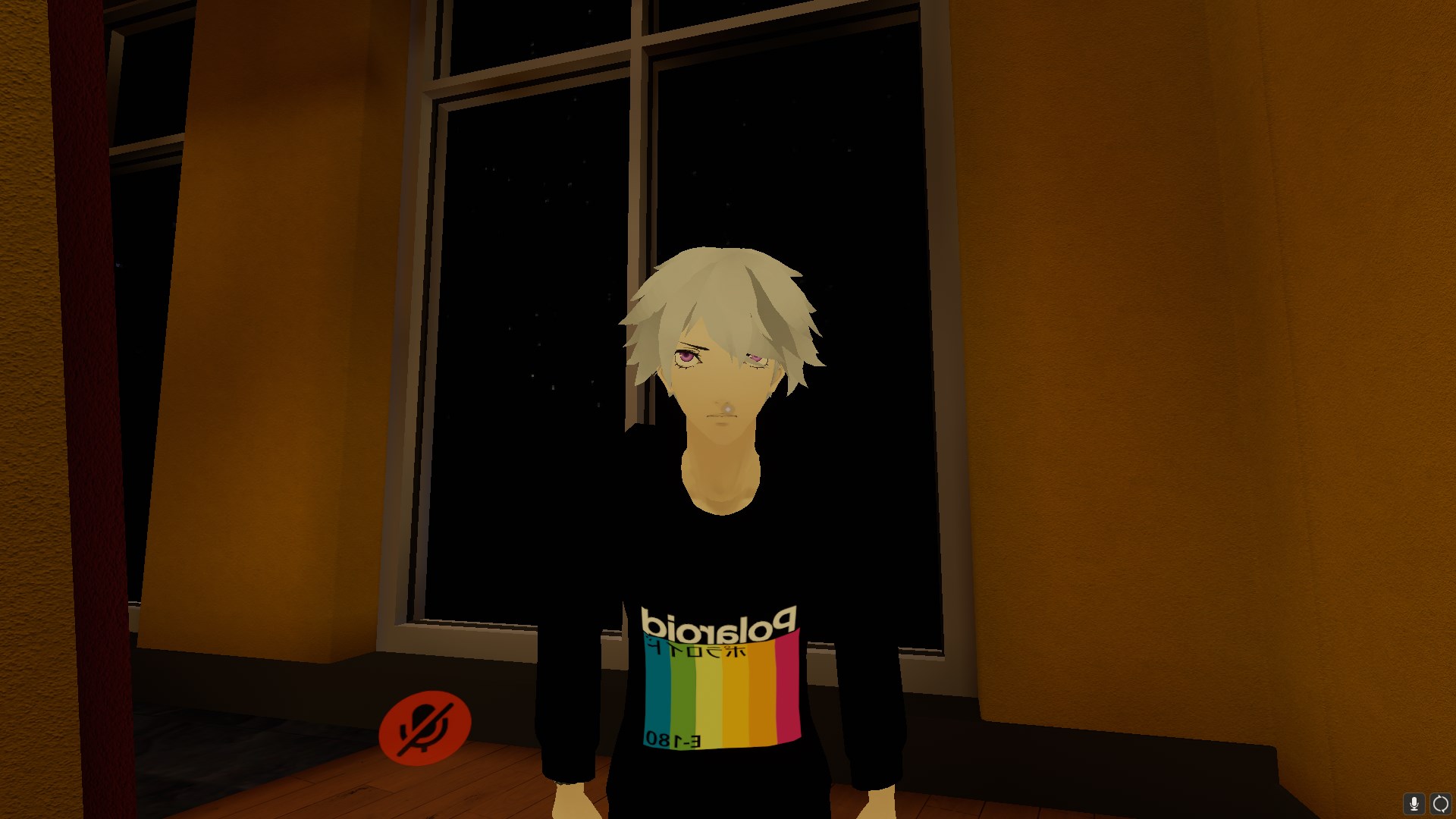
it looks slightly up from whatever im looking at
should i just offset the rotation in blender?

so its actually worse than i thought
it doesnt want to look where im looking
mild stratus
Offsetting it's probably your best bet.
 digital willow
Anyone who can help me with a question regarding importing mesh and parenting it?
drowsy wharf
@digital willow Don't ask to ask, just ask. There are often people who can answer a question, though some may gloss over "can anyone help" because they have no idea if they can or not.
digital willow
Ok thanks for the advice. I finally solved it thanks to a good guy, after I've been trying for like 20 hours. ToT/
 summer surge
MMD floats off the ground when bending over. what are the potential causes and fixes?
drowsy wharf
if it has toe bones and they aren't weighted to the feet that could cause it
summer surge
Removed the toe bones. didn't help. are there any other potential causes?
drowsy wharf
are you in full body?
summer surge
yes
drowsy wharf
is the hip behind the legs or is it the other way around?
hip should be above and a bit behind the leg bones (talking about large side primarily)
summer surge
anything else?
drowsy wharf
other than proportions being off, not that I can think of. Proportions for full body are extremely important
summer surge
@drowsy wharf this is roughly what I have currently.
I also have a version with smaller legs (which puts the hip tracker at the belly button and foot tracks mid-shin), but if the issue stems from the hip, i'd prefer to try and save the leg length
drowsy wharf
You don't need to use an inverted hip anymore either (might cause problems at some point)
I'm not sure what else could cause it...
Also generally you want the leg trackers on the feet instead of the leg, can't say for any special setups though. or how well yours would work.
make sure the hip is a bit behind the legs, the spine should angle back a small amount, and the chest slightly forward...other than that, as I said proportions are pretty important for full body, I'm not sure of any good workarounds for non-proportionate models, maybe someone else would have suggestions
 plush locust
Trying to upload a test avatar in unity, but it says I don't have specific parts mapped even after going through the mapping window. What should I do? https://gyazo.com/4fe17c31caecc30b3475c5b174084422
 crisp tendon
@plush locust https://youtu.be/LrCCl_F9XNs?t=1291
Here's a video on extremely common issues I see with bones and rigging setups, and ways to solve them. I cover:
- Leaving Upper Chest Blank
- Reparenting spine structure
- Reparenting arm structure
- Leaving Upper Chest Blank
- Creating a new root bone for skirts/hair
- Repa...
plush locust
Thanks ❤️
Went through the steps, still having the same problem. Some of the names are different, but I assume that's from an update since there are no alternatives. Ex: LeftLowerArm = Elbow
 last knoll
Is there someone here who can help me with weight painting 2 bits on my avatar? Please DM me as I'm going to bed
 meager turtle
So, I'm having issues with the weight painting on my character, and more specifically, the teeth. Here's how it looks when looking straight ahead: https://i.imgur.com/slazSbf.png
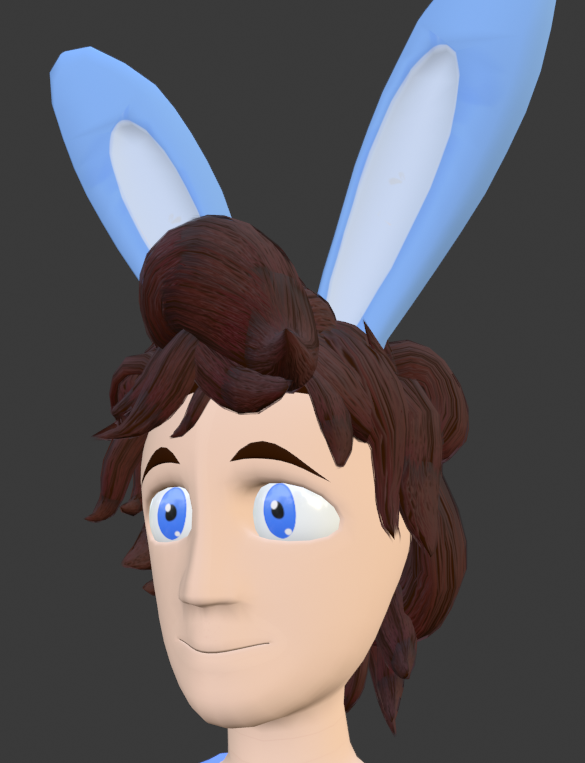
When looking directly up (to exaggerate mainly, but of course that means this issues persists even when looking slightly upwards): https://i.imgur.com/TYe3To0.png
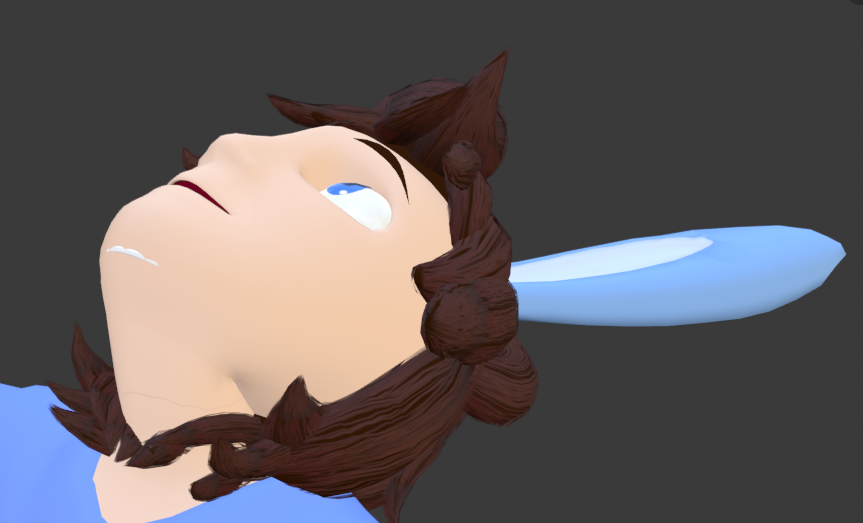
And how it looks in motion: https://gfycat.com/RecklessCalmAfricanparadiseflycatcher

And lastly, in motion but with a wireframe to get a better idea of what's happening: https://gfycat.com/OrderlyDistortedCattle

Note that the weight for the teeth and the areas around the teeth are set to 100% weight. Could it be that the teeth are technically not connected to the head itself?
If you have any suggestions for fixing this, please ping me. Thank you ;-;
crisp tendon
ez
edit mode, select one vertex from the teeth
open the N menu, you'll see which vertex groups it has assigned to it under "view" or "item"
then under the vertex group menu, simple assign 0 to the entire teeth mesh for the wrong vertex group
@meager turtle
meager turtle
That fixed it, thank you so much! I can't believe I didn't think to check that beforehand. It turns out that the teeth somehow got automatically assigned to the neck bone as well as the head. So, I just removed the teeth from the neck vertex group, along with some other small tweaking to other areas that were somehow accidentally assigned, and tada https://gfycat.com/CautiousChubbyGalapagoshawk

@crisp tendon
 lethal lark
Hey guys, I think this is a rigging issue. I'm using full body tracking and if I lie down flat on my back, my avatars neck bends weirdly. Screenshot shows what it looks like, just imagine she's lying flat. Is it because the neck mesh and bone are too long? Also I'm still on 2.79, haven't decided to upgrade yet 😅
lethal lark
It is in its normal state, I posed it to demonstrate what the neck looks like when I lie flat
Otherwise it's always fine
 polar ember
what are dynamic bones
lethal lark
don't think this is the right channel for that question, but they're just an asset in Unity that allows bones in a model to move, basically. That's how people make their hair, skirts, tails etc. move around and flow
also back to my avatar, I just made the bone & mesh in the neck smaller so I'll see how it works out, the neck was pretty long when I looked at it anyway, might come back for help if it's still no good
polar ember
alright thanks
 empty fable
I have a problem with my avatar and that is that the face is all black...
also the neck looks a bit taller how can I fix that?
empty fable
nvm the other stuff as of rn but I need to fix this finger
warm oyster
hm. avatar's pelvis/thigh angle is 152.5. is that close enough to 180 to probably be fine? so far everything looks fine in-game (though i'm not an expert) and moving the root bone seems like it could cause all kinds of problems
drowsy wharf
@lethal lark common workaround for neck issues is to make the neckbone super tiny, move the head down to meet it, and give the neck's weighting to the head bone as well
Basically getting rid of the weird movements of the neck by removing it.
@warm oyster moving the root bone in edit mode in blender won't give you issues. The worst thing possible is needing to adjust weight painting like moving any other bone, but that's usually only for significant movements.
Are you trying to make the model compatible with FBT?
empty fable
and how can I fix the finger do I have to go on blender?
drowsy wharf
that...looks like your model is separating from the armature pretty badly
empty fable
but how can I fix it?
drowsy wharf
I'd definitely go into blender and at least test in pose mode to make sure things move with it
 torn vector
Guessing its because the thigh bones are slightly forward of the pelvis bone?
warm oyster
nah, i'm not, himeki. the tooltip said it might cause IK problems but i haven't seen any. some may exist, i'm no expert and had to do a fair amount of the weight painting myself, but it's at least subtle enough to be invisible to my untrained eye. and thank you for the help.
drowsy wharf
@warm oyster @torn vector Generally, you want the hip bone above and behind the leg bones, and then the spine tilted back a bit, and the chest tilted forward.
@torn vector I can't see the torso bones that clearly from only a side view, but that definitely looks like more than hip>spine>chest>neck>head
I'm also not sure if it's using the old inverted hip fix with that bone display type
warm oyster
oh, so mine's literally backwards, lol
ok, i'll just make backups and try to change things carefully so i don't have to repaint
hopefully
the only real problem i've noticed is that when i sit my head's squished back
hooopefully this fixes it
drowsy wharf
@warm oyster I ask for blender (or whatever 3d program) screenshots instead of Unity rig mode since it doesn't show proper bone orientation.
But yes, everything basically looks backwards from what I said.
Also of note your chest bone looks like it's longer than it should be, same for neck I think...always hard to tell in Unity though
warm oyster
oh, alright. this is after the 'fix'
yeah, dang. head's still that far back when i sit
nothing else seems off though, after moving those
drowsy wharf
@warm oyster Definitely a large chest bone and neck bone...normally the head bone starts at the top of the neck around chin level.
The hip/spine/chest setup helps with movements (not head really)
Though hip should be behind the leg bones a bit instead of directly above, you can just move that bone backwards and not move the others, even just a little bit helps if you get any weird hip movements.
For the neck issue I'd definitely adjust the neck/head bone position
warm oyster
noted. i expect this to ruin the weight painting and that makes me want to cry but
i will do my best
drowsy wharf
you don't need to change the chest bone too much, and if it works fine for other things, you can leave it. Just keep in mind you might run into things it's causing
approximate without seeing it...but it doesn't need to move too far to resize if you choose to do so
again the head/neck is your current issue...just saying be aware, large chest can throw off the IK a bit and have some weirdness with shoulders and neck sometimes
warm oyster
oh, thank you. yeah, i'll give it a shot
drowsy wharf
looks like it's just a shader or texture issue if that's unity
warm oyster
i think her hair actually sank down, but all i did was move the tail of her head bone
i hate to be a pain, i didn't expect this to be so problematic, but basically this
which yeah i'll have to weight paint that, but w/e for now
man. i'm so worn out working on this but i also don't want chairs to make my avatar look like it ran into a wall face-first, lol
drowsy wharf
@warm oyster make sure you're doing that change in edit mode, not pose mode
warm oyster
yeah, i was. i'm not sure what's wrong
currently i'm just reverting the change, but yeah
drowsy wharf
also the tail of the head bone doesn't need to move, just the head
drowsy wharf
big side is rotation point, so technically the only point that matters to unity
drowsy wharf
hair doesn't seem to move to me
warm oyster
yeah, it's weird, it didn't until i took it to unity, and i tried confirming the rig type and animations weren't causing it
drowsy wharf
oh if you took it into unity after moving bones you have to set it to generic, apply, the back to humanoid, and apply again
(and check the mappings after of course to be sure)
drowsy wharf
basically unity's scene says "I have these positions" and the model is different, so the mesh changes, but the bones stay where they were unless you fix it
warm oyster
i see. well i'll give it a shot and thanks for all your help
i usually try very hard to solve problems on my own so nobody has to handhold me, but
i am actively terrified of weight painting
i've spent weeks working on this and my little world, and would like to finish someday lmao
yeah, huh, that didn't work either
left is unity's bone assignment
drowsy wharf
Weight painting isn't as terrifying as you may expect, just keep in mind you paint a vertex, not a face.
It's basically just "this point moves this much" so you want a smooth fade between levels down to 0 whenever possible
warm oyster
oh, no, i wanna be clear, i've done lots of weight painting
i had to weight paint that loose shirt she's wearing
which
drowsy wharf
is the hair the issue?
warm oyster
oversized t-shirts are cute
but having to weight paint one.
now i'm scared of weight painting lmao
also yeah it keeps sinking to follow the head of the head bone or something, but only in unity, inexplicably
drowsy wharf
yeah...weight painting something like that is easier when the body under it will always be hidden...so you can just remove it entirely
do you have anything on the model you added, like effects, or dynamic bones?
warm oyster
yeah, i did, but it still sucked because loose cloth moves weirdly, it's still not perfect but if i keep dumping hours into it i'm going to drink bleach
but also yeah i was just thinking to say that i have a dynamic bone on her hair (i only use them sparingly) and that is almost certainly the problem, lemme check
drowsy wharf
no it's not
warm oyster
i
drowsy wharf
the bone moved, unity knows the old position in your scene, that's why the avatar rig looks fine, but not the scene image
drowsy wharf
duplicate your avatar to make things easier on you
and on the duplicate hit "revert to prefab" at the top of the inspector above transform section
er...on the duplicate or the normal one...either way
drowsy wharf
whichever one you revert is the new avatar
warm oyster
excellent
drowsy wharf
you're keeping a duplicate with the dynamics because they'll be gone
so you can copy component and paste back in easily
drowsy wharf
think of the scene like additive changes to whatever you originally had (the model)
so if the model changes, and the scene loads it, it'll see that it should be lower different, and not in the exact spot you'd expect
warm oyster
i see
well thank you about the warning with the dynamic bones
it's working so far but i'll restrain my optimism until i'm in front of a mirror
but i appreciate it a lot, lol
drowsy wharf
np, everyone gets stuck sometimes right?
warm oyster
yeah, rigging/weights have been the monster in the closet for me throughout this whole project lol
drowsy wharf
Just remember it's not only dynamic bones that vanish when you revert. Any change that wasn't in the original prefab will be removed.
warm oyster
yeah, i think my only changes were the components and materials
empty fable
I started all over... Um is the rig okay?
drowsy wharf
can't really see anything from that.
click "start pose mode" at the top left and try rotating the parts...does it move how you want it to?
warm oyster
oh damn, that did fix it
now i just have to weight paint the vertices to bend more naturally and the head's fixed, ha
thank god
thank you so much himeki, lol
empty fable
wth
warm oyster
@drowsy wharf ok thanks again, after a literal avalanche of finding problems and solving them i'm finally, finally happy with my avatar's rigging/weighting
would've never managed it without your help lol, didn't know where to start
 glass panther
Excuse the crude reference, but i need some advice on double jointed rig setups. I've tried to search around but couldn't find too much on something like this besides animal type legs. My goal is just for the upper leg and lower leg to be able to rotate while the knee joint remains.
@steady patio I get the confusion sorry haha just wanted to provide some type of reference if anything.
drowsy wharf
@glass panther pretty sure that right now there's not much of a way to do it...
You could try giving it a partial weighting to both, but honestly I don't think it'll work out that well.
same reason proper digitigrade legs and the like can't be made...we can't change the IK setup, and walk animation overrides only work for humanoid bones
glass panther
Yeah i will probably find another way to do it, i thought it was interesting to attempt to use those types of joints you see in figurines alot where the knee is double jointed so it keeps that nice look to it. But thank you anyway for your input @drowsy wharf !
drowsy wharf
you could potentially make a secondary bone parented to the upper leg, and anchored down at the middle of that point, and give it half the weight, and the other half to the knee bone. If the knee bone is at the center of that it should rotate with it (if evenly painted)
 fervent hornet
You can do weird legs like digitigrade and stuff but they have to be faked legs with Final IK as everything is locked up. Quite hard and introduces other problems though.
 native shuttle
Would anyone know a good video tutorial on making an object a shape key
crisp tendon
Do you have blender ?
glass panther
I'm gonna attempt something more simple to be on the safe side. I'm really not experienced enough to mess with complicated rigging for vrchat 😅 Thank you all though!
native shuttle
Yes @crisp tendon
crisp tendon
Then all you need to do is create a new shapekey, select that object, and scale it down by 100 or 1000, and make the shapekey go full size at 100%
native shuttle
Would the object need a bone?
crisp tendon
nope
native shuttle
Because its a mask i wanna have it pop up and gone if i dont want it
warm oyster
Hm. Quick question, if I'm (carefully) resizing an avatar's rig and mesh to match my own body proportions so VRChat stops keeping its elbows bent when I'm standing straight, is there anything special I need to do besides just shortening the rig/mesh (in the middle, far away from joints) and smoothing out the mesh to keep it looking natural?
I've done this once already with the avatar's feet, way back at the start of all this, because they were unusually small and it looked weird. Haven't noticed any ill effects in all this time, but now that I'm gonna be shortening thighs/calves and maybe also the torso itself, I'd like to ask more experienced people lol.
I know I'll have to confirm the weight painting, but since I'm just moving vertices to match rig transforms, I think it should just work out...
But yeah, lemme know if.
I know I could fix this by lowering the camera point, or scaling my playspace height and game height, but these solutions produce an incorrect perspective, which would be fine if I weren't already hip-deep in modeling/rigging to the point that I'm numb to it, lol.
native shuttle
Which would be easier having the object set to a animation in unity (mask off and off in emotes) or set it as a shapekey in blender ?
warm oyster
slowly losing my mind. is this shoulder behavior "good enough", you think? i don't plan on lifting my arms straight up often. what i DO wanna do is change the avatar's proportions so that they match mine, so the arms aren't always slightly bent
but is it common for poses like these to cause weird bends like those? i've been trying to fix it for hours
dense stump
I know its common if ur on index for the arms always to be bent!
I think my arms tend to bend more above the head too
warm oyster
hmm, noted. do the shoulders look passable? i can't seem to make them bend any more gracefully than that :\ i've tried
buut like i said, also never lifting my arms that high might help lol
 stray zenith
Anyone know how to fix an issue with the mouth that I am dealing with, when I point the head downward the jaw opens for no reason, any ideas?
dense stump
Usually what i do (if not in fullbody) and it happens, i just tell the game im shorter than i am, which “grows” you ingame, and playspace down to the head if it pops me out.
And i think it loks good!
stray zenith
And yes the jaw is unassigned
dense stump
Are ur first four shapekeys blink left blink righr lowerlid left lowelid right?
stray zenith
Let me look
warm oyster
hmmm, noted, thank you. being a perfectionist with this is killing me
stray zenith
They are on the eye pupils but not the face mesh, should I just merge the two?
dense stump
Welcome!!
And yes!
Basically vrchat with eyetracking looks for whatever mesh is called Body for the eyetracking stuff
And it looks for the first four shapekeys. So if these first four arent the blinking shapekeys, it uses any first four (like mouth open, aaa shapekey, or what have u)
dense stump
Delete em and regenerate them in cats!
dense stump
are the blink shapekeys that cats use for references workin?
stray zenith
They should be, they were the last time I worked on a model.
dense stump
but are they now?
stray zenith
I wouldn't know for sure tbh. should I just fresh install the plugin?
dense stump
u can scroll down in ur shapekeys and it should just be called blink!
and if they're al not english theres a translate option in cats
i dont think its cats messing up?
stray zenith
I have Shape keys blink_L and blink_R
dense stump
Try those!
stray zenith
They work but shouldn't they just be one that says blink?
dense stump
I think so but i still think it should work?
as long as u plug that into the eyetracking part
stray zenith
So how would assign them?
dense stump
make sure ur eyemesh facemesh combo is named Body in the hierarchy (topright)
stray zenith
Got that
dense stump
ok so before u hit create eyetracking, it says stuff like eye L, eye R
blink left and blink right
stray zenith
fixed it lol
stray zenith
I just need to use the Blink L and blink R in place of the VRC created left and right and it pretty much just remapped them to be the VRC ones
Pretty much like this and it fixed it
dense stump
Oooooh ya!
so it was still trying to use ur empty blink shapekeys instead of the proper ones
stray zenith
Been working on this for 4 days now so to get this crap ironed out is one less headache lol thanks for the help tho!
stray zenith
Ehh something else will break, always does lol
meager turtle
Hi there, I'm back with more issues. So, it seems as though my eye tracking and blinking doesn't work at all. Or at least, I can't seem to find a reliable way of testing it in VRChat. Currently, this is how the bones are set up, and you can see them moving around as they should. https://gfycat.com/PotableIgnorantBlackfootedferret

And the blinking using visemes (shown within Blender): https://gfycat.com/ObviousWebbedFox

I've got the names for the visemes as the following:
vrc.blink_left
vrc.blink_right
vrc.lowerlid_left
vrc.lowerlid_right```And actually, checking in Unity, these are set up properly there too https://gfycat.com/MildResponsibleAoudad

And then the last issue i've got has to do with full body tracking. Currently, this is what happens when I try to use FBT with my avatar. https://gfycat.com/HandyFlawlessInsect

This is how i've got the armature set up, for reference
If anyone has any solutions to the problems i've stated, please ping me. Thank you guys for helping me through these last few steps before my avatar is finally complete ❤️
wind osprey
@meager turtle The FBT problems are easy, bring the root of the hip bone up so it's above the thigh bones
meager turtle
Augh, it was really that easy? Man I feel dumb. Okay I'm testing this real quick to see if that does fix it
wind osprey
Check out VRCSDK/Examples/Sample Assets/Animation/tpose-new.fbx in the VRCSDK for a good idea what a FBT compatible rig should look like.
drowsy wharf
@meager turtle above and a bit behind the legs, not in front
do you have hip>spine>chest>neck>head>(left/right eye) as well?
meager turtle
Yep
drowsy wharf
did you generate the eyetracking with cats? If so did you delete any bones it made?
meager turtle
No, I did the eye tracking manually. Added the bones where I wanted them, only assigned them to the faces that have the irises on them (which is technically disconnected from the rest of the eyeball)
And as I had posted with my first gif earlier, it looks as though the eye tracking should work, since I can move the eyes around within Unity
drowsy wharf
how did you test it in game?
meager turtle
I tested in Unity rather than in-game. I selected my model in the hierarchy, hit "select" on the "Model" section of the Inspector, then went to the configure menu from the Rig section. Lastly, I selected "Head", and then one of the eyes. Rotating it around gets this result https://gfycat.com/PotableIgnorantBlackfootedferret
drowsy wharf
You were saying it doesn't work in game though?
meager turtle
At least, based on first impressions. I don't really know how to properly test it in game, but from first glance at least, it seemed as though the eyes weren't moving at all when I was looking at myself in the mirror in the default home space
Same goes for the blinking. Maybe I just didn't wait around long enough for any of that to take place though, I'm not sure.
drowsy wharf
I'd wait longer and watch for the blinking
for eyetracking it'll just eventually go cross eyed if you're alone
meager turtle
I did have a couple of friends join me in that world though, and they said they didn't see anything. I'll check that with the current model and see if it does actually blink. And really?
drowsy wharf
it doesn't stay that way, it just sometimes crosses and returns
like it's trying to focus on the mirror and failing or something
meager turtle
Gotcha. I'll hop back in and wait a few minutes to see if anything happens
And one last thing, is this fine for the FBT hip stuff?
drowsy wharf
I'd suggest moving the head of the hip bone back a bit more so it's behind the legs, but otherwise it looks fine
if you run into issues bending, give the spine/chest connection a backward bend so the IK knows what to do
meager turtle
What do you mean by that?
meager turtle
Something like this, then?
drowsy wharf
yeah that's probably fine, it just needs a little bit to know where to go
meager turtle
Alright. And one more thing, just to check. When exporting as FBX, I followed this guide https://docs.google.com/document/d/1W5KFa_aszCMrJaFD8mb9a-GHYO4X4S9M63GjM4UwuEw/pub
And it mentions to uncheck everything to do with animation, uncheck "add leaf bones", and uncheck "apply modifiers". Should I still follow that?
drowsy wharf
Yes, still accurate
meager turtle
👌
So I waited around for 2 or 3 minutes, and zero eye movement or blinking. @drowsy wharf
drowsy wharf
@meager turtle try changing the eye names to "LeftEye" and "RightEye" I think the naming was picky
meager turtle
Okay, I'll try that briefly, and then I'm going to bed. It's late for me and I have classes in the morning ;_;
And they are, yes
drowsy wharf
also mesh named "body"?
drowsy wharf
and includes the eyes too?
meager turtle
Yep
How the visemes are set up
Body mesh
Also, in the builder, it's giving me this now @drowsy wharf . Will this be okay?
drowsy wharf
it should be, you could roll the tail of the hip backwards a bit if you're worried. A few degrees should be fine though
meager turtle
I'll just try it as-is for now
drowsy wharf
how many meshes do you have?
meager turtle
I think I technically have 7 (which yes I know, isn't great)
It seemed to run fine in-game though
drowsy wharf
why didn't you join them?
meager turtle
I figured it would make it easier for assigning my materials and for when I want to make future edits to the model
I'll probably try joining them next, but i won't be able to do that tonight.
drowsy wharf
If you install CATS its a single click to join them
join then export and revert the join for later edits, saves you a lot on performance
meager turtle
Ah, yeah I see that now. I've got CATS installed already and just didn't think to do that.
I'll end up doing that later when I have the time to get all of this set back up. For now I just want to see if the FBT and eye tracking works
drowsy wharf
each mesh is basically x3 draw calls each it's not insignificant, just worth a mention
and yeah I understand, have to sleep soon too
meager turtle
Hey holy crap @drowsy wharf https://gfycat.com/HappyFinishedGonolek

Thank you for your help @drowsy wharf , i'm shocked it's working properly now
There was a slight bit of an issue with the neck somehow showing through the shirt, but that's something I can fix later
drowsy wharf
Nice
 jade stone
i need help rigging
the model i have doesnt seem to have a left hand and a right hand transform thing but im new to it and could be wrong
i got tonnes of transforms that are unlabelled
transform 3
transform 1
etc
argh
jade stone
it doesnt even fucking have the finger things to rig
 low river
Which is better for posing so the rig works, a pose or t pose? Im gonna get back into modelling and was curious
 turbid spear
I think a pose is probably more natural
 zenith plank

2 years ago I started this model
I shall finish it
I got everything except animations
zenith plank
I think I lost the textures
dense stump
if u click a material and scroll down to the lil mmd texture section, it'll tell u where its looking for the texture
and also with that, itll tell u what that texture is called!
so then u can look it up in ur files
zenith plank
I found this .blend file plus lie .mtl on a usb I found while going through a box
I started this thing 2 years ago
also
why did they change blender so much?
zenith plank
no idea
uh whatever the most recent blender version is from steam
this is completely different from when I last used it in 2018
dense stump
2.81 i think that is
yeee they did a pr big jump from 2.79 to the 2.8s
ive heard its rlly good tho once u find everythin and can do a lot more stuff!
zenith plank
ok
so I'm gonna have to look through like 7 usb sticks until I find the one with the .project files or whatever for unity
dense stump
Oh mtl is apparently texture? But only for .obj files
zenith plank
yeah I figured it out
last knoll
hi can someone help with weightpainting please tag me if you reply
dense stump
@last knoll id just recommend askin! Then if someone knows it it gives them the chance to respond and someone that doesnt know wont be stuck with it. If that makes sense-
last knoll
hmm well
uhm, my friend who is kinda new to avatar making helped me make my avatar but he skipped chest weghtpainting (for dynamic bones in the chest) and i have zero experience or time really to learn weightpainting so i was wondering if someone can help
the avatar is fully finished for the rest i even got it ingame its just that part and its kinda bothering me
well its technically for 2 avatars but its just cuz i have the same base with different clothes
(if you want compensation we can talk)
crisp tendon
Can't your friend finish what they started ?
last knoll
no he just did it to practice so i was fine with it
that's why i'm here lol
like i said he's just getting into the whole avatar making scene and he said it's too complex for him
crisp tendon
well, select the armature, switch it to pose mode, then select the mesh, switch to weight paint mode, select the chest bone, weight menu > set automatic from bone
last knoll
will that automatically try to weightpaint it? o_o
and im confused because i have very limited blender experience
crisp tendon
yep that's the goal
crisp tendon
yep, or right clicking the actual mesh in your scene
there's good tutorials for auto weight paint
zenith plank
epic
last knoll
@crisp tendon i did whatg you said but idk if anything changed
crisp tendon
you'd need to select the bone, press r and move it around
crisp tendon
you can select the one you want in the vertex group list
last knoll
@crisp tendon i have the correct bone and i presss this and nothing happens (atleast as far as i can see)
crisp tendon
you selected the bone called breast2_r, is that your chest ?
last knoll
i guess i shoulda been more specific, i wanted to weightpaint my breasts for dynamicbones... didnt want to emberass myself lol
crisp tendon
oh, well it's the same thing, but with the other bones then
last knoll
with the breastbones?
crisp tendon
but you might have to edit the bones so that they are within the mesh bounds
crisp tendon
then i strongly suggest looking at a tutorial for it !
last knoll
do you know any good ones
like i said i dont have much time to learn these things and im a newb with blender hence the preference if someone did it for me
im doing multiple things at once here
plus im pretty sure im doing things wrong cuz i saw some weight painting before on my ava and they're just gone now
:/
crisp tendon
last knoll
i'll look into it, thank you
crisp tendon
you'd be better of asking your friend though 
 last cedar
hey does anyone have the list of bone names for a vrchat Avatar? I have to rename my bones manualy and i don't know what to call them
merry estuary
It's in pinned messages of this channel @last cedar
last cedar
oh i didn't know, thank you
zenith plank
I really
don't know where to start
so
do I need both Right Arm and Right Shoulder
steady patio
@zenith plank select armature, got o edit mode, and hit Shift+A
also, your entire bone hierarchy is fucked 0 0 you need to get that in place
 zenith plank
I'm getting
it
also thanks for reminding me of the thighs
weight painting
uh
how do I fix
drowsy wharf
@zenith plank https://www.youtube.com/watch?v=Tl4qTgwQwYw
Quick intro and guide to skinning/weight painting.
this video is meant for those with a basic understanding of Blender
zenith plank
okay I figured it out
this is a nightmare
but
I've got it
is it normal to have to go into the model in order to remove weight?
I hate blender, why do I need to inside the model to remove weight
nothing is red
why is it moving?
zenith plank
understandable
I'm stupid
I'm working on it
 kinda stupid that I need to go inside the model to clean the mess
warm oyster
anybody have a clear example screenshot of shoulder rigging/weight painting that works in IK?
i'm still unskilled and slow and what seems okay in blender looks off in vrchat, and i'm really hoping to get all this done before i die of old age :L
zenith plank
blender now doesn't want to respond to anything
this keeps popping up when I click anywhere on blender
nvm
I fixed it
why do I need to go inside the model
to clear weights
drowsy wharf
@zenith plank you don't actually need to go inside, switch to wireframe mode to be able to access all vertices regardless if they're inside or behind the model
zenith plank
I was in wireframe mode the entire time
I had to go inside the model
I got
also
is this good or bad
drowsy wharf
that's not wireframe mode, you can see the mesh, but it's not wireframe which is ONLY edges/verts
zenith plank
oh
anyways
uh
I got all of it so mesh isn't being dragged all over
but now
I can't paint weight
how do I fix this
drowsy wharf
all the weight is on that bone most likely...if you're in edit mode though, you're just rotating the mesh, not posing it
as for the vertex groups, you don't have groups for all your bones, which is why you can't paint
drowsy wharf
those are bones, not vertex groups
steady patio
Mhm! The hierarchy is right
drowsy wharf
click the + on body, they're in there
zenith plank
drowsy wharf
have you painted the spine at all yet?
drowsy wharf
they don't respond because they don't have vertex groups generated
Delete your vertex groups and auto weight to generate them and some basic weighting (you might have to edit it)
drowsy wharf
select the mesh, then shift and select the armature, hit Control P and select armature deform>with automatic weights
drowsy wharf
you could try clearing the groups out again, and then removing doubles for the mesh, just be aware that it's possible to have things like the teeth or lips fuse together if the default position is the same for top/bottom
to remove doubles, go into mesh edit mode, select all by tapping A until it shows all orange, then just hit space and search for remove doubles
drowsy wharf
clear them out too, they're not needed for unity
drowsy wharf
they aren't what's messing it up, remove doubles on your model
zenith plank
double vertices?
I can't delete anything
I have no idea what to do
well
I don't understand
drowsy wharf
you need to merge those meshes first...and I gave you instructions on how to remove doubles earlier
if you're using CATS, you can just merge all meshes with one button
drowsy wharf
merge them, then remove doubles, remove your vertex groups and re-auto weight
drowsy wharf
did you have the entire mesh selected?
drowsy wharf
try auto weighting again after you remove the vertex groups
this is why you have those other two vertex groups btw, the mmd ones
it won't stop you from the auto weighting though
drowsy wharf
you either have to fix up the model to avoid intersecting, unconnected meshes, or you can just weight it yourself (do the auto weighting steps, but choose empty weights instead to get vertex groups set)
drowsy wharf
read ALL the instructions before jumping ahead
drowsy wharf
have to learn how to weight paint, it takes a bit to get used to
drowsy wharf
X should toggle it if I remember correctly, and yes that's it
drowsy wharf
if you didn't watch that weight paint video, I really suggest it...helps to get used to it
my bad, z was the wireframe toggle
fading verge
You guys know if I can get an avatar to copy bone rotation of one arm any apply to another? Like say I have a 4 armed character and I want both right arms to move the same
Please do @ me, I'm a but busy with things but just want to know the answer so I don't forget to ask later
drowsy wharf
@fading verge without Final IK ($90USD paid asset), you're locked to using rigidbodies and fixed joints across them and locking it to rotation
drowsy wharf
do you have skin inside it?
drowsy wharf
you can always hide the surface stuff and not have to work from inside
zenith plank
and how do I do that
drowsy wharf
select what you want to hide and hit h
and then Alt+h will unhide everything when you're ready
you can usually just point at a vert and hit L to select linked points, and hide that
there are times when it'll select too much though
drowsy wharf
hide it?
drowsy wharf
it's only what you have selected that gets hidden, so if you select only a section of it, it hides it
as long as you're not in object mode
zenith plank
yeah the entire model gets hidden
drowsy wharf
show me your selection before you hit H
zenith plank
I found a work around
warm oyster
heyyy
why's my boob root off center
😠
it looks fine in blender and in the unity humanoid bone configurat...ion...wait lemme try something
ah. yes. nevermind, ignore me. i was taking those bones from a backup after reverting to prefab on the new version and didn't actually update the uh, the root bone.
3d art is a nightmare, who in the world would want to do this for a living
zenith plank
@drowsy wharf
this is what it looks like normally
this is when I separate them using cats
drowsy wharf
And? thats normal...
zenith plank
yeah
um
my textures
they're inverted when I go into weigh paint
so I have to paint from the inside
drowsy wharf
that's probably your body mesh being inverted, unless you mean color is inverted
zenith plank
the mesh goes inverted
drowsy wharf
hit N find "backface culling" and make sure it's checked. Go into mesh edit mode, are they inverted there?
 abstract siren
I'm having some rigging issues.

This message keeps popping up although it's already fixed.
Please help.
drowsy wharf
select the model in unity assets, click the rig tab in the inspector and show the feet section of the mappings
and what did you do to fix it?


 drowsy wharf
can you show the hierarchy from hips down to feet?
abstract siren
Alright.
drowsy wharf
also you should unmap the jaw unless you intend to use jawflap instead of visemes
abstract siren
What's that?
drowsy wharf
do you have shapekeys for the visemes already?
abstract siren
No.
drowsy wharf
does the model have a face and mouth you want to move when you talk?
that's what visemes usually do, shape the mesh of the face like you do IRL when you talk
drowsy wharf
the jaw bone should only be mapped if you intend to have the jaw flap up and down when you talk (usually when you don't have visemes and still want motion)
drowsy wharf
what do you have assigned for the hip?
tough robin
Did you map them at all?
abstract siren
they are all mapped
drowsy wharf
it all looks fine too...
abstract siren
yeah
drowsy wharf
what happens when you hit "select"
drowsy wharf
can you move or close that vrchat sdk window?
tough robin
Can you show us the mapping window?
tough robin
Upper chest shouldnt be mapped
Also
You arent using the right unity version
So you wont be able to upload anyways
drowsy wharf
VRChat
Requirements We're going to need a couple things before we can get started. Unity 2017.4.28f1 - Scroll down to find LTS Release 2017.4.28f1If you have Unity Hub installed, you can just click here to install the proper version. Do NOT install the 2017.4 version that's in the ...
zenith plank
I'm going to scream
I spent so much time on weight painting
and it just
threw out textures and meshes
for no reason
and I can't get them back now
auto paint doesn't want to work for me
and I don't know why
drowsy wharf
show me a screenshot of the issue with textures/meshes
I asked you to do something and a question and you never answered it, so I have no idea if you even read it
zenith plank
I might've missed it
drowsy wharf
hit N to open the info on the right panel, find "backface culling" and make sure it's checked. Go into mesh edit mode, are they inverted there?
drowsy wharf
show me what you're seeing then
drowsy wharf
the textures are messed up because you're in weight paint mode...
drowsy wharf
then what exactly is wrong...you said it was blacked out?
zenith plank
yeah all the textures were blacked
drowsy wharf
that's what I was saying to show me
drowsy wharf
after spending all that time on it? ouch...
definitely at least make a new save if you're having issues, or wait and ask for help solving it
you can almost always fix issues, so don't panic if something goes wrong. People will help when they can but might not respond right away
abstract siren
alr i updated unity
zenith plank
😔
abstract siren
so do you guys have a solution to my problem?
drowsy wharf
did you remove upper chest mapping?
drowsy wharf
@abstract siren I very rarely open DMS, you can handle basically everything here
@zenith plank select the material for them on the right and check the settings for it
if you're in mesh edit mode you can select the material and hit "select" and it should highlight all of what the material is using...try that first to make sure it's assigned properly to the mesh (it should be)
zenith plank
uh
funny thing happened
the textures are back without me doing anything
I have no idea what is going on
drowsy wharf
the textures themselves on the material?
drowsy wharf
shrug might just not have loaded correctly
torn vector
Why is scaling so hard? I set my avatar view point to 1.8 in unity and scale the model accordingly. But then when I get in game, I'm on my tip toes until I set my actual height to 6'10", even though the model should be 5'11", which is my actual height.
drowsy wharf
did you compare it to a standard object like a unity cube?
@torn vector ⬆️ and below...forgot to mention with first.
Take a cube (outside the model), set Y scale to 1.8 for approximate height and compare to model height.
If you're comparing the 5'11" height to the EYE height, you'll be off from expected anyway.
Are you using FBT? If so, the proportions of the avatar are VERY important. If you have short legs in game for example, you'll end up on tiptoes because of the difference.
Past that, your feet bones could be too high up in the model, and so off the ground.
torn vector
@drowsy wharf FBT actually works fine, and also a cube with the scale set to 1.8 is tiny compared to the model
I made it the same size as the example avatar originally and still had the tiptoe issue
I'm thinking its bone related at this point
drowsy wharf
a cube set to 1.8 scale is 180 cm or 5'11"
torn vector
Then what size is my avatar then lol
It seems normal in game aside from being a little short
fading verge
okay, so I'm doing a fnaf vr characer foxy.
and I want to know something
is it possible to have a working avatar that is missing finger bones on his hook?
steady patio
Add the finger bones but dont weight them
fading verge
understood
torn vector
@drowsy wharf I played myself lol
It was because my floor in playspace was set to about 4in below my floor
Redid room setup and it works fine now
 hot arrow
hey friends
I want to use a public licence model for an avatar. Unity seems to recognize the structure and he is in a T-pose. However when I enter the game in non VR mode to test, he's still stuck in the T-pose.
Is it complicated to have arms at rest as a natural pose?
fervent hornet
Is your model defined as humanoid? Select the import and set it from generic to humanoid and the tpose should stop
abstract siren
How do I fix this?
fading verge
By doing that? Check the shoulder bone parents
drowsy wharf
and make sure you don't have upper chest mapped
abstract siren
i dont have it mapped
 upbeat hollow
how do i keep the head of my avatar in one place?
I disabled the neck in the vertex groups but i can't figure out how to get the head to stay in one set location and just rotate based around that
drowsy wharf
you need both...
 candid eagle
really
drowsy wharf
they're different programs for different things entirely
candid eagle
wait
drowsy wharf
one is a 3D model making program, one is a game engine...
 grave mantle
You can technically make games in blender.
candid eagle
its because i watched a tutorial teaching how to use just the unity
drowsy wharf
sure you could probably make plugins that let people play simple games in blender, but you still don't even make games in it
if you already have a model prepared with all that is needed, you don't need blender and can work entirely in unity
candid eagle
but@grave mantle helped me in avatars mmd
drowsy wharf
if you have to fix up a model or make one yourself, then you would do it in blender or in a similar program
grave mantle
blender actually has a built in game engine
drowsy wharf
if you're just taking a model you already have, and it has everything needed (and is in a format unity can use) then you can use only unity
grave mantle
it defiantly isn't as robust as unity, but it exists
candid eagle
@grave mantle what you mean achieve the rank of the new user
drowsy wharf
you mean the one they stopped basically stopped supporting?
candid eagle
in avatars mmd
grave mantle
the one
candid eagle
@drowsy wharf i dont know
drowsy wharf
@candid eagle you need to play VRChat with a VRChat account (and not a steam account) until it tells you you can upload. ("new user" rank instead of "visitor")
grave mantle
@candid eagle when you are in game you will people in white name tags, that is the visitor rank, the next rank is called new user.
candid eagle
ok....
i think i got it
its because im brazilian so...
i cant understand everything of your language
grave mantle
that's okay
drowsy wharf
@upbeat hollow I'm assuming you're talking about a head floating above you and not moving with the body, is that correct?
If so you would need to have an unweighted head bone, and a separate bone with weight on the head. And then in unity use a fixed joint (fake head), and rigid body (real head bone). Set the rigid body constraints to rotation only, and 0 drag/angular drag.
That should do what you want.
upbeat hollow
Alright lit
sly dragon
Hello! does anyone have a solution for Full body rigging? its a single bone thats giving me issues, but its the Pelvis bone.
When just using the avatar normally everything is fine, but in full body the Pelvis bone (i think) is flipped from pointing down to pointing up as far as i can tell
 silver bobcat
Can anyone mind helping me,I rigged my character in blender and now when i put it in unity,It says there is no hip bone found, yet i added a hip bone.
tough robin
you need to configure the armature
crisp tendon
@sly dragon Screenshot of your armature in blender pls
tough robin
click on your fbx in your assets and go to rig/make usre its humanoid and go configure
btw you dont need a upper chest bone so dont use one
 willow linden
How do I stop this watch from detaching from the arm?
crisp tendon
Weight paint it in blender, or put it below the correct bone in the hierarchy ?
willow linden
Ok