#avatar-rigging
1 messages · Page 152 of 1
 crisp tendon
i think you can select the four vertices that start at the forearm and apply paint there
so that it bends a bit at least
but it shouldn't affect the chest
 scarlet creek
Guys,im need your help again
So,im mapped all bones on my avatar (and dont mapped UPPERCHEST),but when im trying to upload it,it says "You dont mapped neck,head,chest,hips,spine etc...".
Whats wrong?
 steady patio
@scarlet creek you must have the minimum number of bones mapped and they must follow a specific hierarchy
most likely you have some bones missing

not mentioned here is finger bones
scarlet creek
im already solve this problem,you late,sorry
steady patio
thats good ^ ^
 bold locust
Lol Posts the same question in several channels, waits 5 minutes before acting as if the world is ignoring them on purpose, then acts a little ungrateful when someone answers. Nice.
¯_(ツ)_/¯
 neon socket
What does this mean?
Would there be a name that i should be using for the index finger or something?
 sacred wadi
@neon socket Well it doesn't necessarily have to be named "Index1.L", but it looks like Unity is trying to find the finger bone.
You can manually assign bones if you click where it says "Configure"
neon socket
i did that ^_^ only thing it complains about is the character not being in t-pose which it is but i think it might be slight angle issues
Having issues here now, how does one get this into t-pose considering its complaining about the thumbs?
Thumbs on actual model
 drowsy wharf
there's a "pose" button at the bottom, click that and select "enforce t pose"
normally the thumb points out and forward. Hold your hand in a loose but straight pose, the natural angle for your thumb isn't perfectly straight out, it's angled
neon socket
Thats how i had it before, i put them straight out thinking it would fix it. Thanks for the "enforce t pose" tip.
drowsy wharf
most likely it thinks there's another bone after the thumb. I'd check the mappings to make sure everything's set correctly
normally it shows the incorrect bone highlighted in red instead of the cyan-ish color
 wintry rover
is there a way to bring the head down?
I tried scaling the chest but that didn't do anything
my bones setup in blender
crisp tendon
bring the head down ?
wintry rover
you can see in the 1st pic my right hand is touching the top of my IRL head
 opal aurora
You could attempt to shrink the head, but it might look pretty odd
 dense stump
I think its cuz anatomically the eyes on this model are lower than they would be on an rl person?
opal aurora
Getting complete accuracy will be a daunting task
dense stump
You could maybe move up the viewball? But that’d mean ur not looking out the eyes and cause other weirdness
wintry rover
I moved the viewball level with the eyes
drowsy wharf
Your head position is determined by the viewball...combine that with the avatar's head not being proportionally correct and you get what you're experiencing
wintry rover
let me try bringing it up a bit more
drowsy wharf
just like skipper said, the head is off (proportionally) from reality, but that's part of the art style
the whole model is probably off in proportions, so a larger head, smaller neck, etc is common
wintry rover
I looked at myself in the mirror and it seems accurate lol
drowsy wharf
is your chin the same distance below where it should be as the top of the head is?
wintry rover
I think so
I'm testing the viewball way up high
oh man bringing up the viewball does the trick
I always thought the viewball has to match the eyes
opal aurora
It should, but it shifts the "proportions" depending on where it is, so if your models' eyes matched your current viewball, it'd be "proper"
wintry rover
I thought it took some random bone like the hip as reference
been trying to find that bone for months
opal aurora
This is just an assumption, but i think perhaps some longer arms could offset the range enough to work
That could mess up the arm proportions if you had them proper already however
wintry rover
I don't fully understand
opal aurora
Imagine having longer arms, you'd need to bend them further to touch your head if you stretched them upwards, correct?
wintry rover
I do have a problem that one of my arms always bend when in T-Pose regardless if I have them scaled way too short or not
ah got you
drowsy wharf
how would longer arms fix your head position...?
opal aurora
If your upperarm is longer, it will have a longer reach untill it bends, making it so that the lowerarm is higher than normal
Atleast that's what i'd assume it'd be capable of doing, yet that could mess up proportions overall
drowsy wharf
in normal animation I could see that helping, but with IK you're in control of the hand, not the arm movements...the arms adjust to the hand location, not the other way around
so putting your hand in the same spot would either desync your hand from your actual hand, which just causes other issues, or it'd rotate more at the shoulder to reach it (possibly at a weird angle)
and the hand would still be showing that the head isn't where you expect
opal aurora
Ah, right, i was thinking too much in a realistic scenario xD
That makes it rather annoying to deal with then sadly...
drowsy wharf
technically speaking our actual movements are closer to IK than you might think other than when trying to move it differently
@wintry rover can you give an orthographic front view of the head?
hard to compare with a vrchat image
 opal aurora
I imagined that it'd take our hand inputs and translate them regarding the currently used rig, being somewhat affected by actual arm length rather than 1 to 1 direct inputs, but all the proportion issues do make more sense that way
drowsy wharf
yeah the eyes are too low compared to normal proportions (probably due to art style)
that's why your head is off when viewball is at the eyes
to be fair, pairing it to the eyes is better in most cases since we tend to look toward people's eyes though
drowsy wharf
oh right, my bad
wintry rover
you guys know what's the deal with the arms?
they always bend doesn't matter what
I tried scaling them way shorter
still the same
drowsy wharf
how did you scale them exactly?
drowsy wharf
that should work assuming you're updating your model properly in Unity
bent arms are because the IK determines it as not a full extension
wintry rover
weird
 fading verge
0.0 wtf am i seeing
wintry rover
scaling arms changes the proportion
fading verge
ok
wintry rover
it doesn't help straightening the arms but it scales the proportion
confirmed that's just how the dev setup the arms with the Index controllers
drowsy wharf
weird...also good to know
 wind osprey
@wintry rover Is your user height setting in VRC accurate to you? Often that has some bearing on how the physical world and VR world scalings end up, which in some cases can cause an inability to fully extend arms.
 fringe citrus
@wintry rover in my experience using your actual height in the User Real Height setting will have the result you see with your arms. The avatar's arms will end up slightly too long and they'll remain bent even when your real arms are fully extended. The solution is to reduce your user real height setting. Keep reducing until you are just able to fully extend the arms and a slight bend in your real arms causes a slight bend in the avatar. Something to note though, once you go down the road of straying from VRChat's default arm scaling you'll likely need to get into having a vertical offset to keep your floor aligned (assuming it was ok before).
It's one of those things where you might find you get diminishing returns* on your effort there and it's not worth it to you. You can improve it to be nearly perfect, but you'll have to start jumping through more and more hoops for only slight additional gains in avatar fit quality.
 barren gust
i'm wondering if anyone has had this issue before: when my eye tracking looks to the right the whole body shifts slightly right with it making it look like my avatar is ducking its head slightly down and to the left.
common fixes like redoing the eye tracking have been performed and i have not don't the 'neck fix' at any point on this avatar. here is some pictures of the armature with irrelevant bones gone, in case anyone has experienced this before
wintry rover
maybe check your shapekeys?
barren gust
i ran through all of them, none shift the body at all. ill check once more just in case
it looks like a light version of when desktop users crouch and the head goes down to the shoulders
wintry rover
also I don't see you have the Eye_L and Eye_R bones
barren gust
i hid those so the neck bone was easier to see in the pics
in case that helps
another thing i checked was that nothing but the eyes were weight painted to the Eye_x and ___Eye bones
barren gust
cuz it looked like that wouldve caused it. i also thought it might have been like the effect of having an idle anim while in FBT, but i do not have any of those on the anim controller either
correct, nothing but the eyes
cant recreate this issue anywhere but in game
crisp tendon
Do you have a video of your issue ?
barren gust
and ive put this avatar up against alot of working rigs to check proportions
i can try and take one now
crisp tendon
Yeah that would help a lot
barren gust
well, my last attempt to edit the armature caused some weird clipping so im reverting that change now, problem is still exactly the same though so ill post the streamable link in a second here
another thing maybe that would help to note is i repositioned the origin when rescaling for FBT, could this have caused problems?
wintry rover
if you have not made any significant changes maybe test it with the original model see if it has the same problem
also how did you set the origin
barren gust
set the cursor to 0.0.0
wintry rover
did you move the body and amature separately?
barren gust
then set origin to cursor
no they were moved together
cuz obviously the quadricep was shortened, and a bit of the lower leg as well
and so i had to bring the whole armature closer to 0,0,0
wintry rover
they should be moved separately in my experience
wintry rover
I tried moving both at once and it caused some problems
barren gust
hmm. ive never had issues with it before, my next try is going to be disabling eye tracking and reuploading to see if it it still occurs
after that ill move to resizing the whole model again lol
wintry rover

[September 2019 Update]: VRChat version 2019.3.2 makes my neck fix and CATs plugin's FBT armature fix (flipping hip bone and adding leg handle bones) no longer necessary. These tweaks don't break anything "yet" but they might in the future. Otherwise the rest of this guide (p...
when moving both at once blender some how keeps the original origin without showing it
barren gust
right right, so there is an origin when you have the armature selected, and one on the body mesh
i have those both set to 0,0,0
so i did the operation twice, perhaps thats what you were getting at
wintry rover
yeah I thought that would somehow tie the body to the eyes
wintry rover
does the original model have the same problem when applying eye tracking?
barren gust
not that ive seen. im still trying to recreate the motion in pose mode and unity with blendshapes
barren gust
no worries, i appreciate the effort lol, ive never seen this happen before, on anyones model (but then again maybe im not paying close enough attention)
wintry rover
idk if the neck bone is the problem, but maybe straighten up the neck a little?
here's how I have them setup
last time I got problems with the legs, moving the bones around fixes it
barren gust
so oddly enough i think my arms are about 1 hand length too long
and im wondering if that may cause it
wintry rover
don't change the arms length
it messes the proportion
it would actually scales your model down
wintry rover
scroll up I tested it yesterday lol
barren gust
this issue is weird cuz you cant really see it except in FBT
wintry rover
what I would do is give up
make a new blender file lol
maybe there's changes you made along the way messes up the eyes
barren gust
i mean, everything works except for this. it should be something obvious that im missing
already spent alot of time on this, im not particularly ready to restart since it has already sucked up enough time lol
im gonna try doing what Kung has for the neck bone in the tutorial and see if that changes anything
or is that the neck fix everyone says is no longer necessary?
barren gust
i noticed your neck bone is much smaller than mine tho
maybe ill try straightening it and also making it that small
if that isnt enough ill do the weight paint part
barren gust
yeah ill definitely report back with a solution if i ever come across one
from inspection in pose mode though, ill have to weight paint it
im gonna just test and see if this fixes things first though
barren gust
okay so it was the neck bone, i shortened it and will be weight painting it out shortly
i got the head sway to stop, but i can still see minor movements in the neck
@wintry rover
wintry rover
nice so the neck bone is the problem
barren gust
yeahhhhh. i still dont entirely understand why this was happening though
but if it does, shrinking the neck bone to something close to that should atleast mitigate the sway
barren gust
thanks, yeah it looks much closer to what you have now
 pulsar rain
I have an avatar with a hunch how can I make them hunch over in vrchat? Because someone showed me it was possible
 neon lance
Does anyone know what might be causing this? It's not a problem with the armature or posing anywhere, I've been using versions of this model for months. This just showed up recently and I can't figure out why it's happening. This same model worked just fine before, but now the fingers are bent.
It looks fine until I go into this humanoid menu or in game.
I figured it out, I guess it's just something that happens. I couple re-imports from Blender fixed it, but it's odd to me that this has only happened recently with no changes to the workflow I have when I make things.
 leaden horizon
(Using blender 2.81.16) Hello i have two meshes with two armatures in blender that i wish to join together as one. When i join the armatures together one of the meshes no longer follows the armature in pose mode. the vertex groups still exist and the bones do not share names, the only thing i have done is joined the armatures together i do not know if there is something i have to do with the mesh. Do i need to somehow connect the mesh to the new armature?
opal aurora
@neon lance the likely issue was blender exporting leaf bones
You see, unity doesn't see the "end" of a bone unless it has a child bone under it, so it thinks the bone points in the direction the parent is facing, so when blender exports leaf bones, it adds a bone to every bone that doesn't have a child bone
So unity can now see the actual orientation of the bone, which it will promptly attempt to fix, and if your bones aren't in the proper orientation, expect odd bends
Leaf bone exporting is a tickbox you can untick under the Armature tab whilst exporting a FBX
CATS already does this on its own export but it's on by default if exported the normal way
@leaden horizon joining armatures will not bring over the meshes, so you likely need to assign the mesh to the armature
neon lance
Ahhh, thank you for explaining that
opal aurora
@leaden horizon you want to specifically, parent the mesh to the newly merged armature, with empty groups
This will preserve the weight values and should now follow the bones
If they're named the same ways as they previously were that is
 rose mountain
In the process of contemplating making a new custom avatar that fits me better for full body. Instead of just making a mesh first, I intend to start with the rigging to fit my exact skeletal dimensions using VRCAT to make measurements. Then making a mesh and textures to go onto the rigging.
This would be my first time using Blender 2.81 to this extent to make an avatar. Any feedback or ideas is appreciated.
bold locust
I'd like to know a reason why Full Body tracking IK would break but only locally. I have a model that has it happen every single time but from the outside looks perfect. Which, the latter is surprising enough given its armature.
I think I have two models that do the same thing. It's like my Right leg is pulled about 2 inches out and away from my body.
But again, only locally. And only when using FBT.
 torn isle
Is this a weight pant issue or something else?
 rain frost
@torn isle see this?
this is an example of what it looks to similar up there with yours and i just found out that the weight paint for the ankle on Left Knee
doesn't belong there
so now i just zero weight paint the ankle down there in my Left Knee vertex group
prevents mesh doing spider legs in unity
and if you find out that You already did that and its still does it, then its Vertex Groups.
Click your mesh, Go into edit mode, click one of your Vertex Groups, Select it and check to see if its the same like this.
you can fix this by just removing the unnecessary selected vertex group
opal aurora
That normally happens on MMD models when the weights aren't transfered properly, as quite alot of models have 2 leg bones per leg, mostly used as twist bones
rain frost
yeah exactly right
for Most mmd models, clicking on Fix Model in the cats plugin will fix that
opal aurora
Mhm
Since they share common names and parenting that CATS looks for
With some very rare exceptions
rain frost
yep
opal aurora
Oh i should probably correct that, most models in general have 2 leg bones per leg, but mmd models tend to have 2 sets of said bones per leg, which it uses as twist bones for more control over deforms
rain frost

i'm having rigging issues myself, i wish i knew the perfect values for a humand hands
i mean in general sigh
opal aurora
It all depends on the model sadly, what works for one might fail horribly on another
rain frost
yeah its been 2 days now since working on riggings
trying to find the right weight paint
opal aurora
I like rigging things, except skirts, or even working with skirts in any way shape or form really
Such a headache
rain frost
yeah those are advanced areas
 native shuttle
wonder how can one weight paint pants should be easy right?
Rigging weight painting pants
rain frost
yeah its easy
rain frost
i wish there was an active window to see the riggings being applied
that way you can find just the perfect value
torn isle
Anyone know how to better control the viewing camera in blender?
All I know is middle mouse zoom and pan, and shift - +
fading verge
bare with this highly specific description.
Say you are in VRChat in VR...you raise your arms from resting at your side upward 180° so you are holding both controllers over your head. This means your avatar rotated both its shoulder bones, and its upper arm bones. Does anyone know about how much of each? Like if the shoulder bone was rotated X° and the arm Y°? despite this sounding like a math test, it doesn't have to be exact. This will really help me when painting weights.
rain frost
@torn isle i think you can left click it and move the camera with mouse
@fading verge i wish it were that easy to determine
rain frost
@torn isle go into File > User Preference > Input > View2D. It will tell you the shortcut keys or keys to move the view in blender.
i used a custom plugin so mine is different from yours
drowsy wharf
@fading verge IK movement is on a per model basis due to bone positions and rotations.
You could however make a point where it shears on purpose and use a texture to check the alignment difference and get an approximate movement
a lot of mmd models have twist bones so you can move one and rotate another to balance it more accurately...sadly that doesn't work with the IK setup in VRC so can't use as a workaround
torn isle
Thanks for the help. @rain frost
drowsy wharf
@rain frost you can pose a model into a position and weight paint it, when painted it'll snap to where the new painting level would have it
can be hard to paint that way though...
rain frost
i think i tried that yeah i didn't like it
drowsy wharf
it's useful if you missed a few vertices you want 100% painted or similar, but otherwise it's not that great
fading verge
can someone do the bones on my hands and just overall body? ive been trying for the past 2 hours and gotten nowhere
ill pay
drowsy wharf
@fading verge see the VRC Traders discord, you're more likely to find someone there:
https://discordapp.com/channels/189511567539306508/407970838294560769/408125311864274965
fading verge
nope can see anything @drowsy wharf
drowsy wharf
what do you mean can't see anything...that link is a direct link to the #community-servers-old VRC Traders post
fading verge
no like there was nothing in the server
Is there a verification process you missed?
no, not that i saw
ill manage on my own
Seems like it'd be user error to me.
drowsy wharf
most likely you didn't read the rules/newcomer page...especially since it was only a few minutes after I posted the link
 hasty meadow
ok so i am confused. I imported a charector and added the textures, but does this have bones?
its a blender file from blender v2.79
for refrence
drowsy wharf
looks like bones to me, they're just in sphere display
fading verge
Chance to octahedral bones to get something more standardized
fading verge
Huh, I mean those should be bones
Fix model button appears to make them look like normal bones
drowsy wharf
I'd highly suggest reparenting the tail to the hip bone or it'll act weird...you also have like 3 extra spine bones and 2 neck bones, probably more problematic setups...but technically it should work
fading verge
Even though I normally avoid using that button
hasty meadow
how do i rearenge the tailbone to the hip?
drowsy wharf
you reparent the tail to the hip
also don't use cats fix model...it turns all the spine bones into a giant neck bone apparently...
fading verge
Huh, so it does. Yikes, this is gonna be quite a project model to make work
drowsy wharf
also messes up the fingertips...
so don't use the fix model button, manually fix things
hasty meadow
hehehe sounds like i got myself in to somthing timeconsuming
drowsy wharf
kinda yeah, moreso if you're just starting out
hasty meadow
yep im pretty new 😄
i know im pretty anoying by now but i dont know how to reparent. wvwn when i select bouth bones and do CTRL P
drowsy wharf
you're in pose mode, switch to edit mode
hasty meadow
im sorry but how do i that? 😭
NVM i found out 😄
im still a bit cinfused. i connected the two bones but the still dont show up conected
i found it out
 main parcel
Bubba at least is in a decent pose for a re rigging, so it wont be too terrible doing it. The only tricky part if you are just starting out will be proper weights of the bones themselves, that will take some trial and error
 tacit verge

i was working on a elsa model and converting it to vrchat
but there seemes to be a problem with the rig that isnt allowing me to import it s humanoid properly
and i dont know enough knowledge on bones to fix it properly
rain frost
use the cats plugin fix model
tacit verge
i did but it says the lower left lit broke it somehow?
rain frost

 turbid spear
Can you click the arrow next to import messages
 turbid spear
Click on configure and set the jaw to none
 astral warren
Is there an easy fix for this? https://i.imgur.com/nsYBFhe.gifv
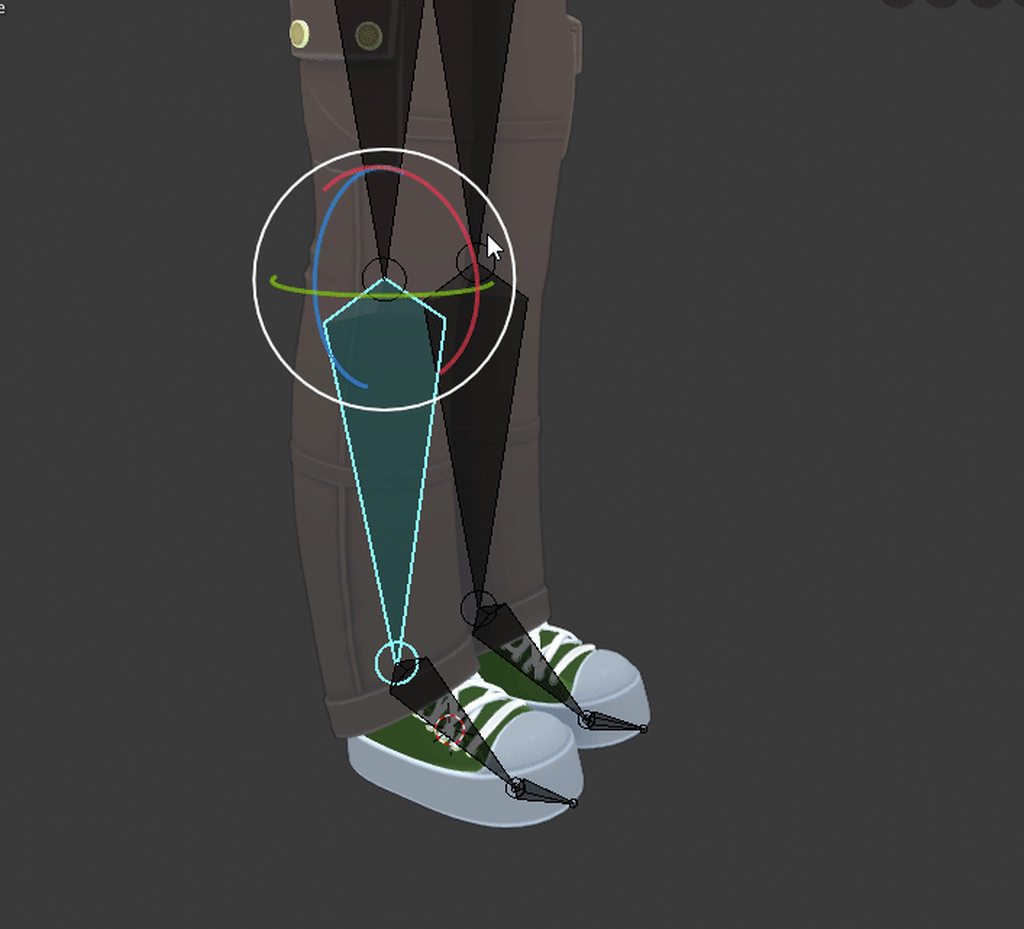 tacit verge
i think thats a weight painting issue, somehow they got mismatched with the wrong side
i have no clue how that happened
astral warren
yeah everything's weighted to the opposite side, hoping i can reverse it without doing it over
tacit verge
i personally, dont know how to fix dat
rain frost
@astral warren rename the bones, could try that
it looks to me as if you can just disconnect the bones and slide it to the other side with the exact transform value and then connect it to that uh...leg bone
easiest i can come up with
torn isle

Hi everyone! Here's everything you need to know about weight painting explained in 3 minutes! This is designed mainly for new users to 3D, but it should give anyone new to Blender 2.8 a jump start into everything you need! Hope it helps!
If you enjoyed this video, please don...
opal aurora
@astral warren drag the mesh out of the armature, rename the bones, drag the mesh into the armature -> parent with empty groups
astral warren
Thanks. I ended up scaling the armature by -1 on X in edit mode and it seems to have worked, hopefully no side effects later
opal aurora
As long as the rolls are good i think you should be fine aye, just make sure the bones match the location (left for actual left) or unity'll throw your model to oblivion
Renaming bones with a mesh parented will always rename the same vertex group on the mesh, renaming them without a mesh parented will not, useful to keep note of such at times
rain frost
whew finally rigging is done, thank you god
turbid spear
I think you could have just renamed the vertex groups
 warm lintel
ok so my current model has bad weightpainting on the fingers and i have no idea how i can fix it
rain frost
@warm lintel usually this means that some other vertex group have accidently been weight painted by a small amount
warm lintel
ok
warm lintel
so do i remove the parts where the weights collide?
rain frost
in other vertex group, zero weight paint the pointy areas
warm lintel
i know how weightpainting works to a small degree
i just dont have a good grasp on how i place the weights
but i will try removing the parts where weights collide and see how that effects it
rain frost
see this pointy thing here
go into other vertex group other than those two current preview ones and zero weight paint them to blue
even though its clearly blue on your screen
sometimes you may have mistakenly added a weight to that vertex by mistake on another vertex group
rain frost
you can leave the finger position as it is and go into weight paint mode
and then paint that pointy area into zero
that point area there seems like Finger_2 and i saw that you already weight painted it perfectly
warm lintel
wait can you zoom out on the "pointy area"
rain frost
sure just use the mouse wheel isn't it?
opal aurora
Shift+C centers camera on selection iirc
rain frost
really? nice the more you know
opal aurora
Atleast on 2.79 it does, unsure about 2.8+ binds
Also i recall seeing some issues regarding CATS fixes, the fix button and any button operation can be undone if the history has it in memory with a simple Ctrl+Z, atleast on 2.79
rain frost
ah thank you i wasn't sure about that cuz i never done it before and ultimately assumes it ruined it for almost everything for me
opal aurora
Never do it whilst eyetracking testing though, that can crash blender
opal aurora
Hell, nothing should be done whilst eyetrack testing, before any further edits one should stop the eye testing on the button
warm lintel
wait, what if i simply make the weights less powerfull?
well shit that kinda worked
its allot smoother now
rain frost
nice!
all you do now is practice and basically rig your model carefully and watch for those end points
its either zero and 1 weight point
warm lintel
i didnt rig it
i mean i have almost rigged something completely
but it was like a robot and it was mainly a re-rig
warm lintel
i thought you ment rigging a model from scratch
rain frost
1 finger down, 4 more to go
rain frost
its the riggings you gotta go in blender and check it out
more specifically in weight paint
hasty meadow
ok i look in to that 😄
fading verge
Did you export with CATS or through Blender? It might be a leaf bone issue iirc
hasty meadow
i exported with blender fbx file @fading verge
fading verge
There's a setting about leaf bones you have to disable.
The setting is automatically set when exporting with CATS.
I imagine that's why you ran into your issue.
rain frost
2 fingers down, 3 more to go
fading verge
That sounds dirty
rain frost
drowsy wharf
@hasty meadow also make sure to reset all rolls before you export. Any time you move a bone it might have a roll afterwards which can cause issues with Unity
hasty meadow
How do i do that? :/
drowsy wharf
armature edit mode, select all bones, and hit ALT+R (blender 2.79)
note that technically speaking the rolls don't have to be 0, they just have to be the same across the model. It's just far easier to set them all to 0 than anything else
drowsy wharf
yeah that'll do it, just align the ends roughly straight and you should be fine
rain frost
👌
what is this purple weight and how do i get rid of it?
its kinda messing up my progress on fixing the finger
 fervent hornet
Purple usually means no reference at all (ie a bone with no vertex group the whole model is purple) but I've never seen something like that
fervent hornet
You could try normalizing the weights to where they need to be
1.0 on index distal is what it looks like it should be
rain frost
it is, the finger is fine, but its the purple weight thats ruining the finger
fervent hornet
So turn on autonormalize and paint it red, should cut out extraneous weights
rain frost
guess i'll recheck the vertex groups then
drowsy wharf
auto normalize is almost always a good idea btw, there's rarely a case where you wouldn't want it on for Unity
fervent hornet
Its not good on places like hips to spine where you want a more gradual bend but it will still probably work fine if it is autonormalized
I usually use it to clean mistakes or fix errors rather than for normal weighting.
drowsy wharf
auto normalize just means the total weight for a vertex does not go above 1
so in most cases you just fade the bones between 0 and 1 so that they fade into one another instead of being a rough edge.
What makes it worse for a gradual bend?
rain frost
just the shoulder left ;_;
native shuttle
anyone know how to solve this issue?
drowsy wharf
set it to what it says. You have the scarf armature selected, not the PARENT of the scarf armature (the thing that says "Dark Scarf" in top right)
rain frost
well thats unfortunate, stupid vertex group mirroring is broken
drowsy wharf
mirroring only works if they're in the exact same spot on opposite sides. And only if the bone names contain L/R to identify it...I forget exactly how that has to be named though
rain frost
so renamed first and then mirror it?
drowsy wharf
yes
rain frost
it says xxxx vertices mirroed xxxx failed
drowsy wharf
I think it was just <name> L or <name> R
crisp tendon
@rain frost It always says that, even if perfectly symmetrical
rain frost
yeah but then the result doesn't look too good or satisfying
crisp tendon
There's a better way one sec
rain frost
thanks! i'm really done with this avatar, just need to mirror the right shoulder to fingers
crisp tendon
Go to your vertex groups, select one, duplicate, select the duplicate, and chose mirror topology or inverse topology
Can't remember the phrasing
rain frost
it just ruins my riggings for the duplicate ones with the failed vertices
theres gotta be another way
crisp tendon
Are you selecting both arms ?
rain frost
nope, should i?
crisp tendon
If nothing is symmetrical then yeah you can't do it
rain frost
Hm...
crisp tendon
Armature and mesh need to be symmetrical if you want to mirror stuff
rain frost
well i'm sure she is
only goal here is to mirror the left shoulder to fingers
it should be possible
crisp tendon
Yeah, select the vertex group for the left shoulder and do the steps I mentioned above
Can't see why it would fail at all
rain frost
well it works, but its kinda like removing some of the failed vertices and then
crisp tendon
If you selected the entire upper body it should work
But if it removes vertices then it's not symmetrical
rain frost
really? what the heck.
i did the wrist just now
see some dots on the right vs the left
crisp tendon
In that case try deleting the right hand as a test, and in edit mode symmetrize the left hand to see what happens ?
rain frost
yeah i'll take a look
rain frost
ughh no luck
 thin haven
Can anyone help with eye tracking? I keep getting the following error messages in Unity's Avatar Configuration:
Transform 'LeftEye' not found in HumanDescription OR
Transform 'RightEye' not found in HumanDescription
rain frost
you need to fix it in blender
thin haven
Got that open. What do I fix?
rain frost
in the CATS tab, go into eye tracking and make sure these options are set
freaking there is no way to mirror weights perfectly 
thin haven
I used CATS to make the eye tracking. It works just fine in Blender, but Unity still says it can't find the transform
I've checked against other models, and every youtube tutorial says this should work. I don't know what's broken.
fading verge
any clue to why an avatar would do this? i have no clue what i did
thin haven
In blender, where the upper and lower legs meet, move them forward slightly.
This clip should explain it better:
https://streamable.com/9e183
 thin haven
Unity is still telling me the left and right eyes are not in the human description.
rain frost
could be missing shape keys or something
probably the names are mismatched
worst possible case scenario you will have to create them
thin haven
How do the vrchat specific shape keys prevent unity from recognizing the eye bones?
fading verge
Have you assigned the eyebones specifically in the rig configuration?
thin haven
That's where I get the error
fading verge
Picture?
rain frost
should i just wing it?
right shoulder, right arm, right elbow, right wrist and all of the right fingers needs to be properly rig before my model can be complete
Or find another way to mirror or symmetry it with the left side
shes nearly completed damn it
fading verge
Normally when I weight paint, I do one side first, duplicate all the keys, mirror all the original keys and then rename them to the other side since it only mirrors the source key
thin haven
 fringe beacon
does anyone actually know what the hell the VRC SDK means by "angle between pelvis and thigh bones"
warm lintel
ok quick question, does the head bone always need to be directly conected to the neck?
my model looks scuffed when it is so im asking if its safe to do that
crisp tendon
@fringe beacon you can generally ignore that
fringe beacon
does it actually adversely affect fullbody at all?
crisp tendon
not that i'm aware of, but angle should probably still be above 160 for good measures
fringe citrus
@fringe beacon assuming your legs are bent forward which seems likely for most models, the more deviation from 180 you have the more your knees will seem to jab up into your chest when you squat/crouch in full body
fringe beacon
ok well its 167 degrees
fringe citrus
At some point your knees will start to clip into your chest and look pretty bad. So you'd want to avoid that.
fringe beacon
i'll have someone test it in fullbody tomorrow
fringe citrus
I guess just check if your knees seem to jut up or clip through your chest when you squat
if so, having the thighs coming more straight down can fix it. But make sure the shins still come back from that so there's a forward point in the knees or you'll get other problems
here's how I do it
bold locust
@fringe citrus I didn't know that was why that angle mattered. Thanks.
drowsy wharf
@fringe citrus just curious, is there any reason you have the legs bent when in a standing pose (mesh wise, not bones)?
@warm lintel what exactly is scuffed when you have neck>head ?
And for things to work properly, yes you want it to be directly connected.
Eye tracking won't work without it for one, movements may also be weird depending on setup
fringe citrus
@drowsy wharf Yeah, it's to artificially limit the maximum straightness the legs can attain in appearance when the IK straightens the bones.
The IK can straighten the bones more than I can straighten my real legs when I lock my knees, so it caused the avatar's knee to duck down away from my real knee
To help knee alignment I have the mesh in a state where when the bones are as straight as the IK will allow, the knee on the mesh lines up with my real knee when my real leg is straight
That required having the mesh legs more bent than the bones... But it also worked out anyway because the shin bone being forward like that is sort of anatomical I think anyway.
Not quite to that extent, but the bone wouldn't be centered in the calf
drowsy wharf
ah ok, that makes sense
seemed off for a human standing pose, I thought it'd be off
fringe citrus
Yeah if you keep the thighs straight down but adjust the shins back the avatar will look a little off balance (though that's fine and I think the best way to do it) But beyond that I adjusted my thighs forward and shins back even more than just the bones. Good eye 😉
rain frost
just the Right fingers left 🙏 hopefully i get this done today
drowsy wharf
it was just the roll of the thigh that seemed off, since there's usually a backward slant to the entire leg for a neutral standing position
if it works the way you want though, then good fix
fringe citrus
Yeah tpose-new has a slight backwards slant to the thigh bone itself too
But the machine-like straightening of legs in IK was was too much for what my RL bones could do so I made a workaround
torn isle
If a piece of clothing has bones of its own, is it possible to manipulate the current armature so that they remain in a custom position that can link up to the main avatar armature?
Ex: I need to line up the sleeves to the arms of my avatar.
rain frost
ctrl + A > Alt + R
torn isle
Also, when I try to weight paint the paint doesn't apply. Any reason why that might be the case?
fading verge
so CATS is really weird with how it merges armatures, it sort of picks which bones to get rid of on a whim
what I would do in that situation is manually pose the shirt so it's in the same place as the arms, remove the original mesh's arm bones, then find your merge armatures option in the CATS window
torn isle
fading verge
you have your brush strength set to 0
I'd suggest having that at .25 or .5
and the blend setting is best at mix
torn isle
Still doesn't apply.
rain frost
has to be 1
drowsy wharf
does NOT have to be 1 on strength
strength is "how much of the painting applies"
weight is "how strongly should it be painted"
@torn isle I would guess you don't have the mesh selected, try hitting M to see the verts/faces
torn isle
fading verge
There's a setting in CATS to make it not delete extra bones when merging I believe
drowsy wharf
er...2.8 changed hotkeys...I don't know the new ones
that looks like a seam view though...
fading verge
I think you're thinking of tab
drowsy wharf
no, M shows or hides the mesh's verts/faces/edges in 2.79 when in weight paint mode
drowsy wharf
mesh faces shown
after pressing M, faces hidden
allows you to right click past the mesh to select a bone
extra note @torn isle it's generally easier to paint in solid mode instead of textured...just clearer separation on colors and no texture colors getting in the way
rain frost
i paint my weights with 1
and then go back to anything that is deform and corrected the weights
torn isle
I weight painted the entire cuff and still a weird spot.
fading verge
Enter weight paint mode in pose mode, pose it then weight it what it should be
warm lintel
ok if mentioned making multi legged models but i think im ready to do just that now, i want to first ask if its possible and if it is, any good tutorials to watch or anyone able to help me along the way
rain frost
its hard to determine the exact value to keep it what you like, thats why you rig it with weight 1 and go into and slowly decrease it to fit in
warm lintel
(the model in question)
drowsy wharf
extra note, once you have the shirt merged with the body, you can delete the skin to save some headache on fixing the weight painting to match the body/shirt
should only need the hands (and maybe a little of the arm depending on the sleeves), and the neck up (with part of the chest)
rain frost
wouldn't it be more advisable to merge mesh first and then weight paint?
drowsy wharf
that...depends on how you're doing it, but probably yes
then just remove the skin where it's hidden and paint the shirt onto the bones
rain frost
Hm....
rain frost
👍
torn isle
Is hair just as hard as clothing if not same to add to an avatar?
rain frost
everything is if you are sort of new to blender
if you know what you are doing and where to place it around the meshes, its not that hard
torn isle
How hard would a head bone be to adjust? I just need the hair head bone to be close to my avatar's head bone.
Nevermind, it's just edit mode.
Hope this works.
 round ibex
Does anyone know how to fix this issue with the bones(joints)?
rain frost
the problem is in blender you need to make sure those bones are parented by the arm or something
rain frost
i'm in a love-hate relationship with rigging
torn isle
Quick question, how do you drag a bone from one hiearchy to another in blender?
My eyes are listed under the wrong hierarchy.
fading verge
Change the parent.
torn isle
Internal use only?
crisp tendon
you're in pose mode
torn isle
In object mode it's the same error.
Nvm, edit mode.
Thanks.
The eyes were mapped to the hips as parent for some reason. Hope reparenting fixes the eyes.
turbid spear
It should
 ornate prairie
Does anyone know why if i just tilt my head from side to side my entire upper body moves?
All the bones and weighting looks right :/
ornate prairie
hmm will give that a shot thanks
rain frost
click mesh > go into edit mode > check the vertex groups on your right > click one of them and then click select
and it will show you why
rain frost
well that explains it
the highlighted ones makes everything moves when you tilt right
ornate prairie
so just move it up so it's only the neck ones in the white right?
rain frost
you want to remove the highlighted polygons
ornate prairie
oh i flipped it, the neck ones i just deselected lol
rain frost
yeah you can do that too
ornate prairie
white is neck lol
rain frost
oh okay yeah just remove the selected vertices
ornate prairie
so neck shouldn't have any verticies?
rain frost
well you said you flipped it so its correct right now
zoom out and see if there are any other whites
rain frost
then press alt + c and try fix it correctly
hold mouse wheel click to delete i think
or was it just c
ornate prairie
so delete all those verticies in the neck group?
rain frost
nooo
ornate prairie
lol yeah i'm confused
not sure why it's happening, haven't had this happen before
rain frost
Hm...
ornate prairie
as far as i know the weight painting and vertex groups look right
ornate prairie
tried, will have to start poking at it again tomorrow
its so minor, just annoys me if i'm at a mirror, other people can't tell lol
rain frost
oh
ornate prairie
they just assume i'm moving that way 😄
even if my shoulders don't move, on the avatar they move like i'm tilting my upper body, its super minor
rain frost
ornate prairie
hmm some of the neck verticies are also in the chest group
might start there in the am
thanks o/
dense stump
Hewo! So I imported a model into blender, and it didn't have a chest bone. So i extruded a bone from the spine, named it chest, and fix modeled it so cats would parent the arms to the chest. all seems good there. But now when i go to weight paint my new chest, it shows instead the weight paints of other bones. (For example, if i look at the weight painting on the shoulder, then switch and look to the weight painting on the chest, it still shows me the shoulder weightpainting.) How do I fix this?
or if theres any video pls feel free to toss it at me
rain frost
at that point you might as well weight paint it
drowsy wharf
@dense stump my guess is you don't have a vertex group for the newly added bone, fix that first
dense stump
That did the trick! Thank u @drowsy wharf !
And thank u too fooni! tho incase the same thing happens to u, it just weightpaints it to that last bone if u do
rain frost
:]
 iron chasm
My eyes keep rolling to the back of my head ingame, I tried deleting the eyebones but that just gets rid of my eyes completely
rain frost
you gotta fix the eye tracking
torn isle
Before armature join
After armature join
Any tips on how to keep the pants in the same position?
Instead of having it push my entire skeleton up?
Figured it out.
Joined meshes together first.
Then the armatures.
 restive gyro
not sure if this is the right channel, but it says 'The angle between pelvis and thigh bones should be 180 degrees (this avatar's angle 87.5). Your avatar may not work well with full-body IK and Tracking.'
the warning thing idk
and me need halp
rain frost
i used to have that problem, it could be due to your bones although i don't remember
iron chasm
I am trying to put clothes on in blender but the clothing I am trying to put on is doing like a t pose where the arms are lower than the models, I tried messing with the bones but nothing i have tried has worked, anybody got a solution?
rain frost
the best you can do is move the bones in Pose Mode into A-Pose to fit the dress
just concentrate on moving one side of the bones and then copy the transforms/x-y-z values for the other side
iron chasm
okay thank you
when i merge the clothes and the body together and hit fix model on CAT it changes it to what it was before
iron chasm
I got to a point where when i press fix model one arm stays in A pose while the other arm goes back into T-pose
rain frost
do what i said, else you could re-import that model again and click on fix model
 timid yew
im getting the "LowerArm is not first child of UpperArm or Hand is not first child of LowerArm: you may have problems with Forearm rotations" error. but when i check the mapping and heirarchy it all looks right to me. can anyone help me with whats wrong in this?
drowsy wharf
@timid yew do you have more than one avatar in the scene with a descriptor? or have you moved anything in the scene?
It looks fine as is, a screenshot of the scene with arm/elbow shown in hierarchy would help confirm too
torn isle
For clothing, pose the clothing separately so that the arms link up. Make sure the bones in both clothing and avatar are close to each other. @iron chasm
Then, join avatar and clothing mesh.
Then join armature.
Then use cats fix to join the bones together.
Pose to make sure weight paint is properly applied.
Ctrl-z to revert any changes if not successful.
Also delete skin underneath the clothes if not visible so that the skin does not clip into clothing.
 wet urchin
Any good models to practice rigging on ?
native shuttle
Anyone know after doing a headswap how can one fix the skin from looking all janky in the neck area
crisp tendon
You either copy over the colour from one texture to the other, or you adjust UVs
timid yew
@drowsy wharf only one avatar with one descriptor. I havent moved anything, except for the main camera. i guess its worth mentioning it uses a seperate hand that replace the main one for one of its animations.
drowsy wharf
I was talking about in the scene, not in that rig config
also what exactly do you mean by a "separate hand"
timid yew
no, theres no other avatar in the scene. it has another hand model, which replaces the original hand model when that animation is played. as you can see in the asset window there are 2 "righ hands". as far as my understanding thats how this avatar was made. and as for the screenshot I just used that to show you the arms in the heirachy
drowsy wharf
are the hands using the same wrist bone? Also why not just have the spray can(?) object as a shapekey instead of changing the entire hand with it? just curious as to reasoning
I was asking for the scene hierarchy view to compare against it to see any differences or problems in setup.
As far as I've seen that only shows up when it's actually an issue....could always be unity being special I guess
timid yew
idk why its using 2 hands instead of just the spraycan. im only modifying a model i got of a vrc website. and im assuming it uses the same wrist as its the only wrist i can find
 lament silo
fading verge
lament silo
fading verge
Assign the right leg bone
native shuttle
anyone know how to fix this trying to merge both armtures
sorry for the second screen display showing up
crisp tendon
ctrl + a = apply all transforms
native shuttle
doesnt work @crisp tendon
crisp tendon
might be a better question for the cats discord then
crisp tendon
native shuttle
decided im just gonna weight paint it to the armture whys it going in a different area?
crisp tendon
either not centered, or wrong pose
crisp tendon
yeah so it's a pose issue
native shuttle
how to fix it?
crisp tendon
go into pose mode first and apply pose through cats
native shuttle
how do i pose her?
crisp tendon
yes
native shuttle
hit apply as rest pose or do i weight paint from here
native shuttle
native shuttle
how do i open the N menu
crisp tendon
it's opened, you just have cats opened instead
crisp tendon
mmh that's odd
ok then in pose mode, rotate the upper arm bone down by like 45 degrees
if it fits into the sleeve correctly then you can apply automatic weight paint on both arms instead
probably easier that way
 teal badge
I have some avatars where in fullbody it seems like the hips get offset and shifted downwards, so their legs are squished and the viewpoint is offset. Does anyone have any idea how I could fix that?
fringe citrus
@teal badge You probably have a really long chest bone. Shortening it might help. That's just a guess though. I'd have to see some armature screenshots (best if orthographic front and side) to do better than a guess.
 cunning willow
Hello
teal badge
 left anchor
T
teal badge
@fringe citrus Is this helpful? This doesn't use eye tracking, so there's an Upper Chest bone, but removing that from the chain doesn't change the end result.
 tardy lily
is this the right channel to ask for help on weightpainting? trying to weightpaint a skirt attached to the legs, so it looks better than just using dynamic bones or cloth
fringe citrus
@teal badge I haven't tested enough with rigs using upper chest, so I can't say for sure, but I can see that your upper chest bone is pretty long and the chest bone is positioned about where the spine should be, and spine where hip should be.
I'd recommend using the existing weights from the pivot points you have, but merge hip and spine and use that for hip, then use chest for spine, and upperchest for chest, then position the upperchest about halfway between its current position and the neck, and weight paint in a new pivot around there
That's a little bit of work though, so I'd say just do the bone positioning stuff and see if that fixes your issue with shifting down when you bind, and once you get a rig that works with that, clean up the weights
teal badge
Hmm, okay, thank you!
 worldly willow
uhmmm ..what is happening here unity?
 naive tree
above check if it's set to Pivot and not Center
cunning willow
Anyone able to help
drowsy wharf
we're not psychic, we can't answer that question until you provide details
cunning willow
I was asking to see if there was anyone
fading verge
Ask your question
fading verge
What about it
cunning willow
I mean when I try to give him a Skelton it doesn’t work
fading verge
What do you mean by it doesn't work.
cunning willow
As in if I try to move the forearm the whole body moves
fading verge
Sounds like a weight painting issue.
cunning willow
That’s why since I got none
fading verge
?
cunning willow
I don’t have weight paint at all
fading verge
Well you need weighted bones for your skeleton. I don't understand your problem.
cunning willow
I have no idea how to do that
fading verge
No idea how to do what? Weight paint? You can look it up.
cunning willow
Ok I’ll go look
dense stump
m avatar does the thing where when i get into fbt, it'll kinda crouch down. is the chest bone too long on this cuz i heard that can cause the issue?
drowsy wharf
definitely a huge chest bone, the spine is about where the hip should be, and the chest is both spine and chest combined for size
fringe citrus
Yeah use a box select to grab the tail of the hip, head of the spine, tail of the spine and head of the chest and move them up
Taking off about 1/3 the length of the chest should be about enough.
The more you move the more likely you'll need to fix the weights
 fringe citrus
Oh yeah and as Himeki mentions, you might want to move the head of the hip up to about where the head of the spine is in your screenshot too
cunning willow
Ok I physically can’t do this could anyone weight paint and rig a model please
crisp tendon
You can pay someone to do it for you in the VRCTRADERS discord in #community-servers-old
fading verge
^
fringe citrus
@cunning willow you can try Mixamo too
fringe citrus
Oh your avatar isn't normal biped shape?
cunning willow
Oh it it
Is
Just everything won’t merge together
Hell I made a sniper and pistol to go with but now I can’t even use them
fringe citrus
Mixamo will create an armature when there is none, you could try exporting as an obj file without any bones and see if Mixamo likes that
fringe citrus
Otherwise what you'll have to do in blender is parent your mesh to your armature and choose automatic weights when blender asks. And yeah will be easier as one mesh all at once. You can separate parts later if you need to
cunning willow
No right now I’m in differ 3D building thing
I have to merge all of it in a different place
So I’m merging now
fringe citrus
Hmm ok, well yeah your goal should be to get a single mesh and line it up to a fitting armature then parent to the armature with automatic weights.
fringe citrus
Hard to walk through in text chat but googling some of the terms I used and looking on Youtube might give you something you can follow along with
I'm on mobile now not at pc
cunning willow
Yeah YouTube doesn’t like me
I’m also on mobile but pc as well
Now I must wait for ♾
♾
Cause my pc is crap but it gets the job done at least
Usually
fringe citrus
If you google "blender join object" it might show you how you can merge your meshes. Also I think the CATs plugin has a feature to merge all your meshes but it might not work when you're not parented to the armature yet
drowsy wharf
merging a mesh is merging a mesh, should work either way
fringe citrus
I was curious so I gave it a test, CATs will iterate through all the children mesh object on an armature and merge them
If the mesh objects aren't parented to an armature it won't merge them together, and if some are parented and some aren't it'll merge the ones that are children objects to the armature and ignore the ones that aren't on the armature
And if all the mesh objects have the parent cleared the CATs merge-all button just becomes disabled @drowsy wharf
 sly mirage


so can anyone help with this ive seen raptor avatars before but idk how they are set up
does not having it in tpose even matter as long as the bones are applyed correctly? how do i get this to function properly
 primal creek
can anyone help me rip out a skin and then re rig it im new to avtars ive been trying youtube videos arent helping
 crisp dagger
I need some help , I want to build and publish but he send me here
 stone seal
I could use some help with my avatar. It is a small avatar and in certain woulds the camera cut off gets in the way of the avatar so when I try to look at the arms or chest the view clips through it. I tried raising the scale of my avatar and that fixed the issue but it is meant to be a small avatar so that is not reasonable fix for it. It only happens in certain worlds but I did not notice this issue until last month and I see it with a lot of small avatars now. I want to know how to change the size of the view cut off (making it smaller) so I can fix the issue in those worlds that arn't working correctly.
 teal charm
im new here and I try to build & publish my avatar but he just say to spend more time here for security reasons and I do like he say but it dose not work ??😥
opal aurora
You need to spend time in vrchat, and it's not only a time based thing, so idling won't work, you must also be using your vrchat account in said case
 opal aurora
It's not solely dictated by time, so there's no plausible estimates
 rapid mauve
i see in game avatar with different emote for left and right hand - how is this done - i create all shapekeys and emotes with blender i want to use but I don't know how avatar is rig in unity for each hand have separate emote
teal charm
im still not allowed to avatar creator status ……….
I cant understand why it cant work 😟
rapid mauve
are you user or new user status ?
teal badge
@fringe citrus Thank you for the help, using the spine bone as the hip and so on works perfectly!
fringe citrus
Awesome! Good to know the fix works with upper-chest mapped too
rapid mauve
if anyone have interest - left and right hand emote / gesture prefab at this github
https://github.com/BlackStartx/VRC-Gesture-Manager/blob/master/README.md

GitHub
A simple script which allow you to test your avatar Gesture and Emotes easly on Unity. - BlackStartx/VRC-Gesture-Manager
 reef trout
Hello, how could I fixed crosslegging when crouching? When standing up the legs seem kinda fine.
fading verge
Are the leg bones on the avatar straight? If so, put a slight bend in them.
Without the bend the IK doesn't know how to orient the legs.
reef trout
I've tried putting a slight bend into them in blender
But either it didn't update properly or isn't helping :/
turbid spear
What about from the front
reef trout
turbid spear
If the upper leg bones point inwards then this will happen
reef trout
Thanks, they still seem slightly wonky but not cross legged anymore
 gray condor
So I pretty much have no idea how to rig, or rig smoothing with now visible limps, I know its possible, but I'm not sure how to do it. I already created animations, so I'm not going to scrap my build.
Anyone thing you could help?
fading verge
ive been trying to upload my avatars to Mixamo so I can autorig my models but for some reason it just shows that it has an unknown error when I try to upload
(screenshot of the model in blender)
is there anything obvious that I'm doing wrong that I don't know? Or should I just give up on mixamo and find a different autorigger or learn how to easily rig it manually or something?
 merry estuary
Well it does have a rig already so maybe that is why? With so many bones it wouldn't correctly assign weights anyway, same with blender, it is gonna be a mess it you try to autopaint
fading verge
OOOO ok
thanks!
so I just have to figure out how to load animations onto it?
sorry if dumb question, first time trying this stuff
merry estuary
If you add VRC avatar descriptor and set up lip sinc it should have all the basic animations but I doubt it will work well with this rig, it has way too many bones and I can't even see arm bones (should be one little shoulder bone, 2 arm bones and 1 hand bone running along the arm mesh and here we have lots of bones pointing up for some reason). Rig looks like it was taken from completely different model that was meant for animation, most likely mmd @fading verge
fading verge
ill try to do this VRC avatar descriptor thing and lip sync and see how it works out.
yeah I exported it from Koikatu
gray condor
I fixed my issue.
fading verge
also thanks for helping me so much kohi, I really appreciate it
astral warren
Whenever my avatar is not focused on a lookat with it's eyes, it looks down and to the left. did I do something wrong?
 abstract musk
anyone know how to fix eye tracking?
or actually just some advice on the best way to go about solving this issue:
https://streamable.com/4pfpd
 crisp tendon
which axis are you rating the eye on ?
abstract musk
both of them clip
i think i found a solution tho
sink the white and move the bones just a little back
astral warren
I usually solve this by making the white part of the eye concave, and giving it a flat-lit shader so you can't tell it's concave
 fair prism
Okay sorry for the probably dumb question, but can anyone tell me what the lowerlid visemes are for? Most eye tracking tuts I have seen recommend to leave them blank. But sometimes I see people's avatar kind of squint as they talk, wondering if that is what it's for?
 fair prism
can you send a screen grab of the bones and their orientations?
fair prism
you want all 4 bones Eye_L, Eye_R, LeftEye, RightEye all at 0 degrees rotation in every axis
and they should all be separate children of the Head bone
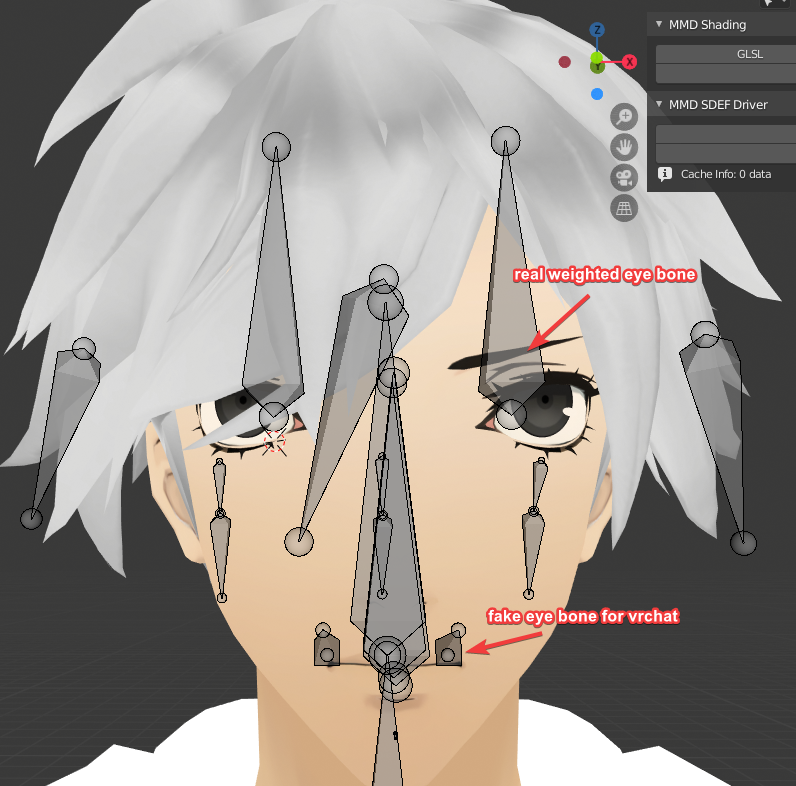
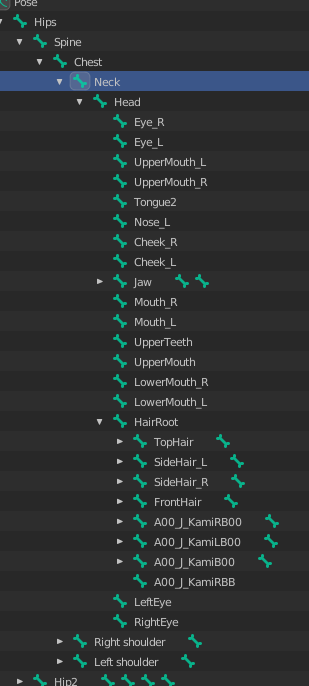 fair prism
okay hierarchy looks good
abstract musk
the fake eye bones have some rotation so i will set it to 0 on them
fair prism
set them all to zero rotation
also weight both the real and fake eye bones to 100% for each eye
abstract musk
ok
fair prism
the weighting should be identical for Eye_L and LeftEye, same for the right ones
that threw me off too, because yeah... technically that is not normalized
abstract musk
i didnt use CATS to set up the eye tracking part so its kinda wierd
fair prism
yeah me either... to make matters weirder for me I use Cinema4D 😅
 fair prism
do you have these as your first 4 visemes?
and also still need to make sure the bone orientations are correct. those visemes are also crucial
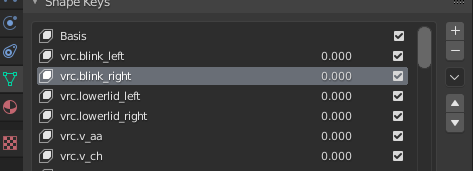 abstract musk
i feel like a 5th grader in sex ed
i have kind of idea
but not total understanding
fair prism
I know... this part threw me for a loop too it's okay
Like riding a bike though so once you get it... you've got it
Can you send me an fbx of just the head or eye area? I can check on my end
Wouldn't need textures either, just the eye mesh and armature
If your orientations are good the only thing that could be wrong is the import settings
abstract musk
i was about to say why dont i just send you the .blend then i remembered you dont use blender haha
fair prism
lol, it's okay. I can still quickly see it with an fbx
I have a feeling it's going to be orientation
abstract musk
i just sent the whole fbx cus its less hassle and its a pretty small file anyways
fair prism
sure, okay yeah it's the placement of the bones
your LeftEye/RightEye bones are hanging out in your neck
abstract musk
should i place them in the same position as my real bones?
fair prism
okay so here's what you're gonna wanna do
throw Eye_L and Eye_R right smack in the middle of the pupils
then put LeftEye and RightEye where the rotational center of the eyeball is
abstract musk
then in the unity rig which bones would I use for the eyes
fair prism
LeftEye and RightEye 👍
drowsy wharf
@abstract musk @fair prism the lowerlid shapes are used when you look down but the look target is up more (eyes up head down) to close the lower lid a bit like your actual body does
most people just ignore them though
fair prism
Thank you for clarifying that!!
@drowsy wharf do you by chance know how this avatar squints randomly during speaking? https://youtu.be/1ze9xK3zY2I?t=76

discord ▶ https://discord.GG/uSEvuVw
instagram ▶ https://www.instagram.com/shaniemyrstear
What is all this Udon and why is there so much hype?
drowsy wharf
that's probably just either an animation or an idle override to do it
not related to talking
fair prism
Neat, I will look into idle overrides then
abstract musk
lmk any info you dig up about those too, i feel so bland when im talking since i dont have my hmd + controllers yet so no hand motions + no facial expressions = boring
fair prism
Yeah I would looove to have some cute idle facial animations
@abstract musk any luck with the eye rigging?
abstract musk
checking it out rn
fair prism
🤞
abstract musk
damn now my eyes dont even show up in the sdk
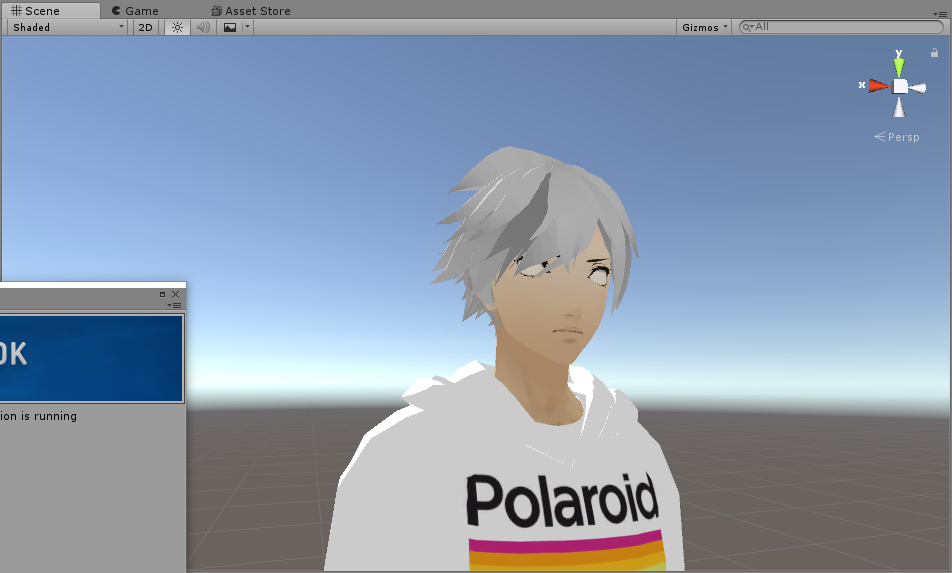
possibly the 90 degree rotation issue?
ill check it in the humanoid rig
drowsy wharf
you can either make an animation that you place in the idle override slot
Or you can put an animator on the body, and use different layers to do differently timed animations
fair prism
deng
abstract musk
option #2 sounds easier to do the first time and to edit later on
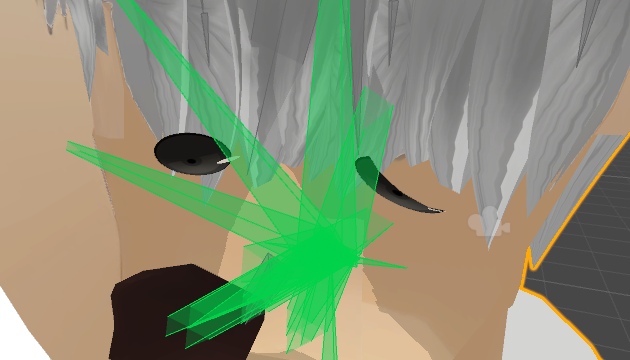
what are my eyes doing there haha
fair prism
hmm
maybe send me one more fbx like you did last time
I'll have another look
thanks so much for the suggestions @drowsy wharf 😄
abstract musk

ohh wait i think i have a clue
nvm
bones dont have transforms in blender edit mode
ctrl a wouldnt do anything
drowsy wharf
@abstract musk make sure the head and eye bones are pointed straight up in blender, that's usually the cause of backwards eyes
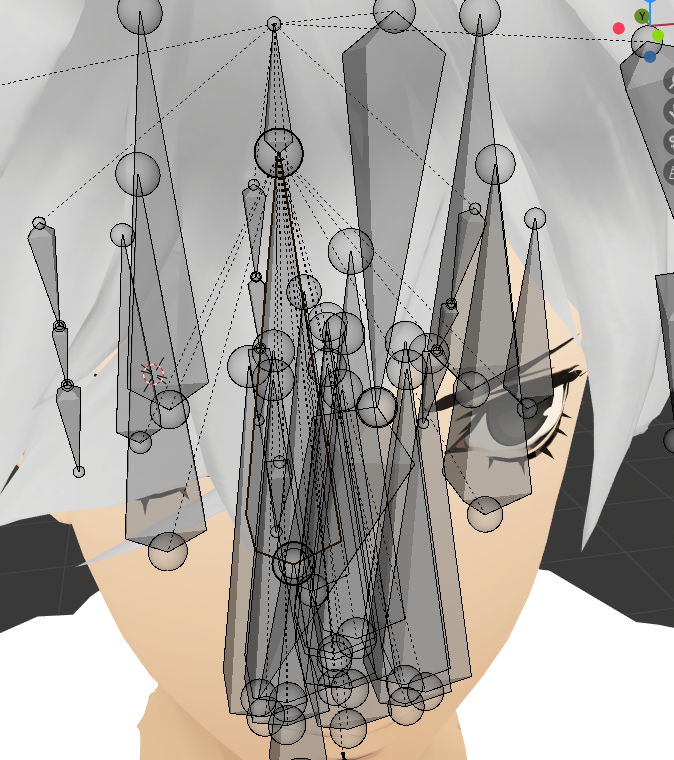 fair prism
I noticed the spine is second to shadow_waistcontrol, maybe move spine so that it's the first child of hips
Ah, that shouldn't matter
abstract musk
yea eye tracking is so finicky
fair prism
yeah is there any way to do it without the bone ends?
maybe that has smth to do with it
drowsy wharf
bone ends?
fair prism
oh, that's how c4d imports their fbx
every bone has an extra _end thing attached to it
drowsy wharf
@abstract musk I'd remove your extra eye bones (keep the ones in the center of rotation) and re-do eyetracking with CATS
fair prism
yeah, I think I remember reading something about that.
drowsy wharf
and no that's not how they work, those are probably just how it was interpreted on import
a single bone is a single bone. If there's no weighting on those, they're not needed
fair prism
I figured as such, but it's definitely extraneous data in the fbx
I've imported other fbx's from blender that did not have those _end's
drowsy wharf
some programs or game engines need those, not commonly used ones though
fair prism
yeah, and I don't see why that would make any difference to unity either
I doubt it is the issue
Might be possible though...
drowsy wharf
not likely, unless the wrong bone is being mapped in the rig settings
abstract musk
so cats set up the eyeballs kinda weird and idk if it should be like this

i still retain the original eye_l/eye_r
crisp tendon
Your setup is wrong
abstract musk
but the LeftEye and RightEye are not centered for rotation
drowsy wharf
your eye bones aren't in the center of rotation
imagine the eyeballs for the size of eye you have, the bone needs to be in the center of those spheres
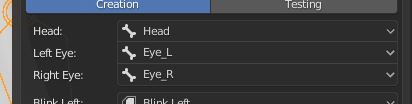 drowsy wharf
you'll need to move them further outward at least
abstract musk
those bones
crisp tendon
That's not what Himeki is saying
drowsy wharf
the bones I see are too close to the center
crisp tendon
The bone location is wrong, move them in the center of the eyes
abstract musk
the CATS ones or the original ones
crisp tendon
The ones that move the eyes
fair prism
godspeed @abstract musk 😅 third try is a charm
 drowsy wharf
when you go into Unity, set the rig to generic, apply, then back to humanoid
should avoid at least most weirdness from updating
if you don't have anything special on your avatar (dynamic bones, effects, etc) you can select it and hit "revert to prefab" at the top of the inspector to fix anything out of place
abstract musk
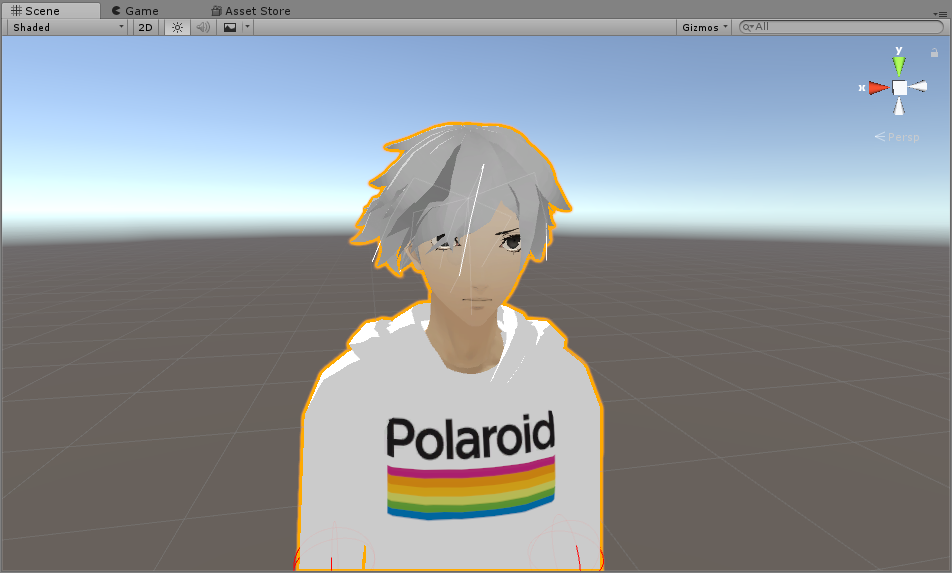
aha so it looks normal in unity now
time to check if it works in game

😄
it works now
thanks all of you guys
fair prism
I am glad you got it working, even though I was of no help lol
fair prism
aw, well thanks for saying that haha
it was fun trying
at least if anyone is trying to do manual eye tracking in c4d I know I can help them 😉
 wild owl


