#avatar-rigging
1 messages · Page 141 of 1
 bronze fern
 wheat meteor
i cant
bronze fern
Note: it can't be a steam account it has to be a vrchat account
wheat meteor
when i click VRChat SDK the only thing that pops up is Clear Cache And PlayerPrefs
bronze fern
Reinstall sdk
wheat meteor
i did
bronze fern
Reinstall unity
bronze fern
Make sure you have the right version of unity that's linked on the website
Export your model as a unity package
wheat meteor
how do i do that
bronze fern
Right clock the folder and export as unity package
Make sure you have the version of unity specified by the vrchat website
 sleek isle
Yours is on the bar on the top
wheat meteor
ok
i loaded my model into the latest version of unity and i cant find it
nvm i found it
 fading verge
you need unity version 2017.4.15f1
wheat meteor
yea i just got that
so when i click VRChat SDK then setting then login do i login with my unity account or vrchat account?
wheat meteor
?
 viscid salmon
vrchat account
wheat meteor
ok
 glass panther
The thumb on the hand of my character has a strange deformation making it stick out way to much. Would this mean there is too much influence of weight painting? I'll post a picture of what I mean in a bit.
sleek isle
Its the bone placement
glass panther
Would you happen to have a reference image of the correct bone placement for it? Where should it be?
 wind osprey
Fairly close to the wrist really.
https://www.sciencesource.com/Doc/TR1_WATERMARKED/d/c/d/2/SS2710597.jpg
This should give you an idea of where the joints should be placed.
 glass panther
Ah of course makes alot of sense thank you so much!
 glacial snow
hey! can someone help me with something? i have fox ears for my avatar. the ears are on my avatar and i set up dynamic bones in the ears but they dont move and all other things too. if i remove the dynamic bones from the ears all other things move again (tail and hair). there is something wrong with the ears but i dont know what because im new to unity
 valid turtle
Hi, I have a hat model which has an extendable arm that comes out of it, was wondering if I have rigged it correctly and if it will work for Unity
Picture is here

 leaden loom
The fluff on the back is my tail
But when I crouch it doesn’t crouch with the avatar
Any help?
 naive tree
not parented to hips
glacial snow
hey! can someone help me with something? i have fox ears for my avatar. the ears are on my avatar and i set up dynamic bones in the ears but they dont move and all other things too. if i remove the dynamic bones from the ears all other things move again (tail and hair). there is something wrong with the ears but i dont know what because im new to unity
leaden loom
@naive tree on blender it is parented to the hips
 median cargo
heyo, I'm trying to link the eyes of a model to the eye bone of a rig, but I'm puzzled on what I'm meant to do

 queen mural
create vertex groups for the bones on the geometry/mesh
and weight paint eyes assuming the geometry is separate from the rest for the eyes
median cargo
considering this is my first time using blender, how exactly do I do that
I have eye bones, and the model I've found has eyes, I just don't know how I'm supposed to smack/group the two together
queen mural
click the geometry and shift click the armature and press Ctrl+P "With Empty Groups" and now you should have vertex groups for each bone on the geometry
or you can do automatic but adjustments would have to be made more than likely to the automatic weight painting
but really i recommend you actually follow tutorials and learn more basics* before diving in too deep
median cargo
Yeah, I'm following a tutorial right now, it's just that it's a bit fast for me to follow
queen mural
perhaps you should try a different tutorial
not all tutorials are made in mind for a user which has probably near zero experience with blender
nor will they account for every scenario
median cargo
the rest of it is fine, it's just this step threw me a bit
anyways, I've got this
should I just delete all armatures on the list except the eyes?
queen mural
no
median cargo
is it fine to just leave it?
queen mural
yes
median cargo
ok
well, this is all new to me so I'm just trying to make sure everything's good
It's my first attempt at doing anything like this, so I just want to make sure everything works alright
does that look decent, or does it not matter too much
queen mural
knees need to be straight with a slight bend
you can press numpad 5 to switch between orthographic view and the other numpad keys to rotate
median cargo
ok
wind osprey
Those knees look okay
median cargo
I tried going into rendered mode, and after realising something funky happened I undid it and now the colours have been inverted
queen mural
for a bear i think not but it could "work alright" probably
median cargo
Just to establish, what would have inverted the colours of the model?
queen mural
uhhh normals?
median cargo
I have no idea what I did or how to undo it
doing control Z just undoes the eye boning
queen mural
queen mural
idk the colors seem the same it might be some sort of clipping issue you're experiencing
do you have a duplicated mesh underneath?
median cargo
no, but what I did to fix it was use revert and then find missing files to add the old textures
queen mural
ok
median cargo
After boning my eyes, what other procedures do I need to do? Is it straight to Cats then?
queen mural
you gotta rig the entire body before you can do anything else really
but after that you'd adjust the armature and rename bones for VRChat manually
add visemes if you want em adjust eye tracking
and then atlas if necessary assuming you have more than one material
median cargo
So wait, you have to do what I did with the eyes to every geometry in the model?
queen mural
Yes but weight painting isn't as linear as weight painting for an "eye" for example
but if you have geometry with vertex groups with weight painting you can avoid this step hypothetically
median cargo
I still don't think I managed to attach the eyes to the eyes properly, because the create eye tracking step in Cats gave an error that eye L isn't bound to anything
no existing vertex group assigned to it
even though I thought I did that with the empty group thing
queen mural
rotate the bone for the eyes if it moves then it works
you probably just gotta have the right naming scheme for the armature and select the bones and rename the mesh "Body"

names need to follow as shown above^
queen mural
alright so go into weight paint mode with that vertex group selected
median cargo
the vertex group being the eye mesh? or the eye bone?
queen mural
vertex groups are for each bone
median cargo
so, I select the eye bone and go into weight paint then?
queen mural
is the eye "red"?
median cargo
no? the eye mesh stopped being highlighted when I went into weight painto mode
here, in object mode the eye mesh is highlighted
they both get highlighted at the same time
queen mural
make sure you have the correct "vertex group" "selected" and go into weight paint mode
selecting a bone can also select the vertex group
while within "weight paint mode"
you should see something like that assuming you have it weight painted to a vertex group
and select the vertex group corresponding to the eye bone
median cargo
sorry, I have no idea how you did that
I click on the eye mesh, go into weight paint, and then the mouse turns into a red circle and one of the eyes has a green smudge on it
is this it?
It's gone green and I don't know how to undo that
median cargo
queen mural
ye
median cargo
yes it's in solid
median cargo
Well, I don't know how to make it red, it's green
queen mural
follow tutorials i can't walk you through everything
understand how weight interacts with bones&vertices before proceeding
median cargo
well so far, the tutorials I have found contradict what I'm experiencing
queen mural
in what way
median cargo
So far, one person has been able to highlight their entire mesh, then their entire armature, and then ctrl P to a 'with automatic weights' option
queen mural
yeah i believe quite a few tutorials for blender rely on automatic weight painting
lemme see if i can find one from scratch or you can try "automatic" and check the results
this should cover roughly what you need to know
it's in blender 2.8 but should be similar enough
https://www.youtube.com/watch?v=v6_m3xFSlIU

Hi everyone! Here's everything you need to know about weight painting explained in 3 minutes! This is designed mainly for new users to 3D, but it should give...
 neon lance
I have an issue where I managed to find the same model as a public one that is already uploaded on vrchat, and I've rigged this new one up myself. I've determined they are exactly the same scale, but when I use mine, everything seems bigger slightly. Almost like I'm a slightly smaller person inside my model. As far as I can tell though, the cameras for both models are in the same position. Does anyone know if this kind of thing would be changed with a setting somewhere?
 bitter spade
so im having the same problem as last time
but this time i cant find the pumpkin addon anywhere
i think they removed it
naive tree
@bitter spade https://github.com/rurre/PumkinsAvatarTools

GitHub
A tool to speed up setting up VRChat avatars in Unity - rurre/PumkinsAvatarTools
 arctic osprey
Anyone have a guiding image how the shoulder bones should be located, so that full body ik looks good? My shoulders look OK when I extend arms up, but shrink inside the body when I lower them.
arctic osprey
Was there some vrchat default armature (bone lengths, locations) that I can compare mine against, so that the ik looks good?
 quasi oasis
I suppose this would be the place to ask, but would anyone know why the ears of my avatar are getting treated as eyes (receiving eye tracking, causing them to move around), while the eye bones don't have any weight? Tried disabling eye tracking and checked which bones were considered the eyes, without any luck. I'd imagine it's related, but it's also impossible to animate the ears manually, as they just reset their position whenever I move them in an animation clip
 lilac moss
@quasi oasis go into the unity humanoid rig config for the fbx and unset the eye bones
 gentle spindle
is there any way to rig this model when its not in the middle since one arm is longer then the other?

through mixamo that is
I tried rigging her myself but the legs are just god messed up in game (i have full body). The top of the thigh in game is twisted including the ankle
And when i try to rig in mixamo it won't because the model isn't in the middle
(shes not naked btw) :p
any help would be great cheers
median cargo
Have you tried blender? I get that blender's a bit intimidating but there's a few guides on it
gentle spindle
Yeah i tried rigging it myself through blender
and thats when i got the leg problems in game
 idle pebble
Sometimes weight painting is needed
gentle spindle
Im pretty sure i weightpainted it properly

looks fine
But the top of the thigh is all twisted in game including the ankle
median cargo
I think you can test it in pose mode, where you can move the body about, and then you can paint it in the position
queen mural
did you check the rig in unity? did you clear rolls?
gentle spindle
Ive recreated it: https://gyazo.com/f0cced0e436f64e4940cb1283eea6d0e this is what i see in vrchat with full body

its basically twisted in
median cargo
Oh, Rappy, when making the avatar in unity, are you supposed to leave one bone empty for rotation, or is the upper chest broken
aslo @gentle spindle try going back into weightpaint mode
and see if the model is accidentally bound to another bone
basically, check all bones to make sure they aren't pulling things they shouldn't be pulling
 undone harness
Well it’s just pulling 🤔 they said twisting
gentle spindle
Yeah, its twisting my upper thigh and ankle so it looks like a twizzler
median cargo
double check the hips?
gentle spindle
 undone harness
Weight doesn’t twist the body it pulls it, even if it was the hips it wouldn’t effect it
undone harness
Your weight seems fine maybe it the position of the bones ?
undone harness
Is the knees bent a bit in blender?
median cargo
Alright, I just wanted to double check
 queen mural
give the knee some bend the other way
gentle spindle
forward?
queen mural
yeah
undone harness
^ basically
queen mural
you want it to bend forward slightly
undone harness
Plus it helps with leg crossing if you aren’t using your leg trackers so c:
queen mural
besides that did you actually double check your humanoid rig in unity?
it also seems like maybe you have an additonal bone for fbt on top of the fix one
so double check your connections
gentle spindle
It automatically puts a bone there for fbt fix
https://gyazo.com/06cd39edccc7f955c4632f7d64d29364 is it by any chance that these are poting up?
 queen mural
yeah i realize that but i think i spotted an additional in the image you rotated em
i could be crazy though wasn't a great image
undone harness
That shouldn’t be the problem :c
gentle spindle
The fbt fix?
gentle spindle
Duplicate?
undone harness
Double check bones?
gentle spindle
yeah the fbt fix basically flips my original bones up and makes them small like that and plops in 2 random big bones
that have no weights
should i delete those 2 big ones?
queen mural
there should be only one additional bone per thigh
unless they changed something in a newer version of cats
 lunar shale
I was wondering how much do people tend to charge for rigging models on commission?
I'm not here looking for commissions here, just curious what the average price ranges are floating around
 pulsar rune
u can use mixamo to auto rig
 tawny silo
Model rigging tends to go for around 100 dollars
 stray zenith
Anyone here good with proportional scaling? I have been trying to get a model to match my body so I can use it as a base for future avatars and am having a hell of a time.
 drowsy wharf
@stray zenith simplest method I've heard is people changing height in-game (world scaling) to match the torso/head position, and then T-Posing without applying, and taking a screenshot so you can use the controller positions to let you know how much to adjust limbs
stray zenith
@drowsy wharf Ahhh and is their anyway to make your controllers visible? to get easier placements for the arms?
sleek isle
You can see it in fbt
stray zenith
Really? not sure how I over looked that, oh well.
drowsy wharf
yep, just look in a mirror to make it easier to take a picture of it
 daring mortar


I downloaded a model from the internet and had to rig it......rigging went perfect until I imported the FBX into Unity and went in to configure the Rig in unity......the bones are all messed up. What did I do wrong? lol
it's like, not attaching to the mesh or whatever
 opal aurora
What does each bone stand for?
Here's a standard humanoid setup
//CodeBlockType is fix
Armature Naming Scheme Layout
|>Parent
|-----Child
&
Parent
    Child
=
|>Hips
|    Spine
|        |>Chest
|        |    Neck
|        |        |>Head
|        |        |-----RightEye
|        |        |-----LeftEye
|        |
|        |-----Right shoulder
|        |        Right arm
|        |            Right elbow
|        |                Right wrist
|        |
|        |-----Left shoulder
|                Left arm
|                    Left elbow
|                        Left wrist
|
|-----Right leg
|        Right knee
|            Right ankle
|                Right toe
|
|-----Left leg
        Left knee
            Left ankle
                Left toe
@opal aurora I'm confused
sorry guys this is my first time attempting to rig a model
queen mural
you need to match the bone names as shown above
otherwise certain things just won't function properly
daring mortar
and also parent as above?
queen mural
yeah
daring mortar
gotcha, I'll try it out. Thanks! I've only used blender for a total of maybe a day lol
queen mural
besides that when you go into unity humanoid rig make sure bones are set to the correct slot
and vrchat doesn't use upper chest only spine and chest
so just leave upper chest empty in rig
daring mortar
so just one bone for spine entirely?
queen mural
you want spine&chest if you don't want your avatar to have a deforming chest you can place a dummy bone
but it will probably animate poorly
daring mortar
ah I see so I should have Head > Neck > Chest > Spine > Left Shoulder > Arm > Elbow > Wrist, etc respectively? Arms parented to chest bone and legs parented to Hip bone
queen mural
Chest > Left Shoulder > etc..
daring mortar
forgot hips, I think I didn't put enough bones in my rig & named them weird
do my bones look okay though?
 queen mural
far as i can tell sure
daring mortar
my bones show head, neck, chest, spine and pelvis (hips). My legs are parented to "pelvis" and my arms are parented to "chest"
 steady patio
they look fine but are they parented properly in the hierarchy?
queen mural
but you probably don't want ankles for that avatar
steady patio
they dont actually look connected from what i can see
queen mural
just don't weight paint ankles but leave the bone there
daring mortar
they are. I unparented, moved them to fit my model, then parented them again to the appropriate respective bone
there's a dotted line connecting the parent and child bones
sorry for asking a newb question but what is "weight paint"?
steady patio
aight, so now it should be fine
weight painting is how you tell the bone how much influence it has on certain parts of a mesh
better to be shown than seen:
daring mortar
I think my naming conventions are the problem to be honest, just wanted to make sure my rig looked like it should.
steady patio
queen mural
it ain't gonna move if it doesn't have weight paint
steady patio
here's an example of weight painting in the case of this rig's upper arm, where warm colors are higher influence and cooler colors are lower
red is 100% influence and blue is 0%, and anything in-between you'd usually use for joints or areas of the body where the skin is deformed by more than one bone, such as your elbows and torso
you get the idea
daring mortar
is that "heat map" respective to the selected bone?
steady patio
to start weight painting?
best practice is to put the armature in pose mode
select your mesh, and change it to weight paint mode
daring mortar
is it okay that my model wasn't modeled in T-pose too?
steady patio
it's probably fine...
the thing is, the way that the bones are positioned beforehand determine how the IK (bone calculations) handles them, or so ive heard.
so you at least want to keep it vaguely in T-Pose or whatever
which it already is in the screenshot so uwu uwu
daring mortar
@steady patio pretty much but it's more like an "A" pose lol I didn't know if it had to be in an actual T pose
daring mortar
is this good before I upload to unity? I put on an automatic weight paint and it poses great
just wanna make sure the hierarchy is right
since it wants to be sensitive
there's a right wrist under right elbow
opal aurora
@daring mortar looks good to me
 final abyss
Can someone rig my model with shoulder bones please? Or can someone at least teach me how to add bones to a model if i am missing them?
daring mortar
I use true side view to put in Hips - Head then use front view to do the arms and legs....I would just move what you have right now and then add a bone on the end. Be sure to rename them, also you can unparent and move them and then parent them again. So if you wanted you could unparent where your bone should go, move your existing bones and then extrude from the chest to make shoulders, then move the existing ones in place then parent them respectively
@final abyss
 mystic lichen
damn weight painting is garbage in blender 2.8
drowsy wharf
@daring mortar a little late, but for that model you have a few bones off from what they should be.
This is all assuming you plan on using humanoid rig, generic rigs would require full animations for what you need (idle, walking, etc)
Your legs really only need upper/lower leg, and then an un-weighted foot bone pointing forward at the bottom (not pointing down as you currently have it, toe bone also unneeded)
the "Shoulder" bone is actually a cross between collarbone and shoulder blade, starting a short distance from the base of the neck and ending at the shoulder point. (in a human-like model)
Upper arm would go from shoulder point to elbow, and lower arm down to wherever you want the wrist to be.
Wrist would reach from there to the end of the arm stub. And then you'd make your un-weighted 3 finger bones (thumb/index/middle) in their 3-bone chains.
Your upper leg looks like it is aligned properly with the hips, keep as is. (If you plan on using full body, you'll want to flip the hip bone upside down and invert the upper legs as well so they point up)
Make sure your leg bones go straight down when in an idle pose, and there's a slight backwards bend at the knee (The IK system determines bend direction based on the default resting pose, as is your knees would probably bend outwards and point the lower legs/feet towards the center)
Your neck bone is probably a bit low, but as the model doesn't really have a neck, it could be a tiny bone at the base of the head (move both ends to the point the head bends at with a little spacing between each end)
Remember that the bones rotate around the large end (head of the bone) and the bone setup should be based on that.
I...can't actually remember if eye bones were required for proper IK, but I don't think so?
...crap I wrote another wall...
daring mortar
@drowsy wharf yeah I noticed a few were off, but I imported to VRChat and it doesn't look bad at all!
but thanks for the tips I'll go back and fix them appropriately
bronze fern
Its all weight painted to one bone
undone harness
Each bone has one area in which to make it move, its just like actually moving your arm. If you move your forearm that bone will move, also with your skin, and your clothing right? You should only weight the part the bone is in basically.
 sage umbra
I don't get what you mean I haven't done it before
daring mortar
from what I can tell so far in my limited usage of Blender is that weight painting is for the hinge joints
sage umbra
how do you do it?
 strange verge
My avatar looks lousy due to rigging. It becomes oddly hunched back and the shoulders slouch badly.
I can see a built in misalignment on the model, and since I am 6'4 I think that is becoming exaggerated. I need to know how to realign the spine bones, and also I wanted to be sure this isn't intentionally done for another reason.
I can see a built in misalignment on the model, and since I am 6'4 I think that is becoming exaggerated. I need to know how to realign the spine bones, and also I wanted to be sure this isn't intentionally done for another reason.
So to begin with, should I have the spine and hips align perfectly or is it offset for a reason? And what is the best way to correct the shoulder droop?
strange verge
In pose mode I move the position of the entire bone. Nothing rotates on the joint.
I don't know. I'm completely lost at this point. I can't seem to get the behavior from my armature in blender that people do in tutorials and the tutorials don't cover how to get to the views and modes they tell you to go to....
sleek isle
In the cats thab you can apply as rest pose
If nothing rota it mean nothing is weightpaint to it
 timber trail
Hey I need some help rigging my avatar model. can anyone please help me out with this and maybe fix some things on the model if you can? I just need it ready for Unity.
sleek isle
Yeah but am at the bar now.
timber trail
k
sleek isle
am not sure why , I put my leg strait in front and a little bend in the knee from the side. but some model still have weird bone roll
in fbt
maybe the bend is not enough on the side idk
 opal river
so if I were to do a quadroped avatar, how would the bone structure look like for that?
 neat sandal
Mapping bones in unity is sad.
sage umbra
and when i was posing the coat on the model and moving the arm bones i was moving the bones about the place but apparently there was still suppoused to be on the skeleton and not like this
how do i make it so the arms and still next to each other and not like this?
bronze fern
Weight painting
 modest iron
i done it, u can ignore that request xD
 hasty drift
.
 still loom
how hard it is to install bones for an avatar wich has no bone on it?
im refering to the eyes eyelbow, mouth...
to make the animations for lyps sync...eye tracking..
 trim knot
Can anyone help me. When I go to add component, VRC_Avatar_devolpment does not show up. I have VRCSDK installed
 pale ginkgo
Someone wanna tell me what I'm doing wrong? I put clothes on a model with blender... I separated the skin to fit clothes perfectly..... I then re attach the materials and re fix the model.... and some how the textures messed up and idk what I did wrong
fading verge
I'm attempting to make an avatar, however I've realized an issue: this avatar will be a quadruped (based on a deer) and as such I have no idea how to do the skeleton. I have no experience doing rigging by hand and have always used something to automatically do it (like Mixamo). However I do not currently know of something like this that can automatically rig anything besides humanoid/bipedal models. Does anybody know of a place I can do this rigging, or if I'll have to do it all by hand? Alternatively, would it just be better to essentially place an invisible humanoid avatar and align it with the head of the quadruped, and then find a way (like a walking animation) to deal with the legs?
bronze fern
The latter option you expressed is currently the only way to do it in vrchat
Unless you make it a "Generic" avatar, then you can rig it hower, youll just need animations for everything you want to do, like running
 smoky lava
opal river
smoky lava
opal river
that looks fine
 surreal copper
@smoky lava that looks like you remove twist bones instead of merging their weights with main hand bones
smoky lava
Btw is it possible to add pickable object to avatar? Or a object that ohter vr users can interact with?
undone harness
iv seen someone add a ball before but Idk how tbh, I dont think others could grab it but he was able to throw it around from what I remember
 fleet echo
Creativity in Motion- The Fastest Way to Rig Any 3D Model About Masterpiece Motion: Masterpiece Motion is the world's first professional VR software for cont...
 astral ether
@sage umbra Your not allowed to ask the same question in multiple chats
 light mist
so i imported model to unity and got broken fingers
i tried to move/rotate bones in import settings, it worked out, but it will take ages to move everything perfectly
 blissful crown
@light mist wheigt paint in blender i guess
light mist
weight paint is fine i guess
light mist
like if i move bones in blender they move nicely
blissful crown
how is the riggin in unity ?
 light mist
well i dont know what to screenshot here
as i said before its possible to fix it manually but its hella ton of work
blissful crown
now get the rotete tool and rotete the bones down (just that the hand look normal)
its not the best fix but the easyst one
light mist
i believe thats not the easiest one
sleek isle
Apply transform in blender or reset pose in unity maybe
blissful crown
@sleek isle in the last picture it looks like synle polys are not wheigtpaintet or what do you think
light mist
Start Pose Mode -> Apply as Rest Pose fixed 8 out of 10 fingers
doing this again fixed them all
🤷🏻
sleek isle
Cant really know for sure
Some time the rest pose get funky.
So yeach apply as rest pose fix those
blissful crown
hmm at all i learnd something 
 warm smelt
I dont know what I did, I tried fixing up vertex group thingies... https://bocchi.is-pretty.cool/2nC7AQd.png
 steady patio
AAHH
 crisp tendon
Select a vertex from the foot, and look which vertex group it's part of
warm smelt
how do I do that?
crisp tendon
edit mode
warm smelt
ok but, how do I make it tell me, I know how to select all vertices from a group, assign new things to a group, but not find a group from a vertice
crisp tendon
select one, and look under Vertex Weights in the N menu
warm smelt
it's assigned to hips and left ankle....
we in business thanks ruuubick https://bocchi.is-pretty.cool/7ou8gkn.png

 valid rose
I don't know how, but i did something VERY WRONG https://gyazo.com/4ba581e997fe2f709a2a10235bd0b7cd
sleek isle
look like a neck bone
 naive tree
more like chin is painted to chest
valid rose
Idk what that means, but got it
 frigid tangle
So, Im having issues where my friend's model's viewpoint goes way below the set viewpoint in the sdk, is there any real solution to this?
 sharp pewter
Is his height set correctly in game? Like hold hand on pov and match that with avatar eyes @frigid tangle
frigid tangle
its a model I made myself, and the viewpoint was set directly behind the eyes, but it still was way below where it should be in game no matter what height she used
frigid tangle
it is humanoid, and not crouched
sharp pewter
Did the blender camera get imported with the avatar into unity 🤔
Ive seen it happen before 
If not i'm stumped
 drifting hollow
so, friend has his avatar and recently got full body, however when the model was updated for full body, he's always slouching and his viewpoint is off
frigid tangle
@drifting hollow use the cats fullbody fix, viewpoint isnt fixable, its a gripe of just about every fullbody user youll ever meet
mystic lichen
how is it that sometimes, when weight painting i can see my models textures
and sometimes i cant
what did I do that one time i could see the texture? makes it so much easier to weight pat
queen mural
mystic lichen
none of those shows the texture
queen mural
u right idk
realistically you don't really wanna weight paint looking at the texture considering you wanna look at the topology deformation rather than referencing the texture
 velvet kiln
You should probably use wireframe.. it’s a lot easier to see what you’re doing
As well If you have an issues with vertices moving that shouldn’t
queen mural
2.8 seems to show materials with weight painting
queen mural
i believe the reason why you can see the texture in 2.79 is due to the MMD tools
even if i remove the texture in materials i think it references the image in the blend file and uses it
maybe it's some hidden setting but i wouldn't know
so basically only if you import a MMD model with MMD tools will you see the texture in weight painting far as i'm aware
mystic lichen
i saw mine even when using cats, but i dont know what i did
also does anyone have a very good example rig for fbt? as a reference
opal aurora
@mystic lichen the only reason that comes to mind is you not having the bones in pose mode when you attempt to weight paint, as that quite literally won't work and will instead display the model normally once you attempt to select a bone, other than that i'm unsure
mystic lichen
but it showed me the correct weight bone and i could select the bones :/
opal aurora
Really unsure then sadly
sleek isle
For full body tracking I only need to merge the neck to the head to fix the seying neck issue? I forgot to do that :/
Now i need to go back an update 26 time 2
mystic lichen
no
there is more to that

A guide for scaling and tweaking VRChat avatars for fullbody tracking. Covers information on in-game, blender, and unity. It also has a fix for that bending ...
its with a timestamp
sleek isle
For the proportion I wont change them. I already put the legs as it should be
For cats would it be a good idea when you hit fix with fbt it merge the neck and make a dummy ?
 wary crown
Go back to blender, apply transformations and reset your bone rolls.
fading verge
Ty, how do I apply transformations ?
wary crown
do you have cats?
 gritty nest
I'm 99% sure that your left and right arms and legs have swapped bone names.
fading verge
It is, this rig worked perfectly fine all I did was switch the lowerbody with another armature
I didnt rename the upper
wary crown
Might still be screwed
gritty nest
You should also check the legs, they can cause the same thing to happen
Left and right leg bone names may be swapped
wary crown
If thats the case you can select the bones in edit mode, hit w and click flip names.
fading verge
yeah my legs were the wrong name >.>
 gloomy goblet
is there an easy way to remove transforms from missing bones in blender?
 little sinew
trynna learn how to make my own avcatars but im sped and new to it
 wispy fulcrum
how the f-
gloomy goblet
@wispy fulcrum pose -> reset, pose -> enforce t-pose
fading verge
How do you make avatar eyes move
gloomy goblet
@fading verge do you use the addon CATS for Blender?
if so, there are a lot tutorials on yt for that, for example: https://www.youtube.com/watch?v=LRvckuZx6H0

this tutorial tells you how to give an mmd model for VRchat eye tracking. also sorry about the audio not being great, had some trouble with my mic. my previo...
sleek isle
If you have a skirt with bone use. rigid body/fix join or final ik . Feeze the location but not the rotation and by so no cliping and weird mesh distorsion ")
bitter spade
can i talk about mixamo problems here?
 simple gorge
its been a while since ive rigged an avatar in unity so i just to make sure i've done it correctly
so we config as humanoid > map all bones and delete upper chest and both toes
is that right?
 autumn socket
So, when I go to force T-Pose on a model in the rig config, it ends up turning it around 180 to face the other way, when uploading it shows it's backwards too, any ideas why?
 nova jetty
So I was trying my new Index last night and all my models do a "half"/lazy thumbs up where as the thumb only really goes up a small amount. Is this something I can resolve, or is it more just how the game is handling the finger tracking currently? The rest on the fingers seem to work as expected and the thumbs up did look fine previously when I was using the Oculus
bronze fern
I think there was a finger fix you could do for this specific issue
i may be misremembering though
 broken locust
ayy does anyone kno how i can remove an accessory withouyt breaking the rigging and bones? is it possible to jus delete it in blender and then reimport it to unity while keeping the b0nes and rigging?
wary crown
Yes, go into blender, go into edit mode, remove the mesh, replace the fbx
broken locust
ok ty just checking be4 i do it and possivbly lose all rigging ty ty
 wicked quiver
i have problem
bronze fern
Change your view position.
sleek isle
Is that a sims?
 burnt goblet
Does anyone know how to fix arms hanging down with sholders while my arms irl are normal, in game i basically have to lift up my arms to make it not look like my shoulders are going into myself
as well as leg bones rotating inwards causing my thighs to be out of line with my lower legs?
mystic lichen
where exactly is the tracking for the hip tracker, on the hip? like, how should a hip look like ideally for FBT
wicked quiver
how fix that leg
sharp pewter
in avatar config in unity
click model in folder area
go to right side when you config it
make sure bones are in the right side left/right
can also make sure the bones are right in blender
with parenting
@wicked quiver

 cedar hamlet
still loom
cedar hamlet
still loom
i have an avatar that doesnt have bone to the shoulder...and unity wont let me upload the avatar without it.
still loom
when im actualy removing all the errors witch on the avatar mapping looks all green
i get punched with this error when trying to upload
sharp pewter
You could just extruded using E in blender off the chest bone and parent the arms to it and i cant read the errors on my phone
@still loom
still loom
il just try to add on my own a bone called shoulder and set the arms parent to it
still loom
fixed that now i can upload the avatar but its a little messed up..
it seems some stuff doesnt work
like when pressing C or Z...doesnt seem to have effect visual..
 safe bluff
Cause you don't have finger bones
Make dummy finger bones in Blender and assign them in Unity
wicked quiver
But i think wight paint well auto finger. But don't have wight paint on. Don't work
@still loom
still loom
so its the fingers causing that.
even tho...the avatar doesnt have fingers or spine bone
neither shoulders
sitting on the floor..
doesnt work
neither C
the head isnt affected by anything.
emote or face gesture 😄
ok im done the avatar is totaly broken il try another time by rebuilding the hole rigging
sharp pewter
Learn rigging ya
Looks like toe bones need to be removed from the config in unity as well
still loom
they are removed.
drowsy wharf
@fading verge Missing shoulders before the upper arms, missing a spine between hip/chest, and missing the minimum thumb/index/middle fingers for proper tracking.
Hip also looks a bit high and may just be the spot for a spine instead (so maybe missing hip instead of spine depending on weighting)
Also may have a root bone at the base instead of a hip-root
fading verge
How would I import an animal that walks on 4 legs
 fervent hornet
Depends on if you want it to have a humanoid or generic rig
For humanoid you need the front half of the animal to be humanoid and then you connect the back legs to the front via rigid bodies and fixed joints. Generic means you would need to animate walking, idle, ect
Generic animations are fucked IIRC due to network IK though
 wanton stone
OI
fading verge
is there a way to test the rig?
 sharp viper
sure, pose mode in blender or muscle groups in unity
fading verge
ok
sharp viper
just move things around in there and see what moves with it
sharp viper
you can do it from a mac no problem
I recommend using boot-camp or parallels however to get full access to unity and blender
unity has a mac build, but this is the wrong channel for that
wind osprey
No need, Unity and Blender run 100% okay on Mac OS. You just need to ensure you have windows x86-64 build targets installed.
wind osprey
If you care about Quest builds, yes.
sharp viper
and you should!
wind osprey
You can't tell me what to do, you're not my mum
sharp viper
Ah, that's a whole other thing. Currently, the VRChat client is windows and oculus quest only
in that case, bootcamp
wind osprey
running vrchat is not possible on Mac OS, at least not without some hardcore software fuckery, but that's for another channel.
fading verge
ok
sharp viper
well, you have another option if you have a pc handy
you can use steam in home streaming or nvidia gamestream or amd relive to bring it in over your network
fading verge
ok
fading verge
anyone know how to fix this?
bronze fern
What part
Just looks like the model is using one of the materials, rather than the multiple it likely needs
opal aurora
Probably upside-down UV's
bronze fern
They should be in the window tab at the top of unity
fading verge
what does it look like?
bronze fern
What does what look like
bronze fern
Watch a tutorial
fading verge
ok
 hidden harbor
yo im tryna remove the bones to a model in blender so i can run it through mixamo and manually set up the bones myself. but whenever i remove the armature the model falls onto its back. i know this is a noob question but how do i fix that, the normal rotate tool is way too finnicky to properly fix it.
sorry if this is the wrong place to post this lol
bronze fern
Just rotate on the Y axis while holding CTRL to snap it to angles and look for the exact angle in the bottom left of your view
@hidden harbor
bronze fern
Some of the model might be seperated and thus mixamo wont like it, try to remove doubles in blender @hidden harbor
fading verge
anyone know how to fix this?
crisp tendon
By having a complete skeleton
 lofty topaz
What can be happening here? Weighting is good, but when I imported it it had the finger bones all wrongly mapped -- Already fixed it and enforced T-pose, with no luck
all fingers are mapped
the left hand
smoky lava
Did you remove any bones perhaps? If not look at weight painting in blender.
@lofty topaz
 shell swallow
so I am adding armor to an avatar that is already rigged by using blender, editing the armor in position, and then transferring the weights from the mesh onto the armor. This has worked so far with the legs and the waist armor. However, when I do this and then try to parent the arm or chest armor to the armature (via armature deform) it ends up altering the armor's mesh in unwanted ways

before parenting ^

after parenting ^
I even tried manually painting the arm armor but the issue is even worse

before parenting ^

after parenting ^
shell swallow
I think I figured out the cause of the problem, but I do not know the solution; It seems that the armature is in an A-pose while in EDIT mode, but it is a T-pose while in POSE mode and OBJECT mode
shell swallow
nvm I just figured out that i can move the armor into the a pose and over-correct for it
 storm grove
Hello, I am playing vrchat in Korea. First of all I can not speak English. I'm sorry to use a translator.
I have been using 3dsmax to create my personal avatar, but I have been experiencing problems with my pelvis in full body tracking during rigging and skinning tests. This problem does not occur if you use only Vibe without a tracker, but only full body tracking is causing problems. I'm looking for several documents about this, but I can not find the answer, so I leave a post here. I used 3dsmax for rigging and skinning using biped.
I need help..!
safe bluff
Hmm, maybe you could use tutorials for Blender and do them in 3DSMax? It is the same concept. https://vrcat.club/threads/comprehensive-full-body-tracking-rig-setup-tutorial.1382/

VRCat: Community-Run VRChat Forums
EDIT: As of 2018/04/02, Cat's Blender Plugin now includes this process automatically with version 0.7.0. Go check it out!
Heyo~
So I've been using a...
@storm grove
storm grove
Thank you for answer.
I've read that article last time ...
It's hard to try Biped in 3dmax because it's not as flexible as Blender's Bone or can not be reshaped, so I do not know if I'll read it again.
Thank you!
@safe bluff
neon lance
Does anyone know what would be causing my avatar to vibrate slightly with full body tracking?
neon lance
It seems like its just the torso area, and its not constant.
gritty nest
Does it happen in particular when you lean forward?
Open the SteamVR overlay and check if the hip tracker itself is not just vibrating.
neon lance
I've confirmed its not the tracker.
gritty nest
Well then I guess you can attribute it to VRC, sorry.
Best you can do is post a screenshot of your rig in Blender and see if anyone here can infer anything that's wrong.
stray zenith
So I have been trying for hours now but could I get some help with fullbody proportion setup? I keep having issues where the model looks Squished, too short, bad knee rotation or is just really broken.
wind osprey
For proportion reference check out any art book that deals with realism. Stay away from anime-style because they tend to have overly long legs for certain aesthetic reasons.
For knee rotation problems, make sure the rig has the legs slightly bent. Doesn't need to be massive, just enough that IK can bend the legs properly. Having even bone roll down the legs helps too.
stray zenith
Ahh okay
 mystic copper
in unity adn in menu the rig looks fine but in game it looks like this
i changed finger bones and this happened
 stable flume
excuse me , my model ahe missing shoulders and chest how can i create them to work on the model ?
drowsy wharf
@fading verge you can use a humanoid rig...but you'd need a humanoid skeleton that the dog followed with fixed joints...and it can be weird with certain things.
stable flume
that's what i can't use
drowsy wharf
@stable flume you'd have to take it into blender (or other 3d modeling program) and create them from there
stable flume
how can i create them ?
drowsy wharf
look up a tutorial on adding bones in blender, just make sure they're parented correctly (hip->spine->chest->left/right shoulder->upper arm)
neck from chest as well, skipped that
stable flume
the model is already rigged but don't have all the bones
how can you make a bone having a parent example Shoulder/ arm
i made the bones but they are not attached to each other @drowsy wharf
drowsy wharf
that was why I said to look at tutorials for it.
You set the parent in the bone's settings panel, and you'll have to do that for anything that should be a child of it as well
if you extrude a bone from what it should be parented to, it'll auto-parent to that, then you just choose the child from there
stable flume
ok thanks
drowsy wharf
in your case you'd want the shoulders to be very small, and basically sitting at the top of the upper arm (since you probably don't want to weight paint the shoulders as it expects)
you could technically do the same with the chest, sitting at the top of the spine
shoulders should not have the "connected" box ticked either
 magic sonnet
enforce t pose in unity isnt working like usual
attempting to put it in a normal hand pose makes unity think its not in a t-pose
 junior summit
By messing around with Unity i figured out how to make my avatars have multiple models,so now i have my actual avatar and two copies on both sides of it.But they stay still and i can't figure out to make them do the same movements as the actual avatar(walking when i do,doing the same emotes,doing the same dances if i go to an mmd world).I know its possible since I've seen avatar summonning copies that did the same movements,with mine the copies are simply always present(but,like I said,i can't get them to move).If i get a reply i will probably take a lot to respond due to different time zones.
magic sonnet
i believe they all have to share the same rig as the "main" one, or atleast have the animations configured to move multiple rigs, which would be harder.
magic sonnet
yeah... tried out the rig anyway in vrchat... yeah, turns out the fingers in unity were kinda of a big problem, finger point is more like crossing fingers, and i dont even have words to describe fist.
drowsy wharf
@junior summit The easiest way is to use a bunch of fixed joints targeting rigid bodies on the main model. All using rotation but not transforms.
So when a bone rotates (say by moving your arm up), the others will copy that.
The other way I've heard is by using FinalIK (?) and assigning things a certain way (I don't have it so I can't offer help there and it costs money)
@magic sonnet check your rig in blender, make sure all the bone rolls are the same.
Easiest is to set them all to 0 by selecting the whole armature in edit mode and pressing Alt+R to reset bone rolls to 0
I'd also go into pose mode just to see if it's close to a T Pose there. Generally speaking if it's close to a T or A pose in blender it should be fine right away in Unity
stable flume
Oh wait I think the thing you said will help me with my model, the body is laying down and the hands are in the front
still loom
ive finaly fixed an avatar since it had missing bones but my issue is this:
how do you really make the bones to be added automaticaly by the unity instead of mapping them?
i did added the bones to the vertexgroup but still doesnt take them
could it be the name?
junior summit
@magic sonnet I figured that,what I can't figure is how to actually do it.Wasn't even able to find tutorials.
 minor pendant
Question: what besides arm-length affects floor level? I want to know what minimal necessary changes should I do, to make floor level in VRC synced with floor level IRL, when height in settings is set to to my real crrect value. As I understand, something else in sceleton affects this, not only arm length. I don't need ideal skeleton for full body, just minimal changes to keep height in sync in regular VR mode. (ping me when answer pls)
 spark heart
does anyone think they can help me with this? everything is weightpainted fine, but it does this in fullbody?
 stable flume
hello i have a problem i want to do an animation on my model with hand gestures but the part i want to move is a bone and not a shape key do you know how to add a shape key for it to move ?
sharp viper
@spark heart the issue is possibly bone roll
what's happening is that when you switch into full body the alignment of the bones is absolute and they're rotating essentially
spark heart
How does one fix this issue?
sharp viper
well, you need to mak sure the x rotation is correct
so for example if you're using cats
which I'm sure you are, at the top click "start pose mode"
right click the bone in question so it's the only one selected out of the armature
press R for rotate, then x, x
this should set the rotation axis to 0 on x, I bet if you look at the transform panel
for the object (you can see this by expanding the little plus on the top right in the 3d view)
it won't be x:0 I bet
did you already run the full body fix?
spark heart
Yeah I have a while ago
sharp viper
it probably flipped them
spark heart
urgh
sharp viper
like by 180deg on the x axis
naive tree
@spark heart show bones in blender from sideview (nmlock 5+3)
sharp viper
one way to easy fix is to look at another model that works correctly and make sure the armature rotations position information on the bone is the same as the one that works
mmm, yeah, sorry, I don't have blender open right now
naive tree
most likely it's bones being too straight, the usual fbt issue
sharp viper
(you can also use the view panel and select orthographic then "side"
oh yeah, for reverse IK you also want the knees bent a little, correct
spark heart
yeah, I've had that issue before
naive tree
 spark heart
it's only the top part of the leg that acts up, the knees are just fine
sharp viper
so if your bones look like yuumi's picture above
make sure that the rotation of the upper leg is the same
(as the lower leg)
naive tree
have bend in in bones and as extra select all bones in armature and press alt+R to set all rolls to 0
if that still doesn't help then it's weightpaint gradient
stable flume
hello is it possible to create shape keeys from bones ?
naive tree
shapekeys = mesh
sharp viper
yep, that's how I do it, @stable flume
naive tree
do you mean like scaling/moving them?
sharp viper
I create shape keys from pose mode positions after careful weight painting.
stable flume
because i want to do an animation but i can't do it because its not a shape key
like rotating it for the animation
sharp viper
but that's not everyone's cup of tea
but you can do that if you're happy with your bone posistions
and how your model moves
naive tree
yeah with cats you can do pose to shapekey.. but shapekeys look rather trash when it coems to rotations and movement like that
sharp viper
in fact, cat's has a button for that - pose to shape key
yeah, they can
takes some skill
stable flume
cat's ?
sharp viper
usually it's a lot of gradient painting of special bones just for that
you can also use the search function
naive tree

GitHub
:smiley_cat: A tool designed to shorten steps needed to import and optimize models into VRChat. Compatible models are: MMD, XNALara, Mixamo, DAZ/Poser, Blender Rigify, Sims 2, Motion Builder, 3DS M...
sharp viper
@stable flume in blender, once you're in pose mode, you can create a shape key by searching pose to shape key in the search menu on spacebar
but there's a shortcut button in cats blender plugin
stable flume
can you make them from bones ?
sharp viper
I spend like 90% of my time doing a fullscratch model in blender 2.8, then I export it, bring it into 2.79, and do the last bit of work using Cats to set up shape keys for mouth movement, eye movement, using material combiner for atlasing, full body fix, etc
it's just faster than manually setting everything up
even if it's manually rigged
or done with rigify
stable flume
i only need to do the mouth and eyes then the animations like opening his chest cavity (its repair freddy )
stable flume
Yep i agree
sharp viper
whatever you do, make sure you make a backup of your file before editing it with cats, the plugin will combine meshes and do other optimizations when you do certain actions so you want a "pre-cats" setup
just in case you want to go back and fix or edit something
more important with full scratch models but either way
sharp viper
once cats is installed (is it installed?)
click "start pose mode"
move the bones how you want them
stable flume
yes
sharp viper
then click "pose to shape key"
and it'll make a brand new shape key you can create an animation for in unity
sharp viper
select then move
ideally, move them on rotation only
if you do decide to use movement along an axis, make it subtle
but if the model is set up the way I think it is you should just be able to rotate the bone on the joint
to "open" things
if it's anything like the new game
this can also be used to "shrink/grow" items. Extremely useful for props
that way you can have just one mesh but bring out a gun or sword or whatever
I really should make a tutorial video on this, but I think it would be hard to fill up 10 minutes. Maybe this and manual texture atlasing
stable flume
wait
i'm lost C
:C
@sharp viper is it possible to do it step by step because i'm lost
sharp viper
step 1) press "start pose mode"
next, select a bone with right click:
and make a rotation
next, click "pose to shape key"
and give it a name
then you should see it in the shape key list:
after clicking "stop pose mode". Then once you've made them all just click "export model"
do other optimizations while you're at it, though
sharp viper
the eyes will move automatically if you set them up with cats in the "eyes" section
they need to be rigged and named correctly for that to work
does he alrady have eyebones and eyelids?
if you've never used cats before I reccomend my tutorial over @ youtube

I'm going to be making more like this, so subscribe if you want to see more! Keeping with the tradition of making things as easy and straightforward as human...
that goes through the basics for most models, the things you need for mouth movement and eye movement. I think the model you're using has a lower jawbone you should use though.
(for mouth, anyway)
stable flume
my models have eyebones and eyelids indeed
i did the jaw its working the anims are working now its the Eyes xD
i'll check the video
sharp viper
I go over that part pretty quickly
 long drum
steam isn't working it says download failed
magic sonnet
yeah, tried fixing the roll in blender, it was already fine in a t-pose, unity still doesnt like this model for some reason
magic sonnet
NVM finally found the problem, turns out, even though cats didnt have a problem with the weird naming scheme on the finger bones, unity still didnt like them
sage umbra
 vast raft
errr, when i attach clothes to my mmd base models i just merge them and do nothing else with it, idk why remove armature?
sage umbra
i removed the coat arature
 past bay
You don't remove the armature. You simply just merge the coat to the avatar.
sage umbra
i did that but it didnt work
past bay
Your "base" is the avatar and the "to merge:" is your coat. Is that you how put it in cats?
sage umbra
yes
past bay
I would really need more info or take a look at it myself in order to help you.
vast raft
yes show more pictures if can
vast raft
oh my
vast raft
okay so wha u might have to do is, re do it, as in re put the jacket on, and this time make sure its sized/fitted onto the base, using the scale thing, and then merge it, and DONT delete the armature since the jacket will merge with the base bones, and stick
past bay
Yeah I'm thinking what happened was you had deleted the armature and then attempted to merge it after the fact. If you do what cozy said, it should work just fine afterwards.
sage umbra
but
the first time i did this all i did was the merge tool in cats but then the didnt move
the arms
past bay
The arms wouldn't move at all within blender?
sage umbra
ok its working now
but trying to weight paint and wont let me
this error comes up
also the upper arms come out the sleeves a bit but thats why i tired weight painting but wouldnt let me
crisp tendon

Blender Stack Exchange
I have many Vertex Groups created. I would like to be able to lock/unlock all vertex groups instead of having to click the "lock" icon on all vertex groups individually. Is there anyway of doing th...
sage umbra
thanks
going have to try again i fuck it up and for some reason blender only lets you undo so many times >>
sage umbra
i had it but fuck it up then couldnt remeber how i did it XD
ill try again tomorrow/later
stable flume
no
he had shoulders
i have the model in my eyes
well i have it in front of me
he have shoulders its only that its not called shoulders
the only thing i could do to help him is namming them
because its useless to add a new bone
@scarlet creek here is your model it already had everything it wasn't named that was the prob
 scarlet creek
Im need Beta and not beta,but thanks.
I will add this beta version to vrchat.
Soon.
Just im send here model,named "Mafia Goon SFM".
And im need this model too.
Huge thanks.
stable flume
You need the mafia goon sfm model that you already sent?
stable flume
Yes
scarlet creek
I will import him to Vrchat tomorrow.
stable flume
ok i'll make your model right now and will give it to you in like 5 or 10 mins
scarlet creek
Thx
stable flume
because the beta had the bones but they weren't named so you couldn't know what bones they were
scarlet creek
Just after next day i will be offline for a week or two weeks.
stable flume
ok
stable flume
@scarlet creek Here is your model with the shoulders
scarlet creek
Thx.
So,not today.
If somebody will delete this,send me this models on private messages.
Thx.
vast raft
need halp
crisp tendon
you're most likely missing the neck
 viral beacon
So help please, rigging for the new Valve Index ... is there any sorta trick to it? made a model for my BF he's got the new index controllers and his last 3 fingers don't aline correctly, so when he moves say, his middle his middle and his ring would move. he would play other games with his hand in same spots on his controllers and they would move just fine. so its not like user error .... any advice like hand swap and what kind of hand to use would be greatly appreciated, here's a gif of how the hands are rigged https://gyazo.com/646b17b369f39d6218122907536d279a
gritty nest
Seems like a game bug more so than an avatar issue
 vapid bramble
So I have been playing with creating a custom avatar based on the Elite Dangerous game. The bones seem to be a pain. The model does not work well on the Adobe site so I am working from scratch. Is there a VR chat compatible bone model that exists somewhere that I can use as a starting point? https://cdn.discordapp.com/attachments/322208304665329665/599114825301491728/unknown.png
 gritty nest
SDK has a tutorial avatar
vapid bramble
@gritty nest not a home now but do you know if it has a full bone setup? Fingers, spine, etc?
gritty nest
Yes
 plucky terrace
does someone mind helping me put some shoulder bones into my avatar, never done it before
ive never rigged an avatar for that matter
 charred sentinel
you may not wish to start with shoulders as a first if your new
its a black art rigging the shoulders and every one you ask will give you a different method to use .. the main issue is you really don't get enough joints to use to make the shoulders behave like real life with out doing some extra trickery with weight painting
plucky terrace
i didnt make the avatar, i ported it from gmod and it has every single bone in the hierarchy except for the shoulders, yet the model functions fine without shoulders. i just needed to put them on it so i can upload it
charred sentinel
ah make them something like this
some other people will set them lower and point them upwards more
depends on the artist
plucky terrace
this is the rig currently
i just dont get how to add bones, parent them to others, attach them in blender, etc
charred sentinel
ah haha ya you are not making bones you are setting up in Unity not blender ok
drag the bone for the shoulder from the hierarchy into the correct slots for the shoulders
scroll down a bit more cant see it yet
plucky terrace
charred sentinel
got any more ?
charred sentinel
ya open the FBX file up in blender and look at it
charred sentinel
hide all the body parts so you can see the armature bones
find the bone click the tab key to go into edit mode and look for that bone and its name down the list
plucky terrace
what bone do i find?
charred sentinel
the shoulder
vapid bramble
So I found a skeleton that seems to be ok. I am currently moving the parts to line up with my model and then I plan to weight paint. Is there an easier way or am I on the right track?
 latent spindle
I just found the code to convert animations from different skeletons, and even capture animations from video

GitHub
PyTorch implementation for our paper Learning Character-Agnostic Motion for Motion Retargeting in 2D, SIGGRAPH 2019 - ChrisWu1997/2D-Motion-Retargeting
thought you guys would apreciate it
i didnt know if it should go into rigging or animation channel
 merry estuary
@vapid bramble Think uploading model to Mixamo and letting it rig your model would be easier but you would have to still make some adjustments. Since you are at this stage you can very well just continue. Blender has weight with automatic weights option - it can auto paint your character pretty well, especially if mesh is made from one piece but you gonna have to make some adjustments after auto paint. For example it likes to paint to much arm weights onto torso, stretching characters chest while moving it's arm and so on.
merry estuary
Got an error?
vapid bramble
Yeah, I was able to get another one to work but it was basically jelly. This one just thew an error
Even blender Auto weights does not do a good job. Grabs other legs, hands etc.
Having trouble getting the fingers lines up now. Do you use pose mode or Edit mode to aligh?
merry estuary
Fingers should be modeled so they are spread just a little, after that you don't touch the mesh in edit mode. You rig your model, paint weights and then in pose mode see how your character moves
vapid bramble
I am starting with an existing model with curled fingers.
Working on adding bones to them as is
can't get the thumb to move without moving a finger in pose mode. Thinking I should be doing this in edit mode?
merry estuary
oof I don't know. I guess it is possible to rig like that and then try to enforce T-pose in Unity
No, in edit mode you only modify the mesh and in pose mode you check how it moves
so you were doing right moving it in pose mode
vapid bramble
K, will see what I can do to get that finder moving
merry estuary
You could also weight paint everything, move arms yourself into T-pose and save it as new rest pose in Blender
vapid bramble
That was my plan. I just need to get the bones to line up in Blender and then I can weight paint it.
Stupid fingers 😛
merry estuary
Work with bones for one finger at the time and when you are done select bones that are in position and press H to hide them and start working on next finger, it will be less confusing
vapid bramble
Ah, that helps I have been hiding them in the hierarchy
merry estuary
You can then unhide everything by pressing alt+H
vapid bramble
I see the finger and thumb are parented but any idea why I cannot move an individual digit? They both move together
Got it. Location was locked
neon lance
Does anyone know if there is a way to increase the culling of my own avatar around my head so I see less of myself?
bronze fern
I don't know any official way but I do recall a funny hacky solution and thats using one of those disappearing shaders on the area effected, except inverted so it disappears when close instead of far away
opal aurora
It'd be great if people could define their own culling radius, that way various head sizes could be used without clipping issues, and it only culls the head aswell so there wouldn't be external conflicts
merry estuary
Looks like you are in pose mode. Switch to edit mode, select all the bones you want to delete, press x and enter.
 neon gulch
When I configure humanoid in Unity the bones shrink into themselves. How do I keep them at where they are supposed to be? The upparms snap to the top of the spine bone instead of chest bone and the upperleg bones shrink in. Happens even when I have bones in between those. (This how they suppose to look in Blender)
stray zenith
Any advice on how to fix shoulder placements? in game when I have my arms at my side my shoulders look like this...
but when I have my arms up they look how they should.
gritty nest
Can you take a picture of the T-pose in Unity?
In the humanoid rig configuration
@stray zenith
gritty nest
Hmm, odd.
It looks fine
You could rotate the shoulders up a little bit (set rotation to Global in top left)
And then rotate the upper arm back down to compensate a little
So that the hands are straight out
Are you in fullbody?
stray zenith
so it might just be the direction of the bones?
stray zenith
Yes I am fullbody
gritty nest
Other than that it can be blamed partially on VRC's handling of shoulders. There's a setting in VR IK that makes them not sag as much.
Well in FBT everything is fucked anyway
¯_(ツ)_/¯
stray zenith
yeah true sadly....
So just move the bones up or rotate them up?
There is weights on the Shoulder bones too, could that be a reason to the sagging?
 solid oasis
hey, my model isn't using any of the animations but its bones are fine when i move them around manually
 tender dew




 verbal granite
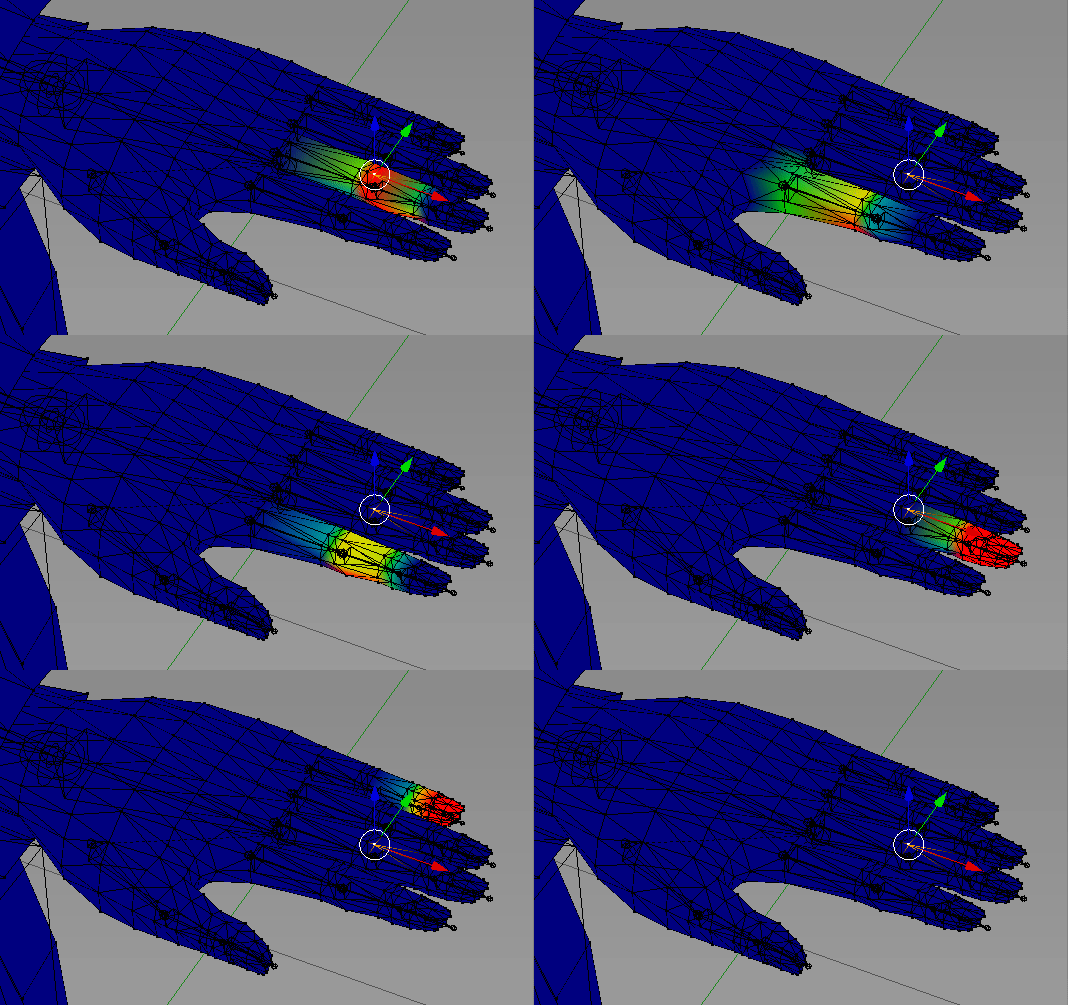
I'm trying to increase how long the torso is in unity, so i change the spine y size but then the head which i don't to change anything also lengthens too so how do i change the spine length with out affecting the latter bones as well?
 crystal vector
@verbal granite You can do that in Blender
verbal granite
i have no idea how to do that though @crystal vector
crisp tendon
Grab the end of the bone, move it up, save, export
 serene echo
You can either weight paint it better, or remove the skin that sticks through/under clothes.
smoky lava
Yhea it needs to be done using weight paint, dont got the knowledge to do that sadly, because skin mesh wont work bcs you can look inside the outfit
wind osprey
@smoky lava Have a look at blender's vertex attribute transfer, specifically weight transfer. If you have an entire body mesh under there you can project the body's weights outwards to the clothes which in a number of cases reduces how much extra cleanup is needed.
naive tree
much easier if you remove the skin udnerneath the jacket
lofty topaz
Is there any automatic way to dissolve multiple bone with their weight painting into their parents?
queen mural
CATs blender plugin
"to parent" or "to active" or you can click the merge bone stuff
lofty topaz
select all the bones I want to merge and to parent?
queen mural
yeah pretty much
lofty topaz
thank you
bitter spade
Does anyone know why this is happening?
fading verge
@bitter spade Most likely another vertex group that's assigned to that mesh has weights on that part remove it and it fine
fading verge
Your avatar is humanoid but its head,hands,feet arnt mapped...yet when i go in the rig it is mapped...what the fucking hell
 solemn talon
hmm, having some issues with blender 2.80 RC1, for some reason the fbx it's generating isn't getting picked up by the unity automatic humanoid rig mapping
or rather, it picks up hip and spine bones, but not leg or arm bones
copy from other avatar shows no errors, but I'd like to have it independent so I can try tweaking thumb configuration. Saving and loading the mapping from the prior version (made in blender 2.79) leaves leg/arm/hand bones unmapped
I'm using the CATS export to FBX option here, which worked fine in 2.79. Hoping I don't have to manually map every single bone... 😐
solemn talon
solved: apparently my vertex group and bone names got out of sync somehow
sharp pewter
Changing bone name will also change vertex groups name if they are the same but not the other way around
solemn talon
apparently the autorigger makes use of vertex weights
@sharp pewter this probably has more to do with me reverting part of the mesh to a previous version of the model that was before CATS did its rename thing
sharp pewter
Rip what ever part of the mesh got broken and abused
solemn talon
it's okay, somehow I got unbelievably lucky and was able to get away with just renaming vertex groups to match the armature
sharp pewter
How is that lucky?
From the same original model right?
Im ded from 105 deg temps and sleepy ima go die in a bed 
solemn talon
the lucky part is where I don't have one vertex group named "Upper leg.L" and one named "Left leg" and have to setup 60 vertex weight mixes to get myself out of this mess
opal aurora
@solemn talon make a bone named Upper leg.L, parent it to Left leg and merge weights, that should be enough i think? o:
 astral warren
Blender’s “conserve volume” checkbox deforms the meshes so much better.. unchecked is what it looks like in VRChat. Is there any way to simulate what it looks like with it checked? I don’t even know what it’s doing differently
It eliminates candy wrapping and shrinking eye tracking irises