#avatar-rigging
1 messages · Page 127 of 1
 gritty nest
 naive tree
also u want to merge your meshes

 fading verge
remove upperchest
gritty nest
You have RightUpLeg and RightLeg, assign those in upper leg and lower leg respectively
gritty nest
Unmap upper chest and put Spine2 in regular chest

 fading verge
Meshes are chunks of your avatar
Usually you have one mesh which is your entire avatar
 rigid oriole
ok
rigid oriole
How do I mesh them
rigid oriole
No rip
rigid oriole
I'll install it right away
rigid oriole
where do i find it
fading verge
I'll link you to it
rigid oriole
thanks
fading verge

VRCat: Community-Run VRChat Forums
Cats Blender Plugin (0.11.0)
A tool designed to shorten steps needed to import and optimize models into VRChat. Compatible models are: MMD, XNALara,...
Most recent version
Also get this plugin to join your materials so you get less lag and better gameplay https://vrcat.club/threads/material-combiner-blender-addon.2255/

VRCat: Community-Run VRChat Forums
An addon that allows to get lower draw calls by combining textures without quality loss and avoiding the problem of uv larger 0-1 bounds.
FEATURES...
I can link you a tutorial as well on how to add plugins to blender
rigid oriole
Material combiner name is Shotariya-Don right?
 crystal vector
Yes
rigid oriole
in the unity folder right?
fading verge
No
You gotta delete it from the unity folder otherwise you'll get a lot of errors
Do you have another copy?
rigid oriole
yes but it's the one not rigged
fading verge
Uh
You can navigate to the fbx in the unity folder right?
Not the unity cache fbx
fading verge
Oh
Try importing the dae file
From unity or outside, doesnt matter as long as its rigged from mixamo
 fading verge
No unfortunately
rigid oriole
what should i do
naive tree
you can import dae in blender
@rigid oriole literally first File>Import option in blender
 spark bison
For full body tracking. Is it better to have the avatar in a rigid T-pose or does the more relaxed rig work just as well?
fading verge
doesnt matter since the model will automatically move into a T-Pose when you are in-game with FBT
spark bison
Well what would be the cause of joint twisting then?
fading verge
usually bad bone placement
follow this video from kung to properly fix a model for FBT https://youtu.be/IqUVFuSD5a4

A guide for scaling and tweaking VRChat avatars for fullbody tracking. Covers information on in-game, blender, and unity. It also has a fix for that bending ...
fading verge
so ever since i recently learnt weightpainting i decided to fix a problem ive had with my avatar's feet halfway sinking through the ground. the problem was that the ankle bone was too high inside the mesh for the foot to collide correctly resulting in sinking feet. however my experience is low and i did not want to risk deleting the vertex groups for the ankle bones in case i didnt repaint them correctly, so i opted to painting the toes to the toe bones which did not have any weights before like this (bone in image is the right toe) https://cdn.discordapp.com/attachments/490261505816920074/498244565397012480/unknown.png

my question is, will this fix the sinking feet?
i already painted both of the toes to their respective bones.
 crisp tendon
We're you using the toe bone in your unity humanoid configuration before ?
fading verge
no, it did not show because its weights were zero
 upbeat lantern
https://gyazo.com/98cf23304d732d040326c892ecf78b74 How to fix a fall when walking?
 crisp tendon
It should still be selectable, but I don't think it'll solve your issue, you could simply get automated weight painting for that ankle bone if you're not sure
@upbeat lantern Make sure to lock x y z position on the animation file window
fading verge
it is painted, the entire foot is all weighted to the ankle bone by default
upbeat lantern
Blocked, did not help (
crisp tendon
Have you seen how the weight painting is done on the sample avatar provided in the SDK ? If not that should help you visualize it
fading verge
https://cdn.discordapp.com/attachments/490261505816920074/498246054685442049/unknown.png
the place where my pointer is placed is the segment which sinks in-game

the entire sole of the foot goes into the ground
crisp tendon
Lower the bone to the ground then
fading verge
i think im better off removing the vertex group and moving it
then repainting
hit a problem
ankle bone is attached to leg bone and does not move without it, meaning i need to repaint the legs as well
crisp tendon
You can just detatch the bone
fading verge
wont it cause issues?
fading verge
ok so i unlinked and moved the bone lower like this in edit mode https://cdn.discordapp.com/attachments/490261505816920074/498254278272614400/unknown.png

is it possible that lowering it too much will make the avatar hover slightly?
 robust gull
Anyone know how i make a bone first child of something else? i get the forearm is not first child warning
No one knows?`
fading verge
Click on the bone in edit mode go to the bone icon in properties page and look under parent. You can change it there
robust gull
All of those are right but some of them are not first child
fading verge
your rig should go from chest to left shoulder -> left arm --> left forearm --> left wrist --> 3 finger bones for each even though the thumb has two IRL
if theres other shit there you dun goofed
robust gull
All of that is right, the problem is the other bones this model have like weird twist bones and they seen to take the first child even if all the parenting is right
It has all the normal bones for vrchat with right name but it also have these kinds of bones Arm_Left_Forearm_Adj
fading verge
oh you got some ik bones and stuff there
those need to be removed
can you post a screenshot of your model's arm?
the only thing you need to keep is the minimum rig to move your model
maybe itll help us determine what bones need removal
^
and a pic of the heirarchy helps too
robust gull
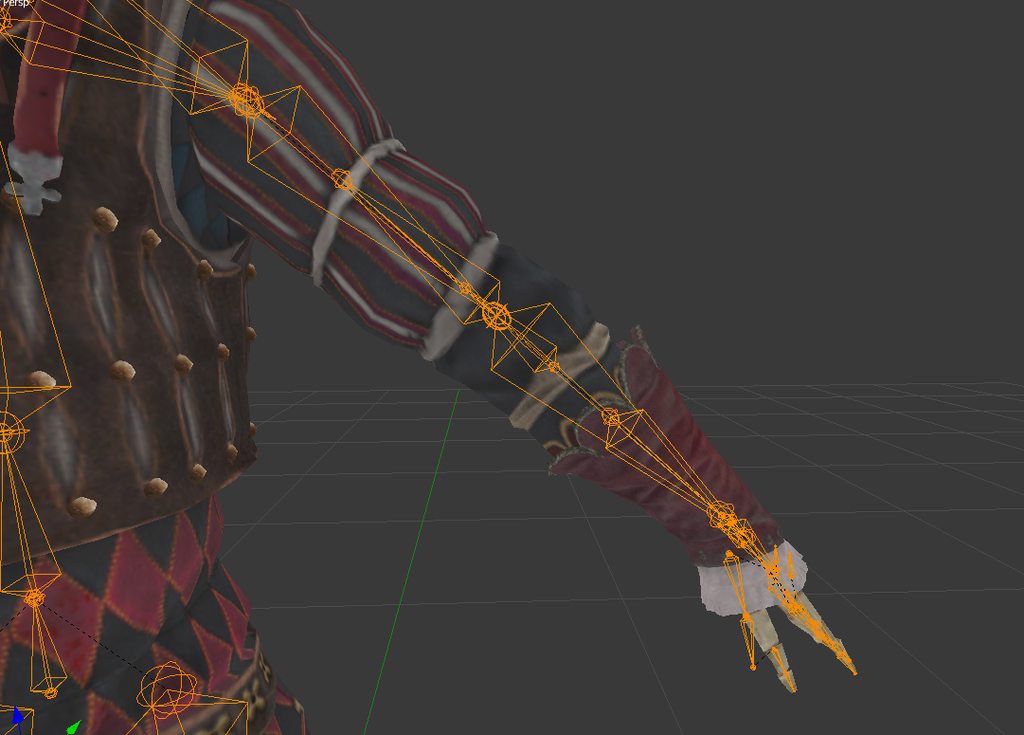 fading verge
yeah all those adjustment bones gotta go
robust gull
But if i remove them don't i need to weight paint? i'm really bad at it
fading verge
the adjustment bones probably wont have weights
as long as the main bones have weights, you'll be fine
fading verge
just delete all the bones pointing up. Save your file before you start this
i have a question though
that model is a game rip thats why it has all the extra bones
no no, i can get my avatar's legs bending up to 52- degrees in rotation on the X axis before it clips through the skirt
would it be enough to not clip through in desktop mode's crouch?
you'd need to use colliders and such to keep the skirt from clipping (if you're using dynamic bones in the skirt, dynamic bone colliders must be used)
robust gull
Do the skirt have bones? if so you can parent the skirt bones to your legs that's what i do
fading verge
you should parent skirt to hips actually
i painted the skirt mesh to my leg so i can avoid clipping
or a hip copy which is what i do
so i only have to apply one dynamic bone
this is how far the leg bends in blender https://cdn.discordapp.com/attachments/490261505816920074/498260433057349633/unknown.png

for reference
i also have parented the skirt to a hip copy parent for dyn bones, what a coincidence
on a previous version of this model though.
yeah just put colliders on your legs
i have done that before
the desktop animation seems to ignore them
and it goes insane
did you put 2 there
for both X and Y
yes
it clipped the knee forward and then the skirt mesh started spasming
and z i guess u probably need all axis with the legs
i think this is easier though
less performance intensive
just need to get it working
 sleek isle
select the bone and merge weight in the cats plugin @robust gull
robust gull
@sleek isle Thanks that worked great
fading verge
I forget about cats a lot. So used to doing things manually
i fixed the feet (i think)
gotta patch the model in and upload it

 fading verge
they wrote down how to fix it
 delicate swallow
^^
rigid oriole
where
delicate swallow
on the error
fading verge
on the error message box
delicate swallow
save textures by uvs
pack uvs by splitting mesh
fading verge
on the bottom of it
rigid oriole
Excuse me but where's the error box
fading verge
check your last screenshot that you sent
rigid oriole
oh yeah sorry
sleek isle
what is the problem ?
rigid oriole
I finished to rig my king k rool model on unity
Now I was merging meshes and combining the materials
I saved the uvs as they said
But what do I do now
delicate swallow
is it still showing the same error

 rigid oriole
So now I save it and then I put it in Unity?
delicate swallow
did you fix all the errors?
rigid oriole
Those about the bones?
rigid oriole
The bones are there but cats doesn't seem to recognize them
delicate swallow
you might be able to skip it and fix it in unity after importing
rigid oriole
I did rig them yesterday
As for the materials
I guess I won't combine them
"What could possibly go wrong"
rigid oriole
Do I export the model with cats addon?
sleek isle
if your model are very low, you don't really need to optimize them them with atlas etc. if cats just wont allow you you
rigid oriole
do I need to put the model in the unity folder?
delicate swallow
nah put it somewhere else on your pc where you will remember its location
than from there drag that folder with the fbx file in it into unity
rigid oriole
Desktop
delicate swallow
that works
preferably in a folder with the name of the model so you know what it is
sleek isle
what ?
delicate swallow
what
delicate swallow
if you dont have one than yea
 delicate swallow
can you link me to the place you got the model from
rigid oriole
Nintendo 64 - Donkey Kong 64 - King K. Rool - The #1 source for video game models on the internet!
I used the fbx from blender
So maybe that's why
delicate swallow
nah it should be fine
inside that folder are the materials
the originally downloaded file
rigid oriole
I take them and then?
delicate swallow
drag and drop them in the folder inside of unity
you might have to reattach the images to the materials again
 delicate swallow
inside textures?
rigid oriole
textures is the one i put in now
delicate swallow
open it than send another
rigid oriole
?
rigid oriole
 delicate swallow
select all the materials and send another picture?
rigid oriole
 delicate swallow
or select just 1 of the materials and send a picture
rigid oriole
 delicate swallow
ok select all of the materials and change where it says "transparent" at the top right and make it "opaque"
The rendering mode
rigid oriole
ok
delicate swallow
send another picture after if that doesnt work
rigid oriole
 rigid oriole
I knew it
rigid oriole
yes
delicate swallow
ok on the left side where it says "assets" click on the "textures"folder
so the first material should still be selected and the textures should now be visible
delicate swallow
Now you want to match each texture to the correct material by reading the name of it. drag the texture onto the box next to "albedo"
and np
after that select them all again and change the color thats right next to the albedo box to white
and it should now be fully textured
 rigid oriole
now it's absent
delicate swallow
change the slider left and right till it looks right
rigid oriole
where's the slider
delicate swallow
under albedo
rigid oriole
 delicate swallow
"alpha cutoff"
rigid oriole
It still looks like the pic befor cutout
rigid oriole
how do i change the offset
delicate swallow
type in numbers for x and y
rigid oriole
what should i put
 rigid oriole
I had the unity file where I rigged it
delicate swallow
ok
rigid oriole
it was dae
delicate swallow
Oh alright
 delicate swallow
eyes are a little messed up
rigid oriole
Yeah
After the eyes
I gotta check the rig
Put the little vrchat thingy
And done, right?
delicate swallow
should be
rigid oriole
So how do we fix the eyes
delicate swallow
is the offset not working
rigid oriole
no
delicate swallow
what about the offset further down
ive never had that problem so you might have to wait for someone else to help with that
rigid oriole
even the other offset doesnt work
delicate swallow
does .5 not fix it?
rigid oriole
The left eye is in the place
delicate swallow
that should shift it half way
 delicate swallow
set the uv offset (the bottom one) to both x 0 y 0
and change the top one y 0 and x 1.3
 delicate swallow
well it worked so i guess its right
sleek isle
For the super Mario n64 there was one material with all the texture idk for the other game. maybe retry to make an atlas
rigid oriole
I'd rather not sorry
rigid oriole
 delicate swallow
looks gr8
rigid oriole
@delicate swallow Will people complain if I leave it like this?
rigid oriole
Well, I can't lose my weekend over this model so I'll go with rigging
rigid oriole
the right leg for the rigging disappeard

you know what
I'm going with the other one
Even if it's not merged
rigid oriole
In the other project there's the right_leg
sleek isle
open the hierarchies on the left and take the bone that are missing on the rig and drag them in the box
 static path
I just uploaded an Avatar, and everything works fine except after I stop walking, she kinda just scoots her feet together and leans to the side like an idiot. anyone know what could cause something like that?
gritty nest
@static path do you have a custom idle animation perhaps?
I had that happen quite a bit
Also, show a screenshot of the humanoid rig inside Unity
static path
I don't think I have a custom idle animation. I haven't messed with them at all.
And let me start it up again
I can't attach an image for some reason, rip
gritty nest
Use imgur
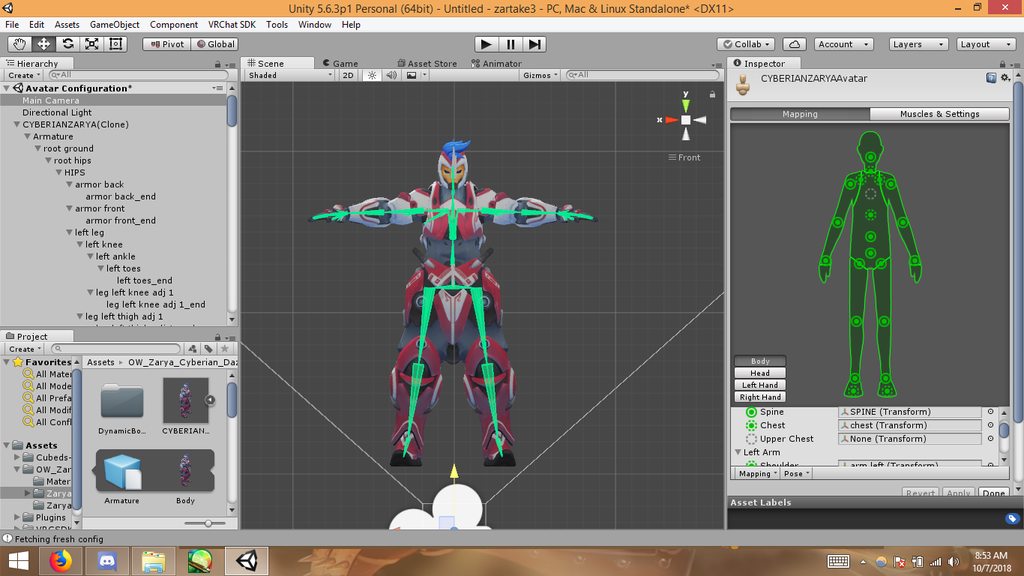 gritty nest
Yeah, that's exactly what I meant
So, first things first since this is something that seems innocuous but is actually important
In the right sidebar, you should be able to click on the assigned left leg bone. Does it actually select the left leg?
I see that left/right legs are sometimes switched around. Even if a bone is called left leg, it might be the right leg instead
 grizzled bramble
someone knows how to correct error 0xc000007b?
static path
ohhhh
OOOOOOOH you may be totally right
gritty nest
If you reassign the leg bones correctly and then go to Pose->Enforce T-Pose again, it should look fine. The legs look a little spread wide.
static path
yup, must have renamed the legs backwards in blender. oof
gritty nest
Lol
static path
it looked fine in T-pose before. let me see if that does it haha
gritty nest
Their names don't really matter as long as the left leg bone is in the left leg slot
static path
so basically i just have to switch the legs?
gritty nest
If they're wrongly assigned then yes
Just switch their mappings in the Unity rig configuration
And then re-enforce T-pose
Unity won't care that they're mis-named, as long as the left leg bone is in the left leg slot
static path
goootcha. lemme try that
yeah, that didn't seem to do it :x
just twisted her whole lower body
gritty nest
In that case, the legs were probably already mapped properly @static path
Just put the leg bones back where they were, and then rotate them closer together so they're properly straight
The legs are spread a bit
They should be straight down
static path
dumb question, how do I rotate them?
gritty nest
Just select them and rotate them with the Unity tools, I think you can edit the XYZ values in the bottom right too
 gritty nest
That's a lot better
Should be fine now, maybe rotate the feet if the soles aren't straight on the floor
Then once you apply and go back ingame, it should be a lot better
static path
thank you so much!
This is the first time I tried to use a different format than MMD
the XANLRA (or whatever) kind
gritty nest
Ah yeah, XPS models can be a pain to get into this game
static path
so I've found out, lol. No good MMD models of this character though, unfortunately :/ But hey, I'm learning a hell of a lot
also, one last thing. is there any way to change the color of the little dot for the avatar descriptor? It's so hard to see
delicate swallow
dont think so
static path
oof. I'm always looking for that dang thing.
delicate swallow
yea
static path
uploading it now to see if it worked~
It seems like every time I learn how to fix something, I think "ok now I know what I'm doing!"
Then some other dumb little issue pops up and I have no idea what I'm doing again 
delicate swallow
How come idle animation breaks my whole avatar?
Even after I change gestures to something else
delicate swallow
she goes half way in the ground. when i walk she slowly rises and drops again when i stop
gritty nest
Your idle animation is in the floor then, too.
Fix it I guess
Or do you not have any custom anims in the idle slot?
delicate swallow
Its when i put any animation even a working one in the idle slot it does that
an anim that works on the rocknroll breaks on idle
gritty nest
When you override idle, it needs to encompass the whole body
So when you view it in Unity, it should be standing normally
Not crouched into the floor
delicate swallow
its not
gritty nest
Alright, oh
On the animation file itself in your assets
Tick all three "bake into pose" options
And set all three "based on" options to "Original"
delicate swallow
ill check
 delicate swallow
I dont see any of those options
When I start the anim to record it my model goes into the crouching position
gritty nest
Yeah, that's normal
That's why you animate on a duplicate so your original model remains in a T-pose or A-pose or whatever
gritty nest
So you made an animation that put your model in a crouch animation
Of course if you put that animation in the idle slot, it'll make your model crouch
You're replacing the entire idle animation, not just adding something on to it
delicate swallow
but with other animations it doesnt do the crouching
if i put that same anim on the fist gesture it works fine
oof
static path
thanks for the help @gritty nest . unfortunately it didn't seem to work. But I am beyond tired, so I think I'm going to have to take a break for a while anyway. Good luck with the animation stuff!
delicate swallow
i thought idle was a gesture =<
gritty nest
Idle animations replace the entire body, gestures can only affect the hands and bones/objects that are not specified in the humanoid rig
No
delicate swallow
rip
gritty nest
Idle is your entire full body idle animation
delicate swallow
i thought it was the default half closed relaxed hand
delicate swallow
roger
is there a way to fix that?
or do i just have to edit my character not from an animation
and leave idle blank
gritty nest
Well, what are you trying to accomplish actually?
delicate swallow
my avatar in t-pose isnt holding the gun and i was using the anim to default it to holding the gun properly
gritty nest
Well, you can still do that but you'll have to basically change the entire idle
It's not too hard if you have muscle animation editor
delicate swallow
i doubt i have that
and my anim is very basic atm so i dont mind chaning it
Would i need to basicly re move the legs back to straight?
gritty nest
Yeah
Root Transform Y set to 1 so it's out of the floor, lower legs stretched, upper leg back a little
That should cover it for the legs and the body basically
delicate swallow
mk ill try
gritty nest
Then you'll have to pose the arms as you see fit
delicate swallow
Is there a good way to straighten the legs?
cause its not letting me change the position through the anim
delicate swallow
ive never done that
gritty nest
This is why muscle animation editor makes it a lot easier to do, otherwise you'll be spending ages adding properties
delicate swallow
im new to animations
gritty nest
You can't move the bones directly, you need to use Animator->Left Lower Leg Stretch for example
delicate swallow
that sounds to complex for me cause im slow
where do i get this magical editor at xD
nvm
im poor
So where is this left lower leg stretch thing at?
robust gull
Been trying moving the bones in blender but it don't do anything
 raven reef
have you applied the armature modifier, are the bones weighted, and do the vertex groups have the same name as the bones
@robust gull
 solid adder
Make it's in pose and not rest.
 terse knoll
In Blender, is there an easy way to move the tail of a bone and have the child bones move with it? I mean in Edit, not Pose.
 worldly willow
@terse knoll rightclick the orb to select just that joint
terse knoll
That only seems to move the head of the next bone. I want all of the child bones to move.
Nevermind, I figured out a way to do it.
fading verge
hey guys
So I set up some rigid bodies on my model and the joints on the smaller model,
for whatever reason though the little models arms are getting stretched to insane proportions, any idea?
I have pics, but can't post em here 😮
did you freeze the location ?
not on the smaller ones armature
do I need to freeze it on both?
that depend
you only want the smaller one to follow the rotation
not the position
so you freeze the position
i just want it to follow my main arms movements really
though, I am not sure never worked with them tbh 😮 I also have some rigid bodies on my characters fingers so it can match with the hands too.
i use one on my model so my fox companion follow my head rotation and only the rotation
https://i.imgur.com/OllRYp7.png this is one the main model's head
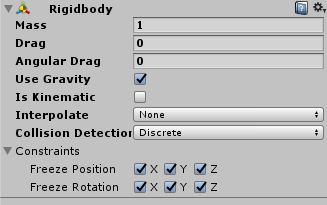
this is on the fox head https://i.imgur.com/rbrbLAm.png
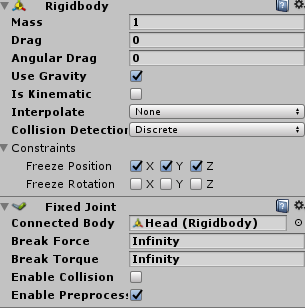
oh, I have use gravity off
should that be on?
doesnt matter for that tbh
like, I kinda want rotation and position, so say I move my arms out, i want the smaller models arms to be out as well, does that make sense?
sorry i am bad at explaining things lol
i see what you meant
i tested with 2 models, it doesnt stretch for me
hm..
would you mind looking at my settings a bit? just want to make sure I didn't mess something up lol
first time working with rigids so
uncheck "is kinematic"
alright,
done
does it still stretch when you test in play mode ?
mhm
 drowsy wharf
Can you give an image of what you're talking about with stretching?
fading verge
I'M unsure if this goes here but

Can someone help me with what the hell is going on here
naive tree
@fading verge rotate your last bones
fading verge
Last bones?
naive tree
rotate last finger bones in your rig window (prob scene window works too)
select them through dropdown menu, not by clicking on the bones themselves (as they are too small)
or possibl even missing, but they should be there, this issue sometimes appears
crisp tendon
What were your fbx export settings on blender ?
fading verge
the default.
crisp tendon
So you have leaf bones as well ?
fading verge
mhm
 gloomy pollen
is disabling dynamic bone colliders not possible?
i put a inside bound collider on my hand and set the hair to use it, but even if the object with the collider is disabled the hair always bunches up into the collider
and so on top of that, the inside collider is useless because if it's "on" all the bones gather inside it, no matter where it is
instead of my intended function to capture whatever bone its around when it gets enabled xD
 frigid vale
So i have an odd model, I have a tank model that has oddball rigging for each road wheel, the turret rotation and the main gun elevation

and i want it to have the turret rotate to where i look and have the main gun point where i look as well
so turret would rotate on the Z axis while the gun rotates on its relative X axis

So like so, but with these same constraints in unity
and then each road wheel and assosiated idler gear and drive sprocket would rotate on the X axis
but I dont want the hull to rotate with where i look
Kinda like having a Neck joint being able to preform a full 360 degree turn
 finite silo
can someone help me with a weird occurrence that's been happening recently?
I have pictures to show what my problem is.

Unity is the ultimate game development platform. Use Unity to build high-quality 3D and 2D games, deploy them across mobile, desktop, VR/AR, consoles or the Web, and connect with loyal and enthusiastic players and customers.
I've been playing a ton of VRChat and I love making avatars to show my friends and make even more friends / people laugh. This issue is really stumping me.
 timber relic
ok so...mario doesnt have a chest, only 2 spines. and mario has hips, but the only children are legs, so labelling them hips for rigging is a problem
so i. got no clue what to do here
well, spine2 is technically a chest, but i also have to map for neck, and if you've seen mario...he doesn't have a neck
 median echo
Does anyone know how to get Space Robot Kyle to work? I can't upload him. It says "Spine hierarchy missing elements, make sure that Pelvis, Spine, Chest, neck, and Shoulders are mapped.
 late shale
@finite silo I've heard that it's possible unity will interpret the weighting differently than blender if a vertex is weighted 100% to two different bones
I think like blender will blend between the two while unity will pick one over the other
fading verge
heyo can anyone lend me a hand with a issue on a model i got?
static path
Got a quick question. I take it models from SFM don't have mouth/voice tracking abilities like MMD models do? Wanted to ask before I go through the whole process of importing things.
gritty nest
@static path every model can be made to have lipsync
They probably won't come with shape keys, but if the face has bones you can simply pose the face and turn the pose into a shape key
static path
yeah that's what I'm doing right now. But I wanted to know if there would be an easier way, lol
thank you!
gritty nest
Face posing is roughly as easy as it gets
Harder would mean making the shape keys manually by moving the vertices
You only need to make three shape keys if you let Cats generate the rest
static path
ah yeah. right now I'm using an XPS model.
I HAVE a model for this character in MMD format, but it's a ridiculously high polycount, and I can't decimate it much because for some reason the entire body (including the head) is all one piece, even after separating it all.
static path
It's still a huge piece :/
gritty nest
Or manually separate
There's a button in the bottom that allows you to select stuff that's behind other stuff
If you turn that on (or rather turn off), you can press B or C to select large parts through the entire body
static path
the model DID come with a separately rigged head now that I think about it. how easy will be to take the head off of the original model, decimate it, then add the rigged head to it? Will it mess up any armatures or anything?
oh I can try that
static path
I've never used it.
gritty nest
But you might wanna try the method I outlined earlier
static path
ok! thank you so much lol!
I finally got my other model working btw
gritty nest
Ah, cool
static path
I'll def. try the first thing.
ok where is this button that I need to turn off
on the bottom where
gritty nest
It's something with backfaces, looks like a grey square
static path
does it have to be in object or edit mode? or something else
finite silo
@late shale What's bizarre is that the stomach has no weights applied to it whatsoever.
so it creating these hell pillars like Satan himself was summoned is just odd
NoDumbQuestion said "Unity dont like to import from blender.
And you have to switch import type from humanoid to generic inside unity"
late shale
No it has weights, they're probably like 2% though so you can't see them. There's a tool in blender that allows you to clear any weights below a certain point, I think it's called clean
Make sure it's still weighted to the appropriate bone though, that's probably your problem. Not weighted to the bone it should be +weighted 2% to a bone it shouldn't be = 100% controlled by wrong bone.
 indigo moat
Hey folks. I've got an avatar with a working blendshape for mouth open. I've tested it in maya and blender. But when I set this blendshape as "jaw flap blendshape" it doesnt work at all. the mouth never moves.
 elfin comet
uh so im rigging the avatar but the error message pops up and says "spine transform 'spine lower' has a bone length of zero" do you guys know how to fix this
or it is ok to just go with it?
and also from what i see the bone length doesn't look like zero
robust gull
I don't know where to ask this but what can break the mirror in the pug? It happens to me when i spawn my lute in front of it, the lute have dynamic bones gem shader and flatlit toon shader. I really wanna make sure this dont happen
I think it's the dynamic bones i just don't know why
fading verge
what do you mean break?
@elfin comet Generally a bonelength of zero on teh spine is okay if you can physically see the spine has a length
@indigo moat make sure there is no bone assigned to jaw in the animation set for the mesh
gritty nest
@robust gull mirrors don't show dynamic bones on objects that aren't enabled by default
 subtle moth
@robust gull i know what you mean
Mirror in the pug breaks for me when one of my avatar does a gesture
 wary crown
if it breaks for you walk away from it till your at the counter and walk back
then you enter the trigger that activates it
 obsidian skiff
Thers surly an guide for it , but anyways .. if the avatar has a tail and i want to make its motion look nice in world not just like a sail i drag behind me , more to have masss and bonderys of its flex and travel in its axiels ? And im just asking whit zero insight here just found vrchat and havent lookt on the sdk yet .
robust gull
@fading verge It wont show a reflection anymore.
@gritty nest Could i fix that by just hiding the mesh instead of the object?
@subtle moth Yeah this is the problem i have.
@wary crown I know that i can fix the mirror when i walk away but when i use the gesture infront of the mirror it breaks again
fading verge
oh you mean the mirror doesnt show anything anymore ?
yeah, i think it's just a bug in the Pug
it doesnt happen in other worlds for me
robust gull
@fading verge Yeah it's just the pug, but it's one of the world we are in most so i really wanna figure it out what's doing it.
 elder crescent
i have tried to figure out what causes that for quite a while. i think its some oddity of the triggers/colliders that are being used in there.
oddly it only started happening a couple months ago.
but i havent found a fix since. some avatars with very elaborate gestures and anims are just fine.
others with a simple viseme are completely broken
robust gull
This is the first time it happens on an avatar for me
fading verge
it happens all the time for me
elder crescent
i know that there are other weird/annoying things with the pug, like if you have colliders on your avatar you will get respawned instantly on the first floor, sometimes the second floor too. very annoying
fading verge
you just need to move behind the first table and come back and it will be fine
if you have any collider touching you in the pug, you respawn immediately
robust gull
Svel not for me, it just broke right away when i came back to mirror
fading verge
stupidest thing ever
gritty nest
The pug mirror turns on when you enter the area and they turn off when you exit
If you switch avatar it'll break until you re-enter
elder crescent
i have three avatars that have shields that are set up to block others' particles and its such a shame i cant use them in the pug without being spam respawned
gritty nest
There's some weird collider thing in that map which keeps teleporting me too
elder crescent
yeah its his extremely tight respawn box
gritty nest
Fucking dumb
elder crescent
its literally right outside the walls/floors
so as soon as you put a collider anywhere close to it, it just shits itself
near the top of the map is fine, can usually use collider stuff in the roost
robust gull
Guys do you know if this only happens when you use vr or is it desktop too?
Otherwise i think i found the problem for me anyway
I have a plane in my lute and that had a mesh collider, i removed it and now the mirror don't break atleast on desktop
elder crescent
i wouldnt be surprised if its colliders that causes it at all
robust gull
That and i have more bones in my lute then yesterday is the only thing i have changed so
 orchid tiger
@elder crescent @gritty nest @fading verge The Pug is constantly being updated and Owlboy is extremely responsive to correcting issues. Here is where you can report those: https://github.com/owlboy/greatpug-public/issues

GitHub
A Bar in the Metaverse (VRChat). Contribute to owlboy/greatpug-public development by creating an account on GitHub.
Please try to be less toxic!
fading verge
?
orchid tiger
stupidest thing ever
fading verge
okay ?
gritty nest
@orchid tiger this is a complaint shared by many people, many times over the past few months. It is pretty clear that this is intentional
Please try to be less passive-aggressive
The link you posted confirms it: https://github.com/owlboy/greatpug-public/issues/5
GitHub
Whenever you teleport etc inside the map (e.g. to get outside to the moon or something), you get teleported back to spawn. Is this an intended feature? This is the only VRC World with 'active A...
orchid tiger
I called you out directly! How is that being passive? At any rate, the edgy comments are uncalled for. He is doing this all for free.
gritty nest
We were offhandedly talking about the Pug and we happened to criticize it
You are allowed to criticize something even if it's free
orchid tiger
You can write whatever you want but it should be called out when unfair/toxic
gritty nest
k
elder crescent
uhh..right O_o
well, i think it is intentional also, it has been there for months
fading verge
it is intentional, owlboy said it himself
i didnt encounter a single person that told me "oh yeah, that's a great idea" but it's still there.
gritty nest
And it's not even effective because people clip out of the map all the time
Seems like he's trying to "protect" a hidden area or something
elder crescent
yea idk seems there are better ways to do that but his map i guess
indigo moat
@fading verge The jaw bone is not mapped.
I am able to animate the blend shape in unity just fine so it's definitely imported properly
 ruby herald
anyone ever have an issue where a bone is weight painted in blender but dynamic bones wont recognize it
 warm coral
@ruby herald OUCH sorry I'm late
ruby herald
i already fixed it
warm coral
So what do you mean that the Dynamic Bone script won't recognize i-- oh okay
I was gonna say put a game object at the end of the bone
ruby herald
nah it was something alot more complicated
warm coral
Oh what was it?
ruby herald
i deleted the sub parent bone that the weight painting was using and blender didnt care, meaning pose mode worked but when u tried to use that weight paint the reference sub bone was missing causing an error.
ruby herald
it was rather annoying cus dynamic bone doesnt have error notices so it just looked like the weight painting wasnt done but it was lol
finite silo
@late shale cleaning seems to have worked. No more artifacts. for now, that is.
 muted comet
I dunno if this is the best place to ask this, but hey. I'm really new to avatar creation and i've loosely made a couple already.
My problem right now is that my machine based mech avatars have hover feet when using a hip sensor instead of being anchored in place with the feet trackers.
I'm wondering if somebody knows the fix for this or if it has to do with my axle rod of a pelvis and the 180 angle warning on upload
Also, since my feet don't stay anchored my crouching is really fucking stupid and my legs shoot out like i'm skiing while doing so
drowsy wharf
@muted comet human proportions to things are extremely important for full body. You could have meshes extend past the bones if you have to, but the bones have to be correct for a human for FBT to work properly. Extra note, for FBT have the hip bone point straight down, and the two leg bones straight up.
worldly willow
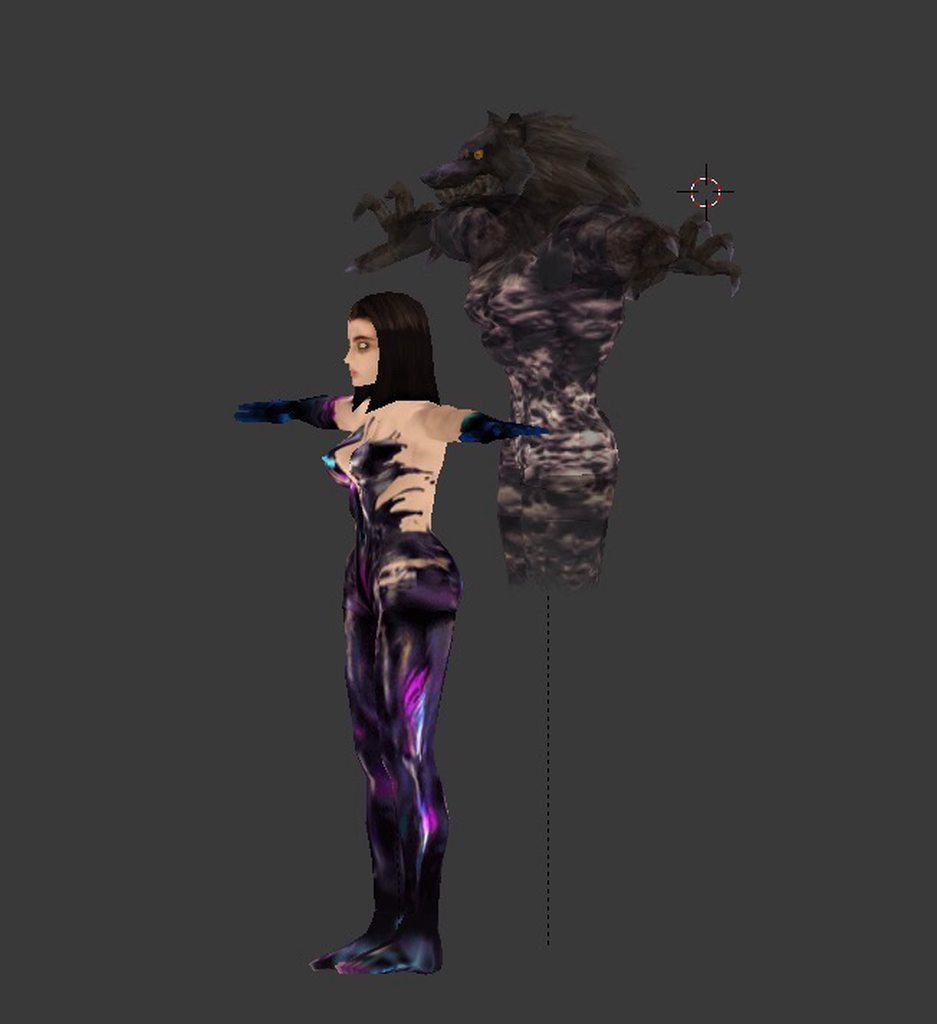
heya smart riggers anyone can tell me how i can get the two armatures of this to move the same way?
so the arm of the girl moves means the ghosts arm also moves
 gritty nest
Fixed joints
Rigidbody with no drag and no gravity, frozen positions and rotations on your real arms
Then put fixed joints on the ghost's arms and link every one of them
worldly willow
@gritty nest do you have a tutorial for how to do that please..i haven't used rigid body before etc
 humble apex
you put rigid bodies on the bones of the main armature you want the ghost's armature to mimic
such as the various arm bones
humble apex
then add fixed joints on the corresponding bones on the ghost's model, and link those fixed joints to the rigid bodies on the main armature
 torn kestrel
?
 steep horizon
Show your errors at least
torn kestrel
What is "hips"?
Can i explain you what i'm doing and you will tell me what i did wrong?
fading verge
or post a screenshot of the error message and your avatar mapping tab
would be a lot easier
humble apex
Hips is the main bone of the armature that every other bone follows, essentially being the basis for the entire armature
 humble apex
That's because the animation file is trying to manipulate a bone named "mixamo:hips" when your bone is just named "hips"
torn kestrel
So how to rename?
humble apex
The armature hierarchy is not matched.
humble apex
You'd have to edit the properties in the animation tab for the animation you downloaded to properly match the names of your bones.
torn kestrel
So how to rename my bones?
humble apex
You aren't renaming your bones.
torn kestrel
so?
humble apex
You're renaming the property in the animation itself so that it matches the name of your bones in your model.
torn kestrel
k
humble apex
Look, just
torn kestrel
..
torn kestrel
yes i see
humble apex
Click on the animation tab
torn kestrel
k
humble apex
Do you see animation properties
torn kestrel
Now i have button says "create"
torn kestrel
"Add property"?
humble apex
..
humble apex
Okay, do you see an animation name with a lot of properties
humble apex
I'd recommend just looking for a tutorial in your native tongue
id post images but
i cant?
idk
torn kestrel
😦
let me try again
just tell me what to do after
i get to the animation on the properties
fading verge
you should look for unity tutorials to get familiar with it.
 versed hull

 dull lantern
Ok please tell me someone can help me
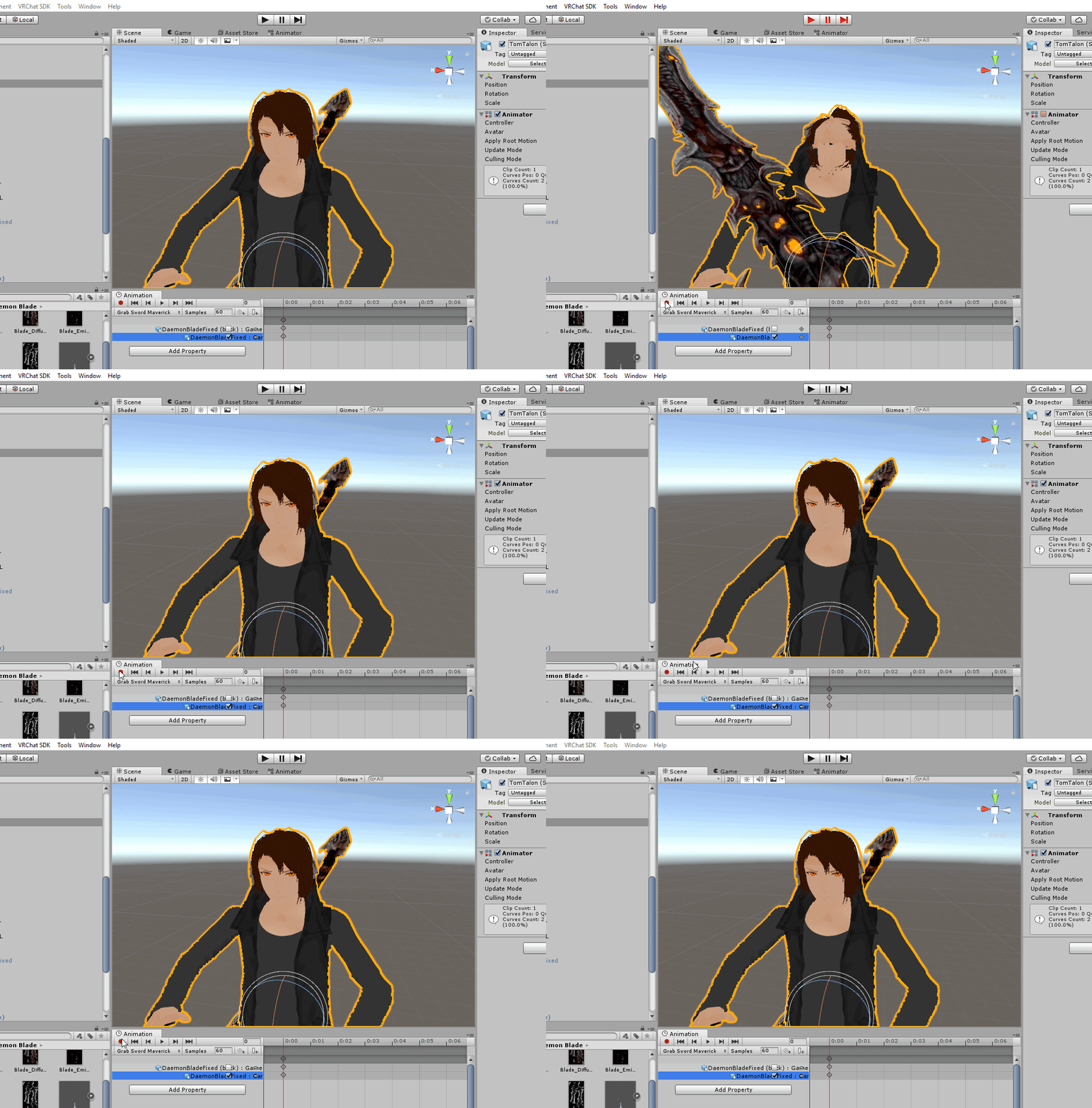
idk how this happened but i can no longer attach weapons to any model as when i do all bones parented to the bone i attached it to move to the weapon
https://i.imgur.com/wFZMwHG.gif
 odd tulip
that's very odd
dull lantern
ive tried a new project, different method, different models, different models
all the same result
ive tried without the VRCSDK and it did the same thing
odd tulip
are you sure it's not because you have the tool handles location set to "center" instead of "pivot" so it's going to the center of the child objects? Check if the numbers on the hands/arms/shoulder's transform component are changing
i think it's just the tool handle is changing
dull lantern
how do i fix that?
odd tulip
at the top where it says "Center" "Global"
click center
it will now say pivot
and try from there
dull lantern
sorry i must be blind i dont see what you are talking about
oh but with the numbers on the armature, they're not changing
odd tulip
Above the hierarchy, next to where you change from the translation tool to the rotation tool

that center button on the right
 calm needle
@dull lantern i notice your handle type is set to center. Try setting it to pivot instead
oh, im late
way late
sorry
 manic marsh
What is your sword parent bone?
solid adder
Check the parent and the rig, otherwise that shouldn't really affect the animation unless you specifically add animators to make the head do that
gritty nest
@dull lantern configure humanoid rig
Reset pose, then enforce t-pose
Also, the pivot point of the parent bones really doesn't matter as you can't move those bones in the editor anyway. Don't get the problem.
 warm coral
Only the first animation in the state machine will play, what are you trying to do? @torn kestrel
Also this kind of discussion should go in #animation
Or rather your inquiry
sleek isle
what would be the best setting for cloth physic for a skirt?
sleek isle
because now I fly
 pale hull
Mark your colliders as triggers. They should still collide with cloth but not with your own avatar AFAIK
median echo
GUYSSSS important. I been stuck on this for ever. I want to upload Space Robot Kyle but his legs bend like a frog. I got him from the Unity asset store but he's broke i guess.
it says his pelvis and thigh bones should be close to 180 but his bones look fine
 potent horizon
can anyone tell me why my avatars hands are all twisted and broken?
gritty nest
@potent horizon got any SDK warnings about forearm rotations?
Like lower arm not being first child of upper arm
potent horizon
nope :/
 abstract shore
Hey there, having a bit of trouble getting my left eye to blink on my avatar I made in Blender. I used CATS to set the visemes in the proper order they're supposed to be set in the shape keys. Tested them in CATS and they work fine. Everything is named properly and I mapped the bones accordingly in Unity. But once I upload the model into the game I'm still seeing only the right eyelid blink.
Eye tracking and everything else is working fine except the that dang left eyelid. Any suggestions or steps I should check I may have overlooked before uploading it again?
crystal vector
@abstract shore Test the blink blendshapes in unity
warm coral
@abstract shore What I'd do instead is set up a blinking animation myself with custom shape keys, which is far more controllable, if lacking in a bit of "utility" on VRChat's part, as your eye tracking wouldn't pick up on blendshapes used by custom blinking for obvious reasons.
 hardy sail
Does anyone know how to fix the glitch in VRChat where when you turn into an avatar with fully body tracking, your virtual knees bend? Kinect Xbox One
warm coral
But I find it my own preferred way of doing it
I don't know what you mean by that LightFox, is it an issue with any other avatars you attempt to use?
Also, please refrain from posting your issue in multiple channels. @hardy sail
abstract shore
It's been months since I've done this and forgot how to get to the blendshapes in unity unfortunately. Mind pointing me into the right direction for getting to them? ^^'
warm coral
Just click on the avatar in Unitu, go to its hierarchy and click on the mesh
Should be named "Body" if I'm not mistaken
And there is something in the inspector that says "blendshapes"
It's a drop-down if it isn't showing
And the blinking shape keys should be located there
@abstract shore
abstract shore
@warm coral
Okay I see it now. I see my vrc.blinking_left and vrc.blinking_left shape keys. Tested them and it's doing the same thing as it does in the game, just the right one only working.
warm coral
@abstract shore Alright, have you checked the order of the shape keys just in case?
That's an important factor as well
Please tell me you have it saved as a .blend file or at least still have it open in Blender
abstract shore
Of course
warm coral
I always keep my model files as those just in case as well
Okay so check the order of the shape keys
Make sure they're okay
Because if it's alright in Unity and Blender, it has to be an issue with the order they're laid out in
If not, then I'm totally at a loss
abstract shore
My shape keys are as follow:
Basis
vrc.blink_left
vrc.blink_right
vrc.lowerlid_left
vrc.lowerlid_right
And all my other shape keys after that are for the mouth animations but I know those first five have to be in a specific order.
warm coral
Huh... I really don't know then... weird.
First time I've seen an issue like this come up
abstract shore
I even tried applying the blinking for both eyes to the blink_right shape key and it's still not working.
warm coral
Just out of curiosity, do you have the right blink set to a negative value in Unity? Or are any overrides using that blendshape? @abstract shore
abstract shore
Not at all, everything is set to zero under the blendshapes and I haven't touched anything else regarding overrides. Just gave it a simple description so that I can upload it.
warm coral
Hm... again, really weird
warm coral
LOL
Was that actually the issue? OOF no wonder you weren't seeing them
@abstract shore Backface Culling is a magical option in Blender
Press N in 3D view and scroll down, you'll see an option that says "Backface Culling." Turn that on and the backside of faces won't show.
abstract shore
Normally I'm able to catch these things as I model because I can see when normals are flipped or not. And it wasn't showing the outside flipped in in textured mode. But I'll write that down just in case.
torn kestrel
Do you know how to make the fingers make sounds/ effects?
warm coral
@torn kestrel #animation
 coral hazel
My avatar has a weird walking animation where the thigh bones work normally, but the shin bones bend inwards. This is a from-scratch rig.
In Blender, the bone rolls are set up so the positive x-axis rotations move the bones as a humans would. I don't make any alterations in Unity and use the Humanoid Rig. Anyone got a fix for this?
This is a problem I have never ran into before, and the armature pretty much matches my last build, so I'm pretty stumped at what I did wrong
drowsy wharf
@coral hazel make sure there is a slight bend at the knee so that the IK knows which way the bone is supposed to bend
in the correct direction obviously, so tilt the bone backwards slightly, it may be rotated forward very slightly and detecting that as the correct direction to bend
coral hazel
I'll give that a shot now. The bones were very straight
drowsy wharf
I missed the bone roll portion. Make sure "Bone roll" on all bones is set to 0 as well btw
yeah, when they're straight it just tries to guess, and may guess wrong 😛
coral hazel
Can I ask why bone roll needs to be set to 0? Experiments from myself seem to show that changing the bone roll doesn't really change anything. I have my hands set up so one bends the right way and one bends the wrong way, and they both come out fine when uploaded
I can imagine because good practice, but if there's another reason I am curious
drowsy wharf
things can act very strangely if they aren't set to 0, primarily because Unity is weird
coral hazel
Hmm
All of my bones at not at 0 degrees, and never seen this weird stuff
Of course, when in pose mode, all rotations are set to 0 for all axis', if that's what you meant
Yeah, that did it, thanks @drowsy wharf
fading verge
http://prntscr.com/l61o69 uh.. send help
 drowsy wharf
@fading verge make sure the model root is at 0,0,0 in blender and the foot bone goes at or just below that point.
If the root is hips, make sure the feet are still at the floor
fading verge
and uh, how do I know where is the root located in blender?
kinda a noob in blender still.
found it
 winged forge
so a problem im running into is when i crouch down my model stays standing up. and i cant move my fingers. im too unsmart to find this out my self.
gritty nest
You don't have thumb, index and middle finger bones mapped
winged forge
how do i do that
fading verge
hello
im very new to making avatars
i made a armoured titan from attack on titan
but it cant most its hands
and when i sit down in vr it just stays up
i know it has something to do with the rig
winged forge
you have to rig the thumb index and middle finger bones
or map them
i dont know how to do that
naive tree
@fading verge you need to map thumb, index and middle finger on each hand, they can be unweighted bones (like extruding 3 bones from wrist and don't have any weight on mesh)
fading verge
ok ill try
fading verge
is that also how you fix the crouching problem
 outer oriole
How would I go about making an accordion as an item for my avatar
I've tried merging weights and parenting the end bone to the other arm but it just wigs out
I want to try and make a Kass that can play his accordion
outer oriole
Are fixed joints what im after or
 quartz wren
In full body, whenever I lean back my viewball starts going into my chest. Any fix to this?
late shale
@outer oriole you should be able to accomplish that by having the part you hold directly attached to your hands, and then the bellows weighted to bones that look directly at the opposite hand. In order to do that, you can use dynamic bones and set up a very small inverse collider on the thing you want the bone to point to.
outer oriole
I was trying something like that, just merging the bone weights to opposite hands while keeping one bone at the end for the other hand and parenintg that
Vrc ik system threw a fit about it
late shale
no, not weighting the bellows to the opposite hand, weighting them to bones that look at the opposite hand
outer oriole
It's a harder thing to accomplish than I thought
Just, parenting the bone chains to the other hand ?
late shale
let me draw something up real quick
outer oriole
All I did was download the xnalara Kass model from botw
If you want to try it on that even
The one that has the accordion
late shale
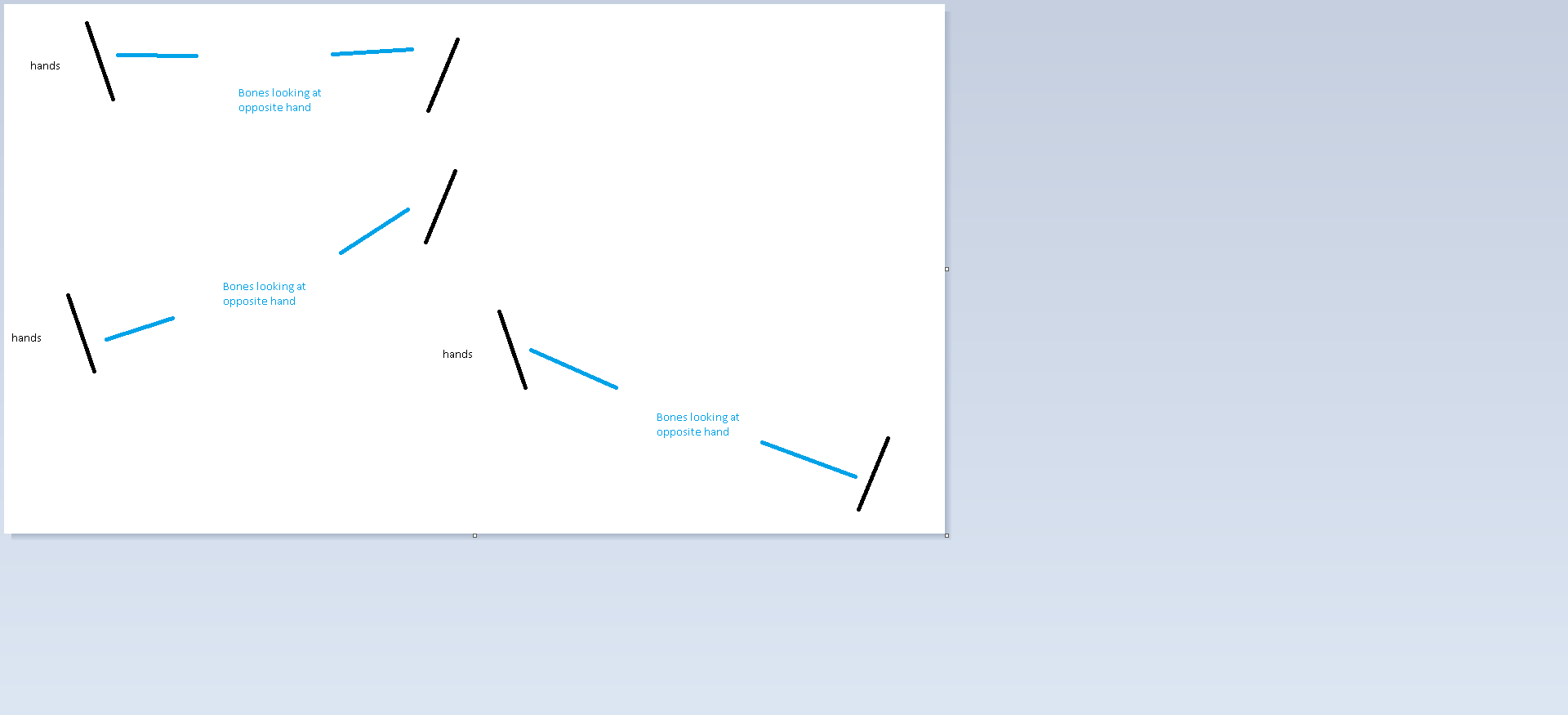 outer oriole
My phone is throwing a fit over it I can't actually read what's on their
There
Fuckin auto correct

Kass converted from BotW with all renowned bones. Accordion is a optional item (CTRL A) Contains bump and specular map I have extended bones of tail Only works on Xnalara\XPS. Report me if you see ...
This is the model I'm using, it has 10 bones for the accordion itself and that's parented to the right hand
late shale
yeah you'll want to get rid of those bones and make your own
outer oriole
With 1 and 10 being the handles
So I would start bones from the handles, have them going towards the middle then parent each end bone to the hands?
Maybe I'm just being retarded and can't understand
Even with your image I'm not understanding 100%
late shale
does this make any more sense? https://gfycat.com/ConsciousHonoredBangeltiger
 outer oriole
A bit yeah
So the right one would be the parent hand and the left one would be the one I move
With a dynamic bone chains in between?
Or is it the other way around
late shale
In this case, I'm not using dynamic bones for jiggly stuff. I'm just using it as a way to make one bone look directly at a position no matter how you move it
Which isn't a chain of bones, just one bone each
outer oriole
I'll have to try and mess with it when I get home
 thorny salmon
I have a question...
I could make and upload an avatar but it's odd
In unity everythin' looks fine, but in VRC it has open mouth as default
drowsy wharf
@thorny salmon unmap the jawbone
thorny salmon
I already tried that... Jaw stayed dropped
Maybe the rig is flawed... I think i should rerig that model
drowsy wharf
if you move your head up and down does the jaw move or stay in place?
If it moves you may not have the first 5 blend shapes being Basis>BlinkLeft>BlinkRight>LowerLidLeft>LowerLidRight Causing the eye tracking to drop the jaw instead
 distant totem
hi i have a question about number of limbs is there a limit?
drowsy wharf
@distant totem Two arms and Two legs for a humanoid. However more limbs can be put on without issue, they just wont' be controllable obviously. Can you give an example what you're talking about?
distant totem
like a sppider
or a doggo
well more the spider
like is there a limit?
like if some one wanted to do just a blob of limbs
drowsy wharf
if you want gestures/emotes/IK you need specific things to be mapped (standard humanoid, even if the bones aren't weighted to the mesh)
distant totem
right
drowsy wharf
other than that any extra bones are just that. You'd have to link them to something, or create animations for them
distant totem
ok soo there isnt a limit per say
drowsy wharf
but no tehre's technically no limit on how many limbs you could add
distant totem
ok good tro know
also i saw in the cool dog videos theres a way to do 3rd person now?
drowsy wharf
if you use a generic rig instead of humanoid you wont have gesture/emote/IK and you'll need to make your own animations for everything.
But you can animate the full walk cycle of the spider for example.
distant totem
i am asking here cuz i dont know where to ask
drowsy wharf
3rd person is basically just moving the viewpoint above/behind the character instead of placing it in the head
drowsy wharf
which for humanoid IK it causes issues with body angle when you look around...
distant totem
i see
drowsy wharf
for generic, the IK doesn't run anyway, so it doesn't matter
distant totem
ok where is the view point
drowsy wharf
a 3rd person camera on a dog with a generic rig for example wouldn't control where you look at all
the view camera is under the avatar descriptor
distant totem
ok thanks
drowsy wharf
the "view ball" as most call it, a grey ball in the scene manipulated through that setting
distant totem
and wait soo that means the head wont move
drowsy wharf
correct, EVERYTHING in Generic rig is done with animations you set up
drowsy wharf
sadly there's no custom humanoid controller capabilites yet
drowsy wharf
glad I could help, good luck with whatever you're planning
drowsy wharf
NSFW is restricted to private worlds technically. Not publicly accessible if I remember correctly.
distant totem
ok thanks
 urban fog
Hey folks! I am having a bit of an issue with an avatar rig for full body. I'll spare you all from a huge post and just link a forum post from VRCat that has all the info about the issue: https://vrcat.club/threads/avatar-leg-twisted-full-body.2507/

VRCat: Community-Run VRChat Forums
Hello! I am new to the forums but I am super excited to be here. I currently have an issue with a full body avatar where it's leg is twisted once I...
sleek isle
bend a little the intersection of the knee and the leg 2 forward
fading verge
https://imgur.com/a/FrB3lnW
uh, I'm not sure what's this supposed to mean

it makes a new avatar, even though this avatar has been uploaded already
anyone have any idea?
oh nvm- reopening unity seems to make the issue go away
 naive tree
@jolly jay change animation set to female from male in descriptor
 jolly jay
i did that :3
jolly jay
hmm did that to :3
 ebon vigil
next it adding some knee and hip bend to help hint where the cross product knee joints are. If the legs were not straight from hip to feet it might confuse the VRIK not knowing how to resolve the knees joints. I think bow leggedness in t-post is a symptom.
 hardy stone
How does one attach a mesh to a bone? I added a bone for an Ear ring and made it parented to the head. Though, when in pose mode it doesn't move the ear ring. How do I attach it to that specific bone?
pale hull
You might want to look up "weight painting" tutorials. You add "weight" to a mesh to make it follow a specific bone.
hardy stone
Oof, I was afraid that might be the case. Is that really the way to make this work?
pale hull
Yes, it's one of the very fundamental things when it comes to making moving 3D models.
Not learning about it will only drag you down in the long run
Might be other quick ways to do it, but I still recommend doing it "properly"
hardy stone
@pale hull Thanks for the tip. Ill look into it now. I have been working on this model sense 11 today, I'm not about to give up because weight painting was mentioned lol. do you recommend any specific vids?
pale hull
The only specific videos I usually recommend are these
https://www.youtube.com/playlist?list=PLFt_AvWsXl0fEx02iXR8uhDsVGhmM9Pse
Though the guy goes through adding IK bones in his rigging videos. You can completely skip those parts as VRchat has its own IK system.

Even though those videos are for 3D modeling, he goes through how to use blender aswell if you're unfamiliar with it
hardy stone
Gotcha, Thanks a tone. Ill start the research now. Have a good one :).
pale hull
Good luck
sleek isle
select the mesh and after the rig ctrl p with empty group. Now you can weight paint
hardy stone

why does the ear ring shrink? I have weight painted, though I'm unsure how to fix this.
pale hull
It's sharing weightpaint with another bone
crisp tendon
You'll have to select the vertices individually, press N, and look at the menu to see additional weight paint
pale hull
You can temporarily select the ear ring's mesh, separate it with P and remove all the vertex groups beside the ear ring bone and then rejoin the meshes
hardy stone
It seems that the ear ring and the ear up top are in the same vertex group. would this effect it? https://gyazo.com/ea66508ec1857c42d8aac55f27c5f3ac. I'm unsure what you mean @pale hull by delete all vertex groups, and then rejoin the mesh.
@crisp tendon Is this what you mean? https://gyazo.com/426f2980ba0f0107364411bf88853ab5
 pale hull
A vertex group is what tells the mesh to deform when a bone is moved. It seems the ear ring is weighted to two different vertex groups, so it acts like pulling a piece of gum at each end - it stretches weirdly. So you need to delete the old vertex group (The one that existed before you created the new bone and weighted the earring to it) and then it should deform nicely.
If you seperate the ear ring mesh to the rest of the body then you don't need to worry about messing things up with other bodyparts
hardy stone
I see, I see. I'll try looking for the original real quick. Thank you for putting it into an analogy.
hardy stone
Why do I keep getting this message when I try to connect the mesh to the bone through cats? https://gyazo.com/0e5477061ef4e0ba31ec5ff525f152ca
 hardy stone
I have been at it with this simple issue for a couple hours now. I know it might be an easy fix, I'm just ignorant when it comes to bones. I created a separate bone and parented it to the head, when I attach the meshes to that bone, it gives me an error message. I'm 98% its something I am not doing wrong with the bone itself because I am able to attach the meshes to the head bone perfectly without any error. I understand weight painting now. I just cant seem to assign those specific meshes to the bone I created in the first place.
@everyone
sleek isle
select the mesh and after the rig. ctrl p empty group. if the bone have the same name of the vertex group they going to move with it
 golden crown
apparently my model I got is just missing 'Chest' and 'Upper Chest' bones and because of that I can't build and publish the avatar, is there a way to just add those in in Unity or will I have to put it in Blender to fix it? I'm in the mapping configure menu. (I also want to change to eyelid positioning but the changes I made doesn't seem to be applying)
I just started getting into making avatars yesterday so forgive me if it seems like a stupid question
gritty nest
If the model does not have them at all, you will have to add them in Blender. It's pretty easy.
Don't map upper chest though
golden crown
Do you know of a good tutorial for that? I looked around a bit and tried it myself but I'm not really having any luck, last time I used Blender was years ago
nvm, found an "automap" option when I clicked the missing bone
sleek isle
cats create a chest bone. but with no weight on it. create a vertex group for it and transfer the weigh of the spine and after delete the weigh of it
hardy stone
What kind of method should I approach weight painting hair? Should I use the brush? If so, what set up would you all recommend for the brush to be less of a problem?
 dense latch
Any idea on why this wrist refuses to have proper rotations? I'm pretty certain the axes of the model's bones are all fine so I'm confused as to why only one arm consistently remains twisted



 warm coral
My question is why are you putting it through Mixamo?
dense latch
I can't run VRChat without Geforce Now so Mixamo's a faster rig test for me
warm coral
Unless ARMS characters from Models Resource don't come with armatures, I'm pretty sure you can just slap it into Blender?
dense latch
well, it's already fully rigged
dense latch
I can recognize that it's the wrist being twisted because I remade the twist in Blender