#avatar-rigging
1 messages · Page 124 of 1
 fading verge
 gritty nest
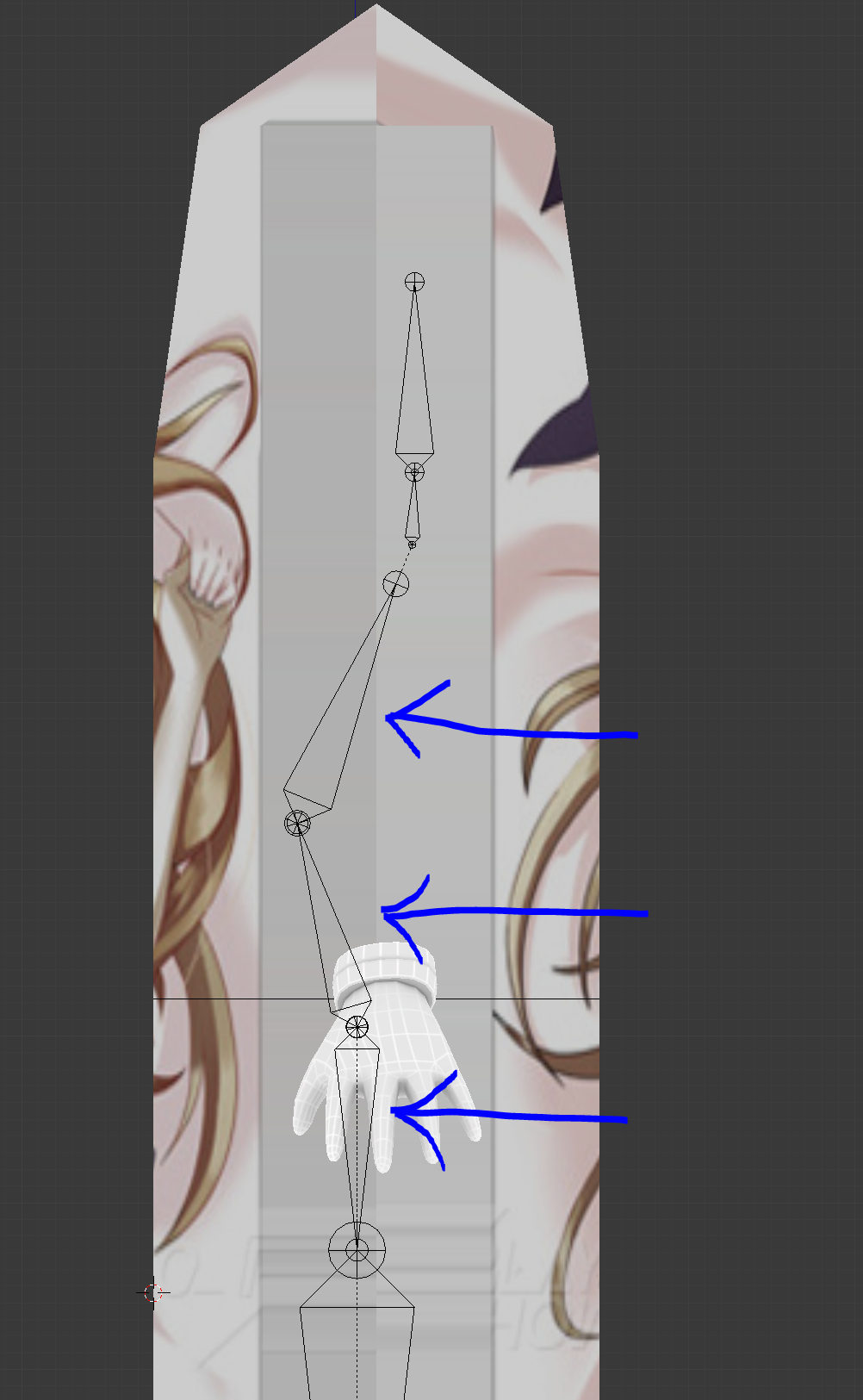
Well, you might be able to move the tip of the bone so it's positioned correctly
 rare sleet
 rare sleet
no
basically unity expects them to be oriented a specific way
when they are not it rotates them to fit
that then reshapes the mesh accordingly
its why you see alot of people with fucked fingers
anyway just try to get the x axis all zeroed and match the y axis i showed in the second picture
be sure to account for the body your using and its natural curve
fading verge
alright thanks i'll give it a try
 random spire
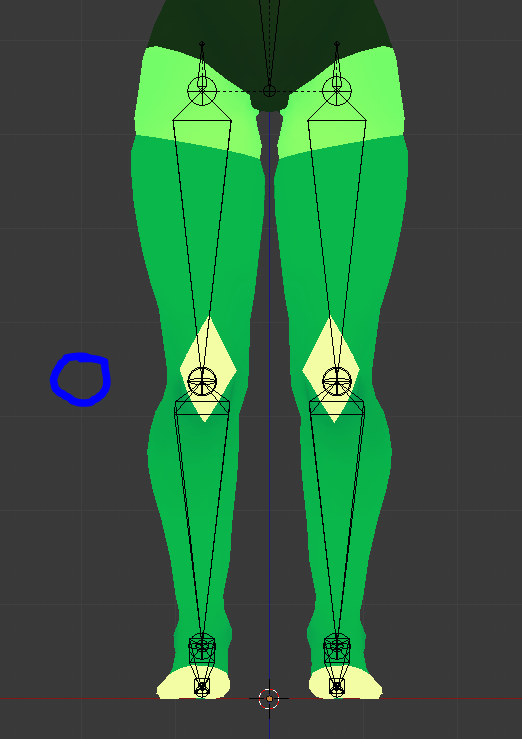
anyone knows how to fix bending knees??'
gritty nest
He's on desktop and his knees are always slightly bent
 crisp tendon
I don't understand your image above Haceo, why is your head so misaligned from your legs ?
gritty nest
It was an example meant for someone earlier
Their bone structure looked similar to that
Oh wait nvm, I misunderstood Haceo
Now I'm also wondering why their example image has such weird rotations
Mine are nothing like that
 reef skiff
adding hair to my model in unity breaks my head neck and chest, any ideas? i renamed everything in the hair so there's no chance of duplicate names on my model and on the hair itself 😭
 vernal depot
Hi, the model I'm using in Vr chat bends its legs inwards but i don't understand why. Has anyone dealt with this?
 main sage
yo, ik shapekeys and such can be made via the "pose to shapekey" thing in pose mode...but what about moving vertices? like, instead of having a shapekey cause the jaw bone to open, have a key move one set of eyes back into the head, and move the other pair forward to the socket position
gritty nest
@main sage yes, that's how you generally make shape keys
With a shape key selected in object mode, you can enter edit mode and you'll actually be editing what the shape key looks like
 marsh brook
So.... I just finished making a model completely from scratch, texturing and all. And the UV seams are very, very visible. any quick way to solve that?
I know it's due to mipmapping, but... ehm... not fun
For now I'll just fill the bg of the texture with white in gimp
 pale hull
Select the UV markers along the edge of the texture and scale down by 0.99?
Had a similar issue when working with pixelart sized textures
That fixed it atleast
Or disable mipmapping?
 fringe citrus
@vernal depot That's likely caused by your avatar's leg bones making an inward corner at the knee in its default rest pose.

 wintry elbow
can i make my neck weightless?
 restive shale
Sure
 trim plume
hi is anyone kind enough to help me
i got a mewtwo model and i cannot figure how to make the jaw work becaues i suck at rigging
can someone help me pelase?
hello?
 ionic bear
I'm attempting to make my zenyatta model not stand but float, but the rigging tool in unity forces me to assign leg bones
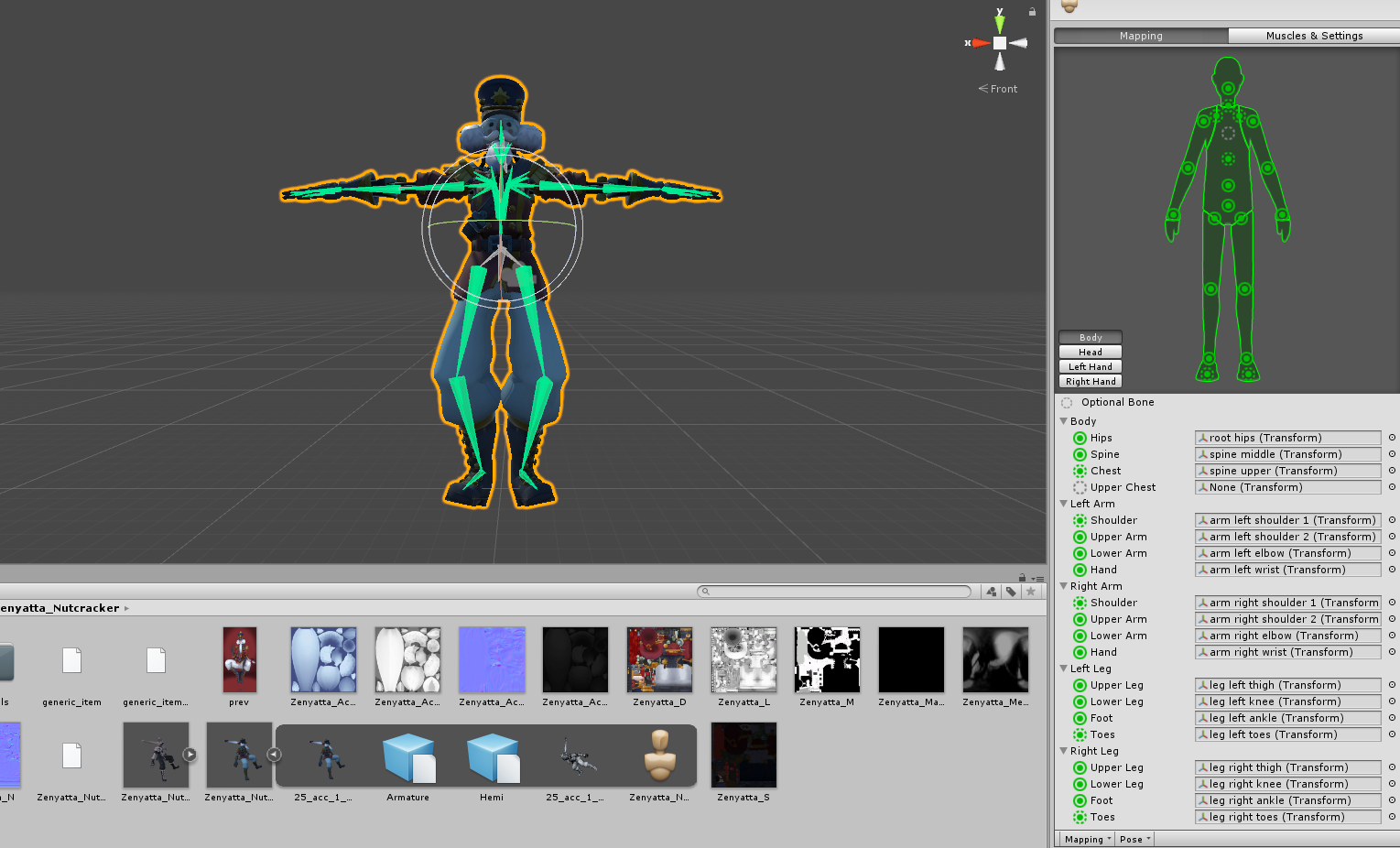
It looks so disturbing when he stands
no idea how to fix it
restive shale
You could use dummy leg bones
Unity just needs to have bones asigned there to be humanoid
but those bones dont have to be weighted to anything
ionic bear
do i have to add bones in blender for it?
restive shale
Yes
gritty nest
You can forcibly move his bones to be straight
 minor nest
I am having an issue where when in Unity my model goes in to T-pose, like it should, however two fingers are scuffed and when I orient them to the proper position I get the error that it's no longer in T-Pose.
gritty nest
Ignore that error
Just manually force them into the correct position
@minor nest
You can still apply with the warning
As long as the warning is in the fingers only it shouldn't matter
minor nest
Awesome, thank you.
minor nest
Too bad I figured out I was using the wrong model, so I have to start from scratch either way.
 frank nest
I intend to use actual hand controllers eventually, but do I really need pinkies? Every model I have lacks them.
gritty nest
Thumb, index and middle finger are required for proper VR usage.
However, the bones are allowed to be fake (not weighted to anything).
frank nest
Alright good thank you
 clear acorn
Does anyone knows how to fix a glitchy arms? When I join other worlds, my arms flies around but when I go to my own world, it went back to normal
 fervent monolith
I have this gogeta model set up that i downloaded but when i put it into humanoid animation it makes the left hand twist 180 degrees. Does anyone know how to fix that?
clear acorn
@ItsDerPing#8540 manually rotate it and ignore the "it's not in TPOSE"
vernal depot
@fringe citrus Thank you
 raven helm
I think this belongs in here...
How can i check if the rigidbody/fixed joint is working correct in unity?
 late shale
for world particles?
raven helm
no for bone rotation
late shale
like a copy of your avatar doing the same movements?
joints and rigidbodies are a unity thing, not vrchat thing, so you should be able to just go into play mode and move it around
 lofty topaz
Seems that nobody was able to help me in #avatars-2-general , so I'll try here. I'm trynna do automatic weight paint for my entire Armature, but it just doesn't create any Vertex groups. How can I make it work?
https://streamable.com/gtvlx

 slim violet
ok I'm having some problems rigging the envy demon from dragon age inquisition. it has 4 arms and I want them to move at the same time. like 2 left ones move together
I've googled and looked at instructions on how to do stuff like it, but when I do, the lower arms start sinking into the ground
raven helm
thank you^^
 drowsy wharf
@lofty topaz did you try doing an empty group to see if it'll create the groups at all?
drowsy wharf
something's...off, one sec
I have no idea what's going on...lets just assume nothing...
- Select armature in the scene list, make sure it's in edit mode.
- Select the mesh and make sure it's in object mode.
- right click the mesh (to select)
- shift+right click a bone of the armature (to select both)
- control P, auto weight
If it's still not working, I'd say save and restart blender....I have no idea what could be stopping that without even an error message
lofty topaz
Shiaat... I'll try and restart blender
Nope.
Nothing is working for this armature
I'll just mixamo this shit out
Reeeeeeeeeeeeee
drowsy wharf
bleh...I have no idea what's causing it, maybe someone else will know...good luck
raven helm
Hey i need help in something.
I want to make an avatar with multiple legs that moves each leg when i move
Could someone help me how to do it?
 scarlet violet
 outer oriole
So im getting a a cats error
says hips not found
when hips are there
Hip bone is clearly there
But when it does fix model it just
deletes it
I have remove zero weight bones disabled
Can it not be the root bone?
Do I need to make a dummy bone?
drowsy wharf
@outer oriole make certain the spine and leg bones are coming out of it. You can most certainly make the hip the root
drowsy wharf
heading to bed, but screenshots of the model's bones and/or the bone layout in the scene panel (hierarchy) would help
outer oriole

Seems all fine
When I press fix model even with remove zero weight bones not clicked
just removes the hips
maybes it just how i did the bones rendering them down from the armature
ill start over
 manic marsh
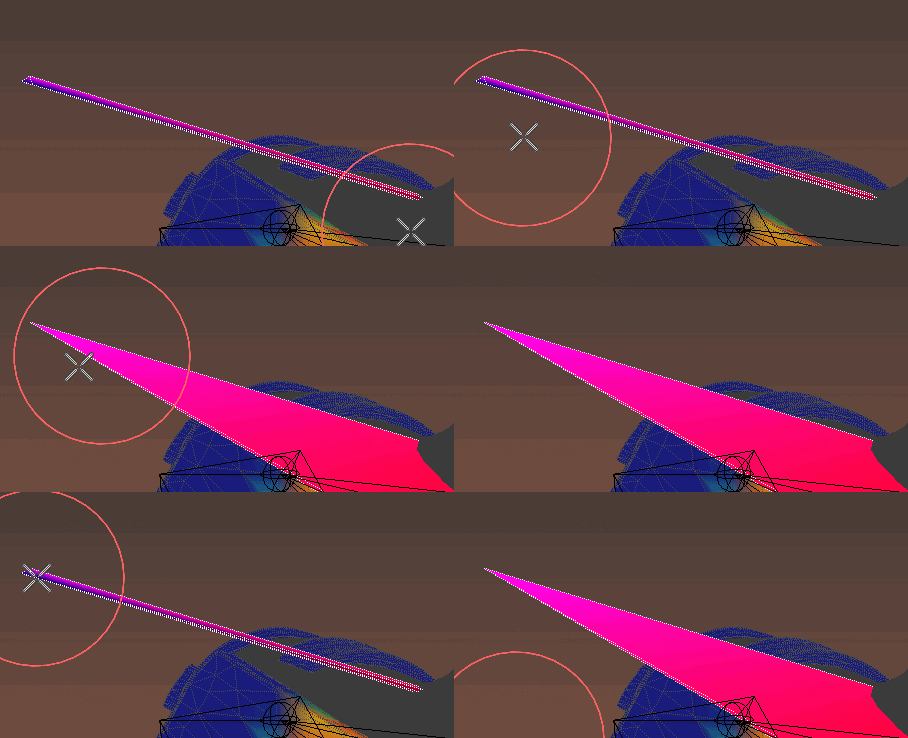
ok so I encountered a really weird problem with a rouge tri no matter how i try to weight paint it the dam thing wont move
https://imgur.com/fbMJfvH

 bright atlas
So after doing some work on my avatar I came close to getting CATS to work properly with it, but every time I try to fix the avatar it says it can't find the Head in the armature. I specifically set one of the bones to be the head, yet it can't find it still. How do I fix this?
gritty nest
Post about it in the Cats Discord. Fix Model has an issue on certain models right now. It will literally delete the head bone and then complain about a lack of a head.
Y Bot for example
 delicate acorn
is dragging the leg bones down in blender enough to increase avatar height (assuming you don't have any mesh on the legs)?
gritty nest
That depends on what you want to do. Lengthening the legs on MMD or anime-ish models sounds like a bad time
 naive tree
you can scale leg and knee on Z axis (remove checkbox from "inherit scale" on knee and ankle bone), then apply it as rest pos
or you can scale entire avatar in unity 🤷
but if scaling one bone, remove inherit scale on the first child so it doesn't scale it oddly
naive tree
scale legs + origin point then I guess? I don't remember if setting just the origin point is enough
gritty nest
Ohhh, I misunderstood your question @delicate acorn
You have a floating avatar with no actual legs
delicate acorn
yes
gritty nest
I think raising the legs down in edit mode is your best bet.
Make sure to get the feet, too
delicate acorn
so just select everything below the waist and drag down?
naive tree
S>Z
gritty nest
You can also move around the tips and roots of the bones
bright atlas
The one thing I'm concerned about with posting this model is it is partially edited. I had to manually merge some armatures in 3DS Max to make it work properly and clean up some polys that didn't have textures. Is that still fine to post in the CATS discord?
gritty nest
I mean post your issue there
You can open a ticket on the website and upload the model that only the Cats devs can see
bright atlas
Okay, thank you.
 karmic turtle
i hope this is the right channel, i have some trouble setting up the Cloth component correctly with full body tracking. It works perfect if just walk and move in general. but when i sit or lay down, it mostly rolls up or hangs somewhere down at my back showing clearly everything......i tried to play around a bit with stiffness and acceleration and so but that doesnt change much. only thing that helped a bit was putting the stiffness to 1 but that causes it often to get stuck somewhere midair. i use it on the skirt and dont really want to go back to dynamic bones. can someone maybe help me to not show my private parts everywhere? 😦
gritty nest
@random spire detach blueprint ID and reupload
random spire

drowsy wharf
@karmic turtle what you see in Unity doesn't translate well into VRChat, you want to use a lot of lower numbers, fading to more movement at the edges.
It sounds like you have a lot of movement up near the base.
and by low numbers I mean really low you can go down past one decimal place ( IE 0.001 )
karmic turtle
Oh alright, didtn went that low xD yeah i know it behaves different in vrchat than in unity. Guess its just a lot more trial and error. You mean with the constraints right? Currently i have the first few rows that have basicly no space to move, set to max distance. is that wrong?
drowsy wharf
I haven't played with it enough to give you good answers on that, just that the scaling is way out of what you'd expect and often causes issues.
I can give you this for possible help though https://www.youtube.com/watch?v=DnX226UdCFw
extra notes: - this might not be the right choice for your model if the cloth is stylized in a physically unrealistic way - like dynamic bones, this is not a...
karmic turtle
It would be so nice if what we see in unity would be accurate xD but thank you for the tips. I gonna try way lower numbers too. Also it reminded me of the constraints. Maybe it helps if i dont let certain points move that much.
Oh yeah, i followed that tutorial for the cloth settings :)
drowsy wharf
yeah you want to make the cloth move more and move as it moves away from the anchor point, but minimal near that point
karmic turtle
Reminds me of the horror with weight painting in blender xD
 lime hill
is it bad to have all bones (most of them) connected? I didn't connect the hips or first finger bones but would it make auto IK look better?
gritty nest
Not necessarily
It doesn't make a difference
I have models where all bones are disconnected and pointing straight up, no problem
But ideally there should not be a direct connection between shoulders and chest
And legs and hips
And wrist and fingers
 wind ore
@manic marsh not sure if anyone answered your issue with the tri
It's probably weight painted to another bone. So go through all your bones and make sure none of them are weight painted to that tri that's sticking out.
I'v had collars on mesh weight painted to like foot bones.
manic marsh
no other bone had weight on it sadly
the only way i found to fix it was by deleting the vertex and filling the whole in the mesh manually
wind ore
are you making sure you have the option on that lets you select verts all the way through? not just the surface you can see
manic marsh
i even tried assigning a weight of 1 from the vertex panel and it failed : /
what was interesting is that it showed purple, witch normally cannot happen if any of the vertices are already painted
so something went really wrong with blender there
wind ore
could separate that piece of mesh, max out your weight and radius then try to see if you can catch w.e vert it is that's the culprit
manic marsh
it did
manic marsh
its just something about this model that is really scuffed, even the bones appear differently in unity 
wind ore
and you did say you looked at vert groups but it's possible those verts were not in a group somehow idk
i'd re-parent the mesh to the armature - try to seperate / apply paint that way to avoid hitting other things then double check verts / make sure armature modifier is on.
other than that idk
 hot plank
Is someone maybe willing to Weightpaint me my staff's hand ?
Its basically weightpainting one low poly Hand.
I rigged all bones into it, im just terrible at weight painting and i cant make it work...
 blissful onyx
does anyone know why my avatar keeps bugging in the air like that?
https://gyazo.com/dd06f013b64b00dd8bb48ac91d163f32
 blissful onyx
anyone?
rare sleet
your animation is shit?
fading verge
I just started today can someone guide me to making my own avatar?
 slow gyro
@fading verge https://www.youtube.com/watch?v=7P0ljQ6hU0A

VRChat Community Discord: https://discord.gg/VRChat Download VRChat! http://store.steampowered.com/app/438100/VRChat/ mmd_tools GitHub: https://github.com/po...
or are you looking to do a complete custom?
blissful onyx
@rare sleet the problem is that this is the default idle animation for VrChat
blissful onyx
How do I have to rig my avatar in order for it to be usable with the VrChat animation set?
 blissful onyx
Thanks so much! :D
As it seems I have put my spine and chest bones in the wrong direction and forgot to add the root. XD
 civic dew
I've cut out bits of my avatar to replace it with a jacket, how would I set it up so I can weight paint the jacket with the avatar's bones?
(in blender)
gritty nest
@blissful onyx you don't need the root
I've only seen it on XPS models
And having a root like that will break eye tracking if you want to use it
blissful onyx
then it's probably just the spine, chest, neck and head that's causing my avatar to float away
I also didn't use weight painting, but parented every part of the model under the specific bone
could that be causing problems?
gritty nest
That could cause issues yes
Also that sounds horrifying, that must be a ton of meshes
blissful onyx
each hand, shoulder, legs, feet, head and torso
Then I'll redo it this evening.
Do you have any tips on what I should watch out for when redroing the rig?
 light kindle
not having the rolls at 0
blissful onyx
the rolls at 0?
gritty nest
Bones have "roll" on them, make sure all rolls are set to zero. Unity might not handle them very well.
rare sleet
is there a reason i have shadow and dummy bones i cant delete
MMD bone tools says its a MMD shadow bone
transform says i have nothing selected as well
rare sleet
never mind they were hiding on other layers in the skeleton tab
blissful onyx
Ok I've now removed all parenting from the bones
 long stone
 blissful onyx
but all tutorials tell me to assign them by selecting bones and then pressing CTRL+P and choosing either "with automatic weights" (which never works) or "Bone" (which I was told wasn't correct)
 cosmic mica
how do i merge 2 armatues into one?
fading verge
Use CATS model creation
cosmic mica
i deleted cats long ago cause it does nothing but cause trouble for me
is there no other way?
fading verge
Google is your friend then
blissful onyx
This is my current rig:
https://gyazo.com/e013dbf37bcb04804173644fe9a5e736

what am I doing wrong?

 rocky plover
hey guys how to i make bone chains respect gravity
ok i made my observations and here they are
gravity settings dont seem to do anything, however the force settings beneath them seem to work
just set y to anything below zero and set stiffness to zero for to basicly fall to the floor
and for no stretching to happen, set elasticity at .945
this should work for stuff like rope
blissful onyx
Nevermind I found that I was using the wrong idle animation and adjusting the y value of a bone managed to fix it
gritty nest
Stretching with force shouldn't happen with a stiffness curve
So the root bone is unaffected by the script @rocky plover
rocky plover
it did not seem so
i talked with a couple of pals of mine
turns out the gravity settings DO work
its just they only appear in game
gritty nest
Gravity is pretty bad, you want Force 99% of the time
 grizzled garden
New to using blender and MMD models here. Can anyone inform on why the eyes are white? I can see the actual texture above the eye. I'm assuming an issue regarding eye tracking. Any information would be fantastic thanks! 😄 - https://gyazo.com/db14c221e9d863c4ac30612ac6f14395
 gritty nest
@grizzled garden you guessed correct
In Blender, make sure the eye and head bones are pointing straight up.
The head bone is probably the culprit.
If you only move the tip of the bone, you can rotate the bone without disturbing its position
grizzled garden
Still lost here, me and blender have never got along. i found eye end bones that are not linked to the eye bones shown coming out the eyes. could this be a possible cause here and would i just need to remove one or the other? - https://gyazo.com/133f8b5928b96ad744410a0dee22f3a9
 drowsy wharf
@grizzled garden have you used the "fix model" option in CATS? It normally deletes end bones like that one.
Find the eye bone used in tracking and make sure the axes other than z are the same for both head and tail of the bone (straight up)
As rokk said too, if you don't edit the head of the bone the eye won't move
grizzled garden
oops - https://gyazo.com/1762b47ff04451cb28371cd54e39016b. I'm just going to disable eye tracking and come back another day
Thanks for the help anyway guys
grizzled garden
Actually that was Unity freaking out because of dynamic bones and colliders on the old version of the model for some reason. in game the eye tracking is now working so i'll just have to redo all the dynamic bones
 misty cradle
why is it a problem when a avatar has a upperchest?
slow gyro
Doesn't need it I guess
crisp tendon
It's not used by the current IK system I believe.
 heady hedge
Anyone know why the end offset would have no effect on the actual movement of the end length?
No matter what value I do it never moves

Sorry about the pink glitch, program doesnt like 4k
 plain pewter
Rave gif. Btw end offset add virtual bone in derection what you set. Dynamic bone script didn't work on single bone. Slightly decrease inert value, set end offset and move you model.
If you didn't set force/gravity values, bones affected by script will be static until you move/rotate your model.
heady hedge
I know that you have to move your model lol, but it is just that the end offset isnt affecting the bone
plain pewter
End offset didn't affect existing bone, this just add virtual bone on the end.
rocky plover
hey im using cats blender plugin and
im trying to set up a root bone on something so that it dosent move, while the rope moves
exactly how do i do that without that without the bone parenting tool on cats?(its not detecting the bone chain)
gritty nest
Shift+D to duplicate the bone, parent it to the bone you just duplicated from
Then parent everything else to that duplicate
rocky plover
so the orignal bone is basicly untouched except the duplicate is parented to it
gritty nest
Yeah
For hair for example, you have a duplicate of the head bone
The duplicate is parented to the head but otherwise in the same location
And all the hair bones are parented to the duplicate of the head
rocky plover
so that way the head dosent wobble when testing out the hair in unity
THATS why my handle is wobbling
gritty nest
Well yeah, only the root bone and all bones under it are affected
gritty nest
Oh right, the root bone isn't affected
FYI, this is also why using root bones sometimes makes stuff stretch out, especially with Force. You can fix this by applying a Stiffness curve that basically makes the first bone not move.
Or you can merge the first "layer" of bones into the root bone in Blender, which is also better for optimization and easier to set up.
Use merge weights in Cats for this
rare sleet
i prefer to commit the first segment of anything im weighting to the origin bone
gritty nest
Yeah
rare sleet
hair gets the first 1-2 inches commited to the head with its own bone in weighting
after i weight it i rename the group to Head then delete the spare bone
gives a clean attachment
rocky plover
alright i still dont understand whats going on
i tried making the most BASIC of models and copying what i saw
and the "head" still wobbles, even when everything is parented correctly
rocky plover
yeah
gritty nest
Does it happen without dynamic bones?
rocky plover
can i post pictures in this specific thread?
rocky plover
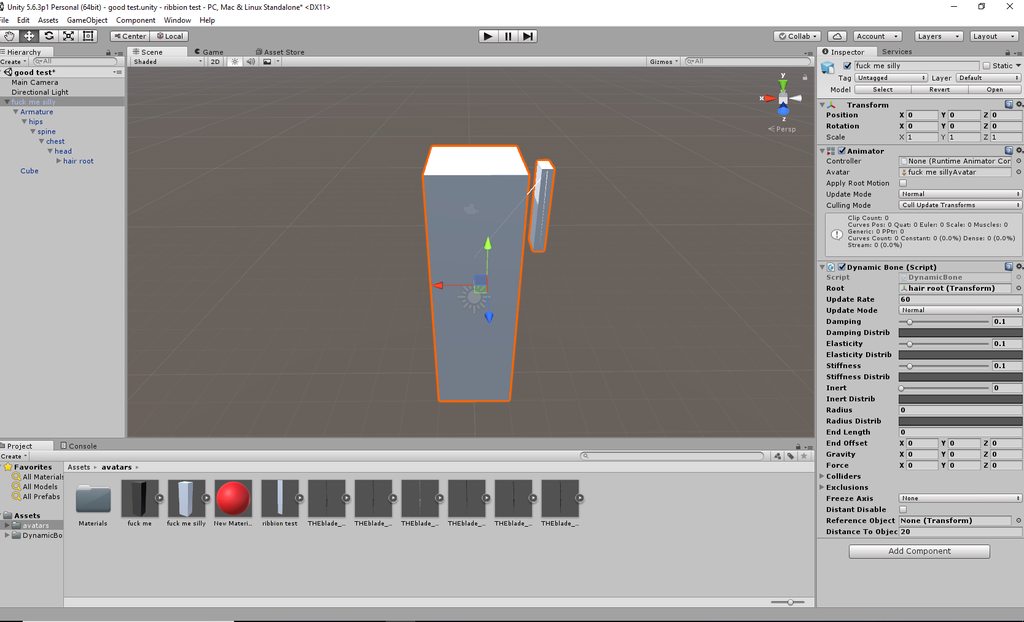
basic right?
a block. with another block serving as "hair"
i made a dublicate of the "head" bone and i did not even move it
and called it hair root
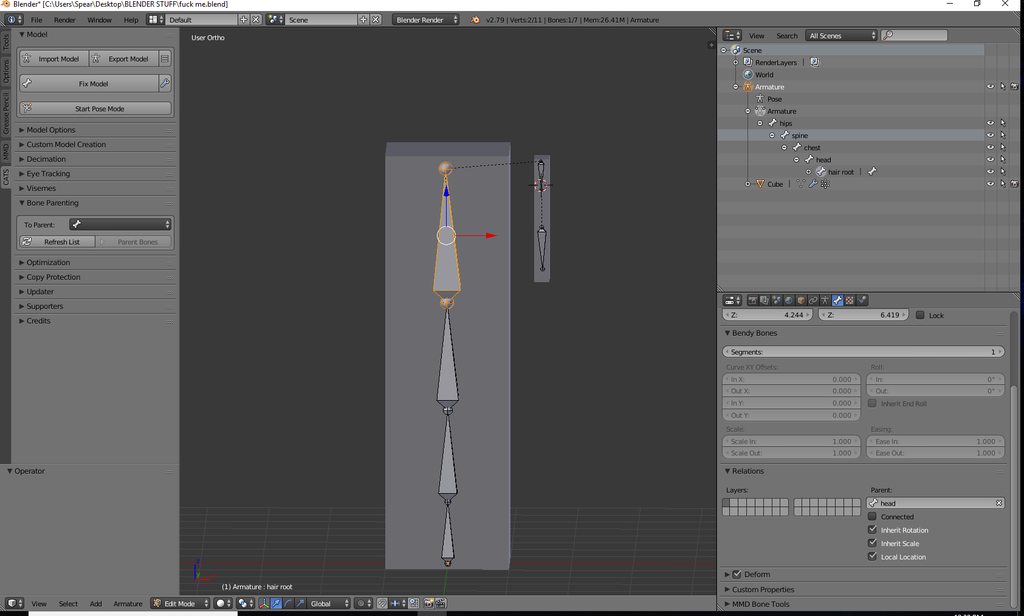
i even used the menu to parent "hair root" to "head"
and then i parented the hair chain to hair root
but when i move block chan in unity, her "head" wobbles
rocky plover
ok i was able to replicate the results with a cats fixed model
its like im setting the bone script to the neck bone
rocky plover
how do root bones not affect parts of the mesh they are stationed in
like in skirts, root bones for skirts would be in a hip bone
and for hair, that would be a head bone
how do root bones, while being in the EXACT same location as these other bones, not affect the mesh?
 keen storm
may mouth opens when i look down
fading verge
You are missing the left and right lowerlid blend shapes
Remake the eye tracking and export the fbx again
rocky plover
hey guys i figured it out
turns out the "root" bone i was creating automatically had what's called a "vertex group" assigned to it. just had to unassign that and im golden
no more bobble head
 empty plaza
im making shape keys for visemes, what is the difference between vrc.blink and vrc.lowerlid?
fading verge
Vrc blink is the blinking part
Lowerlid is used to stop the blinking and it is how your model is supposed to look like in the basis
empty plaza
so for blink at strength 1.00 the eyelid is closed, and for lowerlid the eyelid is open?
fading verge
Yes
empty plaza
ok thanks
 cyan badger
is there anyway i can add hands in unity
because i have my avatar completely done just realizing there are no hands to put music onto
and i cannot place it back into blender or dont know how anyway to edit it please help
rare sleet
no
just chance putting it back through blender XD
you should have made a .blend file XD
restive shale
when you save a blender project the format it uses is .blend
gritty nest
@empty plaza @fading verge lowerlid is not used for stopping blinking
It's a shape key that makes your lower eyelid move up a little bit. You can see this on Nikei.
This happens when you look up/down in certain circumstances.
But it's inconsistent and looks bad IMO.
This is the primary reason people's mouths hang open without the eye tracking shape keys.
fading verge
It never worked for me properly theb
Cuz i was convinced that it was used to stop the blinking
gritty nest
It's very inconsistent yeah
Most people leave it at basis
MMD's don't come with the shape keys to make it work anyway
And most people overdo the effect immensely if they make them themselves
Even on Nikei it looks kinda bad, it's the reason why he sometimes looks like he's squinting for literally no reason
rare sleet
apparently its on the base nanachi models XD
fading verge
What would you guy do about such broken upper arm/shoulder mess ? https://i.imgur.com/2p4sO38.png
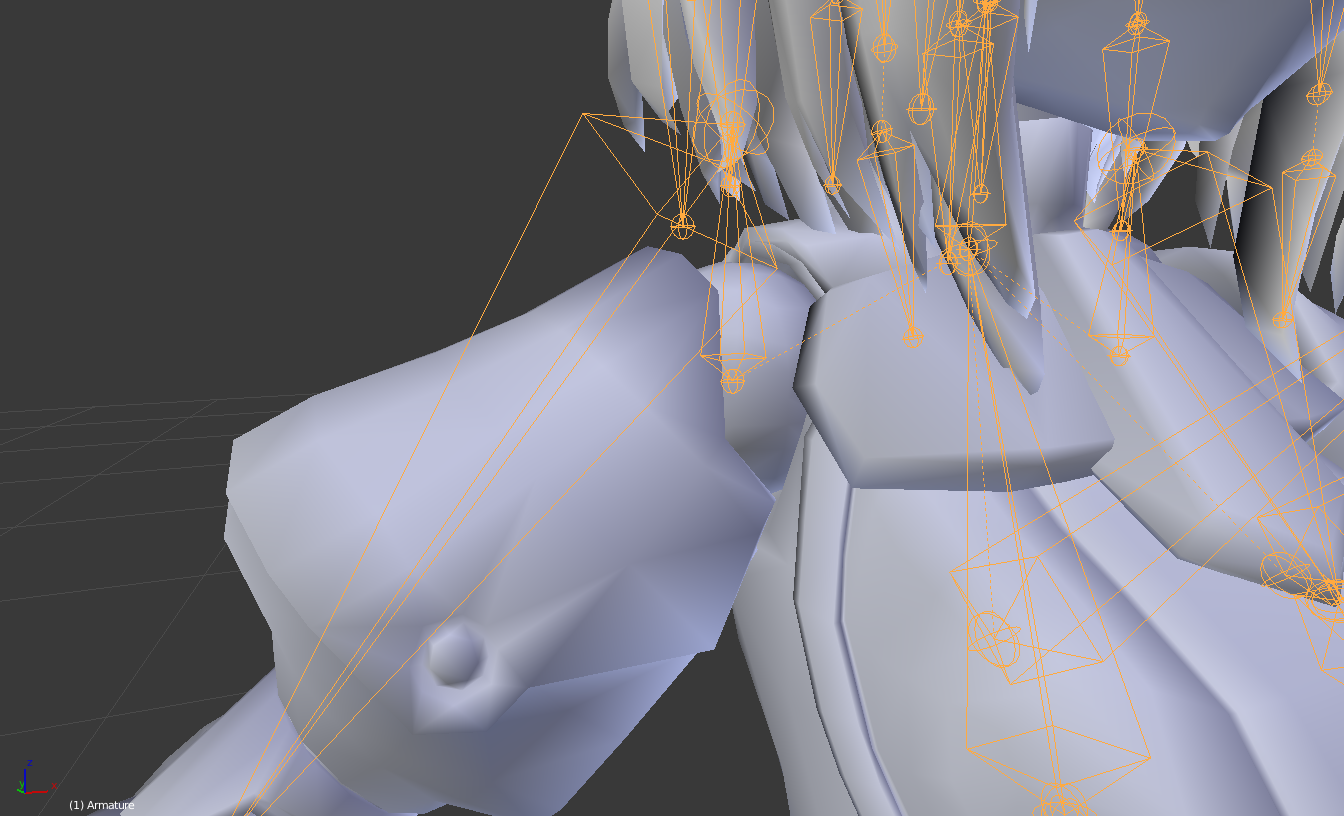
btw that's what CATS made with the shoulder bones.
fading verge
@crisp tendon Just to make sure, it's the shoulder bone (the one that is vertical) that needs to be rotated right ? Also, if I rotate it doesn't move the other bones connected to it. That's normal behavior ?
crisp tendon
Whatever angle you need to change for it to be horizontal and to stop at the shoulder itself
I don't think we use shoulders with ik, so it's up to you on what you want to control with your bicep
fading verge
I see. If I could just get rid of it that wouldn't hurt I guess... but the SDK starts screaming "You don't have shoulders bllaaaah !" lol
crisp tendon
the bone still needs to exist for the humanoid configuration afaik
yeah
but for realism purposes, i'd make it as accurate as possible
even if that means weight painting the shoulder and the bicep
fading verge
Also the bewbs "bones" are also messed up. In MMD they are perfectly straight horizontal. Once imported in Blender with CATS, they end up crooked at like... 45 degrees upward angle.
The toes are also messed up and angled at 45 degrees upward.
 open hull
Whadup Ma'Riggers
rare sleet
couhg 35 deg cough
fading verge
Also shoulders that exit the body.
 wise wolf
hey guys! Might be an asked question already, but I have a shirt and a hair that doesn't move with the body when I try motion on unity. The body is rigged alright, but how do I make the sleeves of my shirt move with the arms? and the hair stuck to the head?
drowsy wharf
make sure they are weight painted to the parts you want them to move with
wise wolf
that's it? just weight paint them?
crisp tendon
Well, that's the minimum required
wise wolf
what does minimum do? I just want it to move with the arms yeah
crisp tendon
Sorry, I meant that weight painting them is the first and usually only step required to move mesh in relation to a bone
wise wolf
ahaa, thanks!!
crisp tendon
If your bones already exist and are correctly placed, just right click your hair mesh in object mode, then shift select your armature then hit Ctrl + P and chose "Automatic weight paint"
Then do the same thing with your shirt
When that's done, select all your meshes and join them
wise wolf
oh shit I tried that, but it only gave me parent with bone
crisp tendon
Make sure the active component is the armature
And does your hair already have vertex groups ?
You would probably need to remove them if they come from another model
wise wolf
Dang, 'vertex groups' you mean bones that were already there? I did import it from a different model
and I deleted those hair bones
crisp tendon
The vertex groups might still exist and that's why it's not giving you the option to create more
Also, did you make a new mesh out of the hair or just took it from the other model and moved it over to the new one ?
In edit mode, by selecting all the hair (press L on a vertex of the mesh to select all attached) and hitting Ctrl + P it should give you the option to separate the mesh
wise wolf
I downloaded it and imported the hair piece.. does that make sense?
like, hmmm
so I downloaded it from deviantart and using CATS, "import model", I imported the hair
crisp tendon
You just downloaded a hair mesh ?
crisp tendon
Ahah don't worry, we've all been here
Are the model and the hair piece the same file type ?
wise wolf
oh shit, do I have to pay attention to the .pmd .pmx thing?
crisp tendon
Yeah those
wise wolf
I think they are both pmd
crisp tendon
In that case, ask the folks over at #avatars-mmd and they should be able to help, I'm not too knowledgeable with old models
crisp tendon
They should still be able to help you in that channel, if not, join the Cats plug-in discord server if you have more technical questions for the plug-in and maybe find a way to help
 sleek isle
Parent the hair you imported to the head bone @wise wolf
 subtle moth
why tho ...
Cats has an armature combiner for a reason 🤔
it makes this so much easier
sleek isle
For the sleve make surr the vertex goup have the same name as the bone of the arm before snapping them togueter manually or with cats
Or you would need to transfer the weightpaint with the modif tab later
 autumn plover
need some help with a model me and a friend of mine are working on
the neck is broken
no idea how to fix it

the neck shouldn't be doing | to / the head should be tilting not the entire neck haha
subtle moth
Probably weight painting
as weight painting basically "defines" how hard something pulls on the mesh im guesing the neck is pretty red when you look at the heads paint
autumn plover
will check it out tomorrow its late for where i am
and it was an import so yea >_>
 heavy raft
Guys help, i'm trying to make this skull kid avatar, but i literally can't rig him. If i use mixamo it just fucks up the body, and if i use a normal rig the animation in the game wont play and he will stay in T pose, please it's been like 3 hours i'm dying inside

 civic loom
Mayby some problema with weight painting on the model?
 small briar
So I'm trying to use dynamic bones on my hair, but whenever I move side to side or back and forth it clips through my head
civic loom
You need to check this avatar in blender and try to fix it, you need to learn some blender stuff before upploading
@small briar you need to add colliders in your head
small briar
I added one already
heavy raft
I suck in blender... can someone please help me rigging skull kid? I'm just trying to make custom animations, like the moon falling down but right now i can't because he looks like an abomination
civic loom
@small briar you do it wrong then
 rose sequoia
I went through the avatar bones and set them all up yet when I loaded into vrchat my avatar didn't move at all
Can somone tell what happened?
subtle moth
@rose sequoia is it set to humanoid?
rose sequoia
Yea I set it to humanoid @subtle moth
rose sequoia
I can walk move around and look but the model does not move a muscle
It's like it's locked in a position
@subtle moth
subtle moth
yeah
umm
check your vr thing
how many controllers does it show
that happened to me when my vive found a non existent 3rd controller
rose sequoia
Desktop user not vr
drowsy wharf
@rose sequoia 99% chance those bones aren't weight painted if the mesh isn't moving with it.
Weight painting is required to tell the mesh what bone it should be following (or none at all by default)
rose sequoia
If that is the case how would I weight paint the bones?
crisp tendon
That's something you'll find a lot of video tutorials for on YouTube
Look into mixamo and automatic weight painting too if it looks too daunting
reef skiff
excuse me, ingame, when i move my head downwards my mouth sometimes opens, sometimes it doesn't, weird stuff, apparently it has something to do with eye tracking, does anyone know any fix?
fading verge
yeah
remake the eyes tracking in blender and export again
you are most likely missing the lowerlid left/right blendshape in unity
reef skiff
so if i have lowerlid left and right set as basis, this shouldnt happen?
restive shale
the top 4 visemes on your Body mesh are used for eyetracking
you want the top 2 to be blink left and right
and the lower 2 to be lowerlid left and right
if it is anything other than that itll fuck up
reef skiff
ah the lowerlids are always set as "basis" for me, guess not changing them is a mistake
gritty nest
@reef skiff you want them on basis though
reef skiff
what am i doing wrong then
gritty nest
Cats will generate empty shape keys for them and it'll work
Regenerate eye tracking, export model, try again.
Sometimes those shape keys disappear for no good reason, probably because they only change a tiny imperceptible vertex on the model
reef skiff
🤔
gritty nest
Lower eyelid movement is rather inconsistent so I recommend never using it
reef skiff
shall give it another try then without looking too much into it
misty cradle
can someone please help me?? like in the picture you can see something around the hips and upperlegs is broken... but in blender the bones and weight painting are normal, in unity everything looks normal, just in vrchat i see this problem... the upload window show me the message with "he angle between pelvis and thigh bones should be close to 180 degrees ..." but idk if this is the problem or not...
https://abload.de/img/unbenanntccegz.png
 crisp tendon
Make sure to check bone roll in blender too
misty cradle
what exactly i have to check there?
fading verge
bone rolls
misty cradle
i know there is "Roll" value but what i have to do?? does it need a special value or what?
fading verge
set them to 0
misty cradle
didnt help
sleek isle
That's some sick pose
fading verge
what do I do when it says spine hierchy is missing elements
hey
can someone show me how to rig hair
?
rare sleet
im gonna guess our hips are in a fucked pos send image of bones in blender @misty cradle
gritty nest
@misty cradle it seems like your model might have inverted hips
Funnily enough, your model would probably work fine for full body tracking users
Try scaling the hips to -1 in edit mode in Blender
 pulsar flicker
Anyone know how to add shape keys to lip piercings so it moves with my mouth
cant seemt o figure it out
 tidal musk
does anyone know why the cat ears I added to my model are trailing behind me?
fading verge
probably not weight painted
fading verge
you paint the ear mesh to the ear bone
and the ear bones needs to be parented to the head
 native sail
how many dummy bones would I need for my hands if I didn't have any?
native sail
thx
 cyan adder
https://cdn.discordapp.com/attachments/407090704213475328/485606285245677568/unknown.png how do you fix these armature balls
from sfm models
in edit mode they look fine

fixed
 solid stump
Guides for making a cape of mine work like cloth in game? @ me in responses please.
 fleet turtle
used a xps mesh from a game that had very good humanoid rigging that didn't need any real adjustments
i was able to program shape keys for visemes and eye tracking
and i used the CATs tool to tailor all of that stuff for VRC
visemes work fine
but rigging on eyes........no blinking and no tracking in game....
?? any suggestions
 crystal vector
@fleet turtle Pasta:
VRChat won’t enable eye tracking at all unless three requirements are met:
1- The bone hierarchy Hips->Spine->Chest->Neck->Head->{LeftEye,RightEye} must exist! Those bones are also the one you use in the mapping.
Exact names are required, there can be no in-between bones.
The bones don’t need any vertices skinned to them. They can be “empty”.
2- The blend shapes vrc.blink_left, vrc.blink_right, vrc.lowerlid_left, vrc.lowerlid_right must exist as the first four blend shapes. (index 0 through 3).
Exact order is required, names are actually unimportant though.
They can be the same as the basis shape. They can be “empty”, but blender won’t export empty blendshapes.
3- The skinned mesh must be named “Body” and the armature must be named "Armature"
fleet turtle
No Spine 2?
Just to verify
Also, why does vrc mess up eye tracking when it works in CATs
And i don't mean tracking in general, i mean it rolls the eyes in the back of the head
Or worse
crystal vector
@fleet turtle No Spine 2. Is your head bone standing straight up?
fleet turtle
i'll double check that model l8r then on the head bone
 stuck portal
hey, does anyone know why when i've attached the mesh to the armature with automatic weights, the whiskers and eyebrows havent attached to anything? they dont move at all when i change things in pose mode. its all one mesh, so it cant be anything like i forgot to attach a certain mesh https://i.imgur.com/AAdZ9FF.png
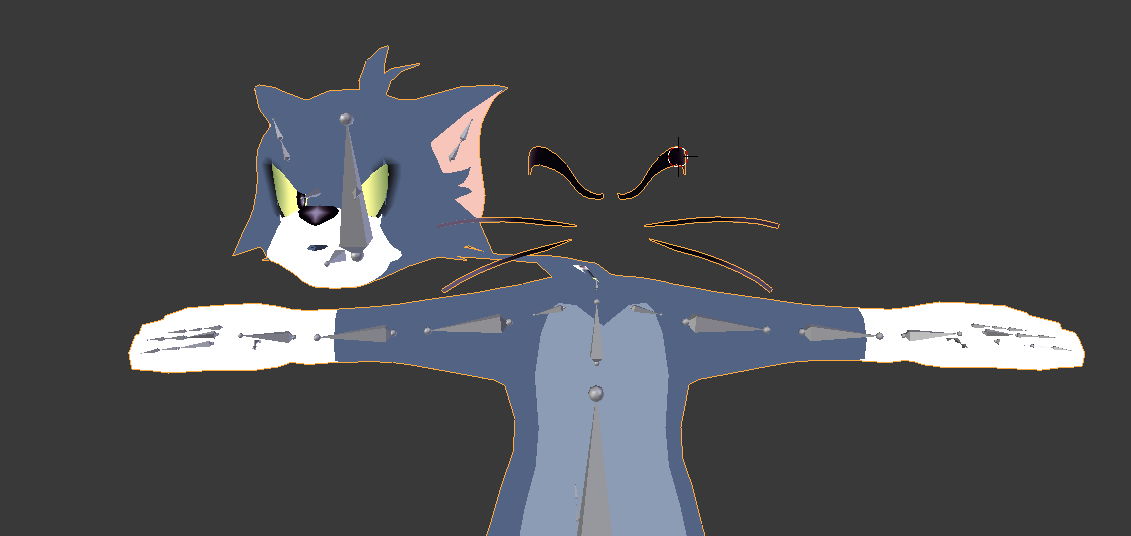
 simple jetty
You can just weight paint them on to the head bone, no idea why it wouldn’t automatically do it if it’s one mesh
stuck portal
thanks, never really sorted the weights myself but seems to have worked ^^
 strong shoal
My model's feet has an ankle bone but I want to add a toe bone since I have full body. How do I go about adding and rigging?
The ankle bone starts at the ankle and ends at the toe, for reference
crisp tendon
Use E in edit mode to extrude that bone, make it go to the end length, and weight paint it
 distant bronze
quick question... where are the save files for unity?
fading verge
in the destinaton where you installed unity
 shadow swan
When I search for eye tracking on YouTube, every result shows that it is required to have a small mesh of a character's iris with a rigged bone to make it work.
But isn't it possible to have a texture of a iris glide over the surface of a mesh to track movement?
crisp tendon
texture attached to a mesh, sure, texture can't just float on nothing afaik
you can also do eye tracking with shaders

VRCat: Community-Run VRChat Forums
I want to share a shader I created to get my eyes working while I am using full body tracking. The shader went really well, and I think it may even be...
 civic dew
I've re-exported my model after adding visemes with CATS and now it says it's not in T-Pose? I've made sure to reset the pose in blender, not sure if that even affects it at this point.
https://prnt.sc/kq09bt
 gritty nest
Enforce T pose @civic dew
civic dew
In blender or unity?
civic dew
Ah, thanks a bunch!
Now it's saying nothing is mapped, yet i look in configure and everything is mapped?

 gritty nest
Is your model half in the floor in your scene? Because of an animation for example
Could be doing that default crouch pose
civic dew
It's not doing that pose (i've seen it before). In configure, it's in T-Pose, in game scene, it's in A-Pose.
There's even a check next to the configure button.
gritty nest
Restart Unity, sometimes that happens
civic dew
(didn't see message until now)
I've restarted, same thing.
late shale
Everything in the configure menu affects how the model gets imported into unity, but if you've broken the prefab (if the model's name in hierarchy is black, not blue), then it won't follow suit in the scene. Selecting all the bones and clicking revert to prefab at the top right of inspector might fix this, but it might also remove any props and stuff you have if they're directly inside a bone. If that happens, just revert to prefab, copy the transform of the bone with the gear icon, then undo and paste the transforms back into the bone
civic dew
I'll try that. Thanks.
I can't find where it says "revert to prefab"? I've selected all the bones in the armature in the hierarchy, and can't seem to see much in the inspector.
late shale
oh it's just revert, not revert to prefab. But it's right below the name, tag, and layer
civic dew
 late shale
Have you done any unity work on it? Like adding props and animations and stuff
civic dew
I've added an animation override, and changed the material for glasses that is weighted to the head.
late shale
Try just re-adding a fresh version of your model to the scene
civic dew
Ok, seems like the only option.
late shale
There are several options but that's the easiest if you haven't done a ton of work in unity
late shale
Nah, I mean work on that model specifically, not your experience level
civic dew
Ohh
Wait.. for some reason I can revert the bones individually.. but not at the same time.
I guess i can just select the hips, idk.
late shale
Hm, they're all in the same prefab, unity should let you. Oh well
civic dew
Eureka! I reverted the hips and it turned blue.
Thanks, couldn't have fixed the model without your help
late shale
no problem. It's definitely important to learn about prefabs. You can make your own too if you ever have something you want a bunch of, then they'll all copy eachother
just drag a model from the scene down into the asset list
civic dew
I'll have to make a map sometime so I can effectively use that :P
shadow swan
GitHub
Vilar's Shaders for VRChat. Contribute to Vilar24/VilarVRC development by creating an account on GitHub.

I am not too sure how I do this.
crisp tendon
In Blender, click on your eye mesh, there's a tiny wrench icon on the right panel that appears, click on it, and you'll probably see an armature modifier in there, just remove it
shadow swan
Oh there it is, thank you again!
 idle axle
Any one how to fix the issue?
Auto weight doesnt want to wokr on this model
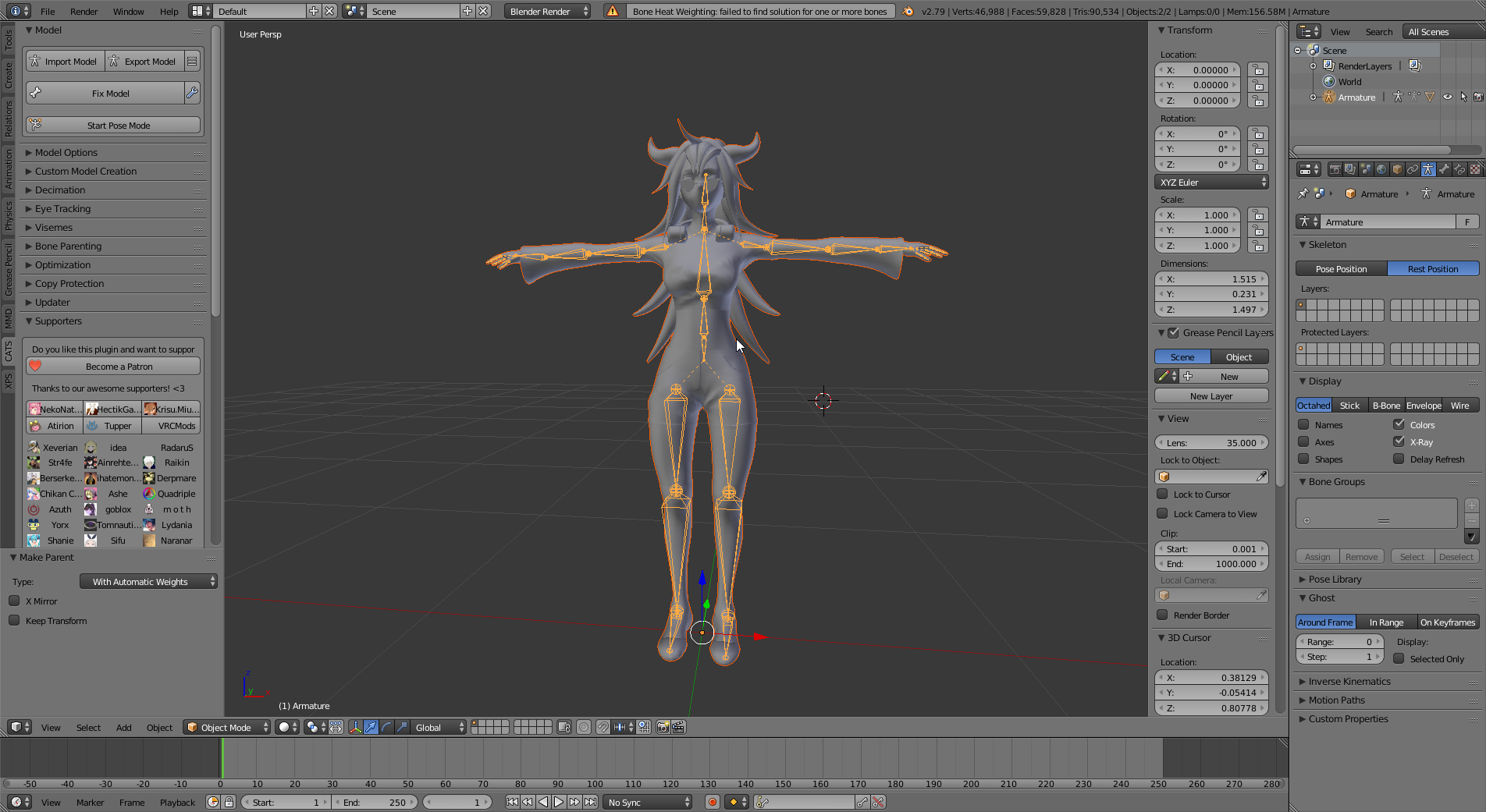
(click on link )
crisp tendon
have you tried typing that error in google ?
idle axle
Didnt provide me with the solution
drowsy wharf
Those arms may have some issues with how they're currently set.
Assuming that is shoulder>arm>elbow>wrist you want the wrist entirely inside the hand (the large side at the wrist point), the elbow should reach from there to the elbow point, the upper arm section should go all the way to the shoulder, and the shoulder should move inside (size looks right though)
idle axle
That wasnt the solution. However, some good eye. coz you are right Thanks for that.
What else could couse the problem?
idle axle
Update. So I deleted the body and the clothing seem to weight well
 plain vault
i got a problem
my daffy duck jojo model is like backwardsw
i made it from scratch, so idk wtf is wrong with it
likke, when uploaded, it faces backwards,
and if i invert the scale to -1. the model faces forwards, but everything but the head bends the wrong way
like the bones are still animating as though they are backwards, leading to the avatar leaning like michael jackson
delicate acorn
does anyone know how that audio-visualizer mouth thing works?
the avatars I see it on have a bandana around their mouth with a X on it, with the visualizer in front
 calm needle
just a series of cubes with visemes changing the cube sizes
delicate acorn
How would I even go about doing that?
late shale
Same way as you'd set up regular visemes, except with cubes instead of lips
There are plenty of tuyorials
sleek isle
Yolo for ut
gritty nest
Can you be a little more specific?
fading verge
It's hard to explain but when I set the receptor, it tells me I need to rig the bones
I check and everything is fine
like I said it's really hard to explain
fading verge
So I have a model all set up but it doesn't have a bone rig..... I have no idea how to do that.......
 terse knoll
I'm trying to upload a retextured version of Robot Kyle, but it's telling me that it can't find the pelvis, spine, chest, neck, or shoulders.
fading verge
isnt that the model from hero academia ?
yep
missing weight paint
you got it from vrart
i recognize his style
he posted the WIP in the modeling channel
oh ? so he allows his models to be edited
you deleted all your message i see. So you edited it without permission i guess
 wind lynx
I dont want this around on public servers 😃 but yeah its all good to edit it! As long as its not inappropriate
I dont think bathing suit is inappropriate
🤔
fading verge
you had a lot of mixing weight
seemigly at random spot
so any tutorial on weight paint for blender will do
check others working models to see how they are weighted to get an idea
terse knoll
I'm trying to upload a retextured Robot Kyle, but can't figure out what to set as the chest bone.
Should I make Root the spine and Ribs the chest?
 harsh reef
How many hours would you guys say it takes you on average to rig a model for VRChat?
crisp tendon
Humanoid ? 15-20 minutes max
harsh reef
really?
restive shale
It depends on how complex the rig is
harsh reef
man I wanna try making (or at least rigging) an avatar
restive shale
and how good you want the weight painting
crisp tendon
Rigging is probably the easiest part of the process
harsh reef
OK well thanks
crisp tendon
unless i'm forgetting something
restive shale
easy but time consuming
you must have some real slap bang weight painting if it only takes 20 mins
crisp tendon
i'd say weight painting is time consuming, rigging itself is peanuts
Meh, the only good weight painting i need are for the fingers
restive shale
I would consider weight painting part of rigging
Do you just mean making the skeleton?
crisp tendon
both
restive shale
oof you should go to games done quick with that speed
crisp tendon
I'm just that good 😎
but honestly, it's just having done it so many times, you learn the correct way to do it
rare sleet
^ it's an art more than a science, you learn better techniques everytime you do it
gritty nest
Properly rigging hands takes me like 30 minutes now
But I've become decent enough at it
 rigid bough
@gritty nest why is it that no matter even if weight is maxed out i still cant get this part of the clothes to not clip with the legs

 gritty nest
Not sure why you're pinging me specifically, but there is definitely another bone with weight on the mesh. @rigid bough
Check the other vertex groups
Make sure it's all normalized
If you're weight painting manually, turn on auto normalize
rigid bough
most recent person i saw 😄
not sure much of how weight painting works so just trying to figure it out
damn the auto normalize did it
gritty nest
I always leave it on because you just get issues otherwise
sleek isle
@rigid bough transfer the weight paint of the cloth bone to the leg with that modifier https://gyazo.com/695e6385f5942cd292a5b852b2cb25f3

 round dagger
For skirt to not clipping best way is to use clothes component in unity
 astral ridge
For parenting the skirt is it better to parent it to the hip, one leg or both legs
drowsy wharf
If you're making individual hip bones, go with a hip->skirt root for the parent to avoid weird issues if you decide to use dynamic bones or similar
if you just want it to move with the leg instead you don't need skirt bones at all, just weight paint it to the leg bone where it should move, and the hip near the top
astral ridge
I have the root bone for the skirt but where would it be best to link it? @drowsy wharf
drowsy wharf
er...you are talking about the parent of the skirt root right?
was covered in the hip->skirt root
 obtuse tinsel
i need help with thighs and stocking, when i move he leg the stocking isnt moving perfectly along iwht the thigh and clips through
 heady tree
Is there a way to manually configure the eye rotations for the eye tracking?
no matter what I do, they point the wrong direction
so far I've tried
changing the rotation of the eye bones in blender
changing the rotation of the bones in unity's skeleton view
changing the rotation ofthe bones in the scene
changing the rotation of the bones in the animations
no matter what I do, only the back of the eyes show
even going full ham on debug and giving the eye bones different rotations in both skeleton, scene, and animations, it still uses the back of the eye for tracking
heady tree
seriously does nobody have a way to fix this
late shale
You might want to try vilars eye shader. It's a lot less finicky
heady tree
http://puu.sh/Bqq02.jpg with eyes like this, a shader isn'tgoing to cut it
 late shale
Yes it will, it rotates the entire eye as a separate mesh
heady tree
can it be manually adjusted?
late shale
Yes
 crisp tendon
VRCat: Community-Run VRChat Forums
I want to share a shader I created to get my eyes working while I am using full body tracking. The shader went really well, and I think it may even be...
misty cradle
is it possible the place a bone a bit different without vrchat will replace the bone? e.g. the head and neck bone are a bit more down but vrchat force the bones up and the mesh looks broken because of this
heady tree
the eyes are spheres with a concave front with a plane acting as a hologram-type of eye
like I said, a shader isn't going to cut it
I need to manually change the bone rotations but it's impossible to debug because it's a hidden automatic process
crisp tendon
Why would it be impossible ? If it's determined by a bone rotation, it's easy to have you eye's mesh, regardless of how weird or complex it is, to work with a bone and to use that shader ?
heady tree
like I said, no matter how I moved the bones around, even if they were pointing in different directions in the skeleton t-pose, the scene view, and in the animations, it would still point the other direction
which is why I'm asking if there's a way to change the actual eye tracking stuff
heady tree
so the solution was to take the character's model
and take the eye mesh
and flip them 180 degrees on the bone's axis
which, to say the least, is blasted stupid
fading verge
hello
can someone please teach me how to automatic weight or gradient weight armature for ears
its not working because im doing it on an existing mesh
i get error messsage
heady tree
assuming you're working with blender:
make sure the mesh is parented to the skeleton
make sure the mesh has an armature modifier, with the skeleton selected
in the vertex groups section, check if there's groups with names identical to the bones you want to be weighted
have the skeleton be in pose mode , and having the mesh selected, hitctrl + tabto go into weight painting mode, and then select the bones you want weighted
if the mesh turns purple, there is no weight data on the mesh from that bone
if it is dark blue, there is weight somewhere, but otherwise everything is not weighted
if it is red, everything is weighted
in theTmenu, have [add] selected, and adjust the strength to however you see fit
you can also move the bones to check on the weights as you go
otherwise for automatic weights,
make sure the mesh does not have a parent nor an armature modifier
select the mesh, and then select the skeleton, and hitctrl P > Set Parent to > Armature Deform > With Automatic Weights
but it may be messy in some cases, so you may need to go the manual route sooner or later for cleanup
fading verge
well that doesnt work with an existing armatur/mesh
thats why i asked
do i have to remove all vertex groups in that area
or?
delete bones
remove all the weights from everything
heady tree
those methods should work
you could also delete the vertex groups in question
what's the error that comes up?
drowsy wharf
you could separate the mesh by material then do the same to do auto weight paint, and then re-merge meshes
heady tree
if you do parenting by automatic weights, then it adds the vertex groups
misty cradle
is it possible the place a bone a bit different without vrchat will replace the bone? e.g. the head and neck bone are a bit more down but vrchat force the bones up and the mesh looks broken because of this
fading verge
sooo yeah i might have some problem.. with my model
aparently there is a video called ninja re bang bang
and i decided to make an avatar for it
turned out okay
but the bones into unity..
it wont work at all
can some one help me via call?

this was my goal

this was the main part
you have an armature ?
yea

this is the result
can you move anything in unity?
in the bone config?
yes
and the whole thing in the main section
but i need live call help
i mean text is fine
but youknow
"themore I know"
what is the exact problem with this model?

shoe me the avatar mapping tab

you are missing a chest and the shoulders
and you are also missing fingers apparently so you won't be able to use hand gestures
i dont need fingers
but how can i do the chests and shoulders
could you help me in call?
so i can show it to you in live
and that would be more precised
just look at how other models are made
...
nevermind
 raven reef
what I would recommend is that you first try importing a different model to get used to working with models, cause I assume this is your first model you are doing
the model like this would probably have the impact of about ~10 models combined because of inefficient meshes
then there's also this video of one of the Vrchat devs how to import and optimize models https://www.youtube.com/watch?v=7P0ljQ6hU0A
VRChat Community Discord: https://discord.gg/VRChat Download VRChat! http://store.steampowered.com/app/438100/VRChat/ mmd_tools GitHub: https://github.com/po...
@fading verge
that's where I would start and then in some time you should be able to do this project then you'll also probably be a lot happier with the result instead of haphazardly trying to get this to work
fading verge
1 question..
would you just take a look to the bone armature?
thanks
also rigify
some just msg me
so he was helpful
and did what i asked from the community
or at least 1 ppl
so gg
terse knoll
What is the correct way to reorder the parenting of bones? When I just reordered the hierarchy in Unity, the model lost it's humanoid rigging and wouldn't animate in-game.
rare sleet
blender is where you should be doing this
hips>spine>chest>neck>head
hips>legs>knee>ankle>toe
chest>arms>elbow>wrist>fingers
thats how to lay it out
terse knoll
I can't figure out how to edit the armature in Blender though.
rare sleet
google can tell you
 smoky plover
 gritty nest
@fading verge you can't expect everyone to be at your beck and call for every little thing
Subdividing the spine or adding fake shoulder bones is self-explanatory if you have Blender knowledge
If you don't have Blender knowledge, answering one question will just lead to 5 more.
main sage
ech, stupid lip meshes are sticking together...either that or its only one mesh with no division between the 2
prob the later
 gritty nest
@main sage did you remove doubles by any chance?
main sage
ye its source @fading verge
and nope, didnt remove doubles
idk how id fix the meshes sticking
calm needle
the way the source models improt, the doubles are automaticly removed which leads to this since the mouth is a perfect seem when closed. 😛 i know exactly what model that is
its possible to get something close if you cut the seem and then manually fix each viseem
tedious but doable
main sage
um k
gritty nest
Isn't there a way to stop it from removing the doubles?
Like an import setting
Because this sounds like a really dumb thing to do automatically
calm needle
the way it imports, not really at least not easily. The visemes are read via the vert position. So unless you are able to properly move the verts off of each other ever so slightly before import but that isnt easy since you cant really tell what goes where
main sage
ech
guess i just gotta deal with no eye movement or talking .3.
blinking iz dun
i mean, im just decompiling models straight from Gmod / SFM workshop
soooo
ugh, i just wanna make this work and look decent enough ><
but yeah, that really needs to be disabled -w- whos idea was it to make it auto remove-doubles
calm needle
i think it has to dow tih the importer. If i remember correctly, its reading position of verts for each tri but it cant tell whcih tri connects to what and just auto joins anything sharing the same position
and telling it to not auto join any of the tries breaks the viesemes
main sage
ugh. i really want to be able to make this a fully working thingy with mouth movement and such
even if i had to find out a way to manually go in and seperate the lips i would
gritty nest
Knife tool
calm needle
when i fiddled with it, i manually split the mouth seem. When you activate a viseme you will see half the verts on the seem go the the right spot, half to the wrong
i just moved the wrong ones to about where it looked good
main sage
unsure on how to do so, but ok. only real thing i know how to do with verts and such is reduce them to make somethin less Geometric / less tris
not seperate x3
im super noobish to this mostly, sorry x3
idk how to make the knife or whatever work
cuz its not doin anything
calm needle
in edit mode, you change the select mode to edge and select the seem of the mouth
you can go to the context menu or use control + E and select edge split
main sage
ah
calm needle
this wll seperate it so they can be moved seperately
its mostly trial and error but it is fixable
main sage
k i did it, didnt seem to really do much.
or if it did split it, none of the shapekeys were changed
nvm
 rare sleet
Define shoulder breakage
Do you mean the fact that there is more shoulder movement when using fbt and it makes the armpits stretch and the shoulder meshes clip?
@fading verge ^
naive tree
shoulder bones do not move when you're in fbt, so idk what he means by that
rare sleet
Actually they move less
Either way scuffing of shoulders is on the avatar creator for sucking at weighting
 mossy flame
Does anyone now why my pupils sink into my eyes when i test them in cats plugin for the eye tracking?
 worldly palm
https://puu.sh/Br0oA/2685e6d73b.png For some reason my bones are detatched from my model, no clue what I did wrong :/
 crimson mauve
Does the mesh have the armature modifier on it like it should?
worldly palm
Ha.... Thanks! XD
crimson mauve

My neck bone seems to bend pretty far side to side, I'd say around 35-50 degrees when I move my head instead of just pulling the model with it. Is there a way to stiffen the bending of the neck?
mossy flame
does anyone know exactly what the merge weights button does in the model options in the cats plugin in blender?
fading verge
it will transfer his weight paint (and the vertex group i believe) to the parent bone
main sage
O O F
almost dun fixing the last of the 3 shapes i need to make visemes
hopefully
hope that a TH expression is close enough to CH
 slender snow
anyone up to help me with my avatar? ive done most of it its just being weird
 wheat ruin
yo has anyone had a problem with bones getting messed up and some missing when exporting from blender then putting it in unity
slender snow
i have, idk how to fix it.
wheat ruin
this shit is so annoying
slender snow
yeah, my character says its uploaded but i dont even see it in vrchat.
wheat ruin
damn
slender snow
Yeah. I’m just about ready to give up and just use random ones I find tbh.
wheat ruin
nah u dont wanna do that
cause once u figure it out
its will feel better than just getting a random once
it*
slender snow
I guess. It’s just really making me mad rn.
gritty nest
@slender snow what Unity version are you using? I can almost guarantee that you ignored the hundred warnings telling you to use Unity 5.6.3p1
And the link on the VRC website giving you the right version
No other version will work
fading verge
So one of my models wasn't in a perfect tpose, so what I did was just delete the side that wouldn't fit and mirrored the side that did fit, so what I now need to do is transfer the weight painting to the other bones, so what I did was just copy one sides vertex groups which contains the weight painting and then unpaint the unwanted sides on both, so now I have a correctly weighted side and then a side that has no weights, but a vertex group with the weight painting on it, now what I am doing is pulling my hair out on how to either link the damn bones to the fucking vertex group, or copy and paste the weight painting from one to the allready existing one using blender, any help would be appreciated.
delicate acorn
How do I copy individual bones? I go to copy my arm to make another arm and it copies the entire armature, please help
nvm
hot plank
Does it really matter that the angle of the hips is 180° for IK Fullbody-Tracking? Mine's atm 80°-90°
crimson mauve
Anyone know why the fingers for the hands aren't detecting in unity? If I manually put them in and apply, they go away.
https://cdn.discordapp.com/attachments/403069664869220354/488282235523301394/unknown.png
 crimson mauve
 sleek isle
@hot plank cats nake you avatar usable for ik its not going to for if you dont click that fix full ik option
@crimson mauve have you try in game
crimson mauve
Yeah, wasnt working but I got it fixed. each bone needed a veetex group with 0.001 weight painted
drowsy wharf
@crimson mauve can you show the finger setup in blender?
ah, yeah, completely blank vertex groups get deleted...technically.
fading verge
Hm
For some reason the dynamic bones on my avatar work fine within unity, but when my avatar is uploaded to the game, they don't work?
Is there something I'm doing wrong?
I've checked to put the script on the avatar itself, not the armature.
Hope it's not on the vrchat sdk side-
 novel reef
Did anyone here try final ik? How good is it for vrc compared to mechanim?
gritty nest
In what way exactly? I have Final IK and it has its niche uses
But not every component is whitelisted
It's also not a replacement for the animation system by any means, it's an addon
novel reef
Does the grounder work in VRC? @gritty nest
Cause that looks so much better than what we have now...
https://www.youtube.com/watch?v=9MiZiaJorws

This video demonstrates how to set up the GrounderFBBIK component for automatic foot placement correction.
 wet zinc
Does anyone know how to fix a model that when they walk or run the hips spastically move side to side?
gritty nest
@novel reef yes
Sorry for the list, but
            "RootMotion.FinalIK.IKExecutionOrder",
            "RootMotion.FinalIK.VRIK",
            "RootMotion.FinalIK.FullBodyBipedIK",
            "RootMotion.FinalIK.LimbIK",
            "RootMotion.FinalIK.AimIK",
            "RootMotion.FinalIK.BipedIK",
            "RootMotion.FinalIK.GrounderIK",
            "RootMotion.FinalIK.GrounderFBBIK",
            "RootMotion.FinalIK.GrounderVRIK",
            "RootMotion.FinalIK.GrounderQuadruped",
            "RootMotion.FinalIK.TwistRelaxer",
            "RootMotion.FinalIK.ShoulderRotator",
            "RootMotion.FinalIK.FBBIKArmBending",
            "RootMotion.FinalIK.FBBIKHeadEffector",
            "RootMotion.FinalIK.FABRIK",
            "RootMotion.FinalIK.FABRIKChain",
            "RootMotion.FinalIK.FABRIKRoot",
            "RootMotion.FinalIK.CCDIK",
            "RootMotion.FinalIK.RotationLimit",
            "RootMotion.FinalIK.RotationLimitHinge",
            "RootMotion.FinalIK.RotationLimitPolygonal",
            "RootMotion.FinalIK.RotationLimitSpline"
So I take it my avatar would move like that on a slope? Amazing....
crisp tendon
@wet zinc Do you have a gif of it ?
gritty nest
@novel reef I don't think you have that much control over it honestly
Your avatar is hidden deep inside a player object that you have no direct control over. This player object is what handles your movement, collision, and physics.
novel reef
Even with a non humanoid rig? is mechanim replaced or does FinalIK just add itself on top of it?
gritty nest
Final IK is added on top
Unless you don't have an animator at all
Or a generic rig with no animator controller
novel reef
I want to use it for animals so it is for generic rigs.
wet zinc
@crisp tendon I'll gif it hold on
gritty nest
Yeah, but I don't know how well it will respond
I would not buy Final IK solely for this game
You can test it out if you already have it though
novel reef
And I have a plan for the next weekend... 😉
wet zinc
https://gyazo.com/471a9ca1103f3cceee15d7ce1e0c7a83 @crisp tendon
 crisp tendon
Do you have a custom walk animation ?
wet zinc
No, those are left blank
crisp tendon
What does your skeleton look like in blender ?
wet zinc
Everything looks normal in the rig so I'm not sure why its acting weird
 stiff flicker
How do i fix bone length is zero?
it dosent look zero
Oh thank you.
i just need IK to work

 noble linden
I have an model I'd like to rig so I've tried throwing it into Mixamo but it doesn't seem to be passing over the textures. :/
Any ideas?
crisp tendon
What do you mean ?
fading verge
you dont need texture to rig it in mixamo
noble linden
I'm not too hot on materials in blender yet... Can I just re-assign them after or something?
 wicked quiver
how fix it
noble linden
At some point I want to start adding props in Blender though but I guess that's a good start.
crisp tendon
Props will probably be in Unity too
noble linden
I think I'm gonna need to make more visemes for this too. :/
There's only 3 lol
Though I guess I can still work with that for now.
 magic sonnet
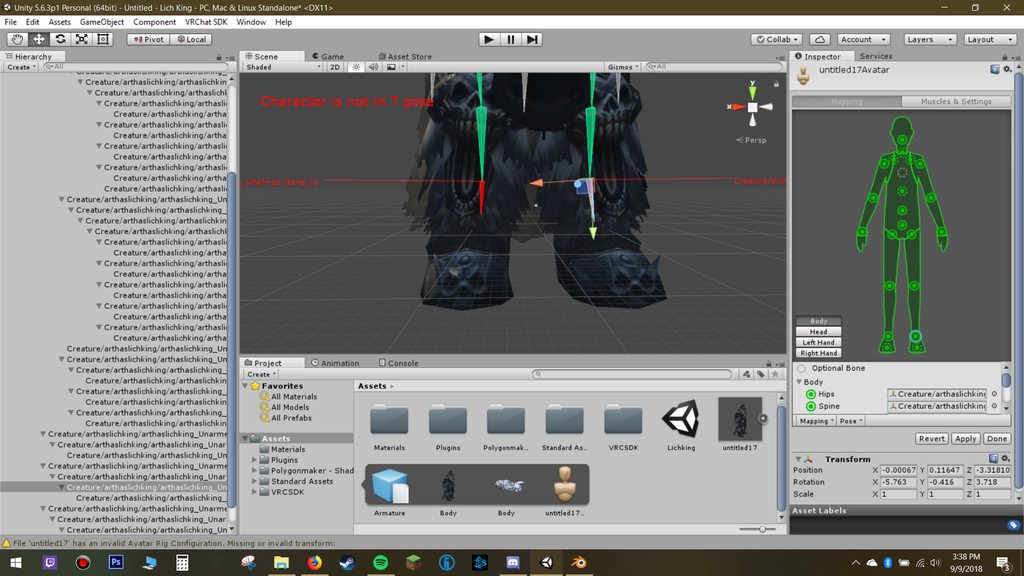
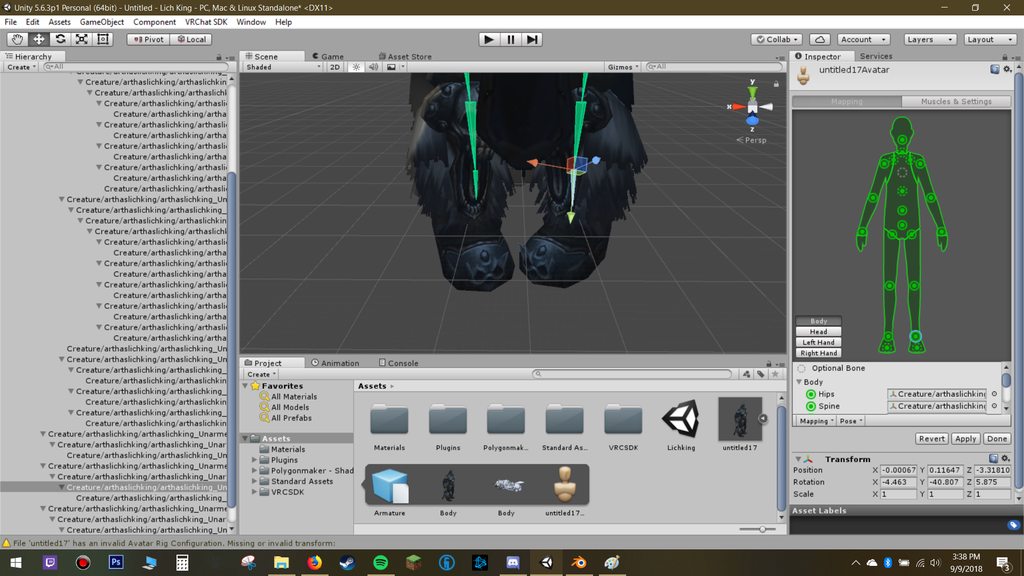
hey um its been awhile. but i come to ask a question. my model (the lich king from world of warcraft) has kind of a problem everytime i try to enforce a t pose, his feet bend inward. and whenever i dont enforce t pose his feet look fine. https://imgur.com/a/TbZgN5z https://imgur.com/a/HusQYAT
 wicked quiver
http://prntscr.com/ksgex0 how fix the leg
 fading verge
No one here knows how to fix the dynamite bone problem? Aw man
 ancient marsh
dynamite?
restive shale
he means dynamic
 hallow igloo
Am thinking about making a modle and rigging it should i use blender or just use mixamo
sleek isle
When i look up my knee point outside but when a look down they are strait. How to fix that small problem
 willow cloak
Helloooo
But the rigging is messed up as well as the as the gestures and facial animations, if someone thinks they can give me a hand can you send me a dm? 😃
crisp tendon
We don't allow mentions of that website on this discord.
restive shale
#ruuubicked
willow cloak
Thats kinda dumb tbh but alright
 lethal nimbus
https://cdn.discordapp.com/attachments/435513640620130306/488730096371499018/VRChat_1920x1080_2018-09-11_00-23-51.951.png does anyone know a fix for my legs?

i need help
pls
gritty nest
@lethal nimbus in Unity, assign the AvatarTPose animator controller to a duplicate of your avatar. Observe which way the knees bend in play mode.
Make adjustments in the Unity rigging tab as necessary, such as fixing the way the knees are pointing
lethal nimbus
thank you very much
I tried setting it to T-pose mode and the knees do not bend. I was crouching down in the image.
is there an alternative method i can use to sniff out the problem?
fading verge
Still can't seem to find the solution of the dynamic bones that's not working within vrchat
It's really odd? I had no trouble with it during the past
It stopped working when I updated to the recent SDK, I'm not sure if that's the problem.
 zealous spindle
anyone have a tutorial on how to mix weight paints together in blender?
i have this xps model that has loads of bones assigned to different muscles which are all assigned to a main bone (for example left leg, left arm, right hand etc.)
wicked quiver
HELP! http://prntscr.com/ksgex0 how fix the leg
 minor shore
hey all when i hit fix model on cats it messes up like this. any fix for that?
https://gyazo.com/9d2e11bedb6fa2f527317045bbb86142
 gritty nest
Looks like missing textures. @minor shore
If it's a japanese model, make sure you're extracting with japanese encoding
crisp tendon
Is that supposed to be your arm pose or did you rotate it yourself ?
minor shore
i was just moving it in pose mode to check if it works fine
before hitting fix, the arm moves just fine
gritty nest
Oh, you're talking about the arm
This seems like unweighted bones after hitting fix model
Maybe try submitting the model to the Cats team on their website
minor shore
oke i will try ty
 pine harbor
@wicked quiver if you haven't found a fix to the problem yet, check that the bone names on your legs haven't been switched (as in, left leg bones are called Leg_R or Knee_R instead of Leg_L and Knee_L) -- your avatar looks like it's being twisted 180 degrees at the hips, which is what Unity will think is the proper T-pose if your left and right bones are misnamed
the arm bones having the wrong left/right names can also result in that same kind of distortion
 west fern
somebody know why when i look down my mouth open https://cdn.discordapp.com/attachments/462680207854141441/488894671406235648/unknown.png
 late shale
it's trying to move your eyes up but your blend shapes are out of order so it's moving your mouth instead
west fern
you know how to fix?
sleek isle
https://gyazo.com/3dafb43f8c538239a75aa0372209f908 How fixing can I fix that bend of the knee when looking strait or up

I try rotate/move and it still bend too much
sleek isle
put the character in female animation fix it :/
 cedar scroll