#avatar-rigging
1 messages · Page 119 of 1
 noble jetty
@fluid zodiac Yes.
 fluid zodiac
did you view that video in #animation ?
noble jetty
@fluid zodiac yes. multiple times. it is already weight painted.
fluid zodiac
what does your bone hierarchy look like for the entire arm?
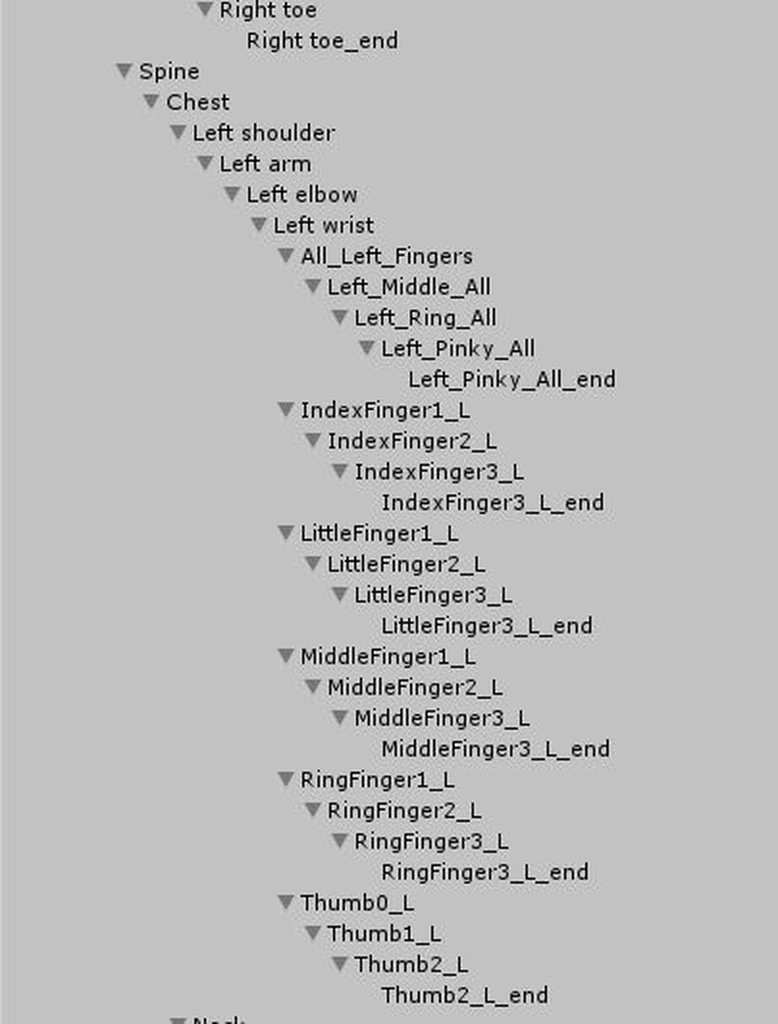 noble jetty
@fluid zodiac What do you mean? As in not controlling anything for the body
@fluid zodiac yeah, I don't know about "all_left_fingers" either. It was just there in the mmd.
fluid zodiac
delete it?
noble jetty
I would assume that is done in blender?
fluid zodiac
try in unity first
noble jetty
okay
fluid zodiac
if those bones are sharing a weightmap with your fingers, you might need to do it in blender
noble jetty
okay, I deleted the "all_left_fingers" bones in blender without accidentally deleting the model
so now I will try putting it into unity
fluid zodiac
im not sure how or if blender will recalculate the weights
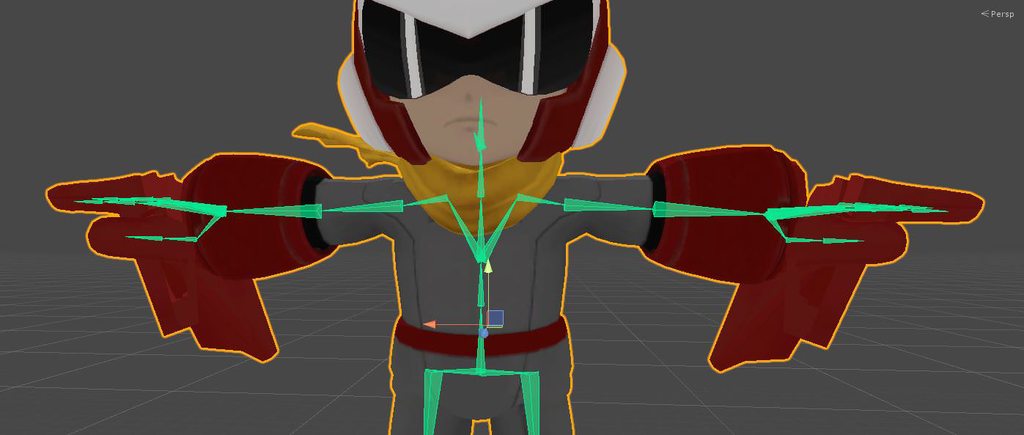
 slate finch
how do i fix this https://imgur.com/a/3lnSOHL
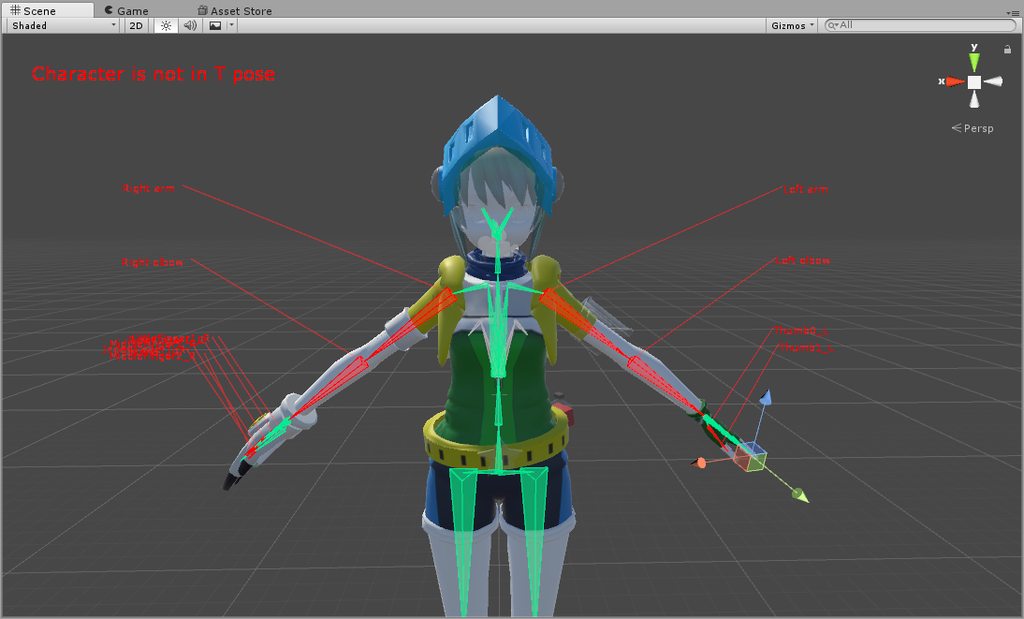 fluid zodiac
enforce t-pose
slate finch
can i just rotate the arms?
noble jetty
I have no idea what to do at this point. I removed all unnecessary (to my knowledge) bones and it is weight painted already
@fluid zodiac I want to die
slate finch
is there a way to auto t-pose?
noble jetty
yes.
fluid zodiac
click the pose menu
fluid zodiac
no
slate finch
omg im dumb XD ty
fluid zodiac
you have bones to repaint or find a way to recalculate
slate finch
@noble jetty never give up!!! giving up means u accept failure
noble jetty
@slate finch but I did fail
@fluid zodiac yeah, I can't find the wrist bone in my weight painting menu
fluid zodiac

This clip is from season 3, episode 5 "Distant Hills" All credit goes to Mr. Bob Ross. He doesn't make mistakes, he has happy accidents.
the mesh is your canvas
noble jetty
oh, I am wearing a bob ross shirt right now
Well I will work hard!
... To find someone to help me do it
fluid zodiac
after deleting the bones
open weight painting
paint any dark spots on the mesh around the finger bones
it should at least significantly reduce the appearance of that mess
it should literally look like cancer on the weightmap viewer
noble jetty
@fluid zodiac I am almost certain the problem is the wrist not having any weight painting. It isn't even in the vertex group menu
fluid zodiac
MP3 version now available! http://to.pbs.org/pbsremixed If you like this, support your local PBS station: http://www.pbs.org/donate Bob Ross remixed by Symph...
I don't have experience with blender
just maya and motionbuilder
slate finch
the jaw bone for my model is part of the head bone is there a fix? https://imgur.com/a/huCSthK
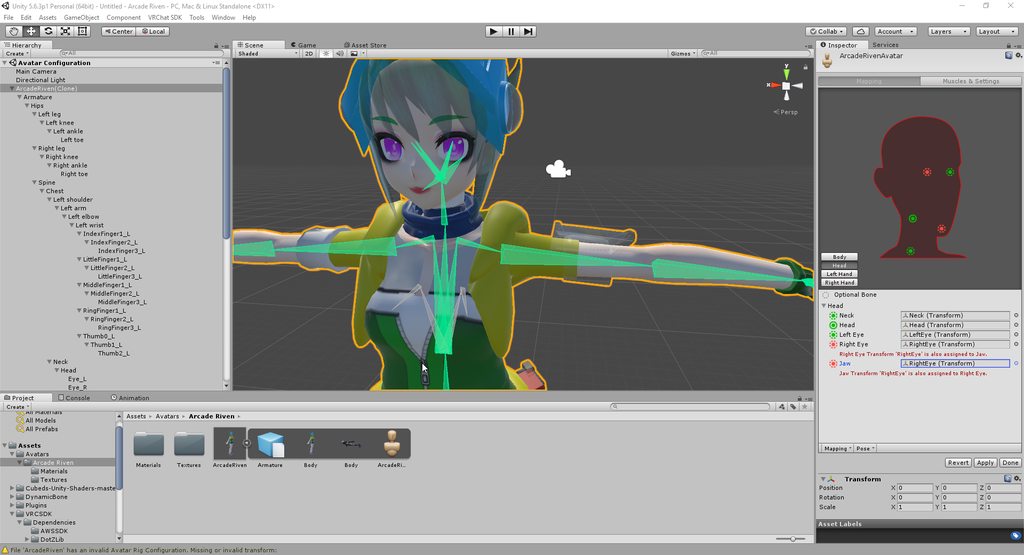 noble jetty
oh
fluid zodiac
it's useless afaik
noble jetty
really
slate finch
ok
noble jetty
My dad is going to play vrchat
man am I excited
@fluid zodiac should I create a vertex group for the wrists
fluid zodiac
if that means binded, yes
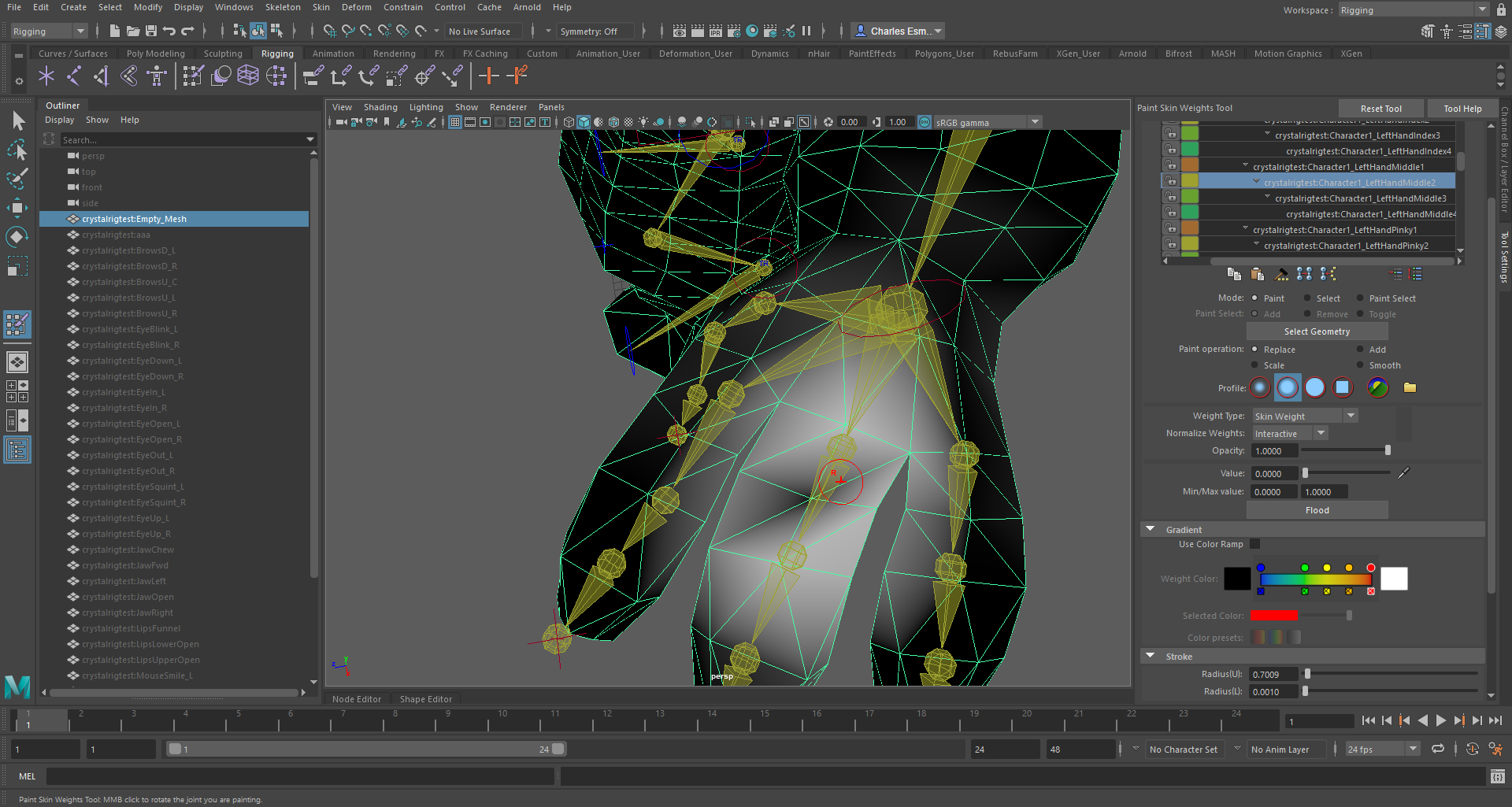
this is what the cancer should look like
if you used maya
just select the right bone for that dark spot, then paint over it
but if it's really the wrists, then you gotta paint those
noble jetty
uh
I am using blender for the weight painting
how big of a difference would using that other program make @fluid zodiac
fluid zodiac
it's just another paintbrush
im trying to figure out how weightpaints work in blender
noble jetty
I KNEW IT!
IT IS THE WRIST
....now i just need to figure out how to weight paint the wrist...
fluid zodiac
psst
I hate blender
the buttons are so tiny
and for some reason, my weight painter is stuck on a bone
slate finch
in unity the models hand is now going through the glove https://imgur.com/a/Fod4r7B
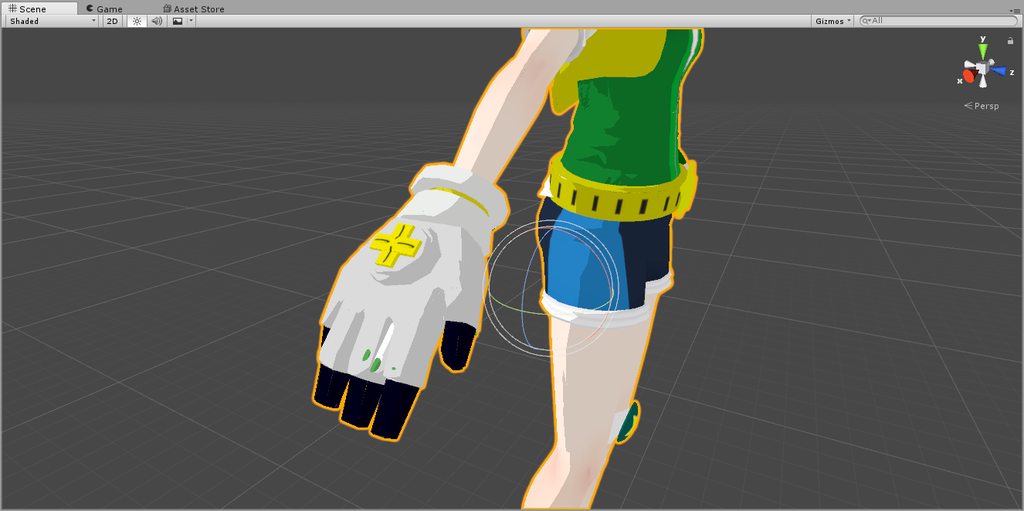
but in blender it is fine
noble jetty
@slate finch I think that might be a 3d modelling thing
fluid zodiac
@noble jetty ok, just right click the area around the wrist
then start painting
in blender weightpaint mode
slate finch
@noble jetty how would i fix that
noble jetty
@noble jetty When I right click a bone in weight paint mode it just goes back to object mode
fluid zodiac
I might switch to blender for weightpainting lol
now if I could figure out xray bones in weightpaint mode
nvm, found the option under the armature object properties
and also drawmode set to wire
then you can see your bones through the mesh while you paint
clicking bones from the scene hierarchy viewer doesn't work
right-clicking on the bones inside your display port should keep you in weight paint mode
fluid zodiac
on the display port
where you see your entire model+bones
I don't know what it's called in blender
noble jetty
yes, I get what you are talking about.
The thing is, you weight paint for certain vertex groups (with bones assigned to them) instead of actual bones and there are no wrist vertex groups
fluid zodiac
merge your vertex groups?
shouldn't hurt anything, you are weight painting afterall
in CATS, there's a join meshes tool
 opal aurora
@noble jetty if when you right click a bone it doesn't select it individually, you're probably not on.pose mode, always stay in pose mode before trying to weight paint
fluid zodiac
neat, im learning something new
I just discovered that
a bone needs to be in pose mode
opal aurora
I recommend this tutorial https://youtu.be/Tl4qTgwQwYw

Quick intro and guide to skinning/weight painting. this video is meant for those with a basic understanding of Blender
fluid zodiac
oh wow, it even creates the vertex group for you
opal aurora
Simple, straightforward
opal aurora
Yep, any bone that you paint generates the apropriate vertex group with said weight information
noble jetty
okay, so I am finally able to select bones while in weight paint
fluid zodiac
you might need auto normalize to repaint the wrists?
noble jetty
but my wrists are the only things that do not have vertex groups
when I select them, it goes to my basis vertex group
opal aurora
I'd advise on using auto normalize at all times, it's pretty useful
fluid zodiac
have your mesh in weight paint mode, have a bone in pose mode; then in weight paint mode, you can right click your mesh or directly on the bones themselves to select and/or create new vertex groups
then paint away
I like this tool better than maya's already
noble jetty
YES!!!!
I finally learned how to read!
Okay, weight painting done
@opal aurora I can't test out my weight painting in my pose mode because "cannot change pose when 'rest position is enabled'"
opal aurora
On the row of icons under the hierarchy press the stick figure icon
Select pose mode
You need to have a bone or the armature selected for the icon to appear if i recall correctly
Oh right that might've sounded confusing, the row of icons under the hierarchy window
noble jetty
Yes!
Oh my god @opal aurora It worked (I think)
it used to be where if I rotated my wrists in pose mode my hands would become filled with cancer-aids
opal aurora
That's good to hear
noble jetty
but now the wrists worl
I'm gonna put it into unity and hopefully I didn't get my hopes up for nothing.
opal aurora
Make sure to set it back to rest pose before exporting, otherwise it'll export with the pose you gave it
noble jetty
oh
fluid zodiac
weightpainting is pretty wysiwyg
opal aurora
Then it should be fine
noble jetty
HOLY SHIT
GUYS
THE HANDS DON'T HAVE CANCER AIDS ANYMORe
I AM SO HAPPY HOLY ASS
@opal aurora Btw, I saw in a video that you should put the avatar descriptor inside of the head (even though I thought you put it in front of the gap between the eyes)
which do I do
fluid zodiac
inside your hair, ew
opal aurora
Congrats https://cdn.discordapp.com/attachments/251862595030482955/459209680896393227/IMG_20180615_075225.jpg
 fluid zodiac
test it out for us
noble jetty
okay
just confirming - put the avatar descriptor outside of the eyes, like I usually do
opal aurora
Ye put it inbetween the eyes slightly inside the head
noble jetty
oh ok
noble jetty
@opal aurora doing .306 gets me thishttps://imgur.com/a/P5Ns1J4
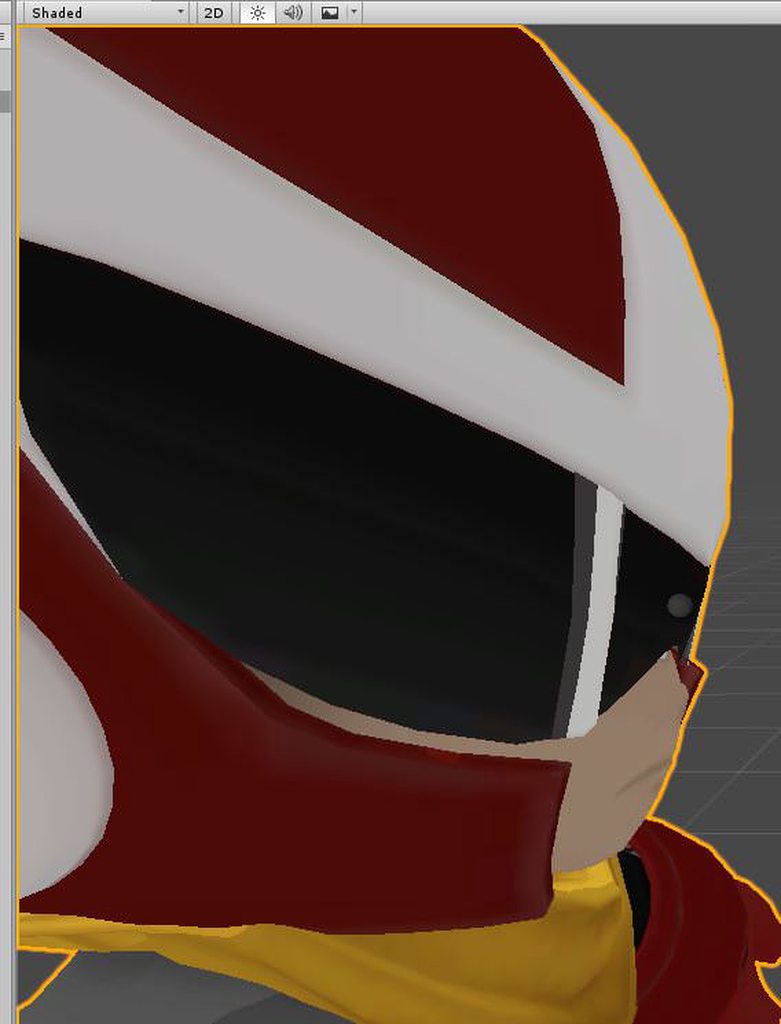
is that shallow enough or not deep enough
I want to apply the flat lit toon shader but I have used so many versions of proto man I can't find the correct materials
opal aurora
Hmm... not sure, in general it's all about trial and error
I found 0.04 to be the best for me
But it may vary from person to person
noble jetty
oh
opal aurora
And definitively from model to model
noble jetty
yes
how do I add my visemes/lipsync
I seem to remember there being a component or something
@opal aurora
opal aurora
It's in the descriptor
Take a screenie of the descriptor (without the pipeline ID) i'm having a blank
fluid zodiac
goodluck!
opal aurora
Nope
19999 is the maximum ammount of pollies allowed by the sdk
Not that any higher would cause any discernible issues whatsoever but that's how it was developed and destributed
noble jetty
it finally works!
the lip syncing doesn't (probably some weight thing) but the hands are mostly
opal aurora
What kind of lipsync are you using?
opal aurora
Mhm
If you're using visemes, don't forget to assign them to the correct locations
When you first select viseme blend shape they'll all be blank
Every single one of them must be placed on a slot properly
aa to aa, ch to ch and sil to sil respectively, provided you used CATS to generate the shapes of course
noble jetty
I did that
opal aurora
Not sure why it doesn't work then sadly...
noble jetty
yeah. my mouth is stuck open
I think it might be the jaw bone
with weight painting the jaw has the mouth
opal aurora
Oh, if you use visemes you unassign the jaw bone
noble jetty
@opal aurora The mouth works! I will remove jaw and reupload though
turns out my mic was muted
 lament shoal
Does anyone know any tutorials that show how to use Fixed Join for placeable objects?
noble jetty
@lament shoal what?
@lament shoal you can place an object in the hierarchy (like inside of a finger) to have it move with your hand
lament shoal
I know how to equip and unequip objects that are stuck on the hands, but how do I equip objects and place them in the world?
Like being able to spawn a drink can and place it on a table within the world
with it being permanently stuck to my hand
I heard you need to use fixed join for it, but I don't know how to use it for that purpose
 mighty sigil
Not sure if this is the right category for this kind of thing, but I'm having bone rigging issues. For some reason there's a small section on each ear (exactly the same spot on each ear) that isn't attached to the bones...? What's going on? https://1drv.ms/u/s!AtrdRRdPIc9ckGmV9ojejN6nppAh

PNG Image
mighty sigil
You make it sound so simple, haha. 😛 I can't make heads or tails of weight painting, especially since I'm new to avatar modding, and since most of the work was already done for me... I'll try to research it a bit more. Thanks
mighty sigil
To cut a long story short: Through a lot of trial and error, I managed to figure it out and fix the issue, haha.
 limpid scarab
I did find weight painting bothersome at first but to be fair you get better at it as time passes by (like most things 😃 )
 lethal plover
Is this a correct weighting? And is the armature even correct?
https://i.gyazo.com/7e3fa5796322fce6e7280886fb222af4.png

 gritty nest
@lethal plover the armature looks decent but I think there's a slight issue in hierarchy
You'll want a hips bone that's connected to the spine and both legs
Then an upper leg bone, lower leg, and then foot
You seem to have an extra bone or something
Remember that bones do not have to be connected
They only have to be parented
From the hips up, the bones should be Spine-Chest-Neck-Head
With shoulders parented to chest
lethal plover
So no upper chest?
gritty nest
You can parent bones without connecting them, they will get those dotted lines. I see that a lot for legs and shoulders
No upper chest if possible
lethal plover
oh
gritty nest
You can technically have those bones, but you'll have one unmapped spine bone
gritty nest
Same, I just had my final test today.
Now I can spend all of my time working on models and using them
lethal plover
Oh dude, same.
noble jetty
Can someone help me out?
 safe bluff
?
 restive shale
maybe]
noble jetty
nvm
 echo drift
Now, I've been trying to get my Gnarl avatar to work, I just up and converted the body in mixamo (after I remove all the bones), cats full body tracking fix, unity, and still the legs collapse inside the chest cavity. I have reason to believe some setting in unity is messing me up.
Is there some setting in unity that can mess up full body tracking? like scale IPD?
noble jetty
Anyone know how to setup a scarf without dynamic bones?
fluid zodiac
like, no deformation at all?
 fading verge
no he want to have some jiggle to it
but without using dynamic bone
since he cant buy it
fluid zodiac
cloth
noble jetty
I only have one mesh, unfortunately
fading verge
make 2 mesh then
noble jetty
@fading verge how do I do that
fading verge
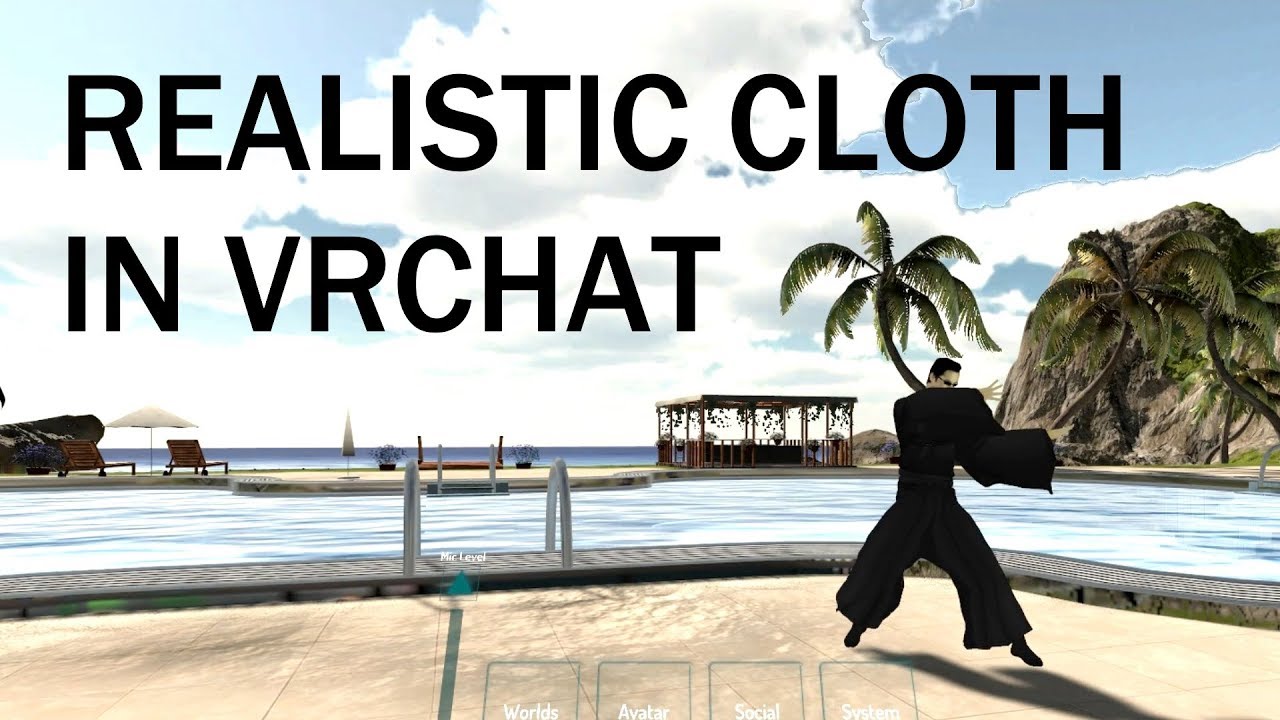
extra notes: - this might not be the right choice for your model if the cloth is stylized in a physically unrealistic way - like dynamic bones, this is not a...
noble jetty
thanks
noble jetty
@fading verge it says I need to separate by material and then join meshes but only have the cloth separated?
I select the cloth vertex group but it just selects the whole mesh
 jaunty schooner
So I imported an XPS model but the head and tails of the bones are not connected, but the rig still works in unity and VRChat. What is the benefit of bones being connected aside from being easier to manipulate?
fading verge
@fading vergety
jaunty schooner
So I'm trying to weight paint the head of this character for my head bone, but when I manipulate the bone, it seems that some verticies aren't being painted


suggestions?
jaunty schooner
basically if I don't look at the verticy at the right angle and right zoom level, it doesn't get painted
despite the brush size and strength
jaunty schooner
Well, fixed it by hiding the big stuff and deleting some overlaping topology
 subtle osprey
Alternatively, what you can do when no topology can be deleted or for some reason you just want to set all values at once, is enabling Face Selection or Vertex Selection

Then select all faces (A) or Linked Faces (L and holding the cursor over the relevant object)
Then use Set Weight
https://gyazo.com/d960e5d951e8c84f2374ccf7edab34f2

Interestingly enough, there doesn't seem to be an option to turn off brush occlusion like in Texture Painting Mode, that would allow you to paint vertices through faces.


 uneven wind
need help
 fickle plover
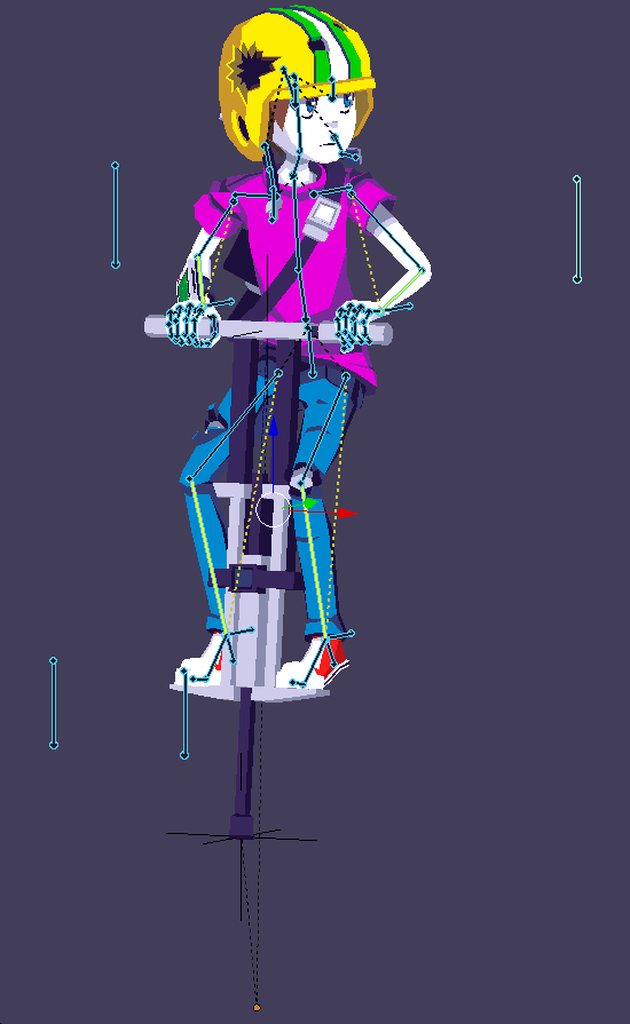
pole targets out front are knee roll, spastic ones in back are elbow roll
uneven wind
Whenever i hit fix armature i get this error
https://gfycat.com/DiligentReflectingFish
 jaunty schooner
@subtle osprey thank you for the tip, I'll save this for later
 shy marsh
does anyone know how to make it so i can have multiple avatars on and tracking the same gestures/movement?
 gloomy pollen
hey my model looks good in blender but when i export the fbx and bring it into unity its all grey
i can manually assign each texture but ugh
 crystal vector
@gloomy pollen Import the textures before you import the fbx
gritty nest
@shy marsh fixed joint everything to everything
That is, put frozen rigid bodies on all of your bones
And put fixed joints on all of the bones of the other models, and connect them to your own bones
 sweet turret
I still havent figured out how to get around the fact that disabling fixed joint game objects glitch out the positions
shy marsh
@gritty nest alright thanks 😃
gritty nest
@sweet turret always have the joints active
You don't have to show the meshes, just make sure the armature is always active
sweet turret
But if theyre child of a prop i want to animate won't they be disabled by toggling the prop object?
subtle osprey
@jaunty schooner anytime!
gritty nest
@sweet turret yes
You need to find a way so that it's always active
For example, put the fixed joints on an always active parent
jaunty schooner
When weight painting, is it possible to exclude vertex groups? Like make them unpaintable?
I assumed hidden faces/verticies wouldn't be painted but I don't think thats true
I just hid pretty much all of the model in edit mode and painted just the bow tie in weight paint mode

but after unhiding the model again, its all over the place
jaunty schooner
Getting good results with masking

 fading verge
just ask your question. it's pointless to just ask if somebody is here and if anyone can help
 idle sandal
ok so i try to open settings in unity (vrchatsdk settings) but it doesnt open so what do i do
 wispy tiger
Why is making mouth visemes the biggest pain by hand
fading verge
reinstall the sdk i guess
also why the fuck are you asking this in the rigging channel ?
 wanton scroll
Hi, a friend made an avatar in mmd, everythink works fine there, but in vrchat the neck moves with the head and doesn't stay in place. I am new to this and this never happened before, any fix?
wispy tiger
Sounds like a weight painting issue
wanton scroll
okay, never worked with that before :S
in blender it works fine, when i rotate the head in pose mode, but when i rotate the neck it is what it looks like in vrchat.
jaunty schooner
Is it possible to permanently change my character's mesh via the poser in blender? I need to create a T-Pose
 late shale
Yeah there's a new button in cats, something about applying pose as rest pose. You'll need to update to get it
@jaunty schooner
jaunty schooner
I'm probably doing it wrong, but the button is greyed out for me
I've posed one of the bones, but it resets when I click stop pose mode in cats, whats the proper procedure?
 crisp tendon
Any idea why my idle animation gets crushed into a ball, but same animation is fine for movement ?
jaunty schooner
A tip for fellow first time riggers like myself, make sure you can see the polygons of your mesh before you start making your bones
it makes it a pain to paint the weights when the bones aren't positioned in good places https://gyazo.com/3f2a274fd74465274286a28ff255cb37

 orchid frost
Could I borrow someone's time. I need someone to help me with rigging cause internet walkthroughs are not so effective for me.
 solar ravine
@fickle plover omg
 eager hill
Alot of my avatars have their hips thrust forwards when sitting down. Whats a common cause for this?
is it just a case of lowering the hip/root bone?
crystal vector
@eager hill Did you get the warning in Unity that your hip bone is rotated?
eager hill
I always get "the angle between pelvis and thigh bones" warning not being 180 degress
i had the same warning with the default blue man rig too
(for avatars that sit correctly)
the ones that are messing up are rigs from the game the character is from
if i lean forward when sitting its fine, if i sit normally, the character leans back and the hip/crotch is up XD
gritty nest
@eager hill do you have dynamic bone scripts on the hips themselves?
Even if you have exclusions
 ebon bear
hey
somebody help m,e?
I tried eye tracking using cats(blender plugin).
But it turns in a strange direction
What is the problem
Also, it rotates anyway even if it is in the wrong direction
But when I work it to unity, it does not rotate at all in nelnd shapes
What is the problem
??
fading verge
im having an issue with the angle between the pelvis and thigh bones. Anybody know how to fix this?
mine is stuck at 86.6
jaunty schooner
Have you tried reposing the upper legs in blender?
 silk holly
I'm running into an issue with my arms that I have no idea where to start on
It feels like they're too long on the model
When I reach out in a T-Pose with my controllers, they are still bent at the elbow

but if I reach straight up they're fine

it's almost like she's not allowed to reach past a certain distance
anyone know what I should be looking at here?
jaunty schooner
When your bone placement is on point for weight painting 👌 https://gyazo.com/321503409eea9a1f2ab4cb75733919b7
 orchid frost
can someone help me with rigging. when I set it up only a few verticals actually move with the pose.
jaunty schooner
not sure if this falls under rigging, but no matter how high I place my character in Unity, the position in-game doesn't change
stuck to the floor
orchid frost
@jaunty schooner you talking about mine?
orchid frost
@jaunty schooner I wish. I went back a few steps to try to figure out a issue I was having only to get more issues when I go to prev steps
anyone able to explain why adding a armature to a model and adding weight paint 1 does not move the avatar in pose mode?
cause I've tried in a couple different ways but they all offer the exact same result.
jaunty schooner
i can try and help you later
jaunty schooner
@orchid frost
ebon bear
heyhey
somebody help m,e?somebody hel
I tried eye tracking using cats(blender plugin).
But it turns in a strange direction
What is the problem
Also, it rotates anyway even if it is in the wrong direction
But when I work it to unity, it does not rotate at all in nelnd shapes
What is the problem
??
jaunty schooner
Could my Y position not having effect related to the feet bones?
EDIT: Unassigned the feet in the human rig, no differnece
@ebon bear take some screenshots
 bright veldt
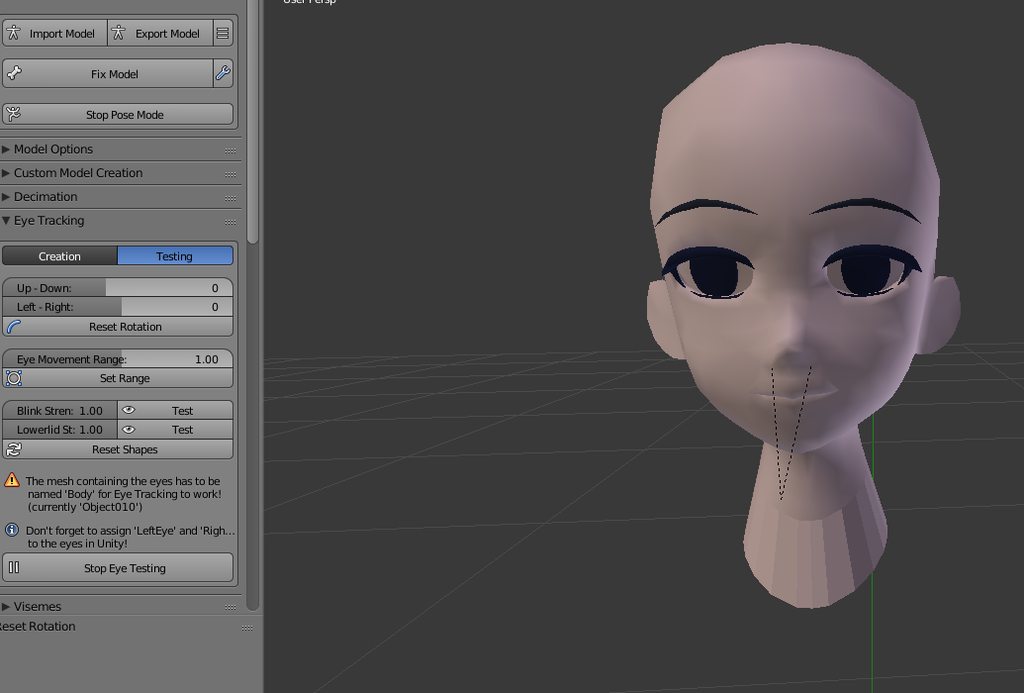
Idk what's up with the thumbs https://cdn.discordapp.com/attachments/211286604029886464/460257697397473301/unknown.png
 ebon bear
Where can I get help?
 cosmic mica
to make an avatar work with full body tracking, the spine and pelvis "must be at zero", what does that mean?
opal aurora
To be honest i've got no clue whatsoever, every model is different in its own way but i guess they found a compromise by making the pelvis overlap the spine, causing the spine has lenght of 0 in unity, no idea of how that even remotely functions but that seems to be what they mean
Fbt should work just fine on a model without said pre-requisit however, provided your body's proportions and height are similiar enough to that of your model as far as i'm aware
 vestal dirge
@cosmic mica "must be at zero" is not a requirement of the VRCSDK and spine length of zero causes lots of issues. What are you referring to that is telling you this?
cosmic mica
someone else told me it. I watched a tutorial and got it. the top of the leg/hips bones must align with the top of the pelvis bone.
vestal dirge
Cool, yeah having a horizontal arrangement of pelvis and leg bone origins does help for a more stable rig for full body, and pointing the leg bones down and pelvis up is ideal. [The SDK recommends 180 degrees]
 kindred thicket
My legs are seemingly twisted inwards for some reason, and I haven't found a solution to this, using full body and it looks like this.
https://imgur.com/O7iVOie

Walking looks like this
https://imgur.com/883NsxL

I mean honestly the bones LOOK normal to me.
https://i.gyazo.com/773654ba4f010da654ad96cf159cd250.png
https://i.gyazo.com/74fd5916e4590b315711fa6e372f509a.png


 winged crater
guys,
i have a dino model and i want it to work with vr tracking

indominus rex
how would i keep it in its body layout and still use it fine
i dont want it upright
do i have to make a dummy skeleton?
and bind those parts to it?
or what?
any help is appreciated
 solid adder
Probably your best bet
 calm needle
it shoudl be doable but expect to have some super tapping feet and probalby the body rotation around the head when you turn
 modern torrent

HEL
PLEASE
PLEASE
HELP
GUYS

noBODY?
reallly?
vrchat is broken
can smeoneo help me?
 serene oracle
Hey everyone I have a question on eye blinking, this is my first time with shapekeys customly and was wondering how would I go about making goofy blink in a proper stance? should I use a custom animation so its fluid? Or is there a way to make the shape key follow a more direct path? as for currently it turns out like this https://gyazo.com/8111d6bebb1303b74b326e0709511475
 calm needle
for odd shapped eyes like that, a custom one is probably the best way to go about it
serene oracle
So animation?
calm needle
yeah
serene oracle
Alright thanks 😃
calm needle
yeah, lots of ways it can be done
serene oracle
Yeah, just new to this so trying to find the easiest way
calm needle
depending on how you want to do it, it could be as simple as having the eyelid be a different mesh and it gets enabled for a split second to blink or you have mulfiple blendshapes that trigger to get a nicer looking blink, or actual bones in the eye lids. Many ways to do it 😛
serene oracle
hm alright, ill look into it
echo drift
when I rotate the bones in blender, do I need to have it rotate correctly on the local x axis or is it a different one?
@cosmic mica is the top the 'head' of the bone?
cosmic mica
huh?
doesnt matter in blender - unity corrects it anyways
as long as the head doesnt appear crooked you can move the bones with either local or global
echo drift
ok
jaunty schooner
If my avatar in Unity has a position of 1 on the y axis (elevated), why is it stuck to the floor after uploading?
gritty nest
@jaunty schooner did you accidentally animate on your main model instead of a duplicate?
jaunty schooner
It currently doesn't have animations, just some dynamic bones
the hips, spine, chest and neck currently don't have weights painted. I highly doubt thats the cause though, as I have another (working) floating avatar that is the same
Also, my camera position is higher in-game than where its set in my avatar descriptor
 pulsar rain
Been having such a hard time figuring out how to name the bones to this FBX avatar but the guy who is even good with avatars have a hard time with it.. but it’s something I wanna get good at
 fallow lake
Why when I set my eye bones and go to "Create Eye Tracking" does it create new eye bones down near his clavicles?
And they're also pointing straight up as opposed to forward
jaunty schooner
@pulsar rain how do you mean?
Is it possible that my dynamic bones are pulling down my mesh to the floor by gravity?
pulsar rain
gonna try using mixamo and remove the bones from the FBX wow model
crystal vector
@jaunty schooner Yeah, set force to something like - 0.01
Thats what I heard
jaunty schooner
All my bones have these values https://gyazo.com/c008b0222b3c2a93cc36c5d02333331d

@crystal vector when you say force, what are you referring to?
crystal vector
@jaunty schooner There is a force input field further down
jaunty schooner
ah
but that should only be necessary if I've changed the gravity values correct?
it seems like it would be tied to gravity
late shale
nah, don't do anything with gravity, just use force
jaunty schooner
sorry, I meant that it seems like the force slider is tied to gravity, like a relationship of some sort
I uploaded with the changes, will test it tomorrow

 jaunty schooner
@ivory radish you should probably lead with a written statement with what your problem is
 ivory radish
idk y
jaunty schooner
the error messages should refresh once you fix the issues
jaunty schooner
click on head, show us a screen cap of that as well
 jaunty schooner
looks right to me. I suggest using cat's blender plugin to translate the bones though
 jaunty schooner
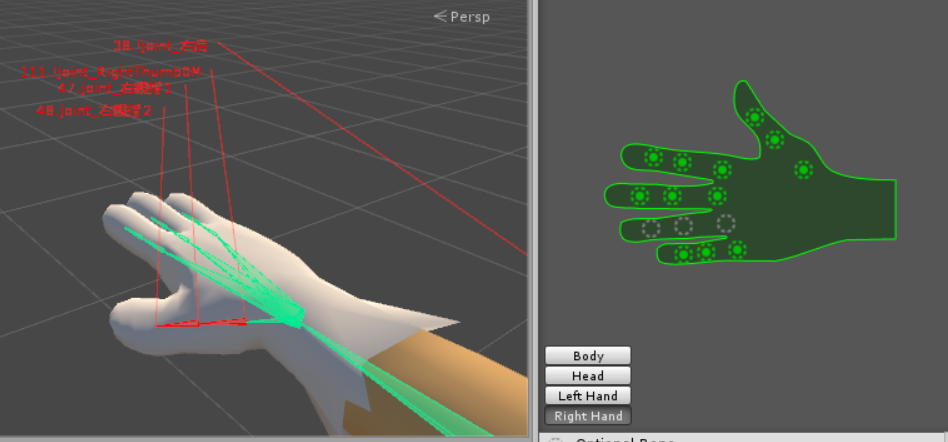
I'm not able to myself, I've had issues with bones showing red in this menu and not knowing why
it doesn't help that the bones are in chinese
just try publishing
will it let you?
 pale hull
@ivory radish Your model is not in a correct t-pose, as all those red bones and lines indicates. Click on "pose" on the lower right corner and "enforce t-pose". That'll let you have a correct humanoid setup.
ivory radish
that doesnt matter when i put it in tpose the rigs all broken and ive already fixed other ones and they worked fine w/o it
pale hull
When it's correctly set up then the head and such will be recognized.
If not, restart unity.
ivory radish
oh i think ik whats wrong
it might be bc for some reason the names of bones are changed in the original
pulsar rain
https://imgur.com/5mRdYK8 someone tells me to remove upper chest then this appears
 serene oracle
There’s 2 separate bones, chest and upper chest, it’s strange, put whatever bone that was your upper chest into the normal chest slot, and keep upper chest empty @pulsar rain
pulsar rain
thank u
serene oracle
Np
 naive tree
Any1 with a clue why legs would act as if they had bone rolls in full body? they go 90-180deg
restive shale
I've had that issue a couple of times
you could try bending the knee in the rigging window in unity
to help the ik know which way it is meant to bend
restive shale
it happens
sometimes it is nearly unfixable for me
usually there is some solution, but on one of my models I just can't fix it
it's a robot though so it is sort of passable
naive tree
oof, gonna have to upload couple of them and then ask some1 to help with test
limpid scarab
@naive tree You got full body now? 😮
gritty nest
@restive shale @naive tree actually, you should be bending the knee in your scene
Not the rigging tab
Just slightly
The Final IK guy covered it briefly in one of his introductory tutorials
Bending the knee in the rigging window won't do anything, it looks at how your model is in the scene
I usually just rotate the lower legs back slightly
If you happen to have Final IK, you can put a full body biped IK on the avatar and see which way it's gonna bend. Red squares on the elbows/knees means it doesn't know which way it should go
You'll see arrows pointing forward if you bend the knee a little
naive tree
@gritty nest i fucking love you ❤
gritty nest
Wait, it works?
ebon bear
I rigged and worked perfectly.
I fully identified the snow track in the cats.
Can I check it in Unity or VRCHAT?
I feel it is not moving.
But I do not know why
naive tree
it should work, at least the arrows point forward now
i mean.. if it doesn't ill let youi know 😄
 slate bobcat
About how far did you bend it forward @naive tree ? Because I had the same problem :P
slate bobcat
Don't have the IK Asset, unfortunately
But, I'll try some numbers
Think -10 will be enough?
fading verge
there is no magic number
you need to move the bone until it's good
he used final IK to know that
slate bobcat
Fair enough. I suppose I won't know until I test it
I just don't want to have to get into full body to find out >_>
 warm coral
@gritty nest Where can I find Final IK actually? That'll be VERY useful to me when making Pokemon happen.
pale hull

The final Inverse Kinematics solution for the game developer.
Update (1.7):
FIK 1.7 brings many fixes and improvements to VRIK - automatic arm stretching, improved spine bending, calibration tool for up to 6 tracked targets. AimIK receives a helpful AimController com...
warm coral
Alright, thanks. I'll grab that when I get back home
pale hull
It's around 80 euro, but if you got the money
warm coral
Oh. Well if I somehow ever get that much. I'm still in college, so I don't think it'll happen any time soon
jaunty schooner
looks like a good product
jaunty schooner
does adding a dynamic bone to the bone itself in the armature have the same effect as adding the dynamic bone to the avatar itself?
fading verge
yes
just make sure you organize it in a logical way so if you ever have to edit something you know what you did
jaunty schooner
I'm just not looking forward to having 10 dynamic bones in my inspector view XD
Yeah, I like it better this way for sure
just wish I could figure out why the avatar is sinking down in-game
@late shale your suggestion didn't resolve the issue, just made things worse XD
ivory radish
hey how do u
prevent the charcater from 'tiptoeing' when looking down
i want to keep toe bones mapped
do i need to do the 'leg bones need to be rotated 180 degrees' thing
late shale
You probably need to adjust the distance from center of your viewpoint
I think that would mean it's too far back, maybe
or it's too far forward, idk ¯_(ツ)_/¯
jaunty schooner
@late shale that value didnt work either
late shale
didn't work how?
cosmic mica
my viewpoint by avatar descriptor for some reason is VERY farr forward, almost 2 feet ahead of the dot. at this point i had to move the dot so far back its well behind my head. What is this? How do i fix it?
late shale
@jaunty schooner that's just because the value is still too high, I was just guessing
@cosmic mica set the dot to 0,0,0 and if it isn't already, move your armature to the dot so it's right between your heels
cosmic mica
will moving the armature mess up anything?
late shale
nope
cosmic mica
cool
ohhhh yeaaaah now i see it
its got bird feet that are a bit forward
i get it now! thank youuuu!
late shale
In that case, just directly beneath the head
ideally you want to be able to set the height and it would be right in the middle of the head, then go forward just a tiny bit so it's between the eyes.
cosmic mica
unfortunatly that trick did not work
the viewpoint is still 2 feet ahead fo the face
it gets super awkward when someone gets close to you - to them they are standing in front of you, but to you they are literally at your face
im forced to move the viewpoint way too far back for this oddity.
late shale
what are the values of your descriptor?
winged crater
guys
has any of u managed to create a none humanoid model and allow hand tracking?
because i do not want it upright
dinosaur?
gritty nest
You will always have to rig it as humanoid
winged crater
i tried
gritty nest
Then put your generic rigged dinosaur under it
cosmic mica
x:0 y:1.45 z: -0.04 The z axis is the one giving problems, no matter how far backwards i put it, the hand is still too far from the face. For this model in particular im judging by touching my nose. to my viewpoint my hand should kinda disappear out of eye range since its under my nose.
gritty nest
Put rigid bodies on the arms of the fake humanoid model
And put joints on the dinosaur arms
gritty nest
I can't really get any more specific than that. Put rigidbody components on each of the arm bones of the fake humanoid armature.
Put fixed joint components on the dinosaur arms, and connect them to the rigid bodies of the humanoid arms.
gritty nest
And once you do that, the dinosaur arms will copy the movements of the fake humanoid ones
winged crater
same with feet? and head?
it managed to work a lil but it moves to far out of proportion
also when i merge armatures, why does one disappear?
gritty nest
Because you merged them?
winged crater
yes
gritty nest
Merge armatures is meant for stuff like
winged crater
joined them
gritty nest
Merge armatures is meant for putting clothes from one model onto another
winged crater
ahh ok
gritty nest
And transfer the weights correctly
winged crater
thanks a lot man
jaunty schooner
for dynamic bones, I should be choosing the first bone for my root right? not the end?
gritty nest
Yeah
 jagged badger
Is there any animation sets floating around to use with anthropomorphic characters?
jaunty schooner
free to download
when you download, there's an option to download with a mesh, you want to uncheck that
 desert dune
Anybody know if it's possible to have 2 pair of arms move separately via gestures?
 vestal hedge
ebon bear
vestal hedge
ebon bear
hello someone help me?
 neon quiver
would someone be able to critic the rig of my model to see if there area i should improve on? if i gave the file? it to help improve my skills. pr should i make a video then past the link? exsample, arm bending proper. clipping area are ok or not. trying to make my model solid as possible. if need to use IK bone in area or not.
ebon bear
I have a problem with my eyes.
My eyes work perfectly in cats.
And also in Unity.
But in the game, it appears briefly and disappears in a flash.
I think it's the wrong move.
It's never a shader issue.
What should I fix?
naive tree
@ebon bear remake eyetracking, and be sure it's 1 mesh
ebon bear
@naive tree So this time it moves.
But the eye is not in the desired position because it moves too far.
How do I fix it?
naive tree
@ebon bear select everything (including armature) > ctrl+A> do it for rotation/location/scale
then remake eyetracking
change range in eyetracking to 0.15 - 0.2, if they clip eyewhite then u seperate the eyewhite, delete shapekeys from it and move/scale till eyes dont clip > rejoin meshes
 lofty topaz
http://prntscr.com/jznc02
Is there any quick way for Blender to divide this bone into three different bones without needing to re-weight paint?
 pale hull
I would've separated the tongue bone and tongue mesh into their own objects, selected the bone in edit mode and hit W and "subdivide" until I have three. Then deselect it, select the tongue mesh and then the bones and hit CTRL+P and automatic weight paint. Then all three bones should deform the tongue. After all that you just merge the mesh and bones back into the rest.
lofty topaz
I'll try it... Thanks, Zarniwoop
 pearl bone
I desperately need help on applying heterochromia eyes!!! @-@
I have a konko model, but for the life of me I CANNOT add heterochromia eyes to her because both of the eye ends share the same texture
pearl bone
@copper imp how do I do that? I used a PMx editor but it didn't work
 copper imp
Are the eyes both different meshes
Because I would just apply the different textures to the separate meshes, then combine them
Then you will have 2 material entries in UNity
pearl bone
No they are one meshtogether
copper imp
You would need to seperate them first
copper imp
I am not sure how to do it in Blender, I am a Maya man myself
pearl bone
The only thing I can do right now is seperate the the eyes and drag one around. But that's it :/
 gritty nest
Create a new material
In the materials view, not the textures
Assign it the same eye texture
Select the eye verts and assign it the new material in edit mode
And you're done
echo drift
Dumb question, is it possible to deform the shape of the eyes to give that cartoony effect like this? https://vignette.wikia.nocookie.net/p__/images/b/b5/Cloudy-meatballs-disneyscreencaps.com-2028.jpg/revision/latest?cb=20150630223233&path-prefix=protagonist

my guess is no
gritty nest
Yes
You mean like pupil dilation?
It depends on which part you need. But either way, it's definitely possible.
echo drift
well... more like deforming the sphere into non sphere shapes like, one's smaller than the other
gritty nest
Just make a shape key for that
Can reshape the mesh any way you want within that shape key
gritty nest
No
I mean, it might be difficult with eye tracking
You'll need to make sure that eye tracking only affects the iris and pupil, rather than the whole eye.
echo drift
I figured. I wanted to make sure. Thanks @gritty nest
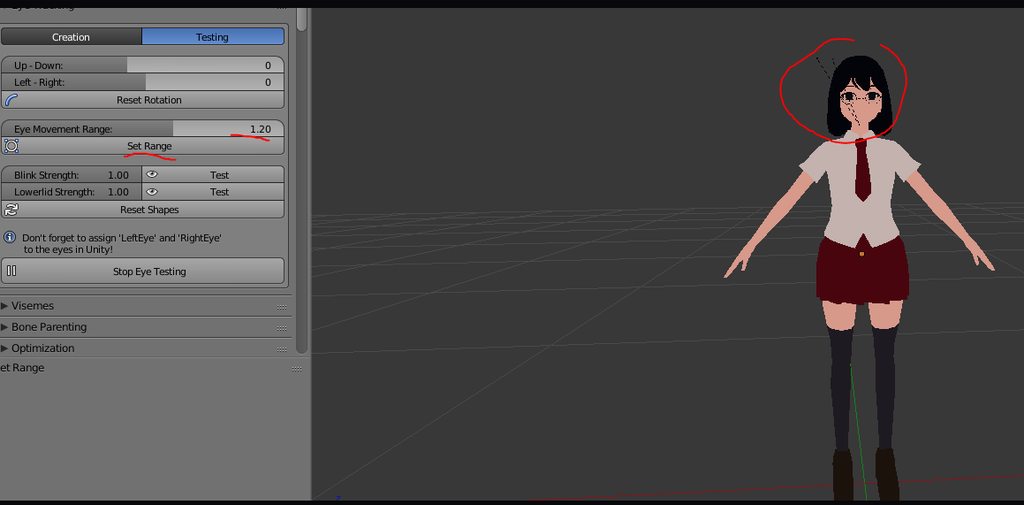 cosmic mica
does eye tracking even work anymore? i havent seen any models with it in a while.
you apply specified bones as the eye bones in the rigging slots in unity and it should be automatic from there, right?
 tardy harbor
Could anyone help me out? I need help on figuring this out. https://gyazo.com/efdfc1703e53968cf3af2bb3ca4e8d72 https://gyazo.com/baf082da8f6938769d134562346614b2

 orchid frost
When I use vrchat to test the movement everything is currently working fine but my chr does not reach out as far as they can when I do. is there a way to fix that?
late shale
You might have your avatar descriptor too far forward. Try to put it right between the eyes.
ebon bear
somebody help me? pls
 finite forum
did you set the right shape keys for eye tracking?
 static tusk
https://puu.sh/AMEVd/eac6a0b101.png Does anyone know how to fix this?

 rose shard
https://i.imgur.com/cYlddkn.png Anyone know how to fix this?
 restive shale
Looks like that area of the mesh is painted to another bone
ebon bear
@finite forum yes
why my eyes wrong tracking??
it was work perfect inblender, in cats , in unity
restive shale
It's the only explanation I can think of
finite forum
that is weird
Did you check to see if the eyes are mapped correctly when rigging in unity?
late shale
@rose shard try selecting all the bones and hitting alt g and alt r
rose shard
https://i.imgur.com/BjUo4jk.png didn't work



how did this happen
why is one hand connected to another without weight paint?
rose shard
I checked the children,
so it's probably parented I guess
annnd that cant be right either,.
because they are parented to their lower arm bone
whyyy
 bleak wasp
Hi all! I have a character that I made my self I'm having a hard time making it look nice in game. The knees are always bent and my character is slouched over is fixing it just a matter of raising the hip bone in edit mode or
 earnest brook
Did you try changing your height in the VRchat system menu?
bleak wasp
Yeah im just testing in desktop mode to make sure it looks good there raising and lowering the height doesnt seem to do anything there
earnest brook
Does it happen when you enforce t-pose in the unity editor?
bleak wasp
hmm no i dont think so
earnest brook
clear the bone roll?
bleak wasp
yea looks fine in unity
haven't done that yet! could you give me a quick 1 2 3
that sounds like it would be it though
earnest brook
Just press alt+R with the bone selected in edit mode
can't remember if you can do it with all the bones selected to do all of them
bleak wasp
ya it works if you just select all and hit it
 pseudo sedge
@bleak wasp try to move your hips bone to the floor in blender, or a bit down
some models bends if theres no space between hips and spine, also make sure spine doesn't Connected to hips
pseudo sedge
how it looks in game
bleak wasp
https://cdn.discordapp.com/attachments/438787344498294784/461500805527109633/unknown.png
https://cdn.discordapp.com/attachments/438787344498294784/461500634345111562/unknown.png
Ignore the holes plz haha I have like a long shawl over her


and i removed a bunch of the mesh to maek sure it looks okay without it on first
 subtle moth
did you try to shorten the spine?
bleak wasp
https://cdn.discordapp.com/attachments/447951479236591636/460779304104493067/unknown.png the shouldesr are in a weird spot too i thought maybe its because i sculpted at A pose instead of T so i moved the arms up in and set as rest position but still no dice

To shorten it should I just click the top part of the bone and shift it down?
i havea p big spine bone so ill give that a shot
bleak wasp
haha thank you!! I really want to make it look nice in game it's my first model I've made so been quite the struggle
bleak wasp
Like in the base mesh? I'll try maybe rotating her back in pose mode and setting as rest position and that might get it?
subtle moth
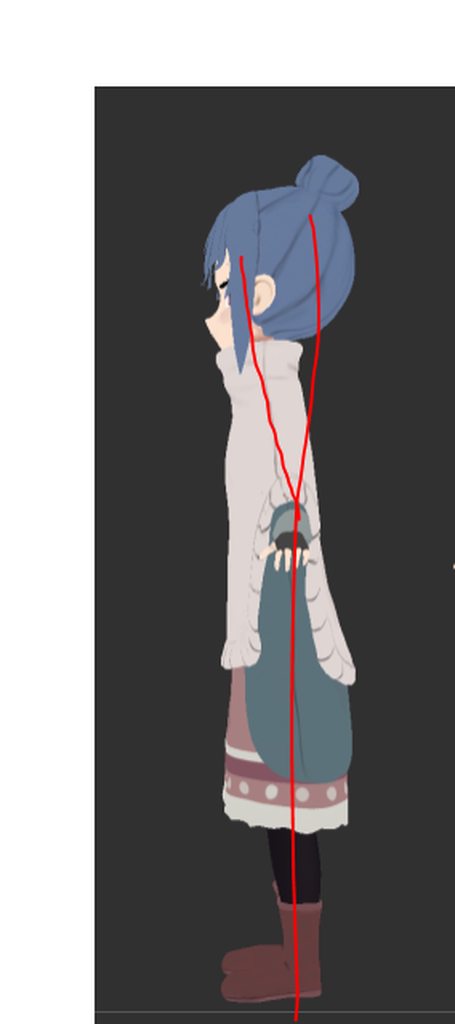
nah
her spine
slightly forward
not sure if that matters though
its not supposed to be like the line on the right
its supposed to be straight
freehanded 😛
pseudo sedge
is that Shimarin?
bleak wasp
yea!
I wanna get this rigged i even have the tiling texture prepped for her shawl im gonna sauce it up a ton once I don't look like a monstrosity in game haha
subtle moth
da heck is a shawl
xD
does the ting have bones tho?
you could put cloth on there 
pseudo sedge
try to unmap or map Toe bones, try to move toe bones a bit down in blender maybe something will change /shrug
bleak wasp
It's that thing that goes over the shoulders! ya it has bones i weighted it to the elbows and arms with cloth physics i dunno how it would react to that
hmm shortening spine bone up didnt seem to do anything
and gotta get prepped for work ughh
subtle moth
the unity cloth component works really nicely for long skirts and sheets of cloth like that
you use capsule colliders for collision
then if you raise your arm you actually raise the cloth
bleak wasp
haha yeah ive used cloth components before
subtle moth
😛
bleak wasp
very nice but always haver weird stuff with it i think it will work in this case tho
subtle moth
They always glitch out for me 😄
bleak wasp
Same unless its like
a cloth hanging out of a pocket or like a flag or ribbons or something
subtle moth
havent tried those yet
i tried putting it on a dress, ended up flying towards the sunset for no apparent reason 😄
pseudo sedge
i like to keep is trigger unchecked, to fly over the map like a rocket while i jump
like you
also by putting Z to 0.000001 you can be glitchy and walk from the map on your screen
gritty nest
Cloth colliders aren't glitchy, you fly away when you forget to check Is Trigger
bleak wasp
ughh man one day ill figure out this stupid leg bending problem
ebon bear
somebody help me
my eyes wrong tracking
it was work perfect inblender, in cats , in unity
but in vrchat it was wrong
pseudo sedge
how it looks in game?
ebon bear
don't move
pseudo sedge
@ebon bear are you using visemes?
ebon bear
visemes? what is this?
pseudo sedge
@ebon bear anims on talking, you can see this part of settings in Avatar descriptor, i'm not sure but if i remember proper eye tracking doesn't applying without visemes or /shrug also eye bones must be named properly as Left eye Right eye and be parented to Head bone
subtle moth
doesnt cats do the renaming and creation on its own?
pseudo sedge
yes givemeall do this
ebon bear
I used cats and (even also except for it) used the same name as the structure of the other models. It is also a perfect configuration
But it does not work.
ebon bear
i'm so tired everybody can not fix myavatar
My model's eye tracking does not work properly
Even the mmd files downloaded from the internet do not move eyes
What did I do wrong?
What I did.
mmd download -> blender -> cats plugin -> import -> fix model -> eye tracking setting(perfect) -> export -> import unity -> test (perfect) -> upload vrchat -> not move my eyes
I have confirmed that it is one mesh and confirmed its name as LeftEye / RightEye. It was a child of Head. What did I do wrong
fading verge
VRChat won’t enable eye tracking at all unless three requirements are met:
1- The bone hierarchy Hips->Spine->Chest->Neck->Head->{LeftEye,RightEye} must exist!
Exact names are required, there can be no in-between bones.
The bones don’t need any vertices skinned to them. They can be “empty”.
2- The blend shapes vrc.blink_left, vrc.blink_right, vrc.lowerlid_left, vrc.lowerlid_right must exist as the first four blend shapes. (index 0 through 3).
Exact order is required, names are actually unimportant though.
They can be the same as the basis shape. They can be “empty”, but blender won’t export empty blendshapes.
3- The skinned mesh must be named “Body”.
gritty nest
@ebon bear post a screenshot of your model hierarchy in unity
Expanded from the main model all the way down to the eyes
In your scene, not the rigging tab

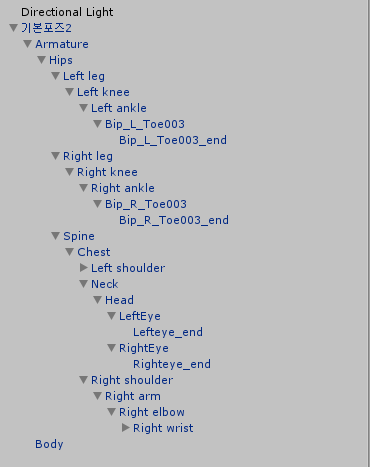 ebon bear
Yes, I left this because it was not
Originally it was not exist
gritty nest
Did you accidentally add any Dynamic Bone scripts to the Hips?
ebon bear
no
 viral stag
Is there no way to avoid shoulder slouching on avatars in VR? As opposed to it looking normal in Desktop mode
 vocal pilot
For some reason when I go to upload an avatar to unity and I hit build & publish it just says future proofing your content then that message goes away and nothing happens.
 lime hill
https://cdn.discordapp.com/attachments/397089848122408961/461620055365386259/unknown.png https://cdn.discordapp.com/attachments/397089848122408961/461620306352668672/unknown.png ive got an avatar with large sleeves that have their own bones. ive spent a while trying to fix it and get the bones to move with the arms. bone parenting, weight mixing, im unfamiliar and tried my best but it just didnt work out how i wanted. does anyone know a simple way to fix this?

 late shale
You'd probably want the bones going the other way, perpendicular to the arms
lime hill
what if i remake the bones
or could i delete them completely
and merge the meshes
and weight paint it
ive never really weight painted but i can figure it out probably
late shale
You'll want the meshes merged if they aren't already
https://youtu.be/lWKw0v25KUY here's a quick video that goes over wight painting basics

Tutorial on weight painting and how to fix weight painting issues. Usually when a material moves with the wrong bone. Links: Model: https://mooniiiiichan-lov...
lime hill
thanks
lime hill
is this the only method?
because no matter how i do it
it always fucks up
@late shale any other ideas?
is there like automatic weight painting?
 thorny sluice
Can someone help me with rigging my avartar? I cant seem to rig it correctly. Then again, I am doing it for the first time using Mixamo. My current issue is that the avartar's wrists are halfway up the forearm and the fingers dont really bend at all. Is there a different way to rig a model that more customizeable or precise?
pseudo sedge
you can try to rig manually in Maya
https://www.youtube.com/watch?v=Ah-Jk7d30ks
https://www.youtube.com/watch?v=LaO3wNXADw8 )
or in blender, but thats bit harder i think
and mixamo not often rig fingers properly
 sacred meadow
im having problems rigging my avatar in unity.
it says that my spine hierarchy is incorrect but idk whats not connected
pseudo sedge
@sacred meadow make sure your Spine parented to Hips, UpperChest is unmapped, shoulders and neck parented to Chest and Chest in chest slot
sacred meadow
ok
pearl bone
Anyone know how I can transfer this FBX to blender?
I keep getting an ACII FBX not supported
 civic parrot
ASCII FBX isn't supported. It needs to be a binary FBX file.
pseudo sedge
you can convert ascii to binary with 3ds max, online converters aren't good as i know, or you can try to find ascii importer script for blender @pearl bone
ebon bear
Somebody help me
I have rigging issue
My model's eye tracking does not work properly
Even the mmd files downloaded from the internet do not move eyes What did I do wrong?
What I did. mmd download -> blender -> cats plugin -> import -> fix model -> eye tracking setting(perfect) -> export -> import unity -> test (perfect) -> upload vrchat -> not move my eyes I have confirmed that it is one mesh and confirmed its name as LeftEye / RightEye. It was a child of Head.
I check
Hips - Chest - Spine - Chest - Neck - Head - LeftEye
And my mesh name is Body
gloomy pollen
hey why is blender zooming in and out when i do alt+ctrl
instead of radial painting?
i cant figure it out
man_shen you need to make sure the eyes are rigged in the head to that and not Eye_L and Eye_R
ebon bear
I said LeftEye and RightEye
gloomy pollen
in bone rigging?
ebon bear
Yes
gloomy pollen
eye_l and eye_r will still exist
and can get auto mapped sometimes
do you have multiple models in one project?
ebon bear
I already delete and edit weight value
And it was 1mesh
1 model
I try many ver
Delete old bone or not
I do not use new bone or not
Weight edit ...etc...
gloomy pollen
i tried reloading the blender inputs but its not helping
ctrl+alt+LMB just keeps zooming
crisp tendon
Does the empty object trick for flying avatars also work on humanoids with a custom idle animation ?
calm needle
in theory, yes? although i know you have to do some extra steps lately due to the mirror update doing some wierd things to the collsiions
crisp tendon
My issue is that the idle has to bring your model's head into the model's t-pose head Y position, so it shrink's the model on idle
I tried doing it with a gameobject, baking the Y position into pose, but that didn't work, so i'll try draggin my model up in the humanoid configuration ? Or i might need to edit the pose in blender
viral stag
Can somebody please tell me why it's stretching my bones and breaking when in-game or using animations? https://i.imgur.com/XvkuV0a.png
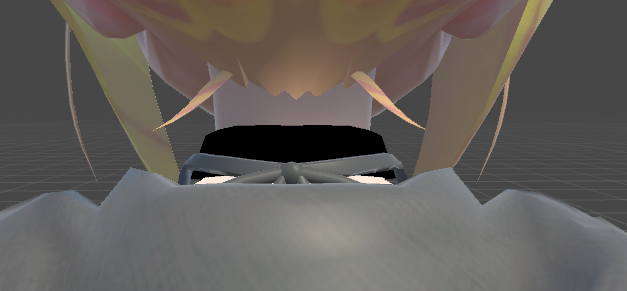
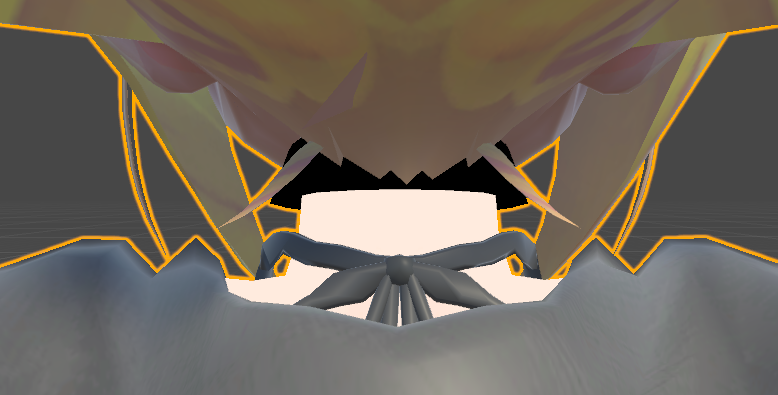
Are my bones not set up correctly or something?
crisp tendon
Which bone is stretched ?
 bright grail
Can anyone tell me why my avatars hair is no longer skinned to the head bone? Every other hair bone moves with the head bone but the top of it. I swapped hairs from one model to another using cats custom option btw.
https://gyazo.com/3f4a04b15aceec43b7db0fd377cab628
https://gyazo.com/21fd58277846b654ccf855610c65fcfd

 viral stag
nvm ill just redo it all... again
crisp tendon
Ok, moving the model up in the humanoid config did not fix the issue
lofty topaz
Which bones do I need to have in order to my character have full IK? Thumb, index and middle?
crisp tendon
yep
lofty topaz
Right, thanks
 fringe citrus
Does anyone know how to solve this issue with arm rotation? After asking others it seems to be client side for me, and they see it as normal. It happens in FBT after changing worlds. Redoing the T-pose upon arrival in the new world fixes it. https://i.imgur.com/6O5yfrO.jpg
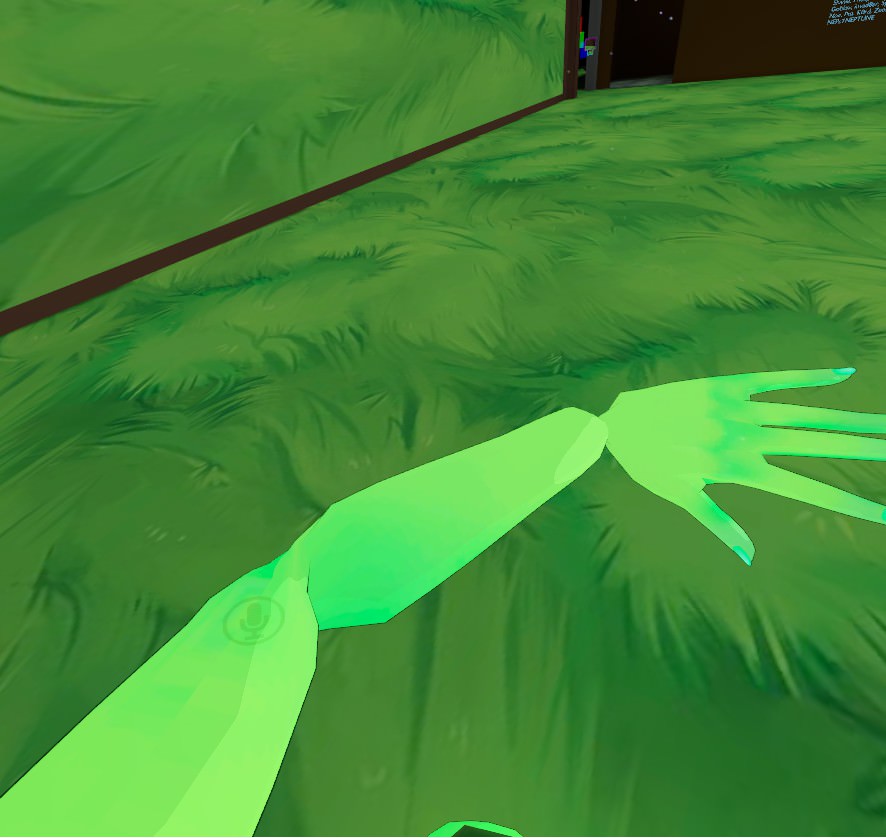 restive shale
I wish I knew a fix for that issue
finite forum
sounds like unity might be having trouble trying to find what the normal values are, you might have to go into blender and rotate the bones a little so unity can see where everything is supposed to be
calm needle
looks like potentially bone roll. Also was the sdk giving warning about bone parenting?
ebon bear
Somebody help me
I have rigging issue
My model's eye tracking does not work properly
Even the mmd files downloaded from the internet do not move eyes What did I do wrong?
What I did. mmd download -> blender -> cats plugin -> import -> fix model -> eye tracking setting(perfect) -> export -> import unity -> test (perfect) -> upload vrchat -> not move my eyes I have confirmed that it is one mesh and confirmed its name as LeftEye / RightEye. It was a child of Head.
I check
Hips - Chest - Spine - Chest - Neck - Head - LeftEye
And my mesh name is Body
fringe citrus
@calm needle No warnings. The armature hierarchy is normal. All bone roll is set to 0. I suppose I'll start messing with bone roll and see if it changes anything
crisp tendon
@fringe citrus You should apparently be able to reset it by toggling Mute All Players By Default
fringe citrus
Oh, thanks! Yeah I've noticed when there's the occasional lag spike and reset all players FBT from client view that fixes it too
I wonder if that would fix the same issue when you see other FBT players legs locked from the hip down
 strange totem
So I have no idea what's going on and why it's clipping in the weirdest way. Like I can understand arms or legs clipping through when moving and rotating, but... I just don't know.
https://imgur.com/a/YeoeNjR (album)
 subtle moth
@strange totem did you decimate it?
 tough violet
If I could get some help with a quick goof...
Alright, I'm pretty sure I missed a step, but I created all the bones, pathed them out to the model told them to parent, and when I get into unity I can see the bones moving in skeletal form, but not the actual models hand moving.... what did I forget to do in Blender?
subtle moth
@strange totem unfortunately that sometimes happenens when decimating, yes
because polygons might get dragged closer to eachother, resulting in a different position than originally
strange totem
@subtle moth Well darn. Thanks. Time to give up / start over or something I guess. Guh.
subtle moth
@strange totem you could load your fbx back into blender, and manually edit the clipping parts
/ remove the skin thats covered by clothing anyway
strange totem
@subtle moth I still have the blender file, so I've been trying. I edit stuff further in away from the clothes, and delete what I can. Much more and there's be really really obvious holes in the model.
I can't even seem to really track down which vertexes are suddenly deciding to go on an adventure once it's in VR chat since both in Blender and pre-upload Unity show it being fine.
fringe citrus
@strange totem if you're getting holes appearing you might want to try doing "remove doubles" on your mesh. If you have overlapping but separate vertices they can look fine in blender and unity, but pull apart when the model moves. Be careful about removing doubles on the face though. Sometimes it causes the lips or teeth to stick together so might want to deselect that first.
strange totem
@fringe citrus It's not so much the holes as it is once the model is in VRChat the boob suddenly sticks out through the clothes like 10cm.
 lean lagoon
When you want to rig but c4d puts random spots to like all the bones
like why my software betray me
weight painting is hell
 wary harness
Does anyone know how to weight paint like this? https://youtu.be/1Qa__hBkwxQ?t=9m2s

I haven't found a video with this particular method so I made my own. Also I'm calling it the Syncopated Booty Shake. Timestamps 0:00 Intro 1:04 Removing obs...
the guy in the video says CTRL + ALT + Left click but it just slides the camera for me
 acoustic marlin
anyone know how to rig a non humanoid model? i have a feeling im not doing this right
viral stag
any tutorials for avoiding the sdk rigging stretching and deforming the bones when importing to unity?
 indigo prawn
can someone teach me how I can spawn an object with a gesture like rnr
for example just a cube
thorny sluice
Alright, I give up with trying to rig this model. I simply dont have enough knowledge or experience. Thanks for the help, guys, even if it didn't lead anywhere.
 simple narwhal
@indigo prawn https://www.youtube.com/watch?v=GkVJSd3Js8o

you essentially just need to add the object to where your models hand is, disable the object so it's invisible and then create an animation that enables that object again
then you just pair it with an emote in the CustomOverideEmpty animation controller
 humble apex
basically adding an "object.isactive" property to the animation
same thing you do when adding sound to an emote
for ex. my running animation has a clock ticking rapidly as its sound
 cyan nexus
Can someone link me a tutorial or pm me steps on how to rig emotes to the F2-F8 keys. Since I’m playing PC, it’s quite difficult to quickly express emotes from the menu.
 steady bobcat
ok so uhh
i assume it's with rigging since it leads to me to the rigging panel in unity

but when i click on my avatar it only shows this
never mind im 2 IQ sometimes
i just had the panel locked
forgive my brains
 bronze ridge
Hey is there any chance I can get some help with the bone hierarchy for when you're uploading an avatar? I've been having troubles configuring the bones so that they work but it just hasn't been working out for me. The only thing that's worked is this - https://gyazo.com/3ed38d4579b27d4004ef5bb6cb6ab71f although it looks weird when I move around in vr and causes these errors - https://gyazo.com/e4b327ceaed8e49900d35860b04238be

 lean lagoon
@bronze ridge Too many spine bones

this is my bone structure and it works perfectly
If you don't want to go back though, you cna change which bone is in which area.
You see the circles next to the bone names?
if you click on that, you can choose which bone is the chest and stuff
Also, for the arm error, check if there are any bones between the lower arm and the hand. if not, then you're better of re-rigging it yourself instead of using the valve stuff
because idk what's causing htat
bronze ridge
Yeah I tried doing that but all it did was cause errors with the neck and arms. This is what I did that caused it https://gyazo.com/78bba4029abeccc1ea3c1a818a10c421 maybe I just need to remove the spare bones in the spine? Or just go back into blender and fix up the skeleton

 twilit plume
bronze ridge
twilit plume
bronze ridge
Oh thanks, I'll give it a try
fading verge
humans i need help
i have a weightpainted right arm but no left
@ me if you know the solution
how do i copy paste the right to become the left without the right arm controlling the left arm
crisp tendon
@fading verge Please don't paste your message in many channels, one channel is often enough
 random lotus
soo i have a model from a game and the armature moves fine except for the hair
http://prntscr.com/k108sa the hair bones dont seem to work at all

but they seem to work in unity just fine with dynamic bones
so i dont know if its just blender being wierd or something
tough violet
I have existing bones in a model but whenever I modify the shape keys, the bones stay in the same position, what do I need to do to make the bones conform to the model?
tough violet
@ivory radish I see, but whenever I export the fbx to unity and attempt to manipulate the model the bones move and the model stays in place.
tough violet
That sounds like the right thing, but honestly, I have no idea how to correct that
how do I bind specific bones to verticies?
simple narwhal
i'll try and get a pic 1 sec
tough violet
thanks!
simple narwhal
cant get a good model to show but this video should help https://www.youtube.com/watch?v=Tl4qTgwQwYw
Quick intro and guide to skinning/weight painting. this video is meant for those with a basic understanding of Blender
i've never really bothered with weight painting but you should go into blender and choose the weight paint option when selecting your mesh
should be here https://cdn.discordapp.com/attachments/461711219569721347/462511334567837716/unknown.png
 tough violet
yup just tried it out around all the bones, lets see if that helps haha
Thanks!
ah no. same isue in unity
issue*
is there no specific way to tell a bone to bind to a vert?
simple narwhal
apparently theres a way to automatically do it
you just have to select all the bones then ctrl + p and select with automatic weights in blender
tough violet
that just asks if I want to keep parenting or connect?
simple narwhal
dunno what either of that means since i've never done weight painting before
i'd just try both
tough violet
No worries, thanks for the info!
ebon bear
t
hey somebody helpme?
I can hardly understand my situation.
I am using the same bone.
It is clearly the same bone
However, Mesh 1 is eye tracking properly, Mesh 2's eye tracking was not doing
All meshes are named 'Body'.
Their weight values are the same
Only Mesh 2 has some mesh modifications (very few)
All meshes work perfectly in unity-humanoid testing
What's the problem with this?
crystal vector
@ebon bear I think you can only have one mesh with working eye tracking
ebon bear
no
@crystal vector
you misunderstood my words.
I have one bone, and there are two meshes that use it.
But I manage it separately.
My file is 'file with bone + mesh1 + mesh2.'(File0)
And the file with only bone + mesh1 (File1)
And the file with only bone + mesh2 (File2)
(All bones are the same. It is not another bone with the same value. It is really one bone.)
If I register File1 in this state, my eyes will move properly
But File2 does not work properly
This proves that my bone is no problem
I do not quite understand what my Mesh difference is.
All Mesh's name is 'Body'(It's not a copy, it's just one bone)
Naturally, skin weight is no problem.
crystal vector
Are the eye bones mapped?
ebon bear
The weight for the eye part was confirmed.
I did the same for the two meshes.
But one does not work
And I always do unity humanoid testing.
In the test, both meshes move the same
I have to solve this now to create another avatar someday.
The reason I configured this file was to see where my problem was.
When I can not fix this problem from bone fix, I doubted the flaw in the mesh,
Tests have shown that the differences in the meshes have created a difference in eye tracking
But I do not know the difference.
fading verge

Community Manager Tupper gives an update on the 2018.2.2 update. 0:30 Favorite & Recent Worlds 01:32 Sync Video Stream 02:43 VRChat Home Kit 03:42 VRChat SDK...
Anyone know how he has such excellent lip sync. I have used CAT with similar model but havent achieved that good of lip sync, are they using somether method to achieve this?
maybe they make their own visemes ?
ivory radish
if youre good with symmetric mesh editing or there are plenty of face bones, making 3 base visemes and then using auto visemes shouldnt be too hard
 pseudo rune
I've stumbled upon a problem, I've been fully rigging a model, weight paint and everything, so far the model is as good as done, Animations work 100%, Desktop mode works 100% in VR Mode it works 100% but once I switch to Full Body Tracking I run into a issue, it seems that my upper legs are twisting around while the rest from the knee down to the feet is all fine.
I've been redoing a lot of things by now in blender but I can't get this to work and I'm kinda running out of options or possible things I could do to get it to work correctly.
Anyone here that has some advice/suggestions for me?
P.S I did apply the CATS full body track fix which didn't fix it either.
ivory radish
did you make sure that you fixed this warning 'leg and hip angles are not close to 180 degrees, will not work well with full body IK and tracking'
pseudo rune
Where would I see this warning?
Build and publish panel right? it gave me 0 errors
just a headsup about polys
unless there is another place I have to check then I wouldn't know.
ivory radish
o
pseudo rune


It all seems fine to me and I honestly don't know what else to do anymore
I've made the bones point straight down, move em back a bit, forward, redo a bit of weight painting, I'm running out of options to try :|
Unless I'm overthinking it and not seeing it.
gritty nest
@fading verge they make their visemes manually for those models
Or maybe Morph3D has it built in
The default lipsync that most models have is really just a blend of three different shape keys.
But you can make all of them manually
It actually makes quite a difference.
Some MMD models have shape keys for individually posing the face, mouth, tongue, teeth, etc
fading verge
Hi Rokk..thanks for getting back to me. I have been using a fuse model that gets asigned blendshapes when up loaded to mixamo for rigging. Have tried to do it with CAT plugin and also manually tweeking but not with the same success. If anyone out there is using fuse / mixamo models and has really good lip sync technique, I will happily pay them to do on my model or to do a tutorial. It really does make such a difference when its done well. Thanks again Rokk
 ruby geode
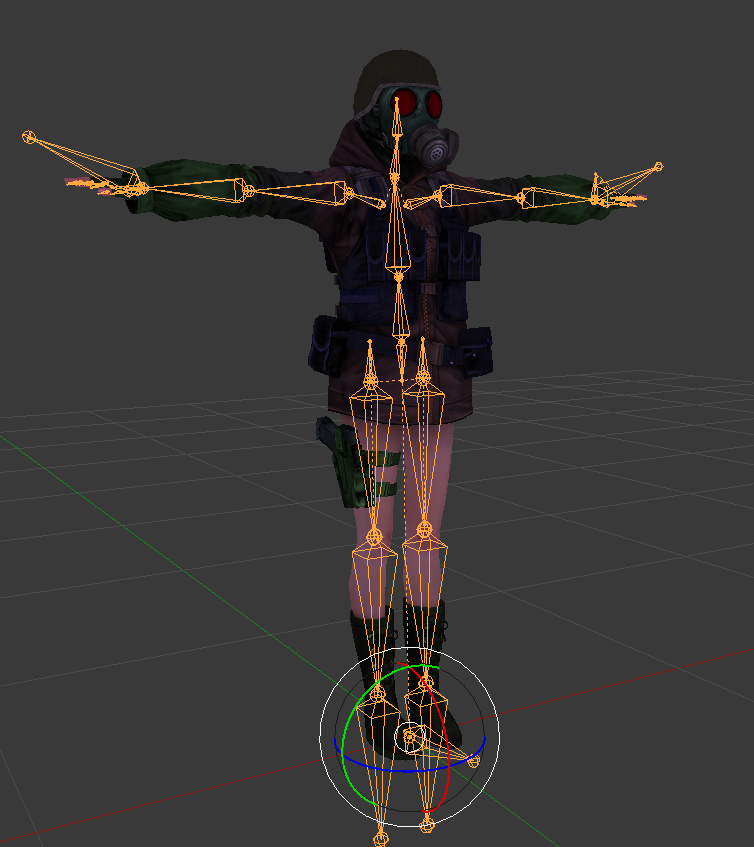
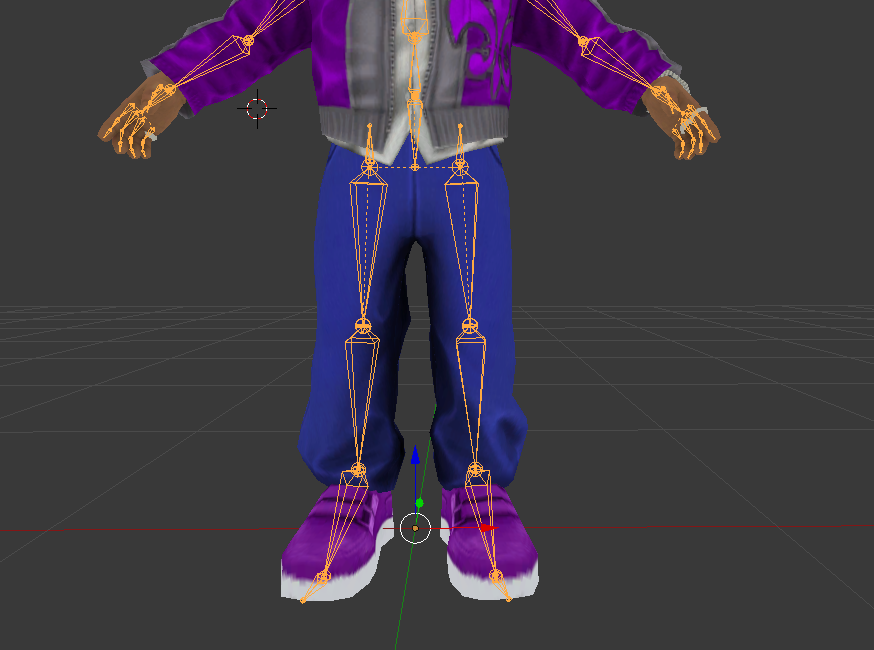
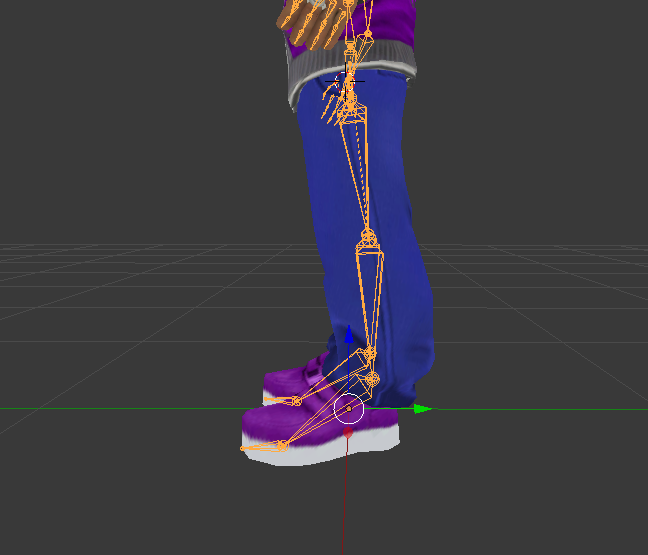
Hello, I'm currently attempting to add bones to a model to later set as dynamic bones - I'm using edit mode and the E key to add bones from the spine and after that I plan to weight paint them, but I generally have not the slightest clue as to how to properly add and align bones; am I doing this right according to the attached screenshot? ( https://i.imgur.com/b0cUWo0.png )


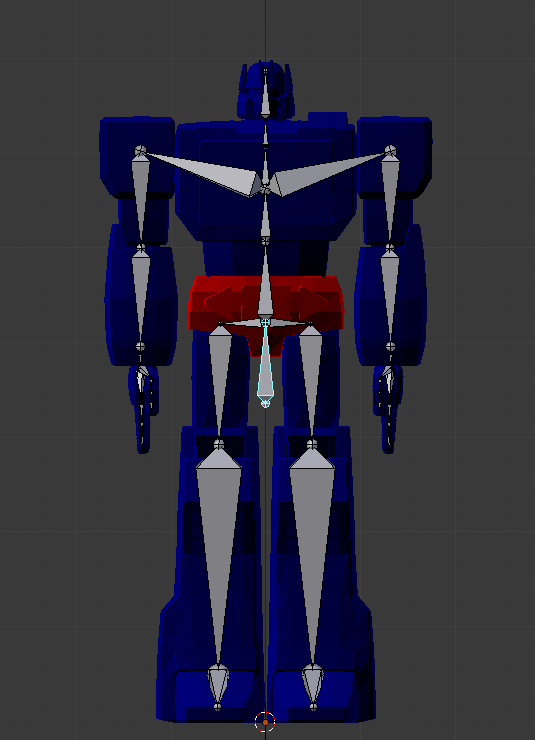


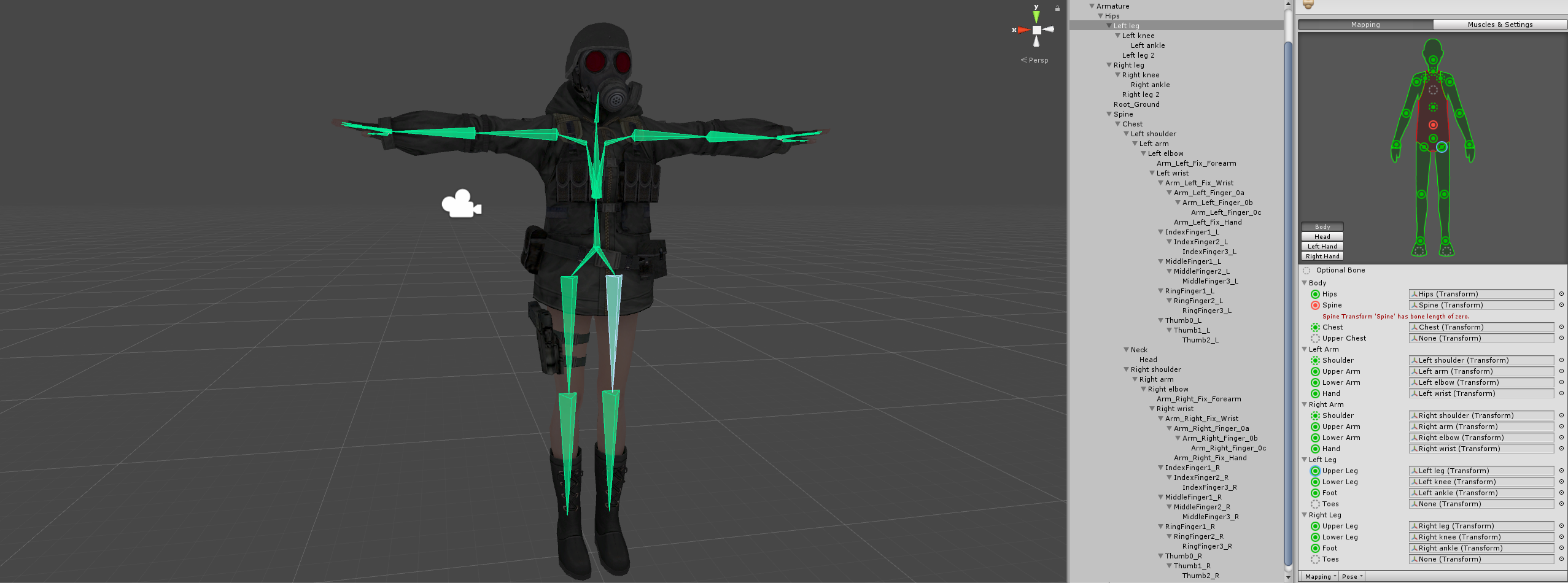





 ivory radish
what are you trying to make dynamic
ruby geode
The new bones that I'm adding to the trenchcoat, I know how to make bones dynamic I'm just unsure when it comes to adding new bones and weight painting. I would just like to know if adding bones as I am is right or wrong.