#avatar-rigging
1 messages · Page 108 of 1
 mental lynx
mental lynx
mental lynx
Oh... and I guess no matter what I do, it thinks the "center" of the avatar is way off to the left of it.
So I cant even set up a view model
View position, I mean,.

What in the world
Hmm, interesting. Not only that, it's acting like I have two active meshes in VRChat. Letting me "crouch" by looking up and down. The camera was also like 3 meters off from where it should be, which was expected.
 naive tree
@mental lynx could be origin issue? shift+S > cursor to center, i think there shouldnt be too many problems with moving it to center, but you can shift+S > selected to cursor, do for mesh and armature, then alt+shift+ctrl+C > origin to 3d cursor
mental lynx
I've already attempted to set the origin again, but it still happens.
I'll try again with the hotkeys, though
Ah, hmm
The armature takes the mesh with it when it moves
Yet the mesh doesn't move the armature when it is moved to the center
So it's a weird push/pull that only one side can initiate
I'll try joining them here and see if separating them does the same
This time it stayed together!
I'll see if that fixed it
Thank you so much.
Well.
I guess it didn't actually work.
Because in Unity, it still reads it as waay over to the left
naive tree
try ctrl+A > location, eventho i think it shouldnt matter as setting origin should apply it
or send me the fbx, i can try to check it out
naive tree
fbx
 fleet turtle
Any reason why an avatar's right leg knee would twitch back and forth randomly? i dettached the toes, the hierarchy is normal, even the walk animations look fine.......i'm just testing right now in desktop mode that is
 fading verge
I remember someone mentioning how you keep your toes from being stuck in the ground without unmapping the toe bones, but I don't remember what they actually did. I'd prefer to keep my toe bones mapped from now on because being able to go on my tiptoes in VR adds a lot to a cute model when they're trying to reach things.
Could anyone give me some pointers? I'd appreciate it.
naive tree
try setting yourheight in system to your actual irl height
fading verge
I've tried that before. Though, no matter what I set the height to this is the result.

This is just standing.

It's like the foot rotates into the floor rather than lifting the ankles upward.
I have models without this issue though. I was just wondering if there was a blender or unity fix for this situation.
 midnight pike
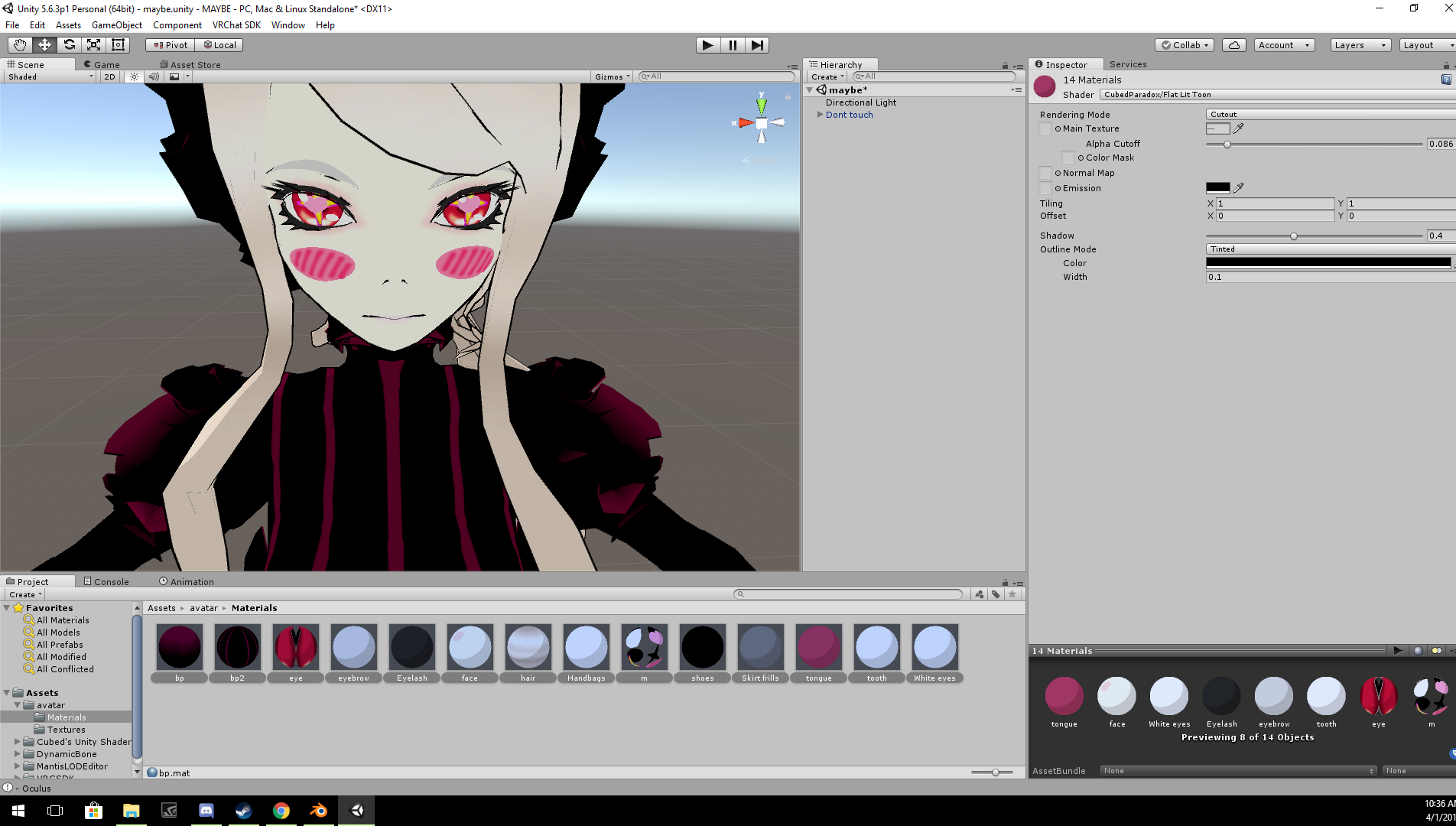
What if the avatar im working on doesnt have a texture folder to put into unity and when i add the materials it causes them to overlay instead of being put inside the head
 cosmic mica
Ive seen an avatar with a working grappling hook, they shoot a chain forward and then it pulls them to whereever the spear landed. How is this possible? How do you force your character's center to launch in a dircetion like that?
 neon quiver
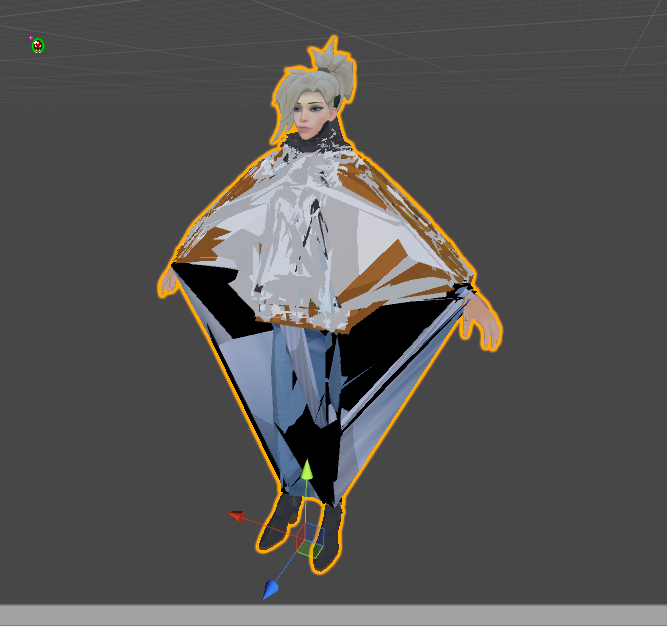
i don't understand. everything is normal looking and funtion proper in blender. and this happen when import to unity. The model was working before. the only thing i did was edit the texture. i really don't want to redo the entire rig again. all the vert group seem to appear find and the eye tracking and visems. https://i.imgur.com/weXhCfL.png
 near kindle
guys

how to fix this
the bones are oriented in wrong direction for whole animtion
i want this as a dance emote in vrchat
 molten field
I have what is probably a really common problem
do we have a faq/common probs list?
i can't get the forearm to rotate with the wrist so i'm getting really weird pinching at the wrist/arm connection
 acoustic bluff
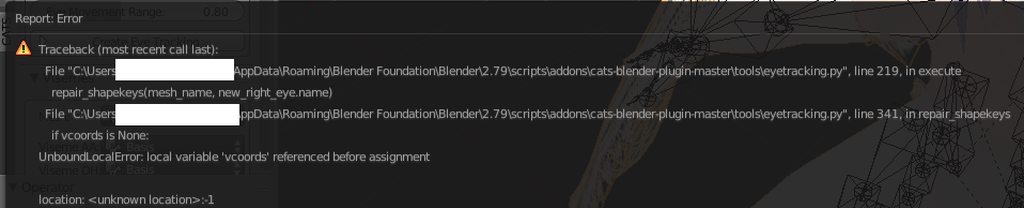
Does anyone know the fix to this when creating eye tracking? https://imgur.com/a/txxXx
 fleet turtle
Adjusting height on character in desktop mode has no effect on anything
 coral plover
So who is really good at rigging avatars and can help me with a elbow issue I am haveing?
 violet patrol
Hey, what is the joint orientation order you are supposed to use for getting everything working proper?
xyz, yzx, zxy, xzy, yxz, zyx ???
I am mainly asking because I am trying to get eyetracking to work without using Blender or CATS
 serene urchin
Does somebody know how i can make one material for every material i have ?
so like one material that has everything the model needds
fading verge
i think in blender
with the CATS addon
there is an option to combine every materials into one
under "optimization" i believe
 minor yew
Would someone be able to help me out? I'm in need of a way to give a couple models finger bones that don't have them. The game I extracted these from didn't have any hand bones at all save for the wrist, because the hands have separate poses instead.
Not only that, I wonder if it's possible to add the weapons as props to the models so that I can interact with them in-game.
fading verge

Learn how to create a simple tongue rig in Blender. We will be covering this step by step in full HD.
😄
 fading verge
no
i need to make the tongue moveable
so i can be lewd
😃
@ivory radish remove the toes in the rigging in unity
fading verge
because of toes bones and height problem
 ivory radish
nvm
it was just bc of the avatar descriptor
it bases IK and stuff based on where ur camera is supposed to be
so when u look down and its too far ahead it will try to bend over
but if it closer to center it wont do as much

 viral torrent
hi everyone
i'm trying to rig my first avatar and i'm having some issues in unity
could someone help me out?
fading verge
im getting an error on a stocking angel mmd model and its not expaining whats wrong with it. the right and left, uper and lower arms are highlighted red on the preview, but not in the inspector screen.

help
i need to put my own version of the mouth and tongue onto a model
how do i do that
am i do a facial expression transplant?
just take the mouth from another blender file
i just want to make it simple
always smiling mouth
XD
askdhaskdhaskdas
the mouth and eyes are linked 😐
ugh
this is a mess
 sand frigate
Does anyone here make high quality custom avatars??
 sinful sundial
Check VRCtraders for commissions from scratch @sand frigate
I do Pokemon commissions personally
mental lynx
Is there a hotkey to reset the facing of a bone?
That would be super helpful right about now
Ah I got it, no need anymore.
So this model I am working with has one mesh for both shoes. How do you make so only one shoe is affected by each foot/bone?
You ever ask a question and then walk away, only to realize you're stupid and forgot the obvious
Because that keeps happening over and over here
mental lynx

well... shit.
So I think I could fill broken areas with ctrl+F and use the fill option
But that creates a ton of vertexes without a texture.
I have no clue how to fix that.
Is there any way to connect faces that are close, but not attached?
That would be a life saver.
fading verge
try flip normals
mental lynx
What does that do, exactly?
fading verge
trying to get a plane with a mesh on it to stand up right in vrchat but rotating it doesnt help
coral plover
Im assumeing it's a bone but. When you touch your chest in VRchat with a vrhead set. What is your avatar hand's colliding with?
once I know what I need to bring foward then my rig will be fixed
mental lynx

Ah, fantastic. Nothing I do fixes the fact the seems are broken on this model
And putting physics on them only exacerbates it.
I found how to select the troublemakers.

Man this sucks that I can single out the issues, but I can't figure out what to do with them
 pulsar rain
so i know all models are not leg tracking support but anyway u can make it higher % on leg tracking support?
 red gulch
there's no way to add physics to a mesh, rather than a bone, is there?
 pale hull
You could use the unity cloth component, though it's a bit tricky to work with.
fading verge
tricky as in near impossible to get right
 gritty nest
Yeah, just use dynamic bones and be done with it
Rigging stuff like hair or tails isn't too difficult
 bitter shuttle
annyone that knows how to root bones in blender??
 urban dagger

How would I delete that orange dot on the crown? I feel like it's some sort of bone that isn't there but it's leaving this dotted line and I think it's causing some issues in the model
 pine harbor
the orange dot just indicates the origin of that object -- that's where its coordinates are being defined from
the dotted line indicates the distance from that object to its parent, so it should be going to where the origin of your armature is
they're just there to show you relations between some of the objects in the scene, they shouldn't actually be causing anything to happen on their own
fading verge
im trying to put a gif on a plane and put it into vrchat. i have the gif part down but when i import it into vrchat it keeps laying down.
Has anyone transplanted the blender monkey head before
Lol
 weak notch
possible to have an avatar with two meshes attached to the same armature in vrc?
so i can switch between meshes with a gesture?
 hushed anchor
Yep
weak notch
how?
weighting both to the same armature makes a bit of a mess
as in, stretches one model quite a lot
weak notch
that's not what i'm referring to
two characters
as in
with their own armatures
originally
combined into one armature
so i can switch avatars technically without actually having to load in
weak notch
how? ;p
hushed anchor
Same approach as I did with the mouse armor.
weak notch
manually weight it then?
weak notch
both have different proportions
hushed anchor
Then use 2 armatures
weak notch
how would i bind both armatures to my movements in VR?
pine harbor
if their armatures are of different proportions, you probably won't get it working very well as one avatar unless it's a generic rig
hushed anchor
Or that

 pine harbor
their builds look similar, but if you want full body tracking, they'd probably need to be using the same armature
weak notch
that was the idea yeah
pine harbor
because the avatar descriptor can only target one armature at a time
weak notch
weighting #1 to #2 results in #2 being very warped and weird
vice versa too
obviously haven't weighted the whole thing jsut the legs
but it still looked very weird and out of place
pine harbor
unless there's something in the animation clip that lets you completely switch the armature being targetted, it can't really track two different armatures to the VR movements
weak notch
so that's a no to that really being a thing then? ;p
pine harbor
as far as i know, yeah
pine harbor
had you not been using full-body tracking, you could've just put both armatures into your hierarchy, and had the animation files move both armatures at once while only displaying one mesh at a time
pine harbor
you probably need to keep them as two separate avatars in that case
weak notch
daaamn that kills my idea
was planning on having some massive build up animation then the transformation ;p
ty
 fickle plover
Anyone got much experience here with Rigging a Generic rig?
cosmic mica
Drawing avatar marker question: my avatar can draw but when i take my finger off the draw button the drawing disappears. How do i make it so once ive drawn something it stays there whether or not my finger is on the drawing button?
naive tree
@cosmic mica https://www.youtube.com/watch?v=nKNvjIw5KwM

Link to the Snail Marker package: https://github.com/theepicsnail/Marker Link to the Muscle Editor I used in the video ($15 USD): https://www.assetstore.unit...
cosmic mica
Thanks!
fading verge
hey guys
mental lynx
I had previous issues of the model not being at the origin, and was given some easy steps to fix this
Well, now it doesn't work no matter what I do
And the model acts like its at the origin even though its sitting 3 meters away
What would cause this?
fading verge
guys
mental lynx
yes?
fading verge
why did my atlas not work
i seperated the eyes and hair from the body
but it didnt work
mental lynx
I have no idea how atlasing works, and it rarely ever did anything for me
Welp. This is completely destroyed my model.
I'm so tired of the origin moving for no goddamn reason
My shapekeys are most likely done for.
And like that matters, I wont even be able to use a camera because nothing will let me move mesh' origin to match the armature's
fading verge
holy shit
i did it
i just atlased the body
and just leave the eyes and hair alone
 light kindle
the origin should only move if you tell it to go somewhere else
or you move the object in object mode
mental lynx
I may have rigged it correctly by hand
Because I was merging multiple assets into one file
And it flipped out after finalizing and merging the armatures
 opal rover
Does anyone have an idea how I would go about rigging the chain of a chainsaw so I can animate the movement?
mental lynx
I could suggest having it be three different items that swap visibility rapidly
mental lynx
Uh oh. Origin of the model is like, halfway up the model, itself.
I'm guessing this means my model will always be halfway into the ground?
pine harbor
hmm, not necessarily if it's a humanoid rig -- although shifting the origin to a more natural spot between the feet sounds like a good idea
mental lynx
It did fuck with the camera bad

VRChat also outright ignored the position of the toes and wont load some weightpainting
And placed the camera below the origin on the model, which is at its waist
Yet its set eye-level from where origin is in the first place.
That makes no sense.
Second day in a row where this completely killed my spirits and I dont want to continue
fading verge
I used to atlas everything to one texture, but now I’m fine with 3-5 materials 🤔
mental lynx
I feel like Im racing the clock beacuse Im running out of free time to actually work on it anymore
And I'll come out of this with nothing finished and all this time wasted
And that's the worst feeling
 subtle moth
i never atlas because its too much work for me 
pine harbor
i find it easier to manually "tile map" your textures into one graphic, if that counts as atlassing
subtle moth
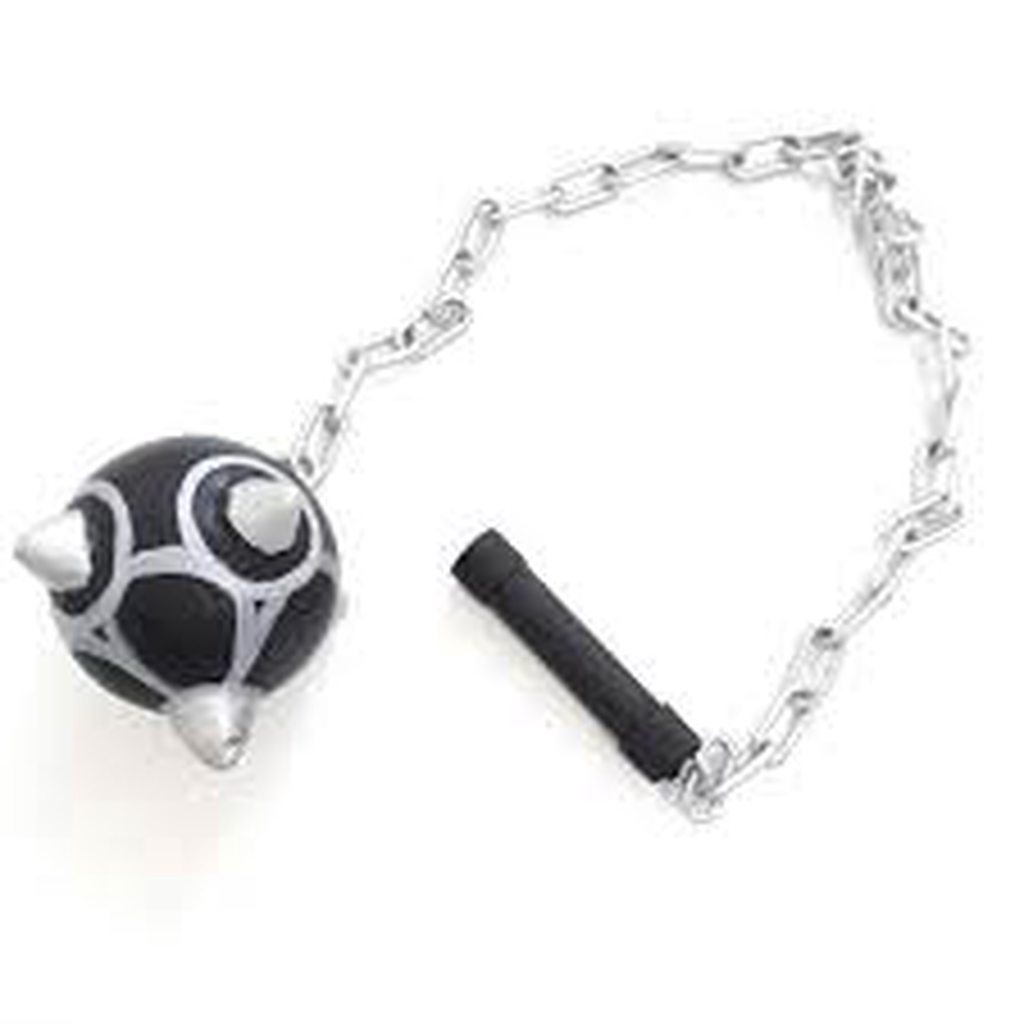
not sure if that belongs here but... is it possible to apply gravity to an object attached to the hand?
like a mace or sth
mental lynx
With dynamic bones, it is. Not sure of any other way.
pine harbor
should also be possible using joints
subtle moth
In a way of me being able to swing it
fading verge
I only atlas if there’s half a dozen or more materials, and the resulting atlas won’t be too large 🤔
pine harbor
but if you just shove a rigidbody on the mace, it'd probably just fall to the ground or through the map
mental lynx
My first issue is that I need to find a way to move the origin of this model...
I think I could manage it if I could move both the mesh and bones at the same time
pine harbor
if we're actually talking about a mace, then the whole thing will probably dangle
if we're talking about something more like a spiked ball attached to a stick on a chain though, you might be able to get the ball to swing around like that
@mental lynx do you have the model in blender?
mental lynx
Yes
subtle moth
more like this https://imgur.com/a/u3SMu
 fading verge
you need dynamic bones then
pine harbor
right -- do both the armature and the mesh appear to be at the origin (as in, coordinates 0,0,0), even if their actual origin points aren't?
fading verge
with either force or gravity applied to it
mental lynx
 subtle moth
and if i swing my arm will it swing as well?
fading verge
@mental lynx press the space bar, type in cursor, set cursor to center, then press space bar again this time type set origin and then set origin to cursor
pine harbor
so it's halfway through the ground?
mental lynx
Yes
Which VRChat has a stroke when trying to deal with camera placement, and ends up somehow making the value a negative
pine harbor
does the model's armature have a root bone, or does it just start at the hips?
mental lynx
So if I had set my camera 1.48, it renders -1.48 in VRChat.
Uh, let me see
How does one check a root bone
pine harbor
look in your armature's hierarchy, and see what the first bone is
if it's just "Hip" or "Pelvis", then that's probably not it
mental lynx
Hips
pine harbor
okay, so we can't use that method -- still workable
do you know how to select vertices on your mesh?
mental lynx
Should I join meshes then, Im guessing?
fading verge
Press N and under Location make sure Z is at 0
mental lynx
It is
pine harbor
i guess joining your meshes will lower the number of steps for what i'm about to suggest, but you can technically do it without joining the meshes as well
just that you'll have to repeat it however many times for however many different objects you have
mental lynx
Okay
pine harbor
hmm...actually, maybe not -- you might only need to do it for the armature itself as long as the meshes are parented to it, but anyway...
go to the bottom of your feet/shoes, and select a couple of symmetrical vertices
mental lynx
Okay
pine harbor
something like the vertices from the front and back of your shoes
pine harbor
is the circular cursor now in the middle of the bottom of your shoes?
 pine harbor
you don't need all the vertices -- you're just using them as a selection point
mental lynx
It was easy to just grab them all at once
pine harbor
okay, if that looks like a good spot to set your origin: press Shift +S, and then choose "cursor to selected"
pine harbor
not of your mesh, no
well, i suppose you can, but it's really the armature's origin you want to move
mental lynx
This is a lifesaver.
pine harbor
choose your armature, and then under tools:
set origin > origin to 3D cursor
and then just reset the armature's new coordinates to 0,0,0
mental lynx
Ive done that now, thank you
pine harbor
hope that helps, good luck 😛
mental lynx
Thank god, thank you so much
Now to figure out why VRChat is ignoring some of the weightpainting
pine harbor
hmm, i might also warn you to save a backup copy of your current file, with the corrected origin coordinates
pine harbor
because i'm not sure if the meshes will do some crazy movements if you de-parent them from the armature
 pine harbor
hang on...that's the mesh you've got selected, right?
check what its coordinates are -- it looks like the origin is now at the bottom of the feet
which might mean you can just correct its position relative to the mesh by setting it back to 0,0,0
mental lynx
Its all 0,0,0
pine harbor
if not, then what you just did with changing the armature's origin will work again here
mental lynx
 pine harbor
it's just going to be a bit of a hassle doing it for all the separate materials
just try to move the shoes last, since that's what you were using as your reference point to set the cursor
mental lynx
Could I just lock its location? Would that carry over to the separated version
I have found the answer, and it is "no"
pine harbor
locking the coordinates just prevents you from manually changing the numbers, i think
pine harbor
joining them without editing their positions probably won't change where their origin is, though yeah -- i'm not entirely sure why it does that either, just that it does sometimes
i suggest repeating the origin-changing thing you did on the armature a bit earlier with all your meshes -- or you can try joining them all together first, then doing the origin thing before adjusting its position and splitting again
mental lynx
I tried, nothing moves with it
pine harbor
you can't adjust the origin of the mesh like you did with the armature? hmm, that's odd
pine harbor
is the origin going between the feet though?
pine harbor
because from the last screenshot you sent, the origin looks like it's in the middle of the mesh's waist
mental lynx
Even if the origin is moved.
Separating materials completely redoes the origin, which is fucking ridiculous
While joined, I have the origin set to the same location for the mesh and armature.
pine harbor
i'm not sure if the origin was redone so much as the mesh and the armature having different origins
mental lynx
Ive mapped them to the same location here
pine harbor
as far as i can tell, the origin of the armature right now is between the feet bones, as you wanted them
from the screenshot you last sent, judging from how it's the mesh that's highlighted, the origin's in the waist at the moment
 pine harbor
hmm, that does look correct, yes...weird...
 pine harbor
i wonder if it's detecting some kind of leftover data from the PMD file, which seems really odd
mental lynx
You can watch it reset
There wasnt really any previous PMD file
This was a new file that was then used to combine multiple different materials from other blender files
pine harbor
wait a second -- what are the mesh coordinates right now?
mental lynx

But If I put those back to 0,0,0, they're nowhere where they should be
Should I try setting all of the Z access to 0 for each mesh?
That looks like it'd work
pine harbor
i'd say it's worth a shot just to see what happens, because it doesn't seem to be correct right now
mental lynx
From what I'm seeing
A ton of these still have their origin where the model moves to afterwards
pine harbor
if there aren't any shape keys on the face (big "if" there), you could also try exporting it and reimporting it back through various file formats to see if that cancels out the weird separate material behaviour there...although now that i think of it, if this wasn't an MMD file to begin with, CATS may react quite unpredictably to it
pine harbor
then that's not a favourable option, yup
pine harbor
give it a shot, yeah -- worst case scenario, just keep in mind how you were doing the "cursor to selected" thing
as long as you're able to pick a clearly defined reference point, you can move the meshes around at will if needed
mental lynx
I have no fucking idea why every separated mesh's origin is still underneath the map
pine harbor
i don't think we really know why stuff happens half the time -- we just remember that it does and try to avoid or work around it >_>;
mental lynx
Moving everything to 0 worked
I just dont understand this program
Oof
Weight painting broke at some point too for some items
fading verge
for the first time i had the feet under the ground problem
is there a good solution for this ?
mental lynx
There is a tedious one that I dont exactly know how to walk you through
Beyond just reading what I just went through
 thorn willow
@fading verge just go to Blender and move your root bone or whatever it is
and make sure the feet are on the ground
edit mode
fading verge
that's it ?
fading verge
it's weird, cause in blender the feet are perfectly aligned with the ground
light kindle
vrchat doesnt care about that
it says hips are supposed to go here, and the rest follows
if the hips are higher then they should be its not gonna change anything
fading verge
let me just confirm something
is thr whole model supposed to got up or just the hip bone ?
which is my root bone
light kindle
just move only the hip bone up in edit mode
fading verge
okay done
light kindle
if the feet look an inch in the ground move the bone up an inch
if your model is on their tippy toes ingame now move it down
fading verge
Oh, that’s the fix? I’ll have to try that 🤔
light kindle
if the hips are jutting shorten the hips (legs sticking out, not legs bending when looking down)
mental lynx
Are there places that I can just commission someone to fix a model for me?
I think I just hit my absolute breaking point
And Ive pretty much run out of free time to work on this for awhile
subtle moth
yes @mental lynx
you could probably open a commission over on the vrctraders discord
i will pm you an invite
pulsar rain
I wish I could get this 1 avatar fixed with the leg trackers
 proud dome

 forest nova
 stoic urchin
Is there a way to adjust the mouth bone rest position?
I have an issue where the mouth is just open when the model is loaded in game
and stretches even further when talking
Derp I just found it
Was something off in the Muscle settings
Well I though adjusting that helped
but I guess not
fading verge
How do i merge the bones in the first picture to make it a single bone like in the second picture? https://imgur.com/a/c2Lnx
 brisk mesa
you can 'merge' bones but
it's not called merge sometimes? there is regular merge for bones but the other one is Dissolve
two bones into one
as for the weight painting though i can't tell you what's gonna happen if you do actually do that.
also i dont know why there's two ways to do it, but maybe make two savefiles and see which one keeps the weights :S
mental lynx
Man. I'm trying to remove all polygons of something under clothes, but I keep accidentally selecting other parts of the bodies
Just tedious.
mental lynx
yes?
subtle moth
if you have separated by materials already
why dont you just hide everything except what youre trying to delete
mental lynx
I need to line it up
And I keep accidentally selecting parts of the arms and legs
But I need to see the outfit to know where I can remove
subtle moth
then separate em
select what youre editing
like select both arms
then hit l
and split it to a new mesh
so you cant edit anything else anymore
subtle moth
np
mental lynx
Quick question.
https://gyazo.com/c201f946e825546277e07d2f108034ea

Do I have to apply this to actually have it active?
Any model I ever see has it sitting in the object modifiers without being applied.
Or at least doesnt seem like it
 restive shale
I think you can just leave it sitting
 restive shale
Are they hand extra bones or just hand bones?
mental lynx
They seem to be extras
But with the same matching names?
Ive removed them, lets see if posing still works
Well, everything still works...
So I guess I will move forward cautiously.
Huh, weird.
A ton of bones duplicated like this
My eyes stopped tracking...
uh oohhh
uuuhhh ohohh
mental lynx
I did not
And they're still weight painted
AND the bones still move
So I'm trying to figure out what could have happened
Ugh, even the bones are moving weird and away from where they were
I am at a loss. I guess I should stop for the night
 mental lynx
I guess you could tie two to the same bone?
 blissful onyx
I want to have the main eye on the hatch to be used by the head animator and the cameras on top to be used by the eye animators
but when I put the camera bones as children of the head bone they move out of position whenever the head bone moves
how can I change the rig to stop them from moving from their positions and just rotate when the animator needs them to?
 fading verge
they are too forward on the head
put them inside a little
also you can try to limit the movement of the eye bones so it doesnt go too far up
mental lynx
Oof.
Blender crashed.
After random bones duplicated, everything went bad for a bit...

Anyone know how I combine these?
Oh, for whatever reason, these are separated from my armature... And I dont know how to correct it with shape keys
light kindle
oh god
yeah thatll happen often
save beforehand
a lot
youll probably have to move the original bones in editmode
itll only crash when you tell cats to do its thing so save before that
mental lynx
I had to just give up
Turns out the model was just badly made, and was a mess if you tried to lower the polycount
And with said polycount starting at 200k...
It's not worth trying to figure out anymore
light kindle
that looks like it should be less than that though
mental lynx
This is two models in a row where I put in a ton of work and had to give up
I got it down to 50k
It busted the model bad.
Its my own fault for not testing it after
I went back, got it down to 150k as a test
Still broke it
Reverted, reduced it to only 190k. Still broke.
light kindle
still, that shouldnt break eyes
mental lynx
Gave up
light kindle
thats cats being stupid
 hot flame
Hi, im having this problem for a while now, is there anyway to make it so that SFM .qc models get imported the correct orientation?
and Edit mode and Object mode have different orientations

 calm needle
try changing the up axis option when importing
hmm
by looking at that, it might be importing a pose
disable the import animation option and see if that helps. if not, then try going into pose mode and resetting the pose?
calm needle
np. I had something similar happen to me before 😛
 pine harbor
that's most likely the bone roll being off -- try setting them all to 0 in blender before exporting?
check the bones around the right leg in particular
calm needle
yeah. i remember i had really exploded knees due to the roll before. Should be Alt+R in blender to rest the roll of a selected bone
hot flame
it fixed woohoo
hot flame
Im guessing not, but is there way to sayyyyy, change the rig look?, so its not those sticks and balls that valve rigs have?. or is that just what they come with
Since they are entirely different kind of bones i;d asume not
calm needle
in blender, you can change the way the bones looks
gritty nest
I find it easier to remember to press space and type "Clear pose transforms"
gritty nest
Are there any tutorials on rigging fingers?
My model came in like this
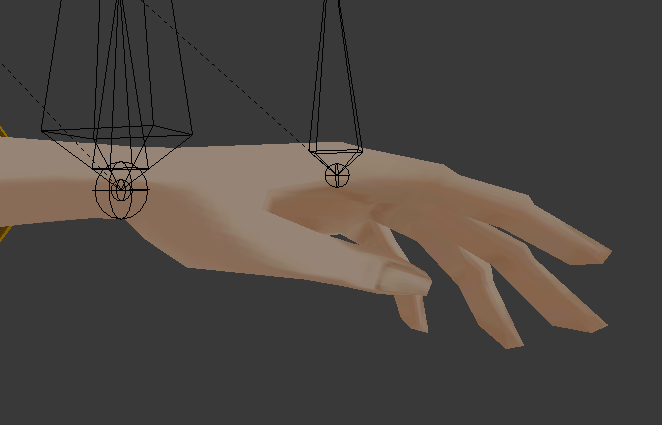
Ignore the weirdly placed bones, it's a game rip and it does that
I've seen tutorials that deal with rigging fingers when they're spread out, but these are slightly bent
calm needle
i just tend to place bones inside the fingers, auto weight paint, and then fix errors manually
gritty nest
Wait, auto weight paint is a thing? Cool
I've seen Mixamo successfully rig the fingers on this model before
Wish there was a Mixamo alternative that would be able to do small parts, like just the hands
fading verge
@gritty nest
I cant find the guide on fixing the blushing shape key
How do i fix it?
gritty nest
No idea
Alright, so the bones are pointing upwards in this rig for some reason, and rotating them causes weirdness. Is there any way to still rig the hand? I can't attach the new bone to the arm without also moving the arm bone in the process, since it's connected
How do I extrude a new bone without necessarily having the new bone be touching its parent?
gritty nest
Alright nvm, rigging hands is far too difficult, just not gonna bother for now
Even with automatic weights
Model is also a bit too low poly for it to look good anyway
Fingers themselves were fine, but the thumb created holes when moved
cosmic mica
i was in vrchat and my lipsynching was working but it suddenly stopped - is this a bug?
cosmic mica
actually now lipsynching for all my avatars isnt working anymore
gritty nest
So I persisted and actually successfully rigged 1 hand
Problem is, the thumb doesn't rotate far enough to give a proper thumbs up
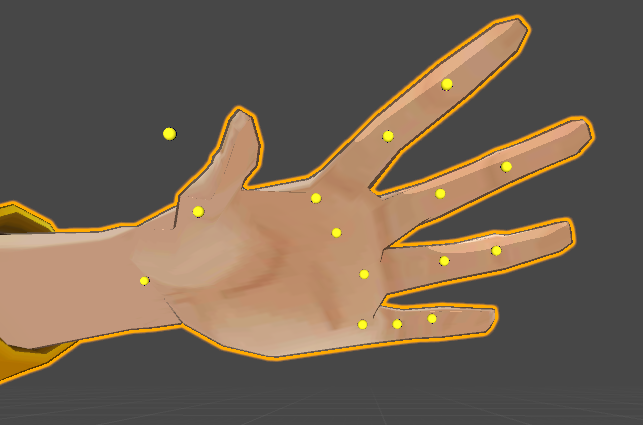
The yellow dots is what the Muscle Animation Editor tries to get the fingers to do
I only have two thumb bones created, but another model works fine with that
Ah, it seems like it doesn't work correctly in Blender either. How do I get the thumb to follow the actual bone more closely?
Yeah, seems like only my thumb is acting up this way
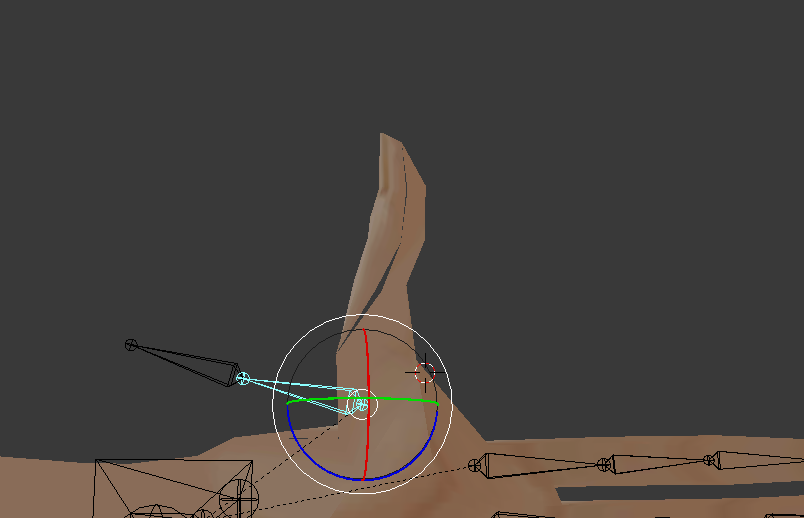
Ignore the mesh tearing for a sec
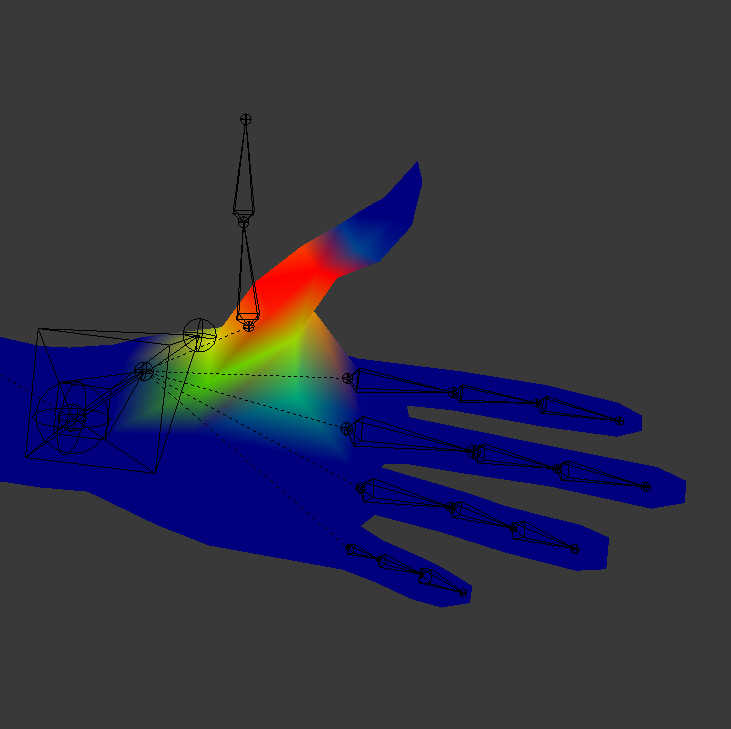
The mesh tearing was fixed by removing doubles, but the thumb still doesn't move enough with the bone.
Even if I were to weight paint the whole thing red, it still doesn't move. Here's how the weight paint currently looks. Yes, it might be sloppy
 cosmic mica
sometimes the mesh is weighted to multiple bones check witht he surrounding bones
check the index finger first
 woeful sonnet
how does one get gestures on a non humanoid model?
light kindle
yeah can you check where the bones are in cats
the ones cats made
since cats can be problematic with that ahaha
 tame skiff
@woeful sonnet You can't, sorry. Emotes are possible, but bugged
fading verge
How do I rig some none-human object?
gritty nest
@cosmic mica thanks, I had totally forgotten that
Thumb was also weighted to the hand itself
Other fingers were fine
cosmic mica
Yeah, it does that. Hate it when it does that. XD
gritty nest
Nah, that was the original bone, not something it did by itself
fading verge
wait a sec

This is a LowPoly model of the AMPsuit from the Movie ''Avatar''. It has no gun yet, sorry. It is fully rigged and ready to use ;) Sorry for my bad english I am from germany :) Have fun!
Im trying to get this as a avatar
 subtle moth
that is pretty nicely rigged
well which bones is it missing
imma guess
a "head"
and a necc
subtle moth
can you hit fix model
 fading verge
probably, as you said- neck and head
subtle moth
then go to the highest bone
press tab
select the highest bone of the two inside cockpit
then drag the new bone upwards
fading verge
ok
subtle moth
and do it again
subtle moth
then you need to parent them so it looks like this
fading verge
Im totally new at blender
subtle moth
 fading verge
😮
subtle moth
so when you have chest open
there should be shoulders and neck inside
and inside neck the head
pretty much
not gonna guarantee anything but that might work
fading verge
yes
subtle moth
now your cursor is two lines that intersect
right click on the top bone of the two in the cockpit
so its yellow
fading verge
yes
fading verge
yeah
subtle moth
i dont know if it works but try if you can drag the neck on the chest
and if it goes under that ones hierarchy
subtle moth
yes
fading verge
its not working
so I click that middle of the neck bone and drag it to the chest?

like this?

 fading verge
😮
fading verge
double click?
subtle moth
there should be a little plus on the left

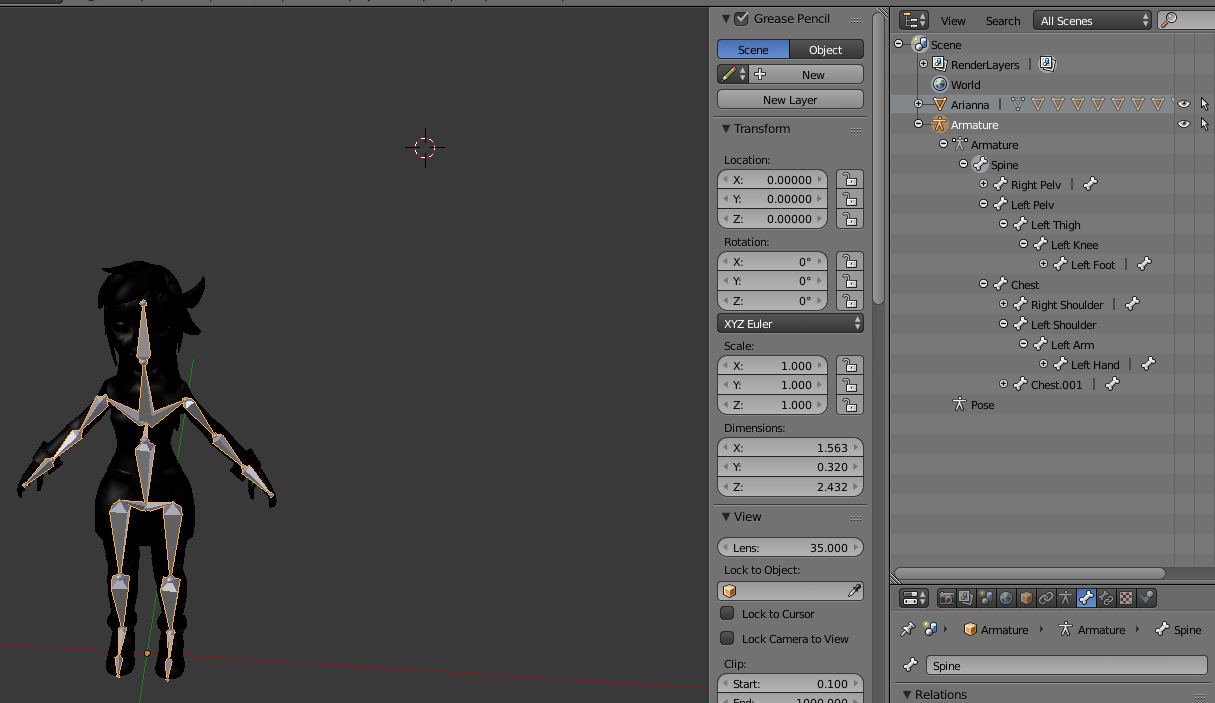

 light kindle
dunno whats the problem here
fading verge
help
fading verge
?
subtle moth
send me the model via pm
subtle moth
ill try to send it to u if it works
fading verge
it will be 2 am for me.
light kindle
whats wrong with the model
fading verge
not enough bones
subtle moth
@light kindle its missing necc and head XD
fading verge
=cancer
light kindle
just make dummys
light kindle
select the chest
subtle moth
would you mind taking over?
 subtle moth
they need to be parented correctly
fading verge
Im totally new at this
subtle moth
dont know if they are
light kindle
dont thin the model has a "head"
ok open the properties view
choose the first bone you made
fading verge
yes?
 light kindle
 fading verge
uhh
light kindle
can you change one of the hierarchies on the right
fading verge
I dont see it?
light kindle
hit the bone icon
fading verge
yeah
light kindle
then scroll down to relations
light kindle
check names there
fading verge
yes
light kindle
they good
fading verge
?
light kindle
chest.001 should have chest as the parent
fading verge
chest.002?
light kindle
chest.001 should be neck
light kindle
er if the parents and names are fine i think thats all
light kindle
he doesnt have a head or eyes or anything
light kindle
objs have no bones
light kindle
3ds models do as well but blender is problematic with em
 light kindle
enforce tpose
fading verge
how to change its pose?
light kindle
^^
uh its near apply
at the left
theres enforce tpose
sample tpose
and the one youve got it on
 light kindle
?
bone rolls for the spine and hips at 0
and head
everything supposed to be facing straight down
cosmic mica
my lip synch visemes were working, but suddenly are not in vrchat. I have changed nothing so i dont know why it stopped. They work in blender and they are properly applied, they just stopped working all together. what do i do?
gritty nest
They work in Unity, right?
Make sure you're not touching any of your lipsync shape keys inside animations, such as gesture overrides.
 hollow goblet
hey guys, can i get a little help?, i downloaded an avatar and everything worked well, except that his left hand is pointing up, because hes holding a ball, but i deleted the ball, and now the hand is stuck like that
pine harbor
check your bone rolls on the left hand, particularly around the affected bones (in blender)
you want all the bone rolls to be 0 usually
hollow goblet
sorry i am pretty new to unity, how do i go to blender?
pine harbor
ah, you downloaded a .unitypackage rather than importing something through blender? that may be a bit trickier to deal with
blender's an entirely separate 3D modelling program that people usually import models into, in order to fix up models and then export them into a format that can be read by unity -- it sounds like you sent a file directly to unity instead
hollow goblet
well i downloaded unity 5.6.3.p1 and got the model from model resource, and did it on mixamo
yup i guess i did
fuck
pine harbor
i can't comment too much about mixamo having never used it, but you saw a preview of the model while configuring it in mixamo, right? were the hands pointed correctly back then?
hollow goblet
the hands normally are directed up
i just want to bring it down
for some reason rotating it down doesnt work
in the rigging aswell
hand* just the left one
pine harbor
hmm -- i'm just making guesses here, but if the model doesn't follow a bone properly when you rotate it, it normally means the weight painting is off (i.e. the auto-rigging failed to properly influence parts of the 3D mesh with the bones)
it might be because of the ball, that might be confusing mixamo
hollow goblet
in the rigging when i direct it down, it just says its not in tpose
pine harbor
yeah, the humanoid rigging window normally wants you to configure your model into a pose similar to this:

if rotating the bone around your left hand isn't working though, that means the file you got back from mixamo probably isn't weighted correctly
hollow goblet

thats how the hand normally is
i dont think it has anything to do with mixamo
because in the website where i got the model, the hand was like that
pine harbor
what format was the file in where you first got it, before putting it into mixamo?
hollow goblet
i think fbx
pine harbor
try importing that directly into unity -- you might not even need to put it through mixamo
FBX files normally already come with an armature/skeleton for the model
pine harbor
people only really go through mixamo when they have something like an OBJ file, which is basically a 3D model that doesn't come with a skeleton (i.e. you've got nothing to actually pose it with)
hollow goblet
i just checked the model its normal
what the fuck
but its zip
does it still work?
pine harbor
unzip it and use the .fbx file inside the archive, if there's one?
hollow goblet
dont think there is one
theres an obj tho
huh
i just did it
hand still up
i guess the person who published it placed it down or something
fukin hell
welp gonna do more digging, thanks for the help mate
 hollow smelt
anyone know a fix yet to get rid of the thigh bones rotating 90 degrees to the side which only seems to happen with full body tracking? Snep's tutorial doesn't really fix that
 main sage
is this the channel to ask for help about adding shapekeys / visemes to stuff? cuz this model has 0 shapekeys besides replacing a hair accessory
 shell kraken
anyone know the good dynamic bone settings for nanachi?
fading verge
Just shapekey it in blender then activate the shape key in unity
main sage
cept idk how to tho
 digital willow
anyone here good with bones in Blender? please dm or at me
main sage
@digital willow decent-ish. ik how to make dummy skeletons and what not
digital willow
@main sage Im wondering about the position of bones on an MMD
rolls and the x y z thing
what is normal and not
could u have a look?
main sage
mhmm
 sleek jetty
Is anyone willing to do the mouth visemes ah, your, there for me?
it's super frustrating because the lips of the model overlap.
 fading verge
should i activate dynamic bones on my skirt
my legs go through my skirt
if i enable dynamic bones it will fix it right
as there are bones in the skirt
fickle plover
It wont immediately fix anything
dynamic bones are really only a method to have bones act based on movement and gravity
it can be used to solve some problems with the use of colliders,
but there's always going to be the chance that you move too quickly for the dynamics/colliders to react
 cobalt fiber
subtle moth
cobalt fiber
subtle moth
@fading verge heh thats gonna be a bit challenging
depending on what you want to move it with
but id personally just paint it in sections aligned to the bones below it
 subtle moth
does it work now
 sinful sundial
Lol just reassign your bones
sinful sundial
In the green "configure bones" mode in unity
Go through the list on the right
And see if the bones are assigned correctly
In your case, it looks like the mech's arm is set as it's leg
Fix rhat
fading verge
rlly
 near tree
I need some advices about the avatar rigging. I saw my head move too far away from the body while running in the VRC. How can I fix it?
sinful sundial
Any screenshots?
fading verge
how do I change my cam position?
near tree
@sinful sundial Think about a chicken is running and its head leaning backward/forward.
sinful sundial
hmm thats hard to visualize
@fading verge change the position of the avatar descriptor


 subtle moth
...
dats bad
if you dont have one
it will a. not export on humanoid
b. not animate as a humanoid
subtle moth
? o.o




 subtle moth
so its transparent?
fading verge
?
subtle moth
what do you want it to look like
fading verge
ye
subtle moth
so you can see inside?
subtle moth
where the files are