#avatar-rigging
1 messages · Page 102 of 1
 next prairie
 lone depot
@versed apex if its a mmd file then use the cats plugin it can able to separate the meshes
 versed apex
yeah i did all that, figured it out
but do i have to delete all the bones?
or like how can i reattach the bones together?
lone depot
hmm... i think you could delete the bones from the clothes that are attach to the body i guess..

 minor valley
Go into blender and delete them, or move them into the head and adjust the shape keys if you're planning on using them @scarlet drift
 scarlet drift
How do i make them ivisible?
@lone depot
@minor valley deleting them causes a black hole in the model
minor valley
Delete them in blender, not unity.
lone depot
@scarlet drift try to set the textures to none in unity
 minor valley
What in the world are you even doing at the moment LOL.
minor valley
I think what he wants you to do is go into the material list, find the emotes and then set the attatched texture to none, instead of whatever they currently have attatched
And after that you can reduce their opacity to 0 as well.
minor valley
Though whenever I did that in the past it used to cause rooms with a sun that creates shadows and the like to create weird shadows all over the face, though it's not a problem on all models. Just some.
 novel wharf
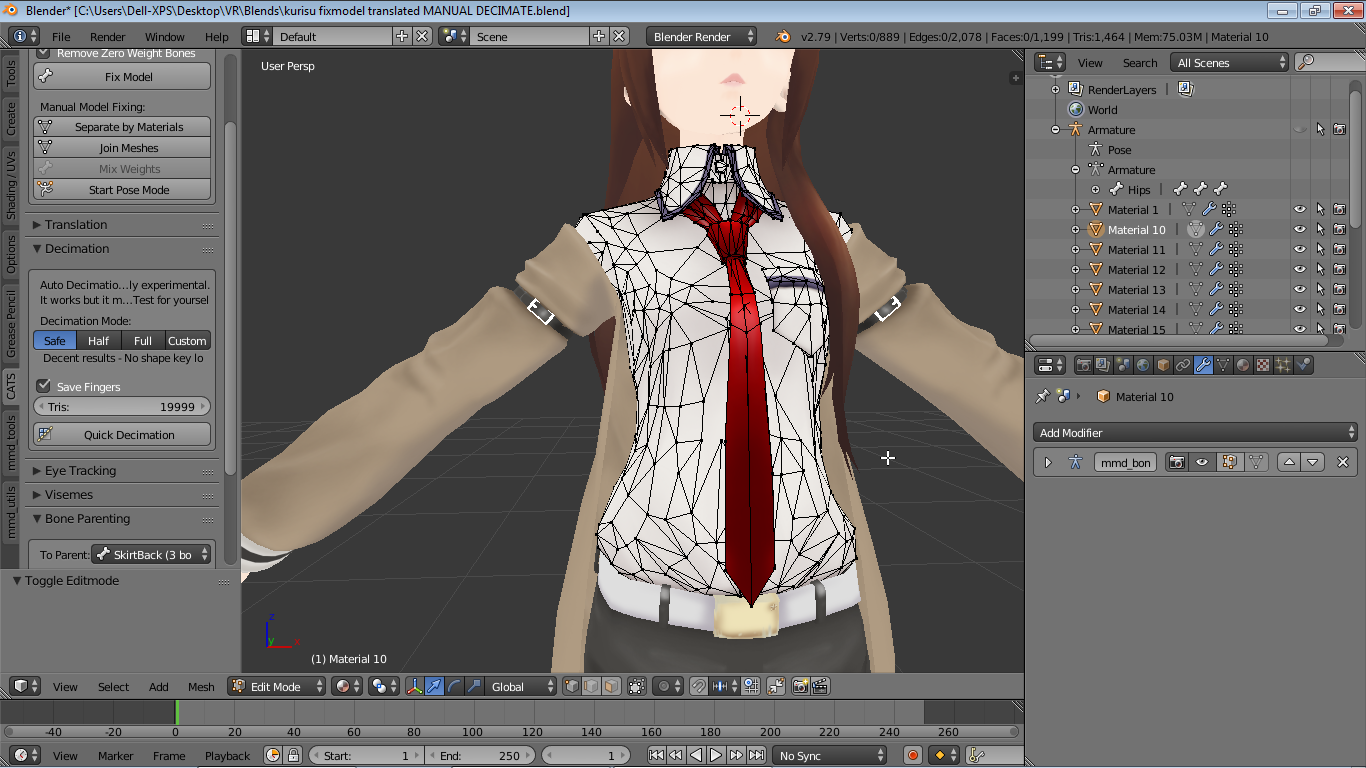
So I may have... deciated this tie too much manually without realizing I need to have it bend when the body bends forward/backward. https://i.imgur.com/R2llmSn.png Is there a way I can manually add vertices around which the tie can deform? Or do I have to go back before I redecimated everything?
 minor valley
Which is why I personally either remove them or shrink and move them into the head then change the shape key.
versed apex
@lone depot you think that will work ? delete the bones, then reattach it to new model ? wouldnt that fuck up the model doe ? ish
lone depot
try to save it as a copy encase if that'll be the problem
minor valley
@novel wharf I would recommend just redoing it. Sure it'll be a bother, but when adding verticies can fuck with the model more than what decimating it can do.
novel wharf
;-;
I wanted to make the tie non-dynamic (the tie was weighted to bones within the tie) but that would require some reweighting
I guess I'll give in and just make the tie dynamic
minor valley
and weight painting is just a bother.
Like it's do'able, but it's just a hassle when you over decimate something.
Also, Kurisu is bae, nice avatar choice.
novel wharf
It was a request from a good friend. 😃 I'm planning to make an Okabe if I can find one
minor valley
Okabe is all over the place so finding it is surely no challenge.
novel wharf
Weirdly enough, I couldn't find a quality model
 lunar tartan
Anyone know why in Blender my Faces count is 19,985 but when I try to upload it unity to vrchat it says my poly count is 27,892?
minor valley
@lunar tartan It's about the verticals not the faces
minor valley
But ye, in blender it's called Tri's my bad.
lunar tartan
My Verticals are at 18k
minor valley
Thats the count you need to be looking at
novel wharf
Don't mind me actually. I may not know what I'm talking about.
minor valley
No, the count is generally the same as the TRI count
So look at that it should be 27892 in blender if that's what unity is saying your poly count is
https://gyazo.com/82658325c05841ced56662dd30018568 when decimating models TRI is the count I look at, and whenever it's low enough it works.
 lunar tartan
Oh I see. I never had that issue before since the faces always matched the Tris. So when I saw the faces drop below 20k, the Tris did too. So there was no issue.
Although, I decimated differently instead of collapsing
minor valley
Planar?
minor valley
Planar is better imho, easier to use and keeps the model looking, fresh
and not like a jagged spikey model of doom
lunar tartan
that's why I'm using it this time
Now I guess I have to go back and use it some more
I just applied all my dynamic bones too, I don't want to reapply them all
@minor valley Actually, collapsing is easier since it's just a slider, while planar has more options. I didn't know which one to use.
So, what's the best way to go back and make adjustments in blender without losing all your progress in unity?
minor valley
@lunar tartan Just save the components from the model in unity, as reopening your now fbx model in blender tends to cause problems and just butcher the entire thing. This is why I picked up the habit and recommend it to everyone of saving after every material removed or decimated in blender as a seperate save file so you can go back to whenever you needed to etc before exporting it.
lunar tartan
I mean, it's saved in blender, but after I decimate it some more and export it to unity, wouldn't I have to reapply everything to this new fbx model?
 autumn parrot


 rain imp
looking for help with a multi hand setup

 unborn sapphire
https://i.imgur.com/LLnwgdN.png
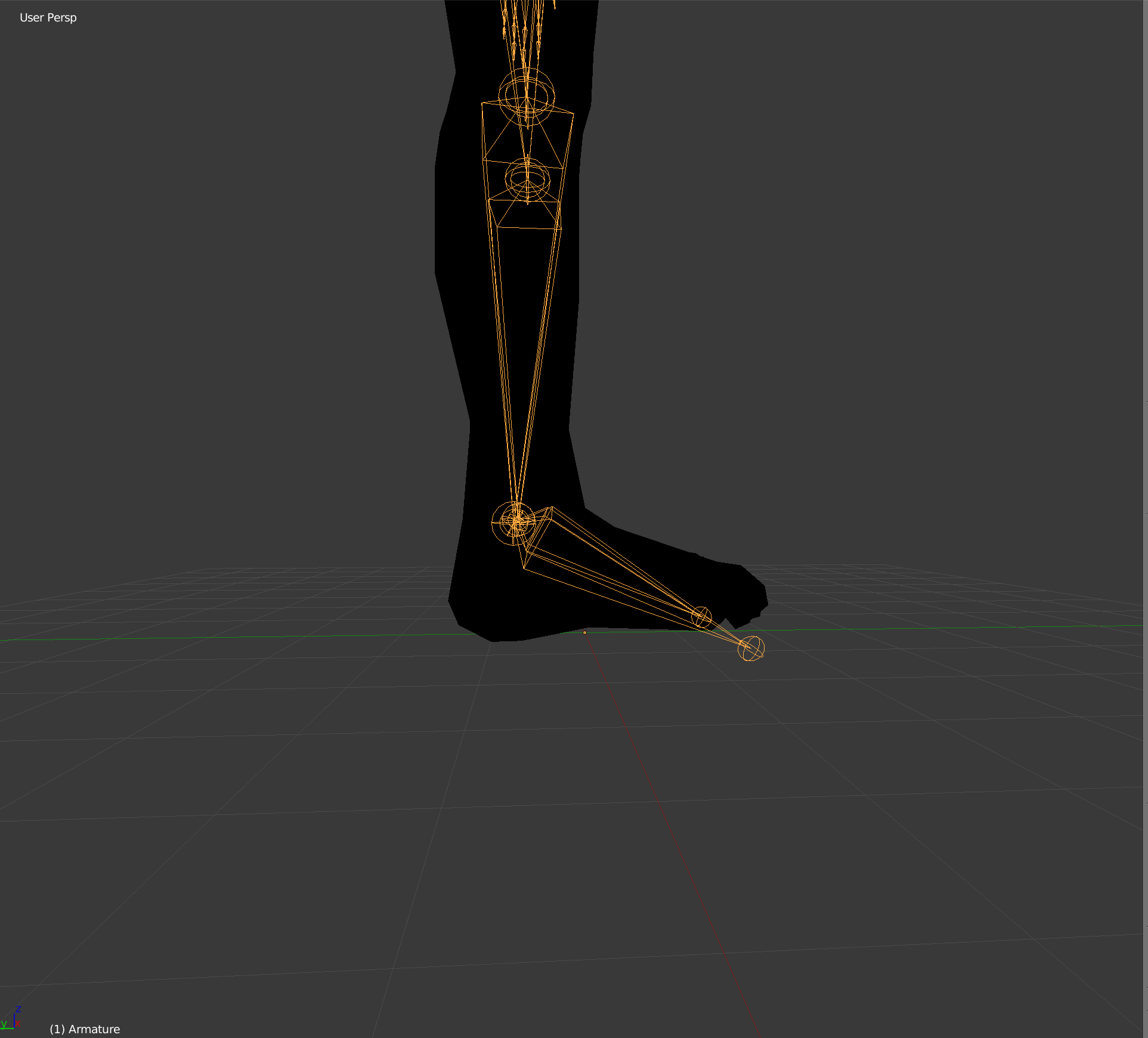
Is there a fix to this ? Every single small avatar I make stand on his toes when I look down.

 hazy knot
or just don't map toe bones
unborn sapphire
does it need to be the same height as the one setup in oculus ?
because it is
and toes are already not mapped
hazy knot
If an avatar doesn't have normal human proportions, it's much more likely to happen.
rain imp
it a avatar is shorter than you than you have to set your hight in vrc to avatar
unborn sapphire
ok I'm gonna try
in vr it fixe the problem but in desktop changing height doesn't change anything
 lunar tartan
So then how would I fix this? It happens on both arms btw
unborn sapphire
do you use blender ?
lunar tartan
Yes, I hope I don't have to go back and adjust it there. I had to do that too many times already for other reasons
unborn sapphire
you might need to go back
lunar tartan
I don't want to reapply everything in unity again
unborn sapphire
I don't think you can fix this in unity
 honest kettle
normaly you dont have to reapply stuff in unity
at least if you fix weightpainting
 primal river

HAHAH
this is pretty fun
but anyway does anyone know how to make the root bone not affect certain child bones? or do i have to make the mouth bone completely sepparate
because right now the head bone has the mouth and ears as childs
is there a way i can fix this?
im worried about jaw flap bone not workin properly if i unparent it or something
honest kettle
is that dynamic bones?
if its just that you can increase the size of "exclusions" and just insert the bones there which should not be affected
lunar tartan
So anyone know how to fix the arm issue?
honest kettle
😛
primal river
allright guess ill just close blender to revert back
jesus why didnt i see that earlier
 wheat flower
My headswapped avatar looks down when I look up, and then up when I look down
honest kettle
left / right works?
wheat flower
Yeah.
honest kettle
hmm... weird
 primal river
i am but, everything i try it still jumps way too much
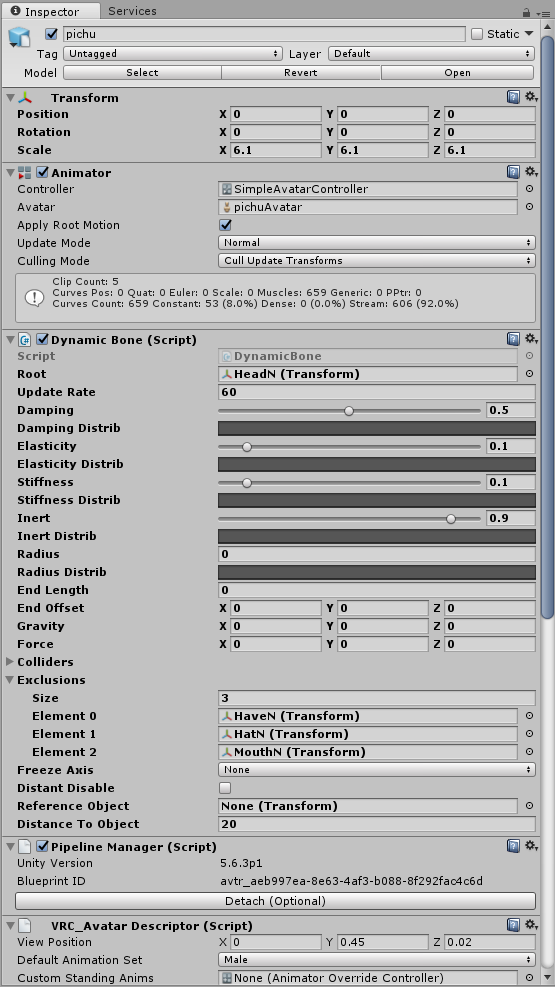
these are the current settings
it also might be the way the ears are boned, because the way second half of the ears works is by just the rotation of it
https://gfycat.com/DownrightOrnateIlladopsis

see its not the settings aswell because i have dynamic bones on the tail aswell, and those are working fine
you can kinda see them on the previous gif
primal river

 spice crypt
do you know why dynamic bones are not working in the game if everything works in the preview?
primal river
nah i figgured it out @spice crypt
since its ripped from a game its bound to be weird, including a thing where the rest of the upper half of the ear works by just rotating the bone
and since the bone is super tiny, i think dynamic bones works mostly with the position, so it moves it by drastic measures
if i could figgure out how to make the dynamic bone work based on rotation, it would work
think of it as googly eyes
like, 3d googly eyes
if i could have a way to make the bone move like it was a 3d googly eye, meaning only the rotation, it would work properly
but for the time being i just excluded the bone from the dynamic thing
ive seen googly eyes in vrchat before, just gotta figgure out how to make it happen
though if anyone allready does, please @primal river
maybe i could make the tail and head the same position
nah it might not like it since it would be 0 lenght thing
versed apex
when im attaching accessories to my model, does it matter where i drag them to ?
or no
 fading verge
Yes
In the hierarchy?
Since if you leave the hat on the avatar for example, it has to be the child of the head
 stone sun
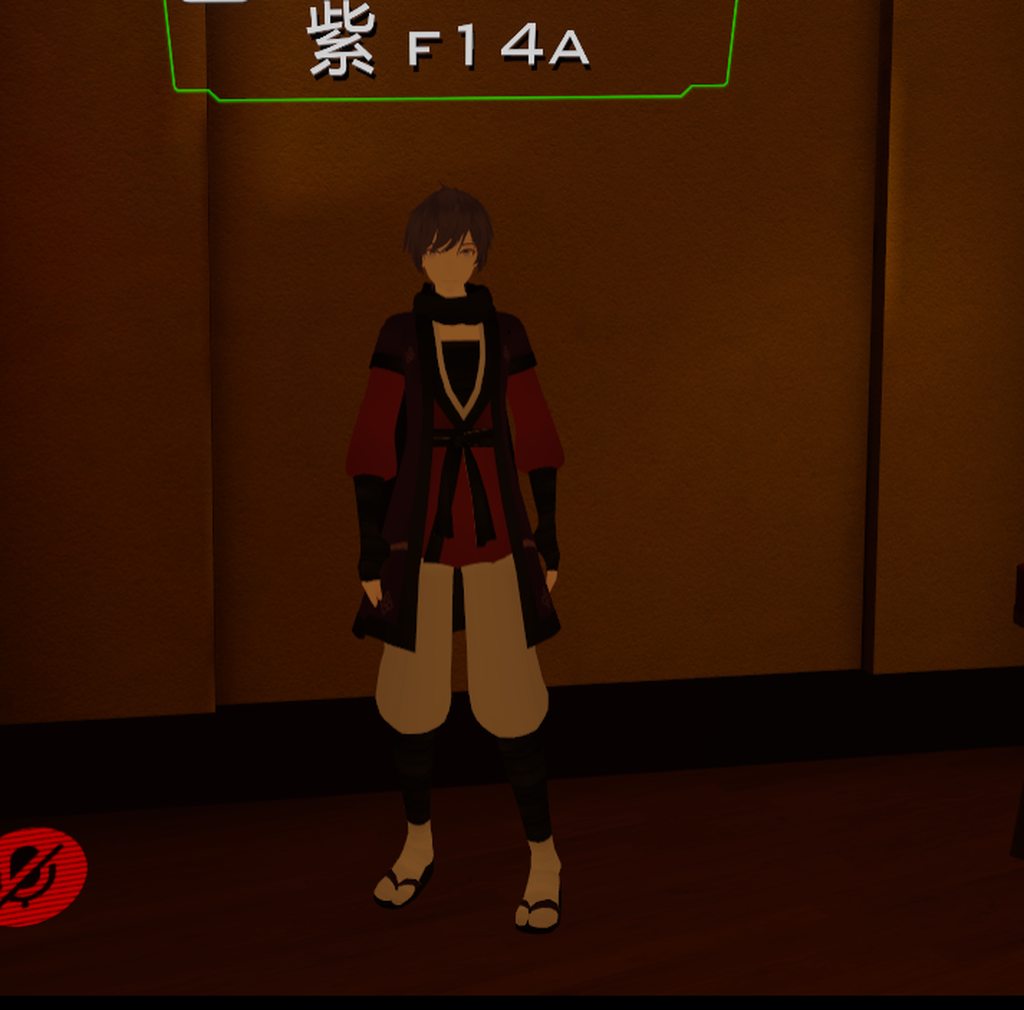
https://imgur.com/a/C6JqK anyone know what this model is from?
 versed apex
@fading verge child of the head? what do you mean by that
fading verge
The head's bone is the parent for example
And setting anything under that parent are childs
versed apex
oh okay
okay what bout a scarf that has all this ?
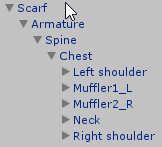
where should this go ?
neck ?
or chest ?
@fading verge
fading verge
Hm
Neck
Try neck
If it looks weird- try chest
Oh sometimes if you do this certain meshes won't show up on the mirror
Don't worry though, I think people can still see it
versed apex
yeah that happens with weapons and accessories in my hands
but like i straight cant see my character lol
 surreal parrot
ok
so
I am pretty sure my avatar's skeleton was fully mapped
and all that
but this showed up

really not sure what is wrong
the skeleton seemed pretty well done and I have tried a combination of the spines in the configuration tab
they either bring up the usual "x is not a child of x" error code which is just because the wrong spine components are being used or something
so I really have no clue here
waaaaaaiiiiit
is the neck necessary if the head is already mapped?
because that is the only thing I can think of thats missing
surreal parrot
well I'm not too sure but no errors are popping up
however it does seem that the neck is not there
so that is probably the problem
surreal parrot
ok, well that was odd
the neck wasn't there and it was actually the head
and the actual head was the head end?
so that was strange
fading verge
Mhm
surreal parrot
also now it is just saying to make sure the chest is the parent of the neck and shoulders
so I guess back to messing with spine configurations
fading verge
Yep
surreal parrot
also how would I actually fix this if none of them work>
?
ah
nvm
there was a neck
just was a bitch to find
near the very end of the list for some reason
fading verge
Does anybody know how to rig tail bones onto a tail to a model on blender? As in the model is fully rigged and stuff, but it's tail is not rigged.
Can't seem to find a particular video on youtube about that and that's basically all I need.
so wait
you have an avatar/model all with bones etc?
it's just that the tail part has no bones? @fading verge
you could create them yourself
so extruding from the hips or spine etc
 cosmic mica
one of my bones is locked for animation in unity, it wont allow me to move or angle rotate it - how do i unlock it to allow it to move?
fading verge
have you set your amature to pose position?
oh wait-
this isnt blender, ignore my msg
cosmic mica
i appreciate the effort of response at least XD
fading verge
haha
cosmic mica
Wait i think i found the reason!
my rig is a mess for complicated animation reasons, wrong parenting
fading verge
@fading verge huuuh Hhow do I do that tho
when editing your bones
you press e to extrude
Yeah but then when I do the automatic weight thing I get errors
:c
have you tried setting them to the vertex groups?
wait
so to what part of the tail do I set the Extruded bone
and from what bone
hips?
spine?
either of them
but first save a copy
Mmmmmmm
hmmm
does this look ok?

ye
wait
how do I set them
to a vertex group

this is what I get when I try doing the automatic weight thing
vertex? ugh uhh :c

@fading verge please be my saviour
 trim kraken

how come when i put the avatar descriptor in, this white line appears at the hips and says thats the origin?
 fading verge
did u manually change the size of it?
trim kraken
no
fading verge
on the hips etc
trim kraken
oh
fading verge
bring a vrcsdk model there
trim kraken
i rigged the skeleton
trim kraken
im looking at a possible solution
fading verge
I dont think rigging would be the problem
u put the model itself on humanoid, yeah?
trim kraken
it says i need to reset the origin
fading verge
hmm...
trim kraken
ok i think that might have fixed it
trim kraken
yes
trim kraken
you need to point the 3d cursor at its feet and press ctrl shift alt + C
and set the origin at 3d cursor
fading verge
hmmmm..

 feral stone
Can anyone point me in the right direction in finding out why when I do my custom animations in VR some of my body meshes spike up?
 honest kettle
vertices / weightpain afaik
feral stone
I thought that might be the case, but where in blender on the model should I focus on? Ot is it something with unity? I'm not sure where to start
When looking at all my W.Paint for each joint, they all look to be proper
honest kettle
normaly you should focus on the bones that are influencing it, and the pain has to be wrong some where where its breaking out of the body
if im not wrong
 glad egret
if my eye bones are already pointing up, should i bother putting them at the right angle? or will eyetracking still be fine
feral stone
The only w.paint on the sweater mesh is for the breasts, I just checked.
This is so odd, I haven't had this issue before
 sick oasis
Im curious what could cause eyes to not rotate with the neck movement, even with inherent bone rotation
wait...
fading verge
@glad egret should be fine
 light kindle
Vald that'd be parenting
Mard you'll find it eventually if you go though all the bones but id start with wherever the mesh is pulling
If it looks like the mesh wants to be with the arm bones check the bones in the arm
fading verge
Anybody know why my knees look dumb https://i.imgur.com/6lrB06u.png

 stuck hamlet
Any help is appreciated https://vrcat.club/threads/unity-setup-for-4-armed-avatar.1165/

VRCat: Community-Run VRChat Forums
[ATTACH] [ATTACH] I can get the rigging to work just fine in blender to move 2 arms of the 4 as one like I want but in unity the offsets on the bones...
 brisk mesa
Unity doesnt do bone constraints just fyi so people who want help with things like that or Jojo stands where they wanna move things in unison are gonna have a very hard time figuring it out
The only way i could do it is the shitty way where i pose arms closer together and then weight paint both arm meshes to the main arm bones.
But even that will cause a little curl deforming in the 'other' nonmain arm
But it is ok for things like a WoW shivarra i guess
stuck hamlet
Yeah I was trying to avoid having to weight paint both to one set of vertex groups. I'll try something else
 cedar scroll
does anyone know how to do that thing where when you have your fingers in a certain position that an object appears in its hands? idk whats the term so im not sure what to search
 winged zinc
does anyone know good settings for dynamic bones on a fox tail
fading verge
7,2,2,0.95 should look good as a starting point
 restive hill
I think there's a thing called drivers in blender? Let's you attach things to each other? If you could rig arm bones to secondary bones?
IDK more than that though, I found drivers trying to attach eye bones to flattish meshes instead of moving eye components
And I failed completely...🙄
 pine harbor
stuff which works in blender may or may not transfer over to unity, since they don't necessarily share identical functionality
 mystic iron
you can try
fixed joints
for more arms
been experimenthing with that

you can do stuff like this
the model in the back is generic
pretty interesting
@stuck hamlet
 crisp tendon
head i believe
 ionic lake
Thanks,.
cedar scroll
when doing cloth in unity, if i want parts of the cloth to not move, like lets say the belt area of a skirt, do i just select those parts and check max distance and surface penetration?
 delicate plume
how can i make a dynamic bone that doesnt rotate but moves on the x and z axis
brisk mesa
@mystic iron i noticed a lot of people were asking about how to do that/jojo Stand-like stuff with two bodies or lots of arms. fixed joints, you say??
and this is different than bone constraints or whatnot?
mystic iron
basically you need to rigidbodies one on the your avatar one on the arm
delicate plume
but i want it to move on the x and z axis in unity how do i do that
brisk mesa
@delicate plume i think you could turn off one of the dimensions
mystic iron
its iffy
well if its spawning a different character that doesn't really follow your movements
don't really need that
just slap it on your character
not on the root bone
can turn on with animations
cedar scroll
so i have a cape on my avatar using the cloth component, but the cape kinda goes through my body as it flows like my body isnt there, how do i add the collision or whatever?
brisk mesa
idk never used that, only ever used DBones
unity's homepage has details about using their cloth component but that documentation is for the newer 2017 unity versions and i have no idea about our 5.6.3p1 then
 tame skiff
Does "character not in t-pose" mean that the armature has strayed from the original file rest pose, or does it mean Unity wants to make its own T-Pose, with blackjack, and hookers?
pine harbor
i believe it means the latter -- if unity can't interpret it in a T-pose of its liking, it spits out that error
 magic crow
Hey all, im trying to put a head on a base body model in blender
someone told me blender wasnt the best place to do it though is this true?
is there an easier way to do it other than deleting one models head and the others body, and stitching them together?
tame skiff
I can't think of an easier way than that
Regarding the stitching part, w key > bridge edge loops is your friend
@magic crow
I don't know why blender would be bad for it though
magic crow
okay cool, ive never tried to transplant a head before so im having a lot of trouble
magic crow
it sounds like it
i'm just not experienced in blender, all i know how to do is use CATS
idk how to weight paint or anything like that
 normal wagon
Anyone here good at rigging a model non-humanoid? For example; I have a WoW Mount with animations and bones but no idea how to rig it properly. Generic doesn't seem to work.
fading verge
Does anyone have a guide to adding models to existing models? E.x Add a badge from an fbx file to an existing mmd model? I have the rigging down I just cant assign the imported object to the vertex groups of the parent object. ?_?
brisk mesa
if it's a badge then it's just a tiny mesh, right?
so i'd import that and then move it into place on my clothing or whatever, parent it to my rig, and then weight assign it value of 1 completely to my chest bone if it's on my chest
 dim snow
Does anyone in here know animation?
I fixed my main issue
and i only have one problem left
brisk mesa
btw you closed up her vag lips right? cause me!me!me! lol
dim snow
#animation is not active atm. Lol
brisk mesa
it looked like the lewd one
dim snow
My issue is....
well i got the dance to work and not look shitty
now...
I just want to be able to switch outfits in middle of animation
how do I do this?
I have a model with dance imported in unity
with 2 meshes laid on top of eachother under identical rigs
So theoretically I need to be able to "hide" one during the animation
And Im trying to do this via emote
where can I put an animation on a timeline and accomplish this?
fading verge
@brisk mesa That was my original plan but the vertex groups arent available in the imported objects vertext group tab
brisk mesa
wait what is preventing you from adding them then
the new group name just has to be the same name as the bone you want
dim snow
what?
brisk mesa
not you
fading verge
@brisk mesa Are you serious lol Im going to try it now
brisk mesa
idk either or i'd let you know
yea that's how they work, if it is blank in the group i just make my own and then i name it the same bone i want that thing to move with, @fading verge
cause if i import a new thing it'll likely have no groups
fading verge
yeah it didnt work :/
brisk mesa
did you assign weight tho to the group?
just adding makes it empty
also i hope you parented your new badge mesh thing to your existing armature too
dim snow
Ok well
how about a simple question
and ill say fuck it to the outfit switch
how do I add music to an emote
brisk mesa
can workaround outfit switch i guess if you upload model twice, one with dress, one with bikini and dance for now
fading verge
I did and with the weights assigned still no bueno. I'm going to keep poking at it and maybe I can get it. Ill post a resolution when I find it
dim snow
dance is clipping again wtf.. it was just fine a minute ago -__-
seems like whenever i make it humanoid
it no longer works
which makes me think
i might as well do an avatar switch version.
brisk mesa
yea
dim snow
like it clips upon being humanoid
but if i make it avatar switch will people see it immediately or wont it have to load in?
brisk mesa
depends on them
i've seen insta-switches for people i've never met before.
i guess it depends on server too idk
dim snow
And it worked fine?
brisk mesa
but lotta people are doing that if they cant figure it out for one avatar
dim snow
I really wanted an emote but my god it just keeps clipping.
brisk mesa
i know mixamo lets people use the sliders to edit space between arms/hands but
idk what a regular person not using mixamo is supposed to do
to like edit that
dim snow
someone else said
muscle editing works too
but for some reason the changes didnt really take for mine lol
 wraith moss
Sorry to bother, but is it possible to add an emotion overwrite to a sword that is part of the model, or does the sword have to be separate?
feral stone
https://gyazo.com/19649648270214ff1530983b02ca92d9 Its alittle hard to do this while live. But towards the end you see how the arms are bent? At that moment my arms irl are actually straight down. Is there any reason besides weight paint that might be causing this?
(I'm currently looking at the weight paint thats why I'm asking for other means)
https://gyazo.com/b19b02d72b7a8dc2c2bfc9a64969ada0 Here are the weights for both arms if someone can spot whats wrong

 grand dagger
my avatar has 4 fingers and is missing bones for the finger and cant do hand gestures or my animation any help to fix it?
 low parrot
Make some fake bones and make sure they have no weight on anything
low parrot
Yep
brisk mesa
@feral stone did you check if any of your arm to hand to finger bones have a Roll of 0? cause they gotta be 0.
cause e.g. when that isn't 0 for legs and hips, it makes janky knees for other people so it might be similar, just arms.
feral stone
@brisk mesa There were some that did not have 0 roll! fixed, I'll see if it worked in abit, thanks!
https://i.gyazo.com/71b57a519bef6965346aa2ac817e16da.png Does this.... look right? This is how the base came, do I need to edit this at all?
 feral stone
well the roll didnt change anything, elbows are still bent
 lucid isle
been awhile since Ive had an issue but umm https://imgur.com/a/eNbK4

how...do i fix that
the weight painting is fne on it too
 dire mica
fading verge
dire mica
fading verge
the hands are under the arms from what i can see
they are not aligned with the arms
Can someone animate this 3d model spider https://free3d.com/3d-model/spider-98861.html with the animations found in this one? https://free3d.com/3d-model/spider-animated-low-poly-and-game-ready-87147.html And send it to me through private message? That'd be rly nice.
 dry delta
Does anybody know how to use Unity to attach objects to a character?
glad egret
whenever i bend a bone on my model the part shrinks a bit, what do?
light kindle
if anyone knows the answer please pm it to me as well
 opal aurora
It may be caused due to too little ammount of vertices to properly bend, the weight paint might be attached to another bone aswell...
fading verge
Has anyone worked with rigging jaw to use in lip sync ?
fading verge
I want to set the jaw of my character to move with flap jaw bone
brisk mesa
I wanna do that too but it is so unhelpful when people are like 'use visemes you turdmuffin' lmao
Esp cause snakepeople avatars or crocodiles just dont have lips
opal aurora
Shapekeys are a set of mesh morphs that form a directional animation, they're not specifically for things with lips
Visemes are used mostly due to them not being glitchy, and not being a pain in the arse to diagnose in comparison to open jaw syndrome that jaw bones have in vrc
I wish i could help you peeps in relation to jaw bones, but they seem like more effort to hook up than to make visemes from scratch
So, best of luck
pine harbor
if there're vertexes weight to the jawbone already, you could probably make it into an open/close viseme fairly easily just by selecting those vertices and rotating them as you'd need them
tame skiff
@brisk mesa Adding to what @opal aurora said, it would be very easy to just apply a single open jaw pose as a shape key in blender to use for most of your visemes.
@pine harbor 's suggestion is good too. Easier, even
Incidentally I'm making lip sync visemes for Skull Greymon at the moment
hazy knot
Yeah, it's actually extremely easy to convert a jaw bone to a viseme set. You only need Ah, Oh, and Eh.
tame skiff
Bullshit VRC, my shoulders ARE parented to chest, get the fuck out of here
You'd better be on your meds after I restart Unity
I'm going to flip my desk
Okay, it finally updated its info after I just clicked on the bones involved and hit Apply
Guide Dangit
tame skiff
Sorry, no. This is for a friend
I mean, maybe he'd like that too, but he didn't ask for that and I don't feel like looking into how to get the animation from the game or figuring out the particle settings
tame skiff
Dynamic Bones needs curve settings for gravity and force
 left hound
tame skiff
left hound
tame skiff
@left hound Probably low elasticity and low damping
 wise thunder
what causes the arms to stick out on like, sfm models? is it the vertices weight? i'm guessing they shouldn't be set to 1 on the upper and lower arms
like, their arms look like they're super stiff
 weak nacelle
how to make the animation make the avatar dance how in blender to unity first timr if anyone can help me
opal aurora
After fixing up a source model right i can kinda confirm, the arms look extremely stiff
Not sure of what might be the issue, but i'll try to reposition the arm bones to represent the proper weight as much as possible to see if such fixes it

 torn locust
already said it
unborn sapphire
does anybody know why the avatar lean forward ?
https://i.imgur.com/rbxP8lI.png
 torn locust
because it's pouncing to its next target
 marsh robin
does anyone know how to move multiple vertices at once, I'm trying to make shape keys, but i don't know how i can move them in any easier way http://i.cubeupload.com/r3NjJe.png
 fading verge
I need help fixing the fingers so my fingertips don't curl like they do in-game. ;-;
 random lotus
0_0
 naive tree
@marsh robin http://prntscr.com/iko47f then hit G and keep scrollingupwheel till u see the circle on your screen

it will move all connected in circle
marsh robin
oh
cosmic mica
Advanced question - how do i get unity to acknowledge 4 arms? Ive seen someone mirror the real arm bones, i want to learn how to do that
marsh robin
Question
What do i do if the default face isn't the basis, but a shape key

im seriously confused
brisk mesa
@fading verge that sounds like your fingertips aren't weighted properly to your finger bones on the very ends. all of them.
you can paint it to be so
it's curling probably cause it's trying to 'return to' t-pose fingers but the rest of your hand is functioning
fading verge
Thanks!
brisk mesa
it's either that or your bone roll isn't 0 for them too, so also check to make sure theyre 0
fading verge
I removed the finger tip ends.
Seems to have worked.
I don't use VR so it's not a problem if my fingers never move. xD
hazy knot
@marsh robin Turn on the shape key in Unity.
 arctic osprey
Any idea what causes the wrist and elbow popping over 180 degrees suddenly in VRchat when you turn said bones normally in some direction? On one of my models it's enough that thumb is directly pointing up, if I turn any more outwards then the whole wrist pops over 180 degrees.
marsh robin
@hazy knot You mean like setting it as a visume?, or something else?
it looks fine in unity
its just vrchat
hazy knot
Do you have the blend shape in question set to 100?
(expand your model's root in the hierarchy and click the Body mesh. Open up the Blend Shapes option in the inspector on the right)
 hazy knot
Hmm. I'm not sure then. You may have to go check in blender to see if it's the same (and all shape keys set to 0)
marsh robin
ok
think i might have found the probloem
yep, that was way easier than i thought
I had the jaw set to the jaw bone, which forced the mouth open
naive tree
it's either jaw assigned or lowerlids not importing into unity, which causes to use two viseme blendshapes to be used for blink stuff
the jaw is easy to find out, but with blendshape stuff it can be tricky if udont know what's going on
marsh robin
its all good now
 arctic matrix

how do i adjust every bone without moveing the model
i dont want to manually adjust everybone and was wondering if there was a faster way
fading verge
have you gone into editmode
and selected all the models to drag it down?
the bones -
fuck phone
godamn autocorrect
arctic matrix
ok thx
fading verge
👍
arctic matrix
ok i shift clicked all the bones and what one makes the bones move because everyone ive done just moves the bone
the last bone i shift clicked and it mainly just rotates it
just figured it out
nope still only moves the slast bone i highlight
ill just add bones prob be easier
ill work on it tomorrow
its annoying me right now and i need a break
 surreal drift
I'd love to know how Jakkuba got the little Merufi (her old toddler sheep girl) avatars bows, bell and ears to move. When I do DB on the root for the bows I made they fly off my avatar then I move, same with the ears if I root the ears together. If I just try to put the bones in DB component by its self nothing happens. If some one can help that be super cool! Here is a video so you know what I'm talking about/want to do. https://www.youtube.com/watch?v=obgnp2XWLXQ
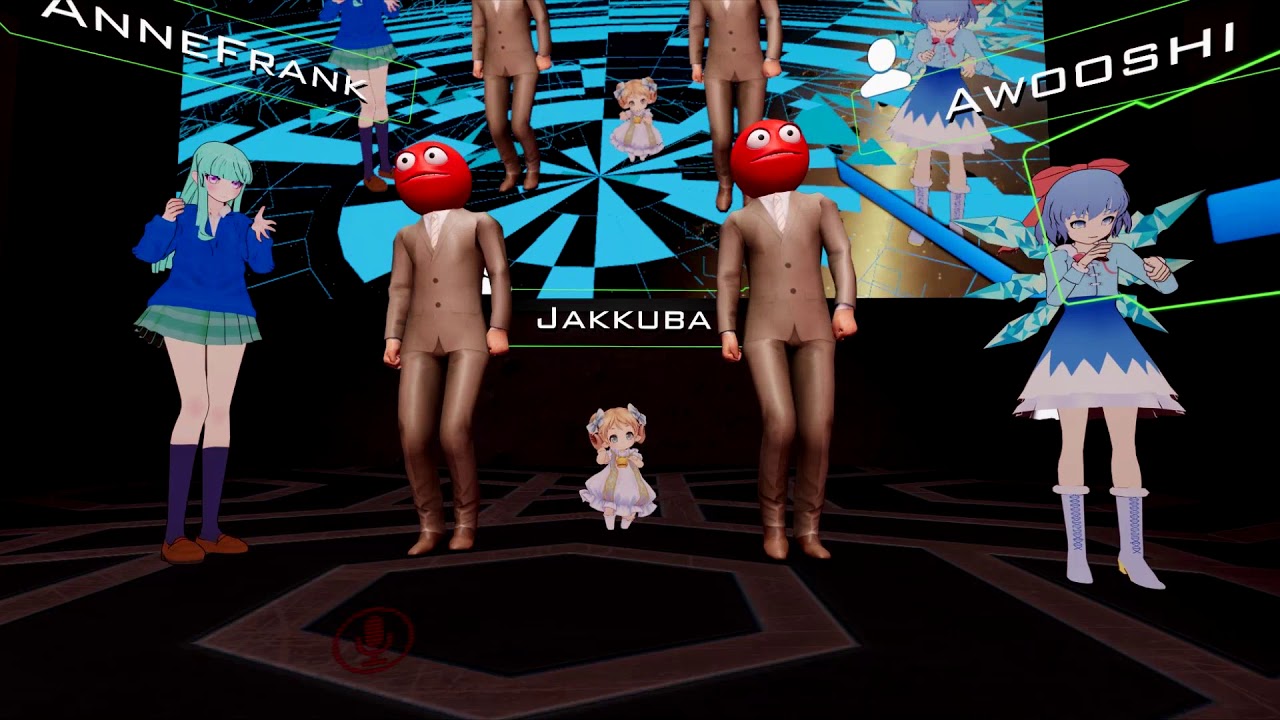
So my Kyle the Killer screaming comp corrupted, so that'd 3 hours of editing gone. So now I'm just uploading Jakkuba with 5 minutes of editing, totally not m...
light kindle
dunno why the videos not loading but it should contain everything you need
including what values to use
brisk mesa
If you wanna adjust bones without moving the mesh you just go edit mode and hit a to select your skeleton and start scaling
It should work easily from there like that
@arctic matrix
Shift clicking is not for that, that is more for parenting things and joining and merging to the very last thing youve clicked.
There is also B for box select like in rts games, or c for circle select i think, like if you didnt wanna select all with A
Also if your leg bones are all connected and you drag selected stuff above it, itll lengthen or shorten that leg bone(s), you'll get a feel for it quickly
feral stone
https://i.gyazo.com/6e20b900aefae23210d30166574559d6.png This is how the arm vertices groups look for both my arms. Is this fine? Or is it conflicting with my elbow vertices?

I'm still trying to find out what was wrong with my arms automatically bending in VRchat
 heavy pasture
@surreal drift When you put the bones in DB individually add an end length of 1
cedar scroll
anyone know how to attach colliders to bones? my character has a long skirt and the knees clip through it
brisk mesa
you mean the dynamic bones colliders?
cedar scroll
yes? im still new to unity
brisk mesa
oh uhm
does that mean you don't have DB
also those colliders do work but not perfectly and clipping will still happen
so most people are like using some combo of DB colliders and some weightpainting the skirt to follow legs better
and tweaked some DB settings
cedar scroll
i have to pay for db dont i?
brisk mesa
yes unless somebody here is nice
cedar scroll
damn
brisk mesa
20bux
cedar scroll
i dont use unity enough to warent 20$, maybe eventually but meh
fading verge
does it matter if i have the upper chest rigged? without it mapped i cant upload it
 gilded hawk
i tried adding some clothes and hair to a base model in blender, but when i take it into unity the skeleton just does not want to work
anyone have experience with this?
fading verge
have you exported it as .fbx?
gilded hawk
yes
fading verge
hmm
gilded hawk
the skeleton looks fine and and doesn't show errors
but when i apply animations
it just stays in tpose
fading verge
have you mapped the bones?
gilded hawk
oooh
like set chest to the chest bone and right shoulder to the right shoulder bone etc?
cuz i've tried that
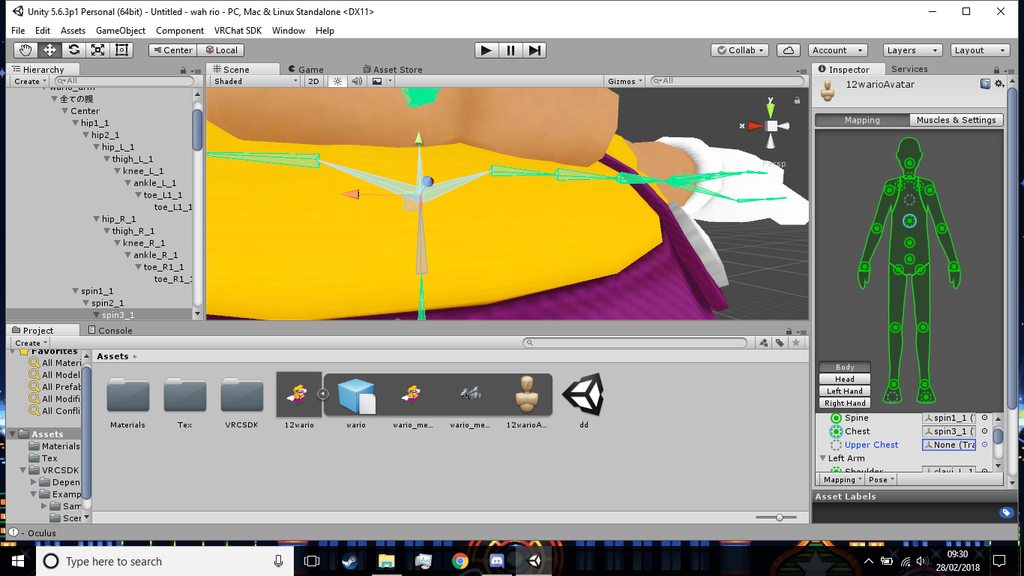 fading verge
anyone know how to parent bones?
ok i sorted it
turns out my face maps were fucked up
neck was mouth lmao
brisk mesa
you only do that if you're a smoker!
gilded hawk
@cedar scroll Check your pms
 static flint
Anyone able to recommend a good shader for transparency?😄
 gritty abyss
Hey, so i have a weird problem with the rigging (I think) on my avatar im working on for someone, I parented the dress im putting on this avatar with the body (I hope the right way) but when i move it to unity and check with a basic idle animation the dress it stuck Tposed
 gloomy loom
Sounds like the bones weighting got scuffed
gritty abyss
Well the arms of the avatar idle just fine, but it doesnt take the dress i put on it with it
gloomy loom
Sometimes it happens when you add an object to an avatar like that in blender
gritty abyss
Ill show you what i mean
gloomy loom
You added the dress with its bones to the avatar
gritty abyss
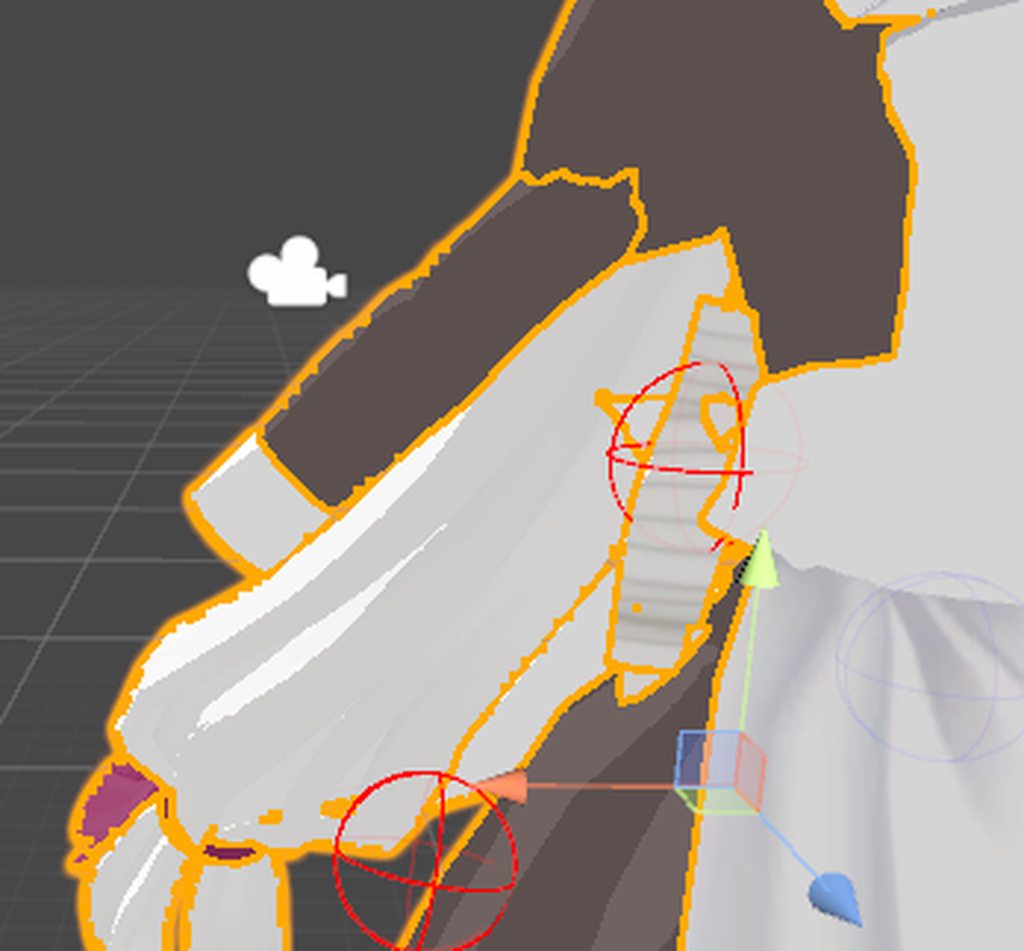
The dress has bones in the bottom part of it
Well it came with a full rig, but i deleted it except for what i needed
gloomy loom
Yea you need to properly weight paint it
gritty abyss
Oh okay
gloomy loom
That seems to be the issue
gloomy loom
Normally what i do to add an object to an avatar like a hat or clothes is I delete all the hat or clothes bones, pull in the mesh into the blender project with the avatar then move the mesh to where I want it to the avatar
Then in object mode I box select everything and hit join in the tools tab
gritty abyss
Oh shit
gloomy loom
Then I go weight the hat or the clothes to a bone thats root
gritty abyss
Perfect, thanks
Yeah, ive been having weird problems parenting it and i guess join fixed that xD
Id would have like 2 armatures and such
gloomy loom
I do it differently than others
And what tutorials say
Cause sometime the armature on the object wont be weighted properly
When you join the armature
gritty abyss
Yeah
gloomy loom
Its a hit or a miss
gritty abyss
Awesome, thanks a lot
gloomy loom
Np
gritty abyss
Yeah, that joined the bones together perfectly and everything
I expected it to be wayyy more complicated that that, so i was trying crazy work arounds lol
gloomy loom
Its still a little complicated if you don't know how to weight paint properly
I recommend using the draw tool instead of the add
And then turn off the select what is visable thingy in blender
hazy knot

Tutorial on weight painting and how to fix weight painting issues. Usually when a material moves with the wrong bone. Links: Model: https://mooniiiiichan-lov...
gritty abyss
Thanks
So, it seems like creating eye tracking in blender removes all weight paint?
It must be something other than weight paint because paint or not the sleves still dont follow the arms
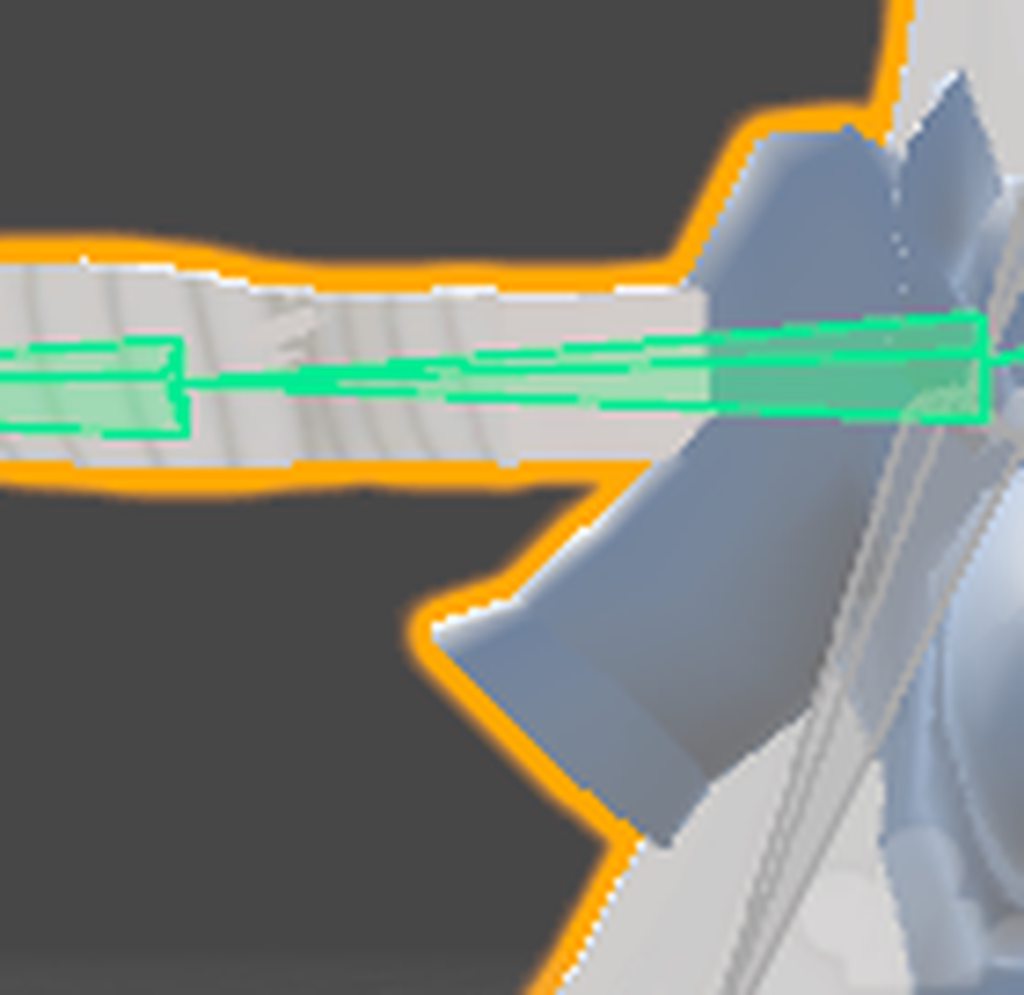
I made sure it had weight paint before exporting
arctic osprey
Anyone know what's wrong with my bone setup/rig? If my arm is extended and I twist it 'outwards', very quickly the wrist bone snaps around 180 degrees. Same happens with elbow. If my hand is closer to my chest, then I can turn the wrist more before it happens. Video:
https://cdn.discordapp.com/attachments/387450722410561547/418458514734972928/wrist_elbow_pop.webm
random lotus
so i have a group of models of one character from a game rip but i also have a few that were ported to mmd but still use the original rig, can i just paste and attatch the rig from the model ported to mmd on the ones from the game rip? and i tried to attatch said armature to a model and this happened, all his meshes seperated (they were already seperate) from the armature and the armatures joined http://prntscr.com/il0cjm

 chrome pier
Ok so mixamo is scuffing this model, the body animations look to be fine but it makes the sword and shield into jello. How would I fix this. Rig the sword and shield in blender?

Sorry for phone pic at school and my vpn is messed up on my pc
arctic matrix

how do i get the body to be under amature
right now they are seperate
it would make my life so much easier instead of remapping every bone
fading verge
@chrome pier looks like you have to remove the weapons and attach them later in unity? You can apply them as childs under the model's hierarchy
Adam
 lucid cave
is there a way to go back to a previous save in unity if it autosaved
fading verge
Select both meshes and hit cntl + p
There should be an option to join them as objects
Dunno how amy
arctic matrix
thank you
fading verge
And they don't really actually join- it's just to assign them together
So that you may join them with the amature later if you want
arctic matrix
they joined thanks for the help
fading verge
Ah np
lucid cave
somehow I fucked up the entire thing, I uploaded one already but I forgot one thing with the custom emotes, tried opening another project it opened it there and completely fucked everything up
arctic matrix
now all i have to do is map out the hair on my moddel and adjust the skirt bones
lucid cave
nvm figured it out
 fickle rampart
Is there anyone who can do rigging for me? I want a custom avatar but i dont have the time or means to do so.
arctic matrix
one more question is when i am giving the bones to the correct parts of the body unity is complaining its not in a t pose and has the bone red anyway to fix it
brisk mesa
there's a button to force it into tpose
like on the bottom there
below the green man screen
arctic matrix
will the model move also because when move the t pose the model doesnt move with it
ill se what it does
 thorny stratus
whenever i import my project in blender it makes a new _end bone. why is this?
 safe bluff
Check your FBX import settings under armatures, tick ignore Leaf Bones
random lotus
@fading verge if you're here, i had to resize guntz's hands because they made all animations look broken since they were so huge, but since i did that i think the scaling broke the bones because i tried to test his finger bones and this hapened

they like stretch all wierd

do i have to scale the hand bones to match the rescaled hands now?
 fading verge
🤔
random lotus
the bones dont move at all in edit mode
http://prntscr.com/il622o i tried in pose mode again http://prntscr.com/il622o

i think the armature is broken
and i just made him dab on accident (kill me please)
thorny stratus
@safe bluff thanks feet
tame skiff
Hey it's Reapfield
lucid cave
can anyone give me a hand in the animation section? Weird thing just happened and idk how to fix it
 humble mason
hi everyone
i need some help
is it possible to convert a 3d obj to a mesh?
in blender
blender
fading verge
@𝖒𝕽𝖆𝖌𝖊#6177 I think I got it. I was parenting the object to the mesh instead of the armature.
cosmic mica
how do i accomplish the "void texture" galaxy effect in unity?
fading verge
^Second
 lost lotus
hey guys, how do I make my mouth not detatch from my head? i even ditched the jaw bone, and just weight painted the whole mouth mesh straight to the head bone, but still when I walk in game it freakin flops about everywhere outside my head.
lucid isle
so just a quick question i would need to make bones for the cape in blender right? https://imgur.com/a/r44SO
 brisk mesa
@random lotus sorry i was afk but i think if you scale hand mesh you need to scale back the skeleton for it inside too
cause the mesh is trying to follow whatever the bone for that portion of the mesh
so like if my bone is way too far from say, a fingertip, it'll look weird when bending or whatever
random lotus
@brisk mesa ok and its cool
brisk mesa
i think this is the reason we usually try to get the bones to look like an actual skeleton, so it doesnt bend so weird xD
random lotus
i see
 edgy ginkgo
this might be a silly question, but is there any way to test, lets say hand rigging outside of uploading your avatar and actually testing it?
 coarse flame
How do you make the fingers not so curled upwards when hand is in full extended state.
brisk mesa
umm
that kinda sounds like they aren't weighted right
or bone placement is weird or both, or Roll absolutely should be 0
or all of those
naive tree
@coarse flame be sure that u have 3 bone fingers, if u don't then your last fingers are extremely small and u have to scale them up
and yes, be sure to have roll 0 on all of them
 forest crane
@naive tree 👀
naive tree
😳 🍆
forest crane
💦 ❗
 terse flicker
I don't know what I've done, but I have an issue where my avatar's high-knee stocks moves properly while posing, but the thighs (actual skin) stay put. It's like its not attached to the bone?
How do I link an object back to the bone so it moves again?
forest crane
you have 2 bones in legs @terse flicker
u need to reparent them
they are prob in same place
just rotate one and you will se other one
terse flicker
In Blender, right?
naive tree
yes, reparent to legs and mix weight
terse flicker
Hmm..im not seeing where I can assign them individually, both thighs seem to just be one object
Been working on this silly avatar since 1am in the morning. It's 7am now lol
Debating on whether I should get sleep or coffee.
forest crane
you mean both thighs are on 1 bone ? @terse flicker
naive tree
which shader works best for blush? i heard unity chan transparent is invisible in game, cubeds fade is invisible too
terse flicker
@forest crane hm, maybe its a vertex group that differentiates between left or right.
forest crane
if you want i can look in the blend file
and fix it
jsut mesh no textures
and you might get some rest
after that
forest crane
just pm me not here
crisp tendon
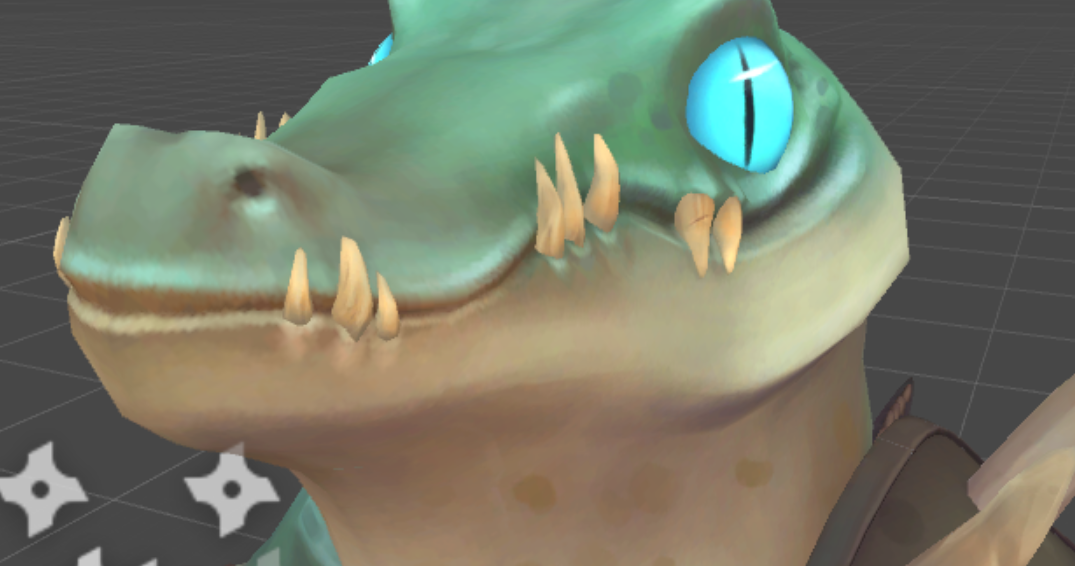
Has anyone here made 3D mouth tracking on a non humanoid model from scratch ? I have a few questions !
coarse flame
I know relative basics of unity but some things are above me right now.
getting gestures (draw sword etc) to work and maybe replace the walking animation.
if ya willing to teach would be cool :>
gloomy loom
@crisp tendon Ive done it by rerigging the model as a humanoid then creating the visemes
Its worth the hassle cause then you can add gesture animations to the model as well
crisp tendon
My problem is more about creating the mesh inside the mouth and editing the UV map
gloomy loom
most mmd models have like a dark red squished semisphere mesh and a teeth mesh inside of the head
I can imagine you can remove that mesh and teeth mesh from a pervious mmd model you have
and then join the mesh together
fading verge
@crisp tendon been there did that
crisp tendon
my avatar's a big anthropomorphic crocodile, so MMD wouldn't be much help 😄
@fading verge What did you start with on your model ?
crisp tendon
How did you create the mesh inside the mouth and then apply that onto an already existing UV map without breaking anything ?
Oh ok, so it was part of your process
fading verge
so the inside of the mouth is 3 or 4 meshes
tongue teeth up teeth lower and the mouth flesh
only the flesh needs to be connected
gloomy loom
as for the texture and material you have to assign a material to the meshes and then apply a texture to that material
the top teeth mesh and the bottom ones would work with the same material
fading verge
@crisp tendon can i see a picture?
crisp tendon
My problem isn't with all that, it's that i have an already existing avatar, but there's nothing inside the mouth, i already have a UV map and textures for that UV map, i'm just wondering if i have to make a UV map and textures just for the mouth interior

i don't even know if i should make mouth tracking tbh
coarse flame
- very nice!
crisp tendon
his mouth extends to the back of his head
fading verge
so the mouth doesn't even open?
pine harbor
did any of the textures with that model seem like a mouth interior?
crisp tendon
no, it's empty
coarse flame
- would be a quite a modification to the model.
fading verge
you would need to model and uv unwrap the mouth interior and texture it
gloomy loom
^
fading verge
but it would not break the rest
crisp tendon
Ok, easy enough, thanks
 mental cloud
probably the hardest part is to get a proper crocodile mouth texture lol
crisp tendon
it's either going to be all black, or pink, or red, or a mix
pine harbor
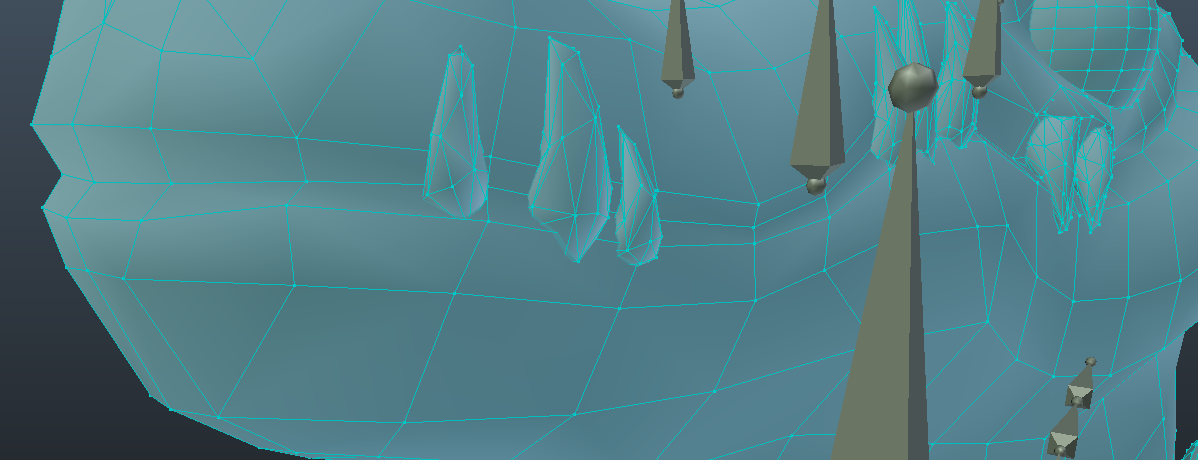
i'm more looking at how to edit the existing croc head, if it's a solid mesh with no defined split in the original vertex positions
crisp tendon
i'll send you the UV map if you want 😉
@pine harbor i'll duplicate the vertex or create one in between the lips, and work with that, but his mouth shape terrifies me
gloomy loom
I mean if you can find an empty spot on the texture files when you uv unwrap you can throw in a dark redish colour box in there and use that
fading verge
@crisp tendon select verts press v
pine harbor
yeah, if there aren't vertexes along where his lip texture is right now, you might need to do a bit of knife work
fading verge
torip edges
mental cloud
add a youre banned to your throat, open ur mouth, walk up to people and snap
crisp tendon
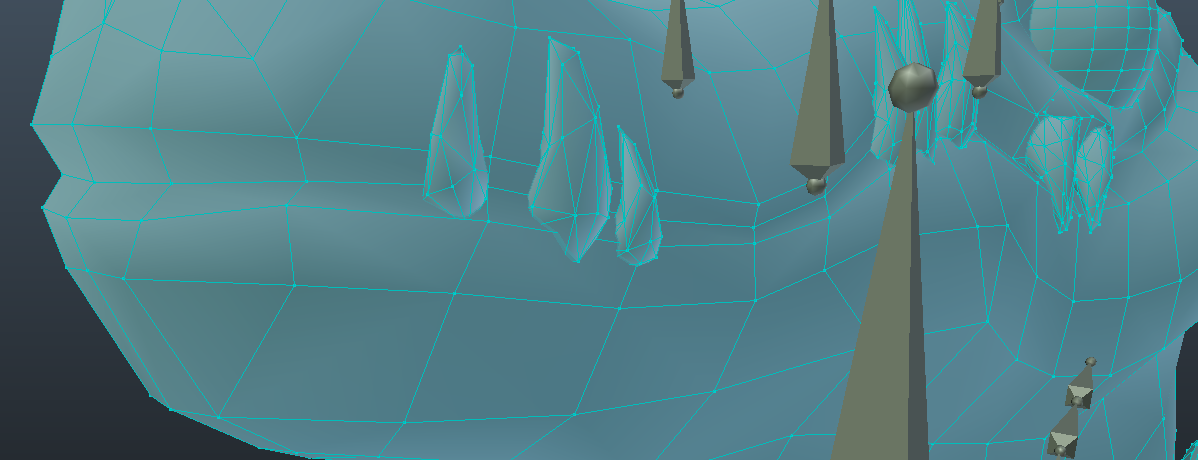
Well that was easy lmao https://i.gyazo.com/942f8b9be6f330d6b96af6aefa88e928.png
 pine harbor
ah -- yup, that'll simplify things if the mesh already lines up a bit for it 😛
crisp tendon
his mouth still extends behind where his ears would be, if he had any
gloomy loom
the shape keys will be interesting to make
pine harbor
may i also recommend a gesture override to consider, if you want something wacky? :P

laser firing croc would be downright terrifying
crisp tendon
i need to copy the visemes of something with a similar shape
i might borrow the one of our penguin avatar, it works well
coarse flame
know a good guide to gesture overrides?
crisp tendon
I would, if i knew what an aligator speaking english looked like
gloomy loom
Fair enough
fading verge

@crisp tendon taking a shape key from another mesh should not work
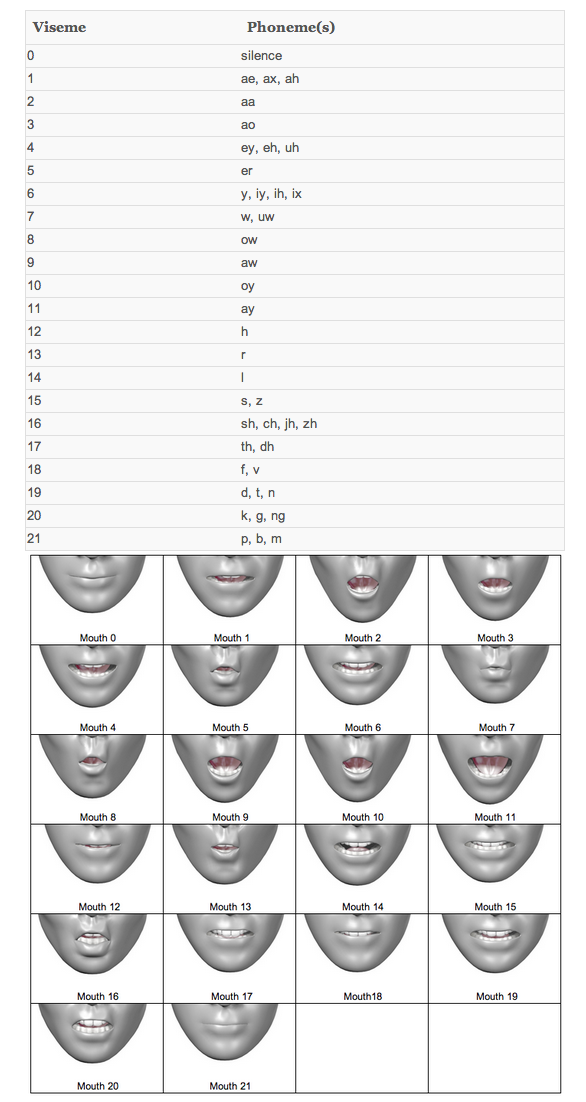
should be a chart of compatible shapes for vrchat somewhere too I guess
crisp tendon
@fading verge I meant it as an inspiration, the penguin avatar's mouth is fairly similar in shape and size
gloomy loom
I mean it shouldnt but I havent tried it so I didnt want to say anything
pine harbor
@fading verge there's one in this link, but probably won't help so much with Ruuubick's case given the alligator face is a bit differently proportioned to a human's
https://docs.google.com/document/d/1W5KFa_aszCMrJaFD8mb9a-GHYO4X4S9M63GjM4UwuEw/pub
gloomy loom
that what I used when I learned ^
pine harbor
i'm still having trouble picturing a croc doing a duck face
fading verge
oh that one is pretty good
verts have a number in the mesh from 1 to ... and a shape key takes the number and adds local position to it@gloomy loom
gloomy loom
Im aware but I thought maybe ther was some blender plugin trickery being done that I wasnt aware of or something
gloomy loom
we can only dream
 gloomy loom
shape key animations are the best
making wings and then customizing the flapping motion is cathartic
pine harbor
shape key transfer is apparently possible, but most of the references i'm seeing are for two models with the same vertex count
if there's a way to do it between two meshes with different vertex counts, i've got no idea how that's supposed to work
fading verge
the picture above is done by join shapes with the same mesh with the same vert count i just deleted one vert and rebuilt it in one mesh
clean work is very key to shape keys
xD
gloomy loom
Im not good at python but ID imagine it would require the program to place its own reference points on the first mesh then apply those movement of the reference points to the second meshand then translate the movement as a shape key
if thats even possible
fading verge
that would be so cool you select mouth corner eye corners and stuff on both meshes and it interprets it for you
but sounds like some srs coding
gloomy loom
maybe like create refernce points where there is overlapping vertexes which the user has to choose
pine harbor
probably like a mesh/vertex concept of what the humanoid rig in unity is -- maps and interprets transforms
pine harbor
yup...hence, much more easily said than done >_>;
gloomy loom
^
pine harbor
i imagine the technology might exist though, in order for motion/facial capture to work
gloomy loom
theres probably a program out there with a similar concept with facial recognition
exactly
pine harbor
just for kicks though, imagine if facial capture could work in reverse -- pull the mesh, and watch the real life human's face get distorted
distorted into a troll face
gloomy loom
some black mirror shit
fading verge
another gory shape key miss hap
gloomy loom
LMFAO
 gloomy loom
but on a serious note I feel like people in vrchat dont full recognize how amazing shape key animations are
feels like everyone relies on bones
plus shape keys translates so nicely into unity
fading verge
mehg
shapekeys will look better if you are good at modelling
but you can also make an amazing rig with a clean mesh and some time consuming weight painting
once you got a great rig animating becomes a blast
gloomy loom
I guess its cause im not the best weight painter that I prefer shape keys more
Idk it just looks more real to me
fading verge
they are good for faces i think
to make i good face rig takes longer then making the basic shape keys
fading verge
no
only for transforms
the ass and stomach
usally suffer from my rigs
so they need some shape key adjusts
^^
gloomy loom
try it, it looked way more natural than using bones. Oh yea I kareeda use shape keys for breathing
Idk I needa learn the compliexities of weightpainting
fading verge
it's not hard
gloomy loom
but Im busy getting ready for playmaker and learning shader code
fading verge
but requires a very clean mesh to work perfectly
gloomy loom
my meshes are generally clean and mirrored
gloomy loom
atm my desktop is fucked because of the power source giving out
I cant show anything 😦
I bought a 700 watt power source that should be coming by saturday or sunday
 gloomy loom
noice, I think I saw you post that in the 3d modeling room
fading verge
y finished it yesterday
gloomy loom
I realized how bad that sounds
its the lacing of them into the palms tahts the issue
 fading verge
there are some smart solutions out there
gloomy loom
I pull up another model's hands then try to replicate it, then if I fail I copy paste the hands ;^)
pine harbor
holy crap -- what base shape did you start from to make all that?
blender's basic guide talks about starting from a cube, and then using loops and extrudes to get the shape out -- but yours looks considerably more rounded than where their example is likely to go
https://en.wikibooks.org/wiki/Blender_3D:_Noob_to_Pro/Modeling_a_Human_Character_-_Modeling
fading verge
you have to study as a classic sculptor for 5 years
and then get into 3d moddeling
and then ?
last profit
😄
it was actually a vertex modelling job
so i started with a single vert
pine harbor
....i can't even begin to imagine how that's meant to be possible
where there's a will, there's a way, i suppose -- but i guess even if i started trying to model something based on a favourite anime character, i won't be done until a good 2-3 years later >_>
not that it's gonna stop me, but i don't think a couple of months is enough somehow 😛
fading verge
life is not fair when it comes to modelling
some people understand 3D space very easy
others have it harder
pine harbor
^i am not one of those people who understand human topology well -- probably gonna need to use outline references to match it up
fading verge
get familiar with anatomy that will help you alot
pine harbor
will do -- i might pick up some art books for both realistic and anime style anatomy in that case
fading verge
topology is a mixture of anatomy and animation needs there are rules you can find
if you get how a normal human's anatomy looks
anime is just a dumbed down version
pine harbor
exaggerated a bit too, particularly around the face
 bright grail
Would anyone be willing to help me re-weight some hair to their bones? Was shifting hairs between two models last night and in the process the hair meshes were no longer skinned to the proper bones, and im not to savvy with weight painting in blender.
naive tree
@bright grail you can just copy the hair with bones and parent them to head on other model
delete everything but the hair and bones, then on 2nd delete hair + bones, select hair mesh first, then body mesh > ctrl+J, then do the same with armature, but be sure to select main armature last
 foggy iris
hey i have a character with cat ears, how do you make it so that when someone touches them they move?
naive tree
you can't interact with other people in that way
foggy iris
i saw it before
bright grail
Alright @naive tree Ill give that a shot, cause both of them were in different armatures so Clicking both of them wasnt working when I tried last night
naive tree
maybe person just has override that moves the bones
foggy iris
or how do you yourself move your own cat ears?
naive tree
you use colliders
foggy iris
i see it with breast phisi ohhhhhhhhhh
i see
does that work with anything? breasts, ears?
 atomic gull
Yes
naive tree
yes
atomic gull
Others cannot interact with parts of your avatar in that way however, colliders or no. Only you.
foggy iris
perfect thanks! i just didnt know what to look for
i see
ohhh i get it so i apply dynamic bone to the ears and then colliders to the fingures and link them
 hazy tusk













 long geode
anyone know how to parent bones to a mesh? when i hit ctrl+p and parent nothing happens in pose mode the head stays the same
gloomy loom
@pine harbor with blender modeling you actually use a reference image you place behind the model to extrude faces
first you gotta 2d map the mouth nose and the eyes
so the facial animations work
then you go about the rest
arctic osprey
My character's feet are level with ground in Unity but inside ground in VRChat. Any idea how to fix it?
fading verge
is there a way to get free dynamic bones?
honest kettle
this is not the right place to ask, nor is that the right thing to do
its not like it costs a fortune
mental cloud
yea like i bet you paid for that
honest kettle
so in your assumption everyone pirates stuff?
¯_(ツ)_/¯
yes people actually buy stuff
and you should to
mental cloud
yea sure
honest kettle
sigh
if you ever produce something and try to sell it, i wish you high piracy rates
so you dont earn a penny
¯_(ツ)_/¯
 scarlet depot
You should buy them but most people obtain it through other means on accident and just keep using them
 finite forum
the closest thing to free dynamic bones is cloth and unfortunately VRchat does not support that
gloomy loom
@mental cloud I paid for mine
honest kettle
i mean ther are the walk forward and backward animations