#avatar-rigging
1 messages · Page 93 of 1
 gritty mauve
@winter walrus I would charge you a Stellaris DLC for it, but I don't know how to weightpaint well enough to charge lol
that model I was talking about? I have ptsd flashbacks to the weightpainting
 winter walrus
xc
 brisk mesa
so for bone weight failure, somebody else once mentioned "Make sure you have no unapplied Rotations, Locations or Scales on your meshes - again do ALL edits in Edit mode, not Object Mode."
and i remember that did fix my issue but only once lol
gritty mauve
in my case the model had been a rip from a game, and all meshes came with no transformations at all
so it's not always the case
@winter walrus to be honest if the mesh is in a nice symmetric pose it shouldn't be too hard to paint it
just use the gradient tool to make a red band around the appropriate limb
 odd plume
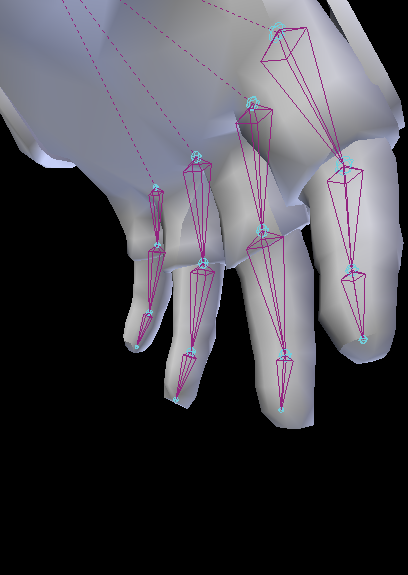
Draig they seem to be missing the distal bones
winter walrus
Distal bones?
odd plume
The finger tip bones
odd plume
So like fingers have 3 bones its the 3rd ones
gritty mauve
I've only ever rigged one model you guys are giving me too much credit 😅
winter walrus
In a previous one I rigged I only had 3 bones for fingers aswell
Yeah they have 3
 odd plume
Yep its missing the 3rd ones
odd plume
No im talking about my model
winter walrus
kms
gritty mauve
@odd plume is your model in a pose with their fingers flat?
odd plume
Im in unity and I applied the rig and Id show you one of the 2 hands but I cant find out how to send pictures
gritty mauve
only way to do it on this server is to upload them someplace like pastebin and send a link
you want your finger bones to look like this (ish):
 cloud kiln
Sup mah dudes n girls
gritty mauve

Super simple and lightning fast image sharing. Upload clipboard images with Copy & Paste and image files with Drag & Drop
cloud kiln
Anyone can tell me why my fingers keep glitching out during animations? Is it just VRchat bugging out again?
Didn't glitch out on my other chat
char*
gritty mauve
emotes or hand gestures?
odd plume
Heres the problem Im missing bones
cloud kiln
Hand Gestures
odd plume

Super simple and lightning fast image sharing. Upload clipboard images with Copy & Paste and image files with Drag & Drop
gritty mauve
it will work well without, although the model might look weird
cloud kiln
Tried to animate middle finger to Rock n' Roll. But ended up spazming out
Did the same thing to my other char by animation so he holds his weapon better. And that worked good af
But after the latest patch, all my hand gestures keeps spazming
'cept for my other avatar ofc
gritty mauve
oh was this not the case before the patch?
cloud kiln
No
gritty mauve
other than compare the way your animations work on both avatars keyframe by keyframe
and try to spot what's different
cloud kiln
Well, I deleted the last bit as usual
Added the animation secs to 0.1
Like you should
And that worked perfectly on the other one, but fked up on my latest one
gritty mauve
 gritty mauve
seriously though, compare key frame by keyframe x) only thing I can think of
cloud kiln
Del the last animation keyframe, copy and paste the first one to 0.1
Ya man
Gotta sacrifice the goat now
Summon satan
gritty mauve
I bet he won't know either
cloud kiln
He'll prolly be like "Lul, ur on your own suckah" Then disappear with a laughing emoji
 austere blade
Did coliders broke withe the recent update?
cloud kiln
I don't think so
Why?
I haven't tried colliders since the last update so
WAIT, a friend did actually tell me that they were broken
 supple stratus
if you know how to rig a model and can help me asap please DM me! i can pay $$$
austere blade
@cloud kiln well,it seems like all my avatar legs go through my skirt
cloud kiln
Oooooh maaate
Don't mind it... Mine does that too
I tried every single thing possible to not make them go through the legs
But due to VRchat's animations, it's literally impossible
austere blade
yeah,is true
austere blade
yeah.now that u mention it,it does work on the hair,so i guess is just VR chat
 brisk chasm
here
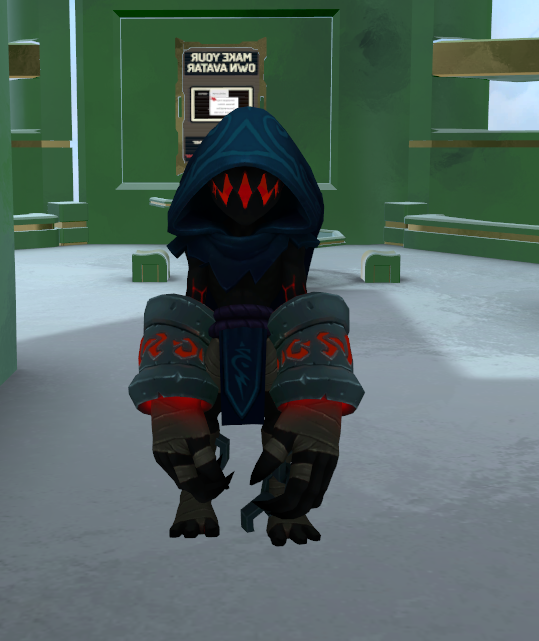
example with enzo, from battlerite
P.D: open the link, it has multiple pictures
odd plume
Anyone know how to unlock view offset in blender
 opal aurora
Do you mean the camera lock or perhaps the mesh fade?
brisk chasm
mesh
the middle
you might notice if you open the link
it contain multiple pictures, not only one
odd plume
Hey how do you attach 2 finger bones with that dotted line thing
brisk mesa
dotted line means it is parented but just disconnected
go to the right options and find the bone tab where it says connected
 dire spade
What happens if I don't rig up the Fingers? I heard that you aren't able to "squat", but does that negatively affect how the model looks?
 brisk mesa
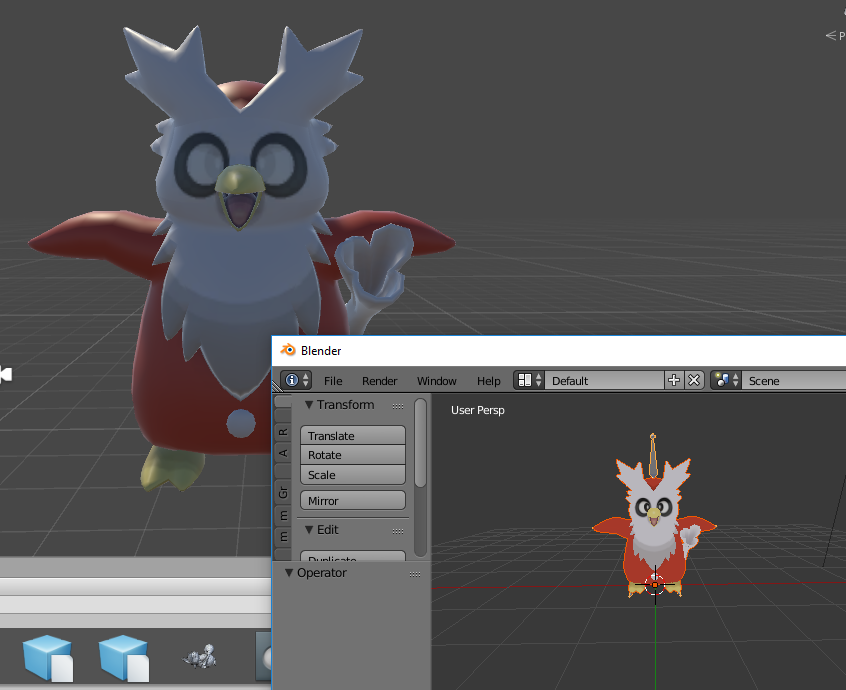
...shaders?
idk making it the Unlit texture shaders would make it more pokemon anime style
also maybe check the Material ball things too cause sometimes it imports them with a weird color
 latent patrol
It's mostly the pupils I want to be changed, can barely see them in vrchat
brisk chasm
https://imgur.com/a/Ku93F
nobody knows about that problem
P.D: open link, multiple pics
latent patrol
Fixed it thank god
 tawdry obsidian
Hey there. Does anyone have any suggestions for an avatar whose neck won't turn left and right in-game?
 covert narwhal
I'm not sure if this is the place to ask. But i'm trying to do a Samus model, which has a gun for an arm. When I try to upload it says no right hand, which it doesn't have. Which makes it unable to do full Ik tracking in VRChat. Any workaround?
 pine harbor
@covert narwhal add in some phantom bones on the right arm similar to how your left arm is done, but don't actually weight them to anything on the gun
i'd recommend just mirroring how you've done your left hand and fingers, so nothing weird happens with T-posing her right arm
@tawdry obsidian does the avatar's neck move normally when trying to pose it in blender or unity?
tawdry obsidian
How would I go about checking? I can upload screenshots if needed.
pine harbor
in unity, you can quickly click on your head or neck bones, and then alter their X/Y/Z rotation before undoing it -- see if it changes the model's head facing as you'd expect
blender, click on your armature first, then set it to "pose mode" from the panel that's likely at the bottom of your screen -- try to move the head bone and see if your model's head follows it as you'd expect
tawdry obsidian
I'm fairly new to this so bear with me. I've already imported into unity. Is that a problem? I'm going to check the X/Y/Z rotation in unity like you mentioned, one sec.
pine harbor
no issues there with just checking it, just that the fix may be back in blender if it's what i think it is
 distant nest
Would anyone mind taking a look at one of my .fbxs and explaining what's wrong with the rigging? Every model I export as an .fbx from Blender is doing some real weird shit with their arms, and I'm not really sure why. Seems to be consistent.
pine harbor
@tawdry obsidian okay, now that i've got my copy of unity open so i can see what the proper naming is...
go to your Hierarchy, and open up your armature/skeleton -- select the bone you want
next, go look in your Inspector pane -- the rotation settings are under the Transform section
tawdry obsidian
Got it. How do I upload a screenshot to discord? I've got the desktop client.
Just want to post what I'm working with here.
Thank you helping, too.
pine harbor
looks like this discord has uploads disabled -- you'll need to upload it to imgur or gyazo and then paste a link here
tawdry obsidian
roger, standby


I was able to rotate the neck.
There's also a neck bone higher up.
Which also rotates sucessfully.
 pine harbor
so it's something to do with the full body IK, most likely...did you get any warnings about having bone lengths of zero when you uploaded it?
or any yellow warnings?
tawdry obsidian
let me try an upload now, I will advise.
pine harbor
it'll be on the Build Panel, just before you hit "Publish and Build"
 pine harbor
hmm, not seeing the one i expected to see, but with full body IK disabled, i'm not sure if that might be related
there're a few things you can sort of fix here, but they're not all necessarily important -- the main thing i noticed is that you don't seem to have finger bones
tawdry obsidian
The hands are a strange case, because this character only has three fingers.
Let me grab a screenshot for you.
pine harbor
three fingers itself isn't an issue for a 5 finger skeleton, if that makes sense -- you can have two extra phantom finger bones that don't actually influence the model itself, just so the SDK doesn't complain
tawdry obsidian


Not sure what I need to do here. The red flag for me is that the hands aren't set up the same.
pine harbor
what i normally do there (back in blender) is to give the skeleton 5 fingers, but only have two of them actually do anything...hang on
tawdry obsidian
Not sure if this is allowed here, but if I sent you the file would that just work better? I could shoot you a few bucks if you got it working.
pine harbor
i can take a little look since i've got some time right now, but i'm not entirely sure if i can pinpoint the problem
just to finish what i was saying though: this model has some pretty low poly hands, and this entire red section behaved like one finger

i just had that entire thing move according to the "index" finger bone, while putting in some extra ones for the 3rd, 4th and 5th fingers which actually didn't do anything
 pine harbor
did you export the FBX with embedded textures?
tawdry obsidian
I didn't
I tried doing that earlier today and couldn't find the option.
How would I go about doing that?
pine harbor
File > Export > FBX
then scroll down on your side pane and look for "Path Mode" -- set that to "Copy", and then click the little box icon next to it so that it shows a piece of paper in the box -- that'll mean that the textures will be embedded in the file that you export
although now that i think of it, i probably don't need the textures if i'm just trying to confirm the bone structure is correct
tawdry obsidian
I don't see the Export submenu in the file dropdown. This is unity, correct?
pine harbor
ah, that's blender
tawdry obsidian
Oh. I don't even know if it's setup correctly in blender. Give me a moment.
pine harbor
unity files, i'm not too familiar with how to share those
tawdry obsidian
Do I need to highlight everything in blender before I export?
Like the skeleton / body / head models
pine harbor
hmm, i don't believe you do, no -- it should just export the whole scene for you
tawdry obsidian
Roger. Standby
pine harbor
you'll probably need to PM that on discord, though i don't know if you need to upload it to a site and then link it if it comes out too big for discord to accept as an attachment
pine harbor
all good here
tawdry obsidian
Just PM'med you. The textures, as per your instructions, should be embedded. I apologize in advance, because this is the first model I ever attempted to get working in VRchat, so expect lots of amateur mistakes, lol.
Trying to figure out how to PM
lol
pine harbor
VRChat makes you pick up a surprising amount of programs to do what you want if you're jumping right into avatar creation
tawdry obsidian
For sure. It's a bit overwelming.
pine harbor
hm, i'm seeing something i've never seen before -- did you have the rig imported as humanoid, or something else?
i've been assuming you've had it running as humanoid to use VRChat's in-built IK tracking options, but it looks like it comes with its own animations already
tawdry obsidian
I'm not sure. In Unity, I selected the humanoid option. This was originally a source engine file.
pine harbor
hmm, so probably not that
tawdry obsidian
Feel free to muck around with it however you see fit. I'm not sure if those stock animations would even work, given they've been ported.
pine harbor
hmm, question for back in unity -- did you check that the head and neck bones are assigned to what you think they should be?
looks like they should be neck1 and head1 in this case
tawdry obsidian
Standby. I'll grab screenshots.
pine harbor
ah, in the humanoid rig's "configure" settings
tawdry obsidian

 gusty meteor
is it possible to fuse bones into one in blender?
pine harbor
neck2 and head2, hmm...
tawdry obsidian
Should I try and swap them?
pine harbor
the tutorials online say it is, but i've got trouble making that happen myself
i'm trying to locate those bones right now, but based on what i'm seeing over here...
try setting them to ValveBiped.Bip01_Neck1 and ValveBiped.Bip01_Head1 respectively
tawdry obsidian
Will do.
pine harbor
that's what your model's vertices are actually weighted to
 graceful wave
http://puu.sh/zfs0W/55e3c72bf2.png
Her dress is clipping with her chest, how do I fix this?

 random lotus
http://prntscr.com/i9exyv his rig and everything are fine, i don't know what else it could be
 random lotus
 gusty meteor
i have 3 bones one affects the arm the other one the shirt and the third one the cloak on the arm

and in unity the only the arm moves and the cloth stays in place
anyone have any ideas how to fix that?
distant nest
@random lotus I'm seeing the same kind of slumped over position ingame with my model.
 random lotus
I weighted mine but now his ears move in wierd ways when i try to pose them
random lotus

 sly pelican
IF IT AIN'T MOVIN AS IT SHOULD - WEIGHT IT BY PAINTING OR BY VERTEX GROUPS. THANK YOU
distant nest
Would being slumped over be a weighting issue though?
sly pelican
Probably a bone issue
sly pelican
Re position the bone.
distant nest
I'm thinking the shoulders being higher might remedy that.
sly pelican
Experiment with it yeah.
sly pelican
IF ITS MOVING WONKY IT CAN BE A BONE ISSUE OR WEIGHT ISSUE
What weight did you put it on
1?
1 means UNBENDABLE
It could also be that the WEIGHTS is conflictig with another bone with about the same WEIGHTS.
As in same selected verts
Hence that inbetween with the mesh
random lotus
its all red
sly pelican
Its 1
random lotus
fuck
sly pelican
If red - its uni
random lotus
i can't seem to get the wieght right
distant nest
It goes from 0 to 1
sly pelican
Uno*
random lotus
it was all blue before
sly pelican
Blue means 0 no weight
random lotus
well his foot was red
sly pelican
Rule of thumb - at least 0.5 for areas where it is expected to BEND.
Areas where it isn't suppose to bend or would look better if the mesh is together like SHOES and other NONSTRETCHY substances. 1.0
But in the end its just trial and error.
random lotus
http://prntscr.com/i9f42m i had to repose his ears because they were in a t-pose

and if i try to fix the model it instantly reposes his ears back to the t-pose
sly pelican
Shouldn't that be fine?
random lotus

but his ears are meant to be downwards and if i give them physics they stay in the t-pose
if i leave them in the t-pose
sly pelican
Like you aren't model rigging the ears in unity it should be fine.
Is this UNITY PROBLEM or BLENDER PROBLEM
random lotus
Blender
random lotus
i had to reload the model in blender
to check the weights
i have the model where his ears are down but in the other images i fixed the model
which put the ears back into the original position
 fading verge
@random lotus use dynamic bones with a negative force on the Y axis to have the ears flop around and fall down
low inert values will prevent it from returning to it's original state anyway
random lotus
Also http://prntscr.com/i9f52c his ears move fine without the weight painted ted

red
distant nest
I always get the hip bone level with either thigh in Blender but in Unity it never seems to be happy/stick with it.
opal aurora
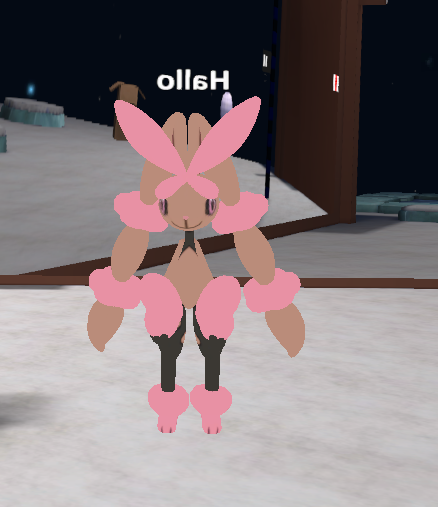
@random lotus wew finally rigged a model from scratch and got it working (my first attempt was a 4 legged creature so rip me there)
It came out pretty nicely ingame i'd say
http://prntscr.com/i9ff71
http://prntscr.com/i9ffqz

 distant nest
The simple style works really well for that character.
opal aurora
It had a few seams, having a slight outline tint on it covers them up quite nicely aswell
Wondering if i can attach the nameplate to the rootbone i made and it'll stay inplace without moving... it's not parented to anything so it should probably work...
Also keep getting a hip angle error, regardless of what kind of angle i give it it always ends up regressing, it doesn't really bother me since i'm on desktop and fixed the slouching by rotating the spine a bit at the opposite angle, but it's an odd one
Alright root bone does indeed work perfectly fine for the nameplate, noted for further uses
distant nest
Yeah, I keep getting that hip angle error too, I don't know what the deal with that is.
I think it's what makes the feet movement so awkward ingame too, but nothing I do manages to make it happy.
opal aurora
I've personally tried rotating it, by all angles and even moving / shrinking the bone itself, nothing appeased it


 dry fossil
https://gyazo.com/5a9ca97ceb58d94cb9c580395423cbd9 then this pops up
 distant nest
You need to reparent your shoulders so that Chest is their parent instead.
(and neck)
graceful wave
is it okay if my hips don't have a vertex group?
dry fossil
https://gyazo.com/bf0362b4eb6554fa4f2c930f26ef6421 wich shoulder or do both?
 distant nest
Both shoulders and neck should have Chest as their parent.
dry fossil
so right 1 and 2 need chest as parent same as lefr
distant nest
Just the uppermost shoulder in the heirarchy.
So when you make arm right shoulder 1 the child of chest, every child of arm right shoulder 1 will follow, which is what you want.
dry fossil
ok
distant nest
I don't get the reason why Octahedral display for bones is default in Blender..
Wire feels like it makes more sense.
dry fossil
ok now it says its not imported as a humanoid rig even tho i just did it...
distant nest
What's the error look like?
 graceful wave
Okay, so say I weight painted the hips/chest/spine all just to one vertex group, the spine. Is there any way I can select and divide the weight paints into separate vertex groups?
distant nest
Did you do the Humanoid Rig thing in Unity?
dry fossil
yes
distant nest
And hit Done?
dry fossil
yes
distant nest
Iunno, I've never seen that error before. Very sorry.
Is the solution to the Pelvis error going in and changing the Hips bone's "roll" to 180?
graceful wave
anyone can help me?
fading verge
Can someone please send me their Example Avatar file?
winter walrus
Anyone good with Weightpainting?
distant nest
I understand the concept but wouldn't say I'm good at it, were you looking for advice or someone to actually try it?
fading verge
^
fading verge
smash that paint brush until it's buttery smooth
 lost lotus
not sure if this is the right channel for this question but
how do I make my avatar float above the ground?
distant nest
Should be able to adjust the rigging in Unity and drag it above the plane, but I haven't tested that theory.
cloud kiln
I only know how to do it by adding custom animations
But never tried importing an avatar that floats all the time
But try Ga's theory
opal aurora
You can lift the hip bone (root bone essentially) upwards in the rigging to actualy lift your model upwards, the normal unity prefab will look the same however
You'll need to use the template avatar controller on it and hit play to see the changes take effect
You'll also need to re-position your viewpoint (only the Y axis) according to what is displayed in playmode
Keep in mind any settings changed in playmode are reset, so copy the new value and paste it after exiting playmode for it to take effect
fading verge
@opal aurora ARE U THERE
opal aurora
True
fading verge
Does eye tracking only with on a mesh named"Body*
opal aurora
I don't think so?
I personally don't like it and also animate blinking myself so i don't know for sure
But it seems awfuly specific
 wild arch
Hey guys... Is there a step I’m missing when changing hair on a model? I import a full model on blender, delete the hair and it’s bones, import the hair I want, position it and parent the bones with the Bone Constraint “Child Of”... but when I upload to vrchat, the hair sits about halfway back through the avatars skull and isn’t in a fixed position
opal aurora
Especially since people were doing it way before CATS came along
fading verge
Mine isn't working, so a user suggested renaming it to Body
I'm mostly in for the idle eyes tho
opal aurora
I mean you can try, renaming the mesh isn't much of a hassle, but i have my doubts
What about people with mutiple meshes per example?
Face,Body, a cape with a cloth component
There's too many variables to consider for it to be that specific
fading verge
I don't see much seperate meshes in the avatae channels, but good point
opal aurora
If it is, then jfc what in the hell
Not everybody renamed their meshes to body either
fading verge
@wild arch Ctrl + j the bones, parent the hair bones into the head bone in bone tab
opal aurora
I myself normally named them the models' name up untill recently
wild arch
@fading verge ok I’ll try that. Thanks.
fading verge
Do you have time to go over some details on what it might be?
opal aurora
I don't know it just seems awfully specific, but give it a go i s'pose
fading verge
Alright, it works in cats
opal aurora
Sure, i normally stay awake till 7-8am in general
fading verge
Meshes is body and wing
opal aurora
It's 5:27 so i got time
opal aurora
Although i am in bed so i can only do diagnostics by memory
fading verge
In the same situation as well
opal aurora
Cats does specify the bone to assign to the eyes after you create eyetracking aswell iirc
fading verge
I tend to rename stuff so its easier to go through in blender
opal aurora
I made a rig from scratch today so it was renaming day haha
fading verge
ive gotten the eye tracking working on this avatar, im just waiting for the servers to be fucking alive
lmao
opal aurora
It's up there in the chat if ye wanna have a looksee
fading verge
i cant believe im spending so much time on this dhhjjdjfh
fading verge
oh servers up?
opal aurora
They died?
 grim notch
So I've been running into some trouble with some models in the process between Blender and Unity. Hopefully you guys can help me answer them.
I rig a model in Blender, clean the weight paint, and the model looks perfect. Nothing wrong at all. I export it as a .fbx file and then put the folder into Unity. I get some kind of "fbx error" that will sometimes botch the model, but most of the time it's typically nothing more than a very slight mesh bug.
The rest of the time though, it completely deletes bones from the model and thus makes it impossible for me to finish rigging and uploading it. And yes, I have tried uploading is in both forms of .fbx in Blender, and the model still will have the same issue of missing bones. Anyone know how to fix this at all? I probably have about 10 or so models that I've rigged from scratch on the side that I can't upload because of this error. Feedback, Suggestions, or Fixes greatly appreciated!
opal aurora
Export the fbx as ascii 6.1
grim notch
I have, and I still get the same issue of missing bones
opal aurora
Are any of them overlapping eachother at all?
grim notch
Not overlapping per se, but more like there are nodes inside the bone that connect to other parts attached to the bone (I.E.- Shoulder and Shoulder extras, whatever they may be)
opal aurora
Also, perhaps try to place the fbx into unity instead of dragging a folder in, unless you meant something else
Yeah the tips/nodes are finevthen
Also take a screenshot of the error you get if possible
wild arch
@fading verge the bones are in different hierarchys... I’ve moved the new hair under the body armature hierarchy, but when I try to parent it to the head, it doesn’t even show as an option
grim notch
I've tried that too, and saving the fbx directly to the Unity project. Same issue of missing bones lol
grim notch
For some reason it's not letting me post screenshots...
grim notch
That takes more work than alt/print screen tho, and then the image is useless later lol
fading verge
im just saying
 mental lynx
Quick question, is there any way to set a viseme as a base value
Like, I have one that makes the eyes smaller, would it be possible to set it as base
They don't seem to save when exported to Unity, and I don't see anywhere for it to be set in Unity without setting it as an animation to trigger
 low parrot
I don't know an easier way, but you could create a 2-frame animation of the shape key (visemes are specifically mouth movement shape keys) that loops and give your avatar an Animation component and slap that animtion on it
mental lynx
So far with animations, whenever I make one, it seems to pose the body strangely
And for some reason, that body's pose is brought into VRChat with it
Yet the viseme animations do not.
Any ideas what Im doing wrong there?
low parrot
https://www.youtube.com/watch?v=jrfx3v45OJU
That but instead of blinking give it a 2-frame of the shape key

In this video you'll learn how to make your VRChat custom avatar blink. Read the description for more information. Timestamps: 0:00 - Demonstration 0:11 - Tu...
If you follow that tutorial the pose shouldn't matter
'cause you're supposed to duplicate the avatar to work on animations, you don't want to work on animations on the avatar you're going to upload
mental lynx
This video actually said how to do it
You can set visemes' bases in the body blendshapes mesh renderer
Thank you
 torpid minnow
Well.
There was someone that I met in the great pug
I believe two days ago
that offered to rig me a havel model
if I found a good one
I found one with HD chains and shield.
And good textures
All it needs is some cloth physics on the chains and a good rig and weightpaint
And it'd be great
 dusty lava
Can anyone answer me an odd question by chance lol?
I uploaded a model that was 0.75 for the height, but for some reason it is pretty tall when in vrchat
pine harbor
did you check the scale of all the components?
pine harbor
because the armature may be scaled at 0.75, but the parent of all the objects might be at a different scale of some kind
dusty lava
oh hrm
pine harbor
if in doubt, try going into unity and going GameObject > 3D > Cube
it'll spawn in a cube that measures 1 metre on all sides -- if it looks tiny compared to your model, something about the scaling is off
pine harbor
is it an MMD model by any chance? those tend to be huge by unity standards
pine harbor
MMD, hmm...this is a really rough ballpark figure, but try 0.09 if you haven't already found a scale you like
that's just a guess going from one of the ones i converted
dusty lava
ok i'll try thank you so much
 cosmic mica
theres a mixamo dance i want on my character but my character is already rigged and done and mixamo doesnt recognize my rig, is there an alternative way to get that dance animation?
fading verge
Duplicate/copy you rmodel and add it to mixamo, then take it's animation
 faint rapids
Does anyone know why my weight painting it only painting in red (1), the heaviest, even when i have it set to 0?
i am so close to done with a model but it's only painting red and its really bugging me
fading verge
@BadgerScrub#8104
 tight parrot
Can someone help me ?
It says Spine hierarchy missing elements but i got all the parts mappend and it keeps saying it
the only thing i dont have mapped is upper chest but that shouldnt be a problem
 small zinc
anyone know how to solve fingertips folding backwards
 hallow spire
okay so i tried adding eye tracking with CATS but now my eyes just always face up, what did i mess up?
opal aurora
@cosmic mica this should be dropped into animation but here...
Download the mixamo animation with the standard X/Y bot (pink/blue) and make sure the download settings are set as fbx for unity, and you can choose without skin so it only downloads the skeleton and not the X/Y bot itself
After that is done, you rig the skeleton as humanoid, and i think you don't need to configure any of its settings
After that, you can go into the fbx under your assets through unity, select the animation and ctrl+d to duplicate it into the assets
All done, you now have a functional animation from mixamo that works on any humanoid rig, of course some settings can be tweaked for more accurate results on the model, just experiment with them untill it feels right to duplicate the animation from the .fbx
 nova hornet
Anyone know how to Fix this Mixamo Autorig Error? https://i.imgur.com/LUPEPAj.png

This happend after i put Neck,RightShoulder,Leftshoulder from Spine2 to Spine1
 whole pebble
Does anyone have any idea what settings for Dynamic Bones allow the tail to flow around?

 frank bay
@nova hornet That message means the neck is parented to Spine 2, so when you switch the chest assignment to Spine 1 it breaks the hierarchy
fading verge
hm, ive parented the bones in blender correctly
when i go to rig, it has this error
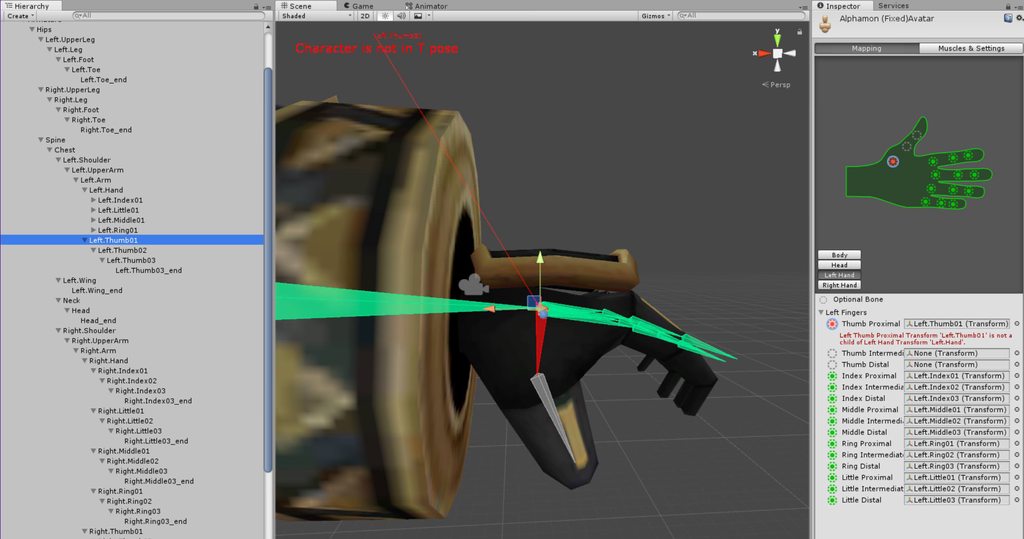
https://imgur.com/a/jPW3u
 small zinc
Pixel
Check that you're logged in
servers glitched last night
hit the other tab and it should refresh your login
fading verge
anyone know why this error shows up?
seems everything is parented right in blender..
fading verge
the hand is there
small zinc
the hand is even
 humble leaf
@small zinc yeah im logged in
 frank bay
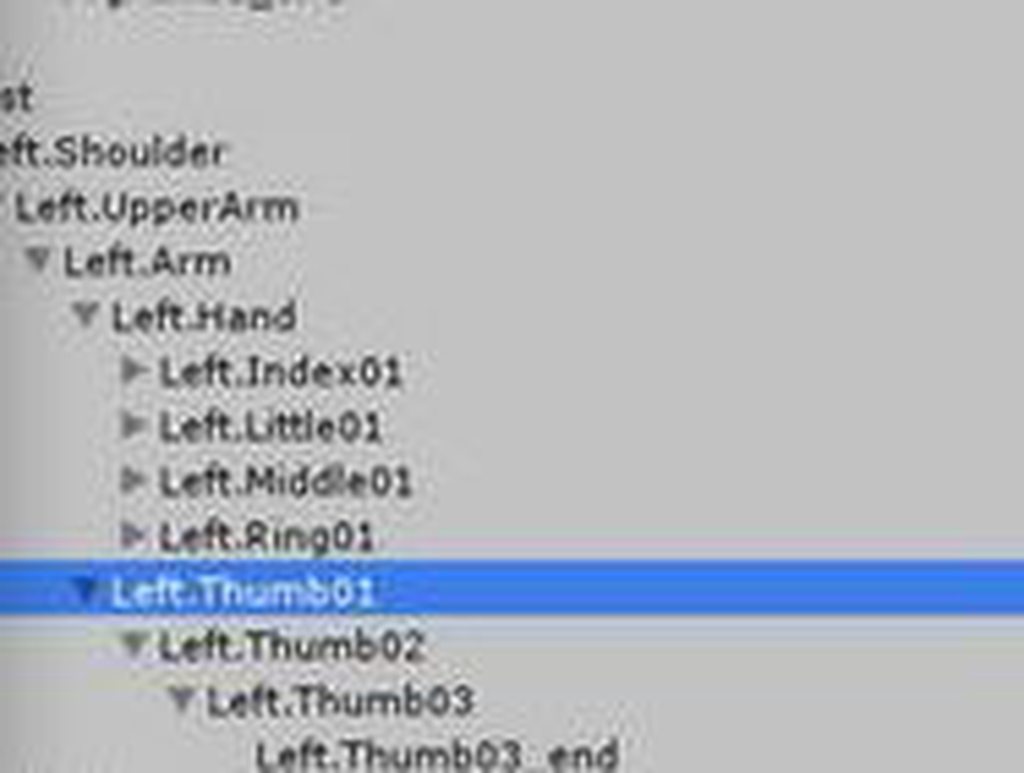
@fading verge Might not be exporting from Blender correctly if the thumb is in fact parented to your left hand. Try dragging the thumb group into Left Hand in your hierarchy
fading verge
ah fuck
small zinc
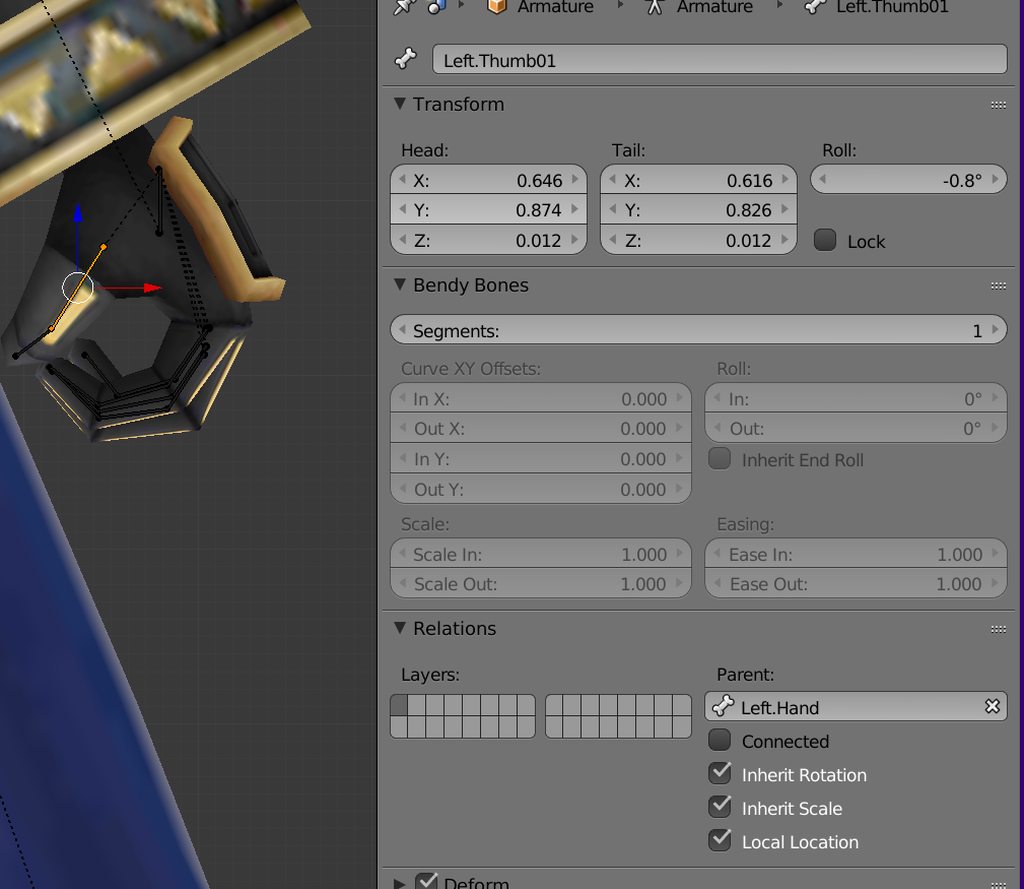
you might have parented to the end of the arm accidentally
you should bea ble to change the parent in the bone settings ez
 fading verge
ye
small zinc
export again and check the skeleton structure
because something in the heirarchy is going very wrong
fading verge
alright
yeah, really weird
that its parented correctly in blender but the thumbs are set to the arms for whatever reason
but ive managed to moved them into place, in the hierachy
small zinc
Good stuff
fading verge
hm i had to remove all of the finger bones and redo them
and somehow that fixed the problem-
smh
cloud kiln
@humble leaf Click the play button in Unity
You can't click build n publish while a scene is playing
 lime owl
Quick question. If you want bone jiggle ingame do you need to buy the script?
cloud kiln
Yes
Or you can pirate it, but however. I suggest buying it. Otherwise Unity might come for you and make you pay way more than what you should've paid in the first place
It's worth the 20 bucks, trust me
lime owl
No blender options?
cloud kiln
Hmmm.... Well, you can make the mesh seperate and make it cloth
And then cloth animate it in unity
That will take longer, and I've done it to some characters aswell
It works
lime owl
I don't know if i will make more avatars so i don't know if i want to put down 20 just to make a small portion of the head move xD
but thanks for the info
cloud kiln
Alright, so seperate the mesh with CATS
And then re-export it into Unity
Target the mesh from the hair
Add cloth
to the compartment of the hair
And then you can play around about with the paint brush to make it move smoothly
Make some parts "stable" while others moveable by a lil bit
You can make it move just like Dynamic Bones
lime owl
Thanks. I'll look into that
cloud kiln
Np
 bright atlas
So I made a humanoid rig for a non-humanoid since emotes seem to be broken on generic rigs. The only problem is the vrcsdk keeps turning the head backwards and I'm not sure why this is. Even if I fix it in unity, trying to build and publish it just resets the whole thing
The model itself is only the head, the rest of the bones aren't meant to do anything
 spice crypt
just a question, guys... do you know how to remove a bone/texture attached to the body? if I do that using C and delete I get so much errors after that. I guess I should unattach it and then I can delete it, but I don't know how
 spice crypt
nvm i found how
distant nest
Oh wait neck isn't even set I'm retarded.
spice crypt
@distant nest yeah i was gonna say that. And i guess it doesnt matter. click on left hand too
distant nest
The problem with this model is that ingame my head floats above the head cavity of the model.
Obviously has something to do with the model's head being so far forward compared to a person, not really sure how to fix that though.
 left hound
https://i.imgur.com/hAjzdRR.png how to fix this problem my avatar is staying like that.
 spice crypt
@distant nest have you changed the camera area?
@distant nest on avatar description, the view position
left hound
how to fix the body from lying down?
 acoustic tulip
anyone here?
fading verge
hm, anyway to fix this? ive tried rotating the bones too but that didnt work

need this fixed if im going to add tracking etc
 naive tree
@left hound try rotating in blender it 90deg X, then hit ctrl+A > rotation to apply
left hound
yeah i figured it out it was an already made fbx but they guy who made it didnt apply the rotation.
distant nest
@spice crypt I'm not exactly sure where I should put the VRchat camera thing because in unity he comes up like this.


 lilac moss
looks like it's picking the wrong bones and there are some strange bones? show us the blender skeleton and use the cats blender plugin if you aren't already @stray solar
you can also manually assign the hips/leg bones etc in the menu you're in
 restive hill
yeah, if you're not comfortable with all the advanced stuff and it's a weird model, start off by using humanoid avatars, since that's what everything is geared for
 lilac moss
yes, either manually assign the correct leg bones / etc in unity rig settings or use cats plugin to do it for you
 stray solar
cat will do it for me how
lilac moss
it renames / changes the bone heirarchy to auto import as humanoid into unity better, among other things
stray solar
cause in unity the lower leg and foot are assigned to the cloth bits
restive hill

VRChat Community Discord: https://discord.gg/VRChat Download VRChat! http://store.steampowered.com/app/438100/VRChat/ mmd_tools GitHub: https://github.com/po...
lilac moss
so assign the leg to the leg and so on @stray solar you understand that much right
stray solar
yes but in unity there are no foot bones just lower leg
restive hill
what is the foot mesh weighted to?
stray solar
idk how to check that
restive hill
go to the mesh in edit mode, click on a point in the mesh of the foot
uhm, lemme bring up blender
in the info part of the main view screen, there is a "vertex weights" section
where a point is weighted to one or more bones, probably
if there is NO weight on a point, it's not gonna move
1.0 weight to foot moves it with the foot bone
0.5 to both foot and leg makes it move half with each
need a screenie?
plz write back ilu
restive hill

that's a point on the leg, weighted to "left knee" bone
https://gyazo.com/976569db4d81bec1cca2df07cd7868dd
This is a different model, Leafa is kinda simplistic, this is two weights on one point, so the model is more bendy
 stray solar
idk how to get there xD
restive hill
idk exactly what its called....
stray solar
all the advanced stuff i havent done yet
 restive hill
go to edit mode on the mesh and select just one point
stray solar
ctrl+tab?
restive hill
select the mesh, press tab
not de bones, leave de bones alone for this
dem bones
you should get the wireframe of the model itself
then just pick any dot
well, foot
 restive hill
ok, now make sure left ankle in the armature is parented correctly
i definitely advise AGAINST detailed repair work on your first few models
stray solar
when i got to the bone parenting in cat it doesnt show anything
restive hill
expand the armature tree
stray solar
says right knee
restive hill
tbh, i'd import a couple MMDs following tuppers guide to get familiar
restive hill
its a tree, dude
stray solar
ive done a few already but none that i had to mess with like this
ya it goes from left knee to left ankle
restive hill


 restive hill
now, go into edit mode on the armature and select all the leg bones, make sure they're in the right positions
if they're not, fix it. if you can't fix it, learn how to move bones around
the parenting stuff is largely just ctrl-p in the main window, tho
select the target(s) first, then the parent (in the tree) then ctrl-p and keep offset or MOVE the bone, as needed
oh, hold shift to select multiple bones
wait, why are there 4 legs?
are you trying to do a 4-legged model?
stray solar
no
restive hill
phew
ok, i would suggest making a copy of the hips, and parenting it to the real hips
stray solar
just trying to figure out why this model sinks into the ground and legs are crossed
restive hill
then parent the two extra legs to the copy
oh. that.
i have problems with my characters feet sinking into the ground, not even sure how to fix that nonsense.
so im afraid i can be of little assistance with that stuff. the legs shouldnt be crossed tho, maybe the model is just messed up
stray solar
appreciate your time, thanks 😃
 real mulch
Hello! I'm having some trouble with my avatar. It works just fine when walking, but as soon as I stand idle, the chest seems to stick out, up, and to the side. I figure I must have made an error in rigging, but I followed a tutorial to the letter when doing it, so I'm not sure. Any help would be greatly appreciated.
real mulch
Will do
 faint blade
Having a question on rigging, I already made the rig but when I want to combine the rig with my mesh via CTRL+P and automatic weights, nothing happens when I move the armature after that. What could be the issue? Could it be that I imported the mesh itself?
real mulch
I can't seem to get the screencap to upload.
 rose cipher
Anyone know how to rig a model for full body tracking to make it where my feet trackers are actually in the feet instead of the shins?
 vestal dirge
@rose cipher fullbody tracking works best with rigs that are close to your real proportions. If you have an anime or hero character, it will be way different, usually very long legs and shorter torso. You can try lengthening the arms of those or adjusting overall proportions to be more realistic.
real mulch
Why does my image stop uploading partway through?
@naive tree I'm trying to upload the screencap, but it gives up partway through.
rose cipher
ahh I see! Thanks @vestal dirge
 winter flint
can anyone help me, how do i make material darker?
 low mountain
Guys, can anyone explain what exactly dictates if the models head moves left or right independantly? (non-Vr )
I dunno what extra bones I would need to make it work properly
@winter flint You can do that in unity
fading verge
Adjust the tint of the albedo to change how dark a texture is; you could even make the whole thing tinted red if you wanted this way
winter flint
thanks!
 neon quiver
@faint blade did you select the rig in the correct order? check at the top of the screen make sure there not an error message showing up.
faint blade
@neon quiver i actually don't know how i fixed it, i literally edited the rig again by adding bones for the tail and it worked after that
so no clue 😄
tawdry obsidian
Any advice for an avatar whose hand isn't closing properly?
The muscle settings are useless.
spice crypt
any of you know how to change hair color with a gradient of 2 colors?
 autumn parrot
Is there a way to edit the default sitting animation? It doesn't work well on my model. His arms go right through his legs.
Can I just modifiy it to move his hands up a little on the animation?
distant nest
Are the default 3d cubes in unity 3 feet or 3 meters tall?
 rain delta
It's actually 1 meter
Or at least that's what I found when I looked into it
distant nest
Cool, thank you.
 near tartan
Hi all, could anyone help me give dynamic bones to one of my models? Not sure which chat to put this in. PMO me if you can help!
 uncut dust
hi! I have a problem - when I appended hand bones to my model, it didn't give me some finger bones. any way of retroactively fixing this? here's a pic of the problem https://puu.sh/zg106/3b41440088.jpg

I'm assuming I need to add bones but I don't know what to do from there
fading verge
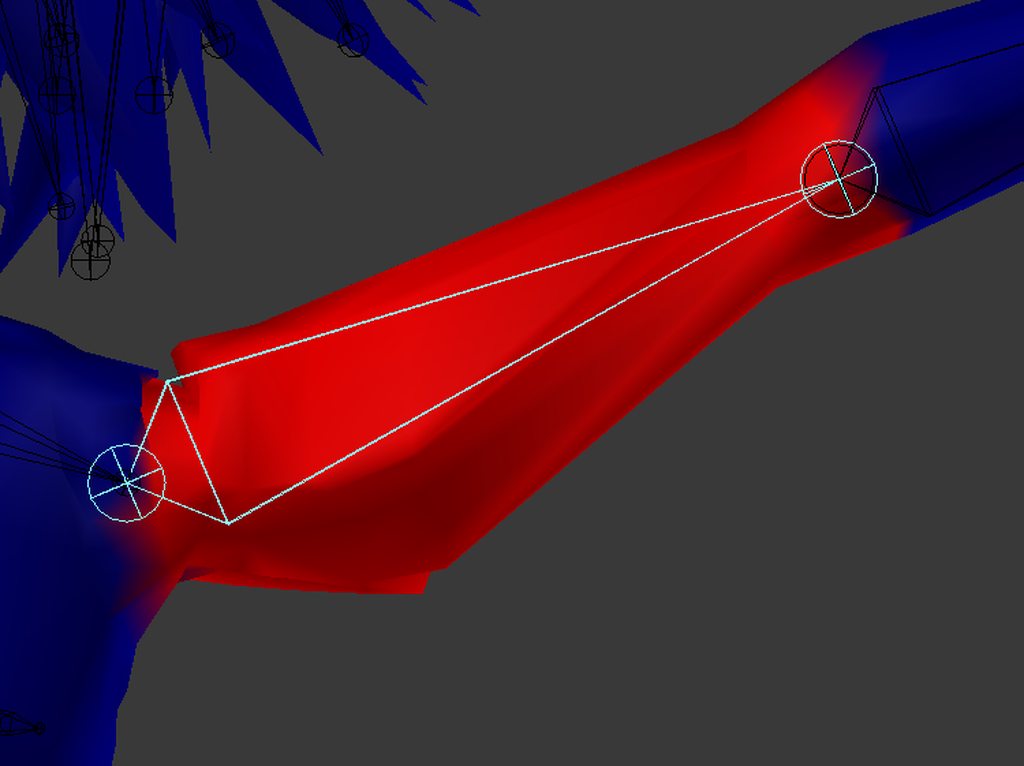
i cannot thing of any explination as to why it is doing this
it's a mirror of the other side which works fine
there is a huge bulge under the arm, i even subdivided like 5 times to see if it helped and it only made it worse
fading verge
failed to find solution error
naive tree
odd
fading verge
the whole chest up to the head and the other arm
yes
i think the verticies are going the wrong direction
im almost sure that is the issue
when i rotate the bone + the verticies rotate -
fading verge
just checked all groups, there is nothing else weighted there
and rotated other arm head chest nothing happens
ok i think it was the shoulder bone
rain delta

Oh my heck I can't get any help for whatever reason
It worked perfectly fine before I changed the rotation of the leg bones
But now the finger tips are super messed up
 crisp tendon
You can rotate them yourself in unity
select the bone while in t-pose and use "e" to change to rotation mode
if not e then r
rain delta
Thank you! That was my issue.. Though Unity is complaining now haha
crisp tendon
Yeah you'll have to avoid the "not in t-pose" if you can, i know it's annoying
rain delta
Well alrighty, thank you so much! ^^
 idle oasis

???????

Anyone know what's going on?
I had it working, and then I added dynamic bones to the hair, and then it wouldn't let me uplaod because of feet and uper arms, but I didn't change anything for feet and upper arms
fading verge
Try just entering the rig screen and leaving it again
Sometimes the SDK gets mixed up and failed to detect stuff
idle oasis
Still the same thing
I re-opened unity without saving so the dynamic bones didn't go in
And it still says the same thing
Though it's the same exact way as it was before when I uplaoded it
 calm needle
for the heck of it, have you tried setting it to generic then humanoid again?
naive tree
yea i've heard that fix from some1 too - setting to generinc - apply, then back to humanoid
 lethal pasture
 fading verge
VRChat seems to crunch my shoulders in towards the neck, any way to work around this?
 wooden elbow
@topaz turret Poppin, do you know how to properly rig a quadruped model? I've tried earlier today and for the life of me I can't get the front legs properly working, The left paw jutted out, then when I tried to fix it they ended up becoming criss-crossed, I didn't know what I was supposed to do...
 topaz turret
yep absoluty give me a second
 stuck jasper
Yo guys, I'm having a weird thing happen
https://i.imgur.com/P9GGX46.mp4
 light kindle
you need to fix the weightpaint
stuck jasper
Tried, it doesn't change
light kindle
ok have you tried other bones that might be causing the problem too
 light kindle
also have you tried removing the green line around the neck
stuck jasper
Only the shoulder and upper arm have weights with this part of the body (both sides)
I can try removing a buncha weight, but idk if that'll fix
stuck jasper
Oh cool, blender froze 🤦
light kindle
also @fading verge id say youve got your bones in the wrong place
the shoulders id say
if you make the shoulderbones shorter it should fix
fading verge
 light kindle
thats pretty strange
it might work if you go to blender and delete the extra shoulder bones and extend the others
but it seems really weird that it would use nonassigned bones
try reuploading and then change the bones
traz you got blender working now or nah
stuck jasper
Alright, it seems that the upper chest is causing the issue
dunno why it's weight paints are doing it tho
Also yeah, I had to load an auto save which was made right before it crashed lol
@light kindle
light kindle
at least it was right before haha
blender has to calculate it so the paints cant be perfect
id check every bone and make sure no buttons and the like are left loose as well
stuck jasper
Another issue, CATS makes the head bone invisible while not in Edit mode https://imgur.com/a/QGGrB
(The album has another image in it)
light kindle
it might just be blender bugging around
but i dont think theres much we can do about it
rain delta
Still having a strange issue where my avatar's legs are spread apart a bit too much
Tried changing the rotation in Unity and in Blender
light kindle
tried moving any bones
 rain delta
Yes, I did try loving bones
low parrot
Bones are nice, I'm glad you love them
rain delta
Oh no XD
 balmy summit
talking about bones, what do i need to check in order to lock bones in it's place?
rain delta
I meant to say moving xp
balmy summit
right now my shoulders and hips don't rotate as they should do
rain delta
I'm pretty sure there's a whole locking section in the bone settings somewhere
I saw it but didn't know what it did lol
 wild matrix
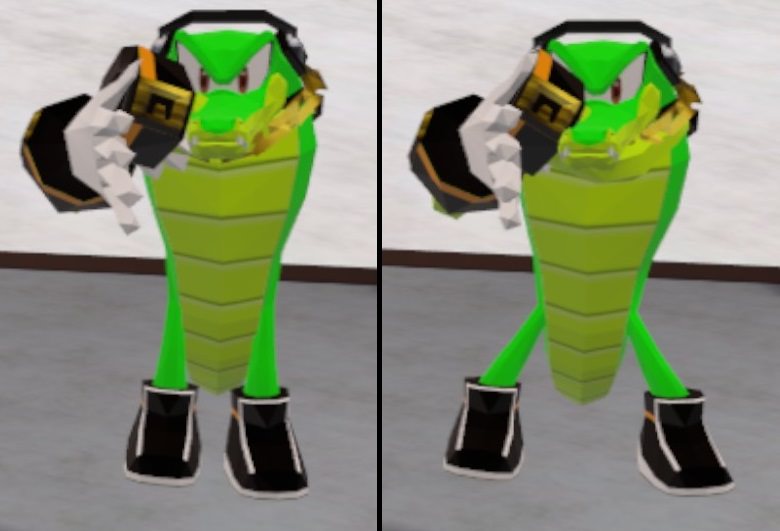
Currently have a problem where my character moves his legs a bit apart after he stops moving but the distance between his feet are the right distance while he walks through. Anyone have any ideas what may cause this?
https://imgur.com/yXdFADz
 pine harbor
is that a humanoid rig? looks like he's trying to squat/bend down slightly to match something about the IK posing
rain delta
That's the issue I mentioned earlier.. though it isn't as noticeable on my model
But it still bothers me, and I don't know how to fix it
wild matrix
Yes humanoid rig
Oh ok, I can try to look up more about IK then to see if I can troubleshoot it somehow
rain delta
I wasn't able to find anything myself.. Maybe you'll have better luck haha
 wind parcel
Quick question
https://gyazo.com/8f2d0159c9ed22bf70a8b81bab1178c7

Anyone know how to fix the arm thing?
rain delta
What arm thing
rain delta
Yeah I can't see anything lol
rain delta
Avatar testing has a some stuff that could probably help some ;p
wind parcel

 rain delta
I must be blind, I don't see anything out of the ordinary
low parrot
The things that kinda look like wings?
wind parcel
Yea
wind parcel
I don't see the same problem in blender tho
low parrot
perhaps it's part of a shape key you accidentally enabled?
or maybe it's supposed to be transparent and the material in Unity is set to Opaque or something like that?
wind parcel
I don't see it in unity either
rain delta
Oh pff I see it now
wind parcel
And I'm pretty sure the shape keys aren't enabled
rain delta
You can still get rid of the mesh in blender, if you don't want it there
wind parcel
How would I do it?
low parrot
You can, yes, the problem is those blades don't show up in Blender
wind parcel
It only shows up in VRChat
rain delta
But if they're there and cats makes them their own mesh, they can easily be deleted
low parrot
look through all the shape keys as one mesh and see if any bring these blades out
low parrot
change all your materials render modes to opaque to see if it shows up in Unity
rain delta
:")
wind parcel
Still not showing up
low parrot
i have no clue then
wind parcel
Ripperino
low parrot
if it aint showin' up in Unity or in Blender then maybe your avatar is haunted
wind parcel
Bruhh
wind parcel
How would I do it?
rain delta
So in cats, there's a setting that allows you to separate meshes
So if the blades were originally their own mesh, you should be able to find them while it's split up and delete them
Then just join the meshes again
If that doesn't work then idk what to tell ya
rain delta
What but if there's a mesh you can't seeee
Then you can delete it when it's separated
It's the one mesh you don't see when you hide it
wind parcel
I seperated it and I looked for it but couldn't find
rain delta
That's really weird wtf
rain delta
I must check regularly
Leg spread while idle looks weird and kinda annoys me XD
opal aurora
That just sounds like a broken shapekey to me honestly, the mesh for the swords and holsters are probably invisible, hence trying to see it via shapekeys will have no result asides the possibility of a wireframe
And it won't show up in unity normally as that's just not how shapekeys work even if they get activated via a glitch
I'm pretty sure there's a menu in unity that allows you to change shapekey values... not sure where, but you should check the shapekeys there if you find it instead in this case
wind parcel
Shapekey values as in if its enabled or...
opal aurora
Legit values from 0 to 1 i think it's under the mesh renderer, or shows up under something that uses it
 opal aurora
Yeah, but in unity
If that doesn't work then your model might be legit haunted
Nothing else comes to mind
wind parcel
Pretty sure it's haunted
Cause when I tried messing with the shape keys in Blender it didn't show up
Idk if it would be dif in Unity
opal aurora
.well in unity it'd be opaque and fully textured
If in blender it's set to transparent... welp
wind parcel
Time to look for the menu I guess
rain delta
🤔
 viral mica
anyone know how to get audio to work properly/
opal aurora
I used to, but not anymore
 charred sorrel
im literally so close to being done with this model and now the textures are messing up, they're going upside down when i drag them onto the model in unity?
help?
pine harbor
did you try applying the textures in blender before unity?
the UV maps might be flipped -- easiest fix for it at this point is to open your textures in an image editor, flip them vertically and save a copy -- then get your model over in unity to use those flipped textures
that seems to happen a lot with a lot of ripped models -- just more a question if the uploader made sure the textures aligned before putting it up
 weak drum
quiiiick question:

for some reason the material is inverting itself on the mesh, how do I go about fixing this?
 drowsy storm
Im having trouble with the legs of my avatar... They only rotate around the z axis and for some reason the legs point towards the same point in Pose Mode and Object Mode. They don't point in the same spot in Edit Mode though.
 gloomy loom
check the relation tab in the bones for blender @drowsy storm
drowsy storm
@gloomy loom it was connected and i unchecked it but i still have the same issue
drowsy storm
@small zinc you have to do mix weights with cats
small zinc
that's the exact opposite of what I want to do
drowsy storm
@glad egret are you in rest mode?
I'm trying to append wings onto my avatar and when I do ctrl+j my wings dissapear...
drowsy storm
@gloomy loom the bones
gloomy loom
and the material disappears or the bone disappear?
drowsy storm
the material
pine harbor
sounds like something i encountered a long time ago -- does this sound relevant?
https://blender.stackexchange.com/questions/62543/mesh-disappears-when-joining-armatures

I trying to join two separate armatures.
When i select AK47 armature then arms armature and press CTRL+J, AK47's model disappears.
gloomy loom
it also could be the material contented to the bone is outta your sight
drowsy storm
i zoomed out and its nowhere to be found
 rigid sluice
can someone help me, my model doesnt move with my bones so i just t pose in game
gloomy loom
make sure the material is all joined together too
drowsy storm
how?
gloomy loom
in object mode select all the wings and hit join in the tools
drowsy storm
"no mesh data to join"
 earnest kite
I got my custom emote animation to work, it moves just the way I want
but I still can't figure out how to script audio to play when I want it to
what Property do I add to the animation scripter that lets me play an audio clip? I have them in .ogg format and not set to play on wake
gloomy loom
Yea I dont know why you have that lux
try looking at what spear posted
renatus its a audio script in unity, bu this isnt the room to ask
earnest kite
oh, sorry
gloomy loom
just add the component, but make sure you resize it and remove the second thing that comes with the component
because vrchat wont let you import it otherwise
its like onc something
gloomy loom
yea you dont need that script, just delete it
earnest kite
alright, done
what do I add to the animation tab to script a sound effect? The ones I have placed in the timeline don't trigger the sounds
https://prnt.sc/i9vw3c

 molten vale
Might as well drop it here if anybody knows as well
I'm presented with a weird issue regarding FBT
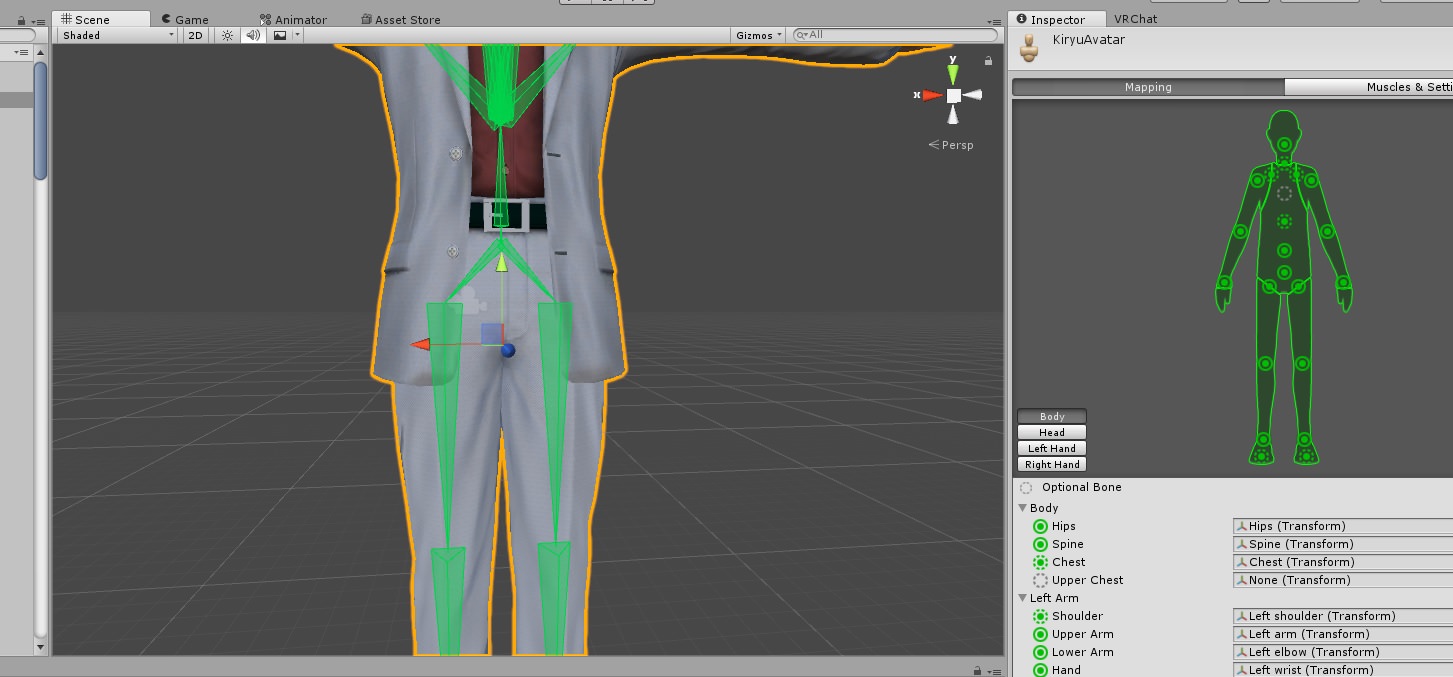
the model seems to work fine and the hips are located above the thigh bones so that it forms a Y shaped in the unity rig
but the thigh bones twist inwards or outwards
idk how to go about it
The thigh bones are at 0 roll
I thought it might have been the assisting bones that are leg and thigh orientation fixes but it's the whole thigh bone that twists, not the fix bones

 little frigate
Oh hey grim. Thats.. A tough one. 😮
I mean, you already checked the roll. Any changes you made to the orientation are saved as the rest pose I presume?
brisk mesa
If the rest pose is like that then youll have to force copy the pose mode positions to the rest mode cause i had to do that for my tentacle monster when i posed him better while his rest was all fucked
Um i had to look that one up though.
light kindle
Dunno what you mean by twist inwards or outwards but id connect the bones at least
 paper sparrow
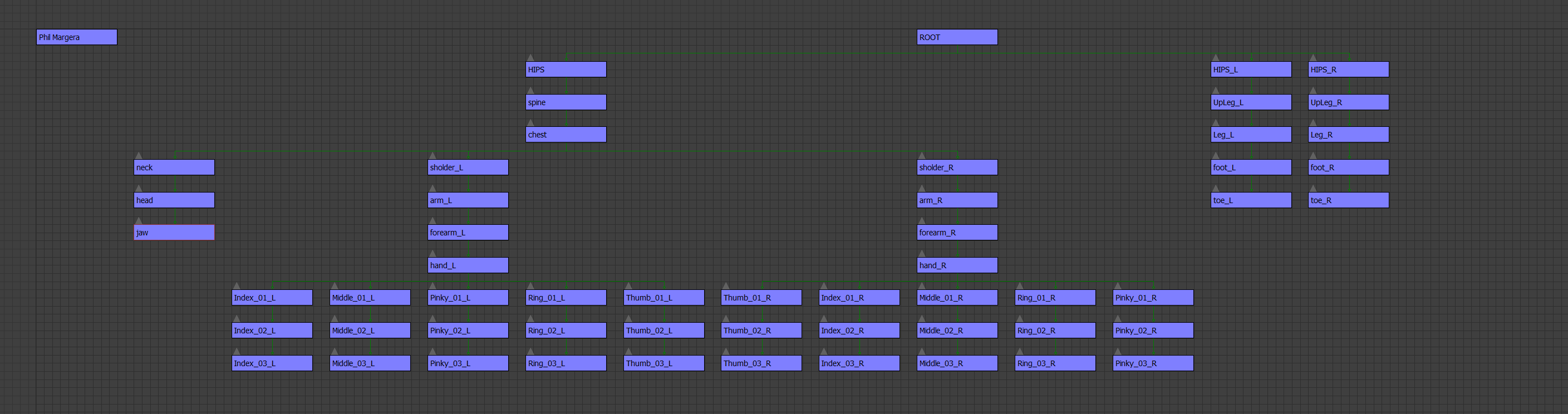
does anyone happen to have a bone name hierarchy diagram or list? i'm setting up my skeleton but i need to know what i need to name the bones for them to work.
little frigate
how about the sample rig from here for reference? https://www.google.com/url?q=https://drive.google.com/file/d/1ZWgj3UZI5yulLCJBHyUPCqkHNkrPPgS8/view?usp%3Dsharing&sa=D&ust=1517748464928000&usg=AFQjCNFASsWVoJocT_2WUTqOWPpFzS9vsA
little frigate
it'll come in handy! 😃 Came from this blender->unity tutorial https://docs.google.com/document/d/1W5KFa_aszCMrJaFD8mb9a-GHYO4X4S9M63GjM4UwuEw/pub
paper sparrow
ah 😃
little frigate
which outlines the visemes as well if you'll be doing any of those
paper sparrow
awesome! i do need those
 eager bronze
 little frigate
eaarrgh
The mysteries of getting an alpha channel to do anything at all in a metallic/smoothness map are not yet open to me
opal aurora
Use alpha is transparency on the texture perhaps?
little frigate
Fiddled with that, but it doesn't seem to make a change. It is using the channel, just not in the way I would expect. I will investigate further. ❤
Oh well that's a better way to figure it out.
molten vale
Alright well
I tried connecting the bones and made some tweaks
however I think it's too late for me to apply a armature change since I added shape keys 😬
and hitting apply rest pose changes the rolls
so
heck.
actually that doesn't seem to matter
I wish I could test these things cause I am making it for someone else :V
and I don't have FBT myself yet.
although I can imagine results won't be consistent seeing as heights play a huge role
And for that one person asking what I mean by twist.
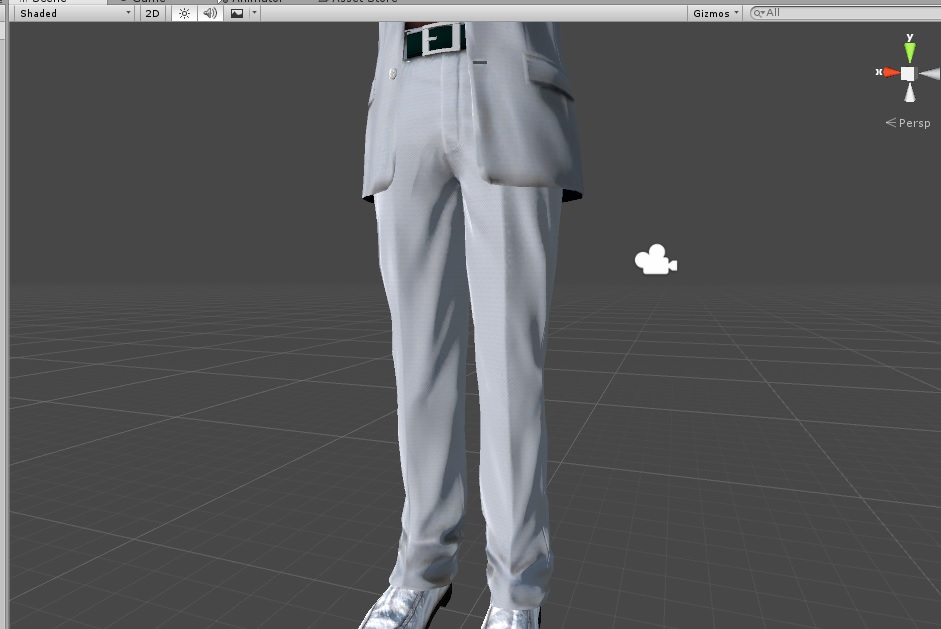
This is intended leg direction

and this is what happens when he calibrates
I'm thinking it might be in relation to the ankle.
seeing as tracking from the ankle is 1:1 with the thigh which... is weird.
At least that's what I heard.
then again this issue is odd, I guess I'll troubleshoot it harder when I actually can experiment myself
spice crypt
i accidentally deleted the mouth of the model i was working on. how i can restore it?
molten vale
In unity or blender?
spice crypt
blender
spice crypt
i cant undo, it was long ago
molten vale
then do file auto-save
also man I really wish you could select what bones to auto-weight rather than the whole armature
spice crypt
that file wont recover the mouth
spice crypt
i have the original mouth if i open the original project but i dont know how to import that
small zinc
do I need to have a collider base in unity for colliders to work while I'm testing them?
for dynamic bones that is
 wispy remnant
im trying to take a head of one model and put it on the body of another, which seems like it should be simple
but im running into issues with parenting the head bone of the head to the neck bone of the body in blender
am i going about it the wrong way?
molten vale
@small zinc just add a Dynamic Bone Collider to something and hit play, move that said something into the dynamic bones to see the result?
molten vale
yes
wispy remnant
you do not need a collider base, or colliders for dynamic bones to work
molten vale
bones
small zinc
okay
small zinc
because my little flippy bits are clipping into my chest
molten vale
and scale it appropriately
small zinc
 wispy remnant
when testing dynamic bones, make sure a root is named, and make sure the uppermost parent (the one with the name of the model) is selected when you move it, you can also play an animation to see it better, like search walk, and open the walk animation thing and make it use your model
molten vale
and yeah colliders are just that, colliders.
small zinc
The red bits clip into the chest whenever I move forward
is there no way to generate resistance against that?
wispy remnant
i put colliders on my middle finger at size like 0.0006 or something
molten vale
You can put a collider in your chest
wispy remnant
just enoughto cover the middle finger tip
molten vale
and scale it to be a bit bigger than your actual chest
wispy remnant
colliders in the body are nice but generally make no difference
molten vale
also add some Y direction force
negative force
not a lot tho'
something like 0.005
wispy remnant
upping stiffness or inert help with collission with your other body parts
small zinc
ah shit
molten vale
but again
small zinc
so I just have to basically make it not move at all
wispy remnant
a good example is my avatars skirt, it was clipping through legs so i just took dyn bones off it completely, it clips slightly occasionally but its so much less
small zinc
No way to prevent model parts from moving in a specific direction at all?
molten vale
people with leg coats suffer a lot
spice crypt
well you have a tutorial on how to import a material like the mouth for recover it?
wispy remnant
some avatars hae a lot of skirt bones so you could apply dynbones to only the lowest of them so its a slight sway near the bottom
molten vale
have fun.
molten vale
compromises are made everywhere.
small zinc
Yeah, but some of them are in the weirdest places
molten vale
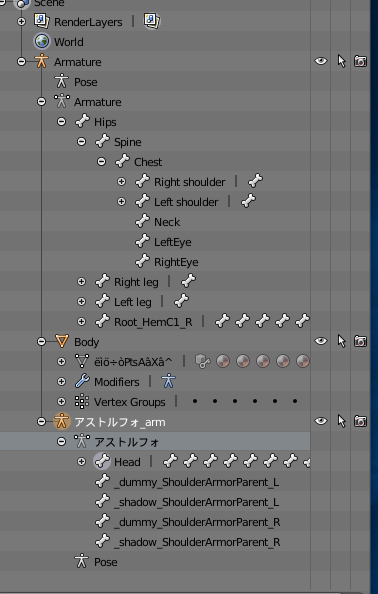
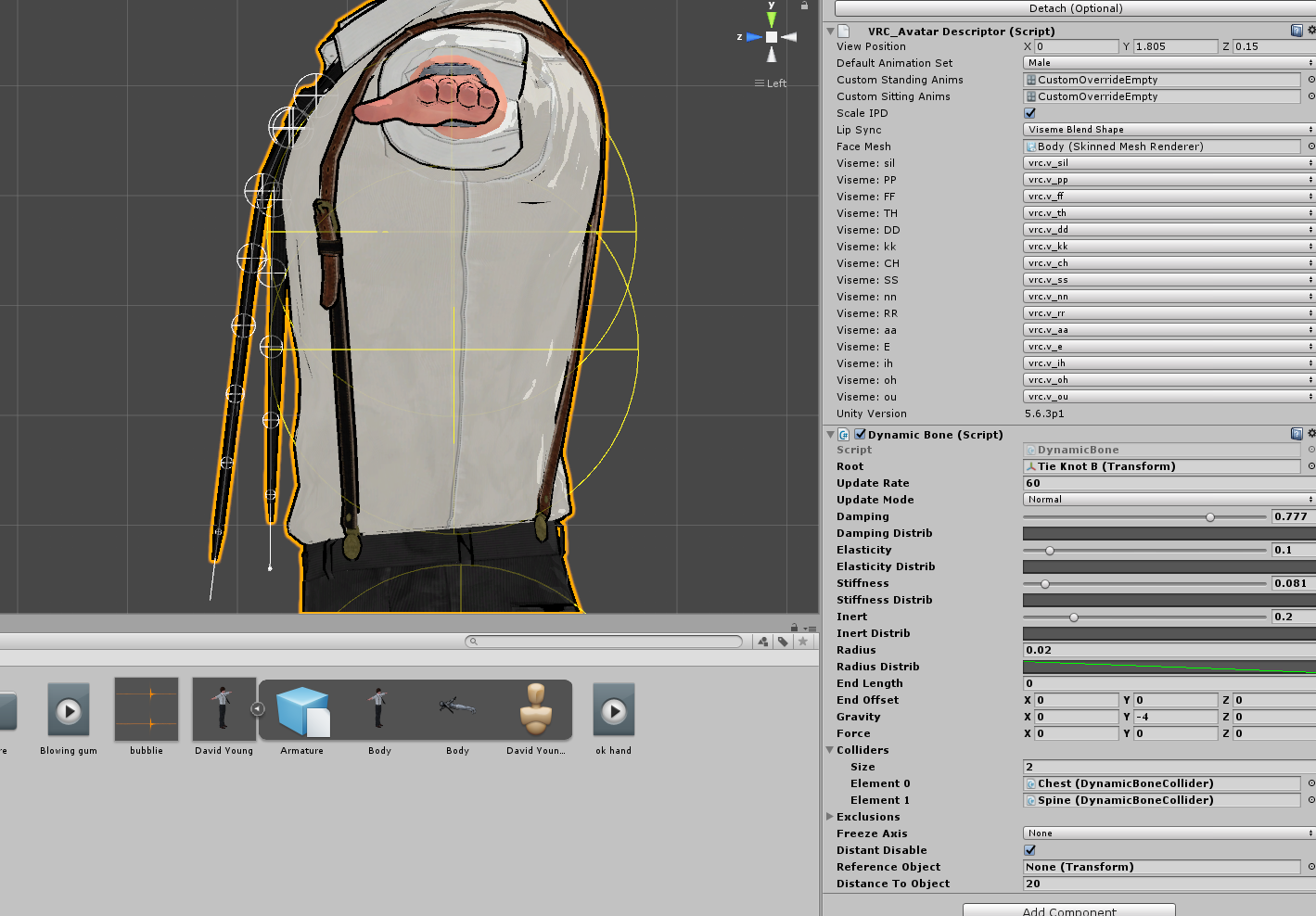
well here have my David Young for example
he has a tie.
that doesn't clip into his chest
wispy remnant
if i want something to move but only enough to be realistic and not clip i use 0.8-0.9 stiffness and 0.925 inert
i use that for breasts and accessories
some accessories
molten vale
god I hate that you can't upload images
 molten vale


 wispy remnant
embed works
molten vale
Directly.
wispy remnant
sharex is easier ¯_(ツ)_/¯
molten vale
suck a fuck
wispy remnant
omg no emotes
molten vale
but yeah there is my tie settings
wispy remnant
out of curiosity can anyone assist in combining different model parts together?
molten vale
I tried.