#avatar-rigging
1 messages · Page 90 of 1
 little inlet
did you position your avatar at x0 y0 z0 in unity
 wild canyon
yes
the only change in position I did in unity was that I turned him 90 degrees on the y axis
 light kindle
you probably have to start with the 1st child of the top parent
the dotted lines are where the connections should be though...
wild canyon
I know
but basically when you just select connected the child bone goes to the parent node
light kindle
hm
again you might have to start at the start or the end of the model
dont really know what else i can say
 gleaming falcon
@wild canyon The head of the bones don't really matter. As long as the base of the bones is were the joints are going to bend, you'll be fine. Positioning the head is more of cosmetic.
 fading verge
Can anyone help me with rigging an avatar? The only bones that are missing are in the hands and visemes for the face. I’d be willing to pay since I kinda need it done within the next 6 hours. DM me if you’re interested/want to help.
 hazy knot
@fading verge Are you using CATS tool? Everything should be automatic.
fading verge
I’ve watched virtually every tutorial to get it to work. For whatever reason the auto rigging option hasn’t shown for me? I’ve tried redownlading everything as well.
hazy knot
Did your model need to be decimated at all?
fading verge
No. It’s a very low poly count due to it being a in game model from PS3.
hazy knot
I've not imported any of those directly, all mine have been rips that were then converted for MMD or XNA/3DCG
fading verge
I can get it into game. It’s just got no bones for the hand.
hazy knot
Is it available as a download somewhere? I could see if it's something I can try.
fading verge
Yep. Sec.
hazy knot
If they're missing, it's just a matter of adding the bones and painting the fingers right.
 gloomy loom
that armature of mastercheif is a nightmare
 fringe stratus
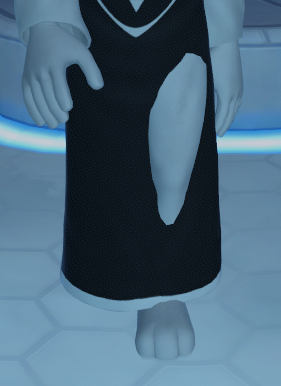
I added bone colliders to my model but it keeps clipping throught the clothes
 warped fable
how do i transform position my character higher, selecting the main model root and ediitng the y position doesnt actually chaange where it appears in vrchat. it's a non humanoid generic model that i ripped from wow (deathwing)
gleaming falcon
@fringe stratus Are you saying your skin/mesh is clipping through the clothes?
fringe stratus
My legs clips through the clothes mesh
gloomy loom
@warped fable I have yet to try this out on a model I was working on with the same issue, but if you parent the model onto a mesh in unity ive heard that fixes the problem
you can orientation and change the height based on the mesh
fringe stratus
 gleaming falcon
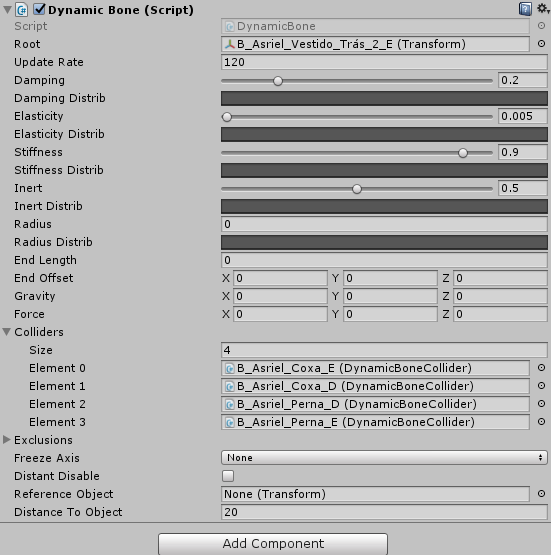
Okay, then the clothes needs to be weighted or if you're using dynamic bones, the settings would need to be adjusted
gloomy loom
yea, another thing you can do is apply rotation on the body and aramture with cntrl a in blender and change the height in bledner
the ladder option is what I tried out and for others it worked, but for me it didnt
lemme know if that works out for you
gloomy loom
np
 static sigil
Shady, your avatar might not be updating in-game. try going to your Avatars section of the menu, click on the arrow where your avatars are listed, select your avatar, and change to it
this will force your avatars to refresh
fringe stratus
it's updated, but what I did doesn't seem to work
static sigil
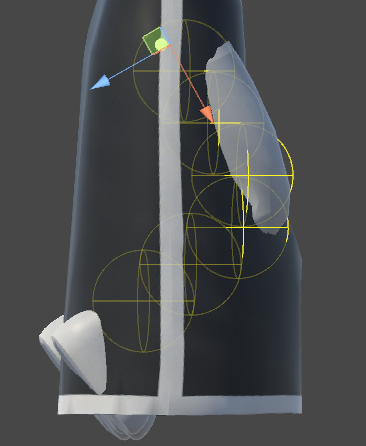
it's possible that your colliders are moving in between the dynamic bones, then
it's happened with one of my models
fringe stratus
 gleaming falcon
you have to apply the colliders to every dynamic bone in the cloth
static sigil
- i'm pretty sure that you can't have multiple colliders on a single bone (limitation of the script or something)
- it looks like it might be responding, but at too low of a position, so the thigh sticks out anyway
gleaming falcon
I mean, how many bones are in the clothes?
If the dynamic bone script is applied only to one root bone, say near the other leg, then it will clip through
 jovial dune
Is making an avatar with an attachment that allows it to fly frowned upon, or are people/staff indifferent to it?
 cobalt geyser
My character crouches by crossing his kness, like a woman basically. Is this because my knee bones are too close to each other?
gleaming falcon
@cobalt geyser When you sit down?
 quiet bluff
anyone know where i can adjust the actual range of eye blinking for a mmd model? this is the first weird one i got that only shuts like half way.
gleaming falcon
@quiet bluff You would have to adjust the blendshapes themselves
fading verge
you could edit the keyshape @quiet bluff
cobalt geyser
@gleaming falcon no when I squat
quiet bluff
hmm true.. ill dig into it worst case I have a creepy blink on a already creepy avi
gleaming falcon
@cobalt geyser It sounds like something is off with the weights in the legs.
cobalt geyser
but I checked the weights tho, they are fine....
gleaming falcon
Can you get a picture of it?
 sand sedge
Anyone ever experienced bug with Dynamic bone glitching around (just rapidly flicking around without any explanation) when standing idle on a spot?
gleaming falcon
@sand sedge Sounds like something to do with the values with the dynamic bone
fading verge
yeah, it's a bunch of springs, if you don't dampen them or have strange settings they will go off by themselves
sand sedge
All bones do it like the model had sudden movements without actually moving
fading verge
bones don't only react to movement, they also react to gravity and forces
gleaming falcon
Got a screenshot of the values?
sand sedge
I'm making a video of it glitching around
And it also isn't happening in Unity at all, just in VRChat

It started happening after I added custom animation.
The effect starts getting stronger the longer I use the avatar and I see it much more than other players (they usually report it's just a little or not at all)
fading verge
I'm really curious abouyt your settings too
sand sedge
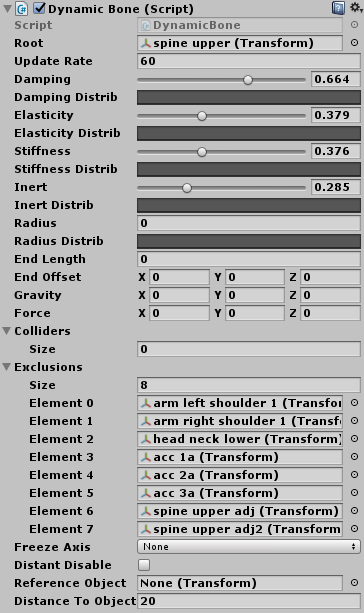
And here are the settings https://i.imgur.com/LTBhKdJ.png
 fading verge
that looks normal, but why all the colliders?
sand sedge
Noting that it wasn't happening before adding custom animations and I didn't change anything in dynamic bones.
fading verge
I think your colliders are all fighting and pushing stuff around
sand sedge
Those are exclusions, not colliders
gleaming falcon
That would be my guess
sand sedge
I don't think it's the settings, because all the bones move the same no matter the settings and it only happens when not moving
I tried changing to custom idle animation and it got worse
fading verge
does it freak out with the default idle anim?
sand sedge
Yes
fading verge
hmm
sand sedge
The other animations I changed are all just emotes and it happens even if I don't use them
fading verge
where in the hierarchy are the dynamic bones?
gleaming falcon
You have the script on the spine, and not the bones you want to move?
sand sedge
This one is for moving the ribbon thing you can see in the video
 opal aurora
Some people do that to lessen the lag caused by dynamic bones, as minimal as it is, they use it as a root bone @gleaming falcon
fading verge
okay good 😐
gleaming falcon
I would try to add the dynamic bone one the bones you want to move. If that fixes it, you can put the bones in a child with the dynamic bone script on it
opal aurora
Well that is the way it's supposed to be used effectively...
sand sedge
I'll give it a try
opal aurora
Keep in mind exclusions cutout access to any bones under them in the hierarchy
fading verge
I always put all of them on the avatar root and I've never had any issues
sand sedge
I mean, all the tutorials had it on root
fading verge
but I rooted all the bones that need animating properly
gleaming falcon
My guess is that there is a bone that is not being excluded that is making it jump
opal aurora
Not all bones are identical and the same goes for models
Rooting bones work well for many models, some not so much
sand sedge
So, should I move Dynamic bone script for example to "head neck upper" and set the root also as "head neck upper"?
gleaming falcon
What bones are you trying to animate?
sand sedge
Skirt, ribbon and hair
opal aurora
A side note for anybody that doesn't know
If dynamic bones are applied to the hips as a root, your sitting animations in VR will be bricked
gleaming falcon
Try putting the script on the ribbon, see if that does anything
fading verge
did you do any bone parenting? @sand sedge
sand sedge
I just moved scripts to bones matching their roots and I'm uploading to VRC
@fading verge Could you explain that a little please?
fading verge
it's an option in cats blender plugin to root a string of connected bones to a dummy root, stuff connected to hips etc can mess up the vrchat ik animator, as EXSGT said earlier
so you'd have empty roots for skirt, hair and ribbon, and it will not influence any other rig nodes
gleaming falcon
That's what I do with dynamic bones. I don't really mess with exclusions
fading verge
yes same ... it keeps everything neatly discrete
opal aurora
I just have them on a per bone row root setup
sand sedge
I think it's fixed!
opal aurora
As horrifying of an idea as it might sound to people that rooted their bones... it really isn't
sand sedge
But I did a mistake on idle animation, so it's moving when it shouldn't, I'll fix THAT and try again, then tell you final result, but so far, it works!
fading verge
awesome
opal aurora
I heard IK broke standard animations like idles and walk states... is it fixed now?
And by that i mean overrides
fading verge
I haven't tried custom walk and idle animations, but the IK animator doesn't do the flappy legs thing with the standard ones that much it seems
 balmy summit
if i put colliders in the bottom of a dress should it work as not would clip through the floor?
or just interacts with the rest of the body?
fading verge
but in this patch the audio positioning is super broken 😦
opal aurora
That's what happens when something standard gets removed...
ONSP got removed and the audio rolloffs got capped
fading verge
at least the dead eyes are fixed 😐
opal aurora
Any previously uploaded avatar with said settings now bypasses audio sliders
fading verge
yes it's cancer
opal aurora
And is always at 100% volume
gleaming falcon
What? I can't hear you!
fading verge
insta-block
opal aurora
I won't be updating my avatars untill they get the audio fixed though
I rounded it up to be heard well but not be an ass at 100% volume anyway
sand sedge
I'm wondering, whether are they going to fix lip sync via "Jaw Flap Bone"
gleaming falcon
If you are talking about when the mouth is wide open and it flops around, the bone would just need to be rotated correctly
opal aurora
Next patch : Audio Sources removed and disabled due to xyz reasons
sand sedge
Well, I rotated the bone to be closed, but it doesn't move
gleaming falcon
Oh you mean in the mirror, weather you see it or not. I don't use that at all. Not sure
opal aurora
I think you can see it on the camera on avatar testing no?
sand sedge
Thank you guys very much, the dynamic bone glitching was fixed by moving scripts on the bones themselves!
gleaming falcon
👍
sand sedge
I'd say even colliders when walking work much better now
opal aurora
Well... that is how they were made to work afterall haha
 vale shell
I could hate Maya sometimes
 rose atlas
is it hard rigging a non humnoid character?
gleaming falcon
Yes, pretty much.
 lilac moss
depends on what you're trying to accomplish
rigging a car and making the wheels move is easy
 fading crag
any tutorials on merging another models head onto a different model?
 low parrot
Check the newest of #tutorials
hazy knot
Yes, there are.
fading crag
One's in there only seemed to cover clothing and hair
havent seen body part swapping
hazy knot
It would almost be better to do it in PMXEditor if it's an MMD model
gleaming falcon
Seems everybody uses MMDs. Any of you guys use stuff like XPS or rip it from the game? Asking just for curiosity.
fading crag
I'm using Source Engine models
hazy knot
almost any model can be converted, and there is a different method for each one.
fading crag
im looking into using PMX editor
 cloud kiln
Hey guys, while adding a weapon animation my my character
I bound it to "Rock on" hand gesture.
But only 1 mesh of my weapon appear.
Anyone know a solution for this?
And yes, the whole weapon itself is bound to the animation
hazy knot
You have multiple meshes on your weapon? shun.
cloud kiln
I have 2
hazy knot
Hehe, I imagine both meshes are attached to the weapon object in the hierarchy?
cloud kiln
Hold on
You mean the Root bone, or just mesh?
Ooooh... I see the issue
The weapon's "mesh" are still bound to themselves
To their own mesh that is
Gonna bind their mesh to the whole set instead
Nevermind, it didn't want to do that
Fkn' hell
I'mma go ahead and delete one of the meshes, because It's basically just chains anyway
#LazySolutions
hazy knot
You can have the mesh on the weapon root. That's fine. It's odd that only one of them would enable though unless you have the meshes disabled individually.
You should just be disabling the weapon root for the animation under normal circumstances.
cloud kiln
Yea, I found that odd too
It worked perfect the other time I uploaded it
But then due to my derpiness
I forgot to put the weapon in under "wrist"
So it was just floating
hazy knot
Maybe go merge the meshes in blender and try it?
hazy knot
Everyone's processor will thank you
cloud kiln
Haha, I know xD
But I deleted the other mesh instead
The textures on it looked wierd anyway so
It was basically cubes
Now it works, but problem now instead is that it's just floating around in my hand and sometimes go out of it
Ugh...
When you think you're almost done but something goes wrong in the end XD
Oh well, back to unity!
@hazy knot You mind taking a look at it for me?
 left fox
Just imported my mode linto vrchat, arms head and all that works fine, so does the walk animation
but I'm unable to bend my knees?
what could cause that
 woeful vapor
I'm having really weird problems when adding new vertex groups to a mirrored mesh, I wonder if anyone would be able to help me. I hope this is the right place to ask.
The body is completelly mirrored, and all the other vertex groups were automatically added when I first parented it to the armature. However, I decided to add bones for the fingers, and when I create a vertex group it affects the finger it's supposed to, but also the finger on the other hand. If I remove weight paint from one, it gets removed from the other one as well. Is there a way to prevent that?
 wheat geyser
Does anyone know of a fix to stop your avatar from going on it's tip toes while looking down? I tried deleting the toe bones but that causes my knees to pop in and out at random times
hazy knot
I think it's caused by anime proportions, so the only way would be raising your view point or lengthening your bones.
If you raise your player height ingame sometimes it can get rid of the issue also
 rugged vale
So i have this issue with a model. The chest bone is super small and causes the t-pose to be deformed when I link the chest. Without the chest everything is fine. http://prntscr.com/i8d1eb

 static parcel
Is there a way to increase the effect of a viseme on an avatar in unity?
I set them but they only move a little bit when I talk. Not having that problem with other avatars
low parrot
Was the Shape Key Mix Intensity at max in Blender when you set 'em?
static parcel
Yeah
fading verge
depends on the model a lot
static parcel
Or do you mean the value? I thought that was just for animating
low parrot
 static parcel
Wonder if it can put limits on the arm bones, so they stop clipping through things
hazy knot
The nice thing about CATS is you can use parts of it if you want to do most of it manually, but it makes a few things a ton easier.
hazy knot
Show me your panel for the particle and the renderer
 balmy goblet
http://prntscr.com/i8dgmg right here
 hazy knot
That part looks ok
balmy goblet
http://prntscr.com/i8dgup thats the emsh all one solid body
 hazy knot
how about the particle section
balmy goblet
http://prntscr.com/i8dh7v this section?
 hazy knot
start size 0
balmy goblet
already tried incresing the size
hazy knot
should be more than 0 at least
balmy goblet
leftover form when itw as 10000000
hazy knot
lol
balmy goblet
thought maybe its just really small
 vast bolt
 hazy knot
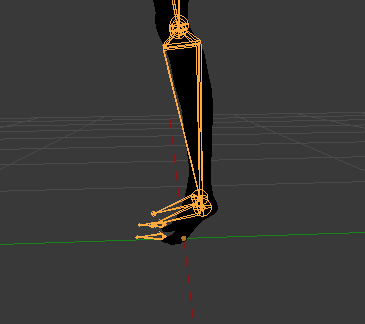
You will have toe bones and you will be walking on your tiptoes, possibly higher
hazy knot
If it's a high heel model you might want to just disable the toe bones in Unity rig
hazy knot
there should be a flat foot shape key if it's an mmd
crank it up to 100 in unity if it's still there
unless you deleted it, then you're just going to tiptoe everywhere
balmy goblet
it emits other meshes just fine http://prntscr.com/i8divv

I think i got it
it has 3 submeshes
hazy knot
it might be a scaling issue. Try turning it up a bit? scales of 10
make sure the meshes are all present and enabled
balmy goblet
@hazy knot is there somethig different than start size for scaling?
hazy knot
The particle system itself should have a scaler at the top in the xyz transform box
but you'll have to reposition if you use that
 sharp raptor
YO
can someone help me my eyetracking and blinking aint owrking in blender
i mean unity
it works in blender
but when i go in game it dont work
hazy knot
Are you using manual method or CATS tool?
sharp raptor
cats
hazy knot
Do you have any looping animations set on your avatar?
gleaming falcon
@sharp raptor If you want to have eye tracking in VRC, there are some things you have to have extactly
sharp raptor
?
gleaming falcon
First, the mesh that has the blinking blendshape has to be called Body
hazy knot
There you go
I assumed if you were using CATS that you had fixed the model and renamed. I guess that's what I get for assuming.
sharp raptor
so is it too late to change the mesh to body
or do i have to redo the eye tracking and blinking if i do that
gleaming falcon
The bones have to be set in a certain way too. Starting. Hips, Spine, Chest, Neck, Head, LeftEye/RightEye
hazy knot
If you do it in blender then re-export you should be ok.
gleaming falcon
the four blendshapes that have the blinking have to be at the top of the Basis
It's has to this way:
vrc.blink_left
vrc.blink_right
vrc.lowerlid_left
vrc.lowerlid_right
vrc.v_aa
vrc.v_ch
vrc.v_dd
vrc.v_ee
vrc.v_ff
vrc.v_ih
vrc.v_kk
vrc.v_nn
vrc.v_oh
vrc.v_ou
vrc.v_pp
vrc.v_rr
vrc.v_sil
vrc.v_ss
vrc.v_th
gleaming falcon
Camera?
 gleaming falcon
Hit F
balmy goblet
@hazy knot I got it to work thank you 😄
hazy knot
cool
static parcel
One very random question. Is it possible to have full body blendshapes cycling all the time on an avatar?
I was thinking of the 'squibblyvision' thing in shows like Dr Katz
 fossil blaze
Does anyone know how to remove the "Objects" that's covering up my tri count in blender? https://yawn.s-ul.eu/1Ticj52O
 gleaming falcon
@static parcel You can have an animator control the blendshapes on a body. But it wouldn't be random. You would have to set them yourself
static parcel
That's fine
 stuck temple
https://cdn.discordapp.com/attachments/408007813131141121/408385687663017994/Screenshot_2.png NEED HELP PLZ

 dusk pilot
That looks a little broken
gleaming falcon
Restart blender?
gleaming falcon
did you try to import an explosion? 😮
stuck temple
nooooo😿
https://cdn.discordapp.com/attachments/408007813131141121/408387335101874179/Screenshot_3.png this is what it looks like before i press "fix model'

but it works normal now👌🏽
gleaming falcon
Seemed like the plugin ran into errors.
 wild arch
I’m having issues parenting hair bones across armatures.. when I upload the avatar, the hair floats slightly behind the head..
Basically I took one avatar, and I wanted her to have different hair, so I pulled it from another one, but I can’t parent the bone? Any ideas?
 icy jungle
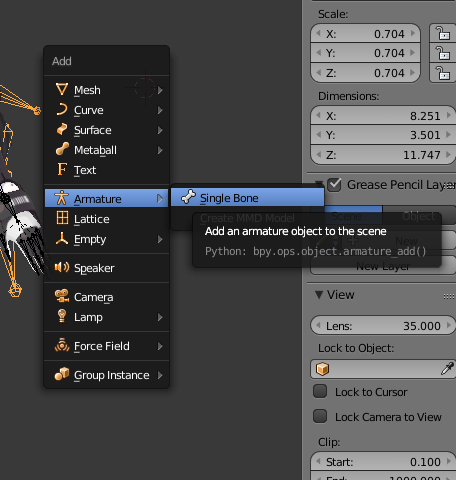
Idk how to add bones to a character, help plz

 odd plume
How do you unlock view offset in blender
fading verge
@icy jungle https://i.imgur.com/2Cr3HSo.png press shift + a and
 crisp tendon
@latent patrol Use cat's plugin
fading verge
How do i ctrl + J these 2 bones from different armatures without one of them moving or scaling after joining
 calm needle
@latent patrol in blender, you would just hav to stretch out the spine bone slightly
icy jungle
What have I done?!?!
https://orig00.deviantart.net/0425/f/2018/031/7/e/dfs_by_goldlunarmoon-dc1rv5f.png
 crisp tendon
When importing an fbx, in the bottom left window click on armature then automatic bone orientation
and ingore leaf bones, never hurts
 charred sorrel
my friend wants me to rig her an mmd model but i'm not sure how to go about that, i have cats and i downloaded mmd tools and tried to install the addon from the zip file but it isn't working. how do i import a .pmd?
 distant nest
Hello, how would I go about making the mesh see through so I can see which bones I'm clicking on for weight painting?
Currently seeing this.
charred sorrel
 distant nest
Thank you.
charred sorrel
np!
icy jungle
I give up! I can't rig models to have bones!
charred sorrel
where do i download mmd tools at? this download isn't working
distant nest
So whenever I get ingame, my feet move with my head, but checking the weight painting in Blender shows that there's no sort of connection between the two. Would there be any other explanation for that?
Where are you trying to download it from?
charred sorrel

GitHub
blender_mmd_tools - mmd_tools is a blender addon for importing Models and Motions of MikuMikuDance.
also do you mean your character goes tip-toed or?
 charred sorrel
im confused xD
distant nest
If I move my head from left to right, my entire body moves from left to right as well.
And are you able to download properly?
The mmd_tools
Because you have to dig into the directory for the actual addon.
You're importing the mmd_tools folder, not blender_mmd_tools-dev_test
charred sorrel
do i zip the mmd_tools folder?
and ooh, it should shouldn't it? i don't think im understanding D:
distant nest
If I move my head from left to right I'd hope only my head would move, not the entire body, it's not like I'm turning around or anything, if that makes sense.
charred sorrel
oooh, check the weights on your other bones! especially the ones the problem bones are parented to
sometimes when you have weights set on their parents it moves with the rest of say the leg if the foot has weights elsewhere
distant nest
Ah, okay. I'll check it out, thank you.
charred sorrel
no prob!! also i think i see what you mean
ah shoot nope blender still didn't recognize it
distant nest

VRChat Community Discord: https://discord.gg/VRChat Download VRChat! http://store.steampowered.com/app/438100/VRChat/ mmd_tools GitHub: https://github.com/po...
That's not working?
charred sorrel
OOOH got it thank you!
distant nest
np
charred sorrel
hooo boy mmd models are intimidating
distant nest
All the models I've been using come in as .fbx unfortunately, can't use most of the handy stuff the tutorials have.
I almost wonder if it'd be worthwhile to import them into MMD or something.
 latent patrol
Managed to fix the skeleton, but I can't get textures showing, I want to die
distant nest
In Unity?
Or Blender.
I've never been able to get textures to show up in Blender but Unity's easy.
distant nest
Do you have a Materials folder?
latent patrol
yes
distant nest
And you've got the orbs and the textures in there?
 royal agate
and i need to make its so bones from the akatsuki armature is connected to the normal model
latent patrol
hang on
royal agate
or parented if you will
latent patrol
Yes the orbs do have the textures Ga
distant nest
So the orbs are textured but it's still showing as untextured in the scene?
Rendering mode is opaque?
latent patrol
yup
distant nest
I dunno then, if the orbs are textured I've never had a problem from there in Unity, sorry.
latent patrol
I had it fine before, but restarted since the skeleton was broke
1 step forward 2 steps back
 lime jolt
hey, im trying to add a little crown to a model of mine, but when ever i move it stays in place
can someone help me out?
 echo atlas
I wish I know how I did that
latent patrol
All my problems came from forgetting to delete the .obj, i'll go cry in the shower now
 pine hawk
anyone here that can help me via videoChat
 hoary torrent
is there a tutorial for making an avatar ripped from a video game? ;-;
like i want to add eyetracking to this game model so he doesnt look so dead
 quasi oriole
@hoary torrent is it not rigged?
hoary torrent
i mean it has bones and that, it has an eye_l and eye_r but doesnt want to do eye tracking
quasi oriole
did they come with it?
hoary torrent
yeah
quasi oriole
i know the cats plugin generates eye tracking bones, but they're LeftEye and RightEye
hoary torrent
its not generating eye tracking bones tho
quasi oriole
you've tried it?
 quasi oriole
no, i think it means there aren't actulally verts associated with the bones
hoary torrent
ohhh
quasi oriole
could you go into weight paint mode to check?
fading verge
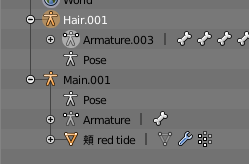
how do i merge these hair bones to the main without the mesh moving https://i.imgur.com/Z5mFTF3.png
 hoary torrent
its the same when i control click https://gyazo.com/f1741d987b64e5f17a4b4517fa5f6c81
 quasi oriole
so that is a little more complicated to fix than just pressing buttons
you need to actually weight the eyes to the right bones
hoary torrent
mmm sounds tricky
quasi oriole
it might be a little hard to isolate the eyes from the rest of the mesh
hoary torrent
im thinking itll be easier to convert the xps to an mmd file
quasi oriole
what, your model?
 hoary torrent
yeah
 dry fossil
can unity open it?
quasi oriole
dunno, i've never seen that file before
just know it must contain mesh data
i.e. 3D stuff
hoary torrent
yo it doesnt even want to export as a pmx tf
i press export and it doesnt appear in my folder
quasi oriole
haha i've never actually tried exporting to pmx
hoary torrent
end me
hoary torrent
like i wish there was an mmd version of this dude smh
 uncut yacht
Can anyone hlep me understand how to fix this?
https://imgur.com/kw74ATw
 distant nest
If my character skeleton doesn't have five fingers, only three, will that ruin the IK tracking? The VRChat export thing in Unity warns of it.
fading verge
is someone have tutorials adding bones in models for vrchat?
 brisk mesa
there's tons on youtube and you should also go look up Tupper's tuts, p sure
dry fossil
@quasi oriole obj dose that come with a rig ?
fading verge
Anybody knows how to rig animal avatars? I found a baby elk and seal and I have a mighty need to use them
distant nest
Any idea on what to do here?

Happening on both hands, I assume it's trying to weight itself to a bone that I deleted.
fading verge
those hands are not weighted to anything
since you edleted im guessing the finger bones
youll have to either weight it to the wrist, or fingers, or both
quasi oriole
@dry fossil no, you'll have to use an auto rigger
distant nest
Alright, thanks. That means the bone I deleted was the only thing that had weight on that portion of the hand, I guess.
Would weighting the mesh to the armature fix that possibly or not? I tried the ctrl+p thing but didn't get the option.
dry fossil
@quasi oriole nvm my friend gave me a xps converter
@quasi oriole i got it done its g
quasi oriole
cool
jovial dune
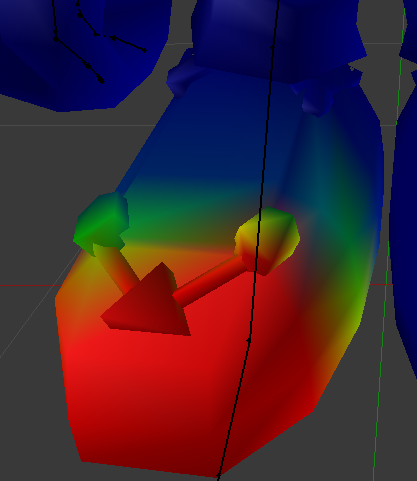
Is there a reason why, when I switch to weight-paint mode, I can only see the weights of one bone?
 fading verge
I've never needed 5 fingers before for IK to work. I only ever needed 3.
Thumb, Index, and middle... Unless they changed it in this update
distant nest
Excellent, thank you.
fading verge
It'll work but you'll have no IK
fading verge
Nono, IK tells the game to keep you at the right level to keep your feet on the ground
If it's turned off, your avatar can end up in the floor or floating when looking at certain angles since it can't adjust the feet accordingly
jovial dune
disregard my question about weights, didn't know about selecting vertex groups
ohhh that makes sense
fading verge
You can keep the index finger bones and not have them weighted and it'll work
I commonly do this if I'm too lazy to weight all of my fingers (since I don't play in VR anyway)
Especially since Nintendo models tend to have one bone that controls all of the fingers...
jovial dune
yeah I'll look into re-adding empty bones for the index if things derp tf out after I upload this
 bright peak
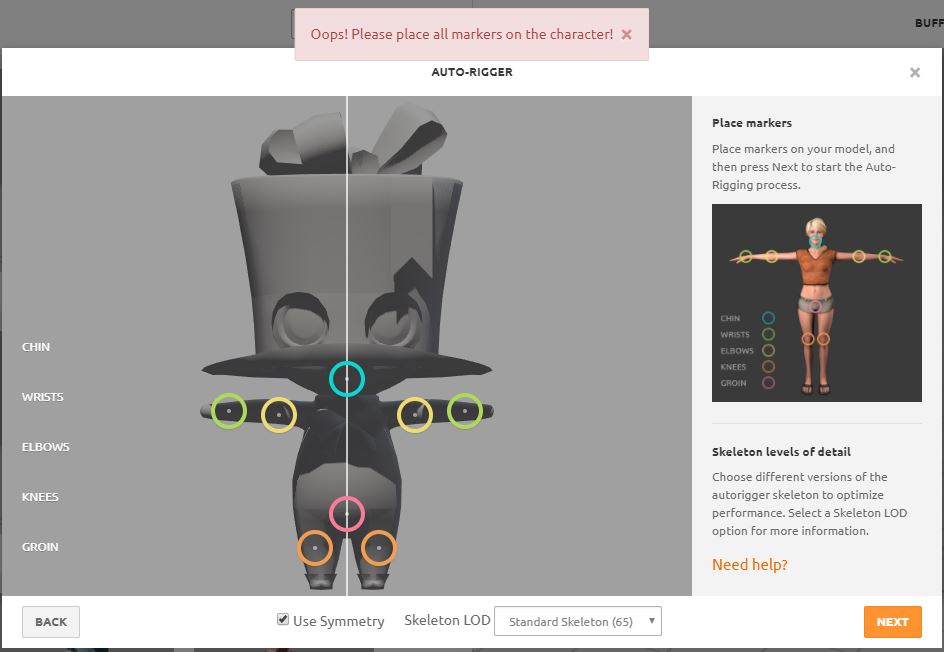
I am having trouble with riggin with Mixamo. I keep getting the error message "Place all markers on character" even though they are. The model originally came with wings and I removed them so they don't get tangled up. It works with the wings attached but not without them.
Any way to fix this?
 somber spear
im getting bad clipping through the elbows on an avatar when someone uses it with vr
would post a screenshot but i cant. any idea how to fix it? I changed the bone angle slightly but it didnt do anything
brisk mesa
@last plover well i mean i have an Ultros tentacle monster running around vrchat currently so
you could just make it a Generic in the controller thing.
 last plover
?
brisk mesa
oh sorry wrong alex
last plover
🤔
jovial dune
@somber spear Far as I know, you still have to remix/modify the weights to change how the bones deform the skin
My question is how can one copy weight changes from one side to another side if the x-mirror tickbox does nothing?
dusk pilot
@bright peak Miximo only rigs humanoid characters in a t pose.
It will not work well with others.
jovial dune
T pose is a bit of a lie
Both models I've done weren't in T
But a symmetrical pose with the limbs open (uncovered) and available
dusk pilot
I've tried a buzz lightyear model of mine in a stand/tpose and it only took the tpose.
bright peak
It was in a T pose.
dusk pilot
So idk.
jovial dune
also @bright peak Are all the geometry connected?
I had a floating head with my firs tmodel and I had to make little crappy connections between the head/body
dusk pilot
He posted an hour ago so idk if hes there lol
jovial dune
Otherwise it always gave me that same error message
he literally just replied to you sal
dusk pilot
oh he is
dusk pilot
LOL
bright peak
I tried again with everything connected but it still didn't work.
jovial dune
hm
dusk pilot
can you send a pic
bright peak
How do I send a pic.
low parrot
Easier to install Gyazo, copies link for you isntead of making you upload every shot
but I guess preference
bright peak
 drowsy storm
My avatar is missing the right elbow bone. I made a new bone and assigned it properly into the hierarchy. How do i assign the mesh to the bone?
dusk pilot
Try centering as best you can. I see those knees are a little offset
bright peak
I've tried many times and failed.
For some reason it only works with the wings attached.
dusk pilot
@drowsy storm https://blender.stackexchange.com/questions/34898/how-to-recalculate-automatic-weights-for-single-bones

After I edited an already weighted model and its armature, the pose mode doesn't grab the limbs the right way anymore. Is there a way to recalculate weights for single bones? Because I already edi...
@bright peak could probably rig it yourself in a few minutes
bright peak
I can try tomorrow.
drowsy storm
@dusk pilot the automatic weight options are greyed out
drowsy storm
Ok I clicked it and it said failed to find solution
dusk pilot
Go into edit mode for your mesh
Press a to select all verticies.
find remove doubles on the left side panel
If it removed some verticies then try again.
drowsy storm
failed again
drowsy storm
well it didnt fail but it didnt change anything
static parcel
Installed Cats and there's only the three options for visemes?
low parrot
AH, OH, and CH?
Those are the only ones it has, it generates the rest based on what you put in there
static parcel
I clicked on them and only see a greyed out name
Unless the MMD tools are essential for that part. I couldn't get them to load
latent patrol
Mixamo refuses to add a neck, am I screwed?
static parcel
No wait, I'm dumb. I put the wrong folder in addons. I see it now
fading verge
@latent patrol create a bone for the neck?
latent patrol
Do you know any videos I can watch to go about doing that?
fading verge

A quick tutorial of how to rig a character in blender the very very basics. nice quick and simple to get you started. It's meant for people with a basic unde...
 cosmic mica
as long as there are at least 4 fingers, can each finger have only 1 bone?
latent patrol
Thanks
cosmic mica
i have a wierd robot with no finger joints just nubs, can i get away with 4 fingers but 1 bone per finger or will vrchat not allow that?
cosmic mica
ooooh boy. gets ready for crash course testing
 sick ermine
Ok guys i have a question. Is there another alternative in bone rigging besides doing it manually in PMD editor? If so please let me know.
 noble dagger
no
opal aurora
Vrc's ik tracking works with a minimum of 3 fingers
noble dagger
it does it if i do anything like hit fix model in cats or shadeless
opal aurora
But you can make fake ones if ya need
noble dagger
thats what i was worried about lol
noble dagger
alright so then...where can i get some good thicc anime models haha
sick ermine
and*
No idea lol
since the ones im working on are from a game
which i was given by a friend lol
noble dagger
the ones that i always end up finding and love alwyas have something wrong with it
sick ermine
yeah which sucks ik lol
i was working on a gundam model but
teh tris were so freaking high xD
the*
noble dagger
im just too picky i guess
noble dagger
yeah thats where i got them from
sick ermine
Alright
noble dagger
i download a ton of them and 95% of them are perfect
its jus the 5% always ends up being the ones i like the most and something im either not good at or dont know how to do
haha
sick ermine
lol i have serveral i want to work on but
noble dagger
like rigs and weight painting ...im no good
sick ermine
just dont have teh full knowledge needed to work on em
noble dagger
yeah im learning as i go and hop from project to project as i get stuck
maybe you might know the answer to this one
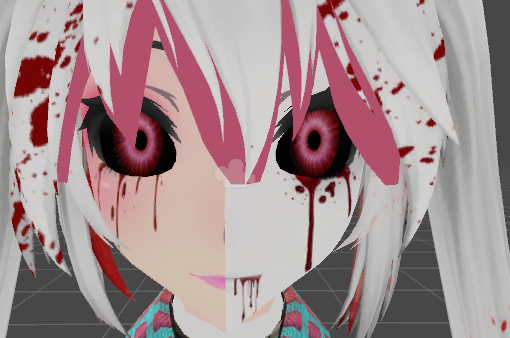
I downloaded a model that has multiple looks to it like forinstance it has 2 separate face materials and each of the face textures has one half of both of the different faces
Is there a specific shader or render mode for that?
https://imgur.com/a/XzwbG
you can see the 2 dfiferent face shere i can get it so that a single face shows for example
 sick ermine
not that i know of
because all the textures i had to do
i had to do it manually in blender
noble dagger
yeah
sick ermine
that or the mesh for the face is two
noble dagger
idk its like if i change the shader i can get the different parts of hte textures to show but its alwyas mixed up and looks weird
sick ermine
which i do find that a weird way to go tbh
noble dagger
but im thinking there is a type of shader that can make it easy to switch between the 2 separate looks
or something along those lines
sick ermine
that i havent yet messed with because it usually costs me alot of tris
opal aurora
I know of a shader that takes 2 textures and uses them depending on the ambient (light or dark)
noble dagger
what's it called?
that would actually make sense with the 2 different styles of the model
opal aurora
It's on a playlist lemme look it up real quick
noble dagger
thanks. hopefully thats what im looking for
if i put all the textures to flat lit
its like half and half
opal aurora
 noble dagger
and i can put some on standard and it will switch around ot the other and what not but that just doesnt seem like the correct way to do it
thanks, sounds pretty cool evne if it isnt what im looking for haha
opal aurora
It's as close as i can imagine for a 2 textured shader, unless it had 2 entire body meshes for both animated by shapekeys and each had their own texture
But that'd be alot of pollies
noble dagger
yeah, typically when ive downloaded a pack that had 2 versions it literally had 2 full modelsl
opal aurora
Here's a playlist full of free shaders http://www.youtube.com/playlist?list=PLtt-rl-OtMbJFHEelLN5n9mLwL7bml1Ng

Maybe one will do what you want it to do
noble dagger
thanks i appreciate it
static parcel
https://imgur.com/a/Ml6To I don't know what's going on with this
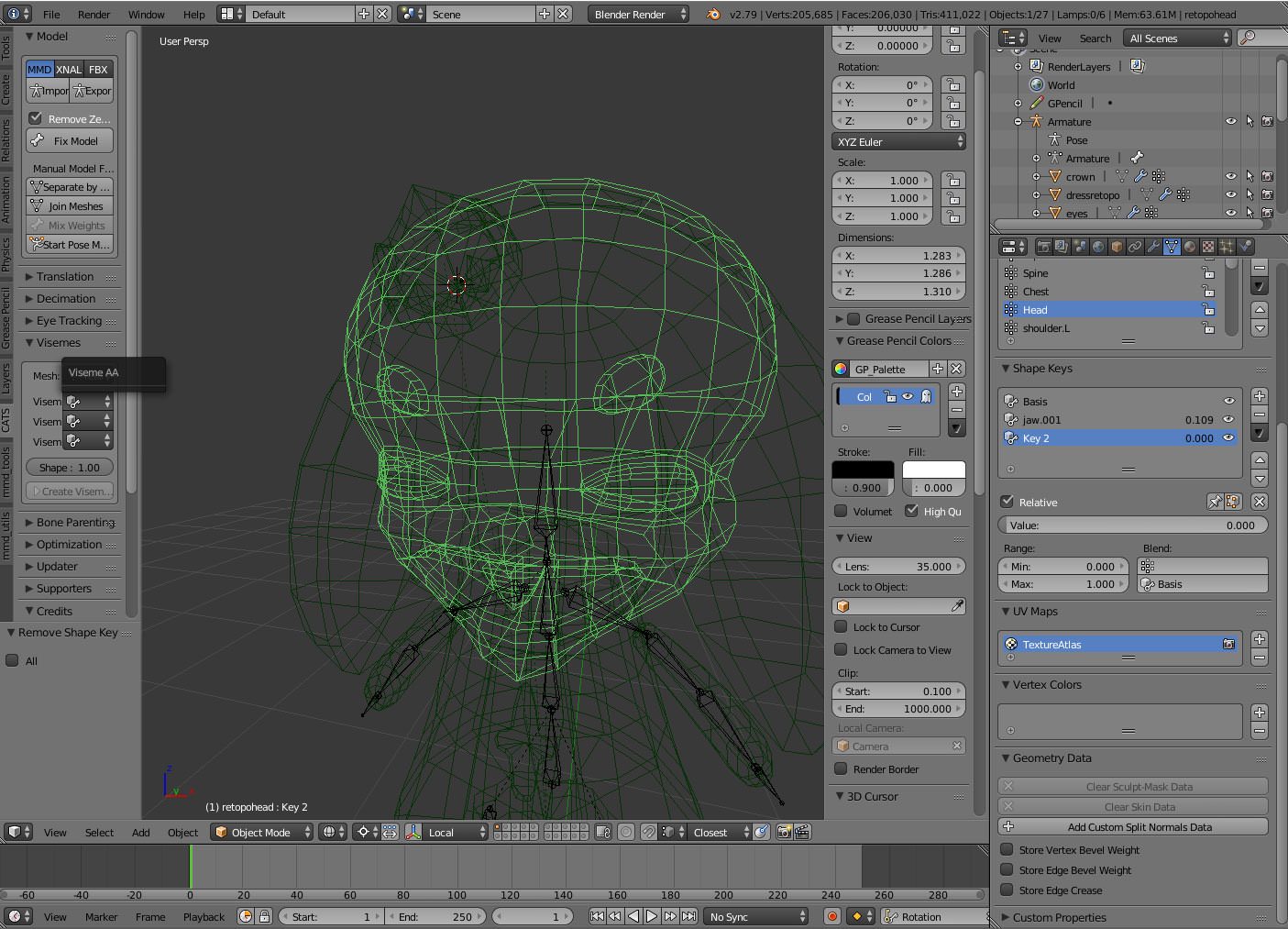
It is set to the right mesh btw
I really only need to make visemes that work. The ones I've exported hardly move for some reason
Make a giant AA mouth and in vr chat, it moves a fraction of the way
opal aurora
Is your mic loud enough?
static parcel
I wondered that but I've tried other avatars
opal aurora
Hmm...
opal aurora
Do try to amp up the volume for it just to check, i had similiar issues and it honestly was my mic's volume
But it's odd since other avatars seem to work fine either way...
static parcel
Yeah
Trying some more and even if I'm quiet, they move fine
Maybe I should make the blend shapes bigger than needed but I worry if higher volumes will result in 'garry's mod' face
opal aurora
Oh boy...
static parcel
Yeah, tapping on the mic does make it go all the way
Maybe it's not so noticable since I'm only using jaw viseme
Just feels like there's a sensitivity setting that's missing from the plugin or something
jovial dune
Yeah, so 3 fingers is the bare minimum for any sort of hand finger IK
Sux but at least you can just make the third and give it no weight and it should all work.
 arctic glen
Hello! I'm having a problem with configuration in unity if anyone knows anything about it. For my model, on the right arm, I have the right shoulder, right upper arm, right elbow, and right wrist. But for the left arm, I only have left shoulder, left arm, and left wrist. So I do not have a left elbow. Is it possible to leave the model this way or is the model going to not work if I leave nothing in for the left shoulder. Also, right now the left shoulder was automatically applied to left upper arm, the left arm was applied to left lower arm, and left wrist was applied to wrist, if this information helps any.
opal aurora
Simply drag the bones onto the necessary areas, you can drag them directly from the hierarchy or press the dots next to each bone map (under the green man's window) and search for them
arctic glen
I understand that, but I think what is happening is that I have a right elbow, but not a left elbow, so I am not sure what I should do or what I should put (or not put) for the left lower arm
And if I do just end up leaving it blank, will it affect the model in game
opal aurora
It will indeed after the model ingame, if it even let you upload it like that
Check the pins on this channel, the necessary bones to even upload as a humanoid are right there
arctic glen
Thank you! I might just try and upload it to see what happens, and if it doesn't work I might just have to find a different model. Thank you for your help!
opal aurora
@arctic glen you can also make fake bones in blender to act as dummy bones
But i'm not sure of how reliable that'd be for an arm
arctic glen
That's ok! I'm not great with unity or blender yet, I just follow tutorials on youtube, so I'll probably just end up getting a different model anyway. But that's fine, it doesn't bother me too much
fading verge
hey question so i got my character rigged
even though it says i have it rigged propperly in the humanoid creator
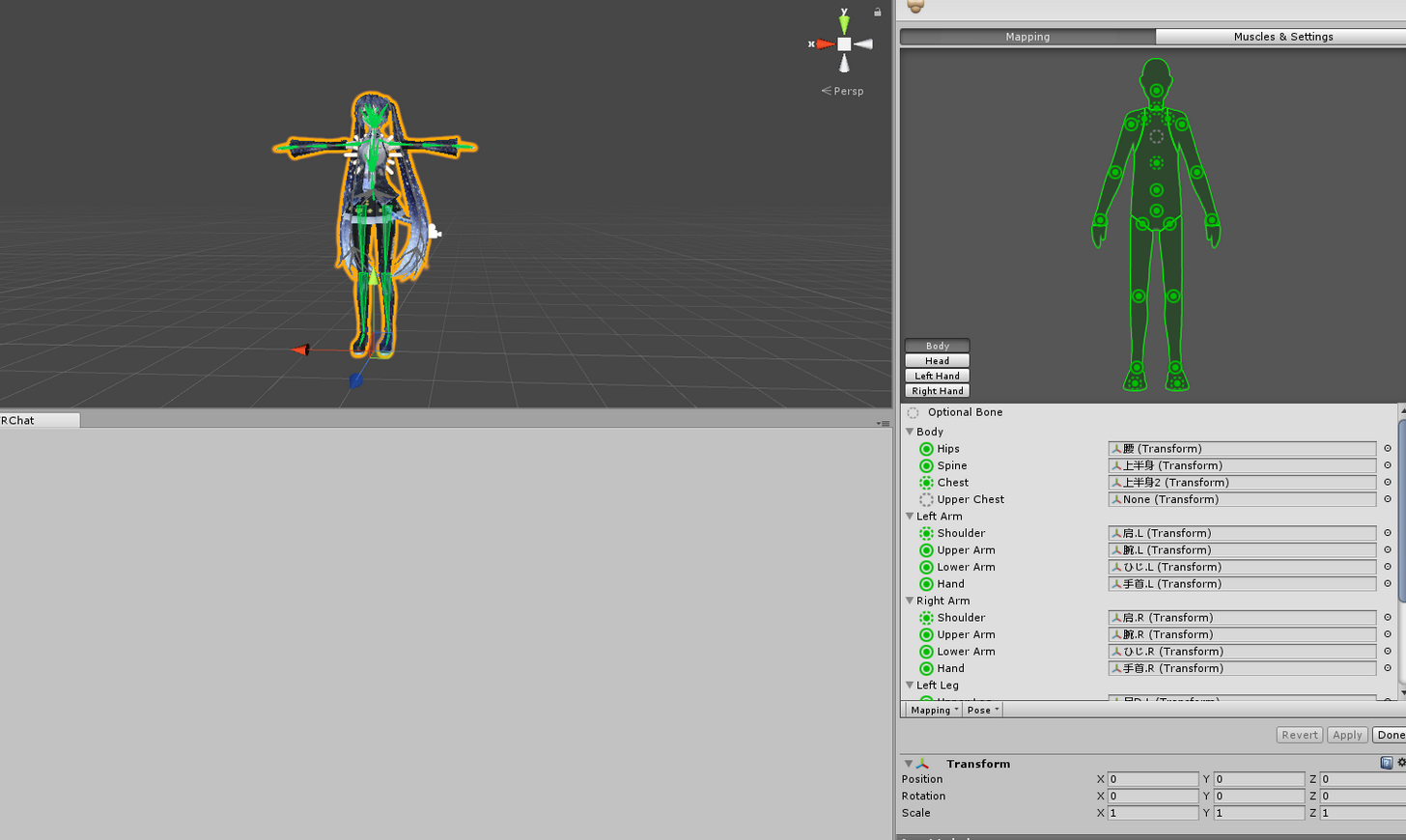

any help?
 karmic moss

Fixes to common rig configuration issues.
maybe this video could help you
static parcel
Would seem that the jaw flap blend option was my problem. It's not sensitive enough
 mental lynx
So, in-world, my model does this.

While in Unity, those skin models aren't even supposed to be visible in any way.

meshes
Any ideas on how to fix this?
 errant marsh
How do I get an imported model jacket on to my character?


 coral relic
@mental lynx do you actually have overlapping meshes or did you forget to reassing the materials?
mental lynx
They're overlapping in VRChat, but in nothing else
coral relic
because if you have a separate skin mesh under the tiger-thing mesh, then you can delete the skin
mental lynx
In fact, they have space between the two
It shares the same mesh as the rest of the body, including neck, arms, and legs
 eager bronze
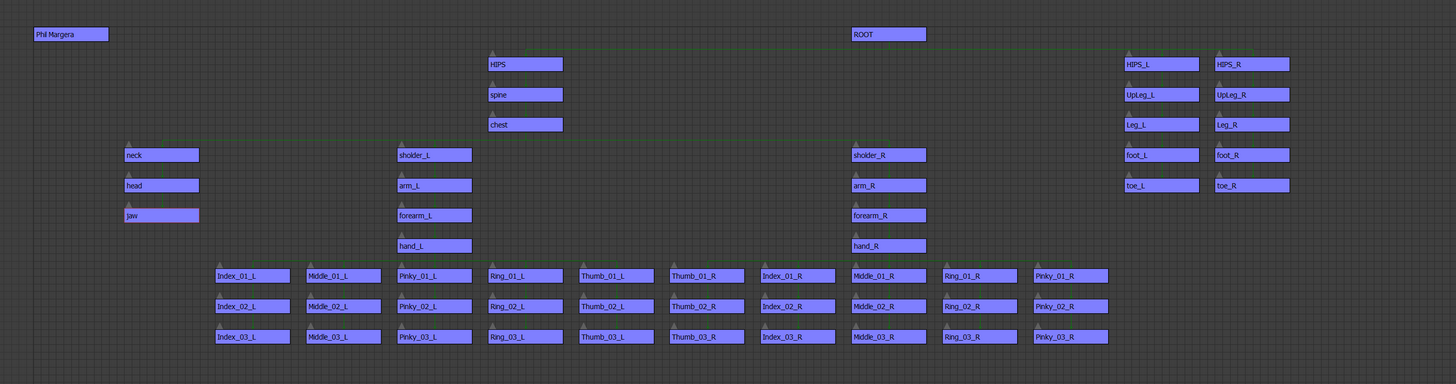
The Way I do my Unity Rig Bone Higharky https://imgur.com/a/101MW
 cobalt geyser
My character's height is not at my height, changing the height settings doesn't change anything. I have to crouch down a lot just to see him bend a little bit
light kindle
Move grey dot or change the characters height in unity
 neon quiver
dont know why this happens but in weight paint. if i move the arm the belt on the hip move. i check all the bone area to stop the belt from moving but it still does. i wonder if this is a glitch. maybe i should try empty weight groups?
coral relic
paint the belt with 0 weight
gleaming falcon
@neon quiver Adjust the arm in blender so its pulling on the belt, then go through all the vertex groups connected to that arm. I would go through each vertex group and paint over the belt to see if that'll fix it. I would also check the hip vertex group (if thats where it is) and see if the belt is painted to the hip
The belt is on the hips, yes?
gleaming falcon
And what I mean by "adjust the arm" is go to pose mode and move the arm to see if it messes with the belt
gleaming falcon
I don't mess with separate layers in blender, that's just me.
neon quiver
ffor some reason the G button does not work when grabing the bone to move it in a non normal movment. like exsample shove the arm out of the way to see what vert pull out etc. yet rotating work. the G button just making the arm rotate. wonder if the rig has some sort of lock.
gleaming falcon
Perhaps. Try using the E to rotate the bone
neon quiver
i use R to rotate.
 autumn parrot
After using CATs to "fix" my model on blender unity only detects his fingers on the Mixamo's rig, anyone know why? Is there a way to reset the changes made by CATs?
neon quiver
E does nothing
lol
i think i'll make my rig from scratch again. to see if did something
gleaming falcon
@autumn parrot Maybe rename the bones/vertex groups. I don't use CATs. You can also assign the bones themselves in Unity
autumn parrot
I'll try, but I think it will be easier to just remake the shapekeys on the model withouth CATs
But will still be a pain >.> and blender will fuck the clothes of my character again
neon quiver
ok belt it fix! 😃 the thumb was the problem.
gleaming falcon
The darn thumb!
gleaming falcon
Never drop by just to say hi? 😉
cloud kiln
Hi
XD
On 1 of my avatars, the effect seems to take forever to go away. My hands are slowly restracting from the animation. Basically going slow-mo and extending the duration of the Animation. On my other avatar the effect is working fine
Same with my weapon on that avatar, fine aswell. But the Effect is really buggy
At first, I thought it was "Duration" But I was wrong
NVM, delete everything I just said
I'm an idiot
 sharp viper
That happens if you swap from an animation that has a 1 frame duration to one that has a multi frame duration
sharp viper
always 1 frame for animation overrides
cloud kiln
I forgot to delete the animation duration in the animation section itself
sharp viper
😄
cloud kiln
So the duration for it to activate was 1 second
gleaming falcon
😄
sharp viper
I've done that so many times
sharp viper
if you're zoomed out too 1 second looks like the 1 frame marker, lol
cloud kiln
Ikr, I think that what I did yesterday night haha
sharp viper
more on topic, rigging is both a pain and a joy sometimes.


P A I N
but anchors make it a bit easier. I'm curious how it is for people who use blender
gleaming falcon
Seems those fingers aren't weighted properly
 indigo locust
does anyone have a tutorial on rigging something non-humanoid?
I have it "rigged" but VRChat for whatever reason doesnt accept these models since they wouldnt have a chest hierarchy or whatever... would I need custom animations for legs?
cloud kiln
You mean by having 4 legs?
Even though they'd have 4 legs. You still need a chest
Due to that VRChat only accepts humanoid rigs
Sadly enough... I tried to get past that aswell
indigo locust
I mean I rigged it to have 4 legs, hips, feet, and a spine
So how are people getting around it with the nonhumanoid models such as pokemon/birds
gleaming falcon
Those models are are somewhat humanoids
indigo locust
not all pokemon are humaoid, what about the quadrapeds
biped pokemon i understand (birds are of the like i guess)
gleaming falcon
You can import a model and create a avatar controller with custom movement animations, but if you want to have it move with arms, it needs to be set as humanoid
indigo locust
and it would need to be 20cm as well, which is pretty unfortunate given its a small animal
I'll see about the avatar controller though to set up custom movement animations, that's what I had assumed
fading verge
Can someone help me with my model?
Seems Unity is being funny with it
Here's what my model looks like in Blender
http://prntscr.com/i8qh2d

And here's what it looks like in Unity
http://prntscr.com/i8qhlj

The heck happened? And how do I fix it?
gleaming falcon
The materials are off. Just fix those, mate
fading verge
How?
gleaming falcon
Find the material folder in your unity assets
fading verge
 gleaming falcon
Drag those to the appropriate place on the model
fading verge
Just did, and it didn't change anything
gleaming falcon
Get a screenshot of the hair material in the inspector
fading verge
hey , my avatar has fucked up hand in unity but the bones are ok , in blender the hand was normal in t pose but in unity when the avatar is on t pose this is how its looks like :http://prntscr.com/i8qt1m

idk why
 oak mauve
is it like that all the way around it in unity? @fading verge
fading verge
@gleaming falcon http://prntscr.com/i8qv43

@oak mauve No. Just the front of the hair
well side but you know what I mean
And it's only the hair meshes that are affected by it
oak mauve
you tried changing it from cutout to opaque?
 oak mauve
hmmm thats really odd
fading verge
god dammit unity http://prntscr.com/i8qwxa

 naive tree
check in blender if there is additional bones
parent to according bone the weight should be and hit mix weight in cats plugin
 thorn tangle
so do I need to merge a multi object mesh before attempting to rig it?
gleaming falcon
@fading verge How many materials are in the hair?
gleaming falcon
@fading verge It seems something is off with the materials. Can you DM the file and I can take a closer look at it when i get home
fading verge
Will do
fading verge
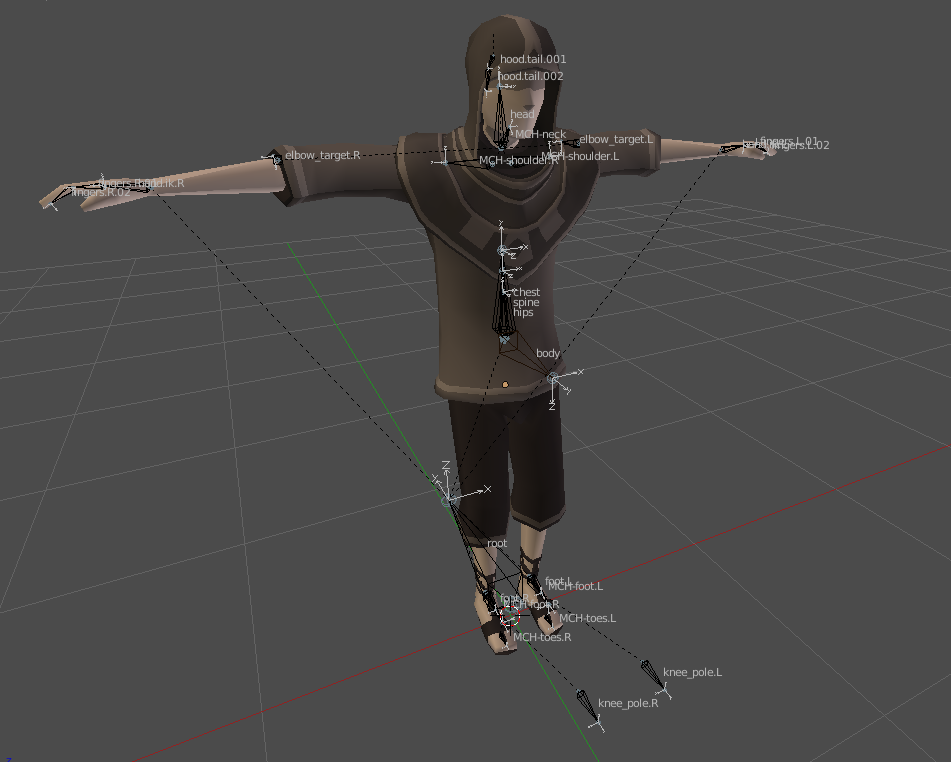
I've a blender specific rig that needs adjustments.
Any tips?
There is little hierarchical structure with the bones.
It actually just needs a bit of adjustments:

And a Tpose.
lilac moss
does the cats fix model not put it in tpose?
fading verge
I'm normally explorting as FBX not with cats, lemme try that right now though.
I started it in pose mode and exported it with cats but Cats forgot to apply the mirror modifier and now I got this.
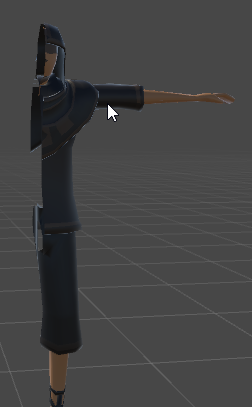 gleaming falcon
😱 You cut him in half! You monster!
 half fern
anyone know how i can specifically choose which materials i want to atlas
fading verge
@gleaming falcon I'll put him back together Monday.
gleaming falcon
Edit mode in blender, you can set materials there
fading verge
http://prntscr.com/i8s2w5 was it a mistake to parent the skirt?
 midnight arch
Hmm with new sdk update is doesnt seem to see my mapped bones but when configure in unity everything is mapped?
distant nest
Are there any references for an ideal size/ratio of each bone? I've got all the bones set up but the rigging just seems kind of... off? ingame. The unity add-on didn't seem to have any complaints.
sharp viper
you would need custom animations for everything, and you need to use avatar general
oh, sorry, for the 4 legged thing
you can totally do that. But you need to use customanimationoveride
and make a walk cycle and everything
most you can just pull from mixamo though
sharp viper
this isn't the correct channel for that, but you should check out tupper's tutorials
sharp viper
lol kk
gleaming falcon
I've made that MK Avatar room. :^)
sharp viper
that feel when you're almost done weight painting
 cerulean dawn
anyone know why my body is going through my clothes?

I painted the weight to the shirt and arms
rugged vale
well for that model you should just staright up delete the skin mesh under the shirt to save tris
then clipping issue goes away as well
sharp viper
yerp
sharp viper
unless you need clothing to have seperate physics from body like with skirts you don't need
so what is a good idea to do is delete any tris anyone cannot see unless it's totally trivial
like if your arms are like 5 polys then meh
but you'll want to weight paint the shirt so it's part of the body basically
cerulean dawn
there is a gap to see down the hoodie so I left part of that for that reason
sharp viper
yeah, that's fine - just make the arm bone part of the shirt bone though
so like, chest needs to also apply it's physics to the shirt
I'm not sure how to do that in blender, but in meta it's easy with anchor
or ellipsoid, you just scale it a bit to include the polys of the hoodie
 fading verge
is there a way to completely take away the weights from it?
i dont really need the chest to move the mesh

i dont need the shoulder either
i just want it to not move the arm
like if i make that red part blue completly, itll move the whole arm anyways, which i dont want
but i want to still keep the shoulders and chest for vrchat
sharp viper
meta is the same way. You need each bone to only have an effect on the poly around it
fading verge
its moving the armeture, instead of the mesh
fading verge
huh
sharp viper
you can make your foot bone move your arm if you want
it doesn't actuallly matter where the bones physically are on the body
I'm not that familiar with blender rigging, but this is pretty similar

so my WIP dude here
is weighted properly. Each bone has a colour code and there's blending between each one
his upper arm only moves his upper arm
I would assume and hope that blender has some kind of anchor method of weight painting you could apply
for example this is my entire avatar
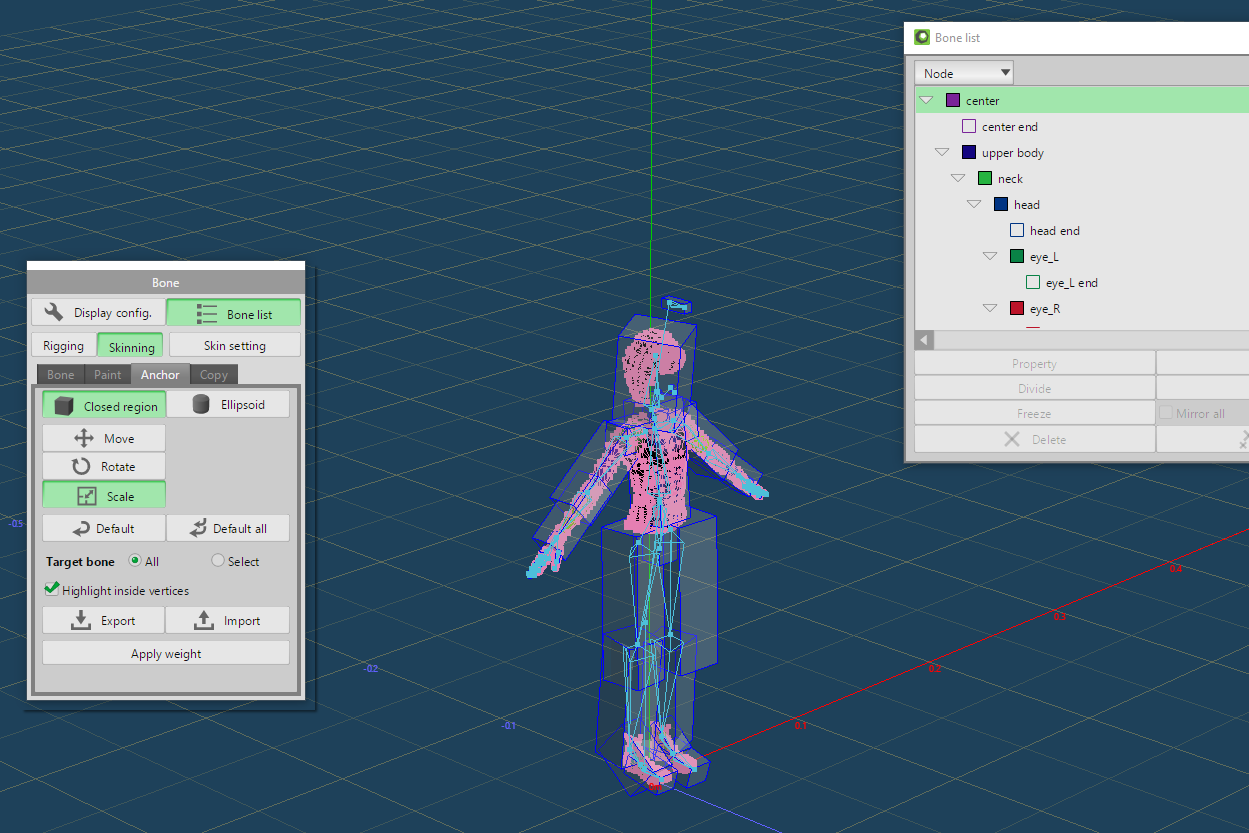
rather
each "box" represents an enclosed area of polys that each bone has an effect on
and it was for the most part auto generated
the weird bone at the top moves both my eyes at once
even though it's nowhere near my eyes
becuase I painted it that way
sharp viper
you should watch some tutorials then
beucase right now, basically, whenever unity or blender tries to move some part of your mesh
fading verge
yeah, watching on weight painting, but i might be looking the wrong way
sharp viper
every bone is moving the entire mesh
fading verge
hmm
im not completely sure, all i know i did was import a model, then divided the big chest bone so i can have a chest and spine
and the chest portion is moving the neck along with its components
sharp viper
that's fine, actually
but you still need to tell blender or whatever is using your model
which PARTS of your mesh that bone has an effect on
so that when something moves that bone, only the parts of the mesh that should move with it move
fading verge
okay, ill look for something like that, thanks ^_^
sharp viper
not a problem. The idea is just like a human. Muscles are bound to bones and tendons- in this case your mesh is both the muscles and the tendons. Try to think of it like a wire dummy inside some clay
you're posing the clay but it wouldn't be good if the wire was stiff
trying to move the wire would move the whole thing, you know what I mean?
that's the concept of armature
fading verge
i see
sharp viper
so each "bone" is a part of the wire you can freely manipulate, like a wooden mannequin artists use for poses.
in reality, bones can be wherever you want, but to move like a vrchat humanoid there's certain expectations that roughly match the things found in human bones and muscles and joints
fading verge
any hints why vrchat isn't picking up eye tracking and blinking on one model for me? eye tracking is generated and it works when testing in cats, keyshapes vrc.blink_left and vrc.blink_right are on the right mesh and can be previewed, left and right eye bones that control the movements are set properly in unity rig ... I'm wondering why it's not picked up at all
https://cdn.discordapp.com/attachments/408707516139044868/408712732112715798/unknown.png so so far this is what i have before i subdivide the chest

you have to have it set to "Left eye" not L_Eye
try that
I have that
hmm
no clue then
lol
I've made a dozen of others, no problems, this one just ignores it 😐
any help would be greatly appreciated
https://cdn.discordapp.com/attachments/408707516139044868/408713042680086538/unknown.png this is the one where i subdivide, and using the spine works normally

https://cdn.discordapp.com/attachments/408707516139044868/408713143993368589/unknown.png but using the chest doesnt
 sharp viper
That entire red area is the effect of the bone you'e made smaller
right
you need colour on the other bone
or "Weight"
red = weight
so you need to make the new bone weighted to part of hte mesh too
fading verge
okay, ill try that
sharp viper
someone who uses blender can help with that I'm sure, I could tell you how to do it in meta or mikumikudance but that doesn't help you much ;
fading verge
does meta use vertex groups? cause i just found out that my chest doesnt have that
sharp viper
it does, but it's called "closed region



that's my chest
green dots = selected weight
once I hit "apply weight"
fading verge
okay, sounds really similair
sharp viper
same concept I'm sure
fading verge

 sharp viper
yep there ya go
fading verge
but yeah, am i supposed to add a vertex group manually?
sharp viper
you're on the right track. Get the verts assigned to that bone
usually there's several tools
fading verge
okay
sharp viper
I'm using something called anchor in meta but I could paint to select the verts with a brush too
I'm just not familiar with blender
sharp viper
yeah, exactly the same thing - you're just assigning parts of your mesh to a bone- basically sticking the clay on the wire lol
fading verge
lol
 late thorn
can anyone help with an issue I'm having with parenting props?
 drowsy fossil
I need help on this one, I think it goes here because it's a rig problem I think (at least weight painting, I might be wrong though).
I have this Sonic model that I converted from an ancient Sonic fangame that is long dead.
On the model for some reason left hip bone also makes mouth to rotate with it. How can I fix it? Weight painting? What exactly do I have to do?
https://cdn.discordapp.com/attachments/387726923922538496/408717160014282763/unknown.png

 fading verge
i know a little bit with parenting bones, if its the same concept i might be able to help, send some images over
late thorn
cant send them here for some reason
fading verge
make a discord server and upload one there
then just copy the link and paste it here
late thorn


so the accordion is separate
and i parented it to the wrist
but it fucks up the pivot joints of the whole rig
everything from the chest down is rotating to that pivot on the accordion
late thorn
yeah XD. no fucking clue why it does that
sharp viper
probably the same issue, you applied weight from it's bone to the rest of your mesh
you need to basically select the rest of your mesh and delete the weight of the bones in the accordian from it
late thorn
the model and accordion are in separate fbx files
sharp viper
oh, in that case it shouldn't do a darn thing
I attach all kinds of things to my hand
fading verge
yeah, that makes no sense on why its moving the rest of your rig
sharp viper
change from global to local at the top there
and make sure the accordian is the object selected
not your arm 😉
in your scene
local for the new object should be 0 0 0
fading verge
@drowsy fossil can you show us the head portion of the rig
sharp viper
so it's absolute position is on whatever bone you stuck it on
then you can rotate it
@late thorn
late thorn
doing it that rn hold on
local for the whole object is 0 0 0
but the mesh isnt
WOAH
IDK WHAT I DID
BUT IT WORKED
owait
i know
my Unity wasnt set to 'pivot'
fading verge
@sharp viper got it working, fixed the vertex group and added the weights. Thanks a bunch ^_^
drowsy fossil
recorded a video showing the problem http://sendvid.com/26bk7xyh?secret=c92832b5-7f93-4a6c-a5b3-71bd1e4ef548

Sendvid
it's really weird
fading verge
did you rig it in blender?
sharp viper
you're welcome dewd
drowsy fossil
It's not my rig, it came with the model itself. I just fixed some parenting in Blender.
fading verge
okay, try going back to blender, and parenting the mesh to the armature with automatic weights
you do that by holding shift, and clicking the mesh first, then the armature, and hitting ctrl P
on object mode i should mention, not edit mode
sharp viper
lol I have no idea how people do anything in blender
fading verge
lol, its so similair tho from what you described to me
sharp viper
yeah but all the key+click+ctrl shortcuts that are only used in blender. CTRL+P is print in literally everything else
in meta: click the bone. Mesh it is currently modifying is displayed. If it's wrong, drag the box around it to fix, or simply paintbrush the verts you want or don't want. It mixes the weights automatically.
fading verge
huh