#avatar-rigging
1 messages · Page 87 of 1
 native egret
 near fulcrum
So I got a bone parenting issue. Lowerleg is not first child of upperleg. The knee spasms are bugging me like crazy! Is it possible to fix the parenting issue quickly in Unity or do I need to use blender then re-import my model again and redo my dynamic bones?
 fading verge
@velvet tulip weightpaint that
 velvet tulip
i did
is there a specific way i should weight paint it though?
cause i just left it with the automatic thing and it seemed to work fine
fading verge
@near fulcrum go back to blender and reparent
 mental lynx
I've never had a character with such a ridiculously high polycount to work on
Especially one so easily destroyed from decimating it
This is tough.
 daring glacier
How many are you dealing with?
mental lynx
192k
daring glacier
Damn.
 glad egret
does the spine bone size matter?
daring glacier
I had a 47k~ish one, and decimating it already took a big toll on most of the things it had, had to go fixing them manually, and then still had to remove some useless hidden geometries
mental lynx
All my friends keep doing that thing where you change the SDK values to upload higher polycount.
daring glacier
That might be why my computer explodes and goes from a solid 60 fps to 20.
mental lynx
They're also Unity devs, so they know what hurts Unity and what doesn't. They all claim that Unity deals with polycount much easier than this system gives it credit for, and it's the collisions that need to be limited.
daring glacier
(When certain people join that is)
mental lynx
It shouldn't.
 midnight plaza
its usually the people who dont optimize that lag you
mental lynx
Your average GPU is built to handle millions of poly at once.
Its physics that take up CPU stress
Especially because the Unity settings that VRChat are on are absolutely fucking terrible.
Doesn't use more than 20% of my CPU, doesn't use more than 4% of my GPU.
And I lag.
daring glacier
Hmm, I see. What about those effects that some characters vomit out? How taxing are they?
mental lynx
Effects are taxing when it's overbearing
midnight plaza
effects yeah
daring glacier
For example, whenever this half-naked purple haired goku-like muscular guy comes in...
My fps just drop and I have to restart my game, there's no fixing it, and I see it everywhere now.
mental lynx
Most effects are also essentially 2 poly, so when you have 10,000 of them being spewed out a second
It gets bad
That's because VRChat has one hellish memory leak
But like, it leaks... itself.
mental lynx
It's not the usual memory leak where it starts taking up too much CPU
It's the leak where it wont release what it has and refuses to take more.
daring glacier
It's basically like entering a room the first time then?
When all the polys are loading for you
mental lynx
I'm so tired of having an octo-core with 4.1ghz and an R9 390 GPU that goes completely unused.
midnight plaza
once it loads, youre fine
mental lynx
I pray they fix it.
midnight plaza
planning on making a vr rig?
mental lynx
Not even, this is what I had at the time
It'd be nice to get VR someday
Expensive, though.
daring glacier
Does blocking those models have any effect on lowering how much they are ramming your fps into the dirt?
mental lynx
Maybe if my patreon payout is good
midnight plaza
if you block people that havent atlas'd their models, then you will see a performance increase yes
less draw calls
daring glacier
I see, I see, thanks.
mental lynx
yeah who doesnt atlas their models 👀 💦
midnight plaza
I can make a private room and show you a model without atlasing, and the same one with atlasing
 spice jetty
@velvet tulip I spent 80 hours in blender trying to solve what your talking about https://www.youtube.com/watch?v=IZPqxADetWE&index=2&list=PLVjqNAJqhr_EEKaepqEDt-muPi-sEbPLJ&t=17s helped me a ton I'd recommend it

This is a tutorial on how to overcome errors that can occur when using the automated bone weight function in Blender 2.5
top 2 comments as well
fading verge
I have a question what is atlas? Is it where all the textures are together in 1 file?
daring glacier
That'd be nice, I did make a model but I atlased it.
midnight plaza
its all the materials on one map
spice jetty
np gl top 2 comments SUPER importante
mental lynx
Atlas is where you make your avatar really really muddy and ugly
fading verge
@midnight plaza thanks
daring glacier
I looked up that mega guide and since automatic wasn't working I did it manually, it was pretty fun.
My character still looks the same tho
midnight plaza
so it knows the shirt is at pos 0,0 on this 4k image
mental lynx
Most people don't atlas
fading verge
How does atlas help frames?
mental lynx
Single mesh loading instead of multiple-mesh
midnight plaza
Instead of calling 20 times, youre calling once
mental lynx
Because VRChat needs a severe update
midnight plaza
and it has to call those mats every time you want to look at it
so if you spin, it renders, unloads, re renders
daring glacier
Oh wow I just noticed the guy who made the mega guide is actually Tupper in the VRChat team lol.
midnight plaza
thats 40 calls now
daring glacier
It isn't something that's extremely complicated to do, and if it increases everyone's performance you should definitely look into it.
mental lynx
I dont get it.
midnight plaza
you take the seperate parts and fit them together on one picture
glad egret
would adding shape keys work if my model's lashes are part of the face mesh?
mental lynx
This model's face must be 7k tries total or something
And I can't decimate it or I lose the keys
midnight plaza
7k is good though
nice looking face
check shoes, one of my models have 40k tris shoes
daring glacier
I had socks inside my shoes.
mental lynx
I did a Madoka for someone
Lemme get the screenshots, it was ridiculous
You could tell the creator had some fetishes
midnight plaza
ooh
 fading verge
Where do you advertise?
midnight plaza
keep it sfw
mental lynx
Fully controllable 16-unit tongue
midnight plaza
oh lol
daring glacier
Oh my goodness.
mental lynx
A camel-toe I removed
No screenshot for that one for SFW reasons

And the most fucking well-modeled feet I've ever seen.
Each with toes and shit all with prepared bones.
daring glacier
8^)
 gaunt belfry
oof
mental lynx
There
Absolutely destroyed this poor model to make it fit 19.9k
GOOD ENOUGH
Quick decimation broke all the shape keys.
Good, great.
fading verge
gg
daring glacier
You took a step forward and then life threw you off the cliff.
Feels really bad when that happens. I ended up making my own shape keys. They look awful, but decent enough I guess.
near fulcrum
Would anyone be willing to take this pmx for me and fix it's leg parenting for me? I'm over my head here. Doubt it'll take more than a min for anyone who knows what to do. Pls msg me.
fading verge
@near fulcrum dm me
 royal glen
Is the eyetracking bug fixed yet?
fading verge
@royal glen not that i know of
royal glen
uguu
mental lynx
Eye tracking bug?
 opal aurora
Eyetracking is currently non-functional and may be fixed on the next patch
mental lynx
That explains a lot
I thought I fucked up
Guess I wont be making characters
Wait, is it broken in Unity/VRChat?
opal aurora
VRChat
fading verge
@opal aurora okay so I have a hair mo del and I added some more to it, basically I just have to do the automatic weighting and it'll work? Or is it best to manual
opal aurora
Automatic first with the mesh separated so it doesn't afftect other weights and then tiddy it up manually @fading verge
 low parrot
https://gyazo.com/156bd61f8f51476122b14cd4efa0fac4
So, I'm trying to fix this character's kimono.

This and the pink version have these bones that are rigid and end up looking really wrong when moving the arms

 dry marten
Just curious. Is there no way at all to get a characters arms to match up to your movement if adjusting height doesn't work?
 restive hill
@low parrot looks fine, i would merge the HELL out of those arm bones
actually, make 4 dummies, so they move with the arm bones, copy both arm bones and parent the kimono flops to em
merge the hell out of those cloth ones, though, i'd probably get them down to 5-6
then you can just put in 4 dynamic bones with cloth settings, rather than 12
but sheez, get those lines down to 5, even that seems excessive
low parrot
Alright, problem is, I've never done that, so I have no idea how merging bones works - do I do that in Blender or Unity?
restive hill
blender
it's actually pretty easy
worst case scenario, you have to do it manually, with the CATS function
what you want is "mix weights"
just select the bone you want gone, hit mix weights, and it merges the bone into the one above it
select the upper and lower arm bones, shift-d, and rename it, i'd probably go Root_Upper_L and then just use Upper/Lower R and L
 silent fulcrum
hey i havent been able to upload an avatar my unity keeps freezing on processing upload, says at bottom failed to delete temp folder: etc etc anyone know how to fix this?
silent fulcrum
ty
restive hill
oh, that's what "bone merging" under optimization does, btw
 restive hill
copies the hips or head, and attaches the skirt/hair
you have to select a single bone
low parrot
oh
restive hill
edit mode on the armature
like, i have a Leafa from sword art 2
her entire skirt is attached to a copy of the hips
tbh, it's not really necesary, since dynamic bones has an exclusion function
but it makes it neater and less selecting stuff
low parrot
um, tbh, I don't know how to get into edit mode, I've only blendered for like 2 days lmao
ah
I think I figured it out?
restive hill
shit.
 restive hill
these models saved with her sandals half inside the plane shes supposed to be standing on
low parrot
So
 fathom bronze
"Ah yes, the shortcut shall be..." throws dart at board "Alt..." another dart "+Shift..." another "+8!"
restive hill
select her skeleton, have it be orange
press tab
select a bone, it be orange, the rest blacvk
you might want to see if bone merging under optimization would be willing to do it for you
low parrot
I see
low parrot
Looks like it's not. Set it to 100% and only merged the first 3 lines
gotta do it manually
but that's okay, it's good to learn to do it manually
restive hill
it's a fairly easy task, you can hide the body skeleton bones to make it easier
low parrot
How would I do that?
restive hill
h
fathom bronze
You're a fairly easy task.
fathom bronze
alt h
restive hill
i need to get her sandals out of the ground
low parrot
okay, so I can select and hide bones now, you mentioned renaming them, but Shift+D makes me able to move the bone around
or
copies it?
restive hill
just cancel the move
you COULD move it, but that way it just stays
it'll be perfectly aligned with the bone you copied, to make sure you select the right bone
*so make sure
low parrot
I see. Is there a way I can see a bone list in Blender?
restive hill
then parent the copy to the original, then parent the floppy parts to the copy
yes
top right by default, there's a big ol bone tree
it can get pretty messy with defaults, this also has the nice side effect of cleaning up the tree if you have a big skirt
or sleeves or w/e
low parrot
https://gyazo.com/afa9c1b0fec5b1111a64668f34ee9ffb
Am I looking in the right place? I don't think I've moved things around
 restive hill
mix weights also does the weight mixing for you, so you dont have to paint
omg yes, if you keep those separated, you'll tank everyones frame rate
low parrot
ah, geez, okay, how do I go about doing that? Sorry for being such a burden ;_;
low parrot
Oh, cool! So once I've seperated them to decimate, I should always join them after?
restive hill

VRChat Community Discord: https://discord.gg/VRChat Download VRChat! http://store.steampowered.com/app/438100/VRChat/ mmd_tools GitHub: https://github.com/po...
that's basically how i learned everything to start, then i had to puzzle out weight painting
daring glacier
It's indeed a great tutorial, if atlasing does not work for you do check out his manual atlasing guide, it's worth for everyone's sanity and fps.
low parrot
https://gyazo.com/bdf00c66102749238ae93cb59901688a
It's kinda hard to see, but I selected a bunch of bones, up to where I think they should stop. Can I just hit mix weights and it'll all mix into the bone right above them?
 restive hill
weight painting:
select a bone in pose mode
select mesh
select "weight paint" in the dropdown that displays edit/object in the main view window
low parrot
I tried it and it says it did it successfully, so I guess it worked?
restive hill
look in your tree
you should have only one mesh
if you didnt notice anything else, you should be golden
low parrot
I think I got it no worries
restive hill
that model should be in a t-pose better, though 😛
low parrot
https://gyazo.com/3d10e357942e3a6f684cf03fa221a555
So, not done yet, but is her left sleeve lookin' better with the amount of bones?
 restive hill
i would definitely try and stick with easier models at 2 says in XD
oh god no!
totally wrong
low parrot
I'm challenging myself I think xD
restive hill
revert your save
low parrot
back to the insane 15-bone long sleeves xD
so how many bones do I want in the sleeve? Do I not want 6 total lines of bones per sleeve?
restive hill


you should have dotted lines between
in unity, it will just be longer bones
so you want one bone, then merge 2 bones, then skip one, then merge weights 2 bones
leave one at the end maybe, might make it look better?
idk
restive hill
pretty sure that your first try would have a normal sleeve ending in very stiff stuff
tbh, you don't need many bones, vrchat is never very precise anyway
fun fact: use GIMP to save transparent textures as photoshop PSD files, to get transparency to work. trying to do transparency with png is a shitshow
low parrot
https://gyazo.com/734acab393abddc85648ba5c7ef396e4
Number of bones might be off from your recommendation but is the concept better than before?
 restive hill
uh
low parrot
It's also uneven on both sides but that's an easy fix I guess
restive hill
no, the bones should be evenly distributed down the sleeves
restive hill
that way, the flexing is evenly distributed
restive hill
2-3 probably
idk, try one, see how it looks, ctrl-z it back if you dont like it
i'd go with 4-5 bones per line
it's a good number of bones for posing and rendering, but not for running around in vr worlds showing people de wey
gotta gittit down
low parrot
mmkay
restive hill
i keep meaning to make a terrible knuckles
mouth visemes based on insane shape keys.
low parrot
I don't even know what visemes are, I really gotta study up
restive hill
cats does a VERY good job at making it easy, if you want perfect, i hope you have a lot of free time
 sudden hare
a model i'm trying to set up lacks neck and shoulder bones, is there any way to give it some without remaking the whole armature?
restive hill
uhm, yes, but you have to do weight painting somehow
if you dont have dangly bits, automatics should work
sudden hare
it has quite a few dangly bits
restive hill
i've had a face get attached to hair, it was odd.
 restive hill
oh
sudden hare
the only chest bones it has are spine, left arm and right arm
restive hill
if i was doing that one, and it worked otherwise, i'd just slap bones in, name em, and not attach em to anything
sudden hare
left arm and right arm could be renamed to shoulders, but then that'd mess up the arms
restive hill
unity/crchat will be happy
sudden hare
that could work?
restive hill
idk
low parrot
hid the body bones, but does this look better?
https://gyazo.com/0c8cb7127aaafb275b044ff5f8536682
 sudden hare
i'll try it i guess
low parrot
Yeahhh boi
sudden hare
i just need to figure out how to get it back to where i can actually add bones
low parrot
okay, so now that this is done I can export it into unity and add bone physics to it?
restive hill
are they all parented?
restive hill
hm, there's a couple ways to do this
low parrot
https://gyazo.com/cc1700fa9e98186f65b50d1d4016c1a0
They are connected on the bone tree, is that what parenting is?
 restive hill
easy way with 2 more bones:
copy upper/lower arms, parent them to the original
parent moving stuff to copies
put dynamic bones on the copies
low parrot
ah, that's the Shift+D thing you were talking about
restive hill
yes
if you put dynamic bones on the left arm, that will work too, BUT you have to put exclusions in, or EVERYTHING will behave like cloth
for instance: if you put dynamic bones on the hips, it's hilarious
low parrot
so I copied them with Shift+D, and canceled the movement, but I can't move them around in the tree
 restive hill
to change parenting: select the bones you want to parent, THEN select the parent, THEN press ctrl-D, and keep offset
low parrot
I think one of my buds has a fully dynamic bone avatar, it looks really squishy
restive hill
yeah, this is the easy way, the other way you put DB exclusions in... also pretty easy actually
low parrot
So Left arm.001 and left.elbow.001 are the copies, so I select originals, and parent them to the copies, right?
restive hill
opposite
low parrot
mm
restive hill
makes them LOTS easier to find in the list
restive hill
yeah, always assume you're going to be looking at this in 6 months wondering what is utter fuck you were thinking
*what in
low parrot
that's true
restive hill
so by attaching those dumy roots, you just have to DB onto everything named Root_xxx
one for the hair, and another for each other root
im not sure if theres a better way to do this... so that you can just put one per sleeve
but i suspect that weird things might happen in a lot of cases
low parrot
Say, is the parenting bone shortcut really Ctrl+D? It's not doing anything after I selected the copy and then the original
https://gyazo.com/34fea47579eb61b2b2dd7d8b228ee05d
They're both selected
 low parrot
There we go, and I hit Keep Offset
https://gyazo.com/3cf5f898152ee18112e8af963f84a2d5
I hope I still somehow didn't do it backwards...

I feel like I did
low parrot
okay, as I thought, I already undo'd it
restive hill
sleeves should be on root, normal skeleton should be on arm
low parrot
Oh, so I'm more disconnecting the sleeves from the real arm to the copy?
restive hill
exactly
low parrot
ahhh
restive hill
the root moves with the arm parent
low parrot
I see, so it's like
Real arm > Copy > Sleeves
restive hill
real arm > real elbow > real wrist
bot
both
so DB on various roots affects nothing else
low parrot
I see
restive hill
without having to exclude anything
low parrot
So the real arm splits into two paths, the real rest of her bones, and then to the copy path which has the sleeves that will have physics
restive hill
yup
low parrot
neato
restive hill
but the upper and lower sleeves move independently, so you need 2 roots
low parrot
right
https://gyazo.com/2c9182f1ffea72573326f0333db6a401
So here's the final product, I think it's right

or, at least for one side of her
ah, actually, lower should be connected to her elbow
restive hill
yep, correct
 restive hill
haha, at least you're catching it
oh, left_upper should be parented to left arm, not left shoulder
i think
low parrot
Yeah I didn't fix that after Shift+D'ing it
restive hill
yeah, elbow is the forearm
it's WAY neater for heads, since if you have a lot of hair, it all parents to head
so if you have a Root_Hair, that cleans up the tree a lot if you collapse the root hair tree
low parrot
So now, left arm leads to both left forearm (for some reason called elbow on mine) and root_left_upper_kimono
restive hill
it's a unity naming convention i think
low parrot
and left elbow leads to left wrist and root_left_lower_kimono
restive hill
i think that's just cats making things easier to rig for vrchat
low parrot
I see
but yeah, that looks right, right?
https://gyazo.com/a84b00a52926ab6e4edd64698c3068ca
 restive hill
nope
low parrot
;_;
opal aurora
That seems correct
restive hill
yeah it is
low parrot
omg thank you
restive hill
i mean NOPE, START OVER FROM SCRATCH
low parrot
now for the right side, which now that I know how to do, I can do a lot faster!
noooo
restive hill
you are the weakest link, good pie
opal aurora
8:37am, brain is pasta
restive hill
yeah, imma go pass out, gl hf dd
i hope i saved you a couple hours of trial and error there XD
low parrot
thanks for the help! you really did
restive hill
pass it along!
low parrot
Mind if I add ya' in case I need help tomorrow?
restive hill
sure
low parrot
thanks again!
mental lynx
This model is a nightmare.
It wont decimate anymore and says its below 19.9k tries, while Blender says its over.
And making an Atlas does this
https://gyazo.com/7f915cf801f2f428dc6a3c58fdfa9622
 glad egret
dont make an atlas
mental lynx
Not just the atlas, I can't get it to the tris I need
CATS isn't allowing it, strangely.
Yep, over the tri limit. CATS is on crack

 shy gull
this is probably a rigging issue so I'll assume I could post it here
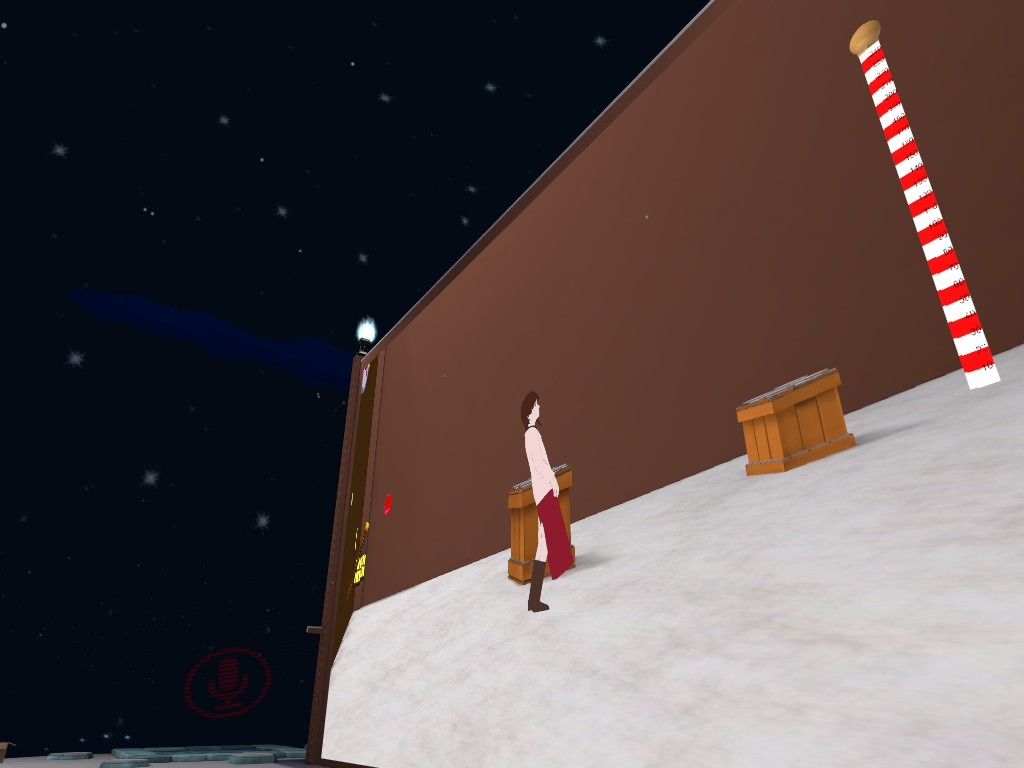
initially I thought it was an issue with the location of the spine
mental lynx
Your character positions themselves differently based on height
shy gull
alright
I think I understand
It's currently uploading
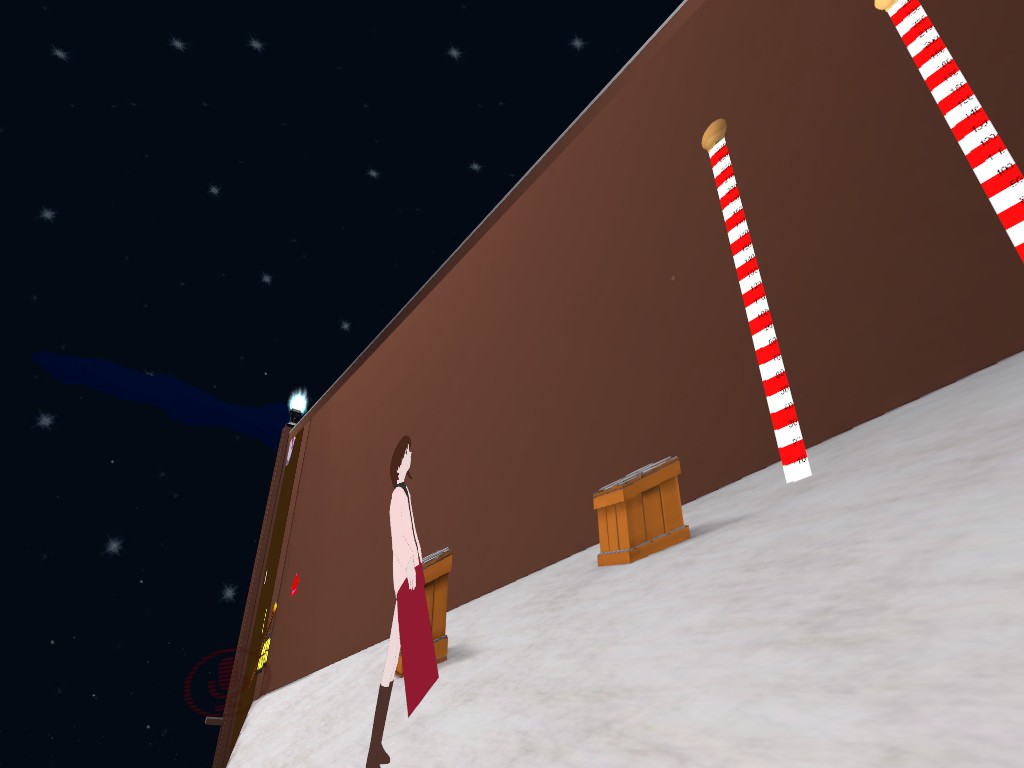
not a substantial difference
 fading verge
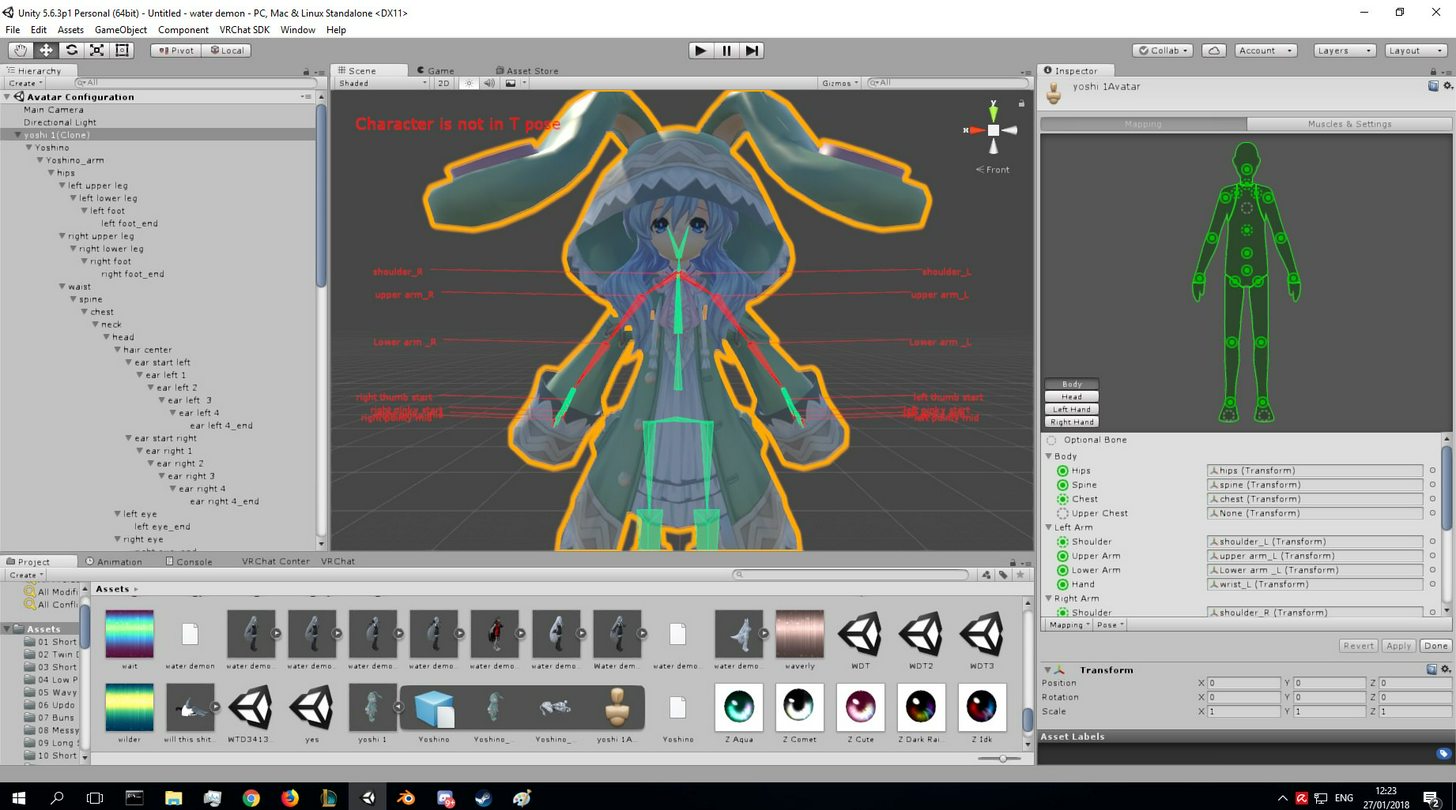
enforce t-pose?
see that pose tab just below the bones section on the right
and click on it then enforce t pose
 silent sequoia
im sorry im a bit "acoustic" i cant find it 😛
 fading verge
np! 👍
you dont always have to enforce t pose tho
if the rig works well the way it is, then no need to enforce ^
silent sequoia
i dont know it wont let me use it unless its t posed
fading verge
ah
mental lynx
I do all this work on a model
And what do I find when I decimated the wrong material too much
It has full genitalia
These dang horny model makers
silent sequoia
😛
fading verge
gg
silent sequoia
try deleting thoes parts if and covering the void with underwear or something
 earnest lagoon
could anyone help me? D: i hope im askin in the right tab, what scale size should i use for adult type models?
silent sequoia
depends of how you scaled the model before unity
if im not wrong the cube element is about 1m high
fading verge
^
 stuck hamlet
mental lynx
stuck hamlet
mental lynx
It took over an hour, but I got this 210k model down to 19.7k
fading verge
👌
I'm having trouble with the Hiearchy of the spine, I've thrown it in CATS and fixed model, but in unity it's giving me mixed messages
https://gyazo.com/cf3b8d2cbce296221bfb0371ec7b85b7

 static flame
so a problem keeps happening to me in a shit ton of models, I try to open them on blender but I cant, i go through the files but no pmx file no nothing related to the model, just the folders.
but it appears on unity
 opal phoenix
you have CATS blender plugin?
opal phoenix
what errors are there?
fading verge
me?
It basically says: if I follow the model the build says : spine hiearchy incorrect
if I change it to a more correct hiearchy it says "can;t apply animation"


last 2 images kinda fight eachother
IF you have the answer or a suggestion: Please DM it to me sincei i'm going AFK for 1-2 hours
mental lynx
The face of the model that had to have 90% of its polygons removed, alongside way too many sexual aspects
https://gyazo.com/739e8abea932fc133cc378619ff808f2

Nearly finished rigging it. Gotta sleep tho
 wild arch
Anyone what might cause a problem where I changed the hair on an avatar, and now it floats behind her head in the game? Everything appears normal in blender and Unity..
wild arch
I had to assign the bone parents but I may have misclicked... hm.. lemme check
 coral relic
@static flame what kind of models are those? pmx? fbx? blend?
when you go to import pmx in blender it will ONLY show pmx and so on
make sure you use the right import function
static flame
I deleted the files because they werent showing. but I remember they they .pmx on them
when i go to the files in explorer
coral relic
so you have to use the big Import Model button in the CATS tools tab

VRCat: Community-Run VRChat Forums
Cats Blender Plugin (0.6.1)
A tool designed to shorten steps needed to import and optimize models into VRChat. Compatible models are: MMD, XNALara,...
you probably went to Open File in blender, this will only show .blend files
static flame
i dont have that but I have the mmd tools one
i just click on that, go to import, and it shows me the pmx files.
also
there's a model i just now downloaded, in the page it has colors, in blender its grey, i click on shadless, then it turns to all pink instead of its colors, and in unity its grey again.
 void idol
Sounds like you are missing the textures for the model
static flame
nah i have those
void idol
In blender, you can go to the materials panel and make sure they are all linked correctly
static flame
o ok
coral relic
why not install CATS? it has another button that will fix everything for you
coral relic
it's right there in the link I gave you
you have to watch some kind of tutorial my dude
otherwise it's going to be a nightmare
VRChat Community Discord: https://discord.gg/VRChat Download VRChat! http://store.steampowered.com/app/438100/VRChat/ mmd_tools GitHub: https://github.com/po...
wild arch
Once you’ve installed CATS, go to blender and click file>user preferences and search for CATS.. it should pop up, and check the box.. then it’ll show in the left hand panel where tools is
static flame
i know how import stuff but i dont know how to use cats
I already have uploaded two models to vrchat
wild arch
Kayla Jade has some good tutorials on YouTube involving cats
static flame
imma skip cats for now
 wild arch
Cats is literally a life saver I swear... you’ll save yourself hours by watching a small tutorial my dude
coral relic
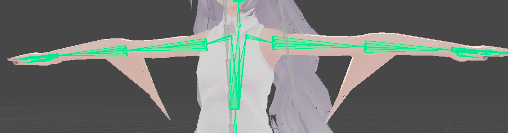
you have verts that aren't influenced by any bones
you have to go to blender and weight paint them
 ruby tusk
Alright, thank you.
static flame
is it ok if the avatar is OBJ?
 blazing crescent
coud i get some help i forgot how to get stuff rigged how do i do thath again?
silent sequoia
umm you mean you forgot how to rig?
silent sequoia
i start with the hips and work my way up
silent sequoia
will it help if ill show you how i did mine?
blazing crescent
i just need to know where thath darned button is
silent sequoia
one sec
blazing crescent
ok
silent sequoia
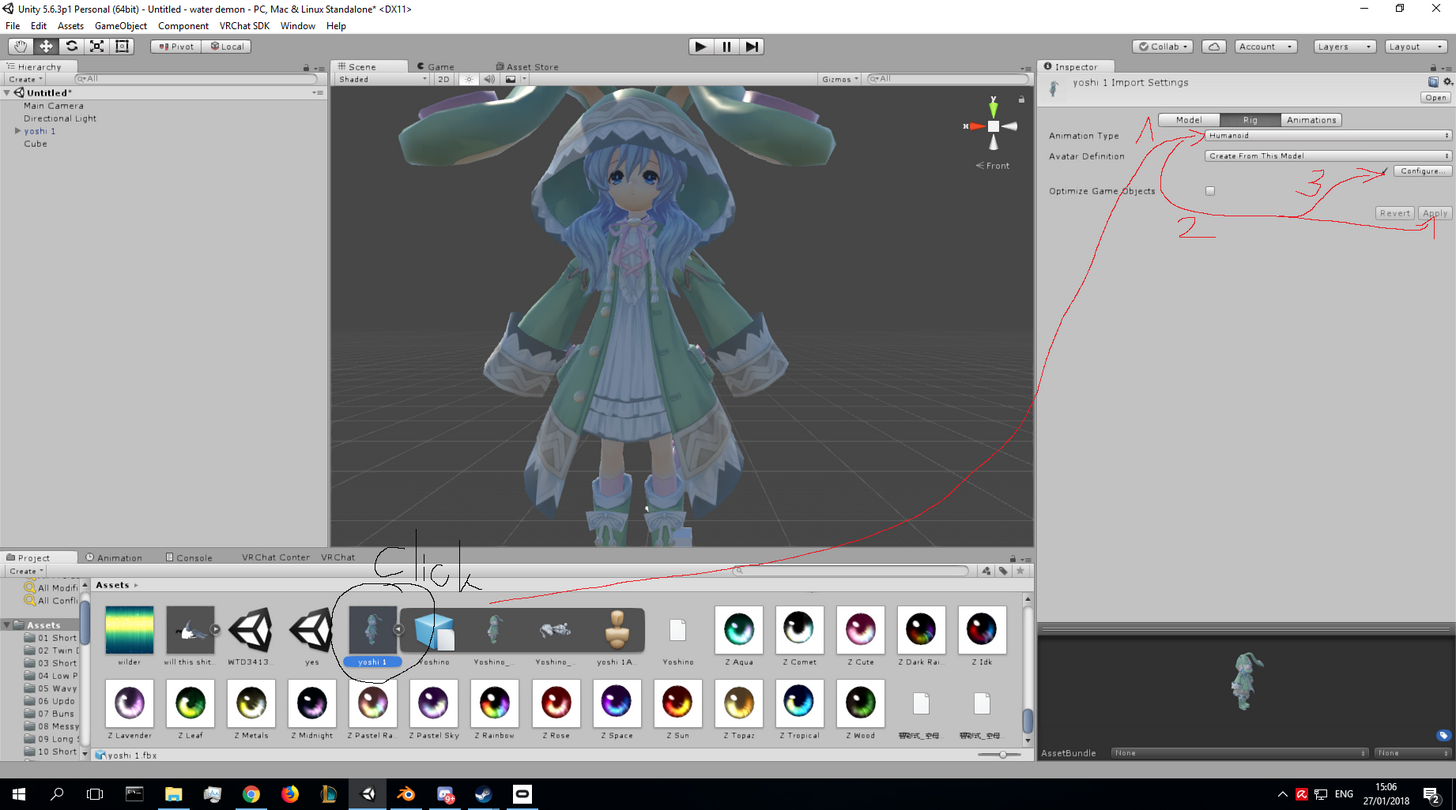
1 set humenoid 2apply 3config
oh and ofc the click :3
after you do that you drag the model to the hirarcy
@blazing crescent
blazing crescent
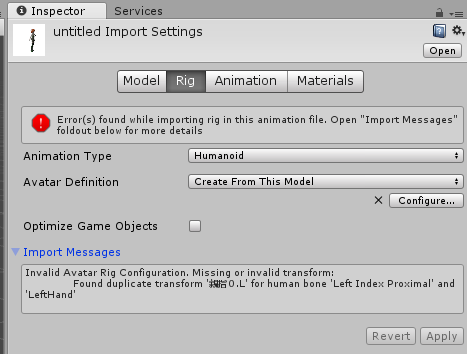
i need some help error message wich i dont exactly know how to fix
hwy wont this pic upload
silent sequoia
umm try saveing it with mspain as jpg and upload to imgur then paste the line it will show here
 silent sequoia
well i had this problem before when i didnt translate the bones
blazing crescent
i got this from the internet
glad egret
should the tip of my spine bone sit under the chest bone?
fading verge
Did you fix the model in blender, translate and all?
You get every mmd from the internet
silent sequoia
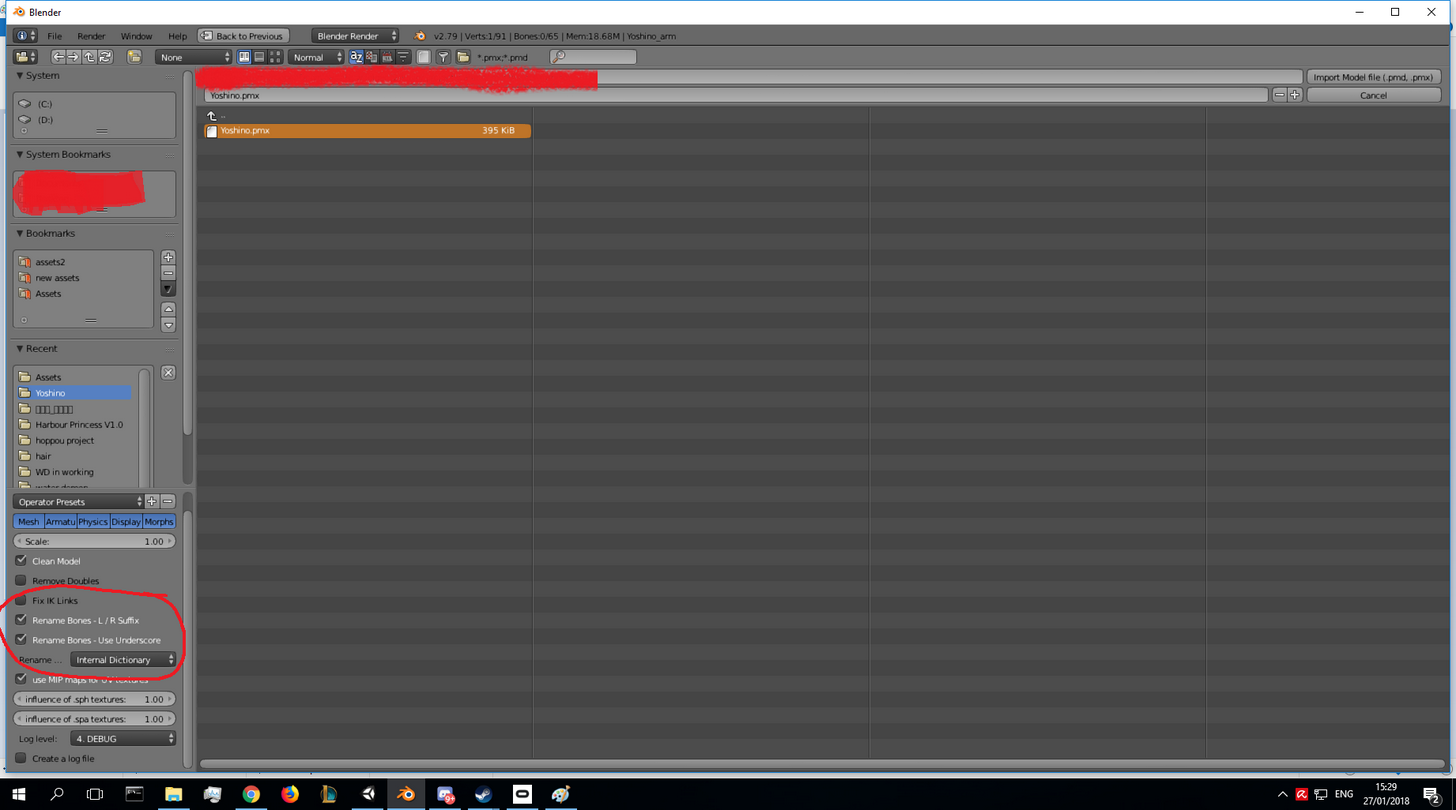
yeah youll see in blender you have an option to auto translate when you import the model
https://imgur.com/h8DJB0V
btw ive got a new problem the entire mesh is stuck and doesnt move any ideas?
its stuck in its idle pose and nothing moves
 spiral sparrow
Hey all, is it possible to change this avatar's tail from this ingame...
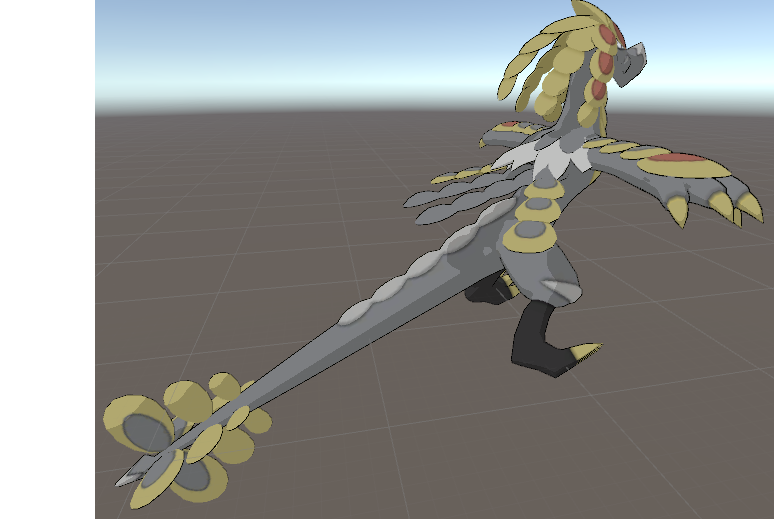
To work like this?
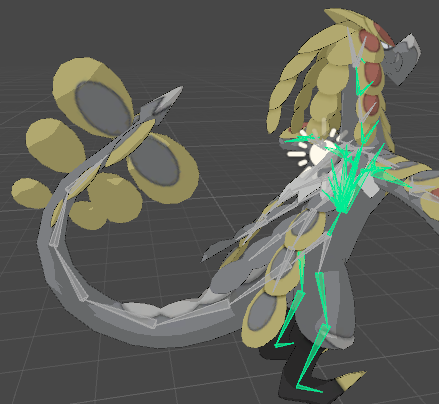
I tried changing the rig but the changes didn't do much
 humble dock
does anybody know how to fix this
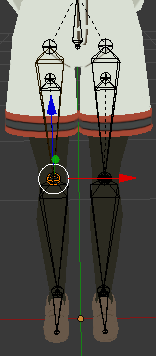
the legs and pants are seperate so the pants wouldn't move with the legs when I move
 astral ridge
Meeergee
wild arch
Okay so I can’t get the avatars hair to stay on her head... it looks normal in blender and Unity, but floats slightly behind her in the game..
The hair was taken from another model, I moved the mesh and the bones within the same hierarchy as the body, but I’m unable to find a way to parent the new hair to the bones of the body.. suggestions?
humble dock
I tried to merge them but it doesn't work for some reason
glad egret
@spiral sparrow by changing the rig do you mean rotating the tail bones?
glad egret
hm i dont quite understand what you're trying to do
do you want the tail animated or something?
spiral sparrow
Trying to make the tail appear curved ingame rather than in t-pose position
but got no clue what im doing
Is it done through animations?
 tardy canyon
Trying to atlas but can’t figure it out
fading verge
@spiral sparrowi thing its because it shouldnt be humanoid.. not sure tho
coral relic
hey guys, I have a problem with transparency. I have this peace of mesh for blushing shapekeys and it show up like this https://i.imgur.com/6vRVVtz.jpg
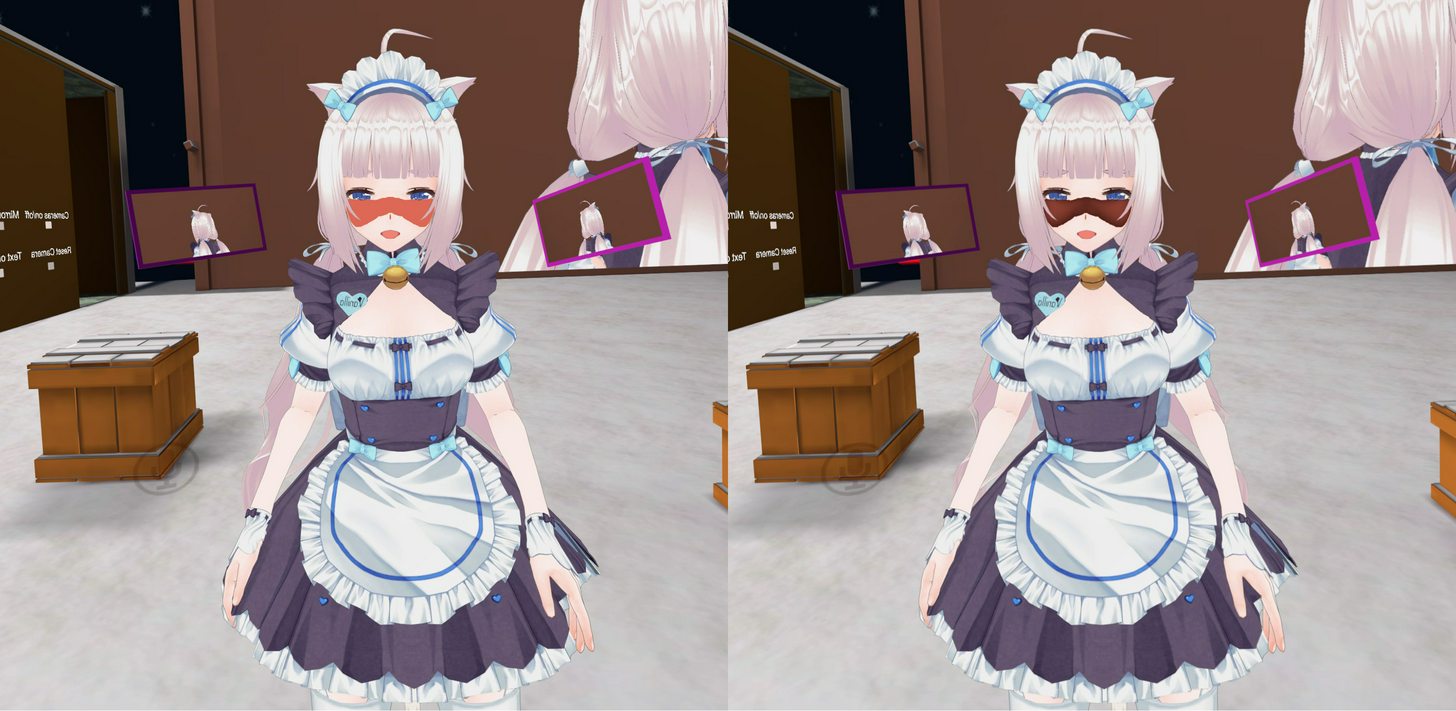
the texture is png, could this be a problem?
basically wherever the texture is transparent it makes the rest of the avatar see-through
makes no sense to me
or simply isn't transparent. strange that one eye sees it differently that the other in vr
fading verge
is the shade
a seperate model?
that youve attached to your avatar
is there a single texture only used for that area?
some models use a single texture file
but im not too sure whats happening here
 weary geode
If you're using cubed shader, use cutout not fade
coral relic
it's a separate mesh but the same object (joined all meshes). it sits inside the head and is pushed out via a shapekeys. it has it's own material and it's own texture
coral relic
someone else had this problem too but I don't think they solved it https://cdn.discordapp.com/attachments/276963122944802816/406784834288222218/Screen_Shot_2018-01-27_at_8.17.17_PM.png

I have cutout on the whole avatar tho
I tried all options already, even the Standard shader doesn't look much different
opal aurora
Use fade and on your texture tick "alpha is transparency"
fading verge
preach exsgt
coral relic
@sand patrol ^ here's your solution
 normal blaze
How would I go about having 2 models in the same avatar which both move the same as each other?
So like if i move my left arm the other models left arm also moves
 earnest kite
when I'm trying to upload my avatar, I get this message
"Error updating content. Unity package upload failed. Failed to create file record."
earnest kite
yeah, even making sure to detach the ID
I've waited a few minutes so I'll try once more
oh there we are lol
weary geode
@normal blaze Duplicate your armature in edit mode and assign the 2nd model to those duplicated bones, and have the duplicate bones parented to their originals with offset
normal blaze
Damn this is more complex than I hoped
Blender doesn't like my model, the skirt and other stuff mess up with I import it (it's an FBX)
fading verge
tfw you wanna move your other six arms but you cant lmao
weary geode
what is complicated about it ?
 naive tree
@normal blaze if part of your skirt goes invisible, enable outline in cubeds shader
if it's jus some parts, enabl eculling in blender and flip the invisible faces

 inner bane
CANSOMEONEPLEASERIGAMMODELOFSTITCHFORME I FOUND ONE FOR MMD AND I CANT DO IT BECAUSE IM A MORON
naive tree
no 
 shy vault
Shammy, I'm currently trying to work on the exact same model as you, if you figure anything out about the missing/messed up textures, can you let me know?
normal blaze
What are you doing with it Kaiser?
shy vault
What do you mean? Just trying to get it as an avatar
normal blaze
You don't need to convent it with blender, it already works as is
weary geode
from the pic you just put, that's a duplicated mesh with reversed normals to fix culling issue
shy vault
Yes, but it doesn't have fingers
normal blaze
eh mine does
normal blaze
did you get it off models resource?
shy vault
Models-Resource for me
normal blaze
that you can just put it straight into unity
shy vault
But it doesnt have fingers for me
I also plan on adding gestures/facial expressions later on.
normal blaze
Then you'll need to manually make those by editing the texture
which you don't need blender for
shy vault
I use unity for that then?
restive hill
I had one where the nose was just a transparent shadow. Looked really weird until I redid the texture in gimp. Filled it with color from the center of the face texture, and pasted the original shading in
normal blaze
For that model, yes. The face is just a flat texture, there's no shapekeys
shy vault
What about the fingers though?
weary geode
I've never understood the hate for blender ui, I think it's perfect
restive hill
Use the psd format if you need transparency
normal blaze
@shy vault https://www.youtube.com/watch?v=0vdiCJRAExw try following this and see if it works

Show the full description for all the links! SUBSCRIBE, LIKE AND ALL THAT GOOD STUFF!! :D DISCORD ► https://discord.gg/vNyJgCX Unity ► https://goo.gl/DsDaKz ...
restive hill
Yeah. The Neptunia avatars don't have working eye or mouth bones, though.
At least the ones I found
shy vault
Is there a way for me to add those somehow then?
 molten tulip
can you set a certain point of a shape key to be the new original mesh?
 spiral fog
you want a certain shape key to be a new mesh
?
@molten tulip
or like you want a mesh that's driven to say like 0.5 blink for example and make that a new mesh
weary geode
He means set new basis
 crisp tendon
Delete the basis shapekey and use the new one as such ?
weary geode
What usually works for me: Create new shapekey and select it, then in edit mode select the parts of the mesh being changed, then press ctrl + v > blend from shape, set the shape to blend from to the shapekey that is making the change. Then exit edit mode and put that new shapekey to the top of your shapekey list and rename it Basis
 robust gull
Anyway of copying weight from one working hand to a non working hand?
normal blaze
@weary geode recalculating the normals seems to make it look better but still not right - anything else you'd suggest?
https://puu.sh/zaNV4.png
Exported from blender ---> Exported from blender after recalculating normals ---> Imported to unity untouched
 spiral fog
@robust gull you can mirror weights on blender and maya iirc :O
weary geode
@robust gull Delete the non-working hand and duplicate the working one with shift + d, then shift + c to center cursor, set pivot point to 3d cursor and then S > X > -1
(assuming mirroring is broken)
robust gull
Dont know how to mirror, so can't say if it's broken tbh
weary geode
you can just put working hand into a new object and add mirror modifier to it
but doesn't always work with weights
naive tree
why shift, just add a mirror modifier
it will weight for you
nvm im dumb and cant read
another 30h session
molten tulip
@spiral fog I want a mesh that's driven to say like 0.5 blink for example and make that a new mesh
robust gull
Don't know how to mirror it, and i didn't put the weight on from the start, and i fucked up the hands somehow don't know what to do only making things worse so im tying to switch the hand now
spiral fog
@molten tulip PM me :D
@robust gull Is it broken like, it's not responding to the bone? :O
weary geode
@molten tulip If you mean shapekey, create new shapekey and select it, then go in edit mode and select the vertices that are being positioned, then ctrl + V > blend from shape, select the blink shapekey and set value to 0.5
robust gull
@spiral fog Yes it do that but it's ripping the mech and it's not painted like the my other and that's working
 stiff hornet
I got an error. Failed to find solution for one or more bones
weary geode
Select your working hand in edit mode, and press P > Separate by selection, then exit edit mode and select the working hand object and go Modifiers > Mirror
spiral fog
@robust gull so it's broken from the rigging stage, and not yet in unity? :O
robust gull
@weary geode I did like you said up there first delete the hand and i have chosen the mech on the other hand but got lost at then shift + c to center cursor, set pivot point to 3d cursor and then S > X > -1
@spiral fog I think it's in blender
spiral fog

How can I mirror my weight painting to the opposed side of my character? I know that there is Mirror function, but it doesn't assign the weight to bones on the opposed side. Can I do it manually?
fading verge
x-x was there someone in here trying to rig yoshino earlier?
weary geode
well don't do that, try mirroring first
robust gull
But the mesh on the other hand is broken too, and evertime i try to fix it, it just get worse
 stiff hornet
Oh god
spiral fog
HAHAHAHA
robust gull
Hahha
robust gull
Kill it plz
stiff hornet
God help us all the gremlin has risen from hell again
robust gull
Yes one hand is working like it should but the broken hand have paint problem and broken mesh
weary geode
I told you to try mirroring the working hand first, then you said it's broken too...
and now you're saying it's working again
robust gull
What, no i never said mirror thing was broken, i said "Dont know how to mirror, so can't say if it's broken tbh"
weary geode
well I told you how to above, have you done that?
robust gull
Yes but i said i got lost at "then shift + c to center cursor, set pivot point to 3d cursor and then S > X > -1" only thing i can't find is that center cursor thing
weary geode
I said don't do that though xD
try mirroring with modifier first
saves you having to do it manually
pivot point selection is to the right of mode selection
mode selection = the button that switches between object/edit mode and such
normal blaze
@weary geode https://puu.sh/zaP9F.png sorry but my skirts are still messed up on these models. you said somethinng about it being a duplicated mesh with reversed normals? is there anything I should do to fix that?
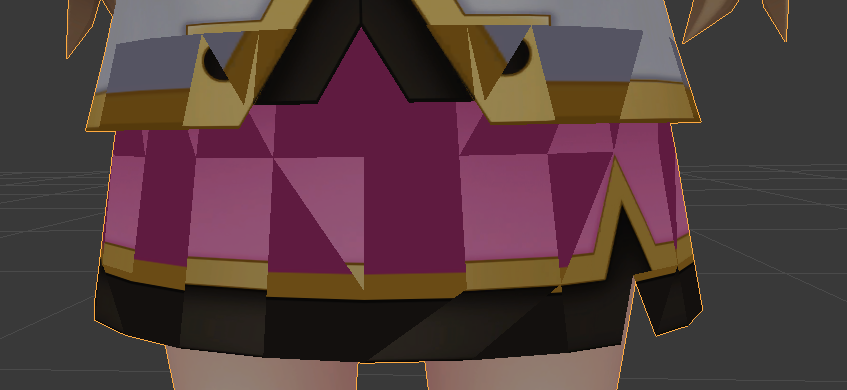 robust gull
I'm here btw just trying not to mess up, reading slow hehe
weary geode
is that screenshot in blender
normal blaze
yeah
weary geode
turn culling on
in the N panel under shading you'll find "backface culling"
unity automatically does this
normal blaze
it looks the same in unity tho
weary geode
then you need to flip those faces
normal blaze
Flipping does nothing
weary geode
edit mode > select the inner skirt mesh > flip
normal blaze
there is no inner or outer skirt, it's jsut one mesh
and flipping does nothing to it
 gloomy loom
@spiral fog a masterpiece only mona lisa could rival
normal blaze
https://puu.sh/zaPsm.blend @weary geode
spiral fog
@gloomy loom https://cdn.discordapp.com/attachments/266828842558029824/406511326169661440/unknown.png danke
 normal blaze
the skirt seems t obe flipped opposit to the rest of the mesh but I don't thinnk that's the problem?
gloomy loom
Those shape keys 👌👌
 cobalt island
Lol, that avatar 👌
robust gull
So the mirror modifier should go on armature right?
robust gull
@weary geode It say i can't apply because of shape keys https://imgur.com/a/zbzJP
 weary geode
you did separate hand as new object right?
if so go to object data tab on hand and remove the shapekeys
robust gull
I think so i did as you said "Select your working hand in edit mode, and press P > Separate by selection, then exit edit mode and select the working hand object and go Modifiers > Mirror" and if you look at the pic it's it own thing there in the list
weary geode
ya, so just remove shapekeys from it
normal blaze
Hey primu, how do i go about parenting the duplicate bones to the original like you said earlier?
weary geode
in edit mode, select duplicate bone then shift + select original and ctrl + p > keep offset
normal blaze
cheers, ill give it a go in a min
weary geode
can also be found in the bones menu under "Relations"
robust gull
I got a warning appled modifier was not first something didn't see eveything
normal blaze
yeah I was trying to do it via relations but it only showed the bones for the duplicate armature, not the original
ill try what you jsut siad anyways
 neon quiver
@normal blaze omg that outfit looks like it from galaxy angel.
normal blaze
it may well be, the game the character is from parodies many games & anime
the outfit is called "milfeulle" so yeah, looks like that's what it's parodying
neon quiver
When i make a rig am i able to just make it from scratch? Do i need to use add on tools for blender? I have no clue how i got my first avatar to work. Guess it was just luck. ;( Now my rig broken.
robust gull
@weary geode Im going to restart and do it one more time i think i did something wrong so just wanna check something with you, the bad hand should i delete that first? then do the mirror stuff with the good one
weary geode
@neon quiver you don't need any "addon tools"
yeah you can delete the broken one, doesn't matter
 lilac moss
cats blender plugin is useful though not required
your rig just has to follow certain conventions
fading verge
how to turn off arm animation?
normal blaze
@weary geode Tried doing what you said earlier to parent the duplicate to the original but it's still not letting me select the original when im in edit mode for the duplicate
weary geode
you're supposed to have the duplicate within the same armature as the original
you shift + d to duplicate
weary geode
I mean, duplicate the bones within edit mode
not shift + d on the armature object
you'll also need to apply constraint if you want the duplicate to keep its relative position to the original and only apply rotation on pivot
normal blaze
I actually want both models to be perfectly on top of each other
weary geode
oh.. then you probably don't need to duplicate armature at all
or do you mean vertically on top ?
normal blaze
https://puu.sh/zaSYK.png I got a thing going on where you look at different angles and it shows a different model
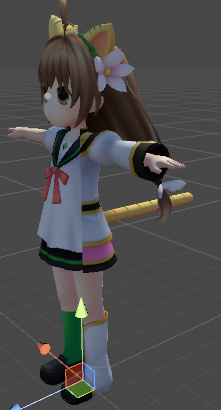 weary geode
well you can just have both models connected to same armature then
no need to duplicate armature
weary geode
it probably already has an armature modifier?
but you imported one model into the other I assume
you delete the armature of one of your models
and set the model to use the armature of the other model instead
select the model object, then on the modifiers tab you should see the armature modifier
set the armature to use in the object input box
then on the object menu, go down to parent and set the armature there too
silent sequoia
someone if any good with rigging i need help im trying to apply the armature to the mesh and it said it failed to do it
 wise summit
Avatar I made is stuck in T-pose and I can't seem to find an answer
weary geode
You don't need to apply armature to mesh
weary geode
unless you're changing the rest pose or adding shapekeys from pose etc
 jovial dune
@wise summit there’s some sort of “resting pose” option/system for your character
I did it a looooong time ago but you can modify the positions of the bones then apply that as the new “resting pose”
Because chances are it’s rest pose is probably that T-pose rn
weary geode
rest pose is supposed to be tpose
jovial dune
So maybe google changing rest pose of rigged meshes?
wise summit
It's so dumb cause He has the normal motions so he's just a wobbling T-pose guy
jovial dune
Far as I know rest pose means nothing. My rest pose is more of a v-pose or an a-pose
I guess it’d be A-pose
As his arms are pointed down at a 45-ish angle
weary geode
well it depends, mecanim likes to complain if your rig isn't in some form of a tpose
jovial dune
Lol
wise summit
I don't know how to change rest pose, Blender I'm assuming?
jovial dune
Yeah
weary geode
sounds more like an animation issue
 median haven
btw why does every avatar who i rig end up having broken up arms
like everything looks good inunity
but when i go into the game his/her hands just
go nuts
normal blaze
@weary geode Looks like it works! Thanks for all the help
weary geode
np
 lucid socket
not sure if these is the place trying to find 2 to 3 items for my avatar and having a hard time finding them! want to add a blue flip phone, snubnose revolver and possibly a knife cannot easly find a flipphone nor the snubnose revolver
silent sequoia
i took an unriged model and tried to rig it but i cant seem to make the armature apply on the mesh
 warm pollen
@silent sequoia weight paint, don't ask me how to do it, i have no idea
@lucid socket check bbowroll
weary geode
not sure exactly what you mean by "apply", but as I mentioned earlier, select your model then on modifiers tab add armature modifier and set the object to your armature
also go on object menu and set parent to the armature too
silent sequoia
i know how to wight paint its just tidius i hoped theres a workaround i tried to aplay auto wight thingy in blender but it failed
lucid socket
ok
jovial dune
Mixamo weight painted everything for me
lilac moss
auto weight should work in blender
you can also try the rigify addon, might make it easier
 left hound
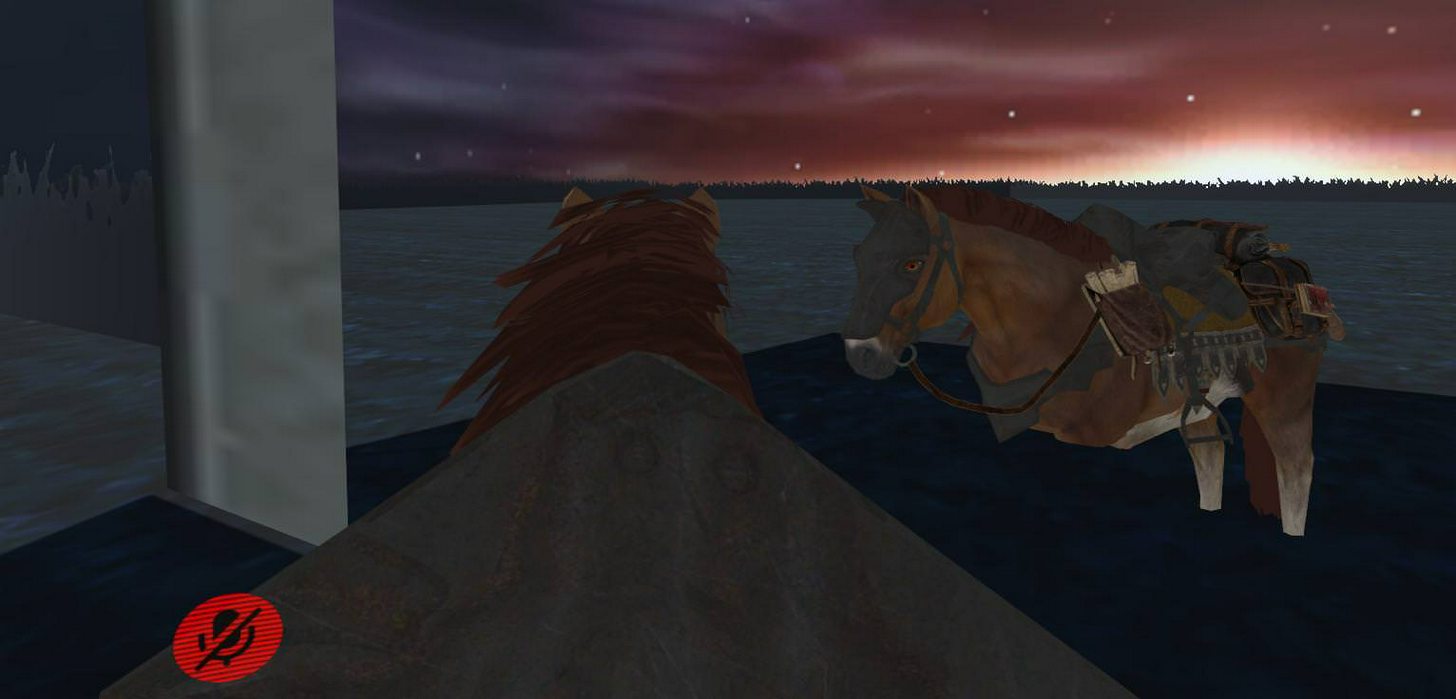
i have horse problem
i used the sample bind pose on unity
because the t pose its standing like a human
jovial dune
Is there any sort of good visemes tutorial out there?
 oak badge
Can someone help me with stuff to do with Unity?
DM me if possible, would be much appreciated
lilac moss
@left hound https://docs.google.com/document/d/10BuA_ybyXSSXqXuf6cDyPm52VIpqptgyvuRaphcYH0M/edit use this for nonhuman with animation

Google Docs
Advanced Avatar Creation: Making Non Humanoids This tutorial was made using Unity Version 5.6.3p1 This tutorial assumes you already have the current SDK imported and knowledge of how to upload a basic avatar. You will also need an avatar you wish to upload as non-humanoid with it’s own set of a...
just ask G
oak badge
Ask who?
lilac moss
the room
fading verge
It should already be in a t pose unless you fucked up the model
fading verge
Is the model rigged?
https://gyazo.com/29aa658c46a77529b7be9e961d079435
This happens when I auto weight my Model

Gyazo
robust gull
Hahahaha sorry
fading verge
hmm?
lilac moss
@fading verge ctrl+a -> apply scale before you auto weight the model
oak badge
@fading verge ye
fading verge
When you upload it to Vrchat itll use the avatar animations
Failed to find solution for one or more bones @lilac moss
Maybe cus only 1 side has Finger bones
lilac moss
that's a blender error right?
fading verge
yeah
 lilac moss
haven't seen that error before
lilac moss
sorry was for distoibed
fading verge
Probarly some rookie mistake on my end
Could it be that my finger bones have no vertex groups?
WAIT
THEY HAVE NOW
lilac moss
it should be generating the vertex groups
when you auto-weight it
google these errors first, it's often something simple in blender
weary geode
automatic weights requires mirrored bones to be named and positioned correctly and mesh should have no doubles
fading verge
Yeah, I'm doing the left finger bones RN
weary geode
your model probably has doubles if it has parts of mesh that need different normal facing for culling
weary geode
well maybe fine in that regard then, unless you didn't have anything selected when removing doubles
 vast bolt
why would my arms... basically freak out?
 tacit adder
so how do i rotate a particle system in unity? im manually rotating it and entering different numbers in the x,y,z rotation but it wont budge... any help would be appreciated
vast bolt
 weary geode
@tacit adder In renderer there are values for pivot of particles, could try that
 torn isle
Do you have vr? @vast bolt
weary geode
but generally, if you have shape set to something that has a direction, you should be able to just rotate it through transform
torn isle
I rigged that particular model and don't have issues with it on non vr.
vast bolt
That is vr, yes~
torn isle
Should work flawlessly.
vast bolt
I have a test dumby in the other room palying with it.
torn isle
What did you do in terms of importing and such? @vast bolt
All I did for that model was fix model and then export.
Didn't do anything else.
vast bolt
Hm?
Uh, the model works vr wise, just wonder if theres way to make it ... better, rigged better, I guess. o,o;
 hallow spire
hey i have a problem, the model i got has left and right shoulder, how do i jojn them to one so that unity can handle it?
vast bolt
Since her elbows are basically non existant.
fading verge
@lilac moss Could it be that if the fingers are not properly symmetrically aligned?
tacit adder
so i changed it to a hemisphere and tried rotating it again but it ended up still emitting facing upwards https://i.imgur.com/dzTUKd4.png

i need it to emit horizontally :l
 near fulcrum
Cats doest always work tho
hallow spire
wich function?
tacit adder
fix model
hallow spire
i will try
hallow spire
yeah i need to do it manually
hallow spire
cats doesnt even find the neck
near fulcrum
It cant fix an issue I'm having.
tardy canyon
can anyone help me with atlasing please
hallow spire
@tacit adder can i call you so you can walk me throughht a bit, i have zero experience weith all this
tacit adder
its like really loud where i am, my brother and dad are blasting monster hunter world behind me
they wont turn it down
tardy canyon
if anyone gets the chance. I need some assitance with atlasing. if not Im stuck without an avatar
neon quiver
Thanks for info
My rig probably just not fallowing the convention
fading verge
is there anyway to make the bones that are in the back less visible but not invisible https://i.imgur.com/eIuYU8I.png
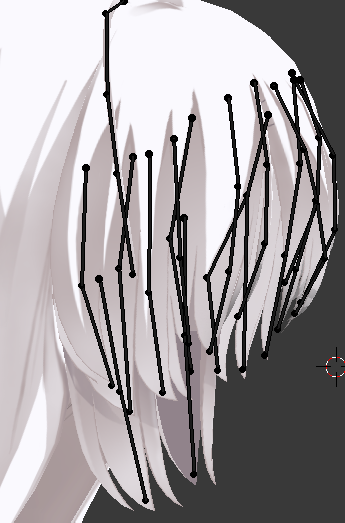
messes with my perception
 sleek tendon
tahts a LOT of bones....
You know you can just weight paint 3 parts for the same effect?
tacit adder
i have that problem too, dunno how to lessen it but changing camera a bit and zooming in kinda helps?
fading verge
i like to work on things on higher "specs" like drawing something thats fine on 1000x2000 but working on it in 3000x4000
tardy canyon
gyle are you good at manually atlasing
sleek tendon
things like this is what gives people 20fps tho
take it easy on the bones, pro-tip, looks the same in outcome
fading verge
original project to work on
i gonna merge bones for vrchat, so i can use this for anything in the future
lilac moss
no, bad symmetry wouldn't give an error it'd just look bad
fading verge
Ok
I went to a previous state where i CAN auto weight
@lilac moss Solution found: I did alot of stuff with it so it probarly went batshit at some point, Auto weighting now works perfectly
lilac moss
wew
fading verge
I used to dispise rigging, but since I realised after every cntrl F I need to Primary mouse click, it's almost fun.
lilac moss
you should try rigify, for humanoid models
you should also use x-axis-mirror to do symmetry
might be useful the next time you start from scratch
fading verge
rigify?
lilac moss
it's a blender plugin, it's packaged with blender by default
lilac moss
no, this http://puu.sh/zaYb8/3219755fd8.png

 raven pumice
Okay, I have an armature where everything is just like, limbs coming off of nothing. Head, Left Arm, Right Arm, Left Leg, Right Leg, Tail all just in a pile together. How do I stick these all under a proper Hips/Chest/Neck heirarchy in blender?
There's not even a root bone here
raven pumice
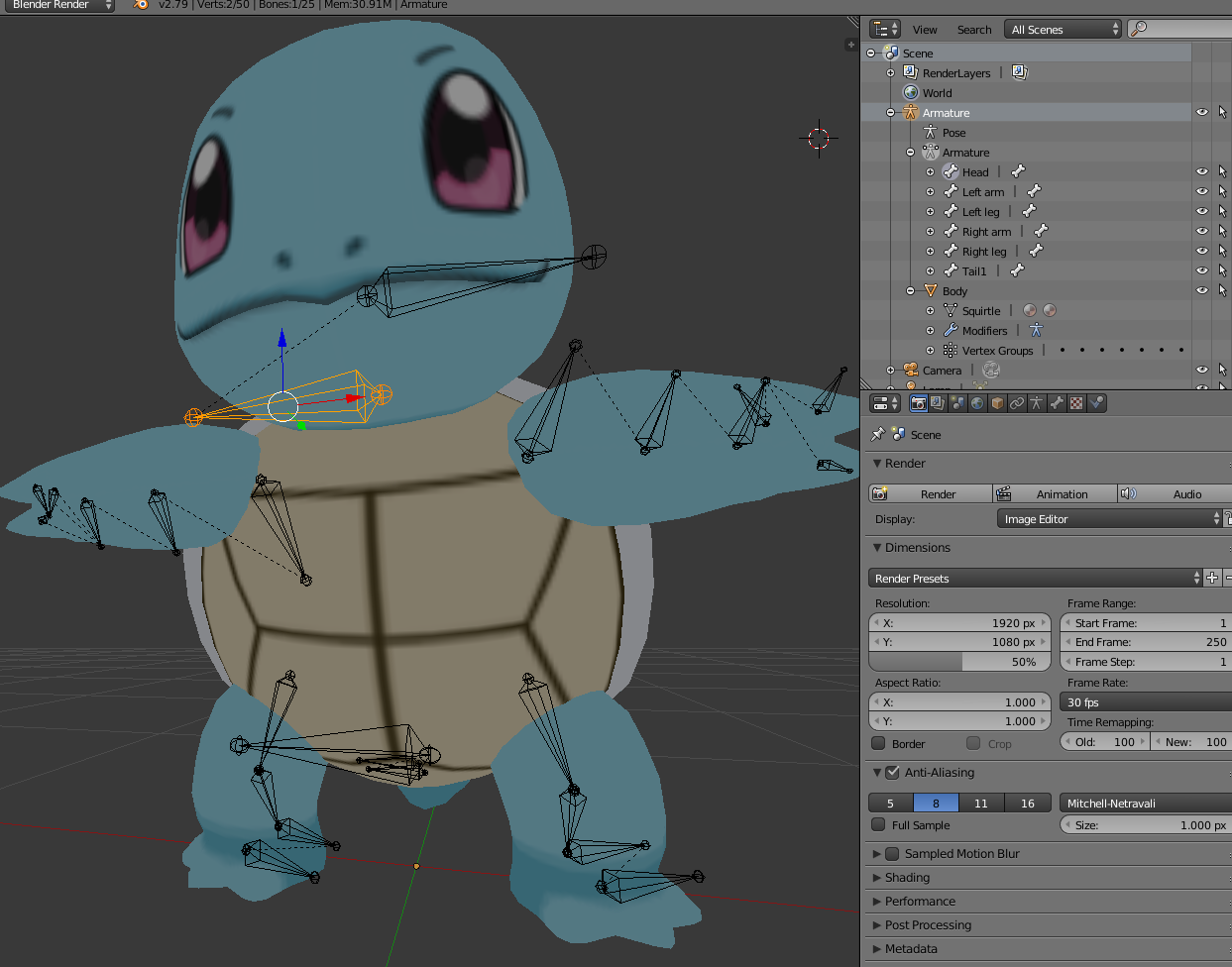
 main sage
but somehow it looks like
depending on how high / low i look when walking
it like raises my model off the ground or pushes it in
raven pumice
There is no bone here for the torso, just the limbs and head and tail
main sage
@raven pumice make dummy bones
raven pumice
hm, going back it looks like there were more bones but CATS ripped them out
yeah im going to do that
I can just make new bones and parent the existing ones to them right?
main sage
in the proper order, yes
median haven
oh man this rigging stuff is super annoying
i don't seem to be able to figure out why my hands are wonky
in game
fading verge
aanyone know fix

your rig has errors, it will not animate until you configure your rig so it's all green
It is all green
head and hands too?


it hasn't imported the rig so something is blocking that
which is
head and hands are okay too?
what do you m,ean
In your screenshot, next to the green guy, theres body, head, left hand, right hand
are you sure they are all good? It never set your rig to humanoid because it failed
 shadow moon
how do I make sure my weight paints are saved when exporting. I keep having floating eyebrows, mouth, eyes, hair accesories and the likes. I paint them in blender to stay on the head and when I upload them to vr chat they just come off again.
coral relic
export to fbx, make sure to put that fbx in the assest folder of your project so it overwrites your current one
 verbal zinc
can you delete the armature from a model in blender and let mixamo rig it? I have a model missing some finger bones.
coral relic
use export settings from Tupper's tutorial if you're not sure, but it should work anyway