#avatar-rigging
1 messages · Page 72 of 1
 fading verge
and some textures
Then place it even higher!
side Veiw for good meassure
and this is the Format or whatever xD
 slow hearth
Anyone got any nice values for hair dynamic bones?
Been fiddling for a while but can't get it to look nice.
 languid plaza
Anyone got any experience with shoulders pads? how do I avoid this?
Do i need to weight the shoulder pad to the arm, or shoulder?
 silent niche
do humanoid models have to be in a t-pose?
 mild eagle
is there a way to fix this hole 😭
fading verge
Caster are u good at Fixing avatars
mild eagle
nope i am still learning
 fallow lake
guys
my avatar keeps puffing his chest out
even though everything is rigged in Unity correctly, haven't changed anything except for using Mixamo instead of rigging in Blender.
Will heirarchy do something like that?
fading verge
check the hierarchy just in case
Mixamo sometimes messes up when the humanoid has an unusual shape or armor (so I've heard)
fallow lake
Yeah cause it added an unneccesarry spine parent it seems, which I have to skip and add the child of (Spine 2) to the chest in order for the avatar to work
Should I be able to manually change heirarchy in Blender?
and reimport?
Or should I make Spine1 the spine rig?
fallow lake
yep, it is
fading verge
it looks like mixamo rigged it okay tbh. I was expecting weird orientations or something but I see none
 warm pecan
fallow lake
warm pecan
fallow lake
Nope
fading verge
Are avatars working now?
fallow lake
That's how I had it originally @languid plaza
warm pecan
fallow lake
changing to spine 1 would be the different one
warm pecan
I dont know whats wrong
languid plaza
@warm pecan you have no shoulders mapped they're needed
fading verge
Anyone?
warm pecan
the rig doesnt have shoulders
 granite lava
https://puu.sh/z1sCn/1523404b59.jpg having this problem on a model in blender (the vertices aren't moving with the bones i added), i've probably just missed some obvious step: where can i change that?
 fallow lake
Are they weighted to the bones?
warm pecan
oh I dont know how. the model was given to me
fallow lake
@warm pecan Either use Mixamo to auto-rig or Tupper should have a video on rigging models
granite lava
i don't think so, how do i get to the weight painting dealy?
fallow lake
If you're in blender it's in the drop down menu where it says Object Mode
granite lava
ah, thanks
mild eagle
oh i fixed that hole 😭
warm pecan
is tupper a youtube channel?
granite lava
okay, I see how the weight painting works now! thanks!
 twin grail
 fallow lake
Yeah @granite lava its tedious but if you make use of vertex groups it can be less so.
granite lava
😃
twin grail
 granite lava
how do i assign it to a vertex group?
 crude crag
@twin grail yeah you gotta move the right and left shoulders parents to be whatever your chest bone is assigned as
fading verge
Dynamic bones can be made to collide against the floor right?
twin grail
@crude crag How
crude crag
have any experience with rigging?
twin grail
Eh not really
crude crag
actually, where'd you get the model from?
twin grail
Devient
crude crag
hm, what kind of file was it?
twin grail
pmx
crude crag
ah, in that case post a picture of the armature in blender
twin grail
crude crag
i mean in the actual blender model
crude crag
lol k
 oblique cloud
guys
when i import my mmd into blender, the internal dictionary doesn't translate the meshes
:/
its all in japanese
oblique cloud
that just turned all the upside down triangles into the texture icon
they're all still japanese
crude crag
o
silent niche
To change the walk animation on a humanoid, do I just put a walk animation on the custom override over walk?
 tawny zephyr
my model's arms are more forward than they should be when i use hand tracking even when my hands are at my sides
how could i fix this?
 orchid shale
Is there a way for me to change pic related so that the bones moves with the highlighted leg bone? In unity when the character walks, the hem of her pants don't move with her legs creating awful clipping.
fading verge
Are avatars working now?
 loud bear
@orchid shale you can try dynamic bones with dynamic bone collider
it will still clip, but not as bad
orchid shale
I will give it a shot. Thanks!
fading verge

Help?
Is uploads disabled?

wdym?
works for me but I get errors
No erros and i still cant upload
nobody's helping me to rip
 brisk mesa
ah fuck the X-mirror thing wont work right for me for weight painting xD
MANUALLY PAINTING IT IS
 torn isle
Did you check the box for upload? @fading verge

 torn isle
Try logging back in again?
 fading verge
Hmnm
fading verge
No erros https://i.imgur.com/NX6RC5j.png

Just warnings
which are not supposed to stop me
from uploading every character i have in my unity
Very strange
 south quartz
https://i.imgur.com/Nwo9mTu.gifv
Why dont i get the proper page :notlikethis:
 torn isle
Clear cache maybe?
You didn't click on your model... @south quartz
It keeps defaulting to the wooden one.
Redrag your model into unity.
Then try again.
 halcyon patrol
So yeah, this seems to be the place where I talk about models. I am just wondering, what do I do with a Source model to get it to be compatible with VRChat? Do I simply convert the Source model into an obj. and send it through the autorigger before I try to make it my personal avatar or what?
south quartz
@torn isle It keeps doing it 🤷
torn isle
Even if you reimport the fbx? @south quartz
south quartz
Jup
crude crag
sending you a pm @halcyon patrol
south quartz
Eh
To be fair i pretty much set up things the proper way now so im 99% sure its fine without having to check it
Its just annoying
torn isle
Did you do it?
south quartz
The rigging?
torn isle
The reimport of the fbx.
torn isle
Start a new project?
south quartz
I also got it on older project so its not just this project
torn isle
It's supposed to tell you to save a file when you click configure.
south quartz
It does that normally
 charred patrol
3rd error is bullshit
1st and 2nd i'm confusing
but the 3rd is the worst of them
charred patrol
everything is there
torn isle
So you didn't enable fix model?
charred patrol
i did fix it
clicked on the "fix model" button like usual
then i exported the model as an fbx file
fading verge
I figured out why the eyes arent appearing on the nico model and its because the owner of the player model forgot to open up the eyelids, any way i can open them in unity?
 sand pollen
Anyone have a tutorial on how to make bones for an unrigged model? I'm trying to put a general grevious model in vrchat but it has no bones.
south quartz
@torn isle Well this is funny
I just went to making my mouth and blinking animations and would find out later what was wrong with my unity
Things froze for a second
all the missing assests i wanted returned and now i can also use the menu's and stuff right again 🤔
Might have been one of my background programs or something like that
 edgy flicker
didnt read channels completely 🙂

 drifting tulip
check what it has mapped in those places, make sure all those bones are properly parented.
 fringe rose
And you should get used to do your own skeletons lul
drifting tulip
Check both body/head tabs
Yeah, i learned by doing manual mmd rigs before cats blender was made. I can tell you, that crap was not fun. Mind numbingly painful.
 blazing niche
please hold one sec
 mystic sluice
Also you need a neck mapped
fringe rose
^
blazing niche
 drifting tulip
@blazing niche click the head tab and see what is mapped
if everything in body is correct, check head/hands
blazing niche
drifting tulip
all of those tabs matter
drifting tulip
everything "seems correct"
mystic sluice
ctrl+s it if you haven't to save the scene if you rearranged bone parenting
mystic sluice
Yep, it does that unfortunately. You gotta remap the bones first then do all that
<-- also learned that the hard way
blazing niche
nope
mystic sluice
welp, sorry bud
drifting tulip
@blazing niche welcome to making models work, enjoy the ride. Theres worse stuff than this. 😂
blazing niche
good thing i still have a back up on google...
mystic sluice
then you can do all the dynamic bones/scripts
blazing niche
see i basicly was given to avatar by some one how already had it working
some how broke it by opening it
.-.
or so he says
mystic sluice
Hmm
 drifting tulip
@rich merlin you have to select the mesh and reset its cords
trying to move the bones will in hand move the mesh
 rich merlin
alright thanks @drifting tulip
blazing niche
i only have unity sadly my pc doesnt have the space for blender
drifting tulip
@rich merlin fixing that can be tricky too if your model or bones are not directly centered on the x/y/z axis so i hope it is for a safer fix. best of luck.
mystic sluice
Do bone constraints not transfer over into Unity?
mystic sluice
Artoras, good choice
 tawny silo
it does not move
i feel like i missed a step
I created the bones myself
did i miss a step when i did
mystic sluice
does it do that in pose mode in blender?
mystic sluice
found it?
mystic sluice
that's no good
mystic sluice
weight painting
tawny silo
none of the bones work
mystic sluice
welp
fading verge
can anyone explain why cant i configure?
rich merlin
sorry to ask again but how do you reset the position of the mesh o_o;; @drifting tulip
rich merlin
yes
blazing niche
alright i got back to where i was @drifting tulip
rich merlin
i can't select all and do that :S?
blazing niche
still getting the error
drifting tulip
make sure your bones are set to the middle here like this, if not when bones or mesh is selected.
and modify "location" to 0/0/0
@rich merlin
mystic sluice
did the bones work to begin with Aman?
blazing niche
ive been tring to upload for 4 days...
mystic sluice
Make sure you have the armature set here
best case that's your issue
if that's not there, click add modifier - armature
then set the objet to your armature
blazing niche
me or aman
mystic sluice
aman
tawny silo
THe Mat_skirt 2 is the mesh
mystic sluice
yes
fading verge
tawny silo
I clicked on it now what?
mystic sluice
click the modifiers tab (wrench)
fading verge
and anyone help on why dynamic bone is not working?
tawny silo
ok
mystic sluice
what do you have there
tawny silo
nothing
rich merlin
i'll get it eventually xD
mystic sluice
show me
 subtle plover
anyone know how to raise the model above this orange dot, it makes me walk in the ground when i import it into vrchat https://gyazo.com/a7a5aa136bb666e25d592429d1a44082
 tawny silo
yep
fading verge
Does anyone know a fix for this?
blazing niche
and i quote this is the world of magic where two people do the same thing and get two different results
blazing niche
same
mystic sluice
https://youtu.be/6EDSS5GKhrI
@fading verge

Quick tutorial on how to fix the issue: LowerArm is the not the first child of UpperArm or Hand is not first child of Lower Arm: You may have problems with F...
fading verge
Thanks
rich merlin
feel silly for still not being able to do this :\
mystic sluice
👌🏻
rich merlin
 torn isle
You dragged the character out from the bone structure?
mystic sluice
Hmm, then that's not the issue Aman
torn isle
That's what it looks like.
rich merlin
i think accidentally
mystic sluice
If that's not there the bones don't move the mesh
torn isle
Ctrl-z
torn isle
Well.
blazing niche
so still getting the error ive got a fresh scene and everything is up messed with
torn isle
Starting over wouldn't hurt.
rich merlin
😛
blazing niche
isnt*
tawny silo
@mystic sluice I wonder if it is because all my bones are in Pose?
rich merlin
well if there is a way to get it out i assume there is a way to put it back
mystic sluice
wouldn't think so
blazing niche
ctrl + z is undo i think
fading verge
so for some reason dynamic bone isnt lineing up and is messing up, can anyone help?
tawny silo
to try and figure this out
mystic sluice
I can't be too much help, I'm not that experienced yet
rich merlin
i guess i'll have to start over then....
tawny silo
do you know of someone better? @mystic sluice
blazing niche
any one here think they can fix my unity eror?
mystic sluice
unfortunately not, sorry
blazing niche
congrates!
@vocal quiver i heard from a friend of mine you are super at avatars any idea why im getting this error if the bones are all mapped?
mystic sluice
looks like they could be bones
 dapper osprey
so for example
if I wanted to apply these to my avatar at one point
I'd have to add bones, right
is that a hard process?
For a beginner
dapper osprey
firstly I'd need to find where are all the tris
 lofty arrow
Hi guys. 2 quick questions with some common issues if I may. Avatar's fingers are curled in after import on unity - rotating them to correct position takes it out of t-pose. Quick fix? or is the t-pose thing not an issue. Angle between leg's and hips is no where near 180, is this an issue?
blazing niche
any one know any one on discord i should ask for help?
fading verge
can someone help me line up dynamic bone with the body please
 shadow shoal
Make the bones in blender
fading verge
@shadow shoal i have
shadow shoal
Select the root of those bones
fading verge
?
shadow shoal
Put the root in dynamic bones
fading verge
thats not how it works...
tawny zephyr
i need help with that exact same problem and model
 sharp dune
What's a good platform to download 3d models?
Cause there's a model I like on sketchfab but I can't download it
fading verge
how can i attach a item to my avatar?
blazing niche
oh god...
 spark prism
how do I connect the eye bones to the neck bone? They arent in the same armature group
spark prism
to the hands? how do I do that?
 low river
*head
fading verge
how do you make a dummy rig?
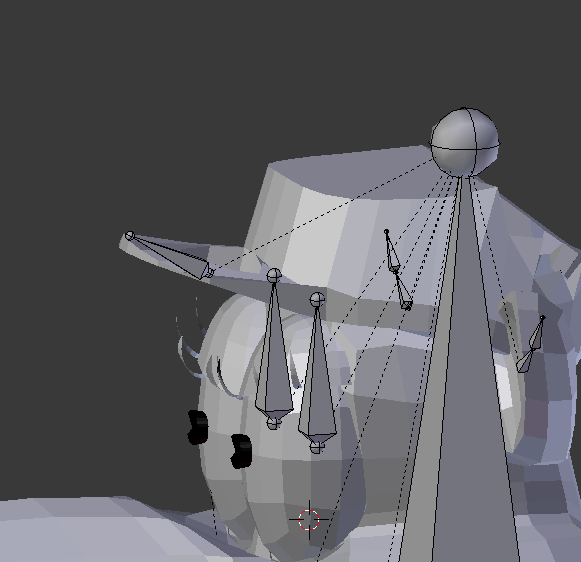 spark prism
I made the eyes
low river
cause you oughta make them while editing the main armature
spark prism
not the rest of it
low river
oooh ok
languid plaza
anyone know why all of my armature is hidden untill I go into edit mode? I've pressed alt+h and it does nothing
low river
delete those two armatures
and then select the armature and go into edit
select the end of the "head bone" and extend it sTRAIGHT up [hold control]
fading verge
can anyone tell me how you make a dummy rig?
low river
then select the new bone, alt-p
https://i.imgur.com/L3z7eBU.png and chose disconnect bone

then you want to move it so the tail [large ball] is in the CENTER of the eyebal
spark prism
won't deleting the eye armitures delete the bones?
low river
you gotta remake the eye bones
orrr
actually
are they already rigged for the eyes?
like if you rotate them
spark prism
I rigged it by making the texture move, im not sure if thats ok or not though
low river
Hrrm
fading verge
@fading verge How did you managed to import and properly rig a Pokemon model? I want to do Rowlet next but I think he might be missing some joints in the armture
spark prism
the bones make a uv warp move
low river
I
huh
I dont know if that will work, and i dont know enough to figure otu ahha sorry
spark prism
the eyes move correctly I think, ill post a screenshot
fading verge
@fading verge i got help, im not good at this so just asked around
spark prism
 main sage
ECH
spark prism
@low river is that how its supposed to be?
low river
OH
Eye bones
have to be upright
like, big end bottom
firstly
and But you can actually parent it to the head
fading verge
@fading verge Well damn. That's not gonna work for me
spark prism
you mean the head and the eyes or both eyes?
low river
the armature
the eyes can be their own mesh/object
the armature has to be one
also, did you make the blink/lowerlid shapekeys?
fading verge
@fading verge i can look into it once ive got mimikyu done
spark prism
I had a separate animation to make them blink, idk if it works yet
low river
Ok well
fading verge
@fading verge Alright then. I really want to try using some Pokemon avatars.
low river
you dont need to make these as the actual blink but
its verrry complicated
you need the first 4 shapekeys on the main body mesh to be IN THIS ORDER [after basis]:
fading verge
can anyone tell me how you make a dummy rig?
low river
vrc.blink_left
vrc.blink_right
vrc.lowerlid_left
vrc.lowerlid_right
you dont have to actually make the shapekeys blink or have the lower lid [but could make it look better]
but there has to be some difference between those and the basis
spark prism
btw I pressed join and they turned into lines, is that normal?
low river
show?
spark prism
low river
go into edit?
 nocturne vortex
hey i'm just getting into rigging, so i wanted to start off by rigging a default human model, is there any videos you guys recommend to start?
blazing niche
would dyamic bones cause this error
nocturne vortex
uh can you post a picture of your unity screen with the bones mapped?
spark prism
I just opened an old save lol
spark prism
maybe I didnt select it correctly?
low river
maybe?
 modest harness
Hey guys is there a tutorial on how to add a bone to a model that can be used for dynamic bones?
low river
im trying to think haaha
Im not 100% on it unfortunately
https://www.youtube.com/watch?v=HoddeRRXaOs @modest harness

Small tutorial on how to use Dynamic bones with force, and colliders. My Twitch: https://www.twitch.tv/kaylajayde
[im not calling you dumb this is the thumbnail they chose :v]
fading verge
can someone help me by telling me how to attach the mesh to the rig
modest harness
alright will check it out. thx^^
 restive urchin
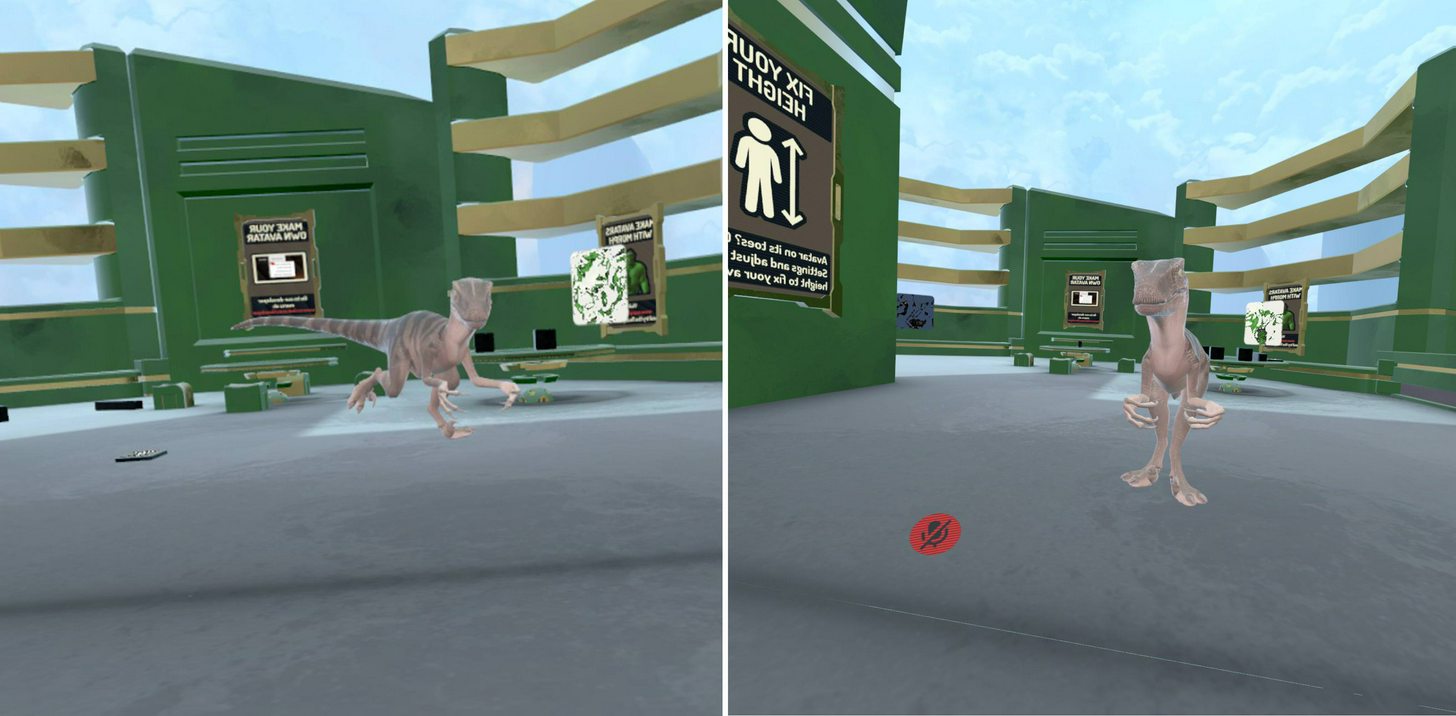
Howdy folks. I've been experimenting with an avatar that is probably pushing the limits of the humanoid animation set, but which 90% works aside from idle refusing to work properly. https://i.imgur.com/FwWbvVD.jpg In this image the left shows it animating fine, but the right happens after about 1 second of standing still. The legs IK decides to ignore the muscle setup and go way beyond their limits to have the legs scoot so far forward that they touch the elbows, and they often also cross / clip through each other. Is this just a limitation of IK, or is there something that can be done to force IK into line?
 fading verge
@low river i got some help but yes
low river
ahh ok
spark prism
just realised they arent on the head in the heirachy
low river
OH soprry thought I hit enterr
 full cairn
Is Mixamo the only "I'm too lazy to actually do rigging on this 3d model myself" software?
 proud carbon
anyone have an okay rigging tutorial, im at a loss
spark prism
i thought mixamo was for animations
low river
I should make a rigging tutorial
Cause i do it relatively easy [for bodies]
Mixamo can also be used for rigging
spark prism
do that, id watch
proud carbon
id watch
spark prism
I wonder if I can try and make it move the texture again now
low river
I just need to find a recording software
full cairn
Sometimes has some funny results.
proud carbon
obs, nvidia
low river
Though itd be more like
proud carbon
does are good
 topaz dune
@proud carbon https://www.youtube.com/watch?v=Q2MGttB1E7U

Learn Blender at https://Blender101.com It's time to start rigging our character! In this video we clean up the scene a bit to prepare for rigging, and then ...
low river
that works too
proud carbon
thx nico
low river
though why 10 parts
proud carbon
want to go bowling?
topaz dune
best rigging tutorial i can think of.
low river
Unless they literally go STEP by STEP on "What this does"
proud carbon
well thank you ill check it out
low river
he doesnt even start until 5 minutes IN
proud carbon
just need to say, im glad for this community, im done with toxic online gaming
full cairn
VRChat can be ruthless
This Discord is good
But I go in with a slightly off model, about 50 people will comment going "WTF IS WRONG WITH YOUR FAAAAAAAACE"
topaz dune
tho he know his stuff and you learn a lit
proud carbon
they mean it funny doh
low river
"I put it together myself whered you get yours"
And he does
I just feel like this can be condensed
ALSO
proud carbon
well what're u witing for, download obs and make it lit af fam
low river
TRue
spark prism
@low river btw crow the reason it stopped working was because the UV warp has to have an armature selected and joining them deleted the old one, it works fine now and thanks 😃
low river
Ahh okkk
 summer shuttle
I really want to get dynamic bones for my avatars but I don't have the money for that addon.
modest harness
there is no other way than paying m8
blazing niche
any one an expect on unity rigging?
 smoky anchor
what do you need?
blazing niche
so my avatar in unity is giving me head, hands, and feet need to be mapped and im 60% sure they are
im basicly a noob at this
smoky anchor
send me the model on PM
blazing niche
so i dont know what to look for
full cairn
Rigging is giving me an absolute headache
Even with super dumb instructions I'm overwhelmed
smoky anchor
rigging is a total pain in the pinfeathers
full cairn
I got an auto rigger
I don't even know how to use it
There's no option to select it
modest harness
Is someone experienced in dynamic bones in conjunction with adding the bone yourself in Blender?
 brisk crypt
What are some good dynamic bone settings for hair?
 charred estuary
Does the order of a bone's children matter?
I need to know
brisk crypt
What are some good dynamic bone settings for hair?
charred estuary
Does the order of a bone's children matter?
I need to know
brisk crypt
What are some good dynamic bone settings for hair?
 primal wasp
tawny silo
primal wasp
tawny silo
Hey I need some help
so i got a model here (rigged myself)
I am having issues with the bones
i cannot get them to heat map
auto heat map
it keeps giving me a error
in unity it looks like this
and in pose mode in blender
it does not move with the bones
so what on earth do i do
i have spend 3 hours on this
with little to no progress
 dusk pilot
Is your model even rigged?
tawny silo
you can see the bones right there
dusk pilot
But are they attached to mesh?
tawny silo
if you see my blender hierarchy
they are how they should be
i cant seem to get the heat map to apply
it keeps giving me a error
I'm trying everything
but nothing
dusk pilot
Bone heat error?
dusk pilot
Select all faces and then select remove doubles
dusk pilot
Did you try selecting by loose parts
tawny silo
no?
how would i remove doubles again
might as well do it again
i have forgotten how
Mesj
mesh edit
dusk pilot
Can you send me your blend file?
tawny silo
the mesh does not got bones though
dusk pilot
If you export as an fbx it will save none data
tawny silo
why did my Tris go up?!
dusk pilot
Bone data
tawny silo
im at 174.9 Tris?!
wtf
i started at 44k
what happened?
anyway
want me to send you the FBX?
dusk pilot
ye
 tall violet
Does anyone know how to fix this? In Blender I rigged a model and he seems to have parted at the joints.

That's after I rotated his arms
charred patrol
is there a way to make the angle here 180?
main sage
love how jaw flap blend shape NEVER works for me
dusk pilot
Jaw flap blend shape doesnt work for me either.
I think it's broken
Viseme and jaw bone are the only ones I can get to work @main sage
 solid mica
I'm quite new to making custom avatars, so plz no bully too much. I have been trying to import a Spetsnaz avatar into the game and when I open the build control panel, it has an error stating, "your rig has the upperchest mapped in the humanoid rig". From there I unmapped the upperchest in the skeleton editor thing and after that I had an error that said "spine hierarchy is incorrect". what do now?
 neon shard
Ok so im fairly sure jaw position in unity is a literal bug
every time I upload, the jaw opens
then I need to move the bone to close it
then it opens
then I close it
the jaw is spinning circles
being closed over and over
It works each time for one time, until I change anything
then off to the merrygoround jaw again
fading verge
I am new to mapping custom avatars and importing them. I was importing a avatar from mmd and i think i did everything right, but when I went to set the rig to huminoid, I have an error saying that the father of the sholders and neck is not connected to the spine. I have been trying to fix this for about 5 hours but I cannot fix it. I have a screenshot of the rigging, and of the error message.
Screenshot 1
Screenshot 2
I notice there is a space where the elbows are, there are some grey rigging, but I don't know how to correct that.
solid mica
@fading verge i'm still new but I just found this that might help
Unity will flag your humanoid rig configuration if it does not meet the Mecanim requirements for a humanoid. Please read and be familiar with this part of the Unity Manual when setting up your avatar: https://docs.unity3d.com/Manual/ConfiguringtheAvatar.html There are sp...
 fading verge
Ok i will try that out and report back if it works.
solid mica
lol
Like I said earlier if anyone can help, I unmapped upperchest because it has to be and now I get this error. does anyone know what to do?
fading verge
I am having the same problem, but all of my joints (Right shoulder, Left shoulder, and neck) are the direct children of the chesh bone
chest bone*
I have tried everything that I could think of.
Post the bone hierarchy @solid mica
Even went to search it up in google, but I still cannot find a solution to this problem
solid mica
k one sec
oh wait I think I know what is wrong
my shoulders are not mapped to the "chest bone"\
see picture
I have to set up the map right
fading verge
That seems to be the problem there
yeah
the three pronged bone is what you want as your chest i believe
neon shard
LOL ok do the solution apparently is to make a fake jaw
so the game doesnt go to the ends of the earth to open your real jaw
silent niche
Could someone help me out 😮
silent niche
Its probably a simple solution
solid mica
i just mapped it to the grey bone at the top of the image and everything is fine now
it works good
yey
fading verge
Nice
silent niche
I have a character (Pikachu) and i want it to have its arms stick out when its running and idling instead of dropping down to the sides
How would I go about doing that?
fading verge
Animation override
 acoustic tulip
How do i add a bone to the existing armature? creating a new bone makes a separate armature.
Blender
fading verge
Anyone have an answer for my problem?
 lucid mist
hey guys im new to all these avatar making thing. So i downloaded a model on deviantart (i am watching a video on making custom avatars in vrchat) and uploaded the rar file into mixamo for rigging and it said unable to map existing skeleton. any ideas :c
fading verge
Send a screenshot of the model you are trying to import
fading verge
Ok
lucid mist
oh wait sorry wrong one
fading verge
Do you know how to use blender with the mmd_tools add-on?
 hollow sluice
What do you mean?
lucid mist
no I don't
hollow sluice
you just import the model from the mmd right?
 hardy yacht
hey i am having a problem with my head jaw bone with lip sync
it stays constantly open
hollow sluice
I've had that issue too but I couldn't solve it without just removing the jaw bone
hardy yacht
i have it assinged as a jaw bone so im just
wahdjioshjndiowh
and im bad with unity so im probably fricken something up
 main cape
i would recommend following this tutorial and getting the addons he suggests for Blender @lucid mist https://www.youtube.com/watch?v=7P0ljQ6hU0A&t=1058s

VRChat Community Discord: https://discord.gg/VRChat Download VRChat! http://store.steampowered.com/app/438100/VRChat/ mmd_tools GitHub: https://github.com/po...
hollow sluice
all you need is the mmd_tools though and then it gives you the option to import .ptx files
main cape
yeah cats plugin helps sort bones and other issues saves you quite a bit of time
hollow sluice
oh neat
fading verge
Acarias, Do you have experiense with 3D modeling, rigging, and fixing errors?
hollow sluice
Does anyone know how to have certain parts of a model move while the rest of it stays stationary?
I read up something about mesh colliders and rigidbodies but I have no idea what to do with them
main cape
not alot tbh i use cats to sort most of mine i import it then hit fix model on my cats plugin and it fixes the bones and the bones hierarchy
you can also use it to seperate meshes and try to reduce the tris and verts
fading verge
I have a very weird problem that ncludes with a rigging error
"I am having the same problem, but all of my joints (Right shoulder, Left shoulder, and neck) are the direct children of the chesh bone"
It is saying that my neck, and shoulders are not connected to the spine, which it is
hollow sluice
ah
fading verge
okay i think its time to see if someone here can help me with my lamia model
i can't seem to get her damn body to be rigged properly
everything works except now she idles like this http://puu.sh/z1FGN.jpg
 hollow sluice
oof
fading verge
the closest i've had her is like this https://puu.sh/z1DEE.jpg

wow
her hips seem to either jut out forward or backwards
hollow sluice
right
fading verge
i could just make entirely custom animations for her in the generic rig type, but that then loses all humanlike nature
like twisting head, hands move when they pick stuff up etc
lucid mist
@main cape Thank you
main cape
no problem glad i could help 😃
fading verge
In the screenshot, you can (somewhat) see that the shoulders and neck are connected ot the spine (Chest)
guys how do i change the angle between pelvis and thigh bones?
 opaque arch
I had did it by using cats blender tools and pressing fix model
otherwise I dunno how to do that
fading verge
Idk if this would work but i think that if I use cats blender tool, if that would fix my problem but mabey not
fading verge
do I put the cat blender tool into blender or do I need a different application?
opaque arch
its into blender
fading verge
ok
crude crag
any advice when looking at this on how to start?
fading verge
@fading verge shoulders and neck need attached to chest not spide
spine*
My spine is the chest
@crude crag get rid of some of the spine parts. you really only need "hips" "spine" "chest"
I am going to use the cat blender tool but i will need to start all over (I start with the mmd file)
@fading verge can you send a screen cap?
Yes hold on
crude crag
@fading verge combining them would do that, right? how would I go about that?
 sly pelican
@crude crag
Alternatively you don't have to remove the spine parts.
fading verge
just remap them to not be connected
sly pelican
You could lower the upper chest to lower chest and then just adjust it via Unity by moving the spine w/e part into the circle and remove the upperchest part in Unity.
Example coming up in 20
crude crag
ty
fading verge
there's a few ways to handle that
remove unnecessary bones, remap some bones parents, or move bone positions
topaz dune
@crude crag make an easy fix merge the bones and rename
fading verge
It has custom scene items with others. No assets though.
also legs seem to have an extra shin bone
topaz dune
that way the weight paint will transfere to the merged bones
crude crag
the only trick is not breaking the rest of the model in the process, which is why I'm asking y'all for advice first
yeah that's what i was thinking of niko
topaz dune
and less pain in the future
crude crag
will that cause animation issues later?
fading verge
@sly pelican doesn't that cause the leaning issue?
crude crag
like, i did that with one model, and when he sits down and looks down he looks up instead
sly pelican
But I was fortunate to have this model alright.
crude crag
that may be because of other shit i did though
oh yeah definitely know that feeling whup
sly pelican
But then again - when it comes down to it. Simple remove of a bone can solve issues.
fading verge
I just change parents shoulder to chest and remove the use of upperchest in unity
sly pelican
fading verge
so I don't remove any bones
and they stay kinda where they're supposed to
that being said he has too many bones in legs as well
but it's easy to ignore those.
sly pelican
May have some weird leg walking movements like your avatar is assisted from the armpits
I have that with my Titanfall pilot
fading verge
shouldn't if he doesn't map them to shit in unity
sly pelican
Lmao
fading verge
cause the default anims run off of mapped bones
topaz dune
i dont know about you guys, but i really hate looking at models that have more bones than needed.
edgy flicker
is it possible to add something so it recognise there is a heel? or is it fine as is?
charred patrol
my character as this, how to do make that 180?
crude crag
@edgy flicker do you want it to actually use the heel or not?
edgy flicker
I want it to use the heel if possible
topaz dune
@charred patrol you can ignore that, it dosen't make too much of a driffence. unless you are using fullbody tracking (i think)
crude crag
even with tracking it works fine in my limited experience
 granite kestrel
@topaz dune is correct @charred patrol
If you're using Full Body Tracking you'll want to flip the bones in Blender
If you're using an MMD you can use CATS to fix that
crude crag
it's a good idea to merge the model all together before doing weight painting, yeah? or merge it after?
fading verge
ok um, is there a binding for an export in blender
charred patrol
can i atleast make the feet actually touch the ground?
edgy flicker
is it possible to edit the models default position to fix this heel problem them?
fading verge
never mind found an alt export
topaz dune
@crude crag i like to merge the mesh when doing weight paint. but just make sure there ain't anything you want to do before merging the mesh.
charred patrol
anyone?
topaz dune
@charred patrol i'm thinking of a solution
one way would be to edit the mesh, by selecting a group of vertex and move the foot up.
or select the intire foot and rotate it, and make small change's so it looks good.
second solution, is better now that i think about it. anbody else who wanna dish up a solution? there might always be a better way of doing it.
edgy flicker
how do you keep the rotation tho?
charred patrol
this
crude crag
yeah that's why i didn't have an answer. sorry :x
topaz dune
you press your select button to apply the rotations you made.
and ofc move the bones so they fit with the changes
you can when rotating press a axis key -z-x-y to rotate around that axis
edgy flicker
in pose mode?
topaz dune
nah edit mode.
edgy flicker
im not understanding how
brisk mesa
I quite like weight painting separated meshes cause sometimes dat ass in the way
 static prairie

Any idea why I get these green lines for unused assets?
Is there any way to hide them?
topaz dune
allright, give me a report on how far you gotten and what you want to do next @edgy flicker
edgy flicker
literally just imported the model in
and the shoe is like this despite having a heel
I want it to recognise the heel on the shoe
topaz dune
to me it looks like you wanna rotate the feet's aka the mesh. the bones are fine.
crude crag
oh btw for those curious, I finally looked at weight paints and two of the spines don't have anything weighted to them. huzzah!
topaz dune
nope, you simply go to edit mode select the feet's only. you have a '' vertex select paint tool'' you can use to speed up the prosses. hold the select key to mark the vertex's and middel mouse to unmark.
the press r to rotate and x,y,z to rotate it around an axis.
edgy flicker
is there a keybind for the paint tool?
edgy flicker
do I have to select all of it? because it doesnt seem that accurate and misses some spots
crude crag
sooo the fingers are messed up, despite weight being painted to them. advice?
topaz dune
you can increase the size of the tool by scrolling, and you can select more if you turn on mesh x-rey with z
crude crag
i fixed this in another model by adding another bone in each finger. should i just do that again?
topaz dune
@crude crag short on finger bones?
charred patrol
idk how to fix the feet
 little glacier
hey guys my legs keep clipping through the dress
how do I fix it
topaz dune
@charred patrol pm me the file i'll make a small fix if you didnt understand my
explanation
fading verge
@little glacier add colliders
crude crag
the sphere below the top right one has no use and is an attachment point for holding things @topaz dune since you asked about bones
edgy flicker
@topaz dune I can get it into a good position but I dont see how without stretching it away from the rest of the model
charred patrol
@topaz dune which file do you need?
topaz dune
fbx is fine.
charred patrol
kk
topaz dune
@edgy flicker move the mesh around using the axis arrows, move the feet's so the angel's dont strech
edgy flicker
yeah I see now
fading verge
to legs and skirt?
fading verge
yeh
little glacier
kk
fading verge
You add colliders to the legs in order to prevent clothes from clipping through. You don't fucking add them to both lmao
edgy flicker
@topaz dune one last thing, how do I make sure the bones are connected? I know how to move them but is there a way to be accurate?
fading verge
No
fading verge
You create colliders on the mesh you want bones to respect, in this case the legs, hips, whatever, and then you apply them
topaz dune
@edgy flicker you can look in this pannel to see if the paranting is correct https://gyazo.com/b7d323e3c6b5112c9a145f692c2fabc1
 edgy flicker
so even if they look slightly off they should work fine?
if the parenting is correct
fading verge
Same shit
little glacier
can you show me a video/picture of what you mean
I've already done that but it still doesnt work :/
@fading verge
fading verge
What don't you get?
fading verge
You probably didn't apply them then, or your settings don't play nice. If there's enough momentum and force on a bone it'll clip through anything
little glacier
@fading verge https://media.discordapp.net/attachments/391908853631156235/402248764901031936/unknown.png?width=994&height=560


look fine to you?
fading verge
For starters those colliders are far too big for their purpose but aside from that, your problem lies with the settings. You have to find out what works yourself with the model
fading verge
Any of them. Like I just said seconds ago, that's the part where you use your head to figure it out
The colliders are a representation of the mesh itself. The closer you follow the contours of the model's body, the better they'll work
little glacier
@fading verge https://cdn.discordapp.com/attachments/391908853631156235/402249734678642698/unknown.png if I make the colliders too small they go through the legs
 fading verge
I'll give you a hint: use the height setting
fading verge
Whatever you want
little glacier
I am, its still disappearing :/
moving height up and down its still doing that last picture
@fading verge
fading verge
Like I've told you, you gotta play around with the settings. Are you honestly expecting perfect results within a minute?
topaz dune
@edgy flicker if you haven't resived an answer yeah, as long as the paranting is fine, and the bones are in the feet's. it'll be good.
little glacier
@fading verge :/
edgy flicker
@topaz dune cheers for helping out I think ive got it unless the bones are a bit off
topaz dune
Yw.
 coral frost
Anyone mind giving me some assistance? Trying to get a model into the game but it seems I keep encountering an incorrect spine hierarchy. I've tried dragging them around in the hierarchy but it makes the subsets disappear.
brisk mesa
I try blender to really look at the bones
Anytime i do that in unity it basically just tells me im gonna break the prefab
tawny zephyr
hey, why does every model I import to blender say "It looks like you've found a model CATS cant fix"
topaz dune
what are the problem that Cats wont fix?
tawny zephyr
it doesn't tell me
and any FBX files won't import to blender
says it's the wrong version
topaz dune
that blender is the wrong version?
 simple jetty
Can anyone help me? My avatar starts to raise his arms when standing still, none of my other avatars have this issue https://m.imgur.com/AYmjz22?r anyone had this before?


 tawny zephyr
it says that the FBX is the wring version
 maiden iris
Anyone know why the bones would show like this instead of flat against the axis? You can see they have 0* rotaton and inherit from parent. I think this is causing my avatar to be bow legged in game 😦
 tawny zephyr
btw i have no idea how to work blender so i might just be doing something stupidly wrong
topaz dune
what version of blender do you have?
tawny zephyr
V2.79
topaz dune
that's the right version. oh boy, seem like something before my
knowledge kicks in
@edgy flicker whats up
edgy flicker
but is it possible to seperate a mesh into different parts while decimating?
im trying to get the polygons down on this model but the body part is entirely connected and uses shape keys
im wondering if i can seperate parts off it and then decimate those
ive checked the shape keys and they dont do anything to certain parts
topaz dune
well you can hover you mouse over the face and press L. if it select the face only. you can seperate the face from the rest by pressing p
edgy flicker
in fact none of the shape keys do anything
topaz dune
in edit mode
edgy flicker
would it be safe to delete them if they do not effect the parts?
topaz dune
are you increasing the bar that are under the shape keys, to see if it makes expressions?
edgy flicker
yes
this doesnt include the face btw
its just from the neck below parts of the model are connected
topaz dune
It's sound like they are keys for animations. depending on what you want, you can just delete all of the shape key's and make your own. it's really easy.
edgy flicker
a lot of them are mouth animations or facial animations from the looks of it
ah, your and there and on the list
topaz dune
i'll even thow in a special price just for you, a nice know-it-all-tutorial on shape keys
edgy flicker
😮
tawny zephyr
this is before i hit fix model
topaz dune

Learn Blender at https://Blender101.com In this video we start the process of creating Shape Keys for our character in Blender. These will allow us to animat...
tawny zephyr
this is after i hit fix model
topaz dune
i know nothing of Cats and how it acts. let's see if we can call a life line @vocal quiver sorry to disturb you but do you know why Cats do this to fluffys models?
brisk mesa
it may help you to enable left-click to select stuff in user preferences, for starters
topaz dune
blender is easy, it's cats that may be the problem
brisk mesa
that way it fucks with your brain less
tawny zephyr
the selecting isn't the problem
I'm just terribly confused by this program
i wish i could just do this stuff in unity
brisk mesa
idk why it would say your fbx is the wrong version
tawny zephyr
is there a way to change a bone's length in unity? cuz that's my main problem
brisk mesa
never tried
everyone tells me to gb2blender
which is correct i suppose
if you wanted to change a bone length in blender, why are you hitting fix model anyway?
tawny zephyr
i was told to
brisk mesa
i wouldn't
revert and just select the bone itself
i never use 'fix model' cause it's more likely to break model lmao
and it joins my meshes, which i also don't want necessarily
tawny zephyr
i don't know how to see the bones without selecting fix model
little glacier
hey guys my legs keep clipping through the dress
how do I fix it? I already put colliders on the legs and tried adjusting settings, not sure what the problem is. Been trying for hours.
brisk mesa
if you definitely have bones then go to the right side and select your armature, that icon of a guy i think in the list, then go lower right options and press the armature icon there, then hit X-ray
i see bones that way all the time.
it's like a whole bunch of checkboxes:
charred patrol
is there a way to fix the fingers?
tawny zephyr
wait... i've clicked on armature... lower right??
brisk mesa
yea
that little tab of a dude
bones look like a bone, armature in general is that dude
tawny zephyr
ok... wheres the lower right options?