#avatar-rigging
1 messages · Page 70 of 1
 cosmic mica
 remote rivet
So I've had to do the shape keys on my model myself, since it didn't come with any, except I'm having trouble setting the Basis key to have it's mouth closed. I'll go make another shape key for the other sounds but as soon as I switch back to the Basis the new mouth shape will stick on it. Does anybody have any advice on how to do shape keys on an mmd that didn't have any? I've made sure that when editing shape keys, I only have the one I want to edit selected, but it still affects the other keys.
 dire mica
Well then you have to change the basis
I'm not sure what you mean with the second part however
 solid wagon
hello!
i need some help with this rigging stuff because i honestly dont understand anything ,:D
Is anyone willing to help?
dire mica
What's your issue?
solid wagon
well, im trying to rig a model from the game Jojo, Eyes of heaven
Echoes act 3 to be exact
and since im dumb i cant really do anything with it
i found someone who was able to release the files from the game but...
dire mica
Oh yikes
solid wagon
my simple little mind cant even comprehend what the hell to do ,:D
heres the link if you want
dire mica
Sorry, but I haven't fully rigged a model myself
solid wagon
Its fine
i just want to see if theres someone here who can help me with it, its not a must n.n
 past marlin
do any of you guys have tutorials on how to make the tails on models not stick straight out and instead hang naturally
remote rivet
Managed to fix my issue. What I meant was, my basis was being altered by my other shape keys and vice versa
solid wagon
is anyone willing to help me at some point?
 fading verge
so anyone know how to fix
the feet in ground thing
the models feet are at 0 and above ground
but in game i sink
and i cant make him float either
 wet granite
@past marlin Are you already using dynamic bones? If not then that's what you need to look up. If it's sticking out even with dynamic bones, try Gravity or Force with a small negative Y value.
 flat sierra
what do i do when unity ruins all my textures?
theyre on as materials but still not going in the right places even though on blender theyre fine
oh solved my own problem tho for anyone with simular issue
delete all existing materials
then add new ones and name it face ect
and drag it onto whatever part you need
 crude vortex
@flat sierra That can happen if you add textures after importing the model
make sure to import textures THEN the model
 glass river
@solid wagon what the deal with Eyes of Heaven models?
glass river
Rig it in mixamo
solid wagon
i havent even converted it yet
glass river
There is tool to convert model
glass river
Its all simple. Just follow instructions
 stark bronze
I have quite tall model and I've noticed this problem on a few other ones I've rigged. When I turn my head down the camera seems to rotate through my body, and when I'm walking and looking down I seem to be clipping through the floor.
past marlin
@wet granite how would i add gravity or force to those?
glass river
Open all links in this page
 winged valve
I completed adding a weapon to my avatar, and ive been having an issue where whenever i do the hand gesture, it goes into the gesture i have in the animation, but in slow motion, without the weapon. And then it goes back to normal
solid wagon
i did
 balmy solstice
How would I go about animating a cape? Put a Dyanmic bone on each segment?
wet granite
@past marlin In the dynamic bone component, there are parameters for Gravity or Force. Experiment with the Y field. (Don't worry about that blue box, I just randomly grabbed someone else's image)
past marlin
That box is super important i found out!
Ahh those settings i completely skipped over them! thank you
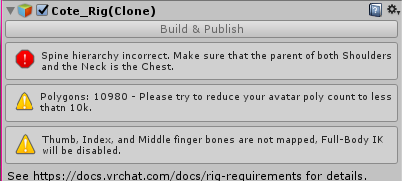 past marlin
@proper kettle I believe you can just drag them to their appropriate parent
i've had to move wrists and arms above clothing before
 naive tree
@flat sierra if u still have the problem, your materials have added black colour near albedo, change it to white
 proper kettle
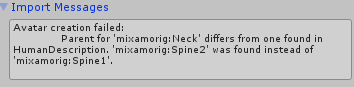 wet granite
@proper kettle I think I remember seeing something about this, that with a Mixamo skeleton you need to assign the spine in a strange way. I think it was you need to skip spine1 and instead specify spine2 to "Chest" (Upper Chest is never relevant for VRChat, left blank). I'm not certain.
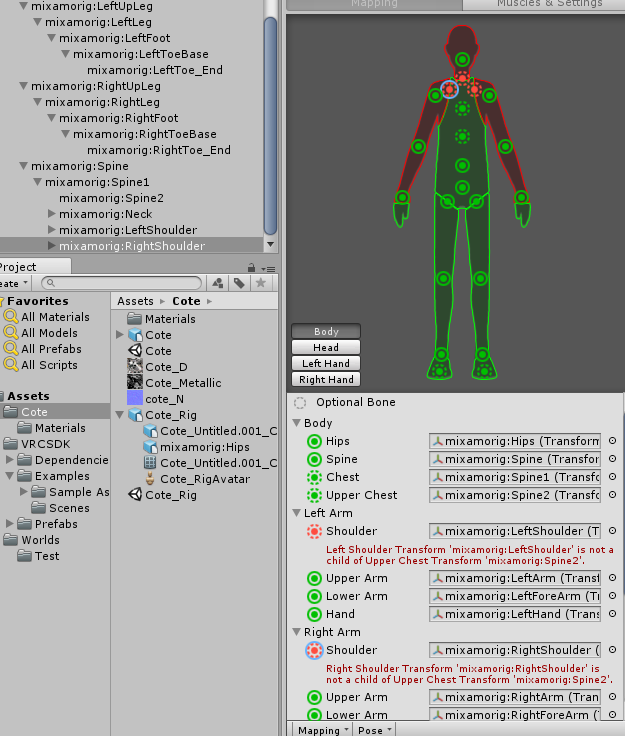
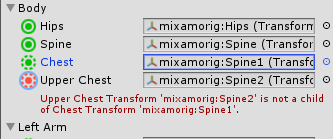 wet granite
Click Upper Chest and hit Backspace to delete it. Then for Chest click the dot on the right and choose mixamorig:Spine2 ... I think.
 dusty grotto
some of my avatar connets to the skeleton in blender but not all of it, like only the hands connect
anyone knows how to fix this issue?
proper kettle
@wet granite thanks! Trying to test it...
 turbid swan
i need help can someone dm me if they can help me plz
proper kettle
just ask here
turbid swan
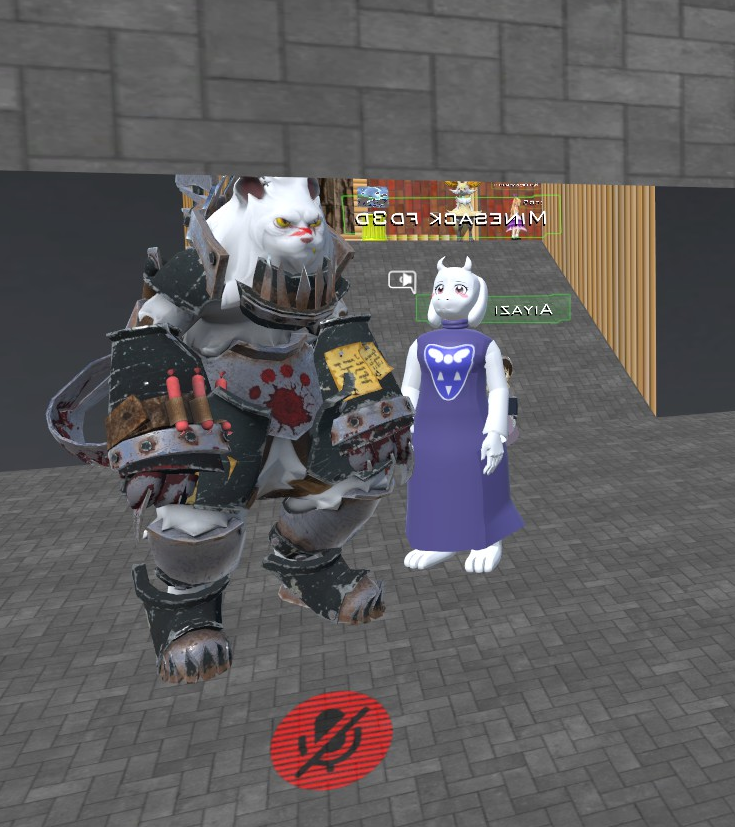
i need help getting a mmd model into the game
 fading verge
does anyone how to make your avatar weightless?
turbid swan
can i have help getting a model into the game?
fading verge
@arctic grotto like oki in vrchat you can get avatars who have no limbs but are able to move and have animation, i asked about it and someone said its because they are weightless
im trying to make an avatar who has no limbs be able to move and have animation like its head and tail but im struggeling, could you help?
and how do i do that?
oki
oki ill see what i can do, thanks
turbid swan
can someone help me get a model into the game
fading verge
@turbid swan have you got your model in unity?
@turbid swan have you got your model in unity?
@turbid swan have you got your model in unity?
@turbid swan have you got your model in unity?
fading verge
then you cant get it into the game, in unity theres a plugin you have to use to be able to get your avatar into the game, its the only way
fading verge
@turbid swan are you in blender?
and is your avatar you are working on a mmd or just a standerd model?
fading verge
sure
turbid swan
someoen had made the model
fading verge
@arctic grotto i tried and im still lost on the hole thing
heres my model im working on
fading verge
@subtle moth its the rigging, every time i put it into untiy it says something like its not a humanoid and it wont animate and im trying to see why
 subtle moth
oh well, i have no experience with that, sorry 😄 @fading verge
 foggy osprey
vrchat requires these bones to exist on the armature:
head
neck
chest
shoulder
arm
elbow
wrist
spine
hips
leg
knee
foot
oops
those
if your character doesn't have these, put them on the armature but set the weight for them to 0 so they don't influence your mesh
 rough violet
@fading verge damn nice
fading verge
@foggy osprey idk how, could you help?
foggy osprey
where did the armature you have come from?
did you import a model from modeler resource that came with it?
fading verge
it came with the model when i downloaded it
 blissful onyx
I have some problems with the hadn rig on my model
fading verge
@blissful onyx from what ive seen in vrchat it seems like every avatar has that issue
foggy osprey
you are probably going to want to research building your own armature from scratch in blender. https://en.wikibooks.org/wiki/Blender_3D:_Noob_to_Pro/Bones
fading verge
some one can help me for fix a hat to a character on blender or unity ?please :/
foggy osprey
@blissful onyx that looks like an issue related to weight paint
blissful onyx
@foggy osprey ok, so how can I fix it?
rough violet
How does the topology look on my model will i be able to rig this?
foggy osprey
open it in blender, go through selecting each bone in weight paint mode and checking the weights to see if something is influencing the mesh near the hands that shouldn't be
blissful onyx
How do I acces weight paint mode?`
rough violet
Sorry posted twice
foggy osprey
 meager fern
can someone tell me the easiest way to rig this model that i made into vrchat? been messing around with rigging for the past 2 days and i still cant make it work
blissful onyx
@foggy osprey oh, so I have to slect the model and not the rig
foggy osprey
that's right, because the mesh is what is being influenced by the weights, not the armature
blissful onyx
but how do I then select the bones?
foggy osprey
in pose mode, right click on the bone, then right click on the mesh, and then select weight paint mode
you need to have the armature selected first in object mode to right click the bones on the armature
blissful onyx
Now it's showing up like this
I'm guessing the yellow parts are what's causing the problem
foggy osprey
the way they are bent i thought maybe it was getting warped because weight was applied there from a bone somewhere completely different on the body
 turbid tinsel
hey guys, im having a problem where when i put the character into an enforced t pose, his feet are backwards, and when i put them the right way, it says that its not a t pose anymore
foggy osprey
it's just a warning that the model might look weird when you use it, you can still upload it and check it yourself
foggy osprey
if it isn't right you can adjust the pelvis or thigh bones on the armature in blender
@turbid tinsel i have never had that issue. i have had the warning about the t-pose and i ignored it and my model uploaded fine. maybe you don't need to do anything
blissful onyx
@foggy osprey I've now cheked all the bones and I din't see anything; except one small spot on the back of the hand
foggy osprey
@blissful onyx that's really weird. the hands look fine in blender, right? if you rotate the bones of the fingers in pose mode, does the hand look okay? if it does, i guess the issue is in unity somewhere. i can't think of what that could be though.
blissful onyx
Yeah everything works just fine in blender and even shows fine in unity, except for the rig editor or ingame
I'll just try another pilot model then. But thanks for your help! 😄
foggy osprey
np, sorry we couldn't fix it. i hope you figure it out
np, sorry we couldn't fix it. i hope you figure it out
 deep tusk
how would I go about giving my avatar an animated mouth? can't really find anything online
foggy osprey
@deep tusk if you are using blender, you are going to want to research shape keys
fading verge
hey ive tried everything i know but i cant get the avatar im working on to work in game (not able to get the body to move) can someone tell me the best way to get the avatar im working on to work in game please
this is the model ^
deep tusk
there's a thing in unity that says jaw flap bone, I think I need that
rough violet
Did you make that model yourself?
turbid tinsel
btw, is there a way to move bones in blender with out moving the mesh?
deep tusk
looks like it's from sun/moon to me
fading verge
nope i got it online
foggy osprey
@turbid tinsel move the bones in edit mode
turbid tinsel
thx
deep tusk
I'm talking about like lip sync right, I don't want custom anims or anything
foggy osprey
what kind of mouth is it?
human?
human might look weird if you just use a jaw bone on the armature but i guess it's possible
rough violet
Unity support shape keys?
foggy osprey
yes
deep tusk
yes human
oh I see there are different ways to do it
oh I see there are different ways to do it
 slow hearth
My unity crashes every time I try to import the SDK package
Anyone else have issues with it?
 smoky anchor
yeah it happened to me the first time
are you using 32 bits unity on a 64 bits system?
@slow hearth
if that's so, get the 64 bits version, that solved the issue for me.
slow hearth
I got the 64 bit unity
turbid tinsel
yo guys, any ideas as to what the question mark is doing there? @foggy osprey
slow hearth
It works fine otherwise but if I open the SDK package it crashes while importing
 flint flare
any of you how to fix this
 topaz dune
@fading verge rename it chest
foggy osprey
@turbid tinsel that's not your fault, that's the generated thumbnail for the avatar. you can ignore that if you aren't planning on sharing it. otherwise try to upload it again later.
fading verge
i could yes but the arms are linked to the spine and not the chest and for some reason i get this
and plus for it to work i need both chest and spine
@topaz dune
topaz dune
From what i can see on your pic, you have the bone order of a hip-spine-chest-neck, if you name them in that order and paraent the shoulder bones to the chest, it's fixed.
fading verge
how do i parent them to the chest?
topaz dune
select the shoulder bones then the chest and press ctrl + p and choose the keep offset option
fading verge
when you say select, how? cus its not doing it
 unkempt dome
fading verge
unkempt dome
fading verge
nvm i got it
 tawny zephyr
i have a similar problem, my model has upper chest. I select none for it but then it says the spine hierarcy is wrong
foggy osprey
@tawny zephyr did you set chest to what upper chest was before you set it to none?
deep tusk
@foggy osprey I managed to get shape keys etc but I can't open my mouth because the upper and lower lip are 1 mesh/have connected polygons, any idea what I have to do?
 inland spade
https://gyazo.com/b61af22efb6de686abe80b942402139e, i have this but how can i fix this in blender ?
fading verge
@topaz dune do i do this in unity or blender cus it didnt work in unity
topaz dune
blender
fading verge
oki
inland spade
but how @deep tusk i do not know how xd
turbid tinsel
hey guys, my character in unity is much more glossy than in blender, ill show the difference with pics in just a sec
deep tusk
select the skeleton, click the tab with the little bone as a symbol, and under "relations" there's a parent selection
deep tusk
@turbid tinsel use another shader?
foggy osprey
@deep tusk select the edges for the mouth and hit v
topaz dune
@turbid tinsel you have to use the shades in unity. blender and unity use very driffent shades.
deep tusk
@foggy osprey and that does what?
turbid tinsel
and how do i do that, can i call you again @topaz dune ?
foggy osprey
itll "rip" a hole for a mouth in the mesh
topaz dune
@turbid tinsel i'm bad at unity, i know that there are shades. but i dont know how to use them
deep tusk
alright I'll try thanks
topaz dune
yet
foggy osprey
@deep tusk alternatively if you have no mouth on the mesh you could look into animating a mouth with textures instead
inland spade
@deep tusk i cna't change the relation, https://gyazo.com/870c1f7a8af6730e3edd68973acf26b6
 deep tusk
it's ok I only started a few days ago as well
deep tusk
no idea
topaz dune
@fading verge it means that they are allready paraneted
but didnt you just choose your spine and not the chest?
deep tusk
@foggy osprey https://puu.sh/z0IhD/39d2ad861f.png
so what's this
 deep tusk
ikr
deep tusk
maybe there's a more detailed log somewhere
fading verge
unless i can switch them
tawny zephyr
I'm trying to use mixamo but i'm having an error where it thinks i'm not putting the markers on my model
foggy osprey
@deep tusk do you have any modifiers active? maybe that would cause it. just an idea
deep tusk
do I need to create like a circle of faces to rip
topaz dune
@fading verge swith their names.
deep tusk
uh yeah I have a decimation modifier
fading verge
how?
deep tusk
there's another one called armature but that was there by default
topaz dune
if you press n you get a new tool box on the right https://gyazo.com/b90c79917b7268c3ab4f63e82a68f399 @fading verge
 foggy osprey
that wouldn't cause it for sure, i just tested it on an avatar i have open
topaz dune
it's has the name of your selected bone.
fading verge
oki thanks
deep tusk
I can use y to disconnect faces from the rest of the mesh, but that's not it, is it
inland spade
is atlassing important ?
tawny zephyr
help, I'm using mixamo to rig a boneless model but i'm having an error where it thinks i'm not putting the markers on my model
deep tusk
I can press v with single vertices.
inland spade
@deep tusk what ya think https://gyazo.com/f02090c07b0b66603f124669ce7963d4
 topaz dune
looks amaising 😲
inland spade
i fixed my perant bones of arms now, but now when i try i get the character is not in T pose
@topaz dune you know how to fix ?
topaz dune
it doesn't work if you force him into a t pose in unity?
 topaz dune
yeah. does it become green if you pull the chets up a littel?
inland spade
it does but

my neck will enlarge up and fingers will be fucked
or in blender i should change ?
topaz dune
try can change the bone poitions and their seize in blender. it seem's like a little position issue
inland spade
if the chest in unity is optional, can i leave it blank or must it be chest ?
topaz dune
there must be a chest
 tawny zephyr
anyone know of any auto rigging alternatives to mixamo?
fading verge
@topaz dune i got it to work, thank you
topaz dune
Yw
tawny zephyr
thank you
 hearty yoke
hey my avatar's eyes are pretty messed up ingame, sometimes when i look to the side the pupils will kind of disappear into the white of the eye, making only like half of the pupil showing
is there anyway to fix this through unity or blender?
i can try to screenshot an example of this ingame
naive tree
too high eye tracking range?
hearty yoke
hmm could be
lemme check what i left it at in blender, i think it was pretty low though
i left it at 0.55
im messing around with the rendering modes for the eye materials in unity
 tardy schooner
Any help with the colliders? I'm getting triggered
deep tusk
is there a way to move the bones as well when I rescale part of a model via sculpt mode
hearty yoke
can't seem to figure out how to fix this issue with my eyes
 pseudo hedge
alright smart people.. got a puzzle for you. found a model, rigging was absolute shit, started from scratch, rigged up the whole thing correctly (bone wise). created the vertext group for each bone and did the weight painting for each vertex. and yet when i go in pose mode and try and move a bone, nothing moves.. what am i missing/skip?
foggy osprey
if you can see the weights painted on the mesh i have no idea
doesn't make sense
you parented the armature to the mesh right? you must have, i don't think you can do anything else without doing that first
fading verge
Good day everyone, im having this problem where my custom made avatar keeps leaning back and forward when its in idle position. I tried that trick of raising the spine a bit but it didnt work >.< i also removed any rotation between the diferent level of spines.. still the same. any help? Thanks!
foggy osprey
in unity after you set the rig type to humanoid and hit configure set toes to none for both feet
@fading verge
fading verge
oh oki, gonna try 😃 ty
fading verge
@foggy osprey you are amazing ❤ thank you so much! worked 😃
foggy osprey
np, glad to help
fading verge
^^
 small zinc
@proud dome I'm fairly sure non-humanoid rigs don't map to the default anims at all
small zinc
also your rig has no shoulders or neck
 proud dome
i was going to make it walk on two legs
and it doesn't have a neck and shoulders?
i did one bone for neck and one for head
small zinc
what did you use to make this?
small zinc
okay it's just displaying very, very weirdly
proud dome
ah but it got the required bones?
small zinc
I honestly couldn't say
proud dome
don't wanna mess up
small zinc
How experienced are you with this?
small zinc
have you weighted the model?
foggy osprey
you can change the way blender displays bones and make them those black lines instead
proud dome
i use the small sticks because its at least easier for me
foggy osprey
yeah i googled it, i thought maybe he was using a super outdated version of blender lol
proud dome
and i haven't weight painted it yet
im trying to put it into a good t-pose atm
since unity is strict
small zinc
yeah
Couldn't tell you, anyway, man
that second set of legs might end up vestigial
no idea how you'd get those to move and if they don't move no point to rigging them
idk
fading verge
Does anyone know where I can get Y-Bot or X-Bot for reference in blender?
is there a way to add a limbless mmd avatar to vrchat and make it work
I think I found one, I'll let you know if it has the armature which is the main thing I'm looking for
foggy osprey
just make the weight paint for all the unused bones 0 and vrchat won't care. they have to be present in the armature to upload.
fading verge
@foggy osprey how do i do that?
foggy osprey
right click armature in object mode, go into edit mode, right click the bone you want to change, go into pose mode, right click the mesh, and go into weight paint mode
and remove all the bone heat from the mesh by painting it with 0 weight
small zinc
Is this arm position normal for a proper rig
i can't tell if this is my fault
or VRchat's
 fringe hamlet
in 3ds max what's the method to set up dynamic bones?
foggy osprey
@small zinc looks okay to me
small zinc
well shit, these animations are pretty awful then xD
i just compared to one of the default models
every female rig stands like c3po
foggy osprey
yeah they aren't great. everyone looks weird
small zinc
There are animation overrides, yeah?
foggy osprey
yeah
small zinc
Might need to see if I can track down some better packs somewhere
Well then, I guess this model is finally finished
 fleet echo
@hearty yoke go in blender then move vertex of the white part as shape oval in head
small zinc
huzzah
hearty yoke
what i tried doing was moving the white part a bit back in the y coordinates @fleet echo
it looks like it worked
when i test eye tracking
but im not sure if this will affect anything else
 lyric current
I need these bows to be affected by gravity (Idol dropping a little) i set the gravity point in dyn bones but it just goes back to normal.
Anyone know what i can do to fix this?
small zinc
Yeeee boi
proud dome
guys, any tips on how to rig the hips?
in unity you can only choose one bone as the hip
topaz dune
@proud dome make it look like this in blender https://gyazo.com/d2012628830f323d6d9133f585cb63cc

 topaz dune
the order of parenting?
 silent marlin
you have to go into the bone menu and type in the parent and it'll connect them
topaz dune
if you select the bones and go to edit mode. you first select the leg bones, then the hip and press ctrl+p and choose keep offset.
proud dome
ah and how do you remove subdivisions and bones?
topaz dune
how does your rigging look?
topaz dune
in edit mode you can just select a bone and press x to delete it
topaz dune
Yw
proud dome
@topaz dune btw. is there any specific number of required spine bones for vrchat?
mine has 4
should i decrease the amount?
topaz dune
yeah, you can use alt + m to merge the bones. it'll remap the weight paint to the bones that were merged togehter
proud dome
what's the recommended amount? and thanks for the tip
topaz dune
hip-spine-chest-neck-head are the only bones that should be in the mid line. more bones just makes it confusing.
topaz dune
Yw
fading verge
Any websites to find rigged characters?
 pastel cypress
fading verge
pastel cypress
fading verge
thnx
 dry flame
How can I get it so her arms don't hand inside her when she's standing still? Will I have to manually override the idle animation?
modelled and rigged in T-position btw
dry flame
I'm not giving her man shoulders
 lament pulsar
I rigged my avatar in blender (couldn't upload it to mixamo for some reason). How do I export my model with the custom rig? Everytime I upload it to Unity as a .fbx, I get the standard .fbx rig
fading verge
Can someone help me fix these bones
the thumb in game is always giving a thumbs uo
up
@lyric current whats wrong with it?
 radiant holly
can someone send me dynamic bone script?
fading verge
@fading verge you most likely mapped it wrong in unity or you have a twist bone. play around with option 1 for a while
@fading verge What would I have to do in unity?
lol, click on the model in your assets, go to rig, map the thumb bone to a different bone
thank you ❤
 rocky mesa
I keep getting the error "this avatar is not imported as a humanoid rig" i dont know how to fix this, i followed the instructions but at the end i always get this same error, i will post anything that is needed to fix this.
pastel cypress
on the rig page where you set it as humanoid you should have an error listed, whats the error say?
rocky mesa
The error says
"Avatar creation failed:
parent for "mixamorig_Neck" differs from
one found in HumanDescription.
"mixamorig_Spine2" was found instead of "mixamorig_Spine1".
fading verge
How do i fix this ?
 woeful hatch
This questions sounds a little dumb maybe I don't know, but does anyone know to rig like a 4 legged model in vrchat? Like animal like scooby do or something. If you know you can just DM or whatever. Thanks in advance.
Also, you could try rigging the fingers on the hand like setting the fingers as fingers..
fading verge
does anyone know how to make a limbless avatar work in vrchat
 acoustic quiver
pastel cypress
acoustic quiver
pastel cypress
@rocky mesa check your rigs set up to see if they're all in the right places and unity is referencing the right bones, thats a new one for me but I've only been doing this since last saturday
 shut scroll
This is my current rig for the model, what would I need to add and change for the feathers to move and mouth to work, this is just a render in Unity btw
rocky mesa
Its probably the fact that the Chest is still at chest spot , while its supposed to be at upper chest spot but idk how to do that
Since if i connect the chest to upper chest spot , i cant have 2 chests at once
Do you know how to properly connect the chest to upper chest spot ? @pastel cypress
pastel cypress
The upper chest spot should be empty since VRchat doesn't use it, the spine bone before the neck should be in the chest spot
 rocky mesa
okay so spine on chest and chest on upper chest
 fallow lake
Uhhhhhhh lol no. Don't do that.
fallow lake
No upper chest.
Spine on Spine, Chest on Chest.
@fading verge You should be able to upload it without anything assigned to arms or legs I think?
rocky mesa
but that is the current 1 i have , and its still broken. I really dont know what i'm doing wrong.
fading verge
yeah you can but the avatar doesnt move correctly like you can use the head to look up or the tail moves or anything
@fallow lake
pastel cypress
@rocky mesa send us an image of what you've got in each spot and the rig, might help a bit
fallow lake
yus
pastel cypress
yeah
rocky mesa
k
Soo umm, totally noob question, but the menu is so short, how would i make it taller so i can screenshot more of it?
 brisk mesa
how do i merge the vertex group assignments from one mesh to another mesh exactly like it? i have a morrigan model but one has wings assigned to wing bones, and i wanted to hack those off and put it in my morrigan model which has working body bones lol
idk if i should literally frankenstein chop her up
shut scroll
Does anyone have any tutorials on how I could make the mouth and feathers on this guy move?
brisk mesa
is that a chocobo
brisk mesa
i use feather bones and ass bones to make those sway and move, from the Dynamic Bone thing
mouth is diff story
pastel cypress
@rocky mesa I'll be honest I have no idea since I literally started doing this last weekend and thats been bugging me the entire time
brisk mesa
oh. well i guess you could just go into Blender after mixamo?
it spat out your fbx, right?
brisk mesa
well for feathers i have Dynamic Bone and i added feather bones, with vertexes of feather areas assigned to those specific bones
then in unity upon import you can play with settings there for that
mouth is ofc different story and you need a tut for that, or at least go make a jaw bone for now, then assign the jaw vertices to it
shut scroll
I have no idea how to do that
brisk mesa
get learning
shut scroll
https://www.youtube.com/watch?v=ars__r731LE&ab_channel=FALprofessional
This a good start?

Viseme recreation in Blender to viseme application in Unity. Cats Blender Plugin: https://vrcat.club/threads/cats-blender-plugin-0-0-9.6/
rocky mesa
okay bit by bit is then
brisk mesa
visemes is hardmode for some but you could try that if you want
however that's for people with actual lips
 lone hearth
So I'm trying to add a mask to my character, but when I upload the model to VRchat, the mask isnt mapped to the head
shut scroll
oh
brisk mesa
if i have a bird i just have a beak that goes up and down
i might as well just have a jaw bone
shut scroll
How could I add a jaw bone
brisk mesa
the mouth lipsync thing in unity with our vrchat sdk seems to let us just use a jawbone, we don't necessarily need the visemes option
shut scroll
Cause thats what I am looking for
brisk mesa
in blender you have to
brisk mesa
usually i go press the joint of my head bone up top and i press E to make a new bone
rocky mesa
brisk mesa
and i disconnect that bone entirely (it's still parented to the head bone though)
rocky mesa
shut scroll
Let me load up Maya first to fix something then 'll port in in blender
rocky mesa
also upper torso is deleted
pastel cypress
okay set upper chest to none and set chest to spine 2
brisk mesa
@lone hearth did you check in Blender or whatever to see if the mask mesh is actually following your head bone?
cause i would go do that
it would be a simple matter to add the vertex group assignment of the head bone to your mask in the settings to the right, with that triangle icon, then i would weight paint it or assign weight of 1 full
then in pose mode it should theoretically start moving with your head
lone hearth
thank ya
rocky mesa
kk done , now i get the error of same joint assigned to 2 same spots @pastel cypress
brisk mesa
if you have a mask anywhere else on your character like on your ass, then assign your mask mesh to follow your ass
don't want it to follow the wrong bone lol
pastel cypress
which joints?
 hallow bay
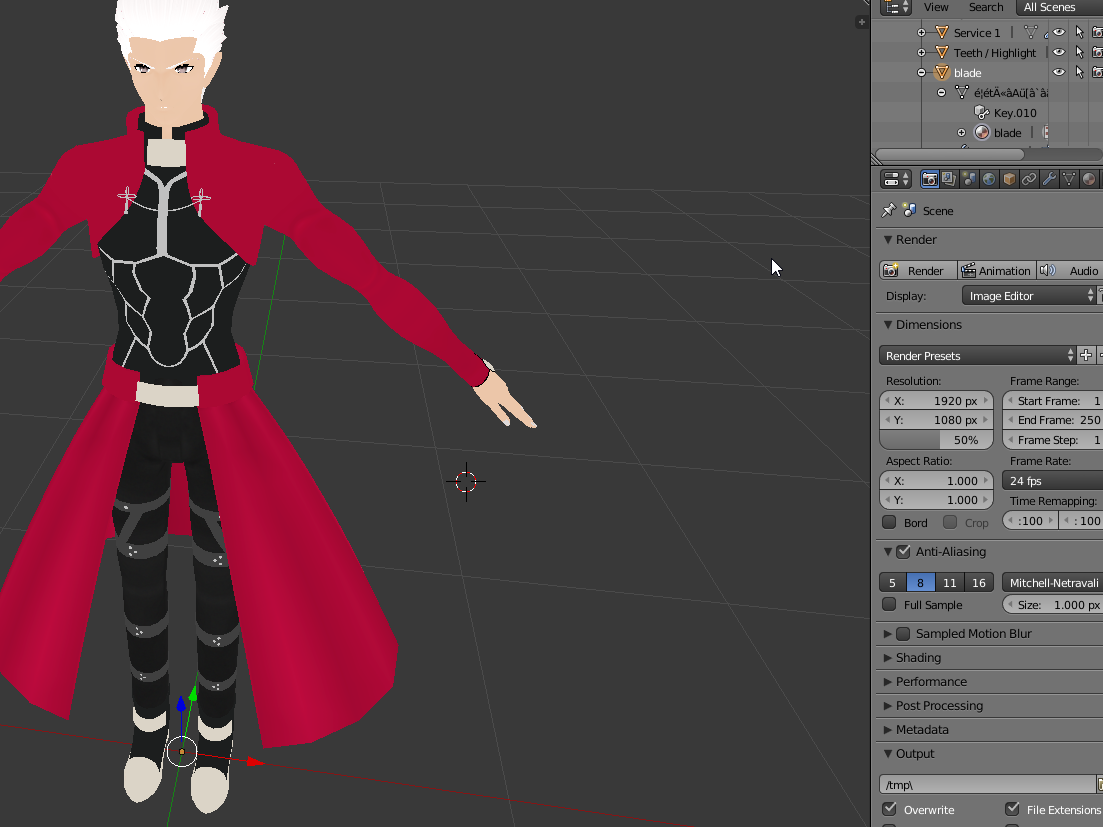
guys, this model says it has a blade, but appears as a dot. Do you believe this will have any effect on the final model? https://i.imgur.com/wmHLLDi.png
 rocky mesa
Chest
rocky mesa
Chest is also assigned to upper chest and upper chest is also assigned at chest
pastel cypress
unassign upper chest
hallow bay
why it appears as a dot?
pastel cypress
set it to none
rocky mesa
yea
pastel cypress
there should be nothing in upper chest
brisk mesa
assign it like hips, spine, chest only
rocky mesa
yaes
brisk mesa
nothing in upper
 feral spoke
I've got a question, I've got a model almost completely working, except for one thing. The hands are each about 45-90 degrees off from where they should be. Does anyone know how to alter the rotation of hands to match the controllers properly?
brisk mesa
that kinda sounds like a bone issue that i would go back into blender for and check the wrist bone rotation or something
maybe there is a better easier way not sure
rocky mesa
So only upper chest is set to none, is that all i need to do in rig section before putting it in for it to be imported as humanoid
feral spoke
OK, i'll check that out, everything looks fine but i'll double check that. Thanks.
brisk mesa
idk if i can check rotation of hands in unity, unity doesnt lemme do much lol
pastel cypress
as long as the chest spot is set to spine 2 you should be set
hit apply and see if it worked
 dapper osprey
Hey, I asked this in #avatars-mmd , but I'm not sure if that was the right place to ask
I've encountered a problem with eye tracking with an MMD model
Basically, when I try to create eye tracking with everything set, it says that I don't have a vertex group assigned to the bones
Even though they're there.
rocky mesa
Okay i think i figured out my problem @pastel cypress i got no SampleAvatarController
pastel cypress
that'll cause some other problems but the humanoid bit should have only been affected by the rig
then again I have a very basic idea of how this works so god knows
 crude minnow
My avatar seems to be fine in unity but when I get into vr chat she looks like
anyone know what's up
 modern river
beautiful
rocky mesa
Is there anyone knows how to fix the not imported as humanoid error ;-;
pastel cypress
whats up is she's asceding to vallhalla
crude minnow
I guess so
pastel cypress
she's praising the sun
crude minnow
at all times
pastel cypress
as she should be
 brave basin
XPS models are much more easier than mmd models
feral spoke
I tried rotating the bones in blender and re-importing it into unity, going to see if my wrists are properly alligned now.
OH DAMN i didn't actually expect that to work
Sweet, if anyone ever has problems with hands rotated the wrong way, just rotate them in blender using the posing mode.
mine imported into unity with the tpose having rotated hands and it fixed it in game. Thanks @brisk mesa
rocky mesa
okay i got rid of my not imported as humanoid error
now i got a this avatar does not contain an animator error
brave basin
This is my XPS models that I got from Star Wars battlefront 2015 game
It come out really good in vrchat
shut scroll
So I tried rigging Mickey from Epic Mickey into VRChat, everything works except the chin does not seem to stay in place
brave basin
Is your model mmd or XPS
brisk mesa
@shut scroll but is the chin actually assigned to the jaw bone or whatever bone?
meshwise
cause if it isn't it'll try to drag itself back to tpose and stretch hilariously and be weird
if it is the 'my mouth hangs open after i did up some lipsync stuff' idk, there's a bug and there's also tuts
shut scroll
Apparently in the original rig a lot of bones were conjoined into one bone
the jaw is its own but eh
dapper osprey
It seems I kind of solved the problem, but there's another question now with blennder
fallow lake
when i was having that problem i had to unassign the jaw bone
dapper osprey
How do I connect Vertex group to a bone
fallow lake
You have to weight paint it
Go into pose mode, edit mode then select the bone you want then press tab
then go to weight paint mode and paint the entire region you want to assing
dapper osprey
okay, I'll try
Cause like these are the bones and they came with the MMD, but for some reason
It says that bones are unassigned to vertex groups for the blink animations
(I highlighted the bones)
fallow lake
i've never had vertex groups attached to a bone for blinking
dapper osprey
This is what it says when I try to create eye tracking
and now I can't go to weight paint mode
fallow lake
i might have told you wrong
hold on
you're trying to get a blink animation set up?
or keyshape?
dapper osprey
Blink and eye tracking
fallow lake
yeah i don't know
dapper osprey
well, yeah, Blink
fallow lake
anytime I've done
blinking
it's been a vertex group and I just edited the actual verticies to move rather than using a bone.
dapper osprey
The heck is a tri
This is the weird part on my side
Vertex group and shape key (the blink)
fading verge
how much better is mixamo to rig when compared to blender?
fading verge
tri-triangle aka. polygon
dapper osprey
Oh
also what the
after decimating my character suddenly turned back to 86k polys
fading verge
HK ive seen a pair of boots with 60k tris
fallow lake
Delete the arms and legs and hips under the clothes you don't need it
dapper osprey
wouldn't it make it weird looking inside my character?
fallow lake
Keep the wrists and the chest area
and the neck obviously
everything else can go though if it isn't visible.
wait that's a tie
you can get rid of the chest even
dapper osprey
Okay so, how do I choose them seperately
Lol
Do I just choose the body parts in decimation and just remove them?.
fallow lake
No, are there vertex groups for the arms, rather than the sleeves?
see if there are vertex groups for the actual body parts rather than the clothes
lyric current
If i have an armature alread bound to a mesh and i add bones to it... do i need to rebind any of the mesh to those bones?
fallow lake
So your model is broken down into seperate groups
Find the vertex groups for the actual body
dapper osprey
fallow lake
Keep the forearms, neck, wrists and hands and head
dapper osprey
Where do I go exactly like
fallow lake
Anything hidden behind clothes
fallow lake
yes
however
if you have vertex groups already assigned it makes cleaning it up a lot easier
fallow lake
You could also decimate the entire model to 19,999 polys but
fallow lake
?
fallow lake
Me too man lol
fallow lake
Don't remove the vertex group
dapper osprey
Oh wait, I have to click the -?
fallow lake
Click the vertex group, then select, then go into the scene and press X and delete
No
don't click the minus
Make sure when you "select" that it isn't selecting your shirt and everything else
dapper osprey
Well, I already did
And seems like ctrl+z doesn't bring the group back
I've been doing this for 2 hours and got 0 progress, heh
fallow lake
I'm sorry man 😕
You lost that vertex group now. Don't click "-" ever unless you want to remove the actual vertex group. To delete the actual polys you have to select and then delete them in the scene.
fading verge
Do you have to wait for avatars to upload or is it instant?
fallow lake
It should be shortly after Unity says it's uploaded.
dapper osprey
Meh, I got back to the original state just by reimporting
fading verge
:/
dapper osprey
to where I was
fading verge
Mine says uploaded but it isnt on VR Chat
fallow lake
I dunno man
fading verge
alrite ill retry
dapper osprey
ok wait
 opaque arch
been trying to set up a silly flappy mouth for this dod but I just saw that the jaw bone is like the tounge. Can I set this up myself somehow? https://gyazo.com/f8e209dedba0df0969f3c60d75f6f23e
 dapper osprey
I'm hella confused
I clicked select
what do I do now
I wanna see how much would decimating affect my character's face
opaque arch
Dont decimate the face it will ruin so many things
dapper osprey
Pretty much the same after decimating it till 0.23
No like
I joined the meshes
and decimated it on 0.23 ratio
with 86k polys
with 19.8k polys
Like, to be honest, I just wish I could ask someone else to do this
and prepare it for importing
But I have nobody to ask for that
fading verge
Lol, I feel that
dapper osprey
cause I literally wasted 2 hours on blender and achieved 0 progress
There's also another problem that came with that, when I tried to import this model without blinking and stuff into unity
for some reason it appeared lying on the ground yet appeared as a proper standing T-Bone in the scene
 pastel quest
I'm getting this error in unity and i have no idea what's wrong with my model. I rigged it properly and all that yet it still gives me a heirarchy error that says this:
dapper osprey
and in the game it was a pretty much crashed avatar
fading verge
I spent about 12hrs yesterday and all I have is a Textured model so far. This is tough if you have no experience.
opaque arch
@pastel quest screenshot this https://gyazo.com/0d821d0486aa67606cc4d52616c03137
 small zinc
you had one job
pastel quest
shhhhh
 wild sapphire
opaque arch
wild sapphire
opaque arch
yee
pastel quest
ah alright thank you
opaque arch
Np
GOOD DEED O DA DAY
reposting my old question.
been trying to set up a silly flappy mouth for this dod but I just saw that the jaw bone is like the tounge. Can I set this up myself somehow? https://gyazo.com/f8e209dedba0df0969f3c60d75f6f23e
Cant find any toturials on it
fading verge
Guys what i do when the avatar has shoulders set to none
opaque arch
@fading verge no promises itll work but try this https://www.mixamo.com/#/
wait
does it have bones there or is it empty
opaque arch
Aight
 main sage
what should i do if the model i import into blender is like
half in the ground
just drag it up and out?
fading verge
opaque arch
ye
fading verge
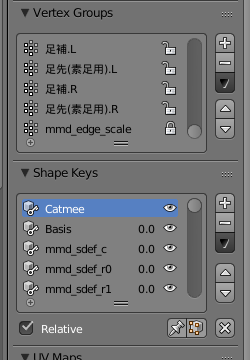
@vocal quiver Sorry if I'm bothering you. Probably not a good idea to tag you as you might be busy. But I am really desperate rn to try and get this to work. Ok so you know how a model has shape keys that range from 0.0 - 1.0? How would I set it to 1.0 without it resetting? Cause there's cat ears in this model but when I apply 1 to the shape key and export, it's not there.
opaque arch
Torles the shoulder and arms seem to have been mixed up somehow
click this https://gyazo.com/08aa60c36ab4110b033e86b8fe35e603 and search for the correct part and set it

and see if it works
fading verge
k
main sage
above Basis
opaque arch
this is how mine looks https://gyazo.com/4869fd81e8034bfe9f30dd376cb0c3d6

might not be the same for your model but it should be similar
brisk mesa
omg pressing M in blender after i selected like 20 bones, really helps with visibility
for using layers and shit like photoshop
opaque arch
aaa
then I suggest trying the website I linked earlier
its pretty fast¨
give it a try
 versed finch
gah, im weight painting in blender
but the weight paint i apply doesnt show up in unity
i import my newly exported fbx with my custom weight paints
and in unity it shows up as the old weights
im so confused
fading verge
Hi.
Is there some reason that a Character Controller wont actually Control a Character? I keep trying to use the FPSController.prefab and the controller walks off without the body...
so like this? @main sage https://i.imgur.com/jKc225C.png
 teal spruce
Maybe that's a stupid question, but when i make the weight painting
I don't find the legs
Someone know why ?
main sage
@fading verge mhmm
fading verge
and that's it?
 modest tusk
Any ideas why the texture upon being applied to the mesh is so soft? How would I make it brighter in blender? https://puu.sh/z0VBC/c2e26cc9d7.png
https://puu.sh/z0Vec/a1f4d0762b.png

 main sage
if you did so and the ears stay put / stay visible
fading verge
seems too easy\
main sage
it works
fading verge
o
well thank you very much for telling me. I really appreciate it
you are the best
main sage
np
 mental stream
Does anybody know how to add dynamic bones to a model without a skeleton? I'm making a slime (like from terraria) and want it to jiggle when it moves, but dynamic bones doesnt seem to be working
brisk mesa
... i thought you absolutely needed bones for that 😛
is there a reason why you didn't shove any inside?
main sage
lol
idk how id do it
but i need to make a custom rig for a like
whale / fish
swimming animation when moving
mental stream
Didnt realize I needed bones for it to work haha, any idea how many would be enough?
main sage
depends.
all it really does is like
instead of the bones being rigged
it makes it sway
so 1 bone would look like a pendulum on a grand father clock
 full cairn
I'm getting the "Spine hierarchy missing elements" error message but I'm failing to see the issue.
brisk mesa
i think if i had like.. a circular slimeball, i would make a root bone on the ground as a center point, then a hip bone kinda in the middle, then 3 or 4 outward bones
mental stream
its like a half circle so yeah that sounds about right
brisk mesa
then i can set my hip bone as a root bone in the dynamic bone options, and the other ones will jiggle, all four outward that i set would need that added
then i can tweak settings
it would not be a humanoid so it would need the generic controller.
maybe if i made a humanoid skelly stuck in a slime i could do it anyway though?
but less weight influence if i dont want it to warp
main sage
ogod
 timid marsh
So I’m tryna rig some models I have for VRChat and mixamo decided to remove the feature of choosing where the joints are and now when i upload my models it fucks them up and makes them look like they have scoliosis help?
brisk mesa
@full cairn what is your bone hierarchy like, is it perfect already?
brisk mesa
i had to actually connect some bones in blender before it would let me, idk why
even if it was parented i think i had to connect some leg bones o_O
other than that idk
 woeful vapor
I'm having the exact same problem on a really simple model with the simple default humanoid rig on blender
main sage
every single part of this robot whale moves perfectly
like a robot like it should
EXCEPT the tail
which stretches like its organic
brisk mesa
check the weight assignment for that
paint it red with a clear stop point
i'd do that
no inbetween influence colors
main sage
ye its connected to other parts
problem is i cant paint this part of it without getting some on the part below
what does weightpaint even paint onto anyway, faces?
fading verge
https://i.imgur.com/hrd3TNv.png it doesn't show the cat ears in unity ;-; @main sage
 woeful vapor
Uh nevermind about what I said, I just removed an unused bone, joined the previous with the next, and it ended up working
main sage
@fading verge also PFFFT, cat keyhole? ;3
fading verge
: D
brisk mesa
i'm scared of the Join Meshes shit in Cat's Plugin. If I do that, why does it seem to fuck my ability up to texture stuff ?
idk like later in unity it won't let me so idk if i have to texture it in blender then. but if i do, i'm guessing unity will be like 'hey so these are missing'
 ocean meadow
Hey guys, do you have to have 5 fingers rigged or can you do fine with 3?
brisk mesa
to get around that i just didn't weight assign to two of those fingers
so unity is like 'hey okay you have a whole hand' when i dont
full cairn
I tried to use the Cats thing but it messed up my mesh
The Right shoulder isn't the child of chest but the left is?
 shadow shoal
Do that yourself
fading verge
guys my avatar does not stand straight when I'm using it but in the avatar menu preview he does. anyone knows whats wrong?
 night sigil
@fading verge try setting both left and right toes to nothing in unity editor
 still lark
Unity is being wierd with my avatar rig
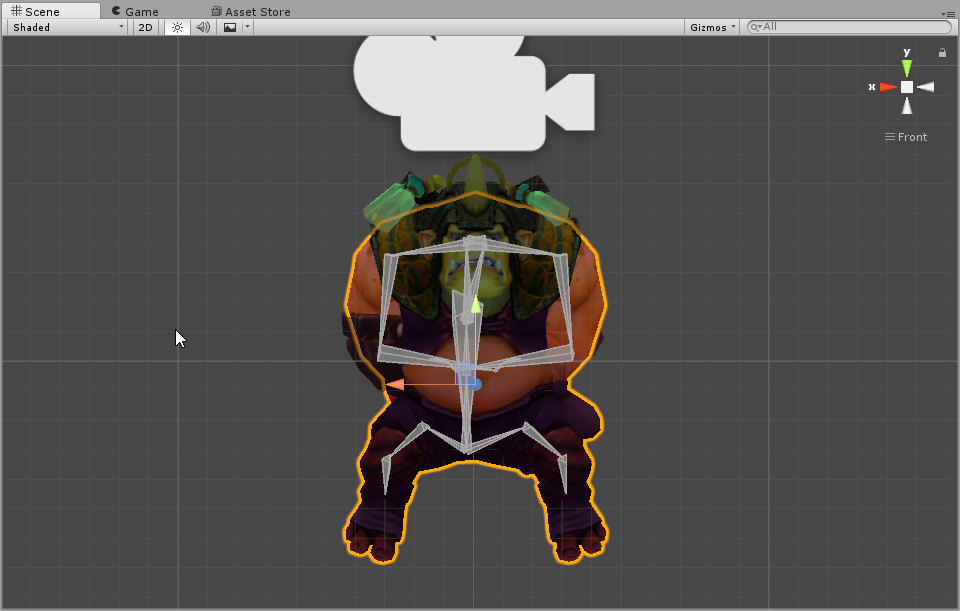
Here is how the character looks like with T pose enforced https://i.imgur.com/P33QJFP.png (first image)
Here's how the character looks like with pose resetted https://i.imgur.com/oT7oGGu.png (second image)
for some reason it's either that the head looks up or the arms are stuck inside of the body
absolutely no idea what to do from here
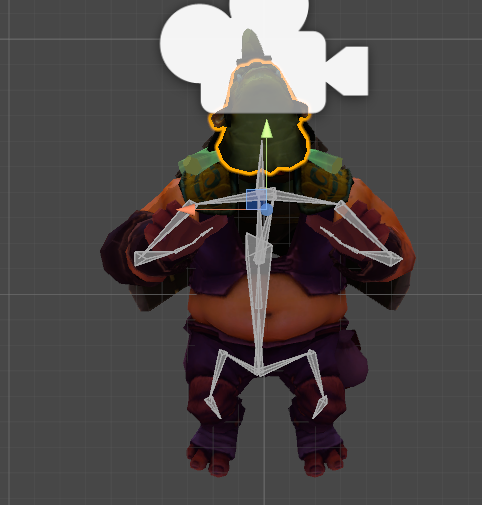
 sly pelican
If the model isn't in a T-Pose when you first put it in Blender, at least in my experience, something is going to go wrong. Mostly the fingers and hands go wack.
There's a couple solutions for this, though both are time extensive.
past marlin
hey is anyone having an issue with the new CATS update?
when i exported my model and atlas bake into unity the textures aren't showing up
main sage
if i want a model to be like, floating abit when i use it in VRchat
still lark
@sly pelican please elaborate
main sage
do i just move the model off of the ground in Unity?
brisk mesa
you need to change the origin of it too.
not just move it up.
i only know how to do -that- in blender
sly pelican
1st - Remove the entire skeleton and put the file in Maximo and have it rig it - T Pose it. Then put it in Blender - Reweight every bone to your liking - Adjust what is necessary. (Or just Rig it and Reweight the Bones or create new bones etc etc)
2nd - Readjust the body manually through Unity by configuring the humanoid model. This may take a lot of trial and errors.
(Do note that these are by far the solutions I have found to at least work with a partial degree of success myself. I'm still an amateur and I'm sure there is a FAR easier option, but have yet to find it or be told of it.)
brisk mesa
cause the game is like 'oh where's your origin, okay gonna use that then'
sly pelican
To elaborate - let me get pics up.
still lark
Ahh you don't have to
main sage
mmk
still lark
Thank you very much @sly pelican for the hints 😄
 haughty island
Hey anyone got a easy fix for the weird finger positioning after putting a character into Humanoid rig in unity?
Like the thumbs are all bent
sly pelican
@still lark
This model I'm having problems with because it isn't in a T-pose
Fingers get all screwy
However
 low river
https://i.imgur.com/0CYAtiD.png for some reason the t-pose pushes in the thumbs?
 ocean meadow
I asked this earlier but forgot to check for a reply. Do I have to rig 5 fingers or can I do with 4, 3 or maybe 2? Or will that mess up IK?
sly pelican
@low river Most likely the bones are placed incorrectly. Unity likes effing things up. it's a minor fix, but just gotta reposition them.
main sage
@sly pelican Zaku boyz
sly pelican
Yaaaaaaaaaaaaaaa boi
main sage
Zeig Zeon
 sly pelican
In blender the model is fine yes.
But in Unity it thinks the bones are positioned like that so it effs it up
So all you gotta do is extend it outwards and its fixed.
Via Model Configuration menu in Unity.
main sage
how would i even move the whole model up in Blender anyway? usually whenever i try to move somethin i either move only the skeleton or the mesh
sly pelican
Do note that you have to probably re-do it everytime you fix something to the model via Blender when you upload it back.
You right click the Mesh (Object) and shift right click the Skeleton and then move it up.
low river
you mean the rig configuration?
sly pelican
Ya that one.
low river
when i do it says its not in t-pose
main sage
...lol im having trouble doing so x3
sly pelican
Though if something is Really really bad then you might have to keep retrying to fix it. It's quite tedious. VRChat and then back into Unity and repeat over and over.
If anyone has a better solution/technique. Please share lmfao.
brisk mesa
ugh i wish mixamo would take all .fbx cause it rejects way more than it takes
size too
sometimes you just wanna go edit what it does
main sage
how the hell is something like moving a model up so annoying to me x3
brisk mesa
if you have a .pmx or .pmd but it isn't an MMD model can you still mess with it using cat's plugin? or would that break it
cause i can see the bones are all weird
they point up and shit and aren't connected
sly pelican
Not sure. I don't touch MMD models. I plan on learning it for the sake of helping others out.
brisk mesa
yea same
sly pelican
We're polar opposites. I mess with mostly SMD files.
brisk mesa
idk, Rigify also seems to fuck up for me
sly pelican
SFM models are all properly rigged and what not.
brisk mesa
does that whole traceback error, python is turned on so it's not that
sly pelican
So they're enticing.
brisk mesa
i can't be an anime girl unless they have huge tiddy
sly pelican
Small frame huge tiddy
brisk mesa
i'm already flat as fuck so i don't wanna be that lmfao
main sage
i usually only do MMD cuz they already have bones and textures and such rigged
unlike stuff like OBJ
sly pelican
Same with SMD
brisk mesa
so far the only successful things i've done are a morrigan missing her bat purple tights, i literally sculpted a clitoris as .obj then rigged it, and a weird knuckles for somebody else
hallow bay
can someone help me with lipsync?
sly pelican
They also have everything. Problem is some models are not in T-Pose.
hallow bay
visemes is not working properly
brisk mesa
did you set up all the mouth shapes for your visemes?
main sage
@hallow bay define not working properly. did you follow the megatutorial vid?
hallow bay
yes
I have created the animation with visemes but the mouth isn't working at all, however, a jawbone does exists
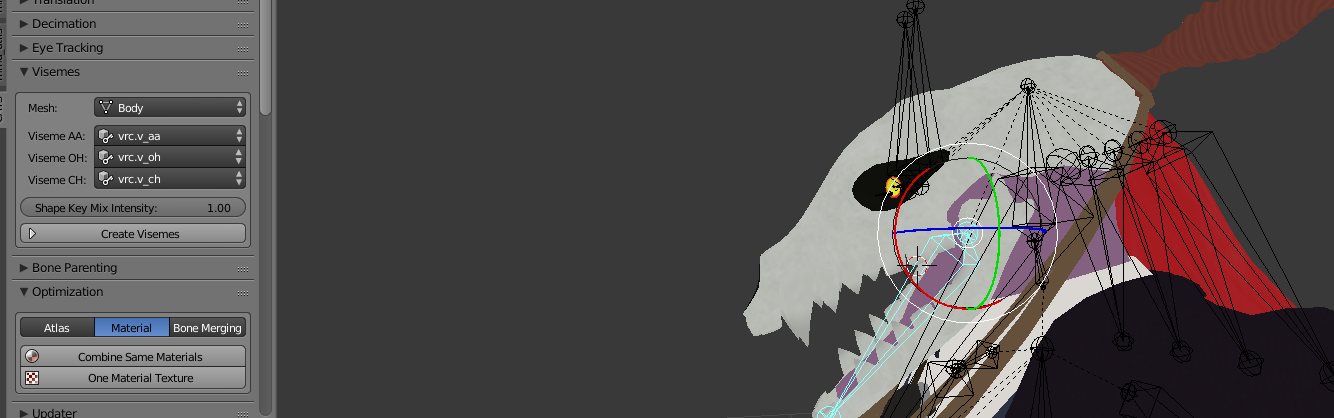 brisk mesa
what if your jawbone is pulling on it
main sage
i see one problem already
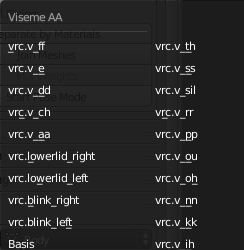
the things set for the visemes arnt supposed to be the VRC stuff
supposed to be keys like
hallow bay
it's on pose mode because I was testing the movement
hallow bay
so, I need to create the open mouth animation?
low river
Ok
hallow bay
there was nothing on the model besides what viseme created https://i.imgur.com/OuluiE5.png
 low river
When I put it back
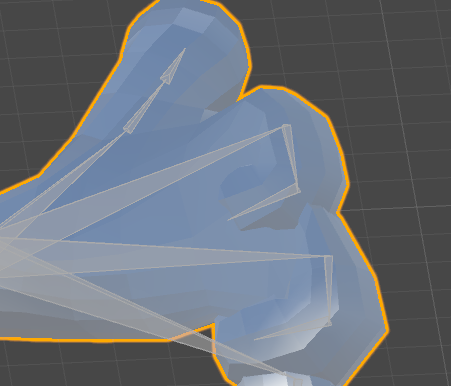
the open/close makes the thumb go the wrong way
actually no
I know what it is


 hallow bay
so fare, is there a guide to create that?
because I couldn't follow that step on tupper's guide because there wasn't the visemes for that
 chrome skiff
xD
main sage
@hallow bay if the char doesnt have the basic shapekeys for stuff like Ah, Your, There