#avatar-rigging
1 messages · Page 63 of 1
 small solstice
 hexed sandal
it depends on the avatar
its probably fine but you might see into your chest when you look down
hexed sandal
should be fine then
 lavish latch
I put mine right on my characters nose.
small solstice
tfw no nose
lavish latch
I wish people weren't allowed to make awesome MMD models and not share them...
lavish latch

MME: Diffusion7, ExcellentShadow2, MotionBlur3, o_SelfOverlay_v0_5 changed her face with Nigamon's Satori model
No download links. :(
That's what I mean.
lavish latch
Oof! I'll DM you "hello" so I can download and reupload that video for you in the morning. :p
 neat condor
Alot of the mmd models are commissioned so pretty much 1 person has access and if they choose not to shair they wont
hexed sandal
lol! u dont have to do that XD
hexed sandal
a lot also get released after some time
for free
sometimes you have to go through hoops to get them like watch a video to get a password
neat condor
so part of my hair clips into me, and it shouldnt
Doesnt show in Unity but does in game
neat condor
its only 1 part, so trying to make it ping off of her body so it doesn go through
 hexed sandal
thats the correct parenting
 ocean meadow
small solstice
ocean meadow
small solstice
still 90 degrees
 real swan
@hexed sandal is there a skeleton reference sheet I can follow along with? There's only the picture posted a little bit earlier which is what I was following
like for naming arms and legs
hexed sandal
the naming is really up to you
real swan
so the stuff that matters is all in the unity editor right?
real swan
looks more like dynamicbone fodder
neat condor
Well then, so, anyone know how to fix a clipping issue thats caused by looking down?
hexed sandal
move the view point forward
wait
what kind of clipping
like looking into your chest or a dynamic bone?
small solstice
oh
i forgot the first step
of any animation based thing
throw whatever it is into a empty
neat condor
Uh, part of the hair that is ridged moves into my stomach when i move my head
hexed sandal
miya did you change the skeleton rotation in the unity rigger as well?
small solstice
yeah
i rotated it 90 in there
but it wouldnt let me apply it so i assumed it did
 fading verge
So I may or may not have forgotten to place the module infront of the 2 avatars i've uploaded
hexed sandal
put a collider in the stomach?
neat condor
Thats what i am trying
hexed sandal
miya select the root bone and rotate it, not the whole model
hexed sandal
and if it doesnt let u save again just wigle a bone around then back in place and then do it
when you guys open you 'manage uploaded content' are you getting image errors or no image for your recent avatars?
or maybe some of them
neat condor
nope
 hexed sandal
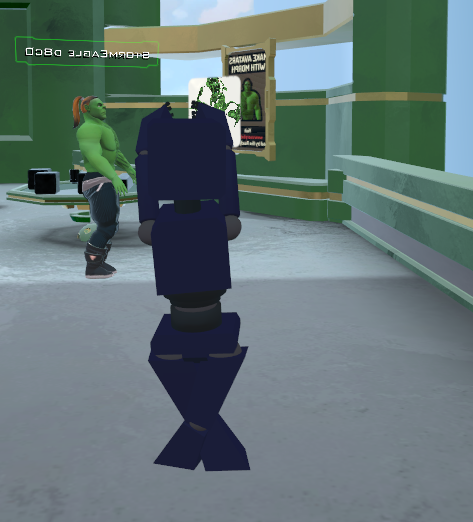
looks like the feet bones are labeled opposite
hexed sandal
OH
small solstice
slight improvement
hexed sandal
lol
small solstice
close to cracking the code
hexed sandal
sorry i must have told you to turn it the wrong way then
small solstice
meanwhile a menacing broken one punch man stares at me
wondering why
as his torso fades back and forth
hexed sandal
lol
small solstice
best vrchat feature is loading the hub 20 times
neat condor
i load twice
small solstice
it turns it into a game where i have to find a way to suicide off the cliff before i load again
if im complaining its because its 5:30am and i need to leave for school at 9:50am
i have my priorities straight
real swan
how come when I'm making the thighs it's not parenting to the hips
neat condor
Oh my good god. So i indeed stopped the hair from clipping and uh, it has caused a weird effect with the ball that i fucking love
 neat condor
it will loop around me a few times
 earnest shale
how do you expand the whole bone hierarchy with one click in unity
lavish latch
The ball is a lie why no pics?
earnest shale
like, just click root and have it all open up
you just shiftclick in maya but i can't do it in unity
lavish latch
@neat condor why no pics?
small solstice
it finally works
but
the feet are a bit in the ground
everything works fully tho
arms work too
neat condor
lavish latch
Undab
neat condor
The Ball Lives!!!!
lavish latch
Spooky
neat condor
You'd have to find me in game to see what it does
 crimson vine
Is there a such thing as having to enable lip syncing?
lavish latch
Was thinking of this the whole time... https://vignette.wikia.nocookie.net/leagueoflegends/images/a/a1/Orianna_OriginalSkin.jpg/revision/latest?cb=20170621021643
 crimson vine
I have the whole thing set up pretty well but my mouth just doesn't move
lavish latch
The ball is impatient.
lavish latch
Plz her ball creates a magnetic field that pulls people towards it and then explodes with a magnetic pulse destroying their health bars. :p
I'll have to find you in-game though. Hope to get my skirt working tomorrow.
I'm also really interested in creating the VR range of motion without the Oculus or Vive.
crimson vine
MY MODEL IS SET UP BUT ME LIPS AINT MOVIN
 chrome jungle
DID YA SET UP THE WISEME ?
crimson vine
YEE YEE YEE LOOK
it does go to your voice yeah?
Do you have to enable anything in-game?
chrome jungle
Do they work in unity when you change the value from 0 to 100?
chrome jungle
Select the mesh
Open "blendshapes"

And put 100 instead of 0 and look at ya model
crimson vine
ohh is tha ta component I missed
chrome jungle
That's just for trying
Also ; remove the "jaw" in the rigging if you don't have one
Unity usually put your elbrow as your jaw
Kappa
crimson vine
D: Yeah. I'll try re-uploading.
chrome jungle
Re-upload
Also check if your jaws is set to your elbrow or not
If it is just remove it
fading verge
Ok i have a avatar i need to apply eye tracking on..problem is the files i have for the model does not have pmx or mmd file in it...is there still a way to apply eye tracking?
 viral stag
Can somebody pm me how the bones are supposed to look in unity and blender, please? Just the bone structure basically.
My avatars have a tendency to lean too far forward or back, hah.
 fading verge
nvm i found em in the files 😐
 sterile willow
can anyone help me with this? http://prntscr.com/hyh4n2


it doesnt seem to be any problems in here, where is it?
 crystal vector
@real swan Press Shift + C, select to center, then select the mesh, on the left side go to tools, press set pivot and select to 3D cursor
 glad parrot
Hello my dudes, how do u make a bone stand up perfectly again ?
i have a perfectly horizontal lined bone, need it to stand up straight for eyetracking
 lucid isle
having this issue bones arent rotating like they should
yes its weight painted
any fixes for this?
any?
 stiff widget
Pls help, whenever i try to put models into mixamo they don't work 😦
 brisk shoal
Anyone know how to fix?
sterile willow
Where r the people that know rigging? T^T http://prntscr.com/hyi839
 brisk shoal
your dont have bones
sterile willow
know u can fix that wif dynamic bones
i do have very many bones
they all look perfect, i dont get the problem
brisk shoal
i was just trying to find a work around buying it
but thats werid, ive never seen that
sterile willow
i know right
stiff widget
to be honest idk wtf im doing
sterile willow
@exotic spoke @pale hull any of u free to help rigging problems?
 pale hull
Unfortunately not
sterile willow
T^T this must be impossible
 exotic spoke
Rigging is not my forte
lucid isle
yeah....i think ima give up on mymodel
been working on her for a week and been having this same issue weight painting it didnt help
sterile willow
whos the model of
 lone hearth
Any way to fix the helmet from recieving the body texture?
 topaz dune
@lone hearth you can go to the matrial folder and asseign texture to each object on the model.
 stoic urchin
wew lad
 odd mantle
Nice
topaz dune
@sterile willow there can be a problem with the weight paint not having been applyed to some places. i had to weight paint my whole model before mixamo could recive my model and see the mapping.
@stiff widget
 wary wave
Is there anything I need to do for a jaw flap bone?
besides just making a bone, calling it jaw and weight painting it to the lower jaw?
topaz dune
nope, that should be it. but i've heard that viesme is a lot better.
wary wave
Is viesme more complex to do?
topaz dune
i think it's easyier. you make shape keys in blender, and when you move your mesh it'll save the changes to a shape key.
 little knot
Blender is damn weird. Had to increase number on Y axis then decrease on Z to make it normal position and size o.O
topaz dune
so making a mouth movenment look like some one saying ou~ in game when you make that sound th mouth will move using that viesme

Gyazo
basis will be you defult shape key, and remember when you are finished with a shape key reset the strengh to 0, so it wont mess with anything.
 hollow drift
What would be the first things to check when Mixamo doesn't auto-rig your .fbx
It managed to do it once and it worked fine except for a single glitching piece which I then fixed... and then it stopped auto-rigging it again, giving an error
 tidal parcel
Hi, I need help for simple Jaw Flap for my avatar. It already have a Jaw bone and I've set it in the Descriptor already but in game the mouth stay opened and doesn't move when I talk.
hollow drift
well fine except fingers still work weird
little knot
Oh, apparently link has no eye balls, only a eye plate thingy, so looking up, down, left and right won't work with him unless there's a way to choose to drag eyes up and down and such instead of rotating them?
CAuse i need to rig both eyes separately instead of both being one unit.
topaz dune
@tidal parcel i suggest you use viesme instead of a jaw flap
hollow drift
Do I have to have the character in a t-pose
because at the moment the hands are palms-front
tidal parcel
@topaz dune my avatar haven't the 3 files for apply the viesme with blender 😦 Can I make it by myself?
topaz dune
@hollow drift i think it has to be in a t pose to be rigged correctly in mixamo
@tidal parcel yes you can make them yourself in blender
hollow drift
I thought I had to make a skeleton and put the character into a t-pose for mixamo which is what I did, but pose mode doesn't seem to affect the object actually
so I'm not sure how to get the character into a t-pose now
tidal parcel
@topaz dune can you link me a tutorial please? I can't find it
topaz dune

Learn Blender at https://Blender101.com In this video we start the process of creating Shape Keys for our character in Blender. These will allow us to animat...
@hollow drift you can change it to a t pose in blender
hollow drift
Hmm, might be just how the fingers seem completely hecked up at the moment, I'll work on fixing those first
In pose mode? or?
topaz dune
eigher by moving the mesh
if your avatar was in t pose when you began, and you have moved the bones in pose mode. you can reset positoin so it go back to the t pose
 heavy pasture
The bottom of my dress is a closed concave surface, but when I add dynamic bones to the dress the bottom will fall out, presumably because it's weighted by the same bones. Is there a way to keep it moving with the dress without the middle falling out? Do I need to add a bone in the middle or something?
 static flint
For those who don't like how mixamo rigs.
https://youtu.be/WpgDjKIxYOA
Not a good rigger? well, no problem. In this tutorial, you will learn step by step how we setup Blender human meta -rig system . You can be a beginner or eve...
heavy pasture
Here's what's happening to the bottom of the dress
 still lark
Why is the view position dot so tiny, I can't see it, not to mention it's inside of my character...
topaz dune
first take a look at the scale of your model, it can be it's really big so the wiew position looks small
you can move the wiew position around aswell so it fit's you avatar.
hollow drift
@topaz dune It wasn't in t-pose when I created it
The hands are at the model's sides, palms forward
still lark
that helped, but it's still tiny and X-ray on it would be better
topaz dune
then you want to choose the arms and rotate them and move them into positions
tidal parcel
How can I make visemes from 0 on a avatar?
 round stump
hello everyone. i would like to ask for some help if thats ok, i wanted for someone to make a custom avatar for me, since i dont have the time neither the knowledge to make one. im willing to pay for it
topaz dune
@still lark agreed, but there is a positioning tool for the weiw position so you can move it out of the head.
hollow drift
but I can't just move the whole mesh on that part so easily can I
would the armature even move with it
topaz dune
@tidal parcel you start at 1.00 and then change the mesh. once you done that, pull the strengh back to 0 and you have you first shape key/viseme.
round stump
can anybody help? ;-;
topaz dune
the mesh is the armature, the bones you'll have to move in edit mode so it fits the mesh
@round stump you might wanna ask in the avatar channel
tidal parcel
@topaz dune ehm by 0 I mean how can I make from new, I don't understand what you said... Can you link me a tutorial?
round stump
i did but nobody respoanded
topaz dune
@tidal parcel go back up, i posted a tutorial.
tidal parcel
@topaz dune this?
https://www.youtube.com/watch?v=Nlf959QT9VI
Learn Blender at https://Blender101.com In this video we start the process of creating Shape Keys for our character in Blender. These will allow us to animat...
topaz dune
most ppl are busy making their own model, it would be easyeir for you to find a premade model and learn how to inplement it to the game.
yeah that's the one
tidal parcel
OK ty
hollow drift
o k
So a very few specific vertices are going from her neck to the center like that
topaz dune
it's a singel vertex without weight paint
hollow drift
Is there some easy way to find it
I guess I could try selecting vertex groups and see which vertices don't get picked
topaz dune
in pose mode, move hips, when you see the vertex strech, go into weight paint and paint it
hollow drift
Ah, thanks
topaz dune
yw
tidal parcel
@topaz dune hey do you know how can I test in Unity if the visemes works correctly?
topaz dune
no idea, but they work just as in blender, as long as you added the right viseme to the right slots you are good to go.
tidal parcel
Okay! I'll try it in vrchat instead, thanks for the tips
topaz dune
Yw
 plucky fjord
Hello I need to make the hips bone, not sure if I'm making this right but how can I merge these two bones so that there is only one bone in the parent list ?
 plucky fjord
Can I use only the little bone in the middle ?
topaz dune
yeah
little knot
How to i apply the textures to the character when in unity?
plucky fjord
In unity it asked me the hips, and the pelvis, can I have only one ?
topaz dune
the pelvis is the top of the leg bone
fading verge
I'm trying to prepare an avatar in Unity, but I'm stuck on the step where you're supposed to click "add component" and choose "vrc_avatar_descriptor". It doesn't show anything from the VR Chat SDK when I search for it...
topaz dune
@little knot you have a material folder with the object you need to put the texture on to
little knot
Ok, so how do i do that? Do i need to make a texture atlas? Or can i skip that part somehow? CAuse the character did not look good with the atlas
 modest tusk
In your unity assets folder is a folder called Materials
topaz dune
@fading verge https://gyazo.com/0ed7a1636d8cfecef938c23eb0a52013
 modest tusk
Inside this folder will be a bunch of unassigned textures
You need to assign images to said texture materials
 pearl moss
go ahead and skip the step if u want @little knot
little knot
alrighty, so how do i apply the certain texture to the material?
pearl moss
it should just auto do it after u drop the model in
topaz dune
not allways
you can pick a material and give it a legacy shader, and choose the texture you want to add.
fading verge
@topaz dune I tried that, but those files don't show up, even though I can see them in the asset folder
And I tried dragging and dropping them into the "add component" area, but I got a fuckton of compile errors like "pipeline is not defined"
topaz dune
@fading verge https://gyazo.com/bc00a2e830fda12ccd0965022ffd66d0
 fading verge
@topaz dune That doesn't help me at all...
That's completely unrelated to the avatar descriptor
topaz dune
ups was meant for duckers
@fading verge allright fast walkthroug, you have the model, made it humanoid before adding it to the hierarchy?
plucky fjord
@topaz dune Does this looks good to you ? how do I name the bones ?
 whole moss
how do i fix dis?
modest tusk
You need to select your UV Meshes 1 grouping at a time
topaz dune
@plucky fjord can you make it look more like this https://gyazo.com/cdcd477eb18e46e112dba67b7624a8c1
Gyazo
modest tusk
If you want them all together on one image file look up atlasing
modest tusk
Why are they all parented to that tiny bone?
topaz dune
it's the hip
plucky fjord
^
topaz dune
the essens of your skeleton
modest tusk
That needs to be moved up so that the tip is connecting to the spine, and the legs are perpendicular and parented to the base of the hip bone
plucky fjord
ok
 naive tree
it doesn't need to be "touching" spine
there's no rule about that, i've heard even that hips touching spine can cause leaning problems, but idk how true is that
you can only have problems if hips touch spine, because if the spine is below or at hips level
it will cause character leaning
topaz dune
it depends on the position of the bone
modest tusk
Well of course, that's why you connect the "head" of the hip with the "tail" of the spine
naive tree
but they are not connected
topaz dune
when leaning your model will follow the the bone. so at the head of the bone it moves the mesh more than at the tail
topaz dune
not really. move so that the top of the bone is on line with the tail of the legs
fading verge
@topaz dune Sorry for the delay, I decided to start over. Alright, I changed the model to humanoid.
plucky fjord
I misunderstood that part
modest tusk
Either that or reparent so that the legs are parented to the tail end of the hip bone
And not the head
plucky fjord
topaz dune
no it looks like that becourse the legs is parented to the hip.
modest tusk
Not in my models
And they still are parented to the hip
Also as I learned today the hip bone in such a position will cause problems with full VR integration but will be okay otherwise
So this is fine if you only plan on using desktop mode
plucky fjord
I use the rift
modest tusk
Show an x-ray of the model overtop the bones?
plucky fjord
how do I do that ?
modest tusk
Unhide the mesh firstly
fading verge
I'm on the step where it tells me to change the animator controller to SampleAvatarController, but I can't find that... Help?
I see SimpleAvatarController though
Should I choose something like that instead?
topaz dune
you can just pick the default settings? i dont think you want to mess with it
modest tusk
The Sample Avatar Controller should be in there be default, yeah
@plucky fjord you can try keeping it that way for simplicity's sake, but just know if your avatar has issues at the waist a possible fix would be to reparent in such a way that the legs are connected to the tail end of the hips and not the head end
plucky fjord
@modest tusk I wanted it as a very little avatar, so I'm not sure if it will need precise waist movements
modest tusk
It's not about precision, it might scrunch up your waist, it might not
plucky fjord
But I 'll search how to do it, better safe than sorry
I don't want to open everything back just for that
 maiden iris
someone could clean up with a thorough youtube instructional video for weight painting a humanoid character
modest tusk
I've had a guy who was using full VR waist tracking and such a setup was scrunching his char's waist making him look like someone lopped off his center
plucky fjord
how do you reparent it to the tail ?
modest tusk
Try extending bones from the tail end to the end of where the legs start
Then reparent the legs to said bones
And also hit connected
Once that is done, delete these intermediate bones and it should be locking onto the tail end
topaz dune
@fading verge if you havent tuched it thats fine, then it is in it's default option
@maiden iris https://www.youtube.com/watch?v=G3gIN4dJYw4&t=276s

Learn Blender at https://Blender101.com In this video we begin the process of binding the character mesh to the rig. We touch on weight painting and point we...
 still shadow
God that model will always terrify me
plucky fjord
@modest tusk it came back to the head
still shadow
great tutorial though.
topaz dune
it's one of the best if you want to learn rigging and weight paint
fading verge
I still have the problem of not being able to find Avatar Descriptor, what do I do?
modest tusk
You may need to just re-do the legs but starting the extension from the tail end
You can also turn on x-axis mirror to make it so that Blender just does the other side for you automagically
maiden iris
Nice, it's just the intricacies of how much weight to apply to the mesh surrounding the joints to make a very human-like stretch of the flesh during posing that I need to get better at
modest tusk
It honestly just takes practice
topaz dune
the window you have is the avatar discriptor
fading verge
I can see Avatar Descriptor in the browser, I need to add it as a component but Unity won't find it when I search for it
modest tusk
Do you have the VRC SDK as an asset?
maiden iris
the biggest problem i've ran in to so far with weight painting is making cloth follow the bone and stretch realistically, but occasionally I see the vertices tear apart
fading verge
@modest tusk Yes, I imported everything and I literally see the script file I need in Unity, but it won't let me use it
modest tusk
You should just be able to select add component, and search avatar descriptor there
stoic urchin
wew lad, no idea if I will be able to animate the extra bones for the rotors and stuff yet but meh
fading verge
I'm so stuck
modest tusk
That is one bendy choppy boyo
modest tusk
That is horrifying
fading verge
Can someone help me? I need help so badly 😢
modest tusk
1 sec Mael
stoic urchin
Thing is with the way the bones are now, I don't think I can even use humanoid
Without it going to shit
stoic urchin
I used this model in Gmod and had the whole thing animated
the blades spun
as well as the under mount camera
at the nose
modest tusk
I think you would have to use non humanoid anims maybe?
stoic urchin
Yeah I think I am going to have to go full custom animations
 tame skiff
Gopher bro
stoic urchin
Might be able to export them from my source engine project
topaz dune
@fading verge can you take a pic?
Sound easy, isn't an animation and the mesh connected?
fading verge
As you can see, it won't let me select the VRC_AvatarDescriptor even though it's right there. And dragging and dropping has no effect.
topaz dune
look's like the sdk havent been fully added.
 merry cape
Did you import it?
fading verge
Yes, I made sure to import everything
topaz dune
try and redo it or open the sdk files with unity.
and make sure you have the newest version of unity
fading verge
I did all that, the files are right there...
and it's the newest version of Unity
why isn't anyone helping me 😢
 buoyant python
aren't you supposed to have a specific version
 feral spade
Yeah
buoyant python
unity 5.6.3p1
topaz dune
yes
merry cape
they just said you're probably using the wrong version of unity
hollow drift
How am I supposed to rig "feet" like this
topaz dune
@hollow drift give us a lookie on you rigging
hollow drift
It's missing the feet/heels
merry cape
You shouldn't be on the newest SoloMael, they use a specific version
fading verge
How do I revert it then?
merry cape
Just download the one they use
hollow drift
merry cape
you gotta add bones
hollow drift
Yeah but I don't want that part to bend with animations for
for the reason that metal doesn't bend exactly
merry cape
That's fine, just add the bones
maiden iris
guessing the top of that bone is going to be the ankle
merry cape
dont weight them to anything
hollow drift
Alrighty
merry cape
as long as the bones are there you should be good to upload
hollow drift
Should I actually be skipping the mixamo upload part
I should look into what mixamo actually does to the xbf
topaz dune
you dont need to upload it to mixamo, unless you want some of their animations.
merry cape
What is mixamo?
topaz dune
a website that has models and animations.
hollow drift
VRChat basically already has a bunch of animations included, right
If you just provide a valid humanoid rig
merry cape
yeah they have default
hollow drift
@merry cape It can also automatically rig a model for you, but for me it messed up fingers
merry cape
but I'd love to start trying to do some custom stuff, that's really interesting rezzie I'll check it out
Like it bones it up and everything valid enough for vr chat to use?
or tries to
hollow drift
Yeah
topaz dune
tries to, it has problem with mesh that has a lot of objects
merry cape
Sounds like it'd at least save some time even if it's not perfect
 oak mauve
doesnt CATS auto rig too?
topaz dune
yeah, would use it to make it go faster and then if needed fix it in blender
merry cape
As far as I know cats just takes existing rigs from pmx?
Does it have a function to add skeleton?
oak mauve
I could have sworn CATS and MMD tools will auto rig your model as well
idk I dont touch mixamo outside of getting animations to work on a pre rigged model
it is more a headache than what its worth imo
topaz dune
i think it only make changes to an already exsisting rig
as to what i've seen CATS helps a lot if you know how to work your way around blender
 crisp tendon
Cats doesn't autorig, mixamo does
oak mauve
gotcha, thanks
 dusk thicket
Just uploaded a new avatar yesterday, my first one. I'm new to it. But when I move my touch controllers it's having it in the forearm of my avatar and not in his hands. I'm guessing I just have to go back into unity and rig the hands? I didn't do it prior because it looked like it was fine. any insight would be awesome!
topaz dune
@dusk thicket pic will help us understand what you have done so far 😃
tame skiff
Cats is good for any skeleton conforming to the MMD and Unity standards, right? The skeleton doesn't have to literally be an MMD import?
merry cape
Pretty sure cat imports just pmx files?
merry cape
Oh, I couldn't answer that. Can always try it though right? Wouldn't hurt.
 surreal basalt
the model fixing was mostly tailored to mmds, but i guess you can give it a shot
 radiant palm
@tame skiff cats can do xnalara and miximo rigs as well
@tame skiff but the xnalara is still new and experimental
 ancient shuttle
I have a skirt with 10 rows of 10 bones each. I have to manually merge em. Is there any bone I should leave (like the top of each row) or does it not matter so much?
topaz dune
top of each row you can leave those alone, mabye merge some of the lines. merge every second bone along the line. that would be one way to do it
 stiff hornet
So I need to make the bones work...how does one?
 bitter oriole
there are bones in the blend
i didnt rig it , its a weird max export
they are all mapped
the ones that don't actually show up in unity
 granite kestrel
@bitter oriole Are you using CATS? They are supposed to have or are working on a fix for that
bitter oriole
no cats
granite kestrel
Use CATS.
bitter oriole
its not an mmd or mixamo thing
granite kestrel
You're still getting the same issues as an MMD model, so push "Repair Model" and it should fix it
Or Fix Model or whatever
bitter oriole
oh ok cool thx
granite kestrel
No guarantees but I know they were actively looking into this issue @bitter oriole
 crude crag
lmao that just made it worse. I'm tellin ya, gotta extend a bone or add a new one for that last knuckle
crude crag
so the 5 biggest bones, they're all under the hand and not the fingers, right?
bitter oriole
crude crag
ah you use different structures than I've been using. hm
bitter oriole
its not my rig either, i would usually use the rigify human rig
bitter oriole
i bent it so you can see them labelled
 lean mason
the weight paints are off
bitter oriole
idk, it seems to be fine inside blender
crude crag
when my model had a similar issue it was fixed by adding another bone to every digit, but it could be something with the weight paints
yeah it doesn't show up until its imported to unity
 scenic crypt
I hate mixamo lol I tried to rig something but then the textures don’t go on it at all even when they’re in the same folder
 proud dome
that happened to me once but i just had to manually drag them on my model lol
ancient shuttle
Can I simply delete a couple of these rows?
I don't think I need 10 rows of bones for a skirt.. like 5 is more than enough right?
bitter oriole
sorry bois, found what the issue actually is, it's because the bones aren't marked as connected.
the way the rig was exported was really shitty, so it separated all the bones
lavish latch
Trying to make a skirt but it sags way too much when I apply Cloth to it, what do?
 tall violet
Does anyone know how I can stop my avatars body from moving when my head moves? Like, when I look up he squats, and when I look left or right he moves his whole body with it. Really not a big bother, but if it's a simple fix I'd like to do it.
fading verge
I finally installed Unity 5.6.3, can someone guide me step by step to make sure I'm not messing up?
 grizzled flame
so imported a dota2 model and it says spine hierarchy is missing pls halp
tall violet
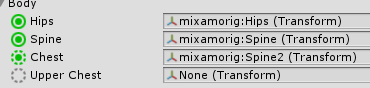
Change Spine 2 to nothing, and Spine to Spine 2, I think.
 cursive lantern
is there anyway to get dynamic bones for free?
tall violet
Nah, it's Upper Chest to nothing. My bad.
tall violet
@grizzled flame Should look like this https://vignette.wikia.nocookie.net/vrchat/images/a/a6/Body_Config2.png/revision/latest?cb=20170901091606
 fading verge
I made sure all assets are selected, now it's importing everything
grizzled flame
@tall violet
merry cape
you're probably gunna need that leg
tall violet
Yeah, he's gonna need a leg, I'm almost sure about this.
merry cape
Yeah I had the same problem with a mermaid
tall violet
Even if all just dummy bones.
merry cape
Luckily I made her tail fins into each leg and its hilarious looking
fading verge
I now imported the .fbx files and textures into another folder right next to the SDK one
merry cape
but yeah, add bones for the right leg that dont do anything
althought it might make his bottom half look funny, you might want to even just add two sets of dummy legs
fading verge
I followed the tutorial, and I clicked "rig" and selected "humanoid" and clicked "apply"
tall violet
If anyone can help me with the issue of my body moving too much when I turn my head, please @ me with a solution. Thank you in advance. =)
fading verge
I dragged and dropped the model into the scene, and centered it at (0, 0, 0)
radiant palm
@tall violet thats just how the game works man, if you don't want your lower body to move when you turn your head you need leg trackers
tall violet
The default avatar can turn his head without body movement. =/
fading verge
I applied the texture files to the model.
radiant palm
i haven't seen that
fading verge
It said the normal map file was not marked as such, and clicked "fix"
tall violet
Yeah, he can look left and right, and up. When my guy does it he looks like he is dancing. lol
radiant palm
do you have a heasdset?
tall violet
Yeah
fading verge
I changed the scale of the model relative to the example avatar
tall violet
I stand when I play so usually my arms are at my side
radiant palm
@toxic stumpmeal are you haviung a problem or are you just giving us your journal for the day
 toxic stump
Wtf?
grizzled flame
i suck at blender i dont even know how to do the bone structure and watching 50 mins video just makes me bored
fading verge
Alright, I need help now. Which controller should I choose?
radiant palm
@toxic stump not u sry
fading verge
Because I still don't see SampleAvatarController
tall violet
Lol
radiant palm
@fading verge you can leave it blank
fading verge
oh thank god, I finally see the vrc stuff when I click add component
god that was frustrating
 cosmic swan
is it okay to ask for help about rigging?
 forest sedge
"spine Hierarchy incorrect, make sure that the parent for the neck and shoulders is the chest" Not sure what to do, I just imported from Mixamo
grizzled flame
anyone know how i can re edit a model and adding a bone structure
cosmic swan
idk but if anyone here can help me it would be awesome 😄 https://docs.vrchat.com/discuss/5a55aecba4361000347dd661
problem not sure how to get about it any help? i got pics
tall violet
@forest sedge Make sure your Upper Chest is blank, and Chest is set to Spine2.
fading verge
@buoyant python Thank you for telling me the Unity version I needed, that solved my issue
forest sedge
Nice, thanks Johnny that did the trick!
 scarlet glen
My avatar is just flying around, any help ?
fading verge
I can't log into the pipeline manager, there's no button and it says "Use the settings menu to log in", but I don't see anything like that under settings
Help?
merry cape
Not that settings
Go under the vrcsdk option
and there's a settings there
you should be able to log in through that
 brisk bane
@scarlet glen you need to add weight painting
also, if my character says its ok in Unity, but in game the character is the red error hologram and doesnt load, does that mean its a server issue?
 versed sail
^ I also wonder about this. I can successfully build and publish my avatar but in game its just a red hologram or completely invisible
brisk bane
ah so it must be a server issue? if multiple people are having it
radiant palm
servers are having problems right now, lots of ppl complaining about red characters
yer
brisk bane
Ahh, assumed so
 languid plaza
Hi, So i've added bones to the keychain to make it move, added dynamics bones, it's got the white line but the mesh doesn't move with the bones. In blender the mesh moves when I rotate the bones, anyone know why its not working in unity?
fading verge
How do I decrease the number of polygons in the model?
versed sail
@fading verge Decimation I believe
fading verge
Also it says I'm not using the correct version, I have 5.6.3f1 and I need 5.6.3p1, what can I do now?
languid plaza
install 5.6.3p1 lol
fading verge
but but it's not there
 native egret
Hey my avatar has a bang in front of her eyes, is there a way I can make the player camera ignore it so it's not taking up the screen in game?
fading verge
why did they make this process so convoluted? I just want to follow instructions 😢
nevermind i found the installer
feral spade
It’s a process a lot of people need to learn
 knotty plaza
please help, ive been using this avatar for the longest time and now when i tried to do work at it it suddenly decided to say "i aint no t pose" http://prntscr.com/hyn26m
 feral spade
When you practice learning something without constantly referring to a tutorial
You’ll become better with it in due time
If you have the dedication
versed sail
"this avatar does not contain an animator and will not animate in vr chat" anyone else experiencing this? cant seem to find the problem
native egret
In unity hit enforce t-pose
feral spade
Because it can be tedious work
knotty plaza
where is the "enforce t pose"
languid plaza
I fixed the issue I had, needed to assign a generic rig on the .fbx
Incase anyone else had my issue
 ivory kelp
Can someone help me with this? https://i.imgur.com/uffAzTa.png

I'm pretty sure my models hierarchy is correct tho
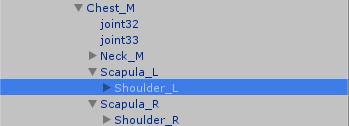
The chest is clearly the parent of both shoulders and the neck
stiff hornet
I need help getting bones and mesh working as one. How do I do that?
 distant patrol
suzu you need to merge bones i think. i cant think of any other solution
fading verge
Alright, this whole removing chest is new territory for me
What am I supposed to do here?
distant patrol
upper chest?
fading verge
yes
distant patrol
you can just merge upperchest weights into chest bone
then remove uperchest
e voila
fading verge
how do I do that in Unity?
fading verge
...
distant patrol
blender etc
 muted helm
I'd leave the weighting alone and just remap it on import.. you'll be fine.
Oh wait I thought you were talking about brining a mixamo rig into unity for VRC
fading verge
Is there a simple way for me to resize an avatar that I found in-game? That was my goal
distant patrol
he can oput scapula as shoulders in unity
that might work fine
maybe
you can scale the character in unity
fading verge
No, I mean, how do I open the avatar I found? I can't find it in Windows Explorer
ivory kelp
Ahh thats a shame, I don't have a pmx file to open in Blender for this model
distant patrol
if you got it in unity you do have a file, always
ivory kelp
Thats the thing, I got it from unity
distant patrol
there is a context menu propt saying show in explorer
i will post an image in a sec
 hoary torrent
https://gyazo.com/7490e55169803813d36052427c3dbb6e can someone help me out? i'm trying to fix the skirt with dynamic bones and it's making my body jiggle slightly instead and leaving the skirt still
 hoary torrent
ye
hoary torrent
what are you not supposed to? i done that with my previous models and it worked fine
hoary torrent
mmmm ok how do i fix this then
 solid fulcrum
yo bros how do you like display the model's rig in unity
or should i hop back over to blender to do that
ancient shuttle
I deleted the bone between my knee and ankle xD
ancient shuttle
Anyone know how I can quickly add a bone perhaps? :3
distant patrol
i tend to clone existing bones then move em
ancient shuttle
ctrl c ctrl v?
solid fulcrum
probably
distant patrol
if you delete a bone first add the weights to another bone
ivory kelp
@distant patrol Nvm I figured it out, I just needed to import the .fbx from my unity folder into Blender, ty anyways ^^
whole moss
Hiya, i manually made a atlas following the tupper vid but uhm now the model doesnt pick it in unity and stays gray? any solutions
cosmic swan
@ivory kelp how did u fix that?
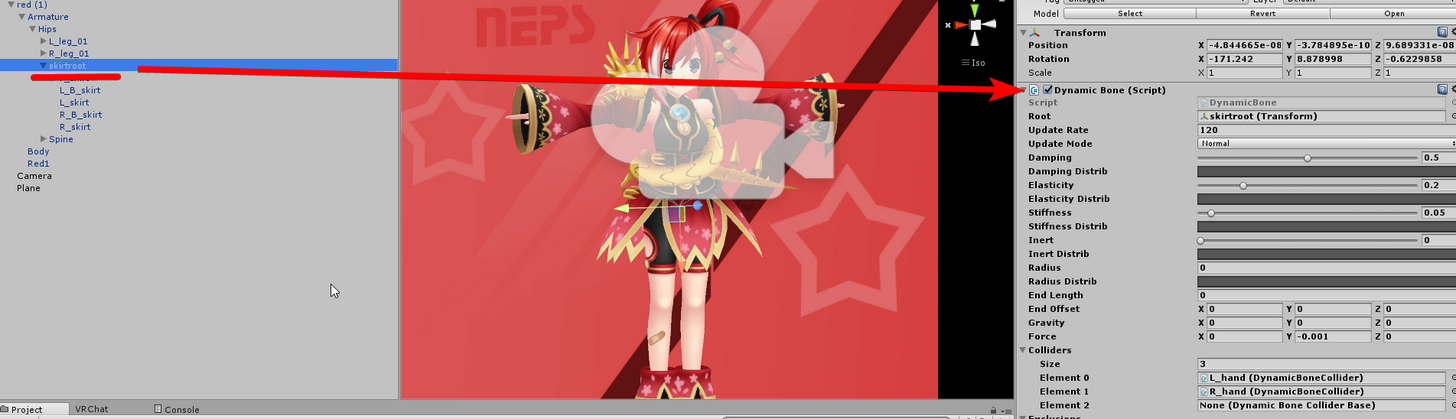 ivory kelp
@cosmic swan Did you import a model from the asset store too?
hoary torrent
i dont have a skirt root
cosmic swan
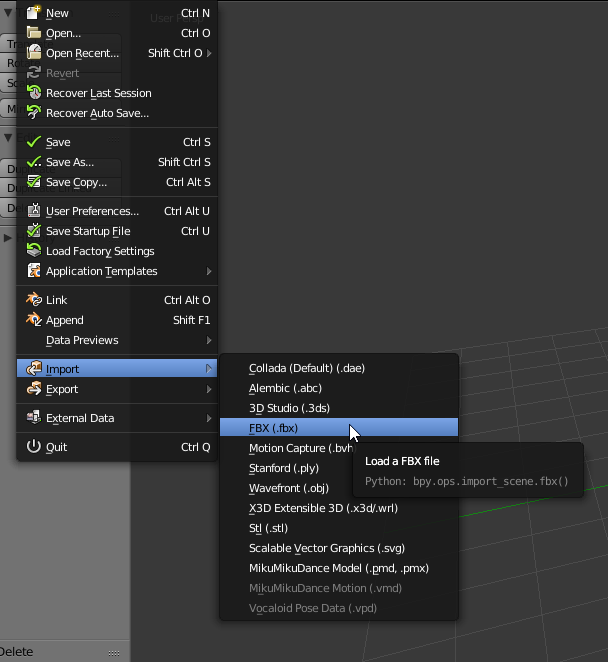
but my model was mmd to fbx
ivory kelp
Oh just import fbx into blender then
distant patrol
in my case anyways.
 main sage
there a way to make parts of an avatar invisible / see-through just to the person thats wearing it? cuz i got a big robot that has some meshes that block my vision
cosmic swan
after i import into blender just save as then locate the project in unity
main sage
or just SOME way to be able to see
distant patrol
all tris that are weighted to neck or deeper are invisible
main sage
idk how to weight stuff tho~
distant patrol

A quick tutorial of how to rig a character in blender the very very basics. nice quick and simple to get you started. It's meant for people with a basic unde...

Quick intro and guide to skinning/weight painting. this video is meant for those with a basic understanding of Blender
fading verge
weight painting is painful.
distant patrol
if sombody wants to get only one charater working and just wants it quick i can fix it.
weight painting is ok
but some meshes it can become fa bit complex
tri selection is just kinda terrible
fading verge
should I rig the legs on this human model to have a slight bend to them or should all the bones be super straight?
versed sail
Whenever I upload my avatar to the game its either invisible or a red'ish loading figure that won't move. Is this loading problem on my end or is it a server issue?
main sage
so by "all tris weighted to the neck or deeper" are invisible, do you mean like if i select the head and paint abit on the part i wanna hide, it hides it?
or do i need to cover the whole mesh
distant patrol
if any tris are painted to a bone thats got neck as parent in some way it will be invisible to you
like if its weighted to accessory5 and its like
accessory 5 -> head -> neck
it wont show
merry cape
That's very interesting, I didn't know that
main sage
no i mean like do i gotta cover the entire surface of the thing i wanna hide, or just a lil splotch?
merry cape
as long as the weight in any amount goes to the neck probably
distant patrol
the game essentially scales the nackbone to like 000
so everything in some way parented goes bye bye
main sage
k
hollow drift
I tried to figure out how eyetracking works and I just get offered MMD this and CATS that by google
Can I not just make a bone for each eye and that's it
hollow drift
"choose the old bones in the eyes that the mmd model had" yeah I'm not doing this on a MMD model thanks
Every single tutorial I find is using a ready-made model with eye bones already
fading verge
just do the cats method & create eye tracking in 4 button clicks
hollow drift
but I can't do the cats method if I don't have bones in eyes
hollow drift
It doesn't?
merry cape
No I'm asking koaski
They're making it sound like you dont need the eye bones?
but you have to rig the eyes to something
fading verge
i dont know i dont use models that are 🅱oneless
hollow drift
:L
merry cape
I'd say make bones off the head that go near the eyes
hollow drift
Yeah well that was the whole point, I made it myself
merry cape
and just weight them to the pupil?
distant patrol
actually yes
merry cape
well only the pupil moves
distant patrol
you can just make one eye bone and it is that simple
most tutorials on the matter are kinda confused
merry cape
so you'd just need to rig it to the pupil, right?
hollow drift
Do I even need CATS then
merry cape
well cats will set it up
distant patrol
i only use one bone per eye
merry cape
I have a few I need to do that for
hollow drift
Ah, well, my eye is a sphere with the pupil "built into it"
fading verge
cats does alot more
merry cape
So I will try that later
fading verge
you should get it
hollow drift
What does translation refer to
merry cape
it translates the stuff yeah from other languages
distant patrol
translating bone names from jap to eng
merry cape
yea
hollow drift
Oh
But I'm not going to download models
Visemes was something about lipsync right
merry cape
Yeah lets your lips move to your voice
I'm not entirely sure personally how to set that up though
Is there a tutorial on how to get that working somewhere?
fading verge
yea
distant patrol
most of them are kinda vague and say some stuff that isnt true and omit other stuff that is needed tbh
merry cape
Well that's sad
distant patrol
like some ask for 2 to 3 eye bones
which is flatout not correct
2 to 3 bones per eye
distant patrol
one per
merry cape
Oh okay
merry cape
But for the mouth vasemes, those arent bone based right?
hollow drift
Okay, so
How should I position the eye-bone
with or without cats
the one I create myself before telling cats to work with it
merry cape
From what I've seen, point a bone straight at the pupils viewpoint
parent them to the head
that's what works for me with mmd models, I've never made my own though
hollow drift
merry cape
Interesting eye. From what I've seen they're typically behind the eye
cant tell if I'm looking at the back or front here
hollow drift
from the front
brisk bane
so i have the same issue as i did about an hour ago. the character appears like a red hologram, even though my character is perfectly fine (everything is assigned correctly, no errors in unity.)
There also are other who are are using custom avatars right now?? so?
hollow drift
I set up lattices to flatten the eyes
merry cape
Eren, from what I've seen others say it's because the servers are wonky right now
brisk bane
should i just try to reupload ?
merry cape
I guess that's good rezzie, do you have the other bones mapped out?
And yeah Idk eren, I haven't tried uploading anything yet today
fading verge
Hey
My eye textures are missing
despite them being in the same folder as the pmx
every other texture is there but the eyes
How do i fix
hollow drift
I have everything mapped out
brisk bane
in unity or blender?
fading verge
blender
brisk bane
does it show up in unity?
i had an issue where my legs were invisible in blender but translated perfectly in unity, so it was something i could ignore
fading verge
can i open a pmx in unity?
brisk bane
you have to export it as a .fbx
merry cape
you can drag it onto the eyes in blender, cant you?
brisk bane
have you watched the videos in the pinned messages yet?
brisk bane
you should watch them @fading verge they will tell you a lot
 solid hull
does the "thumb, index, and middle finger bones are not mapped. full body IK will be disabled" error prevent fingers from moving in vr?
brisk bane
did you do weight painting?
brisk bane
or did you map them manually in Unity?
hollow drift
Suddenly I have no idea how to assign these two new bones weight painting
I do have a vertex group for each of the eyes
 tardy harbor
Any ideas on how i can get the plane into blender? Im trying to raise the mesh of it so its not in the ground. But everytime i open the DAE of the file(in blender), that 2D painting above only shows up and not the plane.
knotty plaza
could anyone help me? my entire avatar is twisted, how can i fix the camera "backwards" so i dont look at people with my butt?
merry cape
turn your model around in blender
fading verge
The eyes are still missing even in unity
hollow drift
speaking of looking at people with your butt
I saw a model which had hands as feet and feet as hands
knotty plaza
@merry cape the model seems to be in correct way, how can i find out if its not?
merry cape
I'd just make it do a 180 and test it see if that fixes it
if not then it's not that problem but I cant imagine what it would be
 craggy hemlock
The hands are sorta screwed on my model and I'm not quite sure how to fix
It's two panels on an invisible character
Planes, sorry
I'm not quite sure how I would fix it though
solid hull
alright im getting the "thumb, index, and middle finger bones are not mapped. full body IK will be disabled" error even though everything is mapped, minus the thumbs
merry cape
you need the thumbs
 thorny grotto
When you say that your gonna decimate an avatar it sounds violent
hollow drift
Can I choose a bone and then perform SOME ACTION to create a new vertex group just for weighing things for that bone
I recall doing it for the whole armature earlier but now I added the bones for eyes afterwards and they don't have vertex groups
Anyone? Would assume this to be very quick to fix
I got it
hollow drift
I simply did exactly what I did before
Choose mesh, choose bones, ctrl+P and "add vertex groups"
It left the existing ones as they were, just added new ones
Can I make a lattice move with the actual model's mesh? I want the eyes to not be sphere-shaped and rotate inside the lattice
or does that just not work outside Blender anymore
small solstice
Question, how do i fix the foot problem?
small solstice
vr chat wikia says to either fix the origin in blender (which would involve refixing the skeleton in unity again) or do a empty
 cold shuttle
Can anyone with some avatar experience shoot me a PM? I have a quick issue I need help with
merry cape
What's the issue?
 crude vortex
"Your avatar is humanoid, but it's supper arms aren't specified"
"Humanoid avatar must have head, hands, and feed bones mapped"
Dont know what im doing wrong
Yes, they are mapped.
And the avatar is attached
topaz dune
and they are paranet in correct order?
 celest charm
I uploaded my avatar and the camera is way higher than my character, do I solve this in unity? if so how?
topaz dune
Hips-Spine-Chest-Neck. -chest-shoulder-arms. hips-legs
cold shuttle
When I use the controller in Unity my models mouth works but when actually put into the game l, the mouth hangs open. Seems like an ez fix just a newbie to this
crude vortex
When I change the shoulders to be children of Chest it breaks the humanoid
no animations whatsoever in game for some reason
 hoary torrent
https://gyazo.com/cc4267bed2a0cc4cbb644741d36febbf I literally do not understand...please someone for the love of god help me i'm extremely desperate

ive tried everything
 merry cape
You tried raising the viewpoint?
hoary torrent
yes
crude vortex
merry cape
and it didnt change anything?
hoary torrent

the viewpoint is at the eyes, i even tried going above the eyes and still the same
topaz dune
@crude vortex that's how it should look, is there still problems?
hoary torrent
that is the viewpoint right? @merry cape
hoary torrent
yeah, then idk
merry cape
Is it displaying the model above ground correctly?
hoary torrent
yes, i'm just viewing everything from my legs
it's too low
even though it's at the eyes it seems to think it's at the legs
merry cape
hm
 meager kiln
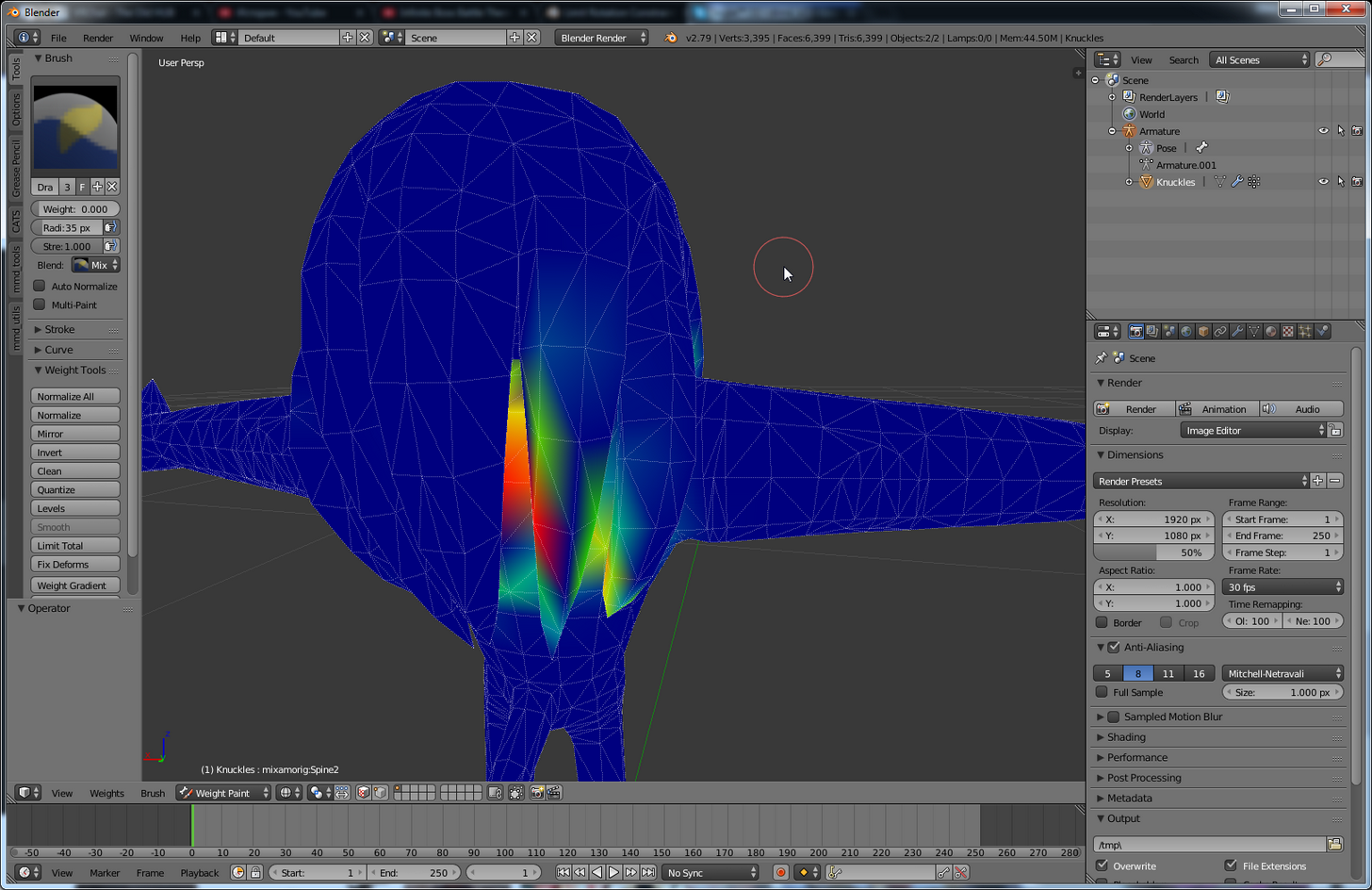
https://i.imgur.com/8MJdmsl.png
any idea how to paint those hard to reach places more easily?
 topaz dune
can you change it's origin in blender. might help
meager kiln
aka dreads right next to back
crude vortex
In game it has no animations whatsoever
I've exported this same model a bit ago and it worked fine, havnt changed anything since
hoary torrent
@merry cape even if i put my viewpoint higher than the head it's still viewing from the legs
merry cape
I think try what Niko said
topaz dune
@meager kiln select the head and press h to hide it
merry cape
I'm not totally sure what the origin in blender does
hoary torrent
idk how to change the origin
 teal ingot
anyone very fimilar with eye tracking?
brisk bane
You mean visemes?
topaz dune
i dont know if it help's but it wont hurt to try
cold shuttle
Can anyone help with an issue of the mouth hanging open in game? Probably a jaw issue
teal ingot
I have very simple cartoon eyes just a white ball with a black ball
hoary torrent
actually kinda done with this tbh no one is helping
merry cape
Pingu I'm sorry I'm not home so I can't do a lot
topaz dune
@hoary torrent https://gyazo.com/af8ec211d73a49914f7ae38d67b5cd3b
 topaz dune
this is how you can set the origin to the middel
languid plaza
Anyone here have experience with dynamic bones and gravity?
topaz dune
ah yeah sry in tools
languid plaza
i got a keychain on the end of a lightsaber, that i want to just be limp and affected by gravity, I put like .5 gravity on each axis, and it just becomes locked in place more or less
and loses pretty much all its jiggle too
merry cape
okay so
hoary torrent
 languid plaza
yeah it has dynamic bones
hoary torrent
where do i set the origin point?
languid plaza
i wanted it to fall limp aswell
languid plaza
will do
merry cape
set the others to 0 obvi
languid plaza
yeah haha
topaz dune
@hoary torrent shift + c to reset 3D cursor and then origin to 3d corsor
hollow drift
Well that's it for using CATS for the eyes I guess
merry cape
Did it work rezzie?
hollow drift
Won't work unless bone hierarchy is "hips > spine > chest > neck > head"
hoary torrent
is it supposed to be on the foot? @topaz dune
hoary torrent
 crude vortex
This is really annoying, I change the parenting around and it's supposedly okay in the publish menu but in reality in game it's broken still. then if I try to publish again without changing anything the publish window has this now
merry cape
just stick body in the spine then right
crude vortex
Literally havnt changed anything
hollow drift
but it dddddoesn't work
topaz dune
welp first of all it seems like you avatar isn't in the middel of the grid.
hoary torrent
it's at 0,0,0
hoary torrent
 hollow drift
Not sure how I screwed up, hmm
merry cape
rezzie, setting body as spine doesnt work?
languid plaza
@merry cape it kinda worked, i think it needs more gravity on it
so do i go to -1?
merry cape
you can up it to -1 yeah
I used like -.5 I think on one of my avatars that has crazy anime hair and it worked out okay
hollow drift
Huh, okay, one eye somehow isn't assigned to the bone properly
merry cape
Maybe you can up it, play with it a bit
topaz dune
the models have been moved at some point but, to what i've seen it wont make driffince
hoary torrent
https://gyazo.com/2d55f63326a78708674732495a4e42ce how about that?







 languid plaza
okay will do, thanks for the help
topaz dune
there ya go
hoary torrent
i set it to 1 instead
merry cape
rezzie maybe you can reassign it in unity? or its not set right in blender
hoary torrent
ok and how will this make a difference to my model?
how will this make it suddenly view from the eyes rather than the legs?
merry cape
did you set the new origin point
crude vortex
When I move the Shoulders into the neck it fixes the error
But the model is then broken
hoary torrent
i set the origin to 3d cursor
merry cape
maybe it was way below or something
hollow drift
.........................what, the other eye decided to be based on the forefinger's first knuckle
topaz dune
try it pingu, we gotta test before there will be results
hoary torrent
ok
hollow drift
Should head's bone end on eye-level
hollow drift
Well the eyes spun out of their sockets when I made the eye-bones with CATS
since they were way higher than the eyes themselves
what the actual F is going on here now
hoary torrent
ok well it's not going beneath the floor in unity now when i set it to 0,0,0
merry cape
yay
hoary torrent
but im not holding my breath just yet
merry cape
its possible the origin was just in a weird position, this might be the fix for my own issue as well
hoary torrent
i didnt even know you had to move the origin tbh..
crude vortex
hollow drift
Now CATS crashed my Blender
crude vortex
ffs
merry cape
Jcorella, you have to set it as a humanoid
crude vortex
mhm
merry cape
go to your assets, find the fbx and then on the right hand side
merry cape
did you hit the configure?
merry cape
hm
crude vortex
No upper chest