#avatar-rigging
1 messages · Page 60 of 1
 flat sierra
dynamic bones were already in
so they were resetting due to that being on the bone already
 desert halo
how do i add sounds to my avatar if i do like thumbs up, ect with my touch controller?
 near kite
question
i'm trying to redo a model because it didn't have a bone for neck and shoulders
but i still don't get how to add them
 sonic carbon
how far've you gotten?
 grizzled flame
hi
near kite
well right now i'm redoing it and i modified some stuff
changed the right and left arm to shoulders
and well neck is there
grizzled flame
can u guys help me i got some problems saying spine hierachy are missing
 fossil gale
Hey I've been having some trouble getting lip sync functioning on any of my models, I've tried both a mouth flap bone which I've tested in unity and had it working and a blend shape but even though I assign them in the avatar descriptor it doesn't function in the game
 grand drum
oh i have the problem with my model
my hips weight was accidentally applied to the hands lol
 warm ridge
@uneven hill did you figure it out?
@uneven hill I think I just did it again by selecting my hips in the rigging part of unity and raising the whole model up by them
 gaunt dock
alright i need a legit pro to help me with a challenging mmd willing to compensate for time.
 odd mantle
Whats the issue
warm ridge
@grand drum just go into weight painting mode for the hands and select subtract near the top left and unpaint for the hips vertex group
gaunt dock
i got this mmd
that is a bear
two people from here out of the kindness of thier hearts tried helping me but due to limited experience couldn't get it to work
odd mantle
@gaunt dock weird bone issues?
warm ridge
its like the 5th option under that image in the top left when youre weight painting
gaunt dock
@odd mantle honestly yes and no
the first person had issues with the bones not showing up going from blender to unity
the second person was having issues wit hthe hair mesh
odd mantle
Oh god
 fast copper
I'm trying to take the parts from a specific model and add them onto another.
gaunt dock
the model is really intricate, like there is a ton of stuff going on
fast copper
How would I go about doing this?
please, I'm dying at this point man, I need help.
my mentality is drained, i'm even drinking warm water.
odd mantle
Like swapping parts?
odd mantle
I assume you’ve tried a tutorial
fast copper
bro
that's equivalent to telling me; have you tried turning it on and off
they expect me to be a fucking computer wizard dude
i can't do it
i need "avatar-rigging for beginners"
 uneven hill
woops, wrong chat
gaunt dock
yeah i tried the tut, but this goes beyond that
the model i want is far beyond my 1 night of knowledge
so i need a seasoned hand to help me try and get this fucker rolling
fast copper
^^ facts dude
my mental state is deterorating
at a rapid pace
im trying to work with a 190k poly model
just because of the gas mask and the wings
grand drum
guys i got this error "the angel between pelvis and thigh bones should be close to 180 degrees" should i fix that?
 karmic dew
anyone has the guide on visemes lip sync?
odd mantle
@grand drum ignore it
 hearty rain
hey uh
i'm seeing everyone else with only the green, does anyone know why i have all these extra stuff
uneven hill
looks like you have rigidbodies
you can remove them
an easy way to remove them is to delete the whole rigidbody hierarchy in blender
 brisk mesa
a bear? is anything complex about it?
gaunt dock
you talking to me ?
if you are it's about 114k tris
two people tried helping to no avail
 modest tusk
Well your first goal should be decreasing tris count since the most you can have is 19,999
 still lark
I finally found a model that mixamo kinda worked with and its JIMMY NEUTRON https://i.imgur.com/TJwk9iK.gifv
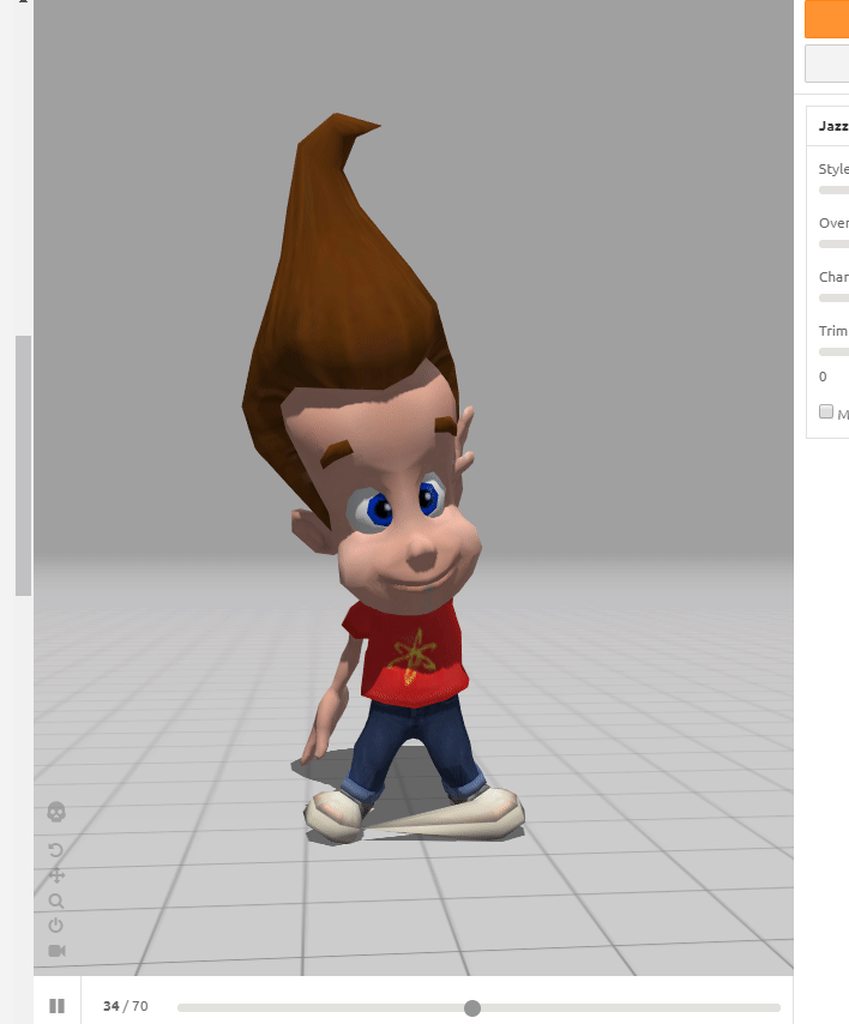
his shoe and hands are kinda messed up tho
 crisp tendon
@stiff hornet What's your issue ?
 stiff hornet
...crap
stiff hornet
Weird...that's the way they were facing when I imported the model
Is there any way to flip them?
Other than doing so manually
grand drum
eh my unity uploader is stuck on uploading image
sonic carbon
it's because of the servers, gonna have to try later
grand drum
i see
i did it everybody!
the only problem i have is the feet
anyway to fix that?
 fading verge
do the bones not extend all the way to the bottom of your model?
fading verge
im not completely sure, just a guess
fading verge
i addicentally deleted a foot bone once and it looked like my guy was constanly kneeling in a program
yeah try stretching them to the bottom of your model and see what happens
 jovial aurora
i figured it out lol deleted the messge since it was a surprisingly easy fix
fading verge
hey I'm just learning how to work with vertex groups. I made the left toe's vertex group blue when I didn't know what I was doing and I was wondering if there was a way I could transfer the right foot's values to the left
 gaunt belfry
There is a mirror option but I don't if its capable of copying over other than completely switching the paint
stiff hornet
No no it's just for bones
gaunt belfry
This is for weight painting right?
gaunt belfry
You ye
stiff hornet
I haven't gotten there I just need to copy my bones over...then somehow attatch them to the mesh
gaunt belfry
There should be a video tutorial on how to join bones together, thats where I learned it.
fading verge
not sure how to copy bones but attaching them to the mesh is really easy
stiff hornet
Dang...
gaunt belfry
So fleshy you just want the other foot painted exactly as the rights?
fading verge
@gaunt belfry yeah, that's correct
gaunt belfry
Is there any specific reason other than just painting the other foot manually like it deforms terrible when you apply the paint or its really finnicky with how it moves?
gaunt belfry
Im trying to get a grasp of what this is, but are you saying you weightpainted the other leg a bit on the right legs bones?
fading verge
'asset bundle upload fail'?
stiff hornet
I coppied the bones...now where do I go from here?
fading verge
@gaunt belfry What I originally did was create an armature object with the mesh, I used automatic weight settings. I realized ingame the model wasn't skinned right at the joints so I started fumbling around blindly in weight paint mode and accidentally set the weight values for the foot to 0
grand drum
is there a way to move the camera other than the middle mouse button?
stiff hornet
Not that I've seen. Other than numberpad in some cases
gaunt belfry
@grand drum Numpad arrows @fading verge So you just accidentally erased the painting on it, in the paint tools, do F add and just paint it back on, unless this is something else and I cannot help you there.
grand drum
thank you
gaunt belfry
I was having trouble just now, it was forever loading the preview image for me.
 dusty grotto
but did you manage to upload it ?
fading verge
I'm an idiot, getting back to what I used to have was easy lol I just had to reparent mesh and the bones together
gaunt belfry
O gg, also nope, it never uploaded it.
stiff hornet
I have the skeleton ready, can anyone help me attatch it to a mesh?
fading verge
i cant upload any avatars, asset bundle fail
 woven surge
servers are down for most things
 solid adder
Servers be whack last I checked
fading verge
frick
gaunt belfry
@lunar trench Select the mesh and then the skeleton armature and push Ctrl+P and do automatic weights
woven surge
the only somewhat-working things are vrchat.net accounts and the hub
solid adder
You can try to jump worlds, but you'll be waiting.
dusty grotto
@fading verge
 prime rose
The game has been a little wonky since it blew up due to de weh
fading verge
the ugandan knux meme will die in like a couple days, but people will still use the avatar
prime rose
I hope it does, but now it's turned into a Snapchat fliter
 nova swift
is it bad if I only have 3 finger bones instead of the 4 of the example rig?
 tepid cloak
I want to rig an avatar by hand
What are the requirements from a rig to be usable in VRChat?
gaunt belfry
The only advice I can give might work might not, make the thighs the upper bone, the middle segment lower leg, the lower segment the foot, and the longest bone in the foot the toes and leave the last bone just unrigged.
@tepid cloak From what I have seen, the rig must have hips, chest, spine, upperarm, forearm, hands, a neck, a head, thighs, calfs, feet, and toes
tepid cloak
Okay
gaunt belfry
Oh and shoulders
tepid cloak
The template you can import is just confusing though
The bones aren't all oriented correctly
 warm aspen
gaunt belfry
warm aspen
gaunt belfry
I suggest using a HL2 armature
 tame imp
warm aspen
tame imp
warm aspen
This is what I have so far, legs are just confusing me because non-human
tepid cloak
How do I remove the rig from an imported .pmd?
gaunt belfry
Delete the armature
tepid cloak
That crashes it tho
gaunt belfry
wot, thats not supposed to happen
@warm aspen Ye, just make the upper leg, the long bone on the thighs, the middle segment after the lower legs, and the segment after the feet, with the next being the toes, depending on how this games moving animations are, it should look pretty normal.
nova swift
is there a way to test the armature without uploading it to the game?
like some kind of default stock poses or animations
warm aspen
@gaunt belfry Thanks!
gaunt belfry
Use the configure option in Unity when making it humanoid
warm aspen
My first ever time rigging myself so...
nova swift
hmm any reason why https://i.imgur.com/phtEPdL.png would happen?
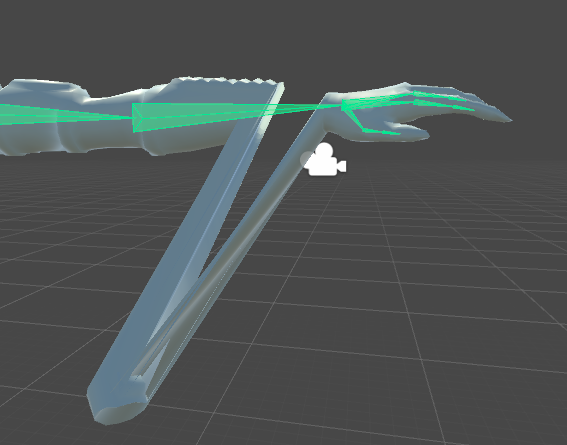
is a bone too short or something?
gaunt belfry
Wait what is making it do that, or was it just like that?
 crude crag
What were you doing before it did that orph?
Wait is this what showed as soon as you hit configure?
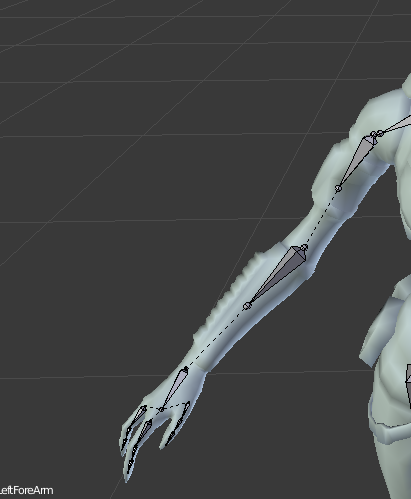 gaunt belfry
Its a weight painting issue most likely.
nova swift
that's what happens when it's forced to tposition in configure
gaunt belfry
That chunk of mesh is probably not painted onto that bone so it just doesn't move.
gaunt belfry
Use blender weight paint mode and select the forearm bone and paint the dark blue chunk
 solid wasp
https://gyazo.com/80d2da91f8258ec193faf7af99827ddd anyone know how to turn this bone, idk how xD
 gaunt belfry
If that is configure mode, there should be a rotation category underneath all the rigging bone options to the right.
 nova wigeon
you can also try enforcing T-pose mode
solid wasp
it says charater is not in T-pose
gaunt belfry
Ye, that arm is outside the t-pose outline
solid wasp
Ya ik I got to fix it, it would not let me Rigg it, So im adding the stuff my self
gaunt belfry
Ahhh
solid wasp
it added a few thing but auto would not work,
things"
than got a errors as the arms when down the cap each time
so it could not go in t pose
gaunt belfry
Alternatively to rotate a bone, just select it and push E, I believe, and rotate by hand with your mouse.
gaunt belfry
Just make sure you didn't rotate it on any other axis and to fix it if you did, perception is deception.
solid wasp
how do i go back to the other mode?
https://gyazo.com/d347f50bcdd691a60fbcbcb153f8d0c5 this is what i got so far Does it look ok?
 gaunt belfry
Looks perfect, also what other mode, if you mean translation mode, push W
solid wasp
thanks helps me out
So for the cap I go is there a way to make it move around?
or what bone do i use
gaunt belfry
If there is, I don't know how other than making a duplicate and having it run an animation.
And even then the bones could act differently in-game
solid wasp
iv seen people use bones, But i dount its too hard
Iv seen them line the cap than put 2 rows within it
or each curve of the cap
gaunt belfry
Im lost on terms here lol, what is cap?
 main sage
If i were to bring this over to Unity (not done mind you), would the rig there fuk this up / make it stand up straight?
warm aspen
Last question sorry, how do I make my 2 hip bones 1 entity caled hips?
gaunt belfry
@main sage I feel like you have to override most of its animations like moving and idle if you want it to move like its supposed it.
@warm aspen Can you show me a picture of these two bones, because I don't know why you would have 2 hip bones unless its for a mesh thing.
main sage
@gaunt belfry wasnt gonna have the 4 tendril things move, just have the head actually look around and such when i move me mouse. the tendrils would be static / dynamic boned
gaunt belfry
Oh then it might work fine then lol, if it does make it nonstatic, make fake bone hier for assingment
main sage
just wondering cuz ik with another model that looked like that it made the bones reallign into an almost straight up and down angle
 agile crater
@main sage yeah for non humanoid models you have to make your own animations for walking/everything else
gaunt belfry
@warm aspen Is there no bone that is just a straight up vertical line, near those two bones?
warm aspen
The spine right above it. I might have messed up the lower body rigging. Looking into it
gaunt belfry
I've never merged those two bones before, so I can't recommend merging them, try the spine right above it for hips
gaunt belfry
OH, you need the dynamic bone package for that lol.
solid wasp
ok thank you xD
nova swift
@gaunt belfry thanks, you were right, doing some additional weight-painting solved the issue
gaunt belfry
Np
warm aspen
@gaunt belfry the reason I asked was because all of the pre-rigged models I have are that way. There's a grouping of bones leading to the leags and the attached spine are all together known as hips
Like everything highlighted there is called hips together
crisp tendon
that's normal
warm aspen
Yeah how do I do that in Blender
crisp tendon
Do what ?
warm aspen
Create a grouping like that
gaunt belfry
Thats not a grouping, thats a connection to clothes, the vertical bone in the center is basically the hips.
crisp tendon
all the bones you see on the side are the child of hips that make up the skirt
warm ridge
when mapping the skin to the head bone should I exclude the ones I mapped to the eyes?
warm aspen
And it's the same way for the hands, all of the bones in the hands are all together known as the wrist. Just assumed that was something you had to do in blender
Sorry lol my bad
warm ridge
the parts* I mapped to the eyes
 prime dagger
Fellas, are there any tutorials how to rig a skelly with an inanimate object like a car or something
gaunt belfry
Prob. just make a bunch of fake bones with a hier using CTRL + A or Shift + A, can't remember which and see if that works.
main sage
there a way to mirror bones in blender? i got the dummy arms and such done, but they arn't symmetrical with one another.
or does that not matter
crisp tendon
@main sage shift + d then r + y -1 i think
main sage
@crisp tendon nope found out. select the thing you wanna mirror and dupe it, then press Ctrl M + [axis]
crisp tendon
nice
 native egret
Any idea why that single bone is all the way out there?
or at least how to fix it
main sage
@native egret if its anything like the Godzillas ive worked on, there are some extra things that get their own bones, like firing rays and such
 hidden rapids
guys anyone know if it's possible to attach GUI texture objects to a rigged mesh and make them move alongside the mesh?
native egret
It's part of the hair
I just moved the bone to inside the head where it looks like it belongs
hopefully that'll fix it
main sage
should
set of dummy bones all set up~ and no, its not NSFW stuff, its a giant monster that has jiggle bones for its stomach and such
native egret
haha nice
and it didn't fix it sadly
it's a dynamic bones issue
see the hair in front of her face?
 muted helm
Really confused why people are giving the advice in tutorial videos of deleting toe/metatarsal bones and then wondering why they have foot problems especially when they are applying mocap/anim data from rigs [eg. mixamo ] which does have that data. Boots and shoes do bend btw. 🤔
main sage
Anyone know how id bend / reshape this?
mainly to fit in the length/width/height limit imposed by the SDK
cuz i dont wanna have my avi be only 2-3 feet tall, lol
 tame swan
My character's head apparently disappears to others when I'm looking in certain angles, what could be the cause of this?
 tacit sinew
I dont have a picture atm but some of my models in game when resting their arms are in he body? i tried moving the arms in unity in a more t-pose position but changed nothing
maybe the shoulders?
even worse on this one
native egret
This bone is to a part of the hair, and because it's out here like this whenever I move with dynamic bones on that specific part of the hair spazzes out. Any idea how I would fix this?
tacit sinew
mix weights?
 topaz dune
@main sage if you go to object mode, the select the bones and go back into edit mode you should be able to change to legs into a s shape.
tacit sinew
maybe
main sage
...? whenever i move the bones around it just moves the bones not the mesh. unless im just stupid =U
ill try that in a sec
topaz dune
the mesh will follow as soon as you go to pose mode
main sage
o
native egret
Was the mix weights message to me?
tacit sinew
yeah
tacit sinew
well you have 2 options, try and move that bone to were the paint is
but i wouldnt try that hard and just mix the weights if its parent is another hair bone
if its the head then prob not
native egret
ok thanks ❤
tacit sinew
plus if you are using dynamic bones thats a lot of bones, might want to optimize it a little more anyway (:
topaz dune
is it possible that it's just a bone to control all of the hair?
native egret
gah, sadly it's a parent
because undoing the weight made the model constantly like this
tacit sinew
yeah dont undo the weight
native egret
tacit sinew
i would try and just click that bone and mix weight and wee what happens
main sage
did it. this happened
tacit sinew
probably not that bad
native egret
yeah it's a parent
topaz dune
try and go to pose mode
native egret
"i would try and just click that bone and mix weight and wee what happens"
what does that mean
oh nvm
lmao
sadly doing that spazzed out other parts of the body
main sage
i think im doing it wrong. x3
tacit sinew
weird why does a hair bone mess with other parts of the body?
topaz dune
can you take a pickture of the weight paint?
main sage
whatever that means, sure.
topaz dune
it might be the weight paint is weak. it determens how much the bone will move the mesh
main sage
I asusme this is what you mean. and i also assume blue is super weak
tacit sinew
its not weight paint^
make sure you have the right bones selected
doesnt look like you did @main sage
right click one of the tail bones
main sage
...? pressing control tab when a bone is selected in edit mode just puts it in pose mode .3.
main sage
when i right click it deselects the paint thing and just selects the whole armature...idk
tacit sinew
hmm
topaz dune
well the ohter option is to go to you tool box all the way to the right and selcet the triangel
main sage
im prob doin it wrong x3 idk
first time ive ever fully rigged somethin. till now ive only renamed and moved bones
topaz dune
there you get can see all your bones, if you press them you can see which bone is fixed to where
main sage
um...wut.
im legit a super noob at blender besides the stuff they make you do in the MMD import vid
so idk what you mean by triangle or toolbox or such.
 main sage
this i assume you want.
topaz dune
allright so it's not the weight thats the problem...
you'll have to move the mesh to fit your desired position
 tidal parcel
Hi, I need help exporting a model from league of legends... Could someone help me please?
topaz dune
depends, where you are exporting it to.
 fiery latch
Anyone here know how to fix a spine on a model? This model I want to use apperently has no spine and I have no clue how to add one in, just @ me or somethin if you know anythin
 latent lotus
anyone here got any experience using Maya for rigging?
tidal parcel
Well, to be fast, I need the Rhaast model in xps/xna format... But nobody uploaded it on internet
topaz dune
Sorry i have no experince with those formats
latent lotus
or like, any experience with building a skeleton for a model from scratch?
fiery latch
sadly no for me
topaz dune
i have some experience making a skeleton head and hands.
latent lotus
I have no idea what I'm doing lmao
topaz dune
the easy way would be to make it in driffent parts.
and slowly fit them to each ohter.
latent lotus
I see
topaz dune
also if you are displeased with how something looks, you can just delete it without messing with the ohter parts
warm aspen
How do i get it to link to the lower joint? And not the upper?
topaz dune
thats how it's supposed to look
 opal ivy
is anyone here really good with 3d model skins? cause the one i have isnt working for a custom model i want to use. I have the model, but i need the skin
warm aspen
The dotted line isn't meant to go to the lower end of the bone?
 latent flicker
how dafuq do i create a new bone? xD first time 100% making my own model
topaz dune
no, i dont even think it would make a driffence.
latent flicker
did do some mmds before, but i dont know shit xD
topaz dune
are you using blender?
latent flicker
ye
topaz dune
have a armature?
latent flicker
ye
topaz dune
press shift + a
latent flicker
oh, xD
topaz dune
to make a bone and e to extend the line of bones
latent flicker
how do i get it into my current armature?
topaz dune
ctrl + p?
latent lotus
ok it didn't work
I imported the model into unity and there's no model
whats weird is that the preview seems to work
even has the texture applied
topaz dune
you have to pull the avatar up to the hierarchy window to see it
 unkempt dome
hey I'm a total blender noob, what can cause automatic heat weighting to fail?
latent lotus
I did?
topaz dune
too meany driffent object
fading verge
how can i create a new bone in blender=
?
someone told my a shortcut for it with a combination of keys
but i forgot it 😄
i have no clue what to do with that explanation 😄
topaz dune
shift + a for a new bone
 proud dome
having problems with removing an already existing skeleton from a model with blender
can anyone help? been searching but most are pretty complicated or just doesn't work anymore lol
topaz dune
what part of the bones do you need to delete?
proud dome
the whole thing
im trying to port a pokemon and its one on all fours
so its already existing skeleton won't obviously work with vrchat
topaz dune
you should be able to select the bones and press x to delete all of them in object mode
proud dome
thx dude
topaz dune
np
main sage
despite NONE of the tendrils being assigned to anything like legs, it does this.
topaz dune
force a t pose helps
it's just so it can assign the bones the the right postions before you move on
proud dome
yes t-pose is a must need
btw niko
know an easy way to put a model into t-pose in blender?
because i kinda screwed myself up
topaz dune
press ctrl + z to un*uck or the hard way would be to move the mesh to be a t pose.
it wont hurt to not have it in a t pose tho. unless it makes it difficult to make the skelet
proud dome
well it makes it really hard for me and how can i move it like manually into a t-pose?
i gotta change this model a bit anyway
main sage
...how do i FORCE a t-pose tho
 tulip wadi
how do I rig the mouth of my avatar to move when I speak?
topaz dune
in the bone catagory there is a pose option at the botton left
main sage
AH
topaz dune
also nikke you have to go to edit mode and move the mesh around, i dont know any faster way atm
main sage
eh, may make a dummy head and such, bends the neck back abit much otherwise
tulip wadi
how do i rig the jaw to move when I speak?
topaz dune
you go to the traiangel in you tool box on the right
where you can see all your bones
tulip wadi
ok then what @Niko INC.#8367
topaz dune
there is a shape key window
tulip wadi
what do i attach the jaw to?
warm aspen
tulip wadi
to make it move when i talk
warm aspen
So the rigging was a success but unity is showing my bones outside of the mesh
topaz dune
press + to make a basic shape key
warm aspen
ANy reason this could be?
prime dagger
I merged Knuckles to a kart in Blender, but in game its above my head. What did I do wrong and how to I fix
tulip wadi
just attach the kart to it's hip in the hiearchy
prime dagger
the kart has no bones so is that still possible?
topaz dune
if you apply the amature it can seperate the bone from the mesh. or you have moved the bones so they dont align with the mesh
or the other way around
crisp tendon
@prime dagger The first mistake was making a knuckles avatar, then it snowballed
tulip wadi
yes you can @Butchimus#5643
warm aspen
Oh my god hold on I may have skipped a step in blender like a dolt
topaz dune
@tulip wadi dont do anything with the baisc key
warm aspen
Didn't join the bones to the mesh i think lmfao
tulip wadi
huh
tulip wadi
a new what
tulip wadi
candycrow is going to help me
topaz dune
ok
main sage
...ye know, i think i found somethin out maybe
are the ankle / dummy leg bones supposed to touch the ground in Blender?
topaz dune
@crisp tendon What can stop me from eyetracking? when i look in the bone assignments in unity it sees the eye bone and i made sure the bone is fixed to the eye, do i need an animation or what else?
it will show your legs flying above ground, i'm 70 % sure that all the legs need to be on ground when making your avatar
main sage
well considering the legs are inside a big blob of plant flesh, think thats fine x3
main sage
naw seems ok. i put an avatarcontroller into it and pressed play / tested
seems fineish
tho id like to be able to look ingame and move the giant plant head
but meh, one step at a time
crisp tendon
@topaz dune Check tupper's tutorial in the pinned messages of #avatars-2-general
topaz dune
thanks
main sage
eh, got too few bones to make the tendrils an s shape now. might just curl them upwards
 molten rock
HELP I'm added a shader to my model now its flying in the air and i cant change out of it , D: when i open the menu its REALLLLLLLLLLLLLLLLLLLLLLY far away and nearly impossible to do anything on it
please someone D:
molten rock
HELP I'm added a shader to my model now its flying in the air and i cant change out of it , D: when i open the menu its REALLLLLLLLLLLLLLLLLLLLLLY far away and nearly impossible to do anything on it
topaz dune
@molten rock i need more info before i can help you. what program are you using?
 sharp raptor
can someone help me
molten rock
it was working 100% before i put a shader on it
 odd tulip
open the content menu window for the sdk in unity and delete the avatar that's causing the issue
it will still keep it in your unity scene. Just deletes from the server
topaz dune
i suggest you first delete the avatar off the hierarchy. and see if that shader does more that just adding a shade
molten rock
how do i know that?
topaz dune
a shader as you know, is only texture related. right click on the avatar name and delete
i'll change my question, is the avatar unselected?

 static iris
Anyone know why some of my Valve rig models are so fuckin thicc? Seriously tho I need to fix it idk what bones I need to fix so they will stop stickin their asses out like that
topaz dune
if you havent aready done it force a t pose, under the bone window
gaunt belfry
Could be bones for the layers of clothing maybe?
 torn isle
It's her skirt...
Or something like that.
Is there any way I can fix her bone structure?
topaz dune
@static iris looks like the hip bone is off line with the upper part of the skeleton
@torn isle you can ofc change everything in blender.
torn isle
Her bones in blender appear normal.
static iris
torn isle
static iris
proud dome
the butt sticking seems to be normal in vrchat lol @static iris
about 50% of the anime girls i have seen were twerking the hell out of their ass
 limber prawn
Any clues as to what causes this? First time encountering it.
proud dome
could be because of how it was rigged
or just the model
better go check the model for errors
 slate dock
Guess I post this here instead? https://gyazo.com/a44457b7e1f3062fe277910fabb76590
 topaz dune
@torn isle i cant see any problems with your model.
 limpid bear
Hey guys. is there a way to move the skeleton i have rigged for my avatar without fucking up the "Avatar model"?
 weak notch
click your avatar in the asset tray, on the right go to rig, set to humanoid, click configure and make sure upper chest is set to the bone None @slate dock
slate dock
Got it thank you @weak notch
 unique canopy
this is prolly a stupid question but how do I delete bones they won't go away got like a hundered .shadow bones
topaz dune
@static iris i can see that the bones want to be in a straight line and to do so it looks like it rorates te hips.
 frosty carbon
I got a question.
How do you rig up an avatar with out any moving parts?
Like, if you were to upload an avatar of a car, would you just forgo rigging it and upload it?
I tried uploading an avatar of a pickup I got online and all I had when I logged in was that red transparent texture
topaz dune
allright so it's says that the chest is the problem..
 torn isle
Show the skeleton.
topaz dune
and it happens when you force a t pose?
torn isle
You're missing a bone in the right place probably. @Lynk_Wyland#1317
It happens whenever I put the chest bone in the right place. But I think I know how to fix it. I'll ask you if I need any more help.
slate dock
I had to remove the upper chest and now thats happening
unique canopy
this is prolly a stupid question but how do I delete bones they won't go away got like a hundered .shadow bones
topaz dune
the parenting of the bones are wrong. the shoulders parent to the chest and the chest has to be parent to the neck.
slate dock
Alright how would one fix this?
topaz dune
@unique canopy you can select all the bones and press x in object mode.
@slate dock go to blender and see how the bones are paranted
torn isle
Anyone know how to select multiple bones with a drag tool in blender?
topaz dune
you can shift + press to select more bones at the same time
static iris
Alright so what would I wanna do to fix it? @topaz dune
topaz dune
you can go to blender, choose the bones and go to edit mode. that way you can line the hips with the spine and chest
static iris
Alright I'll try thta
topaz dune
yw
static iris
Right I'm still sorta new to blender how do I move the bone without moving the Mesh
unique canopy
They just won't go away what am I doing wrong I have all the bones selected on the right but when I hit X I get an option to delete but they dont go!!!!
topaz dune
@frosty carbon it helps alot to go to blender to see what you have downloaded before moving to unity. that way you can see if the texture is right and that the vehicle is without problems. there can be a problem with the texture nodes that are applyed to the model havent been made correctly
frosty carbon
Ah.
Thanks.
 stuck vault
can anyone help me try to seperate his legs? I think they're too close.
topaz dune
@unique canopy strange.... A to select everything and X to delete and press the delete window. if that dosent work....
@stuck vault do you have him in a fbx or dae file?
static iris
Ay how do I move a bone without moving the entire mesh with it
stuck vault
@topaz dune FBX
topaz dune
@static iris you are in pose mode, go to edit to move the bones with out the mesh
@stuck vault pm me with the file.
static iris
Oh fuck swear I was in edit lmao sorry
weak notch
i dunno if this is the right channel btw
topaz dune
np there's a lot of stuff in blender i used 3 mounth trying to get it all, but i only know like 40 % mabye
fading verge
when you export your fbx, u need to check that for mixamo
fading verge
what u use, blender?
weak notch
unity
fading verge
no idea then, havent gotten there yet
weak notch
also my avatar didn't upload to mixamo, it complained about the rig
fading verge
u alrdy had rigged it then?
weak notch
yes
fading verge
ye XD
weak notch
i just wanna take the animations from mixamo
fading verge
then u prob cant since u rigged it alrdy
:x
anybody know how to rig animal models in unity?
same question
I got a warg model, wanna rig it too in the future
I need this model FeelsBadMan
 twin grail
 fading verge
MonkaS
topaz dune
@KrypTarch#2215 the mesh is eighter not fixed to the bone or there's something wrong with the weight paint on the model
would love to help you but i havent worked with dynamic bones yet.
odd mantle
@scarlet summit How is it ordered?
topaz dune
i just went over a clip about dynamic bones. you can parent them them to Ex. the chest bone and they will be go into a nice order under that bone.
torn isle
So after reparenting the hair, it looks better. But there's a part still attached to the hips.https://gyazo.com/b587541c24fdb633d608ceebc065694a


Her head bone is huge.
topaz dune
it looks strange but it'll still work, and you should change the parenting of the hair to the head
torn isle
Which I did.
Spine hierarchy issues up the ass.
Because the chest isn't connected.
And connecting it results in that same red.
topaz dune
I can only help you with the most simpel steps, like is the parenting is right and that the hip-spine-chest is in right order. just better safe than sorry, go though everything again. look at their positions and if ther's anything that's not in order.
torn isle
Already did.
There's no more hair lingering in the hips.
Just the head.
Also, the chest issue is affecting all persona mmds from second mmd.
It's unfortunate.
torn isle
It's such a headache.
Anyone have any idea why putting a chest bone in the appropriate area results in a model is not in t pose error?
warm ridge
is it being used for another bone?
 low river
the bone sizes themselves actually
dont matter
OH
@torn isle are your shoulders connected RIGHT to the chest?
 vagrant olive
Pls Donate to the "Gib a Better Rigging" for Smough Foundation. 1 Help with the Rigging: Better looks for the Dark Souls Fat Boi
 topaz dune
it's all done right.
warm ridge
the chest bone isnt assigned to anything else right?
torn isle
Yep. ^^
 livid raft
how can i fix spine hierarchy nincorrect errors?
 sonic marsh
Hey I'm trying to put some cloth physics to my skirt but it's attached to the spine. When I set spine as an exception, so I don't turn into a bobble doll, the physics in the skirt stop completely. Anyone know how to fix this?
topaz dune
you dont need a upperchest
topaz dune
do you have a picture?
agile crater
anybody have any ideas as to why my visemes arent doing anything in game, I have them set in the avatar descriptor and the blendshapes all work in unity
topaz dune
the shoulders are supposed to be parent to the chest, but they are rigged to the neck
topaz dune
you use blender to change the parent to the chest
livid raft
it can never be easy and straight forward
topaz dune
nope
livid raft
how can i do that?
topaz dune
this is a great help for rigging https://www.youtube.com/watch?v=Q2MGttB1E7U

Learn Blender at https://Blender101.com It's time to start rigging our character! In this video we clean up the scene a bit to prepare for rigging, and then ...
livid raft
how can i change parent to chest?
topaz dune
the fast way to parent the shoulders to the chest is to select the the shoulder bone first and then the chest, then you press ctrl + p and choose the keep offset tap.
topaz dune
that looks right.
topaz dune
then back to unity and see if it worked
 zenith dagger
So other ppl say they cant see my avatar, i dont understand 😦
 gusty silo
Any ideas on why exporting a model to fbx would suddenly make the bones in the head huge?
topaz dune
@Khilgorod#8024 what did you do when you published you avatar. from having the finished file to publishing it?
zenith dagger
Hmm i dont quite understand that , i just did my tweaks and what not then published
 weak rose
@gusty silo It shouldnt fbx files are supposed to conserver bone structure, have you tried exporting again
zenith dagger
Like I followed a tutorial and everything step by step, and other ppl say they cant see me
gusty silo
Yeah, tried exporting is several times and always the same result.
topaz dune
did you try and find a mirro to see yourself?
zenith dagger
Yes u can see myself just fine in the mirror
weak rose
then its server issues
if they cant see you
your model is queued to load and just hasnt yet
and sometimes when the servers are super strained just wont
So essentially always
topaz dune
yeah or somthing like they are taking a loong time for their pc to load you avatar
zenith dagger
It just seems that everyone else loads in just fine for me , but im the only one not loaded in apprently
could my poly count be too high? its 14000. but i had a 16000 one that loaded just fine for others
topaz dune
no the poly count is fine.
odd mantle
Anyone have any suggestions on how to fix these thumbs?
topaz dune
it sound's like it's server related tho
zenith dagger
Well shit , feelsbad
topaz dune
use edit mode to move the bones to your desired position
uneven hill
do any of you know how to fix the whole avatar sinking into the ground. Or atleast how to raise them up higher so that they dont appear to have sunk?
fading verge
@crisp tendon is there a way to fix the moustache, viewball, tearing hands, and remove spines?
crisp tendon
Uh
topaz dune
in unity the model has to be above the grid
fading verge
crisp tendon
if it's in front of your viewpoint i think you'll always see it
uneven hill
i moved my model higher on the Y axis in unity, it didnt help for in-game
crisp tendon
there's a way to hide that stuff but i seems a bit complicated and i haven't bothered with it
fading verge
The moustache moves with the left arm
topaz dune
i can be that you applyed the armature. then it releases the grib on the bones
weak rose
Thats a rigging issue
fading verge
Like the arm acting like a parent to the moustache
weak rose
Rhino
fading verge
weak rose
you need to take that into blender and attatch it to the head bone
because if its going that its attatched to the arm bone
topaz dune
ohh yeah
weak rose
the mesh that is
uneven hill
so
uneven hill
in unity I moved the whole model as a whole though
weak rose
Youput it into pose mode and did control p and selected bone with the mustache and head bone selected?
uneven hill
@Gentle Rhinoceros#2655 maybe a weighting issue?
fading verge
 weak rose
Have you fixed the model with CATS
grand drum
is there a way to make dynamic bones without the asset?
zenith dagger
Indeed alot
topaz dune
dosent that depend if you make it yourself or export?
fading verge
Ok so tell me how i put cats in blender
 thorn beacon
for some reason my avatar's feet are in the ground like in the picture shown. i've tried readjusting in game height and i've tested the walk animation in unity which seemed to work fine. the weight paint in blender also seemed perfect. is there an easy answer i'm not seeing?
uneven hill
is it a problem if my legs arent weighted to anything?
fading verge
Cause downloading it and installing it to blender does not work
uneven hill
I have that avatar!
thorn beacon
kurisu?
thorn beacon
fuck yes do you know why it's doing that?
uneven hill
vn colour scheme
fading verge
Oh wait cats does work but mmd_tools don't show up so cats is useless
uneven hill
no idea, mine didnt do that
thorn beacon
crap x.x
uneven hill
my tie clips in the same way :p
also saw someone with the lab coat ver on vrchat
also had tie clipping :p
thorn beacon
gdi i didn't even notice the tie clipping >.<
uneven hill
easy fix, I was just lazy
thorn beacon
do you have to weight paint it slightly to her waist?
uneven hill
it has a bone
topaz dune
you can raise the model in blender over the grid.
thorn beacon
if i raise the model like that is it going to break anything else like scaling?
topaz dune
no
thorn beacon
will i have to lower the view position in unity? it appears above my head in game with her partially underground
fading verge
i have to use a mmd or a mixamo model
and i rigged it in blender
fuck me
cats is useless there
topaz dune
if you want to do it right, put the veiw point at the middel of the eyes. it will only change where you look from nothing else
 cerulean cliff
So, I keep having issues with vrchat complaining about the bone hierarchy. Is there like a picture somewhere that'll tell me what bones should be children of what? D:
 quick trellis
Say, is there a way to add more bones beyond the ones mixamo creates? VRChat won't accept my model because it doesn't have the right amount of bones (missing three head bones and most of the fingers)
topaz dune
the best way would be to make sure the origin of the model is at the grid 0:X 0:Y and 0:z
 ocean meadow
https://www.twitch.tv/graelyth Having trouble rigging some bones to a character. If anyone could stop by that would be great.

 lyric current
Do I have to use blender to add weight onto the bone so the hair drops? Sorry, i'm new to rigging, just trying to learn the basics. :]
thorn beacon
wait, will set origin do anything to help with my feet?
quick trellis
Yeah, but I mean how would you exactly add more bones? I'm really confused about that. The mixamo rigging did not add the right amount I need
 hidden talon
anyone willing to help me do @tame swan
low river
@lyric current you do have to add bones along the hair and rig it to them
lyric current
they are bones.
lyric current
That's Dyn view
 hoary torrent
can someone help me with this? the colliders aren't working
lyric current
my linked dyn bones.
low river
ahh
topaz dune
when you are in blender. pull your avatar over the grid so your feet just touch the grid and then press shift + c to put the 3D cursor to the middel point and then shift + ctrl + alt+ c to open a window where to select origen to 3D cursor @Squirrelanna#8941
lyric current
I need the end to have weight so it doesn't just float.
 fossil blaze
Does anyone have any experience using blendshapes as the jaw flap blend shape?
vs a joint
topaz dune
the shape keys in blender?
fossil blaze
Maya but same thing yeah. The shape is working and everything, but when I bring it into VR chat and speak the jaw just seems to vibrate rather than opening.
Like it's not sensitive enough and going to 100?
thorn beacon
and then i can save and see if that works?
 topaz crest
Say you're working with a fully rigged model. But the mouth is open. Is there a way to close the mouth in Blender? (Blender noob.)
lyric current
Anyone? :[
hidden talon
anyone willing to do free rigging on a cool model lol
topaz dune
yeah try that.
 solid mortar
@hoary torrent Dynamic Bone colliders isn't really for stopping cliping like that, its to allow you to move bones with things like your hand so you can for example move your skirt using VR.
hoary torrent
o
 crystal jay
@Senpai in order to apply physics to a model youll need the dynamic bones addon for unity.
topaz dune
@Yawns#7718 i'm not found of the jaw flab. making shape keys in blender seems to be alot easyier.
lyric current
I need to add weighted values so the hair drops.
ocean meadow
how would I assign a weight paint to a bone? Do I just select the bone I want the weight assign to and then just start painting? Also is there a way to enable symetry or will I just have to copy one side of the mesh and then mirror it?
fossil blaze
This is using just one shape key for the entire jaw rather than individual visimes yeah
crystal jay
im not sure on thse, but i guess, or you pose the hair down to its flopped down position and add collision to the back
fossil blaze
Either way the jaw doesn't really move.
crystal jay
i still need to learn myeelf some rigging
proud dome
@lyric current oof, you are new to rigging and took zoroark. rip you dude
topaz dune
@Graelyth#4188 you have to choose a bone you want to weight paint, and mirroing it will only *uck up.
proud dome
ah weight painting. was it like more red = more weight?
topaz dune
yeah
proud dome
ok good
topaz dune
@Yawns#7718 i would advice you to make key shapes, that moves the mouth queit nicely
low river
say like a character has cigarettes
fossil blaze
Ok thanks
ocean meadow
is something i need enabled for me to select the bones while weight painting?
topaz dune
that is a question for the animations or devlopment-advanced channel @CandyCrow#6631
ocean meadow
gotcha
topaz dune
you can choose the traiangel on you right side in the tool bar @Graelyth#4188
there you can select the bones
fading verge
Can someone help me with cats rigging?
thorn beacon
ctrl+right click will also allow you to select different bones IIRC
topaz dune
Thanks, i never learned that trick
 round tinsel
this happens when i reexport a model from blender, can someone help?
round tinsel
all i did was add two empty bones and its a dae
uneven hill
been doing some stuff, I cant get my current avater to stop falling waist deep into the ground
thorn beacon
@topaz dune should i try making the origin point even lower?
topaz dune
no, what did you do in unity? did you pull it into the hierarchy. that way it stand's on the grid
thorn beacon
uhh, i don't think so, but i did make sure her position was 0,0,0
oh, i see what you're asking. she is on the hierarchy
topaz dune
you can allway pull an avatar to the hierarchy to start at 0,0,0
thorn beacon
noted 😮
 willow nymph
anyone able to assist me with attaching new arms to a model? I got them sized properly and such just dont know how to do this in blender
topaz dune
that way you can also see if the model goes under the grid and if it's a littel offset
thorn beacon
it shouldn't be offset like this though right?
topaz dune
@Sir Vown#4322 In edit mode you choose two vertex you want to merge with eachohter and press alt + m
uneven hill
my model looks fine when at 0 0 0, but when animated, sinks down
topaz dune
yeap
 reef skiff
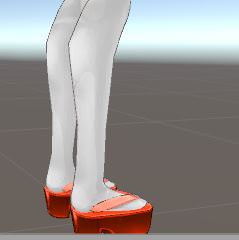
excuse me, any way of fixing that sharp edge via unity? https://imgur.com/q7Y1ASz
 uneven hill
also in bone configuration it sinks into the grid
 cerulean haven
Anyone know anything about the amature scaling down or shrinking when i import a FBX to blender?
topaz dune
@Awoo~#9932 You my friend want to use blender to fix it.
zenith dagger
So some ppl can see my avatar now but only the breast have p;hyics for ppl, i have dynaminc bones in hair and dress
reef skiff
can i import the unity model into blender and back to unity without losing anything? @topaz dune
fading verge
anyone have advice? i uploaded a junkrat model, but because he has a pegleg I guess the foot bone isnt registering right. he constantly clips through the ground to his ankle in VRChat.
zenith dagger
im so confused with this shit lol
topaz dune
it's a strange how you sink down into the ground
round tinsel
can someone help me with these texture issues
topaz dune
@Awoo~#9932 yeah it easy.
fading verge
in blender the bones are there, but once transfered into unity the pegleg bones get deleted.
(but the configured bones still say there's a bone registered.)
dm me if you can help pls
zenith dagger
It sucks when you follow step by step on a tutorial, with the same avavtar and everything but no one can see it
thorn beacon
am i running out of options? i really don't want to have to start over because of this x.x
cerulean haven
The armature sizes right in unity but it makes it a pain to do anything in blender
topaz dune
nah you can try and move the bones around a littel bit make sure the mesh i fixed to their asseigned bones and so on
reef skiff
what do i do, export package? @topaz dune
grand drum
if i want my model to have a weapon does the weapon need to be in the same blender file?
zenith dagger
soo why does my avatar not show up for some ppl they say, but the ppl who do see my dont see all my physics
thorn beacon
are you talking weight painting niko? i looked through almost all the bones and they seem weighted correctly, so i don't know what i'd change
lyric current
@Khilgorod#8024 Re-upload
topaz dune
you can pull your avatar into your blender file
zenith dagger
okay ill try that
reef skiff
shall try, thank you @topaz dune
 odd mantle
@zenith dagger Do you have malwarebytes?
zenith dagger
Yes, is that actually the problem?
odd mantle
It seems to be a theme
proud dome
im rigging in blender. my character has glasses and they just do not follow the character's head as i turn it, anyone know how to fix it?
topaz dune
did you try to move the bones a little bit? ohterwise you might have to look for an answar at google.
proud dome
hold up, do the glasses also need bones?
topaz dune
it's a freequent problem that the model goes throug the ground
thorn beacon
oh, yeah. the bones move fine. i'll see if i can find answers on google x.x
topaz dune
glasses just need to be weight painted to the head to follow with your model.
odd mantle
@zenith dagger I have no idea if it works yet because my internet is fucking up but trying both then reinstalling it if it doesnt work may be worth a shot?
proud dome
ah lol
zenith dagger
Okay ill try , thanks
odd mantle
But someone else had this issue and said it helped fixed it by removing it
zenith dagger
seems a bit odd how thats an issue tho
crude crag
servers are weird recently
topaz dune
the amout of ppl make the servers slow and overburden
reef skiff
do I seperate the material and move the polygons to fix it? @topaz dune
topaz dune
no just go into edit mode and move the vertex around so it looks nice
use the axis, it makes it easyer to move the vertex around
reef skiff
shall try, thank you kind sir 
topaz dune
yw
 tight coral
Why are my bones moved when I import them into Unity?
they seem fine in blender
did I fuck something up
thorn beacon
@topaz dune I FIGURED IT OUT
topaz dune
Great!! what was the problem?
thorn beacon
when you're in rigging mode in unity, you have to raise the hip bones up
reef skiff
after I'm done editing, do i export it to fbx and put it back where it came from in unity? @topaz dune
 plucky terrace
Guys, i have a avatar that i want to float in the air, so i know how to do that, but i dont want it to walk in the air, i want it to sway side to side like its floating and not stepping on air, can anybody give me a answer to that?
tight coral
Alright
thorn beacon
and then it's just trial and error from there
topaz dune
you can save it as a blender file, when you put it into unity it will auto convert the file to fbx
brisk mesa
my avatar's face and long hair are separated meshes, how do i fix them popping in and out of each other weirdly when I move the head bone? lol
crude crag
is it the same uploadedavatar you were using Hbz
tight coral
Yes
I've been working on it and havent' touched the hair bones
their parented to the head and were working before
I've been working on the eyes last night and tested things were fine
thorn beacon
is there a way to uniformly reduce weight paint on something?
tight coral
now I did visemes and now when I go to import, something seems wrong
brisk mesa
well i know just assigning the same weight over and over to groups would make that uniform but idk about that for paint
uneven hill
@Squirrelanna#8941 only the hips?
thorn beacon
only the hips
uneven hill
because my character sinks down to the hips :p
going to have to raise her hips into the face
going to try that anyway!
plucky terrace
Guys, i have a avatar that i want to float in the air, so i know how to do that, but i dont want it to walk in the air, i want it to sway side to side like its floating and not stepping on air, can anybody give me a answer to that?
uneven hill
@Squirrelanna#8941 Genius
it worked!
you just saved me from eventually scrapping this avatar!
thorn beacon
congrats : D
uneven hill
thank you man
thorn beacon
np! there was literally only one post with that answer too
uneven hill
now whenever I see someone with this problem, I will echo your wisdom to them
thorn beacon
yes, please spread the word to those who need it ^_^
hidden rapids
anyone know why mixamo is doing this?
what it's supposto look:
even stranger, it's the exact same copy as on the other side which looks perfect after rigging
topaz dune
mixamo chooses whatever object it thinks needs to be weight painted to the most stranges places.
you can fix it in blender
topaz dune
@Squirrelanna#8941 you can choose the weight paint tool to subtract instead of add paint
hidden rapids
i tried fixing it by merging the entire model into a single mesh but idk how that's done
sharp raptor
yo can someone help me with unity my hair bones i rotated down but when i press upload to unity it goes back to normal position
topaz dune
in blender press a to choose all of the objects, and then ctrl + j to add all of them to one object
hidden rapids
i'll try that thanks
topaz dune
yw
zenith dagger
@odd mantle yo thank you very much , unistalling malywarebytes worked perfectly
odd mantle
Seriously? Good to know
zenith dagger
yeah just unistalled restarted my pc and reuploading and ppl see me now
reef skiff
all the hand gestures, face expressions, colliders and all that stuff dissapeard when i took the model back to unity 😞 @topaz dune
topaz dune
i think i need to add some of these fixes to a fix book or something for future problem
topaz dune
i think i know the problem, i need some time to think tho...
the only thing you did was to edit the one vertex that made a sharp egde?
reef skiff
yes
 loud zenith
is their a way to change the child of a parent bone so that the second child bone is the first child bone
Because my arms and legs are all werid
blehhh
 south oar
to make my visemes work i have to delete the jaw bone?
 dusty atlas
ellooo
topaz dune
no.
south oar
no?
 fervent jasper
If you dont delete the jawbone, whatever is assigned to it will jiggle when you talk
dusty atlas
i just uploaded an avatar to VR but in game it's planking on the ground XD, suggestions?
topaz dune
if you have vismes you can ignore the jaw.
topaz dune
viseme blend shape
 radiant palm
anyone here have experience joining 2 objects from separate models?
grand drum
guys do i need to weight paint the hat so the dynamic bone work?
topaz dune
i think the body is where you have you visemes
grand drum
@radiant palm select the objects and press Ctrl + J
topaz dune
no that will remove all the visemes
radiant palm
when i do that i seem to lose bone weights
radiant palm
well to be more precise, ive done that but when i combine meshes at the end i lose bone weights and i cant edit the weights for the object im trying to bring in
topaz dune
@Awoo~#9932 that might be a problem if you merged all of the object or changed their ''nature''
reef skiff
hmm, all that's left is https://imgur.com/K62zZcO , seems like the dynamic bones i added there are still on it, could i possibly join my model with it? @topaz dune


 south oar
Which mech should I choose to make the viseme work? I separated the materials in the blender because I was having a texture problem.
topaz dune
if your face is called body then thats where you start
topaz dune
@Awoo~#9932 those are old non exsisting objects
that's where all of the viseme are if there has been made any
topaz dune
yeah
reef skiff
guess i'll just redo everything from the beginning, rip 4h i spent on this as a newbie >< neverlucky
topaz dune
shape keys are added to a choosen mesh for the disired- whatever it's used for-
@Awoo~#9932 if you send a fbx file to me with a working model, i can edit the mesh for you.
tho i might just fall in the same trap as you >XO
reef skiff
the editing itself ain't a problem but thanks 👌
 graceful whale
Does anyone know if Tupper's videos consult remapping relevant bones
crisp tendon
For an MMD ?
graceful whale
I'm just hoping there is an easier solution than remaking all of the bones, as I am unaware of how to set parenting in blender.
 meager kiln
I wonder if I should continue searching for help with those knees 🤔
topaz dune
you can try.
tight coral
dang it's not working as I thought